宠物智能喂食器CW-M6
使用说明书
Pet Intelligent FeederUser Manual
使用前请仔细阅读使用说明书,并妥善保管
Please read the user manual carefully before use and keep it properly
国内版喜瓜下载 Download of the overseas
version of JoyPaw

Catalog
目录
使用引导/Using guidance....................................................................................1
1.下载APP/Download the app ..........................................................................1
2.登录注册/log in to register ..............................................................................1
3.开启设备/Turn on the device ..........................................................................2
4.添加设备/Add equipment ...............................................................................3
5.进入设备/Enter the equipment ......................................................................7
6.实时画面/Live video/image .............................................................................8
7.设备设置/Equipment settings ........................................................................9
8.喂食报告/Feeding Report .............................................................................10
9.图库/Gallery .....................................................................................................11
10.云服务/Cloud services .................................................................................12
【附于文后】产品环保信息/Product environmental protection information..
【附于文后】产品规格参数/Product specification parameters ........................
售后服务与支持/After-sales service and support .......................【附于文后】
非保修条例Non-warranty regulations ............................................【附于文后】
维修卡/Maintenance card ................................................................【附于文后】
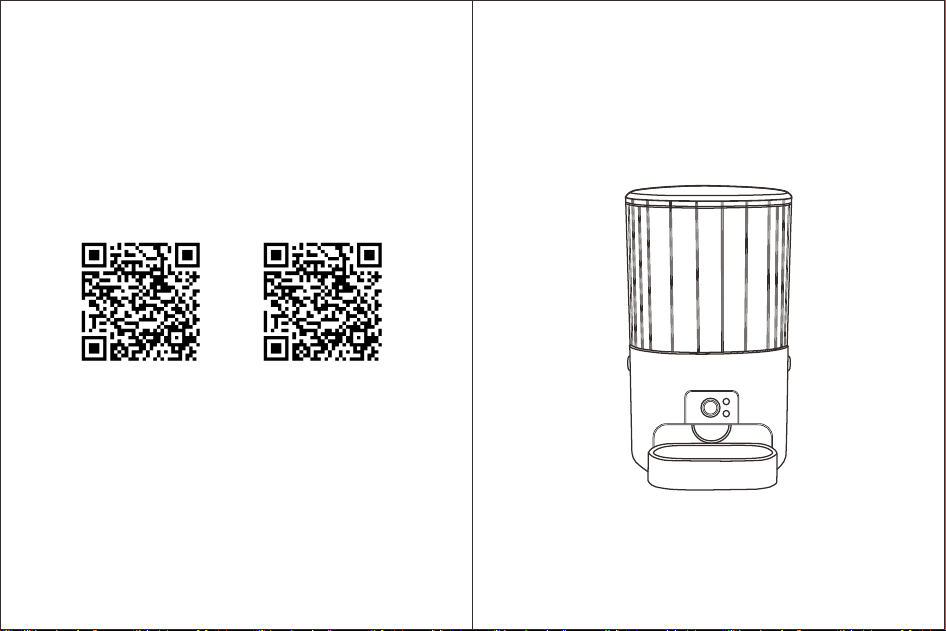
扫描包装上的二维码,或者应用市场下载。
打开“喜瓜”APP,点击【登录】,点击【国别地区】选择您的国别,输入手
机号,点击【获取验证码】,将手机收到的验证码输入后点击【登录/注册】
即可完成注册,点击【登录】即可成功登录APP。
1
Using guidance
使用引导
1.下载APP/Download the APP
2.登录-注册/Log in-Register
Open the “JoyPaw" APP, click on 【Login】, click on 【Country/Region】
to select your country, enter your mobile phone number, click on 【Get
Verification Code】, input the verification code received on your phone
and then click on 【Login/Registration】 to complete the registration.
Click on 【Login】 to successfully log in to the APP.
2)安卓手机可以通过华为、小米、OPPO、VIVO等应用商店搜 “喜瓜” 进
行下载。
Scan the QR code on the packaging, or download it from the app store。
1)苹果手机可进入 APP Store 搜索 “喜瓜” 进行下载。
1) You can search for "JoyPaw" in the App Store on your iPhone and
download it.
2) Android phones can be downloaded by searching for “JoyPaw” in
the application stores of Huawei, Xiaomi, OPPO, VIVO, etc.
给设备上电/Power on the equipment
2
3.开始设备/Start the equipment
进入APP后根据下图提示
4.添加设备/Add equipment
After entering the APP, follow the prompts shown in the picture below.
3
1. 国内版喜瓜APP下载
1. Overseas of JoyPaw APP
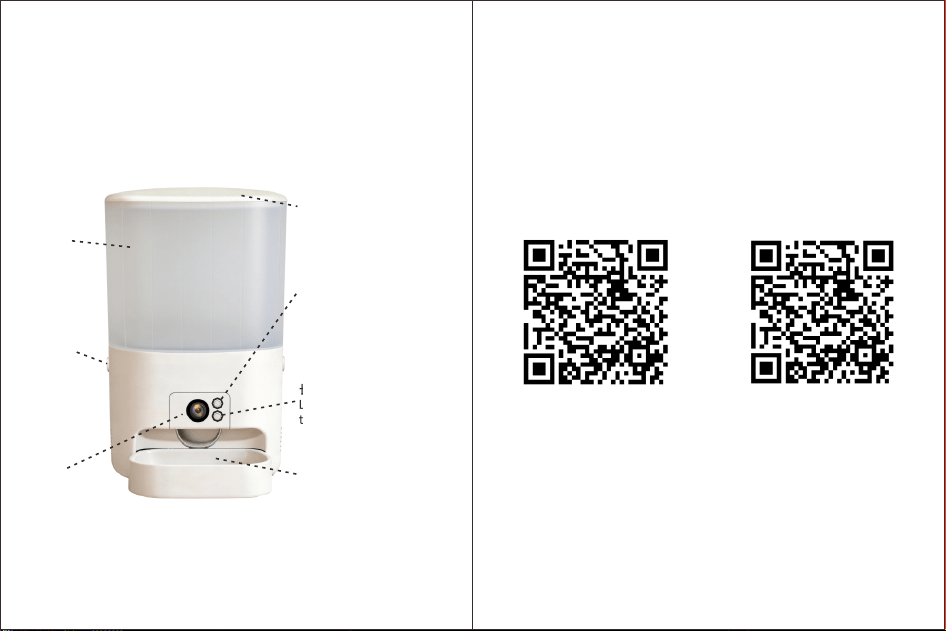
长按3秒解绑设备
Long press for 3 seconds
to unbind the device
长按3秒进入出粮模式
Long press for 3 seconds
to enter the grain output
mode
粮仓盖
Warehouse roof
食盆
Dish tray
摄像头
Camera
粮仓
Granary
锁扣
Hook or clasp
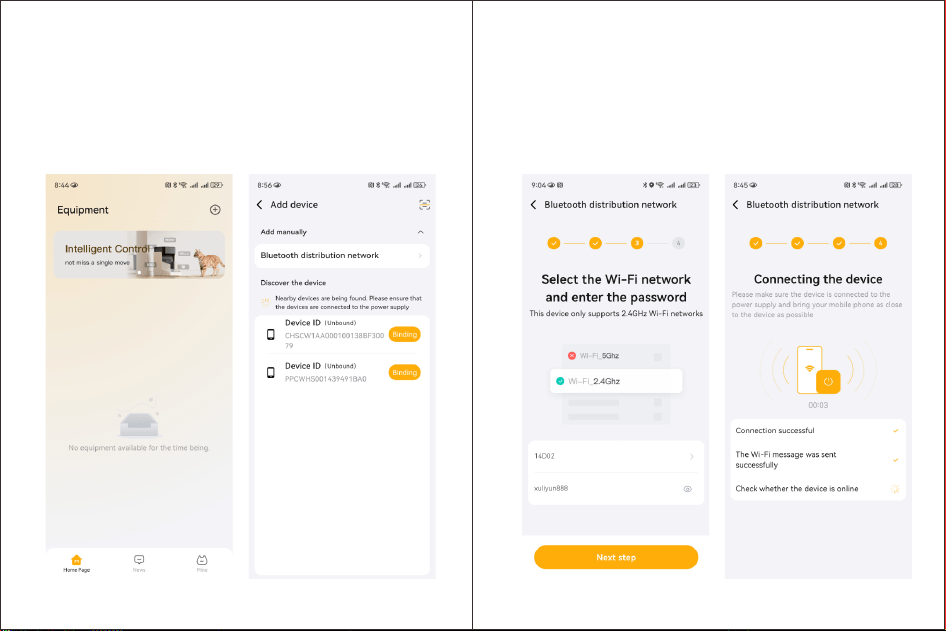
2. 在首页点击右上角“+”,
点击“添加设备”,进
入添加设备页面。
3. 扫描发现设备,点击绑定。
2. On the home page, click
the "+" button at the top
right corner, then click
"Add Device" to enter the
device addition page.
3. Scan the device and click "Bind".
4
4. 点击设备选择2.4G
频段网络配网添加。
4. Click on the device, select
the 2.4G frequency band
network, and add it to the
network configuration.
5
5. 正在连接设备。
5. Connecting the device.
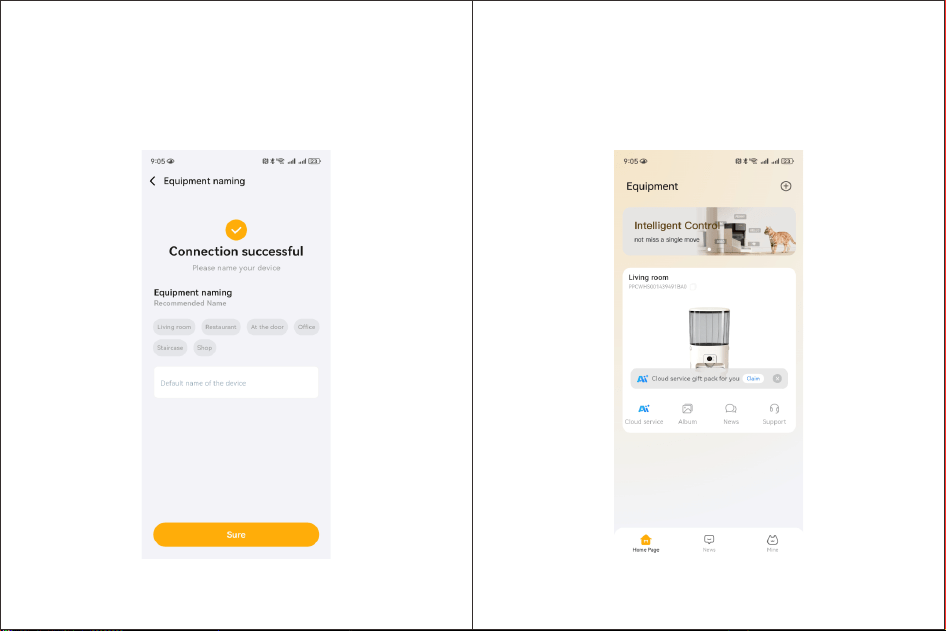
7. 连接成功。
7. Connection successful.
6
5.进入设备/Enter the equipment
APP添加设备成功后,点击【首页】设备卡片即可进入设备。
7
After successfully adding the device to the APP, click on the device card on
the "Home" page to enter the device.
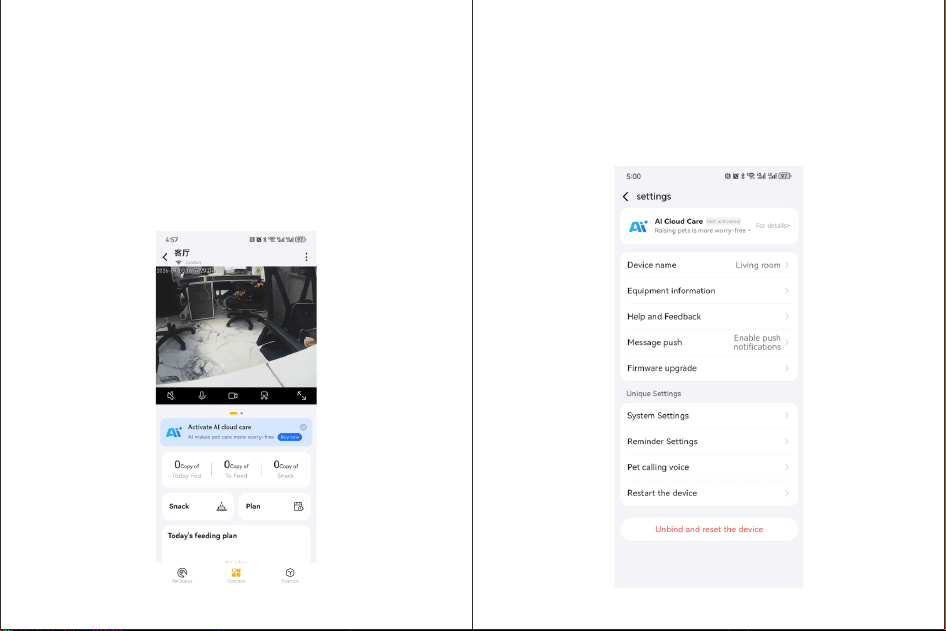
6.实事画面/Actual scene/image
用户进入设备操作页面,可观看当前宠物实时状态。
对讲:用户点击可与设备进行对讲。
录像:用户点击可录制当前实时画面并保存至图库。
截图:用户点击可截取当前画面。
Users can access the device operation page and view the real-time status of
their pets .
Intercom: Clicked by the user to communicate with the device.
Recording: Clicked by the user to record the current live scene and save it to the
gallery.
Screenshot: Clicked by the user to capture the current scene.
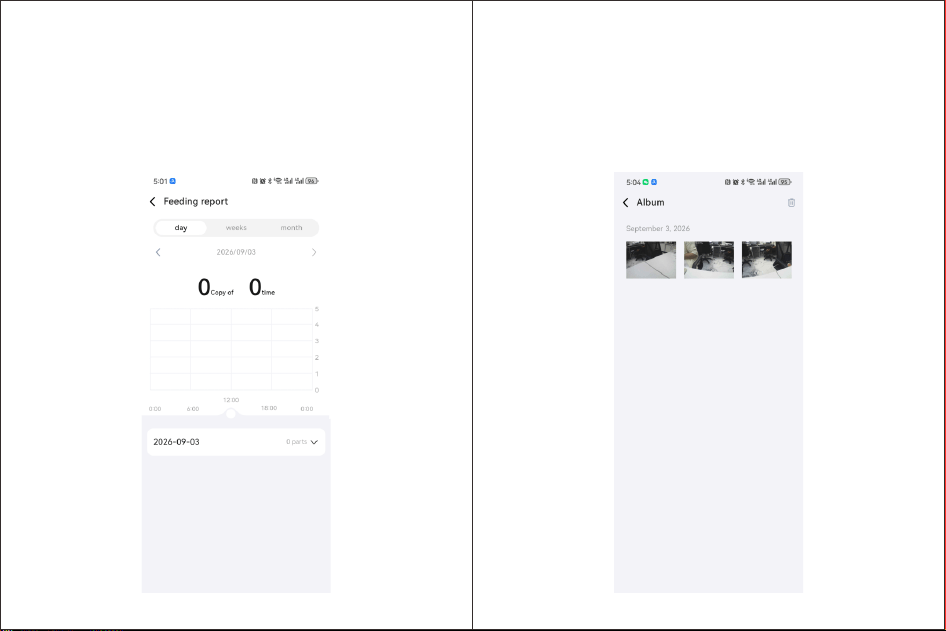
7.设备设置/Equipment settings
用户点击设备右上【三个点】进入设置页面对设备进行参数设置操作。
The user clicks the "three dots" on the top right of the device to enter the
settings page and perform parameter setting operations for the device.
8 9
10 11
8.喂食报告/Feeding Report
用户进入设备操作页面,可观看当前宠物实时状态。
When the user enters the device operation page, they can view the real-
time status of their pet.
保存的文件为用户【实时画面、回放】的录像、截图、【AI观察报告】的下
载。用户可点击文件进行预览,可长按某一文件,进入全选状态、删除操作。
9.图库/Gallery
The saved files include the video recordings, screenshots and download of
the "AI observation report" for the user's "live feed and playback". Users
can preview the files by clicking on them. They can also long press a file to
enter the full selection state and perform deletion operations.
12
13
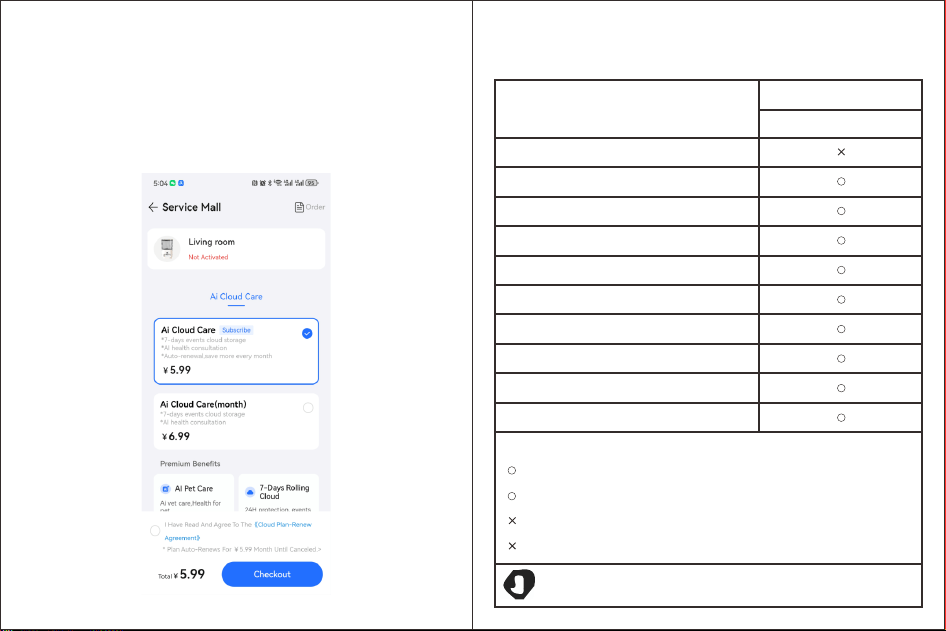
用户点击【云服务】,可以进入服务购买页面。
10.云服务/Cloud services
When the user clicks on "Cloud Services", they can access the service
purchase page.
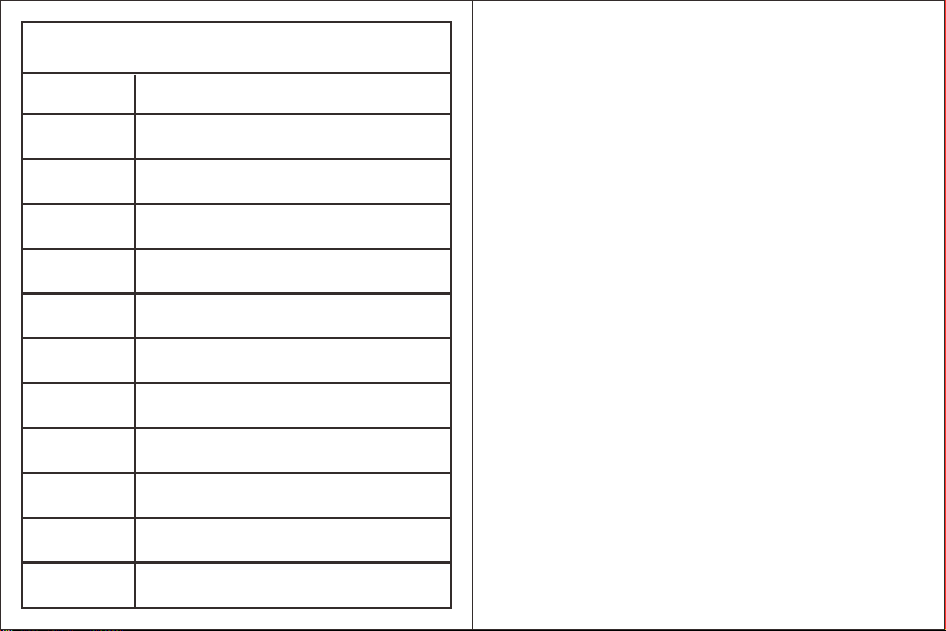
宠物喂食器
产品环保信息
产品中有害物质的名称及含量
部件名称
有 害 物 质
铅(Ph)
汞(Hg)
镉(Cd)
六价铬[Cr(VI]
多溴联苯(PBB)
多溴二苯醚(PBDE)
零苯二甲酸二(2-乙基)己脂(DEHP)
零苯二甲酸丁基苄酯(BBP)
零苯二甲酸二正丁酯(DBP)
零苯二甲酸二异丁酯(DIBP)
本表格依据SJ/T11346的规定编制
表示该有害物质在该部件所有均质材料中的含量均在GB/T26572规定的限量
要求以下。
本标识内数字表示产品在正常使用状态下的环保使用期限为10年。
Product environmental protection information
The names and contents of the harmful substances in the product
Harmful substances
Component Name
Pet Feeder
Lead (Ph)
Mercury (Hg)
Cadmium (Cd)
Hexavalent chromium [Cr(VI)]
Polybrominated Biphenyls (PBB)
Polybrominated diphenyl ethers (PBDE)
Zero phthalic acid di-(2-ethylhexyl) ester (DEHP)
Tributyl benzyl zero phthalate (BBP)
Zero Benzyl Adipate Di-N-butyl Ester (DBP)
Zero Benzyl Adipate Diisobutyl Ester (DIBP)
This table is compiled in accordance with the provisions of SJ/T11346
表示该有害物质至少在该部件的某一均质材料中的含量超出GB/T26572规定
的限量要求。
It indicates that the content of this harmful substance in all homogeneous materials of this
component is below the limit requirements stipulated in
It indicates that the content of this harmful substance in at least one homogeneous material of this
component exceeds the limit requirements stipulated in GB/T26572.
The numbers within this logo indicate the environmental protection usage period of the
product under normal use conditions, which is 10 years.
产品规格参数
参数项目
产品类型
APP
产品尺寸
产品重量
电源输出
设备接口
喇叭
工作温度
工作湿度
存储
清单
规格参数
宠物喂食器
喜瓜
高31.5cmx宽19.5cmx深33.5cm
1.64kg
5V/1A
DC电源输入
8Ω,1W
-20~50C
0~100%
云存储
主机x1、说明书x1、电源线x1、干燥剂x1
Product specification parameters
Parameter items
Product type
APP
Product size
Product weight
Power output
Equipment interface
Horn
Working temperature
Work humidity
Storage
List
Specification parameters
Pet Feeder
JoyPaw
Height: 31.5cm, Width: 19.5cm, Depth: 33.5cm
1.64kg
5V/1A
DC power input
8Ω,1W
-20~70C
0~100%
cloud storage
Main unitx1, instruction manualx1, power cordx1, desiccantx1
售后服务与支持
宠物喂食器三包凭证
本产品严格依据《中华人民共和国消费者权益保护法》《中华人民共和国产
品质量法》实行售后服务,服务内容如下:
1.本产品保修期自您的购机发票(电脑小票)日期或实际收货日期开始计算,
以两者中最早的日期为准,保修期为一年。若无购买凭证则自产品生产日
期开始计算,十五个月内为保修期。
注:上述各条款仅适用于在中华人民共和国境内(港、澳、台除外)销售的宠物喂
食器产品。
After-sales service and support
Pet Feeder Three-Year Warranty Certificate
This product is subject to after-sales service in strict accordance with the "Consumer
Rights Protection Law of the People's Republic of China" and the "Product Quality
Law of the People's Republic of China". The service details are as follows.
Note: The above terms are applicable only to pet feeding devices sold within the
territory of the People's Republic of China (excluding Hong Kong, Macao and Taiwan).
4.自收货之日起一年内,若本产品出现非人为损坏的性能故障,经宠物喂食
器售后服务中心检测确认,可免费享受维修服务。
1.The warranty period of this product starts from the date of your purchase invoice
(computer receipt) or the actual date of receipt, whichever is earlier. The warranty
period is one year. If there is no purchase certificate, it starts from the production
date of the product and lasts for 15 months.
2.自收货之日起7日内,若本产品出现非人为损坏的性能故障,经宠物喂食
器售后服务中心检测确认,可免费享受退货或换货。
2. Within 7 days from the date of receipt, if this product has a performance failure that
is not caused by human error, and is confirmed by the after-sales service center of
the pet feeder, you can enjoy a free return or exchange.
3.自收货之日起15日内,若本产品出现非人为损坏的性能故障,经宠物喂食
器售后服务中心检测确认,可免费享受换货或维修。
3. Within 15 days from the date of receipt, if this product experiences a performance
failure that is not caused by human error, and is confirmed by the after-sales service
center of the pet feeder, you can enjoy free replacement or repair.
4.Within one year from the date of receipt, if this product experiences a performance
failure that is not caused by human error, and is confirmed by the pet feeding device
after-sales service center for inspection, you can enjoy free repair services.
非保修条例
下列情况不属于免费维修范围,宠物喂食器售后服务中心可提供收费维修服务,敬请注意:
Non-warranty regulations
1.超过三包有效期限。
1.Exceeding the expiration date by more than three packages.
The following situations are not covered by the free repair service. The after-sales service
center of the pet feeder can provide paid repair services. Please note:
9.其他非产品本身设计、制造、质量等问题而导致的故障和损坏。
9. Faults and damages that are not caused by the design, manufacturing or quality of the
product itself.
2.退换货、送修途中由于运输、装卸所导致的损坏。
2. Damages incurred during the process of returning, exchanging or repairing the product
due to transportation or handling.
3.任何未经宠物喂食器授权许可的改装、拆卸、维修。
3. Any modification, disassembly or repair not authorized by the pet feeder
4.意外因素或人为行为导致产品损坏。
4. Product damage is caused by unexpected factors or human actions.
5.未按使用说明书要求安装、使用、维护、保管导致的产品故障或损坏。
5. Product malfunctions or damages caused by improper installation, use, maintenance
or storage in accordance with the instructions provided in the manual.
6.保修凭证与产品型号不符或保修凭证被涂改。
6. The warranty certificate does not match the product model or the warranty certificate
has been altered.
7.产品铭牌、SN条码、防拆标签被撕掉或被损坏,模糊不清无法识别。
7. The product nameplate, SN barcode, and tamper-evident label have been torn off or
damaged, making them illegible and unable to be identified.
8.由于不可抗因素(如火灾、地震、水灾等)而造成的故障或损坏。
8. Faults or damages caused by unforeseen factors (such as fires, earthquakes, floods,
etc).
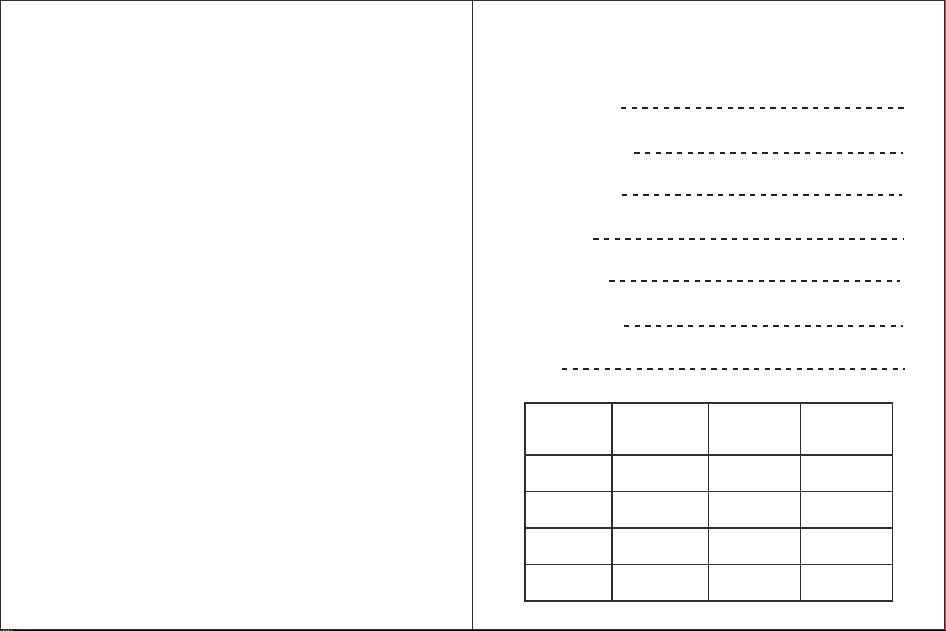
AI宠物喂食器维修卡
AI Pet Feeder Maintenance Card
购买日期:
Purchase Date:
购机地址:
Purchase location:
客户名称:
Customer Name:
电 话:
Telephone:
电子邮箱:
Email address:
联系地址:
Contact Address:
备 注:
Note:
送修记录 故障现象 受理日期 维修员签字
Repair Record Fault phenomenon
Maintenance
worker's signature
Acceptance Date
FCC警示语FCC FCC Warning Message
取得实验证明之低功率射频器材,非经核实,公司、商标或者使用者均不得擅自变更频率、
加大功率或变更原设计之特性及性能;低功率射频器材之使用不得影响飞航安全及干扰合法
通信;经发现有干扰现象时,应立即停止使用,并改善至无干扰时方能继续使用;前述合法通
信,指依电信管理法规定作业之无线电通信;低功率射频器材须忍受合法通信或工业、科学
及医疗用电波辐射性电机设备之干扰;应避免影响附近雷达系统之操作。
The low-power radio frequency equipment that has been experimentally proven must not be changed
in frequency, power, or its original design characteristics and performance without verification.
Neither the company, the trademark, nor the user is allowed to do so. The use of low-power radio
frequency equipment must not affect flight safety or interfere with legal communications. If
interference is detected, it should be immediately stopped and improved until there is no interference
before it can be used again. The aforementioned legal communications refer to radio communications
operating in accordance with the Telecommunications Management Law. Low-power radio frequency
equipment must withstand interference from legal communications or electrical equipment for
industrial, scientific, and medical use that emits electromagnetic radiation. It should avoid affecting
the operation of nearby radar systems.

FCC WARNING
This device complies with part 15 of the FCC Rules. Operation is subject to the following two
conditions: (1) this device may not cause harmful interference, and (2) this device must accept
any interference received, including interference that may cause undesired operation.
Any changes or modifications not expressly approved by the party responsible for compliance
could void the user's authority to operate the equipment.
NOTE: This equipment has been tested and found to comply with the limits for a Class B
digital device, pursuant to Part 15 of the FCC Rules. These limits are designed to provide
reasonable protection against harmful interference in a residential installation. This equipment
generates, uses and can radiate radio frequency energy and, if not installed and used in
accordance with the instructions, may cause harmful interference to radio communications.
However, there is no guarantee that interference will not occur in a particular installation.
If this equipment does cause harmful interference to radio or television reception,
which can be determined by turning the equipment off and on, the user is encouraged to try to
correct the interference by one or more of the following measures:
-- Reorient or relocate the receiving antenna.
-- Increase the separation between the equipment and receiver.
-- Connect the equipment into an outlet on a circuit different
from that to which the receiver is connected.
-- Consult the dealer or an experienced radio/TV technician for help.
To maintain compliance with FCC’s RF Exposure guidelines, This equipment should be
installed and operated with minimum 20cm distance between the radiator and your body: Use
only the supplied antenna.