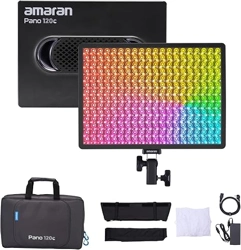
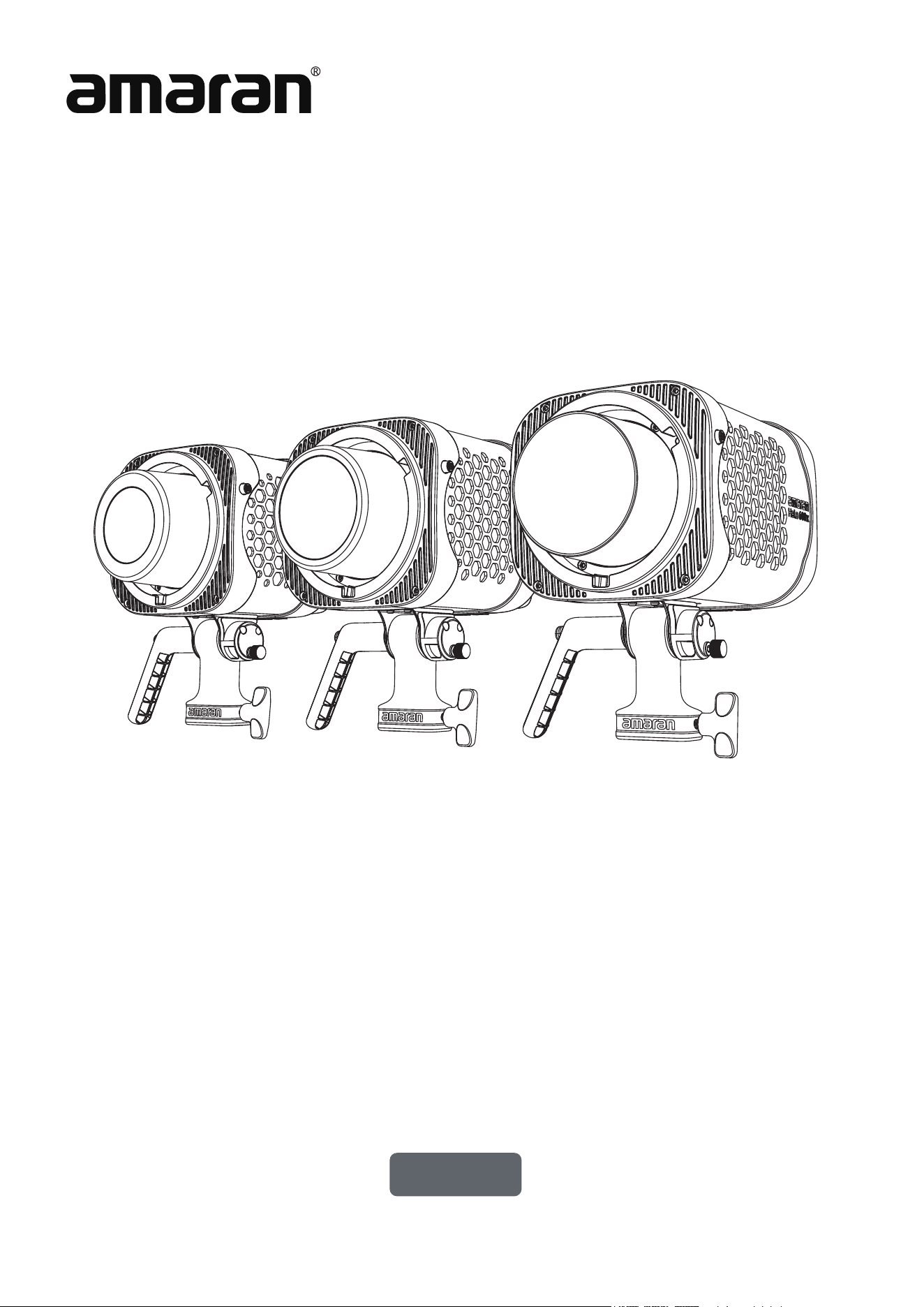
amaran Halo 200x/300x/600x
Product Manual
English

02
Introduction............................................................................................................................................................03
Components List.................................................................................................................................................04
Product Overview...............................................................................................................................................05
Operations .............................................................................................................................................................07
1. Power Supply.............................................................................................................................................07
2. Power On/Off ...........................................................................................................................................07
3. Light Installation ......................................................................................................................................08
4. Bowens Mount Modifier Installation..............................................................................................08
5. Main Menu..................................................................................................................................................09
5.1. CCT .......................................................................................................................................................09
5.2. FX ..........................................................................................................................................................09
5.3. Bluetooth Reset..............................................................................................................................09
5.4. Studio Mode......................................................................................................................................10
5.5. Language.............................................................................................................................................10
5.6. DMX Control Settings....................................................................................................................11
5.7. Fan Mode ............................................................................................................................................ 12
5.8. Firmware Upgrade .........................................................................................................................12
5.9. Pairing via NFC ................................................................................................................................13
Using the amaran App ......................................................................................................................................14
Specifications .......................................................................................................................................................15
Photometrics ........................................................................................................................................................18
Declaration of Toxic and Hazardous Substances in Electronic Information ........................21
IC ............................................................................................................................................................................... 22
FCC ..........................................................................................................................................................................23
UL ..............................................................................................................................................................................24
CSA .......................................................................................................................................................................... 25
Important Safety Instructions ......................................................................................................................26
Disclaimer ..............................................................................................................................................................28
Table of Content

03
Introduction
Thank you for purchasing �the amaran Halo 200x, amaran Halo 300x, and amaran Halo
600x.
The amaran Halo 200x / 300x / 600x series is designed for creators who require higher
output to illuminate medium to large shooting spaces. These bi-color COB lights deliver
powerful, even illumination in a compact form. With wide, soft coverage and ultra-bright, ac-
curate output, it's the ideal entry point for lighting larger spaces with consistency precision.
Its compact footprint makes it easy to carry and fast to set up – whether you’ re shooting
podcasts, livestreams, product videos, or studio content, the amaran Halo 200x, 300x, and
600x deliver reliable performance that helps simplify your workflow and achieve high-quali-
ty results with ease.
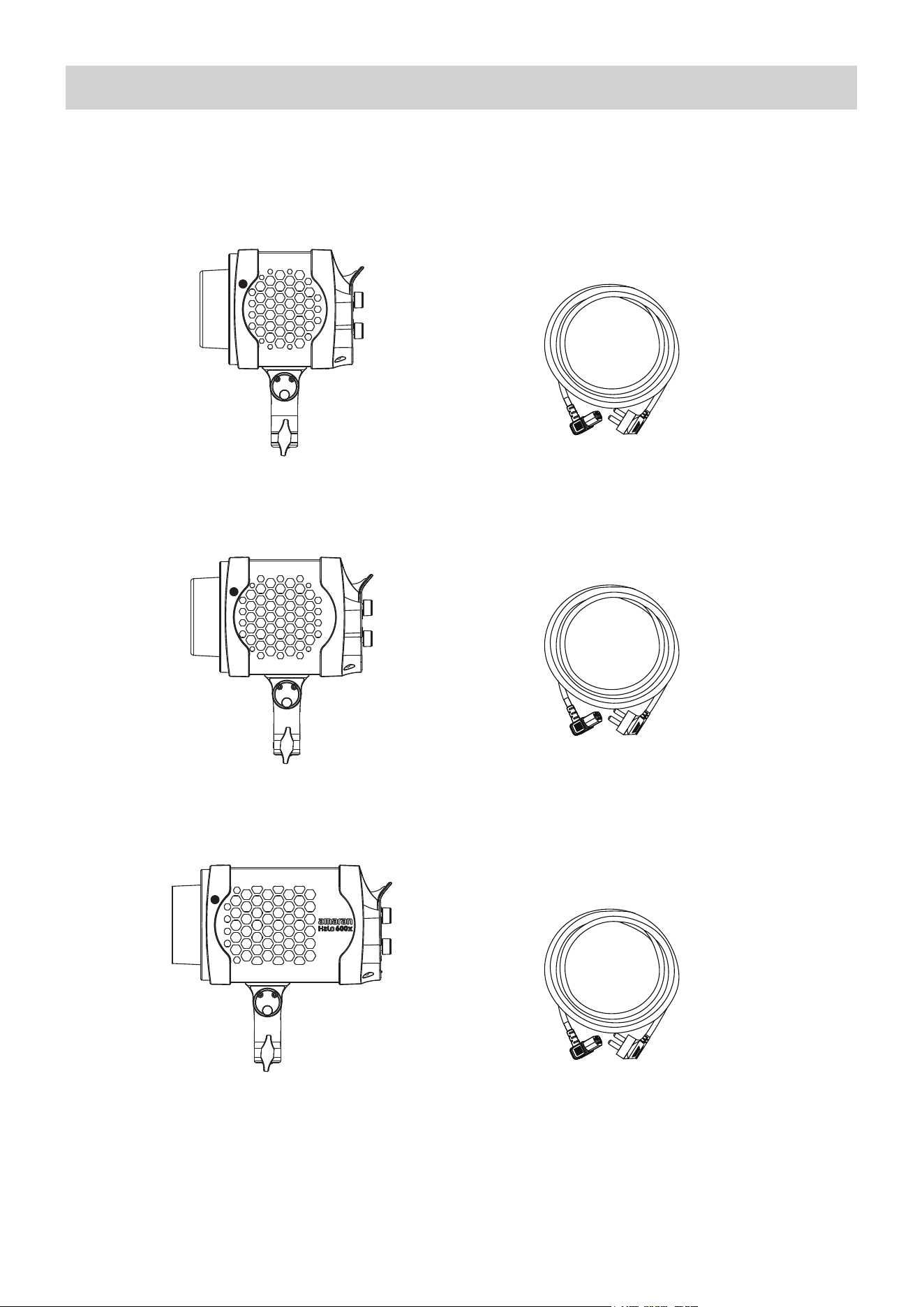
Please make sure all accessories listed below are complete before using. If not, please con-
tact your sellers immediately.
04
Components List
Tip: The illustrations in the manual are diagrams for reference only. Due to the continuous development of new
versions of the product, if there are any differences between the product and the user manual diagrams, please refer
to the product itself.
amaran Halo 200x x1
amaran IEC C13
AC Power Cable (5m) x1
amaran Halo 300x x1
amaran IEC C13
AC Power Cable (5m) x1
amaran Halo 600x x1
amaran IEC C13
AC Power Cable (5m) x1
amaran Halo 200x
amaran Halo 300x
amaran Halo 600x
05
Product Overview
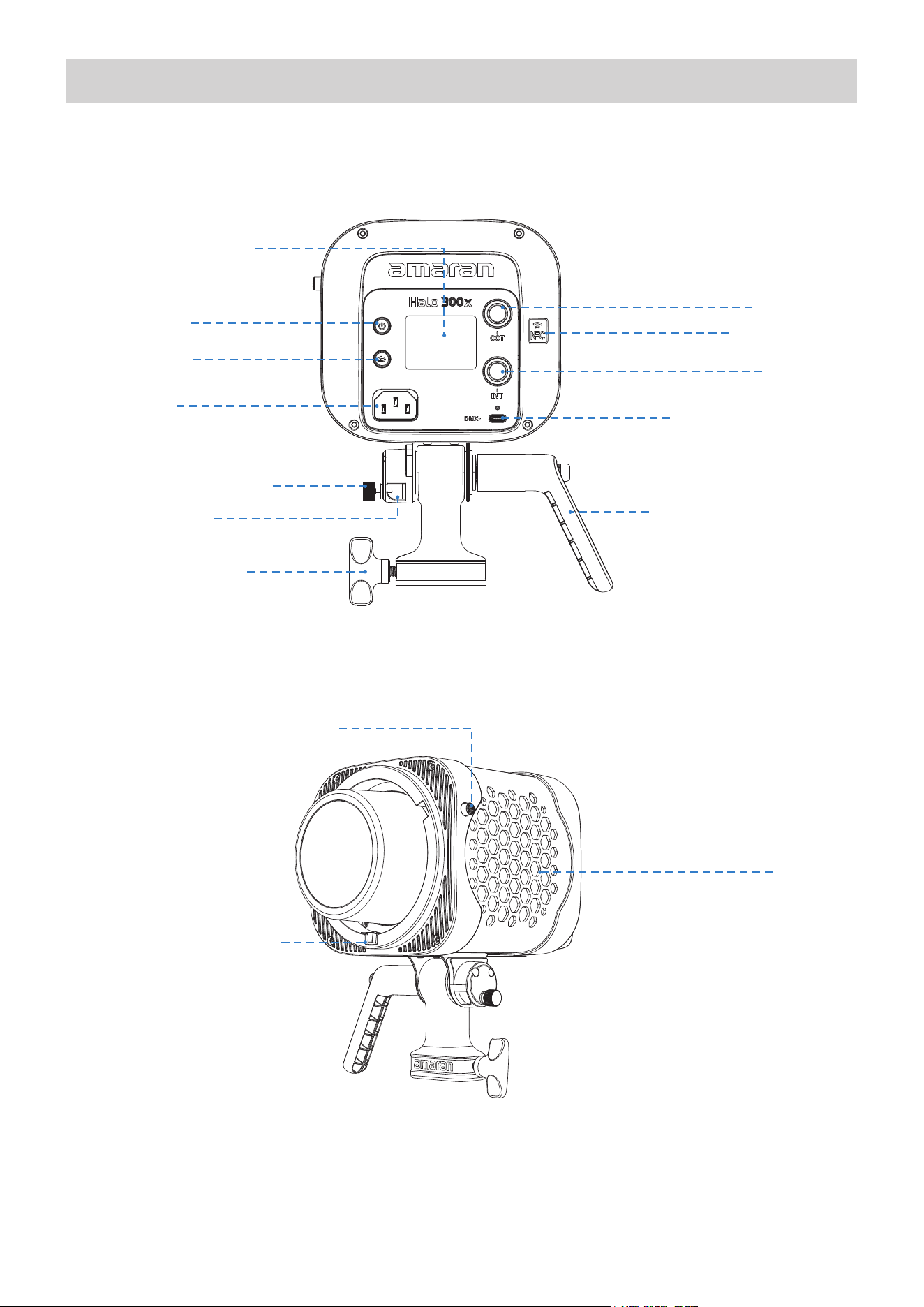
CCT Knob
NFC Antenna
INT Knob
USB-C to DMX Port
Fan Vent
Tilt Adjustment Handle
Power Button
Return Button
Display Menu Screen
Bowens Mount Release Button
Power Input
(AC IN 100–240V)
Umbrella Locking Knob
Stand Locking Knob
Full-Size Bowens Mount
Umbrella Holder
06
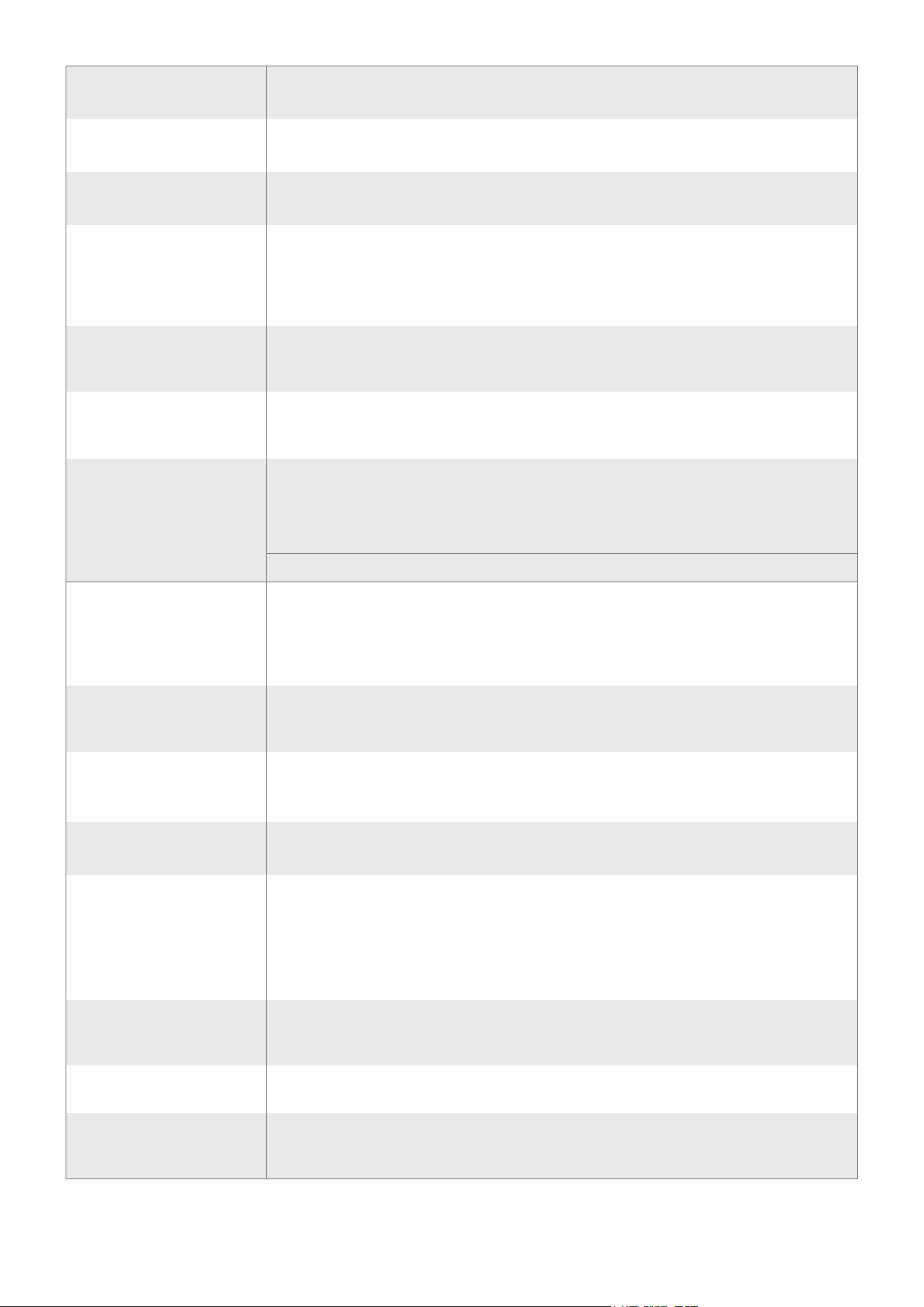
Power Button
Return Button
Display
Menu Screen
CCT Knob
INT Knob
Power Input
(AC IN 100–240V)
USB-C to DMX Port
Tilt Adjustment
Handle
Stand Locking
Knob
Umbrella Holder
Umbrella
Locking Knob
NFC Antenna
Full-Size
Bowens Mount
Bowens Mount
Release Button
Fan Vent
Press to turn the light on, press again to turn the light off.
Click to return to the previous menu screen.
Displays settings and status of your light.
Tightens to secure the umbrella shaft and prevent slippage.
Press to release the Bowens Mount accessory.
In CCT Mode, rotate to adjust CCT. In other menu interfaces,
rotate to toggle the menu or adjust values and lighting settings.
Press the knob to confirm parameters.
Connect the USB-C to 5-Pin DMX In&Out Adapter* to achieve
wired DMX control. This fixture’ s USB-C port does not support
power delivery or firmware updates.
Used for NFC pairing.When a smartphone is brought close to the
light's NFC area, it can quickly trigger a Bluetooth connection, en-
abling seamless pairing and control via the amaran app without
the need to manually search for the device.
Compatible with a variety of full-size, standard Bowens Mount
accessories.
Helps the light dissipate heat. Please do not block the fan vent
when using the light.
Compatible with umbrella accessories such as soft umbrellas
or reflectors with a shaft diameter of up to 9mm.
Secures the fixture to the light stand and prevents wobbling or
detachment.
Supports a universal voltage range to provide stable mains
power to the light.
In any interface, rotate to adjust brightness. Press to switch to
CCT mode.
Used to adjust the tilt angle of the fixture. Turn clockwise to
lock and counterclockwise to loosen.Pull out the handle to re-
position its angle for easier operation from different directions.
*The amaran USB-C to 5-Pin DMX In&Out Adapter is sold separately.
1. Power Supply
07
Operations
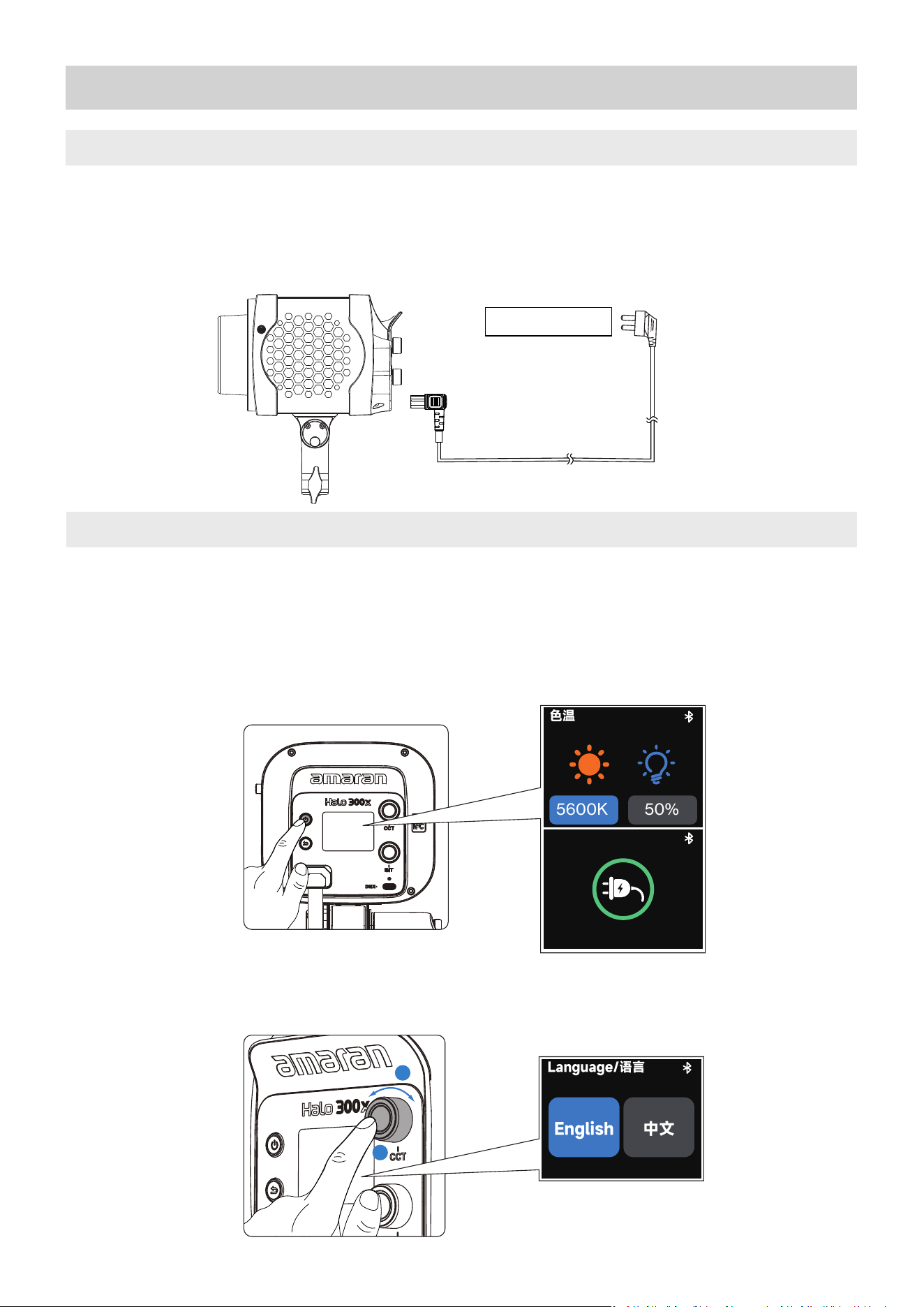
Insert one end of the AC power cable into the light’s AC power input port, and the other end
into an AC power outlet to supply mains power to the light. Ensure the plugs are securely
connected to ensure proper operation.
1.After connecting to the power supply, short press the power button to turn on the device,
and short press it again to turn off the device. The default mode is CCT mode.
The Power On icon will appear on the menu screen after connecting to power, and will dis-
appear after 30 minutes or when the fixture is turned on.
2.You can select your preferred language when you turn the light on for the first time.
Rotate the CCT knob to select your language. Click CCT Knob to confirm.
2. Power On/Off
AC 100V-240V
0
50%
5600K
色温
0
2
1
English
中文
Language/语言
08
*The amaran Reflector shown in the illustration is sold separately and is not included in the standard package.
*When replacing with other accessories, please ensure compatibility with the fixture. For detailed compatibility infor-
mation, refer to the official website.
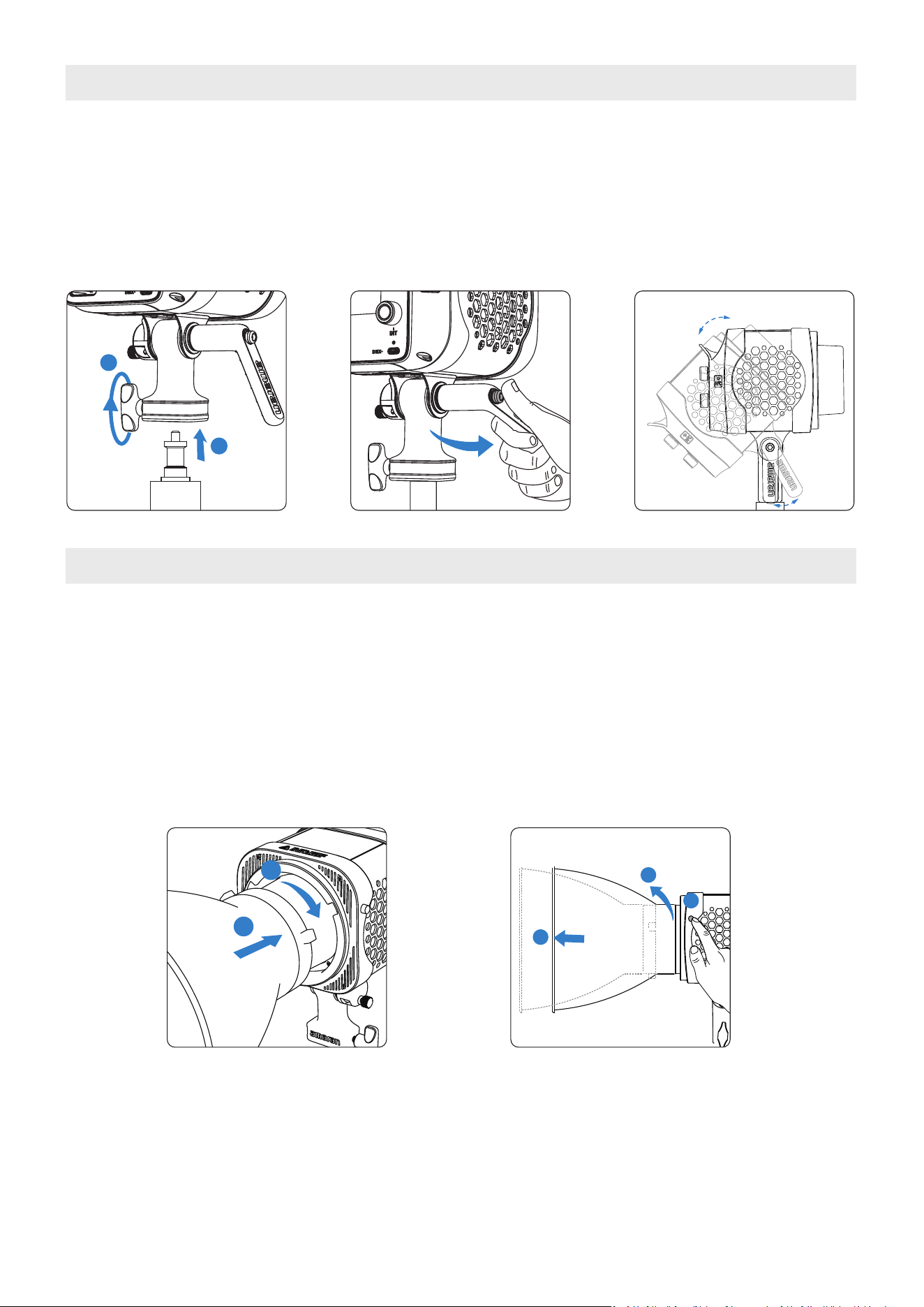
With the mounting bracket installed onto the light, place the end of the mounting bracket
onto the light stand and turn the locking knob to secure into place. Adjust the angle of the
light and turn the tilting bracket knob to secure into place. Pull out the handle to reposition its
angle for easier operation from different directions.
3. Light Installation
2.Modifier Removal: Press and hold the Bowens Mount Release Button on the corner of the
light. Rotate the modifier counterclockwise to remove.
1.Modifier Installation: Align the Bowens Mount pins with the Bowens Mount of the fixture.
Insert the modifier and rotate clockwise. Installation is complete when the Bowens Mount
Release Button pops out.
4. Bowens Mount Modifier Installation
1
2
1
2
2
3
1
Modifier Installation Modifier Removal
09
5. Main Menu
5.1. CCT
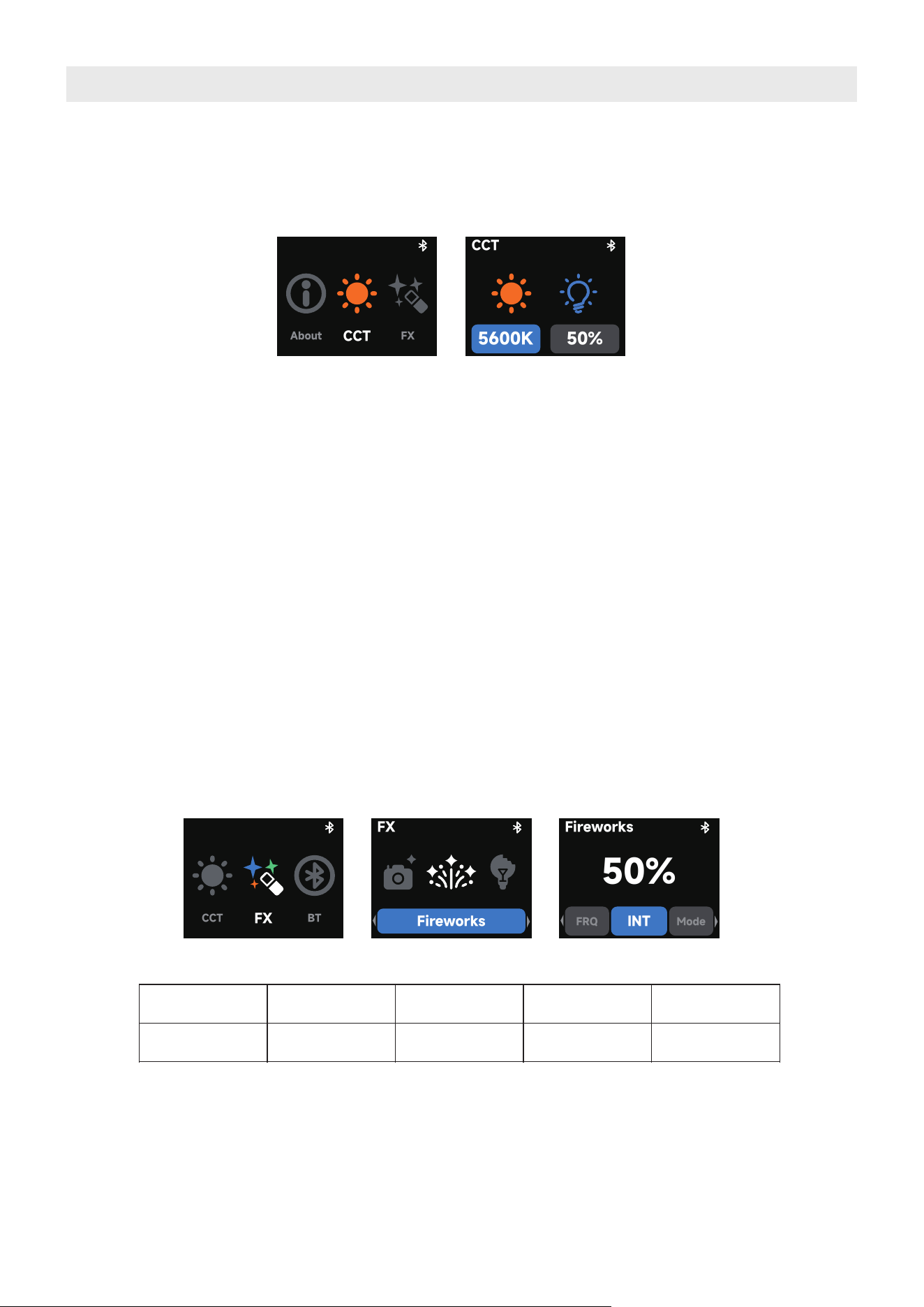
After powering on, the fixture is in CCT mode by default. Rotate the CCT knob on top to
adjust the color temperature. Rotate the INT knob on the bottom to adjust the brightness.
5.2. FX
In CCT Mode, press the Back button to return to the main menu.
Rotate the CCT knob and press it to select and enter Effects Mode from the main menu.
Once in Effects Mode, rotate the CCT knob to browse the available effects, and press the knob to
enter the selected effect settings.
1. INT (intensity): Adjust your light's brightness from 0%-100%.
2. CCT (Correlated Color Temperature): Adjust your light's color temperature from warm
white (2,700K CCT) to cool white (6,500K CCT).
3. Short press the INT knob to quickly switch to CCT Mode, allowing fast adjustment of color
temperature and brightness.
4. In any interface, rotating the INT knob directly adjusts the brightness of the fixture.
Supported Lighting Effects:
Fireworks Faulty Bulb
Lightning
TV Pulsing
Strobe
Explosion
Fire
Paparazzi /
5.3. Bluetooth Reset
Rotate and press the CCT knob to enter BT mode from the main menu. Hold down on the
CCT knob until the end of the progress bar. Release the knob to cancel.
CCT
About
FX
50%
5600K
CCT
FX
CCT
BT
FX
Fireworks
50%
Fireworks
INT
FRQ
Mode
10
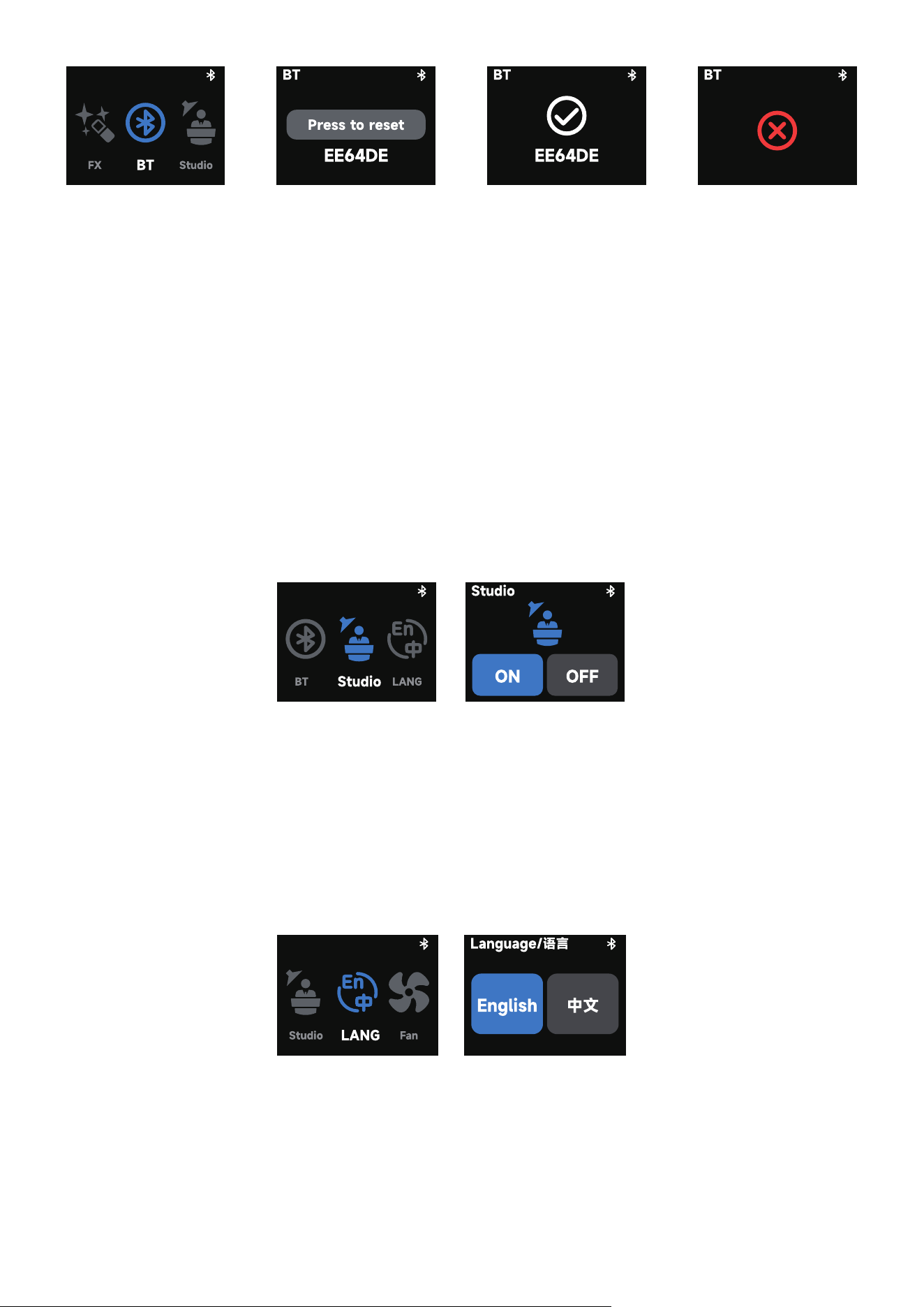
1. Bluetooth reset is successful.
2. Bluetooth reset is unsuccessful. Please reset Bluetooth again.
5.5. LANG (Language)
In the main menu, rotate the CCT control knob to select Language, then press the knob to
enter the settings interface.
In this menu, rotate the CCT knob to switch between English and Chinese. Press the confirm
button to confirm your selection.
5.4. Studio Mode
In the main menu, rotate the CCT knob to select Studio Mode, then press the knob to enter
the settings interface.
In this mode, rotate the CCT knob to toggle between On and Off, and press the knob to con-
firm the selection.
When Studio Mode is enabled, the light will automatically turn on upon connecting to power,
without the need to manually press the power button.
DMX
Fan
About
Status Screen
DMX
Address
DMX
Profile
DMX
11
5.6. DMX Control Settings
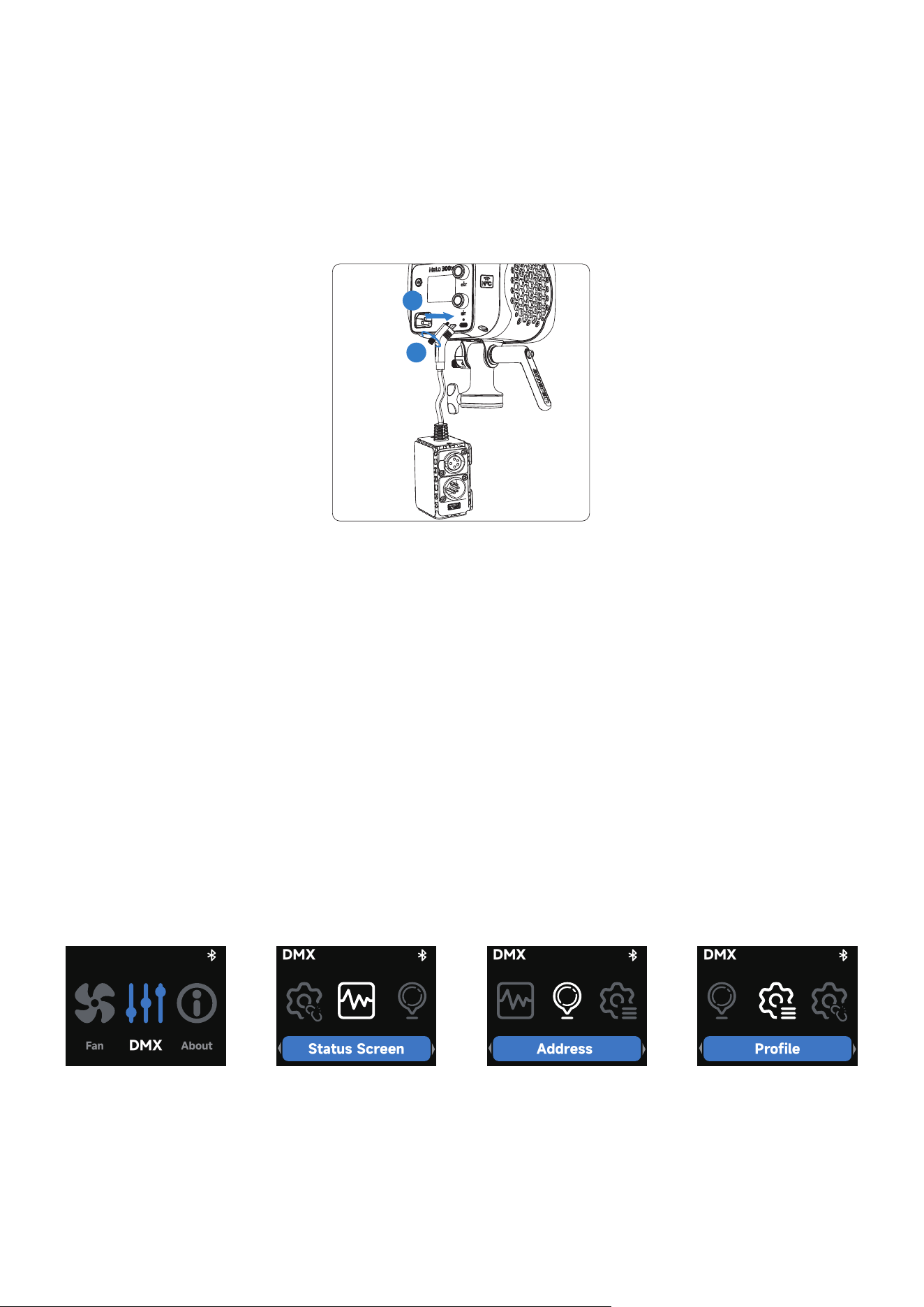
Insert the USB-C connector of the amaran USB-C to 5-Pin DMX In&Out Adapter into the
USB-C port of the fixture, and tighten the locking screw to secure the connection. Velcro
straps can be used to secure the adapter in an appropriate position, ensuring stability during
use.The USB-A port on the adapter provides a 5V/1A power output.
To enter DMX Mode, follow these steps:
● Rotate the CCT knob and press it to select “DMX Mode” from the main menu.
● Once inside, rotate the knob to toggle between the following options:
○ DMX Status Display: View the current DMX address and selected DMX configuration.
○ DMX Address: Set the DMX start address of the fixture, ranging from 1 to 512.
○ DMX Signal Loss Behavior: Choose how the fixture responds to DMX signal loss. Options
include: Hold Last State, Instant Off, Fade Out, or Hold for 2 Minutes then Fade Out.
○ DMX Profile: Select the desired DMX channel profile. For detailed configuration files, please
refer to the official documentation.
2
1
*The amaran USB-C to 5-Pin DMX In&Out Adapter is sold separately.
About
CCT
DMX
VER
SW:V1.0
MAR 4 2026 09:00:00
HW:V1.0
12
5.7. Fan Mode
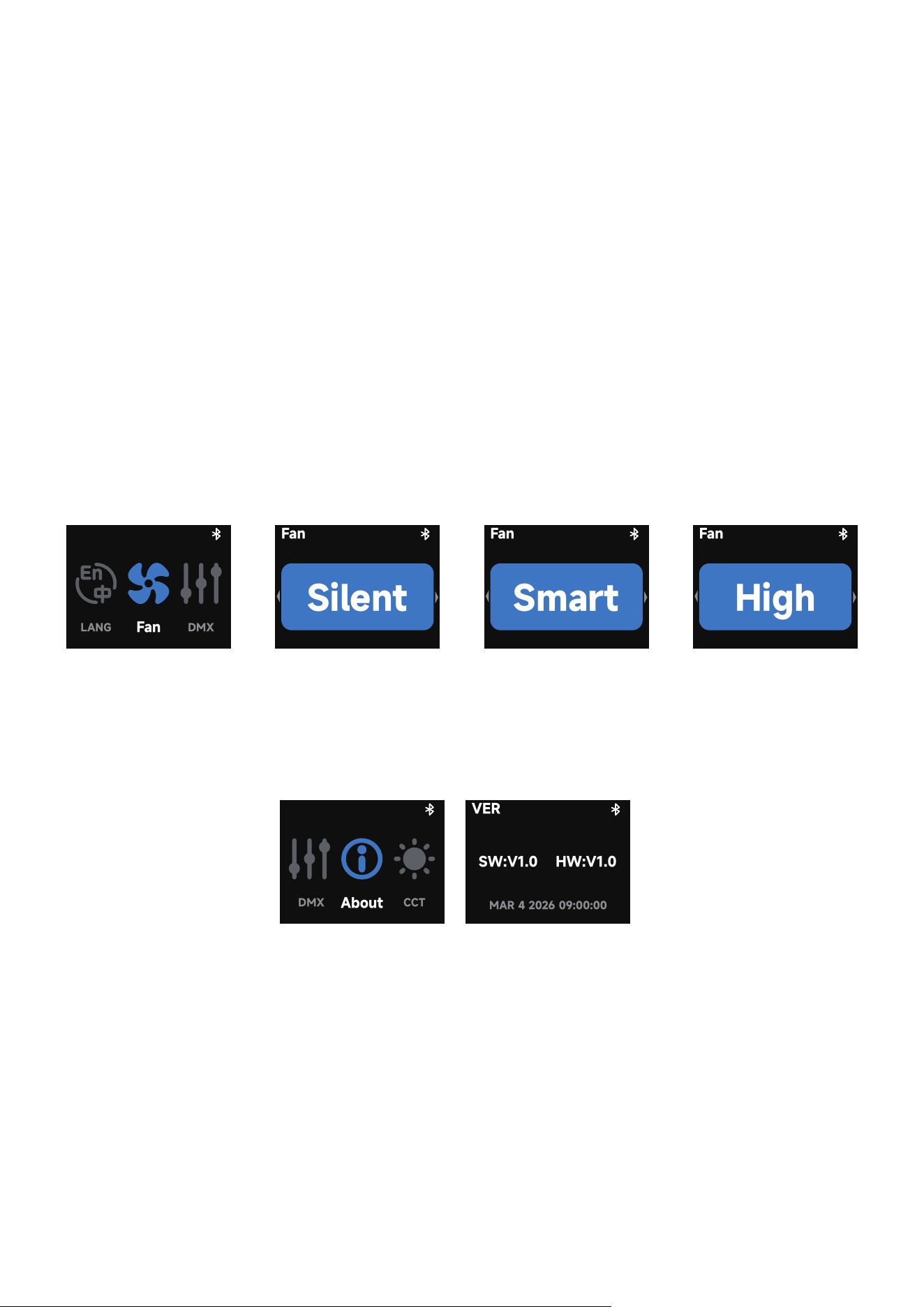
In the main menu, rotate the CCT knob to select Fan Mode, then press the knob to enter the
settings interface.
In Fan mode, rotate the dial to toggle between Silent, Smart and High fan mode. Press the
knob to confirm your settings.
Silent Mode: The fan will be completely turned off, and the light will not produce any noise. To
ensure safe operation, the amaran Halo 200x maximum power will be limited to 40W, the
amaran Halo 300x maximum power will be limited to 42W.
Smart Mode: The fan speed will automatically adjust according to the temperature of the
light.
High Mode: The fan runs at maximum speed to provide enhanced cooling performance, ideal
for high-load scenarios.
5.8. Firmware Update
Firmware updates can be performed online via the amaran app, ensuring your device stays
up to date with the latest features and performance improvements.
Fan
LANG
DMX
Fan
Silent
Fan
Smart
Fan
High
13
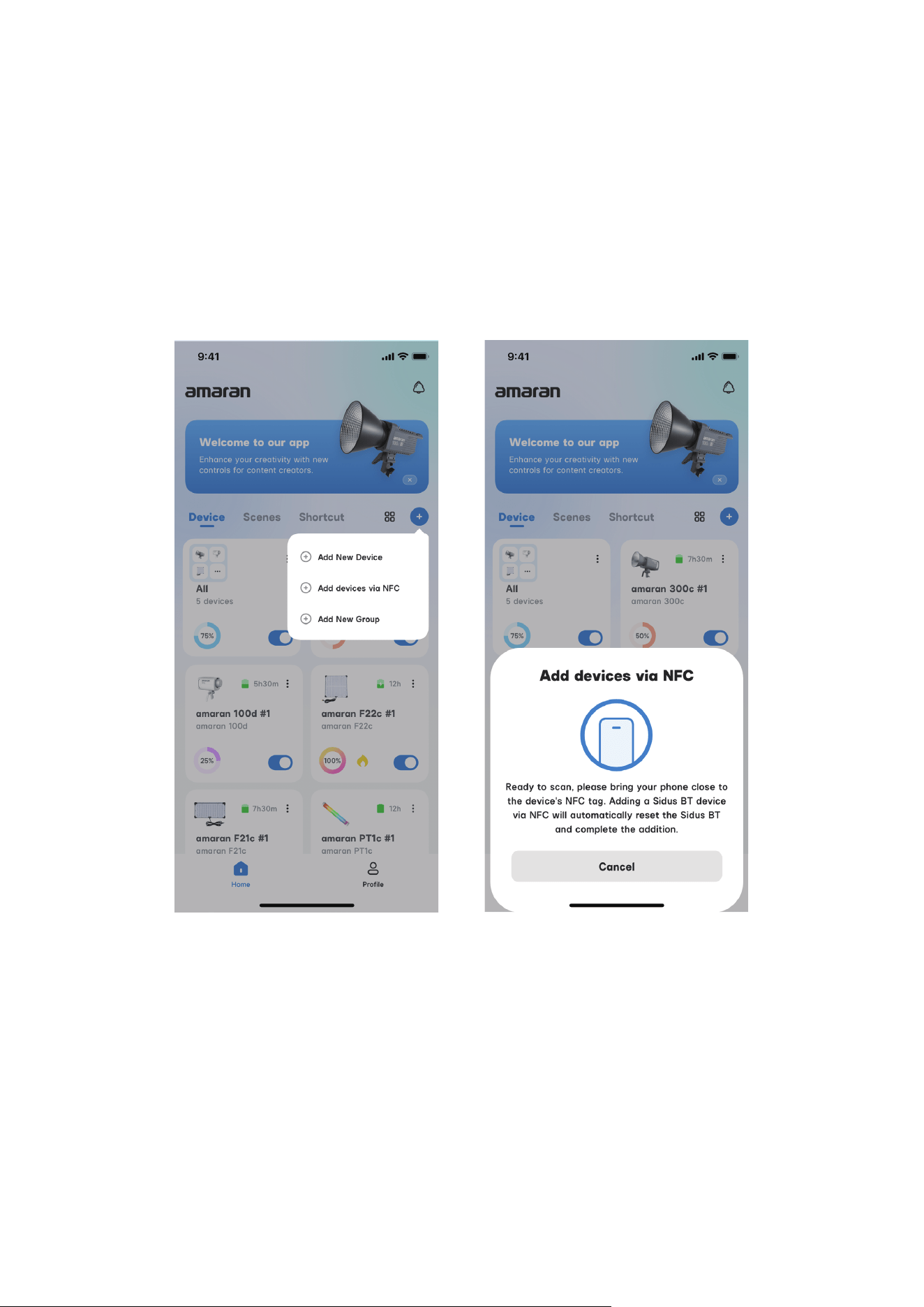
5.9. Pairing via NFC
To pair your light to the amaran app via NFC, open the amaran mobile app, tap the + sign, and
select NFC Add Device. Place the NFC sensor area of your phone to the fixture's NFC tag.
Hold your phone still until the fixture has been detected and successfully paired before
removing your phone.
Even if the light is powered off, pairing via NFC is still supported. The light will automatically
connect to the app once it is turned on.
14
You can download the amaran mobile app from the iOS App Store, Google Play Store, and
oher platforms for enhancing the functionallty of the light.You can download the amaran
desketop app for Mac and Windows from the amaran website. Please visit amarancre-
ators.com for more detalls on how to use the app to contrdl your amaran Iights.
Using the amaran App
amaran APP amarancreators.com
15
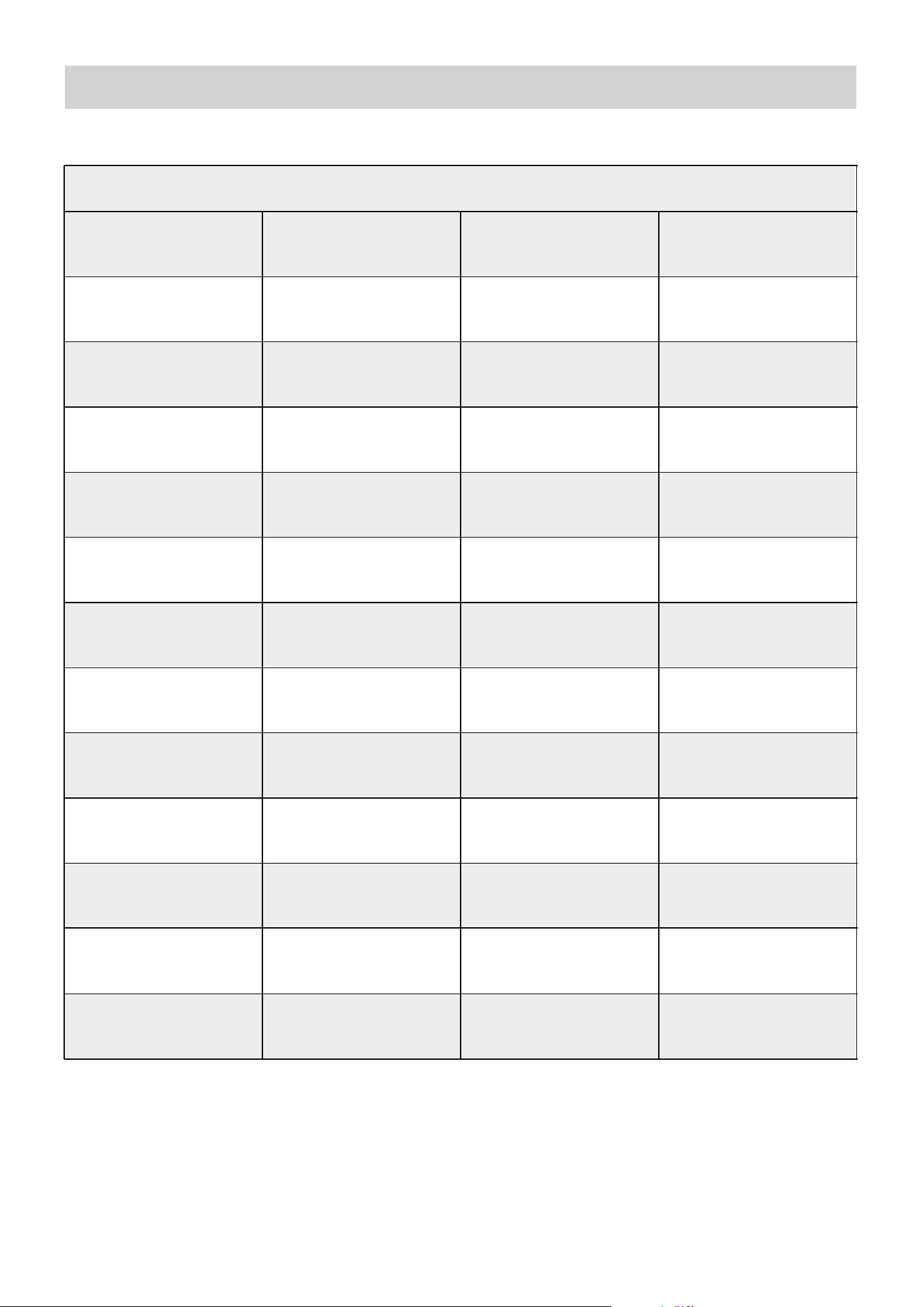
Specifications
Power Consumption Power Output
CCT Luminous Flux
CRI TLCI
Operating Voltage
Power Supply
Methods
Beam Angle IP Rating
Control Methods
Firmware
Upgradeable
Screen Type
Wireless Operating
Rang (Bluetooth)
Cooling Method
Operating
Temperature
200W(Max) 179W(Max)
2,700K - 6,500K
18,100 lumens
@5600K
96+
94
97+
102
84
AC 100V - 240V/
50-60Hz
74
AC Power Supply
On-board,amaran
App, *DMX Control
TFT ≤80m / ≤262.5ft
Active Cooling
Max Noise Level
@ Smart Mode
≤28dBA @25℃
Storage
Temperature
-20ºC - 80ºC /
-4ºF - 176ºF
-10°C - 40°C /
14°F - 104°F
Fixture Dimensions
(with Mount)
Fixture Dimensions
(without Mount)
18.0 × 14.1 × 16.5 cm
7.09 × 5.55 × 6.50 in
18.0 × 14.1 × 13.3 cm
7.09 × 5.55 × 5.24 in
Fixture Weight
AC Power Cable
Length
5 m / 16.40 ft1.95 kg / 4.30 lb
TM-30Rf(Average) TM-30Rg(Average)
SSI(P3200) SSI (D56)
85° IP20
amaran App
amaran Halo 200x
16
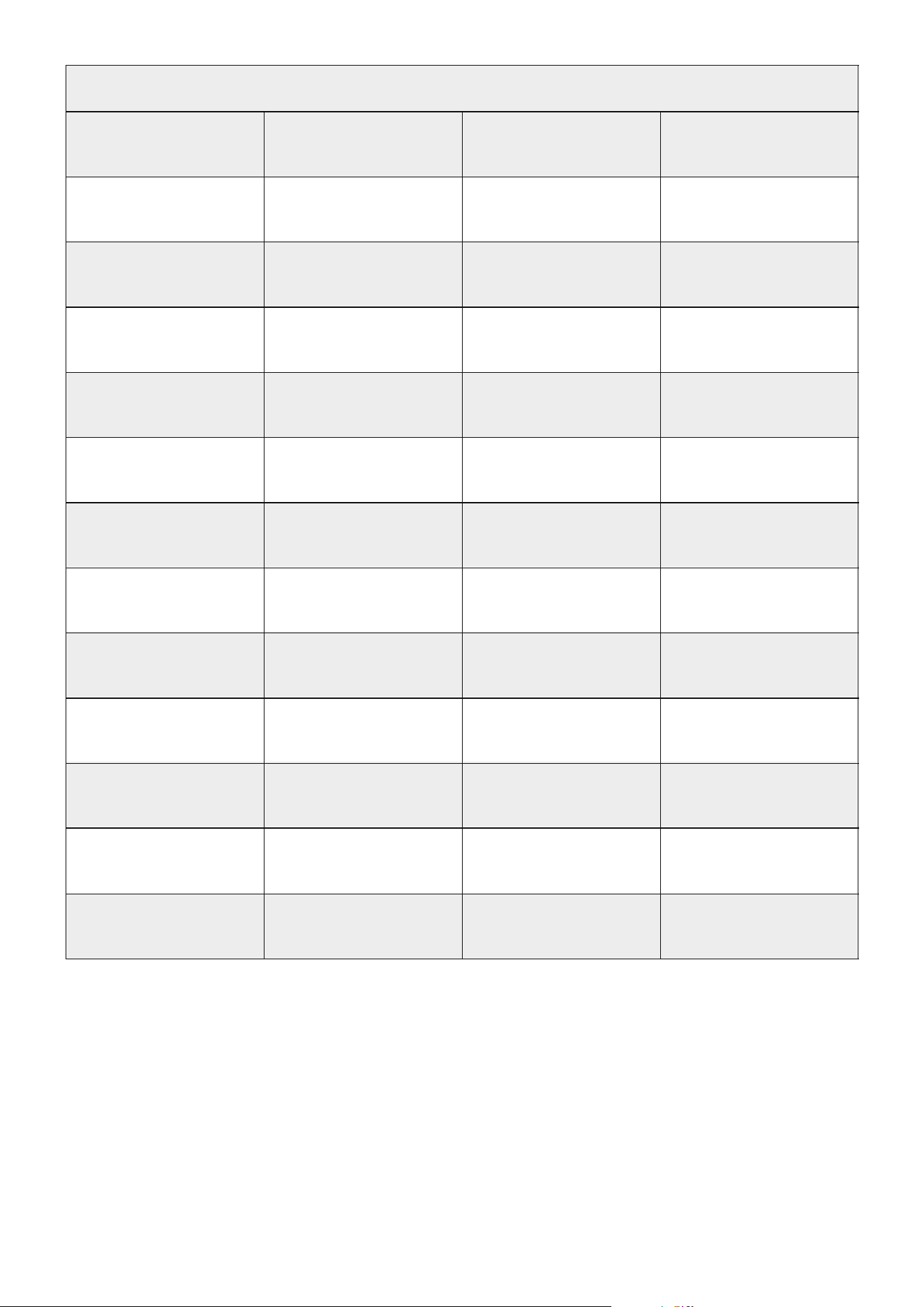
Power Consumption Power Output
CCT Luminous Flux
CRI TLCI
Operating Voltage
Power Supply
Methods
Beam Angle IP Rating
Control Methods
Firmware
Upgradeable
Screen Type
Wireless Operating
Rang (Bluetooth)
Cooling Method
Operating
Temperature
305W(Max) 276W(Max)
2,700K - 6,500K
29,954 lumens
@5600K
96+
94
97+
102
84
AC 100V - 240V/
50-60Hz
74
AC Power Supply
On-board,amaran
App, *DMX Control
TFT ≤80m / ≤262.5ft
Active Cooling
Max Noise Level
@ Smart Mode
≤28dBA @25℃
Storage
Temperature
-20ºC - 80ºC /
-4ºF - 176ºF
-10°C - 40°C /
14°F - 104°F
Fixture Dimensions
(with Mount)
Fixture Dimensions
(without Mount)
22.0 × 14.1 × 16.5 cm
8.66 × 5.55 × 6.50 in
22.0 × 14.1 × 13.3 cm
8.66 × 5.55 × 5.24 in
Fixture Weight
AC Power Cable
Length
5 m / 16.40 ft2.30 kg / 5.07 lb
TM-30Rf(Average) TM-30Rg(Average)
SSI(P3200) SSI (D56)
85° IP20
amaran App
amaran Halo 300x
17
Power Consumption Power Output
CCT Luminous Flux
CRI TLCI
Operating Voltage
Power Supply
Methods
Beam Angle IP Rating
Control Methods
Firmware
Upgradeable
Screen Type
Wireless Operating
Rang (Bluetooth)
Cooling Method
Operating
Temperature
610W(Max) 545W(Max)
2,700K - 6,500K
62,000 lumens
@5600K
96+
94
97+
102
84
AC 100V - 240V/
50-60Hz
74
AC Power Supply
On-board,amaran
App, *DMX Control
TFT ≤80m / ≤262.5ft
Active Cooling
Max Noise Level
@ Smart Mode
≤28dBA @25℃
Storage
Temperature
-20ºC - 80ºC /
-4ºF - 176ºF
-10°C - 40°C /
14°F - 104°F
Fixture Dimensions
(with Mount)
Fixture Dimensions
(without Mount)
24.2 × 14.1 × 16.5 cm
9.53 × 5.55 × 6.50 in
24.2 × 14.1 × 13.3 cm
9.53 × 5.55 × 5.24 in
Fixture Weight
AC Power Cable
Length
5 m / 16.40 ft2.91 kg / 6.42 lb
TM-30Rf(Average) TM-30Rg(Average)
SSI(P3200) SSI (D56)
85° IP20
amaran App
amaran Halo 600x
*The amaran USB-C to 5-Pin DMX In& Out Adapter is sold separately.
*The above technical specifications are from the Aputure laboratory, and there may be some variation between
individual units.
18
Photometrics
amaran Halo 200x
Dis. CCT
No
Accessories
Light Dome
90
Fresnel
Spot 15°
Fresnel
Flood 45°
Reflector
2,700K
7,800 lux 7,090 lux 22,000 lux 69,800 lux 12,500 lux
725 fc 659 fc 2,044 fc 6,485 fc 1,161 fc
9,460 lux 8,620 lux 26,730 lux 84,900 lux 15,210 lux
879 fc 801 fc 2,483 fc 7,887 fc 1,413 fc
10,500 lux 9,620 lux 29,800 lux 94,800 lux 17,000 lux
975 fc 894 fc 2,768 fc 8,807 fc 1,579 fc
10,530 lux 9,670 lux 29,980 lux 95,600 lux 17,120 lux
978 fc 898 fc 2,785 fc 8,881 fc 1,590 fc
9,800 lux 9,010 lux 27,930 lux 89,100 lux 15,970 lux
910 fc 817 fc 2,595 fc 8,278 fc 1,484 fc
881 lux 489 lux 2,136 lux 9,600 lux 1,452 lux
82 fc 45 fc 198 fc 892 fc 135 fc
1,066 lux 595 lux 2,594 lux 11,680 lux 1,767 lux
99 fc 55 fc 241 fc 1,085 fc 164 fc
1,184 lux 662 lux 2,889 lux 13,030 lux 1,974 lux
110 fc 62 fc 268 fc 1,211 fc 183 fc
1,187 lux 666 lux 2,901 lux 13,130 lux 1,988 lux
110 fc 62 fc 270 fc 1,220 fc 185 fc
1,104 lux 621 lux 2,705 lux 12,240 lux 1,854 lux
103 fc 58 fc 251 fc 1,137 fc 172 fc
3,200K
4,300K
5,600K
6,500K
2,700K
3,200K
4,300K
5,600K
6,500K
1m
3m
358 lux 175 lux 746 lux 3,360 lux 530 lux
33 fc 16 fc 69 fc 312 fc 49 fc
441 lux 216 lux 921 lux 4,160 lux 656 lux
41 fc 20 fc 86 fc 386 fc 61 fc
495 lux 244 lux 1,038 lux 4,710 lux 743 lux
46 fc 23 fc 96 fc 438 fc 69 fc
503 lux 248 lux 1,054 lux 4,780 lux 755 lux
47 fc 23 fc 98 fc 444 fc 70 fc
471 lux 233 lux 988 lux 4,490 lux 708 lux
44 fc 22 fc 92 fc 417 fc 66 fc
2,700K
3,200K
4,300K
5,600K
6,500K
5m
19
amaran Halo 300x
2,700K
11,850 lux 11,530 lux 38,100 lux 108,900 lux 20,290 lux
1,101 fc 1,071 fc 3,540 fc 10,117 fc 1,885 fc
14,600 lux 14,250 lux 47,200 lux 135,100 lux 25,060 lux
1,356 fc 1,324 fc 4,385 fc 12,551 fc 2,328 fc
16,200 lux 15,850 lux 52,600 lux 151,100 lux 27,920 lux
1,505 fc 1,473 fc 4,887 fc 14,038 fc 2,594 fc
16,120 lux 15,890 lux 52,600 lux 151,300 lux 27,870 lux
1,498 fc 1,476 fc 4,887 fc 14,056 fc 2,589 fc
14,360 lux 14,140 lux 46,800 lux 134,700 lux 24,780 lux
1,334 fc 1,314 fc 4,348 fc 12,514 fc 2,302 fc
1,335 lux 808 lux 3,630 lux 14,040 lux 2,377 lux
124 fc 75 fc 337 fc 1,304 fc 221 fc
1,647 lux 999 lux 4,480 lux 17,380 lux 2,943 lux
153 fc 93 fc 416 fc 1,615 fc 273fc
1,827 lux 1,113 lux 5,000 lux 19,400 lux 3,280 lux
170 fc 103 fc 465 fc 1,802 fc 305 fc
1,819 lux 1,111 lux 5,000 lux 19,390 lux 3,280 lux
169 fc 103 fc 465 fc 1,801 fc 305 fc
1,515 lux 989 lux 4,450 lux 17,270 lux 2,920 lux
150 fc 92 fc 413 fc 1,604 fc 271 fc
3,200K
4,300K
5,600K
6,500K
2,700K
3,200K
4,300K
5,600K
6,500K
1m
3m
554 lux 293 lux 1,292 lux 4,900 lux 889 lux
51 fc 27 fc 120 fc 455 fc 83 fc
685 lux 364 lux 1,602 lux 6,080 lux 1,103 lux
64 fc 34 fc 149 fc 565 fc 102 fc
768 lux 410 lux 1,803 lux 6,850 lux 1,241 lux
71 fc 38 fc 168 fc 636 fc 115 fc
763 lux 408 lux 1,796 lux 6,830 lux 1,236 lux
71 fc 38 fc 167 fc 635 fc 115 fc
683 lux 366 lux 1,610 lux 6,120 lux 1,108 lux
63 fc 34 fc 150 fc 569 fc 103 fc
2,700K
3,200K
4,300K
5,600K
6,500K
5m
Dis. CCT
No
Accessories
Light Dome
90
Fresnel
Spot 15°
Fresnel
Flood 45°
Reflector
20
*The above illuminance data is from the Aputure laboratory, and there may be some variation between individual
units.
amaran Halo 600x
2,700K
23,600 lux 21,590 lux 72,500 lux 184,300 lux 38,200 lux
2,192 fc 2,006 fc 6,735 fc 17,122 fc 3,549 fc
27,920 lux 25,590 lux 86,400 lux 219,600 lux 45,200 lux
2,594 fc 2,377 fc 8,027 fc 20,401 fc 4,199 fc
32,000 lux 29,700 lux 99,900 lux 253,800 lux 51,800 lux
2,973 fc 2,759 fc 9,281 fc 23,579 fc 4,812 fc
32,500 lux 30,300 lux 102,100 lux 259,100 lux 52,700 lux
3,019 fc 2,815 fc 9,485 fc 24,071 fc 4,896 fc
31,200 lux 29,300 lux 98,400 lux 249,400 lux 50,600 lux
2,899 fc 2,722 fc 9,142 fc 23,170 fc 4,701 fc
2,627 lux 1,485 lux 6,900 lux 22,530 lux 4,460 lux
244 fc 138 fc 641 fc 2,093 fc 414 fc
3,100 lux 1,767 lux 8,200 lux 26,750 lux 5,290 lux
288 fc 164 fc 762 fc 2,485 fc 491fc
3,550 lux 2,042 lux 9,480 lux 31,000 lux 6,080 lux
330 fc 190 fc 881 fc 2,880 fc 565 fc
3,610 lux 2,087 lux 9,680 lux 31,600 lux 6,190 lux
335 fc 194 fc 889 fc 2,936 fc 575 fc
3,460 lux 2,012 lux 9,340 lux 30,500 lux 5,950 lux
321 fc 187 fc 868 fc 2,834 fc 553 fc
3,200K
4,300K
5,600K
6,500K
2,700K
3,200K
4,300K
5,600K
6,500K
1m
3m
1,094 lux 566 lux 2,519 lux 7,970 lux 1,663 lux
102 fc 53 fc 234 fc 740 fc 154 fc
1,280 lux 662 lux 2,948 lux 9,350 lux 1,949 lux
119 fc 62 fc 274 fc 869 fc 181 fc
1,475 lux 768 lux 3,420 lux 10,840 lux 2,257 lux
137 fc 71 fc 318 fc 1,007 fc 210 fc
1,494 lux 782 lux 3,480 lux 11,030 lux 2,292 lux
139 fc 73 fc 323 fc 1,025 fc 213 fc
1,461 lux 766 lux 3,410 lux 10,780 lux 2,242 lux
136 fc 71 fc 317 fc 1,001 fc 208 fc
2,700K
3,200K
4,300K
5,600K
6,500K
5m
Dis. CCT
No
Accessories
Light Dome
90
Fresnel
Spot 15°
Fresnel
Flood 45°
Reflector
21
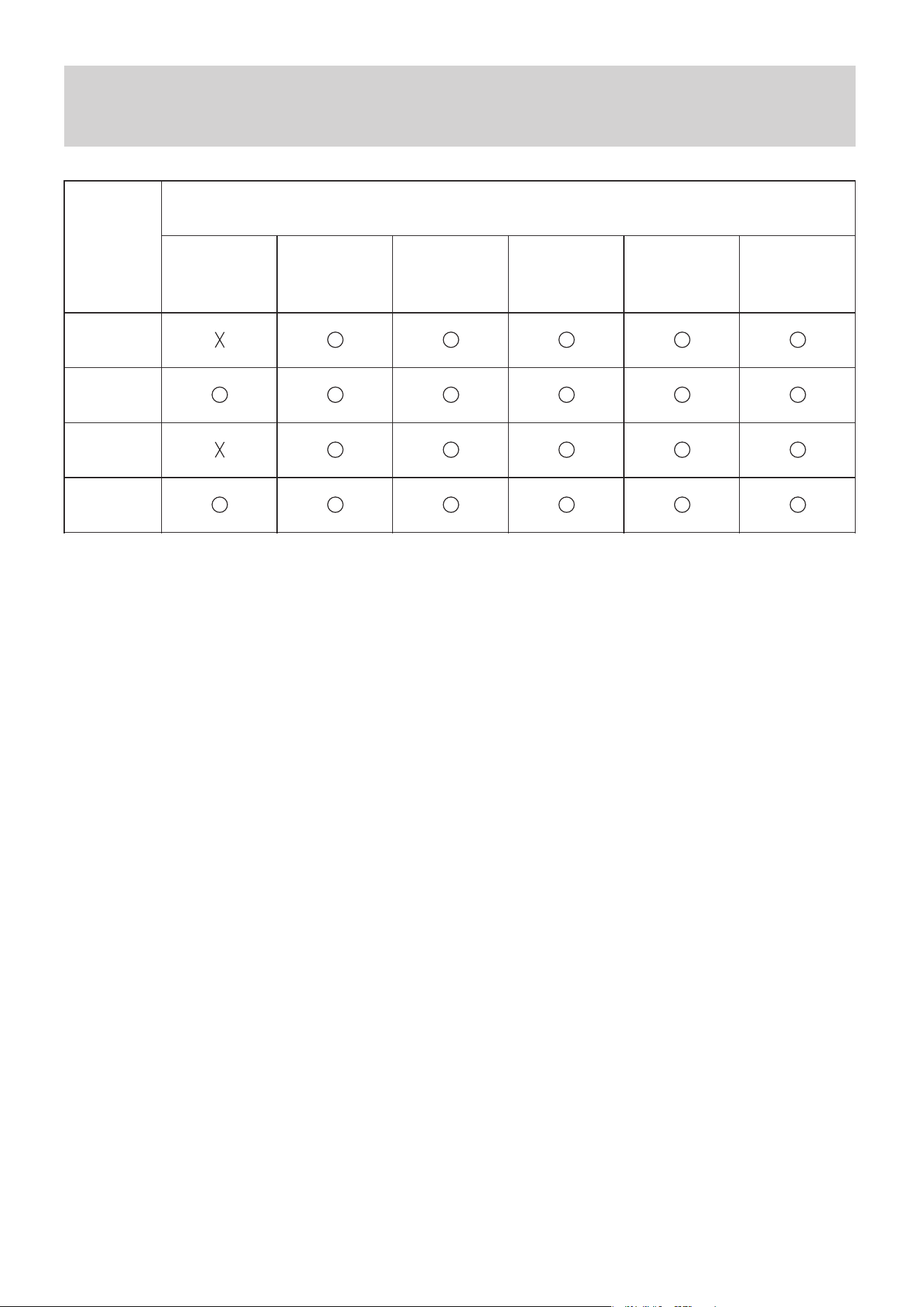
Metal
Accessories
Toxic and Hazardous Substances or Elements
Component
PCB
Plastic
Lead
(Pb)
Mercury
(Hg)
Cadmium
(Cd)
Hexavalent
chromium
(Cr VI)
Polybrominated
biphenyls
(PBB)
Polybrominated
diphenyl ethers
(PBDE)
Declaration of Toxic and Hazardous Substances in
Electronic Information
This table is prepared in accordance with the provisions of SJ/T 11364.
O: Indicates that the content of the toxic and hazardous substance in all homogeneous ma-
terials of the component is below the limit specified by GB/T 26572.
X: Indicates that the content of the toxic and hazardous substance exceeds the limit speci-
fied by GB/T 26572 in at least one homogeneous material of the component.
The information in this table is provided to suppliers in the form of data and testing results
that comply with RoHS environmental requirements.

22
IC
This device complies with CAN ICES-003 (B)/NMB-003(B) and CAN RSS-216 / CNR-216.
This device contains licence-exempt transmitter(s)/receiver(s) that comply with Innovation,
Science and Economic Development Canada's licence-exempt RSS(s). Operation is subject
to the following two conditions:
(1) This device may not cause interference.
(2) This device must accept any interference, including interference that may cause unde-
sired operation of the device.
Cet appareil est conforme à la norme CAN ICES-003 (B)/NMB-003 (B) et CAN RSS-216 /
CNR-216.
Cet appareil contient des émetteurs / récepteurs exempt (s) de licence qui sont conformes
aux RSS exemptes de licence d'Innovation, Sciences et Développement économique
Canada. Son fonctionnement est soumis aux deux conditions suivantes:
(1) Cet appareil ne doit pas provoquer d'interférences.
(2) Cet appareil doit accepter toute interférence, y compris les interférences susceptibles
de provoquer un fonctionnement indésirable de l'appareil.
This equipment complies with IC radiation exposure limits set forth for an uncontrolled en-
vironment.
Cet équipement est conforme aux limites d'exposition aux radiations de la IC définies pour
un environnement non contrôlé.
23
This equipment has been tested and found to comply with the limits for a Class B digital
device, pursuant to part 15 of the FCC Rules. These limits are designed to provide reason-
able protection against harmful interference in a residential installation.
This equipment generates uses and can radiate radio frequency energy and, if not installed
and used in accordance with the instructions, may cause harmful interference to radio com-
munications. However, there is no guarantee that interference will not occur in a particular
installation. If this equipment does cause harmful interference to radio or television recep-
tion, which can be determined by turning the equipment off and on, the user is encouraged
to try to correct the interference by one or more of the following measures:
● Reorient or relocate the receiving antenna.
● Increase the separation between the equipment and receiver.
●Connect the equipment into an outlet on a circuit different from that to which the receiver
is connected.
●Consult the dealer or an experienced radio/TV technician for help
NOTE
FCC
FCC regulatory conformance:
This device complies with Part 15 of the FCC Rules. Operation is subject to the following
two conditions:
(1) This device may not cause harmful interference.
(2) This device must accept any interference received, including interference that may
cause undesired operation.
The manufacturer is not responsible for any radio or TV interference caused by unautho-
rized modifications to this equipment. Such modifications could void the user’ s authority to
operate the equipment.
This equipment complies with FCC radiation exposure limits set forth for an uncontrolled en-
vironment.
NOTE

24
UL
NOT FOR RESIDENTIAL USE
NON DESTINÉ À UN USAGE DOMESTIQUE
Notice: This control circuit is not isolated – see installation instructions
Note: ce circuit de commande n’est pas isolé - voir les instructions d’installation

25
CSA
NOT FOR HOUSEHOLD USE
NON DESTINÉ À UN USAGE DOMESTIQUE
DISCONNECT POWER BEFORE SERVICING
COUPER L’ALIMENTATION AVANT L’ENTRETIEN

26
Important Safety Instructions
When using the amaran Halo 200x, 300x and 600x,basic safety precautions should always
be followed, including the following:
1.Read and understand all instructions before using the fixture.
2.Close supervision is necessary when any fixture is used by or near children. Do not leave
the fixture unattended while in use.
3.Care must be taken as burns can occur from touching hot surfaces.
4.Do not operate the fixture if any power cable is damaged, or if the fixture has been
dropped or damaged, until it has been examined by qualified service personnel.
5.Position any power cables such that they will not be tripped over, pulled, or come into
contact with hot surfaces.
6.Always unplug the fixture from the power outlet before cleaning, servicing, or when not in
use. Never pull on the power cord to unplug from the outlet.
7.Allow the fixture to cool down completely before storing. Unplug all cables and store them
properly. If a carrying case is used, place cables in their designated compartments.
8.Do not immerse the fixture in water or any other liquid to avoid electric shock.
9.Do not disassemble the fixture to avoid the risk of fire or electric shock. For service, con-
tact [email protected] or consult qualified service personnel. Improper reassembly may
result in electric shock when the fixture is in use.
10.Using any accessory not recommended by the manufacturer may increase the risk of
fire, electric shock, or personal injury.
11.Power this fixture only by connecting it to a properly grounded outlet.
12.Do not block the ventilation openings. Do not look directly at the LED light source when it
is powered on, and never touch the LED emitters under any condition.
13.Do not place the fixture near flammable materials or volatile solvents, as this may cause
damage.
14.Use a soft, dry cloth to clean the device.
15.When operating in humid or wet environments, ensure that all ports and plugs are com-
pletely dry to avoid short circuits or electric shock.

27
16.If the external flexible cable or cord of this fixture is damaged, it must be replaced by a
special cable or cord provided by the manufacturer or its service agent.
17.The light source contained in this fixture shall only be replaced by the manufacturer, its
service agent, or similarly qualified personnel.
18.All repair and maintenance must be performed by authorized service personnel only. Any
damage caused by unauthorized disassembly is not covered under warranty, and the user
shall bear the related repair costs.
19.The low-voltage power supply and DMX circuits are designed with reinforced insulation.
20.This fixture is intended for professional use only. It is certified by RoHS, CE, KC, PSE,
and FCC. Please operate the product in accordance with the applicable standards and reg-
ulations of your country or region.
21.Malfunctions caused by improper operation are not covered under warranty, and repair
costs shall be borne by the user. This user manual is based on thorough in-house testing.
Product design and specifications are subject to change without prior notice.

28
Before using this product, please read the product manual to ensure correct use under the
complete understanding. After reading, please keep the product manual properly for future
reference. In case of not operating this product correctly, it may seriously harm yourself or
others, or result in product damage and property loss. When using this product, it shall be
deemed that you have understood, recognized and accepted all clauses and contents of
this document. The user commits to be responsible for their own behaviors and all conse-
quences thereof, amaran shall not be liable for any loss due to the user who does not use
this product in accordance with the product manual.
Under the laws and regulations, our company holds the final explanation right of this docu-
ment and all related documents of this product. No prior notice will be given for any update,
revision or termination. Please visit the official amaran website for the latest product infor-
mation.
Disclaimer