English
Product Manual
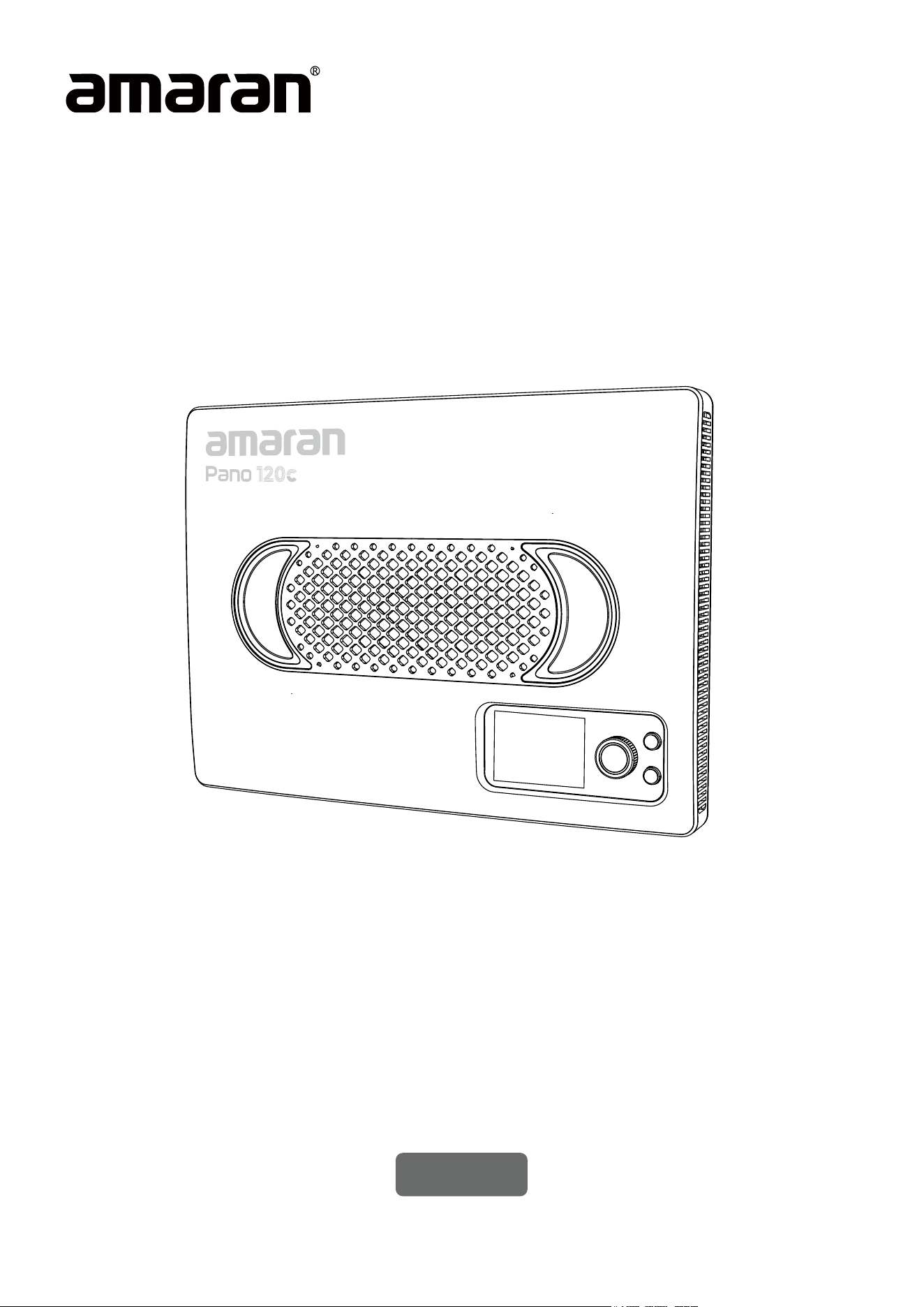
amaran Pano 120c

Table of Content
Introduction ....................................................................................................................................................................03
Components List ......................................................................................................................................................... 04
Product Overview .......................................................................................................................................................05
Operations ......................................................................................................................................................................06
1. Power Supply .........................................................................................................................................06
2. Power On/O ........................................................................................................................................ 07
3. Light Installation ................................................................................................................................... 07
4. Softbox Installation .............................................................................................................................09
5. Light Control Grid Installation .........................................................................................................09
6. Diuser Installation ..............................................................................................................................10
7. Barn Doors Installation .......................................................................................................................10
8. Main Menu ................................................................................................................................................11
8.1. CCT .....................................................................................................................................................11
8.2. HSI ..................................................................................................................................................... 12
8.3. RGB ...................................................................................................................................................12
8.4. FX ......................................................................................................................................................13
8.5. Bluetooth Reset ............................................................................................................................13
8.6. Custom Mode ................................................................................................................................14
8.7. Language ......................................................................................................................................... 14
8.8. Fan Mode ........................................................................................................................................14
8.9. Studio Mode ...................................................................................................................................15
8.10 Expanded CCT ............................................................................................................................ 15
9. Firmware updates.................................................................................................................................16
Using the amaran App ............................................................................................................................................... 16
Specications .................................................................................................................................................................17
Photometrics .................................................................................................................................................................. 18
Safety Instructions .....................................................................................................................................................20
FCC Declaration of Conformity ............................................................................................................................ 21
Disclaimer ....................................................................................................................................................................... 22

03
Introduction
Thank you for purchasing the amaran Pano 120c.
Designed for both mobile shoots and studio setups, the amaran Pano 120c is a compact,
120W full-color panel light combining ultra-high brightness with exceptional portability in
a size comparable to a laptop. Its slim and lightweight design makes it perfect for outdoor
mobile shoots or travelling to on-location studio setups, while its streamlined USB-C PD
power delivery and amaran Ace E-Lock compatibility oers greater power exibility for
any shooting environment. And paired with included lighting accessories, the amaran Pano
120c is the ideal all-in-one, versatile lighting kit that can adapt to any creative project.
04
Components List
Please make sure all accessories listed below are complete before using. If not, please
contact your sellers immediately.
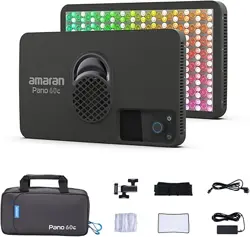
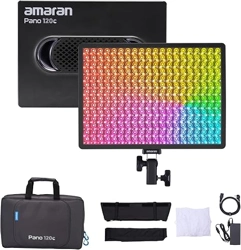
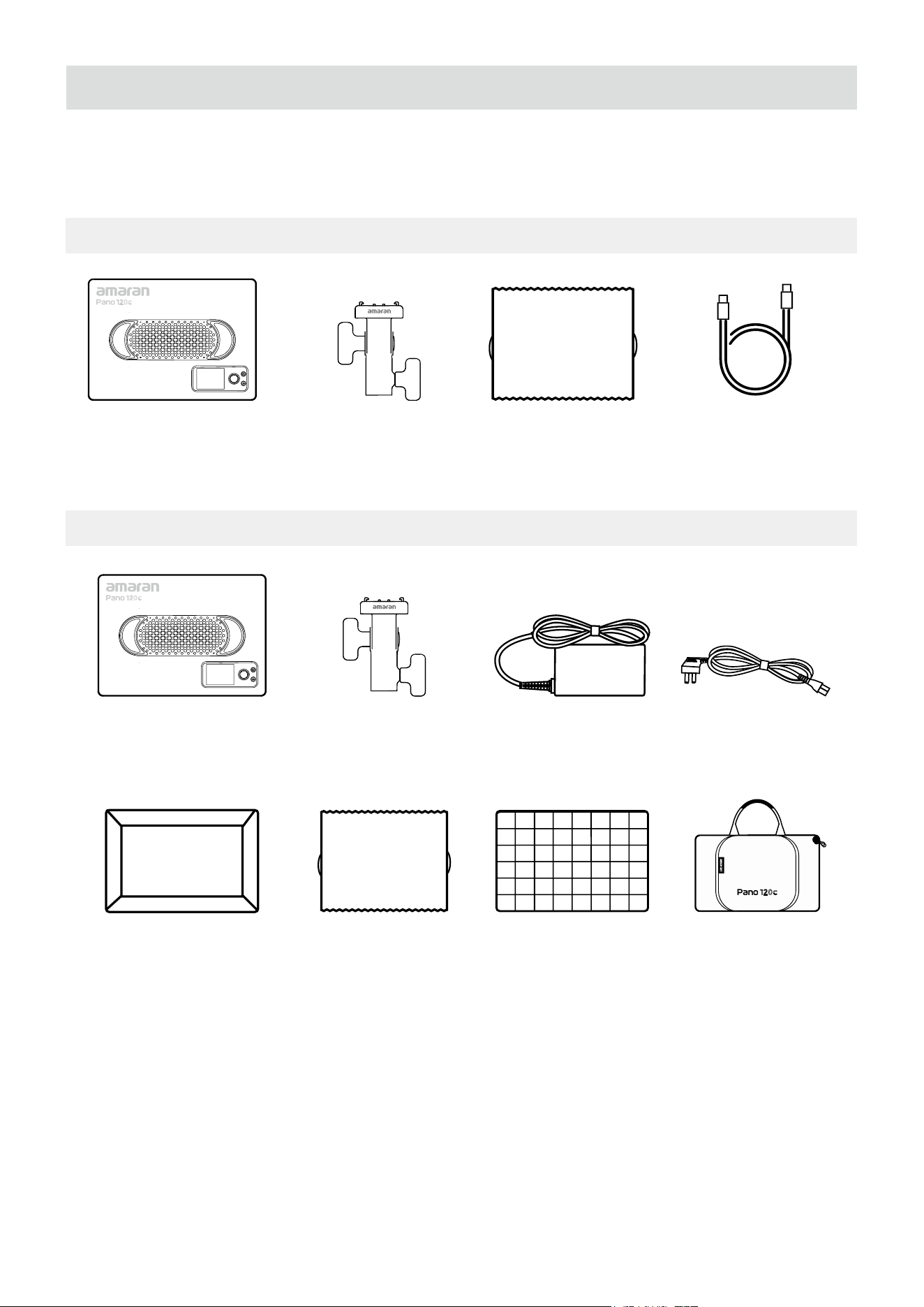
amaran Pano 120c (Base Version)
amaran Pano 120c Kit
Tip: The illustrations in the manual are diagrams for reference only. Due to the continuous
development of new versions of the product, if there are any dierences between the
product and the user manual diagrams, please refer to the product itself.
amaran
Pano 120c ×1
amaran Pano 120c
Softbox ×1
amaran
AC Cable ×1
amaran Ace Lock to
Light Stand Adapter ×1
amaran Pano 120c
Diuser ×1
amaran 150W DC Locking
Power Adapter ×1
amaran Pano 120c
Light Control Grid ×1
amaran Pano 120c Kit
Carrying Case x1
amaran
Pano 120c ×1
amaran USB-C Locking
Charging Cable (3m) ×1
amaran Ace Lock to
Light Stand Adapter ×1
amaran Pano 120c
Diuser ×1
05
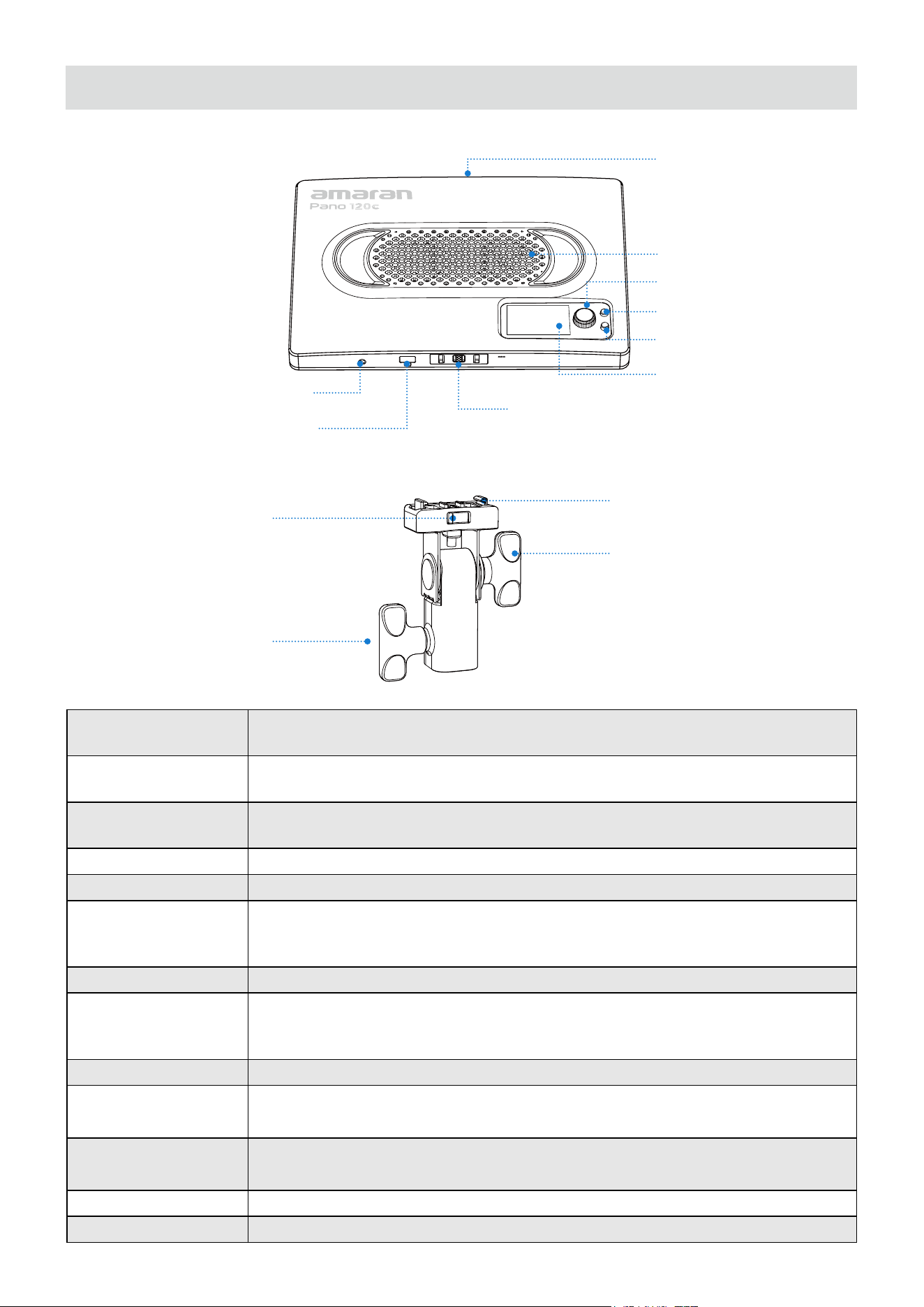
Power Button
Press to turn the light on, and hold for 1 second to turn the light o. The indicator
light will be on when the light is powered on.
Return Button
Click to return to the previous menu screen. Hold or double click on the return
button to execute customizable shortcuts set in Custom Mode.
Function Control Knob
Rotate to toggle the menu or adjust values and lighting settings. Press the knob to
conrm parameters.
Display Menu Screen Displays settings and status of your light.
Fan Vent Helps the light dissipate heat. Please do not block the fan vent when using the light.
amaran Ace E-Lock
Quick-Release Mount
Install and disassemble the light in less than a second with the amaran Ace Lock
ecosystem. The light can also be powered by the amaran Peak power bank accessory.
*The amaran Peak power bank accessory is sold separately.
USB-C Charging Port Used to charge the xture via a PD-supported power supply.
DC Power Input Port
Used to charge the xture with the included amaran 150W DC Locking Power
Adapter. The included DC cable is pull-resistant, avoid pulling the cable with force
to prevent damage.
1/4-20in Screw Mount Mount the light onto 1/4-20in tripods or other equipment.
amaran Ace Lock
Contact Pins
Locks into place on the light's amaran Ace E-Lock quick-release mount to secure
the light.
amaran Ace Lock
Unlock Button
Press the button to detach the amaran Ace Lock mounting bracket from the light.
Tilting Bracket Knob Rotate to lock and unlock the mounting bracket to adjust the angle of the light.
Locking Knob Rotate to lock and unlock the mounting bracket from the light stand.
Product Overview
Power Button
Function Control Knob
Fan Vent
1/4-20in Screw Mount
Return Button
amaran Ace E-Lock Quick-Release Mount
Display Menu Screen
amaran Ace Lock
Contact Pins
Tilting Bracket
Knob
DC Power Input Port
amaran Ace
Lock Unlock
Button
Locking Knob
USB-C Charging Port
06
Operations
1. Power Supply
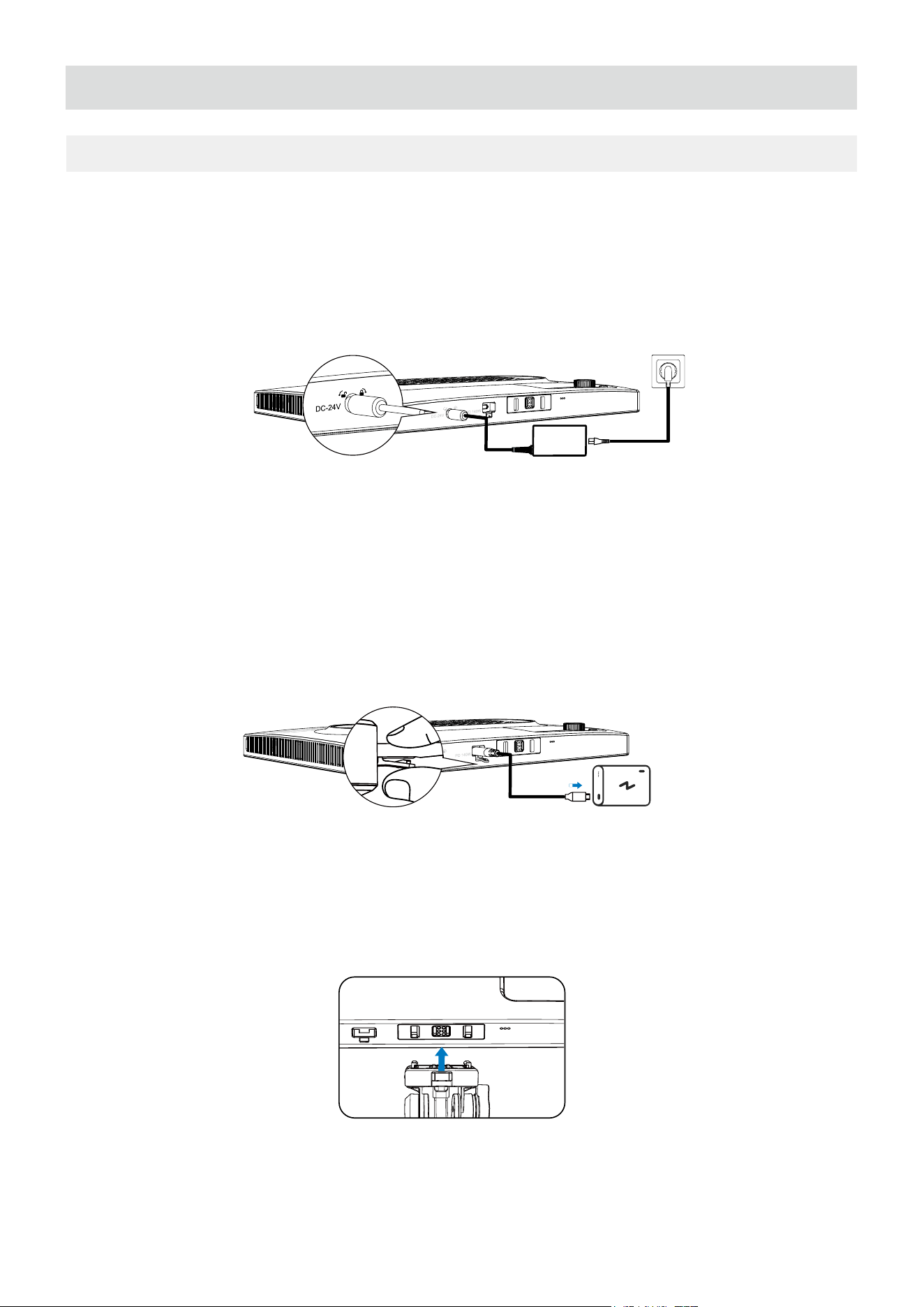
Power Supply Method 1: Use the included amaran 150W DC Locking Power Adapter to
supply power to the light. Plug the end of the Power Adapter into the charging port of the
light. The included Locking Power Adapter is pull-resistant. Press the lock when inserting
and removing the cable, and avoid pulling the cable with force to prevent damage.
Power Supply Method 3: Supply power to the light via the amaran Peak portable power
supply. The battery handle features amaran Ace E-Lock Contact Pins, and will power the
light on when mounted via the amaran Ace E-Lock Quick-Release Mount.
Note: The amaran Pano 120c supports power supply standards of USB PD3.0 and above,
but is not compatible with some third-party private charging protocols. It is recommended
to use PD3.1 standards of 140W power output and above. Please ensure to select the
Power Supply Method 2: Supply power to the light via other PD power supply devices or
power banks. Plug the output port of the PD power supply device into the charging port
of the light. Please ensure that the power supply can output a minimum of 65W of power.
If a power supply below 140W of power output is used, the brightness of the lamp will be
reduced or may be unable to light up.
07
2. Power On/O
3. Light Installation
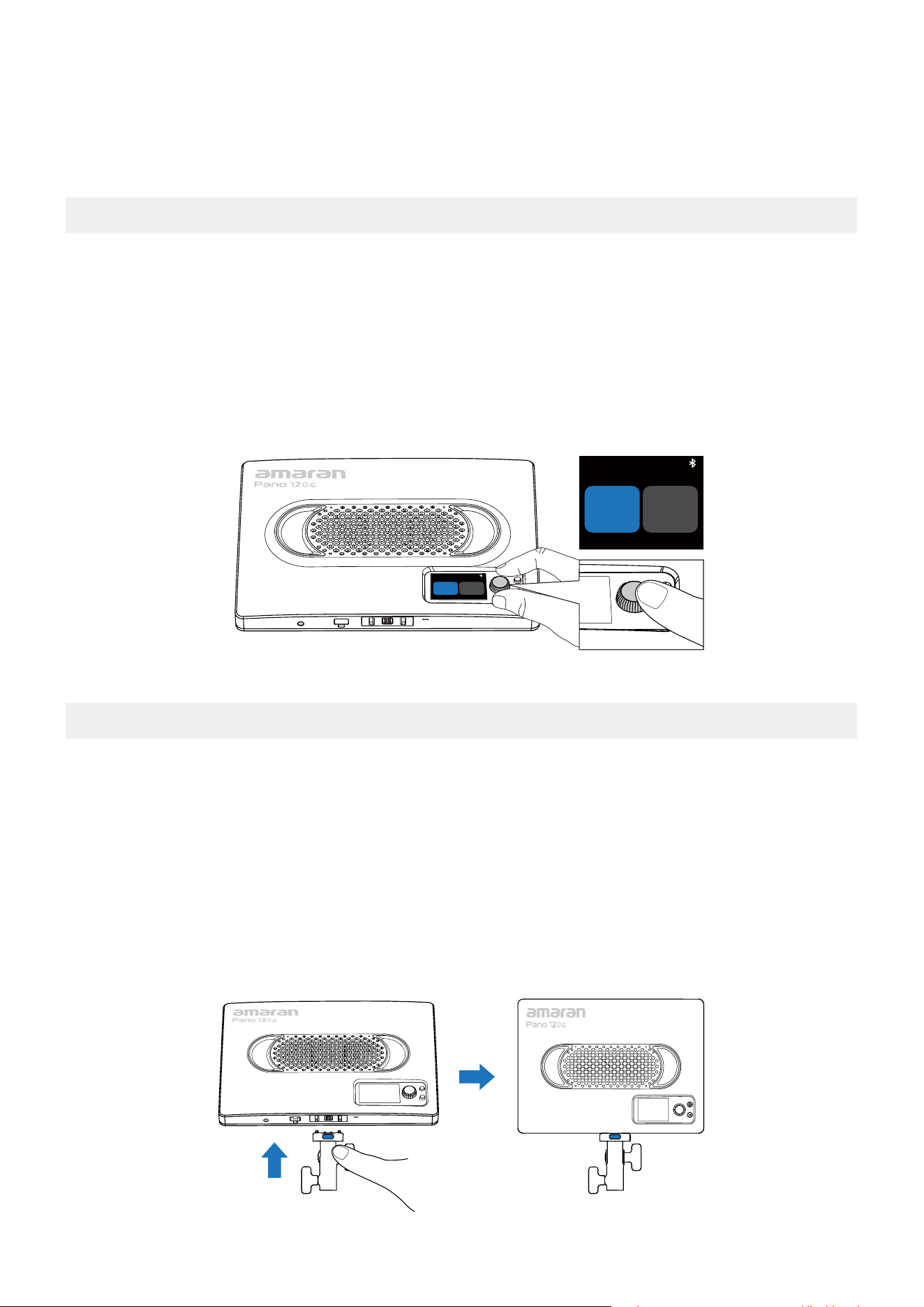
1. After connecting to the power supply, press the power button on the back of the xture
to turn the light on, and hold for 1 second to turn the light o. The light will resume to its previous
settings prior to turning o.
2. You can select your preferred language when you turn the light on for the rst time.
Rotate the knob to select your language. Click to conrm.
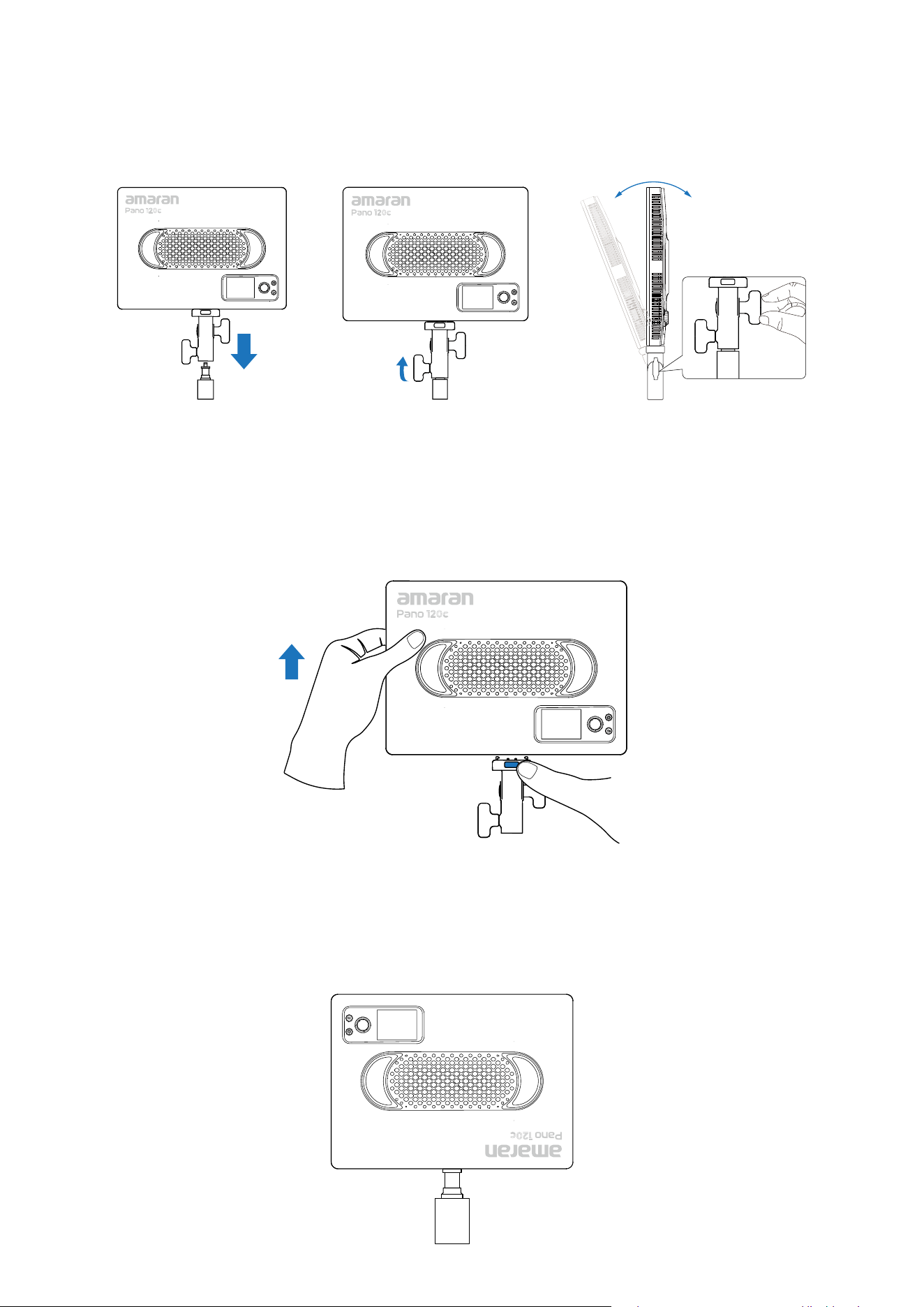
1. Installing the amaran Ace Lock Adapter:
Align the contact pins on the mounting bracket to the light's amaran Ace Lock quick release
mount. Press the blue release key and push towards the bottom of the light. The mounting
bracket is securely attached to the light when the pins are embedded into the amaran Ace
lock mount and when you hear a clicking noise.
Please ensure that the blue release key is facing the back of the light to avoid reverse installation.
Language/语言
English 中文
English 中文
Language/语言
appropriate power supply device. If the selected power supply device cannot power the light at full
power, a pop-up window will appear on the display menu screen to limit the maximum brightness.
The amaran Peak power bank accessory is sold separately.
08
4. Installing via 1/4-20in Screw Mount:
The top of the light features a 1/4-20in screw mount for mounting the light onto 1/4-20in
tripods or other equipment.
3. Dissemabling the Light:
To diassemble, press the blue release key on the mounting bracket and pull the light
upwards away from the mounting bracket. To avoid damaging the light and bracket, do not
disassemble by force.
2. Installing Onto A Light Stand: With the mounting bracket installed onto the light, place
the end of the mounting bracket onto the light stand and turn the locking knob to secure into
place. Adjust the angle of the light and turn the tilting bracket knob to secure into place.
09
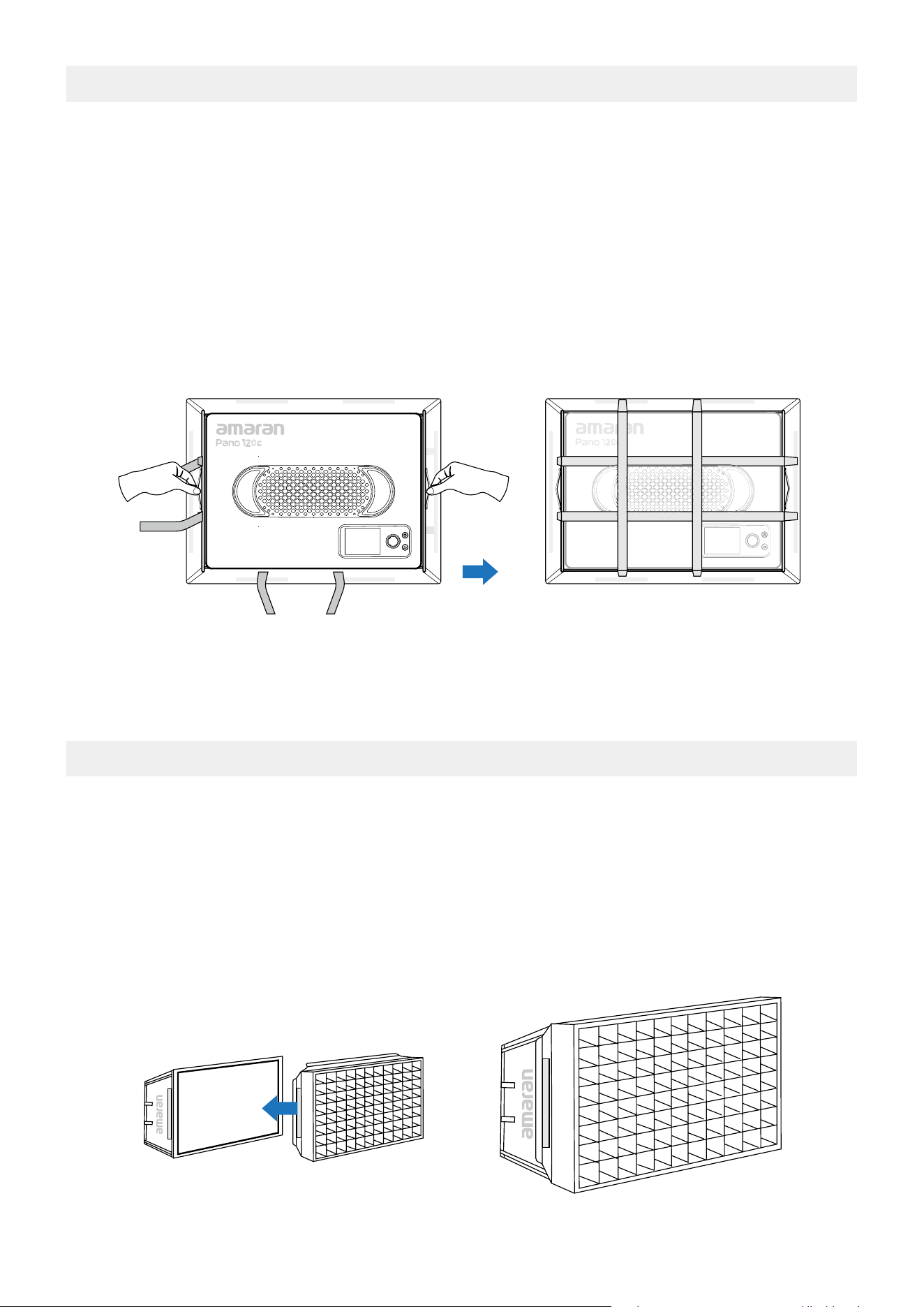
1. Unfold the softbox and place the diusion cloth side downwards onto a at surface.
2. To install the softbox onto the light, place the light with the light-emitting surface side
downwards onto the frame of the softbox. Pull the handles on the sides of the softbox
to ensure that the softbox is fully unfolded and that the light is rmly installed into the
softbox frame.
3. Pull the elastic straps on the softbox over the light. Adjust the position of the softbox
and ensure that the edges of the softbox are aligned with the edges of the light.
4. Softbox Installation
Note: To prevent the softbox from blocking the fan and aecting heat dissipation or light
spill, please ensure that the softbox securely wraps around the edges of the light.
1. Please ensure that the softbox is fully opened prior to installing the light control grid.
2. To install the light control grid onto the softbox, expand the light control grid and align
with the 4 corners of the softbox.
3. To ensures that the grid is rmly installed onto the softbox, fasten the Velcro around the
light control grid to the softbox and ensure it is at.
5. Light Control Grid Installation
10
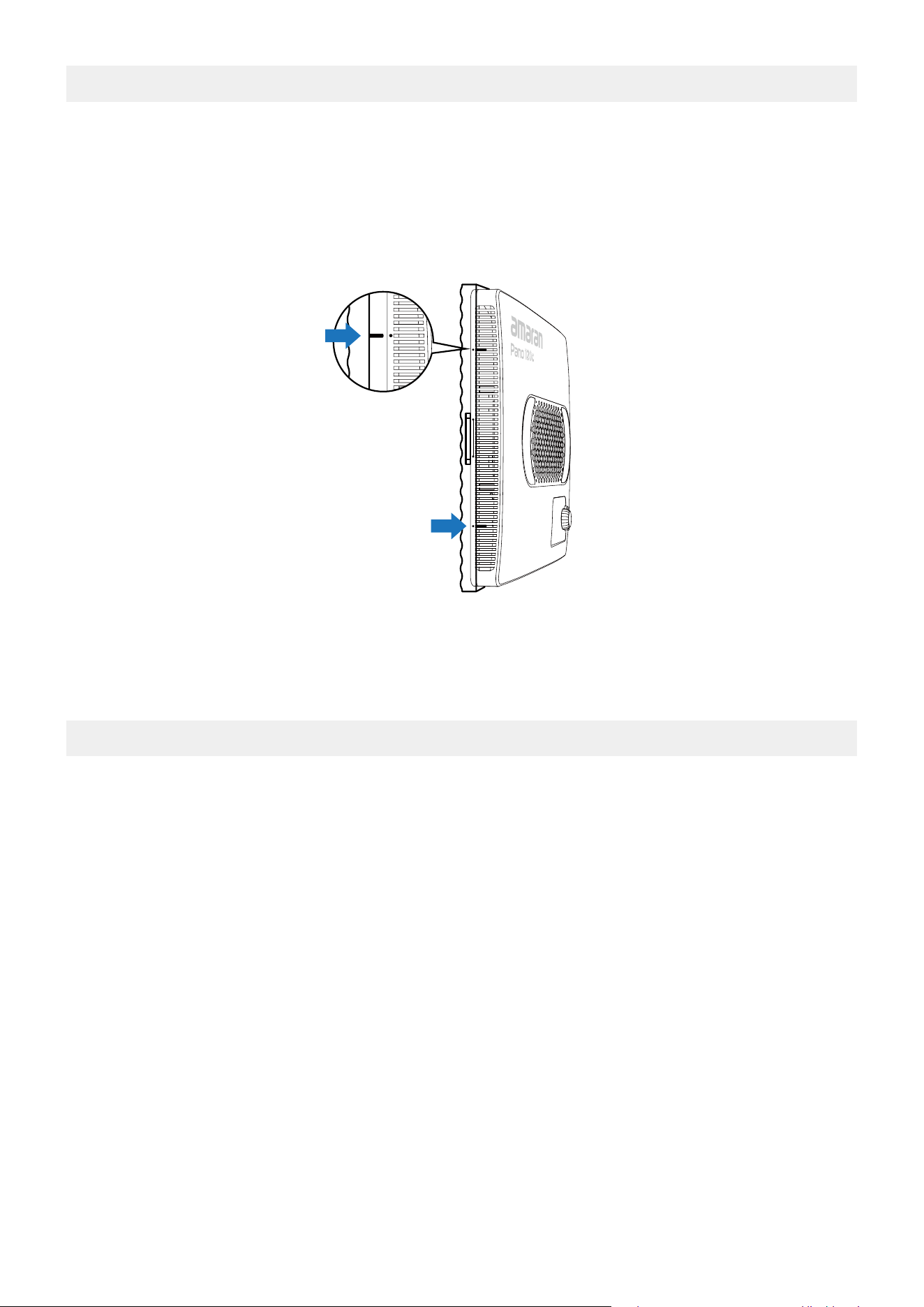
1. Unfold the diuser and pull the hook side towards the light.
2. To install the diuser onto the softbox, place the hook on the side of the diuser into
the light's heat dissipation hole. Repeat to hook on the other side to securely install the
diuser cover.
6. Diuser Installation
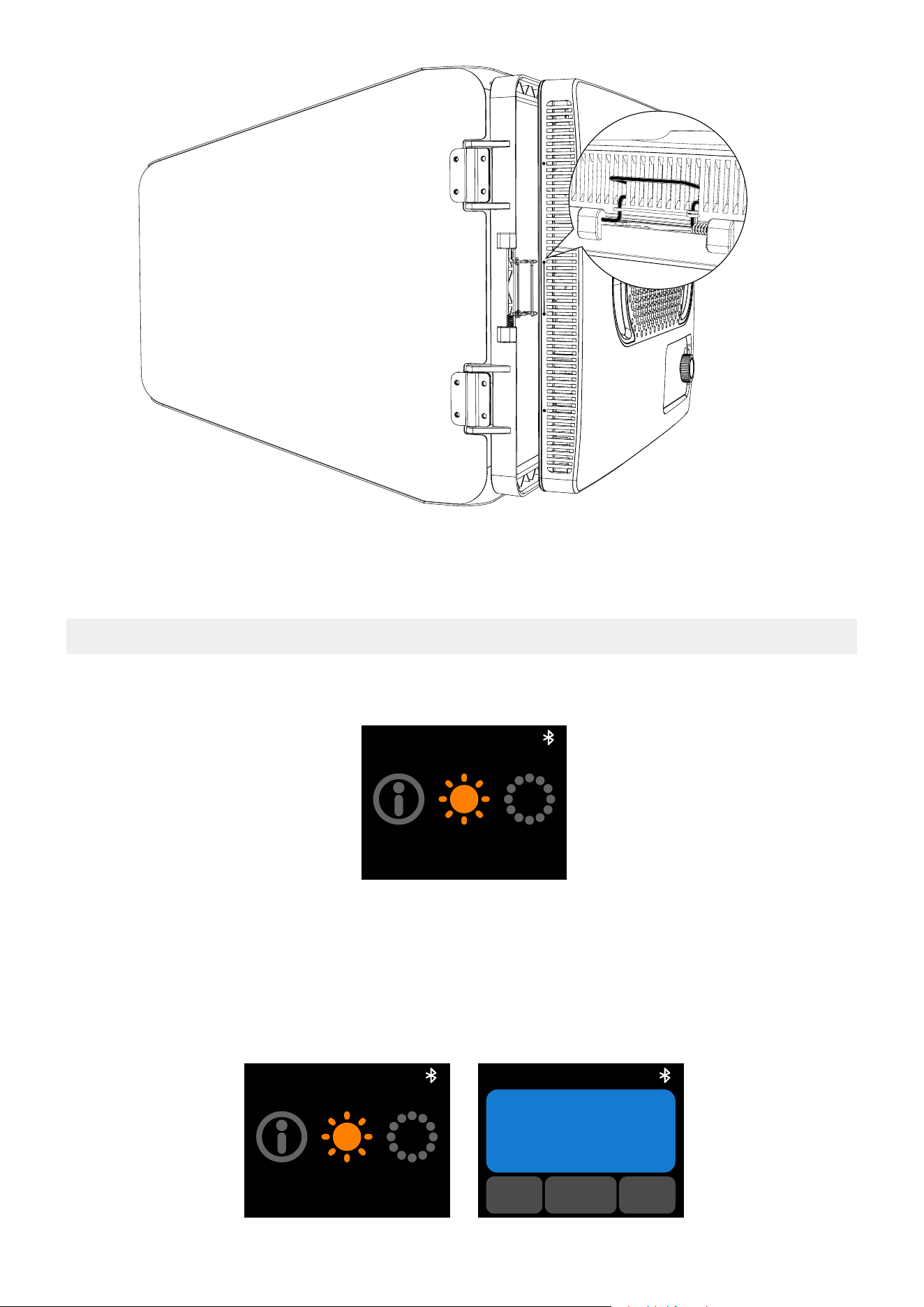
1. Ensure that the barn door leaves are closed and place facing downwards on a at surface.
Open the wire clasp on both sides,place the light into the frame of the barn doors.
2. To install the barn doors onto the light, place the wire clasp into the light's heat
dissipation hole. Repeat to place on the other side to securely install the barn doors.
Ensure the installation is secure to prevent it from vibrating loose
*The amaran Pano 120c Barn Doors are sold separately.
7. Barn Doors Installation
Note: Please ensure that the diuser is positioned correctly to prevent it from exceeding
the edges of the light.
11
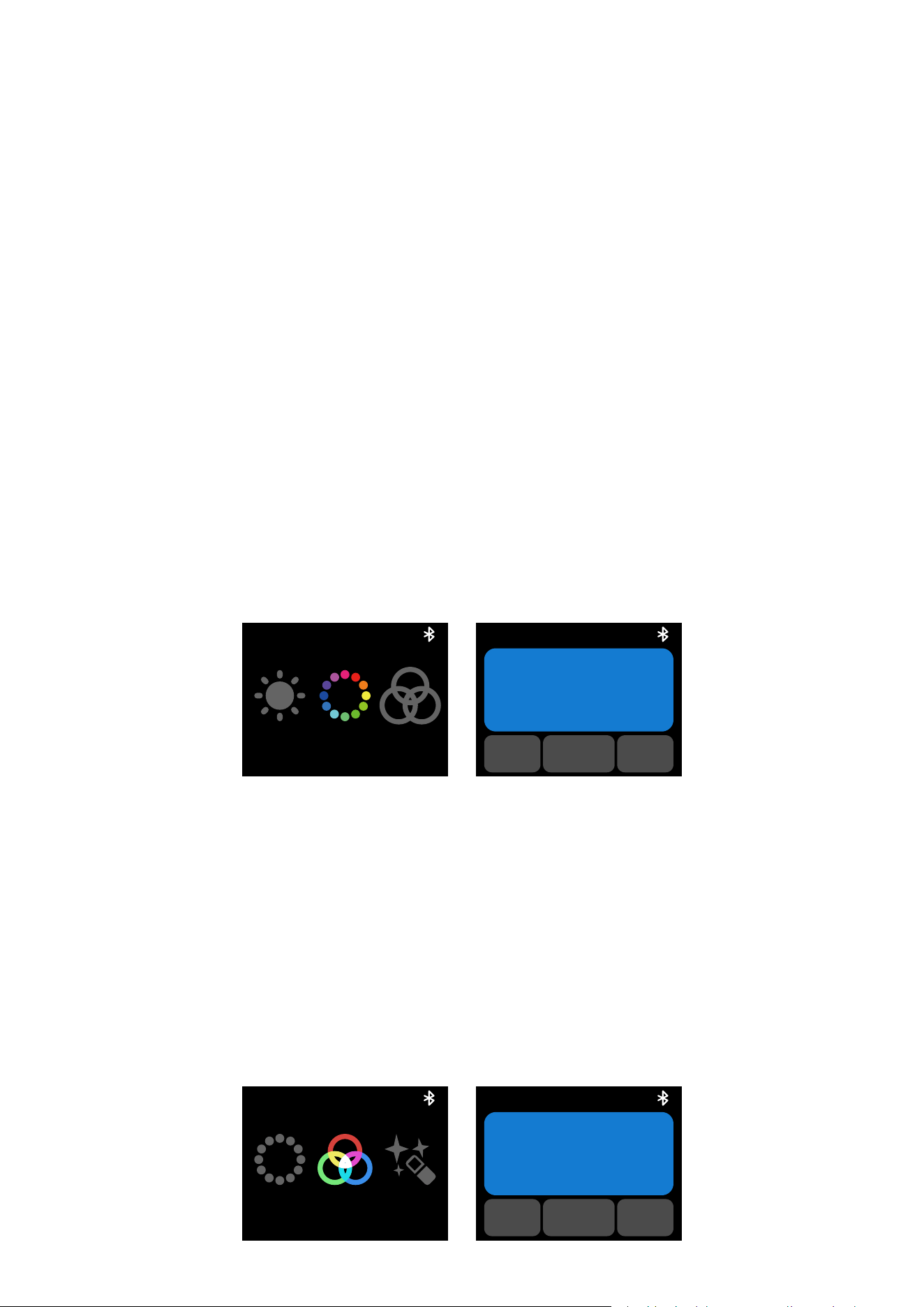
8. Main Menu
Rotate and press the knob to select light modes and settings.
8.1. CCT
Rotate and press the knob to enter CCT mode from the main menu. In CCT mode, press
the knob to select INT or CCT and rotate the dial to adjust the corresponding value.
CCT
VER HSI
CCT
VER HSI
CCT
INT G/M
CCT
5600K
12
1. INT (Intensity): Adjust your light's brightness from 0%-100%.
2. CCT (Correlated Color Temperature): Adjust your light's color temperature from warm
white (2,300K CCT) to cool white (10,000K CCT).
3. G/M (Green-Magenta): Adjust the green-megenta shift in ±10 increments.
4. After 3 minutes of inactivity while the light is in CCT Mode, it will automatically switch to
"Quick Operation Mode". Quick Operation Mode allows you to quickly adjust your light's
settings without toggling through the menu.
The menu screen will display the current color temperature value and brightness level.
Rotate the control knob to adjust your brightness levels. Press and rotate the knob to
adjust your color temperature value from warm white to cool white.
Press the Return button to exit Quick Operation Mode and return to your previous interface.
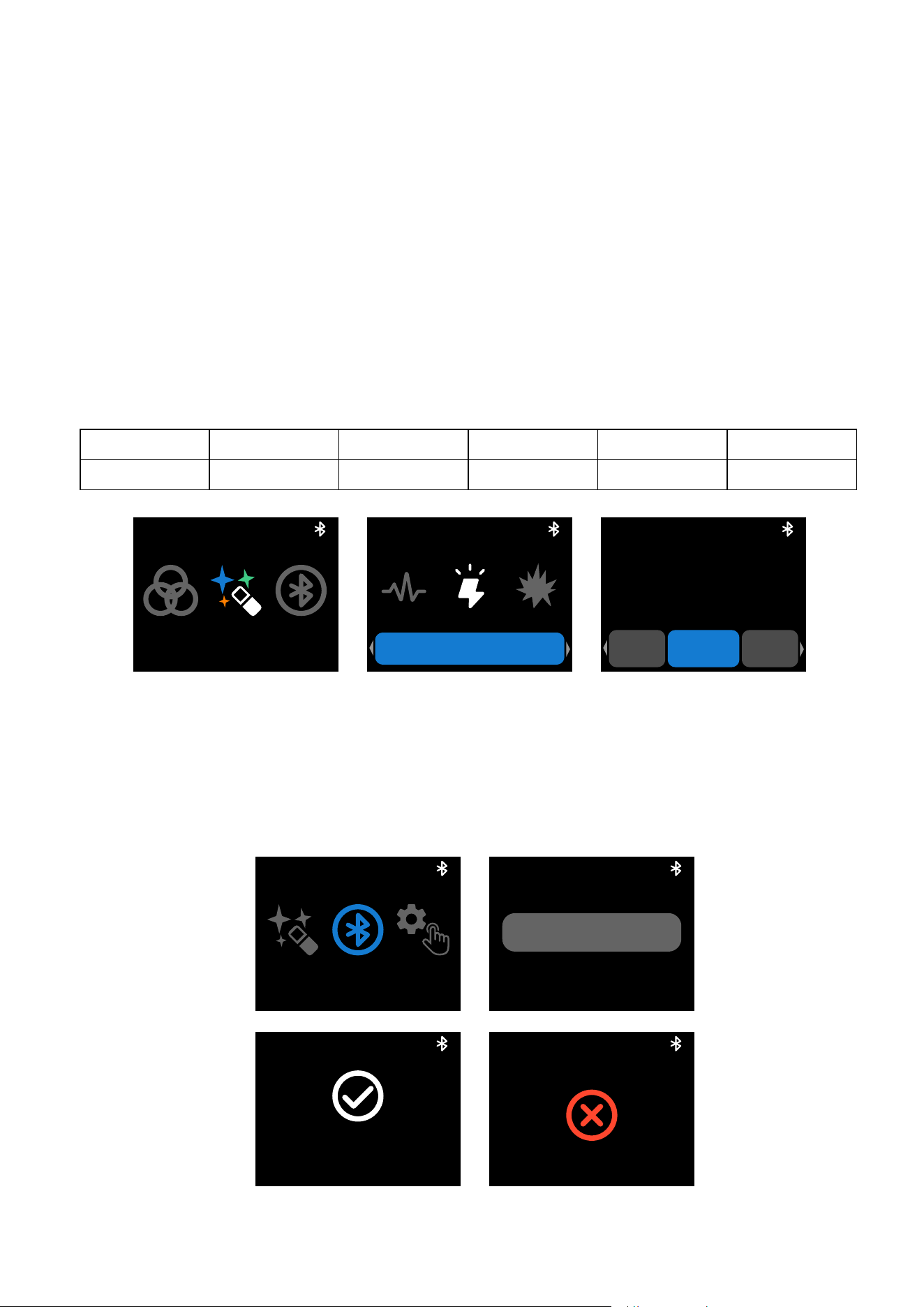
8.2. HSI
Rotate and press the knob to enter HSI mode from the main menu. In HSI, press the knob
to select INT, HUE, or SAT and rotate the dial to adjust the corresponding value.
HSI
CCT RGB
INT
SAT HUE
50%
HSI
1. INT (Intensity): Adjust your light's brightness from 0%-100%.
2. HUE: Adjust your light's hue value from 1º to 360º.
3. SAT (Saturation): Adjust the saturation of the color from 0%-100%.
8.3. RGB
Rotate and press the knob to enter RGB mode from the main menu. In RGB, press the knob
to select INT, Red, Green, or Blue and rotate the dial to adjust the corresponding value.
RGB
HSI FX
Red
INT Green
50%
RGB
13
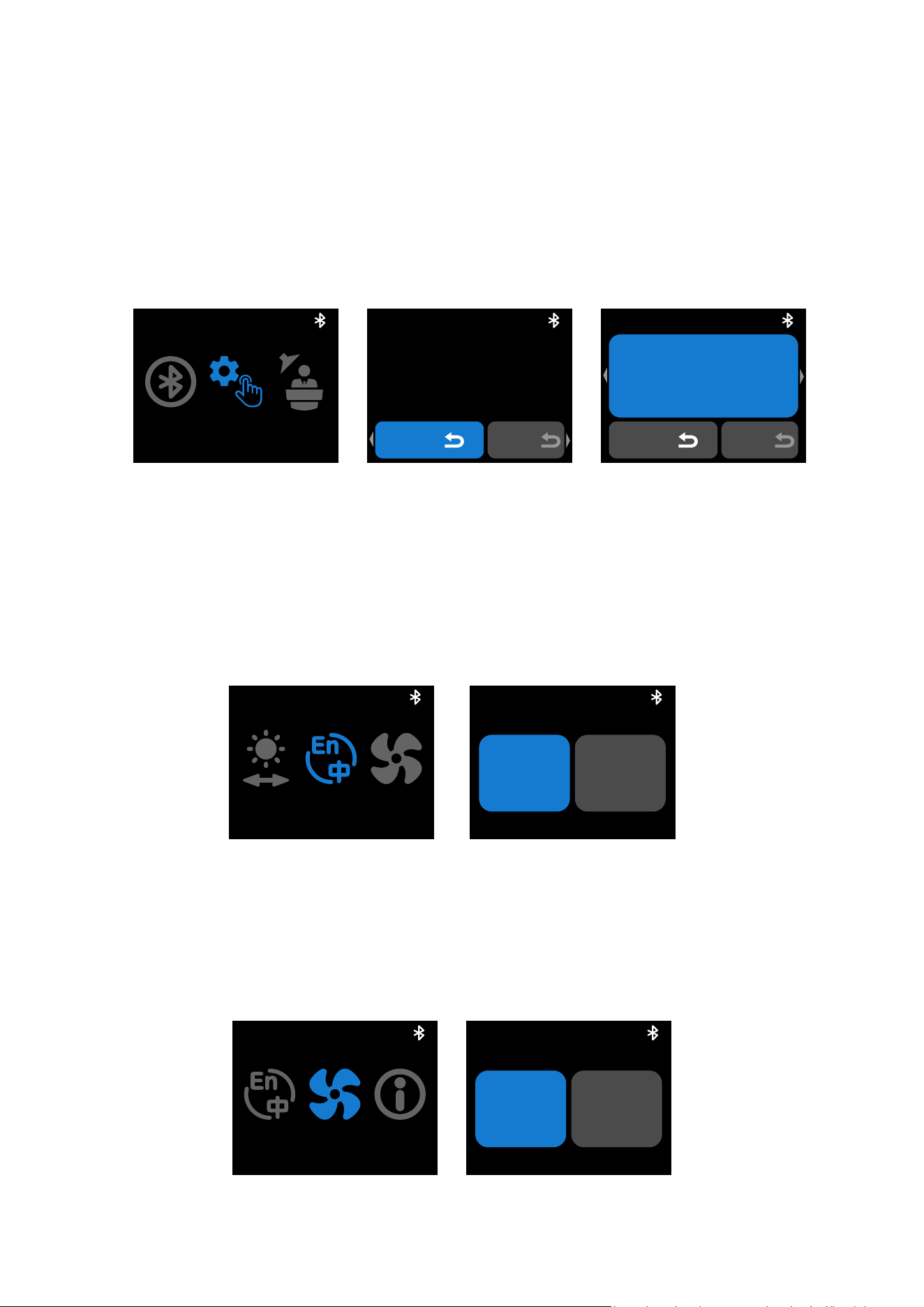
8.4. FX
Rotate and press the knob to enter FX mode from the main menu. In FX. rotate and press
the knob to select your lighting eect. Press again to enter the settings and rotate the dial
to adjust the corresponding value.
Supported Lighting Eects:
8.5. Bluetooth Reset
Rotate and press the knob to enter BT mode from the main menu. Hold down on the knob
until the end of the progress bar. Release the knob to cancel.
Bluetooth reset is
successful.
Bluetooth reset is unsuccessful.
Please reset Bluetooth again.
FX
RGB BT
FX
Strobe INT
FRQ Mode
50%
Strobe
BT
FX CUSTOM
BT
Press to reset
EE64DE
BT
BT
EE64DE
1. INT (Intensity): Adjust your light's brightness from 0%-100%.
2. Red: Adjust your light's Red value from 0%-100%.
3. Green: Adjust your light's Green value from 0%-100%.
4. Blue: Adjust your light's Blue value from 0%-100%.
Fireworks Faulty Bulb Lightning TV Pulsing Strobe
Explosion Fire Paparazzi Welding Cop Car Party Lights
14
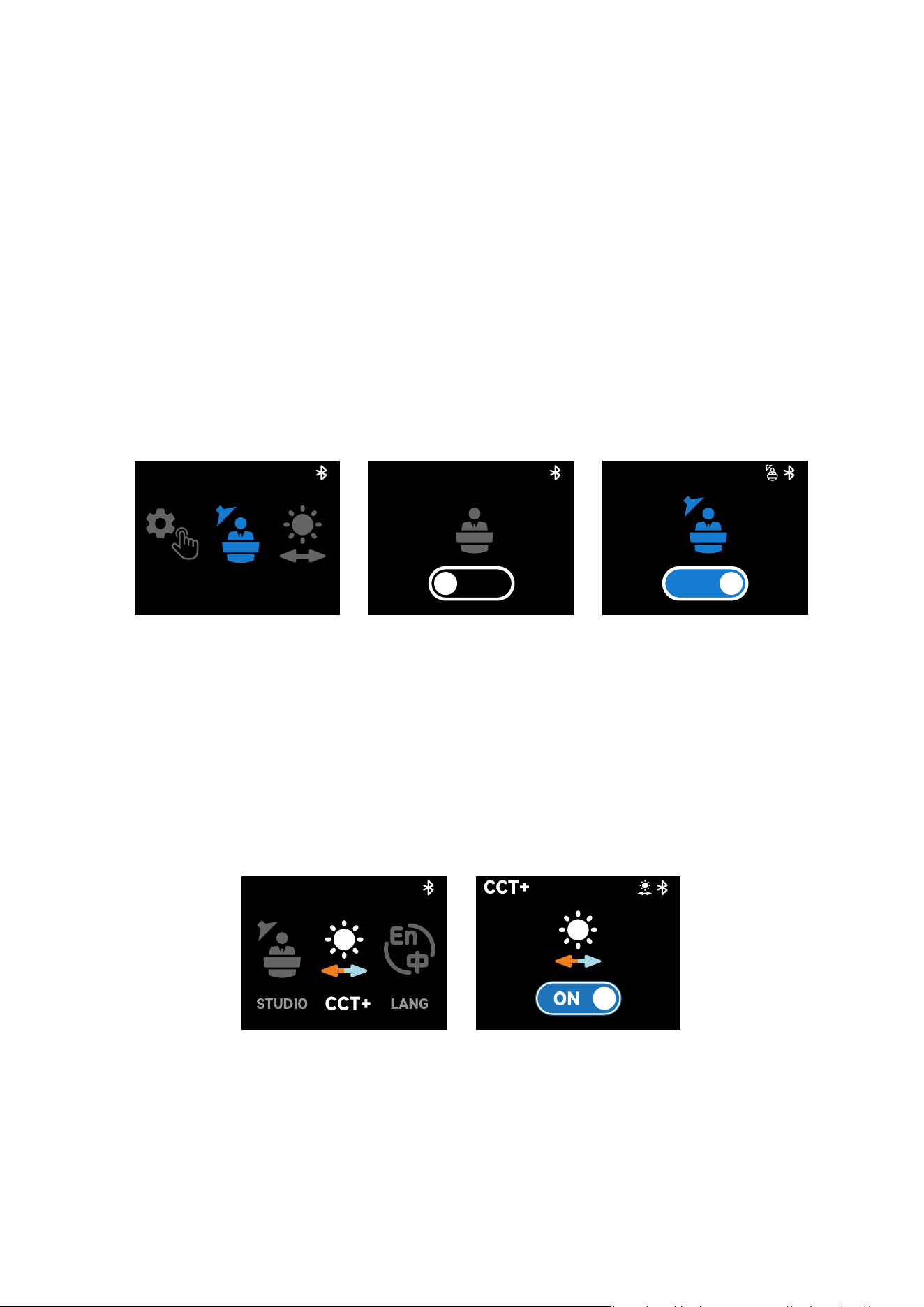
8.6. Custom Mode
Rotate and press the knob to enter Custom mode from the main menu. In Custom mode,
press the knob to select customizable shortcuts for long press (Hold) or double click
(Double) of the Return button. Rotate the dial to select between None/CCT/Rotation/HSI/
BT Reset shorcut functions. Short press of the return button defaults to the return/back
function and cannot be changed.
CUSTOM
BT STUDIO
CUSTOM
Hold
Double
Rotation
CUSTOM
Hold
Double
Rotation
8.7. Language
Rotate and press the knob to enter Language settings from the main menu. In Language,
rotate the dial to toggle between English or Chinese. Press the knob to conrm your
language.
8.8. Fan Mode
Rotate and press the knob to enter Fan mode from the main menu. In Fan mode, rotate the
dial to toggle between Silent and Smart fan mode. Press the knob to conrm your settings.
LANG
FANCCT+
English 中文
Language/语言
FAN
LANG VER
FAN
Silent Smart
15
8.9. Studio Mode
Rotate and press the knob to enter Studio mode from the main menu. Press the knob to
cycle between On/O. When Studio mode is turned on, the light will automatically turn on
after connecting to a power supply, reducing the need to manually press the power button.
8.10 Expanded CCT
Rotate and press the knob to enter the Expanded CCT mode from the main menu. Press
the knob to cycle between On/O. When Expanded CCT mode is turned on, the adjustable
color temperature in CCT mode is expanded to 1,800K to 20,000K CCT. Please note that
the color rendering when in the expanded CCT range is lower.
Silent Mode:
The fan will be completely turned o, and the light will not produce any noise. The power
output will be limited to 25W.
Smart Mode:
The fan speed will automatically adjust according to the temperature of the light.
Studio Mode
ON
STUDIO
CUSTOM CCT+
Studio Mode
OFF
16
You can download the amaran mobile app from the iOS App Store, Google Play Store, and
other platforms for enhancing the functionality of the light. You can download the amaran
desktop app for Mac and Windows from the amaran website. Please visit amarancreators.
com for more details on how to use the app to control your amaran lights.
Using the amaran App
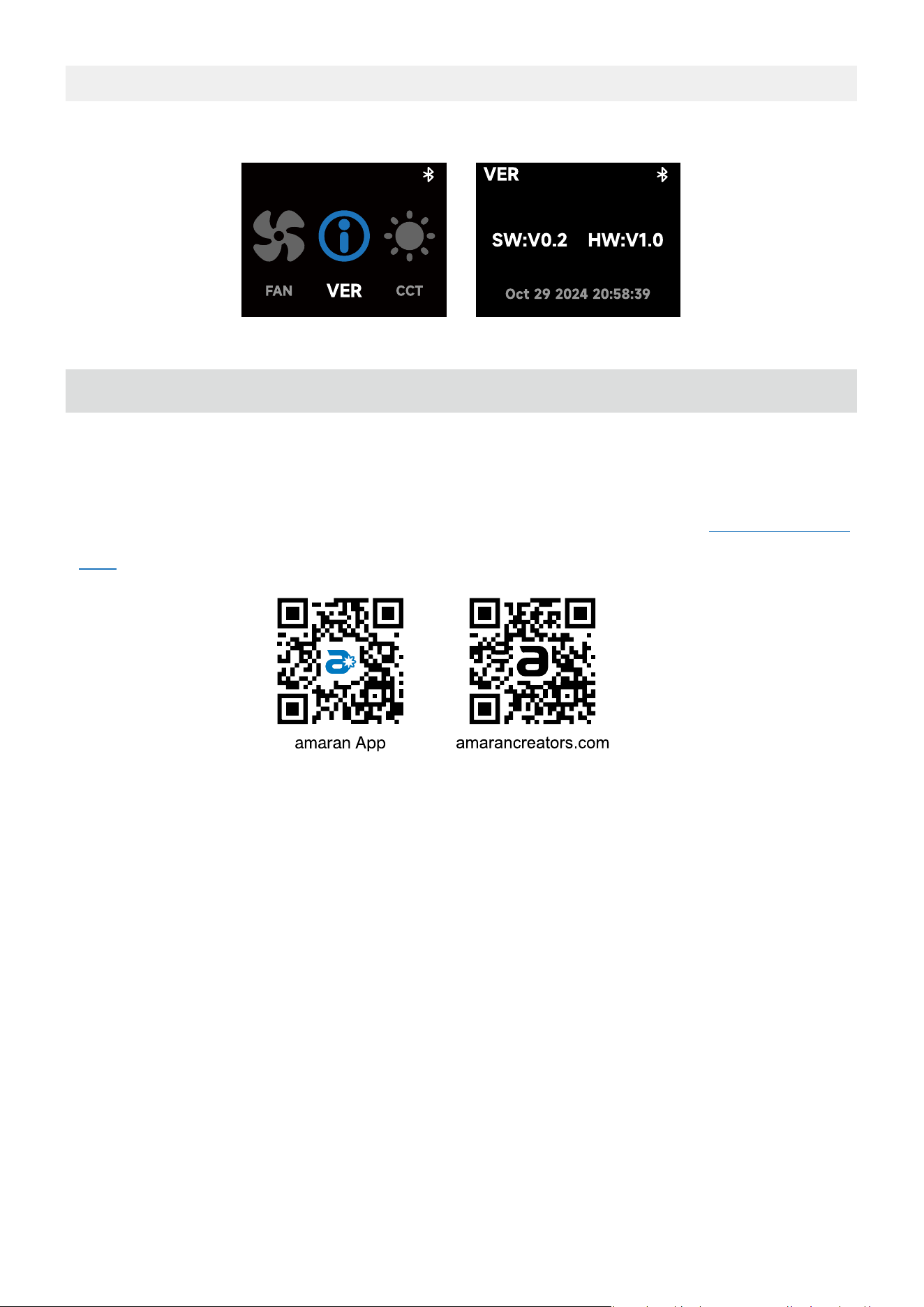
9. Firmware updates
Firmware updates can be updated online via the amaran app or Sidus Link.
17
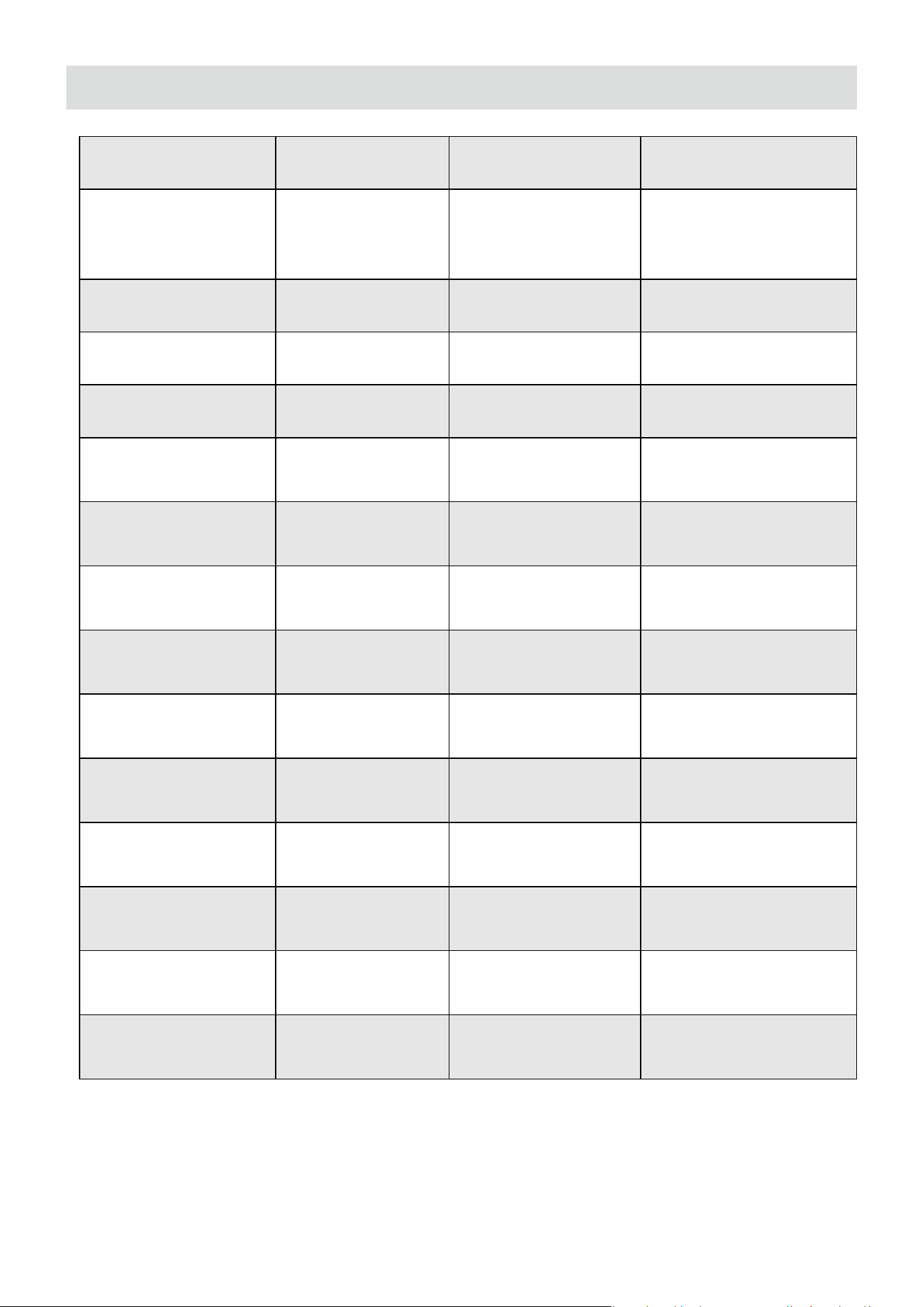
Max Power Input 140W Max Power Output 120W
CCT 2,300-10,000K Lumens
13,855lumens@5600K
12,149lumens@3200K
CRI 96 TLCI 97
TM-30 Rg (Average) 101 TM-30 Rf (Average) 93
SSI(D32) 84 SSI (D56) 74
Beam Angle
(No Accessory)
45° Color Chipset RGBWW
Operating
Temperature
-10
℃
-40
℃
Storage
Temperature
-20℃ - 80℃
-4 ℉ - 176 ℉
Control Methods
On-board, amaran
App, Sidus Link
Firmware
Upgradeable
amaran App,
Sidus Link
Screen Type TFT
Wireless Operating
Range (Bluetooth)
≤80m
≤262.5ft
Adapter Input
Voltage
AC 110V-220V Cooling Method Fan cooling
Operating Voltage
DC 24V
PD 28V
Adapter Cable
Length
2.5m/8.20ft
Beam Angle
(Light Control Grid)
45° AC Cable Length 2m/6.56ft
Light Dimensions
35.5x25.6x3.6cm
14x10x1.4in
Light Weight 1.6kg/3.5lb
Softbox
Dimensions
41.5x30.5x10.3cm
16.3x12x4in
Softbox Weight 0.35kg/0.8lb
Light Control Grid
Dimensions
42x31.4x7cm
16.5x12.2x2.8in
Light Control Grid
Weight
0.15kg/0.3lb
Specications
*The above technical specications are from the Aputure laboratory, and there may be
some variation between individual units.
18
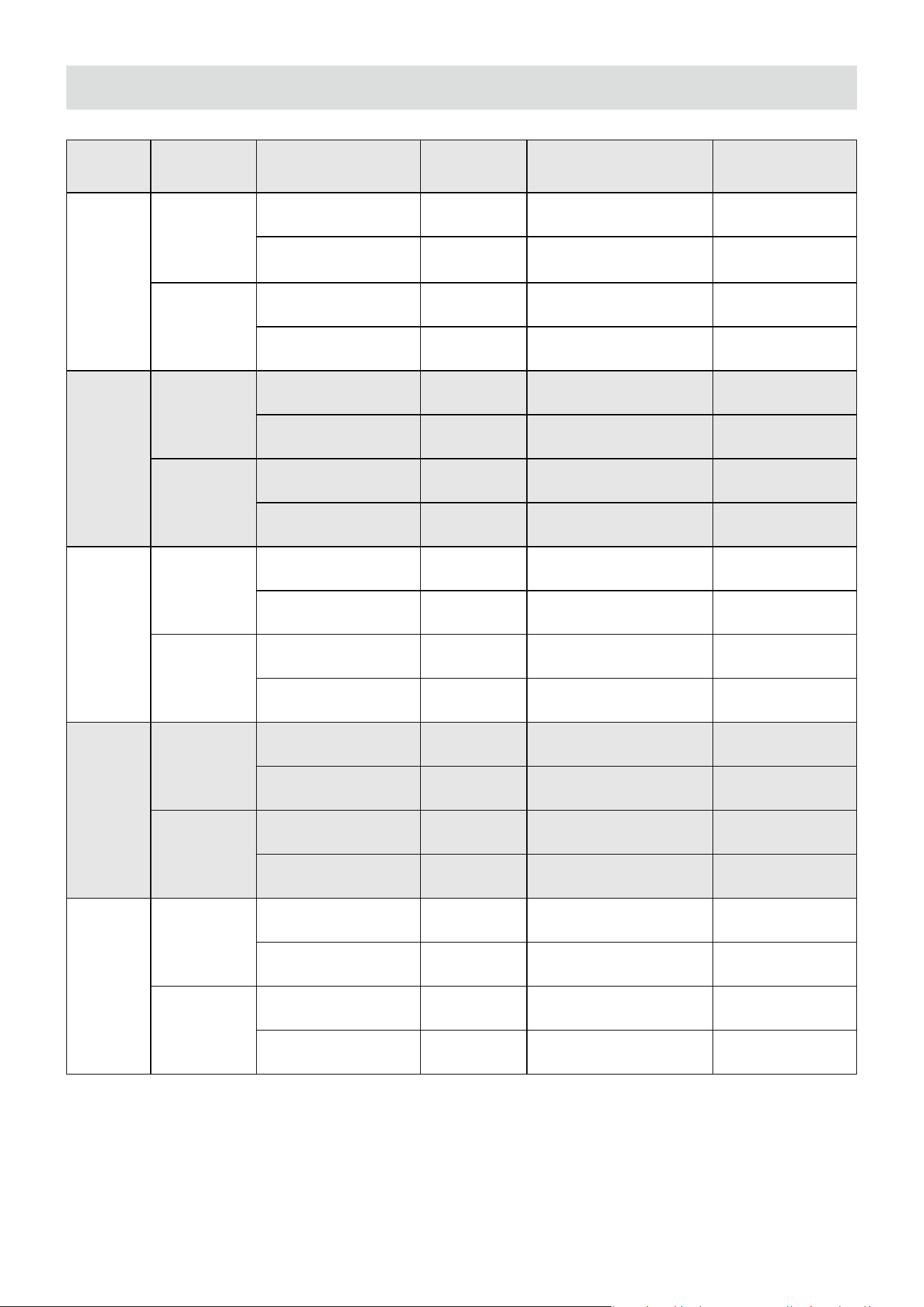
CCT Distance No Accessories Softbox Light Control Grid Diuser
2,300K
1m
10,880 lux 2,950 lux 2,335 lux 2,700 lux
1,011 fc 274 fc 217 fc 251 fc
3m
1,310 lux 312 lux 284 lux 303 lux
122 fc 29 fc 26 fc 28 fc
3,200K
1m
1,1870 lux 3,240 lux 2,558 lux 2,910 lux
1,103 fc 301 fc 238 fc 270 fc
3m
1,435 lux 344 lux 310 lux 331 lux
133 fc 32 fc 29 fc 31 fc
4,300K
1m
12,630 lux 3,450 lux 2,710 lux 3,080 lux
1,173 fc 321 fc 252 fc 286 fc
3m
1,529 lux 365 lux 330 lux 351 lux
142 fc 34 fc 31 fc 33 fc
5,600K
1m
13,260 lux 3,620 lux 2,835 lux 3,220 lux
1,232 fc 336 fc 263 fc 299 fc
3m
1,610 lux 382 lux 345 lux 368 lux
150 fc 35 fc 32 fc 34 fc
6,500K
1m
13,490 lux 3,680 lux 2,880 lux 3,260 lux
1,253 fc 342 fc 268 fc 303 fc
3m
1,639 lux 390 lux 351 lux 375 lux
152 fc 36 fc 33 fc 35 fc
Photometrics
*The above technical specications are from the Aputure laboratory, and there may be
some variation between individual units.
19
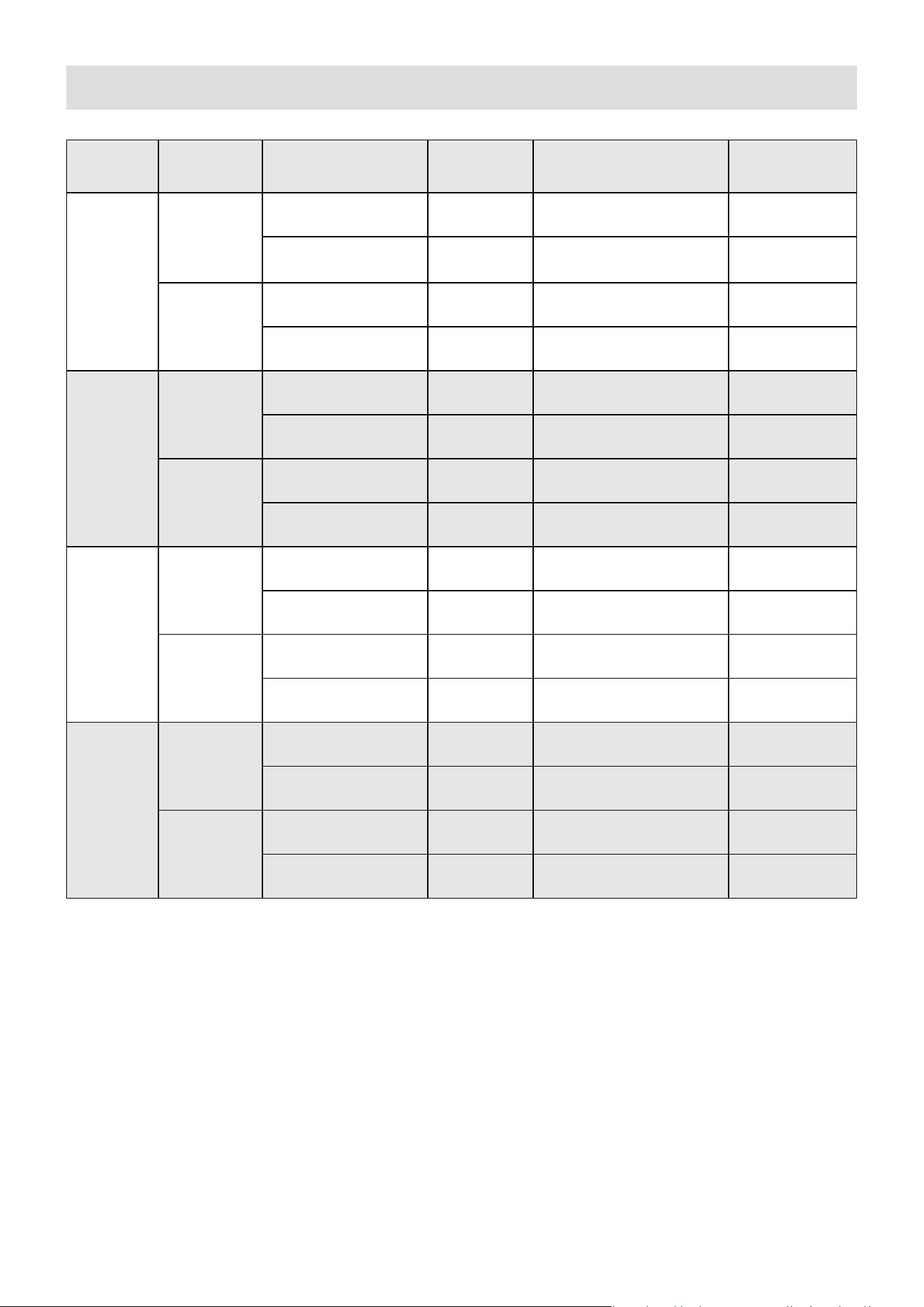
CCT Distance No Accessories Softbox Light Control Grid Diuser
10,000K
1m
12,920 lux 3,530 lux 2,770 lux 3,130 lux
1,200 fc 328 fc 257 fc 291 fc
3m
1,570 lux 380 lux 337 lux 359 lux
146 fc 35 fc 31 fc 33 fc
R
1m
4,020 lux 1,022 lux 815 lux 975 lux
373 fc 95 fc 76 fc 91 fc
3m
497 lux 119 lux 101 lux 108 lux
46 fc 11 fc 9 fc 10 fc
G
1m
6,070 lux 1,694 lux 1,314 lux 1,490 lux
564 fc 157 fc 122 fc 138 fc
3m
747 lux 181 lux 161 lux 173 lux
69 fc 17 fc 15 fc 16 fc
B
1m
1,258 lux 379 lux 291 lux 353 lux
117 fc 35 fc 27 fc 33 fc
3m
155 lux 40 lux 36 lux 42 lux
14 fc 4 fc 3 fc 4 fc
Photometrics
*The above technical specications are from the Aputure laboratory, and there may be
some variation between individual units.

20
Safety Instructions
When using the amaran Pano 120c, basic safety precautions should always be followed,
including the following:
1. Read and understand all instructions before using.
2. Please have the product checked by an authorized service personnel agent if the
product has a problem. Any malfunctions caused by unauthorized disassembly are not
covered by the warranty. The user may pay for maintenance.
3. Please do not place the xture in high temperature environments for long periods of
time, as it will accelerate the aging of the product and shorten its service life.
4. Close supervision is necessary when any xture is used by or near children. Do not leave
the xture unattended while in use.
5. Do not operate the xture if a cord is damaged, or if the xture has been dropped or
damaged, until it has been examined by qualied service personnel.
6. This xture is not waterproof. Please do not use the light xture in wet conditions on
account of electric shock may be caused.
7. Please do not block the ventilation or look at the LED light source directly when it is
powered on. Please do not touch the LED light source in any condition.
8. When using the xture for long periods of time in high temperature environments above
40ºC / 104ºF, care must be taken as burns can occur from touching hot surfaces.
9. Please do not place the unit near any ammable object.
10. Avoid rapid shaking or rotating of the light when moving the light stand to prevent
damage to the amaran Ace Lock quick-release mount.
11. We recommend only using the original amaran power adapter and regular power
bank accessories. Please note that any malfunctions caused by using unauthorized
accessories are not covered by the warranty. The user may pay for maintenance.
12. This product is certied by ROHS inspection report. Please operate the product in full
compliance with relevant country's standards. Any malfunctions caused by incorrect
use are not covered by warranty. The user may pay for maintenance.
13. The instructions and information in this manual are based on thorough, controlled
company testing procedures. Further notice will not be given if the design or
specications change.
21
FCC Declaration of Conformity
If this equipment does cause harmful interference to radio or television reception, which
can be determined by turning the equipment o and on, the user is encouraged to try to
reorient or relocate the receiving antenna.
• Increase the separation between the equipment and receiver.
• Connect the equipment to an outlet on a dierent circuit than the receiver is connected to.
• Consult the dealer or an experienced radio/TV technician for help.
WARNING
Changes or modications not expressly approved by the party responsible for
compliance could void the user's authority to operate the equipment.
NOTICE
This equipment has been tested and found to comply with the limits for a Class
B digital device, pursuant to Part 15 of the FCC Rules. These limits are designed
to provide reasonable protection against harmful interference in a residential
installation. This equipment generates, uses, and can radiate radio frequency
energy and, if not installed and used in accordance with the instructions, may
cause harmful interference to radio communications. However, there is no
guarantee that interference will not occur in a particular installation.
This device has been evaluated to meet general RF exposure requirements.
RF Warning Statement

22
Disclaimer
It is important to read the product manual of this product prior to use in order to ensure
proper use with a complete understanding. The product manual should be securely stored
for future reference after reading. Improper operation of this product may result in severe
personal injury to yourself or others, as well as potential damage to the product and
loss of property. As soon as you use the product, you are deemed to have understood,
recognized and accepted all the terms and contents of the product manual. Users assume
responsibility for their own conduct and any resulting consequences. amaran is not liable
for any damages suered as a result of the user’s failure to use the product in accordance
with product manual.
Please visit the ocial amarancreators.com website for the latest product information.