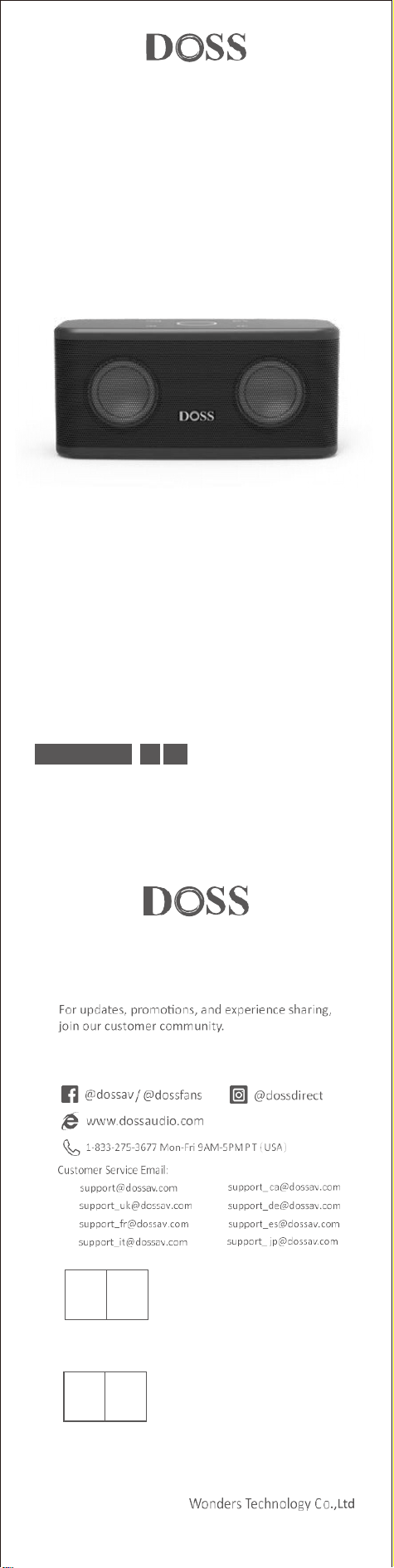
Wireless Bluetooth Speaker
EN DE FR IT ES JP
Model No.: SoundBox Plus
User Manual
US:
UK:
FR:
IT :
CA:
DE:
ES:
JP:
OST_UK _20220119000010
EVATOST CONSULTING LTD
Office 101 32 Threadneedle Street, London,
United Kingdom, EC2R 8AY
contact@evatost.com
We simply act as UK representative for cross-border sellers, and are not manufacturers/importers/dis-
tributors for the product, nor involved in the manufacture/import/sale of the product. Therefore, we are
not responsible for any after-sales service s related to the product. In case of any product quality or
infringement issues, the manufacturer/importer/seller shall be solely held responsible.
eVatmaster Consulting GmbH
Bettinastr. 30
60325 Frankfurt am Main,Germany
contact@evatmaster.com
OST EU 20220119000015
We simply act as EU representative for cross-border sellers, and are not manufactur-
ers/importers/distributors for the product, nor involved in the manufacture/import/sale of the
product. Therefore, we are not responsible for any after-sales services related to the product.
In case of any product quality or infringement issues, the manufacturer/importer/seller shall
be solely held responsible.
REP
UK
REP
EU
EN
1. Packing Content
• 1 x SoundBox Plus
• 1 x USB-C charging cable
• 1 x User manual
2. Specification
• Output power: 8W x 2
• lnput: DC 5V 2A
• Battery: 3.7V 3200mAh
• Unit dimension: 7.6 x 3.3 x 3.1 inches
• Play time: Up to 20 hours (50% volume without lights)
• Warranty: One-year limited
• Bluetooth distance: 66ft
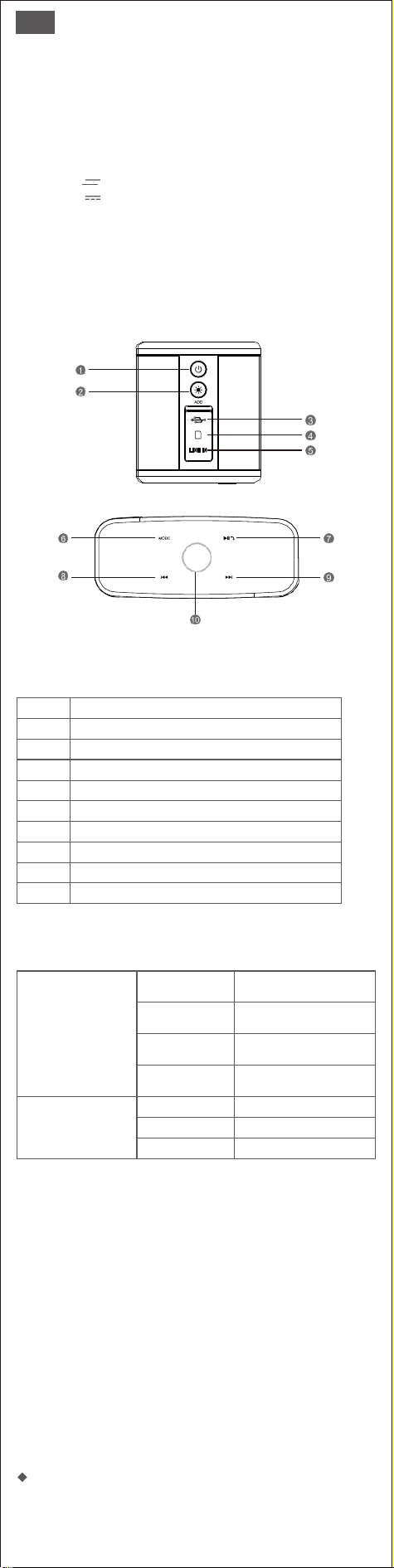
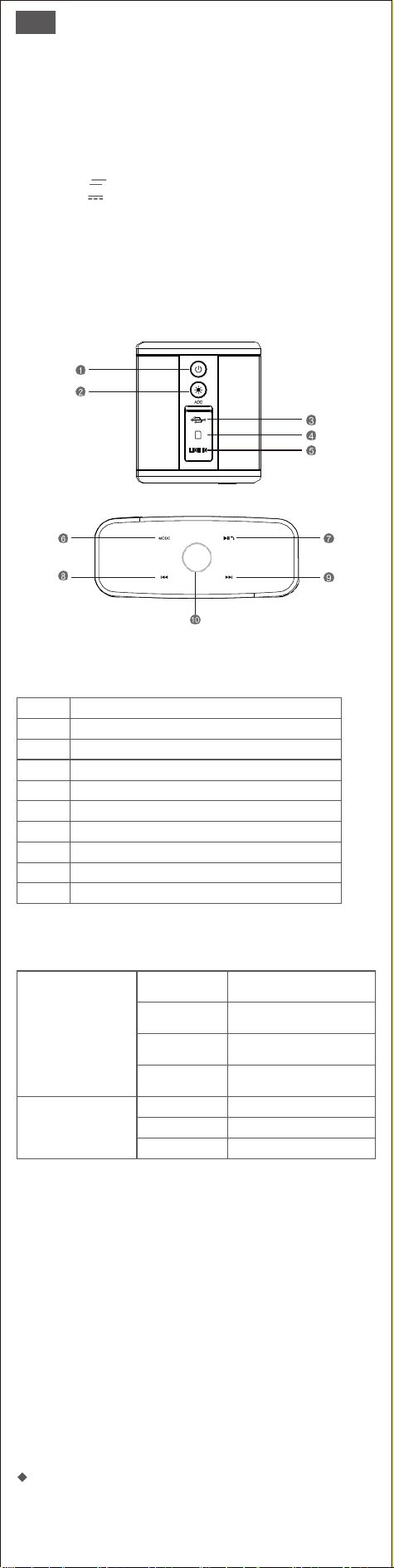
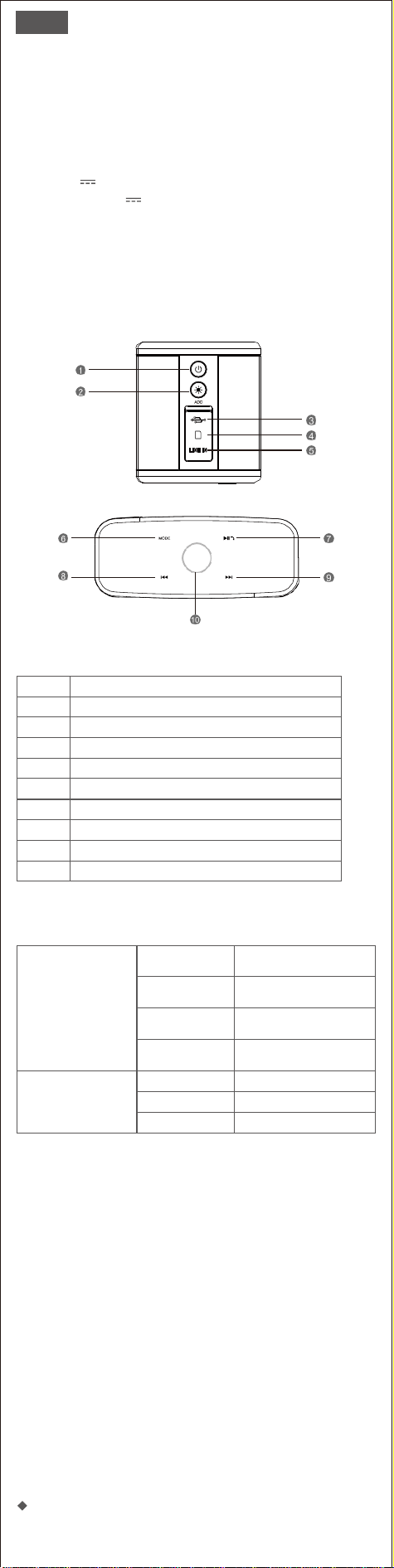
3. Illustration
4.Buttons and Controls
1
Power button
2
Add button
3
Charging port
4
TF card jack
5
Audio-in port
6
Mode button
7
Play/ hand free button
8
Previous track button
9
Next track button
10
Volume control button
5. Indicators
Center indicator/
Control button
Flashing blue
Indicates that the speaker has
entered into the pairing mode
and it is ready to be paired
Steady blue
Indicates that the device is
successfully paired
Steady red
Indicates that the device has
switched to the auxiliary input
mode
Steady green
Indicates that the device has
switched to the TF mode
Charging indicator
Steady red
Charging
OFF
Fully charged
Flashing red
Low battery
6. Preparation
• Use the supplied charging cable to charge your portable speaker directly from
your computer micro USB port or the cellphone adapter. (please cofirm its
output is 5V)
• Make sure that the speaker is fully charged before using it for the first time.
• The LED light will remain RED when charging and turn off once fully charged.
Note:
1. If the speaker beeps every few seconds, please recharge it for 3-4
hours.
2. The speaker has a built-in battery-saver mode, which will automatically
power off if not in use for 15 minutes. This function can be disabled via
touch control. Please see the operations page. For further assistance,
please contact: [email protected]
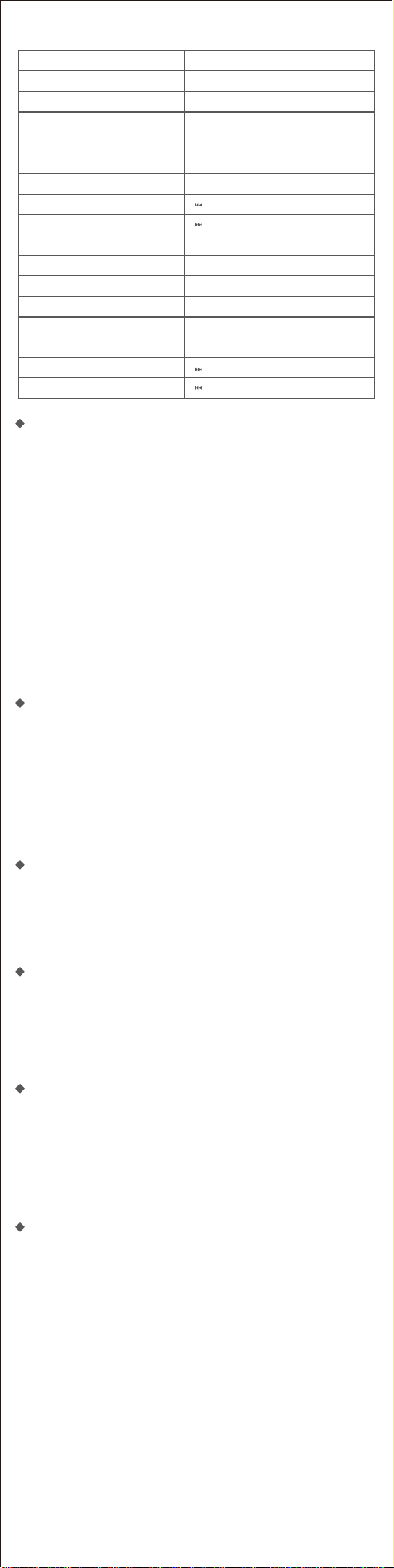
7.Operations
Multifunctional buttons

You want to
How to do
Turn On/Off
Press and hold the power button
Disconnect the device
Press and hold the Play/hand free button
Reconnect with last device
Tap the Play/hand free button
Play/Pause
Tap the Play/hand free button
Volume up
Rotate your finger clockwise
Volume down
Rotate your finger counterclockwise
Skip to the next track
Tap the next track button
Go to the previous track
Tap the previous track button
Switch modes
Tap the MODE button
Answer a call
Tap the Play/ hand free button
Reject a call
Press and hold the Play/ hand free button for
3 seconds
End a call
Tap the Play/hand free button
Apply TWS
Press and hold the ADD button for 2 seconds
Restore factory setting
Press and hold the ADD button for 8 seconds
Enable/disable the battery saver function
Press and hold the next track button for 5
seconds
Enable/disable the prompt tone
Press and hold the previous track button for 5
seconds
Pair your speaker with your smart device
1. Place your speaker and the smart device no more than 1 meter away.
2. Press the power button for a few seconds to turn the speaker on.
Upon powering on, a tone will be heard, the blue LED starts flashing.
3. Turn on Bluetooth on your device and choose SoundBox Plus in the
list.
4. If the pairing is successful, the LED will change to solid blue. If the
pairing fails after 60 seconds, please press and hold the play/hand-free
button for 5 seconds and try again.
5. Long press the play/hand-free button to disconnect the Bluetooth.
Note: if your device cannot discover the SoundBox Plus, please long
press the play/hand-free button and then try again.
Have problems connecting via Bluetooth?
1. Make sure that your device is within 1 meter from the speaker.
2. Clear the Bluetooth pairing list on your device.
3. Reset your device.
4. Try the pairing steps above again.
5. Problem still not resolved? Contact DOSS customer service at
Pair your device with the speaker via audio in cable
1. When using the audio input mode, control audio playback via the
connected device.
2. When the auxiliary cable is plugged, the play mode will automatically
switch to AUX IN mode.
Play music via SD card mode
1. Card capacity: 32G or below. If your micro SD card is larger than 32G,
please format it to FAT32 or FAT.
2. Support files: MP3、WAV、WMA、APE、FLAC
3. Play order: music will play in the download/copy order
Answer or end a call using your speaker
1. Briefly tap the play/hand free button to pick up.
2. Speak with a clear voice right into the built-in microphone located on the
front section of the speaker.
3. Tap the play/hand free button again to end the call.
Set true wireless stereo pairing
Start the first speaker
Turn on the speaker, press and hold the ADD button for 2 seconds.
Start the second speaker
Turn on the second speaker, press and hold the ADD button for 2 seconds.
Notes:
• Start the second speaker within 60 seconds, otherwise the stereo pairing
setting of the first speaker will be canceled.
• If the pairing succeeds, the volume control ring of the master speaker is
in solid blue, and the slave will flash blue every 5 seconds.
• The speaker will have stereo pairing automatically if they used to be
paired.
• Press and hold the Play/hand free button for 3 seconds to cancel the
stereo pairing mode.
• Under wireless stereo pairing, you can only change the modes(
Bluetooth/ audio-in) on the master speaker.
Use your speaker with Echo Dot
You can connect the Dot with SoundBox Plus via a 3.5mm auxin cable or
Bluetooth. Please follow the steps below to set up via Bluetooth:
1. Download the Alexa app and follow the standard setup procedure to get
the dot connected to your home Wi-Fi network.
2. Set your speaker to Bluetooth mode. You can press the “Play/hand free”
button for 5 seconds to keep it in pairing status.
3. Turn on the Alexa app, tap Menu, and then tap Settings.
4. Tap the Echo Dot in your list of Alexa devices and tap Bluetooth.
5. The SoundBox Plus should appear in the list of Bluetooth devices. If it
does not, then press the “Play/hand free” button for 5 seconds and try
again. Once listed, tap on the speaker to complete the pairing process.
6. To remove the device, return to Bluetooth > tap the name of the
speaker > tap “Forget device”.

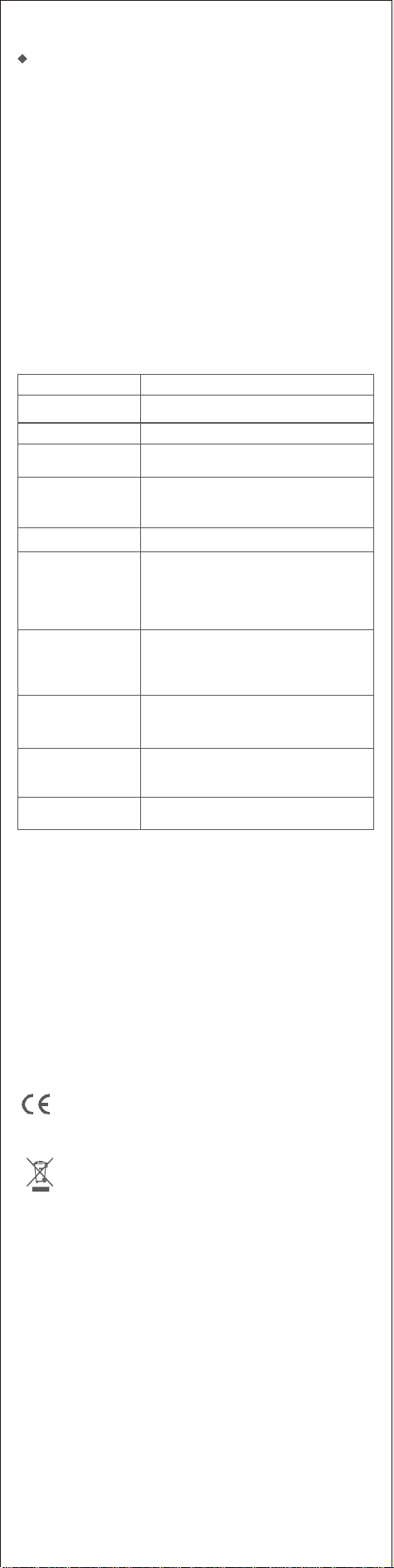
8. Trouble shooting
Problems
Solutions
No power
Battery may be in protection mode or drained. Plug in and
charge the speaker.
Low battery prompt tone
Please recharge the speaker. It takes 3.5-4 hours to get
fully charged.
Battery cannot be charged
• Make sure you are using a USB cable provided by DOSS
or from a qualified manufacturer.
• Use a different USB cable.
Fail to pair
• Turn off the Bluetooth on your device first and then turn
it on. Remove your speaker from the Bluetooth list on the
device and then research it. Try pairing them again.
• Reset your speaker.
TWS mode does not work
Disconnect the Bluetooth, press and hold the “ ADD”
button separately.
No sound
• Please select SoundBox Plus as the playback device.
• Increase the volume on your speaker and on your device.
• Use a different music source.
• Try pairing it with a different device.
• If your smart device connects to the speaker with other
devices, pause other devices.
No sound when in
audio-in mode
• Make sure the device connected to your speaker is on
and playing music. Increase the volume on your
speaker and device.
• Make sure the device is properly connected.
• Try using a different cable.
• Try connecting to a different device.
Poor sound quality/buzzing
sound
• Try using different music sources.
• Increase the volume on device.
• Check the device's audio settings.
• Fully charge your speaker.
The laptop reminds to
install driver
This driver is not for your speaker, it's for your laptop
Bluetooth function, please contact the customer service
of laptop or Windows for help.
The speaker cannot be
turned off
Press and hold the ADD button for 8 seconds.
9.Warnings
• Do NOT drop, hit, or shake the device.
• Do NOT disassemble, repair, or modify the speaker.
• Do NOT use cleaning stuff that contains benzene, solvents, or alcohol.
• Do NOT expose the speaker to excessive heat or direct sunlight for prolonged
periods.
• Do NOT store the device in a place with high humidity or dust.
• Do NOT place heavy objects on the speaker.
• Do NOT use the speaker near a microwave oven or wireless LAN products.
Notice
This product complies with the radio interference requirements of the
European Community.
CAUTION RISK OF EXPLOSION IF BATTERY IS REPLACED BY AN INCORRECT TYPE.
DISPOSE OF USED
This symbol means the product must not be discarded as household
waste, and should be delivered to an appropriate collection facility for
recycling. Proper disposal and recycling helps protect natural resources,
human health and the environment. For more information on disposal and
recycling of this product, contact your local municipality, disposal service, or the
shop where you bought this product.
FCC Statement
This equipment has been tested and found to comply with the limits for a Class
B digital device, pursuant to part 15 of the FCC Rules. These limits are designed
to provide reasonable protection against harmful interference in a residential
installation. This equipment generates, uses and can radiate radio frequency
energy and, if not installed and used in accordance with the instructions, may
cause harmful interference to radio communications. However, there is no
guarantee that interference will not occur in a particular installation. If this
equipment does cause harmful interference to radio or television reception,
which can be determined by turning the equipment off and on, the user is
encouraged to try to correct the interference by one or more of the following
measures:
• Reorient or relocate the receiving antenna.
• Increase the separation between the equipment and receiver.
• Connect the equipment into an outlet on a circuit different from that to which
the receiver is connected.
• Consult the dealer or an experienced radio/TV technician for help.
Caution: Any changes or modifications to this device not explicitly approved by
manufacturer could void your authority to operate this equipment.This device
complies with part 15 of the FCC Rules. Operation is subject to the following
two conditions:
(1) This device may not cause harmful interference, and (2) this device must
accept any interference received, including interference that may cause
undesired operation.
RF Exposure Information
The device has been evaluated to meet general RF exposure requirement.
The device can be used in portable exposure condition without restriction.
ISED Statement
This device contains licence-exempt transmitter(s)/receiver(s) that comply with
Innovation, Science and Economic Development Canada’s licence-exempt
RSS(s). Operation is subject to the following two conditions:
1. This device may not cause interference.
2. This device must accept any interference, including interference that may
cause undesired operation of the device.
This equipment should be installed and operated with a minumum distance of
20 cm between the radiator and your body.
Le présent appareil est conforme aux CNR d'Industrie Canada applicables
auxappareils radio exempts de licence. L'exploitation est autorisée aux deux
conditions suivantes : (1)l'appareil ne doit pas produire de brouillage, et (2)
l'utilisateur de l'appareil doit accepter toutbrouillage radioélectrique subi,
même si le brouillage est susceptible d'en compromettre lefonctionnement.
CAN ICES-3(B)/NMB-3(B)
L’appareil a été évalué pour répondre aux exigences générales d’exposition aux
RF. Le dispositif peut être utilisé sans restriction dans des conditions portatives
d’exposition.
Cet équipement doit être installé et utilisé à une distance minimale de 20 cm
entre le radiateur et votre corps
DE
1. Inhalt des Pakets
• 1 x SoundBox Plus
• 1 x USB-C-Ladekabel
• 1 x Benutzerhandbuch
2. Spezifikation
• Leistungt: 8W*2
• Eingabe: DC5V 2A
• Batterie: 3.7V 3200mAh
• Dimension der Einheit: 19.3*8.4*7.8CM
• Spielzeit: bis zu 16 Stunden
• Garantie: Ein Jahr beschränkt
• Bluetooth-Abstand: 20M
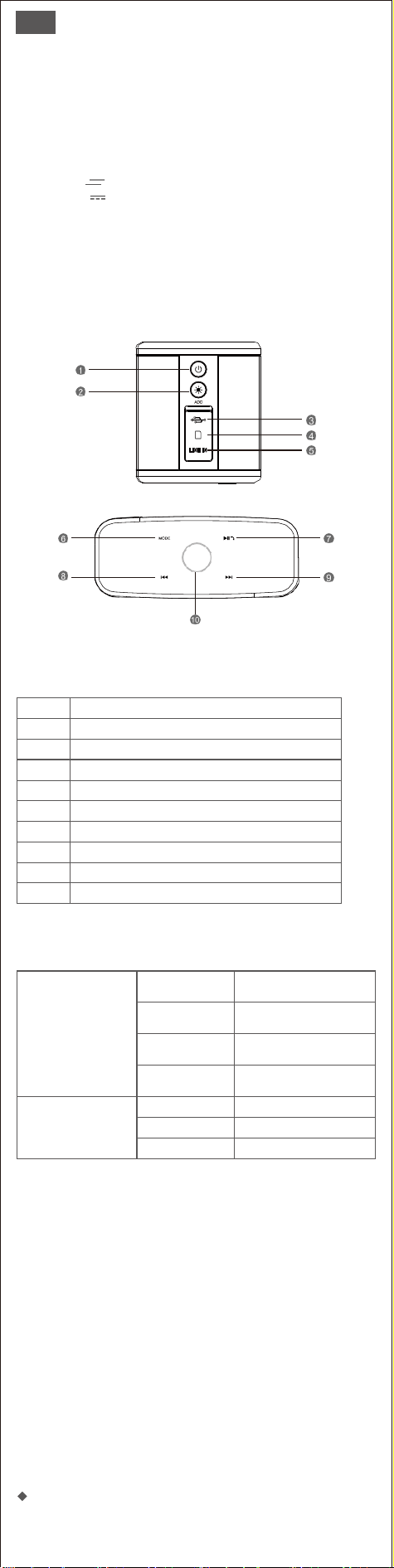
3. Abbildung
4. Schaltflächen und Steuerelemente
1
Power-Taste
2
Taste "Hinzufügen
3
Anschluss zum Aufladen
4
TF-Kartenanschluss
5
Audio-In-Anschluss
6
Modus-Taste
7
Wiedergabe-/ Freihandtaste
8
Taste für vorherigen Titel
9
Taste für den nächsten Titel
10
Taste für die Lautstärkeregelung
5. Indikatoren
Mittlere Anzeige/
Steuerungstaste
Blau blinkend
Zeigt an, dass der Lautsprecher in
den Kopplungsmodus eingetreten ist
und bereit ist, gekoppelt zu werden.
Stetig blau
Zeigt an, dass das Gerät erfolgreich
gekoppelt ist.
Dauerhaftes Rot
Zeigt an, dass das Gerät in den
Hilfseingangsmodus geschaltet hat
Dauerhaft grün
Zeigt an, dass das Gerät in den
TF-Modus gewechselt hat
Ladeindikator
Dauerhaft rot
Aufladen
AUS
Vollständig geladen
Rot blinkend
Schwacher Akku
6. Vorbereitung
• Verwenden Sie das mitgelieferte Ladekabel, um Ihren tragbaren Lautsprecher
direkt über den Micro-USB-Anschluss Ihres Computers oder den Handy-Adapter
aufzuladen (bitte beachten Sie, dass der Ausgang 5 V beträgt).
• Vergewissern Sie sich, dass der Lautsprecher vollständig aufgeladen ist, bevor
Sie ihn zum ersten Mal benutzen.
• Die LED-Leuchte leuchtet während des Ladevorgangs ROT und schaltet sich
aus, sobald sie vollständig geladen ist.
Anmerkung:
1. Wenn der Lautsprecher alle paar Sekunden piept, laden Sie ihn bitte für
3-4 Stunden auf.
2. Der Lautsprecher verfügt über einen integrierten Batteriesparmodus,
der sich automatisch ausschaltet, wenn er 15 Minuten lang nicht benutzt
wird. Diese Funktion kann über die Berührungssteuerung deaktiviert
werden. Siehe dazu die Seite Bedienung. Wenn Sie weitere Hilfe
7. Betrieb
Multifunktionstasten

Sie wollen
Wie zu tun ist
Einschalten/Ausschalten
Drücken und halten Sie die Einschalttaste
Trennen Sie die Verbindung zum Gerät
Drücken und halten Sie die Wiedergabe-
/Freihandtaste
Verbindung mit dem letzten Gerät
wiederherstellen
Tippen Sie auf die Schaltfläche Wiedergabe
/Hand frei
Wiedergabe/Pause
Tippen Sie auf die Schaltfläche Wiedergabe
/Hand frei
Lauter
Drehen Sie Ihren Finger im Uhrzeigersinn
Lautstärke runter
Drehen Sie Ihren Finger gegen den Uhrzeigersinn
Zum nächsten Titel springen
Tippen Sie auf die Schaltfläche "Nächster Titel
Zum vorherigen Titel wechseln
Tippen Sie auf die Schaltfläche für den
vorherigen Titel
Modi wechseln
Tippen Sie auf die Schaltfläche MODE
Einen Anruf entgegennehmen
Tippen Sie auf die Schaltfläche Wiedergabe
/Hand frei
Ablehnen eines Anrufs
Halten Sie die Wiedergabe-/ Freihandtaste 3
Sekunden lang gedrückt
Beenden eines Anrufs
Tippen Sie auf die Schaltfläche Wiedergabe
/Hand frei
TWS anwenden
Drücken und halten Sie die ADD-Taste für 2
Sekunden
Werkseinstellung wiederherstellen
Drücken und halten Sie die ADD-Taste 8
Sekunden lang
Aktivieren/Deaktivieren der
Batteriesparfunktion
Halten Sie die Taste für den nächsten Titel 5
Sekunden lang gedrückt.
Aktivieren/Deaktivieren des
Aufforderungstons
Drücken und halten Sie die Taste für den
vorherigen Titel 5 Sekunden lang
Koppeln Sie Ihren Lautsprecher mit Ihrem Smartgerät
1. Stellen Sie Ihren Lautsprecher und das Smart-Gerät nicht weiter als 1
Meter entfernt auf.
2. Drücken Sie die Einschalttaste einige Sekunden lang, um den
Lautsprecher einzuschalten. Nach dem Einschalten ertönt ein Ton und
die blaue LED beginnt zu blinken.
3. Schalten Sie Bluetooth an Ihrem Gerät ein und wählen Sie die
SoundBox Plus in der Liste aus.
4. Wenn das Pairing erfolgreich war, leuchtet die LED dauerhaft hellblau.
Wenn das Pairing nach 60 Sekunden fehlschlägt, drücken Sie bitte die
Wiedergabe-/Freihandtaste für 5 Sekunden und versuchen Sie es erneut.
5. Drücken Sie lange auf die Wiedergabe-/Freihandtaste, um die
Bluetooth-Verbindung zu trennen.
Hinweis: Wenn Ihr Gerät die SoundBox Plus nicht erkennen kann,
drücken Sie bitte lange auf die Wiedergabe-/Freihandtaste und
versuchen Sie es dann erneut.
Haben Sie Probleme bei der Verbindung über Bluetooth?
1. Stellen Sie sicher, dass sich Ihr Gerät nicht weiter als 1 Meter vom
Lautsprecher entfernt befindet.
2. Löschen Sie die Bluetooth-Kopplungsliste auf Ihrem Gerät.
3. Setzen Sie Ihr Gerät zurück.
4. Versuchen Sie die obigen Kopplungsschritte erneut.
5. Ist das Problem immer noch nicht gelöst? Wenden Sie sich an den
DOSS-Kundendienst unter support_de@dossav.com, um Hilfe zu
erhalten.
Koppeln Sie Ihr Gerät über ein Audioeingangskabel mit
dem Lautsprecher
1. Wenn Sie den Audioeingangsmodus verwenden, steuern Sie die
Audiowiedergabe über das angeschlossene Gerät.
2. Wenn das Zusatzkabel eingesteckt wird, schaltet der Wiedergabemodus
automatisch in den AUX IN-Modus.
Musikwiedergabe über SD-Kartenmodus
1. Kartenkapazität: 32G oder weniger. Wenn Ihre Micro-SD-Karte größer
als 32 GB ist, formatieren Sie sie bitte auf FAT32 oder FAT.
2. Unterstützte Dateien: MP3、WAV、WMA、APE、FLAC
3. Abspielreihenfolge: Die Musik wird in der Reihenfolge des
Downloads/Kopierens abgespielt.
Annehmen oder Beenden eines Anrufs über den
Lautsprecher
1. Tippen Sie kurz auf die Taste "Spielen/Hand frei", um das Spiel
aufzunehmen.
2. Sprechen Sie mit klarer Stimme direkt in das eingebaute Mikrofon an
der Vorderseite des Lautsprechers.
3. Tippen Sie erneut auf die Wiedergabe-/Freihandtaste, um das Gespräch
zu beenden.
Echte drahtlose Stereo-Kopplung einstellen
Starten Sie den ersten Lautsprecher
Schalten Sie den Lautsprecher ein und halten Sie die ADD-Taste für 2
Sekunden gedrückt.
Starten des zweiten Lautsprechers
Schalten Sie den zweiten Lautsprecher ein, halten Sie die ADD-Taste 2
Sekunden lang gedrückt.
Hinweise:
• Starten Sie den zweiten Lautsprecher innerhalb von 60 Sekunden, da
sonst die Stereopaareinstellung des ersten Lautsprechers aufgehoben wird.
• Wenn die Kopplung erfolgreich war, leuchtet der Lautstärkeregelungsring
des Master-Lautsprechers durchgehend blau, und der Slave-Lautsprecher
blinkt alle 5 Sekunden blau.
• Die Lautsprecher werden automatisch in Stereo gepaart, wenn sie vorher
gepaart waren.
• Halten Sie die Wiedergabe-/Freihandtaste 3 Sekunden lang gedrückt, um
den Stereo-Pairing-Modus zu beenden.
• Bei der drahtlosen Stereokopplung können Sie die Modi (Bluetooth/Au-
dio-in) nur am Hauptlautsprecher ändern.

Verwenden Sie Ihren Lautsprecher mit Echo Dot
Sie können den Dot mit der SoundBox Plus über ein 3,5-mm-Auxin-Kabel
oder über Bluetooth verbinden. Bitte befolgen Sie die folgenden Schritte
zur Einrichtung über Bluetooth:
1. Laden Sie die Alexa-App herunter und befolgen Sie die Standard-Einrich-
tungsprozedur, um den Dot mit Ihrem Heim-Wi-Fi-Netzwerk zu verbinden.
2. Schalten Sie Ihren Lautsprecher in den Bluetooth-Modus. Sie können die
Taste "Wiedergabe/Freihand" 5 Sekunden lang drücken, um den
Kopplungsstatus beizubehalten.
3. Schalten Sie die Alexa-App ein, tippen Sie auf Menü und dann auf
Einstellungen.
4. Tippen Sie auf den Echo Dot in der Liste der Alexa-Geräte und dann auf
Bluetooth.
5. Die SoundBox Plus sollte in der Liste der Bluetooth-Geräte erscheinen.
Ist dies nicht der Fall, drücken Sie 5 Sekunden lang die Taste "Wieder-
gabe/Freihand" und versuchen Sie es erneut. Sobald sie in der Liste
erscheint, tippen Sie auf den Lautsprecher, um den Kopplungsprozess
abzuschließen.
6. Um das Gerät zu entfernen, kehren Sie zu Bluetooth zurück > tippen Sie
auf den Namen des Lautsprechers > tippen Sie auf "Gerät vergessen".
8. Fehlersuche
Probleme
Lösungen
Kein Strom
Der Akku befindet sich möglicherweise im Schutzmodus
oder ist entladen. Schließen Sie den Lautsprecher an und
laden Sie ihn auf.
Warnton bei niedrigem
Batteriestand
Bitte laden Sie den Lautsprecher auf. Es dauert 3,5-4
Stunden, bis er vollständig aufgeladen ist.
Akku kann nicht geladen
werden
• Vergewissern Sie sich, dass Sie ein USB-Kabel verwenden
das von DOSS oder einem qualifizierten Hersteller stammt.
• Verwenden Sie ein anderes USB-Kabel.
Pairing fehlgeschlagen
• Schalten Sie zuerst Bluetooth auf Ihrem Gerät aus und
dann wieder ein. Entfernen Sie Ihren Lautsprecher aus der
Bluetooth-Liste des Geräts und suchen Sie ihn dann.
Versuchen Sie, sie erneut zu koppeln.
• Setzen Sie Ihren Lautsprecher zurück.
TWS-Modus funktioniert nicht
Trennen Sie die Bluetooth-Verbindung und halten Sie die
Taste " ADD" separat gedrückt.
Kein Ton
• Bitte wählen Sie die SoundBox Plus als Abspielgerät.
• Erhöhen Sie die Lautstärke an Ihrem Lautsprecher und
an Ihrem Gerät.
• Verwenden Sie eine andere Musikquelle.
• Versuchen Sie, ein anderes Gerät zu koppeln.
• Wenn Ihr Smart-Gerät zusammen mit anderen Geräten
mit dem Lautsprecher verbunden ist, halten Sie die
anderen Geräte an.
Kein Ton im Audio-in-Modus
• Stellen Sie sicher, dass das an den Lautsprecher
angeschlossene Gerät eingeschaltet ist.
• Beim Abspielen von Musik. Erhöhen Sie die Lautstärke
am Lautsprecher und am Gerät.
• Stellen Sie sicher, dass das Gerät richtig angeschlossen ist
• Versuchen Sie, ein anderes Kabel zu verwenden
• Versuchen Sie, eine Verbindung mit einem anderen
Gerät herzustellen.
Schlechte Tonqualität
/rumpelnder Ton
• Versuchen Sie es mit anderen Musikquellen.
• Geräts.Erhöhen Sie die Lautstärke am Gerät.
• Überprüfen Sie die Audioeinstellungen des Geräts
• Laden Sie den Lautsprecher auf, bis er vollständig
aufgeladen ist.
Der Laptop erinnert an die
Treiberinstallation
Dieser Treiber ist nicht für Ihren Lautsprecher, sondern für
die Bluetooth-Funktion Ihres Laptops. Bitte wenden Sie
sich an den Kundendienst Ihres Laptops oder an Windows,
um Hilfe zu erhalten.
Der Lautsprecher kann nicht
ausgeschaltet werden
Drücken und halten Sie die ADD-Taste für 8 Sekunden
9. Warnungen
• Lassen Sie das Gerät NICHT fallen, schlagen oder schütteln Sie es nicht.
• Zerlegen, reparieren oder modifizieren Sie den Lautsprecher NICHT.
• Verwenden Sie KEINE Reinigungsmittel, die Benzol, Lösungsmittel oder
Alkohol enthalten.
• Setzen Sie den Lautsprecher NICHT für längere Zeit übermäßiger Hitze oder
direktem Sonnenlicht aus.
• Lagern Sie das Gerät NICHT an einem Ort mit hoher Luftfeuchtigkeit oder
Staub.
• Stellen Sie KEINE schweren Gegenstände auf den Lautsprecher.
• Verwenden Sie den Lautsprecher NICHT in der Nähe eines Mikrowellenofens
oder drahtloser LAN-Produkte
Hinweis
Dieses Produkt entspricht den Richtlinien der Europäischen Union zu
Funkstörungen.
Dieses Symbol bedeutet, dass das Produkt nicht mit dem Hausmüll
entsorgt werden darf,sondern bei einer geeigneten Sammelstelle für das
Recycling abgegeben werden muss. Die ordnungsgemäße Entsorgung
und das Recycling tragen dazu bei, die natürlichen Ressourcen,die Gesundheit
und die Umwelt zu schützen. Weitere Informationen zur Entsorgung und zum
Recycling dieses Produkts erhalten Sie von Ihrer zuständigen Kommune, Ihrem
Entsorgungsdienst oder dem Geschäft, in dem Sie dieses Produkt gekauft haben.
FR
1. Contenu de l'Emballage
• 1 x SoundBox Plus
• 1 x Câble de charge USB-C
• 1 x Manuel d'utilisation
2. Spécification
• Sortie : 8W*2
• Entrée : DC5V 2A
• Batterie : 3.7V 3200mAh
• Dimension de l'unité : 19.3 x 8.4 x 7.8 cm
• Durée de lecture : jusqu'à 20 heures
• Garantie : Limitée à un an
• Distance Bluetooth : 20m
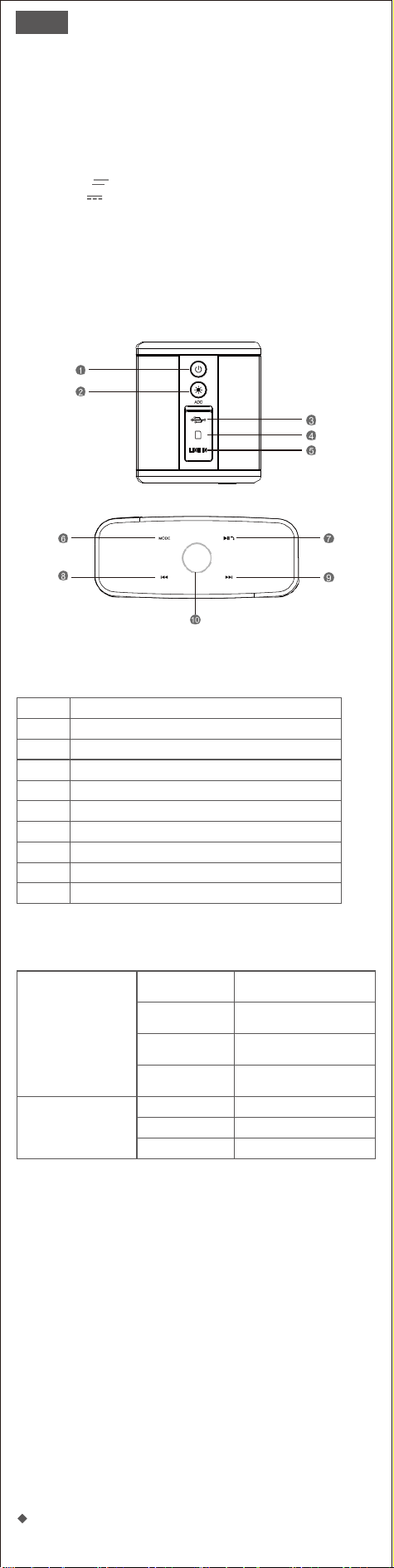
3. Illustration
4. Boutons et Commandes
1
Bouton d'alimentation
2
Bouton ADD
3
Port de charge
4
Prise pour carte TF
5
Port d'entrée audio
6
Bouton de mode
7
Bouton lecture/main libre
8
Bouton de la piste précédente
9
Bouton de la piste suivante
10
Bouton de réglage du volume
5. Indicateurs
Indicateur central/
Bouton de commande
Bleu clignotant
Indique que l'enceinte est entrée
en mode d'appairage et qu'elle
est prête à être appairée.
Bleu fixe
Indique que l'appareil a été
apparié avec succès
Rouge fixe
Indique que l'appareil est passé
en mode d'entrée auxiliaire.
Vert fixe
Indique que l'appareil est
passé en mode TF
Indicateur de charge
Rouge fixe
Chargement
Éteint
Entièrement chargé
Rouge clignotant
Batterie faible
6. Préparation
• Utilisez le câble de charge fourni pour charger votre haut-parleur portable
directement à partir du port micro USB de votre ordinateur ou de l'adaptateur
de téléphone portable (veuillez confirmer que sa sortie est de 5V).
• Assurez-vous que le haut-parleur est complètement chargé avant de l'utiliser
pour la première fois.
• Le voyant LED reste rouge pendant la charge et s'éteint une fois qu'il est
complètement chargé.
NB :
1. Si le haut-parleur émet un bip toutes les quelques secondes, veuillez le
recharger pendant 3 à 4 heures.
2. Le haut-parleur dispose d'un mode d'économie de batterie intégré, qui
s'éteint automatiquement s'il n'est pas utilisé pendant 15 minutes. Cette
fonction peut être désactivée via la commande tactile. Veuillez consulter
la page des opérations. Pour plus d'assistance, veuillez contacter :
support_fr@dossav.com.
7. Opérations
Boutons multifonctions

Vous voulez
Comment faire
Allumer/Éteindre
Appuyez sur le bouton d'alimentation et
maintenez-le enfoncé
Déconnecter l'appareil
Appuyez et maintenez enfoncé le bouton
Lecture/main libre
Reconnecter avec le dernier appareil
Appuyez sur le bouton Lecture/main libre
Lecture/Pause
Appuyez sur le bouton Lecture/main libre
Augmentation du volume
Tournez votre doigt dans le sens des aiguilles
d'une montre
Diminution du volum
Tournez le doigt dans le sens inverse des
aiguilles d'une montre
Passer à la piste suivante
Appuyez sur le bouton de la piste suivante
Aller à la piste précédente
Appuyez sur le bouton de la piste précédente
Changer de mode
Appuyez sur le bouton MODE
Répondre à un appel
Appuyez sur le bouton Lecture/main libre
Refuser un appel
Appuyez et maintenez enfoncé le bouton
Lecture/main libre pendant 3 secondes.
Mettre fin à un appel
Appuyez sur le bouton Lecture/main libre
Appliquer stéréo sans fil
Appuyer sur le bouton ADD et la maintenir
enfoncée pendant 2 secondes
Rétablir les réglages d'usine
Appuyez sur le bouton ADD et maintenez-la
enfoncée pendant 8 secondes
Activer/désactiver la fonction
d'économiseur de batterie
Appuyez et maintenez enfoncé le bouton de la
piste suivante pendant 5 secondes
Activer/désactiver la tonalité d'invite
Appuyez sur le bouton de la piste précédente
et maintenez-le enfoncé pendant 5 secondes
Associez votre haut-parleur à votre appareil intelligent
1.Placez votre enceinte et l'appareil intelligent à une distance maximale
d'un mètre.
2. Appuyez sur le bouton d'alimentation pendant quelques secondes pour
allumer le haut-parleur. Une fois l'enceinte allumée, une tonalité se fait
entendre et le voyant bleu commence à clignoter.
3. Activez le Bluetooth sur votre appareil et sélectionnez SoundBox Plus
dans la liste.
4. Si l'appairage est réussi, la LED devient bleu clair fixe. Si l'appairage
échoue au bout de 60 secondes, appuyez sur le bouton Lecture/main
libre pendant 5 secondes et réessayez.
5. Appuyez longuement sur le bouton Lecture/main libre pour
déconnecter le Bluetooth.
Remarque : si votre appareil ne détecte pas la SoundBox Plus, appuyez
longuement sur la touche Lecture/main libre, puis réessayez.
Vous avez des problèmes de connexion via Bluetooth ?
1. Assurez-vous que votre appareil se trouve à moins d'un mètre du
haut-parleur.
2. Effacez la liste d'appairage Bluetooth sur votre appareil.
3. Réinitialisez votre appareil.
4. Réessayez les étapes d'appairage ci-dessus.
5. Le problème n'est toujours pas résolu ? Contactez le service clientèle
de DOSS à l'adresse support_fr@dossav.com pour obtenir de l'aide.
Associez votre appareil au haut-parleur via le câble
d'entrée audio
1. Lorsque vous utilisez le mode d'entrée audio, contrôlez la lecture audio
via l'appareil connecté.
2. Lorsque le câble auxiliaire est branché, le mode de lecture passe
automatiquement en mode AUX IN.
Lecture de musique via le mode carte SD
1. Capacité de la carte : 32G ou moins. Si votre carte micro SD est plus
grande que 32G, veuillez la formater en FAT32 ou FAT.
2. Fichiers pris en charge : MP3、WAV、WMA、APE、FLAC
3. Ordre de lecture : la musique sera lue dans l'ordre de téléchargement/-
copie.
Répondre ou mettre fin à un appel en utilisant le
haut-parleur
1. Appuyez brièvement sur le bouton lecture/main libre pour décrocher.
2. Parlez d'une voix claire dans le microphone intégré situé à l'avant du
haut-parleur.
3. Appuyez à nouveau sur la touche lecture/main libre pour mettre fin à
l'appel.
Établir un véritable couplage stéréo sans fil
Démarrer le premier haut-parleur
Allumez l'enceinte, appuyez sur le bouton ADD et maintenez-le enfoncé
pendant 2 secondes.
Démarrer le deuxième haut-parleur
Allumez la deuxième enceinte, appuyez sur la touche ADD et maintenez-la
enfoncée pendant 2 secondes.
NB :
• Démarrez la deuxième enceinte dans les 60 secondes, sinon le réglage du
couplage stéréo de la première enceinte sera annulé.
• Si le couplage réussit, l'anneau de contrôle du volume de l'enceinte
principale est en bleu continu, et l'enceinte secondaire clignote en bleu
toutes les 5 secondes.
• Les enceintes seront automatiquement couplées en stéréo si elles ont
déjà été couplées.
• Appuyez sur la touche Lecture/Main libre pendant 3 secondes pour
annuler le mode de couplage stéréo.
• En mode d'appairage stéréo sans fil, vous ne pouvez changer les modes
(Bluetooth/audio) que sur l'enceinte principale.

Utiliser votre enceinte avec Echo Dot
Vous pouvez connecter le Dot à SoundBox Plus via un câble auxiliaire de
3.5 mm ou via Bluetooth. Veuillez suivre les étapes ci-dessous pour
configurer via Bluetooth :
1. Téléchargez l'application Alexa et suivez la procédure d'installation
standard pour connecter le Dot à votre réseau Wi-Fi domestique.
2. Réglez votre haut-parleur en mode Bluetooth. Vous pouvez appuyer sur
le bouton « Lecture/main libre » pendant 5 secondes pour le maintenir en
état de couplage.
3. Allumez l'application Alexa, appuyez sur Menu, puis sur Paramètres.
4. Appuyez sur l'Echo Dot dans votre liste d'appareils Alexa et appuyez sur
Bluetooth.
5. La SoundBox Plus doit apparaître dans la liste des appareils Bluetooth. Si
ce n'est pas le cas, appuyez sur le bouton « Lecture/main libre » pendant 5
secondes et réessayez. Une fois dans la liste, appuyez sur l'enceinte pour
terminer le processus d'appairage.
6. Pour supprimer l'appareil, retournez à Bluetooth > appuyez sur le nom
de l'enceinte > appuyez sur « Oublier l'appareil ».
8. Dépannage
Problèmes
Solutions
Pas de courant
La batterie est peut-être en mode de protection ou
déchargée. Branchez et rechargez le haut-parleur.
Tonalité d'alerte de batterie
faible
Veuillez recharger le haut-parleur. Il faut 3.5 à 4 heures
pour le recharger complètement.
La batterie ne peut pas être
chargée
• Assurez-vous que vous utilisez un câble USB fourni par
DOSS ou par un fabricant qualifié.
• Utilisez un autre câble USB.
Échec de l'appariement
• Désactivez d'abord la fonction Bluetooth de votre
appareil, puis activez-la. Supprimez votre haut-parleur
de la liste Bluetooth de l'appareil, puis effectuez une
recherche. Essayez de les coupler à nouveau.
• Réinitialisez votre haut-parleur.
Le mode TWS ne
fonctionne pas
Déconnectez le Bluetooth, appuyez sur le bouton « ADD»
et maintenez-le enfoncé séparément.
Pas de son
• Veuillez sélectionner SoundBox Plus comme appareil
de lecture.
• Augmentez le volume de votre enceinte et de votre
appareil.
• Utilisez une autre source de musique.
• Essayez d'appairer un autre appareil.
• Si votre appareil intelligent se connecte à l'enceinte
avec d'autres appareils, mettez les autres appareils
en pause.
Pas de son en mode
entrée audio
• Assurez-vous que l'appareil connecté à votre
haut-parleur est allumé et qu'il joue de la musique.
• Augmentez le volume de votre haut-parleur et de votre
appareil.
• Assurez-vous que l'appareil est correctement connecté.
• Essayez d'utiliser un autre câble.
• Essayez de vous connecter à un autre appareil.
Mauvaise qualité du
son/bruits parasites
• Essayez d'utiliser d'autres sources de musique.
• Augmentez le volume de l'appareil.
• Vérifiez les paramètres audio de l'appareil.
• Chargez votre haut-parleur jusqu'à ce qu'il soit
complètement chargé.
L'ordinateur portable
rappelle d'installer le pilote
Ce pilote n'est pas destiné à votre haut-parleur, mais à la
fonction Bluetooth de votre ordinateur portable. Veuillez
contacter le service clientèle de l'ordinateur portable ou
de Windows pour obtenir de l'aide.
Le haut-parleur ne peut
pas être désactivé
Appuyez sur le bouton ADD pendant 8 secondes
9. Consignes de sécurité
• NE PAS faire tomber, frapper ou secouer l'enceinte.
• NE PAS démonter, réparer ou modifier l'enceinte par vous-même.
• NE PAS utiliser de produits de nettoyage contenant du benzène, des solvants
ou de l'alcool.
• NE PAS exposer l'enceinte à une chaleur excessive ou à la lumière directe du
soleil pendant une longue période.
• NE PAS stocker l'enceinte dans un endroit humide ou poussiéreux.
• NE PAS placer d'objets lourds sur le haut de l'enceinte.
• NE PAS utiliser l'enceinte à proximité d'un four à micro-ondes ou de produits
LAN sans fil.
Avertissement
Ce produit est conforme aux spécifications d’interférence radio de la
Communauté Européenne.
Ce symbole signifie que le produit ne doit pas être jeté avec les déchets
ménagers, mais doit être déposé dans un centre de collecte approprié
pour recyclage. Une mise au rebut et un recyclage adéquats permettent
de protéger les ressources naturelles, la santé humaine et l’environnement. Pour
plus d’informations sur l’élimination et le recyclage de ce produit, contactez votre
mairie, votre service de ramassage des ordures ou le magasin où vous avez
acheté ce produit.
IT
1. Contenuto della confezione
• 1 x SoundBox Plus
• 1 x Cavo di ricarica USB-C
• 1 x Manuale d'uso
2. Specifiche
• Uscita: 8W*2
• Ingresso: DC5V 2A
• Batteria: 3.7V 3200mAh
• Dimensione dell'unità: 19.3*8.4*7.8CM
• Tempo di riproduzione: fino a 20 ore
• Garanzia: Limitato a un anno
• Distanza Bluetooth: 20M
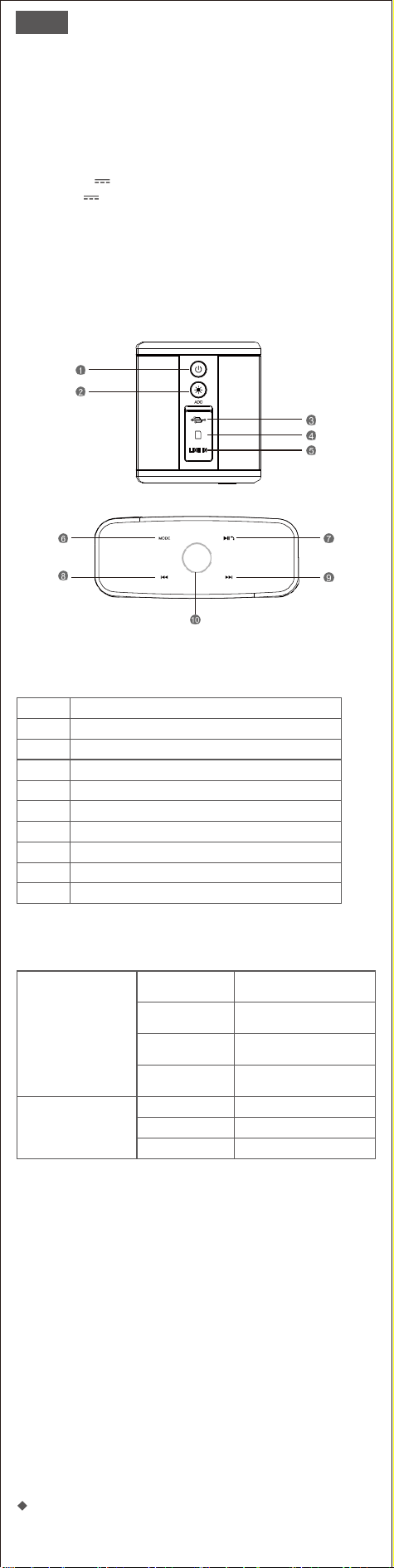
3. Illustrazione
4. Pulsanti e controlli
1
Pulsante di accensione
2
Pulsante di aggiunta
3
Porta di ricarica
4
Presa per scheda TF
5
Porta audio
6
Pulsante modalità
7
Pulsante play/ mano libera
8
Pulsante del brano precedente
9
Pulsante del brano successivo
10
Pulsante di controllo del volume
5. Indicatori
Indicatore centrale/
Pulsante di controllo
Blu lampeggiante
Indica che il diffusore è entrato
in modalità di accoppiamento ed
è pronto per essere accoppiato.
Blu fisso
Indica che il dispositivo è stato
accoppiato correttamente
Rosso fisso
Indica che il dispositivo è passato
alla modalità di ingresso
ausiliario.
Verde fisso
Indica che il dispositivo è
passato alla modalità TF
Indicatore di carica
Rosso fisso
Ricarica
SPENTO
Completamente carica
Verde fisso
Batteria scarica
6. Preparation
• Utilizzare il cavo di ricarica in dotazione per caricare il diffusore portatile
direttamente dalla porta micro USB del computer o dall'adattatore del telefono
cellulare (controllare che l'uscita sia di 5 V).
• Assicurarsi che il diffusore sia completamente carico prima di utilizzarlo per la
prima volta.
La luce del LED rimane ROSSA durante la carica e si spegne quando è
completamente
• carica.
Nota:
1. Se l'altoparlante emette un segnale acustico ogni pochi secondi,
ricaricarlo per 3-4 ore.
2. Il diffusore è dotato di una modalità di risparmio della batteria
integrata, che si spegne automaticamente se non viene utilizzato per 15
minuti. Questa funzione può essere disattivata tramite il comando a
sfioramento. Consultare la pagina delle operazioni. Per ulteriore
assistenza, contattare: support_it@dossav.com
7. Operazioni
Pulsanti multifunzione

Si desidera
Come fare
Accendere/Spegnere
Tenere premuto il pulsante di accensione
Disconnettere il dispositivo
Tenere premuto il pulsante Play/libera mano
Ricollegarsi all'ultimo dispositivo
Toccare il pulsante Play/libera mano
Riproduzione/Pausa
Toccare il pulsante Play/libera mano
Alzare il volume
Ruotare il dito in senso orario
Abbassare il volume
Ruotare il dito in senso antiorario
Passa alla traccia successiva
Toccare il pulsante del brano successivo
Passa al brano precedente
Toccare il pulsante della traccia precedente
Cambia modalità
Toccare il pulsante MODE
Rispondere a una chiamata
Toccare il pulsante Play/ mano libera
Rifiutare una chiamata
Tenere premuto il pulsante Play/ mano libera
per 3 secondi
Terminare una chiamata
Toccare il pulsante Play/ mano libera
Applicare il TWS
Tenere premuto il pulsante ADD per 2 secondi
Ripristino delle impostazioni di fabbrica
Tenere premuto il pulsante ADD per 8 secondi
Abilitare/disabilitare la funzione di
risparmio della batteria
Tenere premuto il pulsante del brano
successivo per 5 secondi
Abilita/disabilita il tono di avviso
Tenere premuto il pulsante del brano
precedente per 5 secondi
Accoppiamento del diffusore con il dispositivo smart
1. Posizionare il diffusore e lo smart device a non più di 1 metro di
distanza.
2. Premere il pulsante di accensione per alcuni secondi per accendere il
diffusore. All'accensione si sente un tono e il LED blu inizia a lampeggiare.
3. Attivate il Bluetooth sul vostro dispositivo e scegliete SoundBox Plus
nell'elenco.
4. Se l'accoppiamento riesce, il LED diventa blu fisso. Se l'accoppiamento
non riesce dopo 60 secondi, premere il pulsante play/hand-free per 5
secondi e riprovare.
5. Premere a lungo il pulsante play/libero per scollegare il Bluetooth.
Nota: se il dispositivo non riesce a rilevare SoundBox Plus, premere a
lungo il pulsante play/hand-free e riprovare.
Avete problemi di connessione via Bluetooth?
1. Assicurarsi che il dispositivo si trovi a una distanza di 1 metro dal
diffusore.
2. Cancellare l'elenco di accoppiamento Bluetooth sul dispositivo.
3. Resettare il dispositivo.
4. Riprovate a eseguire le operazioni di accoppiamento sopra descritte.
5. Il problema non è ancora risolto? Contattare il servizio clienti DOSS
all'indirizzo support_it@dossav.com per ricevere assistenza
Accoppiamento del dispositivo con il diffusore tramite
cavo audio in ingresso
1. Quando si utilizza la modalità di ingresso audio, controllare la
riproduzione audio tramite il dispositivo collegato.
2. Quando viene inserito il cavo ausiliario, la modalità di riproduzione
passa automaticamente alla modalità AUX IN.
Riproduzione di musica tramite la modalità scheda SD
1. Capacità della scheda: 32G o inferiore. Se la scheda micro SD è più
grande di 32 G, formattarla in FAT32 o FAT.
2. File supportati: MP3, WAV, WMA,APE, FLAC
3. Ordine di riproduzione: la musica verrà riprodotta nell'ordine di
download/copia.
Rispondere o terminare una chiamata utilizzando
l'altoparlante
1.1.Toccare brevemente il pulsante play/hand free per rispondere.
2.2. Parlare con voce chiara nel microfono incorporato situato nella parte
anteriore dell'altoparlante.
3.3.Toccare nuovamente il pulsante play/libera mano per terminare la
chiamata.
Impostazione di un vero accoppiamento stereo wireless
Avviare il primo diffusore
Accendere il diffusore, tenere premuto il tasto ADD per 2 secondi.
Avviare il secondo diffusore
Accendere il secondo diffusore, tenere premuto il tasto ADD per 2 secondi.
Note:
• Avviare il secondo diffusore entro 60 secondi, altrimenti l'impostazione di
accoppiamento stereo del primo diffusore verrà annullata.
• Se l'accoppiamento riesce, l'anello di controllo del volume del diffusore
master è di colore blu fisso, mentre quello del diffusore slave lampeggia in
blu ogni 5 secondi.
• Il diffusore avrà automaticamente l'accoppiamento stereo se è già stato
accoppiato.
• Tenere premuto il pulsante PlayPlay/libero per 3 secondi per annullare la
modalità di accoppiamento.
Con l'accoppiamento stereo wireless, è possibile cambiare le modalità
(Bluetooth/ audio-in) solo sul diffusore principale.

Utilizzate il vostro altoparlante con Echo Dot
È possibile collegare il Dot a SoundBox Plus tramite un cavo di
collegamento da 3,5 mm o tramite Bluetooth. Per la configurazione
tramite Bluetooth, attenersi alla seguente procedura:
1. Scaricare l'app Alexa e seguire la procedura di configurazione standard
per connettere il Dot alla rete Wi-Fi domestica.
2. Impostare il diffusore in modalità Bluetooth. È possibile premere il
pulsante "Play/hand free" per 5 secondi per mantenere lo stato di
accoppiamento.
3. Accendere l'app Alexa, toccare Menu e quindi Impostazioni.
4. Toccare Echo Dot nell'elenco dei dispositivi Alexa e toccare Bluetooth.
5. Il SoundBox Plus dovrebbe apparire nell'elenco dei dispositivi Bluetooth.
Se così non fosse, premere il pulsante "Play/libera mano" per 5 secondi e
riprovare. Una volta inserito nell'elenco, toccare il diffusore per
completare il processo di accoppiamento.
6. Per rimuovere il dispositivo, tornare a Bluetooth > toccare il nome del
diffusore > toccare "Dimentica dispositivo".
8. Risoluzione dei problemi
Problemi
Soluzioni
Assenza di alimentazione
La batteria potrebbe essere in modalità di protezione o
scarica. Collegare e ricaricare il diffusore.
Segnale acustico di batteria
scarica
Ricaricare il diffusore. La ricarica completa richiede
3,5-4 ore.
La batteria non può essere
caricata
• Assicuratevi di utilizzare un cavo USB fornito da DOSS o
da un produttore qualificato.
• Utilizzare un altro cavo USB.
Non si riesce ad accoppiare
• Spegnere prima il Bluetooth sul dispositivo e poi
riaccenderlo. Rimuovere il diffusore dall'elenco
Bluetooth del dispositivo e quindi ricercarlo. Provare ad
accoppiarli di nuovo.
• Resettare il diffusore.
La modalità TWS
non funziona
Disconnettere il Bluetooth, tenere premuto il pulsante
" ADD" separatamente.
Nessun suono
• Selezionare SoundBox Plus come dispositivo di
riproduzione.
• Aumentare il volume del diffusore e del dispositivo.
• Utilizzare una sorgente musicale diversa.
• Provare ad accoppiare un altro dispositivo.
• Se il dispositivo smart si collega al diffusore insieme ad
altri dispositivi, mettere in pausa gli altri dispositivi.
Nessun suono quando è
in modalità audio-in
• Assicuratevi che il dispositivo collegato al vostro
diffusore sia acceso
• e stia riproducendo musica. Aumentare il volume del
diffusore e del dispositivo.
• Assicurarsi che il dispositivo sia collegato correttamente.
• Provare a utilizzare un altro cavo.
• Provare a collegarsi a un altro dispositivo.
Qualità del suono
scadente/rumore
• Provare a utilizzare fonti musicali diverse.
• Aumentare il volume del dispositivo.
• Controllare le impostazioni audio del dispositivo.
• Caricare il diffusore fino a quando non è
completamente carico.
Il portatile ricorda di
installare il driver
Questo driver non è per l'altoparlante, ma per la funzione
Bluetooth del portatile; per assistenza, contattare il
servizio clienti del portatile o di Windows.
Non è possibile spegnere
l'altoparlante
Tenere premuto il pulsante ADD per 8 secondi
9. Avvertenze
• NON far cadere, colpire o scuotere il dispositivo.
• NON smontare, riparare o modificare il diffusore.
• NON utilizzare detergenti contenenti benzene, solventi o alcol.
• NON esporre il diffusore a calore eccessivo o alla luce diretta del sole per
periodi prolungati.
• NON conservare il dispositivo in un luogo con elevata umidità o polvere.
• NON appoggiare oggetti pesanti sul diffusore.
• NON utilizzare il diffusore in prossimità di un forno a microonde o di prodotti
LAN wireless.
Avviso
Questo prodotto è conforme alle normative comunitarie in materia di
interferenze radio.
Questo simbolo indica che il prodotto non deve essere smaltito con i rifiuti
domestici, ma deve essere consegnato a una struttura di raccolta
appropriata per il riciclaggio. Uno smaltimento e un riciclaggio corretti
aiutano a preservare le risorse naturali, la salute e l’ambiente. Per ulteriori
informazioni sullo maltimento e sul riciclaggio di questo prodotto, rivolgersi alle
autorità locali, al servizio di smaltimento dei rifiuti o al negozio presso il quale è
stato acquistato.
ES
1. Contenido del Paquete
• 1 x SoundBox Plus
• 1 x Cable USB C
• 1 x Manual del Usuario
2. Especificación
• Potencia de salida: 8W*2
• Potencia: DC5V 2A
• Batería: 3.7V 3200mAh
• Dimensión de la unidad: 19.3*8.4*7.8cm
• Tiempo de reproducción: hasta 20 horas
• Garantia: Limitada de un año
• Alcance del Bluetooth: 20m
3. Ilustración
4. Botones y Mandos
1
Botón de encendido
2
Botón de ADD
3
Puerto de carga
4
Ranura de Tarjeta TF
5
Puerto de Audio-in
6
Botón de modo
7
Botón de reproducción/manos libres
8
Botón de pista anterior
9
Botón de pista siguiente
10
Botón de control de volumen
5. Indicadores
Indicador central/Botón
de control
Azul parpadeante
Indica que el altavoz ha entrado
en el modo de emparejamiento y
está listo para ser emparejado
Azul fijo
Indica que el dispositivo se ha
emparejado correctamente
Rojo fijo
Indica que el dispositivo ha
pasado al modo de audio-in
Verde fijo
Indica que el dispositivo ha
cambiado al modo de tarjeta TF
Indicador de carga
Rojo fijo
Cargando
OFF
Completamente cargado
Parpadeo en rojo
Batería baja
6. Preparación
• Utiliza el cable de carga incluido para cargar tu altavoz portátil directamente
desde el puerto micro USB de tu computadora o desde el adaptador de teléfono
(por favor confirma que su salida sea de 5V).
• Asegúrese de que el altavoz está completamente cargado antes de usarlo por
primera vez.
• La luz LED permanecerá ROJA mientras se carga y se apagará cuando esté
completamente cargado.
Nota:
1. Si el altavoz suena cada pocos segundos, por favor recárguelo durante
3-4 horas.
2. El altavoz tiene incorporado un modo de ahorro de batería, que se
apagará automáticamente si no se utiliza durante 15 minutos. Esta
función puede desactivarse mediante el control táctil. Consulta la página
de operaciones. Si necesitas más ayuda, ponte en contacto con:
7. Operaciones
Botones multifunción

Quieres
Cómo
Encendido/Apagado
Mantenga presionado el botón encendido
Desconecta el dispositivo
Mantenga presionado el botón de
reproducción/manos libres
Reconecta con el último dispositivo
Presiona el botón de reproducción/manos libres
Reproduce/Pausa
Presiona el botón de reproducción/manos libres
Aumenta el volumen
Gire el dedo en el sentido de las agujas del reloj
Baja el volumen
Gire el dedo en el sentido contrario a las agujas
del reloj
Salta a la siguiente pista
Presiona el botón de pista siguiente
Salta a la pista anterior
Presiona el botón de pista anterior
Cambia el modo
Presiona el botón de MODO
Contesta una llamada
Presiona el botón de reproducción/manos libres
Rechaza una llamada
Mantenga presionado el botón de
reproducción/manos libres 3 segundos
Finaliza una llamada
Presiona el botón de reproducción/manos libres
Aplica TWS
Mantenga presionado el botón de ADD durante
2 segundos
Restaura la configuración de fábrica
Mantenga presionado el botón de ADD durante
8 segundos
Activa/desactiva la función de
ahorro de batería
Mantenga presionado el botón de pista
siguiente durante 5 segundos
Activa/desactiva el tono de aviso
Mantenga presionado el botón de pista anterior
durante 5 segundos
Empareja el altavoz con tu dispositivo
1. Coloca el altavoz y tu dispositivo a menos de 1metro.
2. Presiona el botón encendido durante unos segundos para encender el
altavoz. Al encenderse, se oirá un tono y el LED azul empezará a
parpadear.
3. Enciende el Bluetooth en tu dispositivo y elige SoundBox Plus en la
lista.
4. Si se empareja correctamente, el LED cambiará a luz azul. Si el
emparejamiento falla después de 60 segundos, presiona el botón de
reproducción/manos libres durante 5 segundos e inténtalo de nuevo.
5.Mantenga presionado el botón de reproducción/manos libres para
desconectar el Bluetooth.
Nota: si tu dispositivo no puede encontrar el SoundBox Plus, por favor
presiona prolongadamente el botón de reproducción/manos libres e
inténtalo de nuevo.
Tienes problemas para conectarte por Bluetooth?
1.Asegúrate de que tu dispositivo está a menos de 1 metro del altavoz.
2.Elimina la lista de emparejamiento Bluetooth de tu dispositivo.
3. Reinicia tu dispositivo.
4. Vuelve a intentar los pasos de emparejamiento anteriores.
5. El problema sigue sin resolverse? Ponte en contacto con el servicio de
atención al cliente de DOSS en [email protected] para obtener
ayuda.
Empareja tu dispositivo con el altavoz a través del
cable Auxiliar
1. Cuando uses el modo de entrada auxiliar, controla la reproducción de
audio a través del dispositivo conectado.
2. Cuando el cable auxiliar esté enchufado, el modo de reproducción
cambiará automáticamente al modo de audio-in .
Reproduce música a través de tarjeta TF
1. Capacidad soportada: 32G o menos. Si su tarjeta micro SD es mayor de
32G, por favor formatéela a FAT32 o FAT.
2. Formato de soporte: MP3、WAV、WMA、APE、FLAC
Orden de reproducción: la música se reproducirá en el orden de
descarga/copia.
Responde o finaliza una llamada usando su altavoz
1. Presiona brevemente el botón de reproducción/manos libres para
descolgar.
2. Habla con voz clara a través del micrófono integrado situado en la parte
frontal del altavoz.
3. Vuelve a presionar el botón de reproducción/manos libres para finalizar
la llamada.
Configura el emparejamiento estéreo inalámbrico real
Enciende el primer altavoz
Enciende el altavoz, mantén presionado el botón de ADD durante 2
segundos.
Encender el segundo altavoz
Enciende el segundo altavoz, mantén presionado el botón de ADD durante 2
segundos.
Notas:
• Inicie el segundo altavoz antes de 60 segundos, de lo contrario se
cancelará la configuración de emparejamiento estéreo del primer altavoz.
• Si el pareado se realiza correctamente, el mando de volumen del altavoz
maestro se iluminará en azul y el del esclavo parpadeará en azul cada 5
segundos.
• El altavoz quedará automáticamente emparejado en estéreo si ya
estaban emparejados.
• Mantén presionado el botón de reproducción/manos libres durante 3
segundos para cancelar el modo de emparejamiento estéreo.
• En el emparejamiento estéreo inalámbrico, sólo puedes cambiar los
modos (Bluetooth/ AUX IN) en el altavoz maestro.

Utiliza tu altavoz con Echo Dot
Puedes conectar el SoundBox Plu a Echo Dot a través del cable 3.5mm
auxin or Bluetooth. Por favor, siga los siguientes pasos para configurar a
través de Bluetooth :
1.Descargue la aplicación Alexa y conecte el Dot a su red Wi-Fi doméstica.
2.Coloca el altavoz en modo Bluetooth. Puedes presionar el botón
"Reproducir/manos libres" durante 5 segundos para mantenerlo en estado
de emparejamiento.
3. Ejecuta la app Alexa, toca Menu y luego toca Settings.
4. Toca Echo Dot en la aplicación Alexa y luego toca BLUETOOTH.
5.SoundBox Plus debería aparecer en la lista de dispositivos Bluetooth. Si
no aparece, presiona el botón "Reproducir/manos libres" durante 5
segundos e inténtalo de nuevo. Una vez en la lista, toca en el altavoz para
completar el proceso de emparejamiento.
Para eliminar el dispositivo, vuelve a Bluetooth > toca el nombre del
altavoz > toca "Olvidar dispositivo".
8. Solución de problemas
Problemas
Soluciones
Sin energía
La batería puede estar en modo de protección o agotada.
Toma el enchufe y carga el altavoz.
Tono de aviso de pila baja
Recarga el altavoz. Tardará entre 3.5 y 4 horas en cargarse
por completo.
La batería no se puede cargar
• Asegúrese de que está usando un cable USB C de DOSS
o de un fabricante cualificado.
• Use un cable USB C diferente.
No se empareja
• Apague primero el Bluetooth de su dispositivo y luego
enciéndalo. Elimina el altavoz de la lista de Bluetooth
del dispositivo y luego investigalo. Intenta emparejarlos
de nuevo.
• Reinicia tu altavoz.
El modo TWS no funciona
Desconecta el Bluetooth, y mantén presionado el botón
" ADD" por separado.
No hay sonido
• Selecciona SoundBox Plus como dispositivo de
reproducción.
• Aumenta el volumen del altavoz y del dispositivo.
• Usa una fuente de música diferente.
• Intenta emparejar un dispositivo diferente.
• Si tu dispositivo inteligente se conecta al altavoz junto
con otros dispositivos, pausa otros dispositivos.
No hay sonido en el
modo de audio-in
• Asegúrate de que el dispositivo conectado al altavoz
está encendido y reproduciendo música.
• Aumenta el volumen del altavoz y del dispositivo.
• Asegúrate de que el dispositivo está conectado
correctamente.
• Prueba a usar un cable diferente.
• Prueba a conectarlo a otro dispositivo.
Mala calidad de
sonido/sonido zumbante
• Prueba a usar otras fuentes de música.
• Aumenta el volumen del dispositivo.
• Verifica los ajustes de audio del dispositivo.
• Carga el altavoz hasta que esté completamente cargado.
La computadora portátil
recuerda instalar el
controlador
Este controlador no es para su altavoz, es para la función
Bluetooth de su computadora, por favor póngase en
contacto con el servicio al cliente de la computadora o
Windows para obtener ayuda.
El altavoz no se puede apagar
Mantén presionado el botón ADD durante 8 segundos.
9. Advertencias
• NO dejar caer, golpear o sacudir el dispositivo.
• NO desarmar, reparar o modificar el altavoz usted mismo.
• NO usar productos de limpieza que contengan benceno, solventes o alcohol.
• NO exponer el altavoz a luz solar o calor excesivo por periodos de tiempo
largos.
• NO almacene el dispositivo en un lugar con humedad o polvo.
• NO coloque objetos pesados encima del altavoz.
• NO lo use cerca de un microondas o productos de internet inalámbrico LAN.
Aviso
Este producto cumple con los requisitos de interferencias de radio de la
Comunidad Europea.
Este símbolo siznifica que el producto no debe desecharse como residuo
doméstico y debe entregarse a un centro de recolección apropiado para
reciclado. La eliminación y el reciclado adecuados ayudan a proteger
los recursos naturales, la salud de las personas y el medioambiente.Para obtener
más información sobre la eliminación y el reciclado de este producto, póngase
encontacto con su municipio, el servicio de gestión de residuos o el comercio
donde haya comprado este producto.
JP
1.
パッケージ
内容
•
1 x SoundBox Plus
•
1 x USB-C 充電ケ
ーブ
ル
•
1 x 取扱説明書(本書)
2. 主な仕様
•
実用最大出力: 8W*2
•
電源: DC5V 2A
•
バ
ッ
テ
リー
容量:3.7V 3200mAh
•
本体サイズ: 19.3 x 8.4 x 7.9cm
•
再生時間: 約20時間
•
保証期間: 一年間
•
Bluetooth最大通信距離: 66ft/20m
3. 図示
4. 各部の名称
1
電源ボタン
2
Addボタン
3
充電ポ
ート
4
TF
カードポート
5
音声入力ポート
6
モードボタン
7
再生/ハ
ンズフリー
通話ボ
タン
8
曲戻しボタン
9
曲送りボタン
10
音量調整ボタン
5.
インジケーター
センターインジ
ケーター
/
コント
ロ
ー
ル
ボ
タン
青色点滅
Bluetoothペアリング待機中
青色点灯
ペ
アリン
グ(登録)成功
赤色点灯
AUX INモード
緑色点灯
TF
カードモード
充電
インジケーター
赤色点灯
充電中
ランプが消灯
充電完了
赤色点滅
電池残量少
6.
お使いになる前に
•
付属の給電用USB
ー
Cケ
ーブ
ル
を
使
ってスピーカー
の充電ポ
ートと
パ
ソコ
ン、
アダプ
タ
な
ど
の電源供給で
き
るUSBポ
ート
に接続
してスピーカーを
充電
してく
だ
さ
い
。
( アダプ
タ
は出力が5Vの
を
確認
してく
だ
さ
い
。
)
•
初め
て
使
うとき、スピーカー
は電量が十分な
ことを
確認
してください。
•
動作LEDは充電時に赤く点灯し、充電が完了すると消灯します。
ご注意:
1.
スピーカーから数秒ごとに「ビープ」という音が鳴る場合、本機 を
4-5時間充電してください。
2.
スピーカーは省電力機能を搭載するために、操作していない状態
で
15
分の後電源が自動的に切れます。タッチコントロールを通じて
この機能をキャンセルできます。詳しくは操作ページに参考くださ
い。必要がある場合は、
に連絡下さい。
7. 基本操作
操
作の
し
かた
や
り
たい操作
操作
し
かた
電源On/Off
電源ボタンを押し続ける
デバイスの接続を解除する
再生/ハンズフリー通話ボタンを押し続ける
最後のデバイスを再接続する
再生/ハ
ンズ
フリー
通話ボ
タンを押す
再生/一時停止
再生/ハ
ンズ
フリー
通話ボ
タンを押す
音量を上げる
音量調整ボタンに指を時計回りに回転さ
せます
音量を下げる
音量調整ボタンに指を時計回りに逆回転さ
せます
前の曲
ボタンを押す
次の曲
ボタンを押す
モードを
切
り
替
える
MODEボタンを押す
電話に応答する
再生/ハ
ンズ
フリー
通話ボ
タンを押す
電話を拒否する
再生/ハ
ン
ズ
フリー
通話ボ
タンを
3秒間押
し
続ける
電話を終わる
再生/ハ
ンズ
フリー
通話ボ
タンを押す
2台を同時にペアリング(TWSモード)
ADDボ
タンを
2秒間押
し
続け
る
初期設定に戻る
ADDボ
タンを
8秒間押
し
続け
る
省電力機能On/Off
ボタンを5秒間押し続ける
提示音をOn/Off
ボタンを5秒間押し続ける
Bluetooth接続を行う
1.
ス
ピーカー
をBluetoothデバ
イ
スの1
メート
ル以内に置いて下
さ
い
。
2.
電源ボタンを数秒間押し続けてスピ
ー
カ
ー
をオンにします
。
電源が入れる
と
、
LEDが青色に点滅し電源提示音が鳴
り
ます
。
3.
デバ
イ
スのBluetooth機能を起動
し
てBluetooth
リ
ス
ト
に表示
さ
れた
「
SoundBox Plus
」
を選択
し
て下
さ
い
。
4.
接続完了次第、LEDは青色に点灯します。ペアリングは失敗の場合、60秒
の
あ
と、
「
再生/ハンズ
フリー
通話ボタン
」
を5秒間長押
し
する
こと
でも
う
一度
ペア
リ
ング手順をやり直
して
下
さ
い
。
5
「
. 再生/ハンズ
フリー
通話ボタン
」
を長押
しし
てBluetooth接続を解除でき
ます。
ご注意:Bluetoothデバイスが「SoundBox Plus」を検索しなかった場合(未
表示)は
、
「
再生/ハンズ
フリー
通話ボタン
」
を長押
しし
て
、
再度試
し
て
く
だ
さ
い
。
Bluetooth接続に問題があるのか?
1.
ス
ピー
カ
ーと
Bluetoothデバ
イ
スの距離が1
メート
ル以内に置
くこと
を確
認
く
ださい。
2.
デバ
イ
スのBluetoothペア
リ
ング
リ
ス
ト
を削除
し
て
く
だ
さ
い
。
3.
デバイスを
初期設定に
します。
4.
上記の接続手順
を
再度試
してください。
5.
問題は解決で
き
ない?DOSSの
カスタマー
サポ
ート
「
support_jp@dossav.com
」
までお 問い合わせ
く
だ
さ
い
Aux In
ケーブ
ルでの接続
1.
Aux In
モードの状態では、接続したデバイス側でのみスピーカーを
コントロールできます。
2.
Aux In
ケーブルを挿入すると、再生モードは自動的に
Aux In
モード
になります。
SD
カードで
音楽
を
楽
しむ
1.
SD
カードの容量
:32G
または
32G
以下におすすめです。
32G
以上の場
合は、
SD
カードを
FAT32
または
FAT
ファイルシステムへフォーマット し
てください。
2.
対応再生ファイル
: MP3
、
WAV
、
WMA
、
APE
、
FLAC
3.
再生順
:
音楽はダウンロード
/
コピー順により再生します
スピーカー
での通話
1.
再生/ハンズフリー通話ボタンを短く押すと電話に応答します。
2.
スピーカー正面パネルに内蔵されたマイクを介してはっきりと話
します。
3.
再生/ハンズフリー通話ボタンをもう一度押すと通話を終わりま
す。
2台を同時にペアリング
1台目のスピーカー起動する
スピーカーをオンにして、
ADD
ボタンを
2
秒間長押しします。
2台目のスピーカー起動する
2台目のスピーカーをオンにして、
ADD
ボタンを
2
秒間長押しします。
ご注意:
•
60s以内に2台目のスピーカーを起動してください。そうしないと
、1台目のスピーカーのステレオペアリング設定が解除されます。
•
ペアリングは成功になると、マスタースピーカーの音量コントロー
ルリングのランプは青色に点灯します。スレーブスピーカーのラン
プは5秒毎に青色に点滅します。
•
ペアリングしたことがあったら、スピーカーはすぐにステレオペア
リングに行います。
•
再生/ハンズフリー通話ボタンを3秒間押し続けるとTWSペアリン
グモードをキャンセルできます。
•
TWSペアリングモード中、マスタースピーカー側でのみ再生モード
を変更できます。
Echo Dotと接続
3.5mm Aux-in
ケーブルと
Bluetooth
を通して
SoundBox Plus
と
Dot
を接続
すること
ができます。
以下の手順に従って
Bluetooth
経由で設定してください:
1.
Alexa
アプリをダウンロードし
Dot
と自宅の
wi-fifi
ネットワークに接
続します。
2.
スピーカーを
Bluetooth
モードに設定します。「再生/ハンズフリ ー
通話」ボタンを長押しすると ペアリング状態になります。
3.
Alexa
アプリを起動し、「
Menu
」をクリックしてから「設定」ボ
タンをクリックして設
定します。
4.
Alexa
デバイスのリストで
Echo Dot
をクリックしてから、
Bluetooth
をクリックします。
5.
「
SoundBox Plus
」が
Bluetooth
リストに表示されます。そうでない
場合は、「再生/ハンズフリー通話」ボタンを長押ししてからやり
直してください。表示されたら、「
SoundBox Plus
」をクリックして
ペアリングします。
6.
デバイスを削除するには、
Bluetooth
に戻り、スピーカーの名前を
選択して、「デバ イスを削除」をクリックします。
8. 不具合事項と対処方法について
問題
対応方法
電源が入りません
バッテリ
ー
が
保護
モ
ー
ドになったかもしれません
。
スピーカーを
充電
して
く
ださい。
バッテリー残量不足の提示音
ス
ピー
カ
ー
を3.5-4時間充電
し
て
く
だ
さ
い
。
バッテリーが充電されません
•
お使いケーブルはDOSSまたは認定製造元から提
供
さ
れたUSB-Cケ
ー
ブルのを確認
く
だ
さ
い
。
•
別のUSB-Cケ
ーブ
ルで充電
して
みて
ください。
ス
ピー
カ
ー
が携帯端末
と
ペア
リ
ング
出
来ません
•
携帯端末でBluetooth機能をオンまたはオ
フ
に
し
ま
す
。
デバ
イ
スのBluetoothペア
リ
ング
リ
ス
ト
を消去
し
て再度ペア
リ
ング
し
て
く
だ
さ
い
。
•
スピーカーを
初期化
にしてください。
TWSモードは作動しません
Bluetoothを接続解除
し
て
、
2台のス
ピーカー
の
「
ADD
」
ボタンを別々に長押
しし
ます
。
音声なし
•
SoundBox Plusを再生デバ
イ
スに
し
て
く
だ
さ
い
。
•
スピーカー自体とデバイスの音量を上げてください。
•
別のBluetoothデバ
イ
ス
と
ペア
リ
ング
し
て
く
だ
さ
い
。
•
別の音源
を
使用
してください。
•
二つのデバ
イ
ス
が接続
さ
れている
場合は
、
他のデバ
イ
スを
一時停止
し
て
く
だ
さ
い
。
AUX IN
モード
で音声な
し
•
機器がAUXINケ
ーブ
ル
を
介
して
正
しく
接続
さ
れ
て
音
楽
を
再生
して
いるの
ことを
確認
してく
だ
さ
い
。
•
スピーカー自体とデバイスの音量を上げてください。
•
別
のケーブルを使
用
してください。
•
別
のデバイスとペアリングしてください。
貧弱な音質/ノイズ
•
別の音源
を
使用
してください。
•
デバイス
の音量
を
上げ
てください。
•
デバイスのオーデ
ィ
オ設置
にクリ
ッ
クして
く
ださい。
•
スピーカーを
十分
に
充電
して
く
ださい。
パソコンは、ドライバをインス
トールするように求められます
このドライバはSoundBox Plusにとって特別な物ではな
く、ラッ
プ
トッ
プのBluetooth機能用です
。ラッ
プ
トッ
プや
Windowsの
カ
スタマ
ー
サ
ービ
スにお問い合わせ
く
だ
さ
い
。
スピーカーの電源を切られ
ません
スピーカーの電源ボタンを8秒間長押し。
9. ご注意:
•
本機
を
落
としたり、ぶつけたり、
揺れた
りしたいてください。
•
自分
で本機を
解体
し
た
り、
修理
し
た
り、
改造
し
た
りし
ないて
く
だ
さ
い
。
•
本機
をベンゼン
、
アルコ
ー
ルなど
の溶剤の入
っ
た洗剤で洗浄
しないて
く
だ
さ
い
。
•
本機を異常に温度の高いところや直射日光のあたるところに長く置かない
て
ください。
•
本機を湿気のあたる
とこ
ろやホ
コリ
の多い
とこ
ろで保存
し
ないて
く
だ
さ
い
。
•
本機の上に重たい物体を置かないでください。
•
本機を電子
レ
ンジや無線LANデバ
イ
スに近付けないで
く
だ
さ
い
。
Notice
This product complies with the radio interference requirements of the
European Community.
CAUTION RISK OF EXPLOSION IF BATTERY IS REPLACED BY AN INCORRECT TYPE.
DISPOSE OF USED
This symbol means the product must not be discarded as household
waste, and should be delivered to an appropriate collection facility for
recycling. Proper disposal and recycling helps protect natural resources,
human health and the environment. For more information on disposal and
recycling of this product, contact your local municipality, disposal service, or the
shop where you bought this product.