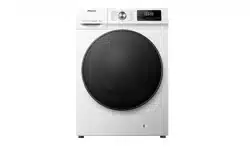

USER’S OPERATION MANUAL
Before operating this unit, please read this manual
thoroughly, and retain for future reference.
+:),%
English
EN
7KHIROORZLQJV\PEROVXVHGLQWKLVPDQXDODUHGHILQHGEHORZ
,QIRUPDWLRQDGYLFHWLSRUUHFRPPHQGDWLRQ
:$51,1**HQHUDO'DQJHU
:$51,1*'DQJHURI(OHFWULF6KRFN
:$51,1*'DQJHURI+RW6XUIDFH
:$51,1*'DQJHURI)LUH
3OHDVHUHDGWKLVPDQXDOWKRURXJKO\
7KDQN\RXYHU\PXFKIRUFKRRVLQJRXUSURGXFW
3OHDVHLQVWDOODQGRSHUDWHWKLVSURGXFWFRUUHFWO\'RQRWXVHLWIRUDQ\ODXQGU\ODEHOOHGDVQRW
VXLWDEOHIRUPDFKLQHZDVKLQJ
7KHSLFWXUHVVKRZQLQWKHPDQXDODUHIRULOOXVWUDWLYHSXUSRVHVRQO\$SSHDUDQFHSULQWLQJDQG
RWKHUGHWDLOVDUHVXEMHFWWRDFWXDOSURGXFW
:HSULRULWL]HWHFKQRORJLFDOLQQRYDWLRQ7RLPSURYHLWVRYHUDOOSHUIRUPDQFHWKHDSSOLDQFHLV
VXEMHFWWRWHFKQLFDOFKDQJHVZLWKRXWQRWLFH
7KLVSURGXFWLVLQWHQGHGVROHO\IRUKRXVHKROGXVH
6$)(7<35(&$87,216
352'8&7'(6&5,37,21
6SHFLILFDWLRQV
,167$//$7,21$1'&211(&7,21
3DFNLQJSDFNDJLQJ
5HPRYLQJWKHWUDQVSRUWVFUHZVURGV
,QVWDOODWLRQORFDWLRQ
$GMXVWDEOHIHHW
,QVWDOODWLRQFOHDUDQFH&RQQHFWLQJWRZDWHUVXSSO\
&RQQHFWLQJDQGVHFXULQJWKHZDWHUGLVFKDUJHKRVH
&RQQHFWLQJWRSRZHUPDLQV
),5677,0(86(
,17(55837,216$1'&+$1*,1*7+(352*5$00(
0$,17(1$1&($1'&/($1,1*
&OHDQLQJWKHGHWHUJHQWGUDZHU
&OHDQLQJWKHZDWHUVXSSO\KRVHGHWHUJHQWGLVSHQVHUKRXVLQJDQGUXEEHUGRRUJDVNHW
&OHDQLQJWKHSXPSILOWHU
&OHDQLQJWKHLQOHWILOWHU
7528%/(6+227,1*
)$8/7&2'(6$1'7528%/(6+227,1*
6(59,&,1*
86$*(5(&200(1'$7,216
67$,15(029$/7,36
',6326$/
,1752'8&7,
21
35(3$5$7,21
%()25(
),56786(
:$6+,1*
67(36
&/($1,1*$1'
0$,17(1$1&(
7528%/(6+
227,1*
0,6&(//$1(
286
&217(176
&OHDQLQJWKHH[WHULRU
352*5$00($1')81&7,216
3URJUDPPHWDEOH
$GGLWLRQDOVHWWLQJVDQGIXQFWLRQV
6WDUWWKHSURJUDP
(QGRIWKHSURJUDP
7UDQVSRUWDIWHULQVWDOODWLRQ

6$)(7<35(&$87,216
3OHDVHUHDGWKLVPDQXDOFDUHIXOO\EHIRUHRSHUDWLQJWKH
DSSOLDQFH
'RQRWRSHUDWHWKHDSSOLDQFHZLWKRXWXQGHUVWDQGLQJRUUHDGLQJWKLV
PDQXDO
7KLVPDQXDODSSOLHVWRPXOWLSOHPRGHOV7KHUHIRUHLWPD\LQFOXGH
IHDWXUHVQRWDSSOLFDEOHWR\RXUPRGHO
)DLOXUHWRIROORZWKHLQVWUXFWLRQVRULPSURSHURSHUDWLRQPD\FDXVH
GDPDJHWRODXQGU\RUHTXLSPHQWRUUHVXOWLQSHUVRQDOLQMXU\3OHDVH
NHHSWKHPDQXDOQHDUWKHDSSOLDQFHIRUHDV\DFFHVV
7KLVDSSOLDQFHLVLQWHQGHGWREHXVHGLQKRXVHKROG,IWKHDSSOLDQFHLV
XVHGIRUSURIHVVLRQDOIRUSUR¿WSXUSRVHRUSXUSRVHH[FHHGLQJQRUPDOXVHLQD
KRXVHKROGRULIWKHDSSOLDQFHLVXVHGE\DSHUVRQZKRLVQRWDFRQVXPHUWKH
ZDUUDQW\SHULRGVKDOOEHHTXDOWRWKHVKRUWHVWZDUUDQW\SHULRGUHTXLUHGE\
UHOHYDQWOHJLVODWLRQ
7KLVDSSOLDQFHLVQRWLQWHQGHGIRUXVHE\SHUVRQVLQFOXGLQJFKLOGUHQZLWK
UHGXFHGSK\VLFDOVHQVRU\RUPHQWDOFDSDELOLWLHVRUODFNRIH[SHULHQFHDQG
NQRZOHGJHXQOHVVWKH\KDYHEHHQJLYHQVXSHUYLVLRQRULQVWUXFWLRQ
FRQFHUQLQJXVHRIWKHDSSOLDQFHE\DSHUVRQUHVSRQVLEOHIRUWKHLUVDIHW\
&KLOGUHQVKRXOGEHVXSHUYLVHGWRHQVXUHWKDWWKH\GRQRWSOD\ZLWKWKH
DSSOLDQFH
&KLOGUHQRIOHVVWKDQ\HDUVVKRXOGEHNHSWDZD\XQOHVVFRQWLQXRXVO\
VXSHUYLVHG
7KLVDSSOLDQFHFDQEHXVHGE\FKLOGUHQDJHGIURP\HDUVDQGDERYHDQG
SHUVRQVZLWKUHGXFHGSK\VLFDOVHQVRU\RUPHQWDOFDSDELOLWLHVRUODFNRI
H[SHULHQFHDQGNQRZOHGJHLIWKH\KDYHEHHQJLYHQVXSHUYLVLRQRULQVWUXFWLRQ
FRQFHUQLQJXVHRIWKHDSSOLDQFHLQDVDIHZD\DQGXQGHUVWDQGWKHKD]DUGV
LQYROYHG
&KLOGUHQVKDOOQRWSOD\ZLWKWKHDSSOLDQFH&OHDQLQJDQGXVHUPDLQWHQDQFH
VKDOOQRWEHPDGHE\FKLOGUHQZLWKRXWVXSHUYLVLRQ
0RGHOVZLWKDGU\LQJIXQFWLRQHQDEOHDXWRPDWLFVKXWGRZQRIWKHKHDWHUWR
SUHYHQWRYHUKHDWLQJ7KHKHDWHUDXWRPDWLFDOO\VKXWVRIIZKHQWKHWHPSHUDWXUH
H[FHHGVWKHVDIHW\WKUHVKROGDQGUHVWDUWVZKHQWKHWHPSHUDWXUHGURSVEHORZWKH
WKUHVKROG
'RQRWFRQQHFWPXOWLSOHSRZHUVRFNHWVH[WHQVLRQFRUGVRUGXDODGDSWHUVWRWKH
DSSOLDQFH'RQRWFRQQHFWWKHDSSOLDQFHWRWKHSRZHUPDLQVXVLQJDQH[WHQVLRQ
FRUG
'RQRWFRQQHFWWKHDSSOLDQFHWRDSRZHUVRFNHWLQWHQGHGIRUDQHOHFWULFVKDYHU
RUKDLUGU\HU
'RQRWFRQQHFWWKHDSSOLDQFHWRDSRZHUVRFNHWLQWHQGHGIRUVPDOOORDGV
%HIRUH FRQQHFWLQJ WKH DSSOLDQFH WR WKH SRZHU VXSSO\ HQVXUH WKDW WKH HOHFWULF
YROWDJHVSHFL¿HGRQWKHUDWLQJSODWHPDWFKHVWKH9ROWDJHRI\RXUVRFNHW
7KHSRZHUVRFNHWPXVWEHVHFXUHO\JURXQGHGDQGWKHZDWHUVXSSO\PXVWEH
XQREVWUXFWHG
'RQRWFRQQHFWWKHDSSOLDQFHWRSRZHUPDLQVXVLQJDQH[WHUQDOVZLWFKLQJGHYLFH
VXFKDVDSURJUDPPHWLPHURUFRQQHFWLWWRSRZHUPDLQVWKDWLVUHJXODUO\
VZLWFKHGRQDQGRIIE\WKHSRZHUVXSSO\SURYLGHU
([KDXVWDLUPXVWQRWEHGLVFKDUJHGLQWRDIOXHGHVLJQHGWRGLVFKDUJH
FRPEXVWLRQJDVHVRURWKHUIXHOH[KDXVWJDVHV
,167$//$7,21
%HIRUHXVLQJWKHDSSOLDQFHEHVXUHWRUHPRYHWKHSDFNDJLQJVSRQJH
SRO\VW\UHQHIRDPHWFDWWDFKHGWRWKHERWWRPRIWKHDSSOLDQFH
3OHDVHLQVWDOOWKHDSSOLDQFHFRUUHFWO\DFFRUGLQJWRWKHLQVWUXFWLRQVDQGFRQQHFWLW
WRWKHZDWHUDQGHOHFWULFLW\VXSSO\VHH,167$//$7,21$1'&211(&7,21
:DWHUSLSLQJDQGHOHFWULFDOZLULQJVKRXOGEHFDUULHGRXWE\DIXOO\WUDLQHG
WHFKQLFLDQRUSURIHVVLRQDO
'RQRWLQVWDOOWKHDSSOLDQFHLQDORFDWLRQZKHUHWKHGRRURSHQLQJLVUHVWULFWHG
'RQRWLQVWDOOWKHDSSOLDQFHZKHUHWKHWHPSHUDWXUHPD\GURSEHORZ&DV
LWSDUWVPD\EHGDPDJHGLQFDVHRIZDWHUIUHH]LQJ
3ODFHWKHDSSOLDQFHRQDVROLGDQGOHYHOIORRU,ILQVWDOOHGRQDKLJKSODWIRUPWKH
DSSOLDQFHPXVWEHUHLQIRUFHGWRSUHYHQWLWIURPWLSSLQJRYHU
7KHHQGRIWKHZDWHUGLVFKDUJHKRVHVKRXOGUHDFKLQWRDZDWHUGUDLQOLQH

7KLVDSSOLDQFHVKRXOGQRWEHVWRUHGRUXVHGRXWGRRUV
$YRLGOLQWDFFXPXODWLRQQHDUWKHDSSOLDQFH
'RQRWLQVWDOOWKHDSSOLDQFHQHDUKHDWHUVRUIODPPDEOHPDWHULDOV
'RQRWLQVWDOOWKHDSSOLDQFHLQDQDUHDZKHUHJDVOHDNVPD\RFFXU
(QVXUHJRRGYHQWLODWLRQWRSUHYHQWWKHJDVHVJHQHUDWHGE\WKHDSSOLDQFHIURP
IORZLQJEDFNLQWRWKHURRPDQGFDXVLQJDILUH
86$*(
5HPRYHWKHWUDQVSRUWVFUHZVURGVEHIRUHILUVWXVHRWKHUZLVHVHULRXV
GDPDJHPD\RFFXUZKHQVWDUWLQJWKHDSSOLDQFHVHHFKDSWHU,167$//$7,21
$1'&211(&7,215HPRYHWUDQVSRUWVFUHZVURGV6XFKGDPDJHLVQRW
FRYHUHGE\WKHZDUUDQW\
&KHFNWKHDSSOLDQFHIRUGDPDJHGXULQJWUDQVSRUWDWLRQ1HYHURSHUDWHWKH
DSSOLDQFHLILWLVGDPDJHG
8VHGHWHUJHQWVVXLWDEOHIRUWKHDSSOLDQFHDQGODXQGU\FDUH:HVKDOOQRWEH
UHVSRQVLEOHIRUDQ\GDPDJHRUGLVFRORUDWLRQRIJDVNHWVDQGSODVWLFSDUWV
UHVXOWLQJIURPLQFRUUHFWXVHRIEOHDFKLQJRUFRORXULQJDJHQWV
'RQRWDWWHPSWWRUHPRYHDQ\SDQHOVRUGLVDVVHPEOHWKHDSSOLDQFH
'RQRWSUHVVEXWWRQVZLWKVKDUSREMHFWVVXFKDVSLQVNQLYHVRUQDLOV
'RQRWWRXFKWKHSRZHUSOXJRURSHUDWHWKHDSSOLDQFHZLWKZHWKDQGV
7KLVDSSOLDQFHLVRQO\VXLWDEOHIRUUHJXODUZDVKLQJRUGU\LQJIRUWXPEOHGU\HU
PRGHOV,WFDQQRWEHXVHGIRUGU\FOHDQLQJ
$WWHPSWLQJWROLIWWKHKHDY\DSSOLDQFHPD\FDXVH\RXWRJHWLQMXUHG'RQRW
DWWHPSWWROLIWWKHDSSOLDQFH\RXUVHOIDV\RXUKDQGVPD\EHFXWE\LWVVKDUS
HGJHV
'RQRWXVHSURWUXGLQJSDUWVWRPRYHWKHDSSOLDQFH3URWUXGLQJSDUWVRQWKH
DSSOLDQFHPD\EHEURNHQZKHQOLIWLQJRUSXVKLQJWKHDSSOLDQFH

'RQRWZDVKODXQGU\ZLWKODUJHEXWWRQVRURWKHUKHDY\PHWDOREMHFWVDQGHQVXUH
WKDWDOOSRFNHWVRIWKHODXQGU\DUHHPSW\7RSUHYHQWRGRXUVDQGPLOGHZRSHQWKH
GRRUDWWKHHQGRIWKHZDVKLQJF\FOHWRDOORZWKHGUXPWRGU\
'RQRWOHDYHPHWDOREMHFWVLQWKHGUXPIRUH[WHQGHGSHULRGV
7KHGRRUJODVVPD\EHFUDFNHGE\VWURQJLPSDFWV+DQGOHZLWKFDUH
3ODFHODXQGU\FRPSOHWHO\LQWRWKHGUXPWRSUHYHQWLWIURPJHWWLQJFDXJKWLQWKH
GRRU
&XWRIIWKHZDWHUVXSSO\DQGXQSOXJWKHSRZHUFRUGZKHQWKHDSSOLDQFHLVQRWLQ
XVH
'RQRWSODFHDQ\DQLPDOVVXFKDVSHWVLQWRWKHDSSOLDQFH
75$16325775$163257$)7(5,167$//$7,21
$VVHPEOHWKHWUDQVSRUWVFUHZVURGVLI\RXQHHGWRPRYHWKHLQVWDOOHG
DSSOLDQFHVHHFKDSWHU,167$//$7,21$1'&211(&7,210RYLQJDQG
7UDQVSRUWLQJ$IWHU,QVWDOODWLRQ8QSOXJWKHSRZHUFRUGEHIRUHDVVHPEOLQJWKH
WUDQVSRUWVFUHZVURGV
7XUQRIIWKHWDSDQGXQSOXJWKHDSSOLDQFHDWWKHHQGRIWKHZDVKLQJF\FOH
1HYHUXQSOXJWKHDSSOLDQFHE\SXOOLQJRQWKHSRZHUFRUG$OZD\VKROGWKHSRZHU
SOXJILUPO\DQGSXOOLWVWUDLJKWRXWRIWKHVRFNHW
'RQRWXVHGHWHUJHQWVWKDWFRQWDLQVROYHQWVDVWKLVFRXOGOHDGWRUHOHDVHRI
SRLVRQRXVJDVHVGDPDJHWRWKHDSSOLDQFHDQGFDXVHWKHULVNRIILUHDQG
H[SORVLRQ
'RQRWRSHQWKHZDVKHUGU\HUGRRUE\IRUFHZKLOHLWLVRSHUDWLQJ+LJKWHPSHUDWXUH
ZDVKLQJGU\LQJ
'RQRWXVHWKHDSSOLDQFHDIWHUFOHDQLQJZLWKLQGXVWULDOFKHPLFDOV
:DWHUGUDLQHGGXULQJDKLJKWHPSHUDWXUHZDVKLQJF\FOHLVKRW'RQRWWRXFK
WKHZDWHUWRSUHYHQWEXUQV
/DXQGU\FRQWDPLQDWHGZLWKHGLEOHRLOVDFHWRQHDOFRKROSHWURONHURVHQH
GHWHUJHQWVWXUSHQWLQHZD[DQGZD[UHPRYHUVVKRXOGEHSUHZDVKHGZLWKKRW
ZDWHUDQGSOHQW\RIGHWHUJHQWEHIRUHSODFLQJLQWKHGUXP
8VHVRIWHQHURUVLPLODUSURGXFWVDFFRUGLQJWRWKHPDQXIDFWXUHUVLQVWUXFWLRQV
5HPRYHDOOLWHPVVXFKDVFLJDUHWWHOLJKWHUVRUPDWFKHVIURPSRFNHWV
'$1*(52)+27685)$&(
$WKLJKHUZDVKLQJRUGU\LQJWHPSHUDWXUHVWKHGRRUJODVVZLOOKHDWXS%HFDUHIXO
WRDYRLGEXUQV0DNHVXUHFKLOGUHQGRQRWSOD\QHDUWKHGRRUJODVV'RQRWWRXFK
WKHGRRUJODVVGXULQJRSHUDWLRQ
:$7(529(5)/2:3527(&7,21:,7+$33/,$1&(6:,7&+('21
,IWKHZDWHUOHYHOLQWKHDSSOLDQFHULVHVDERYHQRUPDOOHYHOWKHQWKHH[FHVVZDWHU
OHYHOSURWHFWLRQZLOOEHDFWLYDWHG,WZLOOVKXWRIIWKHZDWHUVXSSO\DQGVWDUW
SXPSLQJRXWWKHZDWHU7KHSURJUDPPHLVLQWHUUXSWHGDQGDQHUURULVUHSRUWHG
'RQRWZDVKRUGU\ODXQGU\PDGHRIIRDPUXEEHUODWH[IRDPVKRZHUFDSV
ZDWHUSURRIIDEULFVUXEEHUSURGXFWVRUFORWKLQJRUSLOORZVFRQWDLQLQJIRDPUXEEHU
SDGVLQWKHGUXP
:$51,1*
,I\RXUDSSOLDQFHKDVDGU\LQJIXQFWLRQGRQRWLQWHUUXSWWKHSURJUDPPHXQWLOWKH
GU\LQJF\FOHLVFRPSOHWH,I\RXQHHGWRLQWHUUXSWLWIRUDQ\UHDVRQFDUHIXOO\
UHPRYHODXQGU\WRDYRLGEXUQV4XLFNO\UHPRYHODXQGU\DQGVSUHDGLWRXWVRWKDW
WKHKHDWLVGLVVLSDWHG
&+,/'6$)(7<
%HIRUHFORVLQJWKHZDVKHUGU\HUGRRUDQGUXQQLQJWKHSURJUDPPHPDNHVXUH
WKHUHLVQRWKLQJH[FHSWODXQGU\LQWKHGUXP0DNHVXUHQRFKLOGFOLPEHGLQWRWKH
ZDVKHUGU\HUGUXPDQGFORVHGWKHGRRUIURPWKHLQVLGH
'RQRWOHDYHWKHGRRURSHQ&KLOGUHQPD\KDQJRQWKHGRRURUFOLPELQWRWKH
DSSOLDQFHFDXVLQJGDPDJHRULQMXU\
.HHSDOOSDFNDJLQJPDWHULDOVRXWRIWKHUHDFKRIFKLOGUHQDVWKH\PD\SRVHD
GDQJHU
.HHSGHWHUJHQWDQGVRIWHQHURXWRIUHDFKRIFKLOGUHQ
6(59,&,1*
5HSDLU FRVWV UHVXOWLQJ IURP GDPDJH FDXVHG E\ LQFRUUHFW FRQQHFWLRQV
LPSURSHULQVWDOODWLRQ DQG XVH RU UHSDLUV PDGH E\ XQDXWKRULVHG SHUVRQQHO
DUH WKHUHVSRQVLELOLW\RIWKHXVHUDQGDUHQRWFRYHUHGE\WKHZDUUDQW\
7KHZDUUDQW\GRHVQRWFRYHUFRQVXPDEOHVPLQRUFRORXUGHYLDWLRQVLQFUHDVHG
QRLVHGXHWRDSSOLDQFHDJHWKDWGRHVQRWDIIHFWWKHIXQFWLRQDOLW\RIWKHDSSOLDQFH
DQG DHVWKHWLF GHIHFWV RQ FRPSRQHQWV WKDW GR QRW DIIHFW WKH
IXQFWLRQDOLW\DQGVDIHW\RIWKHDSSOLDQFH
The illustrations in this manual are for illustrative purposes only. Due to product improvements
and series expansion, the appearance, color, and functional components of the product you receive
may differ from those shown in this manual. Please refer to the actual product.
10
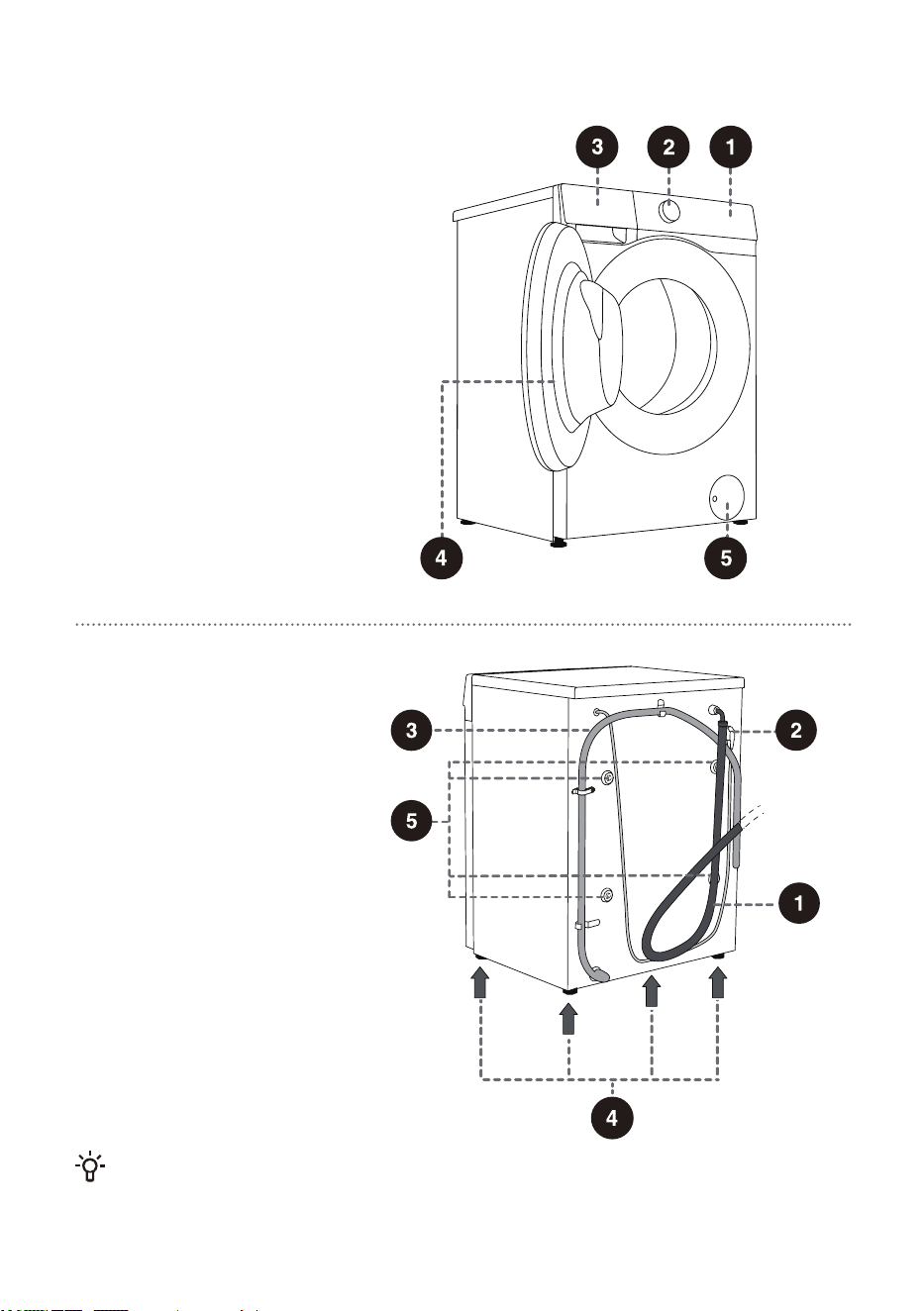
PRODUCT DESCRIPTION
FRONT
1 Control unit
Programme selector knob
Detergent drawer
Door
Pump filter cover
2
3
4
5
BACK
1 Water supply hose
Power cord
Water discharge hose
Adjustable feet
Transport screws/rods
2
3
4
5
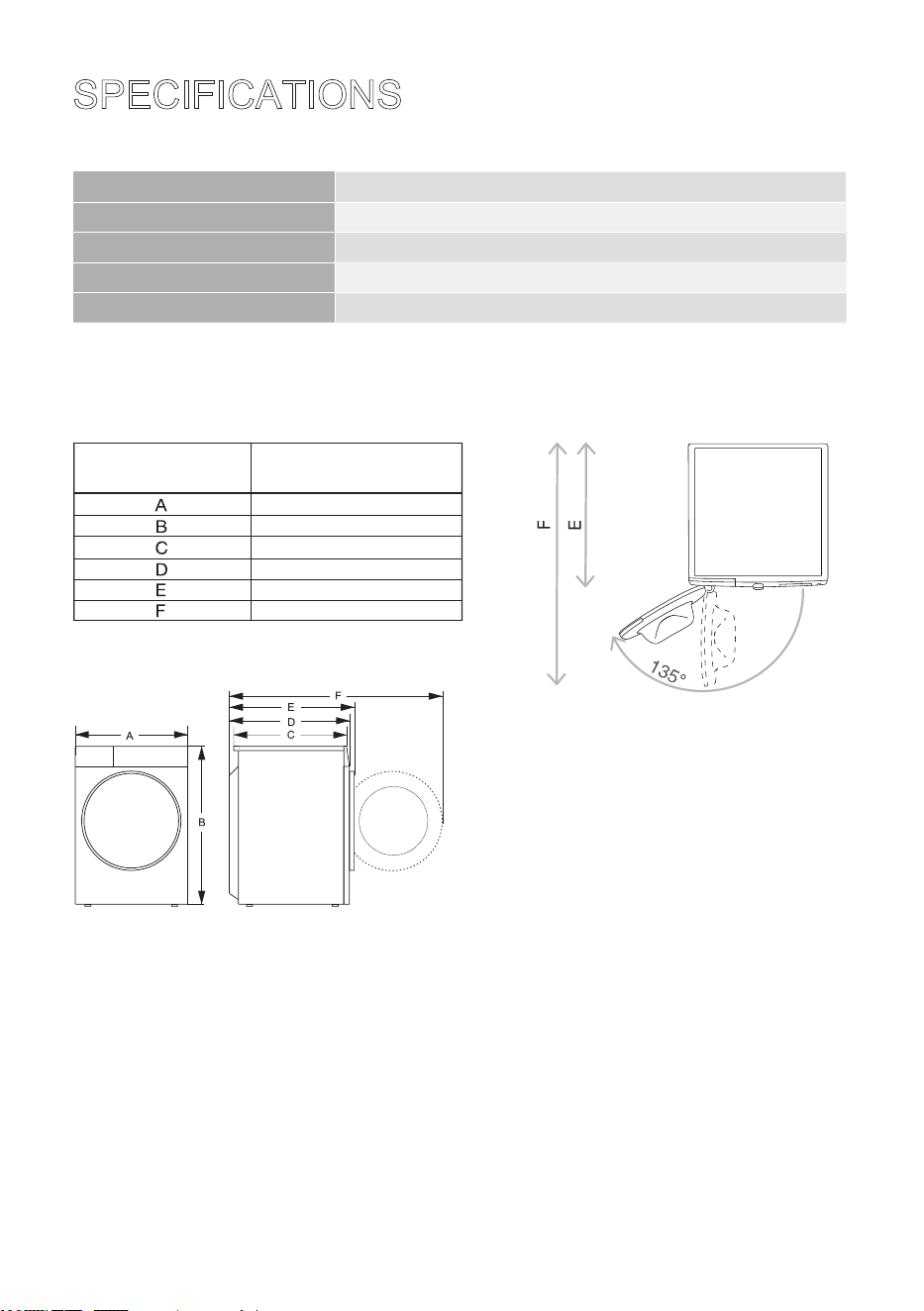
63(&,),&$7,216
'(3(1',1*217+(02'(/
0D[ORDG
1HW:HLJKW
5DWHG9ROWDJH
5DWHG3RZHU
)UHTXHQF\
',0(16,21600
,QGH[
'LPHQVLRQVPP
( :DVKHUGU\HUGHSWK
) 'HSWKZLWKGRRURSHQ
7@B
C6
2-
2-
:
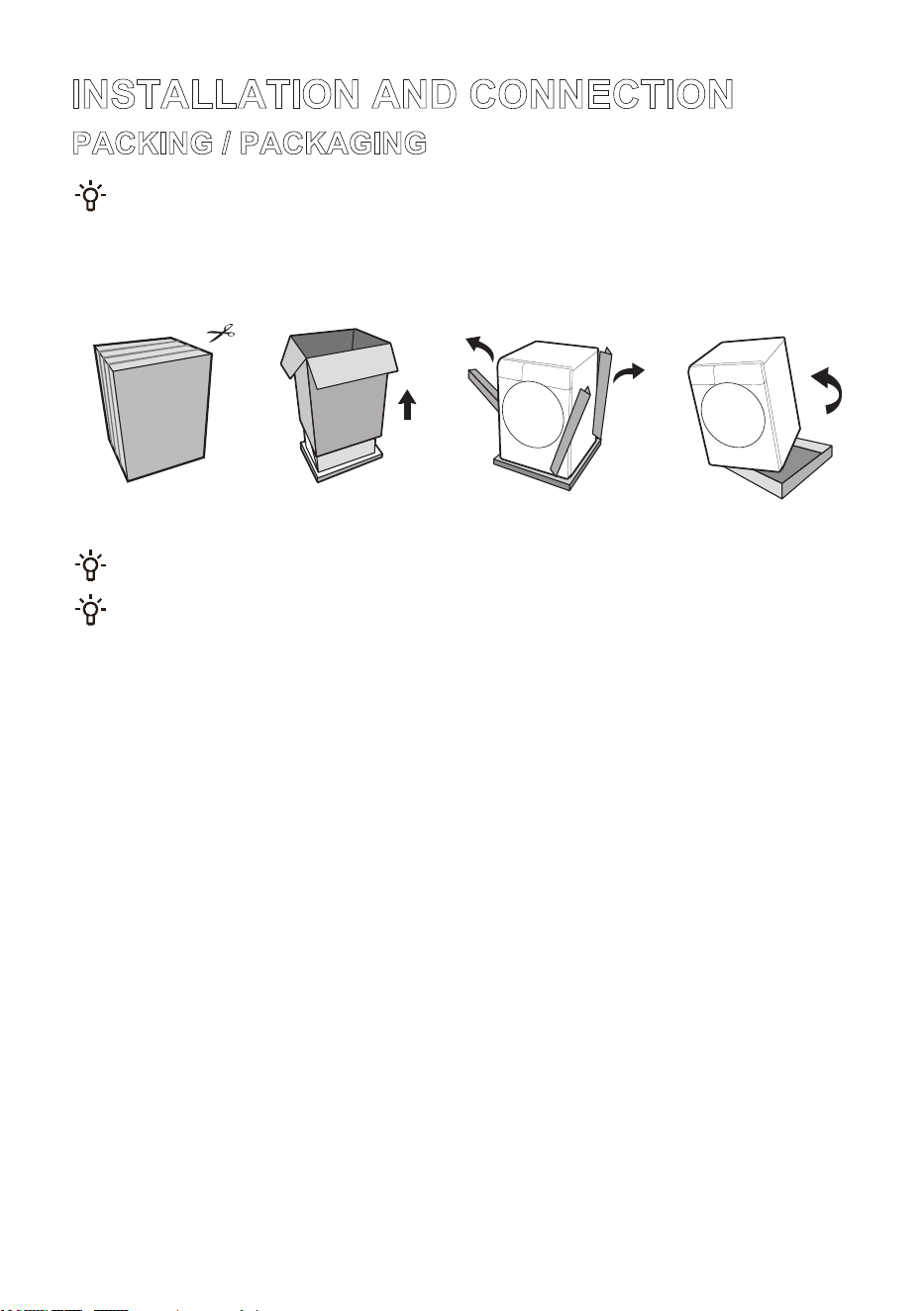
7KHSURFHVVRISDFNLQJWKHPDFKLQHLVMXVWWKHRSSRVLWHRIXQSDFNLQJDERYH
&KHFNIRUDQ\GDPDJHRQWKHDSSOLDQFH,I\RXVXVSHFWWKHHTXLSPHQWLV
GDPDJHGGRQRWXVHLWDQGLPPHGLDWHO\FRQWDFWWKHVHUYLFHXQLW
7KHDFFRPSDQ\LQJDFFHVVRULHVRIWKLVHTXLSPHQWLQFOXGHRQHRUPRUHRIWKHIROORZLQJ
v8VHUPDQXDO
vSODVWLFSOXJV
v6XSSO\KRVH
v'UDLQKRVHKROGHU
v:UHQFK
v1RLVHUHGXFWLRQERDUGVSRQJHVWULSVQRQHGHSHQGLQJRQWKHPRGHO
7KHFRQILJXUDWLRQRIGLIIHUHQWPRGHOVLVGLIIHUHQWDQGWKHDWWDFKHGDFFHVVRULHVDUHVXEMHFWWRWKHDFWXDO
FRQILJXUDWLRQRIWKHPRGHO
,167$//$7,21$1'&211(&7,21
3$&.,1*3$&.$*,1*
)LUVWUHPRYHDOOSDFNDJLQJDQGIRDPHVSHFLDOO\WKHIRDPEDVH:KHQUHPRYLQJWKH
SDFNDJLQJPDNHVXUHQRWWRGDPDJHWKHHTXLSPHQWZLWKDVKDUSREMHFW.HHSWKHSDFNDJLQJ
PDWHULDOVSODVWLFEDJVRWKHUSODVWLFSDUWVHWFRXWRIUHDFKRIFKLOGUHQ
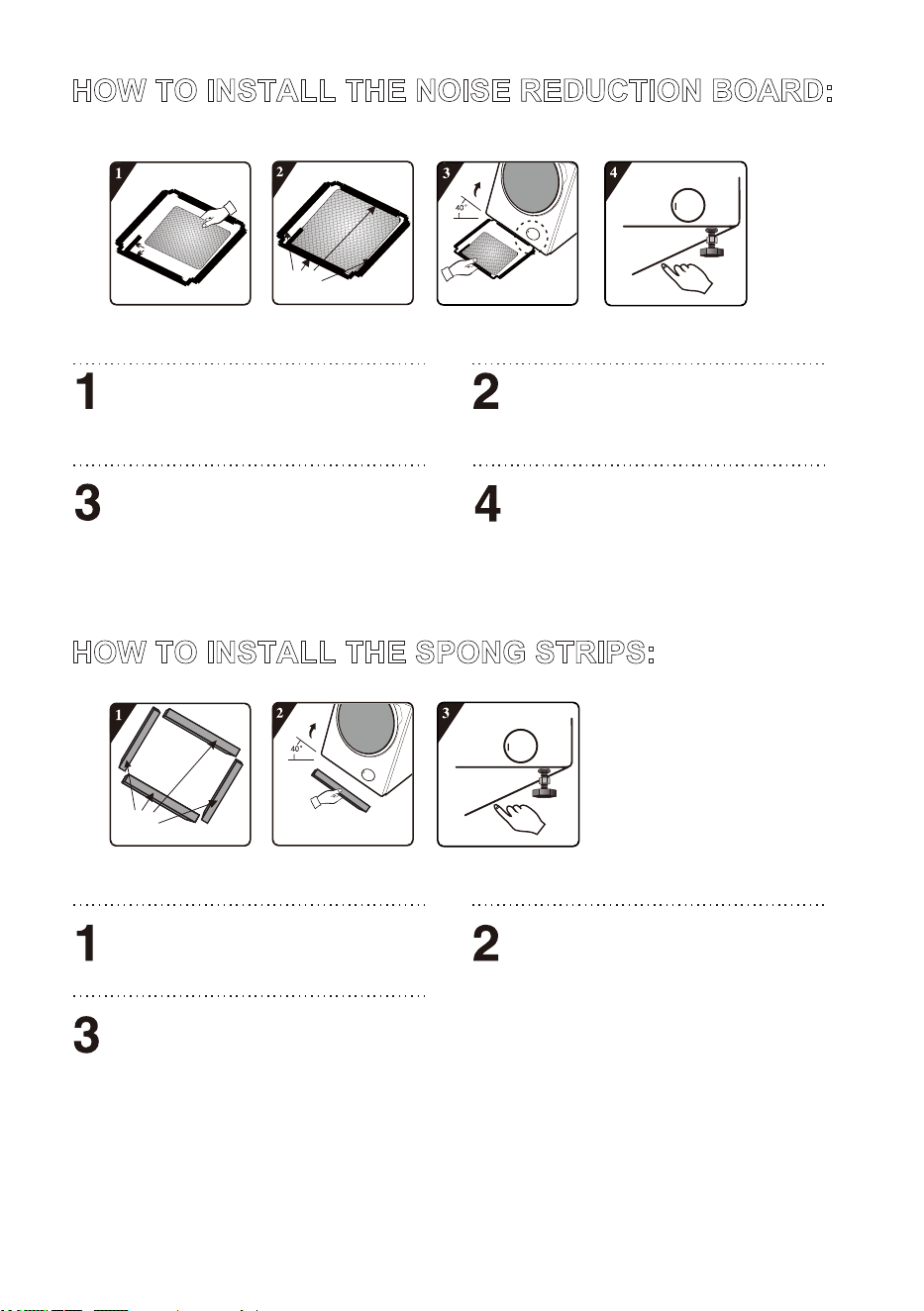
+2:72,167$//7+(12,6(5('8&7,21%2$5'
%HIRUHLQVWDOOLQJWKHQRLVHUHGXFWLRQERDUGDOLJQDQG
SDVWHWKHDFRXVWLFDEVRUSWLRQZRROZLWKDQGDORQJWKH
ULJKWDQJOHLPSUHVVLRQRQQRLVHUHGXFWLRQERDUGWKLV
SURFHGXUHLVXQQHFHVVDU\IRUVRPHRIWKHPRGHOV
ZLWKRXWDFRXVWLFDEVRUSWLRQZRRO
5HPRYHVXUIDFHSDSHURQGRXEOHVLGHGWDSHDWIRXU
VLGHVRIWKHQRLVHUHGXFWLRQERDUG
,QFOLQHWKHDSSOLDQFHWRDQDQJOHRIDQGOHWWKH
VLGHZLWKULJKWDQJOHQRWFKIDFHWRZDUGVIURQWRIWKH
ZDVKHUGU\HUDVVKRZQLQWKHILJXUH,QVHUWWKHVLGH
ZLWKREOLTXHDQJOHQRWFKEHWZHHQWZRIRRWVFUHZVDW
EDFNRIWKHZDVKHUGU\HUFRPSOHWHO\LQSODFH7KHQ
LQVWDOOWKHQRLVHUHGXFWLRQERDUGDQGHQVXUHWKDWLW
FRQWDFWVZLWKERWWRPRIWKHZDVKHUGU\HUFORVHO\
3UHVVWKHGRXEOHVLGHGWDSHRQIRXUVLGHVPDQXDOO\WR
VHFXUHWKHQRLVHUHGXFWLRQERDUGWRWKHDSSOLDQFH
ILUPO\
5LJKWDQJOH
LQGHQWDWLRQ
'RXEOH
VLGHGWDSH
3XPS
+2:72,167$//7+(6321*675,36
5HPRYHVXUIDFHSDSHURQGRXEOHVLGHG
WDSHRQWKHVSRQJHVWULSV
,QFOLQHWKHDSSOLDQFHWRDQDQJOHRIDQGDWWDFK
VSRQJHVWULSVRQWKHERWWRPRIWKHZDVKHUGU\HUZLWK
WKHWZRORQJVSRQJHVWULSVDWWKHIURQWDQGUHDUVXSSRUW
SRVLWLRQVDQGWKHWZRVKRUWVSRQJHVWULSVDWWKHOHIW
DQGULJKWVXSSRUWSRVLWLRQV
'RXEOH
VLGHGWDSH
3UHVVGRZQWRVHFXUHWKHVSRQJHVWULSV
ILUPO\
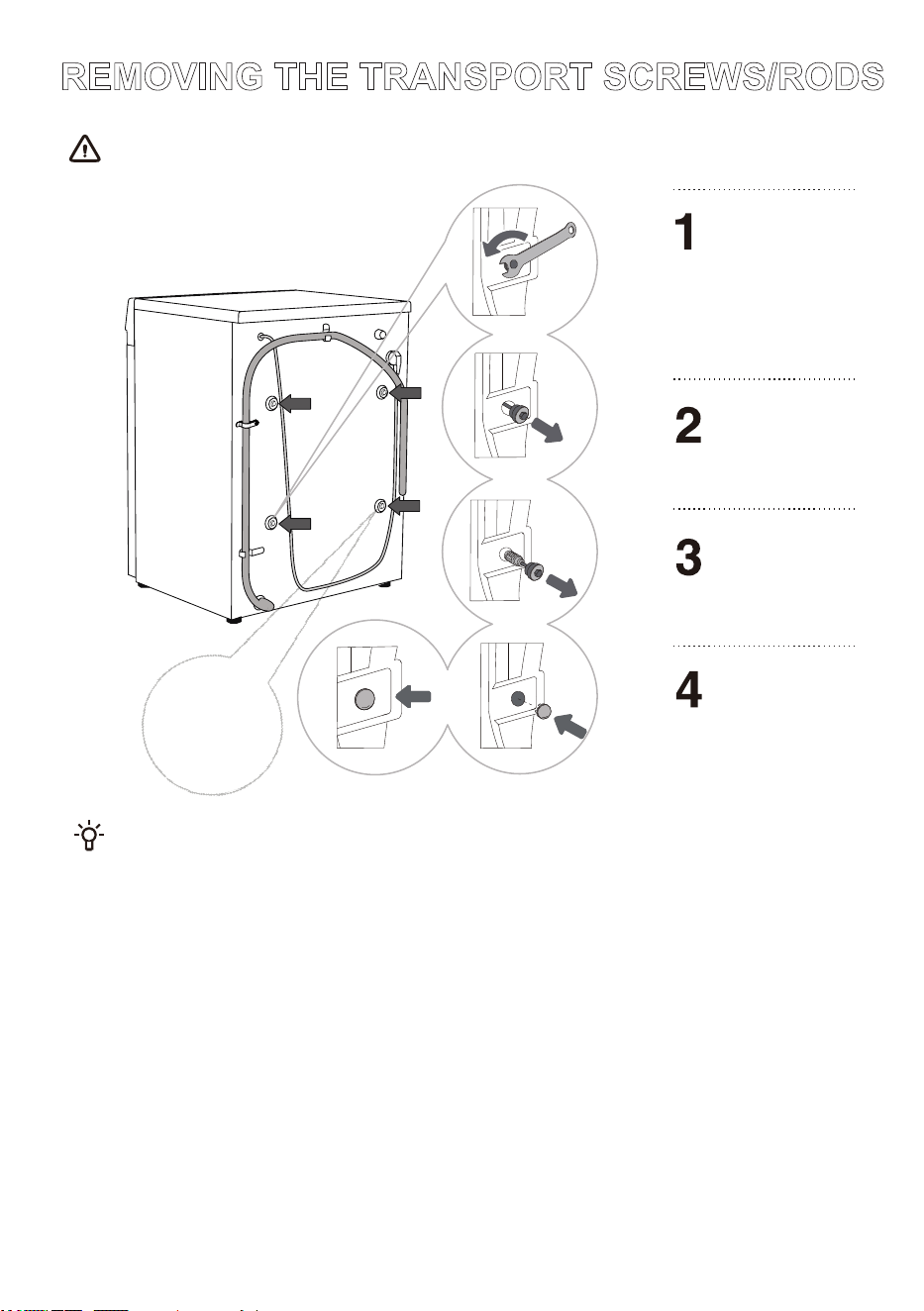
5(029,1*7+(75$1632576&5(:652'6
'LVDVVHPEOHWKHWUDQVSRUWVFUHZVURGVRQFHDOOSDFNDJLQJKDVEHHQUHPRYHG$EORFNHGDSSOLDQFHPD\EH
GDPDJHGZKHQLWLVVZLWFKHGRQIRURSHUDWLRQ6XFKGDPDJHLVQRWFRYHUHGE\WKHZDUUDQW\
6DYHWKHWUDQVSRUWVFUHZVURGVLQFDVH\RXKDYHWRWUDQVSRUWWKHDSSOLDQFHDJDLQODWHUWRUHLQVWDOO
WKHWUDQVSRUWVFUHZVURGVIROORZWKHDERYHSURFHGXUHLQUHYHUVHRUGHU
0RYHDVLGHWKHZDWHU
GLVFKDUJHKRVHVDQGXVH
DQDSSURSULDWHZUHQFKWR
ORRVHQWKHIRXUVFUHZVRQ
WKHEDFNLQWKH
FRXQWHUFORFNZLVHGLUHFWLRQ
DVLQGLFDWHGE\WKHDUURZV
/RRVHQWKHVFUHZV
DSSUR[LPDWHO\PP
3XOODOOWUDQVSRUW
VFUHZVURGVKRUL]RQWDOO\
3XOORXWWKHWUDQVSRUW
VFUHZVURGVDORQJZLWK
WKHUXEEHUDQGWKH
SODVWLFSDUWV
5HPRYHWKHSRZHU
FRUGFOLSORFDWHG
KHUHDVZHOO
&RYHUWKHVFUHZKROHV
ZLWKSODVWLFSOXJV7KH
SODVWLFSOXJVDQG
LQVWUXFWLRQVIRUXVHDUH
LQFOXGHGLQWKH
DFFRPSDQ\LQJVSDUH
SDUWV
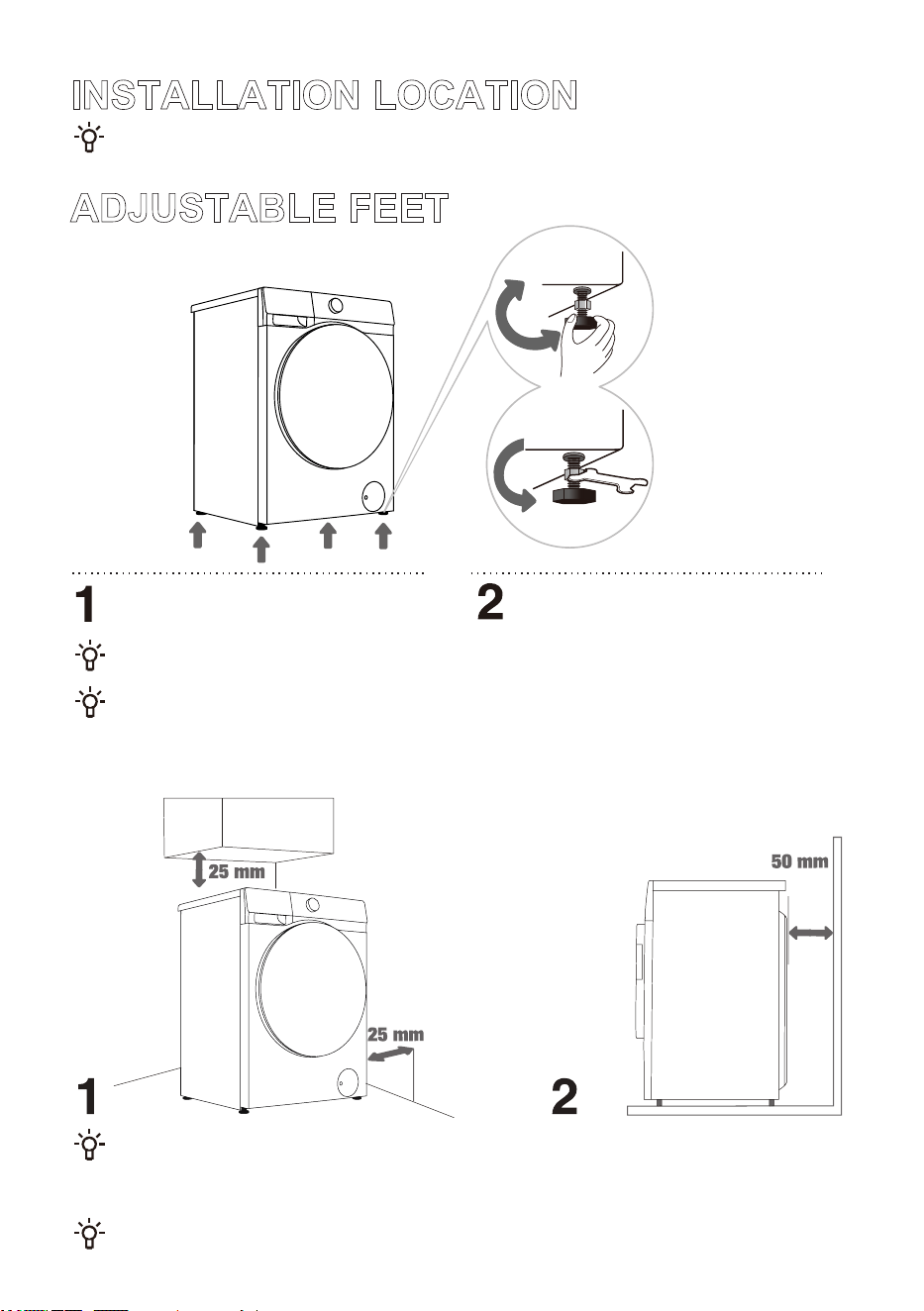
,167$//$7,21/2&$7,21
3ODFHWKHDSSOLDQFHRQDVROLGDQGOHYHOIORRUWRNHHSLWVWDEOH7KHIORRUVKRXOGEHFOHDQDQGGU\
RWKHUZLVHWKHZDVKHUGU\HUPD\VOLGH$OVRFOHDQWKHERWWRPVXUIDFHRIDGMXVWDEOHIHHW
$'-867$%/()((7
8VHDOHYHOJDXJHDQGDVXLWDEOHZUHQFK
,QFRUUHFWOHYHOOLQJRIWKHDSSOLDQFHPD\FDXVHYLEUDWLRQDSSOLDQFHVOLGLQJDFURVVWKHURRPDQGORXGRSHUDWLRQ,QFRUUHFW
OHYHOOLQJRIWKHZDVKHUGU\HULVQRWVXEMHFWWRZDUUDQW\
6RPHWLPHVXQXVXDORUORXGHUQRLVHPD\DSSHDUGXULQJDSSOLDQFHRSHUDWLRQ7KHVHDUHPRVWO\WKHUHVXOWRILPSURSHU
LQVWDOODWLRQ
7KHOHYHOFDQEHDGMXVWHGE\URWDWLQJWKHDGMXVWDEOH
IRRW$GMXVWDEOHIRRWVXSSRUWFPKRUL]RQWDO
DGMXVWPHQW
$IWHUDGMXVWLQJWKHKHLJKWRIWKHIHHWXVHWKH
VXLWDEOHZUHQFKWRVHFXUHO\WLJKWHQWKHORFNQXWVE\
WXUQLQJWKHPFRXQWHUFORFNZLVHVHH)LJXUH
,167$//$7,21&/($5$1&(
7KHDSSOLDQFHPD\QRWEHLQFRQWDFWZLWKDZDOORUDGMDFHQWIXUQLWXUH)RURSWLPXPZDVKHUGU\HURSHUDWLRQ
ZHUHFRPPHQGREVHUYLQJWKHFOHDUDQFHVIURPWKHZDOOVDVLQGLFDWHGLQWKHILJXUH
,QFDVHRIIDLOXUHWRREVHUYHWKHPLQLPXPUHTXLUHGFOHDUDQFHVVDIHDQGFRUUHFWZDVKHUGU\HURSHUDWLRQ
FDQQRWEHHQVXUHG0RUHRYHURYHUKHDWLQJFDQDOVRRFFXU)LJXUHVDQG
,QVWDOOLQJWKHZDVKHUGU\HULQDFRQILQHGVSDFHLVQRWUHFRPPHQGHG
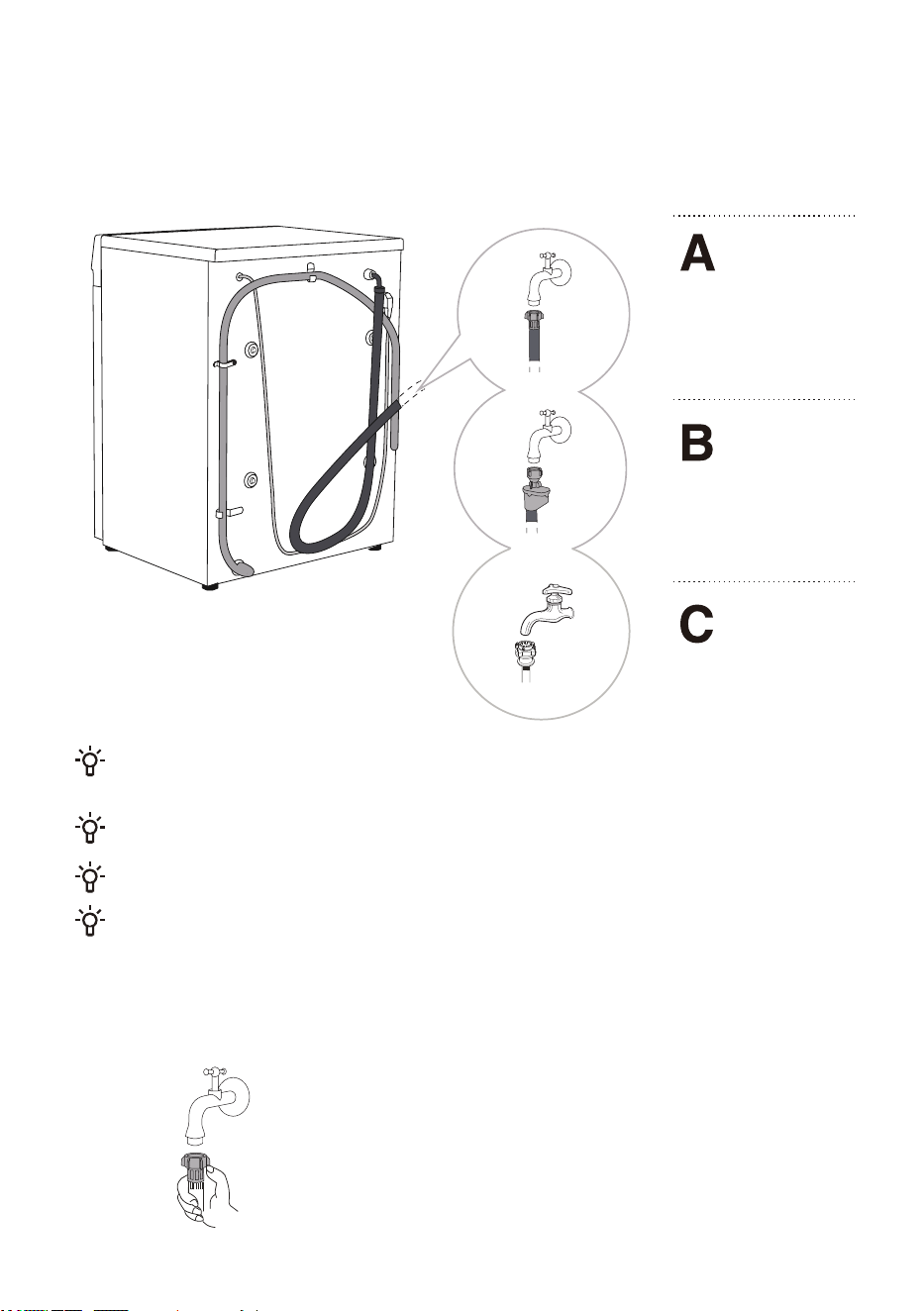
CONNECTING TO WATER SUPPLY
7KHVXSSOLHGZDWHUVXSSO\KRVHYDULHVE\PRGHO3OHDVHFKRRVHWKHDSSURSULDWHFRQQHFWLRQPHWKRG
EDVHGRQWKHDFWXDOZDWHUVXSSO\KRVH
(8523($1
:$7(56833/<
+26(&211(&7,21
$48$6723
&211(&7,21
&+,1(6(:$7(5
6833/<+26(
&211(&7,21
)RU QRUPDO DSSOLDQFH RSHUDWLRQ WKH SUHVVXUH LQ WKH ZDWHU PDLQV VKRXOG EH EHWZHHQ 03D
EDUNSFPð1FPð0LQLPXP G\QDPLF ZDWHU SUHVVXUH FDQ EH GHWHUPLQHG E\ PHDVXULQJ WKH ZDWHU
IORZ,Q VHFRQGV OLWUHVRIZDWHUVKRXOGIORZIURPDIXOO\RSHQWDS
2QO\XVHWKHZDWHUVXSSO\KRVHVXSSOLHGZLWKWKHDSSOLDQFH'RQRWXVHDQ\XVHGRURWKHUKRVHV
0DNHVXUHWKHKRVHLVQRWGDPDJHGOIWKHKRVHLVGHJUDGHGEULWWOHRUFUDFNHGLWKDVWREHUHSODFHG
7KLVDSSOLDQFHLVGHVLJQHGIRUFROGZDWHURQO\'RQRWFRQQHFWLWWRKRWZDWHU
7LJKWHQWKHZDWHUVXSSO\KRVHE\KDQGWRHQVXUHSURSHUVHDOLQJPD[LPXPWRUTXH1P&KHFNWKH
VHDOLQJIRUOHDNV
'RQRWXVHSOLHUVRUVLPLODUWRROVDVWKH\PD\GDPDJHWKHQXWWKUHDGV
EUROPEAN WATER SUPPLY HOSE CONNECTION
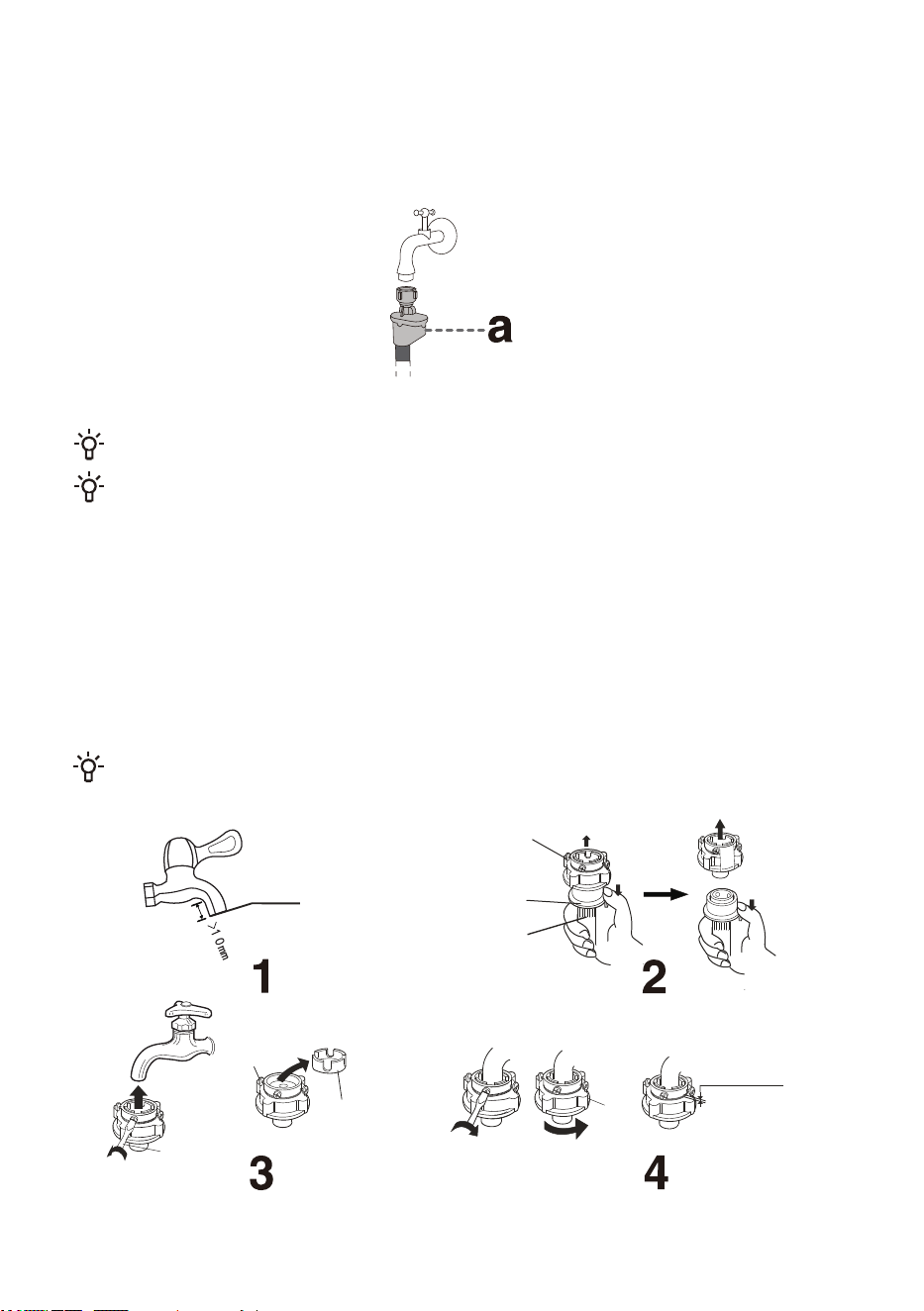
CHINESE WATER SUPPLY HOSE CONNECTION
6HOHFWDVXLWDEOHWDSZLWKDWLSOHQJWKJUHDWHUWKDQPP7KHRXWOHWHQGPXVWEHIODW,ILWLVXQHYHQ
VPRRWKLWRXWZLWKDILOHWRSUHYHQWOHDNDJHDIWHULQVWDOODWLRQVHH)LJXUH
3XVKWKHVOLGHUGRZQWRGLVFRQQHFWWKHZDWHUVXSSO\KRVHFRQQHFWRUIURPWKHLQOHWDVVHPEO\VHH)LJXUH
/RRVHQWKHIRXUVFUHZVRQWKHZDWHUVXSSO\KRVHFRQQHFWRUWKHQDWWDFKWKHKRVHWRWKHWDS,IWKHWDS
GLDPHWHULVWRRODUJHIRUWKHFRQQHFWRUORRVHQWKHVFUHZVDQGUHPRYHWKHVOHHYHVHH)LJXUH
(YHQO\WLJKWHQWKHIRXUVFUHZVRQWKHZDWHUVXSSO\KRVHFRQQHFWRUDQGVHFXUHWKHQXWVVHH)LJXUH
,IWKHDSSOLDQFHLVWREHXVHGRQFHRUVHYHUDOWLPHVLQDZHHNSXVKWKHVOLGHUGRZQZLWKRXWGLVFRQQHFWLQJ
WKHZDWHUVXSSO\KRVHFRQQHFWRUWRDYRLGGDPDJLQJWKHIL[LQJVFUHZV
&RUUHFW
VL]H
2XWOHWHQG
:DWHUVXSSO\
KRVHFRQQHFWRU
6OLGHU
:DWHUVXSSO\KRVH
6FUHZGULYHU
6FUHZ
6OHHYH
1XW
%HIRUHWLJKWHQLQJ
aPP$IWHU
WLJKWHQLQJPP
127(7KHH[SRVHGWKUHDGOHQJWKEHIRUHWLJKWHQLQJWKHQXWLVDSSUR[LPDWHO\PPDQGOHVVWKDQPP
DIWHUWLJKWHQLQJ)LJXUH
AQUASTOP CONNECTION
,IDQLQWHUQDOWXEHRUKRVHLVGDPDJHGDVKXWRIIV\VWHPLVDFWLYDWHGWKDWFXWVWKHZDWHUVXSSO\WRWKH
DSSOLDQFH,QVXFKFDVHWKHFRQWUROJODVVDZLOOWXUQUHG5HSODFHWKHZDWHUVXSSO\KRVH
'RQRWGLSWKHZDWHUVXSSO\KRVHZLWKWKH$TXD6WRSV\VWHPLQZDWHUDVLWFRQWDLQVDQHOHFWULF
YDOYH
7KHZDWHUVXSSO\KRVHFDQEHFRQQHFWHGZLWKRXWDQRQUHWXUQYDOYH
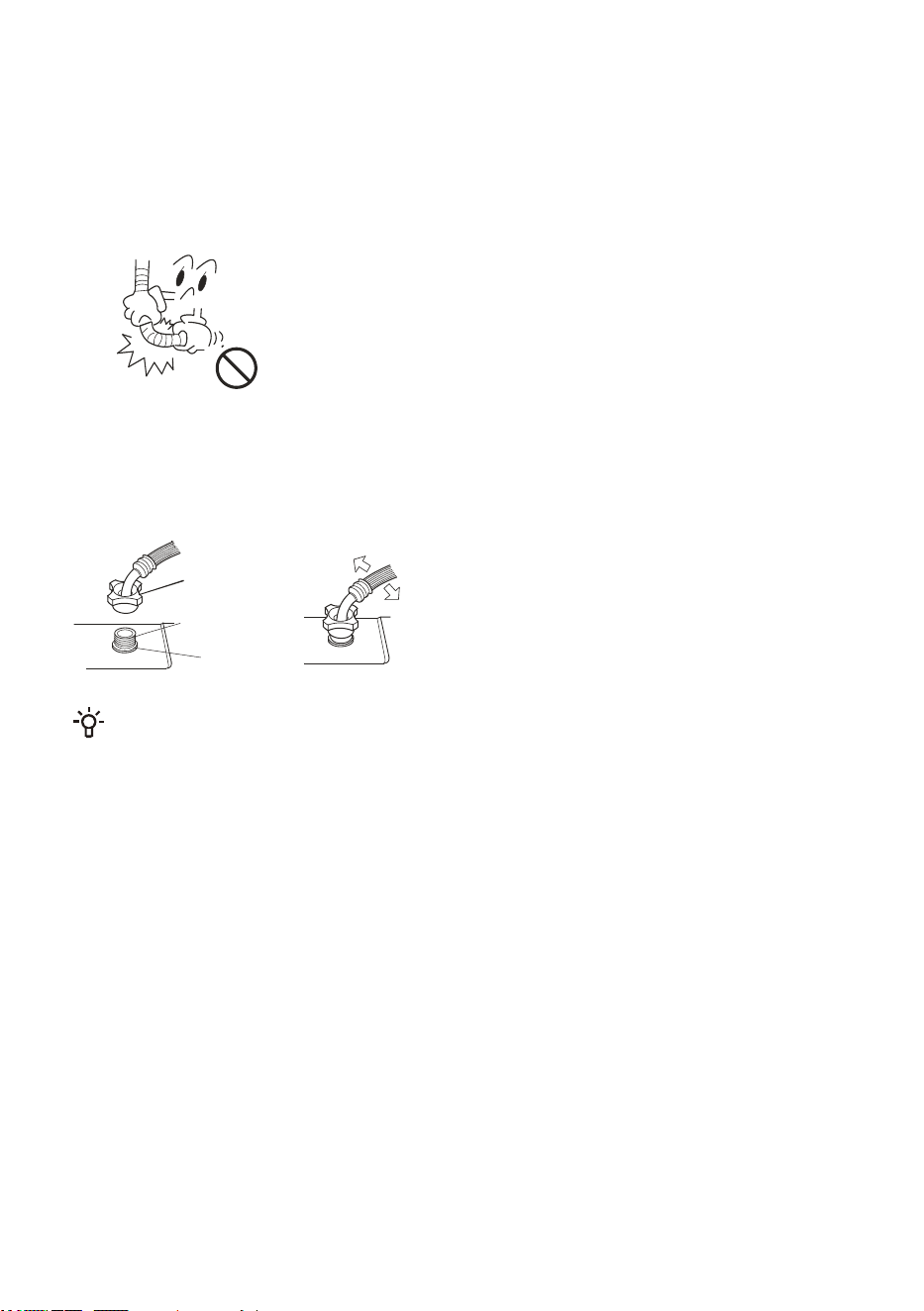
*HQWO\SXOOWKHZDWHUVXSSO\KRVHWRFKHFNLIWKHFRQQHFWLRQLVVHFXUH
2SHQWKHWDSWRFKHFNIRUOHDNV
7KHZDWHUVXSSO\KRVHVKRXOGQRWEHWZLVWHGRUEHQW
&KHFNWKHZDWHUVXSSO\KRVHEHIRUHHDFKXVHWRSUHYHQWLQFRUUHFWFRQQHFWLRQ
CHECKING THE CONNECTION BETWEEN THE WATER SUPPLY
HOSE AND THE TAP
&RQQHFWWKHZDWHUVXSSO\KRVHQXWWRWKHZDWHUVXSSO\KRVHFRQQHFWRURIWKHDSSOLDQFH7LJKWHQWKH
QXWDQGVKDNHLWJHQWO\WRFKHFNWKDWLWLVILUPO\VHFXUHGDVVKRZQLQWKHULJKWILJXUH
:DWHUVXSSO\
KRVHQXW
:DWHUVXSSO\
KRVHFRQQHFWRU
5XEEHUJDVNHW
127(
7LJKWHQWKHQXWHYHQO\$YRLGURWDWLQJWKHZDWHUVXSSO\KRVHDVWKLVPD\FDXVHGDPDJH
'RQRWUHPRYHWKHUXEEHUJDVNHW%HIRUHHDFKXVHFKHFNWKDWWKHJDVNHWLVQRWGHWDFKHGRU
GDPDJHG,IGDPDJHGSOHDVHFRQWDFWDIWHUVDOHVVHUYLFHLPPHGLDWHO\
CONNECTING THE WATER SUPPLY HOSE TO THE APPLIANCE
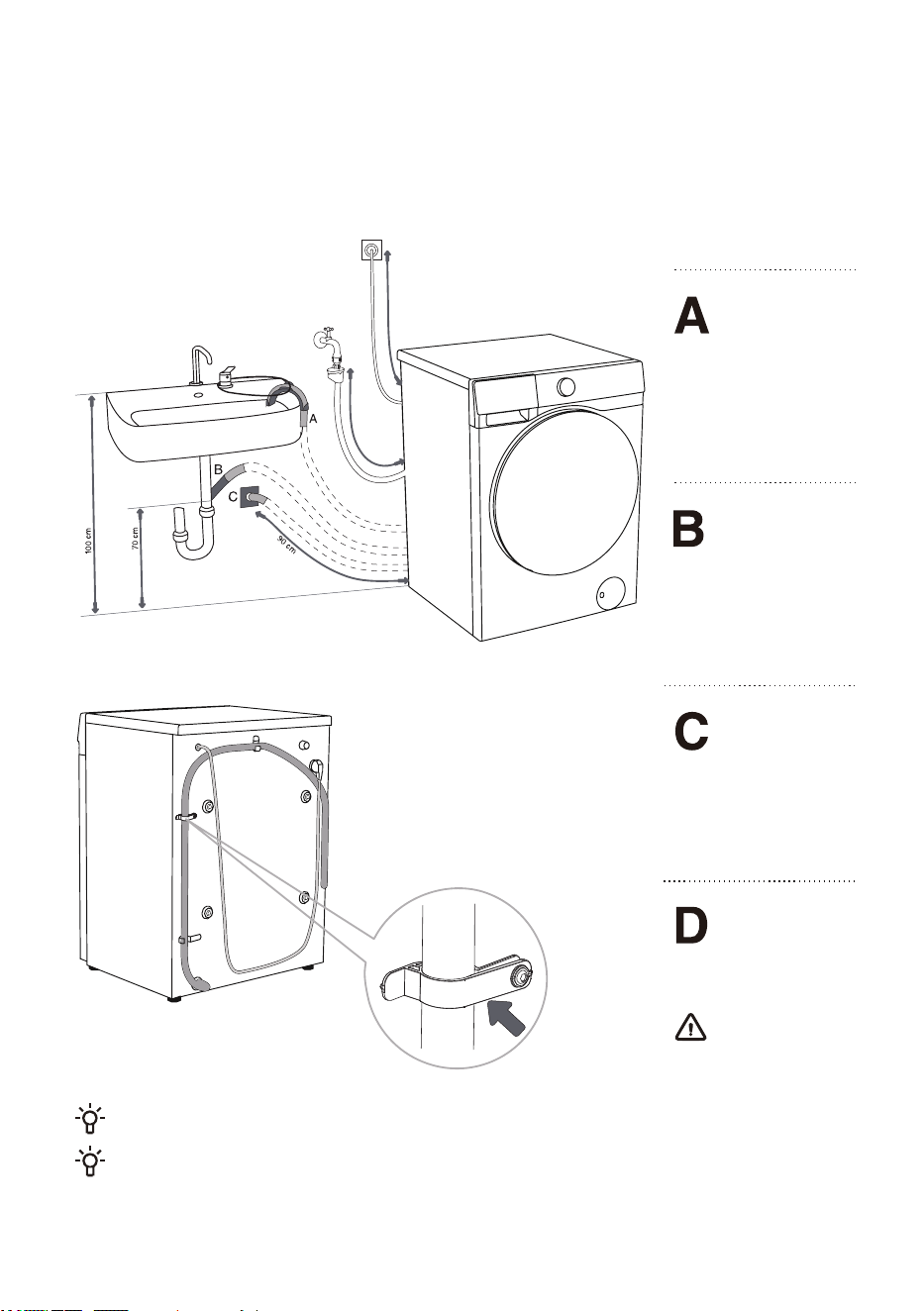
CONNECTING AND SECURING THE WATER DISCHARGE HOSE
)HHGWKHZDWHUGLVFKDUJHKRVHLQWRDZDVKEDVLQRUDEDWKWXERUFRQQHFWLWGLUHFWO\WRDGUDLQ
GLVFKDUJHKRVHPLQLPXPGLDPHWHUFP7KHYHUWLFDOGLVWDQFHIURPWKHIORRUWRWKHHQGRIWKH
GLVFKDUJHKRVHPD\EHWRFPOWFDQEHDWWDFKHGLQWKUHHZD\V$%&
PD[
PLQ
PD[
7KHGLVFKDUJHKRVH
HQGPD\EHSODFHG
RYHUDVLQNRUDEDWKWXE
8VHDVWULQJIHGWKURXJK
WKHRSHQLQJLQWKHHOERZ
VXSSRUWWRDWWDFKWKH
KRVHDQGSUHYHQWLWIURP
VOLSSLQJWRWKHIORRU
7KHGLVFKDUJH
KRVHPD\DOVREH
DWWDFKHGGLUHFWO\WRWKH
VLQNGUDLQ$VLQNWKDWLV
WRRVPDOOLVQRW
DFFHSWDEOH%HFDUHIXO
DVWKHGUDLQHGZDWHU
PD\EHKRW
7KHGLVFKDUJH
KRVHFDQDOVREH
DWWDFKHGWRDZDOOGUDLQ
ZLWKDWUDS6XFKWUDS
VKRXOGEHSURSHUO\
LQVWDOOHGWRDOORZ
FOHDQLQJ
7KHGLVFKDUJHKRVH
KDVWREHDWWDFKHG
WRWKHFOLSVRQWKHEDFN
RIWKHDSSOLDQFHDV
VKRZQLQWKHILJXUH
7KHVHFOLSVPXVW
QRWEHUHPRYHGDVWKLV
PD\SUHYHQWQRUPDO
ZDVKLQJ
0DNHVXUHWKHGUDLQKRVHLVQRWGDPDJHG
OIWKHGLVFKDUJHKRVHLVQRWFRUUHFWO\DWWDFKHGVDIHDQGFRUUHFWDSSOLDQFHRSHUDWLRQFDQQRWEH
HQVXUHG
2 hours
CONNECTING TO POWER MAINS
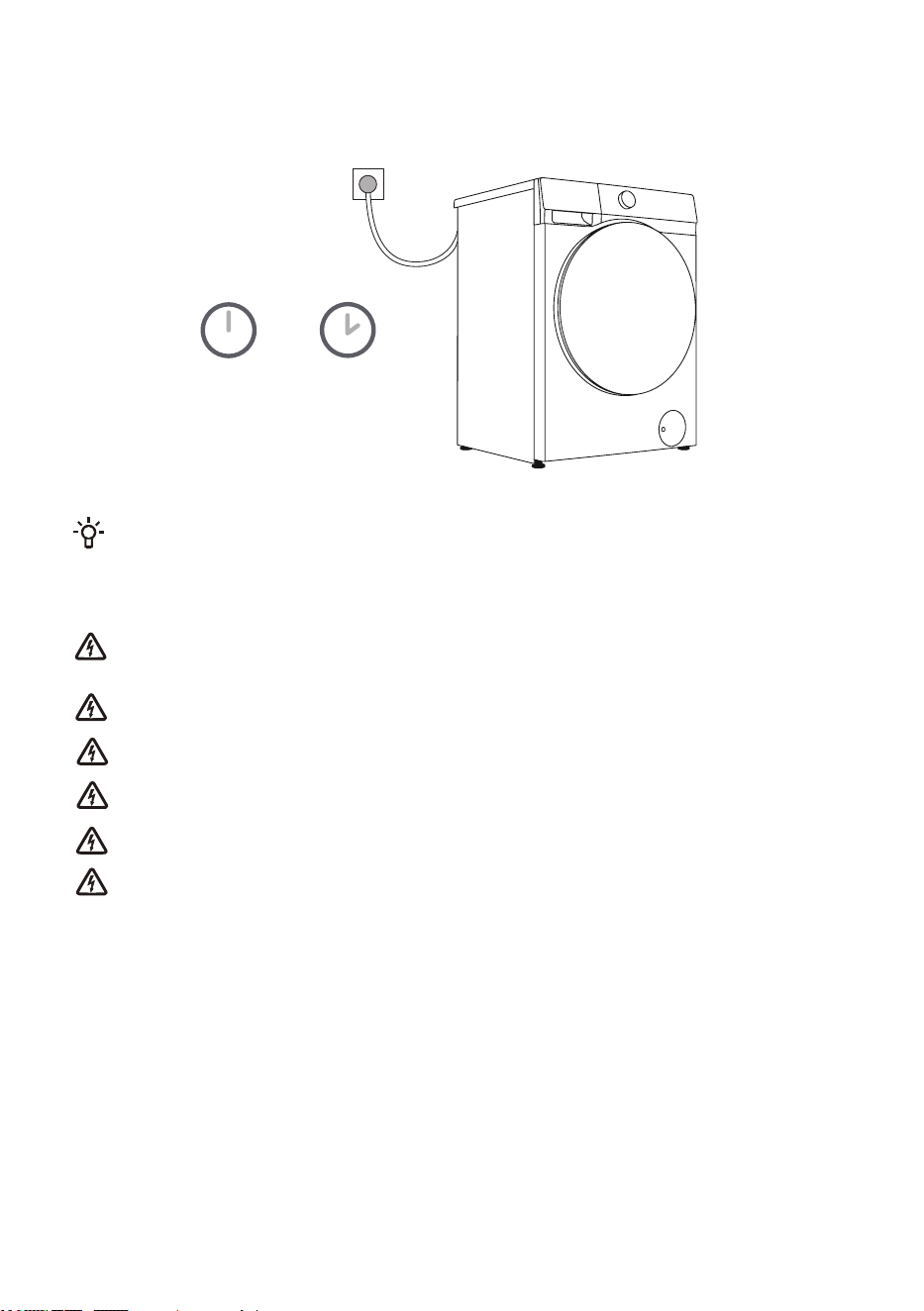
Before connecting the DSSOLDQFH to the power mains, wait for at least 2 hours until it
reaches room temperature.
&RQQHFWWKHDSSOLDQFHWRDJURXQGHGSRZHUVRFNHW$IWHULQVWDOODWLRQWKHVRFNHWVKRXOGEHIUHHO\
DFFHVVLEOH7KHVRFNHWVKRXOGEHSURYLGHGZLWKJURXQGLQJSURWHFWLRQ,QIRUPDWLRQRQ\RXU
DSSOLDQFHLVLQGLFDWHGRQWKHUDWLQJSODWH
We recommend using over-voltage protection to protect the appliance in case of a lightning
strike.
7KHDSSOLDQFHPD\QRWEHFRQQHFWHGWRWKHSRZHUPDLQVXVLQJDQH[WHQVLRQFRUG
'RQRWFRQQHFWWKHDSSOLDQFHWRDSRZHUVRFNHWLQWHQGHGIRUVPDOOORDGV
'RQRWSOXJRUXQSOXJWKHDSSOLDQFHZKHQ\RXUKDQGVDUHZHW
$Q\UHSDLUDQGPDLQWHQDQFHRIWKHDSSOLDQFHVKRXOGEHSHUIRUPHGE\WUDLQHGH[SHUWV
$GDPDJHGSRZHUFRUGPD\RQO\EHUHSODFHGE\DSHUVRQDXWKRUL]HGE\WKHPDQXIDFWXUHU
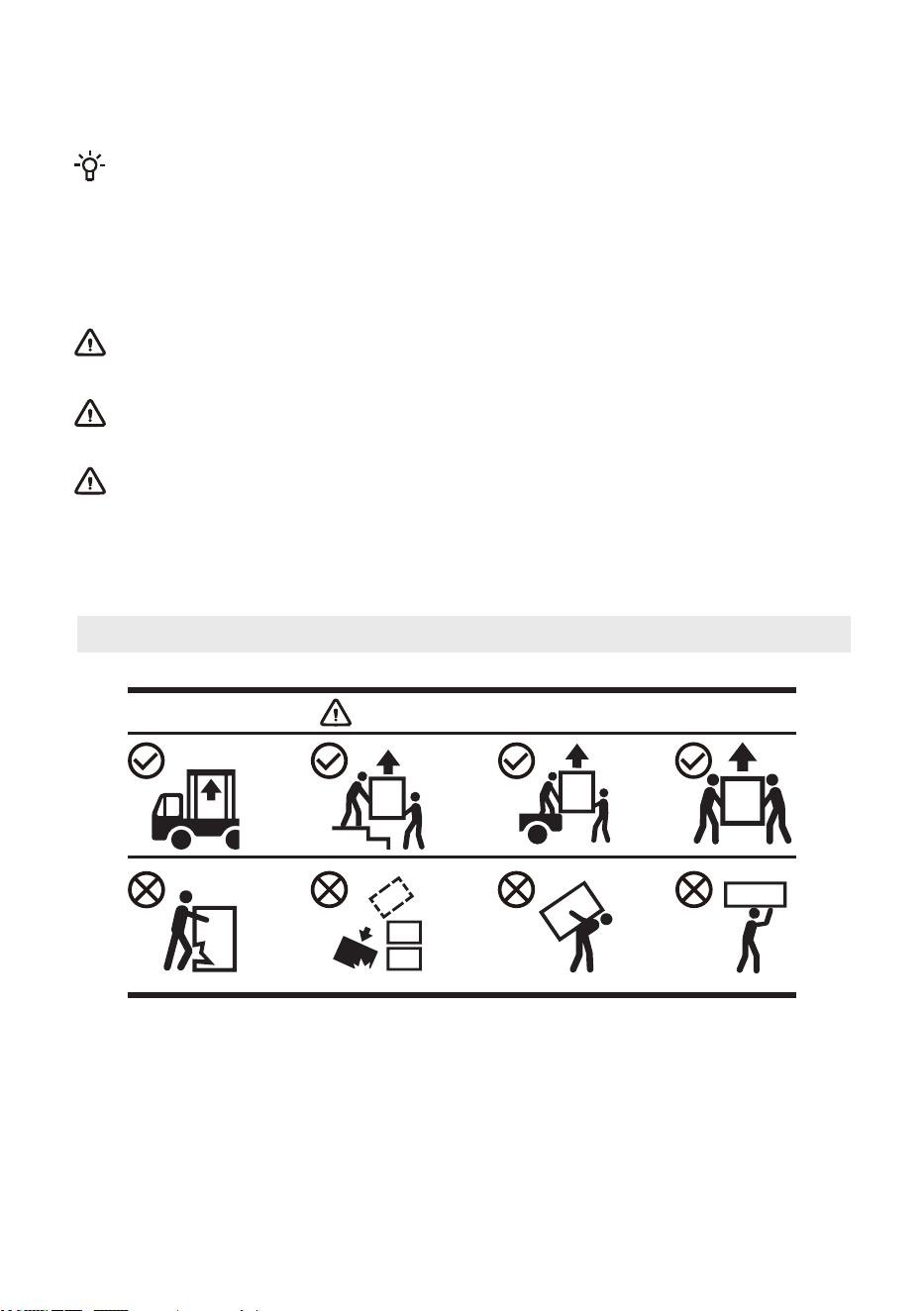
If it needs to transport properly installed equipment, please first unplug the power plug, turn off the
faucet, remove the water inlet and drain pipes, and ensure that the detergent box and the machine door are
closed in place.
Be sure to reinstall the transport bolts to avoid damage to the equipment by vibration during transport (see
“Installing and connection / demolishing the transport screws/rods”). If you lost the transport screws/rods,
they can be ordered from the manufacturer.
Pack all packaging materials properly (plastic bags, other plastic parts etc.).
The equipment is heavy, please carry it by at least two persons. When handling, please do not grasp
the protruding parts, such as the door, the top cover, etc., so as not to fall off or damage the parts.
After transport, the equipment should be left to stand still for at least 2 hours before it is connected to
the power. The equipment should be installed and connected by a trained technician.
Please read the instructions carefully before connecting the device again. Damage caused by
improper connection or improper use is not covered by the warranty.
TRANSPORT AFTER INSTALLATION
Handling Method
Transport and Handling Method
21
BEFORE USING THE APPLIANCE FOR THE FIRST TIME
FIRST USE
7KLVDSSOLDQFHKDVEHHQWHVWHGDWWKHIDFWRU\DQGPD\FRQWDLQDVPDOODPRXQWRIZDWHUUHVLGXH,WLV
UHFRPPHQGHGWRUXQD³'UXP&OHDQ´RURWKHUKLJKWHPSHUDWXUHSURJUDPWRUHPRYHDQ\UHVLGXDO
ZDWHUIURPWKHGUXP
·
&RQQHFWWKHDSSOLDQFHWRWKHSRZHUPDLQVDQGRSHQWKHZDWHUWDS7KHUHVKRXOGQRWEHDQ\
ODXQGU\LQWKHGUXP6HOHFWDQGVWDUWWKHSURJUDP
'RQRWXVHDQ\VROYHQWVRUFOHDQLQJDJHQWVWKDWFRXOGGDPDJHWKHDSSOLDQFHSOHDVHREVHUYH
WKHUHFRPPHQGDWLRQVDQGZDUQLQJVSURYLGHGE\WKHFOHDQLQJDJHQWPDQXIDFWXUHUV
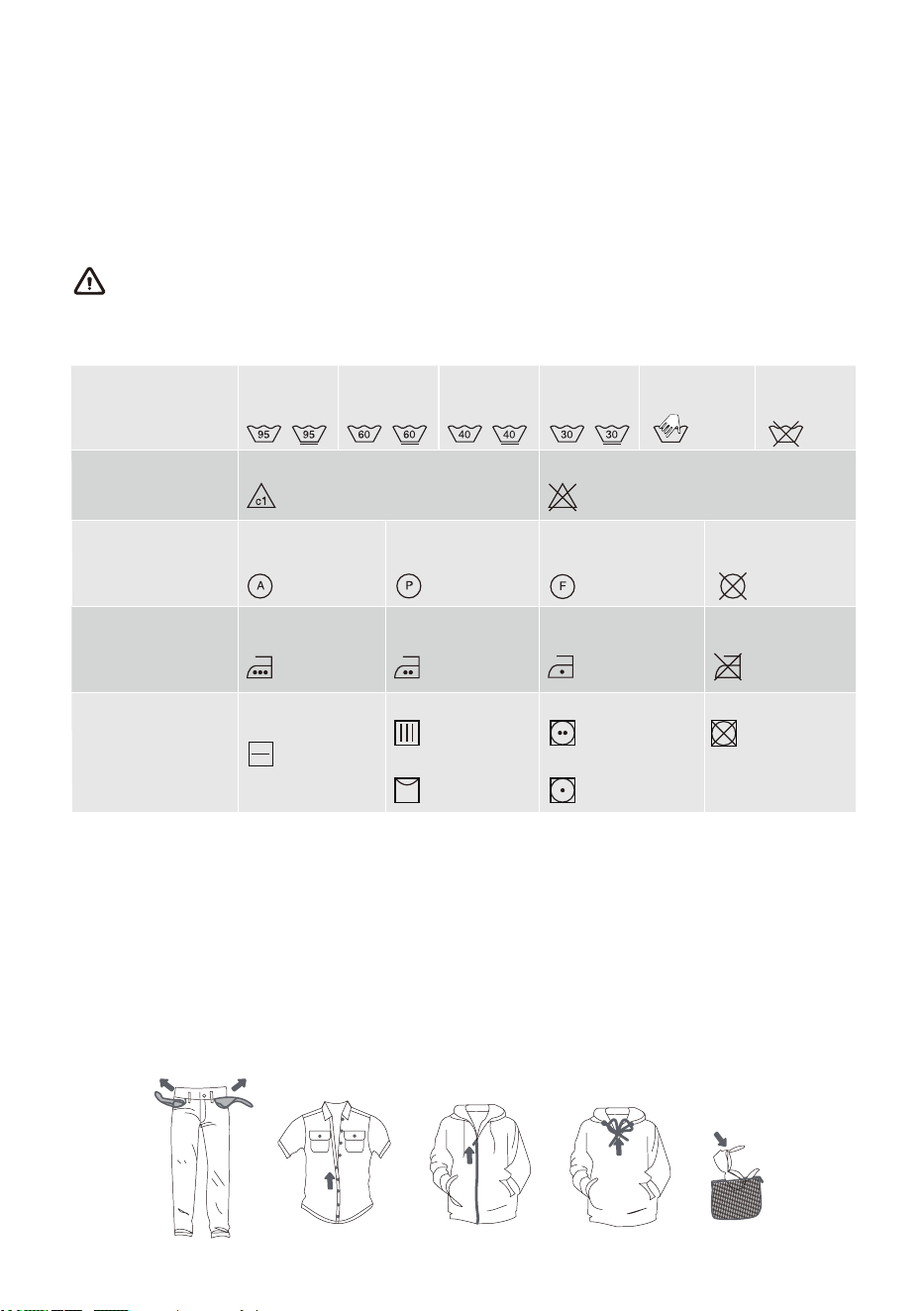
HEED THE LABELS ON THE LAUNDRY
:DVKLQJ
%OHDFKLQJ
'U\FOHDQLQJ
,URQLQJ
'U\LQJ
0D[ZDVKLQJ
WHPS&
0D[ZDVKLQJ
WHPS&
0D[ZDVKLQJ
WHPS&
0D[ZDVKLQJ
WHPS&
+DQGZDVKRQO\ 'RQRWZDVK
%OHDFKLQJLQFRROZDWHU %OHDFKLQJQRWDOORZHG
'U\FOHDQLQJZLWK
DOODJHQWV
3HWUROHXPVROYHQW
55
'U\FOHDQLQJLQ
NHURVHQHSXUH
DOFRKRODQG5
'U\FOHDQLQJQRW
DOORZHG
'U\IODWSODFHRQ
DIODWVXUIDFH
'ULSGU\
/LQHGU\
+LJKWHPSHUDWXUH
/RZWHPSHUDWXUH
'RQRWWXPEOHGU\
+RWLURQLQJPD[
&
+RWLURQLQJPD[
&
+RWLURQLQJPD[
&
,URQLQJQRWDOORZHG
PREPARING THE WASHING PROCESS
6RUWWKHODXQGU\E\W\SHRIIDEULFFRWWRQEOHQGVVLONZRROHWFFDUHODEHOLQVWUXFWLRQVFRORXUZKLWH
FRORXUHGDQGVRLOLQJ
(PSW\SRFNHWVUHPRYHPHWDOLWHPVWKDWPD\GDPDJHWKHODXQGU\RUDSSOLDQFHIDVWHQEXWWRQVDQGWXUQFORWKLQJ
ZLWKEXWWRQVRUHPEURLGHU\LQVLGHRXWFORVHDOO]LSSHUVWLHVWULQJVRQFORWKLQJZLWKGUDZVWULQJV
3ODFHVHQVLWLYHFORWKHVDQGVPDOORUOLJKWZHLJKWLWHPVLQDVSHFLDOSXUSRVHODXQGU\ZDVKLQJEDJDQGZDVKWKHP
WRJHWKHUZLWKRWKHUODXQGU\
7XUQLWHPVSURQHWRSLOOLQJRUORQJSLOHIDEULFVLQVLGHRXWEHIRUHZDVKLQJ
6WDLQVWKDWDUHOHIWIRUWRRORQJFDQEHGLIILFXOWWRUHPRYH7UHDWVRLOHGDUHDVVXFKDVFXIIVDQGFROODUVEHIRUH
ZDVKLQJVHHFKDSWHU6WDLQ5HPRYDO7LSV
'RQRWZDVKKHDY\FRPIRUWHUVSOXVKWR\VRULWHPVLQODXQGU\ZDVKLQJEDJVVHSDUDWHO\LQWKHGUXPWRDYRLG
LPEDODQFHDODUPV
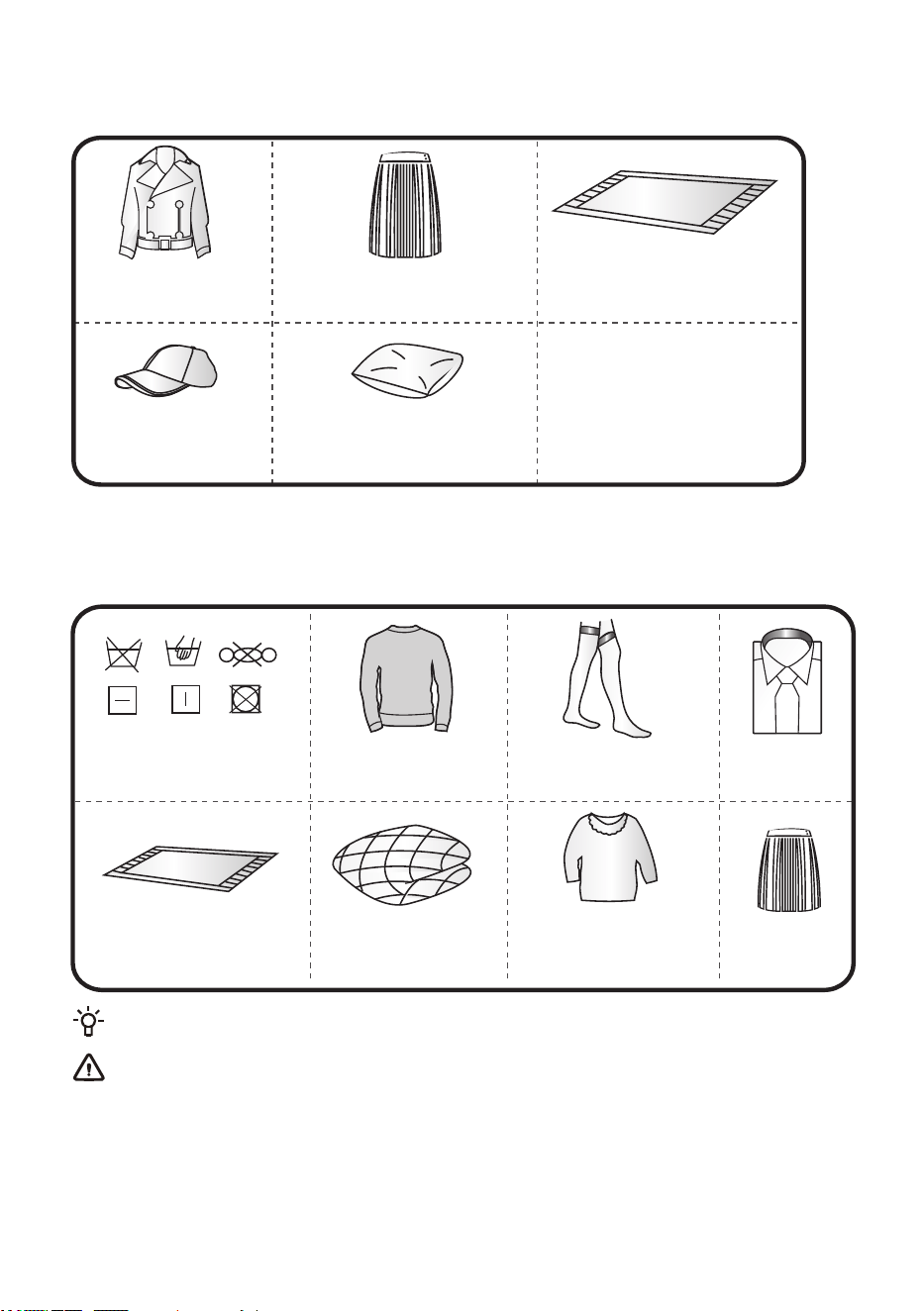
1RQZDVKDEOHDQGQRQGU\DEOHODXQGU\LQFOXGHVEXWLVQRWOLPLWHGWRWKHDERYHLWHPV
:HWLWHPVWKDWDUHVWLOOGULSSLQJDUHQRWVXLWDEOHIRUWXPEOHGU\LQJDQGPD\WULJJHUDQDODUP
/HDWKHUDQGIXUSURGXFWV
ULVNRIGHIRUPDWLRQ
$Q\ODXQGU\PDUNHGE\JUDSKLF
ULVNRIODXQGU\GDPDJH
6L]LQJFORWKHV
6LON
:RROFORWKHVULVNRI
VKULQNDJHRUIXUORVV
7LJKWVDQGVWRFNLQJVULVNRI
GDPDJHRUGHIRUPDWLRQ
&XVKLRQVRUFORWKHVZLWKIXUV
ULVNRIGDPDJHRUPDOIXQFWLRQ
&RPIRUWHUVULVNRI
GDPDJHRUPDOIXQFWLRQ
&ORWKHVZLWKODFHRU
HPEURLGHU\DQGQHZV\QWKHWLF
ILEHUVYHU\ILQHILEHUVULVNRI
GHIRUPDWLRQ
+DWVZLWKKDUGPDWHULDOV
ULVNRIDSSOLDQFH
GDPDJHDQGPDOIXQFWLRQ
&XVKLRQVSLOORZVDUWLFOHVZLWK
FRWWRQZDGGLQJIRDPDQGRWKHU
VSRQJHPDWHULDOVFDUSHWFRYHUVULVN
RIGDPDJHRUPDOIXQFWLRQ
5D\RQDQGLWVEOHQGHGSURGXFWVULVN
RIGLVFRORXUDWLRQRUGHIRUPDWLRQ
/DUJHWKLFNUXEEHUFXVKLRQVULVNRI
GDPDJHRUPDOIXQFWLRQ
2WKHUV
:ULQNOHGRUHPERVVHGFORWKHV
FRDWHGGRZQMDFNHWVFUHSHIDEULFV
HDVLO\GHIRUPHGFORWKHVVXLWV
MDFNHWVWLHVGUHVVHVHWFHDVLO\
IOXIILQJFORWKHVYHOYHWFRWWRQ
IODQQHO
NON-WASHABLE AND NON-DRYABLE LAUNDRY
NON-DRYABLE LAUNDRY (FOR TUMBLE DRYER MODELS)
24
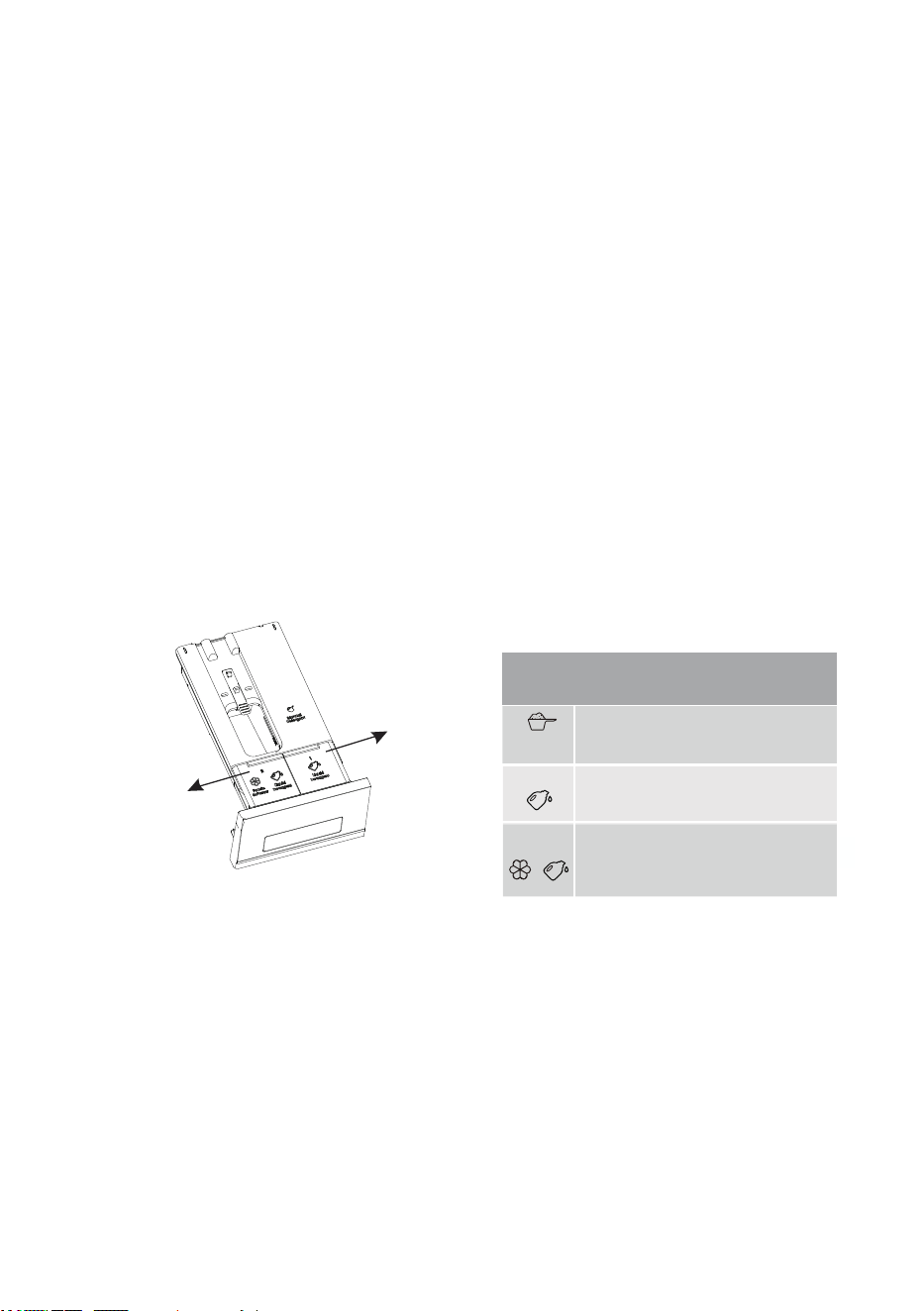
ADDING DETERGENT/SOFTENER
Detergent drawer Manual
Detergent Dispenser
Compartment
Liquid Detergent
Dispenser Compartment
Fabric Softener/ Liquid Detergent
Dispenser Compartment
DETERGENT DRAWER
1
2
Dispenser 2
Dispenser 1
1. The automatic delivery model has the function of automatic delivery of detergent / softener, and can
automatically add an appropriate amount of detergent / softener. When used for the first time, the system
defaults to the automatic delivery function of detergent and softener.
2. When the automatic release function is selected, the device will automatically release the detergent /
softener, and the user can adjust the automatic release position according to the consumption demand. The
device remembers the drop gear setting from the last time the laundry was done.
3. If you do not want to use the automatic delivery function, you can turn it off in the settings and manually
add detergent and softener when washing clothes.
4. “Dispenser 2” can add softeners/detergents, please be sure to add them according to the function
settings. Users can choose the same/different detergent for “Dispenser 1” according to their needs,
please refer to the “Dispenser 2” for specific settings.
5. If the amount in the detergent/softener box is insufficient, the detergent/softener shortage warning icon in
the display screen lights up red or flashes, please add detergent/softener in time. The “Dispenser 1” has
a maximum reserve of 0.65L and the “Dispenser 2” has a maximum reserve of 0.4L.
Do not exceed the MAX line. Please close the detergent box drawer completely after adding.
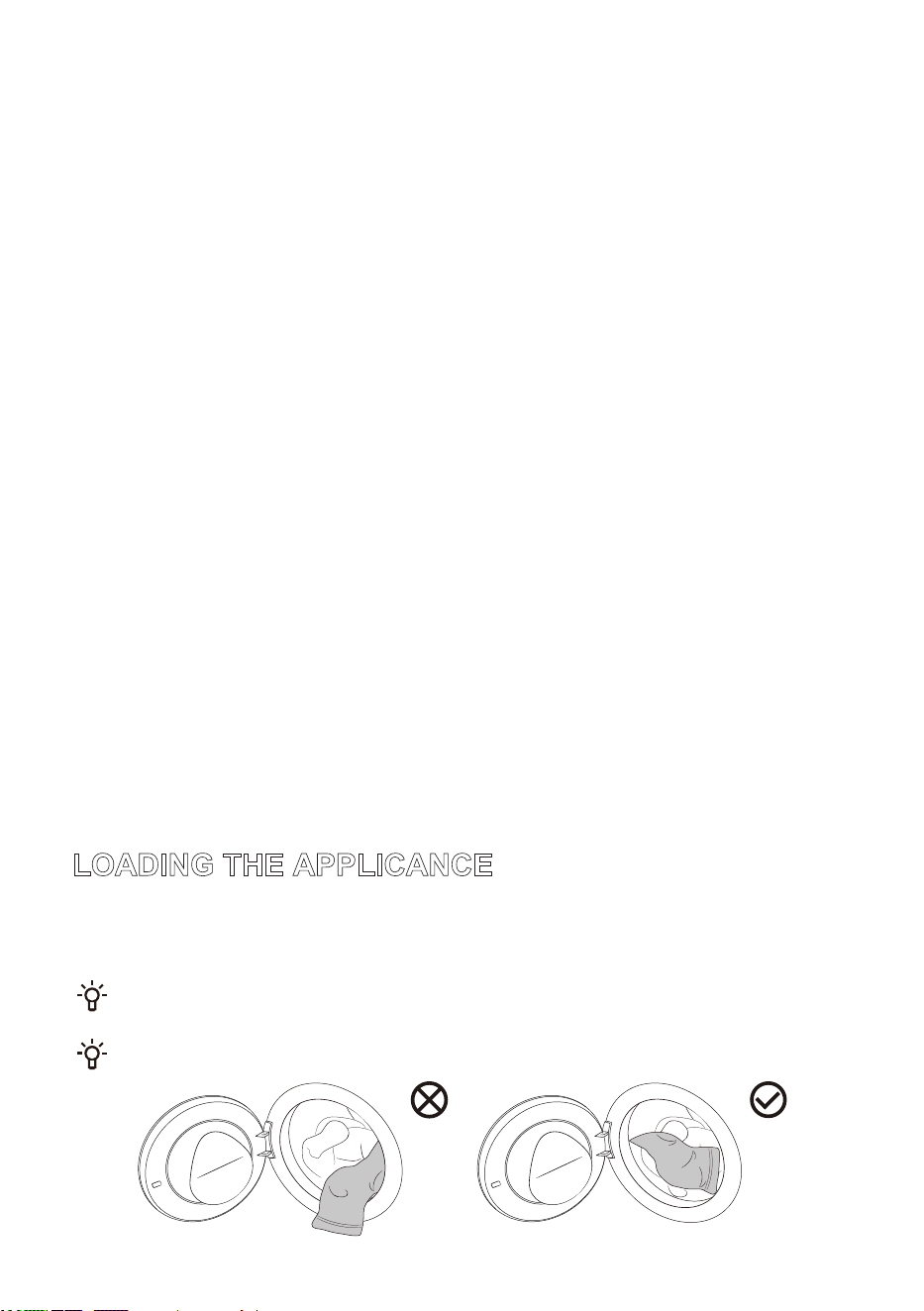
/2$',1*7+($33/,&$1&(
2SHQWKHDSSOLDQFHGRRUDQGLQVHUWWKHODXQGU\ORRVHO\LQWRWKHGUXPDIWHUPDNLQJVXUHWKHGUXPLV
HPSW\
&ORVHWKHDSSOLDQFHGRRU7KHGRRULVFORVHGZKHQ\RXKHUHDFOLFN
'RQRWRYHUORDGWKHGUXP)RUPD[LPXPORDGVHH352*5$00(7$%/(,IWKHDSSOLDQFH
GUXPLVWRRIXOOWKHODXQGU\ZLOOQRWEHZDVKHGDVWKRURXJKO\
(QVXUHWKHODXQGU\LVFRPSOHWHO\SODFHGLQWRWKHGUXPWRSUHYHQWLWIURPJHWWLQJFDXJKWLQWKH
GRRU
35(&$87,216)2586(
$OZD\VXVHDKLJKHIILFLHQF\QHXWUDOORZIRDPLQJGHWHUJHQWVXLWDEOHIRUWKLVDSSOLDQFH'RQRWXVHFDNHG
SRZGHUHGGHWHUJHQW
:KHQXVLQJWKHDXWRPDWLFGLVSHQVLQJIXQFWLRQGRQRWPDQXDOO\DGGGHWHUJHQW
3OHDVHGRQRWRYHUILOOWKHGHWHUJHQWVRIWHQHUER[WRSUHYHQWWKHGHWHUJHQWVRIWHQHUIURPRYHUIORZLQJ$IWHU
ILOOLQJWKHGHWHUJHQWVRIWHQHUPDNHVXUHWKDWWKHGHWHUJHQWER[GUDZHULVIXOO\FORVHGEHIRUHVWDUWLQJWKHZDVKLQJ
SURFHGXUH
%HIRUHLQVWDOOLQJPRYLQJKDQGOLQJRUDGMXVWLQJWKHHTXLSPHQWUHPRYHRUVHFXUHWKHGHWHUJHQWER[WRSUHYHQW
WKHGHWHUJHQWDQGVRIWHQHUIURPRYHUIORZLQJ
&RUURVLYHGHVFDOLQJDJHQWVPD\GDPDJHWKHDSSOLDQFH'RQRWXVHVROYHQWV'RQRWZDVKWKHODXQGU\WKDWZDV
FOHDQHGZLWKVROYHQWVRUIODPPDEOHVXEVWDQFHV
,IPDQXDOGHOLYHU\LVUHTXLUHGWKHDXWRPDWLFGHOLYHU\IXQFWLRQFDQEHWXUQHGRIIDQGWKHGHWHUJHQWFDQEH
PDQXDOO\DGGHG
7KHDPRXQWRIGHWHUJHQWGHSHQGVRQWKHW\SHVRLOOHYHOODXQGU\FRORXUDQGZDVKLQJWHPSHUDWXUHSOHDVHDGG
WKHDSSURSULDWHDPRXQW
([FHVVLYHDPRXQWRIGHWHUJHQWPD\UHVXOWLQIRDPLQJWKDWLQWXUQLPSDLUVZDVKLQJHIILFLHQF\,IH[FHVVLYHIRDP
LVGHWHFWHGWKHDSSOLDQFHPD\SDXVHWKHSURJUDPPHIRUGHIRDPLQJ
8VLQJLQVXIILFLHQWGHWHUJHQWPD\UHVXOWLQSRRUZDVKLQJHIIHFWDQGFRXOGOHDGWRVFDOHEXLOGXSLQWKHGUXPDQG
ZDWHUSLSHV
:HUHFRPPHQGDGGLQJSRZGHUGHWHUJHQWPDQXDOO\ULJKWEHIRUHWKHZDVKF\FOHVWDUWV,IDGGHGLQDGYDQFH
HQVXUHWKHGHWHUJHQWGLVSHQVHUFRPSDUWPHQWLVFRPSOHWHO\GU\RWKHUZLVHWKHSRZGHUGHWHUJHQWPD\KDUGHQDQG
FOXPSEHIRUHWKHZDVKF\FOHVWDUWV
'RQRWXVHFRQFHQWUDWHGRUVWURQJO\FRQFHQWUDWHGGHWHUJHQWVRUVRIWHQHUVPD[LPXPDOORZDEOHYLVFRVLW\LV
PSDV,WFDQRQO\EHXVHGDIWHUGLOXWLRQZLWKZDWHU
'RQRWSXWSRZGHUHGGHWHUJHQWLQWRWKHDXWRPDWLFGHWHUJHQWER[
,QRUGHUWRSUHYHQWWKDWGHWHUJHQWVRIWHQHULQWKHGHWHUJHQWER[IURPGU\GRQRWRSHQWKHOLGRIWKHGHWHUJHQWER[
IRUDORQJWLPH2QO\SXOORXWWKHGURSER[ZKHQILOOLQJRUFKDQJLQJGHWHUJHQW
.HHSGHWHUJHQWDQGVRIWHQHURXWRIUHDFKRIFKLOGUHQ
7KHGHWHUJHQWGURSER[GRHVQRWKDYHDVSHFLDOGLVSHQVHUFRPSDUWPHQWIRUWKHDGGLWLRQRIGLVLQIHFWDQWVDQGLWLV
QRWUHFRPPHQGHGWRSXWGLVLQIHFWDQWV
FIRST TIME USE
Tap " " to power on and enter the startup navigation.
Configure Language and WLAN according to the startup navigation and actual needs of the user, and
complete the Operating tips.
Language
Set the language, the default is English, turn the main knob to select, and then tap " " to confirm the
selection and go to the next step.
WLAN
The appliance is bound to the network, and the WLAN connection of the appliance is completed
according to the prompts.
If you do not need to connect to the network, press and hold "
" to skip.
Operating tips
Interface operation guide, tap " " continuously to switch the operation guide interface, and enter the
main interface after completion.
27
PROGRAMS AND FUNCTIONS
Main interface
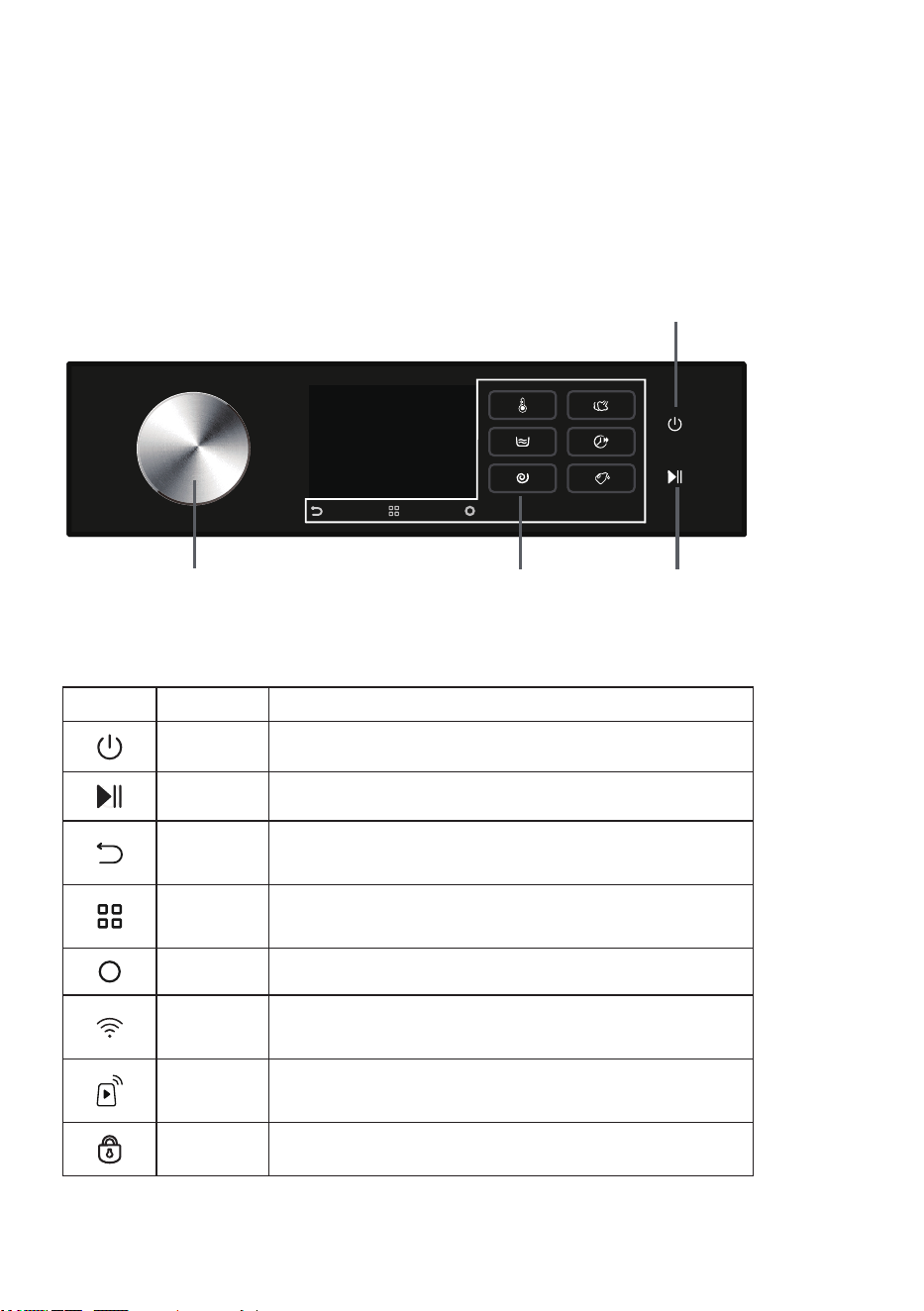
This machine adopts the control method of touching the function keys + rotating the main knob. The
Power, Start/Pause, Back, Options, Confirmation button and other function buttons are operated by
touching the buttons; the program selection is operated by rotating the main knob; additional functions
and other settings are operated by rotating the main knob + touching the function buttons.
Power
The final display is subject to the actual situation.
Start/PauseFunction ButtonsMain Knob
Icon description
Icon Name Description
Power Used to turn on/off the appliance.
Start/Pause Used to start/pause a program.
Back
Tap to return to the previous interface; long press to return
to the main interface.
Options
Tap to enter the selection of additional functions; long press
to enter the system function settings.
Confirm Used to confirm the current selection.
WLAN
This icon is displayed when the appliance is connected to
the network.
Remote
Control
This icon is displayed when the Remote Control function is
turned on.
Door Lock This icon is displayed when the door is locked.
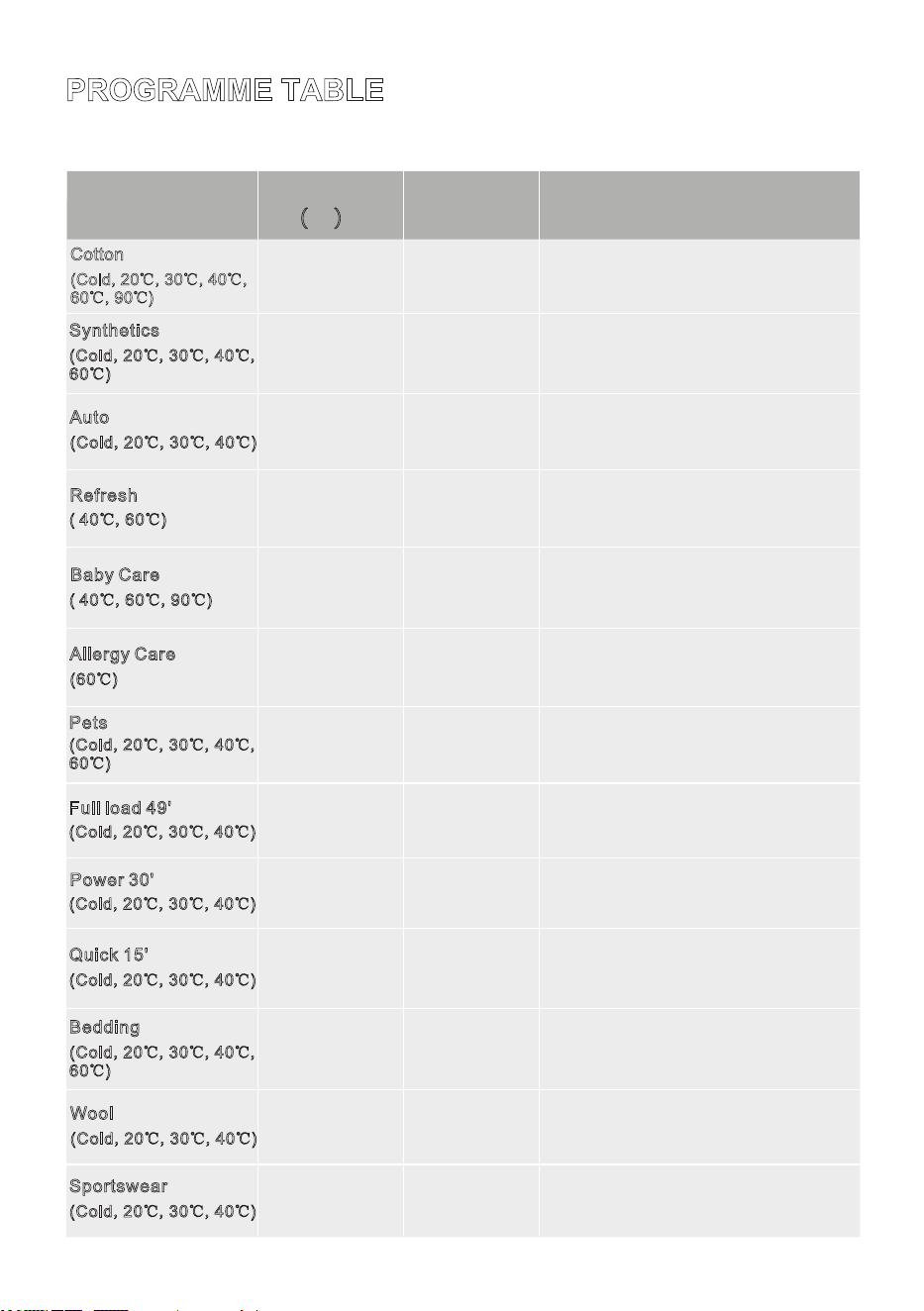
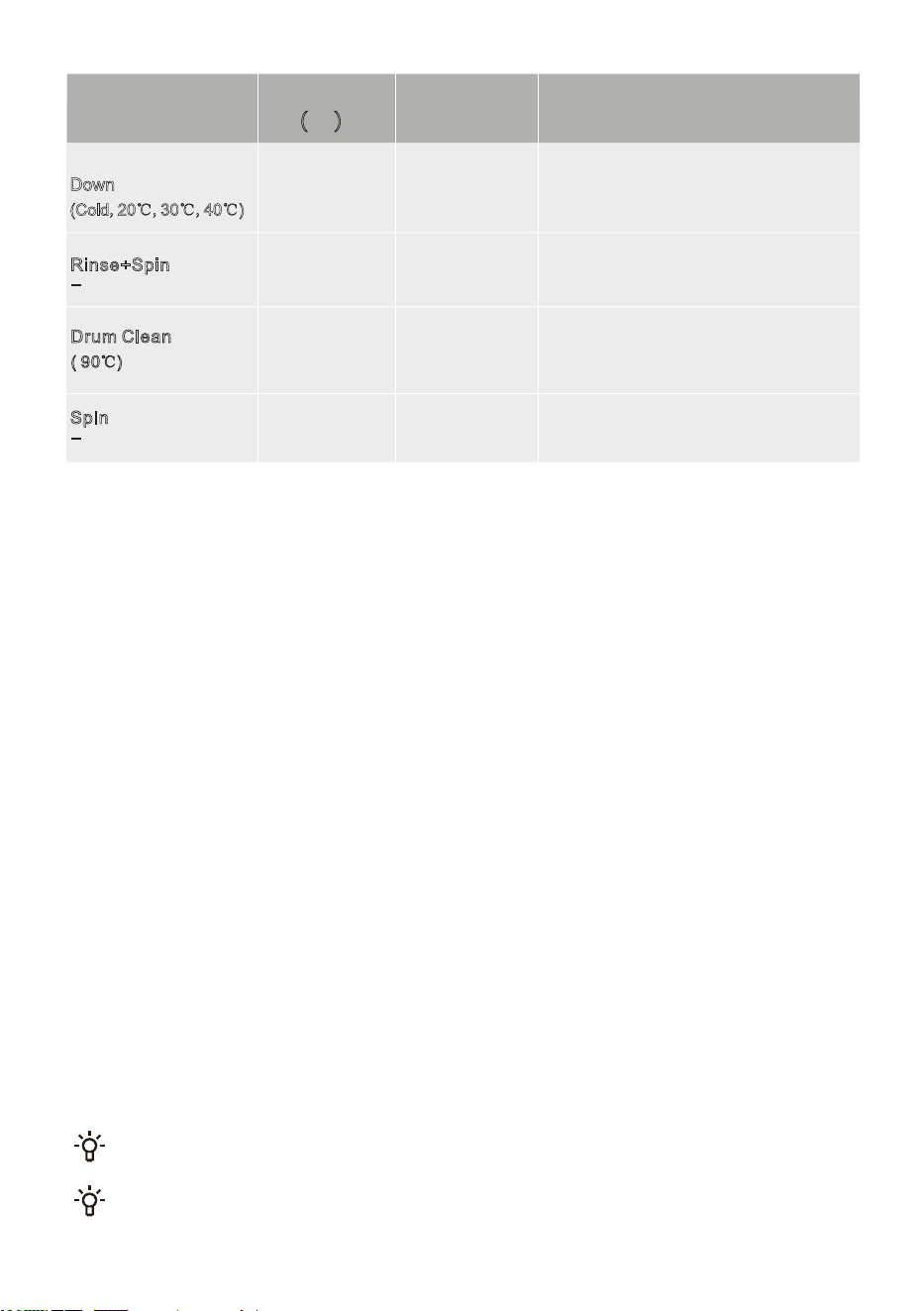
352*5$00(7$%/(
7DSWKHSRZHUEXWWRQWRWXUQRQWKHPDFKLQH$FFRUGLQJWRWKHW\SHRIPDWHULDODQGWKHGHJUHHRIVRLOLQJWXUQWKH
PDLQNQREOHIWULJKWWRVHOHFWWKHDSSURSULDWHSURJUDP'XULQJRSHUDWLRQWKHPDLQNQREZLOOQRWURWDWHDXWRPDWLFDOO\
0D[LPXPORDG
NJ
0D[LPXP
VSHHGUSP
,W LV VXLWDEOH IRU EDE\ FORWKHV DQG XQGHUZHDU
HWF VWHULOLVHG DQG GLVLQIHFWHG WKURXJK KLJK
WHPSHUDWXUH VWHDP 6RIWHQHU LV QRW
UHFRPPHQGHGIRUWKLVSURJUDPPH
!" # $
%&'
,WLVVXLWDEOHIRUZDVKLQJPRGHUDWHO\VRLOHG
V\QWKHWLFILEHUVRUFRWWRQIDEULFV
!( ) "
$
,WLVVXLWDEOHIRUZDVKLQJDVPDOODPRXQWRI
KHDYLO\VRLOHGODXQGU\ZLWKDQLQWHQVLYHZDVK
F\FOHLQDVKRUWSHULRGRIWLPH
*+) ,
!( ) " $
3URJUDPPHGHVFULSWLRQ
,WLVVXLWDEOHIRUZDVKLQJPRGHUDWHO\RUKHDYLO\
VRLOHGFRWWRQRUOLHQIDEULFV
3URJUDP
!( ) "
#
$
,W LV VXLWDEOH IRU ZDVKLQJ FORWKHV WKDW DUH
UHVLVWDQWWR KLJK WHPSHUDWXUHV DQGQRW HDV\ WR
IDGH DQG UHPRYHV DOOHUJHQV VXFK DV SROOHQ
PLWHVDQGSDUDVLWHVWKURXJKKLJKWHPSHUDWXUHV
! $
,W FDQ DXWRPDWLFDOO\ DGMXVW WKH PDLQ ZDVKLQJ
WLPH DQG ULQVH WLPHV DFFRUGLQJ WR WKH ZHLJKW
RI WKH ODXQGU\ DQG LV VXLWDEOH IRU ZDVKLQJ
OLJKWO\GLUW\ODXQGU\
!( ) " $
-&
.
*
,WLVVXLWDEOHIRUZDVKLQJFORWKHVZLWKSHWKDLU
!( ) "
$
"
/("#,
,WLVVXLWDEOHIRUZDVKLQJGDLO\FORWKHVVXFKDV
FRWWRQV\QWKHWLFILEHUVRUEOHQGHGIDEULFVLQD
VKRUWSHULRGRIWLPH
!( ) " $
!( ) " $
0'1,
,W LV VXLWDEOH IRU ZDVKLQJ D VPDOO DPRXQW RI
ODXQGU\RUOLJKWO\VRLOHGODXQGU\,I\RXFKDQJH
WKH GHIDXOW VHWWLQJ WKH ZDVKLQJ WLPH ZLOO EH
ORQJHU
((
,WLVVXLWDEOHIRUZDVKLQJODUJHVL]HGFORWKHV
VXFKDVFXUWDLQVVKHHWVTXLOWFRYHUVHWF
!( ) "
$
"
,WLVVXLWDEOHIRUZDVKLQJPDFKLQHZDVKDEOH
ZRROHQFORWKHVUHIHUWRWKHODXQGU\ODEHO
UHTXLUHPHQWV
!( ) " $
,WLVXVHGIRUVWHULOL]DWLRQZULQNOHUHPRYDODQG
RGRUUHPRYDORIDVPDOODPRXQWRIGU\FORWKHV,W
UHTXLUHVWXUQLQJRQWKHIDXFHWDQGGHWHUJHQW
VRIWHQHUFDQQRWEHDGGHG
!" $
%+
,WLVVXLWDEOHIRUZDVKLQJDWKOHWLFDQGOHLVXUH
ZHDUPDGHIURPPLFURILEHUIDEULFV
!( ) " $
"
#
2%
,WLVVXLWDEOHIRUULQVLQJDQGVSLQQLQJODXQGU\
VHSDUDWHO\'RQRWDGGGHWHUJHQWIRUWKLV
SURJUDPPH
3
.
,W LV XVHG WR FOHDQ WKH GUXP DQG UHPRYH DQ\
UHVLGXHV RI GHWHUJHQW DQG EDFWHULD WKDW FDQ
DFFXPXODWHDQGGHYHORSHVSHFLDOO\ZKHQXVLQJ
ORZ WHPSHUDWXUH SURJUDPPHV 'R QRW DGG
GHWHUJHQWRUVRIWHQHUIRUWKLVSURJUDPPH
!# $
%
,WLVVXLWDEOHIRUVSLQQLQJODXQGU\VHSDUDWHO\,W
LVVXLWDEOHIRUVSLQQLQJODXQGU\VHSDUDWHO\'R
QRWDGGGHWHUJHQWRUVRIWHQHUIRUWKLVSURJUDP
,W LV VXLWDEOH IRU ZDVKLQJ PDFKLQH ZDVKDEOH
LWHPV ILOOHG ZLWK V\QWKHWLF ILEHUV VXFK DV
SLOORZVPDWWUHVVHVDQGEHGVSUHDGVDQGDOVR
IRUZDVKLQJLWHPVILOOHGZLWKGRZQ
3+
!(
) " $
7KHPD[LPXPRUQRPLQDOORDGDSSOLHVWRODXQGU\SUHSDUHGSXUVXDQWWRWKH,(&
VWDQGDUG
)RUEHWWHUZDVKLQJHIIHFWZHUHFRPPHQGORDGLQJWKHGUXPWRZKHQXVLQJWKHFRWWRQ
SURJUDPPHV
127(
:DWHU7HPSHUDWXUH6HOHFWWKHDSSURSULDWHZDWHUWHPSHUDWXUHIRUFKRVHQZDVKLQJSURJUDP$OZD\VIROORZ
JDUPHQWPDQXIDFWXUHUVFDUHODEHORULQVWUXFWLRQVZKHQZDVKLQJWRDYRLGGDPDJHWRFORWKHV
$FWXDOZDWHUWHPSHUDWXUHPD\GLIIHUIURPWKHGHFODUHGF\FOHWHPSHUDWXUH
7KHWHVWUHVXOWVGHSHQGRQZDWHUSUHVVXUHZDWHUKDUGQHVVZDWHULQOHWWHPSHUDWXUHURRPWHPSHUDWXUHODXQGU\
W\SHDQGDPRXQWRIORDGGHJUHHRIVROLQJXWLOL]HGGHWHUJHQWIOXFWXDWLRQVLQWKHSRZHUVXSSO\DQGFKRVHQ
DGGLWLRQDORSWLRQV
2YHUORDGLQJWKHODXQGU\GXULQJWKHZDVKLQJF\FOHPD\UHGXFHZDVKLQJHIILFLHQF\DVWKHDSSOLDQFHLQLWLDOO\
GHWHFWVDORZHUZHLJKWDQGXVHVOHVVZDWHU,QVXIILFLHQWZDWHUPD\DOVRFDXVHGDPDJHWRWKHODXQGU\DQGH[WHQG
WKHZDVKLQJWLPH
'UXP&OHDQLIDYDLODEOH0DNHVXUHWKHGUXPLVHPSW\EHIRUHXVLQJWKH'UXP&OHDQSURJUDPPH,WLV
UHFRPPHQGHGWRUXQLWDWOHDVWRQFHDPRQWK
:KHQGHVFDOLQJRQO\XVHGHVFDOLQJDJHQWVZLWKDGGHGDQWLFRUURVLRQSURWHFWLRQ2QO\XVHQRQFRUURVLYH
GHVFDOLQJDJHQWV)ROORZWKHPDQXIDFWXUHUVLQVWUXFWLRQV)LQLVKWKHGHVFDOLQJSURFHVVE\UXQQLQJ³'UXP
&OHDQ´RURWKHUKLJKWHPSHUDWXUHSURJUDPPHVVHYHUDOWLPHVLQRUGHUWRUHPRYHDQ\UHVLGXDOGHVFDOLQJDJHQW,WLV
UHFRPPHQGHGWRGHVFDOHDWOHDVWRQFHHYHU\VL[PRQWKV
Australian Performance Testing Programmes:
The program Cotton+40℃ + 3 rinses+1500 rpm+cancel 'automatic
dispensing'+intensive is recommended for a normally soiled load of 10 kg
0D[LPXPORDG
NJ
0D[LPXP
VSHHGUSP
3URJUDPPHGHVFULSWLRQ3URJUDP
)
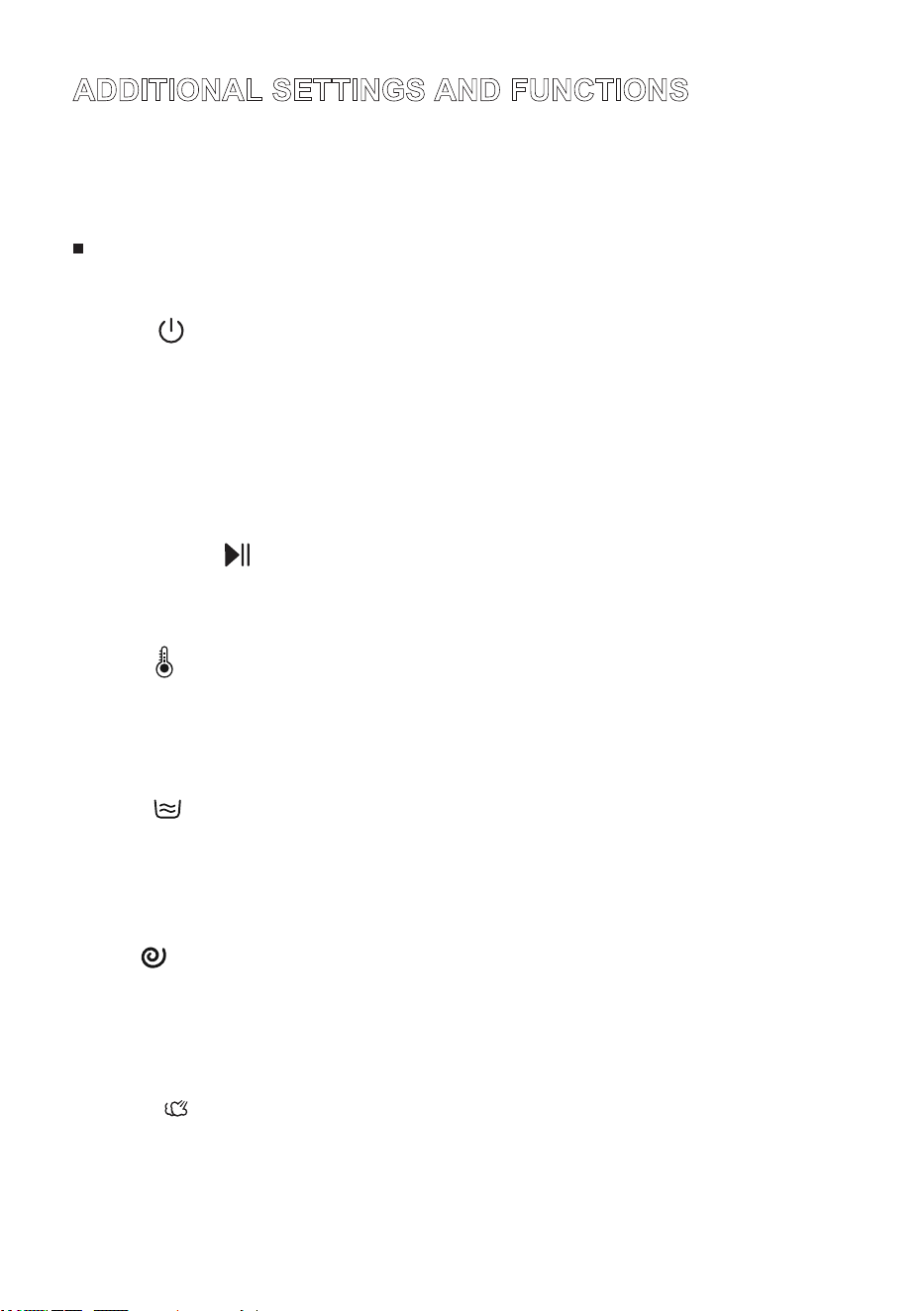
$'',7,21$/6(77,1*6$1')81&7,216
$IWHUVWDUWLQJXSWKHGLVSOD\ZLOOVKRZWKHGHIDXOWSURJUDPDQGSDUDPHWHUV,I\RXXVHWKHGHIDXOW
SDUDPHWHUVWDSWKH6WDUW3DXVHEXWWRQWRVWDUWWKHSURJUDP8VHUVFDQVHOHFWDSSURSULDWHSURJUDPV
DQGSDUDPHWHUVDQGDGGDGGLWLRQDOIXQFWLRQVDVQHHGHG$IWHUWDSSLQJWKH6WDUW3DXVHEXWWRQWRVWDUW
VRPHRIWKHVHWIXQFWLRQVFDQQRWEHFKDQJHG,I\RXQHHGWRFKDQJHWKHVHWWLQJVSUHVVDQGKROGWKH
3RZHUEXWWRQWRVKXWGRZQDQGUHVWDUWWRUHVHOHFWWKHSURJUDPDQGIXQFWLRQ
%HIRUHVWDUWLQJWKHSURJUDPVHOHFWWKHSURJUDPXVLQJWKHPDLQNQREDQGWDSWKHIXQFWLRQEXWWRQWR
VHWWKH7HPS5LQVH6SLQ6WHDP4XLFNHUDQG$XWR'RVHIXQFWLRQV'LIIHUHQWSURJUDPVKDYHGLIIHUHQW
RSWLRQDODGGLWLRQDOIXQFWLRQVDQGJHDUVHOHFWLRQUDQJHV
3RZHU
8VHGWRWXUQRQRIIWKHDSSOLDQFH
,I\RXQHHGWRVKXWGRZQWKHSURJUDPGXULQJRSHUDWLRQSUHVVDQGKROGWKH3RZHUEXWWRQWRVKXWGRZQ
:KHQWKHSURJUDPLVUXQQLQJLIQRRSHUDWLRQLVSHUIRUPHGIRUDSHULRGRIWLPHWKHDSSOLDQFHZLOO
DXWRPDWLFDOO\WXUQRIIWKHVFUHHQDQGHQWHUWKHHQHUJ\VDYLQJVWDWH7XUQWKHPDLQNQRERUWDSDQ\
EXWWRQWRZDNHXSWKHVFUHHQ,QWKHVWDQGE\VWDWHRUDIWHUWKHSURJUDPPHHQGVLIQRRSHUDWLRQLV
SHUIRUPHGIRUDSHULRGRIWLPHWKHDSSOLDQFHZLOODXWRPDWLFDOO\WXUQRIIWKHVFUHHQ7KHDSSOLDQFHZLOO
DXWRPDWLFDOO\VKXWGRZQLIQRRSHUDWLRQVDUHSHUIRUPHGIRUDSHULRGRIWLPH,QWKHDODUPVWDWHWKH
DSSOLDQFHZLOOQRWWXUQRIIWKHVFUHHQ
6WDUW3DXVH
6WDUWSDXVHWKHSURJUDP
,IWKHGRRULVQRWFORVHGRUORFNHGDQDODUPZLOOEHGLVSOD\HGRQWKHVFUHHQDIWHUSUHVVLQJ6WDUW
7HPS
8VHGWRVHOHFWWKHZDVKLQJWHPSHUDWXUHEHIRUHVWDUWLQJWKHSURJUDP
7DSWKLVRSWLRQWRVHWWKHZDVKWHPSHUDWXUHEHIRUHVWDUWLQJWKHSURJUDP7DSFRQWLQXRXVO\WRF\FOH
WKURXJKWKHVHWWLQJJHDUV7KHWHPSHUDWXUHFDQEHVHOHFWHGLQJHDUV&ROG&7KH
KHDWLQJWHPSHUDWXUHWKDWFDQEHVHWIRUHDFKSURJUDPLVGLIIHUHQW
5LQVH
7KLVIXQFWLRQFKDQJHVWKHGHIDXOWQXPEHURIULQVHF\FOHV
%HIRUHVWDUWLQJWKHSURJUDPWDSWKLVRSWLRQWRVHWWKHQXPEHURIULQVHV7DSFRQWLQXRXVO\WRF\FOH
WKURXJKWKHVHWJHDUV7KHQXPEHURIULQVHVFDQEHVHOHFWHGWLPHV7KHQXPEHURIULQVHVWKDW
FDQEHVHWIRUHDFKSURJUDPLVGLIIHUHQW
6SLQ
7KLVIXQFWLRQDOORZV\RXWRDGMXVWWKHVSLQVSHHGRIWKHSURJUDP
%HIRUHVWDUWLQJWKHSURJUDPWDSWKLVRSWLRQWRVHWWKHSURJUDPVSHHG7DSFRQWLQXRXVO\WRF\FOHWKURXJK
WKHVHWJHDUV7KHVSHHGRSWLRQVDUHUSP7KHVSHHGUDQJHWKDWFDQEH
VHWIRUHDFKSURJUDPLVGLIIHUHQW6HOHFWUSPDQGWKHDSSOLDQFHZLOOQRWVSLQEXWRQO\GUDLQZDWHU
6WHDP
7KLVIXQFWLRQFDQJHQHUDWHVWHDPUHGXFHRUHOLPLQDWHZULQNOHVPDNHFORWKHVPRUHFRPIRUWDEOH
%HIRUHVWDUWLQJWKHSURJUDPWDSWKLVRSWLRQWRWXUQRQWKH6WHDPIXQFWLRQ
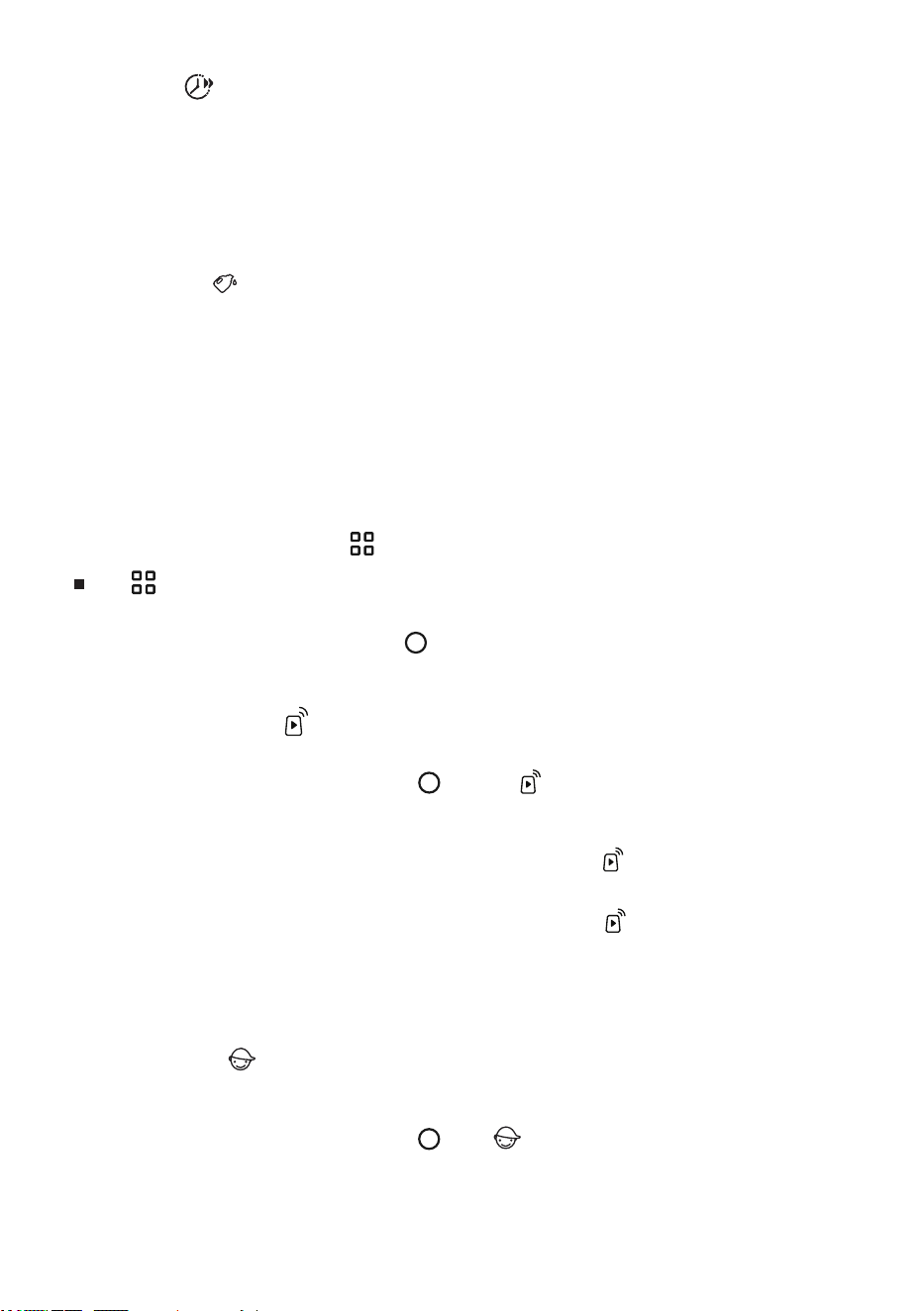
To prevent children from operating the machine by mistake and external interference with the washing
program, this machine has a Child Lock function.
Turn the main knob to select this function, tap “ ”, the “ ” icon lights up, and the Child Lock function
is turned on. The same operation can be used to release Child Lock.
After the program ends, the Child Lock function will be automatically canceled.
This function can activate/deactivate the remote control module of the appliance.
Turn the main knob to select this function, tap “ ” and the “ ” icon lights up, and the Remote Control
function is turned on. The same operation can be used to turn off Remote Control.
Before activating the Remote Control function, check to make sure that the WLAN function is turned on and
connected normally, and the door is properly closed.
When the WLAN function is turned on and connected normally, but the “ ” icon on the screen is not lit,
you can view the status or set the program parameters and function items (depending on the different
permissions of the model) through your mobile phone, but you cannot start the program remotely.
When the WLAN function is turned on and connected normally, and the “ ” icon on the screen is on, you
can set the program parameters and function items through your mobile phone, and you can start the
program remotely.
After turning on the Remote Control mode, if there is no operation on the entire machine and the App for a
period of time, it will enter the Energy Saving mode, and it will automatically shut down if there is no
operation within 7 days.
Tap “ ”to enter the additional function settings interface:
Before starting the program, the users can set additional functions such as Remote Control, Child Lock,
Mute, Delay End, Anti Crease, Cold Wash, PreWash, Intensive, Stain Removal, etc. as needed. Turn the
main knob to select additional functions, tap “ ” to confirm the selection, and tap it again to cancel the
selection. The corresponding icon is lit to indicate that this function is enabled. Different programs have
different additional functions that can be selected.
31
Quicker
Auto Dose
Additional Functions
Remote Control
Child Lock
This function can reduce the washing time of the program and speed up the washing process.
Before starting the program, tap this option to shorten the program time. Tap again to cycle through the
gear settings in Quicker.
Cotton, Synthetics, Baby Care can choose two gears, some program gears are not selected. Different gear
settings correspond to different program maximum load.
For programs with automatic weighing, selecting this function will disable automatic weighing, and
deselecting this function will enable automatic weighing again.
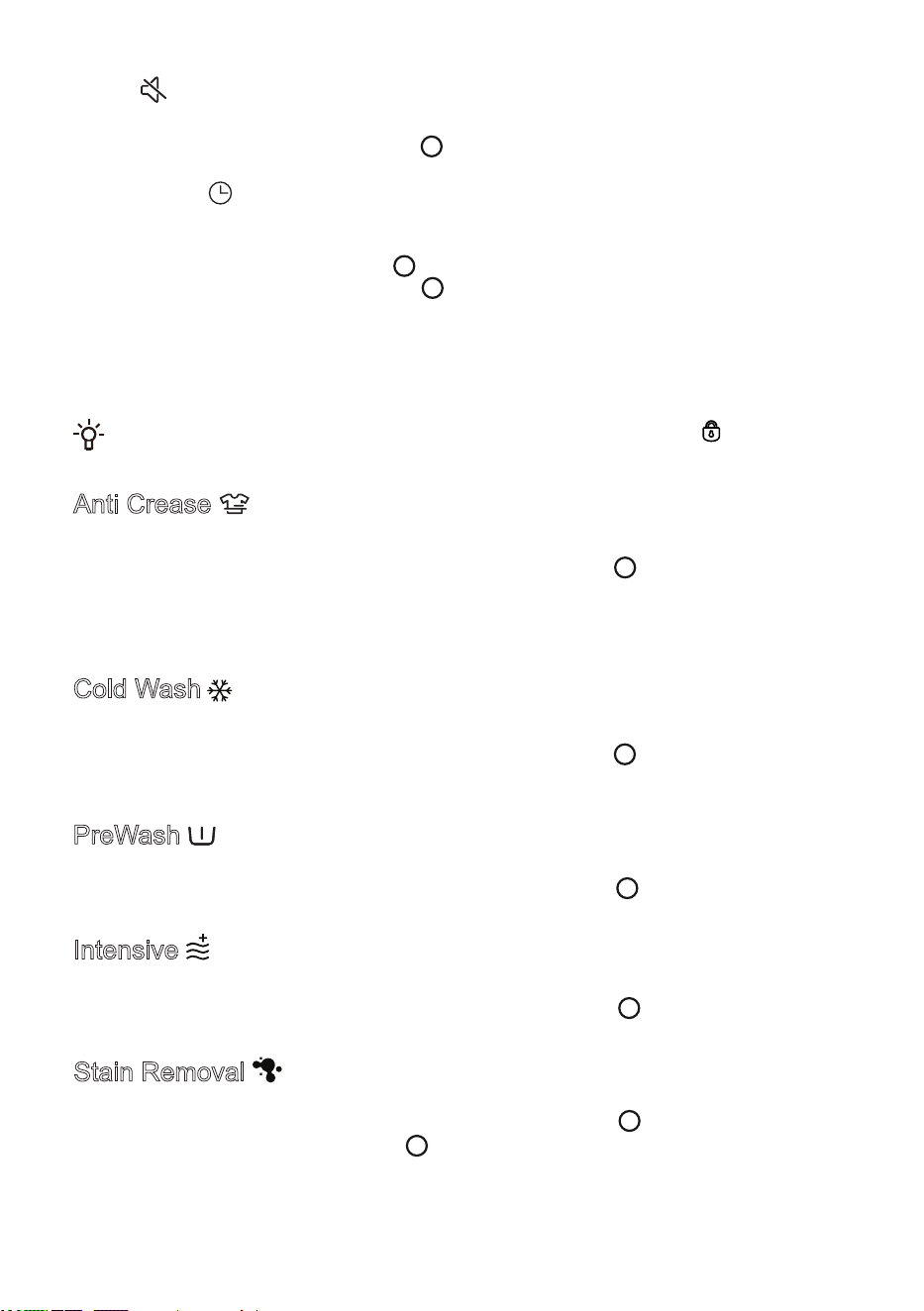
It turned on the Detergent/Softener’s intelligent delivery function by default.
Tap this option to turn on / off the function. Turn this function off if you need to add it manually. After
closing, you need to manually pour the Detergent required for a single wash into the “Manual Detergent”
dispenser compartment of the detergent box.
Long press and hold to enter the gear setting page, adjust the Detergent/Softener input, according to the
demand in the Off/Less/Standard/More cycle selection. The default gear is Standard. Select the Off gear to
turn off the corresponding Detergent / Softener intelligent delivery. If Detergent/Softener is insufficient, the
warning prompt corresponding to the icon will appear on the display screen, please open the detergent
box and add Detergent/Softener accordingly.
During the program operation, please keep the detergent box closed.
)
46
7KLVIXQFWLRQLQFUHDVHVWKHVWURQJZDVKLQJWLPHDQGLQFUHDVHVWKHZDVKLQJVWUHQJWK
%HIRUHVWDUWLQJWKHSURJUDPWXUQWKHPDLQNQREWRVHOHFWWKLVIXQFWLRQDQGWDS³´WRWXUQRQRII
%6
7KLVIXQFWLRQLVXVHGIRUZDVKLQJVSHFLDOVWDLQV
%HIRUHVWDUWLQJWKHSURJUDPWXUQWKHPDLQNQREWRVHOHFWWKLVIXQFWLRQDQGWDS³WRHQWHUWKHVHOHFWLRQRI
GLIIHUHQWVWDLQW\SHV$IWHUVHOHFWLQJDVWDLQWDS³WRFRQILUPWKHVHOHFWLRQDQGWDSLWDJDLQWRFDQFHOWKH
VHOHFWLRQ
,IWKHSURJUDPLVFKDQJHGWKHVHOHFWHGVWDLQW\SHZLOOEHDXWRPDWLFDOO\FDQFHOHG
*&
7KLVIXQFWLRQDGGVDSUHZDVKSHULRGEHIRUHWKHPDLQZDVKSKDVHDQGLVVXLWDEOHIRUKHDYLO\VRLOHGODXQGU\
%HIRUHVWDUWLQJWKHSURJUDPWXUQWKHPDLQNQREWRVHOHFWWKLVIXQFWLRQDQGWDS³´WRWXUQRQRII
%HIRUHVWDUWLQJWKH'HOD\(QGIXQFWLRQPDNHVXUHWKHGRRULVSURSHUO\FORVHGDQGWKH³LFRQRQWKH
GLVSOD\LVOLW
7KLVIXQFWLRQDGGVDQDQWLFUHDVHPRGHZKLFKFDXVHVWKHLQQHUGUXPWRURWDWHLQWHUPLWWHQWO\DIWHUWKHSURJUDP
HQGVWRSUHYHQWZULQNOHVIURPIRUPLQJZKHQFORWKHVDUHQRWWDNHQRXWIRUDORQJWLPH
$IWHUVHOHFWLQJWKHSURJUDPWXUQWKHPDLQNQREWRVHOHFWWKLVIXQFWLRQDQGWDS³WRWXUQLWRQRII
$IWHUWKLVIXQFWLRQLVWXUQHGRQWKHSURJUDPHQGVDQGDXWRPDWLFDOO\HQWHUVWKHDQWLZULQNOHPRGH
'XULQJWKHRSHUDWLRQRIWKH$QWL&UHDVHIXQFWLRQWDSWKH6WDUW3DXVHEXWWRQWRHQGWKLVIXQFWLRQ,IQRRSHUDWLRQLV
SHUIRUPHGWKHSURJUDPZLOODXWRPDWLFDOO\HQGDIWHUDPD[LPXPRIKRXUVE\GHIDXOW
$QWL&UHDVHFDQQRWEHVHWZKHQWKHVSLQVSHHGLVVHOHFWHGDVUSP
(&
7KLVIXQFWLRQXVHVFROGZDWHUWRZDVKDQGFDQDXWRPDWLFDOO\DGMXVWWKHZDVKLQJLQWHQVLW\DQGZDWHUOHYHOWR
DFKLHYHHQHUJ\VDYLQJDQGHQYLURQPHQWDOO\IULHQGO\ZDVKLQJHIIHFWV
%HIRUHVWDUWLQJWKHSURJUDPWXUQWKHPDLQNQREWRVHOHFWWKLVIXQFWLRQDQGWDS³WRDFWLYDWHGHDFWLYDWHWKH
&ROG:DVKIXQFWLRQ
0XWH
7KLVIXQFWLRQVKLHOGVRWKHUVRXQGVH[FHSWWKHDODUPVRXQGDQGUHGXFHVQRLVH
7XUQWKHPDLQNQREWRVHOHFWWKLVIXQFWLRQDQGWDSWRDFWLYDWHGHDFWLYDWHWKH0XWHIXQFWLRQ
'HOD\(QG
7KLVIXQFWLRQDOORZV\RXWRVFKHGXOHODXQGU\DW\RXUFRQYHQLHQFH3OHDVHVHOHFWWKHSURJUDPDQGIXQFWLRQDQG
WKHQVHOHFWWKHIXQFWLRQWRPDNHDUHVHUYDWLRQ
7XUQWKHPDLQNQREWRVHOHFWWKLVIXQFWLRQWDS³WRHQWHUWKHUHVHUYDWLRQWLPHVHOHFWLRQLQWHUIDFHWXUQWKH
PDLQNQREWRVHOHFWWKHUHVHUYDWLRQHQGWLPHWDS³WKHUHVHUYDWLRQWLPHLVOLWWDSWKH6WDUW3DXVHEXWWRQWR
VWDUWWKHUHVHUYDWLRQ
$IWHUWKHUHVHUYDWLRQLVVHWEHIRUHWKHIXQFWLRQLVVWDUWHGLIWKHXVHUFKDQJHVWKHSURJUDPUHVHWVWKHSDUDPHWHUV
DQGIXQFWLRQVH[FHSWWKH$QWL&UHDVHIXQFWLRQWKHUHVHUYDWLRQZLOOEHDXWRPDWLFDOO\FDQFHOHG
7KHUHVHUYDWLRQWLPHLVWKHHQGWLPHRIWKHSURJUDPLQFOXGLQJWKHHQWLUHSURJUDPUXQQLQJWLPHVRWKHUHVHUYDWLRQ
WLPHPXVWEHJUHDWHUWKDQWKHSURJUDPUXQQLQJWLPHDQGWKHPD[LPXPWLPHFDQQRWH[FHHGKRXUV
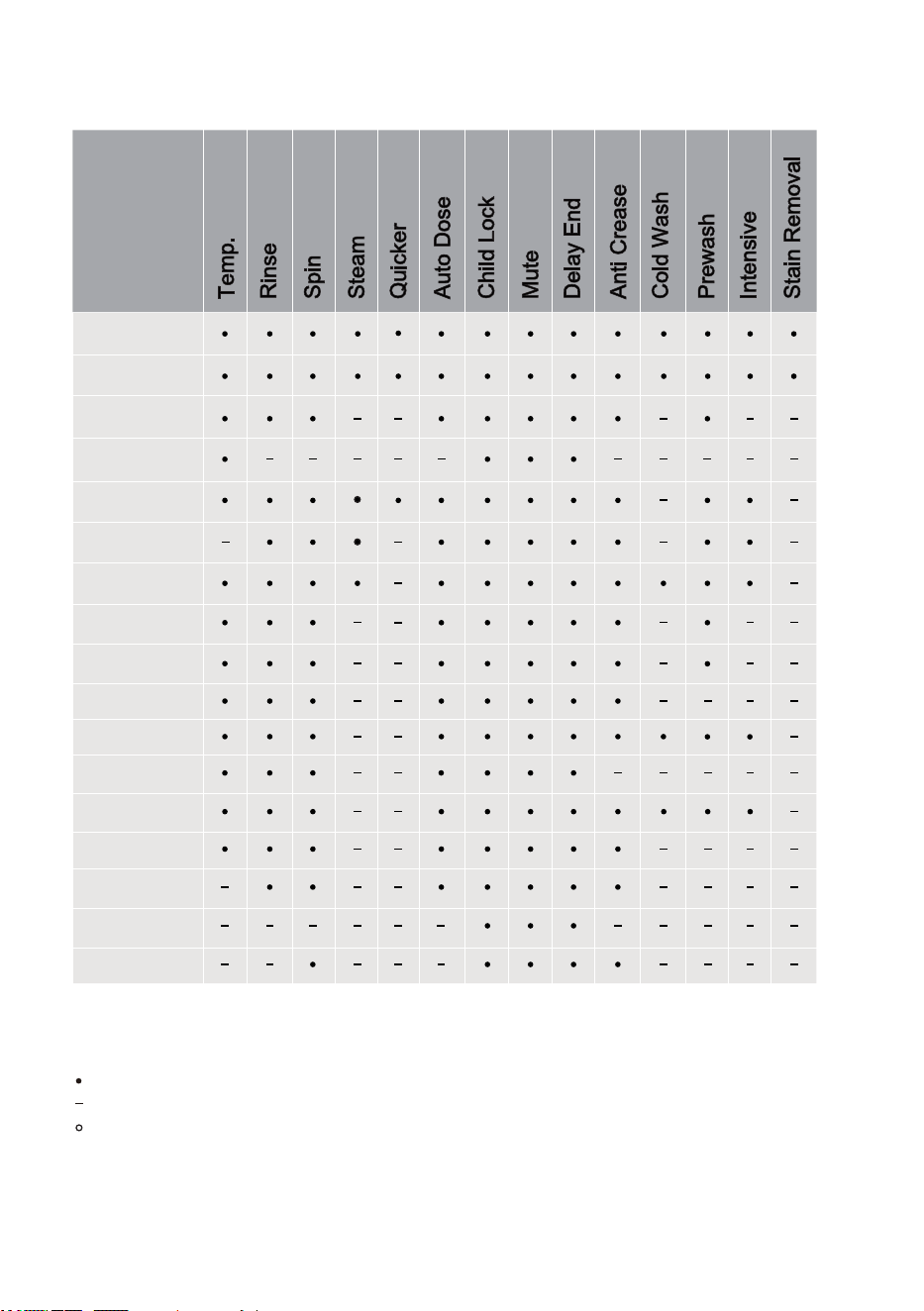
FUNCTION TABLE
Program
TTemp.
Rinse
Spin
Steam
Quicker
Auto Dose
Child Lock
Mute
Delay End
Anti Crease
Cold Wash
Prewash
Intensive
Stain Removal
Cotton
Synthetics
Auto
Refresh
Baby Care
Allergy Care
Pets
Full load 49'
Power 30'
Quick 15'
Bedding
Wool
Sportswear
Down
Rinse+Spin
Drum Clean
Spin
Optional functions
Non-optional functions
Non-cancellable built-in default functions
33
This option allows you to manually turn on/off the Drum Light.
After the Drum Light is turned on, the Drum Light will automatically light up when the machine is turned
on, the program is paused, the program ends, or when the program is running by rotating the main knob
or touching any button.
Drum Light
Turn the main knob to select this option, tap “ ” to turn on/off the appliance's WLAN function, and long
press “ ” to set the appliance to connect to the WLAN network.
1. Turn on the power, long press “ ”, and turn the main knob to select “WLAN”.
2. Long press “ ” to start network configuration, and the screen displays “Connecting”.
3. Next, follow the prompts on the APP. After the connection is successful, the screen displays the
network configuration success interface.
4. If it fails, you can repeat the operation from the first step.
After the device is successfully connected to the network and the network binding is completed, the
device can be remotely controlled through the mobile phone app.
Press and hold “ ” to enter the system function settings interface:
Before starting the program, the users can select WLAN, APP and Pairing, Language, User Program,
Drum Clean Reminder, Drum Light, Standard Dosage Amount, Dispenser 2, Pump Clean, System and
other system function settings as needed, turn the main knob to select the function option, and tap “ ”
to confirm the selection. The corresponding icon is lit to indicate that this function is enabled.
WLAN
Network configuration steps:
This function needs to be used when the “WLAN” function is turned on and the connection is normal.
Turn the main knob to select this option, and tap “ ” to enter the “User adding” and “Unpair” setting
interface.
APP and Pairing
Turn the main knob to select this option and tap “ ” to enter the “Language” settings interface.
After turning the main knob to select the language, tap “ ” to confirm the selection.
Language
Users can set the program to be displayed on the home page.
Turn the main knob to select this option and tap “ ” to enter the “User Program” settings interface.
Turn the main knob to select a program, tap “ ” to cancel the selection, and tap it again to confirm the
selection.
The “Cotton” and “Drum Clean” programs cannot remove the home page.
User Program
This option allows you to set the drum clean reminder cycle.
Turn the main knob to select this option and tap “ ” to enter the “Drum Clean Reminder” setting field.
Turn the main knob to select the prompt period, and tap “ ” to confirm the selection.
Drum Clean Reminder
34
This option sets the standard dose of Dispenser 1 / Dispenser 2. Users enable this option to adjust the
amount of detergent/softener as needed.
Turn the main knob to select this option, and tap “ ” to enter the setting interface of “Standard Dosage
Amount”.
Turn the main knob to select Dispenser 1 / Dispenser 2, and tap “ ” to confirm.
The default dose of detergent is 50 ml (for 4-5 kg of clothing), the default dose of softener is 50 ml (for
4-5 kg of clothing), and the dose can be adjusted in a range of 10-100 ml.
Standard Dosage Amount
This option can clean up the residue in the dispenser compartment to ensure the best washing results.
Turn the main knob to select this option, and tap “ ” to enter the setting interface of “Pump Clean”.
Turn the main knob to select the “Dispenser 1/Dispenser 2” and tap “ ” to confirm the selection.
Open the detergent delivery box, empty the corresponding dispenser compartment and inject water. Do
not inject more water than the MAX line. Please close the detergent box completely after adding. Follow
the on-screen prompts to turn on “Pump Clean”.
Before turning on this function, be sure to empty the dispenser compartment, otherwise bubbles will
be generated in the cylinder.
Pump Clean
This option takes you to the settings interfaces such as “System Update”, “Reset”, “Demo”, “Operating
Tips”, “Software Licenses”, etc.
After the “Demo” mode is turned on, the program cannot be started. To exit the “Demo” mode, press and
hold “ ” to enter the system settings, turn the main knob to select “System”, tap “ ”, turn the main
knob to select “Demo”, and tap “ ” to turn it off.
System
This option sets the “Dispensed delivery selection”. Users can choose this dispenser compartment to
put Softener/Detergent according to their needs.
Turn the main knob to select this option and tap “ ” to enter the“ “Dispenser 2” settings interface.
Turn the main knob to select Softener/Detergent, and tap “ ” to confirm. Follow operations as prompted
on the screen. After the selection is complete, be sure to add according to the settings.
The “Dispenser 2” defaults to delivery Softener. If the Softener is not enough, the screen will display
the warning prompt corresponding to the icon “ ”.
Please follow the screen prompts when setting the delivery of “Detergent”.
If the same detergent is selected, the default priority is to put the detergent in “Dispenser 2”, and then put
the detergent in “Dispenser 1”. When both are insufficient, the screen shows “ ” shortage warning icon.
If different detergent is selected, the detergent in “Dispenser 2” will be put in by default and the icon “ ”
will light up. If the detergent in this box is insufficient, the icon “ ” will give a warning prompt.
When replacing a different Softener / Detergent, please empty the dispenser compartment first, and
open the "Pump Clean" function to clean the residue in the dispenser compartment before replacing, so
as not to affect the washing effect.
Dispenser 2
35
2
2

SMART NETWORKING
Enter the “Settings” interface on your smartphone or tablet, enable Bluetooth and wireless
connections, and connect to a wireless network.
NOTE:
This appliance supports 2.4 GHz Wi-Fi.
When the Wi-Fi function is enabled, the power consumption of the appliance increases. However,
the Wi-Fi power is less than 2W, so it does not affect the energy efficiency rating of the appliance.
'RZQORDG
Search ConnectLife from the APP store on your smartphone or tablet (Google Play Store, Apple App
Store), and down and install the APP.
NOTE:
To improve performance and experience, the APP may update without notice.
/RJLQ
You need to log in to ConnectLife with your account. If you do not have a ConnectLife account, you
will need to create a new one. For details, please refer to the APP's user instructions.
NOTE:
If you already have a Google account, you can log in directly using your Google account.
'HYLFHELQGLQJ
Open ConnectLife on your smartphone or tablet.
Bind your appliance in ConnectLife as follows:
$ Click the "+" on the "Home" interface, then select "Add device" or "Scan".
% Choose "Washing Machine" or click "Scan QR/BAR code" or "Manual entry".
& Scan the "QR/BAR code" on the appliance or manually enter the device "SN". If you cannotfindit,
click " " for instructions.
' Read the instructions and operate the appliance until it switches to "&RQQHFWLQJ"status, then click
"NEXT".
( The APP starts searching for the appliance. You can select the desired appliance from the search
list. If not found, please check if your Bluetooth is activated. Keep Bluetooth in active mode, then
click "NEXT".
) Select your home Wi-Fi, enter the password and click "CONNECT". The appliance starts the
connecting and binding process.
* After successful binding, you can set the name of the appliance and the room in which it is located.
+ The appliance can now be controlled remotely via the APP.
Unpair
Unpair on the appliance:
$ Check and make sure the "WLAN" function is turned on and connected normally.
% Press and hold " " to enter the system function settings interface.
& Turn the main knob to select "APP and Pairing" and tap " " to confirm the selection.
' Turn the main knob to select "Unpair" and tap " " to confirm the selection.
( Select "SURE" and tap " " to unpair all bindings.
Unpair on the smart device:
$ Select and tap the appliance you want to unpair on the "Devices" page.
% Tap "Settings" to enter the settings page.
& Tap "Remove Device" to unpair the appliance on the ConnectLife app.
Data Delete
Press and hold to enter the system settings. Turn the main knob to select System and tap
. Turn the main knob to select Reset and tap . Follow the prompts displayed on the
screen to reset the system. After the system reset, the data stored on the user’s device will be
deleted.

67$577+(352*5$0
Select the program and function parameters, and confirm that the detergent has been added to the
detergent box, and tap the 6WDUW/Pause button to start the program.
(1'2)7+(352*5$0
When the program ends, the appliance will sound a prompt and the display will show the end interface.
The end interface shows the power consumption, running time, water consumption and number of
rinses of this program (if the drying function or Anti Crease function is added, the display interface
will be different after the program ends). You can press the power button to shut down. If you do not
perform any operation for a period of time, the appliance will automatically turn off the screen. If you
do not perform any operation for a period of time after the screen is turned off, the appliance will
automatically shut down.
After the program ends, please turn off the power of the appliance, turn off the tap, unplug the
power cord from the socket, open the door and remove the laundry from the drum.
Some programs automatically detect the weight of the laundry before washing, and the program
duration will be automatically adjusted.

,17(55837,216$1'&+$1*,1*7+(352*5$0
,17(55837,217+(352*5$0
To stop or cancel the SURJUDP during operation, you must switch off the appliance.
&+$1*,1*7+(352*5$0
To change the SURJUDP during operation, switch the appliance off and on again, select the desired
SURJUDP and extra functions, then press the "6WDUW/Pause" button to start the new SURJUDP.
3$86(7+(352*5$0
The program can be paused at any time during program operation by pressing the "Start/3DXVH"
button. When the program is paused/flashing for the rest of the time on the display, the program is
paused. If the following conditions are met, the door lock will be automatically unlocked and the door
can be opened.
1. The temperature in the drum must be lower than the set safety value;
2. The water level in the drum must be lower than the set safety value.
To resume the program, please close the door first, and then press the "6WDUW/Pause" button. The
washing/drying program is paused, and when it is restarted, the program will continue to run from
where it was interrupted. The spin program is paused, and when it is restarted, the program will start
from the beginning of the spin cycle.
$''&/27+(6
If you need to add clothes during program operation, press the "Start/3DXVH" button, the program
will be paused, and the program on the display will pause/flash for the rest of the time. If the safety
conditions are met, the door lock will be automatically unlocked, and the door lock icon will go out (the
"Add Clothes" icon "
" will light up for some models), you can open the door to add clothes. If the
door lock icon does not go out, the door opening conditions are not met and you cannot add clothes
midway.
If a significant amount of extra laundry is added during washing and the water level is insufficient,
the cleaning effectiveness may decrease, as the appliance calculates water intake based on the initial
weight of the laundry. Insufficient water may also cause damage to the laundry due to friction, and the
washing time will be extended.
)$8/7
In case of a fault, the SURJUDP will be interrupted.
Flashing signal lights and an acoustic signal will warn about such occurrence (see chapter FAULT
CODES AND TROUBLESHOOTING), and the fault code (F: XX) will be indicated on the screen.
32:(56833/<)$,/85(
In case of a power supply failure (power outage), the washing SURJUDP is interrupted. When power
supply is restored, the SURJUDP is resumed from the point where it was interrupted.
,IWKHUHLVVWLOOZDWHULQWKHDSSOLDQFHDIWHUDSRZHURXWDJHGRQRWRSHQWKHGRRUXQWLO\RX
KDYHPDQXDOO\GUDLQHGWKHZDWHUXVLQJWKHSXPSILOWHU
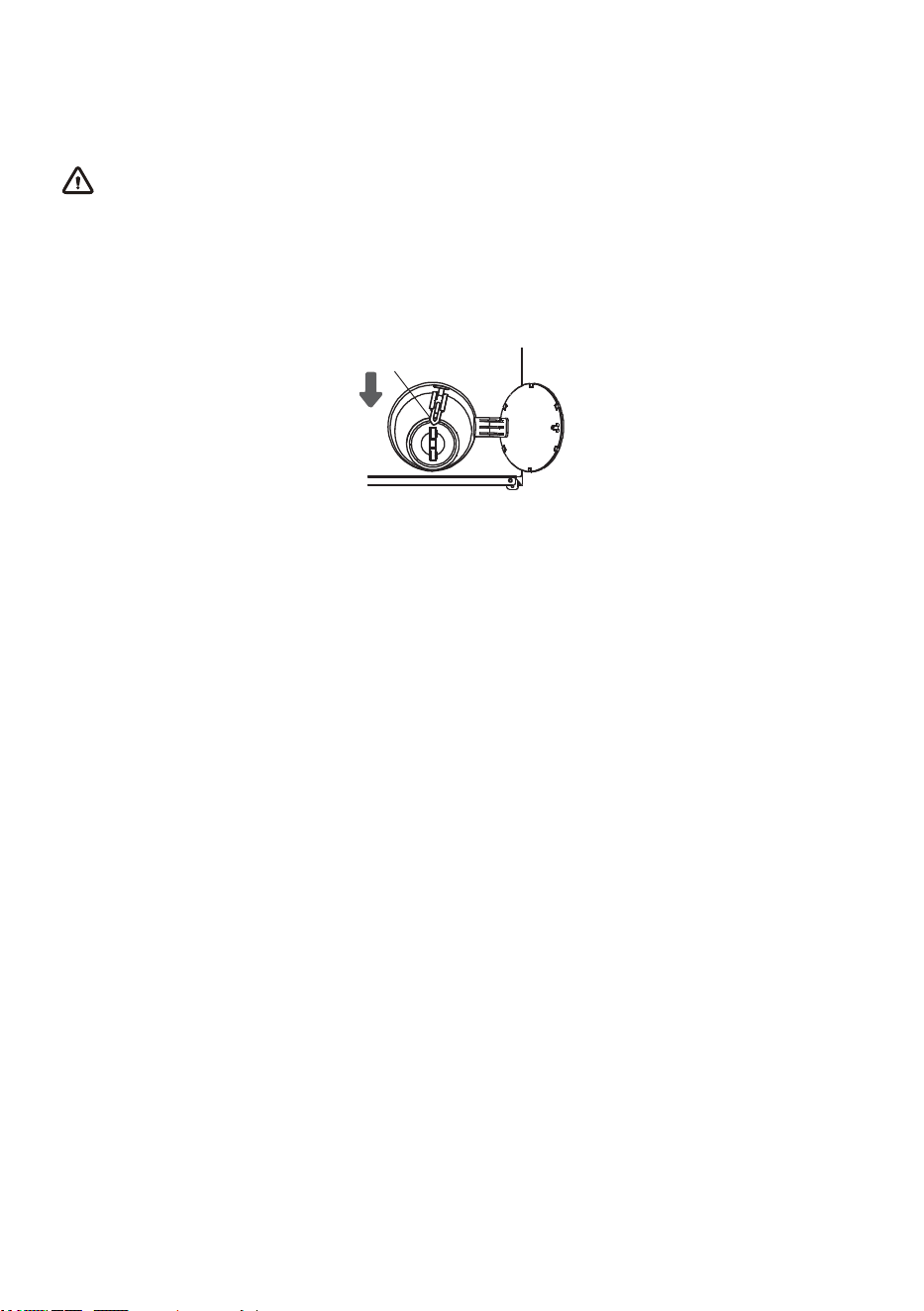
(0(5*(1&<'22523(1,1*
In case of failure to open the door due to power outage or other special circumstances, the door lock
lever at the pump cover can be used for emergency opening.
NOTE:
1.Do not use this function when the appliance is working normall
2.Before use, ensure that the inner drum has stopped spinning, the temperature is safe, and the water
level is below the laundry inlet. lf the water level exceeds the laundry inlet, drain off water through the
drain hose (if fitted) or by slowly unscrewing the pump filter.
3.Operation method: Open the pump cover and use a tool to pull down the door lock lever. The door
can then be opened (as shown in the figure). Return the door lock lever to its original position after
opening the door.
Door lock lever
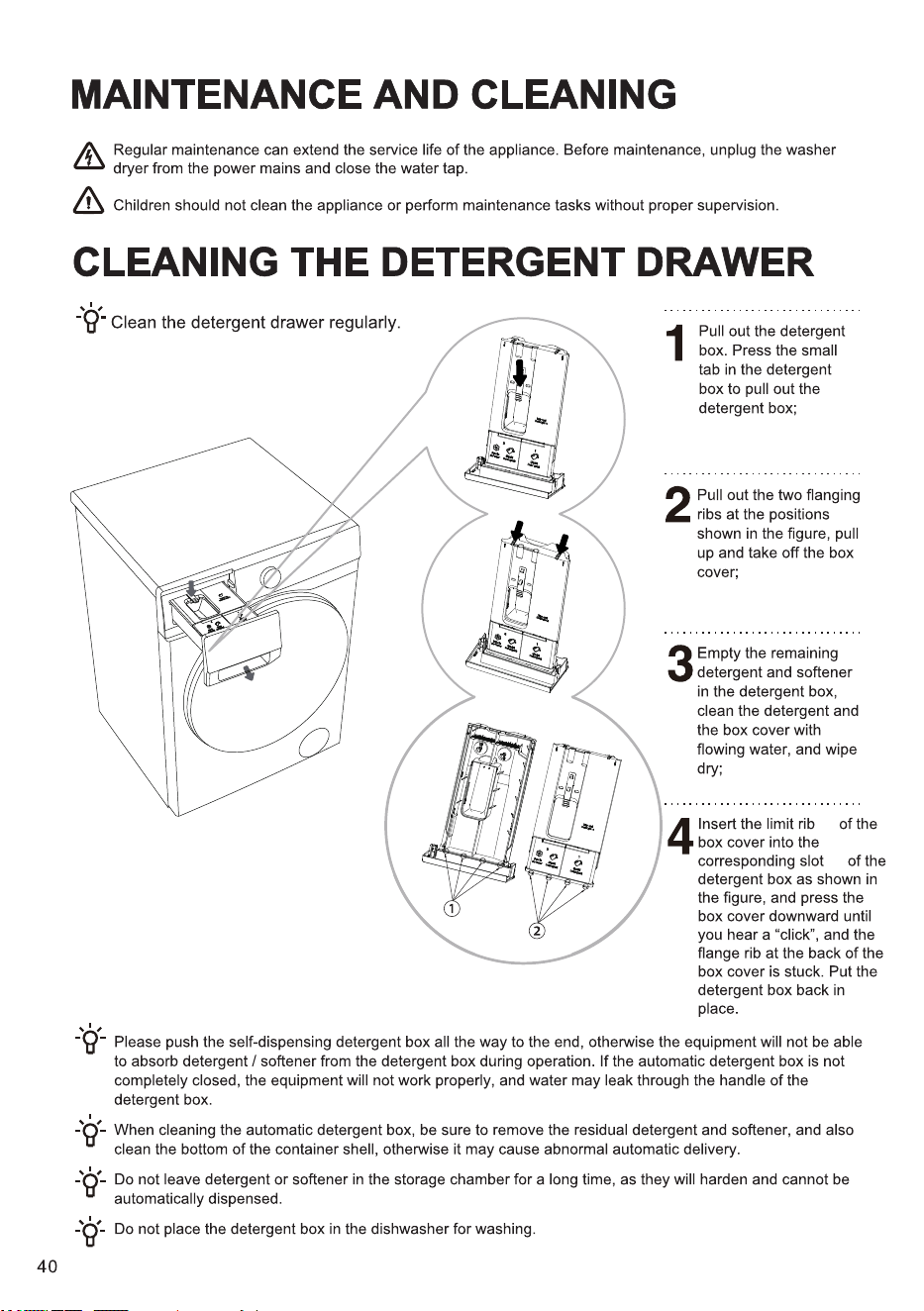
②
①
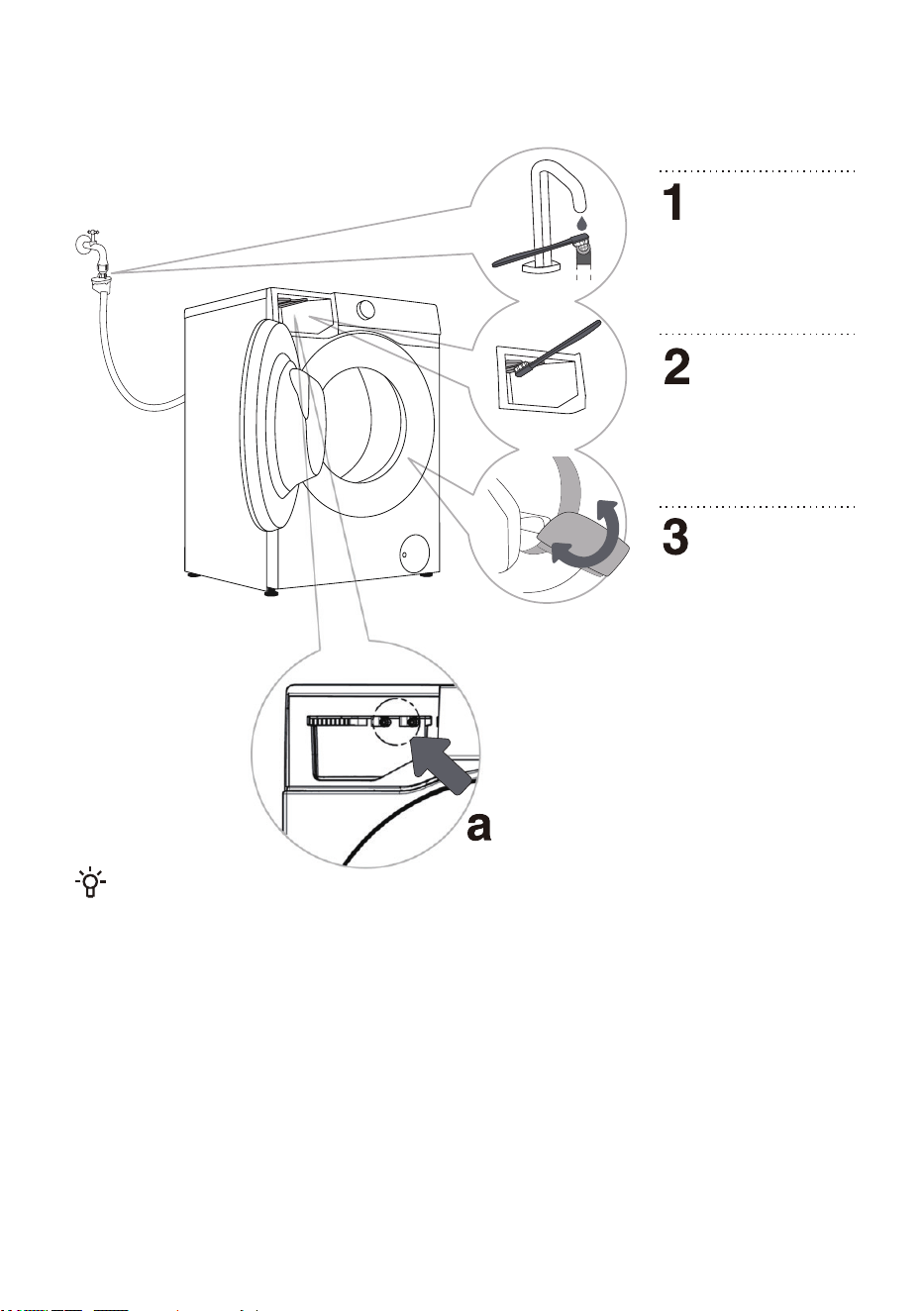
When the user suspects that the detergent / softener is not being administered, it can be checked by
the following methods:
1. Verify that the automatic detergent / softener dosing is set to ON.
2. Pull out the automatic detergent box, check whether the bottom sealing ring is loose or damaged (Figure
a). If it is loose or damaged, please call the after-sales service phone for maintenance and replacement.
3. Reinstall the automatic detergent dispenser and determine whether to dispense the detergent in the
following manner.
• Pull out the detergent box and make sure there is no visible detergent / softener in the detergent / softener
compartment.
• Check whether the detergent is delivered normally: Select and run the Quick 15' program, press the
pause key when running for about 2 minutes, and open the machine door.
Check whether the water in the container contains foam and the smell of detergent.
• Check if the softener is properly placed: Confirm that the “Dispenser 2” is set to Softener. Select and run
the Rinse+ Spin program, press the pause button when it runs for about 15 minutes, and open the door.
Check the water in the drum for foams and softener smells.
• If the water in the tank contains foam and the smell of detergent / softener, the automatic delivery function
of the device is normal; otherwise, please call the after-sales service phone for repair or replacement.
Clean the water supply
hose filter regularly.
Use a brush to clean
the entire detergent
CLEANING THE WATER SUPPLY HOSE, DETERGENT
DISPENSER HOUSING, AND RUBBER DOOR GASKET
41
dispenser housing,
especially the nozzles on
the top.
After every wash, wipe
the rubber door seal to
extend its life cycle. To
prevent mould growth on
the seal, leave the door
slightly open after washing
to allow moisture to
evaporate before closing the
door.
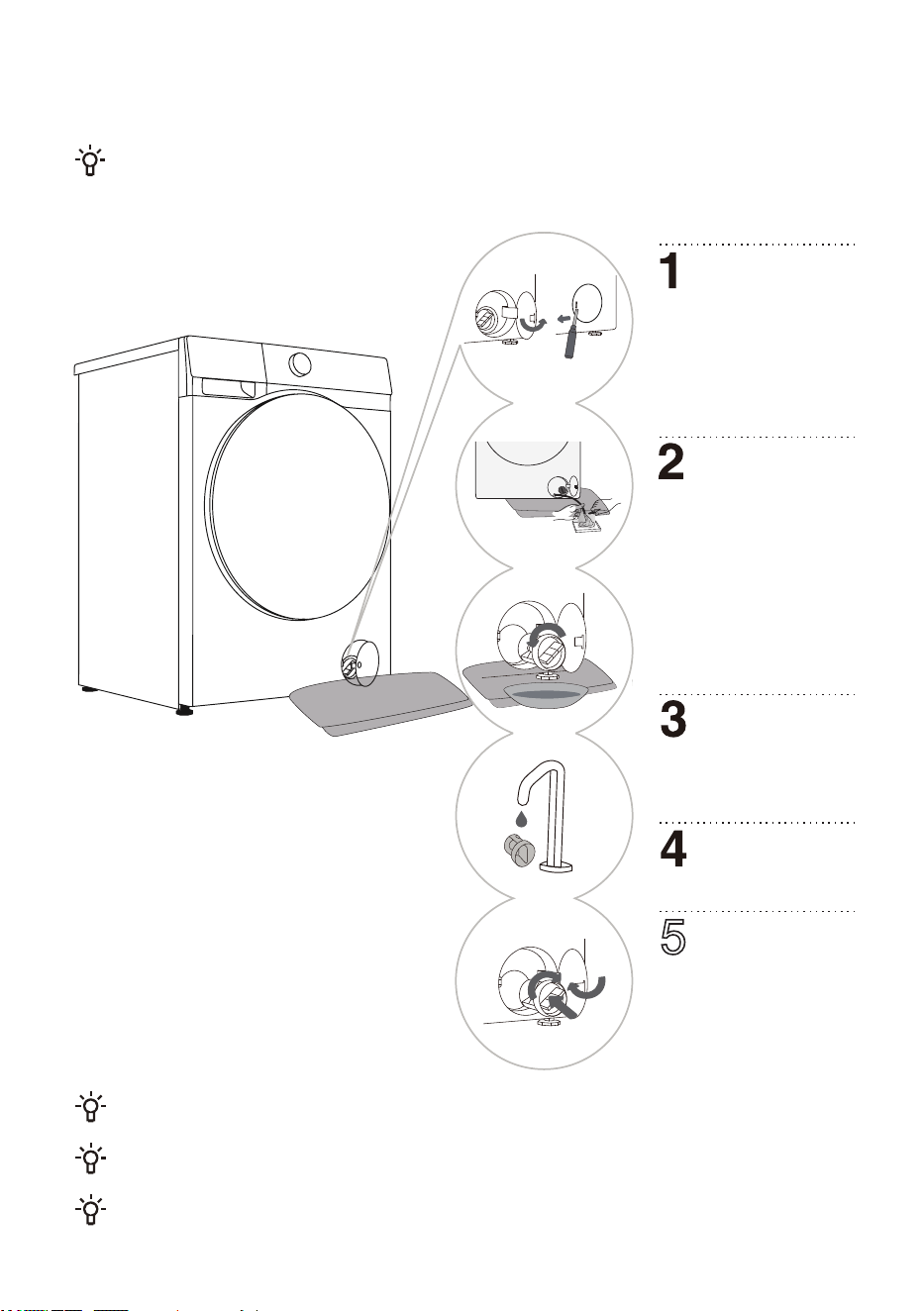
CLEANING THE PUMP FILTER
The pump filter must be timely cleaned, especially after washing very fleecy, woolly, or very old
laundry.
Also clean the pump filter if the appliance cannot start the spinning cycle or when there is debris
in the pump (buttons, coins, hair pins or clips etc.).
Do not open the pump filter while the appliance is running. Do not operate the appliance until the
pump filter is securely installed to avoid leaks or malfunctions.
Open the pump filter
cover.Type 1: Press the
pump filter cover to pop it
open.Type 2: Use a suitable
tool (flathead screwdriver or
similar) toOpen the pump
filter cover. (The type varies
depending on the model.)
Slowly rotate the pump
filter counterclockwise.
Pull out the pump filter to
allow the water to drain slowly.
Reinstall the pump filter
as shown in the figure
and tighten it by rotating it
clockwise. For a good seal,
the filter gasket surface should
be clean.
Clean the pump filter
under running water.
Place a towel under
the filter cover. If the
appliance is provided with a
drain hose, place the end of
the hose into a container.
Rotate the drain hose plug until
it loosens and remove it to
allow the water to drain
naturally. Then reinstall the
drain hose plug. If no drain
hose is equipped, place a
container under the pump filter.
(The type varies depending on
the model.)
5
Water may be spilled when cleaning the pump filter. lt is therefore recommended to place an
absorbent cloth on the floor.
Make sure the water has cooled down before you release it from the appliance.
Type 1 Type 2
Always disconnect the washer dryer from the power mains before cleaning.
Clean the washer dryer exterior and display unit using a soft, damp cotton cloth and water. Then,
use a soft, dry cloth to wipe the appliance dry.
Do not use any solvents or cleaning agents that could damage the washer dryer (please
observe the recommendations and warnings provided by the cleaning agent manufacturers).
Clean the appliance door with a damp cloth, and then wipe it dry with a soft, dry cloth.
Do not use excessive water to clean the appliance.
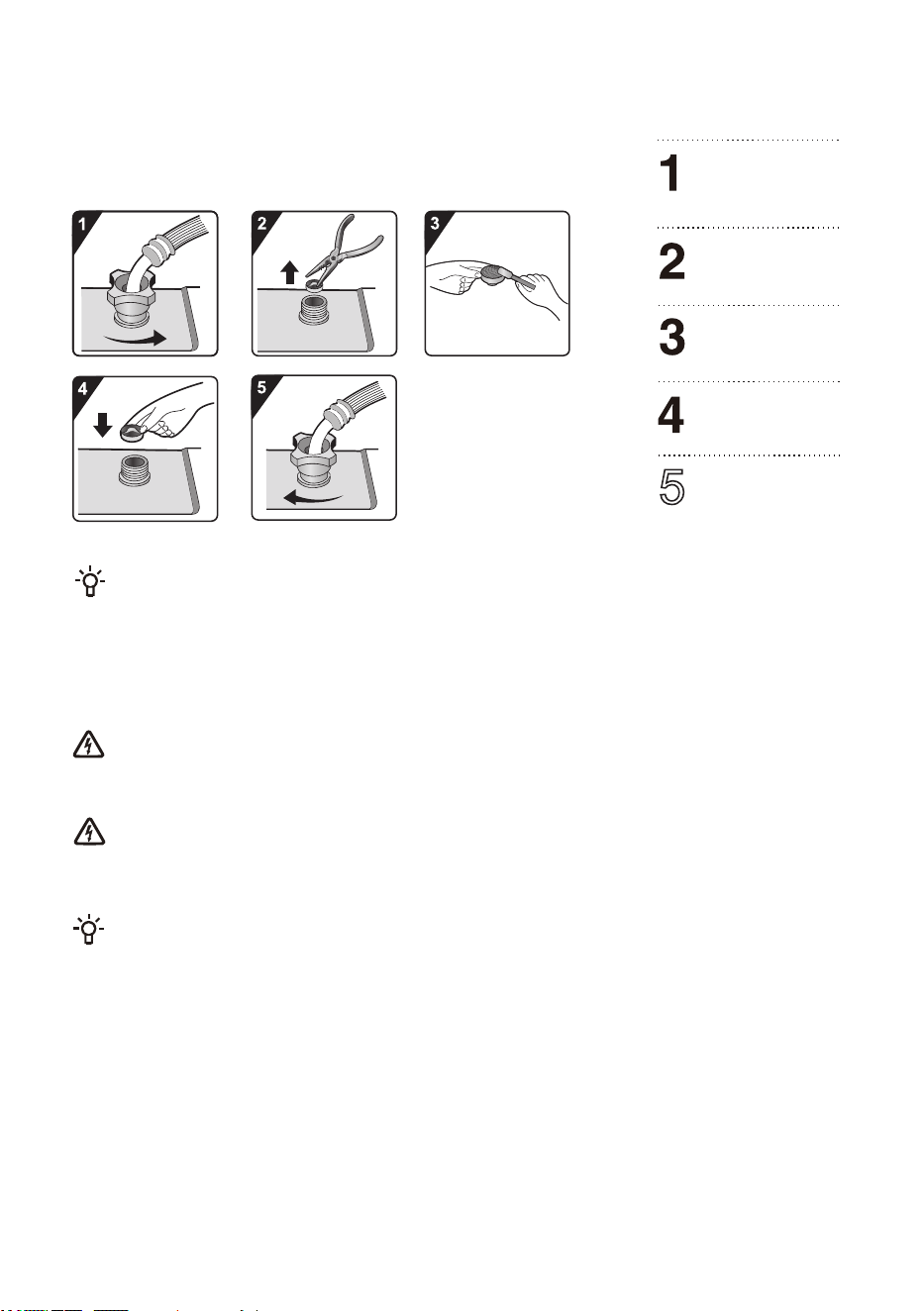
CLEANING THE INLET FILTER
Check and clean the inlet filter regularly.
Clean the inlet filter immediately if water supply is slow.
Operation procedures are as follows:
The inlet filter collects impurities and sediment from the water supply. It is recommended to
clean it at least every six months, or more frequently if you have hard water or notice scale buildup.
Close the water tap
and unscrew the
water supply hose.
Remove the inlet
filter.
Reinstall the inlet
filter.
Clean the inlet
filter.
Connect the water
supply hose. Open
the water tap and
ensure there are no
leaks at the connection.
CLEANING THE EXTERIOR
5
The warranty does not cover the faults or failures resulting from external factors (lightning
strike, power grid failures, natural disasters etc.).
TROUBLESHOOTING
The appliance is equipped with a number of automatic safety features to detect faults and take
effective safety measures in a timely manner.
These faults are usually minor and can be rectified quickly.
If the appliance cannot operate normally, a fault message will appear on the screen. Please
refer to the warning message for the appropriate action.
If the recommended troubleshooting methods do not resolve the problem, please contact
after-sales service.
The user will assume all liability for any consequences arising from repairs carried out by
themselves or unauthorised personnel.
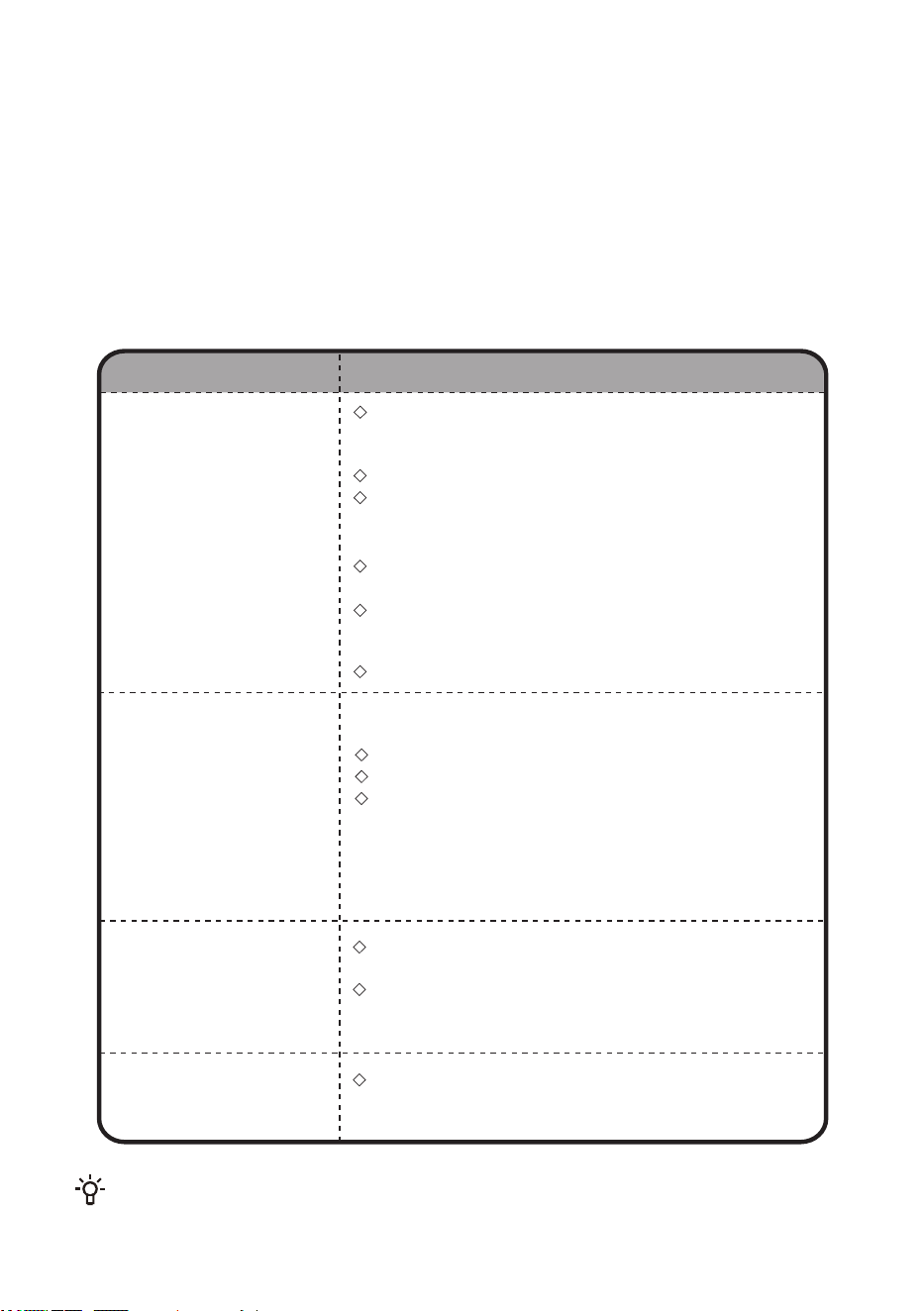
Excessive foam.
Unbalance caused by large laundry.
Extended heating time due to low water intake temperature.
Check whether the detergent drawer is correctly installed and
kept clean.
Check whether the water pressure is normal and whether the
inlet filter is clogged (see chapter “MAINTENANCE AND
CLEANING”).
The odour may be caused by the rubber materials inside the
appliance. It is the rubber smell, which dissipates after a few
uses.
Check whether the power cord is plugged into the socket and
whether the socket is working functionally (by testing it with
another appliance).
Check whether the door is properly closed.
Check whether the “Start/Pause” button is pressed.
Machine stops during normal operation
Check whether door is properly closed. Close the door and
press the “6WDUW/Pause” button.
Check for excessive foam. The appliance may pause the
programme for defoaming. After the defoaming process, the
appliance will automatically resume operation.
Check whether the safety protection has been activated.
Machine fails to start
Odour in the machine
Fault phenomenon Recommended countermeasures
Time displayed at
the start of the
programme increas-
es or decreases
Residual detergent
or other additives in
the detergent drawer
after washing
This is the adaptive adjustment of the appliance to the factors that
influence the washing time.
As a result of these factors, the remaining time displayed is
recalculated and updated accordingly (if the appliance is making an
unbalance adjustment, the time displayed remains unchanged).
In addition, the appliance detects the load during the water supply
and adjusts the programme time accordingly (fuzzy control).
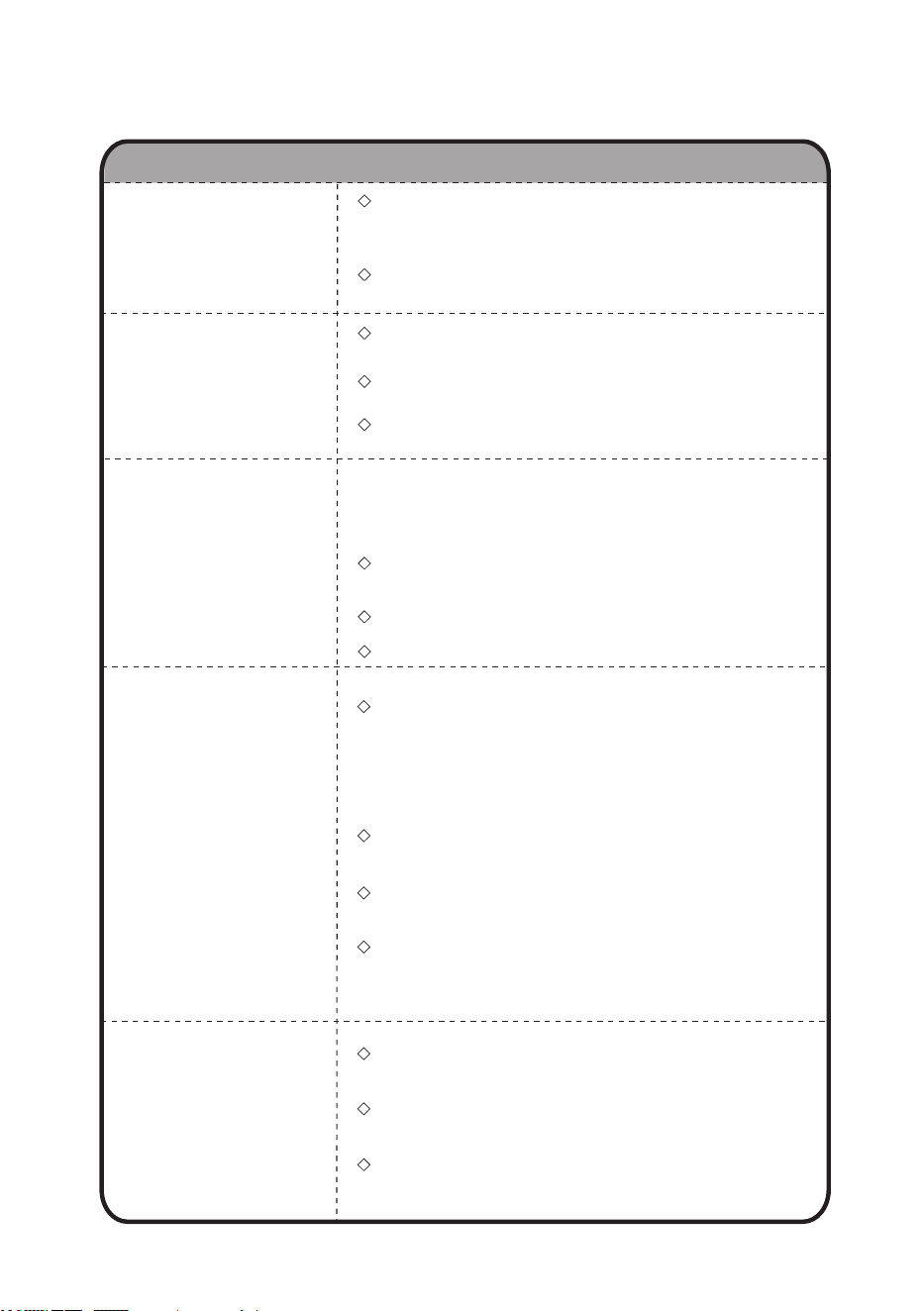
Water leakage
Abnormal
sound/noise during
washing
Intense vibrations
during spinning
Foreign objects such as keys, coins or pins may have fallen
into the drum. Stop the appliance and check for foreign
objects in the drum. If noise persists after restarting, please
contact after-sales service.
Laundry may be unevenly distributed in the drum. Pause the
programme, unlock the door, and redistribute the laundry.
Check whether the appliance is level and whether all four feet
are firmly seated on the floor.
Check whether the transport screw/rods have been removed.
Transport screw/rods must be removed before using the
appliance.
Check whether all foam supports have been removed from the
bottom of the appliance.
Leak from the water supply hose.
Check the connection between the tap and the water supply
hose connector for leaks. If there is a leak, wrap sealing tape
around the end of the tap or replace the tap. It is recommend-
ed to check the connection between the water supply hose
connector and the inlet valve for tightness. Tighten the
connection to eliminate leaks.
Leak from the drain hose.
For top-drain models, the drain hose clips must not be
removed as this will result in a continuous water discharge.
Leak from the detergent drawer.
The detergent drawer is not closed tightly. Push the handle to
close the detergent drawer tightly.
Leak from the door seal.
Check the door seal for foreign objects and clean if
necessary.
The laundry is not removed promptly from the drum.
After the wash cycle is completed, remove the laundry from
the drum promptly.
The appliance is overloaded.
The drum should not be full of laundry and the door should be
easy to close.
The spinning rate is too high.
Set a suitable spinning rate for the type of laundry.
The appliance is equipped with a balance detection and
correction system. After detecting unbalance caused by heavy laundry
(e.g., bathrobes) and several spinning attempts, the system
automatically reduces the spinning rate or even stops the spinning
process to protect the appliance.
If the laundry is still very wet after spinning, take the laundry
out of the drum, shake it loose, and then select the spinning
programme again.
Excessive foam may impair the spinning effect. Make sure to
use an appropriate amount of low-foaming detergent.
Check whether the spinning rate is set to "0" or "No Spin".
Poor spinning effect
Wrinkled laundry
Fault phenomenon Recommended countermeasures
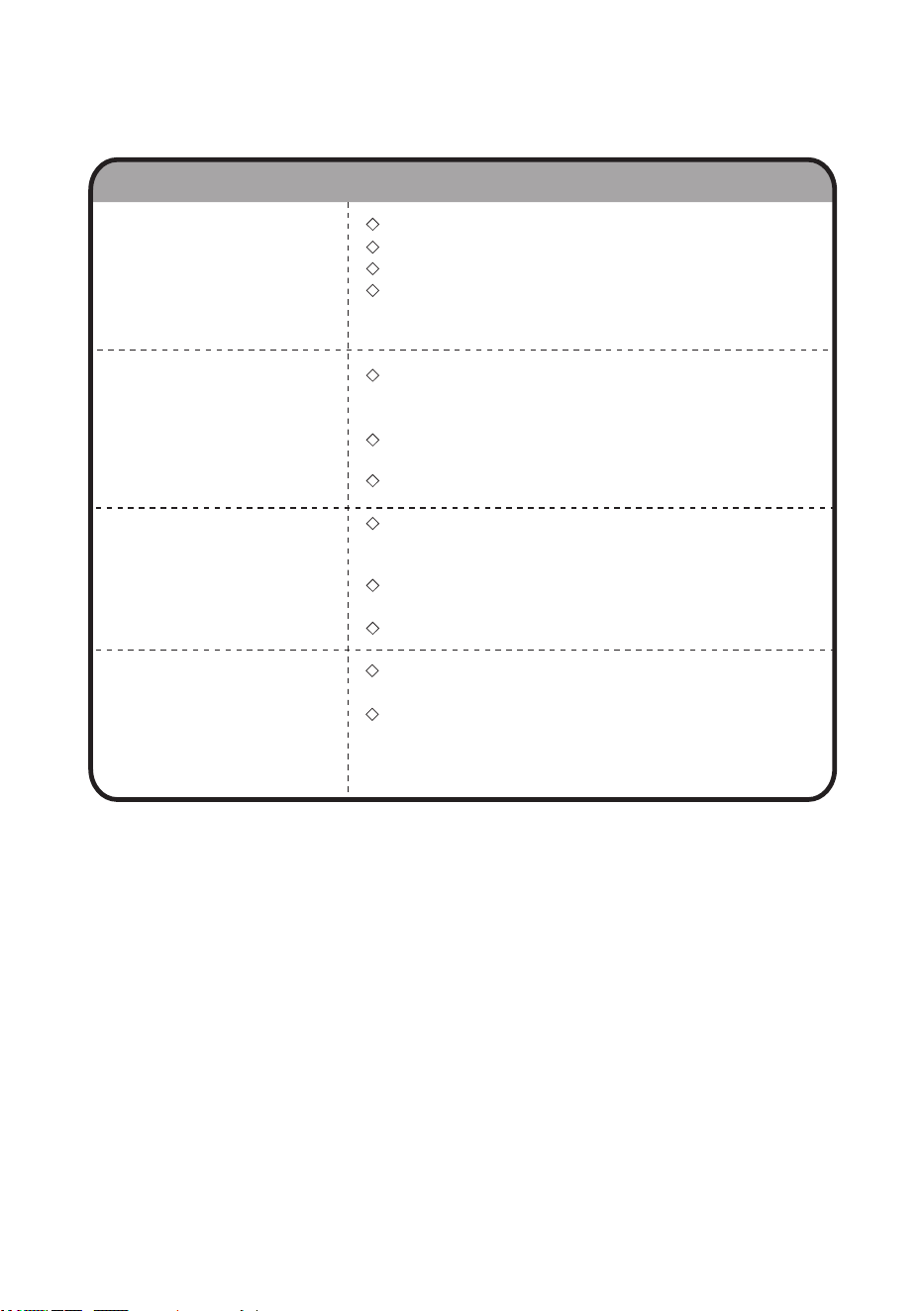
DRY FAULT
(FOR TUMBLE DRYER MODELS)
Washer dryer
does not carry out
drying process
Poor drying effect
Odour during drying
Excessive drying
time
Check whether the drying programme is set up.
Check whether the water tap is unopened.
Check whether the door is properly closed.
Check whether the load is excessive (see PROGRAMME
TABLE for capacity requirements), and take out part of the
laundry to dry again.
Check whether the load is excessive. lf so, it will cause
unsatisfactory drying effect and increased wrinkling. Separate
the laundry in the drum for individual drying.
Check if heavier items (e.g., thick cotton) are mixed with lighter
ones (e.g., synthetic fabrics).
Dry laundry separately by type.
Check whether the load is excessive (see PROGRAMME
TABLE for capacity requirements), and take out part of the
laundry to dry again.
Laundry is not sufficiently spun (see section “Poor spinning
effect" for guidance).
A large amount of thicker laundry (e.g., jeans).
Using detergents or softeners with strong chemical odours
may cause odours during drying.
If the appliance is not thoroughly cleaned, residual dirt may
produce odours while drying. Clean the appliance regularly
(see chapter “MAINTENANCE AND CLEANING”) and
promptly remove laundry after drying.
Fault phenomenon Recommended countermeasures
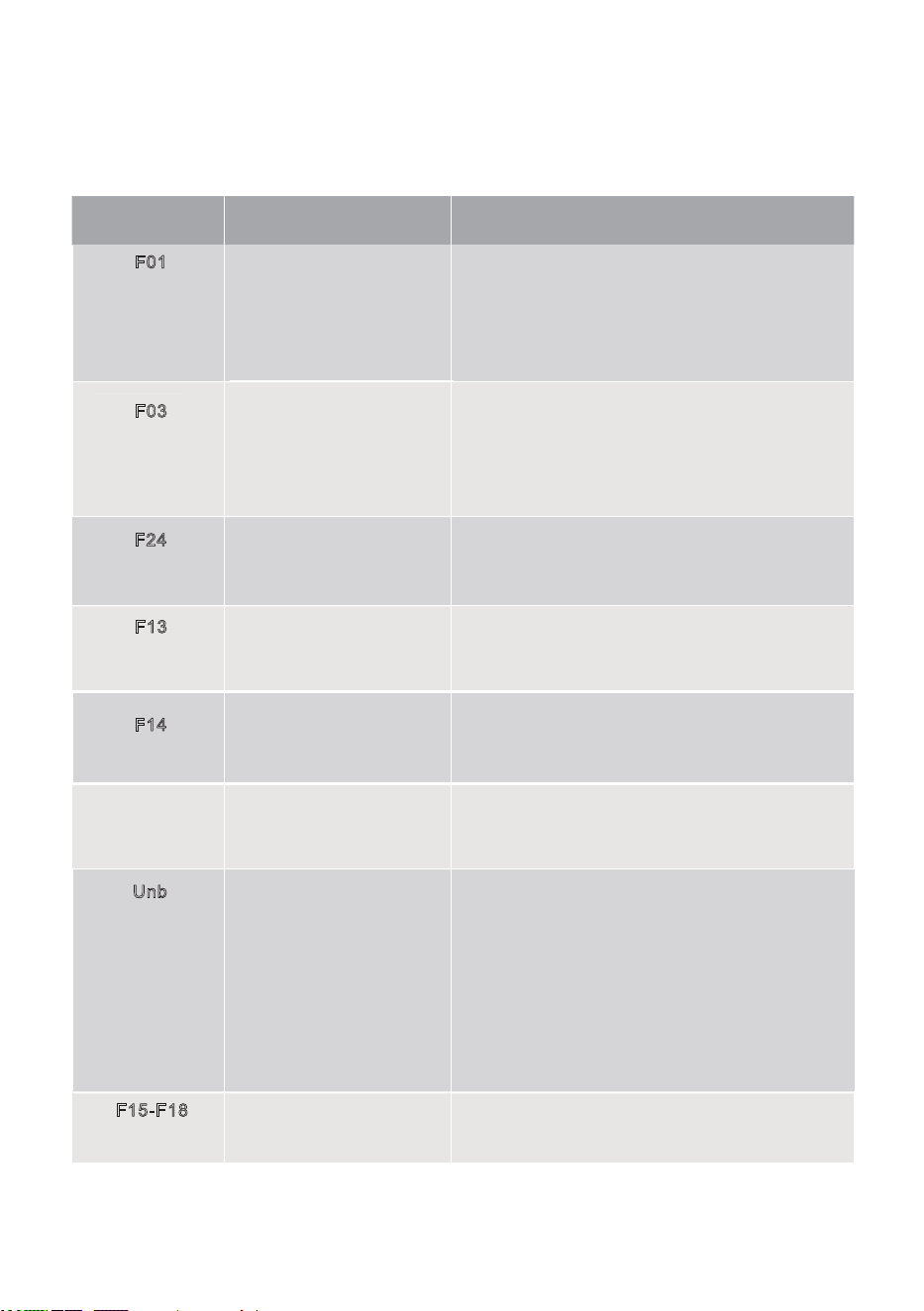
FAULT CODES AND TROUBLESHOOTING
Problem/Fault Description What to do?
F01
F03
F24
F13
F14
Unb
F15-F18
Water inflow fault
Check the following:
1. Is the water tap is open? Is the pressure too low?
2. Is the water supply hose pinched?
3. Is the Inlet filter clogged?
4. Is the water supply hose frozen?
After troubleshooting is finished, press the
“Start/Pause” button to continue operation.
Overflow
Pause and restart the programme.
If the appliance continues to overflow, close the water
tap and contact a service technician.
Door locking fault
Door is closed, but it cannot be locked.
Switch the appliance off and on again. Then restart the
washing programme.
If the fault persists, contact a service technician.
Door unlocking fault
Door is closed, but it cannot be unlocked.
Switch the appliance off and then back on. If the fault
persists, contact a service technician.
Electronic module fault
Other
Switch the appliance off and then back on.
Restart the washing programme.
If the fault persists, contact a service technician.
Abnormal drying (for
tumble dryer models)
Switch the appliance off and then back on.
Unbalance alarm
Unbalance alarm shall be solved by the following
methods:
1. Laundry tangling
If the laundry is tangled, first switch off the appliance,
open the door, shake the laundry loose and put it back
in the drum. Then close the door and select the
spinning programme again.
2. Underweighted laundry
Switch off the appliance, open the door and load
additional laundry (or one or two towels). Then close
the door and select the spin program again.
Water discharge fault
Check the following:
1. Is the drain hose pinched? Does the water flow
through the hose?
2. Is the filter on the drain hose clogged?
3. Is the drain hose frozen?
After troubleshooting is finished, press the “Start/Pause”
button to continue operation.
If the unit is not operating normally and the following codes are displayed, this may not indicate a
fault. Please refer to the FAULT CODES for appropriate action.

When you contact the service centre, please specify your appliance model.
The model, code / lD, type and serial number are indicated on the nameplate of the appliance.
In case of a defect, only use spare parts approved by authorised manufacturers.
Repairs or warranty claims due to incorrect connections or misuse of the appliance are not
covered by the warranty. In such cases, the cost of repair shall be borne by the user.
SERVICING
When washing colored clothes for the first time, wash them separately by color.
Wash heavily soiled laundry in smaller amounts, with increased powder detergent or a Prewash cycle
(if available). Apply a special-purpose stain remover on stubborn stains before the wash. We
recommend referring to “stain removal tips”.
If you often wash laundry at low temperatures and with liquid detergents, bacteria may develop and
cause odour in the washer dryer. To prevent such odour, we recommend running “Drum Clean” (or
other high-temperature programmes) from time to time.
We recommend avoiding washing very small amounts of laundry as this will lead to excessive use of
energy and poor washer dryer performance.
Loosen any folded or tangled laundry before putting it into the drum.
Only use detergents for washer dryer.
If water hardness exceeds 14°dH, water softener should be used. Heater damage resulting from
incorrect use of water softeners shall not be covered by the warranty. Check the information on water
hardness with your local water supply company or authority.
Use of chlorine-based bleaches is not recommended as they can damage the heater.
lf you use a descaling agent, bleach, or dye, only use the kind that is suitable for use in the appliance.
Do not use solvents or similar chemicals (e.g., paint thinner, turpentine, gasoline).
Do not add hardened lumps of powder detergent into the detergent dispenser as this may clog the
piping in the washer dryer.
Powder or liquid detergent should be added according to the manufacturer's instructions, washing
temperature, and selected programme.
When using concentrated liquid laundry care products, we recommend diluting them with water to
prevent clogging the detergent drawer drain.
Liquid detergent is suitable for washing programme without a prewash cycle.
Exercise caution to avoid mixing detergent and softener.
At higher spinning rates, there will be less residual moisture in the laundry. As a result, drying in a
tumble dryer will be more economical and faster.
USAGE RECOMMENDATIONS
BEFORE CALLING A SERVICE TECHNICIAN
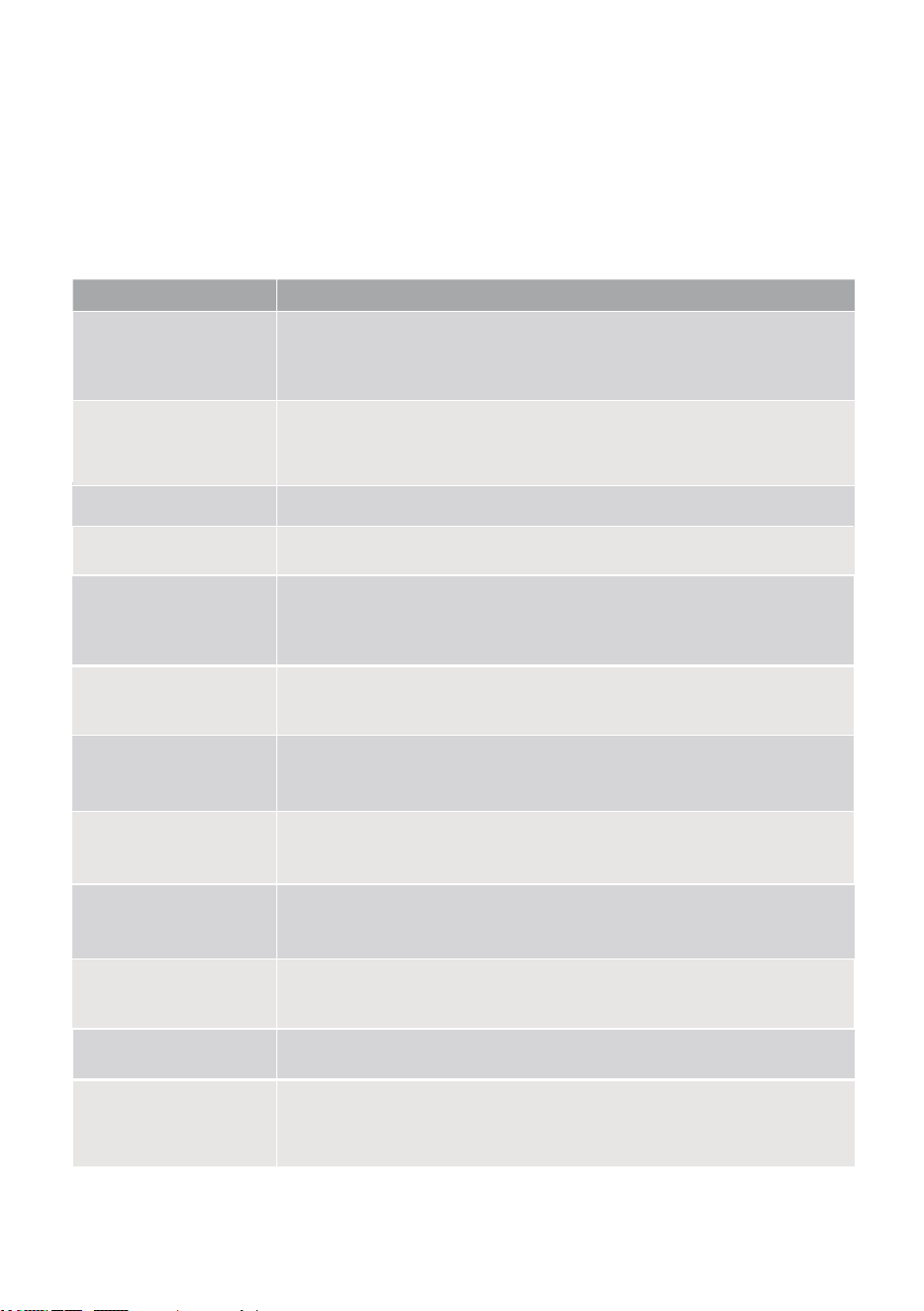
Stains
Stain removal
Mud
When the stain is dry, first scrape it off the laundry before washing it in the washer
dryer.
lf the stain is stubborn, soak it with an enzyme-based stain remover before the wash.
lf the stain is not stubborn, wash the laundry with liquid or powder detergent and
water before the wash.
Before washing in the appliance, apply stain remover on the stain. You may also use
denatured alcohol. Turn the laundry inside out and place a paper towel under the
stain. Use the alcohol on the back side of the stain. At the end of the process,
thoroughly rinse the laundry.
Before washing in the appliance, apply liquid detergent onto the laundry.
Apply stain removers on any stubborn stains. Alternatively, use oxygen-based bleach
for the wash.
Soak or rinse the laundry in cold water and add stain remover if necessary.
Antiperspirant
Before washing in the appliance, soak the laundry in an enzyme-based stain remover.
Grass stains can also be removed by soaking (for approx. 1 hour) in diluted lemon
juice or distilled vinegar.
Grass
Soak the laundry in an enzyme-based stain remover. Soak in cold water for at least
30 minutes, or a few hours if the stains are stubborn. Then, wash in the appliance.
Egg
Soak the laundry in salt water. lf the stain is not fresh, soak it with a mixture of
glycerine, ammonia and alcohol.
Coffee
Tea
Apply cooking oil to the stain and rinse.
Shoe polish
Soak or rinse the laundry with lukewarm soapy water. Then, apply lemon juice and
rinse.
Chocolate
Dilute some starch in water and apply it to the stain. When it dries, scrape it off with a
brush. Then, put the laundry into the appliance to wash.
Felt tip pens
Before washing in the appliance, soak the stains in lukewarm water for at least half an
hour. For easier stain removal, add an enzyme-based stain remover.
Baby (urine, mud,
food stains)
Ink
Fresh stain - Rinse the laundry with cool water and wash it in the washer dryer.
Dried stain - Soak the laundry in an enzyme-based stain remover. Then, wash in the
appliance.
If the stain does not vanish, try to remove it with a bleach suitable for your laundry.
Blood
Before using special-purpose stain removers, try using the natural methods that do not harm the
environment on less stubborn stains. However, timely treatment makes stain removal easier!
Remove stains by rinsing with cold (lukewarm) water - but never with hot water!
STAIN REMOVAL TIPS

Stains
Stain removal
Glue, chewing gum
Place the laundry in a bag and put it in the freezer until the stain hardens. Then
remove it with a blunt knife.
Dilute the stain with a prewash stain remover and rinse thoroughly. Finally, wash the
laundry in the appliance.
Fruit juice
Apply a mixture of salt and water on the stain. Leave to take effect for a while, then
rinse. You can apply sodium bicarbonate, distilled vinegar or lemon juice on the stain
before washing in the appliance. For old stains, use glycerine. After 20 minutes, rinse
with cold water. Finally, wash the laundry in the appliance.
Wax
Put the laundry into the freezer until the wax hardens. Then, scrape it off. Remove
the remaining wax by placing a paper towel onto the stain, and then heat it with an
iron until the paper absorbs the wax.
Use a stain remover for the prewash, then wash in the appliance.
Makeup
Before washing in the appliance, rub liquid detergent thoroughly into the stain.
Sweat
Before washing in the appliance, apply stain remover onto the laundry. Then, rinse
with hot water (as hot as the fabric allows).
Butter
Soak the laundry in an enzyme-based stain remover. Soak for at least 30 minutes, or
a few hours if the stains are stubborn. Then, wash in the appliance.
Milk
Soak the laundry in cold water for at least 30 minutes. Also, use a stain remover.
Then, wash in the appliance.
Wine
Put the laundry into the freezer until the chewing gum hardens. Then, wash in the
appliance.
Chewing gum

DISPOSAL
Packaging is made of environmentally friendly materials that can be recycled,
disposed of, or destroyed without any hazard to the environment. To this end,
packaging materials are labelled appropriately.
The symbol on the product or its packaging indicates that the product should not be
treated as normal household waste. Take the product to an authorised collection
centre for waste electric and electronic equipment processing.
When disposing of the washer dryer at the end of its useful life, remove all power
cords, and destroy the door latch and switch to prevent the door from locking or
latching, and to prevent children or small animals from becoming trapped inside
and causing a hazard.
This appliance is marked according to the European directive on waste (WEEE).
Correct disposal of the product will help prevent any negative effects on the
environment and health of people, which could occur in case of incorrect product
removal. For detailed information on removal and processing of the product, please
contact the relevant municipal authority in charge of waste management, your
household waste disposal service, or the store where you bought the product.

;$