P/N YRL-PB-MNL-0017 Rev C
Part of ASSA ABLOY
1
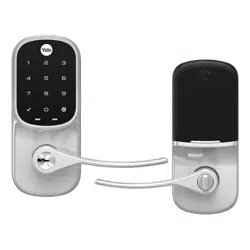
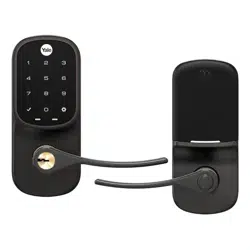
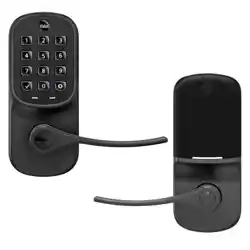
Yale Assure Lever®
Keypad (YRL216) and Key-Free Keypad (YRL236)
Installation and Programming Instructions
WARNING
This product can expose you to lead which is known to the state of California to cause cancer and birth defects or other reproductive harm.
For more information go to www.P65warnings.ca.gov.
Failure to follow these instructions could result in damage to the product, voiding the factory warranty and could lead to failure of the product to provide access.
This manual will walk you through all the required steps to add your new
Yale Assure Lever to your door.
• Remove existing door knob or lever
• Double check door measurements
• Install your Assure Lever
• Program your Assure Lever
• Add your Assure Lever to your smart home system or Yale Access
app if purchased with Yale Smart Module or Yale Access Upgrade kit
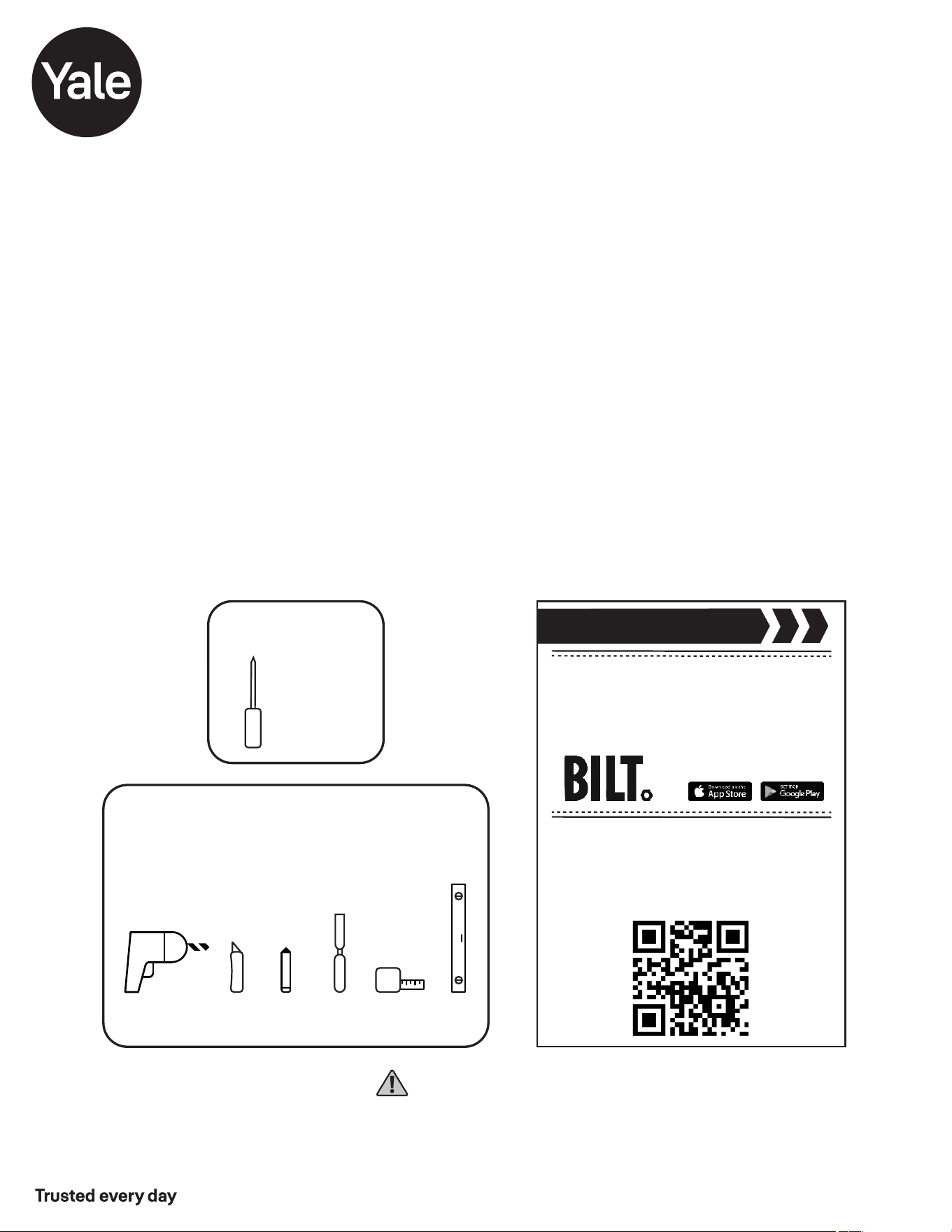
Before you begin
Using the app on your smart
phone, scan this QR for step-by
-step installation instructions & to
register your lock
DOWNLOAD
THE BILT APP
Tools Needed
Standard
Phillips Head
Screwdriver
Tools Needed For New
Doors Or Adjusting Existing Door
Utility
Knife
Drill
Wood
Mortise
Chisel
Pencil
Tape
Measure
Level
P/N YRL-PB-MNL-0017 Rev C
Part of ASSA ABLOY
2
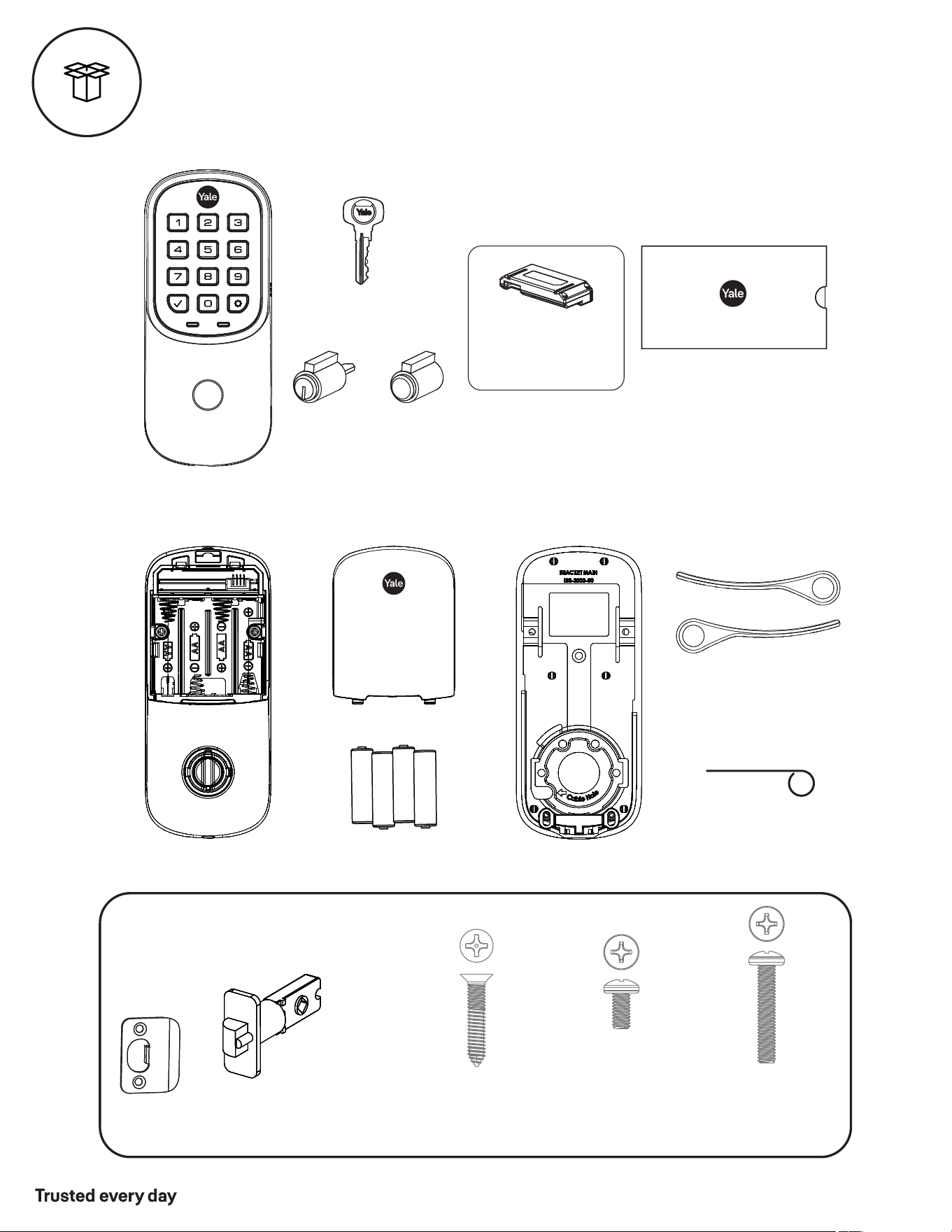
Battery
Cover
Key
AA Alkaline
Batteries
Levers
Cylinder
(YRL216)
Key-Free
Cylinder
(YRL236)
OR
#7 wood & #8-32
Machine x 20mm
Combination Screws
x4
#8-32 x 5/16"
Machine Screws
x2
M4 x 22mm
Pan Head Machine
Screws
x2
What's In The Box
Mounting Hardware
Strike Plate
Latch
(AYRL-DRIVE
Adjustable Drive-In Latch
available for purchase)
Keypad
Yale Smart Module
(not included with
NR models)
Key (YRL216)
Installation Guide
and Door Template
Let's Get Started
Battery Cover
Mounting Plate
Inside Lock
P/N YRL-PB-MNL-0017 Rev C
Part of ASSA ABLOY
3
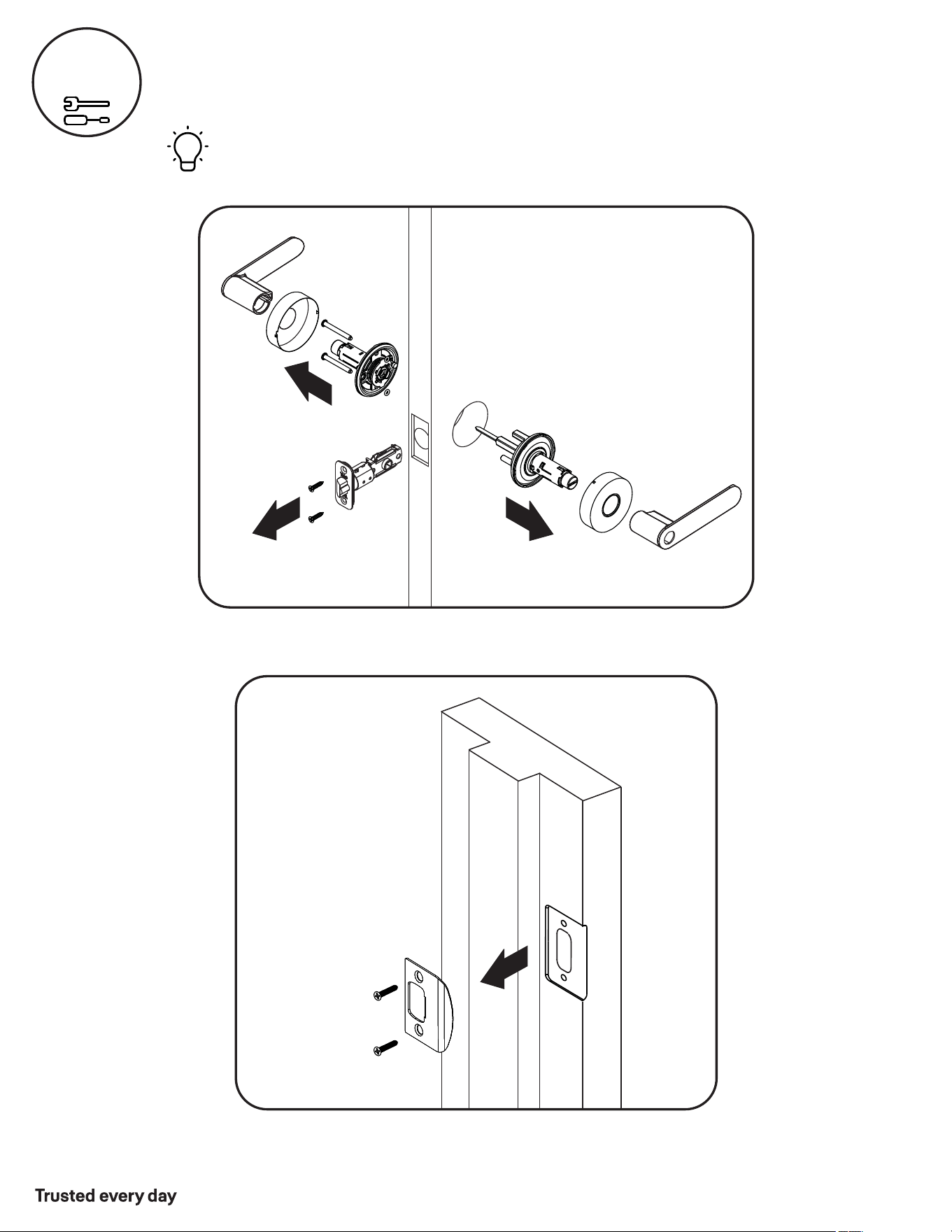
Remove Existing Door Knob or Lever
Do not discard old lock hardware until Assure Lever has been successfully installed.
1
Frame
P/N YRL-PB-MNL-0017 Rev C
Part of ASSA ABLOY
4
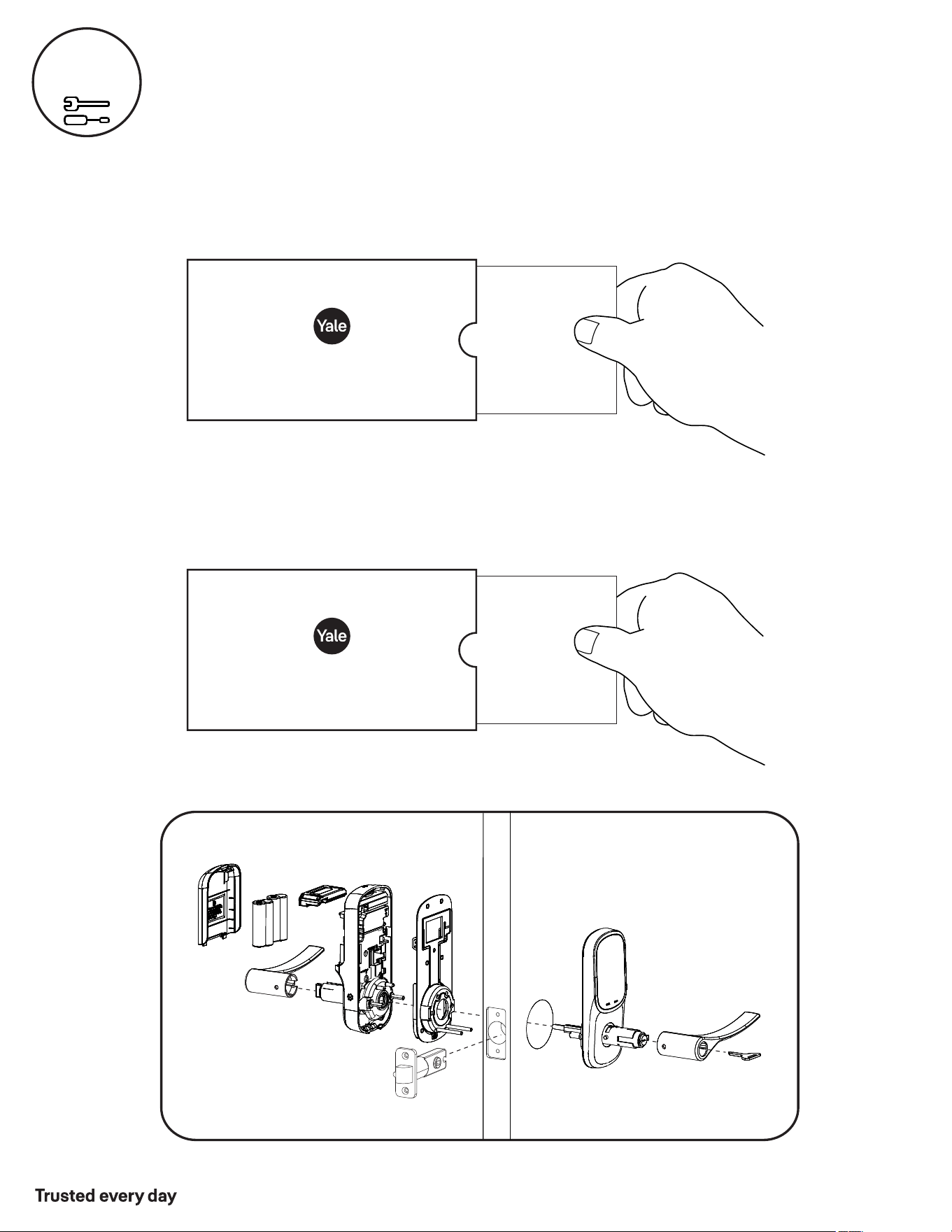
New Door Marking Template
2
Door Checker
Check Door Measurements And
Make Adjustments If Needed
Use door checker from installation guide envelope to verify your door measurements
and make any needed adjustments.
With the door checker, use the template from installation guide envelope to prep
a new door that has not been predrilled for hardware.
New Door
Marking
Template
Check
Your Door
Guide
Let's Get Started
Let's Get Started
Outside of Right Hand Door
YRL216 Cylinder and Key Shown
YRL236 has Key-Free Cylinder (No Key)
P/N YRL-PB-MNL-0017 Rev C
Part of ASSA ABLOY
5
x4
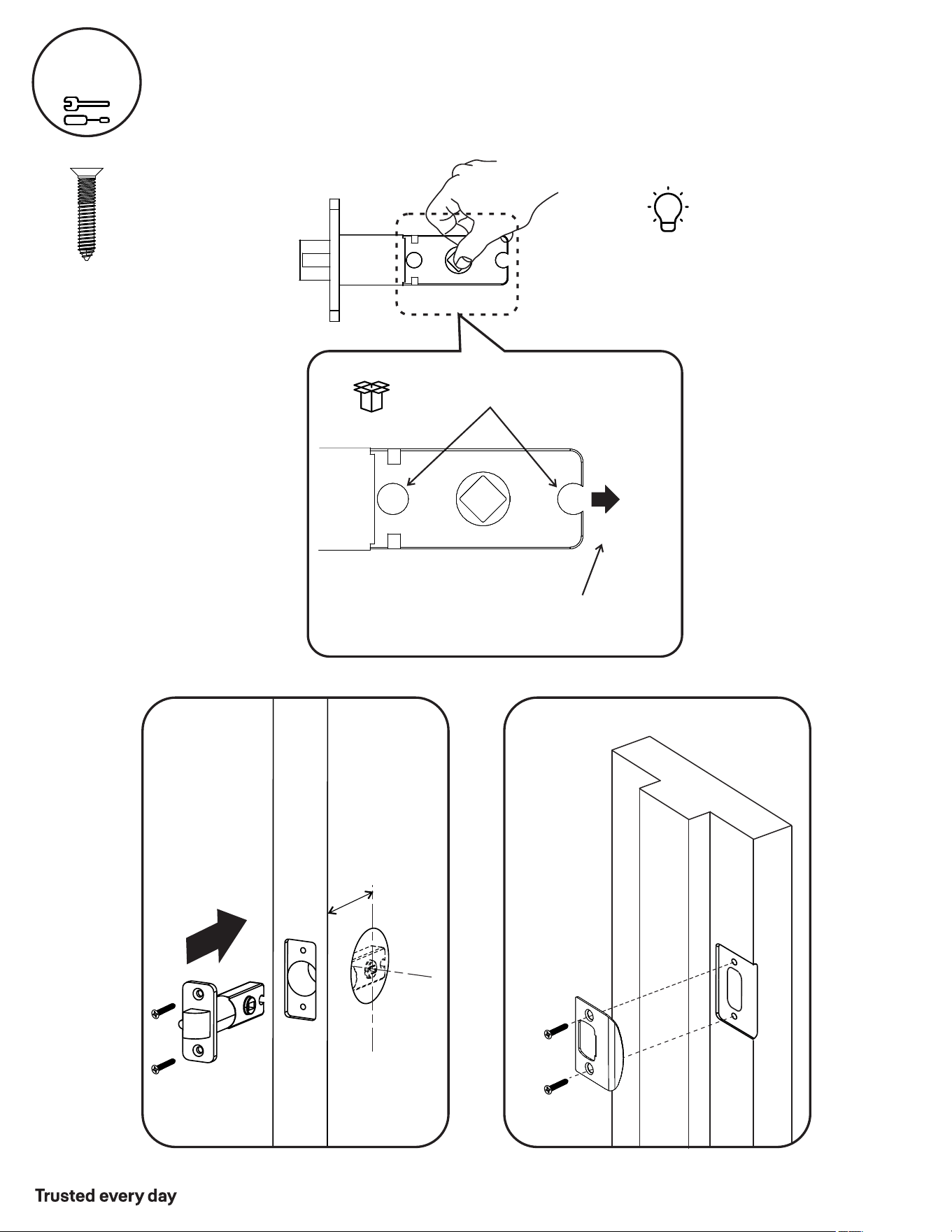
Install Latch Strike Plateand
Right Hand Installation Shown
2-3/8" through bolt posts, default
2-3/4" through bolt posts, optional
PULL
Outside
of Door
Frame
2-3/8" (60mm)
or
2-3/4" (70mm)
Backset
3
O
Note: Adjustment is based on backset
AYRL-DRIVE
Adjustable Drive-In Latch
available for purchase
Actual Size
P/N YRL-PB-MNL-0017 Rev C
Part of ASSA ABLOY
6
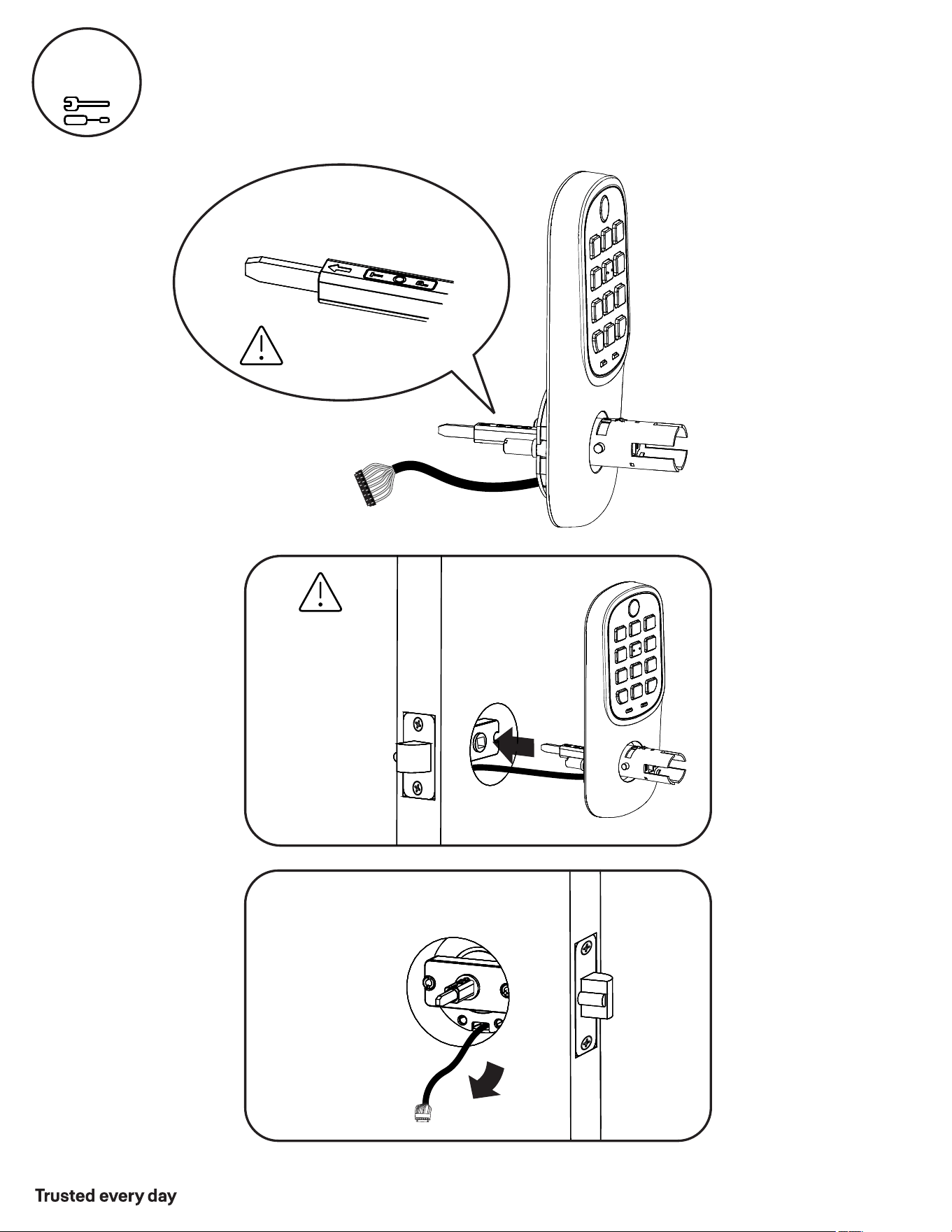
Install Keypad
Right Hand Installation Shown
4
Outside of
Right Hand Door
Inside of
Right Hand Door
“TOP” mark must be
on top surface and tailpiece
in vertical position.
Incorrect orientation will
cause lock to fail.
Door face hole
must be at least
2-1/8".
If hole is too
small, a door lock
installation kit or
jig should be used
to increase hole
size.
P/N YRL-PB-MNL-0017 Rev C
Part of ASSA ABLOY
7
x2
Actual Size
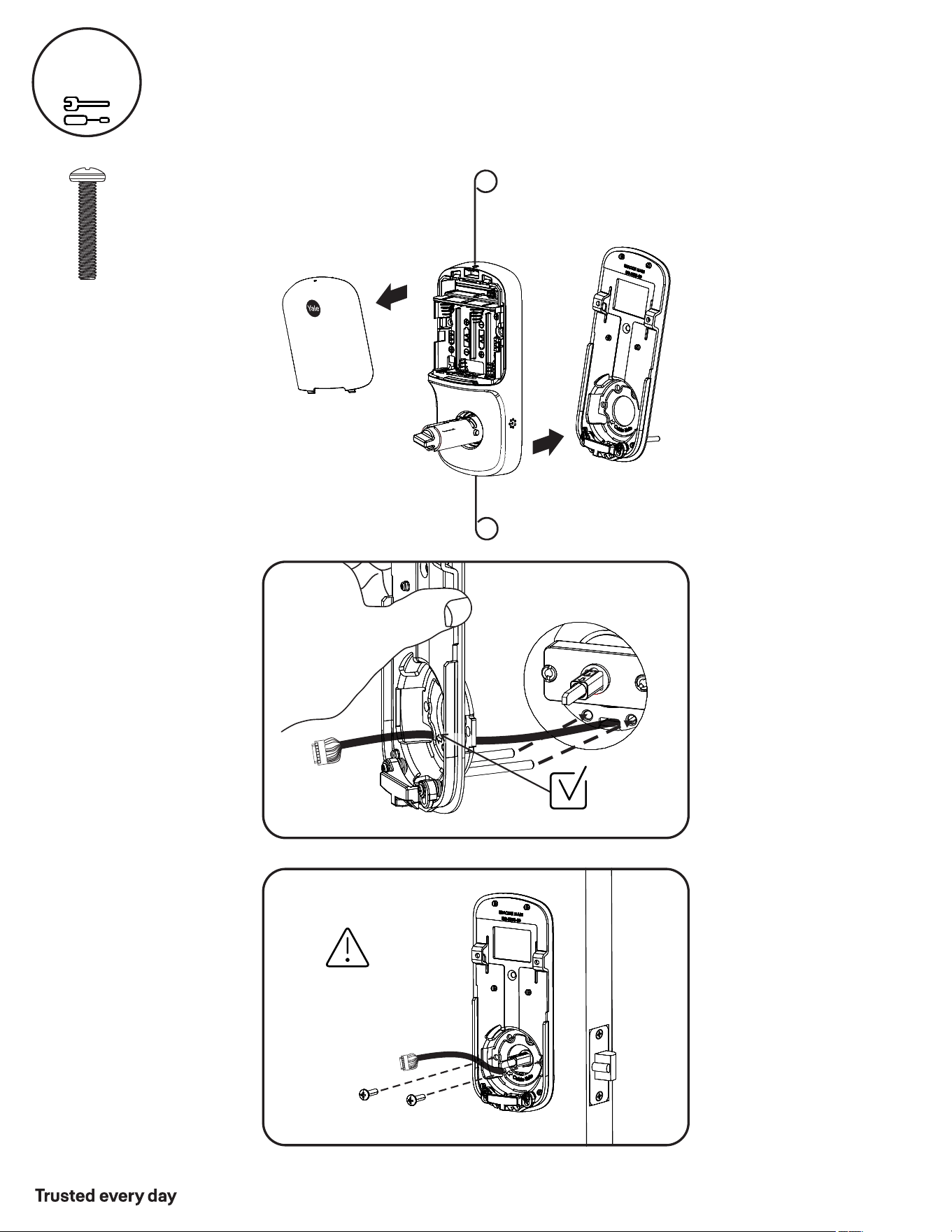
Install Inside Mounting Plate
Right Hand Installation Shown
5
Inside of
Right Hand Door
Inside of
Right Hand Door
Make sure keypad
and mounting plate
are straight before
tightening screws.
Insert cable through cable hole
8
P/N YRL-PB-MNL-0017 Rev C
Part of ASSA ABLOY
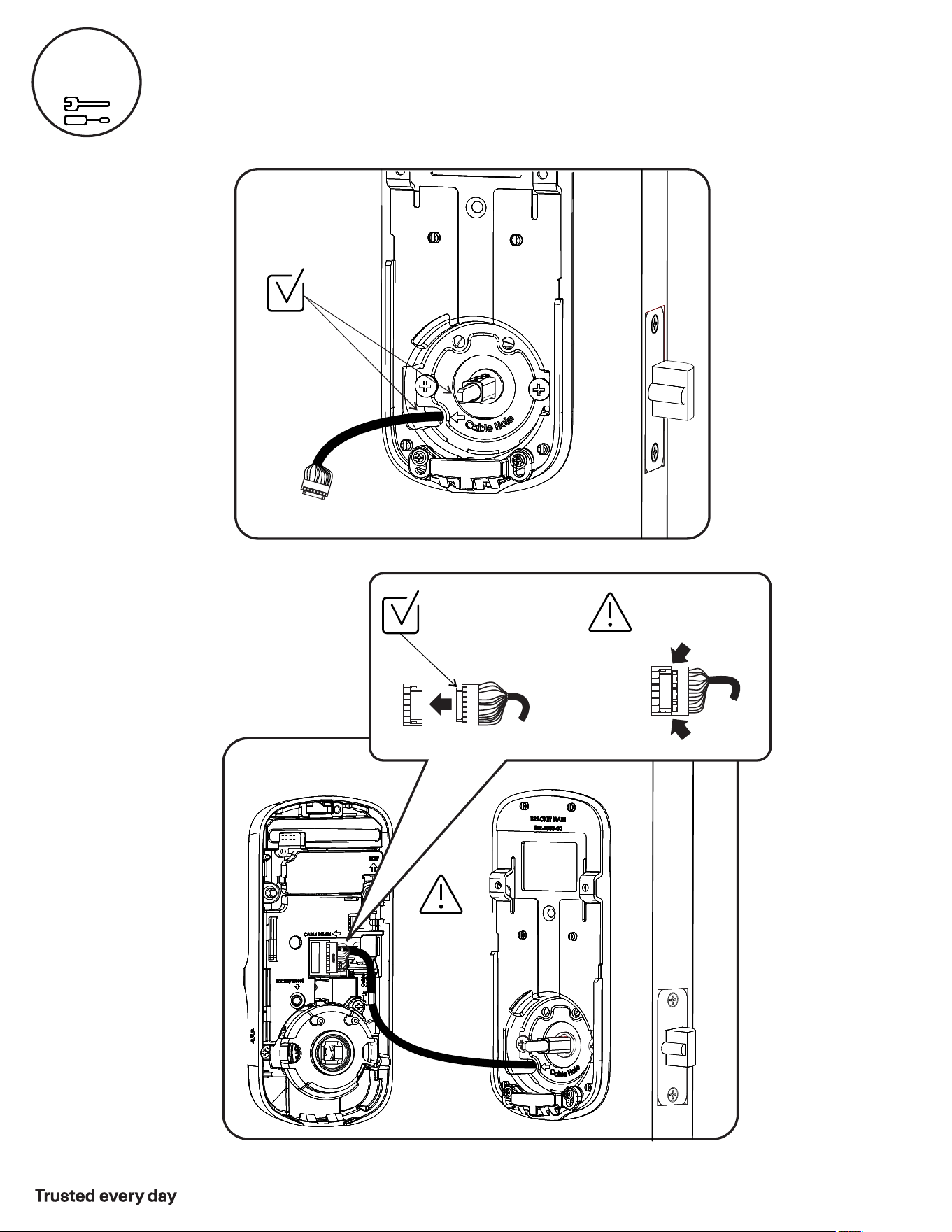
Attach Cable
Right Hand Installation Shown
6
Inside of
Right Hand Door
Make sure
cable is secure
Use cable
hook for
proper cable
routing. Do
not pinch
cable.
Ridges along edges
facing outward
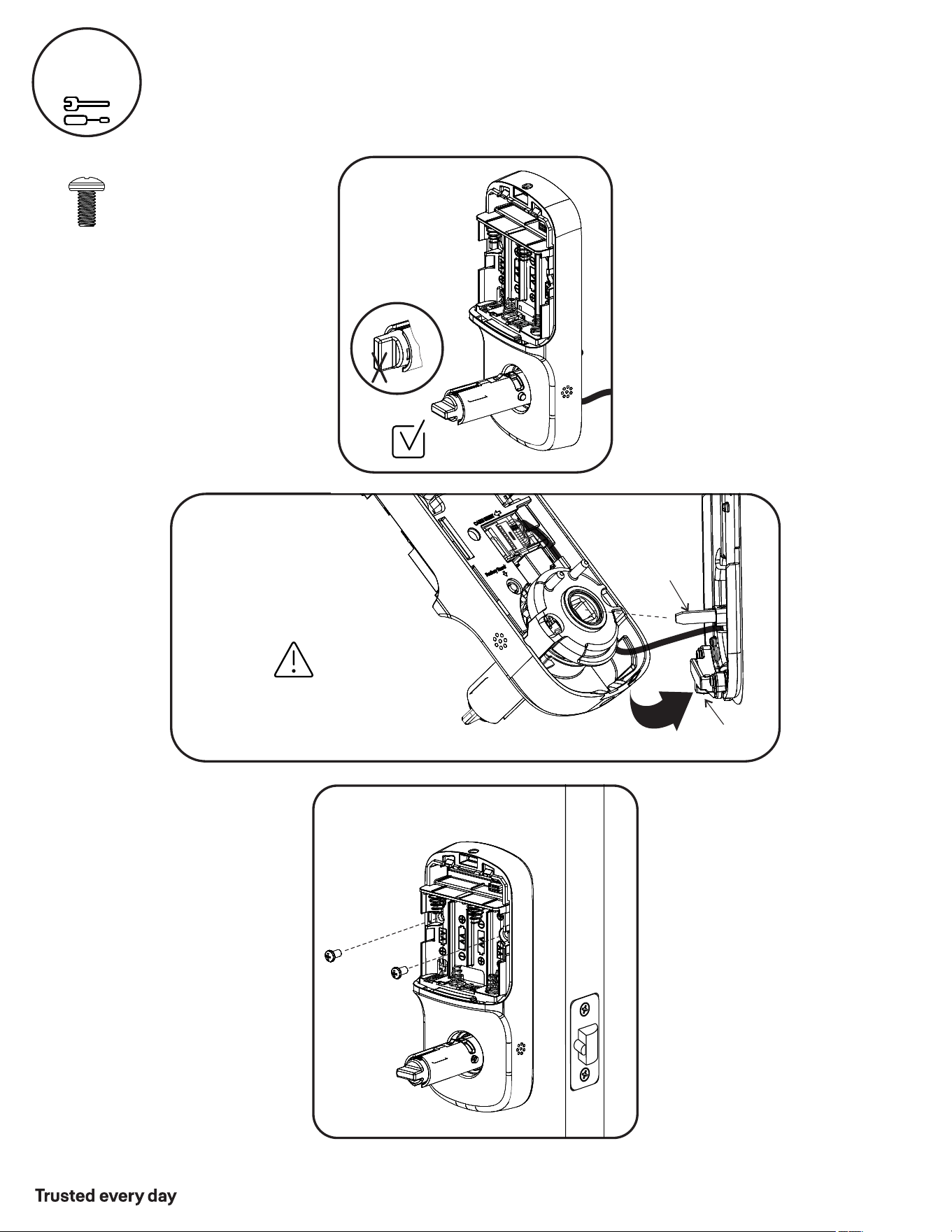
P/N YRL-PB-MNL-0017 Rev C
Part of ASSA ABLOY
9
x2
7
Install Inside Lock
Right Hand Installation Shown
Actual Size
Inside of
Right Hand
Door
Make sure tailpiece
inserts into lock as tilting into
position. DO NOT FORCE
Hook
Tailpiece
"Click"
Hook bottom of lock into
place and listen for a
"click". Tilt lock into place
until lock is flush with door.
P/N YRL-PB-MNL-0017 Rev C
Part of ASSA ABLOY
10
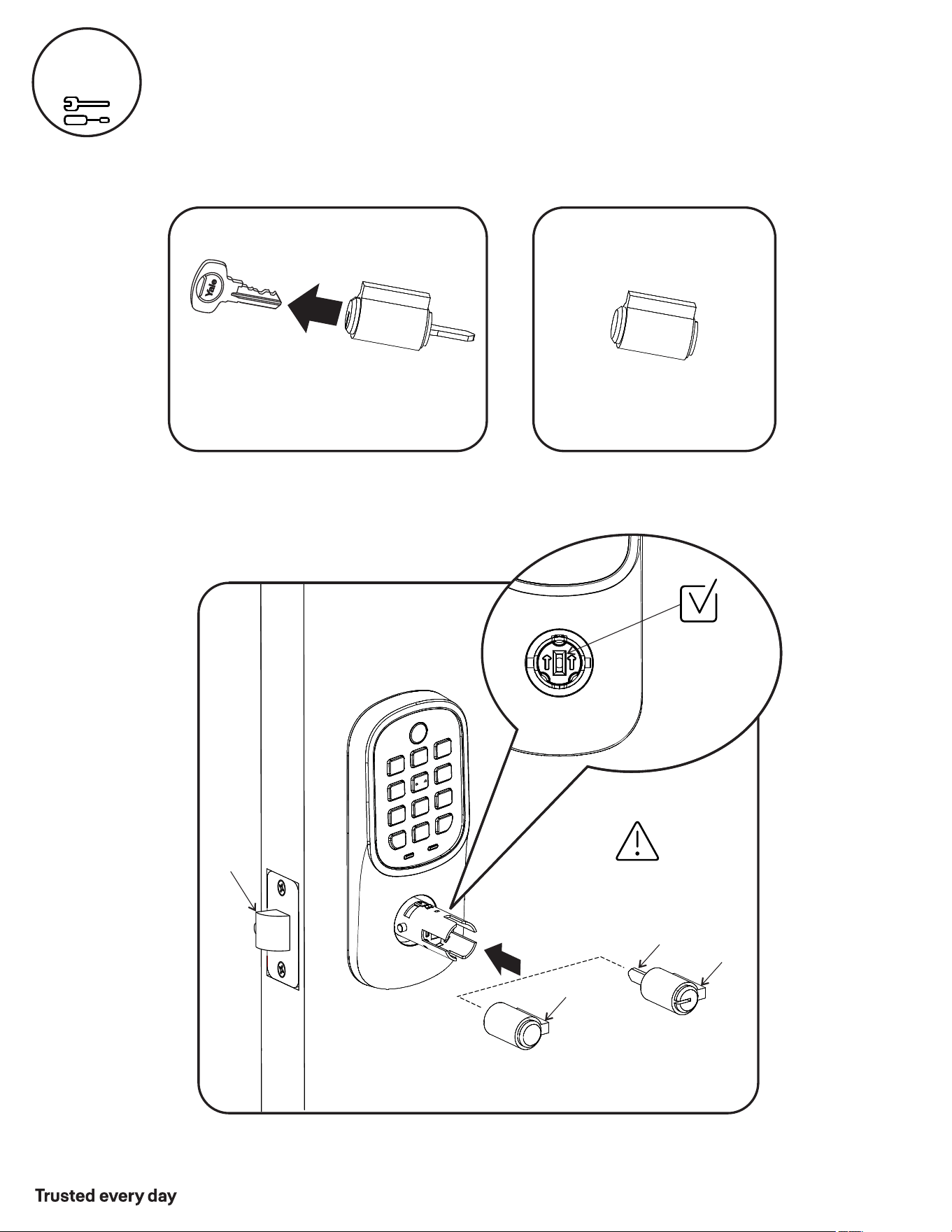
Install Cylinder (YRL216)
or Key-Free Cylinder (YRL236)
8
Outside of
Right Hand Door
Cylinder must be installed
with bar away from latch
Latch
Bar
Bar
Tailpiece
Cylinder
(YRL216)
Key-Free Cylinder
(YRL236)
or
YRL216 Cylinder YRL236 Key-Free Cylinder
Remove key from cylinder.
OR
There is no key.
Cylinder
Tailpiece
(YRL216) must
slide into
vertical slot
P/N YRL-PB-MNL-0017 Rev C
Part of ASSA ABLOY
11
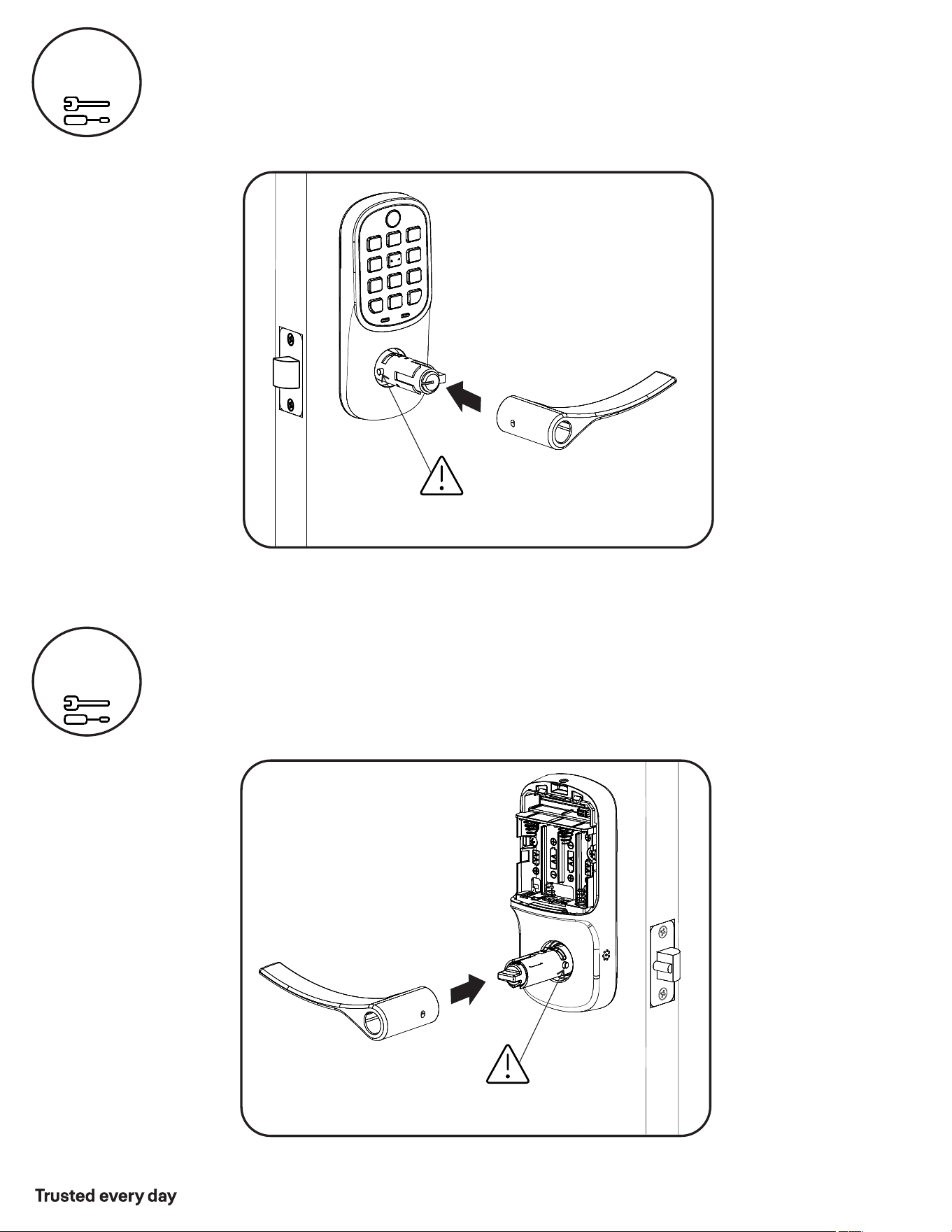
9
10
Install Outside Lever
Install Inside Lever
Inside of
Right Hand Door
Press pin while installing
lever so lock is not damaged.
Outside of
Right Hand Door
YRL216 Cylinder
Shown
Press pin while installing
lever so lock is not damaged.
P/N YRL-PB-MNL-0017 Rev C
Part of ASSA ABLOY
12
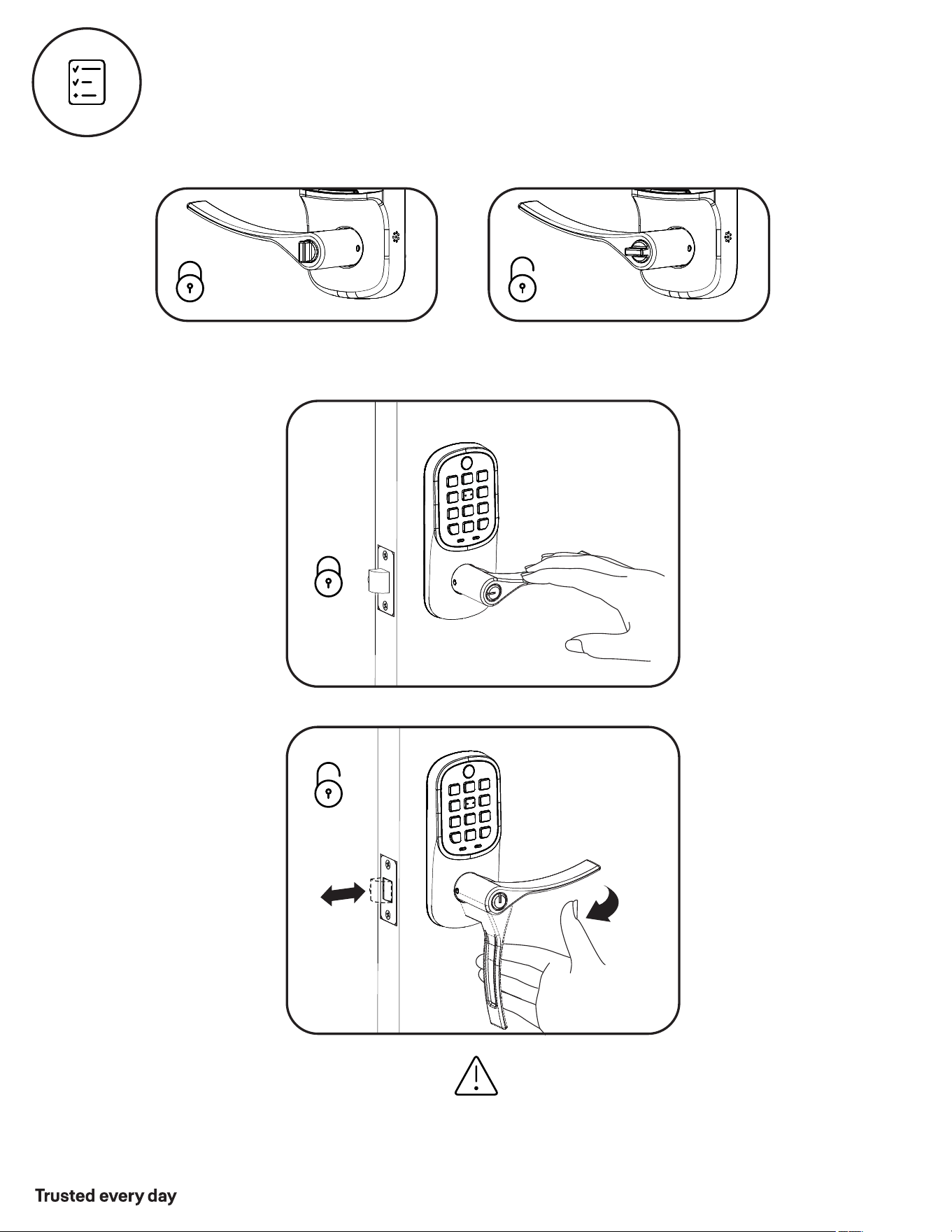
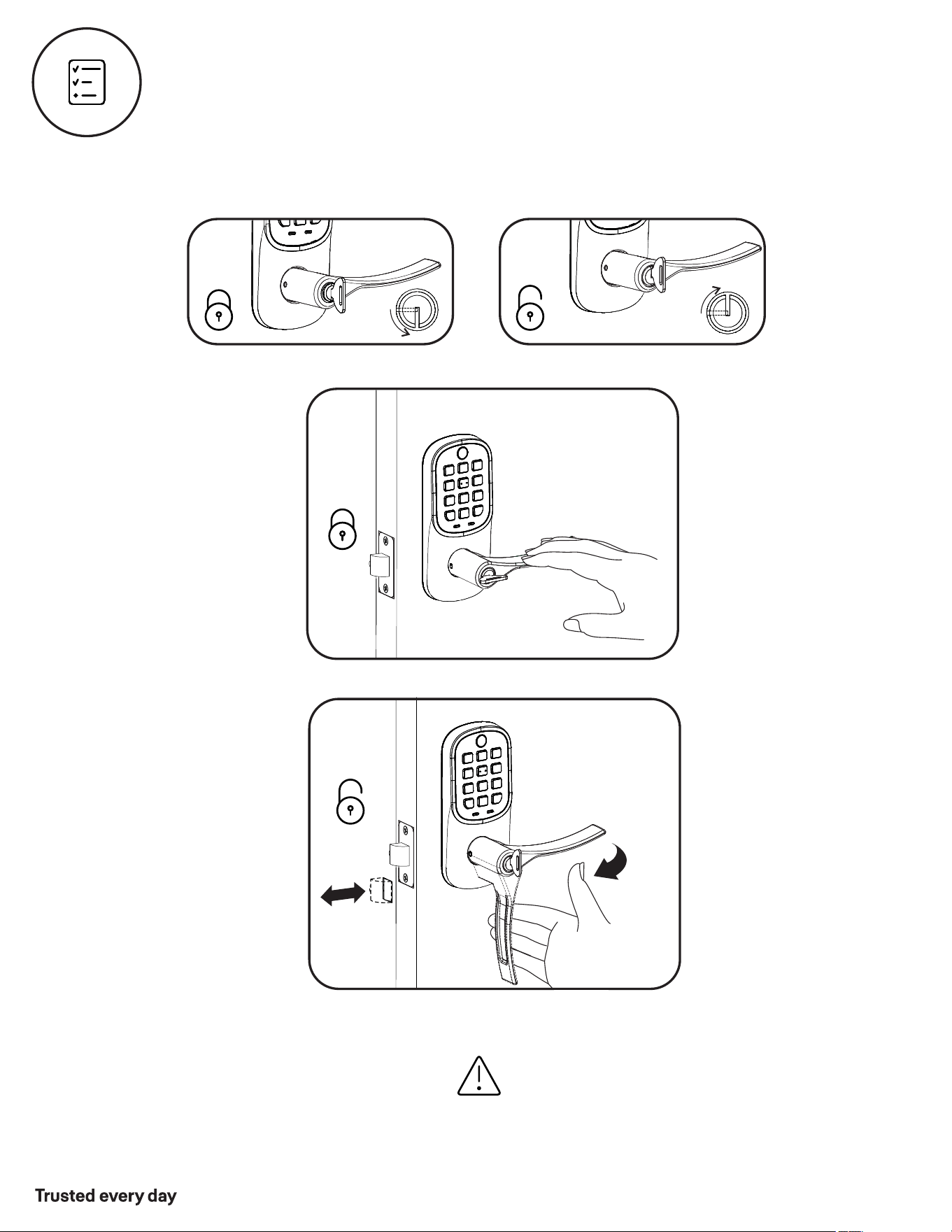
Test Thumbturn Operation with Door Open
Outside of
Right Hand Door
Test thumbturn and both levers in locked and unlocked positions. If operation fails, check
installation beginning with Step 4 and refer to Hardware Troubleshooting.
Outside of
Right Hand Door
P/N YRL-PB-MNL-0017 Rev C
Part of ASSA ABLOY
13
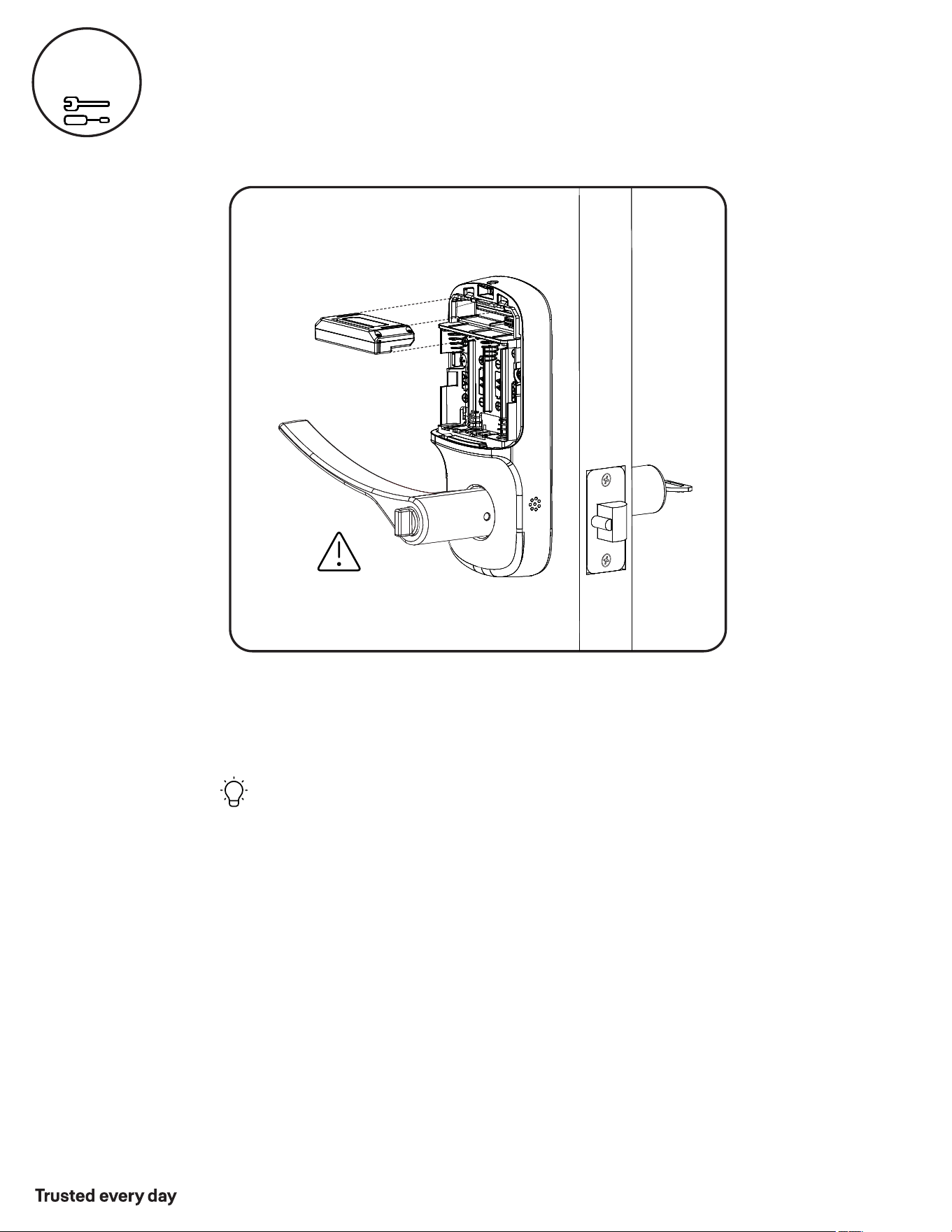
Test Key Operation with Door Open (YRL216)
If key operation test fails, check installation beginning with Step 8.
Outside of
Right Hand Door
Outside of
Right Hand Door
P/N YRL-PB-MNL-0017 Rev C
Part of ASSA ABLOY
14
11
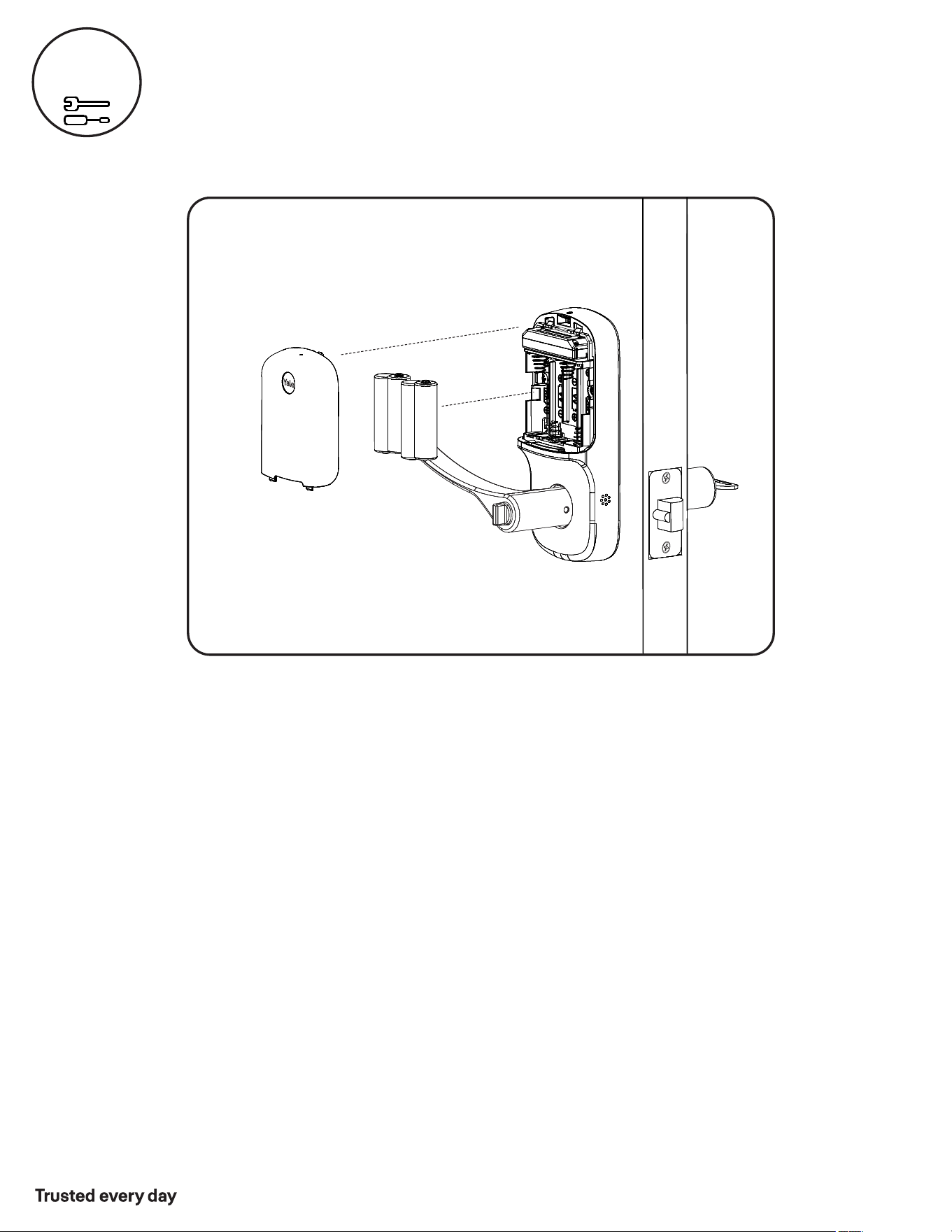
Install Yale Smart Module
Not included with NR models
NOTE: If a Smart module was included with your lock, it is in a
separate box with additional module installation instructions.
Inside of
Right Hand Door
Batteries must not be installed
prior to inserting and/or
removing Yale Smart module.
For more information about Yale Smart modules and smart
home features visit: US.YaleHome.com/Smart
P/N YRL-PB-MNL-0017 Rev C
Part of ASSA ABLOY
15
12
Inside of
Right Hand Door
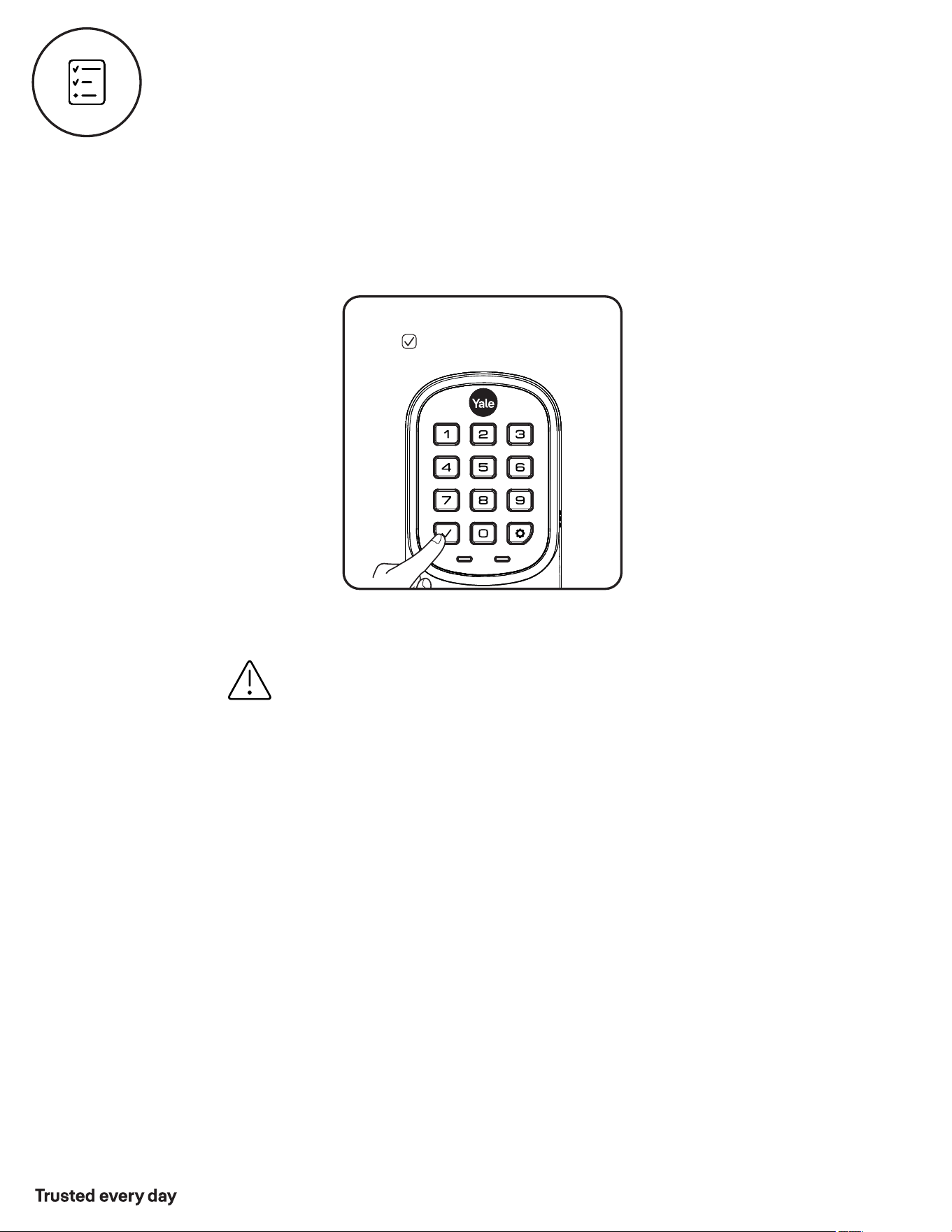
Install Batteries and Cover
Congratulations, you've installed the Yale Assure Lever®
Keypad ( ) or Key-Free Keypad (YRL236)!YRL216
Using Your Lock instructions will help
you customize your lock.
P/N YRL-PB-MNL-0017 Rev C
Part of ASSA ABLOY
16
Test Keypad Operation with Door Open
A Master Entry Code must be created upon installation or after resetting the lock to factory default.
Programming and use of lock is not possible until this step has been successfully completed.
See Using Your Lock instructions.
If keypad operation test fails, check installation beginning with Step 3
Enter 4-8 digit Master Entry Code
Press
17
P/N YRL-PB-MNL-0017 Rev C
Part of ASSA ABLOY
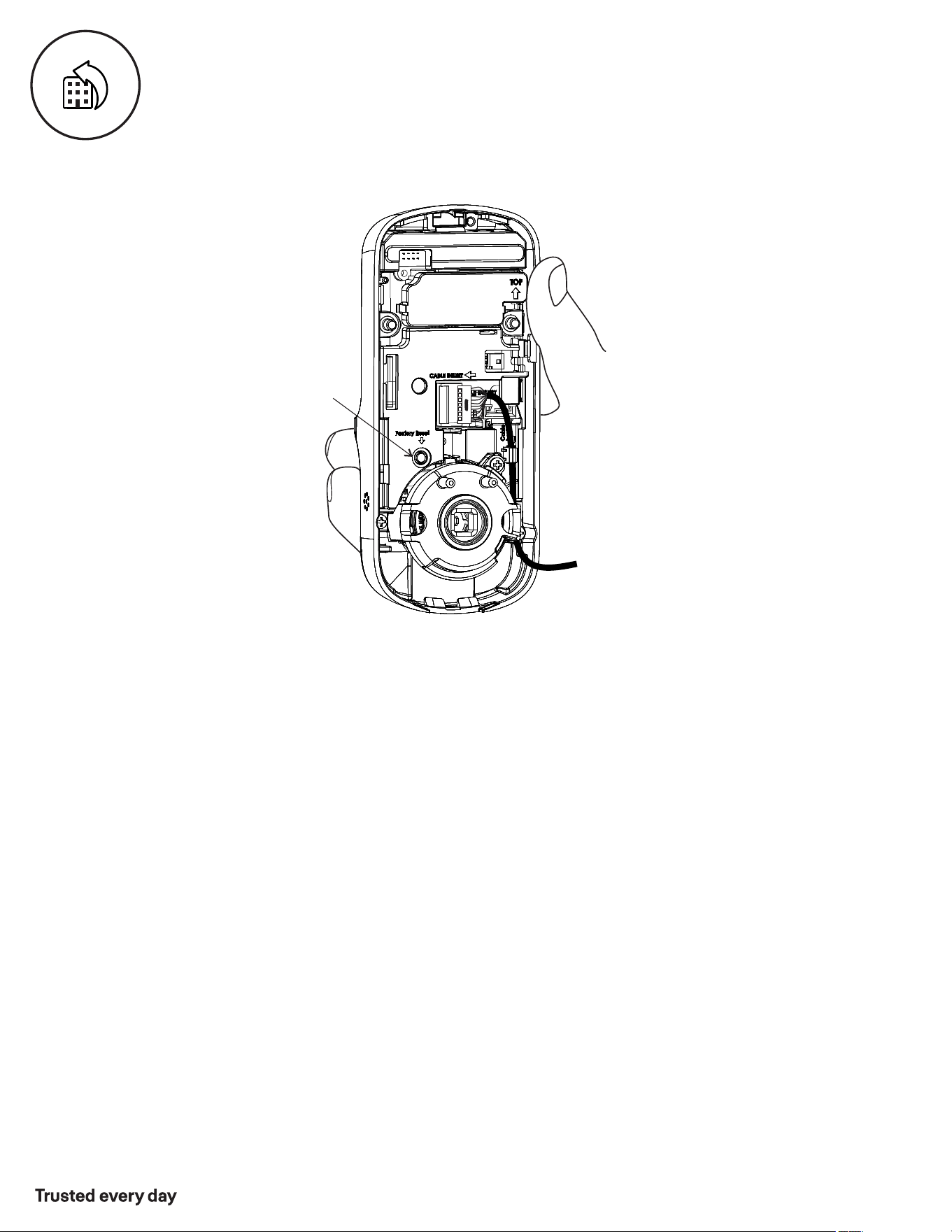
When resetting the lock, all Entry Codes, including the Master Entry Code*, are deleted.
All programming features are reset to original default settings. See “Setting Definitions”.
1. Remove the battery cover and batteries.
2. Remove the inside lock to access the reset button.
3. The reset button (see image above) is marked.
4. Re-insert 3 batteries and hold the reset button for 3 seconds.
5. While still holding the reset button, insert the 4th battery, and hold the
reset button for an additional 3 seconds.
6. Release the reset button.
7. Re-install the inside lock onto the door.
*Upon reset, Master Entry Code creation is the only option available and
must be performed prior to any other programming of the lock.
Reset Button
Inside Lock
Resetting Lock to Factory Defaults
P/N YRL-PB-MNL-0017 Rev C
Part of ASSA ABLOY
18
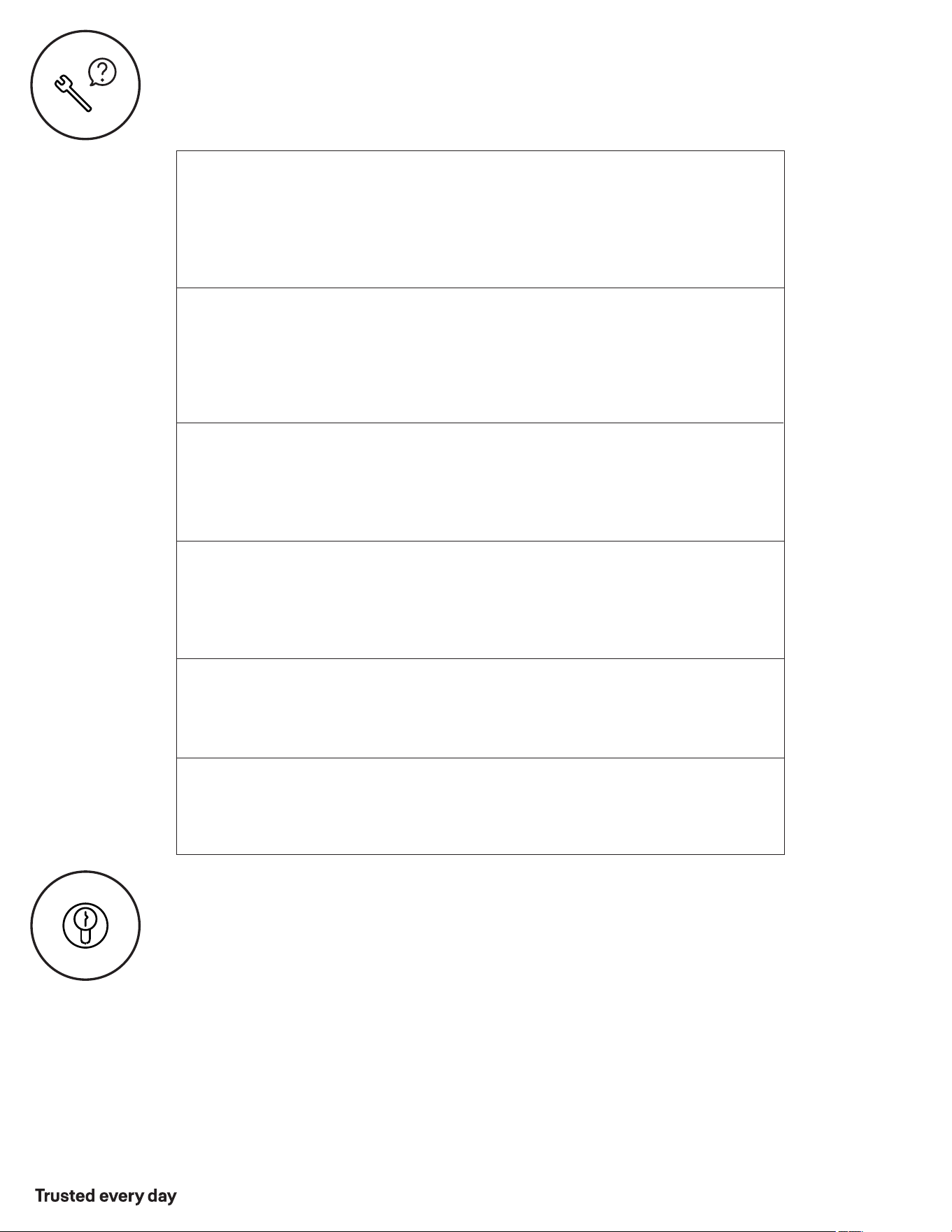
Cycle lock in both the locked and unlocked positions. If problems are found:
Tailpiece and spindle will not mate and fit into the inside lock
a. Make sure that your door is between 1-3/8" and 1-3/4" thick
b. Make sure that the square shaped spindle has “Top” writing and arrow facing upwards
c. Place the tailpiece in the vertical position
d. Verify that the thumbturn is in the horizontal (unlocked) position
Thumbturn does not rotate electronically or physically
a. Verify that inside of the lock is properly seated on the mounting bracket
b. Make sure that the square shaped spindle has “Top” writing and arrow facing upwards
c. Place the tailpiece in the vertical position
d. Verify that the thumbturn is in the horizontal (unlocked) position
I'm getting an alert when I try to lock or unlock the door electronically
a. Do not turn or depress the lever during operation, this could cause a jam alarm
b. Check that thumbturn does not have anything preventing it from physically rotating
c. Verify that you can rotate thumbturn freely
My lock is not making any sound when I push buttons
a. Use the programming tree in this manual to verify that Audio is enabled
b. If Audio is enabled, make sure that the white cable that connects the keypad to the
inside lock is not pinched or broken
When rotating the thumbturn I hear noise
a. A little bit of noise is normal when operating the thumbturn
b. If cranking, grinding or clicking occurs please verify your installation
The locking pins will not retract when I try to install the levers
a. If the thumbturn is in vertical (locked) position, rotate the thumbturn to the
horizontal (unlocked) position and it will retract
1. To Remove Cylinder:
See installation Steps 7 and 8. Reverse appropriate actions to remove the
outside lever handle and cylinder.
2. To Install New Cylinder:
A. Follow appropriate actions of installation Steps 7 and 8 to replace the
cylinder and outside lever handle.
B. Test operation of new cylinder and key by following "Testing Operation".
Hardware Troubleshooting
Replacing Cylinder (YRL216)
P/N YRL-PB-MNL-0017 Rev C
Part of ASSA ABLOY
19
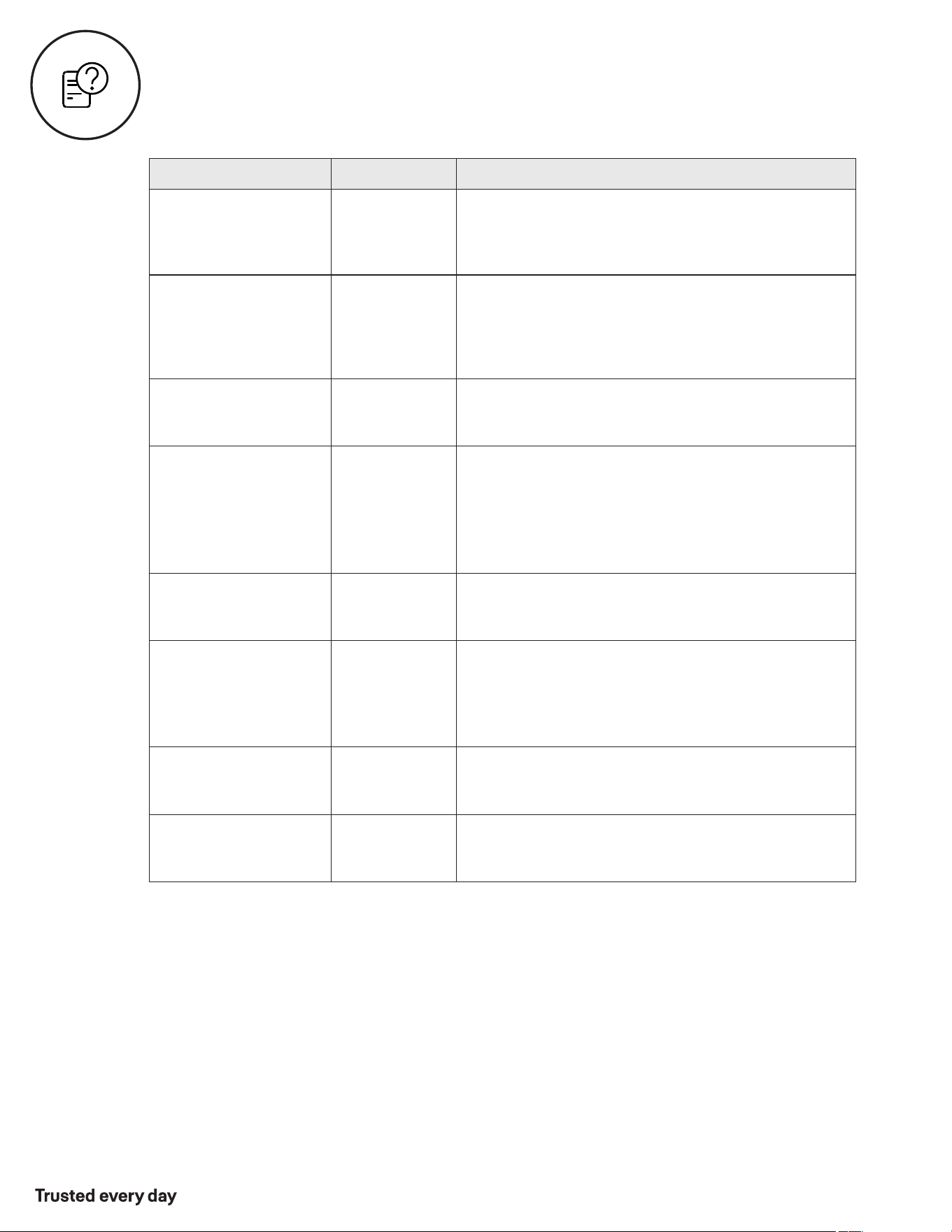
Audio Enabled
The audio setting for Entry Code verification is set
to enabled (1) by default; otherwise it can be set to
disabled (3) for quiet areas.
Setting Definitions
*The Master Entry Code must be created prior to any other programming of the lock.
Creation
required*
Master Entry Code
The Master Entry Code is used for programming
and feature settings. It must be created prior to
programming the lock. The Master Entry Code will also
operate (unlock/lock) the lock.
Inside Indicator Light
Disabled (Off)
Located on the inside lock. Shows active status
(Locked) of lock and can be enabled or disabled in
Advanced Lock Settings (Main Menu selection #3).
One Touch Locking
Enabled
When the latch is retracted, activating the keypad
will extend the latch (during Auto Re-lock duration
or when Auto Re-lock is disabled). When One-
Touch Re-lock is not in use (disabled), any valid
Entry Code will re-lock the lock.
All Code Lockout
Disabled
This feature is enabled by the Master Entry Code.
When enabled, it restricts all Entry Code access
(except Master). When attempting to enter a
code while the lock is in All Code Lockout, the keypad
flashes 8 times and the lock beeps 3 times as well.
Wrong Code
Entry Limit
5 Times
After five (5) unsuccessful attempts at entering a
valid Entry Code, the lock will shut down and not
allow operation for sixty (60) seconds.
Shutdown Time 60 Seconds
The lock will shutdown (flashing keypad) for sixty
(60) seconds and not allow operation after the
wrong code entry limit (5 attempts) has been met.
Settings
Default Setting
Definition
Auto Re-lock Disabled
After a successful code entry or manual unlock
with the key (YRL216), the lock will automatically re-lock
after each unlock in an effort to keep your home secure.
This feature is optional, and can be turned off.
When enabled, the lock will automatically re-lock
after thirty (30) seconds.
P/N YRL-PB-MNL-0017 Rev C
Part of ASSA ABLOY
20
While Yale® has included several features to prevent lockout
(9-Volt battery jumper, low battery warnings), it is still possible
for a lockout situation to occur. Because the YRL236 does not
have a key, Yale® recommends using YRL236 in an environment
where there are additional entry points into dwelling.
*NOTE TO INSTALLER AND CONSUMER
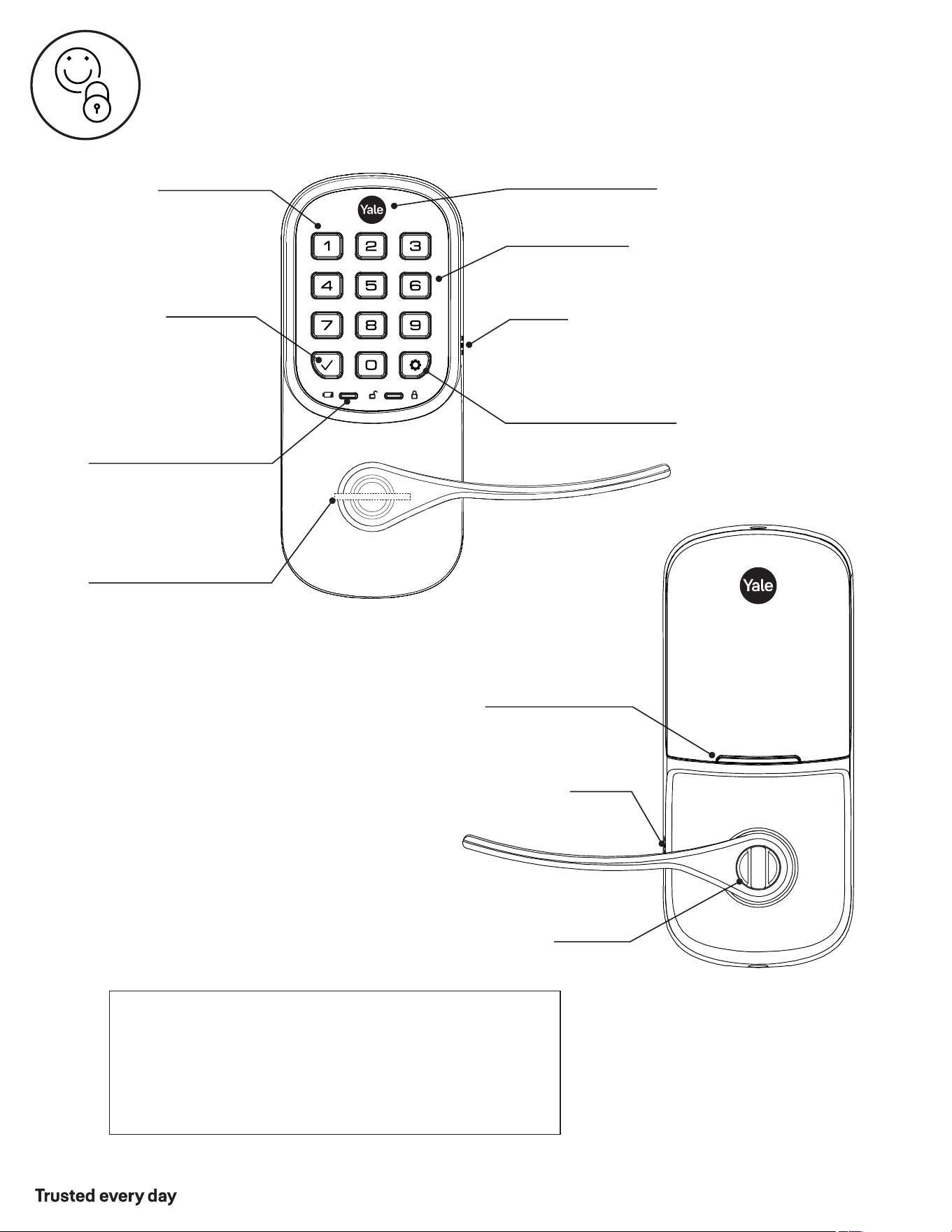
Using Your Lock
Keypad
Speaker
Low Battery Indicator
(flashes red)
Battery Back-up*
Hold a 9V battery to the
terminals in case of dead
lock batteries and no key
Press any key
to wake keypad
Press to enter
or unlock
Mechanical Key (YRL216)
Back-up entry method
All Code Lockout
(keypad flashes)
Enter Master Entry Code
and press to access
Settings Menu
or Key-Free Cylinder
(YRL236)
Inside Lock
Thumbturn
Inside Indicator Light
Speaker
P/N YRL-PB-MNL-0017 Rev C
Part of ASSA ABLOY
21
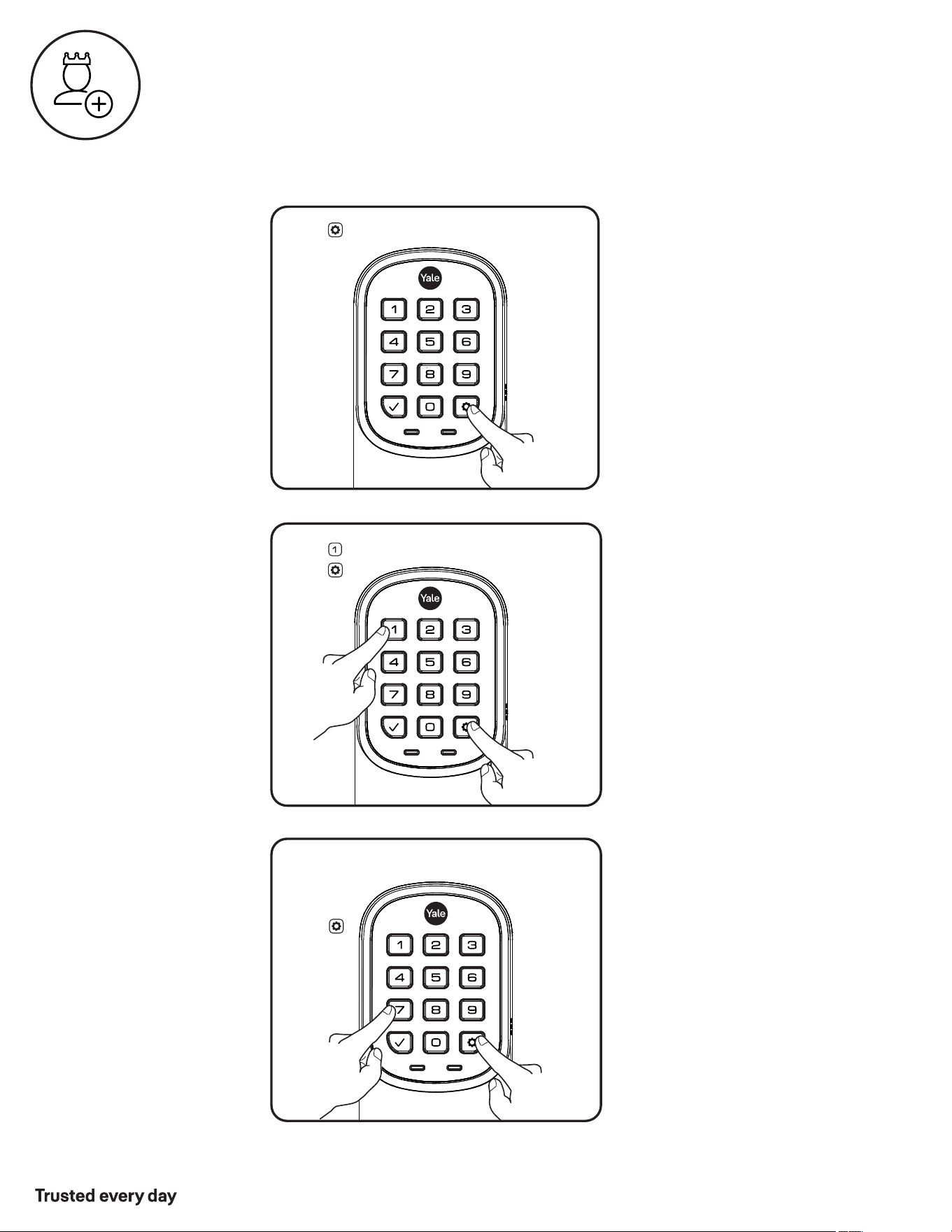
Press
Press
Enter 4-8
digit Master
Entry Code
Creating a Master Entry Code must be performed upon installation or after
resetting the lock to factory default. Programming and use of lock is not
possible until this step has been successfully completed.
Press
Press
Creating Master Entry Code
The Master Entry Code is used to change lock settings.
A security best practice is to set your Master Entry Code with 6 or more digits
and create a separate code that is used daily to lock and unlock the door.
P/N YRL-PB-MNL-0017 Rev C
Part of ASSA ABLOY
22
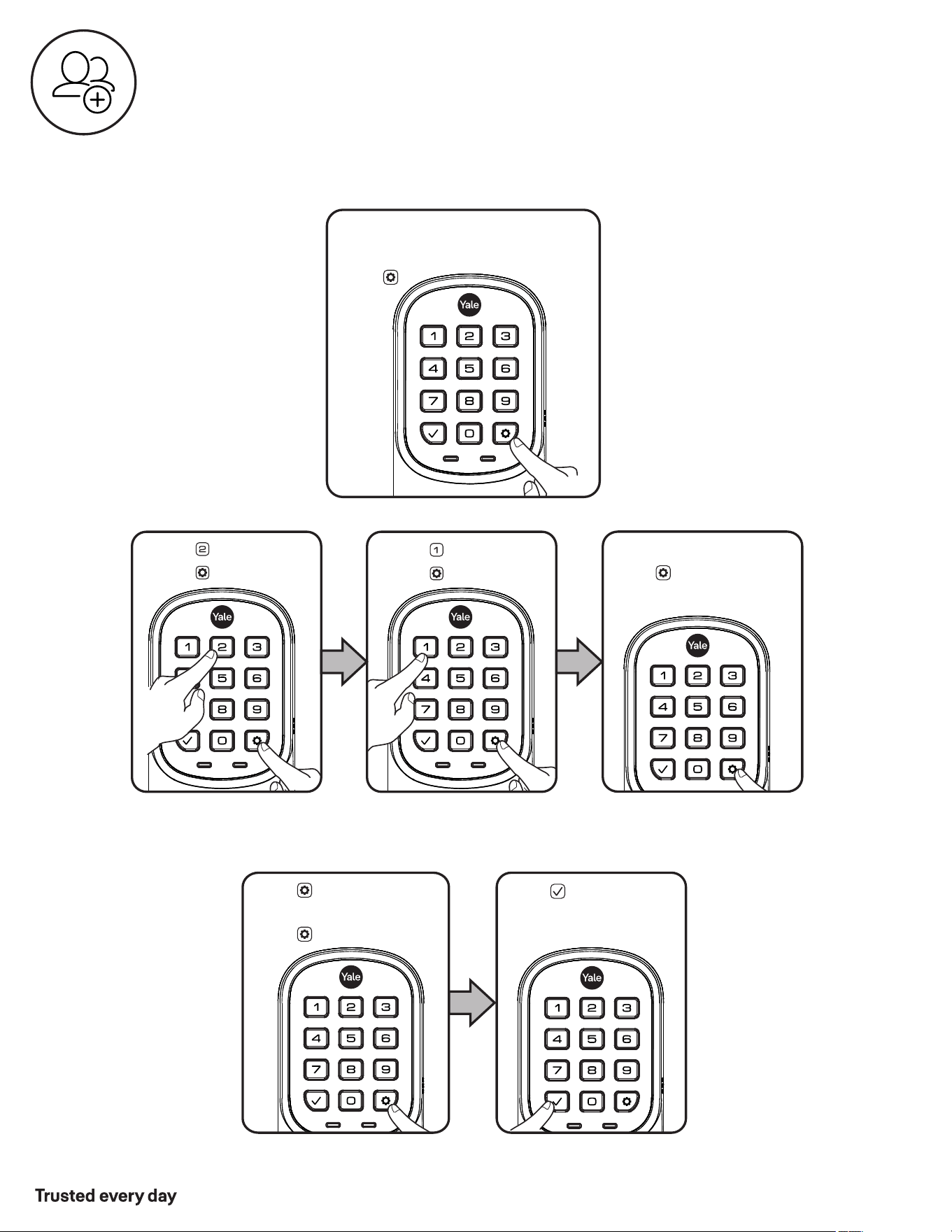
Press
Press
Press
Press
(code flashes)
Press
Enter Master
Entry Code
Press
Enter 4-8 digit Entry Code
Press
Adding more Entry Codes:
To end programming:
Enter 4-8 digit Entry Code
Press
Press
Creating Entry Codes
Master Entry Code must be created first.
*Max Entry Codes = 250 with Smart Module; 25 without.
P/N YRL-PB-MNL-0017 Rev C
Part of ASSA ABLOY
23
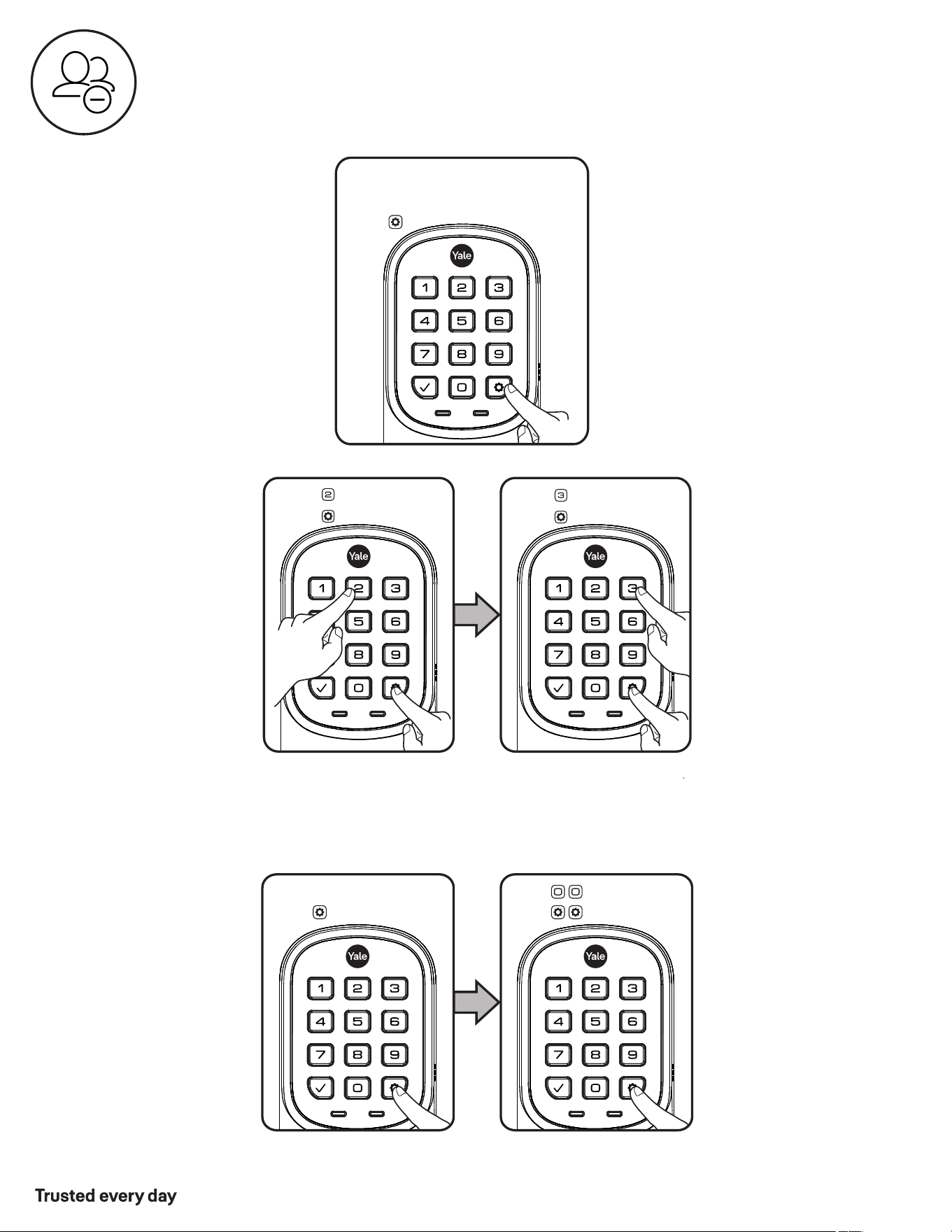
Enter Master
Entry Code
Press
Press
Enter 4-8 digit Entry Code
Press
Press
Press
Enter
Press
Press
To delete all Entry Codes
(Does not delete
Master Entry Code):
To delete one Entry Code,
you must enter the Entry
Code you wish to delete.
Deleting one Entry Code:
Deleting Entry Codes
P/N YRL-PB-MNL-0017 Rev C
Part of ASSA ABLOY
24
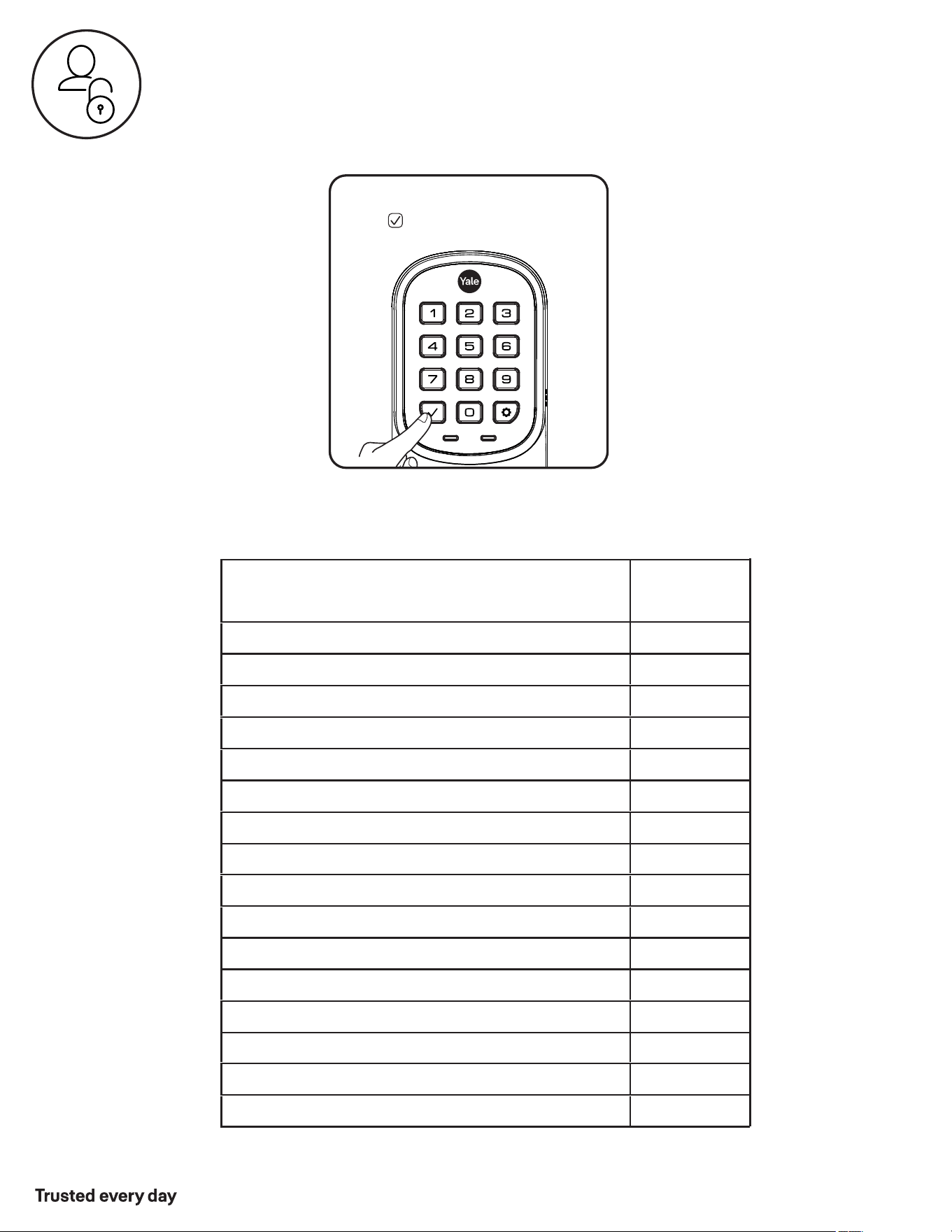
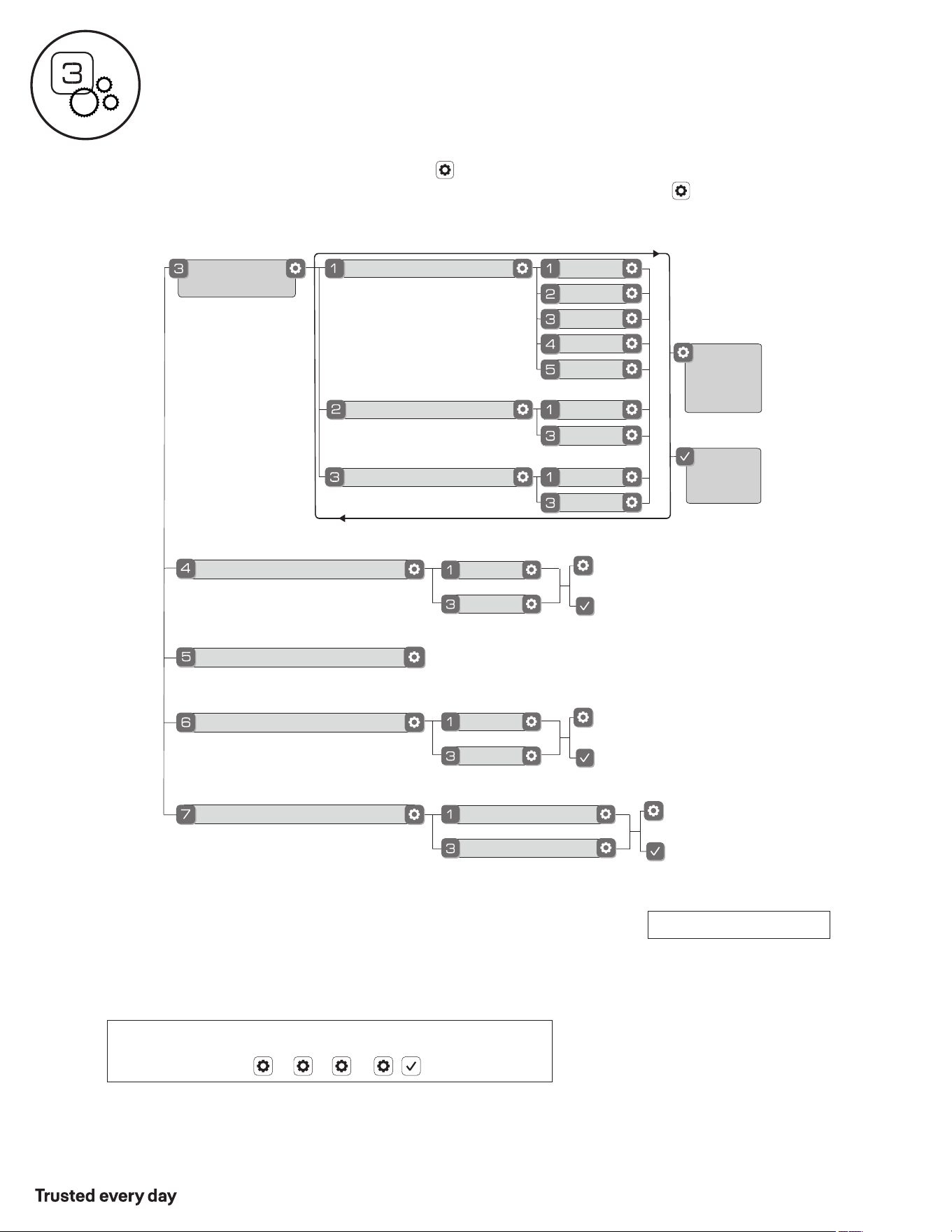
Enter Entry Code
Press
Duplicate if necessary
User Name:
Entry Code
Code Chart
Homeowner
Babysitter
Unlocking Door with Entry Codes
Master:
Entry Code Management
P/N YRL-PB-MNL-0017 Rev C
Part of ASSA ABLOY
25
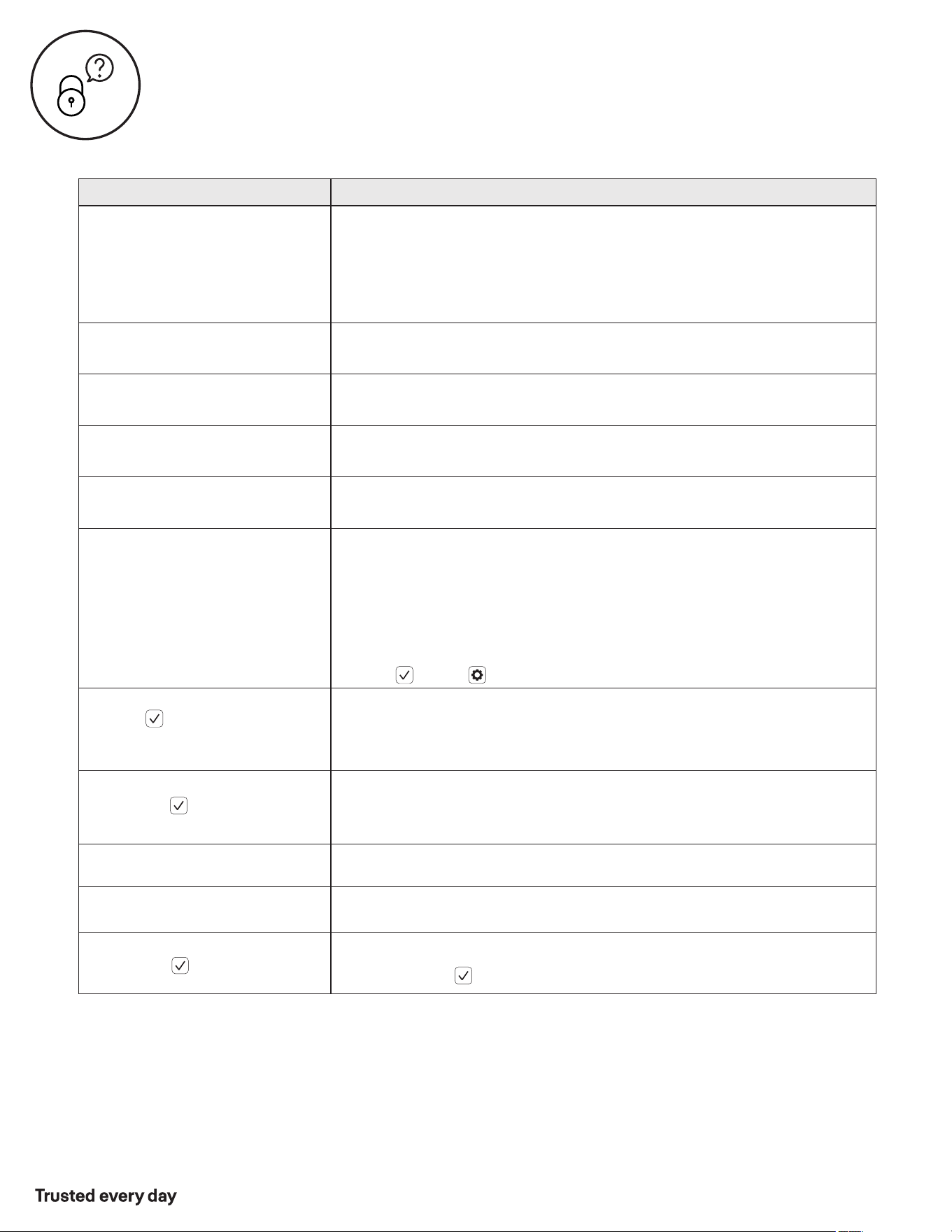
Join the Network
Enable
Disable
Exit the Network
Audio
All Code Lockout
**Network Module Setting
Advanced
Lock Settings
Auto Re-lock
Disable
30 sec
Inside Indicator Light
One Touch Locking
Enable
Disable
Enable
60 sec
3 min
2 min
Disable
1. Press any key to wake lock.
2. Enter Master Entry Code* followed by icon.
3. Enter digit corresponding to the function to be performed followed by the icon.
Exit
Settings
Menu
Remain
in
Settings
Menu
or
or
or
Enable
Disable
or
For quiet areas, select Disable (3)
N/A
Customizing Lock Using Settings Menu
*The Master Entry Code must be created prior to any other programming of the lock.
**Network Module Setting function appears only with Yale Smart module installed.
Here is an example of how to set Auto Lock to 30 seconds:
Master Entry Code , 3 , 1 , 2 ,
Default settings in bold.
26
P/N YRL-PB-MNL-0017 Rev C
Part of ASSA ABLOY
Troubleshooting
Symptom
Suggested Action
Lock does not respond –
door is open and accessible.
•
•
•
•
•
•
Lock chimes indicating code
acceptance, but door will not open.
•
•
Lock operates to allow access, but
will not automatically re-lock.
•
•
•
Entry Codes cannot be added.
•
•
•
•
•
Upon entering an Entry Code and
pressing key, the lock gives a
series of beeps, flashes red 7 times
and does not unlock.
•
Lock operates,
but makes no sound.
•
•
* When batteries are replaced, Smart Module locks have a real time clock that will be set through the User Interface.
It is recommended to verify correct date and time; particularly those locks operating under Daylight Savings Time.
Lock does not respond –
door is locked and inaccessible.
Lock is on for a while then shows
no reaction. Lights dim.
•
Apply a 9V battery to terminals below the keypad for backup power option.
Keypad becomes active when the Yale logo is pressed.
Verify contact with the logo.
If keypad numbers are visible, check they respond when pressed.
Check batteries are installed and oriented correctly (polarity) in battery case.
Replace batteries* if batteries are dead.
Check keypad cable is fully connected and not pinched.
Batteries may not have enough power. Replace batteries*.
•
Batteries do not have enough power. Replace batteries*.
Check for any foreign objects between door and frame.
Check that the cable is firmly connected to inside lock.
Check that Auto Re-lock is enabled.
Disable Auto Re-lock to lock the door (manually).
If low battery indicator is lit, change batteries*.
Entry Codes must consist of 4 to 8 digits.
The same Entry Code cannot be used for multiple users.
Entry Codes are set by the Master Entry Code, which is set first.
There is a max number of Entry Codes. Contact the Master user.
Entry Codes must be entered within 5 seconds (while keypad is active) or
process will have to be restarted.
Check or gear cannot be part of the Entry Code.
All Code Lockout is enabled. Only the Master Entry Code can change All Code
Lockout. Contact the Master user.
•
Check that All Code Lockout is disabled (see Feature #6).
Only the Master Entry Code can change All Code Lockout.
Contact the Master user.
Check that Audio is enabled (see Feature #4).
Only the Master Entry Code can change Audio. Contact the Master user.
This is the alert to replace the batteries. Replace all four (4) batteries* with
new AA Alkaline batteries.
Upon entering an Entry Code and
pressing the key, lock gives a
series of beeps.
Upon entering an Entry Code and
pressing the key, lock gives a
series of beeps and flashes 3 times.
•
The digits entered were incorrect or incomplete. Re-enter the correct code
followed by the key.
•
Verify entered code is a valid, previously programmed, 4 to 8 digit code.
Yale logo flashes RED

27
P/N YRL-PB-MNL-0017 Rev C
Part of ASSA ABLOY
24/7 Product Support : 1-855-213-5841 • US.YaleHome.com
FCC:
Class B Equipment
This equipment has been tested and found to comply with the limits for a Class B digital device, pursuant to Part 15 of the FCC
Rules. These limits are designed to provide reasonable protection against harmful interference in a residential installation. This
equipment generates, uses, and can radiate radio frequency energy and, if not installed and used in accordance with the
instructions, may cause harmful interference to radio communications. However, there is no guarantee that interference will not
occur in a particular installation. If this equipment does cause harmful Interference to radio or television reception, which can be
determined by turning the equipment off and on, the user is encouraged to try to correct the interference by one or more of the
following measures:
Ÿ Reorient or relocate the receiving antenna.
Ÿ Increase the separation between the equipment and receiver.
Ÿ Connect the equipment into an outlet on a circuit different from that to which the receiver is connected.
Ÿ Consult the dealer or an experienced radio/TV technician for help.
Warning: Changes or modifications to this device, not expressly approved by Yale Home could void the user's authority to operate
the equipment.
Industry Canada:
This Class A digital apparatus meets all requirements of the Canadian Interference Causing Equipment Regulations.
Cet appareillage numérique de la classe A répond à toutes les exigences de l'interférence canadienne causant des règlements
d'équipement.
Yale® and Assure Lever® are registered trademarks of Yale Home. Other products' brand names may be trademarks or
registered trademarks of their respective owners and are mentioned for reference purposes only. © Copyright 2021.
All rights reserved. Reproduction in whole or in part without the express written permission of Yale Home is prohibited.
Yale Home
Yale® Z-Wave® Plus Smart Module
Installation Guide
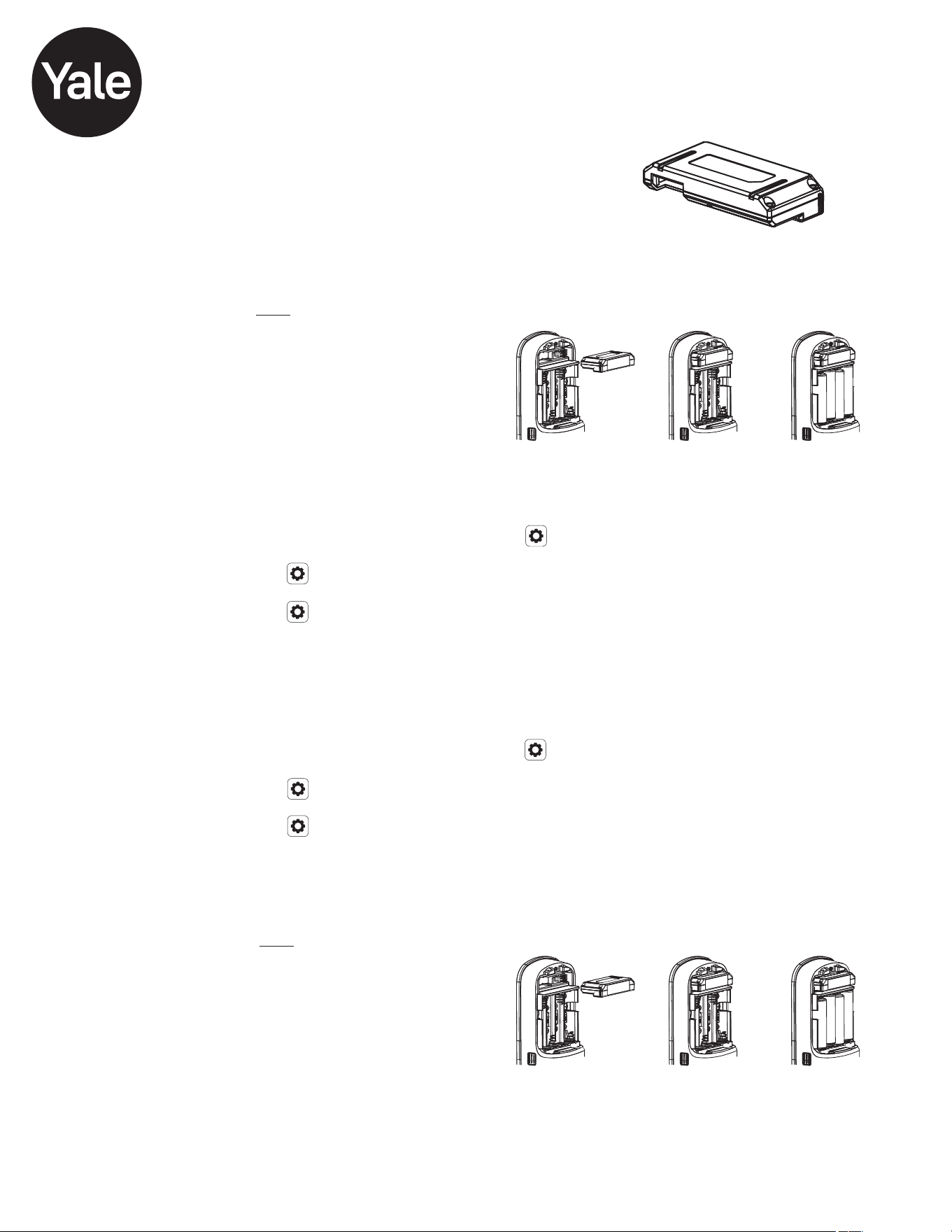
Adding a Yale Z-Wave Plus Smart Module to your Assure Lock & Z-Wave System
1. On your lock keypad, enter your master entry code followed by the icon
2. Press the 7 key followed by the icon
3. Press the 3 key followed by the icon
4. Open the Z-Wave system's smart home or alarm app and follow the instructions for
removing a device
5. Remove the Yale Smart Module from the slot above the battery compartment
IMPORTANT: The batteries must be removed before removing the Yale Smart Module:
• Remove battery cover
• Remove batteries
• Insert or remove Yale Smart Module
• Reinstall batteries
• Reinstall battery cover
6. If you're adding a new Yale Smart Module, follow the instructions included with it
Removing a Yale Z-Wave Plus Smart Module from your Assure Lock & Z-Wave System
1. Install the Yale Smart Module into the slot above the battery compartment
IMPORTANT: The batteries must be removed before removing the Yale Smart Module:
• Remove battery cover
• Remove batteries
• Insert or remove Yale Smart Module
• Reinstall batteries
• Reinstall battery cover
2. Open the Z-Wave system's smart home or alarm app on your smartphone or tablet
3. Follow the in-app instructions for adding a new device
4. On your lock keypad, enter your master entry code followed by the icon
5. Press the 7 key followed by the icon
6. Press the 1 key followed by the icon
Please use this procedure only when network primary controller is
missing or otherwise inoperable.
P/N AYR202-ZW-INSTAL-FUL Rev F
Trusted every day
Part of ASSA ABLOY

P/N AYR202-ZW-INSTAL-FUL Rev F
Trusted every day
Part of ASSA ABLOY
WARNING: Changes or modifications to this device, not expressly approved by
Yale Home could void the user's authority to operate the equipment.
FCC:
Contain FCC ID: U4A-YRHCPZW0FM
Model: YRMZW2-US
This equipment has been tested and found to comply with the
limits for a Class B digital device, pursuant to Part 15 of the FCC
Rules. These limits are designed to provide reasonable protection
against harmful interference in a residential installation. This
equipment generates, uses, and can radiate radio frequency
energy and, if not installed and used in accordance with the
instructions, may cause harmful interference to radio
communications. However, there is no guarantee that
interference will not occur in a particular installation. If this
equipment does cause harmful Interference to radio or television
reception, which can be determined by turning the equipment off
and on, the user is encouraged to try to correct the interference
by one or more of the following measures:
Ÿ Reorient or relocate the receiving antenna.
Ÿ Increase the separation between the equipment and
receiver.
Ÿ Connect the equipment into an outlet on a circuit different
from that to which the receiver is connected.
Ÿ Consult the dealer or an experienced radio/TV technician for
help.
THIS DEVICE COMPLIES WITH PART 15 OF THE FCC RULES.
OPERATION IS SUBJECT TO THE FOLLOWING TWO
CONDITIONS.
(1) THIS DEVICE MAY NOT CAUSE HARMFUL INTERFERENCE,
AND (2) THIS DEVICE MUST ACCEPT ANY INTERFERENCE
RECEIVED, INCLUDING INTERFERENCE THAT MAY CAUSE
UNDESIRED OPERATION.
Industry Canada:
Contain IC: 6982A-YRHCPZW0FM
Model: YRMZW2-US
Section 7.1.2 of RSS-GEN Under Industry Canada regulations,
this radio transmitter may only operate using an antenna of a
type and maximum (or lesser) gain approved for the transmitter
by Industry Canada. To reduce potential radio interference to
other users, the antenna type and its gain should be so chosen
that the equivalent isotropically radiated power (e.i.r.p.) is not
more than that necessary for successful communication.
En vertu des règlements d'Industrie Canada, cet émetteur radio
ne peut fonctionner avec une antenne d'un type et un maximum
(ou moins) approuvés pour gagner de l'émetteur par Industrie
Canada. Pour réduire le risque d'interférence aux autres
utilisateurs, le type d'antenne et son gain doivent être choisies
de façon que la puissance isotrope rayonnée équivalente (PIRE)
ne dépasse pas ce qui est nécessaire pour une communication
réussie.
Section 7.1.3 of RSS-GEN This Device complies with Industry
Canada License-exempt RSS standard(s). Operation is subject
to the following two conditions: 1) this device may not cause
interference, and 2) this device must accept any interference,
including interference that may cause undesired operation of the
device.
Cet appareil est conforme avec Industrie Canada RSS standard
exemptes de licence(s). Son fonctionnement est soumis aux
deux conditions suivantes: 1) ce dispositif ne peut causer des
interférences, et 2) cet appareil doit accepter toute interférence,
y compris les interférences qui peuvent causer un mauvais
fonctionnement du dispositif.
This radio transmitter 6982A-YRHCPZW0FM has been approved
by Industry Canada to operate with the antenna types listed
below with the maximum permissible gain indicated. Antenna
types not included in this list, having a gain greater than the
maximum gain indicated for that type, are strictly prohibited for
use with this device.
Le présent émetteur radio 6982A-YRHCPZW0FM a été approuvé
par Industrie Canada pour fonctionner avec les types d'antenne
énumérés ci-dessous et ayant un gain admissible maximal. Les
types d'antenne non inclus dans cette liste, et dont le gain est
supérieur au gain maximal indiqué, sont strictement interdits
pour l'exploitation de l'émetteur.
CAN ICES-3B/NMB-3B
24/7 Tech Support : 1-855-492-0505 • www.US.YaleHome.com
Yale® is a registered trademark of Yale Home. Other products' brand names may be trademarks or registered trademarks
of their respective owners and are mentioned for reference purposes only. © Copyright 2020. All rights reserved.
Reproduction in whole or in part without the express written permission of Yale Home is prohibited.
This device is a security enabled Z-Wave Plus product that is able to use encrypted Z-Wave Plus messages to
communicate to other security enabled Z-Wave Plus products. This device must be used in conjunction with a
Security Enabled Z-Wave Controller in order to fully utilize all implemented functions. This product can be
operated in any Z-Wave network with other Z-Wave certified devices from other manufacturers. All non-battery
operated nodes within the network will act as repeaters regardless of vendor to increase reliability of the network.
Yale Home
Yale® ZigBee® 3.0 Smart Module
Installation Guide
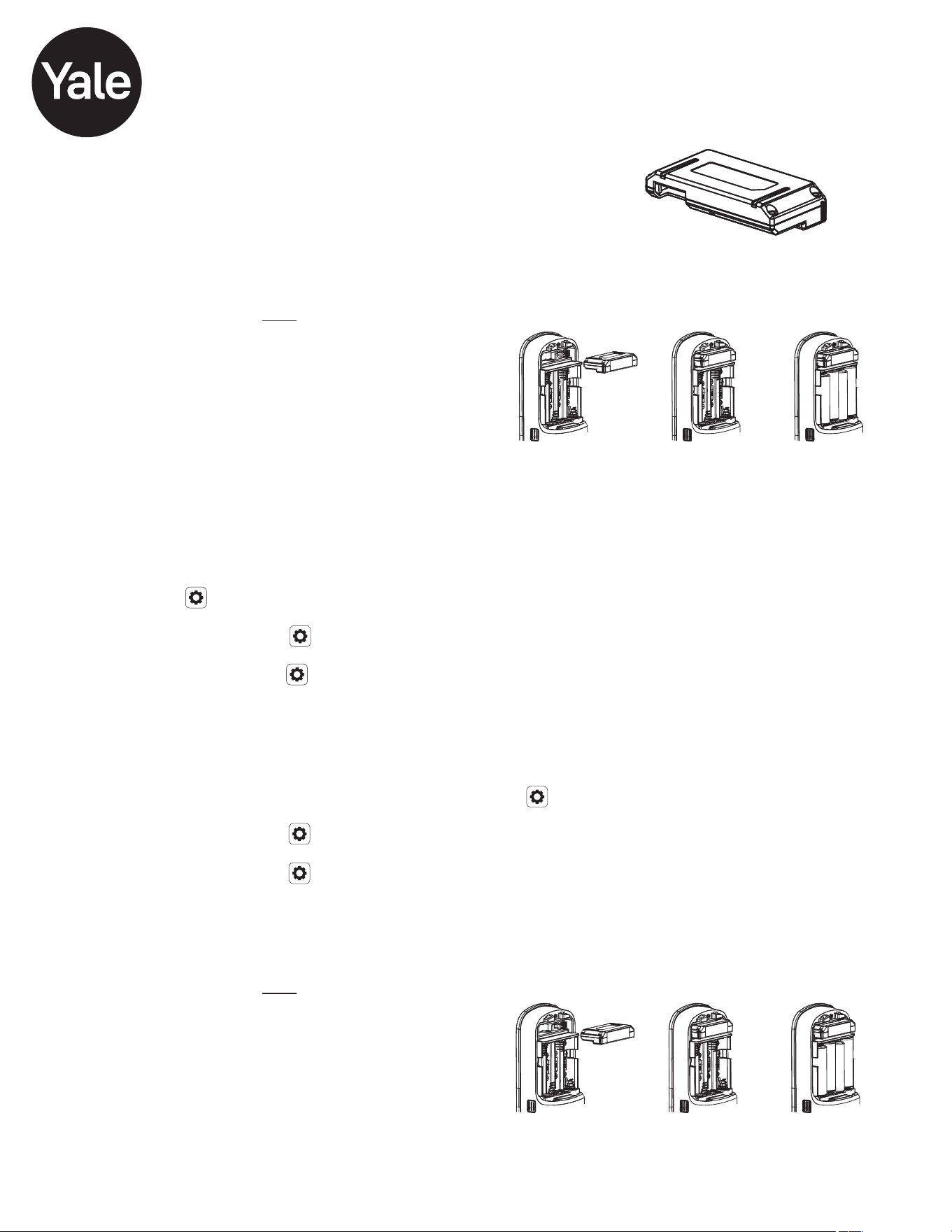
Adding a Yale ZigBee Smart Module to your Assure Lock & ZigBee System
1. On your lock keypad, enter your master entry code followed by the icon
2. Press the 7 key followed by the icon
3. Press the 3 key followed by the icon
4. Open the ZigBee system's smart home or alarm app and follow the instructions for
removing a device
5. Remove the Yale Smart Module from the slot above the battery compartment
IMPORTANT: The batteries must be removed before removing the Yale Smart Module:
• Remove battery cover
• Remove batteries
• Insert or remove Yale Smart Module
• Reinstall batteries
• Reinstall battery cover
6. If you're adding a new Yale Smart Module, follow the instructions included with it
1. Install the Yale Smart Module into the slot above the battery compartment
IMPORTANT: The batteries must be removed before removing the Yale Smart Module:
• Remove battery cover
• Remove batteries
• Insert or remove Yale Smart Module
• Reinstall batteries
• Reinstall battery cover
2. Open the ZigBee system's smart home or alarm app on your smartphone or tablet
3. Follow the in-app instructions for adding a new device
4. Scan the Install Code (at right) when instructed by the app
5. On your lock keypad, enter your master entry code
followed by the icon
6. Press the 7 key followed by the icon
7. Press the 1 key followed by the icon
Removing a Yale ZigBee Smart Module from your Assure Lock & ZigBee System
INSTALL CODE
Please use this procedure only when network primary controller is
missing or otherwise inoperable.
Trusted every day
Part of ASSA ABLOY
P/N AYR202-ZB-INSTAL-FUL Rev E

Trusted every day
Part of ASSA ABLOY
P/N AYR202-ZB-INSTAL-FUL Rev E
FCC:
FCC ID: U4A-YRHCPZB0FM
Model: YRMZB2
This equipment has been tested and found to comply with the
limits for a Class B digital device, pursuant to Part 15 of the FCC
Rules. These limits are designed to provide reasonable protection
against harmful interference in a residential installation. This
equipment generates, uses, and can radiate radio frequency
energy and, if not installed and used in accordance with the
instructions, may cause harmful interference to radio
communications. However, there is no guarantee that
interference will not occur in a particular installation. If this
equipment does cause harmful Interference to radio or television
reception, which can be determined by turning the equipment off
and on, the user is encouraged to try to correct the interference
by one or more of the following measures:
Ÿ Reorient or relocate the receiving antenna.
Ÿ Increase the separation between the equipment and
receiver.
Ÿ Connect the equipment into an outlet on a circuit different
from that to which the receiver is connected.
Ÿ Consult the dealer or an experienced radio/TV technician for
help.
This equipment complies with FCC radiation exposure limits set
forth for an uncontrolled environment. This equipment should be
installed and operated with minimum distance 20cm between
the radiator and your body. This transmitter must not be co-
located or operating in conjunction with any other antenna or
transmitter.
This device complies with Part 15 of the FCC rules. Operation is
subject to the following two conditions: (1) This device may not
cause harmful interference, and (2) this device must accept any
interference received, including interference that may cause
undesired operation. Any changes or modifications not expressly
approved by manufacturer could void the user’s authority to
operate the equipment.
IMPORTANT! Any changes or modifications not expressly
approved by the party responsible for compliance could void the
user’s authority to operate this equipment.
Industry Canada:
IC: 6982A-YRHCPZB0FM
Model: YRMZB2
This Device complies with Industry Canada License-exempt RSS
standard(s). Operation is subject to the following two conditions:
1) this device may not cause interference, and 2) this device
must accept any interference, including interference that may
cause undesired operation of the device.
Le présent appareil est conforme aux CNR d'Industrie Canada
applicables aux appareils radio exempts de licence.
L'exploitation est autorisée aux deux conditions suivantes: (1)
l'appareil ne doit pas produire de brouillage, et (2) l'utilisateur de
l'appareil doit accepter tout brouillage radioélectrique subi,
meme si le brouillage est susceptible d'en compromettre le
fonctionnement.
Important Note:
Radiation Exposure Statement:
This equipment complies with IC radiation exposure limits set
forth for an uncontrolled environment. This equipment should
be installed and operated with minimum distance 20cm
between the radiator and your body.
Note Importante: (Pour l’utilisation de dispositifs mobiles)
Declaration d’exposition aus radiations:
Cet équipement est conforme aux limites d´exposition aux
rayonnements IC établies pour un environnement non contrôlé.
Cet équipment doit être installé et utilisé avec un mimimum de
20 cm de distance entre la source de rayonnement et votre
corps.
IMPORTANT! Any changes or modifications not expressly
approved by the party responsible for compliance could void the
user’s authority to operate this equipment.
IMPORTANT! Tous les changements ou modifications pas
expressément approuvés par la partie responsable de la
conformité ont pu vider l’autorité de l’utilisateur pour actioner cet
équipment.
CAN ICES-3B/NMB-3B
This device is a security enabled Zigbee product that is able to use encrypted Zigbee messages to communicate
to other security enabled Zigbee products. This device must be used in conjunction with a Security Enabled
Zigbee Controller in order to fully utilize all implemented functions. This product can be operated in any Zigbee
network with other Zigbee certified devices from other manufacturers. All non-battery operated nodes within the
network will act as repeaters regardless of vendor to increase reliability of the network.
WARNING: Changes or modifications to this device, not expressly approved by
Yale Home could void the user's authority to operate the equipment.
24/7 Tech Support : 1-855-492-0505 • www.US.YaleHome.com
Yale® is a registered trademark of Yale Home. Other products' brand names may be trademarks or registered trademarks
of their respective owners and are mentioned for reference purposes only. © Copyright 2020. All rights reserved.
Reproduction in whole or in part without the express written permission of Yale Home is prohibited.
Yale Home