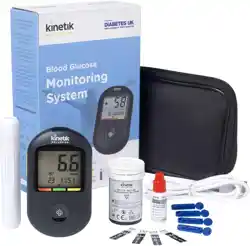
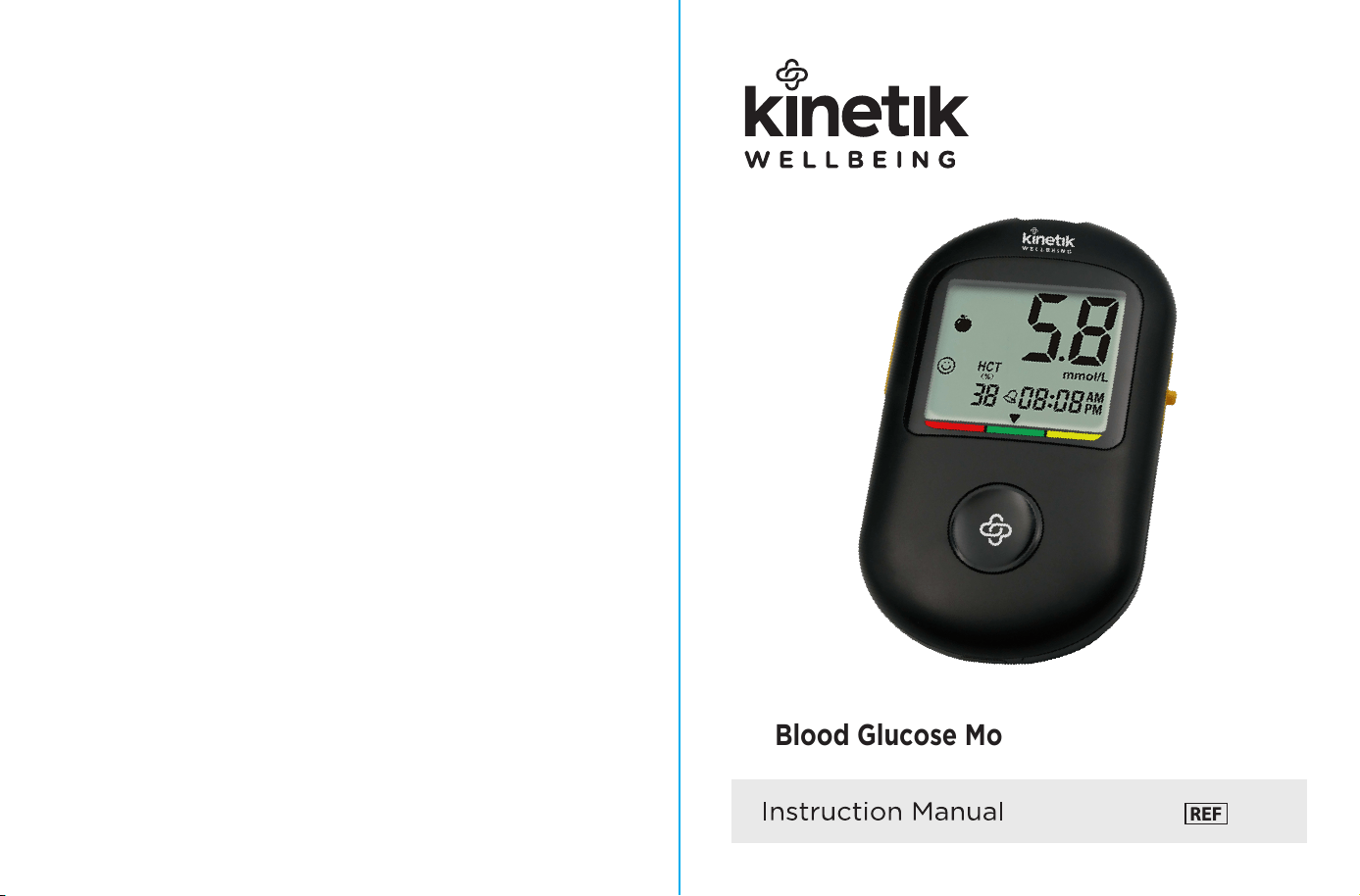
Blood Glucose Monitoring System
BG-710
04
05
06
06
07
08
09
09
10
10
12
13
14
15
15
18
20
23
25
26
28
28
29
31
33
33
34
36
38
39
40
41
41
42
44
46
47
Support
Introduction
1
*
During normal testing, any blood glucose meter or lancing device may
come in contact with blood. All parts of the kit are considered
biohazardous
and can potentially transmit infectious diseases from blood-borne
pathogens, even after you have performed cleaning and disinfection.
The meter and lancing device should never be used by more than one
person. Do not share the meter and lancing device with anyone, including
family members, due to the risk of infection from blood-borne pathogens.
Cleaning and disinfecting the meter and lancing device destroys most, but
not necessarily all, blood-borne pathogens.
If the meter is being operated by a second person who is providing testing
assistance to the user, the meter and lancing device should be cleaned
and disinfected prior to use by the second person.
Disinfect the meter and lancing device before allowing anyone else to
to handles them. Do not allow anyone else to test with the meter or lancing
device.
It is important to keep the meter and lancing device clean and disinfected.
Clean and disinfect the lancing device once per week to remove visible dirt or
other material for safe handling and/or prior to disinfecting.
For instructions on how to clean and disinfect the meter and lancing device,
see Chapter Maintenance.
Wash hands thoroughly before and after handling the meter, lancing device,
or test strips.
Choking hazard. Small parts included. Keep away from children.
Strong electromagnetic fields may interfere with the proper operation of the
meter. Do not use this meter close to sources of strong electromagnetic
radiation.
To avoid electrostatic discharge, do not use the meter in a very dry
environment, especially one in which synthetic materials are present.
Important Safety information
Warning
Peel off the insulation film from battery compartment before first use.
Venous whole blood and neonatal blood sample collection and preparation
should be obtained by healthcare professionals.
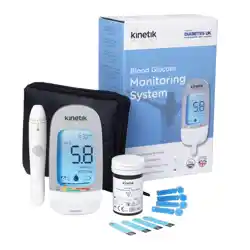
Thank you for purchasing the Kinetik Wellbeing BG-710 Blood Glucose Monitoring System.
Before you start testing, carefully read this Instruction Manual.
Intended Use
The Kinetik Wellbeing BS-602 Test Strips are used with the Kinetik
Wellbeing BG-710 Blood Glucose Meter to measure blood glucose
with fresh capillary whole blood for self-testing. The blood glucose
concentration of venous blood or neonatal blood is to be measured
by healthcare professionals. The fresh capillary whole blood should be
collected from your fingertip and neonatal blood collected from the
heel. The system is intended for in vitro diagnostic home-use or by
healthcare professionals in a clinical setting as an aid to monitor the
effectiveness of diabetes control. This system is not for use in the
diagnosis of diabetes mellitus.
Test Principle
The strip measures glucose by using amperometric technology
employing a glucose dehydrogenase reaction. When whole blood
or control solution is drawn into the tip of the test strip, glucose in
the sample reacts with chemicals and produces an electrical
current.
The meter measures electrical current and calculates amount of
glucose. The glucose result is displayed as a calculated plasma
value.
Impoant Health-Related information
• Patients undergoing oxygen therapy may receive inaccurate results.
• Some people with diabetes do not experience symptoms of low blood
sugar (hypoglycemia). Others, such as children or people who are
unconscious or have certain disabilities, may not be able to
communicate their symptoms to caregivers. For these reasons, do
not change any treatment without first talking to your doctor
• Run a control test when you open a new box of test strips or if you think
that your test result is incorrect. Running a control test lets you know
that the meter and test strips are working properly.
• DO NOT CHANGE YOUR TREMENT BASED ON A SINGLE RESU
TH DOES NOT MCH HOW YOU FEEL OR IF YOU BELIEVE TH
YOUR TEST RESU COULD BE INCORREC If your blood glucose
result doesn' t match how you feel and you have followed the instructions
in this manual, follow your doctor's instructions, or call your doctor.
• Children should be taught how to use the meter and any other medical
products appropriately.
• Being severely dehydrated or losing a lot of water may give you lse
(low) test results. If you think you're suering from dehydration, call
your doctor right away.
• If you have llowed all the instructions in this booklet and still have
symptoms that don't seem to match your test results - or if you have
questions - talk to your doctor.
, The system is designed for use with fresh caillary whole blood and or
venous blood and or neonatal blood.
• Inaccurate test results may be obtained at high altitude more than about
3048 meters above sea level.
• BS-602 blood glucose test strip: more than 70% of the hematocrit ratio
will affect the measurement results. Please contact your doctor to
determine your hematocrit ratio.
• Some substances may cause false results with enzymatic tests.
Limitations
The interference listed below have been tested and shown no apparent
influence on results at the normal or higher therapy levels.
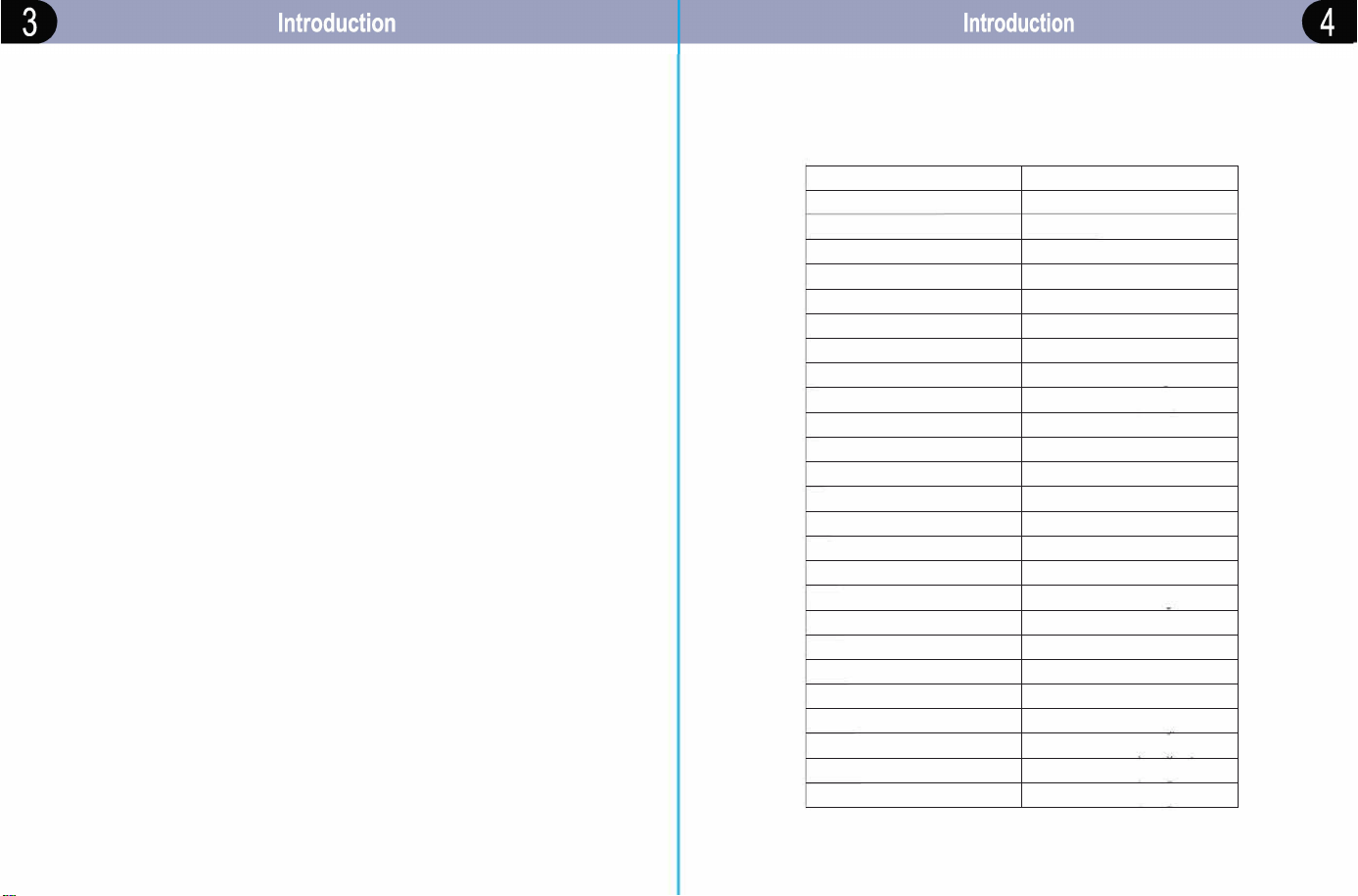
Substance
Concentration
Acetaminophen
1.11 mmol/L (20 mg/dl)
Bilirubin
2.22 mmol/L (40 mg/dl)
Creatinine
0.56 mmol/L (10 mg/dl)
Gentisic acid
1.25 mmol/l (22.5 mg/dl)
Haemoglobin
1111.11 mol/L(20000mg/dl)
Ibuprofen
2.78 mmol/L (50 mg/dl)
L-Dopa
0.03 mmol/L (0.5 mg/dl)
Methyl-DOPA
0.22 mmol/L (4 ma/dll
lbutamide
5.55 mmol/L (100 ma/dl)
Triglycerides
83.33 mmol/L (1500 mg/dl)
Xylose
2.78 mmol/L (50 mg/dl)
EDTA
11.11 mmol/L (200 mg/dl)
Substance
Concentration
Ascorbic acid
0.17 mmol/L (3 mg/dl)
Cholesterol
27.78 mmol/L (500 mg/dl)
Dopamine
1.1 mmol/L (20 mg/dl)
Glutathione
2.17 mmol/l (39 ma/dl)
Heparin
500 IU/dl
lcodextrin
60.8 mmol/L (1094.4 mg/dl)
Maltose
555.56 mmol/L (10000 mg/dl)
Salicylate
3.33 mmol/L (60 mg/dl)
lazamide
0.56 mmol/L (10 mn/dl1
Uric acid
1.33 mmol/L /24 mn/dl \
Pralidoxime Iodide
0.83 mmol/L /15 ma/dl\
Ga lactose
0.83 mmol/L (15 ma/dll
Other interfering substances in EN ISO 15197: 2015 Annex A are not
verified, it may also affect the test results.
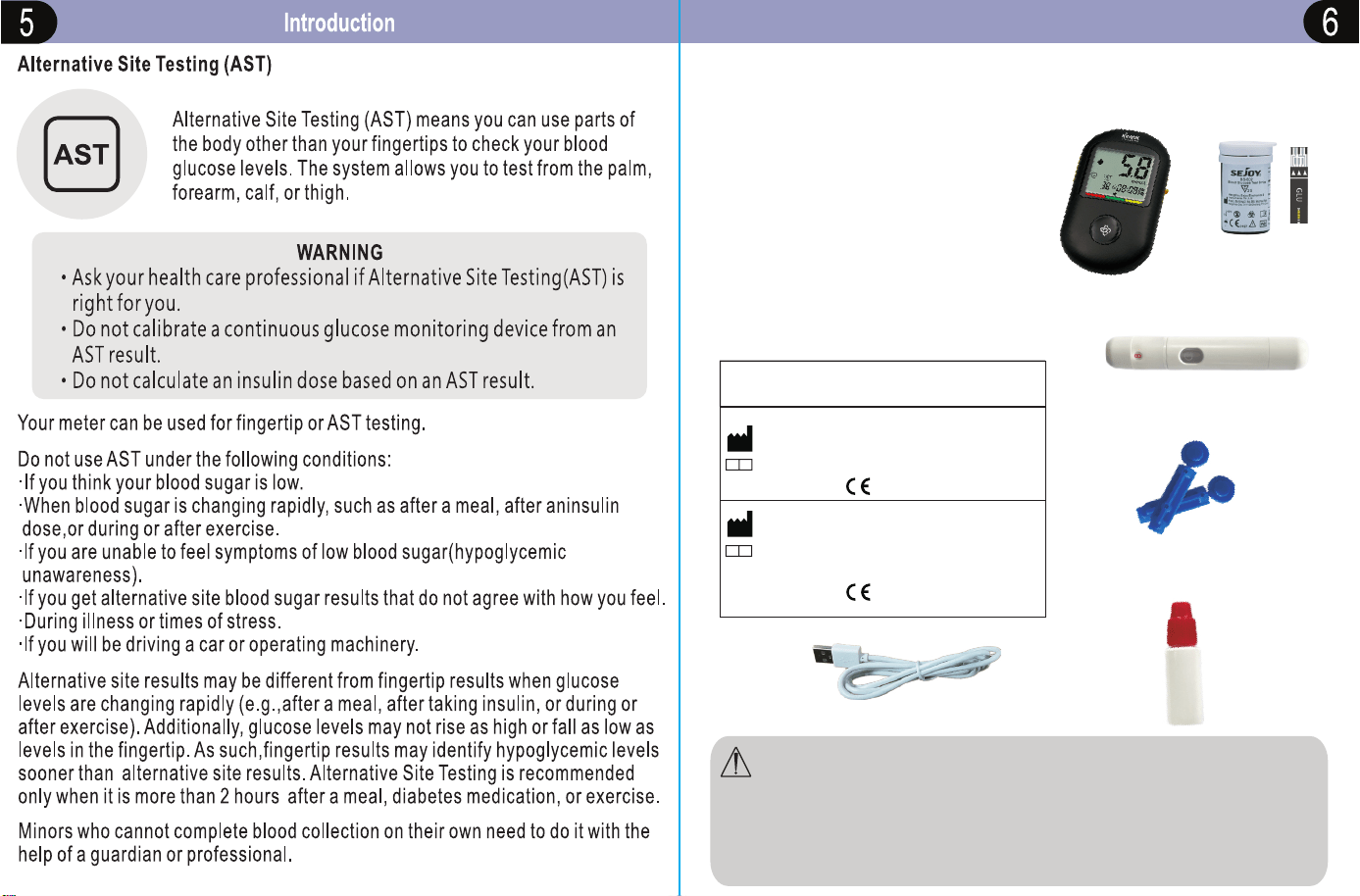
INCLUDED IN YOUR KIT
c
d
e
Manufacturer of Lancing Device and Sterile Lancet
EC
REP
Manufacturer of Lancing Device and Sterile LancetShandong Lianfa
Medical Plastic Products Co.. Ltd.No.1
Shuangshan Sanjian Road, 250200 , Zhangqiu City, Jinan, Shandong,
PEOPLE'SREPUBLIC OF CHINA
ShanghaiInternational Holding Corp. GmbH (Europ e)EC| REPEiffestrasse 80,
20537 Hamburg Germany
Beijing Ruicheng Medical Suplie s Co., Ltd.
No. 558 Zhangzikou, Yangsong Town, Huai rou District, 10400 Bejing, China
Lotus NL B.V.
EC REPKoningin Julinaplein 10, le Verd,2595AA, The Hague, Netherlands.
for sterile lancet
CE:for lancin g device;
for sterile lancet
CE:for lancing device;
EC
REP
WARNING: Keep the meter and testing supplies away from children.
Small items such as the battery cover, batteries, test strips,
lancets, protective covers of the lancets, and control solution vial
cap are choking hazards.
In-door glucose measurement is recommended.
f
a. Meter (batteries included)
b.
Test Strips
c.
Lancing Device
d.
Sterile Lancet
e.
Control Solution
f.
USB data cable
b
0123
0197
a
Getting to know your system
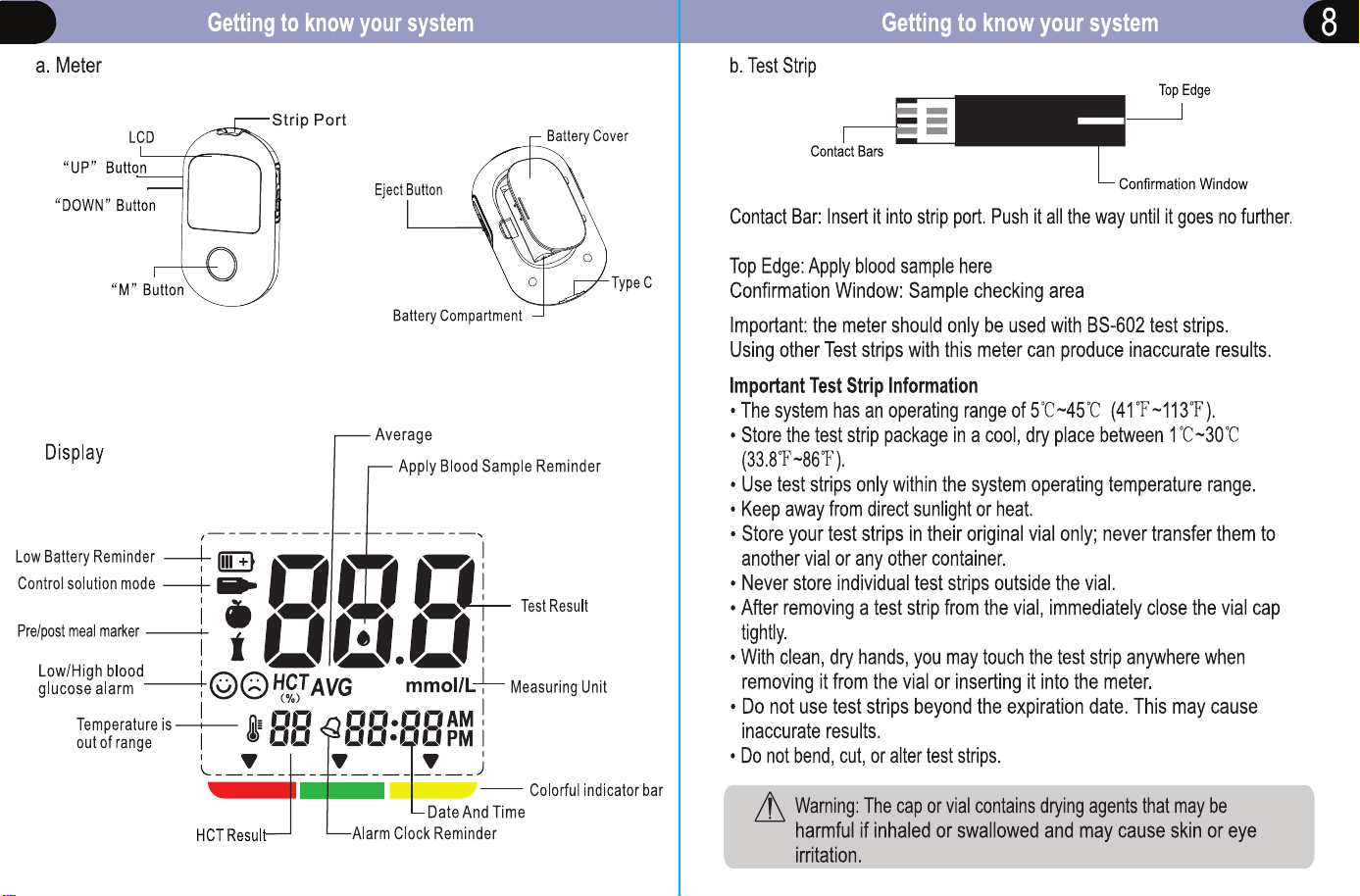
7
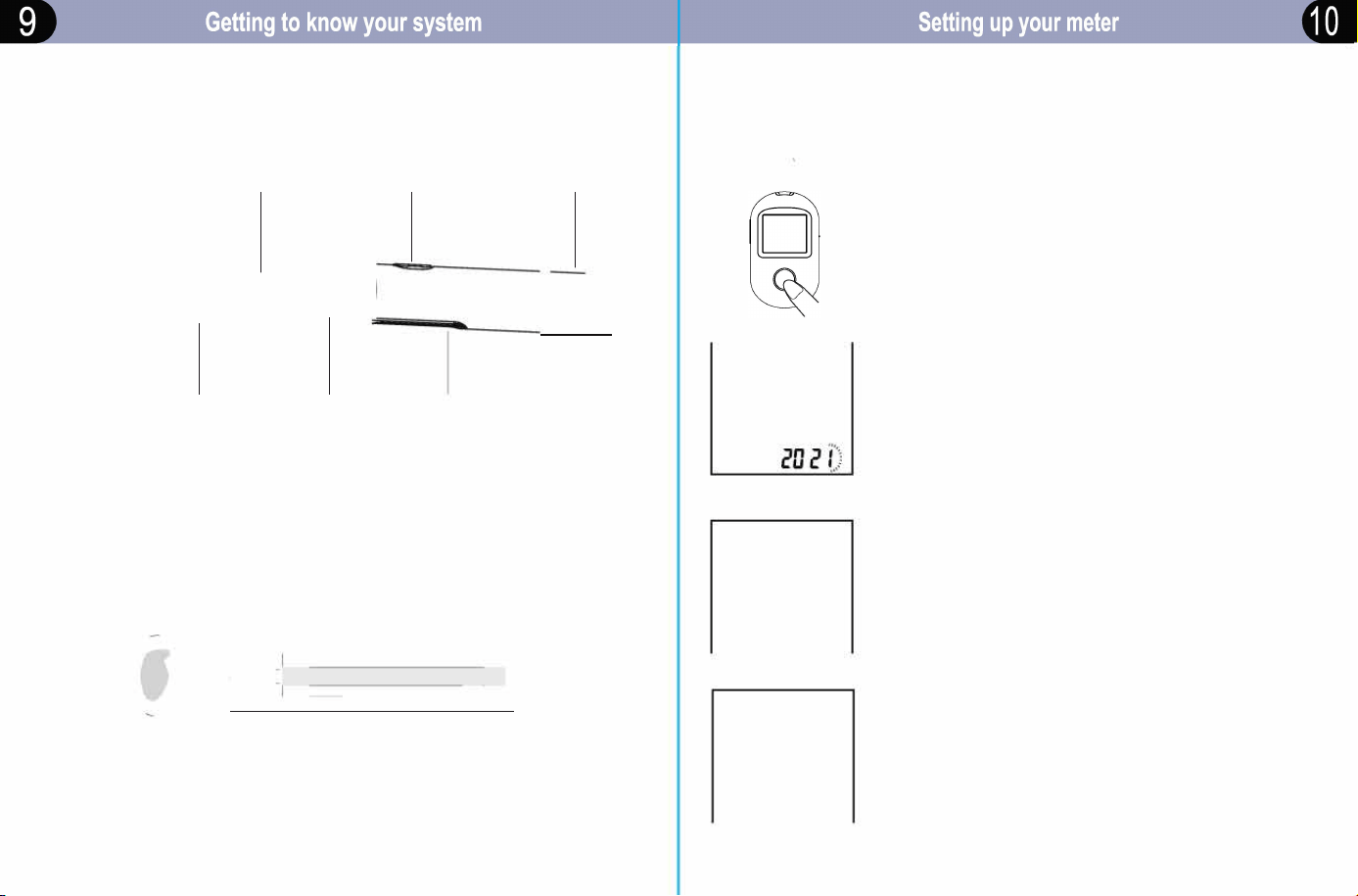
c. Lancing Device
Adi"''\"'
T
"ocet
c�]
d. Lancet
Lancing Device Cover
Lancet Carrier
Trigger Button
Lancet Ejector
/
�
�
•
C
a
p
\
)
�
.
�
z
-
�-
�
""""""
Sliding Barrel
) )
When using the meter for the first time, please set the parameters of the
meter. With the meter off, press and hold the side DOWN button to enter
setting mode.
Set the year
Press and release the side UP button or
side DOWN button to cycle forward or
backwards through the years.
�----�
Aer the year is confirmed, press the "M"
button to set.
T
he month figure will begin
to flash.
® Set the month
Press and release the side UP buon or side DOWN buon to
cycle a or bacards by one month until the correct
month appea. After the month is confirmed, press the "M"
button to set.
T
he day figure will begin to flash.
�--�-�
IQ�D I
® Set the day
Press and release the side UP button or side DOWN button to
cycle forward or backwards by one day until the correct day
appears. After the day is confirmed, press the "M" button to
set.
T
he hour figure will begin to flash.
�---��
IIJ-D (
Setting up your meter
OR
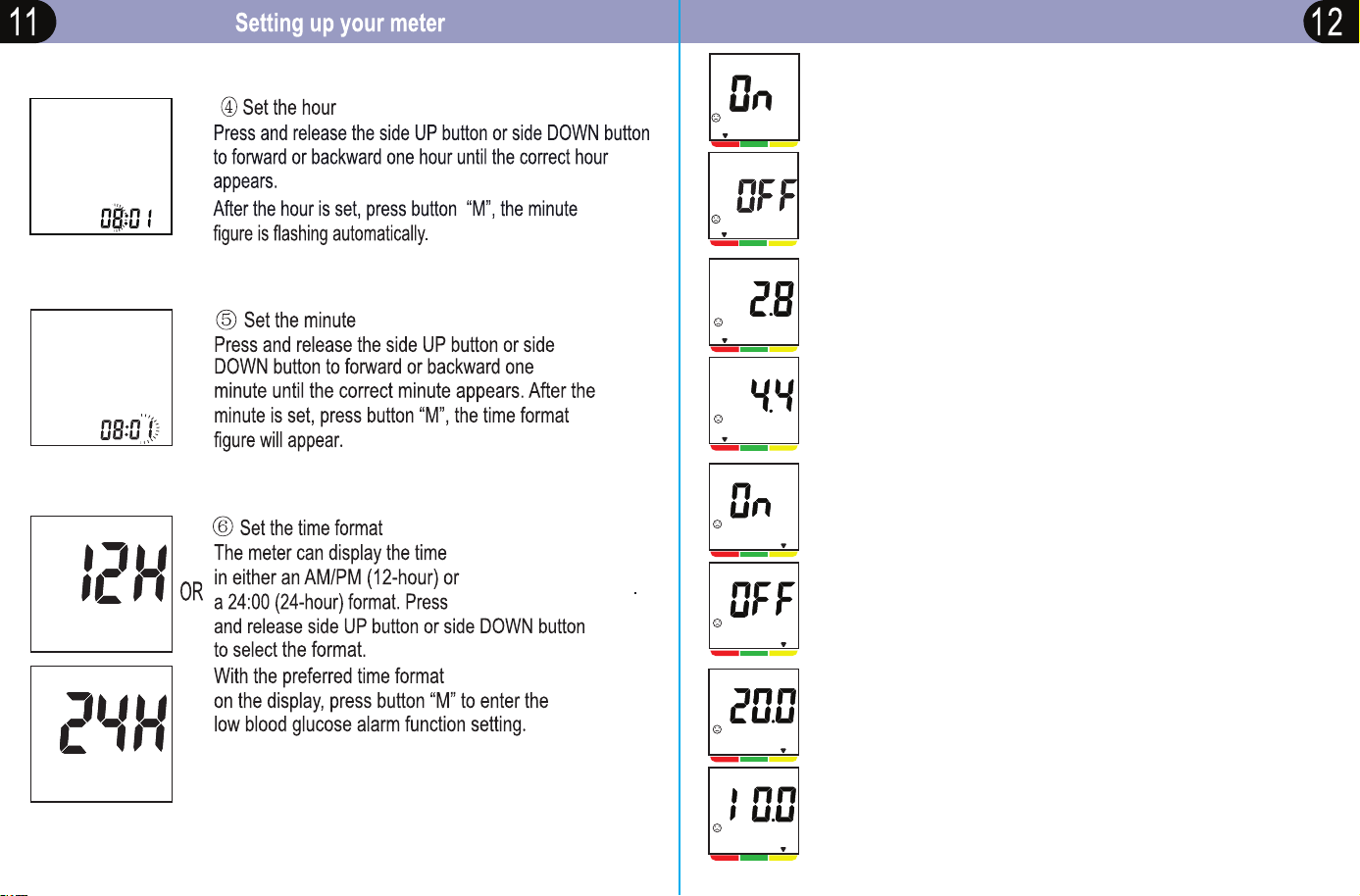
Set low blood glucose alarm threshold
Press and release the side UP button or side DOWN
button to select one value
. Press until the correct
value appears.Press "M" button to enter high blood
glucose alarm function setting.
⑧
OR
OR
OR
Set high blood glucose alarm function
Press and release the
button to select the high blood glucose alarm function,
if select
"On",
press
"M"
button to enter high blood
glucose alarm concentration value setting. If select
"OFF"
, press "M" button to go on to "Alarm clock"
function setting.
side UP button or side DOWN
⑨
⑦
Set low blood glucose alarm function
Press and release the side UP button or side DOWN
button to select the low blood glucose alarm function.
If select "On",press "M" button to enter low blood
glucose value setting. If select ”OFF”,press "M"
button to go on to high blood glucose alarm function
setting.
⑩
Set high blood glucose alarm threshold
Press and release the
button to select one value. Press until the correct
value appears. Press "M" button to enter "Alarm clock"
function setting.
side UP button or side DOWN
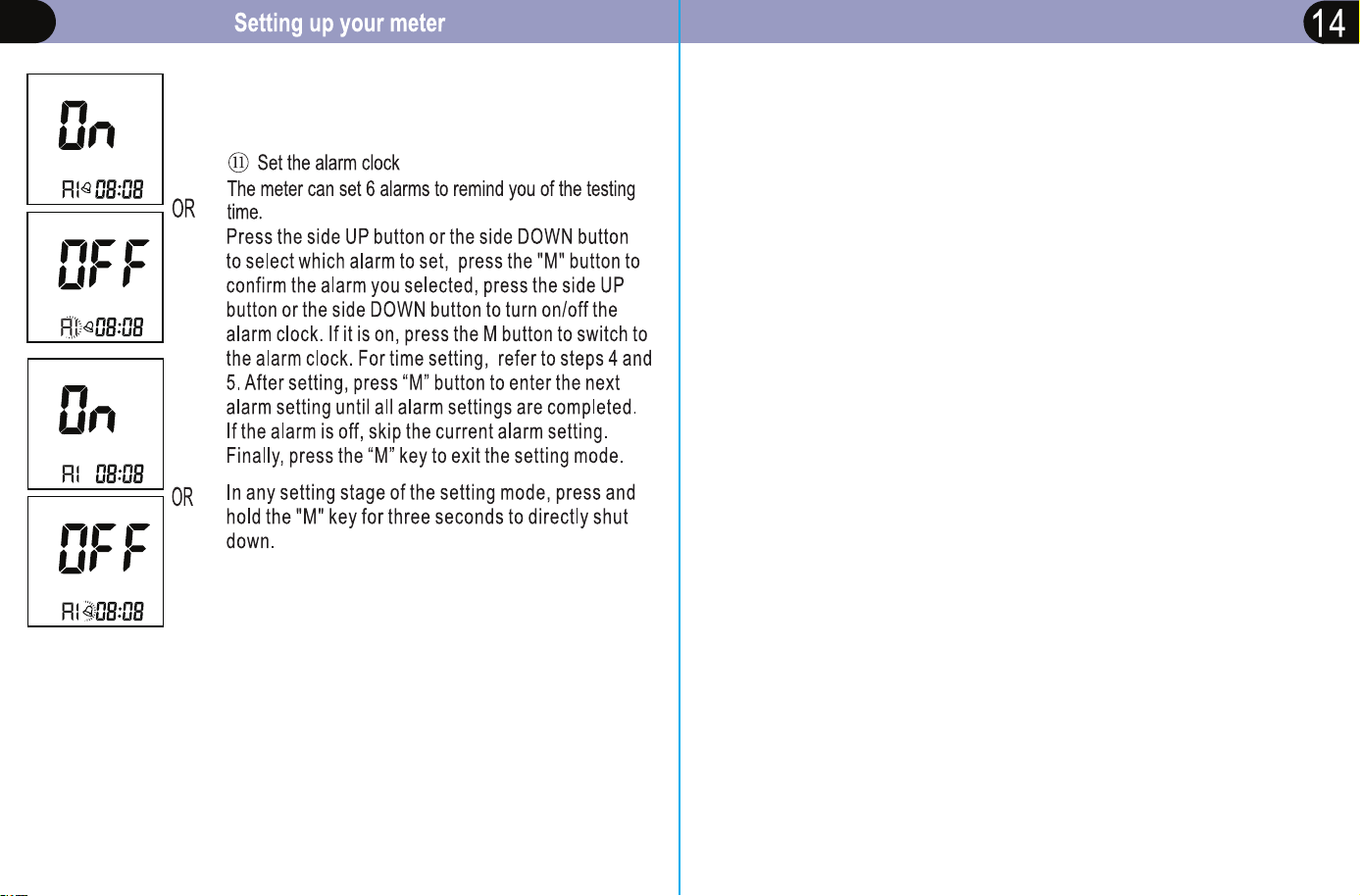
Computer connection
13
You can measure your blood glucose and then save and send
measurement data to a laptop or computer.
1. Install GlucoJoy software onto laptop or desktop. You can find this
software on kinetikwellbeing.com
2. Insert USB into glucose meter and laptop/desktop.
3. Open GlucoJoy and follow instructions to import data from glucose
meter.
4. Review measurement data.
Note: Measurement data does not clear from meter once data has been
imported onto laptop/desktop.
15
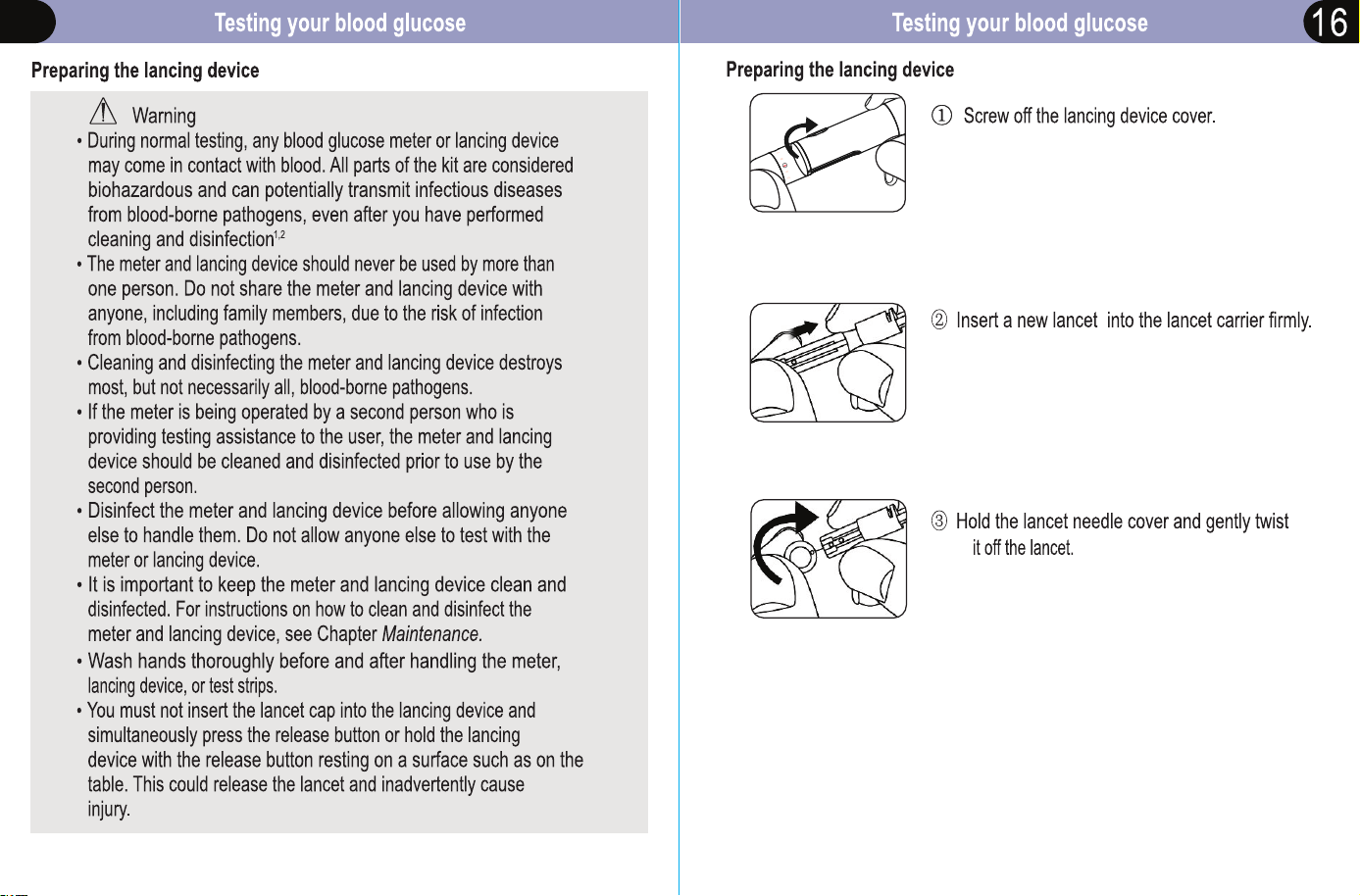
Preparing the lancing device
@ Put on the lancing device cap.
oid touching the trigger button.
@ Adjust the depth setting
Note: select the best depth:
The indication marks 5 levels of skin
penetration. Switch the lancing device cap
to the desired setting.
1-2 r so or thin skin
3 r average skin
4-5 r thick or calloused skin
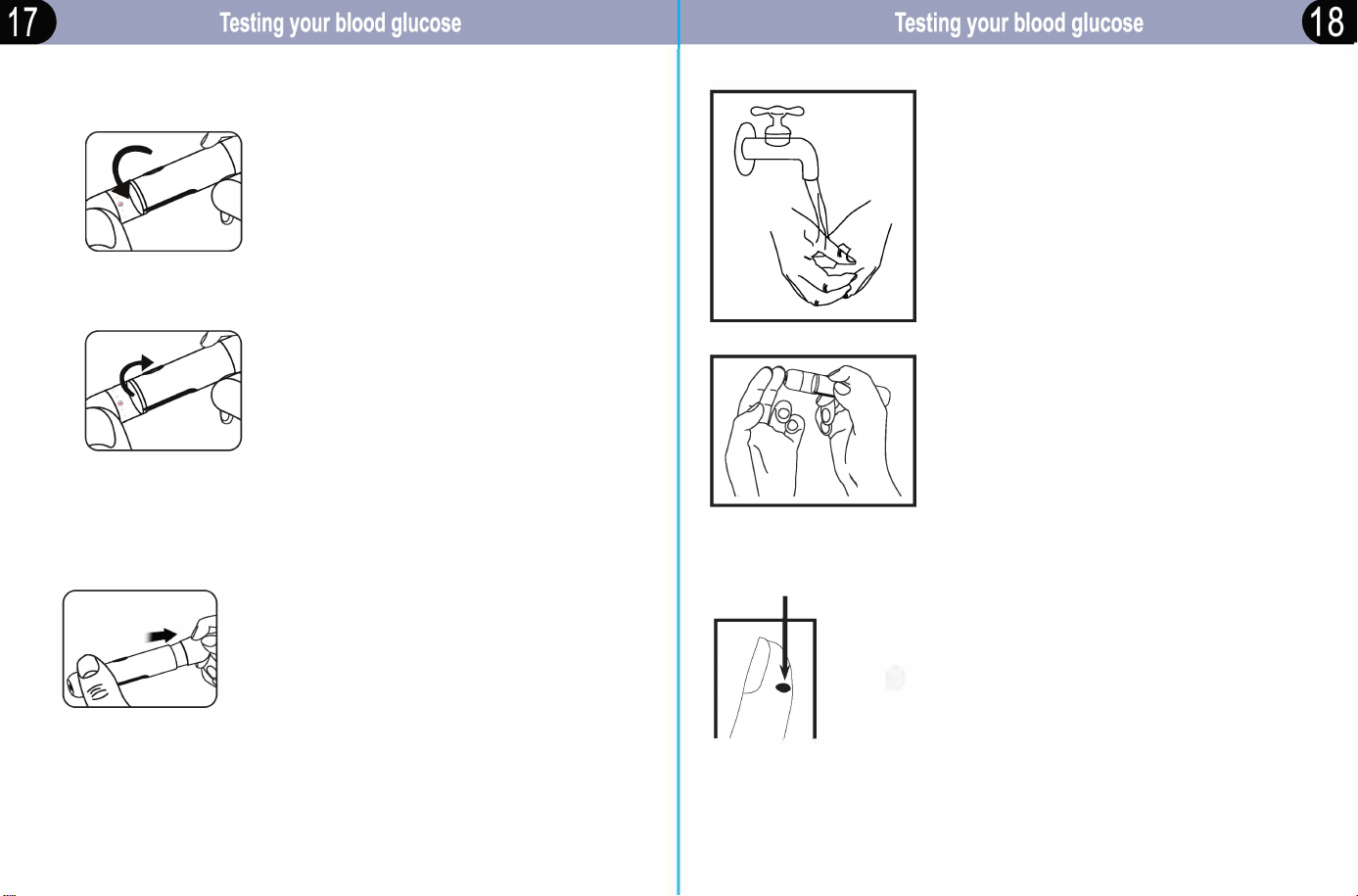
® Hold the lancing device cover in one hand.
Using the other hand, slowly pull the sliding
barrel away from the lancing device cover.
u will hear a click, indicating that the lancet
carrier is locked into position. Release sliding
barrel to return it to its original position.
Blood Sampling
Wash your hands and the puncture site
with an alcohol swab or soapy water.
Rinse and dry thoroughly.
® Position the end of the adjustable tip
against the side of the finger. Press the
trigger button, and then li the lancing device
away from the finger aer the puncture is
complete. Place the lancing device aside and
wait a few seconds r a blood drop to rm.
Appximate size
® Gently squeeze your finger until you
_
® get a round drop of blood. Discard the first drop.
Do not use, if the blood is smeared or running.
Wipe the area and gently squeeze
another drop of blood or puncture a new site.
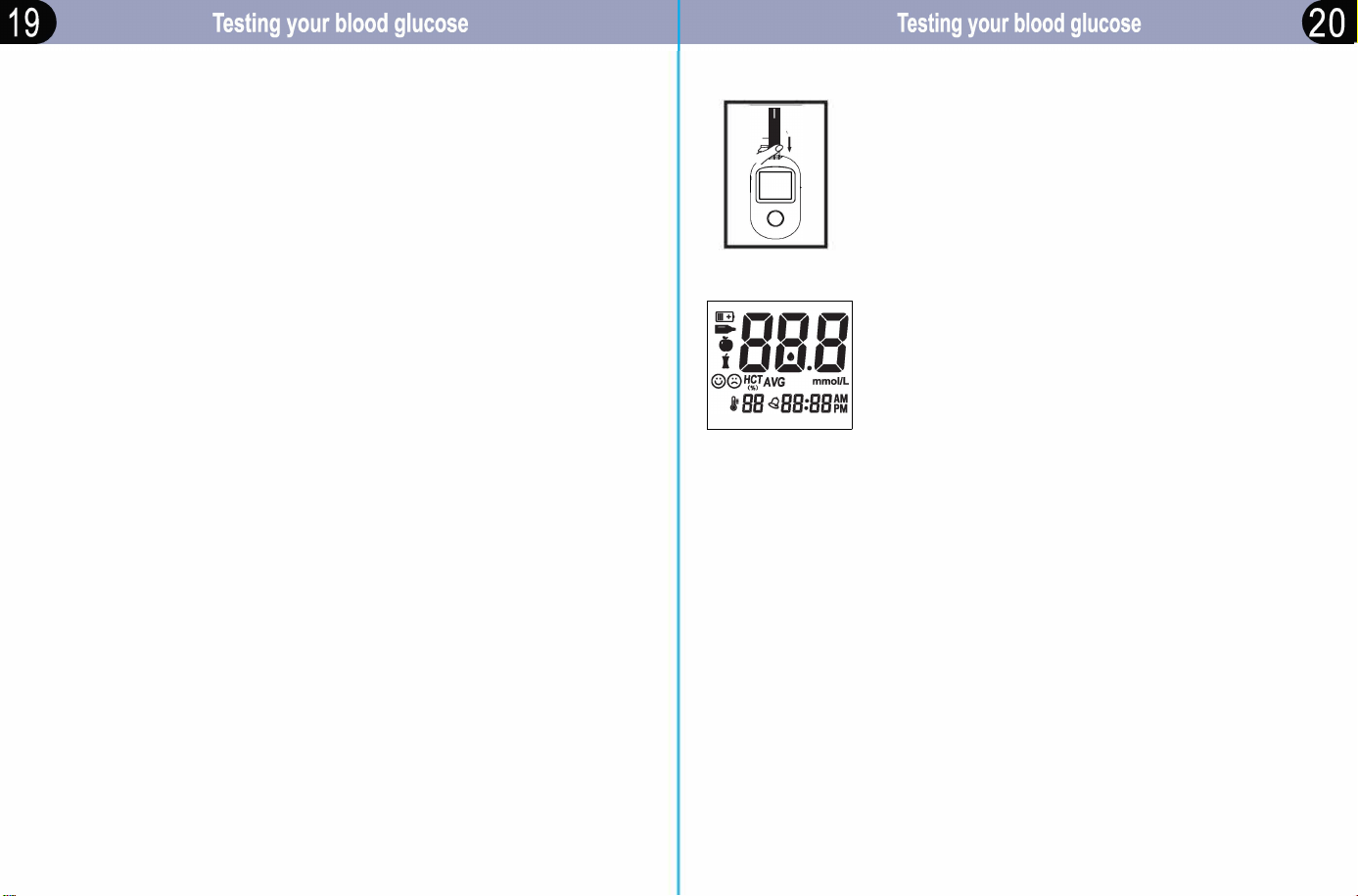
Blood Sampling
IMPORTAN
• Use only st Strip BS-602.
• Make sure your meter and test strips are about the same temperature
bere you test.
• Testing must be done within the operating temperature range
5'C~45'C (41 ~113 ).
For the most accurate results, test at room temperature
20'C~25'C (68 ~77).
• Tightly close the cap on the vial immediately aer use to avoid
contamination and damage.
• Store unused test strips only in their original vial.
• Do Not open the test strip vial until you are ready to remove a test strip
and perform a test. Use the test strip immediately aer removing it from
the vial.
• Do Not return the used test strip to the vial aer peorming a test.
• Do Not re-use a test strip that had blood or control solution applied to it.
Test strips are for single use only.
• Write the date that the vial was opened on the vial label when you first
open it. Discard the vial 6 months aer first opening.
sting
□
□
With meter o, insert a test strip to enter into testing
mode. The meter will automatically switch to testing
mode after inserting a test strip, even if you are in
setting mode or memory mode.
Note: If you do not start the test within three minutes, the
meter will turn off. To restart your meter, take out the
unused test strip and reinsert it into the meter.
Impoant: The meter should only be used with BS-602
test strips.
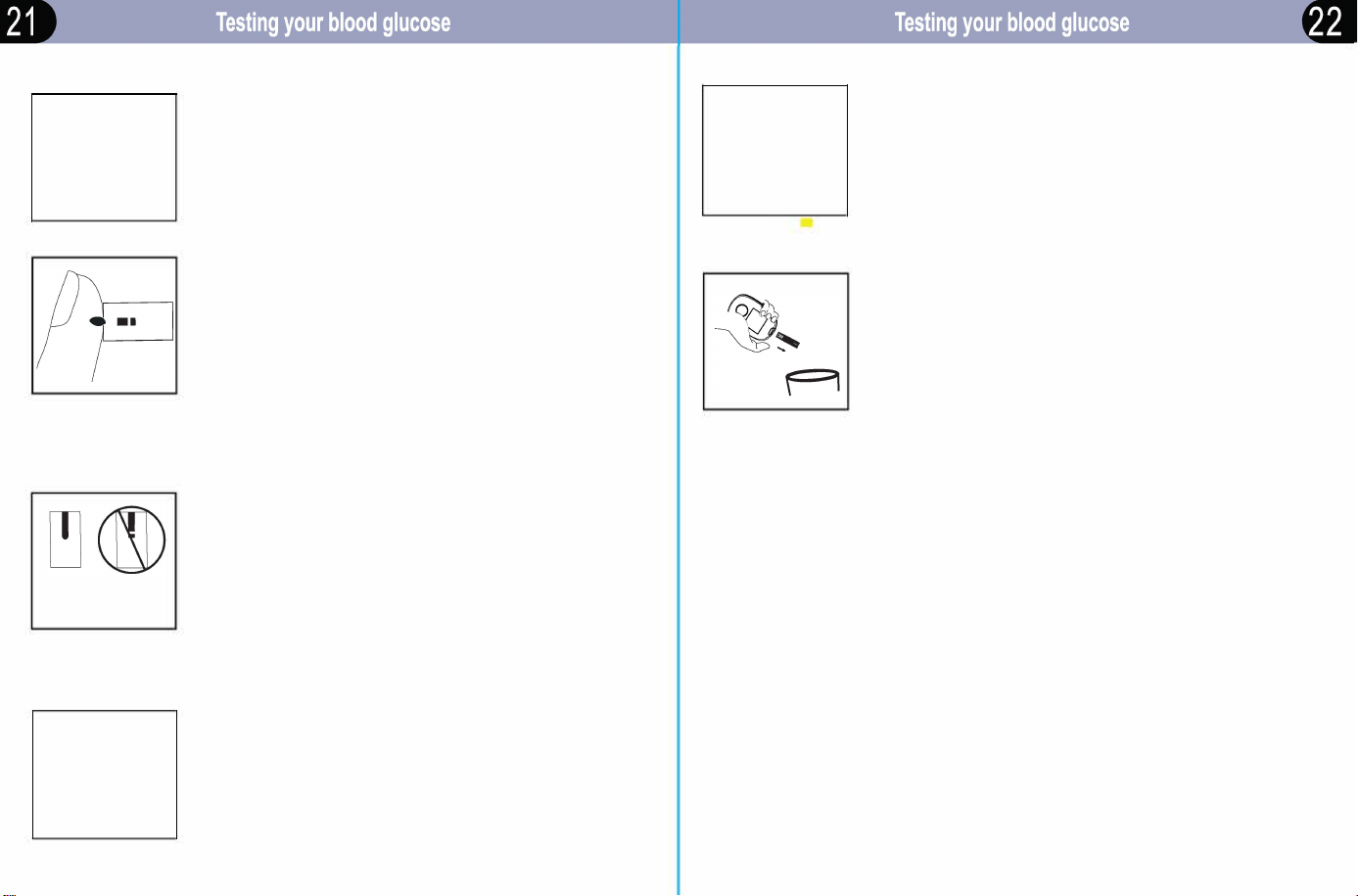
® System check screen
The screen will briefly display all content
to confirm that the display is working properly.
Note:
•If• appears, it indicates that the operating temperature
is out of range. Place the system in room temperature
r half hour. Then test again.
•If appears, it indicates that the battery is almost
empty. Replace the battery now.
® Pre/post meal marker settings
Pre/post meal markers provide more details on the test
results of your blood glucose bere and aer meals.
Press and release the "M" button to select the meal marker
fuction. Default is no marker.
Testing
•
DB:DB
Full Not full
rn
© HCT .Cf
(J
mmol/L
YD DB:DB
® When the blood drop symbol that you need flashes on the
display screen. ur meter is now ready to apply blood sample.
® Apply the sample
Gently touch the channel to the edge of the blood drop.
Note:
• Discard the first drop of blood. Do Not smear or scrape the
drop of blood with the test strip.
• Do Not apply more blood to the test strip after you have
moved the drop of blood away.
• Do Not move the test strip in the meter during a test.
® Wait for the confirmation window to fill completely
The blood drop will be drawn into the narrow channel
and the confirmation window should fill completely.
When the confirmation window is full, this means
you have applied enough blood. Now you can move
the test strip away from the blood drop and wait for
the meter to count down from 5 to 1 with 1 beep-sound
indicating the end of test.
Read your result on the meter
After the measurement is over, the meter will display the
blood glucose level along with the unit of measure, the
dale and time of the test. Also the test results will show
a smiling face within the range or a crying face outside
the range. Blood glucose results are automatically
stored in the meter's memory .
rn
© HCT .Cf
C>
mmol/L
YD DB:DB
--
@ Coloul indicator bar
The colorful indicator bar displays a color representing your
result value. Red/Greenllow bar represent Low/Normal/
High value.
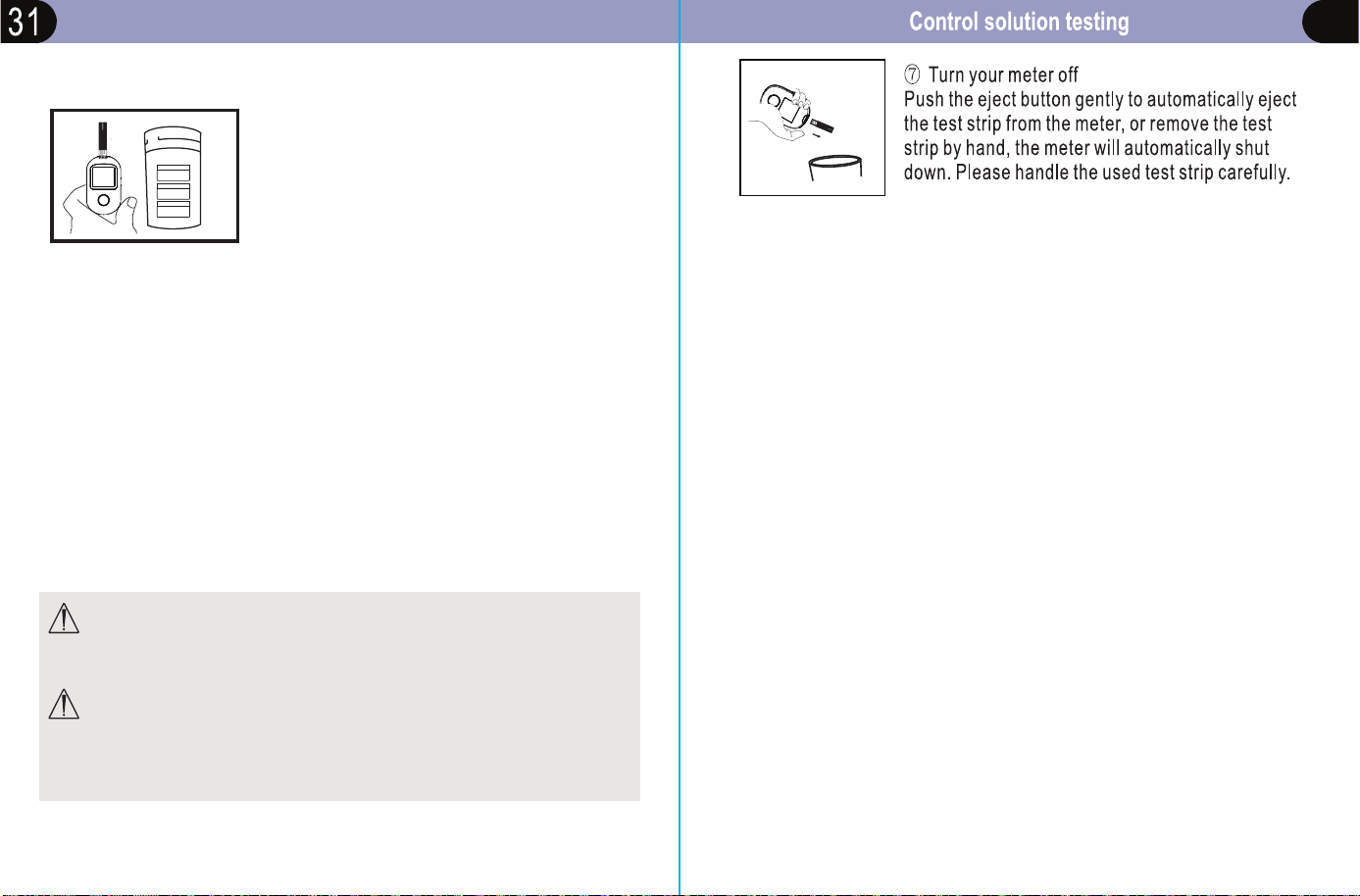
® Turn your meter off
Push the eject button gently to automatically eject
the test strip from the meter, or remove the test
strip by hand, the meter will automatically shut
down. Please handle the used test strip carefully.
Interpreting unexpected test results
The meter can accurately measure blood glucose concentrations
between 0.5 to 33.3mmol/L (9 to 600mg/dl)
Expected Blood Glucose Level [ 1, 2, 3] :
Time
Normal Blood Glucose Range
Before breakfast
3.9-5.8 mmol/L (70-105mg/dL)
Before lunch or supper
3.9-6.1 mmol/L (70-110mg/dL)
1 hour after meal
�8.9 mmol/L (less than 160 mg/dL)
2 hour after meal
� 6. 7 mmol/L (less than 120 mg/dU
Between 2 am and 4 am
? 3.9 mmol/L (Greater than 70 mg/dL)
Source:
1.
C
lin Chem
51,2005:1573-1576
;
2. Stedmans Medical Dictionary.27th Edition,2000:2802;
3. American Diabetes Association: Standard of Medical Care in Diabetes
2019, Vol.39.
Refer to the following cautions whenever your test results are lower or
higher than what you expect.
. -
HCT
LL•
<)
mmol
D DB:DB
Low glucose results
If your test result is lower than 0.5mmol/L(9mg/dl),
Lo will appear on the meter display screen.
• Lo Reading with Symptoms
If you have a Lo reading and have symptoms such as weakness,
sweating, nervousness, headache or confusion, then follow your
doctor's recommendation to treat hypoglycemia.
• Lo Reading without Symptoms
If you get a Lo reading, but have no symptoms of low blood glucose,
then retest with a new test strip on your fingers. If you still get a Lo
reading, llow your doctor's recommendation to treat hypoglycemia.
Interpreting unexpected test results
I-II
��
T
mmol/L
D DB:DB
® High glucose results
If your test is above 33.3mmol/L(600mg/dl ), HI
will appear on the display screen.
• HI Reading with Symptoms
If you feel symptoms such as fatigue, thirst, excess urination, or blurry
vision, then follow your doctor's recommendation to treat
hyperglycemia.
• HI Reading without Symptoms
If you get a HI reading, but have no symptoms of high blood glucose,
then retest with a new test strip. If you still get a HI reading, follow your
doctor's recommendation to treat hyperglycemia.
@ Unusual hematocrit
• Too high (above 70%) hematocrit can cause inaccurate results.
Please contact your doctor to determine your hematocrit ratio.
26
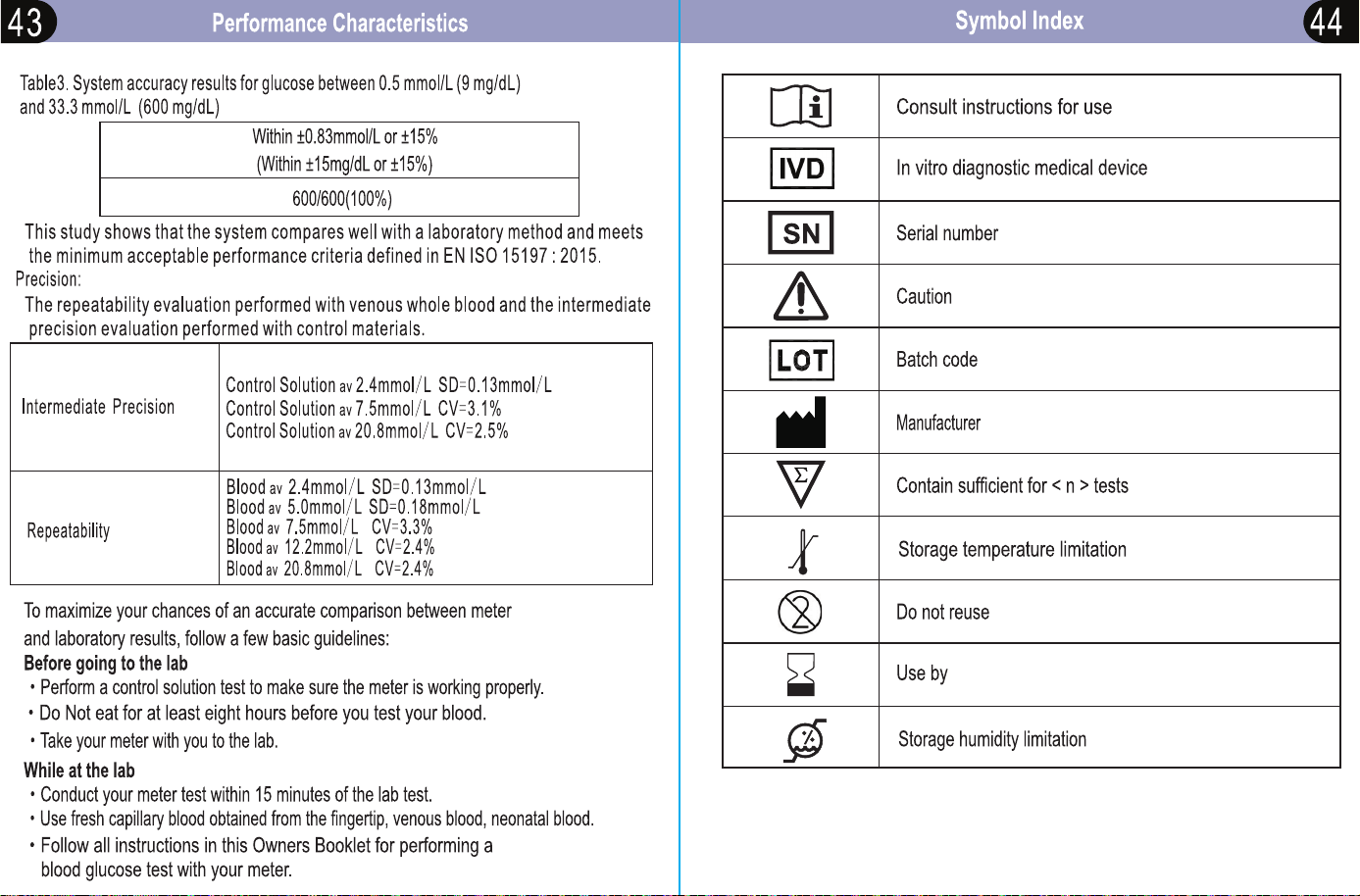
• If your blood glucose is below 5.55mmol/L (100mg/dL), your results generally
should fall within 0.83mmol/L ( 15mg/dL) of the laboratory result.± ±
•
If your blood glucose is equal to or over 100mg/dL), your results5.55mmol/L (
generally should fall within ±15% of the laboratory result.
To maximize your chances of an accurate comparison between meter
and laboratory results, follow a few basic guidelines: please
Before going to the lab
• Perform a control solution test to make sure the meter is working properly.
• Do Not eat for at least eight hours before you test your blood glucose.
While at the lab
• Perform your meter test within 15 minutes from the lab test.
• Use fresh capillary blood obtained from the fingertip, venous blood,
neonatal blood.
•
glucose test by your meter.
Comparing your meter's results with laboratory results periodically.
The results of the Kinetik Wellbeing BG-710 meter are plasma equivalent.
This method
will help you and your healthcare professional compare your
meter results
with laboratory test results. The
Kinetik Wellbeing
BG-710 meter's
test result and
laboratory
test results both are expressed in plasma-equivalent
units. However, your
blood glucose meter result may differ from your laboratory
result due to normal
variation. Your blood glucose meter results can be affected
by factors and
conditions that do not affect laboratory results in the same way
Follow all instructions in this Instruction Manual to perform a blood
Comparing Your Meter result to a Laboratory result
When to perform a control test
Control Solution contains a specific amount of glucose and is used to
check that the meter and the test strips are working properly.
Do a control solution test:
• Whenever you open a new vial of test strips.
• Whenever you want to check if you are testing correctly.
• If you suspect the meter and test strips are not working properly.
• If you have had repeated unexpected blood glucose results.
• If you drop or damage the meter.
• If you left the test strip container open or you think the test strips
have been damaged.
• If the test strips were stored in extreme temperatures and/or humidity
• Your test result does not match how you feel.
NOTE:
• Only use the
Kinetik Wellbeing
control solution.
• Close the control solution bottle tightly after use.
• Write the date you open the control solution bottle on the bottle label.
The control solution must be discarded 3 months after the
first open date or the expire date on the vial label, whichever comes
first.
• Do not use control solution that exceeds the expired date or discard date.
• Refer to the control solution label for control solution storage conditions.
• The control solution can stain fabric.
Remove stains by washing with soap and water.
CAUTION: Do Not swallow control solution. It is not for human
consumption. Do Not apply control solution to the skin or eyes
as it may cause irritation.
Control solution testing
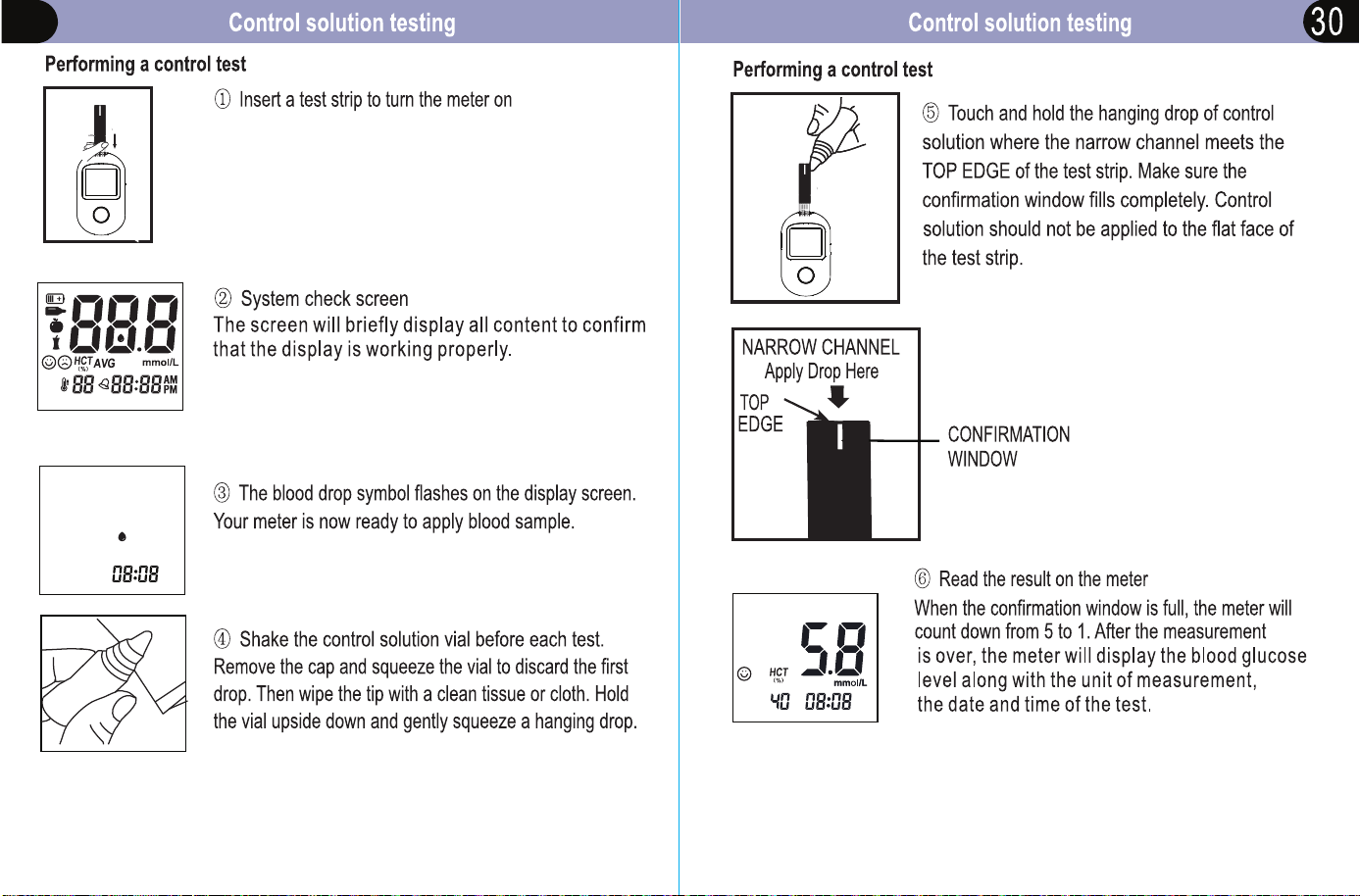
29
Control solution testing
Understanding out-of-range control test results
Compare the result displayed on the meter
to the control solution range printed on the
test strip vial. Each control solution have a
different control solution range.
Out-of-range results may be due to:
• not following the instructions detailed in steps 1–6
• expired or contaminated control solution
• expired or damaged test strip
• a problem with the meter.
CAUTION: The control solution range printed on the test strip
vial is for
Kinetik Wellbeing
Control Solution only. It is not a
recommended
range for your blood glucose level.
CAUTION: If you continue to get control solution test results
that fall outside the range printed on the test strip vial, Do Not use
the meter, the test strips, or the control solution. Contact the
vendor.
• use of a test strip or control solution that passed its discard date
CTRL 1
mmol/L
mg/dL
CTRL 2
mmol/L
mg/dL
CTRL 3
mmol/L
mg/dL
2.0- 6. 0
36- 108
8.0 -12.0
144 -216
14. 0-22. 0
252 -396
32
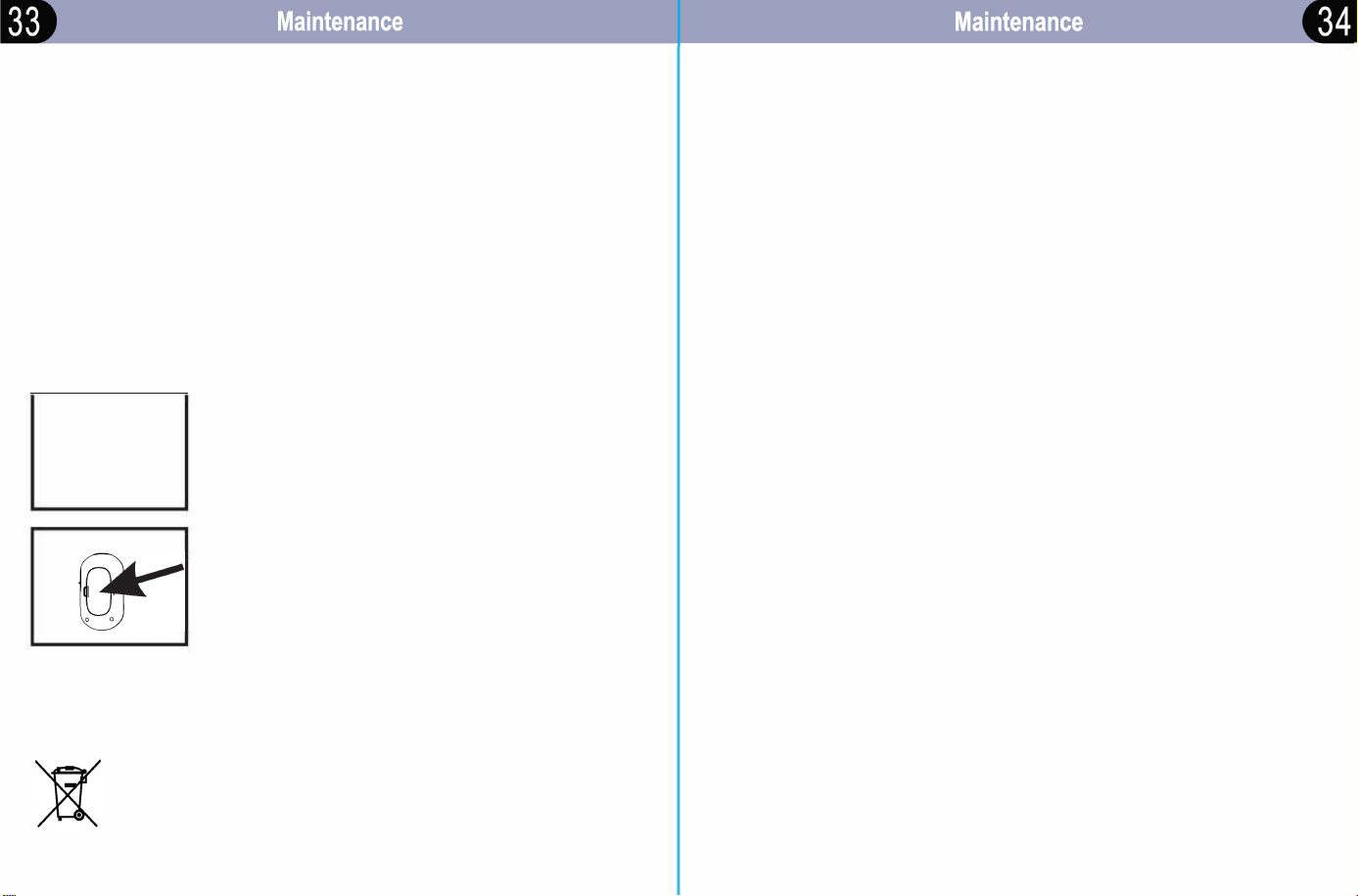
Replacing the battery
ur meter comes with two AAA alkaline batteries.
The battery provides enough power for the meter to perform
about 1000 tests. If your battery runs low, the battery symbol ""
appears on display screen until you change the batte.
Important: When this symbol appears, you should replace the battery
immediately.
�
j
With the meter off, open the batte cover.
® Remove the old batteries and place the new
batteries.
® Put the batte cover back into position until it
locks into place.
@ Check your meter settings
Replacing the battery does not aect your stored
results. However, you may need to re-set your
meter settings. See Setting up your meter section.
Please dispose of the waste batteries according to the local
regulations
-
Meter maintenance
Avoid getting dirt, dust, blood, control solution, water, or any other liquid
in the meter's test strip port.
Important: Never immerse the meter in water or any other liquid. This
may cause inaccurate reading or meter malfunction.
Storing your system
Store your meter, test strips, control solution and other items in your
carrying case after each use. Store each item in a cool, dry place.
Test strips and control solution should be stored between 1 'C~30'C
(33.B ~86). Meter and other items should be stored beeen
-20'C~ 55'C ( -4~131'F).
Do Not refrigerate. Keep all items away from direct sunlight and heat.
Tightly close the cap on the test strip vial and/or control solution vial
immediately aer use to avoid contamination or damage. Store test
strips only in their original vial.
Checking r expiration or damages to test strips and control
solution
Expiration dates r test strips and control solutions are printed on
their vial labels. When you first open a new vial of test strips or control
solution, record the discard date on the label. Refer to the test strip or
control solution vial r instructions on determining the discard date.
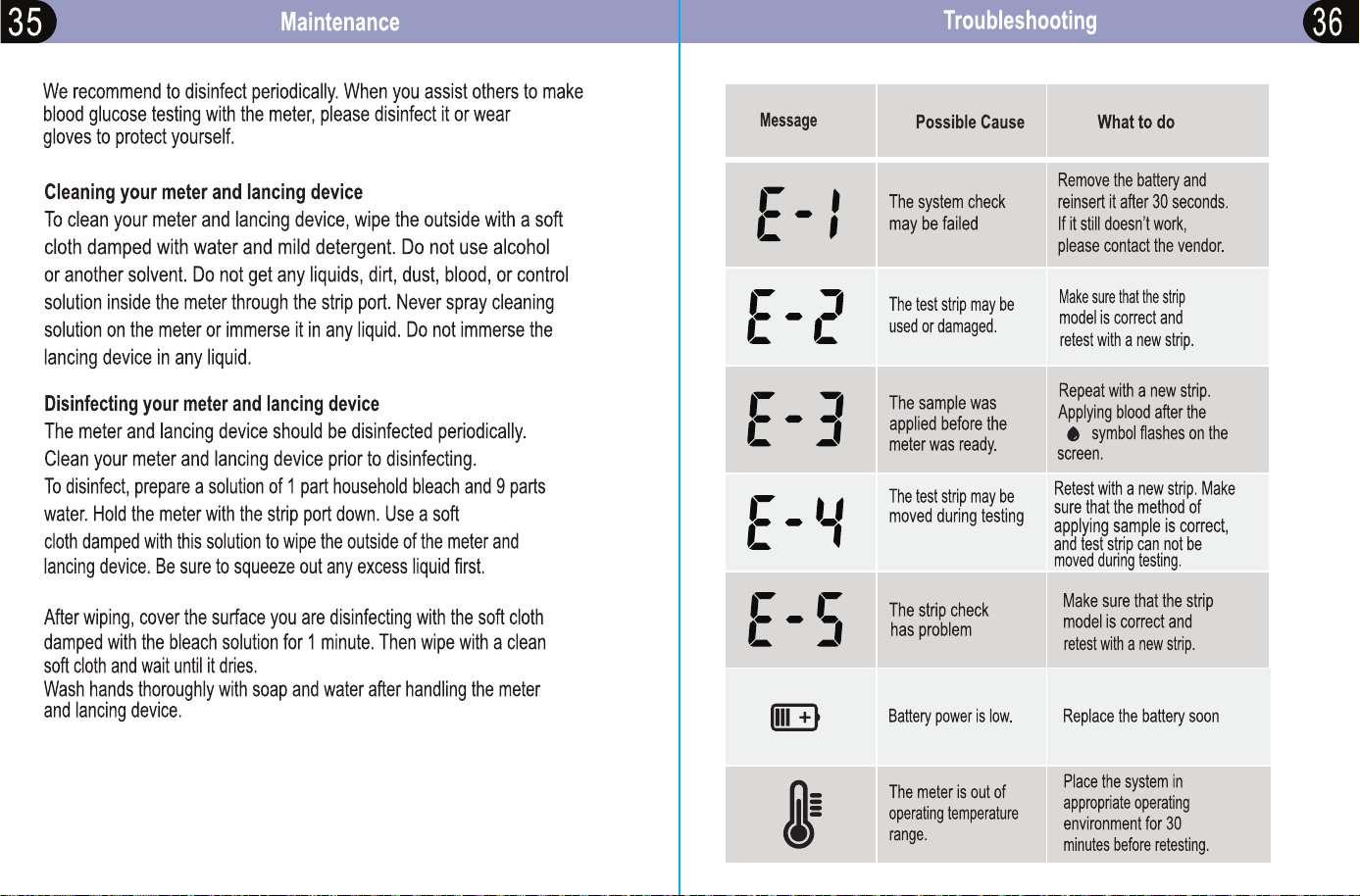
Cleaning and disinfection
Cleaning and disinfection are different, both should be performed.
Cleaning is a pa of normal care and maintenance that should be
peormed prior to disinfection, but cleaning does not kill germs.
Disinfection is a important way to reduce your exposure to disease.
Even though you are the only person using it,
or insufficient blood
volume used.
Meter does not enter the test mode aer inserting a test strip.
Specifications
Probable Cause
What to Do
Battery power is low.
Replace the batle
j
(and reset the date and
The battery is installed
incorrectly or there is no
battery in the meter.
Product description
BG-710 Blood Glucose Monitoring System
Assay method
Glucose dehydrogenase biosensor
Measurement range
0.5-33.3mmol/L (9~600mg/dl)
Test strip inserted upside
down, or incompletely inserted
into the meter.
Sample
Fresh capilla whole blood, venous blood,
neonatal blood.
Defective meter or test strips.
Sample size
Approximate 0.6 microlitre
Blood or foreign objects put
lime, if necessary.
Check that the battery is installed correctly.
Check that the test strip is inserted correctly.
Contact
K
inetik Wellbeing.
Contact
K
inetik Wellbeing.
into the test strip port.
Response time
5 seconds
st does not start aer applying the blood sample.
Probable Cause
What to Do
Calibration
Plasma equivalent glucose values
Defective test strip.
Batte
2x alkaline batteries
Sample applied aer meter
times out and turns o.
Batte life
Approximately 1,000 tests
Defective meter or test strips.
Repeat the test with a new test strip.
Remove the test strip, and repeat the test using
a new test strip. Wait until you see the blood and
test strip symbols on the display screen before
you apply me 0100d sample.
Contact
K
inetik Wellbeing
Unit of measure
mmol/L only
Memo
1000 blood glucose results with date and time
Size
94.9*56.5*22.Bmm (L*W*H)
Specifications
LCD size
35.4*30.9mm (L*H)
Weight
Approximate 50g, battery not included
5'C~45'C (41'F~113'F)
Operating environment
10~90% RH (non-condensing)
-20'C~55'C (-4'F~131'F)
Meter storage environment
10~95% RH (non-condensing)
Strip storage environment
1'C~30'C (33.8'F~86'F)
Altitude
Up to 10,000 feet (3,048 meters)
above sea level
Hematocrit
0%~70%
Shelf life
Three years
Electromagnetic Compatibility
This meter meets the electromagnetic immunity requirements as standard
EN ISO 15197: 2015. The chosen basis for electrostatic discharge immunity
testing was basic standard EN 61326: 2013. It meets the electromagnetic
emissions requirements as standard EN 61326. Its electromagnetic emission
is thus low. Inteerence from the meter to other electrically-driven equipment
is not anticipated.
Warning
• Any product coming in contact with blood is considered contaminated
(potentially infectious).
• During normal testing, any blood glucose meter may come in contact
with blood.
• Lancing devices may also be considered sharps. For disposal of sharps,
refer to local regulations.
Refer to any laws or ordinances relating to the disposal of sharps
and/or contaminated products. Contact your local health department
or other appropriate authorities r proper handling and disposal of
used meters, used test strips, used lancets, and used batteries.
Please consider the following points when disposing of used testing
materials:
• Consider recycling of the meters and batteries at an appropriate
facility. Be aware that the meter is potentially hazardous electronics
scrap (e-scrap) and should be disposed of accordingly. The batteries
are potentially hazardous also and should be disposed of accordingly.
• Disinfect the meter before recycling or disposing.
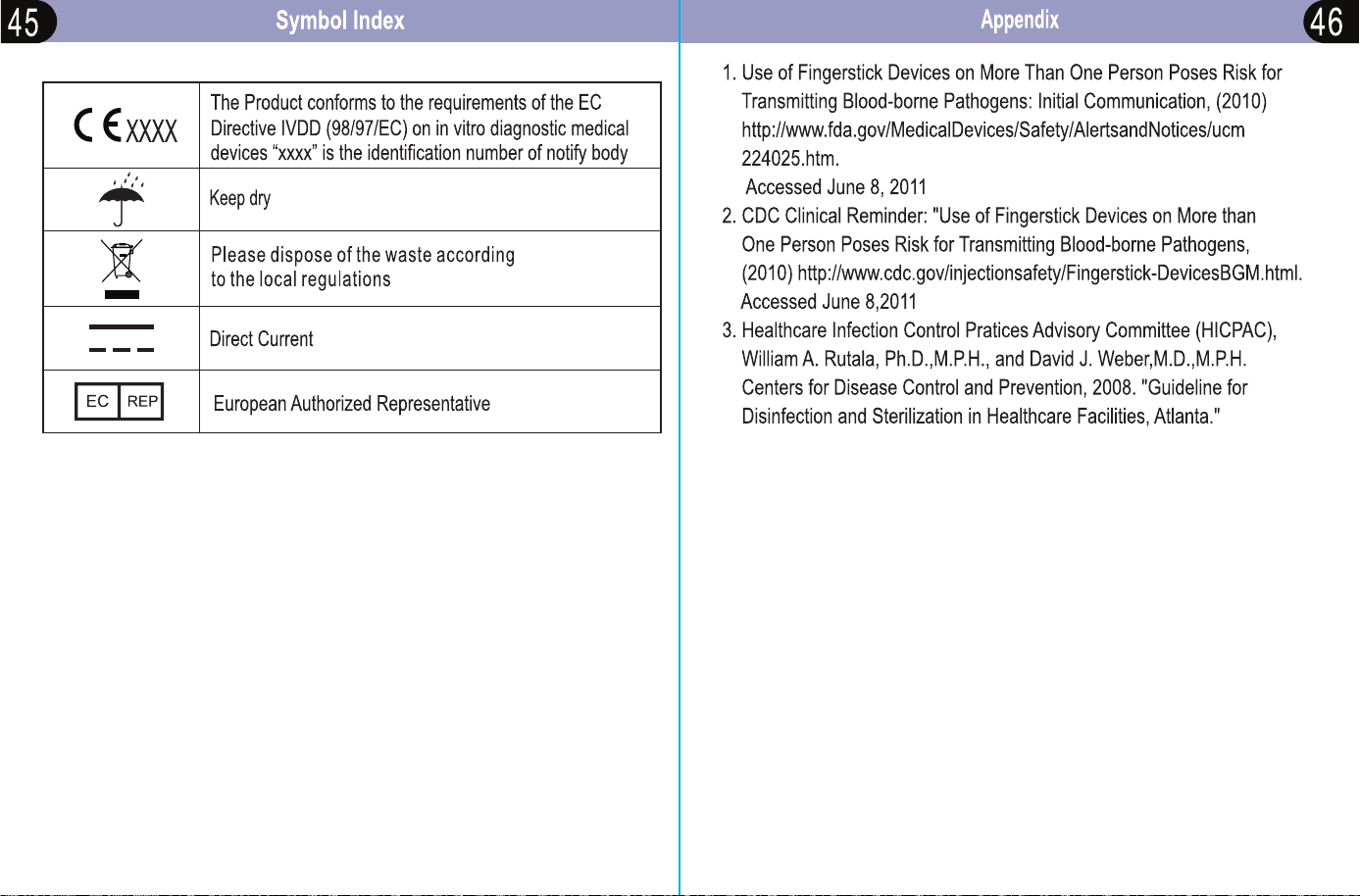
• 29 CFR 1910.1030- Blood-borne pathogens
* Directive 2002/96/EC - Directive on waste electrical and electronic
equipment (WEEE)
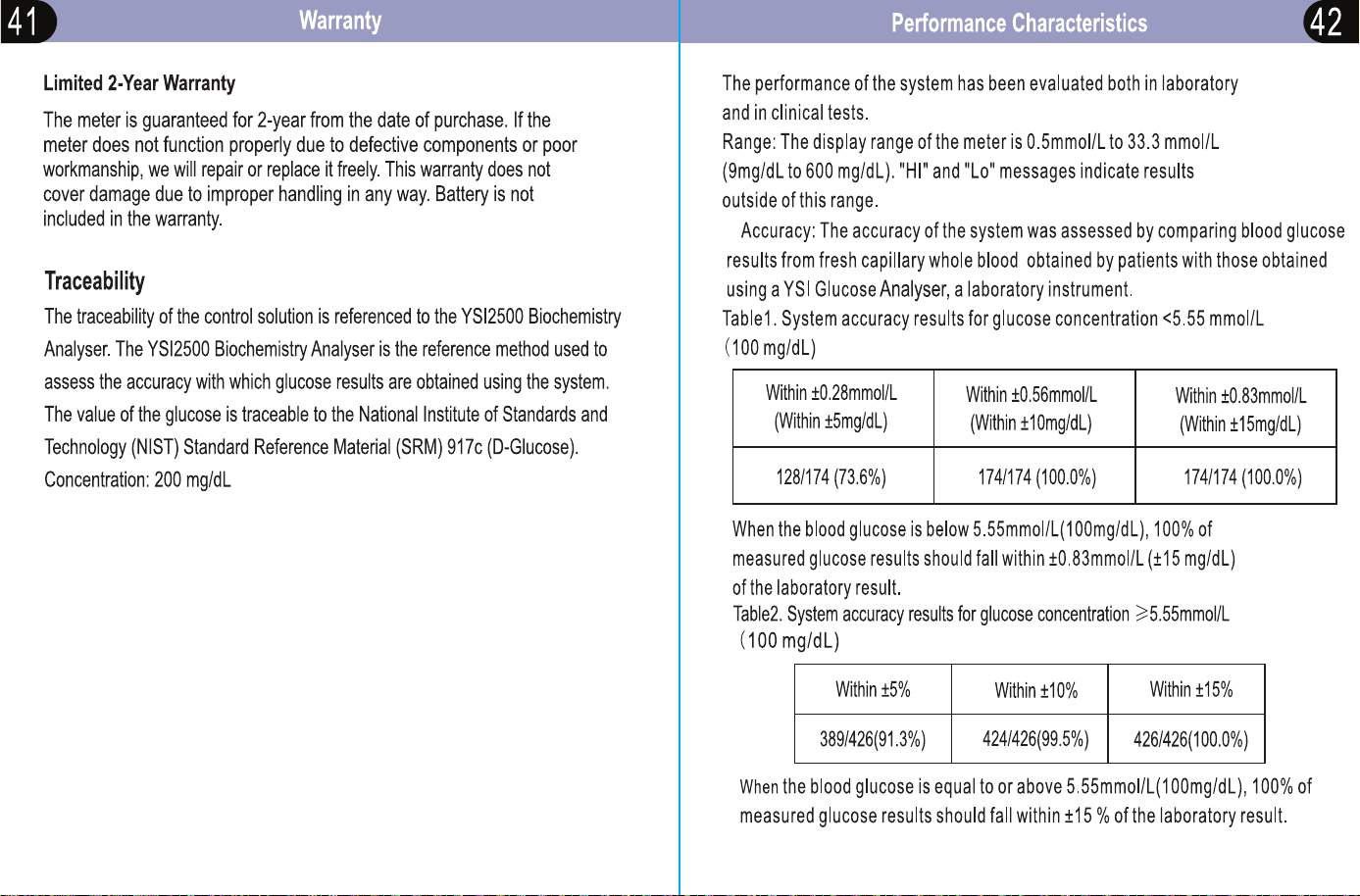
Our manual should provide you with all the information you need
to set up and use this product.
If you have a question, have a look at our Troubleshooting page!
For further assistance, why not contact our Customer Care team
directly? We’re here to help!
Our Customer Care team are available from 9am-5pm, Monday to
Friday (excluding bank holidays).
We promise to respond to all queries and will ensure to resolve any
issue you may be having.
You can reach us by...
Phone:
Live Chat:
Email:
Post:
+44 1483 937969
Simply visit www.kinetikwellbeing.com and send us a message.
Kinetik Medical Devices Limited
Unit 3, Perrywood Business Park, Honeycrock Lane,
Salfords, Redhill. RH1 5DZ
Support