SUPPORT
DISCOVER MORE
KitchenAid.com/pinch-of-help
PRODUCT QUESTIONS OR RETURNS
1.800.541.6390 | KitchenAid.com
1 YEAR LIMITED WARRANTY
Visit international.KitchenAid.com
for warranty details.
MODEL NO. KTH11BM
Smart Thermometer
FCC ID: A5UTTIVNWMT01
Rating: DC 5V 0.35A
Apple and the Apple logo are registered
trademarks of Apple Inc. App Store is a
service mark of Apple Inc. Google Play and
the Google Play logo are trademarks of
Google LLC.
®/™ ©2024 KitchenAid.
All rights reserved. Printed in Vietnam.
240153KP. W11733577.
FCC STATEMENT
This equipment has been tested and found
to comply with the limits for a Class B
digital device, pursuant to part 15 of the
FCC Rules. These limits are designed to
provide reasonable protection against
harmful interference in a residential
installation. This equipment generates,
uses and can radiate radio frequency
energy and, if not installed and used in
accordance with the instructions, may
cause harmful interference to radio
communications. However, there is no
guarantee that interference will not occur
in a particular installation. If this equipment
does cause harmful interference to radio or
television reception, which can be
determined by turning the equipment off
and on, the user is encouraged to try to
correct the interference by one or more of
the following measures:
• Reorient or relocate the receiving
antenna.
• Increase the separation between the
equipment and receiver.
• Connect the equipment into an outlet on
a circuit different from that to which the
receiver is connected.
• Consult the dealer or an experienced
radio/TV technician for help.
Goodbye
guesswork,
hello everyday
precision.
SMART THERMOMETER
QUICK START GUIDE
240153KP_W11733577_KA_SmartThermometer_QSG.indd 1-3240153KP_W11733577_KA_SmartThermometer_QSG.indd 1-3 5/1/24 9:17 AM5/1/24 9:17 AM
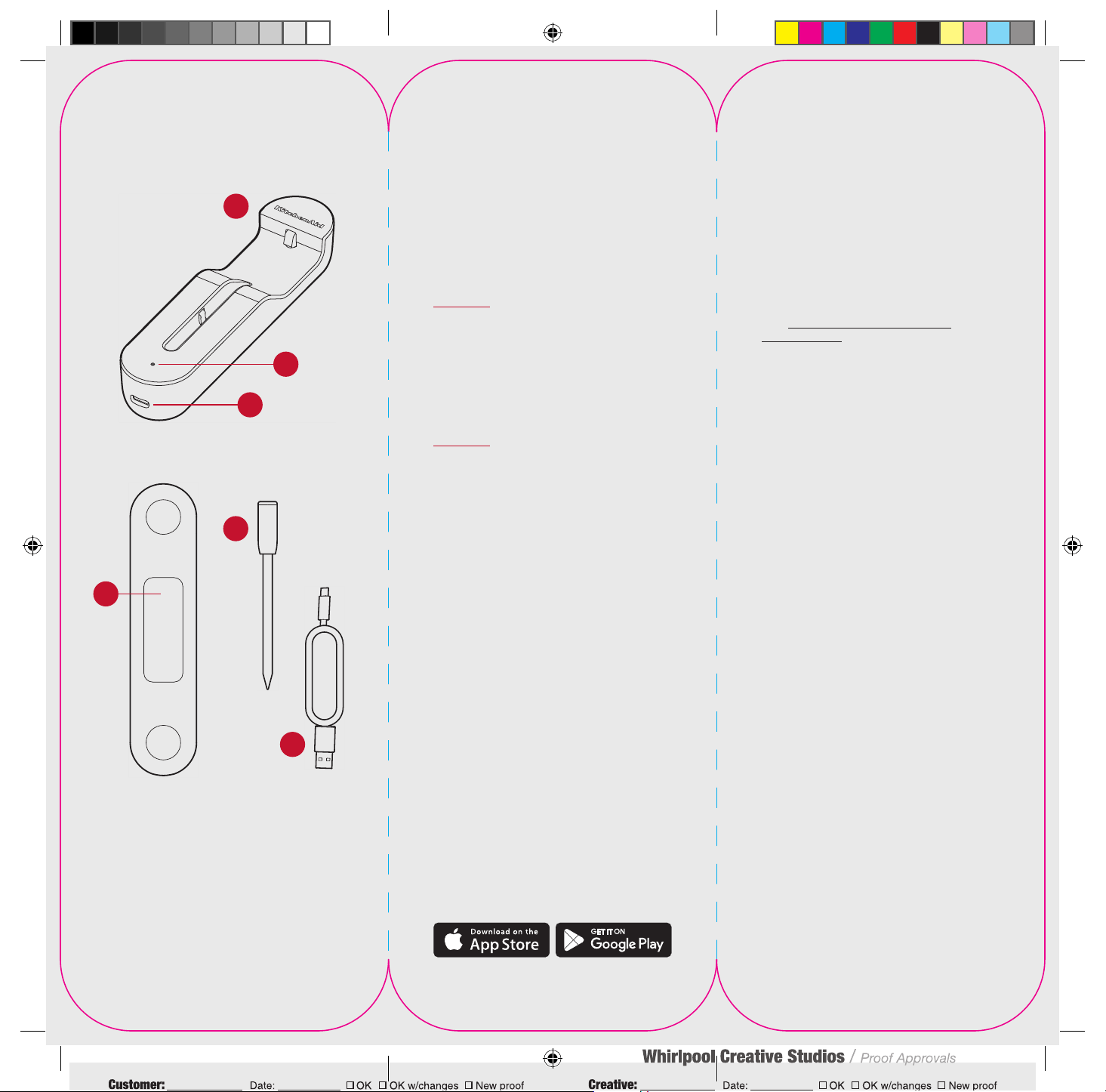
WHAT’S INCLUDED
1. Dock
2. LED Status Light
3. USB C Connection Port
4. Magnetic Mounts
5. Thermometer Probe
6. USB Cable
2
3
6
Dock Front
Dock Back
5
1
4
GETTING STARTED
Step 1: Plug In and Charge
Ensure Thermometer Probe is securely
inserted in the dock. Plug the USB cable
into a power source and charge for at
least 30 minutes.
Step 2: Install the KitchenAid
TM
App
While the Smart Thermometer
charges, download the KitchenAid
TM
App from the Apple App Store or
Google Play Store.
Step 3: Pair Smart Thermometer
Once downloaded, follow the
prompts in the app to pair your Smart
Thermometer and begin use.
When the Thermometer Probe is
hot, do not touch or remove with
your bare hands.
Always check your food for doneness
before consumption. Consuming
undercooked meats, poultry, seafood,
shellfish or eggs may result in illness.
Visit foodsafety.gov/keep/charts/
mintemp.html for a complete listing of
minimum safe temperatures.
Do not use the Thermometer Probe in
the microwave or pressure cooker.
Do not cover the Thermometer Probe
while in use.
Do not place the Thermometer Probe
in direct contact with flames.
Do not place Dock on any hot surface,
such as a grill cover, oven door
or stove-top.
The Thermometer Probe is dishwasher
safe. The Dock should not be submerged in
liquid or put in the dishwasher.
Do not use cleaning products on the
Smart Thermometer containing alcohol,
ammonium, benzene or abrasives, all of
which could damage the device.
This product is not intended for pastry or
candy making. This cooking Thermometer
Probe is specially designed for measuring
the temperature of meat, fish and poultry.
The Thermometer Probe is sharp; insert
with care.
Complete usage instructions
are provided in the app and on
KitchenAid.com.
For domestic use only.
CARE GUIDE
240153KP_W11733577_KA_SmartThermometer_QSG.indd 4-6240153KP_W11733577_KA_SmartThermometer_QSG.indd 4-6 5/1/24 9:17 AM5/1/24 9:17 AM
