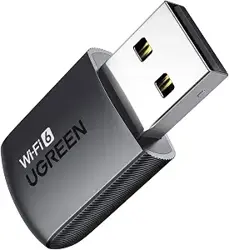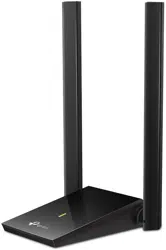

AC1300 High-Gain Dual-Band
Wireless Adapter
Model: CM493 | P/N: 50341
User Manual | Das Benutzerhandbuch | Manuel de l'Utilisateur
Manual de Usuario | Manuale dell'Utente | ユ ーザーマニュアル
مدختسا ليلد
用户手册 |
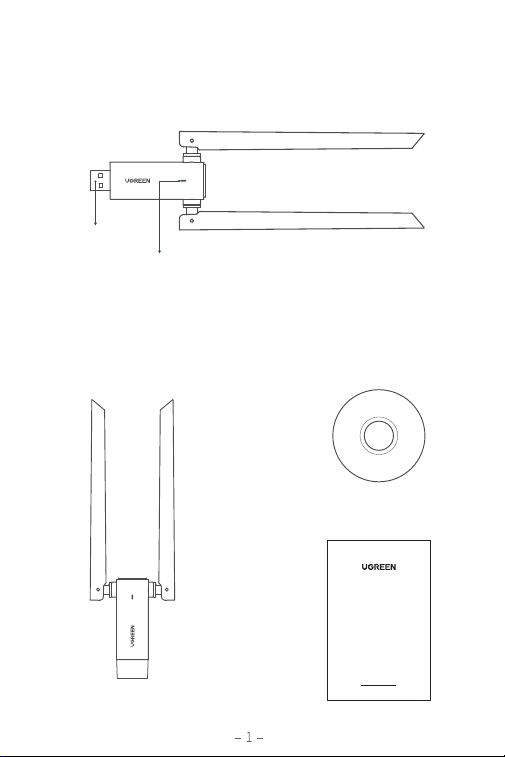
1×AC1300 High-Gain Dual-Band
Wireless Adapter
USB 3.0
LED Indicator
1 × CD Drive
USER MANUAL
1×User Manual
Product Overview
DE: Produktübersicht | FR: Détail du Produit | ES: Detalles Del Producto
IT: Panoramica del Prodotto | JP: 商品紹介 | CN: 产品展示 |
جتنا ع ةماع ةرظن
:AR
Package Contents
DE: Packungsinhalt | FR: Contenu de l'Emballage | ES: Contenidos del Paquete
IT: Contenuto del Pacchetto | JP: パッケージ 内 容 | CN: 包装清单 |
ةمزحلا تايوتحم
:AR
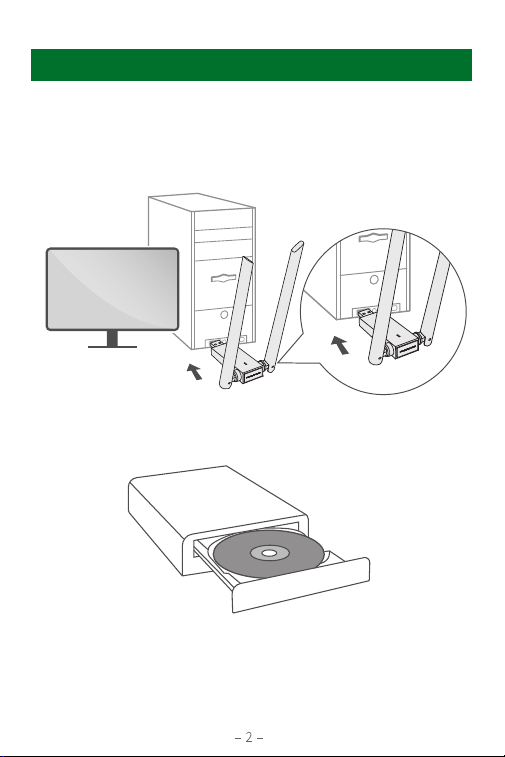
Step 1. Driver Installation
1. Plug the device into the USB port of your PC.
How to Use (Take Windows 10 as an Example)
EN
2. Insert CD into the CD drive of your PC.
Note:
If the CD-ROM is unavailable in your computer, you can also install or
update the driver from:
https://www.mediafire.com/file/225dxupjysojb0v/RTL8822BU.zip/file
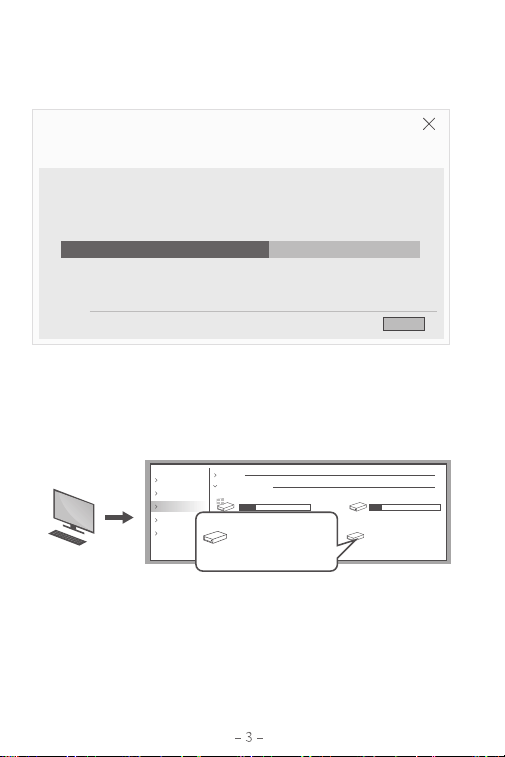
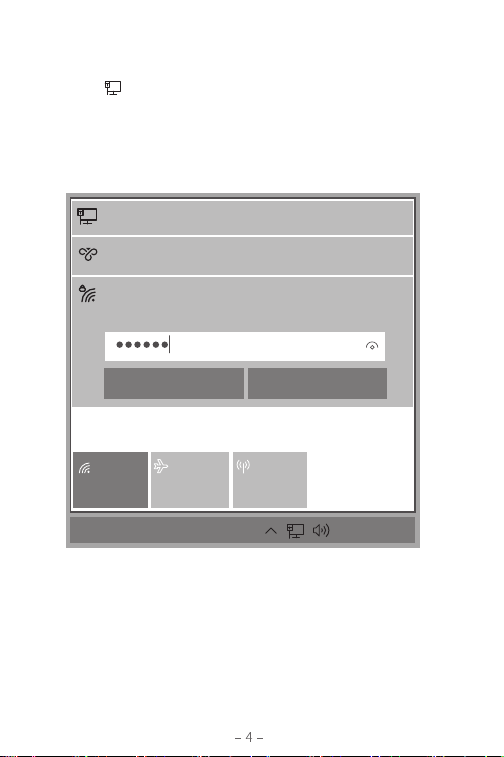
3. Double click Setup.exe and run it, then follow up the steps to finish
the installation.
Quick access
Folders (7)
Devices and drives (4)
Local Disk (C:) Local Disk (D:)
Local Disk (E:)
CD Drive (F:) Wireless
CD Drive (F:) Wireless
218 GB free of 275 GB
97.9 GB free of 99.9 GB
85.0 GB free of 99.9 GB
Network
This PC
OneDrive
CD Drive (F:) Wireless
This PC
Note:
"This PC" may have different names on different Windows systems:
Windows 8.1/10 "This PC", Windows XP "My Computer", Windows Vista
to Windows 8 "Computer".
Tip:
If the popup window doesn't show up, please select "This PC" and
double click "Ugreen Wireless" icon.
The InstallShield Wizard is installing Realtek USB Wireless LAN Driver
Realtek USB Wireless LAN Driver
Setup Status
InstallShield
Cancel
Step 2. Connect Your Wi-Fi
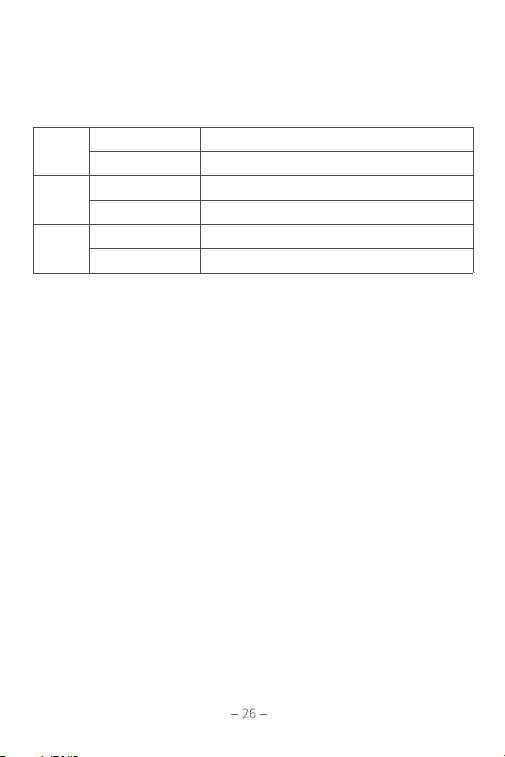
1. Click on at the lower right corner of your PC device.
2. Select your WiFi name and enter password to proceed.
3. Once you have finished all steps, you'll be able to use the wireless
network.
UGREEN
Connecting
Network & Internet settings
Change settings, such as making a connection metered.
Wi-Fi
Airplane mode
Mobile
hotspot
VPN
Connecting
Internet 3
Connecting
15:30
2022/4/1
ENG
Enter the network security key
NEXT Cancel
Do not leave the product in the moist environment.
Do not forcibly plug or unplug the product in case of connector damage.
Keep out of reach of children.
·
·
·
EN
Lassen Sie das Produkt nicht in der feuchten Umgebung.
Bitte ziehen Sie den Stecker nicht gewaltsam ein oder aus, da dies zu
Schäden an der Steckdose führen kann.
Bewahren Sie dieses Produkt außerhalb der Reichweite von Kindern auf.
·
·
·
DE
DE: Hinweise | FR: Notes | ES: Notas | IT: Note | JP: ご注意 |
CN: 注意事项 |
تاظحم
:AR
Notes
Hardware
Software
Wireless
Port
Antenna
Transfer Rate
Wireless Standard
Operating Mode
Compatible Systems
Adapter mode, AP mode
Windows/ macOS/ Linux
1×USB 3.0
2×External high-gain antenna
400Mbps Max (2.4GHz) / 867Mbps Max (5GHz)
IEEE 802.11b/g/n (2.4GHz) / IEEE 802.11a/n/ac (5GHz)
Specifications
DE: Spezifikationen | FR: Spécifications | ES: Especificaciones | IT: Specifiche
JP: 商品仕様 | CN: 产品参数 |
تافصاوم
:AR

Ne pas laisser le produit dans un environnement humide.
Ne pas brancher ou débrancher le produit de force pour éviter
d'endommager le connecteur.
Veuillez garder le produit hors de portée des enfants.
·
·
·
FR
No use este producto en un ambiente húmedo.
No enchufe ni desenchufe el producto con fuerza para evitar daños.
Mantenga este producto fuera del alcance de los niños.
·
·
·
ES
Non lasciare il prodotto in un ambiente umido.
Non inserire o scollegare forzatamente il prodotto in caso di
danneggiamento del connettore.
Tenere fuori dalla portata dei bambini.
·
·
·
IT
製品を多湿の環境に放置しないでください。
無理に抜き差ししないでください。コネクターが破損する原因となります。
小児の手の届かない場所に保管してください。
·
·
·
JP
请保持设备干燥。请勿在潮湿的环境中使用。
请勿暴力插拔,以免导致插口损坏。
请将本产品放置在儿童接触不到的地方。
·
·
·
CN
ةبطر ةئيب جتنا كت .
.
. لصوا فلت ةلاح ةوقلاب هلصف وأ جتنا ليصوتب مقت
لافطا لوانتم نع اديعب ظفحي
·
·
·
AR