User Manual
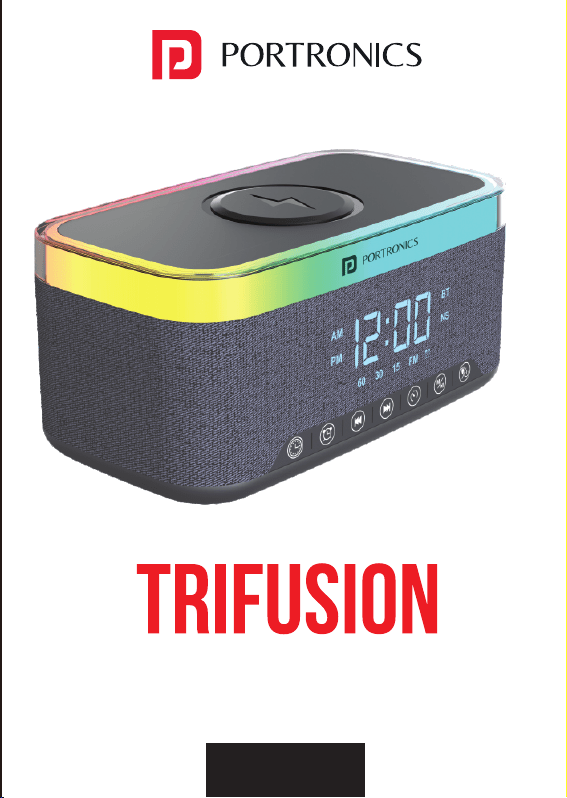
16W Bluetooth Speaker with Wireless Charging
INSTRUCTIONS FOR USING THE SPEAKER
Wireless charger use : plug in the charger to automatically turn on
TECHNICAL PARAMETER
• Wireless charging power : 15W
• Bluetooth version : 5.3
• Sound Output : 16W
• Bluetooth frequency : 2.4GHZ-2.48GHZ
• Transmission distance : 10 meters
• Frequency sound range : 50 HZ-20 KHZ
• Sigto noise ratio of whole machine : greater than 75 db
• Built-in lithium battery voltage: 3.7V charging input : DC5V/500MA
OPERATION DESCRIPTION OF THE KEY FUNCTION
• Start up : long press the start button for two seconds to start up,
start up the default heating light
• This audio supports the use of Bluetooth devices with A2DP function,
boot default into the Bluetooth mode, Bluetooth indicator blue light
shining, accompanied by voice prompt, when the stereo is waiting
for pairing connection, only in this state, can be paired and
connected with the Bluetooth audio.
MOBILE PHONE CONNECTION
• The first step is to open the phone Bluetooth setting switch in the
phone Settings and click the search device
• The second step, when the available device displays the TRIFUSION
character indicating that the phone finds the Bluetooth stereo, click
TRIFIUSION to enter the pairing mode. After the phone is successfully
paired with the stereo, there will be a voice prompt and display the
connected.
TWS COUPLET FUNCTION
This Function Is Suitable For Bluetooth Mode Only
• When you have two Bluetooth speakers, by long pressing TRIFUSION
one of the keys to match. Bluetooth connected to each other, the
two speakers will automatically become the left and right sound
channels to produce stereo surround sound effect, achieving real
wireless stereo.
LIGHT USE
• The TRIFUSION Bluetooth speaker is equipped with 13 lighting effects
• Start the default warm lamp effect of the equipment, and press
the light key to adjust the light
FM RADIO TO USE:
M key long press to switch to the FM function, connect the charging
cable to the product type-c interface as a radio antenna, the other
end does not need to connect any equipment, through the pause
button to enter the station automatic search and automatically
save, the cable station through +/- saved station selection.
TF CARD/U DISK FUNCTION FOR USE
By inserting the TF card / U disk into the card slot, the corresponding
voice prompt will appear. The product will automatically read the
audio file in the card and play it. The user can use the voice to control
the music with the speaker + - button.
CLOCK SETTING
ALARM CLOCK SETTING
finally press the alarm key to open the alarm clock (the alarm mark
appears on the screen after successful setting). When the alarm
rings, press any key to close the alarm. When no one turns off, the
alarm will automatically turn off for 1 minute (the alarm will ring
normally in the shutdown state, please cancel the alarm clock
without the need) Cancel alarm setting: long press the alarm key
(the alarm sign disappears on the screen after successful
cancellation)
WHITE NOISE USE
SAFETY INSTRUCTIONS
• Do not expose the product into the water or humid areas, such
as bathrooms.
• Please do not hit or drop the product hardly to avoid manual
damage.
• When not in use for a long time, please turn off the power.
www.portronics.com
For Support
Visit : www.portronics.com
Contact No. : +91 9555245245
(Working Hrs. : Monday - Saturday 10:00am - 6:00pm)
E-Waste Management
For E-Waste J& ROHS compliance
refer to www.portronics.com/ewaste
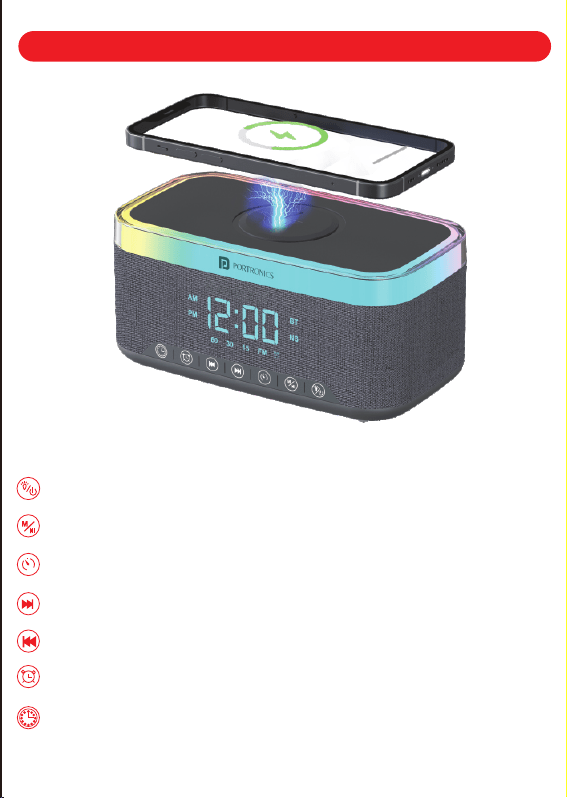
Long press power/short press light switch
Long press function switch BT/NS/FM mode, short press pause/play
Short press the timing 15/30/60, long press the Bluetooth couplet
Short press the next song, long press to increase the volume
Short press the last song, long press to decrease the volume
Alarm clock setting
Clock Settings
Press the alarm button to enter the clock / minute setting,
press / adjust the hour /minute, press the alarm key and then press /
select your favourite alarm, there are 7 groups of alarm bells, and
To switch to white noise mode, press 'M'. Then, choose your
favorite sleep music.
Press the time key to enter the clock / minute setting, press / adjust
the hour/minute
HOW TO DISABLE BLUETOOTH
For devices in Batch No 24/11, Bluetooth is turned on by default,
indicated by the "BT" symbol displayed on the right side of the
time. To disable Bluetooth mode, press the M key three times,
after which the "BT" symbol will no longer appear on the clock
display. When Bluetooth is off, the speaker will not be able to
connect to phones or other devices.
IMPORTANT NOTE
For optimal wireless charging performance, please use a
minimum 18W Charging Adapter. Wireless charging will not
function when relying solely on the device's built-in battery.
User Manual
16W Bluetooth Speaker with Wireless Charging
INSTRUCTIONS FOR USING THE SPEAKER
Wireless charger use : plug in the charger to automatically turn on
TECHNICAL PARAMETER
• Wireless charging power : 15W
• Bluetooth version : 5.3
• Sound Output : 16W
• Bluetooth frequency : 2.4GHZ-2.48GHZ
• Transmission distance : 10 meters
• Frequency sound range : 50 HZ-20 KHZ
• Sigto noise ratio of whole machine : greater than 75 db
• Built-in lithium battery voltage: 3.7V charging input : DC5V/500MA
OPERATION DESCRIPTION OF THE KEY FUNCTION
• Start up : long press the start button for two seconds to start up,
start up the default heating light
• This audio supports the use of Bluetooth devices with A2DP function,
boot default into the Bluetooth mode, Bluetooth indicator blue light
shining, accompanied by voice prompt, when the stereo is waiting
for pairing connection, only in this state, can be paired and
connected with the Bluetooth audio.
MOBILE PHONE CONNECTION
• The first step is to open the phone Bluetooth setting switch in the
phone Settings and click the search device
• The second step, when the available device displays the TRIFUSION
character indicating that the phone finds the Bluetooth stereo, click
TRIFIUSION to enter the pairing mode. After the phone is successfully
paired with the stereo, there will be a voice prompt and display the
connected.
TWS COUPLET FUNCTION
This Function Is Suitable For Bluetooth Mode Only
• When you have two Bluetooth speakers, by long pressing TRIFUSION
one of the keys to match. Bluetooth connected to each other, the
two speakers will automatically become the left and right sound
channels to produce stereo surround sound effect, achieving real
wireless stereo.
LIGHT USE
• The TRIFUSION Bluetooth speaker is equipped with 13 lighting effects
• Start the default warm lamp effect of the equipment, and press
the light key to adjust the light
FM RADIO TO USE:
M key long press to switch to the FM function, connect the charging
cable to the product type-c interface as a radio antenna, the other
end does not need to connect any equipment, through the pause
button to enter the station automatic search and automatically
save, the cable station through +/- saved station selection.
TF CARD/U DISK FUNCTION FOR USE
By inserting the TF card / U disk into the card slot, the corresponding
voice prompt will appear. The product will automatically read the
audio file in the card and play it. The user can use the voice to control
the music with the speaker + - button.
CLOCK SETTING
ALARM CLOCK SETTING
finally press the alarm key to open the alarm clock (the alarm mark
appears on the screen after successful setting). When the alarm
rings, press any key to close the alarm. When no one turns off, the
alarm will automatically turn off for 1 minute (the alarm will ring
normally in the shutdown state, please cancel the alarm clock
without the need) Cancel alarm setting: long press the alarm key
(the alarm sign disappears on the screen after successful
cancellation)
WHITE NOISE USE
SAFETY INSTRUCTIONS
• Do not expose the product into the water or humid areas, such
as bathrooms.
• Please do not hit or drop the product hardly to avoid manual
damage.
• When not in use for a long time, please turn off the power.
www.portronics.com
For Support
Visit : www.portronics.com
Contact No. : +91 9555245245
(Working Hrs. : Monday - Saturday 10:00am - 6:00pm)
E-Waste Management
For E-Waste J& ROHS compliance
refer to www.portronics.com/ewaste
Long press power/short press light switch
Long press function switch BT/NS/FM mode, short press pause/play
Short press the timing 15/30/60, long press the Bluetooth couplet
Short press the next song, long press to increase the volume
Short press the last song, long press to decrease the volume
Alarm clock setting
Clock Settings
Press the alarm button to enter the clock / minute setting,
press / adjust the hour /minute, press the alarm key and then press /
select your favourite alarm, there are 7 groups of alarm bells, and
To switch to white noise mode, press 'M'. Then, choose your
favorite sleep music.
Press the time key to enter the clock / minute setting, press / adjust
the hour/minute
HOW TO DISABLE BLUETOOTH
For devices in Batch No 24/11, Bluetooth is turned on by default,
indicated by the "BT" symbol displayed on the right side of the
time. To disable Bluetooth mode, press the M key three times,
after which the "BT" symbol will no longer appear on the clock
display. When Bluetooth is off, the speaker will not be able to
connect to phones or other devices.
IMPORTANT NOTE
For optimal wireless charging performance, please use a
minimum 18W Charging Adapter. Wireless charging will not
function when relying solely on the device's built-in battery.

User Manual
16W Bluetooth Speaker with Wireless Charging
INSTRUCTIONS FOR USING THE SPEAKER
Wireless charger use : plug in the charger to automatically turn on
TECHNICAL PARAMETER
• Wireless charging power : 15W
• Bluetooth version : 5.3
• Sound Output : 16W
• Bluetooth frequency : 2.4GHZ-2.48GHZ
• Transmission distance : 10 meters
• Frequency sound range : 50 HZ-20 KHZ
• Sigto noise ratio of whole machine : greater than 75 db
• Built-in lithium battery voltage: 3.7V charging input : DC5V/500MA
OPERATION DESCRIPTION OF THE KEY FUNCTION
• Start up : long press the start button for two seconds to start up,
start up the default heating light
• This audio supports the use of Bluetooth devices with A2DP function,
boot default into the Bluetooth mode, Bluetooth indicator blue light
shining, accompanied by voice prompt, when the stereo is waiting
for pairing connection, only in this state, can be paired and
connected with the Bluetooth audio.
MOBILE PHONE CONNECTION
• The first step is to open the phone Bluetooth setting switch in the
phone Settings and click the search device
• The second step, when the available device displays the TRIFUSION
character indicating that the phone finds the Bluetooth stereo, click
TRIFIUSION to enter the pairing mode. After the phone is successfully
paired with the stereo, there will be a voice prompt and display the
connected.
TWS COUPLET FUNCTION
This Function Is Suitable For Bluetooth Mode Only
• When you have two Bluetooth speakers, by long pressing TRIFUSION
one of the keys to match. Bluetooth connected to each other, the
two speakers will automatically become the left and right sound
channels to produce stereo surround sound effect, achieving real
wireless stereo.
LIGHT USE
• The TRIFUSION Bluetooth speaker is equipped with 13 lighting effects
• Start the default warm lamp effect of the equipment, and press
the light key to adjust the light
FM RADIO TO USE:
M key long press to switch to the FM function, connect the charging
cable to the product type-c interface as a radio antenna, the other
end does not need to connect any equipment, through the pause
button to enter the station automatic search and automatically
save, the cable station through +/- saved station selection.
TF CARD/U DISK FUNCTION FOR USE
By inserting the TF card / U disk into the card slot, the corresponding
voice prompt will appear. The product will automatically read the
audio file in the card and play it. The user can use the voice to control
the music with the speaker + - button.
CLOCK SETTING
ALARM CLOCK SETTING
finally press the alarm key to open the alarm clock (the alarm mark
appears on the screen after successful setting). When the alarm
rings, press any key to close the alarm. When no one turns off, the
alarm will automatically turn off for 1 minute (the alarm will ring
normally in the shutdown state, please cancel the alarm clock
without the need) Cancel alarm setting: long press the alarm key
(the alarm sign disappears on the screen after successful
cancellation)
WHITE NOISE USE
SAFETY INSTRUCTIONS
• Do not expose the product into the water or humid areas, such
as bathrooms.
• Please do not hit or drop the product hardly to avoid manual
damage.
• When not in use for a long time, please turn off the power.
www.portronics.com
For Support
Visit : www.portronics.com
Contact No. : +91 9555245245
(Working Hrs. : Monday - Saturday 10:00am - 6:00pm)
E-Waste Management
For E-Waste J& ROHS compliance
refer to www.portronics.com/ewaste
Long press power/short press light switch
Long press function switch BT/NS/FM mode, short press pause/play
Short press the timing 15/30/60, long press the Bluetooth couplet
Short press the next song, long press to increase the volume
Short press the last song, long press to decrease the volume
Alarm clock setting
Clock Settings
Press the alarm button to enter the clock / minute setting,
press / adjust the hour /minute, press the alarm key and then press /
select your favourite alarm, there are 7 groups of alarm bells, and
To switch to white noise mode, press 'M'. Then, choose your
favorite sleep music.
Press the time key to enter the clock / minute setting, press / adjust
the hour/minute
HOW TO DISABLE BLUETOOTH
For devices in Batch No 24/11, Bluetooth is turned on by default,
indicated by the "BT" symbol displayed on the right side of the
time. To disable Bluetooth mode, press the M key three times,
after which the "BT" symbol will no longer appear on the clock
display. When Bluetooth is off, the speaker will not be able to
connect to phones or other devices.
IMPORTANT NOTE
For optimal wireless charging performance, please use a
minimum 18W Charging Adapter. Wireless charging will not
function when relying solely on the device's built-in battery.

User Manual
16W Bluetooth Speaker with Wireless Charging
INSTRUCTIONS FOR USING THE SPEAKER
Wireless charger use : plug in the charger to automatically turn on
TECHNICAL PARAMETER
• Wireless charging power : 15W
• Bluetooth version : 5.3
• Sound Output : 16W
• Bluetooth frequency : 2.4GHZ-2.48GHZ
• Transmission distance : 10 meters
• Frequency sound range : 50 HZ-20 KHZ
• Sigto noise ratio of whole machine : greater than 75 db
• Built-in lithium battery voltage: 3.7V charging input : DC5V/500MA
OPERATION DESCRIPTION OF THE KEY FUNCTION
• Start up : long press the start button for two seconds to start up,
start up the default heating light
• This audio supports the use of Bluetooth devices with A2DP function,
boot default into the Bluetooth mode, Bluetooth indicator blue light
shining, accompanied by voice prompt, when the stereo is waiting
for pairing connection, only in this state, can be paired and
connected with the Bluetooth audio.
MOBILE PHONE CONNECTION
• The first step is to open the phone Bluetooth setting switch in the
phone Settings and click the search device
• The second step, when the available device displays the TRIFUSION
character indicating that the phone finds the Bluetooth stereo, click
TRIFIUSION to enter the pairing mode. After the phone is successfully
paired with the stereo, there will be a voice prompt and display the
connected.
TWS COUPLET FUNCTION
This Function Is Suitable For Bluetooth Mode Only
• When you have two Bluetooth speakers, by long pressing TRIFUSION
one of the keys to match. Bluetooth connected to each other, the
two speakers will automatically become the left and right sound
channels to produce stereo surround sound effect, achieving real
wireless stereo.
LIGHT USE
• The TRIFUSION Bluetooth speaker is equipped with 13 lighting effects
• Start the default warm lamp effect of the equipment, and press
the light key to adjust the light
FM RADIO TO USE:
M key long press to switch to the FM function, connect the charging
cable to the product type-c interface as a radio antenna, the other
end does not need to connect any equipment, through the pause
button to enter the station automatic search and automatically
save, the cable station through +/- saved station selection.
TF CARD/U DISK FUNCTION FOR USE
By inserting the TF card / U disk into the card slot, the corresponding
voice prompt will appear. The product will automatically read the
audio file in the card and play it. The user can use the voice to control
the music with the speaker + - button.
CLOCK SETTING
ALARM CLOCK SETTING
finally press the alarm key to open the alarm clock (the alarm mark
appears on the screen after successful setting). When the alarm
rings, press any key to close the alarm. When no one turns off, the
alarm will automatically turn off for 1 minute (the alarm will ring
normally in the shutdown state, please cancel the alarm clock
without the need) Cancel alarm setting: long press the alarm key
(the alarm sign disappears on the screen after successful
cancellation)
WHITE NOISE USE
SAFETY INSTRUCTIONS
• Do not expose the product into the water or humid areas, such
as bathrooms.
• Please do not hit or drop the product hardly to avoid manual
damage.
• When not in use for a long time, please turn off the power.
www.portronics.com
For Support
Visit : www.portronics.com
Contact No. : +91 9555245245
(Working Hrs. : Monday - Saturday 10:00am - 6:00pm)
E-Waste Management
For E-Waste J& ROHS compliance
refer to www.portronics.com/ewaste
Long press power/short press light switch
Long press function switch BT/NS/FM mode, short press pause/play
Short press the timing 15/30/60, long press the Bluetooth couplet
Short press the next song, long press to increase the volume
Short press the last song, long press to decrease the volume
Alarm clock setting
Clock Settings
Press the alarm button to enter the clock / minute setting,
press / adjust the hour /minute, press the alarm key and then press /
select your favourite alarm, there are 7 groups of alarm bells, and
To switch to white noise mode, press 'M'. Then, choose your
favorite sleep music.
Press the time key to enter the clock / minute setting, press / adjust
the hour/minute
HOW TO DISABLE BLUETOOTH
For devices in Batch No 24/11, Bluetooth is turned on by default,
indicated by the "BT" symbol displayed on the right side of the
time. To disable Bluetooth mode, press the M key three times,
after which the "BT" symbol will no longer appear on the clock
display. When Bluetooth is off, the speaker will not be able to
connect to phones or other devices.
IMPORTANT NOTE
For optimal wireless charging performance, please use a
minimum 18W Charging Adapter. Wireless charging will not
function when relying solely on the device's built-in battery.

User Manual
16W Bluetooth Speaker with Wireless Charging
INSTRUCTIONS FOR USING THE SPEAKER
Wireless charger use : plug in the charger to automatically turn on
TECHNICAL PARAMETER
• Wireless charging power : 15W
• Bluetooth version : 5.3
• Sound Output : 16W
• Bluetooth frequency : 2.4GHZ-2.48GHZ
• Transmission distance : 10 meters
• Frequency sound range : 50 HZ-20 KHZ
• Sigto noise ratio of whole machine : greater than 75 db
• Built-in lithium battery voltage: 3.7V charging input : DC5V/500MA
OPERATION DESCRIPTION OF THE KEY FUNCTION
• Start up : long press the start button for two seconds to start up,
start up the default heating light
• This audio supports the use of Bluetooth devices with A2DP function,
boot default into the Bluetooth mode, Bluetooth indicator blue light
shining, accompanied by voice prompt, when the stereo is waiting
for pairing connection, only in this state, can be paired and
connected with the Bluetooth audio.
MOBILE PHONE CONNECTION
• The first step is to open the phone Bluetooth setting switch in the
phone Settings and click the search device
• The second step, when the available device displays the TRIFUSION
character indicating that the phone finds the Bluetooth stereo, click
TRIFIUSION to enter the pairing mode. After the phone is successfully
paired with the stereo, there will be a voice prompt and display the
connected.
TWS COUPLET FUNCTION
This Function Is Suitable For Bluetooth Mode Only
• When you have two Bluetooth speakers, by long pressing TRIFUSION
one of the keys to match. Bluetooth connected to each other, the
two speakers will automatically become the left and right sound
channels to produce stereo surround sound effect, achieving real
wireless stereo.
LIGHT USE
• The TRIFUSION Bluetooth speaker is equipped with 13 lighting effects
• Start the default warm lamp effect of the equipment, and press
the light key to adjust the light
FM RADIO TO USE:
M key long press to switch to the FM function, connect the charging
cable to the product type-c interface as a radio antenna, the other
end does not need to connect any equipment, through the pause
button to enter the station automatic search and automatically
save, the cable station through +/- saved station selection.
TF CARD/U DISK FUNCTION FOR USE
By inserting the TF card / U disk into the card slot, the corresponding
voice prompt will appear. The product will automatically read the
audio file in the card and play it. The user can use the voice to control
the music with the speaker + - button.
CLOCK SETTING
ALARM CLOCK SETTING
finally press the alarm key to open the alarm clock (the alarm mark
appears on the screen after successful setting). When the alarm
rings, press any key to close the alarm. When no one turns off, the
alarm will automatically turn off for 1 minute (the alarm will ring
normally in the shutdown state, please cancel the alarm clock
without the need) Cancel alarm setting: long press the alarm key
(the alarm sign disappears on the screen after successful
cancellation)
WHITE NOISE USE
SAFETY INSTRUCTIONS
• Do not expose the product into the water or humid areas, such
as bathrooms.
• Please do not hit or drop the product hardly to avoid manual
damage.
• When not in use for a long time, please turn off the power.
www.portronics.com
For Support
Visit : www.portronics.com
Contact No. : +91 9555245245
(Working Hrs. : Monday - Saturday 10:00am - 6:00pm)
E-Waste Management
For E-Waste J& ROHS compliance
refer to www.portronics.com/ewaste
Long press power/short press light switch
Long press function switch BT/NS/FM mode, short press pause/play
Short press the timing 15/30/60, long press the Bluetooth couplet
Short press the next song, long press to increase the volume
Short press the last song, long press to decrease the volume
Alarm clock setting
Clock Settings
Press the alarm button to enter the clock / minute setting,
press / adjust the hour /minute, press the alarm key and then press /
select your favourite alarm, there are 7 groups of alarm bells, and
To switch to white noise mode, press 'M'. Then, choose your
favorite sleep music.
Press the time key to enter the clock / minute setting, press / adjust
the hour/minute
HOW TO DISABLE BLUETOOTH
For devices in Batch No 24/11, Bluetooth is turned on by default,
indicated by the "BT" symbol displayed on the right side of the
time. To disable Bluetooth mode, press the M key three times,
after which the "BT" symbol will no longer appear on the clock
display. When Bluetooth is off, the speaker will not be able to
connect to phones or other devices.
IMPORTANT NOTE
For optimal wireless charging performance, please use a
minimum 18W Charging Adapter. Wireless charging will not
function when relying solely on the device's built-in battery.

User Manual
16W Bluetooth Speaker with Wireless Charging
INSTRUCTIONS FOR USING THE SPEAKER
Wireless charger use : plug in the charger to automatically turn on
TECHNICAL PARAMETER
• Wireless charging power : 15W
• Bluetooth version : 5.3
• Sound Output : 16W
• Bluetooth frequency : 2.4GHZ-2.48GHZ
• Transmission distance : 10 meters
• Frequency sound range : 50 HZ-20 KHZ
• Sigto noise ratio of whole machine : greater than 75 db
• Built-in lithium battery voltage: 3.7V charging input : DC5V/500MA
OPERATION DESCRIPTION OF THE KEY FUNCTION
• Start up : long press the start button for two seconds to start up,
start up the default heating light
• This audio supports the use of Bluetooth devices with A2DP function,
boot default into the Bluetooth mode, Bluetooth indicator blue light
shining, accompanied by voice prompt, when the stereo is waiting
for pairing connection, only in this state, can be paired and
connected with the Bluetooth audio.
MOBILE PHONE CONNECTION
• The first step is to open the phone Bluetooth setting switch in the
phone Settings and click the search device
• The second step, when the available device displays the TRIFUSION
character indicating that the phone finds the Bluetooth stereo, click
TRIFIUSION to enter the pairing mode. After the phone is successfully
paired with the stereo, there will be a voice prompt and display the
connected.
TWS COUPLET FUNCTION
This Function Is Suitable For Bluetooth Mode Only
• When you have two Bluetooth speakers, by long pressing TRIFUSION
one of the keys to match. Bluetooth connected to each other, the
two speakers will automatically become the left and right sound
channels to produce stereo surround sound effect, achieving real
wireless stereo.
LIGHT USE
• The TRIFUSION Bluetooth speaker is equipped with 13 lighting effects
• Start the default warm lamp effect of the equipment, and press
the light key to adjust the light
FM RADIO TO USE:
M key long press to switch to the FM function, connect the charging
cable to the product type-c interface as a radio antenna, the other
end does not need to connect any equipment, through the pause
button to enter the station automatic search and automatically
save, the cable station through +/- saved station selection.
TF CARD/U DISK FUNCTION FOR USE
By inserting the TF card / U disk into the card slot, the corresponding
voice prompt will appear. The product will automatically read the
audio file in the card and play it. The user can use the voice to control
the music with the speaker + - button.
CLOCK SETTING
ALARM CLOCK SETTING
finally press the alarm key to open the alarm clock (the alarm mark
appears on the screen after successful setting). When the alarm
rings, press any key to close the alarm. When no one turns off, the
alarm will automatically turn off for 1 minute (the alarm will ring
normally in the shutdown state, please cancel the alarm clock
without the need) Cancel alarm setting: long press the alarm key
(the alarm sign disappears on the screen after successful
cancellation)
WHITE NOISE USE
SAFETY INSTRUCTIONS
• Do not expose the product into the water or humid areas, such
as bathrooms.
• Please do not hit or drop the product hardly to avoid manual
damage.
• When not in use for a long time, please turn off the power.
www.portronics.com
For Support
Visit : www.portronics.com
Contact No. : +91 9555245245
(Working Hrs. : Monday - Saturday 10:00am - 6:00pm)
E-Waste Management
For E-Waste J& ROHS compliance
refer to www.portronics.com/ewaste
Long press power/short press light switch
Long press function switch BT/NS/FM mode, short press pause/play
Short press the timing 15/30/60, long press the Bluetooth couplet
Short press the next song, long press to increase the volume
Short press the last song, long press to decrease the volume
Alarm clock setting
Clock Settings
Press the alarm button to enter the clock / minute setting,
press / adjust the hour /minute, press the alarm key and then press /
select your favourite alarm, there are 7 groups of alarm bells, and
To switch to white noise mode, press 'M'. Then, choose your
favorite sleep music.
Press the time key to enter the clock / minute setting, press / adjust
the hour/minute
HOW TO DISABLE BLUETOOTH
For devices in Batch No 24/11, Bluetooth is turned on by default,
indicated by the "BT" symbol displayed on the right side of the
time. To disable Bluetooth mode, press the M key three times,
after which the "BT" symbol will no longer appear on the clock
display. When Bluetooth is off, the speaker will not be able to
connect to phones or other devices.
IMPORTANT NOTE
For optimal wireless charging performance, please use a
minimum 18W Charging Adapter. Wireless charging will not
function when relying solely on the device's built-in battery.

User Manual
16W Bluetooth Speaker with Wireless Charging
INSTRUCTIONS FOR USING THE SPEAKER
Wireless charger use : plug in the charger to automatically turn on
TECHNICAL PARAMETER
• Wireless charging power : 15W
• Bluetooth version : 5.3
• Sound Output : 16W
• Bluetooth frequency : 2.4GHZ-2.48GHZ
• Transmission distance : 10 meters
• Frequency sound range : 50 HZ-20 KHZ
• Sigto noise ratio of whole machine : greater than 75 db
• Built-in lithium battery voltage: 3.7V charging input : DC5V/500MA
OPERATION DESCRIPTION OF THE KEY FUNCTION
• Start up : long press the start button for two seconds to start up,
start up the default heating light
• This audio supports the use of Bluetooth devices with A2DP function,
boot default into the Bluetooth mode, Bluetooth indicator blue light
shining, accompanied by voice prompt, when the stereo is waiting
for pairing connection, only in this state, can be paired and
connected with the Bluetooth audio.
MOBILE PHONE CONNECTION
• The first step is to open the phone Bluetooth setting switch in the
phone Settings and click the search device
• The second step, when the available device displays the TRIFUSION
character indicating that the phone finds the Bluetooth stereo, click
TRIFIUSION to enter the pairing mode. After the phone is successfully
paired with the stereo, there will be a voice prompt and display the
connected.
TWS COUPLET FUNCTION
This Function Is Suitable For Bluetooth Mode Only
• When you have two Bluetooth speakers, by long pressing TRIFUSION
one of the keys to match. Bluetooth connected to each other, the
two speakers will automatically become the left and right sound
channels to produce stereo surround sound effect, achieving real
wireless stereo.
LIGHT USE
• The TRIFUSION Bluetooth speaker is equipped with 13 lighting effects
• Start the default warm lamp effect of the equipment, and press
the light key to adjust the light
FM RADIO TO USE:
M key long press to switch to the FM function, connect the charging
cable to the product type-c interface as a radio antenna, the other
end does not need to connect any equipment, through the pause
button to enter the station automatic search and automatically
save, the cable station through +/- saved station selection.
TF CARD/U DISK FUNCTION FOR USE
By inserting the TF card / U disk into the card slot, the corresponding
voice prompt will appear. The product will automatically read the
audio file in the card and play it. The user can use the voice to control
the music with the speaker + - button.
CLOCK SETTING
ALARM CLOCK SETTING
finally press the alarm key to open the alarm clock (the alarm mark
appears on the screen after successful setting). When the alarm
rings, press any key to close the alarm. When no one turns off, the
alarm will automatically turn off for 1 minute (the alarm will ring
normally in the shutdown state, please cancel the alarm clock
without the need) Cancel alarm setting: long press the alarm key
(the alarm sign disappears on the screen after successful
cancellation)
WHITE NOISE USE
SAFETY INSTRUCTIONS
• Do not expose the product into the water or humid areas, such
as bathrooms.
• Please do not hit or drop the product hardly to avoid manual
damage.
• When not in use for a long time, please turn off the power.
www.portronics.com
For Support
Visit : www.portronics.com
Contact No. : +91 9555245245
(Working Hrs. : Monday - Saturday 10:00am - 6:00pm)
E-Waste Management
For E-Waste J& ROHS compliance
refer to www.portronics.com/ewaste
Long press power/short press light switch
Long press function switch BT/NS/FM mode, short press pause/play
Short press the timing 15/30/60, long press the Bluetooth couplet
Short press the next song, long press to increase the volume
Short press the last song, long press to decrease the volume
Alarm clock setting
Clock Settings
Press the alarm button to enter the clock / minute setting,
press / adjust the hour /minute, press the alarm key and then press /
select your favourite alarm, there are 7 groups of alarm bells, and
To switch to white noise mode, press 'M'. Then, choose your
favorite sleep music.
Press the time key to enter the clock / minute setting, press / adjust
the hour/minute
HOW TO DISABLE BLUETOOTH
For devices in Batch No 24/11, Bluetooth is turned on by default,
indicated by the "BT" symbol displayed on the right side of the
time. To disable Bluetooth mode, press the M key three times,
after which the "BT" symbol will no longer appear on the clock
display. When Bluetooth is off, the speaker will not be able to
connect to phones or other devices.
IMPORTANT NOTE
For optimal wireless charging performance, please use a
minimum 18W Charging Adapter. Wireless charging will not
function when relying solely on the device's built-in battery.
User Manual
16W Bluetooth Speaker with Wireless Charging
INSTRUCTIONS FOR USING THE SPEAKER
Wireless charger use : plug in the charger to automatically turn on
TECHNICAL PARAMETER
• Wireless charging power : 15W
• Bluetooth version : 5.3
• Sound Output : 16W
• Bluetooth frequency : 2.4GHZ-2.48GHZ
• Transmission distance : 10 meters
• Frequency sound range : 50 HZ-20 KHZ
• Sigto noise ratio of whole machine : greater than 75 db
• Built-in lithium battery voltage: 3.7V charging input : DC5V/500MA
OPERATION DESCRIPTION OF THE KEY FUNCTION
• Start up : long press the start button for two seconds to start up,
start up the default heating light
• This audio supports the use of Bluetooth devices with A2DP function,
boot default into the Bluetooth mode, Bluetooth indicator blue light
shining, accompanied by voice prompt, when the stereo is waiting
for pairing connection, only in this state, can be paired and
connected with the Bluetooth audio.
MOBILE PHONE CONNECTION
• The first step is to open the phone Bluetooth setting switch in the
phone Settings and click the search device
• The second step, when the available device displays the TRIFUSION
character indicating that the phone finds the Bluetooth stereo, click
TRIFIUSION to enter the pairing mode. After the phone is successfully
paired with the stereo, there will be a voice prompt and display the
connected.
TWS COUPLET FUNCTION
This Function Is Suitable For Bluetooth Mode Only
• When you have two Bluetooth speakers, by long pressing TRIFUSION
one of the keys to match. Bluetooth connected to each other, the
two speakers will automatically become the left and right sound
channels to produce stereo surround sound effect, achieving real
wireless stereo.
LIGHT USE
• The TRIFUSION Bluetooth speaker is equipped with 13 lighting effects
• Start the default warm lamp effect of the equipment, and press
the light key to adjust the light
FM RADIO TO USE:
M key long press to switch to the FM function, connect the charging
cable to the product type-c interface as a radio antenna, the other
end does not need to connect any equipment, through the pause
button to enter the station automatic search and automatically
save, the cable station through +/- saved station selection.
TF CARD/U DISK FUNCTION FOR USE
By inserting the TF card / U disk into the card slot, the corresponding
voice prompt will appear. The product will automatically read the
audio file in the card and play it. The user can use the voice to control
the music with the speaker + - button.
CLOCK SETTING
ALARM CLOCK SETTING
finally press the alarm key to open the alarm clock (the alarm mark
appears on the screen after successful setting). When the alarm
rings, press any key to close the alarm. When no one turns off, the
alarm will automatically turn off for 1 minute (the alarm will ring
normally in the shutdown state, please cancel the alarm clock
without the need) Cancel alarm setting: long press the alarm key
(the alarm sign disappears on the screen after successful
cancellation)
WHITE NOISE USE
SAFETY INSTRUCTIONS
• Do not expose the product into the water or humid areas, such
as bathrooms.
• Please do not hit or drop the product hardly to avoid manual
damage.
• When not in use for a long time, please turn off the power.
www.portronics.com
For Support
Visit : www.portronics.com
E mail : [email protected]
Contact No. : +91 9555245245
(Working Hrs. : Monday - Saturday 10:00am - 6:00pm)
E-Waste Management
For E-Waste J& ROHS compliance
refer to www.portronics.com/ewaste
Long press power/short press light switch
Long press function switch BT/NS/FM mode, short press pause/play
Short press the timing 15/30/60, long press the Bluetooth couplet
Short press the next song, long press to increase the volume
Short press the last song, long press to decrease the volume
Alarm clock setting
Clock Settings
Press the alarm button to enter the clock / minute setting,
press / adjust the hour /minute, press the alarm key and then press /
select your favourite alarm, there are 7 groups of alarm bells, and
To switch to white noise mode, press 'M'. Then, choose your
favorite sleep music.
Press the time key to enter the clock / minute setting, press / adjust
the hour/minute
HOW TO DISABLE BLUETOOTH
For devices in Batch No 24/11, Bluetooth is turned on by default,
indicated by the "BT" symbol displayed on the right side of the
time. To disable Bluetooth mode, press the M key three times,
after which the "BT" symbol will no longer appear on the clock
display. When Bluetooth is off, the speaker will not be able to
connect to phones or other devices.
IMPORTANT NOTE
For optimal wireless charging performance, please use a
minimum 18W Charging Adapter. Wireless charging will not
function when relying solely on the device's built-in battery.