www.portronics.com
For Support
Visit : support.portronics.com
Contact No. : +91 9555245245 , 011-42413131
(Working Hrs. : Monday - Saturday 10:00am - 6:00pm)
Get Free Extra Warranty
visit: www.portronics.com/register-warranty.html/
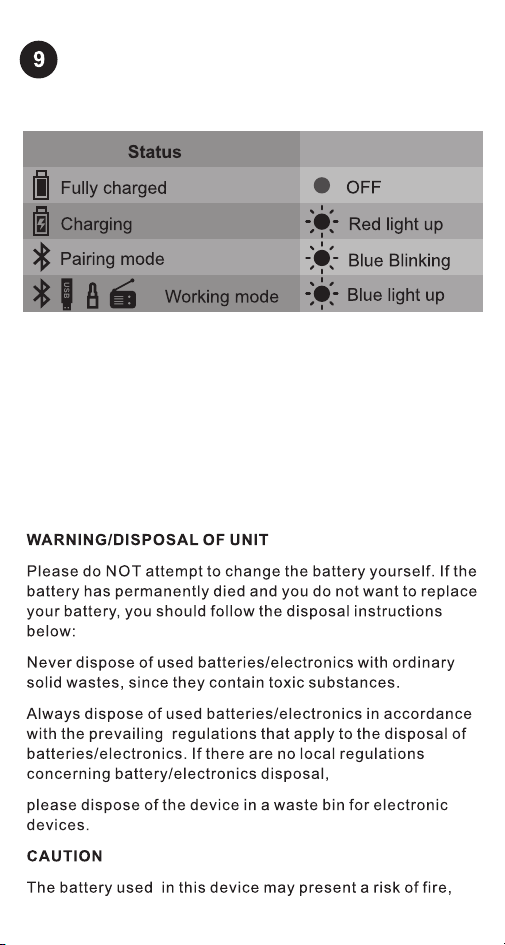
LED INDICATOR
LED Indicator
A. Short press the O (multifunction) button to change the
mode to “FM MODE”
www.portronics.com
For Support
Visit : support.portronics.com
Contact No. : +91 9555245245 , 011-42413131
(Working Hrs. : Monday - Saturday 10:00am - 6:00pm)
Get Free Extra Warranty
visit: www.portronics.com/register-warranty.html/
LED INDICATOR
LED Indicator
A. Short press the O (multifunction) button to change the
mode to “FM MODE”
www.portronics.com
For Support
Visit : support.portronics.com
Contact No. : +91 9555245245 , 011-42413131
(Working Hrs. : Monday - Saturday 10:00am - 6:00pm)
Get Free Extra Warranty
visit: www.portronics.com/register-warranty.html/
LED INDICATOR
LED Indicator
A. Short press the O (multifunction) button to change the
mode to “FM MODE”
www.portronics.com
For Support
Visit : support.portronics.com
Contact No. : +91 9555245245 , 011-42413131
(Working Hrs. : Monday - Saturday 10:00am - 6:00pm)
Get Free Extra Warranty
visit: www.portronics.com/register-warranty.html/
LED INDICATOR
LED Indicator
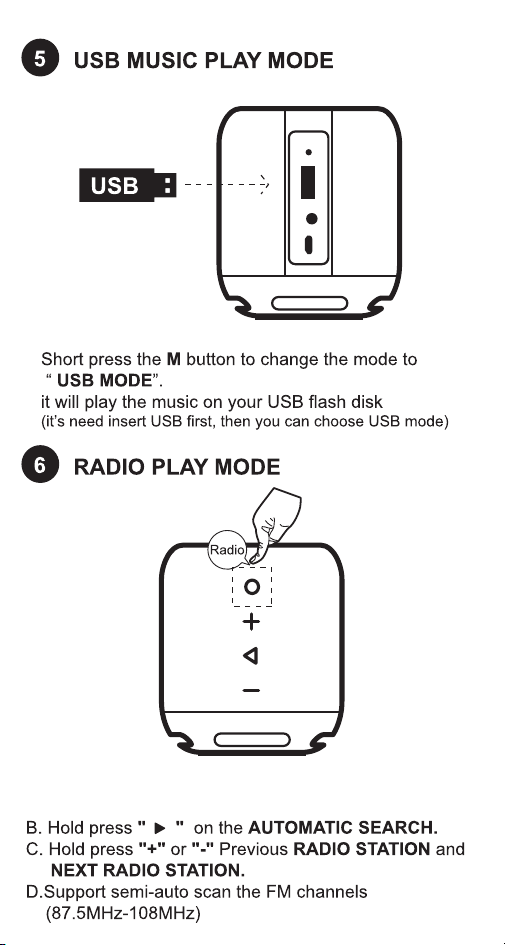
A. Short press the O (multifunction) button to change the
mode to “FM MODE”
www.portronics.com
For Support
Visit : support.portronics.com
Contact No. : +91 9555245245 , 011-42413131
(Working Hrs. : Monday - Saturday 10:00am - 6:00pm)
Get Free Extra Warranty
visit: www.portronics.com/register-warranty.html/
LED INDICATOR
LED Indicator
A. Short press the O (multifunction) button to change the
mode to “FM MODE”
www.portronics.com
For Support
Visit : support.portronics.com
Contact No. : +91 9555245245 , 011-42413131
(Working Hrs. : Monday - Saturday 10:00am - 6:00pm)
Get Free Extra Warranty
visit: www.portronics.com/register-warranty.html/
LED INDICATOR
LED Indicator
A. Short press the O (multifunction) button to change the
mode to “FM MODE”
www.portronics.com
For Support
Visit : support.portronics.com
Contact No. : +91 9555245245 , 011-42413131
(Working Hrs. : Monday - Saturday 10:00am - 6:00pm)
Get Free Extra Warranty
visit: www.portronics.com/register-warranty.html/
LED INDICATOR
LED Indicator
A. Short press the O (multifunction) button to change the
mode to “FM MODE”
www.portronics.com
For Support
Visit : support.portronics.com
Contact No. : +91 9555245245 , 011-42413131
(Working Hrs. : Monday - Saturday 10:00am - 6:00pm)
Get Free Extra Warranty
visit: www.portronics.com/register-warranty.html/
LED INDICATOR
LED Indicator
A. Short press the O (multifunction) button to change the
mode to “FM MODE”
www.portronics.com
For Support
Visit : support.portronics.com
Contact No. : +91 9555245245 , 011-42413131
(Working Hrs. : Monday - Saturday 10:00am - 6:00pm)
Get Free Extra Warranty
visit: www.portronics.com/register-warranty.html/
LED INDICATOR
LED Indicator
A. Short press the O (multifunction) button to change the
mode to “FM MODE”

www.portronics.com
For Support
Visit : support.portronics.com
E mail : [email protected]
Contact No. : +91 9555245245 , 011-42413131
(Working Hrs. : Monday - Saturday 10:00am - 6:00pm)
Get Free Extra Warranty
visit: www.portronics.com/register-warranty.html/
LED INDICATOR
LED Indicator
A. Short press the O (multifunction) button to change the
mode to “FM MODE”