Overview
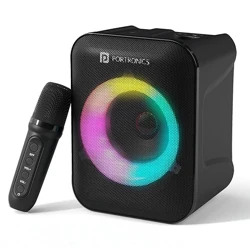
The Portronics Apollo 30 is a portable Bluetooth speaker designed for indoor and outdoor use. It features a 30W audio driver, a built-in rechargeable battery, and a wireless karaoke microphone. The speaker includes an RGB LED light ring, Bluetooth 5.4 connectivity, and a convenient carry handle.

Key Features at a Glance:
- 30W HD audio output
- Wireless karaoke microphone with echo control
- Up to 5 hours of playtime
- RGB ring LED light
- Bluetooth V5.4
- Type-C charging
- Built-in carry handle
What's in the Box
- Party Speaker (1 unit)
- Charging Cable (Type-C) (1 unit)
- Aux Cable (1 unit)
- Wireless Karaoke Microphone (1 unit)
- User Manual (1 unit)
Features
Audio Output
The speaker delivers 30W HD sound suitable for parties, karaoke, and outdoor gatherings.
Wireless Karaoke Microphone
An included wireless microphone allows for karaoke singing. The microphone features built-in echo and volume controls for adjusting vocal balance.

Battery and Playtime
The internal battery provides up to 5 hours of continuous playback on a single charge.
RGB Ring LED Light
A multi-color RGB LED ring is located on the front of the speaker. It produces dynamic lighting effects that synchronize with the music.

Connectivity
- Bluetooth V5.4: Provides stable wireless streaming from compatible devices such as smartphones, tablets, and laptops.
- USB Input: Allows playback from a USB storage device.
- Aux Input: 3.5mm aux input for wired audio sources (cable included).
Controls and Indicators
The speaker has physical buttons for power, volume, playback control, and mode selection. The microphone has dedicated echo and volume control buttons. LED indicators on the speaker show power and Bluetooth connection status.

Portability
The speaker includes a built-in grab handle for easy carrying. Its dimensions are 26.5 x 18 x 15 cm and it weighs approximately 1000 grams.

Charging
The speaker is charged via a Type-C port. A Type-C charging cable is included in the box.

Use Guide
Charging the Speaker
- Connect the included Type-C charging cable to the Type-C port on the speaker.
- Connect the other end of the cable to a USB power adapter (not included) or a computer USB port.
- The LED indicator will show the charging status. A full charge takes approximately 3-4 hours.
Powering On/Off
- Power On: Press and hold the Power button for 2 seconds. The speaker will power on and enter Bluetooth pairing mode.
- Power Off: Press and hold the Power button for 2 seconds. The speaker will turn off.
Bluetooth Pairing
- Ensure the speaker is powered on. It will automatically enter pairing mode (indicated by a flashing Bluetooth LED).
- On your device (smartphone, tablet, or laptop), enable Bluetooth and search for available devices.
- Select "Portronics Apollo 30" from the list of available devices.
- Once connected, the Bluetooth LED will become solid. The speaker will emit a confirmation tone.
Using the Wireless Karaoke Microphone
- Ensure the speaker is powered on.
- Turn on the wireless microphone using its power switch.
- The microphone will automatically pair with the speaker.
- Adjust the microphone volume and echo level using the controls on the microphone body.
- Speak or sing into the microphone. The audio will be output through the speaker.
Using the RGB Light
The RGB light ring activates automatically when the speaker is powered on. The light pattern may change with the music. Some models may have a dedicated button to cycle through light modes.
Playing Audio via USB or Aux
- USB: Insert a USB drive with audio files into the USB port. The speaker will automatically switch to USB mode and begin playback.
- Aux: Connect an audio source (e.g., smartphone, laptop) to the Aux input using the included aux cable. The speaker will automatically switch to Aux mode.
Product Setup Video
Video: Product Setup Guide
The video guides you through product setup.
Specifications
| Brand | Portronics |
|---|---|
| Model Number | POR-2737 |
| Speaker Output | 30W |
| Connectivity Technology | Bluetooth V5.4 |
| Compatible Devices | Laptop, Smartphone, Tablet |
| Audio Input | Wireless Microphone, USB, Aux |
| Number of Channels | 1 |
| Battery Playtime | Up to 5 hours |
| Charging Port | Type-C |
| Item Dimensions (L x W x H) | 26.5 x 18 x 15 cm |
| Item Weight | 1000 grams |
| Colour | Black |
| Enclosure Material | ABS Plastic |
| Mounting Type | Tabletop |
| Country of Origin | India |
Warranty and Support
Warranty: 1 Year
Manufacturer Contact Information:
- Portronics Digital Pvt Ltd
- First Floor, Property No D 8, Upper Basement, Sector 8, Noida, Uttar Pradesh 201301, India
- Email: [email protected]
- Phone: +91 9555-245-245
Packer Contact Information:
- Portronics Digital Pvt Ltd
- First Floor, Property No D 8, Upper Basement, Sector 8, Noida, Uttar Pradesh 201301, India
- Email: [email protected]
- Phone: +91 9555-245-245