J
J
4.
2.
5.
7.
6.
www.mcgrathsmartlocks.com.au
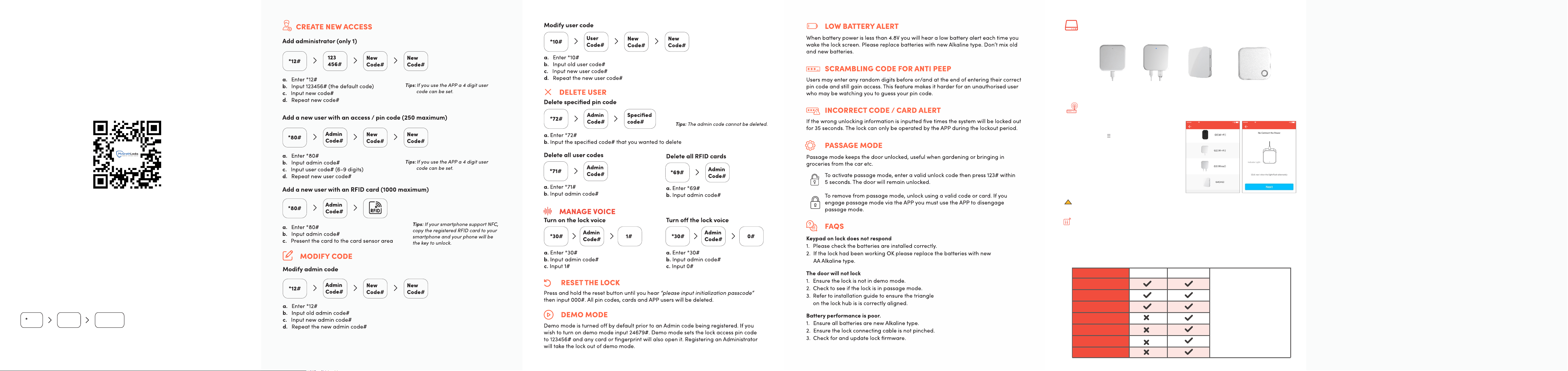
RECOMMENDED: LOCK SETUP WITH APP
It is highly recommended to set up the lock using the McGrathlocks
app.
The app simplifies programming and provides an easier way to
manage your locks.
Manual set up via keypad only
Please follow the instructions below to manually program the
lock using the keypad.
You can add a BLE device after the lock is programmed
manually provided you know the admin code.
DOWNLOAD & INSTALL
83#
Admin
code#
Add lock
via APP
GATEWAY
G2(Wi-Fi)
Network:2.4GWiFi
G3/G3P(PoE)
Network:RJ45
G4(4G)
Network:TLE(4G)
The gateway is an accessory for the lock that connects it to the network. With a gateway
connected you can remotely manage the lock, such as opening the door or deleting a
passcode.
AddGateway
中国电信 16:59
ChooseGatewayType
中国电信 16:59
Add Gateway
Gateway Functions
The door lock can function
normally without a gateway.
However, to remotely modify
or delete pin codes, issue
fingerprints or cards, open the
door remotely and access other
features, a gateway is required.
Without Gateway With Gateway
Assign random pin codes
Set permissions
Door Opening with App
Remotely modify and
delete pin codes
Remote card issuance
Open door remotely
Upload door records
log in real time
GATEWAY FUNCTIONALITY
G5(Wi-Fi)
Network:2.4G/5GWiFi
Notice: If the process times out, please disconnect from power and try again.
Gateway type
1. Open the McGrath Locks app and log in to your
administrator account.
2. Tap the menu icon ( ) in the top left corner of the home
screen.
3. Select “Gateway” from the sidebar menu.
4. Tap the “+” symbol in the top right corner.
5. Choose your gateway model from the list provided.
6. Connect the gateway to power, while the light is
alternatively flashing red and blue, press the “+”symbol.
7. Select the network required, enter the Wi-Fi password,
enter the gateway name.
!
*Gateway coverage distance: 10 meters without obstruction.
FCC Caution
Note: This equipment has been tested and found to comply with the limits for
a Class B digital device, pursuant to part 15 of the FCC Rules. These limits are
designed to provide reasonable protection against harmful interference in
a residential installation. This equipment generates, uses and can radiate
radio frequency energy and, if not installed and used in accordance with the
instructions, may cause harmful interference to radio communications.
However, there is no guarantee that interference will not occur in a particular
installation. If this equipment does cause harmful interference to radio or
television reception, which can be determined by turning the equipment off
and on, the user is encouraged to try to correct the interference by one or
more of the following measures:
—Reorient or relocate the receiving antenna.
—Increase the separation between the equipment and receiver.
—Connect the equipment into an outlet on a circuit different from that to
which the receiver is connected.
—Consult the dealer or an experienced radio/TV technician for help.
FCC Radiation Exposure Statement:
IMPORTANT NOTE
Any Changes or modifications not expressly approved by the party responsible
for compliance could void the user's authority to operate the equipment.
This device complies with part 15 of the FCC Rules. Operation is subject to the
following two conditions: (1) This device may not cause harmful interference,
and (2) this device must accept any interference received, including
interference that may cause undesired operation.
This equipment complies with FCC radiation exposure limits set forth for an
uncontrolled environment. This equipment should be installed and operated
with minimum distance 20cm between the radiator& your body.