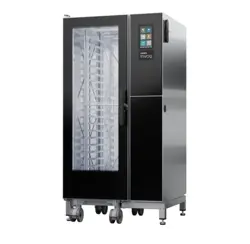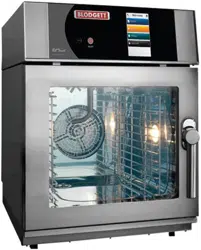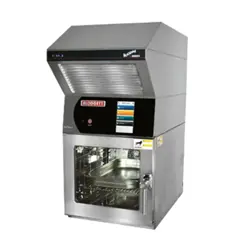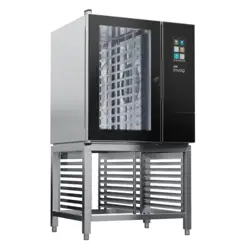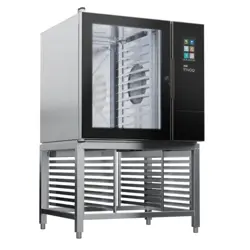

BCX-14G, BCX-14E, BX-14G, BX-14E,
GAS & ELECTRIC COMBI OVEN/STEAMERS
INSTALLATION - OPERATION - MAINTENANCE
BLODGETT OVEN COMPANY
www.blodgett.com
42 Allen Martin Drive, Essex Junction, VT 05452 USA Telephone: (802) 658-6600 Fax: (802) 864-0183
PN 39678 Rev AM (2/19)
© 2019 - G.S. Blodgett Corporation

Your Service Agency’s Address:
Model
Serial number
Oven installed by
Installation checked by

TABLE OF CONTENTS
INSTALLATION
The Blodgett Combi-Oven/Steamer ........................................ 4
Description of the Combi-Oven/Steamer ................................... 5
Owner’s Responsibilities .................................................. 2
Utility Connections - Standards and Codes ................................. 4
Oven Location and Ventilation ............................................. 5
Leg Attachment .......................................................... 6
Caster Attachment ....................................................... 7
Stacking ................................................................ 8
Deliming System Connection and Priming (BCX-14 units only) ............... 9
Plumbing Connections ................................................... 12
Electrical Connections ................................................... 13
Gas Connection......................................................... 14
Gas Hose Restraint ..................................................... 16
Adjustments ............................................................ 17
Final Check Lists ........................................................ 18
OPERATION
Safety Information for Gas Units .......................................... 19
Power Switches ......................................................... 20
Standard Controls ....................................................... 21
SmartTouch 2 Touchscreen Control ....................................... 25
MAINTENANCE
Spray Bottle Operating Procedure ........................................ 37
Cleaning and Preventive Maintenance .................................... 38
Daily Cleaning ...................................................... 38
Preventive Maintenance ............................................. 38
Weekly Cleaning - All Models ......................................... 38
BX-14 Boilerless Oven Weekly Cleaning .............................. 39
Flushing the Boiler - BCX Models Only .................................... 40
Deliming ............................................................... 41
BCX Combi Ovens .................................................. 41
BX-14 Boilerless Oven ............................................... 43
Deliming Interval Setting - BCX Only .................................. 44
IMPORTANT
WARNING: Improper installa-
tion, adjustment, alternation,
service or maintenance can
cause property damage, in-
jury or death. Read the instl-
lation, operation and mainte-
nance instructions thoroughly
before installing or servicing
this equipment.
INSTRUCTIONS TO BE FOL-
LOWED IN THE EVENT THE
USER SMELLS GAS MUST BE
POSTED IN A PROMINENT LO-
CATION. This information may
be obtained by contacting your
local gas supplier.
FOR YOUR SAFETY
Do not store or use gasoline or
other ammable vapors or liq-
uids in the vicinity of this or any
other appliance.
The information contained in this
manual is important for the prop-
er installation, use, and mainte-
nance of this oven. Adherence
to these procedures and instruc-
tions will result in satisfactory
baking results and long, trou-
ble free service. Please read
this manual carefully and retain
it for future reference.
ERRORS: Descriptive, typo-
graphic or pictorial errors are
subject to correction. Speci-
cations are subject to change
without notice.

4
Installation
The Blodgett Combi-Oven/Steamer
The Blodgett Combi-Oven/Steamer oers a completely
new method of cooking. With the Oven/Steamer you have
the choice of two cooking processes: Steam and Hot Air,
either...
• Separately
• Combined, or
• In Sequence
And for easy operation you can choose from three modes:
In the Steam mode you can:
steam reheat reconstitute
stew thaw simmer
blanche preserve braise
poach
In the Hot Air mode you can:
roast bake grill
gratinate broil
In the Combination Steam and Hot Air mode you can:
defrost roast rethermalize
reheat bake forced steam
You can also use two or three functions in sequence
during one cooking process. We call this:
• combi-steaming
• combi-roasting
• combi-baking
The combination of circulating hot air and steam in the
space saving, high performance Combi-Oven/Steamer
leads to improvements in the following areas:
• increased productivity in the kitchen
• a reduction in capital expenditures for multiple equip-
ment replacement
• a wider range of menu choices
• a simplied cleaning process
The work process is simplied since products are pre-
pared on or in steam table pans and trays. Food can be
cooked, stored, and transported with the same pans.
Small amounts of product can be processed eciently;
pre-cooked and convenience foods can be reheated with-
in minutes. Many frozen foods can be processed with-
out pre-thawing. This exibility in preparation reduces the
need for kettles and steam tables since there is no need
for large amounts of food to be kept warm for long periods
of time.
Today the improvement of food quality is more important
than ever. Vegetables are cooked in the Blodgett Combi-
Oven/Steamer without water at the optimal temperature
of just under 100ºC (21ºF), maintaining valuable vita-
mins, minerals, nutrients and trace elements. Cooking
meat in the Combi results in less shrinkage and a rmer,
juicier product. The Blodgett Combi-Oven/Steamer is be-
ing used more and more for baking. Steam and Hot Air
modes make it a general purpose baking appliance.

5
Installation
Description of the Combi-Oven/Steamer
ABOUT THE OVEN/STEAMER
Blodgett Combi-Oven/Steamers are quality produced us-
ing high-grade stainless steel with rst class workman-
ship.
The multiple speed fan, which is guarded against acci-
dental nger contact, is driven by a quiet and powerful
motor. The condenser draws out excess steam from the
appliance. Condensation and waste water, which result
during steaming and cleaning, are continuously drained.
The use of high quality insulation impedes excessive heat
radiation and saves energy.
The Oven/Steamer has optional adjustable legs which
adapt easily to slightly uneven surfaces and optional oor
stands which are designed for use with all of the table
models.
The high performance fresh steam generator with its con-
trol system makes it possible to enjoy all of the advantag-
es of a high quality steamer at the ick of a switch. Fresh
steam enters the oven cavity without pressure and is cir-
culated at high speed. This process enables quick and
gentle cooking and ensures high quality food while pro-
viding convenient working methods. The steam generator
is completely automatic and protected from running dry.
OVEN/STEAMER OPERATION
The practical oven door, with a viewing window, has a
wide swing radius and handle which can be operated eas-
ily, even with wet or greasy hands.
Ease of operation is guaranteed through the simple ar-
rangement of the controls. Graphic symbols make the ap-
pliance easy for even inexperienced kitchen sta to oper-
ate. The Steam On Demand feature allows the operator
to add steam at any time while operating in either the Hot
Air or Combi modes. This feature is excellent for baking
as well as roasting operations. A fourth function, the Cool
Down mode, allows the oven cavity to cool down rapidly
with the door opened.
Cleaning is kept to a minimum. The interior is sprayed
with a self-acting cleaning solution which interacts with
steam to easily remove crusts and stains. The oven is
designed for easy care and is welded water tight so that
the internal cooking cavity may be rinsed with a hose after
the steam cleaning process.
2
Installation
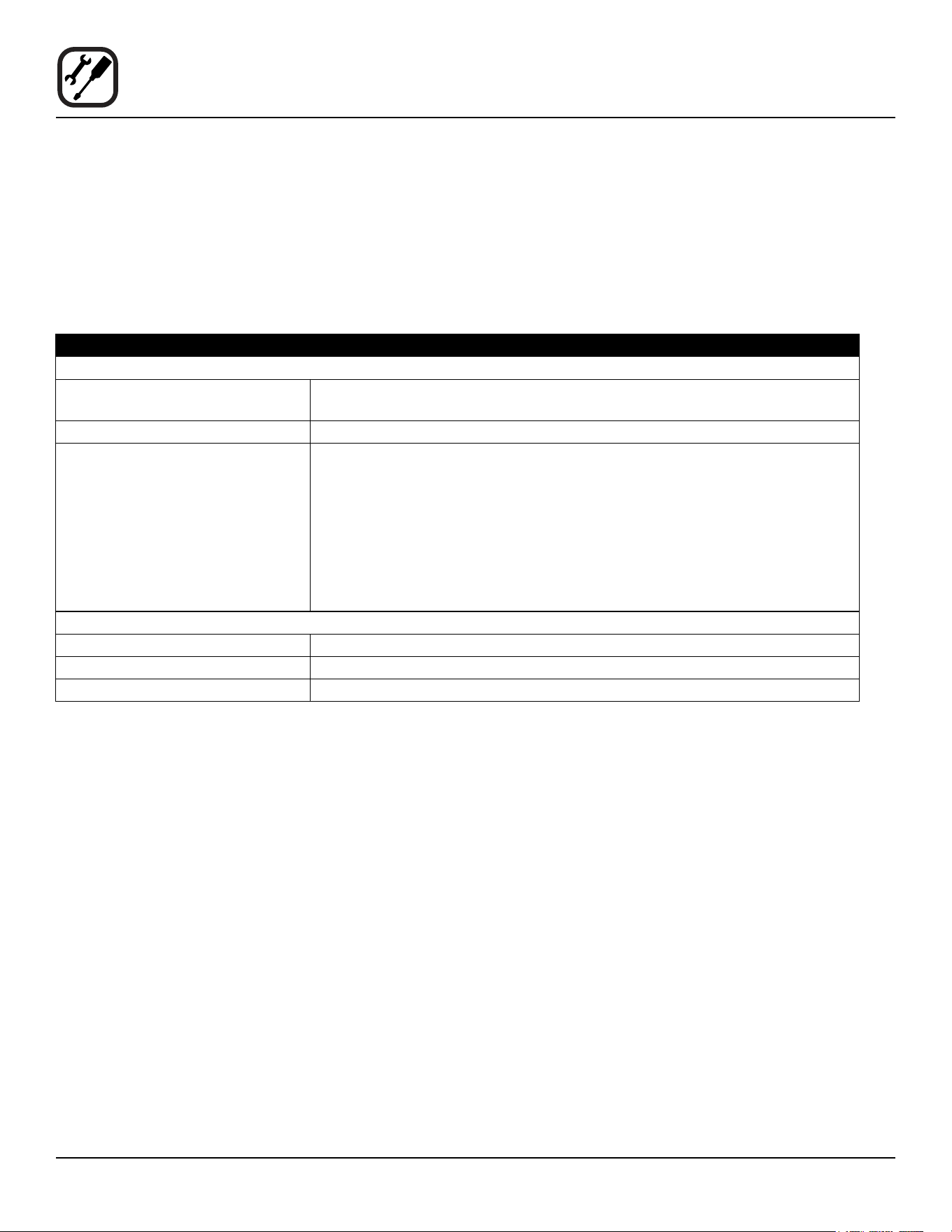
PLUMBING SPECIFICATIONS
WATER
Water pressure 40 PSI minimum
50 PSI maximum
Water connection 3/4” garden hose - Hot and Cold water
Minimum requirements TDS: 40-125 ppm
Hardness: 35-100 ppm
Chlorides: <25 ppm
Silica: <13 ppm
Chlorine: <0.2 ppm
Chloramine: <0.2 ppm
pH: 7.0-8.5
DRAINAGE
Drain type Atmospheric Vented Drain
Drain connection 2.00” (50.8mm) Copper
Maximum water drain temperature 140ºF (60ºC)
Owner’s Responsibilities
INSTALLATION RESPONSIBILITIES PRIOR TO SERVICE STARTUP INSPECTION
You are entitled to a free start-up inspection service by
our factory ASAP. Before a factory representative arrives
to perform a startup procedure, the owner must already
have satised the following requirements.
1. Oven(s) are uncrated, stacked (if applies) and put in
place.
NOTE: Please refer to Leg Attachment and Stacking.
Maximum shelf loading - 60 lbs (27.3 Kg)
3
Installation
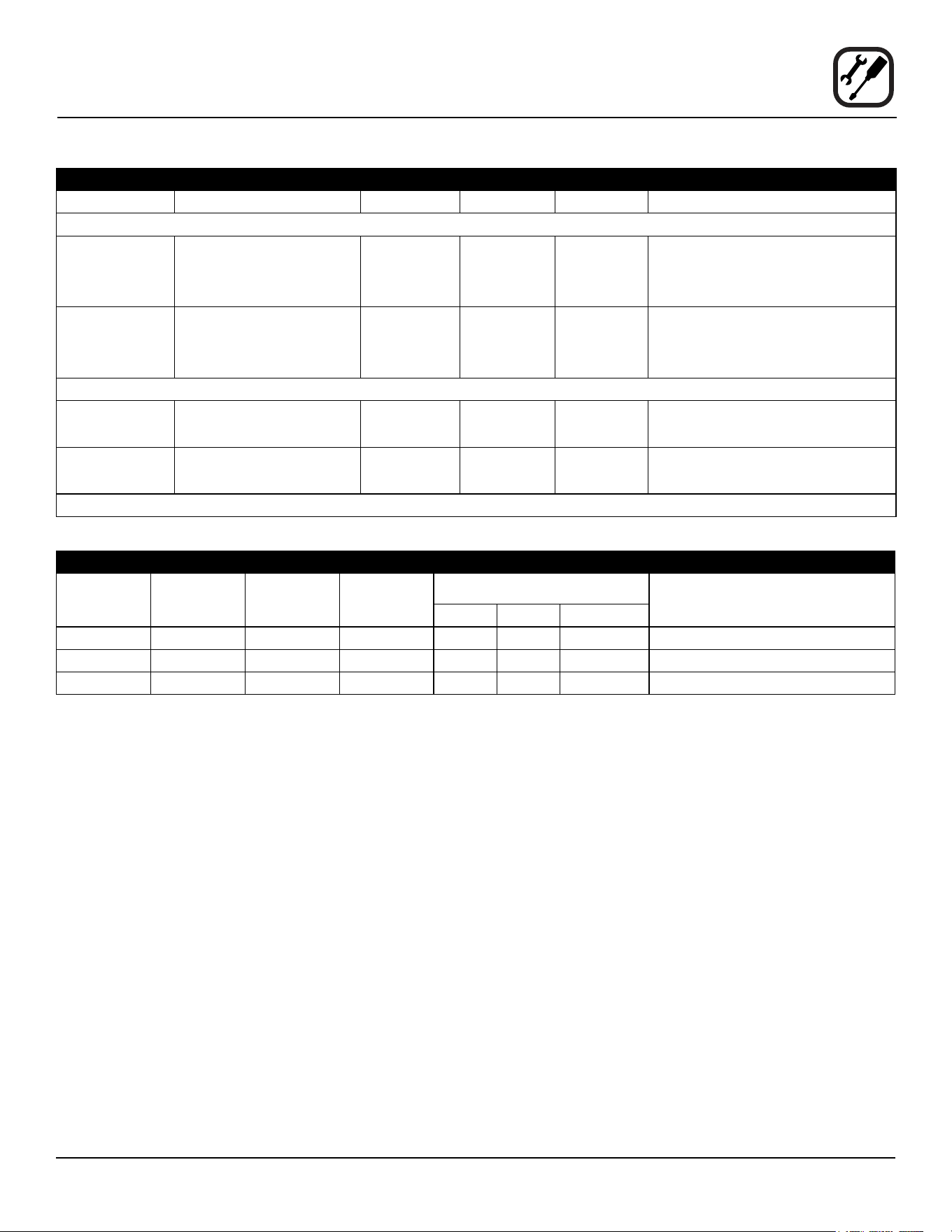
ELECTRICAL RATINGS - GAS OVENS - BCX-14G/AA, BX-14G/AA
TYPE OF GAS GAS INPUT VOLTAGE PHASE AMPS MOTOR
BCX-14G/AA
Natural Steam - 50,000 BTU/Hr
Hot Air - 65,000 BTU/Hr
Total - 115,000 BTU/Hr
115
208-240
1
1
12
6
3/4 HP 208-240VAC, 3 phase,
50/60 Hz
Propane Steam - 48,000 BTU/Hr
Hot Air - 65,000 BTU/Hr
Total - 113,000 BTU/Hr
115
208-240
1
1
12
6
3/4 HP 208-240VAC, 3 phase,
50/60 Hz
BX-14G/AA
Natural Hot Air - 65,000 BTU/Hr 115
208-240
1
1
12
6
3/4 HP 208-240VAC, 3 phase,
50/60 Hz
Propane Hot Air - 65,000 BTU/Hr 115
208-240
1
1
12
6
3/4 HP 208-240VAC, 3 phase,
50/60 Hz
3/4” NPT connector for all U.S. and Canadian installations
RATINGS - ELECTRIC APPLIANCES - BCX-14E/AA & BX-14E/AA
VOLTAGE
HZ
KW
PHASE
MAX LOAD (AMPS
MOTOR
L1 L2 L2
208 60 19 3 53 53 50 3/4 HP 208-240VAC, 50/60 Hz
240 60 19 3 46 46 43 3/4 HP 208-240VAC, 50/60 Hz
480 60 19 3 23 23 21 3/4 HP 208-240VAC, 50/60 Hz
Owner’s Responsibilities
4
Installation
Utility Connections - Standards and Codes
THE INSTALLATION INSTRUCTIONS CONTAINED
HEREIN ARE FOR THE USE OF QUALIFIED INSTAL-
LATION AND SERVICE PERSONNEL ONLY. INSTAL-
LATION OR SERVICE BY OTHER THAN QUALIFIED
PERSONNEL MAY RESULT IN DAMAGE TO THE OVEN
AND/OR INJURY TO THE OPERATOR.
Qualied installation personnel are individuals, a rm,
a corporation, or a company which either in person or
through a representative are engaged in, and are respon-
sible for:
• The installation or replacement of gas piping. The
connection, installation, repair or servicing of equip-
ment.
• The installation of electrical wiring from the electric
meter, main control box or service outlet to the elec-
tric appliance.
Qualied installation personnel must be experienced in
such work, be familiar with all precautions required and
have complied with all requirements of state or local au-
thorities having jurisdiction.
U.S. and Canadian Installations
Installation must conform with local codes, or in the ab-
sence of local codes, with the National Fuel Gas Code,
NFPA54/ANSI Z223.1-Latest Edition, the Natural Gas In-
stallation Code CAN/CGA-B149.1 or the Propane Instal-
lation Code, CAN/CGA-B149.2 as applicable.
Reference: National Electrical Code, ANSI/NFPA 70-Lat-
est Edition and/or Canadian Electrical Code CSA C22.1
as applicable.
This equipment is to be installed in compliance with the
Basic Plumbing Code of the Building Ocials and Code
Administrators International Inc. (BOCA) and the Food
Service Sanitation Manual of the Food and Drug Admin-
istration (FDA).
Appliance is to be installed with backow prevention in
accordance with applicable federal, province and local
codes.
General Export Installations
Installation must conform with Local and National instal-
lation standards. Local installation codes and/or require-
ments may vary. If you have any questions regarding the
proper installation and/or operation of your appliance,
please contact your local distributor. If you do not have a
local distributor, please call Blodgett Combi at 0011-802-
658-6600.
5
Installation
Oven Location and Ventilation
OVEN LOCATION
The well planned and proper placement of your oven will
result in long term operator convenience and satisfactory
performance.
Certain minimum clearances must be maintained be-
tween the oven and any combustible or non-combustible
construction. See the table below.
In addition, the following clearances are recommended
for servicing.
• Oven body sides - 12” (30cm)
• Oven body back - 12” (30cm)
NOTE: On gas models, routine servicing can usually
be accomplished within the limited movement
provided by the gas hose restraint. If the oven
needs to be moved further from the wall, the
gas must rst be turned o and disconnected
from the oven before removing the restraint.
Reconnect the restraint after the oven has been
returned to its normal position.
Left Side Heat Shield
Heat sources should not be near the air vents located on
the left hand side of the gas appliance.
OVEN
MODEL
MINIMUM REQUIRED
CLEARANCES
Right Side Left Side Back
BCX-14G 1”
(25.4mm)
6”
(152.4mm)
6”
(152.4mm)
BX-14G 1”
(25.4mm)
0”
(0mm)
6”
(152.4mm)
BCX-14E
BX-14E
2”
(50.8mm)
2”
(50.8mm)
3”
(76.2mm)
• Do not place strong sources of heat such as open
ame ranges, griddles, or charbroilers near the
oven. If such an instance exists, it is highly recom-
mended to purchase a heat shield, available from
Blodgett.
• Note that if temperatures are too high, a safety shut-
down may occur.
• Failure to comply may invalidate the oven warranty.
VENTILATION
The necessity for a properly designed and installed venti-
lation system cannot be over emphasized. The ventilation
system will allow the unit to function properly while remov-
ing unwanted vapors and products of combustion from
the operating area.
The appliance must be vented with a properly designed
mechanically driven exhaust hood. The hood should be
sized to completely cover the equipment plus an over-
hang of at least 6” (15 cm) on all sides not adjacent to a
wall. The capacity of the hood should be sized appropri-
ately and provisions made for adequate makeup air.
WARNING!!
Failure to properly vent the oven can be haz-
ardous to the health of the operator; and will
result in operational problems, unsatisfactory
baking, and possible damage to the equip-
ment. Damage sustained as a direct result of
improper ventilation will not be covered by the
Manufacturer’s warranty.
When installed in the Commonwealth of Massachusetts,
this appliance must be interlocked with the hood exhaust
system so that the appliance may be operated only when
the hood exhaust system is running.
U.S. and Canadian Installations
Refer to your local ventilation codes. In the absence of
local codes, refer to the National ventilation code titled,
“Standard for the Installation of Equipment for the Remov-
al of Smoke and Grease Laden Vapors from Commercial
Cooking Equipment”, NFPA-96- Latest Edition.
General Export Installations
Installation must conform with Local and National instal-
lation standards. Local installation codes and/or require-
ments may vary. If you have any questions regarding the
proper installation and/or operation of your unit, please
contact your local distributor. If you do not have a local
distributor, please call Blodgett Combi at 0011-802-658-
6600.
6
Installation
Leg Attachment
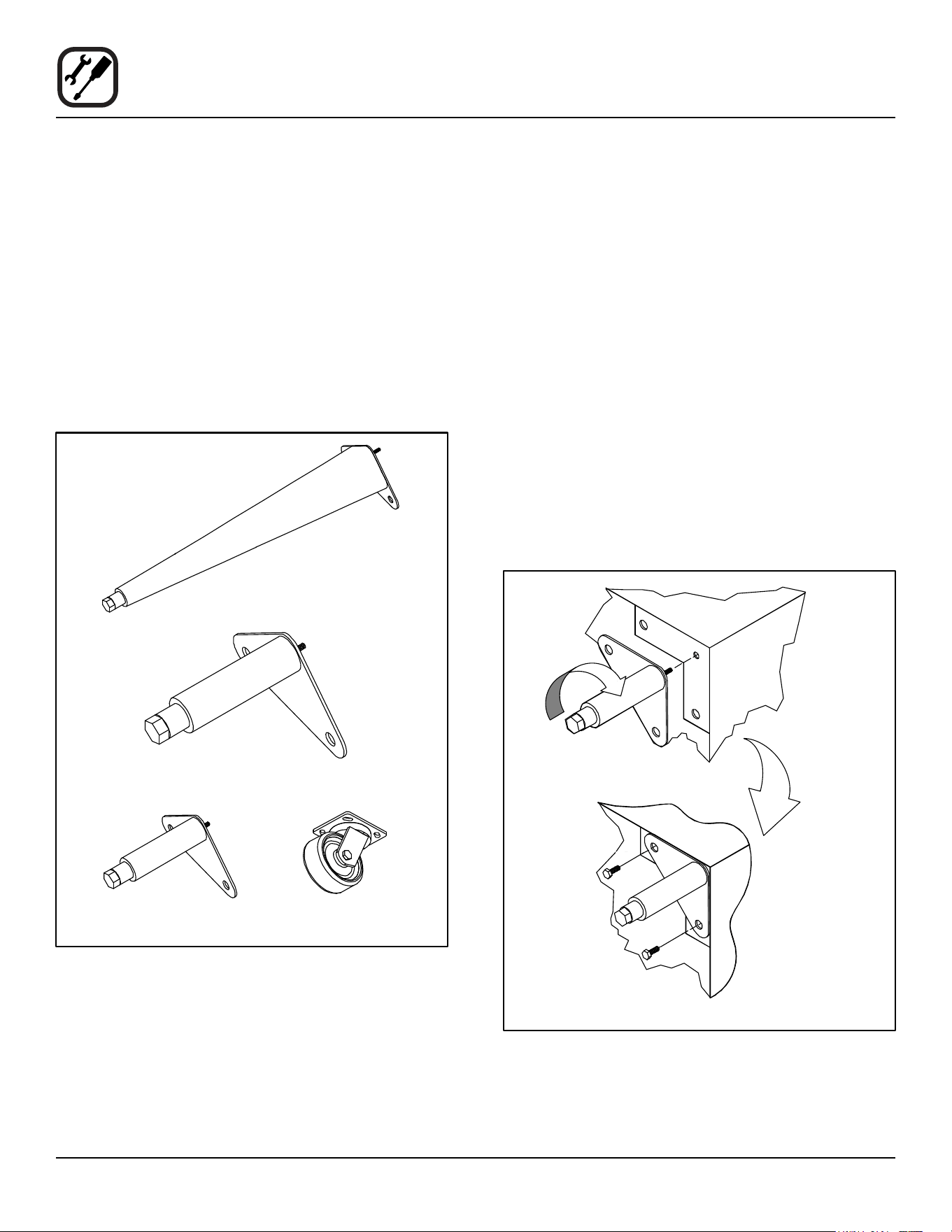
LEG OPTIONS
Legs are available in 4” (101mm), 6” (152mm) or 25”
(635mm) lengths or low prole casters.
• The 4” (101mm) legs may be used when mounting
on a counter.
• The 6” (152.4mm) legs are used on the lower sec-
tion of a double stacked appliance.
• The 25” (635mm) legs are used for a single appli-
ance located on the oor.
NOTE: For safety reasons, casters must not be used
with the 25” (635mm) legs.
25” (635mm) Adjustable Leg
6” (152,4mm) Adjustable Leg
4” (101mm) Leg Low Prole Casters
Figure 1
ATTACHMENT
1. Align the threaded stud on one of the front legs to the
bolt hole located in the bottom corner of the
appliance. Turn the leg clockwise and tighten to the
nearest full turn.
2. Align the leg plate holes with the bolt holes. Secure
with the two 1/2” bolts provided.
3. Repeat the above steps with the other front leg. If low
prole casters are used, install them with the locking
casters in the front of the oven. The rear casters do
not lock. Ensure that the locks are set on the front
casters.
4. Tip the oven up on the newly installed front legs. If
casters are used, check that the locks are set on
the front casters. Repeat the above steps for the
rear legs.
5. Level the oven by screwing the adjustable feet in or
out as necessary.
Figure 2
7
Installation
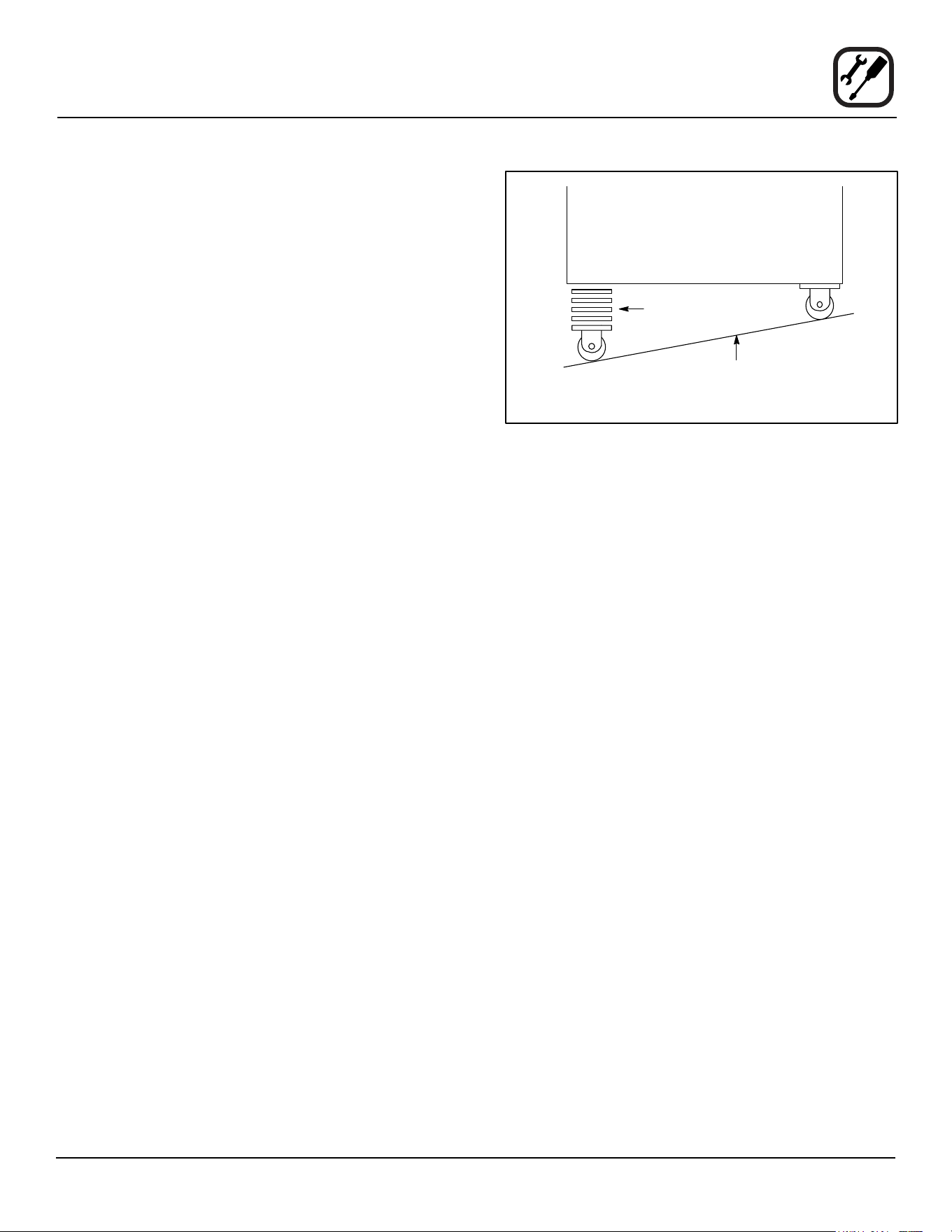
Caster Attachment
1. Place a level on the oor where the casters are to
rest.
2. Place shims under the low side until it is level.
3. Mount the shims between the casters and the oven
as follows:
a. Align the shims and caster holes with the bolt
holes.
b. Secure with the 1/2” bolts provided.
NOTE: Install them with the locking casters in the
front of the oven. The rear casters do not
lock. Ensure that the locks are set on the
front casters.
4. Tip the oven up on the newly installed casters.
Figure 3
Add shims as necessary
Floor
Exaggerated for clarity
8
Installation
Stacking
WARNING!!
Stacking should be performed by qualied
installation personnel only. The ovens are
heavy. Take care to use proper tools and tech-
niques when lifting and stacking units.
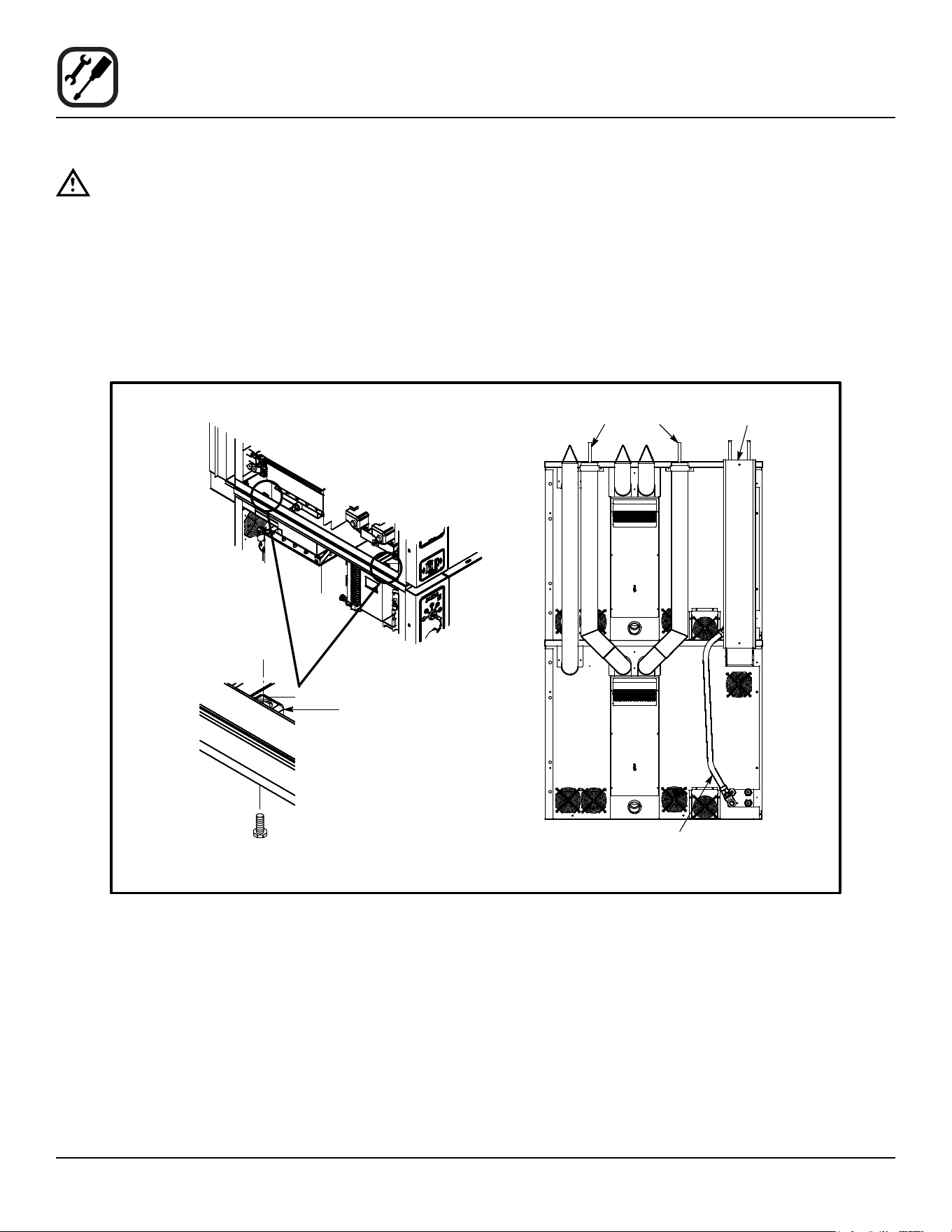
1. Attach the legs or casters to the bottom oven.
2. Place the top oven on the bottom oven. Be sure all
four sides are ush.
3. Remove left side oven panels.
4. Bolt the two ovens together from underneath into the
two threaded nut retainers.
5. GAS APPLIANCES ONLY: Attach the ue vents and
gas manifold as shown.
Figure 4
Left Side of Ovens
with Side Panels
Removed
Threaded Nut Retainer
Bolt
Hot Air Flue
Steam Generator
Flue (BCX-14 only)
Gas Manifold
Rear View BCX-14G
9
Installation
Deliming System Connection and Priming (BCX-14 units only)
DELIMING SYSTEM CONNECTION
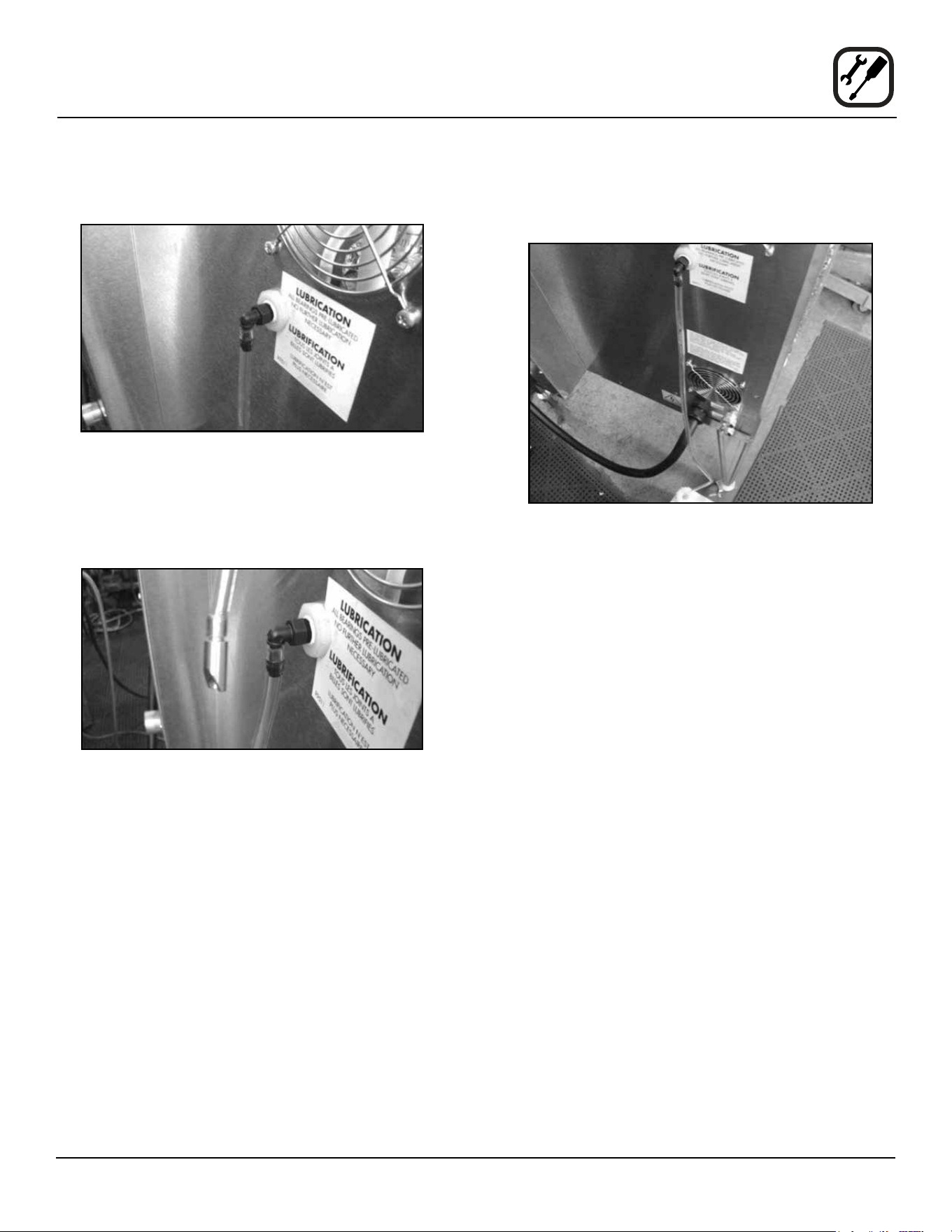
1. Push deliming tube onto barbed tting on oven back.
Figure 5
2. Cut deliming tube to length using the bottom of the
deliming uid reservoir in its mounted position as a
guide. Install the jug weight on the deliming uid res-
ervoir end of the deliming tube.
Figure 6
3. Insert the end of the deliming tube with the jug weight
into the deliming solution reservoir.
Figure 7
NOTE: If needed use supplied hose retainers and self
drilling screws to route the deliming tube away
from hot exhaust ports.
10
Installation
Deliming System Connection and Priming (BCX-14 units only)
PRIME THE DELIMING PUMP
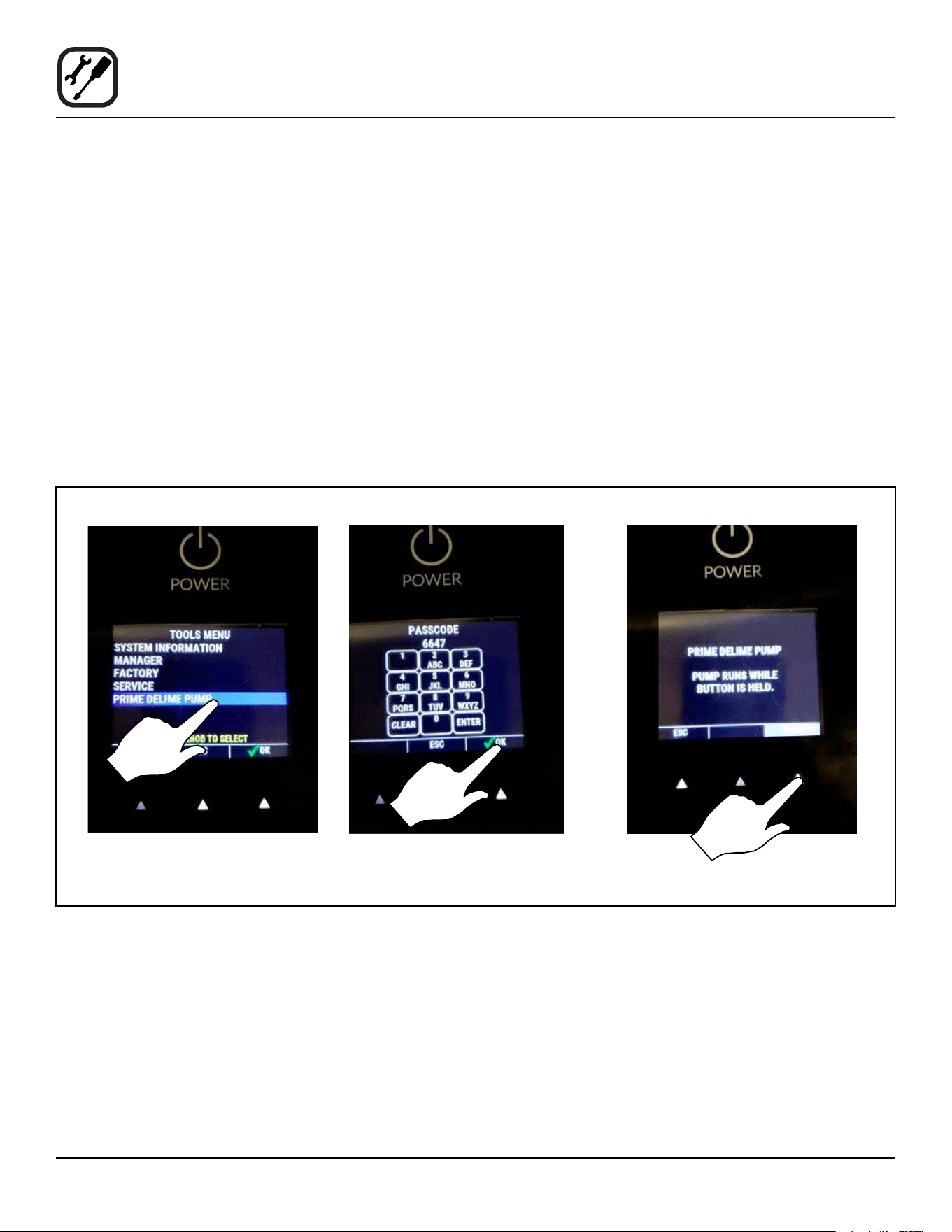
To prime the delime pump, use the following procedure
for your oven control.
Standard Control
1. With the oven o, the display reads PRESS POWER
KEY TO TURN ON. Press the TOOLS key below the
large knob. The tools menu is displayed.
2. Rotate the knob to highlight PRIME DELIME PUMP.
Then press the right arrow key beneath the word OK.
3. If the Manager Passcode is enabled, enter 6647 on
the passcode entry screen. Then press the right ar-
row key beneath the word OK.
4. In order to prime the delime pump, press the key be-
low the word PUMP on the screen. When the word
PUMP is highlighted the delime pump is pumping
uid from the bottle.
5. Watch for deliming solution to ow through the tube.
When the delime solution has reached the barbed
tting on the back of the oven, release the key be-
low the word PUMP on the screen, and the pump will
stop.
6. To return to the POWER screen, press the key below
ESC on the screen above, then on the screen that
follows.
Figure 8
11
Installation
Deliming System Connection and Priming (BCX-14 units only)
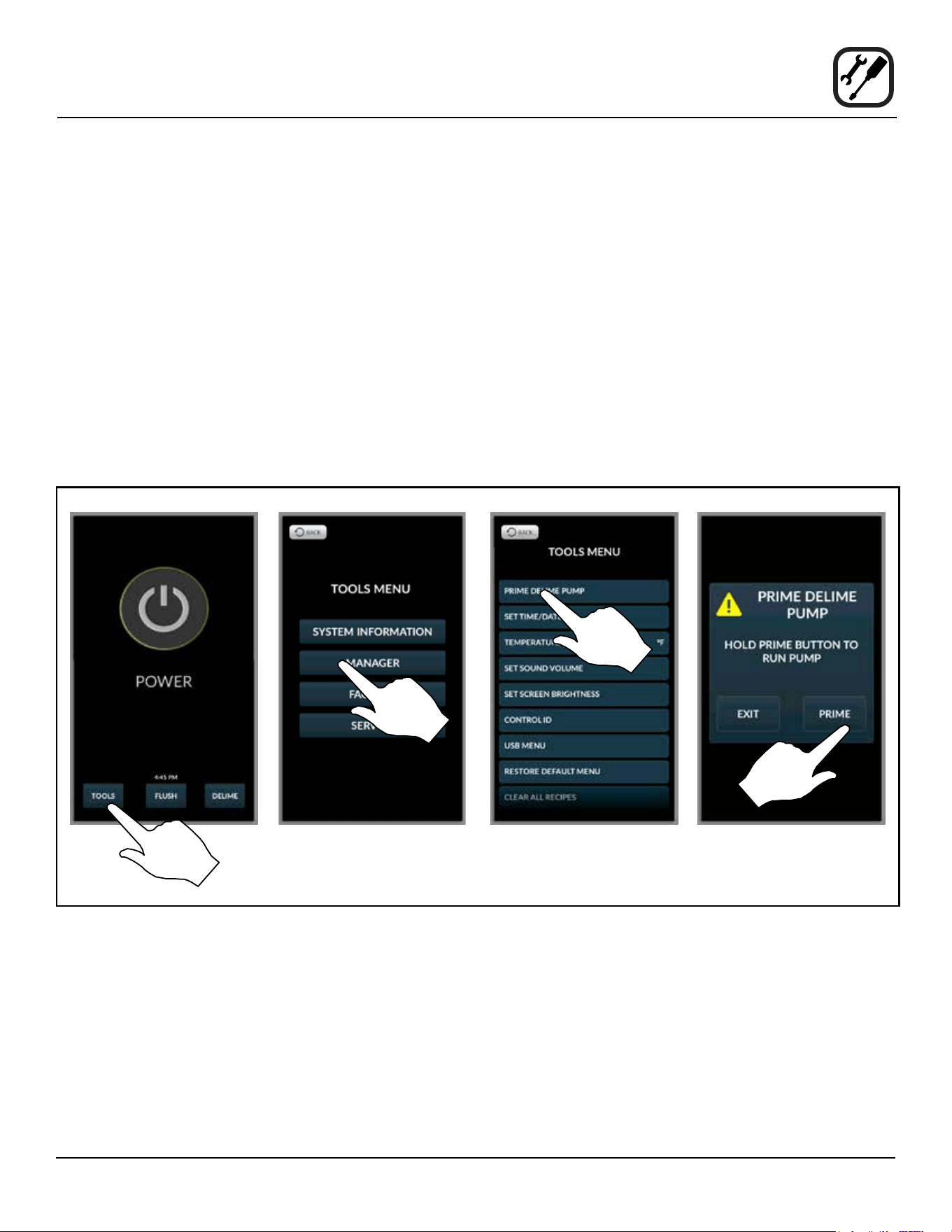
SmartTouch 2™ Control
1. With the oven o, the control displays the POWER
screen. Press the TOOLS key.
2. On the TOOLS MENU press the MANAGER key.
3. Press the PRIME DELIME PUMP key on the display.
4. Press and hold the PRIME key. Watch for deliming
solution to ow through the tube. When the delime
solution has reached the barbed tting on the back of
the oven, release the key.
5. The pump is now primed. Press the EXIT key.
6. Press the BACK key two times. The control returns to
the POWER screen.
Figure 9
12
Installation
Plumbing Connections
WATER CONNECTION
NOTE: Hot water maximizes steam production but is not
required. Cold water may be supplied to both
inlets if hot water is not available.
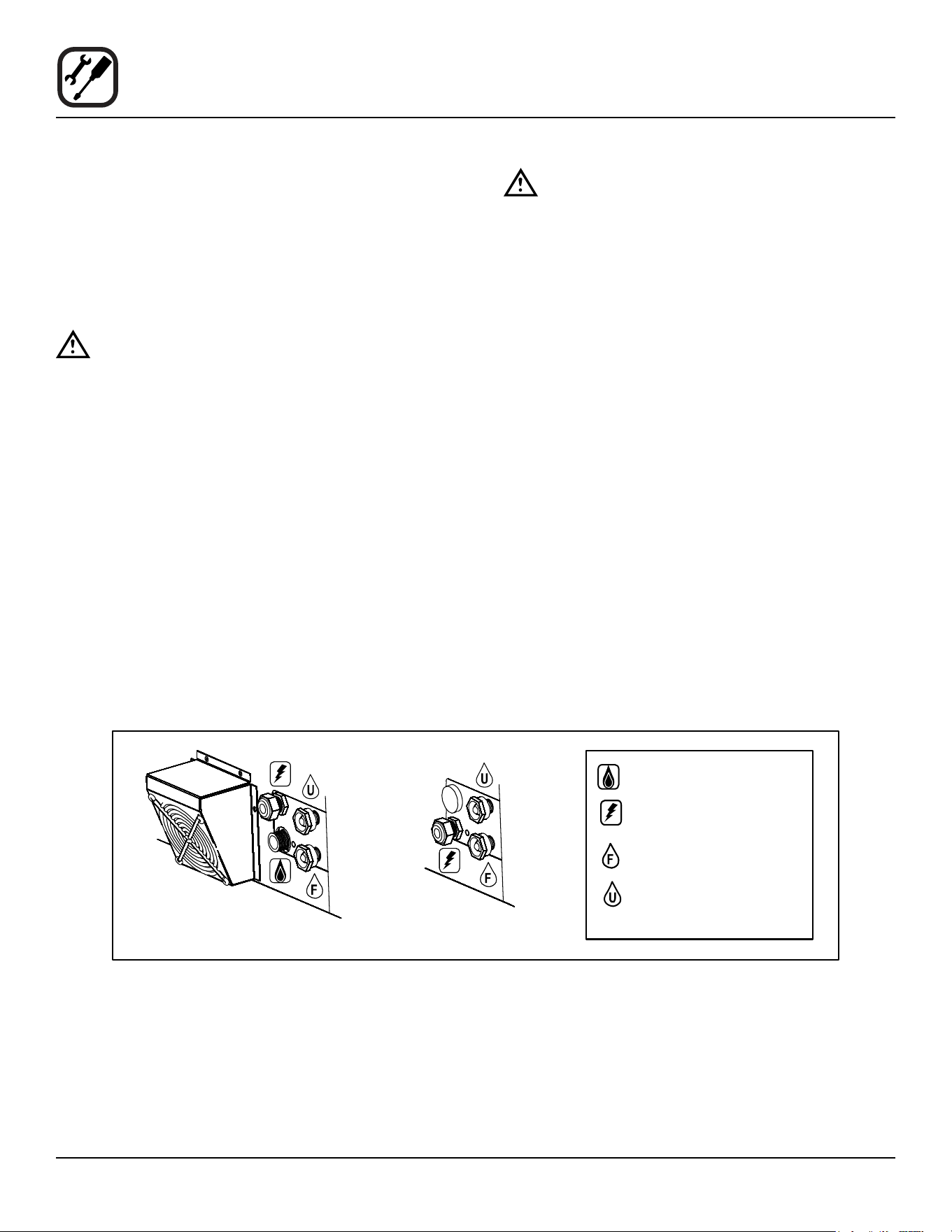
Connect the appliance to quality water via a pressure
hose with 3/4” GHT (19mm) couplings. See below for
connections. A shut o valve is to be provided adjacent
to the oven.
WARNING!!
Operating the appliance without the water reg-
ulator installed will invalidate your warranty.
This product must be installed by a licensed Plumber or
Gas Fitter when installed within the Commonwealth of
Massachusetts.
DRAIN CONNECTION
The drain should be run to an open oor drain avoiding
exible hose that could sag and allow trapped water to
accumulate. The customer must supply the piping from
the oven to the drain.
NOTE: The drain piping must consist of temperature
resistant material, greater than 160°F, and be
of adequate diameter not to cause ow restric-
tion. Improper materials may deform and cause
restrictions, thus aecting performance.
WARNING!!
Connection must be carried out by a licensed
plumber, to an open or closed drain. The drain
must never end directly beneath the equip-
ment. The drain should not be located on the
same side the equipment controls are located.
Specic water/drain connection for City of Los Ange-
les
1. Each drain line from the appliance shall be routed
without dips or sags to terminate above the ood level
rim of an approved indirect waste receptor.
2. The appliance shall be installed in accordance with
the manufacturer’s printed instructions and the LAPC
and LAMC, 1999 editions.
3. A backow protection device may be required by lo-
cal codes. If so, install on the potable water system
directly ahead of the appliance. The backow protec-
tion device shall be any of the following: an approved
pressure type vacuum breaker installed at least 12”
above the highest point of use, a double check valve
backow preventer or a reduced pressure principal
backow preventer.
Figure 10
BCX-14G & BX-14G
BCX-14E & BX-14E
Gas connection
Electrical connection
Filtered/boiler
connection
Unltered/condensate and
spray hose connection

13
Installation
Electrical Connections
ELECTRICAL CONNECTION
All Models
NOTE: Electrical connections must be performed by a
qualied installer only.
Before making any electrical connections to these appli-
ances, check that the power supply is adequate for the
voltage, amperage, and phase requirements stated on
the rating name plate mounted on the appliance.
The circuit breaker that is used to provide power to this
appliance must have a minimum of .076” (3mm) contact
spacing. The circuit breaker must meet all Local and Na-
tional installation standards.
All appliances must be installed in accordance with Local
or National Electrical codes.
A wiring schematic is located on the inside of the remove-
able side panel.
NOTE: Disconnect the power supply to the appliance
before servicing.
WARNING!!
Improper installation may invalidate your war-
ranty.
Electric Models
A strain relief for the power supply cord is provided. The
installer must supply a cord that meets all Local and Na-
tional installation standards.
Gas Models
U.S. and Canadian Installations
A power cord (115V units only) is supplied with a plug at-
tached. Plug the power cord into the desired receptacle.
This oven model uses a variable frequency inverter drive.
Appliances that use variable frequency inverter drives
produce high frequency noise and require lters and
shielded motor cabling. This causes higher leakage cur-
rent toward Earth Ground. Especially, at the moment of
switching ON this can cause an inadvertent trip of the ap-
pliance’s ground fault interrupter (GFCI). Some GFCIs
are more sensitive than others. Blodgett has qualied
the Pass and Seymour brand, part number 2095, 20 A,
125 VAC, 60 Hz, specication grade GFCI duplex recep-
tacle as being immune to the variable frequency inverter
drive’s noise. Blodgett recommends using this specic
GFCI for this model oven.
WARNING!!
If the supply cord is damaged, it must be re-
placed by a special cord or assembly available
from the manufacturer or its service agent.
14
Installation
Gas Connection
GAS PIPING
A properly sized gas supply system is essential for maxi-
mum oven performance. Piping should be sized to pro-
vide a supply of gas sucient to meet the maximum de-
mand of all appliances on the line without loss of pressure
at the equipment.
Example:
NOTE: BTU values in the following example are for
natural gas.
You purchase a BCX-14G to add to your existing cook
line.
1. Add the BTU rating of your current appliances.
Pitco Fryer 120,000 BTU
6 Burner Range 60,000 BTU
Deck Oven 50,000 BTU
Total 230,000 BTU
2. Add the BTU rating of the new oven to the total.
Previous Total 230,000 BTU
BCX-14G 115,000 BTU
New Total 345,000 BTU
3. Measure the distance from the gas meter to the cook
line. This is the pipe length. Let’s say the pipe length
is 40’ (12.2 m) and the pipe size is 1” (2.54 cm).
4. Use the appropriate table to determine the total ca-
pacity of your current gas piping.
The total capacity for this example is 375,000 BTU. Since
the total required gas pressure, 345,000 BTU is less than
375,000 BTU, the current gas piping will not have to be
increased.
NOTE: The BTU capacities given in the tables are for
straight pipe lengths only. Any elbows or other
ttings will decrease pipe capacities. Contact
your local gas supplier if you have any ques-
tions.
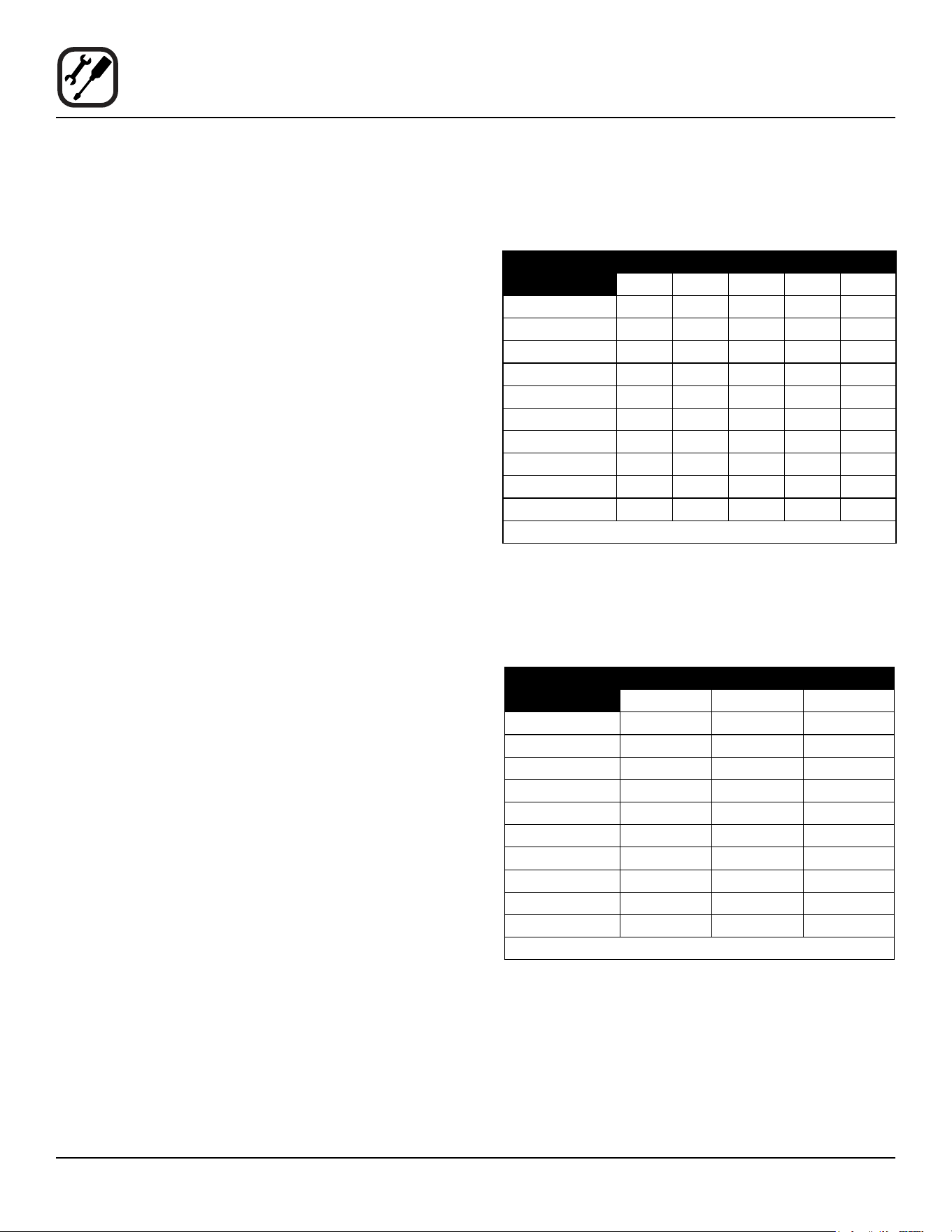
Maximum Capacity of Iron Pipe in Cubic Feet of
Natural Gas Per Hour
(Pressure drop of 0.5 Inch W.C.)
PIPE
LENGTH (FT)
NOMINAL SIZE, INCHES
3/4” 1” 1-1/4” 1-1/2” 2”
10 360 680 1400 2100 3950
20 250 465 950 1460 2750
30 200 375 770 1180 2200
40 170 320 660 990 1900
50 151 285 580 900 1680
60 138 260 530 810 1520
70 125 240 490 750 1400
80 118 220 460 690 1300
90 110 205 430 650 1220
100 103 195 400 620 1150
From the National Fuel Gas Code Part 10 Table 10-2
Maximum Capacity of Pipe in Thousands of
BTU/hr of Undiluted L.P. Gas at 11” W.C.
(Pressure drop of 0.5 Inch W.C.)
PIPE
LENGTH (FT)
OUTSIDE DIAMETER, INCHES
3/4” 1” 1-1/2”
10 608 1146 3525
20 418 788 2423
30 336 632 1946
40 287 541 1665
50 255 480 1476
60 231 435 1337
70 215 404 1241
80 198 372 1144
90 187 351 1079
100 175 330 1014
From the National Fuel Gas Code Part 10 Table 10-15
15
Installation
Gas Connections
PRESSURE REGULATION AND TESTING
The gas pressure to the appliance must be rated for each
appliance while the burners are on. A sucient gas pres-
sure must be present at the inlet to satisfy these condi-
tions. Refer to the table below for correct gas pressure.
Each appliance has been adjusted at the factory to oper-
ate with the type of gas specied on the rating plate.
Each oven is supplied with a regulator to maintain the
proper gas pressure. The regulator is essential to the
proper operation of the oven and should not be removed.
DO NOT INSTALL AN ADDITIONAL REGULATOR
WHERE THE UNIT CONNECTS TO THE GAS SUPPLY
UNLESS THE INLET PRESSURE IS GREATER THAN
14” W.C. (1/2 PSI) (37mbar).
The oven and its individual shuto valve must be discon-
nected from the gas supply piping system during any
pressure testing of that system at test pressures in ex-
cess of 1/2 psig (3.45kPa).
The oven must be isolated from the gas supply piping
system by closing its individual manual shuto valve dur-
ing any pressure testing of the gas piping system at test
pressures equal or less than 1/2 psig (3.45kPa).
Prior to connecting the appliance, gas lines should be
thoroughly purged of all metal lings, shavings, pipe
dope, and other debris. After connection, the appliance
must be checked for correct gas pressure.
U.S. and Canadian Installations
Installation must conform with local codes, or in the ab-
sence of local codes, with the National Fuel Gas Code,
NFPA54/ANSI Z223.1-Latest Edition, the Natural Gas In-
stallation Code CAN/CGA-B149.1 or the Propane Instal-
lation Code, CAN/CGA-B149.2 as applicable.
General Export Installations
Installation must conform with Local and National instal-
lation standards. Local installation codes and/or require-
ments may vary. If you have any questions regarding the
proper installation and/or operation of your appliance,
please contact your local distributor. If you do not have a
local distributor, please call Blodgett Combi at 0011-802-
658-6600.
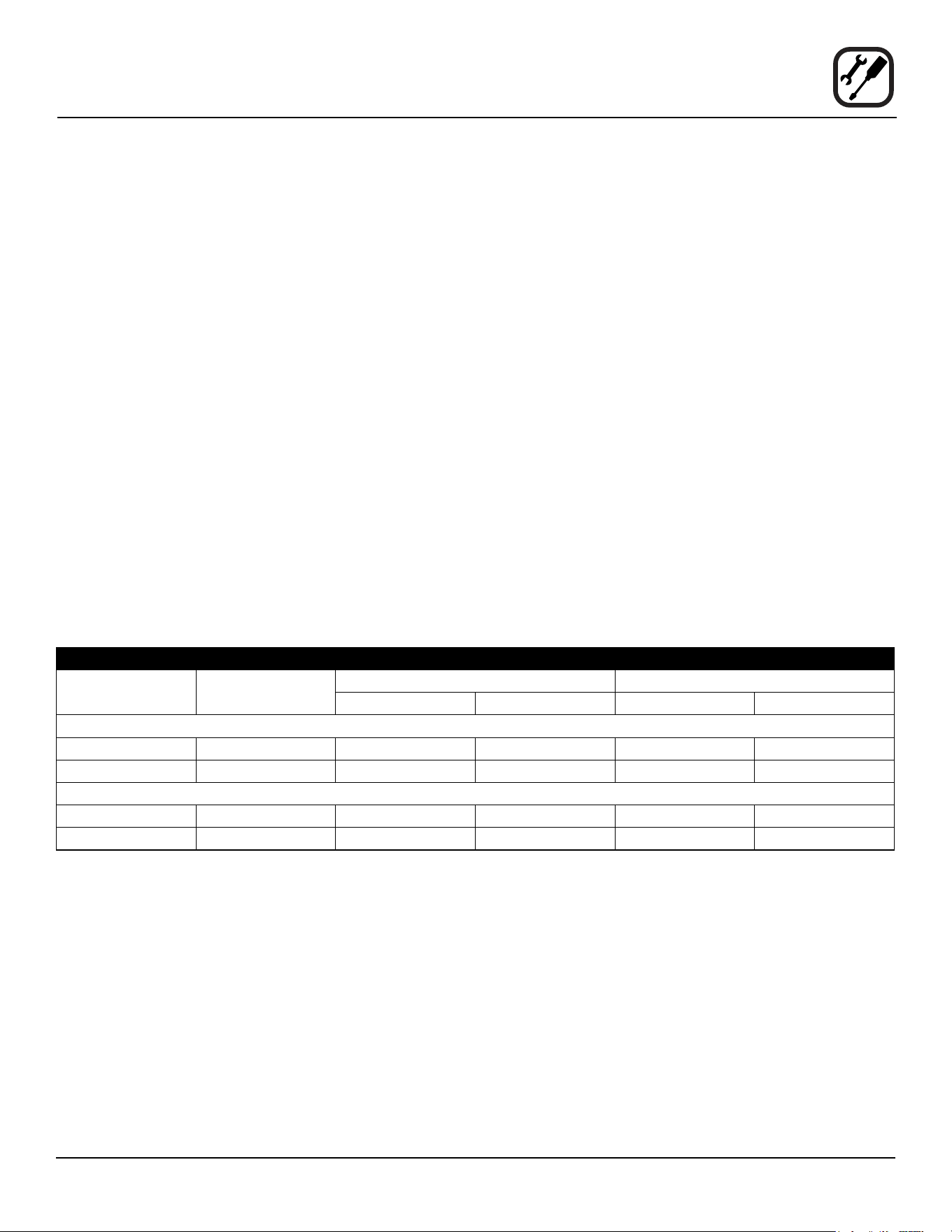
GAS PRESSURE
Gas Type Inlet Pressure Orice Size at Sea Level Manifold Pressure
Hot Air Steam Hot Air Steam
BCX-14G
Natural 7-14” W.C. .0531” dia .042” dia 3.5” W.C. 3.5” W.C.
Propane 12-14” W.C. .032” dia .026” dia 10” W.C. 10” W.C.
BX-14G
Natural 7-14” W.C. .0531” dia — 3.5” W.C. —
Propane 12-14” W.C. .032” dia — 10” W.C. —
16
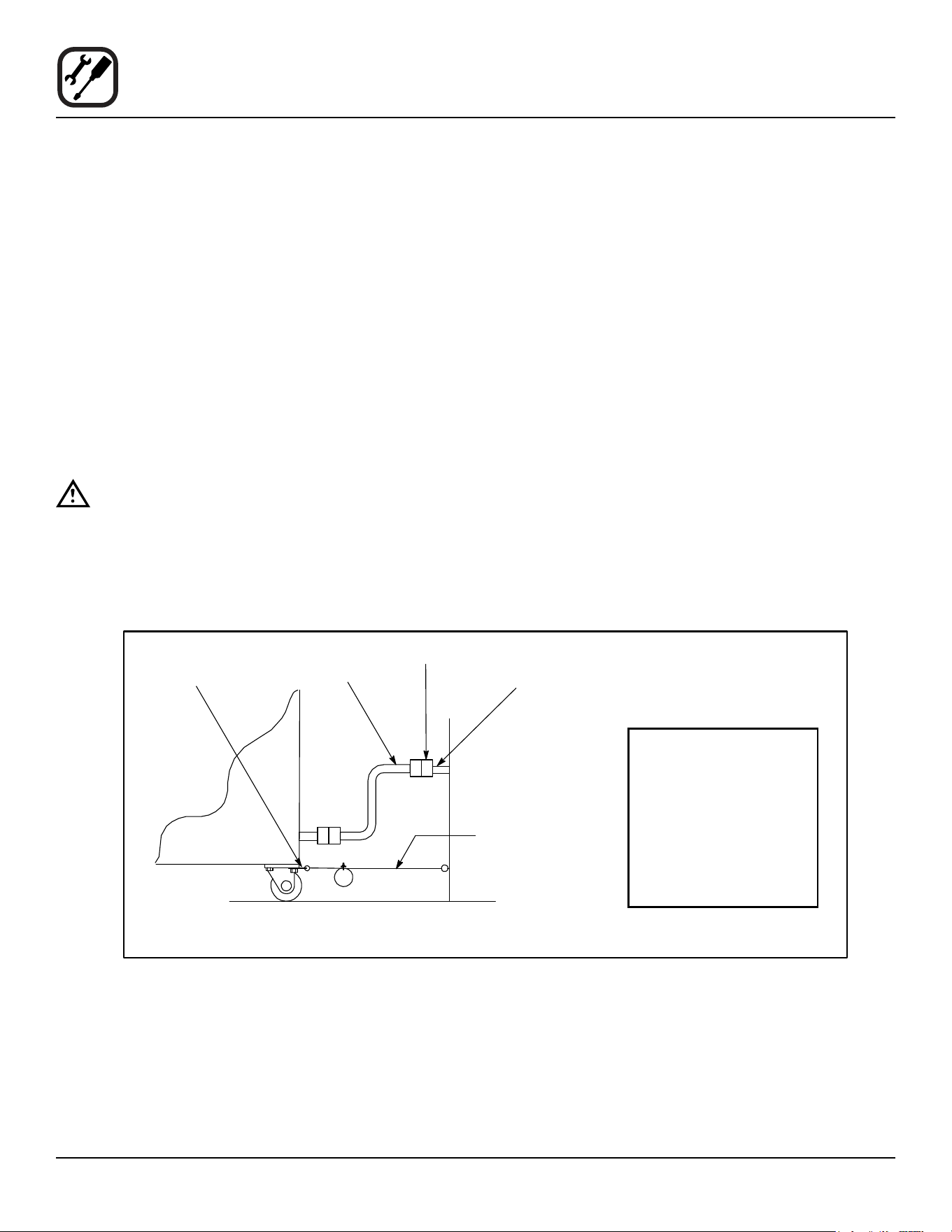
Installation
Gas Hose Restraint
If the appliance is mounted on casters, a commercial ex-
ible connector with a minimum of 3/4” (1.9 cm) inside di-
ameter must be used along with a quick connect device.
A restraint must be used to limit the movement of the ap-
pliance so that no strain is placed upon the exible con-
nector. The restraint should be fastened to the base frame
of the oven as close to the exible connector as possible.
It should be short enough to prevent any strain on the
connector. With the restraint fully stretched the connector
should be easy to install and quick connect.
The restraint (ie: heavy gauge cable) should be attached
without damaging the building. DO NOT use the gas pip-
ing or electrical conduit for the attachment of the perma-
nent end of the restraint! Use anchor bolts in concrete or
cement block. On wooden walls, drive hi test wood lag
screws into the studs of the wall.
WARNING!!
If the restraint is disconnected for any reason
it must be reconnected when the appliance is
returned to its original position.
U.S. and Canadian installations
The connector must comply with the Standard for Con-
nectors for Movable Gas Appliances, ANSI Z21.69 or
Connectors For Moveable Gas Appliances CAN/CGA-
6.16 and a quick disconnect device that complies with the
Standard for Quick-Disconnect Devices for Use With Gas
Fuel, ANSI Z21.41 or Quick Disconnect For Use With Gas
Fuel CAN 1-6.9. Adequate means must be provided to
limit the movement of the appliance without depending
on the connection and the quick disconnect device or its
associated piping.
A drip leg must be used at each appliance. Refer to
NFPA54/ANSI Z223.1 - Latest Edition (National Fuel Gas
Code) for proper drip leg installation.
General export installations
Installation must conform with Local and National instal-
lation standards. Local installation codes and/or require-
ments may vary. If you have any questions regarding the
proper installation and/or operation of your appliance,
please contact your local distributor. If you do not have a
local distributor, please call Blodgett Combi at 0011-802-
658-6600.
Figure 11
Attachment Plate
(secure with leg mount bolt)
Gas Hose
Quick Connect
Gas Supply Line
Restraint
Installation of Gas Hose and Restraint
(Single Section Shown)
IMPORTANT: Cable restraint
should be fastened as close
as possible to the exible
connector and short enough
to prevent any strain on the
exible connector.
At maximum stretch of short-
ened restraint, the exible
connector should be easy to
install and quick to connect.
17
Installation
Adjustments
Before applying power to the appliance for the rst time,
check for the following conditions:
• All electrical safety provisions have been adhered
to and the electrical connections are correct.
• Water is connected, turned on and all of the connec-
tions are water tight.
• The pan holders are inserted into the oven cavity.
• Cardboard has been removed from oven cavity.
• Gas has been turned on, if gas unit.
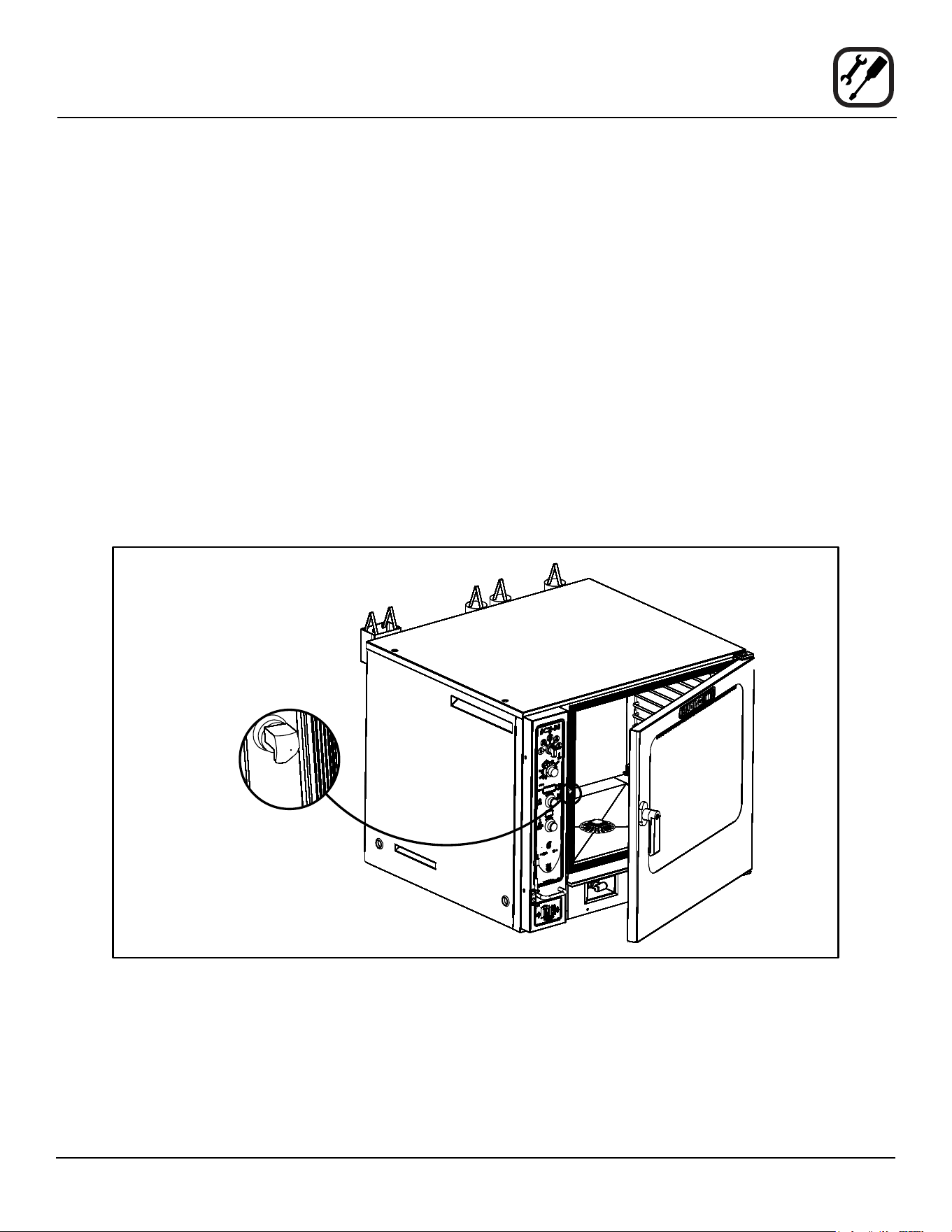
DOOR ADJUSTMENT
The door catch may be adjusted in and out using the fol-
lowing procedure:
1. Flip the rubber boot on the catch towards you.
2. Loosen the locknut to make adjustment.
3. Rotate the catch clockwise or counter clockwise to
get proper adjustment.
4. Retighten locknut, assuring the catch is vertical.
5. Flip the rubber boot back into position.
The hinges can also be adjusted as follows:
1. Loosen the two 1/4-20 bolts on the top of the hinge
plate and the two bolts on the bottom hinge plate.
2. Apply pressure to the door on the corners to get the
proper seal. While pushing, tighten the bolts in place.
Figure 12

18
Installation
Final Check Lists
WARNING!!
Final check list must be performed by a quali-
ed installer only.
ELECTRICAL CONTROL COMPARTMENT
• Voltage to appliance matches rating plate
PLUMBING FINAL CHECK
• Incoming water pressure within appliance specica-
tion.
• Atmospheric vented drain in place.
• Water feed lines intact without leaks.
• Ensure proper clearance as detailed.
• Delime system has been primed. BCX-14 only.
OVEN OPERATIONAL TESTS
NOTE: Checks to be made by customer or authorized
service agent.
Cool Down Mode
• Check that the fan runs with the door open.
Steam Mode
Turn on STEAM mode and set thermostat to 200°F. Verify
the following:
• The oven is preheating and shows the actual cavity
temperature rising.
• Boiler heat demand shuts o at approximately 200ºF
(100ºC) and regulates the cavity temperature to
200ºF.
• Set timer for 1 minute and start. Be sure the beeper
sounds when the time expires.
• Power light turns on.
• Unit produces steam, window fogs, door seal does
not leak.
Combi Mode
Change to COMBI mode, set thermostat to 350ºF (177ºC)
and verify:
• The oven is preheating and shows the actual cavity
temperature rising.
• Heat demand shuts o at 350ºF (177ºC) and oven
maintains 350ºF (177ºC).
• Fan shuts o with door open.
Hot Air Mode
Change to HOT AIR mode and set thermostat to 400ºF
(204ºC) and verify:
• The oven is preheating and shows the actual cavity
temperature rising.
• Heat demand shuts o at 400ºF (204ºC) and oven
maintains 400ºF (204ºC).
• Fan shuts o with door open.
Steam On Demand Mode
Turn the oven to Hot Air mode. Press the steam on de-
mand key. Set Steam On Demand for 1 minute.
• The Steam On demand timer is counting down.
• The steam on demand counter goes away after the
timer expires.
Lights
• Press switch to ensure lights come on.
Cavity Vent
• Press the vent key to ensure that the vent opens and
closes.
Fan Speed
• Ensure all fan speeds work on the preheated oven
using the fan key and knob.

19
Operation
Safety Information for Gas Units
The information contained in this section is provided for
the use of qualied operating personnel. Qualied operat-
ing personnel are those who have carefully read the in-
formation contained in this manual, are familiar with the
functions of the oven and/or have had previous experi-
ence with the operation of the equipment described. Ad-
herence to the procedures recommended herein will as-
sure the achievement of optimum performance and long,
trouble-free service.
Please take the time to read the following safety and op-
erating instructions. They are the key to the successful
operation of your Blodgett oven.
SAFETY TIPS
For your safety read before operating
What to do if you smell gas:
• What to do if you smell gas:
• DO NOT try to light any appliance.
• DO NOT touch any electrical switches.
• Use an exterior phone to call your gas supplier im-
mediately.
• If you cannot reach your gas supplier, call the re
department.
What to do in the event of a power failure:
• Turn all switches to o.
• DO NOT attempt to operate the appliance until the
power is restored.
NOTE: In the event of a shut-down of any kind, allow a
ve (5) minute shut o period before attempting
to restart the oven.
General safety tips:
• DO NOT use tools to turn o the gas control. If the
gas cannot be turned o manually do not try to re-
pair it. Call a qualied service technician.
• If the oven needs to be moved for any reason,
the gas must be turned o and disconnected from
the appliance before removing the restraint cable.
Reconnect the restraint after the oven has been
returned to its original location.
• DO NOT remove the control panel cover unless the
oven is unplugged.
20
Operation
Power Switches
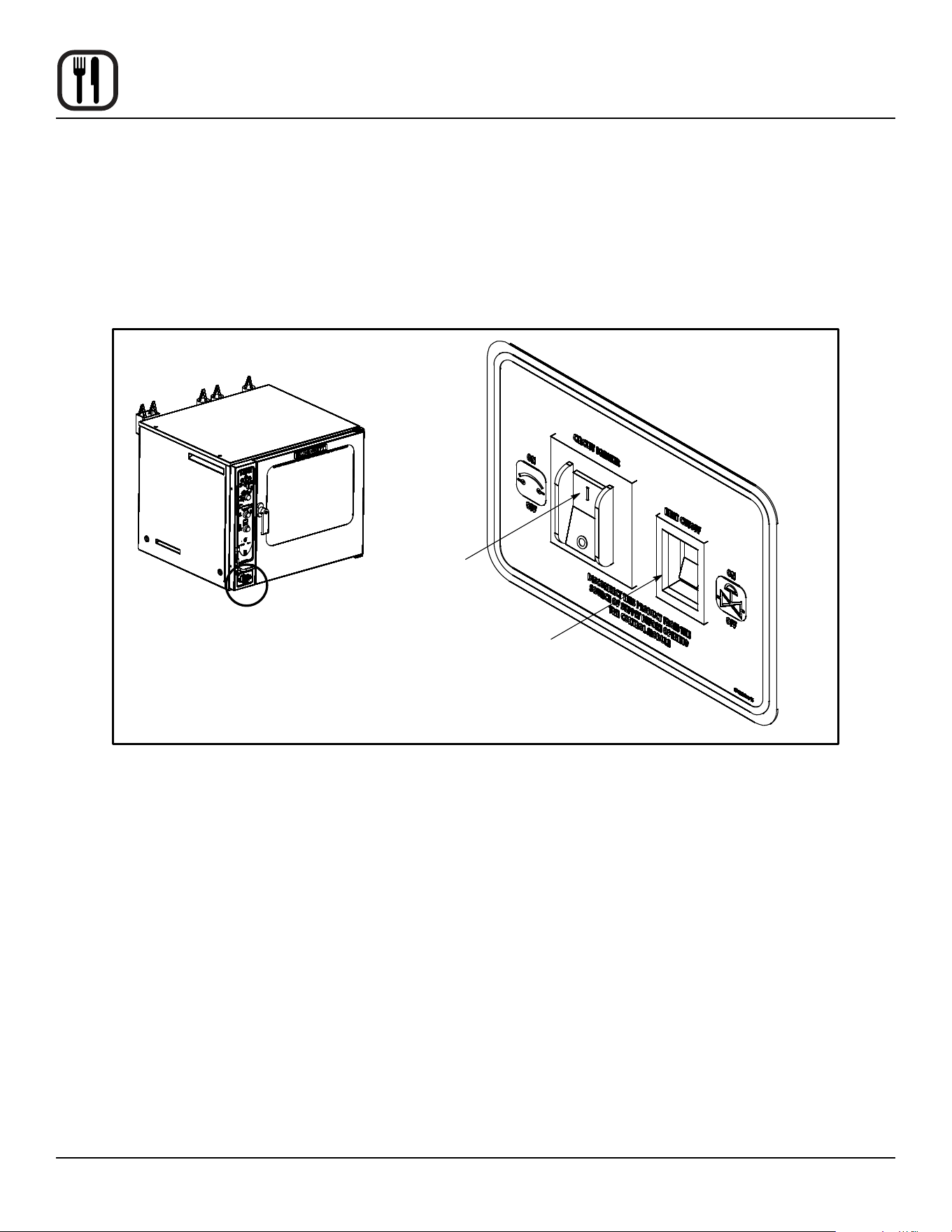
CONTROLS IDENTIFICATION
1. HEAT CONTROL SWITCH
Gas Ovens - Used to turn gas on or o.
Electric Ovens - Used to turn power to the elements on or o.
2. CIRCUIT BREAKER - Used to turn power to the unit on or o. This switch should always stay ON.
Figure 13
See View A
Circuit
Breaker
Heat Shuto
View A
21
Operation
Standard Controls
350
°
10:00
°F
LOAD
HYDRO 30% MANUAL MODE
1
2
6
7
3
4
5
8
18
19
20
9
10
11
12
13
14
15
16
17
21
Figure 14
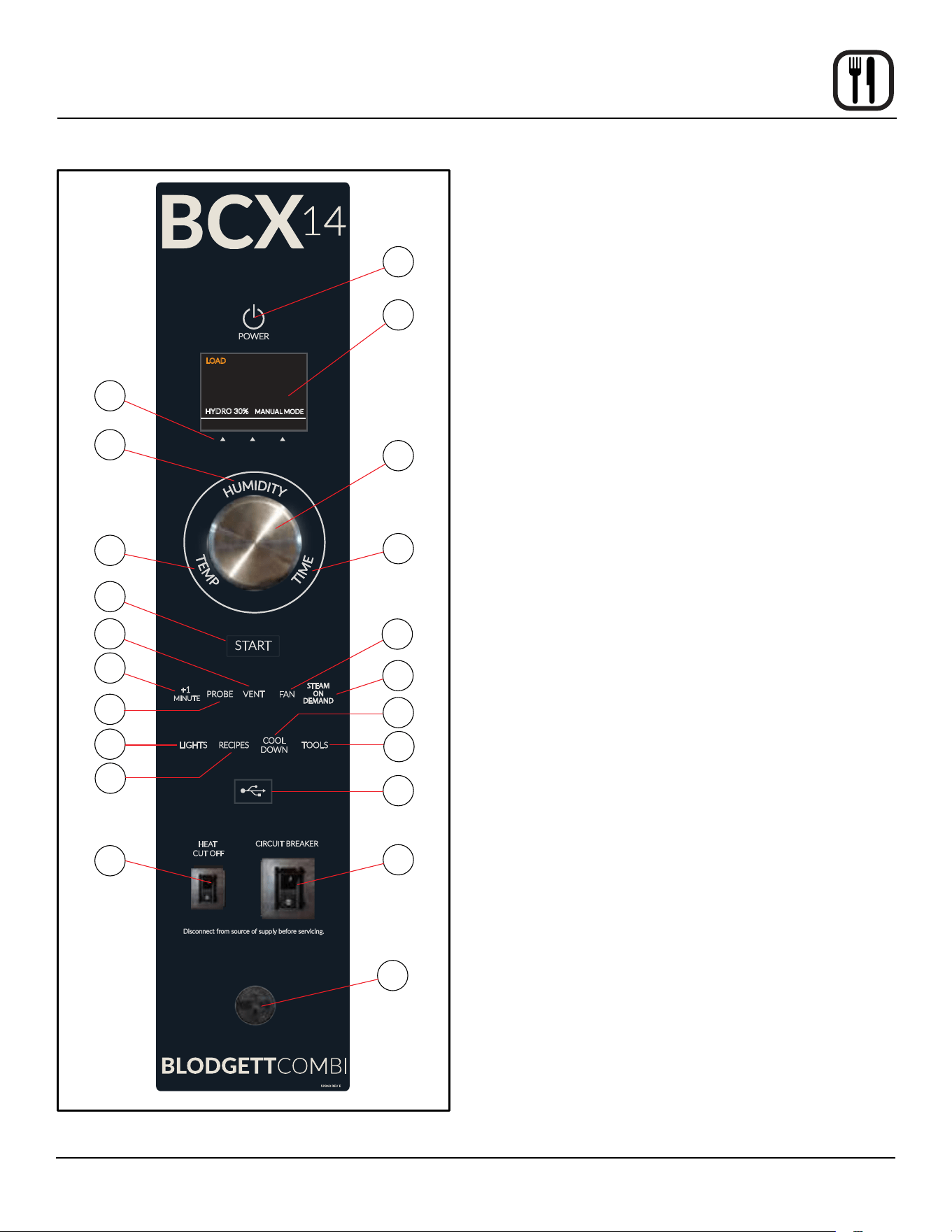
CONTROLS IDENTIFICATION
1. POWER KEY - used to place control in and out of
standby mode
2. DISPLAY - displays time, temperature, humidity and
other information related to oven function and/or pro-
gramming
3. DISPLAY KEYS - context sensitive keys used to inter-
act with the display
4. HUMIDITY/MODE KEY - used to select cooking
mode and set or change the % of humidity
5. TEMP KEY - used to set or change the bake tem-
perature
6. CONTROL KNOB - used to change values for time,
temperture, humidity, etc.
7. TIME KEY - used to set or change the cook time
8. START KEY - press to start the cook cycle
9. VENT KEY - press to manually open and close the
vent
10. +1 MINUTE KEY - press at any time to add additional
minute to the cook time
11. PROBE KEY - press to use core probe cooking
12. FAN KEY - used to select fan speed
13. STEAM ON DEMAND KEY - press to add 100% hu-
midity at any time during the cook cycle
14. LIGHTS KEY - press to turn the oven lights on and o
15. RECIPES KEY - press to access product programs or
to add/edit a product
16. COOL DOWN KEY - initiates oven cool down cycle
17. TOOLS KEY - press to enter manager programming
18. USB PORT AND COVER - used to transfer recipes to
and from the control
19. HEAT CUTOFF - used to turn heat source o
20. CIRCUIT BREAKER - Used to turn power to the unit
on or o
21. CORE PROBE CONNECTION - plug core tempera-
ture probe in here when using probe cooking

22
Operation
Standard Controls
OVEN STARTUP
1. Be sure the circuit breaker and heat cuto switches
are in the ON position. The display ashes PRESS
POWER KEY TO TURN ON.
2. Press the POWER KEY (1). The display reads “To
begin press time/temp/humidity key”. Each key illu-
minates in succession. Press any key or rotate the
knob.
3. The display reads PREHEAT and the oven heats to
the last manual set temperature.
The display reads LOAD, the start key ashes and
the alarm beeps when the oven is at temperature and
ready to bake.
MANUAL COOKING
1. Press the HUMIDITY/MODE KEY (4). Turn the dial
until desired cooking mode is displayed. Choose from
Steam, Combi, Hot Air or Retherm.
For Combi and Retherm, set the desired humidity
level by pressing the center display key. Turn the dial
until the correct humidity level is displayed. Press the
right display key to save.
NOTE: For Steam and Hot Air modes the humidity
level are xed at 100% and 0%.
2. Press the TIME KEY (7). Rotate the CONTROL
KNOB (6) to enter the desired cook time. Press any
key to accept the value.
NOTE: Turn the knob slowly to adjust in seconds.
Turn the knob quickly to adjust in minutes.
3. Press the TEMP KEY (5). Rotate the CONTROL
KNOB (6) to enter the desired cook temperature.
Press any key to accept the value. The oven preheats
to the new set temperature.
NOTE: In steam mode the temperature range is
limited to 85°F - 225°F.
4. When the display reads LOAD and the START KEY
(8) ashes, open the door and load the product.
5. Press the START KEY (8) to begin the cook cycle.
The timer counts down.
NOTE: See page 3 for adjustments that can be
made during any cook cycle.
6. When the cook cycle is complete, the alarm beeps
and the display reads DONE. Press any key to si-
lence alarm. Select CANCEL using the right display
key to exit the cook cycle.
7. Remove the product from the oven.
MANUAL CORE PROBE COOKING
1. Press the HUMIDITY/MODE KEY (4). Turn the dial
until desired cooking mode is displayed. Choose from
Steam, Combi, Hot Air or Retherm.
For Combi and Retherm, set the desired humidity
level by pressing the center display key. Turn the dial
until the correct humidity level is displayed. Press the
right display key to save.
NOTE: For Steam and Hot Air modes the humidity
level are xed at 100% and 0%.
2. Press the TEMP KEY (5). Rotate the CONTROL
KNOB (6) to enter the desired cavity cook tempera-
ture. Press any key to accept the value. The oven
preheats to the new cavity set temperature.
3. Press the PROBE KEY (11). Rotate the CONTROL
KNOB (6) to enter the desired product setpoint tem-
perature.
4. Insert cooking probe into the center of the product.
Plug the core probe into the CORE PROBE CON-
NECTION (21). Load the product into the oven.
NOTE: Pressing the START KEY (8) is not neces-
sary while cooking with the core probe.
NOTE: See page 3 for adjustments that can be
made during any cook cycle.
5. When the product has reached the setpoint tempera-
ture, the alarm beeps and the display reads DONE.
Unplug the core probe to silence the alarm and exit
the cook cycle.
6. Remove the product from the oven.
MANUAL CORE PROBE COOK & HOLD
1. Press the HUMIDITY/MODE KEY (4). Turn the dial
until desired cooking mode is displayed. Choose from
Steam, Combi, Hot Air or Retherm.
For Combi and Retherm, set the desired humidity
level by pressing the center display key. Turn the dial
until the correct humidity level is displayed. Press the
right display key to save.
NOTE: For Steam and Hot Air modes the humidity
level are xed at 100% and 0%.
2. Press the TEMP KEY (5). Rotate the CONTROL
KNOB (6) to enter the desired cavity cook tempera-
ture. Press any key to accept the value. The oven
preheats to the new cavity set temperature.

23
Operation
Standard Controls
3. Press the PROBE KEY (11). Rotate the CONTROL
KNOB (6) to enter the desired product setpoint tem-
perature.
4. Press the center display key under the word HOLD.
HOLD will be highlighted in blue indicating that the
hold mode is active.
5. Insert cooking probe into the center of the product.
Plus the core probe into the CORE PROBE CON-
NECTION (21).
NOTE: Pressing the START KEY (8) is not neces-
sary while cooking with the core probe.
NOTE: See page 23 for adjustments that can be
made during any cook cycle.
As the product temperature rises, the oven cavity
temperature decreases.
6. When the product reaches the setpoint temperature,
a short alarm sounds. The cavity temperature jumps
to 4°F above the product setpoint. This temperature
will hold the product, keeping it warm without continu-
ing the cooking process.
The display counts up the time the product has been
holding.
7. Unplug the core probe to remove the product from
the oven.
PROGRAMMED COOKING
1. Press the RECIPES KEY (15). The display lists all of
the currently programmed recipes. Rotate the knob
until the desired product recipe is highlighted. Press
OK using the right display key to select the product.
2. The oven preheats to the set temperature. When the
display ashes LOAD, open the door and load the
product.
3. Press the START KEY (8) to begin the cook cycle.
The timer counts down.
NOTE: See page 23 for adjustments that can be
made during any cook cycle.
4. When the cook cycle is complete, the alarm beeps
and the display reads DONE. Press any key to si-
lence alarm. Select CANCEL using the right display
key to exit the cook cycle.
5. Remove the product from the oven.
COOK CYCLE ADJUSTMENTS
The following adjustments can be made at any time dur-
ing the cook cycle.
Vent Moisture from the Oven Cavity
1. Press the VENT KEY (9). This manually opens the
vent until the key is pressed again to close it.
Cancel a Cook Cycle
1. To cancel the cook cycle, press the right display key
under the word cancel.
Steam on Demand
1. To add 100% humidity at any time during a cook cy-
cle, press the STEAM ON DEMAND KEY (13).
2. Rotate the knob to enter the length of time you wish
to inject the moisture.
3. Select OK to start injecting humidity.
Adding Time
1. Press the +1 MINUTE KEY (10). One minute is added
to the timer for each time the key is pressed.
Fan Adjustments
1. Press the FAN KEY (12). Rotate the knob to select
between four fan speeds (gentle, low, high and tur-
bo). Press OK to select the desired fan speed.
2. Select FAN DELAY using the center display key. Ro-
tate the knob to enter the desired fan delay. Select
OK to save the fan delay increment.
3. Select FAN REV using the left display key. Rotate the
knob to enter the desired length of time between fan
reversals. Press OK to save the reversal increment.
COOL DOWN
NOTE: The unit can be cooled down rapidly for steam-
ing, cleaning, etc.
1. To cool down the oven cavity, open the door and
press the COOL DOWN KEY(16) and open the door.
2. The oven automatically shuts down when the oven
reaches the cool down temperature.

24
Operation
Standard Controls
OVEN SHUTDOWN
1. Press the COOL DOWN KEY (16). The display reads
COOLING and gives the actual cavity temperature.
To speed up the cool down process, open the doors.
2. When the oven has cooled down, the display reads
OFF PRESS POWER KEY TO TURN ON.
NOTE: The lights shut o and the vent closed auto-
matically at the end of the cool down cycle.
PROGRAMMING A RECIPE
NOTE: The control can hold 100 recipes. Each recipe
may have up to 10 cooking stages.
1. Press the RECIPES KEY (15). Rotate the knob to se-
lect NEW from the bottom of the recipe list.
2. Select EDIT using the left display key. A touchscreen
keyboard is displayed. Use the keyboard to enter the
desired recipe name.
NOTE: Product names may be up to 15 charac-
ters long and can contain letters, numbers,
spaces and special characters.
Select OK to save the product name.
3. The control displays a set of default parameters for
the rst cooking stage. Select EDIT using the left dis-
play key to change these parameters.
4. Press the parameter you wish to change. Rotate the
knob to the desired value. Select OK to save the new
value.
5. Repeat step 4 for each parameter you wish to change.
To program a probe cooking stage:
c. Press the PROBE/TIME parameter to toggle to
Probe.
d. Rotate the knob to select the desired product set-
point temperature. Select OK to save the tem-
perature.
e. Rotate the knob to highlight the probe step in the
step list. The hold toggle appears in the upper left
corner of the screen. Rotate the knob to highlight
the word HOLD. Select EDIT using the left dis-
play key to toggle between YES and NO.
6. To add a cooking step, select ADD using the right dis-
play key. The rst step is copied. Repeat #5 to set
parameters for the new step.
7. To delete any step, rotate the knob to highlight the
step. Select DEL RECIPE using the right display key.
8. To save the recipe and exit the edit mode, select ESC
using the center display key.
9. To delete a recipe, with the recipe name highlighted
during the edit process, press and hold the left dis-
play key until the display returns to the recipe list. The
recipe will now be deleted from the list.
USING THE MANAGER TOOLS
The manager level screens provide tools to set the time
and date, adjust the volume of the beeper and upload/
download recipes using the USB port.
To access the manager level screens:
1. Press the TOOLS KEY (17).
2. Rotate the knob to select MANAGER. Select OK us-
ing the right display key.
3. Use the keypad to enter the code 6647.
USING THE USB PORT
1. From the manager level screens, rotate the knob to
scroll to USB. Select OK using the right display key.
2. Rotate the knob to highlight either “Store menu to
USB” or “Load menu from USB”. Select OK using the
right display key.
Store menu to the USB
1. Use the keypad to enter a new lename. Select OK
using the right display key.
2. Once upload is complete, press ESCAPE to return to
the previous screen.
Load menu from USB
1. Rotate the knob to select the desired le for down-
load. Select OK using the right display key.
2. Once download is complete, press ESCAPE to return
to the previous screen.
25
Operation
SmartTouch 2 Touchscreen Control
2
3
5
4
1
Figure 15
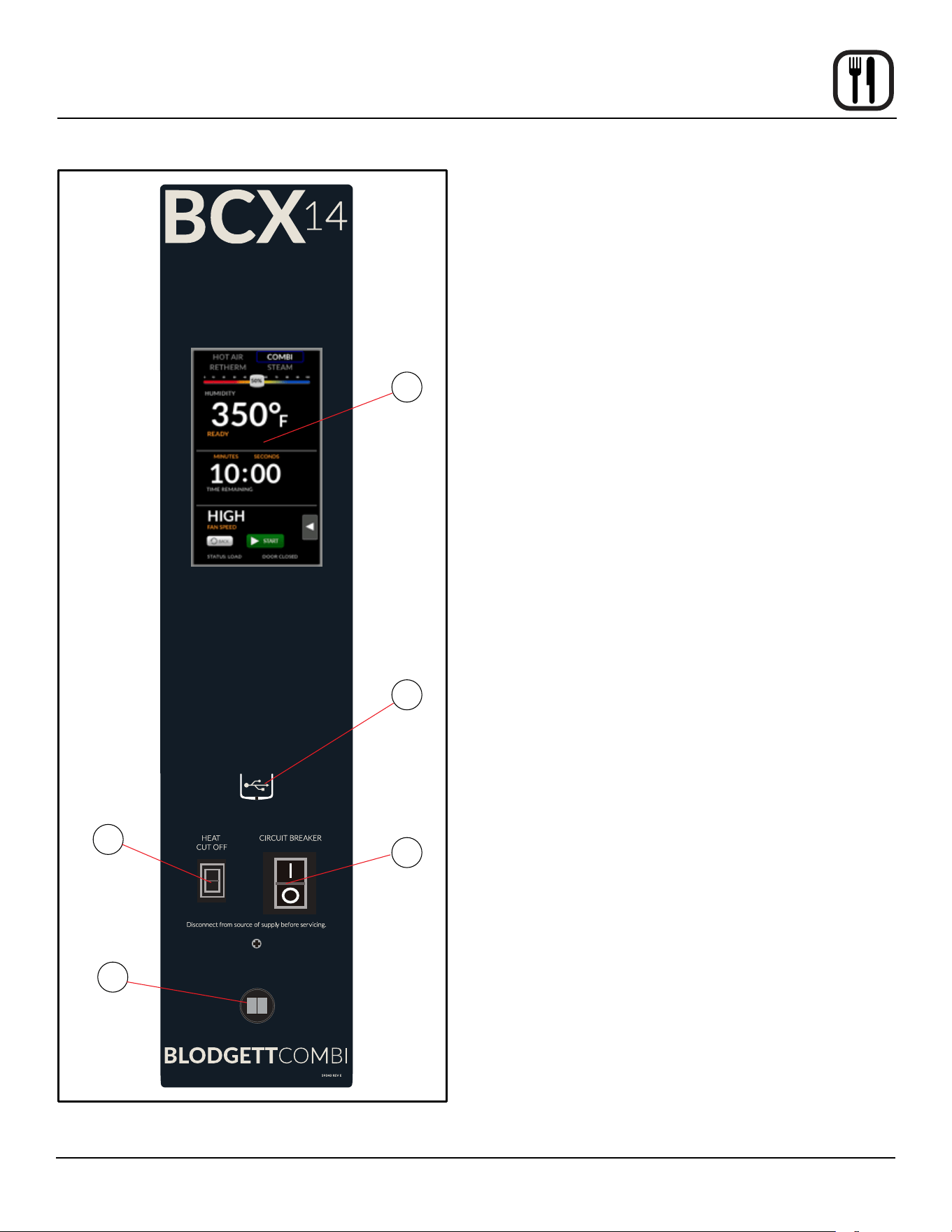
CONTROL DESCRIPTION
1. TOUCHSCREEN - interactive display for oven func-
tioning and/or programming
2. USB Port and COVER - Use to transfer recipes and
data to/from the control
3. HEAT CUTOFF - used to turn heat source o
4. CIRCUIT BREAKER - Provides circuit protection for
the oven controls. DO NOT use as a power switch.
5. CORE PROBE CONNECTION - plug core tempera-
ture probe in here when using probe cooking

26
Operation
SmartTouch 2 Touchscreen Control
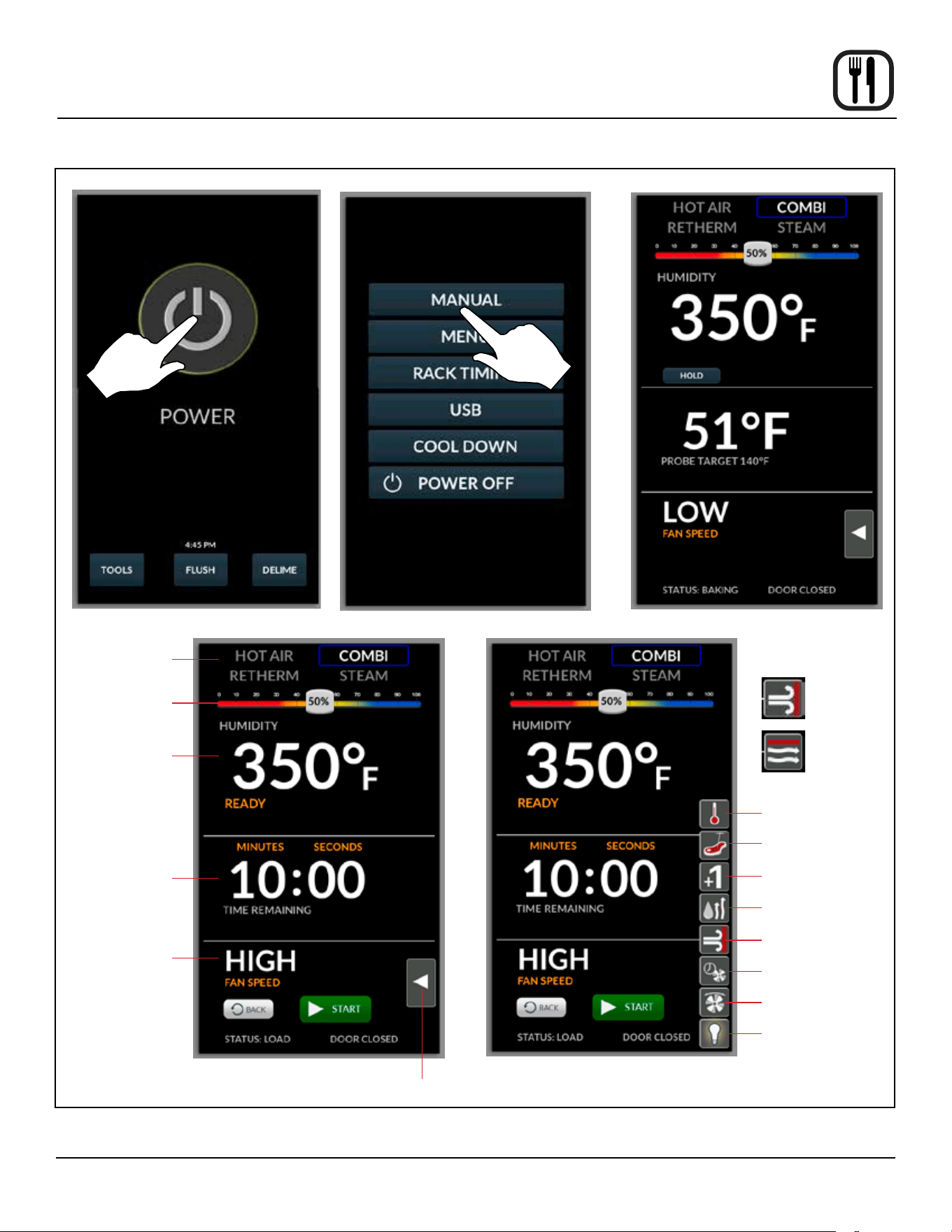
MANUAL MODE COOKING
1. Press POWER to turn on the oven.
2. Press MANUAL to proceed to the manual cook
screen.
3. Set the following cooking parameters from the MAN-
UAL screen.
Mode Selection - Press to select one of four cooking
modes.
Humidity - Use the slider at the top of screen to ad-
just cavity moisture content in 5% increments. To en-
ter an exact value, press and hold the slider until the
keypad is displayed. Press ENTER to save.
Temperature - Press the temperature text and enter
the desired oven temperature on the keypad provid-
ed. Press ENTER to save.
Cook Time - Press the time text and enter the de-
sired cook time on the keypad provided. Press EN-
TER to save. Press the units text to toggle between
hours/minutes and minutes/seconds.
Fan Speed - Press the fan speed text to toggle be-
tween Gentle, Low, High or Turbo.
NOTE: If the oven is preheating or cooling down,
the fan speed will automatically run in high
until the oven reaches the set temperature.
4. Press the FLYOUT MENU arrow to access the follow-
ing parameters.
Actual Temp - Press to display the actual cavity tem-
perature
Core Probe Cooking - Press to use the core probe
cooking feature.
Add a Minute - Press +1 MIN to add 1 minute of time
at any point during the cook cycle.
Steam on Demand - Press to add 100% humidity at
any time. Use the provided keypad to enter desired
length of time. Press ENTER to save. The display
counts down the steam on demand time remaining.
Vent Position - The vent can be opened or closed by
toggling the VENT icon at any point during the cook
cycle.
Fan Delay - Press the fan delay icon. Use the pro-
vided keypad to enter a fan delay increment. Press
ENTER to save.
Fan Reversal Interval - To adjust the fan reversal
time, press the FAN REVERSAL icon. Enter the de-
sired reversal interval on the keypad provided. Press
ENTER to save.
Lights - At any time the lights can be turned on or o
by toggling the LIGHT icon.
5. The oven preheats to the set temperature.
NOTE: START will not be displayed until the oven
has reached the set temperature.
6. Press START to begin cooking. The display counts
down. Press CANCEL at any time to stop the cook
cycle.
7. When the cook time has expired, the display ashes
DONE and the alarm sounds. Press CANCEL to si-
lence the alarm. The display returns to the previous
cook time setting.
8. Press BACK to exit out of MANUAL mode.
CORE PROBE COOKING
1. Press POWER to turn on the oven.
2. Press MANUAL to proceed to the manual cook
screen. Set the desired cooking mode, humidity, cook
temp and fan speed.
3. Select Core Probe Cooking from the yout menu.
4. Press the probe target text. Enter the desired nished
product temperature on the keypad provided. Press
ENTER to save.
5. Insert a core probe into the probe outlet on the control
panel.
6. The HOLD button appears. To enable the Cook &
Hold feature, press the hold button.
7. When the product has reached the set core tempera-
ture the display reads DONE.
8. Cook Only - Unplug the core probe and remove the
product.
Cook & Hold - The oven cavity temperature adjusts
to the optimum temperature for holding the product
without overcooking. The display counts up the time
the item has been holding. The cavity temperature
jumps to 4°F above the product setpoint. This tem-
perature will hold the product, keeping it warm with-
out continuing the cooking process.
27
Operation
SmartTouch 2 Touchscreen Control
Figure 16
Temperature
Time
Humidity
Fan Speed
Lights
Core Probe
Cooking
Steam on
Demand
Fan Reversal
Increment
Vent Position
Add a minute
Flyout Menu
Actual Temp
Fan Delay
Vent
Closed
Vent
Open
Core Probe Screen - BCX shown
Mode
Selection
BCX shown
BCX shown BCX shown
28
Operation
SmartTouch 2 Touchscreen Control
MENU MODE
Create a New Recipe
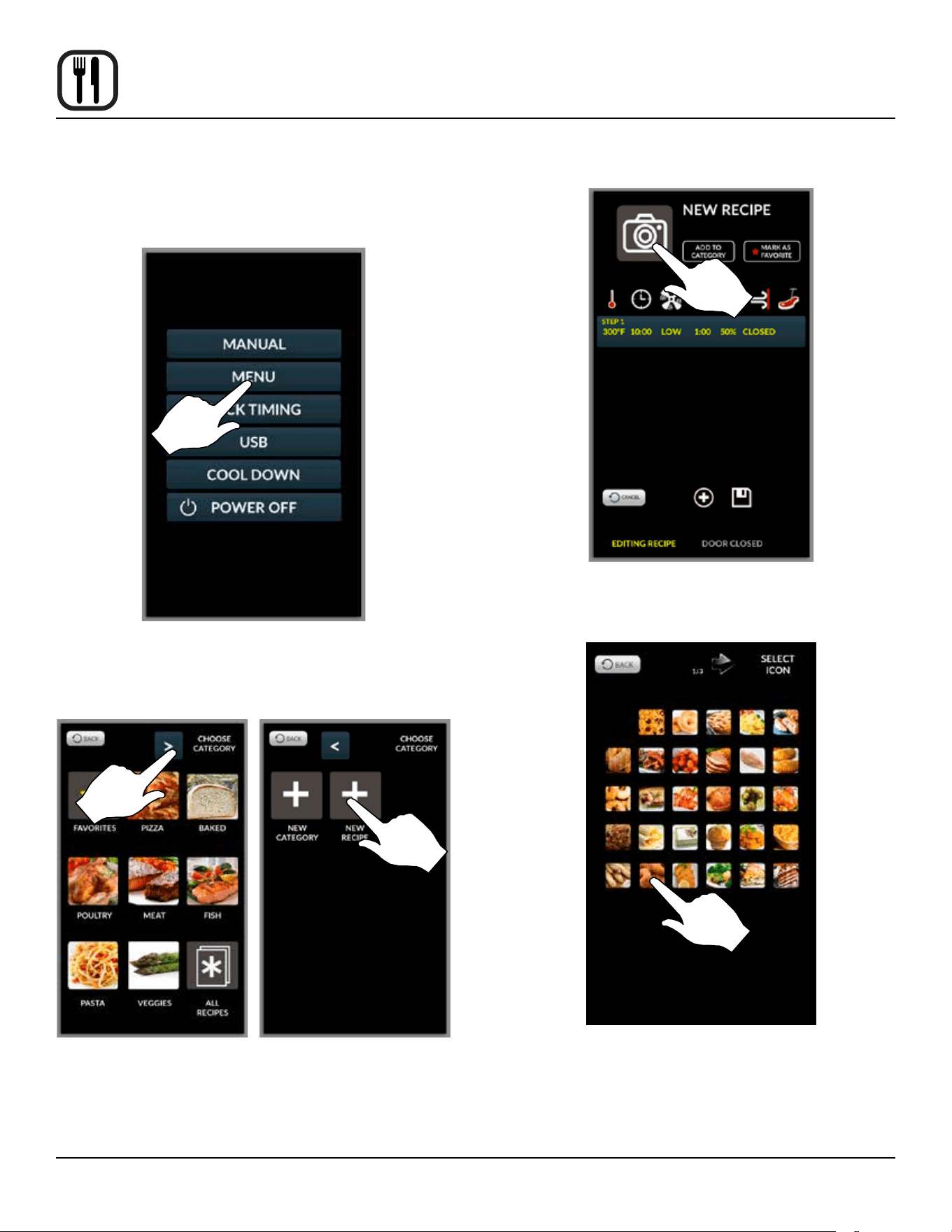
1. From the mode selection screen, select MENU.
Figure 17
2. Press right arrow key to advance to nal category
page. Then press NEW RECIPE key.
Figure 18
3. The NEW RECIPE screen is displayed. Press the
camera icon.
Figure 19
4. Select an icon to represent the recipe.
Figure 20
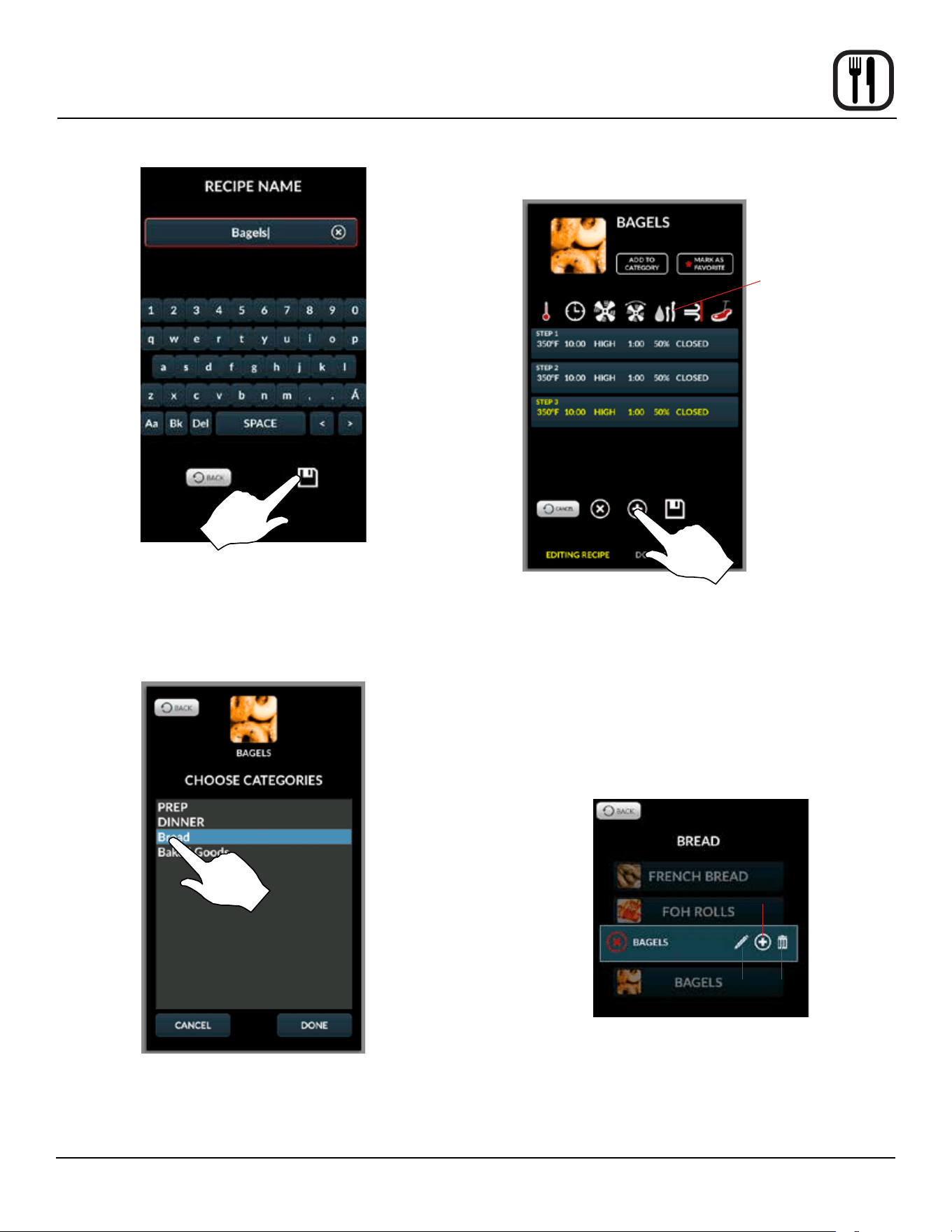
5. Press NEW RECIPE text. Use the keypad provided to
enter a recipe name. Press the DISK ICON to save.
29
Operation
SmartTouch 2 Touchscreen Control
Figure 21
6. OPTIONAL: Press MARK AS FAVORITE if desired.
7. OPTIONAL: To add to an existing category, press
ADD TO CATEGORY. Select category. Press DONE.
Figure 22
8. Enter parameters for the rst cooking step. Press the
icon above each parameter to adjust settings. Press
the + to add a step. Press the X to delete the current
step.
Cooking mode and
humidity (BCX and
BX only)
Figure 23
9. Once all steps have been entered, press the DISK
ICON to save the recipe
Edit an Existing Recipe
1. From the mode selection screen, select MENU.
2. Press and hold the icon for the recipe you wish to edit.
3. Choose edit, copy or delete from the pop up menu.
Edit
Copy
Delete
Figure 24
30
Operation
SmartTouch 2 Touchscreen Control
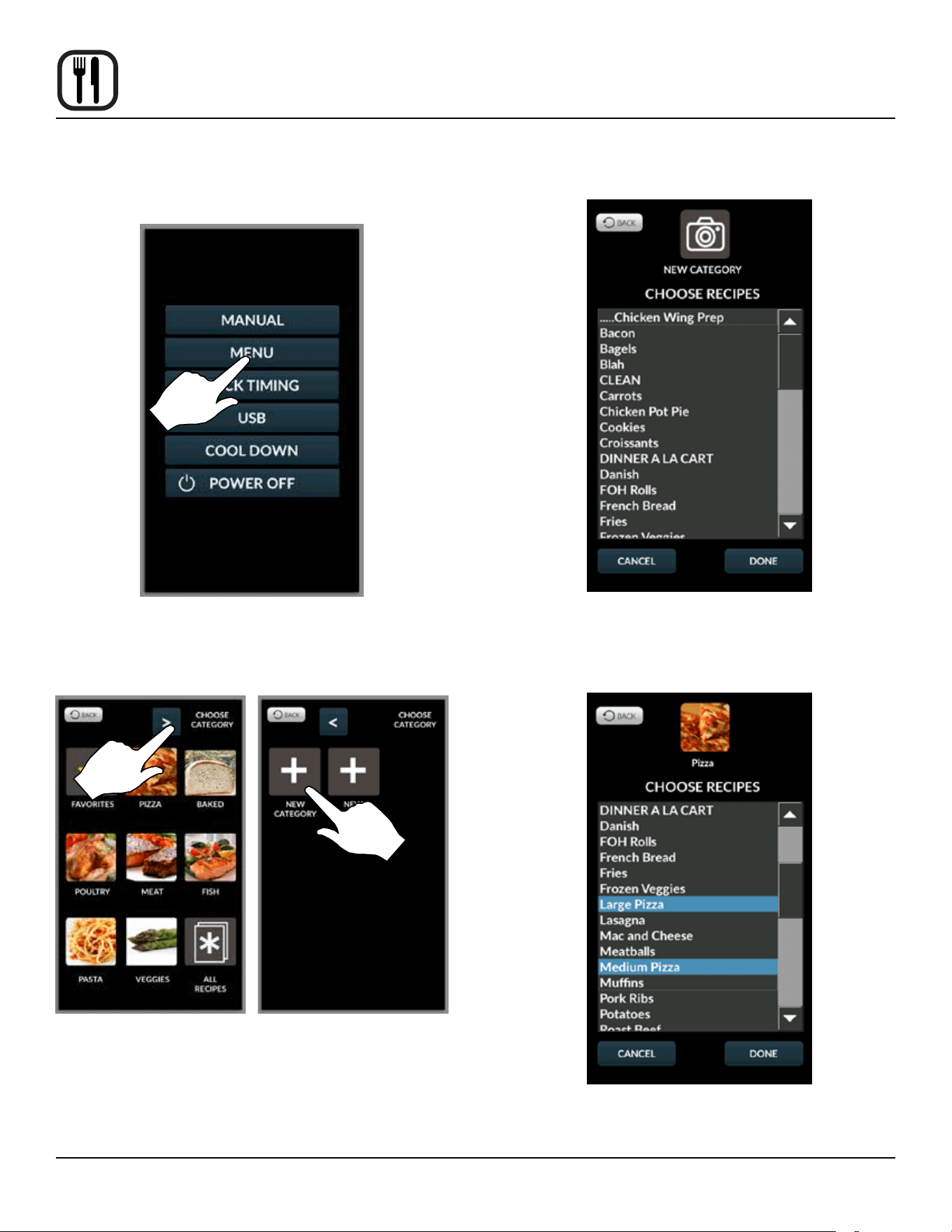
Create a New Category
1. From the mode selection screen, select MENU.
Figure 25
2. Press right arrow key to advance to nal category
page. Then press NEW CATEGORY key.
Figure 26
3. Press the camera to select an icon to represent the
group.
4. Press the NEW CATEGORY text. Use the keypad
provided to enter a category name. Press the DISK
ICON to save.
Figure 27
5. Select the recipes to include in the category. Press
DONE to save.
Figure 28
31
Operation
SmartTouch 2 Touchscreen Control
Edit Existing Category
1. From the mode selection screen, select MENU.
2. Press and hold the icon for the category you wish to
edit.
3. Choose edit, copy or delete from the pop up menu.
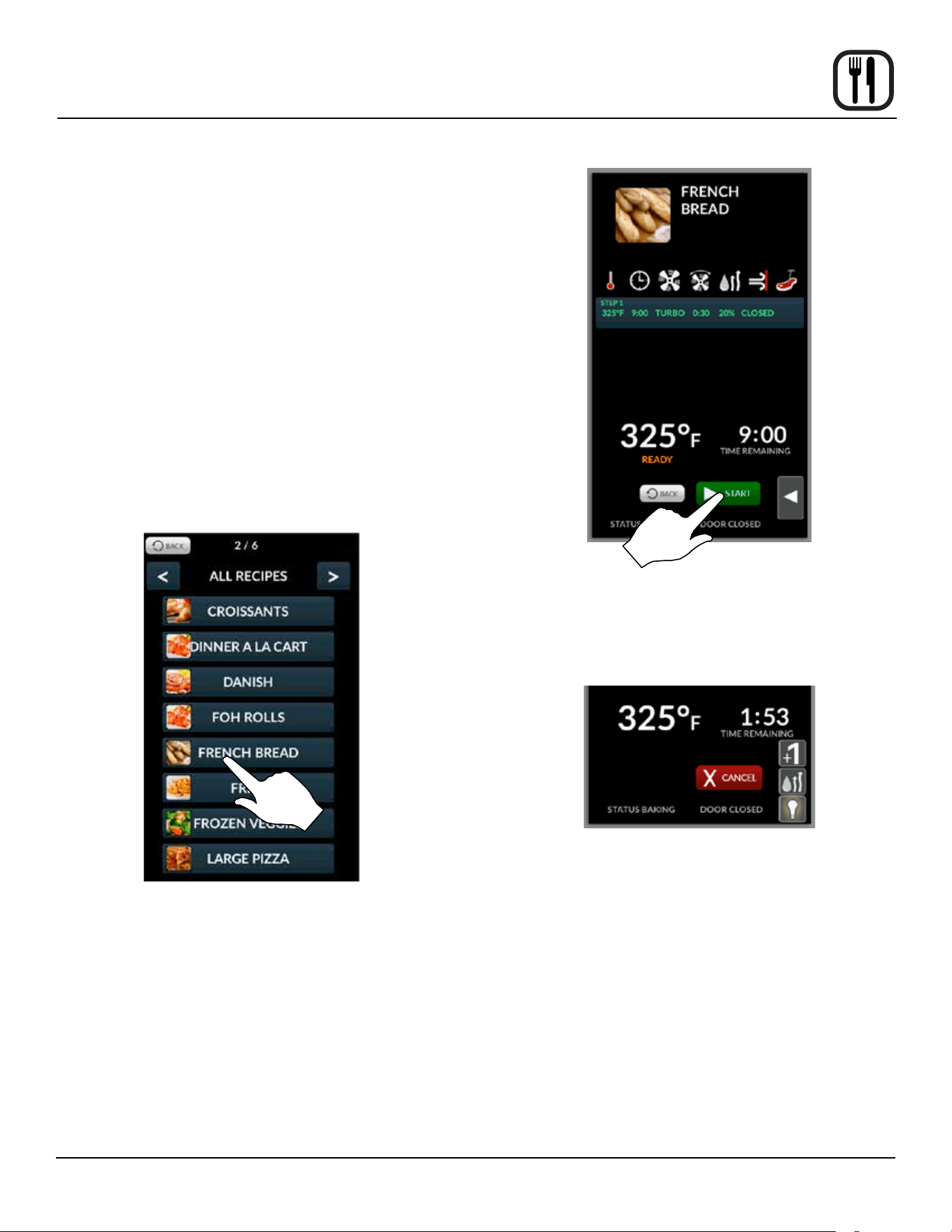
Menu Mode Cooking
1. From the mode selection screen, press MENU.
2. Select a recipe using one of the following:
f. If the recipe is one of your favorites, press FA-
VORITES. Then select the recipe.
g. If the recipe is part of a category, select the cat-
egory. Then select the recipe.
h. Press ALL RECIPES, scroll through the list using
the left and right arrow keys. Select the recipe.
Figure 29
3. The control enters the Menu Cooking screen. Press
the START KEY to begin the cook cycle.
NOTE: START will not be displayed until the oven
has reached the programmed set tempera-
ture.
NOTE: If the oven is preheating or cooling down,
the fan speed will automatically run in high
until the oven reaches the set temperature.
NOTE: To edit a cooking step, press and hold the
step before starting the program.
Figure 30
4. Press the FLYOUT arrow at any time to access Add a
Minute, Steam on Demand or the cavity lights. Press
CANCEL at any time to stop the cook cycle.
Figure 31
5. When the cook time has expired, the display ash-
es DONE and the alarm sounds. Press CANCEL to
silence the alarm. The control returns to the recipe
cook screen.
6. Press BACK to exit out of MENU mode.
32
Operation
SmartTouch 2 Touchscreen Control
RACK TIMING
Creating a Rack Timing Group
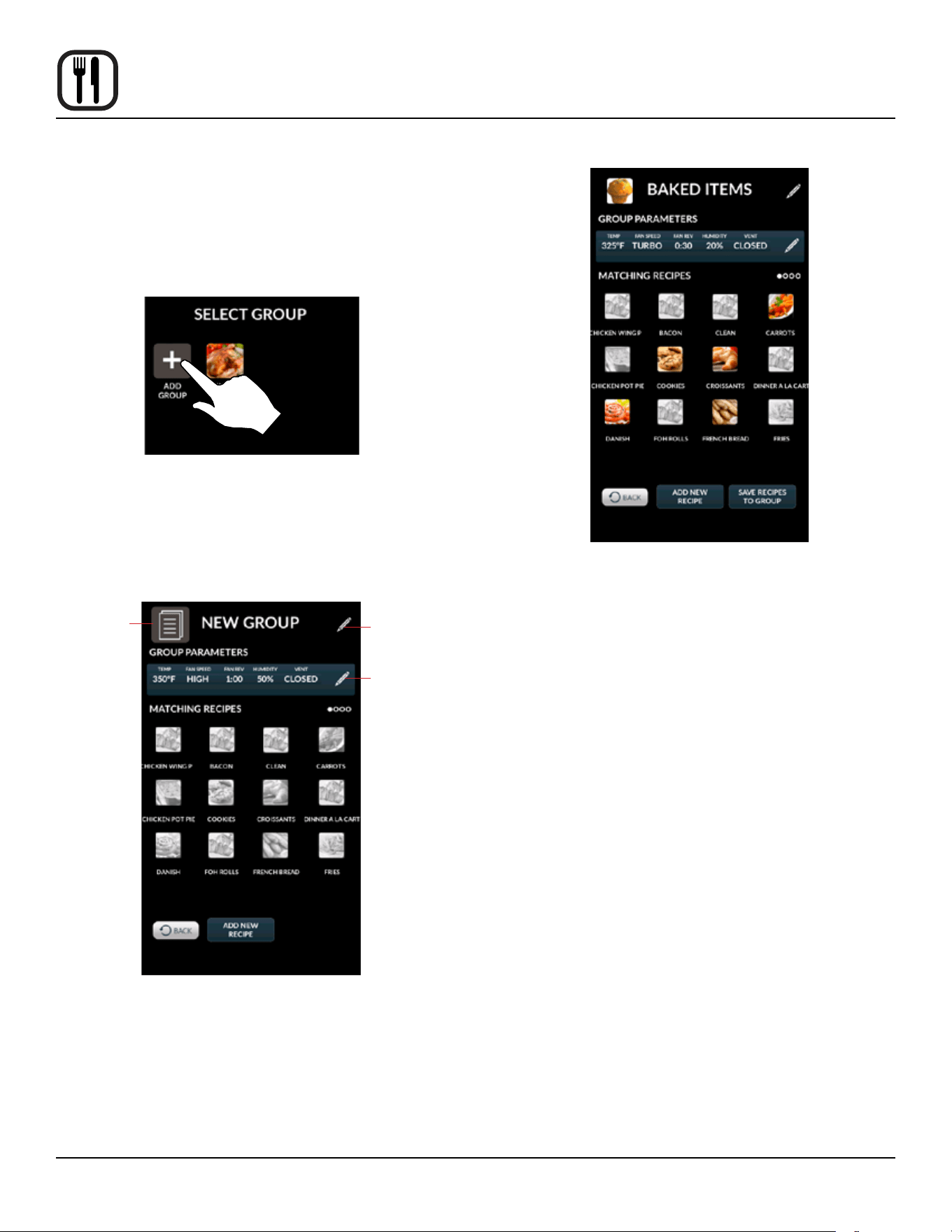
1. From the mode selection screen, select RACK TIM-
ING. The SELECT GROUP screen is displayed.
2. Select ADD GROUP.
Figure 32
3. Press the pencil icons to edit the group name and
cooking parameters. You may also select an icon to
represent the group.
4. Enter desired cooking parameters.
Select Icon
Edit Name
Edit
Parameters
Figure 33
5. Select the repices you would like to place in the
group. Only recipes with parameters matching the
group may be selected.
Figure 34
6. Press SAVE RECIPES TO GROUP.
Edit Existing Group
1. From the mode selection screen, select RACK TIM-
ING.
2. Press and hold the icon for the group you wish to edit.
3. Choose edit, copy or delete from the pop up menu.
33
Operation
SmartTouch 2 Touchscreen Control
Using Rack Timing
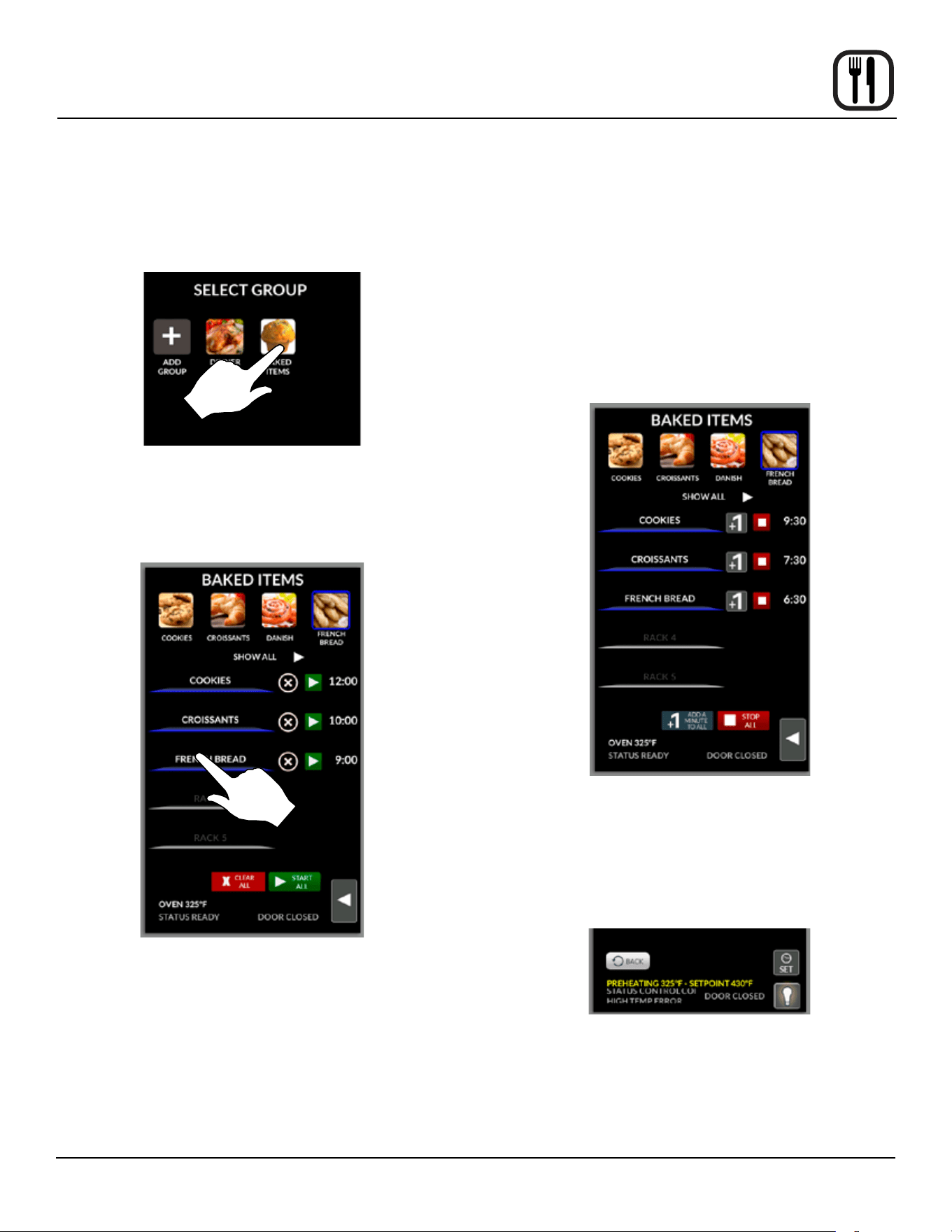
1. From the mode selection screen, select RACK TIM-
ING. The SELECT GROUP screen is displayed.
2. Select the desired food group for your product.
Figure 35
3. Press selected item icon at the top of the screen, drag
to an open shelf. Or tap an open rack to assign the
selected icon to that rack.
Figure 36
4. Start timers using the arrows. You can choose START
ALL or start individual racks.
NOTE: START will not be displayed until the oven
has reached the programmed set tempera-
ture.
NOTE: If the oven is preheating or cooling down,
the fan speed will automatically run in high
until the oven reaches the set temperature.
5. To add time, select +1 MIN key for individual racks or
+1 MIN ALL key to add time to all racks. Each time the
key is pressed, 1 minute of cook time is added.
During the cook cycle, individual rack timers will
count down as the product is cooked. If you wish to
cancel the bake, you can press the STOP ALL key, or
you can stop individual racks.
6. Once a rack bake is complete the beeper will sound.
Press STOP next to the rack that has completed the
cook cycle. If all racks nish at the same time, press
STOP ALL. STOP ALL.
Figure 37
7. Press CLEAR ALL to escape the screen.
To Use Timer
1. Press the FLYOUT arrow at any time to access a tim-
er or the cavity lights.
Figure 38
34
Operation
SmartTouch 2 Touchscreen Control
USB INTERFACE
To Access the USB Drive
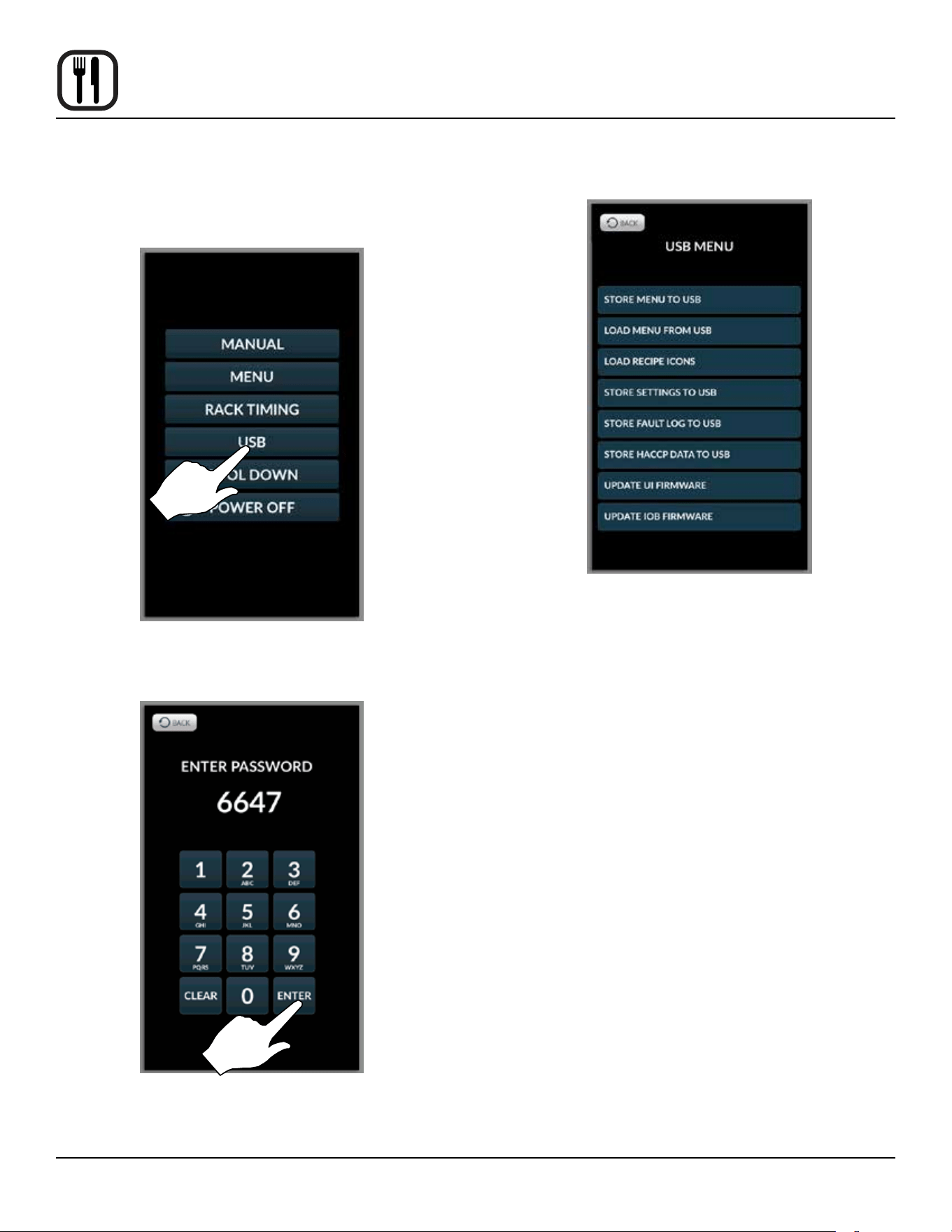
1. From the mode selection screen, select USB
Figure 39
2. Enter the code 6647 on the keypad provided.
Figure 40
3. The following menu is displayed.
Figure 41
4. Insert USB drive into USB port on the control panel.
35
Operation
SmartTouch 2 Touchscreen Control
To Store Menu Data to a USB
NOTE: The following procedure may be used to store
any type of data to a USB including HACCP, set-
tings and fault logs.
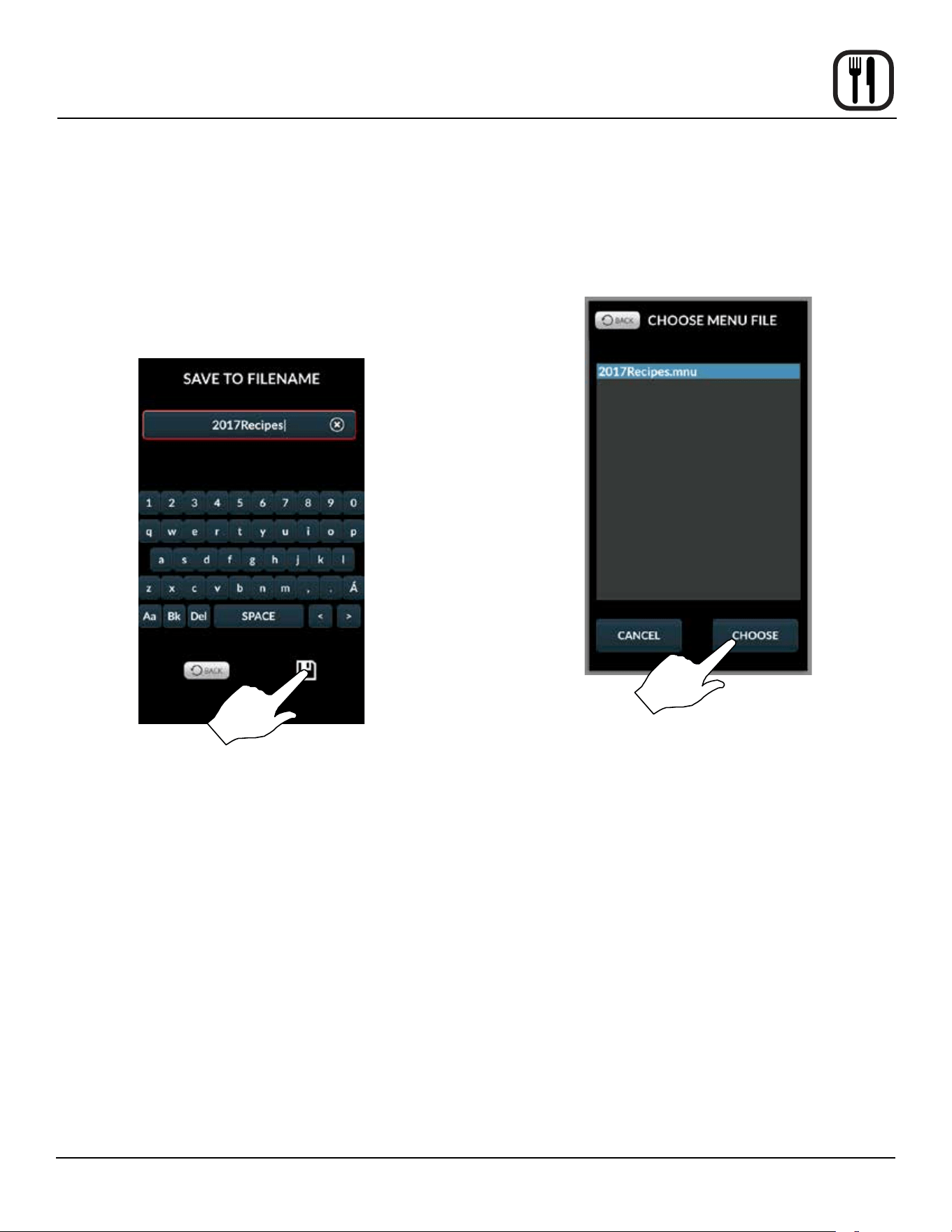
1. Select STORE MENU TO USB.
2. Enter a lename for the menu data using the keypad
provided. Press the disk icon to save.
NOTE: DO NOT use spaces in the lename.
Figure 42
3. The status screen is displayed. Press OK when the
transfer is complete.
To Retrieve Menu Data from a USB
NOTE: The following procedure may be used to upload
menu recipes and/or icons from a USB.
1. Select LOAD MENU FROM USB.
2. Select the le to download to the oven.
Figure 43
3. The status screen is displayed. Press OK when the
transfer is complete.
36
Operation
SmartTouch 2 Touchscreen Control
COOL DOWN
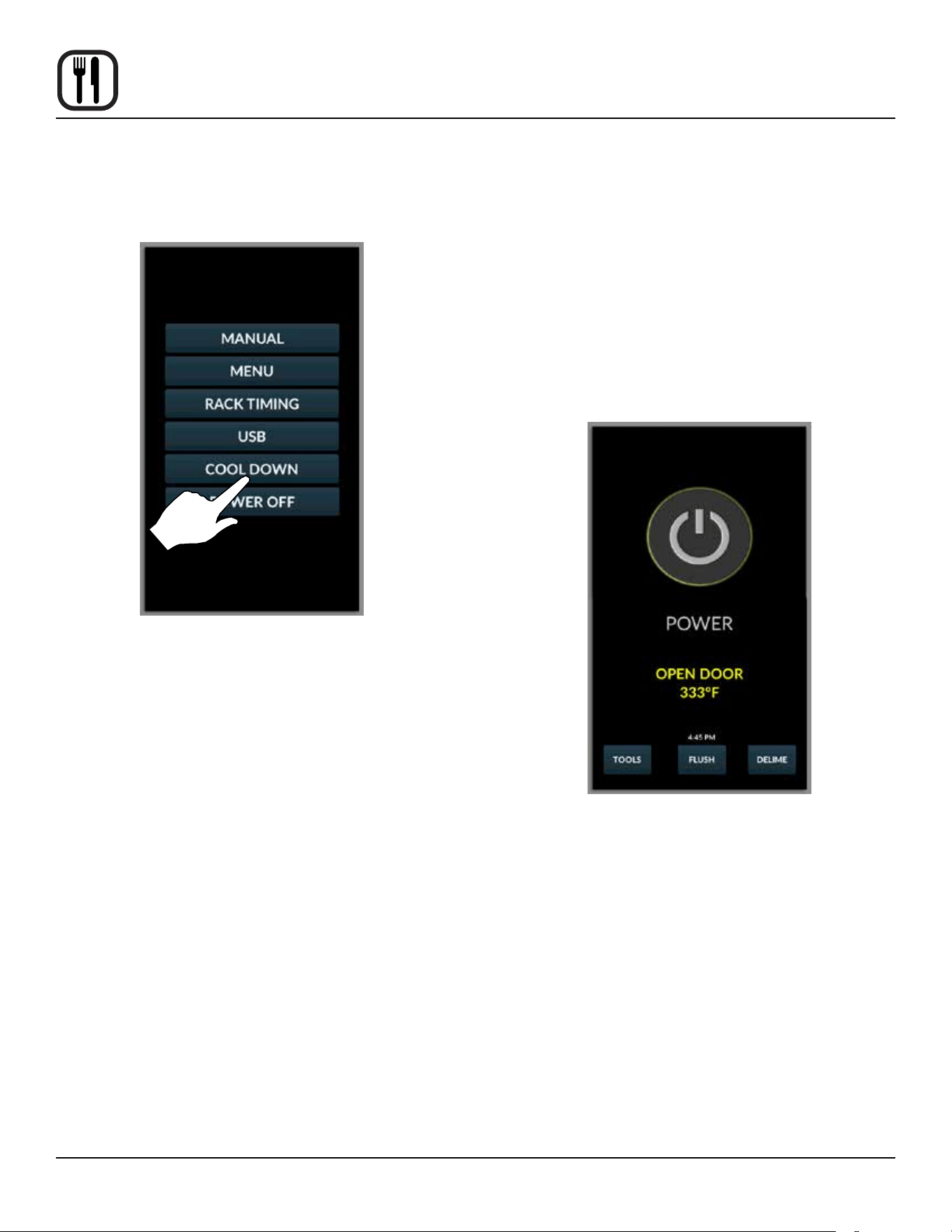
1. From the mode selection screen, select COOL
DOWN.
Figure 44
2. The display toggles between cooling and open door
in yellow until the oven is cool.
NOTE: If the oven is shut down with the circuit
breaker switch at the bottom of the front
panel, the display will return to the power
screen.
NOTE: The vent will automatically open and the fan
will run on high speed during cool down to
assist in lowering the cavity temperature.
The fan and vent will disengage when the
oven had cooled.
BCX shown
Figure 45
37
Maintenance
Spray Bottle Operating Procedure
NOTE: Only use a commercial oven cleaner/degreaser
with the spray bottle. DO NOT use chemicals
that are not intended as oven cleaners. See
chemical manufacturer’s information for intended
use.
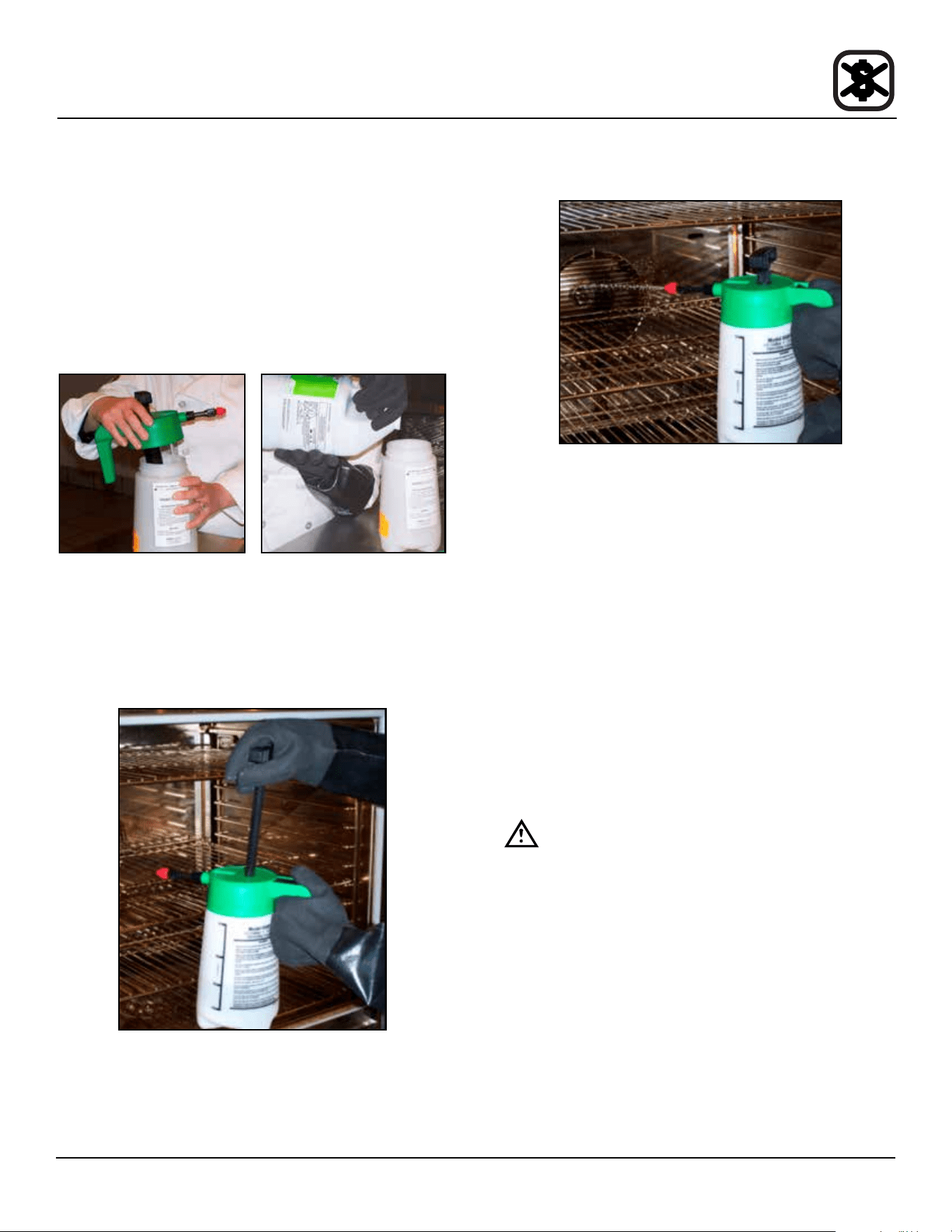
1. Unscrew the sprayer head and ll the container to
the MAX mark. Screw the head assembly on rmly
to ensure an airtight seal. The liquid must be clean
and free from foreign matter. Do not overll - space
must be left for compressing air.
Figure 46
2. To build up pressure, pump approximately 20 full
strokes when the container is lled with liquid. The
higher the pressure, the ner the spray. If the con-
tainer is only partially lled, then more pumping is re-
quired to compress the additional air space.
Figure 47
3. To spray, depress the trigger with your thumb.
Figure 48
4. Adjust spray nozzle for a wide spray pattern.
5. After a period of spraying, the pressure will drop. Re-
store the pressure by operating the air pump.
6. Release pressure after use by inverting the spray
head and depressing the trigger or by slowly un-
screwing the spray head assembly which will allow
air to escape from around the lling aperture.
7. After use, rinse the spray bottle with clean water and
check that the hole in the nozzle is perfectly clean
and clear. Warm water (not hot) used with a house-
hold detergent is a useful cleaning agent for this pur-
pose.
NOTE: Further information can be found in the
instruction leaet supplied with your spray
bottle.
WARNING!!
Protective clothing and eyewear should be
worn while using cleaning and deliming
agents.
To order additional bottles or spray heads use the follow-
ing part numbers:
Complete Spray Bottle - P/N R0006
Spray Head Repair Kit - P/N R6332
38
Maintenance
Cleaning and Preventive Maintenance
DAILY CLEANING
Cleaning the Interior
Daily cleaning of the oven is essential for sanitation, and
to ensure against operational diculties. The stainless
steel cavity may corrode with improper cleaning of the
oven. Use an oven cleaning detergent in conjunction with
the supplied spray bottle.
For dicult cleaning, allow the spray-on oven cleaner to
work longer before rinsing.
1. Open the oven door. Place the oven in cool down
mode. Let the oven cool to below 140ºF (60ºC).
2. Fill the spray bottle with a mild oven detergent. DO
NOT use abrasive cleaners on your Blodgett
Combi. Be sure to follow the MSDS or safety in-
structions on the bottle of your oven cleaner.
3. Pump the bottle twenty times to build up pressure.
The higher the pressure, the ner the spray. Spray
the oven interior. Turn the nozzle to adjust the spray
pattern.
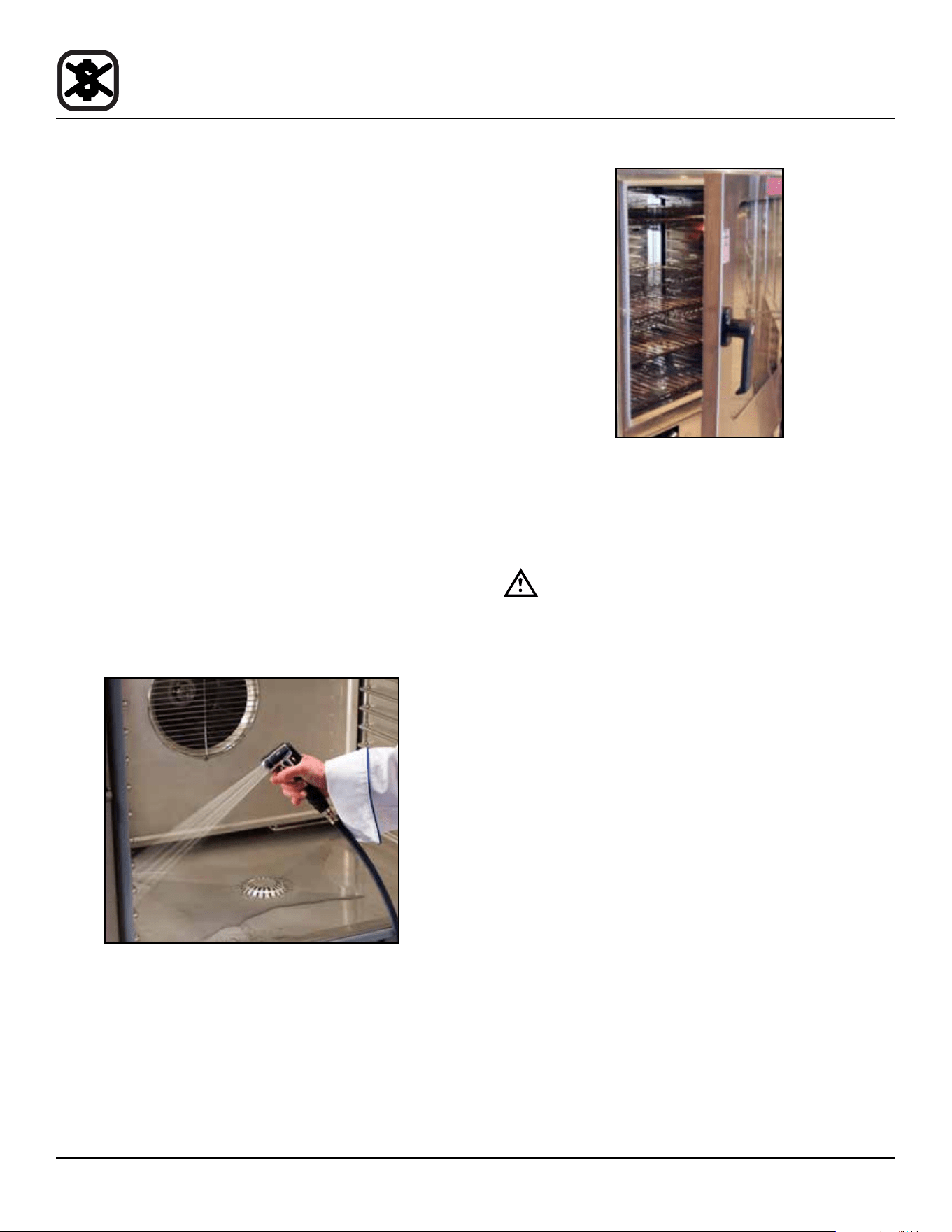
4. Close the door. Place the oven in steam mode for 10
minutes.
5. When nished steaming, open the door and rinse the
interior with the attached spray hose.
Figure 49
6. Leave the door open overnight to vent the oven. If the
oven will not be used for an extended period of time,
place the oven in hot air mode to dry.
Figure 50
Cleaning the Exterior
The exterior of the appliance may be cleaned and kept in
good condition with a light oil. Saturate a cloth and wipe
the appliance when it is cold; wipe dry with a clean cloth.
WARNING!!
DO NOT spray the outside of the oven with
water or clean with a water jet. Cleaning with
a water jet can impregnate chlorides into the
stainless steel, causing the onset of corro-
sion.
Clean the air intake / cooling fan behind the oven so that
it is free of all lint, grease or other inhibitors of air ow.
Keeping this area free of obstruction will extend the life of
the components.
PREVENTIVE MAINTENANCE
The best preventive maintenance measures are the
proper initial installation of the equipment and a program
for cleaning the appliance routinely. The Oven/Steamer
requires no lubrication. Contact the factory, the factory
representative or a local Blodgett Combi service com-
pany to perform maintenance and repairs should they be
required.
WEEKLY CLEANING - BCX-14
In addition to the daily cleaning it is necessary to clean
the air intakes on a weekly basis. Air intakes provide nec-
essary cooling air to the internal components. They are
generally located on the rear and sides of the equipment.
39
Maintenance
Cleaning and Preventive Maintenance
BX-14 BOILERLESS OVEN WEEKLY CLEANING
In addition to the daily cleaning, it is necessary to clean
behind the fan guard of this oven on a weekly basis. This
is necessary for proper functioning of the oven. Scale will
build up on the fan and heat source leading to a less ef-
cient oven.
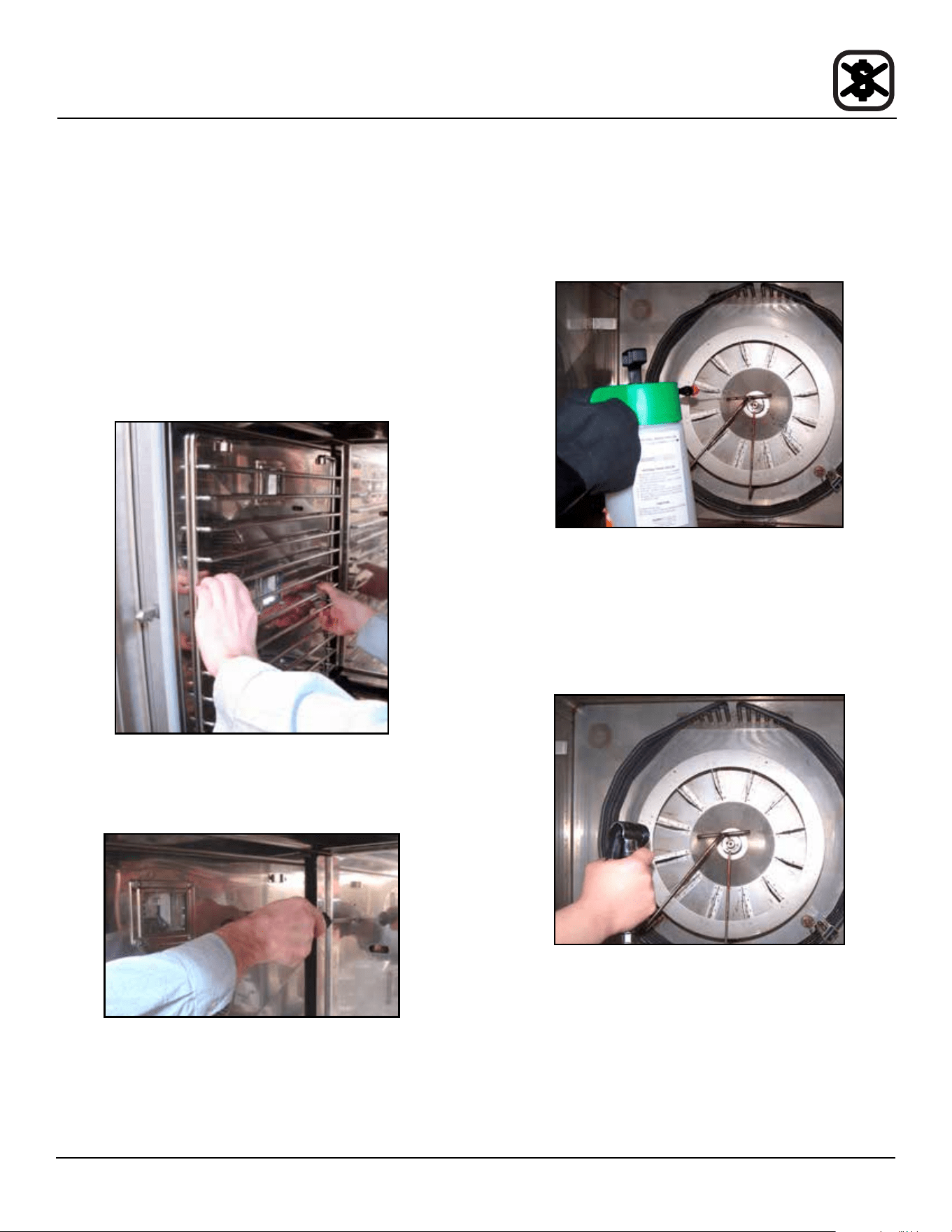
1. Open the oven door. Place the oven in cool down
mode. Let the oven cool to below 140ºF (60ºC).
2. Once cool, turn the oven o.
3. Remove the oven racks and the rack guides on the
left side.
Figure 51
4. Rotate the two screws on the left side of the fan guard.
Swing the fan guard toward the front of the oven.
Figure 52
5. Fill the spray bottle as described in the Daily Clean-
ing procedure. Thoroughly spray cleaner onto the fan,
heat source and back of the fan guard. Resecure the
fan guard.
Figure 53
6. Close the door. Place the oven in the steam mode for
approximately 10 minutes.
7. After ten minutes, swing the fan guard towards the
front of the oven. Use plenty of water to rinse all of
the cleaner o.
Figure 54
8. Return the fan guard to the closed position. Rotate
the two screws to secure the fan guard.
9. Reintall the rack guides and oven racks.
10. Leave the oven door open overnight to vent the oven.
If the oven will not be used for an extended period of
time, place the oven in hot air mode to dry the interior
cavity.
40
Maintenance
Flushing the Boiler - BCX Models Only
STANDARD CONTROL
A ush of the boiler is required every 24 hours and hap-
pens either automatically or can be initiated at any time.
NOTE: In order to ush the oven, the water and gas
supply must be left on.
To manually initiate a ush sequence
1. Either run a cool down or just open the oven door to
cool the interior.
NOTE: If the boiler water temperature is too high,
the ush will start automatically when the
water temperature drops below 140ºF
(60ºC).
2. From the power screen, press the center display key.
3. The ush completes in about 25 minutes. When com-
plete, the oven shuts o automatically.
To cancel a ush sequence
1. Press the POWER KEY (1) to cancel a ush cycle.
SMARTTOUCH 2 CONTROL
A ush of the boiler is required every 24 hours and hap-
pens either automatically or can be initiated at any time.
NOTE: In order to ush the oven, the water and gas
supply must be left on.
• The oven will automatically initiate a ush cycle at
the time listed above the ush key on the power
screen.
• If the boiler is too hot to drain, the ush will begin
when the boiler water temperature drops below
140ºF (60ºC).
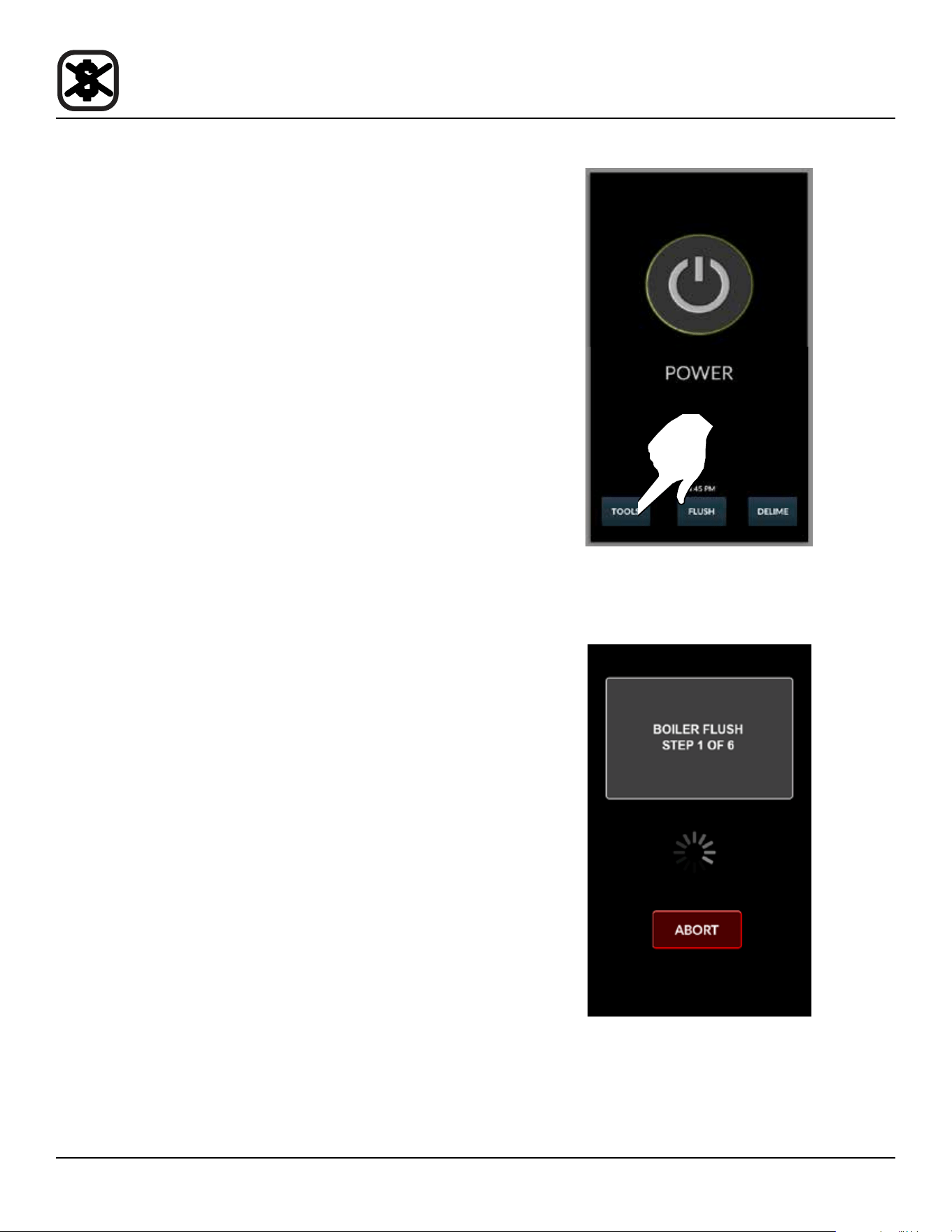
To manually initiate a ush sequence
1. From the power screen, press FLUSH.
NOTE: If the boiler is too hot to drain, the ush will
begin when the boiler water temperature
drops below 140ºF (60ºC).
Figure 55
2. The control displays the current ush stage. To stop
the ush cycle, press ABORT.
Figure 56
3. The ush completes in about 25 minutes. When com-
plete, the control returns to the power screen.
41
Maintenance
Deliming
BCX COMBI OVENS
Deliming of the steam generator is the single most im-
portant preventative maintenance task. Lime will build up
inside the steam generator, reducing eciency and caus-
ing damage to the boiler.
WARNING!!
Problems caused by insucient deliming are
not covered by the warranty.
WARNING!!
Deliming solutions are hazardous and can
cause burns to the skin and eyes. Wear pro-
tective clothing and eyewear.
WARNING!!
DO NOT cook while deliming.
1. Be sure the container delivering the deliming agent to
the appliance is full. Be sure to follow the MSDS or
safety instructions on your deliming agent. Use a
non-diluted deliming agent.
Figure 57
2. Ensure that the deliming pump has been primed. Re-
fer to the Deliming System Connection & Priming if
you are uncertain.
BCX WITH STANDARD CONTROL
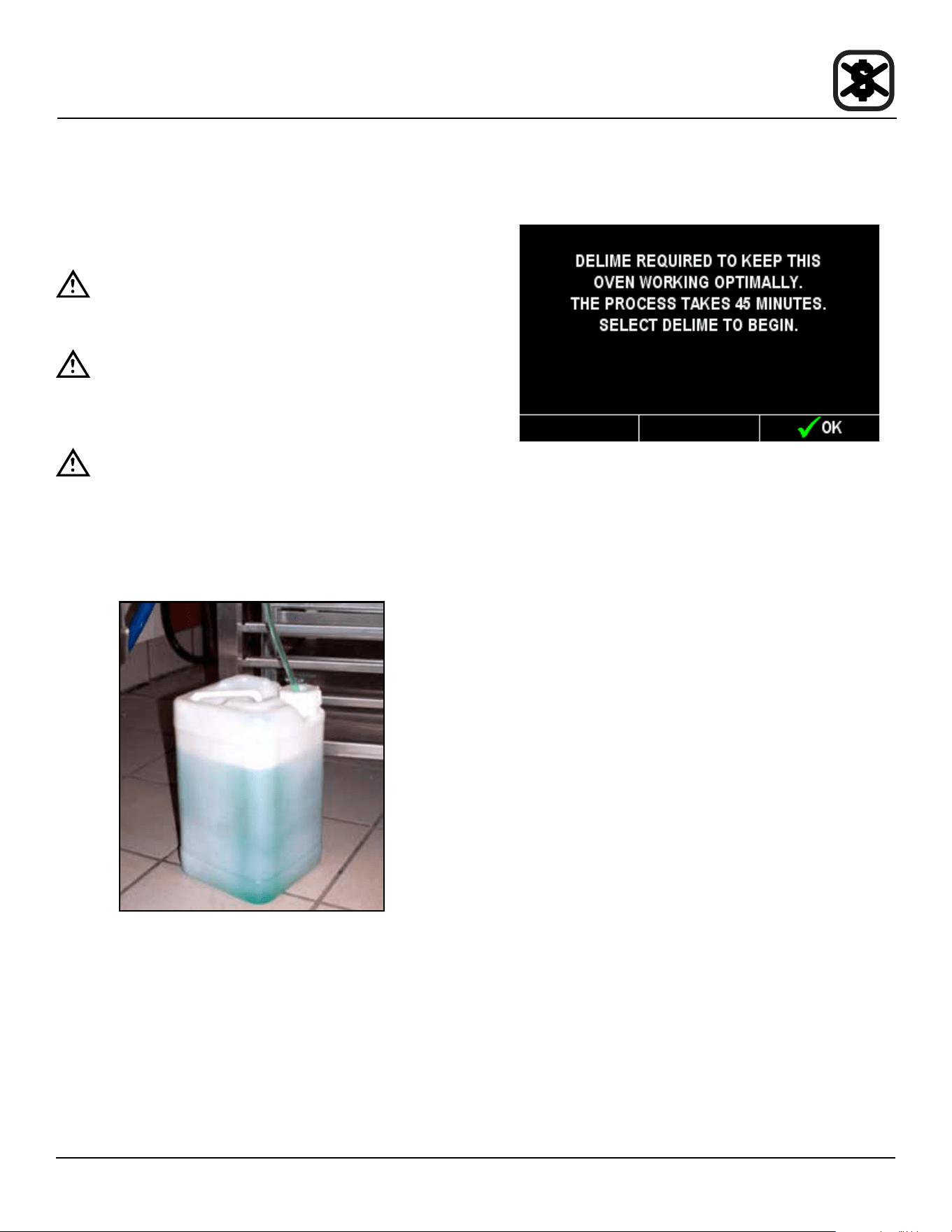
1. When it is time to delime your BCX, the display reads:
Figure 58
To postpone the delime process, press the right dis-
play key under OK.
The message will return until the unit is delimed. This is a
warning only, the oven can be used all day before delim-
ing. The delime sequence can be run at anytime.
NOTE: Once the deliming process has been started, the
oven cannot be used until deliming is complete,
approximately 45 minutes.
Deliming the Boiler with the Manual Control
1. If the oven is hot, place in the Cool Down mode with
the door open until the cavity is below 140ºF (60ºC).
2. After the cool down the unit will automatically turn it-
self o. Close the door.
3. Press the right display key under DELIME.
The remainder of the process is automatic. The dis-
play shows the step number and progress by %.
4. When the deliming process is complete, the control
will turn itself o. The oven can now be used normally.
To Cancel the Deliming Process
1. Press the POWER KEY (1) to cancel a ush cycle.
NOTE: If the delime is canceled after chemical is
introduced, the cancel will take longer.
42
Maintenance
Deliming
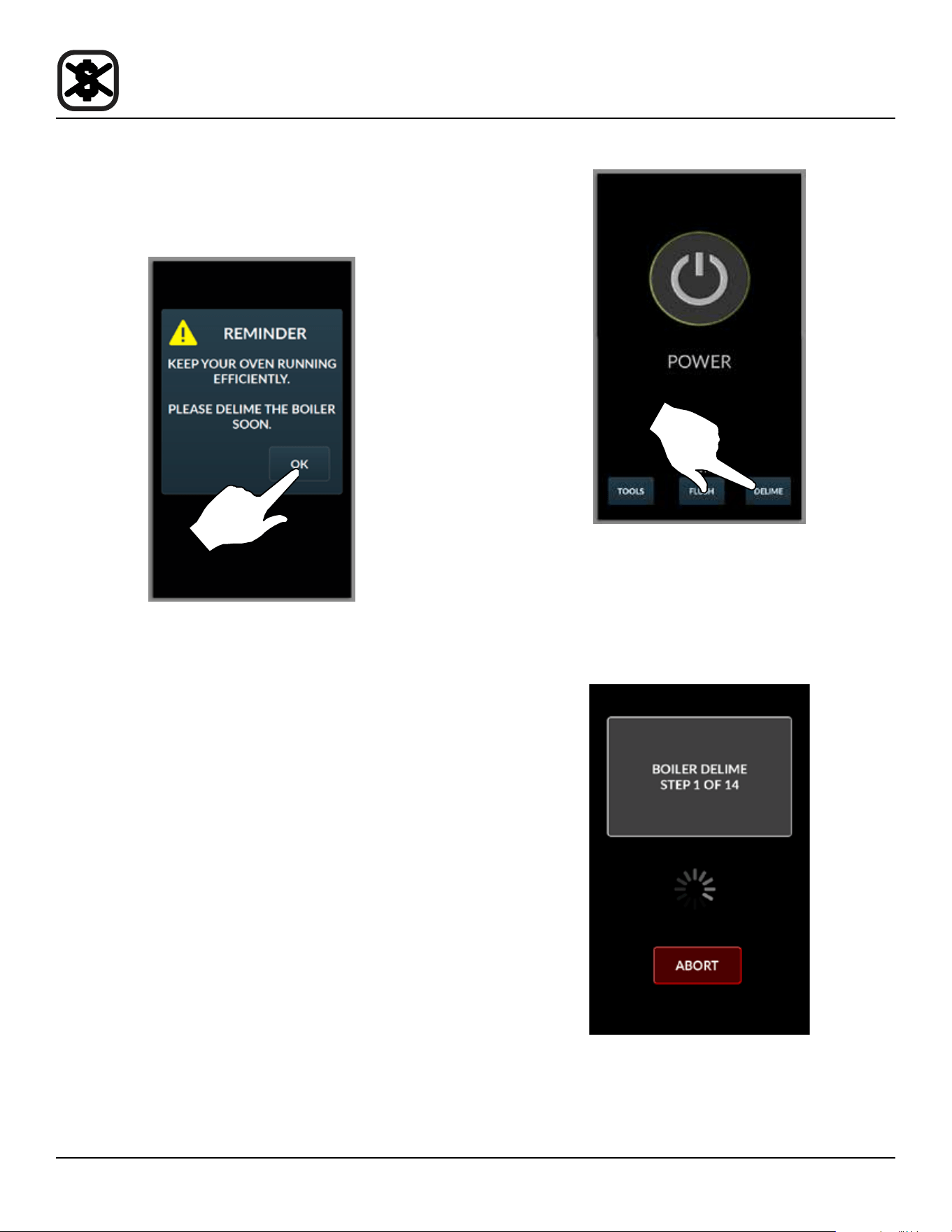
BCX WITH SMARTTOUCH 2 CONTROL
After 30 hours of boiler operation the control reminds you
delime your boiler. Press OK to acknowledge the remind-
er.
Figure 59
The message will return until the unit is delimed. This is a
warning only, the oven can be used all day before delim-
ing. The delime sequence can be run at anytime.
Deliming the Boiler with the SmartTouch 2 Control
1. From the power screen, press DELIME.
NOTE: If the oven is hot, place in the Cool Down
mode with the door open until the cavity is
below 140ºF (60ºC).
Figure 60
2. The control displays the current ush stage. To stop
the deliming process, press ABORT.
NOTE: Once the deliming process has been start-
ed, the oven cannot be used until deliming
is complete, approximately 45 minutes.
Figure 61
3. When complete, the control returns to the power
screen.
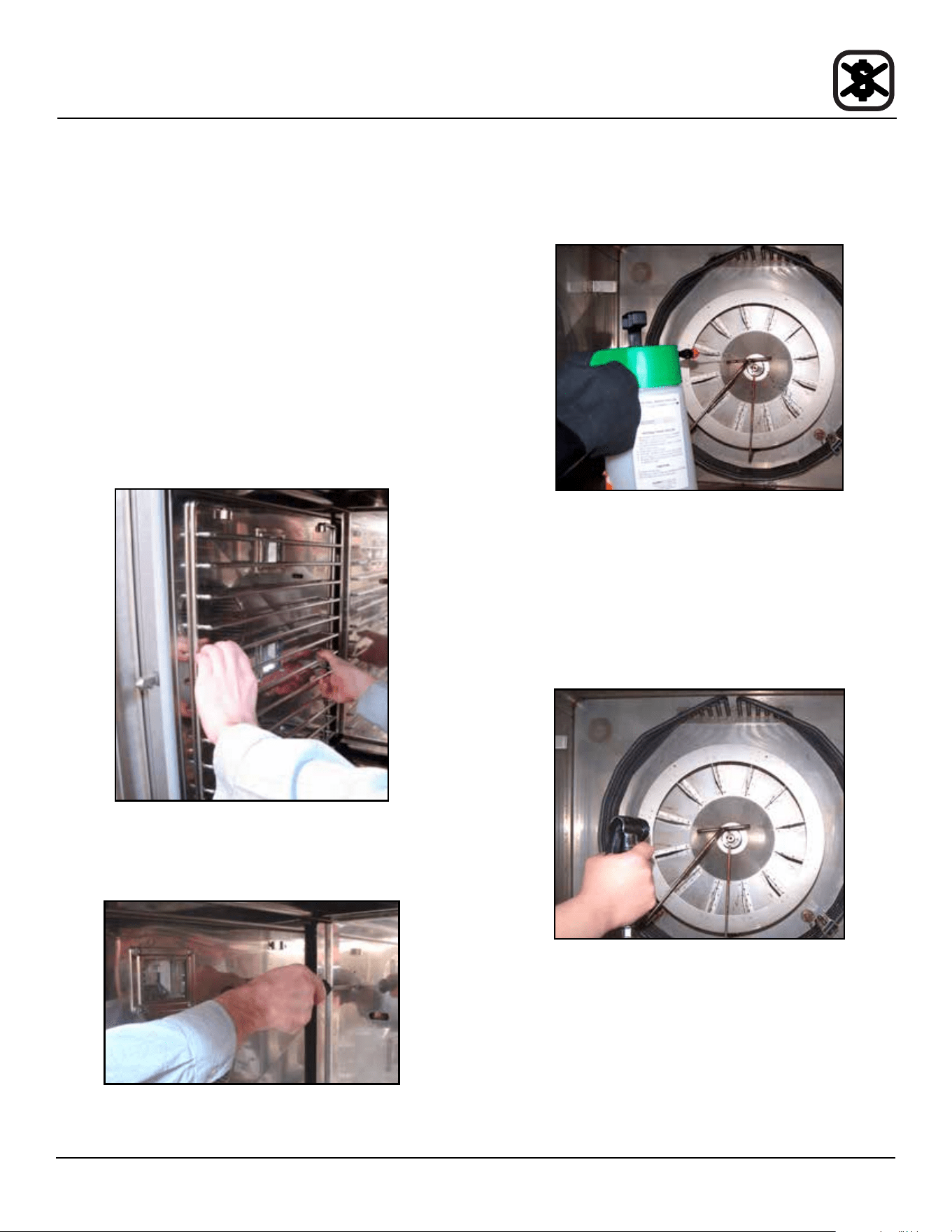
43
Maintenance
Deliming
BX-14 BOILERLESS OVEN
It may be necessary to delime the oven interior and be-
hind the fan guard. This is necessary for proper function-
ing of the oven. Lime will build up on the fan and heat
source leading to a less ecient oven.
1. Open the oven door. Place the oven in cool down
mode. Let the oven cool to below 140ºF (60ºC).
2. Fill the spray bottle with a non-diluted deliming agent.
Be sure to follow the MSDS or safety instructions
on your deliming agent.
3. Pump the bottle twenty times to build up pressure.
The higher the pressure, the ner the spray
4. Remove the oven racks and the rack guides on the
left side.
Figure 62
5. Rotate the two screws on the left side of the fan guard.
Swing the fan guard toward the front of the oven.
Figure 63
6. Thoroughly spray deliming agent onto the fan, heat
source and back of fan guard. Wait 10 minutes.
Figure 64
7. After ten minutes, use the spray hose and plenty of
water to rinse all of the deliming agent o. Repeat
steps 6 & 7 if necessary.
NOTE: If the lime scale is hard to remove or takes
multiple applications, your water ltration
system may be insucient or your lters
may need to be changed.
Figure 65
8. Return the fan guard to the closed position. Rotate
the two screws to secure the fan guard.
9. Reintall the rack guides and oven racks.
10. Leave the oven door open overnight to vent the oven.
If the oven will not be used for an extended period of
time, place the oven in hot air mode to dry the interior
cavity.
44
Maintenance
Deliming
DELIMING INTERVAL SETTING - BCX ONLY
Refer to gure below to determine the correct deliming interval for your appliance. Find your location and the corresponding
potentiometer setting. These values are general and are guidelines only. Your specic water quality may be harder or softer.
Adjust the deliming interval to your specic water quality.
NOTE: If you have the oven connected to a lter system, the water hardness may be reduced. Check with lter supplier
for details.
Figure 66
Over 14 gpg
10 to 14 gpg
7 to 10 gpg
3 to 7 gpg
Less than 3 gpg
Extremely Hard Setting A
Very Hard Setting B
Hard Setting B
Moderately Hard Setting C
Slightly Hard Setting C
Canadian Water Quality
Most of Canadian water contains 112
mg/L (8 gpg).
This would place Canada in the hard
water catagory and setting B should be
used. If your water exceeds 196 mg/L
(14 gpg), setting A should be used.