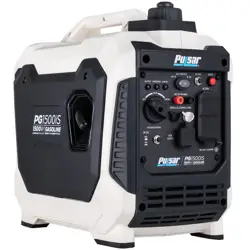
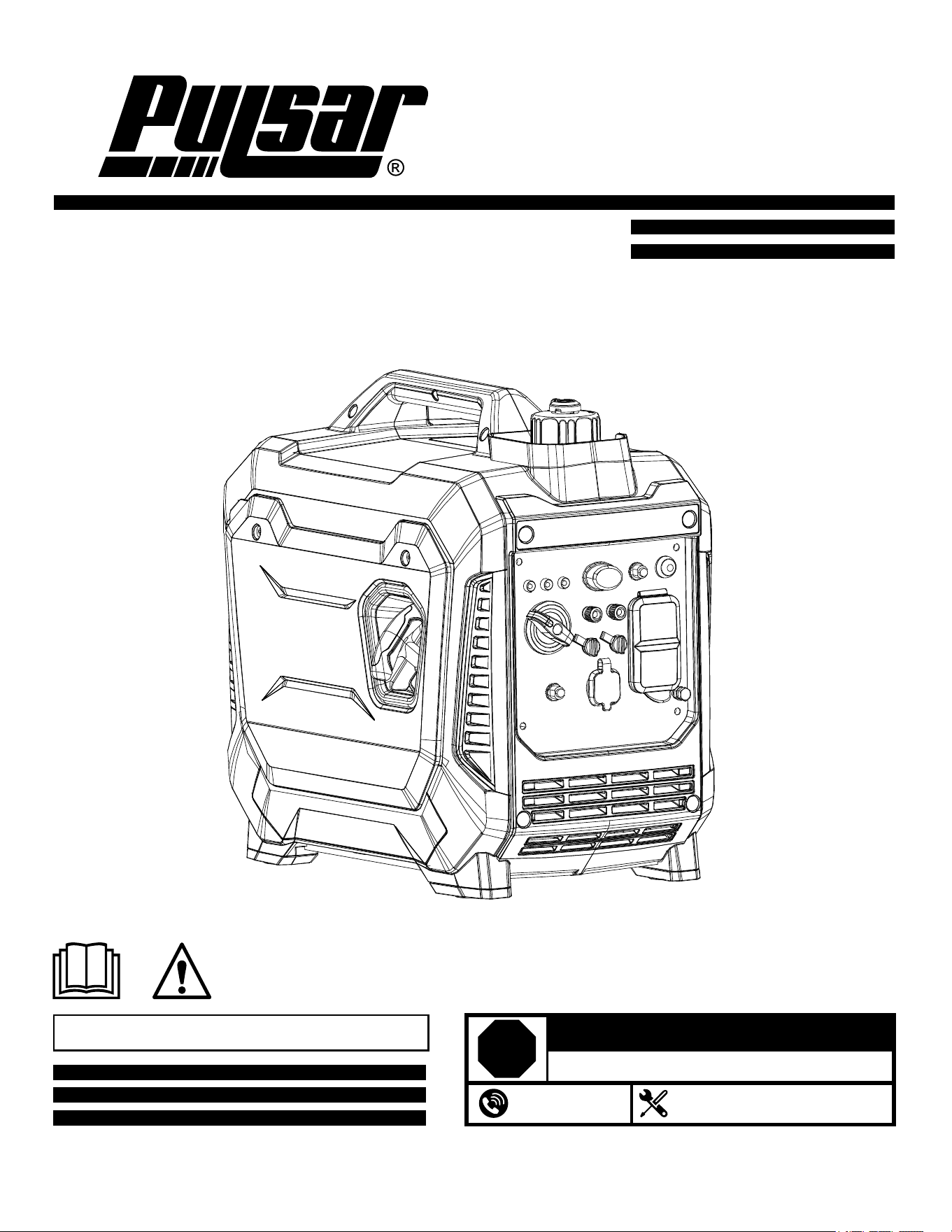
Model: PG1500iS
1500-watt, Inverter Generator, Gasoline
OPERATOR’S MANUAL
Warning: The Engine Exhaust from this product contains chemicals known to
the State of California to cause cancer, birth defects or other reproductive harm.
support@pulsar-products.com
866-591-8921
STOP
DO NOT RETURN TO STORE!
HAVE QUESTIONS OR NEED SERVICE?

Introduction ..............................................................................................................................................................................3
Parts Ordering / Customer Service...............................................................................................................................3
Safety Rules .............................................................................................................................................................................4
Safety Symbols .............................................................................................................................................................4
Safety Instructions .......................................................................................................................................................4
Features ....................................................................................................................................................................................7
Control Panel Functions .........................................................................................................................................................8
ON/OFF Start Switch and Choke.................................................................................................................................8
Indicator Lights..............................................................................................................................................................8
DC Circuit Breaker........................................................................................................................................................9
Engine ECO Control.....................................................................................................................................................9
Parallel Outlets.............................................................................................................................................................9
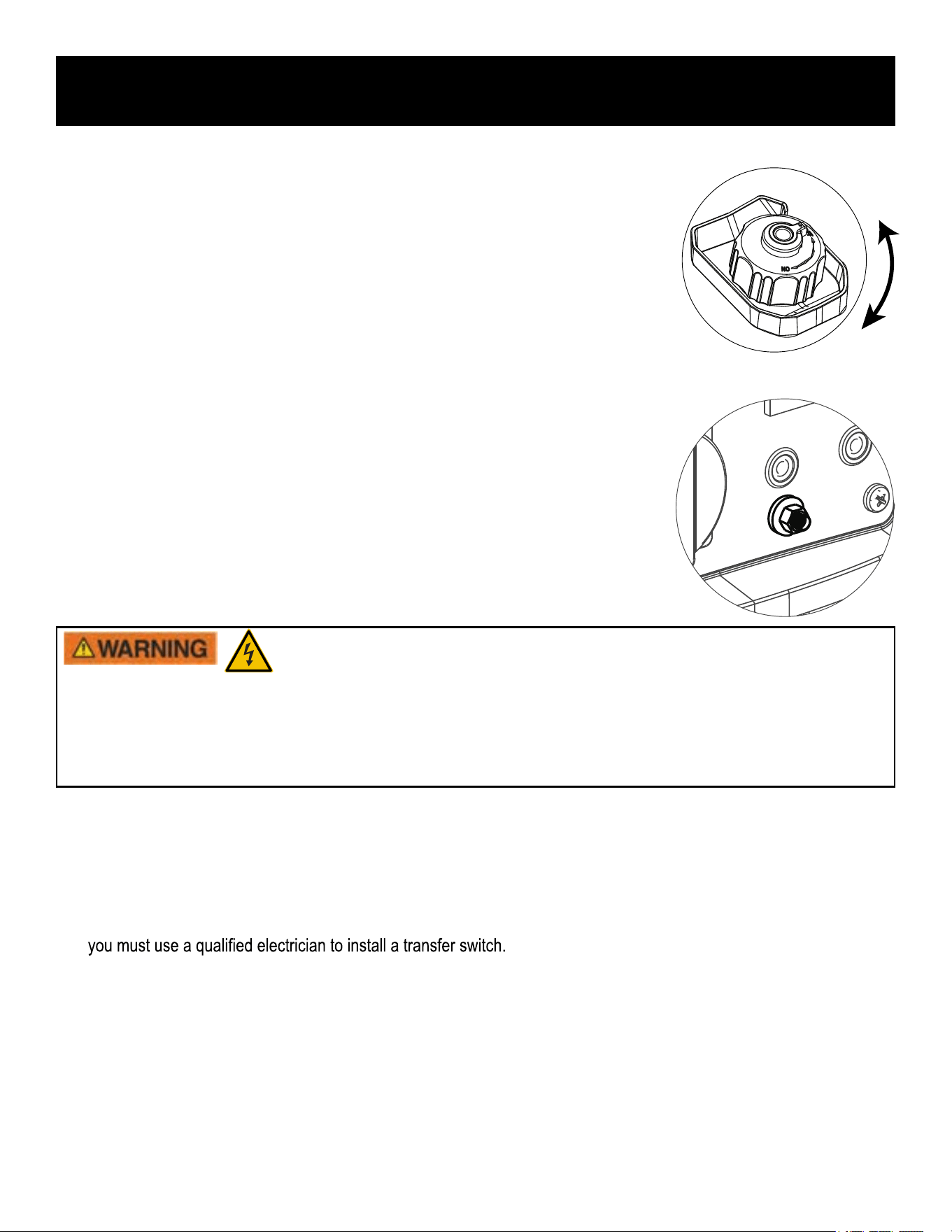
Fuel Cap Air Vent.......................................................................................................................................................10
Ground Terminal.........................................................................................................................................................10
Assembly .................................................................................................................................................................................11
Connecting Generator to an Electrical System........................................................................................................10
Adding Gasoline.........................................................................................................................................................11
Adding / Checking Engine Oil ..................................................................................................................................11
Operation ................................................................................................................................................................................12
How to Start Engine....................................................................................................................................................12
How to Stop Engine.....................................................................................................................................................13
How to Attach Electrical Devices...............................................................................................................................13
Charging a 12 Volt Battery..........................................................................................................................................14
AC Parallel Operation................................................................................................................................................15
Don’t Overload Generator..........................................................................................................................................16
Wattage Reference Guide...........................................................................................................................................16
Maintenance ...........................................................................................................................................................................17
Maintenance Schedule ...............................................................................................................................................17
Checking Spark Plug .............................................................................................................................................18
Changing Oil ..............................................................................................................................................................19
Air Filter.......................................................................................................................................................................20
Checking Muffler and Spark Arrester..........................................................................................................................20
Fuel Filter ..................................................................................................................................................................21
Storage ......................................................................................................................................................................21
Troubleshooting ....................................................................................................................................................................23
Diagrams....................................................................................................................... ..........................................................24
TABLE OF CONTENTS
2
INTRODUCTION
3
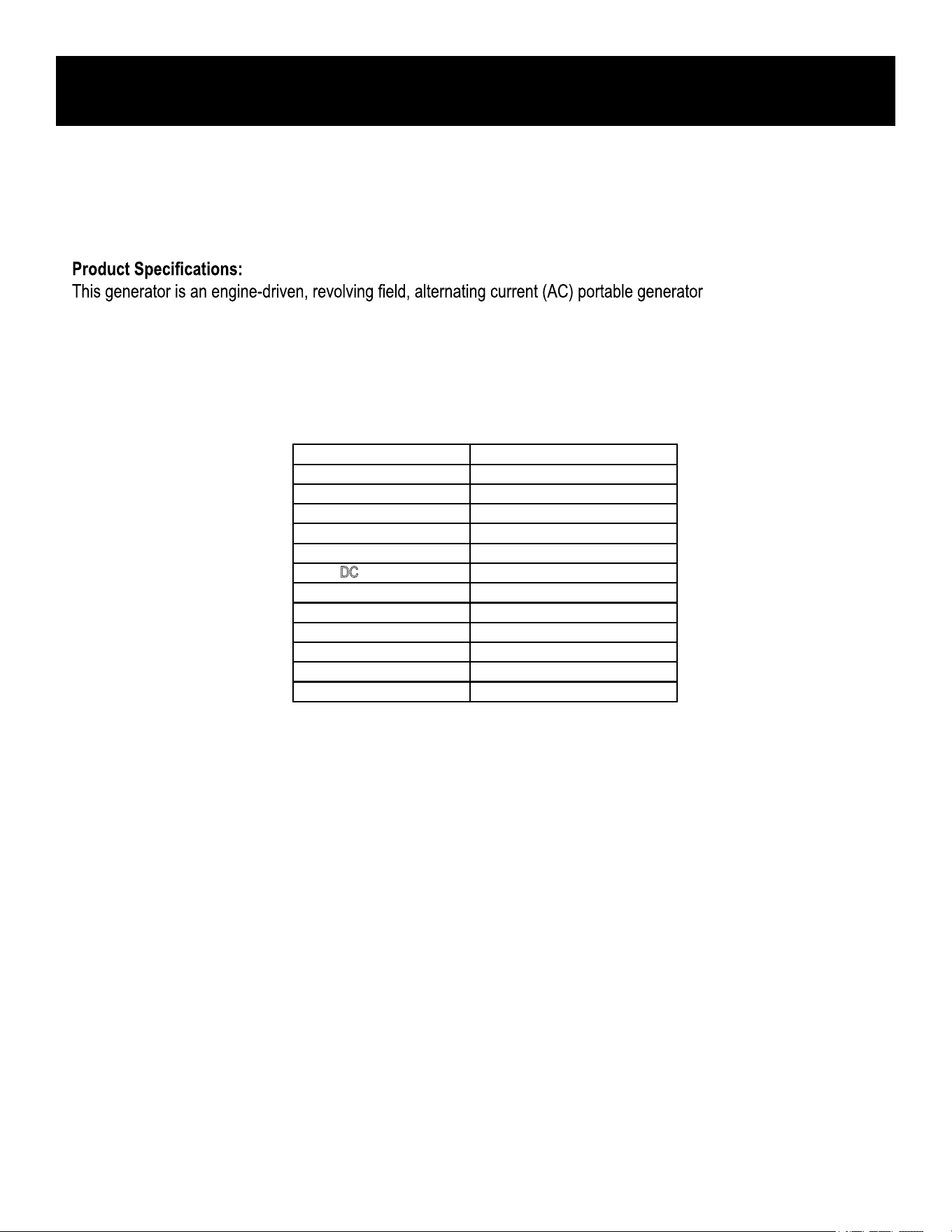
Model
PG1500iS
Voltage
120V
Frequency
60Hz
Rated Output
1.2kw
Peak Output
1.5
kw
USB Outlet
5-12V
DC Outlet
12V/8A MAX
Parallel Outlet
YES
Engine type
4 Stroke/ Single Cylider/ OHV
Displacemnt
56CC
Fuel tank capacity
3L
Engine Oil Capacity
0.25L
Starting Type
Recoil start
Generator specification
The emissions control system for this generator is compliant with all standards set by the US EPA.
How to contact us:
For any questions, or to obtain parts or service, please phone 866.591.8921 or write to us at
Thank you for purchasing this superior quality portable generator
from Pulsar Products
. When operating and
maintaining this product as instructed in this manual, your generator
should
give you many years of reliable service.
. It is designed to supply
electrical power to operate tools, appliances, camping equipment, lighting, or serve as a back up power source during
power outages.
4
SAFETY RULES
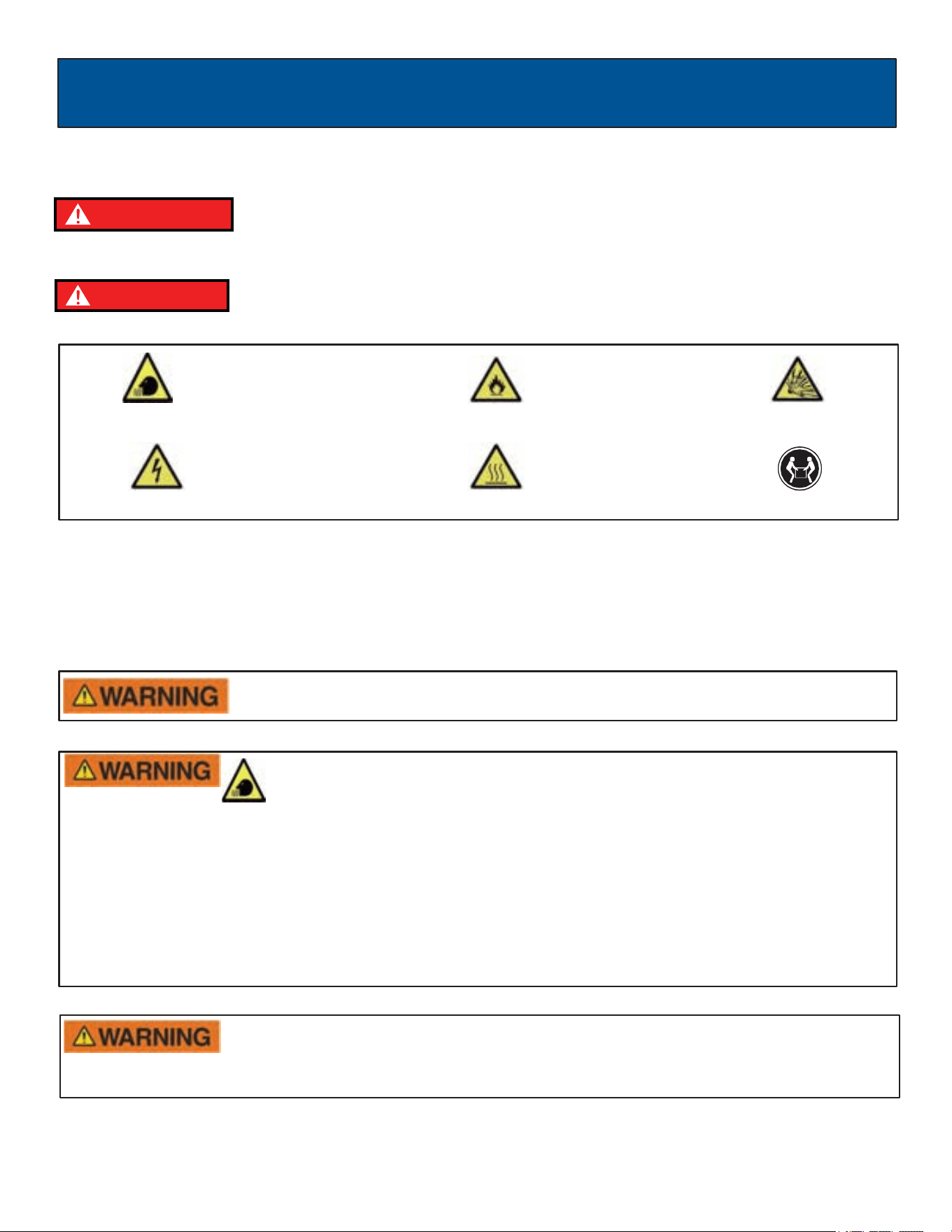
Safety Symbols
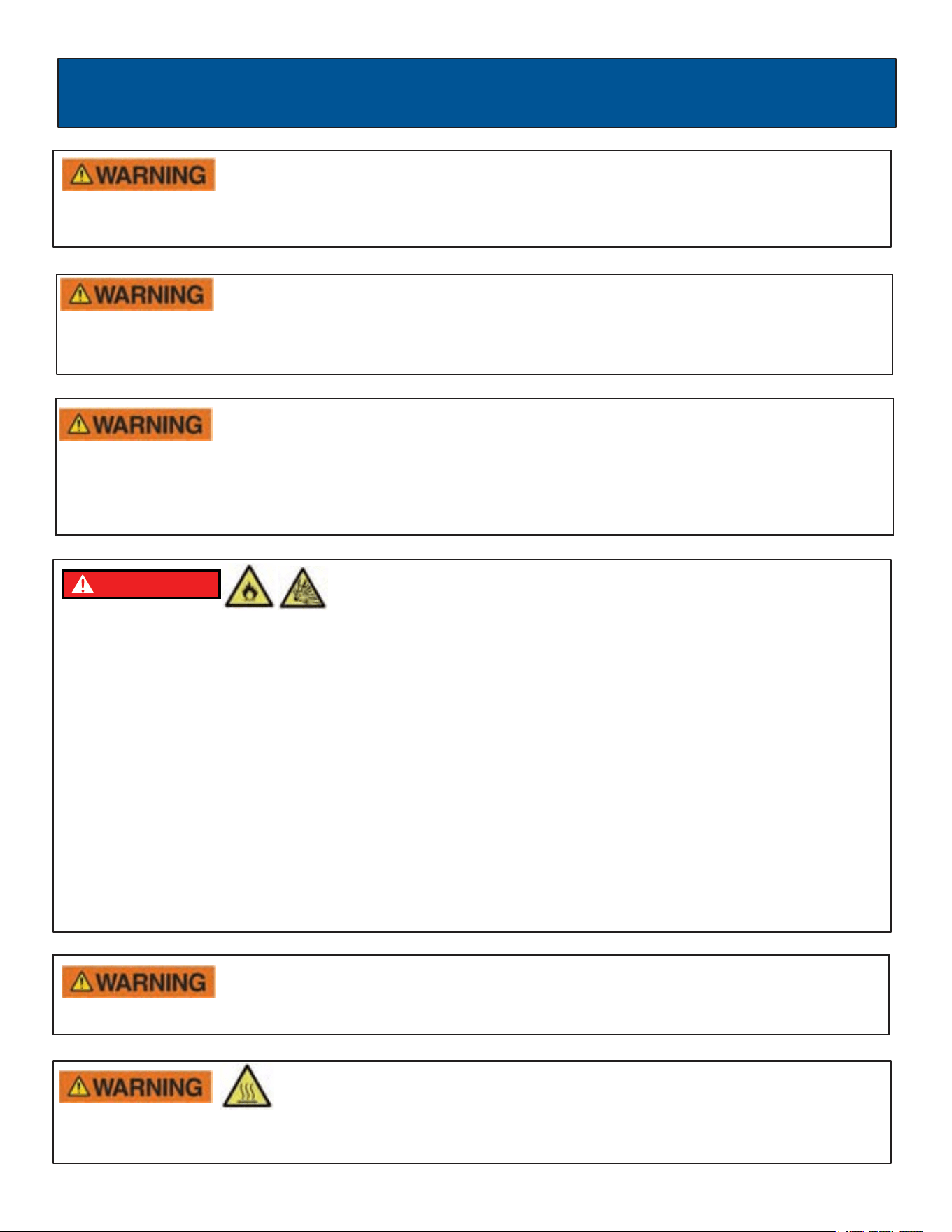
Indicates a potentially hazardous
situation which could result in
serious
injury or death if not avoided.
Indicates a potentially hazardous
situation which could result in
damage to equipment or property.
Safety Instructions
The manufacturer cannot anticipate every possible hazardous circumstance that the user may encounter. Therefore, the
warnings in this manual, on tags, and on affixed decals are not all-inclusive. To avoid accidents, the user must understand
and follow all manual instructions and use good common sense.
WARNING!
Engine exhaust contains chemicals that can cause cancer and birth defects.
•
Always wash hands after handling generator.
Do not operate indoors or in a confined space that prevents dangerous carbon
monoxide Gas from dissipating.
•
Using a generator indoors CAN KILL YOU IN MINUTES!
•
Carbon monoxide gas is a poisonous, odorless gas that can cause headache, confusion, fatigue, nausea,
fainting, sickness, seizures, or death. If you start to experience any of these symptoms, IMMEDIATELY get
fresh air and seek medical attention.
•
Never use indoors, in a covered area, or in a confined space, even if doors and windows are open.
•
Install a battery-operated carbon monoxide alarm in ALL occupied spaces near a running generator.
•
Keep exhaust from this unit from entering a confined area through windows, doors, vents, or other openings.
•
NEVER WORK in areas where Carbon Monoxide gas can accumulate!
Read and understand this manual in its entirety before ope
rating this generator.
Improper use of this generator could result in serious injury or death.
Toxic Fumes
Risk of fire
Risk of explosion
Risk of electric shock
Hot surface
Lifting hazard
DANGER
DANGER
5
SAFETY RULES
Avoid contacting hot areas of this unit.
•
Use caution around the muffler, cylinder, and other engine parts as they can be extremely hot.
•
Allow hot components to cool before touching.
Pull cord recoils rapidly and can pull arm towards engine faster than you can let go which
could result in injury.
•
To avoid recoil, pull starter cord slowly until resistance is felt, let it retract, then pull swiftly.
Keep engine away from flammable objects and other hazardous materials.
•
The fuel and its vapors used to power this unit are highly flammable and could explode resulting in serious injury or
death.
•
Never fill or drain fuel tank indoors.
•
Never overfill fuel tank. If fuel spills, move the unit at least 30 feet away from the spill and wipe up any spilled gasoline
on the unit and the ground before starting the engine.
•
Never smoke while operating or fueling this unit.
•
Never operate or store this unit near an open flame, heat, or any other ignition source.
•
Generator should be far away from buildings or other equipment during operation.
•
Keep engine free of grass, leaves, or grease and other flammable debris.
•
When adding or draining fuel, unit should be turned off for at least 2 minutes to cool before removing the fuel cap. If
unit has been running, the fuel cap may be under pressure, remove slowly.
•
To keep fuel from spilling, secure unit so it cannot tip while operating or transporting.
•
When transporting unit, disconnect the spark plug wire and make sure the fuel tank is empty with the fuel shutoff valve
turned to the off position.
WARNING!
Starter recoil and other moving parts can catch on clothing, jewelry, and hair.
•
Do not wear loose clothing or loose gloves.
•
Remove jewelry or anything else that could be caught in moving parts.
•
Tie back hair, or wear protective head covering to contain long hair.
WARNING!
Never start or stop engine with electrical devices plugged in to the receptacles. Failure to do
so could damage the generator and/or connected electrical devices.
•
Always start the engine and let it stabilize before connecting any electrical devices.
•
Disconnect all electrical devices before stopping the engine.
WARNING!
Never exceed generator’s wattage / amperage capacity. This could damage the generator
and / or connected electrical devices.
•
Check operating voltage and frequency of all electrical devices prior to plugging in to generator.
DANGER
6
SAFETY RULES
PROP 65 WARNING: This product contains chemicals known to the state of California to cause cancer and birth defects or
other reproductive harm.
WARNING!
Never operate this unit if there are any broken or missing parts and only use Pulsar
replacement parts specifically designed for this unit.
•
Improper treatment of generator can damage the unit and shorten its life.
•
Always repair this unit as specified in this manual. If you have any questions, contact your dealer, or consult a
qualified service center.
•
Shut generator off if electrical output is missing, unit vibrates excessively or begins to smoke, spark, or emit flames.
WARNING!
Only use this unit as intended or serious injury or death could result.
•
Do not bypass any safety device. Moving parts are covered with guards. Make sure all protective covers are in place.
•
Never transport or attempt to adjust this unit while it is running.
•
Never insert objects through cooling slots.
WARNING!
Never modify this unit in any way or modify governed speed.
•
Increasing governed speed is dangerous which can result in personal injury and / or damaged equipment.
•
Decreasing governed speed adds an excessive load and can damage equipment.
•
Only when operating at the preset governed speed this generator will supply the correct rated frequency and
voltage.
Generator must be properly grounded to prevent electrocution.
•
Only operate generator on a level surface.
•
If connected to a structure, connect the ground terminal to an appropriate ground
This generator produces high voltage which could result in burns or
electrocution causing serious injury or death.
•
Never handle the generator, electrical devices, or any cord while standing in water, while barefoot, or when hands or
feet are wet.
•
Always keep the generator dry. Never operate generator in rain or under wet conditions.
•
Use a ground fault circuit interrupter (GFCI) in a damp or highly conductive area, such as metal decking
or steel work.
•
Never plug electrical devices into generator having frayed, worn, or bare wires. Never touch bare wires or contact
receptacles.
•
Never permit a child or unqualified person to operate generator. Always keep children a minimum of 30 feet away
from the generator.
•
If using the generator for backup power, notify the utility company.
•
If connecting generator to a building’s electrical system for standby power, you must use a qualified electrician to
install a transfer switch. Failure to isolate the generator from the power utility could result in serious injury or death to
electric utility workers.
7
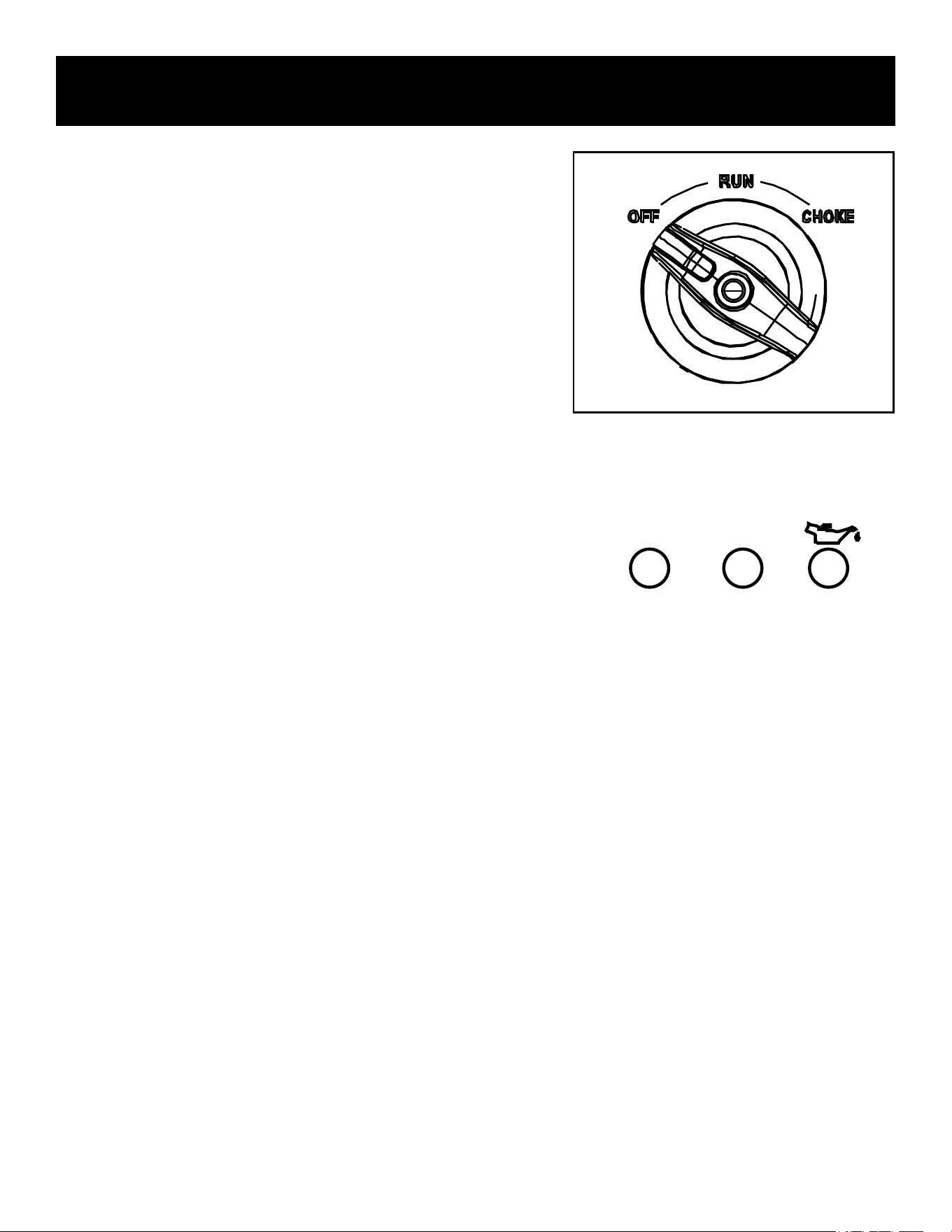
Recoil Starter
Control Panel
Spark Plug Cover
Handle
Air vent
Oil maintenance cover
Fuel cap
AC pilot light
3 in 1 Start Switch
(RUN / OFF and Choke)
DC 12V/8A
Economy Switch
Muffler shield
Muffler
USB PORTS
Ground terminal
FEATURES
AC Receptacle
Parallel Outlets
Oil warning light
AC Breaker
RESET
Overload indicator light
8
CONTROL PANEL FUNCTIONS
3 in 1 start switch
Start Switch “OFF”
When the Start Switch is in the “OFF” position the fuel valve is
switched off and the engine will not run.
Start Switch “CHOKE”
When the Start Switch is in the “CHOKE” position the fuel valve is
switched on and the engine can be started.
Start Switch “RUN”
When the Start Switch is in the “RUN” position the fuel valve is
switched on and the engine can run.
Note: Choke is not required to start a warm engine
Oil Warning Indicator Light
When oil falls below the minimum level, the oil warning indicator
light comes on and the engine stops automatically. The engine will
not start until the correct volume of oil is in the crankcase.
Engine Overload Indicator Light
1. If the overload light comes on, the inverter has been overloaded
without tripping the circuit breaker. Just reduce the load and
press the 'RESET' button.
2. If pressing the reset button does not solve the problem,
disconnect the load and shut down the engine. Inspect the air
inlet and air outlet for any blockage. Remove blockage if found.
If the engine overload indicator light comes on, the generator wattage / amperage capacity has been
exceeded by connected electrical devices or by a power surge. When this occurs, the green AC Pilot
Indicator Light will go off. The engine will continue to run, but the red Engine Overload Indicator Light will
stay on and power will no longer be supplied to connected electrical loads.
How to Correct
OUTPUT OVERLOAD
Note: The engine overload indicator light may turn on for a few seconds when attaching a load due to a power surge.
This is normal.

9
CONTROL PANEL FUNCTIONS
Note: The ECO switch must be turned to the “OFF” position when using electrical loads that require a large starting
current, such as a pump.
Parallel Outlets
Located just above the USB ports, the generator’s Parallel Outlets enable a user to run two PG1500iS generators
simultaneously. This operation requires special cables. When operating parallel generators, the rated output is 2.1Kva
and the rated current is 18A/120V. For cables and instructions consult a Pulsar dealer for a PARALLEL OPERATION
CABLE KIT.
AC Pilot Indicator Light
The green AC Pilot Indicator Light comes on when the engine starts and generates power.
DC Circuit Breaker
When the DC Circuit Breaker is in the “ON” position, the generator is able to supply power to connected electrical loads.
When the DC Circuit Breaker is in the “OFF” position, the generator will no longer supply power. The DC Circuit Breaker
automatically turns “OFF” when connecting electrical loads to the generator that exceed the generator’s rated output. If the
DC circuit breaker turns off, reduced connected electrical loads to stay within rated DC output. To re-establish power,
return the DC Circuit Breaker back to the “ON” position.
If the DC Circuit Breaker turns off again, stop using the generator immediately and consult your
local, authorized Pulsar dealer.
Engine ECO Control
• When the Engine ECO switch is moved to the “ON” position, the economy mode automatically determines the
generator’s ideal engine speed based on the connected electrical load. This results in superior fuel economy and
noise reduction.
• Only connect this generator to another PG1500iS Generator
• Only use Pulsar-approved parallel kits to connect Pulsar generators
Never connect generators that are different models.
NOTICE
NOTICE
10
FEATURES
OFF
ON
Fuel Cap
Turn counterclockwise to remove the fuel cap
Fuel Cap Air Vent
The Air Vent must be in the “ON” position to allow fuel to flow so that the
engine can run. Turn the Air Vent to the “OFF” position to prevent leaking.
Ground Terminal
The generator may be connected to an external ground via the ground
terminal on the panel. Connect the ground terminal to the driven ground
rod with a No 14 AWG (American Wire Gage) copper wire. The wire
connects to the terminal between the lock washer and nut. Tighten the
nut securely to ensure good connection. Grounding the generator
protects you from electric shock that results from a build up of static
electricity or undetected ground faults.
• Only operate generator on a level surface.
• Use the ground terminal on the panel to connect to ground where required by the application or by code, such as
when connected to a fixed structure.
Generator must be properly grounded to prevent electrocution.
Connecting Generator to an Electrical System
• If connecting generator to a building’s electrical system for standby power,
The power
from the generator must be isolated from the circuit breaker or alternative
power source. The connection must comply with all electrical codes and
applicable laws.
11
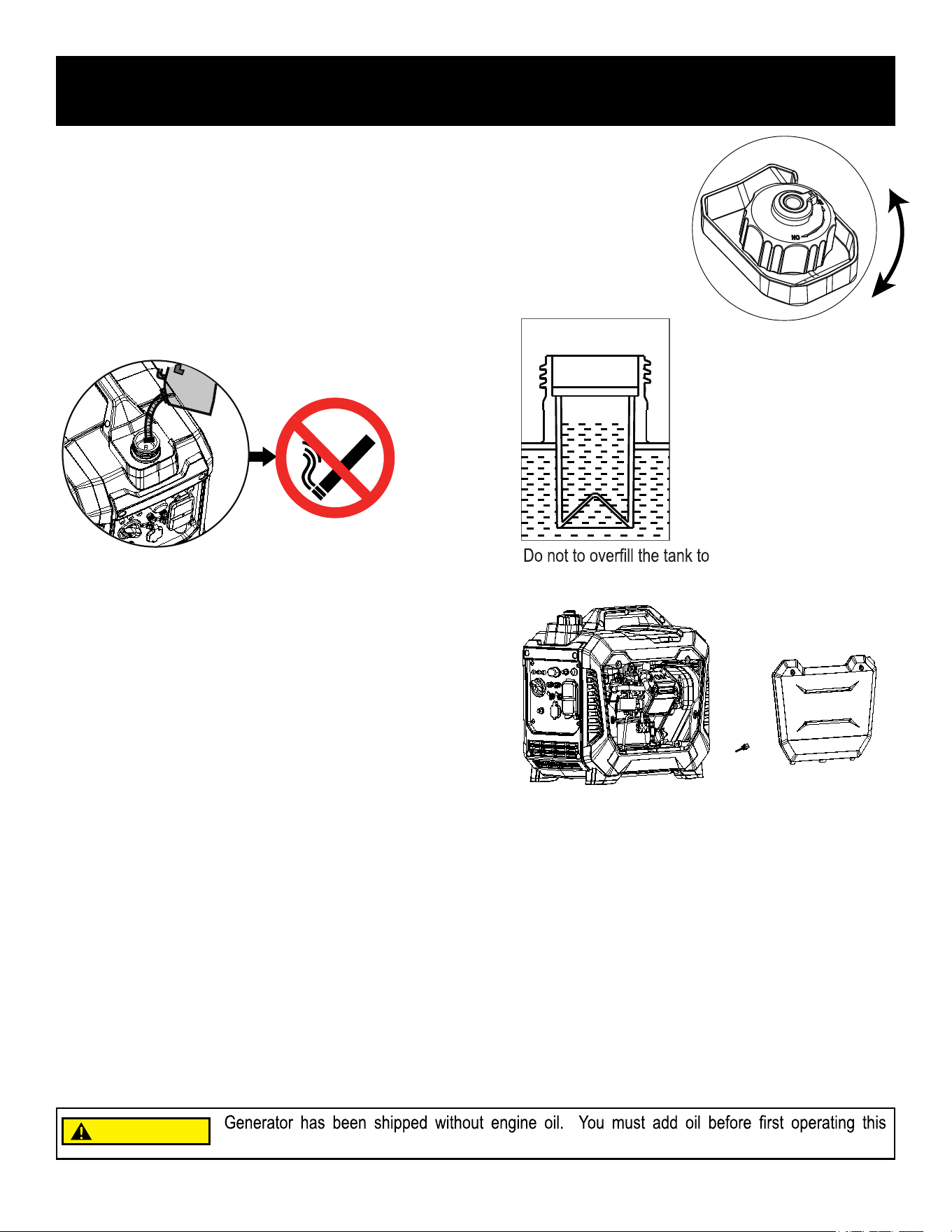
• Place generator on a level surface.
• Remove screws and then remove the right side outer
casing cover.(You must remove the spark plug cover
to push the side panel off from the inside)
• Remove the crankcase dipstick.
ASSEMBLY
OFF
ON
Note: Residual oil from the factory may remain in the engine, add the oil incrementally as it approaches full to prevent
overfilling the engine.
Once the oil has been added, a visual check should show oil about 1-2 threads from running out of the fill hole.
When using the dipstick to check the oil level, DO NOT screw in the dipstick while checking.
Recommended Oil: SAE 10W-30
Oil Capacity: 0.25L
allow space for fuel expansion
Do not smoke when adding fuel.
Adding or Checking Engine Oil
Adding Gasoline
• Set generator on a clean and level surface in an area that is well ventilated.
• Remove fuel cap.
• Insert a funnel into the fuel tank and carefully pour gasoline into the tank until fuel level
reaches about 1 ½ inches below the top of the neck. Be careful not to overfill the tank to
allow space for fuel expansion.
• Replace fuel cap and secure tightly.
•
•
Insert a funnel into the crankcase dipstick hole and carefully add the specified amount of engine oil (SAE
10W-30) to empty crankcase until or oil reaches the outer edge of the oil fill hole (crankcase dipstick hole). Be
sure to replace dipstick and securely tighten before attempting to start the engine.
• To check oil, set generator on a level surface, wipe dipstick clean, reinsert dipstick without, re-threading, then
check the oil level.
generator. Always check oil level before each operation.
CAUTION
12
OPERATION
Standard Atmospheric Conditions Ambient Temperature: 77ºF (25ºC)
Barometric Pressure: 100kPa
Relative Humidity: 30%
Generator output will vary due to changes in temperature, altitude, and humidity. If the temperature, humidity, or altitude
are higher than standard atmospheric conditions, the generator’s output will be reduced. The load attached to the
generator must therefore be reduced.
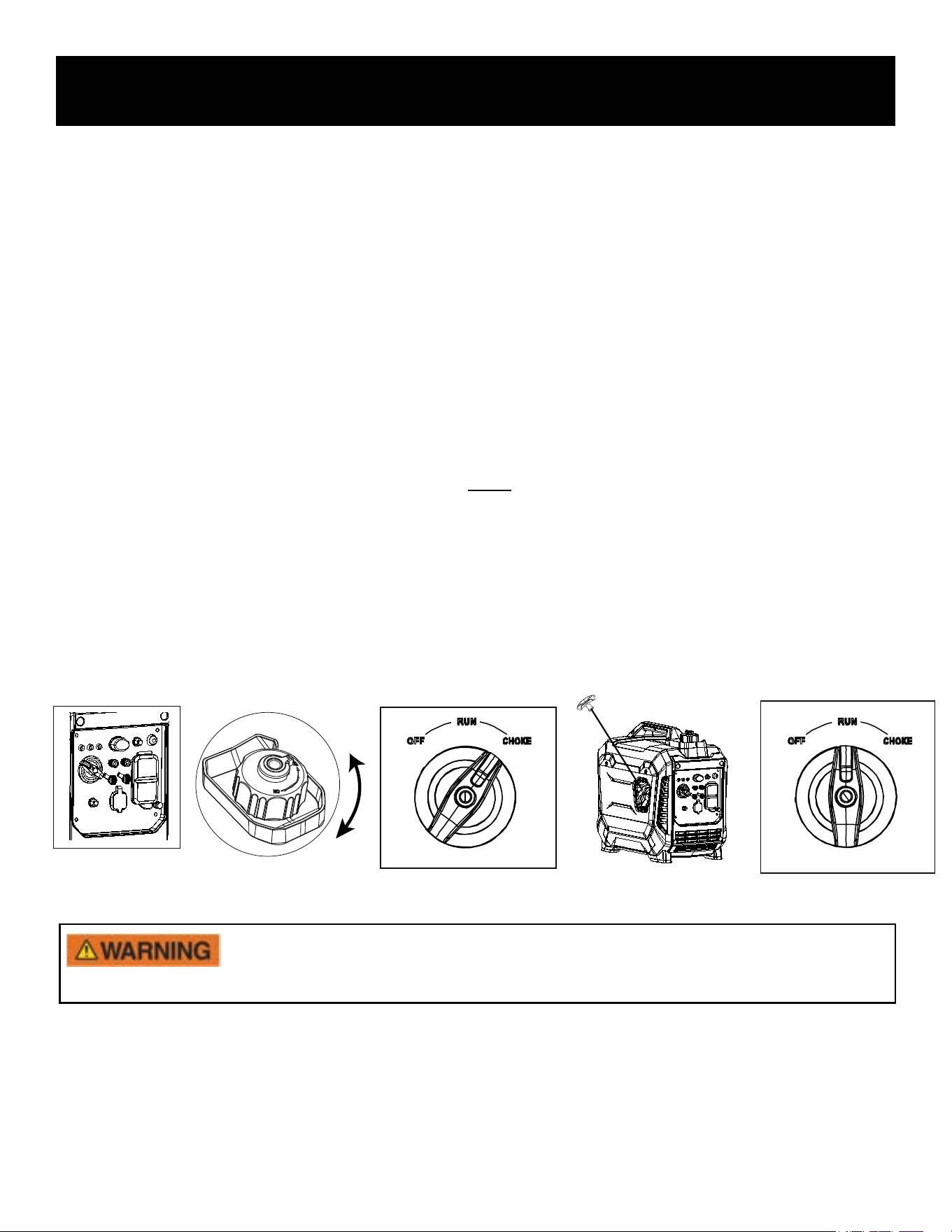
How to Start the Engine
• Place generator on a level surface. All electrical loads MUST be disconnected from generator.
• Turn the ECO switch to “OFF”
• Turn the Fuel Cap Air Vent to the “ON” position.
• Turn the 3 in 1 Start Switch to “CHOKE”
• To avoid snap-back pull the starter rope until resistance is felt, let it retract, then pull it swiftly. Repeat until
the generator starts.
• Let engine run for several seconds and then gradually, as engine warms up, turn the 3 in 1 Start Switch to
the "RUN" position.
OFF
ON
Note: To start the generator with the ECO switch in the “ON” position
• Disconnect all electrical loads from generator.
• If ambient temperature is below 32ºF (0ºC) allow 3 minutes for the engine to warm up.
• The ECO is in “ON” position, the unit returns to normal operation after the above warm up time.
• ECO switch must be turned to the “OFF” position when using electrical loads that require a large starting
current, such as a pump.
• To avoid snap-back, pull the starter rope slowly until until resistance is felt, let it retract,then pull swiftly.
Under certain conditions any recoil can snap-back faster than you can
let go which could result
in injury
13
OPERATION
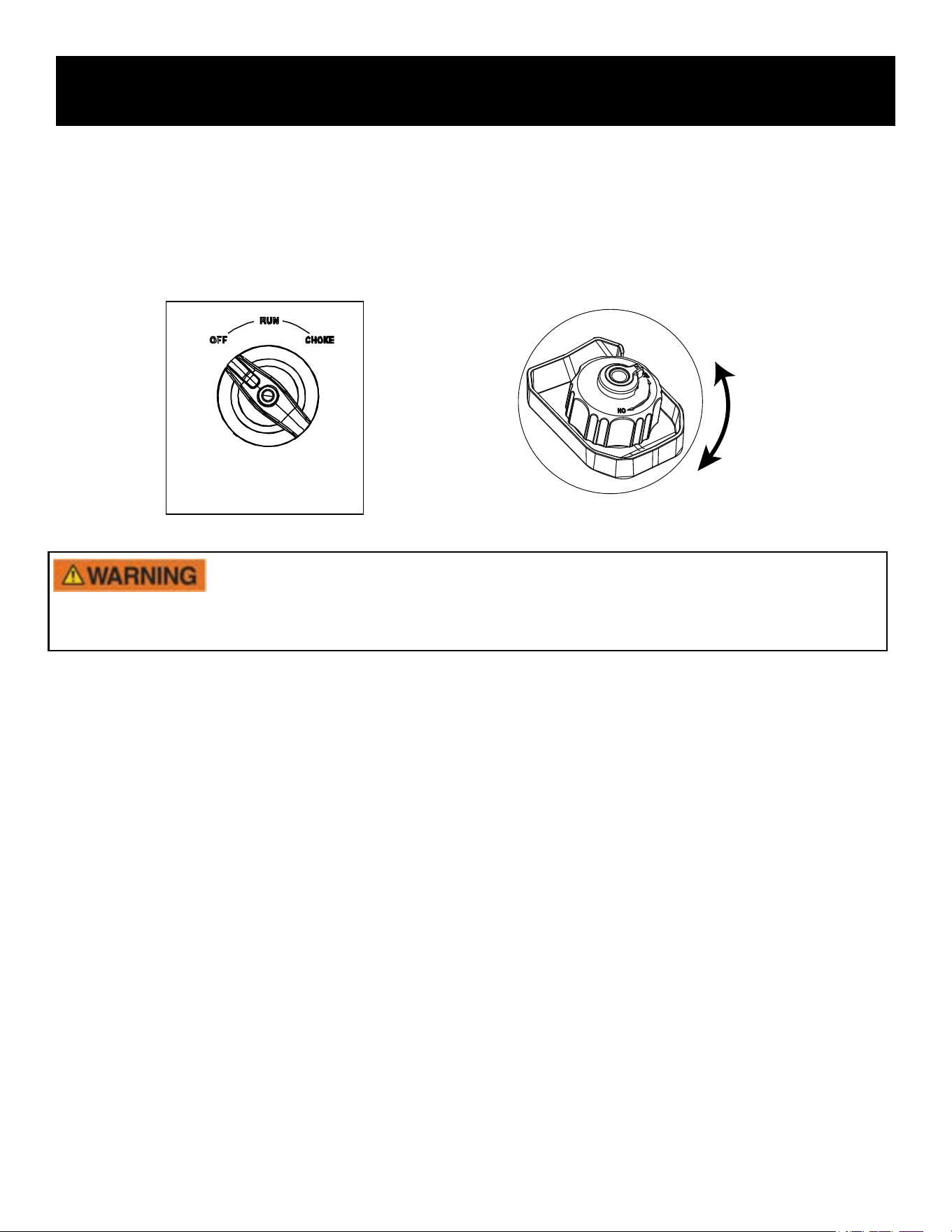
How to Stop the Engine
• Remove ALL ELECTRICAL LOADS before starting or stopping the generator
• Turn the 3 in 1 Start Switch to the “OFF” position.
• Turn the Air Vent to the “OFF” position.
OFF
ON
• Always start the engine and let it stabilize before connecting any electrical loads.
• Disconnect all electrical loads before stopping the engine.
WARNING!
Never start or stop engine with electrical devices plugged in to the receptacles. Failure to
comply could damage the generator and / or connected electrical devices.
How to Attach Electrical Loads
1. Before starting generator
• Ground the generator if required .
• Make sure the attached load is within the generator rated output and the receptacle’s rated current.
• Make sure all electrical cords and receptacles are in good condition.
• Make sure all electrical loads are turned “OFF” before plugging them into the generator.
2. Start engine
3. If the attached load is small, turn the ECO switch to the “ON” position. For a larger load, or if attaching multiple electrical
loads turn the ECO switch to the “OFF” position.
4. Make sure the green AC pilot indicator light is on.
6. Allow generator output to stabilize (engine and attached devices run evenly) before plugging in the next load.
5. When engine has stabilized, plug in and turn on first load. It is recommended to plug in devices with the largest output first
and the smallest output last to help prevent overloading the generator.
14
Charging a 12 Volt Battery
This generator can be used to charge a 12 volt automotive or storage battery by
taking the following steps:
OPERATION
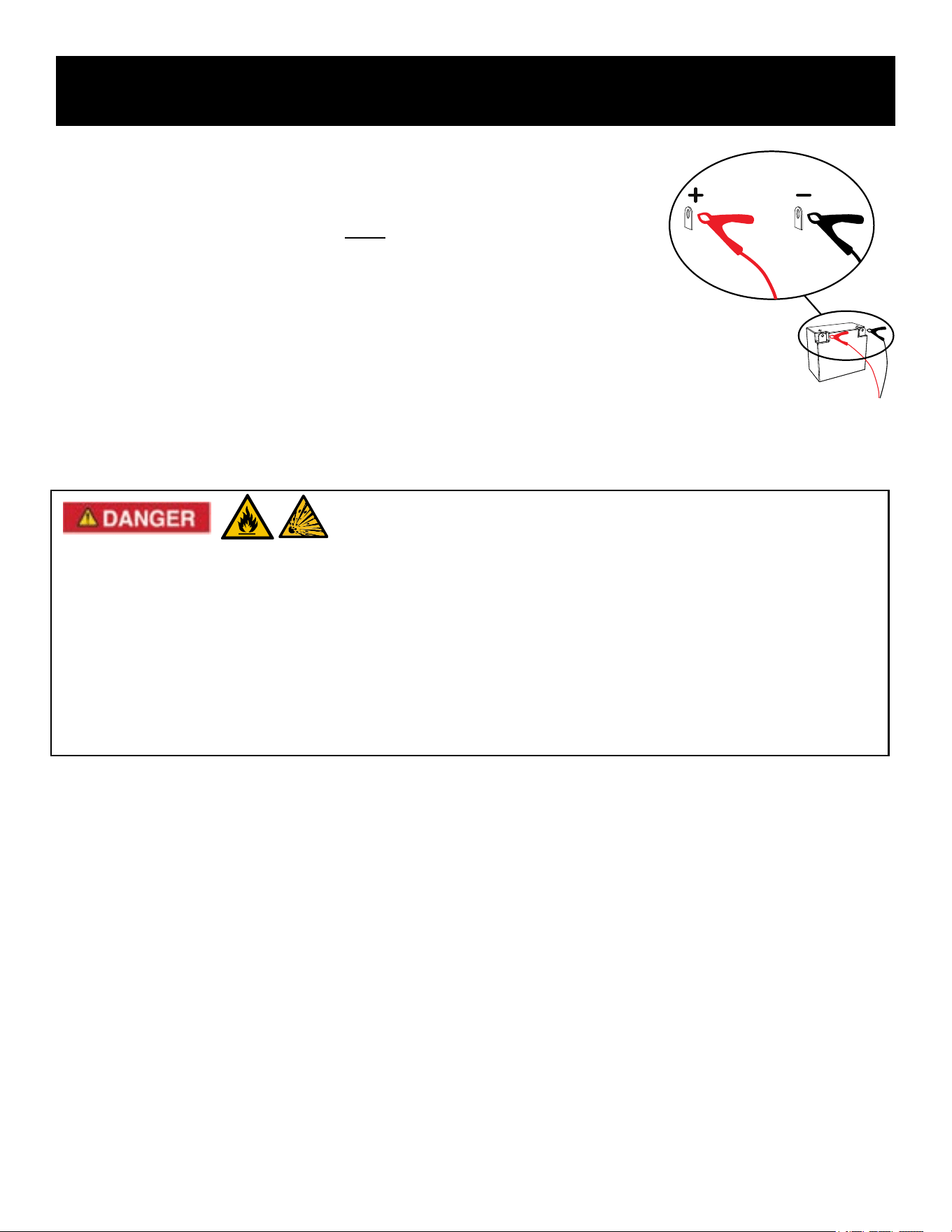
1. Use a wire brush to clean battery terminals if corroded.
2. Before connecting battery to generator, start generator engine. Make
sure the DC circuit breaker is turned to the “ON” position.
3. Attach the charging clamps, ground Black (negative) first, then Red
(positive).
4. Monitor battery State of Charge (SoC) stop charging when the battery is
fully charged, or if it ever feels warm to the touch.
• Do not disconnect battery clamps while charging. Batteries produce explosive gases. Disconnecting the battery
clamps while could cause a spark and ignition.
• Do not charge battery in an enclosed area.
• Never smoke while charging the battery or operating or fueling this generator.
• Battery electrolyte contains harmful chemicals. Avoid contact with skin, eyes, and clothing. Always wear eye
protection when charging battery.
• If battery acid contacts skin, flush with water immediately. If it contacts eyes, flush with water for 15 minutes and
get immediate medical attention. For internal ingestion, drink large quantities of water or milk, followed by milk of
magnesia, beaten egg, or vegetable oil. Seek medical help immediately!
Battery electrolyte is poisonous and dangerous.
15
AC Parallel Operation
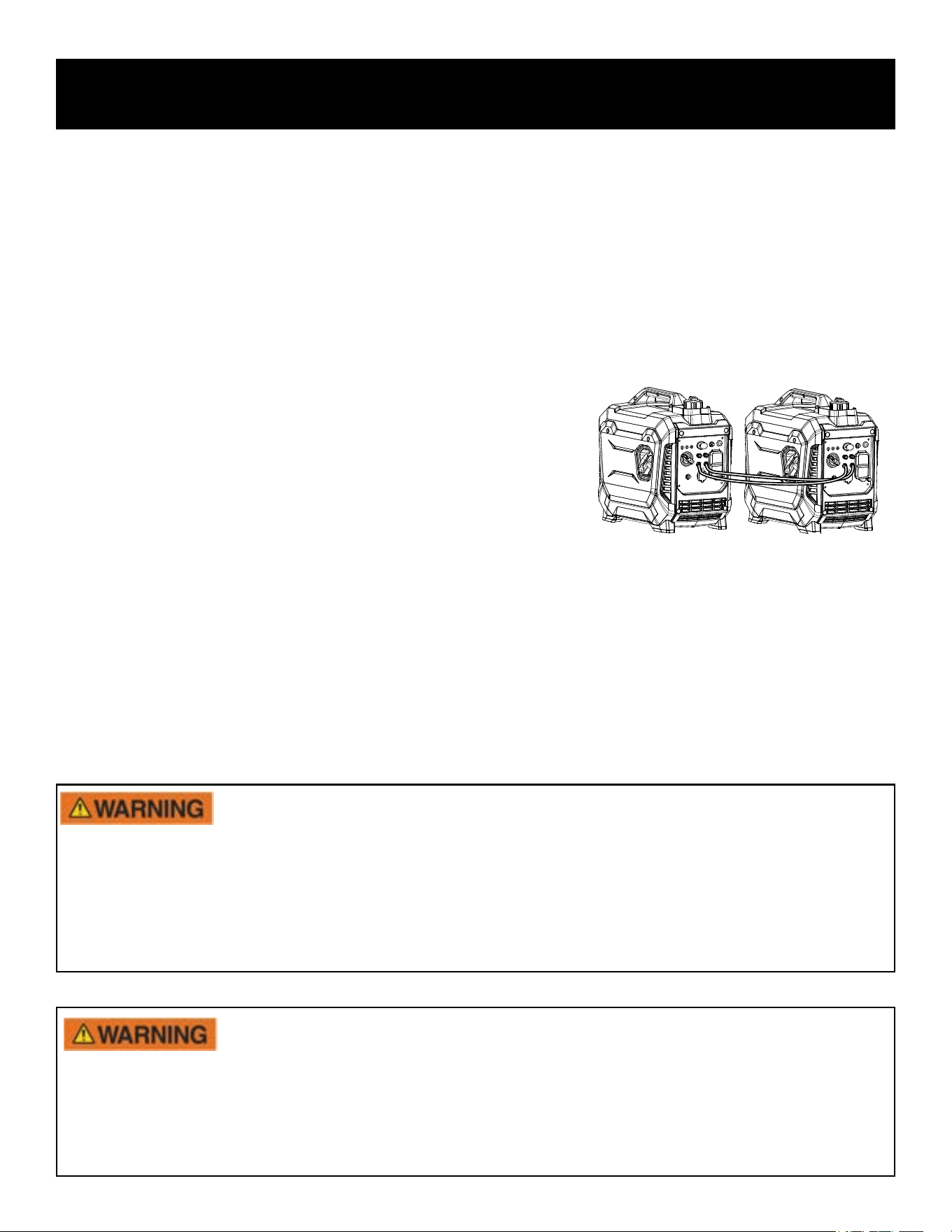
Two PG1500iS generators may be connected in parallel for extra power by using an optional Pulsar Parallel Kit (not included)
OPERATION
For continuous operation, do not exceed the rated output.
•
• Connect PARALLEL OPERATION CABLES to two PG1500iS generators according to the instructions
provided with the cable kit.
• Make sure the ECO switch is in the same position on both generators.
• All electrical loads should be turned “OFF” and disconnected from generators prior to starting generator engines.
• Start generator engines, make sure the green output indicator light comes on for each generator.
Allow generator output to stabilize (engine and attached devices run evenly) before plugging in the next load.
Maximum Power in Parallel Operation: 2.7kVA
Rated Power in Parallel Operation: 2.1kVA
Note: It is strongly recommended to plug in devices with the
largest output first and the smallest output last to help prevent overloading the generator.
Note: Some electrical loads require power beyond its rated wattage to start. This additional power is referred to as
surge watts and usually lasts between 2-3 seconds. When an electrical load is started, the red overload indicator may
come on, this is normal. If the light stays on disconnect all electrical loads and stop the engine. Refer to “Engine
Overload Indicator Light” .
• Only connect this generator to another PG1500iS Generator.
• Only use Pulsar-approved parallel kits to connect Pulsar generators.
• The parallel cable must be removed if operating only one generator.
• Never disconnect or remove the parallel operation cable while generator is still running.
WARNING!
Never connect generators that are different models.
• A faulty appliance or power cord can create an electric shock. Do not use electrical loads that have a damaged
cord or plug.
• If an appliance begins to operate abnormally, becomes sluggish, or stalls, turn off and disconnect appliance
immediately. The appliance may have a fault or its load may exceed the generator capacity.
• To avoid damage to generator or electrical, do not connect a load to the generator if its electrical rating exceeds
that of the generator's rated output.
Only connect
electrical loads to the generator that are in good working order and do not
exceed the rated power supply of the parallel generators or the desired receptacle.
16
OPERATION
Do Not Overload Generator
Make sure you can supply enough rated watts for all electrical loads connected to the generator. Rated watts refer to
the power a generator must supply to keep a device running. Surge watts refer to the power a generator must supply
to start an electrical device. This power surge for starting a device usually lasts between 2-3 seconds but this additional
output must be taken into account when selecting the electrical loads you plan to attach to the generator. To prevent
overloading the generator take the following steps:
1. Add up the total rated wattage of all electrical loads that will be connected to the generator simultaneously.
2. Estimate surge watts by adding the item(s) with the highest output (it is unnecessary to calculate the surge output for all
devices as they should be connected one at a time).
3. Add the Surge Watts to the total Rated Watts in step
4. Keep total
5. within generator’s power capacity.
Wattage Reference Guide
(Wattages listed are just approximations. Check electrical device for actual wattage)
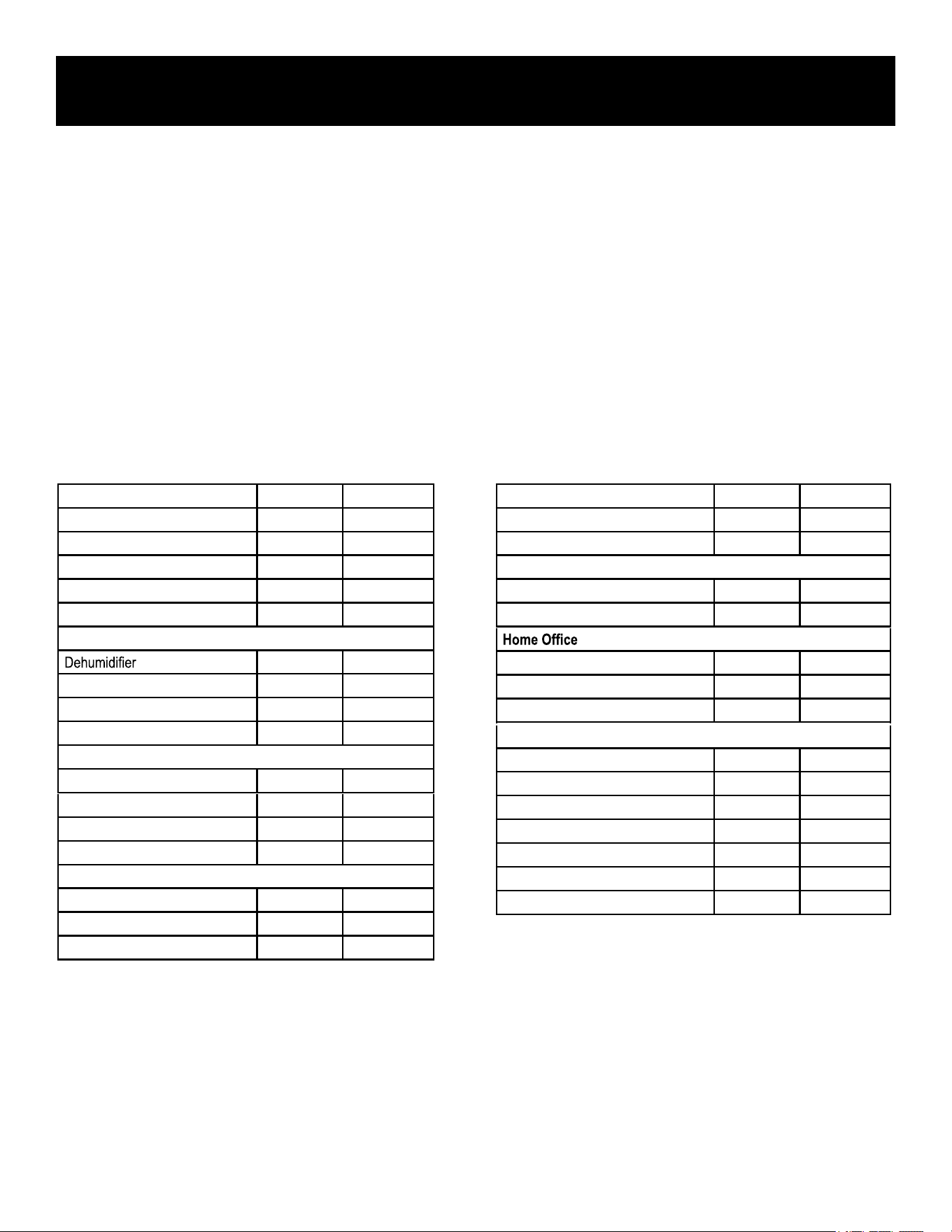
Bathroom Rated Watts Surge Watts
Hair Dryer 1250 0
Curling Iron 1500 0
Family Room
X-Box or Play Station
150 0
150 0
TV
Fax Machine 65 0
Lap Top 800 0
Printer 950 0
Power Tools
1000W Quartz Halogen Work Light 1000 0
Airless Sprayer (⅓ HP) 600 1200
Reciprocating Saw 500 1500
Circular Saw (7 ¼”) 1400 2300
Miter Saw (10”) 1000 1500
Table/Radial Arm Saw 2000 2000
Electric Drill (½ HP, 5.4 Amps) 600 900
Essentials Rated Watts Surge Watts
75W Light Bulbs 75 each 75 each
18 CU Ft Refrigerator / Freezer 800 2200
Furnace Fan (⅓ HP) 800 2350
Sump Pump (⅓ HP) 1000 2000
Water Pump (⅓ HP) 1000 3000
Heating/Cooling
650 800
Table Fan 800 2000
Electric Blanket 400 400
Space Heater 1800 1800
Kitchen
Blender 300 900
Coffee Maker 1500 1500
Electric Range (1 element) 1500 1500
Dishwasher
1000 1200
Laundry Room
Iron 1200 1200
Washing Machine
800 1200
GAS clothes dryer
700
1200
17
MAINTENANCE
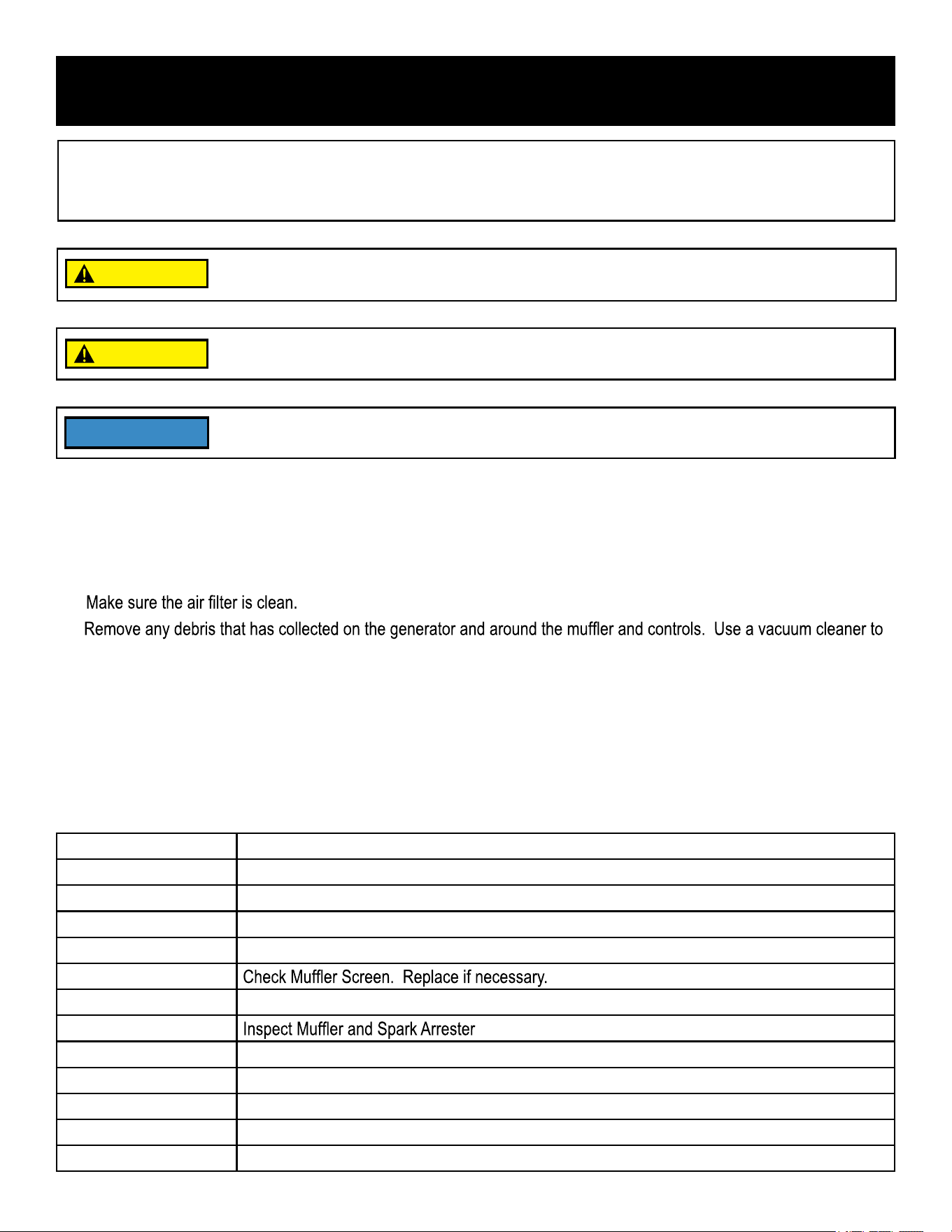
After First 5 Hours Change Oil.
After 8 Hours or Daily Clean Debris.
Check Engine Oil Level.
6 Months (100 hr Use) Check and Clean Air Filter Element. (Service more often under wet or dusty conditions.)
Change Engine Oil. (Service more often under dirty or dusty conditions.)
Service Spark Plug.
12 Months (300 hr Use) Clean Fuel Filter. Replace if necessary.
Check Crankcase Breather Hose for cracks or damage. Replace if necessary.
De-carbonize cylinder head. See dealer.
Check and adjust Valve Clearance. See dealer.
Check all Fittings and Fasteners. See dealer.
.
Regular maintenance will extend the life of this generator and improve its performance. The warranty does not cover
issues that result from operator negligence, misuse, or abuse. To receive full value from the warranty, operator must
maintain the generator as instructed in this manual, including proper storage.
Before inspecting or servicing this generator, make sure the engine is off and no parts
are moving. Disconnect the spark plug wire and move it away from the spark plug.
If you are unsure of how to perform a maintenance task have the unit serviced by an
authorized Pulsar dealer.
Use only Pulsar OEM parts!
Maintenance Schedule
Pre-Operation Steps
Before starting the engine, perform the following pre-operation steps:
• Check the level of the engine oil and the fuel tank level. Check for any leakage.
•
•
pick up loose debris. If dirt is caked on, use a soft bristle brush.
• Inspect the work area for hazards.
After Each Use
Perform the following procedure after each use.
• Move the fuel cap vent to "OFF".
• Store unit in a clean and dry area.
CAUTION
CAUTION
NOTICE
18
MAINTENANCE
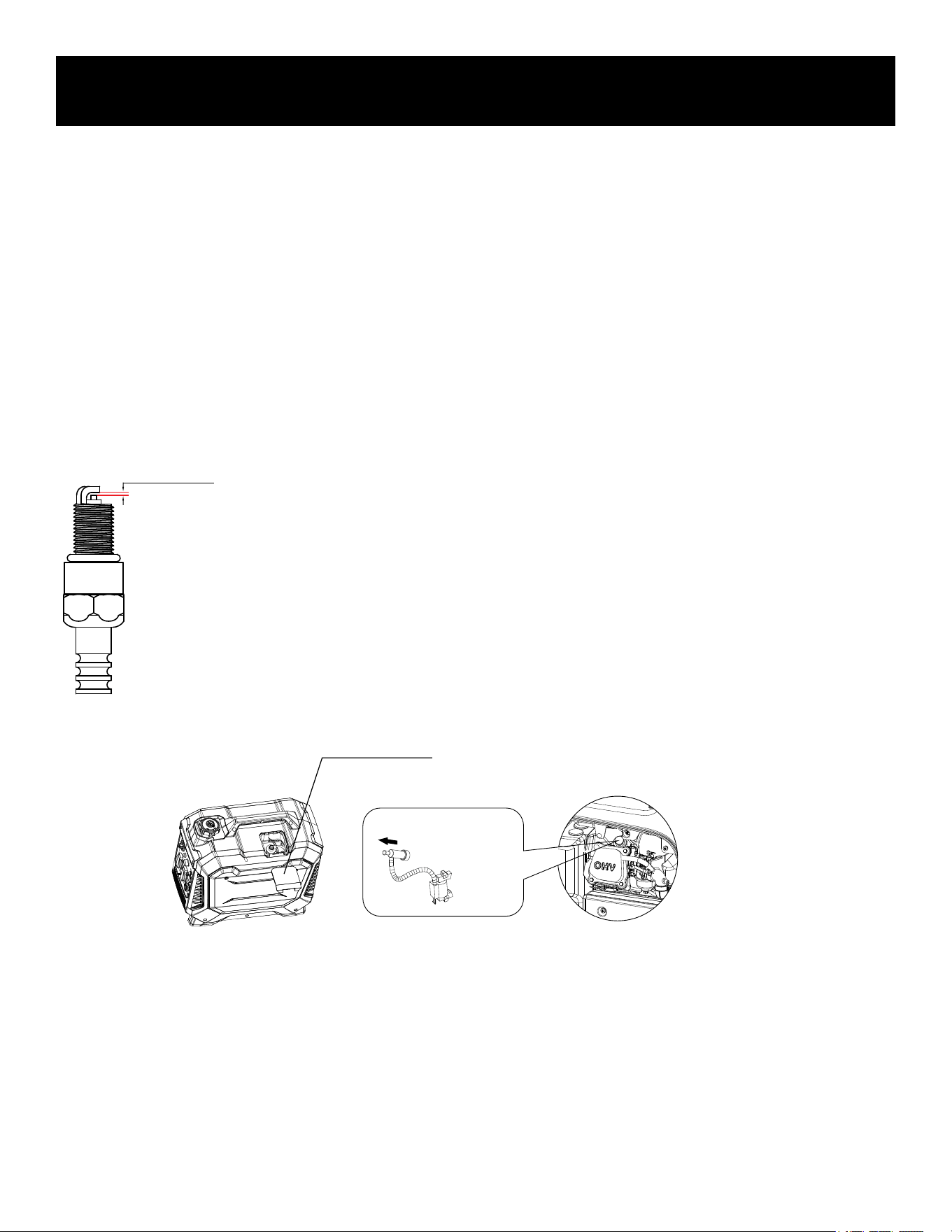
Checking the Spark Plug
Standard Spark Plug: A5RTC
Spark Plug Gap: 0.7 - 0.8mm (0.028-0.031 inch.)
Spark Plug Torque: 20.0Nm (14.8ft-lb)
0.7-0.8mm
Spark Plug Access Opening
• Disconnect the spark plug wire from the spark plug.
• Before removing the spark plug, clean the area around its base to prevent debris from.entering the engine.
• Insert a long, thin-wall, 19mm spark plug wrench through the access opening and remove the spark plug by
turning the wrench counterclockwise (left).
• Check for discoloration and clean carbon deposits off the electrodes with a brass wire brush, replace it if
necessary.
• Check the electrode gap and slowly adjust to 0.7 - 0.8mm (0.028-0.031 in) if necessary.
• Reinstall spark plug and tighten to Torque 20.0Nm (14.8ft-lb).
• If spark plug is worn replace only with an equivalent replacement part. Spark plug should be replaced
annually.
• Reconnect spark plug wire.
• Replace the spark plug access cover.
Carburetor Adjustment
The carburetor is low emission and is equipped with a non-adjustable idle mixture valve. If adjustment is needed contact
an authorized Pulsar dealer.
19
MAINTENANCE
Changing Oil
Recommended Engine Oil: SAE 10W-30
Recommended Engine Oil Grade: API Service SE type or higher quality of engine oil.
Engine Oil Quantity: 0.25L
• Place generator on a level surface.
• Run the generator for several minutes until the engine is warm, then turn off the generator.
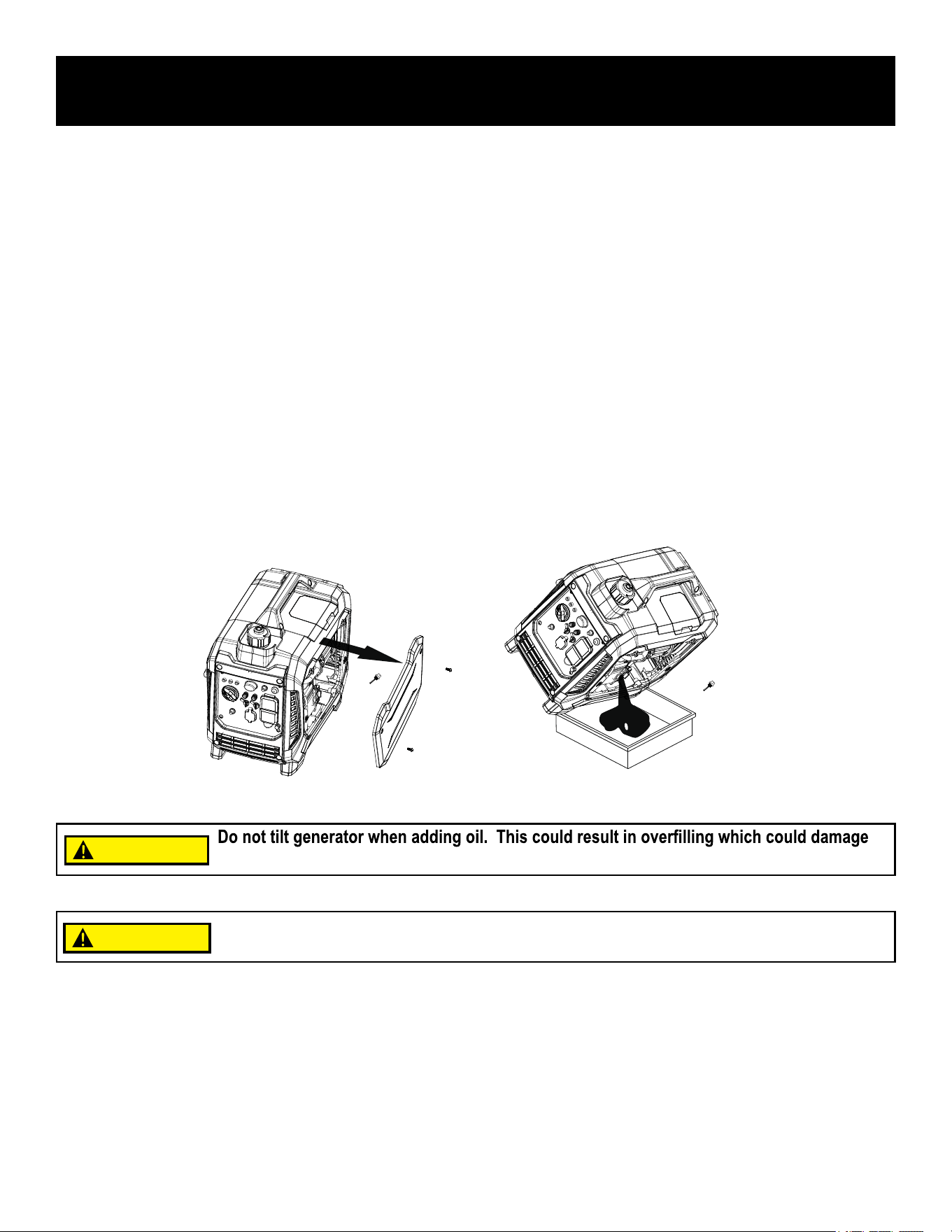
• Remove screws, remove the right-side outer casing.
• Remove the crankcase dipstick.
• Place an oil pan underneath the engine. Tilt generator to collect used oil. Allow oil to drain completely.
• Return generator to a level surface.
• Carefully add engine oil (SAE 10W-30) to empty crankcase until oil reaches the outer edge of the oil fill hole.
• Use a dry rag to wipe up any spilled oil.
• Replace crankcase dipstick.
• Reinstall right-side outer casing and tighten screws.
CAUTION!
Make sure no debris enters the crankcase
CAUTION!
the engine.
CAUTION
CAUTION
20
MAINTENANCE
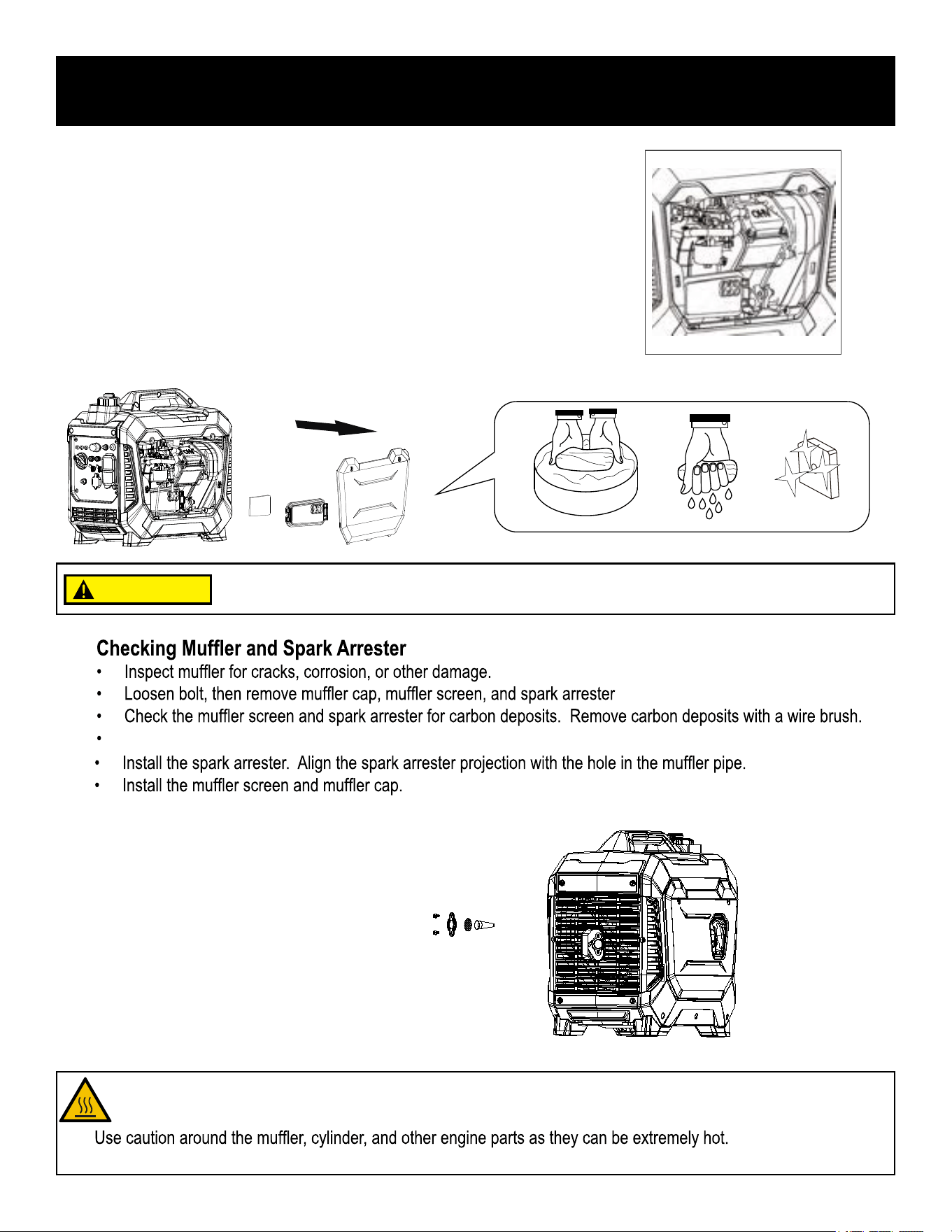
• To clean, remove the screws then remove the right-side outer casing.
• Remove the screws then remove the air filter cover.
Remove the foam element.
• Wash the foam element in hot, soapy water and let dry.
• Work a small amount of engine oil throughout the air filter element,
leaving behind an even film.
• Reinstall the air filter into the air filter case.
Air Filter
A dirty air filter will reduce the lifespan of the engine, make it difficult to start the engine,
and reduce the unit's performance. Replace with new filter annually.
Do not run the generator without reinstalling the foam element or engine damage will occur
and you will void your warranty!
.
Check the muffler screen and spark arrester for damage.If damaged replace with Pulsar OEM parts.
•
• Allow hot components to cool before touching.
Avoid contacting hot areas of this unit.
CAUTION
21
MAINTENANCE
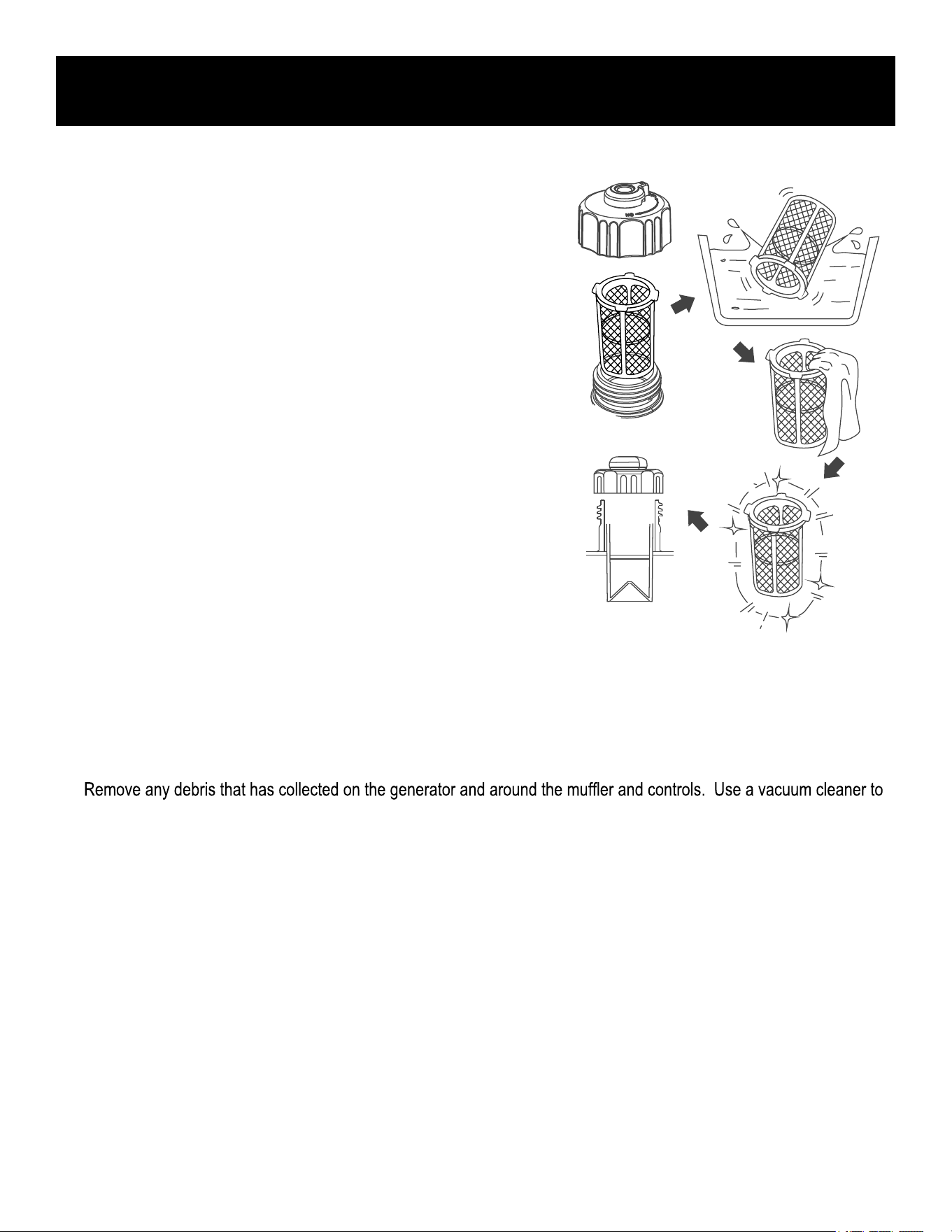
Fuel Tank Strainer
Fuel Filter
• Please contact an authorized Pulsar Dealer for this service
• To clean, remove fuel cap and strainer.
• Clean strainer with hot, soapy water and allow it to dry thoroughly
before reinstalling.
• Install strainer.
• Install fuel cap.
Storage
To protect your generator from deterioration during long term storage, take the following preventative measures:
EXTERIOR
•
pick up loose debris. If dirt is caked on, use a soft bristle brush.
• Inspect air cooling slots. Remove any debris if obstructed.
• Store in a sheltered location, with a protective cover over the generator.
FUEL
• For short-term storage, add fuel stabilizer to prevent stale fuel.
• For long-term storage, drain the fuel.
ENGINE
• Remove spark plug.
• Pour about 1 teaspoon of SAE 10W-30 engine oil into the spark plug hole, then reinstall spark plug.
• With the fuel selector valve in the ‘OFF’ position. pull the recoil starter several times to coat cylinder walls with oil.
• Slowly pull the recoil starter until you feel the engine build compression (when you feel resistance).
• Leave the engine in this state. This will help prevent rust build up in the cylinder walls.
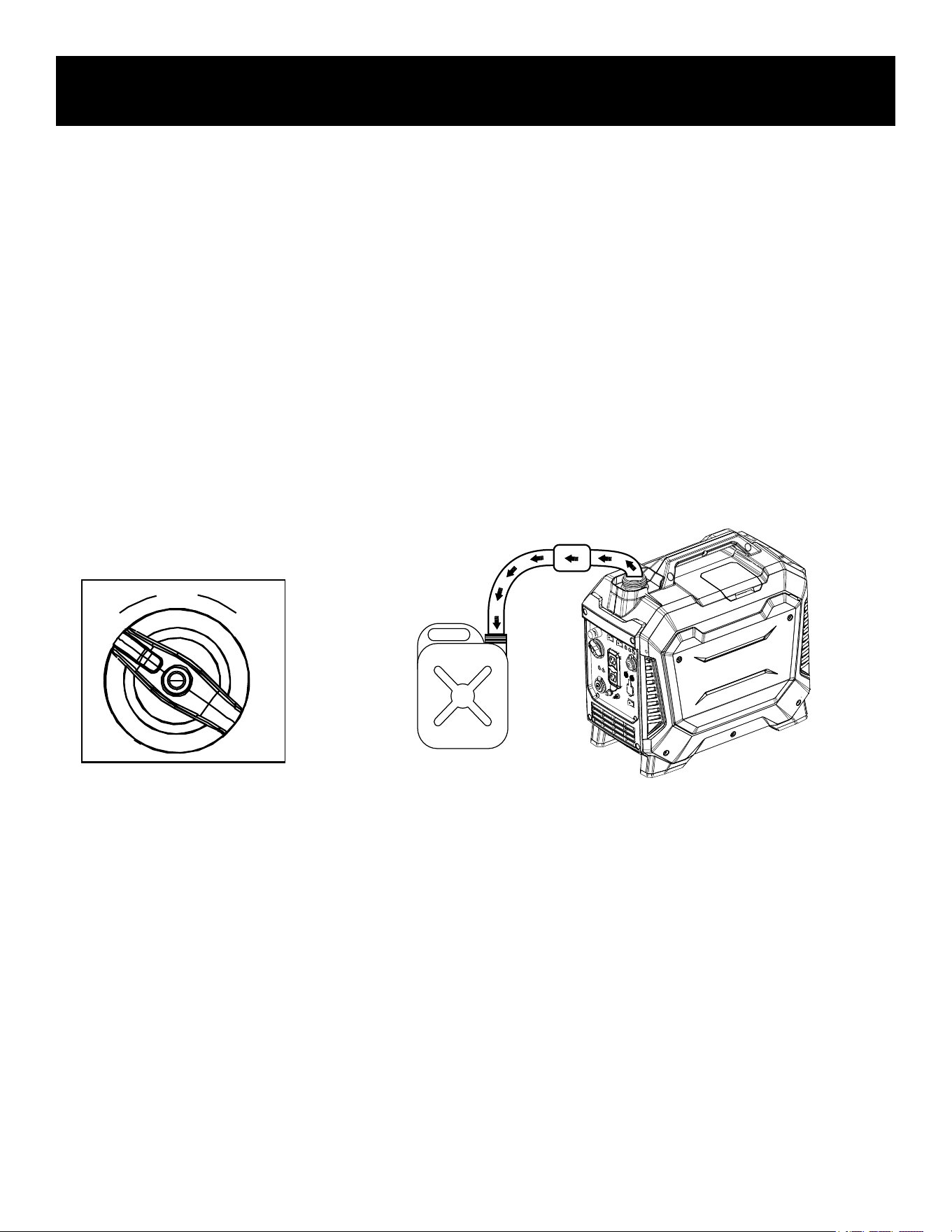
• Turn the 3 in 1 switch to the "OFF" position.
• Remove fuel cap and fuel tank strainer.
Use a siphon to transfer gasoline from generator into a gasoline approved container.
• Wipe up any spilled fuel with a dry rag.
• Start generator engine and let it run until it stops and all remaining fuel is consumed. Do not connect electrical
devices to generator during this process
22
How to drain fuel
• Remove outer casing screws, then remove outer casing.
Drain fuel from carburetor by loosening the drain screw on the carburetor float chamber.
• Tighten the drain screw.
• Reinstall the right-side outer casing and tighten screws.
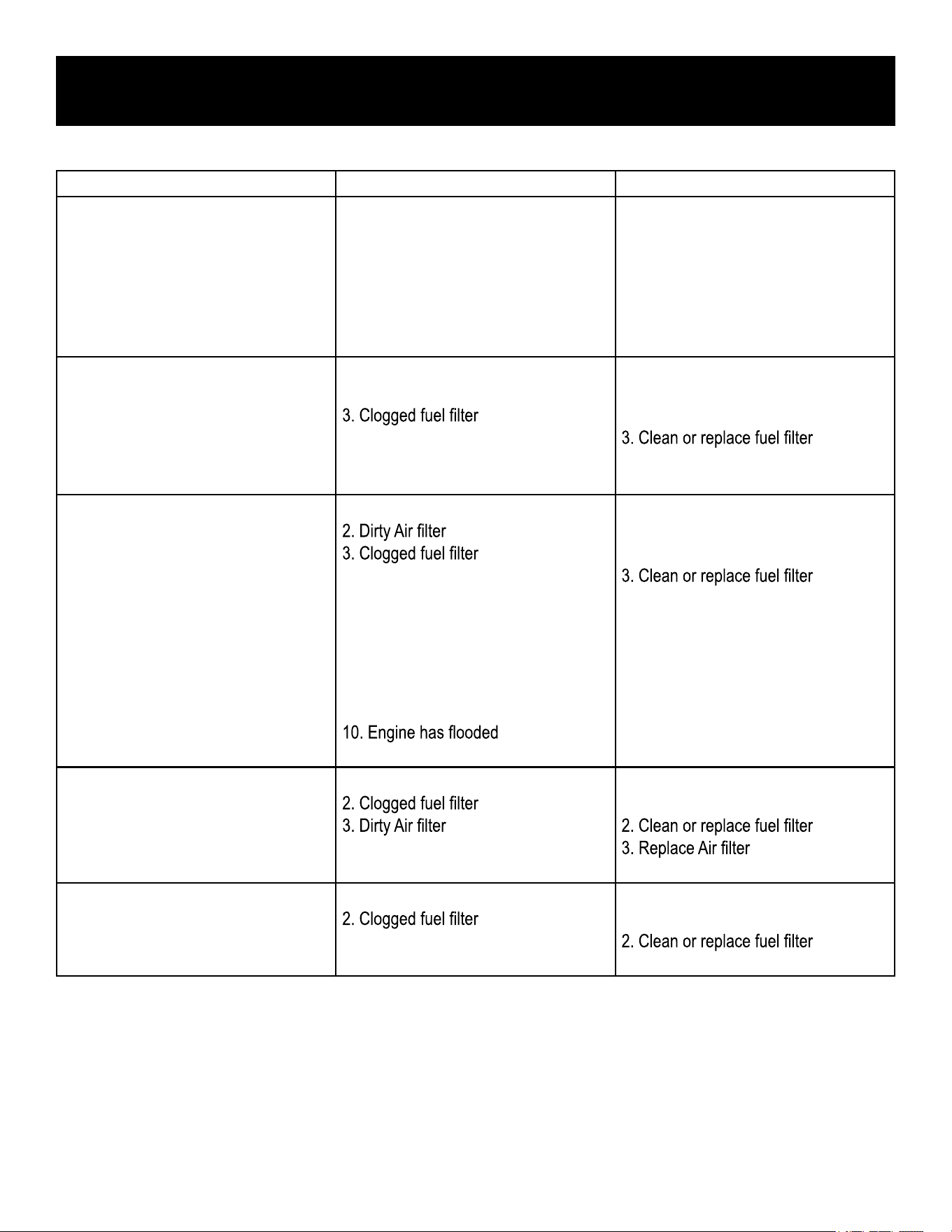
• Before storing your generator turn the Fuel Cap Air Vent to the "OFF" position.
MAINTENANCE
OFF
RUN
CHOKE
23
TROUBLESHOOTING
Problem Cause Solution
Generator is running, but does not
supply power.
1. DC Circuit Breaker is “OFF”
2. Green AC Pilot Light Indicator is off.
3. Poor connection
4. Defective cord set
5. Connected device is faulty
6. Fault in generator
1. Turn DC Circuit Breaker “ON”
2. Stop engine and restart.
3. Check and repair
4. Check and repair
5. Connect a device that is working
properly
6. Contact service department
Engine runs well without load but
bogs down when loads are connected
1. Short circuit in connected device
2. Generator is overloaded
4. Engine speed is too slow
5. Short circuit in generator
1. Disconnect device
2. See pg 17 “Don’t overload
generator”
4. Contact service department
5. Contact service department
Engine will not start, shuts down during
operation, or starts and runs rough.
1. 3 in 1 switch set to “OFF”
4. Out of fuel or stale fuel
5. Spark plug wire disconnected from
spark plug
6. Bad spark plug
7. Water in fuel
8. Over-choking
9. Low oil level
11. Faulty ignition
1. Turn switch to “CHOKE” then pull
recoil starter.
4. Replace fuel
5. Reconnect spark plug wire
6. Clean or replace spark plug
7. Drain fuel tank and replace fuel
8. Turn off choke
9. Add oil level.
10. Wait 5 minutes and recrank engine
11. Contact service department
Engine lacks power 1. Generator is overloaded
4. Engine needs servicing
1. See pg 17 “Don’t overload
generator”
4. Contact service department
Engine “hunts” or falters
1. Choke was removed too soon
3. Carburetor is running too rich or too
lean
1. Move to choke until engine runs
evenly
3. Contact service department
2. Clean or replace air filter