mitzu.com mitzu.oficial mitzu.oficialMitzuCorp Mitzu.Corp
Images are for illustrative purposes only; colors and design may vary.
MODEL:
Read the entire manual before using this product for the rst time.
Portable Rechargeable Speaker
with FM Player
KSB-4008
mitzu.com
2
WELCOME
Thank you for purchasing the new KAISER® product. We are condent that
you will be very satised with your purchase.
CONTENTS
HOW TO TURN ON?
1 3
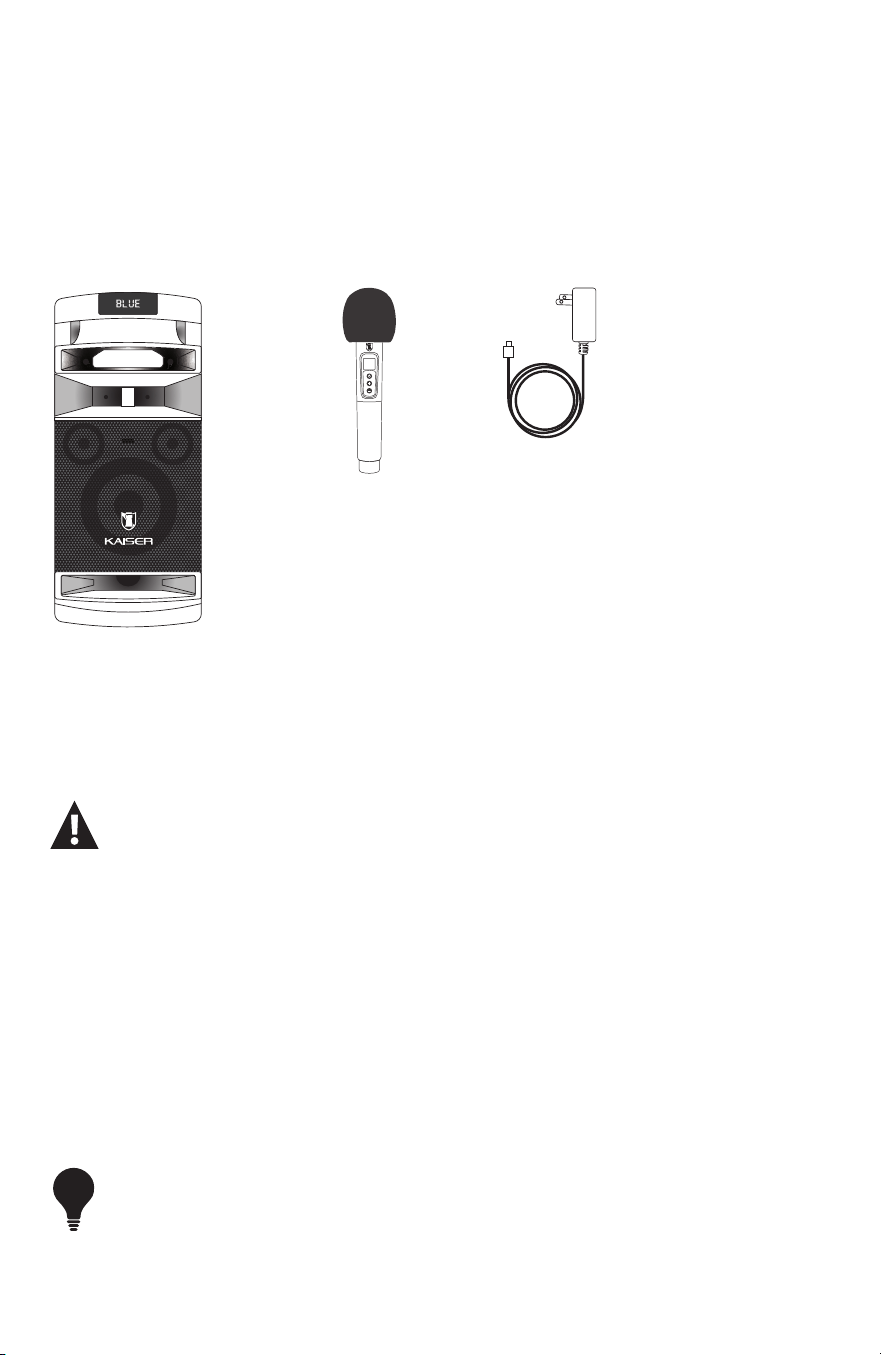
1. Speaker (1 piece).
2. Rechargeable Bluetooth® microphone (1 piece).
3. USB Type-C charging cable (1 piece).
1 2 3
1. Connect the Type-C power cable to the speaker and then to the electrical outlet. Let it
charge for 4 hours before turning it on for the rst time.
2. Press the power on/off switch (ON) to turn on the device after charging the battery for the
rst time.
3. When the battery is low, connect the product to the power outlet for up to 6 hours in order to
maximize its lifespan. The device can continue to be used while it is connected.
- Set all switches to OFF.
- Check that the volume is set to the lowest level.
- Verify that the voltage of the power source is compatible with the equipment’s required voltage.
If the device is used intermittently, it is recommended to fully charge the battery at least every 30 days.
TIP
3
mitzu.oficial mitzu.oficialMitzuCorp Mitzu.Corp
GENERAL DESCRIPTION
OPERATION
TYPE C
CHARGE
USBAUX TF CARD
LIGHT
REC MIC PRI
REPEAT
TWS
MODE
BT
VOLUMEMIC VOL
MIC GUIT
ON
OFF
POWER
TYPE C
CHARGE
USBAUX TF CARD
LIGHT
REC MIC PRI
REPEAT
TWS
MODE
BT
VOLUMEMIC VOL
MIC GUIT
ON
OFF
POWER
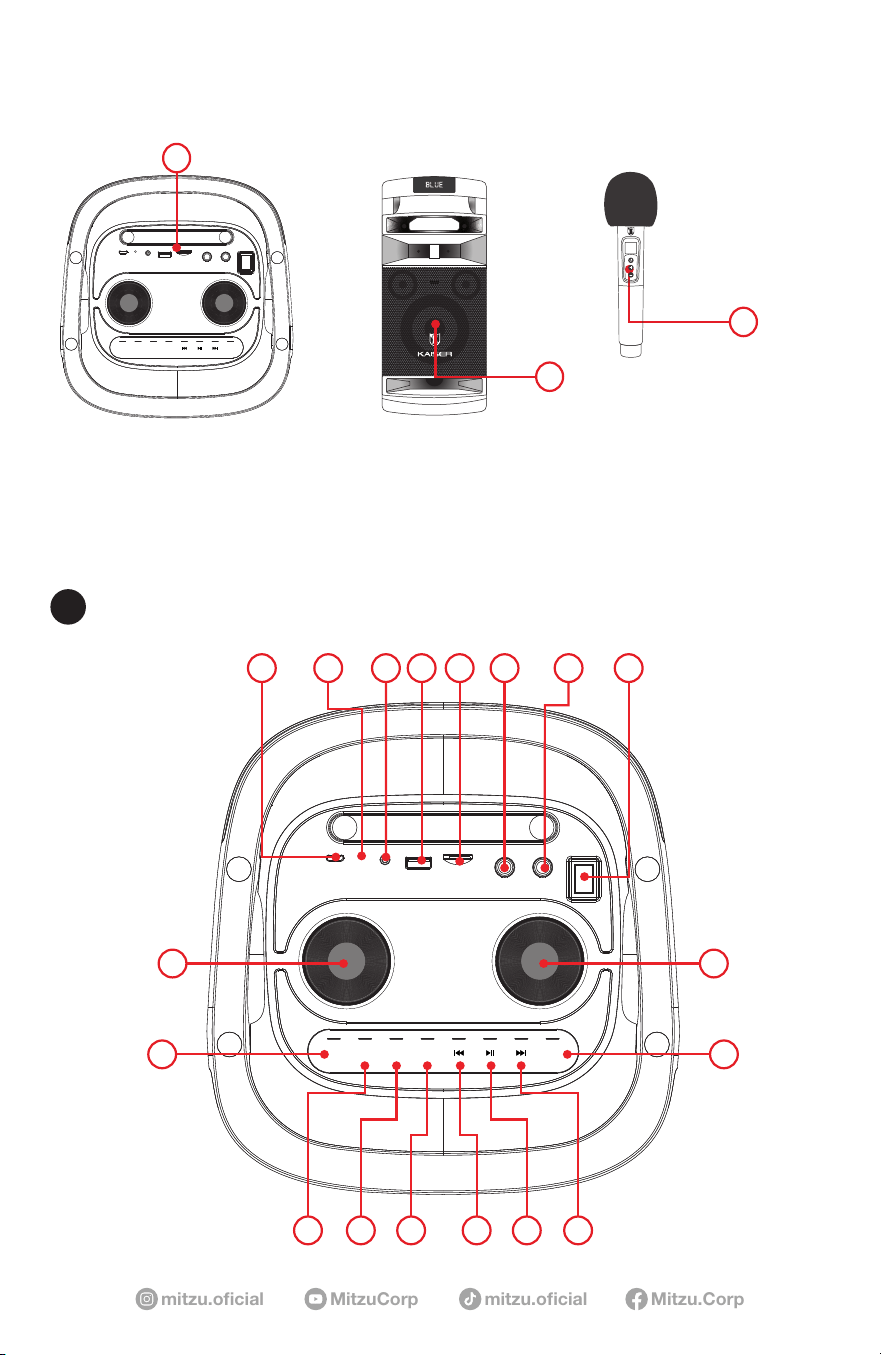
A) CONTROL PANEL.
B) WOOFER.
C) MICROPHONE.
919
A
TYPE C
CHARGE
USBAUX TF CARD
LIGHT
REC MIC PRI
REPEAT
TWS
MODE
BT
VOLUMEMIC VOL
MIC GUIT
ON
OFF
POWER
TYPE C
CHARGE
USBAUX TF CARD
LIGHT
REC MIC PRI
REPEAT
TWS
MODE
BT
VOLUMEMIC VOL
MIC GUIT
ON
OFF
POWER
B
C
10
111316
18
121517
1 32 4 5 6 7 8
CONTROL PANEL
A

mitzu.com
4
1) DC 5V type c input
2) Charge indicator: Light on red when charging,and light will turn off after charge fully
3) AUX
4) USB Slot
5) TF Card Slot
6) Microphone input
7) Guitar input
8) Power switch
9) Adjust Main volume
10) Mode Button: Toggle between AUX, USB, TF, FM, BT.
Hold press to connect or disconnect Bluetooth connection in Bluetooth® mode.
11) Next track
12) Play and Pause / TWS ( Long Press to turn on the TWS in BT function )
13) Previous track
15) Repeat function for USB / TF
16) Microphone priority: short press for microphpne priority.
Hold press to start Echo adjustment,then hold press previous track to reduce Echo level,hold
press next track to increase Echo level.
17) Recording: Hold press for recording,short press to play recording les.
18) Light :Press to transfer light mode,hold press to turn on/off light
19) Adjust Microphone volume
DISPLAY SYSTEM SETTINGS
1. Mode Input: The LED display screen will display the information of input mode for USB / TF
/ BT / AUX / FM. When a USB ash drive / TF Card is inserted into the USB / TF input, the
unit will automatically switch to USB/TF mode and begin playing MP3 audio les from the
USB ash drive / TF Card.
2.Track Number: The track number currently playing from the USB / TF will display.
3. FM Mode: All FM channels display here. Short press “play / pause” button for auto scan all
channels.
Please turn off the light switch to have a better FM signal reception
BLUETOOTH®
Bluetooth® Mode: Open the Bluetooth of phone. Find the Bluetooth name of the unit called
“KSB-4008” to connect. After a successful match, you can play the music from speaker. You
won’t need re-connect the Bluetooth® when switching mode.
5
mitzu.oficial mitzu.oficialMitzuCorp Mitzu.Corp
TWS CONNECTION
(1)TWS connection: TWS connection is only for two active speakers of same model, can not
support quantity over 2 PCS.
(2)Turn on two Speakers , press the MODE button to switch to BLUETOOTH® mode for both
speakers
(3)Please long press the Play / Pause (LINK) button on one speaker for 3 seconds. Then two
speakers will automatically connect together
(4) Connect the phone: Open the phone Bluetooth settings, Search and Connect the main
device Bluetooth Name “KSB-4008”. Select music from phone and enjoy TWS playing in
pairs with two Speakers.
BATTERY
The New Model is an lithium battery powered PA loudspeaker. Be sure that you have
completely charged the battery prior to rst use to maximize the battery’s lifespan .Once the
item connected to a power source it will automatically begin charging (4 ~ 6 hours to fully
charge the lithium battery ).The Battery Indicator light automatically turn off when charging to
full situation. And when it is on charging, the Battery Indicator light always red
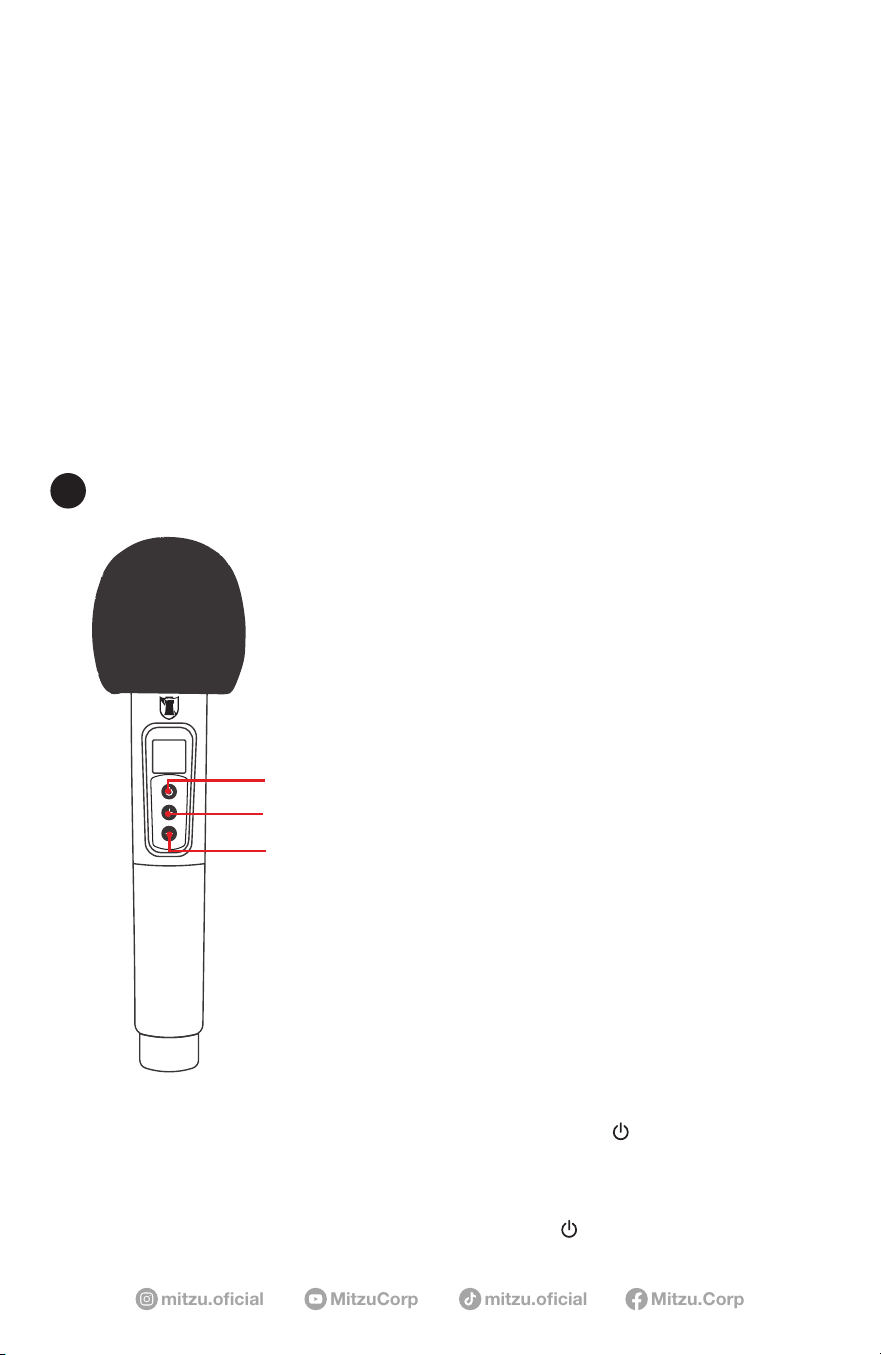
ON / OFF BUTTON
VOLUME UP BUTTON
VOLUME DOWN BUTTON
1. Hold press power button to turn on, Hold press for power off.
2. If you notice static or distortion in the microphone, check if the connection is been
interfered.
3. When not in use, turn off the power of the microphone.
BLUETOOTH® WIRELESS MICROPHONE
C

mitzu.com
6
Power supply: 5 Vcc 4 A
Battery: 3,7 Vcc 4 400 mAh (rechargeable battery)
Woofer: 8” (20,32 cm)
Impedance: 2.5 ohm
Frequency response: 40 Hz - 20 kHz
Sensitivity: 92 dB
Tweeter: 2” (5,08 cm)
Bluetooth® version: 5.3
Bluetooth® frequency range: 2,4 GHz
Bluetooth® operating range: 32.8 ft
Volume level Battery duration
25% volume 180 minutes
50% volume 120 minutes
100% volume 72 minutes
SPECIFICATIONS
Model: KSB-4008
Product Name: Portable Rechargeable Speaker with FM Player
FCC ID:
TBD
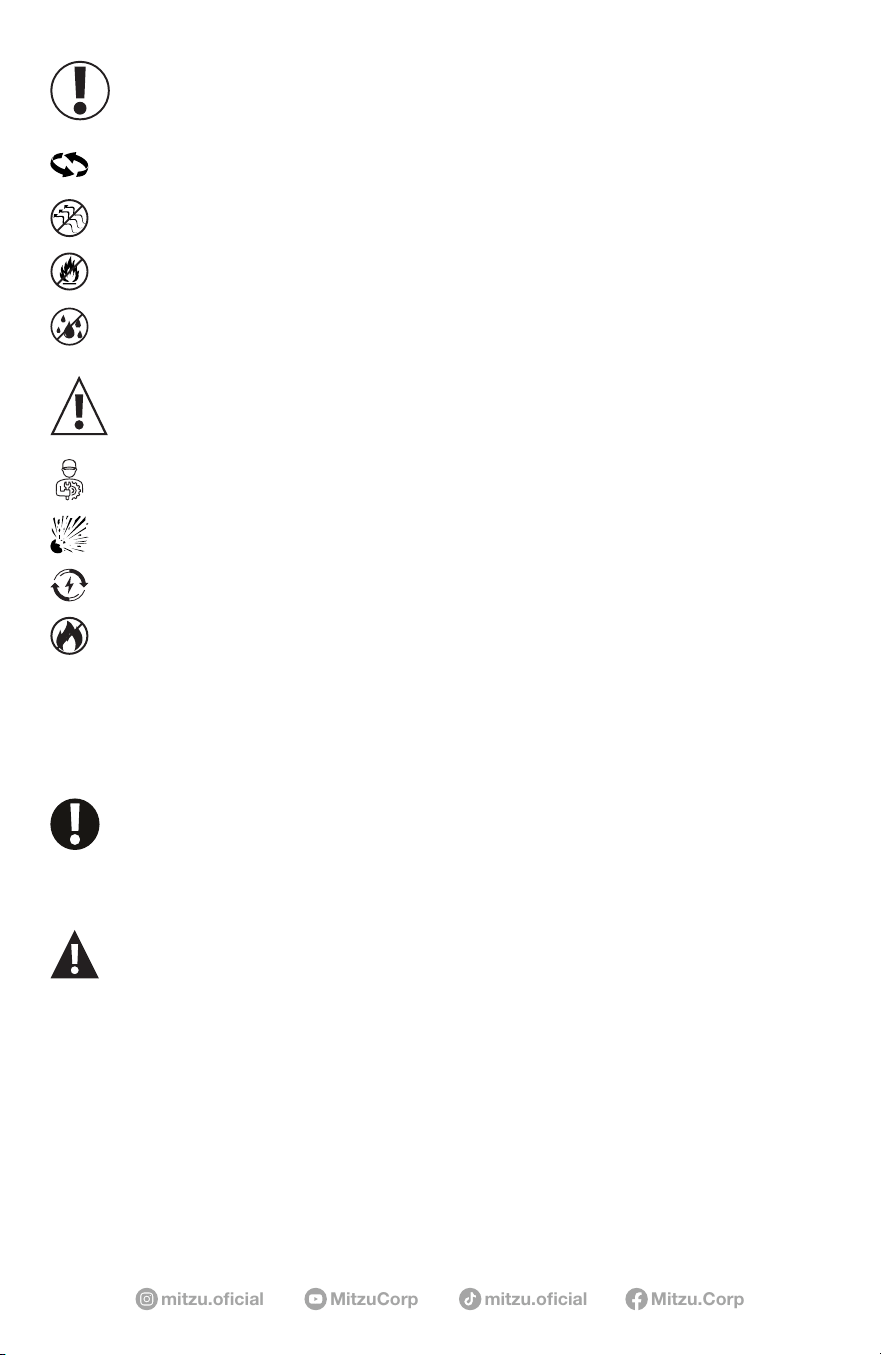
TO REDUCE THE RISK OF ELECTRIC SHOCK, DO NOT REMOVE THE COVER ON
THIS SPEAKER. THERE ARE NO USER-SERVICEABLE PARTS INSIDE. REFER ALL
SERVICING TO A QUALIFIED TECHNICIAN
To prevent re or electric shock, do not expose this equipment to rain or moisture. Do
not store or operate this product near any liquids, heat sources such as radiators, heat
registers. Clean only with a dry cloth. Users should exhibit extra safety when this
symbol appears in this instruction manual and follow all precautions as they are stated.
WARNING
7
mitzu.oficial mitzu.oficialMitzuCorp Mitzu.Corp
This device must not be exposed to dripping or splashing liquids.
CAUTION
Batteries (installed) should not be exposed to excessive heat such as
sunlight, re, or similar.
Risk of explosion if the battery is not replaced correctly.
Replace only with the same type or equivalent.
Installed batteries should only be replaced by qualied personnel.
The device should not be exposed to dripping or splashing water, and
objects lled with liquids (such as glasses) should not be placed on
the device
This equipment has no ventilation slots.
During use, keep other devices at least 30 cm away from this equipment.
Do not place the device on ammable sources such as lit candles.
IMPORTANT
This device complies with Part 15 of the FCC Rules. Operation is subject to the following two conditions:
(1) This device may not cause harmful interference, and
(2) this device must accept any interference received, including interference that may cause undesired operation.
Changes or modications not expressly approved by the party responsible for compliance could void the user’s authority to operate the equipment.
—Reorient or relocate the receiving antenna.
—Increase the separation between the equipment and receiver.
—Connect the equipment into an outlet on a circuit dierent from that to which the receiver is connected.
—Consult the dealer or an experienced radio/TV technician for help.
Note: This equipment has been tested and found to comply with the limits for a Class B digital device, pursuant to part 15 of the FCC Rules.
These limits are designed to provide reasonable protection against harmful interference in a residential installation. This equipment generates,
uses and can radiate radio frequency energy and, if not installed and used in accordance with the instructions, may cause harmful interference
to radio communications. However, there is no guarantee that interference will not occur in a particular installation. If this equipment does
cause harmful interference to radio or television reception, which can be determined by turning the equipment o and on, the user is
encouraged to try to correct the interference by one or more of the following measures:
This equipment complies with FCC radiation exposure limits set forth for an uncontrolled environment. The device should be installed
and
operated with a minimum distance of <
1
cm between the radiator and your body.
For questions regarding operation or compliance, contact:
MITZU GLOBAL, LLC
828 Hallmark Dr.
Laredo Tx 78045
+1 (956)740-7746