Whats Included:
• Light Up Karaoke Speaker
• USB-C Charging Cable
• 3.5mm AUX cable
• Two Microphones
Indicator:
Speaker
Solid Red - Charging
No Red Light - Fully Charged
Flashing Blue - Ready to Pair
Solid Blue - Paired
• Bing Bong Tone - Power On
• Descending Chime - Power Off
• Double Beeps - Ready to Pair
• Electric Tone - Paired
• Double Dial Beeps - Low Battery
• Double Beeps Followed by a Descending Chime - Disconnect
• Bing Bing Tone - Max/Min. volume
Microphone
Solid Red - Charging
No Red Light - Fully Charged
Flashing Blue - Disconnect from Speaker
Solid Blue - Connected to Speaker
• One Beep -
Switch Sound Effects
• Bing Bing Tone - Max/Min. volume
Wireless Speaker with 2 Microphones
Pairing:
• Hold the power button to turn the speaker on.
• Use Bluetooth settings on your phone to pair with KSET3.
• Electric tone - pairing successful.
NOTE: when the speaker is turned on and not connected to Bluetooth, it will automatically shut
off after 10 minutes.
Connect the Microphones to the Speaker:
The microphone is connected to the speaker by default after it is turned on.
NOTE: when the microphones is turned on and not connected to speaker, it will automatically
shut off after 10 minutes.
Charging:
Charging the speaker
• Full charge requires approximately 2.5 hours.
• Using the cable provided, plug the USB-C end into the speaker and the USB-A end
into a USB power supply of at least DC 5V 1A warning: please use UL compliant power supply.
• The indicator light will turn red when charging, the indicator light will turn off when charging is
complete.
Charging the microphone
• Full charge requires approximately 3 hours.
• Using the cable provided, plug the USB-C end into the microphone and the USB-A end
into a USB power supply of at least DC 5V 0.5A warning: please use UL compliant power supply.
• The indicator light will turn red when charging, the indicator light will turn off when charging is
complete.
NOTE:The microphone cannot be used while charging.
AUX/Line in:
• Insert the AUX cable into the speaker AUX port.
• Insert the opposite end of your AUX cable into the media source (phone, laptop, etc.).
Micro SD Card Mode:
• Insert your micro SD card into the speaker micro SD card Slot.
• Audio will automatically play after a few seconds.
NOTE: Only MP3 format can be played in this mode.
USB Flash Drive Mode:
• Insert your USB flash drive into the speaker USB-A Port.
• Audio will automatically play after a few seconds.
NOTE: Only MP3 format can be played in this mode.
Troubleshooting:
• If the speaker is not working correctly, switch it on/off to reset.
• If the speaker won’t turn on, recharge the battery and try again.
• If the speaker won’t charge, make sure the supply works, is 5V 1A, and not damaged.
• If the speaker makes no sound or does not show as an available device, make sure it is not
paired with another device, if so unpair the device and repair the desired device.
• If the microphone is not picking up any sound, Ensure the microphone is turned on and the
volume has been turned up.
• If microphone is whistling, do not place the powered microphone close to or facing the
speaker.
• If unable to read USB drive or SD card, ensure the USB/SD card contain music in MP3 format.
• When playing music, if there is no original vocals, hold the “
Microphone ” button on the
microphone or press the “
Microphone ” button on the speaker to turn the accompaniment
off
.
Safety:
• Do not modify or repair this device.
• Do not use in high temperatures or extreme weather.
• Do not use chemical detergents to clean your device, use a soft dry cloth.
SAVE THESE INSTRUCTIONS
Light Up Karaoke Speaker
Power Button
Hold - Power On/Off
Press - Pause/Play
Press - Vol. Down
Hold- Prev. Track
Press - Vol. Up
Hold - Next Track
Press
- Bluetooth Mode/
USB Flash Drive Mode/
micro SD card Mode/
AUX Mode
NOTE:Only works when at
least 2 modes are detected
Microphone Botton
Press - Suppress/Reverse
Vocals in Music
Hold -
RGB Light On/Off
Press - RGB Light Effect Switch
RGB Light
NOTE: This equipment has been tested and found to comply with the limits for a Class B digital device, pursuant to Part 15 of the FCC Rules. These
limits are designed to provide reasonable protection against harmful interference in a residential installation. This equipment generates, uses
and can radiate radio frequency energy and, if not installed and used in accordance with the instructions, may cause harmful interference to
radio communications.
• Reorient or relocate the receiving antenna.
• Increase the separation between the equipment and receiver.
• Connect the equipment into an outlet on a circuit different from that to which the receiver is connected.
• Consult the dealer or an experienced radio/TV technician for help.
This device complies with part 15 of the FCC Rules. Operation is subject to the following two conditions: 1) This device may not cause harmful
interference, and 2) this device must accept any interference received, including interference that may cause undesired operation. Warning:
Changes or modifications to this unit not expressly approved by the party responsible for compliance could void the user’s authority to
operate the equipment.
However, there is no guarantee that interference will not occur in a particular installation. If this equipment does cause harmful interference to
radio or television reception, which can be determined by turning the equipment off and on, the user is encouraged to try to correct the
interference by one or more of the following measures:
gemsfindyours.com 7157 Shady Oak RD, Eden Prairie, MN 55344 Distributed by Chug, Inc.
For qualified repair specialists requesting repair information and parts please contact the original manufacturer at
Input (Speaker): 5V
ำ1A; Input (microphone): 5V ำ0.5A Made in China
The device has been evaluated to meet general RF exposure requirements. The device can be used in portable exposure conditions without
restriction.
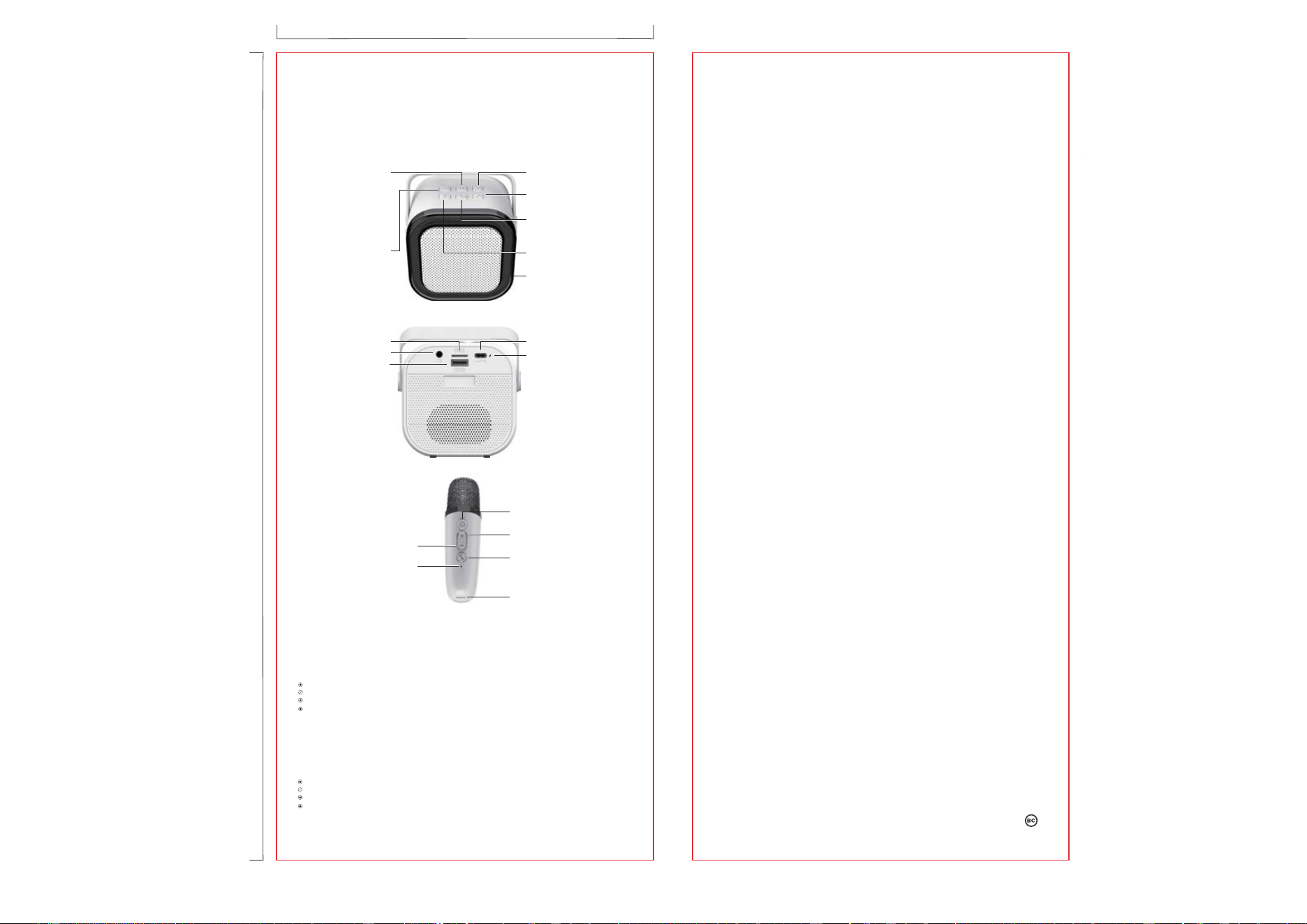
Speaker Front
FCC ID (Speaker): 2AO23-KSET3; FCC ID (Microphone): 2AO23-KSET3M; Model(Speaker): KSET3; Model(Microphone): KSET3M
USB-C Charging Port
micro SD card Slot
USB-A Port for USB Flash
Drive
AUX Port
Indicator
Speaker Back
USB-C Charging Port
Indicator
Microphone Botton
Press - Change Sound Effects
Hold - Suppress/Reverse Vocals
in Music
Power Button
Hold - Power On/Off
Press - Mute/Unmute Microphone
Microphone
Press - Vol. Up
Hold - Prev. Track
Press - Vol. Down
Hold- Next Track
4.65 inches
9.96 inches
FRONT BACK