Installation and Service Videos:
www.follettice.com/servicevideolibrary
01568229R00
801 Church Lane • Easton, PA 18040, USA
Toll free (877) 612-5086 • +1 (610) 252-7301
www.follettice.com
Symphony Plus
™
25 and 50 Series
Ice and Water Dispensers
25CI414A/W, 25HI414A, 50CI414A/W,
Installation Guide
Please visit https://www.follettice.com/technicaldocuments
for the Operation and Service manual for your unit.
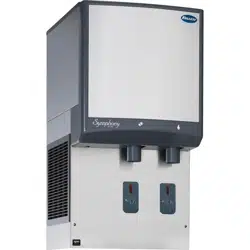
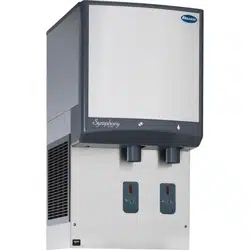
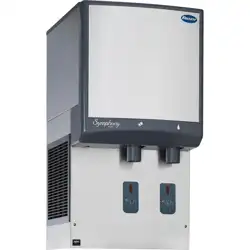
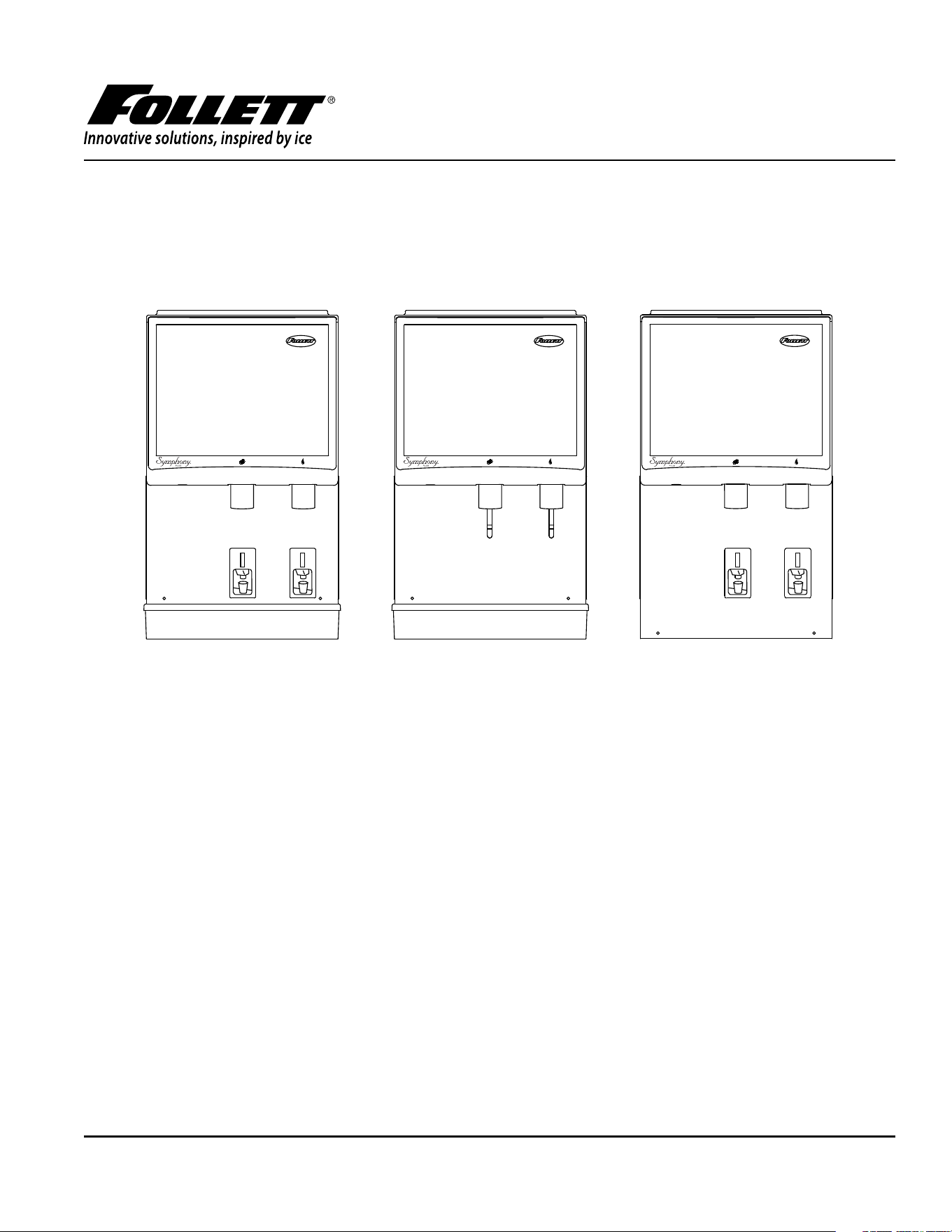
25/50HI425A-S Wall Mount Dispenser
with SensorSAFE Dispensing
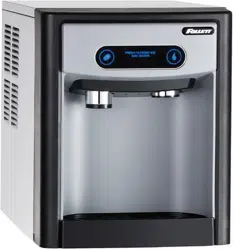
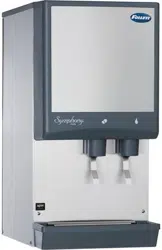
25/50CI425A/W-L Countertop Dispenser
with Lever Dispensing
25/50CI425A/W-S Countertop Dispenser
with SensorSAFE™ Dispensing
25/50HI425A-SI Wall Mount
Ice-only Dispenser with
SensorSAFE Dispensing
25/50CI425A/W-LI Countertop Ice-only
Dispenser with Lever Dispensing
25/50CI425A/W-SI Countertop
Ice-only Dispenser with
SensorSAFE™ Dispensing
Welcome to Follett
Follett equipment enjoys a well-deserved reputation for excellent performance, long-term reliability and outstanding
after-the-sale support. To ensure that this equipment delivers that same degree of service, review this guide carefully
before you begin your installation.
Should you have need technical help, please call our Technical Service group at (877) 612-5086 or (610) 252-7301.
Please have your model number, serial number and complete and detailed explanation of the problem when
contacting Technical Service.
Getting Started
After uncrating and removing all packing material. Inspect the equipment for concealed shipping damage. All freight
is to be inspected upon delivery. If visible signs of damage exist, please refuse delivery or sign your delivery receipt
"damaged." Follett Customer Service must be notied within 48 hours. Wherever possible, please include detailed
photos of the damage with the original packaging so that we may start the freight claim process.
25CI414A/W, 25HI414A, 50CI414A/W 2
WARNING! Risk of re or explosion. Flammable refrigerant used. Follow handling
instruction carefully. To be repaired only by trained service Personnel.
WARNING! Do not puncture Refrigerant Tubing. Do not use this product with ammable gases
or ammable solvents.
WARNING! Do not store ammable gases, ammable liquids or ammable solids in these
units. Do not use FLAME to check for gas leak.
WARNING! Do not under any circumstances try to modify or repair valves, regulator,
connectors, controls or any other appliance. Doing so creates the risk of a gas leak.
WARNING! Keep ventilaton openings clear of obstruction.
WARNING! Do not damage the refrigerant circuit.
WARNING! Connect to potable water supply only.
WARNING!
§ Read this manual thoroughly before operating, installing or performing maintenance on the equipment. Failure to follow
instructions in this manual can cause property damage, injury or death.
§ The ice machine contains R290 (propane) refrigerant. R290 (propane) is ammable in concentrations of air between
approximately 2.1% and 9.5% by volume. R290 (propane) may burn if exposed to a heat source above 470 °C.
§ When servicing this equipment, be sure to lock the circuit breaker, and display an in-service notice.
§ This equipment contains high-voltage electricity and refrigerant charge. Installation and repairs are to be performed by
properly trained technicians aware of the dangers of dealing with high voltage electricity and refrigerant under pressure. The
technician must also be certied in proper refrigerant handling and servicing procedures. All lockout and tag out procedures
must be followed when working on this equipment.
§ Repair on R290 systems must always be done in a well-ventilated area.
§ Because R290 is highly ammable, a combustible gas leak detector is required when servicing R290 systems.
§ Only use parts recommended or provided by the manufacturer.
§ Routine adjustments and maintenance procedures outlined in this manual are not covered by the warranty.
§ This equipment is intended for indoor use only. Do not install or operate this equipment in outdoor areas.
§ We reserve the right to make product improvements at any time. Specications and design are subject to change without
notice.
§ Do not tilt unit further than 30° off vertical during uncrating or installation.
§ This appliance is not suitable for installation in an area where a water jet could be used.
§ This appliance must not be cleaned by a water jet.
§ User maintence should not be done by children.
§ Follett recommends a Follett water lter system be installed in the ice machine inlet water line (standard capacity, high
capacity, carbonless high capacity).
§ Do not block air intake or exhaust.
§ This appliance should be permanently connected by a qualied person in accordance with application codes.
§ A qualied person shall provide a readily accessible disconnect device incorporated into the xed wiring.
§ If the supply cord is damaged, it must be replaced by the manufacturer, its service agent or similarly qualied persons in order
to avoid a hazard.
§ This appliance can be used by children aged 8 years and above and persons with reduced physical, sensory, or mental
capabilities, or lack of experience and knowledge if they have been given supervision or instruction concerning use of the
appliance in a safe way and understand the hazards involved. Children should be supervised to ensure that they do not play
with the appliance.
§ This appliance is designed for commercial use.
§ WARNING! To avoid a hazard due to instability of the appliance, it must be xed in accordance with the instructions.
§ Warranty does not cover exterior or outside installations.
§ To reduce risk of shock, disconnect power before servicing.
§ Connect to potable water supply only.
§ Ice is slippery. Maintain counters and oors around dispenser in a clean and ice-free condition.
§ Ice is food. Follow recommended cleaning instructions to maintain cleanliness of delivered ice.
3 25CI414A/W, 25HI414A, 50CI414A/W
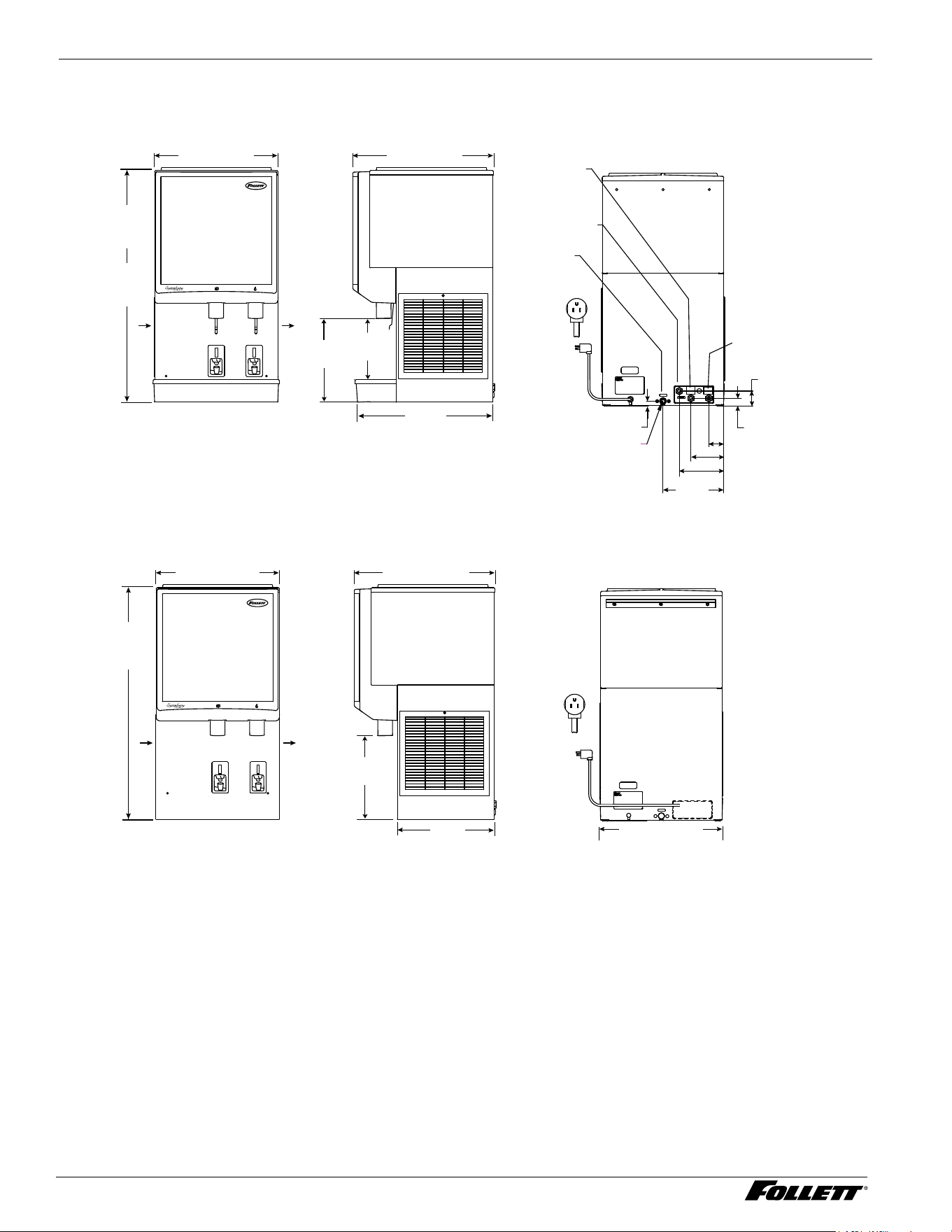
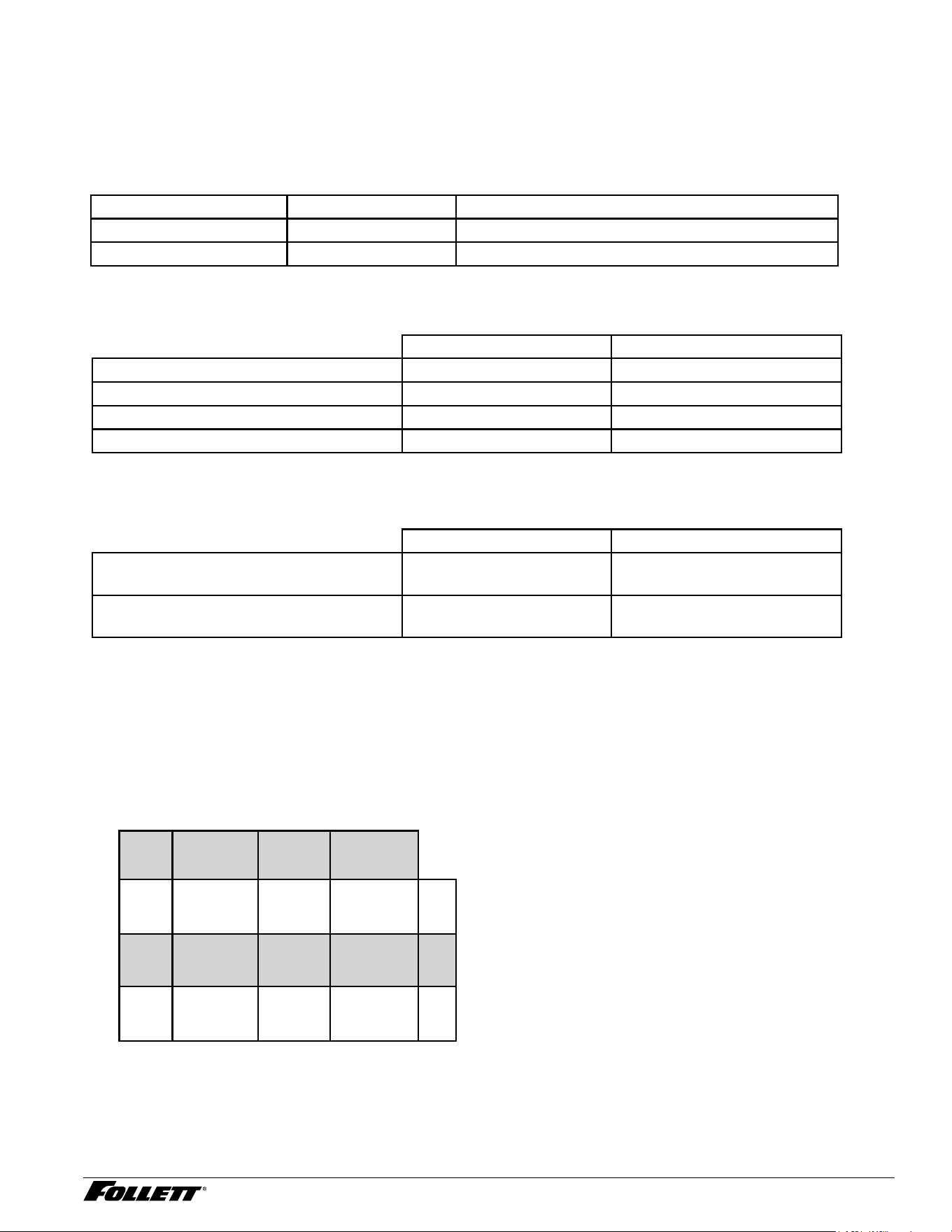
Specications
Front View
Countertop
Wall mount
Right Side View Rear View
Front View Right Side View Rear View
25CI414A
36"
(91.5 cm)
50CI414A/W
40"
(101.6 cm)
21" (53.4 cm) 24" (61 cm)
23"
(58.5 cm)
10.5"
(26.7 cm)
14.25"
(36.2 cm)
25HI414A
36.5"
(92.7 cm)
21.5" (54.6 cm)
24.5" (62.2 cm)*
14.25"
(36.2 cm)
17"
(43.2 cm)
3/4" FPT
drain
3/8" FPT
condenser
outlet (water-
cooled only)
3/8" FPT
condenser
inlet (water-
cooled only)
3/8" water
inlet
AIR INTAKE
AIR EXHAUST
AIR INTAKE
AIR EXHAUST
* Includes 0.5" (13 mm) for bracket supplied with unit.
0.88 (23 mm)
DRAIN
3/4 MPT MALE
5.69" (14.4 cm)
10.5"
(26.7 cm)
7.69" (19.5 cm)
2.56" (6.5 cm)
1.38" (3.5 cm)
2.63" (6.6 cm)
NEMA
5-15
NEMA
5-15
21.5" (54.6 cm)
25CI414A/W, 25HI414A, 50CI414A/W 4
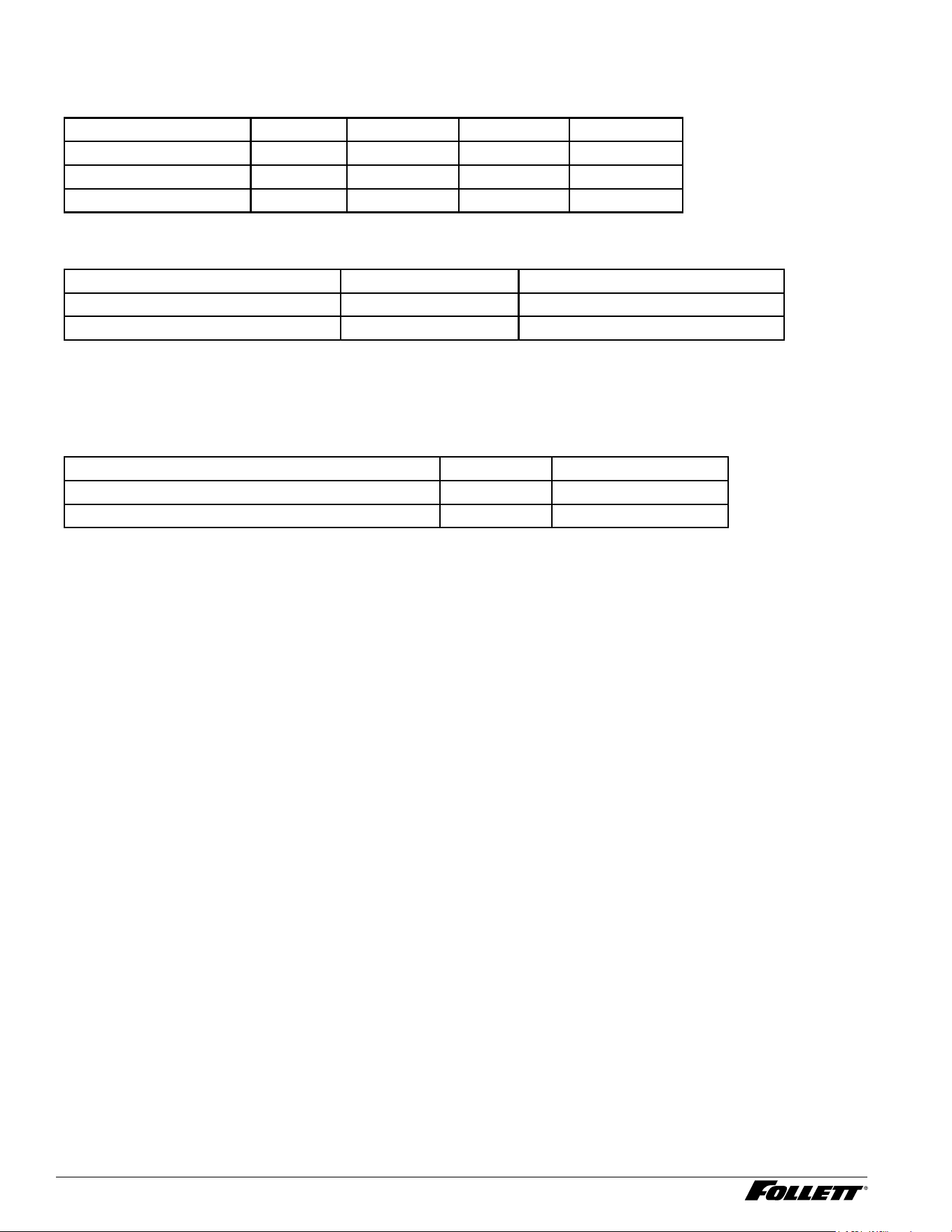
Electrical
§ 115 V, 60 Hz, 1 phase, 11.0A
§ Connect to a 15A dedicated circuit.
§ Furnished with 7 ft (2 m) power cord with a 90° NEMA hospital grade 5-15 plug.
Ambient
Air temp* 100 F/38 C Max. 50 F/10 C Min. (Best performance below 80 F (27 C)
Water temp
†
90 F/32 C Max. 45 F/7 C Min. (Best performance below 70 F (21 C)
Water pressure (psi/bar) 70/5 Max. 10/0.7 Min.
* Ambient air temperature is measured at the air-cooled condenser coil inlet.
†
Ambient water temperature is measured in the ice machine oat reservoir.
Plumbing
Connections 25/50CI414W Rough-ins 25HI414A
Dispenser drain 3/4" MPT Air-cooled 3/4" FPT
Water inlet 3/8" FPT 3/8" FPT
Condenser inlet Water-cooled 3/8" FPT N/A
Condenser outlet Water-cooled 3/8" FPT N/A
Note: Water shut-off recommended within 10 ft. (3m) of dispenser. Drain to be hard-piped and insulated. Maintain at
least 1/4" per foot (20 mm per 1 m) run of slope.
Ventilation clearances
Air-cooled Water-cooled
Required for ventilation 3" (7.7 cm) right, left, rear
4" (10.2 cm) top
N/A
Suggested for service 12" (30.5 cm) top,
6" (15.3 cm ) left side
12" (30.5 cm) top
Note: Do not block left side air intake or right side air exhaust.
Dry weight
§ 25/50CI414A/W (countertop): 215 lbs. (98 kg)
§ 25HI414A/W (wall mount): 230 lbs. (105 kg)
Water-Cooled ice machine refrigeration pressure
Discharge pressure/suction pressure
Condenser Water Temperature F/C
Inlet Water Temperature F/C
F/C 50/10 70/21 90/32
50/10 200/22 200/24 207/25 psi
70/21 200/22 200/24 207/25 psi
90/32 200/22 200/24 207/25 psi
5 25CI414A/W, 25HI414A, 50CI414A/W
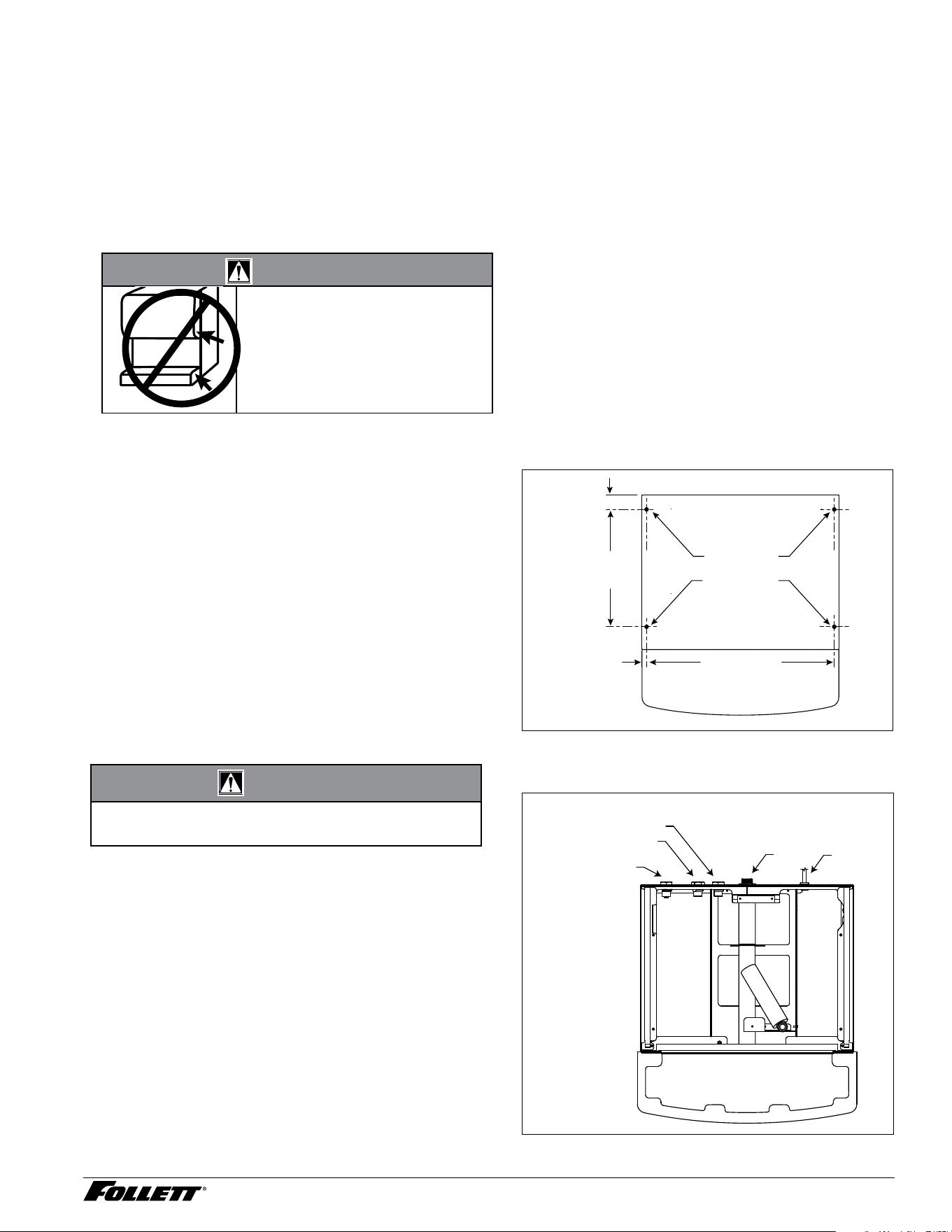
Compressor data
Compressor current draw
Air-cooled
Ambient air temp. 60 F/15.6 C 70 F/21.1 C 80 F/26.7 C 90 F/32.2 C
Comp Amperage 5.4A 5.6A 6.0A 6.1A
High side pressure (psi) 140 150 174 206
Low side pressure (psi) 15 17 21 26
Locked rotor amps 48A
Gearmotor data Split-Phase PSC (permanent split capacitor)
Gearmotor current 1.8A-1.9A (nominal) 0.8A-0.9A (nominal)
Locked rotor amps 14A 7A-14A (temperature dependent)
Refrigeration system
Important: All service on refrigeration system must be performed in accordance with all federal, state and local
laws that pertain to the use of refrigerants. It is the responsibility of the technician to ensure that these requirements
are met.
Model Charge Refrigerant type
25/50CI414A, 25HI414A (air-cooled) 3.49 oz (99 g) R290
25/50CI414W (water-cooled) 1.83 oz (52 g) R290
25CI414A/W, 25HI414A, 50CI414A/W 6
Installation
Before you begin
§ All dispensers must be installed level in both directions to ensure proper operation.
§ Provide proper ventilation clearances.
§ Countertop units provide the option of taking utilities out bottom or back of dispenser (on wall mount units and
countertop units with legs, utilities exit from back).
§ Wall mount model utilities exit through back of dispenser only.
§ Directions for each installation follow.
WARNING!
§ DO NOT LIFT UNIT AT THESE
POINTS. Panels will not support
weight of unit
§ Failure to follow warning may
result in equipment damage or
personal injury
Installing countertop dispensers with rear
exiting utilities (no legs)
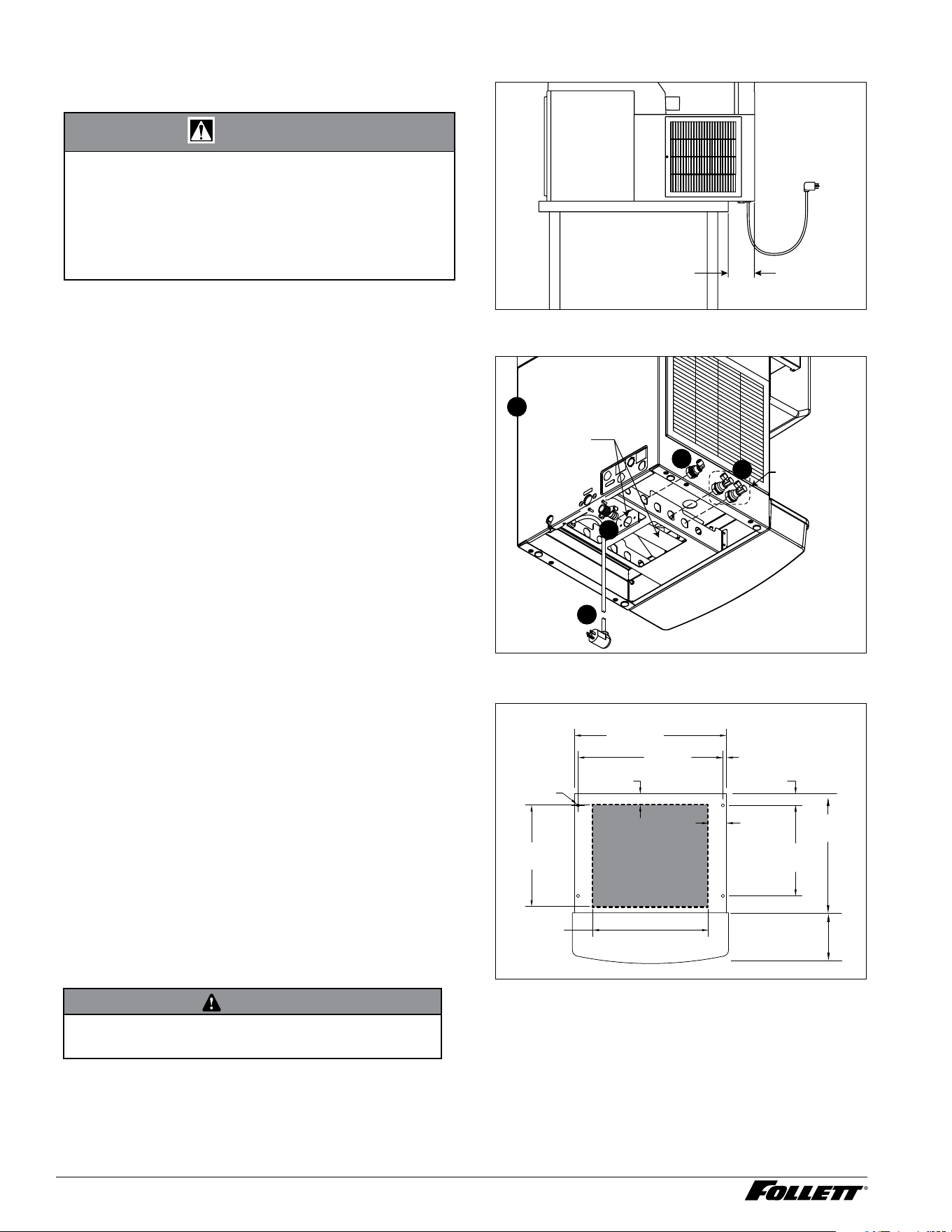
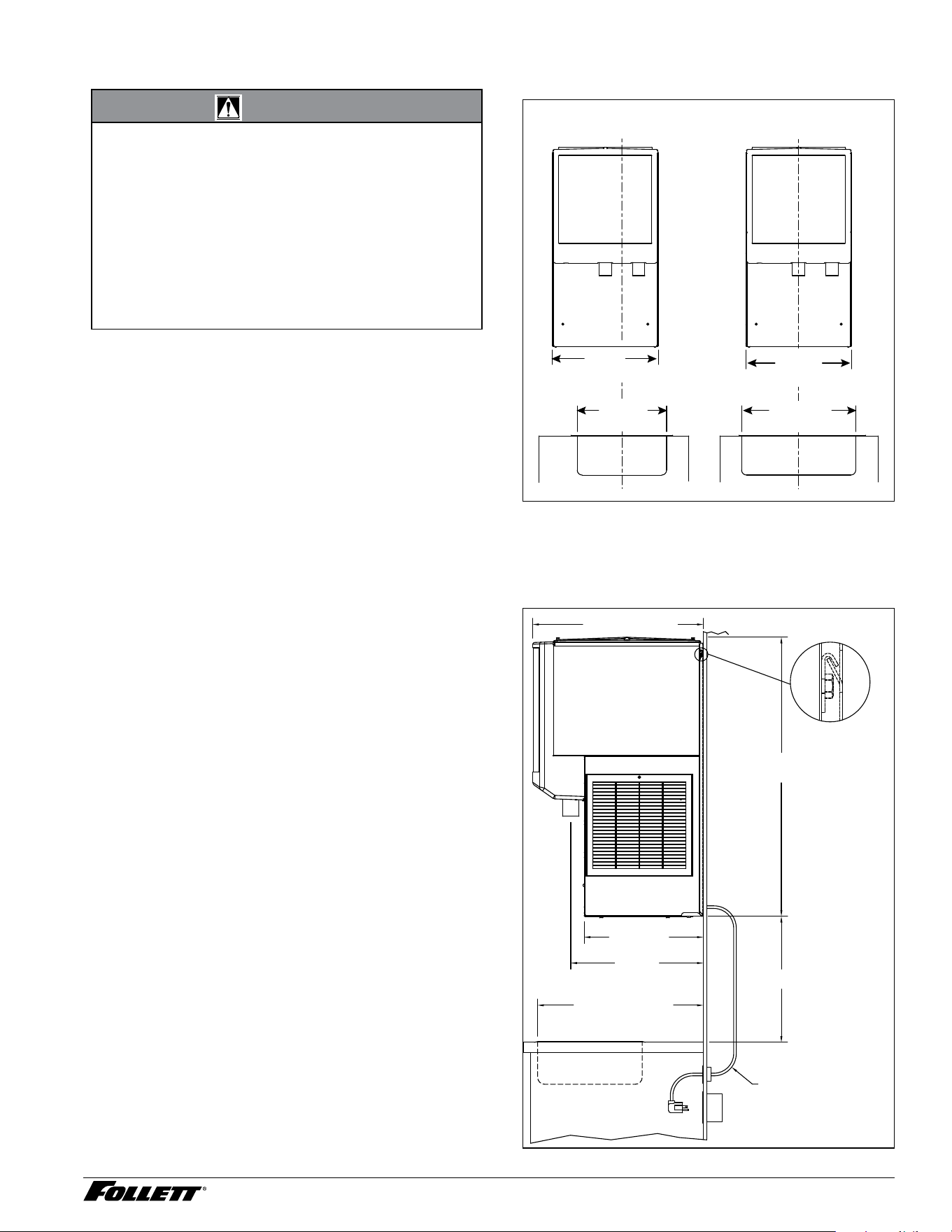
1. Position dispenser in desired location.
2. Mark dispenser outline on counter and
remove dispenser.
3. Drill four 7/16" holes in counter to anchor
dispenser to counter (Fig. 1).
4. Apply a thick bead approximately 1/4" (7 mm)
diameter of NSF listed silicone sealant (Dow
Corning
®
RTV-732 or equivalent) 1/4" (7 mm)
inside marked outline of dispenser.
5. Reposition dispenser on counter and secure
to counter with four 3/8"-16NCbolts.
6. Smooth excess sealant around outside of
dispenser.
7. Make utility connections (Fig. 2).
CAUTION!
§ Do not connect water-cooled condenser outlet line
to the dispenser drain line.
8. Turn on water supply and check for leaks.
9. Clean dispenser and ice machine before
putting into service.
10. Turn power on and allow ice machine to
produce ice.
Fig. 1 Countertop anchoring locations
12.50"
(31.8 cm)
1.56"
(40 mm)
20" (50.8 cm)
.50"
(13 mm)
4X
Ø.375"
(10 mm)
hole
Fig. 2 Utility connections as viewed from top for
countertop back access
condenser inlet
3/8" FNPT
condenser outlet
3/8" FNPT
drain
3/4" MPT
potable water
3/8" FNPT
power
7 25CI414A/W, 25HI414A, 50CI414A/W
Installing countertop dispensers with bottom
exiting utilities
WARNING!
§ A sturdy work surface capable of supporting the
entire dispenser must be used.
§ The work surface must be large enough to
accommodate height of dispenser.
§ Failure to provide proper support may result in
personal injury.
1. Position dispenser with dispense chutes facing
upward on sturdy work surface (Fig. 3).
Fig. 3
5.00"
(12.7 cm)
min.
2. Move drain tting from back of dispenser and
mount (Fig. 4.1).
3. Cut drain tube to length and attach to barbed
connection (Fig. 4.2).
4. Move inlet water tting from back of dispenser
and mount (Fig. 4.3).
5. Cut water tubing to length and re-insert into
water tting.
6. Water-cooled only. Disconnect internal
condenser water inlet and outlet ttings.
7. Water-cooled only. Relocate water inlet and
outlet ttings and reconnect (Fig. 4.4). Note:
The water inlet is connected to the condenser;
the outlet line is connected to the water
regulating valve.
Fig. 4
Water cooled
only
TRIM DRAIN TUBE FOR
NEW DRAIN FITTING
LOCATION.
1
2
3
4
5
8. Raise the dispenser upright and position in
desired location.
9. Mark dispenser outline on counter and remove
dispenser.
10. Cut countertop utility opening and drill four
7/16" holes to anchor dispenser to counter
(Fig. 5).
11. Apply a thick bead approximately 1/4" (7 mm)
diameter of NSF-listed silicone sealant (Dow
Corning* RTV-732 or equivalent) 1/4" (7 mm)
inside marked outline of dispenser.
12. Reposition dispenser on counter and secure to
counter with four 3/8"-16NCbolts.
13. Smooth excess sealant around outside of
dispenser and make utility connections
through countertop cutout.
CAUTION
§ Do not connect water-cooled condenser outlet line
to the dispenser drain line.
14. Turn on water supply and check for leaks.
15. Clean dispenser and ice machine.
16. Turn power on and allow ice machine to
produce ice.
Fig. 5
2.50"
(6.36 cm)
12.50"
(31.8 cm)
14.00"
(35.6 cm)
4X
Ø.375"
(10 mm)
hole
21.00"
(53.3 cm)
20.00"
(50.8 cm)
1.56"
(4.0 cm)
0.50"
(13 mm)
16.00"
(40.7 cm)
1.56"
(4.0 cm)
Cutout
connections
through
bottom
16.50"
(41.9 cm)
7.00"
(17.8 cm)
25CI414A/W, 25HI414A, 50CI414A/W 8
Installing wall mount dispensers
WARNING!
§ Wall mount dispensers are intended to be mounted
above a sink, eliminating the need for a drain pan.
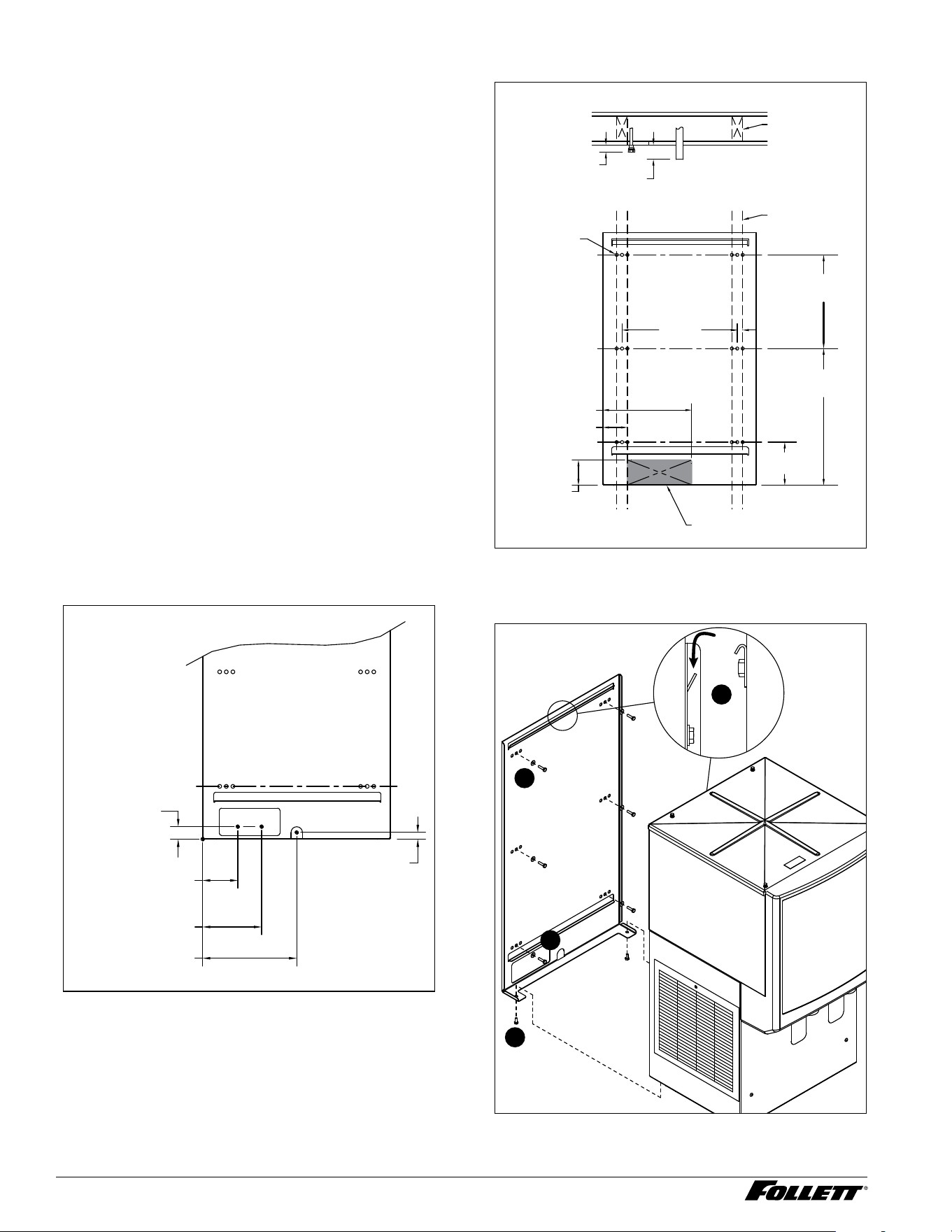
§ Before beginning installation verify that the sink size
and location meet the requirements shown in Fig. 6.
§ If requirements are not met, a drain pan must be
used to prevent ice and water from falling on counter
or oor.
§ FAILURE TO TAKE THESE PRECAUTIONS
COULD RESULT IN SLIPS AND FALLS ON WET
FLOORS
Fig. 6 – Minimum sink requirements (without drain
pan), front view
Front View
21.50"
(54.7 cm)
Front View
21.50"
(54.7 cm)
23.00"
(58.5 cm) min.
Sink centered
below dispenser
14.25"
(36.2 cm) min.
Sink centered
below chutes
Fig. 7 – Minimum sink requirements (without drain
pan), side view
30.00" (76.2 cm)
MIN DISTANCE TO SINK FRONT
SUGGESTED POWER
CORD ROUTING
17.01"
(43.2 cm)
18.92"
(48.1 cm)
24.36" (61.9 cm)
18.00" (45.7 cm)
25HI414
35.88" (91.1 cm)
SIDE VIEW
9 25CI414A/W, 25HI414A, 50CI414A/W
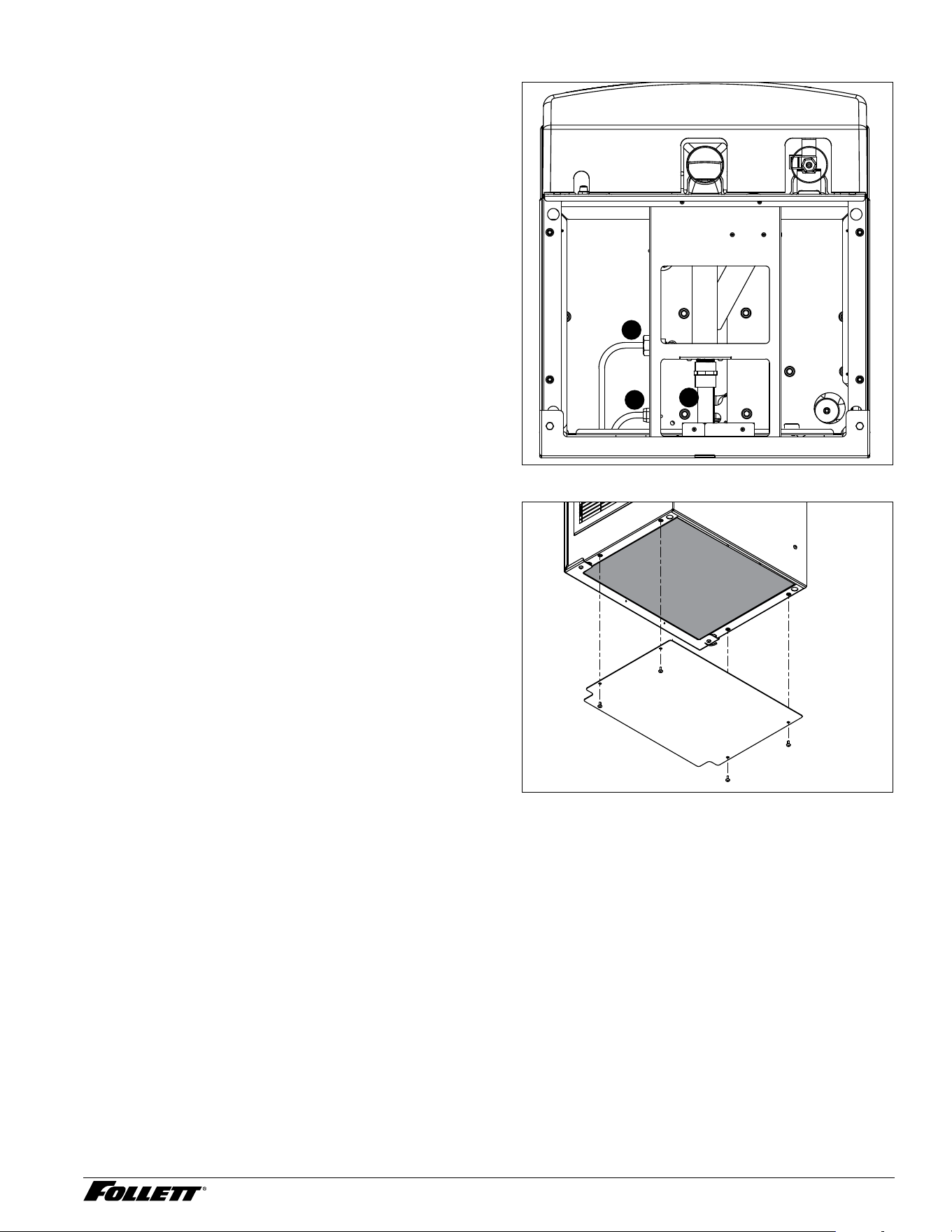
1. Locate wall bracket mounting position relative
to wall studs (Fig. 8). Install the supplied
wall bracket with six 3/8" diameter fasteners
(Fig.10.1).
Note: Three holes are available at each fastening
site to allow capture of studs or supports
within the wall.
2. Locate and cut utility hole (Fig. 10.2) in wall
using Fig. 9 dimensions.
3. Rough in utilities. Wall mount bracket
dimensions can be used as a template.
§ Water: 1/2" FNPT
§ Drain: 3/4" MPT
4. Lift dispenser onto wall bracket positioning
unit so that hook on back of dispenser is
captured by wall bracket support angle
(Fig.10.3).
5. Install two 1/4" X 20 screws through bottom of
wall bracket into bottom of dispenser to secure
dispenser to wall bracket (Fig. 10.4).
6. Install supplied 1/2" MPT X 3/8" push-in
adapter onto 1/2" FNPT water supply.
Fig. 8 – Wall bracket location guide
16.00"
(406 mm)
0.75"
(19 mm)
6.00"
(15.2 cm)
25HI414A
19" (48.3 cm)
1.00" (25 mm)
WALL STUDS
WALL STUDS
ANCHOR POINTS
0.438" (11 mm)
CLEARANCE
FRONT VIEW
TOP VIEW
25HI414A
13" (33.0 cm)
2.00" (51 mm)
3.44" (8.7 cm)
12.37" (31.4 cm)
3.53" (9.0 cm)
WALL CUTOUT
Fig. 9 – Wall mount, utility location
10.69" (27.1 cm)
3/4 COPPER TUBE
0.77" (2.0 cm)
1.43" (3.6 mm)
FRONT VIEW
6.70" (17.0 cm)
POWER CORD EXIT
3.99" (10.1 cm)
POTABLE WATER
3/8 COPPER TUBE
Fig. 10 – Wall mount bracket and fastener
requirements
3
1
2
4
25CI414A/W, 25HI414A, 50CI414A/W 10
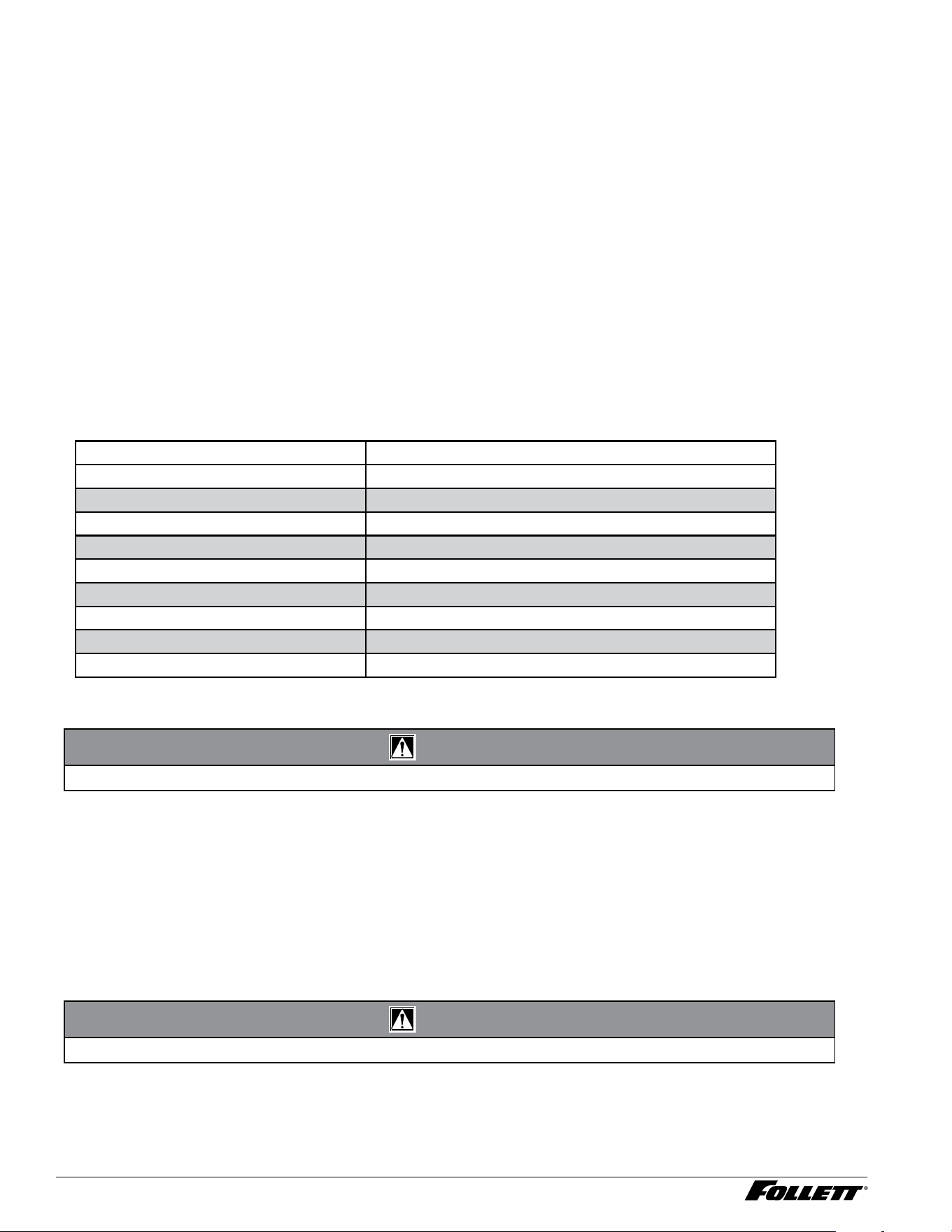
7. Connect supplied 3/8" water line between
water supply and water inlet fitting (Fig. 11.1).
8. Using supplied 3/4" drain tubing and barbed
fittings, connect 3/4" barbed drain elbow tting
on dispenser to 3/4" FNPT drain (Fig. 11.2).
9. Route power cord through utility access hole
to power supply (Fig. 11.3).
10. Turn on water supply and check for leaks.
Fig. 11 – Dispenser bottom view
1
2
3
11. Install bottom panel (Fig. 12). Fig. 12
11 25CI414A/W, 25HI414A, 50CI414A/W
Cleaning and sanitizing
Follett ice machines and dispensers, and their associated cleaning and sanitizing procedures, are designed for
use with potable water sources. The presence, or suspected presence, of infectious agents may call for additional
measures, including the replacement of components and more comprehensive disinfection measures. Follett
recommends that these cleaning and sanitizing procedures be reviewed with the appropriate infectious agent
subject matter experts to assure complete remediation.
Periodic cleaning of Follett’s ice and water dispenser and ice machine system is required to ensure peak
performance and delivery of clean, sanitary ice. The recommended cleaning procedures that follow should be
performed at least as frequently as recommended and more often if environmental conditions dictate.
Follett recommends sanitizing the pressurized water lines prior to cleaning the ice machine/dispenser. Follett
offers two kits: order P/N 01089572 when a Follett lter system with a pre-lter bowl is present, or P/N 01089580
when a Follett lter system is not present. Follow the instructions provided with the respective kits to sanitize the
pressurized water lines immediately before cleaning the ice machine/dispenser.
Cleaning of the condenser can usually be performed by facility personnel. Cleaning of the ice machine system
should be performed by your facility’s trained maintenance staff or a Follett authorized service agent. Regardless
of who performs the cleaning, it is the operator’s responsibility to see that this cleaning is performed according to
the schedule below. Service problems resulting from lack of preventive maintenance will not be covered under the
Follett warranty.
Recommended cleaning intervals*
Symphony Plus Frequency
Drain Line weekly
Drain Pan/Drip Pan weekly
Exterior, Water Station Tube as needed
Condenser monthly (air-cooled only)
Dispenser and Components semi-annually
Ice Machine semi-annually
Transport Tube semi-annually
Ice Storage Area/Bin semi-annually
Pressurized Water Sanitizing semi-annually
* Ice machine and dispenser must be cleaned prior to start-up.
Weekly
CAUTION!
§ Do not use solvents, abrasive cleaners, metal scrapers or sharp objects to clean any part of the dispenser.
Dispenser drain pan and drain line
§ Pour 1 gal. (3.8 L) of hot tap water into drain pan to ush drains.
Splash panel front, SensorSAFE™ infrared dispensing
1. Deactivate dispensing by pressing and releasing clean switch located on left side of unit under top front
cover.
2. Clean lens and splash panel front using a soft cloth and mild, non-abrasive, non-chlorine based cleaner.
3. Reactivate dispensing by pressing and releasing clean switch again.
Monthly
CAUTION!
§ Do not use solvents, abrasive cleaners, metal scrapers or sharp objects to clean any part of the dispenser.
Condenser (air-cooled ice machine only)
§ Use a vacuum cleaner or stiff brush to carefully clean condenser coils of lint and debris to ensure optimal
performance.
25CI414A/W, 25HI414A, 50CI414A/W 12
Semi-Annually (more often if conditions dictate)
§ A cleaning procedure should always include both the ice machine and dispenser.
§ Icemaking system can be cleaned in place.
CAUTION!
§ Wear rubber gloves and safety goggles (or face shield) when handling SafeCLEAN Plus™ and IMS-III solutions.
§ Use only Follett approved cleaners.
§ It is a violation of Federal law to use the Nu-Calgon
®
IMS-III solution in a manner inconsistent with its labeling.
§ Do not use solvents, abrasive cleaners, metal scrapers or sharp objects to clean any part of the dispenser.
Cleaning Tool Checklist
§ (1 or 2) 1.5 gallon (or larger) plastic bucket
§ (2) clean cloths
§ Sanitary gloves
§ Safety glasses
§ (2) SaniSponge™ (P/N 00131524 - single sponge)
§ SafeCLEAN Plus ice machine cleaner
§ [OPTIONAL] Nu-Calgon IMS-III no-rinse sanitizer (P/N 00979674 – 16 oz. bottle)
SafeCLEAN Plus Solution: Follow the directions on the SafeCLEAN Plus packaging to mix 1 gal. (3.8 L) of Follett
SafeCLEAN Plus solution. Use 100 F (38 C) water.
[OPTIONAL] No-rinse Sanitizing Solution: Follow the directions on the Nu-Calgon IMS-III packaging to mix
1gal. (3.8 L) of IMS-III solution. Use 100 F (38 C) water.
Ice Machine and Dispenser
Cleaning Procedure
Note: Check drains and drain cup to ensure they are open and owing freely.
1. If ice machine was running recently, ensure that the evaporator is completely free of ice before proceeding.
If there is ice in the evaporator, complete steps 2-7 using only hot water to remove the ice, then begin
Cleaning/Descaling Procedure again.
2. Remove front cover and turn OFF bin signal switch.
3. Dispense all ice from storage hopper and discard.
4. CI Models only: remove splash panel.
5. Remove hopper lid.
6. Remove water reservoir drain tube from the evaporator drain bracket and lift tube to higher level than
reservoir, placing it in plastic clip at right lower front.
7. Remove lid from cleaning cup, then hang the cleaning cup on plastic clip at left front of dispenser. Set
cleaning cup lide aside, but do not discard.
8. Press CLEAN switch. The MAINTENANCE light will turn on and the machine will ll and drain three times.
Wait for the LOW WATER light to turn on.
9. Fill cleaning cup until SafeCLEAN Plus solution completely lls the reservoir (about 1 quart). Place lid back
on cup. Save remainder of SafeCLEAN Plus solution.
10. CLEANER FULL light will turn on and machine will start cleaning cycle then rinse three times; this process
takes approximately 15 minutes.

13 25CI414A/W, 25HI414A, 50CI414A/W
11. While ice machine is cleaning, clean dispenser as follows:
11.1 Remove knurled nuts from front of storage hopper.
11.2 Remove stud assembly, baffle, wheel, and any remaining ice.
11.3 Remove dispense chutes from splash panel.
11.4 Submerse drain grill in SafeCLEAN Plus solution and allow to soak to remove any scale buildup.
11.5 Wipe inside of hopper lid, stud assembly, baffle, wheel, inside of storage area, dispense chutes,
drain grill and drain pan with damp cloth wrung out in SafeCLEAN Plus solution. Thoroughly rinse
all parts with damp cloth wrung out with clean water.
Note: To avoid possible damage to motor assembly, only use a damp cloth to clean storage hopper. Do not
allow water to run through motor shaft hole in bottom of hopper.
11.6 When machine is nished cleaning, the MAINTENANCE light will turn off.
12. Reinstall dispense chutes, wheel, baffle, stud assembly and knurled nuts. (See manual for correct baffle
position.)
Finish cleaning – SafeCLEAN Plus only
13. Remove top bearing insulation. Loosen Phillips-head screw on nozzle connected to evaporator. Remove
nozzle from evaporator side only, leave other side of nozzle connected to transport tube.
14. Soak both Sani-Sponges in remaining SafeCLEAN Plus solution.
15. Insert both sponges soaked in SafeCLEAN Plus solution into nozzle one at a time.
16. Replace nozzle onto evaporator and tighten screw. Ensure drain is connected to reservoir and vent tubes
are connected to evaporator drain pan. Replace top bearing insulation.
1 7. Lower water reservoir drain tube back to evaporator drain bracket.
18. Turn ON bin signal switch. Wait for ice to push sponges through transport tube.
19. Collect sponges from ice storage bin.
20. Replace hopper lid, machine top, turn ON dispenser power and install front cover.
2 1. After 10 minutes, dispense all ice and discard. 12. Remove top bearing insulation. Loosen Phillips-head
screw on nozzle connected to evaporator. Remove nozzle from evaporator side only, leave other side of
nozzle connected to transport tube.
22. Soak both Sani-Sponges in remaining SafeCLEAN Plus solution.
23. Insert both sponges soaked in SafeCLEAN Plus solution into nozzle one at a time.
24. Replace nozzle onto evaporator and tighten screw. Ensure drain is connected to reservoir and vent tubes
are connected to evaporator drain pan. Replace top bearing insulation.
25. Lower water reservoir drain tube back to evaporator drain bracket.
26. Turn ON bin signal switch. Wait for ice to push sponges through transport tube.
2 7. Collect sponges from ice storage bin.
28. Replace hopper lid, machine top, turn ON dispenser power and install front cover.
29. After 10 minutes, dispense all ice and discard.
[OPTIONAL] Finish cleaning – No-rinse sanitizing with Nu-Calgon IMS-III
13. Press CLEAN switch. The MAINTENANCE light will turn on and the machine will ll and drain three times.
Wait for the LOW WATER light to turn on.
14. Remove lid from cleaning cup and ll (about 1 quart) until sanitizing solution completely lls the reservoir.
Place lid back on cup. Save remainder of sanitizing solution.
15. CLEANER FULL light will turn on and machine will start sanitizing cycle, then rinse three times; this
process takes approximately 15 minutes.
16. While ice machine is sanitizing, sanitize dispenser as follows:
29.7 Wipe inside of hopper lid, stud assembly, baffle, wheel, inside of storage area, dispense chutes,
drain grill and drain pan with damp cloth wrung out in sanitizing solution. Do not rinse off the
sanitizing solution.
Note: To avoid possible damage to motor assembly, only use a damp cloth to clean storage hopper. Do not
allow water to run through motor shaft hole in bottom of hopper.
1 7. Reinstall dispense chutes, wheel, baffle, stud assembly and knurled nuts. (See manual for correct baffle
position.) Reinstall dispense chutes, wheel, baffle, stud assembly and knurled nuts. (See manual for correct
baffle position.)
18. When machine is nished rinsing, the MAINTENANCE light will turn off.
25CI414A/W, 25HI414A, 50CI414A/W 14
19. Remove top bearing insulation. Loosen Phillips-head screw on nozzle connected to evaporator. Remove
nozzle from evaporator side only, leave other side of nozzle connected to transport tube.
20. Soak one SaniSponge in remaining sanitizing solution. Insert the sponge soaked in sanitizing solution into
nozzle, then insert a dry sponge into the nozzle.
2 1. Replace nozzle onto evaporator and tighten screw. Ensure drain is connected to reservoir and vent tubes
are connected to evaporator drain pan. Replace top bearing insulation.
22. Turn ON bin signal switch. Wait for ice to push sponges through transport tube.
23. Collect sponges from ice storage bin.
24. Replace hopper lid, base stand cover, and install dispenser front cover.
25. After 10 minutes, dispense all ice and discard.
User Interface and Exterior Cabinet
§ Clean stainless steel panels with stainless steel cleaner.
Dispenser troubleshooting
CAUTION!
§ Disconnect power to unit before putting hands or arms in storage area or attempting any repair or service to
equipment.
Before calling for service
1. Check that no ice is in the dispenser bin area.
2. Check that congealed ice is not causing a jam.
3. Check that all switches and circuit breakers are on.
4. Check that all drains are clear.
5. Check that water is supplied.
Lever model troubleshooting guide
Problem Indicators Corrective Action
Does not dispense ice.
1. Power switch off or faulty.
2. Faulty dispense switch.
3. Wheel motor malfunction.
4. Defective control board.
5. Defective wiring.
1. Turn on or replace the defective switch.
2. Replace defective switch.
3. Verify voltage at motor and replace wheel motor if
defective.
4. Jumper pins 1 & 2 on connector P13.
a. Control board output LED, D19 should light. Replace
board, if D19 does not come on.
b. D19 comes on but no voltage at wheel motor. Move
connector from P6 to L1, if motor runs, replace control
board.
5. Ohm check wiring going from lever switch to P13
pins 1 & 2. Ohm check wiring from P6 to wheel motor
and neutral wire to neutral on control board. Repair or
replace as needed.
Dispense wheel rotates
continuously.
Dispense switch contacts are
welded together.
Replace dispense switch.
15 25CI414A/W, 25HI414A, 50CI414A/W
Ice machine runs
continuously.
Faulty or incorrectly positioned bin
thermostat.
Check for proper positioning. If thermostat does not open
when ice is placed on capillary tube, replace thermostat.
Does not dispense water.
1. Power switch off/faulty.
2. Faulty water dispense
switch.
3. Water dispense solenoid
malfunction.
4. Defective control board.
5. Defective wiring.
1. Turn on or replace the defective switch.
2. Replace defective switch.
3. Verify voltage at water dispense solenoid and replace
water dispense solenoid if defective.
4. Jumper pins 3 & 4 on connector P13.
a. Control board output LED, D21 should light. Replace
board, if D21 does not come on.
b. D21 comes on but no voltage at wheel motor. Move
connector from P20 to L1, if motor runs, replace control
board.
5. Ohm check wiring going from lever switch to P13 pins
3 & 4. Ohm check wiring from P20 to wheel motor
and neutral wire to neutral on control board. Repair or
replace as needed.
SensorSAFE model troubleshooting guide
Problem Indicators Corrective Action
Does not dispense ice.
1. Power switch off or faulty.
2. Power on but no ice
dispensing
3. Faulty ice dispense sensor.
4. Wheel motor malfunction.
5. Defective control board/
daughter card.
6. Defective wiring.
1. Turn on or replace the defective switch.
2. Verify daughter card is properly aligned and inserted
with pins on the control card and bin lid jumper is
installed.
3. Follow the steps below for ice dispensing.
a. If ice and water dispenser, switch connectors going from
sensors to daughter and if problem follows to opposite
input, replace defective sensor.
b. Once switched, if problem stays with same input, jumper
pins 3 & 4 on daughter card ice connector and the
control board output LED, D19 should light. Replace
board, if D19 does not come .
4. Verify 120 vac at motor and replace wheel motor if
defective.
5. D19 comes on but no voltage at wheel motor. Move
connector from P6 to L1, if motor runs, replace
control board.
6. Ohm check wiring from P6 to wheel motor and
neutral wire to neutral on control board. Repair or
replace as needed.
Does not dispense water
1. Power switch off/faulty.
2. Faulty water dispense
sensor.
3. Water dispense solenoid
malfunction or defective
control board/daughter card.
4. Defective wiring.
1. Turn on or replace the defective switch.
2. Follow the steps below for water dispensing.
a. If ice and water dispenser, switch connectors going from
sensors to daughter and if problem follows to opposite
input, replace defective sensor.
b. Once switched, if problem stays with same input, jumper
pins 3 & 4 on daughter card water connector and the
control board output LED, D21 should light. Replace
control board/daughter card, if D21 does not come on.
If D21 comes on, move connector from P20 to L1, if
solenoid energizes, replace control board.
3. Verify 120 VAC at solenoid and replace if present.
4. Ohm check wiring going from water solenoid to P20
terminal on control board. Ohm check wiring from
water solenoid neutral wire to neutral on control
board. Repair or replace as needed.
Ice machine runs
continuously.
Faulty or incorrectly positioned bin
thermostat.
Check for proper positioning. If thermostat does not open
when ice is placed on capillary tube, replace bin thermostat.

01568229R00
© Follett Products, LLC 11/24
801 Church Lane • Easton, PA 18040, USA
Toll free (877) 612-5086 • +1 (610) 252-7301
www.follettice.com
Calgon is a licensed trademark distributed by Nu-Calgon, in the United States.
Dow Corning is a registered trademark of Dow Corning Corporation in the United States and other countries.
SafeCLEAN, SaniSponge, SensorSAFE, and Symphony Plus are trademarks of Follett Products, LLC.
Follett is a registered trademarks of Follett LLC, registered in US.
Warranty Registration and Equipment Evaluation
Thank you for purchasing Follett ® equipment. Our goal is to deliver high value products and services that earn your complete
satisfaction by delivering high-value products and services backed by outstanding customer and technical support.
Please review the installation instructions thoroughly. It is important that the installation be performed to factory specications
so your equipment operates at its maximum efficiency.
Follett LLC will not be liable for any consequential damages, expenses, connecting or disconnecting charges, or any losses
resulting from a defect of the machine. For full warranty details, visit our website www.follettice.com/productwarranties.
Registering your equipments helps Follett track your equipment's service history should you need to contact us for technical
support, and your feedback helps us improve our products and services. Please visit www.follettice.com/support to complete
the Warranty Registration form.
Should you have any questions, please contact Follett's technical support group at (877) 612-5086 or (610) 252-7301 and we
will be happy to assist you.