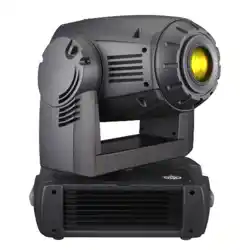
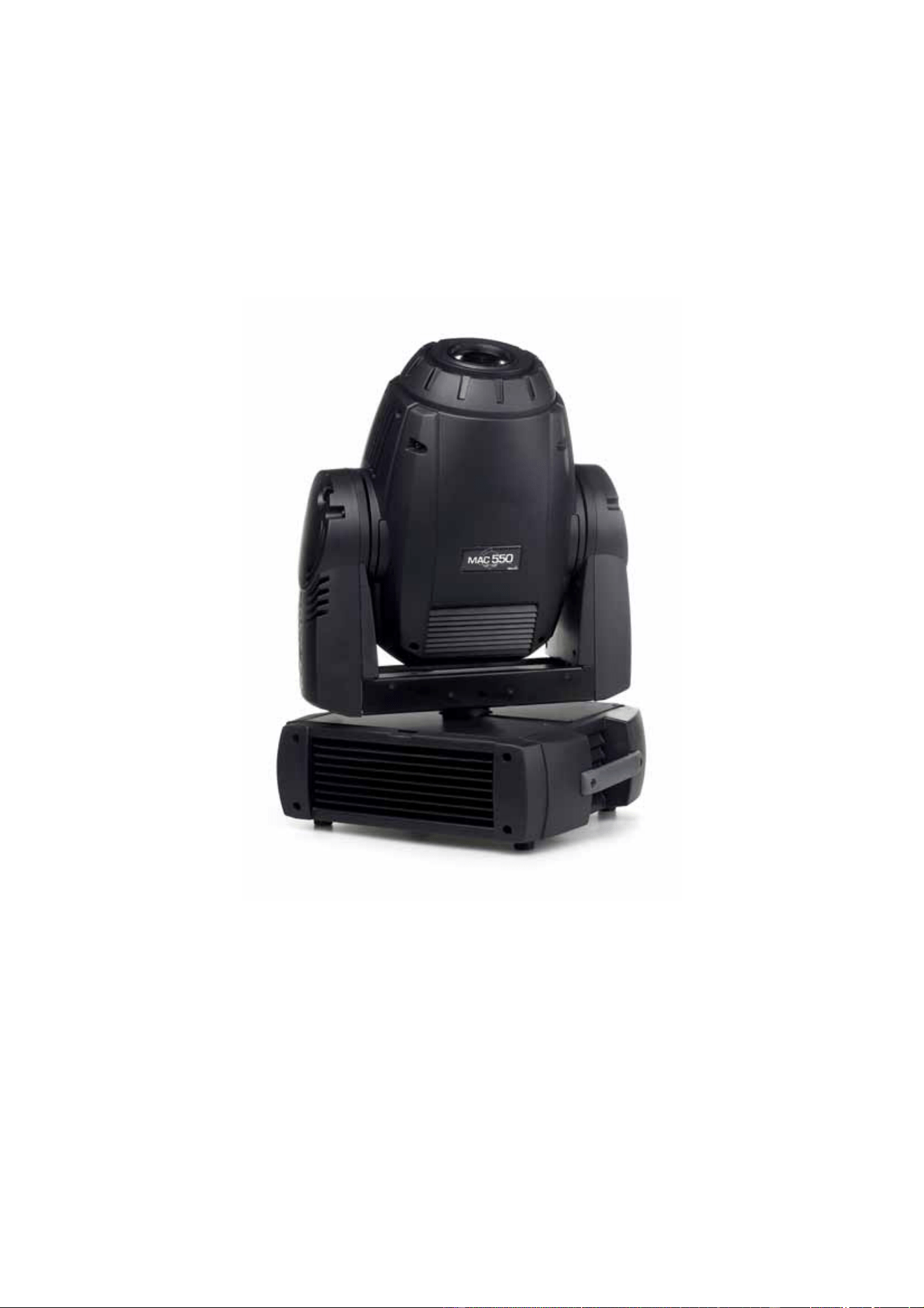
MAC 550 Profile
user manual
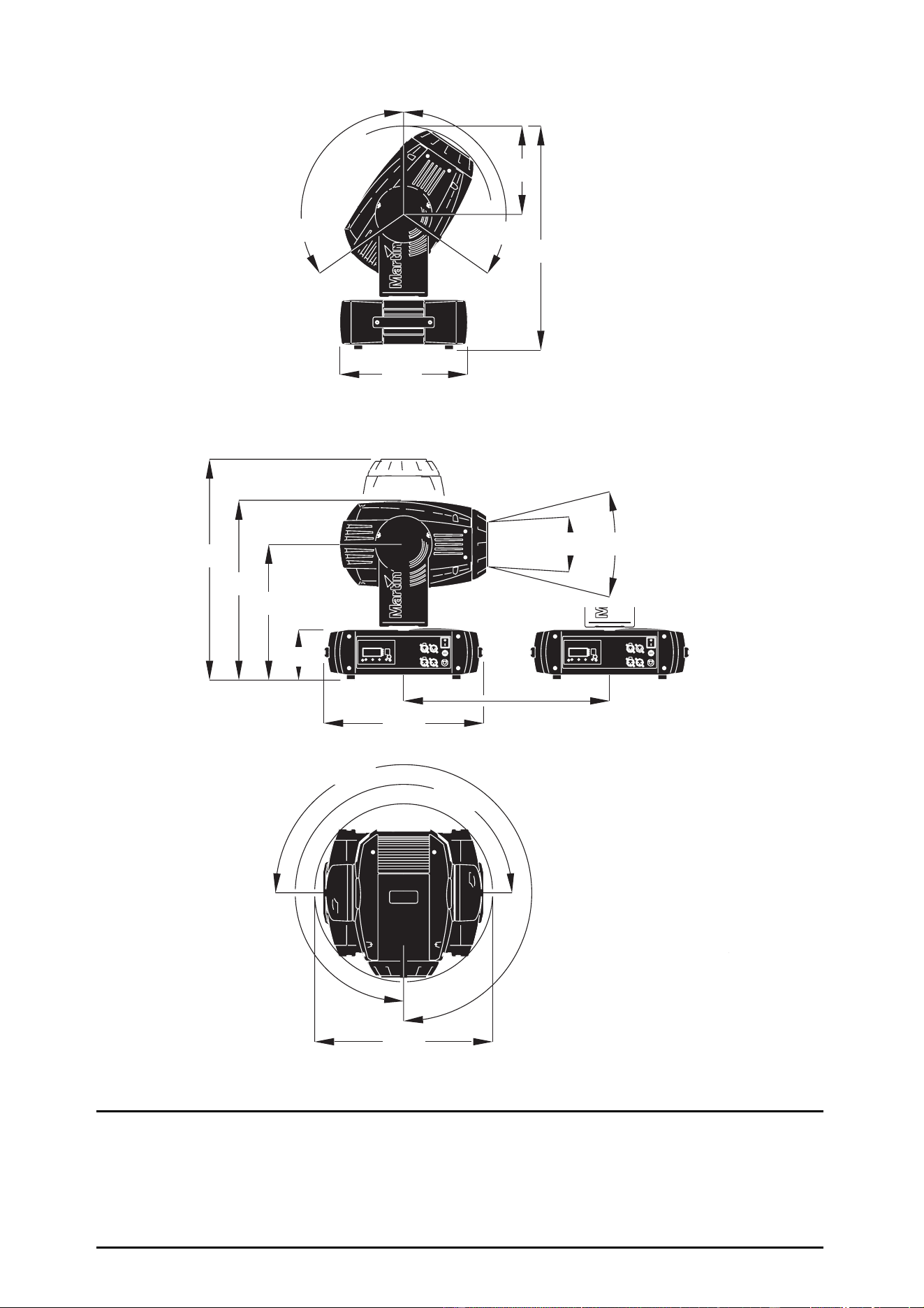
270°
270°
143
390
515
636
450
365
645
255
120°
120°
14° 30°
505
Figure 1: Dimensions in mm
© 2003-2007 Martin Professional A/S, Denmark. All rights reserved. No part of this manual may be reproduced, in any form or by any
means, without permission in writing from Martin Professional A/S, Denmark. Printed in Denmark.
Information subject to change without notice. Martin Professional A/S and all affiliated companies disclaim liability for any injury,
damage, direct or indirect loss, consequential or economic loss or any other loss occasioned by the use of, inability to use or reliance
on the information contained in this manual.
P/N 35000136, Rev. E

Contents
INTRODUCTION . . . . . . . . . . . . . . . . . . . . . . . . . . . . . . . . . . . . . . . . . . . . . . . . . . . . . . . . . . . . . . . . . . . . . . . . . . . . . . . .5
Safety information. . . . . . . . . . . . . . . . . . . . . . . . . . . . . . . . . . . . . . . . . . . . . . . . . . . . . . . . . . . . . . . . . . . . . . . . . . . . . 5
Unpacking . . . . . . . . . . . . . . . . . . . . . . . . . . . . . . . . . . . . . . . . . . . . . . . . . . . . . . . . . . . . . . . . . . . . . . . . . . . . . . . . . . . 6
Initial set-up. . . . . . . . . . . . . . . . . . . . . . . . . . . . . . . . . . . . . . . . . . . . . . . . . . . . . . . . . . . . . . . . . . . . . . . . . . . . . . . . . . 6
LAMP. . . . . . . . . . . . . . . . . . . . . . . . . . . . . . . . . . . . . . . . . . . . . . . . . . . . . . . . . . . . . . . . . . . . . . . . . . . . . . . . . . . . . . . . . . 7
About the discharge lamp . . . . . . . . . . . . . . . . . . . . . . . . . . . . . . . . . . . . . . . . . . . . . . . . . . . . . . . . . . . . . . . . . . . . . . . 7
Lamp replacement . . . . . . . . . . . . . . . . . . . . . . . . . . . . . . . . . . . . . . . . . . . . . . . . . . . . . . . . . . . . . . . . . . . . . . . . . . . . 7
AC POWER . . . . . . . . . . . . . . . . . . . . . . . . . . . . . . . . . . . . . . . . . . . . . . . . . . . . . . . . . . . . . . . . . . . . . . . . . . . . . . . . . . . . 9
Fuses . . . . . . . . . . . . . . . . . . . . . . . . . . . . . . . . . . . . . . . . . . . . . . . . . . . . . . . . . . . . . . . . . . . . . . . . . . . . . . . . . . . . . . 9
Power supply adjustment . . . . . . . . . . . . . . . . . . . . . . . . . . . . . . . . . . . . . . . . . . . . . . . . . . . . . . . . . . . . . . . . . . . . . . . 9
Power connection . . . . . . . . . . . . . . . . . . . . . . . . . . . . . . . . . . . . . . . . . . . . . . . . . . . . . . . . . . . . . . . . . . . . . . . . . . . . . 9
DATA. . . . . . . . . . . . . . . . . . . . . . . . . . . . . . . . . . . . . . . . . . . . . . . . . . . . . . . . . . . . . . . . . . . . . . . . . . . . . . . . . . . . . . . . .10
Tips for reliable data transmission . . . . . . . . . . . . . . . . . . . . . . . . . . . . . . . . . . . . . . . . . . . . . . . . . . . . . . . . . . . . . . . 10
RIGGING . . . . . . . . . . . . . . . . . . . . . . . . . . . . . . . . . . . . . . . . . . . . . . . . . . . . . . . . . . . . . . . . . . . . . . . . . . . . . . . . . . . . .11
CONTROL PANEL . . . . . . . . . . . . . . . . . . . . . . . . . . . . . . . . . . . . . . . . . . . . . . . . . . . . . . . . . . . . . . . . . . . . . . . . . . . . .12
Menu navigation . . . . . . . . . . . . . . . . . . . . . . . . . . . . . . . . . . . . . . . . . . . . . . . . . . . . . . . . . . . . . . . . . . . . . . . . . . . . . 12
DMX address and protocol . . . . . . . . . . . . . . . . . . . . . . . . . . . . . . . . . . . . . . . . . . . . . . . . . . . . . . . . . . . . . . . . . . . . . 12
Tailoring performance . . . . . . . . . . . . . . . . . . . . . . . . . . . . . . . . . . . . . . . . . . . . . . . . . . . . . . . . . . . . . . . . . . . . . . . . . 12
Readouts. . . . . . . . . . . . . . . . . . . . . . . . . . . . . . . . . . . . . . . . . . . . . . . . . . . . . . . . . . . . . . . . . . . . . . . . . . . . . . . . . . . 13
Manual control. . . . . . . . . . . . . . . . . . . . . . . . . . . . . . . . . . . . . . . . . . . . . . . . . . . . . . . . . . . . . . . . . . . . . . . . . . . . . . . 14
Service utilities . . . . . . . . . . . . . . . . . . . . . . . . . . . . . . . . . . . . . . . . . . . . . . . . . . . . . . . . . . . . . . . . . . . . . . . . . . . . . . 14
EFFECTS . . . . . . . . . . . . . . . . . . . . . . . . . . . . . . . . . . . . . . . . . . . . . . . . . . . . . . . . . . . . . . . . . . . . . . . . . . . . . . . . . . . . .15
Lamp power . . . . . . . . . . . . . . . . . . . . . . . . . . . . . . . . . . . . . . . . . . . . . . . . . . . . . . . . . . . . . . . . . . . . . . . . . . . . . . . . 15
Fixture reset . . . . . . . . . . . . . . . . . . . . . . . . . . . . . . . . . . . . . . . . . . . . . . . . . . . . . . . . . . . . . . . . . . . . . . . . . . . . . . . . 15
Dimming and strobe . . . . . . . . . . . . . . . . . . . . . . . . . . . . . . . . . . . . . . . . . . . . . . . . . . . . . . . . . . . . . . . . . . . . . . . . . . 15
Color . . . . . . . . . . . . . . . . . . . . . . . . . . . . . . . . . . . . . . . . . . . . . . . . . . . . . . . . . . . . . . . . . . . . . . . . . . . . . . . . . . . . . . 16
Rotating gobos . . . . . . . . . . . . . . . . . . . . . . . . . . . . . . . . . . . . . . . . . . . . . . . . . . . . . . . . . . . . . . . . . . . . . . . . . . . . . . 16
Static gobos . . . . . . . . . . . . . . . . . . . . . . . . . . . . . . . . . . . . . . . . . . . . . . . . . . . . . . . . . . . . . . . . . . . . . . . . . . . . . . . . 16
Gobo macros. . . . . . . . . . . . . . . . . . . . . . . . . . . . . . . . . . . . . . . . . . . . . . . . . . . . . . . . . . . . . . . . . . . . . . . . . . . . . . . . 16
Gobo animation. . . . . . . . . . . . . . . . . . . . . . . . . . . . . . . . . . . . . . . . . . . . . . . . . . . . . . . . . . . . . . . . . . . . . . . . . . . . . . 16
Prism and iris . . . . . . . . . . . . . . . . . . . . . . . . . . . . . . . . . . . . . . . . . . . . . . . . . . . . . . . . . . . . . . . . . . . . . . . . . . . . . . . 16
Focus and zoom . . . . . . . . . . . . . . . . . . . . . . . . . . . . . . . . . . . . . . . . . . . . . . . . . . . . . . . . . . . . . . . . . . . . . . . . . . . . . 16
Pan and tilt . . . . . . . . . . . . . . . . . . . . . . . . . . . . . . . . . . . . . . . . . . . . . . . . . . . . . . . . . . . . . . . . . . . . . . . . . . . . . . . . . 17
Speed channels . . . . . . . . . . . . . . . . . . . . . . . . . . . . . . . . . . . . . . . . . . . . . . . . . . . . . . . . . . . . . . . . . . . . . . . . . . . . . 17
OPTICAL CONFIGURATION . . . . . . . . . . . . . . . . . . . . . . . . . . . . . . . . . . . . . . . . . . . . . . . . . . . . . . . . . . . . . . . . . . . . . 18
Color wheels . . . . . . . . . . . . . . . . . . . . . . . . . . . . . . . . . . . . . . . . . . . . . . . . . . . . . . . . . . . . . . . . . . . . . . . . . . . . . . . . 18
Gobos . . . . . . . . . . . . . . . . . . . . . . . . . . . . . . . . . . . . . . . . . . . . . . . . . . . . . . . . . . . . . . . . . . . . . . . . . . . . . . . . . . . . . 19
Animation wheel . . . . . . . . . . . . . . . . . . . . . . . . . . . . . . . . . . . . . . . . . . . . . . . . . . . . . . . . . . . . . . . . . . . . . . . . . . . . . 21
Prism. . . . . . . . . . . . . . . . . . . . . . . . . . . . . . . . . . . . . . . . . . . . . . . . . . . . . . . . . . . . . . . . . . . . . . . . . . . . . . . . . . . . . . 22
ROUTINE MAINTENANCE. . . . . . . . . . . . . . . . . . . . . . . . . . . . . . . . . . . . . . . . . . . . . . . . . . . . . . . . . . . . . . . . . . . . . . .23
Tilt lock . . . . . . . . . . . . . . . . . . . . . . . . . . . . . . . . . . . . . . . . . . . . . . . . . . . . . . . . . . . . . . . . . . . . . . . . . . . . . . . . . . . . 23
Disassembly . . . . . . . . . . . . . . . . . . . . . . . . . . . . . . . . . . . . . . . . . . . . . . . . . . . . . . . . . . . . . . . . . . . . . . . . . . . . . . . . 23
Cleaning . . . . . . . . . . . . . . . . . . . . . . . . . . . . . . . . . . . . . . . . . . . . . . . . . . . . . . . . . . . . . . . . . . . . . . . . . . . . . . . . . . . 25
Lubrication. . . . . . . . . . . . . . . . . . . . . . . . . . . . . . . . . . . . . . . . . . . . . . . . . . . . . . . . . . . . . . . . . . . . . . . . . . . . . . . . . . 26
Lampholder replacement . . . . . . . . . . . . . . . . . . . . . . . . . . . . . . . . . . . . . . . . . . . . . . . . . . . . . . . . . . . . . . . . . . . . . . 26
Software installation . . . . . . . . . . . . . . . . . . . . . . . . . . . . . . . . . . . . . . . . . . . . . . . . . . . . . . . . . . . . . . . . . . . . . . . . . . 27
DMX PROTOCOL . . . . . . . . . . . . . . . . . . . . . . . . . . . . . . . . . . . . . . . . . . . . . . . . . . . . . . . . . . . . . . . . . . . . . . . . . . . . . 28
CONTROL MENU . . . . . . . . . . . . . . . . . . . . . . . . . . . . . . . . . . . . . . . . . . . . . . . . . . . . . . . . . . . . . . . . . . . . . . . . . . . . . 33
ADJUSTMENT SUBMENU. . . . . . . . . . . . . . . . . . . . . . . . . . . . . . . . . . . . . . . . . . . . . . . . . . . . . . . . . . . . . . . . . . . . . . .37
CONTROL MENU SHORTCUTS . . . . . . . . . . . . . . . . . . . . . . . . . . . . . . . . . . . . . . . . . . . . . . . . . . . . . . . . . . . . . . . . .38
DISPLAY MESSAGES . . . . . . . . . . . . . . . . . . . . . . . . . . . . . . . . . . . . . . . . . . . . . . . . . . . . . . . . . . . . . . . . . . . . . . . . . .39
TROUBLESHOOTING . . . . . . . . . . . . . . . . . . . . . . . . . . . . . . . . . . . . . . . . . . . . . . . . . . . . . . . . . . . . . . . . . . . . . . . . . .41
CIRCUIT BOARD CONNECTIONS. . . . . . . . . . . . . . . . . . . . . . . . . . . . . . . . . . . . . . . . . . . . . . . . . . . . . . . . . . . . . . . . 42
MAC 550 PROFILE SPECIFICATIONS . . . . . . . . . . . . . . . . . . . . . . . . . . . . . . . . . . . . . . . . . . . . . . . . . . . . . . . . . . 43
Disposing of this product
Martin products are supplied in compliance with Directive 2002/96/EC of the European
Parliament and of the Council of the European Union on WEEE (Waste Electrical and Electronic
Equipment), as amended by Directive 2003/108/EC, where applicable.
Help preserve the environment! Ensure that this product is recycled at the end of its life. Your
supplier can give details of local arrangements for the disposal of Martin products.
Notes

Introduction 5
I
NTRODUCTION
Thank you for selecting the Martin MAC 550 Profile. This 400 watt moving-head spotlight provides a
full-range mechanical dimmer/shutter, 16 color filters on two overlapping wheels, six rotating gobos with
16-bit position indexing, nine static gobos, interchangeable gobo animation wheel, three-facet rotating
prism, iris, variable focus and zoom, 540° of pan, 246° of tilt, and an electronic “flicker-free” ballast.
For the latest updates of product documentation and software, please visit the support area of the Martin
website at http://www.martin.com
Safety information
Warning! This product is for professional use only. It is not for household use.
This product presents risks of lethal or severe injury due to fire and heat, electric shock, ultraviolet radiation,
lamp explosion, and falls. Read this manual before powering or installing the fixture, follow the safety
precautions listed below and observe all warnings in this manual and printed on the fixture. If you have
questions about how to operate the fixture safely, please contact your Martin dealer or call the Martin
24-hour service hot line at +45 70 200 201.
Protection from electric shock
• Disconnect the fixture from AC power before removing or installing the lamp, fuses, or any part, and when
not in use.
• Always ground (earth) the fixture electrically.
• Use only a source of AC power that complies with local building and electrical codes and has both
overload and ground-fault protection.
• Do not expose the fixture to rain or moisture.
• Refer any service operation not described in this manual to a qualified technician.
Protection from UV radiation and lamp explosion
• Never operate the fixture with missing or damaged lenses and/or covers.
• When replacing the lamp, allow the fixture to cool for at least 30 minutes before opening the fixture or
removing the lamp. Protect your hands and eyes with gloves and safety glasses.
• Do not stare directly into the light. Never look at an exposed lamp while it is lit.
• Replace the lamp if it becomes defective or worn out, or before usage exceeds the maximum service life.
Protection from burns and fire
• Never attempt to bypass the thermostatic switch or fuses. Always replace defective fuses with ones of the
specified type and rating.
• Keep all combustible materials (for example fabric, wood, paper) at least 0.5 meters (20 inches) away
from the fixture. Keep flammable materials well away from the fixture.
• Do not illuminate surfaces within 1.0 meter (39 inches) of the fixture.
• Provide a minimum clearance of 0.1 meters (4 inches) around fans and air vents.
• Never place filters or other materials over the lens.
• The exterior of the fixture can get very hot. Allow the fixture to cool for at least 5 minutes before handling.
• Do not modify the fixture or install other than genuine Martin parts.
• Do not operate the fixture if the ambient temperature (T
a
) exceeds 40° C (104° F).
Protection from injury due to falls
• When suspending the fixture, verify that the structure can hold at least 10 times the weight of all installed
devices.
• Verify that all external covers and rigging hardware are securely fastened and use an approved means of
secondary attachment such as a safety cable.
• Block access below the work area whenever installing or removing the fixture.

6 MAC 550 Profile
Unpacking
The MAC 550 Profile is packaged in either a cardboard box or a two-unit flight case that is specifically
designed to protect the product during shipment. The following items are included:
• OSRAM HTI 400/D3 lamp (installed)
• 10 A main fuse (installed)
• this user manual
• 2 clamp attachment brackets
Initial set-up
Before applying power to the fixture,
• carefully review the safety information on page 5,
• install a plug on the power cable as described on page 9, and
• unlock the tilt lock as described on page 23.
When powered up, check lamp alignment as described on page 8.
Lamp 7
L
AMP
About the discharge lamp
The MAC 550 Profile is designed to use a double-ended 400 W discharge lamp. Two lamps are approved:
the OSRAM HTI 400 W/D3 and the Philips MSR 400 SA/DE Gold. Both lamps have a color temperature of
7500K. The Osram lamp has an average service life of 1000 hours and the Philips lamp 750 hours. Both
lamps are capable of hot restrike.
Warning! Use only approved lamps. Installing any other lamp may create a safety hazard or damage
the fixture! Discharge lamps can explode. Always wear safety glasses and gloves when
replacing or servicing lamps.
To reduce the risk of explosion, replace the lamp when it reaches the limit of its average service life. To read
lamp hours from the control panel, please refer to “Readouts” on page 13. Replace the lamp immediately if
it is in any way defective.
The lampholder must also be replaced at regular intervals (see “Lampholder replacement” on page 26).
For maximum service life, avoid turning off the lamp before it has warmed up for at least 5 minutes.
Lamp replacement
Important! Do not touch the quartz bulb with bare fingers.
Replacement lamps are available from your Martin dealer.
The clear quartz bulb must be clean and free of any oils from your fingers. Clean the lamp with an alcohol
wipe and polish it with a dry cloth, particularly if you accidentally touch the bulb.
To replace the lamp
1. Disconnect the fixture from power and allow it to cool for at least 30 minutes or until the lamp access
plate is cool enough to touch. Lock the head right-side up.
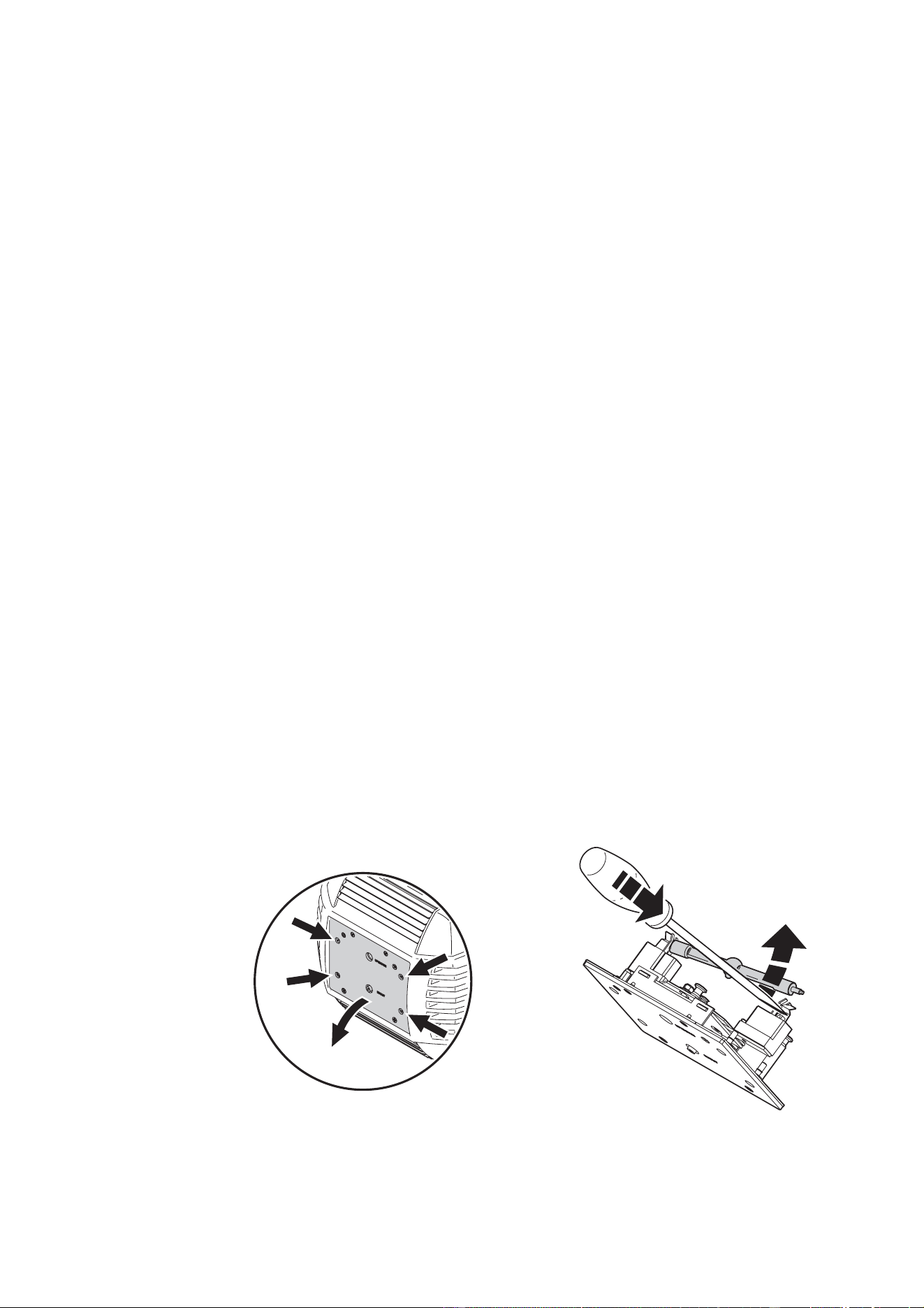
2. Release the 4 quarter-turn fasteners marked with arrows on the lamp access plate, as shown in Figure
1. Pull the lamp assembly straight back as far as it goes and let it rest in place.
3. Push down the retention spring on the right end of the socket and push out the pin. You can use a
screwdriver to pry the lamp out of the socket as shown in Figure 2. Remove the lamp.
4. Inspect the lampholder. If any discoloration or pitting is visible, replace the lampholder (see “Lampholder
replacement” on page 26).
Figure 2: Lamp removalFigure 1: Lamp access
8 MAC 550 Profile
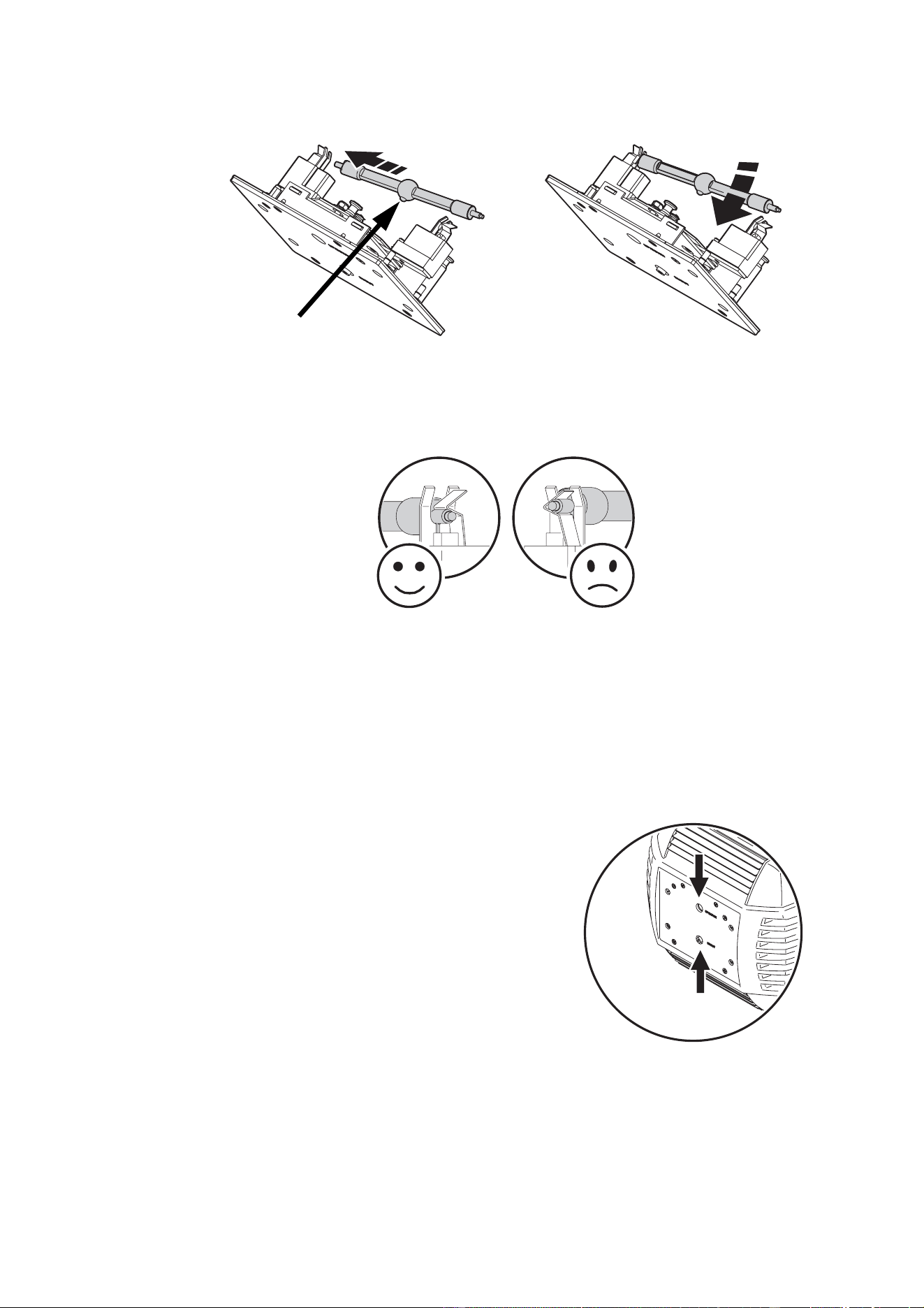
5. With the nipple on the replacement lamp facing towards the back as shown in Figure 3, insert the left pin
into the socket. Push down on the right-hand spring and snap the pin into place.
6. Make sure that the terminals on the lamp sit below the V-section in the lampholder clips and not in the
V-section itself, as shown in Figure 4.
7. Lift the lamp assembly so that lamp is level with the center of the reflector. Push the assembly straight in
until it seats, making sure the lamp passes through the reflector opening.
8. Push and turn the 4 fasteners a quarter turn or so clockwise to close the lamp access panel.
9. After installing a new lamp, reset the lamp hour and lamp strike counters. See “Time” on page 13.
To align the lamp
Important! Align the lamp carefully. An excessive hot-spot
will damage optical components.
1. Switch on the MAC 550 Profile and allow it to reset.
Using either a controller or the control module, turn on
the lamp and project an open white beam on a flat
surface.
2. Center the hot spot vertically using the top Allen-head
adjustment screw in the center of the rear plate. (See
Figure 5.) If there is significant hot spot, turn the bottom
adjustment screw counterclockwise until the light is
evenly distributed. If the light is brighter around the
edge than it is in the center, or if light output is low, turn
the bottom adjustment screw clockwise until the light is
bright and evenly distributed.
Figure 3: Lamp insertion
Nipple facing towards back
Figure 4: Lamp terminals
Figure 5: Lamp adjustment screws
AC power 9
AC
POWER
WARNING! For protection from electric shock, the fixture must be grounded (earthed). The AC power
distribution system must be fitted with a fuse or circuit breaker and ground-fault
protection.
Fuses
The MAC 550 Profile is supplied with a 10 AT (slow blow) main fuse for both 100-120 V and 200-240 V
power.
Earlier models were supplied with a 6.3 AT fuse for 200-240 V power, but this fuse has limited ‘headroom’.
To eliminate any possibility of the main fuse blowing unnecessarily, we recommend using the 10 AT fuse in
the MAC 550 Profile at all voltages.
Power supply
The MAC 550 Profile can operate on 100-120 or 200-240 VAC nominal power at 50/60 Hz. No manual
adjustment is required – the switch-mode power supply is fully auto-ranging and adjusts automatically to
voltages and frequencies within these ranges.
The power supply on earlier models was semi auto-ranging, and had to be configured for either 100-120 V
or 200-240 V power by moving a voltage selection switch inside the front of the base.
Power connection
Important! Connect the MAC 550 Profile directly to AC power. Do not connect it to a dimmer system;
doing so may damage the fixture.
You may need to install a plug that fits your supply on the power cable. A 3-prong grounding-type plug must
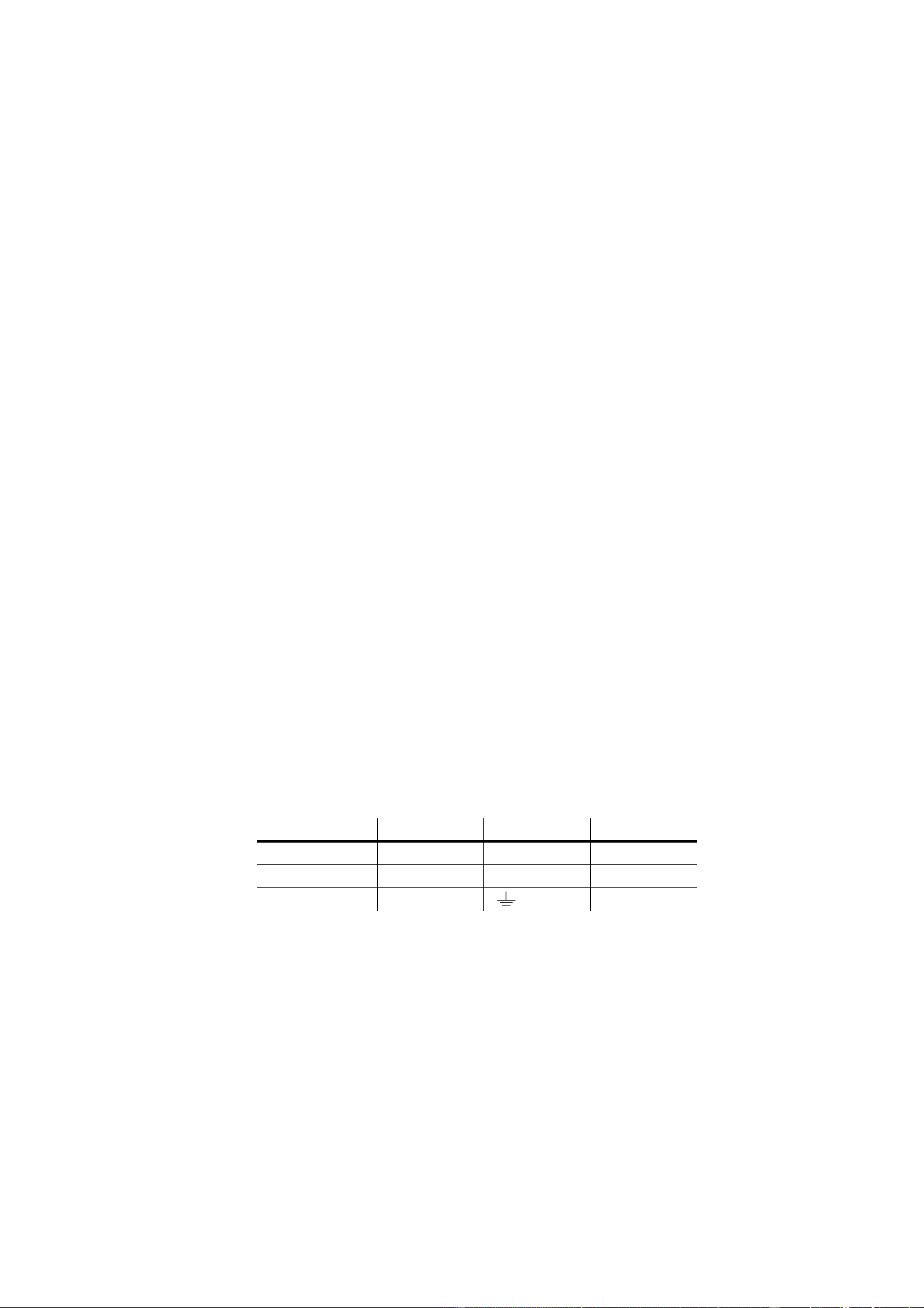
be installed following the manufacturer’s instructions. The table shows some possible pin identification
schemes. If the pins are not clearly identified, or if you have any doubts about proper installation, consult a
qualified electrician.
To apply power, first verify that the head is unlocked and then set the power switch on the base to the “I”
position.
Wire Color Pin Symbol Screw (US)
brown live L yellow or brass
blue neutral N silver
yellow/green ground green
Table 1: Power plug connections

10 MAC 550 Profile
D
ATA
Important! Never connect more than 1 data input and 1 data output.
The MAC 550 Profile has both 3-pin and 5-pin XLR sockets for DMX input and output. The pin-out on all
sockets is pin 1 to shield, pin 2 to cold (-), and pin 3 to hot (+). There is no connection to pins 4 and 5.
The sockets are wired in parallel: both inputs connect to both outputs. For reliable data transmission and to
avoid damage to the fixture, never use more than one input and one output!
Tips for reliable data transmission
• Use shielded twisted-pair cable designed for RS-485 devices: standard microphone cable cannot transmit
control data reliably over long runs. 24 AWG cable is suitable for runs up to 300 meters (1000 ft). Heavier
gauge cable and/or an amplifier is recommended for longer runs.
• Never use both outputs to split the link. To split the serial link into branches use a splitter such as the
Martin 4-Channel Opto-Isolated RS-485 Splitter/Amplifier.
• Do not overload the link. Up to 32 devices may be connected on a serial link.
• Terminate the link by installing a termination plug in the output socket of the last fixture. The termination
plug, which is a male XLR plug with a 120 Ohm, 0.25 Watt resistor soldered between pins 2 and 3, “soaks
up” the control signal so it does not reflect and cause interference. If a splitter is used, terminate each
branch of the link.
• Martin fixtures introduced before 1997 have reversed polarity data sockets (pin 2 hot and pin 3 cold). The
socket polarity is labelled. Use a phase-reversing cable between the MAC 550 Profile and any Martin
device with reversed polarity.
To connect the data link
1. Connect the DMX data output from the controller to the MAC 550 Profile’s 3-pin or 5-pin input (male)
socket.
2. Using the sockets that match your data cable, connect the output of the fixture closest to the controller to
the input of the next fixture.
3. Insert a male 120 Ω XLR termination plug in the 3-pin or 5-pin output of the last fixture on the link.
Rigging 11
R
IGGING
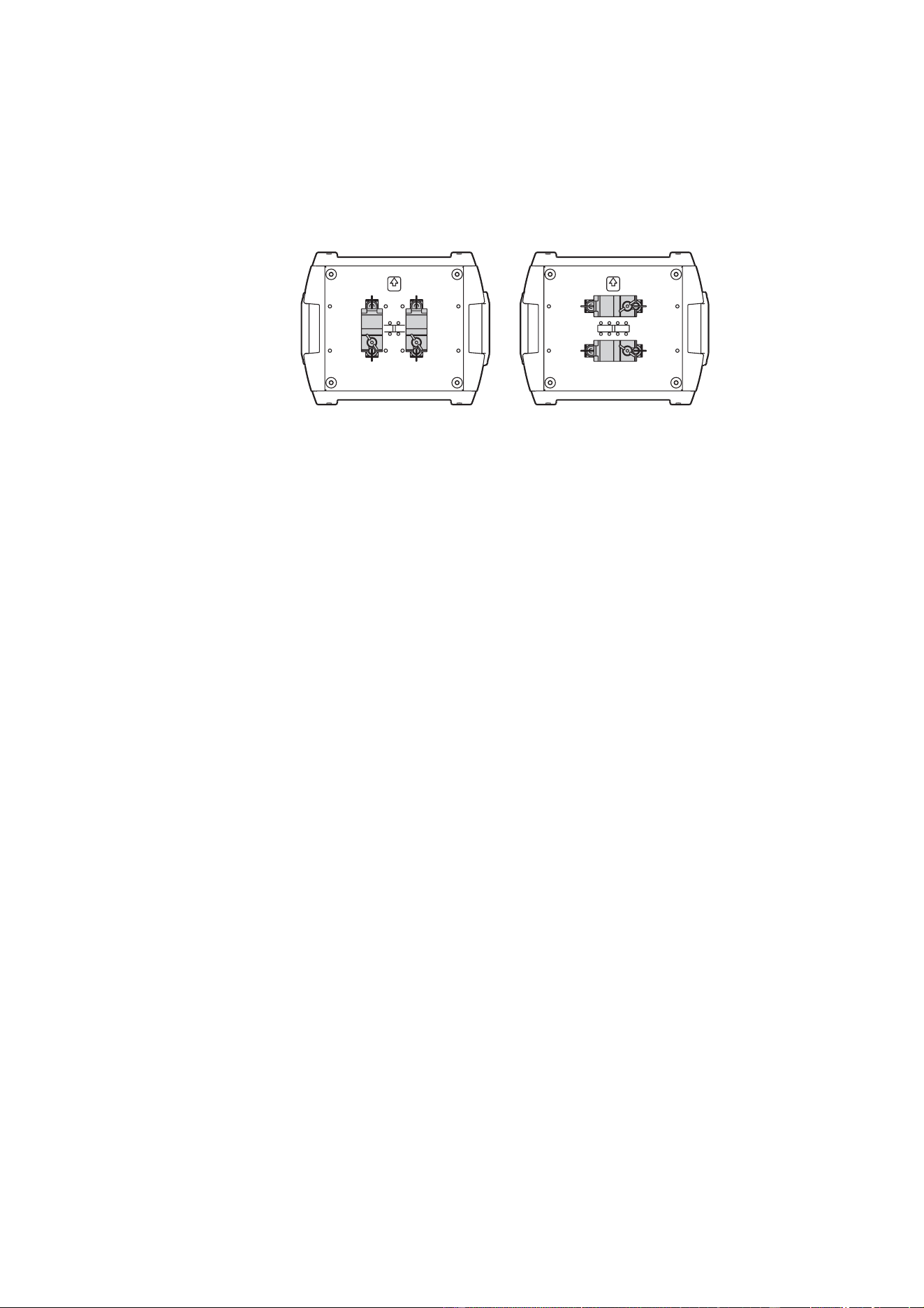
The MAC 550 Profile can be placed on stage or clamped to truss in any orientation. The mounting points
allow the clamp brackets to be fastened parallel or perpendicular to the front as shown Figure 6.
Warning! Always use 2 clamps to rig the fixture. Lock each clamp with both 1/4-turn fasteners. The
fasteners are locked only when turned fully clockwise.
Warning! Attach an approved safety cable to the attachment point labelled “SAFETY WIRE” in the
base. Never use the carrying handles for secondary attachment.
To clamp the fixture on a truss
1. Verify that the rigging clamps are undamaged and can bear at least 10 times the weight of the fixture.
Verify that the structure can bear at least 10 times the weight of all installed fixtures, clamps, cables,
auxiliary equipment, etc.
2. Bolt each clamp securely to a clamp bracket with an M12 bolt (grade 8.8 or better) and lock nut.
3. Align a clamp with 2 mounting points in the base. Insert the fasteners into the base and turn both levers
a full 1/4-turn clockwise to lock. Install the second clamp.
4. Block access under the work area. Working safely from a stable platform, hang the fixture on the truss
with the arrow towards the area to be illuminated. Tighten the rigging clamps.
5. Install a safety wire that can bear at least 10 times the weight of the fixture. The attachment point is
designed to fit a caribiner clamp.
6. Verify that the tilt lock is released. Verify that there are no combustible materials or surfaces to be
illuminated within 1 meter of the fixture, and that there are no flammable materials nearby.
Figure 6: Clamp bracket positions

12 MAC 550 Profile
C
ONTROL
PANEL
The LED control panel allows you to set user options and read fixture information. User settings may be
changed remotely via the serial link with the Martin MP-2 Uploader.
Menu navigation
The DMX address and any status messages (see page 38) are displayed when the MAC 550 Profile is
turned on. To enter the menu, press [Menu]. Press [Up] and [Down] to move within the menu. To select a
function or submenu, press [Enter]. To escape a function or menu, press [Menu]. See Table 2 on page 33
for a complete list of the menu items.
Note: [Enter] must be pressed and held for a few seconds to enter the utilities menu.
DMX address and protocol
The DMX address, also known as the start channel, is the first channel used to receive instructions from the
controller. For independent control, each fixture must be assigned its own control channels. Two MAC 550
Profiles may share the same address, however, if identical behavior is desired. Address sharing can be
useful for diagnostic purposes and symmetric control, particularly when combined with the inverse pan and
tilt options.
Depending on the selected DMX mode, the MAC 550 Profile requires 21 or 27 DMX channels. The basic
mode uses 21 channels and provides coarse control of all effects plus fine control of gobo rotation, pan, and
tilt. The extended mode uses 27 channels and provides the basic mode features plus fine control of the
dimmer, color wheels, iris, focus, and zoom.
Note: From software version 2.0, DMX addressing is limited to channels 1-492 (in basic mode) and 1-487
(in extended mode). This makes it impossible to set the DMX address so high that you are left without
enough control channels for the fixture.
To set DMX address and protocol
1. Press [Menu] to enter the main menu.
2. Press [Up] until
is displayed. Press [Enter]. To snap to channel 1, press [Enter] and [Up]. Scroll to
the desired channel and press [Enter].
3. Select
from the main menu and press [Enter]. Select for basic mode, or for
extended mode. Press [Enter].
Tailoring performance
Movement
The MAC 550 Profile provides several options for optimizing movement for different applications.
• The protocol setting (
) setting selects the basic () or extended () control mode.
Extended mode provides finer position control of the dimmer, color wheels, iris, focus lens, and zoom lens
than the basic mode.
• The pan and tilt invert (
) menu swaps and/or inverts pan and tilt.
• The pan/tilt speed (
) menu provides 3 settings: , , and . is best for most
applications. provides better performance in applications where speed is most important.
provides the smoothest movement and is best in long-throw applications with slow movements through
narrow angles.
• The studio mode (
) setting optimizes all effects besides pan and tilt for quietness or speed.

Control panel 13
• The shortcuts (Æ) setting determines whether the gobo and color wheels take the shortest
path between two positions, crossing the open position if necessary, or always avoid the open position.
Dimmer
The dimmer curve setting (Æ) provides two options for dimmer behavior. Select to
simulate tungsten dimming or
for more linear dimming.
Display
The display intensity (Æ) setting controls display brightness. Select for automatic
display or manually set the intensity to a level from
to .
The display on/sleep setting (
Æ) determines whether the display remains on (), or goes to
sleep 2 minutes (), or 10 minutes () after the last key press. If the display is in sleep mode, a
press on any key or an error message will switch it on again.
To flip the display, press [Up] and [Down] simultaneously.
Lamp
There are two settings that modify lamp control: Automatic Lamp On (Æ) and DMX Lamp Off
(Æ).
When
is , the lamp remains off until a “lamp on” command is received. When is , the
lamp strikes automatically after the fixture is powered on. When
is set to , the lamp strikes
automatically when the fixture receives DMX data, and it extinguishes 15 minutes after DMX data is lost.
When
is set to either or , the automatic lamp strike timing is staggered to prevent all lamps
from striking at once. The delay is determined by the fixture address.
The DMX Lamp Off (
) setting allows you to enable () or disable () the DMX command that
switches off the lamp. The special combination of DMX values listed on page 15 allows you to execute the
lamp-off command even when disabled.
DMX reset
The DMX reset (Æ) setting controls the behavior of the reset command. When set to , the
command is fully enabled. When set to , the command is disabled to prevent accidental resets. When
set to , the command must be sent for five seconds.
Color blackout
The color blackout (Æ) setting enhances blackout effectiveness. When set to , the color
wheels deploy 3 seconds after dimmer blackout. The color filters absorb any tiny amount of light that may
escape past the dimmer.
The color wheels take a fraction of a second longer to open than the dimmer blades, however, so setting
this feature to OFF allows the fixture to snap open more rapidly after a blackout.
Readouts
Time
Æ provides readouts of fixture hours (), lamp hours (), and lamp strikes ().
Under each item is a resettable () increment counter and a non-resettable () counter for total
accumulated hours/strikes since fabrication. To reset an increment counter, display it and then press [Up]
until it reads 0.
Temperature
Æ provides readouts of the head and base temperature in Celsius and Fahrenheit.
Firmware version
Æ displays the version number of the installed firmware. The firmware version is also displayed
briefly at startup.

14 MAC 550 Profile
DMX
The DMX log () menu provides useful information for troubleshooting control problems.
displays the DMX refresh rate in packets per second. Values lower than 10 or higher than 44 may
result in erratic performance, especially when using tracking control.
displays the quality of the received DMX data as a percentage of packets received. Values much
below 100 indicate interference, poor connections, or other problems with the serial data link that are the
most common cause of control problems.
displays the DMX start code. Packets with a start code other than 0 may cause irregular
performance.
The remaining options under
display the DMX values received on each channel. If the fixture does
not behave as expected, reading the DMX values can help you troubleshoot the problem.
Manual control
The manual control menu () provides commands for resetting the fixture (), turning the lamp on
(), and turning the lamp off (). It also permits you to position and move individual effects.
Service utilities
Important! Enter must be held for several seconds to access the utilities menu.
Test sequences
provides a general test of all effects that can be run without a controller. Æ provides
routines for circuit board testing that are for service use only.
Feedback toggles
An on-the-fly position correction system monitors the gobo and color wheels, rotating gobos, and the
animation wheel. If a position error is detected, the shutter closes while the effect resets. This feature can
be disabled by turning effects feedback (
Æ) off.
The automatic pan/tilt position correction system may be temporarily turned off under
Æ. The
off setting, however, is not saved and the system will be re-enabled the next time the fixture starts. If the
system cannot correct the pan/tilt position within 10 seconds, feedback is automatically disabled.
Calibration
The calibration menu (Æ) allows effects to be calibrated. The fixture can be returned to factory
calibrated effects and feedback settings using the command (
ÆÆ)
Adjustment
The adjustment menu (Æ) provides manual control for making mechanical adjustments. See
page 37.
Software upload
The upload mode command (Æ) prepares the fixture for a software update. This command is
not necessary, however, as upload mode is engaged automatically by the uploader.

Effects 15
E
FFECTS
This section describes the functions programmed in the MAC 550 Profile DMX protocols. The fixture has
two DMX operating modes, basic and extended. The extended mode requires six more DMX channels than
the basic mode and provides all features of the basic mode plus fine control of the dimmer, color wheels,
iris, zoom, and focus.
Channels references in this section refer to the extended mode protocol unless otherwise noted. The
complete DMX protocol begins on page 28.
Lamp power
Lamp-on
The lamp-on command on channel 1 closes the relay that provides power to the lamp. When the lamp is on,
the command has no effect.
Note: A peak of electric current that can be many times the operating current is drawn for an instant when
striking a discharge lamp. Striking many lamps at once may cause a voltage drop large enough to prevent
lamps from striking or draw enough current to trip circuit breakers. If sending lamp-on commands to multiple
fixtures, program a sequence that strikes lamps one at a time at 5 second intervals.
Lamp-off
The lamp can be doused from the controller with the lamp-off command. The command must be sent for 5
seconds.
If the lamp-off command is disabled (
ÆÆ), the lamp-off command works only if the
following effects are selected:
• color wheel 1: slot 1 (DMX 189 - 193)
• color wheel 2: slot 1 (DMX 189 - 193)
• prism: in, no rotation (DMX 80 - 89)
• gobo wheel 1: open (DMX 0 - 11)
• gobo wheel 2: open (DMX 0 or 194 - 202)
Fixture reset
If an effect loses its indexing and fails to move to programmed positions, the fixture can be reset from the
controller by sending the “Reset” command on channel 1.
If DMX reset is disabled (
ÆÆ), the reset command can only be executed if the conditions
listed under “Lamp-off” are met. If it is set to
, the reset command must be sent for 5 seconds before
executing.
Dimming and strobe
The mechanical dimmer/shutter system provides smooth, high-resolution 100 percent dimming, instant
open and blackout, random and variable strobe effects, and random and variable pulses in which the
dimmer snaps open and slowly dims or snaps closed and slowly opens.
Fine control of the dimmer is available in extended mode.

16 MAC 550 Profile
Color
The two overlapping color wheels each have 8 color filters that scroll continuously, allowing split colors, or in
full-color steps. The protocol provides commands for random and continuous color scrolling at different
speeds.
Fine control of the color wheels is available in extended mode.
Rotating gobos
Gobo wheel 1 has six rotating gobos that can be indexed (repeatedly positioned at a programmed angle),
rotated continuously, shaken (bounced), and scrolled. The gobo slot and the type of movement are selected
on channel 8 and the index angle or rotation speed are selected on channels 9 (coarse) and 10 (fine).
Static gobos
Gobo wheel 2 has nine static gobos that can be scrolled continuously, allowing split gobo effects, or in
full-gobo steps. The protocol provides commands for random and continuous gobo scrolling at different
speeds.
Gobo macros
Channel 12 (9 in basic mode) provides 6 preprogrammed variable-speed macros that use different
combinations of color and gobos.
Gobo animation
The gobo animation system is designed to create animated effects such as rising flames or windswept
clouds when combined with overlapping gobos.
Channel 13 (10 in basic mode) sets the animation wheel’s rotation mode (indexed or continuous), and
direction of movement. This channel also provides 5 programmed animation macros.
Channel 14 sets the wheel’s index angle if indexed rotation is selected on channel 13, or its rotation speed
and direction if continuous rotation is selected on channel 13.
Prism and iris
The prism may be inserted and rotated clockwise and counterclockwise at varying speeds. The prism
control channel also provides 8 programmed macros.
The iris channel controls the diameter of the iris opening and provides variable speed pulsing effects. Fine
control of the iris is provided in extended mode.
Focus and zoom
The focus lens focusses the beam from approximately 2 meters (6.5 feet) to infinity. The separate zoom
lens varies the focused beam angle from 14° to 30°. Fine control of focus and zoom is provided in extended
mode.

Effects 17
Pan and tilt
Pan and tilt are controlled on channels 22 to 25 (16 to 19 in basic mode). The coarse control channels set
the first 8 bits (the most significant byte or MSB), and the fine channels set the second 8 bits (the least
significant byte or LSB) of the 16-bit control byte. In other words, the fine channel works within the position
set by the coarse channel.
Speed channels
Tracking versus vector control
Important! Effect movement may be rough and unpredictable if controller fade times are combined
with vector speed values.
The speed channels provide two methods for controlling speed that are known as “tracking” and “vector”.
With tracking control, the speed at which effects move is determined by a cross-fade time programmed on
the controller. With this method, the controller divides a movement into tiny steps that the fixture “tracks”.
Tracking control is enabled by setting the speed channels to one of the tracking values listed in the DMX
protocol.
With vector control, speed is set with a DMX value on the speed channel. This provides a way to control
speed on controllers without cross-faders. Vector control can also provide smoother movement, particularly
at slow speeds, with controllers that send slow or irregular tracking updates. When using vector control, the
controller’s cross-fade time, if available, must be 0.
Blackout
When “blackout while moving” is selected on a speed channel, the shutter closes when an effect moves to
make the transition invisible. The shutter opens when the movement is complete. This function is available
for pan, tilt, color, gobo, and prism change.
Personality overrides
The pan/tilt speed channel provides tracking values that allow you to override the pan/tilt speed setting from
the controller.
The effects speed channel provides values for overriding the shortcuts setting for the color and gobo
wheels.
18 MAC 550 Profile
O
PTICAL
CONFIGURATION
Color wheels
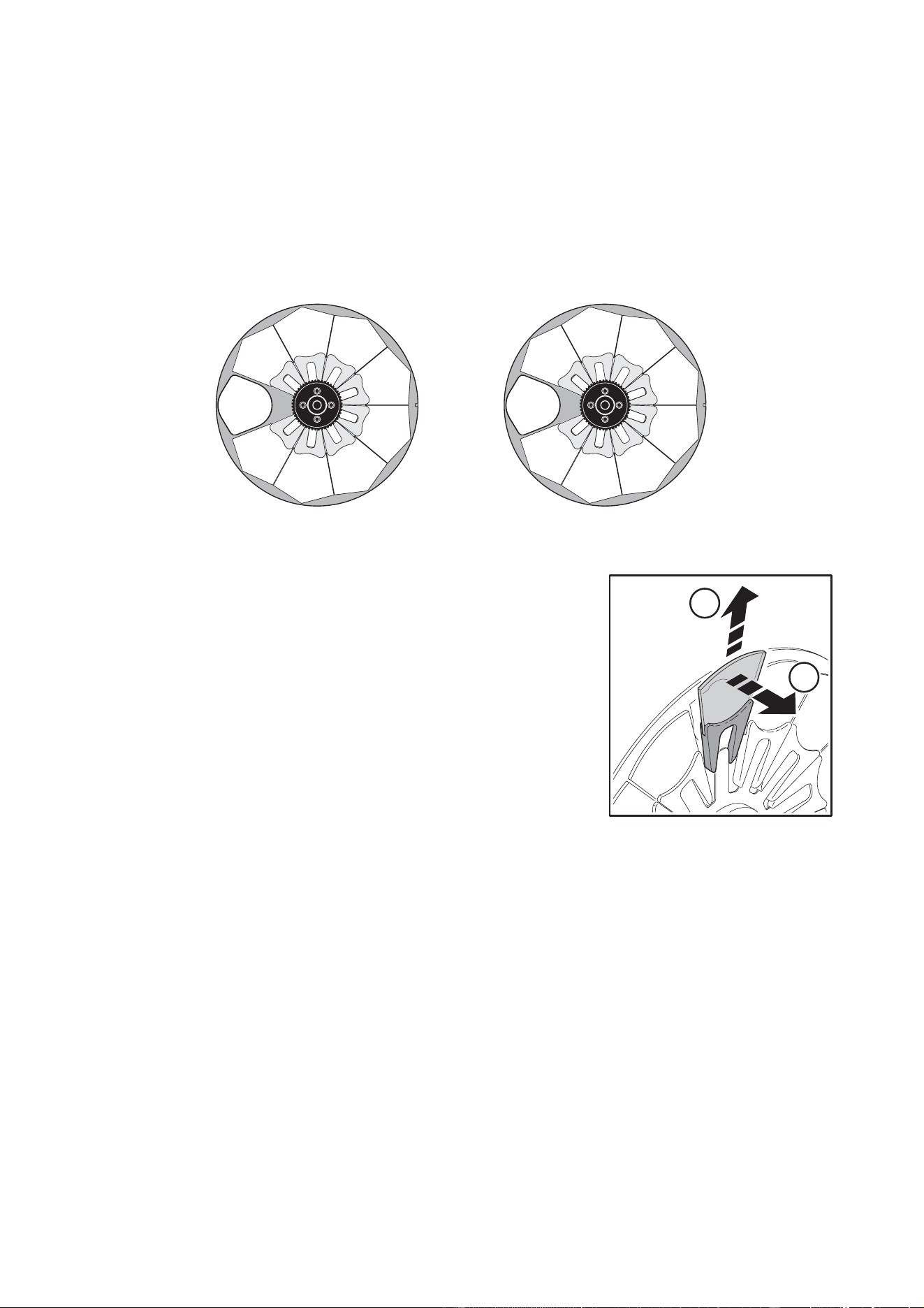
The MAC 550 Profile provides two overlapping color wheels with 8 interchangeable color filters and an open
position. Color wheel 1 is closer to the lamp and color wheel 2 is closer to the lens. The illustrations show
the filter positions as seen from the lens. Refer to the DMX protocol for filter names.
To replace a color filter
Note: Use only genuine MAC 550 color filters.
1. Disconnect the fixture from AC power and allow it to cool.
2. Remove the bottom cover.
3. Turn the color wheel to access the desired filter position. Press
the filter forwards slightly to release it and then grasp it by the
edges and remove. If your fingers are too large, protect the
glass with a piece of paper that has been folded several times
and grasp the filter with needle nose pliers.
4. To insert a filter, slide it under the retention spring until it snaps
into place.
5. Replace the cover before applying power.
1
2
3
4
5
6
7
8
Figure 7: Filter positions, wheel 1 (left) and wheel 2 (right), seen from lens
1
2
3
4
5
6
7
8
A
B
Figure 8: Filter
Optical configuration 19
Gobos
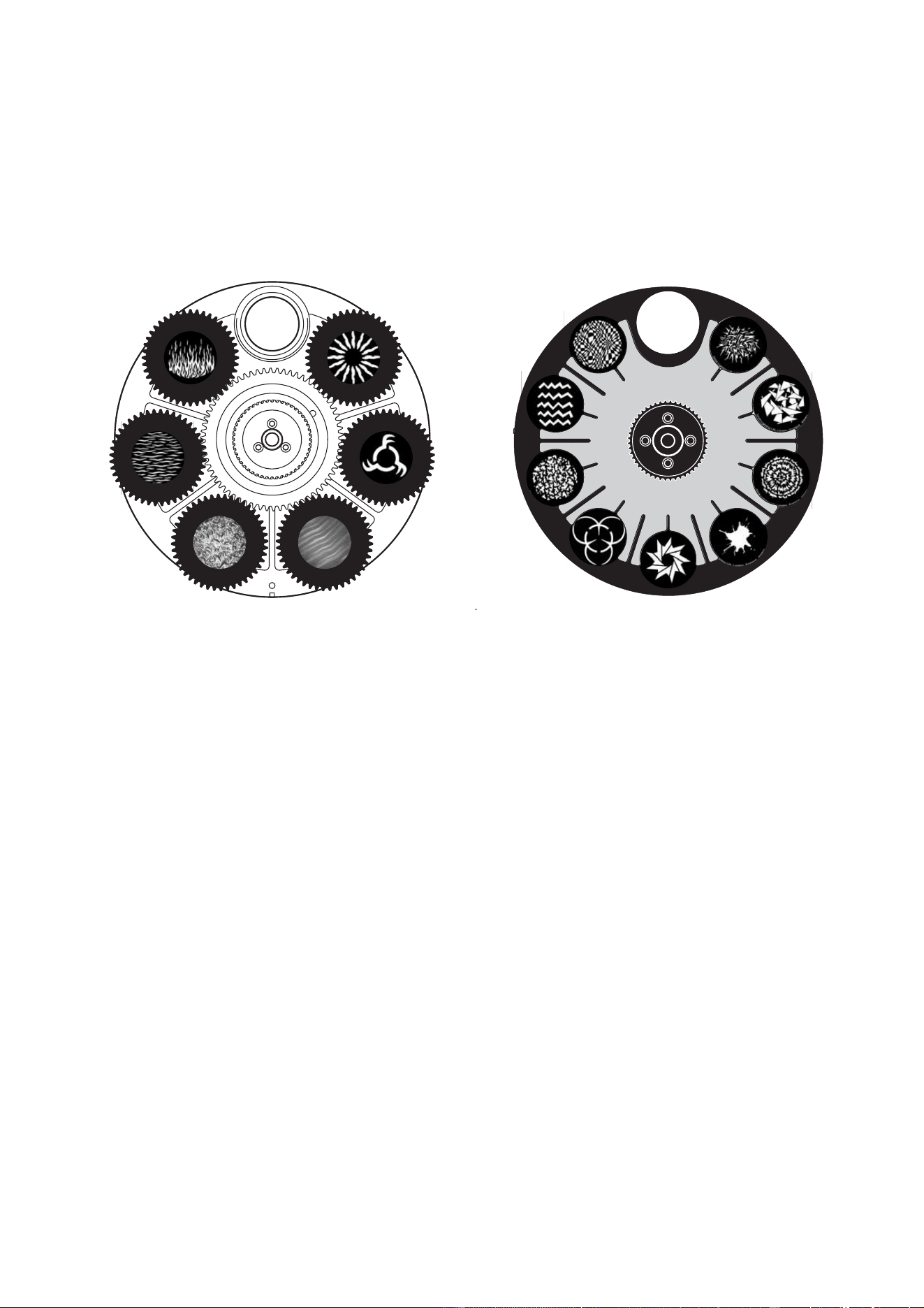
Gobo wheel 1 provides 6 rotating gobos; gobo wheel 2 provides 9 static gobos. The standard gobo
configuration is shown in Figure 9. All gobos are interchangeable with the following limitations:
• On wheel 1 (rotating), the gobo retention spring works with gobos up to 3 mm in thickness. Thicker gobos
can be glued to the holder with a UV adhesive or Loctite 330 Multibond with Activator.
• On wheel 2 (static), the maximum thickness for gobos is 1.1 mm.
Custom gobos
Martin can provide many additional gobos for the MAC 550 Profile, which accepts the same size gobos as
the MAC 500. For more information, please visit the Martin web site at www.martin.com.
Custom glass gobos should be made with the artwork reversed on the coated side. This orientation
minimizes reflections but is not critical.
While glass gobos are generally the most durable, satisfactory results can be obtained at less expense with
aluminum gobos. Custom stainless steel gobos can also be used, however they can warp, losing
sharpness, in a matter of hours. The useful life will depend on the gobo pattern and the projection cycle.
Consult your gobo supplier for more information.
For best results, custom gobos should meet the specifications listed on page 43.
1
2
3
4
7
9
5
6
8
Figure 9: Gobo wheels as seen from front lens
1
2
3
4
5
6
1. Fire Sun (P/N 43076065)
2. Rotator (P/N 43076077)
3. Purple Peaks (incl.goboholder P/N 62400331)
4. Limbo (incl. goboholder P/N 62400332)
5. Water (P/N 43076066)
6. Flames (P/N 43076067)
1. Crackle (P/N 43076068)
2. Triangles (P/N 43076069)
3. Tie Dye (P/N 43076070)
4. Splodge (P/N 43076071)
5. Ninestar (P/N 43076072)
6. Bio (P/N 43076073)
7. Leaf Breakup (P/N 43076074)
8. Zig Zags (P/N 43076075)
9. Two Tone (P/N 43076076)
Wheel 1: Rotating gobos Wheel 2: Static gobos
20 MAC 550 Profile
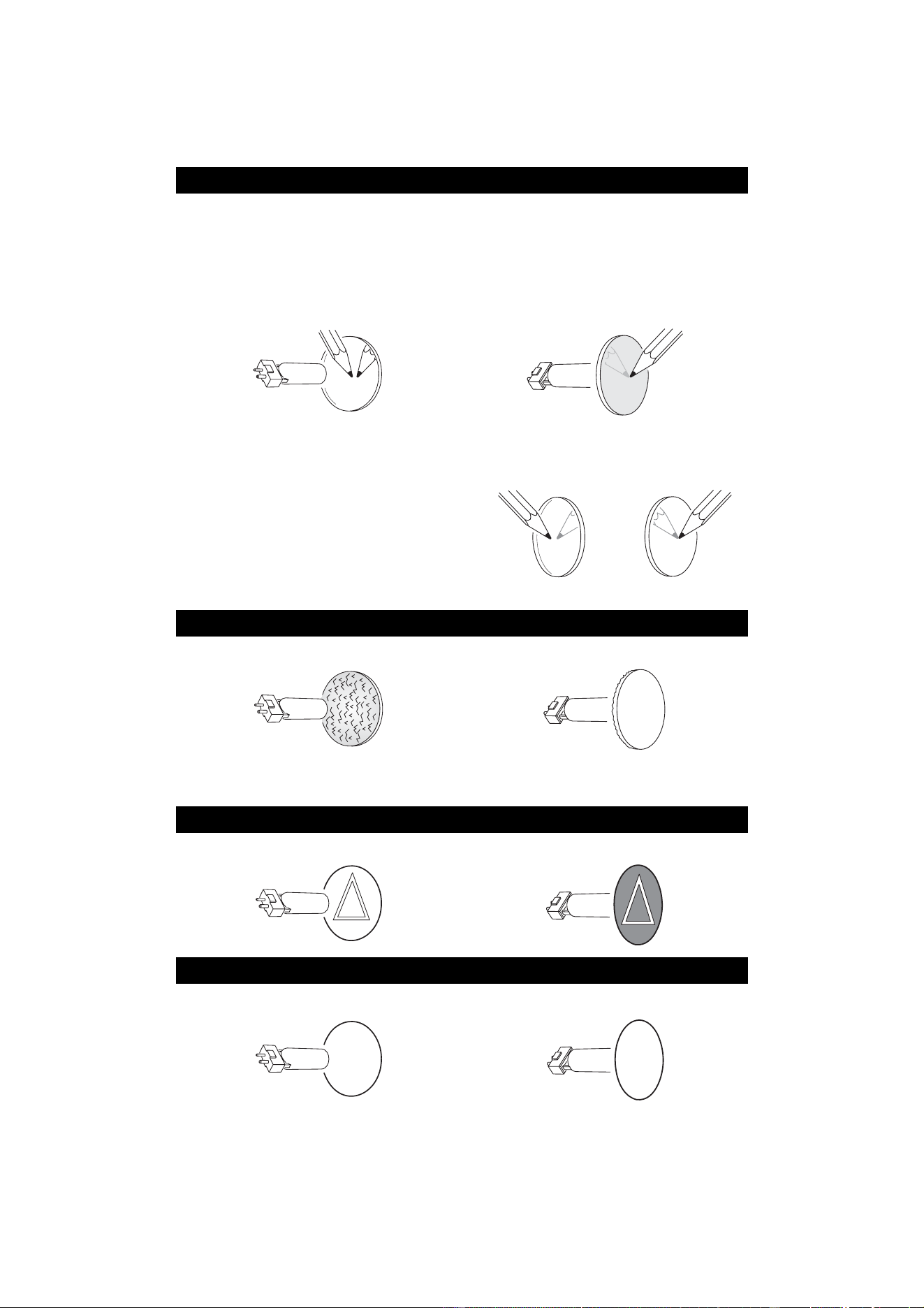
GOBO ORIENTATION IN THE MAC 550 PROFILE
The orientations shown in Figure 10 are correct in most cases, but consult your Martin dealer or gobo
supplier if you are in any doubt about the orientation of a specific gobo type.
Coated Glass Gobos
Focus is easiest to maintain if all coated gobos in a fixture are installed with their coatings
as close as possible to the same plane of focus. The coated gobos in the MAC 550 Profile
are factory-installed in this position. However, if there is an unusually high risk of heat
damage on a custom coated gobo, the first priority is normally to ensure that more reflective
sides face towards the lamp. If in doubt, install coated gobos with the more reflective
(silvered) side towards the lamp, or consult your Martin dealer or gobo supplier.
More reflective side towards lamp
To minimize the risk of gobo overheating
and damage, turn the more reflective side of
a coated gobo towards the lamp.
Less reflective side away from lamp
The less reflective side of a coated gobo will
absorb less heat if it faces away from the
lamp.
To determine which side of a gobo is coated,
hold an object up to it. On the uncoated side,
there is a space between the object and its
reflection and the edge of the gobo can be
seen when looking through the glass.
Textured Glass Gobos
Textured side towards lamp Smooth side away from lamp
Textured glass gobos in the MAC 550 Profile sit most squarely in the gobo wheel with the
textured side towards the lamp. If in doubt, consult your Martin dealer or gobo supplier.
Metal Gobos
Reflective side towards lamp Black side away from lamp
Image / text Gobos
True image towards lamp Reversed image away from lamp
Figure 10. Correct gobo orientation
Uncoated side Coated side
abc
abc
Optical configuration 21
To replace rotating gobos
Important! The gobo can fall out if the spring is inserted backwards.
1. Disconnect the fixture from power and allow it to cool.
2. Position the head upside down and remove the bottom head
cover. Turn the gobo wheel to the desired position. Grasp the
holder by the teeth and pull the holder lightly towards the front
lens to release the holder and remove it from the wheel.
3. With a small screwdriver or similar, unhook the end of the gobo
spring furthest from the gobo and pull out the spring. Drop the
gobo out of the holder.
4. Insert the new gobo in the holder with the side that faces
towards the lamp facing upwards, towards the spring (see
Figure 10 and Figure 11).
5. Insert the spring with the narrow end against the gobo. To
identify the narrow end, press the spring flat: the narrow end is
on the inside. Push the end of the spring in under the lip of the
holder.
6. Verify that the gobo is seated flush against the holder. Press the spring as flat as possible against the
back of the gobo.
7. Work the rim of the gobo holder under both clips and snap the gobo holder back into position. If
necessary, a small screwdriver or similar tool may be used to pry the clips away from the wheel.
8. Replace the bottom cover and release the tilt lock before applying power.
To replace static gobos
1. Disconnect the fixture from power and allow it to cool.
2. Remove the top head cover.
3. Turn the gobo wheel to the desired position. Press the gobo from the lamp side to release. Remove the
gobo.
4. To insert a gobo, orient the gobo as shown in Figure 10 and place the edges under the retention spring.
Verify that the gobo is centered in the opening.
5. Replace the top head cover and release the tilt lock before applying power.
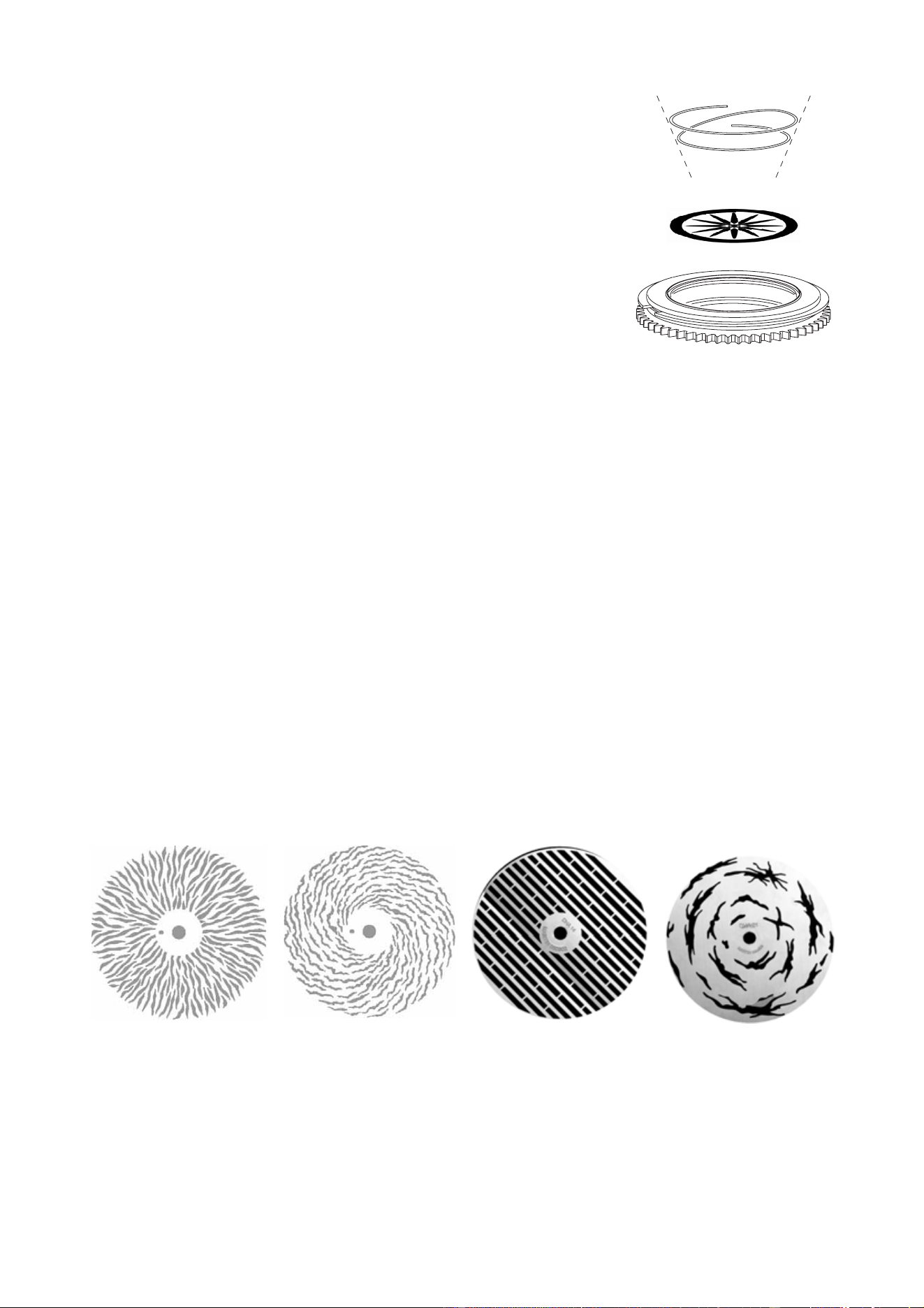
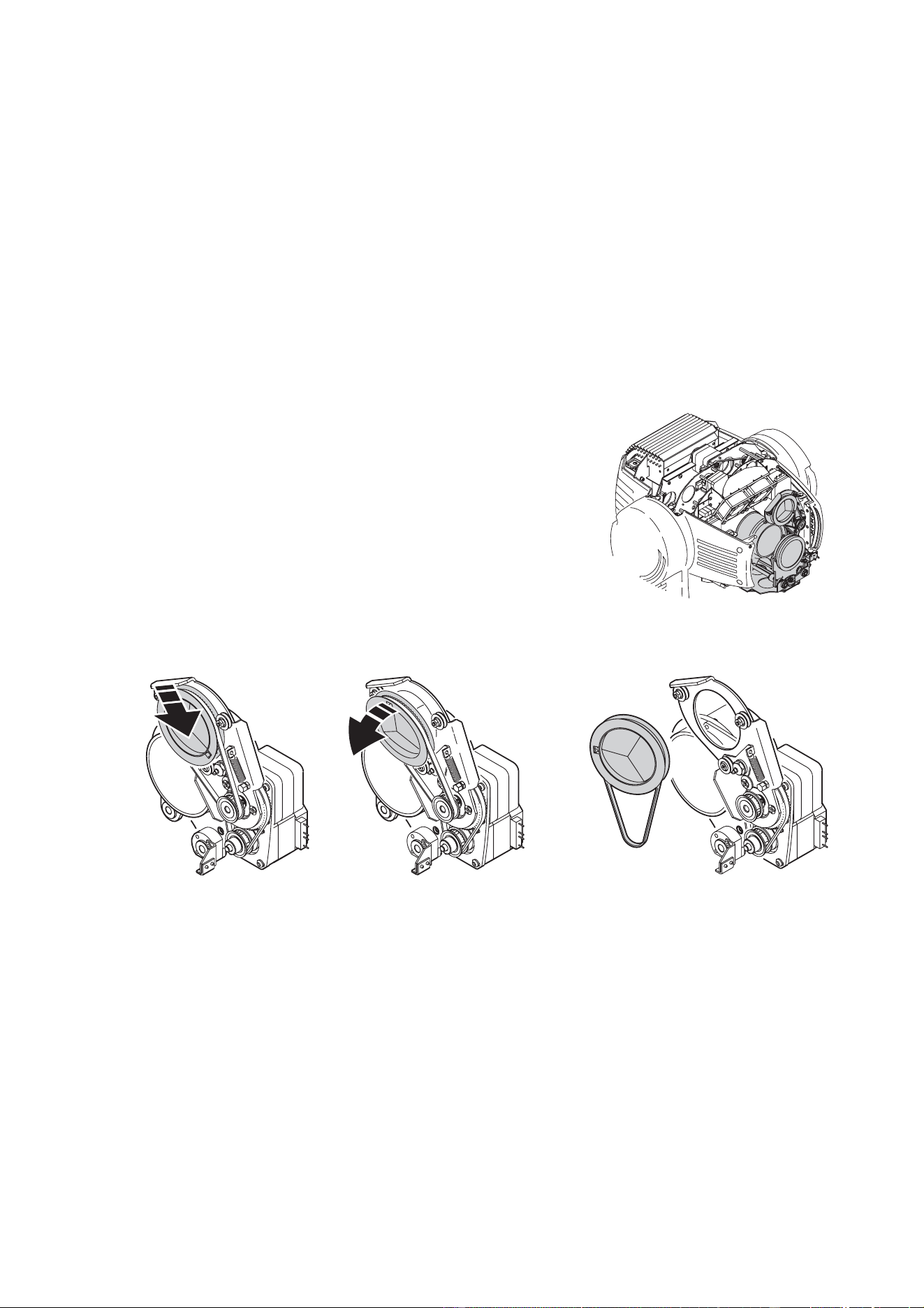
Animation wheel
The MAC 550 Profile comes with the “Radial breakup” animation wheel installed. Three additional stock
patterns are available.
To replace the gobo animation wheel
Note: The replacement animation wheel can be inserted with the magnet in or out to suit your application. In
fixed applications, install the wheel with the magnet forwards, away from the drive mechanism, for easier
Figure 11: Rotating gobo holder
Figure 12: MAC 550 Profile animation wheels
Radial breakup (included)
P/N 62325048
Spiral breakup (optional)
P/N 62325049
Linear breakup (optional)
P/N 62325050
Coarse tangential (optional)
P/N 62325051
22 MAC 550 Profile
removal. In touring or similar applications where the fixture is frequently moved, install the animation wheel
with the magnet in towards the drive mechanism for a more secure hold.
1. Disconnect the fixture from power and allow it to cool.
2. Remove the gobo module as described on page 23.
3. Stand the module on the work surface with the cooling fans to your left and the color wheel to your right.
4. Bring the animation wheel to the side of the module closest to you by turning the black belt on the right.
5. To avoid bending the animation wheel while removing, break the magnet’s initial hold by prying the
wheel off with a screwdriver inserted from the back. Once you have broken the hold, you can safely
grasp the wheel by the edge and remove.
6. Orient the replacement wheel with the magnet in or out to suit your application. (See note.) Place the
wheel over the drive mechanism and align the hole in the wheel with the drive pin.
7. Reinstall the gobo module. Verify that the guide pins are correctly seated and that the module is
securely locked.
8. Replace the head cover and release the tilt lock before applying power.
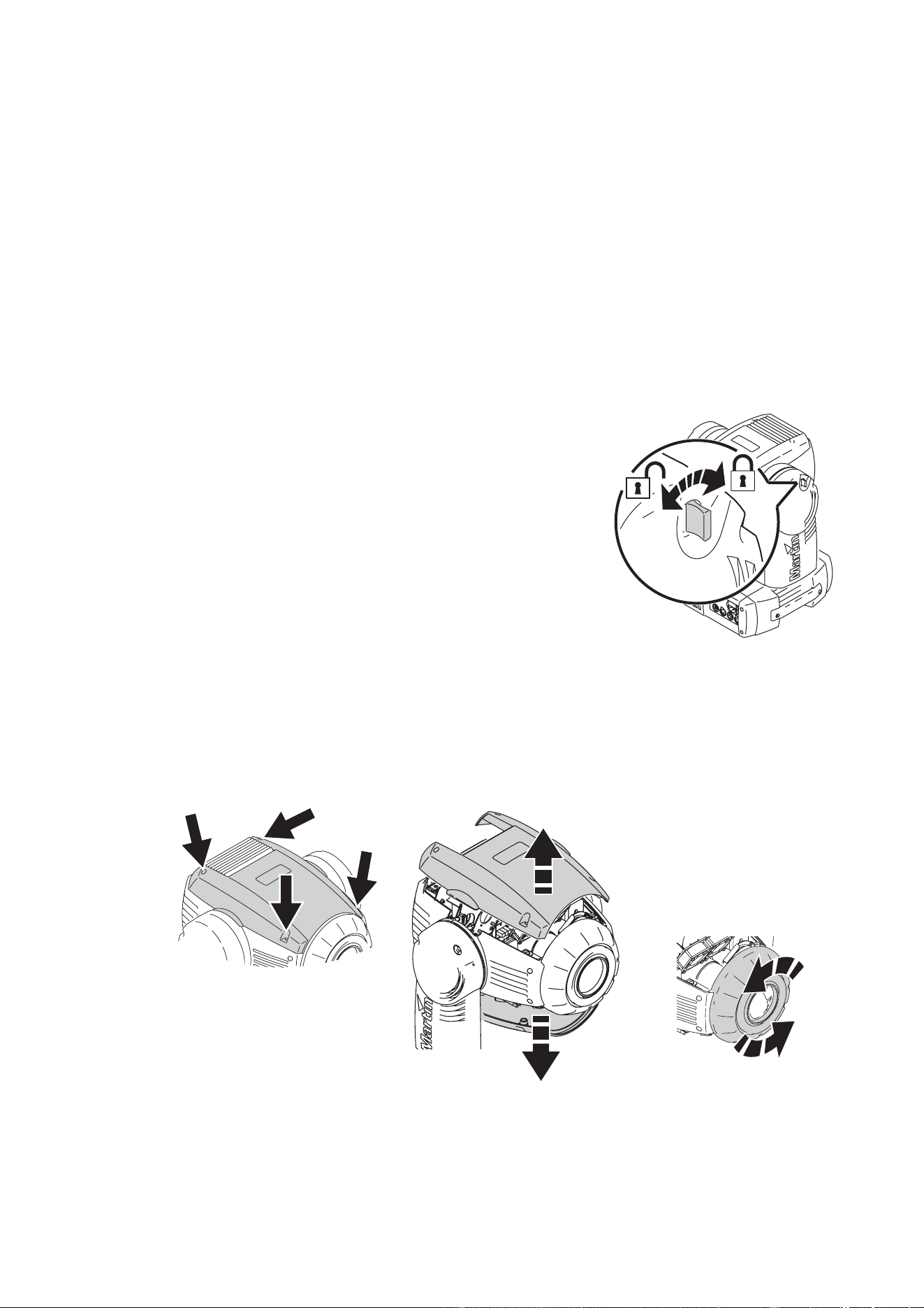
Prism
The MAC 550 Profile is supplied with a three-facet rotating prism.
To replace the prism
1. Disconnect the fixture from power and allow it to cool.
2. Position the head top side up, secure it with the tilt lock and
remove the top head cover. The prism sits in the zoom/focus
module (see Figure 13).
3. See Figure 14. The prism wheel is held between three pulleys.
The lower pulley is spring-loaded. Push the prism down until it is
released from the upper two pulleys, then lift it forwards out of
the module.
4. Ensure the prism drive belt engages correctly during reassembly.
5. Replace all covers and release the tilt lock before reapplying power.
Figure 13: Zoom/focus module
Figure 14: Removing the prism
Routine maintenance 23
R
OUTINE
MAINTENANCE
The MAC 550 Profile requires routine cleaning. The schedule depends heavily on the operating
environment. It is essential to follow the cleaning guidelines given later in this section.
Refer any service operation that is not described here to a qualified Martin technician.
Important! Excessive dust, smoke fluid, and particulate buildup degrades performance, causes
overheating and will damage the fixture. Damage caused by inadequate maintenance is not
covered by the warranty.
Warning! Disconnect the fixture from power before removing any cover.
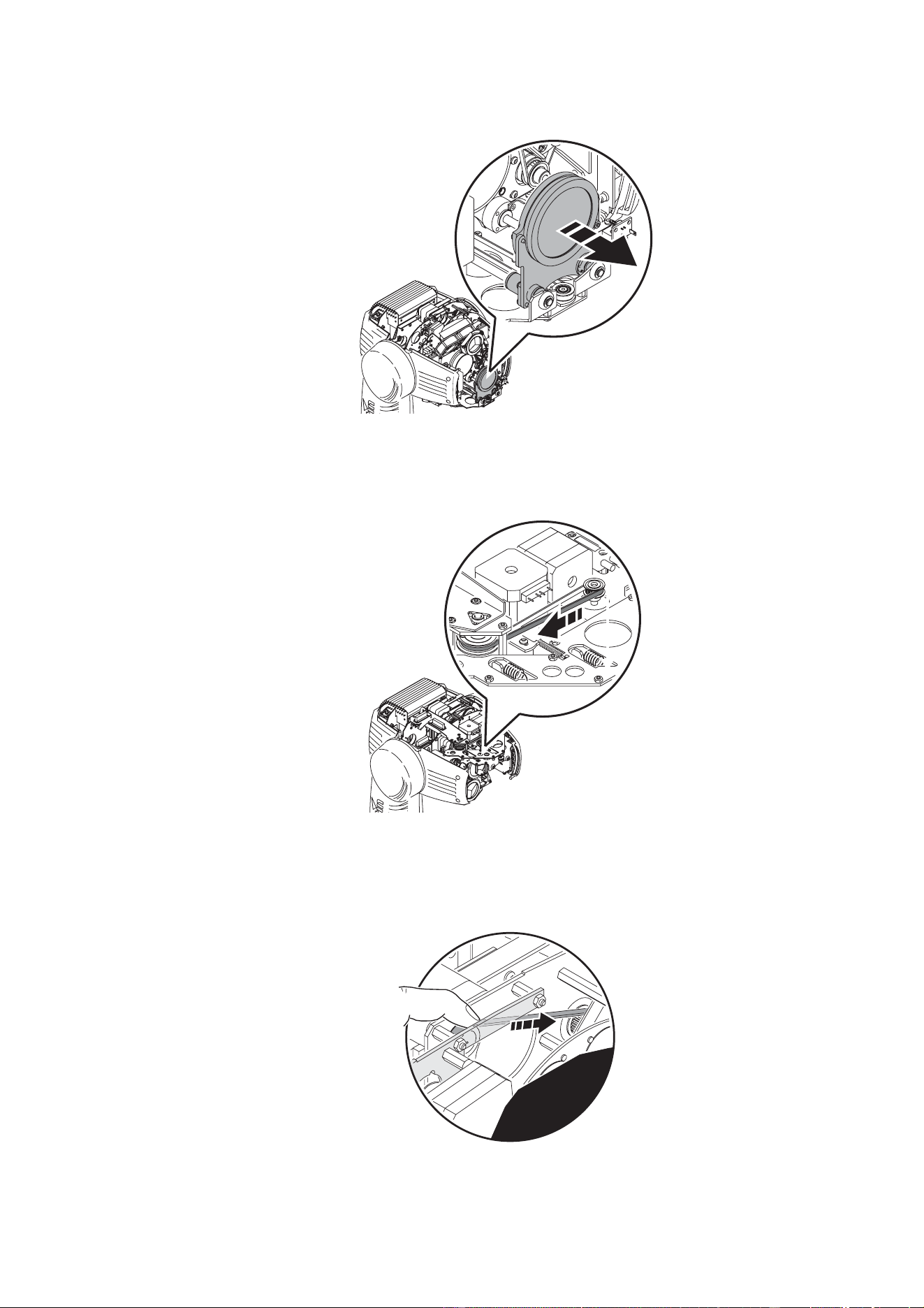
Tilt lock
Important! Release the tilt lock before operating the fixture.
The tilt position of the head can be locked for transportation and
service with the tilt lock. To lock or unlock the head, pull the lock
out and turn it one-quarter turn in either direction.
Disassembly
To remove the gobo module
1. Disconnect the fixture from power and allow it to cool.
2. Turn the four retaining screws in the top and bottom head covers one quarter-turn counter-clockwise to
release the covers.
3. Remove the front lens by twisting one quarter-turn counter-clockwise.
Figure 15: Tilt lock
Figure 16: Releasing top and bottom covers and removing front lens
24 MAC 550 Profile
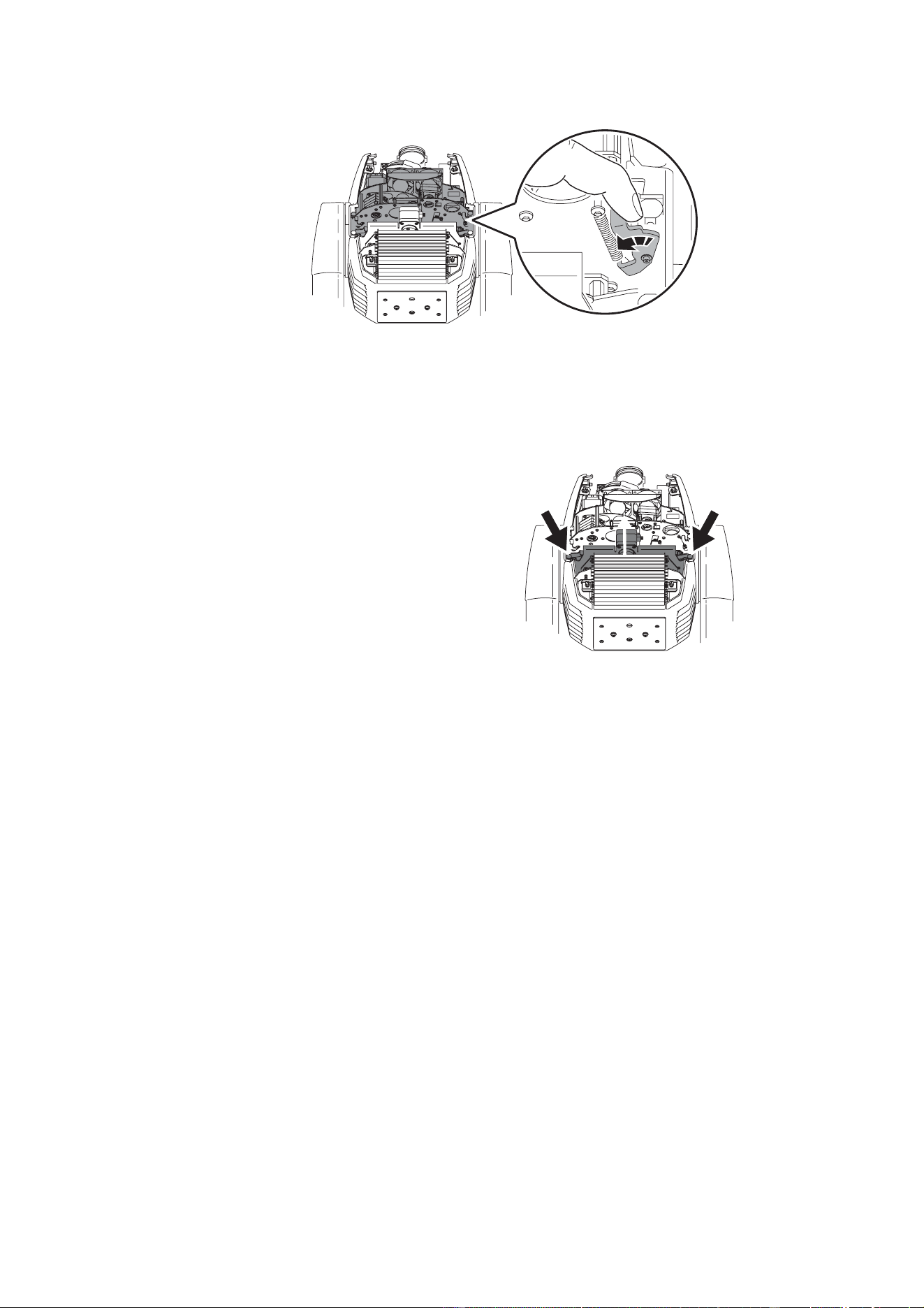
4. Position the head top side up so that you have access through the top. Holding the focus lens by its
base, slide it out it to its limit at the front of the fixture as shown in Figure 17.
5. Flip the head upside-down. Move the prism lens to its forward limit by pulling on its belt as shown in
Figure 18.
6. Flip the head top side up again. To avoid bending the gobo animation wheel when you remove the
module, move the wheel in towards the center of the module by inserting a finger and rotating the
positioning belt idler pulley at the top of the module as shown in Figure 19.
Head top side up
Figure 17: Moving the focus lens forward
Figure 18: Moving the prism lens forward
Head upside down
before taking out the gobo-color modul
ebefore taking out
the gobo-color
module
Figure 19: Retracting the gobo animation wheel
Routine maintenance 25
7. Unlock the gobo module by pulling the levers on each side towards the center. Lift the module up 1 cm
(0.5 in.) and release the levers. Lift the module straight up to remove from the head.
8. When reinstalling the module, verify that the guide pins are correctly seated and that the module is
securely locked.
To remove the dimmer module
The dimmer module can be removed
for service and to access the lamp
cooling fans and heat shield:
1. Remove the gobo module as
described above.
2. Like the gobo module, the smaller
dimmer module is also released by
pulling on two levers. Lift the
module straight up to remove from
the head.
3. When reinstalling, verify that the
guide pins are correctly seated and
that the module is securely locked.
Cleaning
Regular cleaning is very important for fixture life and performance. Buildup of dust, dirt, smoke particles, fog
fluid residues, etc. degrades the fixture’s light output and cooling ability.
Cleaning schedules for lighting fixtures vary greatly depending on the operating environment. It is therefore
impossible to specify precise cleaning intervals for the MAC 550 Profile. Cooling fans suck in airborne dust
and smoke particles, and in extreme cases fixtures may require cleaning after surprisingly few hours of
operation. Environmental factors that may result in a need for frequent cleaning include:
• Use of smoke or fog machines.
• High airflow rates (near air conditioning vents, for example).
• Presence of cigarette smoke.
• Airborne dust (from stage effects, building structures and fittings or the natural environment at outdoor
events, for example).
If one or more of these factors is present, inspect all fixtures within their first 24 hours of operation to see
whether cleaning is necessary. Check again at frequent intervals. This procedure will allow you to assess
cleaning requirements in your particular situation. Experience and consultation with your Martin service
representative will help you determine an appropriate maintenance schedule.
Use care when cleaning optical components and work in a clean, well lit area. The coated surfaces are
fragile and easily scratched. Do not use solvents that can damage plastic or painted surfaces.
To clean the fixture
1. Disconnect the fixture from power and allow the components to cool completely.
2. Remove the covers, front lens and gobo and dimmer modules as described earlier.
3. Vacuum or gently blow away dust and loose particles with compressed air.
Figure 20: Gobo module locking levers
Figure 21: Dimmer module locking levers
26 MAC 550 Profile
4. Carefully clean the optical components. Remove smoke and other residues with cotton swabs or
unscented tissues moistened with isopropyl alcohol. A commercial glass cleaner may be used, but
residues must be removed with distilled water. Clean with a slow circular motion from center to edge.
Dry with a clean, soft and lint-free cloth or compressed air. Remove stuck particles with an unscented
tissue or cotton swab moistened with glass cleaner or distilled water. Do not rub the surface: lift the
particles off with a soft repeated press.
5. Remove dust from the head fans and air vents with a soft brush, cotton swab, vacuum, or compressed
air.
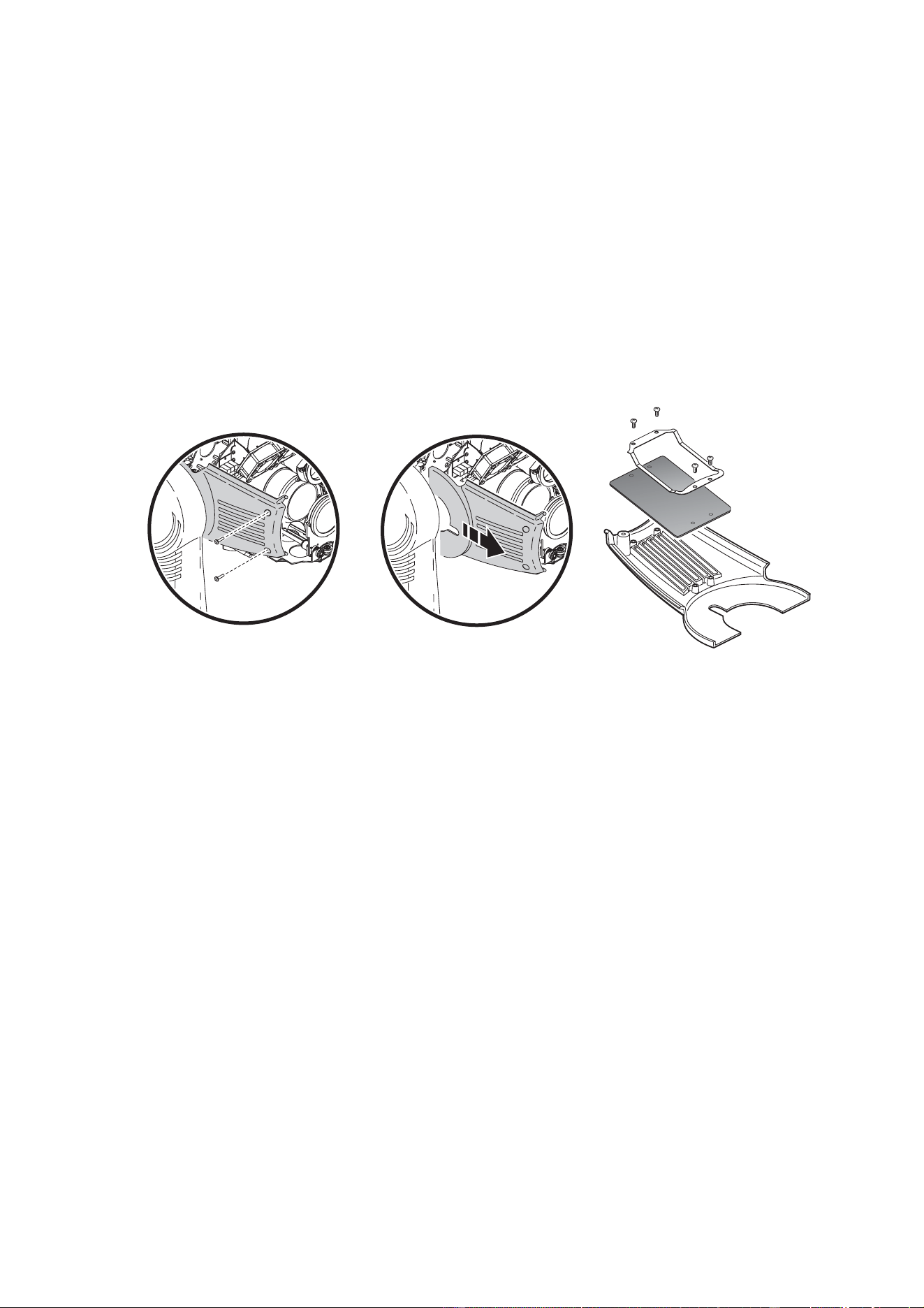
6. See Figure 22. On each side of the head, remove the 2 screws that hold the side covers and slide the
covers forward to remove. Unscrew the air filter clips and inspect the filter elements. If they are dirty,
soak them in warm soapy water and blot dry. If the filters are not in perfect condition, replace them.
Reinstall the filters and side covers.
7. Reassemble the head.
8. Remove the screws from the side cover/grill on the front of the base (front is indicated by an arrow on
the bottom). Remove the top cover from the front of the base. Lift the power supply / ballast module up
and out to expose the base fans for inspection and cleaning.
9. Reinstall the power supply / ballast module and base cover.
Lubrication
The MAC 550 Profile does not require lubrication under normal circumstances. The slides for the zoom and
focus lens cars are lubricated with a long-lasting teflon-based grease that can be reapplied by a Martin
service partner if necessary.
Lampholder replacement
The lamp holder used in the MAC 550 Profile eventually wears out due to the high voltages that pass
through the contacts. Service life will vary, but as a rule you should plan to replace the holder every 4000
hours approximately.
Wear begins to show up as discoloration at the contact surfaces. When this happens, resistance increases
and the lamp becomes harder to strike. If this process is allowed to continue, the lamp is likely to fail
prematurely.
Each time the lamp is replaced, inspect the lamp holder and have it replaced by a qualified technician as
soon as there are signs of discoloration or pitting at the contact surfaces. Damage caused by failure to
replace a worn and/or discolored lamp holder is not covered by the warranty.
Figure 22: Air filters in head

Routine maintenance 27
Software installation
Software updates are available from the Martin web site and can be installed via the data link with a Martin
upload device.
The following are required in order to install software.
• The MAC 550 Profile update file, available for download from the User Support Area of the Martin website
(http://www.martin.com).
• The Martin Software Uploader program, version 5.0 or later, available for download from the User Support
Area of the Martin website.
• A Martin MP-2 Uploader connected to a Windows 95/98/ME/2000/XP PC, or one of the PC controller
DMX interfaces supported by the Martin Software Uploader software.
To install software, normal method
Please refer to the MP-2 user manual and the Martin Software Uploader online help file.
To install software if all else fails (boot sector update)
Note: Use this procedure only if the firmware is totally corrupted, which is evident if the control panel does
not respond when power is applied, or if the software update notes call for a boot sector update. In the event
of a check sum error, repeat the normal upload procedure.
1. Disconnect the fixture from power.
2. Remove the side cover from the side of the base that has the control panel to expose the main PCB.
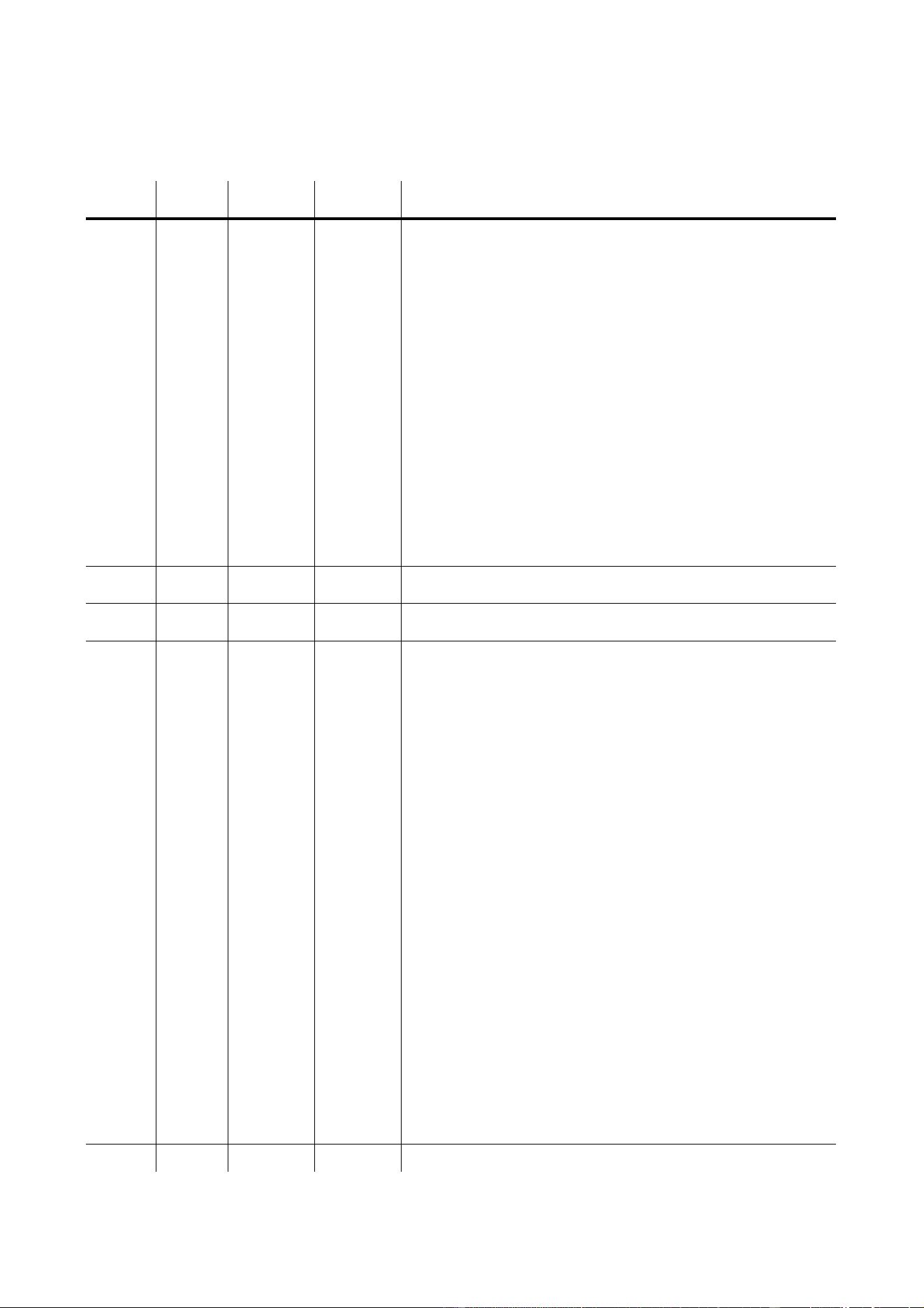
3. Locate the “BOOT” jumper on the main PCB (see page 42) and move the jumper cap to the “INIT”
position.
4. Perform a boot mode upload as described in the uploader documentation.
5. When the upload is complete, disconnect the fixture from power and move the jumper back to the
“DISABLE” position.
6. Reassemble the base.
28 MAC 550 Profile
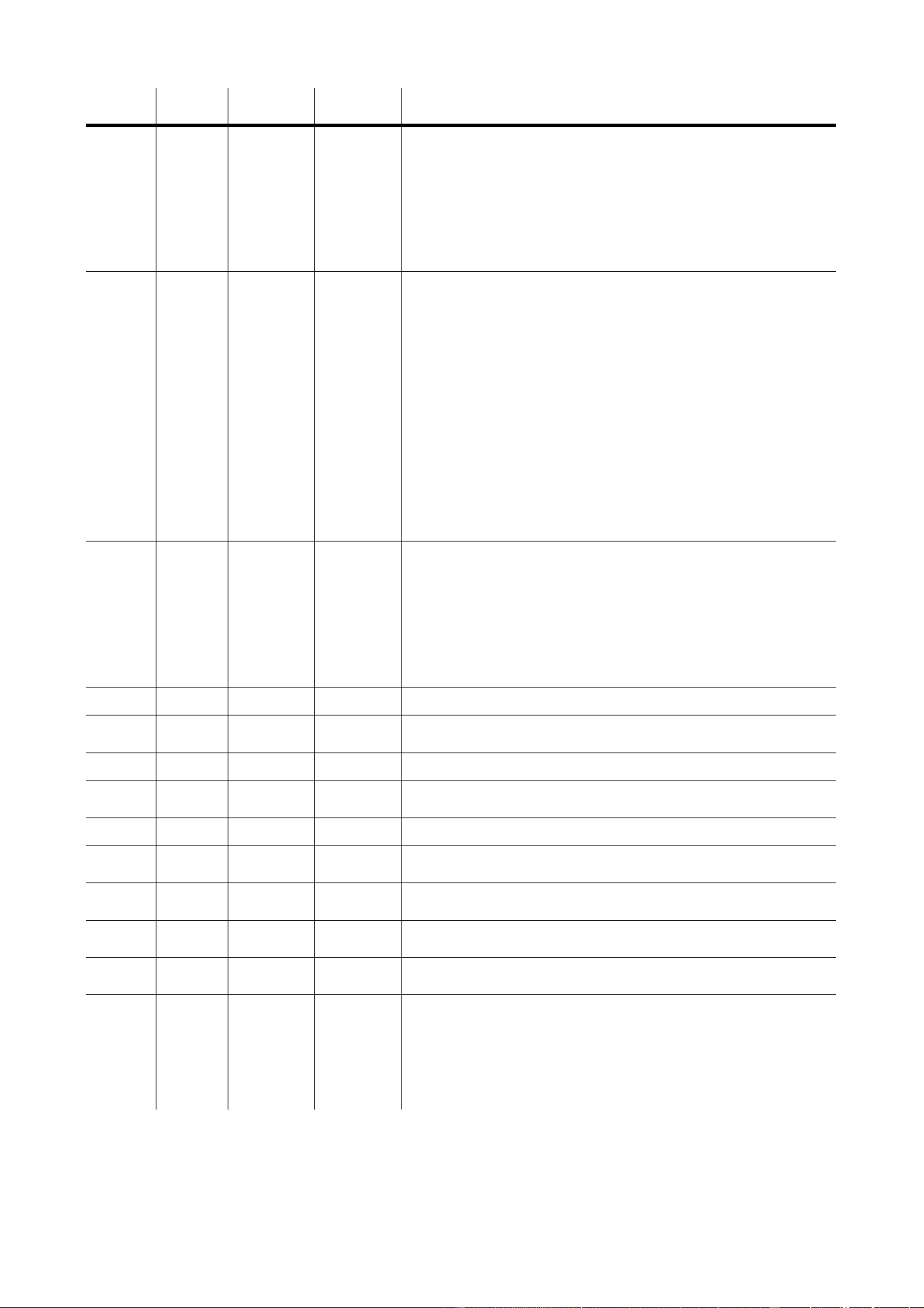
DMX
PROTOCOL
Basic
Mode
Extended
Mode
DMX Value Percent Function
11
0 - 19
20 - 49
50 - 72
73 - 79
80 - 99
100 - 119
120 - 127
128 - 147
148 - 167
168 - 187
188 - 190
191 - 193
194 - 196
197 - 199
200 - 202
203 - 207
208 - 217
218 - 227
228 - 237
238 - 247
248 - 255
0 - 7
8 - 19
20 - 28
29 - 31
32 - 39
40 - 47
48 - 50
51 - 57
58 - 65
66 - 73
74 - 74
75
76
77
78 - 79
80 - 81
82 - 85
86 - 89
90 - 93
94 - 97
98 - 100
Shutter, Strobe, Reset, Lamp On/Off
Shutter closed
Shutter open
Strobe, fast to slow
Shutter open
Opening pulse, fast to slow
Closing pulse, fast to slow
Shutter open
Random strobe, fast
Random strobe, medium
Random strobe, slow
Shutter open
Random opening pulse, fast
Random opening pulse, slow
Random closing pulse, fast
Random closing pulse, slow
Shutter open
Reset fixture*
Shutter open
Lamp on
Shutter open
Lamp off*
22
0 - 255 0 - 100
Coarse Dimmer (MSB)
Closed to open
-3
0 - 255 0 - 100
Fine Dimmer (LSB)
Closed to open
34
0
17
34
51
68
85
102
119
136
153
154 - 158
159 - 163
164 - 168
169 - 173
174 - 178
179 - 183
184 - 188
189 - 193
194 - 198
199 - 219
220 - 240
241 - 245
246 - 250
251 - 255
0
4
9
13
17
22
26
30
35
56
66 - 67
67 - 68
69 - 70
70 - 72
72 - 73
74 - 75
75 - 76
77 - 78
80 - 81
82 - 88
89 - 96
96 - 97
98 - 98
99 - 100
Color Wheel 1, Coarse (MSB)
Continuous Scroll: full color positions
Open
Slot 1 (Red 308)
Slot 2 (Magenta 507)
Slot 3 (Purple 502 IAD)
Slot 4 (Blue 104)
Slot 5 (Green 206)
Slot 6 (Yellow 601)
Slot 7 (Orange 306M)
Slot 8 (Purple 509)
Open
Stepped Scroll
Slot 8 (Purple 509)
Slot 7 (Orange 306M)
Slot 6 (Yellow 601)
Slot 5 (Green 206)
Slot 4 (Blue 104)
Slot 3 (Purple 502 IAD)
Slot 2 (Magenta 507)
Slot 1 (Red 308)
Open
Continuous Rotation
CW, fast to slow
CCW, slow to fast
Random Color
Fast
Medium
Slow
-5
0 - 255 0 - 100 Color Wheel 1, Fine (LSB)
*If disabled in software, this
command works only if the
following effects are selected:
• Color wheel 1 to slot 1
• Color wheel 2 to slot 1
• Prism in, no rotation
• Gobo wheel 1 open
• Gobo wheel 2 open

DMX protocol 29
46
0
17
34
51
68
85
102
119
136
153
154 - 158
159 - 163
164 - 168
169 - 173
174 - 178
179 - 183
184 - 188
189 - 193
194 - 198
199 - 219
220 - 240
241 - 245
246 - 250
251 - 255
0
4
9
13
17
22
26
30
35
56
61 - 63
67 - 68
69 - 70
70 - 72
72 - 73
74 - 75
75 - 76
77 - 78
80 - 81
82 - 88
89 - 96
96 - 97
98 - 98
99 - 100
Color Wheel 2, Coarse (MSB)
Continuous Scroll: full color positions:
Open
Slot 1 (Green 208)
Slot 2 (Blue 102)
Slot 3 (Pink 312)
Slot 4 (Red 301)
Slot 5 (Yellow 603)
Slot 6 (Half Minus Green)
Slot 7 (CTC 5500-4200)
Slot 8 (CTC 3200-4100)
Open
Stepped Scroll
Slot 8 (CTC 3200-4100)
Slot 7 (CTC 5500-4200)
Slot 6 (Half Minus Green)
Slot 5 (Yellow 603)
Slot 4 (Red 301)
Slot 3 (Pink 312)
Slot 2 (Blue 102)
Slot 1 (Green 208)
Open
Continuous Rotation
CW, fast to slow
CCW, slow to fast
Random color
Fast
Medium
Slow
-7
0 - 255 0 - 100 Color Wheel 2, Fine (LSB)
58
0 - 11
12 - 15
16 - 19
20 - 23
24 - 27
28 - 31
32 - 35
36 - 39
40 - 43
44 - 47
48 - 51
52 - 55
56 - 59
60 - 71
72 - 83
84 - 95
96 - 107
108 - 119
120 - 131
132 - 143
144 - 155
156 - 167
168 - 179
180 - 191
192 - 203
204 - 229
230 - 255
0 - 4
4 - 5
6 - 7
7 - 9
9 - 10
11 - 12
12 - 13
14 - 15
15 - 16
17 - 18
18 - 20
20 - 21
22 - 23
23 - 27
28 - 32
33 - 37
37 - 107
42 - 46
47 - 51
52 - 56
56 - 61
61 - 65
66 - 70
70 - 75
75 - 79
80 - 90
90 - 100
Gobo Wheel 1, Gobo and Function Selection
Select gobo with indexed position
Open
Slot 1 (Fire Sun)
Slot 2 (Rotator)
Slot 3 (Indigo Waves)
Slot 4 (Limbo)
Slot 5 (Water 4)
Slot 6 (Flames 6)
Select gobo with continuous rotation
Slot 1 (Fire Sun)
Slot 2 (Rotator)
Slot 3 (Indigo Waves)
Slot 4 (Limbo)
Slot 5 (Water 4)
Slot 6 (Flames 6)
Select gobo with indexed position and shake
Gobo 1, slow to fast
Gobo 2, slow to fast
Gobo 3, slow to fast
Gobo 4, slow to fast
Gobo 5, slow to fast
Gobo 6, slow to fast
Select gobo with continuous rotation and shake
Gobo 6, slow to fast
Gobo 5, slow to fast
Gobo 4, slow to fast
Gobo 3, slow to fast
Gobo 2, slow to fast
Gobo 1, slow to fast
Gobo scroll with continuous rotation
CW scroll, slow to fast
CCW scroll, fast to slow
Basic
Mode
Extended
Mode
DMX Value Percent Function

30 MAC 550 Profile
69
0 - 255
0 - 2
3 - 127
128 - 252
253 - 255
0 - 100
0
1 - 50
51 - 99
100
Gobo Wheel 1, Coarse Rotation (MSB)
If indexed position is selected
Rotation angle, 0 - 395°
If continuous rotation is selected
No rotation
CW, slow - fast
CCW, fast - slow
No rotation
710
0 - 255 0 - 100 Gobo Wheel 1, Fine Rotation (LSB)
811
0
11
22
33
44
55
66
77
88
99
110 - 112
113 - 121
122 - 130
131 - 139
140 - 148
149 - 157
158 - 166
167 - 175
176 - 184
185 - 193
194 - 202
203 - 221
222 - 240
241 - 245
246 - 250
251 - 255
0
4
8
13
17
21
26
30
34
39
43 - 44
44 - 47
48 - 51
51 - 54
55 - 58
58 - 61
62 - 65
65 - 68
68 - 72
72 - 76
76 - 79
79 - 87
87 - 94
94 - 96
96 - 98
98 - 100
Gobo Wheel 2
Continuous Scroll: full positions
Open
Slot 1 (Crackle)
Slot 2 (Triangles 2)
Slot 3 (Tye Dye)
Slot 4 (Splodge)
Slot 5 (Ninestar)
Slot 6 (Bio)
Slot 7 (Leaf Breakup (Medium))
Slot 8 (Zig Zags)
Slot 9 (Two Tone)
Open
Stepped Scroll
Slot 9 (Two Tone)
Slot 8 (Zig Zags)
Slot 7 (Leaf Breakup (Medium))
Slot 6 (Bio)
Slot 5 (Ninestar)
Slot 4 (Splodge)
Slot 3 (Tye Dye)
Slot 2 (Triangles 2)
Slot 1 (Crackle)
Open
Continuous Rotation
CW, fast - slow
CCW, slow - fast
Random Gobo
Fast
Medium
Slow
912
0 - 15
16 - 55
56 - 95
96 - 135
136 - 175
176 - 215
216 - 255
0 - 5
6 - 21
22 - 37
37 - 53
53 - 68
69 - 84
85 - 100
Gobo/Color Macros
No macro
Gobo wheel 2, shake, slow - fast
Color wheel 1, shake, slow - fast
Color wheel 2, shake, slow - fast
Gobo wheel 2 and color 1, shake, slow - fast
Gobo wheel 2 and color 2, shake, slow - fast
Gobo wheel 2, color 1, and color 2, shake, slow - fast
10 13
0 - 9
10 - 19
20 - 29
30 - 39
40 - 49
50 - 139
140 - 229
230 - 235
236 - 239
240 - 243
244 - 247
248 - 251
252 - 255
0 - 3
4 - 7
8 - 11
12 - 15
16 - 19
20 - 54
55 - 89
90 - 92
93
94 - 95
96
97 - 98
99 - 100
Gobo Animation Angle and Function
Open
Vertical indexed position
Horizontal indexed position
Vertical continuous rotation
Horizontal continuous rotation
Angled indexed position, vertical to horizontal
Angled continuous rotation, horizontal to vertical
Open
Animation macros
Macro 1
Macro 2
Macro 3
Macro 4
Macro 5
Basic
Mode
Extended
Mode
DMX Value Percent Function
DMX protocol 31
11 14
0 - 255
0 - 2
3 - 127
128 - 252
253 - 255
0 - 100
0
1 - 50
51 - 99
100
Gobo Animation Wheel, Angle / Speed
If indexed position is selected
Rotation angle, min.- max.
If continuous rotation is selected
No rotation
CCW, slow - fast
CW, fast - slow
No rotation
12 15
0 - 19
20 - 79
80 - 89
90 - 149
150 - 215
216 - 220
221 - 225
226 - 230
231 - 235
236 - 240
241 - 245
246 - 250
251 - 255
0 - 7
8 - 31
31 - 35
35 - 58
59 - 84
84 - 86
87 - 88
89 - 90
91 - 92
93 - 94
95 - 96
96 - 98
98 - 100
Prism
Rotation
Prism out
Prism in, CCW rotation, fast - slow
Prism in, no rotation
Prism in, CW rotation, slow - fast
Prism out
Prism Macros
Macro 1
Macro 2
Macro 3
Macro 4
Macro 5
Macro 6
Macro 7
Macro 8
13 16
0 - 199
200 - 215
216 - 229
230 - 243
244 - 246
247 - 249
250 - 252
253 - 255
0 - 77
78 - 84
85 - 89
90 - 94
95 - 96
97
98 - 99
100
Iris
Coarse diameter (MSB), open - closed
Closed
Opening pulse, fast - slow
Closing pulse, fast - slow
Fast random opening pulse
Slow random opening pulse
Fast random closing pulse
Slow random closing pulse
-17
0 - 255 0 - 100 Iris Diameter, Fine (LSB)
14 18
0 - 255 0 - 100
Coarse Focus (MSB)
Infinity - near
-19
0 - 255 0 - 100 Fine Focus (LSB)
15 20
0 - 255 0 - 100
Coarse Zoom (MSB)
Flood - spot
-21
0 - 255 0 - 100 Fine Zoom (LSB)
16 22
0 - 255 0 - 100
Coarse Pan (MSB)
Left - right
17 23
0 - 255 0 - 100
Fine Pan (LSB)
Left - right
18 24
0 - 255 0 - 100
Coarse Tilt (MSB)
Left - right
19 25
0 - 255 0 - 100
Fine Tilt (LSB)
Left - right
20 26
0 - 2
3 - 242
243 - 245
246 - 248
249 - 251
252 - 255
0 - 1
1 - 95
96
96 - 97
98
99 - 100
Pan/Tilt Speed
Tracking
Fast - slow
Tracking, PTSP SLOW (menu override)
Tracking, PTSP NORM (menu override)
Tracking, PTSP FAST (menu override)
Blackout while moving
Basic
Mode
Extended
Mode
DMX Value Percent Function

32 MAC 550 Profile
21 27
0 - 2
3 - 245
246 - 251
252 - 255
0 - 2
3 - 245
246 - 248
249 - 251
252 - 255
0 - 245
246 - 248
249 - 251
252 - 255
0 - 2
3 - 245
246 - 251
252 - 255
0 - 251
252 - 255
0 - 1
1 - 96
96 - 98
99 - 100
0 - 1
1 - 96
96 - 97
98
99 - 100
0 - 96
96 - 97
98
99 - 100
0 - 1
1 - 96
96 - 98
99 - 100
0 - 98
99 - 100
Effects Speed
Dimmer, Animation, Zoom, and Focus Speed
Tracking
Fast - slow
Tracking
Maximum speed
Color Speed
Tracking
Speed, fast - slow
Tracking, SCUT OFF (menu override)
Tracking, SCUT ON (menu override)
Blackout while moving
Gobo Selection Speed
Normal (no blackout)
Normal, SCUT OFF (menu override)
Normal, SCUT ON (menu override)
Blackout while moving
Gobo Indexing Speed
Tracking mode
Fast - slow
Tracking
Blackout while moving
Prism Speed
Normal (no blackout)
Blackout while moving
Basic
Mode
Extended
Mode
DMX Value Percent Function

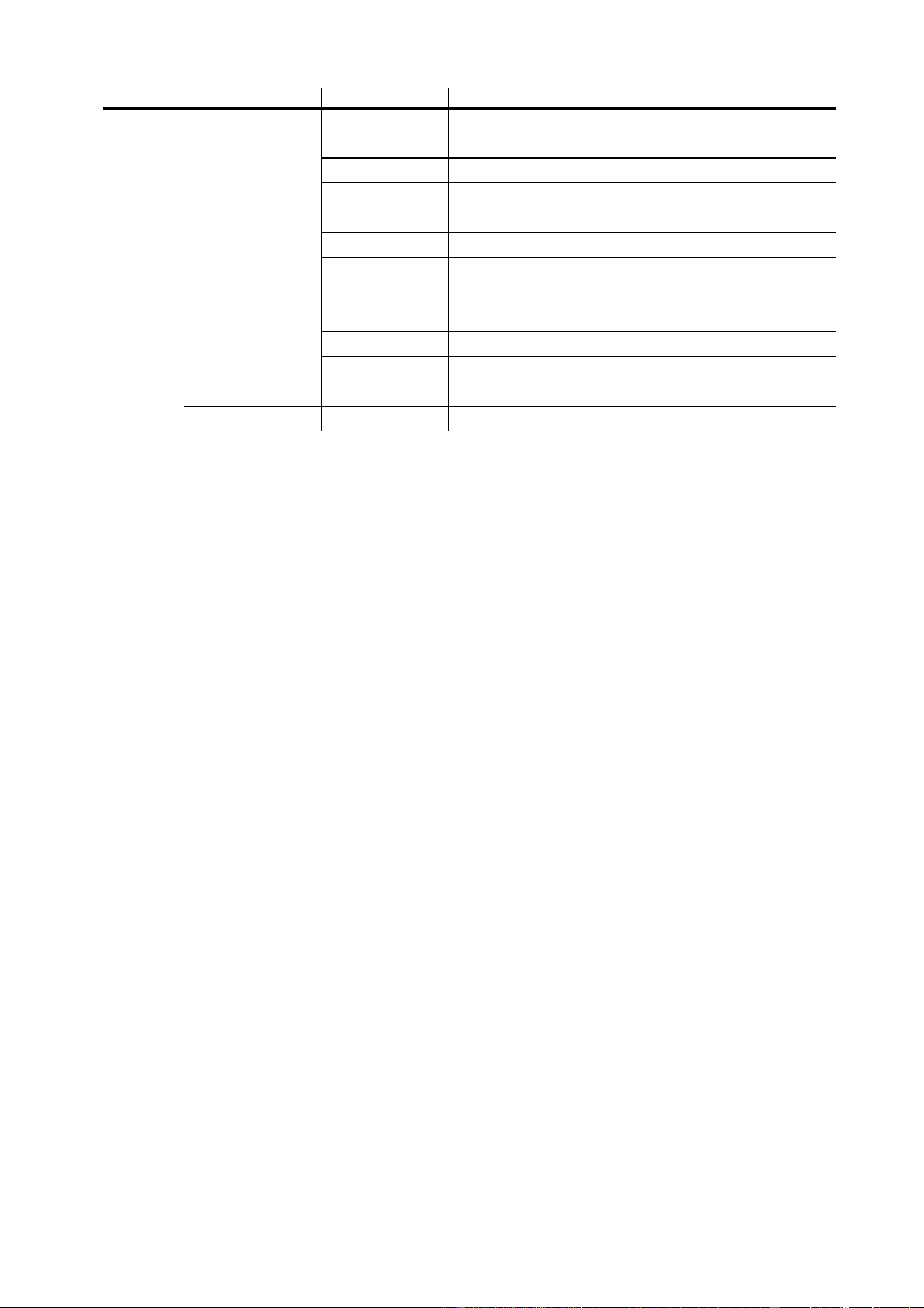
Control menu 33
C
ONTROL
MENU
Menu Item Options Notes (Default settings in bold print)
(16 bit)
(16 bit
ext.)
DMX address (factory default = 1)
Basic DMX mode with 2-channel (coarse and fine) control of
gobo rotation, pan, and tilt.
Extended DMX mode with basic mode features plus 2-channel
control of dimmer, color wheels 1 and 2, iris, focus, and zoom.
Map DMX pan control to tilt channel and vice versa.
Normal pan and tilt control.
Reverse DMX pan control, right Æ left.
Normal pan control, left Æ right.
Reverse DMX tilt control, down Æ up.
Normal tilt control, up Æ down.
Normal pan/tilt speed
Optimize pan/tilt movement for speed
Optimize pan/tilt movement for smoothness
Normal effects speed
Optimize effects movement for speed
Optimize effects movement for smoothness
Pan/tilt speed slave: effects speed copies the pan/tilt speed set via
the control menu or via DMX
Optimize effects for speed
Optimize effects for silence (studio mode)
Display remains on
Display extinguishes 2 minutes after last key press
Display extinguishes 10 minutes after last key press
Display adjusts automatically for ambient light level
Adjust display intensity manually
Enable DMX lamp off
Disable DMX lamp off
Enable DMX reset
Disable DMX reset
Hold reset command for 5 seconds
No automatic lamp strike
Lamp strikes automatically within 90 seconds of power on
Lamp strikes if DMX is present, douses after 15 mins. without DMX
Gobo and color wheels turn shortest distance (across open)
Gobo and color wheels do not cross open
Dimmer curve simulates tungsten performance
Relatively linear dimmer curve
Enable color blackout
Disable color blackout
Table 2: Control menu

34 MAC 550 Profile
Return all settings (not calibrations) to factory defaults
, ,
Load custom configuration
Save current configuration
Æ
Total hours of operation since manufacture
Hours of operation since counter reset (see page 13)
Æ
Total hours of operation with lamp on since manufacture
Lamp hours since counter reset, see page 13
Æ
Total number of lamp strikes since fabricated
Number of lamp strikes since counter reset, see page 13
Head temperature
Base temperature
CPU firmware version
DMX transmission speed in packets per second
Percent of packets received
Value of the DMX start code
–
DMX value (from 0 - 255) received for each effect (LSB)
DMX value (from 0 - 255) received for each effect (MSB)
Reset fixture
Lamp on
Lamp off
Open shutter
Close shutter
Fast strobe
Medium strobe
Slow strobe
Dimmer
Color wheel 1: filters 1-8, continuous or random rotation
Color wheel 2: filters 1-8, continuous or random rotation
Gobo wheel 1 open
Rotating gobos 1 - 6 with indexed position
Rotating gobos 1 - 6 with continuous rotation
Rotating gobos 1 - 6 with rotation and shake
Gobo wheel 1 CW and CCW scroll; fast, medium, and slow
Gobo wheel 2 open
Static gobos 1 - 9
Static gobos 1 - 9 with shake
Gobo wheel 2 CW and CCW scroll; fast, medium, and slow
Rotating gobo index angle or rotation speed
Menu Item Options Notes (Default settings in bold print)
Table 2: Control menu

Control menu 35
cont.
Animation wheel open
Vertical position (indexing)
Horizontal position (indexing)
Vertical position (rotation)
Horizontal position (rotation)
Scroll position 1 (indexing)
Scroll position 2 (indexing)
Scroll position 3 (indexing)
Scroll position 4 (indexing)
Rotation speed 4 (rotation)
Rotation speed 3 (rotation)
Rotation speed 2 (rotation)
Rotation speed 1 (rotation)
Position (indexing) or speed (rotation)
Prism in, no rotation
Prism out
Prism in; fast, medium, slow rotation in both directions
Iris diameter: Press Enter, then use up and down arrows to select a
value from 0 - 200
Iris closed
Fast opening pulse
Slow opening pulse
Fast closing pulse
Slow closing pulse
Fast random opening pulse
Slow random opening pulse
Fast random closing pulse
Slow random closing pulse
Focus position
Zoom position
Pan position
Tilt position
Run a general test of all effects
(Press and
hold Enter
for a few
seconds to
use this
menu)
Enable pan/tilt position correction system. See page 14.
Disable pan/tilt feedback. Setting not saved.
Enable position feedback from rotating effects. See page 14.
Disable position feedback from rotating effects.
See “Adjustment submenu” on page 37.
Menu Item Options Notes (Default settings in bold print)
Table 2: Control menu
36 MAC 550 Profile
cont.
Pan calibration ( = offset)
Tilt calibration
Dimmer calibration
Color wheel 1 calibration
Color wheel 2 calibration
Gobo wheel 1 calibration
Gobo wheel 2 calibration
Focus calibration
Zoom calibration
Iris calibration
Prism calibration
-
Return fixture to factory calibration and feedback settings
Manually set fixture to software update mode.
Menu Item Options Notes (Default settings in bold print)
Table 2: Control menu

Adjustment submenu 37
A
DJUSTMENT
SUBMENU
The Æ menu is for use by service technicians when performing adjustments.
Menu Item Options Notes
Reset fixture
Strike lamp
Douse lamp
For factory use
Dimmer and color 1 to open positions
Dimmer blades against stop, color 1 magnet aligned with sensor
Close dimmer
Reset dimmer and color 1
For factory use.
Color 2, gobo 1 and 2, iris, and animation wheel to open
Color 2, gobo 1 and 2, and animation wheel magnets aligned with
sensors
Reset effects in gobo/color/iris/animation module.
For factory use
Prism, zoom, and focus to adjustment positions
Prism in
Prism out
Reset zoom, focus, and prism
Move pan and tilt to neutral positions
Pan neutral, tilt down
Pan neutral, tilt up
Pan left, tilt neutral
Pan right, tilt neutral
Pan left, tilt down
Pan right, tilt up
Table 3: Adjustment menu

38 MAC 550 Profile
C
ONTROL
MENU
SHORTCUTS
The following shortcuts are available in the MAC 550 Profile control panel from software version 2.0:
Shortcut Function
Hold [Menu] and press [Up] Resets fixture
Hold [Enter] and press [Up] Strikes lamp
Hold [Enter] and press [Down] Douses lamp
Hold [Menu] and [Enter] while applying power Freezes pan and tilt
Display messages 39
D
ISPLAY
MESSAGES
Message Appears when... What to do
(Reset)
... the fixture is indexing effects at startup. Wait for reset to complete.
(Serial reset)
... the fixture has received a reset command
from the controller.
Wait for reset to complete. Set
Æ to to prevent
accidental reset commands.
...the lamp access cover is not fully closed.
Verify that the lamp access cover is locked
in place.
(Lamp error)
... the lamp does not ignite within 30 seconds
of receiving the ‘Lamp ON’ command. Likely
reasons are a missing or defective lamp, or
insufficient AC voltage.
Check the lamp. Check that the voltage
and frequency settings match the local
supply.
(Light sensor 1 error)
...there is a malfunction in the light sensor 1
circuit.
Contact Martin service for assistance.
(Memory error) ...the EEPROM memory cannot be read.
Contact Martin service personnel for
assistance.
(Short error)
... the fixture detects the lamp is ON but no
‘Lamp ON’ command has been received. This
can occur if the lamp relay is stuck or if the
lamp-power feedback circuit fails. The fixture
may be operated but remote lamp on/off may
be affected.
Contact Martin service personnel for
assistance.
(Base temperature error)
(Head temperature error)
(Lamp temperature error)
(Switchmode/ballast side
temperature sensor error)
... there is a fault with the base, head, lamp or
ballast side temperature sensor respectively.
Contact Martin service personnel for
assistance.
(Lamp temperature cut-out)
... the lamp temperature is too high and
thermal protection circuits cut power to the
lamp.
Allow fixture to cool.
Ensure nothing is obstructing airflow
around fixture.
Clean air vents, air filters and fans.
Reduce ambient temperature.
If problem persists, contact Martin service
personnel for assistance.
(Driver current error)
... there is a driver/motor malfunction.
Contact Martin service personnel for
assistance.
(Display programming error)
... newly uploaded fixture software also
requires updated display software.
Contact Martin service personnel for
assistance.
(Real-time clock error)
... the integrated clock used by the counters in
the
menu malfunctions.
Contact Martin service personnel for
assistance.
(Feedback error pan)
(Feedback error tilt)
(Feedback error pan/tilt)
...pan (
), tilt () or both ()
feedback circuits are malfunctioning. It will still
be possible to operate the fixture, but it
switches into a “safe” mode where maximum
speed is reduced, thus preventing the fixture
from losing track of its home position (losing
step).
Contact Martin service personnel for
assistance.
(Pan time-out)
(Tilt time-out)
(Focus time-out)
(Zoom time-out)
...the electric indexing circuit is
malfunctioning. The fixture will, after the
time-out, establish a mechanical stop, and
continue to work normally.
Reset fixture again. Contact Martin
service personnel if problem continues.
Table 4: Display messages

40 MAC 550 Profile
(Color wheel 1 time-out)
(Color wheel 2 time-out)
(Gobo wheel 1 time-out)
(Rotating gobo wheel
time-out)
(Gobo wheel 2 time-out)
(Animation wheel position
time-out)
(Animation wheel rotation
time-out)
...the magnetic-indexing circuit malfunctions
(e.g. sensor defective or magnet missing).
After the time-out, the effect in question stops
in a random position.
Reset fixture again. Contact Martin
service personnel if problem continues.
Message Appears when... What to do
Table 4: Display messages
Troubleshooting 41
T
ROUBLESHOOTING
Problem Probable cause(s) Remedy
One or more of the fixtures is
completely dead.
No power to fixture.
Check that power is switched on and cables are
plugged in.
Primary fuse blown (located near power inlet). Disconnect fixture and replace fuse.
Secondary fuse(s) blown (located on PCBs in
base).
Disconnect fixture. Check fuses and replace.
Fixtures reset correctly but
respond erratically or not at all
to the controller.
Bad data link.
Inspect connections and cables. Correct poor
connections. Repair or replace damaged cables.
Data link not terminated.
Insert termination plug in output jack of the last
fixture on the link.
Incorrect addressing of the fixtures. Check fixture address and protocol settings.
One of the fixtures is defective and disturbs
data transmission on the link.
Bypass one fixture at a time until normal operation
is regained: unplug the XLR in and out connectors
and connect them directly together. Have the fixture
serviced by a qualified technician.
XLR pin-out on fixtures does not match (pins
2 and 3 reversed).
Install a phase-reversing cable between the fixtures
or swap pins 2 and 3 in the fixture that behaves
erratically.
Time out error after fixture reset. Effect requires mechanical adjustment.
Disable effects feedback (page 14). Contact Martin
technician for service.
Mechanical effect loses
position.
Mechanical train requires cleaning,
adjustment, or lubrication.
Contact Martin technician for service.
No light and
error
message displayed.
Lamp blown Disconnect fixture and replace lamp.
Lamp not installed Disconnect fixture and install lamp.
Lamp access safety switch open
Verify that lamp access plate is fully seated and
locked in place.
Lamp cuts out intermittently. Fixture is too hot.
Allow fixture to cool.
Ensure nothing is obstructing airflow around fixture.
Clean air vents, air filters and cooling fans.
Reduce ambient temperature.
Table 5: Troubleshooting
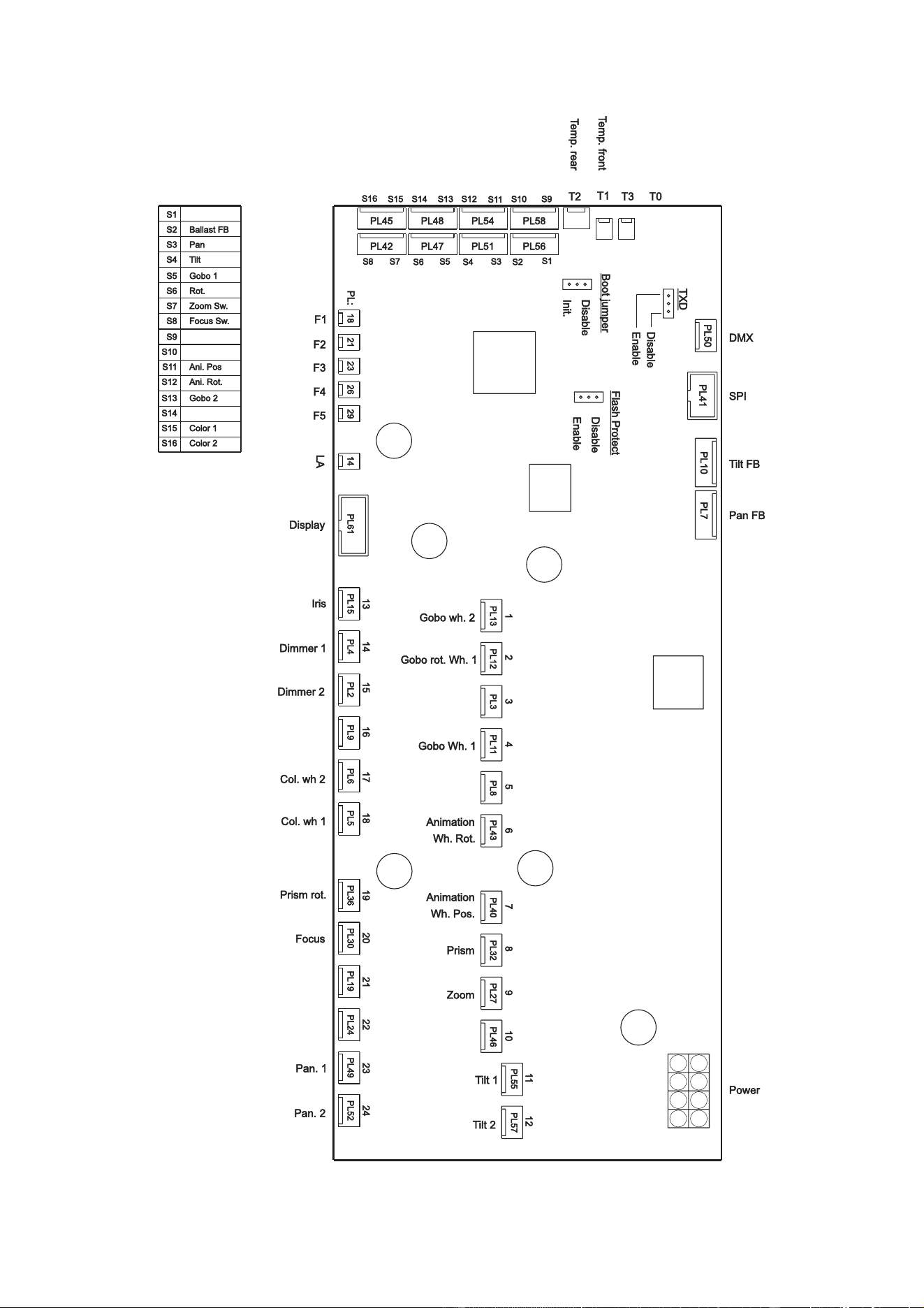
C
IRCUIT
BOARD
CONNECTIONS

MAC 550 P
ROFILE
S
PECIFICATIONS
PHYSICAL
Length . . . . . . . . . . . . . . . . . . . . . . . . . . . . . . . . . . . . . . . . . . . . . . . . . . . . . . . . . . . . . . . . 450 mm (17.7 in)
Width . . . . . . . . . . . . . . . . . . . . . . . . . . . . . . . . . . . . . . . . . . . . . . . . . . . . . . . . . . . . . . . . . 365 mm (14.4 in)
Height . . . . . . . . . . . . . . . . . . . . . . . . . . . . . . . . . . . . . . . . . . . . . . . . . . . . . . . . . . . . . . . . 636 mm (25.0 in)
Weight . . . . . . . . . . . . . . . . . . . . . . . . . . . . . . . . . . . . . . . . . . . . . . . . . . . . . . . . . . . . . . . . . . . 31 kg (68 lbs)
L
AMP
Type . . . . . . . . . . . . . . . . . . . . . . . . . . . . . . . . . . . . . . . . . . . . . . . . . . . . . . . . . . .400 W short-arc discharge
Lamp socket. . . . . . . . . . . . . . . . . . . . . . . . . . . . . . . . . . . . . . . . . . . . . . . .Double-ended SFc 10-4 with key
Approved models . . . . . . . . . . . . . . . . . . . . . . . . . . . . . . . . . . . . . . . . . . . . . . . . . . . . Osram HTI 400 W/D3
Philips MSR 400 SA/DE Gold
Ballast . . . . . . . . . . . . . . . . . . . . . . . . . . . . . . . . . . . . . . . . . . . . . . . . . . . . . . . . . . . . Electronic ‘flicker-free’
D
YNAMIC EFFECTS
Lamp power . . . . . . . . . . . . . . . . . . . . . . . . . . . . . . . . . . . . . . . . . . . . . . . . . . . . . . . . . . On/off, hot restrike
Dimmer/shutter . . . . . . . . . . . . . . . . . . . Full-range dimming and variable speed flash, 8- or 16-bit control
Colors . . . . . . . . . . . . . . . . . . . . . . . . . . . . . . . . . . . . . . . . . . . . Two 8-position wheels, 8- or 16-bit control
Rotating gobos . . . . . . . . . . . . . . . . . . . . . 6 positions with continuous and indexed rotation, 16-bit control
Static gobos . . . . . . . . . . . . . . . . . . . . . . . . . . . . . . . . . . . . . . . . . . . . . . . . . . . . . 9 positions, 8-bit control
Gobo animation . . . . . . . . . . . Variable rotation angle, indexed and continuous rotation, 8- or 16-bit control
Iris . . . . . . . . . . . . . . . . . . . . . . . . . . . . . . . . . . . . . . . . . . . . . . . ca. 2.5 mm - > 25 mm, 8- or 16-bit control
Focus . . . . . . . . . . . . . . . . . . . . . . . . . . . . . . . . . . . . . . . . . . . . . . 2 m (6.5 ft.) - infinity, 8- or 16-bit control
Zoom . . . . . . . . . . . . . . . . . . . . . . . . . . . . . . . . . . . . . . . . . . . . . . . . . . . . . . . . 14° - 30°, 8- or 16-bit control
Pan. . . . . . . . . . . . . . . . . . . . . . . . . . . . . . . . . . . . . . . . . . . . . . . . . . . . . . . . . . . . . . . . . 540°, 16-bit control
Tilt . . . . . . . . . . . . . . . . . . . . . . . . . . . . . . . . . . . . . . . . . . . . . . . . . . . . . . . . . . . . . . . . . 246°, 16-bit control
C
ONTROL AND PROGRAMMING
Protocol . . . . . . . . . . . . . . . . . . . . . . . . . . . . . . . . . . . . . . . . . . . . . . . . . . . . . . . . . USITT DMX-512 (1990)
Control channels . . . . . . . . . . . . . . . . . . . . . . . . . . . . . . . . . . . . . . . . . . . . . . . . . . . . . . . . . . . . . . . 21 or 27
Setting and addressing . . . . . . . . . . . . . . . . . . . Control panel with LED display, remote w/ MP-2 uploader
Movement control . . . . . . . . . . . . . . . . . . . . . . . . . . . . . . . . . . . . . . . . . . . . . . . . . . . . . Tracking and vector
Receiver . . . . . . . . . . . . . . . . . . . . . . . . . . . . . . . . . . . . . . . . . . . . . . . . . . . . . . . . . . Opto-isolated RS-485
Software installation . . . . . . . . . . . . . . . . . . . . . . . . . . . . . . . . . . . . . . . . . . . . . . . . . . Serial upload (MUF)
P
HOTOMETRICS
Light output . . . . . . . . . . . . . . . . . . . . . . . . . . . . . . . . . . . . . . . . . . . . . . . . . . . . . . . . . . . . . . . 9300 lumens
Beam angle (focused on open gobo) . . . . . . . . . . . . . . . . . . . . . . . . . . . . . . . . . . . . . . . . . . . . . . 14° - 30°
Focal length . . . . . . . . . . . . . . . . . . . . . . . . . . . . . . . . . . . . . . . . . . . . . . . . . . . . . . . . . . . . . . 46 - 100 mm
Measurement source . . . . . . . . . . . . . . . . . . . . . . . . . . . . . . . . . . . . . . . . . . . . . . . . Osram HTI 400 W/D3
G
OBOS
Outside diameter . . . . . . . . . . . . . . . . . . . . . . . . . . . . . . . . . . . . . . . . . . . . . . . . . . . . . . . .27.9 +0/-0.3 mm
Maximum image diameter . . . . . . . . . . . . . . . . . . . . . . . . . . . . . . . . . . . . . . . . . . . . . . . . . . . . . . . . . 23 mm
Maximum thickness . . . . . . . . . . . . . . . . . . . . . . . . . . . . . . . 1.1 mm in static slots, 4 mm in rotating slots
Recommended glass . High-temperature Borofloat or better with dichroic or enhanced aluminum coating
Recommended metal . . . . . . . . . . . . . . . . . . . . . . . . . . . . . . . . . . . . . . . . . . . . . . . . . . . 0.5 mm aluminum
G
OBO ANIMATION WHEELS
Outside diameter . . . . . . . . . . . . . . . . . . . . . . . . . . . . . . . . . . . . . . . . . . . . . . . . . . . 116 mm +0/-0.25 mm
Image outer diameter . . . . . . . . . . . . . . . . . . . . . . . . . . . . . . . . . . . . . . . . . . . . . . . . . . . . . . . . . . . 112 mm
Image inner diameter . . . . . . . . . . . . . . . . . . . . . . . . . . . . . . . . . . . . . . . . . . . . . . . . . . . . . . . . . . . . 32 mm
Construction . . . . . . . . . . . . . . . . . . . . . . . . . . . . . . . . . . . . . . . . . . . . . . . . 0.5 mm aluminum with magnet
C
ONSTRUCTION
Housing . . . . . . . . . . . . . . . . . . . . . . . . . . . . . . . . . . . . . . . . . . . . . UV-resistant fiber-reinforced composite
Colors . . . . . . . . . . . . . . . . . . . . . . . . . . . . . . . . . . . . . . . . . . . . . . . . . . . . . . . . . . . . . . . . . . . . . . . . . black
Protection factor . . . . . . . . . . . . . . . . . . . . . . . . . . . . . . . . . . . . . . . . . . . . . . . . . . . . . . . . . . . . . . . . . IP 20
INSTALLATION
Mounting points . . . . . . . . . . . . . . . . . . . . . . . . . . . . . . . . . . . . . . . . . . 2 pairs of 1/4-turn locks, offset 90°
Orientation . . . . . . . . . . . . . . . . . . . . . . . . . . . . . . . . . . . . . . . . . . . . . . . . . . . . . . . . . . . . . . . . . . . . . . Any
T
HERMAL
Maximum ambient temperature (T
a
) . . . . . . . . . . . . . . . . . . . . . . . . . . . . . . . . . . . . . . . . . . . 40° C (104° F)
Maximum surface temperature . . . . . . . . . . . . . . . . . . . . . . . . . . . . . . . . . . . . . . . . . . . . . . 160° C (320° F)
Total heat dissipation (calculated) . . . . . . . . . . . . . . . . . . . . . . . . . . . . . . . . . . . . . . . . . . . . . . 2200 BTU/hr
E
LECTRICAL
Operating ranges . . . . . . . . . . . . . . . . . . . . . . . . . . . . . . . . . . . . 100-120/200-240 VAC nominal, 50/60 Hz
Power supply . . . . . . . . . . . . . . . . . . . . . . . . . . . . . . . . . . . . . . . Semi auto-ranging electronic switch-mode
Main fuse . . . . . . . . . . . . . . . . . . . . . . . . . . . . . . . . . . . . . . . . . . . . . . . . . . . .10 amp time delay (slow blow)
C
ONNECTIONS
AC input . . . . . . . . . . . . . . . . . . . . . . . . . . . . . . . . . . . . . . . . . . . . . . . . . . . . 3 m cable tail w/o power plug
Data in/out . . . . . . . . . . . . . . . . . . . . . Locking 3-pin & 5-pin XLR, pin 1 shield, pin 2 cold (-), pin 3 hot (+)
TYPICAL POWER AND CURRENT*
@ 100 V, 50 Hz . . . . . . . . . . . . . . . . . . . . . . . . . . . . . . . . . . . . . . . . . . . . . . . . . . . . 650 W, 6.8 A, PF 0.954
@ 100 V, 60 Hz . . . . . . . . . . . . . . . . . . . . . . . . . . . . . . . . . . . . . . . . . . . . . . . . . . . . 640 W, 6.7 A, PF 0.961
@ 120 V, 60 Hz . . . . . . . . . . . . . . . . . . . . . . . . . . . . . . . . . . . . . . . . . . . . . . . . . . . . 630 W, 5.5 A, PF 0.956
@ 208 V, 60 Hz . . . . . . . . . . . . . . . . . . . . . . . . . . . . . . . . . . . . . . . . . . . . . . . . . . . . 595 W, 3.1 A, PF 0.936
@ 230 V, 50 Hz . . . . . . . . . . . . . . . . . . . . . . . . . . . . . . . . . . . . . . . . . . . . . . . . . . . . 595 W, 2.8 A, PF 0.927
@ 240 V, 50 Hz . . . . . . . . . . . . . . . . . . . . . . . . . . . . . . . . . . . . . . . . . . . . . . . . . . . . 595 W, 2.7 A, PF 0.923
V = Volts, Hz = Hertz, W = Watts, A = Amps, PF = power factor
*Figures are typical, not maximum. Allow for a deviation of +/- 10%.
A
PPROVALS
EU EMC . . . . . . . . . . . . . . . . . . . . . . . . EN 50 081-1, EN 50 082-1
EU safety . . . . . . . . . . . . . . . . . . . . . EN 60598-1, EN 60598-2-17
Canadian safety . . . . . . . . . . . . . . . . . . . . . . . CSA C22.2 No. 166
US safety . . . . . . . . . . . . . . . . . . . . . . . . . . . . . . . . . ANSI/UL 1573
I
NCLUDED ITEMS
Lamp . . . . . . . . . . . . . . . . . . . . . . . . . . . . . . . . . . . . . . . . . . . . . . . . . . . . . . . Osram HTI 400/D3 (installed)
Main fuse . . . . . . . . . . . . . . . . . . . . . . . . . . . . . . . . . . . . . . . . . . . . . . . . . . . . . . . . . . . . . . . . . . . . . . . 10 AT
Clamp attachment brackets . . . . . . . . . . . . . . . . . . . . . . . . . . . . . . . . . . . . . . . . . . . 2 quarter-turn Omega
Gobo animation wheel . . . . . . . . . . . . . . . . . . . . . . . . . . . . . . . . . . . . . . . . . . . . Radial breakup (installed)
Color filters . . . . . . . . . . . . . . . . . . . . . . . . . . . . . . . . . . . . . . . . . . . . . . . . . . . . . . . . . . . . . . . 16 (installed)
Gobos . . . . . . . . . . . . . . . . . . . . . . . . . . . . . . . . . . . . . . . . . . . . . . . . . . . . 13 aluminum, 2 glass (installed)
A
CCESSORIES
Spiral breakup animation wheel . . . . . . . . . . . . . . . . . . . . . . . . . . . . . . . . . . . . . . . . . . . . . . P/N 62325049
Linear breakup animation wheel . . . . . . . . . . . . . . . . . . . . . . . . . . . . . . . . . . . . . . . . . . . . . . P/N 62325050
Coarse tangential animation wheel . . . . . . . . . . . . . . . . . . . . . . . . . . . . . . . . . . . . . . . . . . . . P/N 62325051
Half-coupler clamp . . . . . . . . . . . . . . . . . . . . . . . . . . . . . . . . . . . . . . . . . . . . . . . . . . . . . . . . P/N 91602005
G-clamp . . . . . . . . . . . . . . . . . . . . . . . . . . . . . . . . . . . . . . . . . . . . . . . . . . . . . . . . . . . . . . . . P/N 91602003
MP-2 Uploader . . . . . . . . . . . . . . . . . . . . . . . . . . . . . . . . . . . . . . . . . . . . . . . . . . . . . . . . . . . P/N 90758420
MAC 500-size stock gobos . . . . . . . . . . . . . . . . . . . . . . . . . . . . . . . . . . . . . . . . See http://www.martin.com
S
PARE PARTS
MAC 550/575/700 head air filter . . . . . . . . . . . . . . . . . . . . . . . . . . . . . . . . . . . . . . . . . . . . . . P/N 20800170
ORDERING INFORMATION
MAC 550 Profile in cardboard packing case . . . . . . . . . . . . . . . . . . . . . . . . . . . . . . . . . . . . . P/N 90217000
MAC 550 Profile in flight case . . . . . . . . . . . . . . . . . . . . . . . . . . . . . . . . . . . . . . . . . . . . . . . . P/N 90217010
Specifications subject to change without notice

Notes

Notes