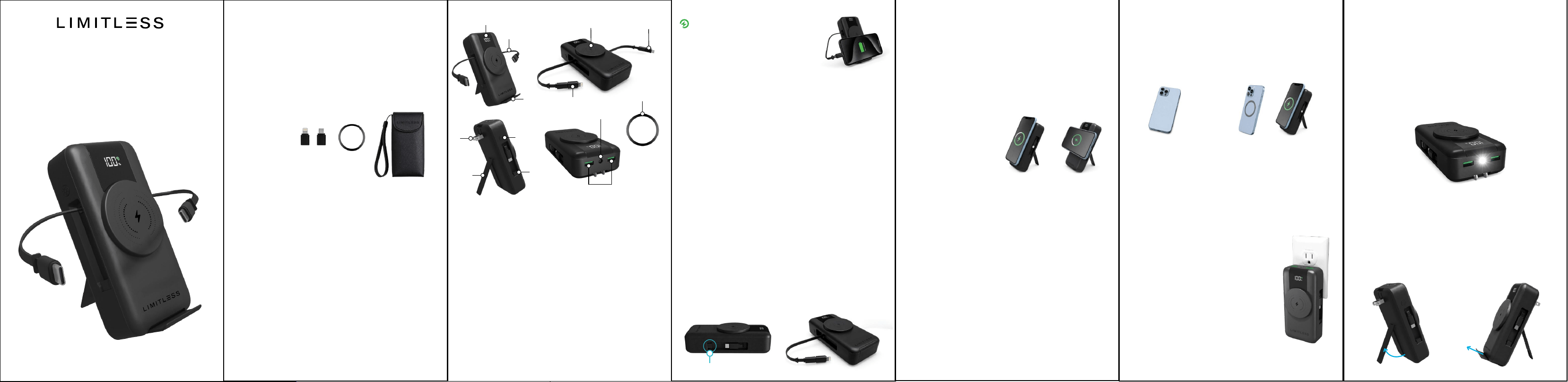
Ultra 15,000mAh Power Bank
Quick Start Guide
™
AC Plug, Retractable Cables, Built-In Adapters,
WHAT’S INCLUDED
• (1) Ultra 15,000mAh Power Bank
• (1) Type-C to Lightning® Adapter
• (1) Type-C to Micro Adapter
• (1) Magnetic Ring
• (1) Faux Leather Case & Carrying Strap
COMPONENTS
Digital Display
2x Retractable Type-C Cables
Wireless Magnetic Charger
Type-C to Micro Adapter
Slide-Out Phone Stand
Type-C to Lightning® Adapter
Retractable AC Plug
Flashlight / Power Button
1.
2.
3.
4.
5.
6.
7.
8.
Kickstand
Adapter Storage (on Each Side)
Flashlight
2x USB Ports
Magnetic Ring
9.
10.
11.
12.
13.
Select your compatible charging method from
below and connect the Ultra 15,000mAh Power
Bank to a device. The device will automatically begin
to charge. See back for compatibility list.
• Built-In Cables
• Adapter (Lightning® / Micro)
• Wireless Magnetic Charger
• USB Ports
CHARGING YOUR DEVICE
3
4
1
2
5
6
7
8
9
10
13
11
12
Fast-Charging Icon:
You'll see a green lightning bolt
icon when a device capable of
fast-charging is connected to the
Power Bank using the USB Ports,
Built-In Cables or the Wireless
Magnetic Charger. Keep in mind that some devices
might not display this green icon, but they will still
receive the fastest charging speed the Power Bank
can deliver and the device can accept.
Extending / Retracting the Type-C Cable:
Extend the Cable and connect the Type-C end to a
compatible device. The device will begin to charge.
The Retractable Cable can stop at any point and
then pull again to retract. When not in use, ensure
the cable is fully retracted to prevent damage
or tangling.
NOTE: Do not overextend the cable. Doing so may
damage the Power Bank.
Charging a Device via Type-C to Lightning® / Micro
Adapter:
Locate the Retractable Type-C Cable. Plug the
Type-C end directly into the Adapter opening
(located in the cable slot).
Attach the Adapter to the Type-C connector, then
plug it into your device. The device will begin to
charge.
Adapter Storage
Charging via Wireless Magnetic Charger:
Place your MagSafe® compatible phone directly onto
the Wireless Magnetic Charger. The phone will
automatically align magnetically and begin charging.
The Magnetic Wireless Charger supports both portrait
and landscape viewing modes.
NOTE: the Phone Stand is NOT required to use the
magnetic charging feature.
For phones that are not MagSafe® compatible, use
the included Magnetic Ring to enable magnetic
attachment.
▪ Step 1: Clean the back of your phone or phone
case before installation.
▪ Step 2: Remove the adhesive backing from the
Magnetic Ring.
▪ Step 3: Align the Ring in the center of your
phone or case and press firmly.
▪ Step 4: Allow the adhesive to fully bond before
use, then proceed to charge a phone.
Once installed, the phone can magnetically attach to
the Wireless Magnetic Charger for wireless charging
in both portrait and landscape mode.
USING THE MAGNETIC RING
Recharging the Power Bank:
Extend the AC Plug and connect to a
wall outlet. The Digital Battery Level
Indicator will blink while charging until
it reaches 100%. A green
Fast-Charging Icon will appear once
plugged into the wall.
NOTE: Only the second digit blinks
while charging the Power Bank.
Checking the Battery Level:
Press the Power Button to show the
current battery capacity on the Digital
Display or, you can check the Battery
Level by connecting a device.
IMPORTANT: For best performance, install the
Magnetic Ring on the outside of the phone case.
Thick cases or metal accessories may interfere with
charging performance. Repositioning the Ring
after installation may reduce adhesive strength.
Charging via USB Ports:
Connect a compatible USB charging cable directly
into one of the USB output ports located on the
Power Bank. Once connected, charging will
begin automatically.
Step 1 Step 2 Step 3 Step 4
Press and hold the Flashlight / Power Button to
turn the Flashlight on.
Continuously click the Power Button to scan
through the modes (Standard | S.O.S. | Strobe),
or press and hold to shut o the Flashlight.
USING THE FLASHLIGHT
USING THE PHONE HOLDER
& KICKSTAND
Open the Magnetic Kickstand using the inset on
the back of the Power Bank. Slide out the Phone
Holder on the bottom.

Kickstand
Adapter Storage (on Each Side)
Flashlight
2x USB Ports
Magnetic Ring
9.
10.
11.
12.
13.
Charging via Wireless Magnetic Charger:
Place your MagSafe® compatible phone directly onto
the Wireless Magnetic Charger. The phone will
automatically align magnetically and begin charging.
The Magnetic Wireless Charger supports both portrait
and landscape viewing modes.
NOTE: the Phone Stand is NOT required to use the
magnetic charging feature.
WAIVER & RELEASE
By using the Limitless Ultra 15,000mAh Power Bank,
you hereby agree that Limitless Innovations, Inc., an
Illinois corporation and its aliates (“Limitless”) shall
have no liability for any losses associated with
property damage, personal injury or loss of life that
are incurred by you or by any third party in
connection with or relating in any manner
whatsoever to your use of the Limitless Ultra
15,000mAh Power Bank. By using the Limitless Ultra
15,000mAh Power Bank, you hereby agree at all
times to comply fully with all safety warnings,
operating instructions and general safety information
in this user manual. By using the Limitless Ultra
15,000mAh Power Bank, you further agree to hold
harmless Limitless, (and Limitless’ ocers, directors,
shareholders and employees) in connection with any
losses sustained by you (including, without limitation,
losses arising in whole or in part from property
damage, personal injury or loss of life) relating in any
manner whatsoever to your use of the Limitless Ultra
15,000mAh Power Bank.
COMPATIBILITY
Type-C: Galaxy S phones: Galaxy S23, S23+, S23
Ultra, S22, S22+, S22 Ultra, S21 5G, S21+ 5G, S21
Ultra 5G, S20 5G, S20+ 5G, S20 Ultra 5G, S10e, S10,
S10+, S10 5G, S8, S8+, S9, S9+ | Galaxy Fold
phones: Z Fold, Z Fold2, Z Fold3, Z Fold4, Z Flip, Z
Flip 5G, Z Flip3 5G, and Z Flip4 | Galaxy Note
phones: Note8, Note9, Note10, Note10+, Note10+
5G, Note 20 5G, and Note20 Ultra 5G | Galaxy A
phones: A03s, A10e, A20, A50, A02, A12, A13, A14
5G, A23 5G, A32 5G, A42 5G, A71, A51, A21, A11,
A01, A13 5G, A52 5G, A53 5G, and A54 5G | Apple:
iPhone 15 and newer, iPads 2018 and newer,
AirPods Pro 2nd gen., and AirPods Max.
Lightning®: iPhones: iPhone 5, iPhone 6, iPhone 7,
iPhone 8, iPhone X, iPhone 11, iPhone 12, iPhone 13,
iPhone 14, and various SE models | iPads: iPad (4th
through 9th gen.), iPad mini (1st through 5th gen.),
iPad Air (1st through 3rd gen.), 1st and 2nd gen. of
the 12.9-inch iPad Pro, and the 10.5 inch iPad Pro |
iPods: iPod nano (7th gen.) and iPod touch (5th
through 7th gen.) | Apple Accessories: 1st gen.
Apple Pencil, 1st gen. AirPods, AirPods Pro, and
earlier versions of Apple’s Magic Keyboard, Magic
Mouse, and Magic Trackpad.
Micro: Cameras, Gaming Controllers, Bluetooth
Speakers, MP3 Players, Navigation Systems, and
older Android Phones and Tablets.
Wireless Charging: Apple: iPhone 8 and newer,
AirPods |Samsung: S6 and newer | Motorola:
Droid, Moto, Edge+ | LG: G2 and newer | Lumia
950 and newer | Sony: Xperia Z3V and newer.
TECH SPECS
Model: LIM-EP15MSPB-XXXX
Battery Capacity: 15,000mAh | 57.75Wh
Recharging Time (From 0%):
AC Plug: 5 Hours
Retractable Type-C Cable: 5 Hours
AC Input: 100-240Vac | 50/60Hz | 0.5A
USB Outputs: 5V 3A | 9V 2A | 12V 1.5A | QC 18W
Type-C Built-In Cable Input: 5V 3A, 9V 2A,
12V 1.5A | PD 18W
Type-C Built-In Cable Output: 5V 3A, 9V 2.22A,
12V 1.67A | PD 20W
Type-C to Micro Adapter Output: 5V 2A | 10W Max
Type-C to Lightning® Adapter Output: 5V 2.4A |
Weight:
12W Max
Wireless Charging Output: 15W | 7.5W | 5W
Temperature Range (Operation): 32°~77°F (0°~25°C)
Dimensions: 5.83” x 2.87” x 1.57”
0.90lbs
WARNINGS
• The Ultra 15,000mAh Power Bank is NOT a toy
and should be kept away from children.
• Do NOT use the Ultra 15,000mAh Power Bank
near a magnetic or electric field.
• Keep the Ultra 15,000mAh Power Bank in a cool
and dry place away from heat sources, moisture,
and dust. Avoid leaving the device in places with
high temperatures such as cars parked under the
sun.
• Do NOT use the Ultra 15,000mAh Power Bank if
it has been damaged and/or modified.
• Do NOT submerge the Ultra 15,000mAh Power
Bank or its accessories in water.
• Do NOT insert any foreign objects into the USB
or Type-C output port or joining terminals of the
Ultra 15,000mAh Power Bank. Short circuits may
present risks of excessive heat, fire or explosion.
• Be cautious of drops, bumps, abrasions, or other
impacts to the Ultra 15,000mAh Power Bank. If
there is any damage to the device such as dents,
punctures, tears, deformities, or corrosion due to
any cause,
discontinue use. Contact Limitless Innovations or
dispose of it in accordance to state and local
guidelines.
• Do NOT attempt to disassemble, repair, or open
the Ultra 15,000mAh Power Bank or its
accessories in any way.
CAUTION:
Risk of fire and burns. Do NOT open,
crush, heat above 140° F (60° C) or incinerate.
• Do NOT use at an altitude higher than 6,562 feet
(2,000 meters).
• If the Ultra 15,000mAh Power Bank is not used
for long periods of time, you should charge and
discharge once every three months.
• When charging a device, the Ultra 15,000mAh
Power Bank may feel warm, this is a normal
operating condition and should not be cause for
concern.
• All products have gone through a thorough
quality
assurance inspection. If you find that your Ultra
15,000mAh Power Bank is excessively hot, is
emitting odor, is deformed, abraded, cut, or is
experiencing or
demonstrating an abnormal phenomenon,
immediately stop all product use and contact
Limitless Innovations.
• Batteries should be recycled or disposed of, as
per state and local guidelines. Do not throw in the
trash, as this can create a fire hazard.
• Do NOT apply excessive force on the
Ultra
15,000mAh Power Bank
or drop it: By doing so, it
may damage the internal components of the
device
, and risk short circuiting the device when
used.
• Do NOT
overcharge the Ultra 15,000mAh Power
Bank as this may cause it to overheat and deplete
eciency. If the device becomes excessively hot
during charging or discharging, unplug it from the
power source or device immediately.
• Do NOT subject the Ultra 15,000mAh Power
Bank to harsh chemicals.
• Do NOT attempt to replace the battery as it is a
non-serviceable part.
FCC Statement
This device complies with Part 15 of the FCC Rules.
Operation is subject to the following two conditions:
(1) This device may not cause harmful
interference, and (2) this device must accept any
interference received, including interference that
may cause undesired operation.
WARNING: Changes or modifications not expressly
approved by the party responsible for compliance
could void the user's authority to operate the
equipment.
• This Power Bank is Approved to Carry-On Most
Airplanes. Check Your Airline for Latest
Guidelines.
• DO NOT travel with the Power Bank in your
checked baggage. Labels on our shipping box
refer to bulk shipping ONLY.
• For more information, visit:
https://www.faa.gov/hazmat/packsafe#hazardousMaterial
AIR TRAVEL
Designed in USA. Made in China.
All rights reserved. Limitless™ is a trademark of
Limitless Innovations, Inc. Design and
specifications subject to change without notice.
Products may vary from images shown. All other
trademarks included herein are property of their
respective owners. Accessories sold separately.
LimitlessInnovations.com
Support@LimitlessInnovations.com
(855) 843-4828
© Limitless Innovations, Inc.
Scan to learn more
about using the features
of your Ultra 15,000mAh
Wireless Power Bank
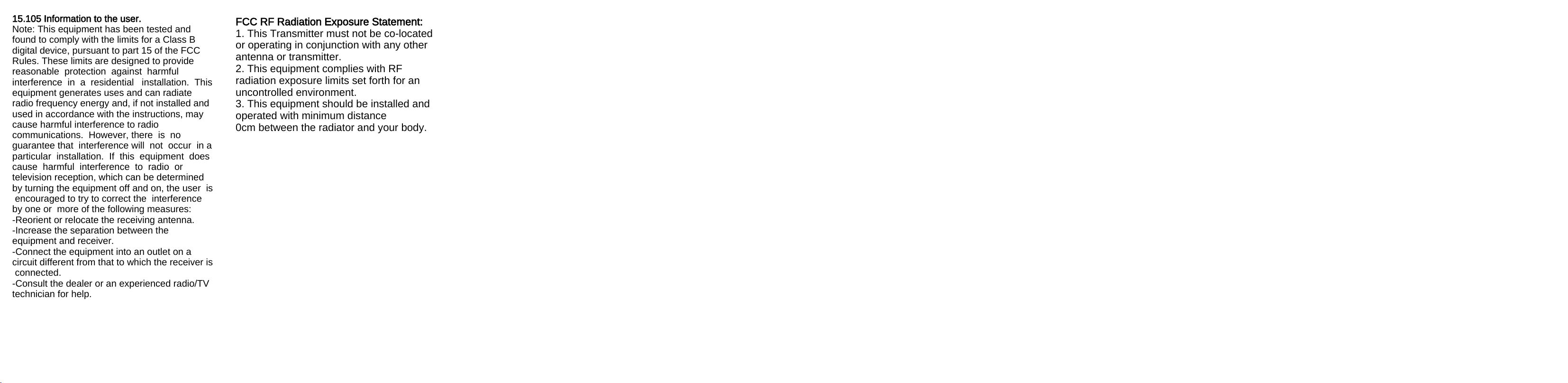
15.105 Information to the user.
Note: This equipment has been tested and
found to comply with the limits for a Class B
digital device, pursuant to part 15 of the FCC
Rules. These limits are designed to provide
reasonable protection against harmful
interference in a residential installation. This
equipment generates uses and can radiate
radio frequency energy and, if not installed and
used in accordance with the instructions, may
cause harmful interference to radio
communications. However, there is no
guarantee that interference will not occur in a
particular installation. If this equipment does
cause harmful interference to radio or
television reception, which can be determined
by turning the equipment off and on, the user is
encouraged to try to correct the interference
by one or more of the following measures:
-Reorient or relocate the receiving antenna.
-Increase the separation between the
equipment and receiver.
-Connect the equipment into an outlet on a
circuit different from that to which the receiver is
connected.
-Consult the dealer or an experienced radio/TV
technician for help.
FCC RF Radiation Exposure Statement:
1. This Transmitter must not be co-located
or operating in conjunction with any other
antenna or transmitter.
2. This equipment complies with RF
radiation exposure limits set forth for an
uncontrolled environment.
3. This equipment should be installed and
operated with minimum distance
0cm between the radiator and your body.