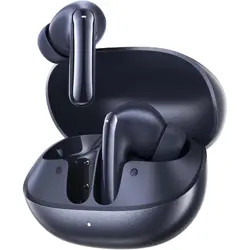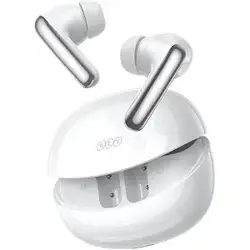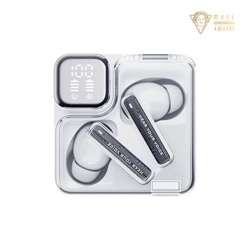
QCY MeloBuds Neo
真无线蓝牙耳机
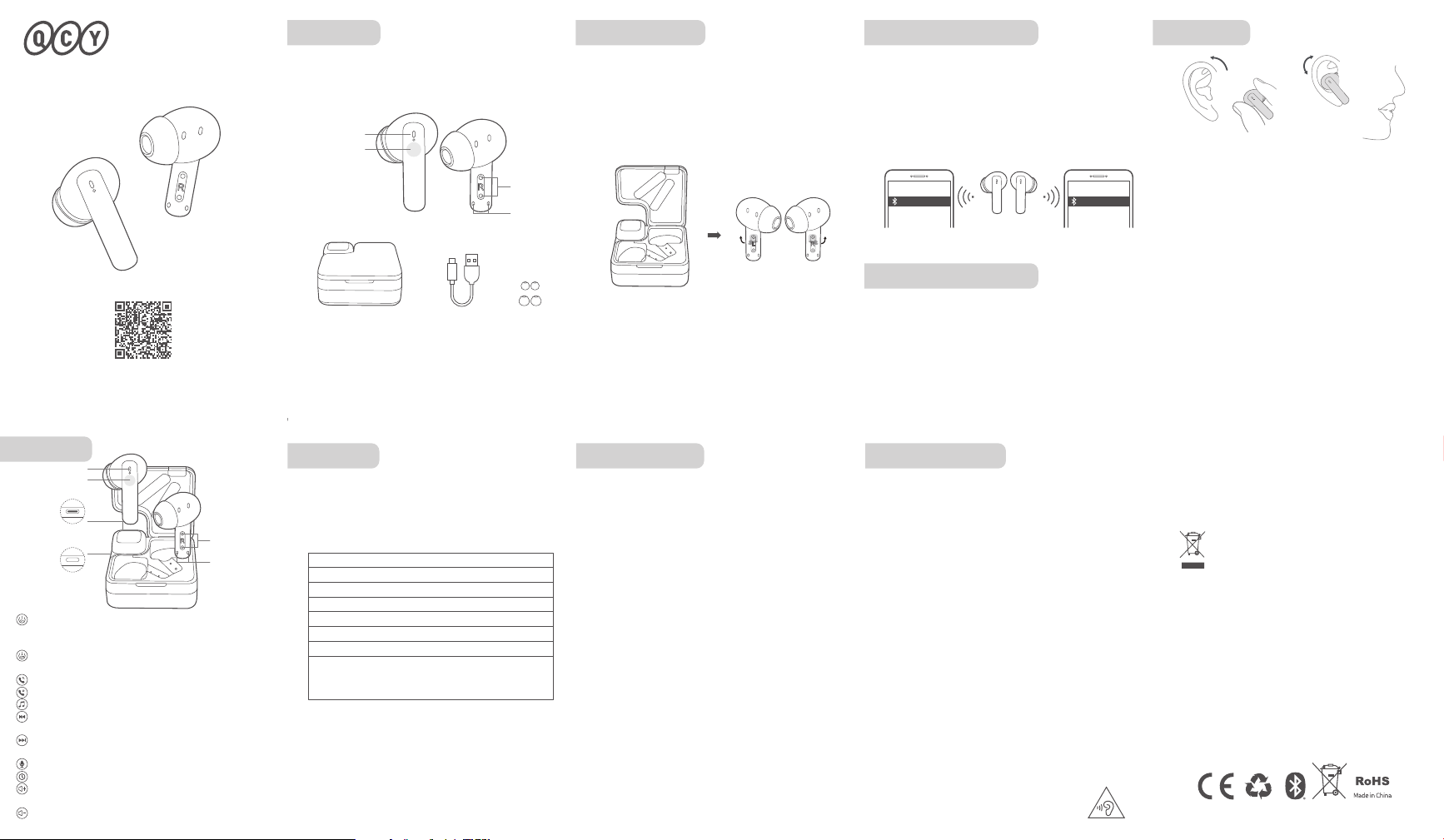
功能介绍
使用前, 请下载安装QCY手机APP客户端
以获得更便捷的耳机操控体验
首次配对方法:
认识耳机 耳机配对
本说明书中的图片均为示意图,可能与实物有偏差,请以实
物为准。
耳机在充电盒内,充电盒开盖,长按充电盒按键10秒,耳机
红灯闪5次,闪烁停止后复位完成。
* 恢复出厂设置后用首次配对的方法连接即可正常使用。
清除配对记录(此方法用于无法正常连接的情况)
恢复出厂设置
操作说明
充电盒有电:充电盒开盖,电量指示灯长亮3秒后熄灭
充电盒低电:充电盒开盖,电量指示灯闪烁3次后熄灭
充电盒电量提示
充电中:电量指示灯闪烁
充满电:电量指示灯熄灭
充电盒充电
充电中红色灯长亮,充满电后灯熄灭
耳机充电
产品信息:
产品型号
订单编号
用户信息:
用户姓名
联系电话
用户地址
退换货原因
购买信息:
销售单位
QCY产品售后服务承诺:严格按照《中华人民共和国消费者权益保护
法》、《中华人民共和国产品质量法》实行售后三包服务,服务内容如下:
在三包有效期内,您可凭购物凭证依照本规定享受免费的修理、更换、退货
的权利。
1、自您购买之日起7日内,本产品出现故障,经由QCY售后服务中心确定为产品
质量问题,可享受修理、更换、退货的服务。
2、自您购买之日起15日内,本产品出现故障,经由QCY售后服务中心确定为产
品质量问题,可享受修理或更换的服务。
3、自您购买之日起12个月内,本产品出现故障,经由QCY售后服务中心确定为
产品质量问题,可享受修理的服务。
售后服务与支持
保修期:
自产品购买之日起12个月(请妥善保管购买凭证)。
免费服务:
在产品保修期内,凡属产品本身质量引起的故障,请用户凭购买凭证与经销商取
得联系以享受售后服务。
如有任何产品损害或瑕疵非可归责于产品质量本身,则不在保修范围内。有下列
情形者不属于保修范围内:
1、因天灾、地震、雷击、异常电压、环境因素而发生之故障或毁损的。
2、自行或委托未经原厂授权维修之厂商拆卸、改装或更换非原厂零件。
3、未按使用手册操作或因人为使用不当而造成损坏者,如产品浸水、腐蚀、掉
落、挤压或露在异常温湿度环境下。
售后服务
三包凭证
若有售后服务需求,请联系客服
电话:4008-306-708
网址:www.qcy.com
制造商:东莞市和乐电子有限公司
地址:广东省东莞市道滘镇粤晖路325号
FAQ
1.Q:只有一只耳机有声音怎么解决?
A:将两只耳机放回充电仓关盖,再重新取出,查看双耳是
否都有声音,若还是只有单只耳机有声音,请对两只耳
机恢复出厂设置。
2.Q:手机提示无法连接怎么解决?
A:将手机上的配对记录删除,删除后重新进行搜索配对连
接即可。
3.Q:听歌/通话没声音怎么解决?
A:安卓手机在蓝牙连接名字的右边有个设置图标,点击进
入,关闭手机音频和媒体音频,再重新开启,若还是无
声,请将耳机重新与手机配对连接。
4.Q:为什么视频/游戏有延迟?
A:受使用环境、网络、手机编解码等因素的影响,会引起
手机传送音频数据到耳机时有不同程度的延迟。
5.Q:听到的声音卡顿/断续怎么解决?
A:在使用时若周围有大量的 Wi-Fi 、5G/4G 信号、大功率
电器等等产生干扰,可能会引起卡顿、断续的情况,换
个环境或者重新配对连接就可以解决了。
提示
- 请勿以任何理由拆除或维修改装耳机,否则可能会导致起火,
电子击穿甚至彻底损坏本品;
- 请勿将产品置于温度过低或过高(0°C以下或45°C以上的环境
下);
- 请避免靠近儿童或动物的眼睛使用产品指示灯;
- 请勿在雷暴天气下使用该产品,雷暴可导致本产品工作不正
常,并增加触电的危险;
- 请勿用油及其他挥发性液体擦拭本产品;
1. 使用产品前请仔细阅读本使用说明书并请妥善保管;
2. 首次使用时,请先将本产品充满电;
3. 如果产品长期(超过2个星期)不用,请对其充电;
4. 必须选择正规厂家生产且经过国家CCC认证的充电器;
5. 若手机无法搜索到蓝牙耳机,请将蓝牙耳机重新进入配对
模式或将蓝牙耳机恢复出厂设置,若手机程序出错,请把
手机蓝牙关闭再开启或重启手机。
电池安全
1.请勿拆解或改装电池、插入异物、置入高温、或浸入水或其
它液体中,以免引起电池漏液、过热、起火或爆炸。电池只能由
制造商更换。
2.请勿跌落、挤压或穿刺电池。避免让电池遭受外部大的压力,
从而导致电池内部短路和过热。
使用年限
如本手册所述,在正常使用条件下,本产品的环保使用
期限为10年。
在此期间,产品不会泄露任何危险物质,本产品可以
回收,必须按照当地法规处理。
产品有害物质名称及含量
本表格依据SJ/T 11364的规定编制
O:表示该有害物质在该部件所有均质材料中的
含量均在GB/T 26572 规定的限量要求以下。
X:表示该有害物质至少在该部件的某一均质材
料中的含量超出 GB/T 26572 规定的限量要求。
外 壳
电路板组件
电 池
充 电 线
附 件
部件名称
有害物质
铅
(Pb)
六价铬
(Cr(VI))
镉
(Cd)
多溴联苯
(PBB)
多溴
二苯醚
(PBDE)
汞
(Hg)
充电盒 Type-C充电线
开机
关机
接听/挂断
拒接电话
播放/暂停
上一曲
下一曲
语音助手
低延迟
音量+
充电盒开盖(耳机在充电盒内)
长按触控面板1.5秒(耳机在充电盒外)
耳机放入充电盒,合盖
双击触控面板
长按触控面板1.5秒
双击触控面板
长按左耳触控面板1.5秒
长按右耳触控面板1.5秒
三击左耳触控面板
三击右耳触控面板
在听音乐时,单击右耳触控面板
:
:
:
:
:
:
:
:
:
:
1.请正确佩戴左右耳机,戴上耳机后可微微转动调整,找
到个人舒适且稳固的位置。
2.麦克风口往下,朝嘴巴方向。
3.错误佩戴耳机会导致通话,听觉都受到不同程度的影响。
1.取出两只耳机 ,同时撕掉耳机上的隔离膜,再将两只耳机放
回充电盒中,合上充电盒盖子。(此步骤为新机激活)
2. 再次取出两只耳机。
3. 刷新手机蓝牙设备列表,点击配对QCY MeloBuds Neo,
完成配对。
*充电盒打开盖子,耳机自动开机,若未自动开机,请充电
后重新尝试。
一键切换配对设备:(此步骤为A设备切换B设备)
打开盖子,左右耳机在充电盒中,长按充电盒按键约3秒,
副耳白灯常亮,主耳白灯闪烁,此时耳机进入设备配对模式
在B设备上搜索QCY MeloBuds Neo,点击连接。
*耳机支持同时连接两台设备。
长时间使用耳机可能会造成听力损害,请合理安排
使用时间。
指示灯
触控面板
充电金属触点
麦克风
耳套
S
L
多设备连接方法:
多设备连接
1.耳机开机进入配对状态,连接设备A后,从手机端关闭蓝牙。
耳机再次进入配对状态。
2.设备B打开蓝牙并点击耳机配对名QCY MeloBuds Neo,
完成配对。
3.设备A上打开蓝牙并点击已配对过的耳机配对名,配对成功,
此时耳机端同时连接两台设备。
指示灯
触控面板
充电金属触点
麦克风
Type-C充电口
充电盒按键
音 量 - 在听音乐时,单击左耳触控面板
:
(此功能默认关闭,若有需要开启此功能,用户可在APP中开启;通话不支持此功能)
(此功能默认关闭,若有需要开启此功能,用户可在APP中开启;通话不支持此功能)
选择并组装耳套
中耳套适用于大多数人群,建议从中耳套开始试戴。
QCY MeloBuds Neo QCY MeloBuds Neo
A设备 B设备
Warranty
Comments:
Model Number:
Date of Purchasing:
User's Name:
User's Phone:
User's Address:
Shop's Name:
Shop's Address:
FCC Statement
This equipment has been tested and found to comply with the
limits for a Class B digital device, pursuant to Part 15 of the
FCC Rules. These limits are designed to provide reasonable
protection against harmful interference in a residential installation.
This equipment generates uses and can radiate radio frequency
energy and, if not installed and used in accordance with the
instructions, may cause harmful interference to radio communications.
However, there is no guarantee that interference will not occur
in a particular installation. If this equipment does cause harmful
interference to radio or television reception, which can be
determined by turning the equipment o and on, the user is
encouraged to try to correct the interference by one or more
of the following measures:
--Reorient or relocate the receiving antenna.
--Increase the separation between the equipment and receiver.
--Connect the equipment into an outlet on a circuit dierent
from that to which the receiver is connected.
--Consult the dealer or an experienced radio/TV technician
for help.
This device complies with part 15 of the FCC Rules. Operation
is subject to the following two conditions:
(1)This device may not cause harmful interference, and (2)
this device must accept any interference received, including
interference that may cause undesired operation.
Changes or modifications not expressly approved by the party
responsible for compliance could void the user's authority to
operate the equipment.
Manufacturer: Dongguan Hele Electronics Co., Ltd.
Address: No. 325 Yuehui Rd. Daojiao Town Dongguan City
Guangdong Province China
Safety Precautions
QCY MeloBuds Neo
User Guide
Note: The images in this manual are for reference only and
may vary from the actual product. Please refer to the actual
product for accuracy.
Overview
Bluetooth Pairing
Multi-Device Connection
Factory Reset
Functions
Initial Pairing:
One-Click Device Switching:
(This step switches from Device A to Device B.)
Download the QCY app to experience the full
range of features such as ambient sound modes,
EQ tuning, firmware updates, and more.
1. Take out both earbuds, peel o the isolation film from
each, and place them back into the charging case. Close the
lid to activate the new device.
2. Retrieve both earbuds again.
3. Refresh your phone's Bluetooth devices, pair with QCY
MeloBuds Neo, and complete the setup.
*Opening the charging case turns on the earbuds. If not, try
again after charging.
Open the lid, keep both earbuds in the charging case, and
press the case button for about 3 seconds. The white light
on the secondary earbud will remain on, while the white
light on the primary earbud will flash. This indicates that the
earbuds are now in pairing mode. On Device B, search for
"QCY MeloBuds Neo" and click to connect.
*The earbuds support connecting to two devices
simultaneously.
Steps for Multi-Device Connection:
1. Power on the earbuds to initiate pairing. After connecting to
Device A, turn o Bluetooth on the phone. The earbuds will
enter pairing mode again.
2. Enable Bluetooth on Device B and select "QCY MeloBuds
Neo" for pairing.
3. On Device A, turn on Bluetooth and click the paired earbuds'
name. Successful pairing means the earbuds are now
connected to both devices simultaneously.
1. Properly wear the earbuds on both the left and right
sides. After wearing them, you can make slight adjustments
by rotating to find a personally comfortable and secure
position.
2. Ensure the microphone opening is facing downward
towards the mouth.
3. Incorrect earbuds placement may aect both calls and
hearing to varying degrees.
Power On: Open the charging case (with earbuds inside) and
long-press the touch panel for 1.5 seconds (if earbuds are
outside the case).
Power O: Place the earbuds into the charging case and
close the lid.
Answer/End Call: Double-tap the touch panel.
Reject Call: Press and hold the touch panel for 1.5 seconds.
Play/Pause: Double-tap the touch panel.
Previous Track: Press and hold the left earbud touch panel
for 1.5 seconds.
Next Track: Press and hold the right earbud touch panel for
1.5 seconds.
Voice Assistant: Triple-tap the left earbud touch panel.
Low Latency Mode: Triple-tap the right earbud touch panel.
Volume +: Single-tap the right ear touch panel.
This marking indicates that this product should
not be disposed with other household wastes
throughout the EU. To prevent possible harm to
the environment or human health from
uncontrolled waste disposal, recycle it
responsibly to promote the sustainable reuse of
material resources. To return your used device,
please use the return and collection systems or
contact the retailer where the product was
purchased. They can take this product for
environmental safe recycling.
Notice:
Your QCY product purchase is covered by a one-year limited
manufacturer warranty from the date of delivery. Please
ensure you retain your purchase receipt. If any defects occur
due to quality issues within the warranty period, kindly bring
both the warranty card and the purchase receipt to the
authorized dealer for complimentary replacement services.
The manufacturer's warranty is void under the following
circumstances but not limited to:
• Improper or inadequate maintenance or modification.
• Accident, misuse, abuse, contamination, or other external
causes.
• The use of unspecified adapter and accessories.
• Malfunctions or damages resulting from natural disasters,
earthquakes, lightning, abnormal voltage, or environmental
factors.
• Damages that occur as a result of one's failure to follow the
instructions.
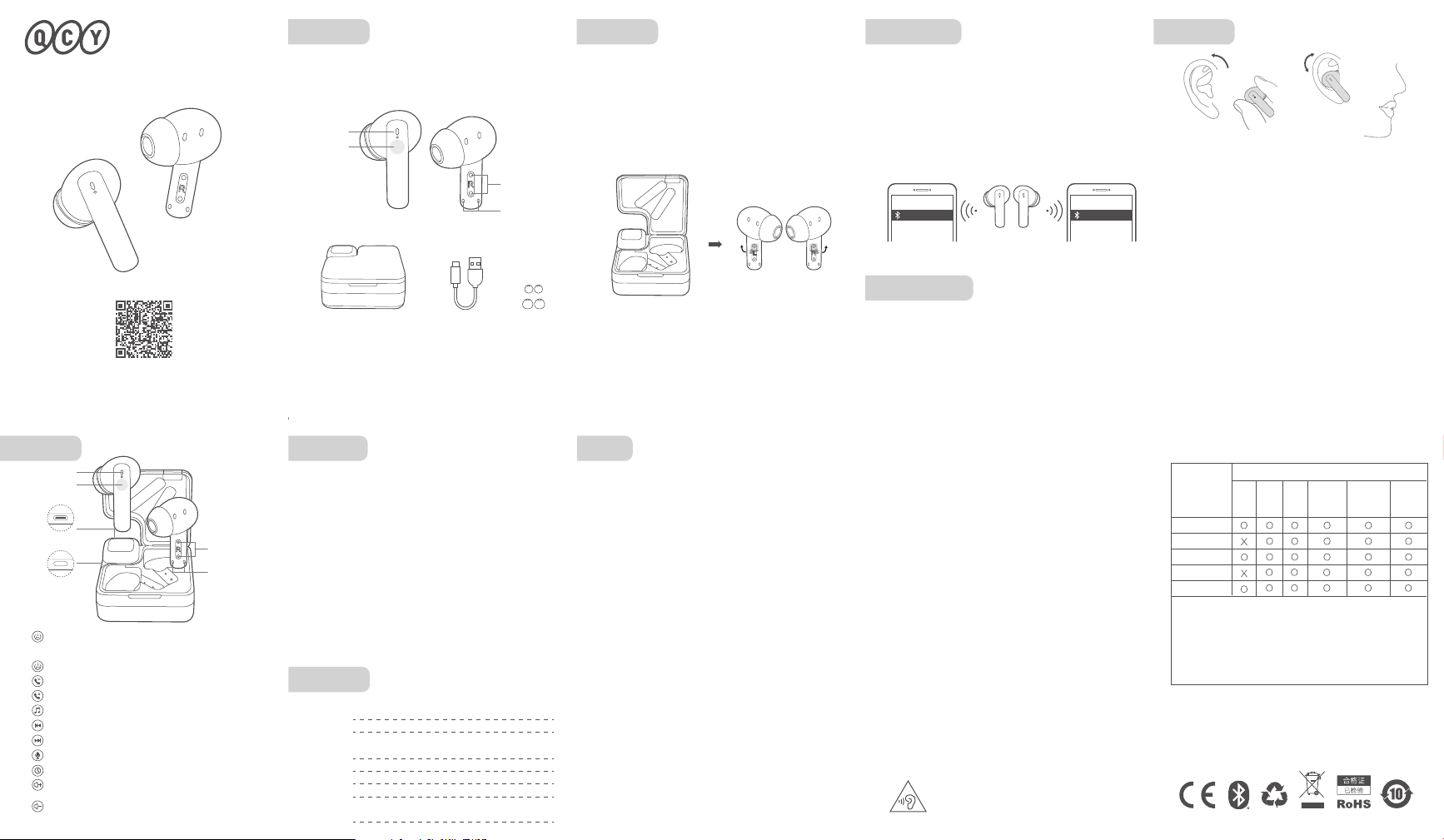
Charging Case Type-C Cable Eartip
Touch Panel
Indicator Light
Pogo Pins
Microphone
Charging Case Battery Status
During charging: The battery indicator light flashes.
Fully Charged: The battery indicator light turns o.
Charging Case Charging
The red light remains on during charging, and the light turns
o after full charge.
Earbuds Charging
1. Please carefully read and retain this user manual before
using the product.
2. If the product is not used for an extended period (more than
2 weeks), please recharge it.
3. You must choose a charger produced by a legitimate
manufacturer and certified by the national safety authority.
4. If your phone cannot detect the Bluetooth earbuds, either
re-enter pairing mode or perform a factory reset on the
Bluetooth earbuds. If there is a phone program error, close
and reopen Bluetooth on the phone or restart the phone.
5. Do not disassemble or modify the battery, insert foreign
objects, expose it to high temperatures, or immerse it in water
or other liquids to prevent battery leakage, overheating,
ignition, or explosion. Battery replacement should only be
done by the manufacturer.
6. Do not drop, crush, or puncture the battery. Prevent
external pressure that may lead to internal short circuits and
overheating.
7. Do not dismantle or modify the earbuds for any reason, as
it may result in fire, electronic breakdown, or permanent
damage to the product.
8. Do not expose the product to extremely low or high
temperatures (below 0°C or above 45°C).
9. Do not the product indicator light near the eyes of children
or animals.
10. Do not use the product during thunderstorms, as it may
cause abnormal operation and increase the risk of electric
shock.
11. Do not use oil or other volatile liquids to clean the product.
12. please do not use this device for long periods
of time and at high volume, as there is a risk of
hearing damage。
S
L
Indicator Light
Touch Panel
Pogo Pins
Microphone
Type-C
Charging Port
Charging Case
Button
True Wireless Earbuds
Clearing Pairing Records (Use in case of connection issues)
Place the earbuds in the charging case, open the lid, press and
hold the button on the charging case for 10 seconds, and the
red light of earbuds will flash 5 times, indicating the reset is
complete after the blinking stops.
* After the factory reset, follow the initial pairing method to
connect for normal usage.
Sucient battery: When the charging case is opened, the
battery indicator light stays on for 3 seconds before turning
o.
Low battery: When the charging case is opened, the battery
indicator light flashes 3 times before turning o.
Volume -: Single-tap the left ear touch panel.
(Note: Note: This function is disabled by default. If needed, users can enable it in the
app; this function is not supported during calls.)
(Note: Note: This function is disabled by default. If needed, users can enable it in the
app; this function is not supported during calls.)
Choose Your Eartips:
Please try medium eartips first as they fit most people.
QCY MeloBuds Neo QCY MeloBuds Neo
A设备 B设备