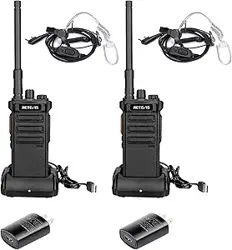
Shenzhen Ysair Technology Co.,LTD
Add:
Web:www.retevis.com
E-mail:kam@retevis.com
Facebook:facebook.com/retevis
MADE IN CHINA
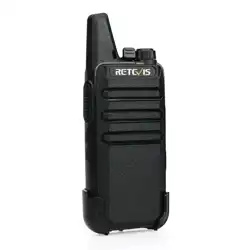
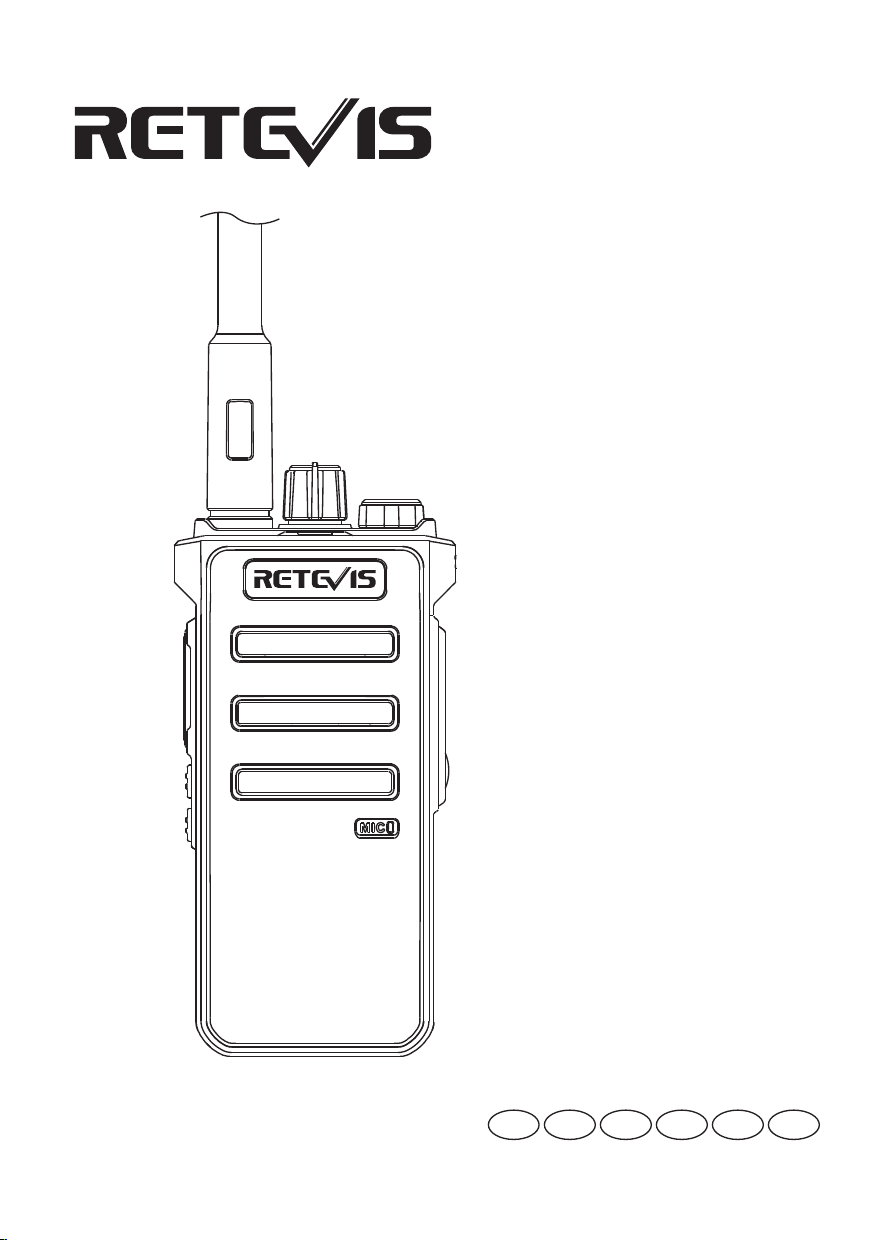
RB25
Two Way Radio
User’s Manual
EN DE FR IT ES RU

Contents
EN
(P01 to P10)
Specification
Main features
Unpacking and product inspection
Main accessories
Charging mode
Battery usage information
Install/remove accessories
Acquainted the radio
Basic operation
Function introduction
Encryption function
Set up
Troubleshooting Guide
Warning
DE
(P11 to P22)
FR
(P23 to P33)
IT
(P34 to P44)
ES
(P45 to P55)
RU
(P56 to P67)
................................................................. 01
................................................................ 01
............................ 01
........................................................... 01
............................................................... 01
........................................... 02
......................................... 02
..................................................... 03
.............................................................. 04
.................................................... 05
....................................................... 05
.............................................................................. 05
................................................. 06
........................................................................... 07
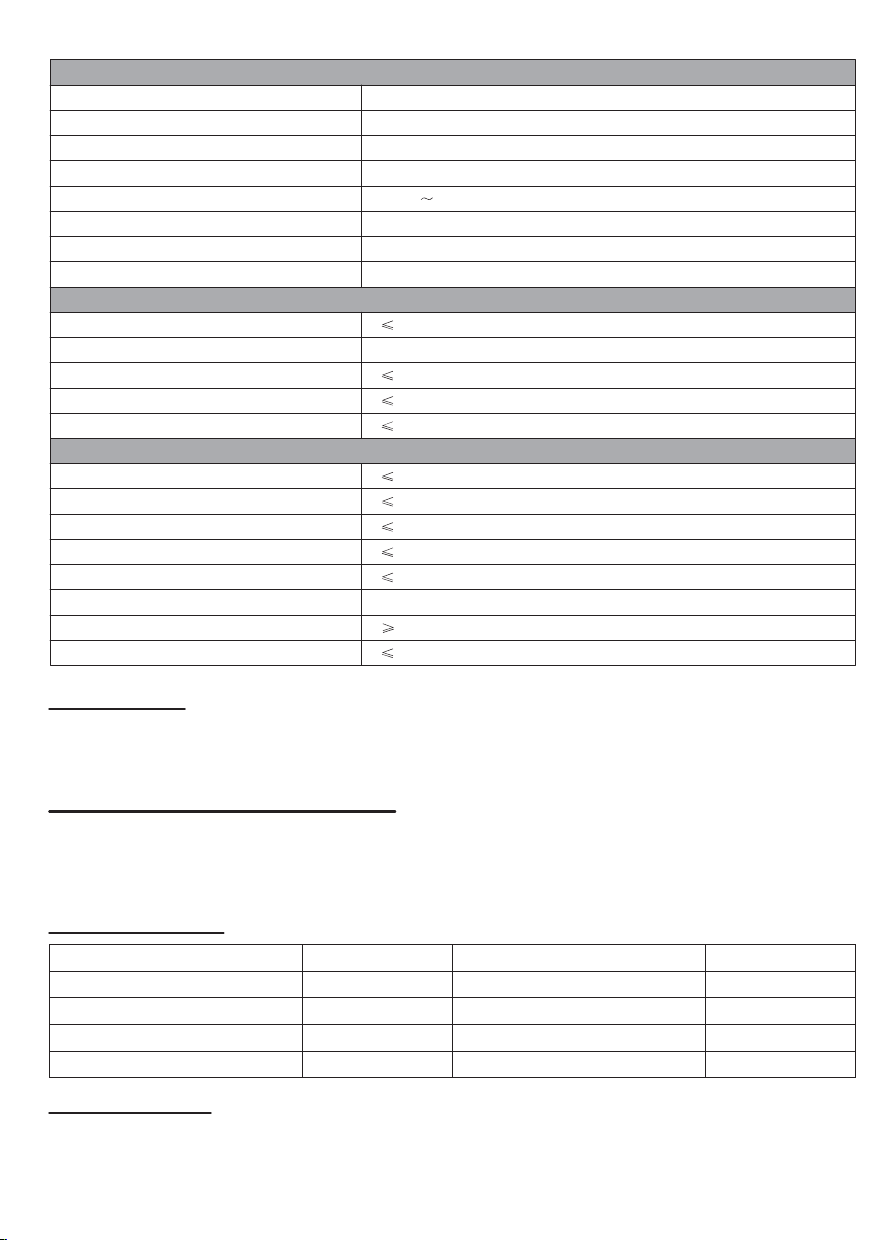
Modulation mode
Clutter and harmonics(dB)
Free slot
Audio distortion
Modulation SER
-45dB
-65dB
-57dB
5%
3%
Transmitter
Frequency range
Channel Capacity
Wide/narrow band
Antenna impedance
Operating temperature
Working voltage
Battery capacity
General Specification
UHF: 400-480MHz
32 channels
Wide,25KHZ Narrow,12.5KHZ
-20
+60
DC 7.4V
2500mAh(Li-ion)
Sensitivity
Adjacent Channel Selectivity
Intermodulation
Blocking
Spurious Response Rejection
S/N
Audio Output
Audio distortion
-123dBm@25K
-65dB
-55dB
-84dB
-70dB
45dB
500mw
5%
Receiver
Main features
High/Low output power English/Chinese announce Monitor
32 channels VOX function Editable side key
TOT Scrambler Wide/Narrow band
Unpacking and product inspection
Welcome to use our company's radio. Before use, it is recommended that you:
• Please check the product packaging box for signs of damage;
• Please open the packing box carefully and confirm whether there are any items listed in the table below. If you find
any loss or damage to the product and its accessories during transportation, please contact your dealer immediately.
Main accessories
Charging mode:
Insert the walkie-talkie into the charging base. At this time, the charger lights up in red to indicate the start of
charging, and in green to indicate that the battery is fully charged.
Battery usage information
The battery is not fully charged before leave the factory, please charge it before use.
When the battery is charged for the first time after purchase or long-term storage (more than two months), it cannot
reach its normal use capacity. The battery needs to be charged/discharged repeatedly two or three times before the
battery capacity can reach the normal state.
Note:
• The ambient temperature during charging should be between 5°C and 40C. If you charge outside this temperature,
the battery cannot be fully charged. Therefore, in colder weather, please prepare spare batteries. Please do not
discard batteries that cannot be used at this time. They may still be used at room temperature.
• When the battery contacts are covered with dust or stains, it may affect the normal use or charging of the battery.
Please wipe it clean before charging.
• Before charging, please turn off the power of the walkie-talkie with the battery, otherwise it will affect the normal
charging of the battery.
• When the battery or walkie-talkie is wet, please do not charge it, dry it before charging electricity.
• When the battery capacity cannot be restored to the normal capacity after charging the battery correctly, it means
that the battery life is over, please replace the battery.
Applicable battery type
Please use the battery specified by our company for charging. Using other batteries may explode and cause
personal injury.
Safety Precautions
• Do not dispose of the battery in fire.
• Do not disassemble the outer casing of the battery pack without authorization.
Battery storage
1. The battery will self-discharge, so when the battery is not used for a long time, please fully charge it and store it
to avoid damage due to excessive self-discharge.
2. The battery should be charged after being stored for a period of time to avoid reducing the battery capacity due
to excessive self-discharge of the battery. It is recommended to charge the battery after 6 months of storage.
3. Please pay attention to the temperature and humidity of the battery storage environment. Please store the
battery in a cool, dry condition at room temperature to reduce battery self-discharge.
Install/remove accessories
Install/remove battery pack
Note:
• Do not short-circuit the battery terminals and do not throw the battery into fire.
• Do not try to remove the outer casing of the battery pack.
• Do not install the battery pack in a hazardous environment, sparks will cause an explosion.
Items Number
Radio
Antenna
Battery
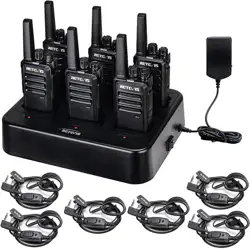
Charging Base
1
1
1
1
Items Number
Belt clip
Hand Strap
warranty card
User Manual
1
1
1
1
When the battery is fully charged, please do not recharge it. Please remove it from
the battery charger, otherwise the battery life will be shortened or damaged due to
overcharging.
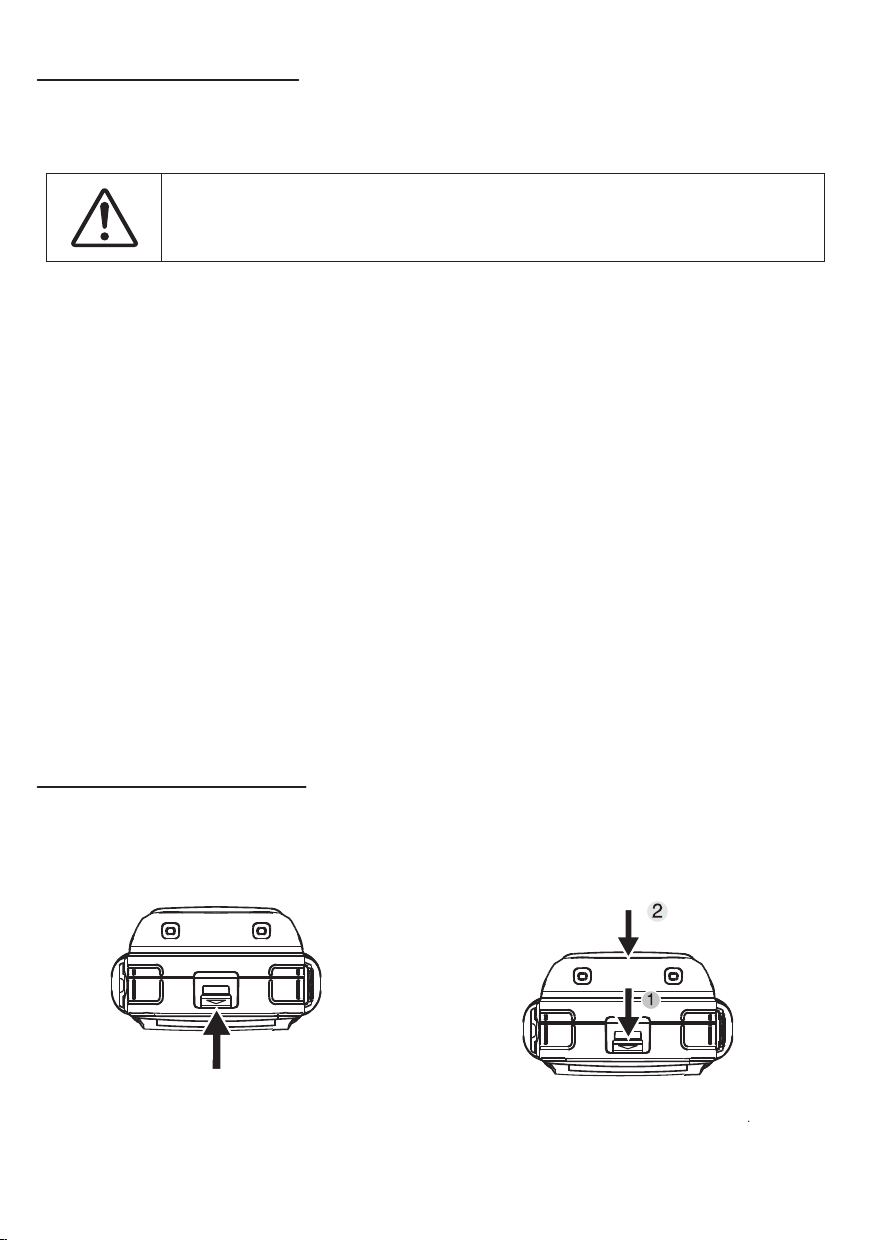
If you want to install the battery pack, push the
battery up along the walkie-talkie aluminum shell,
and then you will hear a "click" sound. The battery
assembly is complete.
To remove the battery pack, please make sure that
the radio is turned off, then press and hold Push the
"Zhuo" button down while holding down the battery,
and then release the button after pushing it down.
01 02
Modulation mode
Clutter and harmonics(dB)
Free slot
Audio distortion
Modulation SER
-45dB
-65dB
-57dB
5%
3%
Transmitter
Frequency range
Channel Capacity
Wide/narrow band
Antenna impedance
Operating temperature
Working voltage
Battery capacity
General Specification
UHF: 400-480MHz
32 channels
Wide,25KHZ Narrow,12.5KHZ
-20
+60
DC 7.4V
2500mAh(Li-ion)
Sensitivity
Adjacent Channel Selectivity
Intermodulation
Blocking
Spurious Response Rejection
S/N
Audio Output
Audio distortion
-123dBm@25K
-65dB
-55dB
-84dB
-70dB
45dB
500mw
5%
Receiver
Main features
High/Low output power English/Chinese announce Monitor
32 channels VOX function Editable side key
TOT Scrambler Wide/Narrow band
Unpacking and product inspection
Welcome to use our company's radio. Before use, it is recommended that you:
• Please check the product packaging box for signs of damage;
• Please open the packing box carefully and confirm whether there are any items listed in the table below. If you find
any loss or damage to the product and its accessories during transportation, please contact your dealer immediately.
Main accessories
Charging mode:
Insert the walkie-talkie into the charging base. At this time, the charger lights up in red to indicate the start of
charging, and in green to indicate that the battery is fully charged.
Battery usage information
The battery is not fully charged before leave the factory, please charge it before use.
When the battery is charged for the first time after purchase or long-term storage (more than two months), it cannot
reach its normal use capacity. The battery needs to be charged/discharged repeatedly two or three times before the
battery capacity can reach the normal state.
Note:
• The ambient temperature during charging should be between 5°C and 40C. If you charge outside this temperature,
the battery cannot be fully charged. Therefore, in colder weather, please prepare spare batteries. Please do not
discard batteries that cannot be used at this time. They may still be used at room temperature.
• When the battery contacts are covered with dust or stains, it may affect the normal use or charging of the battery.
Please wipe it clean before charging.
• Before charging, please turn off the power of the walkie-talkie with the battery, otherwise it will affect the normal
charging of the battery.
• When the battery or walkie-talkie is wet, please do not charge it, dry it before charging electricity.
• When the battery capacity cannot be restored to the normal capacity after charging the battery correctly, it means
that the battery life is over, please replace the battery.
Applicable battery type
Please use the battery specified by our company for charging. Using other batteries may explode and cause
personal injury.
Safety Precautions
• Do not dispose of the battery in fire.
• Do not disassemble the outer casing of the battery pack without authorization.
Battery storage
1. The battery will self-discharge, so when the battery is not used for a long time, please fully charge it and store it
to avoid damage due to excessive self-discharge.
2. The battery should be charged after being stored for a period of time to avoid reducing the battery capacity due
to excessive self-discharge of the battery. It is recommended to charge the battery after 6 months of storage.
3. Please pay attention to the temperature and humidity of the battery storage environment. Please store the
battery in a cool, dry condition at room temperature to reduce battery self-discharge.
Install/remove accessories
Install/remove battery pack
Note:
• Do not short-circuit the battery terminals and do not throw the battery into fire.
• Do not try to remove the outer casing of the battery pack.
• Do not install the battery pack in a hazardous environment, sparks will cause an explosion.
Items Number
Radio
Antenna
Battery
Charging Base
1
1
1
1
Items Number
Belt clip
Hand Strap
warranty card
User Manual
1
1
1
1
When the battery is fully charged, please do not recharge it. Please remove it from
the battery charger, otherwise the battery life will be shortened or damaged due to
overcharging.
If you want to install the battery pack, push the
battery up along the walkie-talkie aluminum shell,
and then you will hear a "click" sound. The battery
assembly is complete.
To remove the battery pack, please make sure that
the radio is turned off, then press and hold Push the
"Zhuo" button down while holding down the battery,
and then release the button after pushing it down.
01 02
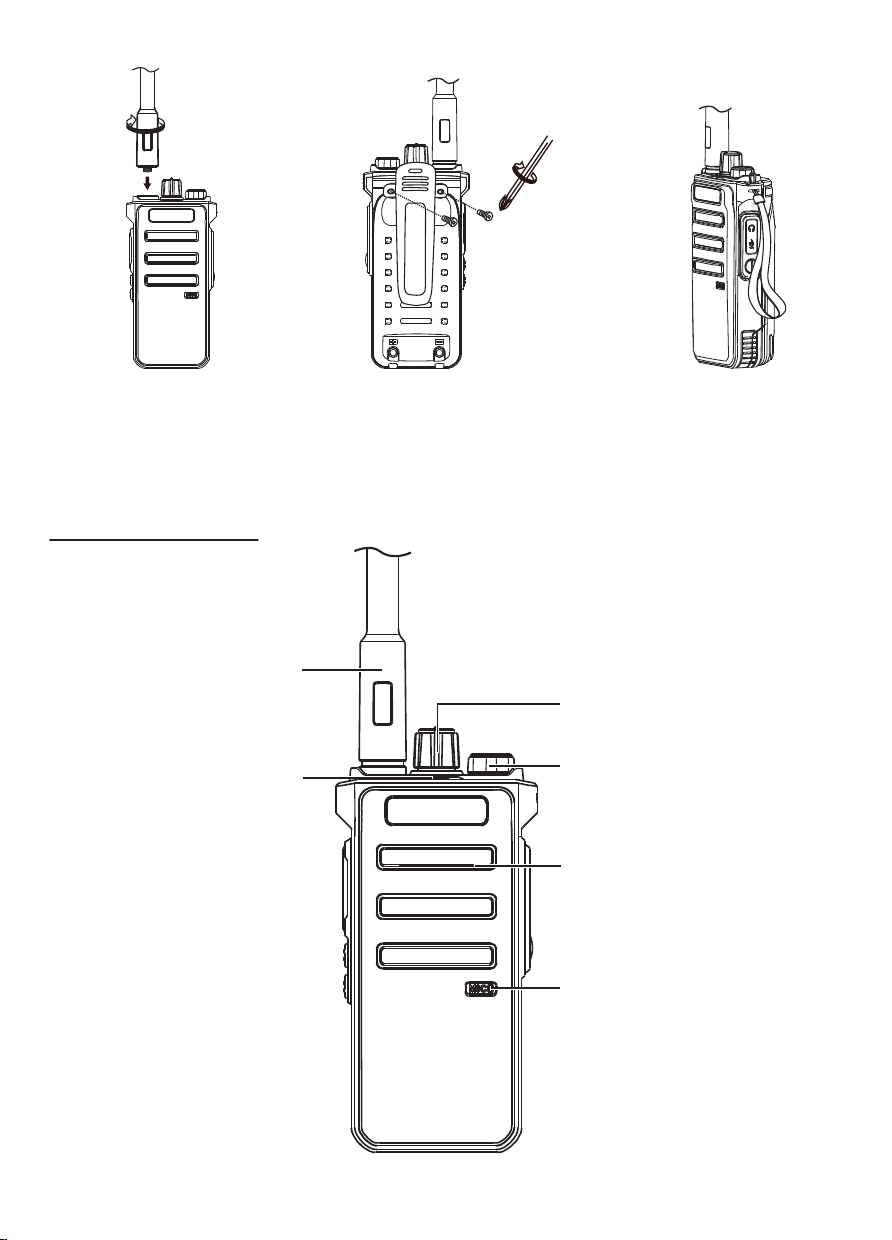
Install the antenna
Hold the antenna base, and screw
the antenna clockwise into the port
on the top of the walkie-talkie until
it is tight.
Install/remove belt clip
If necessary, you can lock the supplied
belt clip into the screw hole on the back
of the battery pack for easy carrying.
To remove the belt clip, just unscrew the
two screws.
Note: The side button 1/side button 2 can be programmed with software to define the long press or short press
function, with the following Several functions can be defined:
Side keys: 1. None 2. Monitor 3. Instant monitor 4. High and low power 5. Scan
6. Flashlight 7. Channel plus 8. Channel minus
Basic operation
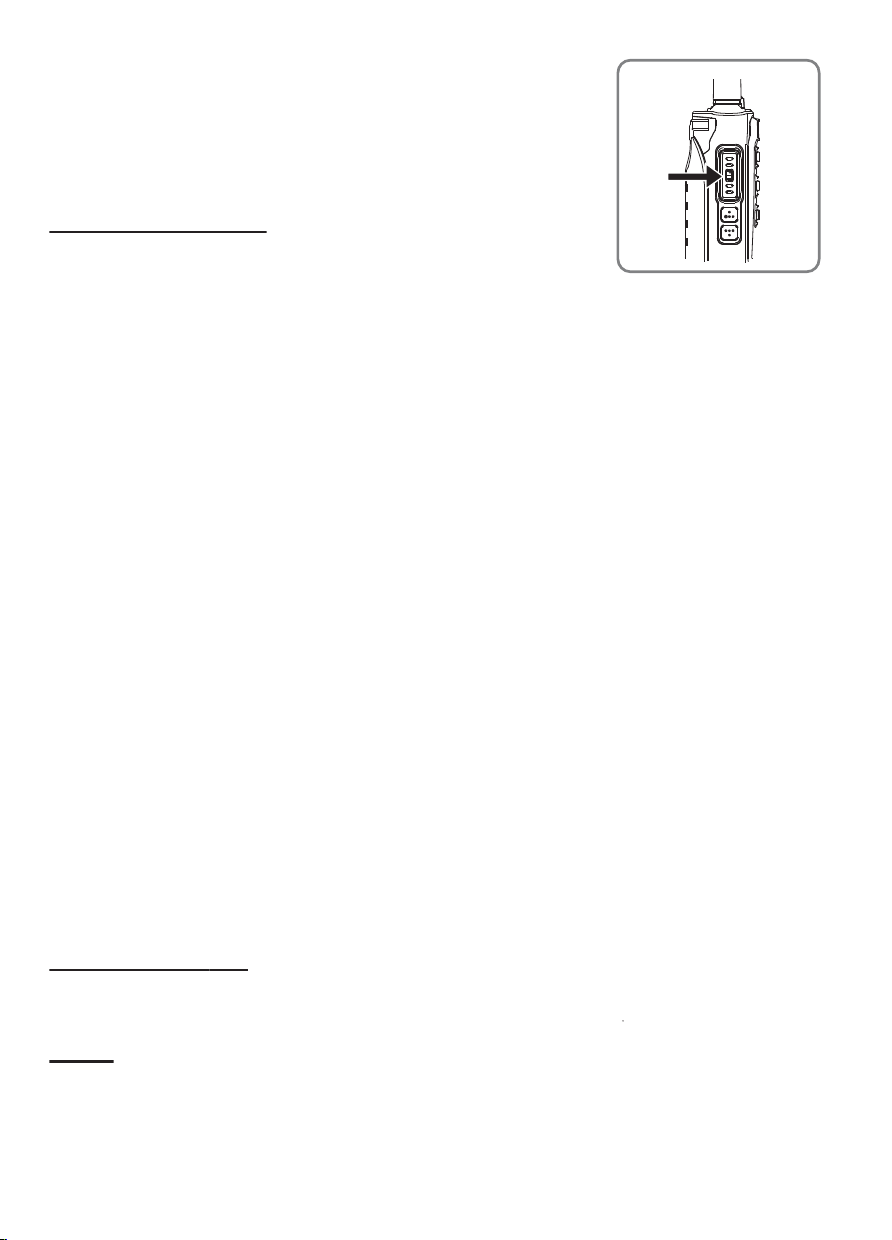
Power on/off
Turn the power switch/volume adjuster clockwise, Until you hear a "click"
sound. Make a sound a short tone indicates that the boot test is successful.
Note:
If your walkie-talkie does not turn on, please check the battery. Make sure
the battery is charged and installed correctly. If your walkie-talkie does not
turn on, please contact your agent.
To turn off the radio, turn the power switch/volume adjuster counterclockwise
until you hear a "click" sound.
Adjust volume
When the two-way radio is turned on, turn the power switch/volume adjuster
to adjust the volume. Rotate clockwise to increase the volume; rotate count-
erclockwise to decrease the volume. You can press the button programmed
to monitor to monitor the current volume level.
Note: The monitor button is set to the programming 1 or 2 button according
to the software programming.
Adjust channel
Select the channel to be used by the channel side key, this walkie-talkie has
a total of 32 channels
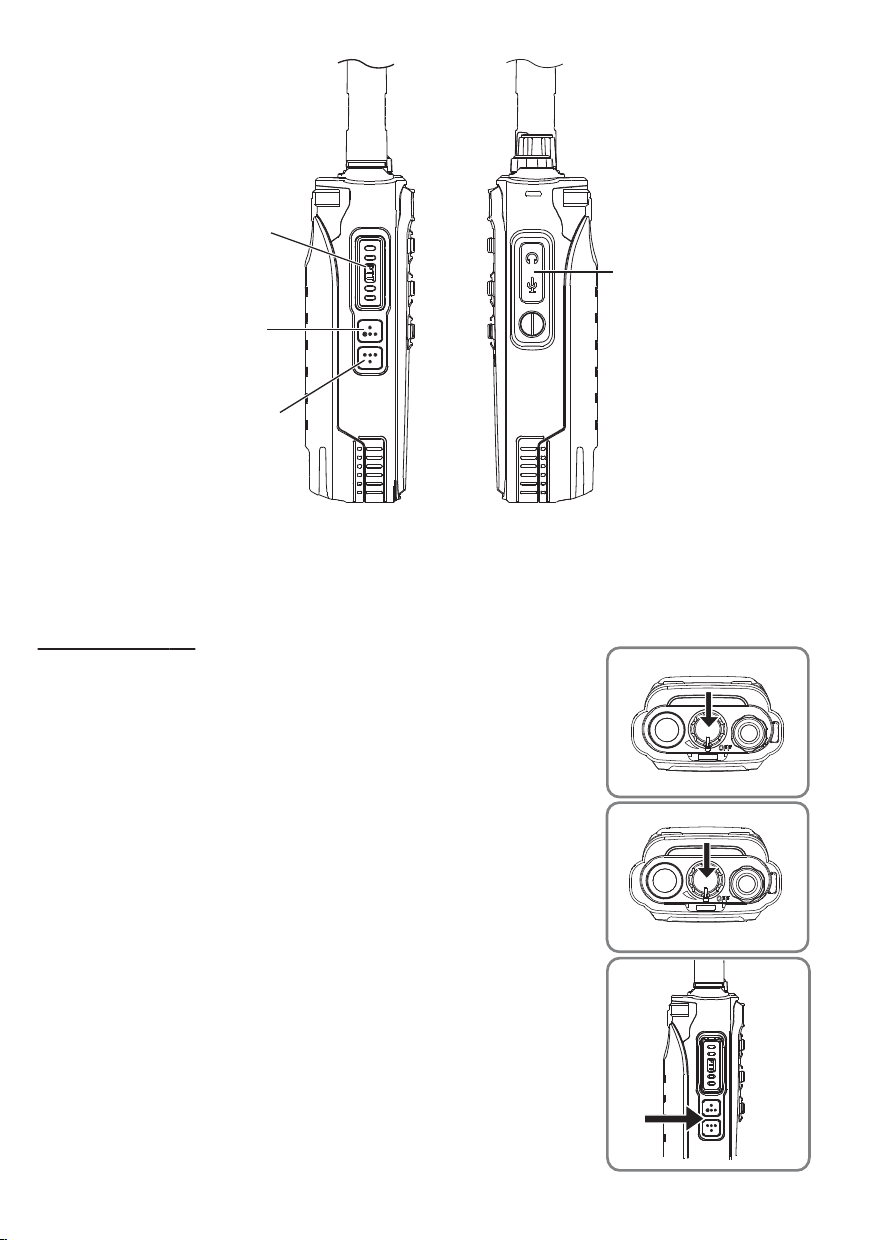
Antenna
Indicator
Volume/power switch
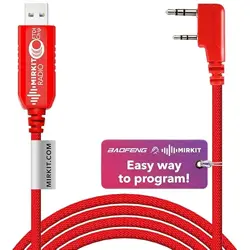
Programming cable /
External headset port
PTT button
PF1 definition key/
Channel increment
PF2 definition key/
Channel increment
Flashlight
Speaker
Microphone
Install the walkie-talkie sling
Put the walkie-talkie strap on the
ring in the middle of the
walkie-talkie
Acquainted the radio
03 04
Install the antenna
Hold the antenna base, and screw
the antenna clockwise into the port
on the top of the walkie-talkie until
it is tight.
Install/remove belt clip
If necessary, you can lock the supplied
belt clip into the screw hole on the back
of the battery pack for easy carrying.
To remove the belt clip, just unscrew the
two screws.
Note: The side button 1/side button 2 can be programmed with software to define the long press or short press
function, with the following Several functions can be defined:
Side keys: 1. None 2. Monitor 3. Instant monitor 4. High and low power 5. Scan
6. Flashlight 7. Channel plus 8. Channel minus
Basic operation
Power on/off
Turn the power switch/volume adjuster clockwise, Until you hear a "click"
sound. Make a sound a short tone indicates that the boot test is successful.
Note:
If your walkie-talkie does not turn on, please check the battery. Make sure
the battery is charged and installed correctly. If your walkie-talkie does not
turn on, please contact your agent.
To turn off the radio, turn the power switch/volume adjuster counterclockwise
until you hear a "click" sound.
Adjust volume
When the two-way radio is turned on, turn the power switch/volume adjuster
to adjust the volume. Rotate clockwise to increase the volume; rotate count-
erclockwise to decrease the volume. You can press the button programmed
to monitor to monitor the current volume level.
Note: The monitor button is set to the programming 1 or 2 button according
to the software programming.
Adjust channel
Select the channel to be used by the channel side key, this walkie-talkie has
a total of 32 channels
Antenna
Indicator
Volume/power switch
Programming cable /
External headset port
PTT button
PF1 definition key/
Channel increment
PF2 definition key/
Channel increment
Flashlight
Speaker
Microphone
Install the walkie-talkie sling
Put the walkie-talkie strap on the
ring in the middle of the
walkie-talkie
Acquainted the radio
03 04
Transmit
To make a call, hold down the [PTT] key and speak into the microphone in a
normal tone. Please keep the microphone 3-4cm away from your lips.
Receive
Release the [PTT] key to receive, please adjust the appropriate volume to get
the best listening effect.
Function introduction
LED indicator
The LED indicator shows the working status of the walkie-talkie.
The pair of walkie-talkie is emitting a signal when the light is red.
With a green light, the two-way radio is turning on or receiving unencrypted calls or data, or is detecting air activity.
Talk (PTT) button
Each channel in the walkie-talkie can be configured as a digital channel.
1. When a call is in progress, the PTT button allows the walkie-talkie to transmit signals to other walkie-talkie in the
call. Press and hold the PTT button to make a call. Release the PTT button to answer. When the PTT button is
pressed, the microphone is activated.
Receive and reply
To receive calls from users
1. The LED indicator lights up green.
2. Hold the walkie-talkie in a vertical position and keep a distance of 1 to 2 inches (2.5 to 5.0 cm) from your mouth.
3. Press the PTT button to answer the call. The LED indicator lights up red.
4. Release the PTT button to answer.
Initiate a group call
To initiate a call to a user group, the walkie-talkie must be configured to belong to the talk group.
The L side key switches channels, and the active talk group ID is used to select the channel.
2. Hold the walkie-talkie in a vertical position and keep a distance of 1 to 2 inches (2.5 to 5.0 cm) from your mouth.
3. Press the PTT button to initiate a call, the LED indicator lights up in red.
4. Release the PTT button to answer. When the target radio responds, the LED indicator lights up green.
Initiate a single call
1. Side key to switch channels, use the active user ID to select the channel.
2. Hold the walkie-talkie in a vertical position and keep a distance of 1 to 2 inches (2.5 to 5.0 cm) from your mouth.
3. Press the PTT button to initiate a call, the LED indicator lights up in red.
4. Release the PTT button to answer. When the target radio responds, the LED indicator lights up green.
Initiate an all call
This function allows you to transmit signals to all users on the channel. The radio must be programmed to allow you
to use this feature.
1. The side key switches the channel, and the active all-call group ID is used to select the channel.
2.Hold the walkie-talkie in a vertical position and keep it 1 to 2 inches (2.5 to 5.0 cm) from your mouth
3. Press the PTT button to initiate a call, the LED indicator lights up red
Encryption function
Encryption setting (this function is only valid in digital mode)
Set by programming software, enable/disable encryption function by programming
Set up
Set the squelch level
You can adjust the squelch level of the walkie-talkie to filter useless calls with low signal strength or channels with
higher background noise than normal.
Setting: 1-10 level, the larger the setting level, the deeper the squelch, and the deep squelch filter (useless) call or
background noise. However, calls from remote locations may also be filtered out.
Set power level
You can set the radio power level of each channel to high or low.
Setting: high power to achieve communication with walkie-talkie that are relatively far away. The low power realizes
the communication with the nearby walkie-talkie.
Press the preprogramme "High/Low Power Selection" button.
Troubleshooting Guide
Questions
No power
Answers
The battery power will not last long after
being charged.
Cannot talk to other members of the
group
Other (non-member) sounds appear
in the channel.
Please change the settings of all walkie-talkie in the unit
CTCSS/DCS settings
• The battery may be exhausted. Please update the battery
or recharge it.
• The battery may not be installed correctly. Please remove
the battery and install it again.
• The battery life has expired. Please update the battery.
• Confirm that the frequency and CTCSS/DCS settings you
are using are the same as the other members of the group.
• It may be too far away. Confirm whether you are within the
effective range of other walkie-talkie.
05 06
CH
1
2
3
4
5
6
7
8
9
10
11
12
13
14
15
16
410.3250
415.3250
400.0250
440.4250
469.9750
400.1250
469.1250
400.0250
440.4250
469.9750
425.3250
435.2250
440.5250
445.6250
450.0525
455.6250
Power
High
High
High
High
High
High
High
High
High
High
High
High
High
High
High
High
CTCSS/DCS
/
/
/
/
/
67.0
D023N
/
/
/
/
/
/
/
/
/
CTCSS/DCS
/
/
/
/
/
67.0
D023N
/
/
/
/
/
/
/
/
/
CH
17
18
19
20
21
22
23
24
25
26
27
28
29
30
31
32
410.3250
415.3250
400.0250
440.4250
469.9750
400.1250
469.1250
400.0250
440.4250
469.9750
425.3250
435.2250
440.5250
445.6250
450.0525
455.6250
Power
High
High
High
High
High
High
High
High
High
High
High
High
High
High
High
High
Standard
Digital
Digital
Digital
Simulation
Simulation
Simulation
Simulation
Digital
Digital
Digital
Digital
Digital
Digital
Digital
Digital
Digital
Standard
Digital
Digital
Digital
Simulation
Simulation
Simulation
Simulation
Digital
Digital
Digital
Digital
Digital
Digital
Digital
Digital
Digital
Transmit
To make a call, hold down the [PTT] key and speak into the microphone in a
normal tone. Please keep the microphone 3-4cm away from your lips.
Receive
Release the [PTT] key to receive, please adjust the appropriate volume to get
the best listening effect.
Function introduction
LED indicator
The LED indicator shows the working status of the walkie-talkie.
The pair of walkie-talkie is emitting a signal when the light is red.
With a green light, the two-way radio is turning on or receiving unencrypted calls or data, or is detecting air activity.
Talk (PTT) button
Each channel in the walkie-talkie can be configured as a digital channel.
1. When a call is in progress, the PTT button allows the walkie-talkie to transmit signals to other walkie-talkie in the
call. Press and hold the PTT button to make a call. Release the PTT button to answer. When the PTT button is
pressed, the microphone is activated.
Receive and reply
To receive calls from users
1. The LED indicator lights up green.
2. Hold the walkie-talkie in a vertical position and keep a distance of 1 to 2 inches (2.5 to 5.0 cm) from your mouth.
3. Press the PTT button to answer the call. The LED indicator lights up red.
4. Release the PTT button to answer.
Initiate a group call
To initiate a call to a user group, the walkie-talkie must be configured to belong to the talk group.
The L side key switches channels, and the active talk group ID is used to select the channel.
2. Hold the walkie-talkie in a vertical position and keep a distance of 1 to 2 inches (2.5 to 5.0 cm) from your mouth.
3. Press the PTT button to initiate a call, the LED indicator lights up in red.
4. Release the PTT button to answer. When the target radio responds, the LED indicator lights up green.
Initiate a single call
1. Side key to switch channels, use the active user ID to select the channel.
2. Hold the walkie-talkie in a vertical position and keep a distance of 1 to 2 inches (2.5 to 5.0 cm) from your mouth.
3. Press the PTT button to initiate a call, the LED indicator lights up in red.
4. Release the PTT button to answer. When the target radio responds, the LED indicator lights up green.
Initiate an all call
This function allows you to transmit signals to all users on the channel. The radio must be programmed to allow you
to use this feature.
1. The side key switches the channel, and the active all-call group ID is used to select the channel.
2.Hold the walkie-talkie in a vertical position and keep it 1 to 2 inches (2.5 to 5.0 cm) from your mouth
3. Press the PTT button to initiate a call, the LED indicator lights up red
Encryption function
Encryption setting (this function is only valid in digital mode)
Set by programming software, enable/disable encryption function by programming
Set up
Set the squelch level
You can adjust the squelch level of the walkie-talkie to filter useless calls with low signal strength or channels with
higher background noise than normal.
Setting: 1-10 level, the larger the setting level, the deeper the squelch, and the deep squelch filter (useless) call or
background noise. However, calls from remote locations may also be filtered out.
Set power level
You can set the radio power level of each channel to high or low.
Setting: high power to achieve communication with walkie-talkie that are relatively far away. The low power realizes
the communication with the nearby walkie-talkie.
Press the preprogramme "High/Low Power Selection" button.
Troubleshooting Guide
Questions
No power
Answers
The battery power will not last long after
being charged.
Cannot talk to other members of the
group
Other (non-member) sounds appear
in the channel.
Please change the settings of all walkie-talkie in the unit
CTCSS/DCS settings
• The battery may be exhausted. Please update the battery
or recharge it.
• The battery may not be installed correctly. Please remove
the battery and install it again.
• The battery life has expired. Please update the battery.
• Confirm that the frequency and CTCSS/DCS settings you
are using are the same as the other members of the group.
• It may be too far away. Confirm whether you are within the
effective range of other walkie-talkie.
05 06
CH
1
2
3
4
5
6
7
8
9
10
11
12
13
14
15
16
410.3250
415.3250
400.0250
440.4250
469.9750
400.1250
469.1250
400.0250
440.4250
469.9750
425.3250
435.2250
440.5250
445.6250
450.0525
455.6250
Power
High
High
High
High
High
High
High
High
High
High
High
High
High
High
High
High
CTCSS/DCS
/
/
/
/
/
67.0
D023N
/
/
/
/
/
/
/
/
/
CTCSS/DCS
/
/
/
/
/
67.0
D023N
/
/
/
/
/
/
/
/
/
CH
17
18
19
20
21
22
23
24
25
26
27
28
29
30
31
32
410.3250
415.3250
400.0250
440.4250
469.9750
400.1250
469.1250
400.0250
440.4250
469.9750
425.3250
435.2250
440.5250
445.6250
450.0525
455.6250
Power
High
High
High
High
High
High
High
High
High
High
High
High
High
High
High
High
Standard
Digital
Digital
Digital
Simulation
Simulation
Simulation
Simulation
Digital
Digital
Digital
Digital
Digital
Digital
Digital
Digital
Digital
Standard
Digital
Digital
Digital
Simulation
Simulation
Simulation
Simulation
Digital
Digital
Digital
Digital
Digital
Digital
Digital
Digital
Digital
RF ENERGY EXPOSURE AND PRODUCT SAFETY GUIDE FOR PORTABLE
TWO-WAY RADIOS
This two-way radio uses electromagnetic energy in the radio frequency (RF) spectrum to provide communications
between two or more users over a distance. RF energy, which when used improperly, can cause biological damage.
All Retevis two-way radios are designed, manufactured, and tested to ensure they meet government-established
RF exposure levels. In addition, manufacturers also recommend specific operating instructions to users of two-way
radios. These instructions are important because they inform users about RF energy exposure and provide simple
procedures on how to control it.
Please refer to the following websites for more information on what RF energy exposure is and how to control your
exposure to assure compliance with established RF exposure limits: http://www.who.int/en/
Local Government Regulations
When two-way radios are used as a consequence of employment, the Local Government Regulations requires users
to be fully aware of and able to control their exposure to meet occupational requirements. Exposure awareness can
be facilitated by the use of a product label directing users to specific user awareness information. Your Retevis
two-way radio has a RF Exposure Product Label. Also, your Retevis user manual, or separate safety booklet includes
information and operating instructions required to control your RF exposure and to satisfy compliance requirements.
Radio License
Governments keep the radios in classification, business two-way radios operate on radio frequencies that are
regulated by the local radio management departments (FCC, ISED, OFCOM, ANFR, BFTK, Bundesnetzagentur...).
To transmit on these frequencies, you are required to have a license issued by them. The detailed classification and
the use of your two radios, please contact the local government radio management departments.
Use of this radio outside the country where it was intended to be distributed is subject to government regulations
and may be prohibited.
Unauthorized modification and adjustment
Changes or modifications not expressly approved by the party responsible for compliance may void the user’s
authority granted by the local government radio management departments to operate this radio and should not be
made. To comply with the corresponding requirements, transmitter adjustments should be made only by or under
the supervision of a person certified as technically qualified to perform transmitter maintenance and repairs in the
private land mobile and fixed services as certified by an organization representative of the user of those services.
Replacement of any transmitter component (crystal, semiconductor, etc.) not authorized by the local government
radio management departments equipment authorization for this radio could violate the rules.
FCC Requirements:
This device complies with part 15 of the FCC Rules. Operation is subject to the condition that this device does not
cause harmful interference. (Licensed radios are applicable);
This device complies with part 15 of the FCC Rules. Operation is subject to the following two conditions: (Other
devices are applicable)
(1) This device may not cause harmful interference, and
(2) this device must accept any interference received, including interference that may cause undesired operation.
NOTE:
• (If applicable)This equipment has been tested and found to comply with the limits for a Class A digital device,
pursuant to part 15 of the FCC Rules. These limits are designed to provide reasonable protection against harmful
interference when the equipment is operated in a commercial environment. This equipment generates, uses, and
can radiate radio frequency energy and, if not installed and used in accordance with the instruction manual, may
cause harmful interference to radio communications. Operation of this equipment in a residential area is likely to
cause harmful interference in which case the user will be required to correct the interference at his own expense.
Before using this radio, read this guide which contains important operating
instructions for safe usage and RF energy awareness and control for compliance
with applicable standards and regulations.
ATTENTION!
• (If applicable)This equipment has been tested and found to comply with the limits for a Class B digital device,
pursuant to part 15 of the FCC Rules. These limits are designed to provide reasonable protection against harmful
interference in a residential installation. This equipment generates, uses and can radiate radio frequency energy
and, if not installed and used in accordance with the instructions, may cause harmful interference to radio commu-
nications. However, there is no guarantee that interference will not occur in a particular installation. If this equipment
does cause harmful interference to radio or television reception, which can be determined by turning the equipment
off and on, the user is encouraged to try to correct the interference by one or more of the following measures:
—Reorient or relocate the receiving antenna.
—Increase the separation between the equipment and receiver.
—Connect the equipment into an outlet on a circuit different from that to which the receiver is connected.
—Consult the dealer or an experienced radio/TV technician for help.
CE Requirements:
• (Simple EU declaration of conformity) Shenzhen Retevis Technology Co., Ltd. declares that the radio equipment
type is in compliance with the essential requirements and other relevant provisions of RED Directive 2014/53/EU
and the ROHS Directive 2011/65/EU and the WEEE Directive 2012/19/EU; the full text of the EU declaration of
conformity is available at the following internet address: www.retevis.com.
• Restriction Information
This product can be used in EU countries and regions, including: Belgium (BE), Bulgaria (BG), Czech Republic (CZ),
Denmark (DK), Germany (DE), Estonia (EE), Ireland (IE), Greece (EL), Spain (ES), France (FR), Croatia (HR), Italy
(IT), Cyprus (CY), Latvia (LV), Lithuania (LT), Luxembourg (LU), Hungary (HU), Malta (MT), Netherlands (NL), Austria
(AT), Poland (PL), Portugal (PT), Romania (RO), Slovenia (SI), Slovakia (SK), Finland (FI), Sweden (SE) and United
Kingdom (UK).
For the warning information of the frequency restriction, please refer to the package or manual section.
• Disposal
The crossed-out wheeled-bin symbol on your product, literature, or packaging reminds you that in the
European Union, all electrical and electronic products, batteries, and accumulators (rechargeable batt-
eries) must be taken to designated collection locations at the end of their working life. Do not dispose
of these products as unsorted municipal waste. Dispose of them according to the laws in your area.
IC Requirements:
Licence-exempt radio apparatus
This device contains licence-exempt transmitter(s)/receiver(s) that comply with Innovation, Science and Economic
Development Canada’s licence-exempt RSS(s). Operation is subject to the following two conditions:
(1) This device may not cause interference.
(2) This device must accept any interference, including interference that may cause undesired operation of the device.
Le présent appareil est conforme aux CNR d’Industrie Canada applicables aux appareils radio exempts de licence.
L’exploitation est autorisée aux deux conditions suivantes :
(1) l’appareil ne doit pas produire de brouillage;
(2) l’utilisateur de l’appareil doit accepter tout brouillage radioélectrique subi, même si le brouillage est susceptible
d’en compromettre le fonctionnement.
RF Exposure Information(if applicable)
• DO NOT operate the radio without a proper antenna attached, as this may damage the radio and may also cause
you to exceed RF exposure limits. A proper antenna is the antenna supplied with this radio by the manufacturer or
an antenna specifically authorized by the manufacturer for use with this radio, and the antenna gain shall not
exceed the specified gain by the manufacturer declared.
• DO NOT transmit for more than 50% of total radio use time, more than 50% of the time can cause RF exposure
compliance requirements to be exceeded.
• During transmissions, your radio generates RF energy that can possibly cause interference with other devices or
systems. To avoid such interference, turn off the radio in areas where signs are posted to do so.
• DO NOT operate the transmitter in areas that are sensitive to electromagnetic radiation such as hospitals, aircraft,
and blasting sites.
• Portable Device, this transmitter may operate with the antenna(s) documented in this filing in Push-to-Talk and
body-worn configurations. RF exposure compliance is limited to the specific belt-clip and accessory configurations
as documented in this filing and the separation distance between user and the device or its antenna shall be at
least 2.5 cm.
07 08

RF ENERGY EXPOSURE AND PRODUCT SAFETY GUIDE FOR PORTABLE
TWO-WAY RADIOS
This two-way radio uses electromagnetic energy in the radio frequency (RF) spectrum to provide communications
between two or more users over a distance. RF energy, which when used improperly, can cause biological damage.
All Retevis two-way radios are designed, manufactured, and tested to ensure they meet government-established
RF exposure levels. In addition, manufacturers also recommend specific operating instructions to users of two-way
radios. These instructions are important because they inform users about RF energy exposure and provide simple
procedures on how to control it.
Please refer to the following websites for more information on what RF energy exposure is and how to control your
exposure to assure compliance with established RF exposure limits: http://www.who.int/en/
Local Government Regulations
When two-way radios are used as a consequence of employment, the Local Government Regulations requires users
to be fully aware of and able to control their exposure to meet occupational requirements. Exposure awareness can
be facilitated by the use of a product label directing users to specific user awareness information. Your Retevis
two-way radio has a RF Exposure Product Label. Also, your Retevis user manual, or separate safety booklet includes
information and operating instructions required to control your RF exposure and to satisfy compliance requirements.
Radio License
Governments keep the radios in classification, business two-way radios operate on radio frequencies that are
regulated by the local radio management departments (FCC, ISED, OFCOM, ANFR, BFTK, Bundesnetzagentur...).
To transmit on these frequencies, you are required to have a license issued by them. The detailed classification and
the use of your two radios, please contact the local government radio management departments.
Use of this radio outside the country where it was intended to be distributed is subject to government regulations
and may be prohibited.
Unauthorized modification and adjustment
Changes or modifications not expressly approved by the party responsible for compliance may void the user’s
authority granted by the local government radio management departments to operate this radio and should not be
made. To comply with the corresponding requirements, transmitter adjustments should be made only by or under
the supervision of a person certified as technically qualified to perform transmitter maintenance and repairs in the
private land mobile and fixed services as certified by an organization representative of the user of those services.
Replacement of any transmitter component (crystal, semiconductor, etc.) not authorized by the local government
radio management departments equipment authorization for this radio could violate the rules.
FCC Requirements:
This device complies with part 15 of the FCC Rules. Operation is subject to the condition that this device does not
cause harmful interference. (Licensed radios are applicable);
This device complies with part 15 of the FCC Rules. Operation is subject to the following two conditions: (Other
devices are applicable)
(1) This device may not cause harmful interference, and
(2) this device must accept any interference received, including interference that may cause undesired operation.
NOTE:
• (If applicable)This equipment has been tested and found to comply with the limits for a Class A digital device,
pursuant to part 15 of the FCC Rules. These limits are designed to provide reasonable protection against harmful
interference when the equipment is operated in a commercial environment. This equipment generates, uses, and
can radiate radio frequency energy and, if not installed and used in accordance with the instruction manual, may
cause harmful interference to radio communications. Operation of this equipment in a residential area is likely to
cause harmful interference in which case the user will be required to correct the interference at his own expense.
Before using this radio, read this guide which contains important operating
instructions for safe usage and RF energy awareness and control for compliance
with applicable standards and regulations.
ATTENTION!
• (If applicable)This equipment has been tested and found to comply with the limits for a Class B digital device,
pursuant to part 15 of the FCC Rules. These limits are designed to provide reasonable protection against harmful
interference in a residential installation. This equipment generates, uses and can radiate radio frequency energy
and, if not installed and used in accordance with the instructions, may cause harmful interference to radio commu-
nications. However, there is no guarantee that interference will not occur in a particular installation. If this equipment
does cause harmful interference to radio or television reception, which can be determined by turning the equipment
off and on, the user is encouraged to try to correct the interference by one or more of the following measures:
—Reorient or relocate the receiving antenna.
—Increase the separation between the equipment and receiver.
—Connect the equipment into an outlet on a circuit different from that to which the receiver is connected.
—Consult the dealer or an experienced radio/TV technician for help.
CE Requirements:
• (Simple EU declaration of conformity) Shenzhen Retevis Technology Co., Ltd. declares that the radio equipment
type is in compliance with the essential requirements and other relevant provisions of RED Directive 2014/53/EU
and the ROHS Directive 2011/65/EU and the WEEE Directive 2012/19/EU; the full text of the EU declaration of
conformity is available at the following internet address: www.retevis.com.
• Restriction Information
This product can be used in EU countries and regions, including: Belgium (BE), Bulgaria (BG), Czech Republic (CZ),
Denmark (DK), Germany (DE), Estonia (EE), Ireland (IE), Greece (EL), Spain (ES), France (FR), Croatia (HR), Italy
(IT), Cyprus (CY), Latvia (LV), Lithuania (LT), Luxembourg (LU), Hungary (HU), Malta (MT), Netherlands (NL), Austria
(AT), Poland (PL), Portugal (PT), Romania (RO), Slovenia (SI), Slovakia (SK), Finland (FI), Sweden (SE) and United
Kingdom (UK).
For the warning information of the frequency restriction, please refer to the package or manual section.
• Disposal
The crossed-out wheeled-bin symbol on your product, literature, or packaging reminds you that in the
European Union, all electrical and electronic products, batteries, and accumulators (rechargeable batt-
eries) must be taken to designated collection locations at the end of their working life. Do not dispose
of these products as unsorted municipal waste. Dispose of them according to the laws in your area.
IC Requirements:
Licence-exempt radio apparatus
This device contains licence-exempt transmitter(s)/receiver(s) that comply with Innovation, Science and Economic
Development Canada’s licence-exempt RSS(s). Operation is subject to the following two conditions:
(1) This device may not cause interference.
(2) This device must accept any interference, including interference that may cause undesired operation of the device.
Le présent appareil est conforme aux CNR d’Industrie Canada applicables aux appareils radio exempts de licence.
L’exploitation est autorisée aux deux conditions suivantes :
(1) l’appareil ne doit pas produire de brouillage;
(2) l’utilisateur de l’appareil doit accepter tout brouillage radioélectrique subi, même si le brouillage est susceptible
d’en compromettre le fonctionnement.
RF Exposure Information(if applicable)
• DO NOT operate the radio without a proper antenna attached, as this may damage the radio and may also cause
you to exceed RF exposure limits. A proper antenna is the antenna supplied with this radio by the manufacturer or
an antenna specifically authorized by the manufacturer for use with this radio, and the antenna gain shall not
exceed the specified gain by the manufacturer declared.
• DO NOT transmit for more than 50% of total radio use time, more than 50% of the time can cause RF exposure
compliance requirements to be exceeded.
• During transmissions, your radio generates RF energy that can possibly cause interference with other devices or
systems. To avoid such interference, turn off the radio in areas where signs are posted to do so.
• DO NOT operate the transmitter in areas that are sensitive to electromagnetic radiation such as hospitals, aircraft,
and blasting sites.
• Portable Device, this transmitter may operate with the antenna(s) documented in this filing in Push-to-Talk and
body-worn configurations. RF exposure compliance is limited to the specific belt-clip and accessory configurations
as documented in this filing and the separation distance between user and the device or its antenna shall be at
least 2.5 cm.
07 08
• Mobile Device, during operation, the separation distance between user and the antenna subjects to actual
regulations, this separation distance will ensure that there is sufficient distance from a properly installed
externally-mounted antenna to satisfy the RF exposure requirements.
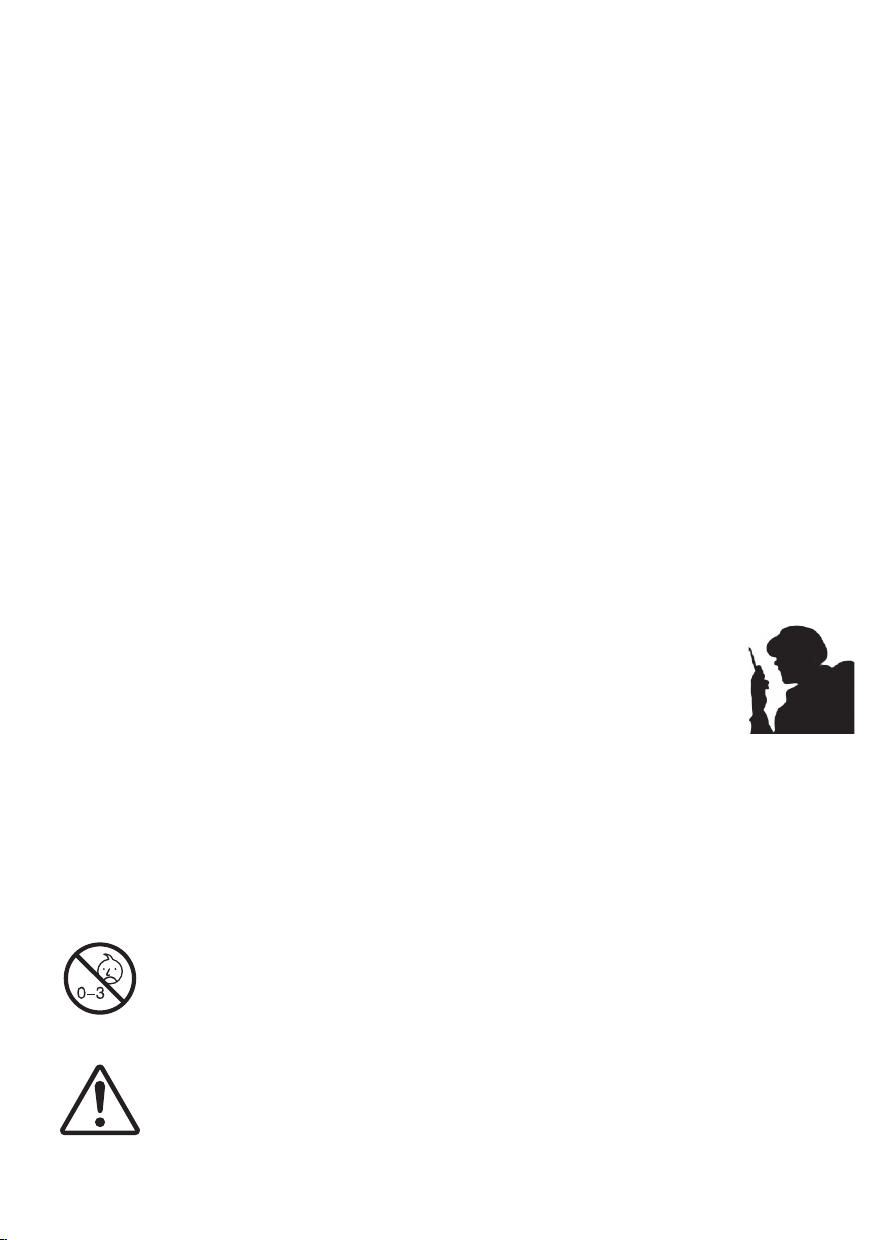
• Occupational/Controlled Radio, this radio is designed for and classified as “Occupational/Controlled Use Only”,
meaning it must be used only during the course of employment by individuals aware of the hazards, and the ways
to minimize such hazards; NOT intended for use in a General population/uncontrolled environment.
• General population/uncontrolled Radio, this radio is designed for and classified as “General population/uncontrolled
Use”.
RF Exposure Compliance and Control Guidelines and Operating Instructions
To control your exposure and ensure compliance with the occupational/controlled environment exposure limits,
always adhere to the following procedures.
Guidelines:
• User awareness instructions should accompany the device when transferred to other users.
• Do not use this device if the operational requirements described herein are not met.
Operating Instructions (if applicable):
• Transmit no more than the rated duty factor of 50% of the time. To Transmit (Talk), push the Push to Talk (PTT)
button. To receive calls (listen), release the PTT button. Transmitting 50% of the time, or less, is important because
the radio generates measurable RF energy exposure only when transmitting in terms of measuring for standards
compliance.
• Transmit only when people outside the vehicle are at least the recommended minimum lateral distance away from
a properly installed according to installation instructions, externally mounted antenna.
• When operating in front of the face, worn on the body, always place the radio in a Retevis approved clip, holder,
holster, case, or body harness for this product. Using approved body-worn accessories is important because the
use of Non-Retevis approved accessories may result in exposure levels, which exceed the IEEE/ICNIRP RF
exposure limits.
Hand-held Mode(if applicable)
• Hold the radio in a vertical position with the microphone (and other parts of the radio including the
antenna) at least 2.5 cm (one inch) away from the nose or lips. The antenna should be kept away
from the eyes. Keeping the radio at a proper distance is important as RF exposure decreases with
increasing distance from the antenna.
Phone Mode(if applicable)
• When placing or receiving a phone call, hold your radio product as you would a wireless telephone. Speak directly
into the microphone.
Electromagnetic Interference/Compatibility
NOTE: Nearly every electronic device is susceptible to electromagnetic interference (EMI) if inadequately shielded,
designed, or otherwise configured for electromagnetic compatibility.
Avoid Choking Hazard
Small Parts. Not for children under 3 years.
Turn off your radio power in the following conditions:
• Turn off your radio before removing (installing) a battery or accessory or when charging battery.
• Turn off your radio when you are in a potentially hazardous environments: Near electrical blasting
caps, in a blasting area, in explosive atmospheres (inflammable gas, dust particles, metallic
powders, grain powders, etc.).
• Turn off your radio while taking on fuel or while parked at gasoline service stations.
WARNING
To avoid electromagnetic interference and/or compatibility conflicts
• Turn off your radio when on board an aircraft. Any use of a radio must be in accordance with
applicable regulations per airline crew instructions.
Protect your hearing:
• Use the lowest volume necessary to do your job.
• Turn up the volume only if you are in noisy surroundings.
• Turn down the volume before adding headset or earpiece.
• Limit the amount of time you use headsets or earpieces at high volume.
• When using the radio without a headset or earpiece, do not place the radio's speaker directly
against your ear
• Use careful with the earphone maybe possible excessive sound pressure from earphones
and headphones can cause hearing loss
Note: Exposure to loud noises from any source for extended periods of time may temporarily or
permanently affect your hearing. The louder the radio's volume, the less time is required before
your hearing could be affected. Hearing damage from loud noise is sometimes undetectable
at first and can have a cumulative effect.
Avoid Burns
Antennas
• Do not use any portable radio that has a damaged antenna. If a damaged antenna comes into
contact with the skin when the radio is in use, a minor burn can result.
Batteries (If appropriate)
• When the conductive material such as jewelry, keys or chains touch exposed terminals of the
batteries, may complete an electrical circuit (short circuit the battery) and become hot to cause
bodily injury such as burns. Exercise care in handling any battery, particularly when placing it inside
a pocket, purse or other container with metal objects
Long transmission
• When the transceiver is used for long transmissions, the radiator and chassis will become hot.
Safety Operation
Forbid
• Do not use charger outdoors or in moist environments, use only in dry locations/conditions.
• Do not disassemble the charger, that may result in risk of electrical shock or fire.
• Do not operate the charger if it has been broken or damaged in any way.
• Do not place a portable radio in the area over an air bag or in the air bag deployment area. The
radio may be propelled with great force and cause serious injury to occupants of the vehicle when
the air bag inflates.
To reduce risk
• Pull by the plug rather than the cord when disconnecting the charger.
• Unplug the charger from the AC outlet before attempting any maintenance or cleaning.
• Contact Retevis for assistance regarding repairs and service.
• The adapter shall be installed near the equipment and shall be easily accessible
Approved Accessories
• This radio meets the RF exposure guidelines when used with the Retevis accessories supplied or
designated for the product. Use of other accessories may not ensure compliance with the RF
exposure guidelines and may violate regulations.
• For a list of Retevis-approved accessories for your radio model, visit the following website:
http://www.Retevis.com
WARNING
WARNING
WARNING
WARNING
09 10
• Mobile Device, during operation, the separation distance between user and the antenna subjects to actual
regulations, this separation distance will ensure that there is sufficient distance from a properly installed
externally-mounted antenna to satisfy the RF exposure requirements.
• Occupational/Controlled Radio, this radio is designed for and classified as “Occupational/Controlled Use Only”,
meaning it must be used only during the course of employment by individuals aware of the hazards, and the ways
to minimize such hazards; NOT intended for use in a General population/uncontrolled environment.
• General population/uncontrolled Radio, this radio is designed for and classified as “General population/uncontrolled
Use”.
RF Exposure Compliance and Control Guidelines and Operating Instructions
To control your exposure and ensure compliance with the occupational/controlled environment exposure limits,
always adhere to the following procedures.
Guidelines:
• User awareness instructions should accompany the device when transferred to other users.
• Do not use this device if the operational requirements described herein are not met.
Operating Instructions (if applicable):
• Transmit no more than the rated duty factor of 50% of the time. To Transmit (Talk), push the Push to Talk (PTT)
button. To receive calls (listen), release the PTT button. Transmitting 50% of the time, or less, is important because
the radio generates measurable RF energy exposure only when transmitting in terms of measuring for standards
compliance.
• Transmit only when people outside the vehicle are at least the recommended minimum lateral distance away from
a properly installed according to installation instructions, externally mounted antenna.
• When operating in front of the face, worn on the body, always place the radio in a Retevis approved clip, holder,
holster, case, or body harness for this product. Using approved body-worn accessories is important because the
use of Non-Retevis approved accessories may result in exposure levels, which exceed the IEEE/ICNIRP RF
exposure limits.
Hand-held Mode(if applicable)
• Hold the radio in a vertical position with the microphone (and other parts of the radio including the
antenna) at least 2.5 cm (one inch) away from the nose or lips. The antenna should be kept away
from the eyes. Keeping the radio at a proper distance is important as RF exposure decreases with
increasing distance from the antenna.
Phone Mode(if applicable)
• When placing or receiving a phone call, hold your radio product as you would a wireless telephone. Speak directly
into the microphone.
Electromagnetic Interference/Compatibility
NOTE: Nearly every electronic device is susceptible to electromagnetic interference (EMI) if inadequately shielded,
designed, or otherwise configured for electromagnetic compatibility.
Avoid Choking Hazard
Small Parts. Not for children under 3 years.
Turn off your radio power in the following conditions:
• Turn off your radio before removing (installing) a battery or accessory or when charging battery.
• Turn off your radio when you are in a potentially hazardous environments: Near electrical blasting
caps, in a blasting area, in explosive atmospheres (inflammable gas, dust particles, metallic
powders, grain powders, etc.).
• Turn off your radio while taking on fuel or while parked at gasoline service stations.
WARNING
To avoid electromagnetic interference and/or compatibility conflicts
• Turn off your radio when on board an aircraft. Any use of a radio must be in accordance with
applicable regulations per airline crew instructions.
Protect your hearing:
• Use the lowest volume necessary to do your job.
• Turn up the volume only if you are in noisy surroundings.
• Turn down the volume before adding headset or earpiece.
• Limit the amount of time you use headsets or earpieces at high volume.
• When using the radio without a headset or earpiece, do not place the radio's speaker directly
against your ear
• Use careful with the earphone maybe possible excessive sound pressure from earphones
and headphones can cause hearing loss
Note: Exposure to loud noises from any source for extended periods of time may temporarily or
permanently affect your hearing. The louder the radio's volume, the less time is required before
your hearing could be affected. Hearing damage from loud noise is sometimes undetectable
at first and can have a cumulative effect.
Avoid Burns
Antennas
• Do not use any portable radio that has a damaged antenna. If a damaged antenna comes into
contact with the skin when the radio is in use, a minor burn can result.
Batteries (If appropriate)
• When the conductive material such as jewelry, keys or chains touch exposed terminals of the
batteries, may complete an electrical circuit (short circuit the battery) and become hot to cause
bodily injury such as burns. Exercise care in handling any battery, particularly when placing it inside
a pocket, purse or other container with metal objects
Long transmission
• When the transceiver is used for long transmissions, the radiator and chassis will become hot.
Safety Operation
Forbid
• Do not use charger outdoors or in moist environments, use only in dry locations/conditions.
• Do not disassemble the charger, that may result in risk of electrical shock or fire.
• Do not operate the charger if it has been broken or damaged in any way.
• Do not place a portable radio in the area over an air bag or in the air bag deployment area. The
radio may be propelled with great force and cause serious injury to occupants of the vehicle when
the air bag inflates.
To reduce risk
• Pull by the plug rather than the cord when disconnecting the charger.
• Unplug the charger from the AC outlet before attempting any maintenance or cleaning.
• Contact Retevis for assistance regarding repairs and service.
• The adapter shall be installed near the equipment and shall be easily accessible
Approved Accessories
• This radio meets the RF exposure guidelines when used with the Retevis accessories supplied or
designated for the product. Use of other accessories may not ensure compliance with the RF
exposure guidelines and may violate regulations.
• For a list of Retevis-approved accessories for your radio model, visit the following website:
http://www.Retevis.com
WARNING
WARNING
WARNING
WARNING
09 10
Shenzhen Ysair Technology Co.,LTD
Add:
Web:www.retevis.com
E-mail:[email protected]
Facebook:facebook.com/retevis
MADE IN CHINA
RB25
Two Way Radio
User’s Manual
EN DE FR IT ES RU