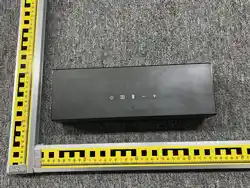
Nova S70
Model No.: U3920
Nova S70 3.1.2 Channel Dolby Atmos Soundbar
EN: User Manual
DE: Benutzerhandbuch
JP: ユーザーマニュアル
FR: Manuel de l'Utilisateur
IT: Manuale d'uso
ES: Manual del usuario


Contents
06 Benutzerhandbuch
Deutsch
01 User Manual
English
Connection and Installation
02
11 ユーザーマニュアル
日本語
接続と設置
12
16 Mode d'Emploi
Français
Raccordement et installation
17
21 Manuale d'uso
Italiano
Connessione e installazione
22
26 Manual del usuario
Español
Conexión e instalación
27
Anschluss und Installation
07
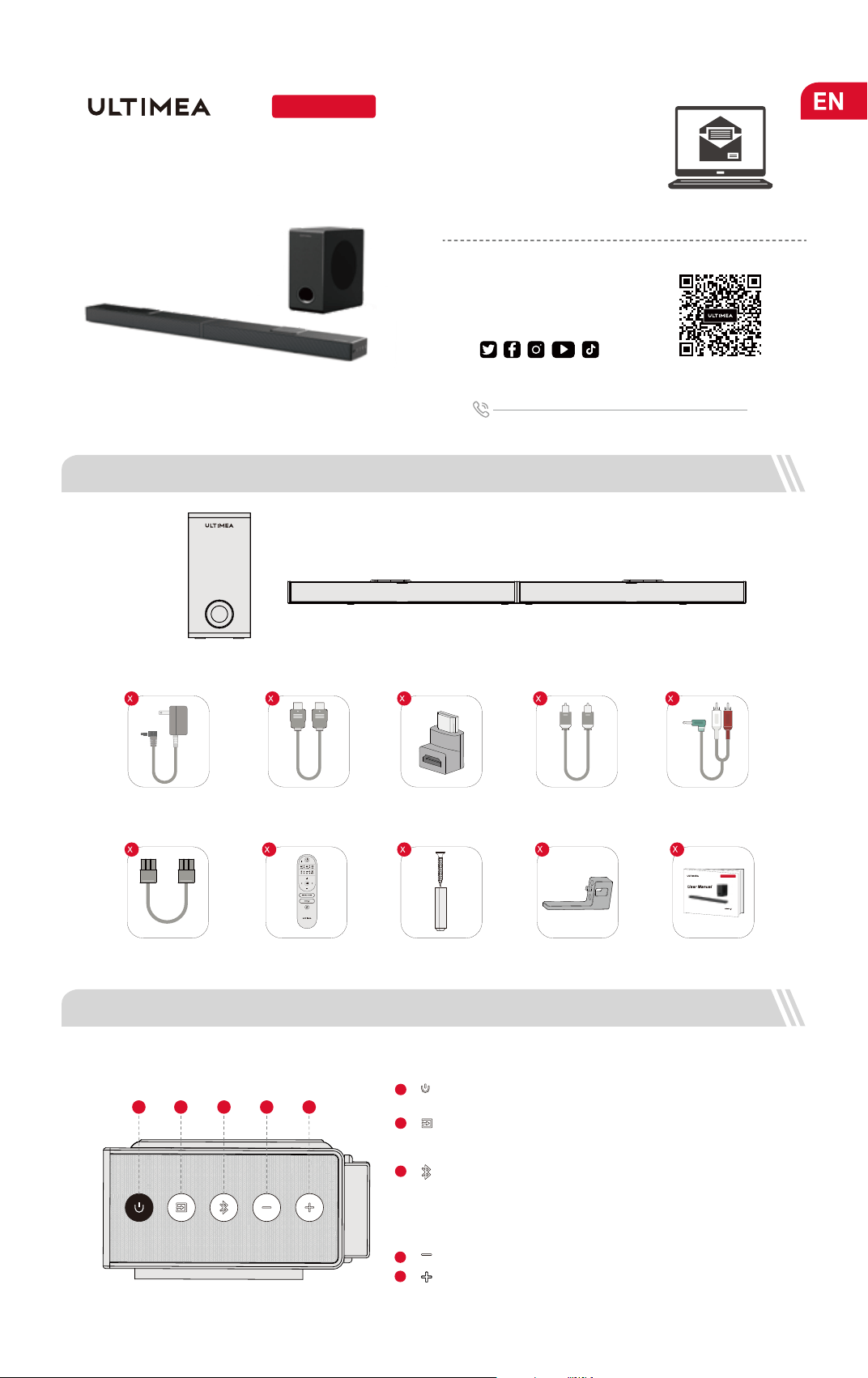
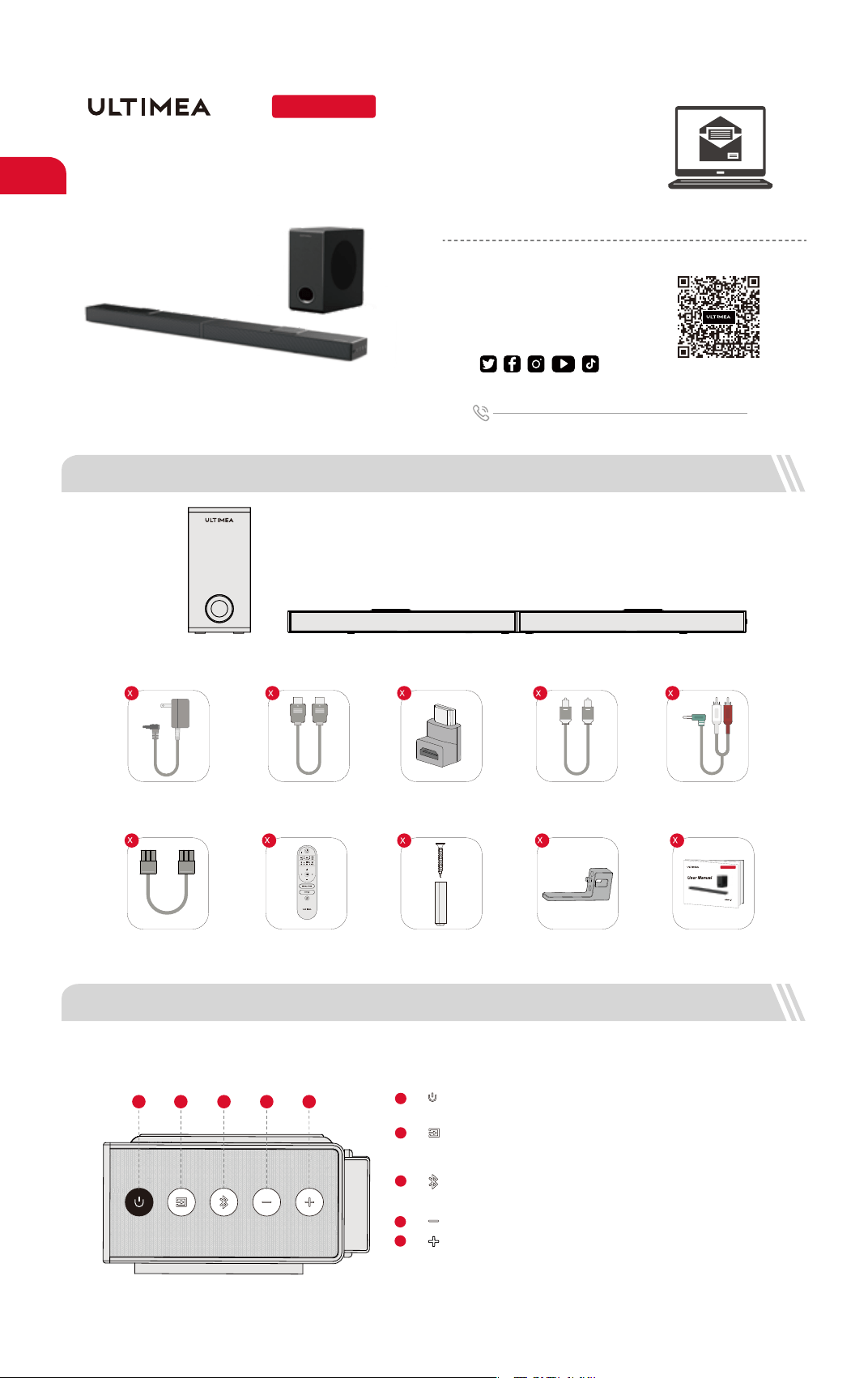
Soundbar
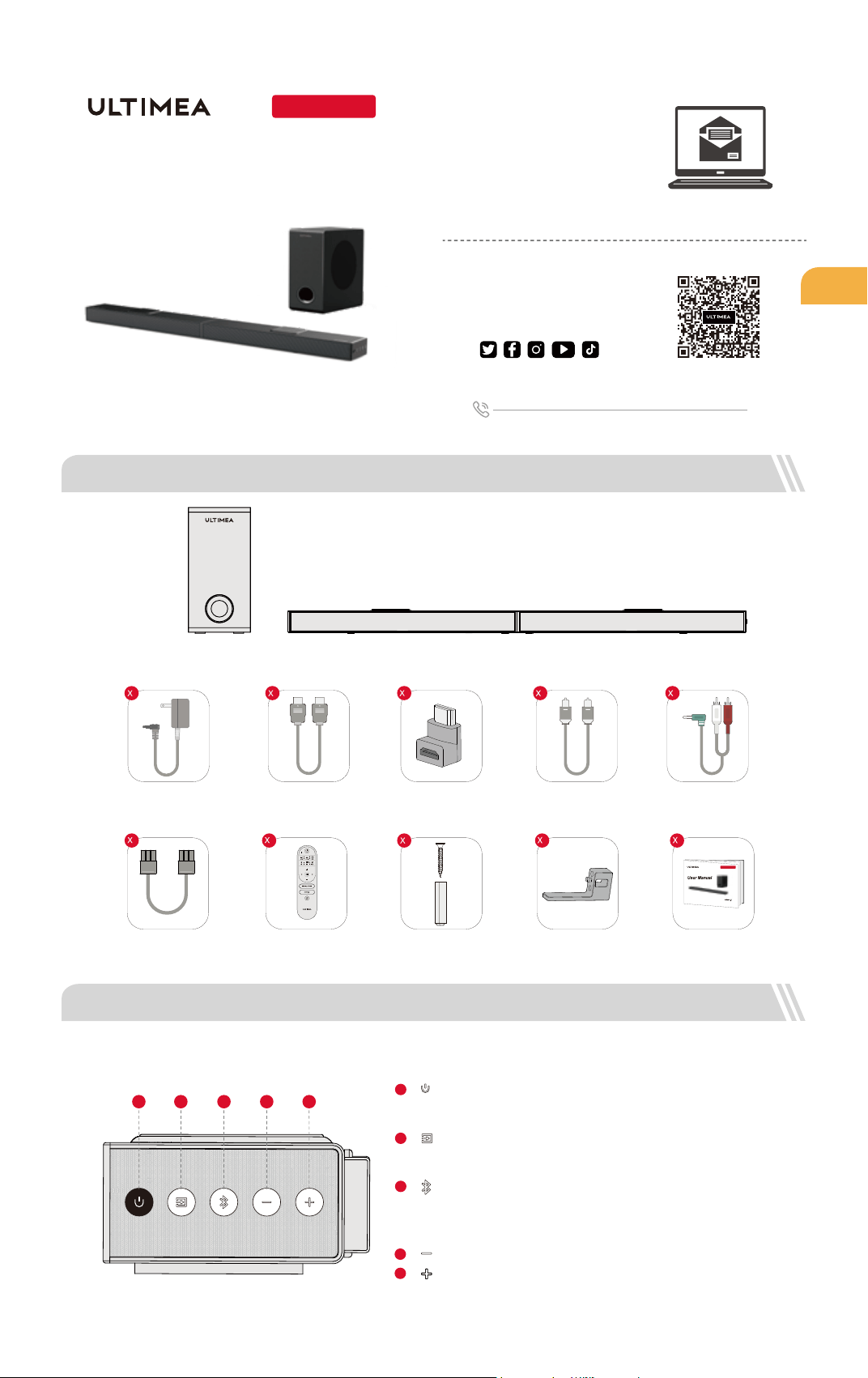
2 SOUNDBAR CONTROLS
Subwoofer
Power Adaptor
HDMI Cable
Stereo 3.5mm to RCA
Audio Cable
1
Remote Control
Digital Optical
Cable
Wall Mounted Kit Wall Bracket
2
User Manual
1
2
HDMI Adaptor
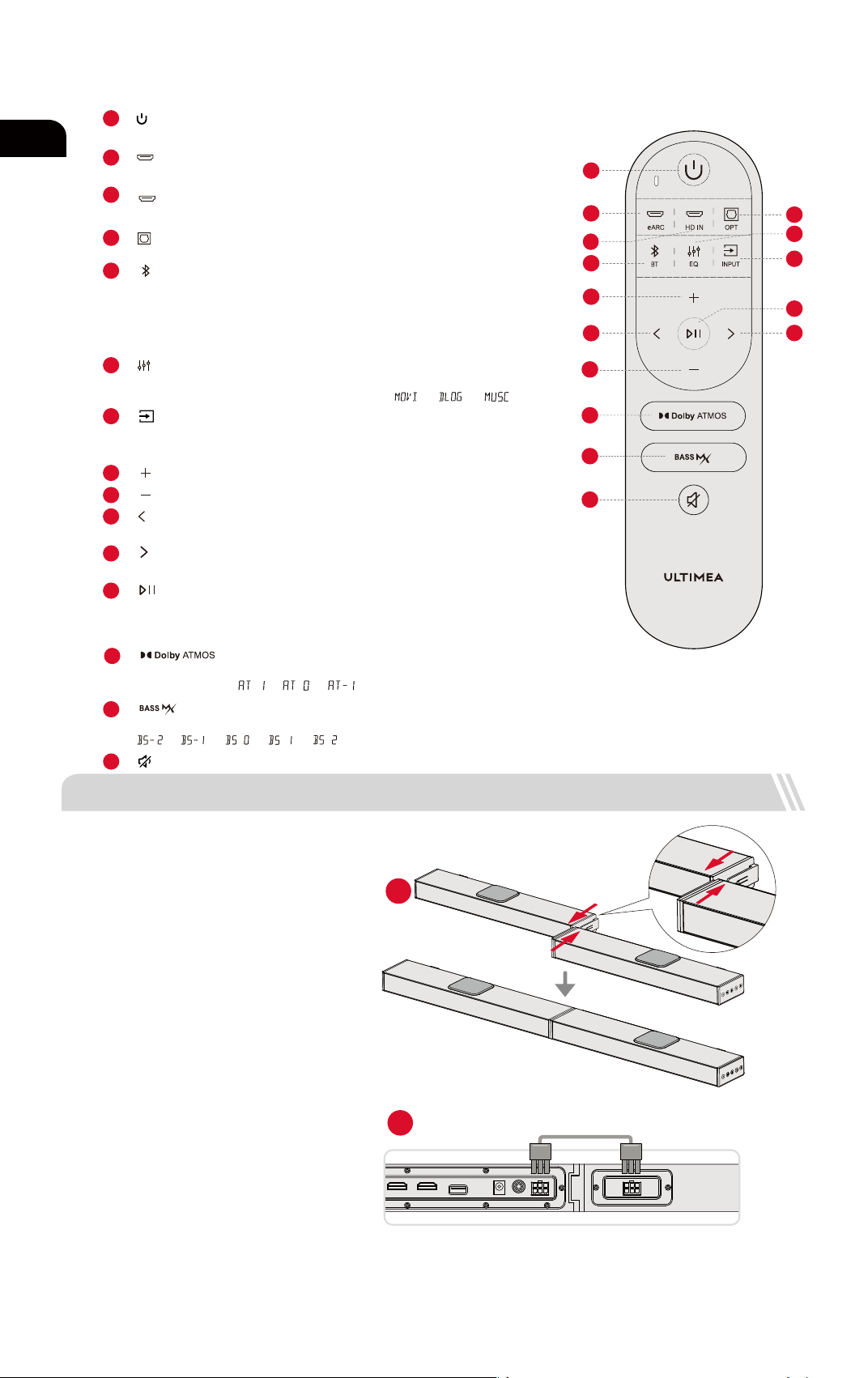
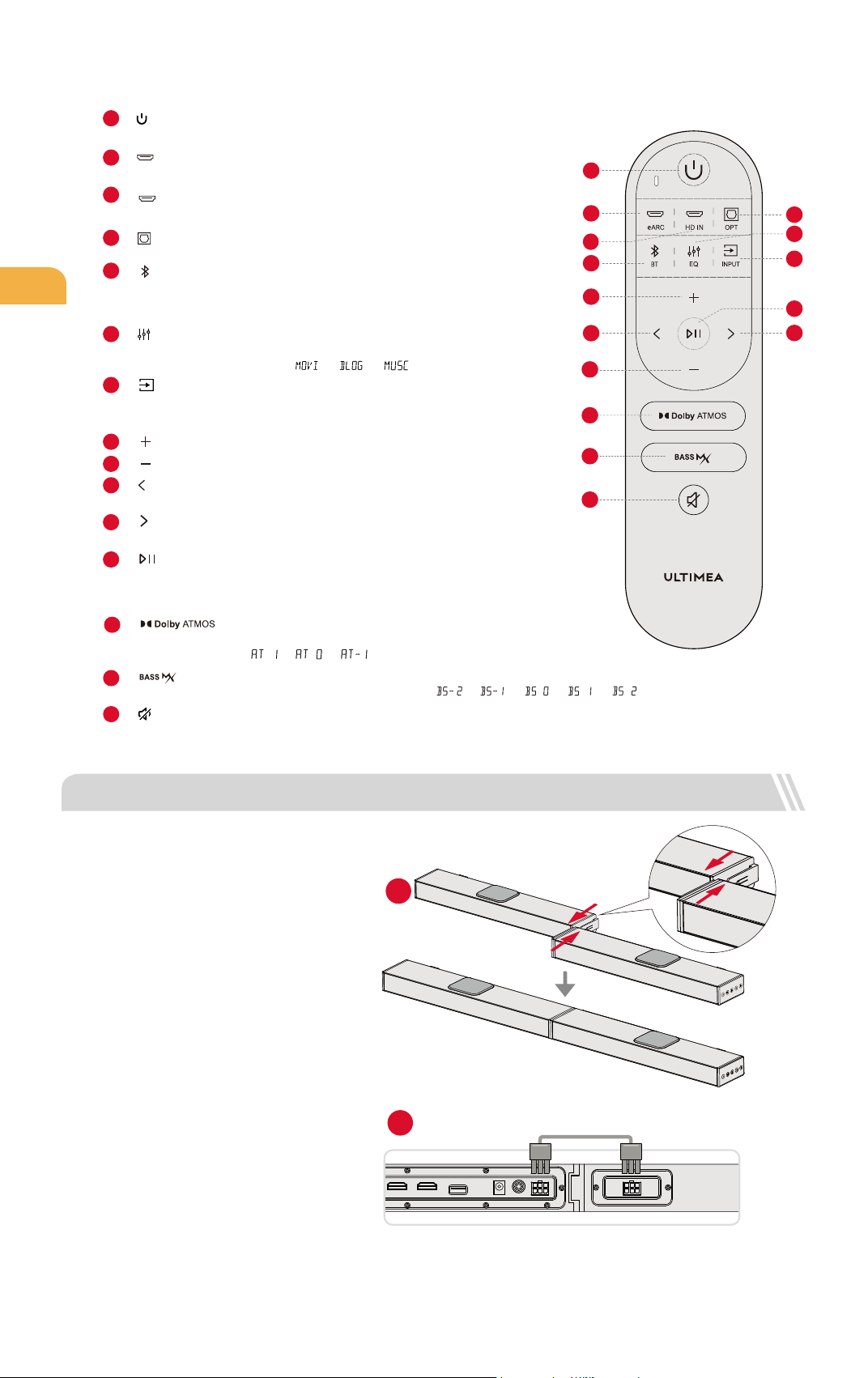
“ ”: Volume Down
Control Panel
“ ”: Power Button
Press to power on / Hold for 3 seconds to power off.
1
“ ”: Input Mode
Press to switch channels: eARC-HD IN (HDMI IN)-
OPT (OPTICAL)-BT-AUX-USB.
2
3
“ ”:
“ ”: Volume Up
4
5
Press to switch to Bluetooth channel and enter pairing
mode. Hold for 3 seconds to disconnect the current
device and connect to a new device manually on your
mobile phone / PC / TV (BT ID: Nova S70).
BT
4321
5
3920
Nova S70
6-pin Cable for
Soundbar Connection (140mm)
Nova S70
Model No.: U3920
Prefer video tutorial?
WE ARE
READY
TO HELP
support.ultimea.com
+1 888-598-8875 (US) Mon-Fri 9am-5pm (PST)
+49 89-628-25828 (EU) Mon-Fri 9am-5pm (CET)
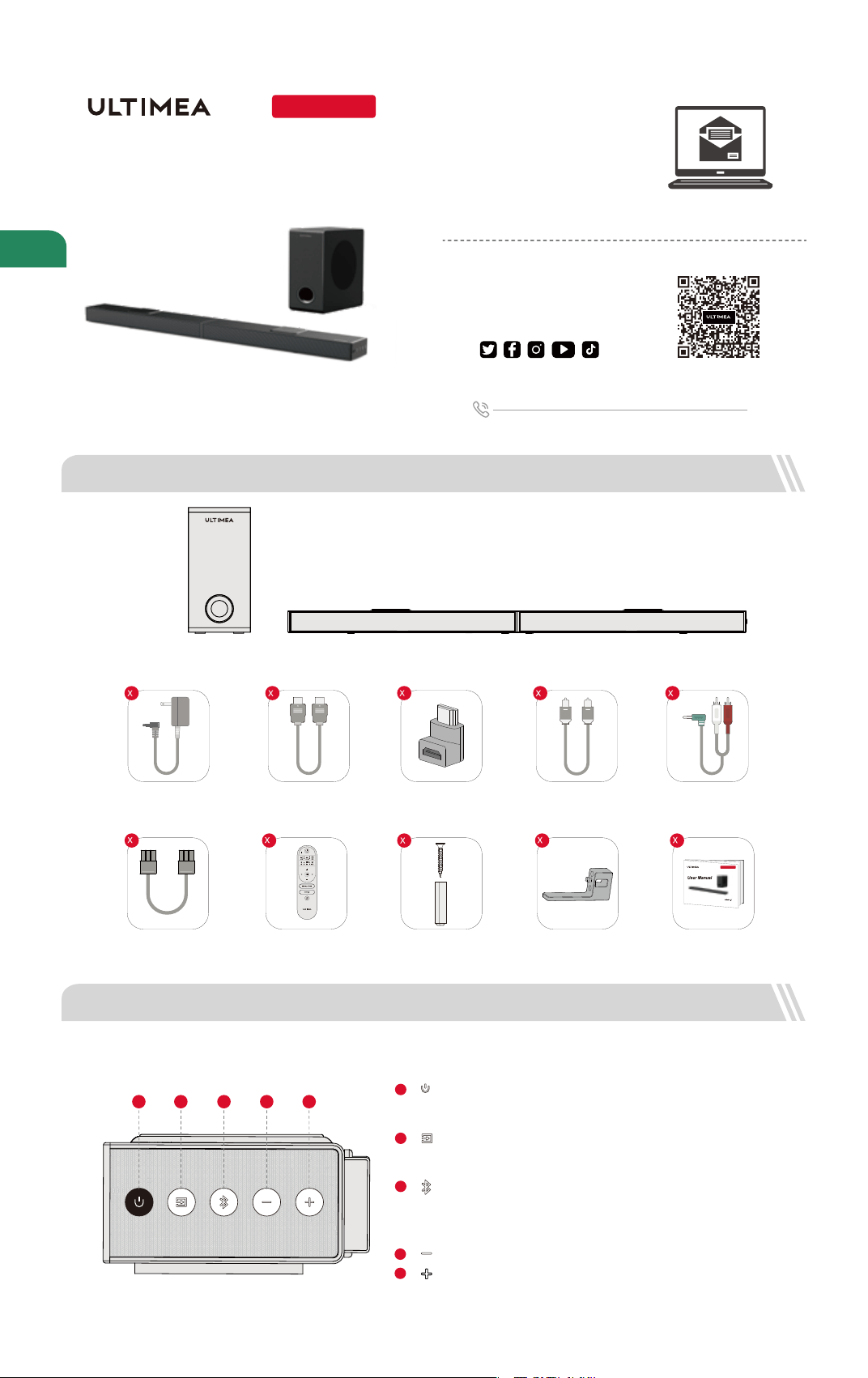
1 ACCESSORIES LIST
User Manual
01
@ultimea_official
Setup guidance video, or
USER MANUAL on ULTIMEA
website.
4
1
1 1 1 1
02
8
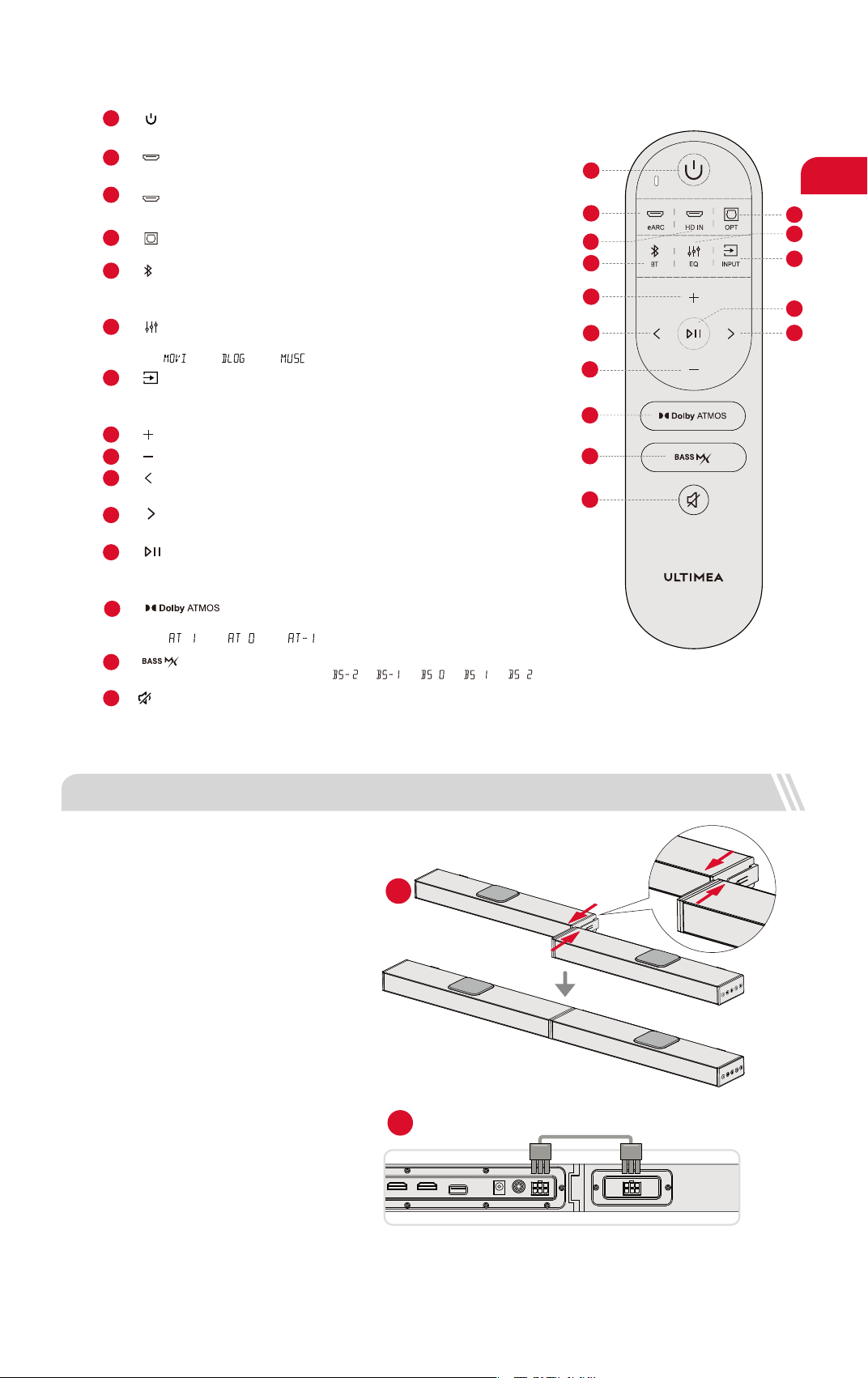
“ ”: Volume Up
9
“ ”: Volume Down
14
Press to adjust bass level, the display will show :
“ ”: BASSMAX
15
“ ”: Mute / Recover the volume.
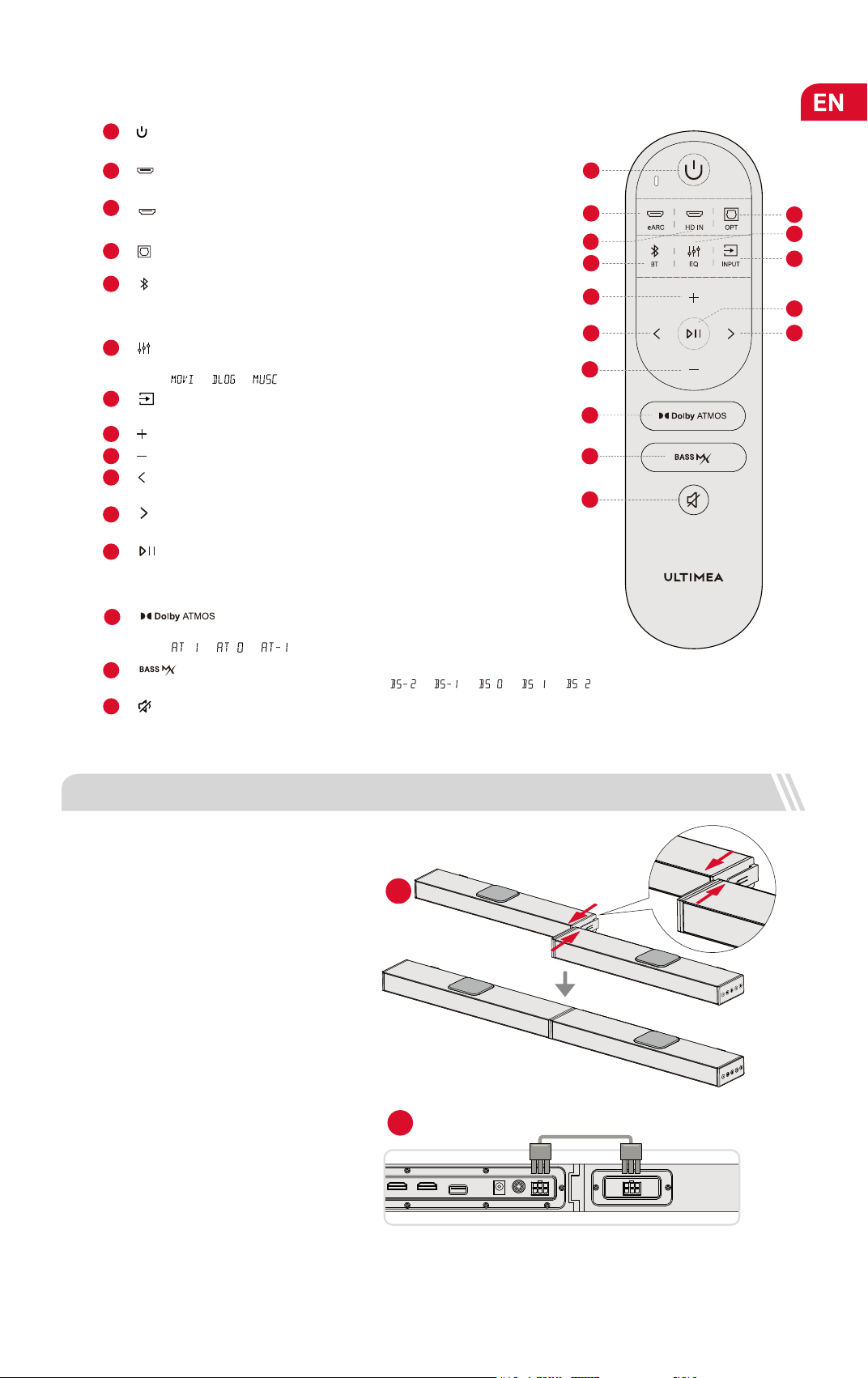
Remote Control
10
For BT and USB mode only: Skip to previous track.
“ ”: Previous
11
For BT and USB mode
only
: Skip to next track.
“ ”: Next
Press to switch among Movie, Dialogue, Music mode, the display will
show: “ ”, “ ”, “ ”.
6
“ ”: EQ
Press to switch channels: eARC-HD IN (HDMI IN)-OPT (OPTICAL)-BT-AUX-USB.
7
“ ”: INPUT
12
“ ”: Play / Pause
For BT and USB mode only.
USB mode: Hold for 3 seconds to switch between single loop playback
and list loop playback.
14
1
2
3
8
5
10
9
13
15
12
7
6
4
11
3
“ ”: BT
1
Press to power on / Hold for 3 seconds to power off.
“ ”
:
Power Button
“ ”
: e
ARC
Press to switch to HDMI eARC channel.
2
5
Press to switch to OPTICAL channel.
4
“ ”: OPT
Press to switch to Bluetooth channel and enter pairing mode.
Hold for 3 seconds to disconnect current device and connect to a new
device manually on your mobile phone / PC / TV (BT ID: Nova S70).
Press to switch to HDMI IN channel.
“ ”: HD IN
13
Press to adjust upward-ring sound level, the display will
show: “ ”, “ ”, “ ”.
“ ”: Dolby Atmos
AUX
OPT
USB
SUB OUT
DC IN
HDMI OUT (eARC)
HDMI IN
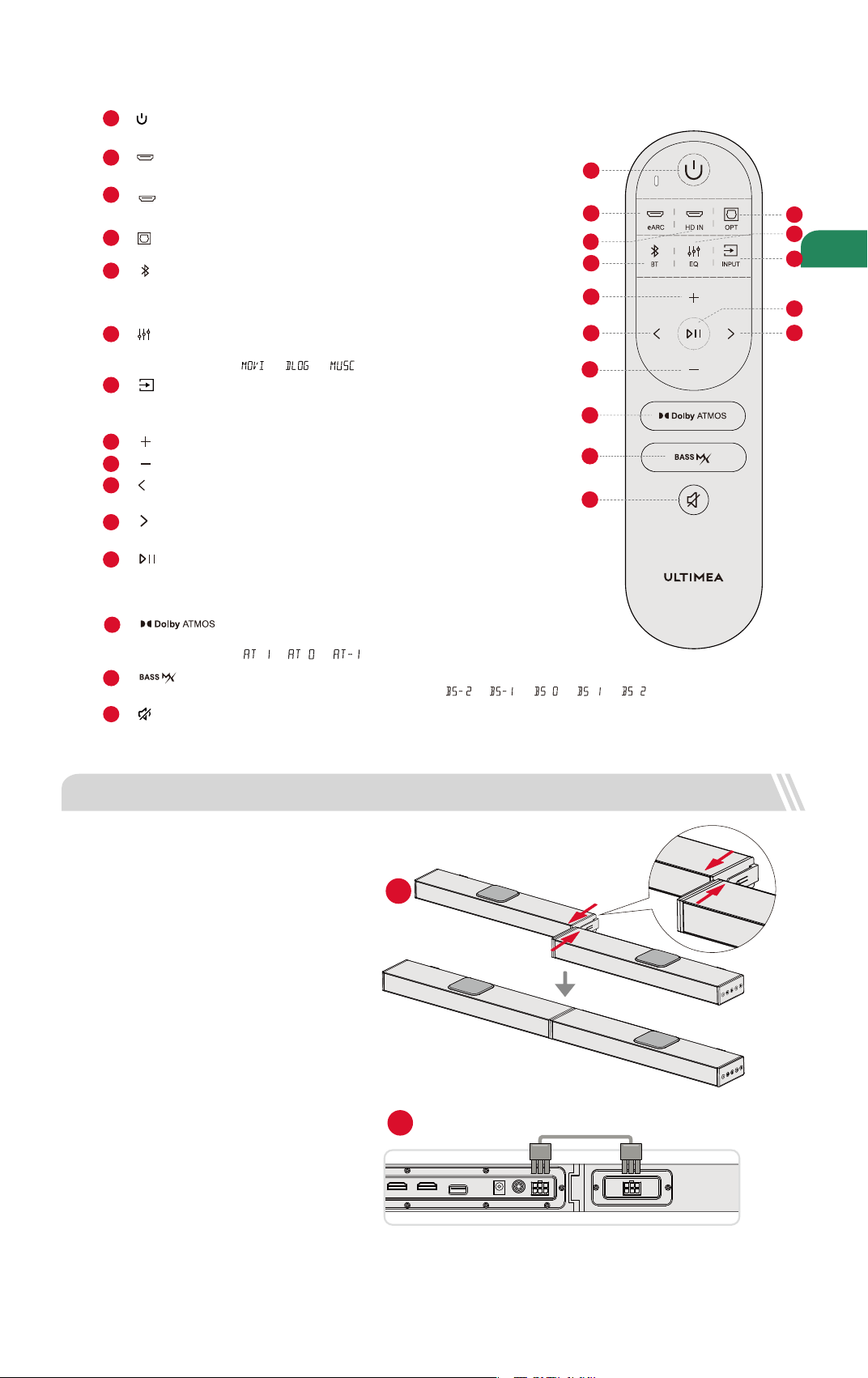
3 SOUNDBAR INSTALLATION
Assembly Steps
Set the two parts of the Soundbar on the same
level and align the connection joints. Connect
the two parts by pushing parallelly to combine
as one piece.
Plug in 6pin Cable.
1
2
Step 1
Step 2
”, “ ”, “ ”. ”, “”, “
“
AUX
OPT
USB
SUB OUT
DC IN
HDMI OUT (eARC)
HDMI IN
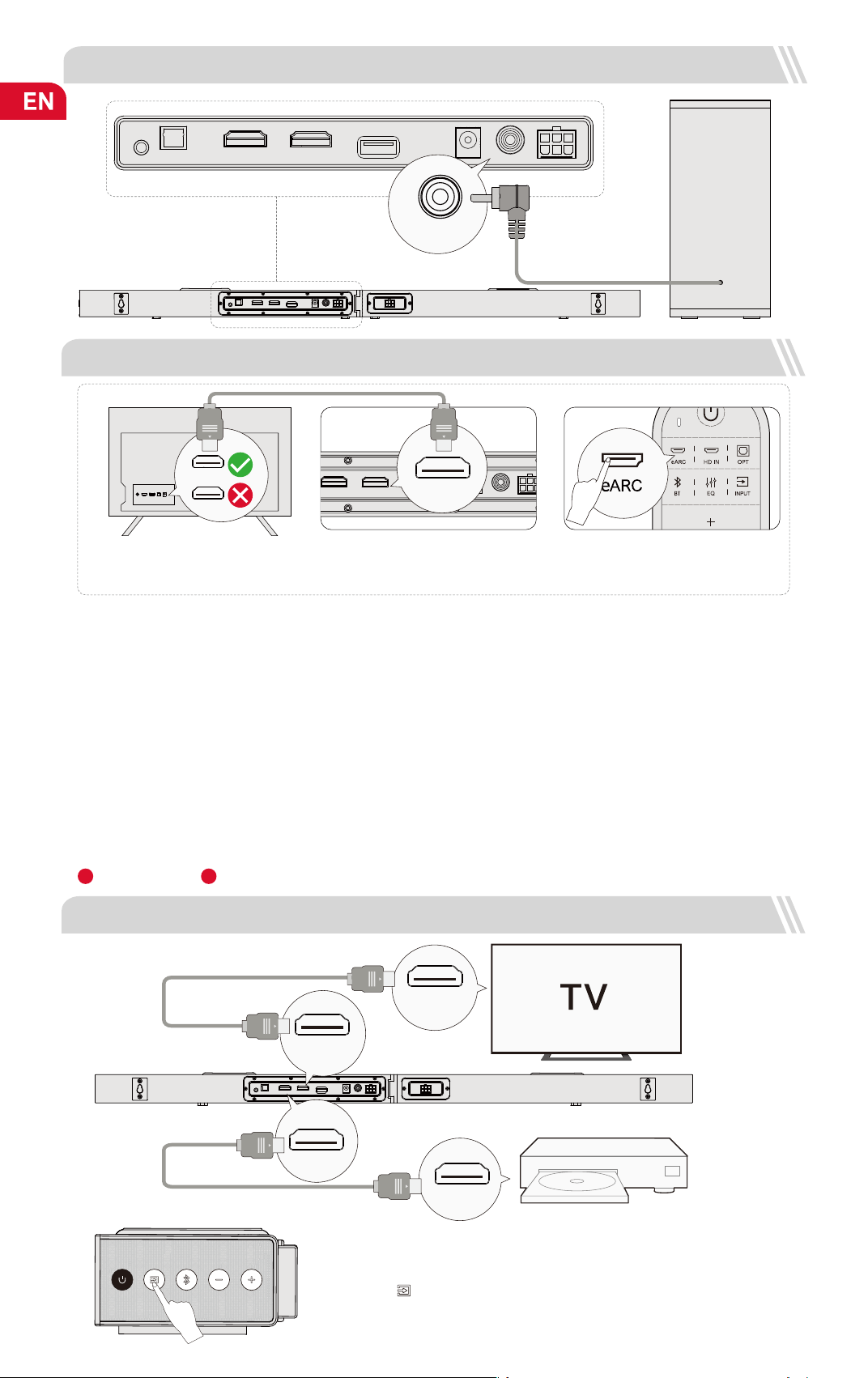
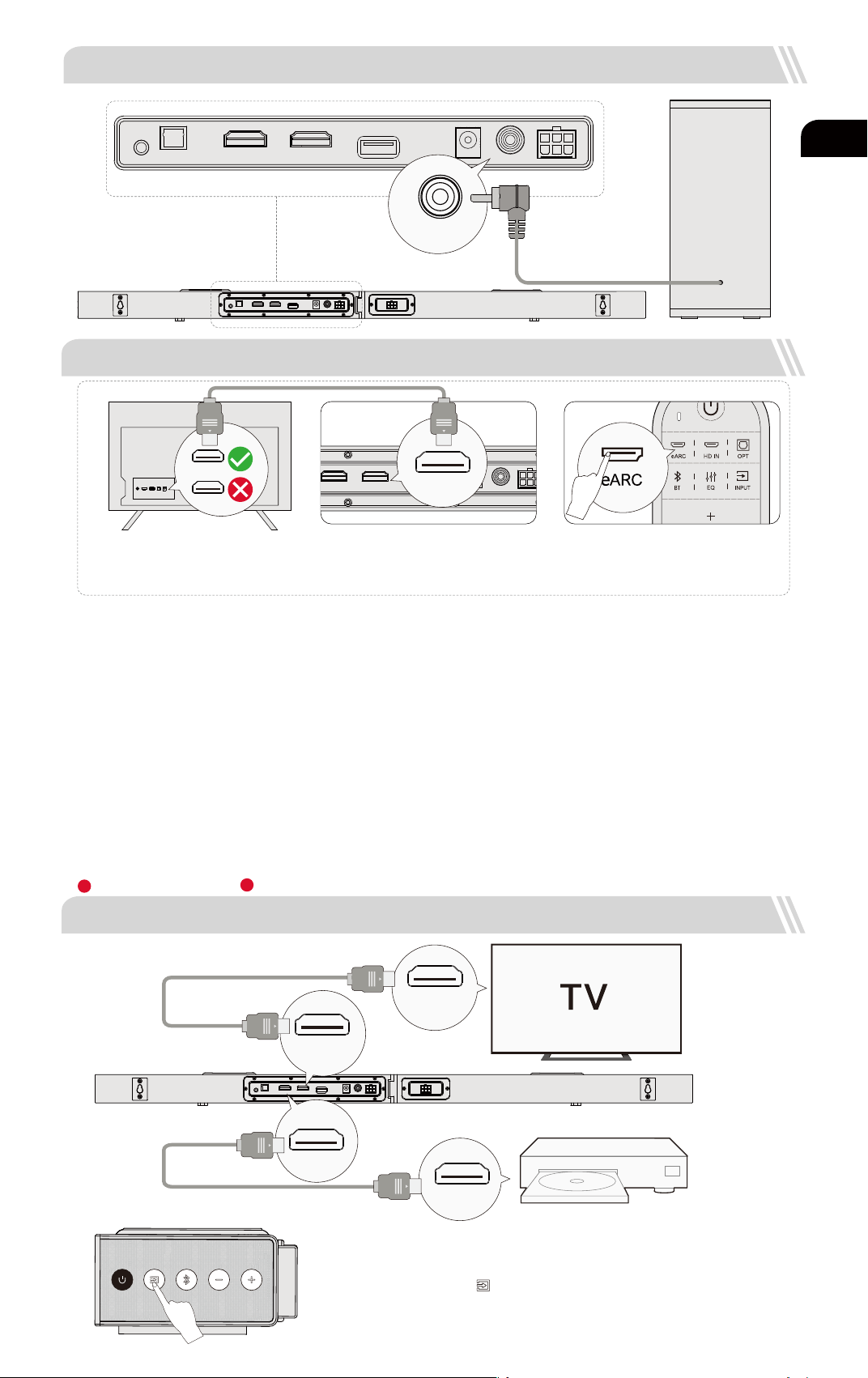
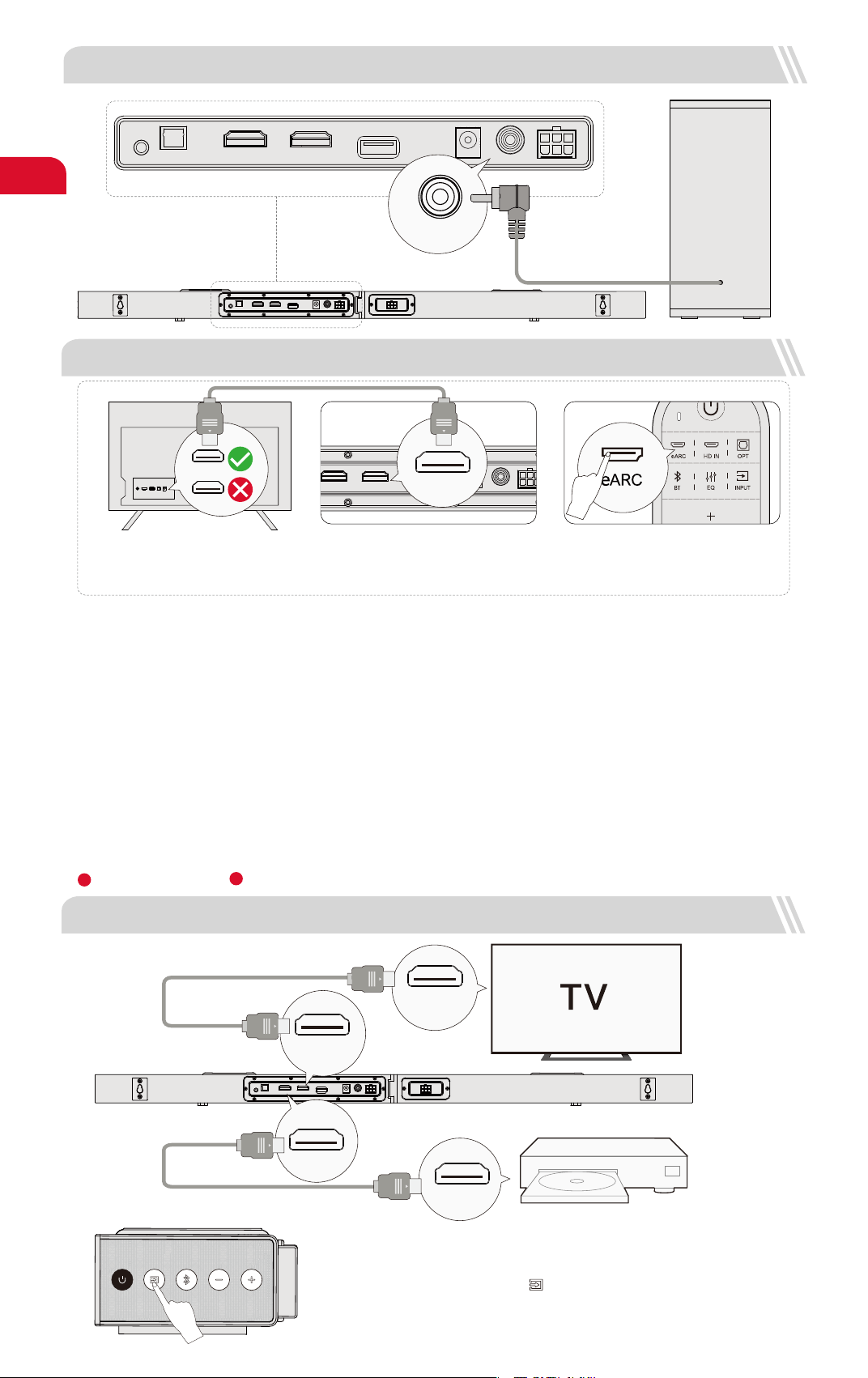
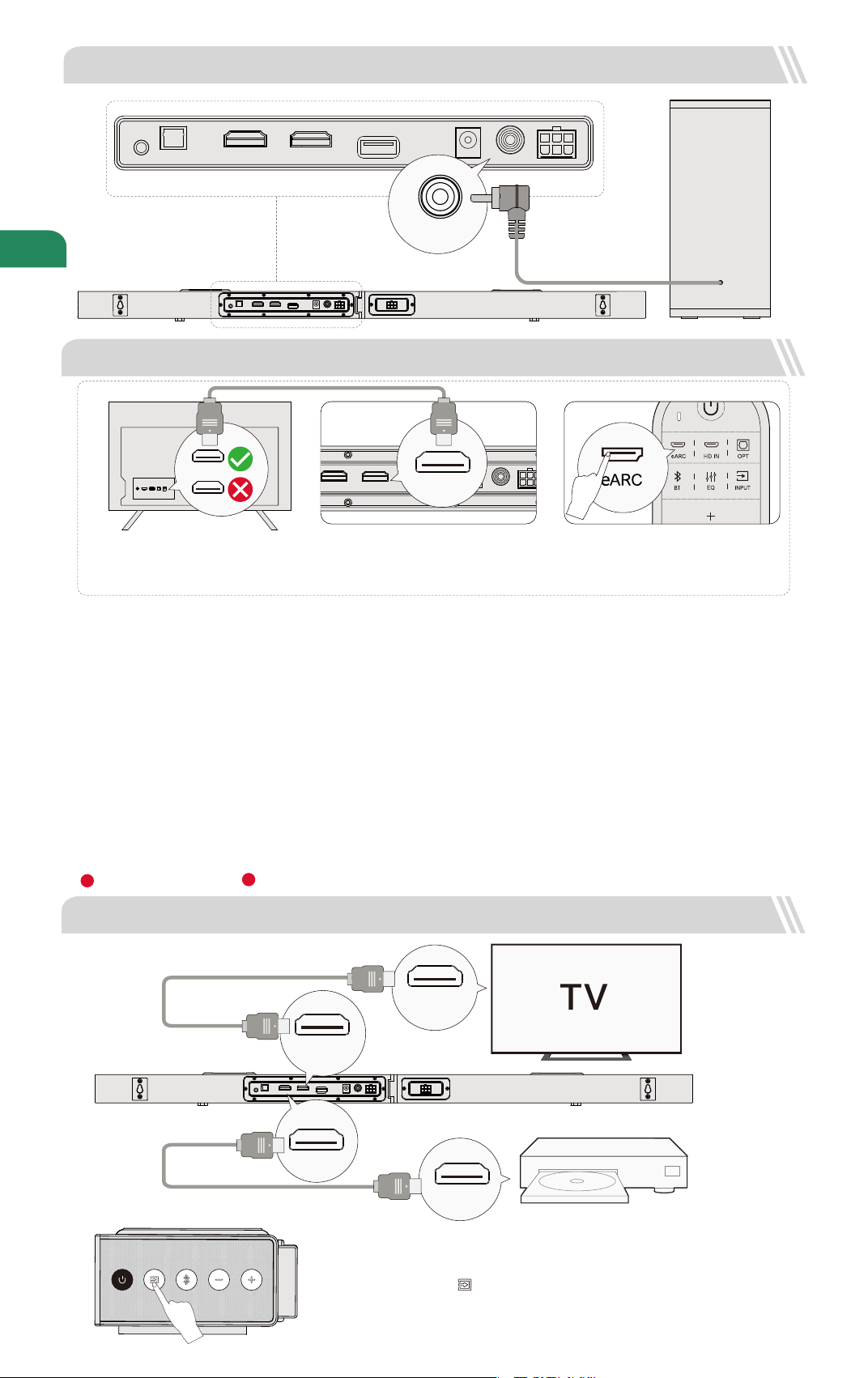
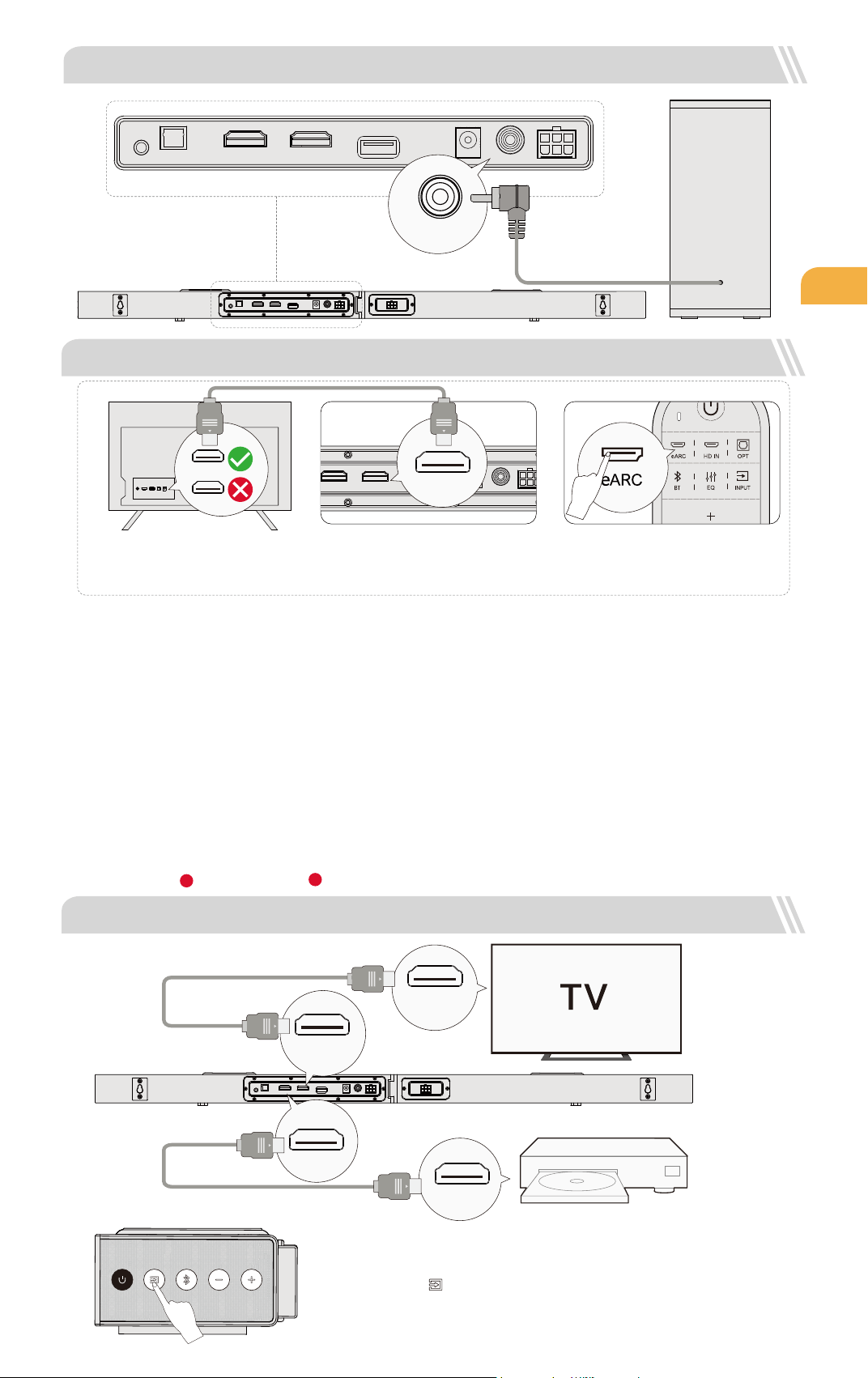
5 CONNECT TO TV VIA HDMI OUT eARC / ARC
AUX
OPT
USB
SUB OUT
DC IN
HDMI OUT (eARC)
HDMI IN
Note: Please turn on the “CEC” function on your TV.
When eARC / ARC is connected, your TV remote control can control the soundbar and TV simultaneously:
Turn on / off Adjust the volume
eARC / ARC
HDMI
Note:
Make sure your TV HDMI supports eARC, otherwise the Dolby Atmos audio signal cannot be transmitted.
Atmos
: If you are watching a movie in the Dolby Atmos format, please set the audio output on your TV to Pass Through:
TV Settings > Home > Settings > Sound > Digital Audio Output > Pass Through
DTS
: If you are watching a movie in the DTS format, please set the audio output on your TV to PCM:
TV Settings > Home > Settings > Sound > Digital Audio Output > PCM
Step 1:
Connect one end of the HDMI cable to the
eARC / ARC port on the back of your TV.
Step 2:
Then connect the other end into the HDMI
OUT (eARC) port of the soundbar.
Step 3:
Press “eARC” button on the remote control
to select “HDMI OUT (eARC)” input.
HDMI OUT (eARC)
What’s the difference between: HDMI IN, HDMI ARC, HDMI eARC?
HDMI IN is a standard HDMI input that allows you to connect devices to your TV or audio system. It supports audio and video signals, but it does not
support audio return channel (ARC) or enhanced audio return channel (eARC) functionality.
HDMI ARC is a special HDMI port that supports two-way communication between your TV and audio system. This means that audio can be sent from
your TV to your audio system, and audio system can send audio back to your TV.
HDMI eARC (Enhanced Audio Return Channel) is an updated version of HDMI ARC that supports higher quality audio formats such as Dolby Atmos
and DTS:X.
1 2
03
4 CONNECT TO SUBWOOFER
6 CONNECT TO OTHER DEVICE VIA HDMI IN
AUX
OPT
USB
SUB OUT
DC IN
HDMI OUT (eARC)
HDMI IN
SUB OUT
AUX
OPT
USB
SUB OUT
DC IN
HDMI OUT (eARC)
HDMI IN
HDMI IN
(eARC / ARC)
HDMI OUT
HDMI IN
HDMI OUT(eARC)
Step 1: Connect the HDMI Cable to the HDMI OUT (eARC) port on the Soundbar and the other
end to the eARC / ARC port on the TV.
Step 2: Connect the HDMI cable to the HDMI OUT port on the other device (Such as DVD or
game consol) and the other end to HDMI IN port on the Soundbar.
Step 3: Press " " button on Soundbar or Remote Control to switch to HDMI IN channel.
Note: Your TV HDMI needs to support eARC to transmit the Dolby Atmos audio format
to your Soundbar.
Step 1
Step 2
Step 3
AUX
OPT
USB
SUB OUT
DC IN
HDMI OUT (eARC)
HDMI IN
AUX
OPT
USB
SUB OUT
DC IN
HDMI OUT (eARC)
HDMI IN
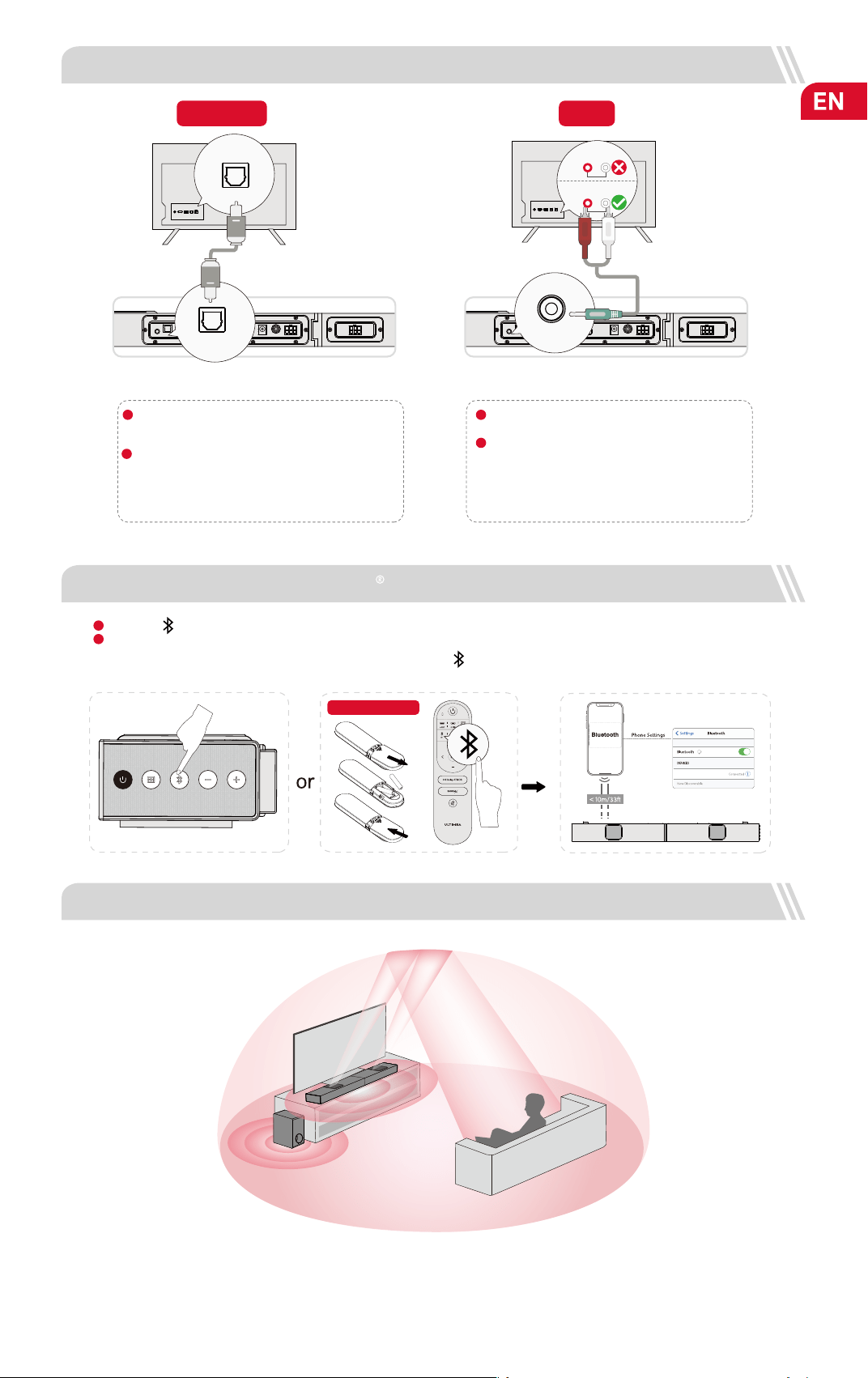
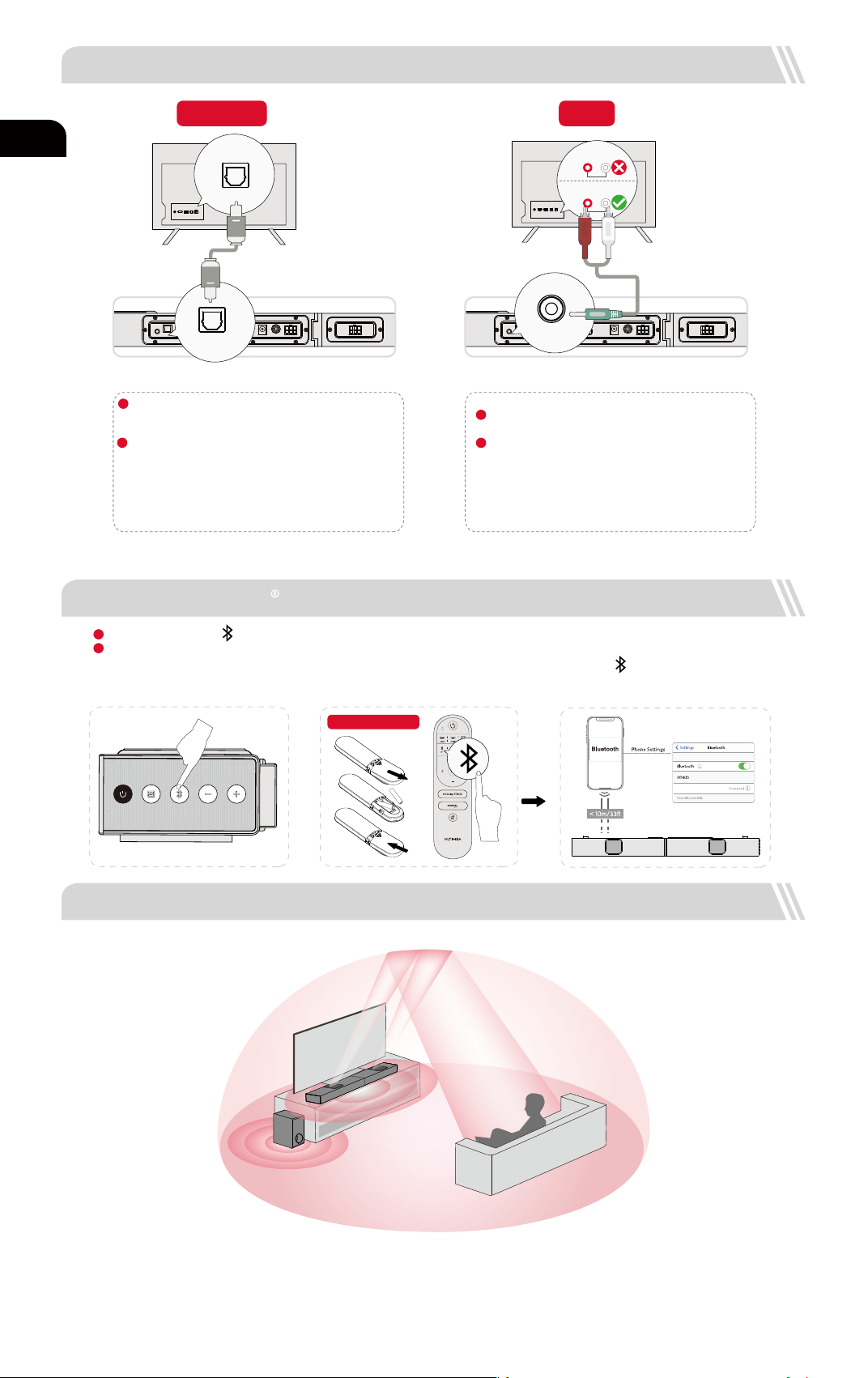
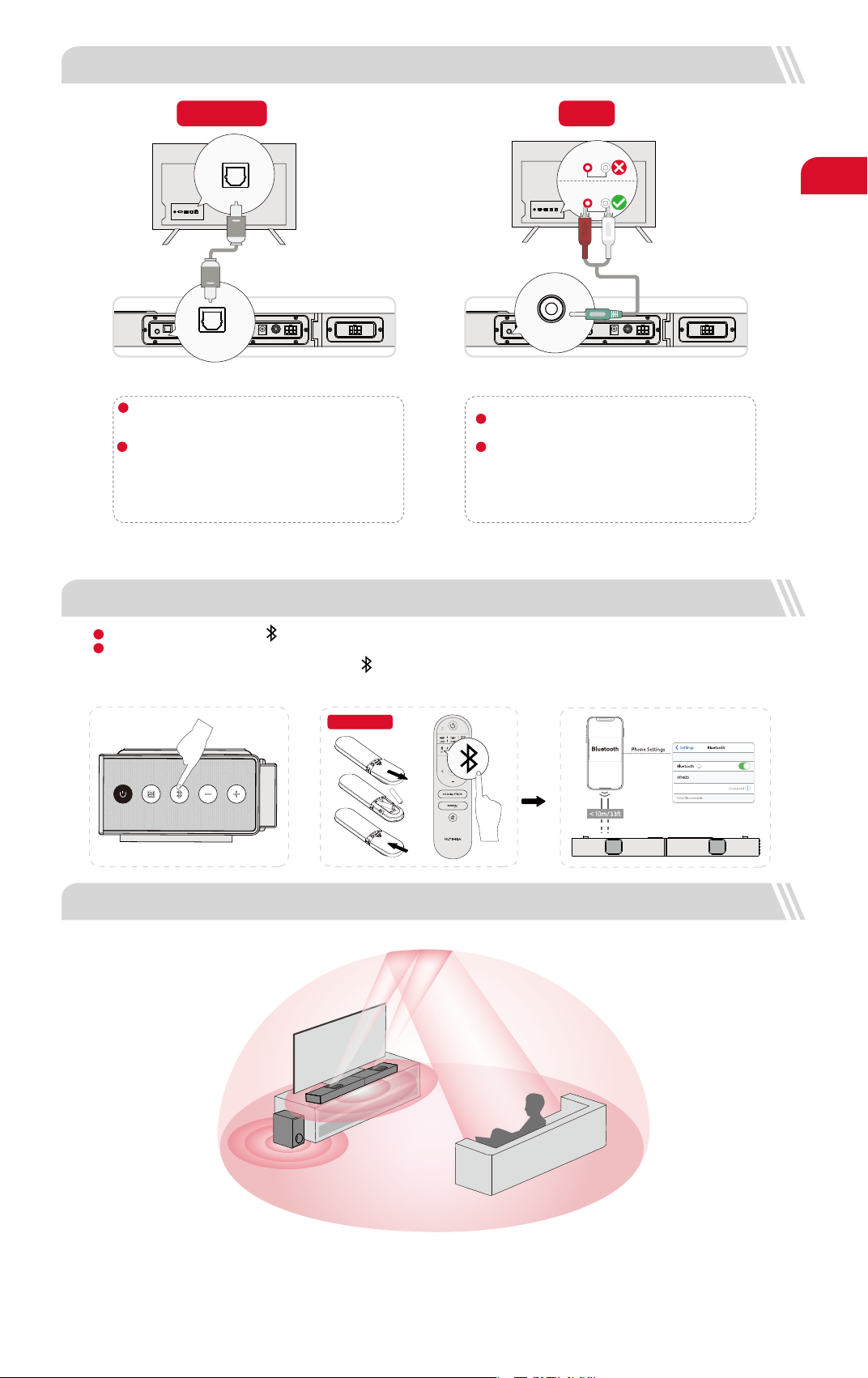
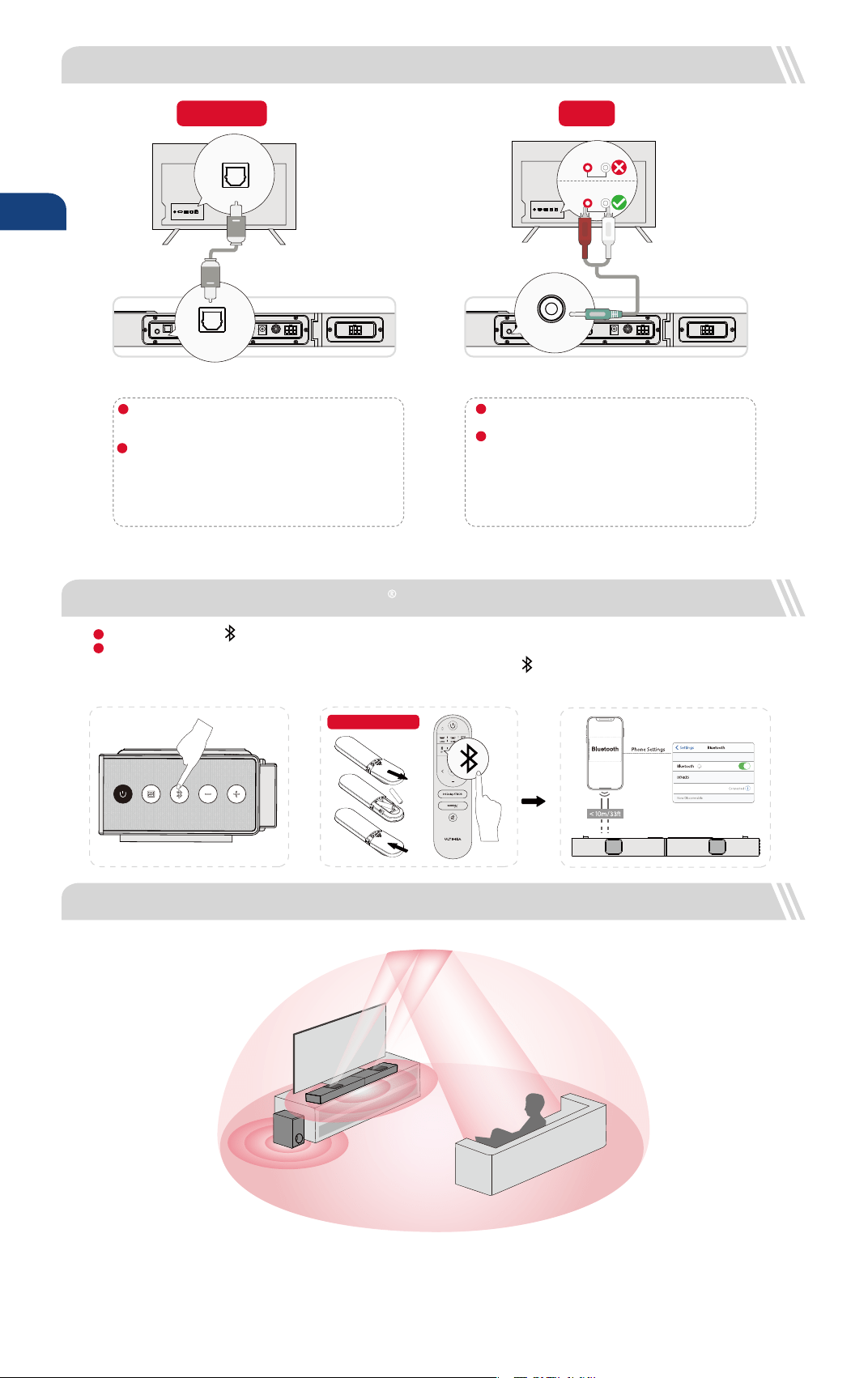
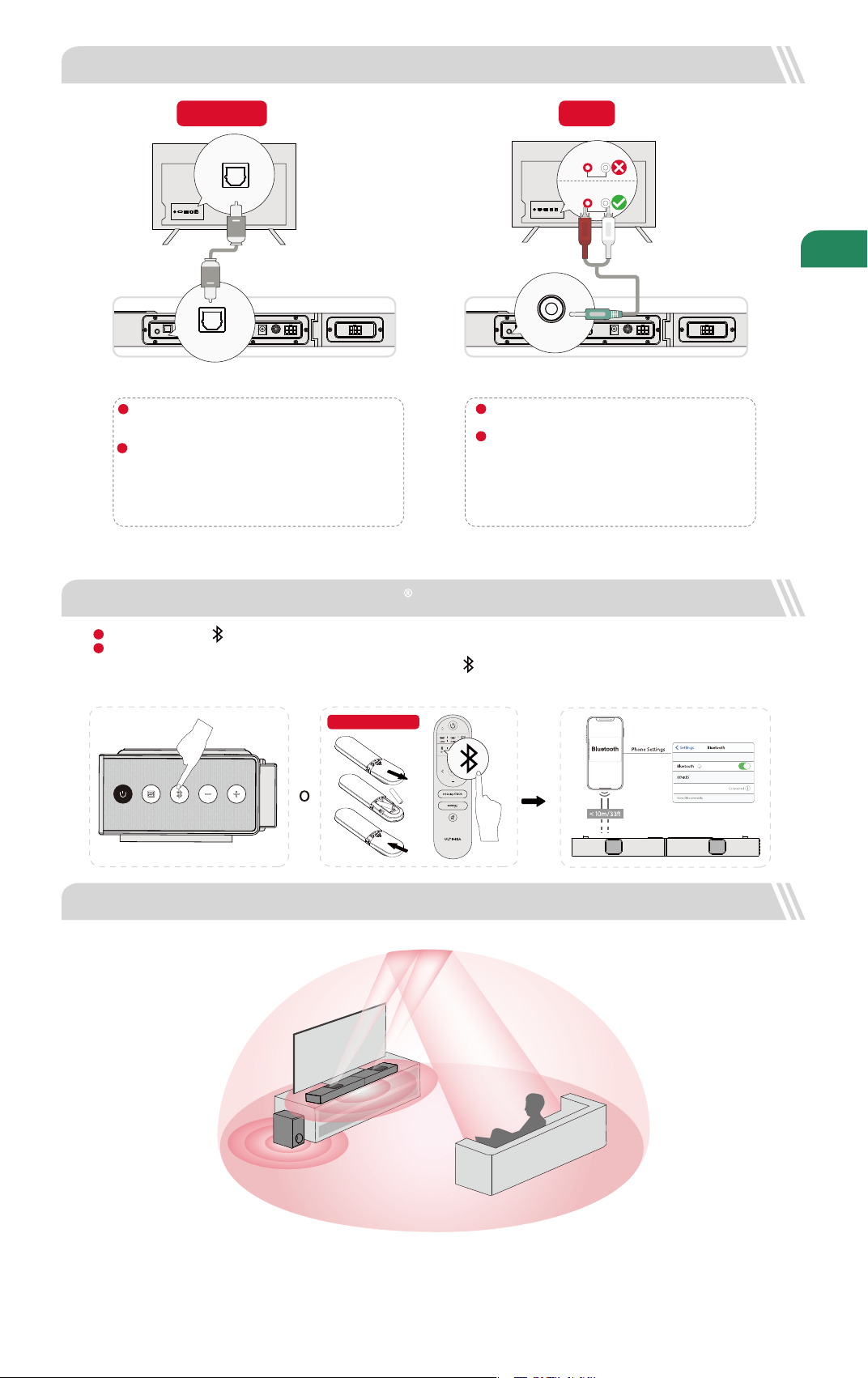
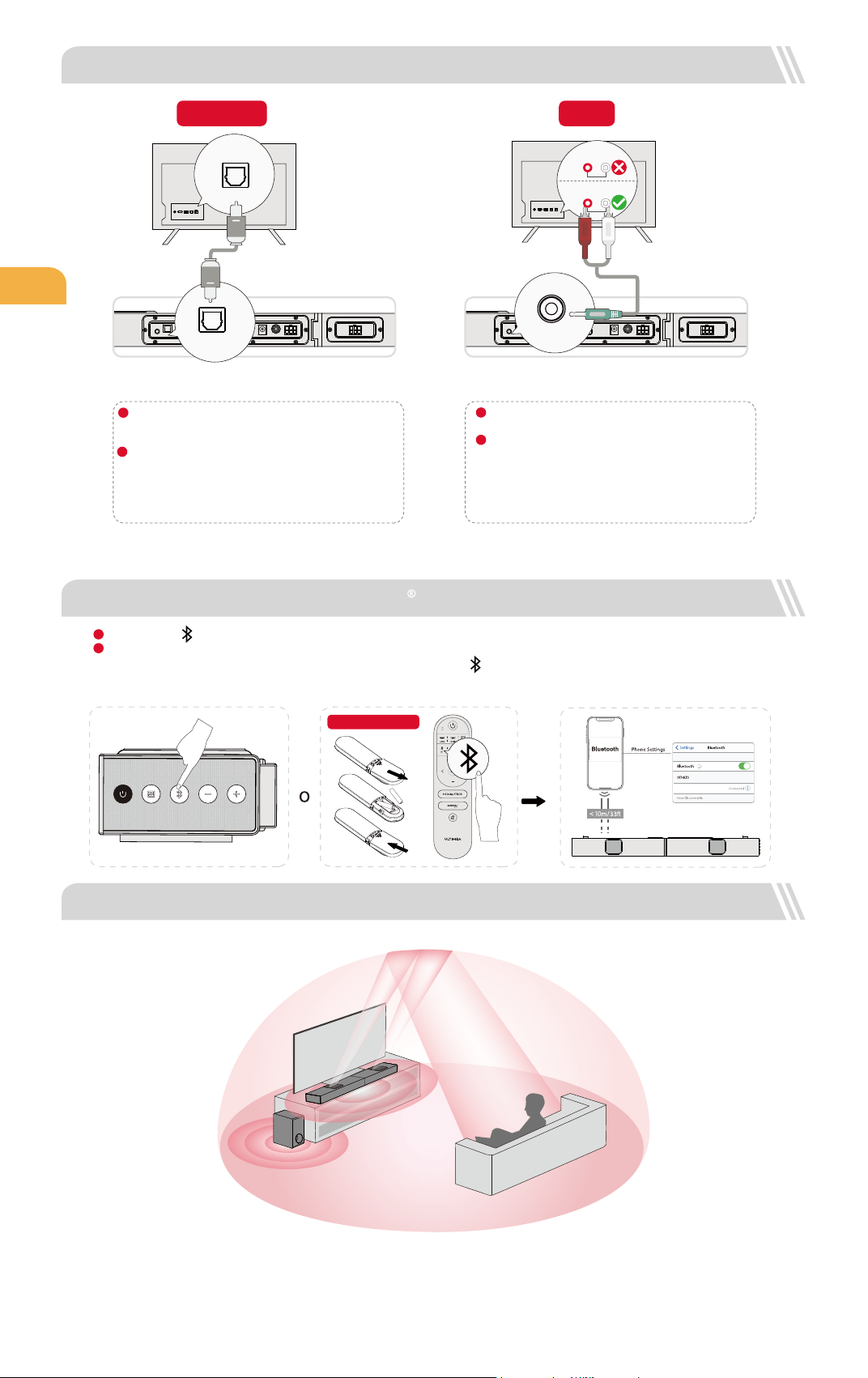
7 CONNECT TO TV VIA OPTICAL / AUX
OPTICAL
OPTION 1: OPTICAL
Make sure the cable is connected to OPTICAL OUT port
on your TV, and the other end to OPTICAL port on the
Soundbar.
Make sure the optical plug is inserted correctly as it
shows in the picture. Do not insert the plug upside down
and break the optical.
DIGITAL AUDIO
OUT
OPTICAL
OPTICAL
AUX
OPTION 2: AUX
Connect the 3.5mm to RCA audio cable to connect
to your TV's RCA AUDIO OUT port.
Make sure the color of the cables ends matches the
color of the TV ports.
AUX
AUDIO OUTPUT
R
L
AUDIO IN
R
L
In Optical Mode: If there is no sound, try setting the TV audio output to PCM: TV Settings > Home > Settings > Sound > Digital Audio Output > PCM
04
1
2
1
2
Note: lf audio is coming from the internal TV speakers,
mute or minimize the TV volume.
Note: Please remember to unplug the AUX cable from
TV and Soundbar when you want to switch other mode.
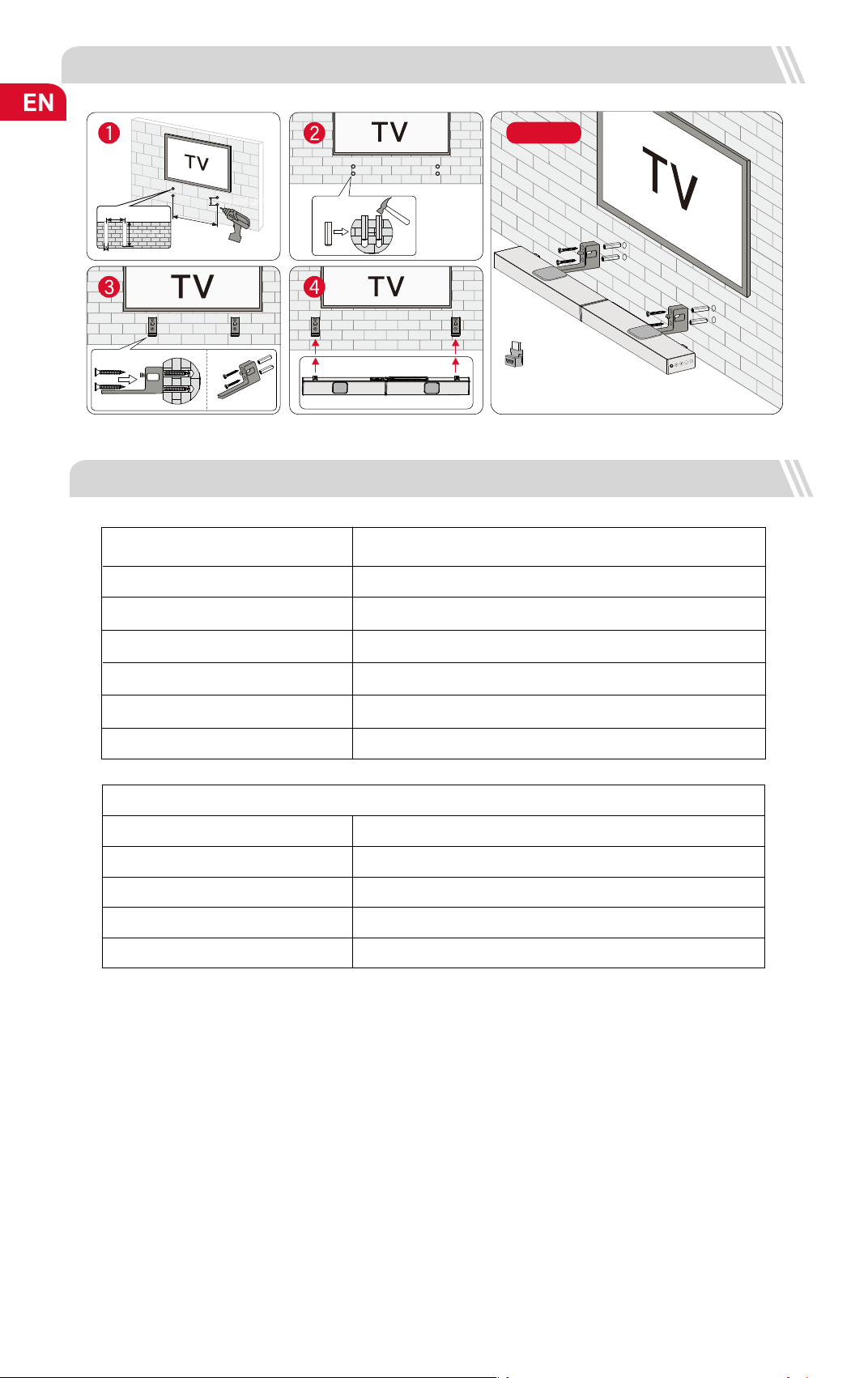
Note: The soundbar should be placed at or near ear level.
8 CONNECT TO BLUETOOTH
Press the “ ” button on the soundbar or remote control to enter Bluetooth pairing mode.
Open your phone’s Bluetooth settings, nd and select “Nova S70” to connect the soundbar.
Batteries Not Included
1
2
Note: If it’s already in the Bluetooth mode and connected, press and hold “ ” button for 3 seconds to disconnect current device and
connect to new device manually on your mobile phone / PC / TV.
9 PLACEMENT OPTIONS
Nova S70
05
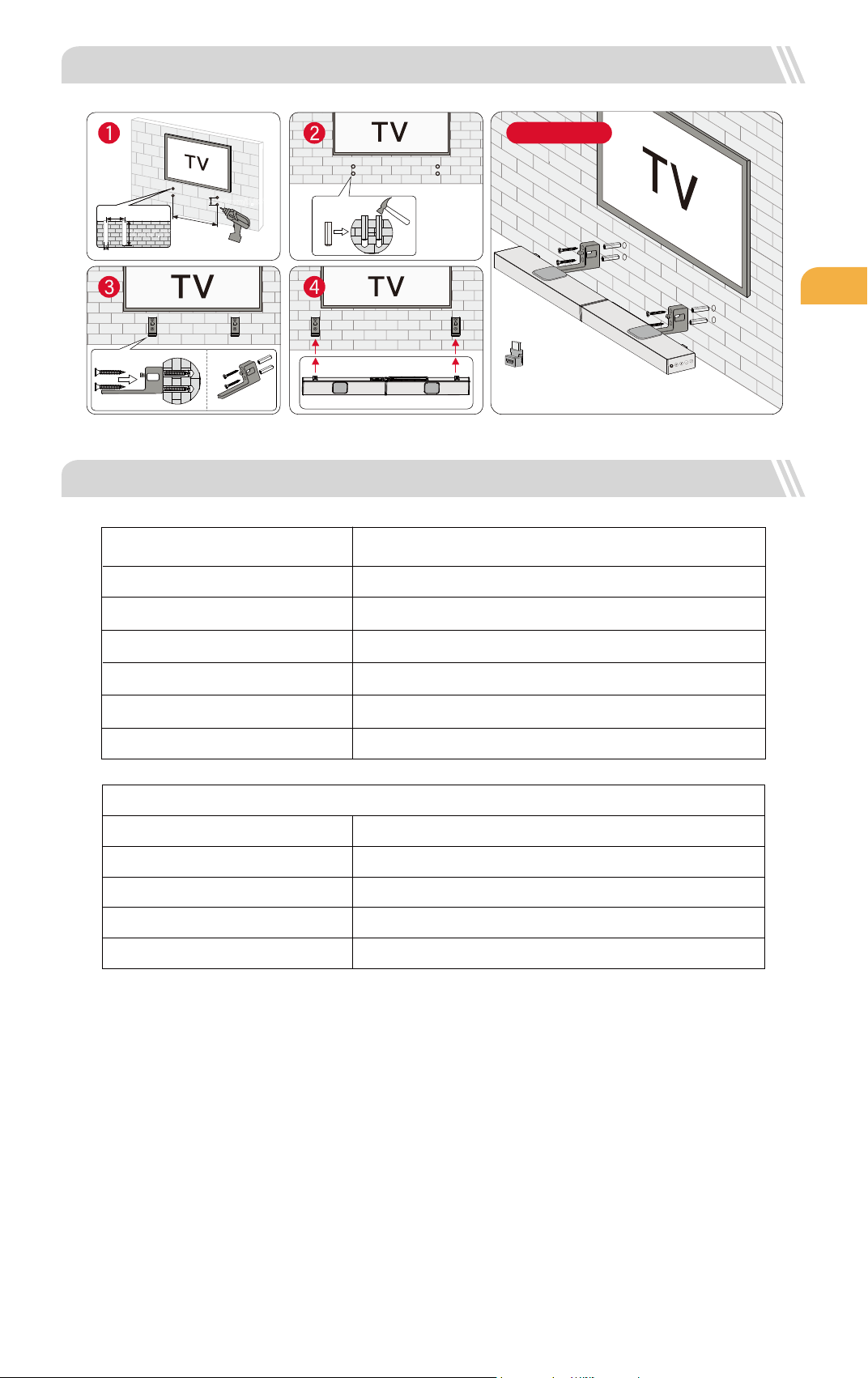
11 SPECIFICATIONS
580mm / 22.83"
22mm/0.86"
22mm/0.86"
6mm/0.23"
30mm/1.18"
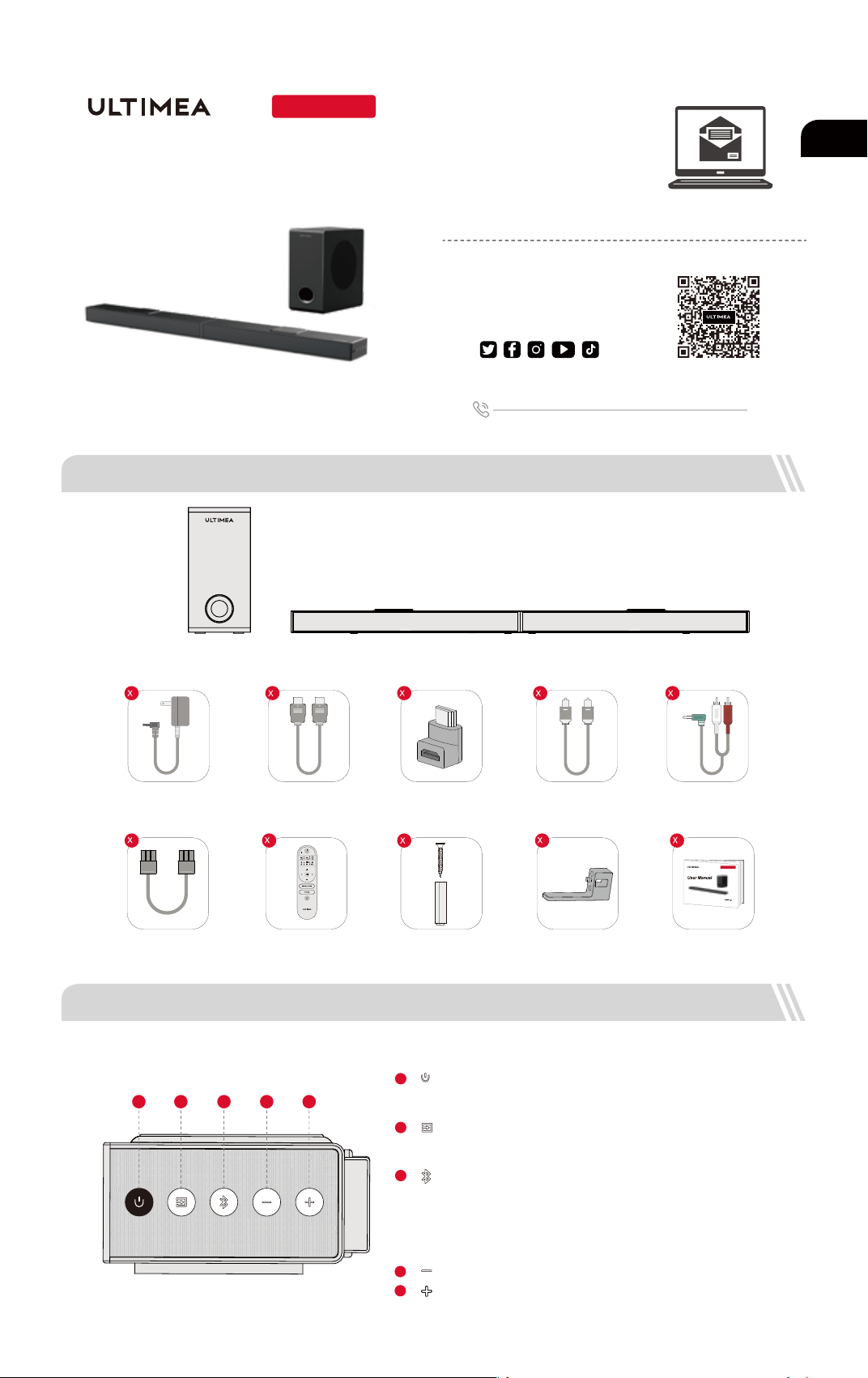
Overview
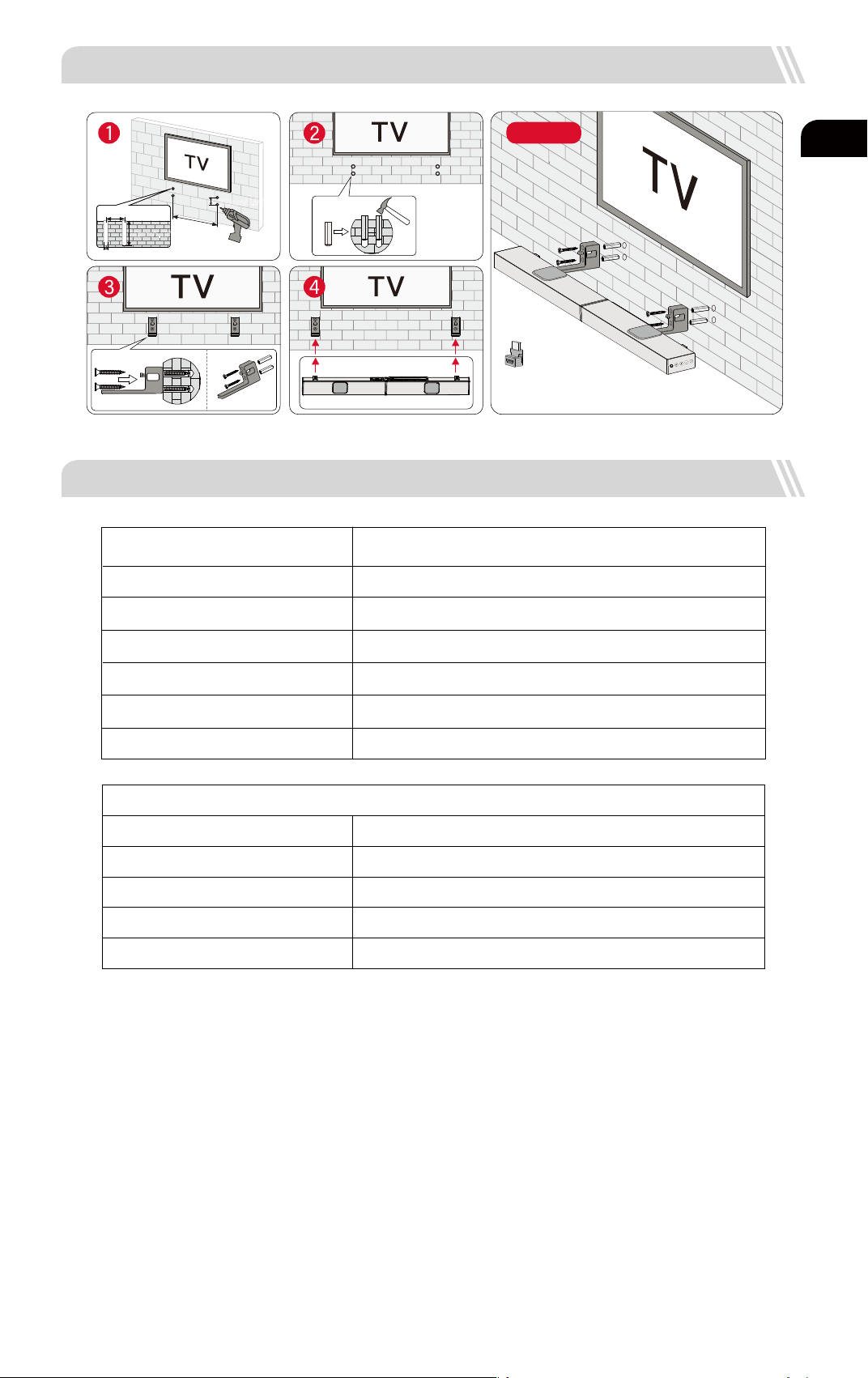
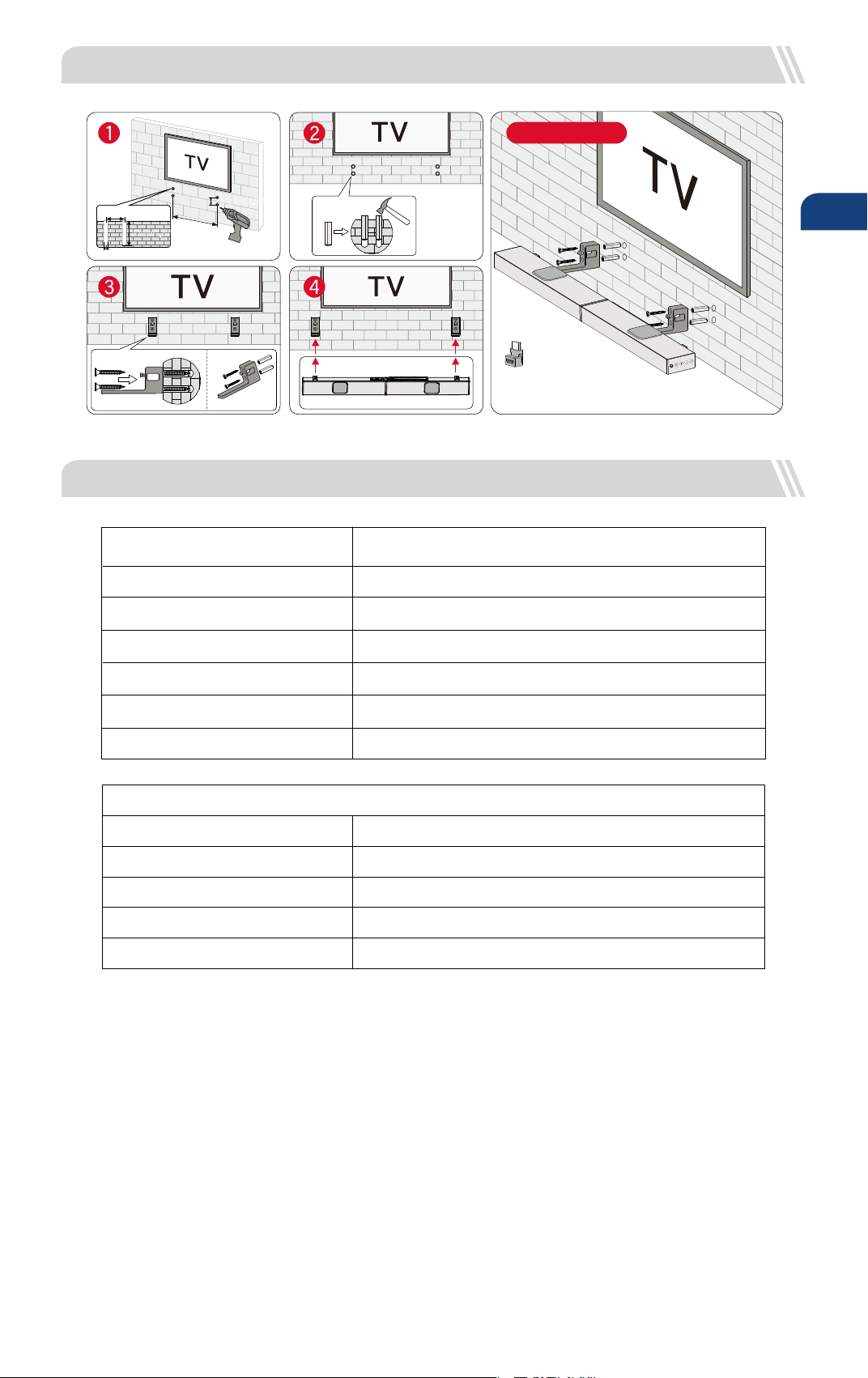
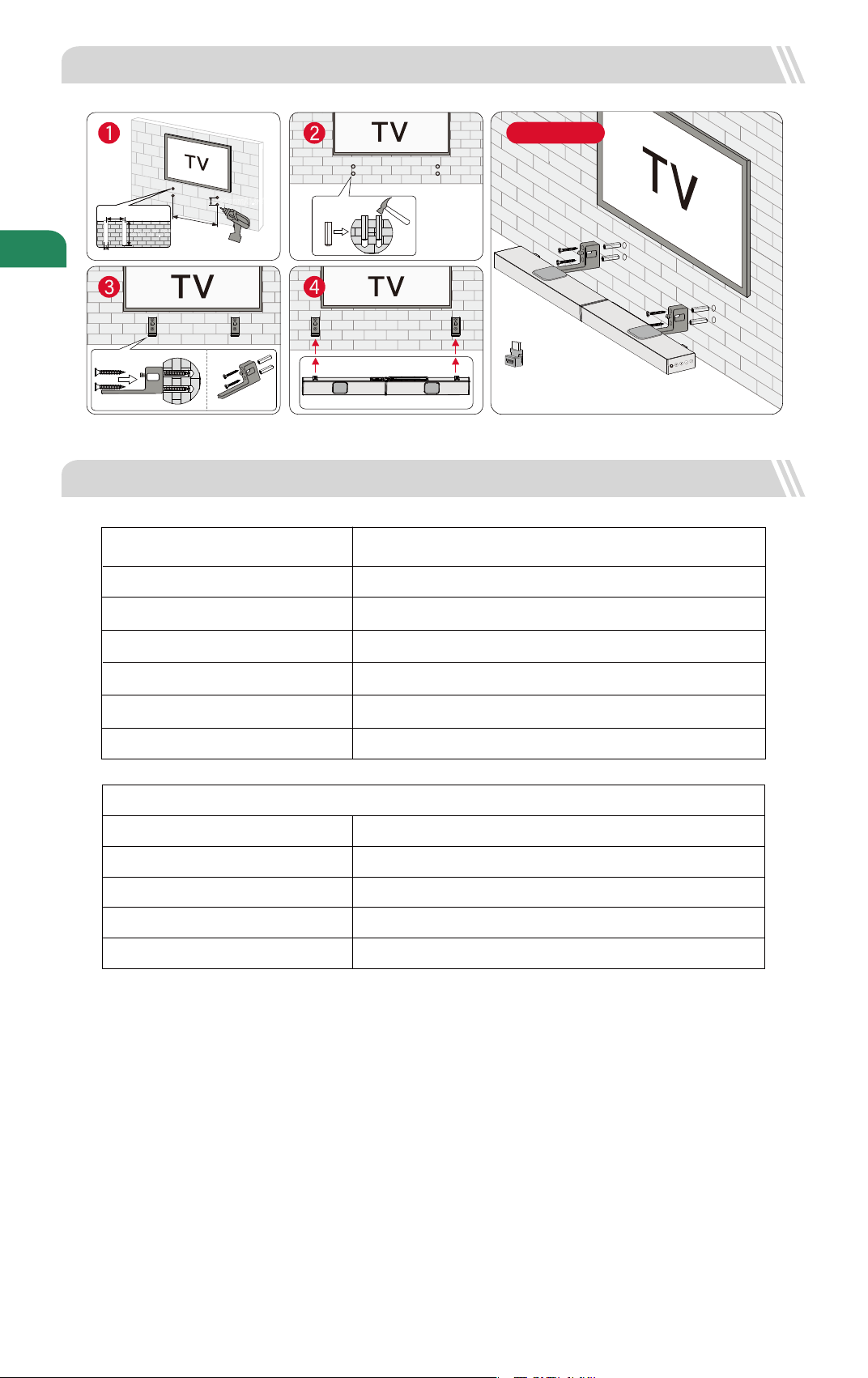
Please use the HDMI Adaptor for easy plugging
and unplugging of the HDMI Cable.
Note:
10 WALL MOUNT INSTALLATION
4.15kg / 9.15lbs
5.1kg / 11.24lbs
Soundbar
Subwoofer
Dimensions and Weight
800(W) x 38(H) x 90(D)mm 31.5" x 1.5" x 3.5"
270(W) x 115(H) x 270(D)mm 10.6" x 4.5" x 10.6"
Net Weight
332(W) x 432(H) x190(D)mm 13.1" x 17" x 7.5"
Packaging
Gross Weight
Model Number
U3920
Power Supply
Soundbar Drivers
Frequency Response
Standby Power
AC 100-240V, ~50 / 60Hz
(3.1" x 1.2") x 3 (Soundbar) + 1.8" x 2 (
upward-ring Driver)
+ 2.25" (Subwoofer)
45Hz - 18kHz
<0.5W
Operating Temperature 0°C - 45°C / 32°F - 113°F
Bluetooth Version
5.3
Nova S70
Modell Nr.: U3920
Bevorzugen Sie ein
Video-Tutorial?
WIR SIND
BEREIT ZU
HELFEN
support.ultimea.com
+1 888-598-8875 (US) Mon-Fri 9am-5pm (PST)
+49 89-628-25828 (EU) Mon-Fri 9am-5pm (CET)
1 ZUBEHÖRLISTE
Setup-Anleitung Video, oder
USER MANUAL auf ULTIMEA
Website.
Benutzerhandbuch
06
@ultimea_official
Soundbar
2 SOUNDBAR-BEDIENELEMENTE
Subwoofer
Netzadapter HDMI-Kabel
Stereo 3.5mm auf RCA
Audiokabel
Fernbedienung
Optisches Digitalkabel
Wandmontage-Kit Wandhalterung Benutzerhandbuch
HDMI-Adapter
“ ”: Lautstärke verringern
Bedienfeld
“ ”: Einschalttaste
Zum Einschalten drücken / zum Ausschalten 3 Sekunden
lang gedrückt halten.
1
“ ”: Eingangsmodus
Drücken, um den Kanal zu wechseln: eARC-HD IN (HDMI IN)-
OPT (OPTICAL)-BT-AUX-USB.
2
3
“ ”:
“ ”: Lauter
4
5
Drücken Sie , um zum Bluetooth-Kanal zu wechseln und den
Kopplungsmodus zu aktivieren. Halten Sie die Taste 3 Sekunden
lang gedrückt, um die Verbindung mit dem aktuellen Gerät zu
trennen und sich manuell mit einem neuen Gerät auf Ihrem
Mobiltelefon / PC / Fernseher zu verbinden. (BT ID: Nova S70).
BT
4321
5
6-pin Kabel für
Soundbar-Anschluss (140mm)
DE
2
1
3920
Nova S70
4
2
1
1 1
1 1 1
07
8
“ ”: Lautstärke aufwärts
9
“ ”: Lautstärke runter
14
Drücken Sie diese Taste, um den Basspegel einzustellen; auf dem Display wird angezeigt :
“ ”: BASSMAX
15
“ ”: Stummschaltung / Wiederherstellung der Lautstärke.
Fernsteuerung
10
BT- und USB-Modus: Zum vorherigen Titel springen.
“ ”: Zurück
11
BT- und USB-Modus: Sprung zum nächsten Titel.
“ ”: Nächster
Drücken Sie diese Taste, um zwischen den Modi Film, Dialog und Musik
umzuschalten; auf dem Display wird angezeigt: “ ”, “ ”, “ ”.
6
“ ”: EQ
Zum Umschalten der Kanäle drücken:
eARC-HD IN (HDMI IN) -OPT (OPTICAL)-BT-AUX-USB.
7
“ ”: INPUT
12
“ ”: Wiedergabe / Pause
Nur für BT- und USB-Modus.
USB-Modus: Halten Sie die Taste 3 Sekunden lang gedrückt, um zwischen
Einzelschleifenwiedergabe und Listenschleifenwiedergabe umzuschalten.
14
1
2
3
8
5
10
9
13
15
12
7
6
4
11
3
“ ”: BT
1
Zum Einschalten drücken / zum Ausschalten 3 Sekunden lang gedrückt halten.
“ ”
:
Einschalttaste
“ ”
: e
ARC
Drücken, um zum HDMI eARC-Kanal zu wechseln.
2
5
Drücken, um zum OPTICAL-Kanal zu wechseln.
4
“ ”: OPT
Drücken Sie , um zum Bluetooth-Kanal zu wechseln und den Kopplungs-
modus zu aktivieren. Halten Sie die Taste 3 Sekunden lang gedrückt, um
die Verbindung mit dem aktuellen Gerät zu trennen und sich manuell mit
einem neuen Gerät auf Ihrem Mobiltelefon / PC / Fernseher zu verbinden.
(BT ID: Nova S70).
Drücken, um zum HDMI IN-Kanal zu wechseln.
“ ”: HD IN
13
Drücken Sie die Taste, um die Lautstärke nach oben zu regeln, auf dem
Display erscheint: “ ”, “ ”, “ ”.
“ ”: Dolby Atmos
AUX
OPT
USB
SUB OUT
DC IN
HDMI OUT (eARC)
HDMI IN
3 SOUNDBAR-INSTALLATION
Montageschritte
Stellen Sie die beiden Teile der Soundbar auf
die gleiche Höhe und richten Sie die
Verbindungsstellen aus. Verbinden Sie die
beiden Teile durch paralleles Schieben, um sie
zu einem Stück zusammenzufügen.
Stecken Sie Stereo 6-pin kabel.
1
2
Schritt 1
Schritt 2
DE
”, “ ”, “ ”. ”, “”, “
“
5 ANSCHLUSS AN DEN TV VIA HDMI OUT eARC / ARC
AUX
OPT
USB
SUB OUT
DC IN
HDMI OUT (eARC)
HDMI IN
Hinweis: Bitte schalten Sie die "CEC"-Funktion an Ihrem Fernseher ein.
Wenn eARC / ARC angeschlossen ist, kann Ihre TV-Fernbedienung die Soundbar und den Fernseher gleichzeitig steuern:
Einschalten / Ausschalten Lautstärke einstellen
eARC / ARC
HDMI
Hinweis:
Der HDMI-Anschluss Ihres Fernsehers muss eARC unterstützen, um das Dolby Atmos-Audioformat an Ihre Soundbar zu übertragen.
Atmos
: Wenn Sie einen Film im Dolby Atmos-Format ansehen, stellen Sie bitte den Audioausgang an Ihrem Fernseher auf Pass Through:
TV-Einstellungen > Home > Einstellungen > Ton > Digitaler Audioausgang > Pass Through
DTS
: Wenn Sie sich einen Film im DTS-Format ansehen, stellen Sie den Audioausgang an Ihrem Fernseher bitte auf PCM:
TV-Einstellungen > Home > Einstellungen > Ton > Digitaler Audioausgang > PCM
Schritt 1:
Schließen Sie ein Ende des HDMI-Kabels an
den eARC / ARC Anschluss auf der
Rückseite Ihres Fernsehers an.
Schritt 2:
Schließen Sie dann das andere Ende an den
HDMI (eARC)-Anschluss der Soundbar an.
Schritt 3:
Drücken Sie die Taste "eARC" auf der
Fernbedienung, um den Eingang "HDMI
OUT (eARC)" auszuwählen.
HDMI OUT (eARC)
Was ist der Unterschied zwischen: HDMI IN, HDMI ARC, HDMI eARC?
HDMI IN ist ein Standard-HDMI-Eingang, über den Sie Geräte an Ihren Fernseher oder Ihr Audiosystem anschließen können. Er unterstützt Audio-
und Videosignale, aber keine Audio-Rückkanal- (ARC) oder erweiterte Audio-Rückkanal- (eARC) Funktionalität.
HDMI ARC ist ein spezieller HDMI-Anschluss, der die Zwei-Wege-Kommunikation zwischen Ihrem Fernsehgerät und Ihrem Audiosystem unterstützt.
Das bedeutet, dass Audiosignale von Ihrem Fernseher an Ihr Audiosystem gesendet werden können und das Audiosystem Audiosignale zurück an
Ihren Fernseher senden kann.
HDMI eARC (Enhanced Audio Return Channel) ist eine aktualisierte Version von HDMI ARC, die höherwertige Audioformate wie Dolby Atmos und
DTS:X unterstützt.
1
2
08
4 ANSCHLUSS AN SUBWOOFER
6 ANSCHLUSS AN EIN ANDERES GERÄT ÜBER HDMI IN
AUX
OPT
USB
SUB OUT
DC IN
HDMI OUT (eARC)
HDMI IN
AUX
OPT
USB
SUB OUT
DC IN
HDMI OUT (eARC)
HDMI IN
SUB OUT
AUX
OPT
USB
SUB OUT
DC IN
HDMI OUT (eARC)
HDMI IN
HDMI IN
(eARC / ARC)
HDMI OUT
HDMI IN
HDMI OUT(eARC)
Schritt 1: Verbinden Sie das HDMI-Kabel mit dem Anschluss HDMI OUT (eARC) an der Soundbar und
das andere Ende mit dem Anschluss eARC / ARC am Fernsehgerät.
Schritt 2: Schließen Sie das HDMI-Kabel an den HDMI OUT-Anschluss des anderen Geräts (z. B. DVD
oder Spielkonsole) und das andere Ende an den HDMI IN-Anschluss der Soundbar an.
Schritt 3: Drücken Sie die Taste " " auf der Soundbar oder der Fernbedienung, um zum HDMI
IN-Kanal.
Anmerkung: Ihr HDMI-Fernseher muss eARC unterstützen, um das Dolby Atmos-Audioformat
an Ihre Soundbar zu übertragen.
Schritt 1
Schritt 2
Schritt 3
DE
AUX
OPT
USB
SUB OUT
DC IN
HDMI OUT (eARC)
HDMI IN
AUX
OPT
USB
SUB OUT
DC IN
HDMI OUT (eARC)
HDMI IN
7 ANSCHLUSS AN FERNSEHER ÜBER OPTISCH / AUX
OPTISCH
OPTION 1: OPTISCH
Vergewissern Sie sich, dass der optische Stecker richtig
eingesteckt ist, wie auf dem Bild zu sehen. Stecken Sie
den Stecker nicht verkehrt herum ein, um das optische
Kabel nicht zu beschädigen.
DIGITAL AUDIO
OUT
OPTICAL
OPTICAL
AUX
OPTION 2: AUX
Schließen Sie das 3.5-mm-Cinch-Audiokabel an den
RCA-AUDIO OUT-Anschluss Ihres Fernsehers an.
Achten Sie darauf, dass die Farbe der Kabelenden mit
der Farbe der TV Anschlüsse übereinstimmen.
AUX
AUDIO OUTPUT
R
L
AUDIO IN
R
L
Im optischen Modus: Wenn kein Ton zu hören ist, versuchen Sie, den Audioausgang des Fernsehers auf PCM einzustellen :
TV-Einstellungen > Home > Einstellungen > Ton > Digitaler Audioausgang > PCM
09
1
2
1
2
Hinweis: Wenn der Ton über die internen TV-Lautsprecher
wiedergegeben wird, schalten Sie die Lautstärke des
Fernsehers stumm oder verringern Sie sie.
Hinweis: Bitte denken Sie daran, das AUX-Kabel vom
Fernseher und der Soundbar zu trennen, wenn Sie in
einen anderen Modus wechseln möchten.
Hinweis : Die Soundbar sollte in Ohrhöhe oder in der Nähe des Ohres aufgestellt werden.
8 MIT BLUETOOTH VERBINDEN
Drücken Sie die Taste " " auf der Soundbar oder der Fernbedienung, um den Bluetooth-Kopplungsmodus zu aktivieren.
Öffnen Sie die Bluetooth-Einstellungen Ihres Telefons, suchen und wählen Sie "Nova S70", um die Soundbar zu verbinden.
Batterien nicht inbegriffen
1
2
Hinweis: Wenn sich das Gerät bereits im Bluetooth-Modus bendet und verbunden ist, halten Sie die Taste " " 3 Sekunden lang
gedrückt, um die Verbindung mit dem aktuellen Gerät zu trennen und manuell eine Verbindung mit einem neuen Gerät auf Ihrem
Mobiltelefon / PC / Fernseher herzustellen.
9 PLATZIERUNGSMÖGLICHKEITEN
Nova S70
DE
Stellen Sie sicher, dass das Kabel an den OPTICAL
OUT-Anschluss Ihres Fernsehers und das andere Ende an
den OPTICAL-Anschluss der Soundbar angeschlossen ist.
oder
10
11 SPEZIFIKATIONEN
Übersicht
Bitte verwenden Sie den HDMI-Adapter, um das
HDMI-Kabel einfach ein- und ausstecken zu können.
Hinweis:
10 WANDBEFESTIGUNG
Soundbar
Subwoofer
Abmessungen und Gewicht
800(W) x 38(H) x 90(D)mm 31.5" x 1.5" x 3.5"
270(W) x 115(H) x 270(D)mm 10.6" x 4.5" x 10.6"
Nettogewicht
332(W) x 432(H) x190(D)mm 13.1" x 17" x 7.5"
Verpackung
Bruttogewicht
Modell-Nummer
U3920
Stromversorgung
Soundbar-Treiber
Frequenzgang
Standby-Leistung
AC 100-240V, ~50 / 60Hz
(3.1" x 1.2") x 3 (Soundbar) + 1.8" x 2 (
aufwärts gerichtete Treiber)
+ 2.25" (Subwoofer)
45Hz - 18kHz
<0.5W
Betriebstemperatur 0°C - 45°C / 32°F - 113°F
Bluetooth Vision
5.3
DE
580mm / 22.83"
22mm/0.86"
22mm/0.86"
6mm/0.23"
30mm/1.18"
4.15kg / 9.15lbs
5.1kg / 11.24lbs
Nova S70
モデルNo:U3920
ビデオチュートリアル
をご希望ですか?
お手伝いい
たします
support.ultimea.com
+1 888-598-8875 (US) Mon-Fri 9am-5pm (PST)
+49 89-628-25828 (EU) Mon-Fri 9am-5pm (CET)
1 アクセサリーリスト
セットアップガイダンスのビデ
オ、またはULTIMEAウェブサイ
トのユーザーマニュアルをご覧
ください。
ユーザーマニュアル
11
@ultimea_official
サブウーファー
2 サウンドバーのコントロール
サウンドバー
電源アダプター HDMIケーブル
3.5mm - RCAオーデ
ィオケーブル
リモコン
デジタル光ケーブル
壁掛けネジキット 壁掛け固定スタンド ユーザーマニュアル
HDMIアダプター
“ ”: ボリュームダウン
コントロールパネル
“ ”: 電源ボタン
押すと電源が入り、3秒間押し続けると電源が切れます。
1
“ ”: 入力モード
押してチャンネルを切り替える:eARC-HD IN (HDMI IN) -
OPT (OPTICAL)-BT-AUX-USB.
2
3
“ ”: 音量アップ
4
5
を押すとBTチャンネルに切り替わります。(BT ID: Nova S70).
“ ”:BT
4321
5
サウンドバー接続用6
ピンケーブル(140mm)
2 1
3920
Nova S70
4
2
1
1 1
1 1 1
JP
“ ”: 次へ
12
8
“ ”: ボリュームアップ
9
“ ”: ボリュームダウン
14
を押して低音レベルを調整します:
“ ”: BASSMAX
15
“ ”
: 音量ミュート/リストア。
リモコン
10
BTおよびUSBモード: 前のトラックにスキップします。
“ ”: 前
11
BTおよびUSBモード: 次のトラックにスキップします。
を押して映画、対話、音楽モードを切り替えま
す: “ ”, “ ”, “ ”.
6
“ ”
: EQ
を押してチャンネルを切り替えます:
eARC-HD IN(HDMI IN) -OPT(OPTICAL)-BT-AUX-USB.
7
“ ”: INPUT
12
“ ”: 再生/一時停止
USBモード: 3秒間長押しすると、シングルループ再生とリストループ再生が
切り替わります。
14
1
2
3
8
5
10
9
13
15
12
7
6
4
11
3
“ ”: BT
1
電源オン/3秒長押しで電源オフ。
“ ”
:
電源ボタン
“ ”
: e
ARC
押すとHDMI eARCに切り替えます。
2
5
押すとOPTICALに切り替えます。
4
“ ”
: OPT
を押すとBTチャンネルに切り替わります。
(BT ID: Nova S70).
押すとHDMI INに切り替えます。
“ ”
: HD IN
13
を押して、上方向のサウンドレベルを調整しま
す:“ ”, “ ”, “ ” と表示されます。
“ ”: ドルビーアトモス
AUX
OPT
USB
SUB OUT
DC IN
HDMI OUT (eARC)
HDMI IN
3 サウンドバー設置
組み立て手順
サウンドバーの2つのパーツを同じ高さにセッ
トし、接続部の位置を合わせます。2つのパー
ツを平行に押して接続し、1つのパーツとして
組み合わせます。
ステレオ6ピンオーディオケーブルを差し込む。
1
2
ステップ 1
ステップ 2
JP
”, “ ”, “ ”. ”, “”, “
“
JP
5 HDMI出力eARC / ARCを介してテレビに接続する
AUX
OPT
USB
SUB OUT
DC IN
HDMI OUT (eARC)
HDMI IN
注:テレビの「CEC」機能をオンにしてください。
eARC / ARCが接続されている場合、テレビのリモコンでサウンドバーとテレビを同時に操作できます:
電源オン/オフ 音量調整
eARC / ARC
HDMI
注意:
Dolby Atmos音声フォーマットをサウンドバーに伝送するには、テレビのHDMIポートがeARCに対応している必要があります。
Atmos
: Dolby Atmosフォーマットの映画を視聴する場合は、テレビの音声出力をパススルーに設定してください:
テレビの設定 > ホーム > 設定 > サウンド > デジタル音声出力 > パススルー
DTS
: DTSフォーマットの映画を視聴する場合、テレビの音声出力をPCMに設定してください:
テレビの設定 > ホーム > 設定 > サウンド > デジタル音声出力 > PCM
ステップ 1:
HDMIケーブルの一端をテレビ背面のeARC
/ ARCポートに接続します。
ステップ 2:
もう一方の端をサウンドバーのHDMI(eARC)
ポートに接続します。
ステップ 3:
リモコンの "eARC "ボタンを押して "HDMI
OUT(eARC) "入力を選択します。
HDMI OUT (eARC)
HDMI IN、HDMI ARC、HDMI eARCの違いは何ですか?
HDMI IN は、テレビやオーディオシステムに機器を接続するための標準的なHDMI入力です。オーディオとビデオ信号に対応していますが、オーデ
ィオ・リターン・チャンネル(ARC)やエンハンスド・オーディオ・リターン・チャンネル(eARC)機能には対応していません。
HDMI ARC は、テレビとオーディオシステム間の双方向通信をサポートする特別なHDMIポートです。つまり、オーディオはテレビからオーディオ
・システムに送られ、オーディオ・システムはテレビにオーディオを送り返すことができます。
HDMI eARC (Enhanced Audio Return Channel)は、Dolby AtmosやDTS:Xなどの高品質オーディオフォーマットをサポートするHDMI ARCのア
ップデートバージョンです。
1
2
13
4 サブウーファーに接続する
6 HDMI入力で他の機器に接続する
AUX
OPT
USB
SUB OUT
DC IN
HDMI OUT (eARC)
HDMI IN
AUX
OPT
USB
SUB OUT
DC IN
HDMI OUT (eARC)
HDMI IN
SUB OUT
AUX
OPT
USB
SUB OUT
DC IN
HDMI OUT (eARC)
HDMI IN
HDMI IN
(eARC / ARC)
HDMI OUT
HDMI IN
HDMI OUT(eARC)
ステップ 1: HDMIケーブルをサウンドバーのHDMI OUT (eARC)ポートに接続し、もう一方をテレビの
eARC / ARCポートに接続します。
ステップ 2: HDMIケーブルを他の機器(DVDやゲーム機など)のHDMI OUTポートに接続し、もう一
方をサウンドバーのHDMI INポートに接続します。
ステップ 3: サウンドバーまたはリモコンの" "ボタンを押して、HDMI INチャンネルに切り替えま
す。
注意 : Dolby Atmosオーディオ・フォーマットをサウンドバーに伝送するには、テレビのHDMIが
eARCに対応している必要があります。
ステップ 1
ステップ 2
ステップ 3
AUX
OPT
USB
SUB OUT
DC IN
HDMI OUT (eARC)
HDMI IN
AUX
OPT
USB
SUB OUT
DC IN
HDMI OUT (eARC)
HDMI IN
7 オプティカル/AUXでテレビに接続
光学式
オプション1:光学式
コードの差し込み口が写真のように正しく差し込まれて
いることを確認してください。
( 間違って差し込むと破損する恐れがあり)
DIGITAL AUDIO
OUT
OPTICAL
OPTICAL
AUX
オプション 2: AUX
3.5mmオーディオケーブルをテレビのRCA AUDIO
OUTポートに接続します。
ケーブルの端の色がテレビのポートの色と同じである
ことを確認してください。 ポートに接続してください。
AUX
AUDIO OUTPUT
R
L
AUDIO IN
R
L
オプティカルモード:音が出ない場合は、テレビの音声出力をPCMに設定してください:
TV設定 > ホーム > 設定 > サウンド > デジタル音声出力 > PCM
14
1
2
1
2
注:接続した後、テレビのスピーカーからも音声が再生
される場合は、テレビの音量をミュートまたは最小にし
てください。
注:他のモードに切り替える場合は、テレビとサウンド
バーからAUXケーブルを抜いてください。
注意 : サウンドバーは耳の高さか、その近くに設置してください。
8 ブルートゥース接続
サウンドバーまたはリモコンの " "ボタンを押してBluetoothペアリングモードに入ります。
携帯電話のBluetooth設定を開き、"Nova S70 "を見つけて選択し、サウンドバーを接続します。
電池は別売りです
1
2
注:すでにBluetoothモードで接続されている場合は、" "ボタンを3秒間長押しして、現在のデバイスを切断し、携帯電話/PC/テレビで手動
で新しいデバイスに接続します。
9 配置オプション
Nova S70
テレビのポートがOPTICAL OUTであることを確認し、ケ
ーブルの両側をテレビとサウンドバーの両方でOPTICALに
接続します。
または
JP
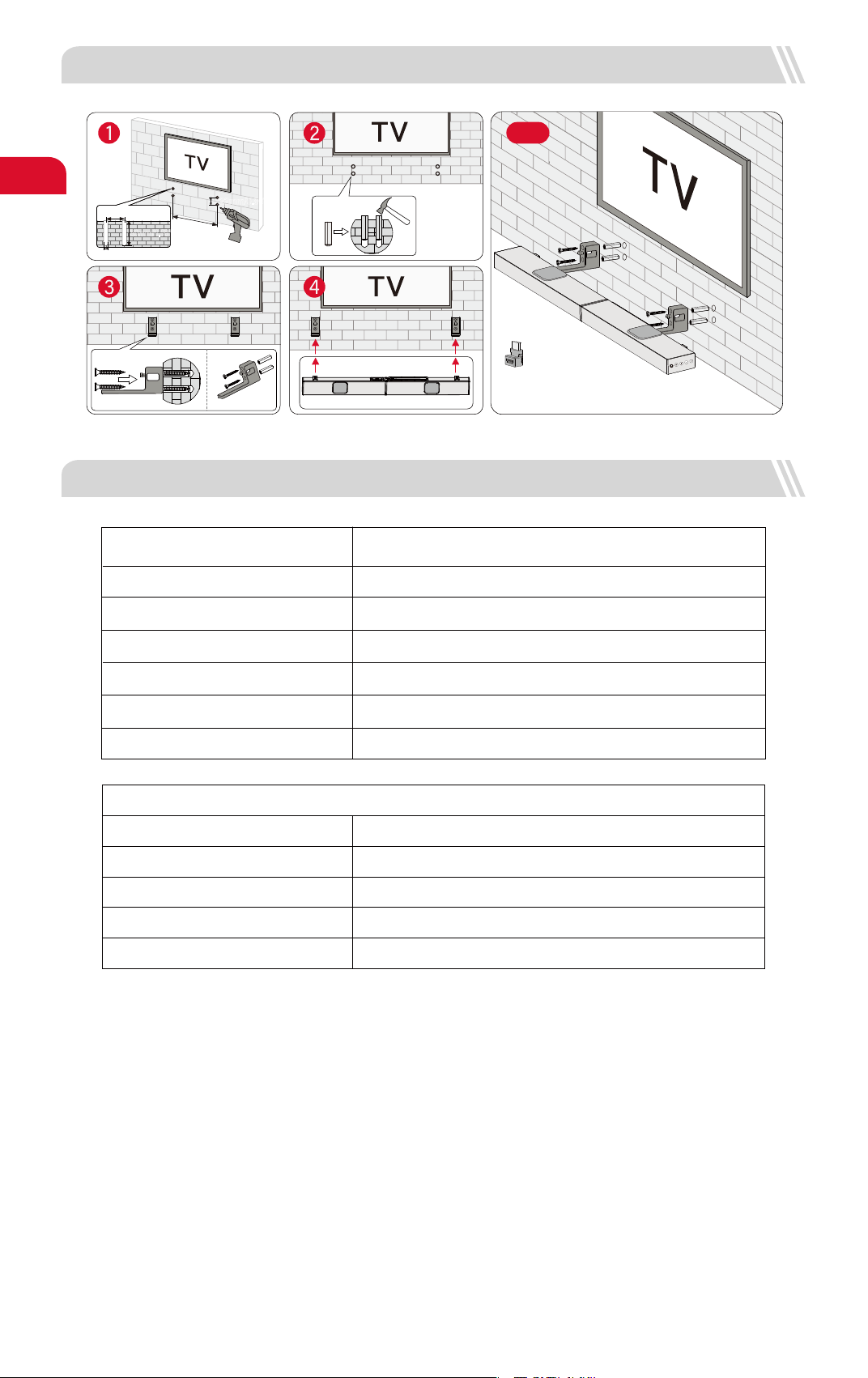
JP
15
11 仕様
概要
注意事項 :
HDMIケーブルの抜き差しを簡単にするために、
HDMIアダプターをご使用ください。
10 壁掛け設置
サウンドバー
サブウーファー
寸法と重量
800(W) x 38(H) x 90(D)mm 31.5" x 1.5" x 3.5"
270(W) x 115(H) x 270(D)mm 10.6" x 4.5" x 10.6"
正味重量
332(W) x 432(H) x190(D)mm 13.1" x 17" x 7.5"
パッケージ
総重量
モデル番号
U3920
電源
サウンドバードライバー
周波数応答
スタンバイ電力
AC 100-240V, ~50 / 60Hz
(3.1インチ×1.2インチ)×3(サウンドバー)+1.8インチ×2
(上向きドライバー)+5.25インチ×1(サブウーファー)
45Hz - 18kHz
<0.5W
動作温度 0°C - 45°C / 32°F - 113°F
ブルートゥースビジョン
5.3
580mm / 22.83"
22mm/0.86"
22mm/0.86"
6mm/0.23"
30mm/1.18"
4.15kg / 9.15lbs
5.1kg / 11.24lbs
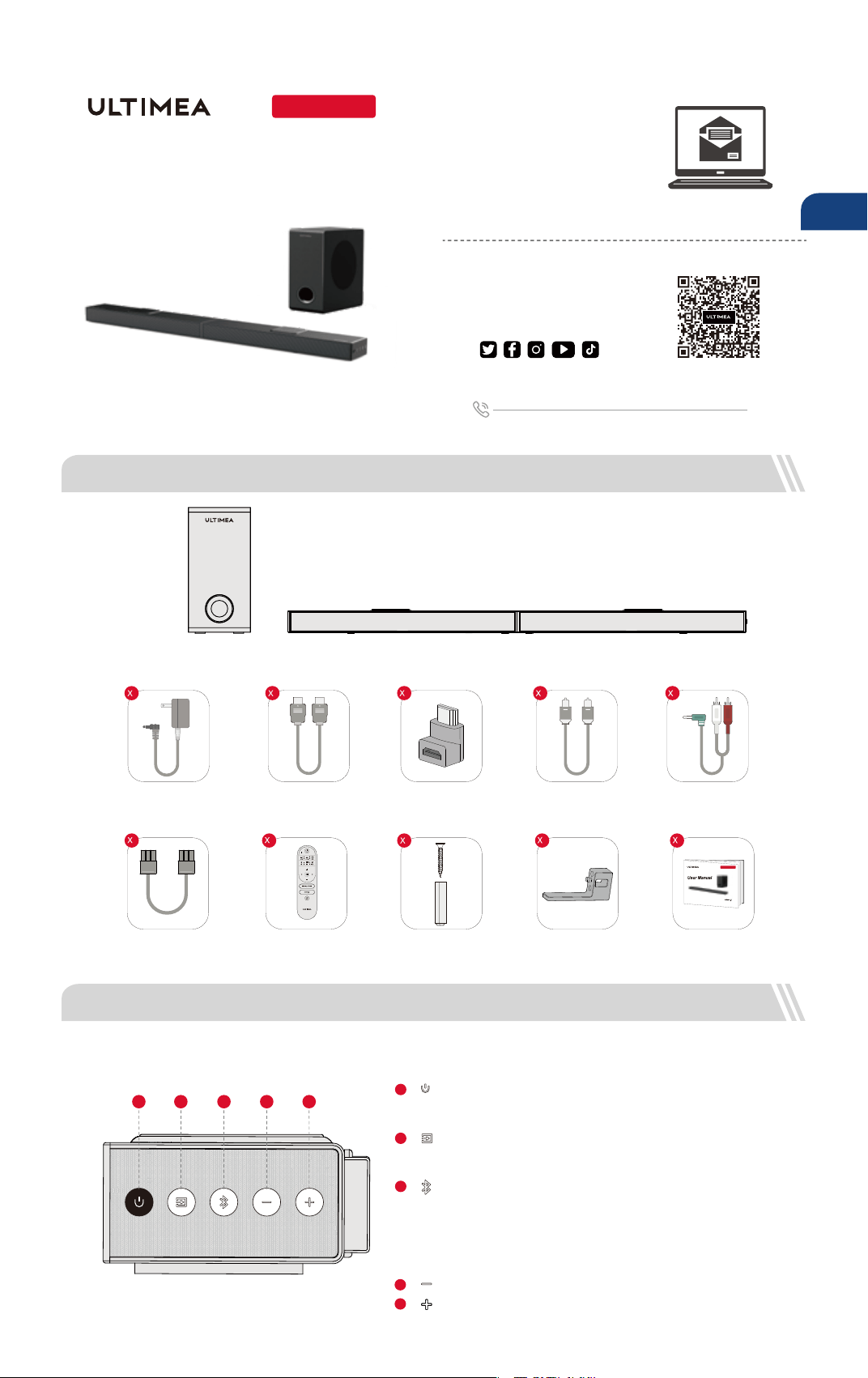
Nova S70
Numéro de modèle : U3920
Vous préférez un
tutoriel vidéo ?
NOUS
SOMMES
PRÊTS À
VOUS AIDER
support.ultimea.com
+1 888-598-8875 (US) Mon-Fri 9am-5pm (PST)
+49 89-628-25828 (EU) Mon-Fri 9am-5pm (CET)
1 LISTE DES ACCESSOIRES
Vidéo d'aide à l'installation, ou
MANUEL D'UTILISATION sur le
site web d'ULTIMEA.
Manuel de l'utilisateur
16
@ultimea_official
Caisson de basse
2 COMMANDES DE LA BARRE DE SON
Barre de son
Adaptateur
d'alimentation
Câble HDMI
Câble audio stéréo
3.5 mm vers RCA
Télécommande
Câble optique
numérique
Kit de montage mural Support mural Manuel de l'utilisateur
Adaptateur HDMI
“ ”: Réduction du volume
Panneau de contrôle
“ ”: Bouton d'alimentation
Appuyez sur ce bouton pour allumer l'appareil / Maintenez-le
enfoncé pendant 3 secondes pour l'éteindre.
1
“ ”: Mode d'entrée
Appuyez sur cette touche pour changer de canal :
eARC-HD IN (HDMI IN) -OPT (OPTICAL)-BT-AUX-USB.
2
3
“ ”:
“ ”: Augmentation du volume
4
5
Appuyez sur cette touche pour passer au canal BT et entrer en
mode d'appairage / Maintenez-la enfoncée pendant 3 secondes
pour déconnecter l'appareil actuel et vous connecter manuelle-
ment à un nouvel appareil sur votre téléphone portable / PC /
TV(BT ID: Nova S70).
BT
4321
5
Câble à 6 broches pour la connexion
de la barre de son (140 mm)
2 1
3920
Nova S70
4
2
1
1 1
1 1 1
FR
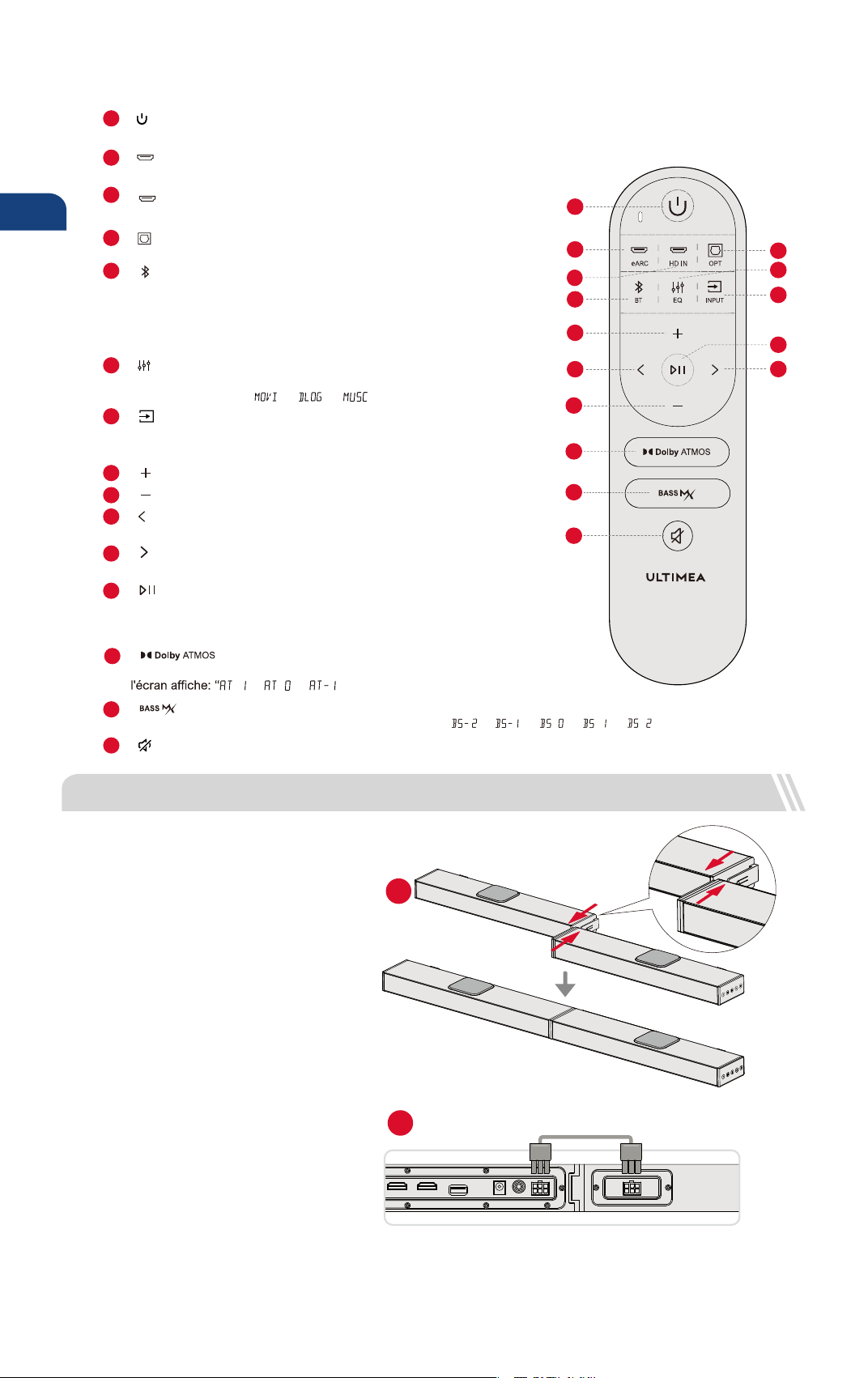
17
8
“ ”: Augmentation du volume
9
“ ”: Baisse du volume
14
Appuyez sur cette touche pour régler le niveau des basses:
“ ”: BASSMAX
15
“ ”: Mute / Récupérer le volume.
Télécommande
10
Pour les modes BT et USB uniquement: Passer à la piste précédente.
“ ”: Précédent
11
Pour les modes BT et USB uniquement: Passer à la piste suivante.
“ ”: Suivant
Appuyez sur cette touche pour basculer entre les modes Film,
Dialogue et Musique: “ ”, “ ”, “ ”.
6
“ ”: EQ
Appuyez sur cette touche pour changer de canal :
eARC-HD IN (HDMI IN) -OPT (OPTICAL)-BT-AUX-USB.
7
“ ”: INPUT
12
“ ”: Lecture / Pause
Pour les modes BT et USB uniquement.
Mode USB : Maintenez cette touche enfoncée pendant 3 secondes pour
basculer entre la lecture d'une boucle unique et la lecture d'une boucle de liste.
14
1
2
3
8
5
10
9
13
15
12
7
6
4
11
3
“ ”: BT
1
Appuyer pour mettre sous tension / Maintenir pendant 3 secondes pour mettre hors tension.
“ ”
:
Bouton d'alimentation
“ ”
: e
ARC
Appuyez sur cette touche pour passer au canal HDMI eARC.
2
5
Appuyez sur cette touche pour passer au canal OPTICAL.
4
“ ”: OPT
Appuyez sur cette touche pour passer au canal Bluetooth et entrer en
mode d'appairage. Maintenez cette touche enfoncée pendant 3 secondes
pour déconnecter l'appareil actuel et vous connecter manuellement à un
nouvel appareil sur votre téléphone portable / PC / TV (BT ID: Nova S70).
Appuyez sur cette touche pour passer au canal HDMI IN.
“ ”: HD IN
13
Appuyez sur cette touche pour régler le niveau sonore vers le haut,
”, “ ”, “ ”.
“ ”: Dolby Atmos
AUX
OPT
USB
SUB OUT
DC IN
HDMI OUT (eARC)
HDMI IN
3 INSTALLATION DE LA BARRE DE SON
Etapes de l'assemblage
Placer les deux parties de la barre de son
au même niveau et aligner les joints de
connexion. Relier les deux parties en les
poussant parallèlement pour qu'elles ne
forment plus qu'une seule pièce.
Brancher les câbles audio stéréo à 6 broches.
1
2
Étape 1
Étape 2
FR
”, “ ”, “ ”. ”, “”, “
“
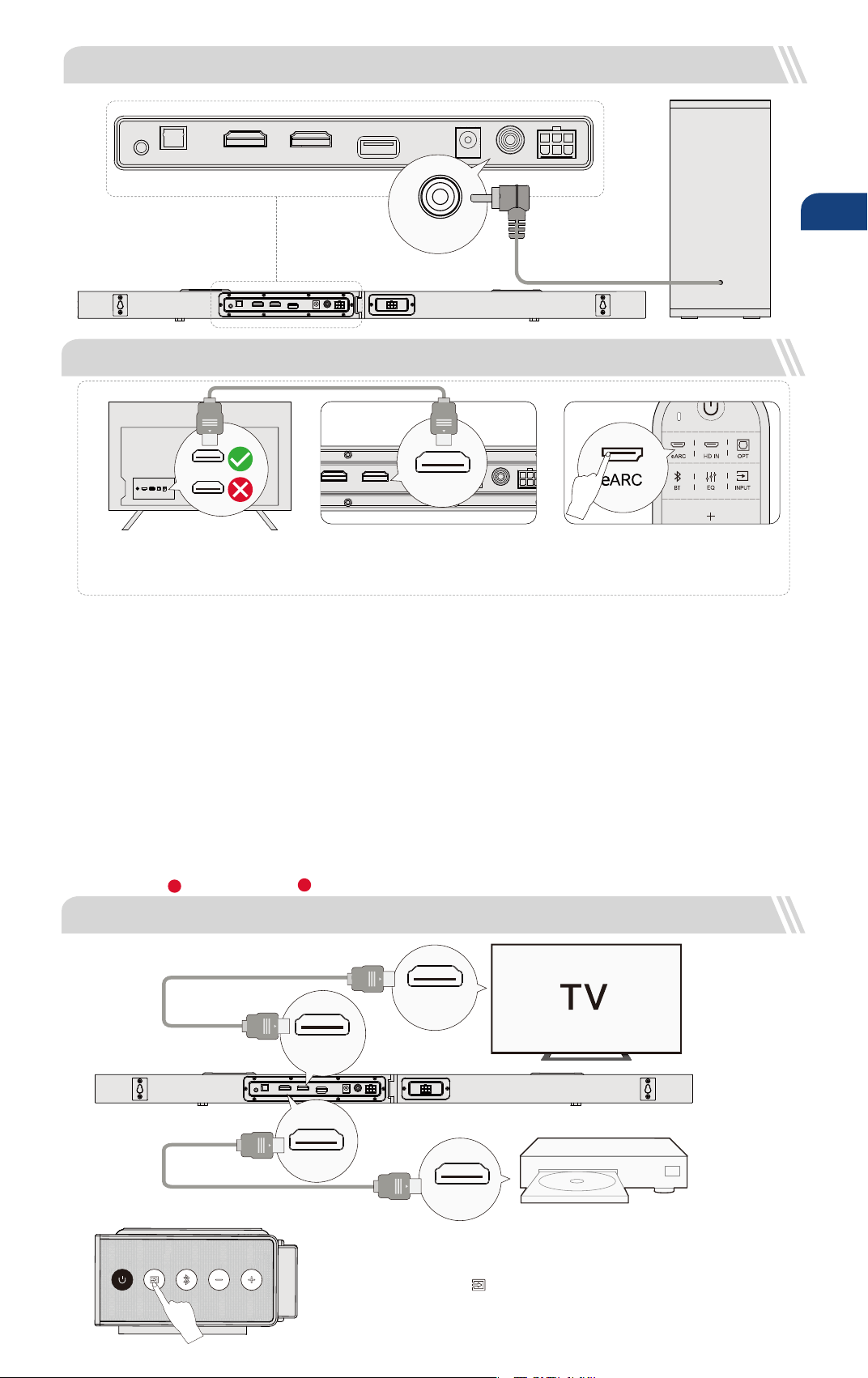
5 CONNECTER AU TELEVISEUR VIA HDMI OUT eARC / ARC
AUX
OPT
USB
SUB OUT
DC IN
HDMI OUT (eARC)
HDMI IN
Remarque : veuillez activer la fonction "CEC" sur votre téléviseur.
Lorsque eARC / ARC est connecté, la télécommande de votre téléviseur peut contrôler la barre de son et le téléviseur
simultanément: Allumer / éteindre Régler le volume
eARC / ARC
HDMI
Remarque:
Le port HDMI de votre téléviseur doit prendre en charge l'eARC pour transmettre le format audio Dolby Atmos à votre soundbar.
Atmos
: Si vous regardez un lm au format Dolby Atmos, réglez la sortie audio de votre téléviseur sur Pass Through :
Réglages TV > Accueil > Réglages > Son > Sortie audio numérique > Pass Through
DTS
: Si vous regardez un lm au format DTS, réglez la sortie audio de votre téléviseur sur PCM:
Réglages TV > Accueil > Réglages > Son > Sortie audio numérique > PCM
Étape 1:
Connectez une extrémité du câble HDMI au
port eARC / ARC à l'arrière de votre
téléviseur.
Étape 2:
Connectez ensuite l'autre extrémité au port
HDMI (eARC) de la barre de son.
Étape 3:
Appuyez sur le bouton "eARC" de la
télécommande pour sélectionner l'entrée
"HDMI OUT (eARC)".
HDMI OUT (eARC)
Quelle est la différence entre : HDMI IN, HDMI ARC, HDMI eARC ?
HDMI IN est une entrée HDMI standard qui vous permet de connecter des appareils à votre téléviseur ou à votre système audio. Elle prend en
charge les signaux audio et vidéo, mais ne prend pas en charge la fonctionnalité de canal de retour audio (ARC) ou de canal de retour audio
amélioré (eARC).
HDMI ARC est un port HDMI spécial qui prend en charge la communication bidirectionnelle entre votre téléviseur et votre système audio. Cela
signie que le son peut être envoyé de votre téléviseur à votre système audio, et que le système audio peut renvoyer le son à votre téléviseur.
HDMI eARC (Enhanced Audio Return Channel) est une version actualisée de HDMI ARC qui prend en charge des formats audio de meilleure qualité
tels que Dolby Atmos et DTS:X.
1
2
18
4 CONNECTER AU CAISSON DE BASSE
6 CONNECTER À UN AUTRE APPAREIL VIA L'ENTRÉE HDMI
AUX
OPT
USB
SUB OUT
DC IN
HDMI OUT (eARC)
HDMI IN
AUX
OPT
USB
SUB OUT
DC IN
HDMI OUT (eARC)
HDMI IN
SUB OUT
AUX
OPT
USB
SUB OUT
DC IN
HDMI OUT (eARC)
HDMI IN
HDMI IN
(eARC / ARC)
HDMI OUT
HDMI IN
HDMI OUT(eARC)
Étape 1: Connectez le câble HDMI au port HDMI OUT (eARC) de la barre de son et l'autre extrémité
au port eARC / ARC du téléviseur.
Étape 2: Connectez le câble HDMI au port HDMI OUT de l'autre appareil(Selon le type de DVD ou
de console de jeu)et l'autre extrémité au port HDMI IN de la barre de son.
Étape 3: Appuyez sur la touche " " de la barre de son ou de la télécommande pour passer au
canal HDMI IN.
Remarque: Le HDMI de votre téléviseur doit prendre en charge l'eARC pour transmettre le format
audio Dolby Atmos à votre barre de son.
Étape 1
Étape 2
Étape 3
FR
AUX
OPT
USB
SUB OUT
DC IN
HDMI OUT (eARC)
HDMI IN
AUX
OPT
USB
SUB OUT
DC IN
HDMI OUT (eARC)
HDMI IN
7 CONNECTER AU TÉLÉVISEUR VIA OPTIQUE / AUX
OPTIQUE
OPTION 1 : OPTIQUE
Assurez-vous que la prise optique est insérée
correctement, comme indiqué sur l'image. N'insérez pas la
che à l'envers et ne cassez pas le câble optique.
DIGITAL AUDIO
OUT
OPTICAL
OPTICAL
AUX
OPTION 2: AUX
Connectez le câble audio 3.5 mm vers RCA au port
RCA AUDIO OUT de votre téléviseur.
Assurez-vous que la couleur des extrémités du câble
correspond à la couleur des ports du téléviseur.
AUX
AUDIO OUTPUT
R
L
AUDIO IN
R
L
En mode optique : S'il n'y a pas de son, essayez de régler la sortie audio du téléviseur sur PCM :
Réglages TV > Accueil > Réglages > Son > Sortie audio numérique > PCM
19
1
2
1
2
Remarque: Si le son est diffusé par les haut-parleurs
internes du téléviseur, coupez ou réduisez le volume
du téléviseur.
Remarque: N'oubliez pas de débrancher le câble AUX de
la télévision et de la barre de son lorsque vous souhaitez
changer de mode.
Remarque: La barre de son doit être placée à hauteur d'oreille ou presque.
8 CONNECTER À BLUETOOTH
Appuyez sur le bouton " " de la barre de son ou de la télécommande pour entrer en mode d'appairage Bluetooth.
Ouvrez les paramètres Bluetooth de votre téléphone, recherchez et sélectionnez "Nova S70" pour connecter la barre de son.
Les piles ne sont pas incluses
1
2
Remarque: Si l'appareil est déjà en mode Bluetooth et connecté, appuyez sur le bouton " " et maintenez-le enfoncé pendant 3 secondes
pour déconnecter l'appareil actuel et vous connecter manuellement à un nouvel appareil sur votre téléphone portable / PC / TV.
9 OPTIONS DE PLACEMENT
Nova S70
Assurez-vous que le câble est connecté au port
OPTICAL OUT de votre téléviseur et l'autre extrémité au
port OPTICAL de la barre de son.
FR
ou
20
11 CARACTÉRISTIQUES TECHNIQUES
Vue d'ensemble
Note:
Veuillez utiliser l'adaptateur HDMI pour faciliter
le branchement et le débranchement du câble HDMI.
10 INSTALLATION MURALE
Barre de son
Caisson de basse
Dimensions et poids
800(W) x 38(H) x 90(D)mm 31.5" x 1.5" x 3.5"
270(W) x 115(H) x 270(D)mm 10.6" x 4.5" x 10.6"
Poids net
332(W) x 432(H) x190(D)mm 13.1" x 17" x 7.5"
Emballage
Poids brut
Numéro de modèle
U3920
Alimentation électrique
Pilotes de la barre de son
Réponse en fréquence
Puissance en veille
AC 100-240V, ~50 / 60Hz
(3.1" x 1.2")x 3(barre de son)+ 1.8" x 2(pilote ascendant)
+ 5.25" x 1(subwoofer)
45Hz - 18kHz
<0.5W
Température de fonctionnement 0°C - 45°C / 32°F - 113°F
Vision Bluetooth
5.3
FR
580mm / 22.83"
22mm/0.86"
22mm/0.86"
6mm/0.23"
30mm/1.18"
4.15kg / 9.15lbs
5.1kg / 11.24lbs
Nova S70
Modello N.: U3920
Preferisci un tutorial
video?
SIAMO
PRONTI AD
AIUTARTI
support.ultimea.com
+1 888-598-8875 (US) Mon-Fri 9am-5pm (PST)
+49 89-628-25828 (EU) Mon-Fri 9am-5pm (CET)
1 ELENCO DEGLI ACCESSORI
Video guida all'installazione o
MANUALE UTENTE sul sito
web di ULTIMEA.
Manuale Utente
21
@ultimea_official
Soundbar
2 CONTROLLI DELLA SOUNDBAR
Subwoofer
Adattatore di
alimentazione
Cavo HDMI Cavo audio stereo da
3.5 mm a RCA
Telecomando
Cavo ottico digitale
Kit di montaggio
a parete
Staffa a parete Manuale Utente
Adattatore HDMI
“ ”: Volume giù
Pannello di controllo
“ ”: Pulsante di accensione
Premere per accendere / Tenere premuto per 3 secondi
per spegnere.
1
“ ”: Modalità di ingresso
Premere per cambiare canale:
eARC-HD IN (HDMI IN) -OPT (OPTICAL)-BT-AUX-USB.
2
3
“ ”:
“ ”: Volume su
4
5
Premere per passare al canale BT / Tenere premuto per 3
secondi per scollegare il dispositivo corrente e collegarsi a
un nuovo dispositivo. (BT ID: Nova S70).
BT
4321
5
Cavo da 6 pin per connessione
alla soundbar (140 mm)
2 1
3920
Nova S70
4
2
1
1 1
1 1 1
IT
IT
22
8
“ ”: Volume su
9
“ ”: Volume giù
14
Premere per regolare il livello dei bassi, il display mostrerà:
“ ”: BASSMAX
15
“ ”: Muto / Ripristino del volume.
Telecomando
10
Modalità BT e USB: Passa alla traccia precedente.
“ ”: Precedente
11
Modalità BT e USB: Passa alla traccia successiva.
“ ”: Successivo
Premere per passare tra le modalità Film, Dialogo, Musica,
il display mostrerà: “ ”, “ ”, “ ”.
6
“ ”: EQ
Premere per passare ai canali:
eARC-HD IN (HDMI IN) -OPT (OTTICO)-BT-AUX-USB.
7
“ ”: INPUT
12
“ ”: Riproduci / Pausa
Solo per modalità BT e USB.
Modalità USB: Tenere premuto per 3 secondi per passare tra la riproduzione in
loop singolo e la riproduzione in loop della lista.
14
1
2
3
8
5
10
9
13
15
12
7
6
4
11
3
“ ”: BT
1
Premere per accendere / Tenere premuto per 3 secondi per spegnere.
“ ”
:
Pulsante di accensione
“ ”
: e
ARC
Premere per passare al canale HDMI eARC.
2
5
Premere per passare al canale OTTICO.
4
“ ”: OPT
Premere per passare al canale BT / Tenere premuto per 3 secondi
per disconnettere il dispositivo attuale e connettersi a un nuovo
dispositivo (BT ID: Nova S70).
Premere per passare al canale HDMI IN.
“ ”: HD IN
13
Premere per regolare il livello del suono ad altoparlanti orientati verso l'alto,
il display mostrerà: “ ”, “ ”, “ ”.
“ ”: Dolby Atmos
AUX
OPT
USB
SUB OUT
DC IN
HDMI OUT (eARC)
HDMI IN
3 INSTALLAZIONE DELLA SOUNDBAR
Passaggi di assemblaggio
Posiziona le due parti della soundbar allo
stesso livello e allinea le giunture di
connessione. Collega le due parti
spingendo parallelamente per unirle come
un unico pezzo.
Collega i cavi audio stereo da 6 pin.
1
2
Passaggio 1
Passaggio 2
”, “ ”, “ ”. ”, “”, “
“
5 COLLEGAMENTO ALLA TV TRAMITE HDMI OUT eARC / ARC
AUX
OPT
USB
SUB OUT
DC IN
HDMI OUT (eARC)
HDMI IN
Nota: attivare la funzione "CEC" sul televisore.
Quando è collegato eARC / ARC, il telecomando del televisore può controllare contemporaneamente la soundbar e il televisore:
Accendere / Spegnere Regolare il volume
eARC / ARC
HDMI
Nota:
La porta HDMI della tua TV deve supportare eARC per trasmettere l'audio Dolby Atmos alla tua soundbar.
Atmos
: Se stai guardando un lm nel formato Dolby Atmos, imposta l'uscita audio sulla tua TV su Pass Through:
Impostazioni TV > Home > Impostazioni > Audio > Uscita audio digitale > Pass Through
DTS
: Se stai guardando un lm nel formato DTS, imposta l'uscita audio sulla tua TV su PCM:
Impostazioni TV > Home > Impostazioni > Audio > Uscita audio digitale > PCM
Passaggio 1:
Collega un'estremità del cavo HDMI alla
porta eARC / ARC sul retro della tua TV.
Passaggio 2:
Collega l'altra estremità alla porta HDMI (eARC)
della soundbar.
Passaggio 3:
Premi il pulsante "eARC" sul telecomando per
selezionare l'ingresso "HDMI OUT (eARC).
HDMI OUT (eARC)
Qual è la differenza tra: HDMI IN, HDMI ARC, HDMI eARC?
HDMI IN è un ingresso HDMI standard che consente di collegare i dispositivi al televisore o al sistema audio. Supporta segnali audio e video, ma non
supporta la funzionalità ARC (Audio Return Channel) o eARC (Enhanced Audio Return Channel).
HDMI ARC è una porta HDMI speciale che supporta la comunicazione bidirezionale tra il televisore e il sistema audio. Ciò signica che l'audio può
essere inviato dal televisore al sistema audio e il sistema audio può inviare l'audio al televisore.
HDMI eARC (Enhanced Audio Return Channel) è una versione aggiornata dell'HDMI ARC che supporta formati audio di qualità superiore come
Dolby Atmos e DTS:X.
1
2
23
4 COLLEGAMENTO AL SUBWOOFER
6 COLLEGAMENTO AD ALTRI DISPOSITIVI TRAMITE INGRESSO HDMI
AUX
OPT
USB
SUB OUT
DC IN
HDMI OUT (eARC)
HDMI IN
AUX
OPT
USB
SUB OUT
DC IN
HDMI OUT (eARC)
HDMI IN
SUB OUT
AUX
OPT
USB
SUB OUT
DC IN
HDMI OUT (eARC)
HDMI IN
HDMI IN
(eARC / ARC)
HDMI OUT
HDMI IN
HDMI OUT(eARC)
Étape 1: Collegare il cavo HDMI alla porta HDMI OUT (eARC) della Soundbar e l'altra estremità
alla porta eARC / ARC del televisore.
Étape 2: Collegare il cavo HDMI alla porta HDMI OUT dell'altro dispositivo (ad esempio un DVD
o una console per videogiochi) e l'altra estremità alla porta HDMI IN della Soundbar.
Étape 3: Premere il pulsante " " sulla Soundbar o sul telecomando per passare al canale
canale HDMI IN.
Nota: L'HDMI del televisore deve supportare eARC per trasmettere il formato audio
Dolby Atmos alla Soundbar.
Fase 1
Fase 2
Fase 3
IT
AUX
OPT
USB
SUB OUT
DC IN
HDMI OUT (eARC)
HDMI IN
AUX
OPT
USB
SUB OUT
DC IN
HDMI OUT (eARC)
HDMI IN
7 COLLEGAMENTO ALLA TV VIA OTTICO / AUX
OTTICO
OPZIONE 1: OTTICO
Assicurarsi che la spina ottica sia inserita correttamente
come mostrato nell'immagine. Non inserire la spina al
contrario e non rompere l'ottica.
DIGITAL AUDIO
OUT
OPTICAL
OPTICAL
AUX
OPZIONE 2: AUX
Collegare il cavo audio da 3.5 mm a RCA alla porta
RCA AUDIO OUT del televisore.
Assicurarsi che il colore delle estremità dei cavi
corrisponda a quello delle porte del televisore.
AUX
AUDIO OUTPUT
R
L
AUDIO IN
R
L
In modalità ottica: Se non si sente alcun suono, provare a impostare l'uscita audio del televisore su PCM:
Impostazioni TV > Home > Impostazioni > Audio > Uscita audio digitale > PCM.
24
1
2
1
2
Nota: Se l'audio viene riprodotto dagli altoparlanti interni
del televisore, disattivare o ridurre al minimo il volume
del televisore.
Nota: Ricordarsi di scollegare il cavo AUX dal televisore e
dalla Soundbar quando si desidera cambiare modalità
Nota: La soundbar deve essere posizionata all'altezza delle orecchie o vicino ad esse.
8 COLLEGARSI AL BLUETOOTH
Premere il pulsante " " sulla soundbar o sul telecomando per accedere alla modalità di accoppiamento Bluetooth.
Aprire le impostazioni Bluetooth del telefono, trovare e selezionare "Nova S70" per collegare la soundbar.
Batterie non incluse
1
2
Nota: Se è già in modalità Bluetooth e collegato, tenere premuto il pulsante " " per 3 secondi per scollegare il dispositivo corrente
e collegarsi manualmente a un nuovo dispositivo sul telefono cellulare / PC / TV.
9 OPZIONI DI COLLOCAMENTO
Nova S70
Assicurarsi che il cavo sia collegato alla porta OPTICAL
OUT del televisore e l'altra estremità alla porta OPTICAL
del sistema Soundbar.
IT
25
11 SPECIFICHE
Panoramica
Nota:
Utilizzare l'adattatore HDMI per facilitare l'inserimento
e il disinserimento del cavo HDMI.
10 INSTALLAZIONE A MURO
Soundbar
Subwoofer
Dimensioni e peso
800(W) x 38(H) x 90(D)mm 31.5" x 1.5" x 3.5"
270(W) x 115(H) x 270(D)mm 10.6" x 4.5" x 10.6"
Peso netto
332(W) x 432(H) x190(D)mm 13.1" x 17" x 7.5"
Imballaggio
Peso lordo
Numero di modello
U3920
Alimentazione
Driver della Soundbar
Risposta in frequenza
Potenza in standby
AC 100-240V, ~50 / 60Hz
(3.1" x 1.2")x 3 (Soundbar)+ 1.8" x 2 (driver che sparano verso l'alto)
+ 5.25" x 1 (subwoofer)
45Hz - 18kHz
<0.5W
Temperatura di esercizio 0°C - 45°C / 32°F - 113°F
Visione Bluetooth
5.3
IT
580mm / 22.83"
22mm/0.86"
22mm/0.86"
6mm/0.23"
30mm/1.18"
4.15kg / 9.15lbs
5.1kg / 11.24lbs
Nova S70
Nº de modelo: U3920
¿Preere un tutorial
en vídeo?
ESTAMOS
LISTOS PARA
AYUDAR
support.ultimea.com
+1 888-598-8875 (US) Mon-Fri 9am-5pm (PST)
+49 89-628-25828 (EU) Mon-Fri 9am-5pm (CET)
1 LISTADO DE ACCESORIOS
Vídeo guía de instalación o
MANUAL DE USUARIO en el
sitio web de ULTIMEA.
Manual de usuario
26
@ultimea_official
Barra de sonido
2 CONTROLES DE LA BARRA DE SONIDO
Subwoofer
Adaptador de corriente Cable HDMI Cable de audio estéreo
de 3.5 mm a RCA
Mando a distancia
Cable digital óptico
Kit de montaje
en pared
Soporte de pared Manual del usuario
Adaptador HDMI
“ ”: Bajar volumen
Panel de control
“ ”: Botón de encendido
Pulse para encender / Mantenga pulsado durante 3
segundos para apagar.
1
“ ”: Modo de entrada
Pulse para cambiar de canal:
eARC-HD IN (HDMI IN) -OPT (OPTICAL)-BT-AUX-USB.
2
3
“ ”:
“ ”: Subir volumen
4
5
Pulse para cambiar al canal BT / Mantenga pulsado durante
3 segundos para desconectar el dispositivo actual y
conectarse a un nuevo dispositivo. (BT ID: Nova S70).
BT
4321
5
Cable de 6 clavijas para conexión
de barra de sonido (140 mm)
2 1
3920
Nova S70
4
2
1
1 1
1 1 1
ES
27
8
“ ”: Subir Volumen
9
“ ”: Bajar volumen
14
Pulse para ajustar el nivel de graves, la pantalla mostrará:
“ ”: BASSMAX
15
“ ”: Silenciar / Recuperar el volumen.
Mando a distancia
10
Modo BT y USB: Salta a la pista anterior.
“ ”: Anterior
11
Modo BT y USB: Salta a la pista siguiente.
“ ”: Siguiente
Pulse para cambiar entre los modos Película, Diálogo,
Música, la pantalla mostrará: “ ”, “ ”, “ ”.
6
“ ”: EQ
Pulse para cambiar de canal:
eARC-HD IN (HDMI IN) -OPT (OPTICAL)-BT-AUX-USB.
7
“ ”: INPUT
12
“ ”: Reproducir / Pausa
Sólo para los modos BT y USB.
Modo USB: Mantenga pulsado durante 3 segundos para cambiar entre
reproducción de bucle simple y reproducción de bucle de lista.
14
1
2
3
8
5
10
9
13
15
12
7
6
4
11
3
“ ”: BT
1
Pulse para encender / Mantenga pulsado durante 3 segundos para apagar.
“ ”
:
Botón de encendido
“ ”
: e
ARC
Pulse para cambiar al canal HDMI eARC.
2
5
Pulse para cambiar al canal OPTICAL.
4
“ ”: OPT
Pulse para cambiar al canal BT / Mantenga pulsado durante 3
segundos para desconectar el dispositivo actual y conectarse a un
nuevo dispositivo. (BT ID: Nova S70).
Pulse para cambiar al canal HDMI IN.
“ ”: HD IN
13
Pulse para ajustar el nivel de sonido ascendente,
la pantalla mostrará: “ ”, “ ”, “ ”.
“ ”: Dolby Atmos
AUX
OPT
USB
SUB OUT
DC IN
HDMI OUT (eARC)
HDMI IN
3 INSTALACIÓN DE LA BARRA DE SONIDO
Pasos de montaje
Coloque las dos partes de la barra de
sonido al mismo nivel y alinee las juntas de
conexión. 2.Conecte las dos partes
empujando paralelamente para combinarlas
como una sola pieza.
Enchufa los cables de audio estéreo de 6
clavijas.
1
2
Paso 1
Paso 2
ES
”, “ ”, “ ”. ”, “”, “
“
5 CONECTE AL TELEVISOR A TRAVéS DE LA SALIDA HDMI eARC / ARC
AUX
OPT
USB
SUB OUT
DC IN
HDMI OUT (eARC)
HDMI IN
Nota: Active la función "CEC" en su televisor.
Cuando eARC / ARC está conectado, el mando a distancia del televisor puede controlar la barra de sonido y el televisor
simultáneamente: Encender / apagar Ajustar el volumen
eARC / ARC
HDMI
Nota:
El puerto HDMI de su televisor debe ser compatible con eARC para transmitir el formato de audio Dolby Atmos a su Soundbar.
Atmos
: Si está viendo una película en formato Dolby Atmos, ajuste la salida de audio del televisor en Pass Through:
Ajustes TV > Inicio > Ajustes > Sonido > Salida de audio digital > Pass Through.
DTS
: Si está viendo una película en formato DTS, congure la salida de audio del televisor como PCM:
Ajustes TV > Inicio > Ajustes > Sonido > Salida de audio digital > PCM
Paso 1:
Conecte un extremo del cable HDMI al
puerto eARC / ARC de la parte posterior del
televisor.
Paso 2:
A continuación, conecte el otro extremo al
puerto HDMI (eARC) de la barra de sonido.
Paso 3:
Pulse el botón "eARC" del mando a
distancia para seleccionar la entrada
"HDMI OUT(eARC)".
HDMI OUT (eARC)
¿Cuál es la diferencia entre: HDMI IN, HDMI ARC, HDMI eARC?
HDMI IN es una entrada HDMI estándar que permite conectar dispositivos al televisor o al sistema de audio. Admite señales de audio y vídeo, pero
no es compatible con las funciones de canal de retorno de audio (ARC) o canal de retorno de audio mejorado (eARC).
HDMI ARC es un puerto HDMI especial que permite la comunicación bidireccional entre el televisor y el sistema de audio. Esto signica que el audio
puede enviarse desde el televisor al sistema de audio, y el sistema de audio puede devolver el audio al televisor.
HDMI eARC (canal de retorno de audio mejorado) es una versión actualizada de HDMI ARC que admite formatos de audio de mayor calidad, como
Dolby Atmos y DTS:X.
1
2
28
4 CONECTAR AL SUBWOOFER
6 CONECTE A OTRO DISPOSITIVO A TRAVÉS DE HDMI IN
AUX
OPT
USB
SUB OUT
DC IN
HDMI OUT (eARC)
HDMI IN
AUX
OPT
USB
SUB OUT
DC IN
HDMI OUT (eARC)
HDMI IN
SUB OUT
AUX
OPT
USB
SUB OUT
DC IN
HDMI OUT (eARC)
HDMI IN
HDMI IN
(eARC / ARC)
HDMI OUT
HDMI IN
HDMI OUT(eARC)
Paso 1: Conecte el cable HDMI al puerto HDMI OUT (eARC) de la barra de sonido y el otro
extremo al puerto eARC / ARC del televisor.
Paso 2: Conecte el cable HDMI al puerto HDMI OUT del otro dispositivo(Tal como DVD o
videoconsola)y el otro extremo al puerto HDMI IN de la Soundbar.
Paso 3: Pulse el botón " " en el Soundbar o en el mando a distancia para cambiar a canal
HDMI IN.
Nota: El HDMI del televisor debe ser compatible con eARC para transmitir el formato de audio
Dolby Atmos a la barra de sonido.
Paso 1
Paso 2
Paso 3
ES
AUX
OPT
USB
SUB OUT
DC IN
HDMI OUT (eARC)
HDMI IN
AUX
OPT
USB
SUB OUT
DC IN
HDMI OUT (eARC)
HDMI IN
7 CONEXIÓN AL TELEVISOR VÍA ÓPTICA / AUX
ÓPTICA
OPCIÓN 1: ÓPTICA
Asegúrese de que el conector óptico está insertado
correctamente como se muestra en la imagen. No inserte
el enchufe al revés y rompa el conector óptico.
DIGITAL AUDIO
OUT
OPTICAL
OPTICAL
AUX
OPCIÓN 2: AUX
Conecte el cable de audio de 3.5 mm a RCA para
conectarlo al puerto RCA AUDIO OUT de su TV.
Asegúrese de que el color de los extremos de los
cables coincide con el color de los puertos del televisor.
AUX
AUDIO OUTPUT
R
L
AUDIO IN
R
L
En modo óptico: Si no hay sonido, pruebe a ajustar la salida de audio del televisor a PCM:
Ajustes TV > Inicio > Ajustes > Sonido > Salida de audio digital > PCM
29
1
2
1
2
Nota: Si se reproduce audio por los altavoces internos del
televisor, silencie o minimice el volumen del televisor.
Nota: Recuerde desconectar el cable AUX del televisor y
de la barra de sonido cuando desee cambiar de modo.
Nota: La barra de sonido debe colocarse a la altura del oído o cerca de él.
8 CONECTAR CON BLUETOOTH
Pulse el botón " " de la barra de sonido o del mando a distancia para acceder al modo de emparejamiento Bluetooth.
Abra la conguración Bluetooth de su teléfono, busque y seleccione "Nova S70" para conectar la barra de sonido.
Pilas no incluidas
1
2
Nota: Si ya está en modo Bluetooth y conectado, mantenga pulsado el botón " " durante 3 segundos para desconectar el dispositivo actual y
conectarse a un nuevo dispositivo manualmente en su teléfono móvil / PC / TV.
9 OPCIONES DE COLOCACIÓN
Nova S70
Asegúrese de que el cable está conectado al puerto
OPTICAL OUT del televisor y el otro extremo al puerto
OPTICAL de la barra de sonido.
ES
30
11 ESPECIFICACIONES
Vista general
Nota:
Utilice el adaptador HDMI para enchufar y
desenchufar fácilmente el cable HDMI.
10 INSTALACIÓN EN PARED
Barra de sonido
Subwoofer
Dimensiones y peso
800(W) x 38(H) x 90(D)mm 31.5" x 1.5" x 3.5"
270(W) x 115(H) x 270(D)mm 10.6" x 4.5" x 10.6"
Peso neto
332(W) x 432(H) x190(D)mm 13.1" x 17" x 7.5"
Embalaje
Peso bruto
Número de modelo
U3920
Fuente de alimentación
Transductores de la barra de sonido
Respuesta en frecuencia
Potencia en espera
AC 100-240V, ~50 / 60Hz
(3.1" x 1,2")x 3(barra de sonido)+ 1.8" x 2(transductores ascendentes)
+ 5.25" x 1(subwoofer)
45Hz - 18kHz
<0.5W
Temperatura de funcionamiento 0°C - 45°C / 32°F - 113°F
Visión Bluetooth
5.3
ES
580mm / 22.83"
22mm/0.86"
22mm/0.86"
6mm/0.23"
30mm/1.18"
4.15kg / 9.15lbs
5.1kg / 11.24lbs
FCC REGULATORY COMPLIANCE
ISED WARNINGS
Please read this user manual carefully and save it for future reference.
SAFETY INSTRUCTIONS
Do not make unauthorized alterations to the product, doing so may compromise safety, regulatory compliance, system
performance, and may void the warranty.
·
Avoid dropping.
·
Do not disassemble.
·
Do not submerge in water.
·
Avoid extreme temperatures.
·
Do not use the device outdoors during thunderstorms.
·
· Do not place dangerous items on top of this device (e.g.
· Clean with a dry, soft lint-free cloth. Do not use any corrosive cleaner or oil.
·
To avoid hearing damage, do not listen for extended periods at high volume.
·
Do not expose the batteries to extreme heat sources such as direct sunlight or open flames.
·
The ideal operating temperature for this product and its accessories
is between
·
The adapter should be installed near the device and should be easily accessible.
·
Do not use this product in environments of extreme heat or cold. Never expose this device to strong sunshine or wet
environments.
PROPER DISPOSAL INSTRUCTIONS
Waste Electrical & Electronic Equipment
This mark shown on the product or its packaging, indicates that this product should not be disposed of with other
household waste at the end of its working life.
To prevent possible harm to the environment or human health from uncontrolled waste disposal, please separate
this from other types of wastes and recycle it responsibly to promote the sustainable reuse of material resources.
Household user should contact either the retailer where they purchased this product, or their local government ofce, for
details of where and how they can take this item for environmentally safe recycling.
Business users should contact their suppliers and check the terms and conditions of the purchase contract. This product
should not be mixed with other commercial wastes for disposal.
NOTE: This equipment has been tested and found to comply with the limits for a Class B digital device, pursuant to part
15 of the FCC Rules. These limits are designed to provide reasonable protection against harmful interference in a
residential installation. This equipment generates uses and can radiate radio frequency energy and, if not installed and
used in accordance with the instructions, may cause harmful interference to radio communications.
However, there is no guarantee that interference will not occur in a particular installation. If this equipment does cause
harmful interference to radio or television reception, which can be determined by turning the equipment off and on, the
user is encouraged to try to correct the interfer. ence by one or more of the following measures:
- Reorient or relocate the receiving antenna.
- Increase the separation between the equipment and the receiver.
- Connect the equipment to an outlet on a circuit different from that to which the receiver is connected.
- Consult the dealer or an experienced radio / TV technician for help.
Any changes or modications not expressly approved by the party responsible for compliance could void the user's
authority to operate the equipment.
This device complies with Part 15 of the FCC Rules.
Operation is subject to the following two conditions:
(1) This device may not cause harmful interference.
(2) This device must accept any interference received, including interference that may cause undesired operation.
This equipment complies with FCC radiation exposure limits set forth for an uncontrolled environment. This equipment
should be installed and operated with a minimum distance of 20cm between the radiator & your body. This transmitter
must not be co-located or operating in conjunction with any other antenna or transmitter.
This device contains licence-exempt transmitter (s) / receiver (s) that comply with Innovation, Science and Economic
Development Canada's licence-exempt RSS (s). Operation is subject to the following two conditions:
(1) This device may not cause interference.
(2) This device must accept any interference, including interference that may cause undesired operation of the device.
L'émetteur/récepteur exempt de licence contenu dans le présent appareil est conforme aux CNR d'Innovation, Sciences et
Développement économique Canada applicables aux appareils radio exempts de licence. L'exploitation est autorisée aux
deux conditions suivantes:
(1) L'appareil ne doit pas produire de brouillage;
(2) L'appareil doit accepter tout brouillage radioélectrique subi, même si le brouillage est susceptible d' en compromettre le
fonctionnement.
This equipment complies with IC exposure limits set forth for an uncontrolled environment. This equipment shall be installed and
operated with a minimum distance of 20cm between the radiator & body.
Cet équipement est conforme aux limites d'exposition IC dénies pour un environnement non contrôle. Cet équipement doit être
installé et utilisé avec une distance minimale de 20cm entre le radiateur et la carrosserie.
41°F/5°C and 95°F/35°C.


U3920
Nova S70 3.1.2 Channel Dolby Atmos Soundbar
Trade Marks:
The Bluetooth® word mark and logos are registered trademarks owned by Bluetooth SIG, Inc. and any use of such
marks by Soundlab Technology Co.,Ltd. is under license. Other trademarks and trade names are those of their
respective owners.
The Adopted Trademarks HDMI, HDMI High-Denition Multimedia Interface, HDMl trade dress and the HDMI Logos
are trademarks or registered trademarks of HDMI Licensing Administrator, Inc. in the United States and other.
EN 55032:2015/A11:2020
EN 55035:2017/A11:2020
ENIEC 61000-3-2:2021
EN 61000-3-3:2013/A1:2021
ETSIEN 301 489-1 V2.2.3(2019-11)
ETSIEN 301 489-17 V3.2.4(2020-09)
EN 300 328 V2.2.2(2019-07)
EN 50663:2017
ENIEC 62368-1:2020+A11:2020
IEC62321-3-1:2013
IEC 62321-4:2013+A1:2017
IEC 62321-5:2013
IEC 62321-6:2015
IEC 62321-7-1:2015
IEC 62321-7-2:2017
IEC 62321-8:2017
Full Name: Yoyo.Yu
Position: Approbation Manager
Signature:
Place/Date: Shenzhen, China/Dec. 25-2022
Dolby, Dolby Vision, Dolby Atmos, and the double-D symbol are registered trademarks of Dolby Laboratories
Licensing Corporation. Manufactured under license from Dolby Laboratories. Condential unpublished works.
Copyright© 1992-2021 Dolby Laboratories. All rights reserved.