4. Responsible Product Disposal (E-Waste & Magnets)
9. Charging Guide & Common Issues
8. Fault Diagnosis and Privacy Protection
7. How To Use
Q: Why does my phone feel warm to the touch?
A: Due to the loss of conversion circuit efficiency, heat generation
during magnetic charging is normal. Aluminum housings have better heat
dissipation, so they feel hotter to the touch than plastic housings.
Q: Why is my power bank providing fewer charges than expected?
A: Due to a 35% to 45% capacity loss from battery cell and circuit inefficiencies
during charging, a fully charged 5000mAh Power Bank effectively provides
about 2750mAh to 3250mAh of usable power to your devices.
Q: Why does charging slow or stop after reaching 80%?
A: Your iPhone may slow charging at 80% to protect the battery. This can happen
if it gets too warm during charging as part of iOS 17's thermal control strategy.
Charging will resume once the device cools down.
Category
Battery Capacity
APB50001-S
5V/3A (20W Max)
iPhone: Up to 15W
AirPods (Wireless Case): Up to 5W
Apple Watch: Up to 3W
Compatible Output Power
5000mAh / 18.50Wh High-Nickel NMC Lithium-ion
Shell Material
Aviation-grade Aluminum Alloy
117g (4.12oz)
100mm × 68mm × 8mm (3.94″ × 2.68″ × 0.31″)
5V/3A, 9V/2.22A(20W Max)
What do the lights mean?
The number shows how much battery is left. Aflashing green arcnext to it means
it’s currently charging your device. If you see“100”, the power bank is full. If the
screen is off, press the side button to wake it up.
Having Trouble? Try These Steps:
If charging is slow or keeps stopping:
• Make sure your phone is centered on the magnetic spot.
• Take off very thick cases, or cases with card holders.
• Use a faster wall charger (look for “QC 3.0” or “PD” on your plug).
If the power bank won’t turn on or charge your phone:
• Unplug everything and press the button to see if it wakes up.
• Try a different USB-C cable.
• Try a different wall plug.
If it gets hot and stops charging:
• This is a safety feature. Let it cool down in a less hot place, then try again.
If it still doesn’t work normally, please contact us.
About the Battery:
It has a 5000mAh capacity and uses a high-efficiency lithium-ion (NMC) battery.
7.1 Understanding the Button & Indicators
•To Start Charging:Briefly press the power buttononce. The LED display will
turn on, and agreen semicircle iconwill appear next to the battery
percentage, indicating it is ready to charge wirelessly.
•To Turn Off:Quickly press the power buttontwice. The LED display will turn
off, and the device enters standby mode.
7.2 Charging Your Devices
7.2.1 For iPhone (with MagSafe):
• Press the button once to wake the power bank.
• Center the back of your iPhone (12 or later) over the magnetic charging area.
• The magnets will automatically align and snap into place. A charging notification
will appear on your iPhone screen.
7.2.2 For AirPods (with wireless charging case):
• Ensure the power bank is on (LED display is lit).
• Place your AirPods charging case flat on the center of the charging area.
• The status light on your AirPods case will indicate charging has begun.
7.2.3 For Apple Watch:
• Press the button onceto activate the power bank.
• Align the back of your Apple Watch with the center of the circular magnetic
charging pad.
• The watch will magnetically attach and begin charging.
7.3 For Optimal Charging
• Ensure your device is centered on the charging area for maximum efficiency.
• For iPhones without a magnetic case, removing thick cases may improve
alignment and charging speed.
6.1 Sleek & Portable Design
Featuring an aviation-grade aluminum alloy shell with a refined shimmering
finish, this power bank combines style with durability. Its ultra-slim profile—
just0.31 inches (8.1mm) thickand121g (4.2oz) light—makes the 5000mAh
capacity effortlessly portable in any pocket or bag.
6.2 Safe & Intelligent Charging
Designed with ergonomic rounded corners, it integrates an exclusive
Temperature Control Chipthat actively monitors and manages heat during
operation. This ensures both the device and your phone remain at a safe,
optimal temperature throughout the charging process.
6.3 Strong Magnetic Attachment & Fast Wireless Charging
Equipped with a powerful magnetic alignment system deliveringup to 12N
(2.7 lbs) of holding force, it securely attaches to your iPhone for seamless 15W
MagSafe-compatible fast charging, with or without a magnetic case. Enjoy
cable-free convenience anytime.
6.4 Ultra-Fast Wired Charging via USB-C
The built-inUSB-C port supports bi-directional PD 18W fast charging. It can be
fully recharged in approximately1.5 hours, and also serves as a high-speed
wired charger for your phone when needed.
6.5 Built-in Power Display & Broad Compatibility
The integratedLED digital displayshows the remaining battery percentage
at a glance, eliminating power anxiety during travel, work, or leisure. It is fully
compatible withiPhone 12-16 series(and future models), both bare and
with magnetic cases.
5. Safety Information
5.1 Keep Away from Children
• Keep the device out of reach of infants and children to prevent
accidental ingestion or other hazards.
5.2 Operating Environment
• Use and store the device indoors, in a dry and well-ventilated area.
Keep away from flammable, explosive, overheated, damp, or oily
environments.
5.3 Non-Disassembly & Storage
• Do not attempt to disassemble the device, as this may cause electric
shock or injury. For long-term storage, keep the device in an environment
between-20°C to 60°C (-4°F to 140°F).
5.4 Medical Device Interference
• The magnets and electromagnetic fields may interfere with the operation
of implanted medical devices (e.g., pacemakers, insulin pump
personal medical devices (e.g., hearing aids). Maintain a safe distance.
Consult your physician and the medical device manufacturer if you
have concerns.
5.5 Charging Considerations
• For optimal charging, ensure your phone case isless than 5mm thick
and does not contain metal plates, credit cards, or RFID chips
(e.g., in ID cards, access cards). Remove thick or obstructive cases before
charging.
5.6 Cleaning
• Always unplug the device before cleaning. Wipe with a dry or slightly
damp cloth. Do not use abrasive chemicals, strong cleansers, or detergents.
For responsible disposal, please recycle this product in line with
your local e-waste regulations. Electronic devices should not be
placed in your household waste bin.
• 5000mAh portable charger X1
• Charging Cable (USB-C to USB-C) x1
• User Manual and warranty card X1
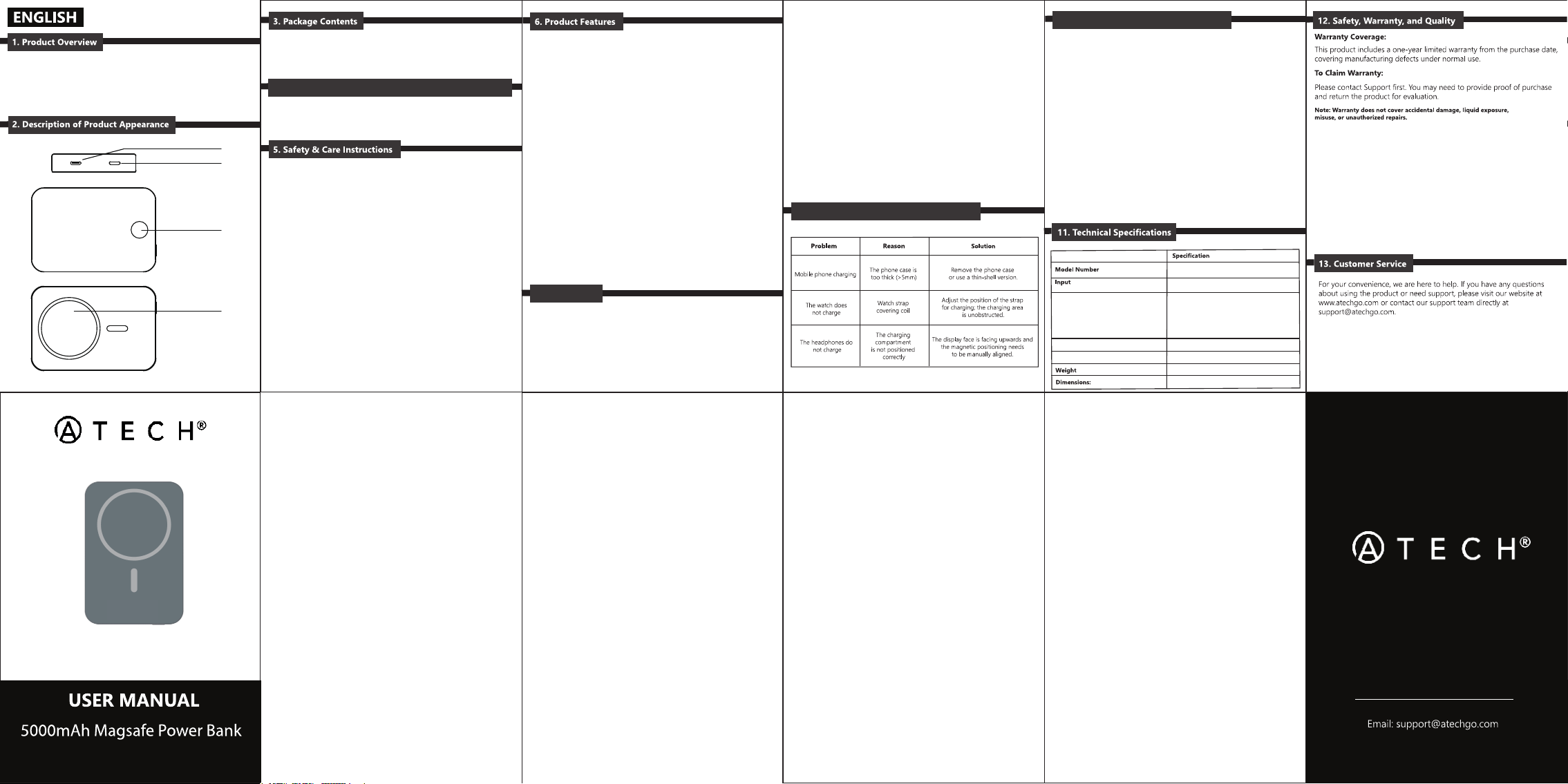
USB-C Port
Power Button
MagSafe Charging Area
Battery Level Indicator
Thank you for choosing the ATECH APB50001-S
This product meets key compliance benchmarks:
• FCC & RoHS Certified
• Compliant with Amazon US Safety Standards
• Compliant with Amazon US Energy Efficiency Standards

FCC Warnning:
This equipment has been tested and found to comply with the limits for a Class B digital device,
pursuant to part 15 of the FCC Rules. These limits are designed to provide
reasonable
protection against harmful interference in a residential installation. This equipment generates,
uses and can radiate radio
frequency
energy
and,
if
not
installed
and
used
in
accordance
with
the
instructions,
may cause
harmful
interference
to
radio
communications.
However,
there
is
no
guarantee
that interference
will
not
occur
in
a
particular
installation.
If
this
equipment
does
cause
harmful interference to radio or television reception, which can be
determined by turning the equipment off
and
on,
the
user
is
encouraged
to
try
to
correct
the interference
by
one
or
more
of
the following measures:
•
Reorient or relocate the receiving antenna.
•
Increase the separation between the equipment and receiver.
•
Connect the equipment into an outlet on a circuit different from that to which the receiver is
connected.
• Consult the dealer or an experienced radio/TV technician for help.
Caution:
Any
changes
or
modifications
to
this
device
not
explicitly
approved
by
manufacturer
could void your authority to operate this equipment.
This
device
complies
with
part
15
of
the
FCC
Rules.
Operation
is
subject
to
the
following
two
conditions:
(1)This
device
may
not
cause
harmful
interference,
and
(2)
this
device
must
accept
any
interference received, including interference that may cause undesired operation.
This
equipment
complies
with
FCC
radiation
exposure
limits
set
forth
for
an
uncontrolled
environment.
This
equipment
should
be
installed
and
operated
with
minimum
distance
0cm
between the radiator and your body.