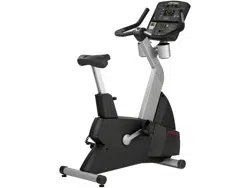
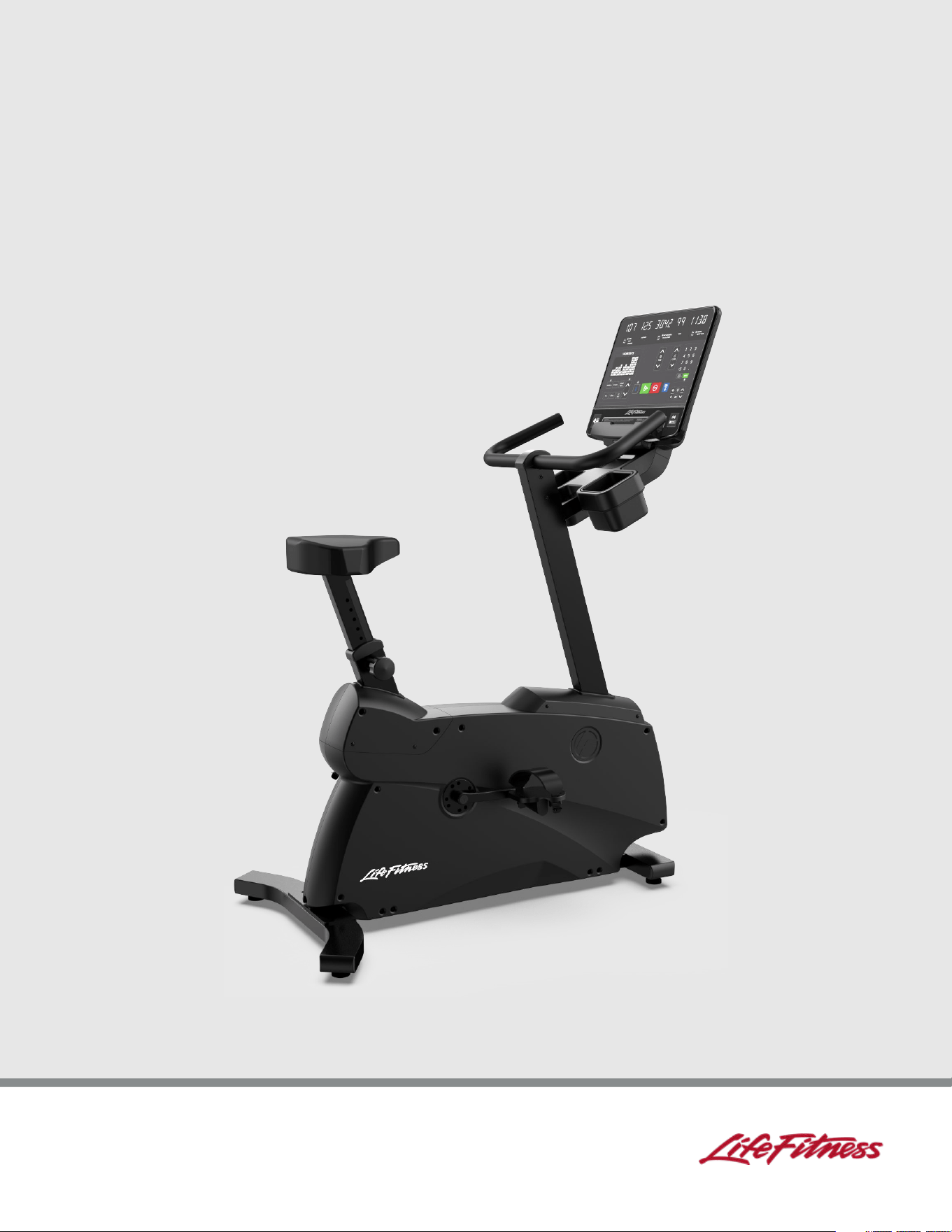
Atmos Upright Bike and Atmos
Home Edition Upright Bike
Owner's Manual / Assembly Instructions
1028291-0001 REV AC


Corporate Headquarters
Columbia Centre III, 9525 Bryn Mawr Avenue, Rosemont, IL 60018 • U.S.A.
847.288.3300 • FAX: 847.288.3703
Service phone number: 800.351.3737 (toll-free within U.S.A., Canada)
Global Website: www.lifefitness.com
International Offices
AMERICAS
North America
Life Fitness, LLC
Columbia Centre III
9525 Bryn Mawr Avenue
Rosemont, IL 60018 U.S.A.
Telephone: (847) 288 3300
Service Email:
customersupport@lifefitness.com
Sales/Marketing Email:
commercialsales@lifefitness.com
EUROPE, MIDDLE EAST, and AFRICA (EMEA)
Belgium, Netherlands, and Luxemburg
Life Fitness (Atlantic) B.V.
Fascinatio Boulevard 230, 4
th
Fl - Bldg B
3065WB, Rotterdam
The Netherlands
+31 88 646 6666
Service Email:
service.benelux@lifefitness.com
Sales/Marketing Email:
marketing.benelux@lifefitness.com
All Other EMEA Countries and Distributor
Business EMEA*
Life Fitness (Atlantic) B.V.
Fascinatio Boulevard 230, 4
th
Fl - Bldg B
3065WB, Rotterdam
The Netherlands
+31 88 646 6666
Service Email:
emeaservicesupport@lifefitness.com
Brazil
Life Fitness Brasil
Av. Rebouças, 2315
Pinheiros
São Paulo, SP 05401-300
BRAZIL
SAC: 0800 773 8282 option 2
Telephone: +55 (11) 3095 5200 option 2
Service Email: suportebr@lifefitness.com
Sales/Marketing Email:
vendasbr@lifefitness.com
United Kingdom
Life Fitness UK LTD
Unit 109ª
Lancaster Way Business Park
Ely, Cambs, CB6 3NX
Telephone: General Office (+44)
1353.666017
Customer Support (+44) 1353.665507
Service Email: uk.support@lifefitness.com
Sales/Marketing Email: life@lifefitness.com
ASIA PACIFIC (AP)
Japan
Life Fitness Japan, Ltd
4-17-33 Minami Aoyama 1F/B1F
Minato-ku - Tokyo 107-0062
Japan
Telephone: (+81) 0120.114.482
Fax: (+81) 03-5770-5059
Service Email: service.lfj@lifefitness.com
Sales/Marketing Email:
sales@lifefitnessjapan.com
Latin America and Caribbean*
Life Fitness, LLC
Columbia Centre III
9525 Bryn Mawr Avenue
Rosemont, IL 60018 U.S.A.
Telephone: (847) 288 3300
Service Email:
customersupport@lifefitness.com
Sales/Marketing Email:
commercialsales@lifefitness.com
Germany, Austria, and Switzerland
Life Fitness Europe GMBH
Neuhofweg 9
85716 Unterschleißheim
GERMANY
Telephone:
+49 (0) 89 / 31775166 Germany
+43 (0) 1 / 6157198 Austria
+41 (0) 848 / 000901 Switzerland
Service Email:
kundendienst@lifefitness.com
Sales/Marketing Email:
vertrieb@lifefitness.com
Hong Kong
Life Fitness Asia Pacific LTD
26/F, Global Trade Square
21 Wong Chuk Hang Road
Wong Chuk Hang
Hong Kong
Telephone: (+852) 25756262
Fax: (+852) 25756894
Service Email: service.hk@lifefitness.com
Sales/Marketing Email:
marketing.hk.asia@lifefitness.com
Spain
Life Fitness IBERIA
C/Frederic Mompou 5,1º1ª
08960 Sant Just Desvern Barcelona
SPAIN
Telephone: (+34) 93.672.4660
Service Email:
servicio.tecnico@lifefitness.com
Sales/Marketing Email:
info.iberia@lifefitness.com
All Other Asia Pacific countries and distributor
business Asia Pacific*
Life Fitness Asia Pacific LTD
26/F, Global Trade Square
21 Wong Chuk Hang Road
Wong Chuk Hang
Hong Kong
Telephone: (+852) 25756262
Fax: (+852) 25756894
Service Email: service.ap@lifefitness.com
Sales/Marketing Email:
marketing.hk.asia@lifefitness.com
*Also check www.lifefitness.com for local representation or distributor/dealer
Page 3 of 40
User and Service Documents Link
https://lfn.fit/KnowledgeBase
https://lfn.fit/PartStore
Additional information is available online using the links above.
. رفوت
ت
تامولعم ةي
ف
اض
إ ع تنن
إ مإدخت
س
طبإرلإ هع
أ
点击上面的链接可在线获取更多信息。
Flere oplysninger er tilgængelige online gennem linket ovenfor.
Bijkomende informatie is online beschikbaar via bovenstaande link.
Vous trouverez plus d'informations en ligne à l'aide du lien ci-dessus.
Zusätzliche Informationen finden Sie online über den oben angegebenen Link.
Ulteriori informazioni sono disponibili online utilizzando il link sopra riportato.
追加情報は上記リンクを使用してオンラインで利用可能です。
상기 링크를 통해 온라인에서 추가 정보를 볼 수 있습니다.
Informações adicionais estão disponíveis on-line, através do link acima.
Дополнительная информация доступна в интернете по ссылке, указанной выше.
Mediante el enlace anterior podrá acceder a información adicional en línea.
Ytterligare information finns online genom att använda länken ovan.
İnternet üzerinden daha fazla bilgi edinmek için yukarıdaki bağlantıyı kullanabilirsiniz.
. كان
ه
تامولعم ةي
ف
اض
إ ةحات
م
ع تنن
إ مإدخت
س
طبإرلإ هع
أ
Informazio osagarria eskuragarri dago goiko estekaren bidez.
Допълнителна информация можете да намерите онлайн, като използвате връзката по-горе.
Mitjançant l'enllaç anterior podreu accedir a informació addicional en línia.
使用上面的連結線上提供額外資訊。
Dodatne informacije možete pronaći nainternetusljedeći vezu iznad.
ከላይ የተቀመጠውን አገናኝ(ሊንክ) በመጠቀም መረጃዎች ኦንላይን ያገኛሉ
Lisätietoja on saatavissa verkosta käyttämällä yllä olevaa linkkiä.
Wubetumi anya nsɛm afoforo aka ho wɔ wɛbsait so denam asɛm a ɛwɔ atifi hɔ a wubemia so so.
Πρόσθετες πληροφορίες είναι διαθέσιμες ονλάιν χρησιμοποιώντας το σύνδεσμο παραπάνω.
. עדימ ףסונ רשפא לבקל טנרטניאב תועצמאב רושיקה ליעל
További információ elérhető online, a fenti hivatkozás segítségével.
Viðbótarupplýsingar eru fáanlegar á netinu með því að smella á tengilinn hér fyrir ofan.
Plus indicium per superum situm potes invenire.
മുകളിലു ലി് ഉപയഗിി്് ഓൺലലനിൽ കൂടുത വിവരൾ ലഭമഗ.
Ytterligere informasjon er tilgjengelig på nettet via linken ovenfor.
Dodatkowe informacje są dostępneonline pod powyższym odnośnikiem.
Informações adicionais estão disponíveis online a usar o link acima.
Informații suplimentare sunt disponibile online, utilizând link-ul de mai sus.
Dodatne informacije dostupne su na mreži putem gornjeg linka.
Ďalšie informácie sú dostupné online na vyššie uvedenom odkaze.
Page 4 of 40

Table of Contents
Additional Information
Link to Additional Information Online.................................................................................................................................... 6
Getting Started
Safety Instructions..................................................................................................................................................................... 7
Consignes de Sécurité..............................................................................................................................................................9
How to Stabilize the Upright Bike......................................................................................................................................... 11
Electrical Power Requirements (Applicable for Units Using External Power Supply).....................................................12
Check for Console Power.......................................................................................................................................................12
Power Assist Option / External Power Supply......................................................................................................................12
Product Overview
Product Features......................................................................................................................................................................13
Product Labels......................................................................................................................................................................... 14
Label Locations........................................................................................................................................................................14
Connections.............................................................................................................................................................................14
How to Adjust Seat..................................................................................................................................................................15
How to Adjust Pedal Straps....................................................................................................................................................16
Assembly
Hardware.................................................................................................................................................................................. 17
Tools Required.........................................................................................................................................................................18
Assembly Procedure............................................................................................................................................................... 19
Specifications
Product Specifications............................................................................................................................................................ 34
Service and Technical Data
Preventive Maintenance Schedule........................................................................................................................................35
Preventive Maintenance Tips.................................................................................................................................................35
Approved and Compatible Cleaners................................................................................................................................... 35
Troubleshooting the Polar
®
Heart Rate Chest Strap............................................................................................................36
Recycle the Battery..................................................................................................................................................................36
How To's................................................................................................................................................................................... 36
Software Updates.................................................................................................................................................................... 36
Warranty
Warranty Information..............................................................................................................................................................38
Release Notes
Updates to Manual..................................................................................................................................................................39
Life Fitness
®
is a registered trademark.
Gym Wipes
®
is a registered trademark of the 2XL Corporation. PureGreen 24 is a trademark of Pure Green. Polar
®
is a registered trademark
of Polar Electro Inc.
©
Copyright 2026, Life Fitness, LLC. All Rights Reserved. Life Fitness, Hammer Strength, Cybex, ICG and SCIFIT are registered trademarks of
Life Fitness, LLC and its affiliated companies and subsidiaries. Disclaimer: Images and specifications are current as of the date of publication
and are subject to change.
Columbia Center III - 9525 Bryn Mawr Ave., Rosemont, IL 60018 • 847-288-3300
www.lifefitness.com • 1028291-0001 AC • 2026
Page 5 of 40
1. Additional Information
Link to Additional Information Online
In addition to the content provided in this manual, please scan the following QR code for further product information,
manuals, FAQs, parts, warranty detail, contact support, etc.
Life Fitness Atmos Upright Bike
https://lfn.fit/AtmosU
Page 6 of 40
2. Getting Started
Safety Instructions
Owner of the equipment is responsible for providing the users of the equipment with all warnings and instructions.
Read all instructions before use.
CAUTION: Any changes or modifications to this equipment could void the product warranty.
WARNING: Health-related injuries may result from incorrect or excessive use of exercise equipment. Life Fitness
STRONGLY recommends seeing a physician for a complete medical exam before undertaking an exercise program,
particularly if the user has a family history of high blood pressure or heart disease, is over the age of 45, smokes,
has high cholesterol, is obese, or has not exercised regularly in the past year. If, at any time while exercising, the
user experiences faintness, dizziness, pain, or shortness of breath, he or she must stop immediately.
WARNING: To reduce the risk of burns, fire, electric shock, or injury, it is imperative to connect each product to a
properly grounded electrical outlet.
WARNING: Heart rate monitoring systems may be inaccurate. Over exercising may result in serious injury or death.
If you feel faint, stop exercising immediately.
WARNING: Do not use for stretching and do not attach straps or other devices.
WARNING: Keep batteries out of reach of children.
Some chest straps may contain a removable battery.
• Swallowing may lead to serious injury in as little as 2 hours or death, due to chemical burns and potential
perforation of the esophagus.
• If you suspect your child has swallowed a battery, immediately call your local poison control for fast, expert
advice.
• Examine devices and make sure the battery compartment is correctly secured, e.g. that the screw or other
mechanical fastener is tightened. Do not use if compartment is not secure.
• Dispose of used button batteries immediately and safely. Flat batteries can still be dangerous.
• Tell others about the risk associated with button batteries and how to keep their children safe.
WARNING: Allow a distance of 16 in. / 41 cm between the widest part of the bike and other objects on either
side. Provide at least 3 ft. / 0.9 m between the front or rear of the bike to any other objects and 2 ft. / 0.6 m in the
direction the equipment is accessed from.
WARNING: This product can expose you to chemicals including 1,3-butadiene, which is known to the State
of California to cause cancer and birth defects or other reproductive harm. For more information go to
www.P65Warnings.ca.gov.
DANGER: To reduce the risk of electrical shock or injury from moving parts, always unplug product before cleaning
or attempting any maintenance activity.
• Life Fitness does not warrant nor guarantee that component parts used in the manufacture of products offered
under the Life Fitness brand are latex-free. Users of these products must take all necessary precautions to prevent
accidental contact that could lead to an adverse latex reaction.
• Never operate the product if it has a damaged power cord or electrical plug, or if it has been dropped, damaged,
or even partially immersed in water. Contact Customer Support Services.
• Position the product so that the power cord plug to the wall is accessible to the user. Make sure that the power cord
is not knotted or twisted and that it is not trapped under any equipment or other objects.
• If the electrical supply cord is damaged, it must be replaced by the manufacturer, an authorized service agent, or a
similarly qualified person to avoid a hazard.
• Always follow the console instructions for proper operation.
• This appliance is not intended for use by persons (including children) with reduced physical, sensory, or mental
capabilities, or lack of experience or knowledge unless they have supervision or been given instruction concerning
the use of the appliance by a person responsible for their safety.
• Do not use this product outdoors, near swimming pools or in areas of high humidity.
• Never operate the product with the air openings blocked. Keep air openings free of lint, hair, or any other
obstructing material.
• Never insert objects into any opening in these products. If an object should drop inside, turn off the power, unplug
the power cord from the outlet, and carefully retrieve it. If the item cannot be reached, contact Customer Support
Services.
• Never place liquids of any type directly on the unit, except in an accessory tray or holder. Containers with lids are
recommended.
Page 7 of 40

• Do not use these products in bare feet. Always wear shoes. Wear shoes with rubber or high-traction soles. Do not
use shoes with heels, leather soles, cleats or spikes. Make sure no stones are embedded in the soles.
• Keep all loose clothing, shoelaces, and towels away from moving parts.
• Do not reach into, or underneath, the unit or tip it on its side during operation.
• This equipment is not intended for use by children. Keep children under the age of 14 away from the machine.
• Do not allow other people to interfere in any way with the user or equipment during a workout.
• Allow LCD consoles to “normalize” with respect to temperature for one hour before plugging the unit in and using.
• When the product is not in use, Life Fitness recommends unplugging the product. Disconnect from the electrical
outlet when not in use, and before putting on or taking off parts.
• Use these products for their intended use as described in this manual. Do not use attachments that have not been
recommended by the manufacturer.
• Free standing equipment shall be positioned on a flat, stable and horizontal base.
• Do not stand or sit on plastic shrouds.
• Use caution when mounting or dismounting the bike. Use the stationary handlebar whenever additional stability is
required.
• Read all warnings on each product prior to starting a workout.
• If warnings are missing or damaged, please contact Customer Support Services immediately for replacement
warning labels. Warning labels are shipped with every product and should be installed before product is used. Life
Fitness is not responsible for missing or damaged warning labels.
Page 8 of 40
Consignes de Sécurité
Veuillez lire toutes les instructions avant usage.
ATTENTION: Toute modification apportée à cet équipement pourrait en annuler la garantie.
AVERTISSEMENT: Des problèmes de santé peuvent survenir en cas d’une utilisation incorrecte ou excessive de
l'équipement. Life Fitness Recommande VIVEMENT aux utilisateurs de passer un examen médical complet avant
d'entamer un programme d'entraînement, et tout particulièrement dans les cas suivants: antécédents familiaux
d'hypertension (pression sanguine trop élevée) ou de pathologies cardiaques, utilisateurs de 45ans ou plus,
tabagisme, hypercholestérolémie (taux de cholestérol sanguin trop élevé), obésité, absence d'exercice physique
depuis un an ou plus. Si, pendant l'usage de l'appareil, l'utilisateur éprouve un malaise, des vertiges, des douleurs
ou des difficultés à respirer, il doit s'arrêter immédiatement.
AVERTISSEMENT: Pour réduire les risques de brûlures, d’incendies, de décharges électriques ou de blessures, il
est essentiel de brancher chaque appareil sur une prise électrique correctement mise à la terre.
AVERTISSEMENT: Les systèmes de surveillance de la fréquence cardiaque peuvent être inexacts. Un exercice trop
intensif peut entraîner des blessures graves, voire mortelles. En cas de malaise, interrompez immédiatement la
séance d’entraînement.
AVERTISSEMENT: Ne pas utiliser pour des étirements et ne pas y attacher des sangles ou autres dispositifs.
AVERTISSEMENT: Tenir les piles hors de portée des enfants.
Certaines sangles de poitrine peuvent contenir une pile jetable.
• L’ingestion de la pile peut provoquer des blessures graves voire la mort en moins de 2 heures en raison du
risque de brûlures chimiques et de perforation de l’œsophage.
• Si vous pensez que votre enfant a avalé une pile, contactez immédiatement le centre anti-poison local pour
obtenir des conseils spécifiques.
• Contrôlez l'appareil et assurez-vous que le compartiment pour pile est bien fermé, par exemple que la vis ou
toute autre fixation mécanique est bien serrée. Ne pas utiliser le produit si le compartiment n'est pas bien fermé.
• Éliminer les piles bouton immédiatement et de manière sûre. Les piles bouton sont une source de danger.
• Informez les tiers des risques associés aux piles bouton et de la manière dont ils doivent agir pour protéger
leurs enfants.
AVERTISSEMENT: Laissez une distance de 41 cm (16 po) entre la partie la plus large du vélo et les objets se
trouvant de part et d’autre. Laissez un dégagement d’au moins 90 cm (3 pieds) entre l’avant ou l’arrière du vélo et
les objets alentour, et d’au moins 60 cm (2 pieds) dans la direction qui permet d’accéder à l’appareil.
DANGER: Pour réduire les risques de chocs électriques ou de blessures en raison des pièces mobiles, débranchez
toujours les produits avant de les nettoyer ou de procéder aux tâches d’entretien.
• Life Fitness ne garantit pas que les composants utilisés dans la fabrication des produits proposés dans la bande Life
Fitnesssont exempts de latex. Les utilisateurs de ces produits doivent prendre toutes les précautions nécessaires
pour éviter un contact accidentel qui pourrait entraîner une réaction indésirable au latex.
• Ne faites jamais fonctionner le produit dont la fiche ou le cordon d’alimentation sont altérés ni aucun appareil qui
serait tombé, aurait été endommagé ou même partiellement plongé dans l’eau. Contactez le service à la clientèle.
• Placez l’appareil de façon à ce que l’utilisateur ait accès à la fiche du cordon d’alimentation. Assurez-vous que le
cordon d’alimentation n’est pas noué ou tordu et qu’il n’est pas coincé sous un autre appareil ou sous tout autre
objet.
• Si le cordon d’alimentation électrique est endommagé, il doit être remplacé par le fabricant, par un réparateur
agréé ou par une personne qualifiée afin d’éviter tout danger.
• Pour un fonctionnement correct, suivez toujours les instructions de la console.
• Cet appareil n’est pas destiné à être utilisé par des personnes ou des enfants présentant des capacités physiques,
sensorielles ou mentales réduites, ou un manque d’expérience et de connaissances, sauf en cas de supervision ou
d’instructions relatives à son utilisation par une personne responsable de leur sécurité.
• N’utilisez pas ce produit à l’extérieur, près d’une piscine ou dans des endroits très humides.
• N’utilisez jamais le produit avec les ouvertures d’air bloquées. Maintenez les bouches d’aération exemptes de
peluches, de cheveux ou de toute autre obstruction.
• N’introduisez jamais d’objet dans les ouvertures de cet appareil. Si un objet tombe dans l’appareil, mettez ce
dernier hors tension, débranchez le cordon d’alimentation et récupérez l’objet avec précaution. Si vous ne pouvez
pas l’atteindre, contactez le service d’assistance à la clientèle.
• Ne placez jamais de liquides d’aucune sorte directement sur l’appareil, sauf si vous disposez d’un support ou d’un
plateau pour accessoires. Nous vous recommandons de n’utiliser que des récipients pourvus d’un couvercle.
• N’utilisez pas ces produits avec les pieds nus. Portez toujours des chaussures. Portez des chaussures à semelles en
caoutchouc ou antidérapantes. N’utilisez pas de chaussures à talon, à semelle en cuir, à crampons ou à pointes.
Assurez-vous qu’aucun caillou ne s’est incrusté dans les semelles.
Page 9 of 40

• Éloignez les vêtements amples, les lacets de chaussure et les serviettes des parties mobiles de l’appareil.
• Ne placez pas les mains à l’intérieur ou sous l’appareil. Ne le faites pas basculer sur le côté durant son
fonctionnement.
• Cet équipement n’est pas destiné à être utilisé par les enfants. Tenez les enfants âgés de moins de 14 ans à l’écart
de la machine.
• Ne laissez aucune personne gêner l’utilisateur ou le fonctionnement de l’appareil pendant l’exercice.
• Laissez les consoles LCD s’adapter à la température ambiante pendant une heure avant de brancher l’appareil et de
l’utiliser.
• Life Fitness recommande de débrancher le produit quand il n’est pas utilisé. Débranchez-le systématiquement
après son utilisation et avant l’ajout et le retrait de pièces.
• Utilisez cet équipement uniquement aux fins auxquelles il est destiné et de la manière décrite dans le présent
manuel. N’utilisez pas d’accessoires non recommandés par le fabricant.
• Les équipements autonomes doivent être placés sur une base plane, stable et horizontale.
• Ne vous mettez pas debout ni assis sur les caches en plastique.
• Montez et descendez avec précaution du vélo. Utilisez les poignées fixes lorsque vous avez besoin de renforcer
votre équilibre.
• Lisez les avertissements sur chaque produit avant de commencer à vous entraîner.
• Si certaines étiquettes d’avertissement sont manquantes ou endommagées, contactez immédiatement le service
d’assistance à la clientèle. Nous vous en fournirons de nouvelles. Les étiquettes d’avertissement sont expédiées
avec les appareils et doivent être installées avant utilisation de ces derniers. Life Fitnessn’est pas responsable des
étiquettes manquantes ou endommagées.
Page 10 of 40
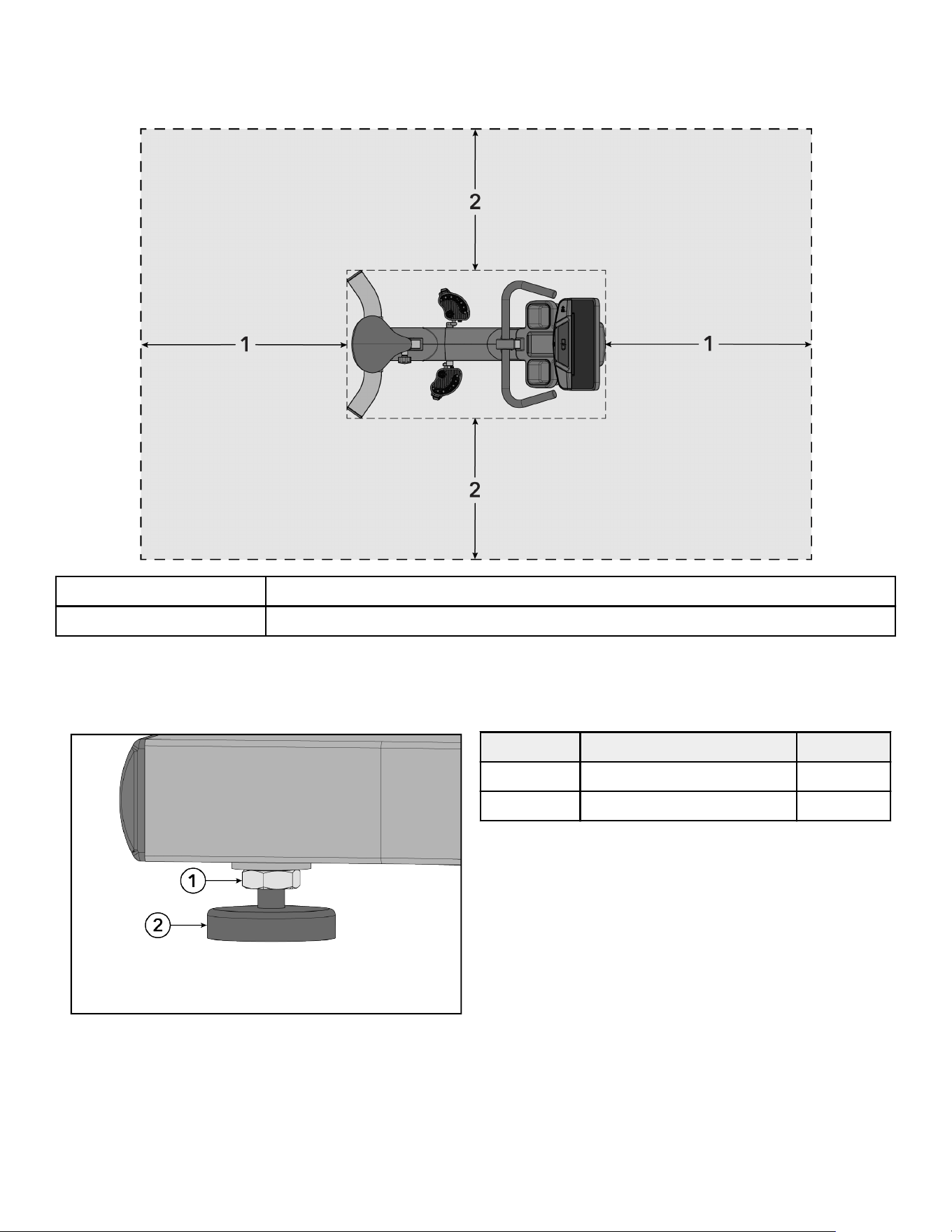
How to Stabilize the Upright Bike
Read the entire manual before setting up the bike. After following all Safety Instructions, move the bike to the location
where it will be used. Allow a clearance of 2 ft. (0.6 m) in the directions the bike is accessed from and 3 ft. (1 m)
between the front or rear of the bike or any other objects.
1 3 ft. / 1 m
2 2 ft. / 0.6 m
After placing the unit in position, check the unit’s stability by attempting to rock it from side to side. Any slight rocking
indicates that the unit must be leveled. Determine which foot is not resting completely on the floor. Loosen the jam nut
with an open-end M17 wrench and rotate the leg leveler to lower it. Verify that the unit is stable. Repeat the adjustment
as necessary until the unit no longer rocks. Lock the adjustment by tightening the jam nut against the stabilizing bar.
Item Description Qty.
1 Jam Nut 4
2 Leg Leveler 4
Page 11 of 40
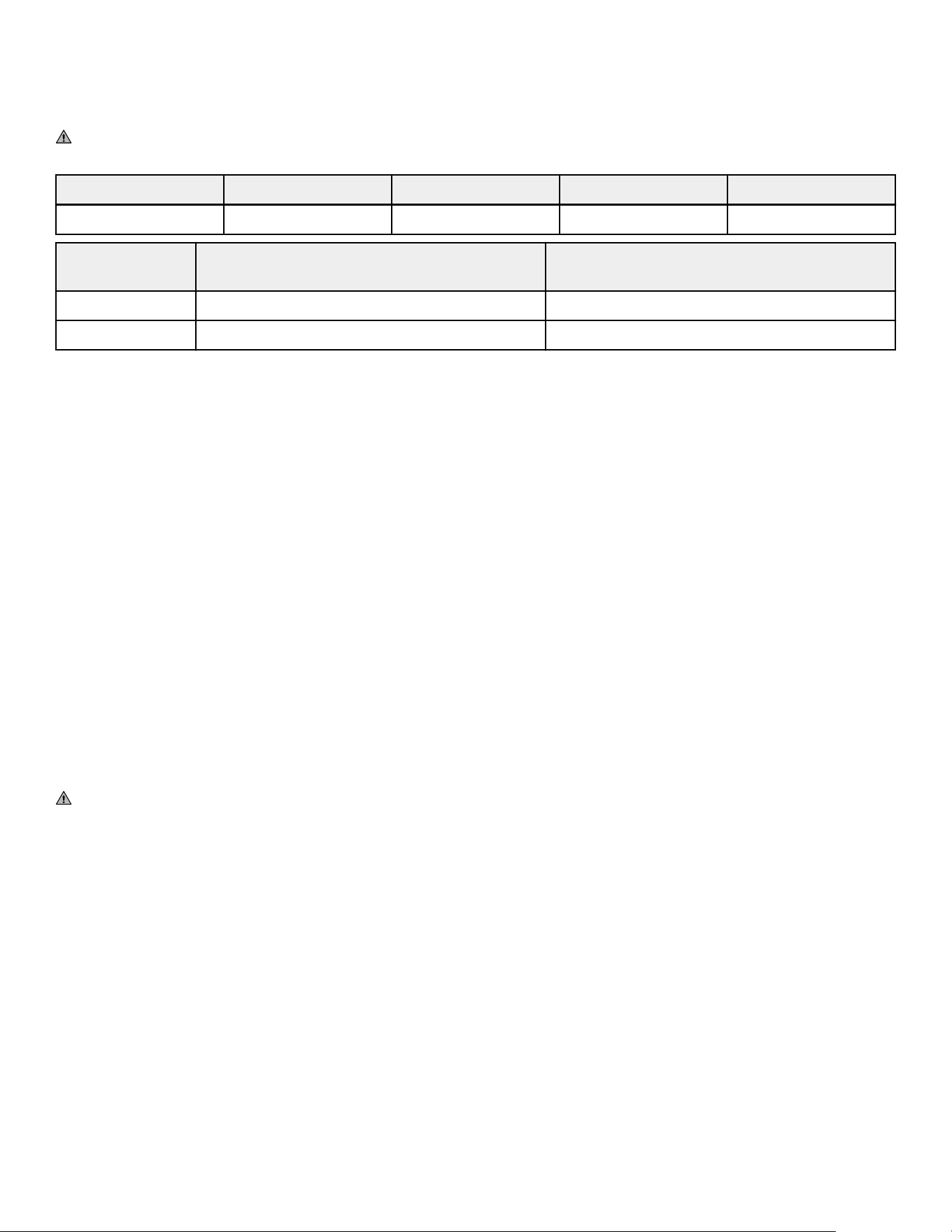
Electrical Power Requirements (Applicable for Units Using External Power Supply)
• Units equipped with SL Consoles are self powered. An optional external power supply brick is available for
purchase if desired.
• Units equipped with SE4 Consoles require a 24 VDC power supply.
WARNING: Use only the supplied power brick and line cord. Do not use any modification to connect to a 2-prong
outlet. Product must be connected to a properly rated 3-prong outlet.
Console Supply Voltage Frequency Output Voltage Output Current
SL / SE4 100 - 240 VAC 50 - 60 Hz 24 VDC 3.75 A
Outlet Voltage Commercial Units Outlet & Breaker (Amps) Consumer / Home Units Outlet & Breaker
(Amps)
120 VAC 20 (no more than 8 bikes per breaker) 15 (no more than 6 bikes per breaker)
230 VAC 12 (no more than 8 bikes per breaker) 12 (no more than 8 bikes per breaker)
NOTE: Do not modify the plug provided with this product. If the plug does not fit into an available electrical outlet,
have a proper outlet installed by a qualified electrician.
NOTE: Make sure the power brick cord is securely connected to the base unit. A loose connection may result in the
unit not receiving external power.
Check for Console Power
The SL Console is powered by a rechargeable 6-volt battery. Check the battery by pressing the GO button. The
console should beep and light up. The console will display the Life Fitness logo. If a prompt doesn’t appear, mount
the unit and begin pedaling. The console should light up and programming a workout should be possible. Pedal for
10 - 20 minutes at 50 rpm or faster during a workout for optimum battery charging. The pedal action during workouts
keeps the battery charged. Optional external power supply can be used. If the unit is externally powered, battery
maintenance is automatic and pedaling is not required. Use only the power supply provided by Life Fitness to insure
against unsafe operation.
Power Assist Option / External Power Supply
The bike's optional Power Assist feature makes it possible for the console to be powered by an external electrical
source. This eliminates the need to pedal at a minimum speed to supply constant power to the console. With this
option, users who ride the bike for rehabilitative exercise may pedal at a rate below the minimum without losing
console power.
Plug the power to the external power connector on the front end of the bike. Plug the cord into an AC outlet. Use only
the external power supply provided by Life Fitness in order to insure against unsafe operation.
CAUTION: Connectors should easily fit into the receptacles. Forcing a connection may lead to damage to the
barrel connector and/or receptacle and may void product warranty. If the power supply barrel doesn’t fit easily into
the receptacle then the wrong power supply is being used.
The Power Assist feature option requires an optional kit. Contact Life Fitness Customer Support Services to order the
kit.
Page 12 of 40
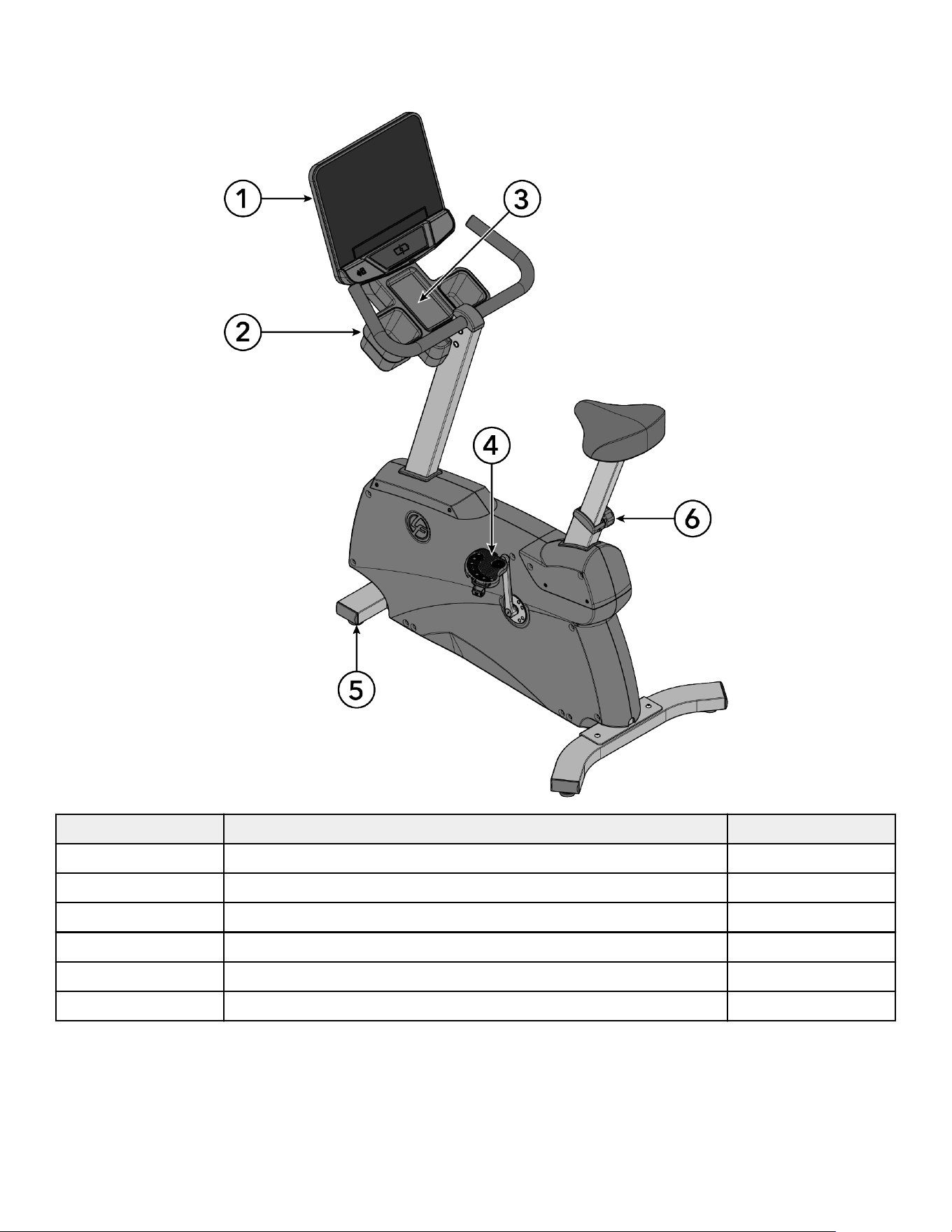
3. Product Overview
Product Features
Item Description Qty.
1 Console 1
2 Cup Holder 2
3 Accessory Tray 1
4 Pedal 2
5 Leg Leveler 4
6 Seat Adjustment Knob 1
NOTE: SE4 Console shown for reference.
Page 13 of 40
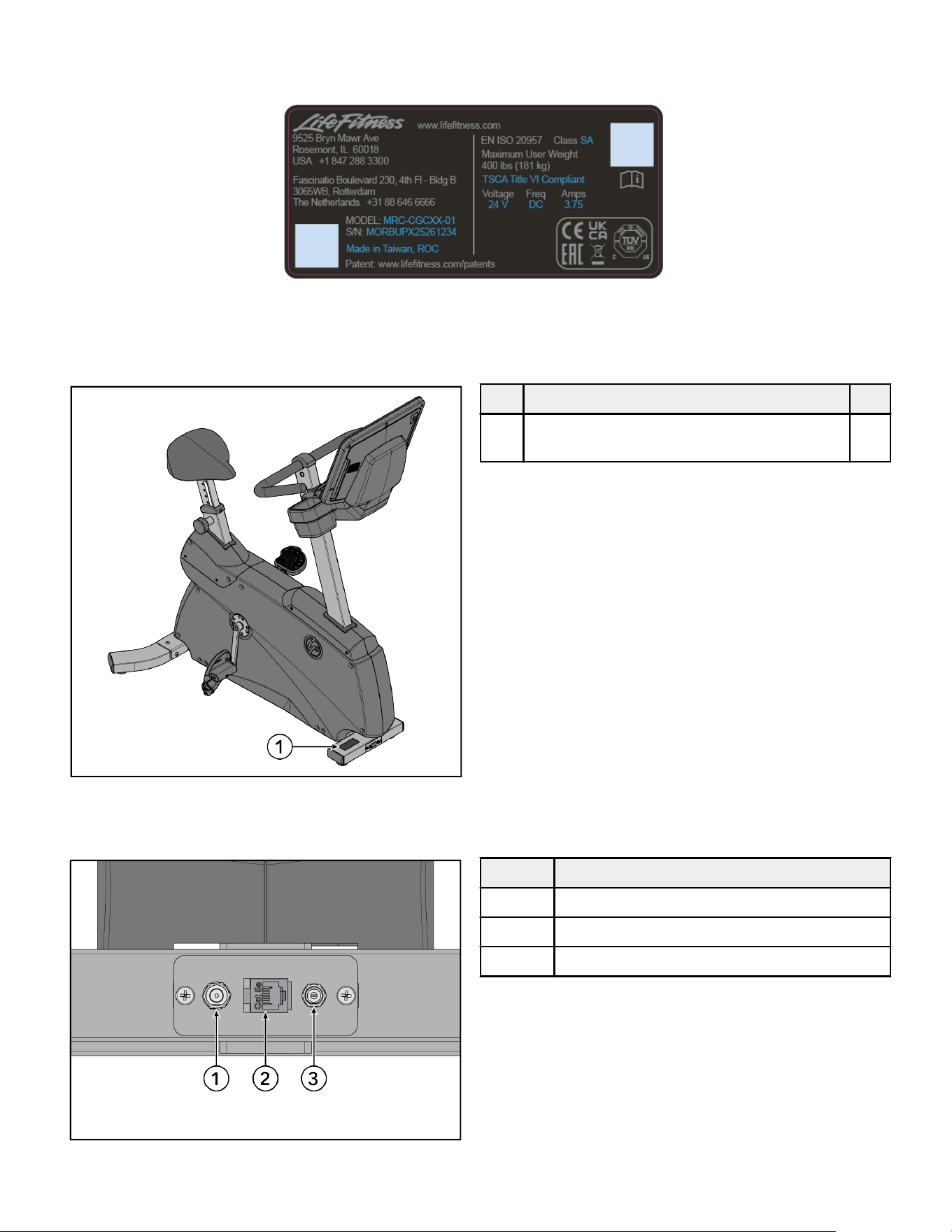
Product Labels
Compliance / Serial Number
Label Locations
IMPORTANT: Verify all labels / decals listed are placed on the product and in the location shown. Replace any missing
or damaged labels.
Item Description Qty.
1 Label, Compliance, Consumer and
Commercial
1
Connections
The following connection receptacle is located at front of bike.
Item Description
1 COAX
2 CAT5e Network / Ethernet
3 Power Input
Page 14 of 40
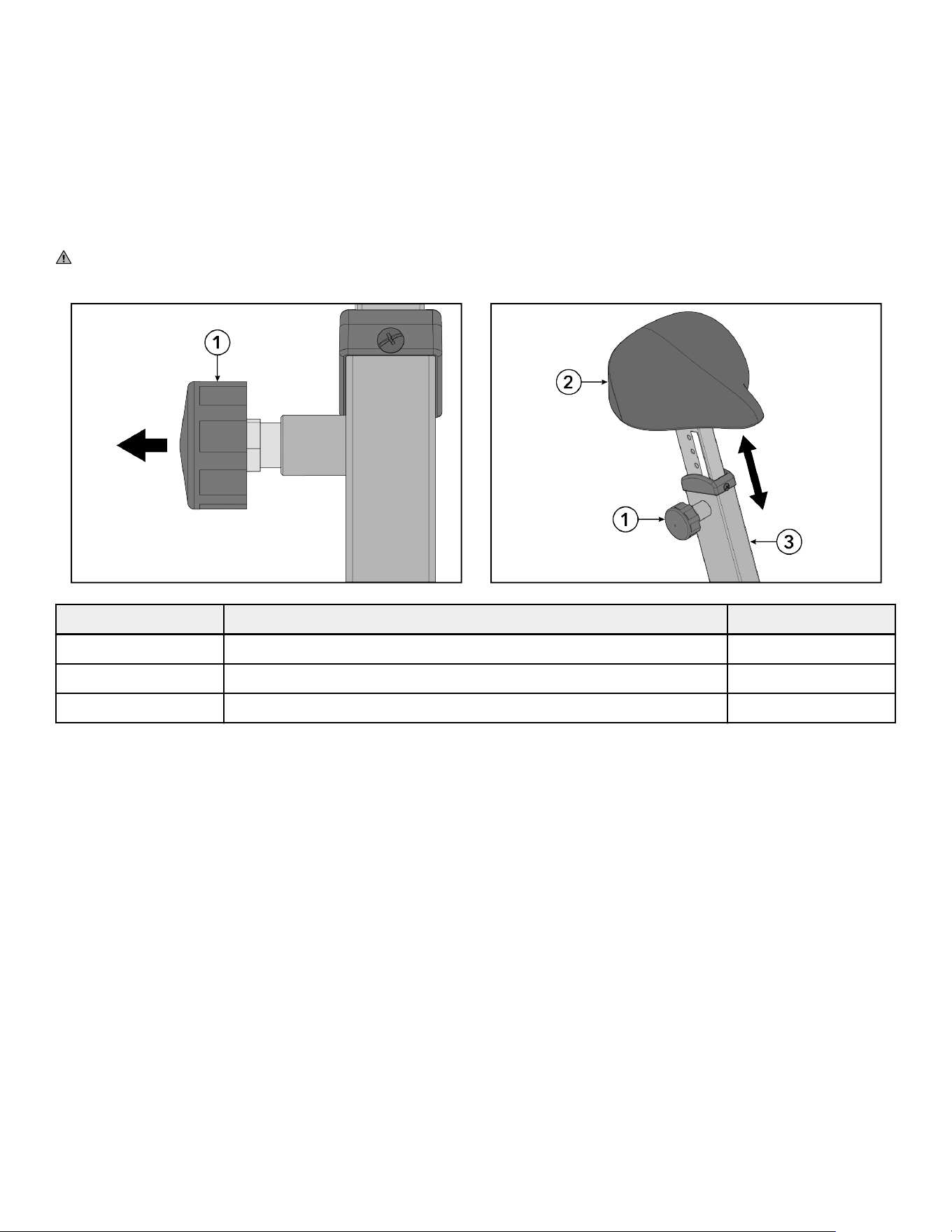
How to Adjust Seat
A properly adjusted seat is important in any bike-oriented exercise activity. If the seat is too close, excessive strain will
be placed on the knees and quadriceps muscles. If the seat is too far, the resulting reaching action will irritate the feet,
ankles, hips and knees.
Sit on the seat and place the balls of the feet on the pedals. An optimum position allows movement through the
bottom of the stroke without locking the knees, shifting in the seat or forcefully extending the hips. The knees should
have a slight bend at the point of fullest leg extension.
If the seat needs to be adjusted, dismount the bike and pull out the seat adjustment knob located on the side of the
seat tube. Slide the seat post up or down as necessary to the proper position and release the knob. Check the seat
distance and readjust as necessary.
CAUTION: Do not attempt to adjust the seat while pedaling the bike or sitting on the seat. Doing so may cause
injury or result in an uncomfortable workout.
Item Description Qty.
1 Seat Adjustment Knob 1
2 Seat 1
3 Seat Tube 1
Page 15 of 40
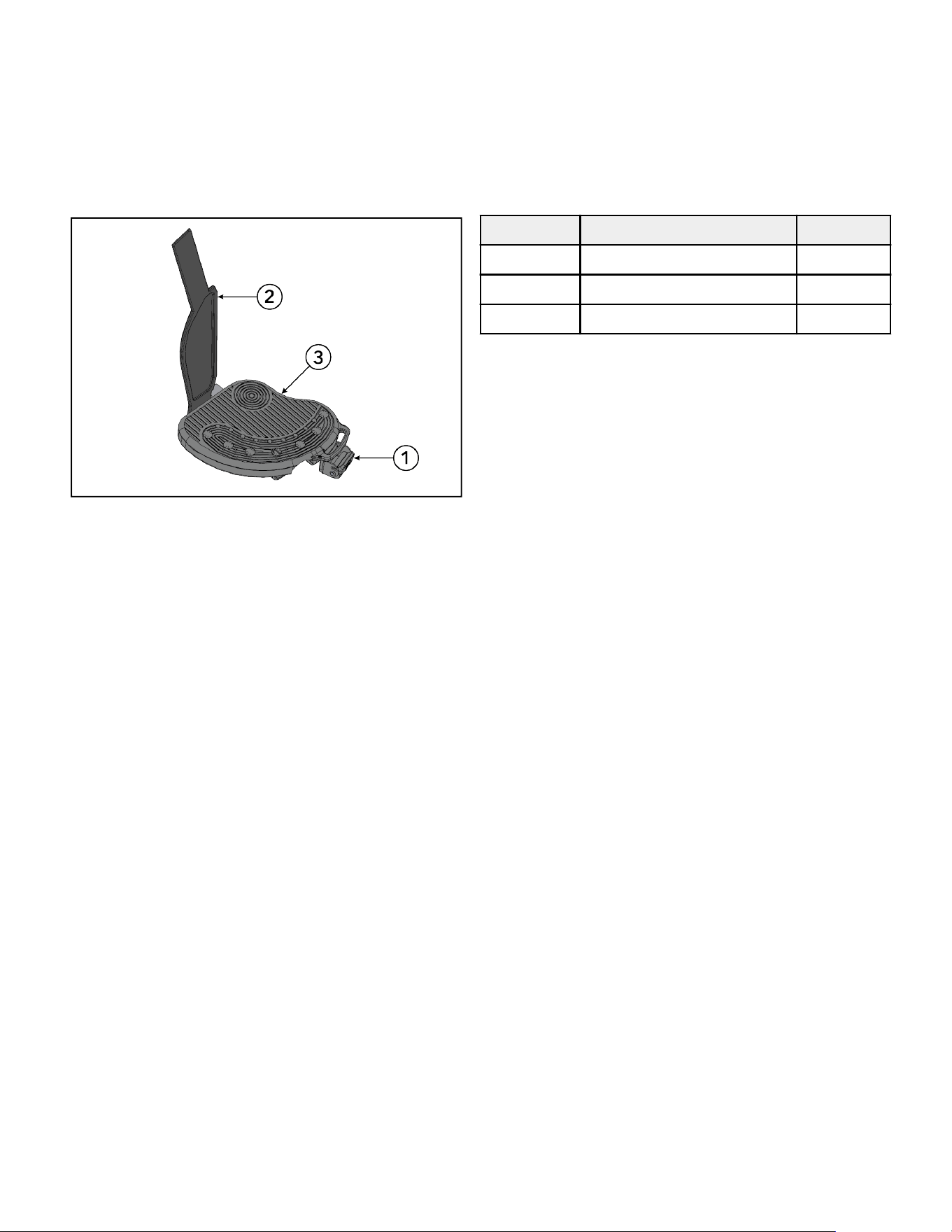
How to Adjust Pedal Straps
The bike pedal straps keep the user’s shoes on the pedals during a workout. The straps should fit comfortably but
tight enough to prevent shoes from slipping at any point in the pedaling rotation. A user should test and adjust the
tightness of the straps before starting a workout.
Use one hand to push the strap latch upward to loosen the ribbed strap. Use the other hand to pull the ribbed strap
out from underneath the strap latch. Rest the foot on the pedal. Wrap the ribbed strap over the foot to determine
the desired length. Push the strap latch upward and thread the ribbed strap through the strap latch to select the
appropriate slot. Let go of the strap latch to secure position.
Item Description Qty.
1 Strap Latch 2
2 Strap 2
3 Pedal 2
Page 16 of 40
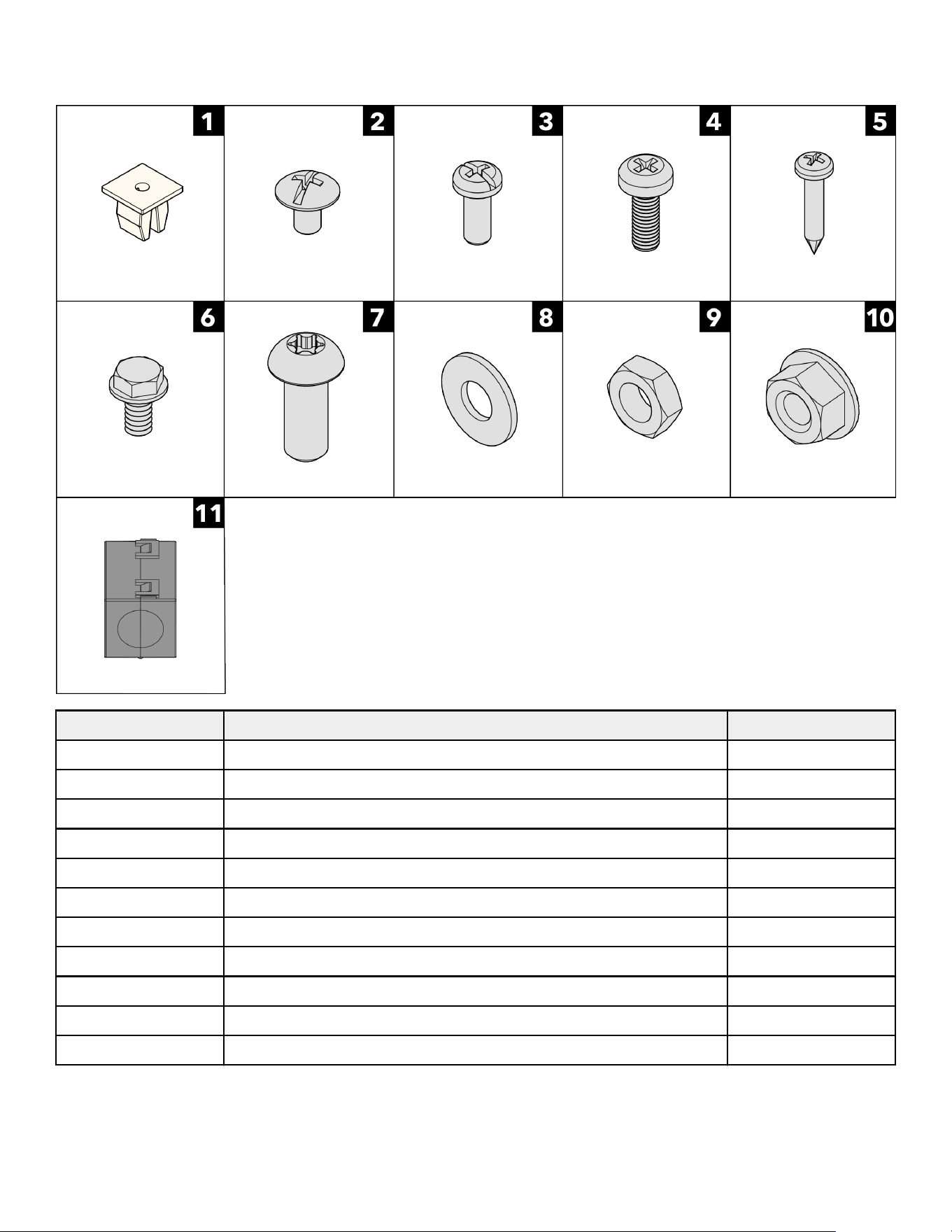
4. Assembly
Hardware
Item Description Qty.
1 Grommet 5
2 Screw, Pad HD M4 x 0.7-6mm 2
3 Screw, PHL 5mm 0.8 x 12mm 4
4 Screw, M5 x 0.8 x 14, PHL, PAN, MS, ST, ZN 5
5 Screw, M4.2 x 0.7 6G6G x 19, DIN, PHL, PAN, AB, ST, ZB 5
6 Screw, #10 x 6 UNS, HXW, L, B, ST, GR 1
7 Screw, M8 x 1.25 6G6H x 20, BUT, TRX, CS, ST, ZB 12
8 Washer, Seat Stop 12
9 Nut, Seat MTG 4
10 Nut, M8 x 1.25-6H, Hex, Lock, Zinc, Class 10 4
11 Ferrite; Suppression, Core-Case 1
Page 17 of 40

Tools Required
• 8 mm socket wrench
• 13 mm socket wrench
• 15 mm pedal wrench
• T40 Torx wrench
• Phillips screwdriver
• Torque screwdriver
• Torque wrench
• Utility knife
NOTE: Do NOT use impact drivers to install hardware.
Page 18 of 40
Assembly Procedure
Two people are recommended for this procedure.
TIP: Read and understand all instructions thoroughly before assembling this unit. Check all items carefully. If there is
damage, see the Customer Service section of this manual for proper procedure to return, replace, or reorder parts.
Unpacking and Disposal of Packaging
Carefully unpack the fitness equipment as described in the assembly manual and inspect all components for damage.
Make sure to remove all packaging materials before assembling and using the product. Keep small parts and plastic
materials out of reach of children to prevent suffocation and injury hazards.
All packaging materials used for this product are designed to be recyclable or reusable. Please dispose of packaging
materials responsibly and in accordance with local, regional, and national regulations. Separate materials such as
cardboard, paper, plastics, and protective foams and place them in the appropriate recycling or waste collection
streams.
Do not dispose of packaging materials with household waste unless permitted by local regulations. In regions where
applicable, follow specific environmental directives (such as recycling, extended producer responsibility, or waste
electrical and electronic equipment requirements) to minimize environmental impact.
By properly recycling or disposing of packaging materials, you help conserve resources and support environmental
sustainability. See the following Cardio and Strength Product Install Packaging Removal and Disposal Knowledge Base
article for additional information.
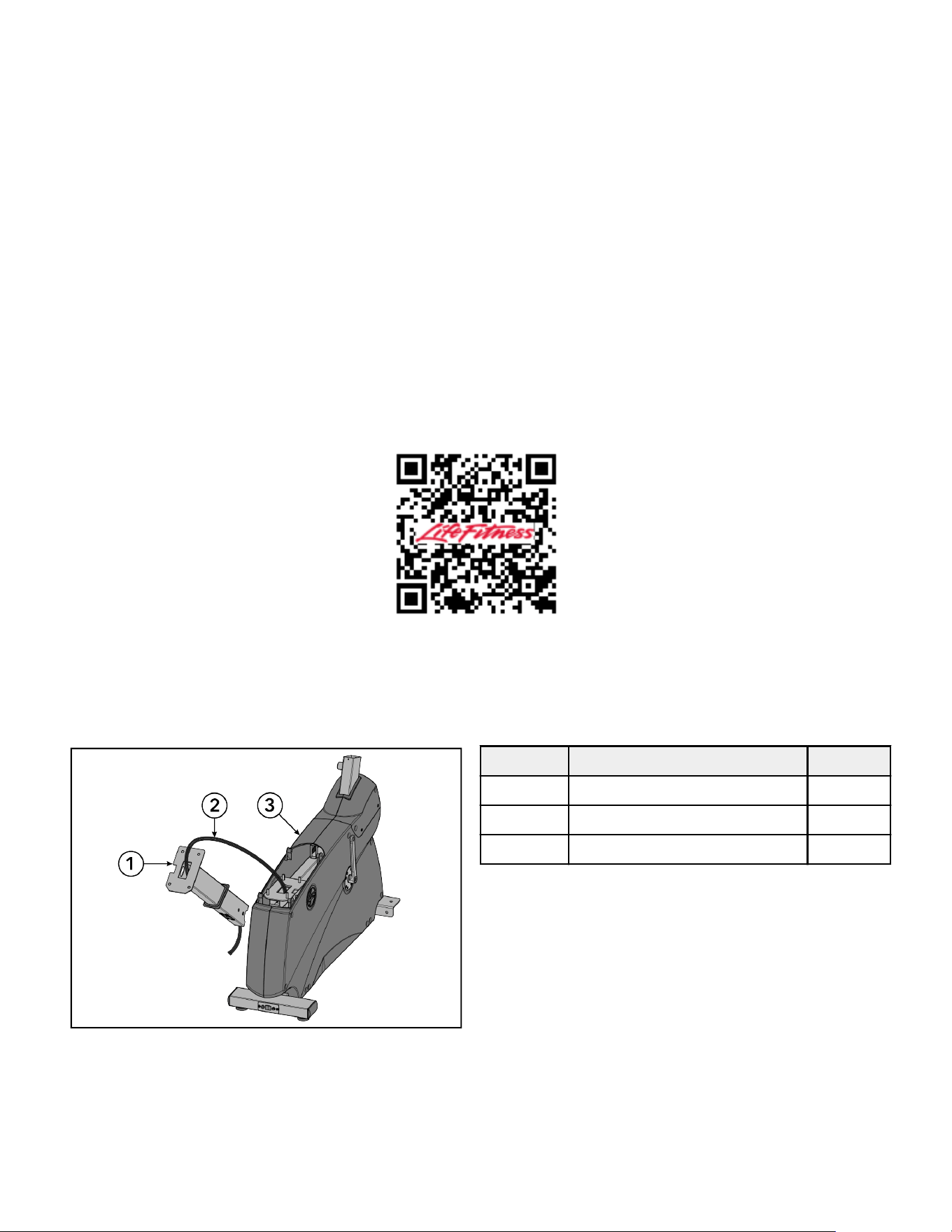
Unpackage Monocolumn
Base power and communication cables are pre-routed through monocolumn.
Lay monocolumn off to one side of base assembly.
IMPORTANT: Do not pinch or twist cables while handling monocolumn.
Item Description Qty.
1 Monocolumn 1
2 Cables 2
3 Base Assembly 1
Page 19 of 40
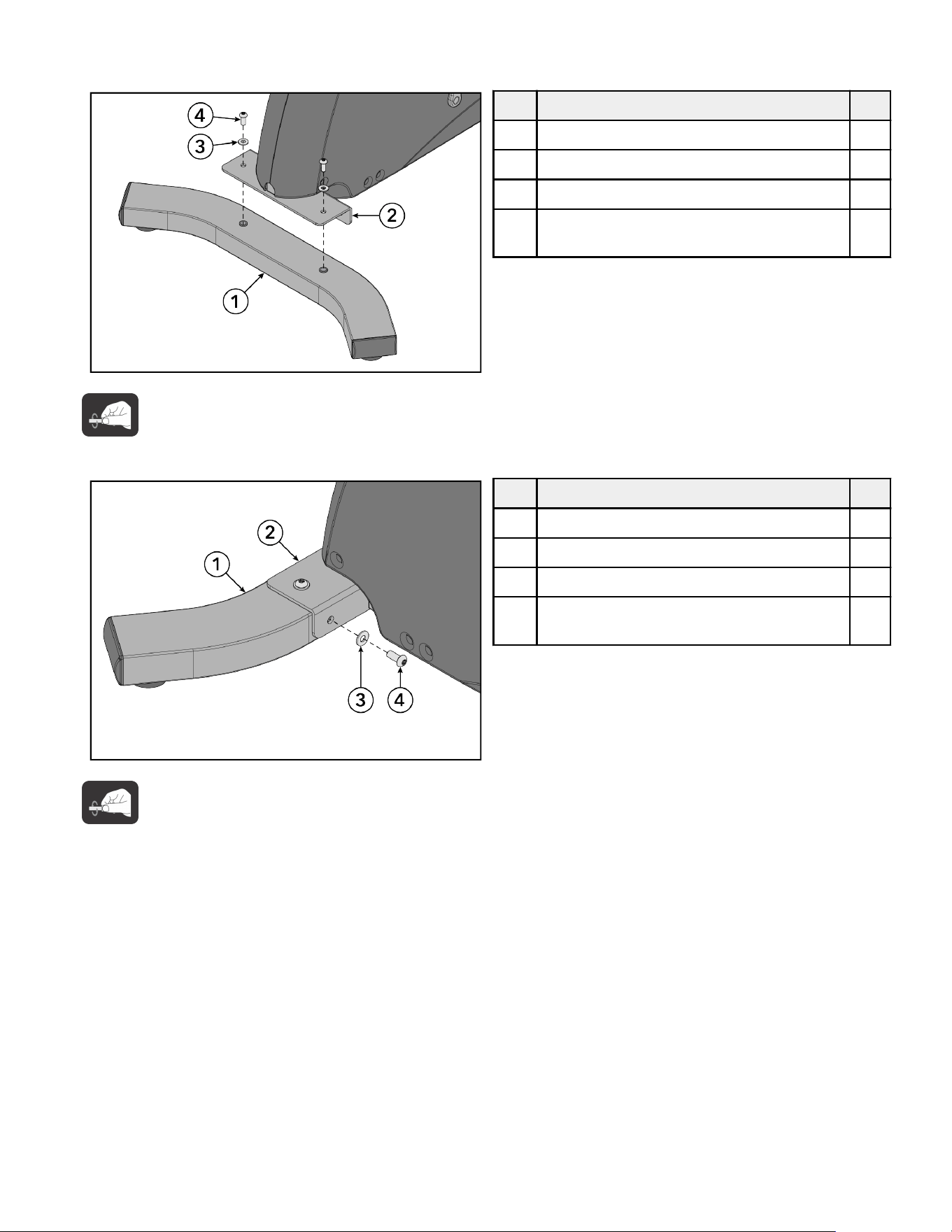
Install Rear Stabilizer
1.
Install screws and washers securing top of rear stabilizer to base frame using a T40 Torx wrench.
Item Description Qty.
1 Rear Stabilizer 1
2 Base Frame 1
3 Washer, Seat Stop 2
4 Screw, M8 x 1.25 6G6H x 20, BUT, TRX, CS,
ST, ZB
2
Hand tighten hardware.
2.
Install screws and washers securing side of rear stabilizer to base frame using a T40 Torx wrench.
Item Description Qty.
1 Rear Stabilizer 1
2 Base Frame 1
3 Washer, Seat Stop 2
4 Screw, M8 x 1.25 6G6H x 20, BUT, TRX, CS,
ST, ZB
2
Hand tighten hardware.
3.
Tighten screws on side of rear stabilizer to 25 ft-lb / 34 Nm.
4.
Tighten screws on top of rear stabilizer to 25 ft-lb / 34 Nm.
Page 20 of 40
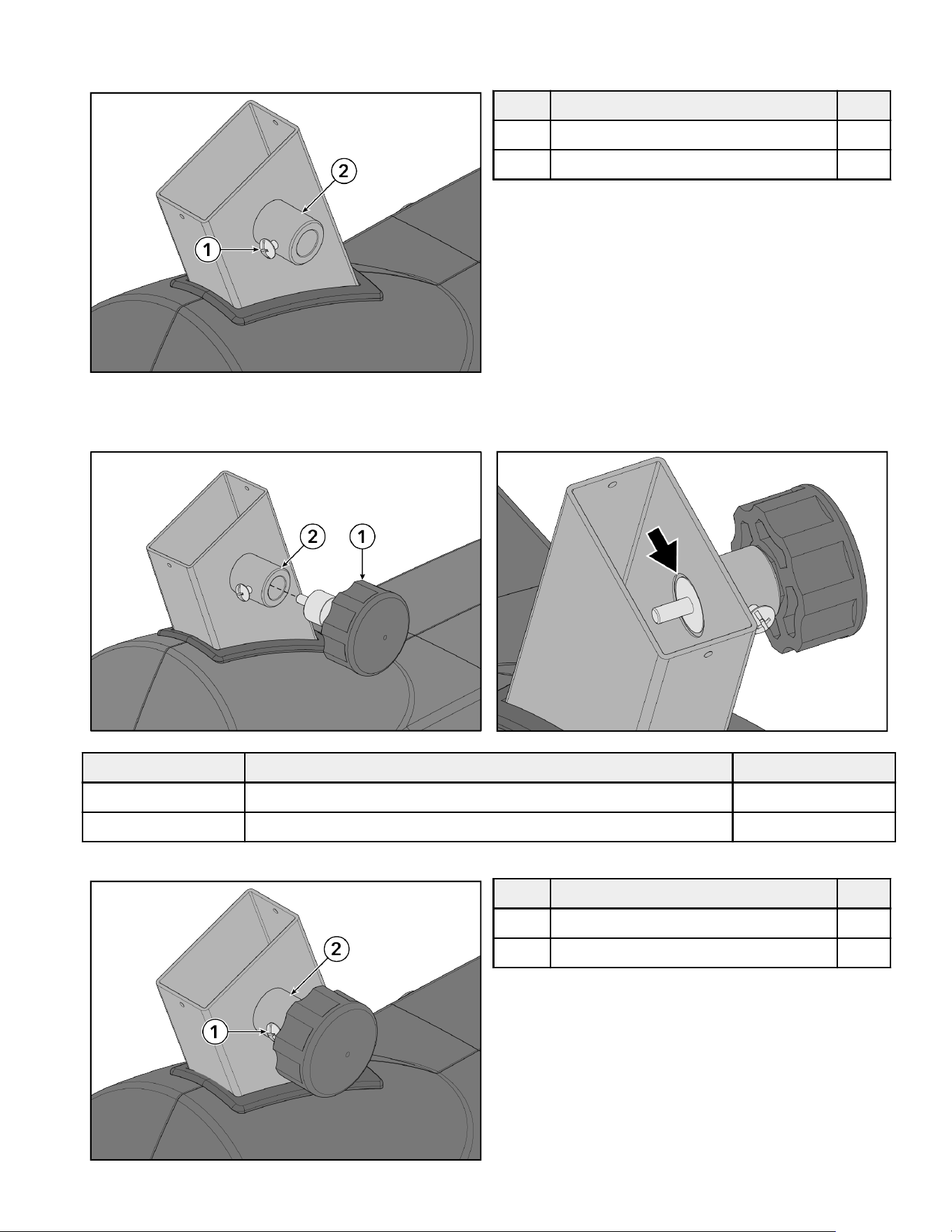
Install Seat
1.
Loosen screw in seat tube using a Phillips screwdriver.
Item Description Qty.
1 Screw, Pad HD M4 x 0.7-6mm 1
2 Seat Tube 1
2.
Screw seat adjustment knob into seat tube until wide knob surface is flush with inner tube wall.
NOTE: Apply white lithium grease to threads on seat adjustment knob.
Item Description Qty.
1 Seat Adjustment Knob 1
2 Seat Tube 1
3.
Tighten screw until it makes contact with seat adjustment knob then loosen screw approximately half turn.
Item Description Qty.
1 Screw, Pad HD M4 x 0.7-6mm 1
2 Seat Tube 1
Page 21 of 40
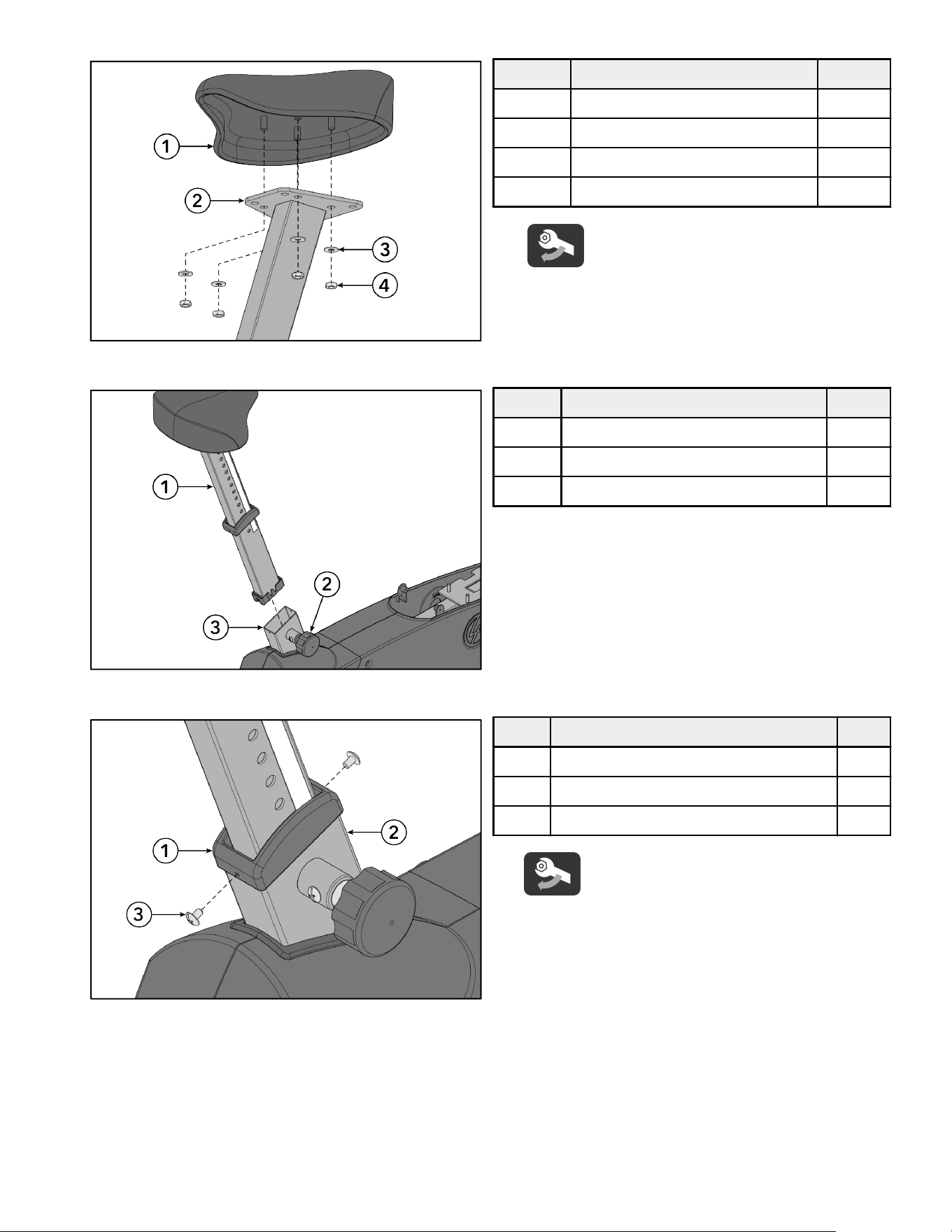
4.
Install nuts and washers securing seat to seat post using a 13mm socket wrench.
Item Description Qty.
1 Seat 1
2 Seat Post 1
3 Washer, Seat Stop 4
4 Nut, Seat MTG 4
Tighten hardware to 25 ft-lb / 34 Nm.
5.
Pull seat adjustment knob out and slide seat post down seat tube.
Item Description Qty.
1 Seat Post 1
2 Seat Adjustment Knob 1
3 Seat Tube 1
6.
Install screws securing seat cap to seat tube using a Phillips screwdriver.
Item Description Qty.
1 Seat Cap 1
2 Seat Tube 1
3 Screw, Pad HD M4 x 0.7-6mm 2
Tighten hardware to 13 in-lb / 1.5 Nm.
Page 22 of 40
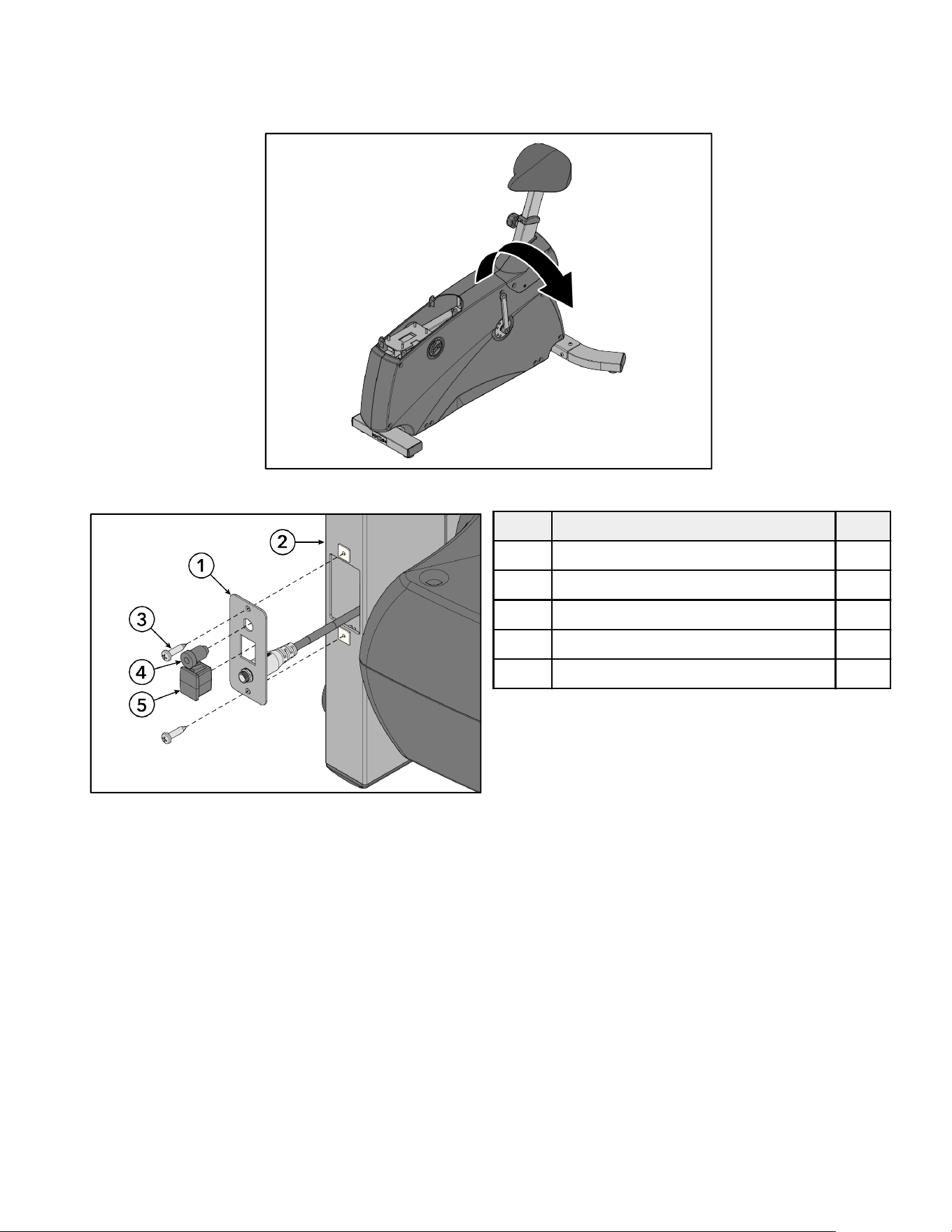
Install SE4 Cables
The following procedure shows how to install cables for the SE4 Console. If SL Console is being installed, skip to Install
Monocolumn topic.
1.
Tip unit onto side.
2.
Remove screw securing comport panel to base frame using a Phillips screwdriver.
Item Description Qty.
1 Comport Panel 1
2 Base Frame 1
3 Screw, PHL PAN M5 x 0.8-12 2
4 Plug, COAX 1
5 Plug, RJ45 Receptacle 1
3.
Remove plugs from comport panel.
Page 23 of 40
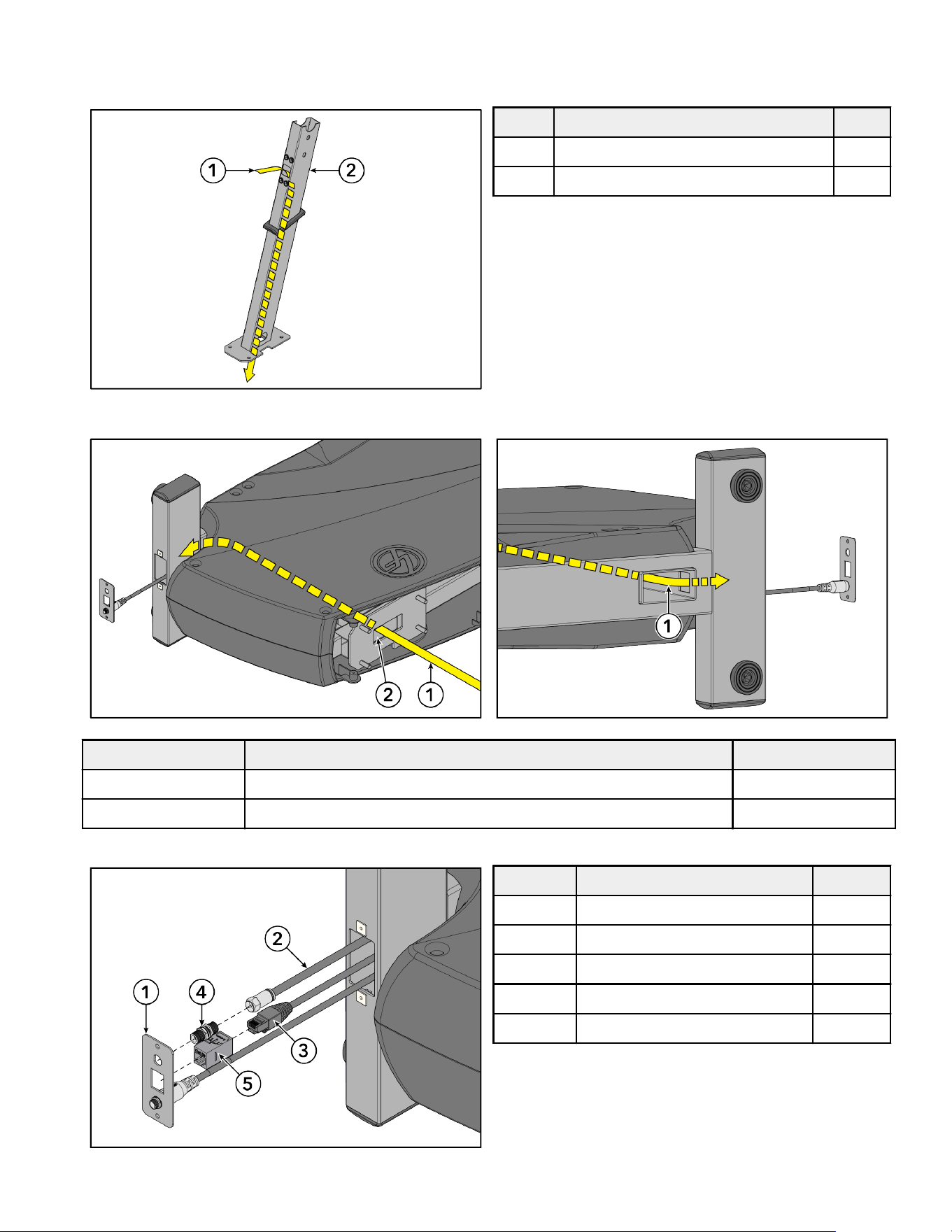
4.
Route SE4 cables down through hole in front of monocolumn and out bottom.
TIP: There is a pull wire pre-installed in the frame to assist with SE4 cable installation. Twist the pull wire around the
ends of the SE4 cables and pull from the other end to install the cables through the frame.
Item Description Qty.
1 Cables (CAT5e and COAX) 2
2 Monocolumn 1
5.
Route SE4 cables down hole in base frame and out through comport hole.
Item Description Qty.
1 Cables (CAT5e and COAX) 2
2 Base Frame 1
6.
Plug cables into couplers. Insert couplers into comport panel.
Item Description Qty.
1 Comport Panel 1
2 Cable, COAX 1
3 Cable, CAT5e 1
4 Coupler, COAX 1
5 Coupler, CAT5e 1
Page 24 of 40
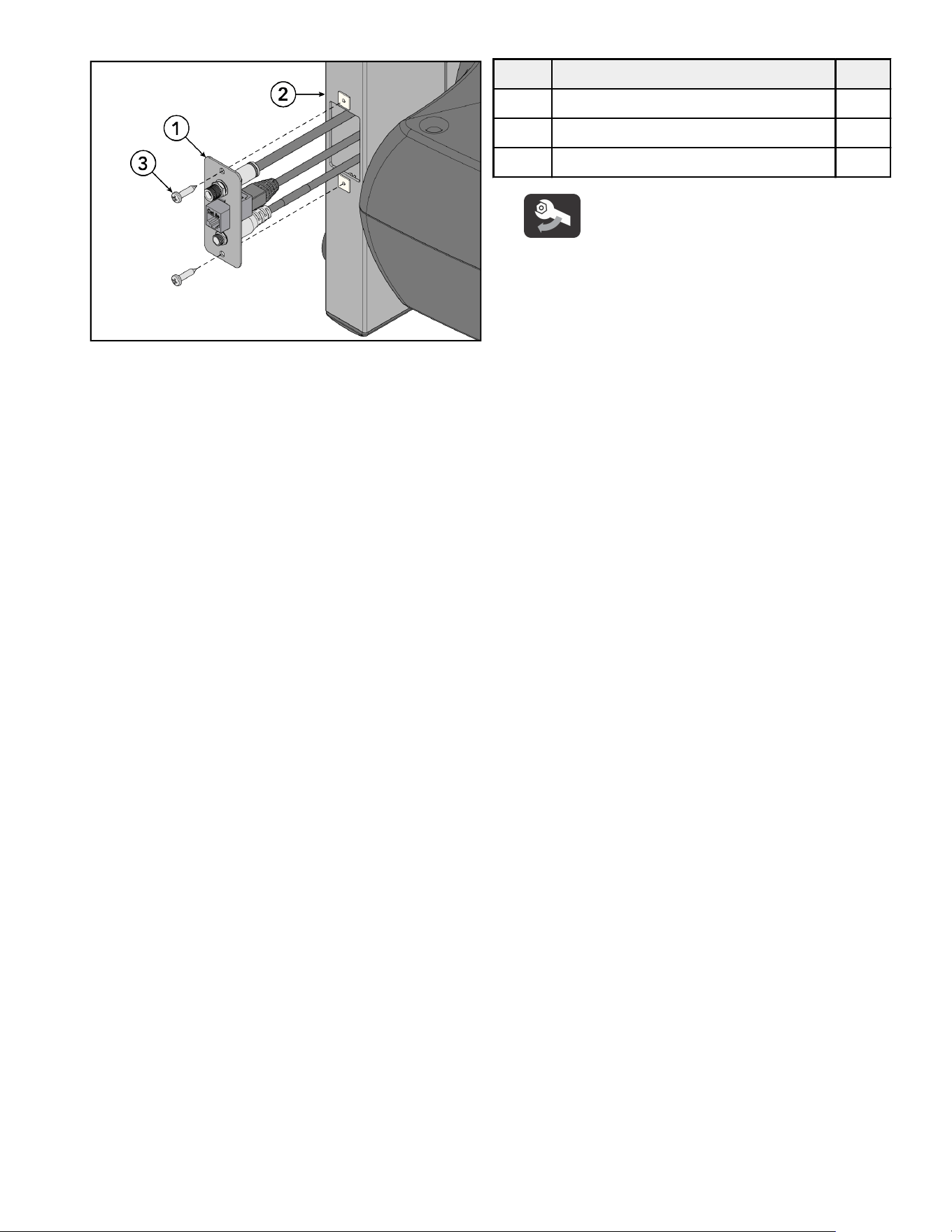
7.
Install screws securing comport panel to base frame using a Phillips screwdriver.
Item Description Qty.
1 Comport Panel 1
2 Base Frame 1
3 Screw, PHL PAN M5 x 0.8-12 2
Tighten hardware to 13 in-lb / 1.5 Nm.
8.
Pull all excess cable up through monocolumn.
9.
Tip unit upright.
NOTE: Make sure to hold cables so they don't pull back through monocolumn.
Page 25 of 40
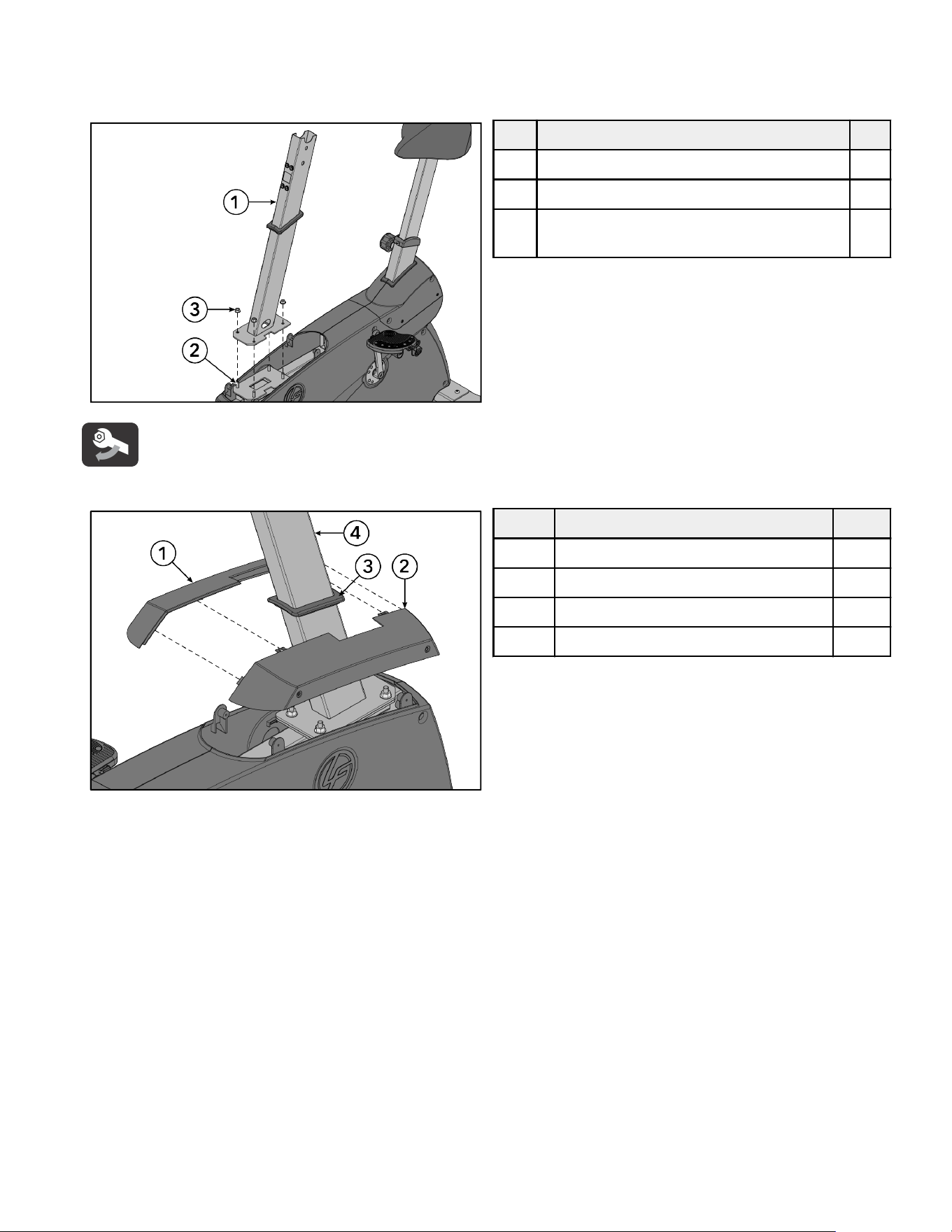
Install Monocolumn
1.
Install nuts securing monocolumn to base frame using a 13mm socket wrench.
ATTENTION: Do not drop hardware down between base frame and main side shrouds!
Item Description Qty.
1 Moncolumn 1
2 Base Frame 1
3 Nut, M8 x 1.25-6H, Hex, Lock, Zinc, Class
10
4
Tighten hardware to 25 ft-lb / 34 Nm.
2.
Align gasket between front upper shrouds. Press front upper shrouds together.
Item Description Qty.
1 Front Upper Shroud, Left 1
2 Front Upper Shroud, Right 1
3 Gasket 1
4 Moncolumn 1
3.
Slide front upper shrouds and gasket down monocolumn.
Page 26 of 40
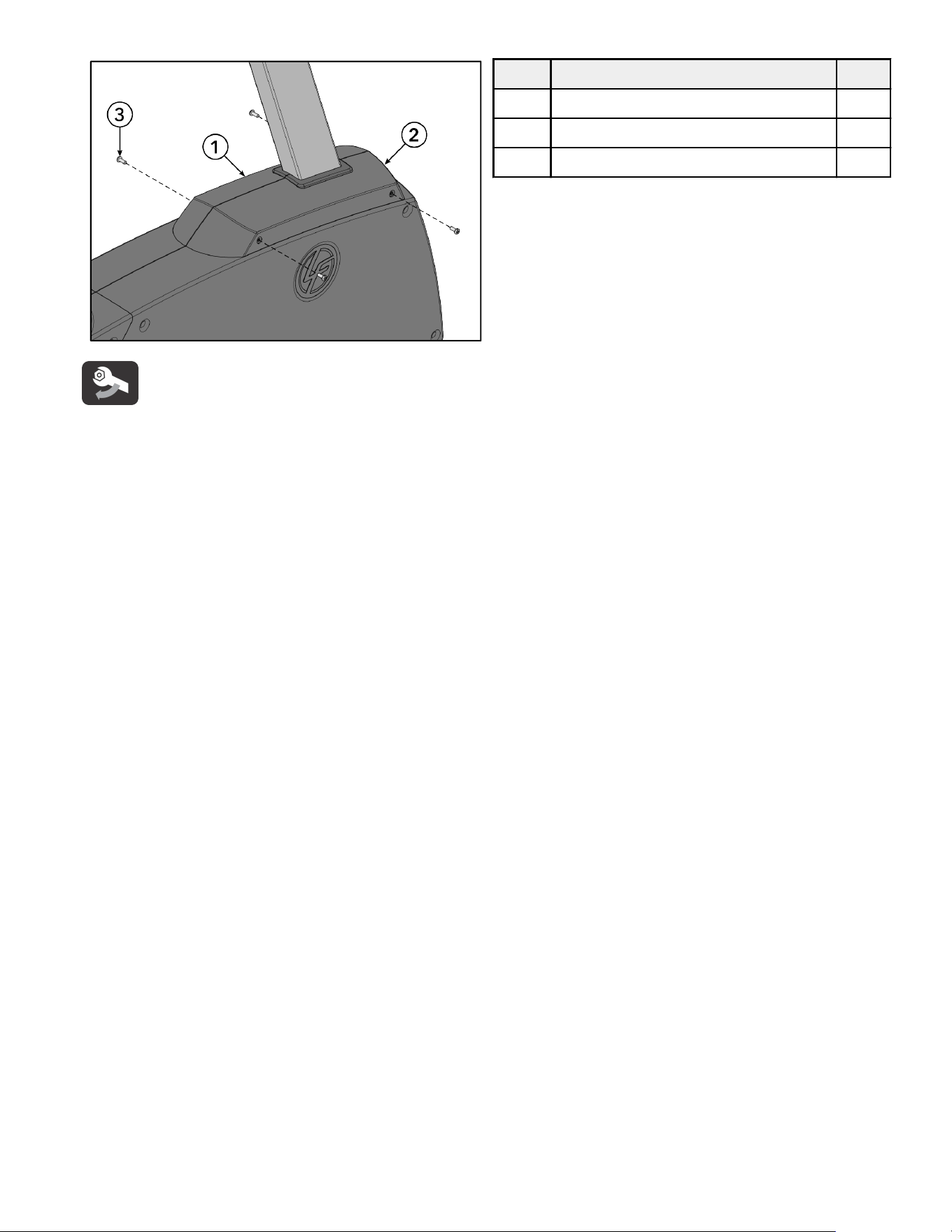
4.
Install screws securing front upper shrouds to main side shrouds using a Phillips screwdriver.
Item Description Qty.
1 Front Upper Shroud, Left 1
2 Front Upper Shroud, Right 1
3 Screw, PHL 5mm 0.8 x 12mm 4
Tighten hardware to 13 in-lb / 1.5 Nm.
Page 27 of 40
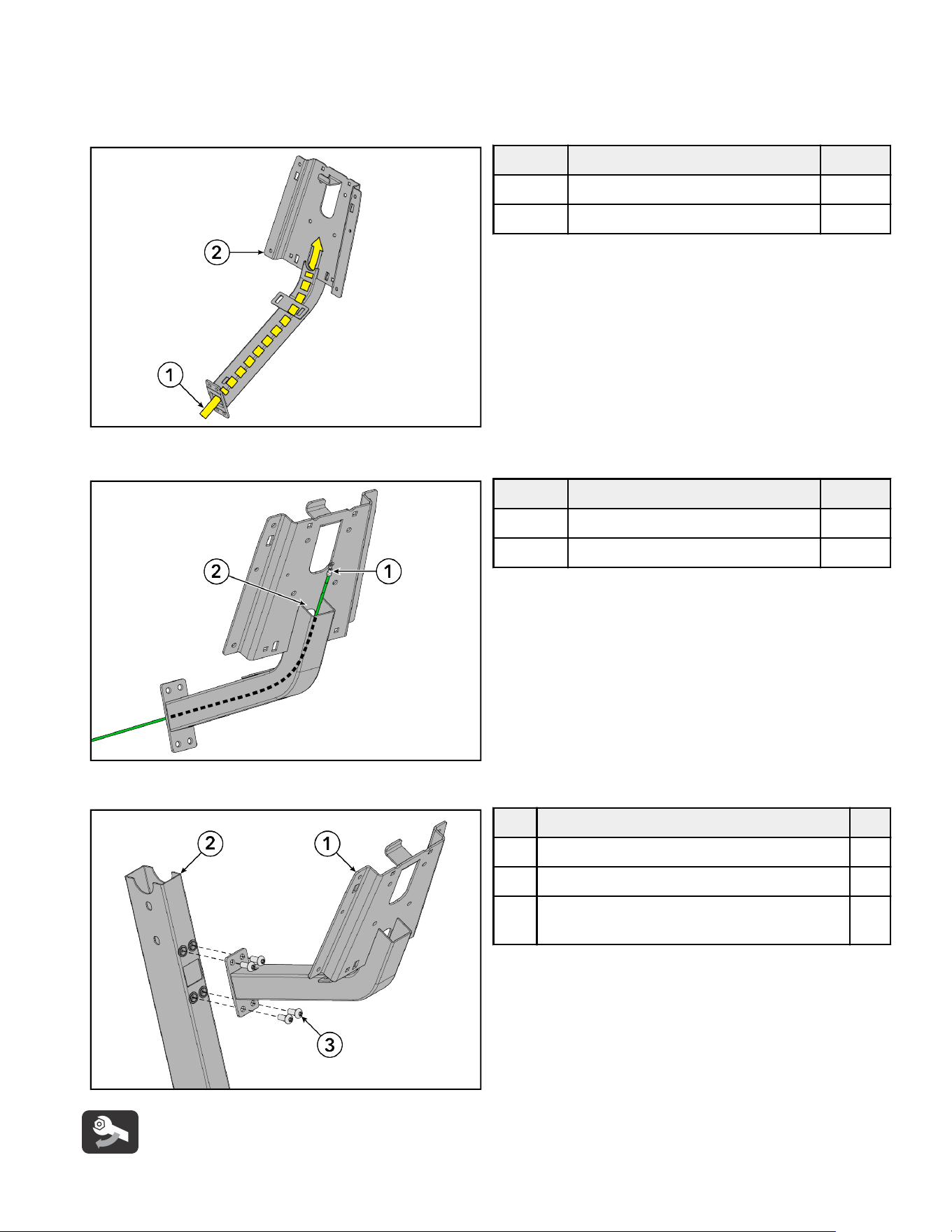
Install Console Weldment
1.
Cut cable ties securing cables together.
2.
Route cables up console weldment.
NOTE: Twist pull-wire around cable ends to assist with cable routing.
Item Description Qty.
1 Cables -
2 Console Weldment 1
NOTE: Ground cable routes up through and out back of console weldment.
Item Description Qty.
1 Ground Cable 1
2 Console Weldment 1
3.
Install screws securing console weldment to monocolumn using a T40 Torx wrench.
Item Description Qty.
1 Console Weldment 1
2 Monocolumn 1
3 Screw, M8 x 1.25 6G6H x 20, BUT, TRX, CS,
ST, ZB
4
Tighten hardware to 25 ft-lb / 34 Nm.
Page 28 of 40
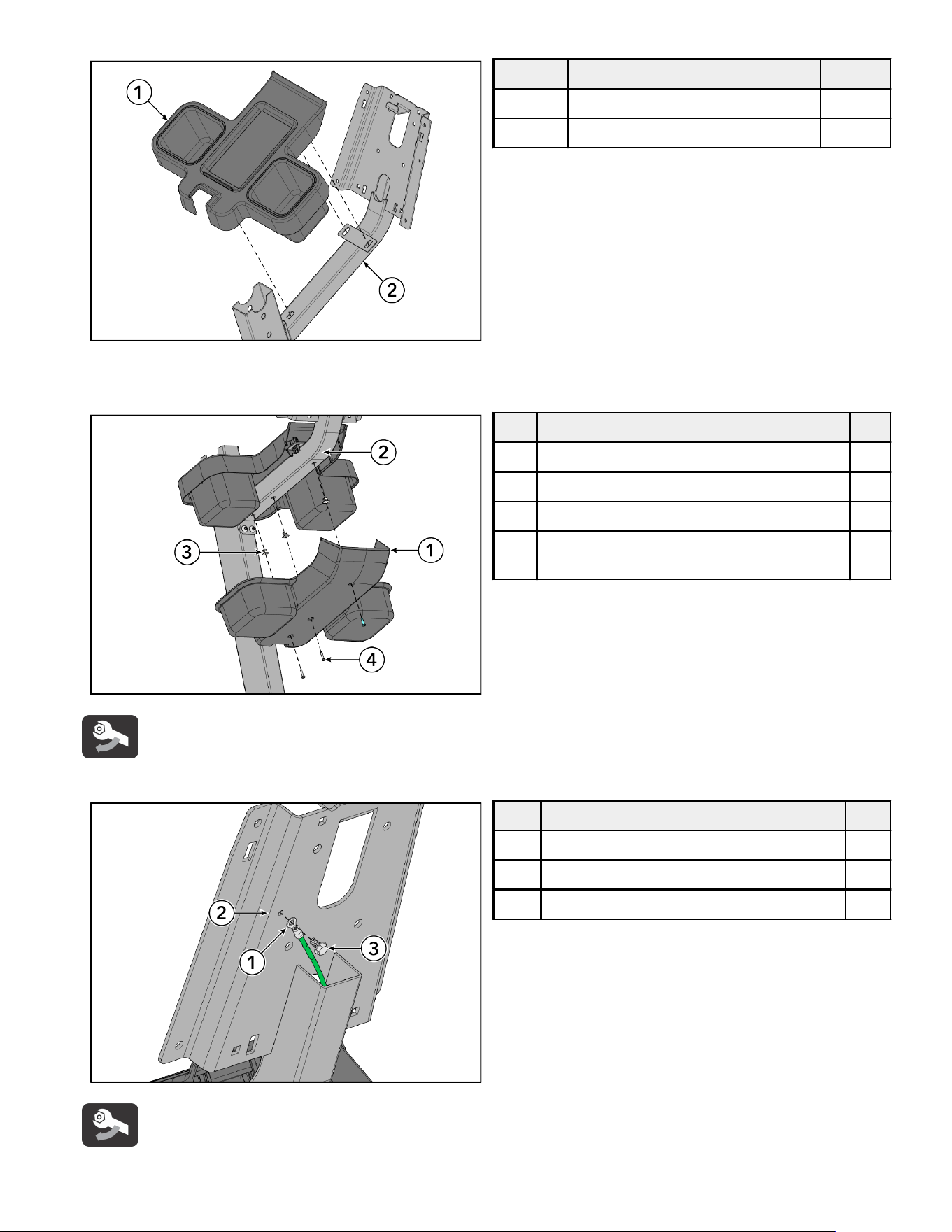
4.
Press upper tray shroud into console weldment.
Item Description Qty.
1 Upper Tray Shroud 1
2 Console Weldment 1
5.
Insert grommets into holes in bottom of console weldment.
6.
Install screws securing lower tray shroud to console weldment using a Phillips screwdriver.
Item Description Qty.
1 Lower Tray Shroud 1
2 Console Weldment 1
3 Grommet 3
4 Screw, M4.2 x 0.7 6G6G x 19, DIN, PHL,
PAN, AB, ST, ZB
3
Tighten hardware to 13 in-lb / 1.5 Nm.
7.
Install screw securing ground cable to console weldment using an 8mm socket wrench.
Item Description Qty.
1 Ground Cable 1
2 Console Weldment 1
3 Screw, #10 x 6 UNS, HXW, L, B, ST, GR 1
Tighten hardware to 2.6 ft-lb / 3.5 Nm.
Page 29 of 40
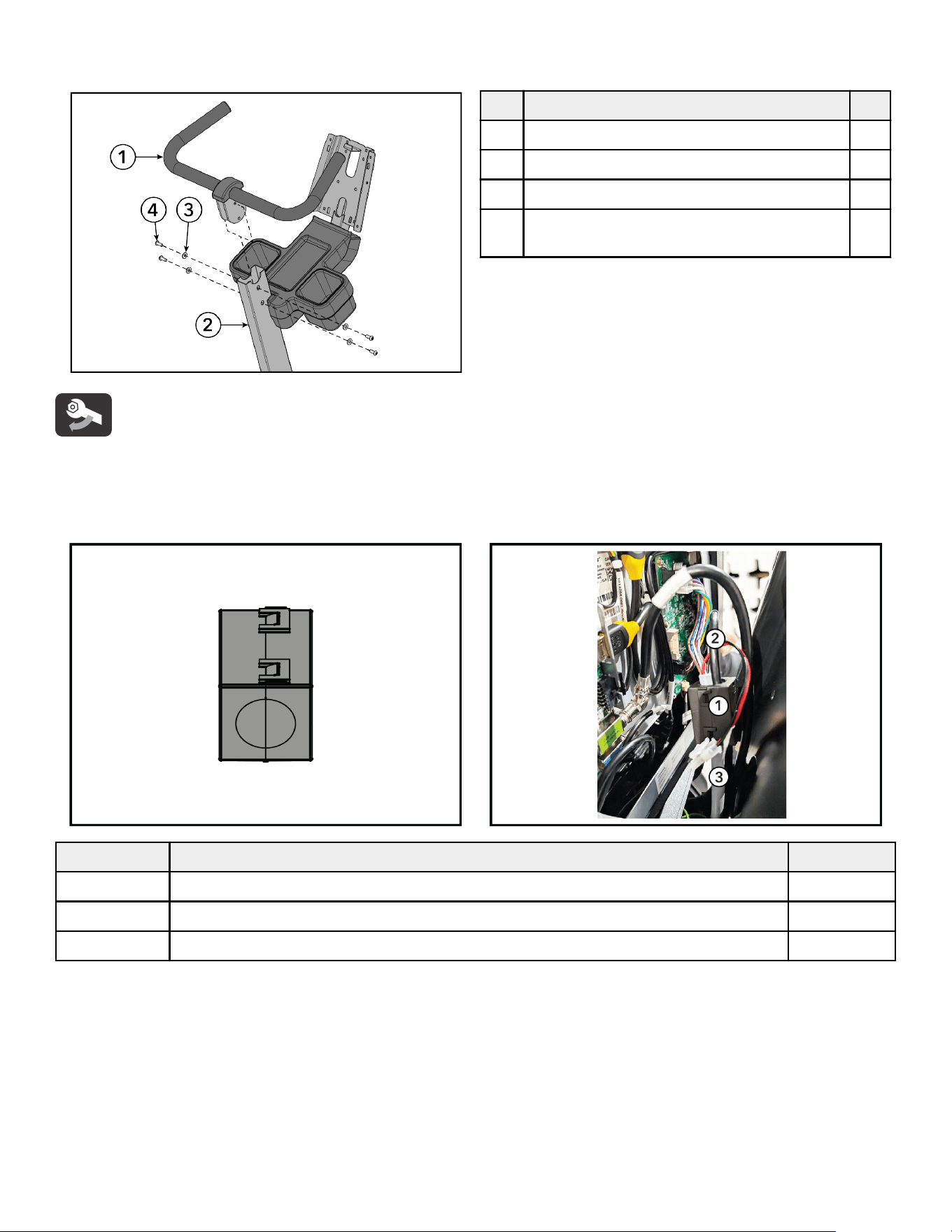
Install Handlebar Assembly
Install screws and washers securing handlebar assembly to monocolumn using a T40 Torx wrench.
Item Description Qty.
1 Handlebar Assembly 1
2 Monocolumn 1
3 Washer, Seat Stop 4
4 Screw, M8 x 1.25 6G6H x 20, BUT, TRX, CS,
ST, ZB
4
Tighten hardware to 25 ft-lb / 34 Nm.
Ferrite Installation
Assemble ferrite to base power and base signal cable at the bottom of the console weldment.
Ferrite
Item Description Qty.
1 Ferrite: Suppression, Core-Case 1
2 Cable, Console to Base, Signal 1
3 Cable, Console to Base, Power 1
Page 30 of 40
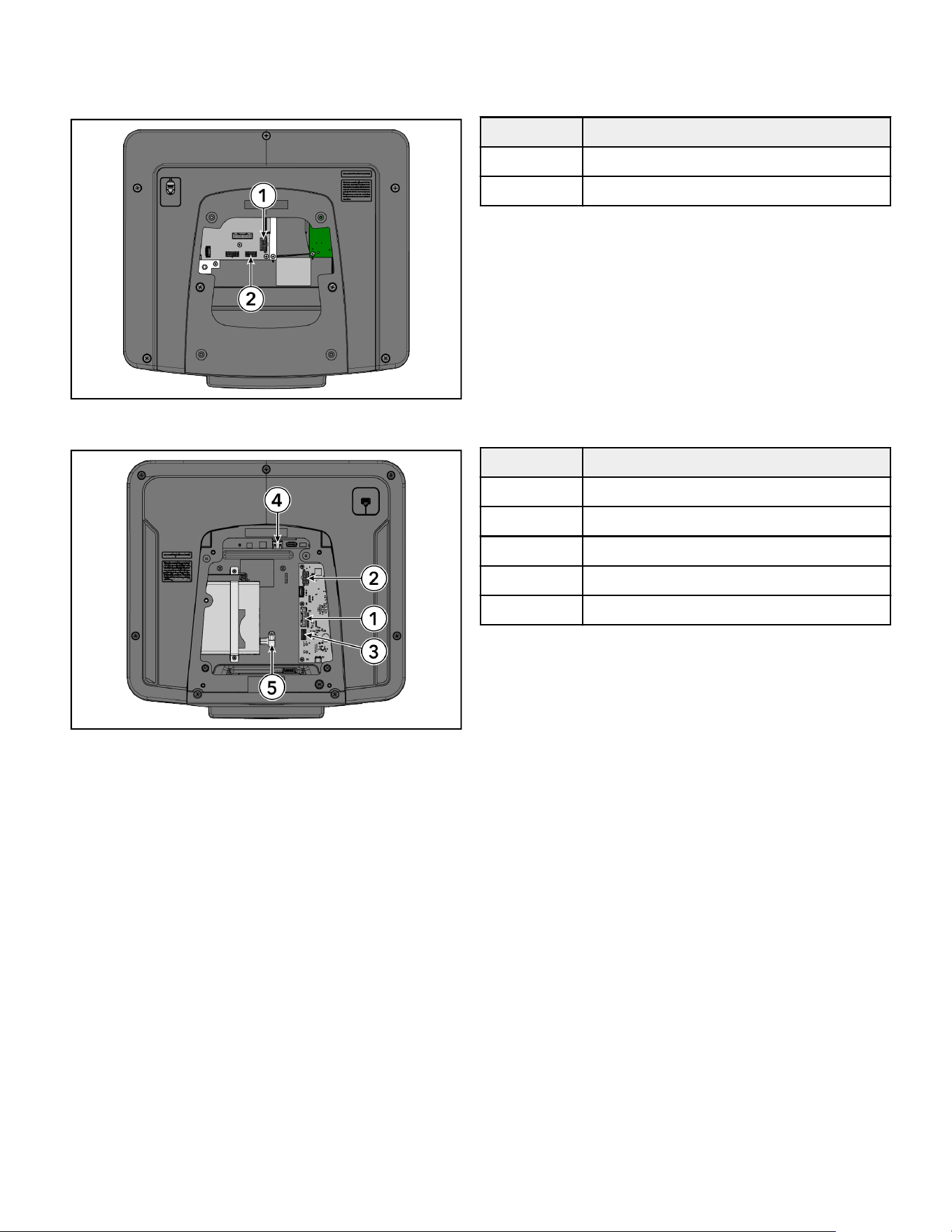
Base to Console Connections
Connect base cables to console.
SL
Item Description
1 Base Power
2 Base Comm
SE4
Item Description
1 Base Interface Cable
2 Base Power
3 Base Comm
4 Ethernet
5 COAX
Page 31 of 40
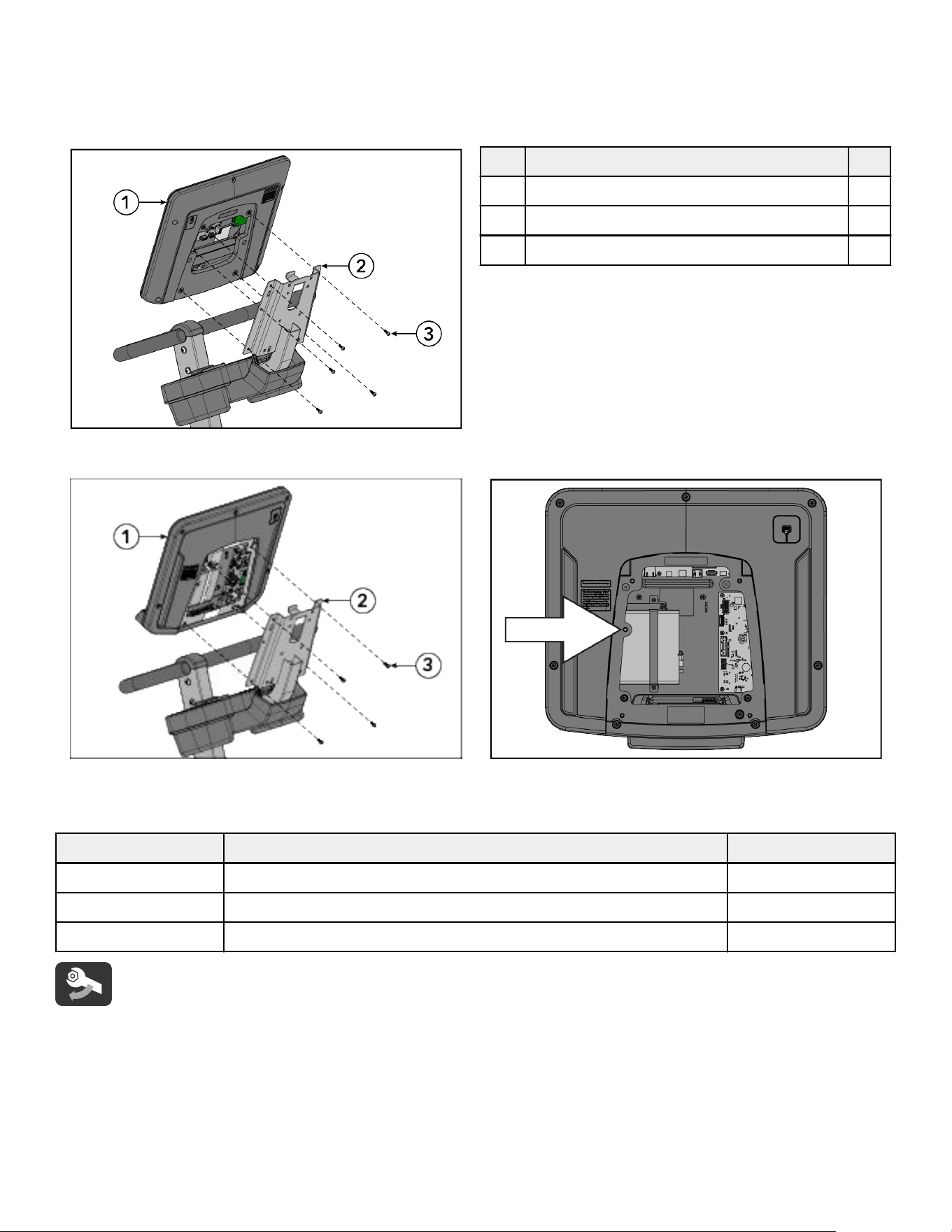
Install Console:SL or SE4
Install screws securing console to console support weldment using a Phillips screwdriver.
NOTE: Use the hook on top of the console support weldment to aid in console installation.
SL Console
Item Description Qty.
1 Console 1
2 Console Support Weldment 1
3 Screw, M5 x 0.8 x 14, PHL, PAN, MS, ST, ZN 5
SE4 Console
NOTE: Do not install the screw in the location shown (next to arrow) if the SE4 console has a Set Top Box Sync (STB)
receiver! The screw will hit the STB receiver inside of the console.
Item Description Qty.
1 Console 1
2 Console Support Weldment 1
3 Screw, M5 x 0.8 x 14, PHL, PAN, MS, ST, ZN 4
Tighten hardware to 16.8 in-lb / 1.9 Nm.
Page 32 of 40
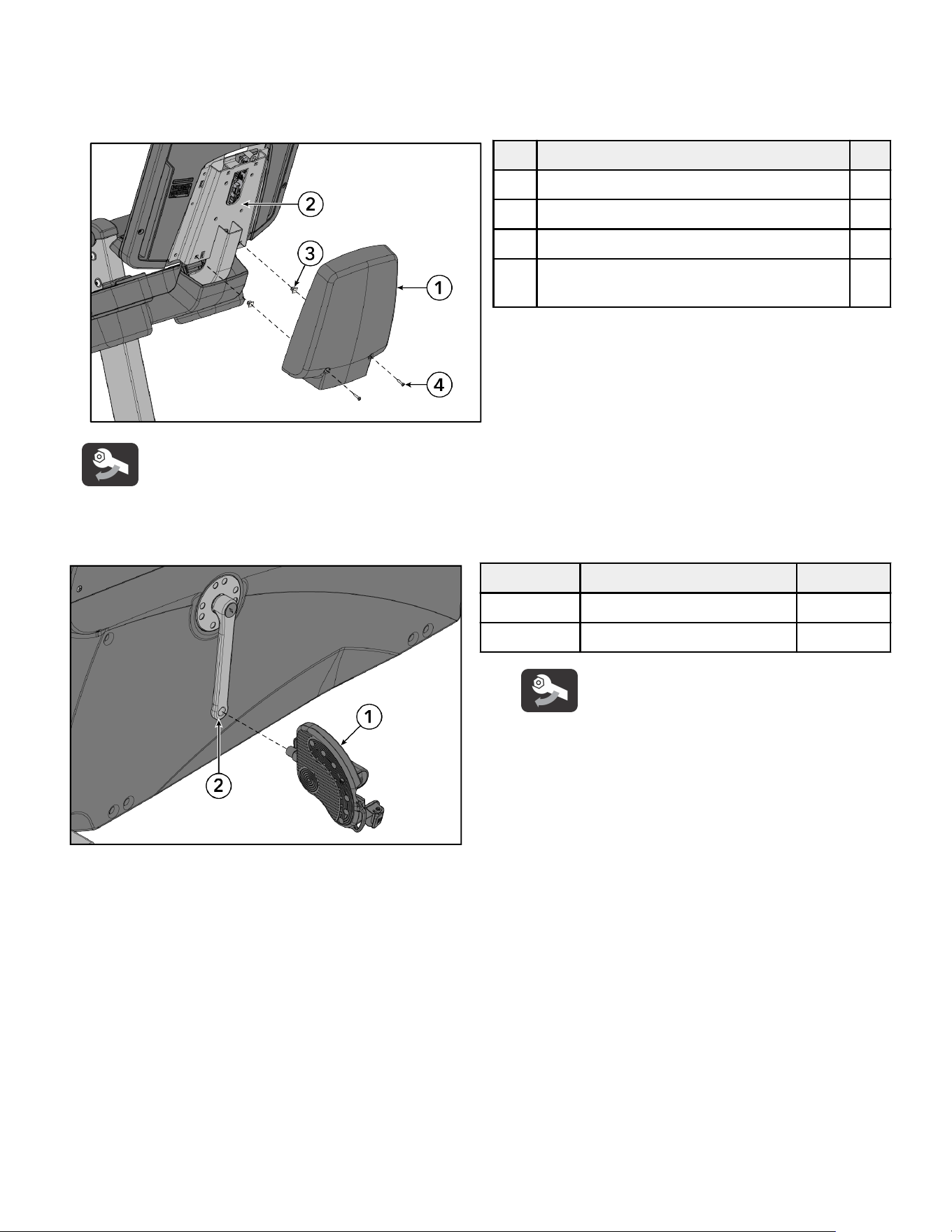
Install Console Back Shroud
1.
Insert grommets into two holes in back of console weldment.
2.
Push clips on top of console back shroud into corresponding slots on console weldment.
3.
Install screws securing console back shroud to console weldment using a Phillips screwdriver.
Item Description Qty.
1 Console Back Shroud 1
2 Console Weldment 1
3 Grommet 2
4 Screw, M4.2 x 0.7 6G6G x 19, DIN, PHL,
PAN, AB, ST, ZB
2
Tighten hardware to 13 in-lb / 1.5 Nm.
Install Pedals
Install pedals to crank arms using a 15mm pedal wrench.
Item Description Qty.
1 Pedal 2
2 Crank Arm 2
Tighten hardware to 41 ft-lb / 55 Nm.
Test Unit For Proper Operation
Page 33 of 40
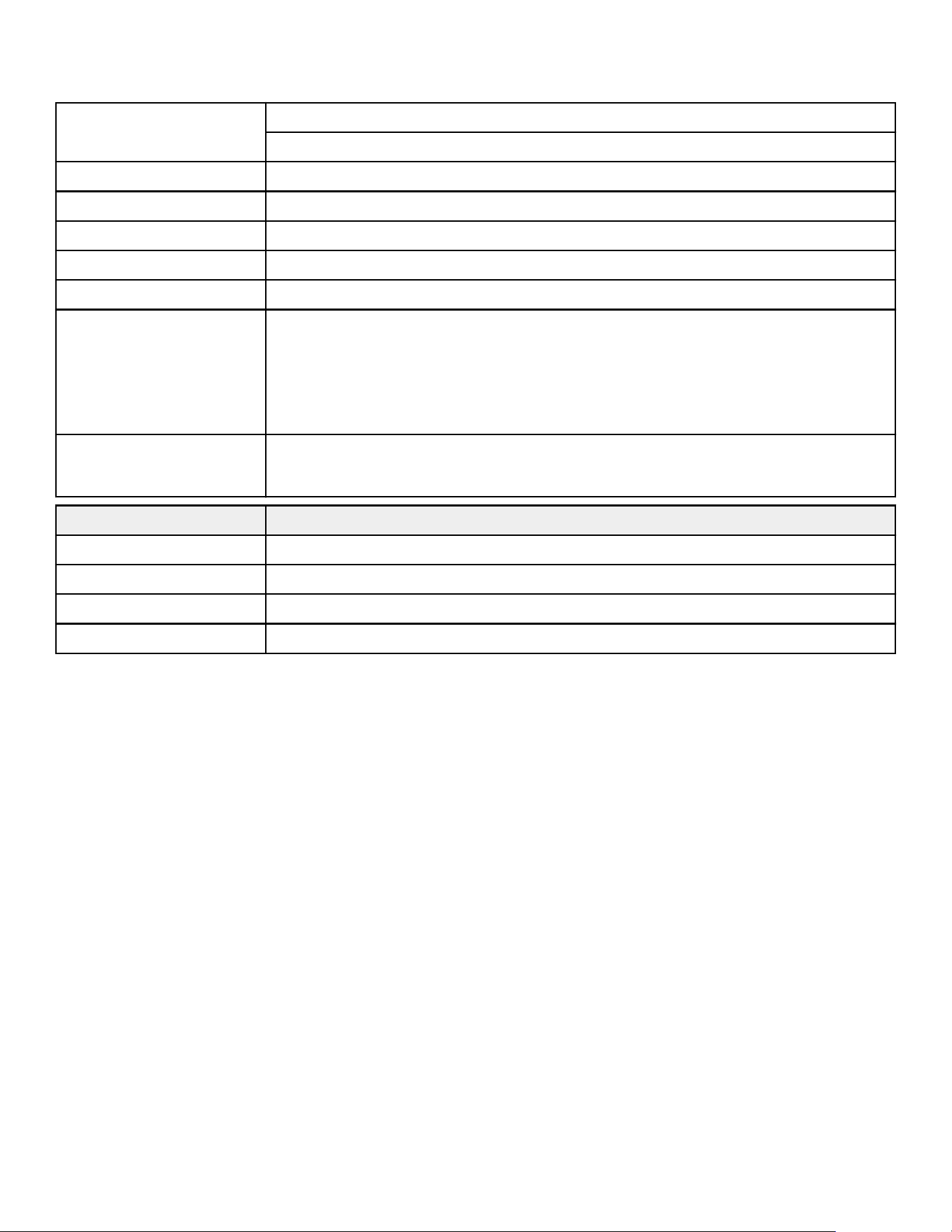
5.Specifications
Product Specifications
Designed Use
Heavy / Commercial EN ISO 20957 Class S
Home Edition EN ISO 20957 Class H
Maximum User Weight 400 lbs. / 181 kg
Pedal Size 6.56 in. x 5.5 in. / 16.6 cm x 14 cm
Resistance Levels 26
Drive Type Generator/Belt
Power Requirements See Electrical Power Requirements Section
Wireless Charging
(SE4 Console Only)
Qi wireless induction charging
• Charging area: 50mm x 80mm (approximately 2 in. x 3 in.)
• Charging response time: less than 3 seconds
• Maximum output: 10W
• Charging protocol compatibility: Qi Fast Charging
Wireless Communication
BT, NFC, Apple & Samsung watch compatibility, ANT+, RFID, Wireless Connectivity
NOTE: Some Home Edition models may not have RFID communication.
Physical Dimensions (without console)
Length 45 in. / 114.3 cm
Width 27.2 in. / 69 cm
Height 56 in. / 142.2 cm
Weight 142 lbs. / 64.4 kg
Page 34 of 40
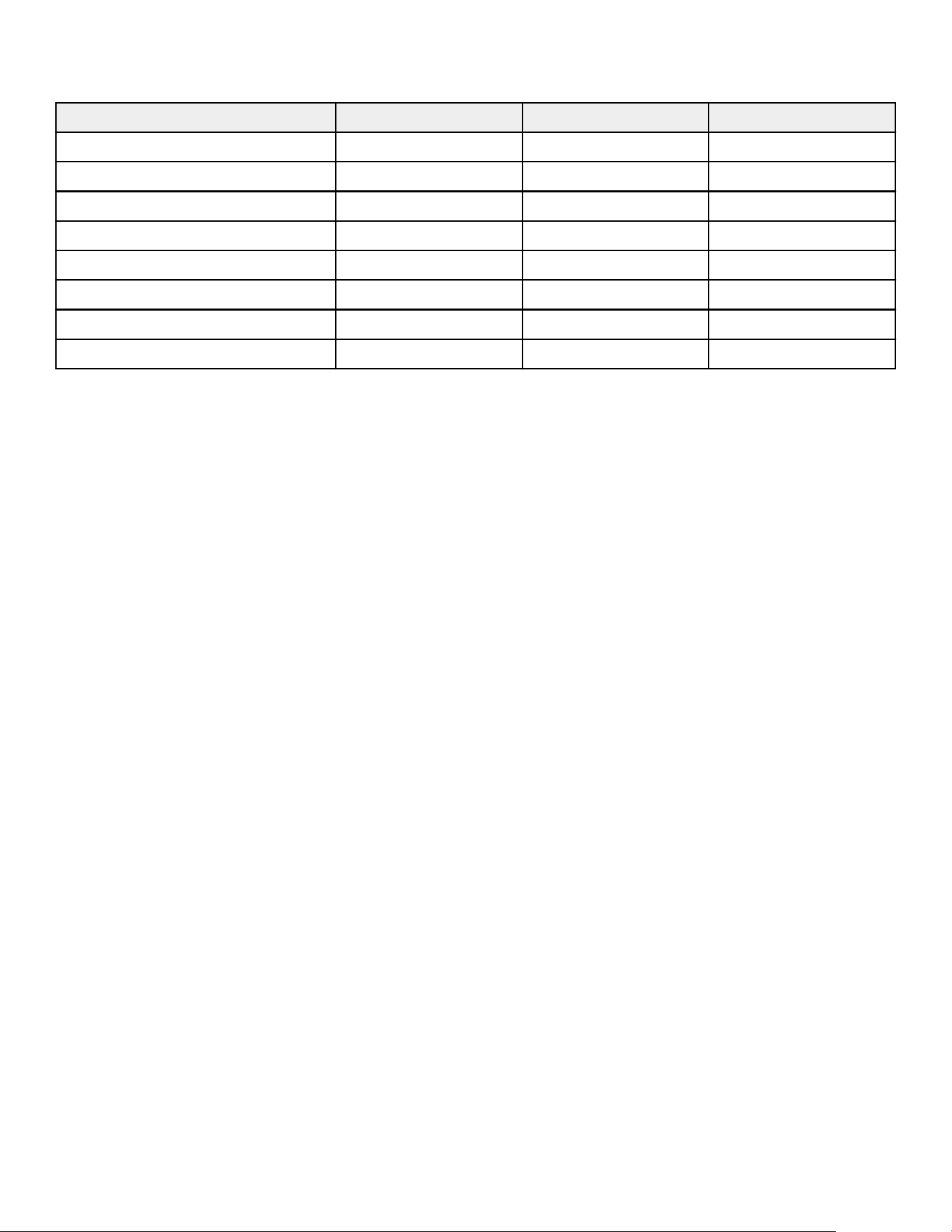
6. Service and Technical Data
Preventive Maintenance Schedule
Item Weekly Monthly Biannually
Console Overlays Clean Inspect
Cup Holders / Accessory Trays Clean Inspect
Console Mounting Bolts Inspect
Hardware Inspect
Frame / Seat Post Clean Inspect
Plastic Covers Clean Inspect
Leg Levelers Inspect / Adjust
Pedals / Straps Clean Inspect
Preventive Maintenance Tips
NOTE: Safety of the equipment can be maintained only if the equipment is examined regularly for damage or wear.
Keep the equipment out of use until defective parts are repaired or replaced. Pay special attention to parts that are
subject to wear, as outlined below.
REMARQUE: Pour assurer la sécurité du matériel, il convient de l’inspecter régulièrement afin de déceler tout signe
d’usure ou d’endommagement. N’utilisez pas l’appareil avant d’avoir réparé ou remplacé les pièces défectueuses.
Portez une attention toute particulière aux pièces qui s’usent, comme indiqué ci-dessous.
The following preventive maintenance tips will keep the product operating at peak performance:
• Locate the product in a cool, dry place.
• Clean the display console and all exterior surfaces with an approved or compatible cleaner (see Approved and
Compatible Cleaners) and a microfiber cloth.
• Long fingernails may damage or scratch the surface of the console; use the pad of the finger to press the selection
buttons on the console.
• Clean the top surface of the pedals regularly.
NOTE: When cleaning the exterior of the unit, a non-abrasive cleaner and soft cotton cloth are strongly recommended.
At no time should cleaner be applied directly to any part of the equipment.
Approved and Compatible Cleaners
Two preferred cleaners have been approved by reliability experts: PureGreen 24 and Gym Wipes. Both cleaners will
safely and effectively remove dirt, grime and sweat from equipment. PureGreen 24 and the Antibacterial Force formula
of Gym Wipes are both disinfectants that are effective against MRSA and H1N1.
PureGreen 24 is available in a spray which is convenient for gym staff to use. Apply the spray to a microfiber cloth
and wipe down the equipment. Use PureGreen 24 on the equipment for at least 2 minutes for general disinfection
purposes and at least 10 minutes for fungus and viral control.
Gym Wipes are large, durable pre-moistened wipes to use on the equipment before and after workouts. Use Gym
Wipes on the equipment for at least 2 minutes for general disinfection purposes.
Contact Customer Support Services to order these cleaners (1-800-351-3737 or email:
customersupport@lifefitness.com).
Mild soap and water or a mild non-abrasive household cleaner can also be used to clean the display and all exterior
surfaces. Use a soft microfiber cloth only. Apply the cleaner to the microfiber cloth before cleaning. DO NOT use
ammonia or acid based cleaners. DO NOT use abrasive cleaners. DO NOT use paper towels. DO NOT apply cleaners
directly to the equipment surfaces.
Page 35 of 40
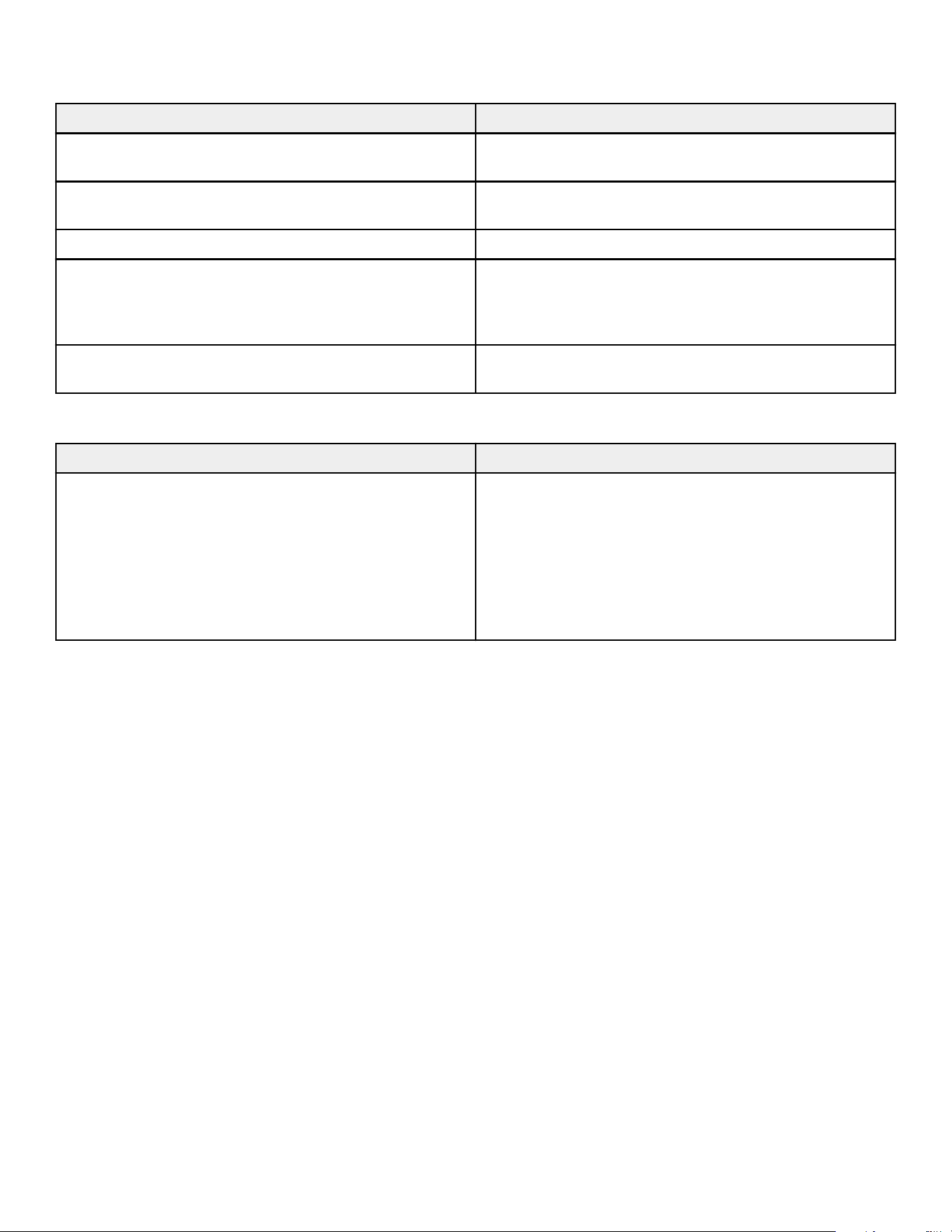
Troubleshooting the Polar
®
Heart Rate Chest Strap
Heart rate reading is erratic or absent entirely
Probable Cause Corrective Action
Belt transmitter electrodes are not wet enough to pick up
accurate heart rate readings.
Wet the belt transmitter electrodes.
Belt transmitter electrodes are not laying flat against the
skin.
Ensure the belt transmitter electrodes are laying flat
against the skin.
Belt transmitter needs cleaning. Wash the belt transmitter with mild soap and water.
Belt transmitter not properly set up. Setup of the belt transmitter is accomplished by initially
bringing it with in 1 foot / 30.5 cm of the receiver. The
receiver is in the console. After the heart rate is displayed
on the console the range is extended to 3 feet / 91.4 cm.
Chest strap battery is depleted. Contact Customer Support Services for instructions on
how to have the chest strap replaced.
Abnormally elevated heart rate readings
Probable Cause Corrective Action
Electromagnetic interference from:
• Television sets and / or antennas
• Cell phones
• Computers
• Cars
• High voltage power lines
• Motor driven exercise equipment
Move the exercise equipment a few inches away from the
probable cause, or move the probable cause a few inches
away from the exercise equipment, until the heart rate
readings are accurate.
Recycle the Battery
Remove and recycle the rechargeable battery before discarding this product at the end of its useful life. Disconnect the
power supply (if applicable) before removing the battery. To access the battery remove user right crank, monocolumn
shrouds, and user right main shroud. To remove the battery, disconnect the cable and remove the two screws holding
the battery.
How To's
Knowledge Base
See https://lfn.fit/KnowledgeBase for more detailed information.
How to Obtain Product Service
1.
Verify the symptom and review the operating instructions. The problem may be unfamiliarity with the product and
its features and workouts.
2.
Locate and write down the serial number of the unit which is located on the top right of the front stabilizer.
3.
Contact Customer Support Services at http://www.lifefitness.com.
Software Updates
The Equipment contains embedded software essential to its proper operation and safety. To maintain functionality,
security, and warranty coverage, the Equipment software must be kept current with all manufacturer-issued updates,
patches, and upgrades (“Updates”).
1.
Notification and Monitoring – Owner / Operator shall (a) register and maintain a valid email address with
Manufacturer for the purpose of receiving Update notifications, or (b) regularly monitor Manufacturer’s designated
website for posted Update notices. Failure to do either shall not relieve Owner / Operator of the obligation to
install Updates.
Page 36 of 40

2.
Update Method – Updates will be made available through the Manufacturer’s secure electronic distribution
channel. Owner / Operator shall follow the instructions provided for proper installation and implementation.
3.
Responsibility for Compliance – The duty to remain informed of Updates rests solely with the Owner / Operator.
Manufacturer’s obligation to provide notification is satisfied by sending notice to the registered email address or by
posting notice on its designated Update website.
4.
Consequences of Non-Compliance – Failure to install Updates may result in:
• Voided or limited warranty coverage;
• Suspension of technical support;
• Diminished equipment performance or safety hazards; and
• Manufacturer disclaiming liability for resulting injury, damage, or loss.
Page 37 of 40
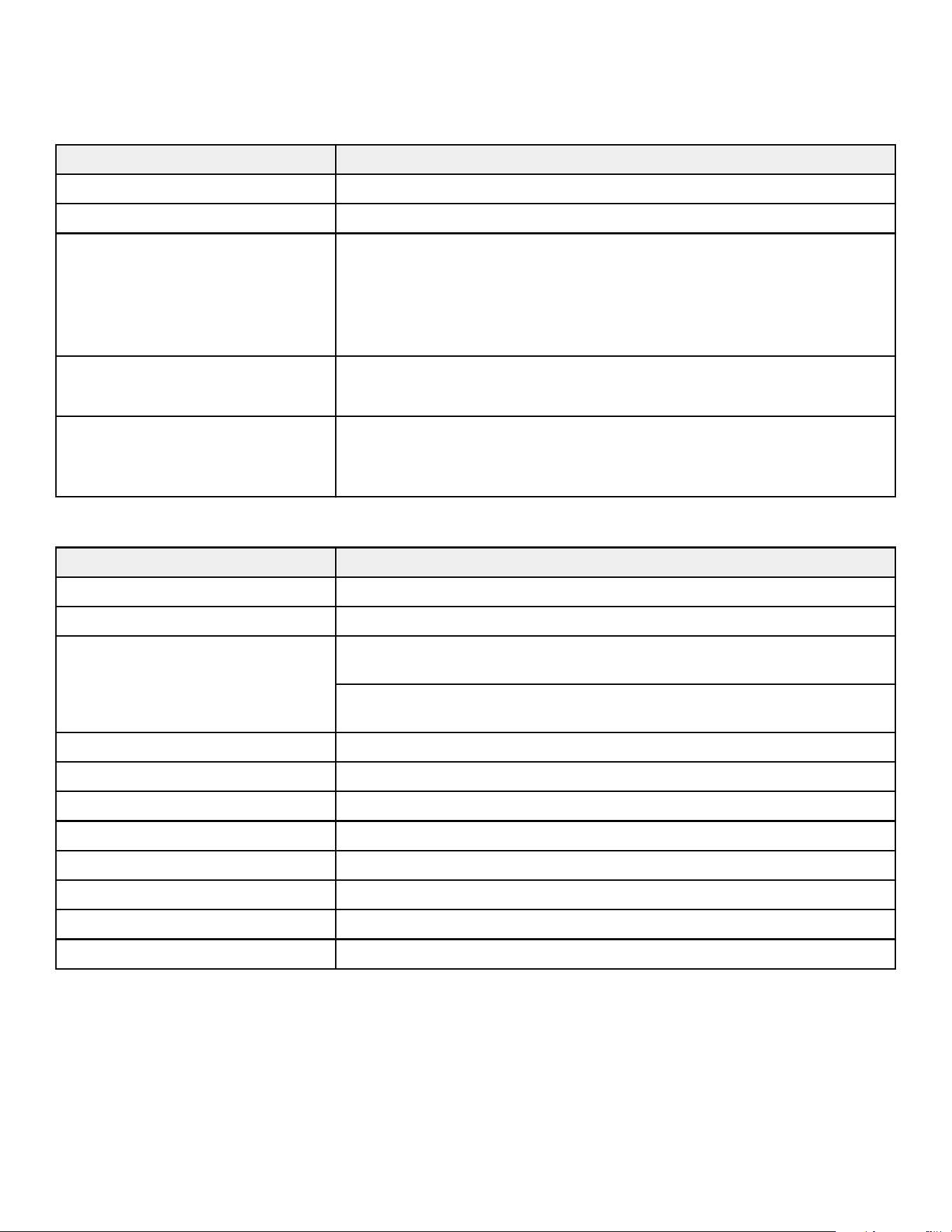
8. Release Notes
Updates to Manual
July 7, 2026 (Rev AC)
Topic Changes
Cover Page Added: Atmos Home Edition
Additional Information Updated QR Code
Electrical Requirements
• SL / SE4 combined into one row
• Supply Voltage: 100-240 VAC
• Frequency: 50-60 Hz
• Outlet Voltage: no difference in units per breaker between SL and SE4
• Outlet Voltage: 120 VAC Home units changed from 8 to 6 per breaker
Assembly
• Deleted Link to Additional Information Online
• Added: Unpackaging and Disposal of Packaging topic
Specifications Wireless Communication:
Added Note: Some Home Edition models may not have RFID
Communication
February 1, 2026 (Rev AB)
Topic Changes
Link to Additional Information Online Added
Cover Page Added: Owner's Manual
Safety Instructions Added: Owner of the equipment is responsible for providing the users of the
equipment with all warnings and instructions.
Updated verbiage: Free standing equipment shall be positioned on a flat,
stable and horizontal base.
Product Overview Added: Product Labels
Hardware Added: Ferrite
Ferrite Installation New assembly step
Attach Console Updated image and topic for SE4 console to 4 screws.
Install Seat Assembly Updated verbiage and image in step 2.
Install SE4 Cables Updated verbiage on the TIP for pull wire cable.
Service and Technical Data Added: Software Update topic
Specifications Added: 26 resistance levels
Page 39 of 40

1028291-0001