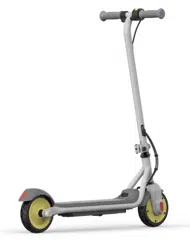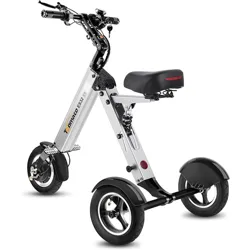

User Manual / Manuel de l’utilisateur / Manual de usuario /
Руководство пользователя / 使用者手冊

—
02
—
EN Please scan the QR code below or visit: https://service.segway.com/us-en/ to access versions of additional languages
(available in English, Spanish, Chinese, Russian, Yiddish, Bangla, Korean, Haitian Creole, Italian, Arabic, Polish, French and
Urdu) about important safety information related to battery charging, storage, maintenance, and more.
FR Veuillez scanner le QR code ci-dessous ou visitez le site : https://service.segway.com/us-fr/ pour accéder aux versions
de langues supplémentaires (disponibles en anglais, espagnol, chinois, russe, yiddish, bengali, coréen, créole haïtien,
italien, arabe, polonais, français et ourdou) concernant les informations importantes sur la sécurité liées à la charge, au
stockage, à l'entretien et plus encore.
ES Escanee el código QR que aparece a continuación o visite https://service.segway.com/es-es/ para acceder a versiones
en otros idiomas (disponible en inglés, español, chino, ruso, yiddish, bengalí, coreano, criollo haitiano, italiano, árabe,
polaco, francés y urdu) de la información de seguridad importante relacionada con la carga, el almacenamiento y el
mantenimiento de las baterías, entre otras cosas.
RU Отсканируйте QR-код ниже или посетите сайт https://service.segway.com/us-en/ для доступа к версиям на
других языках (доступно на английском, испанском, китайском, русском, идише, бенгальском, корейском,
гаитянском креольском, итальянском, арабском, польском, французском и урду) о важной информации по
безопасности, связанной с зарядкой батареи, хранением, обслуживанием и прочим.
漢 請掃描以下 QR 代碼或造訪:https://service.segway.com/us-en/ 取得其他語言版本(提供英語、西班牙語、中文、俄語、意第緒語、
孟加拉語、韓語、海地克里奧爾語、義大利語、阿拉伯語、波蘭語、法語和烏爾都語),進一步瞭解電池充電、儲存、保養等重要安全資訊。
EN The pictures shown are for illustration purposes only. The actual product or app interface may vary.
FR Les images sont présentées à titre indicatif uniquement. L'interface réelle du produit ou de l'application peut varier.
ES Las imágenes que se muestran son solo para fines ilustrativos. El producto real o la interfaz de la aplicación pueden
variar.
RU Изображения приводятся исключительно в целях иллюстрации. Реальный интерфейс продукта или
приложения может отличаться.
漢 顯示圖片僅供參考。實際產品或應用程式介面可能有所不同。
—
03
—
Segway Mobility App
EN WARNING:TheSegwayMobilityAppcontainsadditionaland/orsupplemental
warningsandinstructionsforthesafeuseoftheeKickScooter.Italsoprovidesguidanceon
certainfunctionsorupdatesthatarenotincludedinthisusermanualasofitspublication
date.Suchinformationand/ornoticeispartoftheusermaterialsthatausershallknow
andlearn.
FR AVERTISSEMENT:L'applicationSegwayMobilitycontientdesavertissementset
desinstructionssupplémentaireset/oucomplémentairespouruneutilisationsûrede
l'eKickScooter.Ellefournitégalementdesconseilssurcertainesfonctionsoumisesàjour
quinesontpasinclusesdansceManueldel'utilisateuràladatedesapublication.Ces
informationset/ouavisfontpartiedesdocumentsdel’utilisateurquel’utilisateurdoit
connaîtreetapprendre.
ES ADVERTENCIA:LaaplicaciónSegwayMobilitycontieneadvertenciaseinstrucciones
adicionalesy/ocomplementariasparaelusosegurodeleKickScooter.Tambiénofrece
instruccionessobreciertasfuncionesoactualizacionesquenoestánincluidaseneste
manualdeusuarioenlafechadesupublicación.Dichainformacióny/oavisoformaparte
delosmaterialesdelusuarioqueéstedebeconoceryaprender.
RU ПРЕДУПРЕЖДЕНИЕ.ПриложениеSegwayMobilityAppсодержитдополнительные
предупрежденияиинструкциипобезопасномуиспользованиюeKickScooter.Внем
такжесодержатсяуказанияпоопределеннымфункциямиобновлениям,которыене
быливключенывданноеруководствопользователянадатуегопубликации.Такая
информация/такиеданныеявляютсячастьюпользовательскихматериалов,которые
пользовательдолженизучитьизапомнить.
漢 警告:SegwayMobility應用程式含有安全使用eKickScooter的附加警示與補充說明。
此外,本使用者手冊還新增了部分功能或更新內容,這些內容在本手冊出版之日時尚未包含
在本手冊中。該類資訊和通知屬於使用者應了解和學習的一部分。
—
04
—
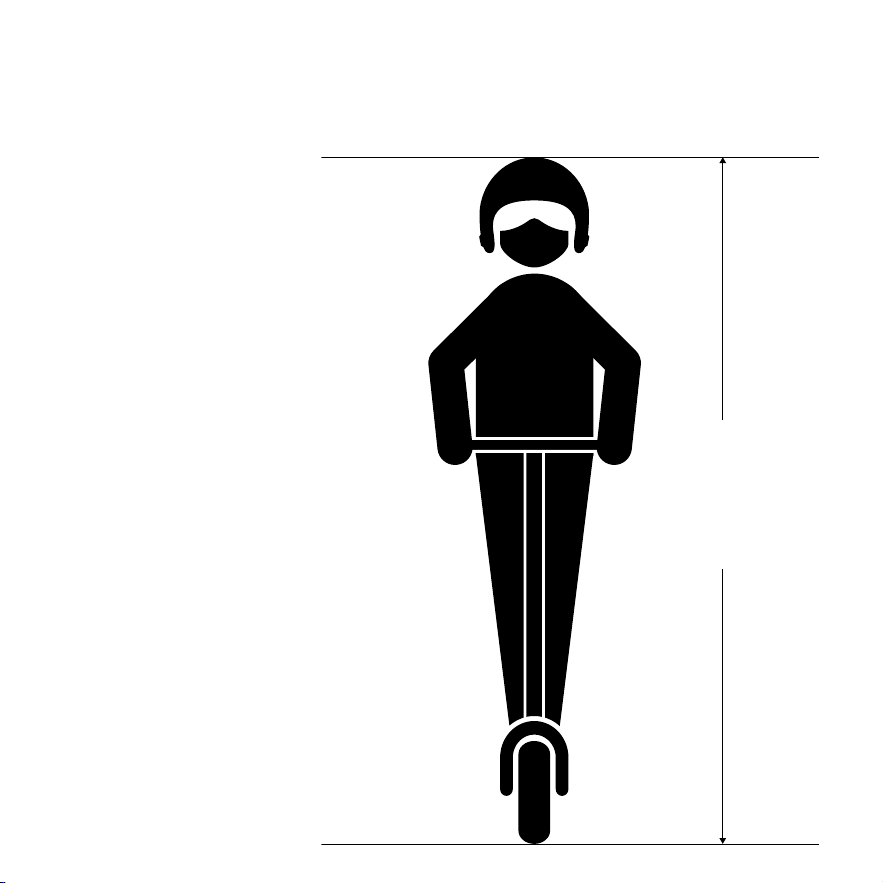
16+ years
5'3"—6'7"
(160—200 cm)
Welcome / Bienvenue / Le damos la bienvenida / Добро
пожаловать / 歡迎
EN Always wear a helmet, elbow pads
and knee pads when riding. Thanks for
choosing the Segway eKickScooter
Ninebot E3 series product!
FR Portez toujours un casque, des
coudières et des genouillères lorsque vous
roulez. Merci d’avoir choisi le produit de
la gamme Segway eKickScooter Ninebot
E3 !
ES Utilice siempre casco, coderas y
rodilleras cuando conduzca. Gracias por
elegir el producto de la serie eKickScooter
Ninebot E3 de Segway.
RU При езде обязательно
надевайте шлем, налокотники и
наколенники. Спасибо, что выбрали
продукт серии Segway eKickScooter
Ninebot E3!
漢 騎行時隨時戴上頭盔、護肘和護膝。感
謝 您 選 擇 Segway eKickScooter Ninebot
E3 系列產品!
—
05
—
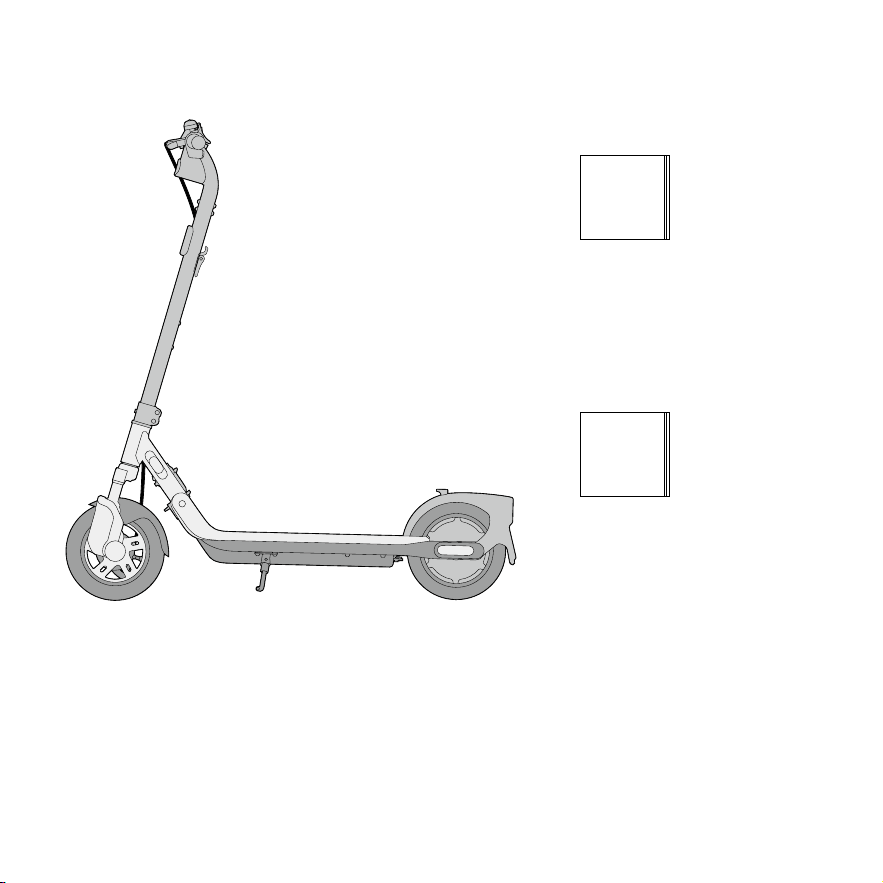
EN User Manual
FR Manuel de l’utilisateur
ES Manual de usuario
RU Руководство
пользователя
漢 使用者手冊
EN Important Information
FR Informations importantes
ES Información importante
RU Важная информация
漢 重要信息
× 1
× 1
× 1
× 1
× 1
× 1
× 1
× 1
× 1
× 1
Packing List / Contenu de la boîte / Listado de contenido /
Упаковочный лист / 包裝清單
—
06
—
EN Note: Please keep the original packaging for at least 15 days!
FR Remarque : veuillez conserver l’emballage d’origine pendant au moins 15 jours !
ES Nota: Conserve el embalaje original durante al menos 15 días.
RU Примечание. Храните оригинальную упаковку не менее 15 дней!
漢 註:請保留原始包裝至少 15 天!
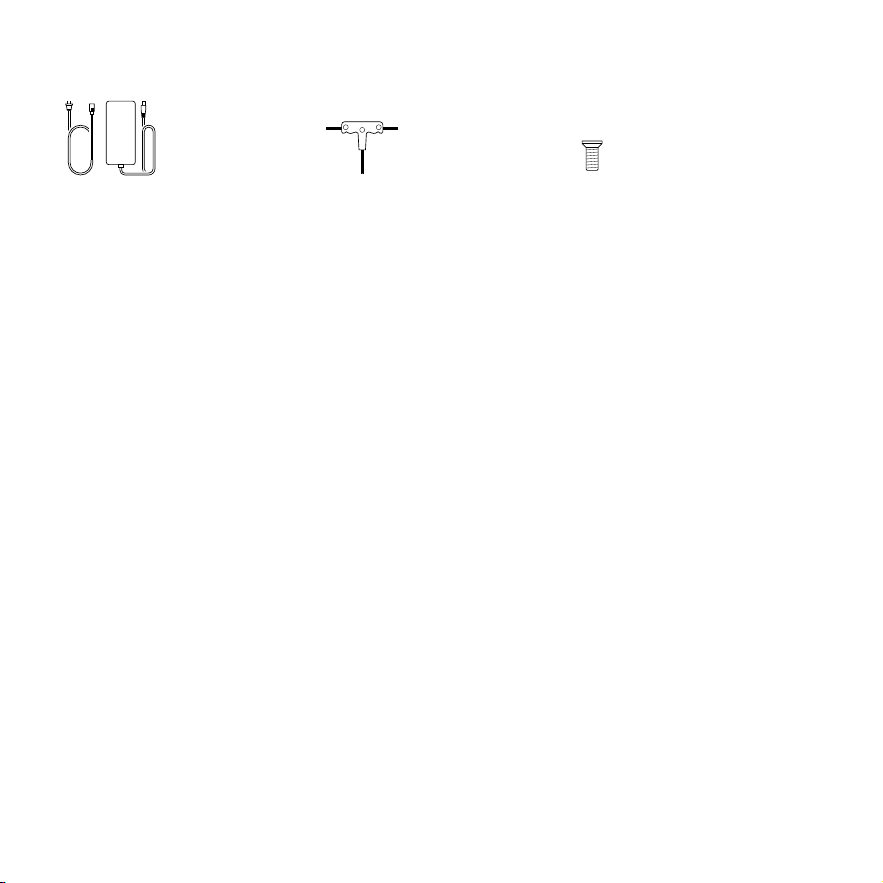
● Accessories / Accessoires / Accesorios / Аксессуары / 配件
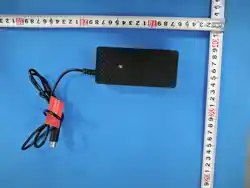
EN Charger
FR Chargeur
ES Cargador
RU Зарядное устройство
漢 電池充電器
EN 3-in-1 Allen wrench
FR Clé Allen 3-en-1
ES Llave Allen 3 en 1
RU Шестигранный ключ 3 в 1'
漢 三合一內六角扳手
EN Screw
FR Vis
ES Tornillo
RU Винт
漢 螺絲
× 1
× 1
× 5
4mm 5mm
3mm
—
07
—
1
15
21
2
3
18
4
5
19
8
9
11
12
10
13
20
28
27
25
26
29
23
24
14
16
17
22
18
6
7
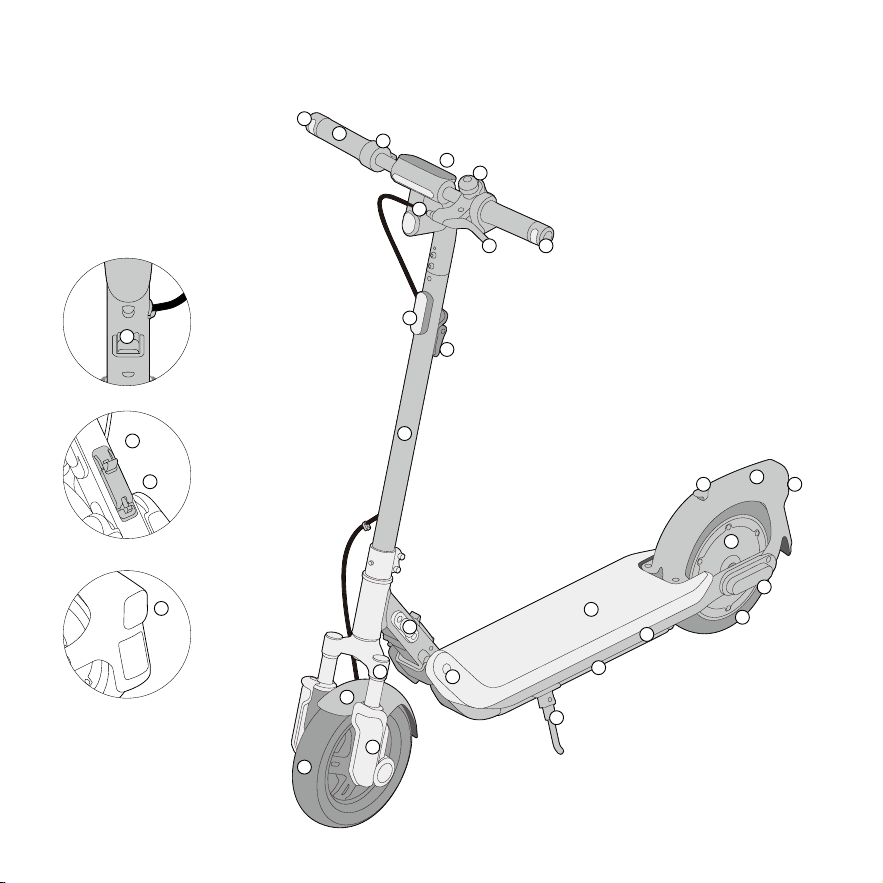
Diagram / Diagramme / Diagrama / Диаграмма / 圖表
22

—
08
—
1
4
7
10
2
5
8
11
3
6
9
12
EN Folding Latch
FR Loquet pliant
ES Pestillo plegable
RU Защелка механизма
складывания
漢 折疊鎖扣
EN Front Mudguard
FR Garde-boue avant
ES Guardabarros delantero
RU Передний брызговик
漢 前擋泥板
EN Brake Lever
FR Levier de frein
ES Palanca de freno
RU Рычаг тормоза
漢 煞車拉桿
EN Front Shock Absorber
FR Amortisseur avant
ES Amortiguador delantero
RU Передний амортизатор
漢 前避震器
EN Front Wheel
FR Roue avant
ES Rueda delantera
RU Переднее колесо
漢 前輪
EN Folding Mechanism
FR Mécanisme de pliage
ES Mecanismo de plegado
RU Механизм складывания
漢 摺疊機構
EN Front Reflector
FR Catadioptre avant
ES Reflector delantero
RU Передний рефлектор
漢 前反光板
EN Charging Port
FR Port de charge
ES Puerto de carga
RU Порт зарядки
漢 充電孔
EN Latch Button
FR Bouton de verrouillage
ES Botón de cierre
RU Кнопка защелки
漢 鎖扣按鈕
EN Right Direction Indicator
FR Indicateur de direction droit
ES Indicador de dirección derecho
RU Правый указатель поворота
漢 右方向指示燈
EN Stem
FR Tige
ES Vástago
RU Вынос
漢 閥桿
EN Headlight
FR Feu de route
ES Faro delantero
RU Фара
漢 前燈

—
09
—
EN Handlebar
FR Guidon
ES Manillar
RU Руль
漢 車把
EN Front Fork
FR Fourche avant
ES Horquilla delantera
RU Передняя вилка
漢 前叉
EN Left Direction Indicator
FR Indicateur de direction gauche
ES Indicador de dirección izquierdo
RU Левый указатель поворота
漢 左方向指示燈
13
16
19
22
14
17
20
23
15
18
21
24
EN Dashboard
FR Tableau de bord
ES Panel de control
RU Приборная панель
漢 儀錶盤
EN Wheel Motor
FR Moteur de roue
ES Motor de la rueda
RU Мотор-колесо
漢 輪轂電機
EN Snap Hook
FR Mousqueton
ES Mosquetón
RU Блокиратор
漢 彈簧鉤
EN Footboard
FR Repose-pieds
ES Reposapiés
RU Подножка
漢 腳踏板
EN Taillight & Rear Reflector
FR Feu arrière et catadioptre arrière
ES Luz trasera y reflector trasero
RU Задний фонарь и задний
рефлектор
漢 尾燈和後反光板
EN Rear Wheel
FR Roue arrière
ES Rueda trasera
RU Заднее колесо
漢 後輪
EN Rear Mudguard
FR Garde-boue arrière
ES Guardabarros trasero
RU Задний брызговик
漢 後擋泥板
EN Buckle
FR Boucle
ES Hebilla
RU Замок
漢 帶扣
EN Throttle
FR Accélérateur électronique
ES Acelerador
RU Дроссель
漢 油門

—
10
—
25
26
27
EN Main Frame
FR Cadre principal
ES Chasis principal
RU Основная рама
漢 主框架
EN Battery Compartment
FR Compartiment de la batterie
ES Compartimento de la batería
RU Аккумуляторный отсек
漢 電池盒
28
29
EN Side Reflector
FR Catadioptre latéral
ES Reflector lateral
RU Боковой рефлектор
漢 側反光板
EN Bell
FR Cloche
ES Timbre
RU Звонок
漢 鈴鐺
EN Kickstand
FR Béquille
ES Pata de apoyo
RU Откидная опора
漢 支架
—
11
—
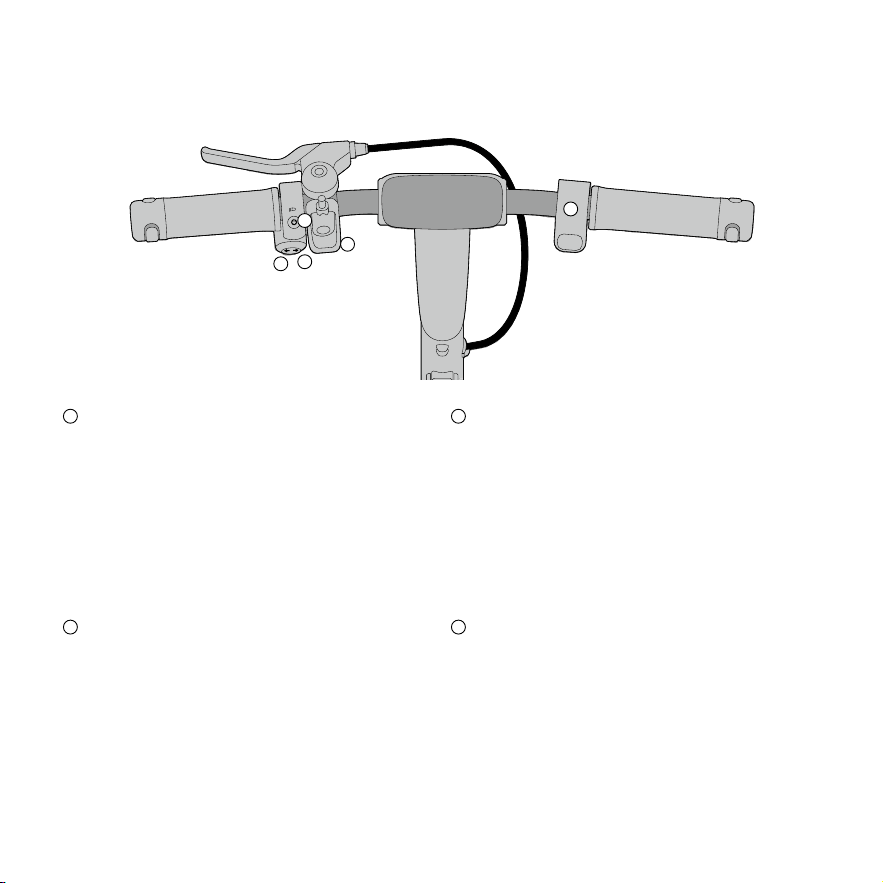
● Handlebar Functions / Fonctions du guidon / Funciones del manillar / Функции руля /
車把功能
5
4
3
1
2
1 2
4
EN Right Direction Indicator Button
FR Bouton d’indicateur de direction droit
ES Botón indicador de dirección derecho
RU Правая кнопка указателя поворота
漢 右方向指示燈按鈕
3
EN Left Direction Indicator Button
FR Bouton d’indicateur de direction gauche
ES Botón indicador de dirección izquierdo
RU Левая кнопка указателя поворота
漢 左方向指示燈按鈕
EN Power Button/Headlight Button
FR Bouton marche/arrêt/Bouton feu de route
ES Botón de encendido/ Bouton de faro
RU Кнопка питания/кнопка фары
漢 電源按鈕 / 大燈按鈕
EN Throttle
FR Accélérateur électronique
ES Acelerador
RU Дроссель
漢 油門

—
12
—
EN
Name Operation
Power Button/
Headlight
Press the Power Button to power on the scooter. Press and hold for 2s to power it off. After
powering on, press the button to turn on/off headlight
[1]
, and double press to switch the speed
modes.
Direction
Indicator Button
Press the button to light up left/right signal, then the signal flashes, and press it again to
turn it off. Press and hold the left or right direction indicator button for 2s to turn on/off the
emergency flashers.
Throttle Twist / Press the throttle to speed up.
Bell Button Press the button to use the bell.
[1]Whentheheadlightisoff,taillightisalsooffandwillflashwhenbraking;whenheadlightison,taillightwillsemi-lightupand
willflashwhenbraking.
*AsdifferentversionsofApp/firmwaremayvary,pleaserefertotheactualvehicle.
FR
Nom Opération
Bouton marche/arrêt/
feu de route
Appuyez sur le bouton marche/arrêt pour mettre le scooter sous tension. Appuyez et mainte-
nez enfoncé pendant 2 secondes pour l’éteindre. Après la mise sous tension, appuyez sur le
bouton pour allumer/éteindre le feu de route
[1]
, et appuyez deux fois pour changer le mode de
vitesse.
Bouton indicateur
de direction
Appuyez sur le bouton pour allumer le signal gauche/droite, puis le signal clignote. Appuyez à
nouveau sur le bouton pour l’éteindre. Appuyez et maintenez enfoncé le bouton indicateur de
direction gauche ou droit pendant 2 secondes pour allumer/éteindre les clignotants d’urgence.
Accélérateur
électronique
Tournez/appuyez sur l’accélérateur électronique pour accélérer.
Bouton de sonnette Appuyez sur le bouton pour utiliser la sonnette.
[1]Lorsquelefeuderouteestéteint,lefeuarrièreestégalementéteintetclignotelorsdufreinage;lorsquelefeuderouteest
allumé,lefeuarrières'allumeàmoitiéetclignotelorsdufreinage.
*Étantdonnéquelesdifférentesversionsdel'application/dufirmwarepeuventvarier,veuillezvousréférerauvéhiculeréel.
5
EN Bell Button
FR Bouton de sonnette
ES Botón de timbre
RU Кнопка звонка
漢 鈴鐺鍵

—
13
—
ES
Nombre Operación
Botón de encendido/
faro
Pulse el botón de encendido para encender el patinete. Manténgalo pulsado durante 2 se-
gundos para apagarlo. Después de encenderlo, presione el botón para encender o apagar el
faro
[1]
, y presione dos veces para cambiar el modo de velocidad.
Dirección
Botón indicador
Pulse el botón para encender la señal izquierda/derecha. A continuación, la señal parpadea.
Pulse el botón nuevamente para apagarla. Mantenga presionado el botón indicador
de dirección izquierdo o derecho durante 2 segundos para encender/apagar las luces
intermitentes de emergencia.
Acelerador Gire o presione el acelerador para acelerar.
Botón de timbre Pulse el botón para usar el timbre.
[1]Cuandoelfaroestáapagado,laluztraseratambiénestáapagadayemitiráundestelloalfrenar;cuandoelfaroestá
encendido,laluztraseraestaráparcialmenteiluminadayemitiráundestelloalfrenar.
*Comolasdiferentesversionesdelaaplicaciónoelfirmwarepuedenvariar,consulteelvehículoreal.
RU
Наименование Действие
Кнопка питания/фара
Нажмите кнопку питания, чтобы включить скутер. Нажмите и удерживайте кнопку в
течение 2 с, чтобы выключить питание. После включения питания нажмите кнопку,
чтобы включить/выключить фару
[1]
, и дважды нажмите, чтобы переключить скоростны
е режимы.
Кнопка
указателя поворота
Нажмите кнопку, чтобы включить указатель левого/правого поворота, сигнал начнет
мигать. Нажмите кнопку еще раз, чтобы выключить его. Нажмите и удерживайте в
течение 2 с левую или правую кнопку указателя поворота, чтобы включить/выключить
аварийные проблесковые сигналы.
Дроссель Поверните/нажмите дроссель, чтобы увеличить скорость.
Кнопка звонка Нажмите кнопку, чтобы использовать звонок.
[1]Когдафаравыключена,заднийфонарьтакжевыключенибудетмигатьприторможении;когдафаравключена,
заднийфонарьбудетвключатьсянаполовинуимигатьприторможении.
*Посколькуразличныеверсииприложений/прошивокмогутотличаться,см.фактическоетранспортноесредство.

—
14
—
漢
名稱 操作
電源按鈕 / 大燈
按下電源按鈕即可開啟滑板車電源。按住 2 秒即可關閉電源。 開機後,按一下按鈕開啟 / 關閉頭燈
[1]
,
雙擊切換速度模式。
方向指示燈按鈕
按下此按鈕,左 / 右方向指示燈亮起,接著信號燈閃爍,再次按下按鈕將其關閉。按住左或右方向指示
燈 2 秒可開啟 / 關閉緊急事故警示燈。
油門 轉動 / 按下油門即可加速。
鈴鐺鍵 按下按鈕即可使用鈴鐺。
[1] 頭燈關閉時,尾燈也關閉,煞車時閃爍;當大燈打開時,尾燈會半亮,煞車時會閃爍。
*因不同版本的應用程式/韌體可能各有差異,請以實際車輛為準。
—
15
—
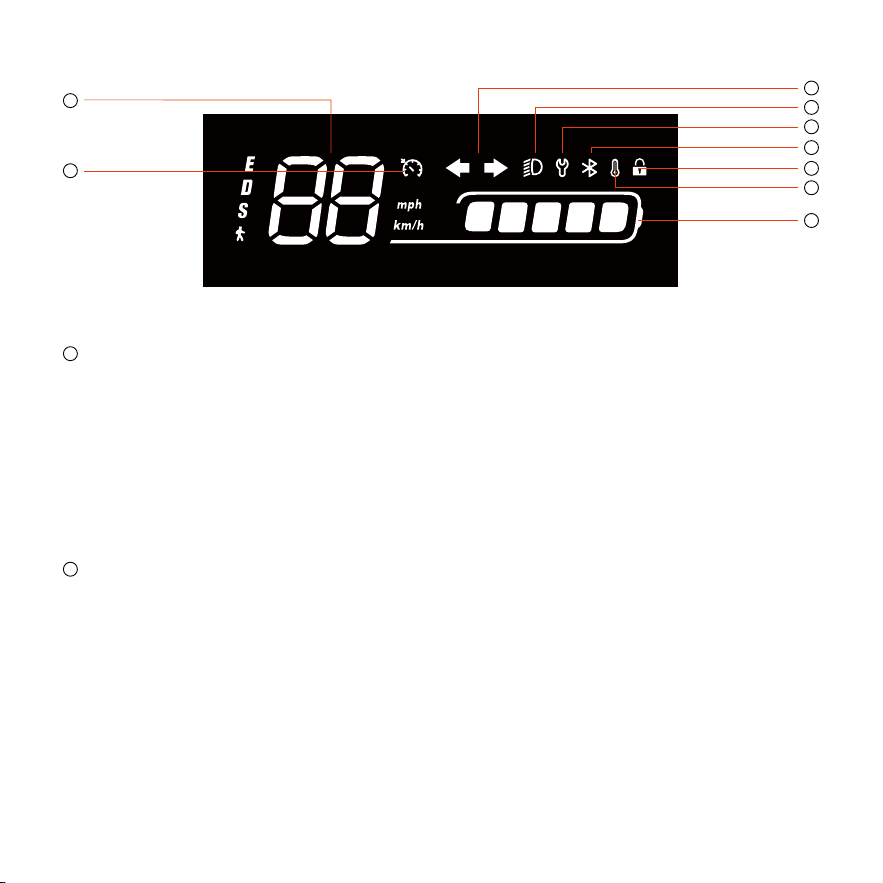
● Dashboard / Tableau de bord / Panel de control / Приборная панель / 儀錶盤
2
1
6
8
3
9
4
5
1
EN Speedometer: It indicates the current speed of the scooter during riding.
Note:Itindicatesthebatterylevelwhencharging.
FR Compteur de vitesse: Indique la vitesse actuelle du scooter pendant la conduite.
Remarque:indiqueleniveaudebatteriependantlacharge.
ES Velocímetro: Indica la velocidad actual del patinete durante la conducción.
Nota:indicaelniveldebateríadurantelacarga.
RU Спидометр: показывает текущую скорость скутера во время езды.
Примечание .Вовремязарядкиотображаетсяуровеньзарядабатареи .
漢 速度計:顯示當前速度。
註:充電時會顯示電池電量。
2
EN Left / Right Direction Indicator: The indicator flashes after pressing a direction indicator button. Both indicators will
flash simultaneously after emergency flashers are turned on.
FR Indicateur de direction gauche/droit: L’indicateur clignote après une pression sur un bouton d’indicateur de direction.
Les deux indicateurs de direction clignotent simultanément après l’allumage des clignotants d’urgence.
ES Indicador de dirección derecho/izquierdo: El indicador parpadea después de pulsar un botón indicador de dirección.
Los indicadores de dirección de ambos lados parpadean simultáneamente después de encender las luces intermitentes de
emergencia.
RU Левый/правый указатель поворота: Индикатор мигает после нажатия кнопки указателя поворота. Оба
индикатора будут мигать одновременно после включения аварийных проблесковых сигналов.
漢 左 / 右方向指示燈:按下方向指示燈按鈕後,指示燈會閃爍。閃光警示燈開啟後,兩側方向指示燈同時閃爍。
7
有定速巡航-中美亚

—
16
—
3
EN Headlight: It indicates that the headlight is on.
FR Feu de route: Indique que le feu de route est allumé.
ES Faro delantero: Indica que el faro está encendido.
RU Фара: Указывает на то, что фара включена.
漢 大燈:表示大燈已開啟。
4
EN Maintenance Reminder: When the icon flashes, it indicates that the eKickScooter has detected errors; If the icon is
always-on, it indicates that you should conduct maintenance on the eKickScooter.
FR Rappel d’entretien : Lorsque l'icône clignote, cela indique que votre eKickScooter a détecté des erreurs ; si l'icône est
allumée en permanence, cela indique que vous devez effectuer un entretien sur votre eKickScooter.
ES Recordatorio de mantenimiento: Cuando el icono parpadea, significa que el eKickScooter ha detectado algún error; si
el icono permanece encendido, significa que debe realizar el mantenimiento del eKickScooter.
RU Напоминание о техническом обслуживании : Если значок мигает , это означает , что eKickScooter обнаружил н
еисправности ; если значок горит постоянно , это означает , что необходимо провести техническое обслуживание
eKickScooter.
漢 保養提醒:當圖示閃爍時,表示 eKickScooter 偵測到錯誤;如果圖示恆亮,則表示 eKickScooter 應進行維護。
5
EN Bluetooth: When the icon lights up, it indicates that the scooter has been successfully connected to the mobile device.
FR Bluetooth: Lorsque l’icône s’allume, cela indique que le scooter a été connecté avec succès à l’appareil mobile.
ES Bluetooth: Cuando el icono se enciende, indica que el patinete se ha conectado correctamente al dispositivo móvil.
RU Bluetooth: Когда значок загорается, это означает, что скутер успешно подключен к мобильному устройству.
漢 藍牙:該圖示亮起時,表示滑板車已成功連線行動裝置。
6
EN Locking Reminder: When the icon lights up, it means the scooter is locked.
FR Rappel de verrouillage: Lorsque l'icône s'allume, cela signifie que le scooter est verrouillé.
ES Recordatorio de bloqueo: Cuando el icono se enciende, significa que el patinete está bloqueado.
RU Напоминание о блокировке: Загорающийся значок означает, что самокат заблокирован.
漢 鎖定提醒:該圖示亮起時,表示滑板車已鎖定。
7
EN Temperature Reminder: When the icon flashes, it indicates that the tepmerature of eKickScooter's battery, controller or
the motor is too high or too low, and you need to check it via Segway Mobility App.
*TheaccelerationoftheeKickScootermaybeweakened,anditmaynotbeabletobecharged.Donotchargeituntilits
temperaturerecoverstotheindoortemperatureafterbeingsitforawhile.

—
17
—
FR Rappel de température : Lorsque l'icône clignote, cela indique que la température de la batterie, du contrôleur ou du
moteur de votre eKickScooter est trop élevée ou trop basse, et que vous devez la vérifier via l'application Segway Mobility
App.
*L'accélérationdevotreeKickScooterpeutêtreaffaiblieetilpeutnepasêtrepossibledelecharger.Nelechargezpastantque
satempératuren'estpasrevenueàlatempératureambianteaprèsavoirétélaisséaurepospendantuncertaintemps.
ES Recordatorio sobre la temperatura: Cuando el icono parpadea, significa que la temperatura de la batería, el controlador
o el motor del eKickScooter es demasiado alta o demasiado baja, por lo que debe comprobarla a través de la Segway
Mobility App.
*EsposiblequelaaceleracióndeleKickScooterseveareducidayquenosepuedacargar.Nolocarguehastaquesu
temperaturasehayaigualadoalatemperaturaambientetrashaberlodejadoreposarunrato.
RU Напоминание о температуре : Если значок мигает , это означает , что температура батареи , контроллера или д
вигателя eKickScooter слишком высокая или слишком низкая , и вам необходимо проверить её через приложение
Segway Mobility App.
* УскорениеeKickScooterможетснизиться ,изарядкаможетстатьневозможной .Незаряжайтеустройство ,покаеготемп
ературанепридетвнормуинестанеттакойже ,каквпомещении ,послетогокаконопостоитнекотороевремя .
漢 溫度提醒:當圖示閃爍時,表示 eKickScooter 的電池、控制器或馬達溫度過高或過低,需透過 Segway Mobility App 進行檢查。
*eKickScooter的加速性能可能會減弱,且可能無法充電。請先放置一段時間,待其溫度恢復到室內溫度後再進行充電。
8
EN Battery Level: It indicates the remaining battery level.
*Whenthebatterylevelislowerthan20%thedisplaywillbered.
FR Niveau de batterie: Indique le niveau de batterie restant.
*Leniveaudebatterieestinférieurà20%lorsqu’ils’afficheenrouge.
ES Nivel de batería: Indica el nivel de batería restante.
*Elniveldebateríaesinferioral20%cuandoapareceenrojo.
漢 電池電量:表示剩餘電池電量。
*電池電量低於20%時,圖示將轉為紅色。
RU Уровень заряда батареи: Показывает оставшийся уровень заряда батареи.
*Когдауровеньзарядабатареиниже20%,дисплейстанеткрасным.
9
EN Cruise Mode: When the icon lights up, it means cruise mode is turned on.
FR Mode croisière : lorsque cet icône est allumé, cela signifie que le mode croisière est activé.
ES Modo crucero: Cuando el icono se enciende, significa que el modo crucero está activado.
RU Крейсерский режим: Когда значок загорается, это означает, что крейсерский режим включен.
漢 巡航模式:當圖示亮起時,表示巡航模式已打開。
—
18
—
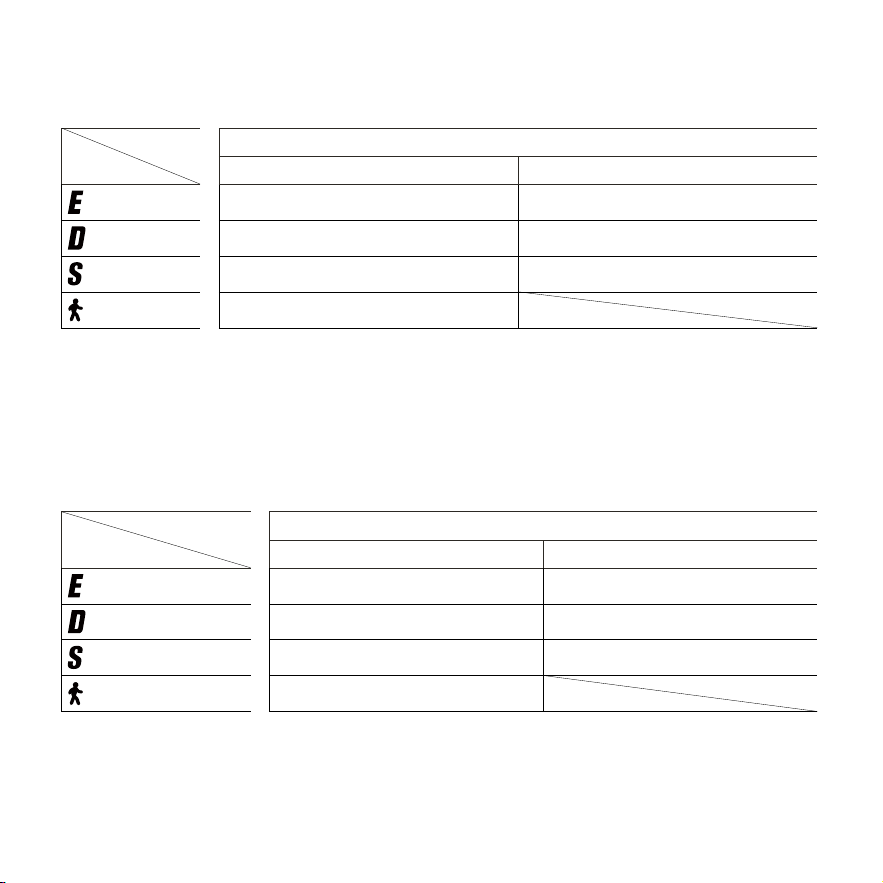
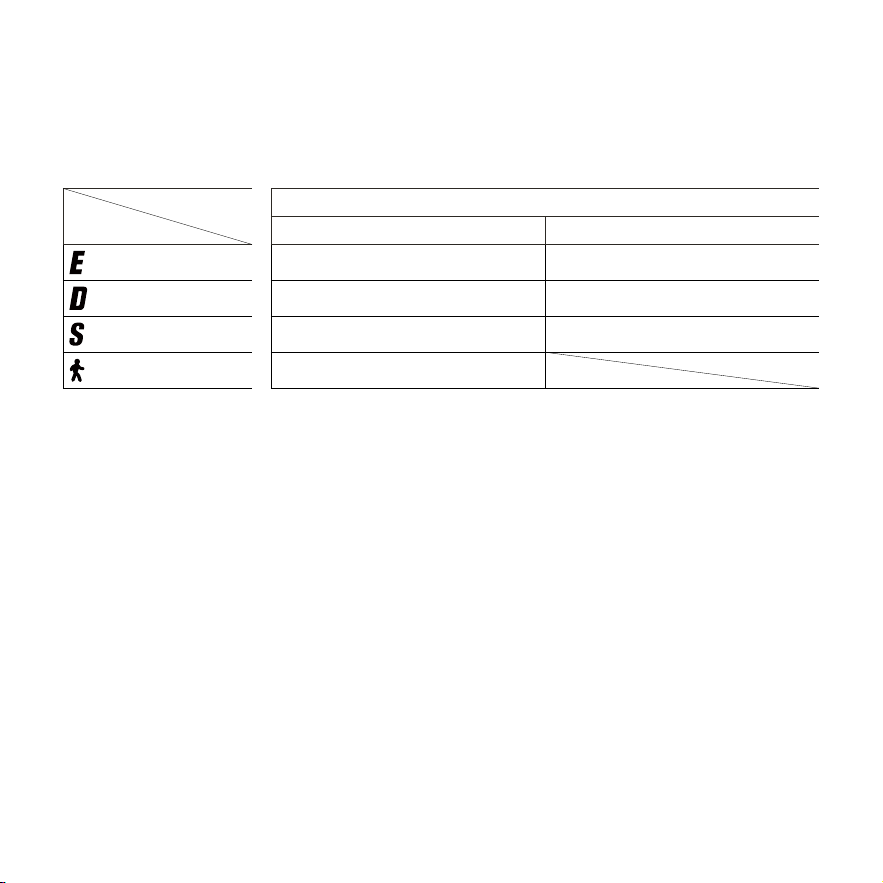
● *Ranges of Speed Modes / *Autonomies des modes de vitesse / *Alcances de modos
de velocidad / * Запас хода в разных скоростных режимах / * 速度模式續航力
EN
Mode Model
E3 Go
Speed Limit Range
(ECO Mode)
9 mph (15 km/h) Approx. 25 miles (40 km)
(Drive Mode)
15 mph (25 km/h) Approx. 16 miles (26 km)
(Sport Mode)
20 mph (32 km/h) Approx. 11 miles (18 km)
(Walk Mode)
3 mph (5 km/h)
*Ranges of Speed Modes: Ambient temperature of 77 ± 5 ℉ (25 ± 3℃ ), fully charged new battery, 165 ± 7 lbs (75 ± 3 kg)
rider weight, riding at maximum speed in each speed mode on a flat paved surface while maintaining full throttle. Test
concludes when speed drops to 60% of that speed mode's maximum, at which point the range is recorded.
*The range may vary depending on multiple factors, including load, ambient temperature, road conditions, speed, tire
pressure, wind speed, and riding habits (frequency of acceleration/deceleration, activation of energy recovery function,
etc.). Actual range will differ based on specific riding conditions.
FR
Mode Modèle
E3 Go
Limite de vitesse Autonomies
(mode ECO)
9 mi/h (15 km/h) Env. 25 miles (40 km)
(mode Conduite)
15 mi/h (25 km/h) Env. 16 miles (26 km)
(mode Sport)
20 mi/h (32 km/h) Env. 11 miles (18 km)
(mode Walk)
3 mi/h (5 km/h)
*Autonomiesdesmodesdevitesse:Températureambiantede77±5° F(25±3° C),batterieneuvecomplètementchargée,
poidsduconducteurde165±7lb(75±3kg),conduiteàlavitessemaximaledanschaquemodedevitessesurunesurface
planeetpavée,enmaintenantl'accélérateurélectroniqueàfond.Letestprendfinlorsquelavitessetombeà60%dela
vitessemaximaledecemode;l'autonomieestalorsenregistrée.
*L’autonomiepeutvarierenfonctiondeplusieursfacteurs,notammentlacharge,latempératureambiante,lesconditions
routières,lavitesse,lapressiondespneusetleshabitudesdeconduite(fréquenced’accélération/décélération,activationde
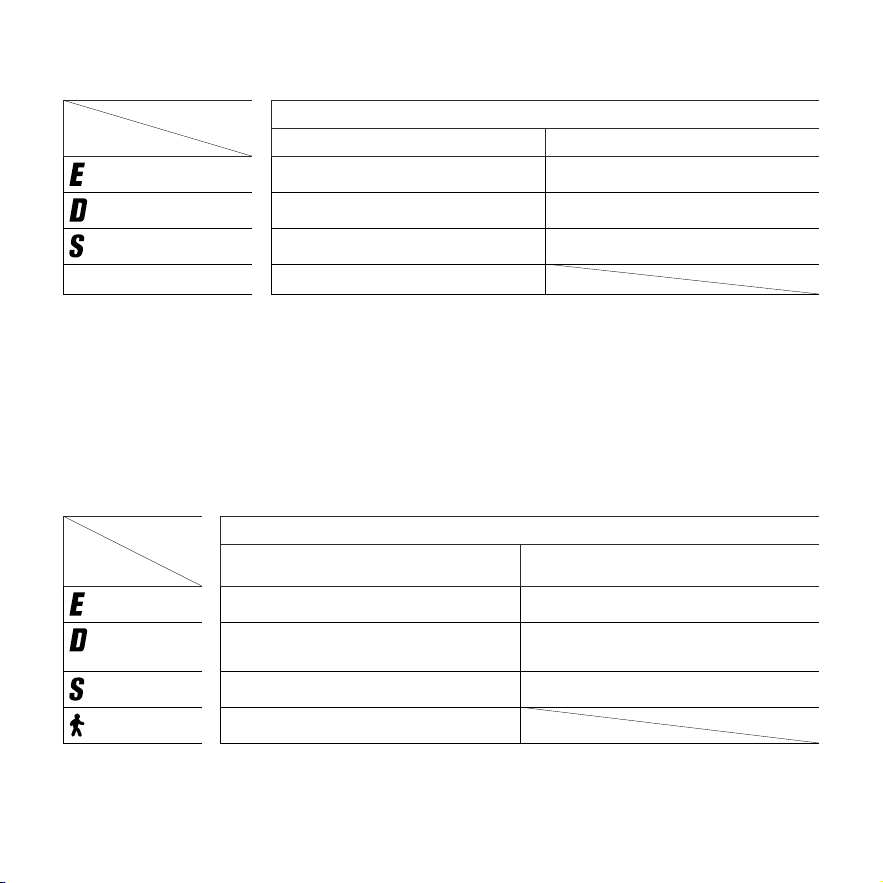
—
19
—
lafonctionderécupérationd’énergie,etc.).L’autonomieréellevarieraenfonctiondesconditionsdeconduitespécifiques.
ES
Modo Modelo
E3 Go
Límite de velocidad Alcances
(Modo ECO)
9 mph (15 km/h) Aprox. 25 miles (40 km)
(Modo Conducción)
15 mph (25 km/h) Aprox. 16 miles (26 km)
(Modo DEPORTIVO)
20 mph (32 km/h) Aprox. 11 miles (18 km)
(Modo de paseo) 3 mph (5 km/h)
*Alcancesdemodosdevelocidad:temperaturaambientede77±5℉(25±3℃),bateríanuevacompletamentecargada,peso
delconductorde165±7lb(75±3kg),conduciendoalavelocidadmáximaencadamododevelocidadsobreunasuperficie
planaypavimentadamanteniendoelaceleradorafondo.Lapruebafinalizacuandolavelocidaddesciendeal60%delamáxima
deesemododevelocidad,momentoenelqueseregistralaautonomía.
*Laautonomíapuedevariardependiendodemúltiplesfactores,incluyendolacarga,latemperaturaambiente,lascondiciones
delacarretera,lavelocidad,lapresióndelosneumáticos,lavelocidaddelvientoyloshábitosdeconducción(frecuenciade
aceleración/desaceleración,activacióndelafunciónderecuperacióndeenergía,etc.).Laautonomíarealdiferirásegúnlas
condicionesespecíficasdeconducción.
RU
Режим Модель
E3 Go
Ограничение
скорости
Запас хода
(Режим ECO)
15 км/ч (9 миль/ч) Прибл. 40 км (25 миль)
(Режим
движения)
25 км/ч (15 миль/ч) Прибл. 26 км (16 мили)
(Режим Спорт)
32 км/ч (20 миль/ч) Прибл. 18 км (11 мили)
(Режим ХОДЬБА)
5 км/ч (3 мили/ч)
*Запас хода в разных скоростных режимах: Температура окружающей среды 25 ± 3 °C (77 ± 5 °F), полностью заряж
енная новая батарея, вес ездока 75 ± 3 кг (165 ± 7 фунтов), движение с максимальной скоростью в каждом скоростн
ом режиме по ровной поверхности с твердым покрытием при постоянном максимальном положении дросселя. Тес
т завершается, когда скорость снижается до 60 % от максимальной скорости данного режима, после чего фиксиру
—
20
—
ется запас хода.
*Запас хода может меняться в зависимости от множества факторов, включая нагрузку, температуру окружающей с
реды, состояние дороги, скорость, давление в шинах и манеру движения (частота ускорений/замедлений, активац
ия функции рекуперации энергии и т. д.). Фактический запас хода может отличаться в зависимости от конкретных у
словий движения.
漢
模式 型号
E3 Go
限速 範圍
(ECO 模式)
9 英里 / 小時 (15 公里 / 小時 ) 約 25 英里 (40 公里 )
(駕駛模式)
15 英里 / 小時 (25 公里 / 小時 ) 約 16 英里 (26 公里 )
(運動模式)
20 英里 / 小時 (32 公里 / 小時 ) 約 11 英里 (8 公里 )
(步行模式)
3 英里 / 小時 (5 公里 / 小時 )
*速度模式續航力:環境溫度為77±5℉(25±3℃),全新電池充滿電,騎士體重165±7磅(75±3公斤),在平坦鋪面路面上以每個
速度模式的最大速度騎行,同時維持油門踩到底。當速度降至該速度模式最大值的60%時,測試結束,於此時記錄續航里程。
* 續 航 里 程 可 能 因 多 種 因 素 而 異 ,包 括 負 載 、環 境 溫 度 、路 況 、速 度 、胎 壓 、風 速 和 騎 乘 習 慣( 加 速 / 減 速 頻 率 、是 否 啟 動 能 源 恢 復 功 能 等 )。
實際續航里程會因特定騎乘條件而異。
—
21
—
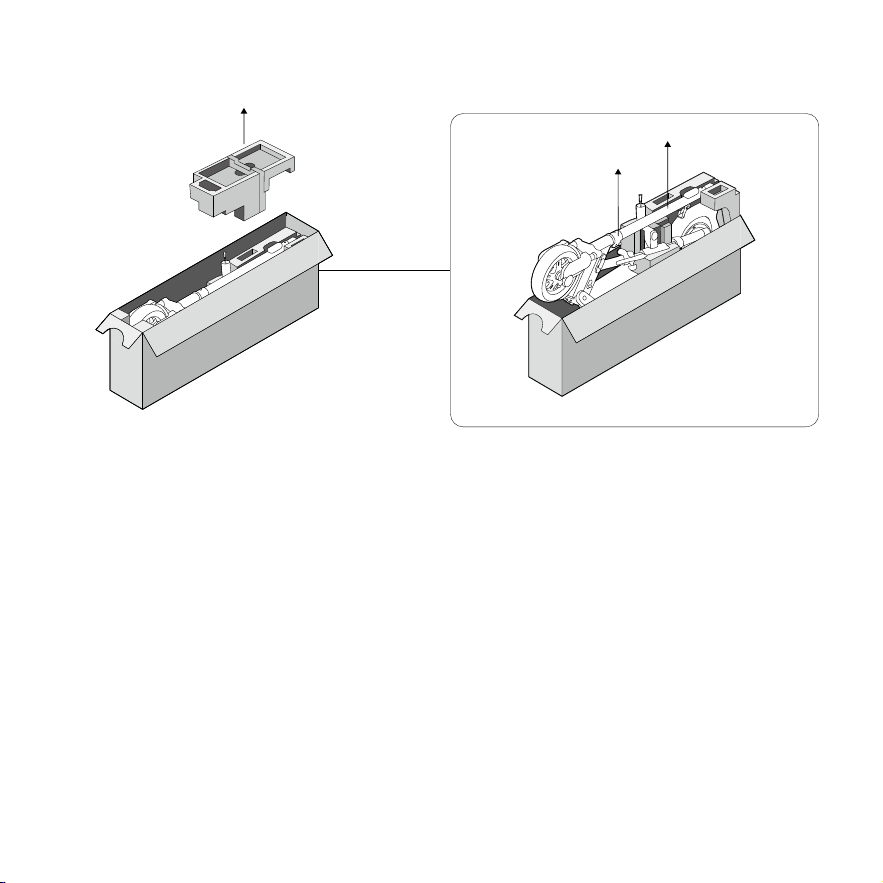
Assembly / Montage / Montaje / Сборка / 組裝
①
EN Unbox and remove the liner, then lift the stem to take out the eKickScooter.
FR Déballez et retirez la doublure, puis sortez le eKickScooter de la boîte en soulevant la tige et placez-le sur un sol plat.
ES Abra la caja y retire el revestimiento del producto; a continuación, saque el eKickScooter de la caja levantando por el
mástil y colóquelo sobre una superficie plana.
RU Откройте коробку и удалите вкладыш, затем поднимите рулевую стойку, извлеките eKickScooter из коробки и
поставьте его на ровную поверхность.
漢 打開包裝盒,取出內襯,然後抬起閥桿將 eKickScooter 從盒中取出,置於平坦地面。
EN *Assemblyisforadultsonly.
FR *L'assemblageestréservéauxadultesseulement.
ES *Montajesoloparaadultos.
RU *Сборкуразрешеновыполнятьтольковзрослым.
漢 * 只限成年人組裝。
—
22
—
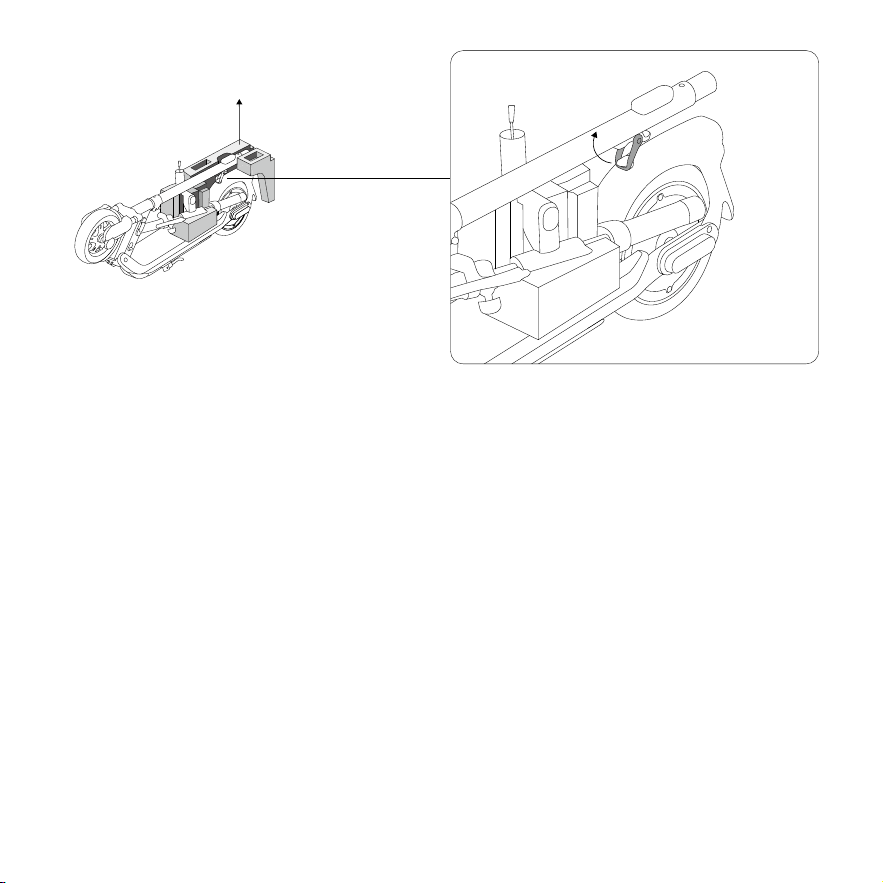
②
EN As shown in the picture, disengage the snap hook from the buckle.
FR Comme le montre l'image, dégagez le mousqueton de la boucle.
ES Como se muestra en la imagen, desenganche el mosquetón de la hebilla.
RU Отсоедините блокиратор от замка как показано на картинке.
漢 如圖所示,從帶扣上鬆開彈簧鉤。
—
23
—
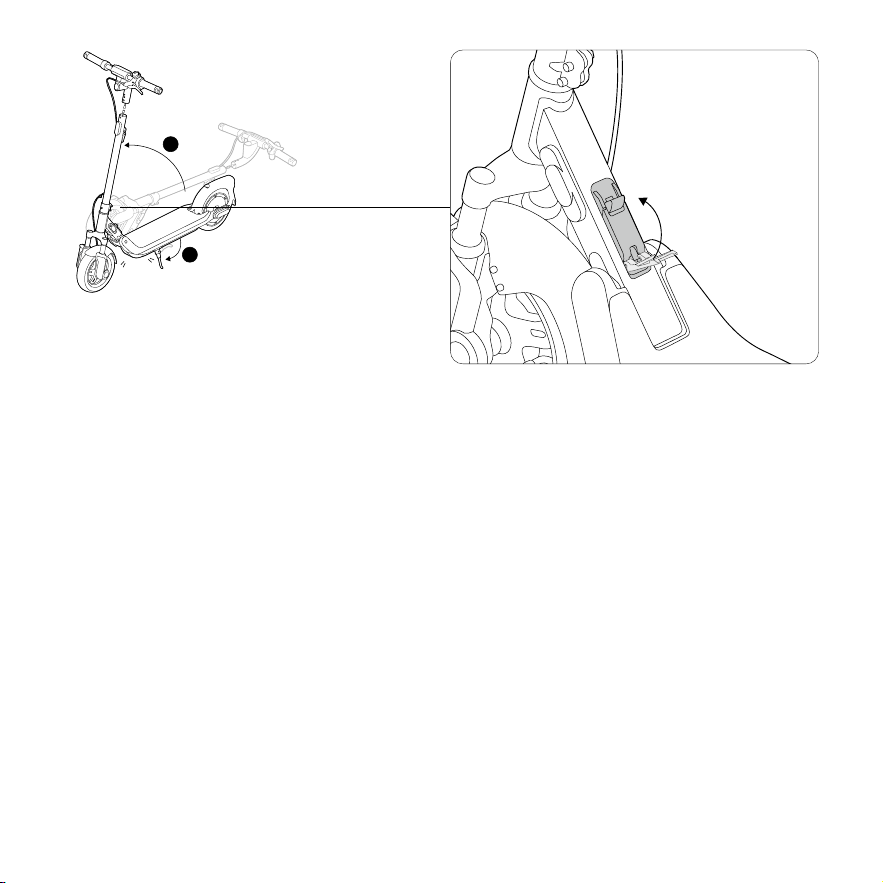
③
EN Lift the stem, unfold vehicle and the kickstand.
*Whenliftingthestem,youshallpushthestemforwardwithalittlesuddenforce,anda"click"soundmeansthefolding
mechanismisproperlyunfolded,thenclosethefoldinglatch.
FR Soulevez la tige, dépliez le véhicule et dépliez la béquille.
*Lorsquevoussoulevezlatige,vousdevezlapousserversl'avantavecunepetiteforcesoudaine,etun«clic»signifieque
lemécanismedepliageestcorrectementdéplié.Fermezensuiteleloquetdepliage.
ES Levante el mástil, despliegue el vehículo y despliegue la pata de apoyo.
*Allevantarelmástil,deberáempujarlohaciaadelanteconunapequeñasacudidahastaqueseoigaun"clic"queindicaque
elmecanismodeplegadoestácorrectamentedesplegado;acontinuación,cierreelpestilloplegable.
RU Поднимите рулевую стойку, разложите транспортное средство и разложите откидную опору.
*Поднимаярулевуюстойку,резкотолкнитееевпередснебольшимусилием,щелчокбудетозначать,чтоскладной
механизмскладыванияправильноразложен,затемзакройтезащелку.
漢 抬起閥桿 , 展開車輛与支架。
* 抬起閥桿時,稍快用力向前推閥桿,聽到「喀擦」聲後,表示折疊鉸鏈已正確展開,接著關閉折疊鎖扣。
1
2
Click
EN Close
FR Fermer
ES Cerrar
RU Закрыть
漢 合緊

—
24
—
WARNINGS / AVERTISSEMENTS / ADVERTENCIAS /
ПРЕДУПРЕЖДЕНИЯ / 警告
EN Becarefulnottopinchyourhandswhenfoldingorunfoldingthevehicle.Ensurethefoldingmechanismisproperlyunfolded
beforeriding.
FR Veillezànepasvouspincerlesmainslorsdupliageoududépliageduvéhicule.Assurez-vousquelemécanismedepliage
estcorrectementdépliéavantderouler
ES Tengacuidadodenopillarselasmanosalplegarodesplegarelvehículo.Asegúresedequeelmecanismodeplegadoesté
correctamentedesplegadoantesdeconducir.
RU Будьтеосторожны,чтобынеприщемитьрукиприскладыванииираскладываниитранспортногосредства.Перед
поездкойубедитесь,чтомеханизмскладыванияправильноразложен.
漢 折疊或展開車輛時,請小心不要夾到手。騎乘前,務必確保折疊鉸鏈是否正確展開。
—
25
—
④
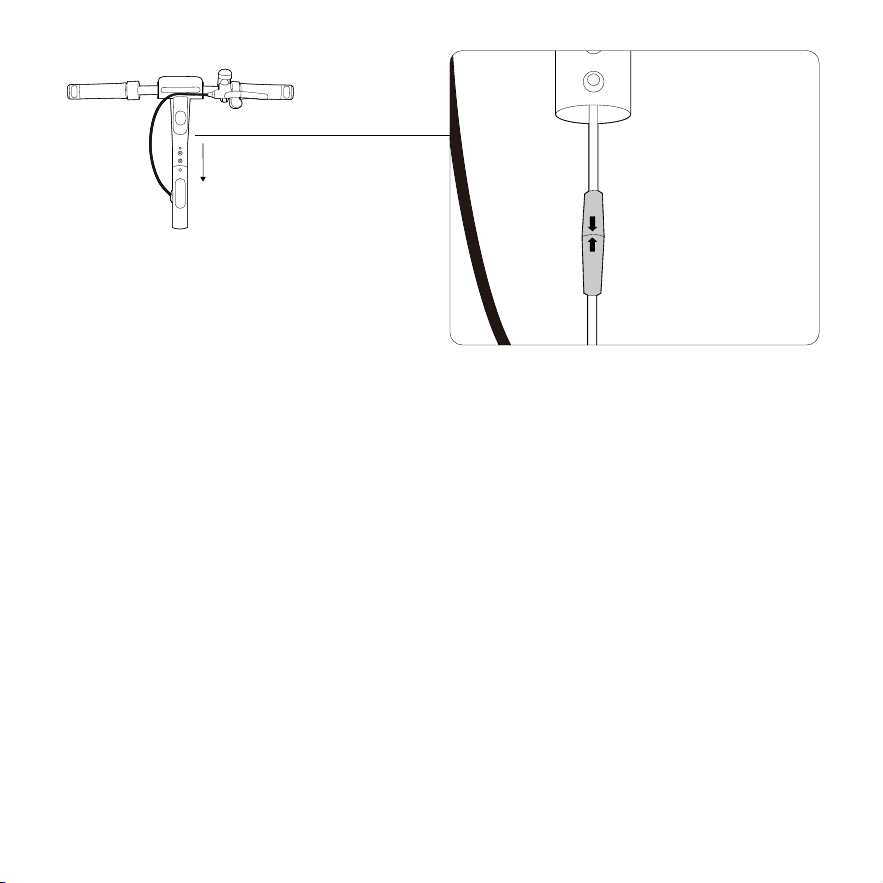
EN Tightly connect the purple connectors in stem and handlebar, with arrows on both plugs facing each other.
FR Branchez fermement les connecteurs violets de la tige et du guidon, avec les flèches sur les deux fiches se faisant face.
ES Conecte firmemente los conectores morados al mástil y el manillar, con las flechas de ambos conectores apuntándose
entre sí.
RU Плотно соедините фиолетовые разъемы на рулевой стойке и руле так, чтобы стрелки на обоих разъемах были
обращены друг к другу.
漢 緊密連接閥桿和車把中的紫色連接器,兩個接頭上的箭頭彼此相對。
EN Connect
FR Connecter
ES Conectar
RU Подключить
漢 連接
—
26
—
2
3
4
4mm
5mm
3mm
1
(9 ± 1 N·m)
⑤
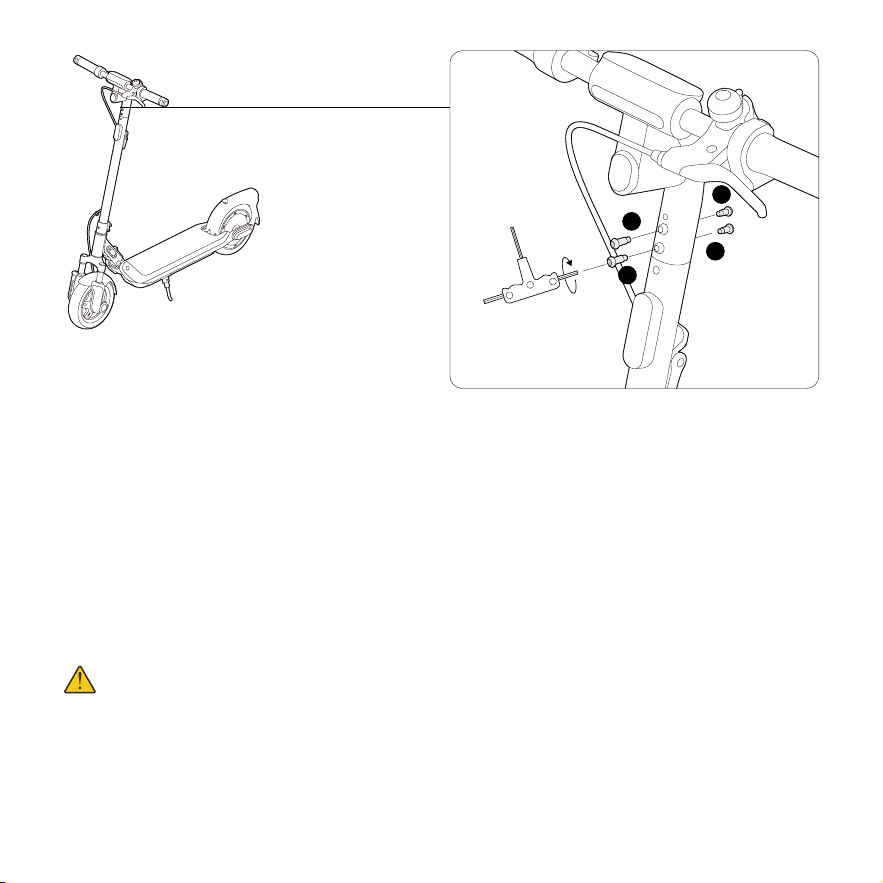
EN Slide the handlebar and the wires into the stem with the headlight facing forward. Install the four screws in order with
the 5/32'' (4 mm) Allen Wrench.
FR Faites glisser le guidon et les fils dans la tige avec le feu de route vers l’avant. Installez les quatre vis dans l’ordre avec la
clé Allen 5/32'' (4 mm).
ES Deslice el manillar y los cables dentro del eje con el faro mirando hacia adelante. Instale los cuatro tornillos en orden
con la llave Allen de 5/32'' (4 mm).
RU Вставьте руль и провода в рулевую стойку так, чтобы фара была направлена вперед. Вверните четыре винта
по порядку с помощью шестигранного ключа на 4 мм (5/32'').
漢 將車把及電線滑入閥桿,使大燈朝前。使用 5/32'' (4 毫米 ) 內六角扳手依序安裝四顆螺絲。
WARNINGS / AVERTISSEMENTS / ADVERTENCIAS /
ПРЕДУПРЕЖДЕНИЯ / 警告
EN Poweroffthescooterbeforeassembly.Thebrakecableshouldnotwraparoundthestem.
FR Éteignezlescooteravantdel’assembler.Lecâbledefreinnedoitpass’enroulerautourdelatige.
ES Apagueelpatineteantesdemontarlo.Elcabledefrenonodebeenvolversealrededordelmástil.
RU Передсборкойвыключитескутер.Тормознойтроснельзяоборачиватьвокругрулевойстойки.
漢 組裝前請關閉滑板車的電源。煞車線不應纏繞在把立管上。

—
27
—
Activation / Activation / Activación / Активация / 啟用
EN Additionaland/orsupplementalwarningsandinstructionsonhowtousetheproductarealsointheSegwayMobilityapp,
andsuchinformationand/ornoticeispartoftheusermaterialsthatanusershallknowandlearn.Annon-activatedeKickScooter
willkeepbeepingwhenturnedon,anditsspeedislimitedto6mph(10km/h).Pleasefollowthestepstoactivateyour
eKickScooter.
FR Desavertissementsetdesinstructionssupplémentaireset/oucomplémentairessurlafaçond’utiliserleproduitsetrouvent
égalementdansl’applicationSegwayMobility,etcesinformationset/ouavisfontpartiedesdocumentsd’utilisationqu’un
utilisateurdoitconnaîtreetapprendre.UneKickScooternonactivécontinued’émettredesbipslorsqu’ilestalluméetsavitesse
estlimitéeà6mi/h(10km/h).VeuillezsuivrelesétapespouractivervotreeKickScooter.
ES Lasadvertenciaseinstruccionesadicionalesocomplementariassobrecómousarelproductotambiénseencuentranenla
aplicaciónSegwayMobility,ydichainformaciónoavisoespartedelosmaterialesdelusuarioqueunusuariodebeconocery
aprender.SieleKickScooternoestáactivado,seguiráemitiendopitidoscuandoseencienda.Suvelocidadestálimitadaa6mph(10
km/h).Porfavor,sigalospasosparaactivarsueKickScooter.
RU Дополнительныеи/иливспомогательныепредупрежденияиинструкциипоиспользованиюизделиятакже
приведенывприложенииSegwayMobilityApp,итакаяинформацияи/илиуведомлениеявляютсячастью
пользовательскихматериалов,которыепользовательдолжензнатьиизучать.НеактивированныйeKickScooterбудет
издаватьзвуковойсигналпривключении,аегоскоростьограничена10км/ч(6мильвчас).Следуйтеинструкциям,
чтобыактивироватьeKickScooter.
漢 SegwayMobility應用程式含有安全使用eKickScooter的附加警示與補充說明。此外,本使用者手冊還新增了部分功能或
更新內容,這些內容在本手冊出版之日時尚未包含在本手冊中。該類資訊和通知屬於使用者應了解和學習的一部分。未啟動的
eKickScooter在開啟時會持續發出嗶聲,且其速度限制為6英里 / 小時(10公里 / 小時)。請按照步驟啟動您的eKickScooter。
—
28
—
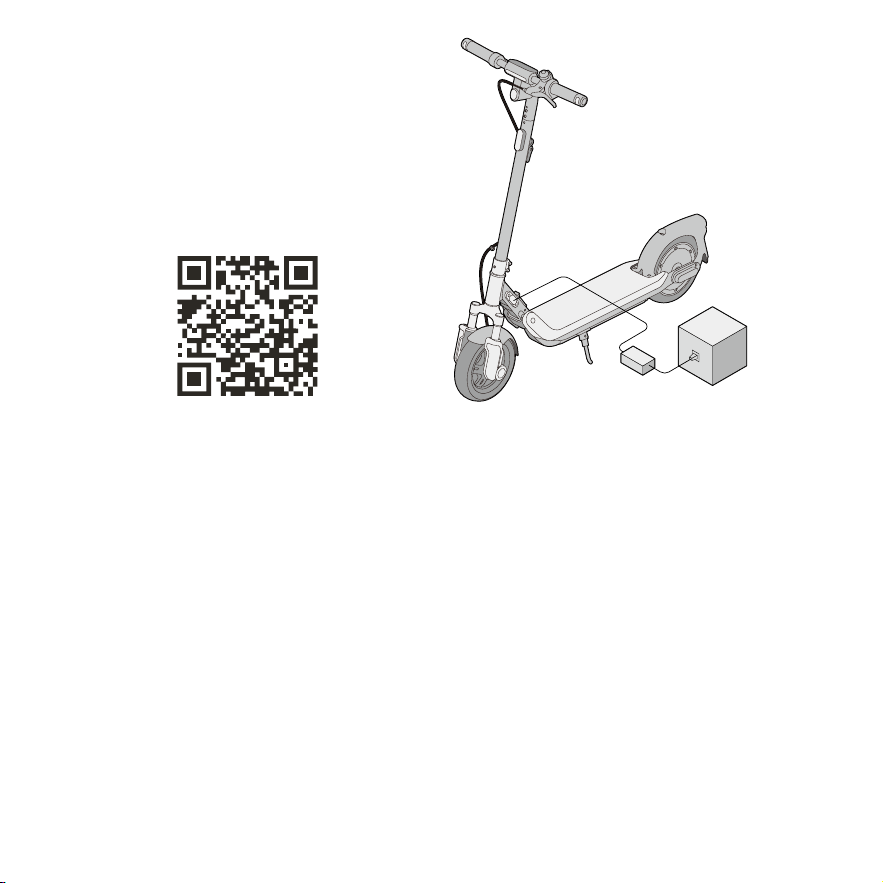
EN Scan the QR code to download the Segway Mobility
App to register and log in.
FR Scannez le QR code pour télécharger l’application
Segway Mobility et vous inscrire ou vous connecter.
ES Escanee el código QR para descargar la aplicación
Segway Mobility para registrarse o iniciar sesión.
RU Сканируйте QR-код, чтобы загрузить приложение
Segway Mobility App для регистрации и входа в систему.
漢 掃描 QR 代碼下載 Segway Mobility 應用程式進行註冊或
登入。
①
EN Charge the eKickScooter for three seconds to activate
the battery. Power on the eKickScooter.
FR Chargez le eKickScooter pendant trois secondes pour
activer la batterie. Allumez le eKickScooter.
ES Cargue el eKickScooter durante tres segundos para
activar la batería. Encienda el eKickScooter.
RU Зарядите eKickScooter в течение трех секунд, чтобы
активировать батарею. Включите eKickScooter.
漢 為 eKickScooter 充電三秒啟用電池。啟動 eKickScooter。
—
29
—
②
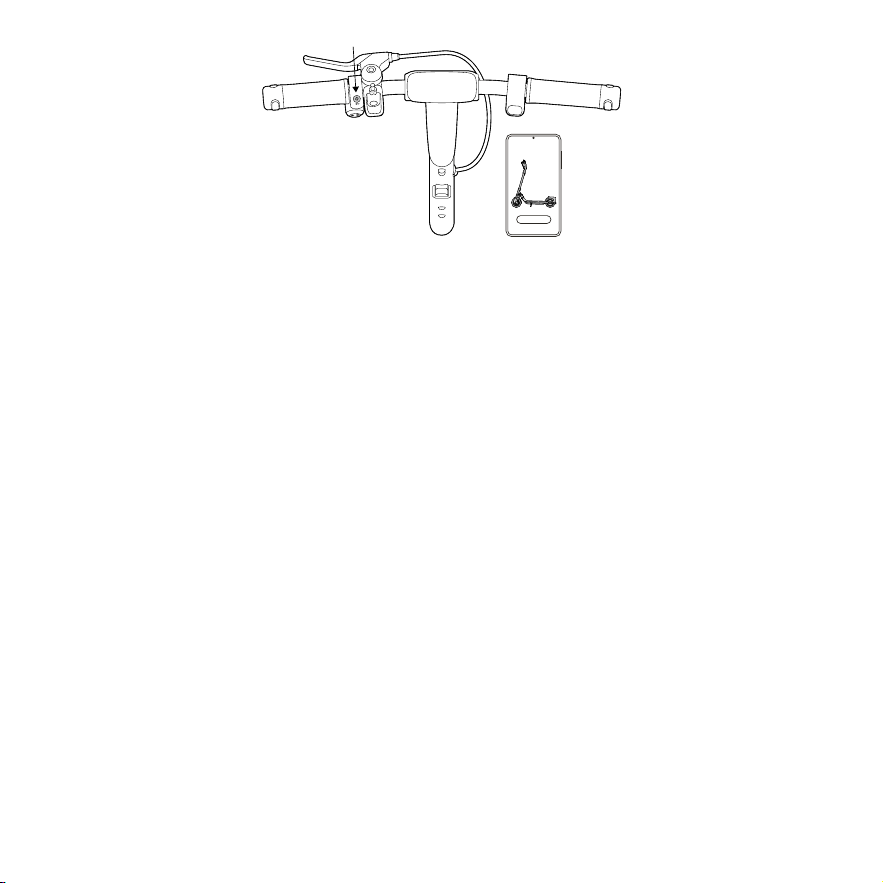
EN Tap "Search vehicle" in the App and pair with your eKickScooter. Follow the instructions and watch the Riding Safety
video. Tap to activate the eKickScooter.
*Whenthescooterisactivated,thespeedmodeissettoDrivemodebydefault.
FR Appuyez sur « Rechercher un véhicule » dans l'application et associez votre eKickScooter. Suivez les instructions et
regardez la vidéo sur la sécurité de conduite. Appuyez pour activer l’eKickScooter.
*Lorsquelescooterestactivé,lemodedevitesseestréglésurlemodeDRIVEpardéfaut.
ES Toque en "Buscar vehículo" en la aplicación y empareje con su eKickScooter. Siga las instrucciones y vea el vídeo
Seguridad de uso. Toque para activar el eKickScooter.
*Cuandoseactivaelpatinete,elmododevelocidadseestableceenModoDRIVEdeformapredeterminada.
RU Нажмите «Найти транспортное средство» в приложении и выполните сопряжение с вашим eKickScooter.
Следуйте инструкциям и посмотрите видеоролик «Безопасность во время езды». Нажмите, чтобы активировать
eKickScooter.
*Когдаскутерактивирован,поумолчаниюустанавливаетсяскоростнойрежимDrive.
漢 在 Segway Mobility 應用程式中點擊「搜尋滑板車」配對您的 eKickScooter。按照說明觀看行車安全影片。點擊啟動
eKickScooter。
*啟用滑板車時,速度模式預設為D模式。
√
Segway-Ninebot

—
30
—
App Features / Fonctionnalités de l’application / Funciones
de la aplicación / Функции приложения / 應用程式功能
EN *AsdifferentversionsoftheApp/firmwaremayvary,pleaserefertotheactualvehicle.Pleasecustomizethesefeaturesvia
theSegwayMobilityApp.
FR *Étantdonnéquelesdifférentesversionsdel’application/dufirmwarepeuventvarier,veuillezvousréférerauvéhiculeréel.
Veuillezpersonnalisercesfonctionnalitésvial’applicationSegwayMobility.
ES *Comolasdiferentesversionesdelaaplicaciónoelfirmwarepuedenvariar,consulteelvehículoreal.Personaliceestas
funcionesatravésdelaaplicaciónSegwayMobility.
RU *Посколькуразличныеверсииприложений/прошивокмогутотличаться,см.фактическоетранспортноесредство.
НастройтеэтифункциичерезприложениеSegwayMobilityApp.
漢 *因不同版本的應用程式/韌體可能各有差異,請以實際車輛為準。請使用SegwayMobility應用程式自訂這些功能。
EN Start Speed
FR Vitesse de démarrage
ES Velocidad de inicio
RU Начальная скорость
漢 起始速度
EN Traction Control System (TCS)
FR Système de contrôle de traction (TCS)
ES Sistema de control de tracción (TCS)
RU Система регулировки тягового
усилия (TCS)
漢 循跡防滑控制系統 (TCS)
EN Energy Recovery*
FR Récupération d’énergie*
ES Recuperación de energía*
RU Рекуперация энергии*
漢 能源恢復 *
EN Imperial/Metric System
FR Système impérial/métrique
ES Sistema imperial/métrico
RU Британская/метрическая
система
漢 英制 / 公制系統
EN Light Effect
FR Effet lumineux
ES Efecto de luz
RU Световой эффект
漢 照明效果
EN Customize Mode Speed
FR Personnaliser la vitesse du mode
ES Personalizar la velocidad del modo
RU Настройка скорости в режимах
漢 自訂模式速度
EN Locking Function
FR Fonction de verrouillage
ES Función de bloqueo
RU Функция блокировки
漢 鎖定功能

—
31
—
EN
*NotesonEnergyRecoveryFunction:
Function Introduction: Set the “Energy Recovery” level in the “Segway Mobility” App: Standard/Weak
○ By default, the vehicle’s Energy Recovery feature is set to “off.” Users can enable or disable the Energy Recovery
function in the “Segway Mobility” App.
○ Once Energy Recovery is enabled, releasing the throttle while riding will automatically activate this feature. The motor
will then produce a reverse electromotive force, causing the vehicle to slow down and create a noticeable sensation of
deceleration (akin to the feeling of pulling the brake lever). The intensity of Energy Recovery can be adjusted to “Standard”
or “Weak.” When set to “Standard,” the deceleration is more evident.
SafetyTips:
○ Before using the Energy Recovery feature during rides, practice in a secure environment until you are familiar with its
operation and effects. Please be aware that this feature can provide additional resistance to decelerate the vehicle when
the throttle is released, complementing the standard friction and braking mechanisms. Therefore, users need to control the
vehicle properly and maintain balance for a safe ride.
○ Energy Recovery is designed to assist, not replace, the braking system. When you need to stop or slow down safely,
please use the brake by pulling the brake lever.
○ Please exercise increased caution when using the Energy Recovery feature on downhill paths or under special riding
conditions to prevent falls. Releasing the throttle on a decline may still result in acceleration due to gravity and inertia.
Because of the acceleration, Energy Recovery will engage simultaneously, providing decelerative force, which necessitates
careful balance maintenance.
○ The Energy Recovery feature does not engage while the vehicle is in cruise control mode. Once you disengage cruise
control, releasing the throttle will initiate Energy Recovery (if already enabled in the App), creating a distinct reduction in
speed.
○ Once the Energy Recovery is enabled, it will remain on until the function is manually turned off via the “Segway
Mobility” App. The feature is not automatically disabled in the event of the vehicle shutting down or running out of battery.
The vehicle’s dashboard does not display Energy Recovery status, which can only be verified and adjusted (Standard/Weak)
in the App.
○ Please inform any borrower of the vehicle about the current Energy Recovery settings to ensure they are aware of how
the feature affects vehicle operation.
○ If you have any questions about this function, please contact Technical Support.
FR
*Remarquessurlafonctionderécupérationd’énergie:
Présentation de la fonction : définissez le niveau « Récupération d’énergie » dans l’application « Segway Mobility » :
Standard/Faible
○ Par défaut, la fonction de récupération d’énergie du véhicule est désactivée. Les utilisateurs peuvent activer ou
désactiver la fonction de récupération d’énergie dans l’application Segway Mobility.
○ Une fois Récupération d’énergie activée, relâcher l’accélérateur pendant la conduite activera automatiquement cette
fonctionnalité. Le moteur produira alors une force électromotrice inverse, provoquant le ralentissement du véhicule et

—
32
—
créant une sensation notable de décélération (comme la sensation de tirer le levier de frein). L’intensité de la récupération
d’énergie peut être ajustée à « Standard » ou « Faible ». Lorsqu’elle est réglée sur « Standard », la décélération est plus
évidente.
Conseilsdesécurité:
○ Avant d’utiliser la fonctionnalité de récupération d’énergie pendant les sorties, entraînez-vous dans un environnement
sécurisé jusqu’à ce que vous soyez familiarisé avec son fonctionnement et ses effets. Veuillez noter que cette fonctionnalité
peut fournir une résistance supplémentaire pour ralentir le véhicule lorsque l’accélérateur électronique est relâché,
complétant les mécanismes de friction et de freinage standard. Par conséquent, les utilisateurs doivent contrôler le
véhicule correctement et bien maintenir l’équilibre pour une conduite en toute sécurité.
○ La récupération d’énergie est conçue pour aider et non remplacer le système de freinage. Lorsque vous devez vous
arrêter ou ralentir en toute sécurité, veuillez utiliser le frein en tirant sur le levier de frein.
○ Pour éviter les chutes, veuillez faire preuve d’une prudence accrue lorsque vous utilisez la fonction de récupération
d’énergie sur des voies en descente ou dans des conditions de conduite spéciales. Relâcher l’accélérateur électronique
dans une descente peut encore entraîner une accélération due à la gravité et à l’inertie. En raison de l’accélération, la
récupération d’énergie s’enclenchera simultanément, fournissant une force de décélération, ce qui nécessite un maintien
prudent de l’équilibre.
○ La fonctionnalité de récupération d’énergie ne s’enclenche pas lorsque le véhicule est en mode régulateur de vitesse.
Une fois que vous avez désengagé le régulateur de vitesse, relâcher l’accélérateur déclenchera la récupération d’énergie (si
elle est déjà activée dans l’application), créant une nette réduction de la vitesse.
○ Une fois la récupération d’énergie activée, elle restera activée jusqu’à ce que la fonction soit désactivée manuellement
via l’application « Segway Mobility ». La fonction n’est pas automatiquement désactivée en cas d’arrêt ou de panne de
batterie du véhicule. Le tableau de bord du véhicule n’affiche pas l’état de récupération d’énergie, qui ne peut être vérifié
et ajusté que (Standard/Faible) dans l’application.
○ Veuillez informer tout utilisateur du véhicule des paramètres actuels de récupération d’énergie pour vous assurer qu’il
est conscient de la façon dont la fonction affecte le fonctionnement du véhicule.
○ Si vous avez des questions sur cette fonction, veuillez contacter le Support technique.
ES
*NotassobrelafunciónRecuperacióndeenergía:
Introducción a la función: Configure el nivel de "Recuperación de energía" en la aplicación Segway Mobility: Estándar/Débil
○ De forma predeterminada, la función de recuperación de energía del vehículo está desactivada. Los usuarios pueden
habilitar o inhabilitar la función de recuperación de energía en la aplicación Segway Mobility.
○ Una vez que se habilita la recuperación de energía, al soltar el acelerador mientras se conduce se activará
automáticamente esta función. A continuación, el motor producirá una fuerza electromotriz inversa, lo que hará que el
vehículo disminuya la velocidad y cree una sensación notable de desaceleración (similar a la sensación de tirar de la palanca
de freno). La intensidad de la Recuperación de energía se puede ajustar a "Estándar" o "Débil". Cuando se establece como
"Estándar", la desaceleración es más evidente.
Consejosdeseguridad:
○ Antes de utilizar la función de recuperación de energía durante la conducción, practique en un entorno seguro hasta
que se familiarice con su funcionamiento y sus efectos. Tenga en cuenta que esta función puede proporcionar resistencia

—
33
—
adicional para desacelerar el vehículo cuando se suelta el acelerador, complementando a los mecanismos de fricción y
frenado estándar. Por lo tanto, los usuarios deben controlar el vehículo adecuadamente y mantener bien el equilibrio para
un recorrido seguro.
○ La función Recuperación de energía está diseñada para asistir (no reemplazar) al sistema de frenado. Cuando necesite
detenerse o reducir la velocidad de forma segura, utilice el freno tirando de la palanca de freno.
○ Tenga mayor precaución cuando use la función Recuperación de energía cuesta abajo o en condiciones especiales
de conducción con el fin de evitar caídas. Soltar el acelerador en una pendiente puede resultar en una aceleración debido
a la gravedad y la inercia. Debido a la aceleración, la función Recuperación de energía se activará simultáneamente,
proporcionando fuerza desaceleradora, lo que requiere mantener el equilibrio con cuidado.
○ La función de recuperación de energía no se activa mientras el vehículo está en modo de control de crucero. Una vez
que desactive el control de crucero, al soltar el acelerador se iniciará la recuperación de energía (si ya está habilitada en la
aplicación), dando lugar a una clara reducción en la velocidad.
○ Una vez habilitada la recuperación de energía, permanecerá encendida hasta que la función se desactive manualmente
a través de la aplicación Segway Mobility. La función no se desactiva automáticamente en caso de que el vehículo se
apague o se quede sin batería. El panel de control del vehículo no muestra el estado de Recuperación de energía, que solo
se puede verificar y ajustar (Estándar/Débil) en la aplicación.
○ Informe a cualquier prestatario del vehículo sobre la configuración actual de recuperación de energía para asegurarse
de que sepa cómo afecta al funcionamiento del vehículo.
○ Si tiene alguna pregunta sobre esta función, comuníquese con el soporte técnico.
RU
*Примечанияпофункциирекуперацииэнергии:
Общая информация о функции: Установите уровень «Рекуперация энергии» в приложении Segway Mobility App:
Стандартный/Слабый
○ По умолчанию функция рекуперации энергии в транспортном средстве выключена. Пользователи могут
включать и отключать функцию «Рекуперация энергии» в приложении Segway Mobility App.
○ Если функция «Рекуперация энергии» включена, то при отпускании дросселя во время езды она
автоматически активируется. Затем двигатель создает обратную электродвижущую силу, заставляя транспортное
средство замедляться и создавать заметное ощущение замедления (сродни ощущению нажатия на рычаг
тормоза). Интенсивность работы функции «Рекуперация энергии» можно настроить, выбрав «Стандартный»
или «Слабый». Если установить значение «Стандартный», замедление будет более заметным.
Советыпобезопасности:
○ Прежде чем использовать функцию «Рекуперация энергии» во время поездок, потренируйтесь в безопасном
месте, пока не ознакомитесь с ее работой и эффектами. Имейте в виду, что эта функция может обеспечить
дополнительное сопротивление для замедления транспортного средства при отпускании дросселя, дополняя
стандартные фрикционные и тормозные механизмы. Поэтому пользователям необходимо правильно управлять
транспортным средством и хорошо удерживать равновесие для безопасной езды.
○ Рекуперация энергии содействует торможению, но не заменяет тормозную систему. Когда вам нужно
безопасно остановиться или замедлиться, используйте тормоз, нажав на рычаг тормоза.

—
34
—
○ Будьте предельно осторожны при использовании функции «Рекуперация энергии» на спусках или в особых
условиях езды, чтобы предотвратить падения. Отпускание дросселя на спуске может не прекратить ускорения
из-за силы тяжести и инерции. Из-за ускорения одновременно включается рекуперация энергии, обеспечивая
замедление, что требует тщательного поддержания равновесия.
○ Функция «Рекуперация энергии» не включится, если транспортное средство находится в режиме круиз-
контроля. После отключения круиз-контроля при отпускании дросселя активируется функция «Рекуперация
энергии» (если она уже включена в приложении), что приведет к заметному снижению скорости.
○ Если функция «Рекуперация энергии» включена, она будет работать до тех пор, пока ее не отключат вручную
через приложение Segway Mobility App. Функция не отключается автоматически в случае выключения
транспортного средства или разрядки аккумулятора. Приборная панель транспортного средства не отображает
статус рекуперации энергии, который можно проверить и настроить (Выкл./Стандартный/Слабый) только в
приложении.
○ Проинформируйте всех, кто пользуется транспортным средством, о текущих настройках рекуперации
энергии, чтобы они знали, как эта функция влияет на работу транспортного средства.
○ Если у вас возникли вопросы по этой функции, обратитесь в службу технической поддержки.
漢
*能源恢復功能注意事項:
功能介紹:在「Segway Mobility」應用程式設定「能源恢復」等級:標準 / 弱
○預設情況下,車輛的能源恢復功能設定為「關閉」。使用者可以在「Segway Mobility」應用程式啟用或停用能源恢復功能。
○啟用能源恢復功能後,騎行時放開油門將自動啟動此功能。接著馬達將產生反電動勢,使車輛減速並產生明顯減速感(類似拉動煞
車拉桿的感覺)。能源恢復的強度可調整為「標準」或「弱」。當設定為「標準」時,減速變得更明顯。
安全提示:
○在騎行期間使用能源恢復功能之前,請先在安全的環境練習,直到熟悉其操作及效果為止。請注意,除了標準摩擦力與煞車機制外,
此功能會在放開油門時帶來額外阻力使車輛減速。因此,使用者需要謹慎控制車輛並保持平衡,確保安全騎行。
○ 能源恢復重在輔助,而不是取代煞車系統。您需要安全停車或減速時,請拉動煞車拉桿來煞車。
○ 在下坡路段或特殊騎行條件下使用能源恢復功能時,請格外小心,以免摔倒。下坡騎行時,放開油門仍可能因重力和慣性導致加速。
由於加速,能源恢復將同時發揮作用使車輛減速,此時需要小心維持平衡。
○ 當車輛處於定速巡航控制模式時,能源恢復功能不會啟動。一旦關閉定速巡航控制,放開油門將啟動能源恢復(如果已在應用程式
啟 用 ),並 明 顯 減 速 。
○ 一旦啟用能源恢復後,它將保持為開啟狀態,直到透過「Segway Mobility」應用程式手動關閉該功能為止。在車輛關機或電池耗盡時,
該功能不會自動停用。車輛儀錶盤不會顯示能源恢復狀態,只能在應用程式驗證並調整(標準 / 弱)。
○ 請告知車輛的任何借用者目前的能源恢復設定,以確保他們瞭解該功能如何影響車輛行進。
○ 如果您對此功能有任何疑問,請聯絡技術支援。

—
35
—
● CodeLock
EN Enable / Disable CodeLock via Segway Mobility App, go to the homepage >> More Functions >> Locking Function
FR Activez/désactivez CodeLock via l’application Segway Mobility, sur la Page d’accueil > Plus de fonctions > Fonction de
verrouillage
ES Habilite/inhabilite CodeLock a través de la aplicación Segway Mobility, en la página de inicio >> Más funciones >>
Función de bloqueo
RU Включите/выключите CodeLock через приложение Segway Mobility App, перейдите на главную страницу >>
Дополнительные функции >> Функция блокировки
漢 透過 Segway Mobility 應用程式啟用 / 停用 CodeLock,在「主頁」>>「更多功能」>>「鎖定功能」。
XXXX
①
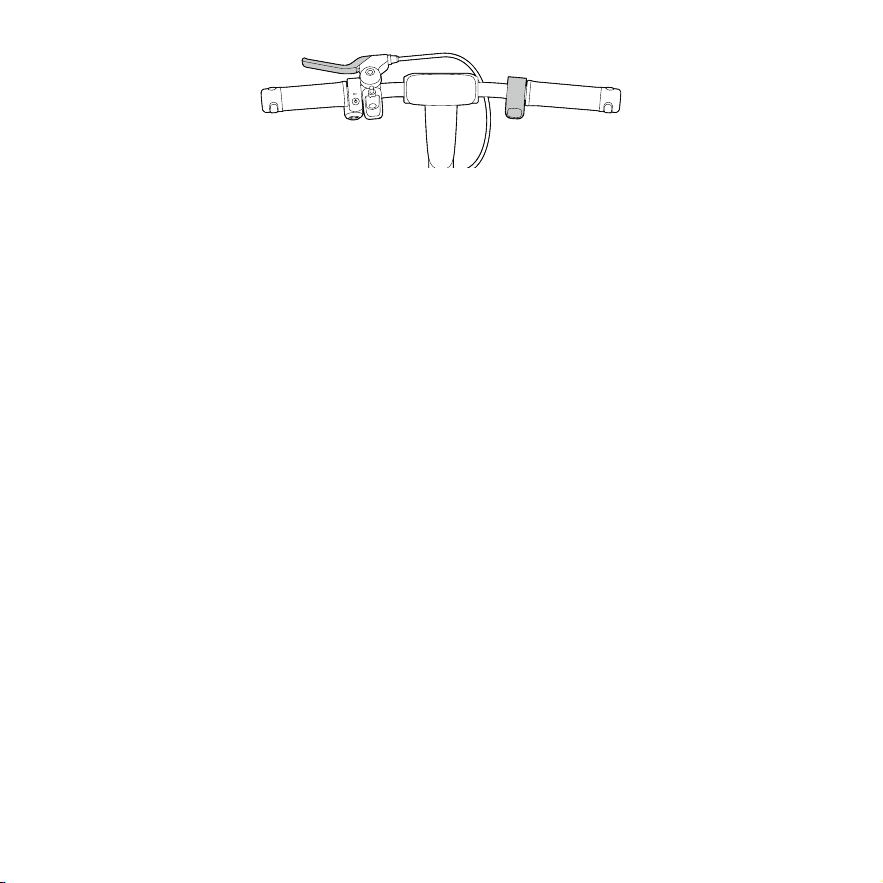
EN Enable Digital CodeLock via the App. Set a four-digit password (e.g. 1234).
FR Activez CodeLock numérique via l’application. Définissez un mot de passe à quatre chiffres (par exemple, 1234).
ES Habilite CodeLock digital a través de la aplicación. Establezca una contraseña de cuatro dígitos (por ejemplo, 1234).
RU Включите «Цифровой CodeLock» через приложение. Установите четырехзначный пароль (например, 1234).
漢 透過應用程式啟用數字密碼鎖。設定四位數密碼(例如 1234)。
②
EN Lock ekickscooter via Segway Mobility App before leaving the ekickscooter.
FR Verrouillez la trottinette électrique via l'application Segway Mobility avant de quitter la trottinette électrique.
ES Bloquee el patinete eléctrico a través de la aplicación Segway Mobility antes de abandonar el patinete eléctrico.
RU Перед уходом заблокируйте ekickscooter через приложение Segway Mobility App.
漢 在離開電動踏板前,請通過 Segway Mobility 應用程式鎖定電動踏板。
—
36
—
③
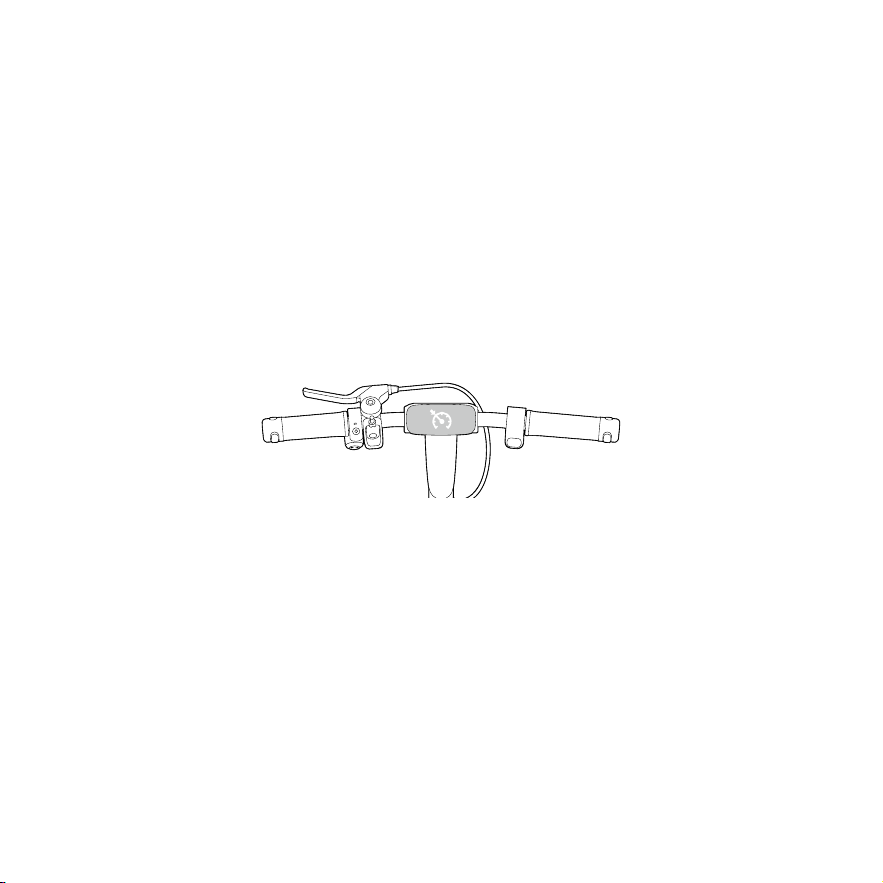
EN Before riding away, operate direction indicator buttons (or throttle) and brake lever to enter unlock passcode. The
number increases by one each time you press the " → "button or press the throttle, and decreases by on each time you
press the " ← "button. Squeeze any brake lever to confirm each password entered.
FR Avant de partir, actionnez les boutons des clignotants (ou l'accélérateur) et le levier de frein pour entrer le code de
déverrouillage. Le chiffre augmente d'une unité à chaque pression sur le bouton « → » ou sur l'accélérateur, et diminue d'une
unité à chaque pression sur le bouton « ← ». Serrez n’importe quel levier de frein pour confirmer chaque numéro de mot
de passe saisi.
ES Antes de arrancar, accione los botones del intermitente (o el acelerador) y la palanca de freno para introducir el código
de desbloqueo. El número aumenta en uno cada vez que pulsa el botón « → » o el acelerador, y disminuye en uno cada vez
que pulsa el botón « ← ». Presione cualquier palanca de freno para confirmar cada contraseña introducida.
RU Перед тем как тронуться с места, используйте кнопки указателей поворота (или дроссель) и рычаг тормоза дл
я ввода кода разблокировки. Число увеличивается на единицу при каждом нажатии кнопки «→» или дросселя и у
меньшается на единицу при каждом нажатии кнопки «←». Нажмите на
любой рычаг тормоза для подтверждения каждого введенного пароля.
漢 在駛離前,請操作方向燈按鈕(或油門)及煞車拉桿以輸入解鎖密碼。每按一次「→」按鈕或油門,數字增加一;每按一次「←」按鈕,
數字減少一。按下任一側煞車拉桿確認輸入的每個密碼。
—
37
—
● Cruise Control / Régulateur de vitesse / Control de crucero / Круиз - контроль / 定速巡
航控制
①
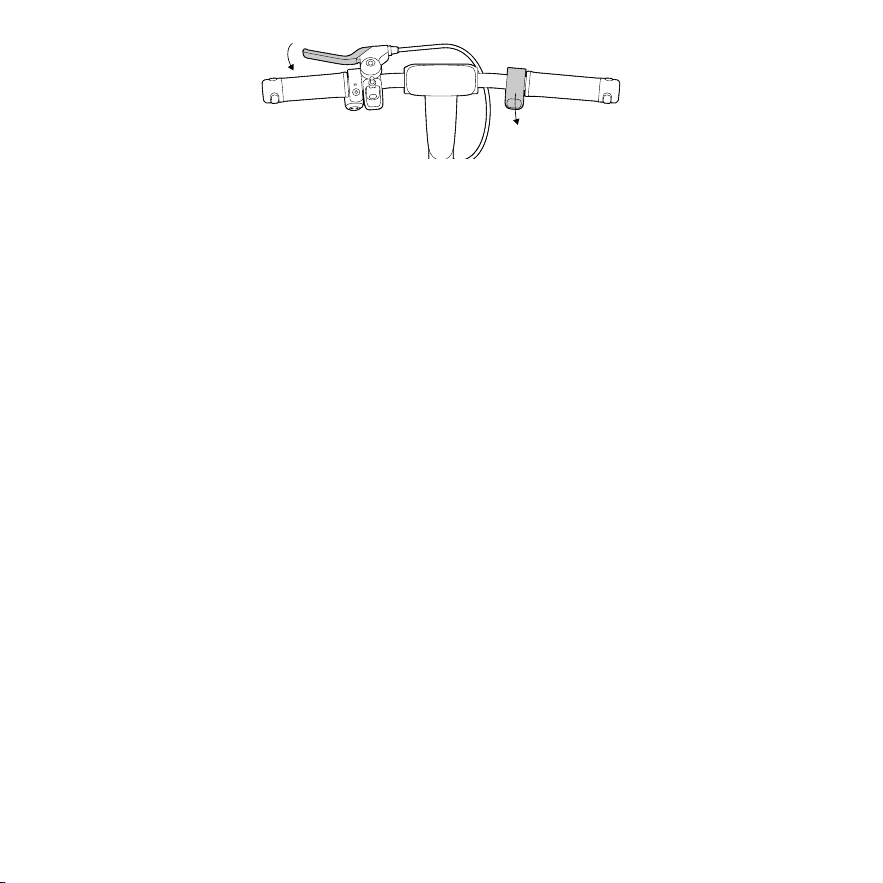
EN Enable Cruise Control in Segway Mobility App. When the speed > 3 mph (5 km/h), press and hold the throttle for more
than three seconds to enable Cruise Control.
FR Activez le régulateur de vitesse dans l'application Segway Mobility. Lorsque la vitesse est supérieure à 3 mi/h (5 km/
h), appuyez et maintenez enfoncé l’accélérateur électronique pendant plus de trois secondes pour activer le régulateur de
vitesse.
ES Habilite el control de crucero en la aplicación Segway Mobility. Cuando la velocidad sea > 3 mi/h (5 km/h), presione y
mantenga presionado durante más de tres segundos el acelerador para habilitar el control de crucero.
RU Включите круиз-контроль в приложении Segway Mobility. Если скорость > 5 км/ч (3 миль в час), нажмите и
удерживайте дроссель более трех секунд, чтобы включить круиз-контроль.
漢 在 Segway 行動應用程式中啟用定速巡航控制。當速度 > 5 公里 / 小時(3 英里 / 小時)時,按住油門叁秒鐘以上即可啟用定速
巡航控制功能。
②
EN A long beep will sound and the cruise control icon will remain on when the vehicle enters cruise control.
FR Un bip long sera émis et l'icône du régulateur de vitesse restera allumée lorsque le véhicule passera en mode
régulateur de vitesse.
ES Sonará un pitido largo y el icono de control de crucero permanecerá encendido cuando el vehículo entre en control de
crucero.
RU Когда транспортное средство переходит в режим круиз-контроля, раздается длинный звуковой сигнал и
загорается значок круиз-контроля.
漢 滑板車進入定速巡航控制時,將發出一次綿長的嗶嗶聲,且定速巡航控制圖示將保持亮起。
—
38
—
③
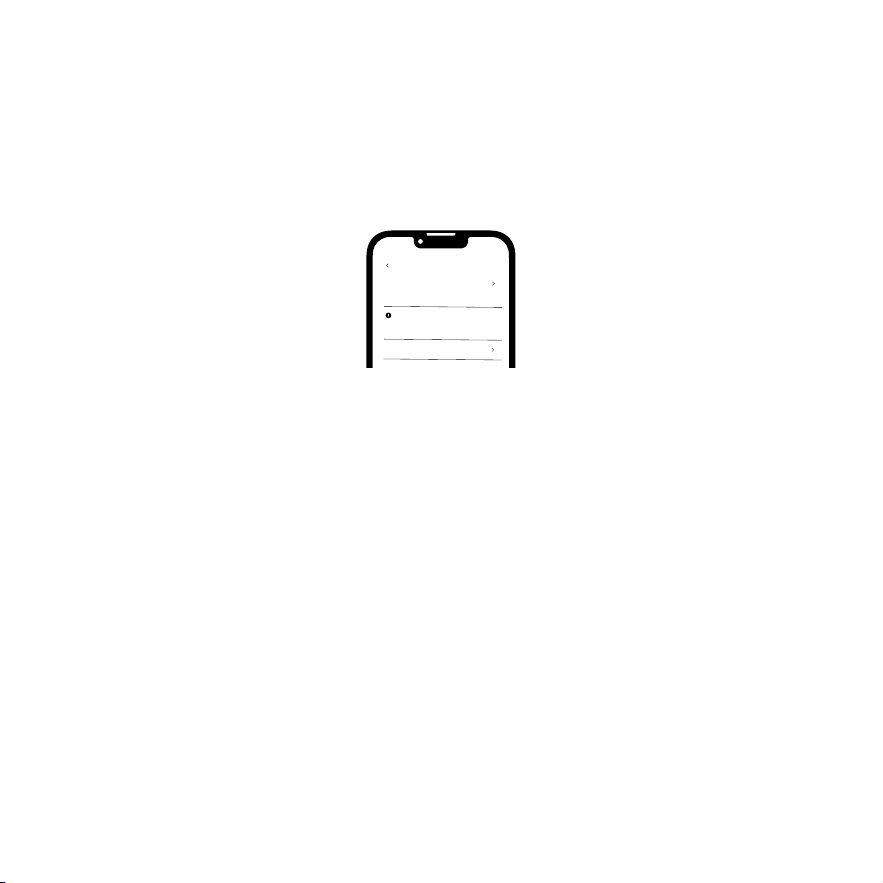
EN Switch speed mode, press after releasing throttle or squeeze the brake lever to exit the cruise control.
FR Changez de mode de vitesse, appuyez après avoir relâché l'accélérateur électronique ou serrez le levier de frein pour
quitter le régulateur de vitesse.
ES Cambie de modo de velocidad, presione después de soltar el acelerador o apriete la palanca de freno para salir del
control de crucero.
RU Переключите скоростной режим, нажмите после отпускания дросселя или выжмите рычаг тормоза, чтобы
выйти из режима круиз-контроля.
漢 按切換速度模式,鬆開油門後按下或按壓煞車拉桿,即可退出定速巡航控制功能。
EN
Note:CruiseControlisdisabledwhenthebatterylevelislowerthan15%.TheCruiseControlwillexitautomaticallywhenthe
speedisslowerthanthestartspeed(ifthestartspeedissetto< 2mph(3km/h),CruiseControlwillexitwhenthespeedis
slowerthan2mph(3km/h)).
FR
Remarque:Lerégulateurdevitesseestdésactivélorsqueleniveaudebatterieestinférieurà15%.Lerégulateurdevitessese
désactiveautomatiquementlorsquelavitesseestinférieureàlavitessededémarrage(silavitessededémarrageestrégléesur
<3km/h),lerégulateurdevitessesedésactivelorsquelavitesseestinférieureà3km/h.
ES
Nota:elcontroldecrucerosedesactivacuandoelniveldebateríaesinferioral15%.Elcontroldecrucerosedesactivará
automáticamentecuandolavelocidadseainferioralavelocidaddeinicio[silavelocidaddeiniciosehafijadoamenosde3km/h(2
mph),elcontroldecrucerosedesactivarácuandolavelocidadseainferiora3km/h(2mph)].
RU
Примечание . Системакруиз - контроляотключается ,когдауровеньзарядабатареиопускаетсяниже15%.Системакруиз -
контроляотключаетсяавтоматически ,когдаскоростьстановитсянижезаданнойначальнойскорости( еслиначальнаяск
оростьустановленаназначение< 3км / ч(2миль / ч ),системакруиз - контроляотключается ,когдаскоростьстановится
ниже3км / ч(2миль / ч )).
漢
註:當電池電量低於15%時,定速巡航控制功能將停用。當車速低於起始速度時,定速巡航控制功能將自動退出(如果起始速度設
定為< 3公里 / 小時(2英里 / 小時),則當車速低於3 公里 / 小時(2英里 / 小時)時,定速巡航控制功能將退出)。

—
39
—
WARNINGS / AVERTISSEMENTS / ADVERTENCIAS /
ПРЕДУПРЕЖДЕНИЯ / 警告
EN Thevehiclewillcontinueandmaintainitsspeedwhenreleasingthethrottle,andundercruisecontrolmode,onceitis
engaged,releasingthethrottlewillnotallowyoutolowerspeedorstop.Ifsomeoneelsewantstouseyourvehicle,pleaseinform
him/heroftheCruiseControlsettingsinadvance.AnyquestionaboutCruiseControl,pleasecontacttechnicalsupport.
FR Levitessecontinueraetmaintiendrasavitesselorsquevousrelâchezl’accélérateurélectronique,etenmoderégulateurde
vitesse,unefoisqu’ilestengagé,relâcherl’accélérateurélectroniquenevouspermettrapasderéduirelavitesseoudevous
arrêter.Siquelqu’und’autresouhaiteutiliservotrevéhicule,veuillezl’informeràl’avancedesparamètresdurégulateurdevitesse.
Pourtoutequestionsurlerégulateurdevitesse,veuillezcontacterlesupporttechnique.
ES Elvehículocontinuaráymantendrálavelocidadalsoltarelacelerador,yenelmododecontroldecrucero,unavez
conectado,soltarelaceleradornolepermitiráreducirlavelocidadodetenerse.Siotrapersonadeseautilizarsuvehículo,
infórmeleconantelacióndelaconfiguracióndelcontroldecrucero.Sitienecualquierdudasobreelcontroldecrucero,póngase
encontactoconelsoportetécnico.
RU Транспортноесредствопродолжитдвижениеибудетсохранятьскоростьприотпусканиидросселя .Послевключения
режимакруиз - контроляотпусканиедросселянепозволитснизитьскоростьилиостановиться .Есликто - тодругойхоче
твоспользоватьсявашимтранспортнымсредством ,заранеесообщитеемуонастройкахкруиз - контроля .Повсемвопр
осамокруиз - контролеобращайтесьвслужбутехническойподдержки .
漢 鬆開油門時,車輛會繼續前行並保持行進速度。巡航控制模式下,一旦啟用,即使鬆開油門也不會減低速度或停止。如果其他
人想使用您的車輛,請提前告知他 / 她定速巡航控制設定。針對定速巡航控制有任何疑問,請聯絡技術支援。
—
40
—
Apple Find My Network / Réseau Apple Localiser / Red
Buscar de Apple / Сеть Apple Локатор / Apple「尋找」網絡
● Add Vehicle (Use Method A or B) / Ajouter un véhicule (utilisez la méthode A ou B)
Añadir vehículo (Utilice el método A o B) / Добавить транспортное средство
( используйте способ A или B) / 添加車輛(使用方法 A 或 B)
Locating vehicle
Find My function
Tip
No mobile number has been bound with this vehicle
How to bind?
FAQ
Settings on related functions can be set via Find
My App.
Enabled
Method A / Méthode A / Método A / Способ А / 方法 A
EN Connect vehicle with Segway Mobility App, and enable Find My go to the homepage >> More Functions >> Locating
vehicle >> Enable, then it will automatically switch to the Find My app. Tap "+"and tap "Add Other Item", then choose your
vehicle and follow the instructions to pair it with Find My.
FR Connectez le véhicule avec l’application Segway Mobility et activez Localiser sur la page d’accueil >> Plus de fonctions
>> Localiser le véhicule >> Activer, puis il passera automatiquement à l’application Localiser. Appuyez sur « + » et appuyez
sur « Ajouter un autre élément », puis choisissez votre véhicule et suivez les instructions pour l’associer avec Localiser.
ES Conecte el vehículo con la aplicación Segway Mobility y active Buscar en la página de inicio >> Más funciones >>
Localizar vehículo >> Activar; a continuación, cambiará automáticamente a la aplicación Buscar. Toque "+" y "Añadir otro
elemento"; a continuación, elija su vehículo y siga las instrucciones para emparejarlo con Buscar.
RU Подключите транспортное средство к приложению Segway Mobility App и включите функцию «Локатор» на
главной странице >> Дополнительные функции >> Определение местоположения транспортного средства >>
Включить, после чего оно автоматически переключится на приложение «Локатор». Нажмите «+», «Добавить
другой элемент», затем выберите свое транспортное средство и следуйте инструкциям, чтобы выполнить
сопряжение с приложением «Локатор».
漢 連線車輛與 Segway Mobility 應用程式,前往首頁 >>「更多功能」>>「定位車輛」>>「啟用」即可啟用「尋找」,接著將自動切換至「尋
找」應用程式。點擊「+」並點選「新增其他項目」,接著選擇您的車輛,並按照指示配對「尋找」。
—
41
—
×3
Method B / Méthode B / Método B / Способ В / 方法 B
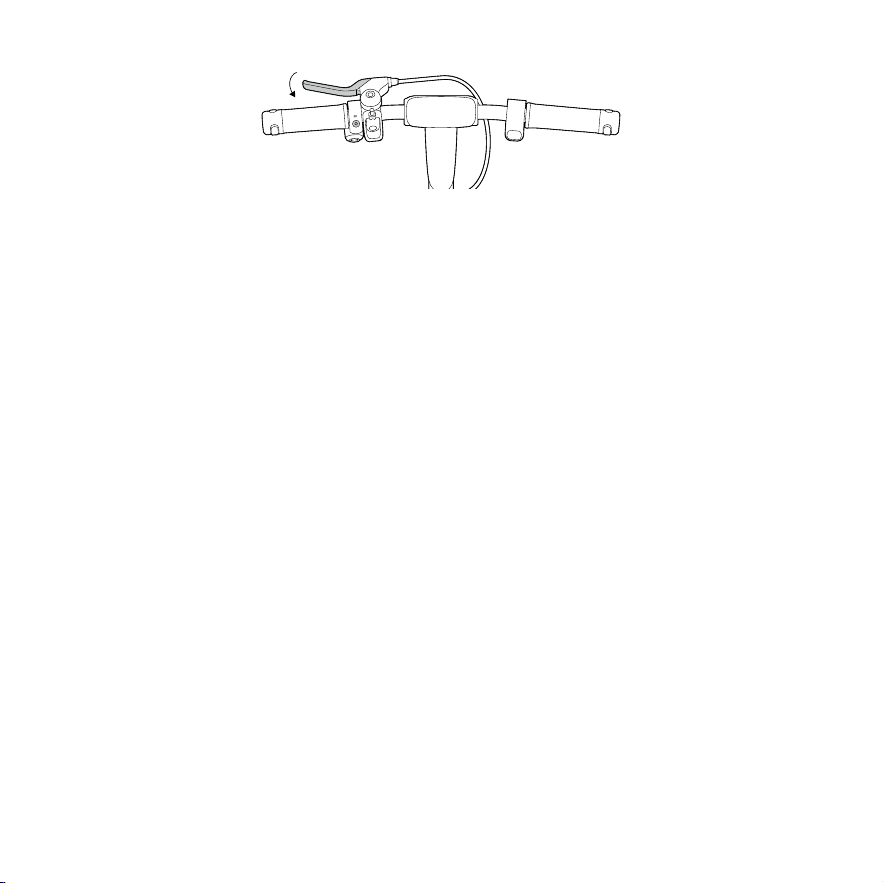
EN Launch Find My app on an iPhone or iPad, Tap + then tap Add Other Item ⊕ . Power on the vehicle, and pair vehicle
(unlocked) with Apple Find My by squeezing the brake lever three times, pressing the power button once, then choosing
the vehicle in the Find My app and following the on-screen instructions to pair it with Find My.
FR Lancez l’application Localiser sur un iPhone ou un iPad, appuyez sur + puis appuyez sur Ajouter un autre élément ⊕ .
Allumez le véhicule et associez le véhicule (déverrouillé) avec Apple Localiser en appuyant trois fois sur le levier de frein, en
appuyant une fois sur le bouton marche/arrêt, puis en choisissant le véhicule dans l’application Localiser et en suivant les
instructions à l’écran pour l’associer avec Localiser.
ES Inicie la aplicación Buscar en un iPhone o iPad, toque + y, a continuación, toque Añadir otro elemento ⊕ . Encienda
el vehículo y emparéjelo (desbloqueado) con Buscar de Apple apretando la palanca de freno tres veces, pulsando el
botón de encendido una vez, eligiendo el vehículo en la aplicación Buscar y siguiendo las instrucciones de la pantalla para
emparejarlo con Buscar.
RU Запустите приложение «Локатор» на iPhone или iPad, нажмите «+», затем нажмите «Добавить другой элемент
⊕». Включите транспортное средство и выполните сопряжение транспортного средства (разблокированного)
с Apple Локатор, трижды нажав рычаг тормоза, один раз нажав кнопку питания, затем выбрав транспортное
средство в приложении «Локатор» и следуя инструкциям на экране, чтобы выполнить сопряжение с приложением
«Локатор».
漢 在 iPhone 或 iPad 上開啟「尋找」應用程式,點擊「+」,再點選「新增其他項目 ⊕」發動車輛後,配對車輛(已解鎖)與 Apple「尋
找」;方法是擠壓煞車拉桿三下,按壓電源按鈕一次,接著在「尋找」應用程式中選擇車輛,並按照畫面上的指示與「尋找」進行配對。
—
42
—
● RESET (Use Method A or B) / RÉINITIALISER (utilisez la méthode A ou B) / RESET
(Methode A oder B verwenden) / RESET (zastosuj metodę A lub B) / СБРОС
( используйте способ A или B) / RESET(使用方法 A 或 B)
Method A / Méthode A / Método A / Способ А / 方法 A
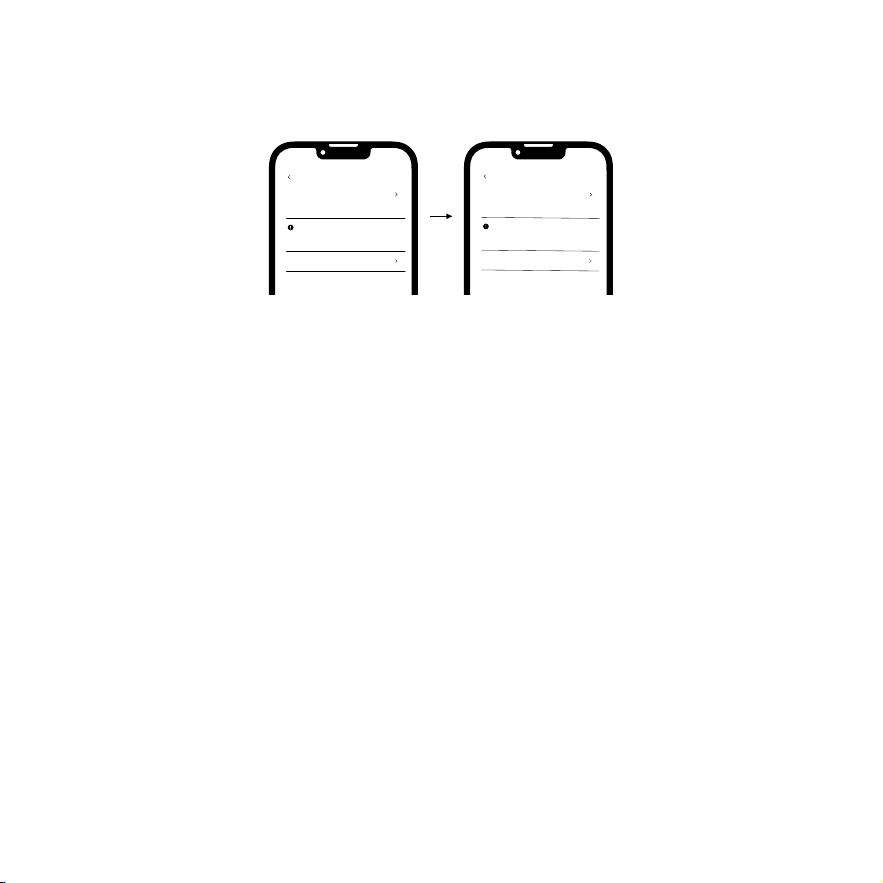
EN Connect vehicle with Segway Mobility App, and disable Find My go to the homepage >> More Functions >> Locating
vehicle >> Disable, then manually remove your vehicle from Find My app.
FR Connectez le véhicule avec l’application Segway Mobility et désactivez Localiser sur la page d’accueil >> Plus de
fonctions >> Localiser le véhicule >> Désactiver, puis supprimez manuellement votre véhicule de l’application Localiser.
ES Conecte el vehículo con la aplicación Segway Mobility y desactive Buscar mi en la página de inicio >> Más funciones >>
Localizar vehículo >> Desactivar, después elimine manualmente su vehículo de la aplicación Buscar mi.
RU Подключите транспортное средство к приложению Segway Mobility App и отключите функцию «Локатор» на
главной странице >> Дополнительные функции >> Определение местоположения транспортного средства >>
Отключить, а затем вручную удалите свое транспортное средство из приложения «Локатор».
漢 連線車輛與 Segway Mobility 應用程式,並前往首頁 >>「更多功能」>>「定位車輛」>「停用」,接著手動從「尋找」應用程式中移
除您的車輛。
Locating vehicle
Find My function
Tip
No mobile number has been bound with this vehicle
How to bind?
FAQ
Settings on related functions can be set via Find
My App.
Enabled
Locating vehicle
Find My function
Tip
No mobile number has been bound with this vehicle
How to bind?
FAQ
Settings on related functions can be set via Find
My App.
Disabled
—
43
—
Method B / Méthode B / Método B / Способ В / 方法 B
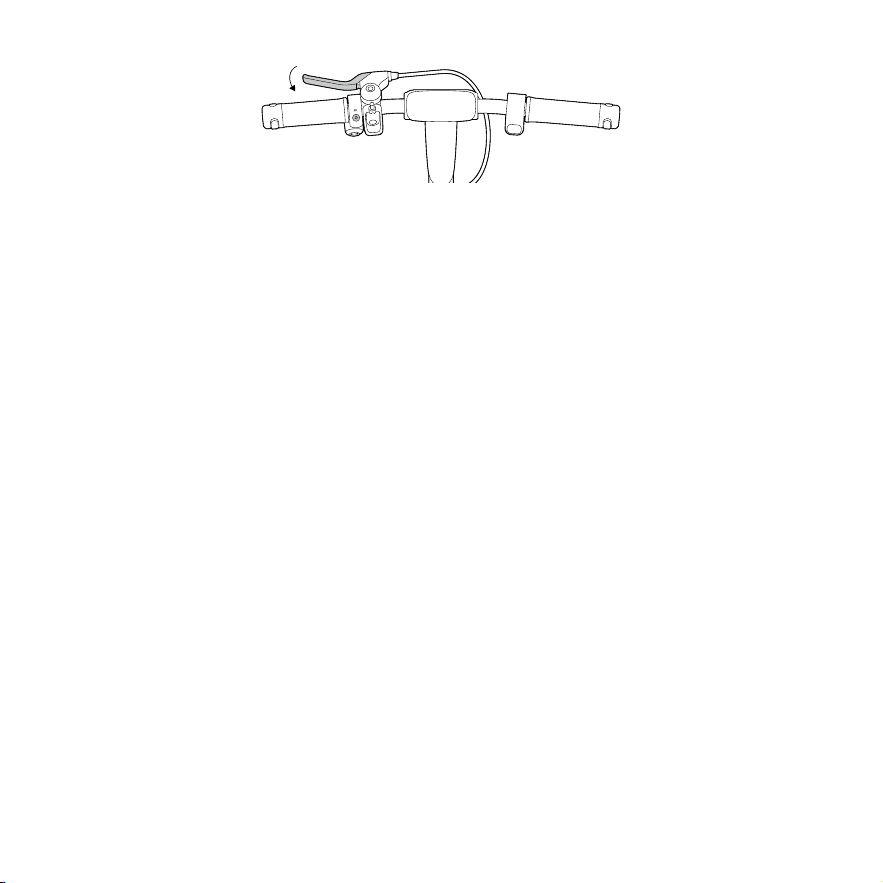
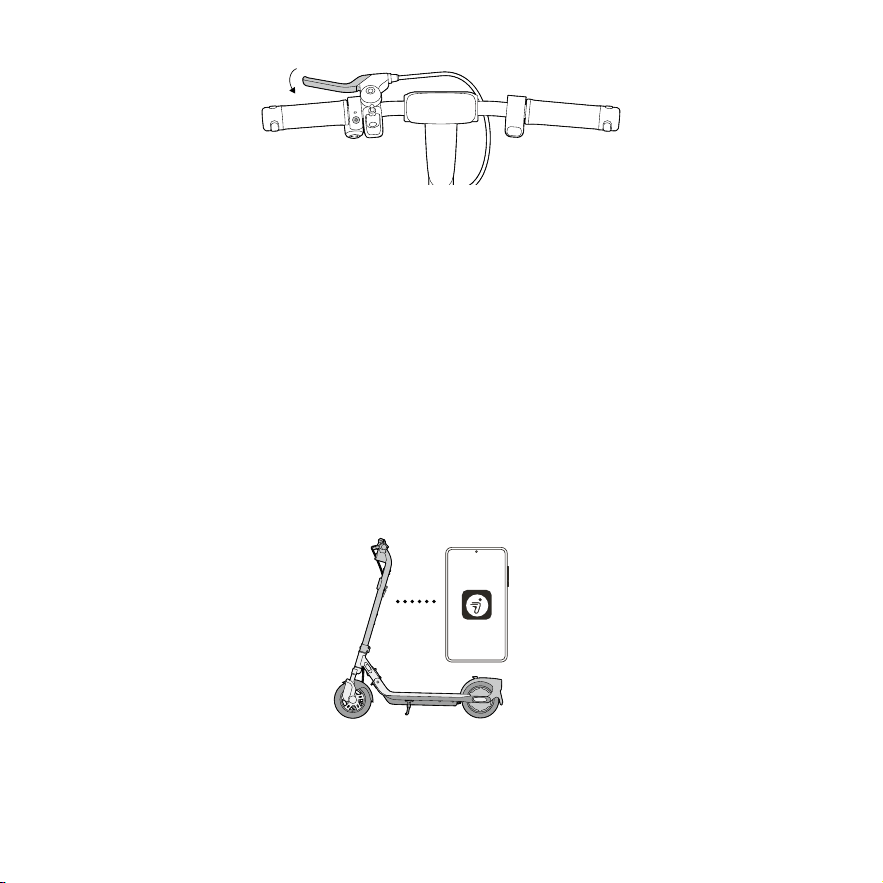
EN After powering on the vehicle, owner can complete RESET by squeezing brake lever by 5 times and pressing power
button once in unlocked status, then manually remove your vehicle from Find My app. After these steps, the owner can not
use Find My to find this vehicle.
FR Après avoir mis sous tension le véhicule, le propriétaire peut terminer la réinitialisation en appuyant 5 fois sur le levier
de frein et en appuyant une fois sur le bouton marche/arrêt en état déverrouillé, puis en supprimant manuellement votre
véhicule de l’application Localiser. Après ces étapes, le propriétaire ne peut pas utiliser Localiser pour trouver ce véhicule.
ES Después de encender el vehículo, el propietario puede realizar RESET apretando la palanca de freno 5 veces y
pulsando el botón de encendido una vez en estado desbloqueado, para después eliminar el vehículo de la aplicación
Buscar. Después de realizar estos pasos, el propietario no podrá utilizar Buscar para encontrar este vehículo.
RU После включения транспортного средства владелец может выполнить RESET (СБРОС), нажав рычаг тормоза
5 раз и нажав кнопку питания один раз в разблокированном состоянии, а затем вручную удалить транспортное
средство из приложения «Локатор». После этих действий владелец не может использовать «Локатор» для поиска
этого транспортного средства.
漢 車輛啟動後,車主在解鎖狀態下,可擠壓煞車拉桿 5 次後按下電源按鈕完成 RESET,接著手動從「尋找」應用程式中移除您的車輛。
完成這些步驟後,車主將無法使用「尋找」查找此車輛。
×5
—
44
—
×9
*Max. Quantity of Connected Devices / *Quantité maximum d’appareils connectés / *Cantidad máx. de dispositivos /
conectados / * Максимальное количество подключенных устройств / * 最大連接設備數量
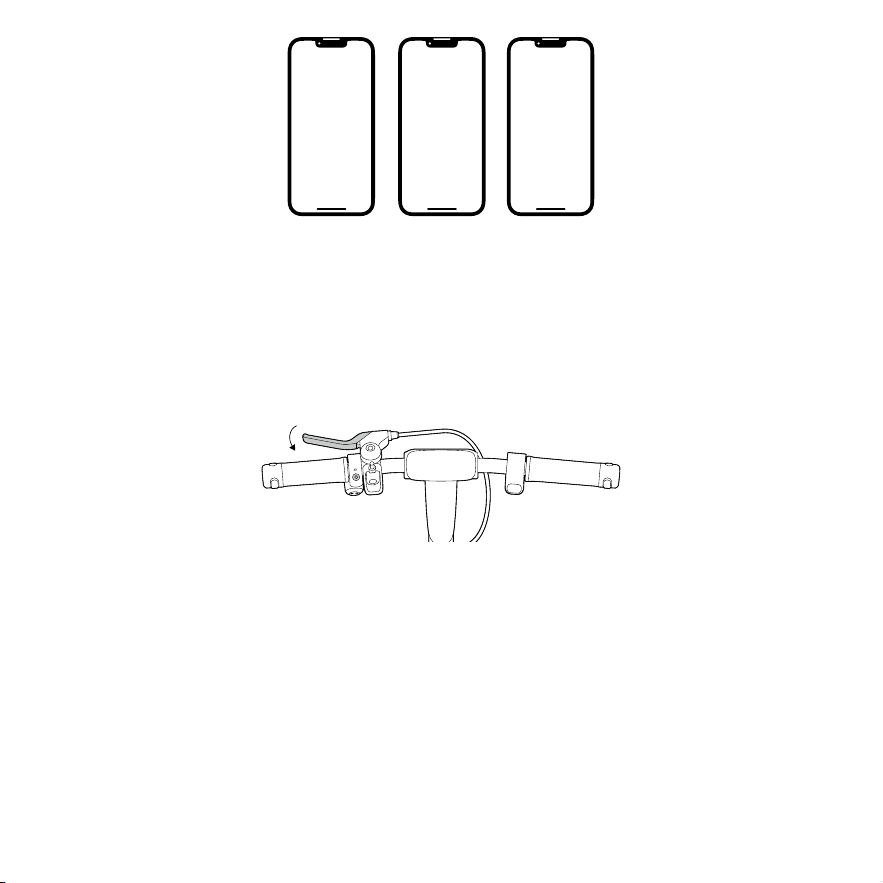
EN A eKickScooter can be connected to a maximum of 3 iOS devices (with same account).
FR Un eKickScooter peut être connecté à un maximum de 3 appareils iOS (avec le même compte).
ES Un eKickScooter se puede conectar a un máximo de 3 dispositivos iOS (con la misma cuenta).
RU eKickScooter можно подключить максимум к 3 устройствам iOS (с одной учетной записью).
漢 eKickScooter 最多可連線 3 部 iOS 設備(使用相同帳號)。
*Enable & Disable Find My Beacon / *Activer et désactiver Localiser / *Activar y desactivar Buscar / * Включение и
отключение функции « Локатор » / * 啟用和停用 Find My Beacon
EN Owner can enable & disable Find My Beacon by squeezing brake lever by 9 times and pressing power button once in
unlocked status (position information).
FR Le propriétaire peut activer et désactiver Localiser en appuyant 9 fois sur le levier de frein et en appuyant une fois sur
le bouton marche/arrêt en état déverrouillé (informations de position).
ES El propietario puede activar y desactivar Buscar apretando la palanca de freno 9 veces y pulsando el botón de
encendido una vez en estado desbloqueado (información de posición).
RU Владелец может включать и отключать функцию «Локатор», нажав рычаг тормоза 9 раз и нажав кнопку
питания один раз в разблокированном состоянии (информация о положении).
漢 車主可以透過擠壓煞車拉桿 9 次,並在解鎖狀態下按下電源按鈕(位置資訊)來啟用和停用 Find My Beacon。
○
1
○
2
○
3
—
45
—
*SN Look up (Only for special conditions) / *Recherche de SN (uniquement pour des conditions spéciales) / *Búsqueda
de NS (solo para situaciones especiales) / * Просмотр серийного номера ( только для особых условий ) / * SN Look
up(僅針對特殊情況)
EN Any iOS user can connect to the vehicle by Apple Find My app, and then check vehicle's S/N by squeezing brake lever
for 8 times and pressing power button once. The S/N will display on the Apple Find My app.
FR Tout utilisateur iOS peut se connecter au véhicule via l’application Apple Localiser, puis vérifier le S/N du véhicule en
appuyant 8 fois sur le levier de frein et en appuyant une fois sur le bouton marche/arrêt. Le S/N s’affichera sur l’application
Apple Localiser.
ES Cualquier usuario de iOS puede conectarse al vehículo mediante la aplicación Buscar de Apple y, a continuación,
comprobar el número de serie (NS) del vehículo apretando la palanca de freno 8 veces y pulsando el botón de encendido
una vez. El número de serie se mostrará en la aplicación Buscar.
RU Любой пользователь iOS может подключиться к транспортному средству с помощью приложения Apple
Локатор, а затем проверить серийный номер транспортного средства, 8 раз нажав рычаг тормоза и один раз
нажав кнопку питания. Серийный номер отобразится в приложении «Локатор».
漢 所有 iOS 使用者都可以透過 Apple「尋找」應用程式連接至車輛,擠壓煞車拉桿 8 次,並按下電源按鈕一次來確認車輛的 S/N。
S/N 將顯示在 Apple「尋找」應用程式中。
×8
*Firmware Update / *Mise à jour du firmware / *Actualización de firmware / * Обновление прошивки / * 韌體升級
EN Owner can update the firmware after connecting the eKickScooter to the Segway Mobility App. A non-owner is not
allowed to update the firmware.
FR Le propriétaire peut mettre à jour le firmware après avoir connecté le eKickScooter à l’application Segway Mobility. Le
non-propriétaire n’est pas autorisé à mettre à jour le firmware.