Reference
Guide
For participating
in the Nielsen
ratings
mymeterandme.com
1-800-277-9139
Welcome to the Nielsen Radio
and TV Ratings
Nielsen is a leader in consumer information and media research.
We measure the radio listening, TV viewing and other media use
of people across the United States. This information is combined
with demographic and other information to become the “ratings.”
Broadcasters, media companies and other businesses use our ratings
and research reports to learn more about what people like you listen
to and watch. This helps them provide media programming, products
and services that best serve you and your community.
All of the media that you encounter is important to radio and TV
stations, content providers and others in the media industry. That’s
why it’s so important that you wear your meter throughout your entire
day. For more information on what your meter measures, please see
the “What Your Meter Measures” section on page 3.
Being in the ratings is easy. We don't want you to change your media
behavior in any way. All you have to do is start wearing your meter
as soon as you wake up each day, and remember to put it back on
its charger right before you go to sleep. This will ensure that all your
listening and viewing choices are included in the ratings.
As our way of saying thank you, we give you cash rewards for wearing
your meter and earning points. Through our special points system,
the more you wear your meter, the more points you’ll earn toward
extra cash.
If you need to reach us for any reason, please contact Panel
Relations at 1-800-277-9139, panelrelations@nielsen.com, or through
the Meter Companion app. You can also log in to our website at
mymeterandme.com for live chat or texting options.
We think you’ll enjoy being a part of the Nielsen ratings, and we thank
you for your participation.
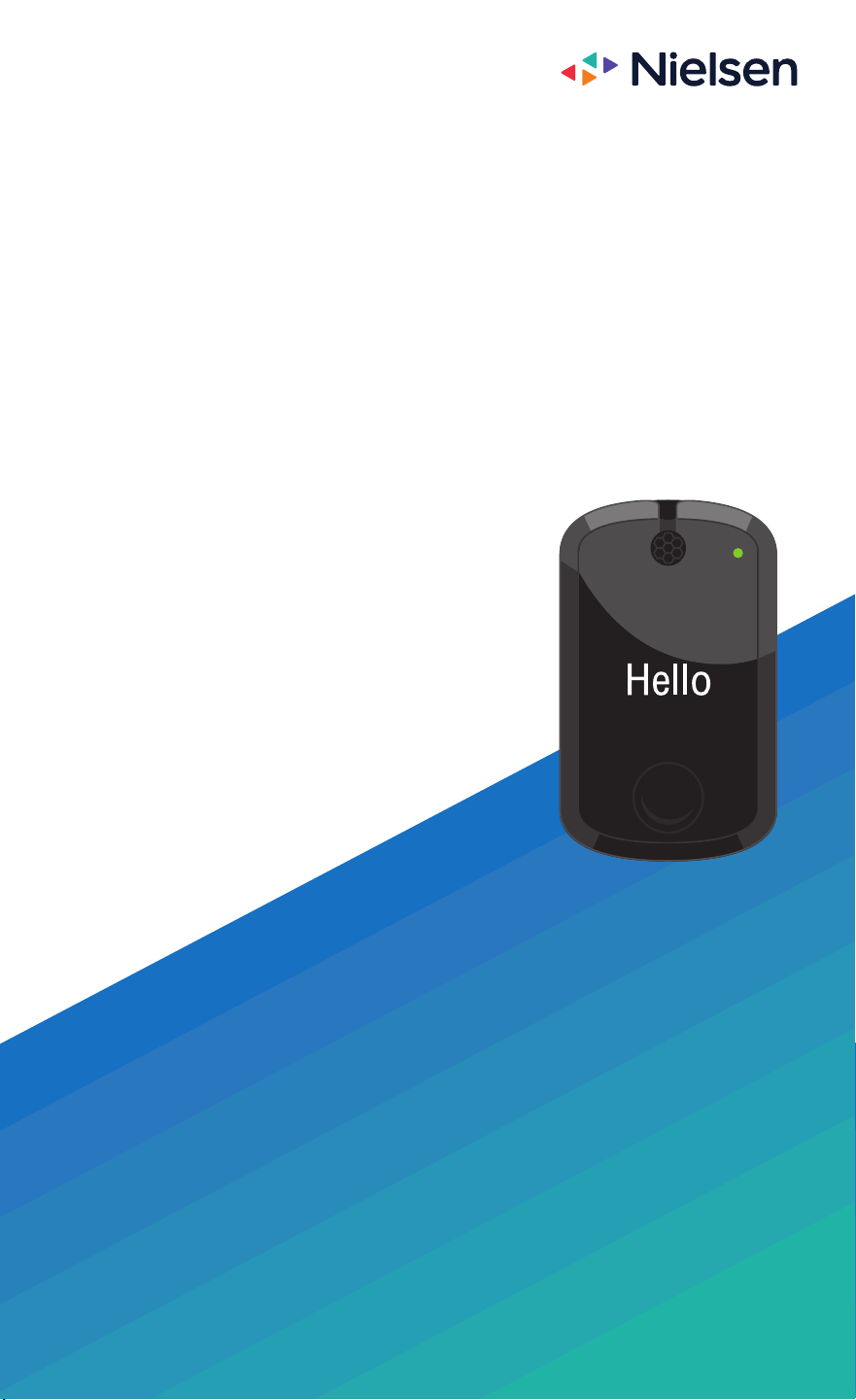
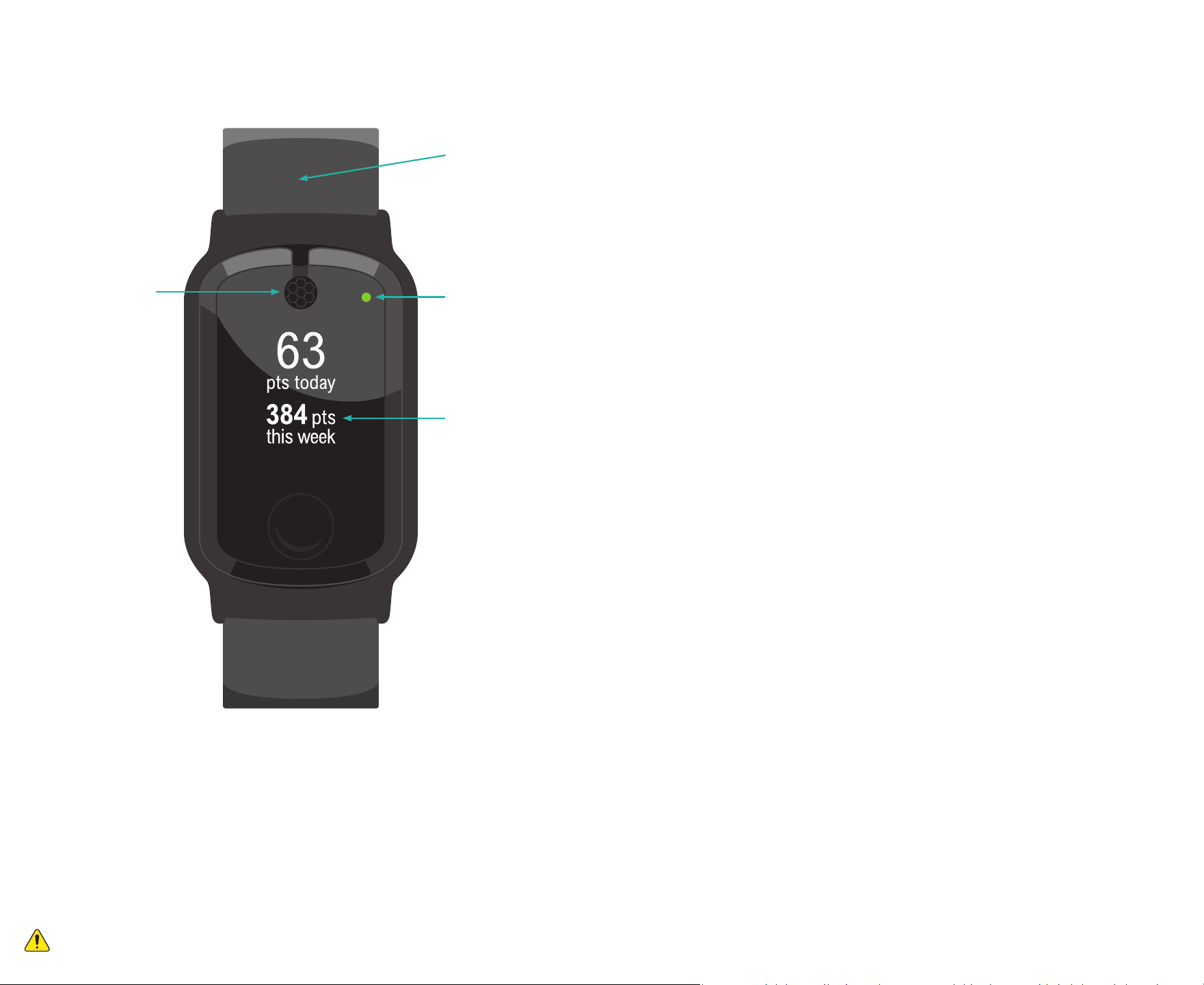
Your Meter
OLED display
Microphone
Wristband
accessory
Light
Copyright © 2023 The Nielsen Company (US), LLC.
All rights reserved. Any items, materials or products provided by Nielsen are licensed and not sold and remain the
property of Nielsen. This document may not be reproduced, in whole or part, without the express written consent of
Nielsen. Further, this document and the information contained within is intended for Nielsen personal-meter panelists
only; its use, in whole or part, for any other purpose without express written permission from Nielsen is prohibited. Any
items, materials or products provided, including the Nielsen meter technology, are covered by one or more U.S. patents
and their corresponding international patents, and other patents may be pending. This document includes proprietary
information which is the intellectual property of Nielsen. Nielsen and any other Nielsen product or service name, design,
or slogan contained in this document are trademarks of Nielsen, registered in the U.S. and other countries.
App Store® and iPhone® are registered trademarks of Apple, Inc. The Bluetooth® word mark is a registered trademark
owned by Bluetooth SIG, Inc. and its use by Nielsen is under license. Facebook® is a registered mark of Facebook, Inc.
Google Play™ store and Android™ are trademarks of Google LLC. Instagram™ is a trademark of Instagram, LLC. Snapchat™
is a trademark of Snap Inc. Twitter® is a registered service mark of Twitter, Inc.
Reference guide for the Nielsen personal meter system.
1
To prevent serious injury or property damage, you should read, understand and follow the
warnings and instructions in this manual. Keep for future reference.
What Your Meter Measures
Today you have more media choices than ever. Besides traditional
radio and TV, there’s a great deal of video and audio content on the
internet. As media and entertainment options have expanded, so has
our research—we measure it all.
Your meter is designed to measure the wide range of media you
encounter throughout your day. This includes media played in stores,
restaurants, movie theaters, amusement parks or other businesses that
participate with us in our research. As a Nielsen ratings member, you
have the unique power to let media companies and
other businesses know what media you enjoy.
How the meter works
The meter is designed to keep up with today’s
rapidly changing media environment. All you need
to do is wear your meter all day, every day. Your
meter does the rest!
Media companies and businesses that participate
in our research include a unique code in their
audio broadcasts. It doesn’t matter whether you
hear the media on a radio, TV, computer, smartphone or other
personal device or if you simply come across it during your daily
activities. Generally, if it’s loud enough for you to hear, your meter is
able to pick up the signal. This is how you share your media choices
with Nielsen. Please note, your meter can only detect the special
codes—it cannot “hear” or record your conversations or other types
of sounds.
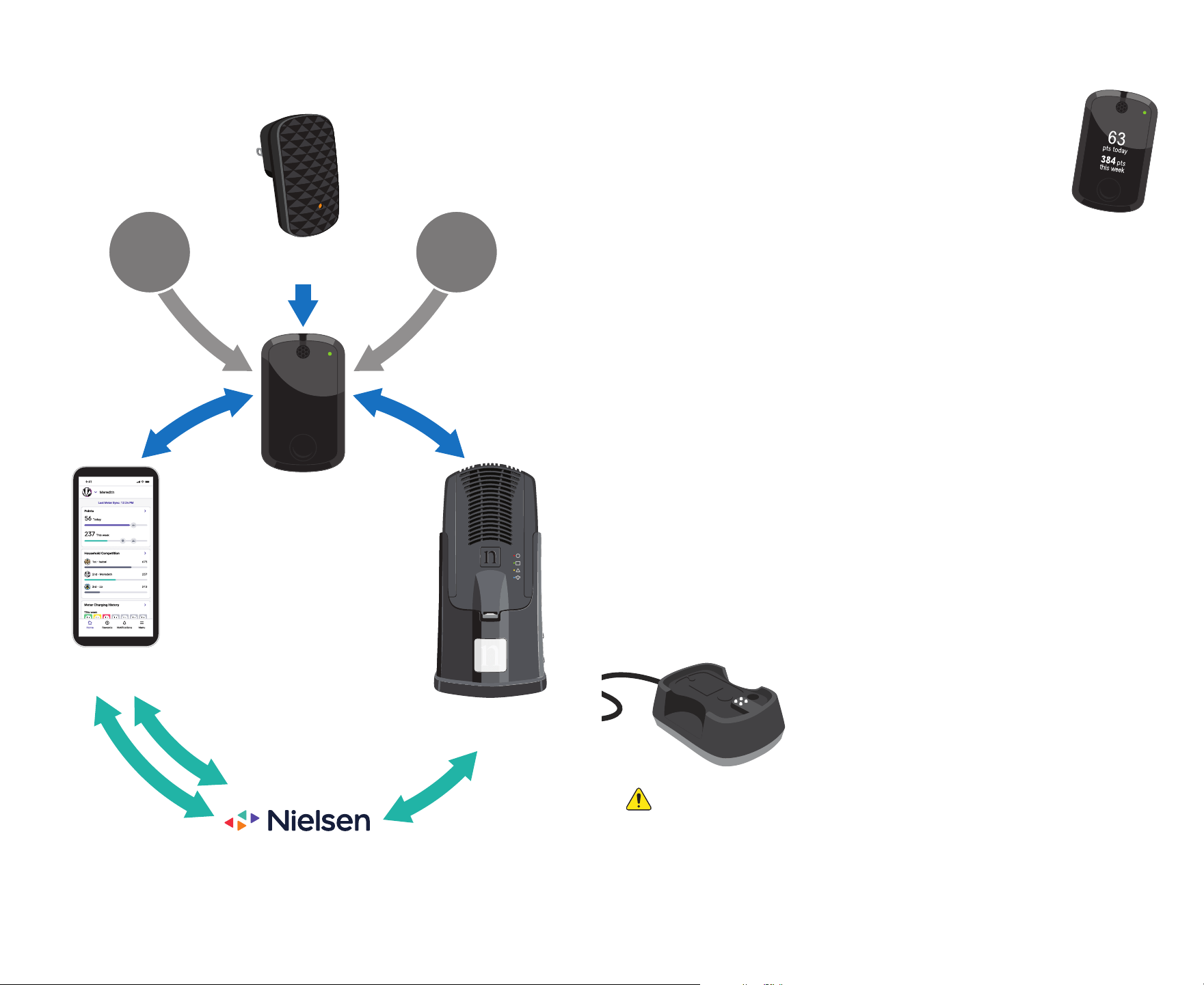
Every piece of your meter equipment plays an important part in
making sure your choices are included in the ratings. Your household’s
hub and beacon use Bluetooth
®
technology to send a silent signal
over a limited distance. When picked up by your meter, this signal
allows us to separate the media you experience at home from the
media you encounter away from home. Businesses that participate in
our research (such as stores and restaurants) may also use this type
of signal to learn more about their customers and the type of media
they enjoy.
Contents
Welcome to the Nielsen Radio and TV Ratings ...................................... 1
What Your Meter Measures........................................................................ 3
Privacy and Confidentiality ........................................................................ 4
An Important Message to Parents of School-Aged Children ............... 5
Your Meter Equipment and How It Works ................................................ 7
• Your Meter, Charger, the App, the Hub, and the Beacon
Ways to Wear Your Meter ......................................................................... 10
Wear Your Meter All Day, Every Day ........................................................ 11
Charging Your Meter ................................................................................. 12
Understanding Your Meter Messages .................................................... 13
Troubleshooting Your Meter .................................................................... 14
Help Finding Your Meter ........................................................................... 15
Earning Points Toward Cash Gifts and Bonuses ................................... 16
Earn Points Even When You’re Traveling ................................................ 18
The Nielsen Meter Companion App ....................................................... 19
Stay Connected With Us .......................................................................... 21
Common Questions.................................................................................. 22
Privacy Notice ........................................................................................... 24
Important Safety Instructions .................................................................. 25
FCC Compliance Statements ................................................................. 26
ISED Canada compliance statement ...................................................... 27
Electronic Specifications and WEEE Directive Statement .................. 29
Most information contained in this booklet is also available at
mymeterandme.com. Please contact Panel Relations at
1-800-277-9139 to get access to the website.
2 3

Privacy and Confidentiality
Please keep your participation in the ratings private.
It’s important to keep your participation private to protect the quality
and integrity of the ratings. So, we ask that you don’t discuss your
participation in the ratings with anyone outside of your household.
We also ask that you never share your participation on social media,
like Facebook
®
, Instagram™, Snapchat™ and Twitter
®
. A simple post on
social media could let thousands of people know that your household
was selected to participate in the ratings.
For the same reason, please do not post reviews of the Nielsen Meter
Companion app in the app stores. We do welcome your feedback
about the app, so please send any comments through the
Contact Us
link in the app menu.
Although
you
know that your meter measures your radio listening
and TV viewing, it’s important that people outside your household
don’t know this. Only
your
radio and TV choices should count in the
ratings, and those choices should not be influenced by anyone else.
Broadcasters, advertisers and other companies rely on us—Nielsen
and you—to protect the quality of the ratings so that they can make
the best possible decisions about the programming, products, and
services they offer you and your community.
While we have requested that you do not talk about Nielsen or share
that you are participating in a Nielsen study, we understand that you
may be asked about your meter.
• If a friend or acquaintance asks you about your meter, please only
say that your meter monitors your activity as part of a study. If they
ask for more detail, please say that you can’t tell them more or it
may cause problems with the study’s results.
• If someone you don’t know asks about your meter, please only tell
them that you cannot discuss it.
• If a person of authority (e.g., teacher, employer, airport security)
asks about your meter, answer their questions openly and honestly.
If possible, please do this in a way that others cannot hear you.
We ask that you keep your participation private until you have been
out of the ratings for at least one full year.
Let us know right away if anyone in the media industry, or anyone
else you feel should not know, finds out that your household is in the
ratings. Nielsen will never ask you to change your media behavior. Let
us know if anyone asks you to change what you watch or listen to.
Nielsen respects your privacy.
We protect the identities of our participants. We won’t use your
personal identifying information to advertise, promote or market
goods or services directly to you, and we don’t allow our clients to
market directly to you.
By agreeing to participate in the ratings, you agree to the Privacy
Notice that appears on page 24 of this booklet. If you have minor
children who are participating, you’re also agreeing to the Privacy
Notice on their behalf. Please read the full Privacy Notice, which
describes the kind of information we may collect, including your
media exposure, and how we may use and share that information. If
you have any questions or decide you no longer wish to participate,
please call Panel Relations at 1-800-277-9139; or write to Nielsen,
Attn: Privacy, 7000 Columbia Gateway Drive, Suite 250, Columbia, MD
21046; or email us at panelprivacy@nielsen.com.
An Important Message to
Parents of School-Aged
Children
Some school systems may not allow unfamiliar devices to be worn
during school hours. If your school administration has concerns
about the meter, we would be happy to provide you and your child
with a letter regarding the daily use of the meter in the radio and TV
ratings. This letter could be given to the administration at your child’s
school to explain his or her participation and ask for permission to
wear the meter during school hours.
If you would like us to send you a letter or if you have any questions,
please call Panel Relations at 1-800-277-9139.
4 5
Your Meter Equipment
and How It Works
Your meter
Your meter is just for you. It’s meant to pick up and report
only
your
personal radio listening, TV viewing and other
media choices. When you’re wearing your meter, the display
screen will remain dark. To activate the display, tap anywhere on the
screen. Your name and the time will appear. If you live in a household
with other ratings members, please make sure you’re the only one
using your meter and that you don’t use anyone else’s meter.
The display on your meter will show you important messages about
your participation in the ratings. You can view these messages,
including how many bonus points you’ve earned for wearing your
meter, by tapping the screen to flip through the messages. Your meter
will also display a series of messages when you place it in the charger
at the end of each day. (See page 13 for more information about the
messages and what they mean.)
Your meter has a green light on the front that blinks to show you the
meter is working and in motion. To keep the green light on, just
wear your meter throughout your entire day—during all your activities.
The meter is equipped with Bluetooth
®
technology. This allows your
meter to send your media choices to Nielsen each day.
Your charger
At the end of each day, place the meter on the charger to charge
your meter. Please keep the charger in your bedroom to help you
remember to start wearing your meter when you
wake up. To set up your charger, simply plug the
power cord into the back of the charger. Then,
plug it into an outlet that’s located near where
you sleep.
A
u
d
i
o
C
o
d
e
s
A
u
d
i
o
C
o
d
e
s
B
l
u
e
t
o
o
t
h
®
S
i
g
n
a
l
B
l
u
e
t
o
o
t
h
®
S
i
g
n
a
l
C
e
l
l
u
l
a
r
C
e
l
l
u
l
a
r
W
i
f
i
Hub
(Home)
Jack
Meredith
Meredith
App
(Home, Out-of-Home)
Your Meter
Beacon
(Home)
Radio TV
6 7
Like many electronic devices, your meter contains a lithium-ion battery. Please read the
important safety instructions on page 29.
The meter may cause hazardous interference with airplanes, hospitals or blasting operations.
ALWAYS turn off the meter when on airplanes, in a hospital or near blasting locations.
Use by children and minors
Before children use the meter, an adult should explain its use and how to remove it.
For older children and minors, you should have them read this booklet and discuss with them
the proper steps to take should they experience any issue with their meter or charger.
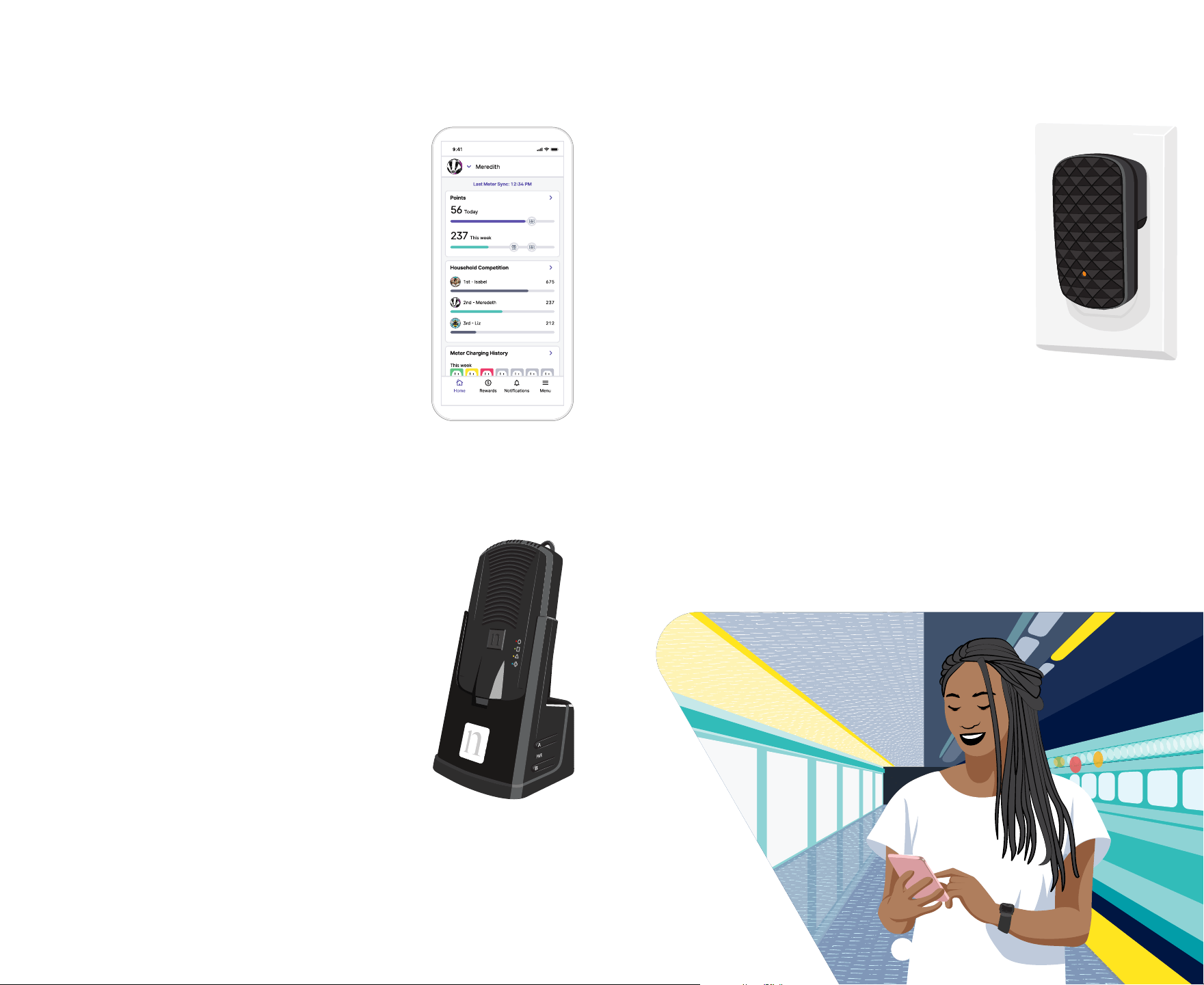
The Meter Companion app
The Meter Companion app transmits your data
to and from Nielsen. And, it’s the only way to get
your media choices to Nielsen when you’re not
at home. Since your phone is with you most of
the time, the app can send your meter’s data to
Nielsen anywhere you go.*
The Companion app is also the easiest way to
see information about your meter-wearing and
your rewards. Use the app to check your daily
progress, view your rewards, communicate with
Nielsen, and more.
If you have an Android™ phone or iPhone
®
, you can
install the Nielsen Meter Companion app.
See pages 19-20 or nielsen.com/meterapp for
more information about the app and how it works.
The hub
Your household received a hub in the box labeled “Open First.”
The hub communicates with your meter and Nielsen. It
uses Bluetooth
®
technology to pull your media choices
from your meter, and cellular technology to send this
information back to Nielsen when the Meter Companion
app is not available (see page 19). The hub’s cellular
connection is separate from any phone plan you may
have, so there is no cost to you for using the hub.
Plug in your hub in a location where you think it
will get a strong cellular signal (a place where your
cellphone gets good reception). The large white
square will begin flashing green and could flash for
up to three minutes while the hub searches for a
connection. When the connection is good, the light
will turn solid green for five seconds and then shut
off. If the square turns red, the cellular signal is weak.
Unplug the hub for 15 seconds, move it to a different location and
try again. Once the hub has a good signal and the light on the large
white square shuts off, leave the hub plugged in at all times.
The beacon
The beacon is also in the box labeled “Open First.”
The beacon transmits a silent signal that can be
detected by your meter when it’s within your home.
This allows us to separate your media use at home
from your media use in other places.
The following guidelines will help you put your beacon
where it will work best. We do understand that you
may not be able to meet all of the guidelines.
Place your beacon in your home where it will not be
removed or disturbed:
• in an outlet not controlled by a light switch so the
beacon remains on at all times
• as far away from the hub as possible in a central location in your
home—preferably near where you watch TV most
• away from large electronic appliances, metal cabinets or metallic
surfaces (avoid kitchens and bathrooms if possible)
• on interior walls, not behind furniture
When you plug in your beacon, make sure that the orange light on the
front is lit. Leave the beacon plugged in at all times.
* Your cellphone provider’s message and data usage rates may apply.
Jack
Meredith
Meredith
Your Meter Equipment (continued)
8 9
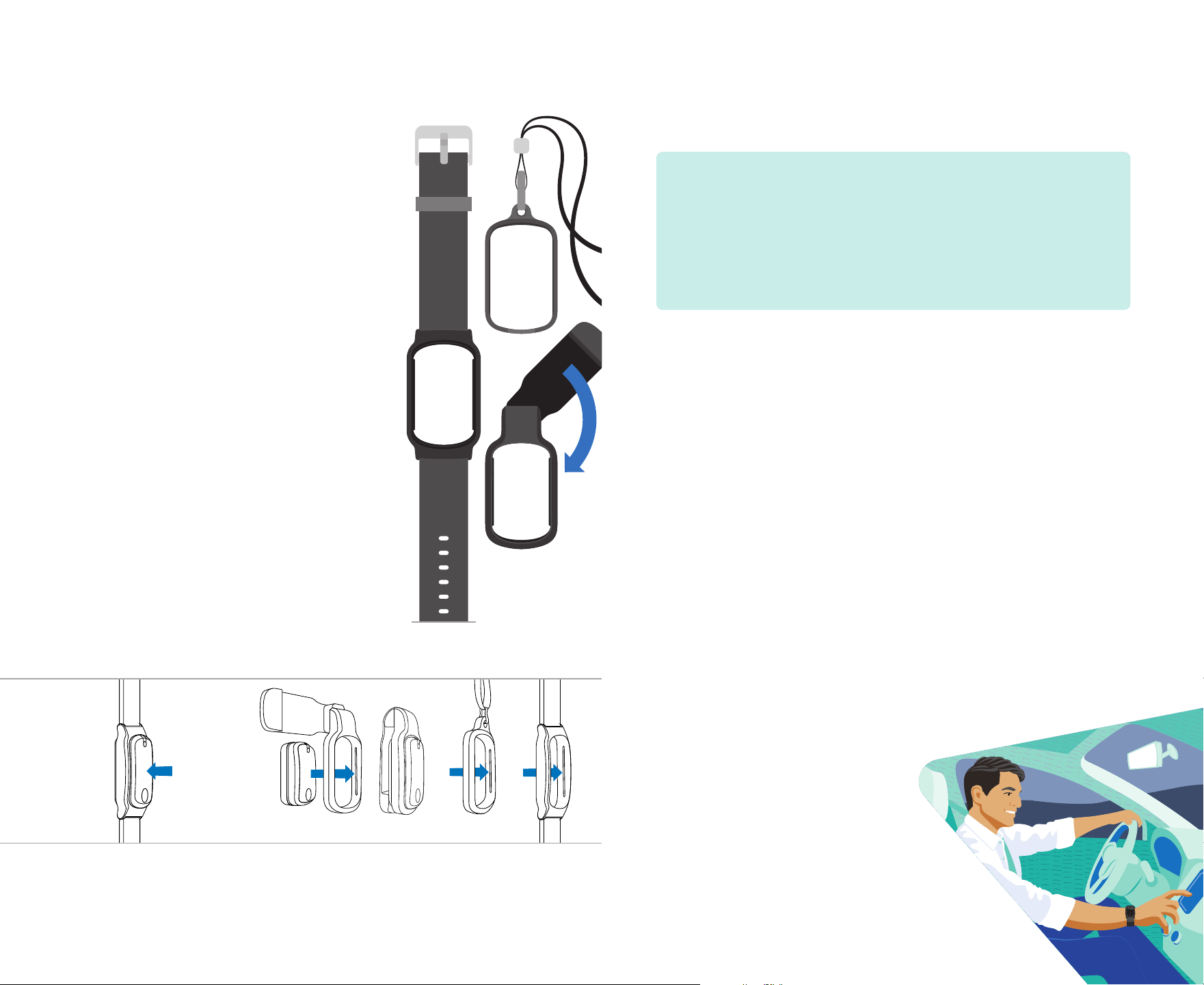
Ways to Wear Your Meter
You’ll probably think of ways to wear your
meter that work best for you. We suggest
using one of the meter accessories included
in your equipment box to:
• Wear it around your wrist
• Clip it to your belt, pants or skirt pocket, or
another piece of clothing
• Wear it around your neck
Whether you’re active in sports or socially
on the go, there’s an accessory to fit your
lifestyle. Choose one that makes it easy and
comfortable to wear your meter wherever
you go. You can change it as often as
your need.
If you need a larger wristband or need
to replace an accessory, contact us
at panelrelations@nielsen.com or
1-800-277-9139. Replacements are FREE.
Using the meter accessories
Store your accessories in a safe place so they are available when
you need them. See page 29 for how to care for your meter
and accessories.
Wear Your Meter All Day,
Every Day
Three simple rules
1. Start wearing your meter as soon as you wake up.
2. Wear your meter all day long and wherever you go, and make
sure its green light is steadily blinking.
3. At the end of your day, charge your meter while you sleep.
Wear it wherever you go.
Wear your meter at all times—at home, in the car, at work, even on
a trip to the store. You may think that you won’t be listening to radio
or watching TV, but you’d be surprised at how often you encounter
radio, TV and other media as you go about your daily activities.
Wear only
your
meter.
Each person in your household has his or her own meter. This allows
us to count each person’s specific media use and make sure that the
right person gets credited with motion points toward bonuses. It’s
important that you never wear someone else’s meter or let someone
else wear your meter. Wearing someone else's meter could
disqualify your entire household from participating in the ratings.
We do understand that accidents happen—if you wear someone
else's meter by mistake, please let us know right away.
Keep the green light on.
When you wear your meter, the green light blinks to let you know the
meter is working. If you put the meter down and don’t pick it up or at
least move it, the meter will turn off after about 30 minutes. First, it
begins flashing red to let you know it needs attention.
Then, if you don’t pick up your meter or
at least move it, the light turns off
and, if you’re at home, the meter will
periodically beep. If this happens,
you aren’t earning points and getting
credit for wearing your meter. Your
meter light will begin to flash green again
and the beeping will stop when you pick it
up and wear it. Remember, you’re only earning
points when your meter’s green light is blinking.
Swivel clip Pendant
Wristband
To use an
accessory,
snap the
meter through
the back of
the opening.
To remove
the meter,
push from the
front of the
accessory to
pop the meter
out of the
opening.
Swivel
clip
Wrist-
band
Pendant
10 11
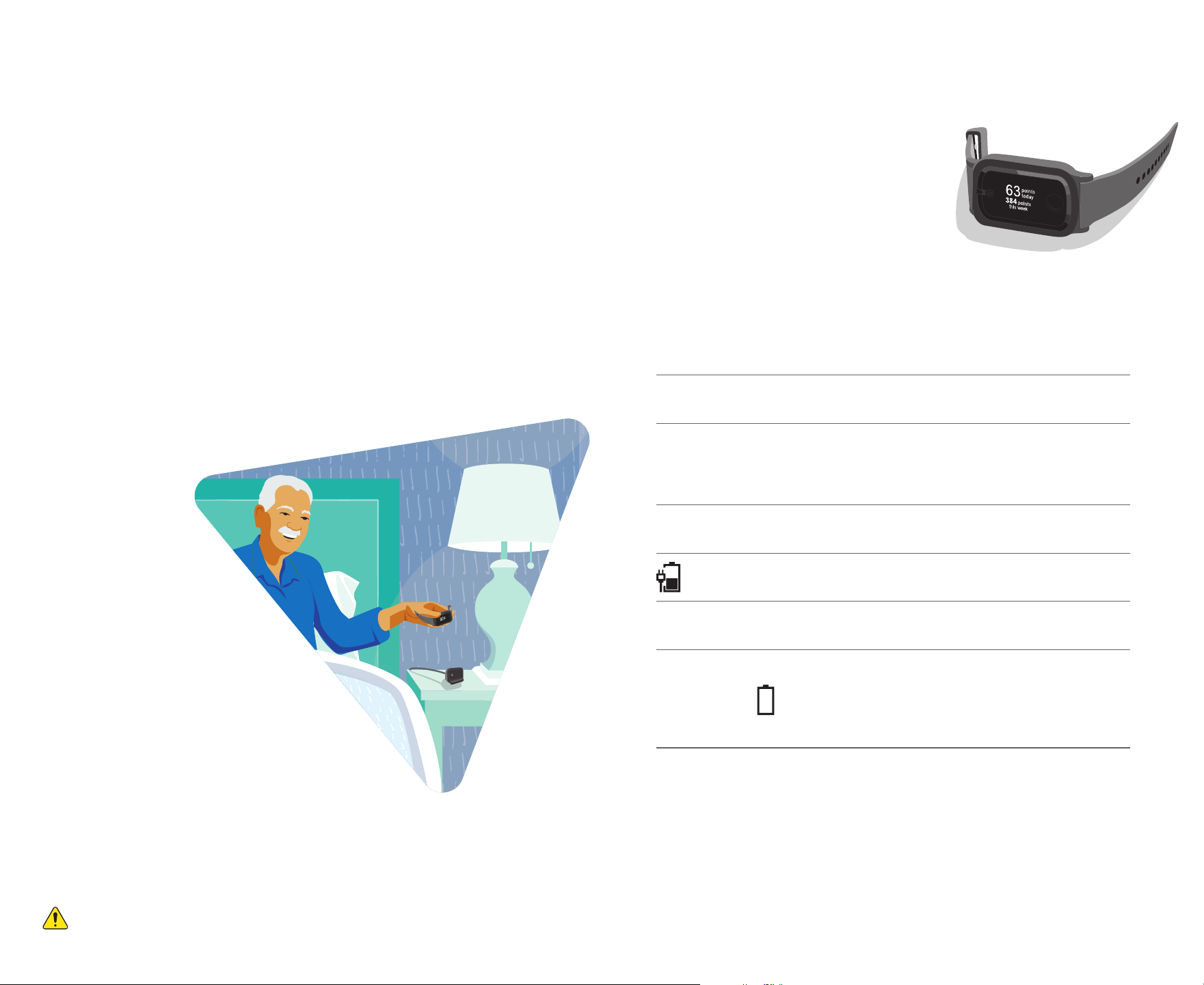
Understanding Your
Meter Messages
Your meter is equipped with a message
display to inform you about your points,
bonus opportunities and information
about the status of the meter. When you’re
wearing your meter, the display will remain
dark until you tap the screen to view your
messages. The first screen will show your name and the time. Each
time you tap the screen, another message will show until all of the
messages have been displayed. When you charge your meter, the
display will show a series of messages once.
Example message says: It means:
Hello (your name) The meter recognizes that it’s
being charged.
(
*
) Points Today
(
*
) Points This Week
This is the total number of points
you’ve earned so far today
1
and the
total number of points you’ve earned
so far this week
2
.
(
*
) Points Last Week This is the total number of points you
earned last week
2
.
The meter is charging, and the
battery icon will fill up as it charges.
Please charge next time you sleep
The meter needs to be charged when
you go to bed that day.
Please Charge
The meter should be charged as
soon as you are able. (If you’re at
home, your meter will beep once
every 30 minutes until it’s placed on
the charger.)
1
For calculating daily points, the day begins at 4 a.m. local time and ends at 3:59 a.m. local time
the following day.
2
For calculating weekly points, the week begins at 4 a.m. local time on Monday and ends the
following Monday at 3:59 a.m. local time.
Charging Your Meter
Place your meter on its charger right before you go to sleep each
day. If the battery in your meter gets too low, the display will say
“Please Charge” and, if you’re at home, the meter will also beep.
These are reminders to place your meter on the charger before you
go to bed that day.
When you place your meter on the charger, the meter will beep and
display a series of messages. (See page 13 for more information on
the meter messages.) These messages will tell you how many points
you’ve earned for the day and for the week. If your meter does not
beep or does not go through a series of messages, make sure that:
• Your meter is correctly seated on the charger.
• The power cord is plugged all the way into the charger.
• The charger is plugged in to a working electrical outlet.
(Always keep it plugged in.)
• Your meter’s battery is not
completely drained.
If your meter
battery is
completely
drained, the meter
won’t beep when
placed on the charger.
After about a minute, the
meter will display a series
of messages.
We ask that you charge your
meter each day when you go to bed.
This will help you maintain a routine of
keeping your meter battery charged.
A charged battery also provides more time
to find your meter if it’s ever misplaced.
Charge your
meter at the
end of your day.
12 13
Like many electronic devices, your meter contains a lithium-ion battery. Please read the
important safety instructions on page 29.
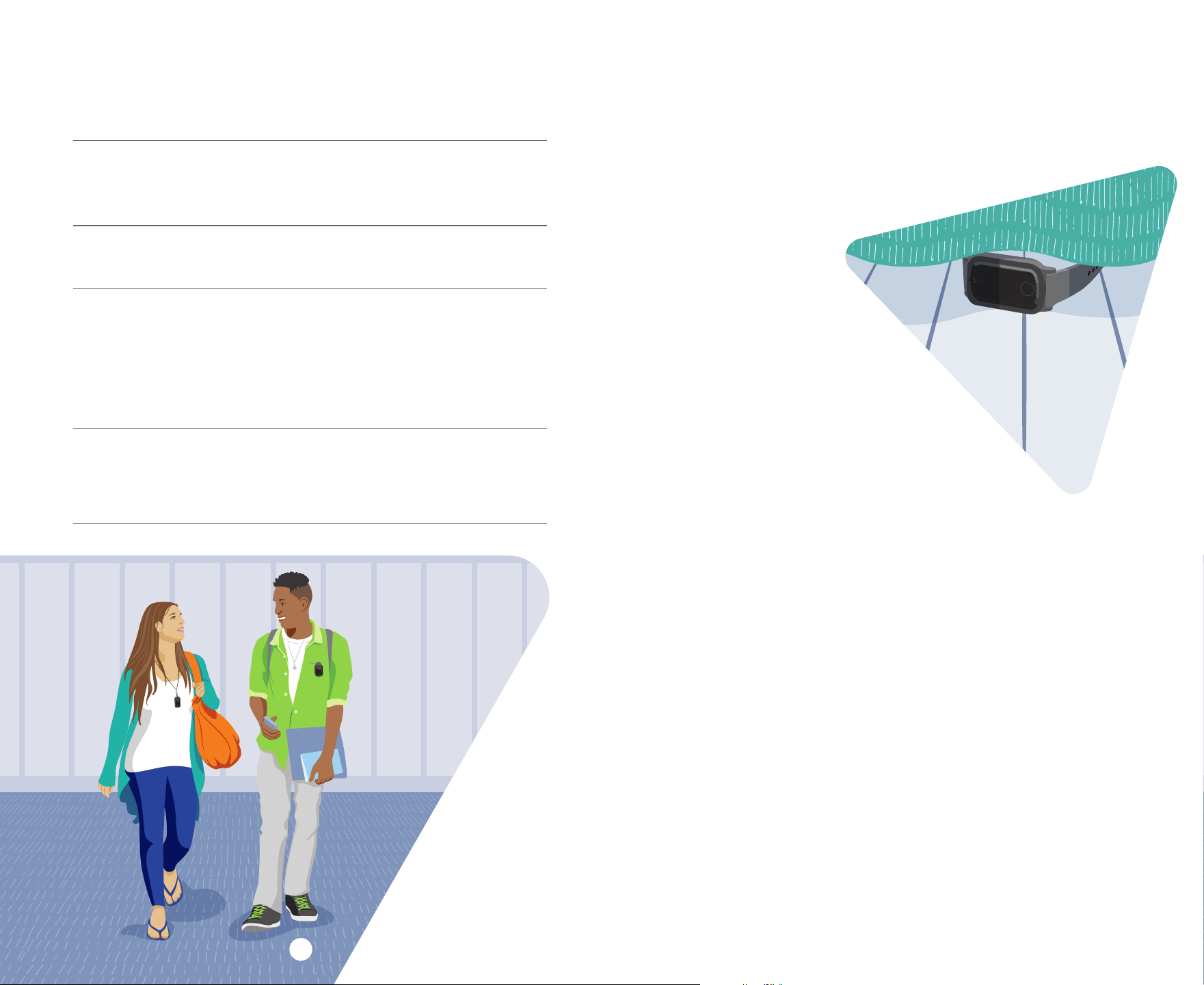
Help Finding Your Meter
If you misplace your meter, we may be able to help you find it. As long
as you have a general idea of where your meter may be, a signal can
be sent to it to make it beep. Your meter can only receive this signal
while the battery still has life, so it’s important that you
schedule the signal as soon as you notice
your meter is missing.
Follow these
simple steps:
1. Make note of where you
think your meter was lost.
You need to have a general
idea of where the meter was lost
for the signal to be useful.
2. Tap
Find a Meter
on the Companion
app menu. The app will make the meter
start beeping, show you if it’s nearby, and
show if you’re getting closer.
or
3. Schedule your meter to beep.
A. Log in to mymeterandme.com and click the “Need Help Finding
Your Meter?” button on the homepage. You’ll be given step-by-
step instructions to help locate your meter.
or
B. Call us at 1-800-277-9139. Schedule a time for Nielsen to send
the signal to your meter to make it beep.
At the scheduled time, return to where you believe the meter was
lost to listen for the beep. Once you locate your meter, pick it up to
stop the beep.
If you don’t find your meter, we’ll replace it for free. Please contact
Panel Relations at 1-800-277-9139 for further assistance.
Troubleshooting Your Meter
If this happens: Try this:
The green blinking light on
your meter starts flashing
red or goes out.
1. Pick up the meter and start wearing it.
2. If picking up the meter and moving it
does not work, the battery is probably
low. Please charge your meter.
No messages appear on the
display when the screen
is tapped.
The battery is probably low. Please charge
your meter.
No messages appear on
the meter when placed on
the charger.
1. Make sure the power cord is plugged
securely into the wall outlet and the back
of the charger.
2. Make sure that the meter is properly
seated on the charger.
3. Make sure the charger is not plugged into
an outlet connected to a light switch.
You misplace your meter. Call us right away, or tap
Find a Meter
on the Companion app menu, or go to
mymeterandme.com and click “Need Help
Finding Your Meter?” See the next page
for details.
14 15

Earning Points Toward
Cash Gifts and Bonuses
Wearing = Points = Cash
You get one point for every 10 minutes you wear your meter and keep
the green light on. That’s 6 points each hour. The more you wear your
meter, the more points you’ll get—and that means extra cash for you
each month.
The money adds up fast.
There are many ways that you can earn more money:
• Welcome gift
• Bonuses for wearing the meter
• Entry into weekly sweepstakes
The enclosed
How to Participate
brochure shows you how rewarding
being in the ratings can be.
If we send you $600 or more in a calendar year, we are required to
report this to you and to the government for tax purposes. All the
money you receive from Nielsen during the year will be included on
a 1099-MISC form, and we will need your Social Security number to
report the earnings.
Nielsen is committed to protecting the confidentiality and security of
your Social Security number. We’ll only provide this information to
the government for tax purposes or as otherwise required by law.
Note: The only way to earn points is by wearing your meter. The longer
you wear your meter each day, the more points you earn toward bonuses.
Bonuses are NOT based on how much or how little you listen to radio, watch
TV or enjoy other types of media.
How do I earn the weekly bonus?
The points you earn for wearing your meter are added up each week.*
If you earn 400 or more points (averaging about 9 to 10 hours per day),
you’ll receive extra money for that week in your monthly check. School-
aged children and teens (17 years old and younger) get bonuses by
earning 300 or more points (averaging about 7 hours per day) in a week.
If you don’t earn the bonus one week, you still have the opportunity to
earn a bonus the next week and the week after that. Panel Relations will
be happy to talk with you about this program.
* For calculating weekly points, the week begins at 4 a.m. local time on Monday and ends the
following Monday at 3:59 a.m. local time.
How do I get entered in the three weekly
sweepstakes drawings?
Wearing your meter and earning additional points may also qualify
you for the Saturday Sweepstakes, the Sunday Sweepstakes, and the
Monday–Sunday Sweepstakes. See the enclosed sweepstakes rules
for information on the points you need each week to be included in the
three weekly drawings. Panel Relations will review the rules, eligibility
and prizes with you. Contact Panel Relations at 1-800-277-9139 or
email panelrelations@nielsen.com.
When will I receive the money I earn?
Once a month, you will receive a check for the money you earn.
Generally, you’ll receive your money for each month by the end
of the next month.
Each ratings member in your household gets a check. The amount
of the check depends on the number of weekly bonuses that you
earned for the month. You’ll also receive the Panel Pages newsletter
each month with your check or by email. Or, you can download it on
mymeterandme.com. The newsletter is full of helpful tips and great
information about participating in the Nielsen radio and TV ratings.
16 17
Earn Points Even When
You’re Traveling
If you’re traveling for less than two weeks in the United States, take
your meter with you. Install the Meter Companion app on your phone
so you’ll be able to send your data and see your points hourly like you
normally do.
Away from home: What to do:
1 or 2 nights • Take and wear your meter.
• Bring your charger and power cord to charge
your meter while you’re away.
• Plug your charger back into an outlet in your
bedroom as soon as you return home.
More than 2 nights,
but less than 2 weeks
• Let us know you’ll be away.
• Take and wear your meter.
• Bring your charger and power cord to charge
your meter while you’re away.
• Plug your charger back into an outlet in your
bedroom as soon as you return home.
2 weeks or more OR if
traveling outside the US
• Let us know you’ll be away, so we’ll know not
to expect data from you.
• Leave your meter at home in the charger.
• Upon return, start wearing your meter
right away to begin earning points again.
It’s important to let Nielsen know when you plan to be away from
home. That way, we know not to try to reach you and, if you’re gone
for more than two weeks, not to expect your media choice information.
To let us know when you’ll be away from home:
• Email Panel Relations at panelrelations@nielsen.com
• Call us at 1-800-277-9139
• Tap
Travel plans? Let us know.
in the Meter Companion app menu
and follow the prompts to enter travel dates.
• Log in to mymeterandme.com
Go to the “Contact Nielsen” page and use the travel calendar
to enter the dates you plan to be away.
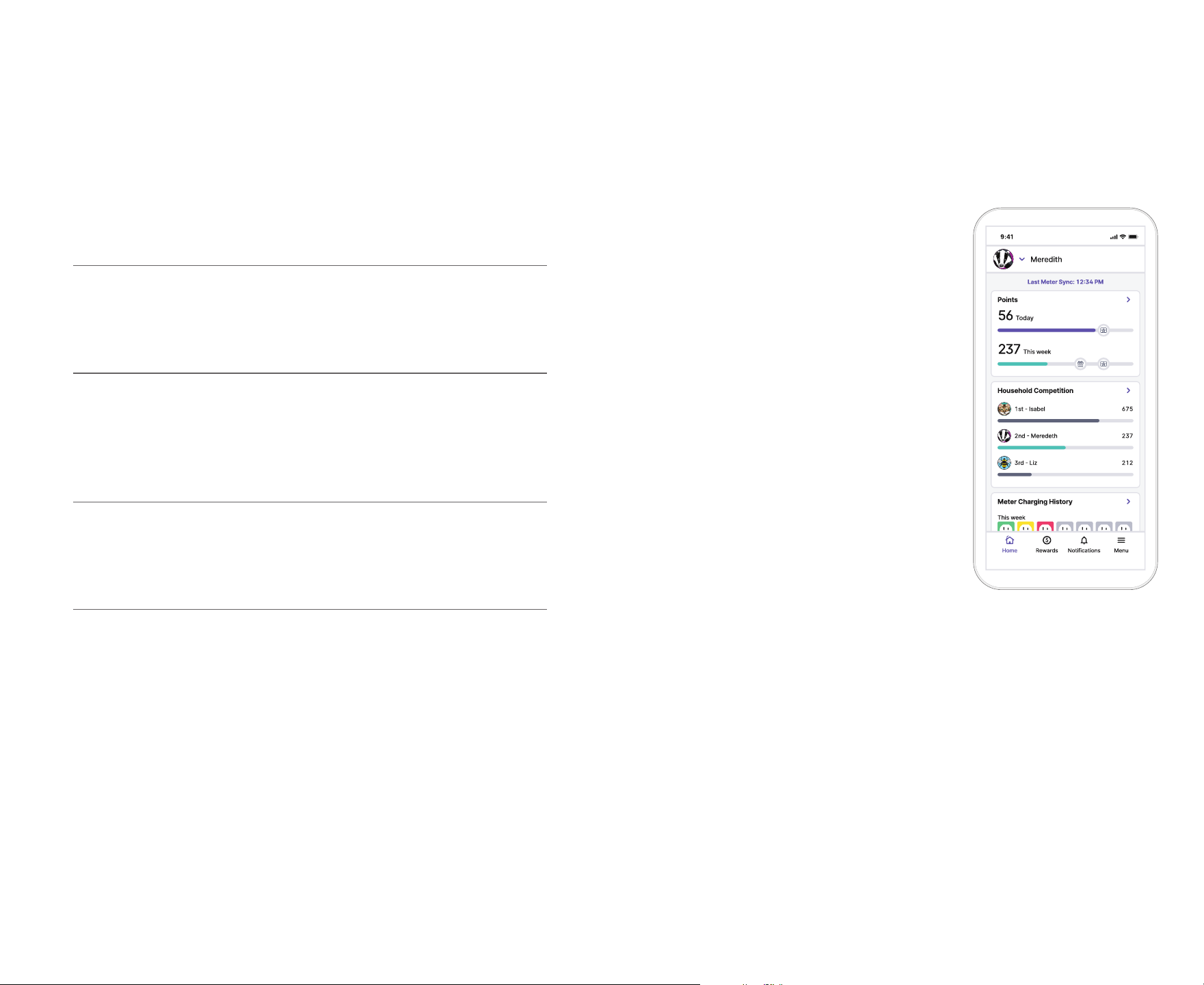
The Nielsen Meter
Companion App
The most complete source of information
The Meter Companion app is the easiest way to see information
about your meter-wearing and your rewards.
It’s the perfect tool to help you be your best
in the ratings.
• Track your points. Get points updates and
see how close you are to earning rewards.
• View payment information. See
the amount of your upcoming and
past checks.
• Get important messages, including
opportunities to earn more money.
• Earn bragging rights! Friendly
competition at home can be fun. See the
points of everyone in your household,
including who’s the best at wearing
the meter.
• Tell us when you’ll be away. Post any
travel dates as soon as you know them.
We’ll make sure your media choices
count and won’t try to reach you while
you’re gone.
• Get help finding a lost meter. If you misplace your meter, select
"Find a Meter" from the main menu to begin to locate your meter.
The best way to send your data to Nielsen
The Meter Companion app transmits your data to and from Nielsen.
Since your phone is with you most of the time, the app is available to
send and receive data anywhere you go.*
Your meter tries to connect to Nielsen once each hour. When you’re at
home, your meter can use the hub or the app to send your meter data
to Nielsen. But remember, keeping the app installed on your phone
is the only way for your media choice data to get from your meter to
Nielsen when you’re away from home.
* Your cellphone provider’s message and data usage rates may apply.
Jack
Meredith
Meredith
18 19
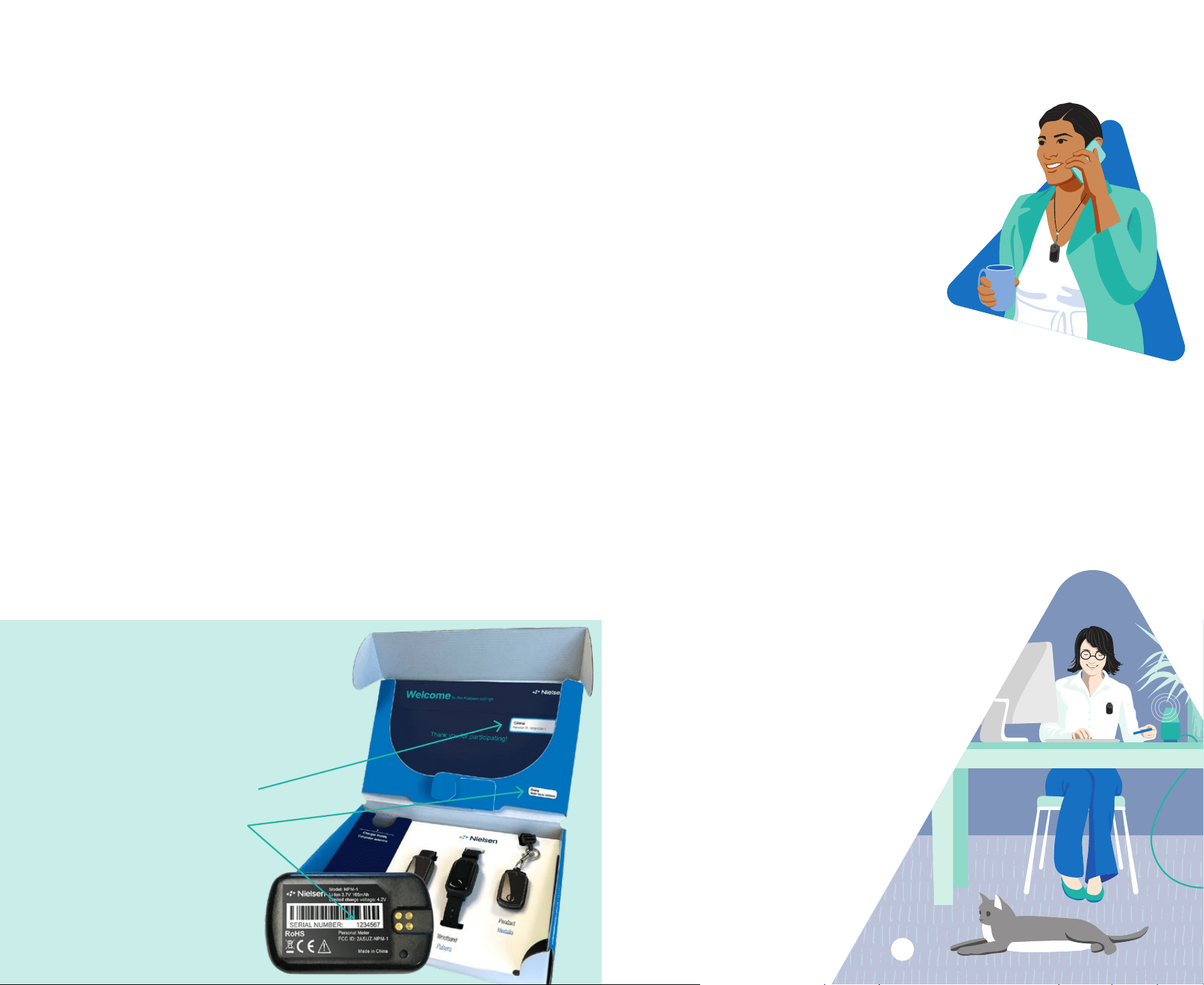
How to log in to the
Nielsen Meter Companion app
The first time you open the app, tap
the “Get Started” button. You’ll need your
panelist ID and meter serial number.
Your panelist ID is on the
Welcome Envelope sticker.
Your meter serial number
is located on the inside
of your equipment box and
on the back of your meter.
What you should know
Installing the app
The Nielsen Meter Companion app is for ratings members 13 and
older. Visit the App Store
®
(for iPhones
®
) or Google Play™ store (for
Android™ phones) to download and install the app.
Seeing your data
You won’t see data in the app until you start wearing your meter.
Let us know if you don’t see data within 48 hours.
Viewing others’ information
If you’re the parent or legal guardian of a ratings member 12 or
younger, you can view his or her information by adding their profile
to your app. You can view information for other household members
13 and older by getting permission from them to add their profile to
your app. From the top of the Home screen, tap the arrow beside your
name. Select
Add Profile
and follow the prompts.
Feedback welcome but no reviews, please.
Your participation in the Nielsen ratings is confidential so please
DO NOT post reviews of the Nielsen Meter Companion app in the
app stores. However, we welcome your comments through the
Contact Us
link in the app menu.
For more information about app features, visit nielsen.com/meterapp.
The Nielsen Meter Companion App (continued)
Stay Connected With Us
We want to make it easy for you to get the important
information that you need while you’re participating in
the ratings. We share information with you through the
Meter Companion app, telephone calls, pre-recorded
telephone messages, text messages* and emails.
Using various ways to communicate helps us to
reach you in the way that works best for you.
Ways to reach us
• Call: 1-800-277-9139
If you need to speak to someone, you
can call our toll-free number. If no one is
available to take your call, please leave a message,
and a Nielsen panel relations specialist will contact you as
soon as possible.
• Email: panelrelations@nielsen.com
• Meter Companion app: Use the smartphone app to call or send
us a message. Please note, due to the Children’s Online Privacy
Protection Act (COPPA), the Meter Companion app is only available
for ratings members 13 years of age and older.
• Website: mymeterandme.com
Use the “Contact Nielsen” page.
The My Meter & Me website is password protected
and personalized just for you. The website provides
tips for carrying the meter, answers to frequently
asked questions and much more! You can check
your points and see how you and others in your
household are doing toward earning bonuses
and sweepstakes entries. You can also see your
total monthly check amounts and what went
into each month’s check.
Please note, due to the Children’s Online
Privacy Protection Act (COPPA), the My
Meter & Me website is only available
for ratings members 13 years of age
and older.
* Your cellphone provider’s message and
data usage rates may apply.
20 21

Common Questions
1. How often do I need to charge my meter and for how long?
When you are not traveling away from home, we ask that you charge
your meter each day when you go to bed. This will help you maintain a
routine of keeping your meter battery charged. That way, you’ll continue
to receive points toward cash rewards just for wearing your meter.
2. What happens if the battery drains and my meter shuts off?
If your meter battery drains and your meter shuts off, please place it on
the charger. Due to the low battery, you won’t hear a beep. After about
a minute, the meter will display a series of messages.
3. What happens if I wear someone else’s meter?
That person gets credit for the time you wore the meter and the
radio and TV ratings won’t be as accurate. Please exchange
meters as soon as you discover the error, and notify Panel
Relations at 1-800-277-9139.
4. What should I tell people who ask about my meter?
To protect the quality of the ratings, it’s important that you don’t discuss
your participation with anyone outside of your household. If a friend
or acquaintance asks you about your meter, please only say that your
meter monitors your activity as part of a study. If they ask for more
detail, please say that you can’t tell them more or it may cause problems
with the study’s results. If someone you don’t know asks about your
meter, please only tell them that you cannot discuss it. See page 4 for
more information.
5. Will this equipment interfere with my radio or TV reception?
No. The equipment does not interfere with reception.
6. Will the meter still pick up the signal if my TV is on mute?
No. The sound must be on for the signal to be picked up by the meter.
Remember to watch or listen to TV as you normally do.
7. I must go through an X-ray machine at work (or at the airport).
Will this harm the meter?
No. It won’t harm your meter.
8. Does listening to more radio or watching more TV increase
my points?
No. Points are related to the amount of time you wear the meter. It
doesn’t matter how much or how little you listen to radio, watch TV or
use other media. The only way you earn points is by wearing your meter.
9. What if I have to go away from home for a
day or two?
If you’re going to be away from home for two
nights or less, please continue to wear your meter.
Remember to take your charger with you, so you can
charge your meter while you’re gone. See page 18 for
more information. If you have travel questions, please call
Panel Relations at 1-800-277-9139.
10. If my entire family is in our car for a day’s outing, can we
take only one of the meters with us?
Each participating person should take his or her own meter to pick up
individual listening and viewing choices. We aren’t able to include each
person’s media choices in the ratings if there is only one meter.
11. Do I have to pay taxes on the gifts and bonuses I receive
from Nielsen?
You may have to pay taxes on the money you receive from Nielsen.
If we send you $600 or more in a calendar year, we’re required to report
this to you and to the government for tax purposes using a 1099-MISC
form. We will need to collect your Social Security number for this
reporting. All money you received from Nielsen during the year (for
example: welcome gift, monthly bonuses, sweepstakes winnings, etc.)
is included on the 1099-MISC. Please visit the Internal Revenue Service
(IRS) website at www.irs.gov, or consult with a tax professional if you
have specific questions about your taxes.
12. How do I return my meter equipment when my household is no
longer in the ratings?
If you have not been notified about your meter equipment, please
contact the Equipment Recovery Team to schedule a pickup.
Call: 1-866-767-7208 (Monday to Friday from 9 a.m. until 9 p.m. ET)
Email: PPMERT@nielsen.com
More common questions and answers are available at
mymeterandme.com. Please contact Panel Relations at
1-800-277-9139 to learn how to get access to the website.
22 23
Important Safety Instructions
Proper care and handling of the personal meter
and equipment
• Please pay attention to all warning and caution labels.
• For cleaning, use only a dry cloth—do not use liquid or aerosol cleaners.
• Do not push objects of any kind into an opening.
• Do not use attachments unless recommended by Nielsen.
• Once the beacons are plugged in, please do not move them unless recommended
by Nielsen.
• To prevent pinching of the power cord, do not walk on, bend sharply or push items
against the power cord.
NEVER attempt to service or repair your meter, charger, hub or beacons for any reason.
No user-serviceable parts inside.
If any equipment is damaged or if you have any concerns, call Nielsen Panel Relations
at 1-800-277-9139 for assistance with your meter, charger, power cord, hub, beacons,
headphone adapter or lanyard (“equipment”). Examples:
• The power cord or plug is damaged.
• Objects have fallen into the meter or meter equipment.
• The meter or meter equipment has been exposed to water or other liquids.
• The meter or meter equipment does not operate normally or exhibits a distinct change
in performance.
• The meter or meter equipment has been dropped, or the enclosure has
been damaged.
• The meter display is cracked or broken.
• Your meter or equipment feels warm to the touch.
To prevent serious injury or property damage:
FIRE and EXPLOSION HAZARDS
Batteries may explode, may catch fire or cause chemical burns if damaged.
• ALWAYS inspect meter for damage every day before wearing.
• NEVER use meter if it appears swollen, deformed or damaged, feels hot or emits an
unusual smell.
• DO NOT allow meter to overheat (reach temperatures of above 140º Fahrenheit (60º
Celsius). Do not leave meter in your vehicle or place meter or meter equipment near
heat sources such as open flames, stoves, radiators or heat vents. Keep meter out of
direct sunlight.
• REMOVE meter immediately if it is warm to the touch when wearing.
• ALWAYS unplug charger and meter if battery begins to swell or emit smoke
while charging.
• ALWAYS keep a Class-D fire extinguisher available when charging lithium-ion batteries.
If a battery bursts or chemicals begin to leak out of the meter, the chemicals will react
with the air and may result in a fire. The chemicals inside lithium-ion batteries are
highly flammable.
• NEVER use a damaged charger.
• DO NOT cover meter, charger, hub or beacons with clothing or other materials
WARNING
24 25
Privacy Notice
Nielsen takes your privacy very seriously. We have created our Privacy
Notice to help answer questions you may have about how we use,
share, and protect the information that we collect from and about you
in connection with your household’s participation in the Nielsen TV and
Radio Ratings.
We regularly update our policy to follow changes in the law and industry
standards. To ensure you always have access to our current policy, we
have made the Privacy Notice available online.
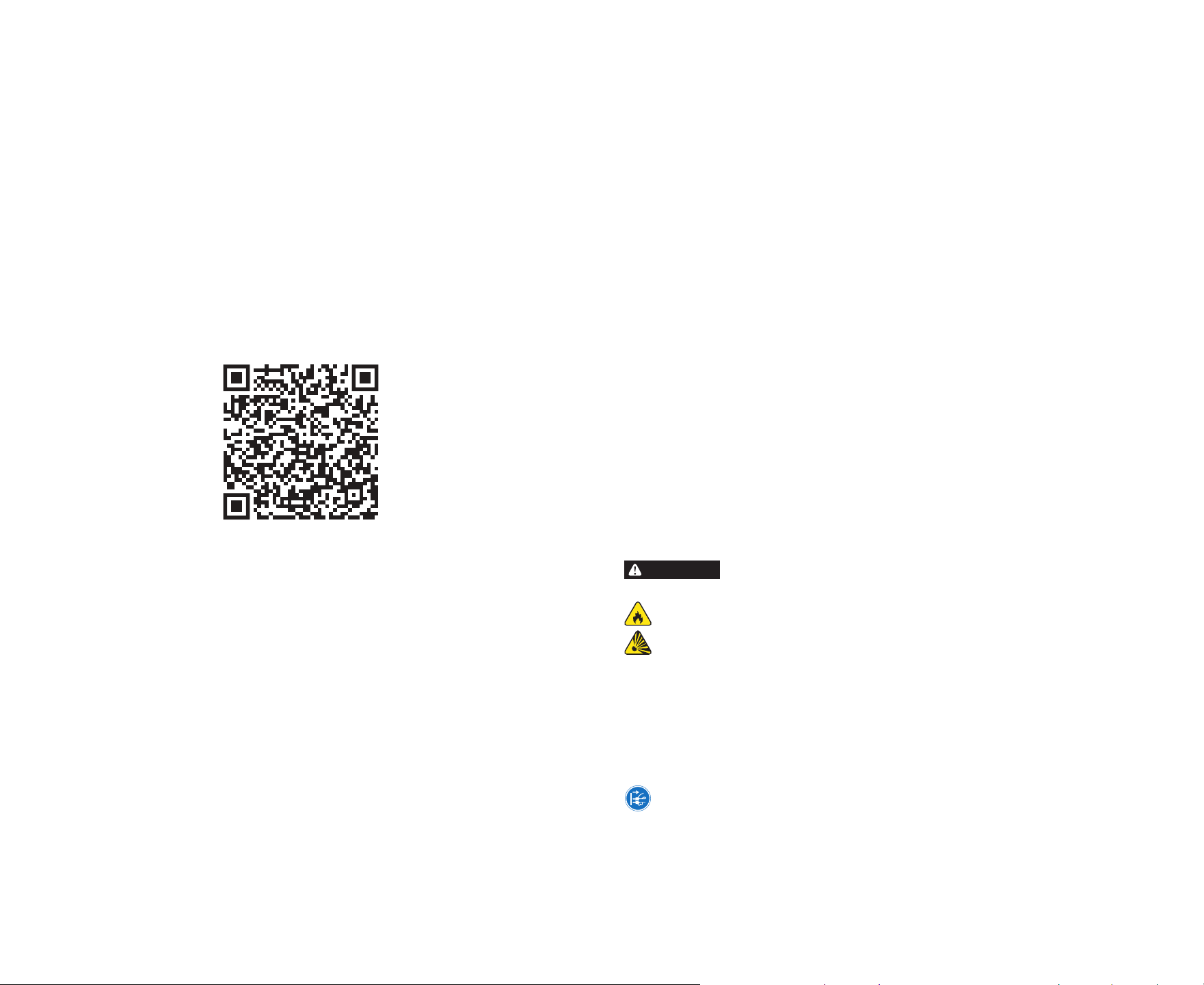
Use the QR code or web link below to access the Privacy Notice, and
please be sure each member of your household reads it carefully.
Data usage rates may apply.
nielsn.co/your-privacy

Important Safety Instructions (continued)
.POTENTIAL HEALTH HAZARDS
• The hub contains cellular technology. If you, or someone in your household, cannot
or should not use a cellphone for any reason (including but not limited to conflicting
medical devices), you should not install the hub without prior approval from
your physician.
• The lanyard may catch or snag on other objects. Be aware if you notice the
lanyard pulling.
ELECTRIC SHOCK HAZARD
• Always plug charger, hub and beacons into properly grounded, alternating current
electrical outlets. If you are unsure, contact an electrician for assistance.
• NO user serviceable parts inside. NEVER attempt to service meter or meter
equipment yourself.
• DO NOT expose meter, charger, hub or beacons to moisture or liquids.
• ALWAYS check electrical prongs are clean and dry before plugging in charger, hub
or beacons.
• DO NOT open or remove cover. DO NOT push any object into any opening on the
meter, the charger, the hub or the beacons.
• DO NOT overload power outlets or extension cords.
USE BY CHILDREN AND MINORS
• Before use, parents should explain to their children under what circumstances (e.g.
warm to touch when not charging) to remove the meter from their person and how to
remove the meter. You may need to demonstrate to younger children how to remove
and get away from the meter.
• For older children and minors, you should have the child read this booklet and discuss
with them the proper steps to take should they experience any issue with their meter
or their charger.
California Prop 65
WARNING: Lithium-ion batteries and products that contain lithium-ion batteries can
expose you to chemicals including cobalt lithium nickel oxide, chromium and nickel,
which are known to the State of California to cause cancer and birth defects or other
reproductive harm. For more information, go to www.P65Warnings.ca.gov.
FCC Compliance Statement for the Meter System
Meter system devices (meter, hub and beacon), meet the aforementioned FCC and IC
requirements for RF exposure in public or uncontrolled environments.
Changes or modifications not expressly approved by the party responsible for compliance
could void the user’s authority to operate the equipment.
Each meter system device complies with part 15 of the FCC Rules. Operation is subject to
the following two conditions: (1) this device may not cause harmful interference, and (2)
this device must accept any interference received, including interference that may cause
undesired operation.
Personal Meter
FCC Part 15 & Class B Digital Device Compliance: This device complies with part 15 of
the FCC Rules. Operation is subject to the following two conditions: (1) this device may
not cause harmful interference, and (2) this device must accept any interference received,
including interference that may cause undesired operation. This equipment has also been
tested and found to comply with the limits for a Class B digital device, pursuant to Part 15
of the FCC Rules.
FCC RF Exposure & SAR Compliance Statement: This device (FCC ID: 2ASUZ-NPM-2)
complies with the FCC SAR limits specified in 47 CFR part 2 (2.1093) for general
population uncontrolled exposure environments. The maximum reported Specific
Absorption Rate (SAR) values for the Personal Meter are:
• Body-worn (1g): 0.179 W/kg (against an FCC limit of 1.6 W/kg).
• Extremity (10g): 0.083 W/kg (against an FCC limit of 4.0 W/kg).
Hub Equipment
FCC Part 15 Class B Digital Device Compliance: This equipment has been tested and
found to comply with the limits for a Class B digital device, pursuant to Part 15 of the
FCC Rules. These limits are designed to provide reasonable protection against harmful
interference in a residential installation. This equipment generates, uses and can radiate
radio frequency energy and, if not installed and used in accordance with the instructions,
may cause harmful interference to radio communications. However, there is no guarantee
that interference will not occur in a particular installation. If this equipment does cause
interference to radio or television reception, which can be determined by turning the
equipment off and on, the user is encouraged to try to correct the interference by one or
more of the following measures:
• Reorient or relocate the receiving antenna.
• Increase the separation between the hub and the affected device.
• Connect the hub into an outlet on a circuit different from that to which the receiver
is connected.
• Contact Nielsen for help.
FCC RF Radiation Exposure Statement for the Hub: This equipment complies with
FCC RF radiation exposure limits set forth for an uncontrolled environment. To maintain
compliance with FCC’s RF exposure guidelines, this device and its antenna must be
installed to provide a separation distance of at least 20 cm from all persons and must not
be located near, or operating in conjunction with, any other antenna or transmitter.
Changes or modifications not expressly approved by Nielsen could void the user’s
authority to operate the equipment.
ISED Canada compliance statement
Personal Meter
License-Exempt Radio Apparatus (RSS-Gen):
This device contains licence-exempt
transmitter(s)/receiver(s) that comply
with Innovation, Science and Economic
Development Canada’s licence-exempt
RSS(s). Operation is subject to the
following two conditions: (1) This device
may not cause harmful interference. (2)
This device must accept any interference,
including interference that may cause
undesired operation of the device.
L’émetteur/récepteur exempt de licence
contenu dans le présent appareil est
conforme aux CNR d’Innovation, Sciences
et Développement économique Canada
applicables aux appareils radio exempts
de licence. L’exploitation est autorisée aux
deux conditions suivantes : (1) L’appareil
ne doit pas produire de brouillage; (2)
L’appareil doit accepter tout brouillage
radioélectrique subi, même si le brouillage
est susceptible d’en compromettre le
fonctionnement.
26 27
Electronic Specifications and
WEEE Directive Statement
Personal Meter
• Operating temperature range: 0–40 °C (32–104 °F)
• Input: Voltage 5.0V +-5%, Current 88 mA
The Personal Meter can only be charged via an appropriate charger (Meter Charger).
Do not attempt to replace your meter's battery. If you think that there is an issue with
the battery, please contact Nielsen right away and we'll make arrangements to repair
or replace your meter.
• Battery Specifications: Type LiPo, Nominal Voltage 3.7V, Capacity 0.165Ah, Max.
Charge Voltage 4.2V
Personal Meter Charger
• Operating temperature range: 0–40 °C (32–104 °F)
• Input: Voltage 5.0V +-5%, Current 500 mA
• Output: Voltage 5.0V +-5%, Current 500 mA
Power to the Meter Charger can only be supplied via a limited power source (LPS)
power supply.
Hub Base (Global Power Dock 2 [GPD2])
• Power ratings: Voltage: 5V±5%, Current 2.5Amax, DC
• Socket type: micro USB
• Power supply: Rated input 100-240VAC 50-60Hz 0.3 A, Rated output 5V±5% 2.1A,
Plug type micro USB
• Environment: Operating temperature range –40°C to +85°C, Humidity RH 5_90%
non-condensing
Hub Modem (Global Cellular Modem [GCM])
• Power ratings: Voltage 5V±5%, Current 1.5Amax DC
• Socket type: USB
• Power supply: Via Hub Base (GPD2) USB connector
• Environment: Operating ambient temperature range 0–40 °C (32–104 °F)
Waste Electrical and Electronic Equipment (WEEE)
Some of your Nielsen equipment is subject to the European Union Waste Electrical and
Electronic Equipment (WEEE) Directive and its marking requirements.
The “crossed-out wheeled bin” symbol on a product or its packaging indicates
that this product is subject to the WEEE Directive and
must not
be disposed of
with your other household waste. Instead, it is your responsibility to dispose of
waste electronic equipment by arranging to return it to a designated collection
and recycling location.
By separating and recycling your waste equipment at the time of disposal, you will help to
conserve natural resources and ensure that the equipment is recycled in a manner that
protects human health and the environment. For more information about where you can
drop off your waste for recycling, please contact your local authority.
Your Nielsen equipment should always be returned to us. It’s free of charge and we’ll
recycle or dispose of it responsively. As always, please feel free to contact us if you have
any questions.
ISED RF Exposure & SAR Compliance (RSS-102):
This device complies with Industry Canada
/ ISED RSS-102 SAR limits for general
population / uncontrolled exposure
environments. The maximum reported SAR
values for body-worn operation comply
with applicable limits.
Cet appareil est conforme aux limites DAS
de CNR-102 d'ISDE pour une exposition
générale de la population / environnement
non contrôlé. Les valeurs DAS maximales
rapportées pour le fonctionnement
porté sur le corps sont conformes aux
limites applicables.est susceptible d’en
compromettre le fonctionnement.
Hub equipment
License-Exempt Radio Apparatus & RF Exposure (RSS-Gen & RSS-102):
This device contains license-exempt
transmitter(s)/receiver(s) that comply
with Innovation, Science and Economic
Development Canada’s license-exempt
RSS(s). Operation is subject to the
following two conditions: (1) This device
may not cause harmful interference. (2)
This device must accept any interference,
including interference that may cause
undesired operation of the device. This
equipment should be installed and
operated with a minimum distance of 20
centimeters between the radiator and
your body.
L'émetteur/récepteur exempt de licence
contenu dans le présent appareil est
conforme aux CNR d'Innovation, Sciences
et Développement économique Canada
applicables aux appareils radio exempts
de licence. L'exploitation est autorisée aux
deux conditions suivantes : (1) L'appareil
ne doit pas produire de brouillage; (2)
L'appareil doit accepter tout brouillage
radioélectrique subi, même si le brouillage
est susceptible d'en compromettre le
fonctionnement. Cet équipement devrait
être installé et actionné avec une distance
minimum de 20 centimètres entre le
radiateur et votre corps.
If you have any questions about your meter or meter equipment,
please contact us at 1-800-277-9139.
Important Safety Instructions (continued)
28 29
Questions?
Please call Panel Relations at 1-800-277-9139.
Install the Meter Companion app
and visit us on mymeterandme.com.
PAN-26-32551 CAN
To prevent serious injury or property damage, you should read, understand and follow
the warnings and instructions in this manual. Keep for future reference.