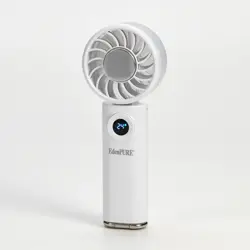
CoolDisc
Personal Cooling Fan
Model Number: F200
User’s Manual
EdenPURE
®
EdenPURE
®
In the event your unit does not appear to be working properly, contact
customer service at 1-800-225-6595 or go to custser[email protected]
To place an order call 1-800-360-1070 or go to www.edenpure.com
©2026 EdenPURE® I-5953 BR12438R-1
EdenPURE
7584 Whipple Avenue NW
North Canton, Ohio 44720
NOTE:
The battery must be removed before disposing of the appliance.
The appliance must be powered off when the battery is removed.
Batteries should be disposed of safely.
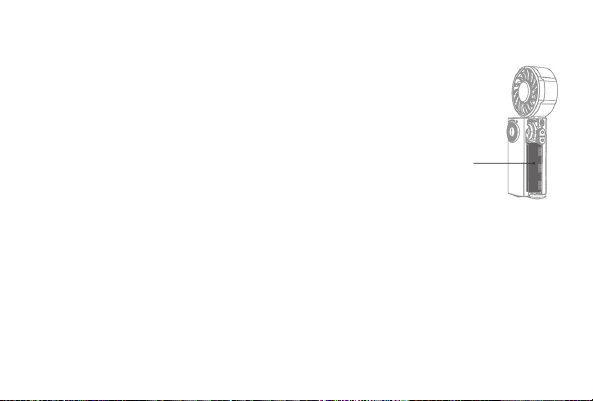
STEPS TO REMOVE THE BATTERY:
1. Pry off the back cover.
2. Remove the battery.
SPECIFICATIONS:
Product Model: F200
Product Name: EdenPURE CoolDisc Fan
Rated Input: 5V---2A
Charging Input: 5V---2A
Battery Capacity: 5000 mAh (18.5 Wh/3.7V)
Product Weight: 7.19 oz
Product Size: 7.52”
x
1.44”
x
2.89”
Battery
POWER BUTTON:
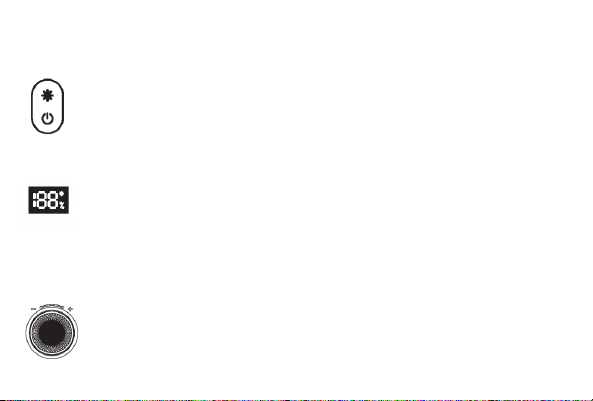
• Press and hold the Power Button to turn the unit on. Press it again to turn it off. To
check the battery level, double click the Power Button while the unit is on and the
percentage of battery that is left will come up on the display.
• Press the Cooling Button above the Power Button while the unit is on to turn the
cooling function on and off.
DISPLAY:
• When you first turn the unit on the percentage of battery power that is left will
show on the display. Then the cooling level will display.
• When you turn the Cooling Function on, a green cooling icon will appear in the
upper right corner of the display.
SPEED CONTROL KNOB:
• Turn the Speed Control Knob to the right to increase the wind speed.
• Turn the Speed Control Knob to the left to decrease the wind speed.
• The wind speed has a range of 1-100; 1 being the lowest speed and 100 being
the highest speed.
LANYARD:
• A lanyard is included that can be attached to the unit’s Lanyard Holes for portability.
METAL HOOK:
• WA metal hook is on the bottom of the unit and can be used for clipping the unit to your bag
or elsewhere to take it with you.
CHARGING THE UNIT:
• Use the enclosed charger to charge the unit.
• When the battery is charging, the display will show the percentage of the battery. The % icon will flash
on the display while the unit is charging. The unit will not be able to be used while it is being charged.
• When the battery level is below 5%, the display screen flashes to alert you that the unit needs
charged.
• The battery level will display for the first 2 seconds after the unit is turned on.
WARNINGS:
• This product uses lithium batteries that have no memory function. Overcharging them will affect
the life of the product. Please charge and them disconnect them from the power supply after the
device is fully charged.
• When the fan is on, the blade rotates at a high speed. Do not put your fingers or anything else
into the fan while it is turned on.
• Children under the age of 10 should use the fan only with adult supervision.
• Please use the enclosed charger to charge this unit.
PRODUCTION INTRODUCTION
ATTENTION:
This device complies with Part 15
of the FCC Rules regulating radio
frequencies. This device does
not cause harmful interference
to licensed communications and
accepts any interference it receives.
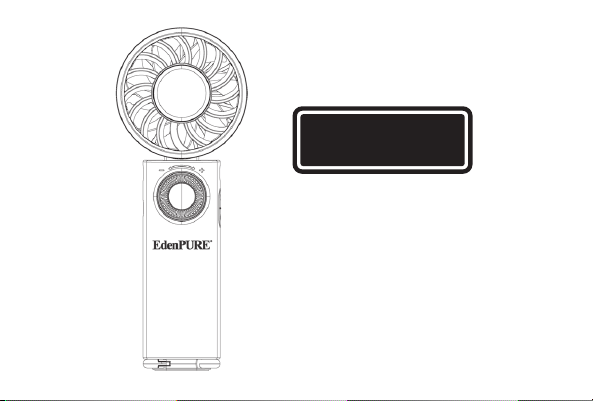
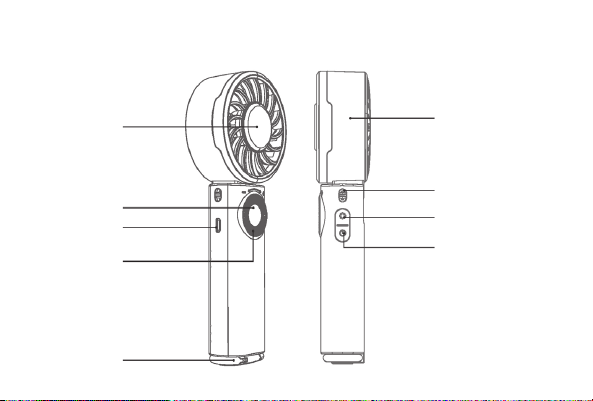
Cooling Plate
Display
Charging Port
Speed Control
Knob
Metal Hook
Fan Body
Lanyard Hole
Cooling Button
Power Button
INSTRUCTIONS FOR USE
POWER BUTTON:
• Press and hold the Power Button to turn the unit on. Press it again to turn it off. To
check the battery level, double click the Power Button while the unit is on and the
percentage of battery that is left will come up on the display.
• Press the Cooling Button above the Power Button while the unit is on to turn the
cooling function on and off.
DISPLAY:
• When you first turn the unit on the percentage of battery power that is left will
show on the display. Then the cooling level will display.
• When you turn the Cooling Function on, a green cooling icon will appear in the
upper right corner of the display.
SPEED CONTROL KNOB:
• Turn the Speed Control Knob to the right to increase the wind speed.
• Turn the Speed Control Knob to the left to decrease the wind speed.
• The wind speed has a range of 1-100; 1 being the lowest speed and 100 being
the highest speed.
LANYARD:
• A lanyard is included that can be attached to the unit’s Lanyard Holes for portability.
METAL HOOK:
• WA metal hook is on the bottom of the unit and can be used for clipping the unit to your bag
or elsewhere to take it with you.
CHARGING THE UNIT:
• Use the enclosed charger to charge the unit.
• When the battery is charging, the display will show the percentage of the battery. The % icon will flash
on the display while the unit is charging. The unit will not be able to be used while it is being charged.
• When the battery level is below 5%, the display screen flashes to alert you that the unit needs
charged.
• The battery level will display for the first 2 seconds after the unit is turned on.
WARNINGS:
• This product uses lithium batteries that have no memory function. Overcharging them will affect
the life of the product. Please charge and them disconnect them from the power supply after the
device is fully charged.
• When the fan is on, the blade rotates at a high speed. Do not put your fingers or anything else
into the fan while it is turned on.
• Children under the age of 10 should use the fan only with adult supervision.
• Please use the enclosed charger to charge this unit.
PRODUCTION INTRODUCTION
ATTENTION:
This device complies with Part 15
of the FCC Rules regulating radio
frequencies. This device does
not cause harmful interference
to licensed communications and
accepts any interference it receives.
Cooling Plate
Display
Charging Port
Speed Control
Knob
Metal Hook
Fan Body
Lanyard Hole
Cooling Button
Power Button
INSTRUCTIONS FOR USE

POWER BUTTON:
• Press and hold the Power Button to turn the unit on. Press it again to turn it off. To
check the battery level, double click the Power Button while the unit is on and the
percentage of battery that is left will come up on the display.
• Press the Cooling Button above the Power Button while the unit is on to turn the
cooling function on and off.
DISPLAY:
• When you first turn the unit on the percentage of battery power that is left will
show on the display. Then the cooling level will display.
• When you turn the Cooling Function on, a green cooling icon will appear in the
upper right corner of the display.
SPEED CONTROL KNOB:
• Turn the Speed Control Knob to the right to increase the wind speed.
• Turn the Speed Control Knob to the left to decrease the wind speed.
• The wind speed has a range of 1-100; 1 being the lowest speed and 100 being
the highest speed.
LANYARD:
• A lanyard is included that can be attached to the unit’s Lanyard Holes for portability.
METAL HOOK:
• WA metal hook is on the bottom of the unit and can be used for clipping the unit to your bag
or elsewhere to take it with you.
CHARGING THE UNIT:
• Use the enclosed charger to charge the unit.
• When the battery is charging, the display will show the percentage of the battery. The % icon will flash
on the display while the unit is charging. The unit will not be able to be used while it is being charged.
• When the battery level is below 5%, the display screen flashes to alert you that the unit needs
charged.
• The battery level will display for the first 2 seconds after the unit is turned on.
WARNINGS:
• This product uses lithium batteries that have no memory function. Overcharging them will affect
the life of the product. Please charge and them disconnect them from the power supply after the
device is fully charged.
• When the fan is on, the blade rotates at a high speed. Do not put your fingers or anything else
into the fan while it is turned on.
• Children under the age of 10 should use the fan only with adult supervision.
• Please use the enclosed charger to charge this unit.
PRODUCTION INTRODUCTION
ATTENTION:
This device complies with Part 15
of the FCC Rules regulating radio
frequencies. This device does
not cause harmful interference
to licensed communications and
accepts any interference it receives.
Cooling Plate
Display
Charging Port
Speed Control
Knob
Metal Hook
Fan Body
Lanyard Hole
Cooling Button
Power Button
INSTRUCTIONS FOR USE
CoolDisc
Personal Cooling Fan
Model Number: F200
User’s Manual
EdenPURE
®
EdenPURE
®
In the event your unit does not appear to be working properly, contact
To place an order call 1-800-360-1070 or go to www.edenpure.com
©2026 EdenPURE® I-5953 BR12438R-1
EdenPURE
7584 Whipple Avenue NW
North Canton, Ohio 44720
NOTE:
The battery must be removed before disposing of the appliance.
The appliance must be powered off when the battery is removed.
Batteries should be disposed of safely.
STEPS TO REMOVE THE BATTERY:
1. Pry off the back cover.
2. Remove the battery.
SPECIFICATIONS:
Product Model: F200
Product Name: EdenPURE CoolDisc Fan
Rated Input: 5V---2A
Charging Input: 5V---2A
Battery Capacity: 5000 mAh (18.5 Wh/3.7V)
Product Weight: 7.19 oz
Product Size: 7.52”
x
1.44”
x
2.89”
Battery
CoolDisc
Personal Cooling Fan
Model Number: F200
User’s Manual
EdenPURE
®
EdenPURE
®
In the event your unit does not appear to be working properly, contact
customer service at 1-800-225-6595 or go to custser[email protected]
To place an order call 1-800-360-1070 or go to www.edenpure.com
©2026 EdenPURE® I-5953 BR12438R-1
EdenPURE
7584 Whipple Avenue NW
North Canton, Ohio 44720
NOTE:
The battery must be removed before disposing of the appliance.
The appliance must be powered off when the battery is removed.
Batteries should be disposed of safely.
STEPS TO REMOVE THE BATTERY:
1. Pry off the back cover.
2. Remove the battery.
SPECIFICATIONS:
Product Model: F200
Product Name: EdenPURE CoolDisc Fan
Rated Input: 5V---2A
Charging Input: 5V---2A
Battery Capacity: 5000 mAh (18.5 Wh/3.7V)
Product Weight: 7.19 oz
Product Size: 7.52”
x
1.44”
x
2.89”
Battery