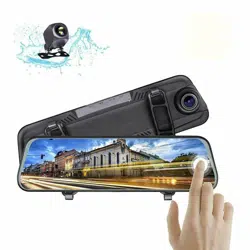

WARNING:Failuretoreadandfollowthesewarningsandinstructionsmayresultinseriousinjury,includingdamaged
property,sopleasepaycloseattentionandexhibittheutmostcare.
•TheDigitalBackupCameraisdesignedasanaidtothedriverindetectingpotentiallyhazardousdrivingconditions,
obstructions,
andlargestationaryobjects.You,thedriver,mustalsoremembertodrivesafelyandproperly.Useofthe
DigitalBackupCameraisnotasubstituteforsafe,properandlegaldrivingpractices.
•Neverbackupwhilelookingonlyatthescreen.Youshouldalwayscheckbehindandaroundthe
vehiclewhenbacking
upjustasyouwouldifthevehicledidnothavetheDigitalBackupCamera.Alwaysmakesureyourdrivingareaisclear.
Alwaysbackupslowlyandwithcaution.
•NeverdependontheBackupCameraentirelywhenbackingup.Theimageonthescreenis
differentfromactualand
realͲtimeconditions.ObjectsviewedintherearviewmonitordifferfromactualdistancesbecauseawideͲanglelensis
used.Sousethecameraasanaidandalwaysfollowintendeddrivingpracticestoproperlyjudgedistancesfromobjects.
•TheBackupCamera'sassistedlow
luxlightingperformancefeatureisalsoanaidtoadriver.Alwaysuseyourowneyes
toconfirmthevehicle’ssurroundings,asthedisplayedimagemaybenotwelllitornotentirelyvisible.Alwaysproceed
withcautionandperformdoubleͲchecksbeforeproceeding.
•Theareadisplayedbythe
Backup
Cameraislimited.Itdoesnotdisplayobjectsthatareclosetoorjustbelowthe
bumper,underneaththevehicle,orobjectsoutofthecamera’sview.Thecamera'sviewcanchangeaccordingtoyour
vehicle'sorientationontheroadorchangingroadconditions.
•Besuretoalways
checkthecameraisproperlyfunctioning,isproperlypositionedandsecurelymounted.
•Makesureyourtrunkorhatchoperatescorrectly,asintended,beforeandafterinstallation.
•Proceedwithcautionwhencleaningyourvehiclearoundthecamera.Avoidexcesswaterexposurearoundthecamera
especiallywithsprayingora
power
washer.
•Pleasemakesuretokeepthecameracleanandunobstructedfromanydebris
•Followalltrafficlawsandmotorvehicleregulations.
•Consultlocallawsandregulationsforanyrestrictionsoninstallationoruse.
•UsingaBackupCameraSystemisnotadequateenough
tocompletely
eliminateavehicle’sblindspot.Alwaysremember
todrivewithcaution,followingalltrafficlaws.
Pleasereadall of the installation instructions carefullybefore installing theproduct.Improperinstallation will void
manufacturer’s warranty. The installation instructions do not apply to all types of vehicles, and are written as
guidelines to assist in installing the system.Please consult an experienced technician if you are not comfortable
installing
theproduct.Priortousingand installing the Backup Came ra System,pleasereadthesafetyinformation
providedinthisusermanual.Besuretousetheproductasoutlinedinthisusermanual.Altercationormodifications
carriedoutwithoutappropriateauthorizationmayin validatetheuser'srighttooperatetheequipment.

SystemInstallationandWiring
Note:CameraSysteminstallationondieselvehiclesmayrequireaslightlydifferentwiringinstall.
QuickInstallation:
Thebackupcamerasystemiscompatiblewithawiderangeofvehiclesandvideodisplaymonitors.
Thiskitincludes necessary wiring andcable connector accessories sufficientfor typical connections.
However,additional accessory cables and installation materials may be necessary for a completely
secureandoperationalbackupcameraperformance.
Connectthecamera,usingtheredcable,oftheDC12Vpowercable,tothepositive12Vreversetaillightinthe
rearofyourcar.Then,connecttheblackwire,oftheDC12Vpowercable,andgroundproperly.Thisconnected
powerandgroundcableconnectstothecamera,and
willsupplypowertothecameradirectly.(Redwireis
positive,blackwireisnegative)
ThenusetheincludedyellowRCAvideoconnectorcable,andrunthatcabletotheyellowRCAvideoconnector
jackofthecamera,totheRCAvideoconnectorofacompatiblevideodisplaymonitor.
InstallationTranscript
(*forcameraanddisplayactivationwhenreversing):
1.Locatethereversetaillightwiringbehindyourvehicle'sreverselight.Youmayneedtoremoveaninteriorpanel,orothercover,in
ordertolocatethewiring.Connecttheincludedpower12VDCpowercabletothereverselight,thentheconnectorendintothe
camera'spowerconnection.
2.Mount
thecamerainthedesiredlocation,thenconnecttheincludedRCAvideocable,fromthecamera,andrunthecablethrough
toyourvideodisplay'sRCAconnection.
Notes:
ͲDeterminethebestlocationforthecamera(Thecameraispreferablymountedjustabovethelicenseplate).
ͲBesurewhenrunningtheconnectioncablestoleaveasmallamountofslacksoyoucanstillmovethecameraaroundthelicense
plate,ifyoudecidetoslightlyadjustthecamera's
positioningatalatertime.
ͲAfterinstallation:
Testthecamerabeforeuse.Placingyourvehicleinreverseshouldprovideapictureinthemonitorwithinthe
rearviewmirrorassembly.
Caution:Thisunitisdesignedtooperateona12V/24VDCNEGATIVEGROUNDelectricalsystems.Connectingtoothertypesofelectrical
systemswillcausedamagetoyourvehicle.Pleasecontactthemanufacturerifyouareunawareofthesystemtypeinyourvehicle.
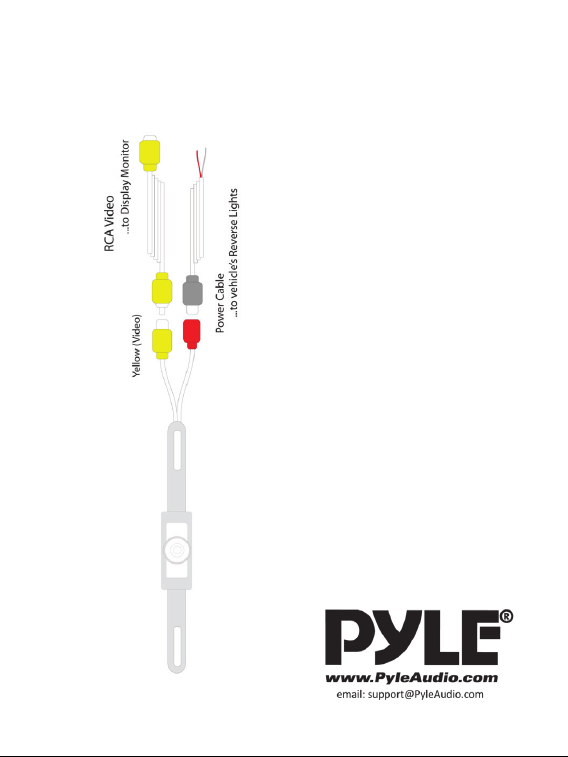
InstallationDiagram:
Model
:
PLCM1
0
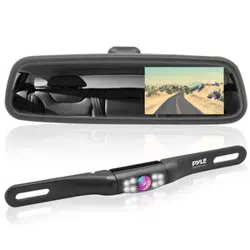
x ColorCameraDisplaysDistanceScaleLines
x WeatherproofMarineGradeCameraHousing
x TiltViewAdjustableCameraWhenMounted
x PreferablyMountedintheRearofYourVehicle
x SlimDesignforConvenientMountingAboveLicense
Plates
x RCAVideoConnectorforaWideRangeofDisplay
Compatibility
x Wide
AngleCameraLens
x AutomaticWhiteBalancePictureOutput
x IncludesCamera,PowerandVideoConnectionCables
TechnicalSpecs:
x PowerSupply:DC12Volt
x EffectivePixels:656x492Pixels
x OutputStandard:PAL/NTSC
x Resolution:420TVLines
x Builtindistancescalelines
x 7ͲLED
IRVisionSensors
x ImageSensor:OV7910ColorCMOS
x Lens:6mm,135ȗViewingAngle
x LowLightIllumination:1.5Lux/F1.2
x VideoOutput:RCA1.0Vpp
x CompositeVideo@75Ohm
x Temperature:Ͳ10Ͳ50ȗCelsius
x CameraDimensions(HxWxD):1.3''x
8.0''x1.26''