- 1 -
New Bee /
English
Bluetooth page turner
SPT-181
English 01 - 04
Deutsch 04 - 07
Français 07 - 09
Italiano 10 - 13
Español 13 - 15
日本語 16 - 17
Русский язык 18 - 20
E-mail: [email protected]
Website: www.anewbee.com
- 2 -
Ⅰ.Product Overview
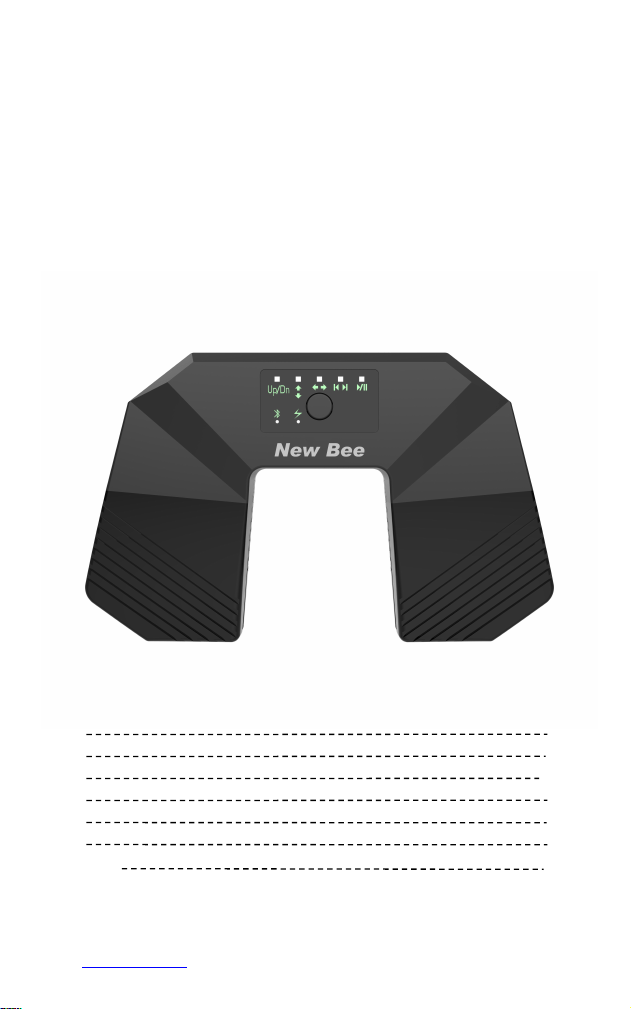
This Bluetooth foot pedal music turner uses Bluetooth 5.4 low-latency connection and is
compatible with mobile phones, tablets and various music notation software. Type-C
charging has long battery life, is compact and portable, and foot-controlled page turning
frees up your hands, making it suitable for piano practice, stage performances, and band
rehearsals.
Ⅱ. Product functions
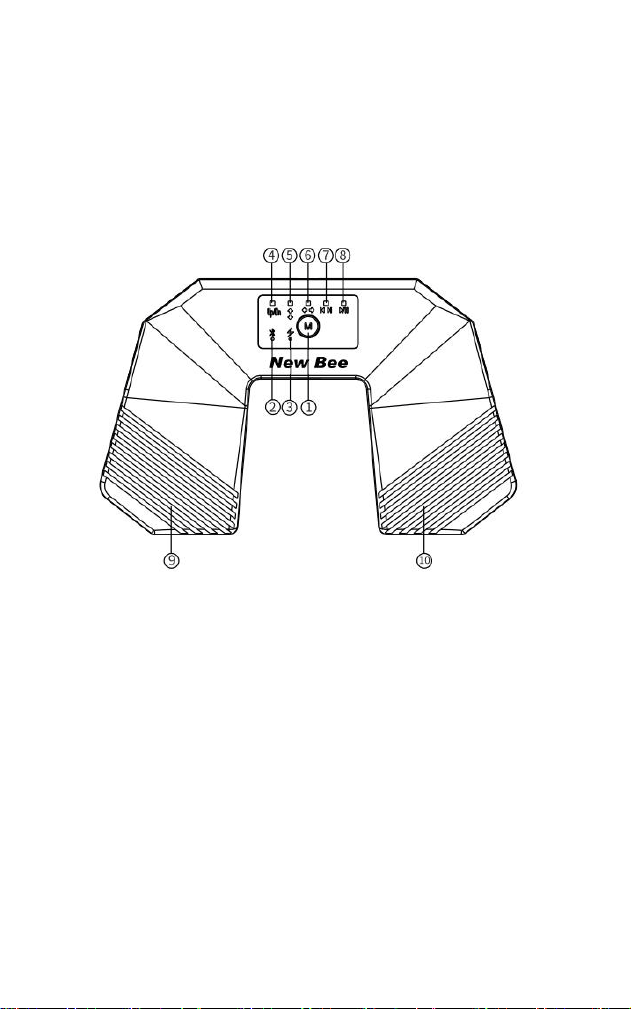
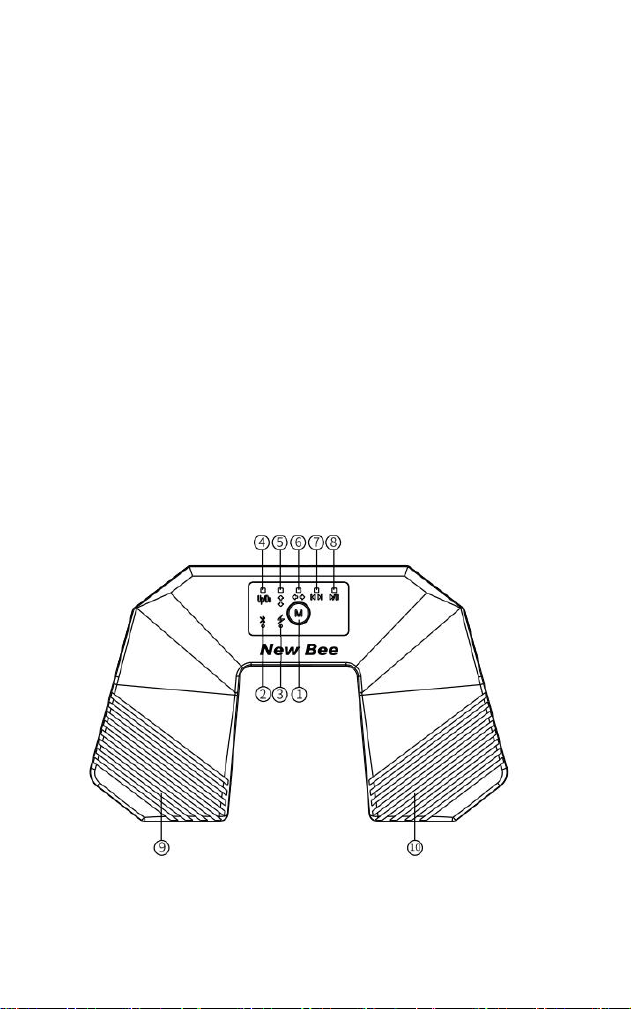
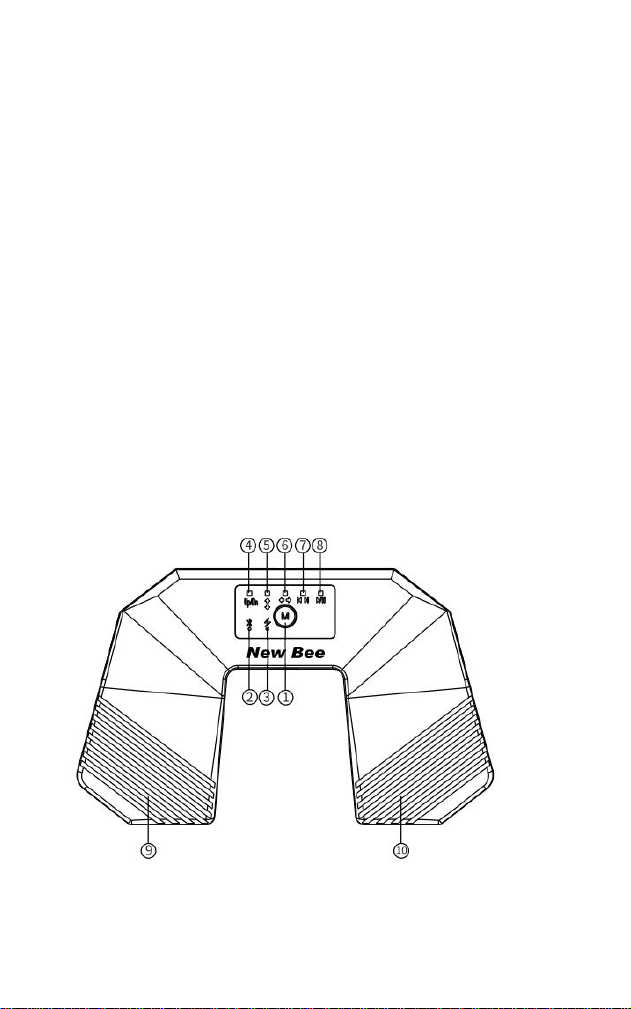
① Multi-function button
② Bluetooth indicator
③ Charging indicator
④ Page turning mode
⑤ Up/down page turning mode
⑥ Left/right page turning mode
⑦ Previous/Next track
⑧ Play/Pause
⑨ Left pedal
⑩ Right pedal
III. Product Operation
1. Power On/Off: Press and hold button ① for 3 seconds to power on. Press and hold
again while powered on to power off.
2. Bluetooth Connection: When powered on, the Bluetooth indicator light on button ② will

- 3 -
flash, indicating Bluetooth is waiting to connect. The Bluetooth name is "SPT-181". The
light will remain on after a successful connection. (The device will automatically power off
if there is no Bluetooth connection within 5 minutes of powering on. If there is no
operation for 2.5 hours while connected via Bluetooth, it will automatically power off to
save power.)
3. Page Turning Function Switching: The default page turning mode is the UP/DN key
when the device is powered on. Clicking key ① will switch to other functions (such as
vertical or horizontal page turning).
4. Previous/Next Track Function: With the device powered on and connected via
Bluetooth, press button ① three times. The previous/next track function button (⑦) will
remain lit. While the connected device is playing music, you can use foot pedals (⑨and
⑩) to control the previous or next track.
5. Play/Pause Function: With the device powered on and connected via Bluetooth, press
button ① four times. The play/pause function button (⑧) will remain lit. While the
connected device is playing music, you can use foot pedals (⑨and ⑩)to control play or
pause.
6. Simulated Mouse Function: With the device connected via Bluetooth, click button ①
five times until button ⑤ flashes blue. You can then use foot pedals (⑨and ⑩)to scroll up
and down on files. Click button ① again until button ⑥ flashes blue. You can then use
foot pedals (⑨and ⑩)to scroll left and right on files or flip images. 7. Low battery mode:
When the red power indicator light flashes, please charge it in time. The red light will stay
on while charging and will turn off when fully charged.
IV. Product Parameters
Product Model: SPT-181
Bluetooth Transmission Distance: >10 meters
Charging Method: TYPE-C
Charging Voltage: 5V
Total Usage Time: Approximately 38 hours
Power-Off Setting: Automatically shuts down after more than 2.5 hours of inactivity
following Bluetooth connection
Power Supply: Built-in 250mAh Lithium Battery
Charging Current: 160mA-180mA
Charging Time: Approximately 1.5 hours
Happy?
Thank you for choosing our products! We sincerely hope it will be your new-found
happiness.
If you are fully satisfied with your using experience, could you please kindly share to your

- 4 -
friends?
We also engage with our fans to learn how we can do better by offering free pre-release
products. If you are interested, do not hesitate to follow us on:
Facebook: NewBeeBrand
Website: https://www.anewbee.com
Not Happy?
If you have any questions, concerns, or just not satisfied with our products, please feel
free to contact us through e-mail at:
E-mail: [email protected]
Tel: (USA)1-626-701-7623 (UK)07845854035
Address: 3rd Fl, Bldg E, Guanghao Ind., No. 23, Dalang St., Longhua Dist., Shenzhen
City, Guangdong Prov., China
Deutsch
Bluetooth-Notenblätterpedal
SPT-181
I. Produktübersicht
Dieses Bluetooth-Notenblätterpedal verfügt über eine Bluetooth 5.4-Verbindung mit
geringer Latenz und ist mit Smartphones, Tablets sowie einer Vielzahl digitaler
Noten-Apps kompatibel.
Dank des USB-Type-C-Ladeanschlusses bietet das Gerät eine lange Akkulaufzeit in
einem kompakten und tragbaren Design. Die fußgesteuerte Umblätterfunktion hält beide
Hände frei und eignet sich ideal zum Üben von Musikinstrumenten, für Bühnenauftritte
sowie für Bandproben.
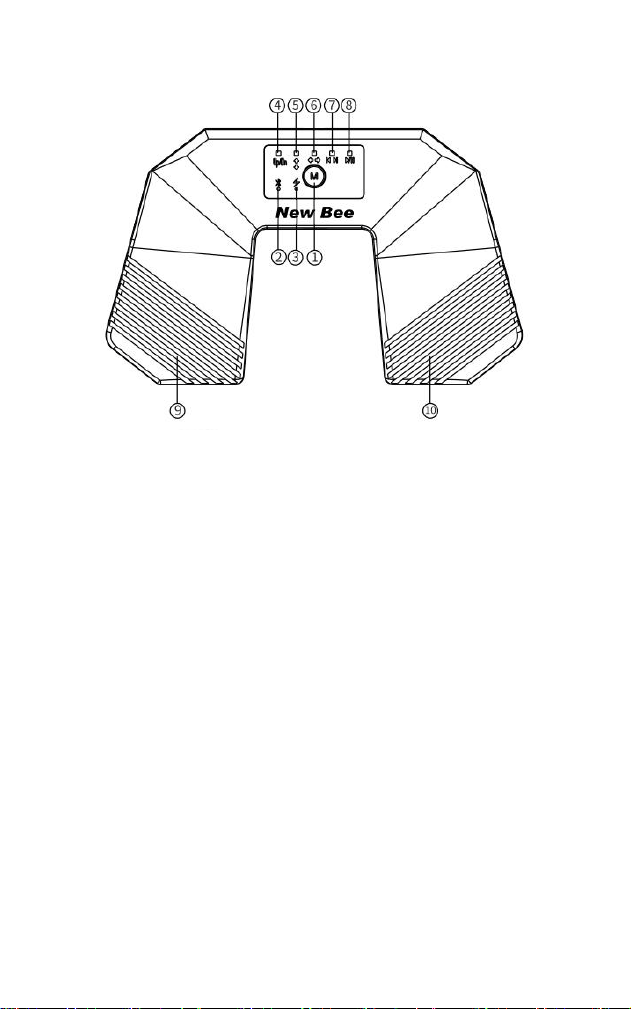
II. Produktfunktionen
① Multifunktionstaste
② Bluetooth-Anzeige
③ Ladeanzeige
④ Umblättermodus
⑤ Modus „Auf/Ab umblättern“
⑥ Modus „Links/Rechts umblättern“
⑦ Vorheriger Titel / Nächster Titel
⑧ Wiedergabe / Pause
⑨ Linkes Fußpedal
⑩ Rechtes Fußpedal
- 5 -
III. Produktbedienung
1. Ein-/Ausschalten: Halten Sie die Taste ① 3 Sekunden lang gedrückt, um das Gerät
einzuschalten, halten Sie die Taste im eingeschalteten Zustand gedrückt, um das Gerät
auszuschalten.
2. Bluetooth-Verbindung: Im eingeschalteten Zustand blinkt die Bluetooth-Anzeige bei
②, Bluetooth wartet auf eine Verbindung, der Bluetooth-Gerätename lautet „SPT-181“,
nach erfolgreicher Verbindung leuchtet die Anzeige dauerhaft. (Wenn innerhalb von 5
Minuten nach dem Einschalten des Geräts keine Bluetooth-Verbindung hergestellt wird,
schaltet sich das Gerät automatisch aus. Wenn bei bestehender Bluetooth-Verbindung
2,5 Stunden lang keine Bedienung erfolgt, schaltet sich das Gerät automatisch aus, um
Strom zu sparen.)
3. Umschalten der Umblätterfunktion: Im eingeschalteten Zustand ist standardmäßig
die Funktion „UP/DN“ aktiviert, dies ist der Umblättermodus, drücken Sie die Taste ①
einmal, um zu anderen Funktionen zu wechseln, (z. B. Seite nach oben/Seite nach unten
oder Seite nach links/Seite nach rechts.)
4. Funktion „Vorheriger Titel/Nächster Titel“: Drücken Sie bei eingeschaltetem Gerät
und bestehender Bluetooth-Verbindung die Taste ① dreimal kurz, die Funktionsanzeige
⑦ für „Vorheriger Titel/Nächster Titel“ leuchtet dauerhaft, wenn auf dem verbundenen
Gerät Musik wiedergegeben wird, kann mit den Fußpedalen ⑨ und ⑩ zum vorherigen
oder nächsten Titel gewechselt werden.

- 6 -
5. Funktion „Wiedergabe/Pause“: Drücken Sie bei eingeschaltetem Gerät und
bestehender Bluetooth-Verbindung die Taste ① viermal kurz, die Funktionsanzeige ⑧ für
„Wiedergabe/Pause“ leuchtet dauerhaft, wenn auf dem verbundenen Gerät Musik
wiedergegeben wird, kann die Wiedergabe mit den Fußpedalen ⑨ und ⑩ gestartet oder
angehalten werden.
6. Maus-Emulationsfunktion: Drücken Sie bei bestehender Bluetooth-Verbindung die
Taste ① fünfmal, bis die Anzeigeleuchte ⑤ blau blinkt, anschließend kann mit den
Fußpedalen ⑨ und ⑩ in einer Datei nach oben und unten gescrollt werden, drücken Sie
die Taste ① erneut einmal, bis die Anzeigeleuchte ⑥ blau blinkt, anschließend kann mit
den Fußpedalen ⑨ und ⑩ in einer Datei nach links und rechts gescrollt oder ein Bild
horizontal gespiegelt werden.
7. Niedriger Akkuladestand: Wenn die Akkustandsanzeige rot blinkt, laden Sie das
Gerät rechtzeitig auf, während des Ladevorgangs leuchtet die rote Anzeige dauerhaft,
sobald der Akku vollständig geladen ist, erlischt die Anzeige.
IV. Produktspezifikationen
Produktmodell: SPT-181
Bluetooth-Reichweite:>10 m
Ladeanschluss Typ-C
Ladeeingangsspannung:5 V
Gesamtbetriebsdauer. 38 Stunden
Automatische Abschaltung nach Herstellung der Bluetooth-Verbindung während des
Betriebs länger als 2,5 Stunden keine Funktion betätigt wird, schaltet sich das Gerät
automatisch aus, um Strom zu sparen
Stromversorgung Lithium-Akku mit 250 mAh
Ladestrom:160 mA-180 mA
Ladedauer. 1,5 Stunden
Zufrieden?
Wir danken Ihnen, dass Sie unser Produkt gewählt haben. Wir hoffen sehr, dass das
Produkt Ihr Interesse findet
Wenn Sie mit den erfahrungen sehr zufrieden sind, bitten wir Sie, diese mit Ihren
Freunden und in der Familie zu teilen.
Wir tauschen uns auch mit unseren Interessenten, um zu erfahren, wie wir mit
kostenlosen Vorabversionen der Produkte besser werden können. Wenn Sie interessiert
sind, zögern Sie nicht, uns hier zu besuchen:
Facebook: NewBeeBrand
Website: https://www.anewbee.com
Nicht zufrieden?
Wenn Sie Fragen oder Bedenken haben, können Sie uns jederzeit erreichen Unter:
E-mail: [email protected]
- 7 -
Tel: 0049-17619256911
Address:Address: Etage, Gebäude E, Guanghao-Industriepark, Yunfeng-Str. 23,
Dalangjiedao, Stadtteil Longhua, Stadt Shenzhen, Provinz Guangdong
Français
Pédale tourne-page Bluetooth multifonction
SPT-181
I. Présentation du produit
Cette pédale tourne-page Bluetooth multifonction utilise une connexion Bluetooth 5.4 à
faible latence et est compatible avec les smartphones, les tablettes ainsi qu'avec
diverses applications de partitions. Grâce à son port de recharge USB-C offrant une
autonomie prolongée, son format compact et portable permet de tourner les pages au
pied tout en gardant les mains libres. Elle est parfaitement adaptée à la pratique musicale,
aux représentations sur scène et aux répétitions de groupe.
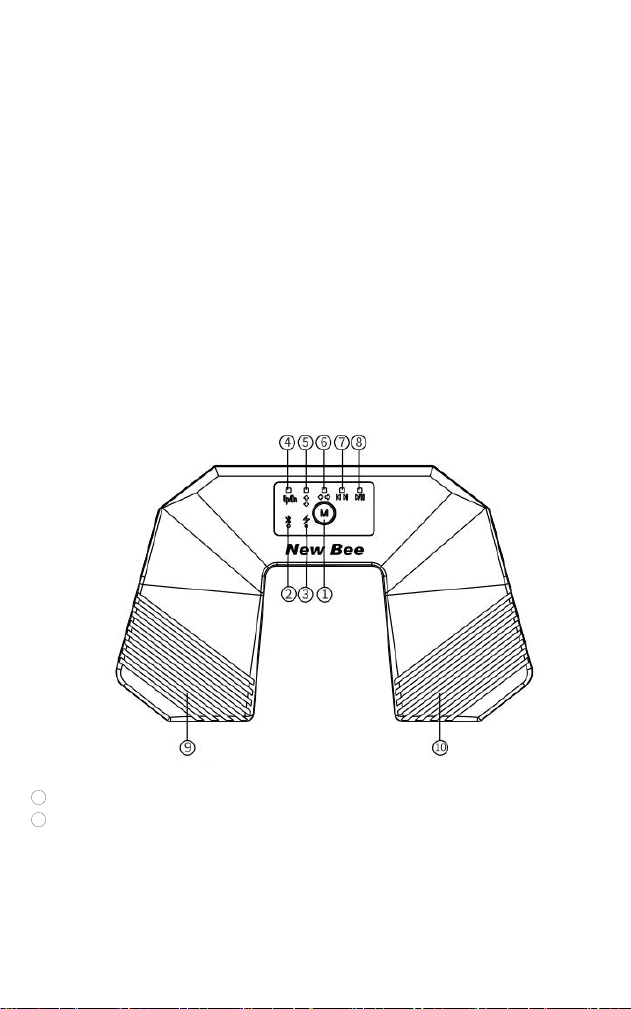
II. Fonctions du produit
① Bouton multifonction
② Voyant Bluetooth
③ Voyant de charge
④ Mode de contrôle des pages

- 8 -
⑤ Mode Flèche Haut/Bas
⑥ Mode Flèche Gauche/Droite
⑦ Piste précédente / Piste suivante
⑧ Lecture / Pause
⑨ Pédale gauche
⑩ Pédale droite
III. Utilisation du produit
1. Mise sous tension / mise hors tension : Maintenez le bouton ① enfoncé pendant 3
secondes pour allumer l'appareil. Une fois l'appareil allumé, maintenez à nouveau le
bouton ① enfoncé pour l'éteindre.
2.
Connexion Bluetooth : Lorsque l'appareil est allumé, le voyant Bluetooth du bouton
② clignote, indiquant que l'appareil est en attente de connexion. Le nom Bluetooth de
l'appareil est « SPT-181 ». Une fois la connexion établie, le voyant Bluetooth reste allumé
en continu. (Si aucune connexion Bluetooth n'est établie dans les 5 minutes suivant la
mise sous tension, l'appareil s'éteint automatiquement. Lorsque la connexion Bluetooth
est active, l'appareil s'éteint automatiquement après 2,5 heures d'inactivité afin
d'économiser l'énergie.)
3. Changement de mode de contrôle des pages : À la mise sous tension, le mode par
défaut correspond aux touches UP/DN. Ce mode permet de tourner les pages. Appuyez
brièvement sur le bouton ① pour basculer entre les différents modes (Par exemple,
Mode Flèche Haut/Bas ou Mode Flèche Gauche/Droite).
4. Fonction Piste précédente/Piste suivante : Lorsque l'appareil est sous tension et
connecté en Bluetooth, appuyez brièvement 3 fois sur le bouton ①. Les voyants des
fonctions Piste précédente / Piste suivante ⑦ restent alors allumés en continu. Pendant
la lecture de musique sur l'appareil connecté, vous pouvez utiliser les pédales ⑨ et ⑩
pour passer à la piste précédente ou suivante.
5. Fonction Lecture/Pause : Lorsque l'appareil est sous tension et connecté en
Bluetooth, appuyez brièvement 4 fois sur le bouton ①. Le voyant de la fonction Lecture /
Pause ⑧ reste alors allumé en continu. Pendant la lecture de musique sur l'appareil
connecté, vous pouvez utiliser les pédales ⑨ et ⑩ pour lancer ou mettre en pause la
lecture.
6. Fonction d'émulation de souris : Lorsque l'appareil est connecté en Bluetooth,
appuyez brièvement 5 fois sur le bouton ① jusqu'à ce que le voyant bleu de la fonction ⑤
clignote. Vous pouvez alors utiliser les pédales ⑨ et ⑩ pour faire défiler les fichiers vers
le haut ou vers le bas. Appuyez à nouveau brièvement une fois sur le bouton ① jusqu'à
ce que le voyant bleu de la fonction ⑥ clignote. Vous pouvez alors utiliser les pédales ⑨

- 9 -
et ⑩ pour faire défiler les fichiers vers la gauche ou vers la droite, ou pour faire pivoter
les images.
7. Batterie faible : Lorsque le voyant de charge clignote en rouge, rechargez l'appareil
rapidement. Pendant la recharge, le voyant rouge reste allumé en continu. Une fois la
batterie complètement chargée, le voyant s'éteint.
IV. Caractéristiques techniques
Modèle : SPT-181
Portée Bluetooth : > 10 m
Mode de recharge : USB-C
Tension d'entrée : 5 V
Autonomie totale : environ 38 heures
Arrêt automatique : Après la connexion Bluetooth, si aucune opération n'est effectuée
pendant plus de 2,5 heures lors de l'utilisation, l'appareil s'éteint automatiquement.
Alimentation : Batterie lithium intégrée 250 mAh
Courant de recharge : 160–180 mA
Durée de recharge : environ 1,5 heure
Content ?
Merci d'avoir choisi nos produits ! Nous espérons sincèrement que le produit vous offre
un nouveau bonheur.
Si vous êtes complètement satisfait de votre expérience d'utilisation, pourriez-vous le
partager avec vos amis ?
Nous nous engageons également avec nos fans à nous améliorer et faire le mieux en
offrant des produits en version préliminaire gratuits. Si vous êtes intéressé, n'hésitez pas
à nous suivre sur:
Facebook: NewBeeBrand
Site Web: https://www.anewbee.com
Pas content ?
Si vous avez des questions, préoccupations ou simplement pas satisfait de nos produits,
n'hésitez pas à nous contacter par e-mail à l’adresse suivante :
F-mail: [email protected]
Tel: 86-755-83219167
Adresse: 3e étage, bâtiment E, parc industriel de Guanghao, n ° 23, route de Yunfeng,
rue de Dalang, district de Longhua, Shenzhen, Guangdong, Chine
- 10 -
Italiano
Pedale Bluetooth per cambio pagina
SPT-181
Ⅰ. Descrizione del prodotto
Il pedale Bluetooth SPT-181 utilizza la tecnologia Bluetooth 5.4 a bassa latenza ed è
compatibile con smartphone, tablet e con la maggior parte delle applicazioni dedicate alla
lettura degli spartiti musicali.
La ricarica avviene tramite porta USB Type-C, garantendo un’elevata autonomia. Grazie
al controllo tramite pedale, è possibile cambiare pagina mantenendo le mani libere,
risultando ideale per lo studio dello strumento, le esibizioni dal vivo e le prove d’orchestra
o di gruppo.
Ⅱ.Descrizione dei comandi
1
Pulsante multifunzione
2 Indicatore Bluetooth
③ Indicatore di ricarica
④ Modalità cambio pagina
⑤ Modalità cambio pagina su/giù
⑥ Modalità cambio pagina destra/sinistra
⑦ Funzione Brano precedente / Brano successivo
⑧ Funzione Riproduzione / Pausa

- 11 -
⑨ Pedale sinistro
⑩ Pedale destro
Ⅲ. Istruzioni d’uso
1. Accensione e spegnimento
● Tenere premuto il pulsante ① per circa 3 secondi per accendere il
dispositivo.
● Quando il dispositivo è acceso, tenere nuovamente premuto il pulsante ①
per spegnerlo.
2. Connessione Bluetooth
Dopo l’accensione, l’indicatore Bluetooth ② inizierà a lampeggiare, indicando che il
dispositivo è in attesa di connessione.
Nell’elenco dei dispositivi Bluetooth selezionare “SPT-181”.
Una volta completato l’abbinamento, la spia Bluetooth rimarrà accesa in modo fisso.
Funzione di risparmio energetico:
● se entro 5 minuti dall’accensione non viene stabilita alcuna connessione
Bluetooth, il dispositivo si spegne automaticamente;
● se il dispositivo rimane connesso ma non viene effettuata alcuna operazione
per 2,5 ore, si spegnerà automaticamente per risparmiare energia.
3. Selezione della modalità di funzionamento
All’accensione il dispositivo è impostato, per impostazione predefinita, sulla modalità
UP/DN (Su/Giù) per il cambio pagina.
Premendo una volta il pulsante ① è possibile passare alle altre modalità disponibili,
come:
● cambio pagina su/giù;
● cambio pagina destra/sinistra;
● altre funzioni disponibili.
4. Modalità Brano precedente / Brano successivo
Con il dispositivo collegato tramite Bluetooth:
● premere rapidamente il pulsante ① per tre volte;
● l’indicatore ⑦ rimarrà acceso.
A questo punto, mentre il dispositivo collegato sta riproducendo musica, i pedali ⑨ e ⑩
permetteranno di passare rispettivamente al brano precedente o successivo.
5. Modalità Riproduzione / Pausa
Con il dispositivo collegato tramite Bluetooth:

- 12 -
● premere rapidamente il pulsante ① per quattro volte;
● l’indicatore ⑧ rimarrà acceso.
Durante la riproduzione musicale, i pedali ⑨ e ⑩ consentiranno di mettere in pausa o
riprendere la riproduzione.
6. Modalità Emulazione Mouse
Con il dispositivo collegato tramite Bluetooth:
● premere rapidamente il pulsante ① per cinque volte;
● l’indicatore ⑤ inizierà a lampeggiare in blu.
In questa modalità, i pedali ⑨ e ⑩ consentono di effettuare lo scorrimento verticale dei
documenti (su e giù).
Premendo nuovamente una volta il pulsante ①, l’indicatore ⑥ inizierà a lampeggiare in
blu.
In questa modalità, i pedali ⑨ e ⑩ consentono di effettuare lo scorrimento orizzontale
oppure la rotazione delle immagini, a seconda dell’applicazione utilizzata.
7. Batteria scarica
Quando l’indicatore di carica lampeggia in rosso, la batteria è quasi esaurita e deve
essere ricaricata.
Durante la ricarica la spia rossa rimane accesa fissa.
Quando la batteria è completamente carica, l’indicatore si spegne.
Ⅳ.Specifiche tecniche
Modello: SPT-18
Portata Bluetooth: oltre 10 metri
Porta di ricarica: USB Type-C
Tensione di ricarica: 5 V
Autonomia: circa 38 ore
Spegnimento automatico: il dispositivo si spegne automaticamente dopo 2,5 ore di
inattività durante l’utilizzo con connessione Bluetooth.
Batteria: batteria al litio integrata da 250 mAh
Corrente di ricarica: 160–180 mA
Tempo di ricarica: circa 1,5 ore
Contento?
Sinceramente che questo diventerà la tua nuova felicità.
Se sei completamente soddisfatto della tua esperienza di utilizzo, potresti gentilmente
condividerlo con i tuoi amici?

- 13 -
Ci impegniamo inoltre con i nostri appassionati a imparare come possiamo fare
meglio offrendo I prodotti non definitivi gratuiti. Se sei interessato, non esitare a seguirci
su:
Facebook: NewBeeBrand
Sitio web: https://www.anewbee.com
Non contento?
Se avete delle domande, dubbi o insoddisfazione di qualsiasi aspetto, non esitare a
contattarci
via e-mail :
E-mail: [email protected]
Tel: 86-755-83219167
Indirizzo: Parco industriale Guanghao, padiglione E, terzo piano, Via Yunfeng N.23, Viale
Dalang, Distretto di Longhua, città di Shenzhen, provincia del Guangdong, Cina
Español
Pedal pasapáginas Bluetooth
SPT-181
I. DESCRIPCIÓN DEL PRODUCTO
Este pedal pasapáginas Bluetooth incorpora Bluetooth 5.4 para ofrecer una conexión de
baja latencia. Es compatible con teléfonos inteligentes, tabletas y diversas aplicaciones
de lectura de partituras. Se recarga mediante USB-C y ofrece una larga autonomía. Su
diseño compacto y portátil permite pasar las páginas con los pies y mantener las manos
libres. Es ideal para la práctica instrumental, las actuaciones en directo y los ensayos
musicales.
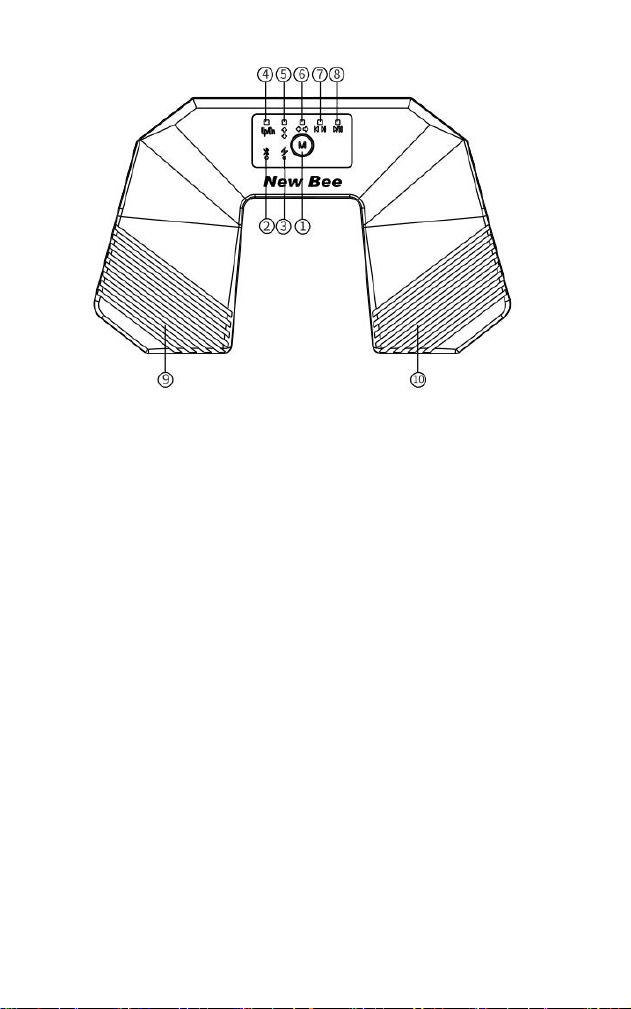
II. COMPONENTES Y FUNCIONES
① Botón multifunción
② Indicador de Bluetooth
③ Indicador de carga
④ Modo de cambio de página (Page Up/Page Down)
⑤ Modo de flechas arriba/abajo
⑥ Modo de flechas izquierda/derecha
⑦ Pista anterior/siguiente
⑧ Reproducción/pausa
⑨ Pedal izquierdo
⑩ Pedal derecho
- 14 -
III. INSTRUCCIONES DE USO
1. Encendido y apagado
Mantenga pulsado el botón multifunción ① durante 3 segundos para encender el
dispositivo. Para apagarlo, vuelva a mantener pulsado el botón ① durante 3 segundos.
2. Conexión Bluetooth
Al encender el dispositivo, el indicador de Bluetooth ② comenzará a parpadear, lo que
indica que está listo para el emparejamiento. Active la función Bluetooth del teléfono, la
tableta u otro dispositivo y seleccione “SPT-181”. Una vez establecida la conexión, el
indicador de Bluetooth permanecerá encendido de forma continua. Si no se establece
ninguna conexión Bluetooth durante los 5 minutos posteriores al encendido, el
dispositivo se apagará automáticamente. Si el dispositivo permanece conectado
mediante Bluetooth y no se realiza ninguna operación durante 2,5 horas, se apagará
automáticamente para ahorrar energía.
3. Cambio de modo
Al encender el dispositivo, se activa de forma predeterminada el modo Page Up/Page
Down (UP/DN), correspondiente al modo de cambio de página . Pulse brevemente el
botón multifunción ① para cambiar entre los demás modos, como el modo de flechas
arriba/abajo o el de flechas izquierda/derecha.
4. Pista anterior y pista siguiente
Con el dispositivo encendido y conectado mediante Bluetooth, pulse brevemente tres
veces el botón multifunción ①. Cuando el indicador de pista anterior/siguiente ⑦
permanezca encendido, la función estará activada. Durante la reproducción de música
en el dispositivo conectado, utilice los pedales ⑨ y ⑩ para seleccionar la pista anterior o
la siguiente.
5. Reproducción y pausa
Con el dispositivo encendido y conectado mediante Bluetooth, pulse brevemente cuatro

- 15 -
veces el botón multifunción ①. Cuando el indicador de reproducción/pausa ⑧
permanezca encendido, la función estará activada. Durante la reproducción de música
en el dispositivo conectado, utilice los pedales ⑨ y ⑩ para iniciar o pausar la
reproducción.
6. Función de emulación de ratón
Con el dispositivo conectado mediante Bluetooth, pulse brevemente cinco veces el botón
multifunción ① hasta que el indicador azul del modo de flechas arriba/abajo ⑤ comience
a parpadear. En este modo, utilice los pedales ⑨ y ⑩ para desplazarse por un
documento hacia arriba o hacia abajo. Pulse brevemente una vez más el botón
multifunción ①. Cuando el indicador azul del modo de flechas izquierda/derecha ⑥
comience a parpadear, utilice los pedales ⑨ y ⑩ para desplazarse hacia la izquierda o la
derecha en un documento o para cambiar entre imágenes.
7. Aviso de batería baja y carga
Cuando el indicador de carga parpadee en rojo, cargue el dispositivo lo antes posible.
Durante la carga, el indicador rojo permanecerá encendido de forma continua. Una vez
completada la carga, el indicador se apagará.
IV. ESPECIFICACIONES TÉCNICAS
Modelo: SPT-181
Alcance de transmisión Bluetooth: > 10 m
Método de carga: USB-C
Tensión de entrada de carga: 5 V
Autonomía aproximada: 38 horas
Apagado automático: tras 2,5 horas de inactividad con la conexión Bluetooth activa.
Fuente de alimentación: batería de litio integrada de 250 mAh
Corriente de carga: 160–180 mA
Tiempo de carga aproximado: 1,5 horas
¿Feliz?
¡Gracias por elegir nuestro producto! Esperamos sinceramente que será su nueva
felicidad encontrada.
Si está completamente satisfecho con su experiencia de compra, ¿podría compartir a
sus amigos?
También estudiamos con nuestros seguidores para aprender cómo podemos hacer
mejor ofreciendo los productos gratuitos de lanzamiento previo. No dude en seguirnos si
le interese:
Facebook: NewBeeBrand
Sitio web: https://www.anewbee.com
¿No feliz?
Si tiene cualquier problema, preocupación o solo no está satisfecho, no dude en
contactar con nosotros en cualquier momento por e-mail:
E-mail: [email protected]
Tel: 86-755-83219167
Address: 3er piso, Edificio E, Industrial Guanghao, No. 23, Camino Yunfeng, Calle
Dalang, Distrito Longhua, Shenzhen, Guangdong, China
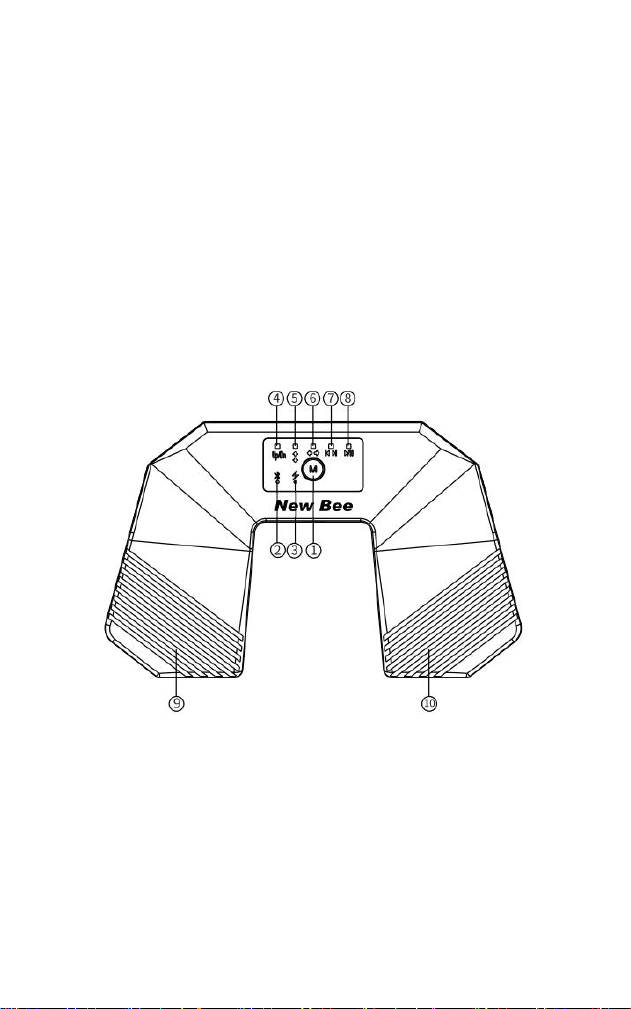
- 16 -
日本語
Bluetooth ページターナーペダル
SPT-181
Ⅰ.製品概要
本製品は、Bluetooth 5.4 低
遅
延接
続
に
対応
したワイヤレスページターナーペダルです。
スマートフォン、タブレット、および各種
楽
譜アプリに
対応
しています。Type-C 充電方
式で長時間の駆動が可能で、コンパクトかつ軽量なため持ち運びに便利です。足で操作
してページをめくることで
両
手が自由になり、
楽
器の練習、ステージ演奏、バンドのリ
ハーサルなど幅
広
いシーンに適しています。
Ⅱ.製品機能
①多機能ボタン
②Bluetooth インジケーター
③充電インジケーター
④ページめくりモード
⑤上下ページめくりモード
⑥左右ページめくりモード
⑦前の曲/次の曲
⑧再生/一時停止
⑨左のペダル
⑩右のペダル
Ⅲ.製品操作
1、電源オン/オフ:①ボタンを 3 秒間長押しすると電源がオンになります。電源オンの
状態で 3 秒間長押しすると電源がオフになります。
2、Bluetooth 接続:電源オン時、②の Bluetooth インジケーターが点滅し、接続待機状
態になります。Bluetooth 名は「SPT-181」です。接続が完了すると常時点灯します。(電

- 17 -
源オン後 5 分以内に接続がない場合は自動的に電源がオフになります。Bluetooth 接続状
態で 2.5 時間以上操作がない場合も、自動的に電源がオフし、節電状態になります。)
3、ページめくりモードの切り替え:電源オン時のデフォルトは UP/DN キーによるペー
ジめくりモードです。①ボタンを 1 回押すと、他の機能に切り替わります(上下ページめ
くりや左右ページめくりなど)。
4、前の曲/次の曲機能:電源オン
・
Bluetooth 接
続
状態で①ボタンを 3 回短押しすると、
⑦の前の曲/次の曲機能インジケーターが常時点灯します。この状態で接続中のデバイ
スで音
楽
を再生しながら⑨⑩のペダルを操作すると、前の曲/次の曲を切り替えること
ができます。
5、再生/一時停止機能:電源オン・Bluetooth 接続状態で①ボタンを 4 回短押しすると、
⑧の再生/一時停止機能インジケーターが常時点灯します。この状態で接
続
中のデバイ
スで音
楽
を再生しながら⑨⑩のペダルを操作すると、再生/一時停止を切り替えること
ができます。
6、マウス操作モード:Bluetooth 接
続
状態で①ボタンを 5 回押すと、⑤のインジケータ
ーが青色で点滅し、上下スクロール操作が有効になります。この状態で⑨⑩のペダルを
操作すると、ファイルの上下スクロールができます。再度①ボタンを 1 回押すと、⑥の
インジケーターが青色で点滅し、左右スクロールまたは画像反
転
操作が有効になります。
この状態で⑨⑩のペダルを操作すると、ファイルの左右スクロールまたは画像の反
転
が
できます。
7、バッテリー残量低下時:③のインジケーターが赤色で点滅した場合は、すぐに充電し
てください。充電中は赤色で常時点灯し、充電完了後は消灯します。
Ⅳ.製品仕様
製品型番:SPT-181
Bluetooth の通信距離:>10m
充電方式:Type-C
充電電
圧
:5V
総使用時間:約 38 時間
自動シャットダウン:Bluetooth 接
続
後、2.5 時間以上操作がない場合、自動的に電源が
オフし、節電状態になります。
電源方式:内蔵リチウム電池 250mAh
充電電流:160mA~180mA
充電時間:約 1.5 時間
うれしい?
当社の商品を選んでくれてありがとう!それがお客樣の新しい見つかた幸せことになれ
ば光
栄
です。
もしお客樣がこの商品に大満足、あなたの友達にもおススメすればうれしいです
もっと良い商品を提供するために、当社はファンの方にリリース前の製品を無料でオフ
ァー する。それに興味があるなら、早速我々をフォローしてください:
フィーシュー:NewBeeBrand
ウェブサイト:https://www.anewbee.com
不満ですか?
ごサービスに
関
して何かご意見がございましたら、いつでもお問い合わせください。
メール: [email protected]
でんわ: 86-755-83219167
アドレス: 中国
広
東省深セン市龍華区大浪街道雲峰路 23 号
光浩工業園 E 棟三階
- 18 -
Русский язык
Блютуз-перелистыватель страниц
SPT-181
I. Обзор продукта
Данный Bluetooth-педальный перелистыватель нот, оснащён технологией Bluetooth
5.4 с низкой задержкой и совместим с мобильными телефонами, планшетами и
различными нотными приложениями. Долгая автономная работа благодаря зарядке
Type-C, устройство компактно и портативно. Управление ногами освобождает руки,
подходит для занятий музыкой, сценических выступлений и репетиций в группе.
II. Функции продукта
① Многофункциональная клавиша
② Светодиод Bluetooth
③ Световой индикатор зарядки
④ Режим перелистывания
⑤ Режим перелистывания страниц вверх и вниз
⑥ Режим перелистывания страниц влево-вправо
⑦ Предыдущая песня/Следующая песня
⑧ Воспроизведение/Пауза
⑨ Левая педаль
⑩ Правая педаль

- 19 -
III. Эксплуатация продукта
1. Включение/выключение: Удерживайте кнопку ① в течение 3 секунд, чтобы войти
в состояние включения; в состоянии включения удерживайте её дольше, чтобы
перейти в состояние выключения.
2. Подключение по Bluetooth: В состоянии включения питания светодиодный
индикатор Bluetooth на кнопке ② мигает — это означает, что устройство ожидает
подключения; имя Bluetooth — «SPT-181». После успешного подключения
индикатор постоянно горит. (Если в течение 5 минут после включения устройства не
произойдёт никакого подключения по Bluetooth, устройство автоматически
выключится. В состоянии подключения по Bluetooth, если в течение 2,5 часов не
будет совершено никаких действий, устройство автоматически выключится для
экономии энергии.)
3. Переключение функции перелистывания: В состоянии включения по умолчанию
используются клавиши UP/DN; это режим перелистывания страниц. Одно нажатие
кнопки ① позволяет переключаться на другие функции (например, перелистывание
вверх-вниз или влево-вправо).
4. Функция «Предыдущая/Следующая песня»: В включенном и подключенном по
Bluetooth состоянии трижды коротко нажмите кнопку ①. Индикатор функции
предыдущего/следующего трека ⑦ загорится постоянно. Теперь, когда на
подключенном устройстве воспроизводится музыка, педалями ⑨ и ⑩ можно
управлять переключением треков (предыдущий или следующий).
5. Функция воспроизведения/паузы: В включенном и подключенном по Bluetooth
состоянии четыре раза коротко нажмите кнопку①. Индикатор функции
воспроизведения/паузы ⑧ загорится постоянно. Теперь, когда на подключенном
устройстве воспроизводится музыка, педалями ⑨ и ⑩ можно ставить
воспроизведение на паузу или возобновлять его.
6. Функция эмуляции мыши: В подключенном по Bluetooth состоянии пять раз
нажмите кнопку ① — индикатор ⑤ начнет мигать синим. Теперь педалями ⑨ и ⑩
можно прокручивать файлы вверх/вниз. Если снова нажать кнопку ① один раз — до
тех пор, пока индикаторы кнопок с ⑥ не начнут мигать синим светом, — можно
использовать педали ⑨ и ⑩ для горизонтальной прокрутки файлов или поворота
изображений.
7. Режим низкого заряда: Когда индикатор уровня заряда мигает красным,
необходимо зарядить устройство. Во время зарядки индикатор горит красным
постоянно. При полной зарядке индикатор гаснет.

- 20 -
IV. Технические характеристики
Модель продукта: SPT-181
Дальность передачи Bluetooth: >10 метров
Способ зарядки: TYPE-C
Зарядное напряжение разъема: 5 В
Общая продолжительность использования: около 38 часов
Настройка выключения: после подключения по Bluetooth, если в процессе
использования не производится никаких действий более 2,5 часов, устройство
автоматически выключается.
Способ питания: встроенный литиевый аккумулятор 250 MAH
Зарядный ток: 160 мА – 180 мА
Время зарядки: около 1,5 часа
Довольны продуктом
?
Спасибо за выбор наших продуктов! Мы искренне надеемся, что это будет
Ваше новое счастье.
Если Вы полностью удовлетворены своим опытом использования, не могли
бы Вы любезно поделиться со своими друзьями?
Мы также сотрудничаем с нашими поклонниками, чтобы узнать, как мы
можем сделать все лучше, предложив бесплатные предварительные выпуски.
Если Вы заинтересованы, не стесняйтесь следовать за нами по
нижеследующим контактам:
Facebook: NewBeeBrand
Website: https://www.anewbee.com
Недовольны
?
Если у Вас возникли какие-либо вопросы, проблемы или просто не
удовлетворены в любых отношениях, свяжитесь с нами по электронной
почте:
E-mail: [email protected]
Tel: 86-755-83219167
Адрес: 3-й этаж, здание E, промышленный парк Гуанхао, д.23, ул. Юйфэнь,
квартал Далан, район Лунхуа, г. Шэньчжэнь, Гуандун, Китай

FCC Warnning:
This equipment has been tested and found to comply with the limits for a Class B digital device,
pursuant to part 15 of the FCC Rules. These limits are designed to provide
reasonable
protection against harmful interference in a residential installation. This equipment generates,
uses and can radiate radio
frequency
energy
and,
if
not
installed
and
used
in
accordance
with
the
instructions,
may cause
harmful
interference
to
radio
communications.
However,
there
is
no
guarantee
that interference
will
not
occur
in
a
particular
installation.
If
this
equipment
does
cause
harmful interference to radio or television reception, which can be
determined by turning the equipment off
and
on,
the
user
is
encouraged
to
try
to
correct
the interference
by
one
or
more
of
the following measures:
•
Reorient or relocate the receiving antenna.
•
Increase the separation between the equipment and receiver.
•
Connect the equipment into an outlet on a circuit different from that to which the receiver is
connected.
• Consult the dealer or an experienced radio/TV technician for help.
Caution:
Any
changes
or
modifications
to
this
device
not
explicitly
approved
by
manufacturer
could void your authority to operate this equipment.
This
device
complies
with
part
15
of
the
FCC
Rules.
Operation
is
subject
to
the
following
two
conditions:
(1)This
device
may
not
cause
harmful
interference,
and
(2)
this
device
must
accept
any
interference received, including interference that may cause undesired operation.
This
equipment
complies
with
FCC
radiation
exposure
limits
set
forth
for
an
uncontrolled
environment.
This
equipment
should
be
installed
and
operated
with
minimum
distance
0cm
between the radiator and your body.