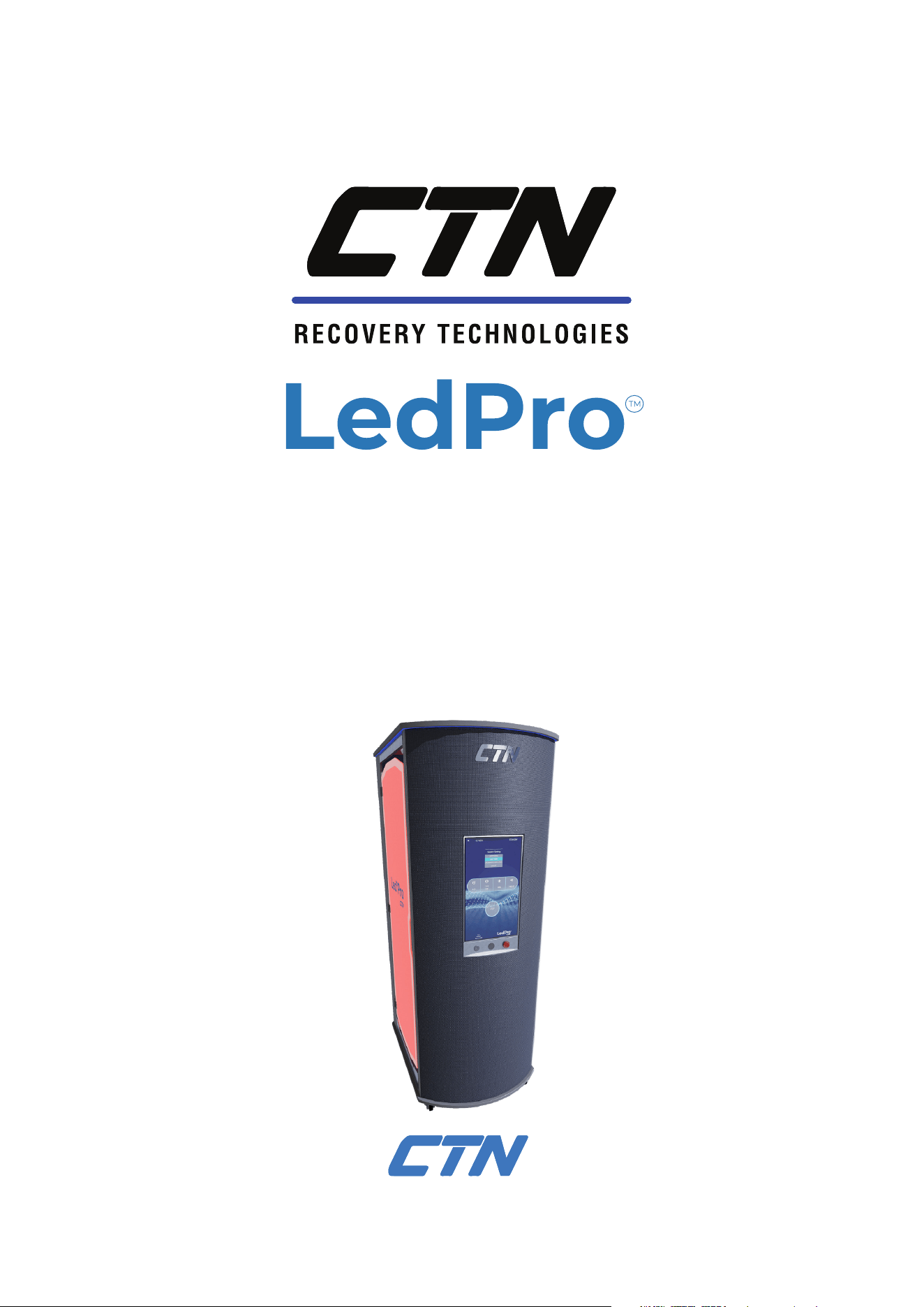
Multimodal Wellness System
Red/NIR light exposure
Vibration training
Nogier-inspired sound frequencies
USER MANUAL
26.08.2026
2
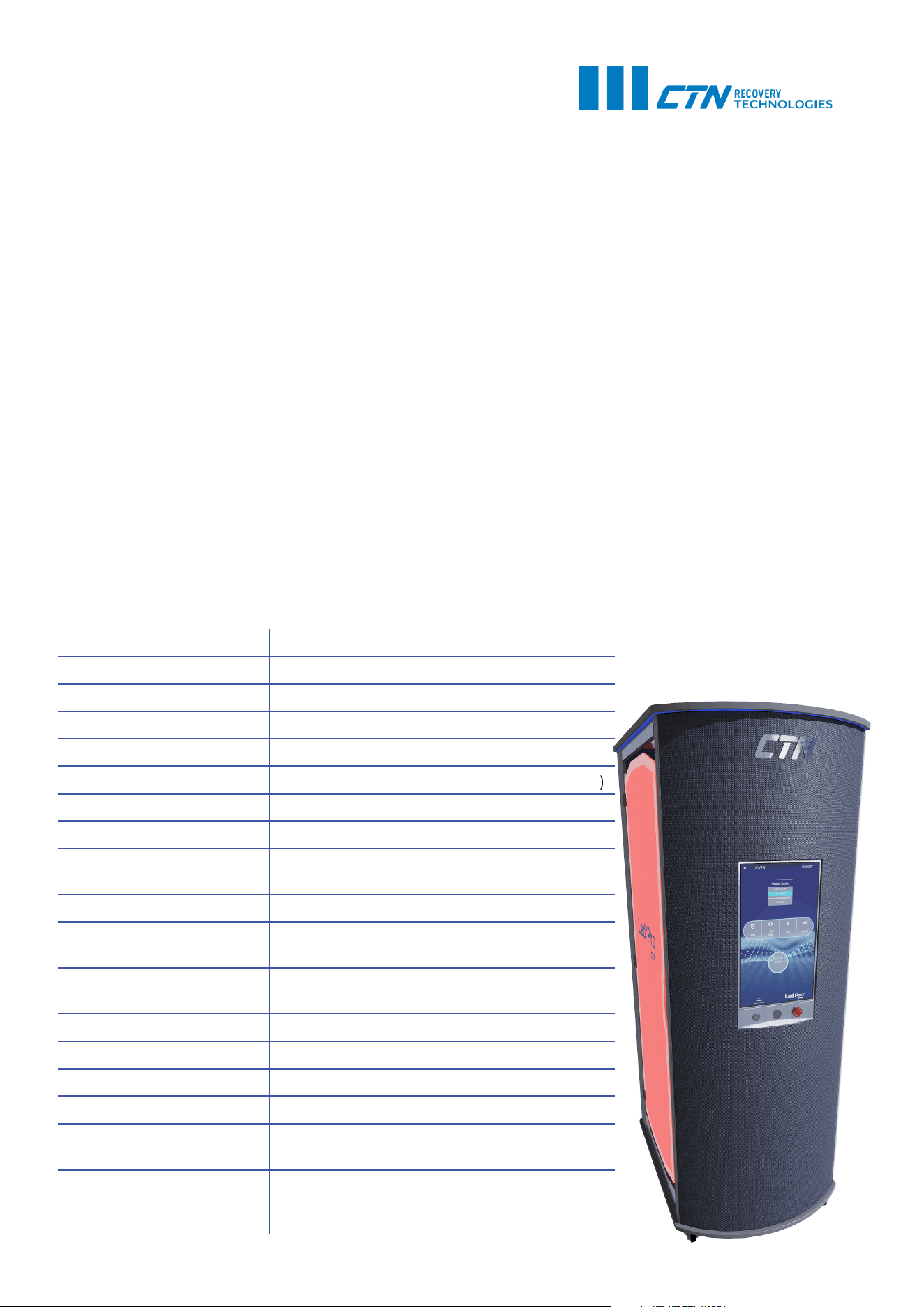
Product Name: LedPro™ Vertical
Display: 24” full HD monitor / LCD touchscreen
Power Consumption: 3200W
Panel Power: 1200 W per panel
Power Supply (AC): 230 V / 50 Hz, 16 A fuse required
LED Amount: 840 per panel (420 red ; 420 near-infrared)
Cooling System: Dual AC radial fans
Main Light Wavelengths: 660 nm (±10) red + 850nm (±10) NIR
Total Irradiance:
160 mW/cm² @ 15-30 cm distance, per
panel
Vibration Plate Power: 380 W
Vibration Plate
Frequency Range:
1-40 Hz
Vibration Plate
Amplitude:
0-5 mm @ 57,5 kg load
Sound System: JOY Soundmate 3
Max User Weight: 240 kg
Device Weight: 310 kg
Device Dimensions: 860 x 1150 x 2240 mm (L*W*H)
Transport box
dimensions:
2377 x 998 x 1426 mm (L*W*H)
Session Modes:
BODY TONING, SKIN TONING,
INFLAMMATION REDUCTION, MOBILITY,
STRESS RELIEF
TECHNICAL SPECIFICATIONS
TABLE OF CONTENTS
TECHNICAL SPECIFICATIONS ..................................................................................................................... 2
DEVICE SCHEMATICS ........................................................................................................................................ 3
INTRODUCTION ..................................................................................................................................................... 4
CONTRAINDICATIONS ...................................................................................................................................... 4
SAFETY PRECAUTIONS .................................................................................................................................... 5
UNBOXING INSTRUCTIONS .......................................................................................................................... 10
INTRODUCTION TO FUNCTIONS .............................................................................................................. 11
RED LIGHT AND NEAR-INFRARED .................................................................................................... 11
VIBRATION TRAINING ................................................................................................................................. 11
NOGIER-INSPIRED SOUND FREQUENCIES ................................................................................11
INSTRUCTIONS FOR USE ................................................................................................................................ 12
STARTUP PROCEDURE, STARTING AND STOPPING THE SESSION .......................... 12
SESSION GUIDELINES ................................................................................................................................. 13
SESSION PRESETS ......................................................................................................................................... 13
MANUAL SESSION SETTINGS ................................................................................................................ 14
MAINTENANCE ...................................................................................................................................................... 15
WARRANTY INFORMATION .......................................................................................................................... 15
DEVICE SCHEMATICS
3
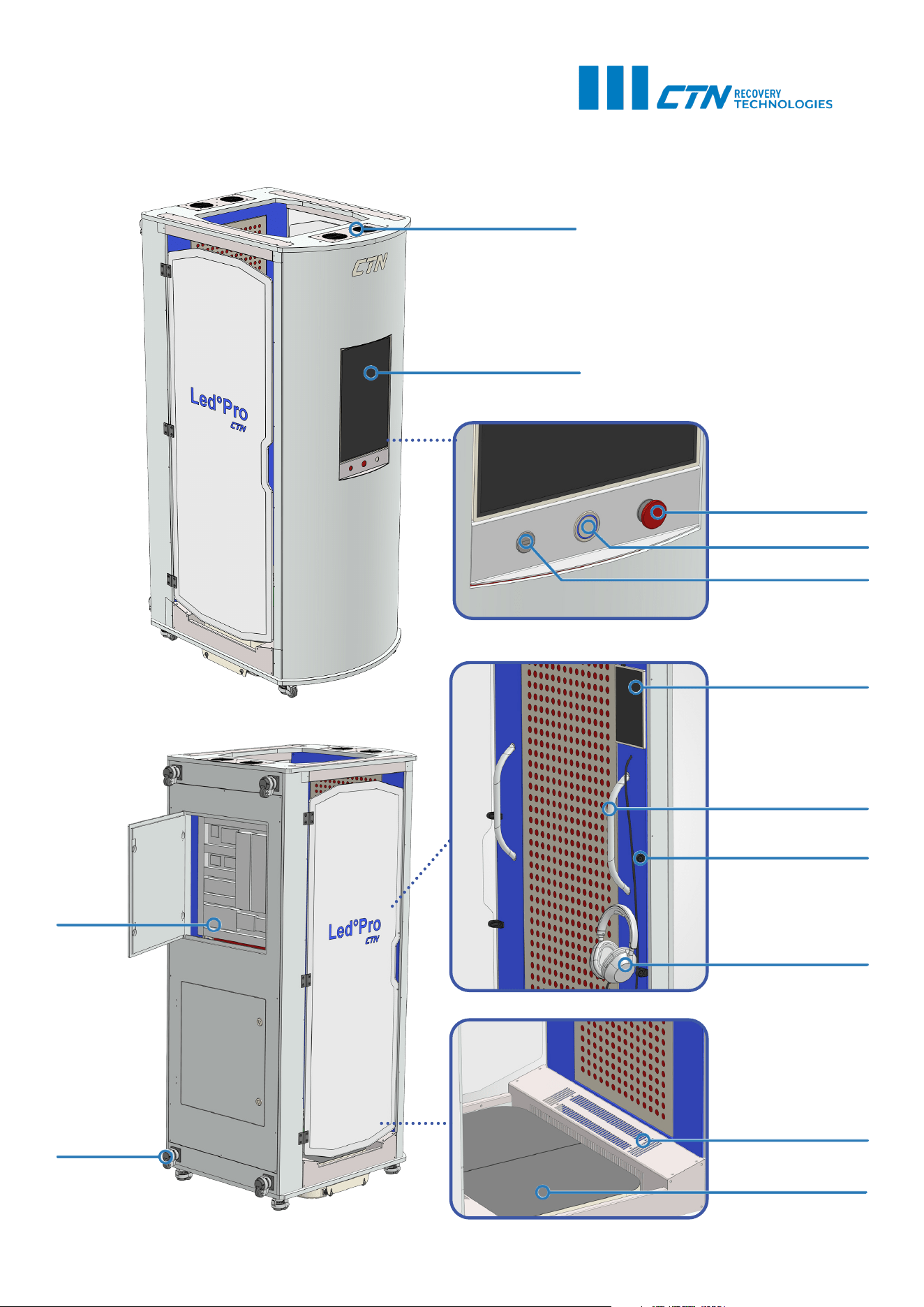
Ventilation holes
Main screen
Emergency stop
Power on/off
USB port
Internal screen
Balance handle
Door magnet
Headphones
Fan
Vibration plate
Fuse
Wheel

INTRODUCTION
Built for modern wellness studios and professional environments, the vertical LedPro™ combines red
and near-infrared light exposure, whole-body vibration training, and low-frequency sound programs in a
compact upright format. Designed for comfortable standing use, it offers an immersive full-body well-
ness experience while saving space compared with traditional bed-style systems.
The vertical LedPro™ brings the signature red and near-infrared light experience of our bed-style Led-
Pro™ into a freshly redesigned format with enhanced features for professional wellness settings.
Red and near-infrared light create a warm, targeted light environment designed to support relaxation,
body care routines, and a refreshed feeling. The integrated vibration platform adds whole-body move-
ment, helping users feel activated, energised, and more connected to their body during each session.
Low-frequency sound programs, inspired by Nogier frequencies, add a calming sensory layer to the ex-
perience. These resonant tones are designed to support relaxation and create a more immersive atmo-
sphere.
Together, light, vibration, and sound create a multi-sensory wellness experience for users seeking relax-
ation, renewal, and a premium studio-based recovery ritual — all while standing comfortably.
CONTRAINDICATIONS
Whenever unsure about any listed or other potential contraindications, please make sure that the client
consults their doctor or seeks medical advice from the treating medical professional before sessions.
Below are some of the possible contraindications:
• Pregnancy or suspected pregnancy.
• Pacemaker, implanted defibrillator, neurostimulator, insulin pump, or other active implanted elec-
tronic medical device, unless cleared by a healthcare professional and the device manufacturer.
• Recent surgery, recent fracture, open wounds, acute injury, severe sprain or strain, or recent trauma.
• Known or suspected blood clots, including deep vein thrombosis, pulmonary embolism, thrombo-
phlebitis, or high clotting risk.
• Severe or unstable cardiovascular conditions, including recent heart attack, unstable heart disease,
severe arrhythmia, uncontrolled high blood pressure, or any condition where exercise or vibration
has been restricted.
• Photosensitivity disorder or any condition known to be triggered or worsened by light exposure.
• Use of photosensitising medication or topical products, unless cleared by a healthcare professional.
• Photosensitive epilepsy or history of light-triggered seizures, especially if using pulsed or flashing
light modes.
• Active cancer, suspicious lesions, or use directly over a tumour area, unless specifically cleared by a
qualified physician.
• Severe balance problems, fainting episodes, uncontrolled vertigo, severe dizziness, or inability to
stand safely.
• Severe osteoporosis, unstable spinal conditions, recent disc injury, severe joint instability, or any con-
dition where vibration or impact loading has been restricted.
• Recent eye surgery, serious retinal condition, or medical advice to avoid bright light or near-infrared
light exposure.
• Active infection, fever, acute inflammation, unexplained swelling, or unexplained pain.
• Underage children.
• Any condition where a healthcare professional has advised avoiding vibration, exercise, bright light,
heat exposure, low-frequency sound, or standing unsupported.
4
5
SAFETY PRECAUTIONS
WARNINGS AND PRECAUTIONS
INSTALLATION AND OPERATING AREA
Install the device only on a stable, hard, level, dry, and slip-resistant surface capable of supporting the device and user load.
Keep the area around the device clear so users can step on, step off, and move away safely.
Do not position the device where walls, furniture, accessories, cables, or other objects may restrict safe entry, exit, or operation.
Keep the power cord positioned so it cannot be tripped over, pinched, crushed, pulled, or damaged.
Do not use the device if it is unstable, rocking, visibly damaged, or not positioned securely.
Do not use the device outdoors.
Do not use the device near pools, showers, saunas, wet rooms, or other sources of water or excessive humidity.
ELECTRICAL SAFETY
Connect the device only to a mains supply that matches the voltage and frequency stated on the rating label.
Use only a properly grounded electrical outlet.
Do not remove, modify, or bypass the protective earth connection.
Ensure that the mains plug or disconnecting device remains accessible during use.
Do not use the device if the power cord, plug, socket, housing, control panel, lights, platform, or any electrical part appears dam-
aged.
Do not operate the device with wet hands or while standing on a wet surface.
Do not expose the device, power cord, plug, or electrical components to water, liquids, excessive humidity, or cleaning fluids.
Do not immerse any part of the device in water or other liquid.
Do not use the device if it has been dropped, tipped over, damaged, exposed to water, or partially immersed in liquid.
If liquid enters the device, stop use immediately, disconnect the device from the mains supply, and have it inspected by quali-
fied service personnel before further use.
Keep the power cord away from heated surfaces, sharp edges, moving parts, and walkways.
Do not pull, lift, carry, or move the device by the power cord.
Do not use extension cords, adapters, or multi-socket outlets unless they are suitably rated and permitted by the installation
instructions.
Never insert objects into any opening, ventilation slot, gap, or moving area of the device.
If an object falls into the device, switch the device off, disconnect it from the mains supply, and contact qualified service person-
nel if the object cannot be safely removed.
If the device produces unusual noise, smell, smoke, excessive heat, sparks, or abnormal operation, stop use immediately, discon-
nect it from the mains supply, and contact qualified service personnel.
Do not open the housing or attempt to repair electrical components.
Electrical inspection and repair must be carried out only by qualified service personnel.
If the electrical outlet, circuit breaker, plug, or building supply appears faulty, contact a licensed electrician.
6
SAFETY PRECAUTIONS
WARNINGS AND PRECAUTIONS
MECHANICAL AND PLATFORM SAFETY
Do not exceed the stated maximum user weight or maximum load capacity.
Step onto and off the vibration platform carefully.
Use support handles or rails where provided.
Do not jump on the platform.
Do not use the platform for exercises or movements not described in the user instructions.
Do not sit, kneel, lie down, or place the head, chest, abdomen, or spine directly on the vibration platform unless the device is spe-
cifically designed and labelled for that use.
Never reach into, under, or around the vibration platform while the device is operating.
Do not tip, lift, move, or reposition the device while it is connected to power or in operation.
Do not place hands, feet, tools, accessories, or other objects under the device during operation.
Keep hands, feet, clothing, hair, jewellery, and loose items away from gaps, moving parts, ventilation openings, and underside
areas.
Do not use the vibration platform if you cannot stand independently and safely.
Check regularly for loose fasteners, unusual vibration, abnormal noise, visible damage, worn parts, or instability.
Remove the device from service if damage, looseness, abnormal movement, or unsafe operation is observed.
USER POSITION AND FOOTWEAR
Maintain a balanced stance during vibration.
Keep knees slightly bent during vibration.
Do not lock the knees, elbows, or other joints during use.
Do not lean back heavily onto the heels during vibration.
Keep body weight controlled and avoid unstable body positions.
Use handles only for balance; do not hang from the handles.
Wear sports shoes. Do not use the vibration plate barefoot.
7
SAFETY PRECAUTIONS
WARNINGS AND PRECAUTIONS
GENERAL USER SAFETY
Consult a physician or qualified healthcare professional before use, especially if you have a medical condition, implanted device,
injury, balance concern, light sensitivity, or are unsure whether the device is suitable for you.
This device is intended for general wellness use only and is not intended to diagnose, treat, cure, prevent, or alleviate any disease
or medical condition.
Read the full user manual, including all warnings and safety instructions, before using the device.
The owner or operator must ensure that all users receive the necessary safety information before use.
Use the device only as described in the user instructions.
Do not use accessories, attachments, replacement parts, software, or modifications that are not approved by the manufacturer.
Stop use immediately if you experience pain, dizziness, nausea, shortness of breath, chest discomfort, headache, eye discomfort,
skin irritation, excessive warmth, numbness, tingling, anxiety, or loss of balance.
Do not exceed the stated session time, intensity level, frequency of use, user weight, or load limits.
First-time users should begin with the lowest settings and shortest session duration.
Do not over-exert yourself or continue use to the point of exhaustion.
Allow sufficient rest between sessions.
Stay properly hydrated before and after use.
Do not use the device while tired, unwell, dizzy, dehydrated, or under the influence of alcohol, recreational drugs, or medication
that may affect balance, alertness, or sensitivity.
Do not use immediately after a heavy meal, sauna, intense exercise, or other activity that may increase dizziness, dehydration, or
discomfort.
Stop use immediately if you experience pain, dizziness, nausea, shortness of breath, chest discomfort, headache, eye discomfort,
skin irritation, excessive warmth, numbness, tingling, anxiety, or loss of balance.
Retain the user manual for future reference.
Do not modify, alter, repair, bypass, disable, or tamper with any part of the device, including safety features, electrical compo-
nents, controls, software, light modules, ventilation, guards, or the vibration platform, unless expressly authorised by the manu-
facturer.
USER SUPERVISION
This appliance is not to be used by persons, including children, with reduced physical, sensory, or mental capabilities, or lack of
experience and knowledge, unless they have been given supervision or instruction concerning safe use of the appliance and
understand the hazards involved.
Children must be supervised to ensure that they do not play with the appliance.
Children must not use, clean, or perform user maintenance on the appliance without appropriate supervision.
Keep children and pets away from the device during operation.
Commercial operators should supervise first-time users and ensure that users understand how to start, stop, and safely exit the
device before each session.
Operators should screen users for contraindications and precautions before use.
Operators should not allow use by anyone who appears unable to stand safely, follow instructions, or respond appropriately
during operation.
8
SAFETY PRECAUTIONS
WARNINGS AND PRECAUTIONS
VIBRATION PRECAUTIONS
Vibration may not be suitable for all users.
Users with balance, cardiovascular, neurological, musculoskeletal, spinal, implant-related, or injury-related concerns should con-
sult a healthcare professional before use.
Start at the lowest vibration level and increase only if comfortable.
Stop the vibration function immediately if you feel dizziness, discomfort, pain, numbness, tingling, nausea, headache, or loss of
balance.
Do not use the vibration function if a healthcare professional has advised you to avoid vibration, impact, or exercise.
Do not use the vibration function if you are unable to maintain a stable standing position.
Do not use dumbbells, weighted vests, resistance bands, or other added loads on the platform unless specifically permitted by
your physician.
When additional load is used, reduce vibration intensity, session duration, and exercise complexity.
RED AND NEAR-INFRARED LIGHT PRECAUTIONS
Do not stare directly into the red or near-infrared light sources.
Use protective eyewear for red light and near-infrared applications. Ordinary sunglasses must not be relied upon.
Users with eye disease, recent eye surgery, retinal conditions, glaucoma, cataracts, macular degeneration, light sensitivity, or
photosensitive conditions should consult a healthcare professional before use.
Do not use red/NIR light over skin that is injured, inflamed, infected, sunburned, recently treated, or unusually sensitive.
Use caution over tattoos, dark-pigmented areas, cosmetic products, or heat-sensitive skin.
Stop use if you feel uncomfortably warm, pain, irritation or unusual sensitiveness.
Users taking medication or using topical products that may increase light sensitivity should consult a healthcare professional
before use.
Do not exceed the recommended session times.
Do not cover the light sources or block ventilation during operation.
SOUND PROGRAM PRECAUTIONS
Keep sound volume at a comfortable level.
Stop use if low-frequency sound causes dizziness, nausea, headache, anxiety, ear discomfort, or any unpleasant sensation.
Users with tinnitus, migraines, vestibular disorders, epilepsy, sound sensitivity, or neurological conditions should consult a
healthcare professional before use.
OPERATING LIMITS
Do not operate the device continuously beyond the maximum session time specified by the manufacturer.
If the device becomes unusually hot, stop use, disconnect it from the mains supply, and allow it to cool before inspection.
Do not leave the device operating unattended.
Switch the device off or to standby mode after use.
9
SAFETY PRECAUTIONS
WARNINGS AND PRECAUTIONS
CLEANING AND USER MAINTENANCE
Switch off and disconnect the device from the mains supply before cleaning, inspection, troubleshooting, moving, or user main-
tenance.
After disconnecting, wait at least one minute before performing any permitted user maintenance.
Do not perform cleaning, inspection, or maintenance while the device is operating.
Clean the device only according to the cleaning instructions provided by the manufacturer.
Clean exterior surfaces only with a soft, slightly damp cloth unless otherwise instructed.
Do not spray cleaning solution directly onto the device, control panel, lights, ventilation openings, power cord, or plug.
Do not use sharp objects, abrasive pads, bristles, acid-based cleaners, solvents, or aggressive disinfectants unless approved by
the manufacturer.
Clean electrical components, control panels, connectors, ventilation openings, and light modules only as instructed and never
with excessive moisture.
Allow the device to dry completely before reconnecting it to the mains supply.
Do not perform service or maintenance beyond the user-maintenance tasks described in the instructions.
Servicing must be carried out only by qualified service personnel.
COMMERCIAL OPERATION
Operators must ensure that the device is installed, used, cleaned, inspected, and maintained according to the manufacturer’s
instructions.
Operators should ensure that only trained staff OR users operate, clean, move, or maintain the device where required.
Operators should keep the area around the device clean, dry, and free from trip hazards.
Operators should inspect the device regularly for damage, wear, loose parts, overheating, abnormal vibration, electrical faults,
and unsafe operation.
Operators should remove the device from service if damage, abnormal operation, excessive vibration, overheating, or electrical
faults are observed.
Operators should keep records of inspection, maintenance, service, and any reported incidents where appropriate.
UNBOXING INSTRUCTIONS
10
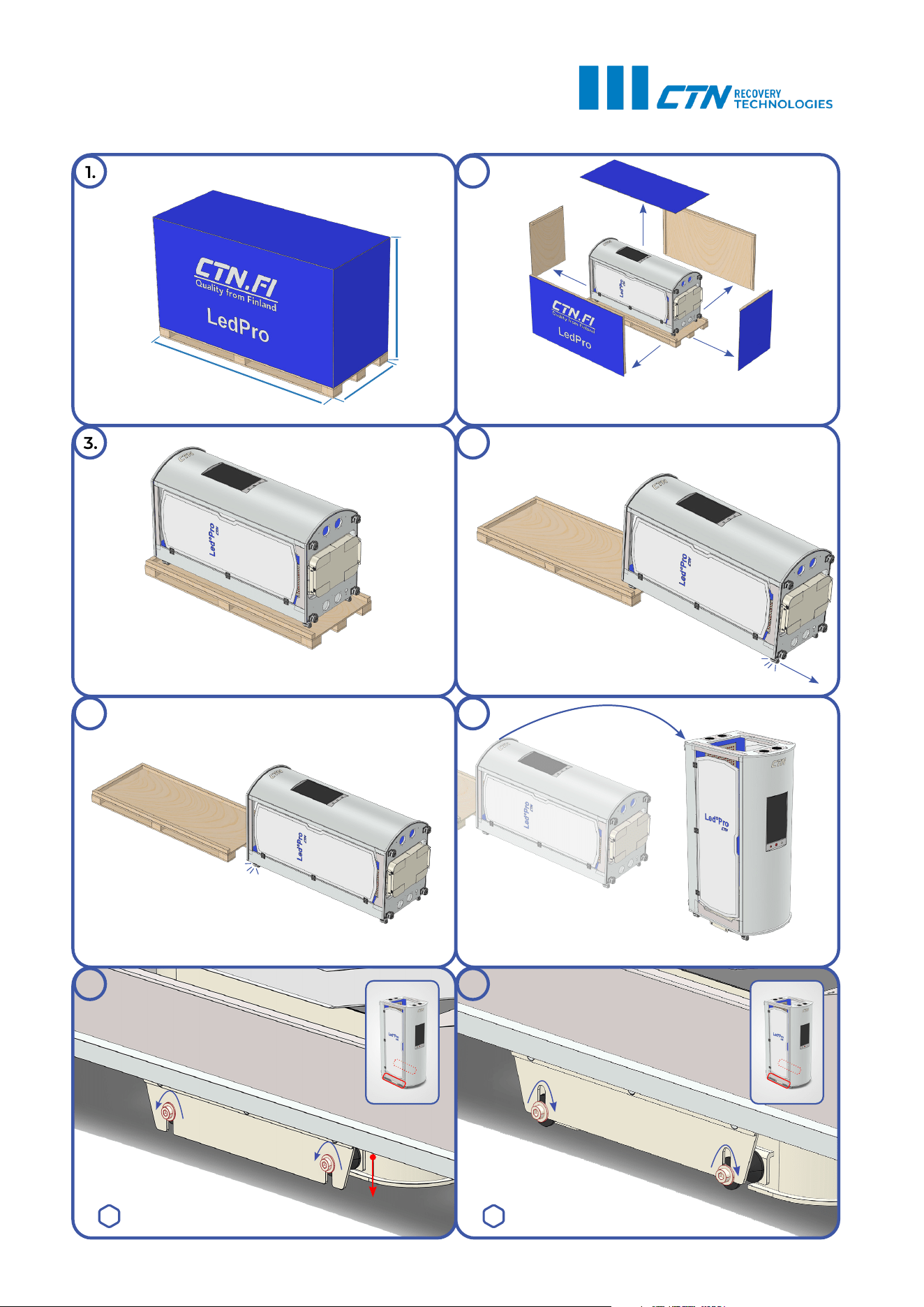
1. 2.
3.
4.
5.
6.
8.
7.
Unscrew the vibration plate
transport screws on both sides.
The vibration plate will drop to the floor.
2377 mm
998 mm
1426 mm
HEX 6 HEX 6
Retighten the screws on both sides.
Lift up the device with caution. 3 people recommended.
Gently lift the other end off the pallet.
Gently lift one end off the pallet.
Unscrew and remove the panels.
Ensure enough space for rolling the device off the pallet.

11
INTRODUCTION TO FUNCTIONS
RED LIGHT AND NEAR-INFRARED
LedPro Vertical uses visible red light at 660 nm ±10 nm and near-infrared light at 850 nm ±10 nm to cre-
ate a full-body upright light exposure experience. Red light creates the visible glow, while near-infrared
light is mostly invisible and may be felt as gentle warmth depending on the selected intensity, session
length and individual sensitivity.
The light intensity can be adjusted manually, allowing each session to feel softer or more intensive. High-
er intensity is not automatically better: the overall experience depends on the combination of intensity,
exposure time, skin sensitivity, and frequency of use. New users should start with lower settings and
increase gradually.
In a wellness setting, red and near-infrared light exposure can support skin-focused routines, relaxation,
post-activity rituals, and a refreshed feeling. It can be used alone for a calm light-focused session or com-
bined with vibration and sound for a more immersive full-body experience.
VIBRATION TRAINING
LedPro Vertical includes an integrated vibration platform with adjustable frequency up to 40 Hz and
amplitude up to 5 mm. Frequency controls how fast the platform moves, while amplitude describes the
movement depth. In LedPro Vertical, amplitude is informational and adjusts automatically according to
the selected vibration frequency, intensity level and weight of the user.
The vibration settings allow the session to range from gentle to more active. Lower settings are suitable
for first-time users, warm-up style sessions, mobility routines, or softer wellness experiences. Higher set-
tings create a stronger standing stimulus and should be increased gradually as the user becomes com-
fortable.
Vibration training can support body activation, balance engagement, muscle awareness, and active
body-conditioning routines. Because the user is standing and responding to the platform movement,
vibration sessions can make the experience more physically engaging and may increase energy expen-
diture compared with a fully passive session. When combined with a balanced lifestyle, this can support
body-toning and fat-burning focused fitness routines.
When combined with red and near-infrared light, vibration turns a still light session into a more dynamic
standing experience. The user remains comfortably in place while the body is engaged through posture,
balance, and controlled platform movement.
NOGIER-INSPIRED SOUND FREQUENCIES
LedPro Vertical includes selectable sound frequencies inspired by the Nogier frequency concept: 73 Hz,
146 Hz, 292 Hz, 584 Hz, 1168 Hz, 2336 Hz, and 4672 Hz. These frequencies can be played through head-
phones as standalone tones or blended with music for a more atmospheric listening experience.
The sound function adds an audio layer to the session, helping shape the mood, rhythm, and energy of
the experience. Users can choose calmer music for relaxation or more energetic music when they want
to feel activated and ready to move. Standalone tones offer a focused listening experience, while music
combinations can make the session feel smoother, more enjoyable, and more immersive.
Together, the three functions create a layered wellness ritual: light provides the visual and warming envi-
ronment, vibration adds physical activation, and sound adds rhythm, focus, and atmosphere.
12
INSTRUCTIONS FOR USE
STARTUP PROCEDURE, STARTING AND STOPPING THE SESSION
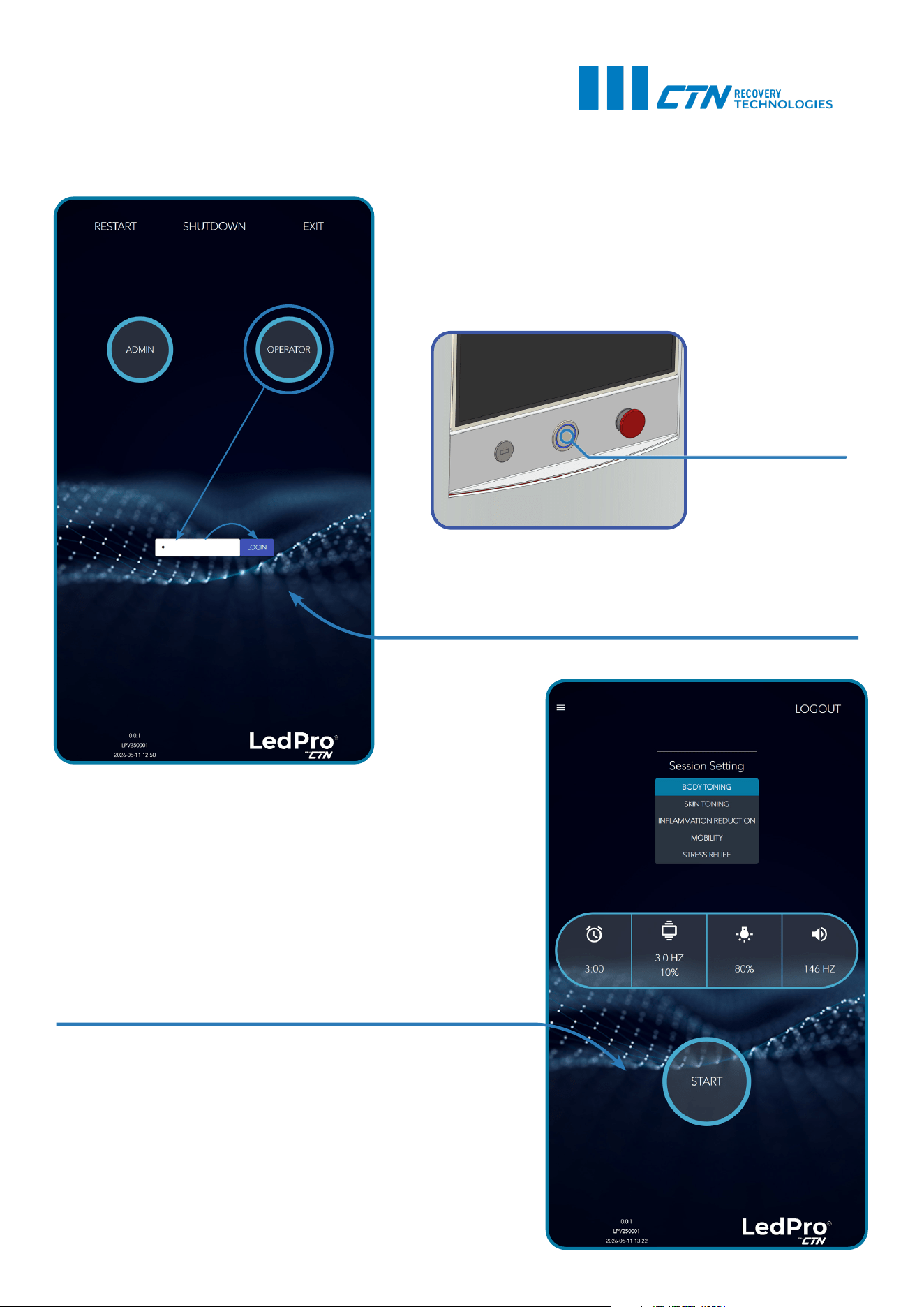
1. Plug the device directly to the power outlet capable of
supporting the electrical specifications. Do not use an
extension wire.
2. Press the power on/ off button to turn on the device. Wait
for the login screen to appear.
3. Tap on the user account. Then tap on the password field
to reveal the keyboard and type in the password (the default
password is “1”) . Tap the LOGIN button to proceed.
4. For independent use, step inside the device and operate
your session from the internal screen.
To initiate a session, choose a preferred Session Setting from
one of the presets, or enter the settings manually.
5. Tap on the START icon to begin.
6. Tap on the STOP icon to end the session. When the session
has ended, the device will revert to STANDBY mode.
7. The device can be left in STANDBY when not in use.
8. For a complete shutdown, tap LOGOUT->SHUT-
DOWN->YES, then wait for the screen to turn off, and press
the main power on/off button.
Power on/off
SESSION GUIDELINES
Before starting your LedPro Vertical session, choose clothing that feels comfortable and allows you to
stand and move naturally. For the most direct red and near-infrared light exposure, wear clothing that
leaves the target areas of the skin uncovered. Depending on your comfort and privacy, suitable options
may include swimwear, sports underwear, shorts, a sports bra, or light activewear.
Wear clean, stable trainers, running shoes, or similar supportive footwear when using the vibration plat-
form. Avoid high heels, unstable shoes, wet footwear, slippery socks, or anything that may affect balance.
Remove jewellery, watches, loose accessories, and items from pockets before the session. Tie back long
hair and make sure clothing, straps, and accessories cannot contact the vibration platform, ventilation
openings, or any moving areas.
Avoid applying heavy oils, lotions, reflective creams, or products that may make the skin or platform slip-
pery before use. Clean, dry skin is recommended for comfort, hygiene, and consistent light exposure.
Use the supplied or approved eye protection during the session and do not look directly into the red or
near-infrared light sources for an extended time. In addition to eye protection, we recommend keeping
your eyes closed when possible. Headphones may be used for the sound programs, either with stand-
alone frequencies or combined with music. Choose calmer audio for a relaxing session or more energet-
ic music for a more active, body-engaging experience.
The recommended maximum session duration is 8-12 minutes, 2-3 times a week. More frequent or
longer use is not necessarily better, as the overall experience depends on light intensity, vibration level,
session duration, and individual sensitivity.
SESSION PRESETS
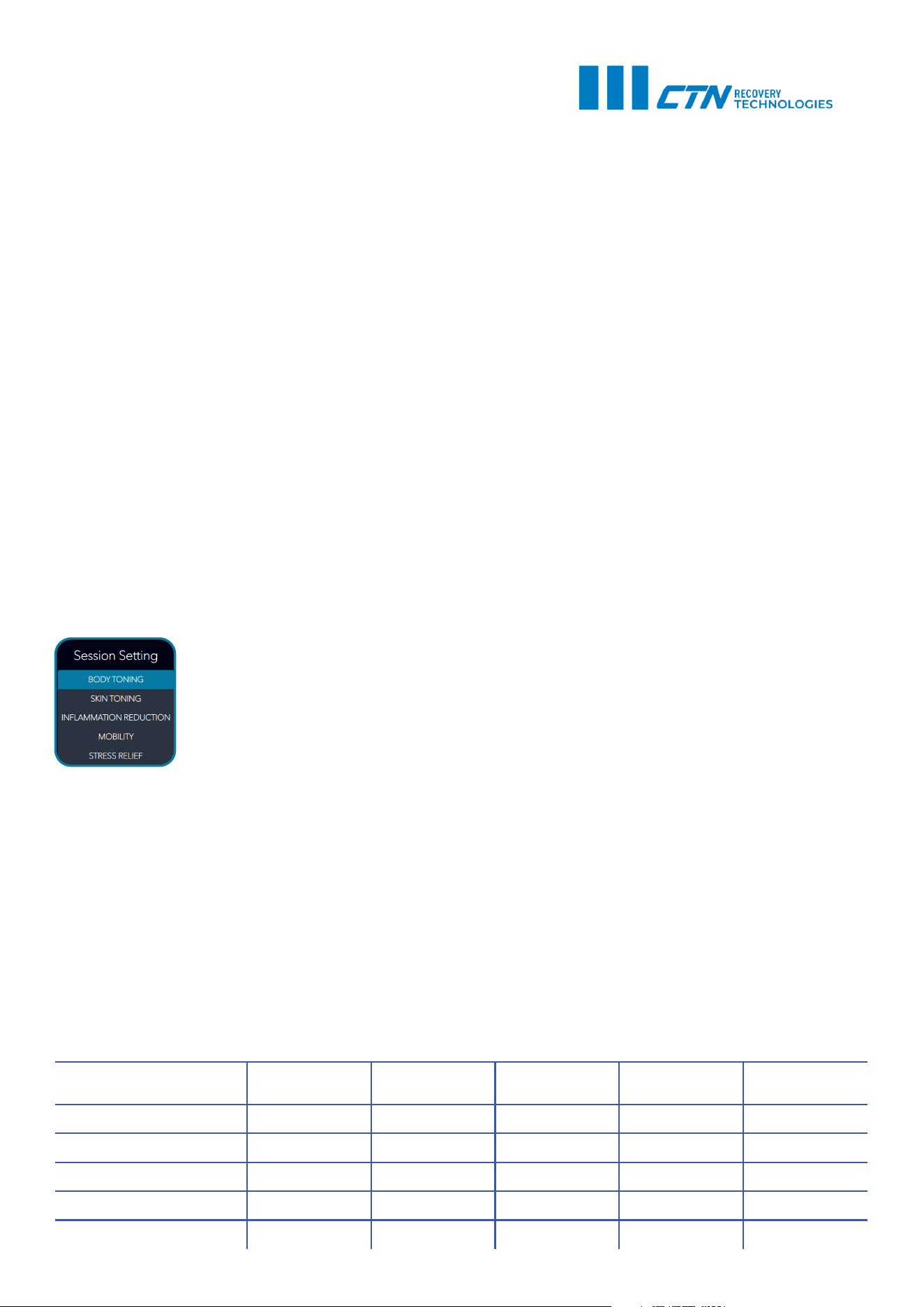
LedPro Vertical includes pre-programmed session settings designed to offer a simple
starting point for different wellness and fitness goals. Each preset combines the three
main functions of the device: red and near-infrared light exposure, whole-body vibra-
tion training, and Nogier-inspired sound frequencies.
The presets are built around the principle that each function can shape the session in
a different way. Light intensity controls the strength of the red and near-infrared light
exposure. Vibration frequency and intensity define how gentle or active the standing experience feels.
Sound frequency adds an audio layer that can support the overall mood, rhythm, and focus of the ses-
sion.
Each setting uses a different balance of these elements. Some presets place more emphasis on light ex-
posure, while others create a more active vibration-based experience or a stronger sensory atmosphere
through sound. The presets are intended as guided starting points and can be adjusted manually de-
pending on user comfort, experience level, and session preference.
New users should begin with lower manual settings or a comfortable preset, then increase intensity
gradually only if the session feels safe and comfortable. Sessions should always be used according to the
contraindications, precautions, and safety instructions provided in this manual.
13
LedPro Vertical Predetermined Session Settings
Session Setting Time (min)
Vibration
Frequency (Hz)
Vibration
Intensity (%)
Light Intensity
(%)
Sound
Frequency (Hz)
Body Toning 10 9 100 75 1168
Skin Toning 10 4 80 80 292
Inflammation Reduction 10 30 75 70 292
Mobility 10 16 80 100 4672
Stress Relief 10 29 100 40 2336
MANUAL SESSION SETTINGS
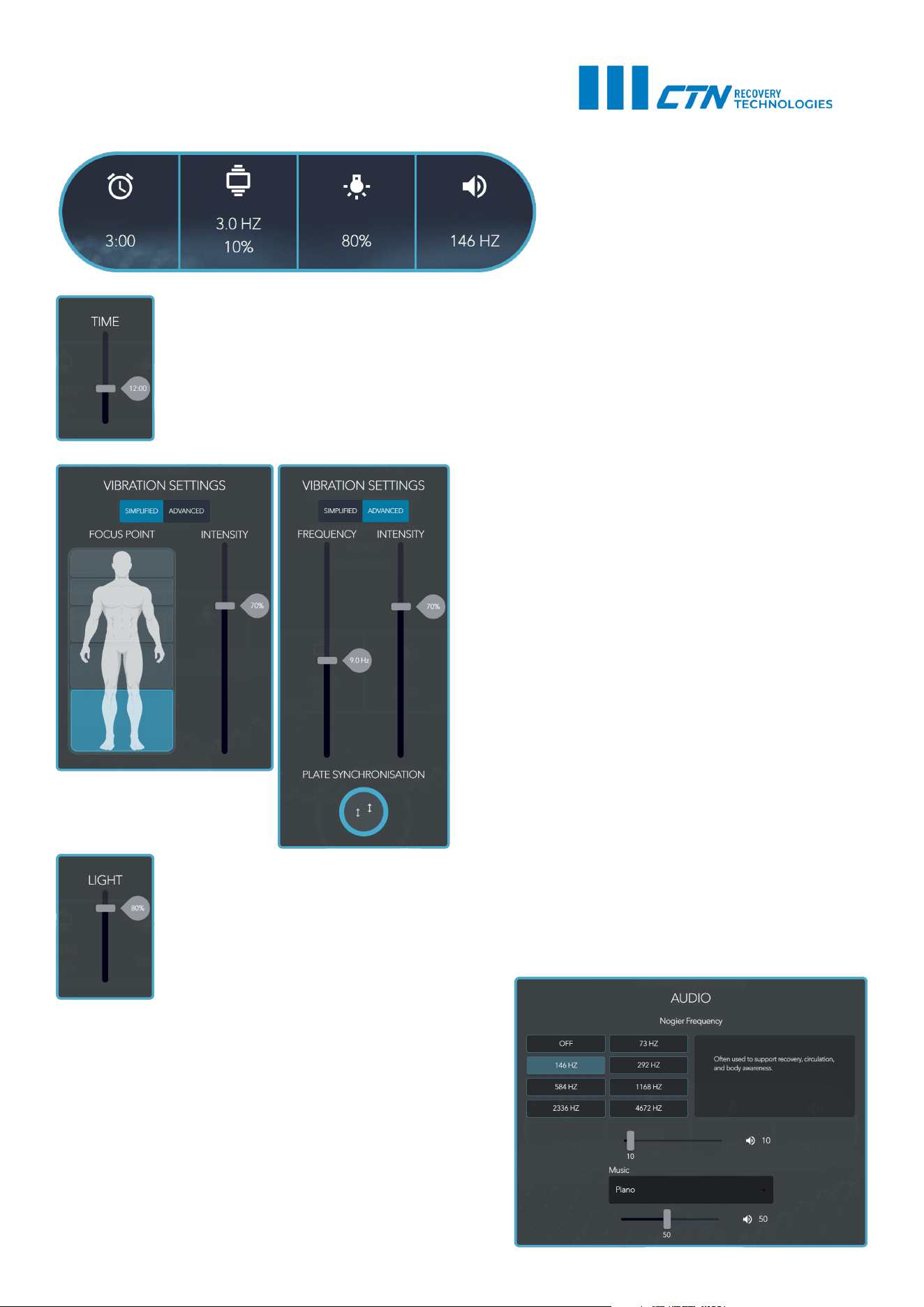
Tap on the individual function icons to set
session parameters.
1. Session time
Adjust the slider to change the duration of the session. We recommend following the max
recommended session duration set out in Session Guidlines.
2. Vibration settings
Choose between a simplified and an advanced vi-
bration settings menu.
The simplified menu highlights the focus area which
the vibration plate will affect most along with an
intensity adjustment.
The advanced menu offers a numeric approach to
vibration training frequency and intensity.
Plate Synchronization determines whether both
sides of the platform move in the same phase or in
opposing phases. In Synchronized mode, both sides
rise and lower together. In Alternating mode, one
side rises while the other lowers, producing a side-
to-side vibration pattern.
3. Light intensity
Adjust the slider to change the light intensity.
4. Audio setting
Choose between the preferred sound frequency and it’s
volume. Additionally, music can be played at the same
time.
14

15
MAINTENANCE
The LedPro™ device does not require any particular maintenance besides a basic cleaning routine. Turn
off the device before any cleaning procedures and unplug it. Disinfect the stability handles after use.
Wipe off the device itself with a damp soft microfibre cloth if needed. For wiping the doors, we recom-
mend alcohol-free disinfection and cleaning wipes that are suitable for sensitive surfaces (for example,
Sterisept Wipes by Chemi-Pharm. Alternatively, use a soft damp microfibre towel. If the device appears
to function abnormally, do not attempt to open the device and repair it. Please contact CTN support at
service@ctn.fi.
WARRANTY INFORMATION
The standard limited warranty for this product is 24 months. For additional information, please refer to
the CTN limited warranty document.

CRYOTECH FINLAND OY - JAAKONKATU 2 - 01620 VANTAA - FINLAND
CRYOTECH NORDIC OÜ - HÄRGMÄE 20 - 13525 TALLINN - ESTONIA
CTN RECOVERY STUDIO - PASAJE MUIXARA 11 - 03530 ALICANTE - SPAIN
CTN GROUP - IRELAND - FINLAND - ESTONIA - SPAIN
WORLD’S #1 IN SPORTS RECOVERY
The original language of this manual is English. Other versions are translations.
User manual version: 26.08.2026