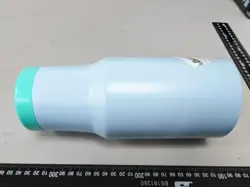

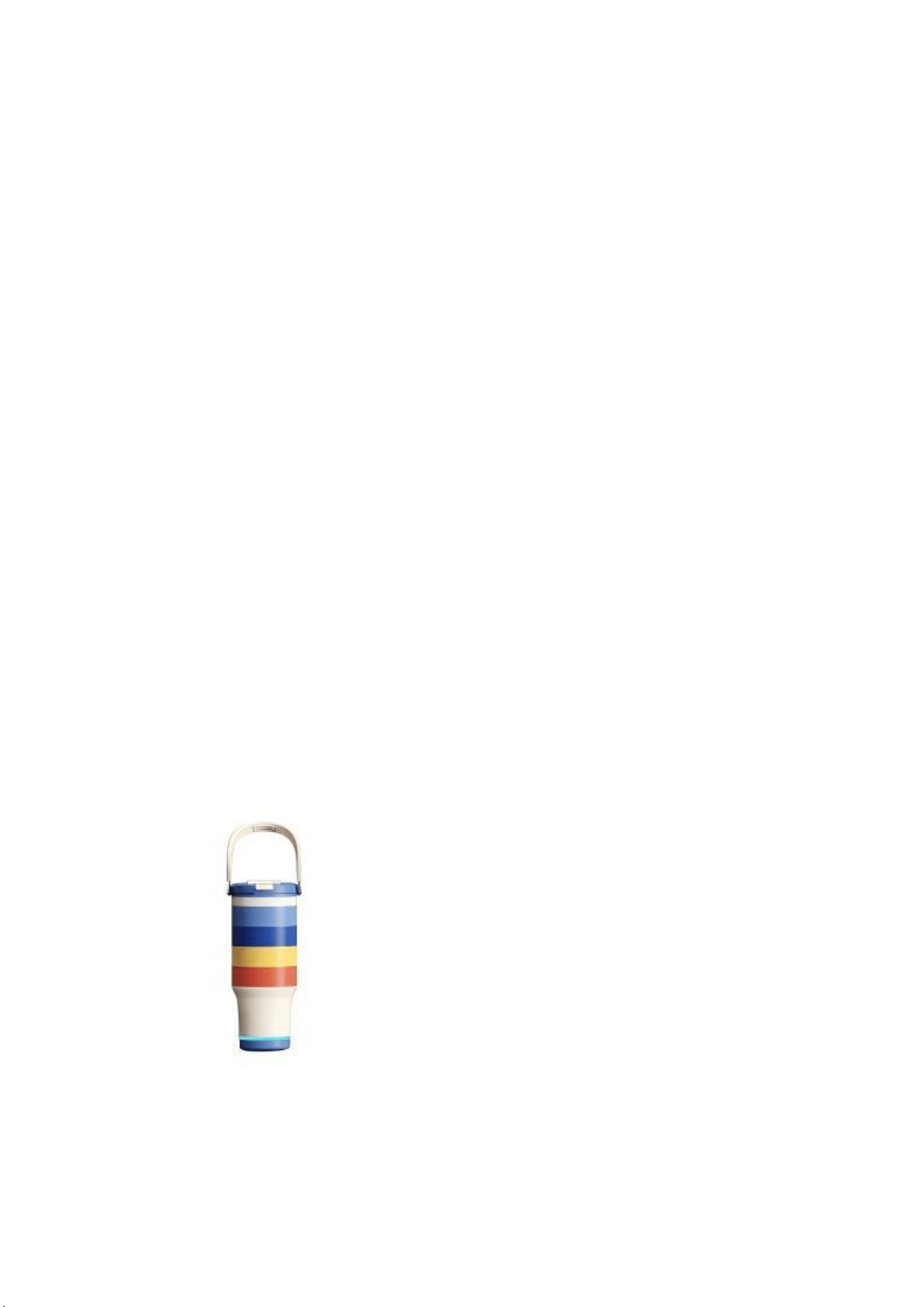
Warmey Sip Smart Water Bottle –
Full Text User Manual
Product Manual
Instructions for Use
To enjoy the full experience of Warmey brand Warmey Sip smart water
bottle, please read all the important information below carefully
before use.
Usage Methods
• Before first use, clean all components with warm water mixed with neutral detergent.
If your bottle comes with a lid, tighten it fully after filling liquid to achieve optimal heat
retention performance.
• If equipped with a lid, place the bottle upright and fasten the lid tightly after drinking.
If putting the bottle inside a bag, double-check that the lid is completely secured.
• Before filling liquid, pour a small amount of hot or cold water into the bottle to preheat
or pre-chill the interior for 1–3 minutes, which greatly improves heat and cold
insulation effects.
• After use, thoroughly clean the bottle, wipe it dry with a soft cloth, and store it in a
ventilated place only after all moisture has fully drained away.
• Remove the base during cleaning as much as possible. Do not soak the base for a long
time, and never wash it together with the bottle body in dishwashers or disinfection
cabinets.
Precautions
This series of products is only designed to keep beverages and food
warm or cold. Do not use it for any other purposes.
WARNING
1. 1Do not keep dairy products or baby food warm for an extended period, as this poses a risk
of bacterial growth.
2. To prevent accidents during use, comply with the following requirements:
(1) Keep the product out of the reach of children and pets to avoid crush injuries and scalds. Some
products contain small parts; take precautions to prevent accidental ingestion.
(2) Children must use this product under adult supervision.
(3) If the product label indicates it is only for cold storage, do not fill it with hot water to prevent
scalding.
(4) If the bottle is fitted with a lid, check that the silicone gasket is installed correctly after cleaning.
Improper installation will cause the lid to tilt, leak water, and may even lead to scald injuries.
3. For bottles equipped with a lid, the following substances must NOT be filled inside:
(1) Carbonated drinks, sparkling beverages, dry ice, etc. Increased internal pressure may cause
liquid splashing or product damage, which endangers personal safety.
(2) Milk, dairy beverages, fruit juice, and similar liquids. Long-term constant-temperature storage
will easily spoil these drinks. In addition, temperature fluctuations and spoilage generate gas that
raises internal bottle pressure, resulting in liquid splashing, product damage, personal injury and
property loss.
(3) Acidic beverages such as lemon juice and vinegar.
4. Exercise caution when using the bottle after filling it with hot drinks to avoid scalding.
5. Do not heat this product in microwaves or any other heating appliances.
6. Keep the product away from heat sources and open flames. Avoid all forms of direct heating
and high-temperature steaming, which will damage the vacuum insulation layer and deform
or discolor plastic components, hindering normal operation.
7. Do not touch the bottle mouth and rim with boiling hot kettles. Tilting of the bottle may cause
scalds, and excessive heat may crack or deform the bottle body.
8. Dishwasher cleaning is prohibited, except for specially marked product models.
9. The lid, inner cap, bottle body and other components cannot be directly heated, steamed at
high temperatures, or disinfected under sustained high heat. Such operations will deform and
discolor plastic parts and destroy the bottle’s vacuum layer, affecting regular use.
10. If the bottle has a lid, overfilling beverages may cause leakage; fill liquid in appropriate
amounts only.
11. Do not store salty food or soup inside the bottle for long periods, as salt corrosion may
damage the product. For lidded bottles, condensation forming on the plastic lid due to
temperature differences between the bottle interior and ambient air is a normal
phenomenon.
12. Do not subject the bottle body to heavy impact. Surface dents from collision will damage or
reduce the product’s heat retention performance.
13. Do not place the bottle in the freezer compartment of refrigerators or freezers.
14. Do not use abrasive scouring powder, metal scrub pads, degreasers, or chlorine-containing
cleaners, as these substances will scratch, rust or corrode the product surface.
Product Introduction
Schematic Diagram of Warmey Sip Water Bottle
English Translation
[Bottle Lid] [Bottle Body] [Smart Base] [Power Button] [Sound Outlet]
[Anti-slip Pad] [Magnetic Charging Port] [LED Light Ring]

It is recommended to display the base and bottle body separately for
clearer presentation.
Material Specifications
Materials of stainless steel parts in direct contact with
drinks/food:
• Bottle Liner: Austenitic Stainless Steel 06Cr19Ni10 (SUS304)
• Outer Bottle Shell: Austenitic Stainless Steel 06Cr19Ni10 (SUS304)
• Bottle Lid: PP Polypropylene
• Straw: PP Polypropylene
• Bottle Base: ABS+PC
Compliance Standards
China Standards
• GB/T29606-2013 Stainless Steel Vacuum Flasks
• GB 4806.1-2023 National Food Safety Standard: General Safety Requirements for
Food Contact Materials and Products
• GB 4806.7-2023 National Food Safety Standard: Plastic Materials and Products for
Food Contact
• GB 4806.9-2023 National Food Safety Standard: Metal Materials and Products for
Food Contact
• GB 4806.11-2023 National Food Safety Standard: Rubber Materials and Products for
Food Contact
International Certifications
• US FDA Registration Number
• FCC Certificate Number
• CE Certificate
• RoHS Certificate
3. Charging Instructions
• Built-in 1500mAh lithium battery. Use a DC 5V 1A or 5V 2A power adapter. The
indicator light turns red during charging and switches off once fully charged. Only use
the original magnetic charging cable; align the positive and negative poles of the
magnetic connector for full attachment to the charging port.
• Do not use damaged power cords, plugs or wireless chargers, nor operate the product
after malfunctions occur. Do not disassemble or repair the device yourself—this voids
all warranty coverage and may cause personal injury. If you encounter device faults,
stop use immediately and contact Warmey brand customer service or your authorized
retailer for support.
• When the bottle plays the low-battery voice prompt, charge the device as soon as
possible.
4. Network Connection Guide
Some Sipmate features require internet access. Ensure you connect to
a 2.4GHz Wi-Fi band; missing or weak network signals will disrupt
function performance. If the bottle becomes unviewable in the App
after offline unbinding, reset the network by pressing the power
button 5 consecutive times while powered on. When you hear the
"system resetting" voice prompt, rebind the device afterward.
Features Overview
1. App Download & Usage
Scan the QR code, or search for Warmey in your mobile app store to
download the App.
2. Network Configuration Steps
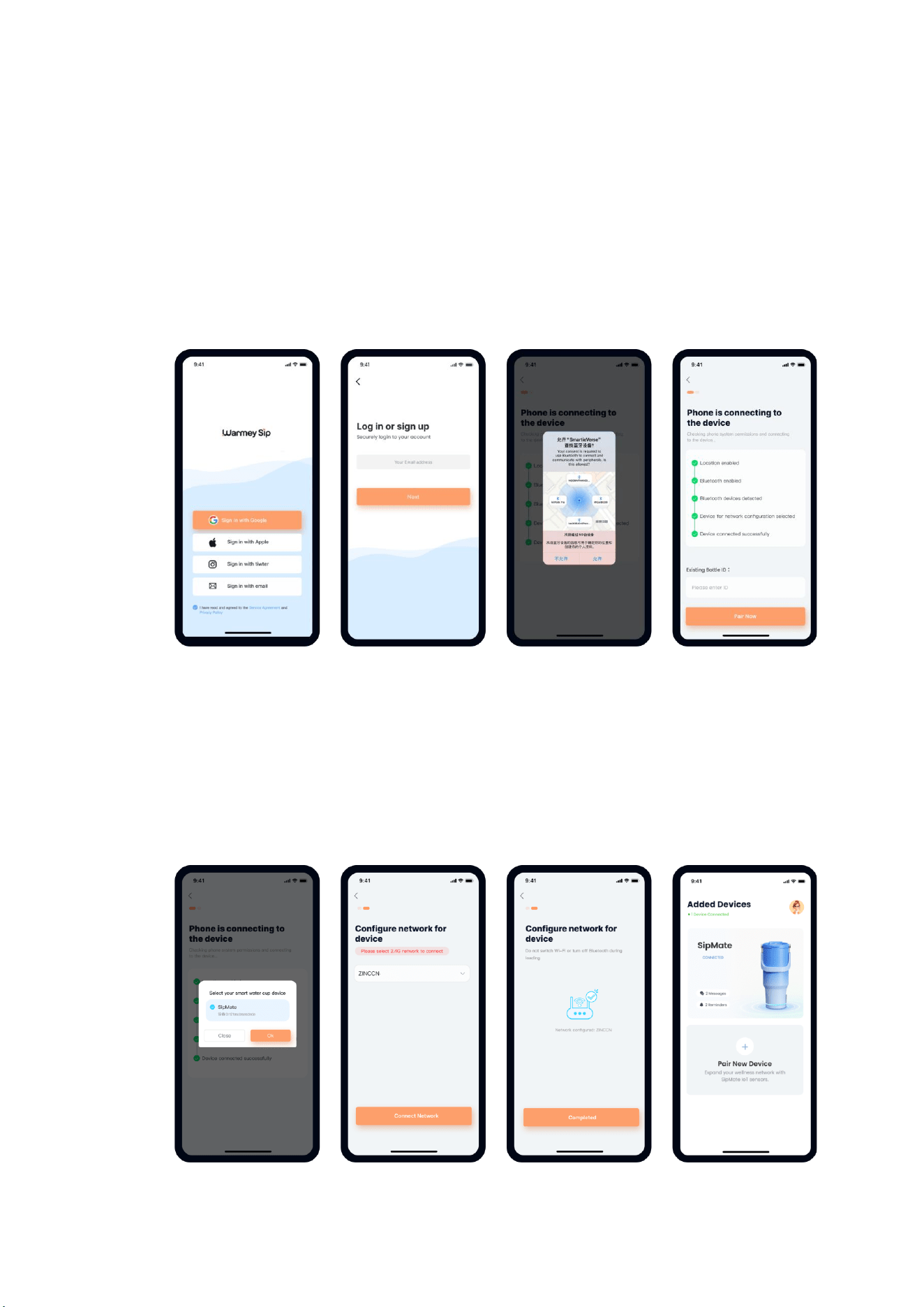
• Press and hold the power button of the DrinkMate smart bottle for 2 seconds;
release when you hear the "hello" startup prompt.
• Wait a moment—once you hear "please configure the network", the bottle enters
pairing mode.
• Launch the Warmey App and grant network, Bluetooth and location permissions
on your phone. Log in via WeChat or Apple ID, then select to add the "DrinkMate-
SipMate" smart bottle product.
• Search for nearby smart bottle devices: After tapping Add Device, the App auto-
scans surrounding SipMate bottles. Select the "DrinkMate - SipMate" device from the
search list.
• Complete network setup: Choose a 2.4GHz Wi-Fi network and enter the Wi-Fi
password to finish pairing. A "connection successful" voice prompt confirms binding.
If you hear "connection failed", recheck the Wi-Fi password and retry. Note: The
attached screenshot shows a 5G network, which may cause misleading guidance.
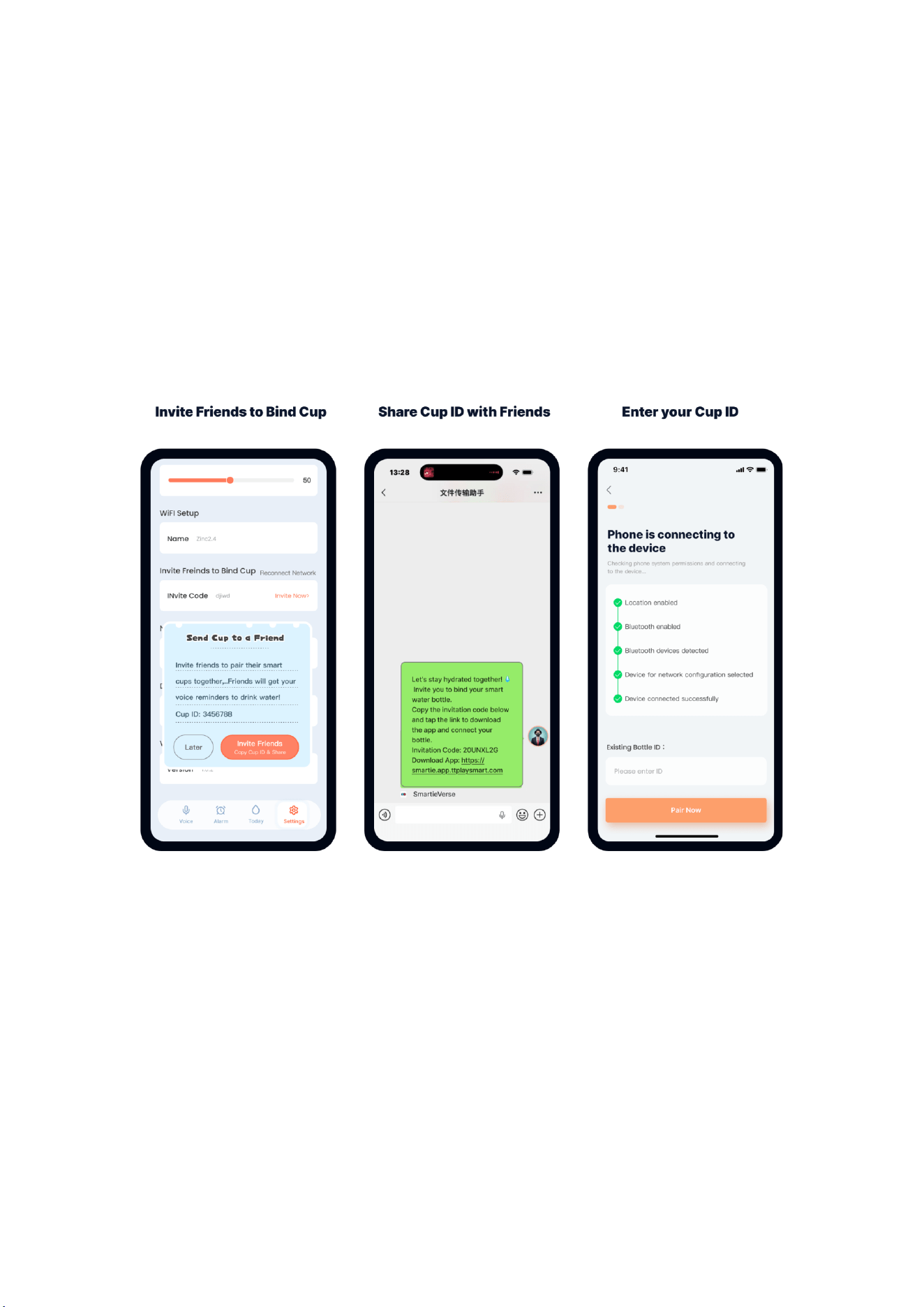
3. Bind the Same Bottle with Friends
1. If User A has already bound the bottle, navigate to the bottom of the product detail
page for the DrinkMate bottle and share the bottle invitation code with Friend B.
2. Friend B copies the invitation code and taps the download link to install the Warmey
App. After granting permissions, logging in and tapping Add Device, Friend B pastes
the invitation code on the device pairing page—both users will now share access to
the same DrinkMate bottle.
4. Remote Voice Reminders
Real-Time Voice Reminders
1. Enter the App homepage and select your connected "DrinkMate - SipMate" device.
2. Tap into the device page, open the Voice tab and select Real-Time Voice Reminders.
New users will see an onboarding guide explaining voice message functions; close the
pop-up to start using the feature.
3. Record voice messages: Long-press the bottom microphone button to send instant
voice reminders remotely.
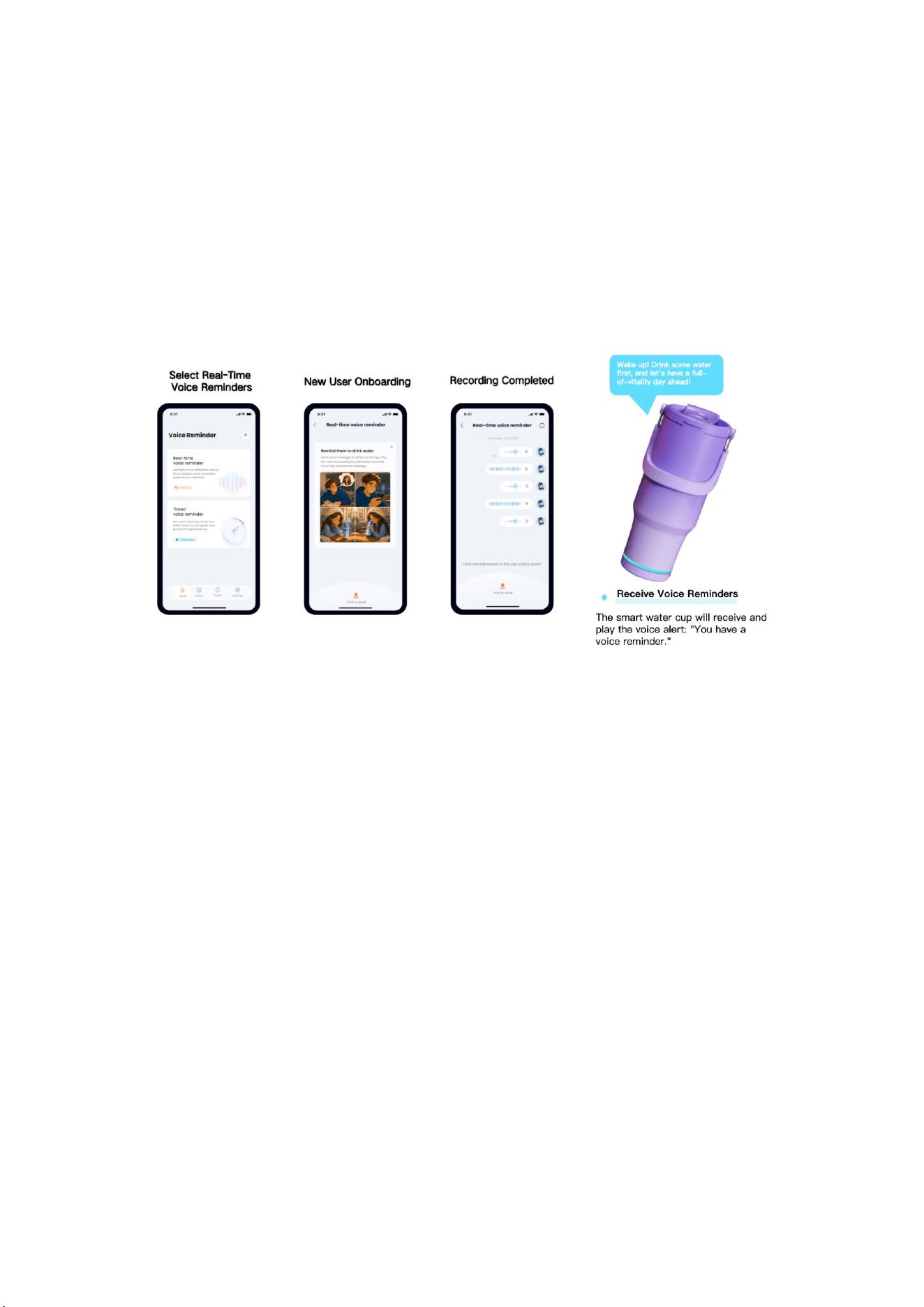
4. The smart bottle will play the alert "you have new messages" upon receiving voice
reminders. Press the power button to play the full voice message. Reminder cycle for
unplayed messages:
• First hour: Reminder every 5 minutes
• Second hour onward: Reminder every 15 minutes
• Third hour onward: Reminder every 30 minutes No further alerts will play after this
period.
Timed Voice Reminder
• On the Voice tab of your SipMate device page, select Timed Voice Reminders. New
users will view an onboarding tutorial; close the pop-up to begin setup.
• Set reminder time, repeat cycle and record custom voice alerts by long-pressing
the microphone button. The bottle will trigger the "you have new messages" alert at
the scheduled time—press the power button to play the voice memo.
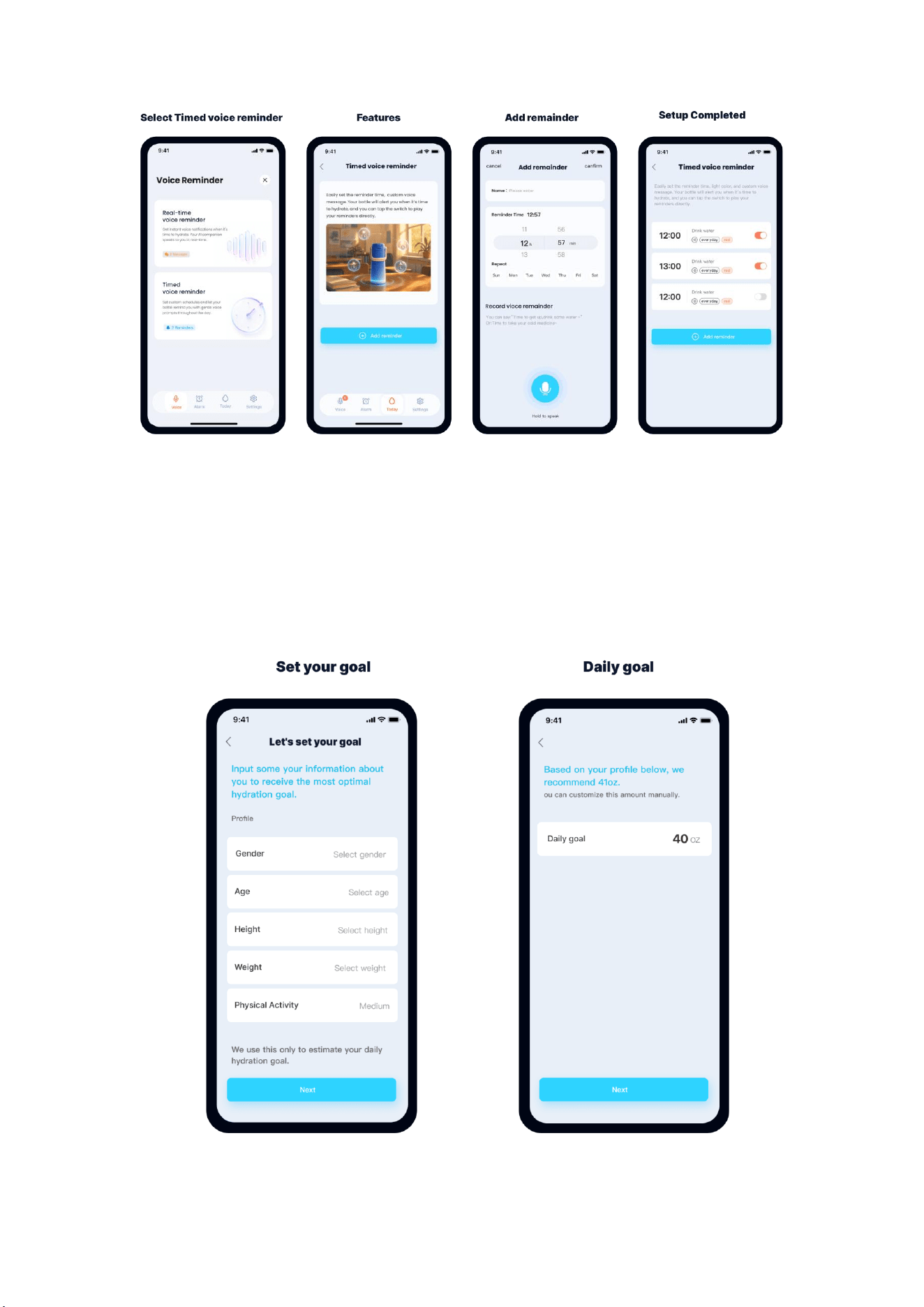
5. Daily Water Intake Target Setup
When entering this page for the first time, a setup wizard will guide
you to configure your hydration goal. The system calculates a
personalized scientific daily water intake recommendation based on
gender, age, height, weight and daily activity level. You may also
manually adjust the suggested volume.
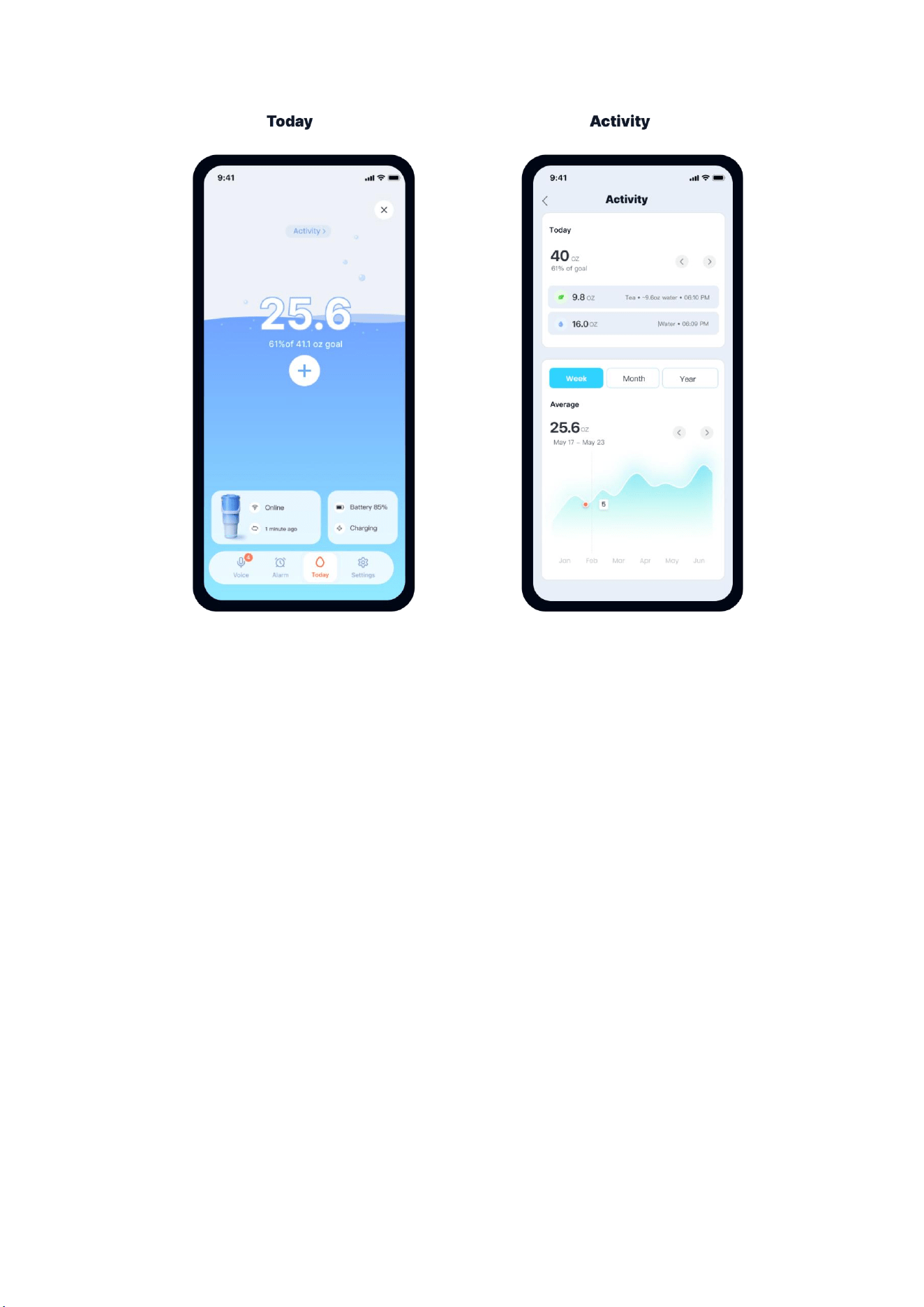
6. View Daily Water Consumption
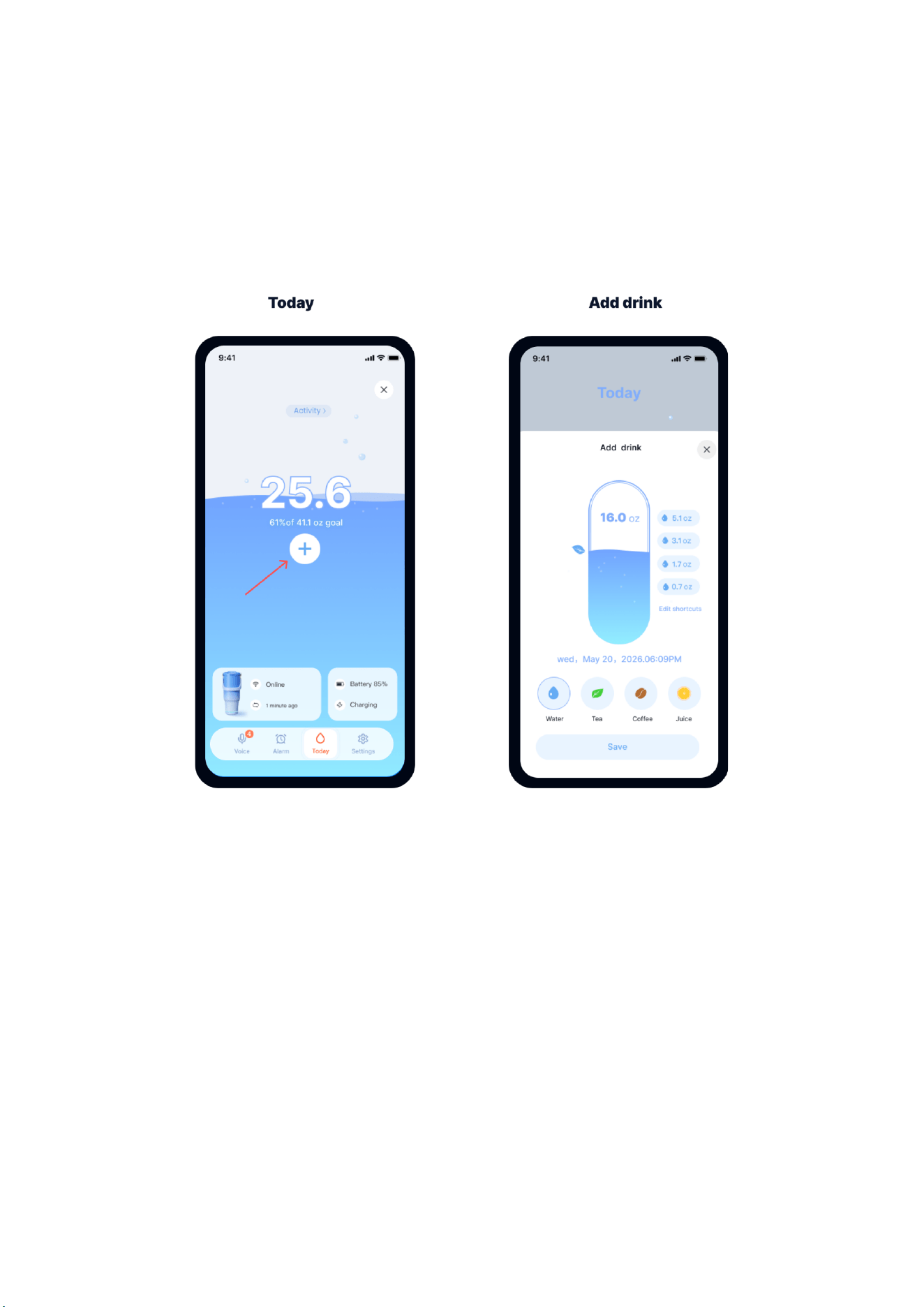
All daily hydration progress is displayed on the Today tab. Water
volume is auto-recorded with every sip taken from your paired
DrinkMate bottle—no manual input required. To log water intake from
other sources, manually select beverage type and input consumed
volume via the Add Drink function in the App.
7. Water Consumption Trend Charts
1. On the Today page of your SipMate device, tap the Activity entry at the top to access
consumption trend graphs.
2. View drinking frequency statistics by day, week or month; detailed single-day drinking
records are also available.
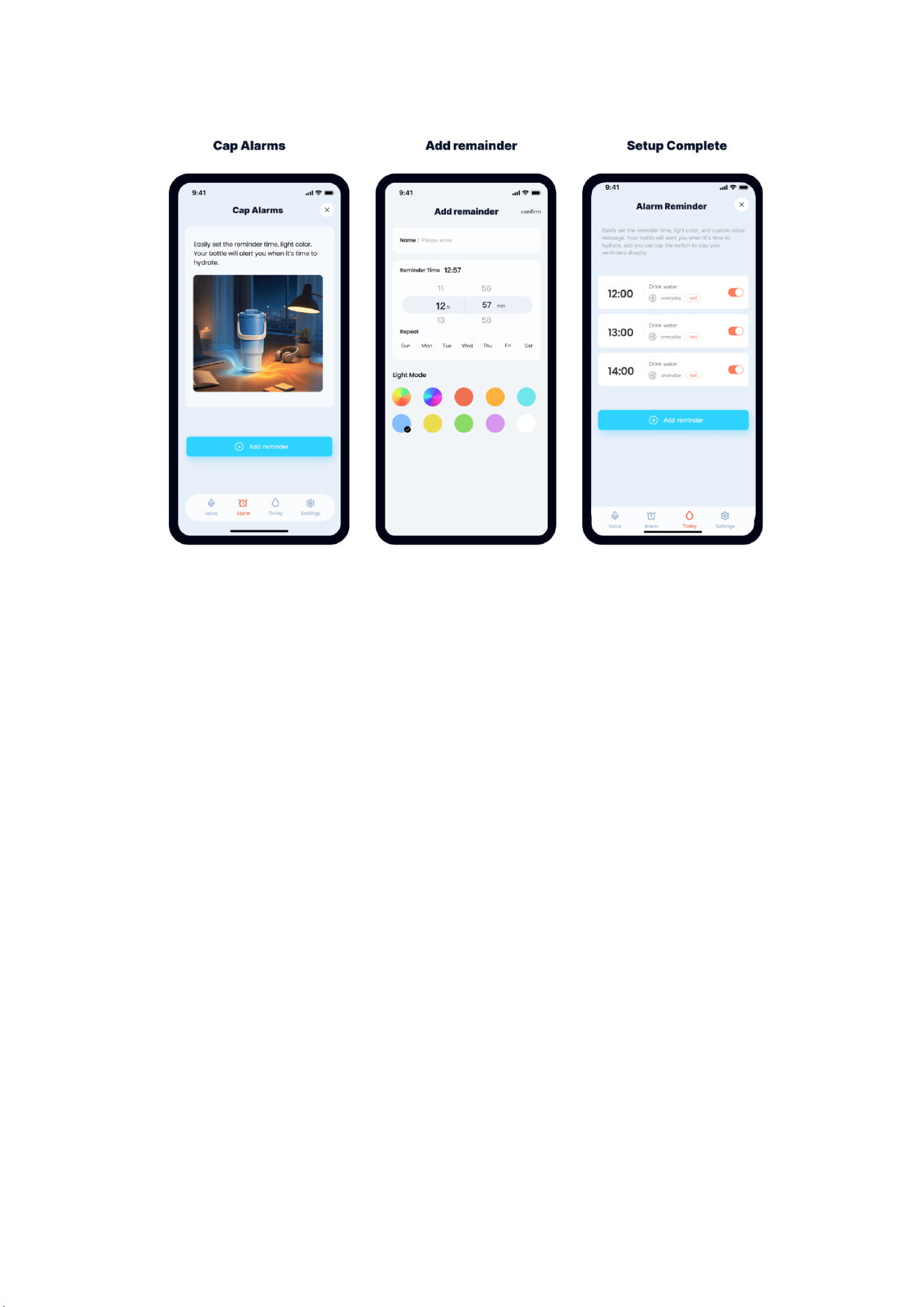
8. Custom Alarm Reminders
1. Navigate to the Alarm tab on your SipMate device page to create custom hydration
reminders. You can set trigger time, LED light color effects and weekly repeat cycles.
2. Saved alarms will display in a list on your SipMate device page after confirmation.
3. Alarms are stored locally on the bottle and remain functional without Wi-Fi connection.

FCC CAUTION:
This device complies with part 15 of the FCC Rules. Operation is subject to the
following two conditions: (1) This device may not cause harmful interference, and (2)
this device must accept any interference received, including interference that may
cause undesired operation.
Any changes or modifications not expressly approved by the party responsible for
compliance could void the user's authority to operate the equipment.
Note: This equipment has been tested and found to comply with the limits for a Class
B digital device, pursuant to part 15 of the FCC Rules. These limits are designed to
provide reasonable protection against harmful interference in a residential installation.
This equipment generates, uses and can radiate radio frequency energy and, if not
installed and used in accordance with the instructions, may cause harmful
interference to radio communications. However, there is no guarantee that
interference will not occur in a particular installation. If this equipment does cause
harmful interference to radio or television reception, which can be determined by
turning the equipment off and on, the user is encouraged to try to correct the
interference by one or more of the following measures:
—Reorient or relocate the receiving antenna.
—Increase the separation between the equipment and receiver.
—Connect the equipment into an outlet on a circuit different from that to which the
receiver is connected.
—Consult the dealer or an experienced radio/TV technician for help.
This equipment complies with FCC RF radiation exposure limits set forth for an
uncontrolled environment. The exposure standard for wireless transmitter employs
a unit of measurement known as the Specific Absorption Rate, or SAR. The SAR limit
set by the FCC is 1.6W/kg. The highest SAR value for the EUT as reported to the FCC
when test for worn on the body, as described in this user guide, is 0.163 W/ kg. This
equipment should be installed and operated with minimum distance 0 cm between
the radiator and your body.