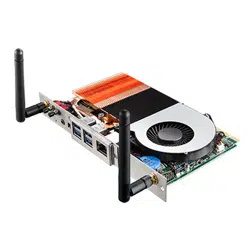

Installation Instructions
1. The Slot-in PC (SDM) and the used components are sensitive to electrostatic charge (ESD) and further damages. Therefore, please handle this device with care in order to ensure the intactness of the device.
2. Please switch off the public display, projector or the NEC Standalone adapter completely using the hard on/off switch or disconnect the equipment fully from the mains, before inserting the Slot-in PC (SDM).
3. The Slot-in PC (SDM) starts up automatically after turning on the public display. If you use a Standalone Adapter you need to push the power button on the front of the Slot-In PC (SDM).
4. The Slot-in PC (SDM) controlls its own fans plus the fan of the public display independently according to the thermal circumstances. At low temperatures and if the CPU workload is low, the fans may not activate. This is a normal
procedure andnot classified as a failure..
5. If the Slot-In PC (SDM) is equipped with a WIFI option, please ensure to attach the antenna to the WIFI connector on the Slot-In PC (SDM). It is recommended to affix the antenna at the end of the installationin order to avoid damages.
6. Please note Aaronn Electronic GmbH or the resellers are not liable for any damage or financial claim arising from any data loss.
7. Slot-in PCs using an Intel Core i5 CPU can be used with Turbo Mode when the power delivery to USB devices over all 4x USB ports does not exceed 5W.
Installation Steps for Sharp/NEC Displays of the M series
Installation Steps for Sharp/NEC Displays of the ME series
Aaronn Electronic GmbH, Lilienthalstr. 1, 82178 Puchheim, Germany. Alle Rechte vorbehalten. All specifications are subject to change without notice.
Please remove the slot covering plate by
loosening the 4 Philipps screws.
Please carefully pull out the slide rail in the middle.
Please make sure that the Slot-in PC (SDM) is always
inserted in the righ way.
Please note: The fan of the Slot-in PC (SDM) should
always be facing away from the front of the display.
Please insert the Slot-in PC (SDM) in the slot very
carefully until you feel a latching of the 2 connectors.
Do not use too much force, as this could damage the
Slot-in PC (SDM) and/or the slot itself.
Please pay attention that the Slot-in PC (SDM) slides into
the slide rails. Then please use the Philipps screws to fix
the Slot-in PC (SDM).
Please remove the slot covering plate by loosening
the 4 Philipps screws.
Please carefully pull out the slide rail in the middle.
For some public displays the back of the Slot-in PC
(SDM) is not covered fully by the display itself. For
these displays a back covering plate is included
which covers the fan on the Slot-in PC (SDM), making
it inaccessible.
Please make sure that the Slot-in PC (SDM) is always
inserted in the right way and pay atention that the Slot-
in PC (SDM) slides into the slide rails. Then use the
Philipps screws to fix the Slot-in PC (SDM).
Other languages of this document, drivers and information, can be found at:
Andere Sprachen dieses Dokumentes, Treiber und weitere Informationen finden Sie unter:
Autres langues de ce document, les pilotes et autres informations, s'il vous plaît visitez:
Altre lingue di questo documento, driver e altre informazioni, si prega di visitare il sito:
http://nec-sbc-service.com
Technical Specifications:
Interfaces: 4x USB 3.1 GEN 2
1x Mini DisplayPort++
1x Audio Port
1x RJ45 10/100/1000 Mbps Ethernet
2x antennas for WiFi (option)
Power: 12V DC @ max. 5.5 A
Operating temperature [°C]: 0-55
Dimensions (mm): 175 x 116 x 25
Net weight (g): 1000g
Safety Instructions
1. Please note that the maximum ambient temperature for the combination of Slot-in PC (SDM) and display is 35° C. Higher temperatures than this can cause damage to the display and the Slot-in PC (SDM)
respectively, reducing the overall lifetime. The operating altitude must lie between 0 m (0 ft.) and 3000 m (9842 ft.) above sea level.
2. If you want to remove the Slot-in PC (SDM) out of the option slot please make sure that it is cooled down before touching it. Some parts of the Slot-In PC (SDM) can become more than 100 ° C.
There is a danger of burning, so please take care when removing the Slot-in PC (SDM).
3. Remove the dust from the Slot-In PC (SDM) (and if necessary from the display also) on a regular base (e.g. every 3 months). The frequency of cleaning heavily depends on the hours of operation, the ambient
temperature and the heaviness of the dust. For the cleaning a brush can be used in order to remove dust from the fan and the heat pipes.
4. This Slot-In PC (SDM) is equipped with a Solid State Disk (SSD) mass storage. Do not use a defragmentation program. These programs are intended for conventional hard disks and can damage the SSDs or
reduce their performance.
5. The device has to be used in accordance with the manual/datasheet.
6. All instructions concerning installation, maintenance and transport or warehousing, which are necessary for the safety and the use of the device, need to be followed.
7. In order to guarantee an appropriate air flow for the cooling of the device please make sure that the air vents are not covered. Furthermore make sure that the system is not installed in areas where an
appropriate air flow is not guaranteed. Make sure that the distance between air vents of the system and environment is at least 10 cm. Do not install the system close to a heat source or in a location prone
to moist.
8. Only connect devices or parts to the interface given which are defined according to the requirement IEC/EN62368-1
9. Do not insert any metal object or other contaminant into the device!
Troubleshooting
1. The Slot-in PC (SDM) does not start up
a. Does the Slot-in PC (SDM) fit properly in the Option Slot? Are the screws tightened properly?
b. Press the on/off switch and/or reset the original BIOS settings.
2. The Slot-in PC (SDM) starts up but there is no picture on the display
a. Did you choose “option” as input on the display?
b. If you changed the BIOS settings please reset the BIOS settings.
3. The picture is out of focus.
a. Is the resolution set correctly?
The native resolution of your display/projector is described in the datasheet or manual of your device. This resolution should also be chosen in the operating system of the Slot-in PC (SDM).
b. The display might have been set to another size. Push the button “size” or “aspect” of your remote control until you see a green “standard” on the screen.
4. After installation / de-installation of software the system is slow / unstable.
a. The operation system is limited by the software and/or parts of the software concerning functionality and performance. Please install the operating system again.
The image of the operating system can be downloaded here: http://www.nec-sbc-service.com
Remark 1: All stored data will be lost
Remark 2: The installation / reboot process can take 15 minutes.
Remark 3: Please make sure that you only download the image of the operating system you own a license for.
5. A device connected by USB does not work properly
a. Make sure that all drivers have been installed successfully for your USB device.
b. Please contact the manufacturer of the USB device
c. Please download the operating system again (please see 4)
Remark 1: All stored data will be lost
Remark 2: The installation / reboot process can take 15 minutes.
6. After a short operation time the performance of the system decreases significantly, a blue screen is seen or the system switches off.
a. This issue could occur due to overheating of the system. Therefore, please make sure that there is appropriate cooling around the system. If the display with Slot-In PC (SDM) is too close to the wall
this can cause insufficient space for appropriate ventilation. Dust build up can also cause the system to overheat. Thus please ensure there is sufficient ventilation around the unit, and dust build up
has been removed.
Declaration of Conformity
FCC Class B
- Declaration based on 47 CFR 15.19(a)(3):
„This device complies with part 15 of the FCC Rules. Operation is subject to the following two conditions:
(1) This device may not cause harmful interference and
(2) this device must accept any interference received, including interference that may cause undesired operation.”
- Statement for Class B based on 47 CFR 15.105(b)
“Note: This equipment has been tested and found to comply with the limits for a Class B digital device,
pursuant to part 15 of the FCC Rules. These limits are designed to provide reasonable protection against harmful interference in a residential installation. This equipment generates, uses and can radiate radio
frequency energy and, if not installed and used in accordance with the instructions, may cause harmful interference to radio communications. However, there is no guarantee that interference will not occur in a
particular installation. If this equipment does cause harmful interference to radio or television reception, which can be determined by turning the equipment off and on, the user is encouraged to try to correct the
interference by one or more of the following measures:
Reorient or relocate the receiving antenna. Increase the separation between the equipment and receiver. Connect the equipment into an outlet on a circuit different from that to which the receiver is connected.
Consult the dealer or an experienced radio/TV technician for help.”
Compliance with Directive 2012/19/EU (WEEE)
Disposing of your used product: In the European Union
EU-wide legislation as implemented in each Member State requires that used electrical and electronic products carrying the mark (left) must be disposed of separately from normal household waste. This
includes monitors and electrical accessories, such as signal cables or power cords. When you dispose of such products, please follow the guidance of your local authority or ask the shop where you
purchased the product, or if applicable, follow applicable legislation or agreement you may have. The mark on electrical and electronic products may only apply to the current European Union Member
States.uct, or if applicable, follow applicable legislation or agreement you may have. The mark on electrical and electronic products may only apply to the current European Union Member States.
Outside the European Union
If you wish to dispose of used electrical and electronic products outside the European Union, please contact your local authority and ask for the correct method of disposal.
For EU: The crossed-out wheeled bin implies that used batteries should not be put to the general household waste! There is a separate collection system for used batteries, to allow proper treatment and
recycling in accordance with legislation.
According to EU directive 2006/66/EC and amendments, the battery can’t be disposed improperly. The battery shall be separated to collect by local service.
Turkish WEEE (AEEE Yönetmeligine Uygundur)
Aaronn Eelctronic GmbH follows the EU WEEE requirements and can meet the Turkish WEEE requirements for product design and labeling. Please contact the importer for information on WEEE recycling.
http://nec-sbc-service.com
Aaronn Electronic GmbH, Lilienthalstr. 1, 82178 Puchheim, Germany. Alle Rechte vorbehalten. All specifications are subject to change without notice.
