
MyCareLink Home™
Communicator Model 26900
Printing instructions: doc #163256
Category: Thin paper manual
Size: 4.25 x 6.75 in (108 x 171 #mm)
530234-113
Patient Manual
M036205C001 A Medtronic Confidential Composed: 2025-07-11 11:27:58
PSJ - Size-selectable package manual 14-SEP-2018

Medtronic and Medtronic logo are trademarks of
Medtronic. ™* Third-party brands are trademarks of their
respective owners. All other brands are trademarks of a
Medtronic company.
Printing instructions: doc #163256
Category: Thin paper manual
Size: 4.25 x 6.75 in (108 x 171 #mm)
530234-113
M036205C001 A Medtronic Confidential Composed: 2025-07-11 11:27:58
PSJ - Size-selectable package manual 14-SEP-2018

Contents
1 Introduction . . . . . . . . . . . . . . . . . . . . . . . . . 6
2 How to contact Medtronic . . . . . . . . . . . . . 6
3 Description . . . . . . . . . . . . . . . . . . . . . . . . . . 7
3.1 How do I use the communicator? . . . . . . . . 7
3.2 Intended purpose . . . . . . . . . . . . . . . . . . . . . 8
3.3 Intended users . . . . . . . . . . . . . . . . . . . . . . . 8
3.4 Intended patient population . . . . . . . . . . . . . 8
3.5 Indications . . . . . . . . . . . . . . . . . . . . . . . . . . . 8
3.6 Contraindications . . . . . . . . . . . . . . . . . . . . . 8
3.7 Expected clinical benefits . . . . . . . . . . . . . . . 9
3.8 Information flow . . . . . . . . . . . . . . . . . . . . . . . 9
3.9 Indicator lights . . . . . . . . . . . . . . . . . . . . . . . 10
3.10 Front of the communicator . . . . . . . . . . . . 13
3.11 Back of the communicator . . . . . . . . . . . . 14
4 Warnings, precautions, and potential adverse
events . . . . . . . . . . . . . . . . . . . . . . . . . . . . . . 15
4.1 Warnings . . . . . . . . . . . . . . . . . . . . . . . . . . . 15
4.2 Precautions . . . . . . . . . . . . . . . . . . . . . . . . . 17
4.3 Potential adverse events . . . . . . . . . . . . . . 17
4.4 Reporting a serious incident . . . . . . . . . . . 18
5 Setting up the communicator . . . . . . . . . 19
5.1 Package contents . . . . . . . . . . . . . . . . . . . . 19
Printing instructions: doc #163256
Category: Thin paper manual
Size: 4.25 x 6.75 in (108 x 171 #mm)
530234-113
3
M036205C001 A Medtronic Confidential Composed: 2025-07-11 11:27:58
PSJ - Size-selectable package manual 14-SEP-2018

5.2 Setup . . . . . . . . . . . . . . . . . . . . . . . . . . . . . . 20
6 Connecting the communicator to your Wi-Fi
network . . . . . . . . . . . . . . . . . . . . . . . . . . . . . 23
6.1 Connect to your network at home . . . . . . . 24
6.2 Connect to your network from the clinic or
hospital . . . . . . . . . . . . . . . . . . . . . . . . . . . . . . . 28
7 Checking the connection status . . . . . . . 32
8 Sending a manual transmission . . . . . . . 32
9 Troubleshooting . . . . . . . . . . . . . . . . . . . . 34
9.1 Cellular connection error . . . . . . . . . . . . . . 35
9.2 Wi-Fi network connection error . . . . . . . . . 35
9.3 System error . . . . . . . . . . . . . . . . . . . . . . . . 36
9.4 Enrollment error . . . . . . . . . . . . . . . . . . . . . 37
9.5 Error reference numbers . . . . . . . . . . . . . . 37
9.6 Alternative method for connecting to your Wi-Fi
network . . . . . . . . . . . . . . . . . . . . . . . . . . . . . . . 37
10 Additional information . . . . . . . . . . . . . . 43
10.1 Can I travel with the communicator? . . . . 43
10.2 Replacing the communicator or power
supply . . . . . . . . . . . . . . . . . . . . . . . . . . . . . . . . 43
10.3 Cleaning and care . . . . . . . . . . . . . . . . . . 44
10.4 Return for proper disposal . . . . . . . . . . . . 44
10.5 Security . . . . . . . . . . . . . . . . . . . . . . . . . . . 45
11 Explanation of symbols . . . . . . . . . . . . . 46
Printing instructions: doc #163256
Category: Thin paper manual
Size: 4.25 x 6.75 in (108 x 171 #mm)
530234-113
4
M036205C001 A Medtronic Confidential Composed: 2025-07-11 11:27:58
PSJ - Size-selectable package manual 14-SEP-2018

12 Specifications . . . . . . . . . . . . . . . . . . . . . 50
13 Electromagnetic compatibility
declaration . . . . . . . . . . . . . . . . . . . . . . . . . . 57
14 Glossary . . . . . . . . . . . . . . . . . . . . . . . . . . 67
Printing instructions: doc #163256
Category: Thin paper manual
Size: 4.25 x 6.75 in (108 x 171 #mm)
530234-113
5
M036205C001 A Medtronic Confidential Composed: 2025-07-11 11:27:58
PSJ - Size-selectable package manual 14-SEP-2018

1 Introduction
This manual is intended to help you use the
Medtronic MyCareLink Home™ communicator
Model 26900 (referred to as “the communicator”).
If you have questions about your medical condition,
talk to your doctor. Your doctor knows your medical
history.
Warning: If you feel sick, get medical help
immediately. If you have an emergency, call
your local emergency number. If your doctor
has given you instructions, follow them.
Waiting to get medical attention could be
dangerous to your health.
2 How to contact Medtronic
If you have any questions about setting up or using
the communicator, or if you have problems with the
communicator, contact Medtronic.
To get help from a Medtronic CareLink™ Network
Stay Connected Service agent, call
1 800 929 4043. Staff is available Monday through
Friday from 7:00 AM to 7:00 PM (Central Time).
For more information, visit www.medtronic.com.
Printing instructions: doc #163256
Category: Thin paper manual
Size: 4.25 x 6.75 in (108 x 171 #mm)
530234-113
6
M036205C001 A Medtronic Confidential Composed: 2025-07-11 11:27:58
PSJ - Size-selectable package manual 14-SEP-2018

3 Description
The MyCareLink Home communicator is an
electronic device that transfers information between
your implanted heart device and the Medtronic
CareLink™ Network (an internet-based secure
server). The communicator allows your doctor to
manage your care remotely.
The communicator sends your heart device
information to the Medtronic CareLink Network
using a cellular phone network (by default) or
through your home Wi-Fi™* network (optional
setup)
1
. For instructions on how to connect the
communicator to your Wi-Fi network, see Chapter 6,
Connecting the communicator to your Wi-Fi
network, page 23.
3.1 How do I use the communicator?
By keeping the communicator plugged in and within
3 meters (10 feet) of where you sleep, transmissions
of your implanted heart device data will occur
automatically. Transmissions are automatically
available to your clinic.
If your clinician requests, you can send a
transmission manually. See Chapter 8, Sending a
manual transmission, page 32.
1
Wi-Fi™* and Wi-Fi™* logo are trademarks of Wi-Fi
Alliance
®
.
Printing instructions: doc #163256
Category: Thin paper manual
Size: 4.25 x 6.75 in (108 x 171 #mm)
530234-113
7
M036205C001 A Medtronic Confidential Composed: 2025-07-11 11:27:58
PSJ - Size-selectable package manual 14-SEP-2018

3.2 Intended purpose
The communicator transfers data between a
patient’s heart device and the Medtronic CareLink
Network. The clinic retrieves the data from the
Medtronic CareLink Network.
3.3 Intended users
The communicator is intended to be used by
patients who have a compatible heart device.
Patients may also have caregivers who help with
their care.
3.4 Intended patient population
The communicator is intended to be used by
patients who have a compatible heart device.
3.5 Indications
The communicator does not have an indication for
use. It does not diagnose, treat, or prevent a disease
or condition, and it does not provide therapy.
3.6 Contraindications
There are no known reasons why patients should
not use the communicator.
Printing instructions: doc #163256
Category: Thin paper manual
Size: 4.25 x 6.75 in (108 x 171 #mm)
530234-113
8
M036205C001 A Medtronic Confidential Composed: 2025-07-11 11:27:58
PSJ - Size-selectable package manual 14-SEP-2018

3.7 Expected clinical benefits
The communicator allows clinicians to remotely
review patients’ heart device data. Reviewing
device data can include the following clinical
benefits:
• Early identification of clinically significant
cardiac or device events
• A reduction in cardiac-related in-office visits and
emergency room visits
• A reduction in hospitalizations and length of
hospital stays
• An improvement in quality of life
• A potential reduction in mortality
• A potential reduction in inappropriate shocks for
patients with an implantable cardioverter
defibrillator
3.8 Information flow
The communicator uses Bluetooth
®
* wireless
technology to connect to your heart device when
you are within range
2
. It uses an internet connection
to send your heart device data to the Medtronic
CareLink Network. Your clinician can review your
Printing instructions: doc #163256
Category: Thin paper manual
Size: 4.25 x 6.75 in (108 x 171 #mm)
530234-113
9
M036205C001 A Medtronic Confidential Composed: 2025-07-11 11:27:58
PSJ - Size-selectable package manual 14-SEP-2018
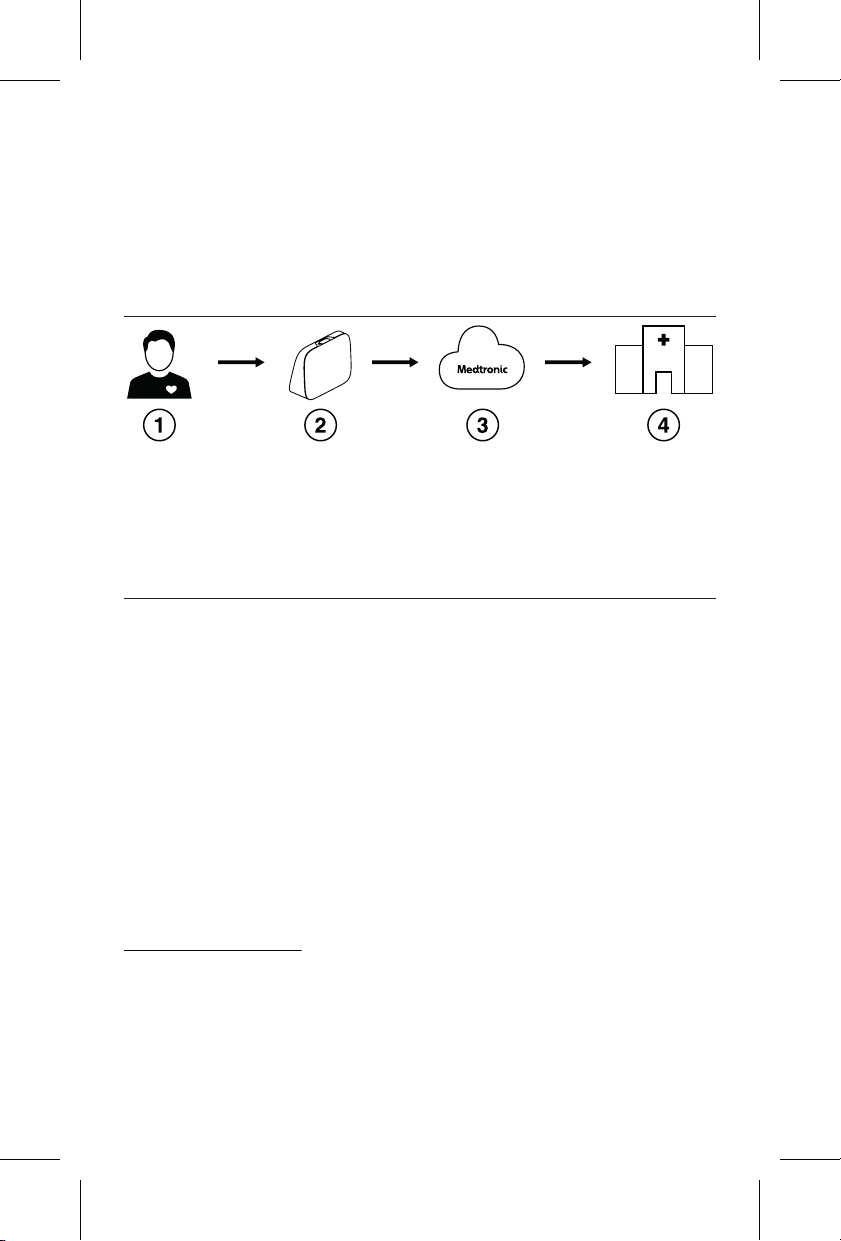
heart device data through the CareLink Network to
remotely monitor your heart device activity.
The following graphic shows the information flow
from your heart device to your clinic.
Figure 1.
1 Your heart device
2 Your communicator
3 Medtronic CareLink Network
4 Your clinic
3.9 Indicator lights
The following table describes status indicator lights
that can appear on the communicator. See
Chapter 9, Troubleshooting, page 34 for steps to
take when you see the orange error icons.
The communicator uses an ambient light sensor to
turn off the indicator lights when the room gets dark.
The communicator is still on and working.
2
The Bluetooth
®
* word mark and logos are registered
trademarks owned by Bluetooth SIG, Inc. and any
use of such marks by Medtronic is under license.
Printing instructions: doc #163256
Category: Thin paper manual
Size: 4.25 x 6.75 in (108 x 171 #mm)
530234-113
10
M036205C001 A Medtronic Confidential Composed: 2025-07-11 11:27:58
PSJ - Size-selectable package manual 14-SEP-2018
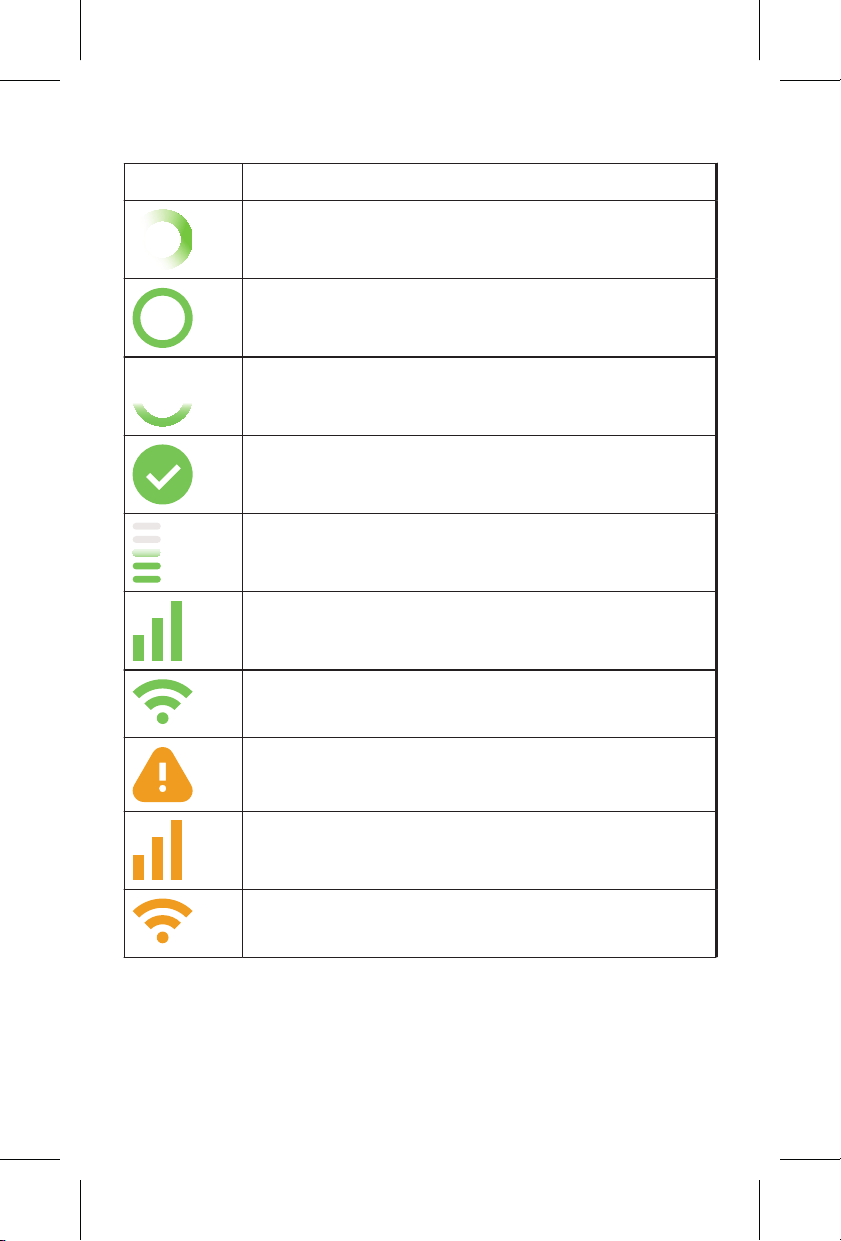
Table 1. Explanation of indicator lights
Light Meaning
The communicator is starting up when
the green ring is spinning.
The communicator is on and working
properly.
The system is busy and not ready to
send a manual transmission.
The steps for transmission are
complete.
The communicator is sending a trans-
mission.
The communicator is connected to a
cellular network.
The communicator is connected to a
Wi-Fi network.
There is a system error.
There is a cellular connection error.
There is a Wi-Fi network connection
error.
Printing instructions: doc #163256
Category: Thin paper manual
Size: 4.25 x 6.75 in (108 x 171 #mm)
530234-113
11
M036205C001 A Medtronic Confidential Composed: 2025-07-11 11:27:58
PSJ - Size-selectable package manual 14-SEP-2018

Table 1. Explanation of indicator lights (continued)
Light Meaning
There is an enrollment error.
The numbers 1, 2, and 3 may appear in
any combination. These are error refer-
ence numbers that you can provide to
Medtronic.
Printing instructions: doc #163256
Category: Thin paper manual
Size: 4.25 x 6.75 in (108 x 171 #mm)
530234-113
12
M036205C001 A Medtronic Confidential Composed: 2025-07-11 11:27:58
PSJ - Size-selectable package manual 14-SEP-2018
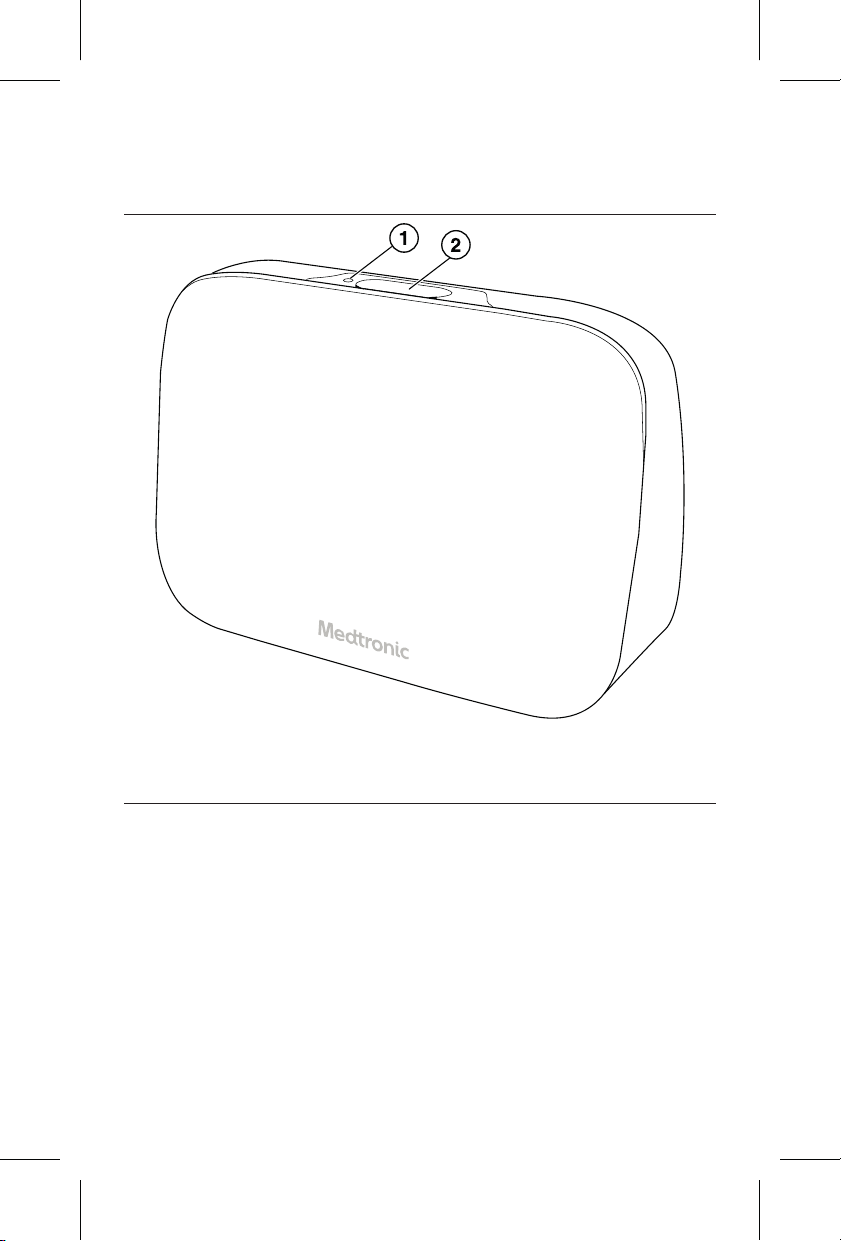
3.10 Front of the communicator
Figure 2.
1 Ambient light sensor
2 Button
Ambient light sensor – Turns off the speaker and
the indicator lights on the front of the communicator
when the room is dark.
Button – Initiates communicator actions.
Printing instructions: doc #163256
Category: Thin paper manual
Size: 4.25 x 6.75 in (108 x 171 #mm)
530234-113
13
M036205C001 A Medtronic Confidential Composed: 2025-07-11 11:27:58
PSJ - Size-selectable package manual 14-SEP-2018
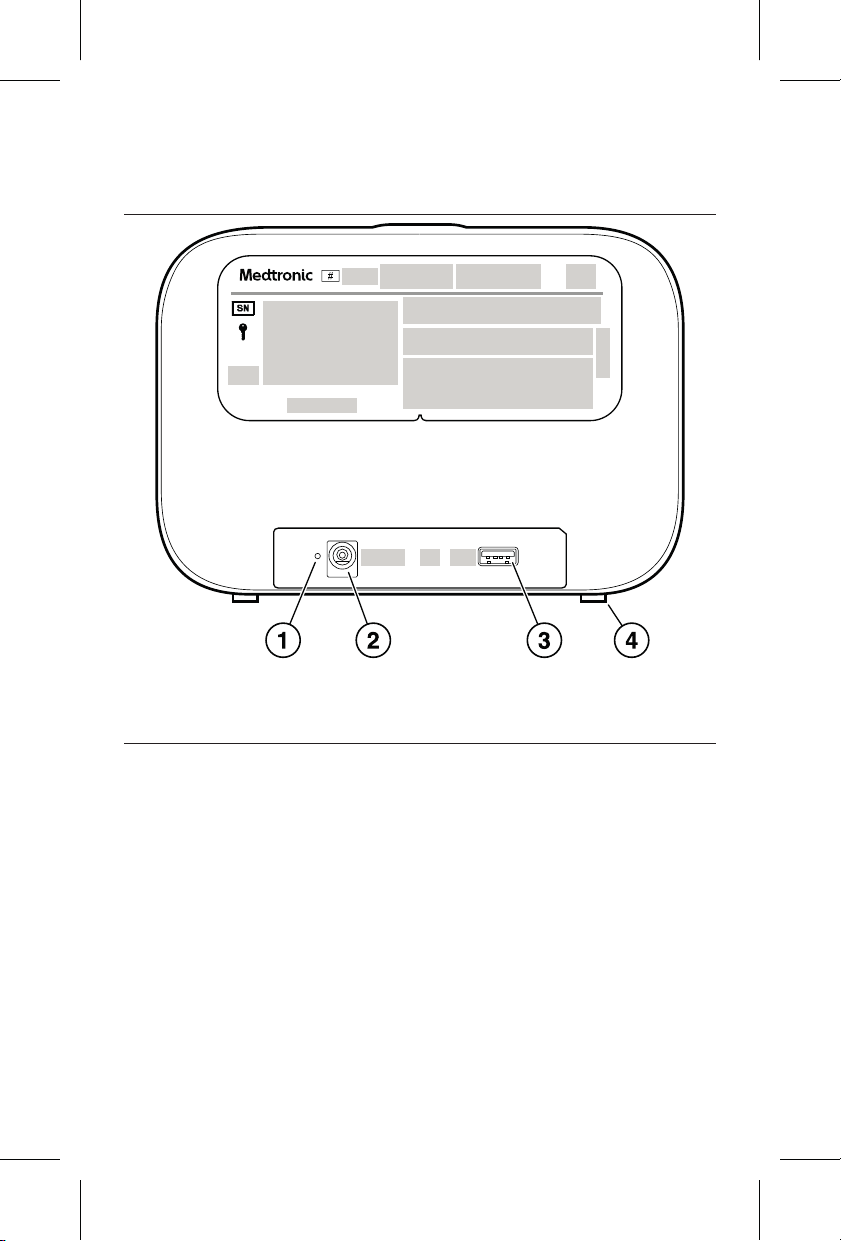
3.11 Back of the communicator
Figure 3.
1 Power light
2 Power supply port
3 USB port
4 Pad
Power light – Is on when the communicator is
receiving power.
Power supply port – Connects the power supply to
the communicator.
USB port – For use only with Medtronic
components.
Pad – Provides support to keep the communicator
upright.
Printing instructions: doc #163256
Category: Thin paper manual
Size: 4.25 x 6.75 in (108 x 171 #mm)
530234-113
14
M036205C001 A Medtronic Confidential Composed: 2025-07-11 11:27:58
PSJ - Size-selectable package manual 14-SEP-2018

4 Warnings, precautions, and potential
adverse events
4.1 Warnings
Warning: If you feel sick, get medical attention
immediately. If you have an emergency, call your
local emergency number. If your doctor has given
you instructions, follow them. Waiting to get medical
attention could be dangerous to your health.
Warning: Use the communicator as described in
this manual in order to operate it safely. Save this
manual.
Warning: Send a manual transmission only when
your doctor tells you to.
Warning: Do not use the communicator if it does not
work as described in this manual. If you need
assistance, contact Medtronic.
Warning: Do not modify this equipment.
Modifications can make the communicator less
effective, which can negatively affect your safety.
Warning: Avoid using the communicator next to or
stacked with other equipment. Using the
communicator next to or stacked with other
equipment could result in improper operation. If
such use is needed, the communicator and the
other equipment should be observed to verify that
they are operating normally.
Printing instructions: doc #163256
Category: Thin paper manual
Size: 4.25 x 6.75 in (108 x 171 #mm)
530234-113
15
M036205C001 A Medtronic Confidential Composed: 2025-07-11 11:27:58
PSJ - Size-selectable package manual 14-SEP-2018

Warning: Use of accessories, transducers, and
cables other than those provided by Medtronic
could result in increased electromagnetic emissions
or decreased electromagnetic immunity of this
equipment and result in improper operation.
Warning: Do not use the communicator near water.
For example, do not use it near a bathtub, wash
bowl, kitchen sink, or laundry tub. When you use the
communicator, follow basic safety precautions to
reduce the risk of fire, electric shock, and injury to
persons.
Warning: Portable RF communications equipment
(including peripherals such as antenna cables and
external antennas) should be used no closer than
30 cm (12 in) to any part of the device, including
cables specified by the manufacturer. Otherwise,
degradation of the performance of this device could
result.
Warning: Keep cables and cords out of the reach of
children or anyone at risk of strangulation.
Warning: Keep the communicator plugged in to the
power outlet. The communicator must be powered
on to send a transmission.
Warning: The communicator will not operate when
there is a power outage. If a power outage occurs,
connect the communicator to an alternative power
source.
Printing instructions: doc #163256
Category: Thin paper manual
Size: 4.25 x 6.75 in (108 x 171 #mm)
530234-113
16
M036205C001 A Medtronic Confidential Composed: 2025-07-11 11:27:58
PSJ - Size-selectable package manual 14-SEP-2018

Warning: Do not misuse or damage the
communicator. If the communicator is damaged,
contact Medtronic. Damage to the communicator
can result in the following hazards:
• Sharp edges that can cause a laceration (cut).
• Electric shock from the power supply that can
cause burn, pain, and tingling.
• Broken pieces that can cause choking if the
pieces are swallowed.
• Loud sounds from the speaker that can cause
tinnitus (ringing in the ears).
4.2 Precautions
Caution: Use only the power supply that came with
this communicator. Using a different power supply
could damage the communicator and adversely
affect your safety.
4.3 Potential adverse events
The following are known potential adverse events
associated with misuse of the communicator:
• Burns
• Choking
• Failure to provide intended data
• Laceration (cut)
• Pain
Printing instructions: doc #163256
Category: Thin paper manual
Size: 4.25 x 6.75 in (108 x 171 #mm)
530234-113
17
M036205C001 A Medtronic Confidential Composed: 2025-07-11 11:27:58
PSJ - Size-selectable package manual 14-SEP-2018

• Strangulation
• Tingling
• Tinnitus (ringing in the ears)
For warnings and precautions that describe these
adverse events, see Section 4.1, Warnings, page 15
and Section 4.2, Precautions, page 17.
4.4 Reporting a serious incident
If a serious incident related to the communicator
occurs, immediately report the incident to your
doctor.
Printing instructions: doc #163256
Category: Thin paper manual
Size: 4.25 x 6.75 in (108 x 171 #mm)
530234-113
18
M036205C001 A Medtronic Confidential Composed: 2025-07-11 11:27:58
PSJ - Size-selectable package manual 14-SEP-2018
5 Setting up the communicator
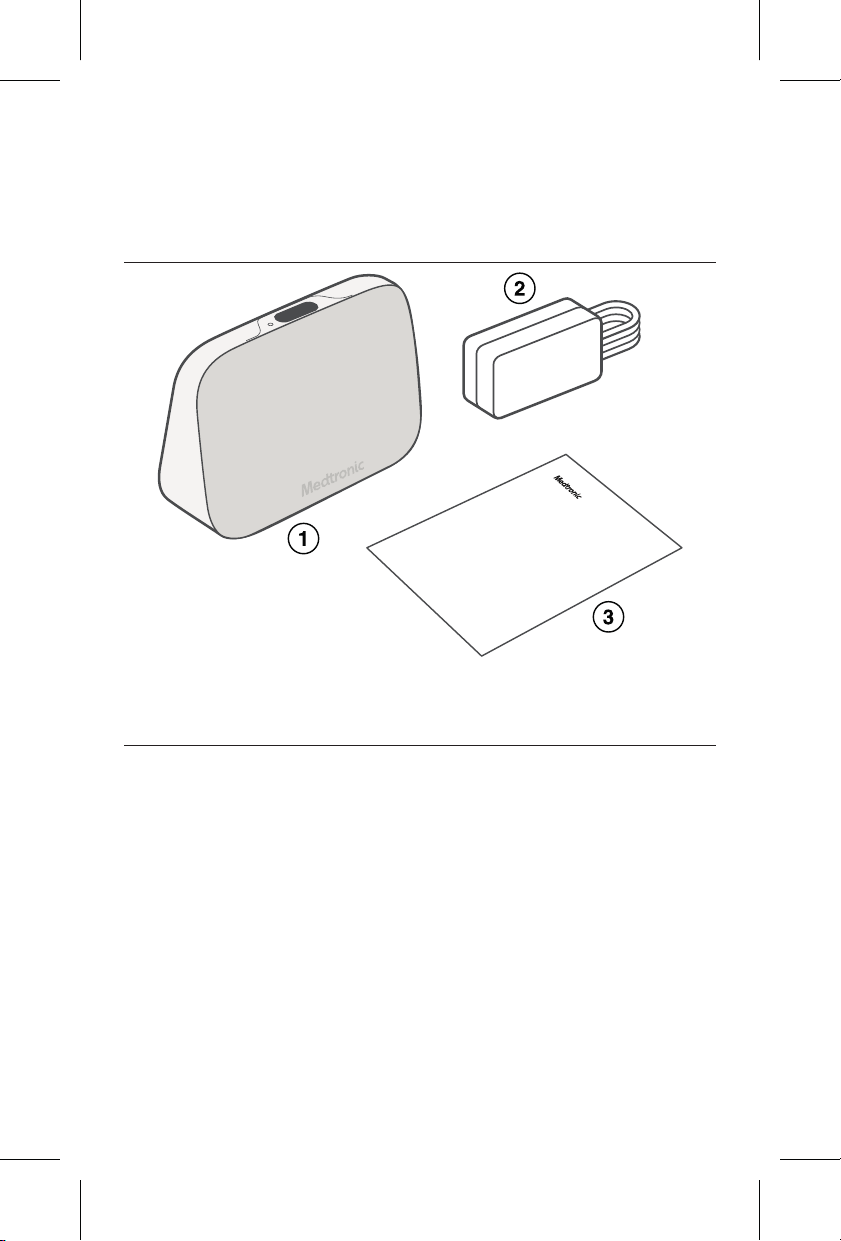
5.1 Package contents
Figure 4.
1 Communicator
2 Power supply
3 Literature
Printing instructions: doc #163256
Category: Thin paper manual
Size: 4.25 x 6.75 in (108 x 171 #mm)
530234-113
19
M036205C001 A Medtronic Confidential Composed: 2025-07-11 11:27:58
PSJ - Size-selectable package manual 14-SEP-2018
5.2 Setup
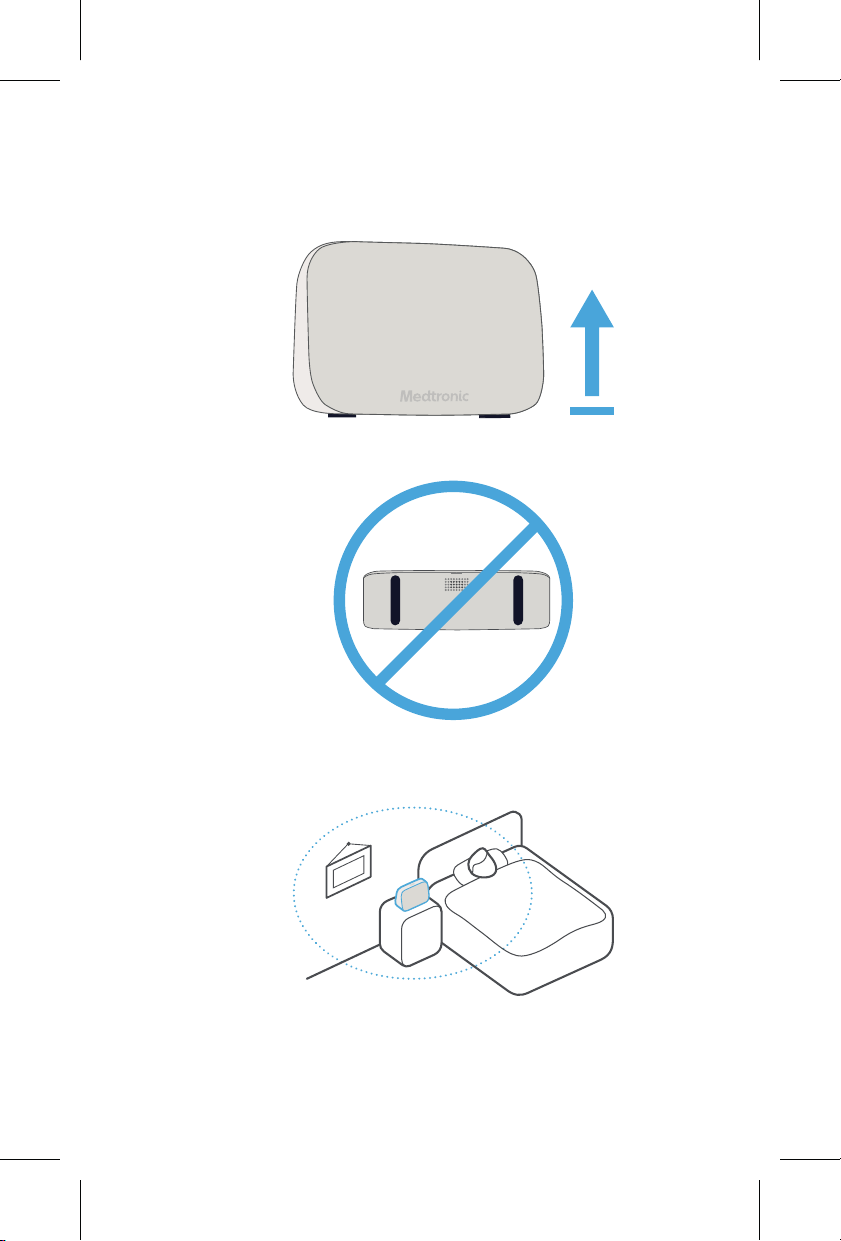
1. Ensure your communicator is placed upright
with the navy-blue pads down.
Do not place the communicator on its back.
2. Place the communicator within 3 meters
(10 feet) of where you sleep.
Printing instructions: doc #163256
Category: Thin paper manual
Size: 4.25 x 6.75 in (108 x 171 #mm)
530234-113
20
M036205C001 A Medtronic Confidential Composed: 2025-07-11 11:27:58
PSJ - Size-selectable package manual 14-SEP-2018
Note: Other electronic devices can be near
the communicator (for example, on the same
nightstand), but they should be kept at least
30 centimeters (12 inches) from the
communicator.
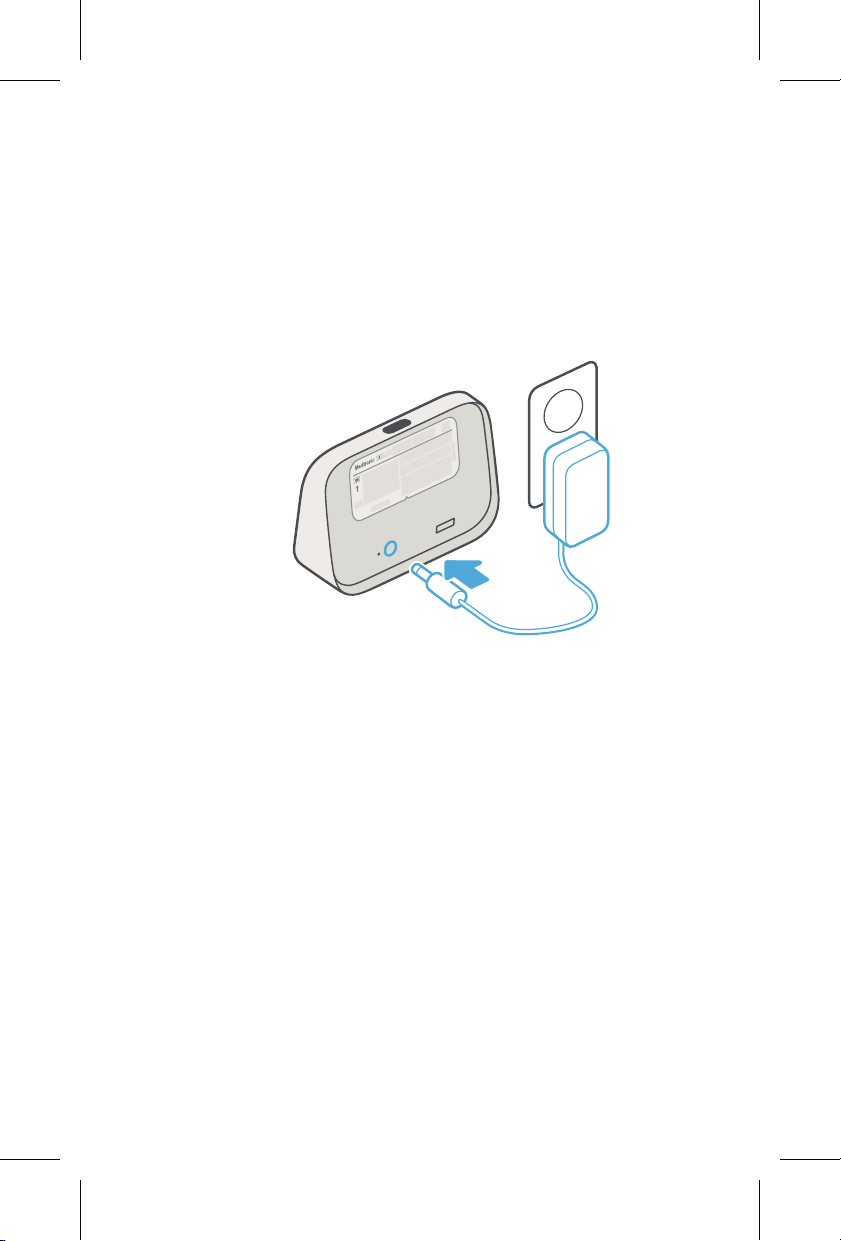
3. Connect the power supply to your
communicator and a power outlet.
Notes:
• Position the communicator so that you can
unplug it from the power outlet if needed.
• Do not connect the power supply to a
power outlet that is controlled by a wall
switch.
Printing instructions: doc #163256
Category: Thin paper manual
Size: 4.25 x 6.75 in (108 x 171 #mm)
530234-113
21
M036205C001 A Medtronic Confidential Composed: 2025-07-11 11:27:58
PSJ - Size-selectable package manual 14-SEP-2018
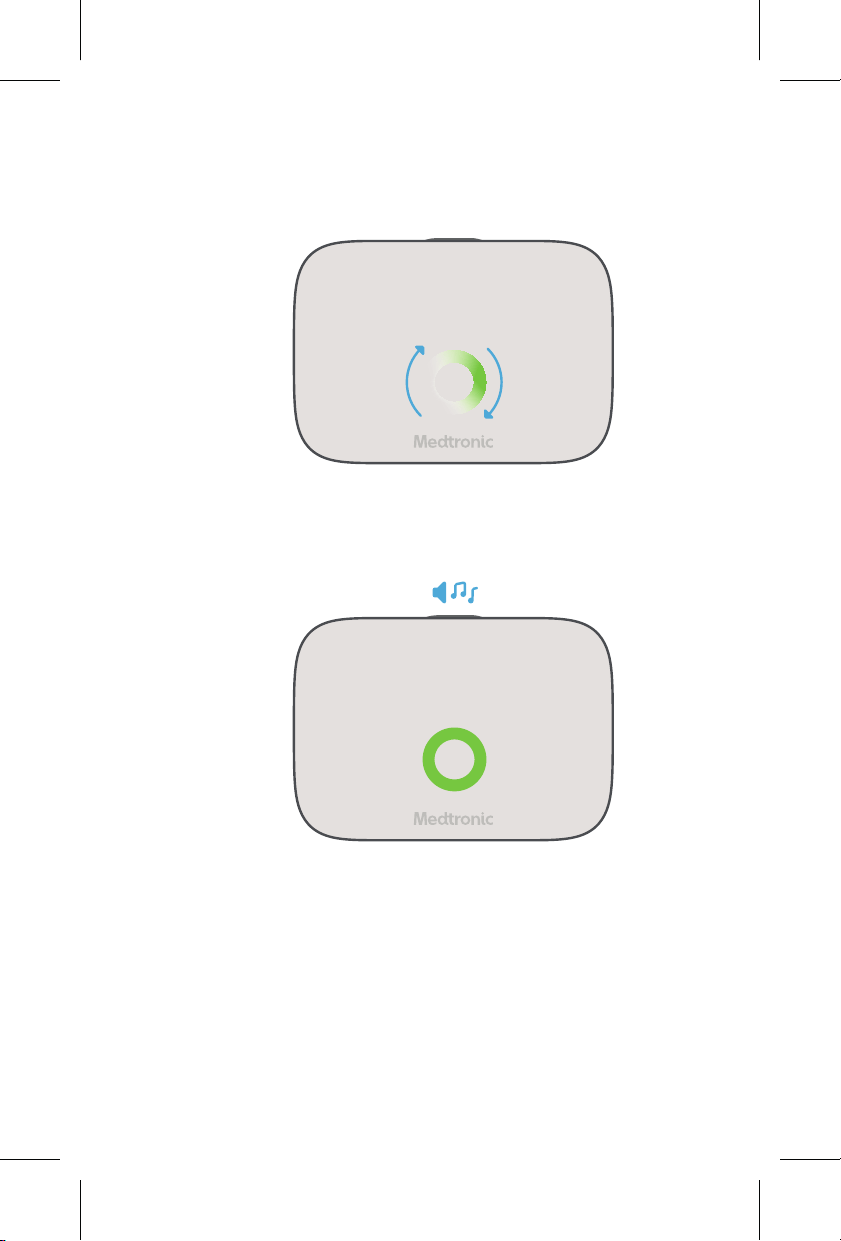
4. Wait for the system to start.
The green ring will spin while the system is
starting. This can take several minutes.
5. Setup is complete when the green ring is fully
lit. A tone will also play. No further action is
needed.
Printing instructions: doc #163256
Category: Thin paper manual
Size: 4.25 x 6.75 in (108 x 171 #mm)
530234-113
22
M036205C001 A Medtronic Confidential Composed: 2025-07-11 11:27:58
PSJ - Size-selectable package manual 14-SEP-2018

6 Connecting the communicator to
your Wi-Fi network
Medtronic recommends that you connect the
communicator to a Wi-Fi network to ensure a robust
connection for your communicator.
• To connect the communicator to your Wi-Fi
network at home, complete the steps in
Section 6.1, Connect to your network at home,
page 24.
• To connect the communicator to your Wi-Fi
network from the clinic or hospital, complete the
steps in Section 6.2, Connect to your network
from the clinic or hospital, page 28.
If you are having difficulty connecting the
communicator to your Wi-Fi network using the steps
in Section 6.1 or Section 6.2, you can connect the
communicator to a Wi-Fi network using the
communicator hotspot. See Section 9.6, Alternative
method for connecting to your Wi-Fi network,
page 37.
Note: The communicator automatically connects to
a cellular network if the communicator isn’t
connected to a Wi-Fi network. A Wi-Fi network
connection is not required to use the communicator.
Printing instructions: doc #163256
Category: Thin paper manual
Size: 4.25 x 6.75 in (108 x 171 #mm)
530234-113
23
M036205C001 A Medtronic Confidential Composed: 2025-07-11 11:27:58
PSJ - Size-selectable package manual 14-SEP-2018
6.1 Connect to your network at home
1. Ensure that you have your Wi-Fi network name
and password available.
2. Get your tablet, smartphone, or computer.
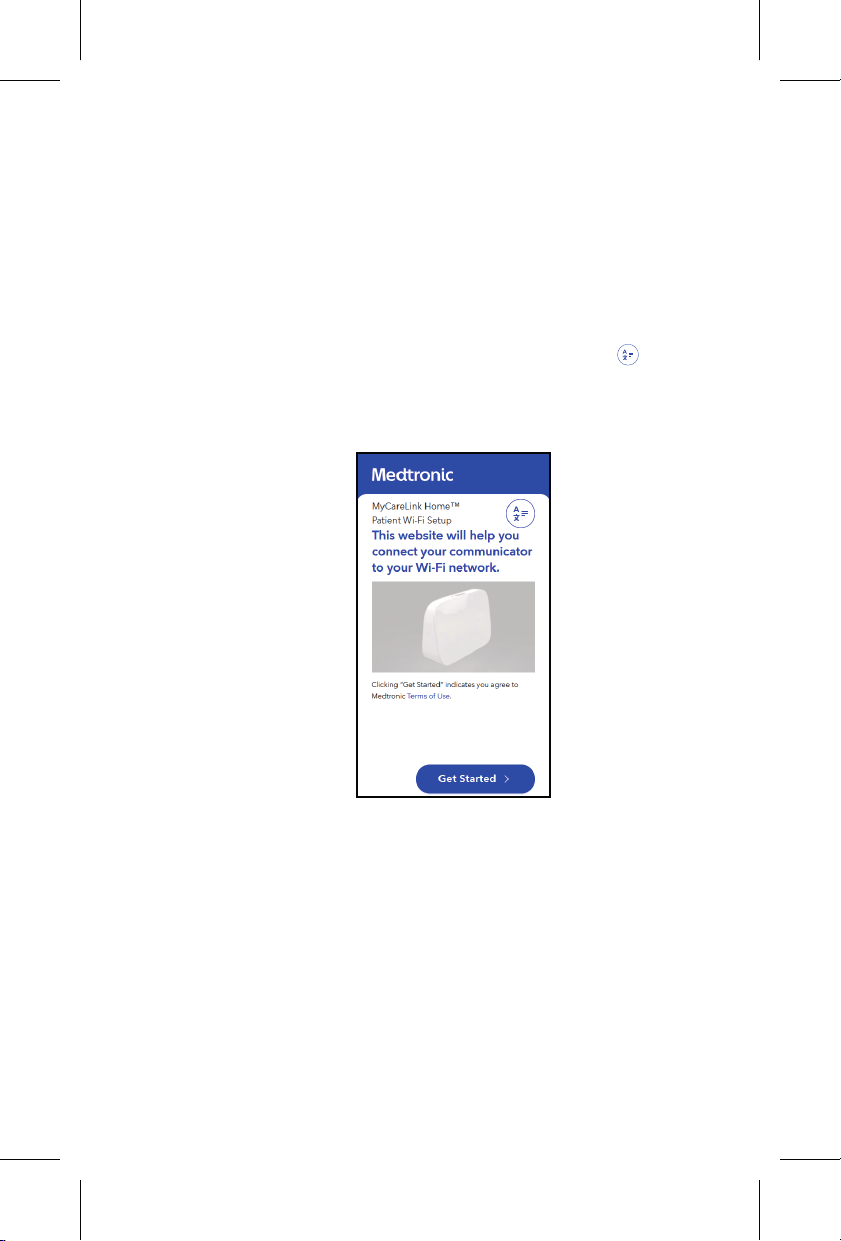
3. Open an internet browser and go to
www.MCLHomeWiFi.com.
Note: To change your language, tap
and
select your language.
4. Tap Get started.
Printing instructions: doc #163256
Category: Thin paper manual
Size: 4.25 x 6.75 in (108 x 171 #mm)
530234-113
24
M036205C001 A Medtronic Confidential Composed: 2025-07-11 11:27:58
PSJ - Size-selectable package manual 14-SEP-2018
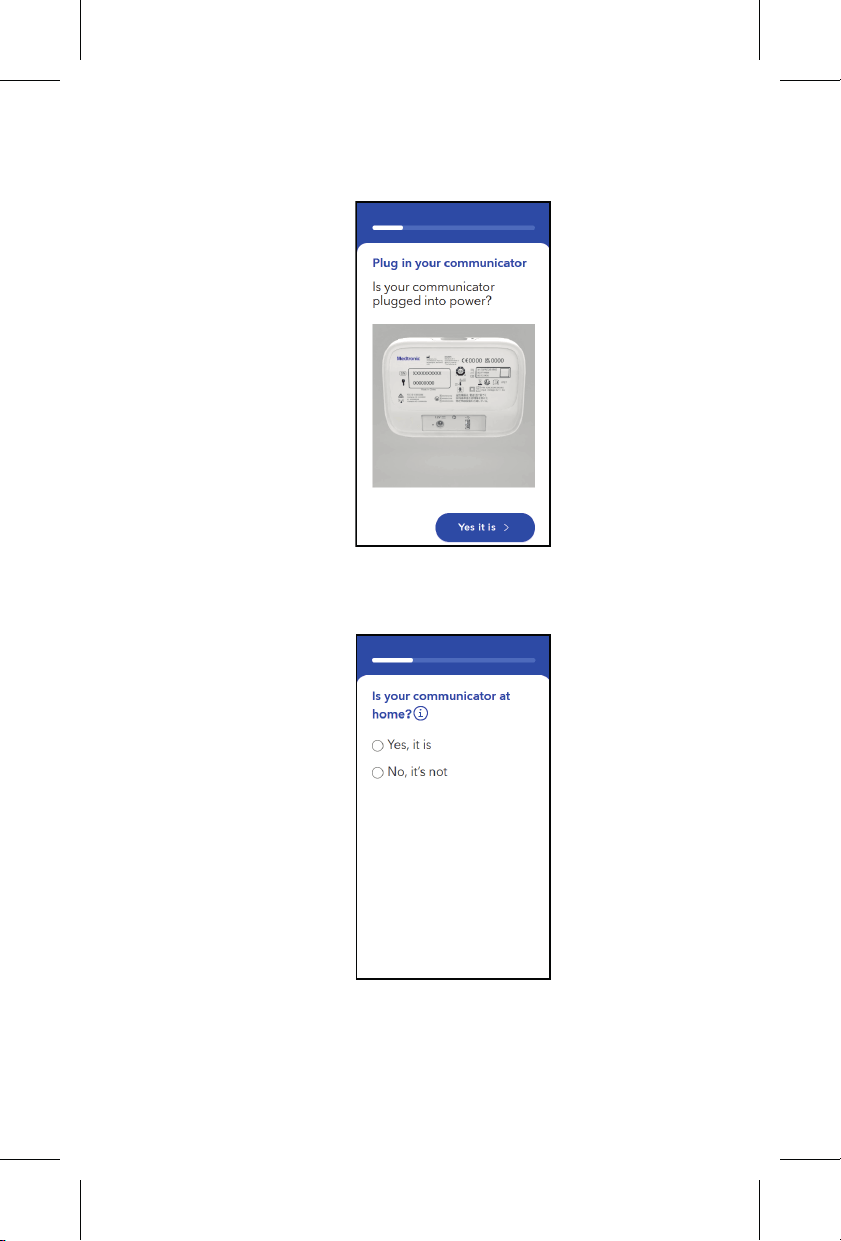
5. Ensure that your communicator is plugged
into power and tap Yes it is.
6. When asked if your communicator is at home,
tap Yes, it is.
Printing instructions: doc #163256
Category: Thin paper manual
Size: 4.25 x 6.75 in (108 x 171 #mm)
530234-113
25
M036205C001 A Medtronic Confidential Composed: 2025-07-11 11:27:58
PSJ - Size-selectable package manual 14-SEP-2018
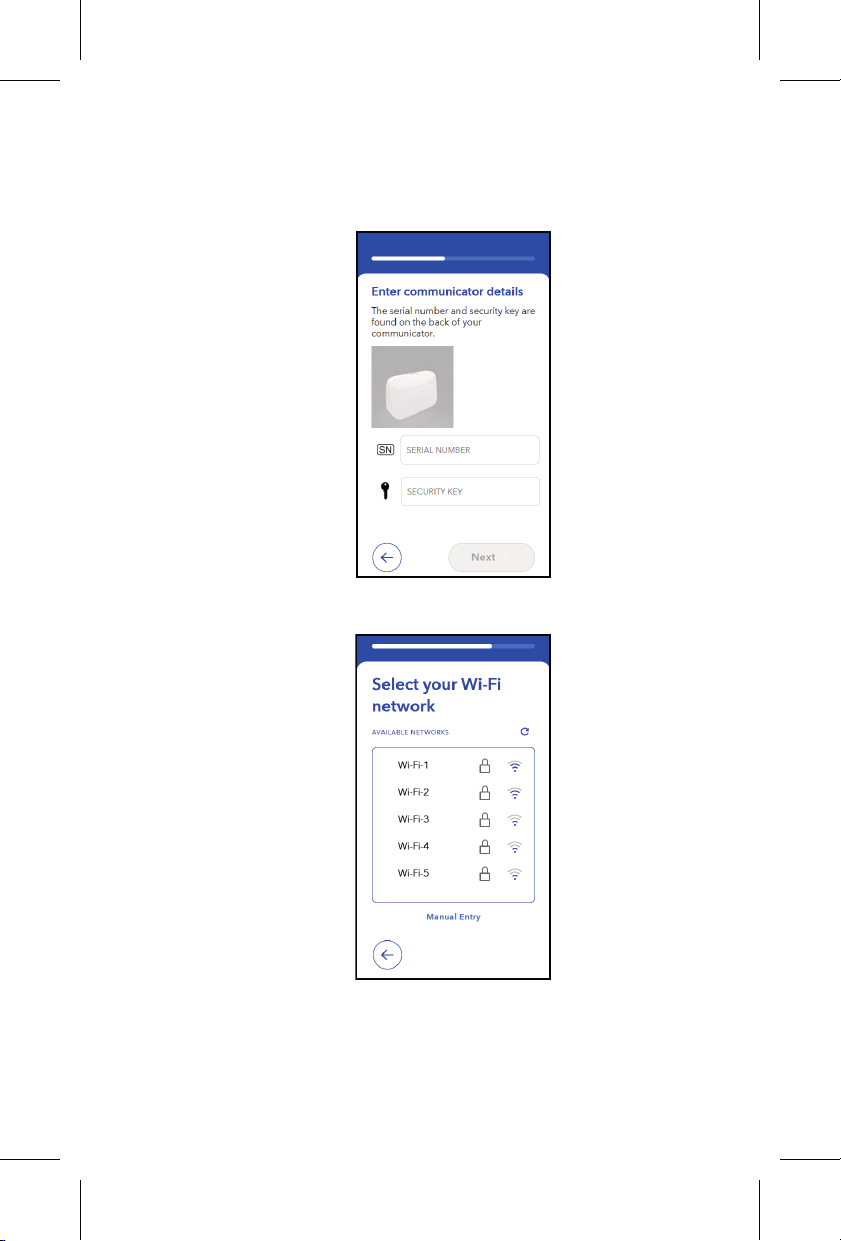
7. Enter the communicator serial number and
security key from the label on the back of the
communicator and tap Next.
8. Select your Wi-Fi network name from the list.
Printing instructions: doc #163256
Category: Thin paper manual
Size: 4.25 x 6.75 in (108 x 171 #mm)
530234-113
26
M036205C001 A Medtronic Confidential Composed: 2025-07-11 11:27:58
PSJ - Size-selectable package manual 14-SEP-2018
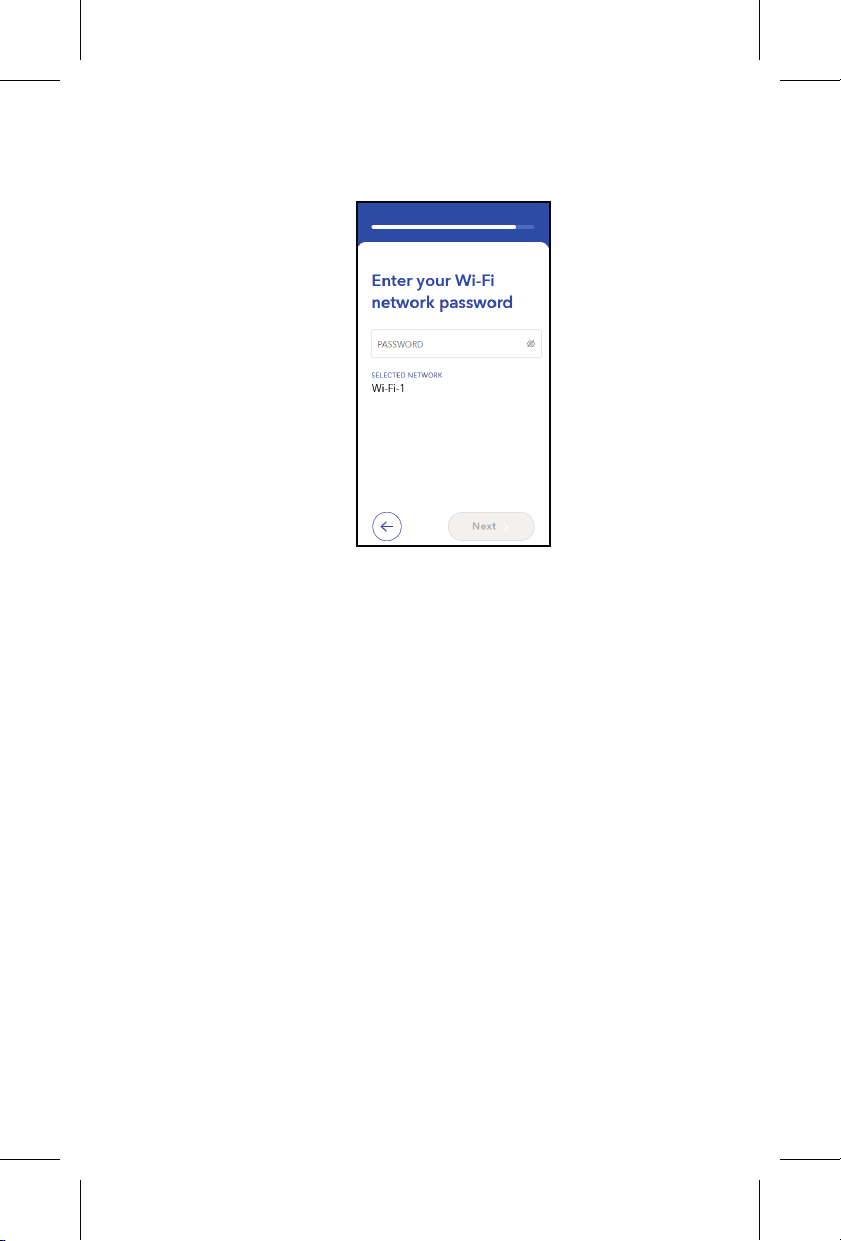
9. Enter your Wi-Fi network password and tap
Next.
Printing instructions: doc #163256
Category: Thin paper manual
Size: 4.25 x 6.75 in (108 x 171 #mm)
530234-113
27
M036205C001 A Medtronic Confidential Composed: 2025-07-11 11:27:58
PSJ - Size-selectable package manual 14-SEP-2018
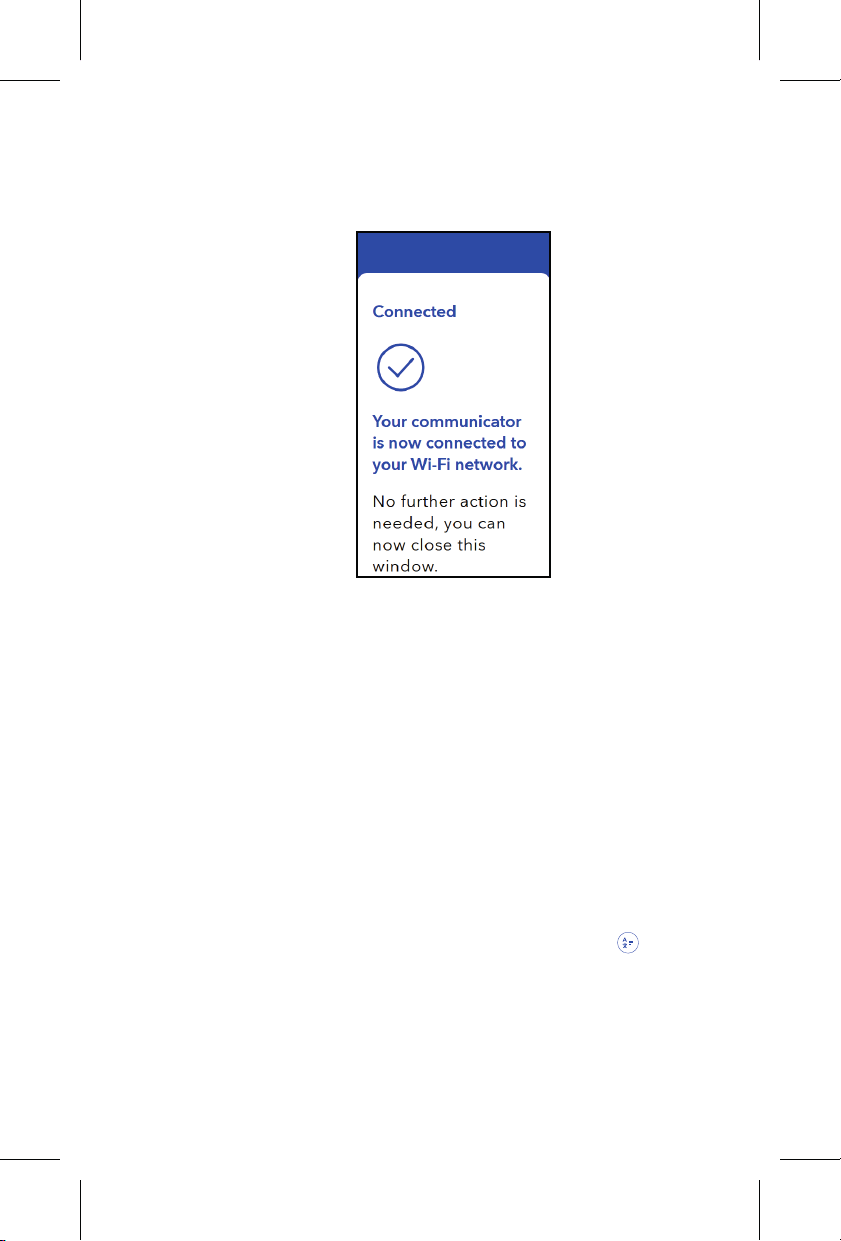
10. A confirmation message is displayed when
the communicator has successfully
connected to your Wi-Fi network.
11. Wi-Fi network setup is complete. Close the
internet browser.
6.2 Connect to your network from the clinic
or hospital
1. Ensure that you have your Wi-Fi network name
and password available.
2. Get your tablet, smartphone, or computer.
3. Open an internet browser and go to
www.MCLHomeWiFi.com.
Note: To change your language, tap and
select your language.
Printing instructions: doc #163256
Category: Thin paper manual
Size: 4.25 x 6.75 in (108 x 171 #mm)
530234-113
28
M036205C001 A Medtronic Confidential Composed: 2025-07-11 11:27:58
PSJ - Size-selectable package manual 14-SEP-2018
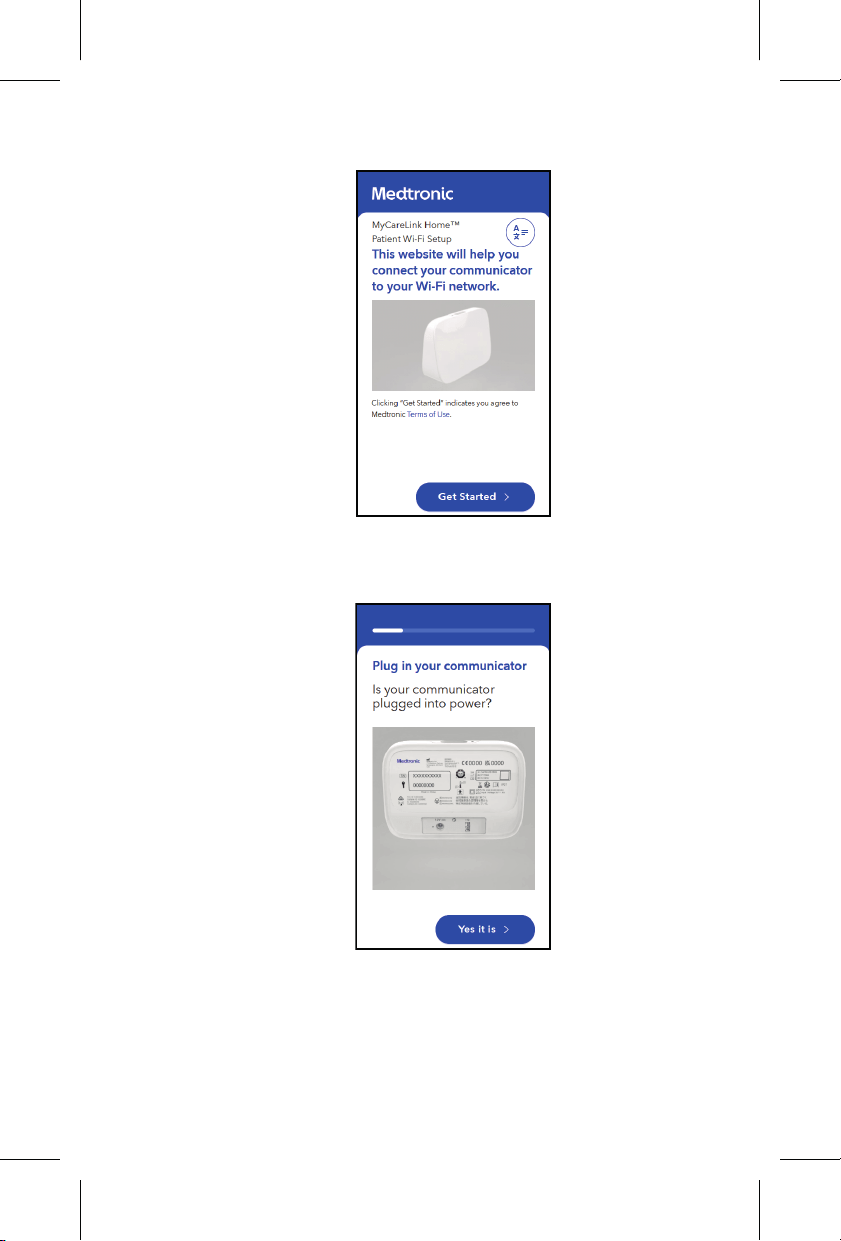
4. Tap Get started.
5. Ensure that your communicator is plugged
into power and tap Yes it is.
Printing instructions: doc #163256
Category: Thin paper manual
Size: 4.25 x 6.75 in (108 x 171 #mm)
530234-113
29
M036205C001 A Medtronic Confidential Composed: 2025-07-11 11:27:58
PSJ - Size-selectable package manual 14-SEP-2018
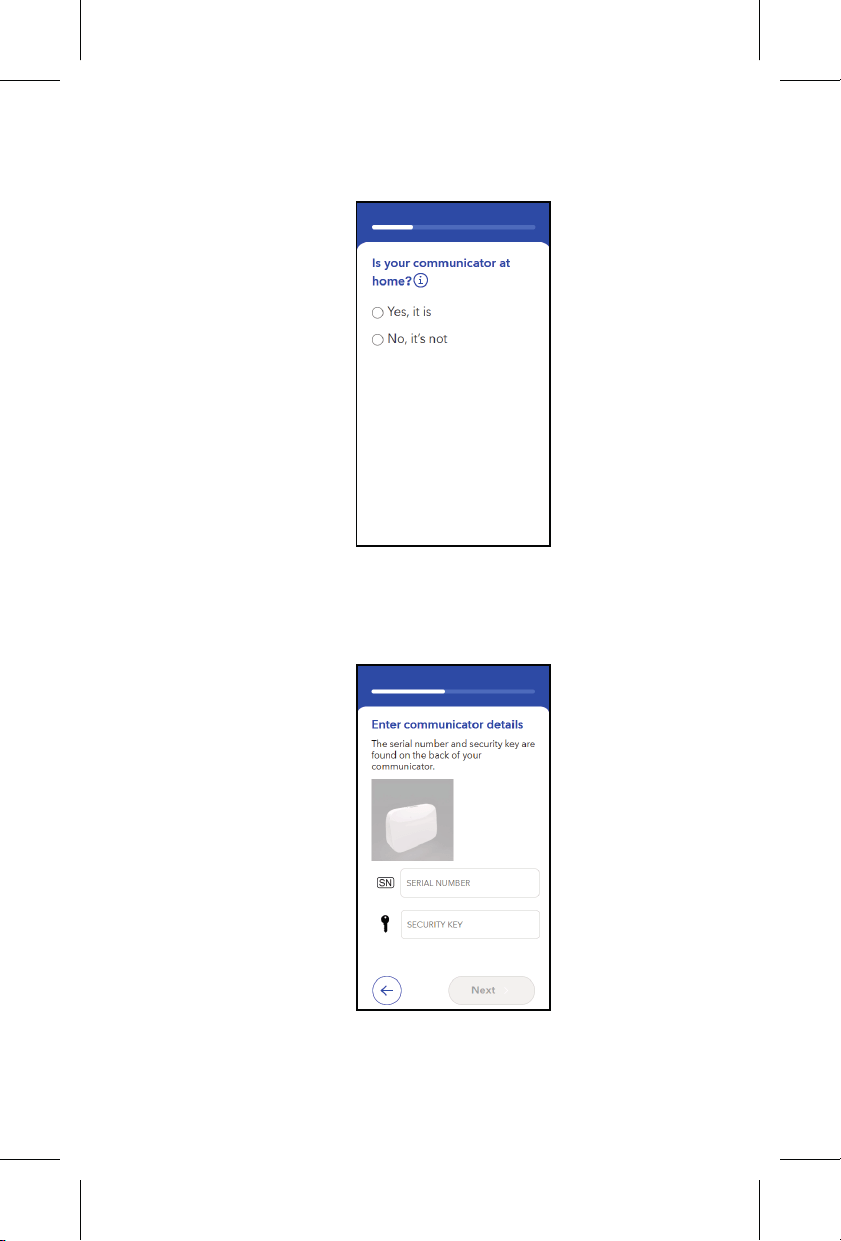
6. When asked if your communicator is at home,
tap No, it’s not.
7. Enter the communicator serial number and
security key from the label on the back of the
communicator and tap Next.
Printing instructions: doc #163256
Category: Thin paper manual
Size: 4.25 x 6.75 in (108 x 171 #mm)
530234-113
30
M036205C001 A Medtronic Confidential Composed: 2025-07-11 11:27:58
PSJ - Size-selectable package manual 14-SEP-2018
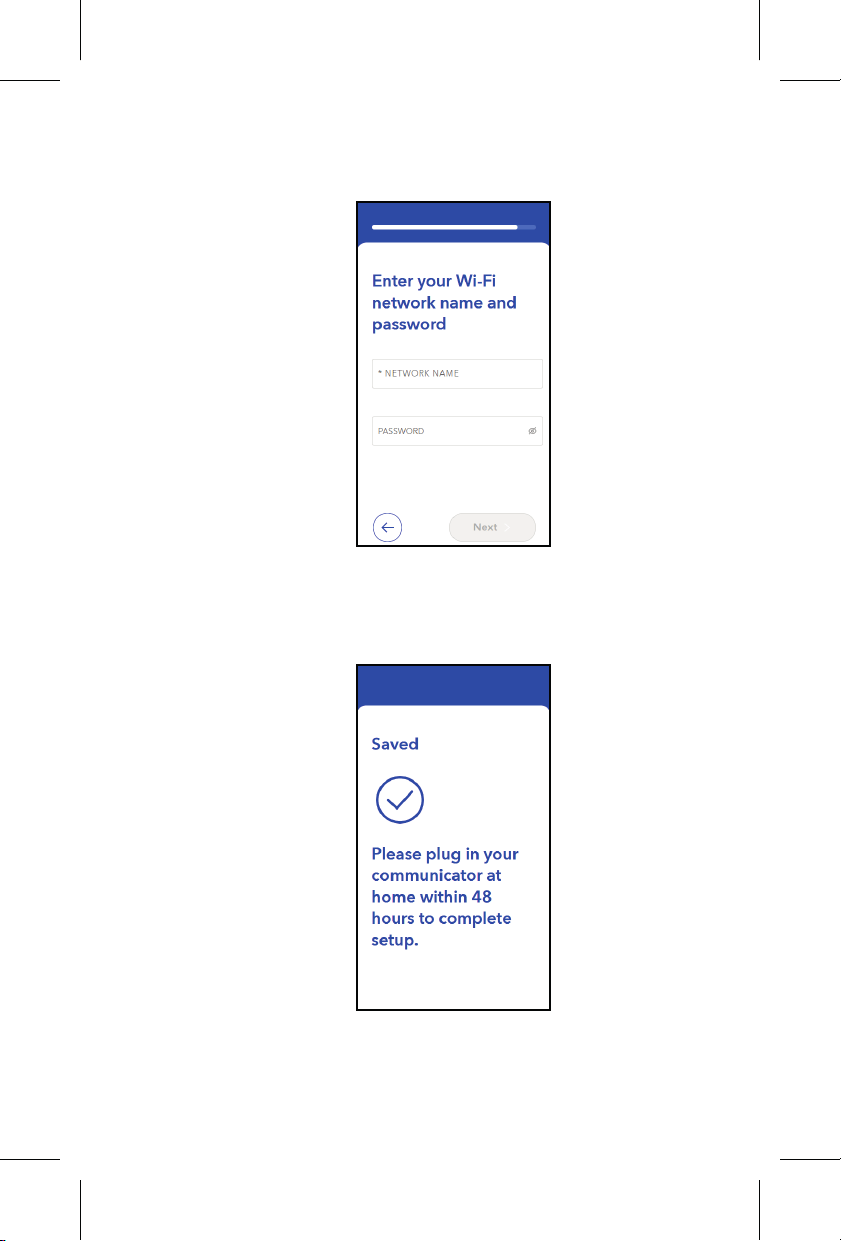
8. Enter your Wi-Fi network name and password
and tap Next.
9. A confirmation message is displayed. Plug in
your communicator at home within 48 hours to
complete setup.
Printing instructions: doc #163256
Category: Thin paper manual
Size: 4.25 x 6.75 in (108 x 171 #mm)
530234-113
31
M036205C001 A Medtronic Confidential Composed: 2025-07-11 11:27:58
PSJ - Size-selectable package manual 14-SEP-2018
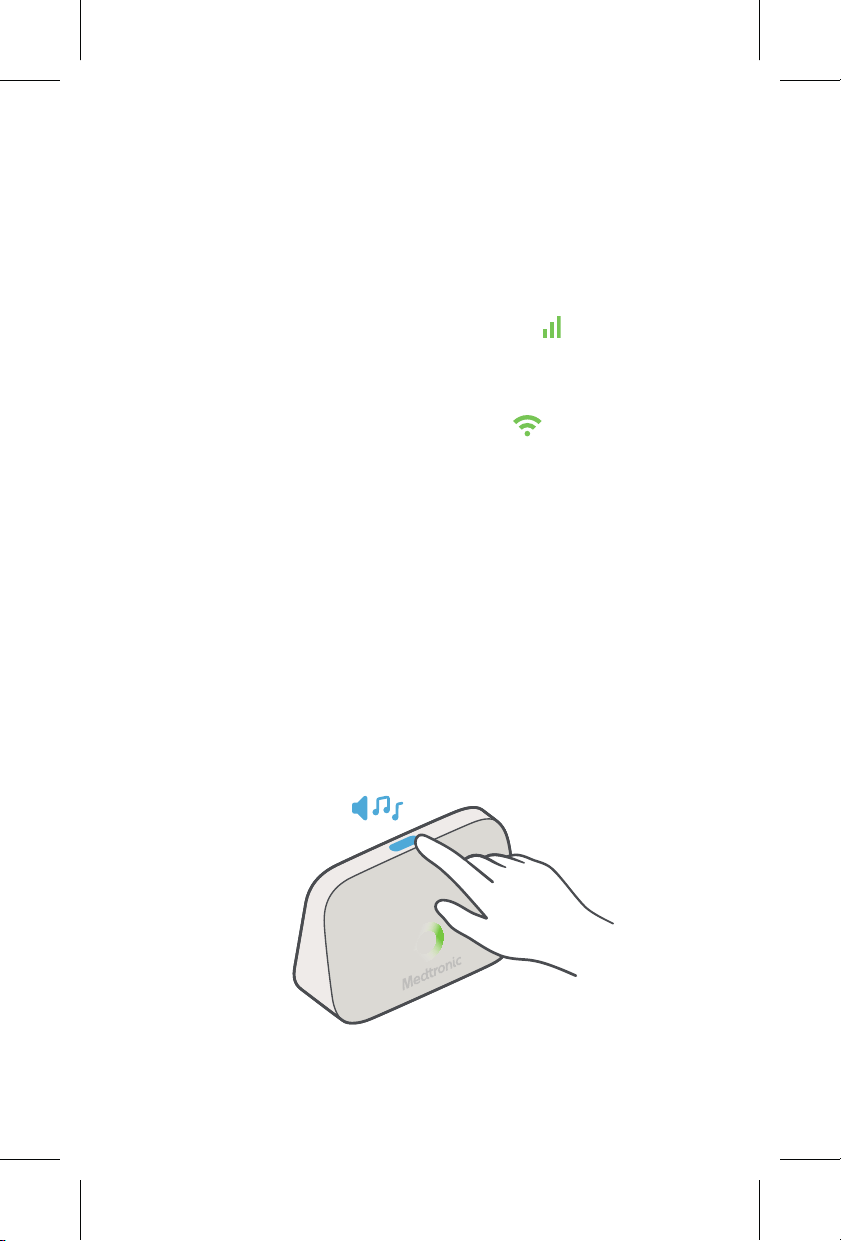
7 Checking the connection status
To check the connection status of the
communicator, press the button for less than
1 second.
• If the communicator is connected to the cellular
network, the cellular signal icon
lights up
green for 15 seconds.
• If the communicator is connected to a Wi-Fi
network, the Wi-Fi signal icon lights up green
for 15 seconds.
8 Sending a manual transmission
Use these steps to send information from your heart
device to the Medtronic CareLink Network. Send a
transmission only if your doctor or clinic requests.
1. Press and hold the button for 2 seconds to
start the transmission.
A tone will play and the green ring will start to
spin.
Printing instructions: doc #163256
Category: Thin paper manual
Size: 4.25 x 6.75 in (108 x 171 #mm)
530234-113
32
M036205C001 A Medtronic Confidential Composed: 2025-07-11 11:27:58
PSJ - Size-selectable package manual 14-SEP-2018
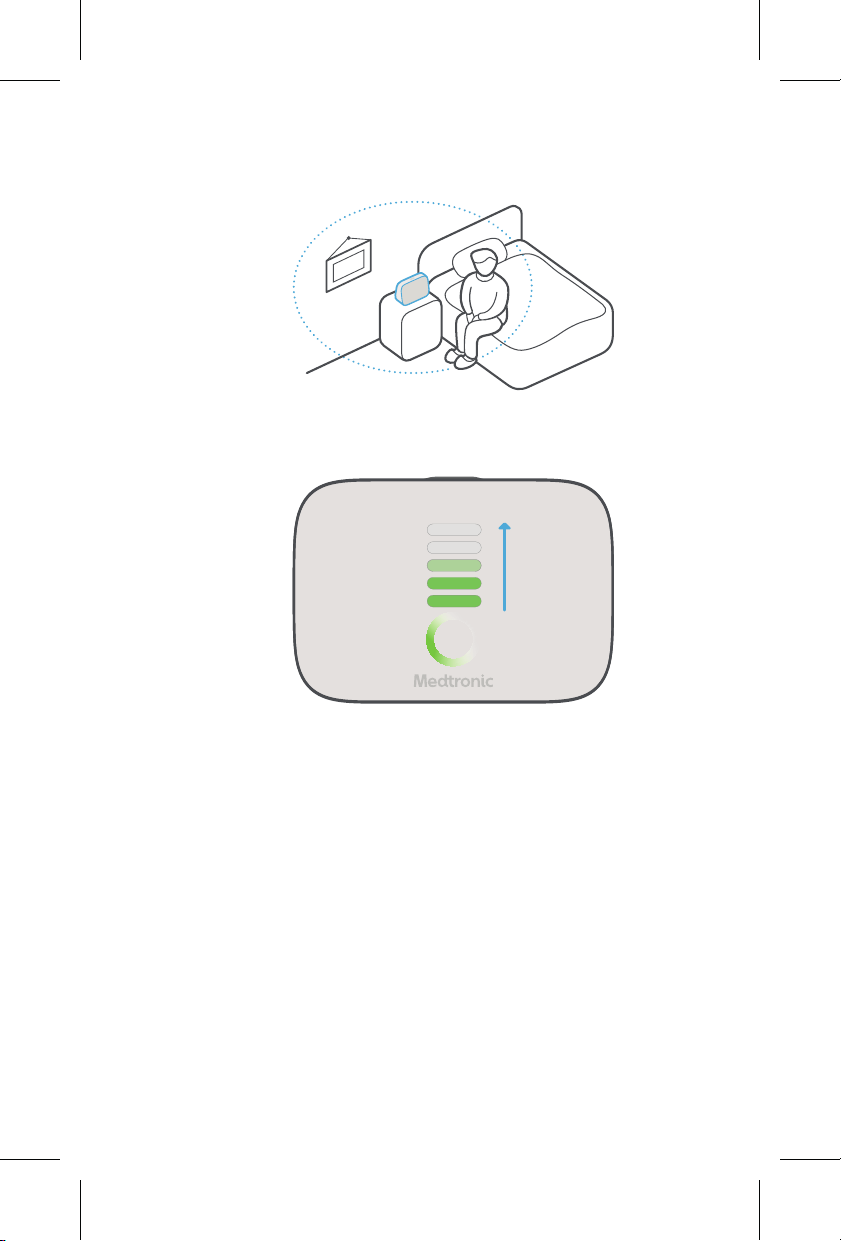
2. Stay within 3 meters (10 feet) of your
communicator during the transmission.
3. Wait for the progress bar to fill. This can take a
few minutes.
Printing instructions: doc #163256
Category: Thin paper manual
Size: 4.25 x 6.75 in (108 x 171 #mm)
530234-113
33
M036205C001 A Medtronic Confidential Composed: 2025-07-11 11:27:58
PSJ - Size-selectable package manual 14-SEP-2018
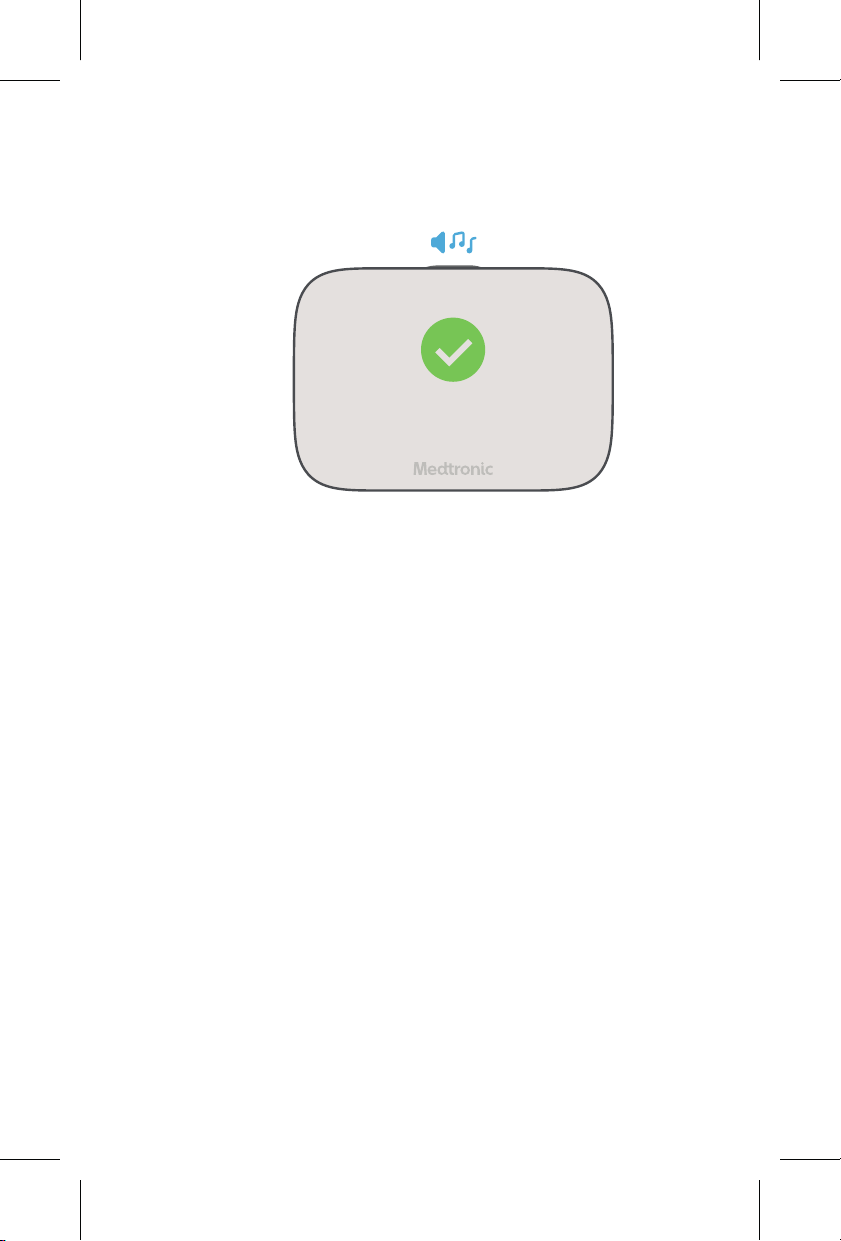
4. After the progress bar fills, a checkmark will
appear and a tone will play. No further action is
needed.
9 Troubleshooting
If an error occurs, an orange icon lights up on the
communicator, and a tone plays. This chapter
describes the causes of communicator errors and
actions you can take to resolve them. None of these
errors indicate an issue with your implanted heart
device.
This chapter also includes an alternative method for
connecting to your Wi-Fi network.
Contact Medtronic for assistance. See Chapter 2,
How to contact Medtronic, page 6.
Printing instructions: doc #163256
Category: Thin paper manual
Size: 4.25 x 6.75 in (108 x 171 #mm)
530234-113
34
M036205C001 A Medtronic Confidential Composed: 2025-07-11 11:27:58
PSJ - Size-selectable package manual 14-SEP-2018

9.1 Cellular connection error
• Error: The orange cellular signal icon lights
up. The communicator plays an error tone 2
times.
• Cause: The communicator does not have a
good cellular connection.
• Action: Unplug the communicator and move it
to a place where it might receive a better cellular
signal (for example, next to a window).
If that does not resolve the error, connect the
communicator to a Wi-Fi network. See
Chapter 6, Connecting the communicator to
your Wi-Fi network, page 23.
9.2 Wi-Fi network connection error
• Error: The orange Wi-Fi network error icon
lights up and flashes. The communicator plays
an error tone 2 times.
• Cause: This error occurs if you have previously
connected the communicator to a Wi-Fi network
but there is now no Wi-Fi network connection
available, and a cellular connection is
unavailable. If a cellular connection is available,
the green cellular icon
appears along with the
orange Wi-Fi error icon
.
• Action: Try to reconnect to the Wi-Fi network.
Unplug your internet router and plug it back in.
Printing instructions: doc #163256
Category: Thin paper manual
Size: 4.25 x 6.75 in (108 x 171 #mm)
530234-113
35
M036205C001 A Medtronic Confidential Composed: 2025-07-11 11:27:58
PSJ - Size-selectable package manual 14-SEP-2018

Give the router time to start up. Then, unplug the
communicator and plug it in again.
Ensure that the Wi-Fi network name and
password have not changed. If they have
changed, follow the instructions in Chapter 6,
Connecting the communicator to your Wi-Fi
network, page 23 to enter the new information.
If the error persists, try unplugging the
communicator and moving it to a place that
might get better reception.
9.3 System error
• Error: The orange system error icon
lights up.
The communicator plays an error tone 3 times.
• Cause: This error indicates that the
communicator has encountered an internal
error.
It does not indicate an issue with your implanted
heart device.
• Action: Restart the communicator by
unplugging it and plugging it back into the power
outlet.
For additional assistance, contact Medtronic.
See Chapter 2, How to contact Medtronic,
page 6.
Printing instructions: doc #163256
Category: Thin paper manual
Size: 4.25 x 6.75 in (108 x 171 #mm)
530234-113
36
M036205C001 A Medtronic Confidential Composed: 2025-07-11 11:27:58
PSJ - Size-selectable package manual 14-SEP-2018

9.4 Enrollment error
• Error: The orange enrollment error icon
lights up. The communicator plays an error tone
2 times.
• Cause: Your clinician has not completed your
enrollment in the Medtronic CareLink Network.
• Action: Contact your clinic and ask them to
complete your enrollment.
For additional assistance, contact Medtronic.
See Chapter 2, How to contact Medtronic,
page 6.
9.5 Error reference numbers
If you press the communicator button when an error
is present, any combination of the error reference
numbers
may appear. If you choose to call
Medtronic for assistance, you can share these
reference numbers during the call. See Chapter 2.
9.6 Alternative method for connecting to
your Wi-Fi network
If you were unable to connect your communicator to
your Wi-Fi network using the steps in Chapter 6,
complete the steps in this section to connect your
communicator using a hotspot.
Printing instructions: doc #163256
Category: Thin paper manual
Size: 4.25 x 6.75 in (108 x 171 #mm)
530234-113
37
M036205C001 A Medtronic Confidential Composed: 2025-07-11 11:27:58
PSJ - Size-selectable package manual 14-SEP-2018
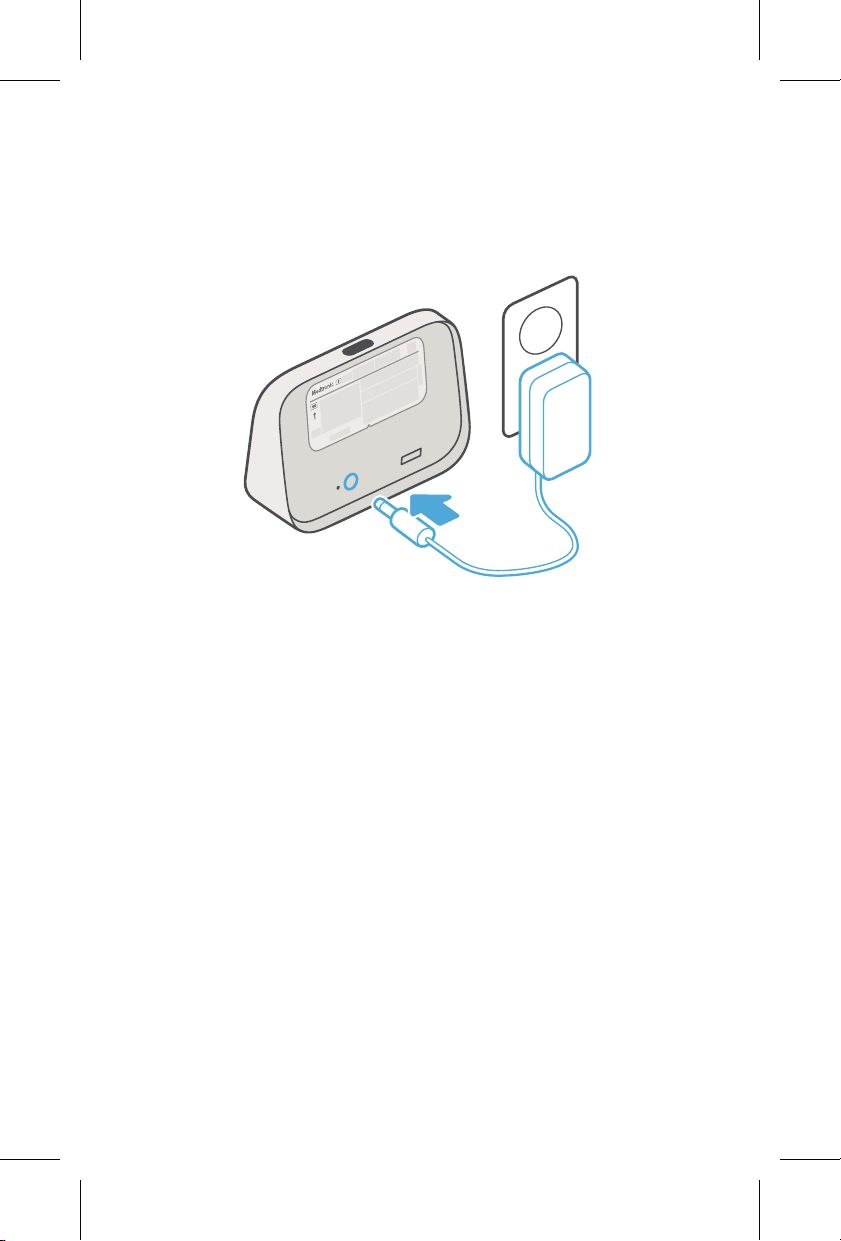
9.6.1 Plug or replug the communicator
Plug the power cord into the communicator and into
a power outlet. If the communicator is already
plugged in, unplug it and plug it back in.
Printing instructions: doc #163256
Category: Thin paper manual
Size: 4.25 x 6.75 in (108 x 171 #mm)
530234-113
38
M036205C001 A Medtronic Confidential Composed: 2025-07-11 11:27:58
PSJ - Size-selectable package manual 14-SEP-2018
9.6.2 Connect to the communicator hotspot
1. Open the list of Wi-Fi networks using your
computer, tablet, or smartphone.
• Windows computer – Click the wireless
network icon and open the Wi-Fi settings.
• Mac computer – Click the Wi-Fi menu
icon in your menu bar. The Wi-Fi menu will
open.
• Most tablets and smartphones – Go to
Settings > Wi-Fi. Ensure that Wi-Fi is
turned on.
2. From that list, click Medtronic-xxx to
connect, where xxx is the last 3 numerical
digits of the communicator serial number.
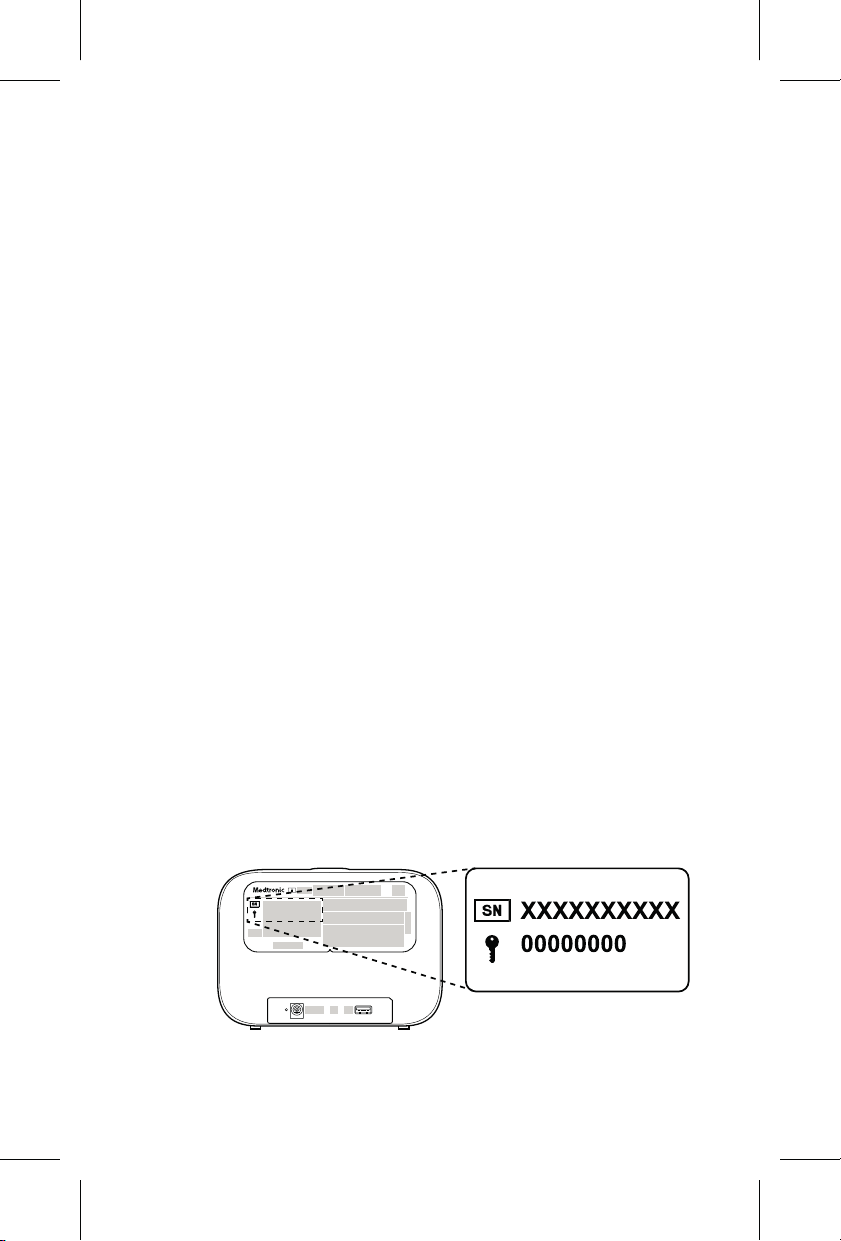
3. When prompted for a password, enter the
security key from the label on the back of the
communicator. If you see an option to connect
using a security key, select that option, and
then enter the security key.
The security key is located to the right of the
key symbol. In this example, the security key is
“00000000”.
Printing instructions: doc #163256
Category: Thin paper manual
Size: 4.25 x 6.75 in (108 x 171 #mm)
530234-113
39
M036205C001 A Medtronic Confidential Composed: 2025-07-11 11:27:58
PSJ - Size-selectable package manual 14-SEP-2018
Note: You might see a message that says
connected, no internet. You can ignore this
message and proceed to the next task.
9.6.3 Connect to your network
1. Open an internet browser and go to
http://www.MCLRelayWiFi.com. Ensure
that you type the address exactly as it
appears, including “http://”.
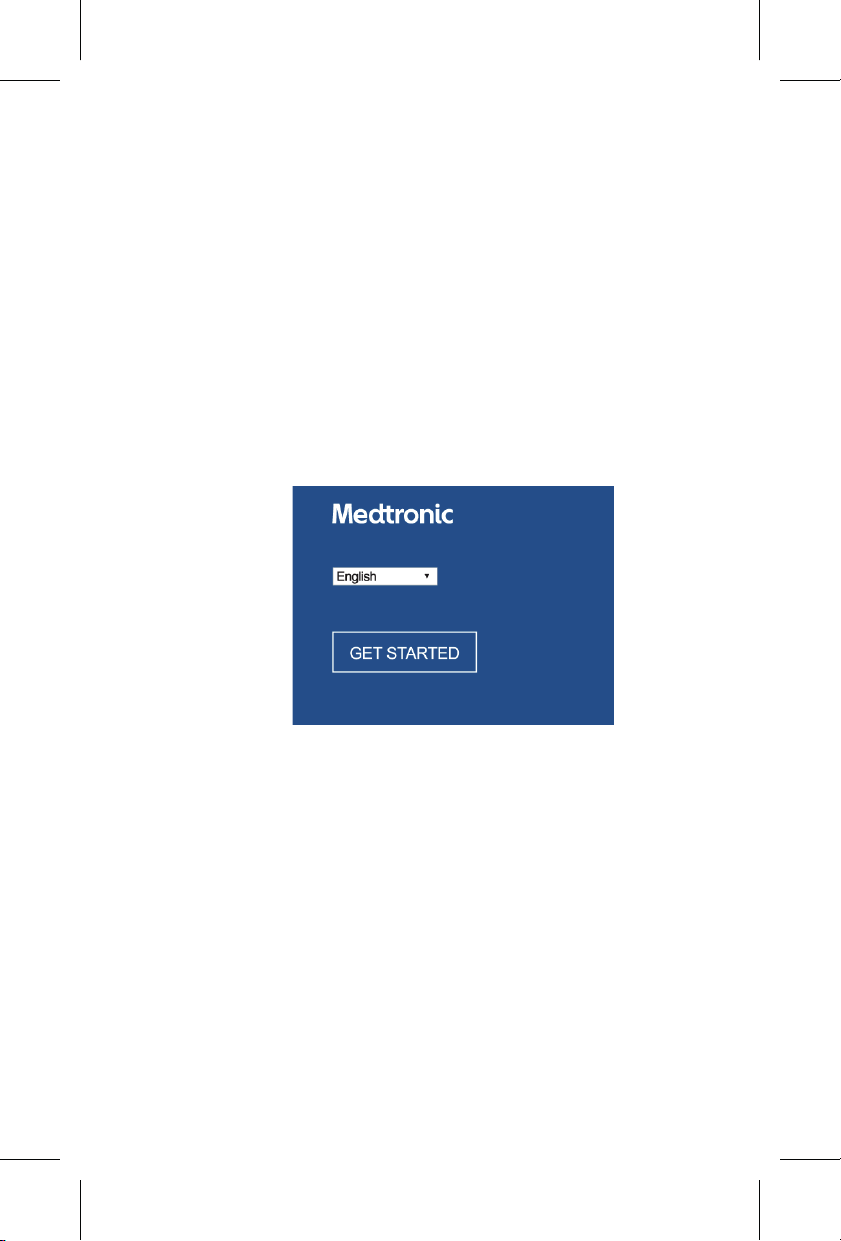
2. Select your language and click GET
STARTED.
Printing instructions: doc #163256
Category: Thin paper manual
Size: 4.25 x 6.75 in (108 x 171 #mm)
530234-113
40
M036205C001 A Medtronic Confidential Composed: 2025-07-11 11:27:58
PSJ - Size-selectable package manual 14-SEP-2018
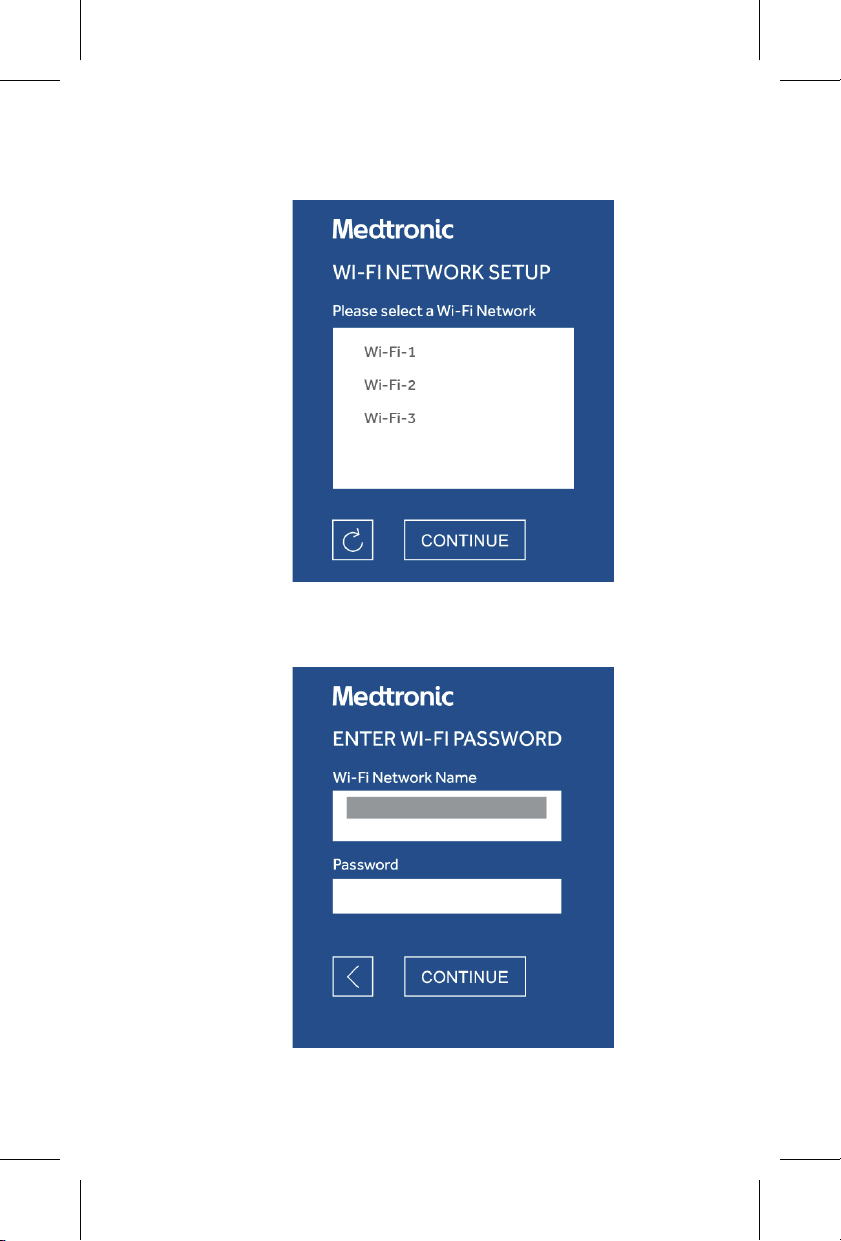
3. Select your Wi-Fi network and click
CONTINUE.
4. Enter your Wi-Fi network password and click
CONTINUE.
Printing instructions: doc #163256
Category: Thin paper manual
Size: 4.25 x 6.75 in (108 x 171 #mm)
530234-113
41
M036205C001 A Medtronic Confidential Composed: 2025-07-11 11:27:58
PSJ - Size-selectable package manual 14-SEP-2018

5. A confirmation message is displayed when
the communicator has successfully
connected to your Wi-Fi network.
6. Wi-Fi network setup is complete. Close the
internet browser.
Note: As part of this process, your device
(computer, tablet, or smartphone) was
temporarily disconnected from your Wi-Fi
network. Your device should automatically
reconnect to your Wi-Fi network.
9.6.4 Troubleshooting Wi-Fi network
connectivity
If you were unable to connect to a Wi-Fi network, the
Wi-Fi network might be incompatible with the
communicator. The communicator does not work
with all Wi-Fi network types. It is set up to work with
most personal networks. If you’re repeatedly
unsuccessful at connecting to a Wi-Fi network, try
connecting to a different Wi-Fi network.
Printing instructions: doc #163256
Category: Thin paper manual
Size: 4.25 x 6.75 in (108 x 171 #mm)
530234-113
42
M036205C001 A Medtronic Confidential Composed: 2025-07-11 11:27:58
PSJ - Size-selectable package manual 14-SEP-2018

10 Additional information
10.1 Can I travel with the communicator?
If you plan to travel, talk to your doctor to determine
whether you should bring your communicator. The
communicator will work in most locations by using a
cellular connection. However, cellular service might
not be available in all locations.
If you plan to travel to an area where there might not
be reliable cellular reception, you can use a personal
Wi-Fi network. Check to see if the location has a
Wi-Fi network. The communicator does not work
with all Wi-Fi network types. It is set up to work with
most personal networks. To set up Wi-Fi when you
arrive, follow the steps in Chapter 6, Connecting the
communicator to your Wi-Fi network, page 23.
If you will be traveling by plane, you may refer to the
website for the Transportation Security
Administration (TSA) for information about traveling
with medical equipment: https://www.tsa.gov.
10.2 Replacing the communicator or
power supply
If the power supply or communicator is lost or
damaged, contact Medtronic to order a
replacement. See Chapter 2, How to contact
Medtronic, page 6.
Printing instructions: doc #163256
Category: Thin paper manual
Size: 4.25 x 6.75 in (108 x 171 #mm)
530234-113
43
M036205C001 A Medtronic Confidential Composed: 2025-07-11 11:27:58
PSJ - Size-selectable package manual 14-SEP-2018

10.3 Cleaning and care
The communicator does not require preventive
inspection or maintenance.
Do not drop the communicator on hard surfaces.
Dropping the communicator can damage it and
prevent it from working properly. If the communicator
has been damaged, contact Medtronic.
You can clean the communicator as needed. Use a
mild solution of water and one of the following
cleaners: dish detergent, isopropyl alcohol,
ammonium hydroxide, hydrogen peroxide, acetic
acid, sodium hypochlorite, or quaternary
ammonium compounds. Lightly apply the cleaning
solution to a cloth, and wipe the communicator
surface clean.
See the packaging of the cleaning agent for
warnings, precautions, or disposal instructions
related to the cleaning agent.
Precaution: Do not immerse the communicator in
water. If the communicator gets wet and it stops
working, contact Medtronic.
10.4 Return for proper disposal
Return the communicator to Medtronic for disposal.
To obtain a prepaid return shipping label, go to
www.medtronic.com/carelinkmonitorreturns.
Printing instructions: doc #163256
Category: Thin paper manual
Size: 4.25 x 6.75 in (108 x 171 #mm)
530234-113
44
M036205C001 A Medtronic Confidential Composed: 2025-07-11 11:27:58
PSJ - Size-selectable package manual 14-SEP-2018

Do not throw the communicator in the garbage.
Electronic waste must be disposed of properly.
See http://recycling.medtronic.com for information
about recycling.
Follow local regulations for proper disposal of the
product packaging.
10.5 Security
The communicator is designed to securely transmit
your heart device data. Data is encrypted while in
transit to the CareLink Network.
The communicator periodically checks for software
updates to stay current with any security or software
improvements. These updates are installed
automatically, and you do not have to take any
action.
Contact Medtronic if you have reason to suspect a
security incident with the communicator.
Maintain physical security of the communicator.
Lack of physical security puts the communicator at
risk.
The communicator software uses network ports to
send and receive data. Ports are both incoming and
outgoing.
When connecting the communicator to a Wi-Fi
network, follow these security measures:
Printing instructions: doc #163256
Category: Thin paper manual
Size: 4.25 x 6.75 in (108 x 171 #mm)
530234-113
45
M036205C001 A Medtronic Confidential Composed: 2025-07-11 11:27:58
PSJ - Size-selectable package manual 14-SEP-2018
• Only connect to trusted and secured Wi-Fi
networks.
• Check your home Wi-Fi network for security
risks before you use it to connect to the
communicator. Secure your Wi-Fi network
using good security practices.
Check the security of your home Wi-Fi network if
you make changes to it. Changes to your Wi-Fi
network could introduce security risks. Changes
to your Wi-Fi network include configuration
changes or changes to your Wi-Fi network
components, hardware, software, or firmware.
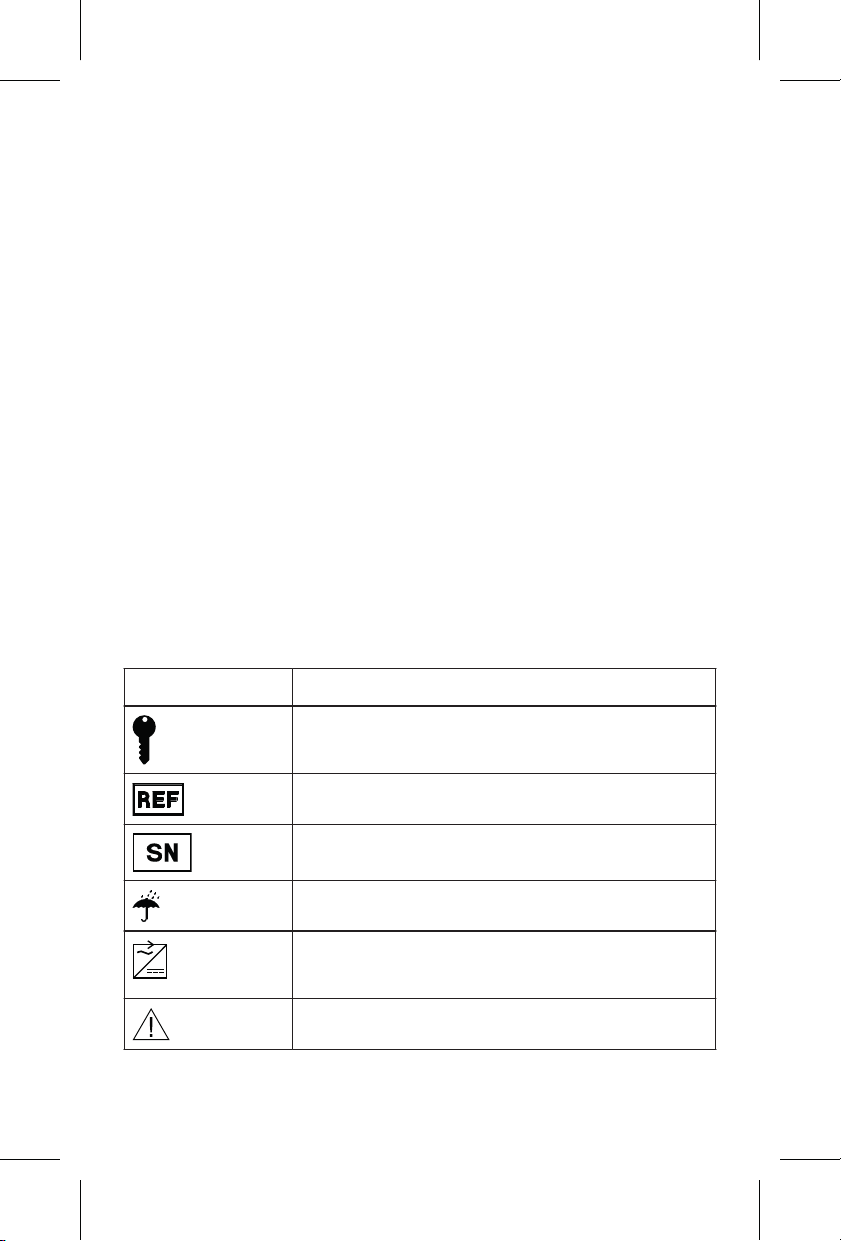
11 Explanation of symbols
To see which symbols apply to this product, refer to
the package label and product.
Symbol
Explanation
Security key
Reorder number
Serial number
Keep dry
Use only with provided power sup-
ply.
Caution
Printing instructions: doc #163256
Category: Thin paper manual
Size: 4.25 x 6.75 in (108 x 171 #mm)
530234-113
46
M036205C001 A Medtronic Confidential Composed: 2025-07-11 11:27:58
PSJ - Size-selectable package manual 14-SEP-2018
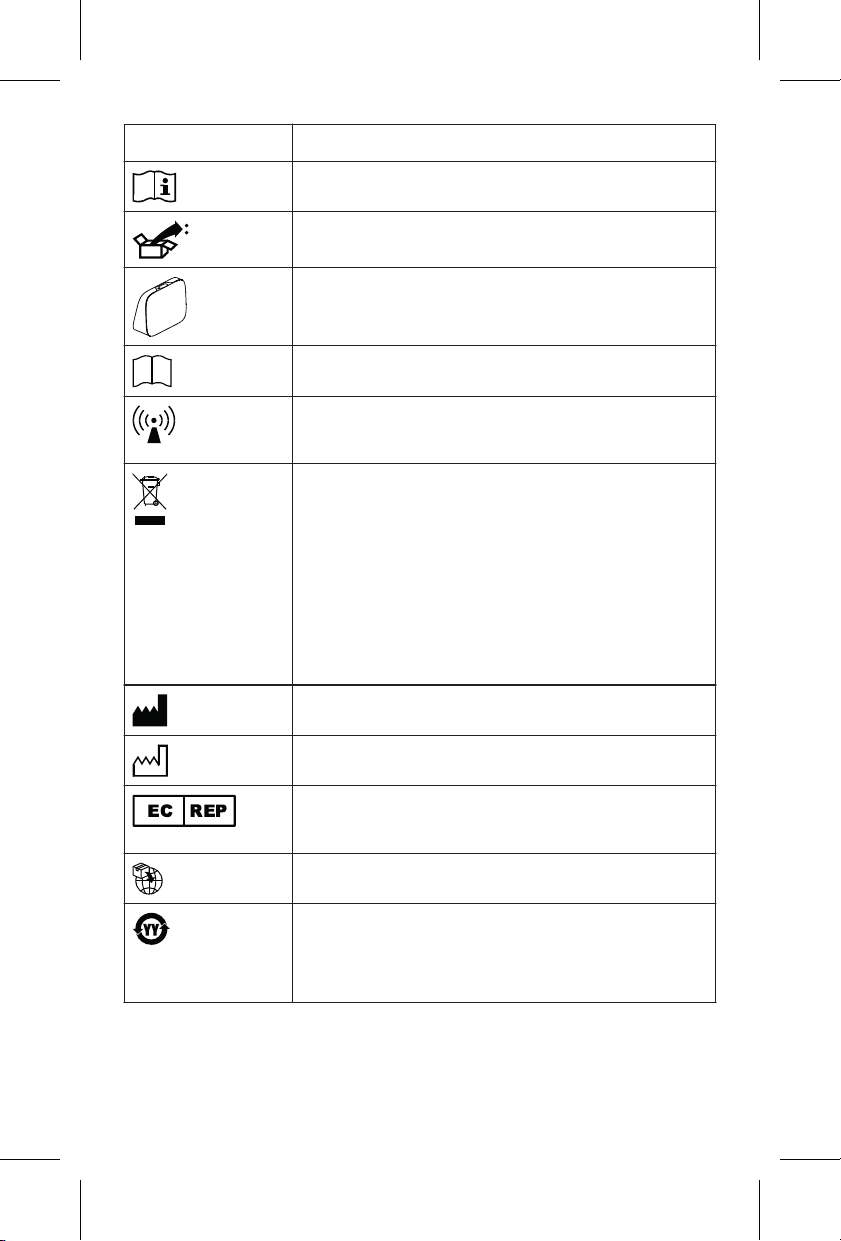
Symbol Explanation
Consult instructions for use
Package contents
Communicator model
Product documentation
Non-ionizing electromagnetic radi-
ation
Do not dispose of this product
in the unsorted municipal waste
stream. Dispose of this product ac-
cording to local regulations. See
http://recycling.medtronic.com for
instructions on proper disposal of
this product.
Manufacturer
Date of manufacture
Authorized representative in the
European Community
Importer
China RoHS. See product label for
the Environmentally Friendly Use
Period (EFUP) in years.
Printing instructions: doc #163256
Category: Thin paper manual
Size: 4.25 x 6.75 in (108 x 171 #mm)
530234-113
47
M036205C001 A Medtronic Confidential Composed: 2025-07-11 11:27:58
PSJ - Size-selectable package manual 14-SEP-2018
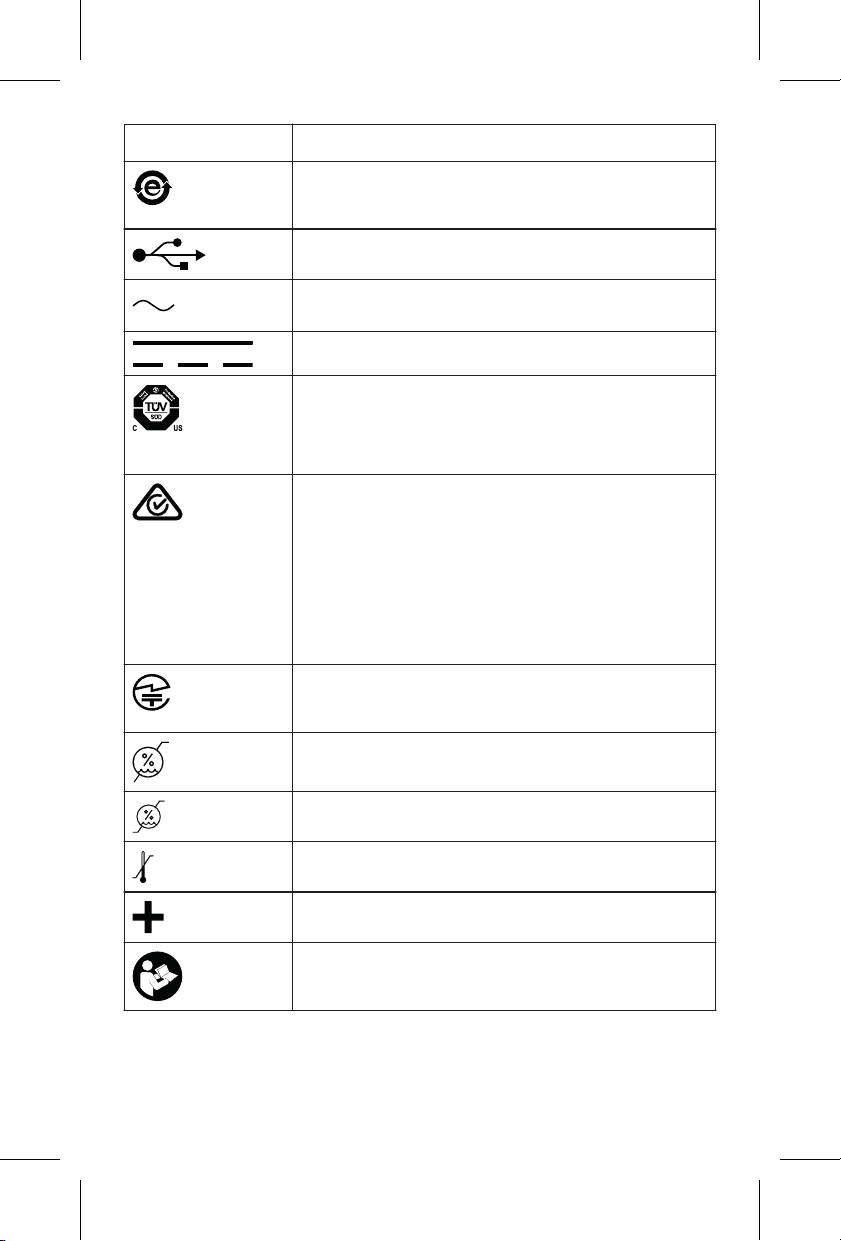
Symbol Explanation
China RoHS indicating product
contains no hazardous substances.
USB connector
Alternating current
Direct current
System meets the applicable Cana-
dian, U.S., and IEC safety stan-
dards.
ACMA (Australian Communica-
tions and Media Authority and the
New Zealand Ministry of Econom-
ic Development Radio Spectrum
Management standards) symbol
for Australia and New Zealand
MIC (Ministry of Internal Affairs and
Communications) symbol for Japan
Humidity limitation
Humidity limitation
Temperature limit
Accessories
Follow instructions for use (blue
symbol).
Printing instructions: doc #163256
Category: Thin paper manual
Size: 4.25 x 6.75 in (108 x 171 #mm)
530234-113
48
M036205C001 A Medtronic Confidential Composed: 2025-07-11 11:27:58
PSJ - Size-selectable package manual 14-SEP-2018
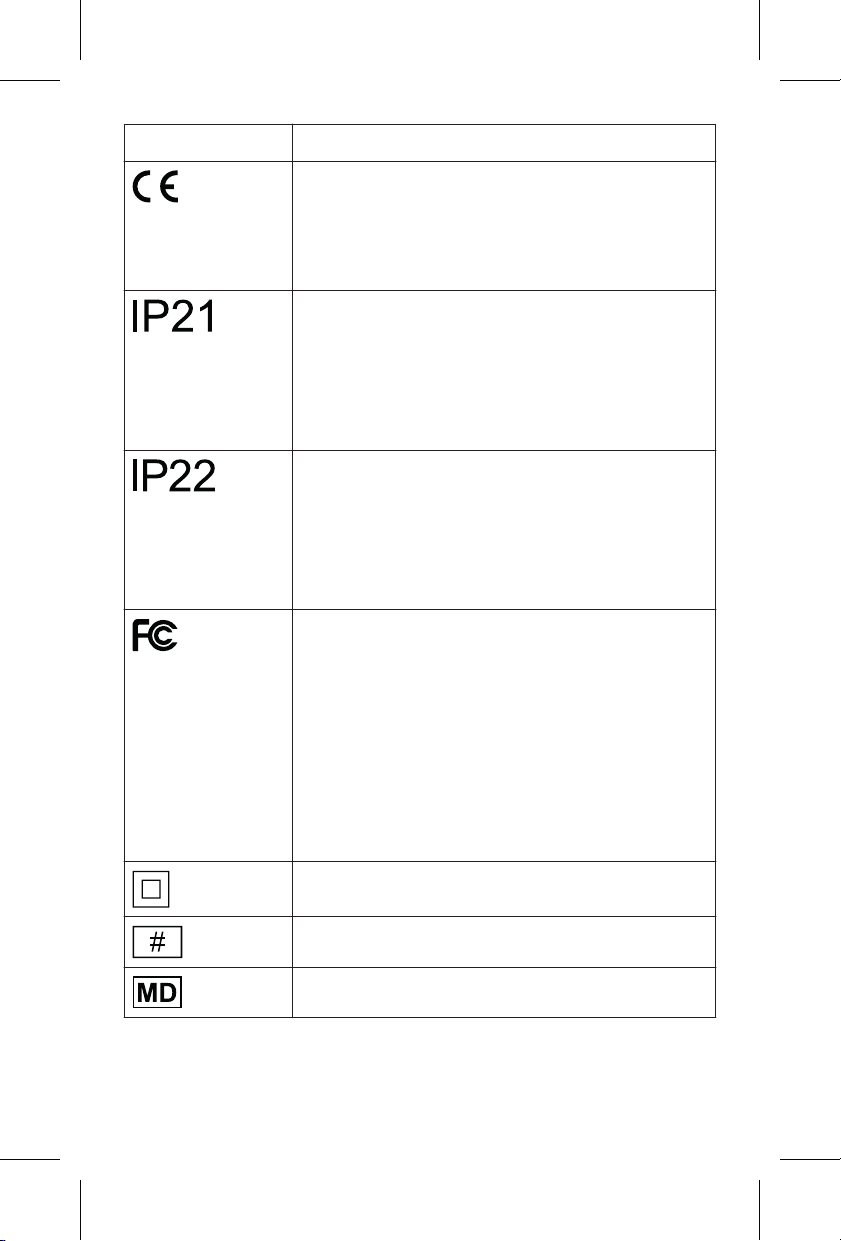
Symbol Explanation
Conformité Européenne (European
Conformity). This symbol means
that the device fully complies with
applicable European Union acts.
The product complies with interna-
tional electrical safety rating IP21
with regard to ingress of dust, oth-
er foreign objects, and water, as
required by IEC 60601-1-11.
The product complies with interna-
tional electrical safety rating IP22
with regard to ingress of dust, oth-
er foreign objects, and water, as
required by IEC 60601-1-11.
FCC (Federal Communications
Commission) symbol is employed
on electronic products manufac-
tured or sold in the United States to
certify that the electromagnetic in-
terference from the product is under
the limits approved by the Federal
Communications Commission.
Class II equipment
Model number
Medical device
Printing instructions: doc #163256
Category: Thin paper manual
Size: 4.25 x 6.75 in (108 x 171 #mm)
530234-113
49
M036205C001 A Medtronic Confidential Composed: 2025-07-11 11:27:58
PSJ - Size-selectable package manual 14-SEP-2018
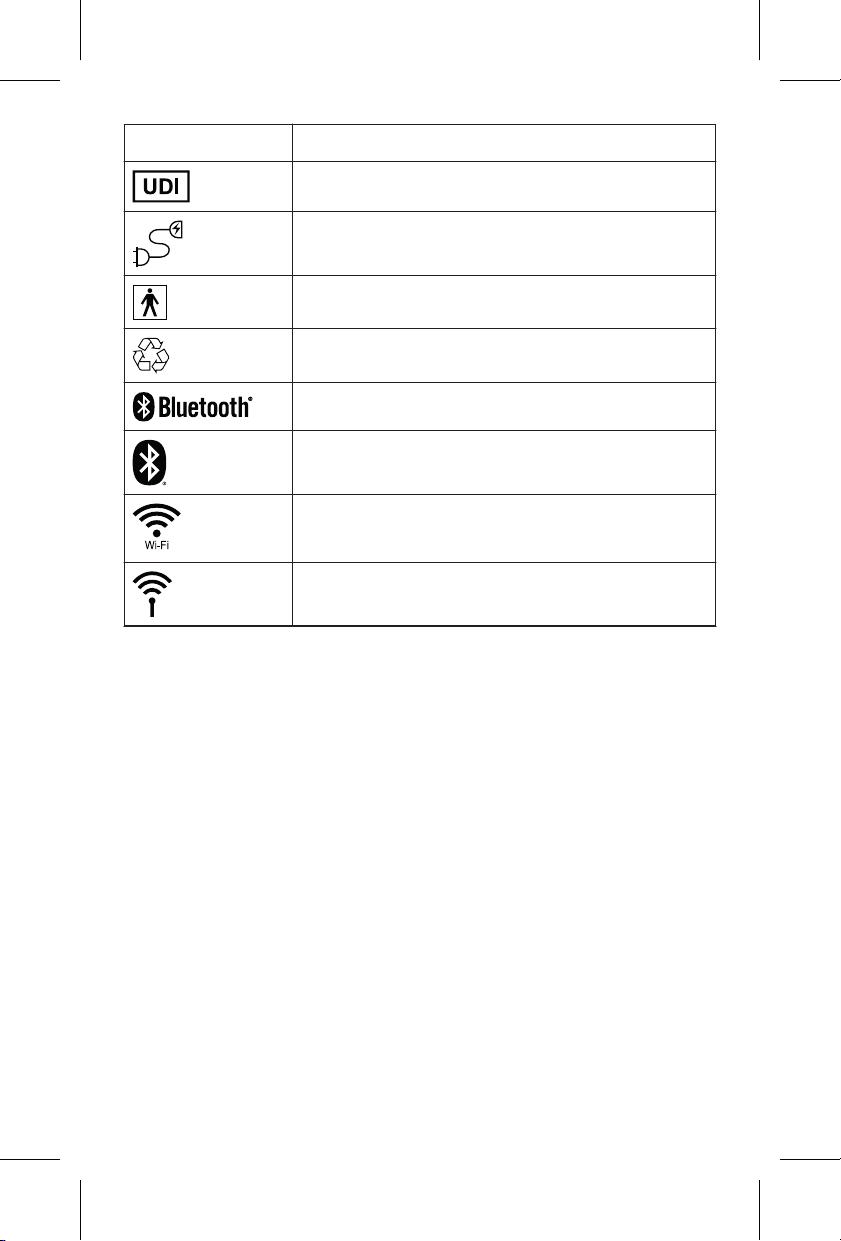
Symbol Explanation
Unique Device Identifier
Power cord
Type BF applied part
Recycle
Bluetooth wireless technology
Bluetooth wireless technology
Wi-Fi wireless networking technol-
ogy
Wireless communication enabled
12 Specifications
Standards
The communicator complies with the following:
EMC: CFR 47 Part 15
Patient Safety: IP21, IEC 60601-1, ordinary,
continuous operation, Class II, not suitable for use in
the presence of a flammable anesthetic mixture with
air or with oxygen or nitrous oxide.
Printing instructions: doc #163256
Category: Thin paper manual
Size: 4.25 x 6.75 in (108 x 171 #mm)
530234-113
50
M036205C001 A Medtronic Confidential Composed: 2025-07-11 11:27:58
PSJ - Size-selectable package manual 14-SEP-2018

Protection from ingress: IP21. This means that the
communicator is protected from ingress in the
following 2 ways:
• Against access to hazardous parts with a finger
or object greater than 12.5 mm in diameter
• Against vertically falling water drops when the
communicator is sitting upright
The communicator is moisture resistant but not
waterproof.
Recommended environmental conditions
during storage and transport in between uses
Temperature: −25 °C to 70 °C (−13 °F to 158 °F)
Relative humidity: ≤90%, non-condensing, at 5 °C to
35 °C (41 °F to 95 °F)
Water vapor pressure: ≤50 hPa at >35 °C to 70 °C
(95 °F to 158 °F)
Storage and transport air pressure extremes:
106 kPa to 70.1 kPa
Store the communicator within the ranges listed
here. If it’s exposed to conditions outside these
ranges, it may be damaged and may not work. If you
need assistance, contact Medtronic.
Printing instructions: doc #163256
Category: Thin paper manual
Size: 4.25 x 6.75 in (108 x 171 #mm)
530234-113
51
M036205C001 A Medtronic Confidential Composed: 2025-07-11 11:27:58
PSJ - Size-selectable package manual 14-SEP-2018

Recommended operating conditions
Allow 2 hours prior to starting up the communicator
when transitioning from storage to operating
conditions.
Temperature: 5 °C to 40 °C (41 °F to 104 °F)
Relative humidity: 15% to 90%, non-condensing
Water vapor partial pressure: ≤50 hPa
Operating atmospheric pressure: 106 kPa to
70.1 kPa
Power supply
The power supply is considered part of the
communicator. To ensure compliance to the
specified standards, use only the power supply that
came with the communicator,
WA-24B12Fx-AAAK
3
.
• Rated voltage AC: 100 V – 240 V
• Rated line frequency: 50 Hz – 60 Hz
• Current AC: 1.0 A Max.
Expected service life
The expected service life is a minimum of 5 years. To
find out how to order a replacement, contact
3
Where x is a variable letter dependent on country.
Printing instructions: doc #163256
Category: Thin paper manual
Size: 4.25 x 6.75 in (108 x 171 #mm)
530234-113
52
M036205C001 A Medtronic Confidential Composed: 2025-07-11 11:27:58
PSJ - Size-selectable package manual 14-SEP-2018

Medtronic. See Chapter 2, How to contact
Medtronic, page 6.
Safety and technical inspection
An annual safety and technical inspection of the
communicator is not required.
Transmitting and receiving
Frequency
of operation
Modulation charac-
teristics
RF output
power
2.4-2.4835
GHz
(Bluetooth
®
Low Energy)
Gaussian frequency
shift keying (GFSK)
Less than
1 W EIRP
2.4-2.4835
GHz
(Wi-Fi)
Direct sequence
spread spectrum
(DSSS)
Complementary code
keying (CCK)
Orthogonal frequency
division multiplexing
(OFDM)
Less than
1 W EIRP
5.15-5.25
GHz
(Wi-Fi)
Direct sequence
spread spectrum
(DSSS)
Complementary code
keying (CCK)
Less than
1 W EIRP
Printing instructions: doc #163256
Category: Thin paper manual
Size: 4.25 x 6.75 in (108 x 171 #mm)
530234-113
53
M036205C001 A Medtronic Confidential Composed: 2025-07-11 11:27:58
PSJ - Size-selectable package manual 14-SEP-2018

Frequency
of operation
Modulation charac-
teristics
RF output
power
Orthogonal frequency
division multiplexing
(OFDM)
5.25-5.35
GHz
(Wi-Fi)
Direct sequence
spread spectrum
(DSSS)
Complementary code
keying (CCK)
Orthogonal frequency
division multiplexing
(OFDM)
Less than
1 W EIRP
5.47-5.73
GHz
(Wi-Fi)
Direct sequence
spread spectrum
(DSSS)
Complementary code
keying (CCK)
Orthogonal frequency
division multiplexing
(OFDM)
Less than
1 W EIRP
5.735-5.835
GHz
(Wi-Fi)
Direct sequence
spread spectrum
(DSSS)
Complementary code
keying (CCK)
Orthogonal frequency
division multiplexing
(OFDM)
Less than
1 W EIRP
Printing instructions: doc #163256
Category: Thin paper manual
Size: 4.25 x 6.75 in (108 x 171 #mm)
530234-113
54
M036205C001 A Medtronic Confidential Composed: 2025-07-11 11:27:58
PSJ - Size-selectable package manual 14-SEP-2018

Frequency
of operation
Modulation charac-
teristics
RF output
power
1.85-1.91,
1.93-1.99
GHz
(LTE B2)
Quadrature phase
shift keying (QPSK)
16 quadrature am-
plitude modulation
(16QAM)
64 quadrature am-
plitude modulation
(64QAM)
Less than
200 mW
EIRP
1.71-1.755,
2.11-2.155
GHz
(LTE B4)
Quadrature phase
shift keying (QPSK)
16 quadrature am-
plitude modulation
(16QAM)
64 quadrature am-
plitude modulation
(64QAM)
Less than
200 mW
EIRP
824-849,
869-894
MHz
(LTE B5)
Quadrature phase
shift keying (QPSK)
16 quadrature am-
plitude modulation
(16QAM)
64 quadrature am-
plitude modulation
(64QAM)
Less than
200 mW
EIRP
698-716,
728-746
MHz
Quadrature phase
shift keying (QPSK)
Less than
200 mW
EIRP
Printing instructions: doc #163256
Category: Thin paper manual
Size: 4.25 x 6.75 in (108 x 171 #mm)
530234-113
55
M036205C001 A Medtronic Confidential Composed: 2025-07-11 11:27:58
PSJ - Size-selectable package manual 14-SEP-2018

Frequency
of operation
Modulation charac-
teristics
RF output
power
(LTE B12) 16 quadrature am-
plitude modulation
(16QAM)
64 quadrature am-
plitude modulation
(64QAM)
777-787,
746-756
MHz
(LTE B13)
Quadrature phase
shift keying (QPSK)
16 quadrature am-
plitude modulation
(16QAM)
64 quadrature am-
plitude modulation
(64QAM)
Less than
200 mW
EIRP
1.71-1.78,
2.11-2.20
GHz
(LTE B66)
Quadrature phase
shift keying (QPSK)
16 quadrature am-
plitude modulation
(16QAM)
64 quadrature am-
plitude modulation
(64QAM)
Less than
200 mW
EIRP
Printing instructions: doc #163256
Category: Thin paper manual
Size: 4.25 x 6.75 in (108 x 171 #mm)
530234-113
56
M036205C001 A Medtronic Confidential Composed: 2025-07-11 11:27:58
PSJ - Size-selectable package manual 14-SEP-2018

13 Electromagnetic compatibility
declaration
Testing shows that the communicator protects
against electromagnetic interference that may
cause harm in a typical home healthcare
environment. There is no guarantee that
interference will not occur in a particular
environment. If the communicator causes harmful
interference to other devices or if it is negatively
impacted by other devices, try to correct the issue
using the following actions:
• Place the devices in new positions or locations.
• Increase the separation between the devices.
• Contact Medtronic for help.
If you experience performance issues with your
communicator, try using it at least 3 meters (10 feet)
away from a television, computer monitor or screen,
or wireless communications equipment such as
wireless home network devices, cordless
telephones and their base stations, or
‘walkie-talkies.’ Using your communicator near
these devices could interfere with communication
between your implanted heart device and the
communicator.
Note: "Harmful interference" is defined in 47 CFR
§2.1 by the FCC as follows: Interference which
endangers the functioning of a radio navigation
Printing instructions: doc #163256
Category: Thin paper manual
Size: 4.25 x 6.75 in (108 x 171 #mm)
530234-113
57
M036205C001 A Medtronic Confidential Composed: 2025-07-11 11:27:58
PSJ - Size-selectable package manual 14-SEP-2018

service or of other safety services or seriously
degrades, obstructs, or repeatedly interrupts a radio
communication service operating in accordance
with the [ITU] Radio Regulations.
Guidance and manufacturer’s declaration —
electromagnetic emissions
The communicator is intended for use in the elec-
tromagnetic environment specified below. The us-
er should make sure that it is used in such an
environment.
Emissions
test
Compli-
ance
Electromagnetic
environment –
guidance
Conducted
and radiated
RF emissions,
CISPR 11
Group 1,
Class B
The communicator
uses RF energy only
for its internal func-
tion.
Therefore, its RF
emissions are very
low and are not likely
to cause any interfer-
Printing instructions: doc #163256
Category: Thin paper manual
Size: 4.25 x 6.75 in (108 x 171 #mm)
530234-113
58
M036205C001 A Medtronic Confidential Composed: 2025-07-11 11:27:58
PSJ - Size-selectable package manual 14-SEP-2018
Guidance and manufacturer’s declaration —
electromagnetic emissions
ence in nearby elec-
tronic equipment.
Harmonic
emissions
IEC 61000-3-
2
Class A The communicator
is suitable for use in
all establishments,
including domestic
establishments and
those directly con-
nected to the public
low-voltage power
supply network that
supplies buildings
used for domestic
purposes.
Voltage fluctu-
ations/flicker
emissions
IEC 61000-3-
3
Complies
Guidance and manufacturer’s declaration —
electromagnetic immunity
The communicator is intended for use in the elec-
tromagnetic environment specified below. The us-
er should make sure that it is used in such an
environment.
Immunity
test
IEC 60601
test level
Compli-
ance lev-
el
Electro-
magnetic
environ-
ment –
guidance
Printing instructions: doc #163256
Category: Thin paper manual
Size: 4.25 x 6.75 in (108 x 171 #mm)
530234-113
59
M036205C001 A Medtronic Confidential Composed: 2025-07-11 11:27:58
PSJ - Size-selectable package manual 14-SEP-2018

Guidance and manufacturer’s declaration —
electromagnetic immunity
Electro-
static dis-
charge
(ESD)
IEC 61000
-4-2
±8 kV
contact
±2 kV,
±4 kV,
±8 kV,
±15 kV air
±8 kV
contact
±2 kV,
±4 kV,
±8 kV,
±15 kV air
The relative
humidity
should be at
least 5%.
Electrical
fast tran-
sient/burst
IEC 61000
-4-4
±2 kV for
power
supply
lines
±2 kV for
input/out-
put lines
±2 kV for
power
supply
lines
±2 kV for
input/out-
put lines
Mains
power quali-
ty should be
that of a typ-
ical residen-
tial environ-
ment.
Surge
IEC 61000
-4-5
±0.5 kV,
1 kV
line-to-line
±0.5 kV,
1 kV, 2 kV
line-to-
ground
±0.5 kV,
1 kV
line-to-
line
±0.5 kV,
1 kV, 2 kV
line-to-
ground
Voltage
dips, short
interrup-
tions and
voltage
variations
Dips:
0 % U
T
;
0,5 cycle
At 0°, 45°,
90°, 135°,
180°,
Dips:
0 % U
T
;
0,5 cycle
At 0°, 45°,
90°, 135°,
180°,
Mains
power quali-
ty should be
that of a typ-
ical residen-
tial environ-
Printing instructions: doc #163256
Category: Thin paper manual
Size: 4.25 x 6.75 in (108 x 171 #mm)
530234-113
60
M036205C001 A Medtronic Confidential Composed: 2025-07-11 11:27:58
PSJ - Size-selectable package manual 14-SEP-2018

Guidance and manufacturer’s declaration —
electromagnetic immunity
on power
supply in-
put lines
IEC 61000
-4-11
225°,
270°, and
315°
0 % U
T
;
1 cycle
and
70 % U
T
;
25/30 cy-
cles
Single
phase:
at 0°
Interrup-
tions:
0 % U
T
;
250/300
cycle
225°,
270°, and
315°
0 % U
T
;
1 cycle
and
70 % U
T
;
25/30 cy-
cles
Single
phase:
at 0°
Interrup-
tions:
0 % U
T
;
250/300
cycle
ment. The
communica-
tor will not
operate
when there
is a power
outage.
Power fre-
quency
(50/60 Hz)
magnetic
field
IEC 61000
-4-8
30 A/m 30 A/m Power fre-
quency
magnetic
fields in a
typical resi-
dential envi-
ronment are
not expect-
ed to affect
Printing instructions: doc #163256
Category: Thin paper manual
Size: 4.25 x 6.75 in (108 x 171 #mm)
530234-113
61
M036205C001 A Medtronic Confidential Composed: 2025-07-11 11:27:58
PSJ - Size-selectable package manual 14-SEP-2018
Guidance and manufacturer’s declaration —
electromagnetic immunity
the commu-
nicator.
Note: U
T
is the a.c. mains voltage prior to applica-
tion of the test level.
Guidance and manufacturer’s declaration —
electromagnetic immunity
The communicator is intended for use in the elec-
tromagnetic environment specified below. The us-
er should make sure that it is used in such an
environment.
Portable and mobile RF communications equip-
ment should be used no closer to any part of
the communicator, including cables, than the rec-
ommended separation distance calculated from
the equation applicable to the frequency of the
transmitter.
Immunity
test
IEC 60601
test level
Compli-
ance lev-
el
Electro-
magnetic
environ-
ment –
guidance
Recom-
mended
separation
distance:
Printing instructions: doc #163256
Category: Thin paper manual
Size: 4.25 x 6.75 in (108 x 171 #mm)
530234-113
62
M036205C001 A Medtronic Confidential Composed: 2025-07-11 11:27:58
PSJ - Size-selectable package manual 14-SEP-2018

Guidance and manufacturer’s declaration —
electromagnetic immunity
Conducted
RF IEC/EN
61000-4-6
3 V
RMS
150 kHz to
80 MHz
outside
ISM and
amateur
radio
bands
a
3 V
RMS
d = 1.2√ P
IEC
61000-4-6
6 V
RMS
150 kHz to
80 MHz in
ISM and
amateur
radio
bands
a
6 V
RMS
d = 2√ P
Radiated
RF IEC
61000-4-3
10 V/m
80 MHz to
2.7 GHz
10 V/m d = 1.2√ P
80 MHz to
800 MHz
d = 2.3√ P
800 MHz to
2.7 GHz
P is the maximum output power rating of the trans-
mitter in watts (W) according to the transmitter
manufacturer and d is the recommended separa-
tion distance in m.
b
Field strengths from fixed RF transmitters, as de-
termined by an electromagnetic site survey, should
Printing instructions: doc #163256
Category: Thin paper manual
Size: 4.25 x 6.75 in (108 x 171 #mm)
530234-113
63
M036205C001 A Medtronic Confidential Composed: 2025-07-11 11:27:58
PSJ - Size-selectable package manual 14-SEP-2018

Guidance and manufacturer’s declaration —
electromagnetic immunity
be less than the compliance level in each frequen-
cy range.
c,d
Interference may occur in the vicinity
of equipment marked with the following symbol:
Note: At 80 MHz and 800 MHz, the separation
distance for the higher frequency range applies.
Note: These guidelines may not apply in all situa-
tions. Electromagnetic propagation is affected by
absorption and reflection from structures, objects,
and people.
a
The ISM (industrial, scientific and medical) bands
between 150 kHz and 80 MHz are: 6.765 MHz to
6.795 MHz; 13.553 MHz to 13.567 MHz; 26.957 MHz
to 27.283 MHz; and 40.66 MHz to 40.70 MHz.
b
The compliance levels in the ISM frequency bands
between 150 kHz and 80 MHz and in the frequency
range 80 MHz to 2.7 GHz are intended to decrease the
likelihood that mobile/portable communications
equipment could cause interference if it is inadvertently
brought into patient areas. For this reason, an
additional factor of 10/3 is used in calculating the
recommended separation distance for transmitters in
these frequency ranges.
c
Field strengths from fixed transmitters, such as base
stations for radio (cellular/cordless) telephones and
land mobile radios, amateur radio, AM and FM radio
broadcast and TV broadcast cannot be predicted
theoretically with accuracy. To assess the
Printing instructions: doc #163256
Category: Thin paper manual
Size: 4.25 x 6.75 in (108 x 171 #mm)
530234-113
64
M036205C001 A Medtronic Confidential Composed: 2025-07-11 11:27:58
PSJ - Size-selectable package manual 14-SEP-2018

electromagnetic environment due to fixed RF
transmitters, an electromagnetic site survey should be
considered. If the measured field strength in the
location in which the communicator is used exceeds
the applicable RF compliance level above, the
communicator should be observed to verify normal
operation. If abnormal performance is observed,
additional measures may be necessary, such as
reorienting or relocating the communicator.
d
Over the frequency range 150 kHz to 80 MHz, field
strengths should be less than 6 V/m.
Recommended separation distances be-
tween portable and mobile RF communica-
tions equipment and the communicator
The communicator is intended for use in an elec-
tromagnetic environment specified below. The
customer or the user of the communicator should
assure that it is used in such an environment.
Printing instructions: doc #163256
Category: Thin paper manual
Size: 4.25 x 6.75 in (108 x 171 #mm)
530234-113
65
M036205C001 A Medtronic Confidential Composed: 2025-07-11 11:27:58
PSJ - Size-selectable package manual 14-SEP-2018
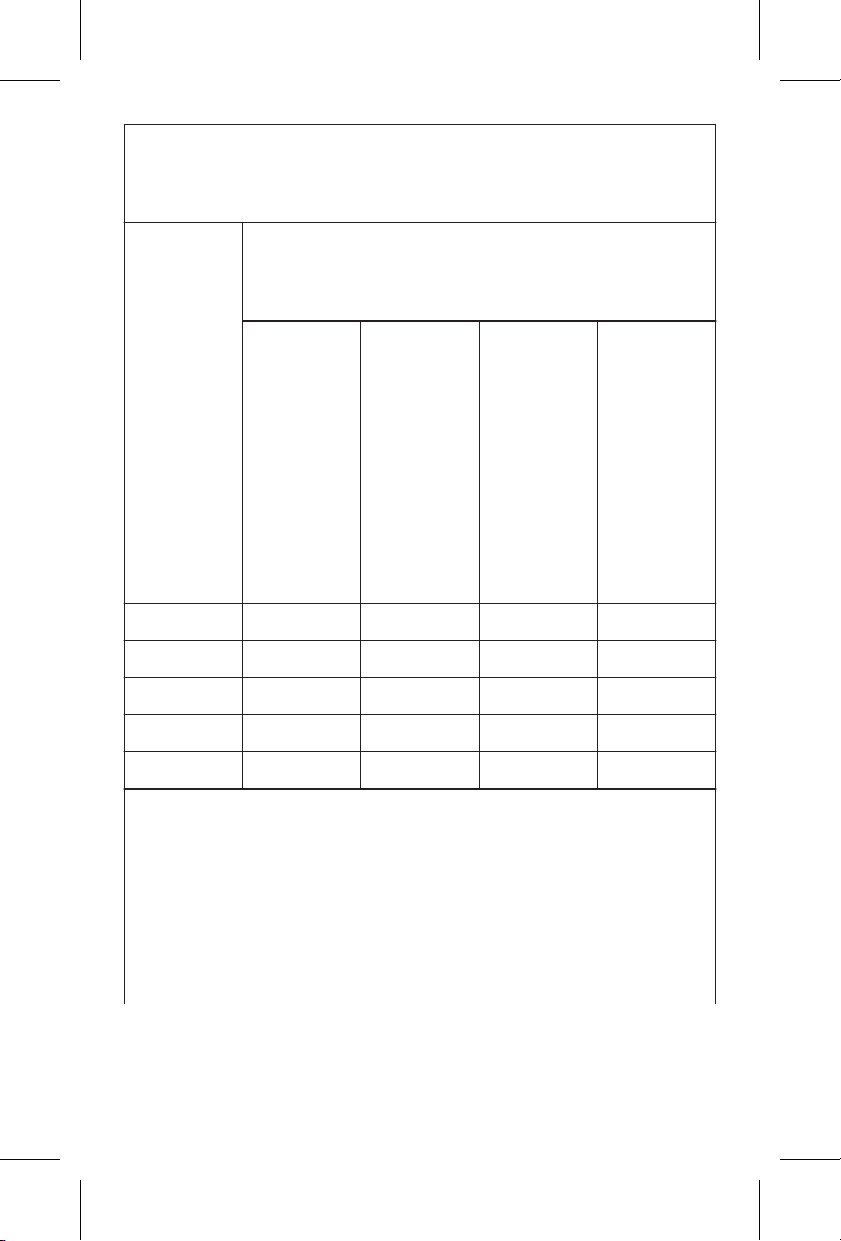
Recommended separation distances be-
tween portable and mobile RF communica-
tions equipment and the communicator
Rated
max
output
power
of
trans-
mit-
ter W
Separation distance according to
frequency of transmitter
m
150 kHz
to
80 MHz
outside
ISM
bands
d =
(3.5/V
1
)
√ P
150 kHz
to
80 MHz
in ISM
bands
d =
(12/V
2
)
√ P
80 MHz
to
800 MH
z
d =
(12/E1)
√ P
800 MH
z to
2.7 GHz
d =
(23/E
1
)
√ P
0.01 0.12 0.20 0.12 0.23
0.1 0.37 0.63 0.38 0.73
1 1.17 2.00 1.20 2.30
10 3.69 6.32 3.79 7.27
100 11.67 20.00 12.00 23.00
For transmitters rated at a maximum output power
not listed above, the recommended separation
distance d in meters m can be estimated using
the equation applicable to the frequency of the
transmitter, where P is the maximum output power
rating of the transmitter in W according to the
transmitter manufacturer.
Printing instructions: doc #163256
Category: Thin paper manual
Size: 4.25 x 6.75 in (108 x 171 #mm)
530234-113
66
M036205C001 A Medtronic Confidential Composed: 2025-07-11 11:27:58
PSJ - Size-selectable package manual 14-SEP-2018

Recommended separation distances be-
tween portable and mobile RF communica-
tions equipment and the communicator
Note: At 80 MHz and 800 MHz, the separation
distance for the higher frequency range applies.
Note: These guidelines may not apply in all situa-
tions. Electromagnetic propagation is affected by
absorption and reflection from structures, objects,
and people.
14 Glossary
Communicator – Instrument used in the patient’s
home that receives data from an implanted heart
device and transmits that data to the Medtronic
CareLink Network.
Medtronic CareLink Network – Internet-based
secure server where transmitted heart device data
is stored so that a clinician can log in and access the
information.
Wi-Fi – A wireless networking technology that
allows computers and other devices to
communicate over a wireless signal.
Printing instructions: doc #163256
Category: Thin paper manual
Size: 4.25 x 6.75 in (108 x 171 #mm)
530234-113
67
M036205C001 A Medtronic Confidential Composed: 2025-07-11 11:27:58
PSJ - Size-selectable package manual 14-SEP-2018

Printing instructions: doc #163256
Category: Thin paper manual
Size: 4.25 x 6.75 in (108 x 171 #mm)
530234-113
M036205C001 A Medtronic Confidential Composed: 2025-07-11 11:27:58
PSJ - Size-selectable package manual 14-SEP-2018

Printing instructions: doc #163256
Category: Thin paper manual
Size: 4.25 x 6.75 in (108 x 171 #mm)
530234-113
M036205C001 A Medtronic Confidential Composed: 2025-07-11 11:27:58
PSJ - Size-selectable package manual 14-SEP-2018
Medtronic, Inc.
710 Medtronic Parkway
Minneapolis, MN 55432
USA
www.medtronic.com
+1 763 514 4000
Printing instructions: doc #163256
Category: Thin paper manual
Size: 4.25 x 6.75 in (108 x 171 #mm)
530234-113
© 2025 Medtronic
M036205C001 A
2025-07-11
*M036205C001*
M036205C001 A Medtronic Confidential Composed: 2025-07-11 11:27:58
PSJ - Size-selectable package manual 14-SEP-2018