
MANUALE UTENTE.......................... 2/20
USER MANUAL............................... 21/39
Vodafone
4821-4822-4823 CAN/LIN/PLIP
with 1090 BLE HUB

MANUALE UTENTE - 4821-4822-4823+1090 BLE HUB
2
C1 - Vodafone Public
Indice
1. INTRODUZIONE ................................................................................................................................................. 4
2. ATTIVAZIONE E DISATTIVAZIONE DEL SISTEMA TRAMITE TELECOMANDO DEL VEICOLO O CON
TELECOMANDO VODAFONE (OPZIONALE) ...............................................................................................4
3. FUNZIONALITÀ DEL SISTEMA DI ALLARME. .............................................................................................6
4. FUNZIONI PROGRAMMABILI ........................................................................................................................8
5. CODICE PIN ........................................................................................................................................................12
6. DISATTIVAZIONE DI EMERGENZA CON CODICE PIN ........................................................................13
7. 1090 BLE HUB QUICK GUIDE (Il manuale completo dell’APP 1090 sarà disponibile nell’APP
“Automotive Secure Access”) ......................................................................................................................... 13
8. MODALITÀ OPERATIVE PER IL 1090 .............................................................................................................. 16
9. SOSTITUZIONE DELLA BATTERIA DELLA DRIVER CARD (OPZIONALE) .....................................17
10. SOSTITUZIONE DELLA BATTERIA DEL TELECOMANDO (OPZIONALE) ..................................17
11. CONDIZIONI DI GARANZIA .......................................................................................................................18
12. DICHIARAZIONE DI CONFORMITÀ .........................................................................................................18

4821-4822-4823 - MANUALE UTENTE+1090 BLE HUB
3
C1 - Vodafone Public
Gentile Cliente,
Il prodotto da voi scelto è in linea con gli standard qualitativi e funzionali richiesti dalle principali
Case Automobilistiche ed è conforme alle direttive europee in materia di sicurezza. Vi ricordiamo
che il livello di sicurezza di questo sistema può essere incrementato aggiungendo i seguenti
moduli:
SENSORE DI ANTISOLLEVAMENTO
Questo sensore rileva che il veicolo viene sollevato per essere trainato o per rubare le ruote (già
disponibile su 4822).
SENSORE VOLUMETRICO A IPERFREQUENZA
Si tratta di un sensore volumetrico per la protezione degli interni, necessario per i veicoli decappottabili,
in quanto non è sensibile ai movimenti dell’aria.
BLOCCO MOTORE ANTIAVVIAMENTO
Per aggiungere un’ulteriore blocco motore antiavviamento al sistema.
DISPOSITIVO DI LOCALIZZAZIONE
Consenti di tracciare il tuo veicolo e di inviare avvisi alla Centrale Operativa di Sicurezza.
DRIVER CARD 433 MHz (DC, disponibile con e senza sensore di movimento interno)
Consentire di aumentare la protezione del veicolo con un doppio riconoscimento del conducente,
utilizzando un riconoscimento radio a 433 MHz (Driver Card)
DRIVER CARD DIGITALE (DDC, HUB 1090 BLE) CON APP MOBILE Vodafone “ACCESSO SICURO”
Permette di aumentare la protezione del veicolo con un doppio riconoscimento del conducente,
tramite un abbinamento Bluetooth a bassa energia con 1090 BLE HUB, utilizzando il tuo cellulare e
l’app “AUTOMOTIVE SECURE ACCESS”. Per attivare DDC-1090 BLE HUB utilizzando l’APP scaricata sul
tuo telefono, segui la guida rapida ricevuta dal centro di installazione Vodafone.
In questo manuale abbiamo elencato tutte le funzionalità standard del sistema e quelle che è
possibile richiedere di abilitare presso un centro di assistenza autorizzato Vodafone. Si prega di
leggere attentamente questo manuale per ottenere il massimo vantaggio dal prodotto.
MANUALE UTENTE - 4821-4822-4823+1090 BLE HUB
4
C1 - Vodafone Public
1. - INTRODUZIONE.
Il sistema di allarme 482X è dotato di un’interfaccia elettrica in grado di acquisire informazioni dal veicolo.
Il sistema può quindi essere attivato e disattivato utilizzando il telecomando originale del veicolo.
2. - ATTIVAZIONE E DISATTIVAZIONE DEL SISTEMA TRAMITE TELECOMANDO ORIGINALE DEL
VEICOLO O CON TELECOMANDO VODAFONE (OPZIONALE) E APP “AUTOMOTIVE SECURE ACCESS”
(OPZIONALE).
Per
attivare
il sistema premere il pulsante delle portiere del telecomando originale del veicolo oppure il
tasto “A” del telecomando Vodafone.
Lo stato di attivazione è confermato da:
• chiusura delle portiere, nel caso si utilizzi il telecomando Vodafone la chiusura delle portiere avviene solo
se sono stati effettuati i relativi collegamenti elettrici dall’installatore;
• segnali acustici (se attivati);
• lampeggi delle luci di direzione
• Il LED del pannello di emergenza si accende fisso per 25 s.
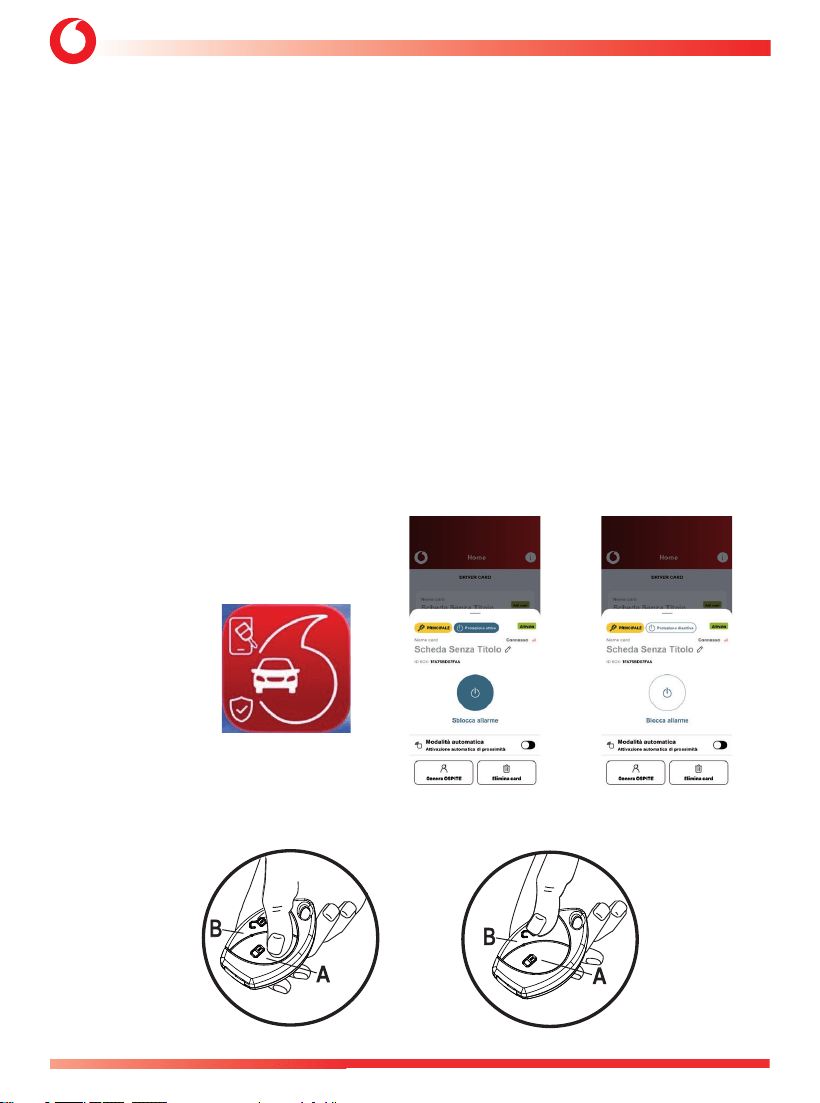
TELECOMANDO VODAFONE (OPZIONALE)
DDC: 1090 BLE HUB
(OPZIONAE)
APP
“AUTOMOTIVE
SECURE ACCESS”
START INSERITO DISINSERITO

4821-4822-4823 - MANUALE UTENTE+1090 BLE HUB
5
C1 - Vodafone Public
Le funzioni di protezione del sistema diventano attive dopo un periodo di 25 s (quando il LED del pannello
di emergenza inizia a lampeggiare).
Per disattivare il sistema premere il pulsante di sbloccaggio della portiera del telecomando originale del
veicolo oppure il tasto “B” del telecomando Vodafone.
Lo stato di disarmo è confermato da:
• apertura delle portiere nel caso si utilizzi il telecomando Vodafone la chiusura delle portiere avviene solo
se sono stati effettuati i relativi collegamenti elettrici dall’installatore;
• segnali acustici (se attivati);
• lampeggi delle luci di direzione;
• LED del pannello di emergenza spento.
Nota: se la Driver Card è abbinata al sistema, premendo il pulsante centrale si ottengono le stesse funzioni
di cui sopra.
2.1 - Attivazione con esclusione sensori tramite pulsante del pannello di emergenza.
Questa funzione consente di attivare il sistema lasciando temporaneamente disabilitati i sensori che si intende
escludere per il prossimo ciclo di attivazione per evitare falsi allarmi.
La protezione volumetrica deve essere disattivata ogni volta che si lascia qualcuno o un animale all’interno
del veicolo e/o si desidera lasciare un finestrino aperto.
Per disabilitare i sensori procedere come segue:
• spegnere il motore, accertandosi che l’interruttore di accensione sia in posizione OFF;
• entro 5 s premere il pulsante del pannello di emergenza e mantenerlo premuto fino a quando non
emetterà un lampeggio per confermare che è stata disabilitata solo la protezione volumetrica ad ultrasuoni;;
• tenendo premuto il pulsante in modo continuo, il sistema confermerà con il secondo lampeggio
che sono stati disabilitati solo gli eventuali sensori aggiuntivi opzionali come il sensore volumetrico a
microonde o il sensore di antisollevamento (nella versione 4822 il sensore di antisollevamento è di serie)
e la protezione volumetrica ritorna attiva;
• continuando a premere il pulsante, il sistema confermerà con il terzo lampeggio la disabilitazione di
tutti i sensori installati.
Nota: per confermare la selezione, rilasciare il pulsante del pannello di emergenza!
Le disabilitazioni selezionate saranno valide solo per il prossimo ciclo di attivazioni del sistema. Tutti
i sensori saranno abilitati alla successiva attivazione dell’allarme.
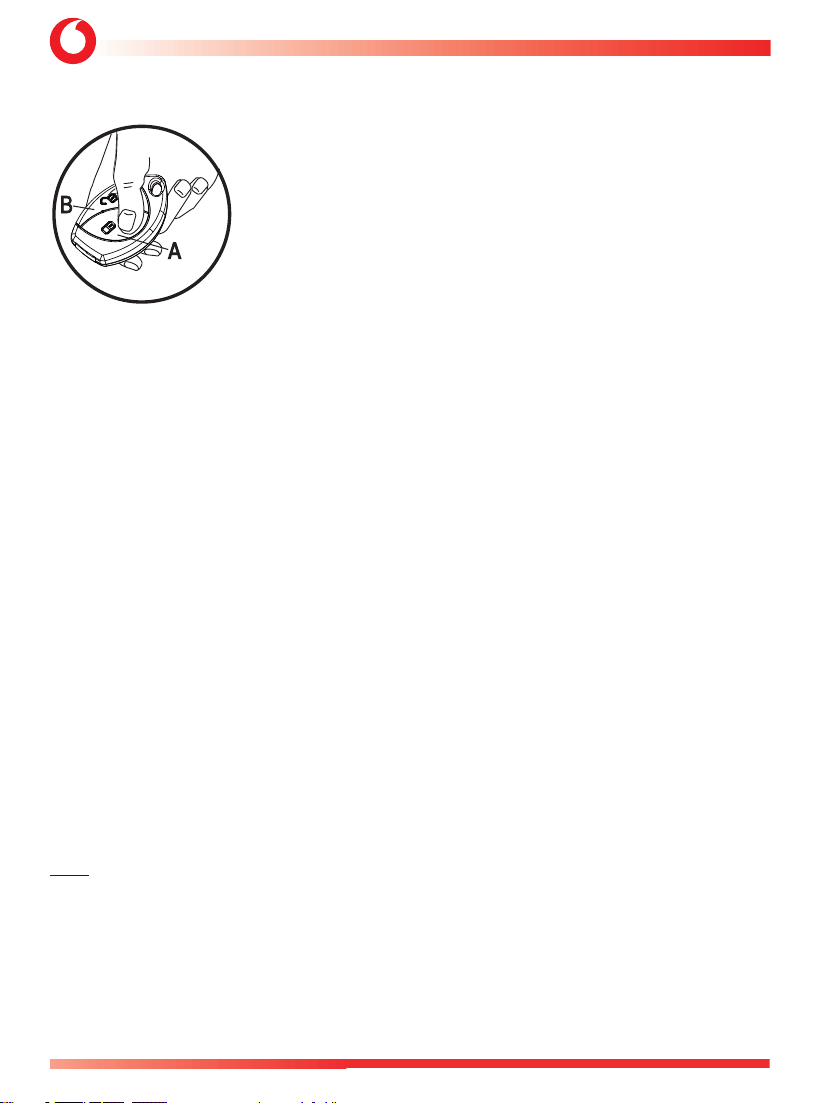
2.2 -Attivazione con esclusione temporanea sensori tramite Telecomando Vodafone.
Questa funzione consente di attivare il sistema lasciando temporaneamente disabilitati i sensori che si intende
escludere per il prossimo ciclo di attivazione per evitare falsi allarmi.
La protezione volumetrica deve essere disattivata ogni volta che si lascia qualcuno o un animale all’interno
del veicolo e/o si desidera lasciare un finestrino aperto.
MANUALE UTENTE - 4821-4822-4823+1090 BLE HUB
6
C1 - Vodafone Public
Per disabilitare i sensori procedere come segue:
Inserire il sistema premendo il tasto “A” del telecomando.
Ripremendo il tasto “A” si esclude la protezione volumetrica (sensori ultrasuoni);
l’esclusione è confermata da un lampeggio degli indicatori di direzione e da un beep.
Premendo un’altra volta il tasto “A” la protezione volumetrica ritorna attiva e si
escludono i sensori aggiuntivi; l’esclusione è confermata da due lampeggi degli
indicatori di direzione e da 2 beep.
Premendo un’altra volta il tasto “A”, si escludono la protezione volumetrica e i
sensori aggiuntivi; l’esclusione è confermata da tre lampeggi degli indicatori di
direzione e da tre beep. La disattivazione è valida per un solo ciclo di attivazione,
il funzionamento dei sensori sarà automaticamente ripristinato all’attivazione
successiva.
Nota: su alcuni veicoli il sistema disattiva automaticamente la protezione volumetrica ad ultrasuoni se uno
qualsiasi dei vetri viene lasciato aperto per evitare falsi allarmi dovuti ai movimenti d’aria.
3. FUNZIONALITÀ DEL SISTEMA DI ALLARME
3.1 - Protezione interna con sensore volumetrico a ultrasuoni.
Il sistema protegge l’abitacolo del veicolo con un sensore volumetrico a ultrasuoni. Qualsiasi tentativo di
accesso al veicolo verrà rilevato e attiverà l’allarme.
3.2 - Protezione perimetrale con diagnostica di avviso porta aperta.
L’allarme si attiverà aprendo una qualsiasi portiera, il bagagliaio o il cofano.
Se all’attivazione dell’allarme è stata lasciata aperta una portiera, il sistema lo segnalerà con 3 lampeggi
degli indicatori di direzione e 3 segnali acustici (5 segnali acustici se è stata attivata la funzione dei segnali
acustici di attivazione/disattivazione).
3.3 - Protezione contro il taglio dei cavi (solo per sistemi con sirena a batteria di backup).
L’allarme scatta in caso di mancanza di alimentazione al sistema (taglio cavi - scollegamento batteria)
segnalando il sabotaggio.
3.4 - Inibizione avviamento motore (se installato).
Non appena il sistema è attivato, l’avviamento del motore non è più possibile.
Nota: Chiedete al vostro installatore se questa funzionalità è fornita dal sistema installato sul vostro veicolo.
3.5 - Pannello di emergenza con LED.
Lo scopo principale del LED è quello di indicare le condizioni di attivazione e disattivazione del sistema.
Quando il sistema è inserito, il LED si accende in modo continuo fino allo scadere del tempo d’inibizione
di 25 s. Dopodiché inizia a lampeggiare e il sistema è pronto ad intervenire generando dei cicli di allarme
in caso di intrusione. Si spegne non appena il sistema viene disinserito. Quando il sistema è in allarme, il
LED lampeggia più velocemente.
4821-4822-4823 - MANUALE UTENTE+1090 BLE HUB
7
C1 - Vodafone Public
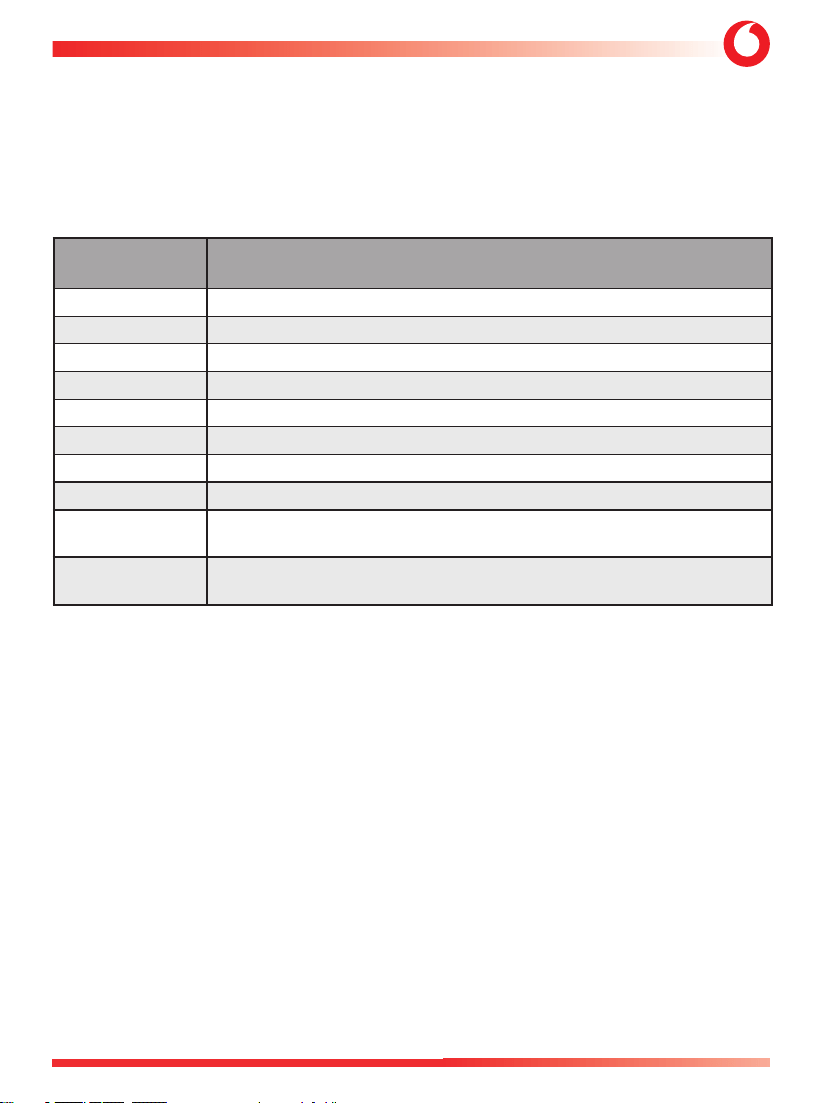
3.6 - Memoria allarmi.
In caso di allarme, durante il tempo di attivazione, alla disattivazione il sistema emetterà 4 lampeggi degli
indicatori di direzione e 4 segnali acustici. Memorizzerà inoltre il motivo dell’allarme e lo visualizzerà
sul LED del pannello di emergenza. Contare il numero di lampeggi e verificare il motivo dell’allarme
corrispondente nella tabella.
Attenzione: accendendo il quadro strumenti, la memoria verrà cancellata.
NUMERO
LAMPEGGI LED
CAUSA
PRINCIPALE DELL’ALLARME
1 lampeggi Rilevamento volumetrico ad ultrasuoni.
2 lampeggi
Rilevamento del sensore di inclinazione.
3 lampeggi Rilevamento quadro strumenti acceso.
4 lampeggi Rilevamento apertura portiera conducente.
5 lampeggi Rilevamento apertura altre porte.
6 lampeggi
Rilevamento dell’apertura del cofano.
7 lampeggi Rilevamento dell'apertura del baule.
8 lampeggi Rilevamento sensori aggiuntivi (Allarme Esterno opzionale).
9 lampeggi
Modulo generico COBRA BUS o COBRA BUS 1090 BLE Hub
(riconoscimento del conducente o allarme manomissione)
10 ÷ 20 lampeggi
In questo caso si tratta di rilevamento di “Allarme tecnico”,
contattare l’installatore.
3.7 - Cronologia della memoria degli allarmi.
La condizione per accedere alla lettura memoria di allarme è la seguente:
• Sistema non inserito
• Quadro strumenti acceso
• Porta del conducente aperta
• Cofano chiuso
• Premere per più di 5 s il pulsante del pannello.
• La conferma dell’ingresso nella procedura è un breve segnale acustico ed un lampeggio degli indicatori di direzione
(anche se la memoria di allarme è vuota e quindi non viene attivata alcuna segnalazione LED).
Durante la lettura della memoria di allarme: il LED della centrale inizia a lampeggiare con il numero corrispondente alle ultime
6 memorie di allarme memorizzate (la segnalazione del LED viene ripetuta 10 volte).
• Premendo per più di 5 s il pulsante del pannello si riavvia la sequenza di memoria degli allarmi.
• All’uscita dalla procedura (quadro strumenti OFF, inserimento del sistema), il sistema interromperà la segnalazione LED della
memoria di allarme senza cancellare la memoria stessa.
• La conferma dell’uscita dalla procedura è un breve suono della sirena ed un lampeggio degli indicatori di direzione.
Per cancellare la cronologia degli allarmi è necessario premere il pulsante LED del pannello per più di 10 s durante la
visualizzazione della memoria.

MANUALE UTENTE - 4821-4822-4823+1090 BLE HUB
8
C1 - Vodafone Public
• La conferma della cancellazione della memoria di allarme è segnalato con un breve segnale acustico della sirena ed un
lampeggio degli indicatori di direzione.
3.8 - Disattivazione di emergenza tramite accensione quadro strumenti (se disponibile).
Se il telecomando originale del veicolo viene smarrito o non funziona, aprire la portiera con la chiave
meccanica. Accendere il quadro strumenti. Se il sistema non si disattiva automaticamente, è necessario
disattivarlo seguendo la procedura di emergenza descritta al punto 6.
3.9 - Le luci di direzione lampeggiano durante l’allarme.
Quando il sistema va in allarme, la sirena suona e le luci di direzione lampeggiano per 28 s.
4. - FUNZIONI PROGRAMMABILI.
4.1 - Attivazione e regolazione del volume della segnalazione acustica di attivazione e
disattivazione.
Questa funzione consente di attivare dei segnali acustici per confermare l’attivazione e la disattivazione
del sistema.
Importante: la sua attivazione nei paesi CE è vietata.
4.2 - Attivazione automatico del sistema.
Il sistema si attiverà automaticamente dopo 30 s dal momento che il quadro srumenti è stato spento e la
portiera lato conducente è stata aperta e chiusa.
4.3 - Riattivazione automatico.
Il sistema si reinserirà automaticamente, dopo 115 s dalla disattivazione, non è stata aperta alcuna porta
o bagagliaio.
4.4 - Riattivazione automatico con chiusura porte.
Come per la riattivazione automatica, ma con chiusura automatica delle porte (se sono stati effettuati i
collegamenti CDL).
4.5 - Attivazione automatica dell’inibizione avviamento motore.
L’inibizione all’avviamento si attiva dopo 55 s dallo spegnimento del veicolo. La sua disattivazione può
essere effettuata tramite Driver Card (opzionale), o Driver Card Digitale BLE HUB o digitando il codice PIN
di emergenza corretto.
4.6 - Chiusura comfort dei finestrini con telecomando Vodafone.
Questa è una funzione nativa, programmabile solo se è disponibile sul veicolo. Utilizzando e tenendo
premuto il pulsante “A” del telecomando Vodafone, dopo l’attivazione dell’allarme, è possibile chiudere
i finestrini a distanza.
Attenzione: per motivi di sicurezza consigliamo di chiudere i finestrini restando in prossimità del veicolo.

4821-4822-4823 - MANUALE UTENTE+1090 BLE HUB
9
C1 - Vodafone Public
4.7 - Antirapina (funzione non consentita nei mercati UE/ECE*).
Questa funzione aiuta a prevenire il furto del veicolo durante la guida, tutelando anche la sicurezza del
conducente. Con questa funzionalità attivata il conducente deve essere riconosciuto, altrimenti il sistema
lo considererà come persona non autorizzata alla guida del veicolo, genererando una sequenza di allarmi
e non consentendo il riavviamento del motore dopo lo spegnimento.
L’antirapina è configurabile in due diverse modalità:
Modalità 1
- Attivazione della funzione antirapina all’apertura e chiusura della porta e riconoscimento continuo della
Driver Card o Driver Card Digitale
In normali condizioni d’uso, il conducente deve essere riconosciuto dal sistema in tre modi:
• inserendo le prime due cifre del codice PIN sul pannello di controllo;
• premendo un pulsante nascosto se installato;
• in modo automatico tramite la Driver Card associata.
L’operazione di riconoscimento deve avvenire ogni volta che si accende il quadro strumenti oppure quando
si apre e si chiude la portiera del conducente con il quadro strumenti già inserito.
Se il riconoscimento non avviene entro 60 s il LED del sistema inizia a lampeggiare velocemente,
segnalando il mancato riconoscimento per ulteriori 30 s.
Allo scadere di questo tempo, il sistema genera una sequenza di cicli di allarme. L’inibizione
dell’avviamento del motore si attiva con quadro strumenti spento, rendendo impossibile l’avvio del
motore.
Per uscire dalla funzione antirapina è necessario digitare le prime quattro cifre del Pin Code sul pannello
di emergenza oppure premendo un pulsante nascosto se installato o in modo automatico tramite la
Driver Card se abbinata oppure premendo il pulsante apposito sull’App Automotive Secure Access.
Se la Driver Card è spenta, premere il pulsante della Driver Card per essere riconosciuta.
La funzione antirapina verrà riattivata quando la portiera del conducente viene aperta e chiusa con
quadro strumenti acceso oppure quando il quadro strumenti viene spento e riacceso.
Modalità 2
- Attivazione del sistema antirapina all’apertura della porta e riconoscimento una sola volta della Driver Card.
Durante il normale utilizzo del veicolo, il conducente viene riconosciuto dal sistema in tre modi:
• inserendo le prime due cifre del Pin Code sul pannello di emergenza;
• premendo un pulsante nascosto se installato;
• in modo automatico tramite la Driver Card o Driver Card Digitale se abbinata.
L’operazione di “riconoscimento” deve avvenire, ogni volta che il quadro strumenti viene acceso o
quando, con la avviamento in posizione ON, il conducente apre la porta lato guida per scendere; in
questa situazione il riconoscimento della Driver Card diventa continuo fino allo scadere dei primi 60 s.
Se il riconoscimento non avviene entro 60 s, il LED del sistema inizia a lampeggiare velocemente,
segnalando il mancato riconoscimento per ulteriori 30 s.
Allo scadere di questo tempo, il sistema genera una sequenza di cicli di allarme. Il blocco avviamento
diventa attivo, con quadro strumenti spento, rendendo impossibile l’avvio del motore.

MANUALE UTENTE - 4821-4822-4823+1090 BLE HUB
10
C1 - Vodafone Public
Per uscire dalla funzione antirapina, è necessario digitare le quattro cifre del codice PIN, oppure premere
il pulsante nascosto se installato o tramite riconoscimento automatico della Driver Card; se quest’ultima
è spenta, per
disabilitare
l’antirapina è necessario premere il pulsante della Driver Card per consentirne
il riconoscimento. La funzione antirapina verrà riattivata quando la portiera del conducente viene
aperta con
quadro strumenti acceso oppure quando il quadro strumenti viene spento e riacceso.
*Nota: la funzione è disabilitata per conformità alle normative europee ed ECE. La sua attivazione
invalida l’omologazione CE. Può essere utilizzata solo nei paesi extraeuropei, se la funzionalità
non è in conflitto con le normative locali. In ogni caso, l’attivazione è consentita solo da un
centro autorizzato e non è possibile per l’utente finale.
4.8 - SISTEMA DI ALTA SICUREZZA (HSS)
Modalità NORMALE:
Con questa funzione abilitata, se a sistema attivato viene premuto il pulsante di sblocco chiusura
centralizzata sul telecomando originale, il sistema non si disattiverà completamente ma andrà in uno stato
di Pre-disattivazione dove la rilevazione delle porte, dei sensori installati e del quadro strumenti acceso
saranno ritardati di 30 s, per consentire il riconoscimento del conducente.
Il riconoscimento del conducente da parte del sistema può avvenire in tre modi:
• Inserendo le prime due cifre del Pin Code sul pannello di controllo;
• premendo un pulsante nascosto se installato (attivando la funzione di riconoscimento degli ingressi
analogici);
• tramite la Driver Card o Driver Card Digitale se abbinata.
Se il conducente non viene riconosciuto, dopo i 30 s dall’apertura di una delle porte il sistema andrà in
allarme.
Modalità LIGHT:
il comportamento è lo stesso della modalità NORMALE, tranne il fatto che nella pre-disattivazione sono
esclusi gli allarmi generati da US, antisollevamento, portiera conducente, altre portiere, bagagliaio, sensori.
4.9 - Modalità Garage (se abilitata).
Questa funzione consente di
disabilitare
temporaneamente tutte le funzionalità automatiche di
protezione del sistema. Può essere utilizzata, ad esempio, quando si deve lasciare il veicolo in officina per
la manutenzione, per evitare l’attivazione automatica di qualsiasi funzionalità.
Attivazione
- Aprire la portiera conducente.
- Accendere il quadro strumenti.
- Inserire il codice PIN di emergenza completo (4 cifre) sul pulsante del pannello di emergenza.
- Un lampeggio delle luci di direzione conferma l’attivazione.

4821-4822-4823 - MANUALE UTENTE+1090 BLE HUB
11
C1 - Vodafone Public
Sono disponibili 2 modalità Garage configurabili.
Modalità 1:
La funzione garage rimane attiva fino a 10 avviamenti o a 10 accensioni del quadro strumenti o dopo la
prima attivazione del sistema, dopodiché il sistema torna al funzionamento normale (vengono riattivate
tutte le funzioni di attivazione automatica).
5 lampeggi degli indicatori di direzione e 5 segnali acustici confermano la disattivazione.
Modalità 2 (opzione non consentita per i mercati EU/ECE**):
La funzione garage rimane attiva fino alla sua disattivazione, seguendo la stessa procedura eseguita per
l’attivazione. Cinque lampeggi degli indicatori di direzione e cinque segnali acustici confermano l’avvenuta
disattivazione.
**Nota: la funzione Modalità 2 non è conforme alla normativa europea ed ECE. La sua attivazione
invalida l’omologazione CE. Può essere utilizzata solo nei paesi extraeuropei, se la funzionalità non
è in conflitto con le normative locali.
4.10 - Allarme panico dal telecomando Vodafone (opzionale).
Se la funzione è abilitata, premendo il tasto “A” del telecomando, ad sistema attivato e trascorso il tempo
di inibizione di 25 s, permette di generare un allarme panico della durata di 10 s e durante l’allarme,
lampeggeranno gli indicatori di direzione..
Abilitando questa funzione non sarà possibile abilitare la funzione descritta nel passaggio 4.11.
4.11 - Car finder tramite telecomando Vodafone (opzionale).
In alternativa alla funzione Allarme Panico è possibile abilitare la funzione Car Finder, questa funzione può
essere attivata premendo il pulsante “A” del telecomando, ad impianto attivato e trascorso il tempo di
inibizione di 25 s; consente di ritrovare più facilmente il veicolo in un’area di parcheggio. Abilitando questa
funzione non sarà possibile abilitare la funzione descritta al punto 4.10.
4.12 - Controllo del numero di Driver Card e Telecomandi appresi.
Per poter accedere a questa funzione le condizioni sono le seguenti:
• Quadro strumenti acceso
• Porta del conducente chiusa
• Cofano chiuso
• Premere per più di 5 s il pulsante del pannello di controllo finché il si avranno 2 segnali acustici e gli
indicatori di direzione lampeggiano 2 volte (ingresso)
• A conferma dell’ingresso in procedura, il LED si accende per 2 s e poi si spegne per 2 s, dopodiché il LED
si accende un numero di volte corrispondente al numero di Driver Card e Telecomandi appresi (come
MANUALE UTENTE - 4821-4822-4823+1090 BLE HUB
12
C1 - Vodafone Public
descritto di seguito).
• LED 2 s ON + 2 s OFF seguito da LED 0,5 s ON e 1 s OFF per ogni Driver Card memorizzata.
Seguito da:
• LED 2 s ON + 2 s OFF seguito da LED 1 s ON e 1s OFF per ogni telecomando memorizzato.
NOTA:
- se nessuna Driver Card e/o nessun telecomando sono memorizzati verrà mostrata la sola segnalazione
di LED 2 s ON + 2 OFF.
- la segnalazione viene effettuata una sola volta, se si desidera rivedere il numero di Driver Card e
Telecomandi memorizzati, ripremere per 5 s il pulsante del pannello, la segnalazione verrà ripetuta.
Per uscire dalla procedura spegnere il quadro strumenti:
• il sistema interromperà la sequenza di lettura del numero di Driver Card e telecomandi memorizzati.
• La conferma dell’uscita dalla procedura avviene tramite due brevi segnali acustici e due lampeggi degli
indicatori di direzione.
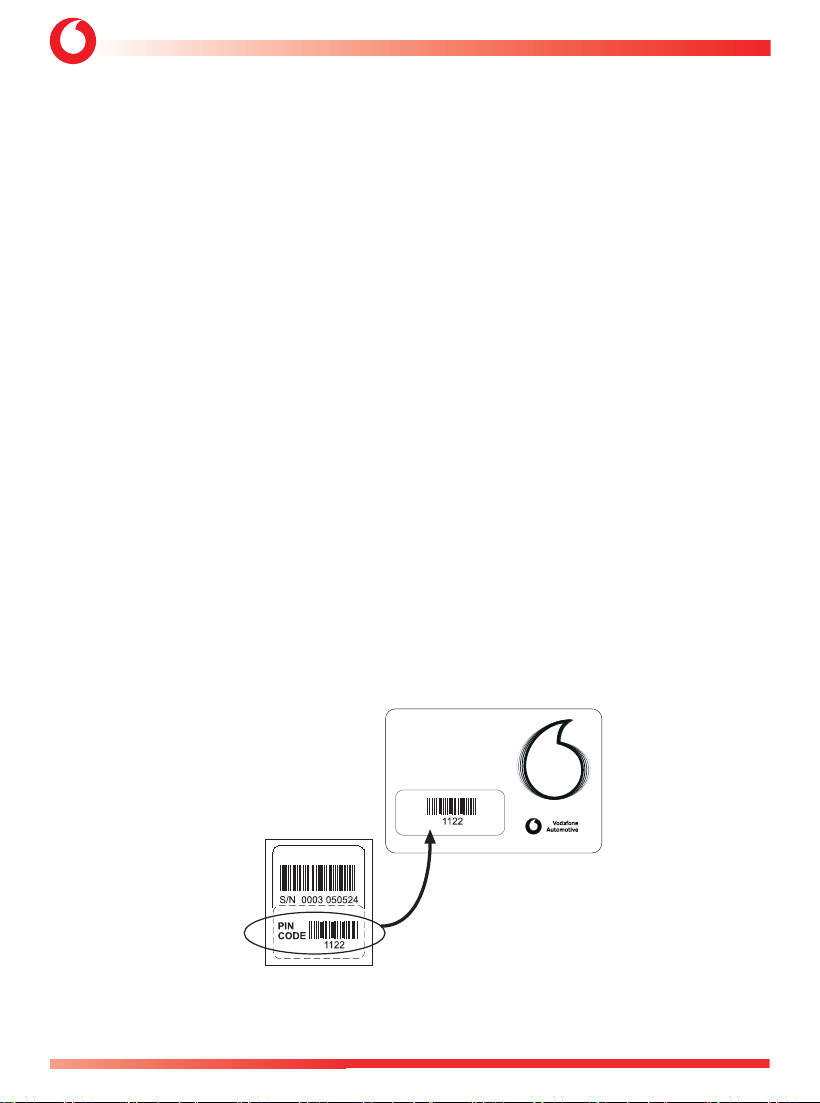
5. - CODICE PIN.
Il codice PIN è un codice di quattro cifre, preimpostato in fabbrica, è stampato su una etichetta removibile
posta sul retro del prodotto che deve essere posizionata sulla Pin Code Card dall’installatore
È molto importante conservare il codice PIN, poiché consente di
disattivare
il sistema in caso di
smarrimento o malfunzionamento dei telecomandi.
Viene utilizzato anche per altre funzioni (codice di riconoscimento del conducente e codice di attivazione
di varie funzioni). Puoi chiedere al tuo installatore di personalizzare il codice PIN, che ti chiederà la PIN
Code Card con il codice in uso.
ATTENZIONE: Nel caso abbiate chiesto di personalizzare il Codice Pin fate attenzione a non dimenticarlo
perchè non sarà più possibile richiederlo a Vodafone in caso di smarrimento, suggeriamo di riportarlo sulla
Pin Code Card.
CODE
CODICE PIN
PERSONALE
4C482XXXX
4821-4822-4823 - MANUALE UTENTE+1090 BLE HUB
13
C1 - Vodafone Public
SISTEMA
IN
ALLARME
Lampeggio
breve
Lampeggio
lungo
Premete un numero di volte
corrispondente al valore della
cifra del PIN code.
pausa
Immissione
cifra seguente
PIN CODE
ALLARME
DISINSERITO
PIN CODE
OK
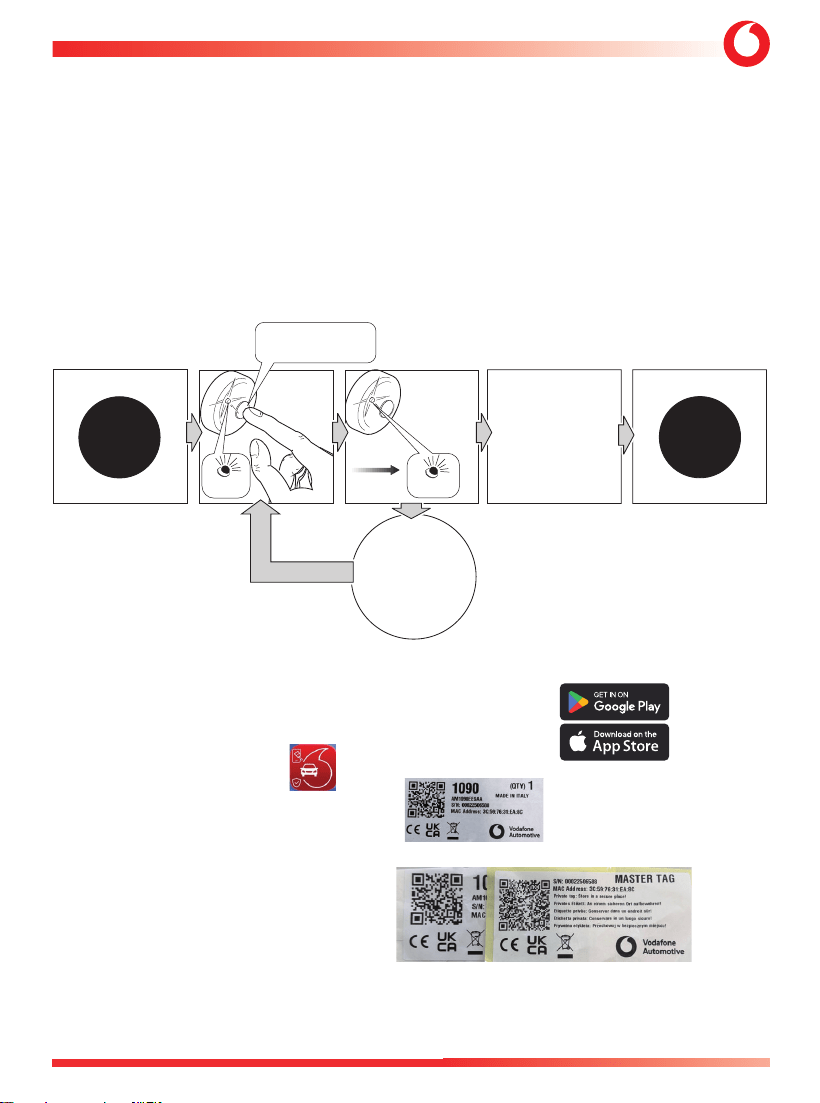
6. - DISATTIVAZIONE DI EMERGENZA CON CODICE PIN.
Se il telecomando originale del veicolo viene smarrito o non funziona, aprire la portiera con la chiave
meccanica e accendere il quadro strumenti.
Se il sistema non si disattiva automaticamente, procedere come segue:
Premere il pulsante del pannello di emergenza per un numero di volte corrispondente alla prima cifra del
codice PIN. Ogni pressione del pulsante è confermata da un lampeggio rapido del LED. Fare una pausa
più lunga per far capire al sistema che si è terminato di inserire la prima cifra, un lampeggio più lungo del
LED lo confermerà. Ripetere la stessa operazione per le cifre rimanenti, non appena tutte e quattro le cifre
saranno state inserite il sistema si disattiverà.
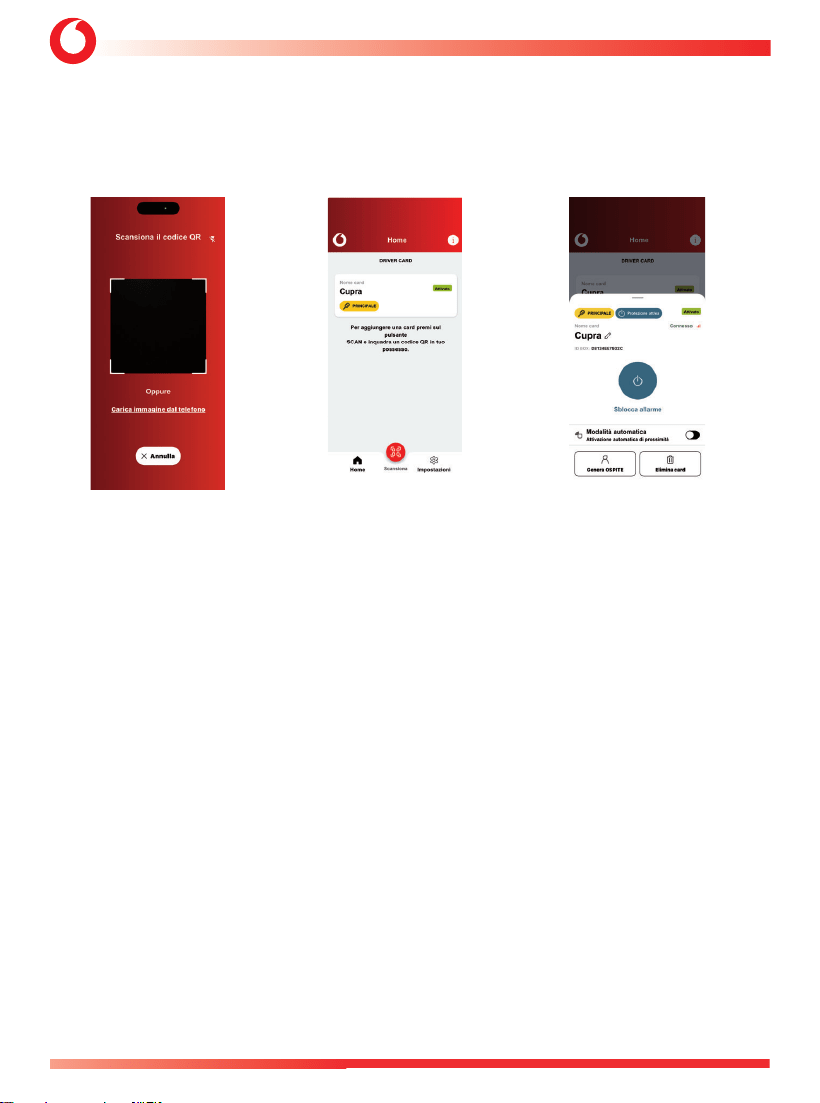
7. – GUIDA RAPIDA 1090 BLE HUB (OPZIONALE) - Il manuale completo dell’APP 1090 sarà
disponibile nell’APP “Automotive Secure Access”.
7.1 Scarica l'APP " Automotive Secure Access" sul tuo telefono dai siti:
7.2 Installa l'APP sul tuo telefono
7.3 Apri la lettera sigillata ricevuta dall'installatore
7.4 Estrarre la Master Key contenuta nella lettera
MANUALE UTENTE - 4821-4822-4823+1090 BLE HUB
14
C1 - Vodafone Public
7.5 Apri l’APP.
Scansiona il codice QR
sulla Master Key
7.6 Aggiungi la prima DDC
(DRIVER CARD DIGITALE)
7.7 Seleziona la DDC aggiunto:
Ora sei pronto ad operare e ad
inserire/disinserire
4821-4822-4823 - MANUALE UTENTE+1090 BLE HUB
15
C1 - Vodafone Public
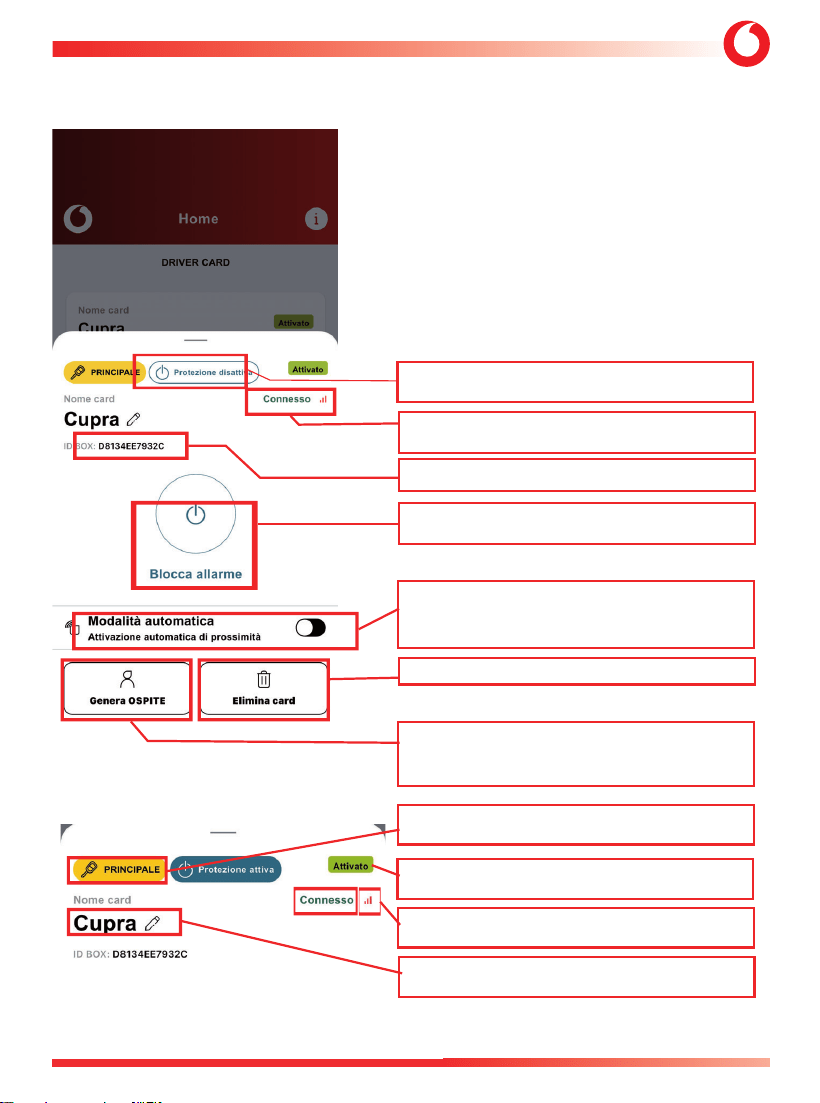
LEGENDA:
Stato del sistema di allarme: inserito o disinserito.
Stato del collegamento Bluetooth APP-1090: Connesso-Non
connesso, con livello di segnale.
Numero MAC (Media Access Control) connesso 1090: HW univoco
1090.
Pulsante per inserire/disinserire il sistema di allarme in modalità
attiva (modalità predefinita).
Passare alla modalità automatica della Driver Card: l’inserimento/
disinserimento dell’allarme è automatico, in base alla vicinanza del
telefono del conducente.
Eliminare la Driver Card selezionata.
Generazione della Driver Card OSPITE: la Driver Card principale
può generare altre Driver Card OSPITE, con eventuale limitazione
temporale della funzionalità, se richiesta.
Tipo di Driver Card: Master/Principale (creata con Chiave Master)
o Ospite.
Stato della Driver Card: Attiva o Non Attiva.
Presenza del segnale Bluetooth BLE 1090.
Nome modificabile delle Driver Card selezionate.
MANUALE UTENTE - 4821-4822-4823+1090 BLE HUB
16
C1 - Vodafone Public
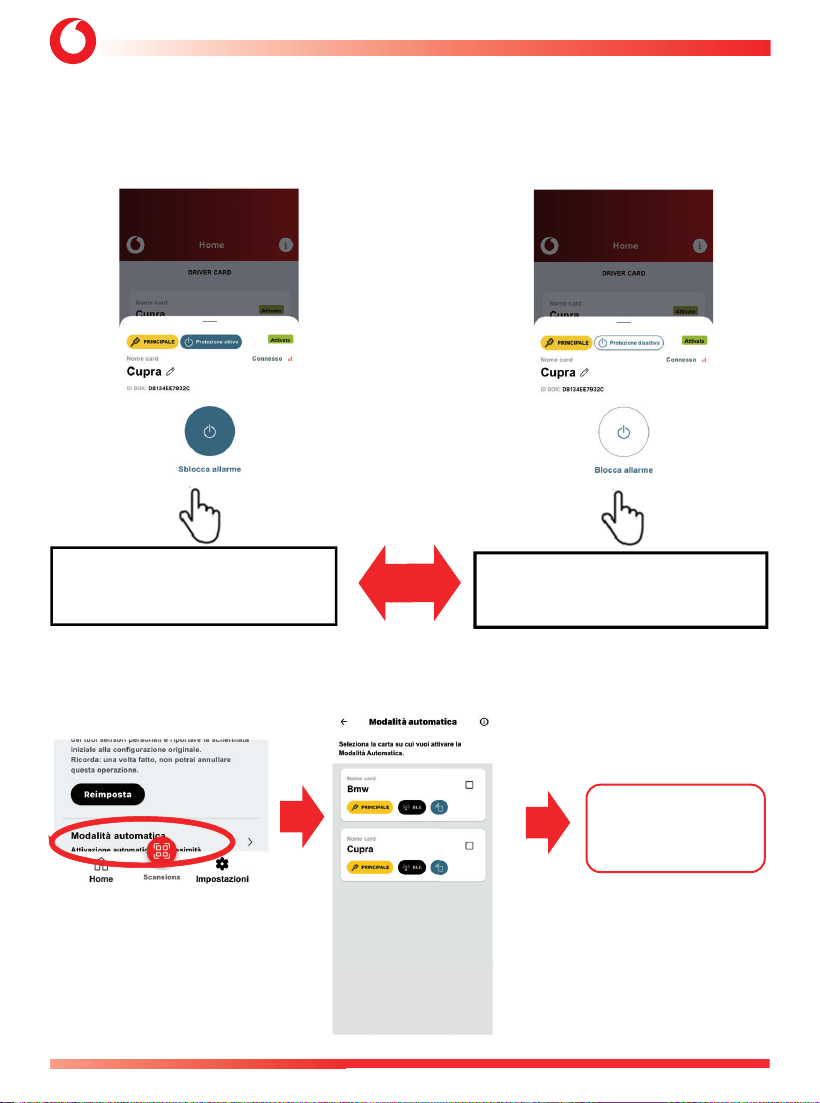
DISATTIVAZIONE AUTOMATICA
IN BASE ALLA DISTANZA DEL
TELEFONO DAL VEICOLO
(come Driver Card, senza bisogno di
premere alcun pulsante)
8. MODALITÀ OPERATIVE PER IL 1090.
1) MODALITÀ ATTIVA (inserimento/disinserimento volontario, premendo il pulsante centrale della DDC) –
MODALITÀ PREDEFINITA.
2) MODALITÀ AUTOMATICA (inserimento/disinserimento automatico, in base alla vicinanza al veicolo):
selezionarla dal menu IMPOSTAZIONI iniziale
MODALITÀ ATTIVA: PREMERE INSERITO
PULSANTE -> DISINSERITO
MODALITÀ ATTIVA: PREMERE DISINSERITO
PULSANTE -> INSERITO
4821-4822-4823 - MANUALE UTENTE+1090 BLE HUB
17
C1 - Vodafone Public
1
2
3
4
5 6
7
8 9 10 11
12
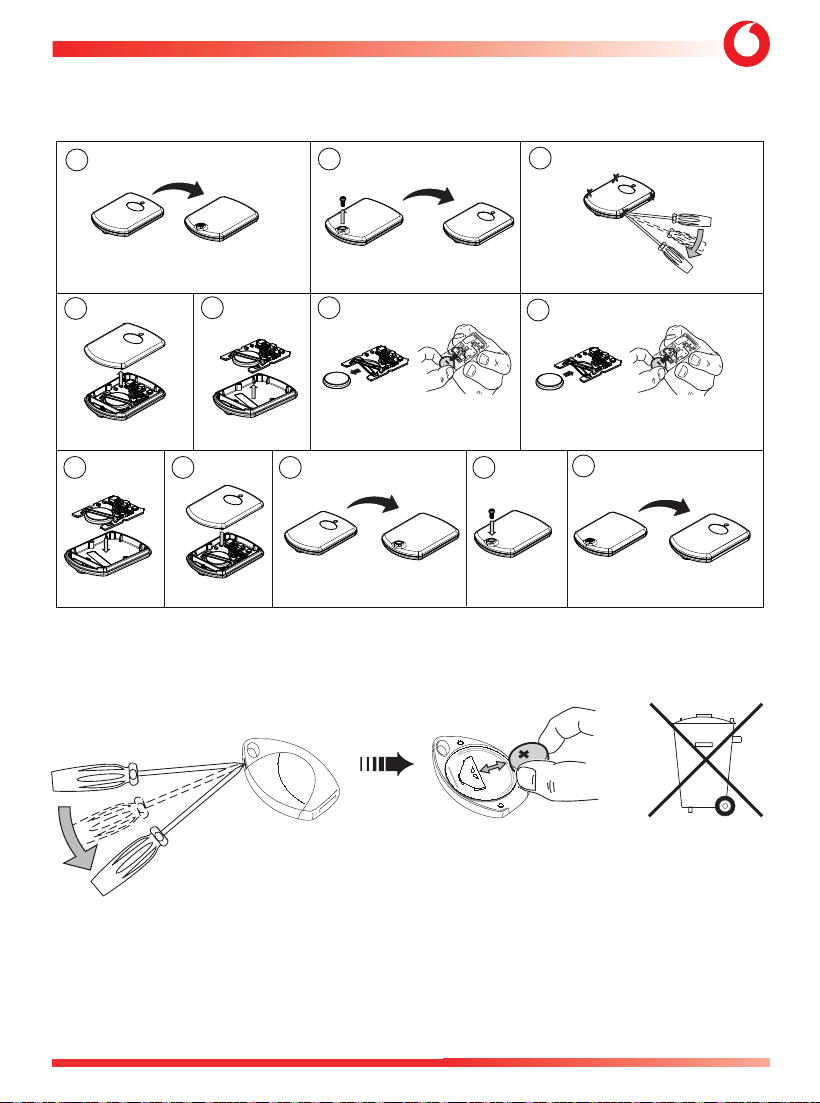
9. - SOSTITUZIONE BATTERIA DELLA DRIVER CARD (OPZIONALE).
10. - SOSTITUZIONE BATTERIA TELECOMANDO (OPZIONALE).
MANUALE UTENTE - 4821-4822-4823+1090 BLE HUB
18
C1 - Vodafone Public
11. - CONDIZIONI DI GARANZIA.
Questo prodotto è garantito per 24 mesi dalla data di acquisto, convalidata da scontrino o fattura. La
garanzia decade qualora il prodotto presenti segni di manomissione, errata installazione, danni causati da
cadute o trasporto, negligenza e quant’altro non imputabile a difetti di fabbricazione.
In caso di installazione non corretta del sistema, il produttore non sarà tenuto a risarcire i danni:
- di qualsiasi natura e diretta o indiretta;
- a cose o a persone.
Per beneficiare della copertura della garanzia, contattare il rivenditore autorizzato con la documentazione
adeguata che attesti la data di acquisto.
12. - DICHIARAZIONE DI CONFORMITÀ.
Dichiarazione di conformità – Sistema antifurto tipo 4820
Con la presente, Vodafone Automotive SpA dichiara che l’apparecchiatura radio tipo 4820 è conforme
alla Direttiva 2014/53/UE e al Regolamento sulle apparecchiature radio del Regno Unito del 2017. I testi
completi delle dichiarazioni di conformità UE e del Regno Unito sono disponibili al seguente indirizzo
internet automotive.vodafone.com, nella sezione download.
Il dispositivo reca i seguenti marchi:
Il dispositivo ha i seguenti parametri RF:
869,5 MHz - 869,9 MHz / 0 dBm: TX opzionale per collegamento sirena wireless
433,9 MHz: RX opzionale per collegamento chiave remota
Nota: per evitare l’esposizione umana ai campi elettromagnetici, il dispositivo è installato a una distanza maggiore di
0,2 m rispetto al corpo degli occupanti del veicolo.
Dichiarazione di conformità – Trasmettitori remoti tipi 2771–2772–8772 (facoltativa)
Con la presente, Vodafone Automotive SpA dichiara che le apparecchiature radio tipo 2771–2772–8772
(opzionali) sono conformi alla Direttiva 2014/53/UE e al Regolamento sulle apparecchiature radio del Regno
Unito del 2017. I testi completi delle dichiarazioni di conformità UE e del Regno Unito sono disponibili al
seguente indirizzo Internet automotive.vodafone.com, nella sezione download.
Il dispositivo reca i seguenti marchi:
I dispositivi hanno i seguenti parametri RF:
2771/2772 = 433,9 MHz, -16 dBm (max); 8772 (opzionale) = 433,9 MHz, -12 dBm
Dichiarazione di conformità – Sirena di allarme tipo 5365 (opzionale)
Con la presente, Vodafone Automotive SpA dichiara che l’apparecchiatura radio tipo 5365 è conforme
4821-4822-4823 - MANUALE UTENTE+1090 BLE HUB
19
C1 - Vodafone Public
alla Direttiva 2014/53/UE e al Regolamento sulle apparecchiature radio del Regno Unito del 2017. I testi
completi delle dichiarazioni di conformità UE e del Regno Unito sono disponibili al seguente indirizzo
internet automotive.vodafone.com, nella sezione download.
Il dispositivo reca i seguenti marchi:
Il dispositivo ha i seguenti parametri RF:
869,5 MHz - 869,9 MHz; solo ricevitore.
Produttore: Vodafone Automotive SpA, via Astico 41, 21100 Varese, Italy Tel. + 39 332 825111
Importatore UK: Vodafone Automotive UK, Shuttleworth House, 21 Bridgewater Close, Network 65 Business
Park, Hapton, Burnley, BB11 5TE (GB) Tel. + 44 (0) 1282 473700
EMF
Nota: per evitare l’esposizione umana ai campi elettromagnetici, il dispositivo è installato a una distanza
superiore a 0,2 m dal corpo degli occupanti del veicolo.
Le misurazioni della potenza emessa dal modulo dimostrano la conformità ai limiti di legge della norma
EN IEC 62311:2020 nelle condizioni di installazione descritte; i valori sono riportati nella seguente tabella:
Banda Massima Potenza Misurata
(dBm/mW@2402MHz)
Limiti
(W/m2)
Risultati
(W/m2@20 cm)
Giudizio
2402 MHz ÷ 2480 MHz -1,22 dBm / 0,76 mW
10 0,15 Conforme
Produttore: Vodafone Automotive SpA, via Astico 41, 21100 Varese, Italia Tel. + 39 0332 825111
Importatore nel Regno Unito: Vodafone Automotive UK, Shuttleworth House, 21 Bridgewater Close,
Network 65 Business Park, Hapton, Burnley, BB11 5TE (GB) Tel. + 44 (0) 1282 473700
Nota: la seguente parte è fornita solo in inglese perché applicabile al mercato statunitense.

MANUALE UTENTE - 4821-4822-4823+1090 BLE HUB
20
C1 - Vodafone Public
Nota: la seguente parte è applicabile soltanto per il mercato nordamericano.
Dichiarazione FCC per il tipo 1090
Questo dispositivo è conforme alla Parte 15 delle norme FCC.
Il funzionamento è soggetto alle seguenti due condizioni:
(1) questo dispositivo non deve causare interferenze dannose e
(2) questo dispositivo deve accettare qualsiasi interferenza ricevuta, incluse le interferenze
che potrebbero causare un funzionamento indesiderato.
Modifiche o alterazioni apportate a questa apparecchiatura non espressamente approvate da Vodafone
Automotive possono invalidare l’autorizzazione FCC per l’utilizzo di questa apparecchiatura.
Questa apparecchiatura è stata testata ed è risultata conforme ai limiti per un dispositivo digitale di Classe B,
ai sensi della Parte 15 delle norme FCC. Questi limiti sono progettati per fornire una protezione ragionevole
contro le interferenze dannose in un’installazione residenziale. Questa apparecchiatura genera, utilizza e può
irradiare energia a radiofrequenza e, se non installata e utilizzata in conformità con le istruzioni, può causare
interferenze dannose alle comunicazioni radio. Tuttavia, non vi è alcuna garanzia che non si verifichino
interferenze in una particolare installazione. Se questa apparecchiatura causa interferenze dannose alla
ricezione radio o televisiva, cosa che può essere determinata spegnendo e riaccendendo l’apparecchiatura,
si consiglia all’utente di provare a correggere l’interferenza adottando una o più delle seguenti misure:
Riorientare o riposizionare l’antenna ricevente.
Aumentare la distanza tra l’apparecchiatura e il ricevitore.
Collegare l’apparecchiatura a una presa di corrente su un circuito diverso da quello a cui è collegato il
ricevitore.
Consultare il rivenditore o un tecnico radio/TV esperto per assistenza.
Questa apparecchiatura è conforme ai limiti di esposizione alle radiazioni FCC stabiliti per un ambiente non
controllato. Questa apparecchiatura deve essere installata e utilizzata mantenendo una distanza minima
di 20 cm tra l’elemento radiante e il corpo.
Questo trasmettitore non deve essere collocato o utilizzato insieme ad altre antenne o trasmettitori.

4821-4822-4823+1090 BLE HUB USER MANUAL
21
C1 - Vodafone Public
Summary
1. INTRODUCTION .......................................................................................................................................... 22
2. ARMING AND DISARMING THE SYSTEM BY ORIGINAL VEHICLE REMOTE CONTROL
OR BY VODAFONE REMOTE CONTROL (OPTIONAL) ..................................................................... 23
3. ALARM SYSTEM PROGRAMMABLE FUNCTIONS ...........................................................................23
4. PROGRAMMABLE FUNCTIONS ............................................................................................................. 27
5. PIN CODE ........................................................................................................................................................31
6. EMERGENCY OVERRIDE WITH PIN CODE ......................................................................................... 32
7. 1090 BLE HUB QUICK GUIDE ( a complete 1090+APP manual will be available in the
APP “Automotive Secure Access”) ..................................................................................................32
8. OPERATIVE MODES FOR 1090 ..............................................................................................................35
9. DRIVER CARD (OPTIONAL) BATTERY REPLACEMENT ................................................................. 36
10. REMOTE CONTROL (OPTIONAL) BATTERY REPLACEMENT ................................................... 36
11. WARRANTY CONDITIONS...................................................................................................................... 37
12. CONFORMITY DECLARATION .............................................................................................................. 37

USER MANUAL 4821-4822-4823+1090 BLE HUB
22
C1 - Vodafone Public
Dear Customer,
The product you’ve choosen is in line with the quality and functional standards required by the
main Car Manufacturers and it complies with the safety and security European directives. We
would like to remind you that the security degree of this system can be increased by adding
the following modules:
LEVEL MONITOR
This sensor detect the vehicle being jacked up to for towing it away or for stealing the wheels (already
available on 4822).
HYPERFREQUENCY VOLUMETRIC SENSOR
It is a volumetric sensor for interior protection required for convertible vehicles as it is not sensitive to
air movements.
CRANK INHIBITION
To add another crank inhibition to the system.
TRACKING DEVICE
Allow to track your vehicle and to send alerts to a Secure Operating Center.
DRIVER CARD 433 MHz (DC, available with and without internal Motion sensor)
Allow to increase vehicle protection with a double driver recognition, using a radio 433 MHz recognition
(Driver Card)
DIGITAL DRIVER CARD (DDC, 1090 BLE HUB) with mobile APP “AUTOMOTIVE SECURE ACCESS”
Allow to increase vehicle protection with a double driver recognition, by a Bluetooth Low Energy pairing
with 1090 BLE HUB, using Your Mobile Phone and the APP “AUTOMOTIVE SECURE ACCESS”. To activate
DDC-1090 BLE HUB using the APP downloaded on Your Phone, please follow the quick guide received
by Vodafone fitting center.
In this manuals we’ve listed all the standard system functionalities and those you can ask to
enable to an authorized Vodafone fitting centre. Please read carefully this manual to get the
full benefit from the product.
4821-4822-4823+1090 BLE HUB USER MANUAL
23
C1 - Vodafone Public
1. - INTRODUCTION.
The 482X alarm system is equipped with an electrical interface which is able to acquire information from the
vehicle. The system can thus be armed and disarmed using the vehicle’s original remote control.
2. - ARMING AND DISARMING THE SYSTEM BY ORIGINAL VEHICLE REMOTE CONTROL OR
WITH VODAFONE REMOTE CONTROL (OPTIONAL) AND APP “AUTOMOTIVE SECURE ACCESS”
(OPTIONAL).
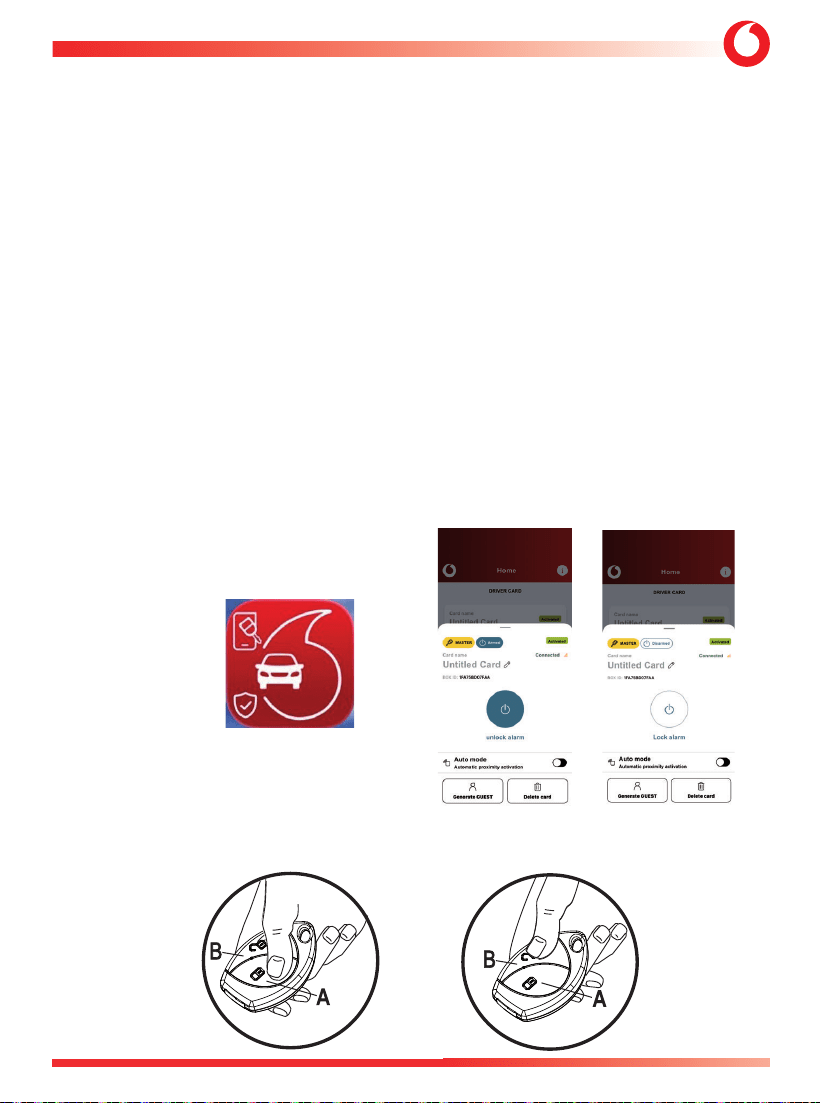
To arm the system press the door locking push-button of the vehicle original remote control or the “A”
button on the Vodafone remote control.
The arming status is confirmed by:
• vehicle doors locking if you use the Vodafone remote control, the doors will only lock if the relevant
electrical connections have been made by the installer.;
• audible signals (if activated);
• flashes of the direction indicators;
• LED of the emergency panel lights up steadily for 25 s.
VODAFONE REMOTE CONTROL (OPTIONAL)
DDC: 1090 BLE HUB
(OPTIONAL)
APP
“AUTOMOTIVE
SECURE ACCESS”
START ARM DISARM

USER MANUAL 4821-4822-4823+1090 BLE HUB
24
C1 - Vodafone Public
The protection features of the system become active after 25 s has elapsed (when the LED of the emergency
panel starts blinking).
To disarm the system press the door unlocking push-button of the vehicle original remote control or the
“B” button on the Vodafone remote control.
The disarming status is confirmed by:
• vehicle doors unlocking only with Vodafone remote control (only if the electrical connections have been
made);
• audible signals (if activated);
• flashes of the direction lights;
• LED of the emergency panel OFF.
Note: if the Driver Card is paired with the system, pressing the central button will obtain the same functions
as above.
Note: if the (optionals) Driver Card (DC) or Digital Driver Card (DDC: 1090 BLE HUB) are paired with the system/
phone APP, pressing the central DC button or tapping the central APP button on phone, You will obtain the
same ARM/DISARM functions as above, excluding the case of HSS function being previously activated..
2.1 - Sensors protection temporary exclusion by emergency pane.
This function allows to enable the system leaving temporarily disabled the sensors that you want to exclude
for the next arming cycle to avoid false alarms.
The volumetric protection must be disabled any time you leave somebody or an animal in the vehicle and/or
you want to leave any window opened.
To disable the sensors proceed as follow:
• switch the engine OFF, being sure that the instrument cluster has been turned to the OFF position;
• within 5 s press the emergency panel push-button and keep it pressed until it will flash once to confirm
only the US volumetric protection has been disabled;
• by keeping the push-button pressed continuously, the system will confirm by the second flash that
only the optional additional sensors such as the microwave volumetric sensor or the level monitor sensor
(in the 4822 version the sensor is standard) and the volumetric protection is re-enabled;
• by keeping still pushing the push-button continuously, the system will confirm by the third flash for
all of them disabled.
Note: to confirm your selection, release the emergency panel push-button!
The selected exclusions will be valid only for the next arming cycle and deactivated when the
system is disarmed. All sensors will be active the next time the systemis armed.
2.2 - Arming with sensors protection temporary exlusion by Vodafone Remote Control.
This function allows to enable the system leaving temporarily disabled the sensors that you want to exclude
for the next arming cycle to avoid false alarms.
4821-4822-4823+1090 BLE HUB USER MANUAL
25
C1 - Vodafone Public
The volumetric protection must be disabled any time you leave somebody or an animal in the vehicle and/or
you want to leave any window opened..
To disable the sensors protection, proceed as follows:
Arm the system by pressing the “A” button on the remote control.
Re-pressing the “A” button to disable the volumetric protection (ultrasonic sensors);
the exlusionis confirmed by one flash of the direction indicators and a beep.
re-pressing again the “A” button to reactive the volumetric protection and disble
the additional sensors; the exlusion is confirmed by two flashes of the direction
indicators and 2 beeps.
Re-pressing again the “A” button again to disable the volumetric protection and
the additional sensors; the exlusion is confirmed by 3 flashes of the turn signals
and 3 beeps.
The exlusion is valid for only one arming cycle; the sensor operation will be
automatically restored the next time the system is armed.
Note: on some vehicles, the system automatically deactivates the ultrasonic volumetric protection if any
window is left open to avoid false alarms due to air movement.
3. ALARM SYSTEM PROGRAMMABLE FUNCTIONS.
3.1 - Interior protection with ultrasonic volumetric sensor.
The system protects the vehicle interior with a volumetric ultrasonic sensor. Any attempt to get into the
vehicle will be detected and the alarm will trigger.
3.2 - Perimetric protection with door open warning diagnostic.
The system will trigger by opening any door, boot and bonnet.
Should you have left any door opened while arming, the system will signal it by 3 flashes of the direction
lights and 3 acoustic signals (5 acoustic signals if the arming/disarming acoustic signals function has been
activated).
3.3 - Cable cutting protection (only for systems with back-up battery siren).
The alarm will trigger if the system is not power supplied (cutting of cables - battery disconnection) signaling
the sabotage.
3.4 - Engine starting inhibition (if installed).
As soon as the system is armed the engine starting is not be possible anymore.
Note: Ask your installer if this functionality is provided by the system fitted on your vehicle.
3.5 - Emergency panel with LED.
The LED main scope is to show the system arming and disarming conditions. When the system is armed the
LED gets ON and remains illuminated until the 25 s arming period has elapsed. After that it starts blinking
USER MANUAL 4821-4822-4823+1090 BLE HUB
26
C1 - Vodafone Public
and the system is ready to intervene by generating alarm cycles in the event of an intrusion.
It goes OFF as soon as the system is disarmed. When the system is in alarm, the LED flashes faster.
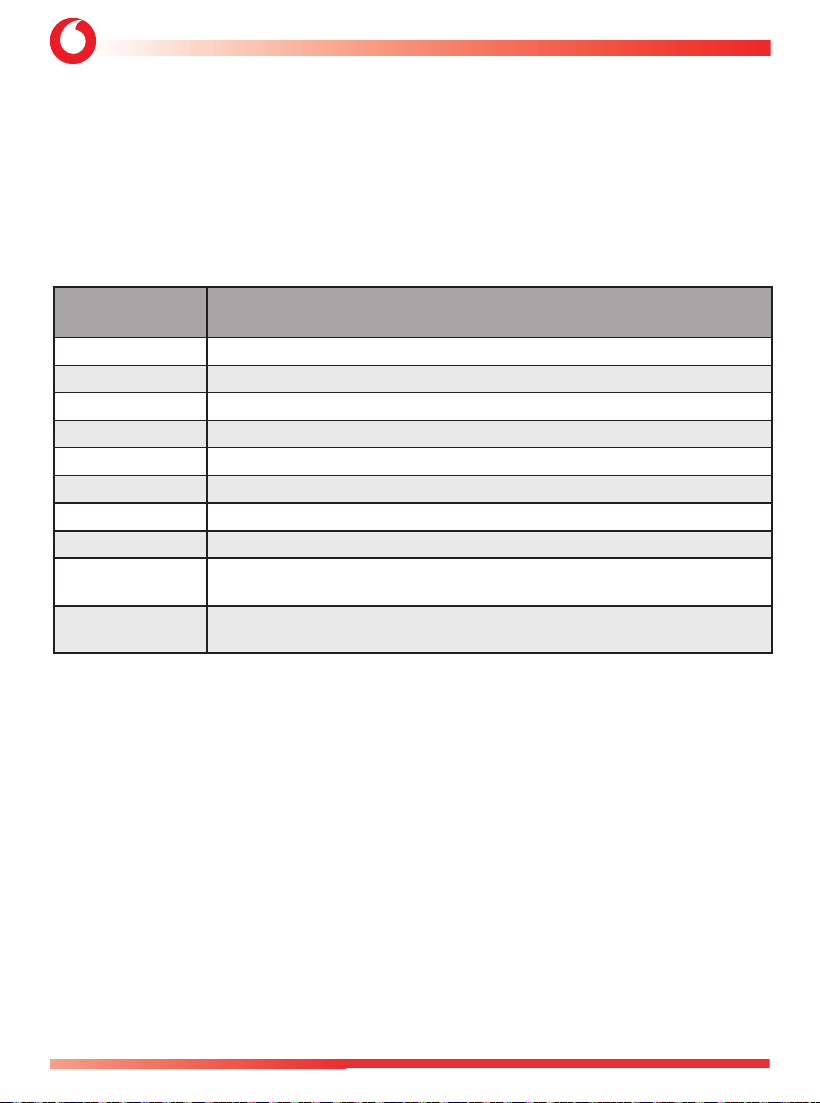
3.6 - Alarms memory.
When an alarm occurs, during the arming time , upon disarming the system will warn you with 4 flashes
of the direction lights and 4 acoustic signals. It also stores in its memory the reason of the occurred alarm
and shows it on the emergency panel LED. Count the number of flashes and check the corresponding
alarm reason on the table. Attention: by turning the instrument cluster ON, the memory will be deleted.
LED NUMBER
OF FLASHES
ALARM
ROOT CAUSE
1 flash Ultrasonic volumetric detection.
2 flashes
Level Monitor sensor detection.
3 flashes Instrument cluster ON detection.
4 flashes Driver Door opening detection.
5 flashes Other Door opening detection.
6 flashes Bonnet opening detection.
7 flashes
Boot opening detection.
8 flashes External sensor detection (Optional Ext. Alarm).
9 flashes
COBRA BUS GENERIC MODULE or COBRA BUS 1090 BLE Hub
(driver recognition or tamper comm.).
10 ÷ 20 flashes
In case of “Technical alarm” detection,
contact your installer.
3.7 - Alarm Memory History
The condition to access to reading the LED Signalling alarm memory is the follow:
• System Unset
• Instrument cluster ON
• Driver Door Open
• Bonnet Close
• Pressing for more than 5 s to the panel push button.
• Confirmation of entering the procedure is one short siren sound and one direction insdicators flash (also
if the alarm memory is empty and then no LED Signalling is actuated).
During reading the LED Signalling alarm memory: the LED of the control panel starting flashing with the
correspondent number of the last 6 alarm memory memorized (LED signalling time, 10 consecutive times).
• Pressing for more than 5 s to the panel push button the LED signalling sequence will restart.

4821-4822-4823+1090 BLE HUB USER MANUAL
27
C1 - Vodafone Public
• Exiting procedure (Instrument cluster OFF, System Set) the System shall stop the LED Signalling alarm
memory without cancelling memory itself.
To erase the alarm history, you need to press the LED button on the panel for more than 10 s while viewing
the memory.
• Confirmation of alarm memory deletion is one short siren sound and one blinkers flash.
3.8 - Emergency disarming by instrument cluster (if available).
If the vehicle original remote control get lost or if it doesn’t work, open the door with the mechanical key.
Turn the intrument cluster ON. If the system doesn’t disarm automatically, you must disarm follow the
emergency procedure described in step 6.
3.9 - Direction lights alarm flashes during alarm.
When the system goes in alarm, the siren sounds and the direction lights flash for 28 s.
4. - PROGRAMMABLE FUNCTIONS.
4.1 - Activation and volume adjustment of the arming and disarming signaling.
This function allows to activate some audible signals to confirm the system’s arming and disarming.
Important: its activation in CE countries is forbidden.
4.2 - Automatic System arming.
The system will automatically arm after 30 s from when the instrument cluster has been switched OFF and
the driver side door has been opened and closed.
4.3 - Auto re-arming.
The system will automatically re-arm if, after 115 s that it has been disarmed and no one or boot doors
have been opened.
4.4 - Auto re-arming with doors locking
As for auto re-arming, but with automatic doors locking (if the CDL
connections have been made).
4.5 - Automatic engine starting inhibition.
The starting inhibition becomes active after 55 s the vehicle has been switched OFF. Its disarming
can be done by the Driver Card or DDC BLE HUB (optional) or when a correct emergency PIN Code
has been digit.
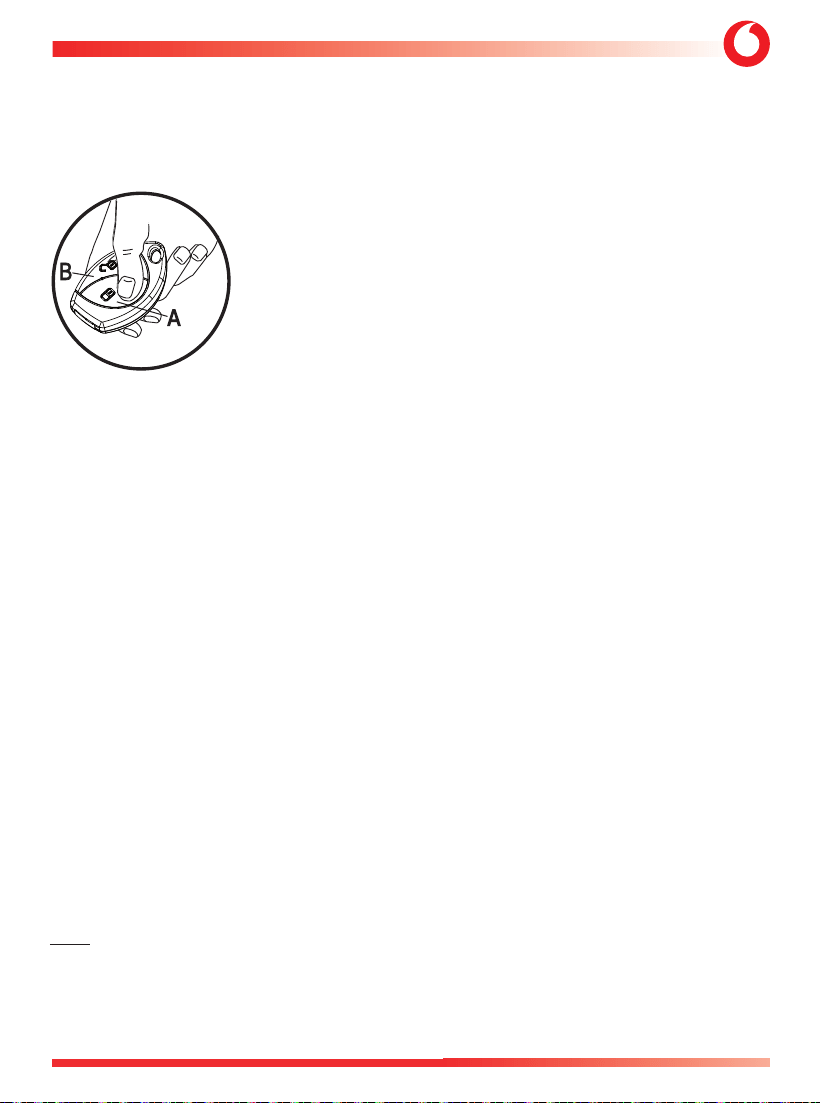
4.6 - Confort window closing with Vodafone Remote Control.
This is a native function, programmable only if it is available on the vehicle. Using and keeping

USER MANUAL 4821-4822-4823+1090 BLE HUB
28
C1 - Vodafone Public
pressed the Vodafone remote control “A” pushbutton, after the alarm is activated, you can close the
windows from a distance.
Warning: for safety reasons we recommend to close the windows remaining close to the vehicle.
4.7 - Anti hi-jacking (function not allowed for EU/ECE Markets*).
This function helps to prevent the vehicle hi-jack while driving, taking care also to the safety of the
driver. If the driver isn’t recognized, the system will consider him as an unauthorized person to drive
the vehicle, it will generate an alert sequence and it will not allow the engine starting after it has
been switched OFF.
The Anti hi-jacking is configurable into two different modes:
Mode 1 (AHJ1)
- Anti-jacking activation when the door is opened and closed and continuous recognition of the Driver Card
or Digital Driver Card.
During normal vehicle use, the system recognizes the owner in three ways:
• by entering the first two digits of the PIN code on the emergency panel;
• by pressing an external button (if installed);
• by using the Driver Card or Digital Driver Card, if learned.
The system must recognize the owner every time the engine is started or when the driver's door is opened
and closed while the engine is ON.
If recognition doesn’t happen within 60 s, the LED of the system starts to flash quickly, reporting the failed
recognition of the card for an additional 30 s.
Expired this time , the system generates an alert sequence with the engine ON or OFF , for which the
sequence may occur while driving. The engine crank inhibition is activated when the instrument panel is
OFF, making it impossible to start the engine.
To exit the anti hi-jacking function, enter the four-digit PIN code or press the hidden button, or by the
automatic Driver Card recognition or
pushing the push-button on the App Automotive Secure Access
.
If the Driver Card is switched OFF, to deactivate the anti hi-jacking function, press its push-button to allow
the recognition.
The anti hi-jacking function will be reactivated when the driver's door is opened and closed with the
instrument panel ON or when the instrument panel is turned OFF and ON again.
Mode 2 (AHJ2)
- Anti Hi-jacking activation when the door is opened and one-time recognition of the Driver Card or Digital
Driver Card.

4821-4822-4823+1090 BLE HUB USER MANUAL
29
C1 - Vodafone Public
During the normal usage of the vehicle the owner is recognized by the system in three ways:
• by entering the first two digits of the PIN code on the emergency panel;
• by pressing an external button (activating the function up to point 24);
• by using the Driver Card or Digital Driver Card, if learned.
The system must recognize the owner every time the engine is started or when the driver's door is opened
while the engine is ON. In this situation, Driver Card recognition becomes continuous until the first 60 s
elapse. If recognition does not occur within 60 s, the LED of the system starts to flash quickly, reporting
the failed recognition of the card for an additional 30 s. Expired this time , the system generates an alert
sequence. The engine crank inhibition is activated when the instrument panel is OFF, making it impossible
to start the engine.
To exit the anti hi-jack function, enter the four digits of the Pin Code or press the hidden external button or
by the Driver Card automatic recognition; if the Driver Card is switched OFF, to deactivate the anti hi-jacking
press its push-button to allow the recognition.
The anti hi-jack function will be reactivated when the driver's door is opened with the instrument panel ON
or when the instrument panel is turned OFF and ON again.
* Note: this function is disabled to comply with European and ECE regulations. Activating it invalidates the
EC type approval. It can only be used in non-European countries, provided the feature does not conflict with
local regulations. In any case, activation is only permitted by an authorized center and is not possible for the
end user.
4.8 - HIGH SECURITY SYSTEM (HSS)
NORMAL Mode
With this function enabled, iif with system armed the unlocking button on the original remote control is
pressed, the system will not disarm completely but will enter in a pre-deactivation state, where detection of
the doors, installed sensors, and the instrument panel will be delayed by 30 s to allow for driver recognition.
The system can recognize the driver in three ways:
• Entering the first two digits of the PIN code on the control panel;
• Pressing a hidden button, if installed (activating the analog input recognition function);
• Using the Driver Card or Digital Driver Card, if paired.
If the driver is not recognized, the system will activate the alarm after 30 s of opening one of the doors.
LIGHT Mode
The operation is the same as in NORMAL mode, except for the pre-disarming, which excludes the alarms
caused by the US, levl monitor, driver's door, other doors, trunk, and sensors.

USER MANUAL 4821-4822-4823+1090 BLE HUB
30
C1 - Vodafone Public
4.9 - Garage mode (if enabled).
This function allows to temporarily disable all automatic protection functionalities of the system. It can be
used, as an example, when you need to leave the vehicle at a workshop for maintenance to avoid the automatic
activation of any functionality.
Activation
- Open driver side door.
- Turn the instrument cluster ON.
- Enter the complete emergency PIN Code (4 digits) on the emergency panel pushbutton.
- A long flash of the direction indicators and an acoustic signal confirm the activation.
There are 2 configurable Garage modes.
Mode 1:
The garage function remains active until the instrument cluster has been started or turned ON 10 times or
after the system is turned ON for the first time, after which the system returns to normal operation (all the
automatic activation functions are reactivated).
5 flashes of the direction indicators and 5 audible signals confirm the deactivation.
Mode 2
(option not allowed for EU/ECE Markets**):
The garage function remains active until it is deactivated, following the same procedure performed
for activation.
5 flashes of the direction indicators and 5 acoustic signals confirm the deactivation
.
**Note: the function Mode 2 is not in compliance with European and ECE regulation. Its activation
voids the CE homologation. It can be used only in the extra-European countries, if the functionality
is not in conflict with the local rules.
4.10 - Panic alarm from Vodafone remote control (optional).
If the function is activated, pressing the “A”push-button of the remote control, with the system armed
and after the inhibition time of 25 s has elapsed, it allows to generate a 10 s panic alarm during the
alarm, the direction indicators will flash..
By activating this function it will not be possible to activate the function described in step 4.11.
4.11 - Car finder by Vodafone remote control (optional).
Alternatively to Panic alarm function, it is possible to enable the Car Finder function by pressing the
“A”push-button of the remote control, with the system armed and after the inhibition time of 25 s
has elapsed; it allows to find your vehicle more easily in a parking area. By activating this function it
will not be possible to activate the function described in step 4.10
4821-4822-4823+1090 BLE HUB USER MANUAL
31
C1 - Vodafone Public
4.12 - Check of number of Driver Cards and Remote Controls learned.
In order to access of this function, the conditions are the follow:
• Instrument cluster ON
• Driver Door Closed
• Bonnet Closed
• Pressing for more than 5 s the control panel push button until the acoustic signal 2 times and blinkers
(direction indicators) will flash 2 times (entering).
• To confirm entry into the procedure, the LED goes ON for 2 s and then goes OFF for 2 s, after which the
LED lights up a number of times corresponding to the number of Driver Cards and Remote Controls
learned (as described below).
• LED 2 s ON + 2 s OFF followed by LED 0.5 s ON and 1 s OFF for each memorized Driver Card learned.
Followed by:
LED 2 s ON + 2 s OFF followed by LED 1 s ON and 1 s OFF for each memorized Remote Control learned.
NOTE:
- If no Driver Cards and/or Remote Controls are learned, only the LED 2 s ON + 2 s OFF signal
will be displayed.
- The signal is displayed only once. To review the number of learned Driver Cards and Remote Controls,
press the panel push button again for 5 s; the signal will be repeated.
To exit the procedure, turn OFF the instrument cluster:
• The system will interrupt the sequence of reading the learned Driver Cards and Remote Controls numbers.
• Exiting the procedure is confirmed by 2 short beeps and 2 flashes of the direction indicators.
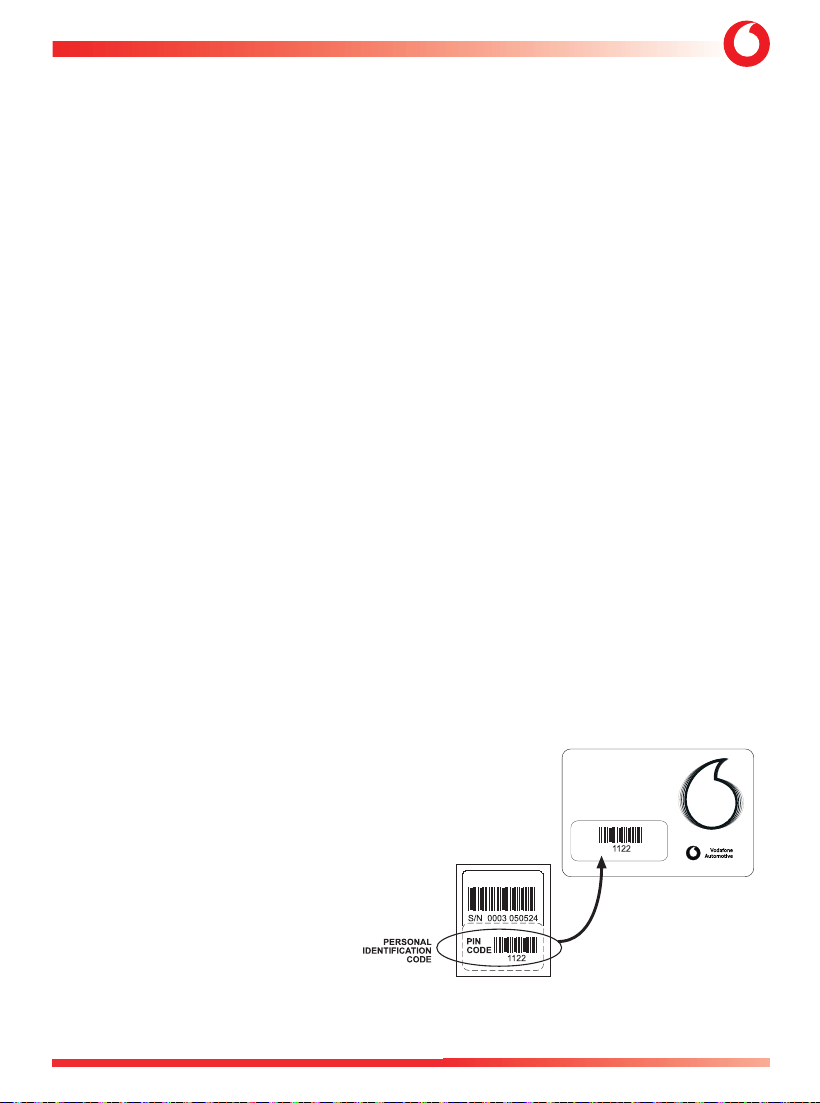
5. - PIN CODE.
The PIN Code is a four-digit code, preset in the factory and It is printed on a removable label located on the
back of the product which must be placed on the Pin Code Card by the installer..
It is very important to keep the PIN Code,
since it allows you to disarm the system
in the event of loss or malfunction of the
remote controls.
It is also used for other functions (driver
recognition code and activation code for
some functions). You can ask your installer
to customize the PIN Code, who will ask you
for the PIN Code Card with the code in use.
WARNING: If you’ve requested a personalized
PIN code, be careful not to forget it, as it will no
longer be possible to request it from Vodafone
if you lose it. We recommend writing it on the PIN Code Card.
CODE
4C482XXXX
USER MANUAL 4821-4822-4823+1090 BLE HUB
32
C1 - Vodafone Public
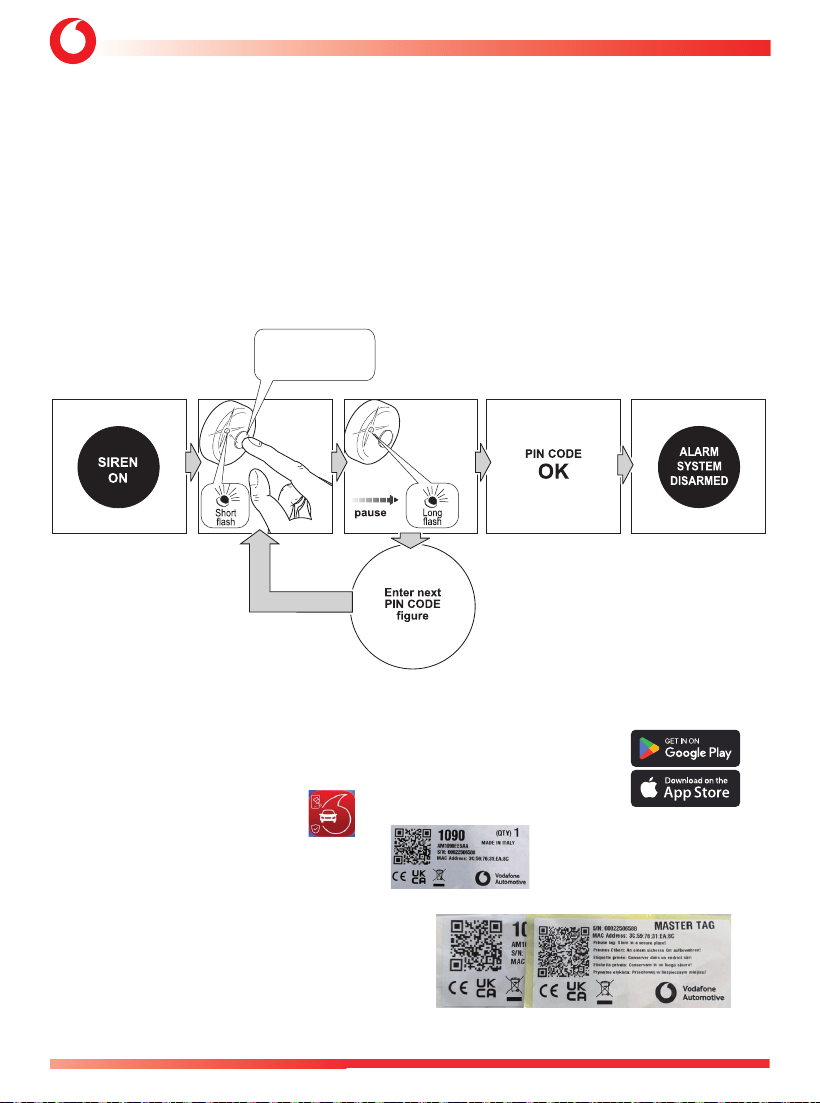
6. - EMERGENCY OVERRIDE WITH PIN CODE.
If the vehicle original remote control get lost or if it doesn’t work, open the door with the mechanical key
and turn the instrument cluster ON.
If the system doesn’t disarm automatically proceed as follow:
press the emergency panel push-button for a number of times corresponding to the first digit of the PIN
Code. Each push-button pressure is confirmed by a quick flash of the LED. Make a longer pause to let the
system understand that you’ve finished to enter the first digit, a longer flashing of the LED will confirm
it. Do the same for the remaining digits, as soon as all four digits will be entered the system will disarm.
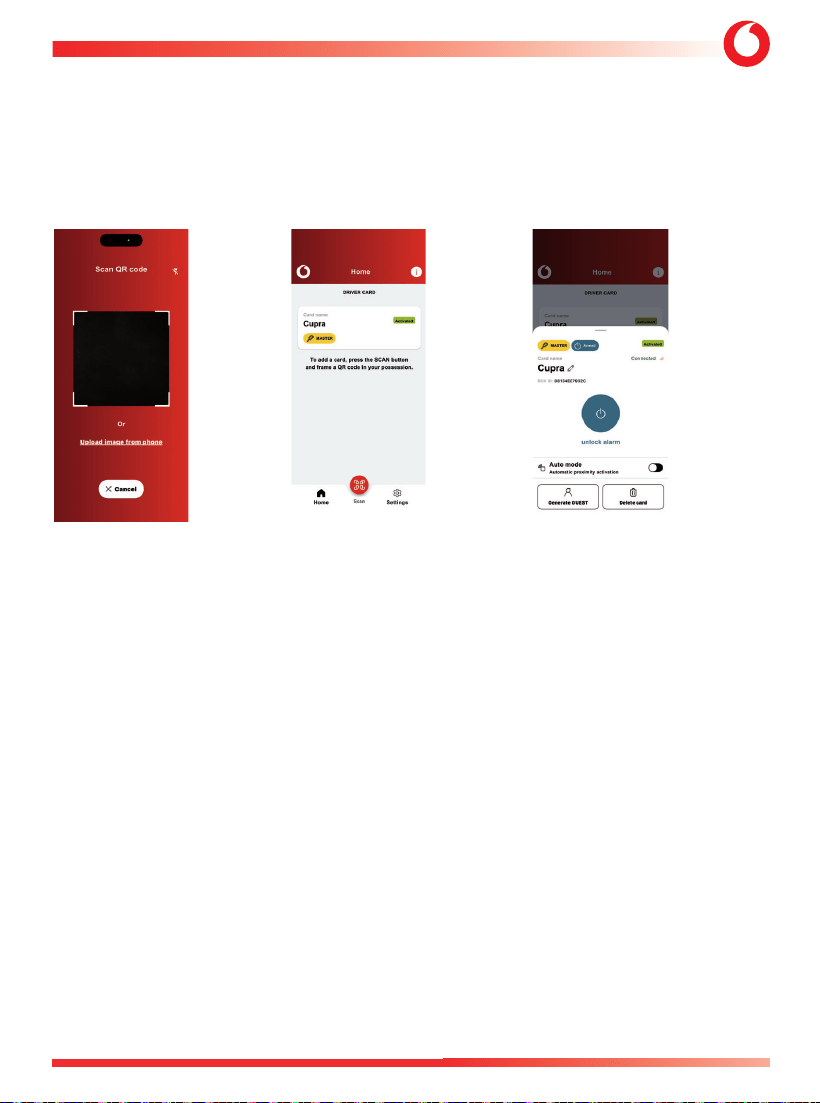
7. - 1090 BLE HUB QUICK GUIDE (OPTIONAL) - A complete 1090+APP manual will be available in
the APP “Automotive Secure Access”.
7.1 - Download the APP “Automotive Secure Access” on Your Phone from the sites:
7.2 - Install the APP on Your Phone
7.3 - Open the sealed letter received by Installer
7.4 - Extract the Master key contained inside the letter
Press the push-button
for a number of times
equal to the first digit
in the PIN code.
4821-4822-4823+1090 BLE HUB USER MANUAL
33
C1 - Vodafone Public
7.5 - Open the APP 7.6 - Add the first DDC 7.7 - Select the DDC added:
Scan the QR code (DIGITAL DRIVER CARD) Now You are ready to operate
on the Master Key. and set/unset the Alarm 482x
USER MANUAL 4821-4822-4823+1090 BLE HUB
34
C1 - Vodafone Public
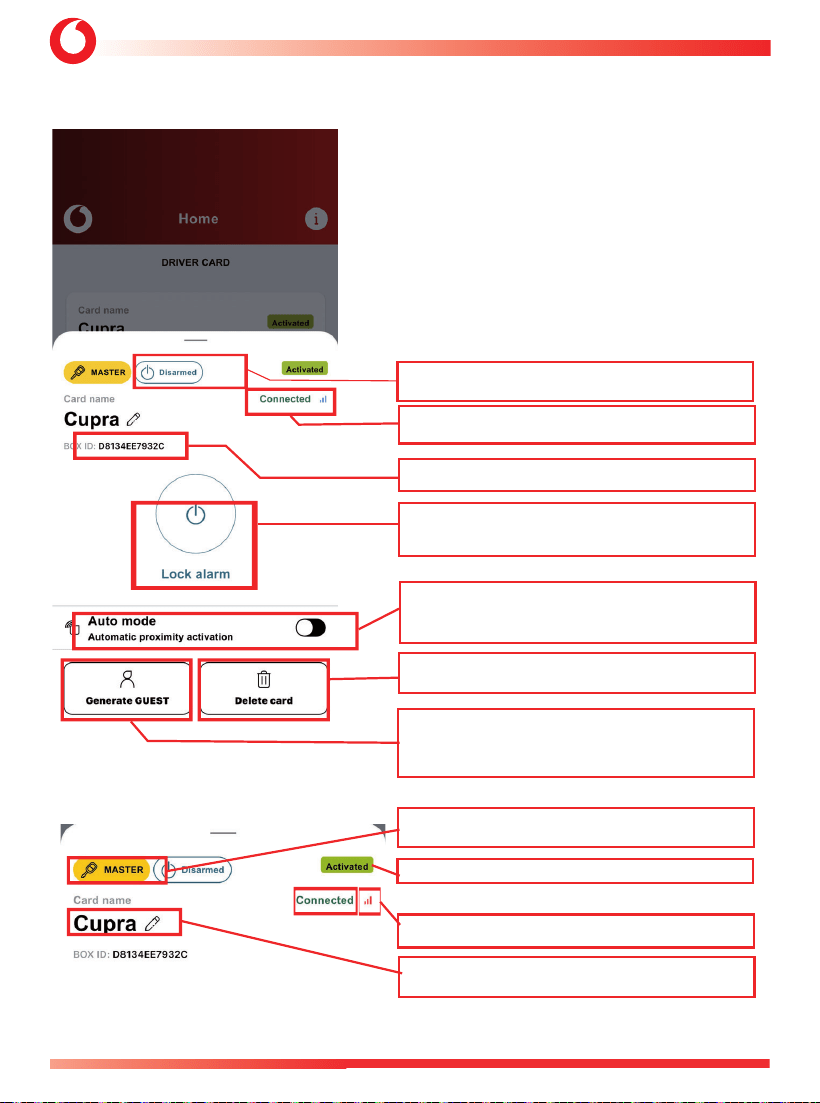
LEGENDA:
Status of Alarm System: Armed or Disarmed.
Status of Bluetooth link APP-1090: Connected-Not Connected, with
field level.
1090 connected MAC (Media Access Control) Number: unique
1090 HW.
Button to Arm/Disarm Alarm System in Active Mode (Default Mode).
Switch to select Automatic Mode of Driver Card: Arm/Disarm of
Alarm is automatic, based on proximity of Driver Phone.
Cancel selected Driver Card.
Generate GUEST Driver Card: The Master Driver Card can generate
other GUEST Driver cards, with possible time limit of functionality
if requested.
Type of Driver Card: Master/Principale (created by Master key) or
Guest.
Status of Driver Card: Active or Not Active.
Presence of 1090 BLE Bluetooth Signal.
Editable name of selected Driver Cards.
4821-4822-4823+1090 BLE HUB USER MANUAL
35
C1 - Vodafone Public
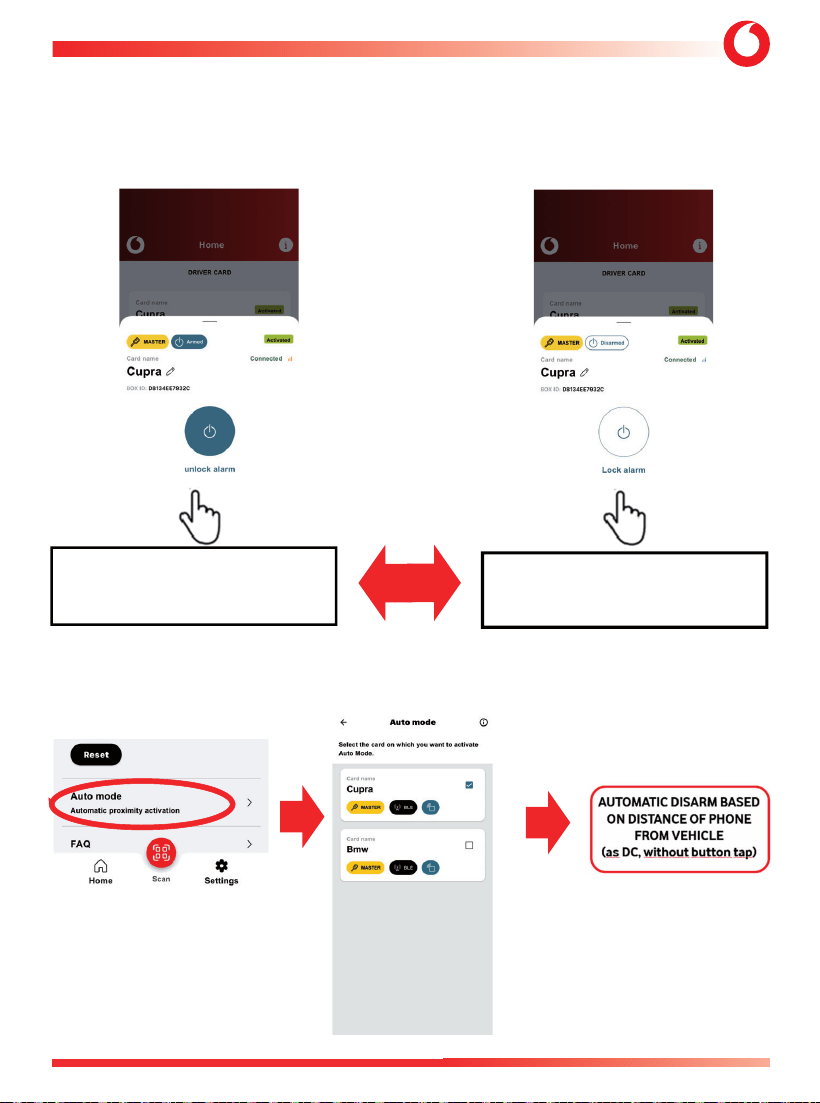
8. -OPERATIVE MODES FOR 1090.
1) ACTIVE MODE (arm/disarm voluntary, tapping the central button of the DDC ) – DEFAULT MODE
2) AUTOMATIC MODE (arm/disarm automatic, based on proximity to vehicle): choose it from initial SETTINGS
menu
ACTIVE MODE: ARMED TAP
BUTTON -> DISARMED
ACTIVE MODE: DISARMED TAP
BUTTON -> ARMED
USER MANUAL 4821-4822-4823+1090 BLE HUB
36
C1 - Vodafone Public
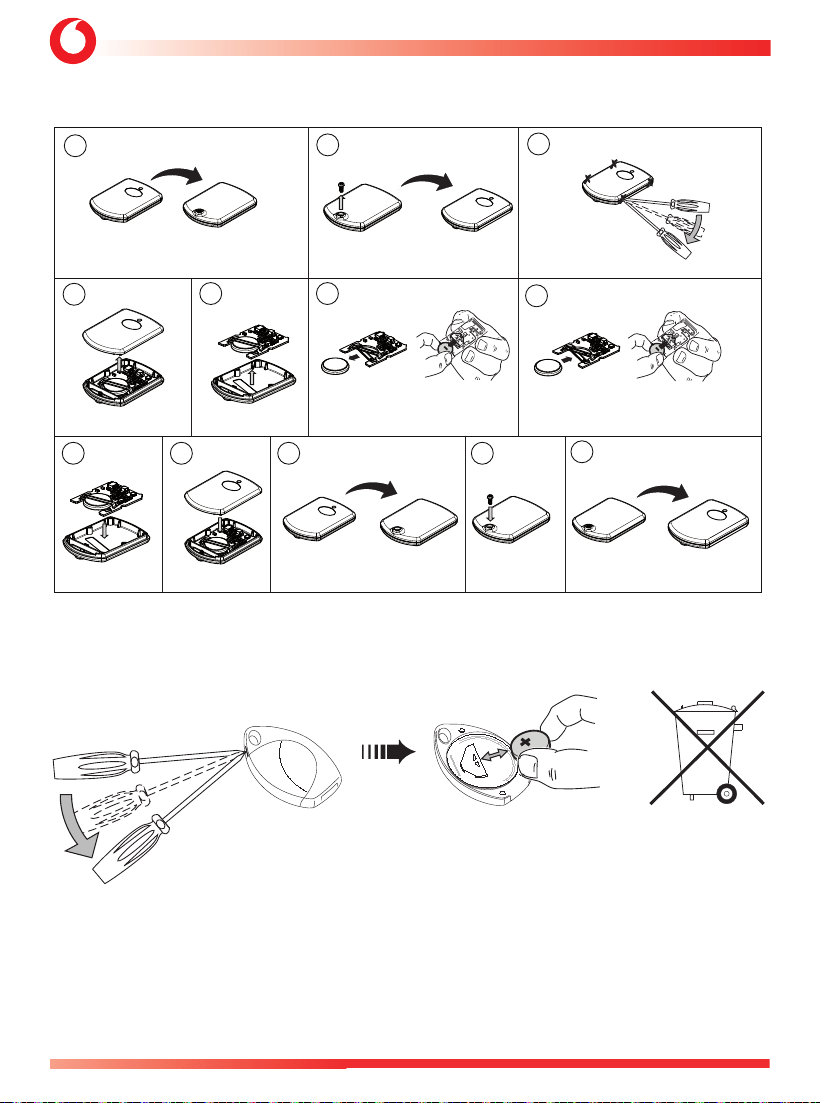
1
2
3
4
5 6
7
8 9 10 11
12
9 - DRIVER CARD (OPTIONAL) BATTERY REPLACEMENT.
10. - REMOTE CONTROL (OPTIONAL) BATTERY REPLACEMENT.

4821-4822-4823+1090 BLE HUB USER MANUAL
37
C1 - Vodafone Public
11. - WARRANTY CONDITIONS.
This product is guaranteed for 24 months from the date of purchase, validated by receipt or invoice. The
warranty will be null and void if the product shows signs of tampering, incorrect installation, damage caused
by falling or transport, negligence and anything else not imputable to manufacturing defects.
In the event of improper installation of the system, the manufacturer shall not be liable to compensate
for damages:
- of any kind and direct or indirect;
- to things or to persons.
To benefit from warranty coverage, contact your authorized dealer with adequate documentation showing
the date of purchase.
FOR MARKET ONLY
Thatcham recommends to its insurer members that the installations of certified products within the
aftermarket are registered with an independent installation registration system which can be accessed
by insurance companies. If seeking insurer recognition for the fitment of this product it is likely that the
installation will have to be carried out by a Thatcham recognised installer.
A full list of Thatcham recognised installers is available at
www.thatcham.org/tri/home
12. - CONFORMITY DECLARATION.
Declaration of conformity – Antitheft System Type 4820
Hereby, Vodafone Automotive SpA declares that the radio equipment type 4820 is in compliance
with Directive 2014/53/EU and with the UK Radio Equipment Regulations 2017 . The full texts of
the EU and UK Declarations of Conformity are available at the following internet address automotive.
vodafone.com, in the section download.
The device bears the following marks:
The device has the following RF parameters:
869,5 MHz - 869,9 MHz / 0 dBm: optional TX for wireless siren connection
433,9 MHz: optional RX for remote key connection
Note:
in order to avoid human exposure to electromagnetic fields the device is installed with a
distance greater than 0.2 m with respect to the body of vehicle occupants.
UK
USER MANUAL 4821-4822-4823+1090 BLE HUB
38
C1 - Vodafone Public
Declaration of Conformity – Remote transmitters Types 2771–2772–8772 (optional)
Hereby, Vodafone Automotive SpA declares that the radio equipment types 2771–2772–8772
(optional)
are in compliance with Directive 2014/53/EU and with the UK Radio Equipment Regulations
2017. The full texts of the EU and UK Declarations of Conformity are available at the following internet
address automotive.vodafone.com, in the section download.
The devices bear the following marks:
The devices have the following RF parameters: 2771/2772 = 433,9 MHz, -16 dBm (max); 8772
(optional) = 433,9 MHz, -12 dBm
Declaration of Conformity – Warning Siren type 5365 (optional)
Hereby, Vodafone Automotive SpA declares that the radio equipment type 5365 is in compliance
with Directive 2014/53/EU and with the UK Radio Equipment Regulations 2017 . The full texts of
the EU and UK Declarations of Conformity are available at the following internet address automotive.
vodafone.com, in the section download.
The device bears the following marks:
The device has the following RF parameters: 869,5 MHz - 869,9 MHz; receiver only.
Manufacturer: Vodafone Automotive SpA, via Astico 41, 21100 Varese, Italy Tel. + 39 332 825111
UK Importer: Vodafone Automotive UK, Shuttleworth House, 21 Bridgewater Close, Network 65
Business Park, Hapton, Burnley, BB11 5TE (GB) Tel. + 44 (0) 1282 473700
EMF
Note: in order to avoid human exposure to electromagnetic fields the device is installed with a distance
greater than 0.2 m with respect to the body of vehicle occupants.
The power measurements emitted by the module demonstrate compliance with the legal limits of the
EN IEC 62311:2020 standard under the installation conditions described; the values are reported in the
following table:
Band Maximum Measured Power
(dBm/mW@2402MHz)
Limits
(W/m2)
Results
(W/m2@20 cm)
Judgement
2402 MHz ÷ 2480 MHz -1,22 dBm / 0,76 mW
10 0,15 Compliant
Manufacturer: Vodafone Automotive SpA, via Astico 41, 21100 Varese, Italy Tel. + 39 0332 825111
UK Importer: Vodafone Automotive UK, Shuttleworth House, 21 Bridgewater Close, Network 65 Business
Park, Hapton, Burnley, BB11 5TE (GB) Tel. + 44 (0) 1282 473700

4821-4822-4823+1090 BLE HUB USER MANUAL
39
C1 - Vodafone Public
Note: The following part is provided in English only because applicable for US market
FCC statement for type 1090
This device complies with Part 15 of the FCC.
Operation is subject to the following two conditions:
(1) this device may not cause harmful interference, and
(2) this device must accept any interference received, including interference that may cause
undesired operation.
Changes or modifications made to this equipment not expressly approved by Vodafone Automotive may
void the FCC authorization to operate this equipment.
This equipment has been tested and found to comply with the limits for a Class B digital device, pursuant
to Part 15 of the FCC Rules. These limits are designed to provide reasonable protection against harmful
interference in a residential installation. This equipment generates, uses and can radiate radio frequency
energy and, if not installed and used in accordance with the instructions, may cause harmful interference
to radio communications. However, there is no guarantee that interference will not occur in a particular
installation. If this equipment does cause harmful interference to radio or television reception, which
can be determined by turning the equipment off and on, the user is encouraged to try to correct the
interference by one or more of the following measures:
Reorient or relocate the receiving antenna.
Increase the separation between the equipment and receiver.
Connect the equipment into an outlet on a circuit different from that to which the receiver is connected.
Consult the dealer or an experienced radio/TV technician for help.
This equipment complies with FCC radiation exposure limits set forth for an uncontrolled environment.
This equipment should be installed and operated with minimum distance of 20 cm between the radiator
and your body.
This transmitter must not be co-located or operating in conjunction with any other antenna or transmitter.

Vodafone Automotive SpA
via Astico 41 - 21100 VARESE - ITALY
automotive.vodafone.com
06DE4849A - 07/26