2. Charge Before Use
· Please fully charge the device to activate for first use.
· If after factory reset on the App, please charge to power on.
3. Bluetooth Pairing
1. Open the "JCRing", and register or log in.
2. Click "+" on the APP homepage and select the ring to
connect.
Note: During the pairing process, please make sure that the
Bluetooth of the mobile phone are turned on and the distance
between the mobile phone and the ring is within the effective
connection range.
4. Charging Instruction
1. Plug the wireless charging case into a Type-C charging
cable, and then connect the other end of the Type-C
charging cable to a 5V/1A USB power source. Place the
smart ring into the wireless charging case, pressing it
down to the bottom of the groove to ensure the ring is
properly positioned.
2. When the ring is charging, the green indicator light on the
ring will blink slowly; once fully charged, the indicator light
is on.
3. When charging the charging case, the green indicator
light on the case blinks slowly, and after fully charged, the
indicator light is on.
Note: During the wireless charging process, the ring will heat
slightly, which is a normal phenomenon. The charging case
is not water resistant and is intended for indoor use only. Do
not use or store it in humid environments like bathrooms, and
please prevent it from coming into contact with conductive
materials, such as liquids, dust, metal powders and pencil
leads.
Smart Health Ring
X2B
User Manual
Product Introduction
X2B is a smart health ring which can monitor multiple body
vital signs all the day and night.
Note: The smart ring is not a medical device and is not
intended to diagnose or monitor any disease or medical
condition.
1
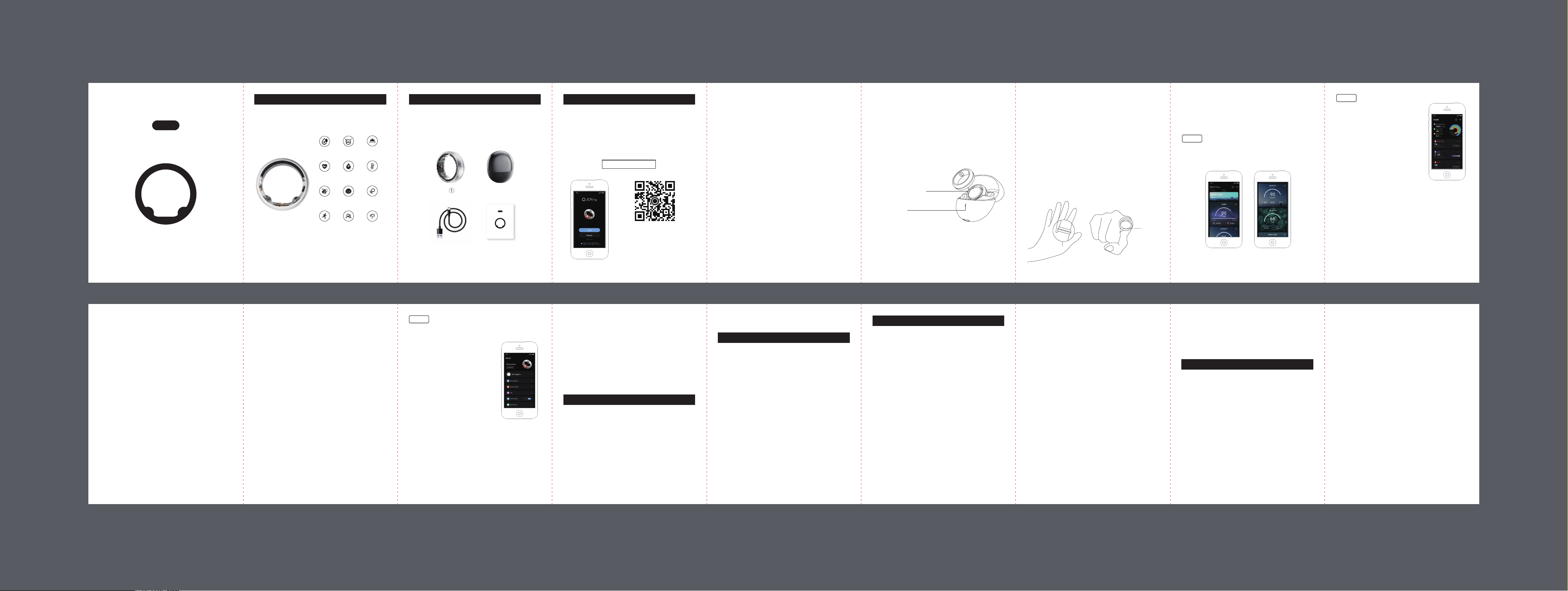
Package Content
➀ Smart ring
➁ Wireless charging case
➂ Type-C charging cable
➃ User manual
2
1. Download the APP
· Scan the QR code below or search JCRing on Google
Play or iOS App Store to download our JCRing App.
· Choose device identified in App and connect to your
smart ring.
JCRing
3
Instruction
4 5 6
Note: Please ensure that your
Android version is 5.0 or later,
iOS version is 10.0 or later. The
ring supports Bluetooth 5.0
connection.
16 171514131211109
7 8
➀ ➁
➂ ➃
· HRV
It will measure automatically as per the time interval you set.
The app will show the value and the state of Low, Normal,
High, and Excellent.
· Stress
It will measure automatically as per the time interval you set.
The app will show the value and the state of Calm, Moderate,
Stressed, and Severe.
· Non-Invasive Blood Glucose Risk Assessment
Please enter your personal information before using this
function.
1. Start measuring from the APP manually.
2. Follow the APP instructions to complete the info filling
in to start the measurement.
3. The result of measurement would be displayed as normal
or abnormal.
4. Perform at least 3 days of measurements in a period of 7
days to know your diabetic risk and check the Risk
Assessment Card to help you lead a healthier lifestyle.
· Skin Temperature Trend Monitor
It can detect your skin temperature trend and display
Smart Health Ring
X2B
User Manual
Not a medical device
This ring is not a medical device and should not be used as
a substitute for professional medical judgment. It is not
designed or intended for use in the diagnosis of disease or
other conditions, or in the cure, mitigation, treatment, or
prevention of any condition or disease. Please consult your
healthcare professional prior to making any decisions
related to your health.
Use, care and maintenance
Finger size can vary depending on the time of the day, and
sometimes it may be difficult to remove the ring from your
finger. In case the ring gets stuck:
→ Use cold water and gentle soap to wet your finger, and
slowly twist the ring to remove it.
→ Hold your hand up above your heart until the blood
pressure gets lower, and then try to remove it.
→ In cases of emergency and/or discomfort, whenyou
can’t remove the ring yourself, seekimmediate medical
attention.
Use a soft cloth or hand wash with mild soap and water to
clean the ring.
Your ring can be worn during showers, baths, swimming,
and snorkeling.
Try to avoid wearing the ring when strength training, working
with a shovel or other heavy tools, or carrying heavy objects
made of metal, ceramics or stone. In addition, try to avoid
wearing the ring next to other rings or objects which are
made of metal, ceramics, stones or diamonds. The ring may
get scratched and can itself scratch softer metal jewelry or
other objects in close contact with the ring like phone covers
made of gold, silver, or aluminum. Some ceramic phone
covers with a soft coating may also get scratched.
Keep the ring away from children. This product is not
intended for individuals under the age of 18. Seek immediate
medical attention if you know or suspect that a child has
swallowed the ring. Do not leave the ring exposed to heat,
such as in a vehicle or in the sun. Do not puncture the ring
or its battery.
Please avoid handling batteries, or working on devices and
with machinery that contain batteries while wearing your
ring. In certain cases, where both the cathode and the
anode of another battery touch the ring, there is a risk of a
short circuit which is similar to standard metallic rings. This
can result in a potentially dangerous shock. Please take the
proper precautions to avoid these situations.
Failure to follow these safety instructions could result in fire,
electric shock, injury, or damage to the device or other
property. Read all the safety information below before using
the device.
Safety Notices
Warranty: 12 months
BT Version: BLE 5.0
BT Range: 2 meters
Battery: Rechargeable 14.5mAh - 21.5mAh depending
on the ring size, Lipo battery, non-replaceable
Data Memory: 15 Days
Waterproof: 5ATM
Activity Time: Max 99h59min
Calories Burned: Max 9999.9kcal
Running & Walking Distance: Max 999.99km
Operating Temperature Range: -10–52
°
C / 14–125
°
F
Battery in charging case: 200mAh, Lipo battery
Specifications
Any changes or modifications not expressly approved by
the party responsible for compliance could void the user’s
authority to operate the equipment.
This device complies with Part 15 of the FCC Rules.
Operation is subject to the following two conditions:
(1) this device may not cause harmful interference, and
(2) this device must accept any interference received,
including interference that may cause undesired operation.
Note: This equipment has been tested and found to comply
with the limits for a Class B digital device, pursuant to Part
15 of the FCC Rules. These limits are designed to provide
reasonable protection against harmful interference in a
residential installation. This equipment generates, uses, and
can radiate radio frequency energy, and if not installed and
used in accordance with the instructions, may cause
harmful interference to radio communications. However,
there is no guarantee that interference will not occur in a
particular installation. If this equipment does cause harmful
interference to radio or television reception, which can be
determined by turning the equipment off and on, the user is
encouraged to try to correct the interference by one or more
of the following measures:
-- Reorient or relocate the receiving antenna.
-- Increase the separation between the equipment and
receiver.
-- Connect the equipment into an outlet on a circuit different
from that to which the receiver is connected.
-- Consult the dealer or an experienced radio/TV technician
for help.
FCC RF exposure statement:
The device has been evaluated to meet general RF exposure
requirement. The device can be used in portable exposure
condition without restriction.
FCC Requirement
· Device Setting
Auto Health Monitor:The default
auto health monitor intervals are every
10 min for heart rate, every 30 min for
SpO2 and every 60 min for Vital. You
can change the interval as you need
except the temperature trend. the
shorter the interval is set, the faster
the battery will drain.
*
Set Unit
Set the unit of the skin temperature
change, distance, height, and weight.
*
Goal Setting
Personalize your goals for steps, distance, calories and
sleep hour per day.
Goal Setting:Personalize your goals for steps, distance,
calories and sleep hour per day.
Factory Reset:After factory reset, all device data will be
deleted. Please charge to reboot.
About
*
Unit Setting
Set the unit of the temperature change, distance, height,
and weight.
*
FAQ
*
Device Update (OTA)
Remind you if a new firmware version has been released, If
so, please follow the steps to upgrade to the latest version.
*
Others: Data Sharing, About JCRing, Get Support, and
App Version.
Troubleshooting
If the ring doesn’t pair with your smartphone
These sepcifications and Apps are subject to change
without notice.
1. Make sure your ring is turned on.
2. Check the App to make sure Bluetooth permissions are
turned on. This should be in your Bluetooth settings.
3. Check your smartphone to ensure Bluetooth is on.
4. Restart the App and try to repair the ring.
If the ring isn’t measuring any data
Please contact our support team.
If the ring battery is draining too quickly
1. Calibrate your battery by charging it for at least three hours.
2. Start using your ring again as you normally would.
3. Contact our support team if the problem persists.
If the ring causes an allergic reaction
Please stop using the device right away. In the rare event of
an anaphylactic reaction, seek medical attention immediately.
If the issue isn’t mentioned in these tips
Please contact our support team and report the issue in
detail.
5. How to Wear Your Ring Correctly?
1. Please select a ring size that fits your fingers comfortably
to avoid wearing it too tightly.
2. For optimal performance and accuracy, it is recommended
Health
View your detailed daily health data
and reports: Steps, Calories, Distance,
Sleep, Heart Rate, SpO2, HRV, Stress,
Non-Invasive Blood Glucose Risk
Assessment, Temperature Trend,
Women Health, VO2 Max, and Member
Health.
· Sleep
The ring will monitor your sleep
automatically and shows the detailed
sleep quality like Sleep Duration, Sleep
Stages (Awake, REM, Light and Deep Sleep, Naps), Sleep
Efficiency, Sleep Latency, Avg Heart Rate, Avg SpO2, and
Avg HRV.
· Heart Rate
Start measuring from the APP manually or it will measure
automatically as you set.
The app will show the heart rate data and graphics.
· SpO2
Start measuring from the APP manually or it will measure
automatically as you set.
App Operation
After activating the device, please pair it with the JCRing
App for usage.
Home
It gives the glance of your daily health situation: Quality of
Life, Sleep, Activity, Balance (Stress), Heart Rate, SpO2.
Sensor
Area
to wear the ring on the index finger of your non-dominant
hand. It can also be worn on any other finger, ensuring
that the ring is securely and comfortably fitted on your
finger.
3. When wearing the ring, please ensure that the sensor is
facing the palm side of your finger for better measurement
results.
4. When choosing to manually measure heart rate or blood
oxygen, please try to remain still for more accurate
measurement data.
Note: If you experience skin allergies at the wearing site,
please stop using it immediately and consult a doctor. If the
ring gets stuck when attempting to remove it, try wetting your
fingers with cold water and mild soap, and gently twist the
ring to take it off.
24/7 Heart
Rate
SpO2
Women
Health
HRV Stress
Sleep
Tracking
5ATM
Activity
Tracking
Non-Invasive
Blood Glucose
Risk Assessment
VO2 Max
Skin Temperature
Trend
Member
Health
The app will show the SpO2 data and status.
detailed daily/weekly/monthly reports to help you better
track skin temperature changes.
· VO2 Max
Start measuring from the APP manually.
You can check the value of VO2 Max and Fitness Age on
the APP.
· Women Health
Track the period and pregnancy cycle and the feature is
only visible when the gender is set as female.
· Member Health
Create your health group, set up alerts for abnormal health
data, and track the health of your group members in real
time, no matter how far away.
Note: Place the smart
ring into the groove in
the charging case.
Indicator light