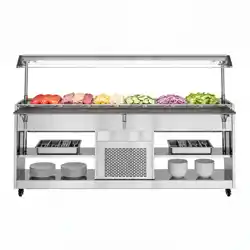
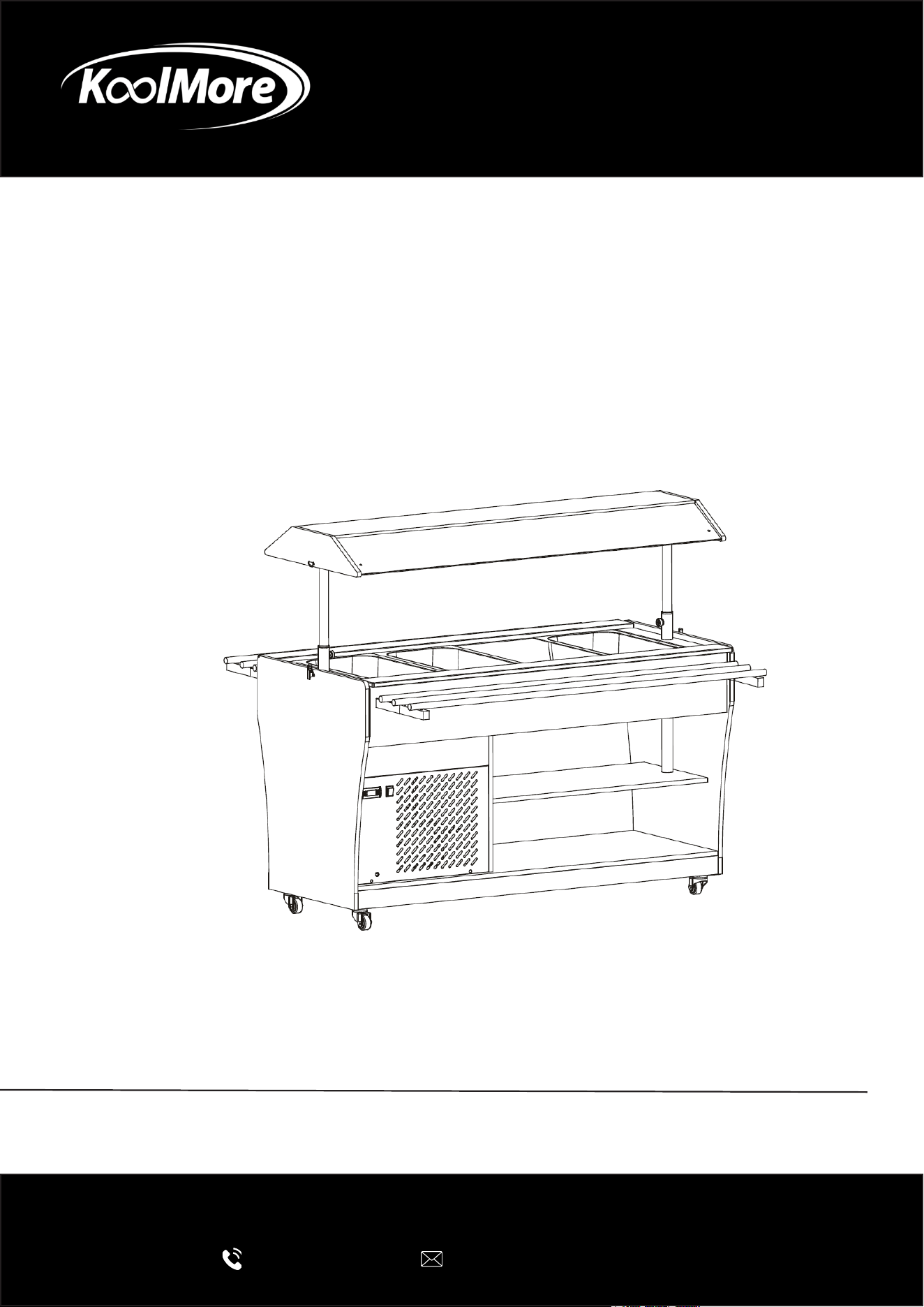
BUFFET TABLE
KoolMore Commercial Refrigerated Buffet
Table
USER MANUAL
Before use, please read these instructions carefully to ensure proper
operation and optimal performance.
For any service related issues, please contact us:
718-576-6342
support@koolmore.com
Models: KM-RBT-48ACS, KM-RBT-59ACS, KM-RBT-84ACS,
KM-RBT-48ACW, KM-RBT-59ACW, KM-RBT-84ACW
Stay informed with the latest information for your
KoolMore appliance.
Scan the QR code below to access the most up-to-date user manual.
If you need any assistance or have questions, our customer support
team is here to help.
Phone: 718-576-6342 Email: support@koolmore.com
Please write down the model number and serial number below for future reference. Both numbers are located on the
rating label on the back of your unit or inside the unit and are needed to obtain warranty service. You may also want
to staple your receipt to this manual as it is your proof of purchase and may also be needed for service
under warranty.
Model Number:
Serial Number:
Date of Purchase:
To better serve you, please do the following before contacting customer service:
If you received a damaged product, immediately contact the retailer or dealer that sold you the product.
Read and follow this User Manual carefully to help you install, use, and maintain your unit.
Refer to the Troubleshooting section of this manual as it will help you diagnose and solve many common issues.

3
Contents
Safety ............................................................................................. 4
Product Overview ........................................................................... 6
Installation ..................................................................................... 7
Operation ....................................................................................... 10
Cleaning and Maintenance ............................................................. 12
Warranty ......................................................................................... 14
4
General Safety Information
This manual contains important information for the safe installation, operation, and maintenance
of this refrigerated buffet table. Read this manual completely before using the appliance.
Keep this manual available for future reference and ensure all operators are familiar with its con-
tents.
Failure to follow the instructions and safety warnings in this manual may result in property dam-
age, equipment failure, personal injury, or unsafe food temperatures.
Safety Symbols
WARNING
Indicates a potentially hazardous situation that could result in serious injury or death if not avoid-
ed.
CAUTION
Indicates a potentially hazardous situation that may result in minor injury or equipment damage if
not avoided.
NOTICE
Indicates important operating, installation, or maintenance information.
Intended Use
This appliance is intended for commercial indoor use only.
The refrigerated buffet table is designed to hold and display pre-chilled food products in compati-
ble food pans and containers.
WARNING
• Do not use this appliance for purposes other than its intended use.
• This appliance is not designed to cool hot food rapidly.
• Food should be properly chilled before being placed in the buffet table.
• Do not store hazardous, ammable, or explosive materials inside or near the appliance.
• Do not modify the appliance or its components.
CAUTION
• Service and repairs must be performed by qualied personnel.
• Use only manufacturer-approved replacement parts and accessories.
• Operating the appliance outside of its intended application may result in equipment damage
and void the warranty.
Safety
5
Safe Operation
• Operate the appliance only after it has been properly installed.
• Ensure all ventilation openings remain unobstructed.
• Do not overload shelves, pans, or work surfaces beyond their rated capacity.
• Keep hands clear of moving parts and electrical components during operation and mainte-
nance.
• Do not use the appliance if it is damaged or malfunctioning.
Child Safety
• This appliance is not intended for use by children.
• Children must be supervised to ensure they do not play with the appliance.
• Keep packaging materials away from children.
Food Safety
IMPORTANT
• Always maintain food at safe holding temperatures in accordance with local health regulations.
• Verify food temperatures regularly using a calibrated food thermometer.
• Discard food that has been held outside of safe temperature ranges.
• Follow all applicable local health, sanitation, and food safety codes.
Electrical Safety
WARNING
• Connect the appliance only to a properly grounded outlet of the correct voltage and frequency.
• Do not use extension cords or power strips.
• Do not operate the appliance with a damaged power cord or plug.
• Do not attempt to modify the electrical system.
• Disconnect power before cleaning, servicing, or performing maintenance
If the power cord becomes damaged, it must be replaced by the manufacturer, an authorized ser-
vice provider, or a similarly qualied technician.
Refrigerant Safety
WARNING
This appliance contains refrigerant and insulation materials that require special handling.
• Do not puncture or damage refrigerant lines.
• Do not use mechanical devices or other means to accelerate defrosting unless recommended
by the manufacturer.
• Keep open ames and ignition sources away from the appliance.
• Contact qualied service personnel if refrigerant leakage is suspected.
General Precautions
• Use the appliance indoors only.
• Keep this manual with the appliance at all times.
• If ownership of the appliance changes, provide this manual to the new owner.
• Keep all safety labels and warning decals clean and legible.
• Follow all applicable local electrical, health, safety, and building codes.
6
Product Overview
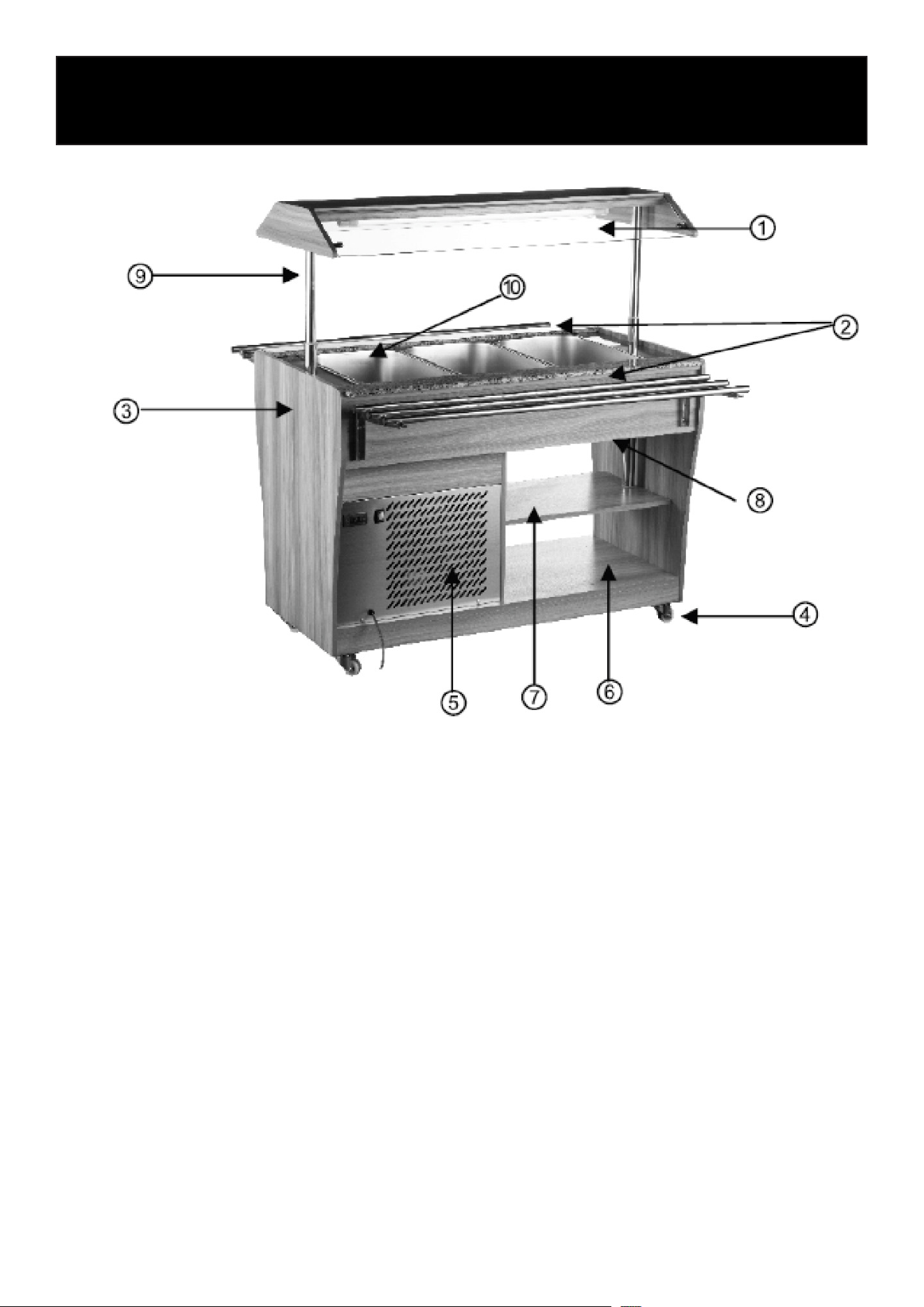
1. Illuminated Glass Canopy
2. Stainless Steel Work Rails
3. Cabinet Housing
4. Swivel Casters (2 Locking, 2 Non-Locking)
5. Condenser Air Vent
6. Lower Storage Shelf
7. Middle Storage Shelf
8. Drain Valve
9. Glass Canopy Support Posts
10. GN Pan Well

7
Delivery Inspection
Inspect the shipment immediately upon delivery for completeness and any signs of shipping dam-
age.
If visible damage is found, either refuse the shipment or note the damage on the carrier’s delivery
receipt before signing. Retain all packaging materials and contact the carrier promptly to le a
claim.
Any concealed damage discovered after unpacking should be reported to the carrier as soon as
possible.
Verify that all components and accessories are included. If any parts are missing, contact
KoolMore Customer Service before installing the unit.
WARNING
Failure to inspect the unit for shipping damage before installation may void freight claims. Do not
install or operate a damaged unit. Contact the carrier and KoolMore Customer Service immediate-
ly if damage is discovered.
Storage
Keep the unit in its original packaging until installation.
If storage is required prior to installation:
• Store indoors only.
• Keep the unit in a clean, dry location.
• Protect from direct sunlight.
• Avoid excessive vibration, impact, or mechanical shock.
• Do not expose the unit to rain, moisture, or standing water.
• For storage periods longer than three months, inspect the packaging and unit periodically for
signs of damage or moisture.
Installation Requirements
Location
Install the appliance indoors in a clean, dry, and well-ventilated location.
• Place the unit on a level, stable surface that can support the fully loaded weight of the appli-
ance.
• Keep the appliance away from direct sunlight, ovens, fryers, grills, and other heat-producing
equipment.
• Do not install the unit in areas exposed to rain, excessive moisture, or water spray.
• Do not install the appliance near steam-producing equipment or areas subject to excessive
humidity.
Installation
8
• Maintain adequate clearance around the appliance to ensure proper airow and cooling perfor-
mance.
• Allow sucient space around the unit for service access and routine maintenance.
• Keep the condenser’s intake and exhaust areas free of obstructions.
Ventilation
Proper ventilation is required for ecient operation.
• Do not block or cover any ventilation openings.
• Ensure sucient air circulation around the condenser and ventilation areas.
• Failure to provide adequate ventilation may reduce cooling performance and increase energy
consumption.
Electrical Connection
WARNING
Electrical installation must comply with all applicable local electrical codes.
• Verify that the supply voltage matches the rating listed on the appliance nameplate.
• Connect the unit only to a properly grounded electrical outlet.
• Do not use extension cords, adapters, or power strips.
• Ensure the power outlet remains accessible after installation.
Before First Use
1. Proper ventilation is required for ecient operation.
2. Remove all packaging materials, protective lms, tape, and accessories from the appliance.
3. Clean all food-contact surfaces with warm water and a mild detergent.
4. Dry all surfaces thoroughly before operation.
5. Inspect the unit for damage and verify that all components are properly installed.
6. Verify that the drain valve is fully closed.
7. Install any supplied GN pan supports, divider bars, or accessories.
8. Verify proper operation of the canopy lighting, if equipped.
After Transportation
If the appliance has been transported or tilted during shipping:
1. Place the unit in its nal installation location.
2. Allow the unit to remain upright and disconnected from power for at least 8 hours before con-
necting it to the electrical supply.
3. This allows the refrigeration system to stabilize before operation.
Initial Startup
1. Connect the appliance to the power supply.
2. Turn the appliance ON using the power switch.
3. Set the desired operating temperature.
4. Allow the unit to reach the set temperature before loading food.
5. Verify that the interior temperature has stabilized before placing food in the unit.
IMPORTANT
This appliance is designed to maintain cold food temperatures. It is not intended to rapidly cool
hot food products.

9
Always load pre-chilled food products into the buffet well.
Food Pan Installation
• Install only appropriately sized GN pans and accessories.
• Ensure all pans are properly seated on the support rails before loading food.
• Do not overload GN pans beyond their rated capacity.
• For best performance, keep unused openings covered with compatible GN pan covers or blank
inserts.
• Do not block airow within the refrigerated well.
Final Installation Check
Before powering on the appliance, verify that:
• The unit is level and stable.
• All packaging materials have been removed.
• Ventilation openings are unobstructed.
• The power cord is undamaged.
• The electrical supply matches the unit requirements.
• The drain valve is closed.
• All GN pan supports and accessories are properly installed.
WARNING
• Do not store ammable liquids, gasoline, or aerosol containers inside or near the appliance.
• Do not operate the appliance if the power cord, plug, or refrigeration system is damaged.
• Do not modify any electrical or refrigeration components.
NOTICE
For optimal performance and food safety, operate the appliance in accordance with local health
regulations and maintain food products at the required holding temperatures.
10
Before First Use
Before operating the appliance for the rst time:
1. Clean all food-contact surfaces thoroughly (see the Cleaning section).
2. Ensure the drain valve is fully closed.
3. Verify that the appliance is properly connected to a grounded electrical outlet.
4. Turn the appliance ON using the power switch.
5. Turn on the canopy lighting.
6. Allow the appliance to run for approximately 40 minutes, or until the desired temperature is
reached.
7. Load only pre-chilled food products into the GN pans after the unit has stabilized at the set
temperature.
Operation
IMPORTANT
This appliance is designed to maintain cold food temperatures. It is not intended to rapidly cool
hot food products.
Always pre-chill food before placing it into the buffet well.
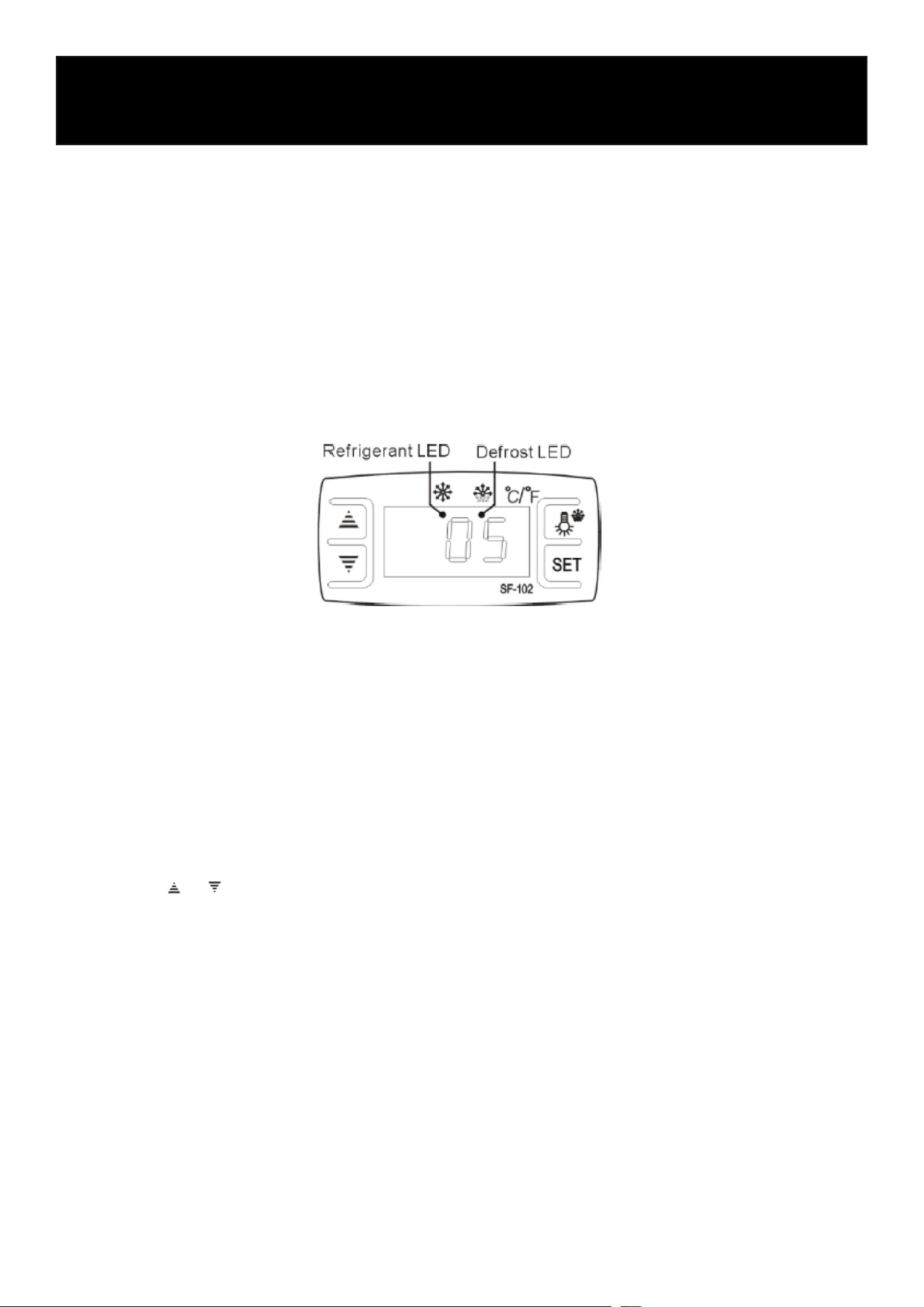
Digital Temperature Controller
Setting the Temperature
1. Press the SET button to display the current set temperature.
2. Press the or button to adjust the desired temperature.
3. Press SET again to save the setting and exit.
4. If no button is pressed for approximately 10 seconds, the controller will automatically return to
normal display mode.
Interior Lighting
Press the light button to turn the canopy lighting ON or OFF.
Manual Defrost
To manually start or stop a defrost cycle:
1. Press and hold the defrost button for approximately 6 seconds.
2. The controller will enter or exit the defrost mode.

11
Controller Indicators
Refrigeration Indicator
The refrigeration indicator illuminates while the compressor is operating and turns off when refrig-
eration stops.
Defrost Indicator
The defrost indicator remains illuminated during an active defrost cycle and turns off when the
cycle is complete.
The indicator may ash during the defrost delay period.
Controller Reset
If the controller displays an error or abnormal condition:
1. Press and hold the button for approximately 2 seconds until the buzzer sounds.
2. Immediately press and hold the button for approximately 6 seconds until the buzzer sounds
again.
3. The display will ash briey and restore the factory default settings.
If the issue persists after resetting the controller, contact qualied service personnel.
Food Loading Guidelines
For best cooling performance:
• Use appropriately sized GN pans.
• Ensure GN pans are properly seated in the pan well.
• Do not overload food pans.
• Do not block airow inside the refrigerated well.
• Keep unused pan openings covered whenever possible.
• Avoid frequent or prolonged opening of the serving area.
IMPORTANT
Always maintain food temperatures in accordance with local food safety regulations.
User Information
Proper loading, temperature control, and regular cleaning will help maintain food quality, maximize
cooling performance, and extend the appliance’s service life.

12
Cleaning and Maintenance
Safety Precautions
WARNING
Before cleaning, servicing, or performing maintenance:
• Turn the appliance OFF and disconnect it from the power supply.
• Allow all surfaces to cool completely before cleaning.
• Do not immerse the appliance, power cord, or plug in water or any other liquid.
• Do not allow water to enter electrical components or control panels.
CAUTION!
• Do not clean the appliance using water jets, pressure washers, or steam cleaners.
• Do not use abrasive cleaners, steel wool, or sharp objects that may damage surfaces.
Routine Cleaning
To maintain proper performance and food safety, clean the appliance regularly.
Daily Cleaning
1. Press and hold the defrost button for approximately 6 seconds.
2. Remove all food products and GN pans.
3. Wash GN pans separately using warm water, mild detergent, and a soft cloth or sponge.
4. Rinse and dry all components thoroughly before reinstalling.
5. Clean the interior pan well using a soft cloth and mild detergent.
6. Clean all exterior surfaces, shelves, and countertops with a soft, damp cloth.
7. Dry all surfaces completely before reconnecting power.
Draining the Pan Well
If water has accumulated in the pan well:
1. Place a suitable container beneath the drain outlet.
2. Connect the drain hose to the drain valve.
3. Open the drain valve and allow the water to drain completely.
4. Close the drain valve after draining is complete.
5. Dry the pan well thoroughly before use.
Cleaning Restrictions
Do not use:
• Abrasive cleaning pads or scouring powders
• Chlorine-based cleaners or bleach
• Solvents, alcohol-based cleaners, or corrosive chemicals
• Metal scrapers, knives, or other sharp tools
These products may damage stainless steel surfaces, gaskets, plastics, or electrical components.

13
Maintenance
Regularly inspect the appliance to ensure safe operation.
Periodic Inspection
• Check the power cord for signs of wear or damage.
• Verify that the drain valve operates properly.
• Inspect shelves, supports, and GN pan rails for damage.
• Ensure ventilation openings remain clean and unobstructed.
• Conrm that all fasteners and components are secure.
Service
• Do not operate the appliance if the power cord is damaged.
• Power cord replacement must be performed by qualied service personnel.
• Repairs must only be carried out by authorized service technicians using approved replace-
ment parts.
• Do not attempt to disassemble or repair the appliance yourself.
14
LIMITED WARRANTY
KoolMore Supply Inc. extends a limited warranty to the original purchaser, guaranteeing that this KoolMore product is
free from manufacturing defects in material or workmanship for one year from the date of purchase.
Should you discover any such defect within the warranty period, KoolMore Supply Inc. reserves the right to repair or re-
place the product without charge, or to cover the cost of replacement parts and repair labor needed to correct defects
present at the time of purchase or resulting from regular usage, when the appliance has been installed, operated, and
maintained as per the instructions provided.
At its sole discretion, KoolMore Supply Inc. may decide to replace the product. In such an event, your replacement
appliance will carry the warranty for the remaining term of the original unit’s warranty period.
This warranty is valid exclusively to the original purchaser of the product and only applicable within the United States.
The warranty commences from the date of original consumer purchase. Proof of the original purchase date will be
required to obtain service under this warranty.
Under this limited warranty, your sole and exclusive remedy will be product repair, as outlined above. All services must
be provided by a KoolMore designated service company.
KoolMore shall not be responsible or liable for any loss, spoilage, or damage to food, beverages, pharmaceuticals,
medical supplies, or any other contents stored in the unit resulting from failure, malfunction, defects, improper instal-
lation, improper use, power interruption, or any other cause. Any such losses are expressly excluded from coverage
under this warranty.
To claim warranty or request repair service:
Email [email protected]. Please include your name, address, phone number, warranty repair request, and a copy
of your proof of purchase receipt. Alternatively, visit koolmore.com and use the Contact Us page. A KoolMore custom-
er service representative will promptly arrange service for your appliance.
We thank you for choosing KoolMore.
WARRANTY EXCLUSIONS
This limited warranty will not cover:
1. Failure of the product to perform during power failures or interruptions, or due to inadequate electrical service.
2. Damage incurred during transportation or handling.
3. Damage caused by accidents, vermin, lightning, winds, re, oods, or acts of God.
4. Damage resulting from accidents, alterations, misuse, abuse, improper installation, repair, or maintenance. This
includes using any external device that alters or converts the voltage or frequency of electricity.
5. Unauthorized product modications, repairs by unauthorized centers, or use of non-approved replacement parts.
6. Abnormal cleaning and maintenance not aligned with the user’s manual.
7. Use of incompatible accessories or components.
8. Any costs associated with repairs or replacements under these excluded circumstances shall be the responsibility
of the consumer.
WARRANTY