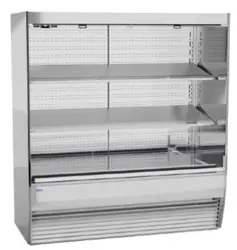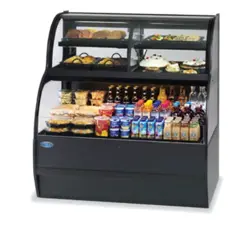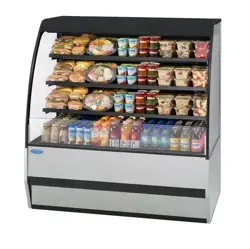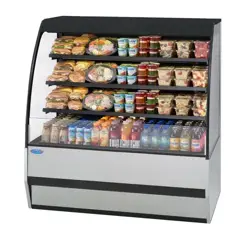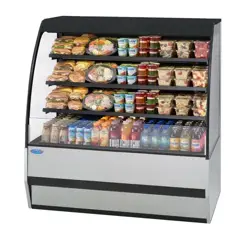
E4036
Rev B 3/17/2025
Installation & Operation Instructions
Refrigerated UCR Models
Federal Industries
215 Federal AVE
Belleville, WI 53508
Toll Free: (800) 356-4206
WI Phone: (608) 424-3331
Fax: (608) 424-3234

E4036 UCR Page 2 of 35
Contents
(1) Introduction ...................................................................................................................................................4
1.1 Registration & Serial Number ...................................................................................................................4
(2) Warning Labels & Safety Instructions ..........................................................................................................5
(3) Refrigeration Warnings .................................................................................................................................6
Installation – Repair - Decommissioning ...................................................................................................................6
(4) Pre-Installation Procedures ..........................................................................................................................11
4.1 Inspection for Shipping Damage .............................................................................................................11
(5) Installation Instructions ...............................................................................................................................11
(6) General Electrical & Grounding ..................................................................................................................12
6.1 Electrical Connection ..............................................................................................................................12
6.2 Cord Connected .......................................................................................................................................12
6.3 Electrical Information .............................................................................................................................13
(7) Refrigeration Operation ...............................................................................................................................13
7.1 Self-Contained Models ...........................................................................................................................13
7.2 Evaporator Condensate Drain .................................................................................................................13
7.3 Condensate Pump ....................................................................................................................................14
(8) Installation Instructions ...............................................................................................................................14
8.1 Locating the Display Case ......................................................................................................................14
8.2 Removing Case From Shipping Skid and General Installation ...............................................................14
8.3 Cleaning ..................................................................................................................................................14
8.4 UCR Under Counter Installation .............................................................................................................15
(9) Shelving Installation & Removal (Option) ..................................................................................................16
9.1 Shelf Brackets and Support Installation ..................................................................................................16
9.2 Solid Shelf Installation ............................................................................................................................17
9.3 Glass Shelf Installation ...........................................................................................................................17
(10) Night Curtain Operation (Option) ...............................................................................................................18
(11) Security Cover (Option) ..............................................................................................................................19
(12) Operating Instructions .................................................................................................................................20
12.1 User Controls Overview ..........................................................................................................................20
12.2 Power Switch ..........................................................................................................................................20
12.3 Light Switch ............................................................................................................................................20
12.4 Electronic Temperature Control ..............................................................................................................20
12.4.1 Button and Display overview .............................................................................................................20
12.4.2 Powering on control ............................................................................................................................21
12.4.3 Adjusting the set point ........................................................................................................................21
12.4.4 Entering Manual Defrost Mode ..........................................................................................................21
12.4.5 Error codes ..........................................................................................................................................21
12.5 Electronic Control Operation ..................................................................................................................22

E4036 UCR Page 3 of 35
12.6 Control Parameters ..................................................................................................................................23
12.7 Initial Startup...........................................................................................................................................23
12.8 Placing Product in Case ..........................................................................................................................24
(13) Maintenance (Lights) ..................................................................................................................................25
(14) Periodic Maintenance (Clean Condenser) ...................................................................................................25
(15) Cleaning Instructions ...................................................................................................................................26
15.1 Daily Cleaning ........................................................................................................................................26
15.2 Weekly Cleaning .....................................................................................................................................27
15.3 Weekly Exterior Cleaning .......................................................................................................................28
(16) Sale & Disposal ...........................................................................................................................................29
16.1 Owner Responsibility ..............................................................................................................................29
(17) Service Information .....................................................................................................................................29
17.1 Special Service Instructions ....................................................................................................................30
17.2 Pre-Service checklist ...............................................................................................................................30
Lights do not operate ............................................................................................................................................30
Case temperature too warm (product is exceeding 41°F) .....................................................................................30
(18) Wiring Diagrams .........................................................................................................................................31
18.1 Self Contained .........................................................................................................................................31
(19) Replacement Parts .......................................................................................................................................32
E4036 UCR Page 4 of 35
(1) INTRODUCTION
Thank you for purchasing a Federal Industries display case. This manual contains important instructions for installing and
servicing the UCR AND UCRSL refrigerated self-service merchandisers. A repair parts list and wiring diagram are also
included in the manual. Read all of these documents carefully before installing or servicing your case.
NOTICE
Read this manual before installing your case. Keep this manual and refer to it before
doing any service on the equipment. Failure to do so could result in personal injury or
damage to the case.
NOTICE
Installation and service of the electrical components in the case must be performed by
a licensed electrician.
The portions of this manual covering components contain technical instructions
intended only for persons qualified to perform electrical work.
DANGER
Improper or faulty hookup of electrical components in the case can result in severe
injury or death.
All electrical wiring hookups must be done in accordance with all applicable local,
regional, or national standards.
1.1 REGISTRATION & SERIAL NUMBER
It’s important to keep a record of the model and serial number of your merchandiser for warranty and part identification.
Please write them here for your quick reference.
Register your product online! Visit our website at www.federalindustries.com and register your product today.
Case Model__________________________ Serial Number ______________________
We’re here to provide you with the best possible experience with your new product, however, we cannot cover everything
about your merchandiser in this manual, so if you have any additional questions or issues, please see the SERVICE
INFORMATION PAGE to find who you should contact.
E4036 UCR Page 5 of 35
(2) WARNING LABELS & SAFETY INSTRUCTIONS
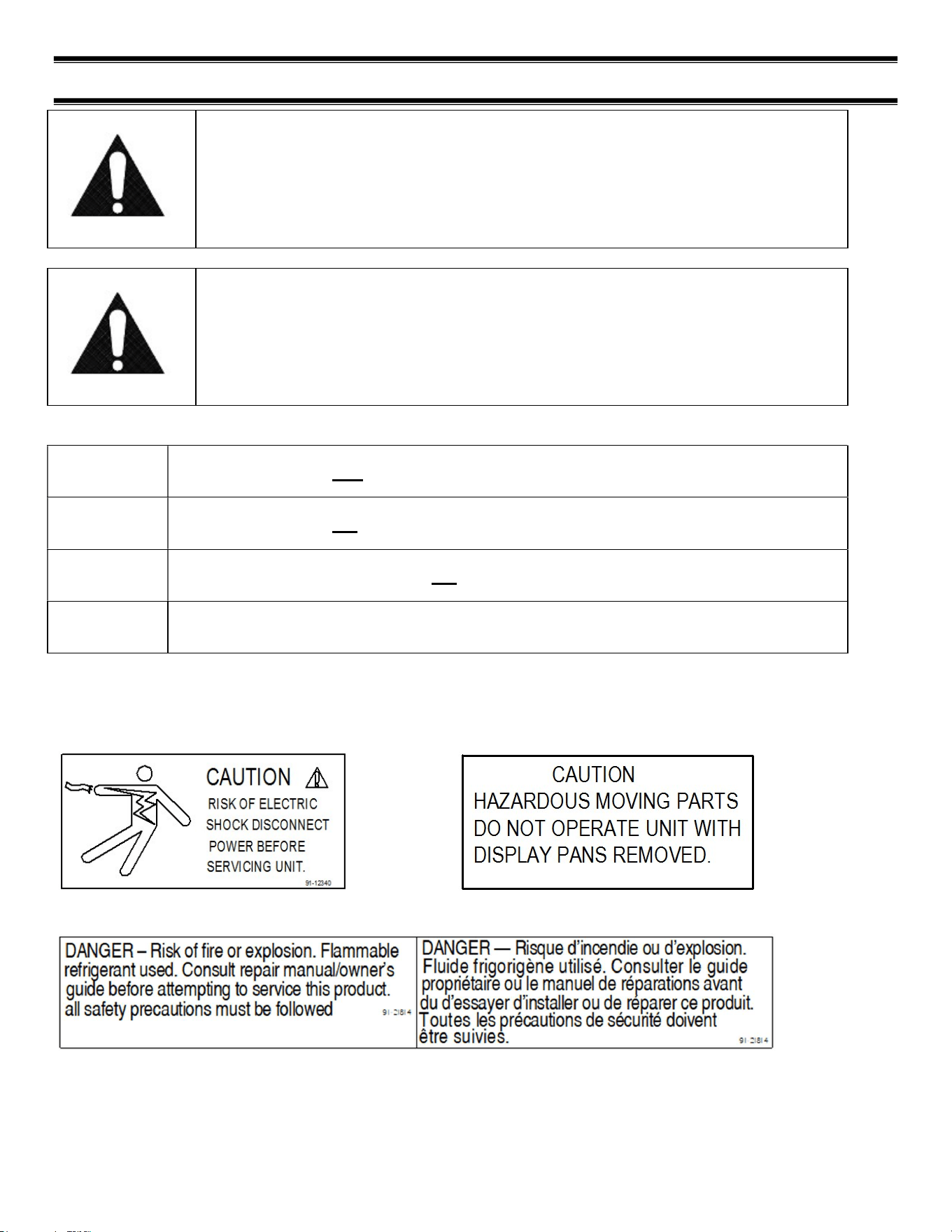
This is the safety-alert symbol. When you see this symbol on your case or in the
manual, be alert to the potential for personal injury or damage to your equipment.
Be sure you understand all safety messages and always follow recommended precautions and safe operating procedures.
NOTICE TO EMPLOYERS:
You must make sure that everyone who installs, uses, or services your case is
thoroughly familiar with all safety information and procedures.
Important safety information is presented in this section and throughout the manual. The following signal words are used
in the warning and safety messages:
DANGER: Severe injury or death will occur if you ignore the message.
WARNING: Severe injury or death can occur if you ignore the message.
CAUTION: Minor injury or damage to your case can occur if you ignore the message.
NOTICE:
This is important installation, operation, or service information. If you ignore the message, you
may damage your case.
The warning and safety labels shown throughout this manual are placed on your Federal Industries case at the factory.
Follow all warning label instructions. If any warning or safety labels become lost or damaged, call our customer service
department at (800) 356-4206 for replacements.
This label is located on the back of the display case
This label is located below the display pan.
This label is located by condensing unit
E4036 UCR Page 6 of 35
(3) REFRIGERATION WARNINGS
INSTALLATION – REPAIR - DECOMMISSIONING
This is the Danger-Flammable symbol. When you see this symbol on your case or in the manual, be alert to the
potential for risk of fire or explosion.
Be sure you understand all safety messages and always follow recommended precautions and safe operating procedures.
DANGER
Risk of fire or explosion. Flammable refrigerant used. To be repaired only by trained service personnel.
Do not puncture refrigerant tubing. Dispose of properly in accordance with federal or local regulations
Consult repair manual/owner’s guide before attempting to service this product. All safety precautions
must be followed.
Follow handling instructions carefully in compliance with national regulations.
Auxiliary devices which may be ignition sources shall not be installed in the ductwork, other than
auxiliary devices listed for use with the specific appliance.
Do not store explosive substances (such as aerosol cans with a flammable propellant) in this case.
Do not use an electrical appliance INSIDE the food storage compartments unless its type is
recommended by manufacturer.
Flammable refrigerant type specified on case nameplate is on the serial label.
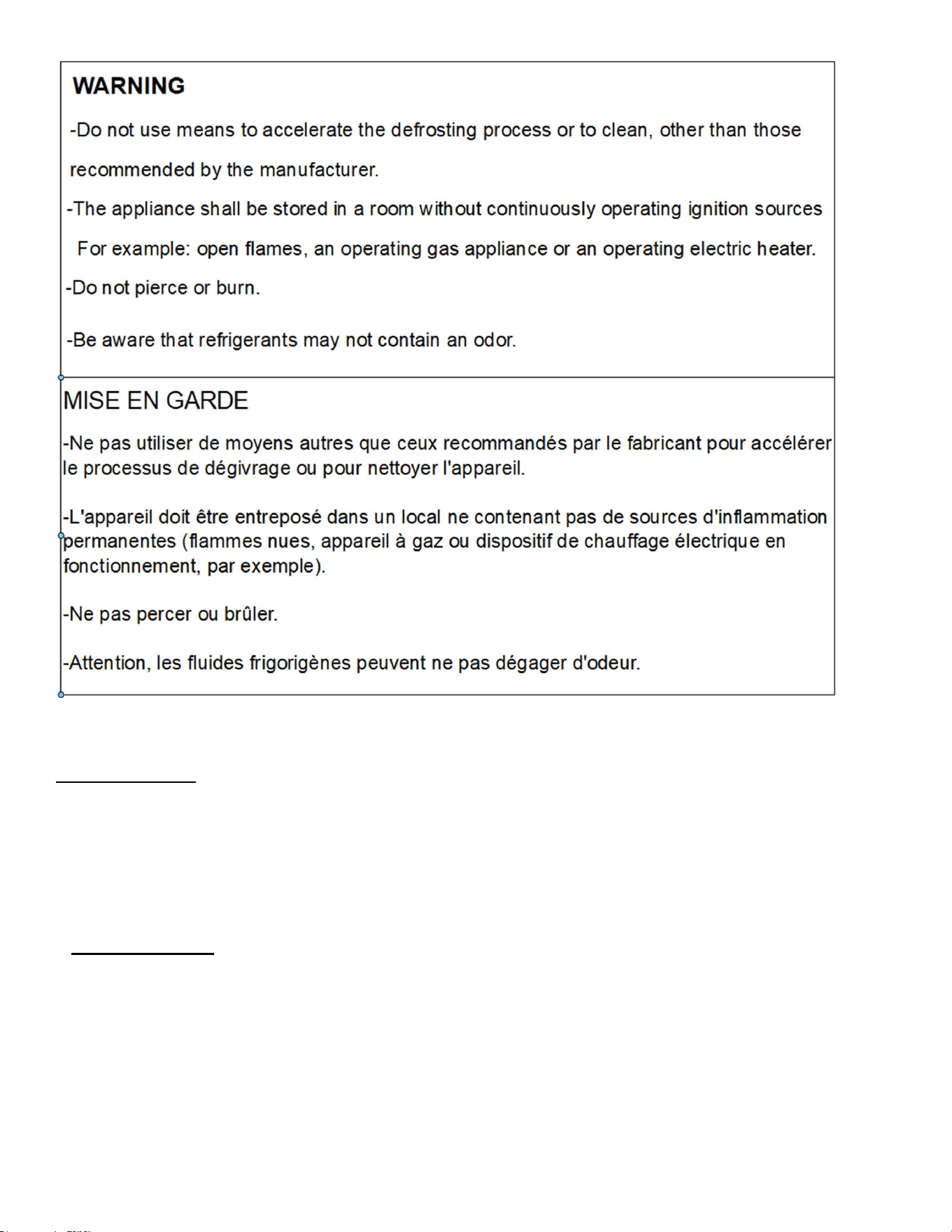
APPLIES TO R290 REFRIGERANT MODELS ONLY! Contains a charge of R290 refrigerant with a lower
flammability limit (LFL) of .038kg/m³. See table for amount of charge.
E4036 UCR Page 7 of 35
1. Qualification: All refrigeration and electrical maintenance, service, and repair must be performed
by a Certified Technician that is trained in the required flammable refrigerants safety procedures.
Technicians must read the entire section “REFRIGERATION WARNINGS SECTION” of this manual.
Including but not limited to the following:
a) breaking into the refrigerating circuit.
b) opening of sealed components.
c) opening of ventilated enclosures.
2.Checks to Area: Prior to beginning work on systems containing FLAMMABLE REFRIGERANTS,
safety checks are necessary to ensure that the risk of ignition is minimized prior to conducting work
on the system.
-Capacitors are discharged: this shall be done in a safe manner to avoid possibility of sparkling.
- No live electrical components and wiring are exposed while charging, recovering or purging the
system.
- Continuity of earth bonding.
-Work shall be undertaken under a controlled procedure to minimize the risk of a
flammable gas or vapor being present while the work is being performed.

E4036 UCR Page 8 of 35
-All maintenance staff and others working in the local area shall be instructed on the nature of the
work being carried out. Work in confined spaces shall be avoided.
-The area shall be checked with an appropriate refrigerant detector prior to and during
work, to ensure the technician is aware of potentially toxic or flammable atmospheres.
Ensure that the leak detection equipment being used is suitable for use with all applicable
refrigerants, i.e., non-sparking, adequately sealed, or intrinsically safe.
-If any hot work is to be conducted on the refrigerating equipment or any associated parts,
appropriate fire extinguishing equipment shall be available on hand. A dry chemical or CO2 fire
extinguisher should be adjacent to the charging area.
-No person carrying out work in relation to a REFRIGERATING SYSTEM which involves exposing
any pipe work shall use any sources of ignition in such a manner that it may lead to the risk of fire or
explosion. All possible ignition sources, including cigarette smoking, should be kept sufficiently far
away from the site of installation, repairing, removing and disposal, during which refrigerant can
possibly be released to the surrounding space. Prior to work taking place, the area around the
equipment shall be surveyed to make sure that there are no flammable hazards or ignition risks. “No
Smoking” signs shall be displayed.
-Ensure that the area is in the open or that it is adequately ventilated before breaking into the system
or conducting any hot work. A degree of ventilation shall continue during the period that the work is
carried out. The ventilation should safely disperse any released refrigerant and preferably expel it
externally into the atmosphere.
-Where electrical components are being changed, they shall be fit for the purpose and to the correct
specification so as to minimize the risk of possible ignition due to incorrect parts. At all times, the
manufacturer’s maintenance and service guidelines shall be followed. If in doubt, consult the
manufacturer’s technical department for assistance. The following checks shall be applied to
installations using flammable refrigerants:
a) the actual REFRIGERANT CHARGE is in accordance with the room size within which the
refrigerant containing parts are installed.
b) The ventilation machinery and outlets are operating adequately and are not obstructed.
c) Markings of the equipment continue to be visible and legible. Markings and signs
that are illegible shall be corrected.
d) Refrigerating pipes or components are installed in a position where they are
unlikely to be exposed to any substance which may corrode refrigerant containing
-Repair and maintenance to electrical components shall include initial safety checks and
component inspection procedures. If a fault exists that could compromise safety, then no electrical
supply shall be connected to the circuit until it is satisfactorily dealt with. If the fault cannot be
corrected immediately but it is necessary to continue operation, an
An adequate temporary solution should be used. This shall be reported to the owner of the Initial
safety checks shall include:
3. Repairs to sealed components
-During repairs to sealed components, all electrical supplies shall be
disconnected from the equipment being worked upon prior to any removal of sealed
covers, etc. If it is necessary to have an electrical supply to equipment during
servicing, then a permanently operating form of leak detection shall be located at the most critical
point to warn of a potentially hazardous situation.

E4036 UCR Page 9 of 35
-Particular attention shall be paid to the following to ensure that by working on
electrical components, the casing is not altered in such a way that the level of protection is affected.
This shall include damage to cables, excessive number of connections, terminals not made to original
specification, damage to seals, incorrect fitting of glands, etc. Ensure that the apparatus is mounted
securely.
Ensure that seals or sealing materials have not degraded to the point that they no longer serve the
purpose of preventing the egress of flammable atmospheres. Replacement parts shall be in
accordance with the manufacturer’s specifications.
-Do not apply any permanent inductive or capacitance loads to the circuit without ensuring that this
will not exceed the permissible voltage and current permitted for the equipment in use.
NOTE The use of silicon sealants can inhibit the effectiveness of some types of leak detection
equipment. Intrinsically safe components do not have to be isolated prior to working on them.
4. Detection of flammable refrigerants: Under no circumstances shall potential ignition sources be
used in the searching for or detection of refrigerant leaks. A halide torch (or any other detector using
a naked flame) shall not be used.
The following leak detection methods are deemed acceptable for all refrigerant systems:
-Electronic leak detectors may be used to detect refrigerant leaks but, in the case of
FLAMMABLE REFRIGERANTS, the sensitivity might not be adequate or might need recalibration.
(Detection equipment shall be calibrated in a refrigerant-free area.) Ensure that the detector is not a
potential source of ignition and is suitable for the refrigerant used. Leak detection equipment shall be
set at a percentage of the LFL of the refrigerant and shall be calibrated to the refrigerant employed,
and the appropriate percentage of gas (25 % maximum) is confirmed.
-Leak detection fluids are also suitable for use with most refrigerants but the use of
detergents containing chlorine shall be avoided as the chlorine can react with the
refrigerant and corrode the copper pipework.
NOTE Examples of leak detection fluids are
– bubble method,
– fluorescent method agents.
If a leak is suspected, all naked flames shall be removed/extinguished.
If a leakage of refrigerant is found which requires brazing, all the refrigerants shall be
recovered from the system, or isolated (by means of shut off valves) in a part of the system
remote from the leak.
5. Removal and Evacuation: When breaking into the refrigerant circuit to make repairs-or for any
other purpose-conventional procedures shall be used. However, for flammable refrigerants it is
important that the best practice be followed, since flammability is a consideration. The following
procedure shall be adhered to:
a. Safely remove refrigerant following local and national regulations.
b. Purge the circuit with inert gas.
c. Evacuate (optional for A2L).
d. Purge with inert gas (optional for A2L).
e. Open the circuit by cutting or brazing.
The refrigerant change shall be recovered into the correct recovery cylinders if venting is not allowed
by local and national codes. For appliances containing flammable refrigerants, the system shall be
purged with oxygen-free nitrogen to render the appliance safe for flammable refrigerants. This
process might need to be repeated several times. Compressed air or oxygen shall not be used for
purging refrigerant systems. For appliances containing flammable refrigerants, refrigerant purging

E4036 UCR Page 10 of 35
shall be achieved by breaking the vacuum in the system with oxygen-free nitrogen and continuing to
fill until the working pressure is achieved, then venting to atmosphere, and finally pulling down to a
vacuum (optional for A2L). This process shall be repeated until no refrigerant is within the system
(optional for A2L). When the final oxygen-free nitrogen change is used, the system shall be vented
down to atmospheric pressure to enable work to take place. Ensure that the outlet for the vacuum
pump is not close to any potential ignition sources and that ventilation is available.
6. Charging procedures: In addition to conventional charging procedures, the following
requirements shall be followed.
a. Ensure that contamination of different refrigerants does not occur when using charging equipment.
Hoses or lines shall be as short as possible to minimize the amount of refrigerant contained in them.
b. Cylinders should be kept in an appropriate position according to the instructions.
c. Ensure that the REFRIGERATING SYSTEM is earthed prior to charging the system with
refrigerant.
d. Label the system when charging is complete (if not already).
e. Extreme care shall be taken not to overfill the REFRIGERATING SYSTEM.
7. Decommissioning: Before carrying out this procedure, it is essential that the technician is
completely familiar with the equipment and all its details. It is recommended good practice that all
refrigerants are recovered safely. Prior to the task being carried out, an oil and refrigerant sample
shall be taken in case analysis is required prior to re-use of recovered refrigerant. It is essential that
electrical power is available before the task commences.
a. Become familiar with the equipment and its operation.
b. Isolate the system electrically.
c. Before attempting the procedure, ensure that:
i. Mechanical handling equipment is available, if required, for handling refrigerant cylinders.
ii. All personal protective equipment is available and is being used correctly.
iii. The recovery process is supervised at all times by a competent person.
iv. Recovery equipment and cylinders conform to the appropriate standards.
d. Pump down the refrigerant system, if possible.
e. If a vacuum is not possible, make a manifold so that refrigerant can be removed from various parts
of the system.
f. Make sure that the cylinder is situated on the scales before recovery takes place.
g. Start the recovery machine and operate in accordance with instructions.
h. Do not overfill cylinders (no more than 80% volume liquid charge).
i. Do not exceed the maximum working pressure of the cylinder, even temporarily.
j. When the cylinders have been filled correctly and the process completed, make sure that the
cylinders and the equipment are removed from the site properly and all isolation valves on the
equipment are closed off.
k. Recovered refrigerant shall not be charged into another refrigerating system unless it has been
cleaned and checked.
8. Labeling: Equipment shall be labeled stating that it has been de-commissioned and emptied of
refrigerant. The label shall be dated and signed. For appliances containing flammable refrigerants,
ensure that there are labels on the equipment stating the equipment contains flammable refrigerant.
E4036 UCR Page 11 of 35
9.Recovery: When removing the refrigerant from a system, either for servicing or decommissioning, it
is recommended good practice that all refrigerants are removed safely.
When transferring refrigerant into cylinders, ensure that only appropriate refrigerant recovery
cylinders are employed. Ensure that the correct number of cylinders for holding the total system
charge is available. All cylinders to be used are designated for the recovered refrigerant and labeled
for that refrigerant (i.e., special cylinders for the recovery of refrigerant). Cylinders shall be complete
with pressure-relief valve and associated shut-off valve in good working order. Empty recovery
cylinders are evacuated and, if possible, cooled before recovery occurs.
The recovery equipment shall be in good working order with a set of instructions concerning the
equipment that is at hand and shall be suitable for the recovery of all appropriate refrigerants
including, when applicable, FLAMMABLE REFRIGERANTS. In addition, a set of calibrated weighing
scales shall be available and in good working order. Hoses shall be complete with leak-free
disconnect coupling and in good condition. Before using the recovery machine, check that it is in
satisfactory working order, has been properly maintained and that any associated electrical
components are sealed to prevent ignition in the event of refrigerant release. Consult manufacturer if
in doubt.
The recovered refrigerant shall be returned to the refrigerant supplier in the correct recovery cylinder,
and the relevant waste transfer note arranged. Do not mix refrigerants in recovery units and
especially not in cylinders.
If compressors or compressor oils are to be removed, ensure that they have been evacuated to an
acceptable level to make certain that FLAMMABLE REFRIGERANT does not remain within the
lubricant. The evacuation process shall be carried out prior to returning the compressor to the
suppliers. Only electric heating to the compressor body shall be employed to accelerate this process.
When oil is drained from a system, it shall be carried out safely.
(4) PRE-INSTALLATION PROCEDURES
4.1 INSPECTION FOR SHIPPING DAMAGE
You are responsible for filing all freight claims with the delivering truck line. Inspect all cartons and crates for damage as
soon as they arrive. If damage is noted to shipping crates, cartons, or if a shortage is found, note this on the bill of lading
(all copies) prior to signing.
If damage is discovered when the case is uncrated, immediately call the delivering truck line and follow up the call with a
written report indicating concealed damage to your shipment. Ask for an immediate inspection of your concealed damage
item. Crating material must be retained to show the inspector from the truck line.
(5) INSTALLATION INSTRUCTIONS
IMPORTANT: Read this Section of this manual located on page 6.
“REFRIGERATION WARNING &INSTALLATION-REPAIR-DECOMMISSIONING”
All refrigeration and electrical work must be performed by certified technicians.
The installation of the appliance and the refrigerant must only be performed by Federals approved
Service or suitably qualified person.
Appliance to be installed in accordance with safety standards ANSI/ASHREA 15.
The appliance shall not be installed in public corridors or lobbies.
E4036 UCR Page 12 of 35
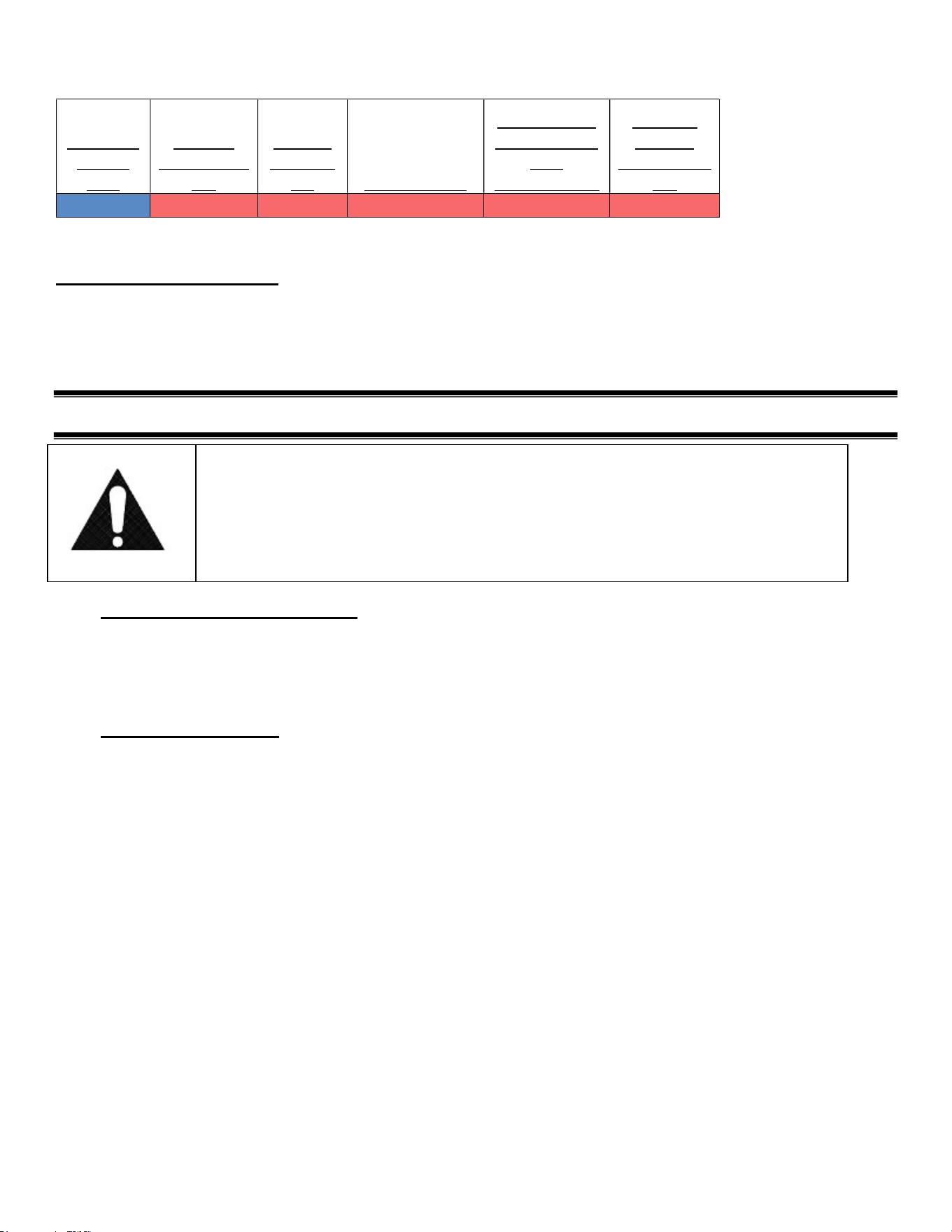
This case is designed for a class 2 environment.
Test room
climate
class
Dry bulb
temperature
[°F]
Relative
Humidity
[%] Dew point [°F]
Water vapour
mass in dry air
[lbm
water/lbm air]
Required
Test Lab
Temperature
[°F]
2.0 71.6 65 59.36 0.0108 89.6
NSF TYPE 2 Temperature cannot exceed 75 deg F and 55% humidity.
Electrical Connection
IMPORTANT: Read this Section of this manual located on page 6.
“REFRIGERATION WARNING &INSTALLATION-REPAIR-DECOMMISSIONING”
All refrigeration and electrical work must be performed by certified technicians.
(6) GENERAL ELECTRICAL & GROUNDING
DANGER:
Improper or faulty hookup of electrical components in the display case can result in
severe injury or death.
6.1 ELECTRICAL CONNECTION
IMPORTANT: Read this section of the manual located on page 6.
“REFRIGERATION WARNING & INSTALLATION – REPAIR – DECOMMISSIONING”
All refrigeration and electrical work must be performed by certified technicians.
6.2 CORD CONNECTED
All standard models are supplied with a power cord that is properly sized to the amperage requirements of the
case. See the electrical data plate located on the rear left interior of the case for the proper circuit size for each
case.
The cord is factory installed protruding from the bottom rear corner of the case.
A separate circuit for each display case is required to prevent other appliances on the same circuit from
overloading the circuit and causing malfunction.
E4036 UCR Page 13 of 35
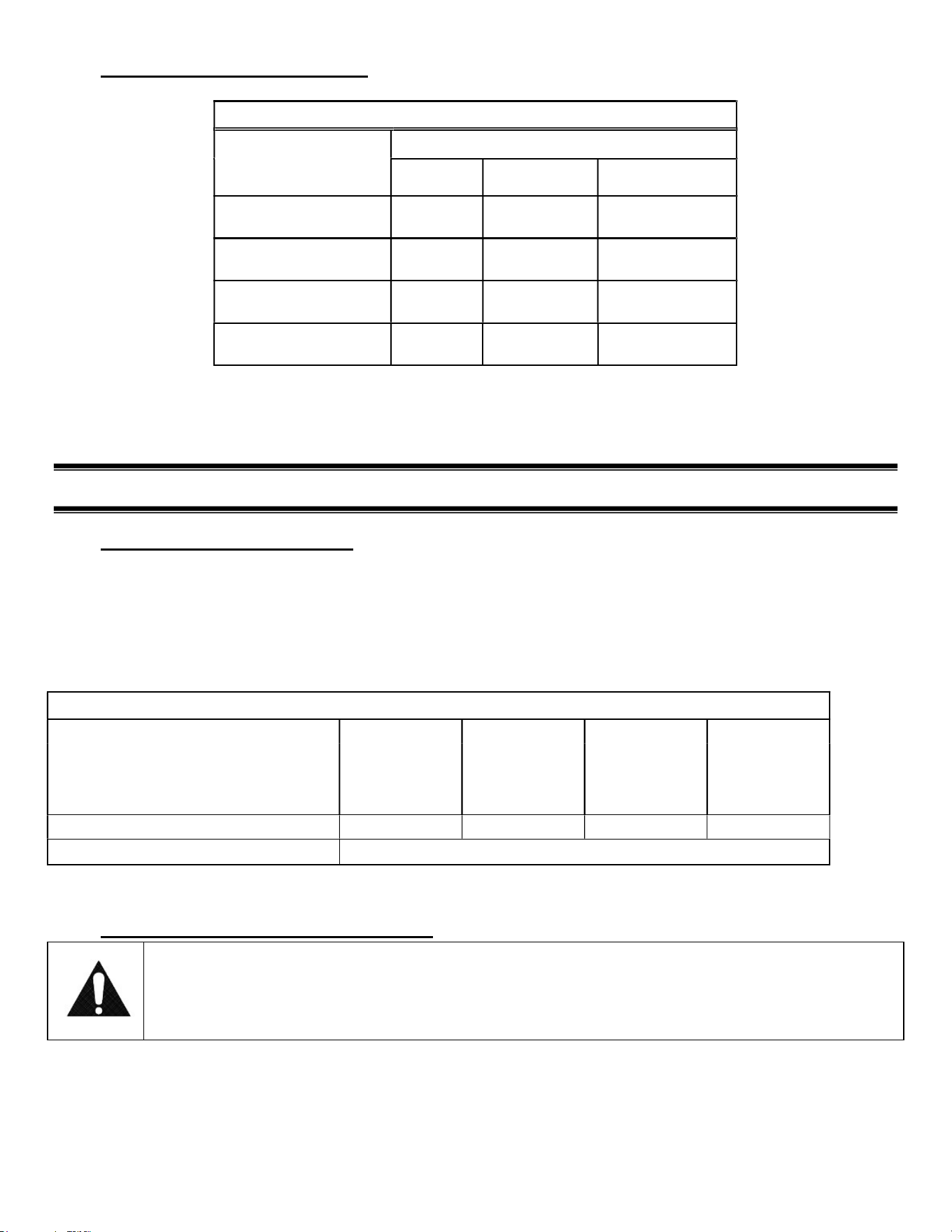
6.3 ELECTRICAL INFORMATION
CORD CONNECTED
SELF CONTAINED
MODEL
VOLTAGE
TOTAL
AMPS
CORD STYLE
UCR3633/UCRSL3633
120/60/1 8.4
20AMP NEMA 5-
20
UCR4833/UCRSL4833
120/60/1 8.4
20AMP NEMA 5-
20
UCR6033/UCRSL6033
120/60/1 14.0
20AMP NEMA 5-
20
UCR7233/UCRSL7236
120/60/1 14.0
20AMP NEMA 5-
20
E3555-2 EXCEL
(7) REFRIGERATION OPERATION
7.1 SELF-CONTAINED MODELS
The self-contained models are shipped from the factory with a completely operational R513 refrigeration system
and require no modifications or adjustments upon installation. Case must be installed as per the installation
section of this manual to provide proper condenser air cooling.
The unit temperature is controlled by the electronic control outlined in the control section of this manual.
Note: The condenser fan runs continuously.
SELF CONTAINED
WITH ELECTRONIC CONTROL
UCR3633/
UCRSL3633
UCR4833/
UCRSL4833
UCR6033/
UCRSL6033
UCR7233/
UCRSL7233
Refrigeration R513 Charge
26
OZ
28
OZ
2
8
OZ
2
8
OZ
High Pressure Switch Cut Out
385
psi
E3555-2 EXCEL
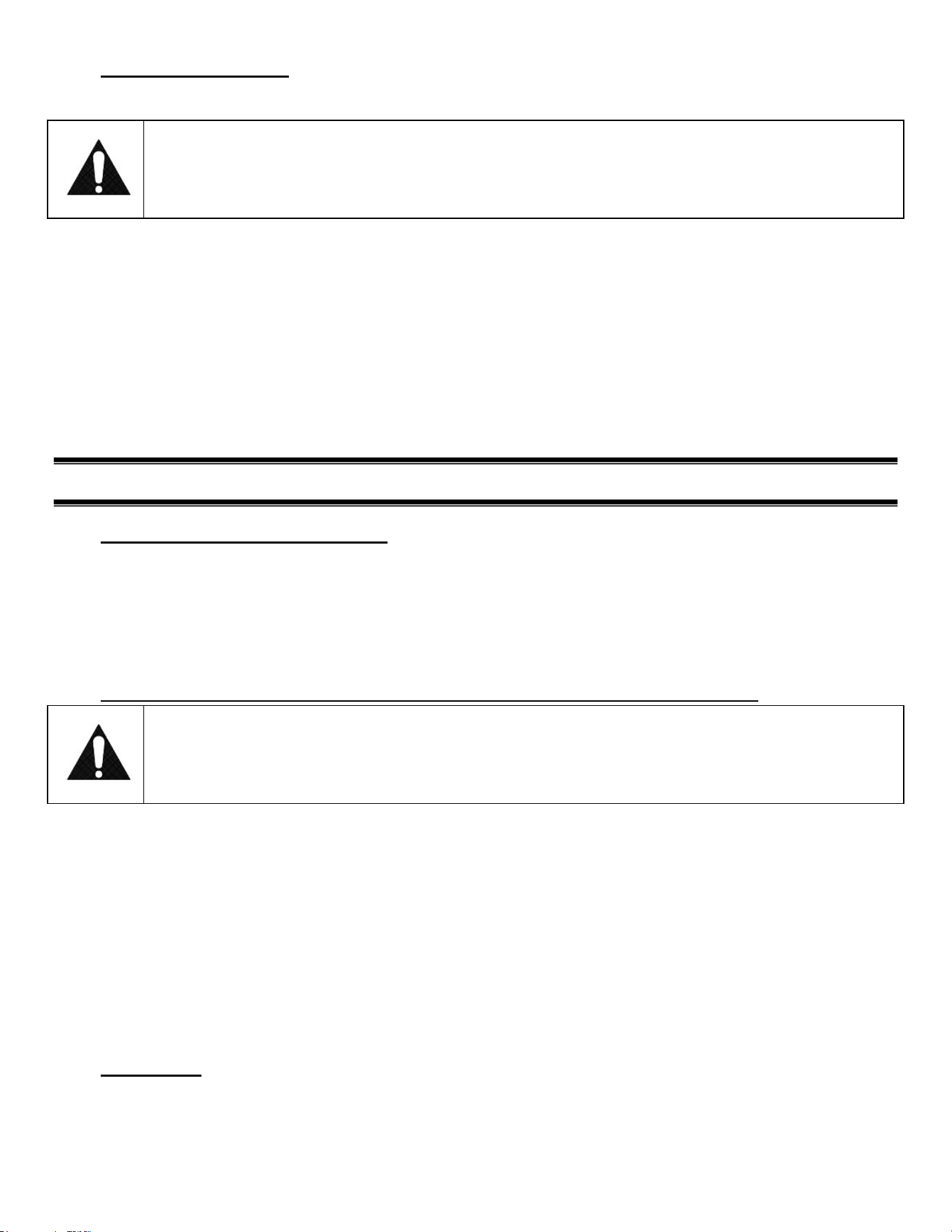
7.2 EVAPORATOR CONDENSATE DRAIN
WARNING TO INSTALLER:
Evaporator Condensate Drain Tube may become dislodged during shipping. Installer must check
Evaporator Condensate Drain Tube upon installation to be sure drain tube is properly seated and
installed correctly.
Evaporator Drain must be attached to tube protruding from bottom of Evaporator Tub and must either be inside the
Condensate Pan area or inside of hole of Condensate Pump.
E4036 UCR Page 14 of 35
7.3 CONDENSATE PUMP
A condensate pump is optional on all models. Installer must check unit to see if a condensate pump has been provided
with case.
WARNING TO INSTALLER:
Installer must determine if case was provided with condensate pump. Failure to hook up pump hose
to drain will cause water on floor and cause a slip hazard.
Instead of using heat energy to remove condensate run off from the evaporator coil a condensate pump moves the water to
a nearby drain.
The Condensate Pump is provided with 50ft of clear 1/2in OD x 3/8in ID tubing that must be run out of the base
area to a drain.
There are several drain tube exit locations provided in the base as noted in the drawing above. Plugs or caps will
need to be removed in the desired exit location.
The hose can be run the entire 50ft in any direction as required, but no higher than 20ft from the pump base. A
check valve is provided in the pump to prevent water from flowing back into the reservoir. For best efficiency
extend the hose level below the level of the pump base to create a siphoning effect. Never run the hose to or
through an area below freezing (32°F, 0°C) or freezing water will block the tube.
(8) INSTALLATION INSTRUCTIONS
8.1 LOCATING THE DISPLAY CASE
The case should be located where it is not subjected to the direct rays of the sun, heating ducts, grills, radiator, or ceiling
fans, nor should it be located near open doors or main door entrances. Also, avoid locations where there are excessive air
movement or air disturbances.
The case requires a minimum of 24 inches of clearance at the rear of the unit for air discharge. Do not locate case with
back tight against the wall.
No clearance is needed on sides of the unit.
8.2 REMOVING CASE FROM SHIPPING SKID AND GENERAL INSTALLATION
CAUTION:
Do not push or pull against the top end glass, or door frames and do not pull on end panels when
removing the case from the skid or moving the case. Case damage or glass breakage will result.
1. Remove crate top and sides and note missing or damaged items as explained in the pre-installation procedures
outlined above.
2. Move the case as near as possible to the final location and before removing it from the shipping skid.
3. Remove the (4) brackets that secure the case to the shipping skid.
4. Prepare cabinet according to instructions in this section that pertain to your model.
5. Lift the case off of skid and into required position. Only lift the case from under the rear lip and front bottom trim
channel above the base. Note: Do not push or pull on front bottom trim channel.
6. The case must be level for proper drainage of defrost condensate to the condensate evaporator. Using the wrench
provided level and square the case as needed by adjusting the leg leveler in each corner of base. The 6ft cases also
have a set of leg levelers in the center. These must be adjusted so the base is flat.
7. The leveled case must be sealed to the floor using a NSF listed sealant.
8.3 CLEANING
For initial setup, clean the case as outlined in the “Weekly Cleaning” section of this manual.
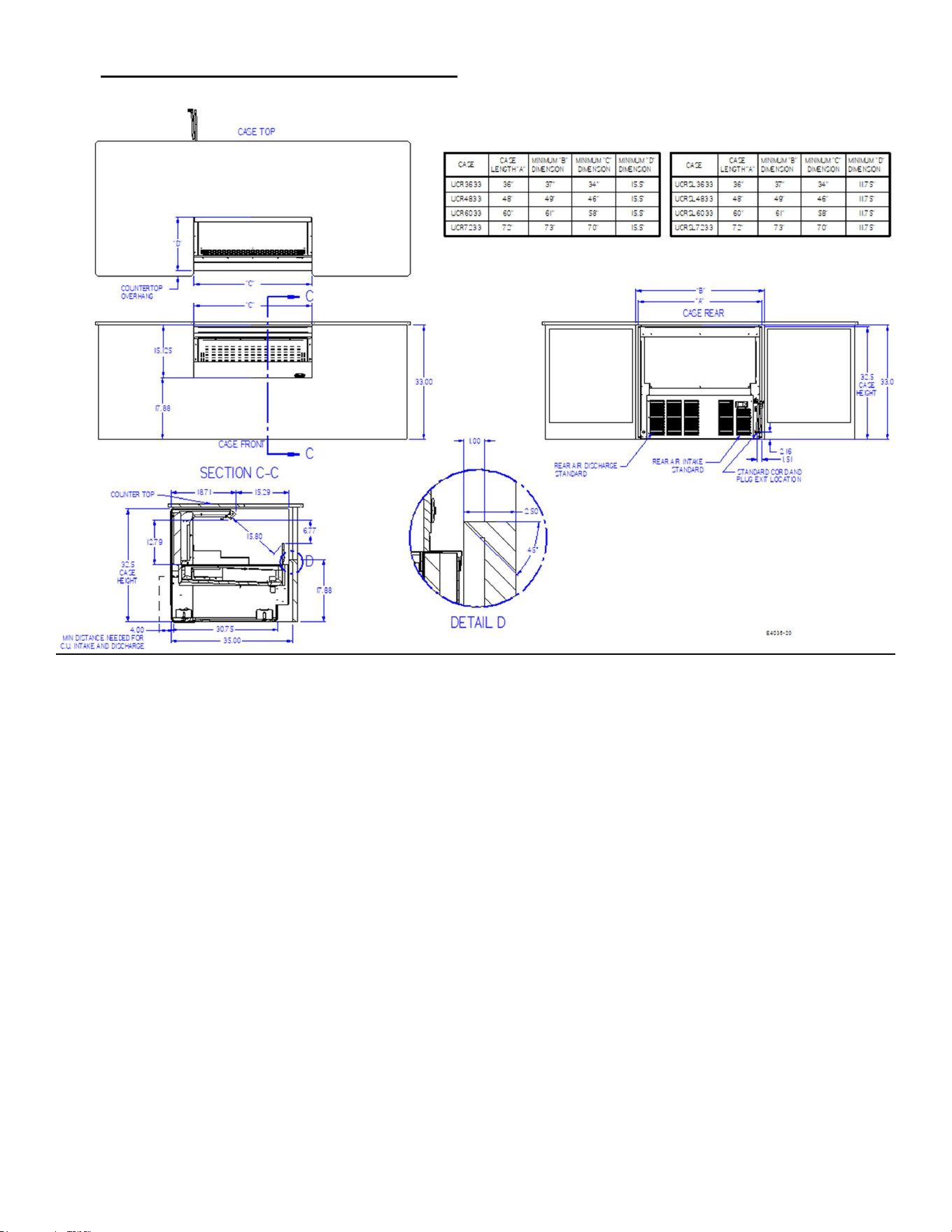
E4036 UCR Page 15 of 35
8.4 UCR UNDER COUNTER INSTALLATION
E4036 UCR Page 16 of 35
(9) SHELVING INSTALLATION & REMOVAL (OPTION)
9.1 SHELF BRACKETS AND SUPPORT INSTALLATION
1. Turn the light switch to the off position.
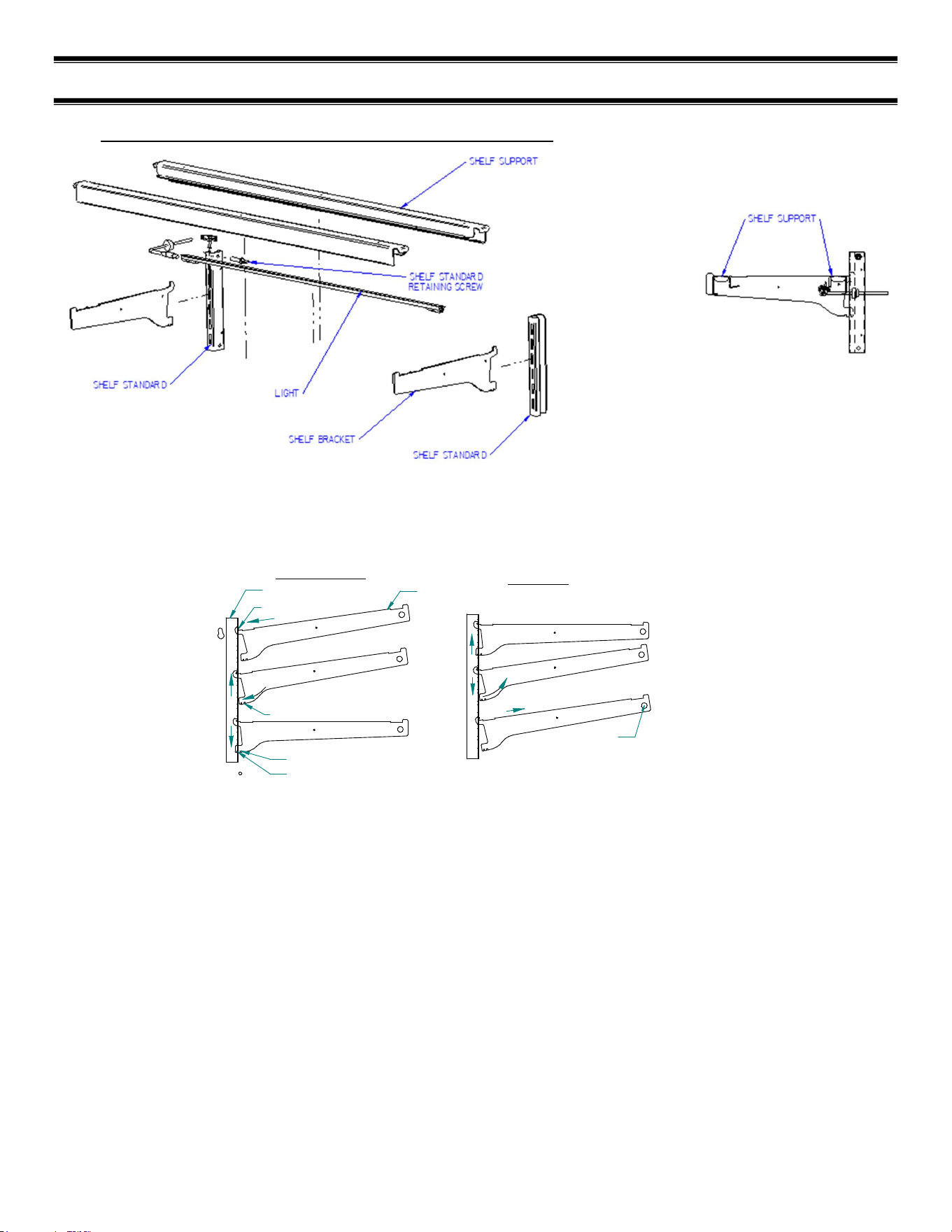
2. Follow the instructions in the illustration below and insert (1) of the shelf brackets in the desired shelf standard slot
on one side of the case. Place the additional bracket in the same shelf standard slot on the opposite end of case. The
bracket with a clear plastic cord retainer clip must be on the side with the shelf light.
0v NOTCH
6v NOTCH
4
1
2
3
4
INSTALLATION
REMOVAL
2
3
1
TOP HOOK
BOTTOM TAB
SHELF BRACKET
SHELF STANDARD
1. Place shelf bracket top hook into desired shelf
standard slot.
2. Lift shelf bracket top hook to allow shelf bracket
bottom tab to clear shelf standard slot.
3. Swing shelf bracketbottom tab into shelf standard
slot.
4. Place the desired shelf bracket notch of 0, 6, or 12
degrees onto bottom of shelf standard slot.
1. Lift shelf bracket up to allow shelf bracket notch
to clear the bottom of shelf standard slot.
2. Swing shelf bracket bottom tab out of shelf
standard slot.
3. Drop shelf bracket down to allow shelf bracket top
hook to clear top of shelf standard slot.
4. remove shelf bracket top from shelf standard slot.
CLEAR BUMPER
TOWARDS END PANEL
3. Hang one end of the shelf light housing on the front notch of a shelf bracket and then the other end of the shelf light
housing on the notch of the shelf bracket on the opposite end. Note: On models without shelf lights, use a shelf
support instead of a shelf light housing.
4. Push shelf light cords into plastic shelf cord retainer clip located on the inside of the shelf bracket.
6. Remove the cap from the appropriate female light sockets. Important: Grip each side of cap firmly and wiggle and
pull cap straight out of socket. Do not roll cap during removal. Incorrect removal of cap may cause damage to
electrical connection
7. Plug in shelf light by aligning the male pins on the appropriate shelf light cord plugs with the female light sockets and
push together. IMPORTANT: Do not roll plug during insertion.
8. Hang one end of the shelf support on to the rear notch of one shelf bracket and then on the rear notch of the shelf
bracket on the opposite side.
9. Place supplied shelving onto shelf supports as outlined in the appropriate “Shelf Installation” section of this manual.
E4036 UCR Page 17 of 35
10. Removal of shelving is performed by following steps in reverse order.
11. The shelf standards are removable from case by removing the (2) shelf standard retaining screws holding them to the
inside wall of case.
9.2 SOLID SHELF INSTALLATION
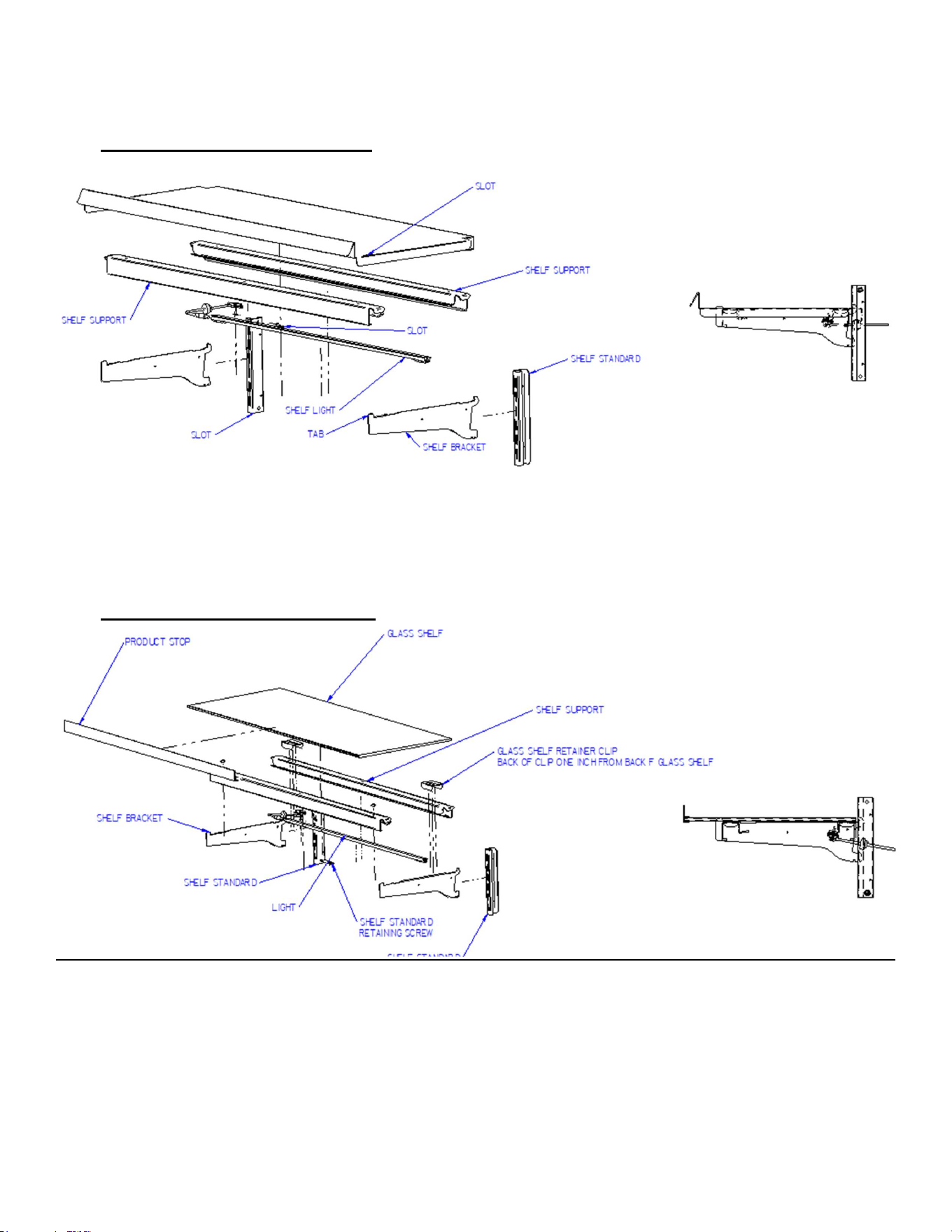
1. Install shelf brackets & shelf supports as described in Shelf Bracket & Supports Installation Section of this manual.
2. Place the front of metal shelf onto front shelf support. The tab on end of shelf bracket must go through slot in front of
shelf.
3. Place the back of shelf over the back of the rear shelf support.
9.3 GLASS SHELF INSTALLATION
1. For first time installation attach (2) glass shelf retainer clips to each glass shelf in location shown in illustration one
inch from back of glass as shown. Clean area of glass where glass shelf holder is to be located with rubbing alcohol
and let air dry before installing shelf glass holder. Remove backing from tape located on flat side of glass shelf holder.
Position the glass shelf holders in the (2) far corners of glass. Repeat for each glass shelf.
2. For first time installation attach (1) product stop to each glass shelf as shown in detail above. Align the product stop
edge with the edge of the glass and push the “U” portion of the product stop on to glass lip across the entire front of
glass.
E4036 UCR Page 18 of 35
3. Attach a clear bumper on both sides of the light housing top surface for the front of the glass to set on. This step may
have already been performed at the factory for you.
4. Place front of glass shelf onto clear bumpers on front shelf light. (On front shelf support for models without shelf
lights).
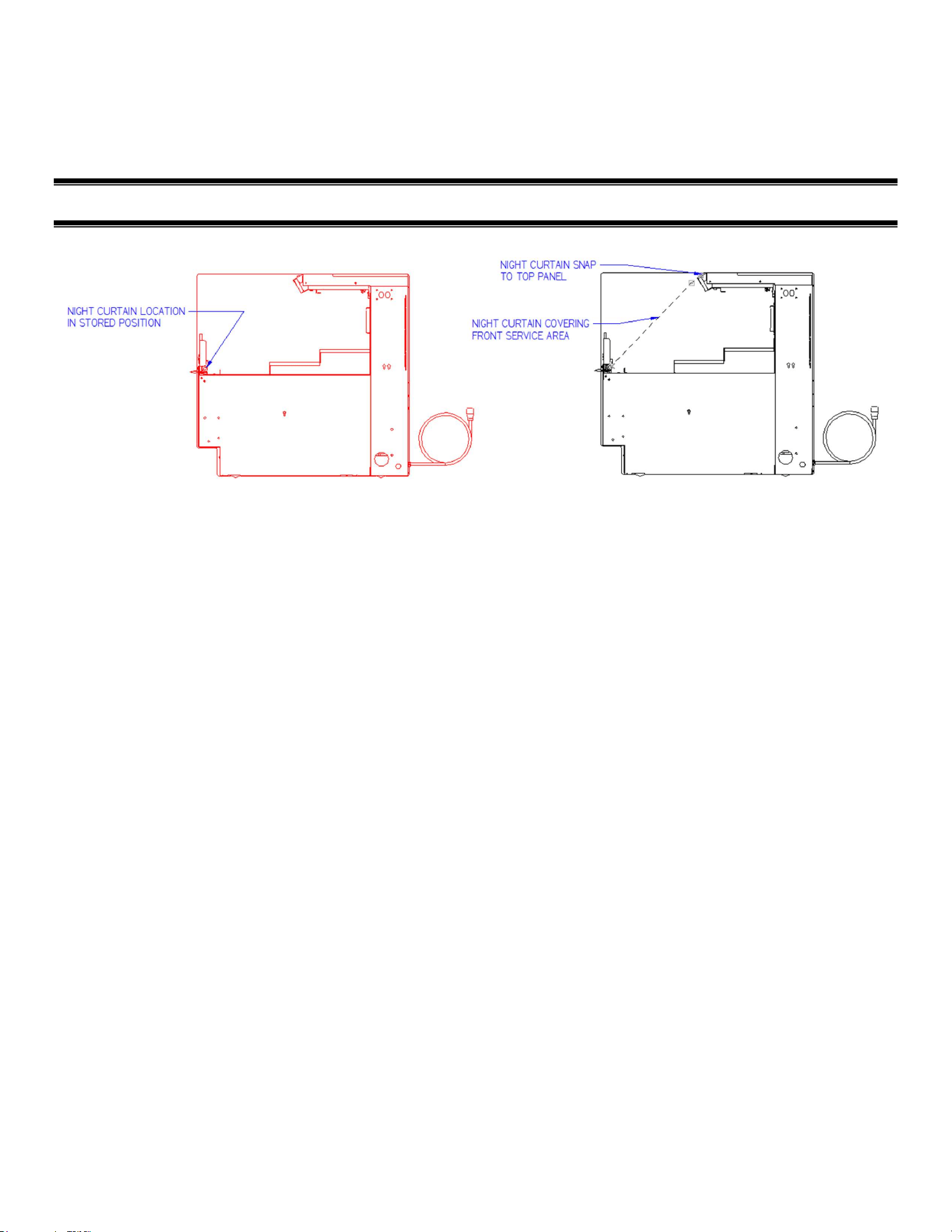
(10) NIGHT CURTAIN OPERATION (OPTION)
The night curtain rolls up and is stored in the front interior of the case as shown in the first view.
The curtain can be used to cover the front open display area as shown in the second view above.
OPENING UCR NIGHT CURTAIN:
Standing in front of the case, grab the night curtain strap and pull the rolled night curtain up and over the top of the case.
Attach the snap located under the night curtain strap on to the snap located on the case front upper panel.
CLOSING UCR NIGHT CURTAIN:
From front of case grab the night curtain strap and detach the snap located in the case front upper panel. Allow the night
curtain to roll up down the front of the case.
Note: The 59”’ and 77” models have (2) night curtains.
E4036 UCR Page 19 of 35
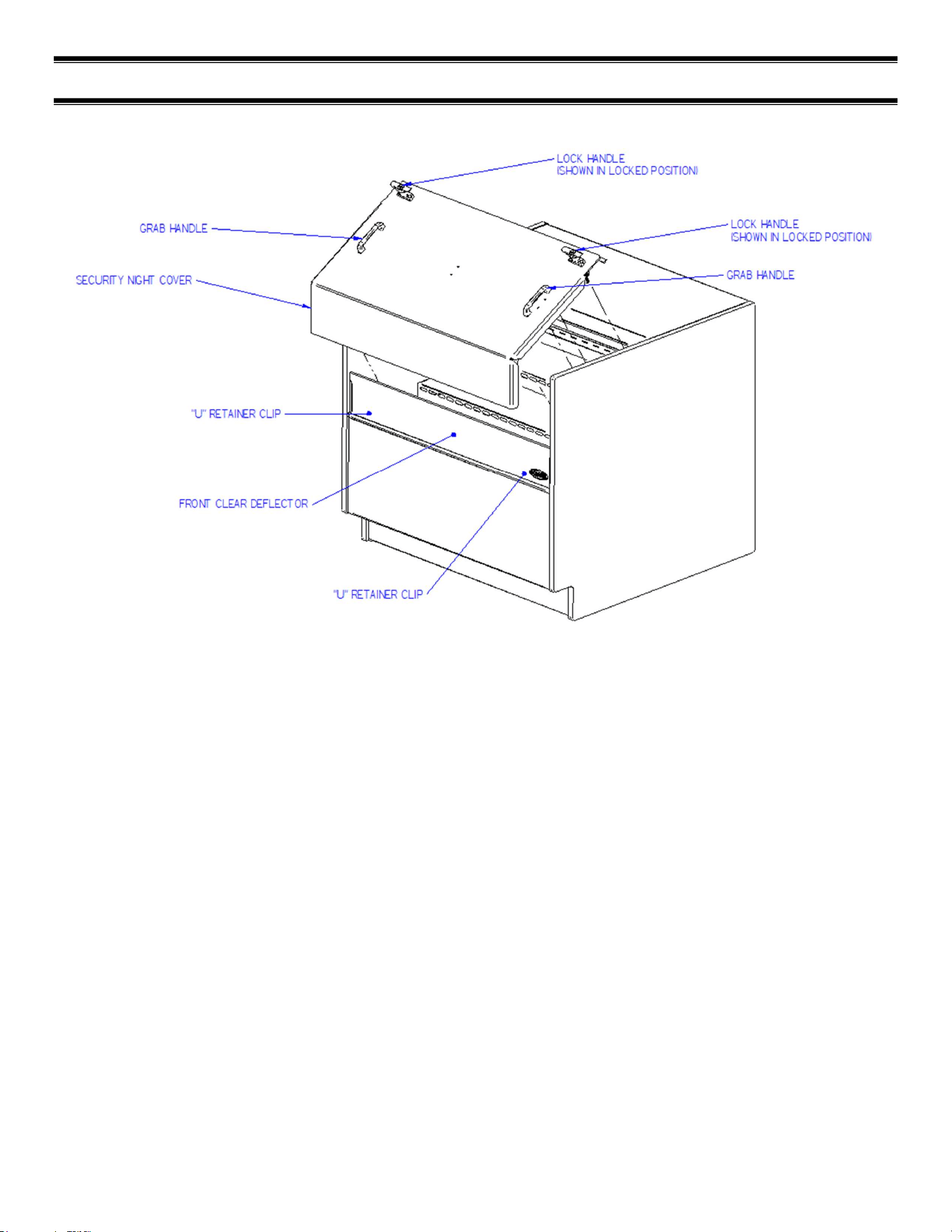
(11) SECURITY COVER (OPTION)
REMOVAL:
1. Unlock the lock handles and turn handles vertical to disengage from lock handle catches.
2. Grab the front grab handles and lift the cover straight up out of the case opening.
INSTALATION:
1. Turn the lock handle so the latch handle is vertical to the top of the case.
2. Holding the grab handles place the bottom flange of the security night cover inside the “U” retainer clips located
on each side of case opening behind the front clear deflector. There also may be a “U” retainer clip in the center
of the case that must also engage the security night cover flange.
3. Set the top flange of the security cover down against the top glass handle.
4. Turn the lock handles so they engage the lock handle catches and use the key to lock them in place.
IMPORTANT: Cleaning the Acrylic plastic security night cover require special care to prevent hazing of material.
Lightly dust (not wipe) the surface with clean soft cloth. Then the surface can be wiped carefully with a soft, wet cloth or
chamois. The cloth or chamois must be kept free of grit by frequently rinsing in clean water. Grease and oil can be
removed with kerosene. Do not use window cleaners or kitchen scouring compounds. DO NOT use solvents such as
Acetone, Benzene, Carbon Tetrachloride, and Lacquer Thinners. A spray wax such as Pledge or Maguire’s polish can be
applied and wiped with a clean soft cloth. The wax tends to fill in and hide small scratches.
E4036 UCR Page 20 of 35
(12) OPERATING INSTRUCTIONS
12.1 USER CONTROLS OVERVIEW
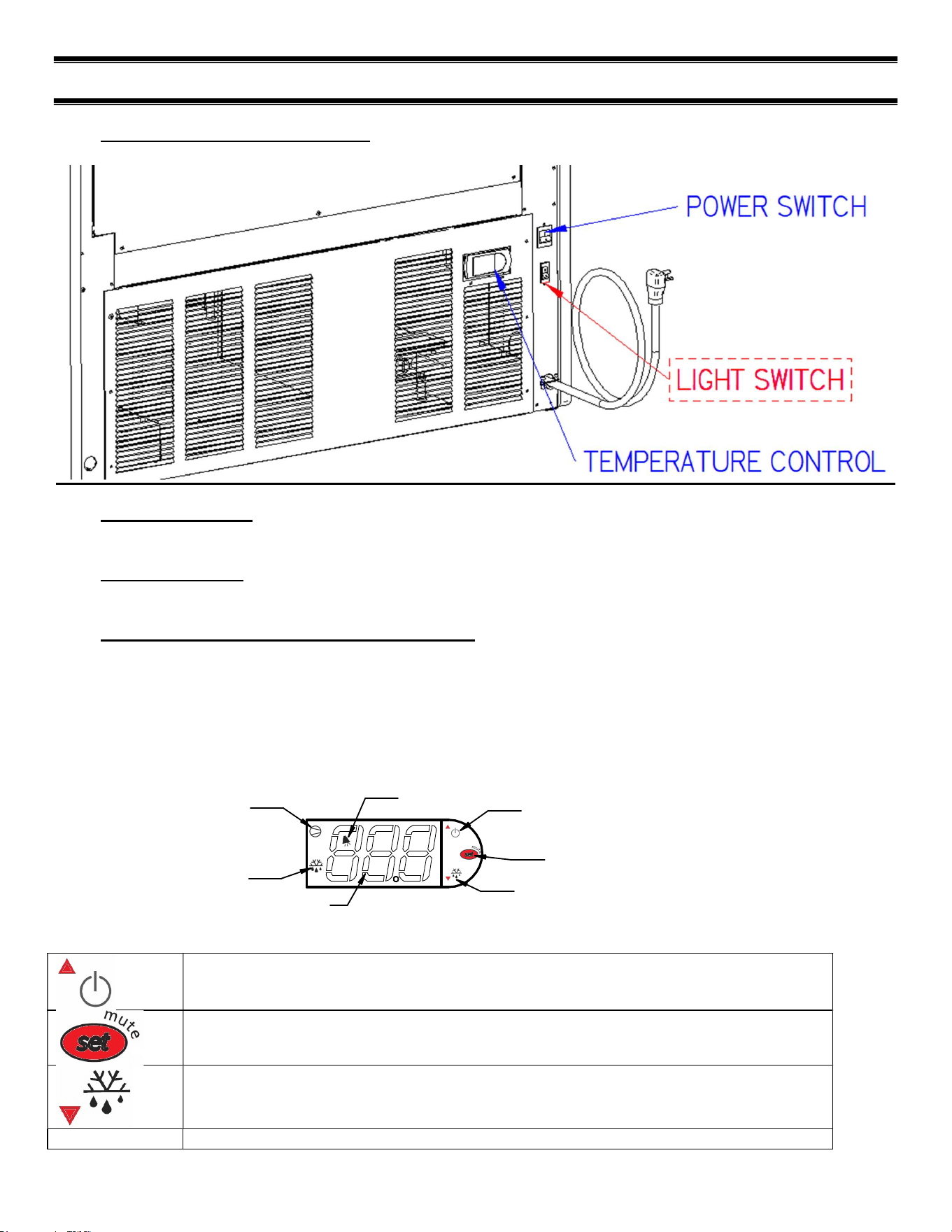
12.2 POWER SWITCH
The unit has a power switch that turns off power to the entire unit, including the condensate evaporator and the lights.
12.3 LIGHT SWITCH
The unit has a light switch that turns on and off the interior lights of unit.
12.4 ELECTRONIC TEMPERATURE CONTROL
Located in the rear grille of the display case, the temperature control allows the user to adjust the temperature of the
display merchandiser to their needs.
12.4.1 Button and Display overview
Button Overview
Press and hold this button for three seconds to turn system on (if off) or off (if on).
Also used to adjust set point when in set point adjust mode
Press to enter set point adjust mode, confirm set point changes, and mute alarms.
Press and hold this button for three seconds to initiate a manual defrost (and cancel defrost
if initiated), also adjusts set point down when in set point adjust mode
DIGITAL DISPLAY
SET POINT ADJUST MODE
POWER TO CONTROL ON/OFF
AND SET POINT UP ADJUST
MANUAL DEFROST AND
SET POINT DOWN ADJUST
COMPRESSOR RUN
INDICATOR
DEFROST MODE INDICATOR
ALARM INDICATOR
E4036 UCR Page 21 of 35
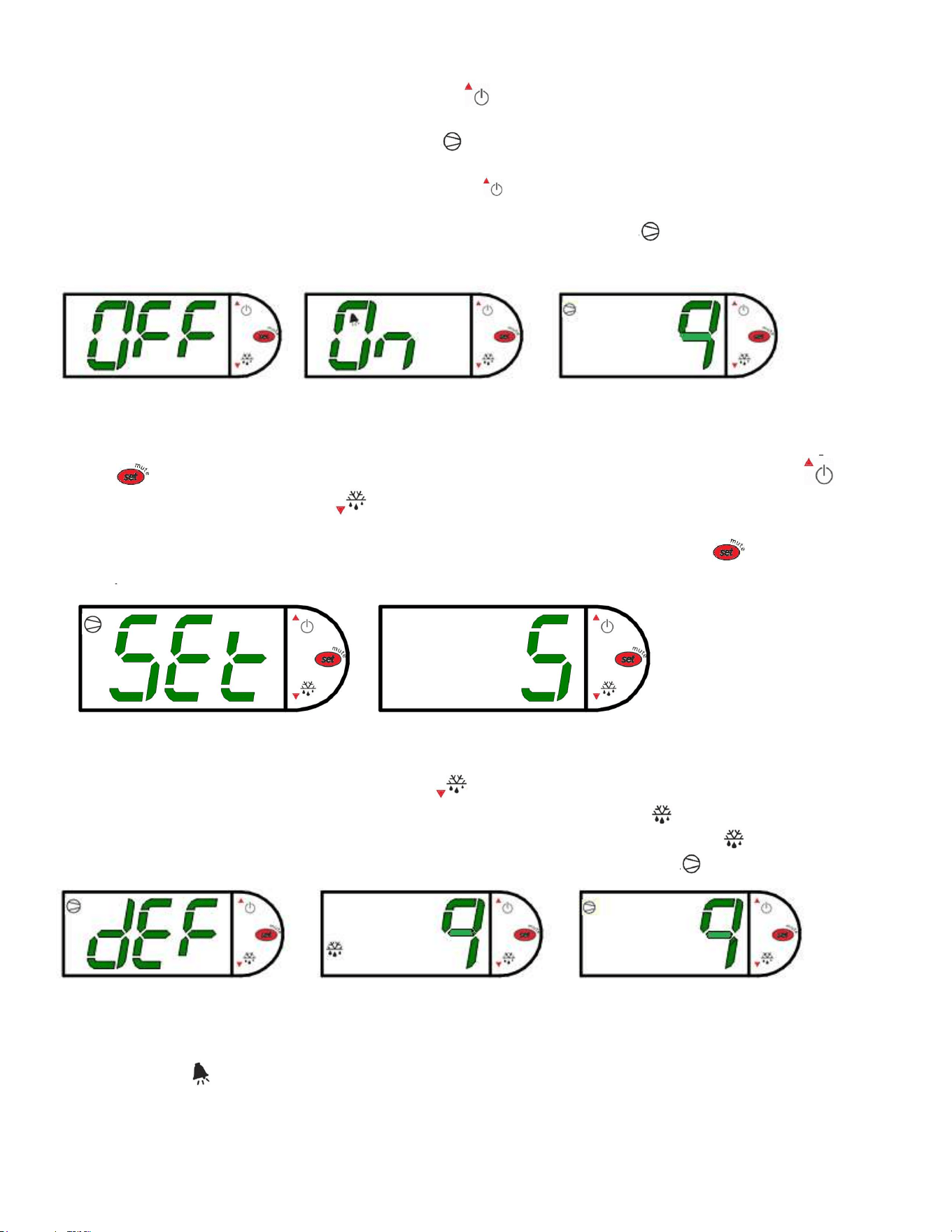
12.4.2 Powering on control
To turn refrigeration control power on, press and hold for approx. three seconds. The display will read
“On” while the button is depressed. When the control powers on, the display will read the current set point (a
number “1” thru “9” ). The compressor run indicator will illuminate on the display, meaning that the
compressor is running. (Note: the control may already be in the on mode when shipped from factory).
To turn refrigeration control power to off, press and hold for approx. three seconds. The display will read
“Off” while the button is depressed. When the control powers off the display will flash back and forth between
the relative current case temperature and “Off”. The compressor run indicator will be off on the display.
When refrigeration control is in the off-mode cabinet lights and evaporator fans will still operate, but the
compressor will not turn on causing the case to gradually reach room temperature.
12.4.3 Adjusting the set point
The set point is what determines how cold the display case will hold food and beverage. To adjust the set point press and
hold the button approx. three seconds until the display begins to flash a number. Then press the use the button
to scroll number up (colder) or press the button to scroll number lower (warmer). There are nine (9) available set
points numbers, the higher the number of the set point, the colder the display case will run, with setting “9” being the
coldest and setting “1” being the warmest. Once you have chosen your desired setting press the button again to
confirm your choice.
12.4.4 Entering Manual Defrost Mode
In order to initiate a manual, defrost press and hold the button approx. three seconds. The control will read “dEF”
while the button is being held. The defrost is initiated when the defrost mode indicator illuminates on the display. The
control display will then return to reading the case temperature. When the defrost mode indicator turns off the defrost
is complete and the compressor will turn back on illuminating the compressor run indicator .
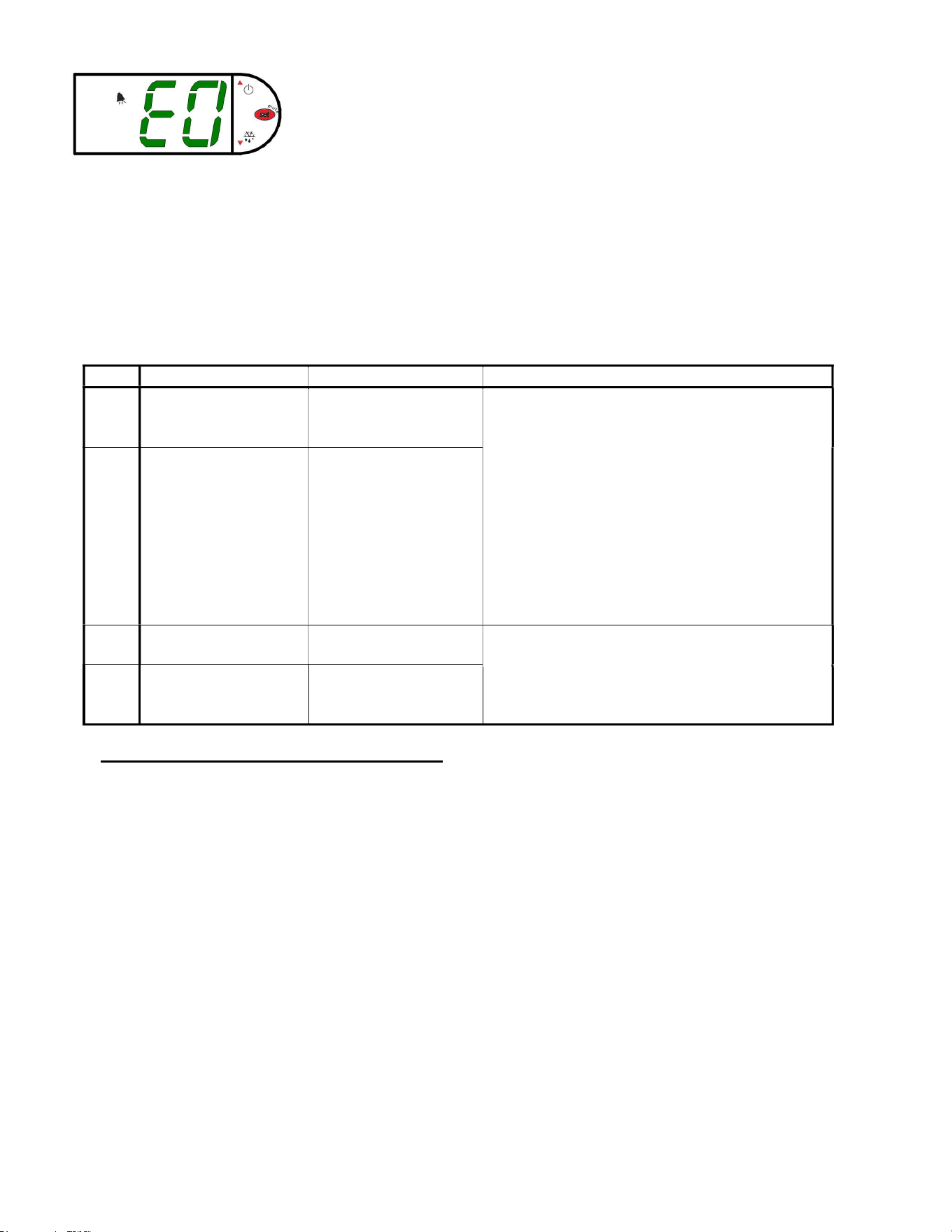
12.4.5 Error codes
It is possible for error codes to be displayed on the control screen. In the event of a malfunction an alarm will sound and
the alarm indicator will be displayed on the display. An error code or codes will flash intermittently on the display. If
there are multiple codes, the display will continuously cycle through them. The following photo shows error code “E0” as
an example.
E4036 UCR Page 22 of 35
Mute: You may mute the alarm by pressing and releasing the wrench button. The red ringing bell and all error codes will
still be displayed. When the fault is remedied the control will return to normal operation and will automatically clear the
codes from the display.
EO = Air sensing probe - Open or shorted
E1 = Evap. coil probe - Open or shorted
Error codes may be encountered if either the controller or the display case is malfunctioning. The following is a list of
error codes that may be encountered.
Table 1 - Error Codes and Resolutions
Code
Description
Cause
Resolution
E0 Temperature probe
error
Probe signal is
interrupted or short-
circuited
Check to ensure probe wires and quick
disconnect are secure in control.
Check probe resistance to table below. If 0
resistance is present check wiring insulation. If
infinite resistance is present check for breaks in
wiring (meter will likely read overload or very
high in the mega-ohm range).
Ensure that probes are wired per the wiring
diagram provided.
Replace probe if other remedies fail, or if probe
resistance deviates from “
”
below
E1 Defrost probe error See E0
EE Unit parameter
reading error
Operating conditions Remedy abnormal operating conditions. The
control is rated to operate in a range of 14 to
122°F (-10 to 50°C) and less than 90%RH non-
condensing.
Replace control if problem persists.
EF Operating parameter
reading error
See EE
12.5 ELECTRONIC CONTROL OPERATION
This unit is equipped with an electronic temperature control. The control parameters are set at the factory and cannot be
manually changed in the field. The pre set control parameters are listed on the chart in the Settings Chart below.
Operation
The control uses two sensors, one located in the air stream and one located on the evaporator coil. The sensor
located in the air stream is referred to as the temperature control sensor. The sensor located on the evaporator coil
is referred to as the defrost probe.
The temperature control sensor is located on the plastic tub behind the evaporator coil to the left in the cold air
stream. The sensor location is critical for proper operation on the unit. Do not move or relocate this sensor.
The coil sensor is strapped to the evaporator coil. This sensor location is critical for proper operation of the unit.
Do not move or relocate this sensor.
Defrost Cycle
The control is programmed to initiate defrost via two different methods. There are 3 programmed defrost cycles in
the case which will initiate a defrost cycle every 8 hours. The unit does not have a time clock so the defrost cycles
cannot be set for any specific time of day.
The unit also has an ‘On demand’ defrost feature that will initiate a defrost when the temperature differential
between the evaporator temperature and the air temperature is more than the “defrost on demand differential” for
5 minutes after 30 minutes into the refrigeration cycle (e.g. if the air stream probe measures 42°F/5.6°C or greater
E4036 UCR Page 23 of 35
and the defrost probe measures 20°F/-6.7°C or lower for five minutes). Once initiated the defrost cycle will
terminate when evaporator coil sensor reaches the “defrost termination temperature”
If a manual defrost is required, one can be initiated by pressing and holding the down arrow for three (3) seconds.
This is typically unnecessary and should only be performed if special circumstances require it.
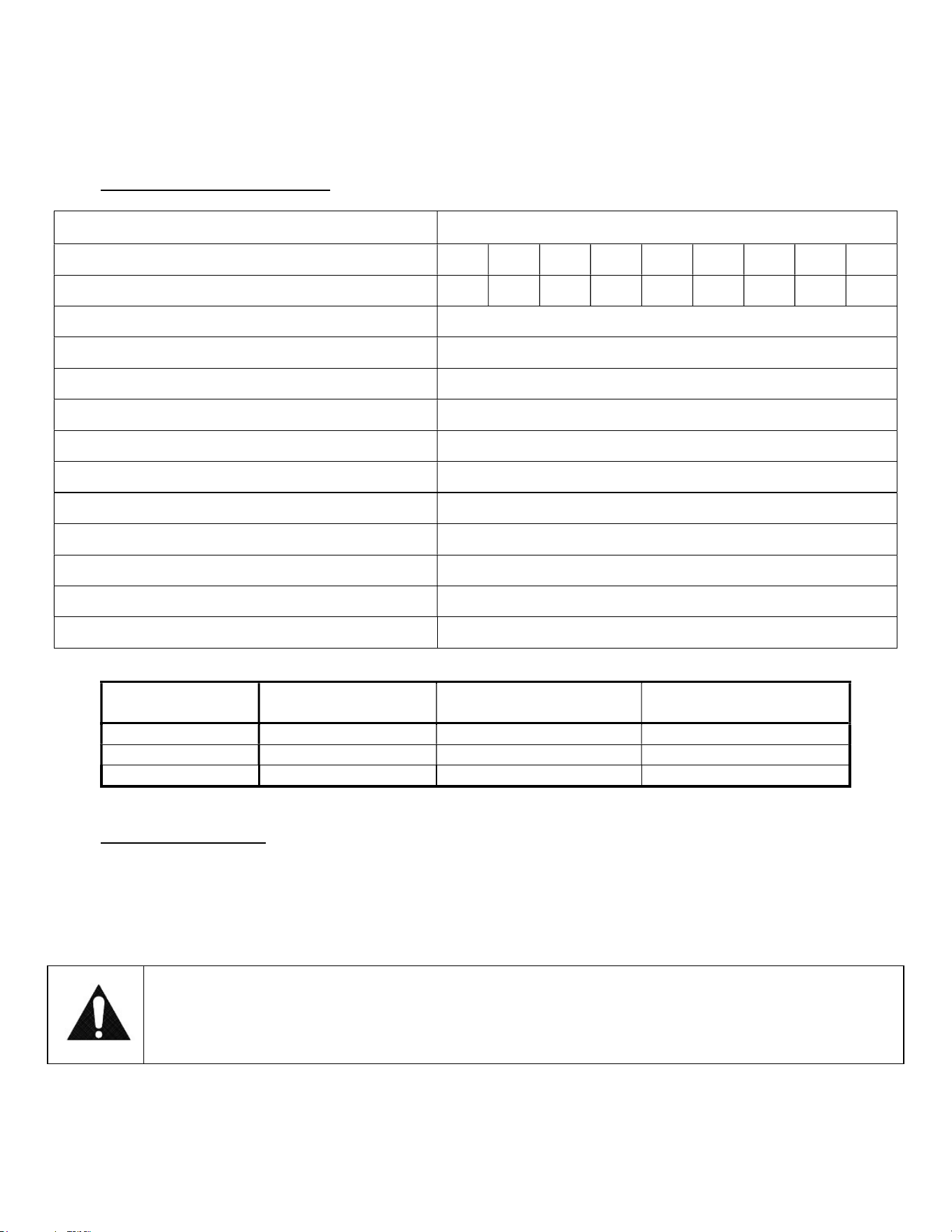
12.6 CONTROL PARAMETERS
Table 2 - Control Parameters
Parameter Description UCR, UCRSL
Control Setpoint
1 2 3 4 5 6 7 8 9
Compressor Cut out [°F]
36.0 34.0 32.0 30.0 28.0 26.0 24.0 22.0 20.0
Compressor Cut in [°F] 38.0°
Compressor Min On Time
10 min
Compressor Min Off Time
3 min
Compressor Max Run Time
90 min
Defrost Termination Temp [°F]
43.0
Time to first defrost
8 hr.
Time to subsequent defrost
8 hr.
Maximum Defrost duration
30 min
Defrost on demand differential [°F]
15.0
Delay for defrost on demand
5 min
Time delay to the next defrost on demand
30 min
Table 3 - Temperature Probe Common Resistance Chart
Probe Temp
Maximum Resistance
[Ω]
Normal Resistance [Ω] Minimum Resistance [Ω]
32°F
(0°C)
27.83
27.28
26.74
77°F
(25°C)
10.1
10
9.9
212°F
(100°C)
1
0.97
0.94
12.7 INITIAL STARTUP
After all the checks outlined in the installation section of this manual have been made, the case is ready to be put into
service. Turn on the Power at the breaker box and flip the Power Switch and Light Switch on unit to the on position. Also
ensure that the control is powered on as described above.
At start up from a warm unit, it is recommended that the temperature control is set to a warmer setting, such as 1. After
the unit has gone through several cycles, adjust the control to a mid-range setting, then to a colder setting if necessary to
maintain desired product temperature
NOTICE:
This refrigerated display case is designed to operate in a maximum environment of 80°F (23.9°C) and
55% relative humidity. Exceeding these limits will cause poor case performance and excessive
sweating.
E4036 UCR Page 24 of 35
12.8 PLACING PRODUCT IN CASE
Determine desired shelving location before placing product in case. Product must be removed to readjust shelf
location and angle.
Do not overhang the front or rear of shelves with product. Improper clearance in front and rear of shelf will block
the refrigerated air flow and will cause product loss.
Do not block the slots along the front and rear air discharge slots. Covering these slots will block the refrigerated
air flow and will cause product loss.
The display deck is removable for cleaning and can become dislodged in shipment. To ensure proper airflow and
performance of the case, make sure that the display deck is pushed completely down into the plastic evaporator
tub.
Allow refrigerated models to run for at least two hours before placing pre-chilled product into unit.
NOTICE:
Case must be stocked with pre-chilled product only. Product should be at or below 38°F (3.3°C)
before adding it to the display case. Use a refrigerator to pull down product that is above 38°F
(3.3°C). This display case is a temperature holding product only. It will not pull down product that is
above the recommended temperature.
E4036 UCR Page 25 of 35
(13) MAINTENANCE (LIGHTS)
MPORTANT: Read this Section of this manual located on page 6.
“REFRIGERATION WARNING &INSTALLATION-REPAIR-DECOMMISSIONING”
All refrigeration and electrical work must be performed by certified technicians.
Top/Ceiling Light Bulb Replacement, LED
1. Turn power switch on rear of case to “off.”
2. Disconnect light cord barrel plug from receptacle in LED by pulling barrel plug straight out.
3. The LED is attached to clips mounted to the ceiling or top light housing. Disengage the LED from the
clips.
4. Attach the new LED to the clips on the ceiling. Be sure that the LED is centered about the clips.
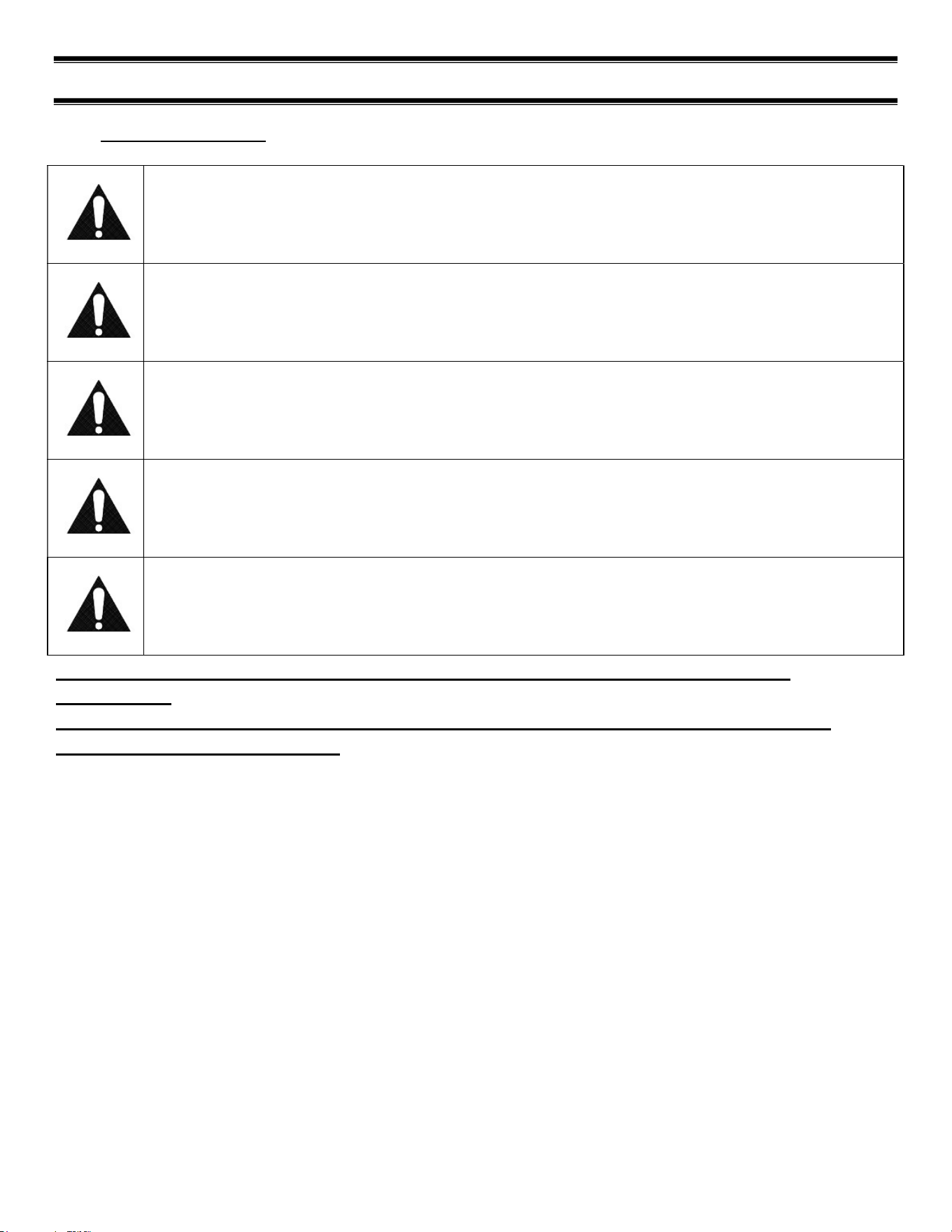
(14) PERIODIC MAINTENANCE (CLEAN CONDENSER)
Cleaning Condenser Coil (All Self Contained Refrigerated Models)
NOTICE: Condenser coil must be cleaned a minimum of twice per month to insure
proper refrigeration performance and prevent compressor failure. In some
environments, it may be necessary to clean more frequently. FAILURE TO
CLEAN CONDENSER COIL WILL VOID COMPRESSOR WARRANTY.
It is very important that the condenser coil is cleaned twice per month to ensure proper refrigeration performance and to
prevent compressor failure. Failure to clean condenser coil will void condenser warranty.
1. Disconnect power to the unit
2. Remove the rear base panel located on the back of the unit by removing the rear panel retaining screws.
3. Carefully vacuum the front surface of condenser coil. Take care not to bend coil fins with vacuum cleaner nozzle.
A brush attachment works well to prevent this.
4. Reinstall rear panel and retaining screws.
Figure 1 - Condenser Cleaning
E4036 UCR Page 26 of 35
(15) CLEANING INSTRUCTIONS
15.1 DAILY CLEANING
The case should be cleaned thoroughly, as described in the weekly cleaning section, before it is used for the first time.
NOTICE:
Avoid splashing or soaking any electrical components with water to prevent electrical damage to the
case.
NOTICE:
Shut off lights and power switches and remove all product from case. Allow sufficient time for the
unit to reach room temperature before proceeding with cleaning.
NOTICE:
Remove all product from case before proceeding with cleaning procedure.
NOTICE:
Acrylic front air deflector requires special washing procedures to prevent hazing and yellowing of
material.
NOTICE:
This case is not designed to be cleaned by flushing.
Note: For major spills or foreign material buildup perform the weekly cleaning
instructions.
Note: Detergents are not recommended and do not use abrasive cleaners or pads to
prevent scratching of surfaces.
1. Clean all foreign materials from the door opening if supplied.
2. Wipe complete interior of both the upper & lower areas of case using a damp cloth.
3. The remaining exterior surface should be wiped down using any ammoniated cleaners or soapy warm water.
4. IMPORTANT: Cleaning the clear acrylic plastic front air deflector require special care to prevent hazing and
yellowing of material. Lightly dust (not wipe) surface with clean soft cloth. Then the surface can be wiped
carefully with a soft, wet cloth or chamois. The cloth or chamois must be kept free of grit by frequently rinsing in
clean water. Grease and oil can be removed with kerosene. Do not use window cleaners or kitchen scouring
compounds. DO NOT use solvents such as Acetone, Benzene, Carbon Tetrachloride, and Lacquer Thinners. A
spray wax such as Pledge or Maguire’s polish can be applied and wiped with a clean soft cloth. The wax tends to
fill in and hide small scratches.
E4036 UCR Page 27 of 35
15.2 WEEKLY CLEANING
This procedure is recommended on a weekly basis. It may need to be performed more often if necessary to maintain a
clean, sanitary case. The case should be cleaned to this procedure before using the first time.
NOTICE:
Avoid splashing or soaking any electrical components with water to prevent electrical damage to the
case.
NOTICE:
Shut off lights and power switches and remove all product from case. Allow sufficient time for the
unit to reach room temperature before proceeding with cleaning.
NOTICE:
Remove all product from case before proceeding with cleaning procedure.
NOTICE:
This case is not designed to be cleaned by flushing.
1. The side glass can be cleaned with common window cleaners.
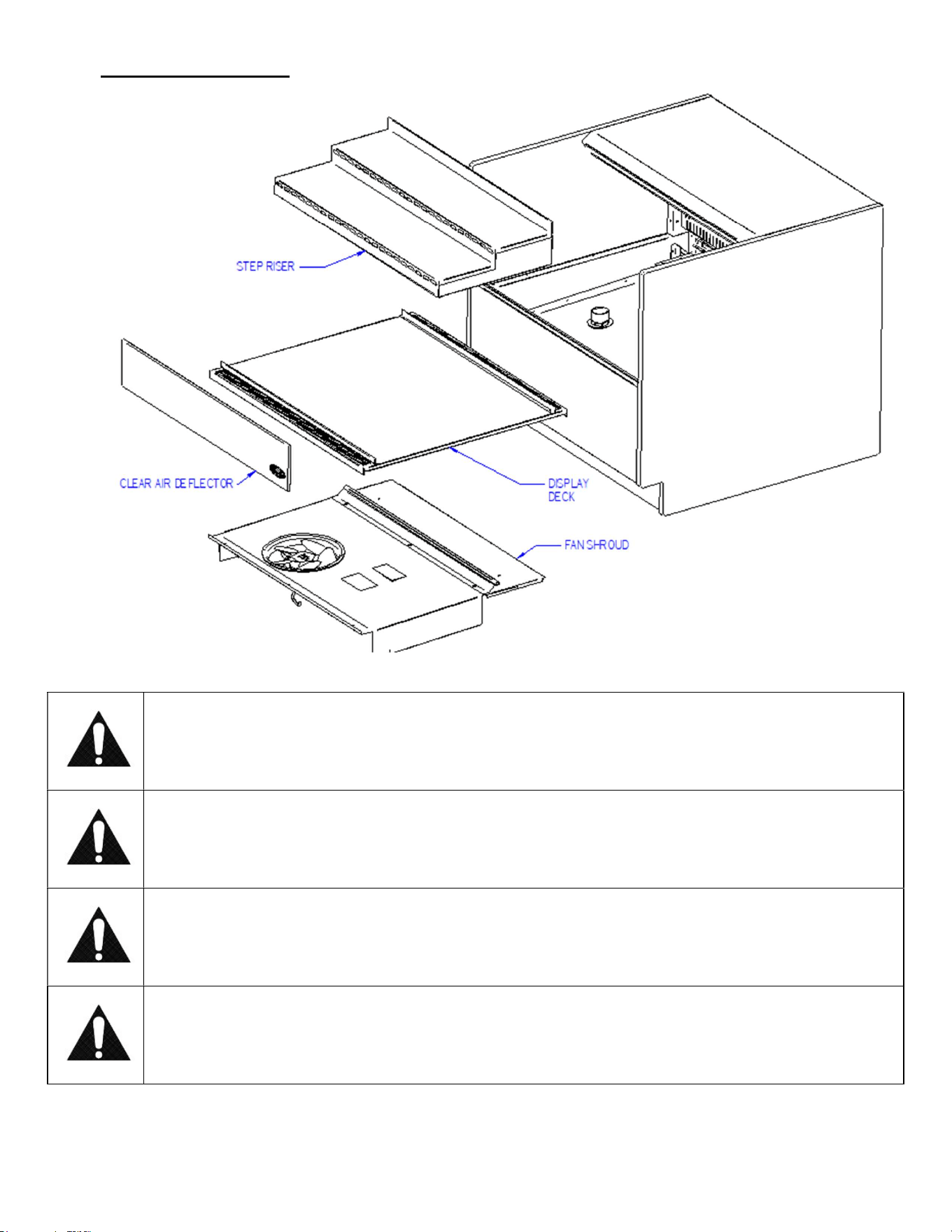
2. Remove step riser from unit. Clean using warm soapy water and a brush. Rinse thoroughly and allow to dry.
3. Lift the display deck(s) up and out of evaporator tub.
E4036 UCR Page 28 of 35
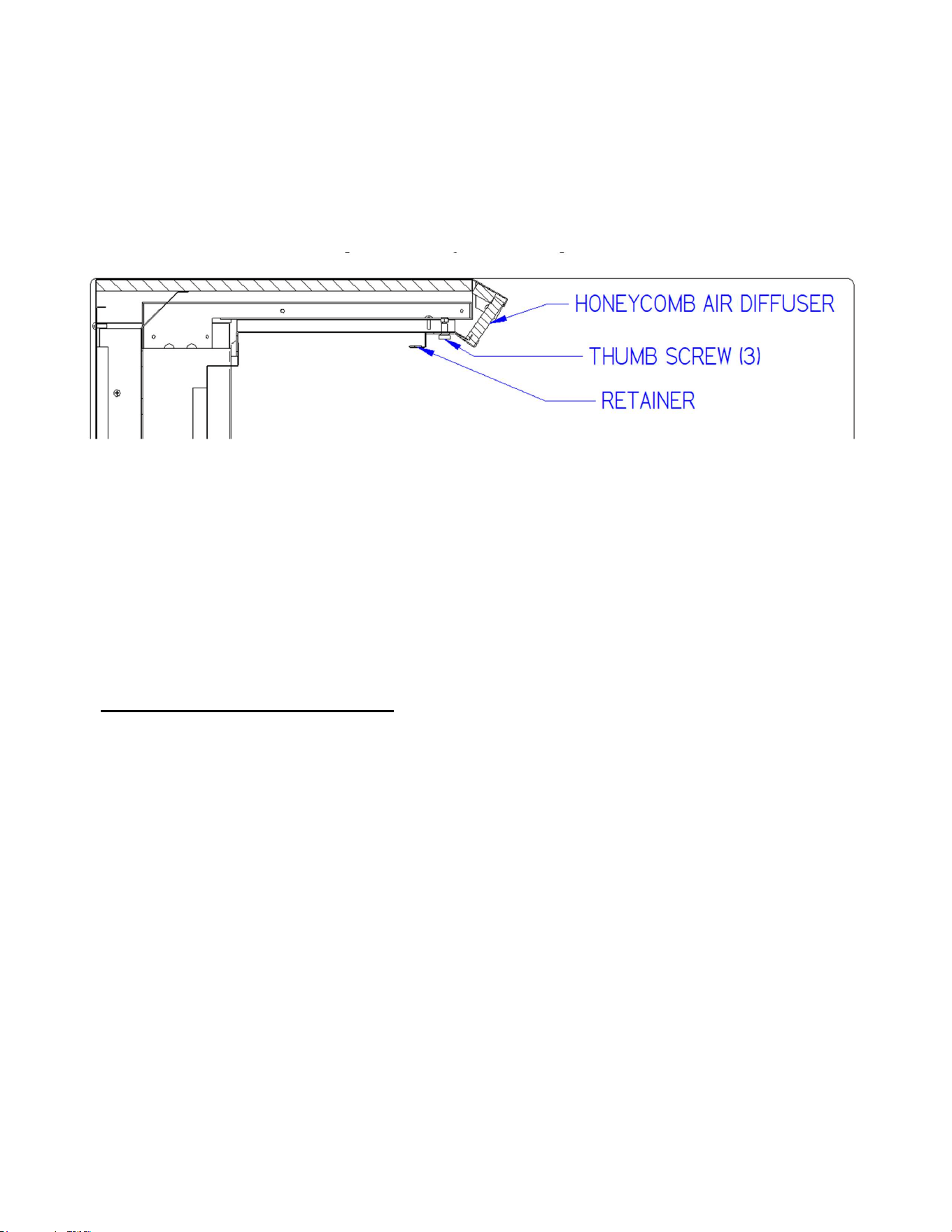
4. Remove the fan shroud assembly removing (3) thumb screws from along the front lip of the fan shroud. Lift the
fan shroud assembly and reach in and unplug the evaporator fan motor cord(s). Lift fan shroud assembly out of
tub.
5. Clean the display deck(s) using warm soapy water and a brush. Rinse thoroughly and allow to dry. Wipe off fan
shroud assembly (do not rinse or submerge fan motors).
6. Clean the entire interior of the case using warm soapy water. Flush foreign material from drain area. Wipe off all
soapy water with a damp cloth and allow to dry. (DO NOT use solvents such as Acetone, Benzene, Carbon
Tetrachloride, and Lacquer Thinners)
7. Remove the honeycomb air diffuser(s) from upper air duct track. Loosen thumb screws on Retainer located
behind diffuser. Retainer will drop down allowing diffuser to be pulled out of case.
8. Clean honey comb air diffuser with warm soapy water and a brush. Rinse thoroughly and allow to dry.
9. Remove the clear plastic front air deflector by lifting it up and out of case.
IMPORTANT: Cleaning the Acrylic plastic front air deflector require special care to prevent hazing and
yellowing of material. Lightly dust (not wipe) the surface with a clean soft cloth. Then the surface can be wiped
carefully with a soft, wet cloth or chamois. The cloth or chamois must be kept free of grit by frequently rinsing in
clean water. Grease and oil can be removed with kerosene. Do not use window cleaners or kitchen scouring
compounds. DO NOT use solvents such as Acetone, Benzene, Carbon Tetrachloride, and Lacquer Thinners. A
spray wax such as Pledge or Maguire’s polish can be applied and wiped with a clean soft cloth. The wax tends to
fill in and hide small scratches.
10. Reassemble all components in reverse order.
NOTE: Depending on the amount of usage and spillage of foreign material, some fasteners may have to be
removed and parts disassembled to allow proper cleaning of the unit.
15.3 WEEKLY EXTERIOR CLEANING
1. Clean the front and end glass using any common window cleaner.
2. The exterior surfaces should be wiped down using any ammoniated cleansers or warm soapy water.
E4036 UCR Page 29 of 35
(16) SALE & DISPOSAL
16.1 OWNER RESPONSIBILITY
If you sell or give away your Federal Industries case you must make sure that all safety labels and the Installation-Service
Manual are included with it. If you need replacement labels or manuals, Federal Industries will provide them free of
charge. Contact the customer service department at Federal Industries at (800) 3564206.
The customer service department at Federal Industries should be contacted at the time of sale or disposal of your case so
records may be kept of its new location.
If you sell or give away your Federal Industries case and you evacuate the refrigerant charge before shipment. Federal
Industries recommends that the charge be evacuated into a recovery system to prevent the possibility of HFO’s from being
released into the atmosphere.
(17) SERVICE INFORMATION
Before any service work is performed
on the case, make sure all power is
disconnected to the case.
IMPORTANT: Read this Section of this manual located on page 6.
“REFRIGERATION WARNING &INSTALLATION-REPAIR-DECOMMISSIONING”
All refrigeration and electrical work must be performed by certified technicians.
To find a service company in your area, please visit our website at
www.federalindustries.com. There you can also find self-service tools to help you
get the answers you need faster!
For Warranty Service Requests & ALL Technical Support please contact:
- Phone: (800) 356-4206 and choose the Tech Support/Warranty Option
- Email: Service@federalind.com
For Warranty Compressors please contact the Parts Department:
- Phone: (800) 356-4206 and choose the Warranty Parts Option
- Email: Parts@Federalind.com
Federal Industries has partnered with Parts Town for ALL Non-Warranty Part Identification, Pricing,
Lead Times, Orders & Freight Quotes. Please contact Parts Town directly if you need parts:
- Website: PartsTown.com
- Email: CustomerService@PartsTown.com
- Phone: 833-809-8188
CAUTION
RISK OF ELECTRIC SHOCK
DISCONNECT POWER
BEFORE SERVICING UNIT
E4036 UCR Page 30 of 35
17.1 SPECIAL SERVICE INSTRUCTIONS
There are rare occasions when the refrigerant charge must be evacuated from a case in order to perform service work. In
those situations, Federal Industries recommends that the refrigerant charge be evacuated into a recovery system to prevent
the possibility of hydrofluoro olefin (HFo’s) from being released into the atmosphere.
If moisture or liquid is observed around or under a Federal Industries case, an immediate investigation should be made by
qualified personnel to determine the source of the moisture or liquid. The investigation made should determine if the case
is malfunctioning or if there is a simple housekeeping problem.
Moisture or liquid around or under a case is a potential slip/fall hazard for persons walking by or working in the general
area of the case. Any case malfunction or housekeeping problem that creates a slip/fall hazard around or under a case
should be corrected immediately.
17.2 PRE-SERVICE CHECKLIST
You may avoid the cost and inconvenience of an unnecessary service call by first reviewing this checklist of frequently
encountered situations that can cause unsatisfactory case performance.
CAUTION:
Before servicing case, turn off power at the main breaker of fuse box.
Case does not operate
Check for disconnected power supply.
Check for tripped breaker or blown fuse.
Check that power switch is on.
Lights do not operate
Check that light switch is on.
Shelf light: Check that shelf light cords are tight in the sockets and LEDs.
Shelf light: Ensure all open sockets are filled with either shelf light cord plugs or dummy caps attached to
socket.
Case temperature too warm (product is exceeding 41°F)
Check that the cold air inlet and outlet slots are not blocked.
If supplied with rear door option be sure that the rear doors are closed and tightly sealed
Check for blocked or dirty condenser coil fins and clean them (see “9 Cleaning Condenser Coil (All
Self Contained Refrigerated Models)
NOTICE: Condenser coil must be cleaned a minimum of twice per month to insure
proper refrigeration performance and prevent compressor failure. In some environments,
it may be necessary to clean more frequently. FAILURE TO CLEAN CONDENSER
COIL WILL VOID COMPRESSOR WARRANTY.
Check that there is no paper or foreign material blocking the evaporator, and if so remove it.
If the evaporator coil is blocked due to excessive frost, activate manual defrost mode on the electronic
control.
Check that the case is given the proper clearance behind the rear grille (see section 8.1 “Locating the
Display Case” page 8)
Check that there is no air movement around case causing disruption to the air curtain. Such as ceiling
fans, heating/AC air ducts, exterior doors, etc.
E4036 UCR Page 31 of 35
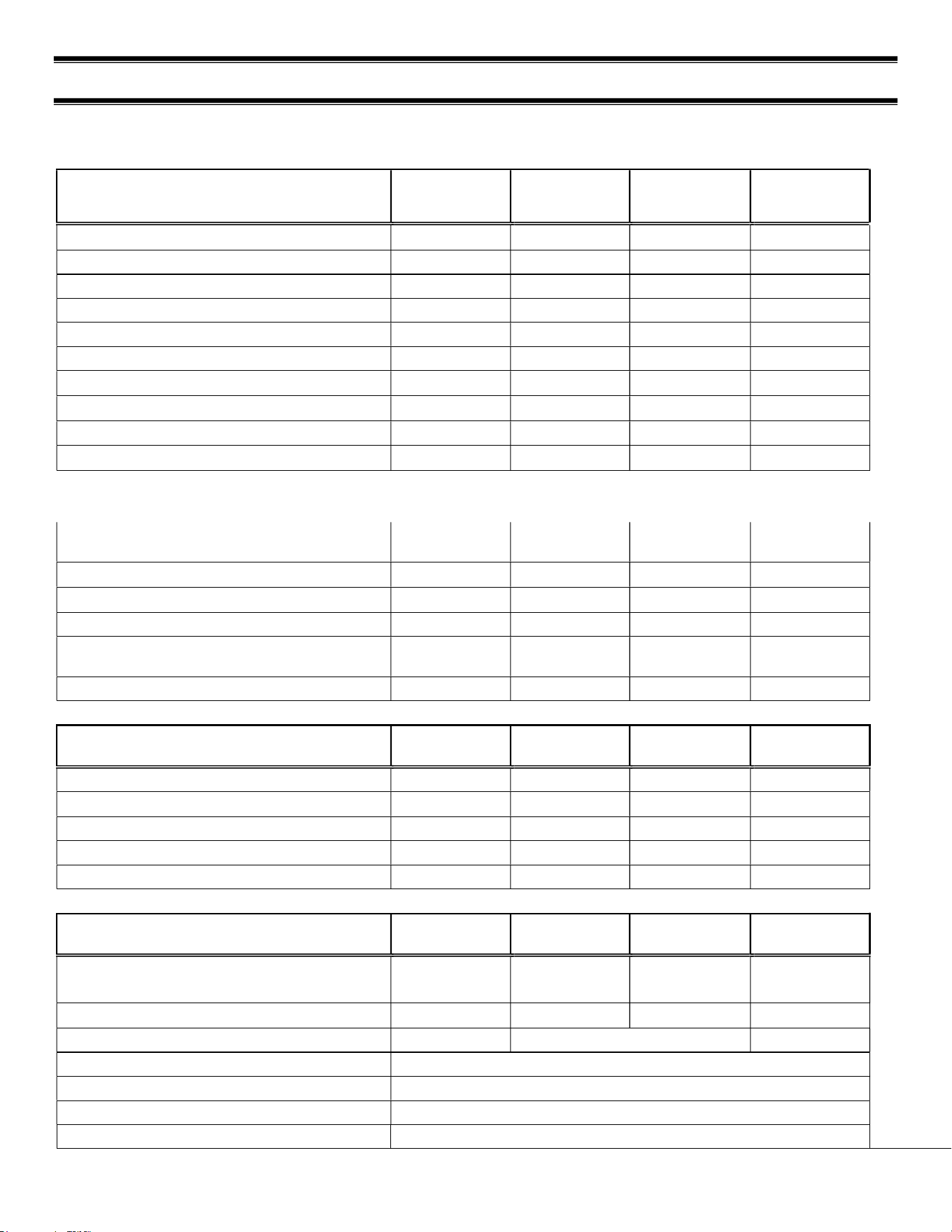
(18) WIRING DIAGRAMS
18.1 SELF CONTAINED
E4036 UCR Page 32 of 35
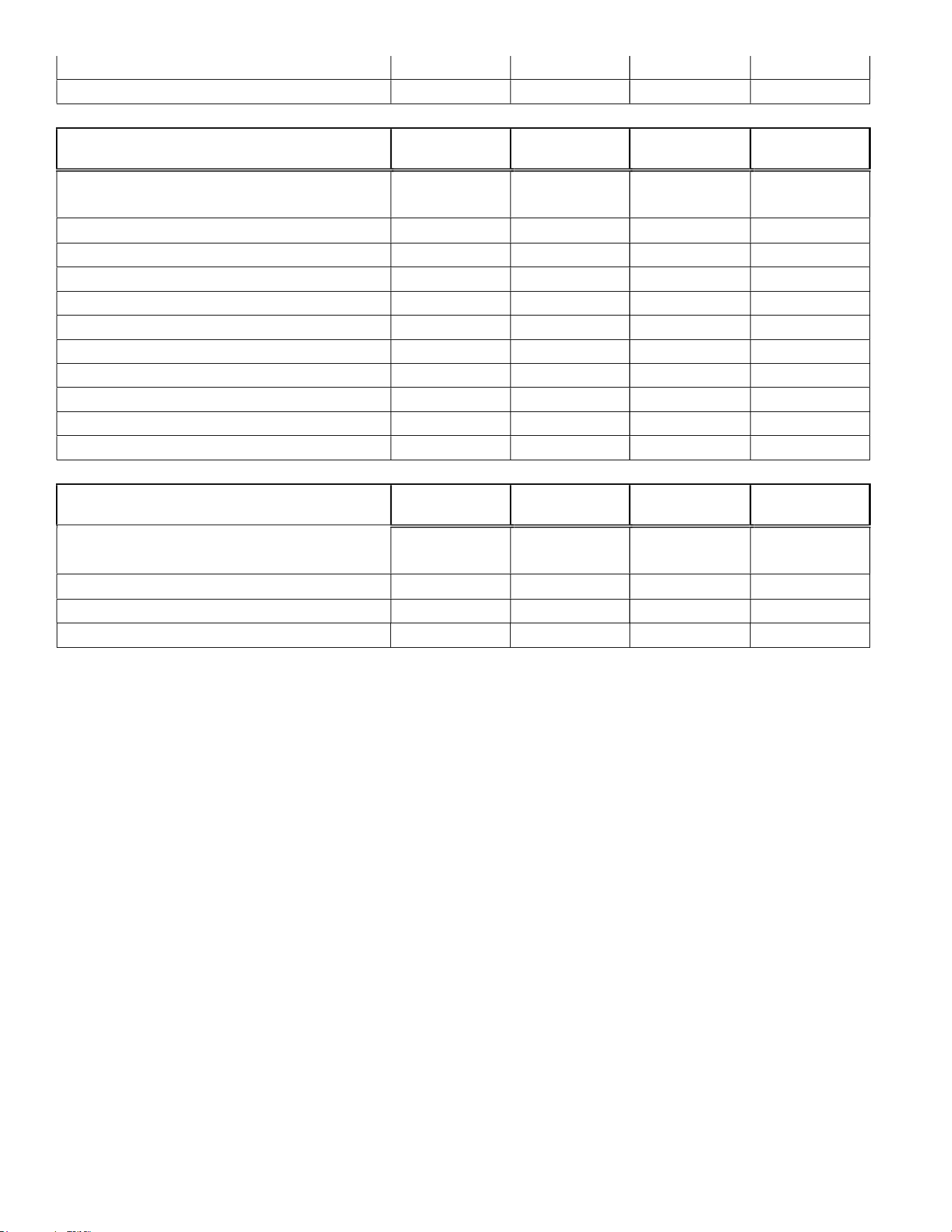
(19) REPLACEMENT PARTS
REFRIGERATION
UCRSL3633/
UCR3633
UCRSL4833/
UCR4833
UCRSL6033/
UCR6033
UCRSL7233/
UCR7233
Condensing Unit (Self Contained) 30-21741 30-21741 30-21739 30-21739
Evaporator Coil 24" Deep 33-21564-20 33-21565-20 33-21566-20 33-21567-20
Evaporator Coil 34" Deep 33-21564-20 33-21565-20 33-21566-20 33-21567-20
TXV 32-21751 32-21751 32-21751 32-21751
Evaporator Fan 24" Deep 41-21572-14 41-21572-14 41-21572-14 41-21572-16
Evaporator Fan 34" Deep 41-21572-14 41-21572-14 41-21572-14 41-21572-16
Temperature Control 32-19864-31 32-19864-31 32-19864-31 32-19864-31
Temperature Probe 32-19094 32-19094 32-19094 32-19094
Condensate Pan 40-20421 40-20421 SA5302-6 SA5302-6
Condensate Pump (Optional) 47-15686 47-15686 47-15686 47-15686
LIGHTING
UCRSL3633/
UCR3633
UCRSL4833/
UCR4833
UCRSL6033/
UCR6033
UCRSL7233/
UCR7233
Light Switch 41-11066 41-11066 41-11066 41-11066
Power Switch 41-18186 41-18186 41-18186 41-18186
LED Power Supply 39-20986 39-20986 39-20986 39-20986
LED Ceiling Light Strip
42-20871-
30C35
42-20871-
42C35
42-20871-
54C35
42-20871-
72C35
Power Cord 43-20569 43-20569 43-20569 43-20569
UCR END PANELS & GLASS
UCR
(Square)
UCRSL
(Square)
UCR
(Curved)
UCRSL
(Curved)
Glass End Clear N/A N/A 50-21660 50-21660
Glass End Reflective Left(Optional) N/A N/A 50-21660-1L 50-21660-1R
Glass End Reflective Right(Optional) N/A N/A 50-21660-1R 50-21660-11R
End Panel Assem. Left (Black) 68-21569-L 68-21569-10L 68-21866-L 68-21866-10L
End Panel Assem. Right (Black) 68-21569-R 68-21569-10R 68-21866-R 68-21866-10R
SHELVING
UCRSL3633/
UCR3633
UCRSL4833/
UCR4833
UCRSL6033/
UCR6033
UCRSL7233/
UCR7233
Glass Shelf 7 Inch (Optional) 52-21658-11 52-21658-12 52-21658-13 52-21658-14
Glass Shelf 12 Inch (Optional) 52-21658-1 52-21658-2 52-21658-3 52-21658-4
Glass Shelf Retainer Clip (Optional) SA4091
Shelf Bracket 12 Inch 67-16038-16A
Shelf Bracket 12 Inch 67-16038-6A
Shelf Standard M21774
Shelf Retainer, Front, Clear W11438-14 W11438-
15
E4036 UCR Page 33 of 35
Step Pans (Standard) 24" Deep SA6022-11 SA6022-12 SA6022-13 SA6022-14
Step Pans (Standard) 34" Deep SA6022-1 SA6022-2 SA6022-3 SA6022-4
REAR DOORS UCR
UCRSL3633/
UCR3633
UCRSL4833/
UCR4833
UCRSL6033/
UCR6033
UCRSL7233/
UCR7233
Track, Rear Door Bottom (Optional) 57-21325-1 57-21325-2 57-21325-3 57-21325-4
Track, Rear Door Jamb (Optional) 57-21328 57-21328 57-21328 57-21328
Track, Rear Door Top (Optional) 57-21329-1 57-21329-2 57-21329-3 57-21329-4
Door, Rear Outer Solid (Black) 53-21327-1 53-21327-2 53-21327-3 53-21327-4
Door, Rear Inner Solid (Black) 53-21326-1 53-21326-2 53-21326-3 53-21326-4
Inside Track, Door Bottom (Optional) M16519-5 M16519-6 M16519-7 M16519-8
Inside Track, Door Top (Optional) M21708-1 M21708-2 M21708-3 M21708-4
Inside Door, Left Slotted Blk. (Option.) SA6025-1 SA6025-2 SA6025-3 SA6025-4
Inside Door, Right Slotted Blk. (Option.) SA6026-1 SA6026-2 SA6026-3 SA6026-4
Door Catch, Outside (Optional) M17196-1 M17196-1 M17196-1 M17196-1
Door Catch, Inside (Optional) M17196-2 M17196-2 M17196-2 M17196-2
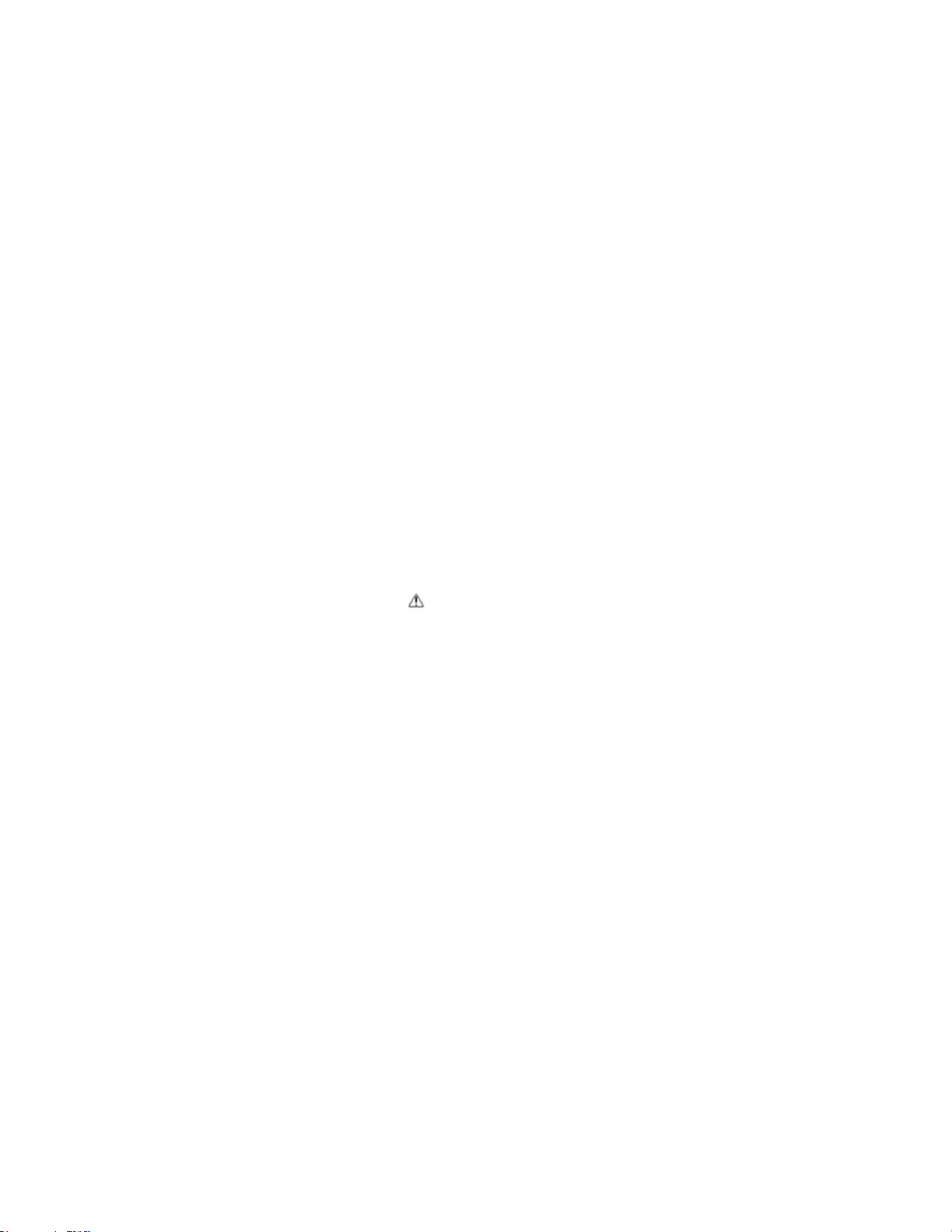
MISCELLANEOUS
UCRSL3633/
UCR3633
UCRSL4833/
UCR4833
UCRSL6033/
UCR6033
UCRSL7233/
UCR7233
Air Deflector Front Clear 15-18198-9 15-18198-10 15-18198-11 15-18198-8
Security Night Cover Panel 24" DEEP SA6168-1 SA6168-2 SA6168-3 SA6168-4
Security Night Cover Latch 34" DEEP SA6168-11 SA6168-12 SA6168-13 SA6168-14
E4036 UCR Page 34 of 35
California Residents Only.
WARNING
This product can expose you to chemicals including chromium which is known to the State of California to
cause cancer and birth defects or other reproductive harm. For more information go to
www.P65Warnings.ca.gov
E4036 UCR Page 35 of 35
REV
CHANGE RECORD
APP’D
DATE
ECN#
A Updated ambient temperature requirements, control
parameter values, pre-chilled product requirements, and
electrical table.
JTR 12/18/23
B
Updated for R290 changes
KMC
3/17/25