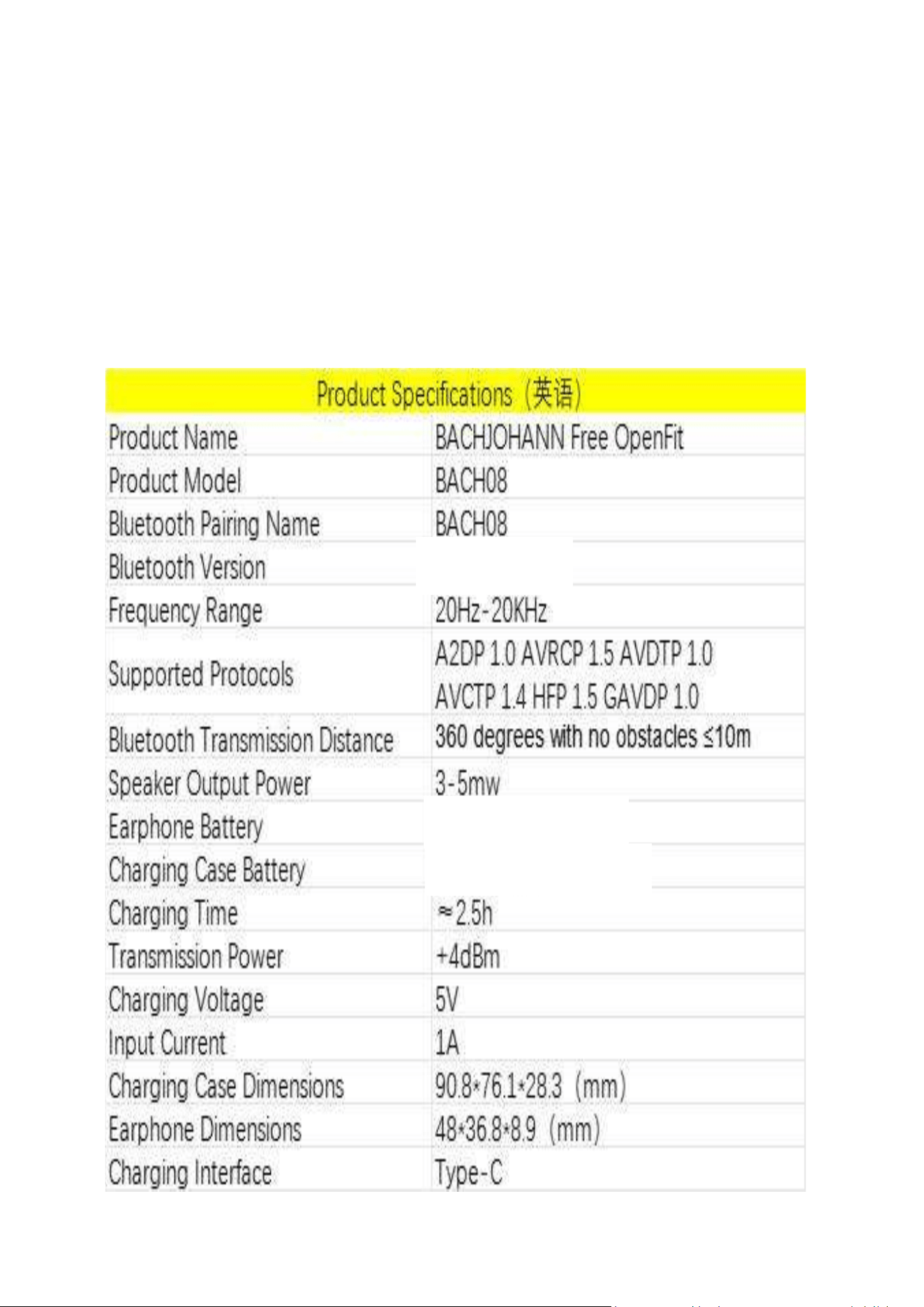
Product Specifications
5
.
3
3
.
7
V
/
6
0
m
A
h
3
.
7
V
/
7
5
0
m
A
h

Bluetooth Connection
Single Device Connection
First-time Connection:
·
Turn on the mobile phone's Bluetooth.
·
Open the charging case and bring it close to the
phone.
·
The phone will search for and connect to the
earphone's Bluetooth with the name "BACH08".
Subsequent Connections:
Open the charging case, and the earphones will
automatically connect to the phone.
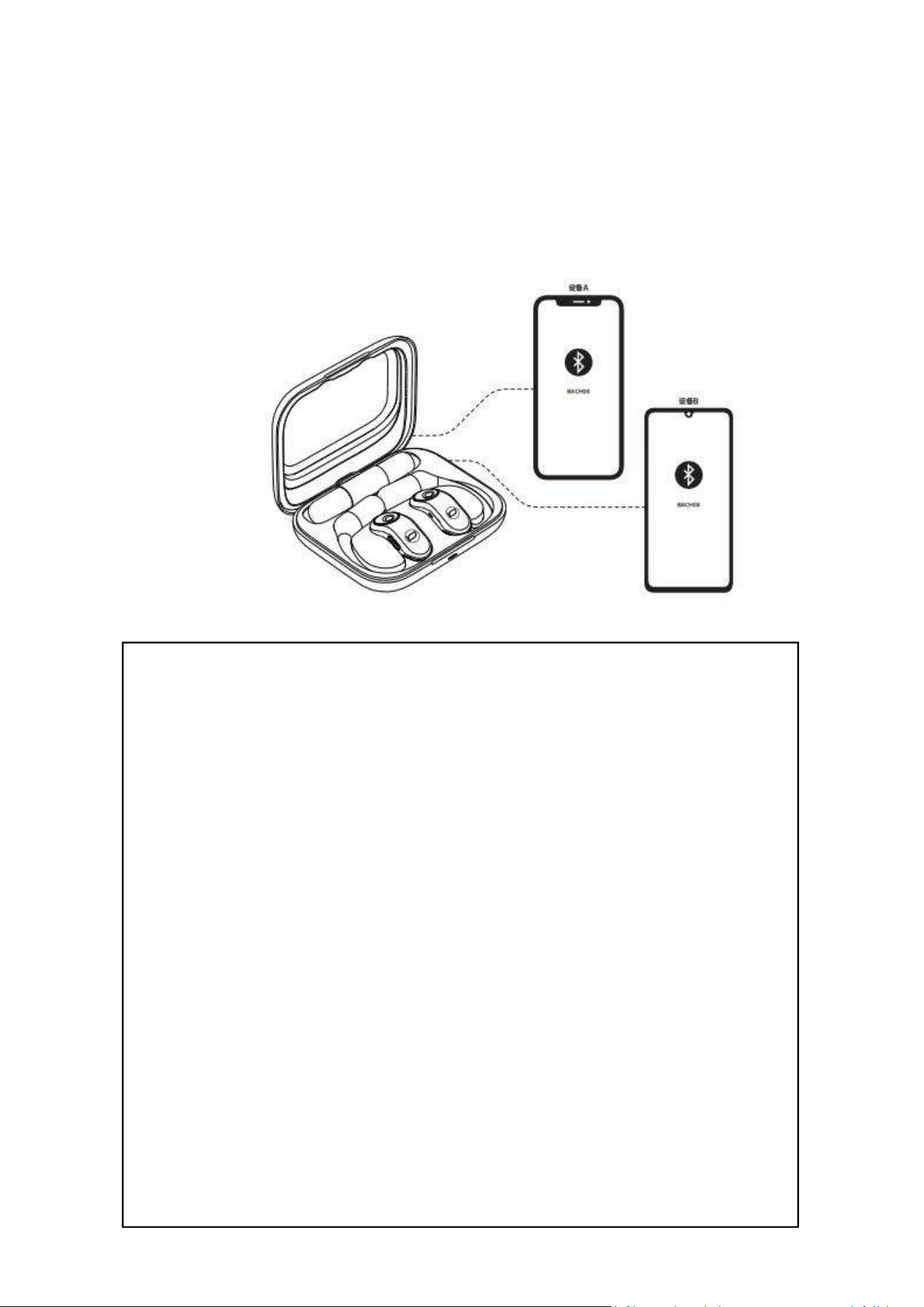
Multi-Device Connection
The earphones can simultaneously connect to two
playback devices (Device A and Device B). The
device that pairs first will be set as the primary
device (Device A), with audio playback given
priority. When the primary device (Device A) pauses
audio playback, if the other device (Device B) is
playing audio content, that device will replace
Device A as the primary device and take over
priority for audio playback.
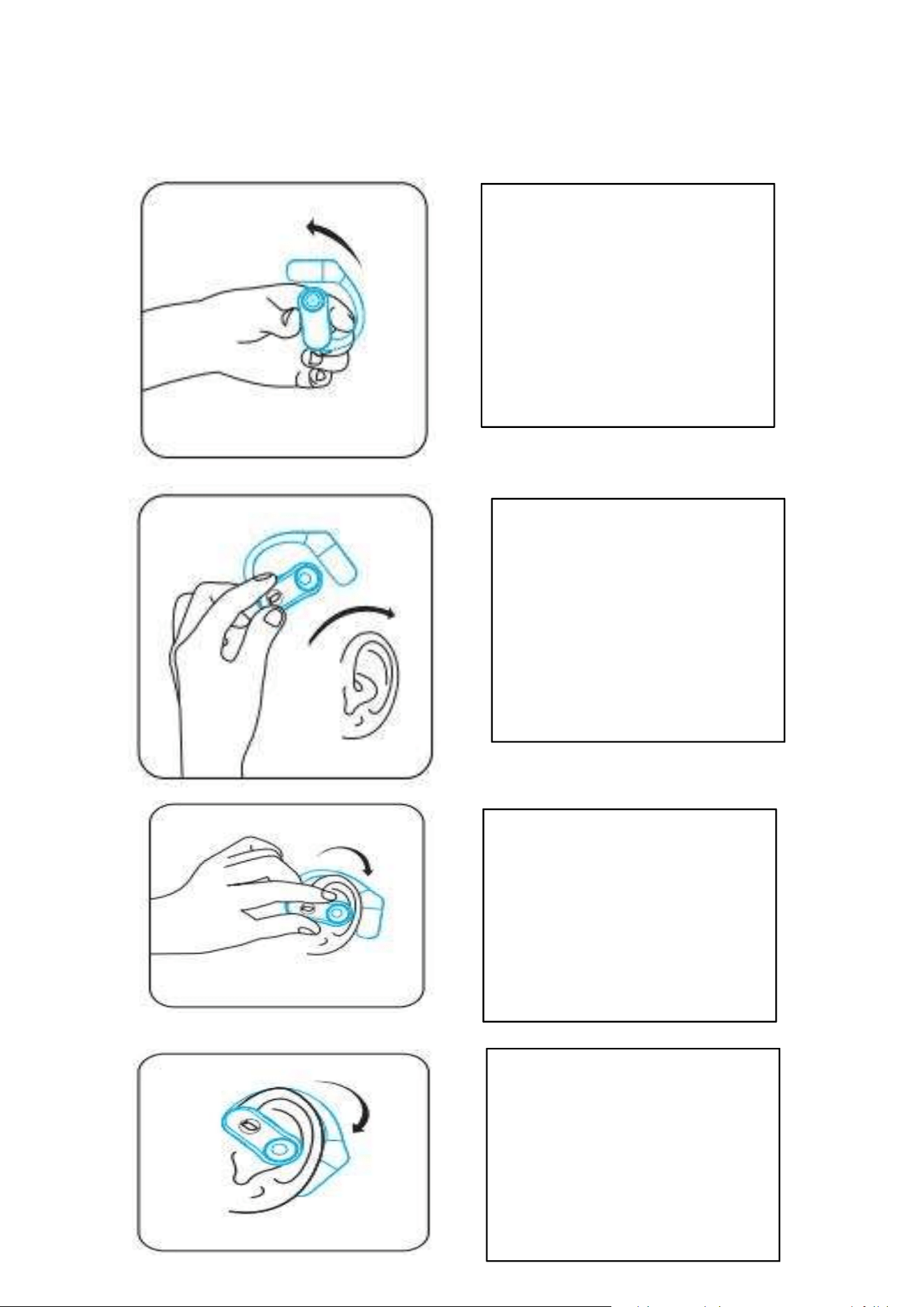
Easy to Wear
1.Take out the
earphones
2.Wear the
earphones along the
back of the ear
3.Gently adjust the
earphones to a
comfortable
position
4.The earphones are
ready
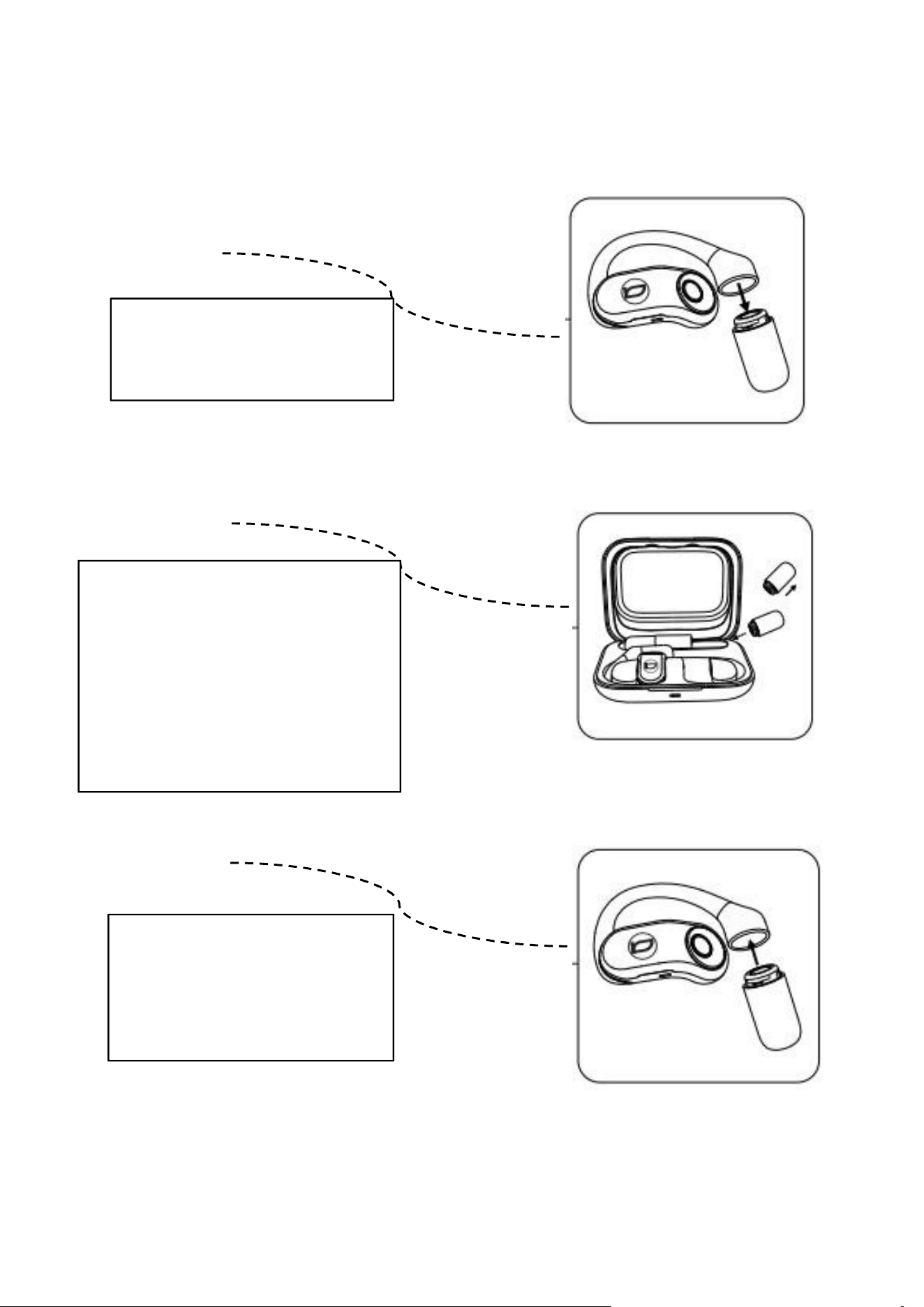
Three-Step Battery Replacement
①
Remove the
d
e
p
l
e
t
e
d
b
a
t
t
e
r
i
e
s
②
Take the spare
batteries out of the
charging case and put
the depleted batteries
i
n
t
o
i
t
.
③
Align with the
interface and install
t
h
e
b
a
t
t
e
r
i
e
s

Function Definition
-Power On:
The charging compartment opens the lid and the
earphone is automatically switched on and paired; after
the power change is complete, the earphone is
automatically switched on and paired.
-Power Off:
Put in the charging compartment and close the cover,
the earphone will turn off automatically; the earphone
will turn off automatically if no device is connected after
5 minutes of powering on.
-Single Ear Use:
Open the charging case to power on and automatically
pair. Once connected to Bluetooth, you can start using it.
-Automatic Reconnection:
If the phone has not deleted the earphones' historical
pairing name, the earphone will automatically connect
upon opening the case.
-EQ Tuning Switch:
Tap continuously on either the left or right earphone
four times to switch between bass and vocal sound
effects (the default is initially set to bass sound effect).

Indicator Light Description
Earphone pairing
Open the charging case cover,the green light will be on for 2 seconds, followed by the
white light flashing slowly. After successful pairing, both the left and right earbuds
will flash rapidly 5 times; simultaneously, there will be a "beep" sound.
Charge the earphones in the charging case
When charging, the earphones' white light stays on, and the charging case's green
light is on; when fully charged, the white light on the earphones and the indicator
light on the charging case go out.
Install the battery into the earphones
The green light will be on for 2 seconds, and the voice will announce the device is
powered on.
Low battery in earphones
The white light will flash once every minute, and the voice will give a low battery
warning.
Charge the charging case with a charger
The orange light will be on continuously during charging, and the green light will be
on continuously when fully charged.
Charge the spare battery in the charging case
The white light will flash once, and it will take about 2.5 hours to be fully charged.
Charge the earphones and spare battery in the charging case with a charger
The earphones, spare battery, and charging case will charge simultaneously. When
the earphones are fully charged, the white light will turn off. When the charging case
is fully charged, the green light will stay on constantly.
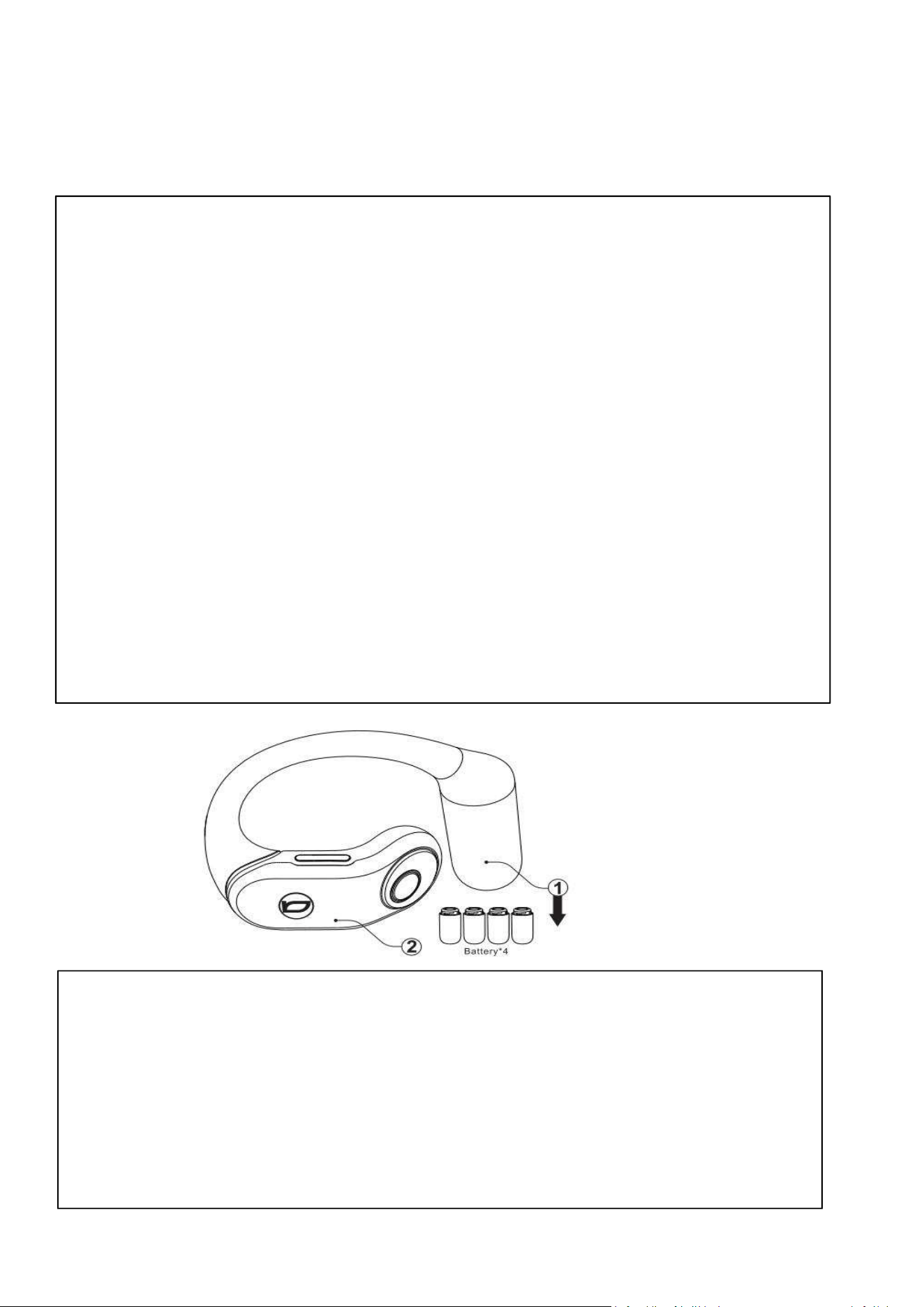
Volume and Battery Replacement
1.As indicated in the diagram, you can remove the battery by pressing in
the direction shown to replace the battery (4 batteries can be used
alternately).
2.By touching either the left or right earphone 4 times consecutively, you
can switch between bass and vocal sound effects.
3.To avoid differences in volume levels, for devices with the
HarmonyOS/MagicOS system, please go to Phone Settings > Bluetooth,
find the pairing name BACH08, touch the icon next to the target
earphones,and enable Sync volume with phone. (For MagicOS devices,
you may need to turn the Bluetooth switch off and on again or reconnect
the Bluetooth device for the changes to take effect.)
Note :
If the volume of the two earphones is inconsistent, please follow these
two methods to restore:
1.Place both earphones back in the charging case, close the lid, and
then take them out again.
2
.
R
e
m
o
v
e
t
h
e
b
a
t
t
e
r
i
e
s
f
r
o
m
b
o
t
h
e
a
r
p
h
o
n
e
s
a
n
d
t
h
e
n
r
e
i
n
s
t
a
l
l
t
h
e
m
.
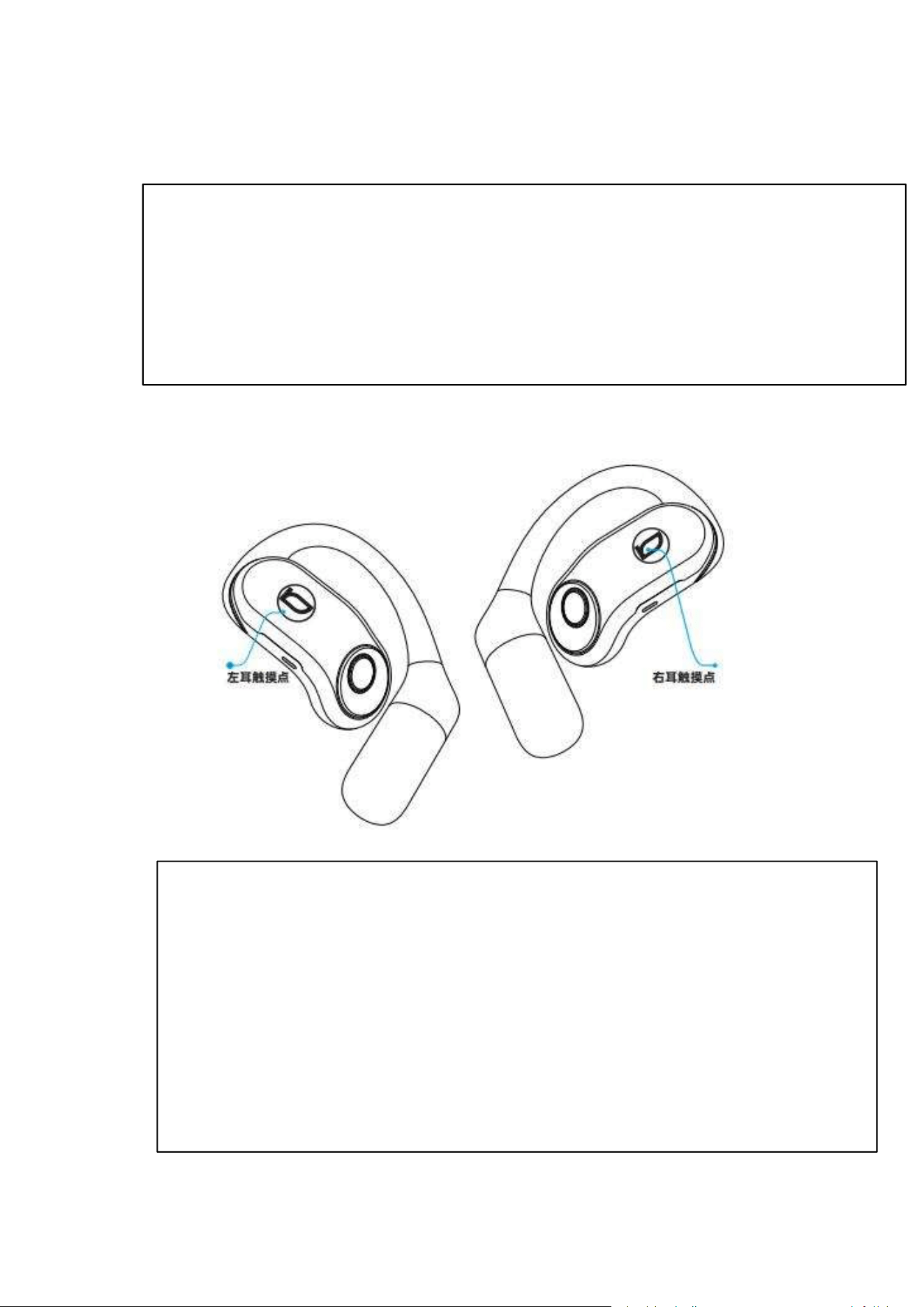
Factory Reset
In dual-ear mode, by touching either the left or right earphone 6
times consecutively, all Bluetooth pairing history will be cleared,
completing the factory reset.
Note :
Please do not use this function in single-ear mode. If this
function is accidentally activated, please also reset the other
earphone to factory settings, then touch the right earphone
twice to enter pairing mode and reconnect to the device.

Precautions
1.This product is an electronic device and should be stored in a dry, cool, and
well-ventilated environment. Avoid contact with oil, water vapor, steam, humidity, and
dust, or prolonged exposure to damp conditions, to prevent affecting the product's
performance.
2.It is recommended to use and store this device and its accessories within a temperature
range of 5
°
C to 35
°
C. Try to avoid prolonged exposure to direct sunlight or other harsh
environments. Excessive heat or cold may cause the device to malfunction. When the
temperature falls below 5
°
C, the performance of the battery may be limited.
3.Avoid using any irritating organic solvents or items containing such substances to clean
the earphones.
4.Use the earphones correctly and in accordance with requirements. To ensure a smooth
connection, it is suggested that the distance between the phone and earphones be within
10 meters.
5.If there are issues such as connection failures or communication difficulties, do not
disassemble the earphones or their accessories on your own, otherwise, the company will
not provide a warranty.
6.When charging the earphones, please use the included earphone charging cable and a
charger specified by our company that meets the requirements.
7.If the earphones are not used for a long time or used infrequently, please ensure to
completely charge and discharge them to automatic shutdown once a month, then
recharge, to avoid shortening the battery life.
8.Please adjust the volume to a moderate level when using to prevent adverse effects on
hearing.
9.Children should use this device under adult supervision. The device and its accessories
contain small parts. To avoid the risk of children accidentally swallowing these small parts,
which could lead to choking or other hazards, please keep them out of reach of children.

After-Sales Service
Warranty Policy
1.Within 15 days from the day after purchase, if the product has a performance
failure and is determined by the BACHJOHANN after-sales service center, you can
enjoy a free replacement service.
2.Within 12 months from the day after purchase, if the product has a performance
failure and is determined by the BACHJOHANN after-sales service center, you can
enjoy a free repair service.
*Special Note: The warranty covers the earphones and the charging case. The
standard data cable is a consumable of the product and does not have a warranty
period.
Non-Warranty Clauses
1.Damage caused by improper use, maintenance, or storage by the user.
2.The product has been subjected to misuse, collision, abuse, liquid ingress,
accidents, or modifications.
3.The product has undergone repairs or disassembly without official written
authorization.
4.Incorrect use of accessories not belonging to the product.
5.The product model number shown on the order does not match the actual product
being repaired, or the product's anti-counterfeiting mark has been torn, altered, or
defaced.
6.Warranty will not be provided beyond the validity period for repair, replacement,
and refund services.
7.Damage caused by force majeure, such as earthquakes, fires, floods, typhoons, etc.
8.No warranty will be given without a warranty card.
Note: Customers applying for after-sales service must fill in the necessary
information on the last page (customer's name, address, phone number, date of
purchase, purchase channel, order information, etc.).

This device complies with part 15 of the FCC Rules. Operation is
subject to the following two conditions: (1) This device may not cause
harmful interference, and (2) this device must accept any interference
received, including interference that may cause undesired operation.
NOTE: This equipment has been tested and found to comply with the
limits for a Class B digital device, pursuant to Part 15 of the FCC Rules.
These limits are designed to provide reasonable protection against
harmful interference in a residential installation. This equipment
generates, uses and can radiate radio frequency energy and, if not
installed and used in accordance with the instructions, may cause
harmful interference to radio communications. However, there is no
guarantee that interference will not occur in a particular installation. If
this equipment does cause harmful interference to radio or television
reception, which can be determined by turning the equipment off and
on, the user is encouraged to try to correct the interference by one or
more of the following measures:
-- Reorient or relocate the receiving antenna.
-- Increase the separation between the equipment and receiver.
-- Connect the equipment into an outlet on a circuit different
from that to which the receiver is connected.
-- Consult the dealer or an experienced radio/TV technician for
help.
Changes or modifications not expressly approved by the party
responsible for compliance could void the user's authority to operate
the equipment.
The device has been evaluated to meet general RF exposure
requirement. The device can be used in portable exposure condition
w
i
t
h
o
u
t
r
e
s
t
r
i
c
t
i
o
n
.
F
C
C
w
a
r
n
i
n
g