PEACLIP Quick Start Guide
List of items included
1. Earbuds*1
2. Charging case*1
3.USB-A to Type-C charging cable*1
4. Quick start guide*1
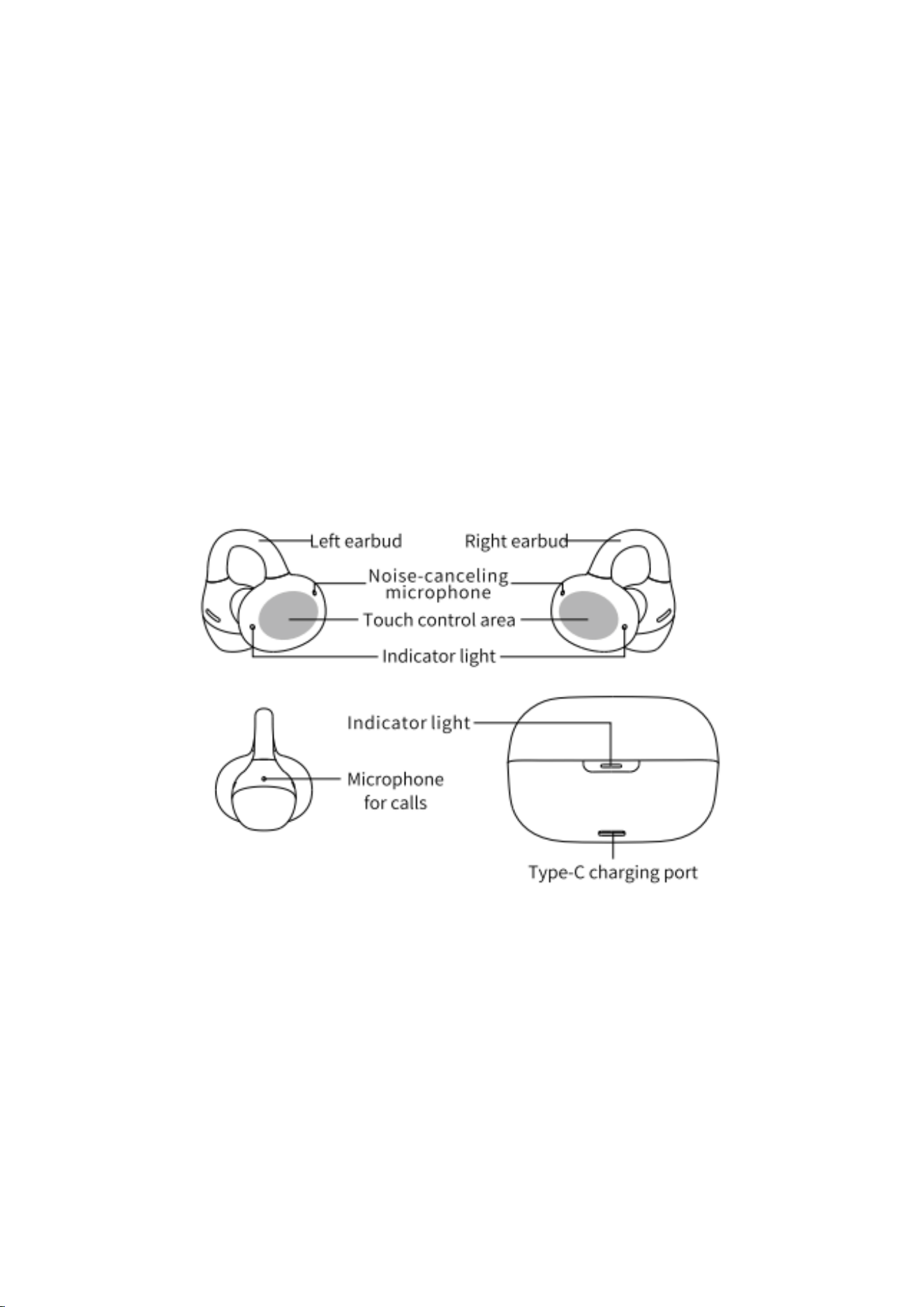
Introduction to charging case and earbuds
Function introduction
Long press left earbud
Continuously decrease volume
Long press right earbud
Continuously increase volume

Long press left and right earbuds simultaneously for 3
seconds
Turn on/off earbuds
Double tap left/right earbud
Music mode: Play/Pause
Call mode: Answer/Hang up
Triple tap left earbud
Music mode: Previous track
Call mode: Reject call/Cancel dialing
Triple tap right earbud
Music mode: Next track
Call mode: Reject call/Cancel dialing
Download the FIIO Control app and you can customize the button functions.
Enjoy the experience!
Pairing introduction
Pairing
Open the charging case, the PEACLIP enters pairing upon first power-on, with the
white indicator light flashing. Search for “FIIO PEACLIP” on your device and connect.
After placing the earbuds back into the case and opening the lid again, the PEACLIP
will enter reconnection mode.
Re-pairing
Take both earbuds out of the case. Press and hold the touch areas on both left and
right earbuds simultaneously to power them off. Then press and hold the touch areas
on both earbuds simultaneously for about 5 seconds to enter pairing mode.
Clear pairing
Take both earbuds out of the case. Press and hold the touch areas on both left and
right earbuds simultaneously to power them off. Then press and hold the touch areas
on both earbuds simultaneously for about 8 seconds to clear pairing.
Multipoint pairing
After the PEACLIP is connected to the first device, disconnect the Bluetooth to enter
pairing mode; on the second device, search for “FIIO PEACLIP” and connect. Once
connected, reconnect the Bluetooth of the first device.
Charging case function introduction
Not charging
White light on: Charging case has sufficient battery
Red light flashes: Charging case battery is low
Charging
Red light flashes: Charging is in progress
White light stays on: Fully charged
Model:F4001A
FCC ID: R56-FC4001
Wearing instructions
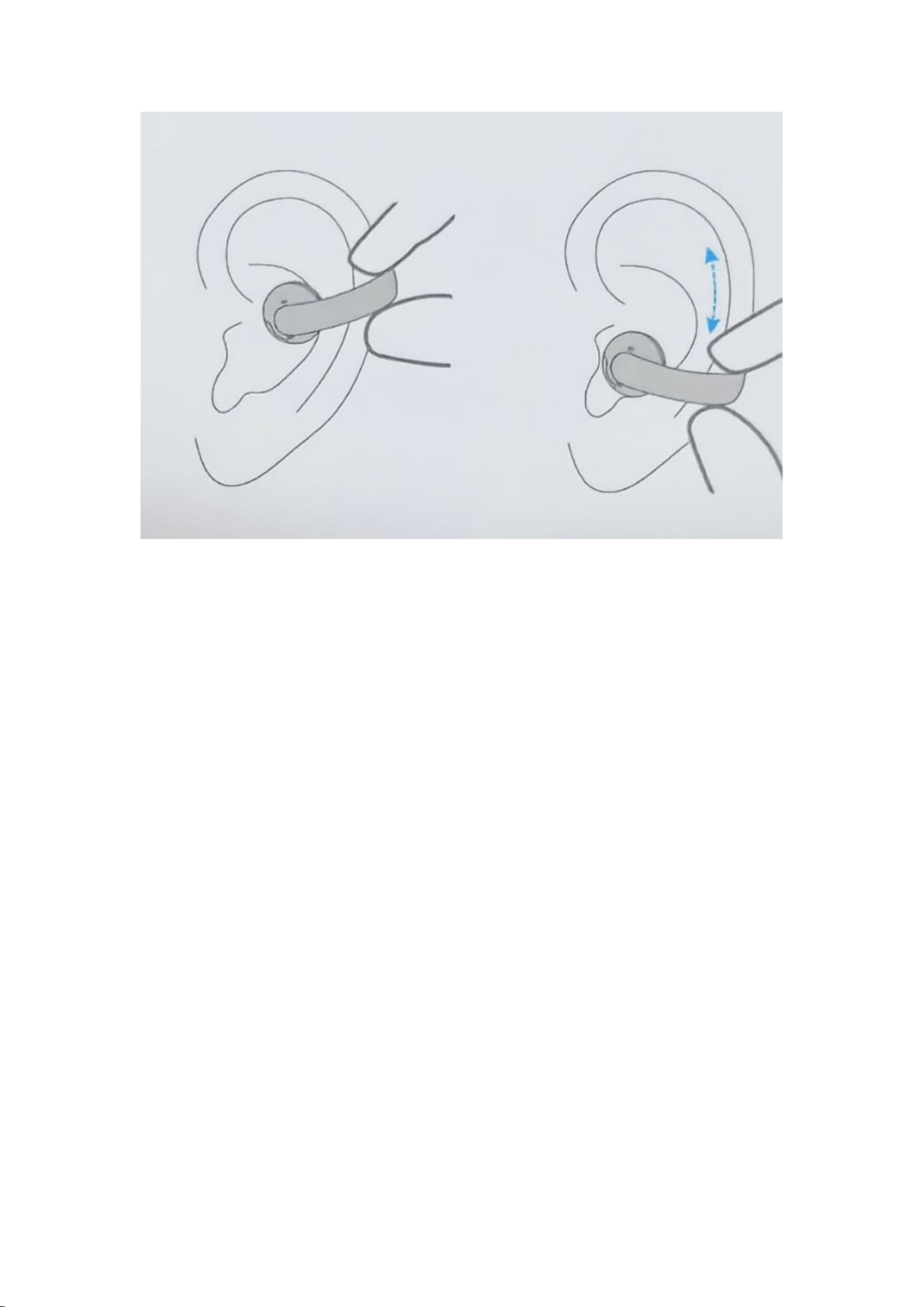
Please insert the earbud from the outer ear area and adjust its position for the best
wearing comfort and audio experience.
Note: Please wear the left and right earbuds on the correct sides to ensure proper
operational experience.
Notes and precautions
1. Please do not place the earbuds directly into the charging case for charging if the
charging contacts have sweat or dirt on them. This may cause oxidation of the
contacts and result in charging failure.
2. Please do not use the earbuds in circumstances of excessively low/high
temperatures (below 0°C or above 45°C ).
3. Please use a power adapter that is certified and meets standard requirements (for
example, use a CCC-certified power adapter if in China).
4. Do not replace with a battery pack of the wrong model to avoid the risk of fire or
explosion.
5. If the charging case indicator does not illuminate, the case may have drained due
to prolonged storage. Please charge the case before use.
6. When placing the earbuds into the charging case, please insert the left and right
earbuds into the correct sides. Forcing the lid shut when they are placed incorrectly
may damage the earbuds or charging contacts.
FCC Warning
This device complies with part 15 of the FCC Rules. Operation is subject to the following
two conditions:(1) This device may not cause harmful interference, and (2) this device
must accept any interference received, including interference that may cause undesired
operation.
Any Changes or modifications not expressly approved by the party responsible for
compliance could void the user's authority to operate the equipment.
This equipment has been tested and found to comply with the limits for a Class B digital
device, pursuant to part 15 of the FCC Rules. These limits are designed to provide
reasonable protection against harmful interference in a residential installation. This
equipment generates uses and can radiate radio frequency energy and, if not installed
and used in accordance with the instructions, may cause harmful interference to radio
communications. However, there is no guarantee that interference will not occur in a
particular installation. If this equipment does cause harmful interference to radio or
television reception, which can be determined by turning the equipment off and on, the
user is encouraged to try to correct the interference by one or more of the following
measures:
- Reorient or relocate the receiving antenna.
- Increase the separation between the equipment and receiver.
- Connect the equipment into an outlet on a circuit different from that to which the
receiver is connected.
- Consult the dealer or an experienced radio/TV technician for help.
The device has been evaluated to meet general RF exposure requirement. The device
can be used in portable exposure condition without restriction.
Scan the QR code to visit:
The PEACLIP can be controlled by the FIIO Control app. Please scan the QR code
below to download it.
★Authentic-Checking
※Scratch off the coating to get a security code.
Log in FIIO official website at http://www.fiio.com, click the 'Check authenticity' icon at
the upper-right corner. Enter the security code, click 'Check' button and complete the
captcha, then you will get the checking result.

※Checking result
A. The product is genuine.
The product is manufactured by FIIO.
Thanks for choosing us!
B. The number you are checking does not exist.
Warranty Terms and Conditions
Model
Warranty
Mainframe
One month
replacement; one
year warranty
Accessories except the mainframe (subject
to the officially published item list)
Accessories
Without warranty
(Packing
material
(Color box
or other
easily-worn
parts)
Without warranty
Note: The above three guarantees start from the invoice-issue date.
FIIO warranty is just for your reference. Local sales agents have the right to
determine the specific details.
Guangzhou FIIO Electronics Technology Co., Ltd. reserves the final interpretation
and amendment for the above warranty terms and conditions.
The following situations are not covered by replacement or warranty:
Malfunctions caused by human factors such as shock, impact, dropping, bending,
tearing, or pulling due to improper use or storage;
Malfunctions caused by unauthorized disassembly by the user or repair centers not
authorized by the company;
Malfunctions caused by prolonged placement of the product in humid or strong
magnetic field environments, or due to water immersion;
Malfunctions caused by natural disasters;

Inability to provide a valid warranty certificate;
The determination of human-induced damage will be made by FIIO's professional
maintenance personnel.
Procedures of How to Get After-sales Service
❶ Please contact the local dealers first once you find problems with the device from
FIIO. If they refuse to give related after-sales service, please give feedback to FIIO
Support by sending an email to [email protected]m. We would handle it properly to
ensure customers' satisfaction.
❷ For repair service, you are supposed to send the defective product to FIIO with
freight paid. After it has been repaired, we will send the product back to you with
freight paid by us.
❸ It is highly suggested to buy the product from the local authorized sales agents so
as to get better, faster before- and after-sales service.
❹ Please do not maintain or dismantle the product on your own and please keep it
away from water.
❺ For abnormal working issues or any further questions, please visit our official
website->Support to get related information or send an email to [email protected] for
consultation.
Note: Due to continuous improvement, each specification and design are subject to
change at any time without further notice.