
Model WC1
HeadsUp is a revolutionary device that simplifies taking videos and
images and streaming them to your phone, anywhere, anytime. This
guide was created to get you going quickly. A full User Manual can be
viewed directly from the HeadsUp App; or can be accessed from our
website at www.beantech.net under HeadsUp.
Quick Start Guide
Let’s get started
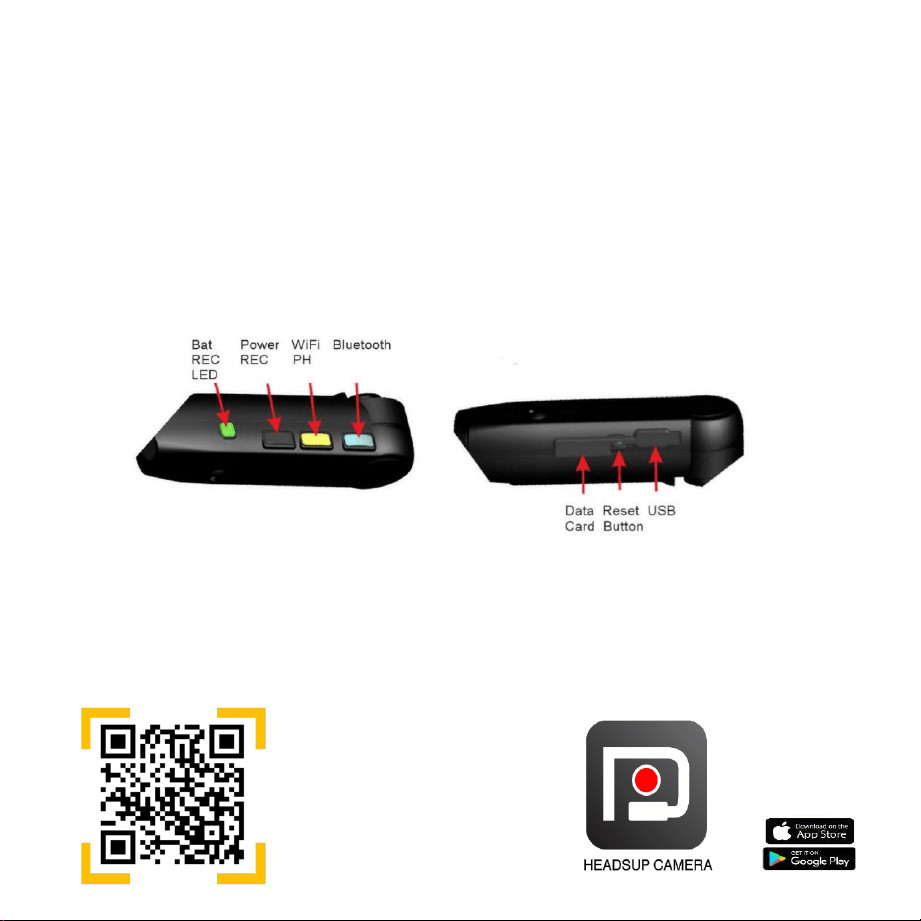
▪ Get to know what button does what.
▪ Start by turning the power on.
1. Charge HeadsUp for a minimum of one hour before using.
2. Acquire and insert a micro SD card – maximum storage 64GB.
▪ Rating 6C – 10C
3. Function Controls
When framing your
camera around code,
phone will show link
to the app. Tap it.
Get theapp
Frame your phone’s camera around the scan code below to be directed to
the App in your corresponding App Store or go to your App Store and search
“HeadsUp Camera”.
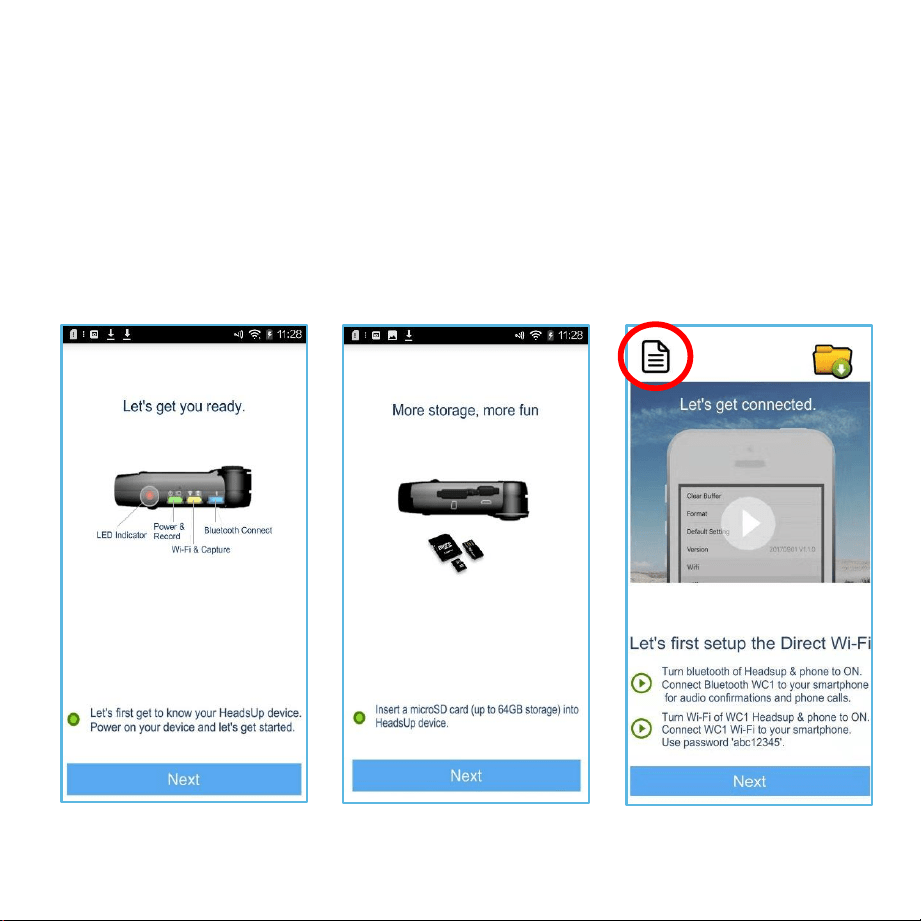
Home Screen
This screen is landing screen
each time you open App (after
initial sync). Follow steps then
press “Next”.
Sync to phone
App Screen 1
Read then press
“Next”
App Screen 2
Insert data card then
press “Next”
Launch HeadsUp App and follow on screen instructions to sync. Note; User Manual
link in red circle on Home Screen image.
Note: For Wi-Fi connection, long press Wi-Fi button for 2 seconds with Power on, then turn phone Wi-Fi
on. The yellow LED on HeadsUp will blink and turn off when connected to phone. Wi-Fi password is
‘abc12345’.
SafetyPrecautions
Following these precautions reduces the risk of and damage to the product.
PROTECTTHISDEVICE: Keep device dry and out of sunlight when not using.
SWITCHOFF IN RESTRICTEDAREAS:Do not usewhere mobile devices arenot
authorized or when itmay cause interferenceor danger. Do not operate whiledriving.
MEDICAL IMPLANTS: Thisdevice emits Radio Frequency energy and may
interfere with medical devices. Consult a doctor or the manufacturer of the
medical equipment to see if the equipment is adequately protected from
Radio Frequency energy.
AUTHORIZEDPERSONNEL:Onlyqualified personnel are authorized to repair this
product.Donot open this product.Thereare no user-serviceable parts inside.
ACCESSORIES: Only use charger which is provided with Product. Do not use any
other charger.
DISPOSAL OF YOURDEVICE: Thisproduct should not bedisposed of with other
household waste. To prevent possible harm to the environment or human
health, recycle itresponsibly.
Compliance with FCC Regulations
ATTENTION: This device complies with Part 15 of the FCC Rules. Operation is subject
to the following two conditions: (1)this device may not cause harmful interference,
and (2) this device must accept any interference received, including interference
that may cause undesired operation.
Warranty
Thisdevice comes with a one-year warranty.Please visitour websitefor full
details.www.beantech.net.
Toll Free / 9AM - 7PM EST
daily except holidays
888-808-BEAN
E-mail us for Assistance
support@beantech.net
Need help?
©2019 Bean Information Technology, Corp. Beantech and
HeadsUp are trademarks of Bean Information Technology,
Corp. iPhone and iOS are the trademark of Apple, Inc. in the US
and worldwide. Android is the trademark of Google, Inc. in the US
and worldwide. Bluetooth is the trademark of Bluetooth SIGinthe
US and worldwide.
Printed in China WC01SC9
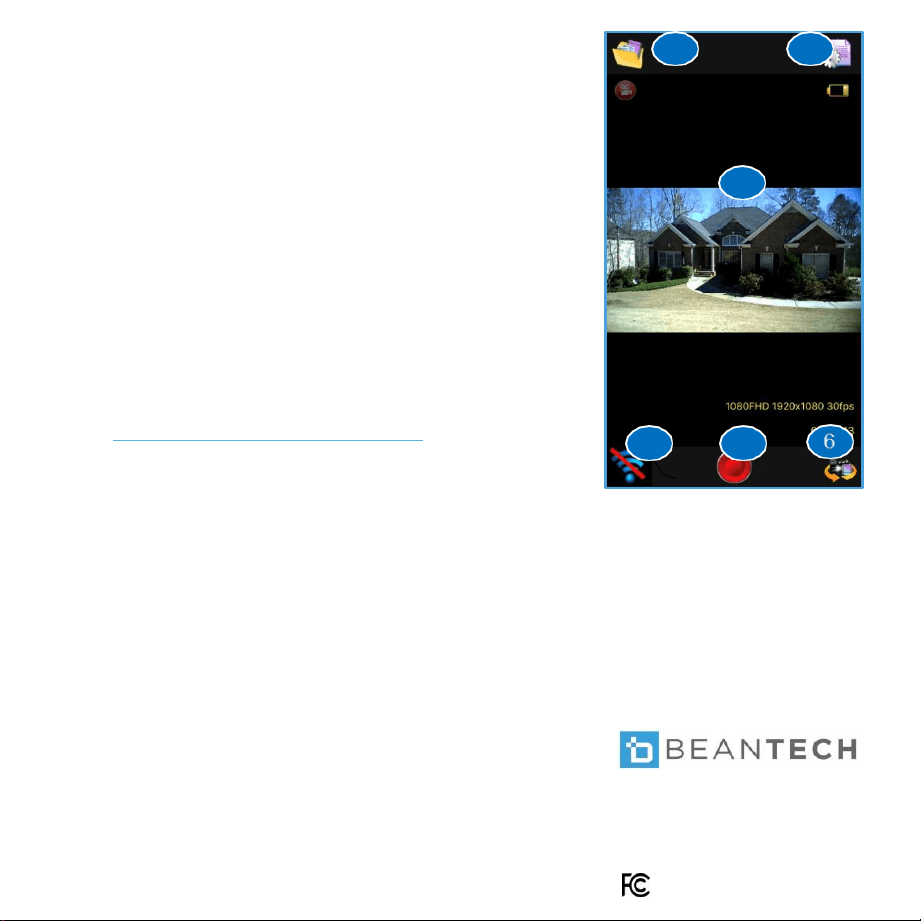
Control Screen
Control Screen appears after leaving Home Screen. Here
you can;
1. Make recording & mode settings
2. Start & Stop recordings
3. View streaming files
4. Manage your recorded media
Functions
1. File Manager
3. Live Display
5. Start / Stop Record
2. Settings
4. Home
6. Mode – Video / Image
1
Start recording
2
3
5
4