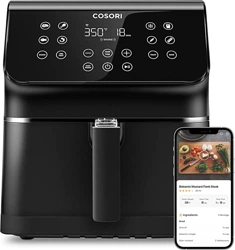
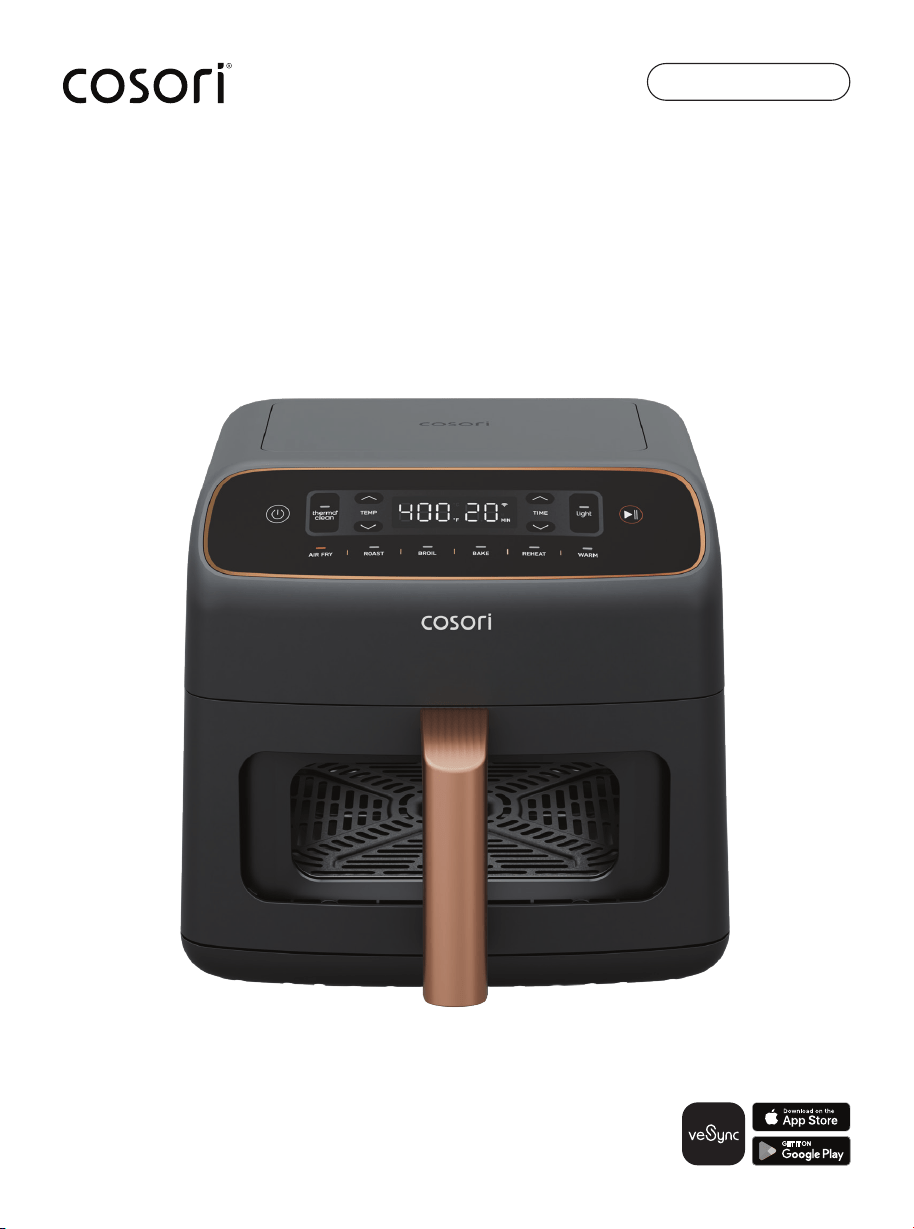
Air Fryer Upgraded Model
6.0-Quart Smart Air Fryer
CAF-DB601S-KUSR
User Manual
2 3
Table of Contents
Package Contents
1 × Air Fryer Upgraded Model
6.0-Quart Smart Air Fryer
1 × Crisper Plate
1 × User Manual
1 × Quick Start Guide
Specifications
Model(s) CAF-DB601S-KUSR
Power Supply AC 120V, 60Hz
Rated Power 1,780W
Capacity 6.0 qt / 5.7 L
(serves 3–5 people)
Temperature
Range
170°–450°F / 75°–230°C
Time Range 1 min–60 min
Dimensions
(including handle)
14.3 × 11.4 × 11.7 in /
36.3 × 29 × 27.2 cm
Dimensions (not
including handle)
11.8 × 11.8 × 11.9 in /
30.0 × 30.0 × 30.1 cm
Weight 11.02 lb / 5 kg
xx
xx
xx
xx
xx
xx
xx
xx
xx
xx
xx
xx
xx
xx
xx
xx
xx
xx
xx
xx
xx
xx
xx
xx
xx
xx
Thank you for your purchase!
Exceptional results for everyday meals.
TIMELESS QUALITY, GUARANTEED
Download and connect your smart air fryer
to the VeSync app to enjoy smart features,
recipe inspiration, and more.
QUESTIONS? CONTACT US
For a little extra help in the kitchen,
reach out to us:
Email: recipes@cosori.com
Phone: 1-888-402-1684
Mon–Fri, 9:00 am–5:00 pm PST/PDT
ELEVATE your menu with our recipe gallery
at COSORI.COM
ENJOY weekly, featured recipes handcrafted
by our chefs in the Cosori kitchen.
Note: To access additional smart air fryer
functions, download the VeSync app
(see page __).

4 5
FOLLOW BASIC SAFETY PRECAUTIONS WHEN USING YOUR AIR
FRYER. READ ALL INSTRUCTIONS.
READ AND SAVE THESE INSTRUCTAIONS
IMPORTANT SAFEGUARDS & WARNINGS
KEY SAFETY POINTS
GENERAL SAFETY
WHILE AIR FRYING
• Do not touch hot surfaces.
Use handle.
• Use caution when turning the basket
over after cooking, as the hot crisper
plate may fall out and create
a safety hazard.
• Firmly insert the crisper plate into
the basket to reduce the chance
of it falling out.
• Do not block any ventilation
openings. Hot steam is released
through openings. Keep your
hands and face clear of openings.
• Always use tongs to carefully
remove hot food.
• To protect against electric shock,
do not immerse the air fryer housing,
cord, or plug in water or other liquids.
• Close supervision is necessary when
any appliance is used by or near
children. Unplug when not in use, and
before cleaning. Allow to cool before
putting on or taking o parts.
• Do not operate any appliance
with a damaged cord or plug,
or after the appliance malfunctions
or has been damaged in any
manner. Return appliance to the
nearest authorized service facility for
examination, repair, or adjustment.
Contact Customer Support (page __).
• An air fryer works with hot air only.
Never fill the basket with oil or fat.
• Never use your air fryer without
the basket in place.
• Do not place oversized foods
or metal utensils into your air fryer
as they may create a fire or risk
of electric shock.
• Do not overfill the basket. Heaping
amounts of food may touch the
heating coils and cause a fire hazard.
• Do not touch accessories
(including the crisper plate) during
or immediately after air frying.
• Do not place paper, cardboard,
non-heat-resistant plastic, or similar
materials into your air fryer.
• Never put baking or parchment
paper into the air fryer without food
on top. Air circulation can cause
paper to lift and touch heating coils.
• If lining the basket with foil, make
sure it does not contact
the heating elements, which can
cause overheating and risk of fire.
• Always use heat-safe containers.
Be extremely cautious if using
containers that aren’t metal or glass.
• To reduce the risk of fire, keep your air
fryer away from flammable materials
(curtains, tablecloths, etc.). Use on
a flat, stable, heat-resistant surface
away from heat sources or liquids.
• Do not use your air fryer if it is
damaged, not working, or if the
cord or plug is damaged. Contact
Customer Support (page __).
• The use of accessory attachments
is not recommended by Cosori and
may cause injuries.
• Do not use outdoors.
• Do not place the air fryer or any of its
parts on a stove, near gas or electric
burners, or in a heated oven.
• Use extreme caution when removing
the basket and crisper plate or
disposing of hot grease.
• Always place the crisper plate and
basket on a heat-resistant surface
after removing it from the air fryer.
• Do not clean with metal scouring
pads. Metal fragments can break o
the pad and touch electrical parts,
creating a risk of electric shock.
• Do not place anything on top of your
air fryer. Do not store anything inside
your air fryer.
• This air fryer is not intended for use
by persons (including children) with
reduced physical, sensory, or mental
capabilities, or lack of experience
and knowledge, unless they have
been given supervision or instruction
concerning use of the air fryer by
a person responsible for their safety.
• Cleaning and user maintenance
shall not be done by children
without supervision.
• Children should be supervised to
ensure that they do not play with
the air fryer.
• This air fryer is not intended
to be operated by means
of an external timer or separate
remote-control system.
• To disconnect, turn any control
to “o”, then remove plug from
wall outlet.
• Do not use the air fryer for anything
other than intended use.
• Any servicing should be performed
by an authorized service
representative, contact
Customer Support (page __).
• For instructions on cleaning
the accessories, see
Care & Maintenance (page__).
• Use a soft sponge or cloth with
a neutral detergent to gently wipe
the glass.
• Never use abrasive tools like steel
wool, as this can scratch the glass
or cause invisible cracks.
• After cleaning the basket, wipe it
dry and pay special attention to
the corners of the viewing window
to prevent water vapor condensation
from obscuring your view during
the next use.
• It is normal for fog to form on
the viewing window during cooking
due to the temperature dierence
between the inside and outside.
• Not for commercial use.
Household use only.

6 7
Safety Information (cont.)
POWER & CORD
• Turn o the air fryer before removing
the plug from the outlet.
• To unplug, grab the plug and pull
fromthe outlet. Never pull from the
power cord.
• Do not let the power cord (or any
extension cord) hang over the edge
of a table or counter or touch
hot surfaces.
• Remove and discard the protective
cover fitted over the power plug
of the air fryer to prevent
a choking hazard.
• Never use an outlet below the
counter when plugging in your
air fryer.
• This air fryer has a polarized plug
(one blade is wider than the other).
To reduce the risk of electric shock,
this plug is intended to fit into a
polarized outlet only one way. If the
plug does not fit fully into the outlet,
reverse the plug. If it still does not fit,
contact a qualified electrician.
Do not attempt to modify the plug
in any way.
• Your air fryer should only be used with
120V, 60Hz electrical systems. Do not
plug into another type of outlet.
• Keep the air fryer and its cord out
of reach of children.
• A short power-supply cord is
provided to reduce the risk resulting
from becoming entangled in or
tripping over a longer cord.
• If the power-supply cord is damaged,
it must be replaced by Vesync (US)
Corporation or similarly qualified
persons in order to avoid an electric
or fire hazard. Please contact
Customer Support (page __).
• Immediately turn o and unplug your
air fryer if you see dark smoke coming
out. White smoke is normal, caused
by heating fat or food splashing,
but dark smoke means that food is
burning or there is
a circuit problem. Wait for the smoke
to clear before pulling the basket out.
If the cause was not burnt food,
contact Customer Support (page __).
• To turn the air fryer o, press
once.
The air fryer will beep, and all buttons
will shut o except the button,
which will turn orange.
• Do not leave your air fryer
unattended while in use.
• Do not touch the viewing window
glass with your hands during the
cooking process to avoid burns.
• The viewing window becomes
extremely hot during cooking; do not
touch it with your hands at any time
to avoid burns.
EXTENSION CORDS
• Longer extension cords are available
and may be used if care is exercised
in their use. If a longer extension cord
is used:
· The marked electrical rating of the
extension cord should be at least
as great as the electrical rating
of the air fryer.
· The cord should be arranged
so that it will not drape over the
countertop or tabletop where it
can be pulled on by children or
tripped over unintentionally.
· This air fryer has a polarized plug
(one blade is wider than the other).
To reduce the risk of electric shock,
this plug is intended to fit into
a polarized outlet only one way.
If the plug does not fit fully into
the outlet, reverse the plug.
If it still does not fit, contact
a qualified electrician. Do not
attempt to modify the plug
in any way.
SAVE THESE INSTRUCTIONS
WARNING: Any other servicing should
be performed by an authorized service
representative.
WARNING: Items marked with
the following symbol may reach
high temperatures and should
be handled carefully.
CAUTION:
Hot surface.
8 9
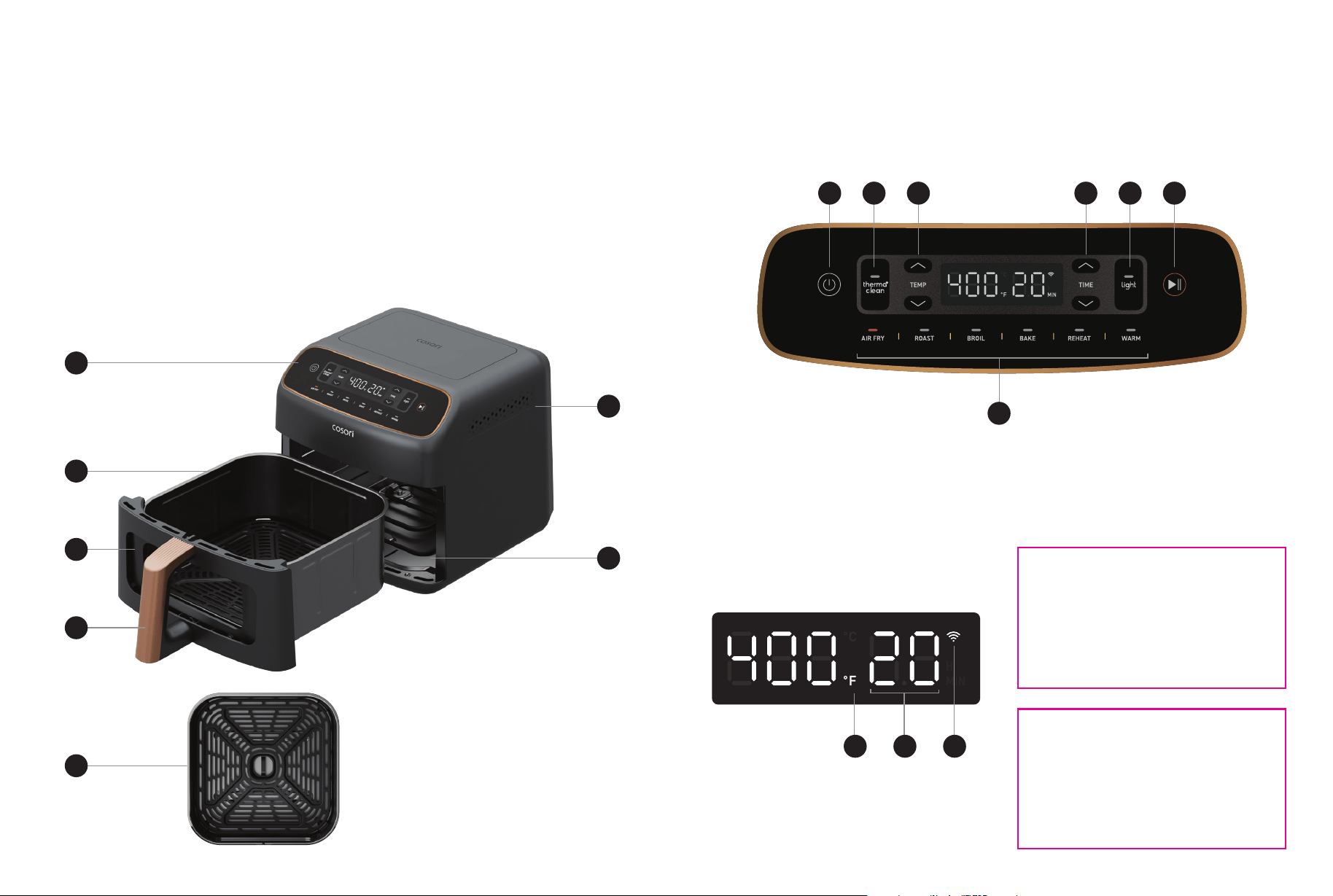
Getting to Know Your Smart Air Fryer
Your Cosori smart air fryer features top and bottom heating elements so your food cooks more
eciently and evenly. With user-friendly one-touch controls, a ceramic-coated basket and
crisper plate, specialized thermal cleaning power, and an intuitive design, the Cosori Air Fryer
Upgraded Model Smart Air Fryer is the star of your kitchen.
A. Control Panel
B. Basket
C. Viewing Window
Note:
• Do not try to open the top of the air fryer. This is not a lid.
• The basket and crisper plate are made of aluminum with ceramic coating.
D. Basket Handle
E. Crisper Plate
F. Air Outlet
G. Heating Elements
H. Silicone Stoppers
A
B
D
C
E
F
G
CONTROL PANEL
DISPLAY
FPO
FPO
DISPLAY MESSAGES
a. On/Off
b. ThermaClean™
c. Increase/Decrease Temperature
d. Increase/Decrease Time
Note: During operation, it is normal for the exhaust to release warm air.
e. Light
f. Start/Pause
g. Cooking Functions
a db ec f
g
h. Temperature
i. Time
j. Wi-Fi
®
Indicator
h i j
10 11
SETTING UP
1. Remove and discard all packaging
from the air fryer, including any temporary
stickers and the protective cover fitted
over the power plug.
2. Place the air fryer on a stable, level,
heat-resistant surface. Keep away from
areas that can be damaged by steam
(such as walls or cupboards).
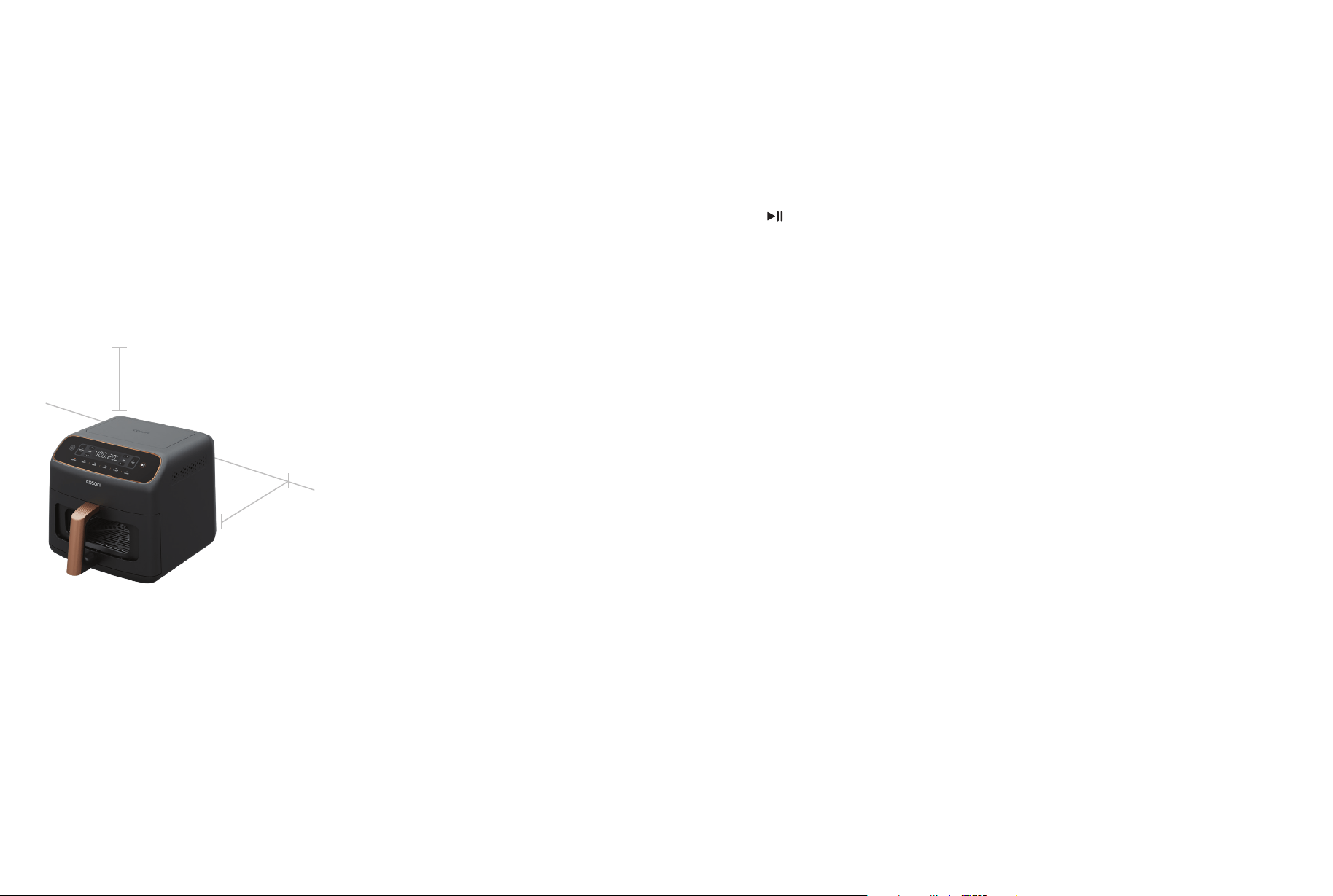
Note: Leave at least 5 in / 13 cm of space
behind and above the air fryer. Leave enough
room in front of the air fryer to remove
the basket.
CAUTION: The basket and crisper plate
have a ceramic coating.
Note:
• Gentle handwashing is recommended
to prolong the life of the coating.
• Avoid using abrasive cleaning materials
on the basket and crisper plate. These
will scratch or damage their surfaces.
• If you notice any cracking or peeling in
the coating of the crisper plate or
basket, we recommend replacing them
to maintain cooking performance.
Before First Use
3. Wash both the basket and crisper plate
thoroughly using either a dishwasher or
a non-abrasive sponge.
4. Wipe the interior and exterior of the air
fryer with a slightly moist cloth.
Dry with a towel.
5. Place the crisper plate back into
the basket. Tilt the crisper plate
to insert one side first, then press down
on the other side.
6. Place the basket inside the air fryer.
5 in / 13 cm
5 in / 13 cm
TEST RUN
A test run will help you become familiar with
your air fryer, make sure it’s working correctly,
and clean it of possible residues.
1. Make sure the air fryer basket is empty,
then plug in the air fryer.
2. Press AIR FRY. The display will show
“385°F” and “10 MIN”.
3. Press to begin. When finished,
the air fryer will beep and the display
will show “End”.
4. Remove the basket and let it cool
completely for 10–30 minutes.
Note:
• Use caution when turning the basket over
after cooking, as the hot crisper plate may
fall out and create a safety hazard.
• Do not unscrew the basket handle from
the basket.
Note: Forcing the crisper plate into the basket
incorrectly may cause damage.
Silicone Stoppers
• The crisper plate contains 4 silicone
stoppers made of food-safe material.
These stoppers keep the plate fitted
to the bottom of the basket.
• When placing the crisper plate into
the basket, tilt the crisper plate to insert
one side first, then press down on the
other side.
• Make sure children do not play with
the silicone stoppers or swallow them.
12 13
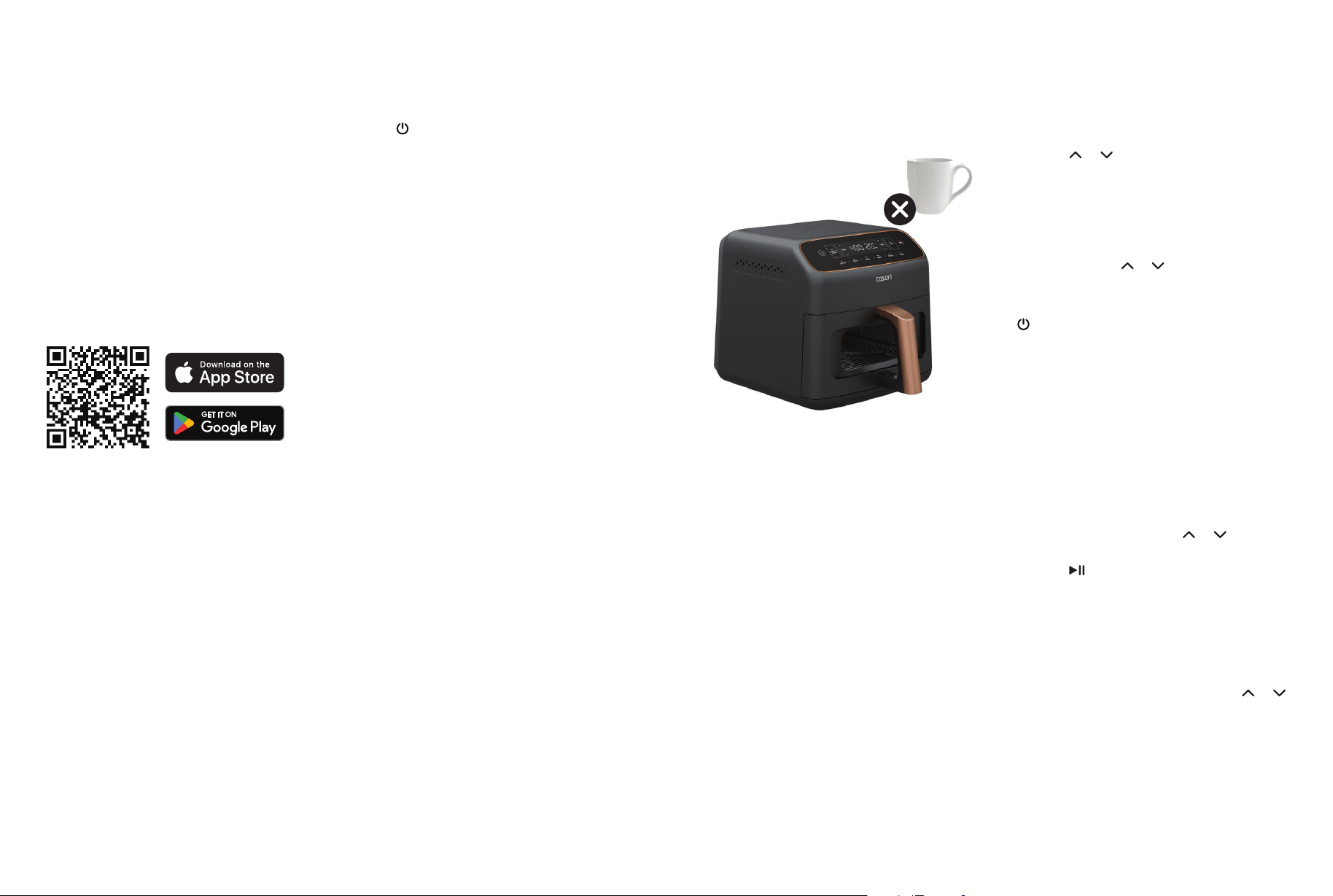
1. To download the VeSync app, scan the
QR code or search “VeSync” in the Apple
App Store
®
or Google Play Store.
Note:
• You can change the name and icon at any
time by going to the smart air fryer screen
and tapping [settings icon].
• You can use the VeSync app to connect
your smart air fryer to Amazon Alexa or
Google Assistant™.
Note:
• The VeSync app is continually being
improved and may change over time.
If there are any differences, follow the
in-app instructions.
• Requires device to run app, Wi-Fi
®
or mobile
data, and iOS version 15 or Android version
8 (or above). Standard data and messaging
rates may apply. Registration is required.
Note: For Android™ users, choose “Allow”
to use VeSync.
Note: You must create your own VeSync account
to use third-party services and products.
These will not work with a guest account.
With a VeSync account, you can also allow your
family and friends to control your smart air fryer.
Disconnecting From Wi-Fi
®
• To disconnect Wi-Fi, press and hold
the for 15 seconds until the Wi-Fi
indicator turns off. This will restore the
smart air fryer’s default settings and
disconnect it from the VeSync app.
• To reconnect, please follow
the instructions in the VeSync app
for adding a device.
VeSync App Setup
2. Open the VeSync app. If you already
have an account, tap Log In. To create
a new account, tap Sign Up.
3. Plug in your smart air fryer to enter
pairing mode.
4. Tap + and select your smart air fryer.
5. Follow the in-app instructions to set up
your smart air fryer.
Note:
• Do not place anything on top of your air
fryer to avoid damaging the glass control
panel.
Note:
• Press and hold or to rapidly increase
or decrease the time or temperature.
Using Your Smart Air Fryer
• An air fryer is not a deep fryer. Do not fill
the basket with oil, frying fat, or any liquid.
• When taking the basket out of the air fryer,
be careful of hot steam.
• We recommend using the crisper plate
when cooking to take full advantage of the
360° airflow for optimal results.
• Do not use steel wool or other hard objects
to scratch the viewing window.
COOKING FUNCTIONS
AIR FRYING
Using a cooking function is the easiest way
to cook. Functions are programmed with an
ideal time, temperature, and fan speed for
cooking certain foods. See Cooking Chart
(page__).
Time and temperature for all cooking
functions can be adjusted.
To reset all cooking functions, press and hold
for 15 seconds.
To customize a cooking function:
1. Select the function’s button you want
to customize
2. Press or to change the function’s
time or temperature.
3. To save, press and hold the function’s
button for 3 seconds until you hear
a beep.
1. Place the crisper plate into the basket.
The crisper plate allows excess oil to drip
down to the bottom of the basket.
2. Select a cooking function.
3. Optionally, adjust the temperature
and/or time by pressing or .
You can do this anytime during cooking.
4. Press to begin cooking.
5. During cooking, press Light to turn on the
cooking light and monitor the progress.
The light will automatically turn o after
3 minutes.
6. The air fryer will beep when finished. The
display will show “End”.
7. If needed, press WARM then press or
to adjust the time (1–60 min).
8. Take the basket out of the air fryer,
being careful of hot steam. Use tongs
or heat-safe utensils to remove the food
from the basket.
9. Allow to cool before cleaning.
Note: The crisper plate may not be used for
certain recipes, such as muffins and breads.
Note: Cooking functions are programmed
with an ideal time, temperature, and fan
speed for cooking certain foods. The air fryer
will default to the Air Fry function if no other
function is selected.

14 15
COOKING CHART
Note: Results may vary. Time and temperature for all cooking functions (except for ThermaClean)
can be adjusted. To go back to default settings, press and hold the cooking function’s button
on the display.
Function
Default
Temperature
Default Time
Temperature
Range
Time Range
AIR FRY 385°F / 195°C 10 min
300°–450°F /
150°–230°C
1–60 min
ROAST 425°F / 220°C 12 min
350°–450°F /
175°–230°C
1–60 min
BROIL 450°F / 230°C 5 min
425°–450°F /
220°–230°C
1–30 min
REHEAT 390°F / 200°C 5 min
300°–425°F /
150°–220°C
1–60 min
BAKE 330°F / 165°C 20 min
260°–400°F /
125°–205°C
1–60 min
Keep Warm
(“WARM”)
170°F / 75°C 30 min - 1–60 min
ThermaClean 450°F / 230°C 60 min - 30 min / 60 min
Using Your Smart Air Fryer (cont.)
THERMACLEAN™ TECHNOLOGY USING THERMACLEAN
The air fryer uses a specialized PFAS-free
coating to help reduce grease and oil
buildup on the cooking chamber ceiling
during cooking.
The cleaning process works in 3 phases:
Use ThermaClean immediately after cooking
greasy foods or whenever grease buildup
is visible on the cavity ceiling. Regularly using
ThermaClean helps maintain the air fryer’s
cooking performance and cleanliness.
Heating
The top heating element heats the cavity
ceiling to a high temperature.
Decomposition
High heat and oxygen break down grease
on the cavity ceiling into water, carbon
dioxide (CO
2
), and a small amount of ash.
Cooling
When the cleaning cycle ends, the heating
element turns off and the cavity cools
naturally with the basket closed. Once the
cavity has cooled completely, wipe away
any remaining residue with a damp cloth.
1. Make sure the basket and crisper plate
are clean and free of any food debris
or residue to help prevent excessive
smoke or odors.
2. Press ThermaClean.
3. Depending on the level of buildup, adjust
the time by pressing or for 30 min
(Quick Clean) or 60 min (Deep Clean).
The display will show “CLE 30 MIN”
or “CLE 60 MIN”.
4. Press to begin.
5. The display will show “END” once cleaning
is complete.
Note: For heavy grease buildup or after
cooking fatty foods, use the 60-minute
Deep Clean cycle to maintain the coating’s
effectiveness.
Note: ThermaClean only cleans the cavity
ceiling. The heating elements, basket,and
crisper plate are not included in the
self-cleaning cycle and need to be cleaned
with warm water and mild detergent.

16 17
TIPS FOR EXTENDING
COATING LIFE
CLEANING REMINDER
Run a Heat Cycle Periodically
If you frequently cook foods with low oil
content and high moisture, such as toast,
run a heat cycle (with no food in the
basket) at a temperature of at least
356°F / 180°C to help maintain the
coating’s eectiveness.
To turn the cleaning reminder on:
1. Press and hold ThermaClean for
3 seconds.
2. The display will show “ON”.
3. After 100 minutes of cumulative cooking
time, ThermaClean will flash after cooking
is complete to recommend running
a cleaning cycle.
4. Once a cleaning cycle is complete,
the cumulative time will reset to 0 and
begin tracking again during the next
cooking session.
The cleaning reminder helps you remember
when it’s time to run a ThermaClean
cycle. When turned on, the air fryer tracks
cumulative cooking time and recommends
a cleaning cycle after 100 minutes
of cooking. The reminder is turned o
by default.
Avoid Sugar Buildup
Prevent sugary marinades, sauces,
or glazes from spilling onto the coated
walls. Burnt sugar can form stubborn
residue that may reduce the coating’s
performance.
CAUTION:
Avoid using harsh chemical cleaners.
• Do not spray or soak the surface
with, strong alkaline degreasers,
solvent-based cleaners,
or chlorine-based bleaches.
These chemicals can severely damage
the catalyst’s active sites and render
the coating ineective.
• For routine cleaning, simply use a soft
cloth dampened with mild detergent
and warm water.
Allow to cool naturally before cleaning.
The temperature inside the cooking
chamber is extremely high immediately
after cooking. It is recommended to let
the air fryer cool down naturally before
wiping it, to prevent the coating from
cracking or peeling due to thermal
expansion and contraction.
Clean After Cooking Fatty Foods
After cooking foods with a high fat
or oil content, use ThermaClean or clean
the air fryer as needed to help prevent
residue buildup.
Note: To turn off the cleaning reminder, press
and hold ThermaClean for 3 seconds.
Cooking Tips More Functions
OVERFILLING SWITCHING
TEMPERATURE UNITS
USING OIL
PAUSING
AUTOMATICALLY
RESUME COOKING
AUTOMATIC STANDBY
FOOD TIPS
FRENCH FRIES
If the basket is overfilled, food will
cook unevenly.
• Press and hold TEMP and for
3 seconds.
• The temperature unit will change from
Fahrenheit to Celsius.
• Repeat to switch back to Fahrenheit.
• Adding a small amount of oil to your food
will make it crispier. Use no more than
2 US tbsp / 30 mL of oil.
• Oil sprays are excellent for applying small
amounts of oil evenly to all food items.
• Press
to pause cooking. The air fryer
will stop heating, and
will blink until
you press
again to resume cooking.
• After 30 minutes of inactivity, the air fryer
will go into standby.
• This function allows you to pause
cooking without removing the basket
from the air fryer.
• If you pull out the basket, the air fryer
will pause cooking automatically.
The display will turn o temporarily
as a safety feature.
• When you return the basket, the air fryer
will automatically resume cooking based
on your previous settings.
If the air fryer has no active cooking
functions, it will clear all settings and turn
to standby after 30 minutes of inactivity.
• You can air fry any frozen foods or goods
that can be baked in an oven.
• To make cakes, hand pies, or any food
with filling or batter, place food in
a heat-safe container before placing
in the basket.
• Air frying high-fat foods will cause fat
to collect underneath the crisper plate.
To avoid excess smoke while cooking,
pour out fat drippings after cooking.
• Liquid-marinated foods create splatter
and excess smoke. Pat these foods dry
before air frying.
• Refer to the Cooking Chart to select
the ideal cooking function for your recipe
( page__).
• Add ½–1 US tbsp / 8–15 mL oil
for crispiness.
• When making fries from raw potatoes,
soak uncooked fries in water for
15 minutes to remove starch prior to frying.
Pat dry with a towel before adding oil.
• Cut uncooked fries smaller for crispier
results. Try cutting fries into ¼ x 3-in /
0.6 x 7.6-cm strips.
Note: For more tips and recipes, check out
the VeSync app and Cosori website.
Using Your Smart Air Fryer (cont.)
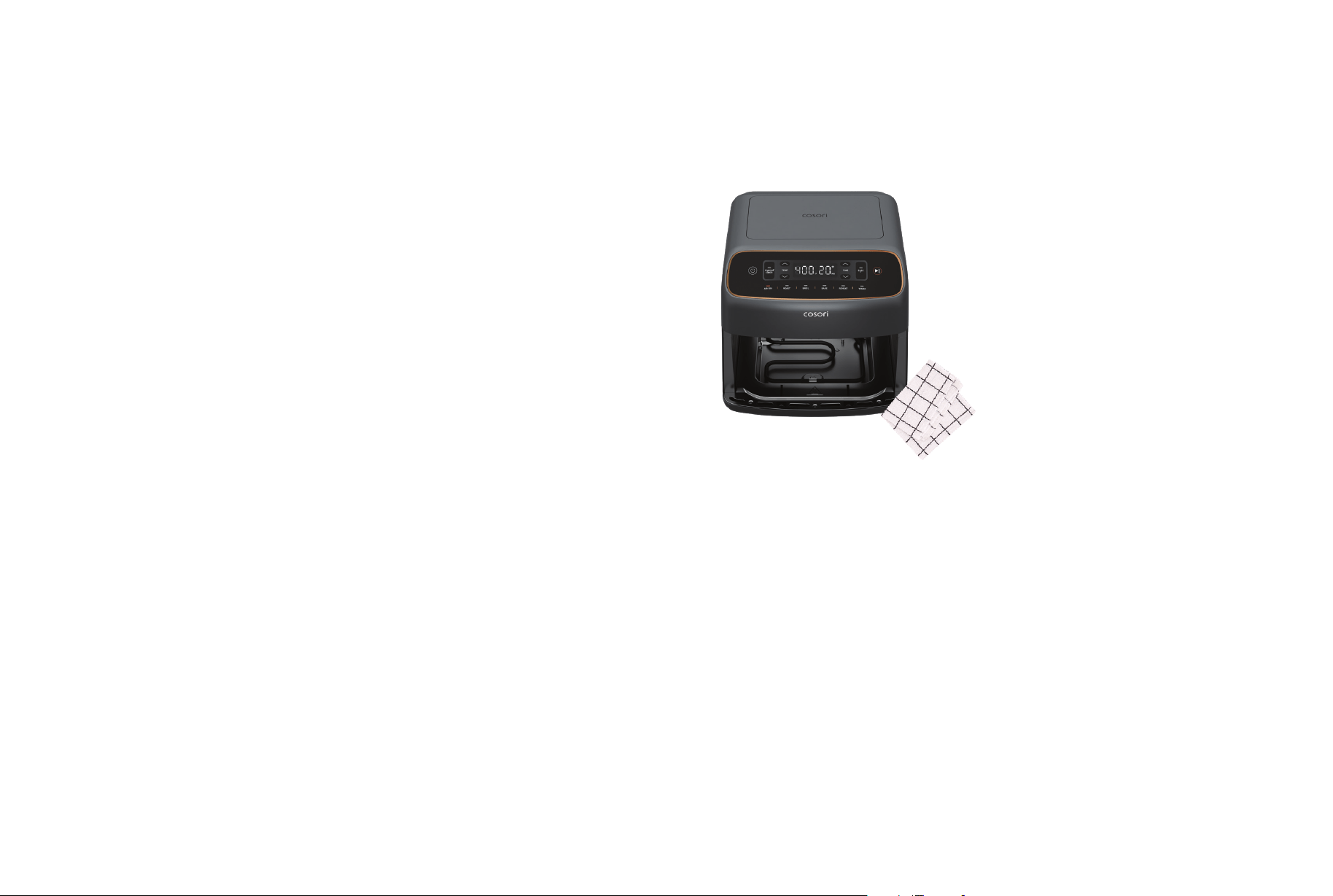
18 19
VeSync App Features Care & Maintenance
REMOTE CONTROL
IN-APP RECIPES
THIRD-PARTY
VOICE CONTROL
• All smart air fryer functions can be
controlled remotely, except for starting
the cooking process (to comply with
UL safety regulations).
• Cooking progress can be monitored
from a distance.
• Recipes made by Cosori’s in-house chefs
are available on the app. These recipes
automatically set the recommended time
and temperature on your air fryer.
• Create and save custom recipes.
Compatible with Amazon Alexa and Google
Assistant™ for voice commands.
The VeSync app allows you to access
additional smart air fryer functions,
including those listed below.
Note: The VeSync app is continually updated
and app features will expand.
Note:
• Always clean the air fryer basket and crisper
plate after every use.
• Lining the basket with foil (except the crisper
plate) may make cleanup easier.
Note:
• Gentle handwashing is recommended
to prolong the life of the coating.
• Avoid using metal utensils and abrasive
cleaning materials on the basket and
crisper plate. These will scratch or damage
their surfaces.
• Avoid dropping the basket and crisper
plate, as well as hitting or bumping them
with other hard objects. This may cause
damage to the coating.
• If you notice any cracking or peeling in
the nonstick coating of the crisper plate
or basket, we recommend replacing them
to maintain cooking performance.
1. Turn o and unplug the air fryer. Allow it
to cool completely before cleaning.
Pull out the basket for faster cooling.
2. Wipe the outside of the air fryer with
a moist cloth, if necessary.
3. The basket and crisper plate are
dishwasher-safe. You can also wash the
basket and crisper plate with hot, soapy
water and a non-abrasive sponge. Soak
if necessary.
CAUTION: The basket and crisper plate have
a ceramic coating.
4. For stubborn grease:
a. In a small bowl, mix
2 US tbsp /30 g of baking soda
and 1 US tbsp / 15 mL of water
to form a spreadable paste.
b. Use a sponge to spread the paste
on the basket and crisper plate, then
scrub. Let the basket and crisper plate
sit for 15 minutes before rinsing.
c. Wash basket and crisper plate
with soap and water before using.
Accessories
Additional and replacement accessories
are available for your air fryer. For more
information, contact Customer Support
(page ___).
Note: Make sure the heating coil is completely
dry before turning on the air fryer.
5. Clean the cavity of the air fryer with
a slightly moist, non-abrasive sponge
or cloth. Do not immerse in water.
If needed, clean the heating coil
to remove food debris.
6. Dry before using.

20 21
Troubleshooting
Problem Possible Solution
The air fryer will not turn on.
Make sure the air fryer is plugged in.
Push the basket securely into the air fryer.
Food is not completely
cooked.
Place smaller batches of food items into the basket. If the basket is
overstuffed, then food will be undercooked.
Increase cooking temperature or time.
Food is not crispy after air
frying.
Spraying or brushing a small amount of oil on food can increase crispiness.
See Cooking Tips (page __).
French fries are not cooked
correctly.
See French Fries (page __).
Basket will not slide into the
air fryer securely.
Make sure the basket is not overfilled with food.
White smoke or steam is
coming out of the air fryer.
The air fryer may produce some white smoke or steam when you use it for
the first time or during cooking. This is normal.
Make sure the basket and the inside of the air fryer are cleaned properly
and not greasy.
Cooking greasy foods will cause oil to collect beneath the crisper plate. This
oil will produce white smoke, and the basket may be hotter than usual. This is
normal and should not aect cooking. Handle the basket with care.
Dark smoke is coming out
of the air fryer.
Immediately unplug your air fryer. Dark smoke means that food is burning or
there is a circuit problem. Wait for smoke to clear before pulling the basket
out. If the cause was not burnt food, contact Customer Support (page __).
The air fryer has
a plastic smell.
Any air fryer may have a plastic smell from the manufacturing process.
This is normal. Follow the instructions for a Test Run (page__) to get rid
of the plastic smell. If a plastic smell is still present, please contact
Customer Support (see page__)
Display shows Error Code
“E01/E21”.
There is an open circuit in the temperature monitor.
Contact Customer Support (page __).
Display shows Error Code
“E02/E22”.
There is a short circuit in the temperature monitor. Contact Customer
Support (page __).
Display shows Error Code
“E04”.
The air fryer has been plugged into a 220–240V outlet. Turn o and unplug
the air fryer. Only use the air fryer with 120V, 60Hz outlets.
If your problem is not listed, please contact Customer Support (see page__).
Federal Communication Commission Interference
Statement – Part 15
This device complies with Part 15 of the FCC Rules. Operation is subject to the following two conditions:
1. This device may not cause harmful interference, and
2. This device must accept any interference received, including interference that may cause undesired
operation.
NOTE: This equipment has been tested and found to comply with the limits for a Class B digital device,
pursuant to Part 15 of the FCC Rules. These limits are designed to provide reasonable protection against
harmful interference in a residential installation. This equipment generates, uses and can radiate radio
frequency energy and, if not installed and used in accordance with the instructions, may cause harmful
interference to radio communications. However, there is no guarantee that interference will not occur in a
particular installation. If this equipment does cause harmful interference to radio or television reception,
which can be determined by turning the equipment o and on, the user is encouraged to try to correct the
interference by one or more of the following measures:
• Reorient or relocate the receiving antenna.
• Increase the separation between the equipment and receiver.
• Connect the equipment into an outlet on a circuit dierent from that to which the receiver
is connected.
• Consult the dealer or an experienced radio/TV technician for help.
FCC Caution: Any changes or modifications not expressly approved by the party responsible for compliance
could void the user’s authority to operate this equipment.
FCC Radiation Exposure Statement
This equipment complies with FCC radiation exposure limits set forth for an uncontrolled environment.
End users must follow the specific operating instructions for satisfying RF exposure compliance.
To maintain compliance with FCC RF exposure compliance requirements, please follow operation instructions
as documented in this manual. This transmitter must not be co-located or operating in conjunction with any
other antenna or transmitter. This equipment should be installed and operated with a minimum distance of
20 cm between the radiator and your body. The availability of some specific channels and/or operational
frequency bands are country dependent and are firmware programmed at the factory to match the intended
destination. The firmware setting is not accessible by the end user.
FCC SDOC SUPPLIER’S DECLARATION OF CONFORMITY
Vesync (US) Corporation hereby declares that this equipment is in compliance with FCC requirements.
The declaration of conformity can be found at www.vesync.com/legal/compliance/fcc

22 23
Product Name Air Fryer Upgraded Model
6.0-Quart Smart Air Fryer
Model
CAF-DB601S-KUSR
For your own reference, we strongly
recommend that you record your order ID
and date of purchase.
Order ID
Date of Purchase
Limited Warranty
Information
Cosori Limited Product Warranty
Register your products at https://warranty.
cosori.com/warranty to stay up to date
with important product information, such as
product updates, limited warranties, usage
and maintenance recommendations, and
notifications concerning safety warnings or
product recalls. Registration is not required
to claim your limited warranty.
Two (2) Year Limited Consumer Product
Warranty
Vesync (US) Corporation (“Vesync”) warrants
that the product shall be free from defects
in material and workmanship for a period
of 2 years from the date of original purchase
(“Limited Warranty Period”), provided the
product was used in accordance with
its use and care instructions (e.g. in the
intended environment and under normal
circumstances).
California Residents Only
The Warranty Period begins on the original
date of delivery or pick-up.
Your Limited Warranty Benefits
During the Limited Warranty Period and
subject to this limited Warranty Policy,
Vesync will, in its sole and exclusive
discretion, either (i) refund the purchase
price if the purchase was made directly from
the online Cosori store, (ii) repair any defects
in material or workmanship, (iii) replace the
product with another product of equal or
greater value, or (iv) provide store credit in
the amount of the purchase price.
Who Is Covered?
This limited warranty extends only to the
original consumer purchaser of the product
and is not transferable to any subsequent
owner of the product, regardless of whether
the product transferred ownership during the
specified term of the limited warranty. The
original consumer purchaser must provide
verification of the defect or malfunction and
proof of the date of purchase to claim the
Limited Warranty Benefits.
Be Aware of Unauthorized Dealers or Sellers
This limited warranty does not extend to
products purchased from unauthorized
dealers or sellers. Vesync’s limited warranty
only extends to products purchased from
authorized dealers or sellers that are
subject to Vesync’s quality controls and
have agreed to follow its quality controls.
Please be aware, products purchased from
an unauthorized website or dealer may
be counterfeit, used, defective, or may not
be designed for use in your country. You
can protect yourself and your products by
making sure you only purchase from Vesync
or its authorized dealers.
If you have any questions about a
specific seller, or if you think you may
have purchased your product from an
unauthorized seller, please contact our
Customer Support via support.cosori.com.
Sole and Exclusive Remedy
THE FOREGOING LIMITED WARRANTY
CONSTITUTES VESYNC (US) CORPORATION’S
EXCLUSIVE LIABILITY, AND YOUR SOLE
AND EXCLUSIVE REMEDY, FOR ANY
BREACH OF ANY WARRANTY OR OTHER
NONCONFORMITY OF THE PRODUCT
COVERED BY THIS LIMITED PRODUCT
WARRANTY STATEMENT. THIS LIMITED
WARRANTY IS EXCLUSIVE, AND IN LIEU OF
ALL OTHER WARRANTIES. NO EMPLOYEE
OF VESYNC (US) CORPORATION OR ANY
OTHER PARTY IS AUTHORIZED TO MAKE ANY
WARRANTY IN ADDITION TO THE LIMITED
WARRANTY IN THIS LIMITED PRODUCT
WARRANTY STATEMENT.
Disclaimer of Limited Warranties
TO THE FULLEST EXTENT PROVIDED
BY APPLICABLE LAW, EXCEPT AS
WARRANTED IN THIS LIMITED PRODUCT
WARRANTY POLICY, VESYNC (US)
CORPORATION PROVIDES THE PRODUCTS
YOU PURCHASE FROM VESYNC (US)
CORPORATION “AS IS” AND VESYNC (US)
CORPORATION HEREBY DISCLAIMS ALL
WARRANTIES OF ANY KIND, WHETHER
EXPRESS OR IMPLIED, STATUTORY, OR
OTHERWISE, INCLUDING BUT NOT LIMITED
TO ANY WARRANTIES OF MERCHANTABILITY,
NON-INFRINGEMENT, AND FITNESS FOR
PARTICULAR PURPOSE.
What’s Not Covered
• Normal wear and tear, including parts
that might wear out over time
(e.g. batteries, filters, cleaning brush,
essential oil pads, etc.).
• If the proof-of-purchase has been
altered in any way or is made illegible.
• If the model number, serial number or
production date code on the product
has been altered, removed, or made
illegible.
• If the product has been modified from
its original condition.
• If the product has not been used
in accordance with directions and
instructions in the user manual.
• Damages caused by connecting
peripherals, additional equipment
or accessories other than those
recommended in the user manual.
• Damages or defects caused by accident,
abuse, misuse, or improper or inadequate
maintenance.
• Damages or defects caused by service
or repair of the product performed by
an unauthorized service provider or by
anyone other than Vesync.
• Damages or defects occurring during
commercial use, rental use, or any use
for which the product is not intended.
• If the unit has been damaged, including
but not limited to damage by animals,
lightning, abnormal voltage, fire, natural
disaster, transportation, dishwasher,
or water (unless the user manual
expressly states that the product is
dishwasher-safe).
• Incidental and consequential damages.
• Damages or defects exceeding the cost
of the product.
Claiming Your Limited Warranty Service
in 5 Simple Steps:
1. Make sure your product is within
the specified limited warranty period.
2. Make sure you have a copy of the invoice
and order ID or proof-of-purchase.
3. Make sure you have your product.
DO NOT dispose of your product
before contacting us.
4. Contact our Customer Support team
via support.cosori.com
5. Once our Customer Support team has
approved your request, please return
the product with a copy of the invoice
and order ID.

24 25
Limitations of Liability
TO THE FULLEST EXTENT PROVIDED BY
APPLICABLE LAW, IN NO EVENT WILL VESYNC
(US) CORPORATION, ITS AFFILIATES, OR
THEIR LICENSORS, SERVICE PROVIDERS,
EMPLOYEES, AGENTS, OFFICERS, OR
DIRECTORS BE LIABLE FOR:
(a) DAMAGES OF ANY KIND ARISING
OUT OF OR IN CONNECTION WITH
PRODUCTS PURCHASED FROM VESYNC
(US) CORPORATION IN EXCESS OF THE
PURCHASE PRICE PAID BY THE PURCHASER
FOR SUCH PRODUCTS, OR
(b) INDIRECT, SPECIAL, INCIDENTAL,
CONSEQUENTIAL, OR PUNITIVE DAMAGES
EVEN IF VESYNC (US) CORPORATION OR ONE
OF ITS SUPPLIERS HAS BEEN ADVISED OF
THE POSSIBILITY OR LIKELIHOOD OF SUCH
DAMAGES.
AND REGARDLESS OF WHETHER CAUSED BY
TORT (INCLUDING NEGLIGENCE), BREACH OF
CONTRACT, OR OTHERWISE. OUR LIABILITY
SHALL UNDER NO CIRCUMSTANCES EXCEED
THE ACTUAL AMOUNT PAID BY YOU FOR
THE DEFECTIVE PRODUCT, NOR SHALL WE
UNDER ANY CIRCUMSTANCES BE LIABLE
FOR ANY CONSEQUENTIAL, INCIDENTAL,
SPECIAL OR PUNITIVE DAMAGES OR LOSSES,
WHETHER DIRECT OR INDIRECT.
EXCEPT AS COVERED BY THIS LIMITED
PRODUCT WARRANTY STATEMENT, VESYNC
(US) CORPORATION SHALL NOT BE LIABLE
FOR COSTS ASSOCIATED WITH THE
REPLACEMENT OR REPAIR OF PRODUCTS
PURCHASED FROM IT, INCLUDING, BUT
NOT LIMITED TO, LABOR, INSTALLATION, OR
OTHER COSTS INCURRED BY THE USER AND,
IN PARTICULAR, ANY COSTS RELATING TO
THE REMOVAL OR REPLACEMENT OF ANY
PRODUCT.
Limited Warranty Information (cont.)
Other Rights You May Have
SOME JURISDICTIONS DO NOT ALLOW FOR:
(1) EXCLUSION OF IMPLIED WARRANTIES;
(2) LIMITATION ON THE DURATION OF
IMPLIED WARRANTIES; AND/OR (3)
EXCLUSION OR LIMITATION OF INCIDENTAL
OR CONSEQUENTIAL DAMAGES; SO THE
DISCLAIMERS IN THIS POLICY MAY NOT
APPLY TO YOU. IN THESE JURISDICTIONS
YOU HAVE ONLY THE IMPLIED WARRANTIES
THAT ARE EXPRESSLY REQUIRED TO
BE PROVIDED IN ACCORDANCE WITH
APPLICABLE LAW. THE LIMITATIONS OF
WARRANTIES, LIABILITY, AND REMEDIES
APPLY TO THE MAXIMUM EXTENT PERMITTED
BY LAW.
ALTHOUGH THIS LIMITED WARRANTY GIVES
YOU SPECIFIC LEGAL RIGHTS, YOU MAY
HAVE OTHER RIGHTS IN YOUR JURISDICTION.
THIS STATEMENT OF LIMITED WARRANTY IS
SUBJECT TO APPLICABLE LAWS THAT APPLY
TO YOU AND THE PRODUCT. PLEASE REVIEW
THE LAWS IN YOUR JURISDICTION TO
UNDERSTAND YOUR RIGHTS FULLY.
Changes to This Policy
We may change the terms and availability
of this limited warranty at our discretion, but
any changes will not be retroactive.
This warranty is made by:
Vesync (US) Corporation
1775 Flight Way, Suite 150
Tustin, CA 92782
USA
Customer Support
If you have any questions or concerns
about your new product, please contact
our Customer Support Team.
Mon–Fri, 9:00 am–5:00 pm PST/PDT
*Please have your order invoice PDF or
screenshot(s) ready before contacting
Customer Support.
Vesync (US) Corporation
1775 Flight Way, Suite 150
Tustin, CA 92782
USA
Website: support.cosori.com
Phone: 1-888-402-1684
SUPPORT HOURS
Attributions
Amazon, Alexa, and all related logos are
trademarks of Amazon.com, Inc. or its affiliates.
Google, Android, and Google Play are
trademarks of Google LLC.
App Store
®
is a trademark of Apple Inc.
Wi-Fi
®
is a registered trademark of
Wi-Fi Alliance
®
.
iOS is a registered trademark of Cisco Systems,
Inc. and/or its affiliates in the United States
and certain other countries.
The Bluetooth
®
word mark and logos are
registered trademarks owned by Bluetooth
SIG, Inc. and any use of such marks by VESYNC
(SINGAPORE) PTE. LTD. is under license.
Other trademarks and trade names are
those of their respective owners.

26 27
Notes Notes

MF072026GG -Q3C_PDV07_MANJinglePKG