
SCG 4000BK
EN
CORDLESS COFFEE GRINDER
Translation of the original manual
SCG 4000BK
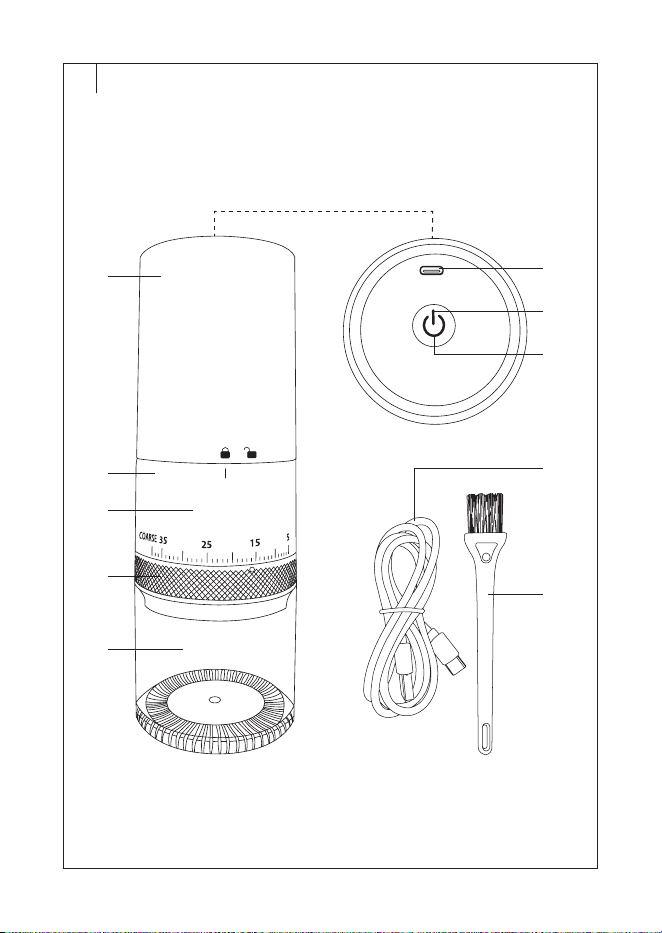
A
3
2
1
10
9
4
5
6
7
8
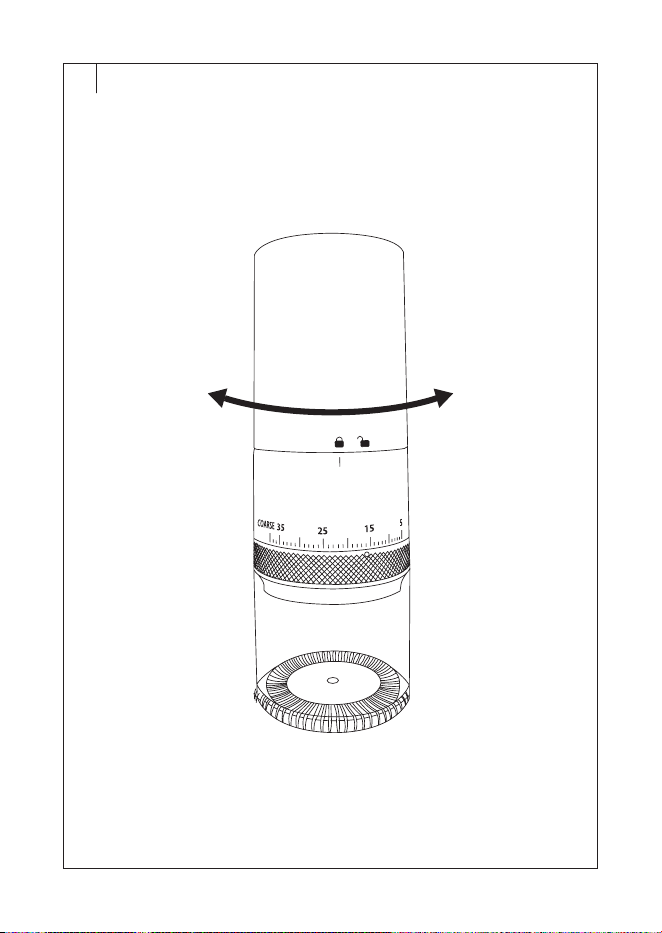
B
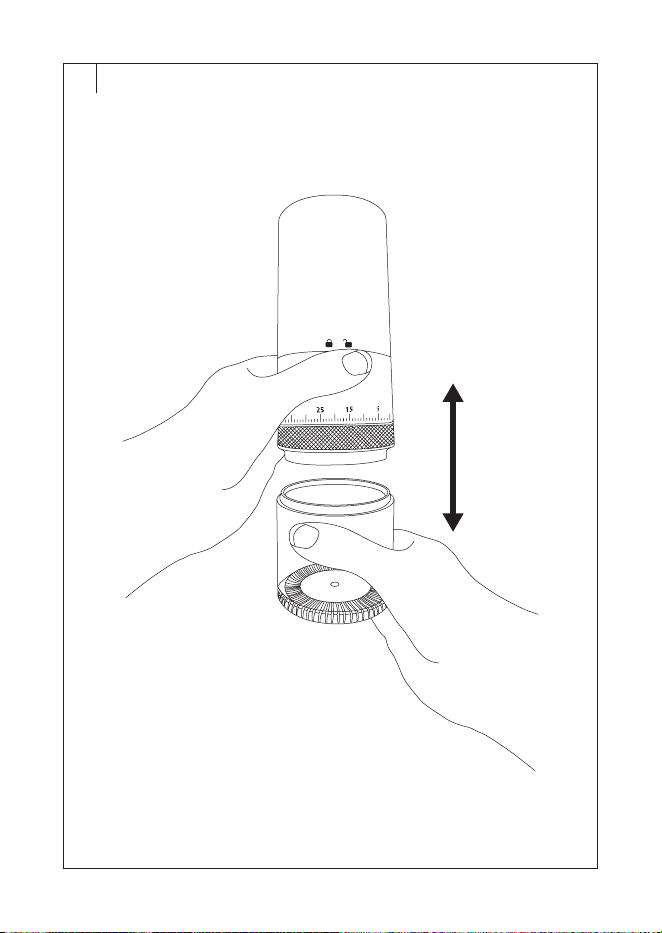
C
- 1 -
12/2025
2025, .
EN
Cordless coffee grinder
User Manual
IMPORTANT SAFETY INSTRUCTIONS
READ CAREFULLY AND STORE FOR FUTURE USE.
• This appliance is not to be used by children. Keep this appliance and its power cable out of the
reach of children.
• Appliances may be used by persons with reduced physical, sensory or mental abilities or lack of
experience and knowledge, provided they are supervised or have been instructed in the safe use
of the appliance and understand the potential hazards.
• Children must not play with the appliance.
• If the charging cable is damaged, have it replaced in aprofessional service centre in order
to prevent adangerous situation. It is forbidden to use the appliance with the charging cable
damaged.
Caution:
Incorrect use may lead to injury.
• Take extra care when handling and cleaning the grinding burrs. The grinding burrs are sharp and
can cause serious injury.
• Wipe the coffee bean hopper with aslightly dampened sponge. Follow the cleaning instructions
in this manual.
• Always switch off the appliance when left unattended and before assembly, disassembly or
cleaning.
• Always make sure the appliance is switched off and not charging before emptying the hopper.
• This appliance is designed for household use only. It is also suitable for personal non-commercial
use in spaces such as:
– staff kitchens in stores, offices and other workplaces;
– hotel or motel rooms andother living areas;
– agricultural farms;
– bed and breakfast establishments.
• Keep packaging material (plastic bags, polystyrene mouldings, etc.) out of the reach of children.
• The appliance is used for grinding coffee beans. Do not use it for other purposes.
• Do not use the appliance for commercial purposes, in an industrial environment or outdoors. Do
not place it on an electric or gas cooker, table edge, window sills, sink draining board or unstable
surfaces. Place it only on aflat, dry and stable surface.
• Before connecting the appliance to acharging source, make sure that the nominal voltage listed
on the type plate matches the electrical voltage of the power supply.
• Do not overfill the coffee bean hopper, nor should you fill it with ground coffee, instant coffee,
caramelised or otherwise specially treated coffee beans, cocoa beans, or any other materials or
objects. This could damage the appliance.
• Do not use this appliance to crush ice, nuts or other ingredients.
CORDLESS COFFEE GRINDER

- 2 -
12/2025
2025, .
• Make sure that the appliance is correctly assembled before putting it into operation.
• Before filling the hopper with coffee beans, ensure that there are no foreign objects in the grinder.
• Do not handle or shake the appliance while it is in operation.
• Do not overfill the coffee bean hopper.
• Do not operate the appliance continuously for more than 3 minutes. Let it cool for at least 10
minutes before using it again. Otherwise, there is arisk of overheating and subsequent damage.
• The appliance is equipped with an overheating protection. Should the motor overheat, the
appliance will stop running. Ifthis happens, allow the appliance to cool down.
• Do not touch the appliance with wet hands.
• Keep the appliance clean. When cleaning, follow the instructions in the chapter “Cleaning and
maintenance”.
• Keep the appliance away from flammable, explosive or chemical substances. Do not use it in
humid environments.
• Do not place any items on the top part of the appliance.
• To avoid the risk of electric shock, do not immerse the motor unit or charging cable in water or
other liquids.
• Do not place heavy objects on the charging cable. Make sure that it does not hang over the edge
of the table or touch ahot surface and that its connector does not come into contact with water
or moisture.
• Do not use the appliance if it is not working properly or shows signs of damage.
• To prevent dangerous situations, do not repair or modify the appliance yourself. All repairs should
be carried out by an authorised service centre. Tampering with the appliance may result in the
loss of your legal rights regarding faulty performance or warranty for quality.
Safety instructions when charging the appliance
• Use the supplied charging cable to charge the appliance. You may also use another suitable
cable with a USB-C connector for charging.
• Before connecting the charging cable to the charging source (USB charging adapter, not
included), make sure that the input rated voltage stated on the appliance'srating label matches
the voltage on the adapter'srating label.
• Make sure that the charging cable does not hang over the edge of the table or touch hot surfaces
or sharp objects.
• Disconnect the charging cable from the appliance by pulling the connector. Do not pull the
charging cable.
• Only handle the charging adapter with dry andclean hands.
• Do not cover the appliance or the charging cable during charging.
• The appliance, charging cable or adapter may heat up while charging. This is normal. Make sure
to leave aclear space around the appliance to allow proper dissipation of excess heat. Do not
charge the appliance if it is located inan enclosed area.
• After charging the appliance, disconnect the charging cable from the appliance connector andthe
charging source. Let it cool before storing. Always store in adry andwell-ventilated place.
• If you will not be using the appliance for an extended period of time (longer than 3 months), we
recommend recharging it regularly anyway to extend the life of the built-in battery.
- 3 -
12/2025
2025, .
Special Safety Instructions for the Li-ion Battery
• The Li-ion battery is built into the appliance andis an integral part of it, which the user is not
allowed to remove.
• Follow all the instructions provided in this user'smanual.
• Avoid using or storing the appliance in environments where flammable, volatile, or explosive
substances are used and/or stored.
• Inthe event of abattery fluid (electrolyte) leak, do not touch the battery with your bare hands.
Use protective aids (gloves, aprotective mask, goggles, etc.). The liquid inside the battery is toxic
andmay cause health problems even with slight contact of the bare skin withit.
• We recommend opening windows or doors to ensure adequate ventilation of the space.
• Contact aspecialist hazardous waste disposal company or use ahazardous waste collection
facility. Do not dispose of the damaged battery or accumulator in ordinary household waste.
• In case of skin or eye splashes, rinse with plenty of water and seek medical attention. If ingestion
occurs, seek immediate professional medical help.
. . . . . . . . . . . . . . . . . . . . . . . . . . . . . . . . . . . . . . . . . . . . . . . . . . . . . . . . . . . . . . . . . . . . . . . . . . . . . . . . . . . . . . . . . . . . .
EXPLANATION OF SYMBOLS PLACED ON THE PRODUCT OR INTHE
ACCOMPANYING DOCUMENTATION
The product meets all the basic requirements of the applicable EU directives.
This symbol on products or accompanying documents means that used electric or
electronic products must not be added to ordinary municipal waste.
This symbol on the accumulator or battery means that the used battery must not be
added to normal municipal waste.
. . . . . . . . . . . . . . . . . . . . . . . . . . . . . . . . . . . . . . . . . . . . . . . . . . . . . . . . . . . . . . . . . . . . . . . . . . . . . . . . . . . . . . . . . . . . .

- 4 -
12/2025
2025, .
• Thank you for purchasing our SENCOR
product; we hope it will serve to your
satisfaction.
• Prior to using this appliance, please read
the user manual thoroughly, even in cases
when you are already familiar with the
use of similar types of appliances. Use
the appliance only as described in this
user manual. Keep the manual for future
reference. If you pass the appliance on to
another person, ensure that this user manual
is included.
• Carefully unpack the appliance and
make sure not to discard any part of the
packaging material until you have removed
all its components. It is recommended that
you keep the original packaging, packing
material, receipt and confirmation of the
extent of the seller'sliability or warranty
certificate at least for the duration of the
legal right to file adefect claim or the quality
warranty. When transporting the appliance,
we recommend repackaging it in the original
box provided by the manufacturer.
. . . . . . . . . . . . . . . . . . . . . . . . . . . . . . . . . . . . . . . . . . . . .
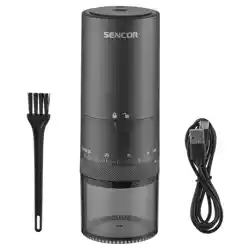
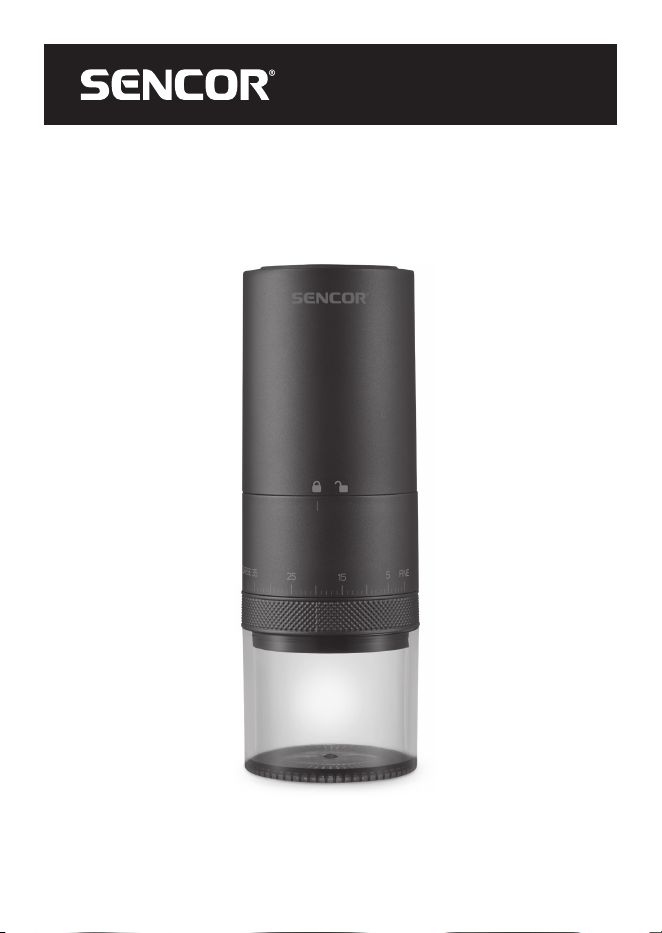
GRINDER DESCRIPTION
A1 button to
switch the
grinder on/off
A2 Grinder/charging
operation
indicator
A3 Socket
toconnect the
USB-C connector
of the charging
cable
A4 Motor unit
A5 Coffee bean
hopper
A6 Grinder
A7 Grinding
coarseness
regulator
A8 Ground coffee
hopper
A9 Charging cable
A10 Cleaning brush
. . . . . . . . . . . . . . . . . . . . . . . . . . . . . . . . . . . . . . . . . . . . .
INTENDED USE
• The Sencor SCG 4000BK cordless coffee
grinder is used togrind roasted coffee
beans just before making coffee. Grinding
just before use maximises flavour and
aroma as ground coffee quickly loses its
characteristics. Thanks to the battery, the
grinder is easily portable and cordless,
suitable not only for home but also for travel.
. . . . . . . . . . . . . . . . . . . . . . . . . . . . . . . . . . . . . . . . . . . . .
BEFORE FIRST USE
• Before first use, remove the appliance and
its accessories from the packaging and
discard all promotional labels and tags.
Check that neither the appliance nor any of
its components is damaged.
• Remove the ground coffee container
andrinse it with clean water. Wipe dry with
aclean cloth.
• Wipe the outer surface of the grinder with
aclean dry cloth.
. . . . . . . . . . . . . . . . . . . . . . . . . . . . . . . . . . . . . . . . . . . . .
CHARGING
• The grinder is equipped with an battery and
it is necessary to charge the grinder before
first use.
• Insert the USB-Aconnector of the charging
cable into the connector of your computer,
power bank or power adapter (not included).
Plug the adapter plug into aproperly
grounded power outlet.
• Insert the USB-C connector into the socket
at the top of the grinder. The grinder starts
charging. The A2indicator will flash during
charging. When it turns white, the grinder is
fully charged.
• Disconnect the charging cable from the
grinder and from the charging source.
Remove the adapter from the power socket if
you have used it forcharging.
• Charging time is approximately 2.5–3 hours.
Nevertheless, the charging time varies
dependingon the current charge level of
the grinder.
EN
Cordless coffee grinder
User Manual
- 5 -
12/2025
2025, .
• When the charge level is low, the
A2indicator will flash. Insuch acase, let the
grinder charge.
Note:
Do not leave the grinder connected
to acharging source for longer than it
takes to fully charge it.
Note:
The grinder can be used while it is
charging.
. . . . . . . . . . . . . . . . . . . . . . . . . . . . . . . . . . . . . . . . . . . . .
FILLING THE HOPPER WITH
COFFEE BEANS (Fig.B)
• Check that the grinder is turned off before
filling the coffee bean hopper.
• Grasp the motor unit with one hand andthe
grinder with the other.
• Turn the motor unit clockwise so that the
Isymbol on the hopper points to .
• Remove the motor unit upwards from the
hopper.
• Pour freshly roasted coffee beans into the
hopper.
• Put the motor unit on the hopper so that the
Isymbol on the hopper points to .
• Turn the motor unit counterclockwise until
you feel resistance and the symbol Ipoints
to .
Caution:
Do not fill with ground or instant
coffee, caramelized or otherwise
specially treated coffee beans,
cocoa beans or other raw materials
or items. Do not use this appliance
to crush ice, grind nuts, spices or
other ingredients.
Note:
Do not overfill the hopper. We
recommend filling it with about 80%.
Note:
The hopper is not designed for storing
coffee beans. If the grinder is to be left
unused, empty the hopper andclean it.
. . . . . . . . . . . . . . . . . . . . . . . . . . . . . . . . . . . . . . . . . . . . .
ADJUSTING THE GRIND
FINENESS
• Turn the grinding coarseness regulator to
the left or right to set the desired degree of
coarseness of the ground coffee. Turn the
regulator towardsFINE to select afiner level
of ground coffee, turn towardsCOARSE to
select acoarser level of ground coffee.
• Adjust the grinding coarse before starting
the grinder.
. . . . . . . . . . . . . . . . . . . . . . . . . . . . . . . . . . . . . . . . . . . . .
GRINDING
• Make sure the grinder is charged, the coffee
bean hopper is filled, and the coffee ground
hopper is empty.
• Press the button briefly and the grinder
will start. The A2indicator lights up.
• The grinder will grind until the coffee bean
hopper is empty, then automatically stops
andswitches off.
• Fill the coffee bean hopper
andcontinuegrinding.
• Hold down the button for 3 seconds
and the grinder will run for 4 minutes
continuously. After 4 minutes, the grinder
automatically stops and switches off.
Then leave the grinder to cool for about
10minutes.
• If you need to stop the grinding earlier, press
the button briefly.
Note:
If the grinder detects empty grinding,
it will automatically switch off after
6seconds. The A2 indicator will flash
several times andthen turn off. This is
asafety feature of saving energy. Do
not turn the grinder on empty.
. . . . . . . . . . . . . . . . . . . . . . . . . . . . . . . . . . . . . . . . . . . . .
EMPTYING THE GROUND
COFFEE HOPPER (Fig.C)
• Grasp the grinder with one hand and the
hopper with the other.
• Carefully remove the grinder from the
hopper.
- 6 -
12/2025
2025, .
• Place the ground coffee in the filter and
prepare your favourite coffee or pour the
ground coffee into an airtight container.
Note:
Freshly ground coffee quickly loses its
aroma and taste, so we recommend
consuming it as soon as possible.
. . . . . . . . . . . . . . . . . . . . . . . . . . . . . . . . . . . . . . . . . . . . .
CLEANING AND MAINTENANCE
• Make sure the grinder is switched off before
cleaning.
Caution:
To avoid the risk of electric shock,
do not immerse the motor unit,
grinder tray or charging cable in
water or other liquid.
Caution:
Do not use abrasive cleaning
agents, solvents, etc. to clean any
parts of the appliance, as these
could damage the surface. None of
the components of this appliance
are dishwasher safe.
. . . . . . . . . . . . . . . . . . . . . . . . . . . . . . . . . . . . . . . . . . . . .
GROUND COFFEE HOPPER
Remove the ground coffee hopper, empty
it andrinse with clean water. Wipe dry with
aclean cloth.
. . . . . . . . . . . . . . . . . . . . . . . . . . . . . . . . . . . . . . . . . . . . .
OUTER SURFACE OF THE
GRINDER
Wipe the outer surface of the grinder with
aclean dry cloth.
. . . . . . . . . . . . . . . . . . . . . . . . . . . . . . . . . . . . . . . . . . . . .
EMPTYING THE HOPPER
• Grasp the motor unit with one hand andthe
grinder with the other.
• Turn the motor unit clockwise so that the
Isymbol on the hopper points to .
• Remove the motor unit upwards from the
hopper.
• Pour the coffee beans into an airtight
container.
• Put the motor unit on the hopper so that the
Isymbol on the hopper points to .
• Turn the motor unit counterclockwise until
you feel resistance and the symbol Ipoints
to .
• Repeatedly start the grinder with the
button until the hopper is empty.
. . . . . . . . . . . . . . . . . . . . . . . . . . . . . . . . . . . . . . . . . . . . .
CLEANING OF GRINDING BURRS
• Grasp the motor unit with one hand andthe
grinder with the other.
• Turn the motor unit clockwise so that the
Isymbol on the hopper points to .
• Remove the motor unit upwards from the
hopper.
• Remove the ground coffee hopper.
• Use the cleaning brush to remove coffee
bean residue from the grinding chamber.
• After cleaning, reassemble the grinder.
Caution:
Never spray the appliance with
water or in any other liquid.
. . . . . . . . . . . . . . . . . . . . . . . . . . . . . . . . . . . . . . . . . . . . .
STORAGE
• If you will not be using the grinder for an
extended period of time, turn it off, empty the
coffee bean hopper and the ground coffee
hopper. Clean it according to the instructions
in the “CLEANING AND MAINTENANCE”
section.
• Before storing, ensure that the appliance and
all accessories are thoroughly clean and dry.
• Store the appliance in adry, clean, and
well-ventilated place away from extreme
temperatures and out of the reach of children
or pets.
• If you don't use the grinder for along time,
charge it at least once every 3 to 6 months.
. . . . . . . . . . . . . . . . . . . . . . . . . . . . . . . . . . . . . . . . . . . . .
- 7 -
12/2025
2025, .
TROUBLESHOOTING
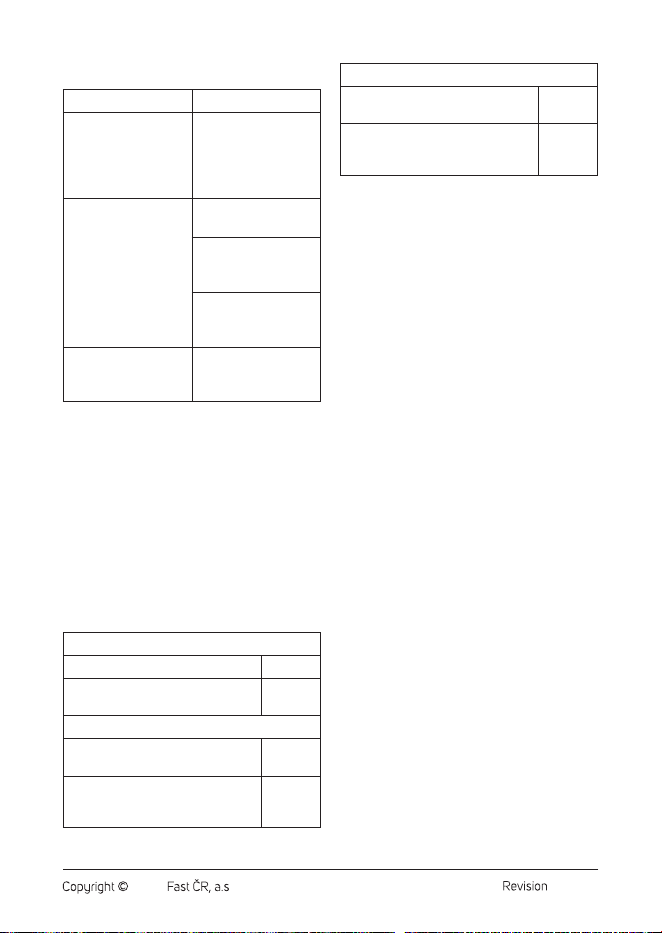
Problem Solution
The grinder does not
charge itself.
Check that the
charging cable is
properly connected
to thegrinder and the
charging source.
The grinder does
not start.
Let the grinder
charge.
Check that the output
of the ground coffee
is not blocked.
Check that the
grinder is assembled
correctly.
The grinder will start,
but only for avery
short time.
Let the grinder
charge.
. . . . . . . . . . . . . . . . . . . . . . . . . . . . . . . . . . . . . . . . . . . . .
TECHNICAL SPECIFICATIONS
Battery .................................. Li-Ion, 3.7 V, 2000 mA
Charging time ..........................................2.5–3 hours
Noise level .......................................................... <75 dB
Coffee bean hopper capacity ............................ 25 g
Ground coffee hopper capacity ..................... 110 ml
Dimensions of the grinder .........20.2 × 7.1 × 7.1cm
Weight ................................................................... 435 g
. . . . . . . . . . . . . . . . . . . . . . . . . . . . . . . . . . . . . . . . . . . . .
Values provided according to
Commission Regulation EU 2023/826
Off mode
Power consumption in off mode 0.1 W
Time needed for the equipment to
automatically reach off mode
0 min
Standby Mode
Power consumption in standby
mode
–
Time needed for the equipment
to automatically reach standby
mode
–
Networked standby mode (Wi-Fi)
Power consumption in networked
standby
–
Time needed for the equipment
to automatically reach networked
standby mode
–
. . . . . . . . . . . . . . . . . . . . . . . . . . . . . . . . . . . . . . . . . . . . .
Disposal of the Battery
The battery is intended for take-back and
environmentally friendly disposal. Take the
product with the battery to the designated
collection point. Here, it will provide for its
ecological disposal. The battery contains
environmentally harmful substances.
. . . . . . . . . . . . . . . . . . . . . . . . . . . . . . . . . . . . . . . . . . . . .
INSTRUCTIONS AND
INFORMATION ON DISPOSAL OF
USED PACKAGING MATERIAL
Dispose of used packaging material at the
designated municipal waste disposal site.
. . . . . . . . . . . . . . . . . . . . . . . . . . . . . . . . . . . . . . . . . . . . .
DISPOSAL OF USED ELECTRICAL
AND ELECTRONIC EQUIPMENT
Used electrical andelectronic products must
not be disposed of in ordinary municipal waste.
To enable the proper disposal, renewal and
recycling of these products, deliver them to the
designated collection points. Alternatively, in
some European Union states or other European
countries the products can be returned to the
local retailer when buying an equivalent new
product. By disposing of this product correctly,
you help to conserve valuable natural resources
and prevent any potential adverse impact on the
environment and human health that could result
from improper waste disposal. For more details,
contact your local authority or nearest collection
point. Fines may be imposed for the improper
disposal of this type of waste as per national
regulations.

- 8 -
12/2025
2025, .
For business entities in European Union
States
If you wish to dispose of electrical and electronic
equipment, please request the necessary
information from your retailer or supplier.
Disposal in other countries outside the
European Union
To dispose of this product elsewhere, request
the necessary information on the correct
disposal method from local authorities or your
retailer.
. . . . . . . . . . . . . . . . . . . . . . . . . . . . . . . . . . . . . . . . . . . . .
Changes to text and technical parameters are
reserved.