USER MANUAL
Dishwasher
EN
DWC6432FIXXLU
Read all instructions before using the appliance.

3Your dishwasher ........................................
4Important safety instructions ...................
4FCC declaration of conformity .....................
4FCC radiation exposure statement ..............
4General ........................................................
5Child safety ..................................................
5Sani lock ......................................................
5Lock .............................................................
5Installation ....................................................
5Overflow guard ............................................
6Packing material ..........................................
6Winter storage/Transport .............................
6End-of-service appliance recycling .............
7Before washing for the first time ..............
7Water hardness ............................................
7Basic settings ..............................................
10Add rinse aid ...............................................
10Add salt ........................................................
11Automatic dosing .........................................
12Greener dishwashing ................................
12Save energy and water ................................
13Loading the dishwasher ............................
13Fragile dishes ..............................................
13Loading affects the results ..........................
13The dishwasher's baskets ...........................
14Top cutlery tray ............................................
15Upper basket ...............................................
16Lower basket ...............................................
17Cutlery basket ..............................................
18Typical load .................................................
19Using the dishwasher ................................
19Add detergent ..............................................
20On/Standby mode ........................................
20Select program ............................................
21Start/Stop .....................................................
22Status light floor projection ..........................
22If you want to load more dishes ...................
23Power failure ................................................
23Once the program has finished ...................
24The best drying results ................................
24Unloading the dishwasher ...........................
25Program chart ............................................
26ASKO Connect Pro & ConnectLife ...........
26ASKO Connect Pro ......................................
26ConnectLife ..................................................
26Remote control the dishwasher ...................
26Remote start the dishwasher .......................
28Settings .......................................................
34Care and maintenance instructions .........
34Add rinse aid ...............................................
34Add salt ........................................................
34Add auto dose .............................................
34Clean the filters ............................................
36Cleaning the spray arms ..............................
37Clean the outside of the dishwasher ...........
37Run Self-cleaning .........................................
37Remove blockages ......................................
39Troubleshooting .........................................
40General ........................................................
46WiFi ..............................................................
48Installation instructions ............................
48Important safety instructions ........................
49Setup ............................................................
50
Connection to an automatic dosing
system ..........................................................
53Drain connection ..........................................
53Connection to water supply .........................
54Electrical connection ...................................
55Push to open ................................................
56Service and warranty .................................
56
Limited Warranty – Residential and
Professional Appliances ..............................
56Items excluded from warranty .....................
57Disclaimer ....................................................
57ASKO Customer Care ..................................
57Service after expiration of limited warranty ...
57Number of cycles ........................................
58Technical information ................................
58Technical data .............................................
58Electrical connection ...................................
Contents
Welcome to our growing ASKO family!
We are proud of our appliances. We hope that this appliance will be an appreciated and dependable
device for many years to come.
Please read the operating instructions before use. They include general tips, information about the
settings and adjustments you can make, and the best way to take care of your appliance.
Add salt
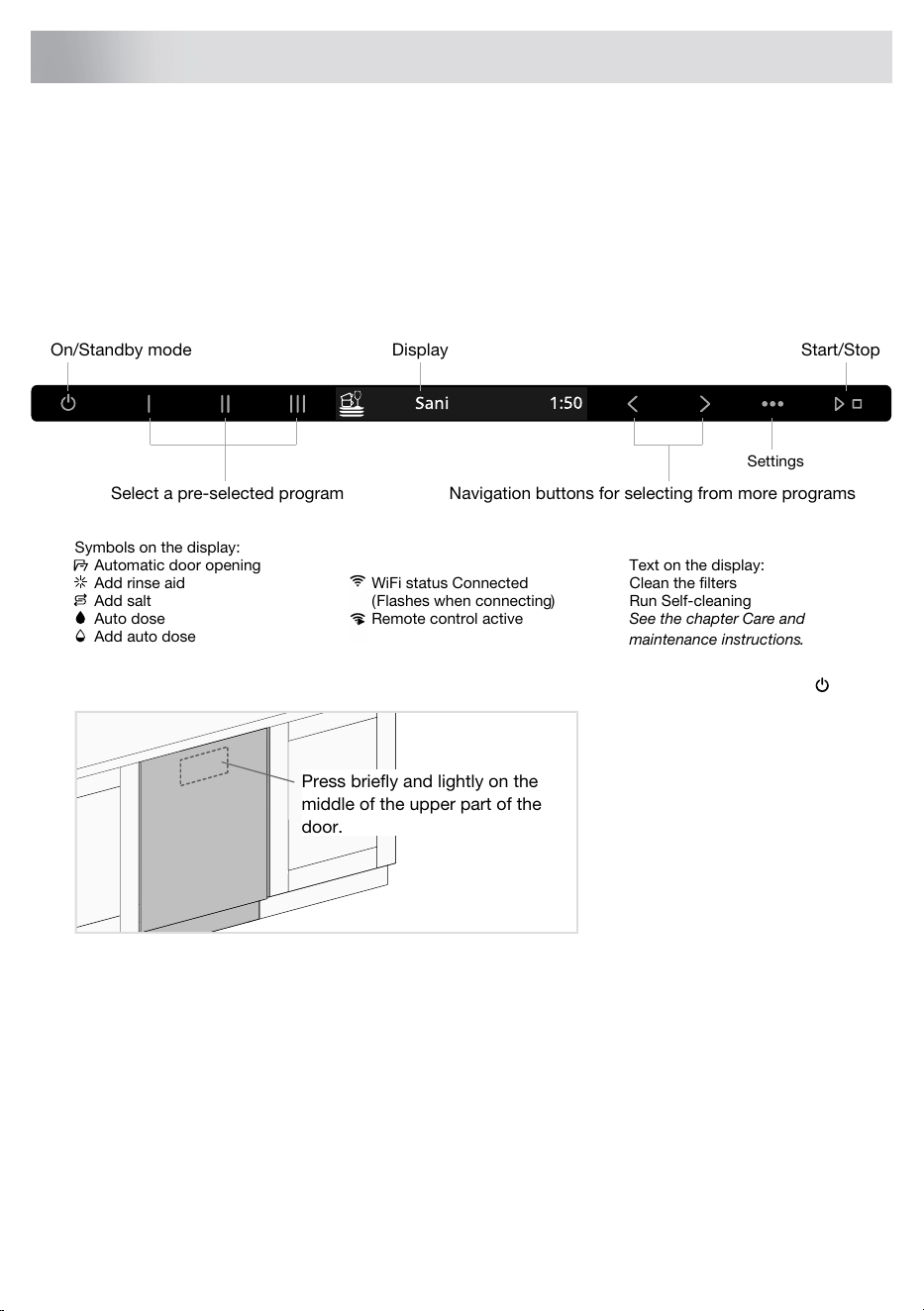
Display Start/Stop
Select a pre-selected program
On/Standby mode
WiFi status Connected
Auto dose
Add auto dose
(Flashes when connecting)
Symbols on the display:
Automatic door opening Text on the display:
Clean the filters
Run Self-cleaning
See the chapter Care and
maintenance instructions.
Remote control active
Navigation buttons for selecting from more programs
Settings
Add rinse aid
Install the dishwasher; see the chapter Installation instructions. Then open the door and press .
Press briefly and lightly on the
middle of the upper part of the
door.
"Welcome to your new ASKO dishwasher. This is a first time setup." is shown on the display the
first time the dishwasher is switched on. It is important that you choose the right settings to ensure
good dishwashing results. See page 7.
The dishwasher can be connected to one or more systems for the automatic dosing of commercial
detergent and rinse aid, which simplifies everyday operation and reduces the risk of overdosing.
ASKO Connect Pro is a web-based platform that enables you to organize, manage and monitor all
your professional ASKO appliances regardless of where they are installed. Once you have connected
a professional appliance in the ConnectLife app, a link to ASKO Connect Pro is shown. For more
information, please see https://us.asko.com/professional.
3
Your dishwasher
SAVE THESE INSTRUCTIONS FOR FUTURE REFERENCE
WARNING!
When using your dishwasher, follow basic precautions, including the following:
• Read all instructions before using the dishwasher.
• Use the dishwasher only for its intended purpose.
• Use only detergents or rinse agents recommended for use in a dishwasher and keep them
out of the reach of children.
• When loading items to be washed:
– position sharp items so that they are not likely to damage the door seal, and
– load sharp knives with the handles up to reduce the risk of cut-type injuries.
• Do not wash plastic items unless they are marked “dishwasher safe” or the equivalent. For
plastic items not so marked, check the manufacturer’s recommendations.
• Do not operate the dishwasher unless all enclosure panels are properly in place.
• Do not tamper with controls.
• Do not abuse, sit on, or stand on the door or dish rack of the dishwasher.
• To reduce the risk of injury, do not allow children to play in or on a dishwasher.
• Under certain conditions, hydrogen gas may be produced in a hot water system that has not
been used for two weeks or more. HYDROGEN GAS IS EXPLOSIVE. If the hot water system
has not been used for two weeks, before using the dishwasher turn on all hot water faucets
and let the water flow from each for several minutes. This will release any accumulated
hydrogen gas. As the gas is flammable, do not smoke or use an open flame during this time.
• Remove the door of the dishwasher when removing the dishwasher from service or discarding
it (so that children cannot become trapped inside).
• Read the grounding instructions in the installation instructions.
FCC declaration of conformity
This device complies with part 15 of the FCC Rules. Operation is subject to the condition that this
device does not cause harmful interference.
FCC radiation exposure statement
This equipment complies with FCC radiation exposure limits set forth for an uncontrolled environment.
This equipment should be installed and operated with a minimum distance of 8“ (20 cm) between
the radiator and your body.
General
• Do not run the dishwasher while you are out of the home.
• Do not store or use combustible materials, gasoline, or other flammable vapors and liquids in
the vicinity of this or any other appliance.
• Disconnect electrical power to dishwasher before servicing.
• Repairs should be done by a qualified technician.
NSF/ANSI 184 certified residential dishwashers are not intended for licensed food establishments.
4
Important safety instructions
WARNING!
Only Sanitize NSF cycles have been designed to meet the requirements of NSF/ANSI 184 for soil
removal and sanitization efficacy. There is no assurance, either directly or indirectly, that all cycles
on a certified machine have passed the sanitization performance test.
WARNING!
PROPOSITION 65 FOR CALIFORNIA RESIDENTS
Cancer and Reproductive Harm – www.P65Warnings.ca.gov
Child safety
• Always keep small children away from the machine when it is open. There may be some detergent
residue left inside the machine.
• Always close the door and start the dishwasher as soon as you put in the detergent.
• If dishwasher detergent gets in someone’s eyes, rinse them with plenty of water for at least 15
minutes.
• Should a child swallow dishwasher detergent or rinse aid, give plenty to drink immediately, i.e.,
one or two glasses of milk or water. Do not try to induce vomiting. Seek medical advice
immediately: Call the National Poison Control Center at 1-800-222-1222.
WARNING!
Dishwasher detergents and rinse aids are corrosive, so always keep them out of reach of children.
Sani lock
To prevent the risk of burn injuries, the door cannot be opened while the temperature inside the
dishwasher exceeds 149 °F / 65 °C.
Lock
You can activate the Lock setting to prevent children or persons with reduced mental capabilities
from starting the dishwasher. See the chapter Settings. You can temporarily deactivate the Lock
function – place your foot over the status light floor projection and open the dishwasher door with
the Push to open function.
Installation
See the chapter Installation instructions.
Overflow guard
The overflow guard starts pumping out the water and turns off the water supply if the water level in
the dishwasher exceeds the normal level. If the overflow guard is triggered, F54 (Overfilling water)
appears on the display. Turn off the water supply valve and contact your nearest Customer Care
5
Important safety instructions
Center. (To avoid water leakage outside the dishwasher, do not remove the plug from the power
outlet until the water supply valve has been turned off!)
Packing material
The outer packaging protects the appliance during transport. The packaging material is recyclable.
Separate the different packaging materials to help reduce raw material use and waste. Your dealer
can take the packaging or direct you to the nearest recycling center. The packaging is comprised
of:
• Corrugated cardboard made from up to 100% recycled material.
• Expanded polystyrene (EPS) with no added chlorine or fluorine.
• Supports made from untreated wood.
• Protective plastic made from polyethylene (PE).
Winter storage/Transport
Store the dishwasher above freezing temperature and avoid long transport distances in very cold
weather. Transport the dishwasher upright or lying on its back. Before transporting a used dishwasher,
or before prolonged storage, water must first be removed from the machine.
Handle the front corners of the dishwasher with care so that they do not get bent, which can affect
door opening.
End-of-service appliance recycling
When the dishwasher has reached the end of its service life and is to be disposed of, it is important
to make it unusable (to prevent accidents and facilitate recycling). Pull out the power cable and cut
it as short as possible. If you have any questions about where and how your dishwasher should be
correctly recycled, contact your local authority.
Recycle as electrical waste.
NOTE!
Follow the instructions carefully to avoid injury to persons and damage to property, and to maintain
the warranty.
6
Important safety instructions
Water hardness
In order to achieve good dishwashing results, the dishwasher needs soft water (water with low mineral
content). Hard water leaves a white coating on dishes and the dishwasher.
Checking water hardness
Water hardness is specified using German degrees of water hardness (°dH), French degrees of
water hardness (°fH), English degrees of water hardness (°eH), millimoles per liter (mmol/l), or grains
per gallon (gr/gal).
A water supply with a water hardness in excess of 5°dH (9°fH / 6°eH / 0.9 mmol/l / 5.9 gr/gal) must
be softened. This is done automatically with the aid of the built-in water softener. In order for the
water softener to function properly, its settings must be adjusted to the hardness of the water supply.
Once you have adjusted the water softener settings, add detergent and rinse aid in doses suitable
for soft water.
Contact the local water utility to check the water hardness in your area.
Make a note of the water hardness:____________
Recommended settingFrench water hardness scaleGerman water hardness scale
0 (Default)0-5°fH0-3°dH
16-9°fH4-5°dH
210-14°fH6-8°dH
315-20°fH9-11°dH
421-25°fH12-14°dH
526-34°fH15-19°dH
635-43°fH20-24°dH
744-52°fH25-29°dH
853-70°fH30-39°dH
971°fH40°dH
If the water hardness exceeds 20°dH (36°fH), we recommend connecting an external water softener.
WARNING!
Hard water leaves a white coating on dishes and inside the dishwasher. It is therefore important
that you select the right setting for the water softener. See Water hardness.
Never run the dishwasher with an empty salt compartment if the water supply has a water hardness
in excess of 5°dH (9°fH / 6°eH / 0.9 mmol/l / 5.9 gr/gal).
Basic settings
Open the door. Press .
"Welcome to your new ASKO dishwasher. This is a first time setup." is shown on the display. It
is important that you choose the right settings to ensure good dishwashing results.
7
Before washing for the first time

Select setting with or . Confirm selected setting with .
Settings
Select the language to be shown on the display.Language
This dishwasher has been designed to be able to be
connected to an electrical supply network with fuses for 15 A
(120 V) or 20 A (208-240 V).
Power 15 A/20 A
Default: 20 A
The water in the dishwasher will be heated more quickly,
and the dishwashing program will run more quickly, if you
select 20 A.
Select 15 A or 20 A according to the electrical supply
network in your property.
Use rinse aid to improve wash and dry times. Also use rinse
aid to achieve clear and spotless results.
Rinse aid 0/1/2/3/4/5
1)
Default: 4
The rinse aid dispenser can be adjusted between 0 (Off)
and 5 (High dosage).
Adjusting the water softener. Select a setting depending on
the hardness of the water supply. It is important that this
setting is correct.
Water hardness 0/1/2/3/4/5/6/7/8/9
Default: 0
For a water supply with a hardness above 5°dH (9°fH / 6°eH
/ 0.9 mmol/l / 5.9 gr/gal), fill with salt.
For a water supply with a hardness below 6°dH (10°fH /
7°eH / 1.0 mmol/l / 6.0 gr/gal), select 0. The water softener
is deactivated and no salt needs to be added.
Activate this setting when using an all-in-one detergent that
contains rinse aid.
TAB On/Off
(All-in-one detergent)
This setting reduces the rinse aid dosage and affects how
often the dishwasher's built-in softener is regenerated.
Default: Off
Connect the dishwasher to your wireless network to be able
to remote control the dishwasher using the ConnectLife app.
WiFi
WiFi status
After connecting the dishwasher to your local network, you
can select WiFi connection Off to deactivate the connection.
Select WiFi connection On to reconnect to the same network.
WiFi connection On/Off
Connect the dishwasher to your wireless network and pair
with your smartphone/tablet.
Connection setup
• In the ConnectLife app, go to the »Add devices« menu
and select the appropriate device type. Then scan the
QR code (it can be found on the appliance’s serial
number plate).
• Select Connection setup.
Pair more devices/users with the dishwasher.Add device
• In the ConnectLife app, go to the »Add devices« menu
and select the appropriate device type. Then scan the
8
Before washing for the first time
Settings
QR code (it can be found on the appliance’s serial
number plate).
• Select Add device.
Select Remove all devices to remove all connected
devices/users.
Remove all devices
Select WiFi factory reset to restore the default factory
settings.
WiFi factory reset
Select Exit and press to exit the menu for WiFi.Exit
Select Save and exit, press .Save and exit
1)
The setting will be deactivated following the activation of automatic dosing of the commercial rinse aid. Rinse
aid will not then need to be refilled.
To change the chosen setting, see the chapter Settings.
9
Before washing for the first time
Add rinse aid
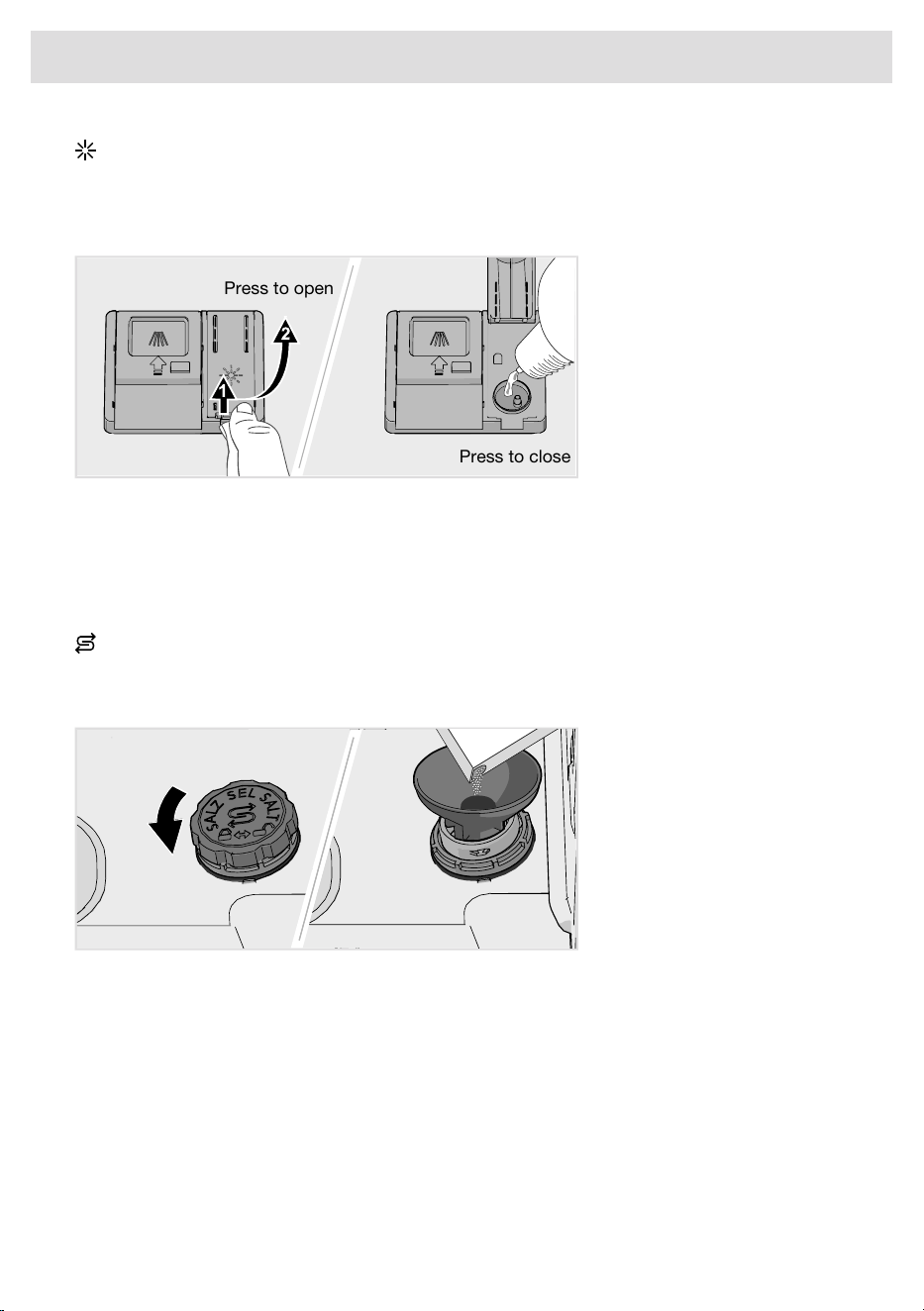
Add rinse aid to the container for rinse aid (if the dishwasher has not been connected to a system
for the automatic dosing of rinse aid).
Fill up the rinse aid compartment with rinse aid if you have selected Rinse aid 1 - 5.
Press to close
Press to open
1. Open the rinse aid compartment lid.
2. Carefully fill up with rinse aid to the level marked MAX.
3. Wipe up any spilled rinse aid around the compartment.
4. Close the lid firmly.
Add salt
For a water supply with a hardness above 5°dH (9°fH / 6°eH / 0.9 mmol/l / 5.9 gr/gal), fill with salt.
Add salt to the salt compartment if you have selected Water hardness 1 - 9.
1. Remove the salt compartment lid by turning it counterclockwise.
2. Place the funnel supplied with the dishwasher in the salt compartment top-up hole. Before
washing for the first time, pour in about 0.3 gal (1 l) of water. (Water is only needed the first time.)
3. Add enough salt to fill the salt compartment (max. 750 gram (26 oz)). Use special dishwasher
salt.
4. Wipe off excess salt and turn the lid clockwise to the closed position.
In order to avoid rust stains, a dishwashing program must be started immediately after adding
salt.
10
Before washing for the first time
WARNING!
Never pour dishwasher detergent into the salt compartment. This destroys the water softener!
Automatic dosing
The dishwasher can be connected to one or more systems for the automatic dosing of commercial
detergent and rinse aid, which simplifies everyday operation and reduces the risk of overdosing.
Step by step
• Connect the external cables for the automatic dosing of commercial detergent and rinse aid.
Also connect the hoses supplied. See the Installation instructions chapter.
• Activate Auto dose in the dishwasher menu for Settings. See the chapter Settings.
• Add commercial detergent and rinse aid intended for automatic dosing to the appropriate external
compartments.
• Select Vent the hose to dispense detergent and rinse aid. See the chapter Settings.
Diluting detergent and rinse aid
To correctly dilute detergent and rinse aid, calculate the dose based on the amount of water in the
machine.
Amount of water in the machine:
• 3.5 gallon for detergent dose
• 3.5 gallon for rinse aid dose
NOTE!
Add the commercial detergent and rinse aid in the appropriate external containers in advance,
to prevent air from entering the system.
WARNING!
Note that there are risks involved in handling commercial detergent and rinse aid. Protective
gloves and goggles must be used when handling these products.
Follow the supplier’s safety regulations concerning the handling and storage of detergent and
rinse aid.
11
Before washing for the first time

Save energy and water
When using a dishwasher in a residential setting, less energy and water are generally used compared
to washing the dishes by hand.
Do not rinse under running water
Do not rinse the dishes under running water as this will lead to increased energy and water
consumption. Simply scrape off large food particles before loading the dishwasher.
Choose a green detergent
Read the environmental declaration on the packaging!
Too much detergent, rinse aid and salt can result in less effective dishwashing and lead to a greater
environmental impact.
Run a fully loaded dishwasher
Save energy and water by waiting until the dishwasher is full before running a program. Use the
Rinse and hold program to rinse the dishes if there are any unpleasant odors.
Run programs at a lower temperature
If the dishes are only lightly soiled, you can select a program with a lower temperature.
Select dishwashing program – Eco
This program is the most effective in terms of energy consumption.
Select setting – Automatic door opening
Better drying results are achieved if you use the Automatic door opening option, which automatically
opens the dishwasher door. Wait until the dishwasher indicates that the program has ended and the
dishes have cooled before unloading the dishwasher. (If the dishwasher is built-in, the surrounding
furnishings must be resistant to any condensation from the dishwasher.)
12
Greener dishwashing

Fragile dishes
Some cookware is not dishwasher safe. This can be for several reasons. Some materials cannot
withstand high temperatures, others can be damaged by dishwasher detergent.
Use caution with, for example, handmade items, China, crystal/glassware, silver, copper, tin,
aluminum, wood, and plastic. Look for the "Dishwasher safe" marking.
China
Porcelain with decoration on top of the glazing (the items feel rough) should not be washed in a
dishwasher.
Crystal/Glass
Wash fragile items made of crystal/glass using the gentle dishwashing program Crystal. Remember
to use a small amount of detergent and to place items so that they do not touch each other during
the wash.
Use rinse aid to improve wash and dry times. Also use rinse aid to achieve clear and spotless results.
Hand-painted glassware, as well as antique and very fragile items, should not be washed in a
dishwasher.
Silver
Silver and stainless steel items should not come into contact, as the silver can become discolored.
In order to avoid marks and tarnishing, separate dishes made from different metals, such as silver,
stainless steel, and aluminum.
Aluminum
Aluminum can lose its shine if washed in a dishwasher. However, good quality aluminum pans can
be washed in a dishwasher, even if some of the shine will be lost.
Cutlery with glued handles
Some types of glue are not dishwasher safe. In such cases, the handles may loosen.
Loading affects the results
Load the dishes carefully to ensure the best washing and drying results with the lowest possible
energy and water consumption. Give your dishwasher the best chance to reach and clean all surfaces,
as well as to dry the dishes as thoroughly as possible.
• All dirty surfaces should face in and down.
• Dishes should not be placed in or on each other.
• Angle dishes with hollows, such as cups, so that the rinse water will run off. This is also important
for plastic items.
• Place the upper basket in its highest position when dishwashing very large plates.
• Make sure small items cannot fall through the dishwasher basket; place them in the top cutlery
tray.
NOTE!
Check that the spray arms can rotate freely.
The dishwasher's baskets
The dishwasher includes a top cutlery tray, an upper basket, and a lower basket with a cutlery basket.
13
Loading the dishwasher
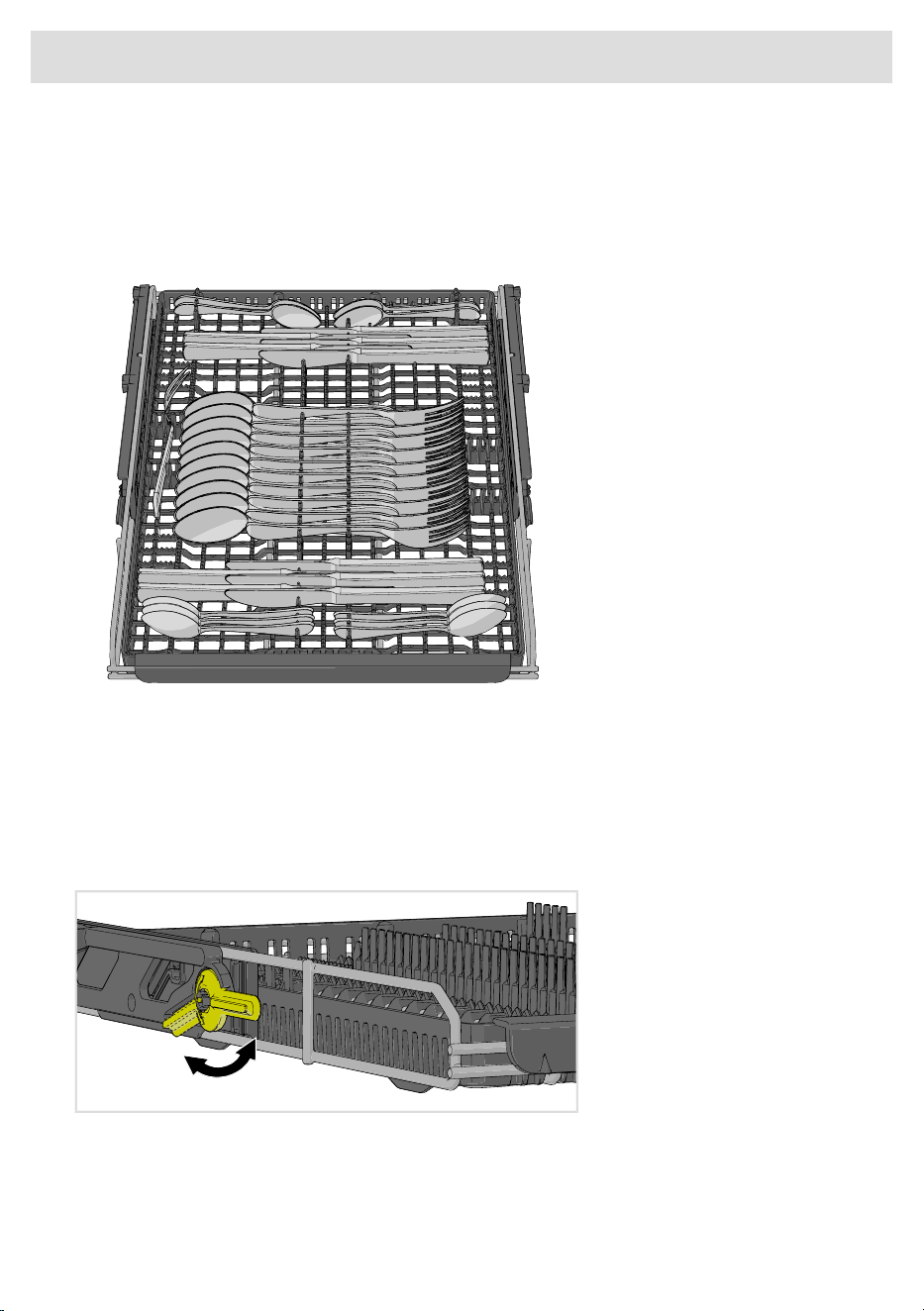
The basket appearance may differ depending on the configuration.
Top cutlery tray
The top cutlery tray accommodates cutlery, ladles, whisks, and other utensils.
Avoid placing tall objects in the top cutlery tray. They can block the top spray arm.
Raising the top cutlery tray
1. Pull out the top cutlery tray.
2. Pull the two locking handles forward on each side to raise the top cutlery tray.
Lowering the top cutlery tray
1. Pull out the top cutlery tray.
2. Slide the two locking handles down and back to lower the top cutlery tray.
14
Loading the dishwasher
Upper basket
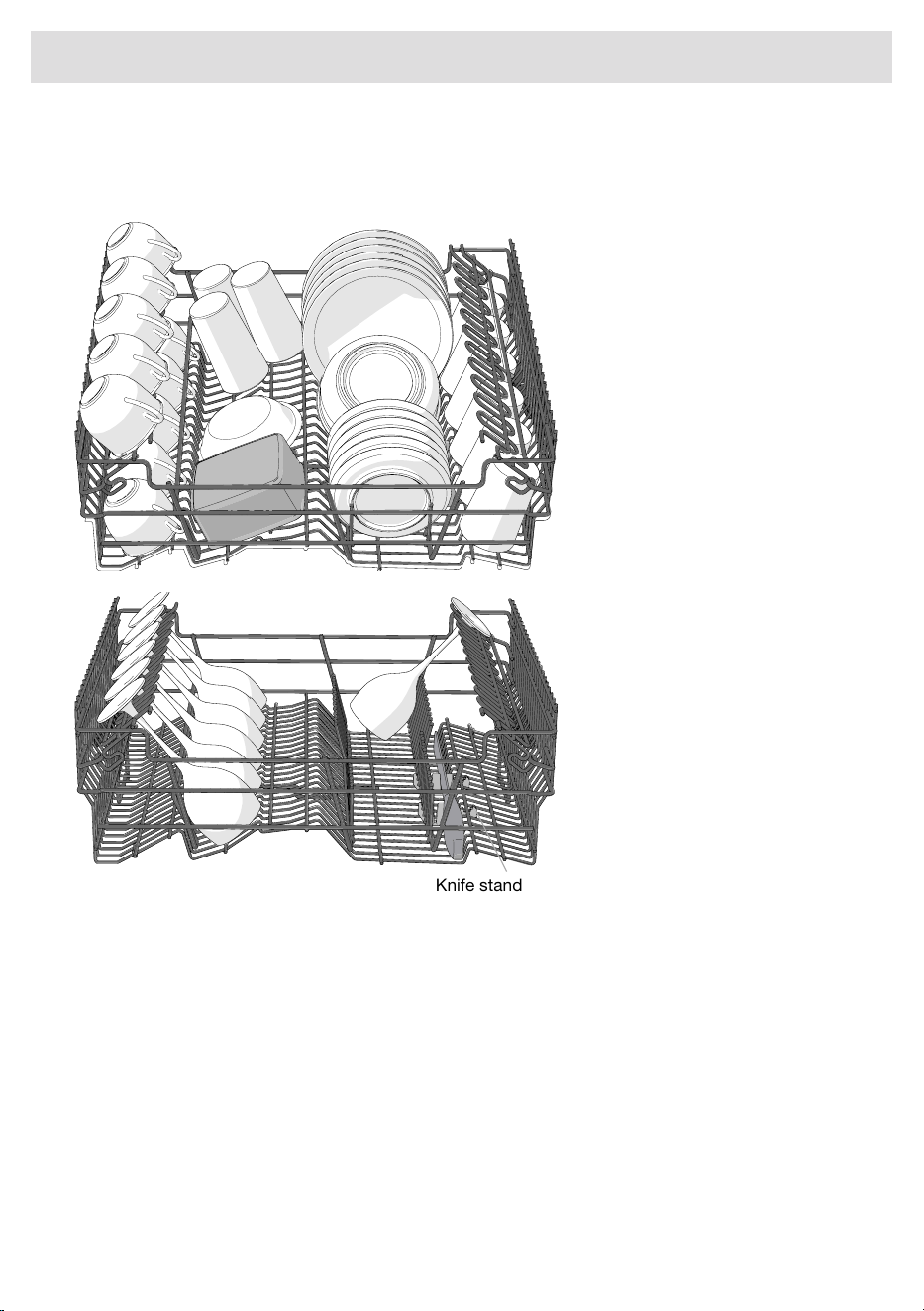
Place glasses, cups, bowls, side plates, and saucers in the upper basket. Place all soiled surfaces
face down. Place wine glasses on the wine glass shelf. Place knives in the knife stand on the right.
Knife stand
Raising the upper basket
1. Pull out the upper basket.
2. Grab the sides of the upper basket with both hands and lift it up.
Lowering the upper basket
1. Pull out the upper basket.
2. Grab the sides of the upper basket with both hands and push in the two locking handles to lower
the upper basket.
15
Loading the dishwasher
Lower basket
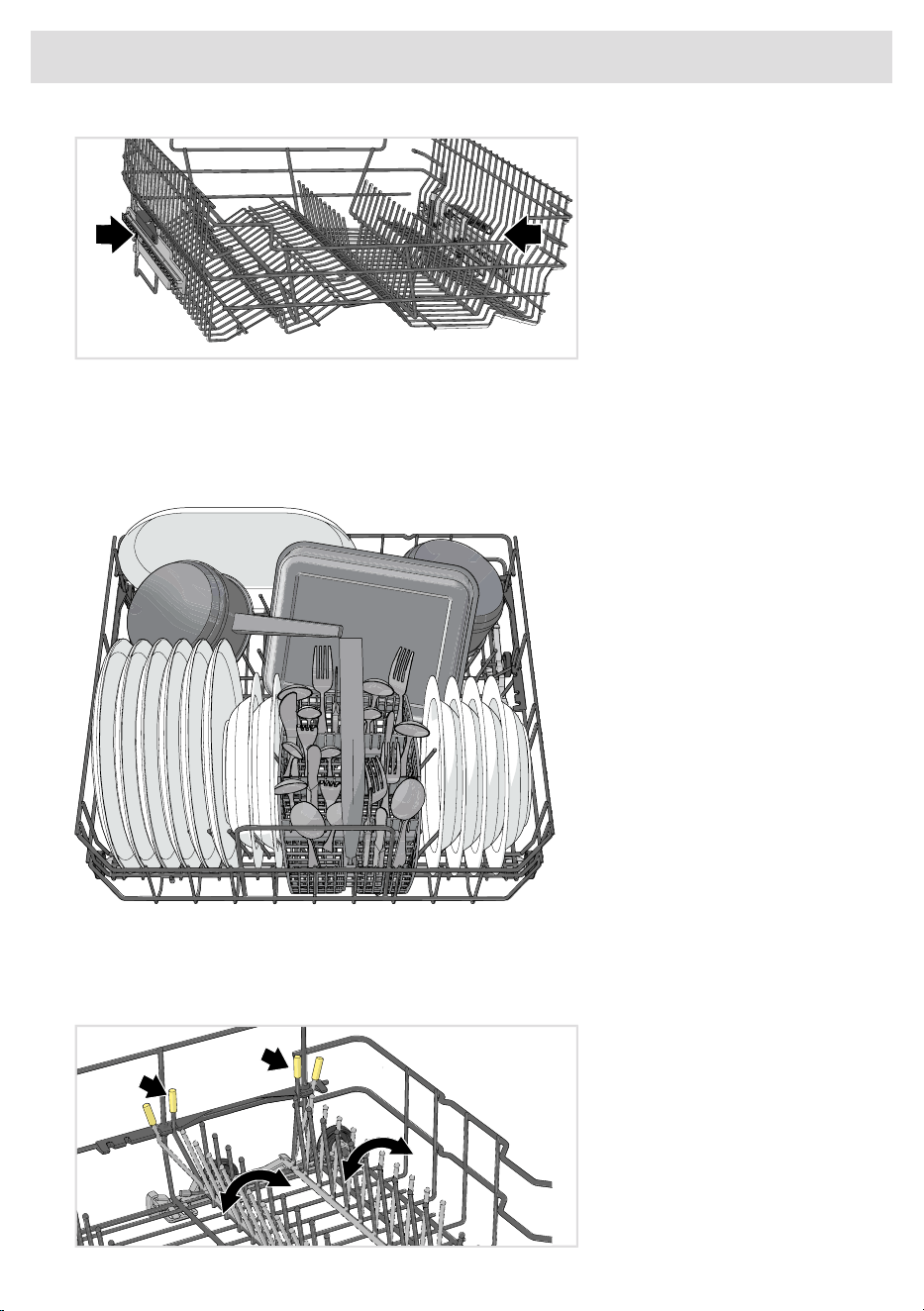
Place plates, side plates, serving dishes, pots, and cutlery (in the cutlery basket) in the lower basket.
Place pots and pans in the rear of the lower basket to best utilize dishwashing performance from
the two spray nozzles.
Adjustable plate supports
The adjustable plate supports can be adjusted to suit the dishes. Release the plate supports by
pushing them inward before repositioning them. The plate supports can also be folded down to
make it easier to load pots and bowls.
16
Loading the dishwasher
Vase and bottle holder
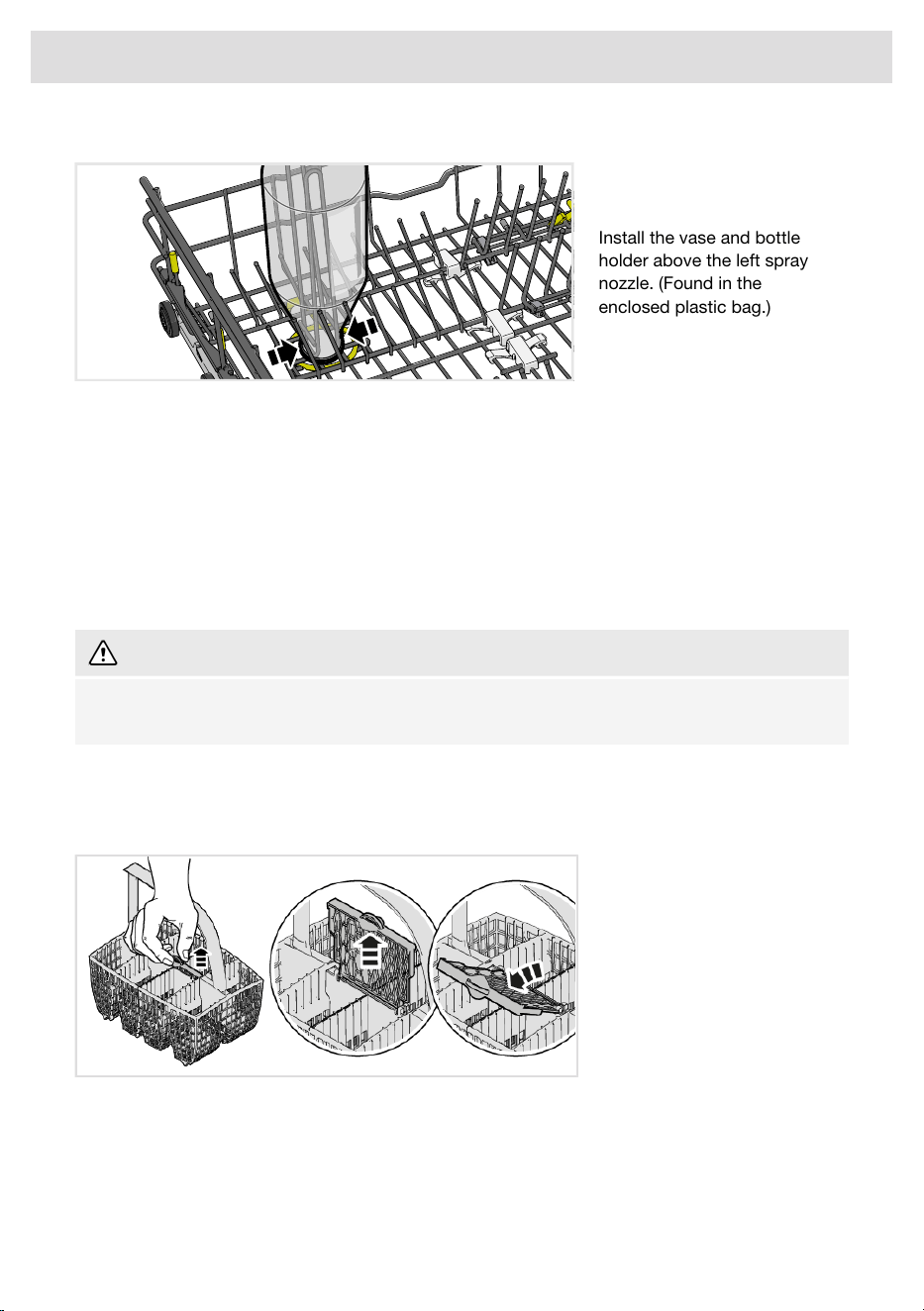
Install the vase and bottle
holder above the left spray
nozzle. (Found in the
enclosed plastic bag.)
Washing large plates
You can adjust the lower basket for plates with a diameter of 9 3/4-13 3/4" (25-35 cm) by moving the
adjustable plate supports and their fixtures to increase the distance between the tine rows.
Cutlery basket
Place cutlery with the handles facing down, except for knives, and spread them out as much as
possible. Ensure that spoons are not nesting.
The cutlery basket is best placed in the middle at the front of the lower basket to best utilize
dishwashing performance from the unique spray zone intended for the cutlery basket.
WARNING!
Knives and other pointed items must be placed horizontally in the dishwasher's special cutlery
baskets.
Fold-down section for small items
The cutlery basket has a fold-down section in the middle for small items or small shafts (such as
electric whisk attachments).
17
Loading the dishwasher
Typical load
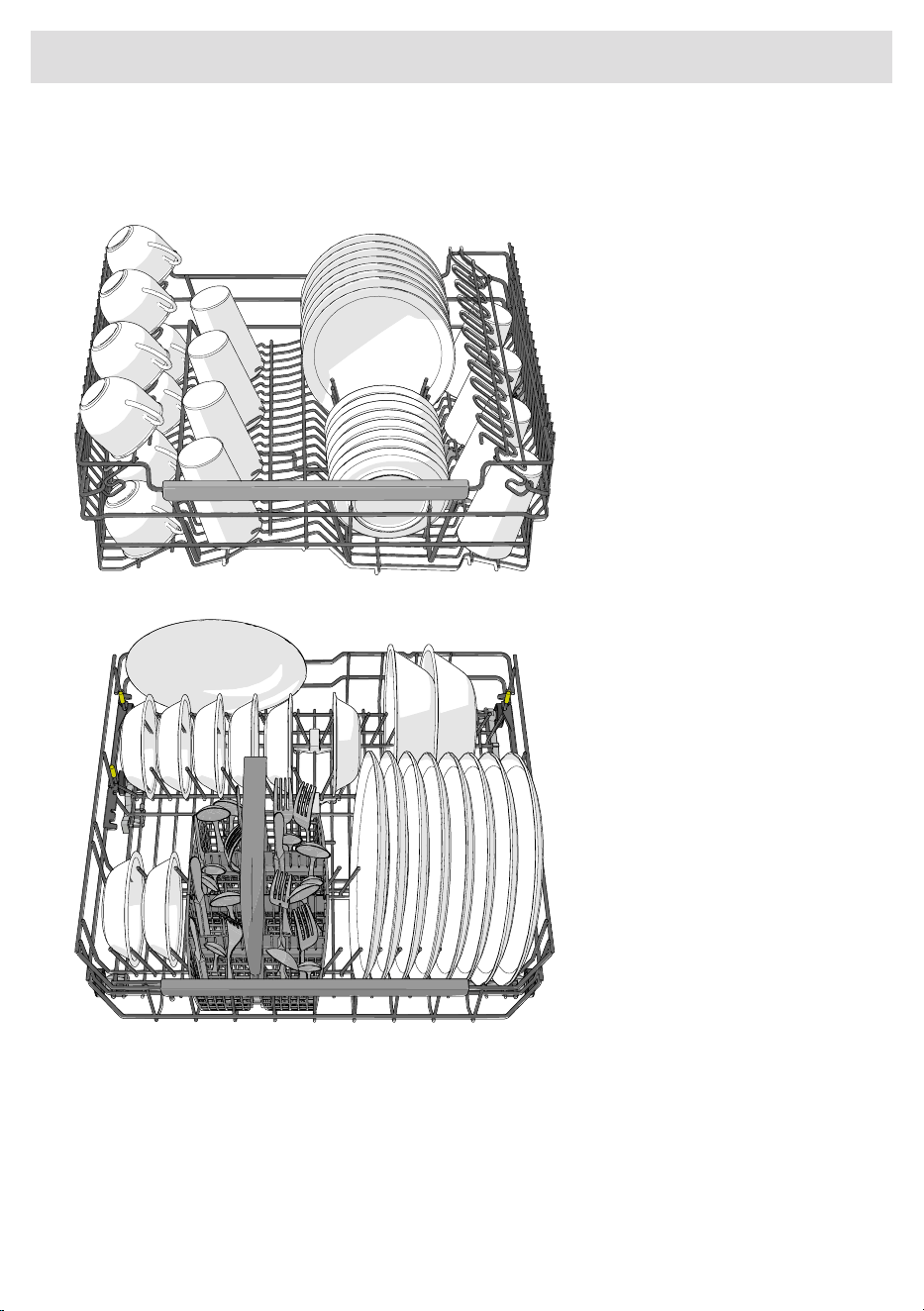
Recommended for daily, regular, or typical use.
Upper basket
Lower basket
18
Loading the dishwasher
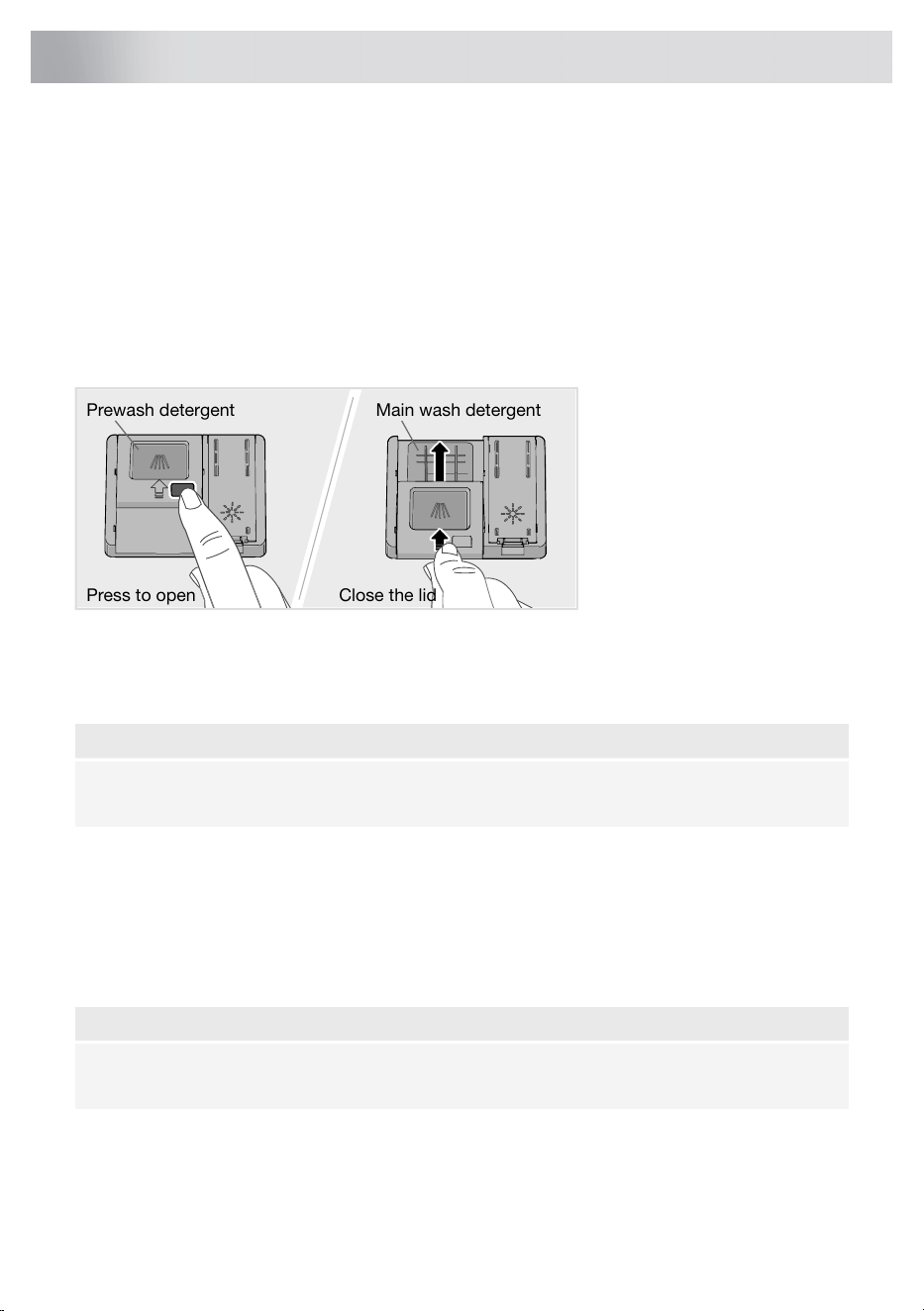
Add detergent
Add detergent to the detergent compartment (if the dishwasher has not been connected to a system
for the automatic dosing of commercial detergent).
Follow the instructions on the detergent packaging. This dishwasher is fitted with a water softener,
so use detergent and rinse aid doses suitable for soft water.
Detergent compartment
Choose a detergent intended for professional dishwashers to ensure optimal dishwashing results.
Too much detergent can result in less effective dishwashing and lead to greater environmental
impact.
Press to open Close the lid
Prewash detergent
Main wash detergent
The detergent compartment must be dry when adding detergent. There is one compartment for the
prewash and one for the main wash. If dishwasher detergent powder or dishwasher detergent gel
is used, you can add a small amount of the detergent to the prewash compartment. If you have
questions about the detergent, contact the detergent manufacturer.
NOTE!
Use only dishwasher detergent. Liquid hand-washing detergent must not be used as the foam
that forms prevents the dishwasher from operating effectively.
All-in-one detergent
There are many types of all-in-one detergents on the market. Read through the directions for these
products carefully.
Activate the TAB setting when using an all-in-one detergent that contains rinse aid.
Dishwasher tablets are not recommended for programs lasting less than 75 minutes. Use dishwasher
detergent powder or dishwasher detergent gel instead.
NOTE!
Optimal washing and drying results are achieved by using normal dishwasher detergent together
with separately dispensed rinse aid and salt.
19
Using the dishwasher
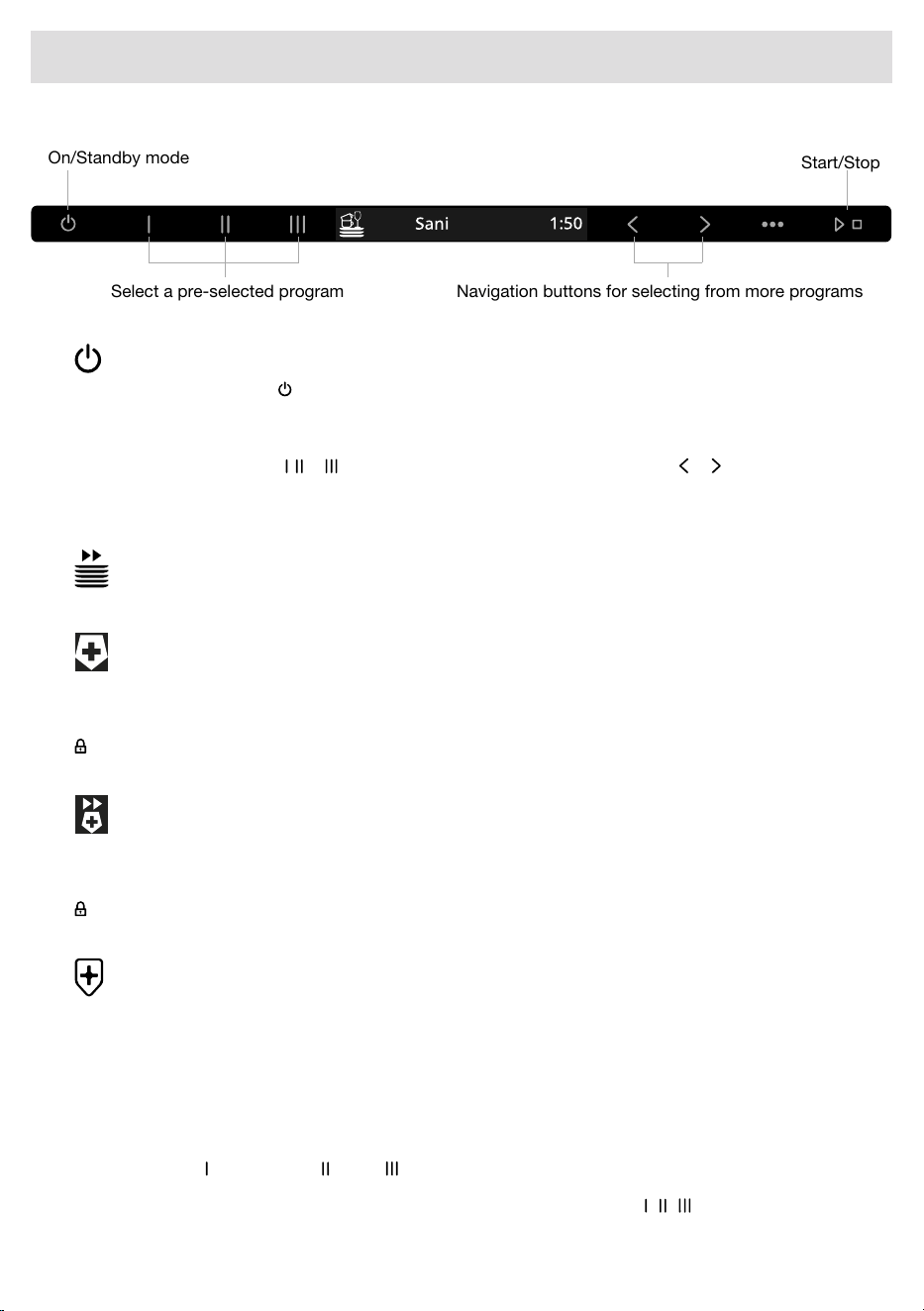
Start/Stop
Navigation buttons for selecting from more programsSelect a pre-selected program
On/Standby mode
On/Standby mode
Open the door and press . Also turn on the water supply valve if it is turned off.
Select program
To select a program, press , or . You can also select a program by pressing or until the desired
program is shown on the display.
Select a program to suit the type of dishes and how dirty they are.
Quick
This program is used for glasses and porcelain that is lightly soiled, such as coffee cups.
Sani
1)
An ideal program when hygiene demands are set high. The temperature of the main wash is
140 °F / 60 °C. The final rinse is 185 °F / 85 °C for 4 minutes.
To prevent the risk of burn injuries, the door cannot be opened while the temperature inside the
dishwasher exceeds 149 °F / 65 °C.
Sani quick
1)
A quick program when hygiene demands are high. The temperature of the main wash is 122 °F / 50 °C.
The final rinse is 185 °F / 85 °C for 4 minutes.
To prevent the risk of burn injuries, the door cannot be opened while the temperature inside the
dishwasher exceeds 149 °F / 65 °C.
Sanitize NSF
1)
A hygiene program that ensures good dishwashing results for dishes with dried-on food residue.
The temperature of the main wash is 158 °F / 70 °C. The final rinse is 158 °F / 70 °C.
The program meets the requirements of the NSF/ANSI 184 standard.
1)
Program button (Sanitize NSF) / (Sani) / (Sani quick).
To change which pre-selected programs are assigned to the program buttons ( / / ), select the desired
program in the menu and then press and hold the desired program button for five seconds.
20
Using the dishwasher
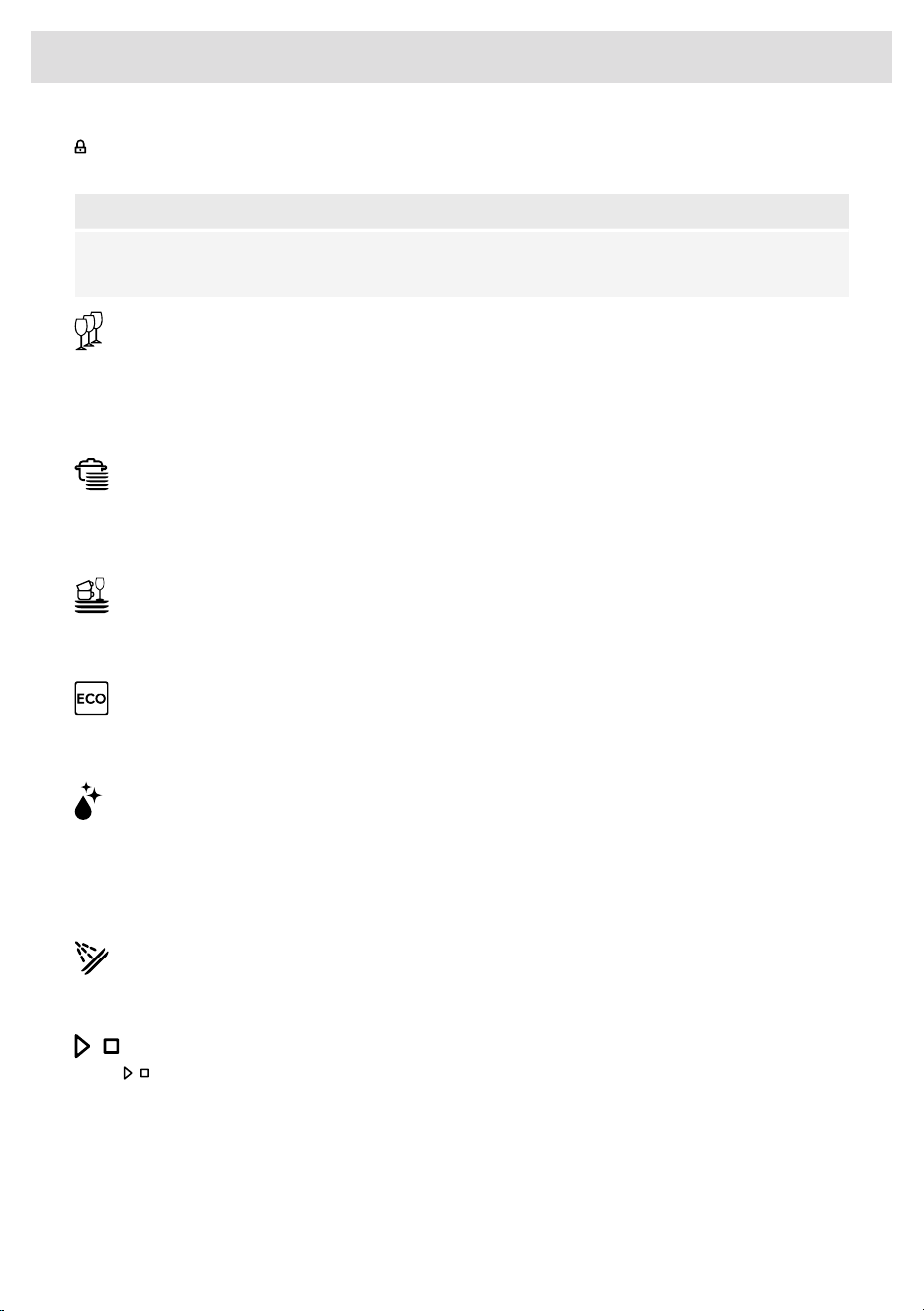
To prevent the risk of burn injuries, the door cannot be opened while the temperature inside the
dishwasher exceeds 149 °F / 65 °C.
NOTE!
When the Sanitize NSF program has been run in compliance with the NSF/ANSI 184 standard,
"Program done, Dishes Sanitized" is shown on the display.
Crystal
A gentle dishwashing program with a low temperature for washing fragile items made of crystal/glass.
Remember to use a small amount of detergent and to place items so that they do not touch each
other during the wash. See also Fragile dishes in the chapter Loading the dishwasher. Porcelain
that has just been used without dried leftovers can also be washed using this program.
Intensive
A program with a high temperature for dissolving grease on heavily soiled dishes, such as pans,
casserole dishes, and oven dishes. If these dishes do not completely fill the dishwasher, you can
add plates and other dishes.
Light
Powerful program for daily use that can remove dried-on food residue, but is not intended for burnt-on
food, such as on oven dishes.
Eco
This program is recommended for daily, regular, or typical use to completely wash a full load of
normally soiled dishes, such as plates, serving dishes, cups, and glasses.
Self-cleaning
Self-cleaning program for sanitizing the dishwasher tub, spray arms, and spray pipes.
This program should be run (with no dishes in the machine) using dishwasher detergent or citric
acid. Special dishwasher cleaners are also available on the market. For the removal of limescale
deposits, see Dishwasher tub in the chapter Care and maintenance instructions.
Rinse and hold
Use to rinse dishes while you wait for the dishwasher to become fully loaded.
Start/Stop
Press until the display shows "Program started, Close door within 4 sec". This indicates that the
dishwasher is ready to start. Close the door properly within four seconds, otherwise the dishwasher
will not start.
If the dishwasher is not started or the door is not closed within 2 minutes of the last time the control
panel was pressed, the machine switches off.
To remote start the dishwasher, see the chapter ASKO Connect Pro & ConnectLife.
21
Using the dishwasher
Cancel or changing a program
If you want to change program after starting the dishwasher, open the door then press and hold
for three seconds. Add more detergent if the lid of the detergent dispenser has opened (detergent
is dispensed automatically if an automatic dosing system is being used). Then select a new program,
press and close the door within four seconds.
Time remaining
Once you have chosen a program, the time the program took when last used is displayed.
Once you have started the dishwasher, the display shows the remaining program time. The remaining
time is updated during the drying phase.
This may differ somewhat from time to time depending on the temperature of the water supply, the
amount of dishes, the ambient temperature, and other factors.
During the first run of each program, the remaining time displayed can be slightly misleading, as
the dishwasher is estimating the time. When you run the program a second time, the dishwasher will
calculate the remaining time based on the previous duration of the program.
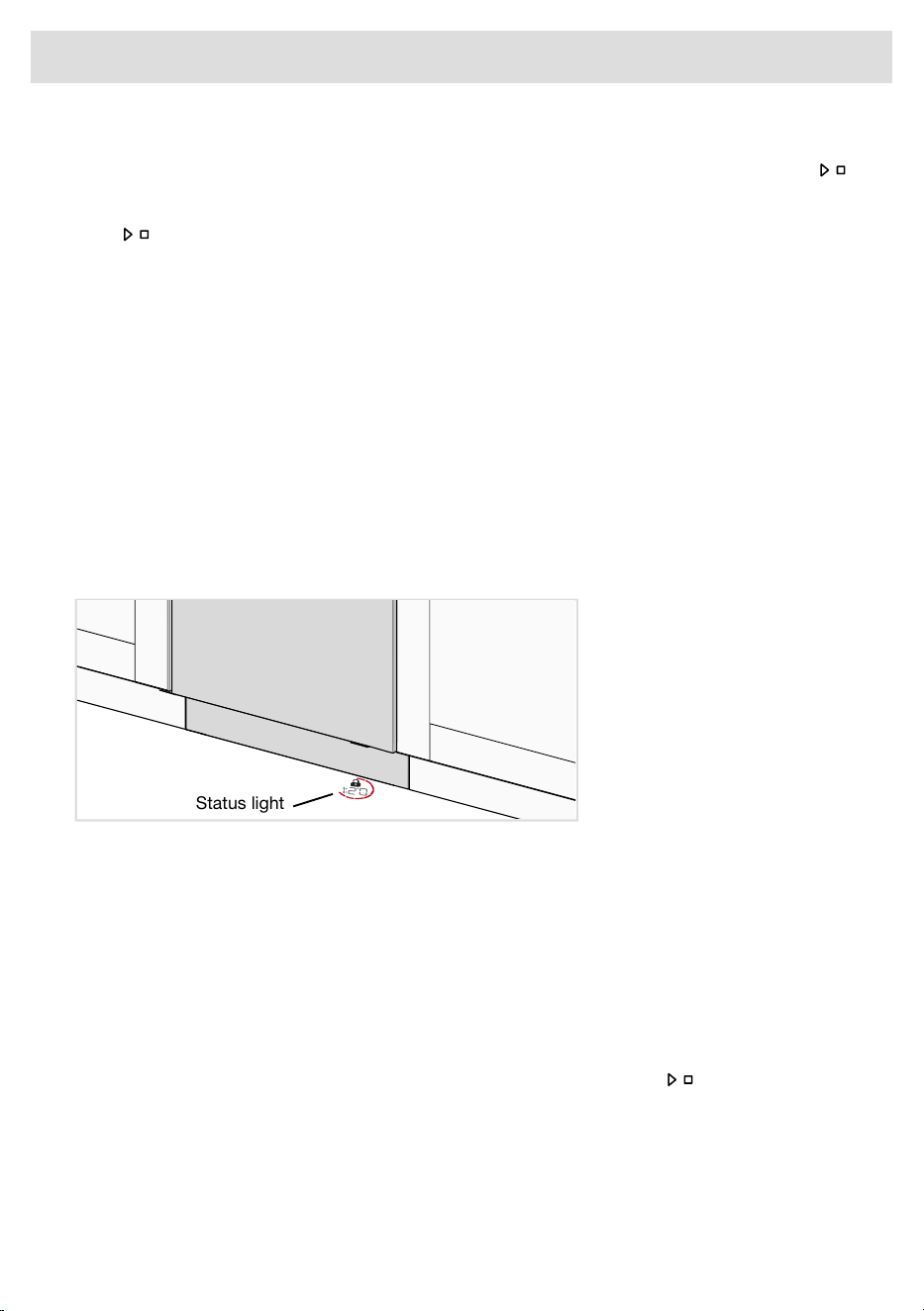
Status light floor projection
The remaining time and temperature of the cleaning cycle and whether the machine is locked are
projected onto the floor. The color indicates the current status.
Status light
• Blue – Load more. The program has started, but you can still load more dishes.
• Red – Do not load. You should not load more dishes (risk of poorer dishwashing results).
• Green – Unload. The dishwashing program is finished. The status light stays on for 30 minutes.
• Flashing blue/green – The status light flashes blue/green to indicate that remote start is activated.
• Flashing red – A flashing light indicates that the door has been opened while a program is in
progress. If it flashes when the door is closed, an error has occurred. See the complete user
manual.
If you want to load more dishes
2)
Open the door. The dishwasher stops automatically. Add the dishes. Press and close the door
within four seconds.
If the dishwashing program was remote started, the interrupted program will continue once the door
is closed. You can monitor the dishwasher using the ConnectLife app and remote stop the program,
although you will not be able to remote start it again.
2)
You should not load more dishes if the status light is red.
22
Using the dishwasher
WARNING!
If the door is open, "Program paused" is shown on the display. If you want the dishwashing
program to continue, press and close the door immediately. If you want to cancel the
dishwashing program, press and hold for three seconds.
Power failure
If the dishwasher is turned off due to a power failure when a dishwashing program is running, the
program continues when power is restored. If the power is lost during drying, the program is
interrupted.
If the dishwashing program was remote started and has not ended, the program will continue once
the power is restored. You can monitor the dishwasher using the ConnectLife app and remote stop
the program, although you will not be able to remote start it again.
If you open the door for more than 2 minutes during drying, the program will be interrupted.
If the dishwasher loses power without Sani lock or Lock activated, the door can be opened manually.
Grasp the door high up on both sides and pull straight toward you.
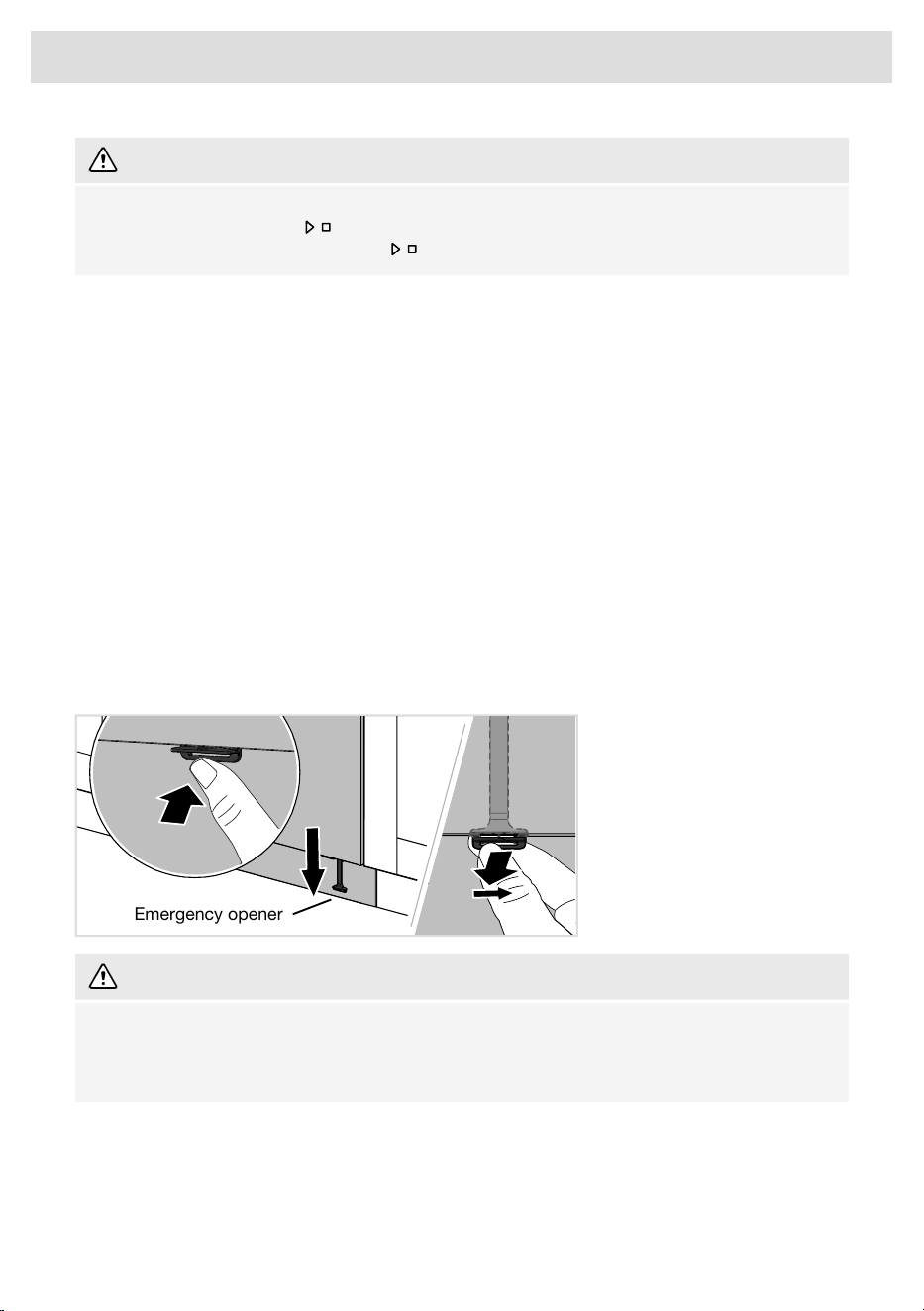
Emergency opener
If the dishwasher loses power when Sani lock or Lock is activated, the door can be opened with the
emergency opener.
Push the emergency opener into the bottom edge of the door. Pull the emergency opener until the
dishwasher door opens. Then reattach the emergency opener.
Emergency opener
WARNING!
To prevent the risk of burns, wait until the dishwasher has cooled before opening the door with
the emergency opener!
Exercise caution! The edges may be sharp. Wear protective gloves!
Once the program has finished
Once the program has finished, "Program done" appears on the display. The end of the program is
also indicated by one short signal sounding and the status light turning green.
The dishwasher automatically enters standby mode after the program has finished.
23
Using the dishwasher

To minimize the risk of leaks, we recommend that you turn off the water supply valve if away from
home for an extended period of time.
The best drying results
• Fully load the dishwasher.
• Angle dishes with hollows, such as cups, so that the rinse water will run off. This is also important
for plastic items.
• Fill up the rinse aid compartment or increase the rinse aid dosage setting.
• Activate the Automatic door opening option.
• Activate the Automatic door opening setting.
• Allow the dishes to cool before unloading the dishwasher.
Unloading the dishwasher
Hot porcelain is more fragile. Leave the dishes to cool in the dishwasher before unloading them.
Unload the lower basket first to avoid any water drops from the upper basket falling onto the dishes
in the lower basket.
24
Using the dishwasher
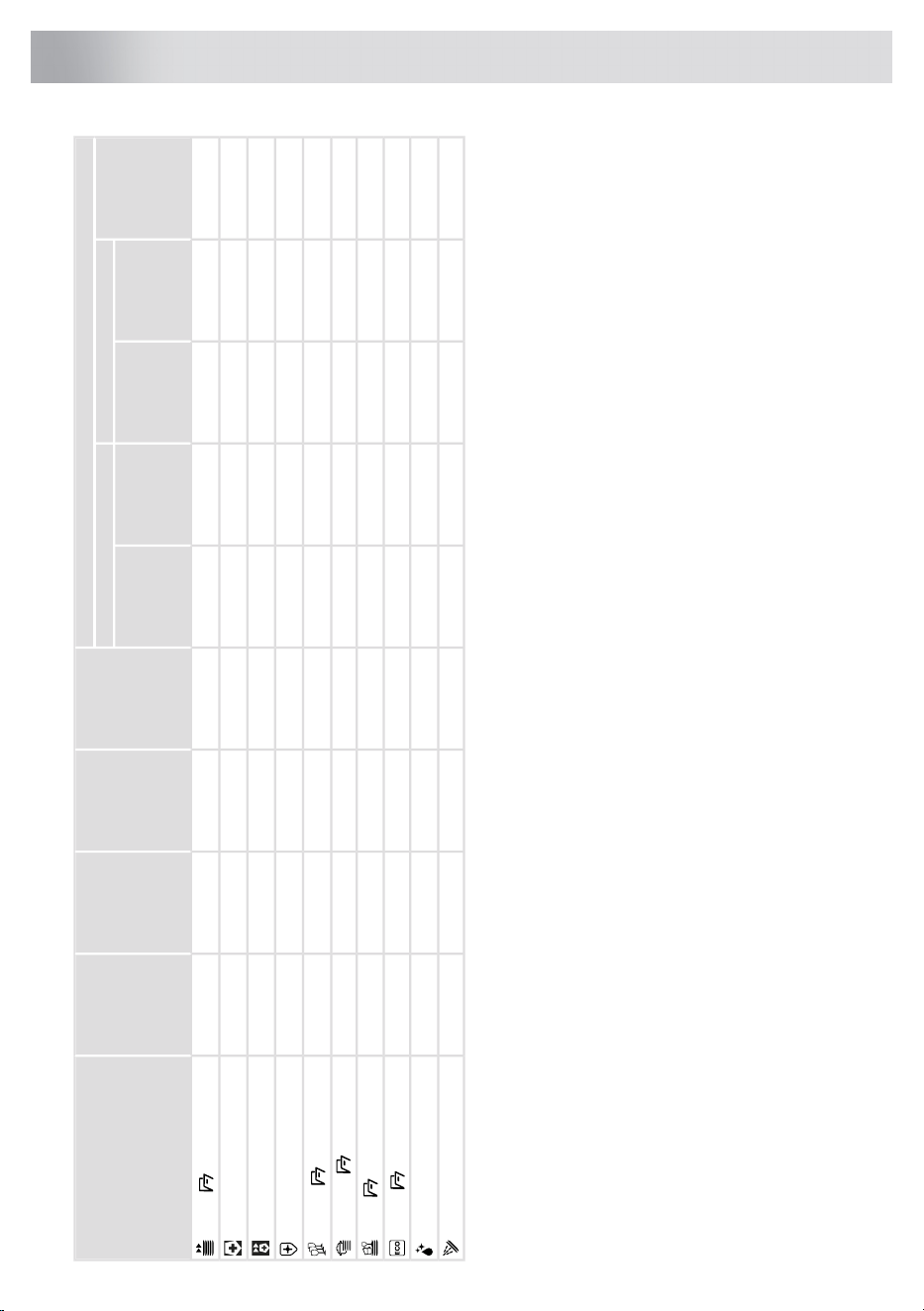
Consumption values
1)
Final
rinse
Number
of rinses
Main washNumber
of prewashes
Program
Water cons.
(gallon)
Hot water
3)
Cold water
2)
Energy
(approx. kWh)
Dishwashing
time
(approx.
hrs:min)
15 A / 20 A
4)
Energy
(approx. kWh)
Dishwashing
time
(approx.
hrs:min)
15 A / 20 A
4)
3.60.30:17 / 0:170.90:55 / 0:25≤140 °F / ≤60 °C2≤140 °F / ≤60 °C
Quick,
6)
4.20.91:30 / 1:001.82:00 / 1:10185 °F / 85 °C2140 °F / 60 °C1Sani
5.00.80:55 / 0:291.61:35 / 0:45185 °F / 85 °C3122 °F / 50 °C1Sani quick
5.41.02:40 / 2:251.93:20 / 2:45158 °F / 70 °C2158 °F / 70 °C2Sanitize NSF
3.30.31:10 / 1:100.81:40 / 1:20122 °F / 50 °C2113 °F / 45 °C
Crystal,
6)
5.31.02:45 / 2:201.73:15 / 2:30158 °F / 70 °C2158 °F / 70 °C2
Intensive,
6)
4.00.61:55 / 1:501.22:25 / 2:00149 °F / 65 °C2140 °F / 60 °C1
Light,
6)
3.30.63:30 / 3:301.14:00 / 4:00140 °F / 60 °C2131 °F / 55 °C1Eco
5)
,
6)
3.21.01:05 / 1:051.41:25 / 1:05185 °F / 85 °C2158 °F / 70 °CSelf-cleaning
1.20.010:07 / 0:070.010:07 / 0:071Rinse and hold
1)
Consumption values vary depending on the temperature of the incoming water, room temperature, load size, selected additional functions, and more.
2)
Connection to cold water, approx. 50 °F (10 °C). (A cold water supply is recommended.)
3)
Connection to hot water, approx. 120 °F (50 °C).
4)
This dishwasher has been designed to be able to be connected to an electrical supply network with fuses for 15 A (120 V) or 20 A (208-240 V).
The water in the dishwasher will be heated more quickly, and the dishwashing program will run more quickly, if you select 20 A.
5)
The energy guide performance figures are based on this program. Dishwasher connected to cold water, approx. 50 °F (10 °C). This program is recommended for daily, regular or typical use to completely wash a full load of
normally soiled dishes, such as plates, serving dishes, cups and glasses.
6)
Automatic door opening, default
25
Program chart
ASKO Connect Pro
ASKO Connect Pro is a web-based platform that enables you to organize, manage and monitor all
your professional ASKO appliances regardless of where they are installed. Once you have connected
a professional appliance in the ConnectLife app, a link to ASKO Connect Pro is shown. For more
information, please see https://us.asko.com/professional.
ConnectLife
ConnectLife is a smart home platform that connects people, devices and services. The ConnectLife
app provides advanced digital services and carefree solutions that allow users to monitor and control
appliances, receive notifications from a smartphone, and update software (supported features may
vary depending on your appliance and the region/country where you are located).
To connect your smart device, you need a home Wi-Fi network (only 2.4 GHz networks are supported)
and a smartphone equipped with the ConnectLife app.
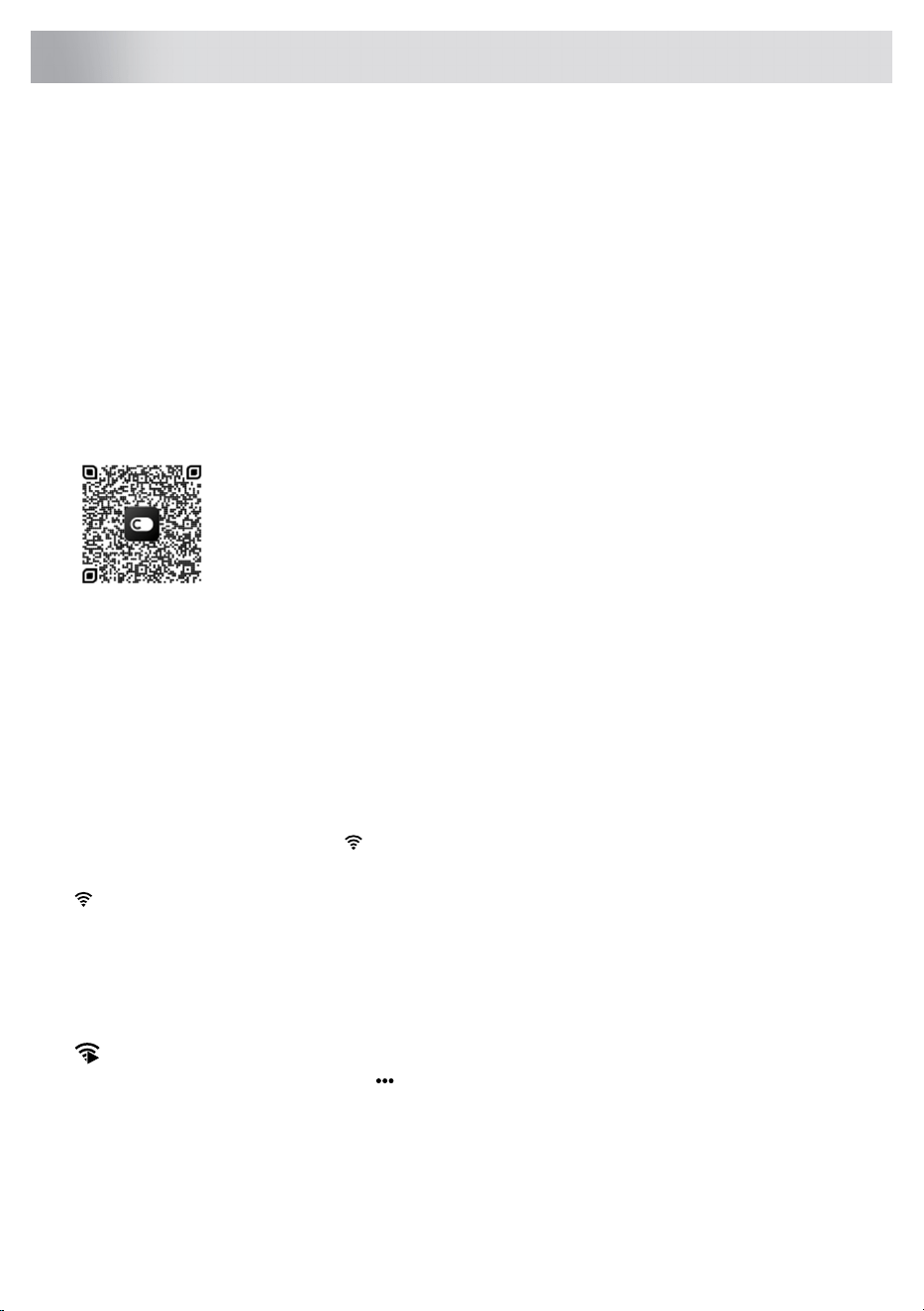
To download the ConnectLife app, scan the QR code or search for ConnectLife
in your favorite app store.
1. Install the ConnectLife app and create an account.
2. In the ConnectLife app, go to the »Add devices« menu and select the appropriate device type.
Then scan the QR code (it can be found on the appliance’s serial number plate).
3. The app will then guide you through the entire process of connecting the appliance to your
smartphone.
4. Once connected, the appliance can be operated remotely via the mobile app.
Remote control the dishwasher
The dishwasher's network symbol is shown on the display when the dishwasher is paired with a
smartphone/tablet. You can use the ConnectLife app to monitor the dishwasher and change settings.
Network symbol on the display
The dishwasher is ready to be connected to your wireless network or
paired with your smartphone/tablet.
Flashing 0.5 sec on/off
The dishwasher is connected to your wireless network.Flashing 1.0 sec on/off
The dishwasher is connected to your wireless network and the cloud.Glows
Remote start the dishwasher
To remote start the dishwasher, press . Select Remote start On. Close the door. The status light
will flash blue/green to indicate that remote start is activated.
In the ConnectLife app, select and start a program.
If the door is not closed within 2 minutes, the machine switches off.
26
ASKO Connect Pro & ConnectLife

NOTE!
The dishwasher can always be used without the app. When the dishwasher's control panel is
pressed, commands from the ConnectLife app are blocked for 10 seconds.
If you have any questions, please visit us at www.connectlife.io.
27
ASKO Connect Pro & ConnectLife
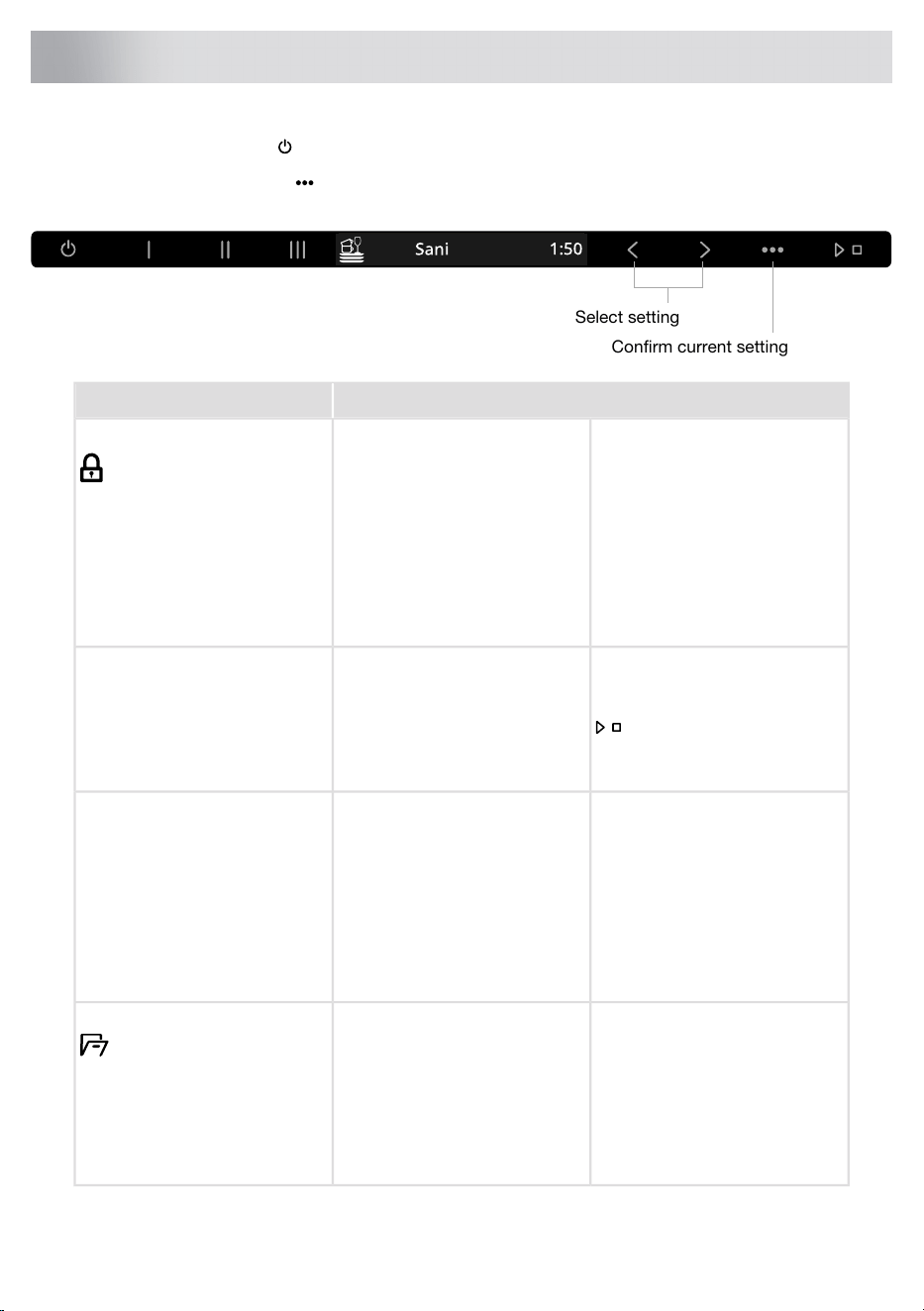
Open the door and press .
To open the Settings, press .
Select setting
Confirm current setting
AlternativesSettings
To prevent children or persons
with reduced mental capabilities
from starting the dishwasher, the
Lock setting can be activated.
On/OffLock
To temporarily deactivate the
Lock setting, place your foot
over the status light floor
projection and open the
dishwasher door with the Push
to open function.
When you select Delayed start,
the dishwasher will start 1-24
hours after you have pressed
and closed the door.
Off/1-24 hoursDelayed start
This Delayed start function is
available for some programs.
Activate the setting to be able
to remote start the dishwasher.
Remote start On is shown on the
dishwasher display.
On/OffRemote start
Activate the setting each time
you want to remote start the
dishwasher.
The setting can be selected with
WiFi status Connected.
The dishwasher door opens
automatically, which shortens
the program time and improves
the drying results. Wait until the
dishwasher indicates that the
program has ended and the
dishes have cooled before
unloading the dishwasher.
Quick On/Off
Crystal On/Off
Intensive On/Off
Light On/Off
Eco On/Off
Rinse and hold On/Off
Auto door open
28
Settings
AlternativesSettings
Activate this setting if you want
to connect an automatic dosing
system for detergent.
Detergent:
Off, 3-8 tsp
Auto dose
This dishwasher is fitted with a
water softener, so use detergent
and rinse aid doses suitable for
soft water.
The exact dosage depends on
the selected program.
Activate this setting if you want
to connect an automatic dosing
system for rinse aid.
Rinse aid:
Off, 3-8 tsp
The exact dosage depends on
the selected program.
Activate Vent the hose to
dispense detergent into the
hose.
Select Detergent.
Press to activate.
Close the dishwasher door.
Vent the hose
The dishwasher dispenses the
detergent for 30 seconds.
Activate Vent the hose to
dispense rinse aid into the hose.
Select Rinse aid.
Press to activate.
The dishwasher dispenses the
rinse aid for 30 seconds.
Close the dishwasher door.
Activate this setting when using
an all-in-one detergent that
contains rinse aid.
On/OffTAB
(All-in-one detergent)
This setting reduces the rinse
aid dosage and affects how
often the dishwasher's built-in
softener is regenerated.
A beep confirms that the control
panel has been pressed.
0/1/2/3Feedback volume
Select Exit and press to exit
the menu for Settings.
Exit
29
Settings
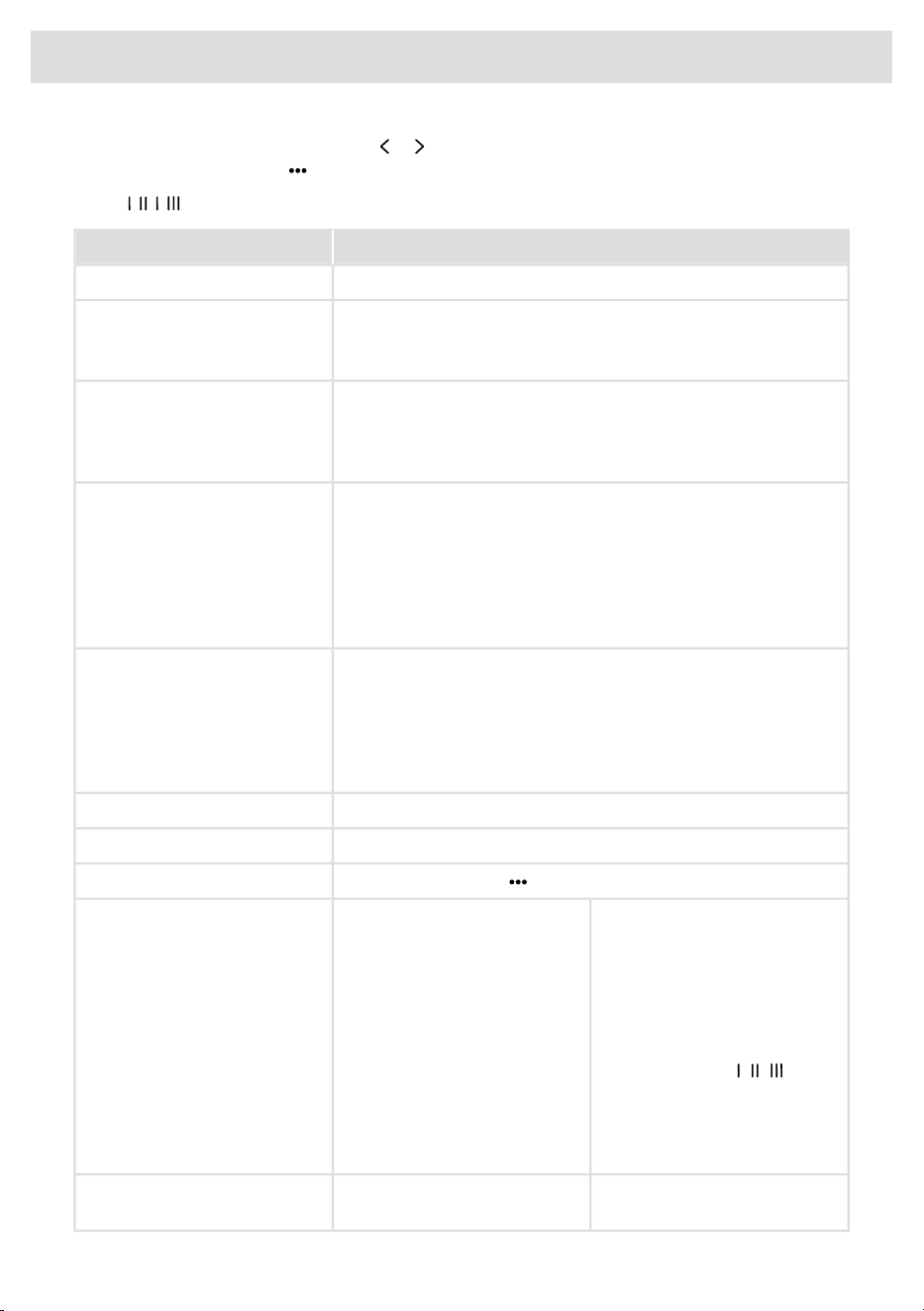
To open the Advanced settings, press or until Advanced settings is shown on the display and
confirm your selection with .
Press: , , ,
AlternativesAdvanced settings
You can choose the language used for the display.Language
The current WiFi status is shown on the display.WiFi
Connect the dishwasher to your wireless network to be able to
remote control the dishwasher using the ConnectLife app.
WiFi status
On/OffWiFi connection
After connecting the dishwasher to your local network, you can
select WiFi connection Off to deactivate the connection. Select
WiFi connection On to reconnect to the same network.
Connect the dishwasher to your wireless network and pair with
your smartphone/tablet.
Connection setup
• In the ConnectLife app, go to the »Add devices« menu and
select the appropriate device type. Then scan the QR code
(it can be found on the appliance’s serial number plate).
• Select Connection setup.
Pair more devices/users with the dishwasher.Add device
• In the ConnectLife app, go to the »Add devices« menu and
select the appropriate device type. Then scan the QR code
(it can be found on the appliance’s serial number plate).
• Select Add device.
Select Remove all devices to remove all connected devices/users.Remove all devices
Select WiFi factory reset to restore the default factory settings.WiFi factory reset
Select Exit and press to exit the menu for WiFi.Exit
Programs can be shown or
hidden in the menu. Choose
between On and Off.
Quick On/Off
Sani On/Off
Sani quick On/Off
Sanitize NSF On/Off
Crystal On/Off
Intensive On/Off
Light On/Off
Eco On/Off
Self-cleaning On/Off
Rinse and hold On/Off
Select programs
(Eco cannot be hidden in the
menu.)
To change which pre-selected
programs are assigned to the
program buttons ( / / ), select
the desired program in the menu
and then press and hold the
desired program button for five
seconds.
Setting to hide the logo shown
on the display.
On/OffDisplay Logotype
30
Settings

AlternativesAdvanced settings
For adjusting the brightness of
the display.
1/2/3/4Display Brightness
The buzzer indicates when a
dishwashing program has
ended.
0/1/2/3Notification volume
Error messages are always
indicated by a loud buzzer.
Setting for rinse aid dosage. The
rinse aid dispenser can be
0/1/2/3/4/5Rinse aid
3)
adjusted between 0 (Off) and
5 (High dosage).
Increase the rinse aid dosage:
• If the dishes have water
marks.
Reduce the rinse aid dosage:
• If the dishes have a sticky
white/blue film.
• If the dishes are streaked.
• Heavy foaming. If you have
very soft water, the rinse aid
can be diluted 50:50 with
water.
Adjusting the water softener.
Select a setting depending on
the hardness of the water
supply. It is important that this
setting is correct.
0/1/2/3/4/5/6/7/8/9
Default: 0
Water hardness
See Water hardness in the
chapter Before washing for the
first time.
For a water supply with a
hardness above 5°dH (9°fH /
6°eH / 0.9 mmol/l / 5.9 gr/gal),
fill with salt.
For a water supply with a
hardness below 6°dH (10°fH /
7°eH / 1.0 mmol/l / 6.0 gr/gal),
select 0. The water softener is
deactivated and no salt needs
to be added.
3)
The setting will be deactivated following the activation of automatic dosing of the commercial rinse aid. Rinse
aid will not then need to be refilled.
31
Settings
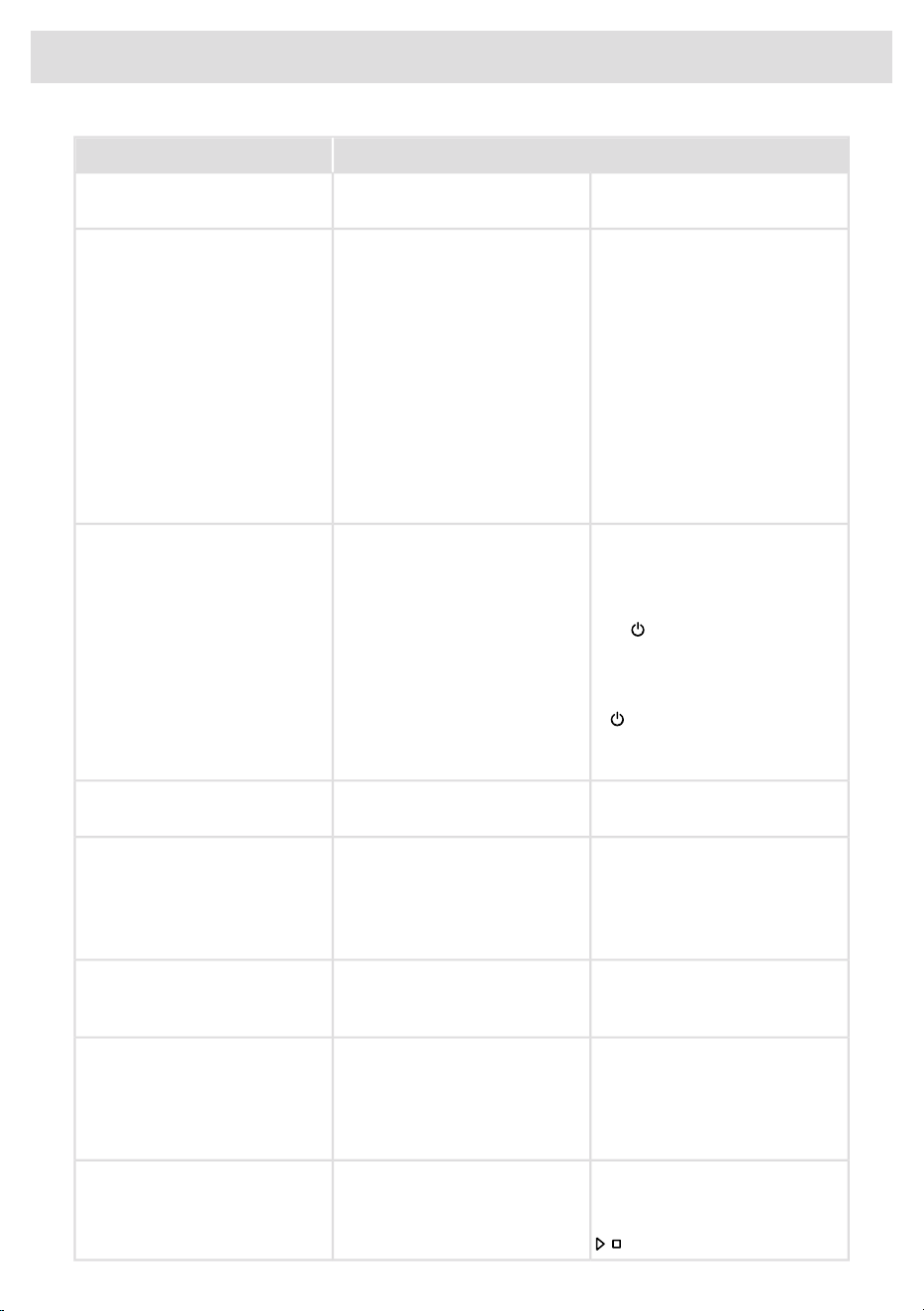
AlternativesAdvanced settings
The dishwasher door can be
opened without a handle.
On/OffPush to open
This dishwasher has been
designed to be able to be
connected to an electrical
supply network with fuses for
15 A (120 V) or 20 A
(208-240 V).
15 A/20 APower
The water in the dishwasher will
be heated more quickly, and the
dishwashing program will run
more quickly, if you select 20 A.
Select 15 A or 20 A according
to the electrical supply network
in your property.
Setting to be able to load the
dishwasher in accordance with
traditional Sabbath rules.
On/OffInterior light at power off
Select whether the interior light
and are to be switched on or
remain off when the dishwasher
is turned off and the door is
opened.
If is turned on, the interior
light is always switched on when
the door is opened.
The status light can use 3 colors
or white light only.
On/OffSingle color projection
Any error messages.Failure readout
When contacting your Customer
Care Center, you may be asked
to provide the most recent error
messages.
Temperatures can be displayed
in °C (Celsius) or °F
(Fahrenheit).
o
C/
o
FTemperature unit
Setting to prevent a dishwashing
program from starting when the
salt compartment is empty.
On/OffBlock start when salt chamber
is empty
This setting is not active if Water
hardness is set to 0.
Restores all settings to the
factory defaults.
Factory reset
Select Factory reset and press
.
32
Settings

AlternativesAdvanced settings
Select Exit and press to exit
the menu for Settings.
Exit
33
Settings
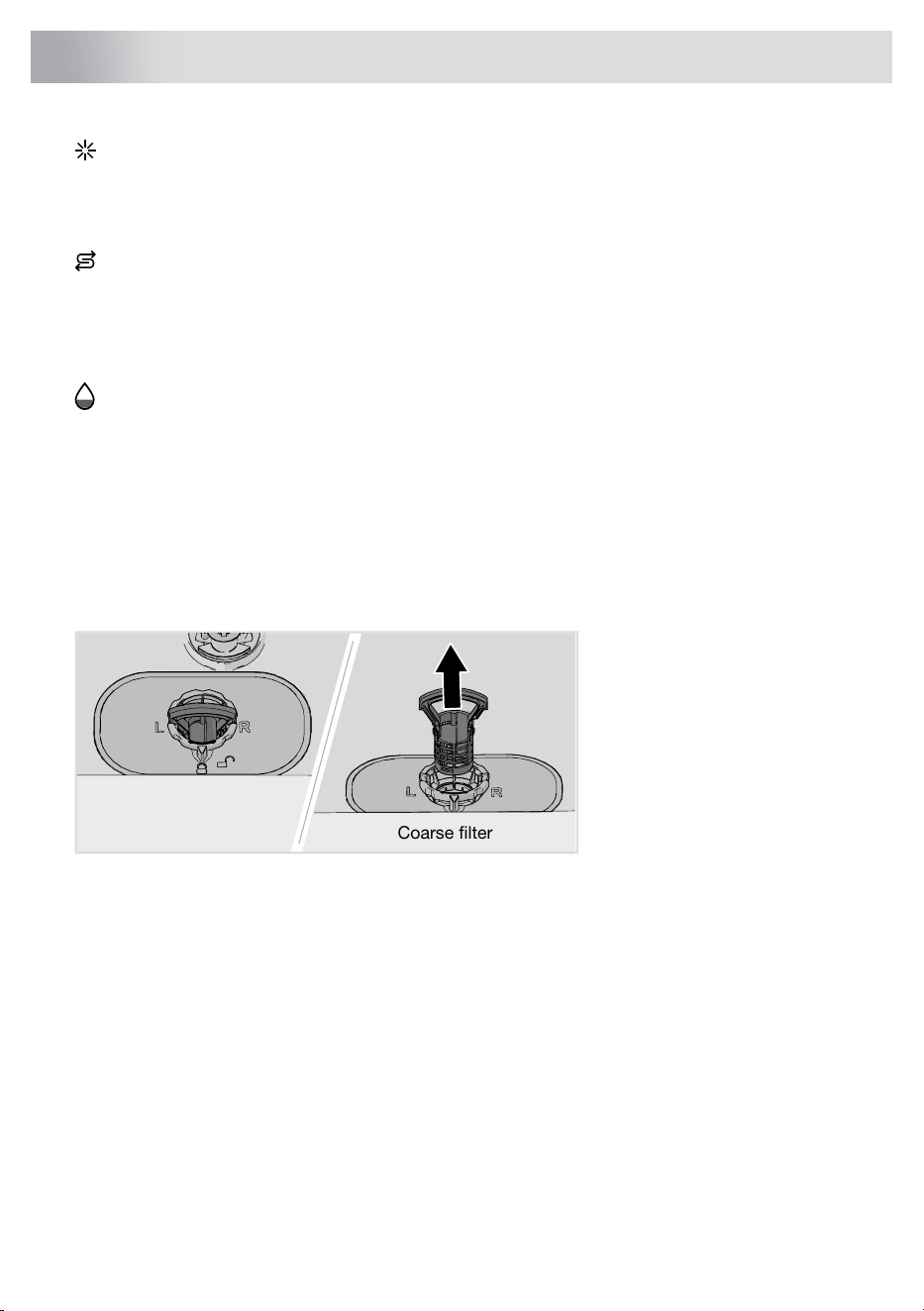
Add rinse aid
When the rinse aid needs topping up, the symbol lights up on the display.
See the chapter Before washing for the first time.
Add salt
When the salt needs topping up, the symbol lights on the display. (You can run 3 programs before
the compartment is completely empty.)
See the chapter Before washing for the first time.
Add auto dose
When the dishwasher detergent or rinse aid needs topping up, the symbol lights on the display.
See Automatic dosing in the chapter Before washing for the first time.
Clean the filters
Coarse filter
The coarse filter traps larger food particles, which cannot get past the drain pump. Empty the coarse
filter when necessary. It should be cleaned at regular intervals depending on how often the dishwasher
is used.
Coarse filter
1. Lift the coarse filter by the handle.
2. Empty the coarse filter.
3. Reinstall the coarse filter. Press it down until it clicks into place.
34
Care and maintenance instructions
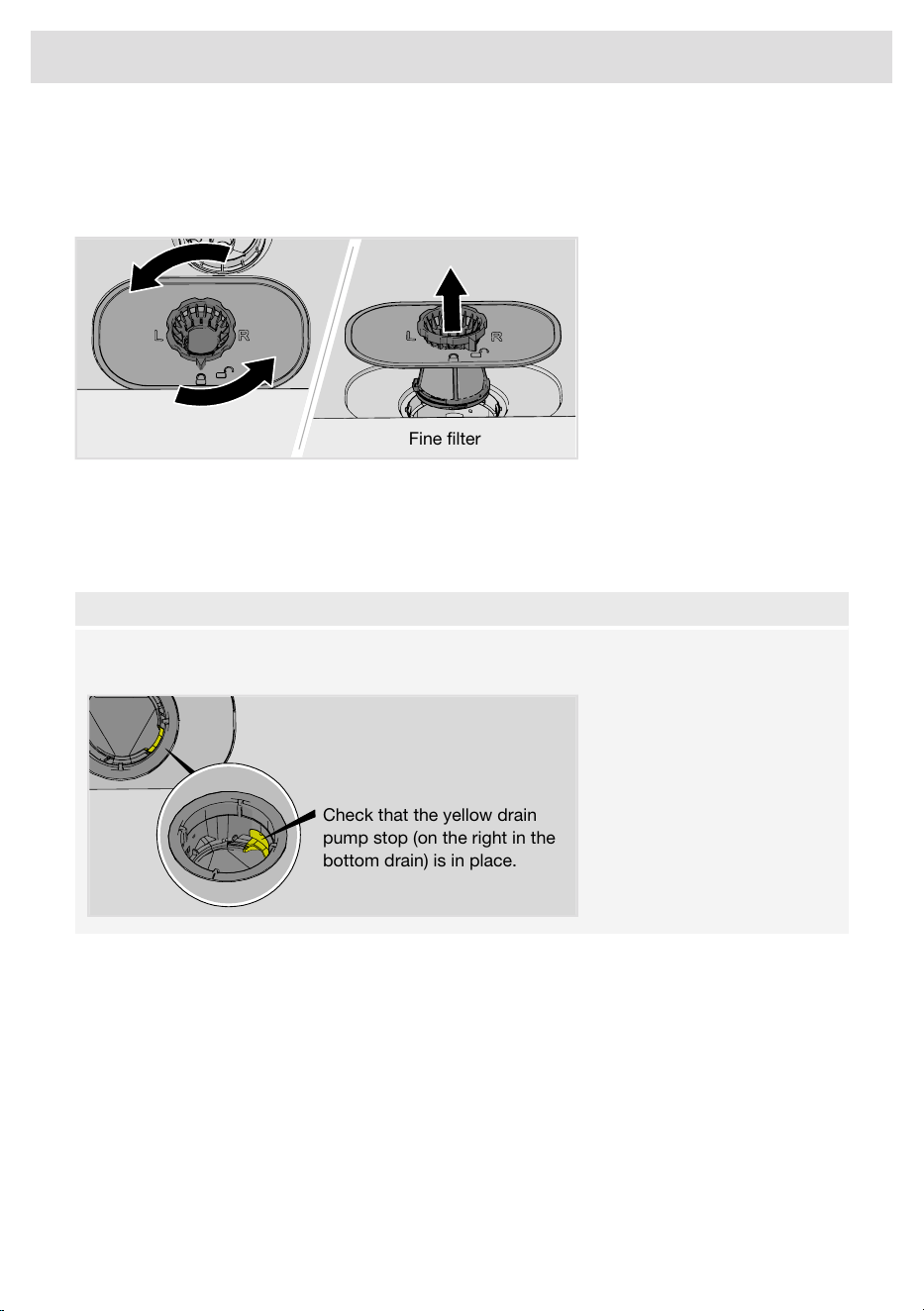
Fine filter
Debris that collects on the fine filter is automatically rinsed away during each wash. Clean the fine
filter when necessary. It should be cleaned at regular intervals depending on how often the dishwasher
is used.
Fine filter
1. Turn the lock ring counterclockwise and lift the fine filter straight up.
2. Clean the fine filter.
3. Refit the fine filter and turn the locking ring clockwise to its stop position. Check that the edges
seal properly. Remember to refit the coarse filter as well!
NOTE!
Dishwashing results may be affected if the coarse and fine filters are incorrectly fitted. The
dishwasher must not be used without the filters in place!
Check that the yellow drain
pump stop (on the right in the
bottom drain) is in place.
35
Care and maintenance instructions
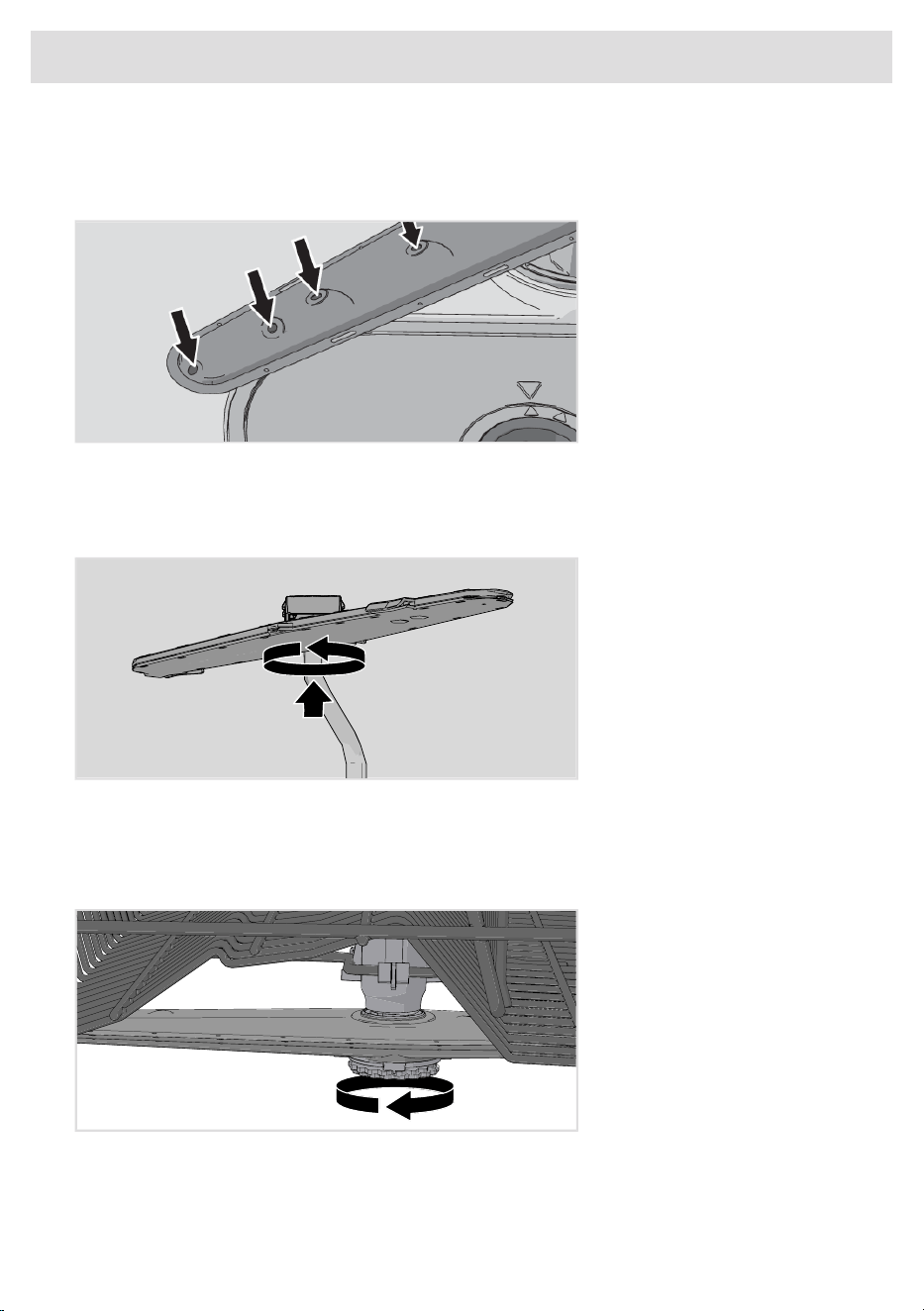
Cleaning the spray arms
Holes and bearings can become blocked. Remove debris using a needle or similar item. The spray
arms have holes on the bottom.
Spray arms can be removed for cleaning. Remember to put them firmly back into place afterward.
Top spray arm
• Push up on the top spray arm while turning it counterclockwise to release it.
Upper spray arm
• Pull out the upper basket.
• Unscrew the spray arm bearings counterclockwise to remove the spray arm from the upper
basket.
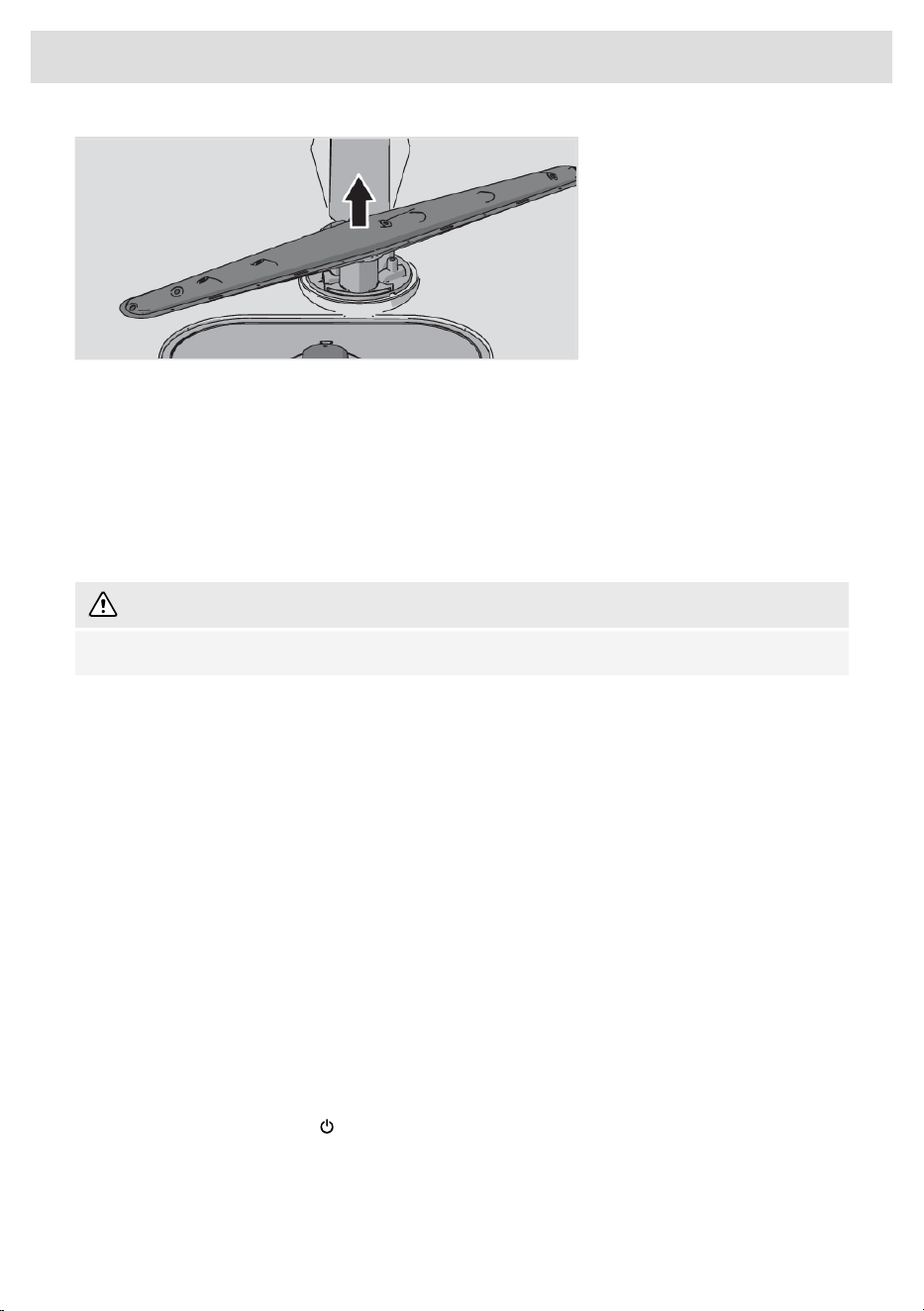
Lower spray arm
• Pull the lower spray arm straight up to release it.
36
Care and maintenance instructions
Clean the outside of the dishwasher
Door and door seal
Open the door. Clean the sides of the door and the door seal regularly with a slightly damp cloth.
Clean the door seal at the lower front edge of the dishwasher with a cleaning brush.
Control panel
Keep the control panel clean. Use a dry or slightly damp cloth and, if necessary, a little washing up
liquid. Avoid strong or abrasive cleaners – they may damage the surface.
WARNING!
Do not clean the machine using a water jet, pressure washer, or a steam cleaner.
Run Self-cleaning
Dishwasher tub
The dishwasher tub is made of stainless steel and is kept clean through normal use (when used
regularly).
If you have hard water, limescale deposits may build up in the dishwasher. If this happens, run the
Self-cleaning program with two tablespoons of citric acid in the detergent compartment (with no
dishes in the machine). Special dishwasher cleaners are also available in stores.
For the best results when using citric acid, deactivate the automatic dosing of commercial detergent.
See the Settings chapter.
Never use anti-freeze, Draino
®
, CLR
®
, or other chemical cleaners.
Remove blockages
Unblocking the drain pump
If the dishwasher still contains water after the program has finished, something may be blocking the
drain pump, which results in the error message Water outlet fault or BLDC drain pump fault.
1.
Turn off the machine using and remove the plug from the power outlet.
2. Remove the coarse filter and the fine filter.
3. Scoop out the water from the dishwasher tub.
4. In order to inspect the drain pump, remove the yellow drain pump stop on the right in the bottom
drain. (Use a pair of pliers if necessary.)
37
Care and maintenance instructions
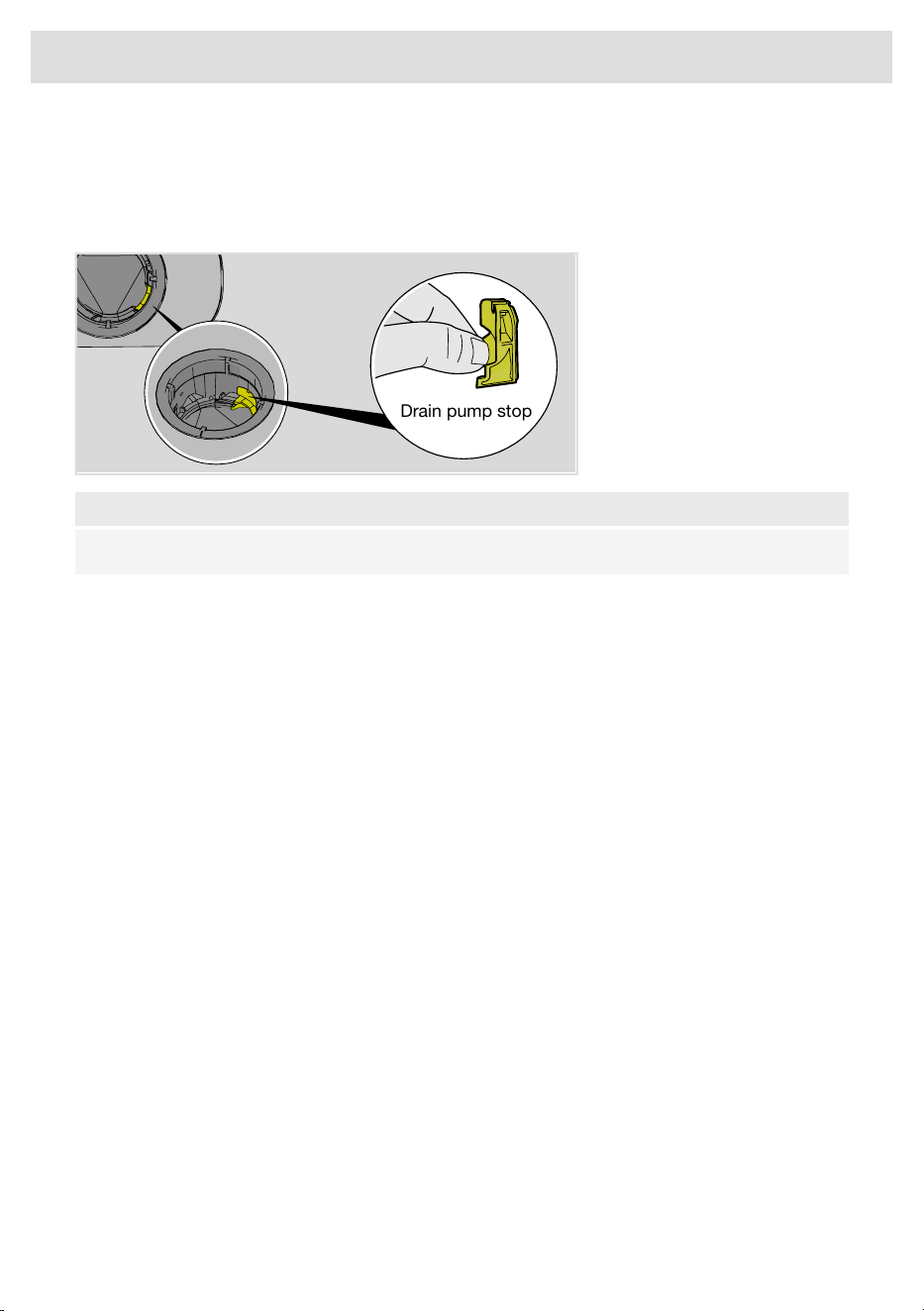
5. Turn the pump wheel located behind the drain pump stop by hand. Carefully remove any sharp
items, such as glass.
6. Reinstall the drain pump stop along with the fine and coarse filters.
7. Plug the machine in again.
Drain pump stop
NOTE!
Do not forget to reinstall the drain pump stop.
38
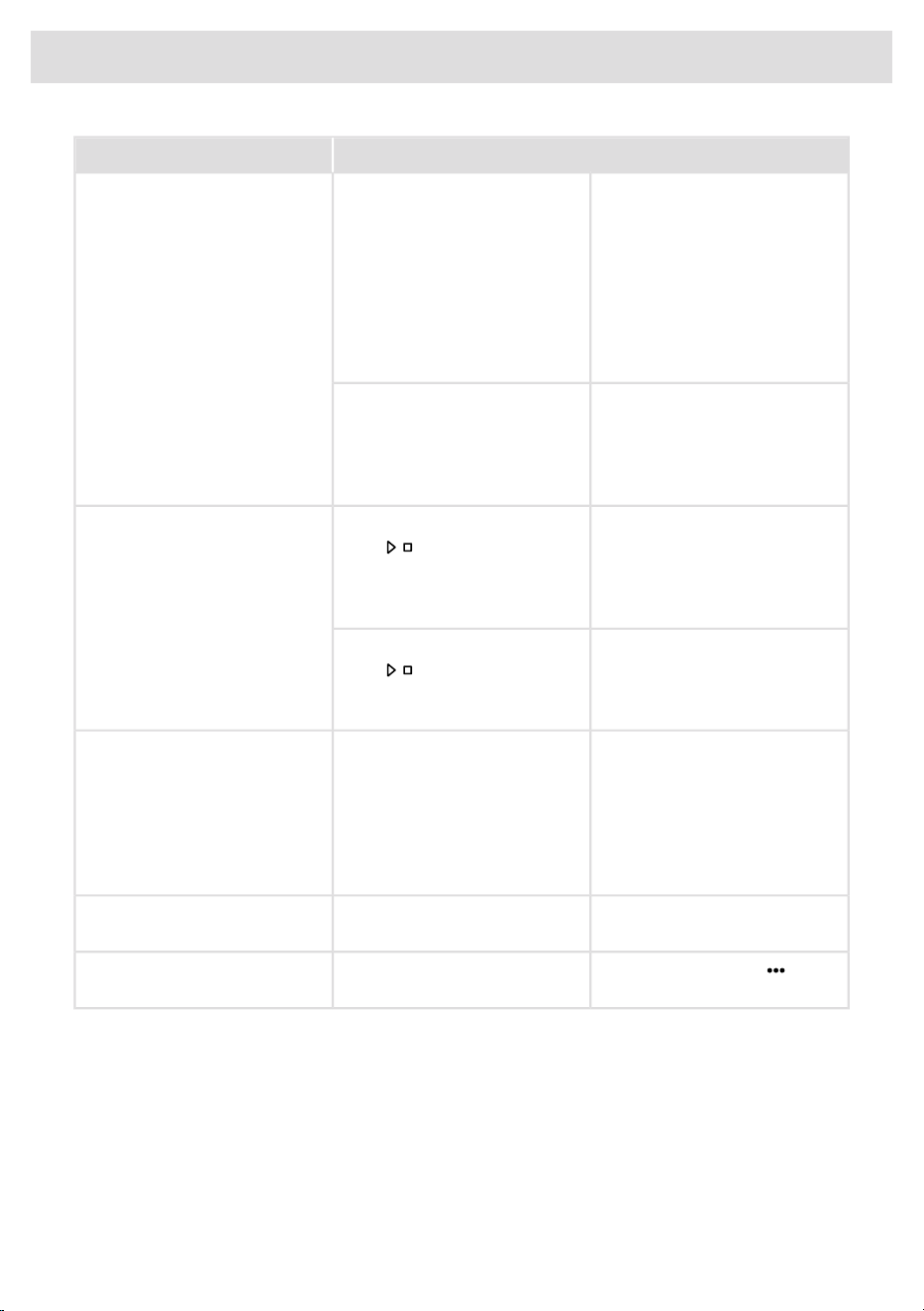
Care and maintenance instructions
ActionError messages
Unblocking the drain pump. See the chapter Care and
maintenance instructions. If the problem persists, contact your
nearest Customer Care Center.
Overfilling water 1F10
See "Water remains in the dishwasher above the filters" under
"Problem" in the table below. If the problem persists, contact your
nearest Customer Care Center.
Water outlet faultF11
Check that the water supply valve is on. If the problem persists,
contact your nearest Customer Care Center.
Water inlet fault 1F12
The water pressure must be between 15 -140 psi (0.1-1.0 MPa).
Turn off the water supply valve and contact your nearest Customer
Care Center.
Inlet valve leakageF40
Turn off the water supply valve. Remove the plug from the power
outlet and contact your nearest Customer Care Center.
Heater fault 1F41
Turn off the water supply valve. Remove the plug from the power
outlet and contact your nearest Customer Care Center.
Heater fault 2F46
Clean the coarse and fine filters. If the problem persists, contact
your nearest Customer Care Center.
Water level faultF52
Turn off the water supply valve and contact your nearest Customer
Care Center.
Overfilling water 2F54
To avoid water leakage outside the dishwasher, do not remove
the plug from the power outlet until the water supply valve has
been turned off!
Run any dishwashing program. If the problem persists, contact
your nearest service center.
Circulation pump faultF56
Check that the water supply valve is on. If the problem persists,
contact your nearest Customer Care Center.
Water inlet fault 2F67
The water pressure must be between 15 -140 psi (0.1-1.0 MPa).
See "Water remains in the dishwasher above the filters" under
"Problem" in the table below. If the problem persists, contact your
nearest Customer Care Center.
BLDC drain pump faultF68
Close the dishwasher door. If the problem persists, contact your
nearest service center.
Lock faultF70
Run any dishwashing program. If the problem persists, contact
your nearest service center.
Sani lock faultF76
Press any button to clear the error message.
39
Troubleshooting

General
ActionPossible causesProblem
Wait a moment then try again.You have pressed the control
panel too soon after opening the
door.
The control panel does not react
when pressed.
See the chapter Important safety
instructions.
Lock is activated.
Open the door. The control
panel only reacts to use when
the door is open.
The door is closed.
Clean with a dry or slightly damp
cloth and, if necessary, a little
washing up liquid. Avoid strong
or abrasive cleaners – they may
damage the surface.
Dirt on the control panel.
Turn off the water supply valve.
Remove the plug from the power
outlet and wait for 60 seconds.
Then plug the appliance back
into the power outlet and turn on
the water supply valve.
The control panel requires
calibration.
Check that the baskets are
correctly positioned horizontally.
The baskets are not correctly
positioned.
Cannot close door.
Check that the dishes are not
blocking the baskets from
sliding properly into place.
Open the door. Press and hold
and until "Auto door open
recovery" is shown on the
display, wait until the message
disappears. Close the door, then
check that the door lock is
working.
The door lock does not click into
place and lock.
See the chapter Important safety
instructions.
Lock is activated.The door cannot be opened.
Wait until the dishwasher
indicates that the program has
ended and the dishes have
cooled before unloading the
dishwasher.
To prevent the risk of burn
injuries, the door cannot be
opened while the temperature
inside the dishwasher exceeds
149 °F / 65 °C.
See Power failure in the chapter
Using the dishwasher or contact
your nearest service center.
The dishwasher is/has been
without power while Sani lock or
Lock is/has been activated.
40
Troubleshooting
ActionPossible causesProblem
Press until the display
shows "Program started, Close
door within 4 sec".
has not been pressed.
The dishwasher does not start.
Close the door within four
seconds, otherwise the
dishwasher will not start.
The door is not closed properly
or was not closed immediately
after you pressed .
Fill up with salt. See the chapter
Care and maintenance
instructions.
Salt compartment empty.
If you want the dishwashing
program to continue, press
and close the door within four
seconds.
The dishwasher door has been
opened while a program is in
progress.
Open the door. Press and hold
and until "Auto door open
recovery" is shown on the
display, wait until the message
disappears. Close the door, then
check that the door lock is
working.
The door lock has not clicked
into place and locked.
Check.The plug is not plugged into the
power outlet.
Check.A fuse/circuit breaker has been
tripped.
41
Troubleshooting

ActionPossible causesProblem
Check that the dishes are not
blocking the spray arms.
The spray arms are not rotating
freely.
The dishes are not clean.
Clean the spray arms. See the
chapter Care and maintenance
instructions.
Spray arm holes or bearings
blocked.
Select a program with a high
temperature to dissolve grease
on heavily soiled dishes, such
as Intensive.
Unsuitable dishwashing
program.
Dose according to water
hardness. Far too much or far
too little detergent can result in
poor dishwashing results.
Incorrect detergent dosage.
Avoid large packages.Detergent is too old. Detergent
is a perishable product.
Do not cover porcelain with
large bowls or the like. Avoid
placing very tall glasses in the
corners of the baskets. See the
chapter Loading the
dishwasher.
Dishes loaded incorrectly.
Load the dishes securely.Glasses and cups have toppled
over during the program.
Clean the coarse and fine filters.The filters are clogged.
Check that the filters are fitted
correctly. See the chapter Care
and maintenance instructions.
The filters are not fitted correctly.
Check that the yellow drain
pump stop (on the right in the
bottom drain) is in place. See
the chapter Care and
maintenance instructions.
Drain pump stop missing.
Rinse off these types of food if
not starting the dishwasher
immediately. Use the Rinse and
hold program.
Some types of food, such as
mustard, mayonnaise, lemon,
vinegar, salt, and dressings, can
cause spots on stainless steel if
left for too long.
Spots on stainless steel or silver.
In order to avoid marks and
tarnishing, separate dishes
made from different metals,
such as silver, stainless steel,
and aluminum.
All stainless steel can cause
spots on silver if they come into
contact during dishwashing.
Aluminum can also cause spots
on dishes.
42
Troubleshooting

ActionPossible causesProblem
See the chapter Settings.Incorrect rinse aid dosage
setting.
Spots or films on the dishes.
Switch all-in-one detergents or
deactivate the TAB setting and
fill up with salt and separate
rinse aid. See Rinse aid in the
chapter Settings.
The TAB setting is activated and
all-in-one detergent with
insufficient drying effect is being
used.
See Water hardness in the
chapter Settings.
Incorrect water softener setting.
Check that the salt compartment
lid is tightened clockwise to its
end position. Otherwise contact
your nearest service center.
The water softener is leaking
salt.
Wash crystal at a low
temperature using a small
amount of detergent. If you have
questions about the detergent,
contact the detergent
manufacturer.
Too high temperature and/or too
much detergent can cause
etching on crystal.
Unfortunately, this cannot be
repaired, only prevented.
Reduce the dosage. See the
chapter Settings. If you have
very soft water, you may want to
dilute the rinse aid 50:50 with
water.
Rinse aid dosage setting too
high.
The dishes have a sticky
white/blue film.
Use a detergent with a
bleaching agent.
Lipstick and tea/coffee stains
can be difficult to remove.
Spots left after washing.
The detergent compartment
must be dry when adding
detergent.
The detergent compartment was
damp when adding detergent.
Detergent residue in the
detergent compartment after
dishwashing.
Check that the dishes are not
preventing the detergent
compartment from opening.
The detergent compartment has
been blocked.
Check that the dishes are
placed securely. Spin the spray
arms to make sure they can
rotate.
The dishes are not correctly
placed or the spray arms are not
rotating.
Rattling sound when
dishwashing.
If you want the dishwashing
program to continue, press
and close the door within four
seconds.
The dishwasher door has been
opened while a program is in
progress.
"Program paused" is shown on
the display.
If you want to cancel the
dishwashing program, press
and hold for three seconds.
43
Troubleshooting

ActionPossible causesProblem
Fill up with salt. See the chapter
Care and maintenance
instructions.
Salt compartment empty."Block start when salt chamber
is empty" is shown on the
display.
(The setting to prevent a
dishwashing program from
starting when the salt
compartment is empty can be
deactivated. See the Settings
chapter.)
Restart the dishwasher if the
program must be run in
compliance with the
NSF/ANSI 184 standard.
In order to meet the
requirements of the
NSF/ANSI 184 standard, the
Sanitize NSF program must not
be interrupted.
"Sanitation incomplete" is shown
on the display.
Restart the dishwasher if the
program must be run in
compliance with the
NSF/ANSI 184 standard.
The Sanitize NSF program has
been run but has not reached a
sufficiently high temperature to
meet the requirements of the
NSF/ANSI 184 standard.
Clean the coarse and fine filters.The filters are clogged.Water remains in the dishwasher
above the filters.
Check that the filters are fitted
correctly. See the chapter Care
and maintenance instructions.
The filters are not fitted correctly.
Clean the drain pump. See the
chapter Care and maintenance
instructions.
Debris in the drain pump.
Check that the yellow drain
pump stop (on the right in the
bottom drain) is in place. See
the chapter Care and
maintenance instructions.
Drain pump stop missing.
Check that the hose is free from
kinks and sharp bends.
Kink in drain hose.
Loosen the drain hose from
where it terminates. Check that
no debris has clogged the hose.
Is the cone-shaped part of the
drain boot cut to the maximum
size of the fitting where it
attaches?
Blocked drain hose.
44
Troubleshooting

ActionPossible causesProblem
Clean with dish brush and low
foaming cleaner.
Dirt around the seals and in
corners.
Bad odor in dishwasher.
Run a program with a high
temperature once or twice a
month. Or run a self-cleaning
program. See Self-cleaning in
the chapter Using the
dishwasher.
Low temperature programs have
been selected for a prolonged
period.
Cleaning the garbage disposer
connected to the dishwasher
can eliminate odors. Follow the
disposer manufacturer's
cleaning instructions.
The dishwasher is connected to
a garbage disposer.
Select a program with a high
temperature to dissolve grease
on heavily soiled dishes, such
as Intensive. Or run a
self-cleaning program once or
twice a month. See Self-cleaning
in the chapter Using the
dishwasher.
Low temperature programs have
been selected for a prolonged
period.
Grease deposits in the
dishwasher.
Activate the Automatic door
opening setting.
The Automatic door opening
setting has not been activated.
The dishes are not dry enough.
Fully load the dishwasher.The dishwasher is not fully
loaded.
Fill up the rinse aid compartment
or increase the rinse aid dosage
setting.
Rinse aid needs filling up or
dosage is set too low.
Switch all-in-one detergents or
deactivate the TAB setting and
fill up with salt and separate
rinse aid. See Rinse aid in the
chapter Settings.
The TAB setting is activated and
all-in-one detergent with
insufficient drying effect is being
used.
45
Troubleshooting

WiFi
ActionPossible causesProblem
Connect the dishwasher to your
wireless network. See the
chapter ASKO Connect Pro &
ConnectLife.
The dishwasher is not
connected to your wireless
network.
The dishwasher's network
symbol does not appear on
the display.
Activate WiFi connection.WiFi connection is deactivated.
See WiFi connection On/Off in
the chapter Settings.
Check that the router is
connected to the internet.
The dishwasher cannot access
your wireless network. Or the
router is not connected to the
internet.
Connection setup failed
Make sure your wireless network
is using 2.4 GHz and is visible.
Try moving the router closer to
the dishwasher if the signal is
too weak.
See also troubleshooting at
www.connectlife.io.
If the problem persists, contact
your nearest Customer Care
Center.
Check that the router is
connected to the internet.
Your smartphone/tablet is not
connected to your wireless
network. Or the router is not
connected to the internet.
Add device failed
Check that your
smartphone/tablet is connected
to your wireless network.
See also troubleshooting at
www.connectlife.io.
If the problem persists, contact
your nearest Customer Care
Center.
Activate WiFi connection.WiFi connection is deactivated.The dishwasher is shown as
disconnected in the ConnectLife
app.
See WiFi connection On/Off in
the chapter Settings.
See also troubleshooting at
www.connectlife.io.
If the problem persists, contact
your nearest Customer Care
Center.
46
Troubleshooting

ActionPossible causesProblem
Make sure that the power supply
is not interrupted and that the
network connection is stable
before trying again. If the
problem persists, contact your
nearest Customer Care Center.
The network connection was lost
or the dishwasher lost power
due to a power failure.
Software update failed.
47
Troubleshooting
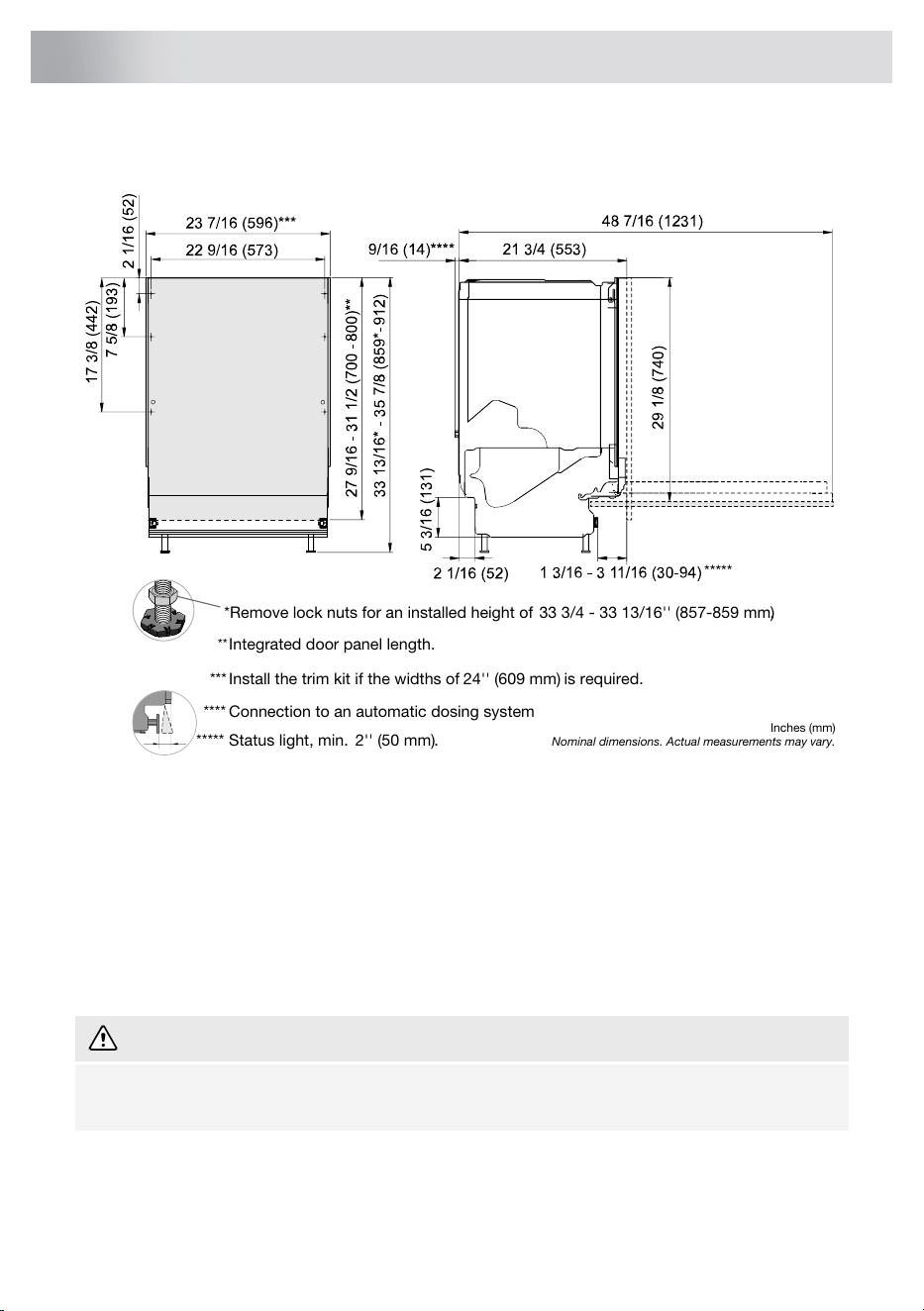
It is important that you read through and follow the instructions and directions below. Other directions
for installation and connection can be found in the separate installation instructions.
*Remove lock nuts for an installed height of 333/4-33 13/16'' (857-859 mm).
Integrated door panel length.
Nominal dimensions. Actual measurements may vary.
Inches (mm)
**
*** Install the trim kit if the widths of 24''(609 mm) is required.
Connection to an automatic dosing system****
Status light, min. 2'' (50mm).*****
*****
Important safety instructions
• Connections to electricity, water, and drain must be performed by a qualified professional.
• Always follow applicable regulations for water, drainage, and electricity.
• Take care during installation! Wear protective gloves! There must always be two people!
• Place a drip tray on the floor beneath the dishwasher to prevent damage from any water leaks.
• Before fastening the dishwasher, test the dishwasher by running the Rinse and hold program.
Check that the dishwasher fills with water and drains. Check also that none of the connections
leak.
WARNING!
The ventilation opening in the lower part of the door must not be blocked by a rug, carpet, or
similar furnishing.
48
Installation instructions
WARNING!
Turn off the water supply when installing the dishwasher!
During installation and the performance of any maintenance work, the plug must be removed
from the power outlet, or the power outlet’s supply must be disconnected!
Setup
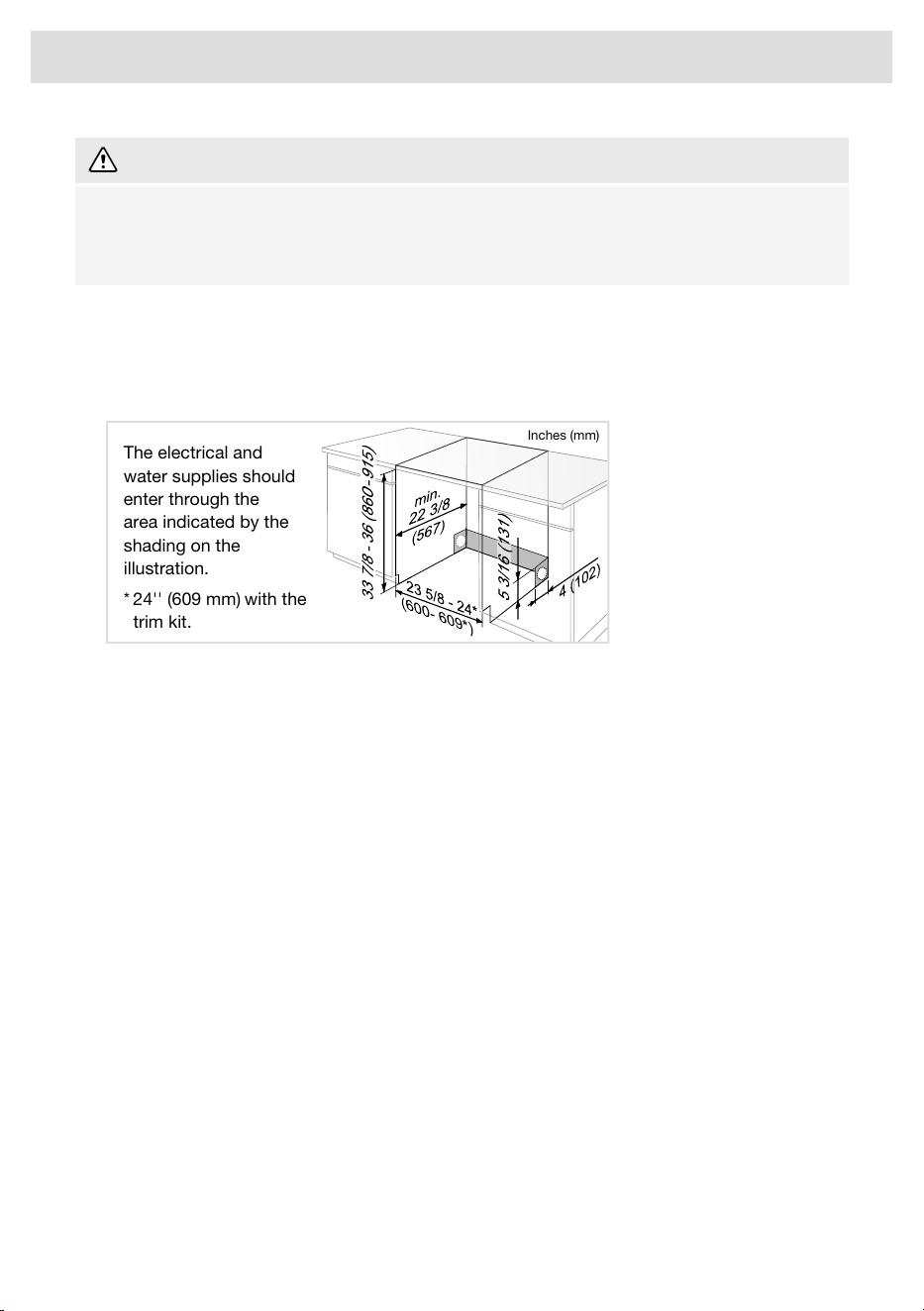
• The recess and connection dimensions are included in the separate installation instructions.
Check that all dimensions are correct before starting the installation. Note that the height of the
integrated door panel can be adjusted to match other fittings.
•
Inches (mm)
24''(609 mm) with the
trim kit.
The electrical and
water supplies should
enter through the
area indicated by the
shading on the
illustration.
*
• Handle the front corners of the dishwasher with care so that they do not get bent, which can
affect door opening.
• Make sure the area on which the dishwasher is to be installed is firm. Adjust the adjustable feet
so that the dishwasher is level. Tighten the lock nuts.
• If the dishwasher is built-in, the surrounding furnishings must be resistant to any condensation
from the dishwasher.
• Mount the protective film beneath the countertop and up around the edge. The function of the
protective film is to protect the countertop from moisture. (The protective film is in the enclosed
plastic bag.)
• Check that the machine is installed such that the door opens freely, otherwise door lock
functionality may be disrupted.
• Note that the door springs may need adjusting after a cover door has been fitted. Adjust the left
and right door springs equally until the door is evenly balanced.
49
Installation instructions
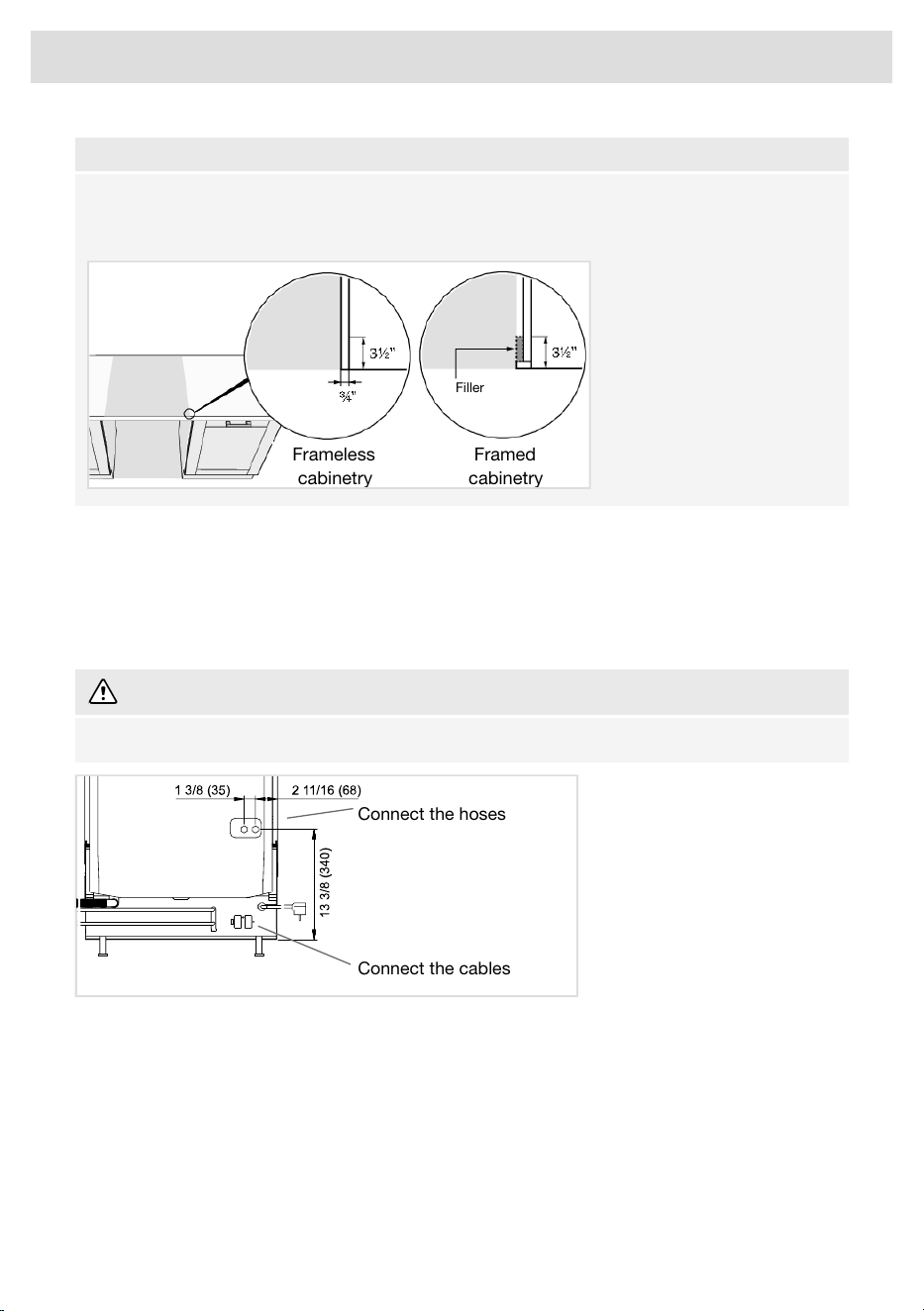
NOTE!
Framed cabinets require additional finished filler material behind the face frame for a proper
installation. A minimum 3 ½” (89 mm) finished return is required on all sides of the opening. (The
dishwasher packaging includes wooden strips that can be repurposed as filler material.)
Frameless
cabinetry
Filler
Framed
cabinetry
Connection to an automatic dosing system
The dishwasher can be connected to one or more systems for the automatic dosing of commercial
detergent and rinse aid, which simplifies everyday operation and reduces the risk of overdosing.
Connection to a system for automated dosage must be performed by the supplier of the system or
by somebody with an equivalent professional qualification.
WARNING!
Danger of contact with high voltage! Remove the plug from the power outlet.
Connect the cables
Connect the hoses
Connect the cables
Connect the external cables for automatic dosing to the back of the dishwasher.
The length of the external cables must not exceed 118" (3.0 m).
1. Loosen the screw to remove the protective cover.
50
Installation instructions
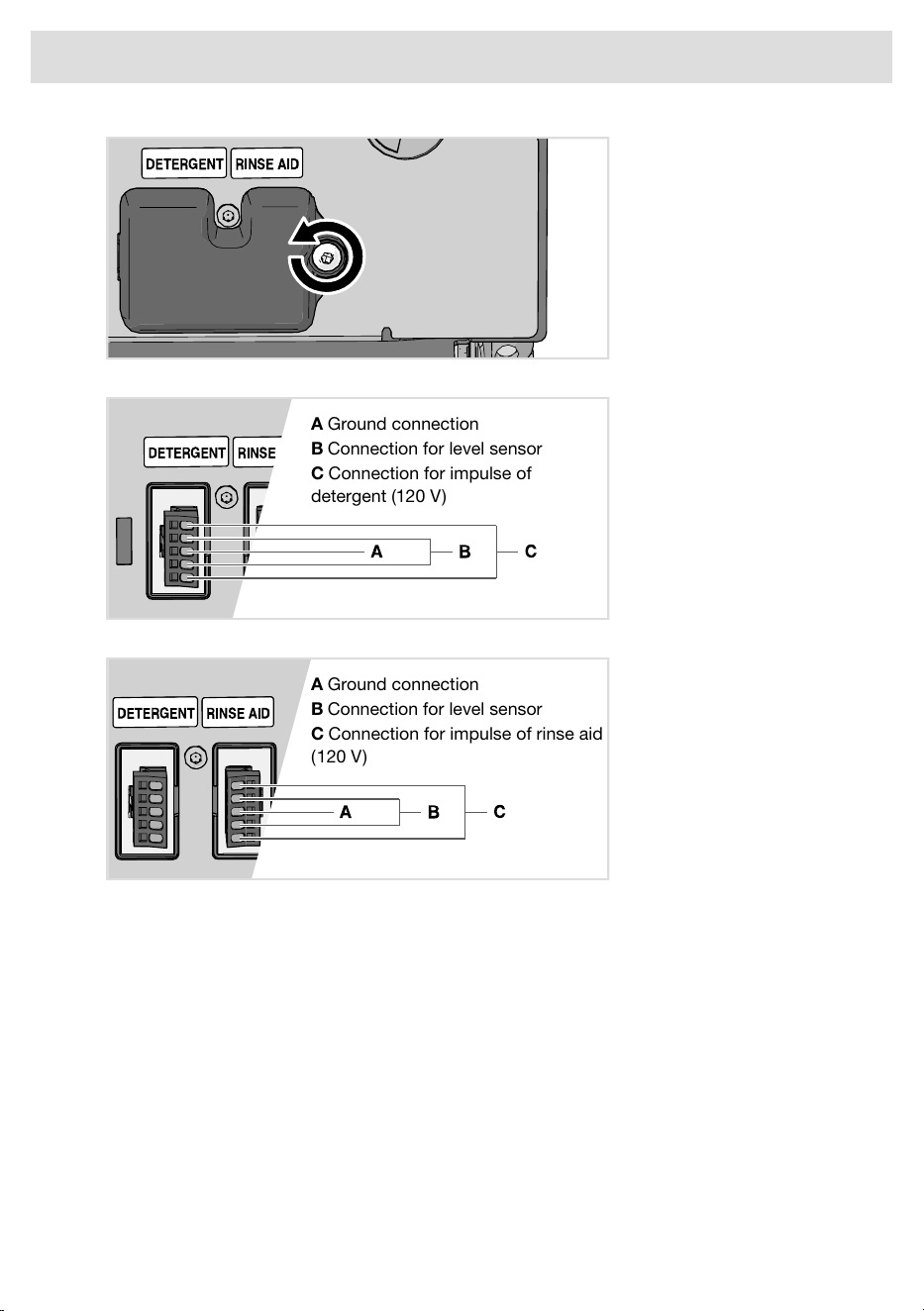
2. Connect the external cables for detergent to the auto dose connector.
A Ground connection
B Connection for level sensor
C Connection for impulse of
detergent (120V)
3. Connect the external cables for rinse aid to the auto dose connector.
A Ground connection
B Connection for level sensor
C Connection for impulse of rinse aid
(120V)
Accessory
Buy an accessory kit, including nipples and hoses, for connection to an automatic dosing system.
Accessories can be purchased where you bought the dishwasher.
Connect the hoses
Connect the hoses for automated dosage at the back of the dishwasher.
1. Remove plugs.
51
Installation instructions
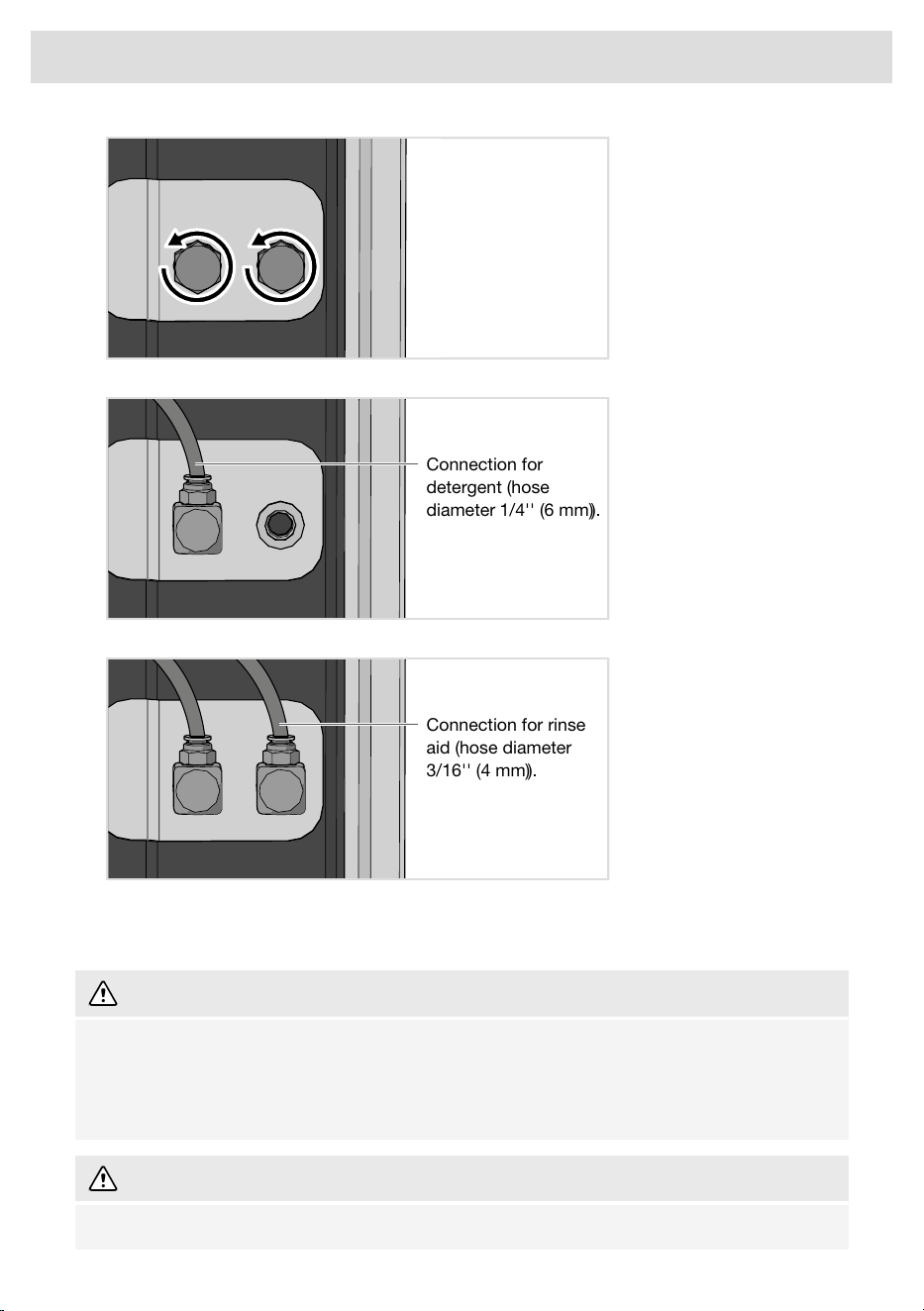
2. Attach the nipple and connect the hose for detergent.
Connection for
detergent (hose
diameter 1/4'' (6mm)).
3. Attach the nipple and connect the hose for rinse aid.
Connection for rinse
aid (hose diameter
3/16'' (4mm)).
• Activate Auto dose. See the chapter Settings.
• Use the Vent the hose function to vent the system.
WARNING!
Note that there are risks involved in handling commercial detergent and rinse aid. Protective
gloves and goggles must be used when handling these products.
Follow the supplier’s safety regulations concerning the handling and storage of detergent and
rinse aid.
WARNING!
Always install protective caps and plugs when disconnecting a system for automatic dosing.
52
Installation instructions
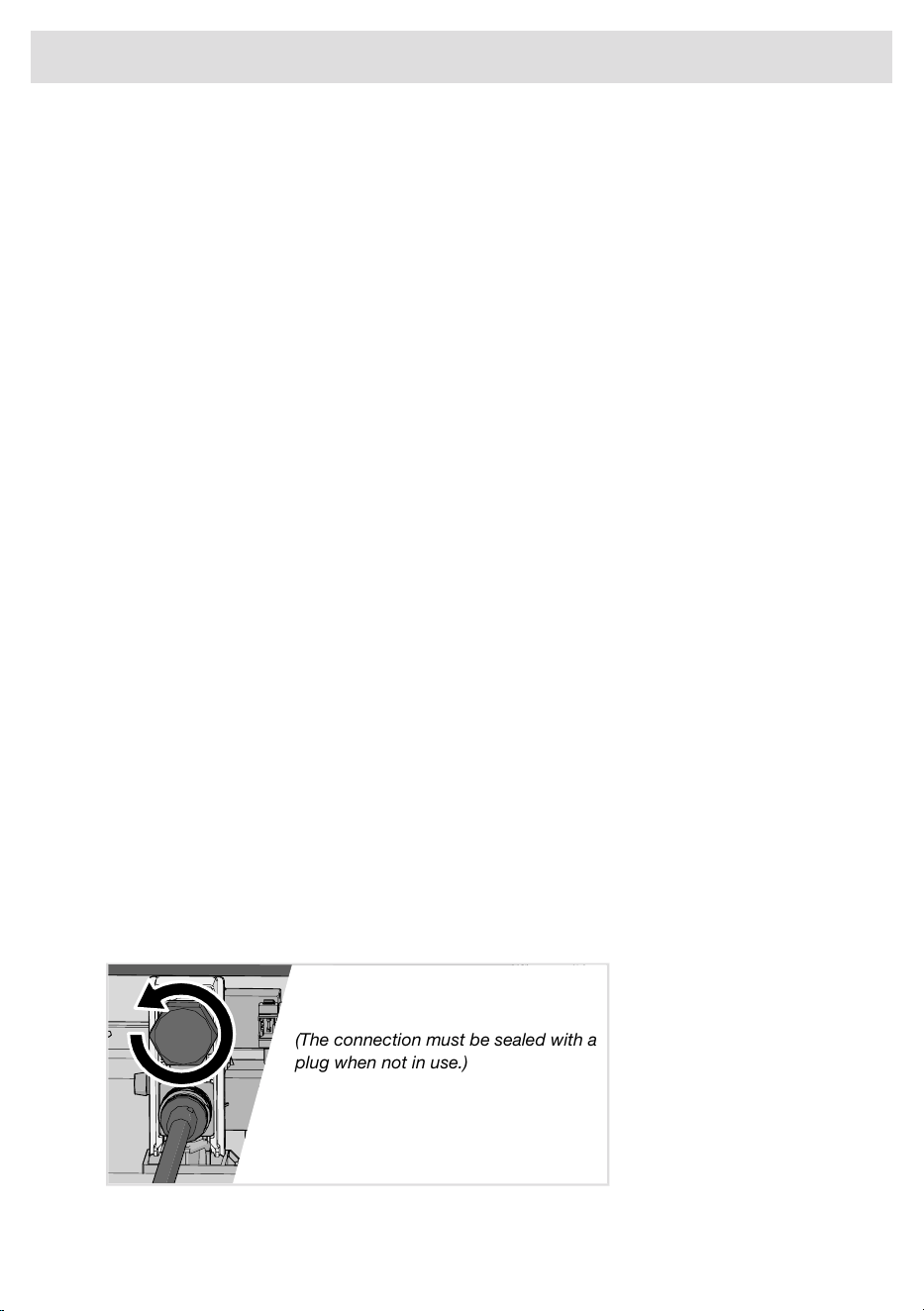
Drain connection
This dishwasher is suitable for installing in a raised recess (to obtain an ergonomic working height).
This means that the dishwasher can be placed so that the drain hose runs to a lower level than the
bottom of the dishwasher, such as by routing it directly to a floor drain.
The drain hose can also be connected to a cone-shaped connection pipe on the sink unit's water
trap. The connection pipe must have an internal diameter of at least 9/16'' (14 mm).
The drain hose may be extended by a maximum of 87" (2.2 m) (the total length of the drain hose
must not exceed 177" (4.5 m)). Any joints and connecting pipes must have an internal diameter of
at least 9/16'' (14 mm).
No part of the drain hose may be more than 37 3/8'' (950 mm) above the bottom of the dishwasher.
Cut the end of the drainage hose that can be shortened. Use the largest possible diameter to ensure
the best possible drainage capacity.
Attach the drain hose with a hose clamp. Ensure that the drain hose has no kinks.
No external air gap is necessary (unless specified by building codes in your area), as the dishwasher
is already equipped with an internal air gap and high loop drain line.
Connection to water supply
The dishwasher can be connected to hot (max. 160 °F (70 °C)) and/or cold water. The dishwasher
adjusts automatically to the connected water in order to achieve the best dishwashing result. To
achieve optimal short dishwashing time, the dishwasher should be connected to hot water.
The dishwasher comes with an extra inlet hose (packed inside dishwasher) to connect hot and cold
water. Use only the fitted inlet hose and the enclosed inlet hose. Do not reuse old or other hoses.
The supply pipe must be fitted with a water supply valve. The water supply valve must be easily
accessible, so that the water can be shut off if the dishwasher has to be moved.
The water pressure must be between 15 -140 psi (0.1-1.0 MPa). To achieve optimal short dishwashing
time, the water pressure must be at least 30 psi (0.2 MPa).
Once the installation is complete, turn on the water supply valve and allow the pressure to settle for
a while. Check that all connections are watertight.
Connect an extra inlet hose
1. Loosen the screws to remove the protective cover.
2. Remove the plug.
(The connection must be sealed with a
plug when not in use.)
3. Fit the enclosed inlet hose.
53
Installation instructions
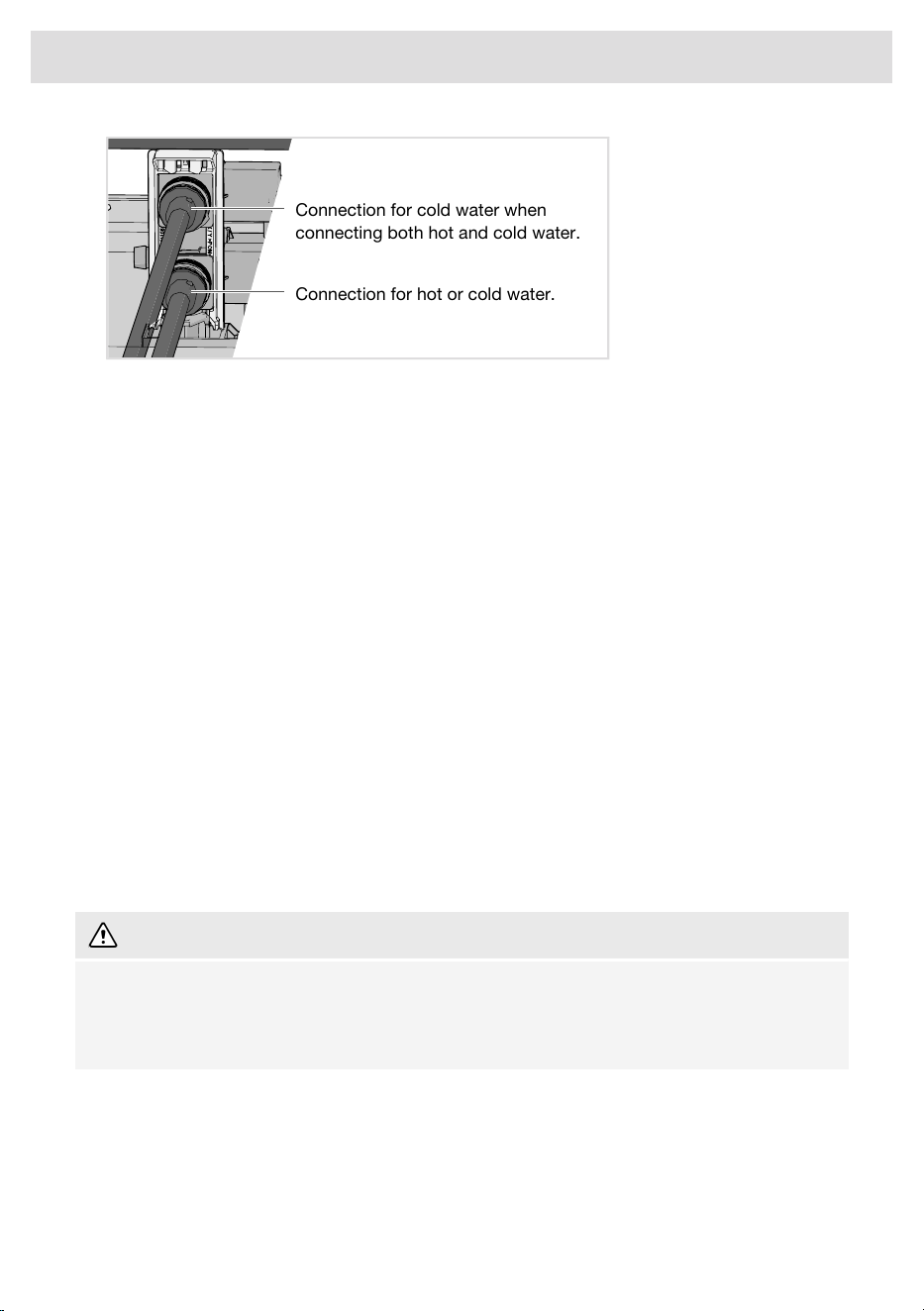
Connection for cold water when
connecting both hot and cold water.
Connection for hot or cold water.
4. Reattach the protective cover.
Water supply
The machine can be connected to either a cold or a hot (max. 140 °F (60 °C)) water supply. The
water pressure should be 15 -140 psi (0.1-1.0 MPa).
Electrical connection
Information about the electrical connection can be found on the serial number plate. This specification
must match the electricity supply.
The power outlet for the appliance shall be installed in a cabinet or on a wall adjacent to the
undercounter space in which the appliance is to be installed. Do not use an extension cord for this
appliance.
The access hole for the electrical supply must be round and smooth and no bigger than 2 3/4''
(70 mm) in diameter. If the partition is metal, it needs to be covered with an edge protector.
Use caution when the appliance is installed or removed to reduce the likelihood of damage to the
power cord.
Grounding instructions
This appliance must be grounded. In the event of a malfunction or breakdown, grounding will reduce
the risk of electric shock by providing a path of least resistance for electric current. This appliance
is equipped with a power cord fitted with an equipment grounding conductor and a grounding plug.
The plug must be plugged into an appropriate power outlet that is installed and grounded in
accordance with all local codes and ordinances.
WARNING!
Improper connection of the equipment grounding conductor can result in a risk of electric shock.
Check with a qualified electrician or service representative if you are in doubt as to whether the
appliance is properly grounded. Do not modify the plug provided with the appliance. If it does
not fit the power outlet, have an appropriate power outlet installed by a qualified electrician.
Hardwire your dishwasher
If you choose to hardwire your dishwasher instead of using the factory-supplied power cord, it is
acceptable to cut the cord for direct connection, provided that the installation follows all applicable
national and local electrical codes. Hardwiring must be performed by a qualified electrician to ensure
safety and compliance with these codes.
When hardwiring the dishwasher, make sure to use appropriate wire sizes, connectors, and circuit
protection as required by your local code. Always turn off the power at the breaker panel before
54
Installation instructions
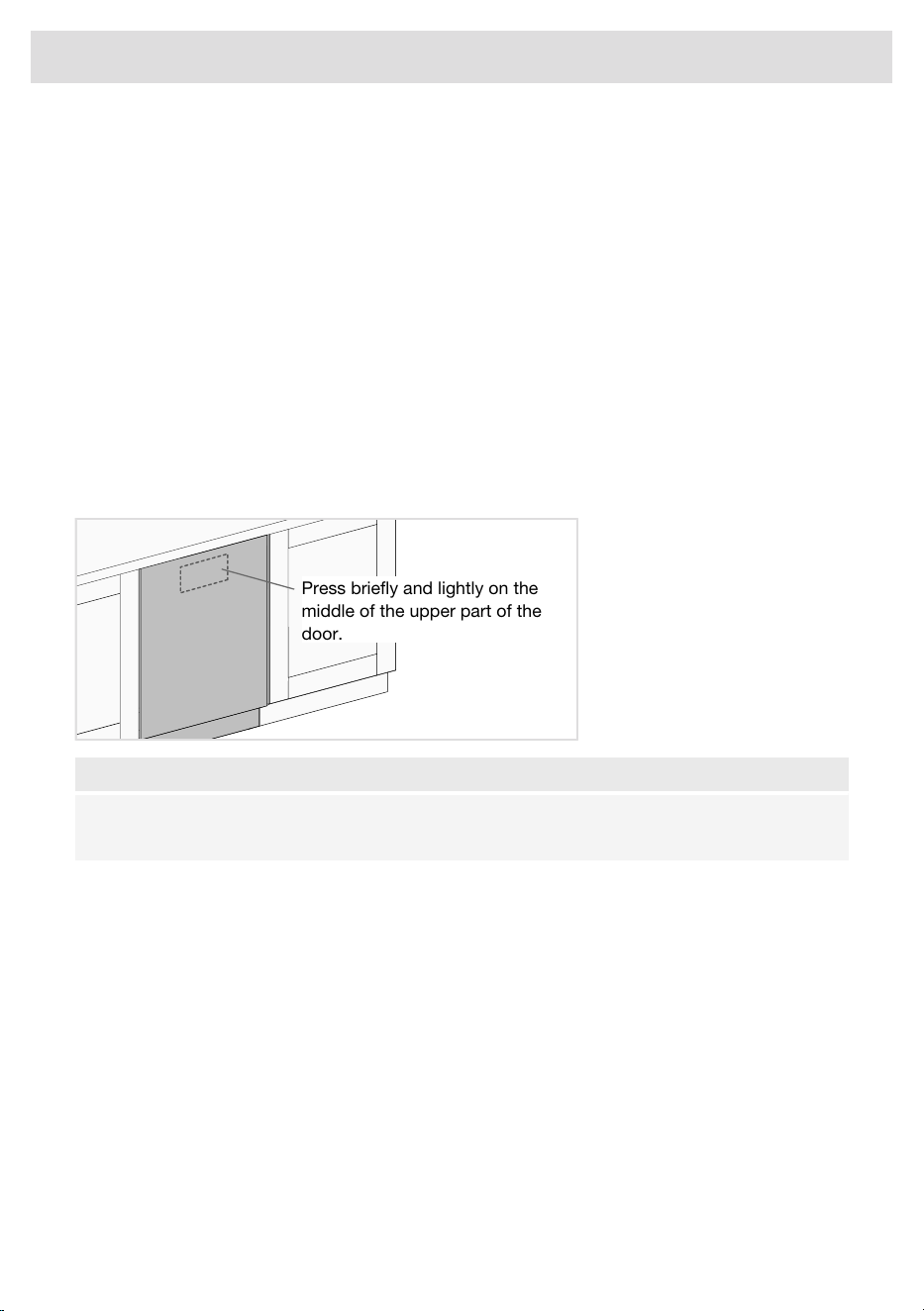
beginning any electrical work. Refer to the dishwasher’s wiring diagram and your local building
codes to ensure proper installation.
Failure to adhere to these standards may result in electrical hazards, appliance damage, or voiding
of the manufacturer’s warranty. Additionally, in the event of a failure, the manufacturer may request
photo documentation of the hardwired connection to verify that the installation was performed
correctly.
For your safety, if you are unsure or unfamiliar with the electrical requirements, it is recommended
to hire a licensed professional to complete the installation.
Replacing the power cord
All work on the electrical connection must be performed by a qualified service technician. If replacing
the power cord, use only original ASKO replacement parts. For technical data, see the wiring and
conversion diagram supplied with the machine.
Push to open
The dishwasher door can be opened without a handle.
Press briefly and lightly on the
middle of the upper part of the
door.
NOTE!
The door can be opened manually if the dishwasher is not connected to the electrical supply.
Grasp the top of the door on both sides and pull straight out.
55
Installation instructions

Limited Warranty – Residential and Professional Appliances
This Limited Warranty covers parts and labor, except as set forth in this Limited Warranty. Service
must be provided by an authorized ASKO service company. YOUR SOLE AND EXCLUSIVE REMEDY
UNDER THIS LIMITED WARRANTY SHALL BE PRODUCT REPAIR AS PROVIDED HEREIN. This
Limited Warranty is valid only when the ASKO Product is used in the country in which it was
purchased. Proof of original purchase date is required to obtain service under this Limited Warranty.
This warranty only applies to the original purchaser and is non-transferable.
Residential ASKO Products Used Exclusively for Household/Personal Purposes:
Two (2) Years limited Warranty – Any warranty service claims for residential ASKO Products must
be filed with ASKO within two (2) years from date of purchase. Service will be provided during normal
business hours. ASKO Dishwashers eligible under 2024-2025 5-Year Warranty Promotion must be
registered via us.asko.com website.
Residential ASKO Products Not Used Exclusively for Household/Personal Purposes or used
Commercially or used in Marine, Mobile or Aeronautical Applications:
One (1) Year limited Warranty – Any warranty service claims for ASKO Products not used exclusively
for household and personal use, or used commercially or used in marine, mobile, or aeronautical
applications must be filed with ASKO within one (1) year from date of purchase. Service will be
provided during normal business hours.
Professional ASKO Products Used In Residential or Commercial Applications:
Two (2) Years limited Warranty – Any warranty service claims for residential ASKO Products must
be filed with ASKO within two (2) years from date of purchase. Service will be provided during normal
business hours.
Items excluded from warranty
This limited warranty does not cover:
1. Replacement parts or repair labor if the ASKO Product is used in a manner that is inconsistent
with published user or operator instructions and/or installation instructions.
2. Service calls to correct the installation of the ASKO Product, to instruct you on how to use the
ASKO Product, to replace or repair house fuses, or to correct house wiring or plumbing.
3. Consumable items and parts, such as filters.
4. Damage resulting from accident, alteration, misuse, abuse, negligence, fire, flood, natural
disasters, improper use, improper installation, installation not in accordance with electrical or
plumbing codes, or use of products not approved by ASKO, as well as any attempted repair by
other than authorized ASKO service companies.
5. Cosmetic damage, including scratches, dents, chips or other damage to the finish of the ASKO
Product, unless such damage results from defects in materials or workmanship and is reported
to ASKO within 5 days from date of purchase.
6. Pickup and delivery. The ASKO Product is intended to be repaired in your home.
7. Repairs to parts or systems resulting from unauthorized modifications made to the ASKO Product.
8. Expenses for travel and transportation for product service if the ASKO Product is located in a
remote area where service by an authorized ASKO service company is not available.
9. The removal and reinstallation of the ASKO Product if it is installed in an inaccessible location
or is not installed in accordance with ASKO’s published installation instructions.
10. Replacement parts or repair labor on ASKO Products with original model/serial numbers that
have been removed, altered or cannot be easily determined.
56
Service and warranty
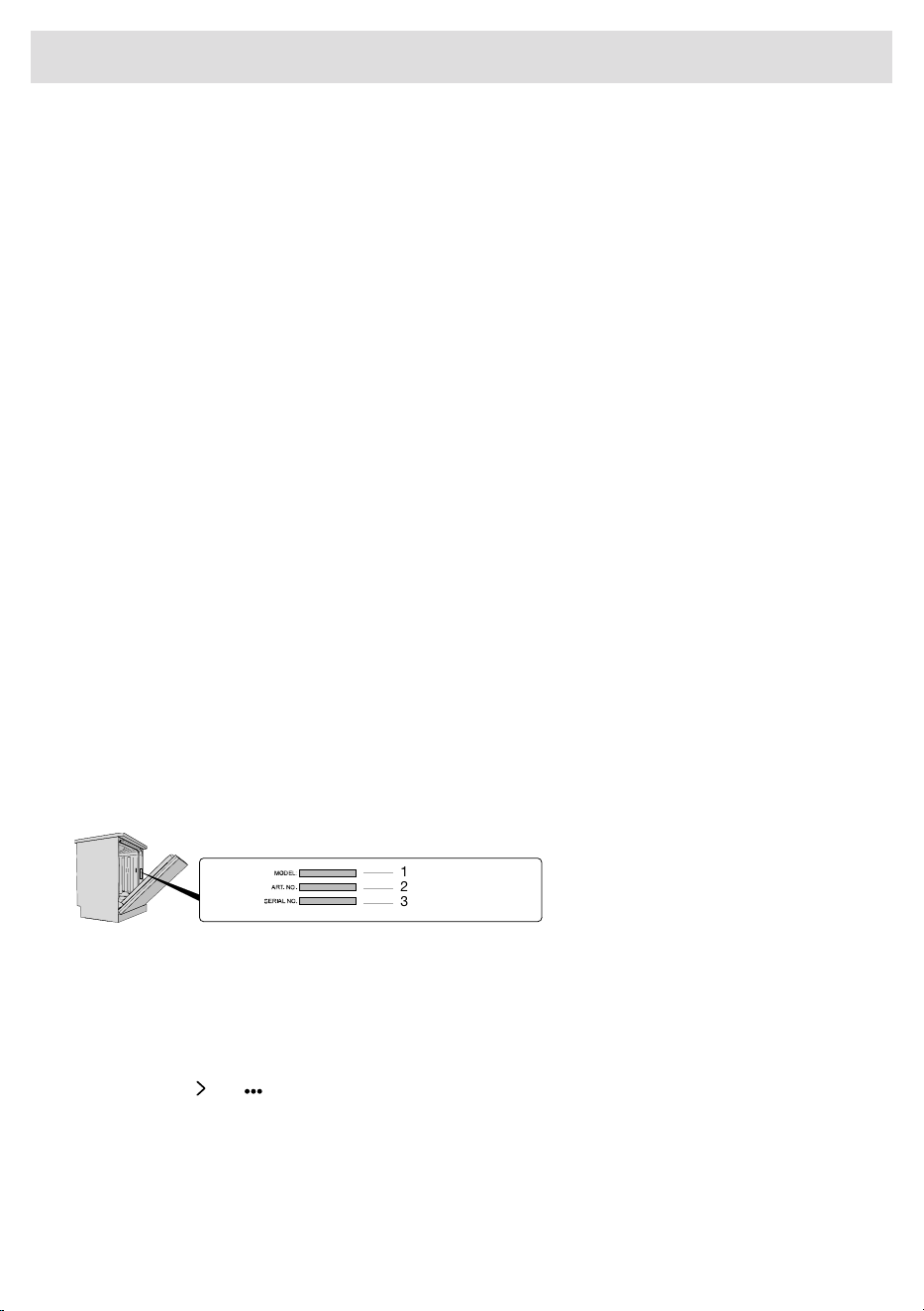
Disclaimer
YOUR SOLE AND EXCLUSIVE REMEDY UNDER THIS LIMITED WARRANTY SHALL BE PRODUCT
REPAIR AS PROVIDED HEREIN. EXPRESSLY DISCLAIMED ARE ALL OTHER EXPRESS AND IMPLIED
WARRANTIES, INCLUDING ANY IMPLIED WARRANTIES OF MERCHANTABILITY AND FITNESS
FOR A PARTICULAR PURPOSE. Some jurisdictions do not allow exclusion or limitations regarding
warranty rights. This Limited Warranty gives you specific legal rights and you may have other rights
that vary from jurisdiction to jurisdiction. Attempted repair by any person other than an authorized
ASKO service company will void this Limited Warranty.
Limitation of liability
IN NO EVENT SHALL ASKO OR THE MANUFACTURER AND THEIR RESPECTIVE PARENTS,
SUBSIDIARIES AND AFFILIATES BE LIABLE FOR CONSEQUENTIAL, INCIDENTAL, EXEMPLARY,
PUNITIVE OR SPECIAL DAMAGES. IN NO EVENT SHALL ASKO OR THE MANUFACTURER AND
THEIR RESPECTIVE PARENTS, SUBSIDIARIES AND AFFILIATES BE LIABLE FOR DAMAGES OTHER
THAN ACTUAL DAMAGES AND IN NO EVENT FOR DAMAGES IN EXCESS OF THE PRICE PAID
FOR THE ASKO PRODUCT AS TO WHICH A CLAIM IS MADE. Some jurisdictions do not allow the
exclusion or limitation of incidental, consequential or other damages, so these limitations and
exclusions may not apply to you. This Limited Warranty gives you specific legal rights. You also may
have other rights that vary from jurisdiction to jurisdiction.
ASKO Customer Care
Read the chapter Troubleshooting before contacting the Customer Care Center. If you have
encountered a problem that you cannot resolve, please contact your nearest dealer.
us.asko.com, +1-800-898-1879USA
When making contact, provide the details on the serial number plate. Include the model name (1),
the article number (2), and the serial number (3).
1
2
3
Service after expiration of limited warranty
For information about obtaining parts and labor after expiration of this Limited Warranty or arising
outside the scope of this Limited Warranty, please contact ASKO Customer Care.
Number of cycles
Press and hold and for 3 seconds to show Number of cycles that have been run on the display.
57
Service and warranty

Technical data
33 13/16 - 35 7/8" (859-912 mm)Height:
23 7/16'' (596 mm)
1)
Width:
21 3/4" (567 mm)
2)
Depth:
120 lb (55 kg)
3)
Weight:
15 -140 psi (0.1-1.0 MPa)Water pressure:
1)
24'' (609 mm) with the trim kit.
2)
Including nipples for connection to an automatic dosing system.
3)
Weight can vary due to different specifications.
Electrical connection
Possible rewiring
1)
Supplied power cord
AC 120 V2 N AC 120 / 208-240 VVoltage:
60 Hz60 HzFrequency:
15 A2 x 30 AFuse rating:
5-15P NEMA14-30P NEMAPlug:
3 x AWG144 x AWG10Power cord cross-section:
1,4 kW2,55 kW - 2,95 kWHeat output:
1.5 kW2,65 kW - 3,05 kWRated power:
1)
All work on the electrical connection must be performed by a qualified service technician. If replacing the power
cord, use only original ASKO replacement parts. For technical data, see the wiring and conversion diagram
supplied with the machine.
58
Technical information

940994
US.ASKO.COM • CA.ASKO.COM • ASKO.COM/MX
We reserve the right to make changes.
Translation of the original instructions.
-a4