The picture is for reference only.
Before using the product, please read this manual.
V1.0
IMPORTANT! Read carefully and keep for future reference.
Model:AURAPRO
140 mm
140 mm
5TH WHEEL Electric Scooter
User Manual
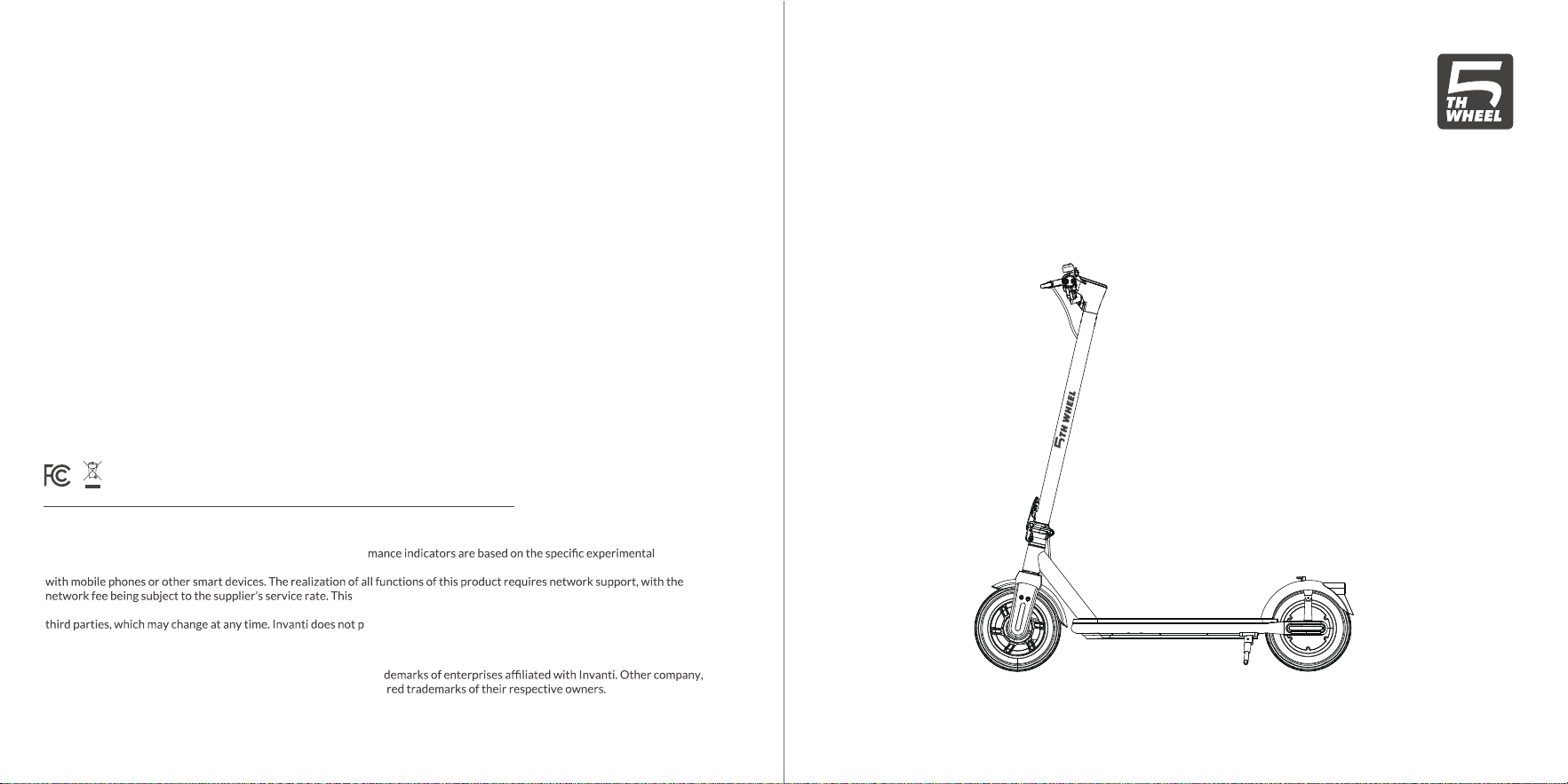
5TH WHEEL Electric Scooter
User Manual
The picture is for reference only.
Before using the product, please read this manual.
V1.0
IMPORTANT! Read carefully and keep for future reference.
Model:AURAPRO
Use Camera or QR Scanner to Scan
Email Address: [email protected]
The text and logo of 5TH WHEEL are trademarks or registered tra
product or service names mentioned may be trademarks or registe
The illustrations and function descriptions in this user manual are for illustration purposes and reference only, and the products
are subject to the real product. The mentioned technical perfor
environment, and the actual indicators may vary depending on the setting and environment. This product needs to be used
product is only used to assist safety management and cannot
replace other safety measures. Do not use this product for any illegal purpose. Some services are provided and supported by
rovide any guarantee for third-party services. Please read the
terms of the third-party service and privacy policy carefully before use.
© 2026 Invanti (Beijing) Technology Co., Ltd all rights reserved.
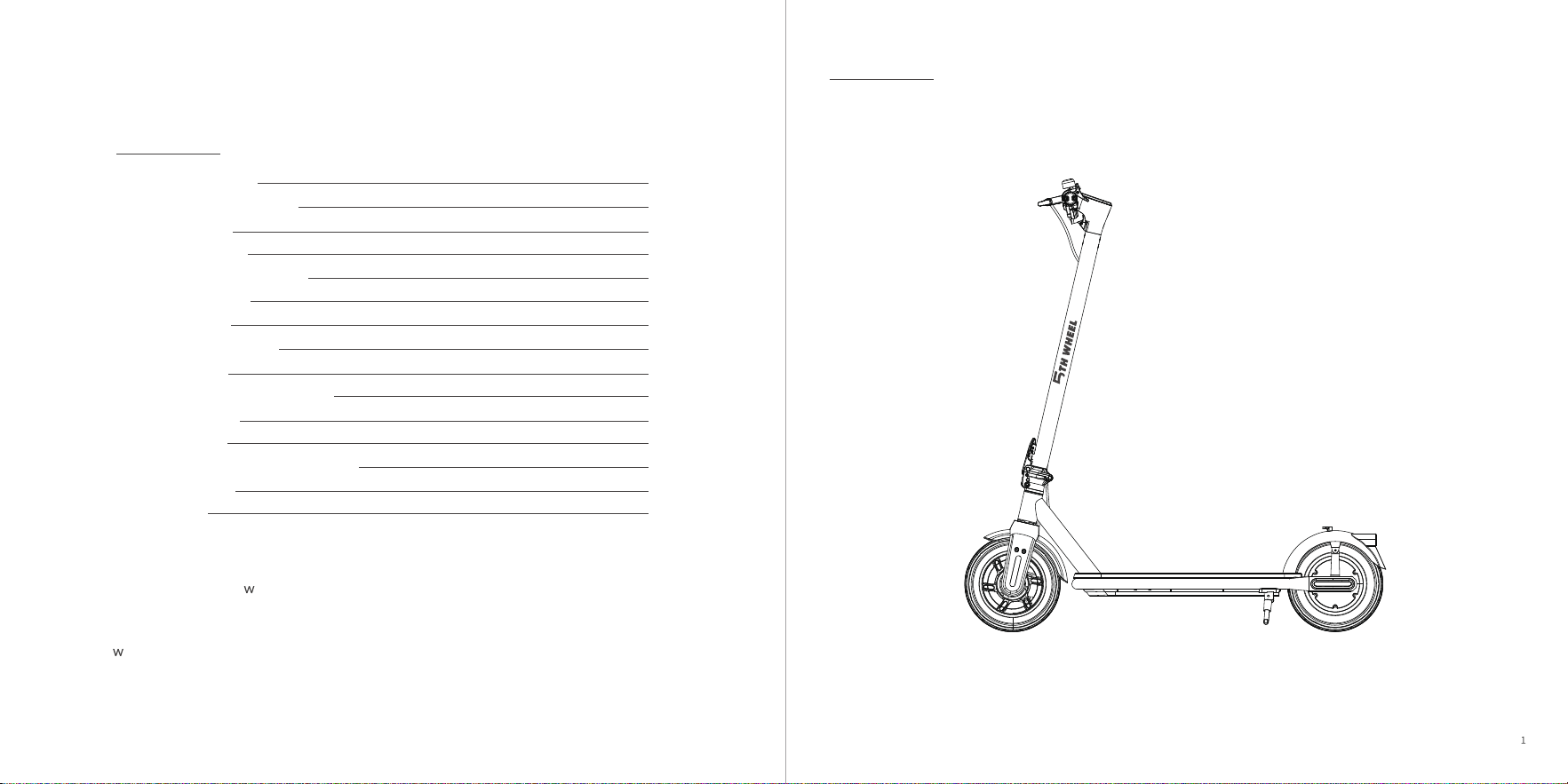
Welcome
Thank you for choosing 5TH WHEEL Electric Scooter. Enjoy the ride.
Contents
1.Safety Instructions
2.Introduction to Functions
3.Product Display
4.Scooter Assembly
5.Unfolding/Folding/Carrying
6.Riding and Parking
7.Control System
8.Indication Description
9.About Charging
10.About the Battery and Charger
11.App Description
12.Maintenance
13.Common Problems and Solutions
14.Authentication
2
9
11
13
14
17
18
21
22
22
24
25
26
27
15.Contact US
29
* Please read and kno the instructions described in the user manual carefully before
using the electric scooter and keep it for future reference.
Please do not dispose of this product casually, it needs to be disposed of in accordance
ith local recycling regulations.
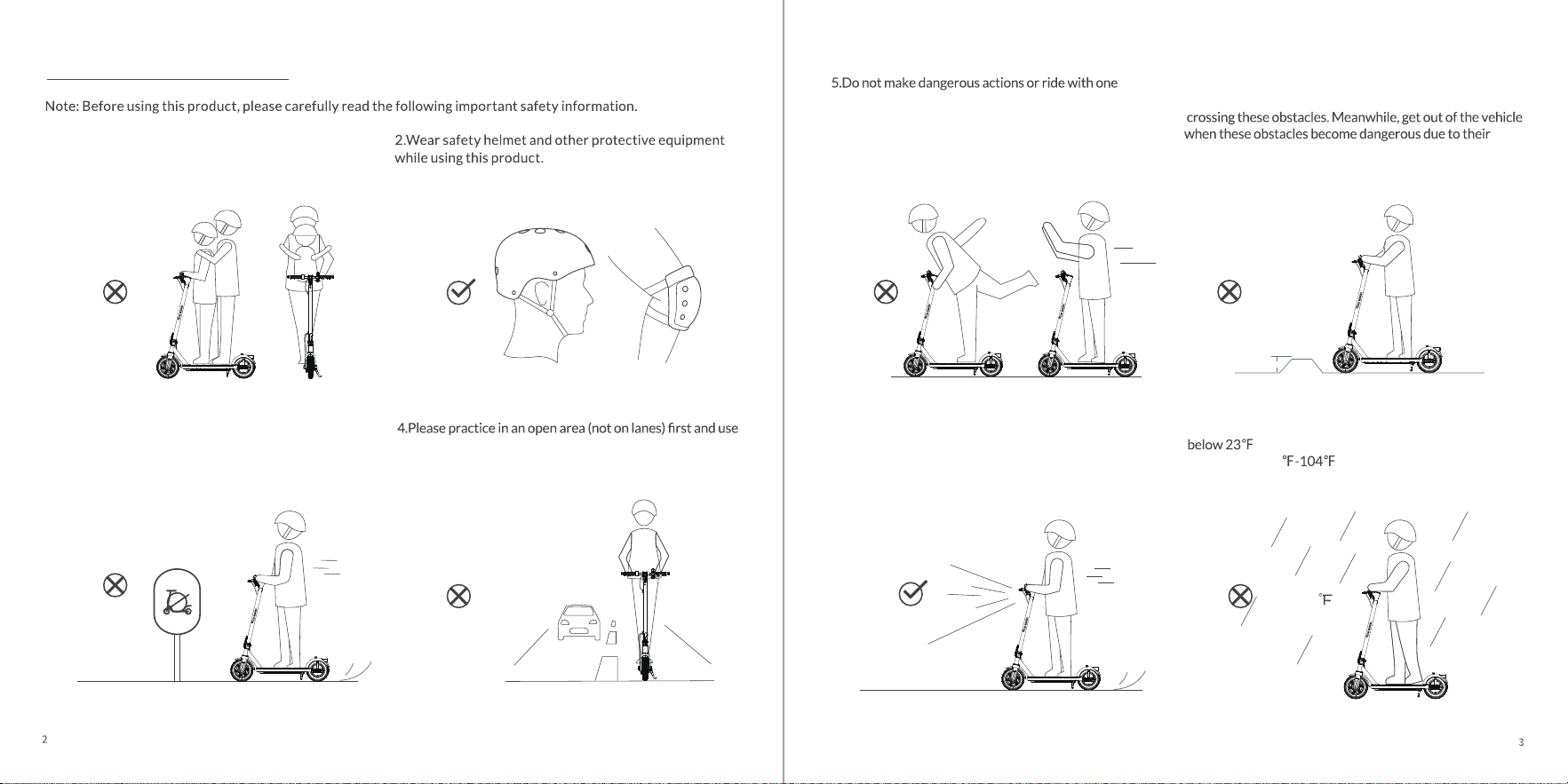
1 Safety Instructions
3.Never ride this product in an unsafe or illegal place.
this product until you are skilled in operation.
hand only. Keep your feet on the scooter.
8.Do not use this product at the ambient temperature
.Temperature range of charging and cycling
environment:50 .
6.Avoid obstacle jumps and anticipate and adapt your
trajectory and speed to those of a pedestrian before
shape, height or slippage. Do not try to directly pass steps
higher than 1.2inch (3cm).
7.If you use this product at night, turn on the headlight
and control the speed to 10mph(16km/h) or less.
1.2inch
23
1.This electric scooter can be used by one adult only.
Never carry others.
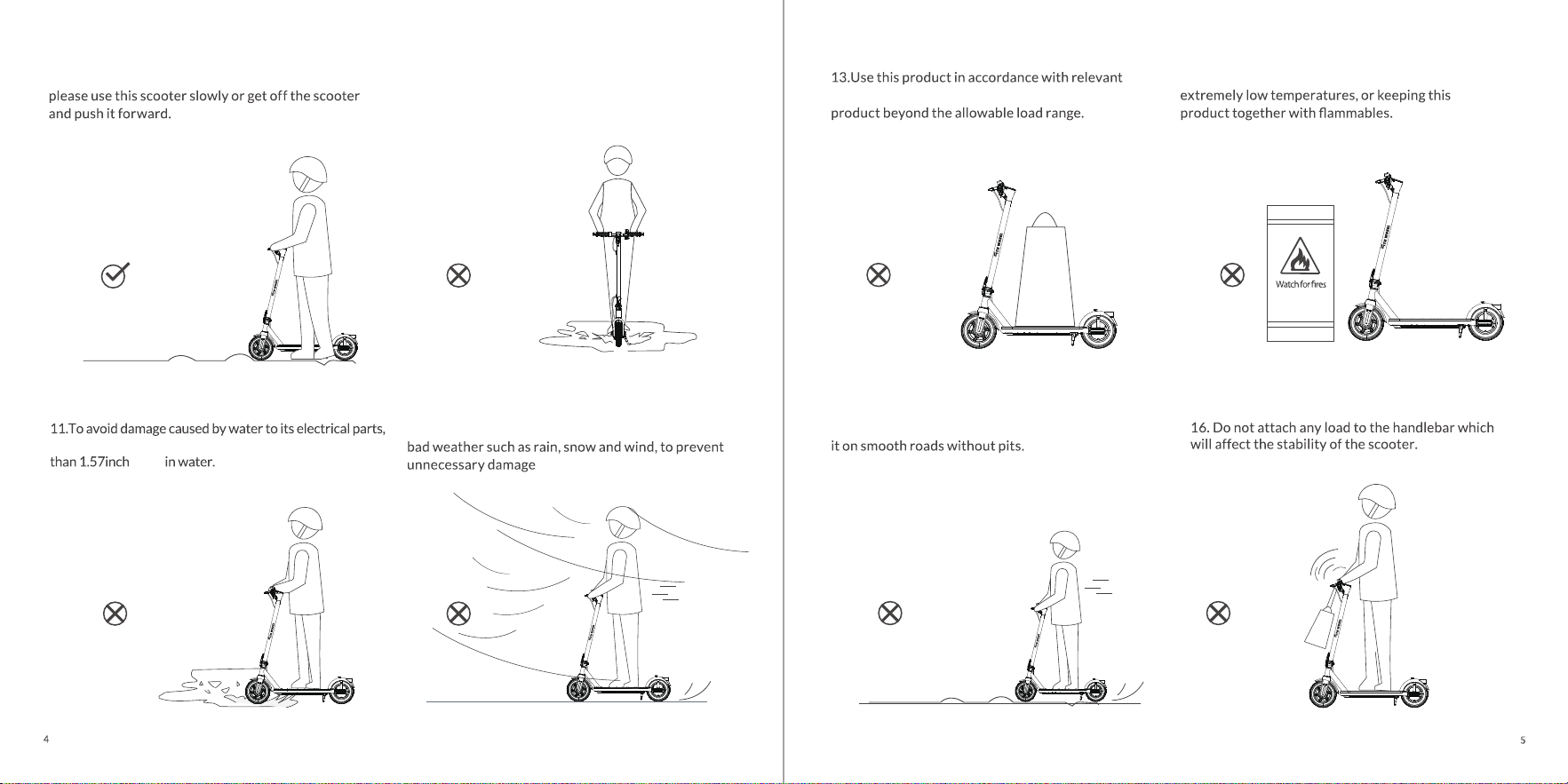
Please Do not immerse this product at a depth of more
(4cm)
10.Do not use this product on an oily or icy surface.
9.In the event of bumps or poor road conditions,
12.Avoid using this product as much as possible in
15.The scooter is a special riding product. Please ride
instructions in this manual. Do not use this
14.Avoid using or keeping this product at high or
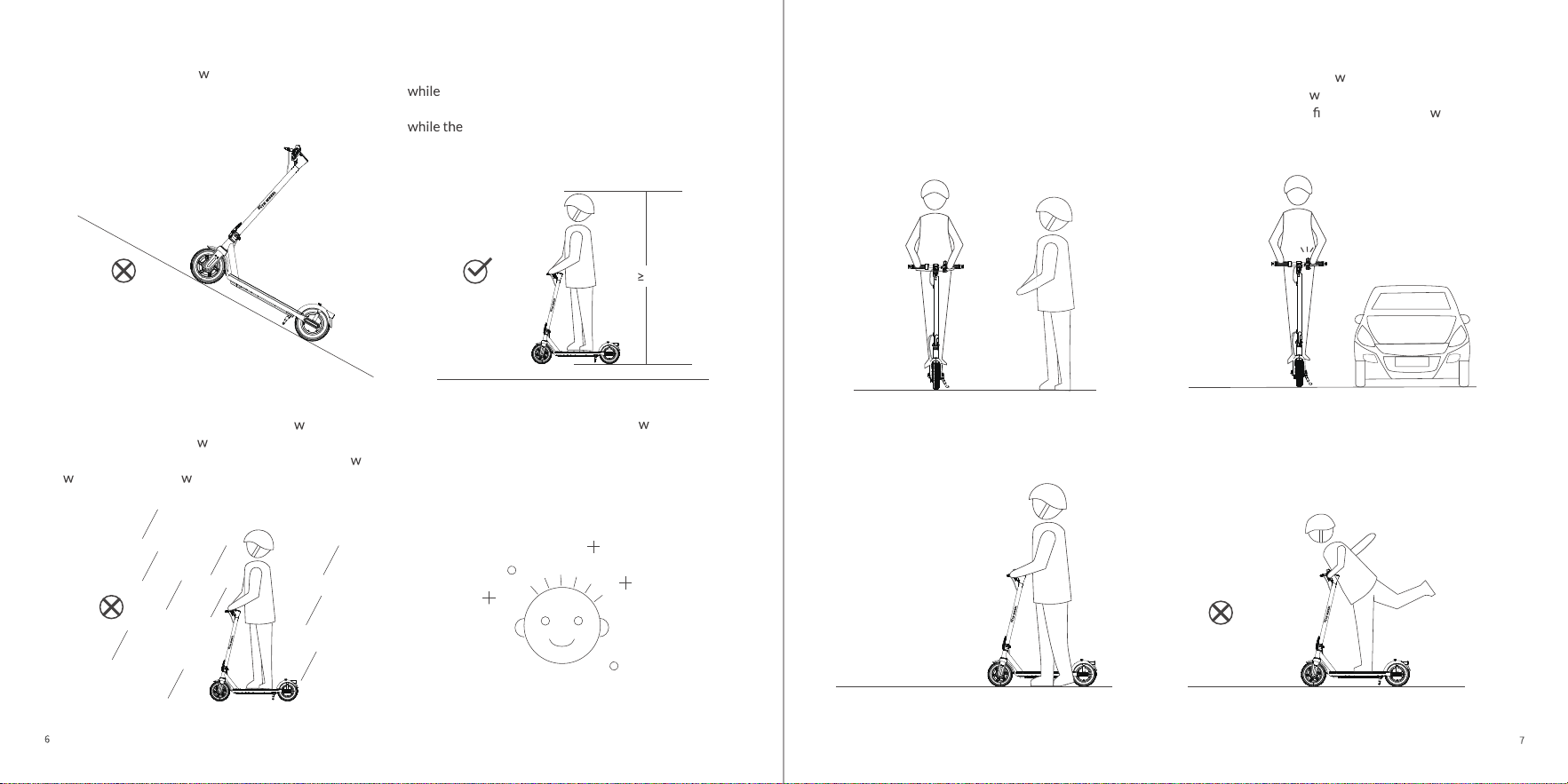
17.Engage the kickstand hen the vehicle is not in use;
Flip up the kickstand before use; Do not park the
Do not park the scooter on a slope.
20.WARNING Keep plastic covering a ay from
children to avoid suffocation.
18.The minimun height of the user is 55 inch(1.4m),
the maximun height is no more than 86.6 inch
(2.2m); the maximun age of the user is 60 years old,
minimun age is no less than 14 years old.
19.Braking performance and friction bet
een the tire
and road deteriorates in
et conditions, so it is harder
to control the speed and easier to lose control. Slo
do n and brake early hen it is raining.
55 inch
22.Notify your presence hen approaching a
pedestrian or cyclist hen you are not seen or
heard.Avoid high traf c areas or overcro ded
areas.
21.The user needs to take time to learn basic
use practices to avoid any serious accident that
can occur during the initial learning stage of use.
23.Walk the scooter through protected areas.In all
cases, take care of yourself and others.
24.
This vehicle is not intended for acrobatic use.
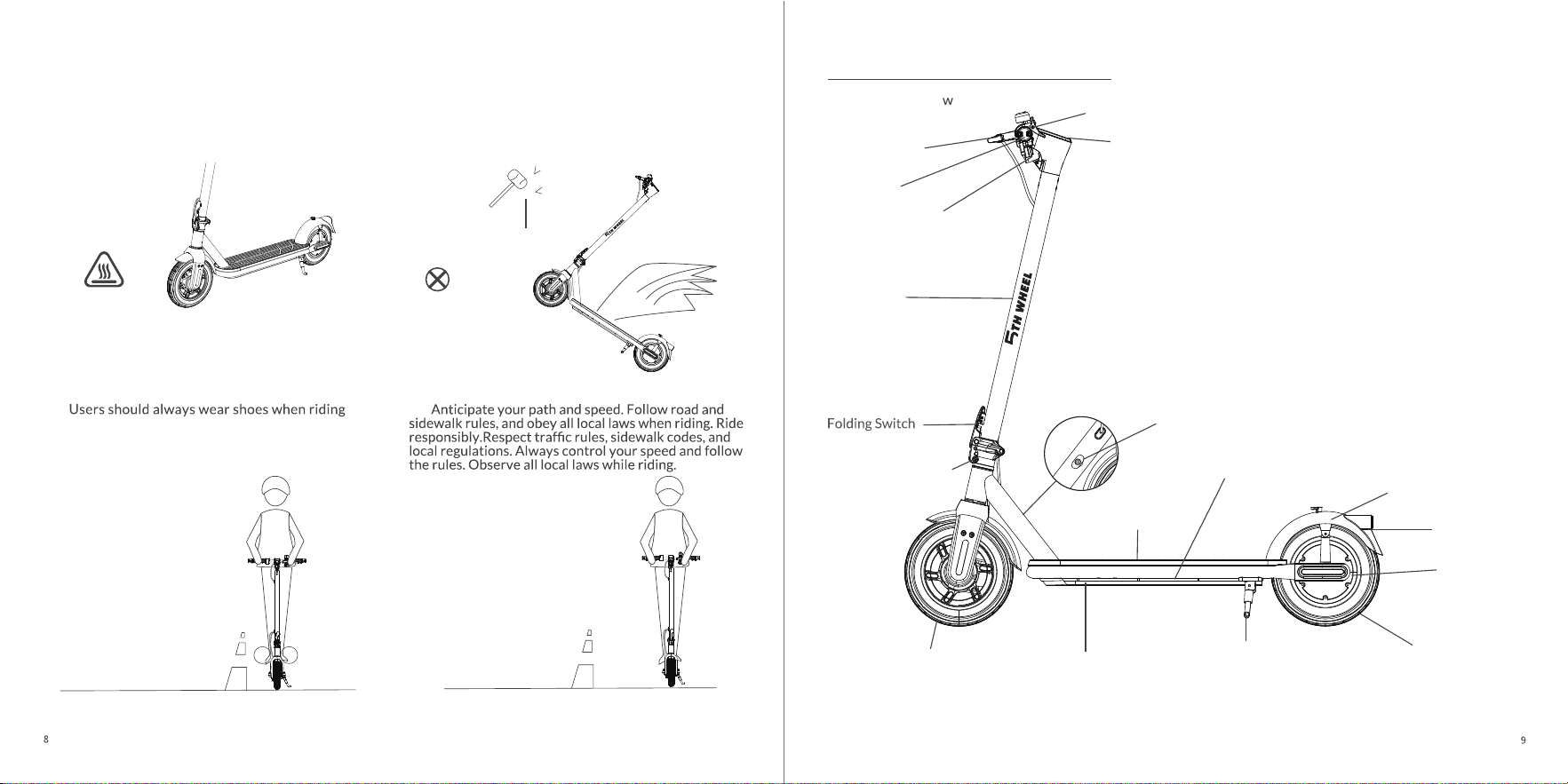
2 Introduction to Functions
1. Product Overvie
LED Display
Rear Disc Brake
Folding Mechanism
Folding Buckle
Turn Signal
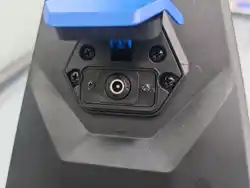
Charging Port
Kickstand
Built-in Lithium Battery
Rubber Pedal
Taillight
Rear Fender
Hub
Motor
LED Headlight
*The accessories and any additional items which are not approved by the manufacturer shall not be used.
Scooter Bar
28.
26.Eliminate any sharp edges caused by use.Do not
modify or transform the vehicle, including the
steering tube and sleeve, stem, folding mechanism
and rear brake.
25.Caution, the brake may become hot in use. Do not
touch after use.
27.
the scooter.
Ambient lighting
10" pneumatic tires
10" pneumatic tires
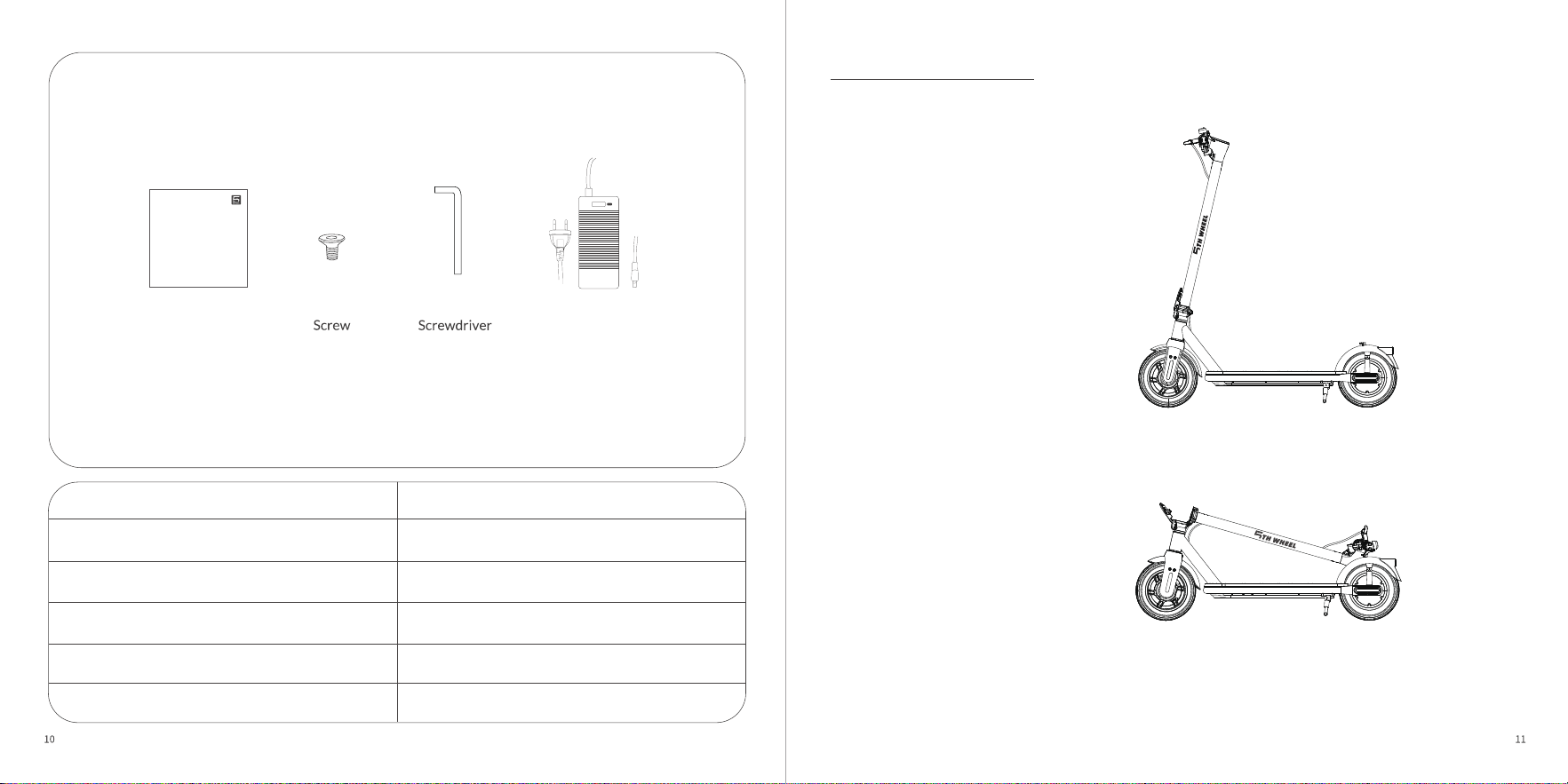
3 Product Display
User Manual
Power Adapter
1
Screwdriver 2
4
6
1
Product Contents Quantity
Accessories
Note: Please check out all the items in the package carefully. If anything is missing or
damaged, please contact email: service@ride5thwheel.com
M5*12 Screw
M5*16 Screw
Unfolded status
Power Adapter
Folded status
User Manual of 5TH WHEEL Electric Scooter
The picture is for referen ce only.
Before using the prod uct, plea se read this ma nual.
V1.0
IMPORTANT! Read carefully an d keep for futu re reference.
Manual
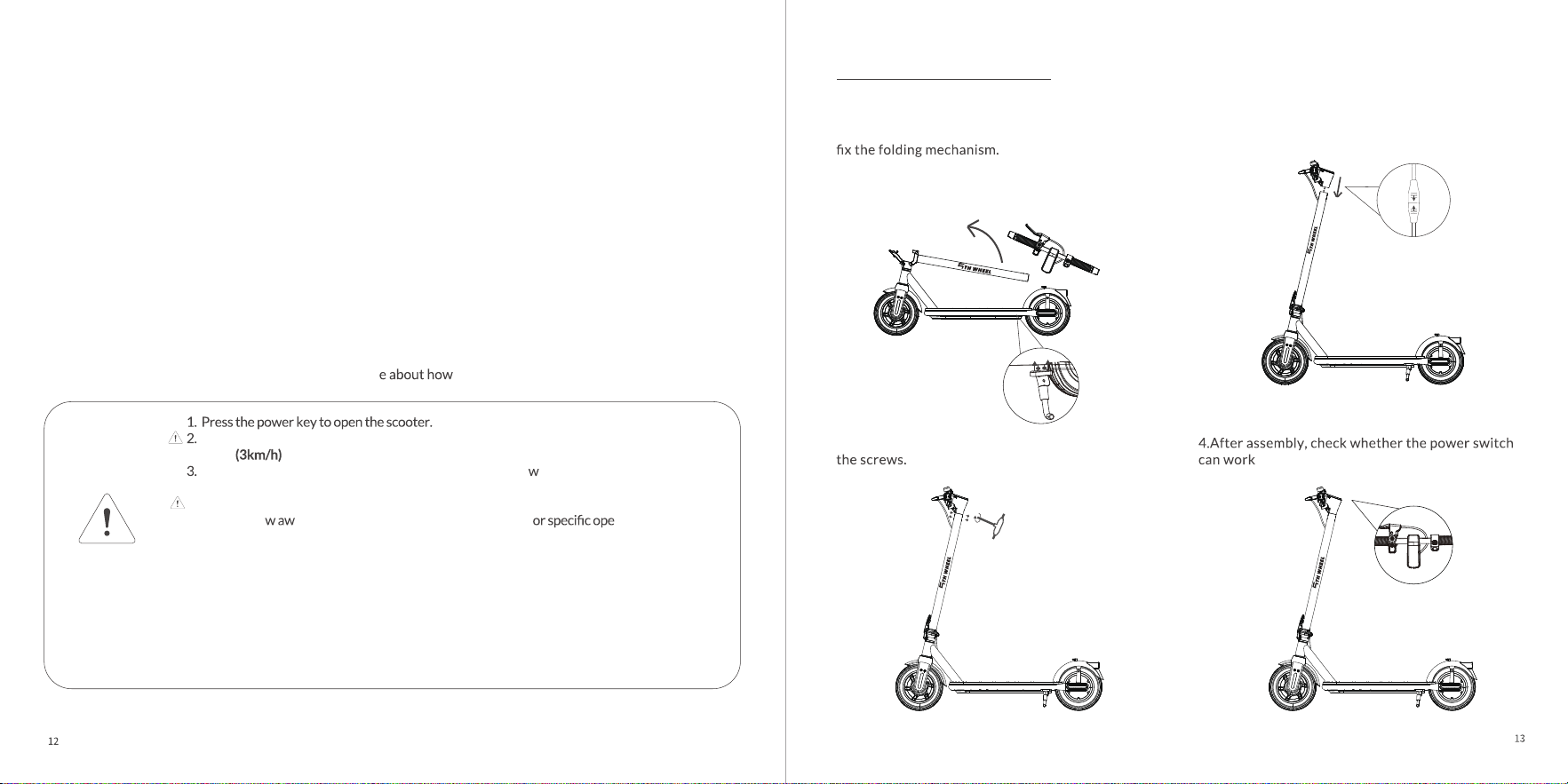
4 Scooter Assembly
2.Insert the handlebar into the scooter bar.
normally.
3.Use the tools included in the package to tighten
1.Take out the scooter, installthe kickstand with
the tool kit and unfold it. Then unfold scooter and
(Refer to"Folding and Carrying" for retails of
unfolding.)
This QR code is a video tutorial for product use. It is recommended to scan
this QR code to learn mor
to use the product.
For safety, the factory setting of scooter is non-zero start, you need to slide the scooter
to 2mph
, and the throttle can be used normally.
The scooter can be turned on normally and cannot ride in alking mode, but can only
be pushed.
4. Can't start when charging.
5. Do n
6.Devices are not intended for use at elevations greater than 2000 m above sea level.
7. Prolonged Exposure to UV Rays, Rain and the Elements May Damage the Enclosure
Materials,Store Indoors When Not in Use.
8.WARNING-Risk of Fire- No User Serviceable Parts.
AVERTISSEMENT - Risque d'incendie - Aucune des pièces ne peut être réparée par l'utilisateur.
9.WARNING - Risk of Fire and Electric Shock - Battery and/or battery components are not
user replaceable.
AVERTISSEMENT - Risque d'incendie et de décharge électrique - Les batteries ou leurs
composantsne peuventpas être remplacés par l'utilisateur.
ot thro ay the manual, please refer to the manual f rations.
Pay attention
Before assembly, please check
and make sure the line
connectors are properly
plugged in.
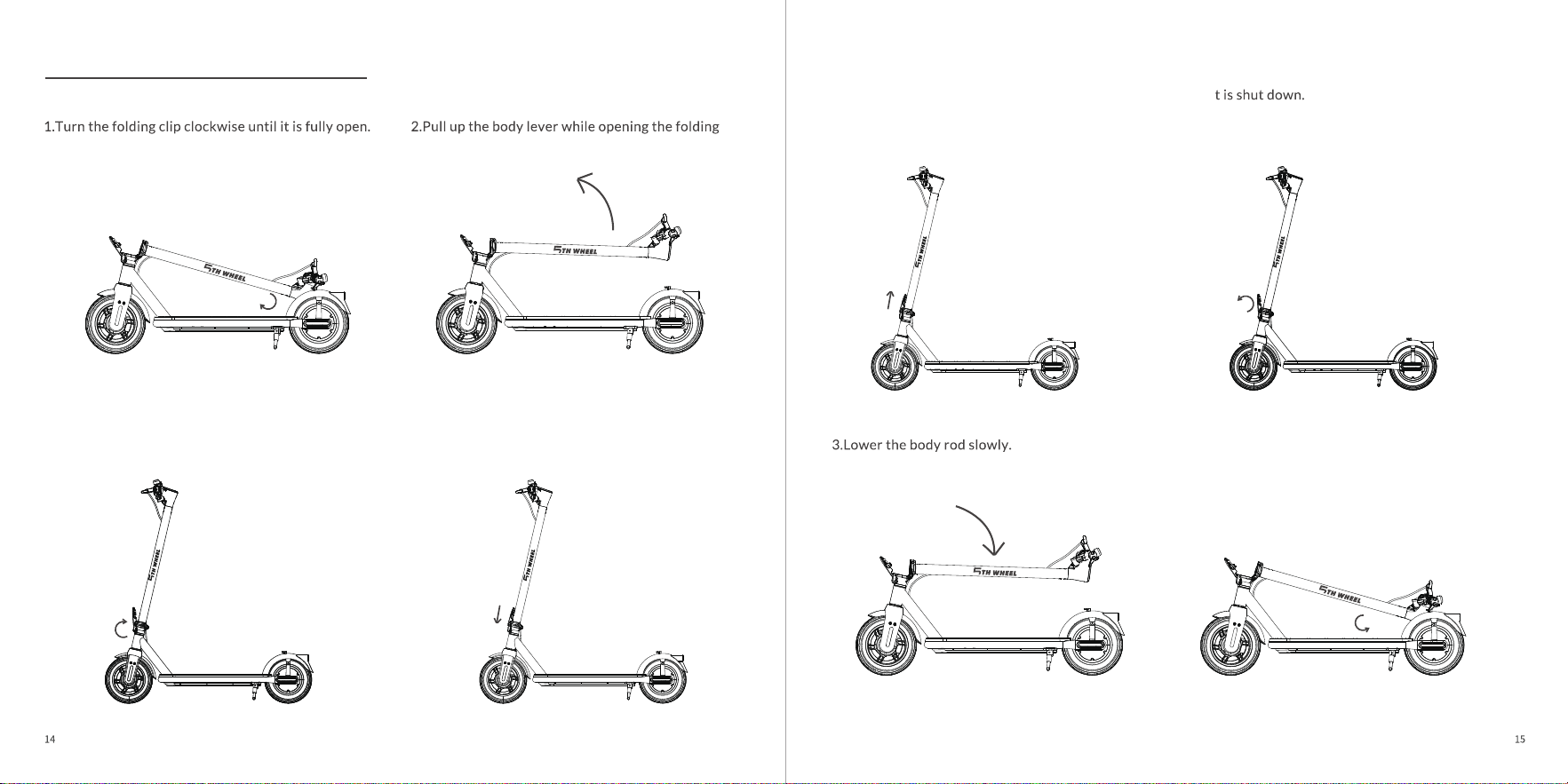
5 Unfolding/Folding/Carrying
clip.
1. Unfolding Operations
1.Lift the latch key up.
4.Open the folding clip and hang it on the rear fender
buckle.
Note: For safety, it is recommended to fold the scooter after i
2. Folding Operations
3.Turn the latch clockwise until it is fully snapped. 4.Check whether the latch key is returned to the
bottom.
2.Rotate the latch counter clockwise while lifting the
latch key.
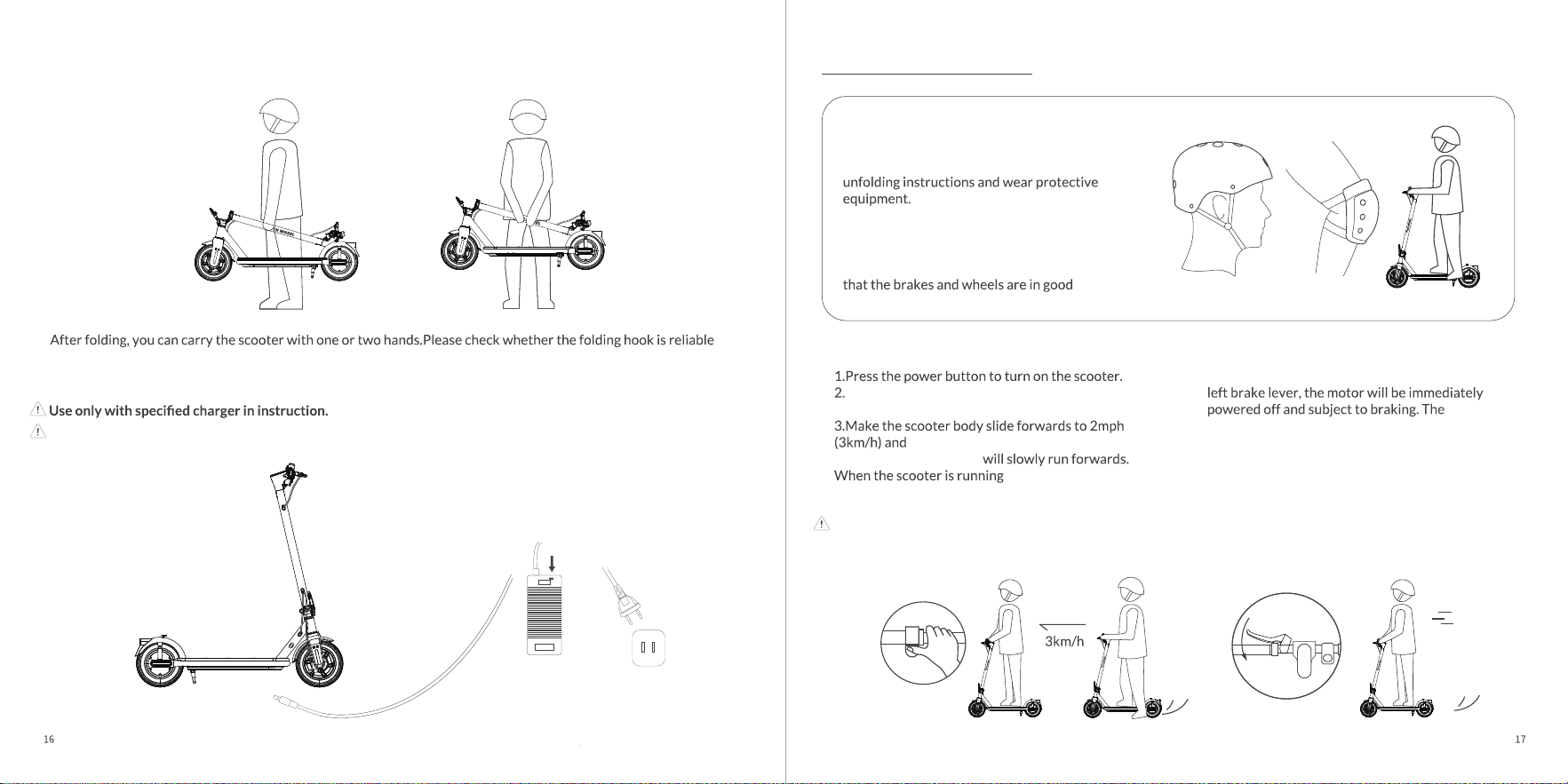
3. About Carrying
4. About Charging
before moving the scooter.
When the indicator light is red, it indicates that it is charging, and when fully charged, it will turn green. During
charging, the scooter cannot be opened and the charger needs to be unplugged to open it.
6 Riding and Parking
1.Select an appropriate riding place.
2.Unfold the scooter according to the
3.It is necessary to check that the steering
system is correctly adjusted, that all
connection elements (such as a folding system)
are correctly tightened and not broken, and
condition.
Put one foot on the footboard and the other foot on
the ground.
gently press the right thumb
accelerator. The scooter
steadily, put the other
foot onto the footboard. The larger holding angle of
the right thumb accelerator, the higher the speed.
Note: For the riding safety, The scooter has a
non-zero start mode. The accelerator cannot be
enabled until the body slides forwards for a certain
Under normal circumstances, if you hold the
greater the holding force, the greater the
braking force.
Preparation for riding
Riding Stop
2mph
Red:Charging
Green:Charging completed
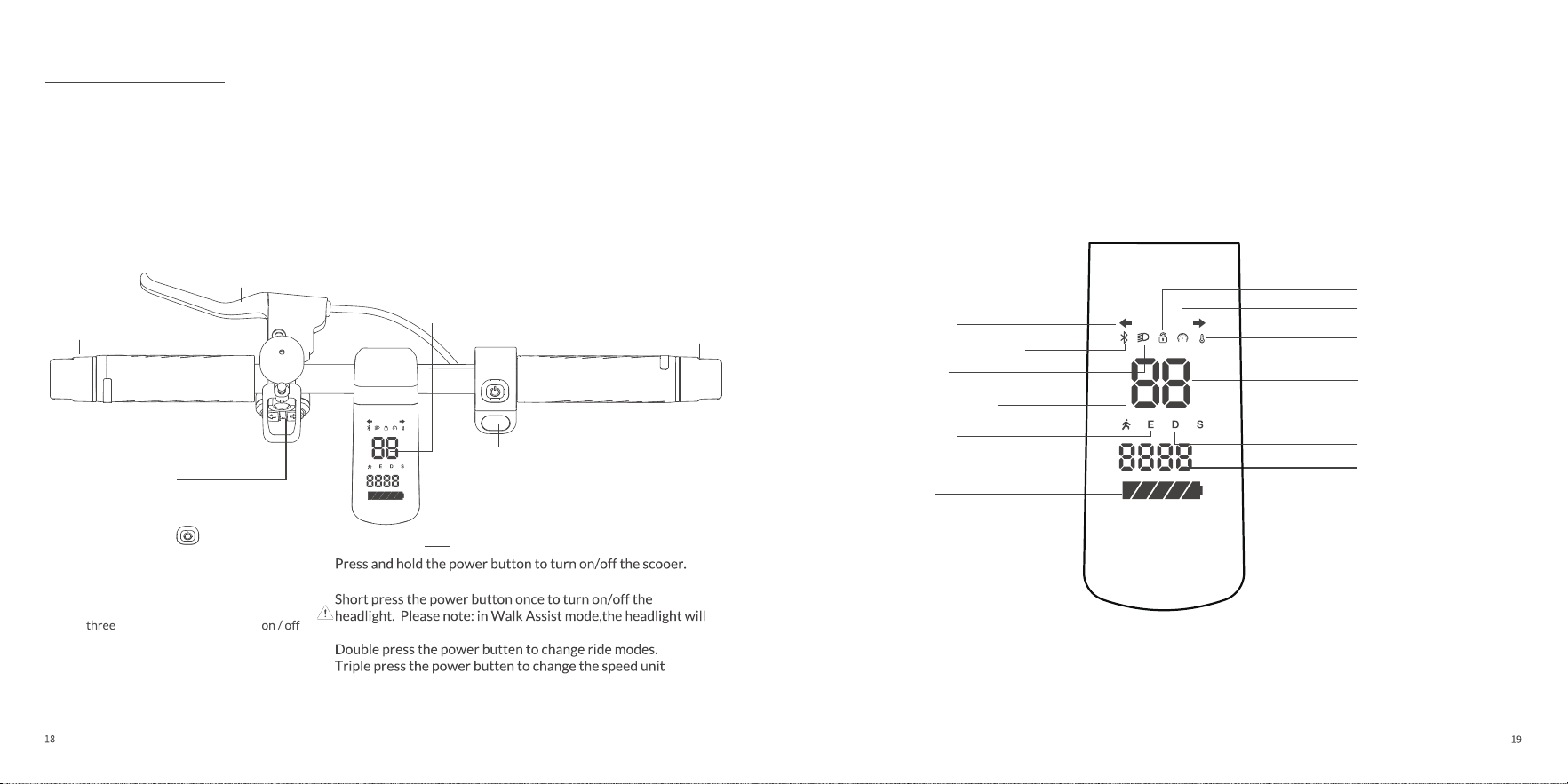
LED Display
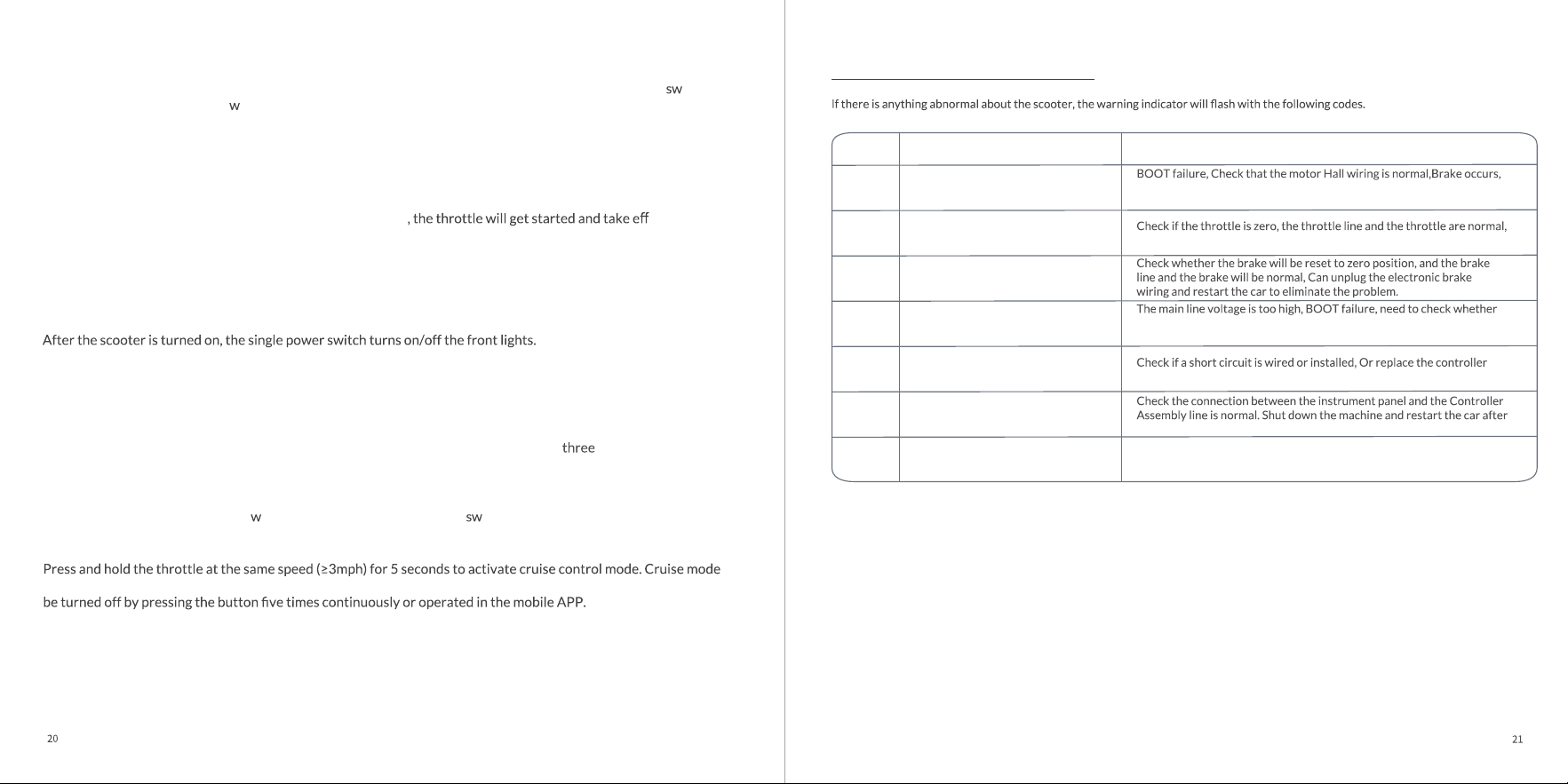
Real-Time Speed
Temperature
Pedestrian Mode
ECO Mode
Turn Signal
Battery
Headlight
7 Control System
Turn Signal
Turn Signal
Disc brake
Hold the left brake
handle. The greater
the pressure, the greater
the braking force.
Turn Signal Control
Short press the left/right button to turn
the left/right turn signal on/off;
Ambient Light Control
Press the power button six times continuously
to enter the ambient light switching mode, then
press left or right turn signal button to switch
light mode.
Hold the brake handle, then press the power
button
times continuously to turn
the ambient light.
•Ambient lighting can also be control and
customized in APP.
Thumb throttle
Real-Time Speed
Battery Level
Head Light
Bluetootn Connection
Turn Signal Indicators
Riding Modes: ECO(E) Drive(D)
Sport (S)
Walk Assist
Alerts/Error Codes
LED Display
automatically on and stay on for increased visibility and safety.
from mph>kmh.
While on:
Power Button
Mph
Km/h
TRIP
0D0
Mileage display
S Mode
Unlocked
Speed Indicator
D Mode
Bluetooth Connection
Mph
Km/h
TRIP
0D0
8 Indicator Description
Power Switch
Short press to turn on, long press to turn off;
Press the button once to turn on the headlight; Double press the button to shift the gear mode; Press the
itch
key three times continuously to s
itch the speed unit.
Gear Setting
Quickly press the power key twice to switch gears. Gears can be set to pedestrian mode, ECO mode, D mode
and S mode.
Speed Control
When riding the scooter at a speed faster than 2 mph(3km/h)
ect. By
pressing the throttle, the user can control the riding speed.
Brake Control
Hold the left brake handle. The greater the pressure, the greater the braking force.
LED Headlight
Turn Signal Control
Short press the left/right button to turn the left/right turn signal on/off.
Ambient Light Control
Press the power button six times continuously to enter the ambient light switching mode, then press left or right turn
signal button to switch light mode. Hold the brake handle, then press the power button
times continuously to turn
on / off the ambient light. These functions can also be set in the mobile APP.
Speed Unit Switching
After opening the vehicle, press the s
itch key three times continuously to itch the speed unit.
Cruise Mode
can be turned off by braking or re-pressing the throttle. The cruise control function is activated by default, which can
Zero Start
This function is off by default, which can be activated by pressing power button four times continuously or operated
in the mobile APP. After activation, you need to squeeze the brake once to start the vehicle.
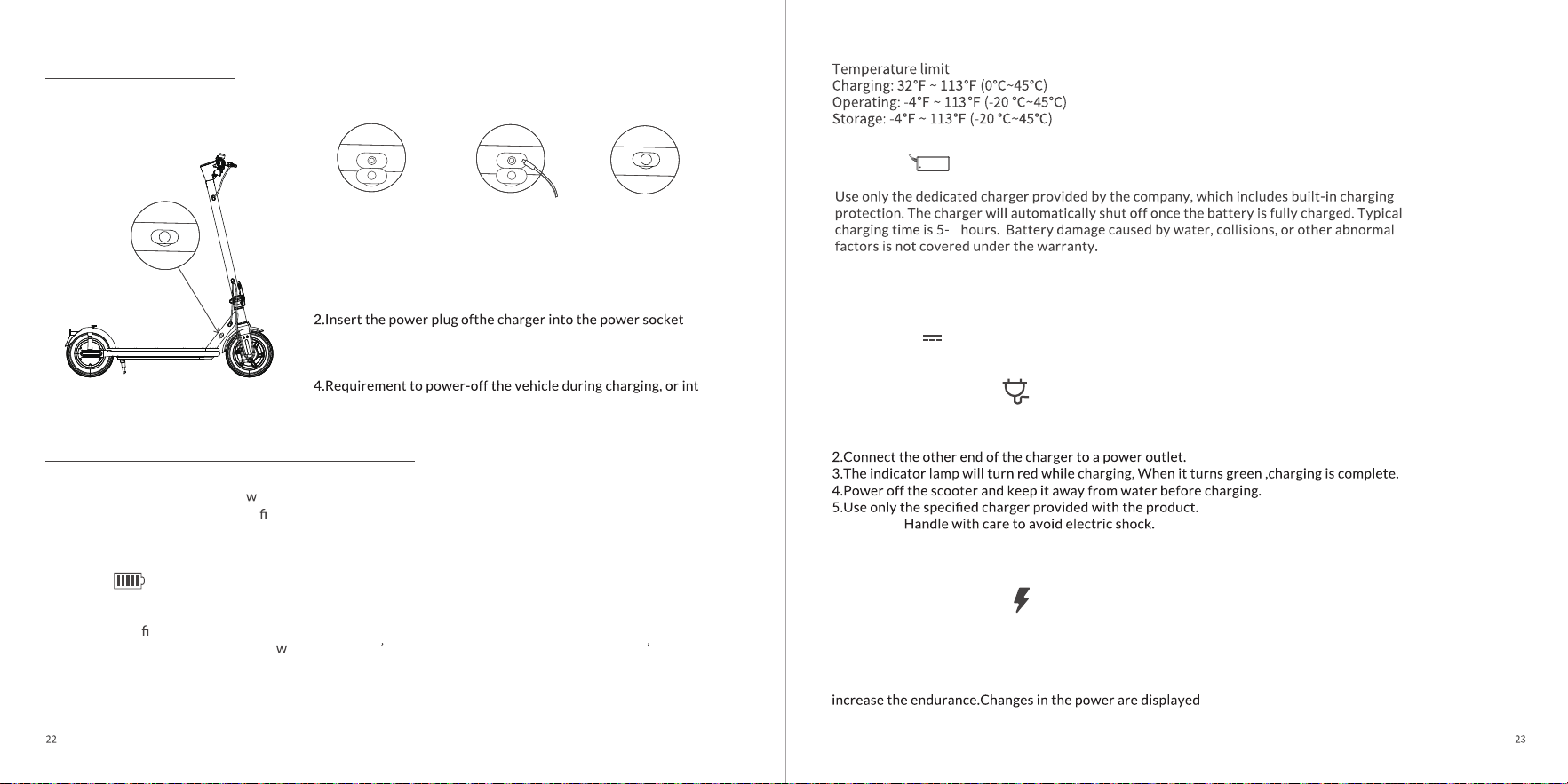
DescribeCodes Maintenance and treatment
E6
Short circuit fault
to troubleshoot.
E9
Motor Overheated
The motor temperature is too high. Allow the vehicle to cool down before
restarting. If restarting fails, replace the motor to resolve the issue.
E8
Instrument panel communication failed
the connection of the assembly line is replugged.
E2
Throttle Hall anomaly
Unplug the throttle cord and restart the car to troubleshoot the problem.
E3
Brake Hall anomaly
E1
Motor Hall anomaly
need to check the replacement of motor or controller to eliminate the
problem.
E5
Bus high voltage
the battery voltage is normal, cycling failure, need to replace the battery
or controller to remove the problem.
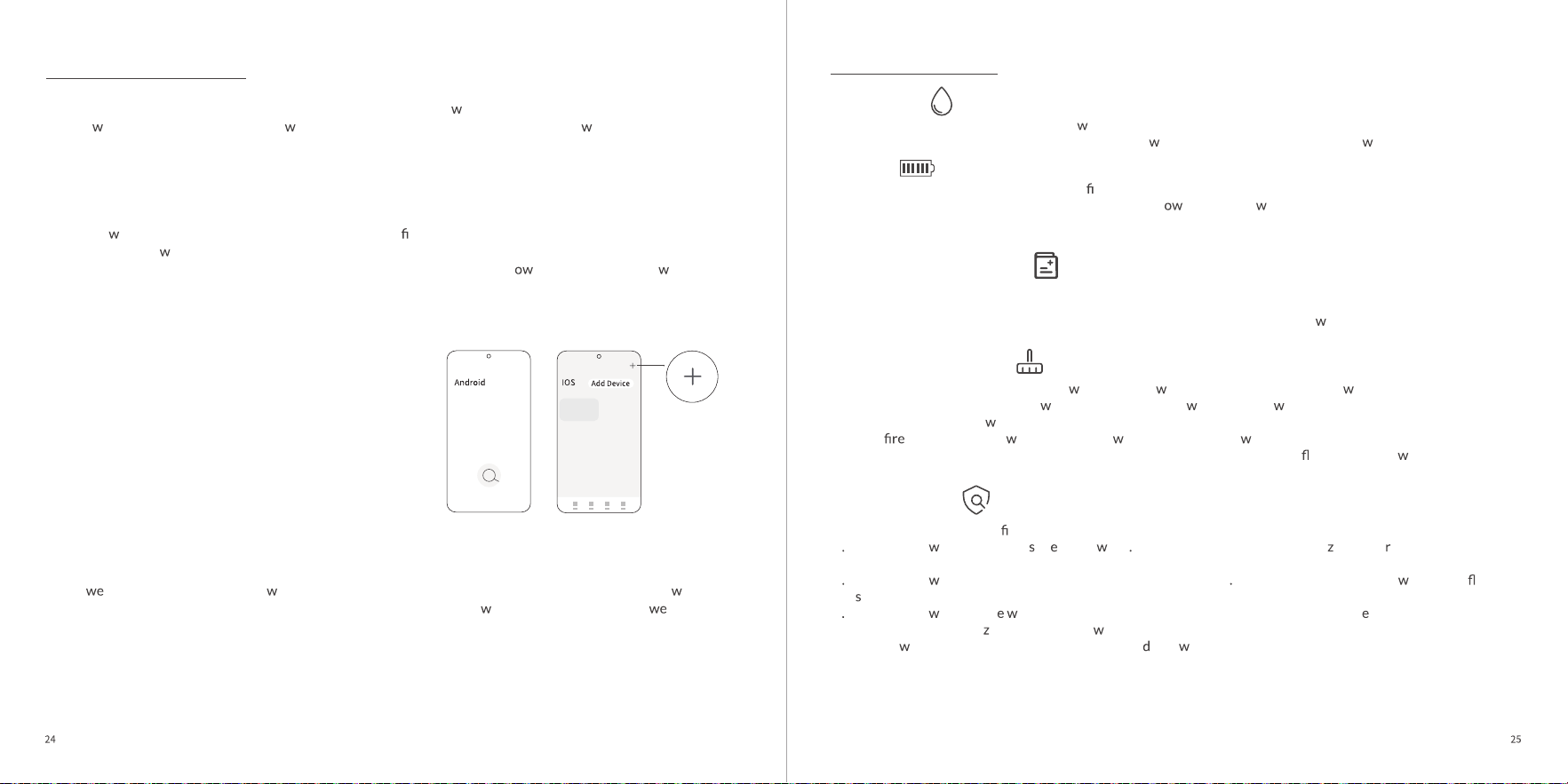
9 About Charging
Battery
10 About the Battery and Charger
Kinetic energy recovery
Remove the rubber
protective cover of the
charging port
After charging push
the rubber protective
cover back in
Connect the
charger.
1.Remove the rubber protective cover, and insert the charger
connectorinto the charging port of the body.
.
3.When the charger indicator is red, it indicates that the battery is
beingcharged. When the charger indicator turns green, it
indicates that thebattery has been fully charged.
o a
certainnon-operationalmode.
The electric scooter is equipped
ith a dedicated lithium battery and charger cable. Both the scooter and
its accessories have product identi cation numbers. It is forbidden to use the charger cable of other
brands. The charger cableprovided by the company must not be used for other purposes. The company is
not responsible for the resultant damage to the battery or charger.
The lithium battery provided by the company can be recharged for at least 300 times. Please charge full
battery for the
rst time before using it. The battery can be charged at any time, and there is no any
damage to charge it frequently. Mean
hile, please don t forget to charge it per 3 months if you don t use it
for a long term.
1.Open the rubber cover and insert the charging plug into the port.
6.Warning:
Press the brake in the running processto enable the kinetic energy recovery system and convert part of
kinetic energy into electrical energy to be stored and used. The kinetic energy recovery system can
enhance the experience of emergency braking. At the same time, the recovered kinetic energy can help
simultaneously.
6
Charger
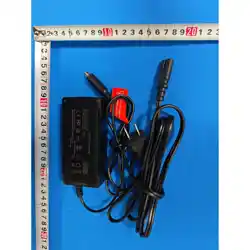
Production factory: SHENZHEN XIN SHENG LI POWER SUPPLY TECHNOLOGY CO.,LTD.
MODEL: XSL065-4200150
INPUT: 100-240V~50/60Hz 1.5A
OUTPUT:42V 1.5A
Charging instructions
11 App Description
We pay great attention to user experience and constantly inject ne functions into the App, so the App UI may
change ith version updating. The follo ing contents are for reference only, please follo the instructions
based on the current App version.
1.1. Please use your mobile phone to scan the QR
code to do nload the App, or search "5thWheel" in
the app store to do nload and install it. If you have
installed the App, please ensure it is the latest
version.
2. 2. Open the App, complete the registration for the
rst time use. After registering, please login to the
homepage, tap "+" on the upper right or Search Devices
button in the mid-l
er section, then follo prompts
to add your scooter. If you fail to scan, please ensure
your Bluetooth and scooter are on,and try again.
Special note: About the locking function, it can only ensure that the scooter can't run normally. Due to the
light
ight of the scooter and the hole scooter is composed of mechanical parts, it can be removed ith
corresponding tools. To prevent your electric scooter theft, suggest al
ays park your scooter in a ll-lit
and highly visible area for you, or invest in a high-quality and sturdy lock that can keep it securely locked
up.
12 Maintenance
Lubrication
For maintenance, add a small amount of
hite grease or lubricant to the folded part once every six months.
Check the scooter once every three months for scre loosening. Tighten the loose scre .
Battery
When you get the electric scooter for the rst time, please fully charge the battery before using the scooter.
The battery can be charged at any time to ensure the p er supply. It ill not be damaged during charging.
When not in use, the battery needs to be charged once every three months.
*Laboratory data
Storage and daily maintenance
Avoid leaving scooter under direct sunlight or in severly humid places for a long time.
Keep the scooter clean.
Regularly check the tightening of the various bolted elements, in particular the
heel axles, the folding system,
the steering system and the brake shaft.
Cleaning Recommendations
If you see stains on the scooter's body,
ipe them off ith a damp cloth. If the stains on't scrub off, put on
some toothpaste, and brush them
ith a toothbrush, then ipe them off ith a damp cloth.
Do not clean the scooter
ith alcohol, gasoline, kerosene or other corrosive and volatile chemical solvents to
prevent damage. Do not ash the scooter ith a high-pressure
ater spray. During cleaning, make sure
that the scooter's turned off, the charging cable is unplugged, and the rubber ap is closed as ater leakage
may result in electric shock or other major problems.
Routine Inspection
1. Before riding, please con
rm the folding mechanism is locked;
2 Please check hether the tire ar badly orn Please contact the local authori ed deale if they needs to be
replaced;
3 Please check hether the tire pressure is at the standard value If the tire pressure is too lo , please in ate the
tire
immediately;
4
Please check hether th ear condition of the brake pad affects the use of the brak system. If so, please
contact the local authori
ed dealer to deal ith the problem;
5. The scre
s used in this product are self-tightene scre s. Please note that the effect may be gone after several
times of tightening.
6. WARNING – Risk of Fire and Electric Shock – No User Serviceable Parts.
7. Prolonged Exposure to UV Rays, Rain and the Elements May Damage the Enclosure Materials, Store Indoors
When Not in Use.
14 Authentication
WEEE needs to properly dispose of and recycle the product. This sign indicates that the product should not be disposed of
together ith other domestic aste throughout the EU.
Therefore, in order to prevent possible harm of uncontrolled aste treatment to the natural environment or human health,
it is necessary to recycle it and promote the sustainable reuse of material resources. To recycle the used product, use the
return and collection system or contact the retailer ho can use the product for environmentally safe recycling.
Batteries or battery compartments are marked in accordance ith the European Directive 2006/66/EC and the amendment
2013/56/EU on batteries and accumulator cells and scrap batteries and accumulator cells.
The directive applies to the recycling frame ork of aste batteries and accumulator cells throughout the EU. The label on
the battery indicates that the battery should not be discarded, but recycled at the end of its service life according to the
The EU Compliance Statement is as follo s:
EU Battery Recycling Information:
The product has passed the ANSI/CAN /UL-2272 certi cation of the CSA.
The battery complies ith the UN/DOT 38.3.
According to the Federal Communications Commission (FCC) Compliance Statement as follo s:
The product complies
ith part 15 of the FCC rules, and the operation must meet the follo ing t o conditions: (1) the product
should not cause harmful interference, and (2) the product must accept any received interference, including interference that
may lead to accidental operation. Any change or modi
cation not expressly approved by the responsible party may make void
the user s right to operate the product.
According to the European Directive 2006/66/EC and the amendment 2013/56/EU, batteries and accumulator cells are
labeled to indicate that they
ill be collected separately and recycled at the end of their service life. The label on the battery
may also contain the chemical symbols of the relevant metals in the battery (Pb, Hg and Cd). Users should not dispose of
batteries and accumulator cells as garbage, but use the collection frame
ork available to customers to recycle and dispose
of batteries and accumulator cells. With the engagement of users, it is important to minimi e any potential impact of
batteries and accumulator cells on the environment and human health due to the presence of potentially h
ardous
substances.
Before placing electrical and electronic equipment (EEE) into a aste collection stream or aste collection facility, users of
equipment containing batteries and/or accumulator cells must remove these batteries and accumulator cells for separate
collection.
Restriction of Ha
ardous Substances in Electrical and Electronic Equipment (RoHS) Directive
The products and parts (cables,
ires, etc.) of Invanti (Beijing) Technology Co., Ltd comply ith the requirements of
directive 2011/65/EU on restricting the use of certain h
ardous substances in electrical and electronic equipment ("RoHS
recasting" or "RoHS 2")
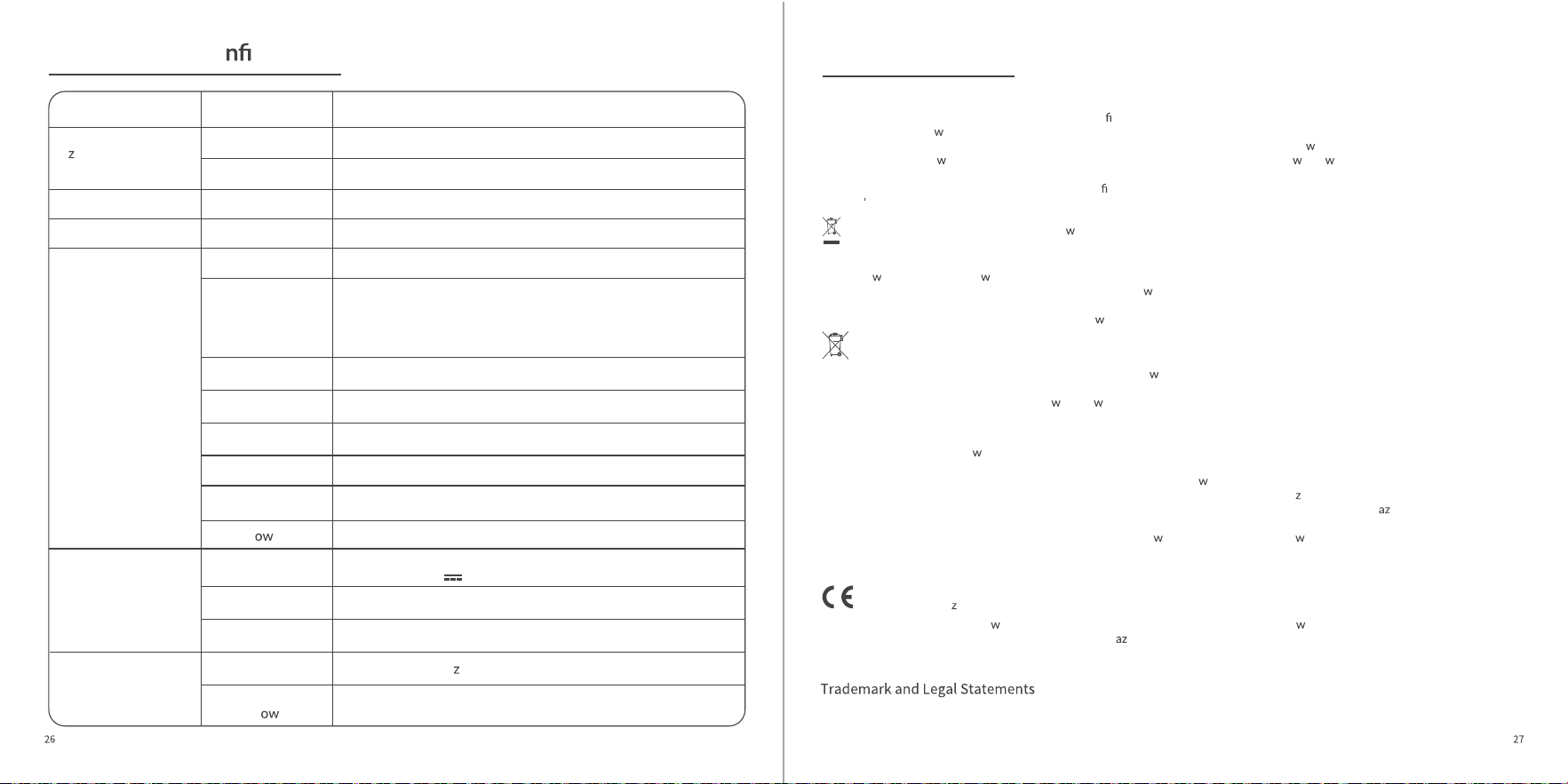
13 Parameter Co guration
Parameter
44.3x20.3x46.8 inch (1125x515x1190 mm)
Weight
Status
Main parameters
Disc brake+Electronic brake
5-6h
14~19miles (22~30km)
*Depending on the environment, angle, speed, driving habits
and other factors;
*Ambient light has a noticeable impact on battery range.
44.3x20.3x18.7 inch (1125x515x475 mm)
Range
10" pneumatic tires
Approx.21%
Speed, unit, gear, error, etc.
LED high-brightness headlight, taillight, turn signal, ambient
light
350W
Charging parameters
Wireless parameters
36VDC 7.8AH
Adapter
Wireless
Frequency Range
2402~2480 MH
Max 10dbm
Wireless Maximum
Output P
er
Input: 100-240VAC 50/60Hz 1.5A
Output: 42.0V 1.5A
Folded: L x W x H
Load Range 110~265 lbs (50~120kg)
Max Speed 20mph (32km/h)
Tire
Net Weight
Upright: L x W x H
Brake System
Display
Lighting System
Motor P
er
Charging Time
Lithium Battery
31.7lbs (14.4kg)
Model AURAPRO
Si
e
Max Incline
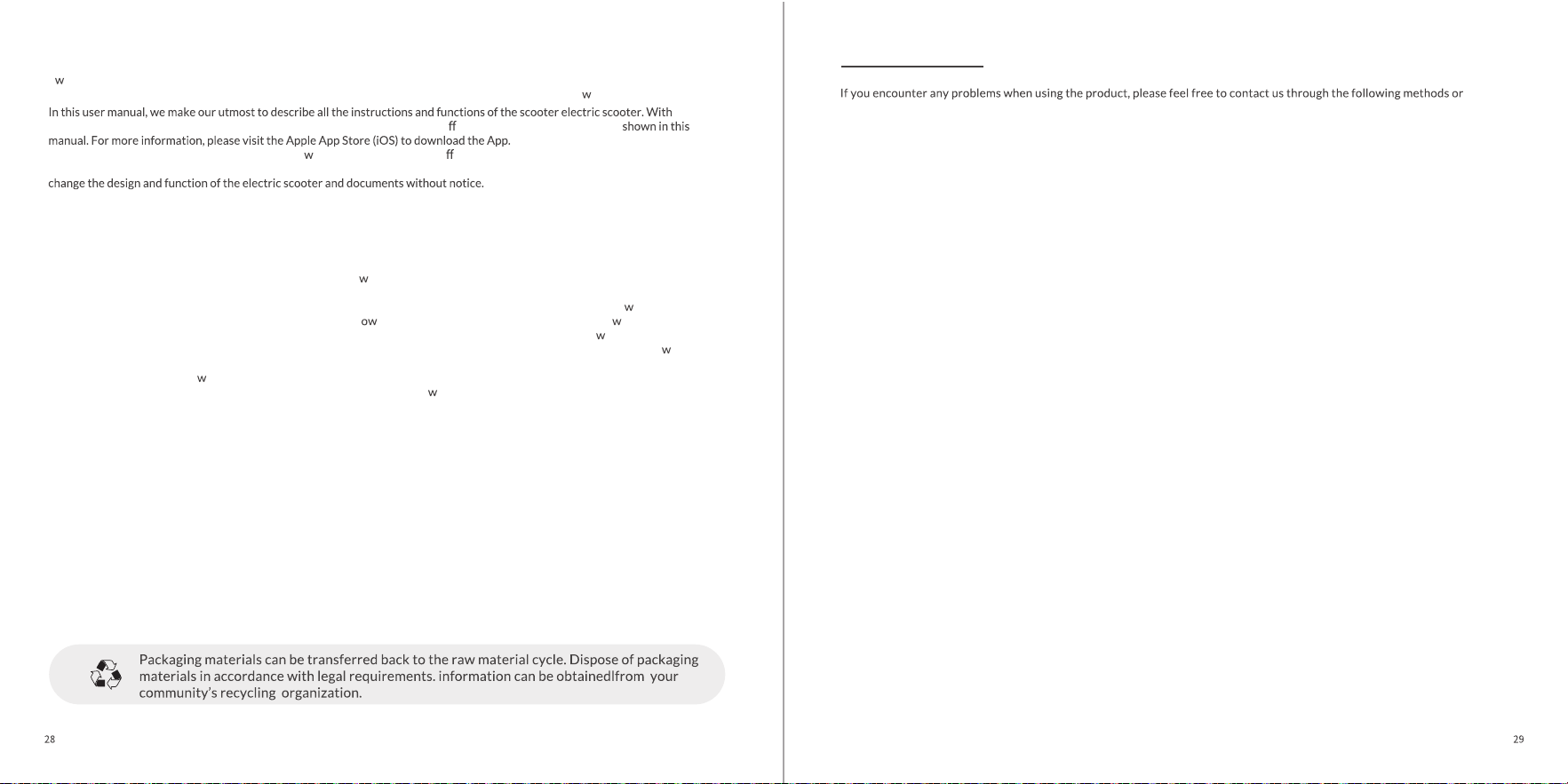
5TH WHEEL and the 5TH WHEEL logo are trademarks of Invanti (Beijing) Technology Co., Ltd,used under license.
Android and Google Play are trademarks of Google Inc. and the App Store is the service mark of Apple Inc. Their respective
o ners reserve the trademark rights mentioned in this user manual.
The products involved in the registered trademark of 5TH WHEEL are protected by relevant patent la s.
constant updates and iteration, the electric scooter received may be slightly di erent from the product features
Please note that Invanti has developed products ith many functions and di erent models of products, and some of the
functions mentioned here may not be applicable to the product or equipment received. The manufacturer reserves the right to
2026 Invanti (Beijing) Technology Co., Ltd all rights reserved.
scan the QR code to get a quick response and a satisfactory solution
FCC 15.21 Information to user
Please note that changes or modifcations not expressly approved by the party responsible for compliance could void the user's
authority to operate the equipment.
FCC 15.105 Information to the user(Class B)
Note: This equipment has been tested and found to comply
ith the limits for a Class B digital device, pursuant to part 15 of the FCC
Rules. These limits are designed to provide reasonable protection against harmful interference in a residential installation. This
equipment generates,uses and can radiate radio frequency energy and,if not installed and used in accordance
ith the instructions,
may cause harmful interference to radio communications.H ever, there is no guarantee that interference ill not occur in a
particular installation. f this equipment does cause harmful interference to radio or television reception, hich can be determined by
turning the equipment off and on. the user is encouraged to try to correct the interference by one or more of the follo ing measures:
-Reorient or relocate the receiving antenna.
-Increase the separation bet
een the equipment and receiver.
-Connect the equipment into an outlet on a circuit different from that to hich the receiver is connected.
-Consult the dealer or an experienced radio/TV technician for help.
This device contains licence-exempt transmitter(s)/receiver(s) that comply with Innovation, Science and Economic Development
Canada's licence-exempt RSS(s). Operation is subject to the following two conditions:
This device may not cause interference.
This device must accept any interference, including interference that may cause undesired operation of the device.
*RF warning for Mobile device:This equipment complies with IC radiation exposure limits set forth for an uncontrolled environment.
Cet appareil contient des émetteurs/récepteurs exemptés de licence qui sont conformes aux RSS exemptés de licence d'innovation,
sciences et développement économique Canada. Le fonctionnement est soumis aux deux conditions suivantes:
1.Cet appareil ne peut pas causer d'interférences.
2.Cet appareil doit accepter toute interférence, y compris les interférences qui peuvent causer un fonctionnement indésirable de
Aftersales QR Code Unbox QR Code
Disposal
15 Contact US
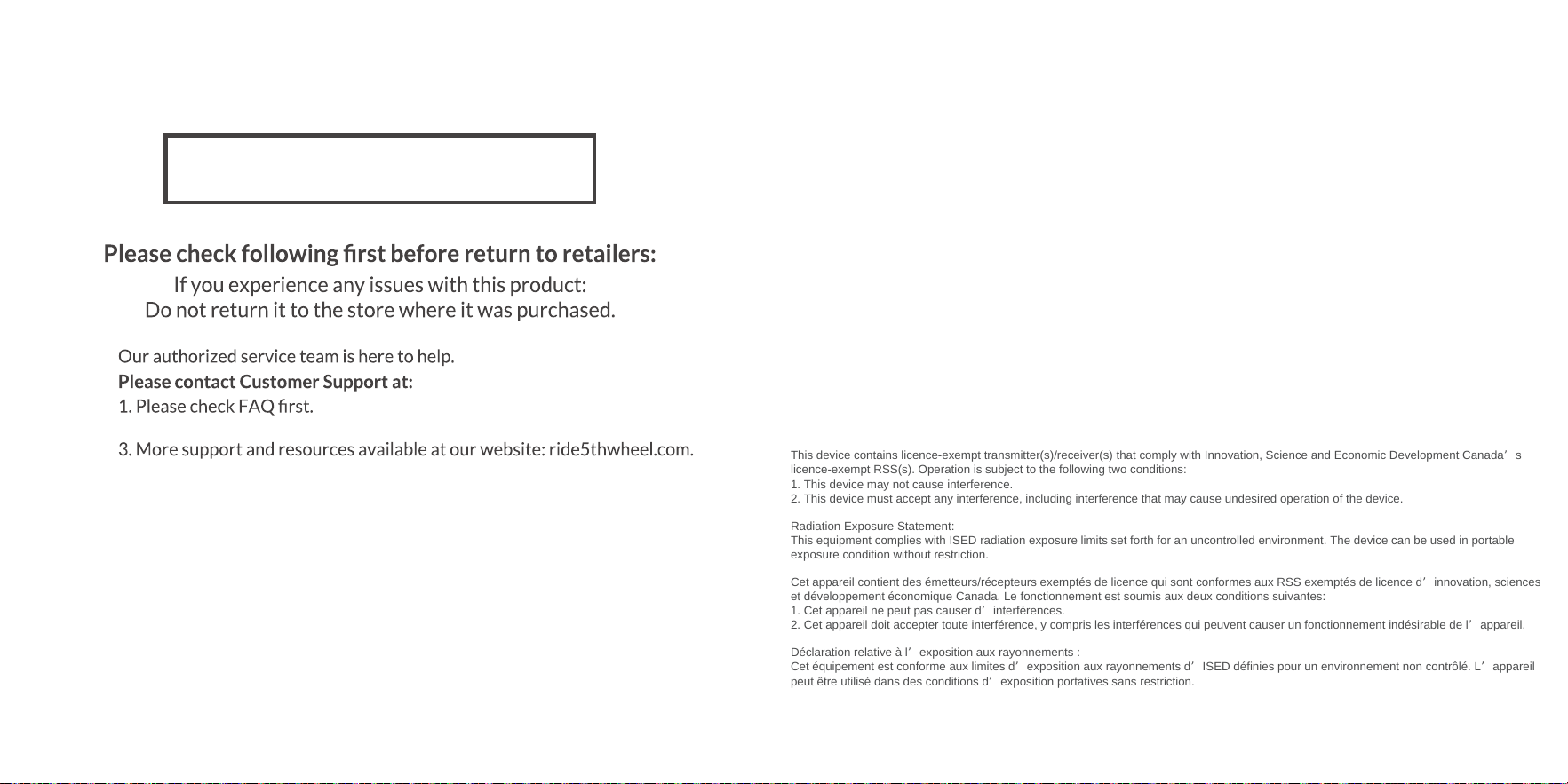
FCC STATEMENT
1. This device complies with Part 15 of the FCC Rules. Operation is subject to the following two conditions:
(1) This device may not cause harmful interference, and
(2) This device must accept any interference received, including interference that
may cause undesired operation.
2. Changes or modifications not expressly approved by the party responsible for compliance could void the user's authority to operate the
equipment.
NOTE: This equipment has been tested and found to comply with the limits for a Class B digital device, pursuant to Part 15 of the FCC Rules.
These limits are designed to provide reasonable protection against harmful interference in a residential installation.
This equipment generates uses and can radiate radio frequency energy and, if not installed and used in accordance with the instructions, may
cause harmful interference to radio communications. However, there is no guarantee that interference will not occur in a particular installation.
If this equipment does cause harmful interference to radio or television reception, which can be determined by turning the equipment off and
on, the user is encouraged to try to correct the interference by one or more of the following measures:Reorient or relocate the receiving
antenna.
Increase the separation between the equipment and receiver.
Connect the equipment into an outlet on a circuit different from that to which the receiver is connected.
Consult the dealer or an experienced radio/TV technician for help.
RF warning statement:
The device has been evaluated to meet general RF exposure requirement. The device can be used in portable exposure condition without
restriction.
2. Email Address: [email protected]
Important Notice
FAQ QR Code
30
3
ISED STATEMENT
This device contains licence-exempt transmitter(s)/receiver(s) that comply with Innovation, Science and Economic Development Canada’s
licence-exempt RSS(s). Operation is subject to the following two conditions:
1. This device may not cause interference.
2. This device must accept any interference, including interference that may cause undesired operation of the device.
Radiation Exposure Statement:
This equipment complies with ISED radiation exposure limits set forth for an uncontrolled environment. The device can be used in portable
exposure condition without restriction.
Cet appareil contient des émetteurs/récepteurs exemptés de licence qui sont conformes aux RSS exemptés de licence d’innovation, sciences
et développement économique Canada. Le fonctionnement est soumis aux deux conditions suivantes:
1. Cet appareil ne peut pas causer d’interférences.
2. Cet appareil doit accepter toute interférence, y compris les interférences qui peuvent causer un fonctionnement indésirable de l’appareil.
Déclaration relative à l’exposition aux rayonnements :
Cet équipement est conforme aux limites d’exposition aux rayonnements d’ISED définies pour un environnement non contrôlé. L’appareil
peut être utilisé dans des conditions d’exposition portatives sans restriction.
1