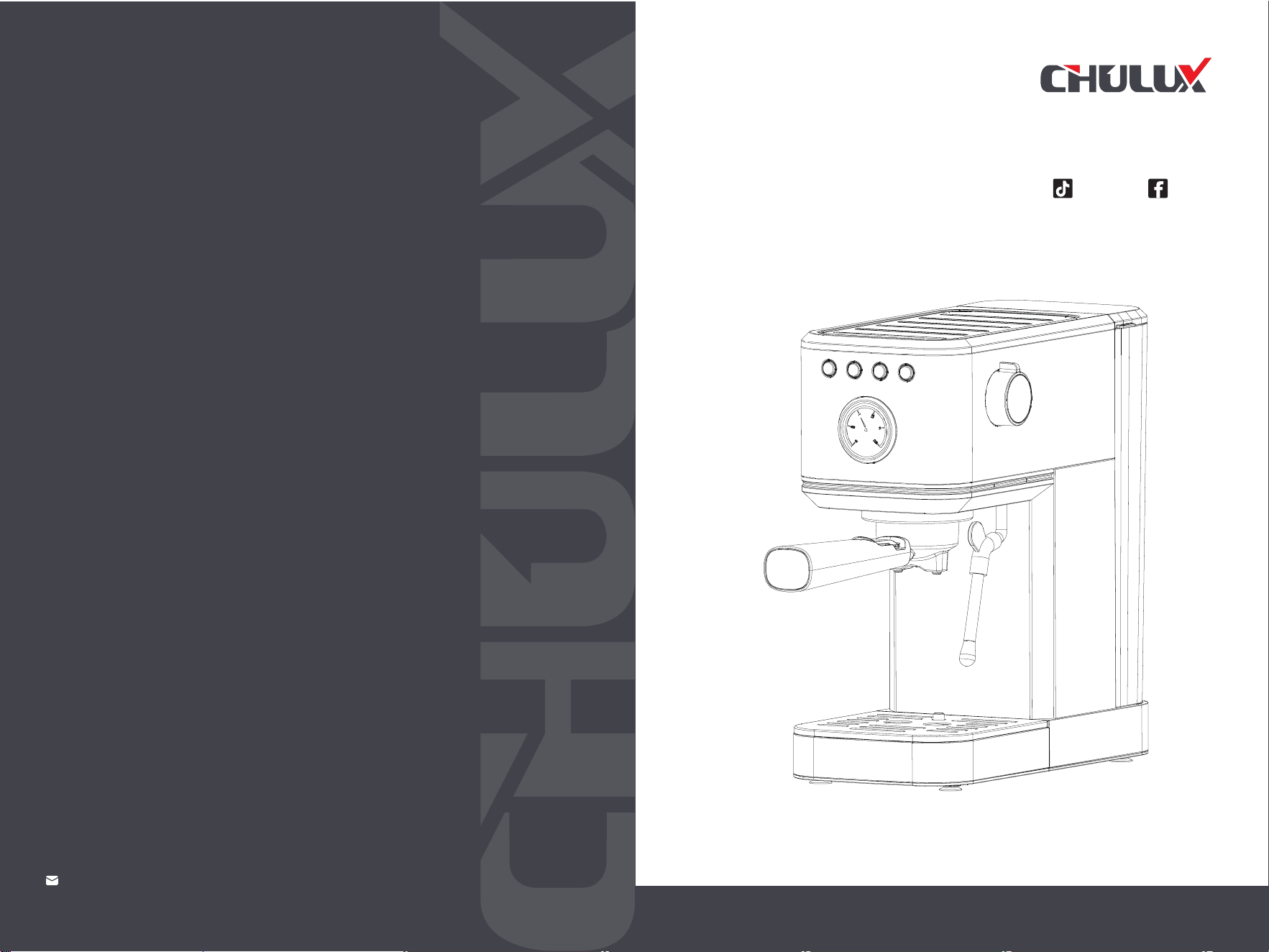
ESPRESSO
MACHINE
Model: JH-C5010
14
CUSTOMER SERVICE SUPPORT
Be A Better Coffee World
Chulux Css@Chulux01

Import Safeguards
Proudct Features
Before First Use
Espresso Making Guide
Milk Frothing Guide
Hot Water Guide
Cleaning & Maintenance
Trouble Shooting
Table of Contents
. . . . . . . . . . . . . . . . . . . . . . . . . . . . . . . . . . . . . . . . . 01
. . . . . . . . . . . . . . . . . . . . . . . . . . . . . . . . . . . . . . . . . . . . . . . 14
. . . . . . . . . . . . . . . . . . . . . . . . . . . . . . . . . . . . . . . . . . . 03
. . . . . . . . . . . . . . . . . . . . . . . . . . . . . . . . . . . . . . . . . . . . . . . . . . . 05
. . . . . . . . . . . . . . . . . . . . . . . . . . . . .
. . . . . . . . . . . . . . . . . .
07
High-temperature Alarm Guide
. . . . . . . . . . . . . . . . . . . . . . . . . . . . . . . . . . . . . . . . . . . . . . . 11
. . . . . . . . . . . . . . . . . . . . . . . . . . . . . . . .. . . . . . . . . . . . . . . . . . . . . . . . . . . . . . . . . . . . . . . . . 14
. . . . . . . . . . . . . . . . . . . . . . . . . . . . . . . . . . . . . . . . . . . . . . . 17
Maintenance & Service
. . . . . . . . . . . . . . . . . . . . . . . . . . . . . . . . . . . . .
. . . . . . . . . . 19
Guarantee
. . . . . . . . . . . . . . . . . . . . . . . . . . . . . . . . . . . . . . . . . . . . . . . . . . . . . . . . . . . . . . . . . . . . . . . . . . . . . . 19
Approval information
. . . . . . . . . . . . . . . . . . . . . . . . . . . . . . . . . . . . . . . . . . . . . . . 20
. . . . . . . . . . . . . . . . . . . . . . . . . . . . . . . . . . . . . . . . . . . . . . . . . . . . . . . . . . . . . . . . . . . . . . 12

1 2
Important Safeguards Important Safeguards
CAUTION:When using an electrical appliance, basic safety precautions
should always be followed to reduce the risk of fire, electric shock and/or
injury to persons, including the followings:
1.To ensure safety, please read the instructions carefully and grasp the correct
use method. Save these instructions booklet for future reference.
12.Regularly clean and maintain the coffee machine parts to ensure the
quality of coffee and extend the service life of the coffee machine.
13.Do not move or turn off the power when the coffee machine is working.
14.Do not operate without water.
15.Do not wash the coffee machine or power cord in water or other liquids.
16.Household use only , don’t use outdoors.
17.Before using the coffee machine for the first time, please boil it twice with
clean water to remove the odor.
18.The coffee machine shall not be placed in a cabinet when in working.
19.Cleaning and user maintenance shall not be made by children without
supervision.
20.This appliance can be used by children aged from 18 years and above if
they have been given supervision or instruction concerning use of the
appliance in a safe way and if they understand the hazards involved.
Cleaning and user maintenance shall not be made by children unless they
are older than 18 and supervised. Keep the appliance and its cord out of
reach of children aged less than 18 years.
21.Appliances can be used by persons with reduced physical, sensory or
mental capabilities or lack of experience and knowledge if they have been
given supervision or instruction concerning use of the appliance in a safe
way and understand the hazards involved.
22.Children shall not play with the appliance.
23.WARNING: Misuse may cause potential injury. The heating element
surface is subject to residual heat after use.
2.Before using, checks that the voltage of wall outlet corresponds to the rating
label on the bottom of coffee machine.
4.Close supervision is necessary when your appliance is being used near children.
5.To protect against fire, electric shock and injury to persons, do not put the
power cord and plug into water or any other liquid; Do not damage, over bend
or stretch the power cord; Do not place heavy objects on the cord.
6.Do not use the equipment in high temperature, high magnetic field and damp
environment. Do not put the coffee machine on a hot surface, near the fire source
or other electrical appliances, such as refrigerator.
7.Please do not turn on the machine when the wire or plug is damaged, the
coffee machine is out of order or damaged in any way, and return to the nearest
authorized service center for inspection and maintenance, or contact the dealer.
8.Please use original accessories.
9.This machine is only used for making coffee, do not use it for other purposes,
and keep it in a dry environment.
10.Place the coffee machine on a flat surface or on a table. Do not hang the
power cord on the edge of the table or countertop.
11.When operating the coffee machine, do not directly touch the hot parts on
the surface.
3.WARNING: The appliance must be earthed.
3 4
Product Features Product Features
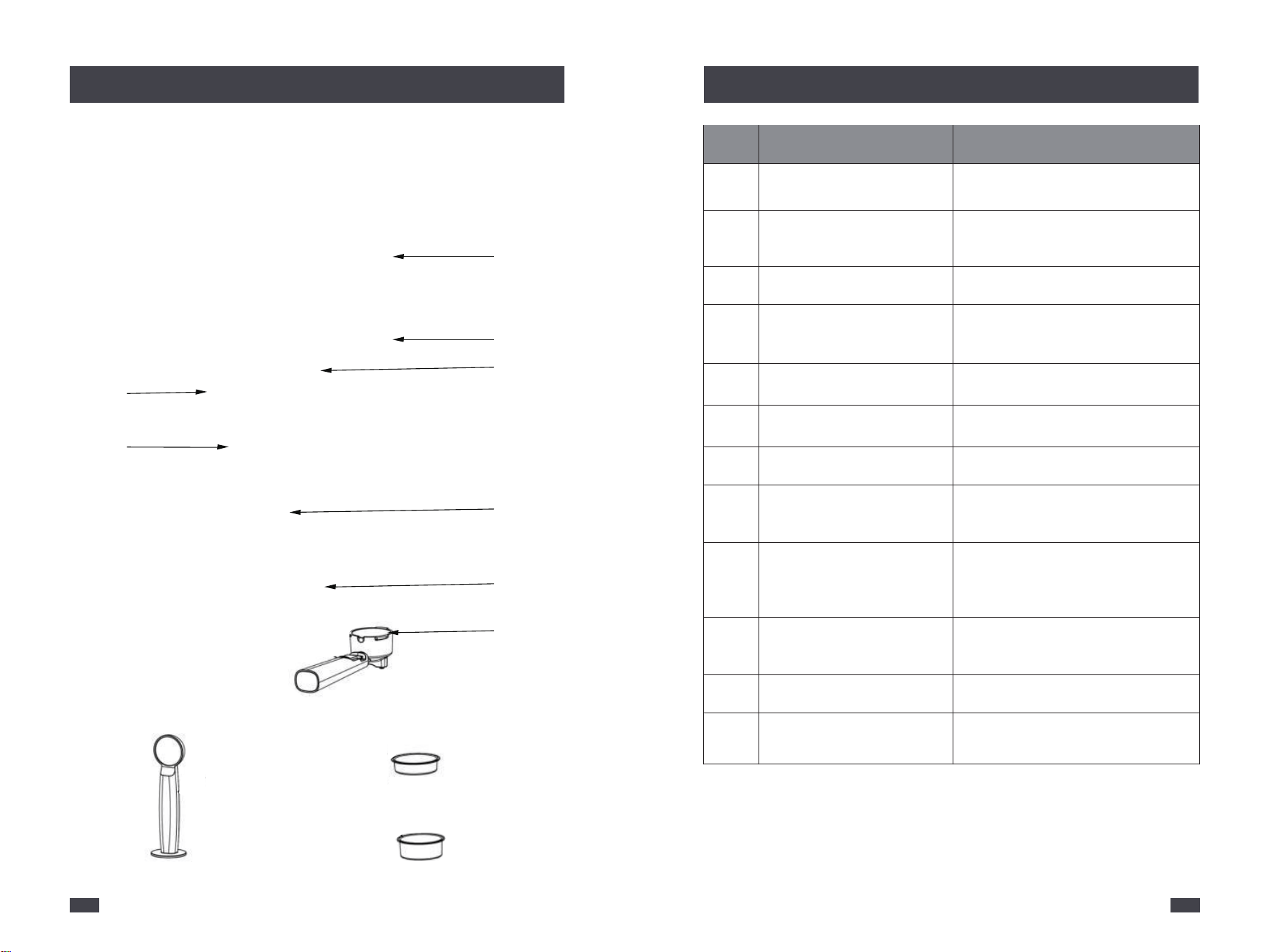
No.
1
2
3
4
5
6
7
8
9
10
11
12
Description
Tank Cover
Model: JH-C5010
Voltage: 120V~ 60Hz, 1350W
Removable Water Tank
Steam Control Knob
Power Button
Single Cup Button
Double Cup Button
Steam Button
Pressure Gauge
Steam Wand
Drip Tray
Group Head
Prevent dust or other objects falling
into the tank.
Push back the tank cover & fill with
cold water, or remove the water tank
by opening the cover.
Turn the knob to select steam and
hot water.
The power light is fixdly lighted when it
is warming up and ready.
Pours 1 cup of espresso then
automatically stops.
Pours 2 cup of espresso then
automatically stops.
Steam button is fixdly lighted when it
is steaming.
Monitors espresso extraction pressure
and allows you to make espresso to
better suit your taste.
Ball joint movement with silicone
cover, allows movement of the Steam
Wand to desired position without
burning fingers.
Includes a water level indicator that
floats through the grill to indicate the
tray is full and requires emptying.
For easy positioning of the portafilter.
Portafilter
The size for a more even water flow &
improved extraction taste.
Specification
1
2
3
8
11
9
10
12
Coffee Spoon & Tamper (50mm) Double Cup Filter (52mm)
Single Cup Filter (52mm)
4 5 6 7
5 6
Before First Use Before First Use
1.Remove Packaging
Ensure all packaging has been removed.
5.Power
6.Insert Portafilter
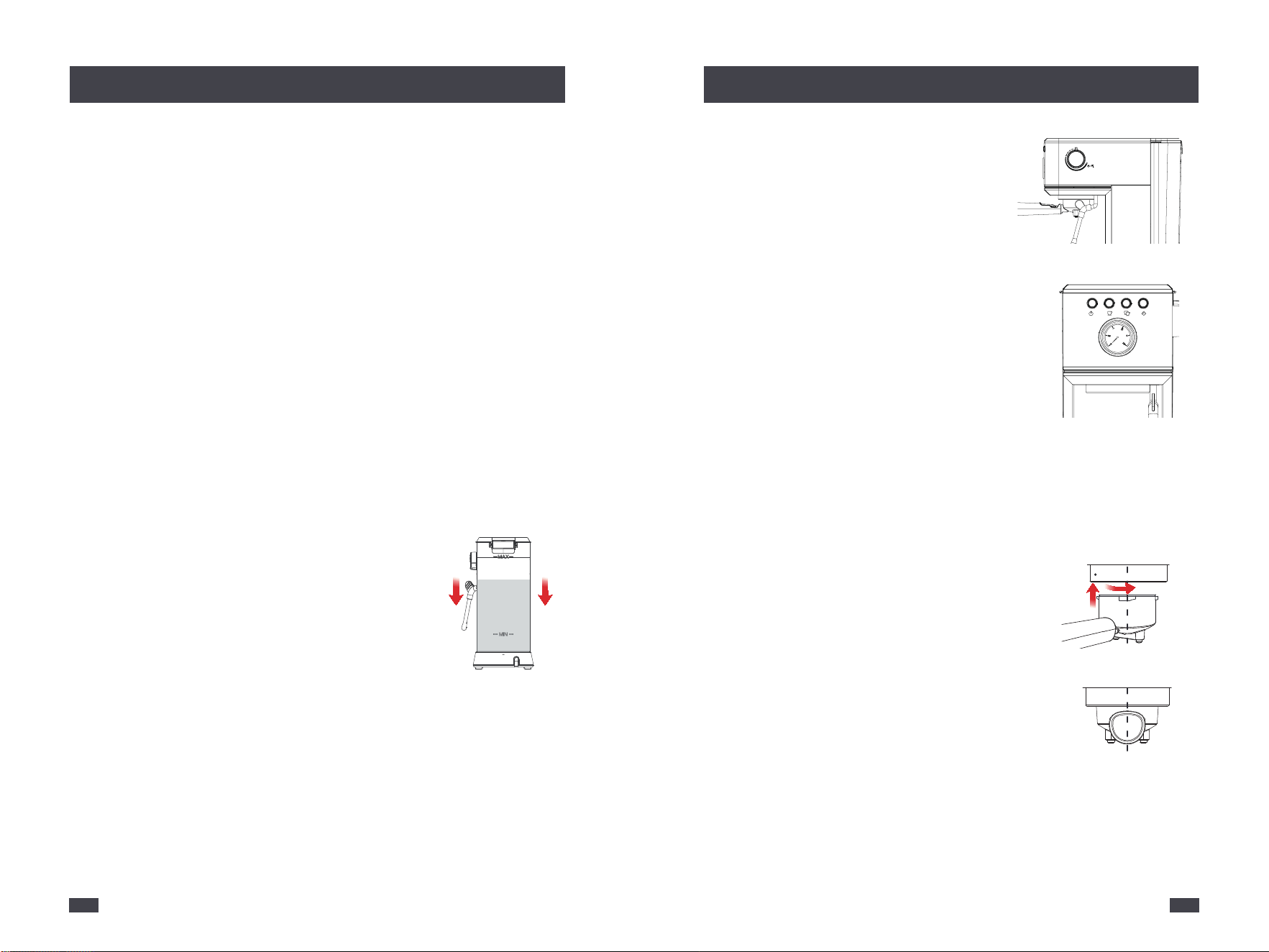
A. Make sure the steam control knob is in
OFF-position.
B. Insert the Power Plug into a 120V AC power
outlet.
C. Press the Power button to turn on the
machine.
- Both Single cup button and Double cup button
will illuminate & pulse to indicate the machine
is heating up.
- When the Power button, Single cup button
and Double cup button are solid on, the machine is in the READY state.
A. Align the marking dot on the filter with the
portafilter's groove, and then install the filter to
the portafilter, twist and fix the filter.
INSERT
CENTER
2.TURN
1.ALIGN
& INSERT
B. Hold the machine with one hand and the
portafilter with the other hand.
C. Place the portafilter underneath the group
head, so that the handle is aligned with the
INSERT position.
D.Insert the portafilter into the group head and rotate the handle
towards the center until resistance is felt.
Note: Turning the Portafilter to the center position might be tight for
the first few uses.
Note: If the knob is in ON-position, the four
lights will flash together and it will not work.
2.Position Machine
Ensure the espresso machine is always positioned onto a dry, stable, flat
horizontal counter top.
3.Wash & Dry Parts
4.Install Removable Water Tank
Wash the parts listed below in warm water, rinse & allow thorough air
drying:
A. Extract the water tank by pulling it upwards.
B. Open the lid and fill enough pure
water(recommended) in advance, but not exceed
the MAX line of the water tank, and do not add too
little water, otherwise when the water runs out the
water pump will make a loud noise and affect the coffee effect.
C. Set up the water tank vertically and align the buckles to the hole on
the back of the machine, and then press it down to be parallel to the top
of the machine.
Note: Do not clean or soak the portafilter in any descaling solution,
otherwise, it would be damaged.
Note: More simply, the water tank can also be filled without being
extracted by pouring the water directly from a jug.
- Stainless Steel Single Cup Filter - Portafilter
- Stainless Steel Double Cup Filter - Drip Tray
- Removable Water Tank - Coffee Spoon & Tamper
CENTRE
ON
OFF
7 8
Before First Use
Espresso Making Guide
7.Cleaning
Clean the Group Head
Clean the Steam Wand/Froth Nozzle
A. Put a container under the Group Head.
A. Position the Steam Wand over the Drip Tray,
or place a container with a minimum capacity of
3.4OZ(100ML) under the Forth Nozzle.
B. Turn the Steam Control Knob to the Steam/ Water
icon. Allow water to run through for 20 seconds.
C. Return the Steam Control Knob to OFF-position, and the machine will
return to the READY state.
B. Press the Double cup button, and water should start
flowing from the Group Head. Allow some water to
run through until the machine stops. The machine will
return to the READY state.
Espresso Making Guide
Operation
ON
OFF
ON
OFF
6
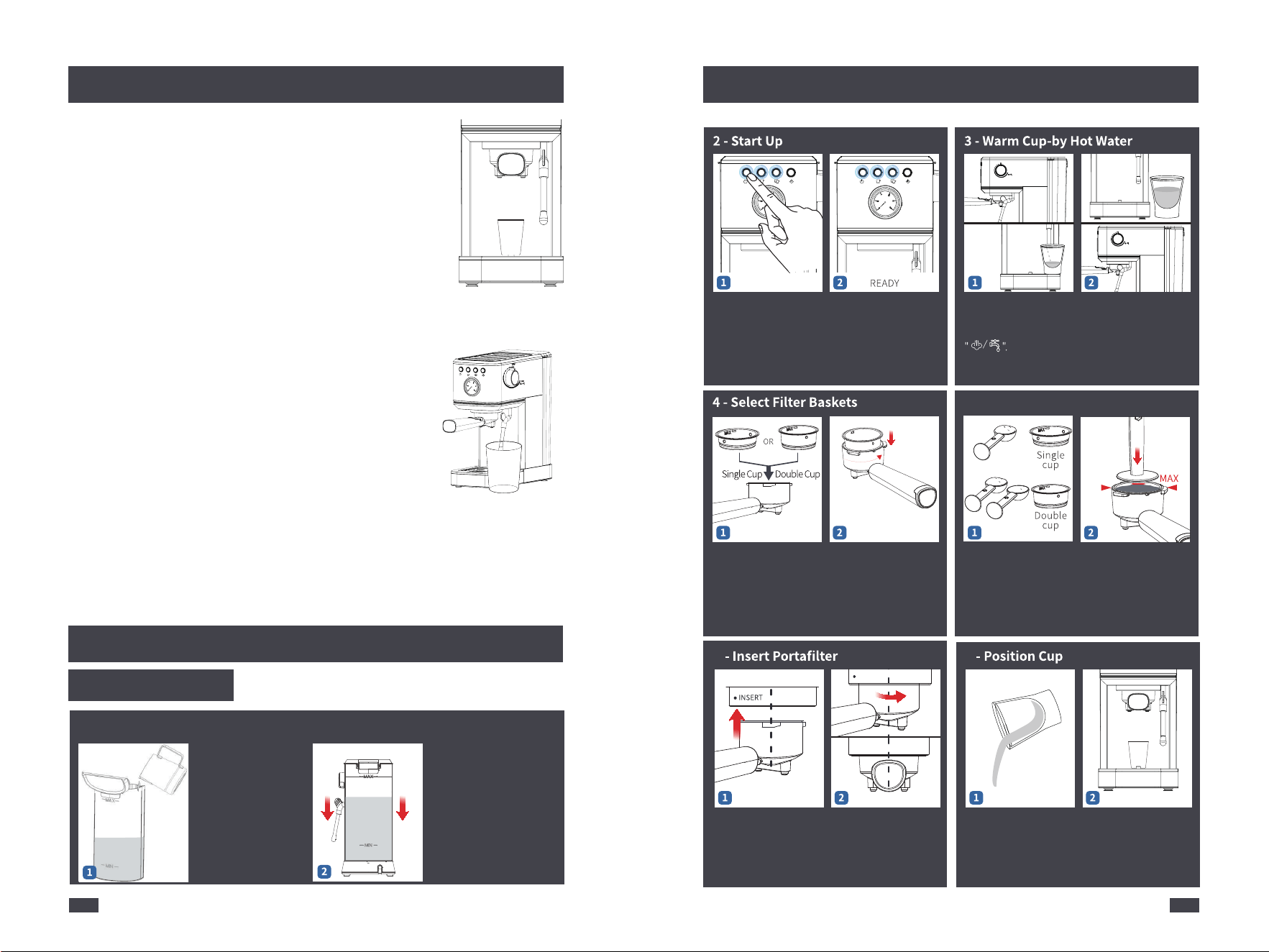
1-Check Water
7
Insert the Power Plug.
Press the Power button
to turn the machine on,
the Single cup & Double
cup button will illuminate
& pulse to indicate it's
heating up.
Both Power button,
Single cup & Double cup
button lights are fully
illuminated = Espresso
Machine is ready for use
Place a cup on counter
top and position Steam
Wand. Turn the knob to
Half fill the cup with
hot water to preheat
the cup. Return the
knob to OFF-position
Place a filter into the
portafilter. Select either
the Single Cup filter or
the Double Cup filter.
Align the marking dot on
the filter with the porta-
filter'sgroove, and then
install the filter to the
portafilter, twist and fix
the filter.
• One flat scoop of
ground for the Single
Cup Filter
• Two flat scoops of
ground for the Double
Cup Filter
Evenly tamp(press) the
grinds to level indicated.
Place the portafilter
underneath the group
head so that the handle
is aligned with the
INSERT position.
Extract the water tank by
pulling it upwards.Fill
the water tank with
clean and fresh water
(Do not exceed the
MAX line).
Set up the water tank
vertically and align the
buckles to the hole on
the back of the machine,
and then press it down
to be parallel to the top
of the machine.
Insert the portafilter into
the group head and
rotate the handle
towards the center until
resistance is felt.
Empty the cup. Position the cup on
the drip tray, under the
portafilter. Remove
the drip tray cover if
the cup is too tall.
Around 30S Heat Up
CENTER
5 - Spoon & Tamper
TURN
9 10
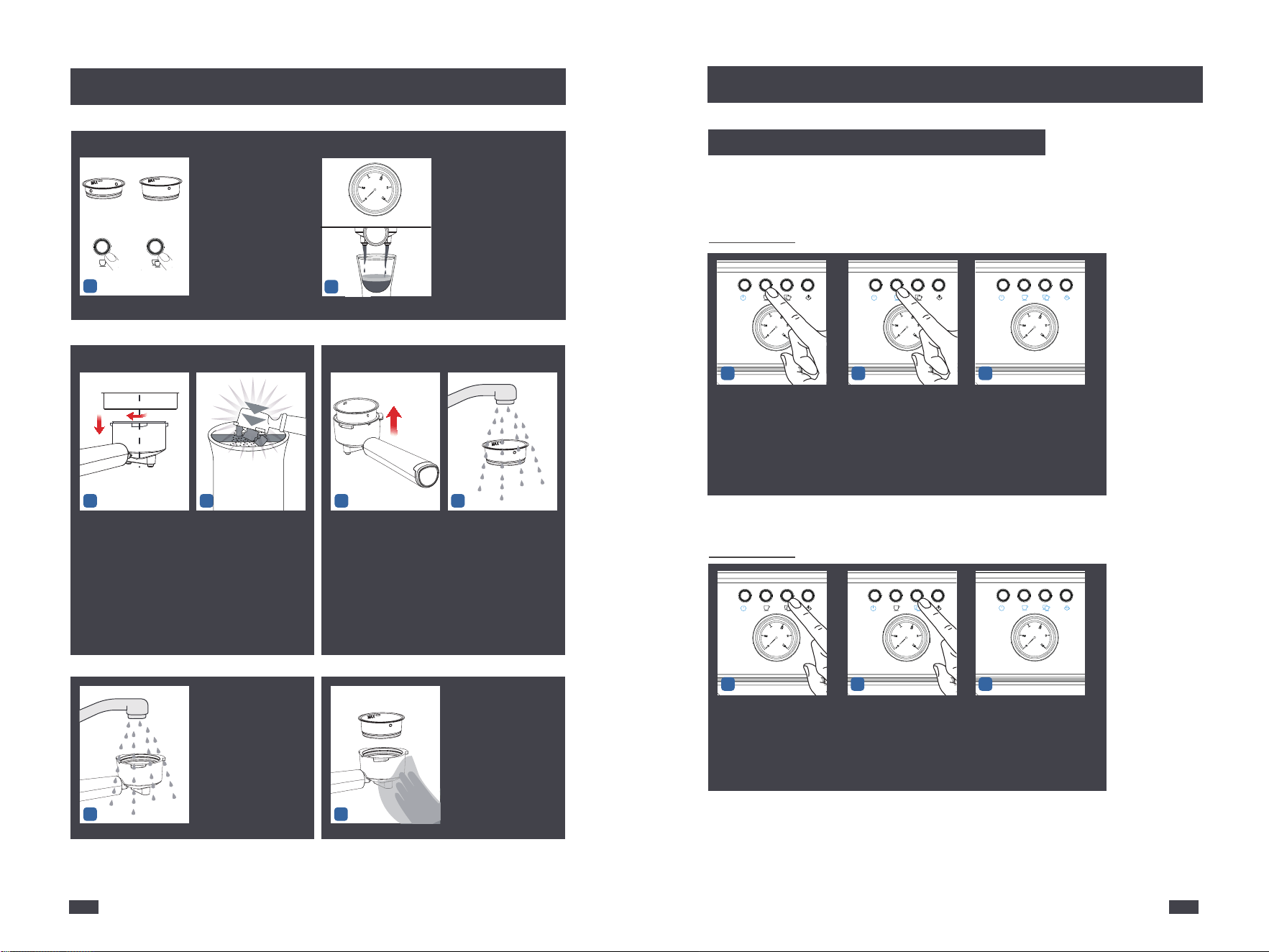
5
Rinse the inner and
outer holes of the
portafilter with clean
water,and be warned
that do not wash the
portafilter with any
descaler.
6
Use a clean cloth to
wipe the filter and
portafilter dry.
3 4
Align the marking dot
on the Filter Basket
with the groove on
the portafilter and
remove it from the
portafilter.
Rinse the front and
back of the filter basket
under the faucet, and
finally rinse the inner
holes and the outer
holes with water.
1 2
10 - Remove & Wash
Wait 20 seconds for the
machine to release
pressure, then rotate
and move the Portafiler
out.
Flip up and hold the
small black piece on the
handle and knock to
discard the coffee puck
in the portafilter.
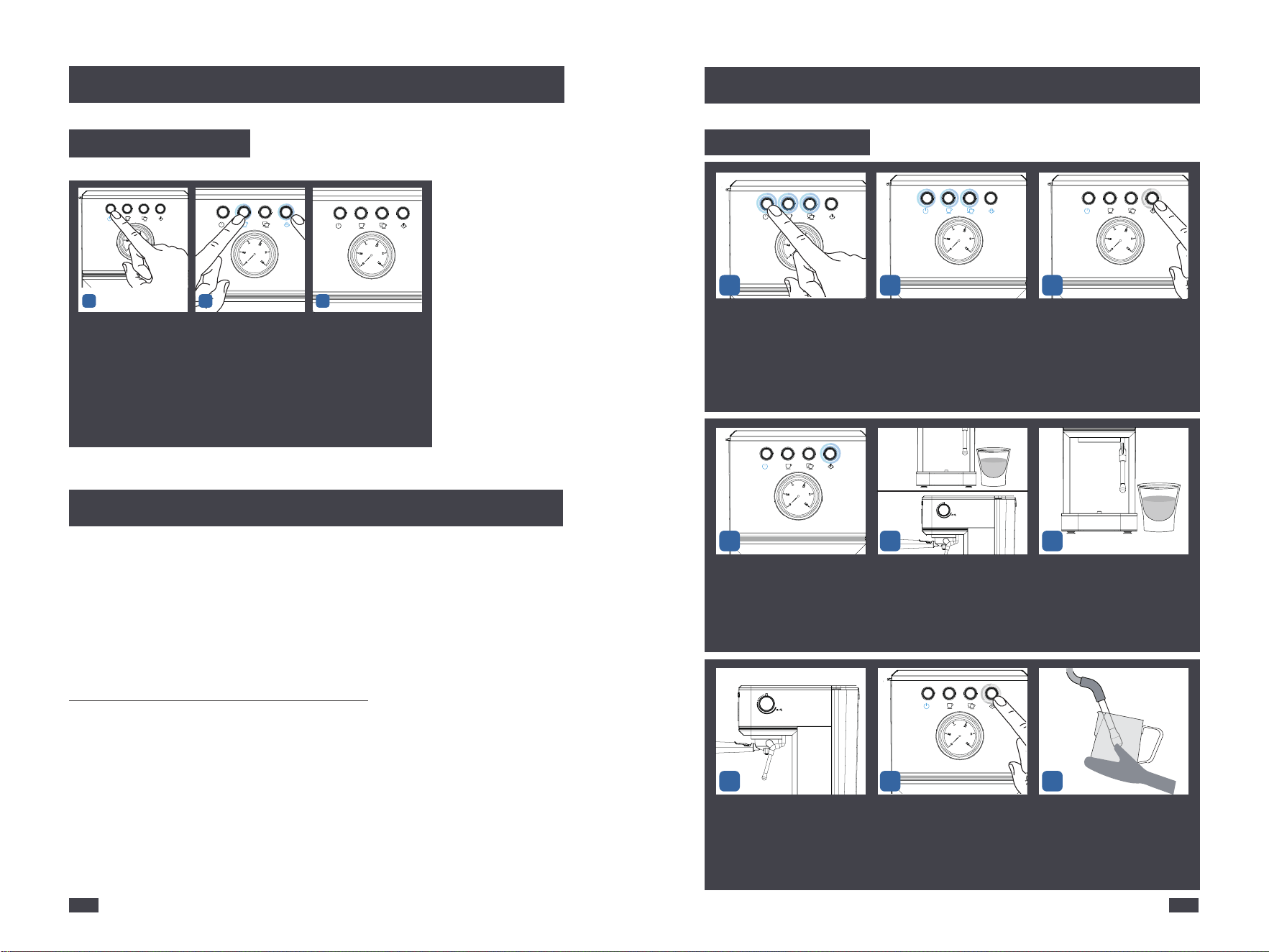
Single Cup
After finishing heating up, to begin re-programming .
Espresso Making Guide
Espresso Making Guide
Re-programming Cup Volume
1
9 - Espresso Extraction
Single
cup
Double
cup
OR
Press either the Single cup
button or the Double cup
button.
Extraction begins and will
automatically stop,the
machine have five beeps. The
crema of the coffee is golden
brown with a fine mousse
texture. (Around 1.4OZ(40ML)
per cup is recommended.)
2
1.TURN
2.REMOVE
CENTRE
When it reached your
desired volume, press the
Single Cup button again,
the espresso pour will stop.
Cup volume range: 1-2oz
(30-60ml)
2 3
The new Single Cup espresso
volume has been saved and
the machine will return to the
ready state.
NOTE: The setting longest time is 60 seconds. If the setting time is
invalid more than 60 seconds, the machine will remain the
default time.
Double Cup
Press and hold the Single
Cup button for 3-5 seconds,
the espresso machine will
beep and start to pour.
1
1
1
Press and hold the Double
Cup button for 3-5 seconds,
the espresso machine will
beep and start to pour.
2
When it reached your
desired volume, press
the Double Cup button
again, the espresso pour
will stop. Cup volume
range: 2-3oz (60-90ml)
3
The new Double Cup espresso
volume has been saved and
the machine will return to
the ready state.
1221
Reset Default Volume
11
Espresso Making Guide
High-temperature Alarm Guide
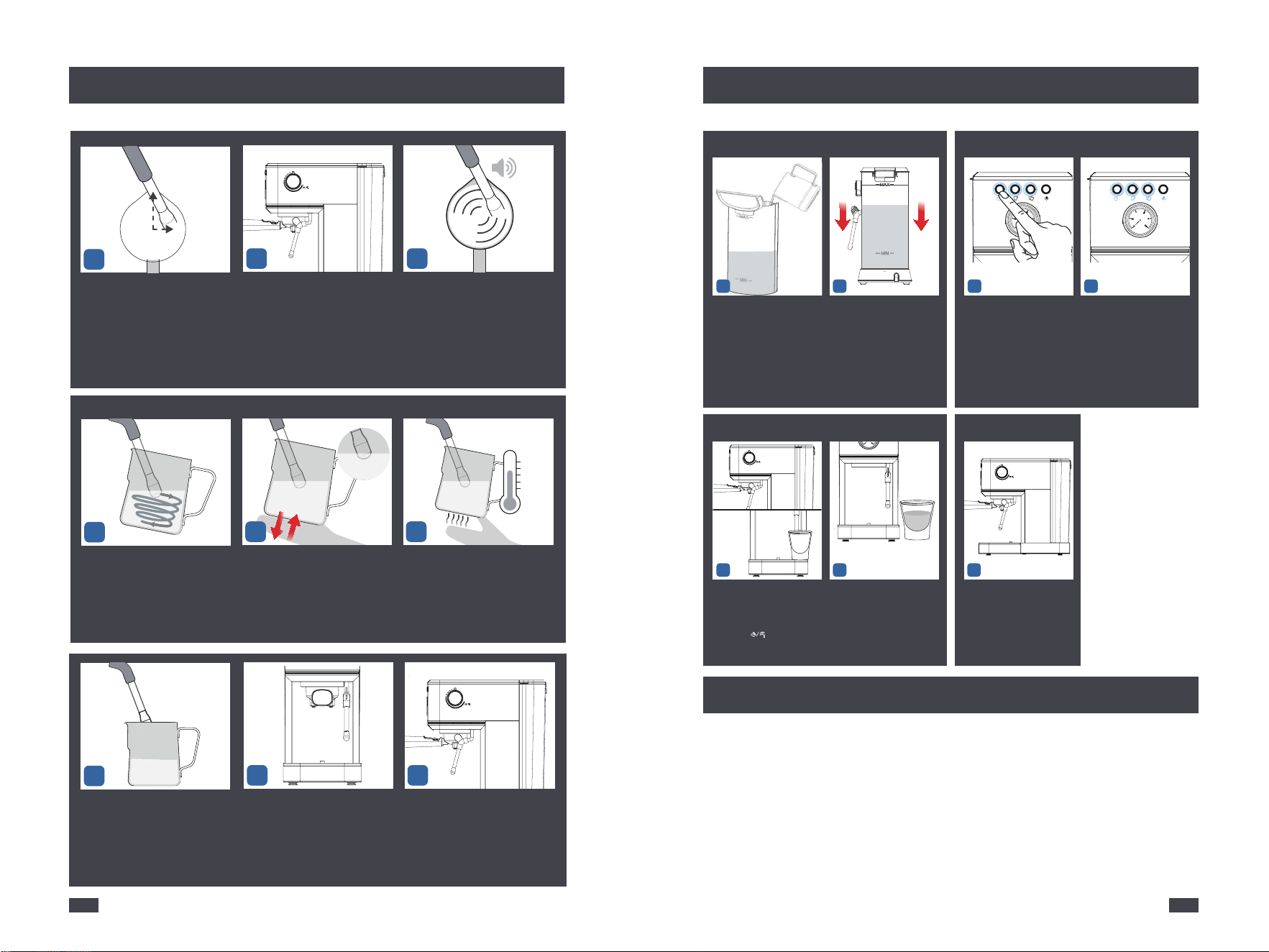
Milk Frothing Guide
Operation
If you accidentally press the steam button or immediately brew coffee
after steaming, the temperature will be too high, and it is not suitable for
brewing coffee, there will be a high-temperature alarm by pressing the
Single cup button or Double cup button, at this point,the Single cup
button and Double cup button are blinking blue light quickly. The
machine needs to be cooled.
Cool the machine for espresso making
A. Place a cup under the froth nozzle.
B. Turn the Steam control knob to the steam/water position to release
water out for making the machine cool down.
C. Turn the Steam control knob to OFF position. It can make coffee when
the Single cup & Double cup button is fixly lighted.
6
7 9
ON
OFF
ON
OFF
1 2
Press the Power button
to turn off the machine,
but not to unplug.
Press and hold the Single
Cup and Steam button for
3-5 seconds, the machine
will beep and the buttons
ON.
3
Then it will reset the default
cup volume and return to
the stand by state.
Insert the Power Plug.Press the
Power button to turn the machine
on,the Single cup & Double cup
button will illuminate & pulse to
indicate it's heating up.
Both Power button, Single cup &
Double cup button lights are fully
illuminated = Espresso Machine is
ready for use
Press the steam button and
start to blink blue light slowly
The steam button keeps blue
light fixed. It means the heating
for steam is finished.
Turn the Steam control Knob
to the steam icon.
Release some steam out from
the steam wand before
performing milk frothing.
Pause steam by returning
knob to OFF-position
Press the Steam button to re-enter
Steam Mode.
Hold the position below the tip
of the milk foam cup and the
bottom of the milk foam cup
with your left hand, and hold
the handle of the milk foam
cup with your right hand.
1 2 3
4 5
8
To make sure coffee machine operating efficiently, internal piping is cleanly
and the peak flavor of coffee, the coffee machine needs to be descaled,
cleaned and maintained periodically.
Descaling warning will be shown when the appliance has cumulatively
worked for 300 cycles. At that time, all indicators will flash and sound for
5 times, which means that the coffee machine needs to be performed
descaling, and then the appliance will go back into normal condition.
Descaling warning will be shown each time when you turn on the appliance
if you do not cancel.
142113
Milk Frothing Guide
11 12
13
18
1514
1 - Check Water
2
2 - Start Up
1 2
Around 30S Heat Up READY
3 - Hot Water
1 2 3
Hot Water Guide
Cleaning & Maintenance
ON
OFF
ON
OFF
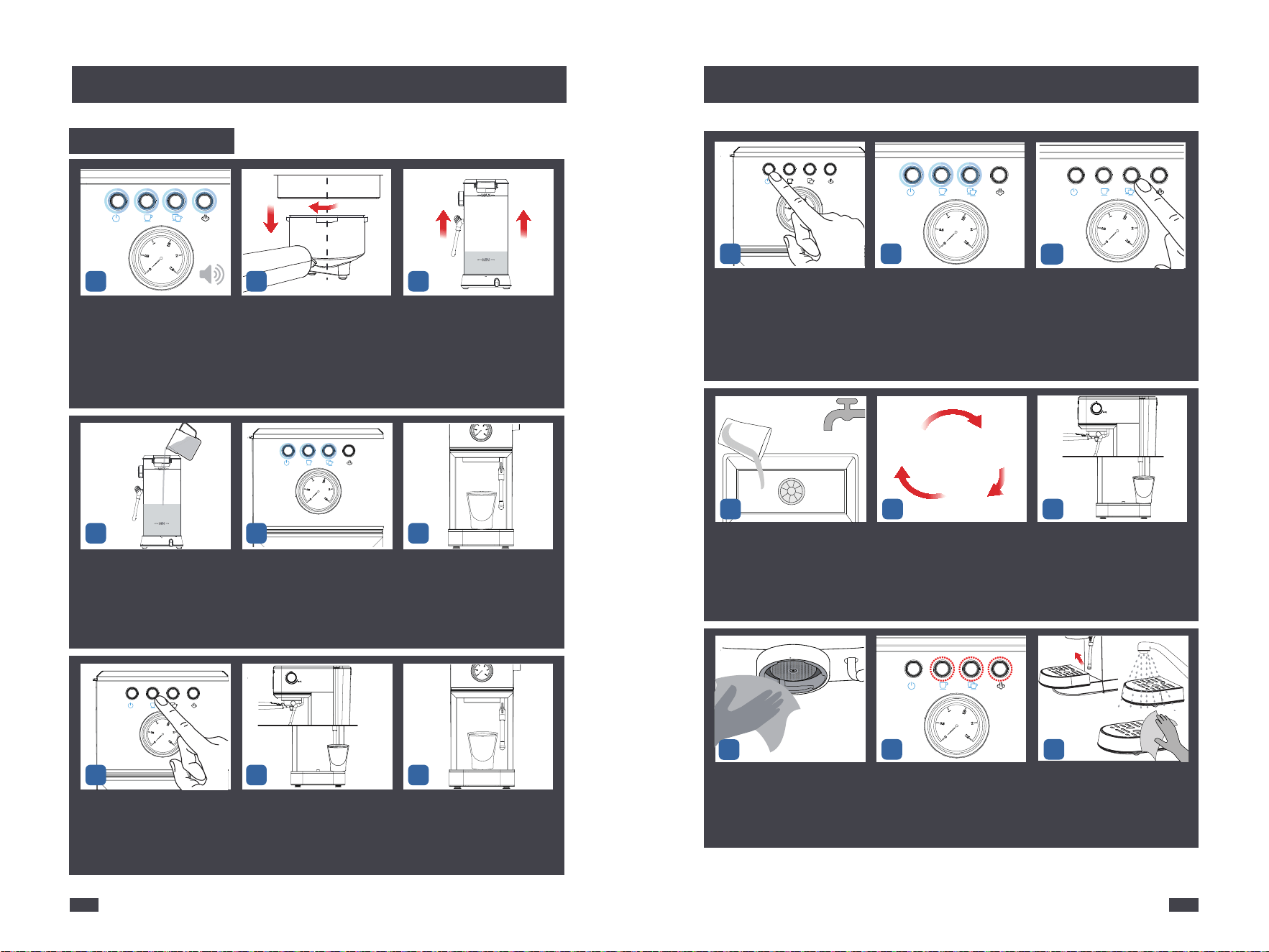
The position of the left hand is
fixed, and the right hand turns
the Steam Control Knob to the
steam icon to start frothing the
milk.
Extract the water tank by
pulling it upwards.
Fill the water tank
with clean and fresh
water(Do not exceed
the MAX line).
Set up the water tank
vertically and align the
buckles to the hole on
the back of the machine,
and then press it down
to be parallel to the top
of the machine.
Place a cup on the counter
top and position the
steam wand. Turn the
knob to " " icon to start
releasing hot water.
Hot water will pour from
the steam wand and can be
used for making
Americanos and pre
heating cups.
To stop the hot water,
return the knob to the
OFF-position
Insert the Power Plug.
Press the Powe button to
turn the machine on,the
Single cup & Double cup
button will illuminate &
pulse to indicate it's
heating up.
Both Power button,
Single cup & Double cup
button lights are fully
illuminated = Espresso
Machine is ready for use
Frothing makes a smooth
hissing sound.
Check that the milk is swirling
As the milk level rises, lower
the milk foam cup to keep the
froth nozzle below the surface.
When the desired micro-foam
is reached, submerge the steam
wand halfway
Milk frothing is complete when
the base of the milk foam cup
is too hot to touch for 3 seconds.
Use a wet cloth to wipe the Steam
Wand and push it back in.
Turn the Steam Knob to ON for
2-3 seconds to release any milk
left in the Wand.
16
ON
OFF
Turn the Steam Control Knob to the
OFF and move the milk cup from the
Steam Wand.
10
3 O CLOCK
,
The steam wand arm is at 12
o'clock. The froth nozzle is at 3
o'clock. The milk is just soaked
to the 2mm position of the Froth
Nozzle.
17
1
ON
OFF
162115
Cleaning & Maintenance
Cleaning & Maintenance
Descaling Cycle
1.TURN
2.REMOVE
CENTRE
1 2 3
8
Repeat
Step 12-13
for 3 times
with clean water
ESPRESSO
MACHINE
CLEANING
TABLETS
PLEASE EMPTY TRAY
REMOVE
STEAM
FI
L
TER
UNSCREW
INSERT
INSERT
D
U
A
L
W
A
L
L
LOCK
11 11
12
13 14
15
17 18
16
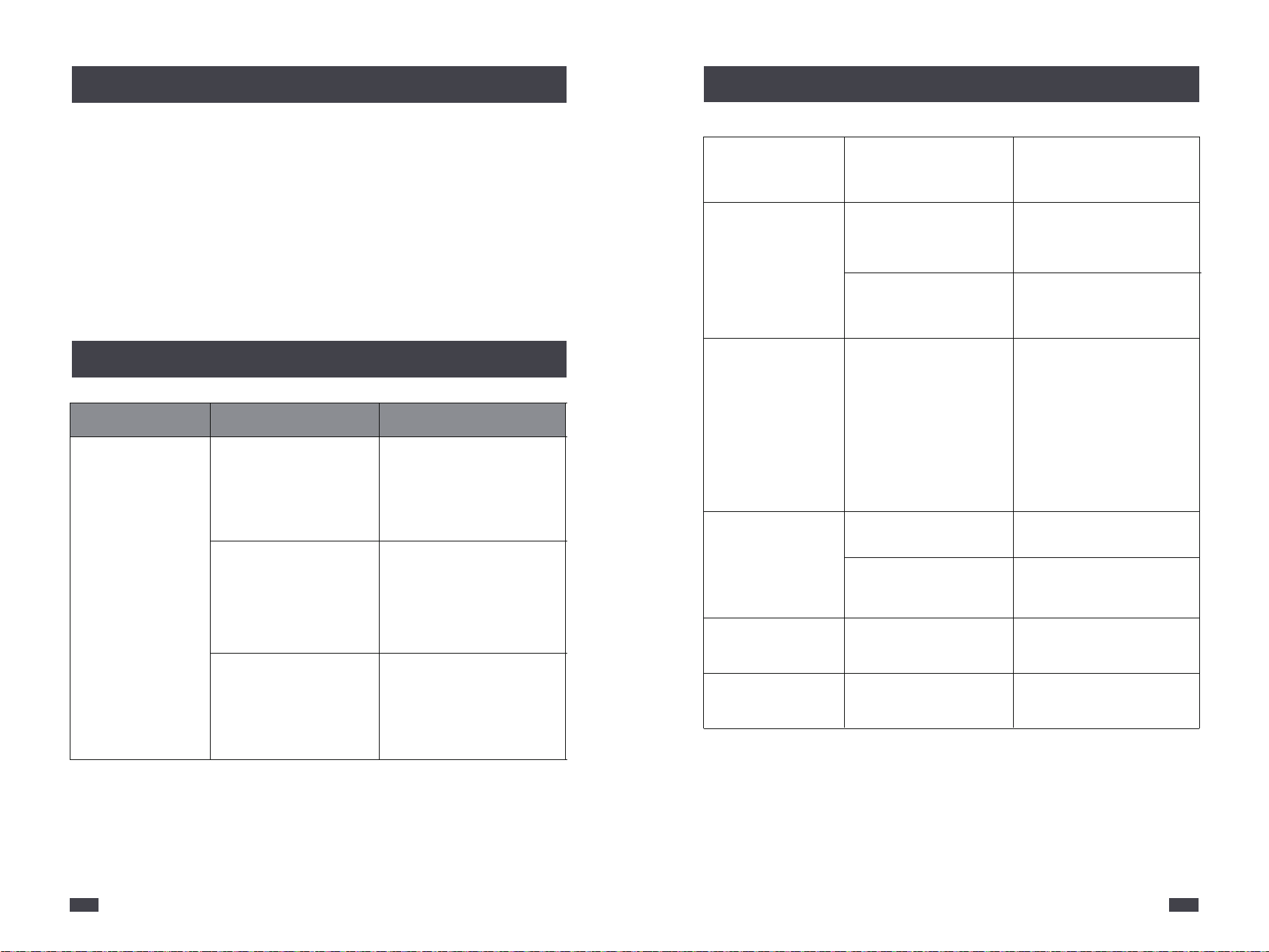
Rotate and move the Portafiler out,
then use a brush and paperclip to
clean and unclog it.
Pour out the remaining water
in the water tank.
Make sure Power button, Single cup
& Double cup button are solid
on(the machine has been
preheated).
Press the Double cup button to pour
the descaling solution. Repeat step
11 for 3 times.
Wait until running out all the
de scaling solution in the tank and
take out the container, pour away
the descaling solution.
Repeat step 12-13 for several times
with clean water until there is no
descaler smell.
Turn knob to release about 200ml
of hot water, then empty the
container.
Use a clean cloth to wipe off the
coffee ground and water stains left
on the Group Head.
When descaling is finished, press
and hold all three buttons except
the Power button at the same time
for 3-5s to cancel the descaling
warning.
Remove the drip tray and empty
coffee liquid. Rinse with clean water
and use a cloth to wipe then install
it back.
Put a container under the Group
Head.
Wait for the heating of the machine
to complete, that is, the blue lights
of the Power Button, Single Cup
Button, Double Cup Button are
solid on.
Press the Single Cup Button to
dispense some discaling solution.
Put the container back under the
Group Head. Let the descaling
solution soaks the limescale inside
the machine for 30 minutes.
Turn knob to release about 100ml of
hot water, then empty the container.
After 30 minutes, press the Power
button to turn the machine on, the
Singles cup & Double cup button
will illuminate and pulse to indicate
it's heating up.
Mix 400ml of water with 10g of
descaler (vinegar or citric acid are
also applicable, but adjust the ratio)
and pour it into the water tank.
4 6
9
When the machine has cumulatively
worked 300 cycles, all indicator lights
will flash and sound for 5s, which
means that descaling is required.
Around 30S Heat Up
ON
OFF
ON
OFF
10
7
5
1.Cut off the power and let the coffee machine clean before it cools
completely.
2.Wipe the outside and parts of the coffee maker with a damp cloth or a
clean sponge.
3.Unscrew the coffee funnel and clean the coffee grounds in the filter.
And Clear the coffee grounds at the outlet of the coffee machine.
Problem
No water/steam
Reason
Whether there is water in the
water tank/whether the water
tank is stuck in place
Fill the tank with water and turn
on the power switch and the
coffee switch.
The machine is not preheated.
The machine needs to be
preheated before the coffee can
be produced. That is, it indicates
that the coffee will turn to normal
light in the flickering state.
Water is not added in advance
in the machine.
How to add water to the machine:
press the hot water button, and
the pump will start to add water
into the machine until there is
water flowing out from the steam
nozzle or funnel.
Method
Note: Do not use alcohol or solvent cleaner, do not immerse the machine
in water to clean.
182117
Cleaning & Maintenance
Trouble Shooting
Trouble Shooting
No grease
No steam
More or less Coffee
The milk does not
foam well
No coffee, coffee light
and steam light flash
Not boil coffee
Plug the steam outlet
The coffee grounds are too
thick/the grounds are not
pressed
Use a small wire through the
steam hole; clean the steam pipe
with hot water after foaming.
Steam switch is not on or
preheating is not completed
to turn on steam
Turn on the steam switch, and
wait for the preheating to
complete before steam
Too much or too little coffee
powder
According to the standard amount
of powder, 1 cup with 1 tablespoon
to pressure, coffee powder can not
be too coarse or too fine. Too
coarse coffee can not be completely
extracted, too fine affect the
amount of coffee.
whether it is whole milk
Use whole milk
(fat content ≥ 3.5%)
Before the steam key is
warmed up, it starts to milk
Steam can only be started after
the steam indicator light turns
from flashing to constant light.
The temperature is too high
after steaming
Water cooling
In the steam state, the steam
switch is not off
Turn the steam switch to OFF
Replace the coffee powder and
flatten it with a press
1.If you have any questions regarding the operation or question of your
CHULUX appliance, contact us by any of these methods.
Email: [email protected]
3.Consumables are not guaranteed,i.e. plug and fuse.
4.In line with our policy of continuous development we reserve the right
to change this product, packing and documentation specification
without notice.
5.Inquiry for guarantee action: Please provide proof of purchase and detail
issue of product to our CHULUX After-sales Customer Service Email:
Facebook: Chulux Css
TikTok: @chulux01
Instagram: @CHULUX01
Twitter: @ChuluxCss
Pinterest: CHULUX
Youtube: @csschulux1922
2.Maintenance is NOT provided in the following circumstances:
A.Improper use such as improper installation, or not using according to
the instruction.
B.Appliance has been disassembled by unauthorized person.
C.Damage by natural caused. Wear and tear under normal use.
3.To get more product information, please go to our CHULUX website:
www.chulux.com
1.This product is guaranteed for a period of 1 year from the date of original
purchase against defect is mechanical and electrical.
2.This guarantee is only valid if the appliance used solely for domestic
purpose in accordance with the instructions and provided that it is not
connected to unsuitable electricity supply or dismantled or interfered
with in any way or damaged through misuse.
Note: Inquiries will be answered promptly by email.
When contacting the Consumer Service Department or when ordering
replacement parts, please provide order number,model number and PO
No.. The model number and PO No. Can be found on the bottom of
appliance.
Please record this information:
Order Number: Model Number:
PO No: Shop From:
202119
Maintenance & Service
Guarantee
Guarantee
Approval Information
FOR HOUSEHOLD USE ONLY
5025664