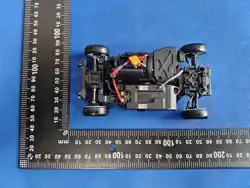
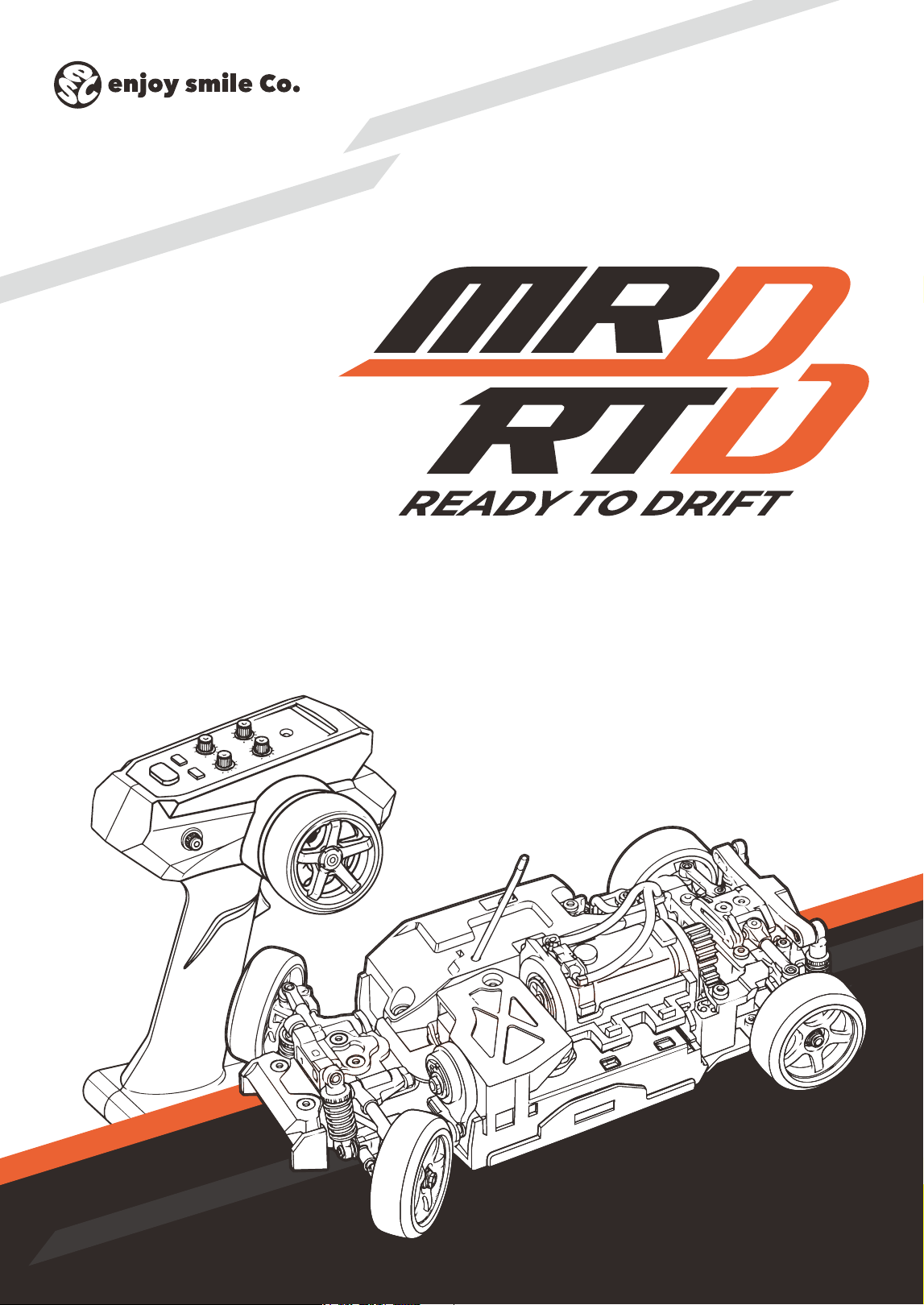
CHASSIS
&
TRANSMITTER SET
Release Date
Vol.1.0
2026.00.00


CONTENTS
01
02
03
04
05
06
07
08
Aasasjdh
Basjdhd
Casdkjkasj
Dasdqw
Esadqwe
Fqweqw
Gqweqe
Hqwwww
4
Thank you very much for purchasing an MRD RTD Series product.
The MRD RTD was developed to provide an authentic drifting experience even in the limited
space available at home. It features Easy Mode and a Drift Assist function to help rst-time
users experience constant-radius drifting. As your skills improve, you can use the three driving
modes and various adjustment functions to ne-tune the vehicle to suit your preferred driving
style.
To fully enjoy the performance of this product, please read this instruction manual carefully
before use, make sure you fully understand its contents, and operate the product correctly.
To help you explore the MRD RTD Series in greater depth, we also provide the web-based “MRD
Setup Information.” It includes instructions on adjusting the chassis dimensions to suit your
chosen body shell and changing the chassis control program settings using an Android device.
A wide variety of optional parts is also available for the MRD RTD Series. Enjoy improving its
drifting performance, customizing its appearance, and creating a setup that is uniquely yours.
このたびは、MRD RTDシリーズをお買い上げいただき、誠にありがとうございます。
MRD RTDは、自宅の限られたスペースでも本格的なドリフト走行を楽しめるように開発されたモデル
です。初めての方でも定常円旋回を体験しやすいイージーモードとドリフトアシスト機能を搭載し、上
達後は3種類の走行モードや各種調整機能を使って、より自分好みの走行をお楽しみいただけます。
本製品の性能を十分にお楽しみいただくため、ご使用前にこの取扱説明書をよくお読みいただき、内容
を十分にご理解のうえ、正しくご使用ください。
また、MRD RTDシリーズをより深くお楽しみいただくために、Web版の「MRD セットアップインフ
ォメーション」もご用意しています。使用するボディに合わせたシャシー寸法の変更方法や、Android
端末を使用したシャシー動作プログラムの設定変更方法などをご確認いただけます。
MRD RTDシリーズには、さまざまなオプションパーツもご用意しています。ドリフト性能の向上やド
レスアップなど、あなただけのチューニングをお楽しみください。
MRD Setup Information
MRD セットアップインフォメーション
https://products.enjoysmile.co.jp/mrd-rtd-setup-information/
https://products.enjoysmile.co.jp/mrd-parts/
MRD RTD Spare & Option Parts
MRD スペア & オプションパーツ
About This Model
はじめに
5
Indicates important precautions to avoid injury to yourself or others.
生命や身体に重大な被害が発生する可能性がある危険を示します。
Indicates actions that must not be performed to avoid accidents or malfunction.
事故や故障の原因となるため、やってはいけないことを示します。
WARNING!
警告マーク
PROHIBITED
禁止マーク
Please read carefully before operating your model.
走行の前に必ずお読みください。
This product contains small parts.
Always perform disassembly and assembly work out of reach of young children.
To prevent injury, handle tools such as cutters, nippers, and screwdrivers with care.
This product is designed for users aged 14 and older. It is not a toy.
This product is designed for indoor use only. Before operating the vehicle, make sure
the area is safe and free from potential collision or accident risks. Use this product
responsibly and at your own discretion.
Always use the specified batteries. Never connect the batteries in reverse polarity or
disassemble them. Doing so may cause heat generation or damage, and is extremely
dangerous.
小さな部品が含まれています。
分解・組立て作業は、必ず幼児の手の届かない場所で行ってください。
ケガをする恐れがありますので、カッター、ニッパー、ドライバーなどの工具を使用する際は、
取扱いに十分注意してください。
この製品は14才以上の方を対象に設計されています。玩具ではありません。
この製品は屋内専用モデルです。走行させる場所では、車両の衝突や事故が起きないよう安全を
十分に確認し、使用者の責任においてお楽しみください。
電池は必ず指定されたものを使用してください。電池の逆接続や分解は絶対にしないでくださ
い。発熱や破損の原因となり、大変危険です。
Guidelines for Use
使用時の注意事項
6
After operation, always turn off the transmitter and the vehicle, and promptly remove
the batteries. When not in use, store the product with the batteries removed.
To prevent injury, keep your ngers, hands, hair, and other objects away from rotating
parts such as gears.
Do not operate the vehicle near young children or other people. Contact with the vehicle
may cause accidents or injury and is extremely dangerous.
Batteries and the motor may become hot during or after operation. To prevent burns,
allow them to cool sufciently before touching them.
Do not store this product for extended periods in high-temperature or high-humidity
environments, as this may cause malfunction, damage, or deformation.
Do not operate the vehicle in sandy or dusty areas, on wet surfaces or puddles, or on
long-pile carpets. Doing so may cause malfunction.
Do not install any parts other than genuine optional parts, or modify the vehicle. Doing
so may cause malfunction.
If the car hits walls, furniture, appliances, or other objects in the driving area, they may
be scratched or damaged, and the car may also be damaged. Always drive in an area
free of obstacles.
走行後は、必ず送信機と車体の電源を切り、速やかに電池を取り外してください。使用しないと
きは、電池を取り外した状態で保管してください。
ケガをする恐れがありますので、ギヤなどの回転部分に指、手、髪の毛などを巻き込まれないよ
う十分注意してください。
幼児や人の近くでは走行させないでください。車両が接触し、事故やケガの原因となる恐れがあ
り大変危険です。
走行中や走行後は、乾電池やモーターが発熱することがあります。やけどをする恐れがあります
ので、十分に冷えてから触れてください。
故障、破損、変形の原因となる恐れがありますので、高温・多湿の場所で長期間保管しないでく
ださい。
砂やホコリの多い場所、水たまりのある場所、毛足の長いじゅうたんの上では走行させないでく
ださい。故障の原因となります。
純正オプションパーツ以外の部品を組み込んだり、車体を改造したりしないでください。故障の
原因となります。
走行場所の壁や家具、家電などに車がぶつかると、それらに傷がついたり、車が破損したりする
場合があります。必ず障害物のない場所で走行させてください。
Guidelines for Use
使用時の注意事項
7
Package Contents
セット内容
1
1
2
2
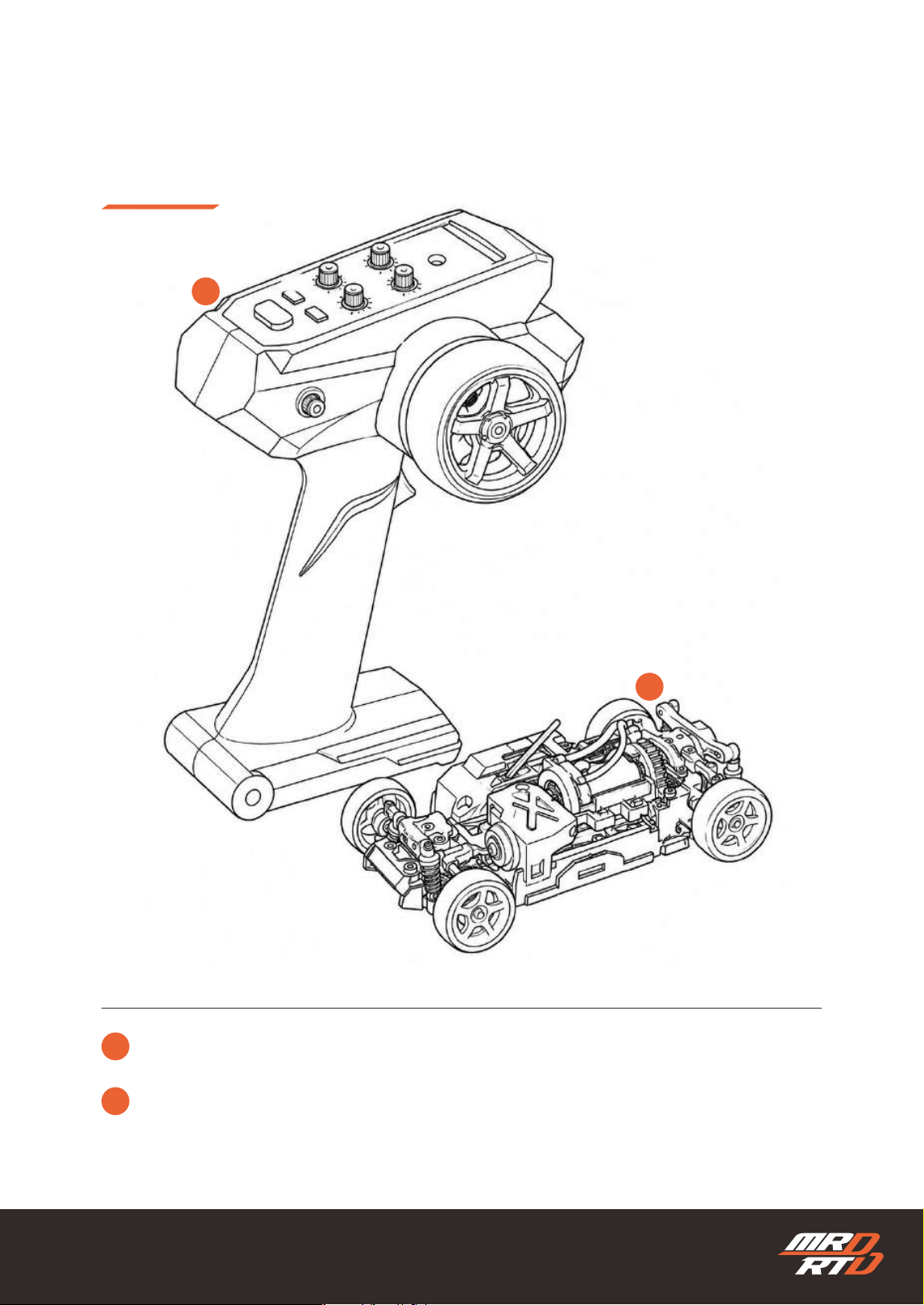
ES-TX001 2.4GHz Transmitter (Radio)
ES-TX001 2.4GHz 送信機(コントローラー)
MRD RTD Chassis
MRD RTD シャシー
8
Package Contents
セット内容
3
3
4
4
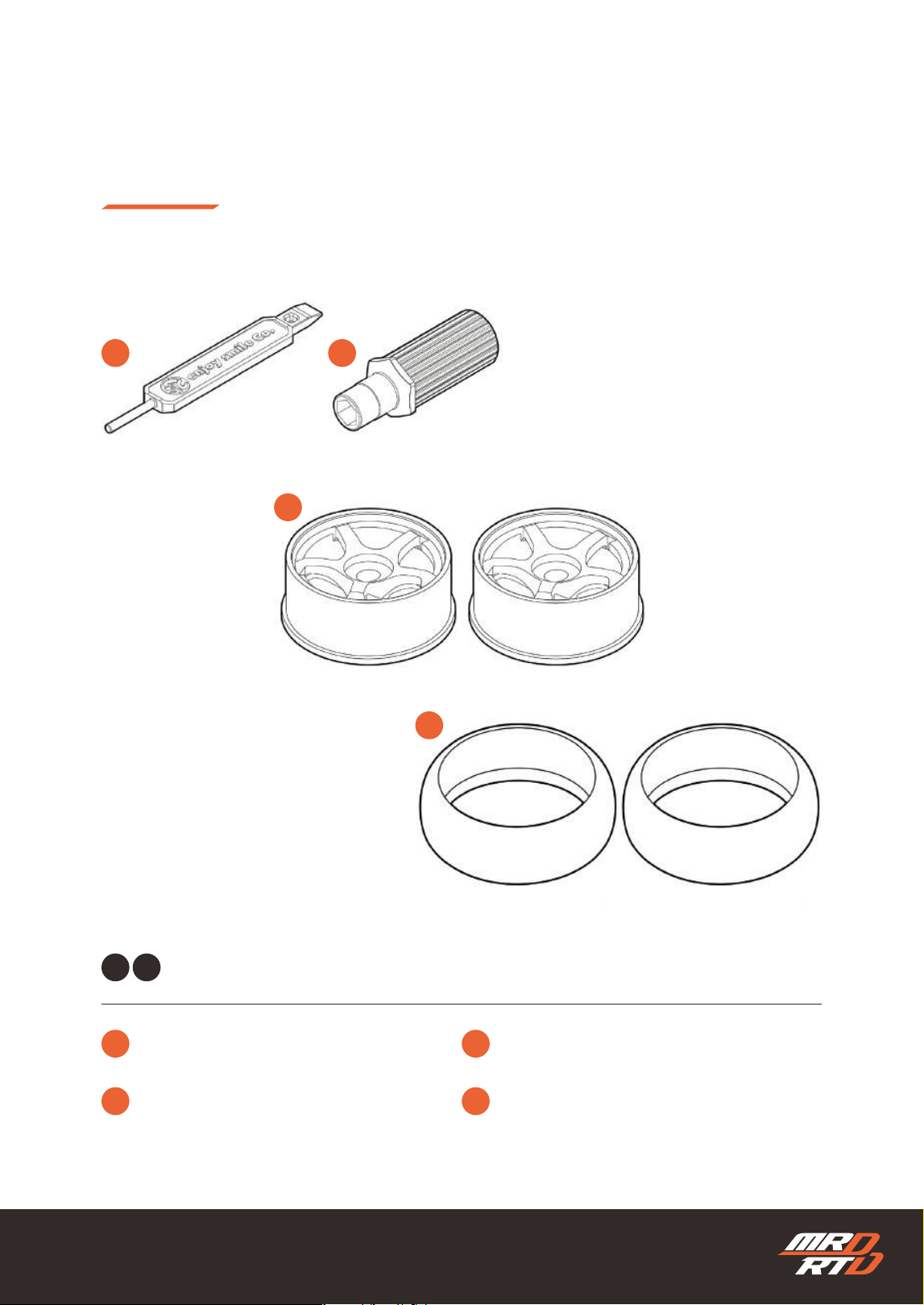
1 2
Narrow Wheel offset +1mm
ナローホイール オフセット+1mm
Narrow Drift Tire
ナロー ドリフトタイヤ
Setting Stick
セッティングスティック
4mm Wheel Wrench
4mm ホイールレンチ
Used to narrow the rear chassis width.
リヤのシャシー幅を狭くする際に使用します。
1
3
4
2
Included Accessories
付属品
9
Package Contents
セット内容
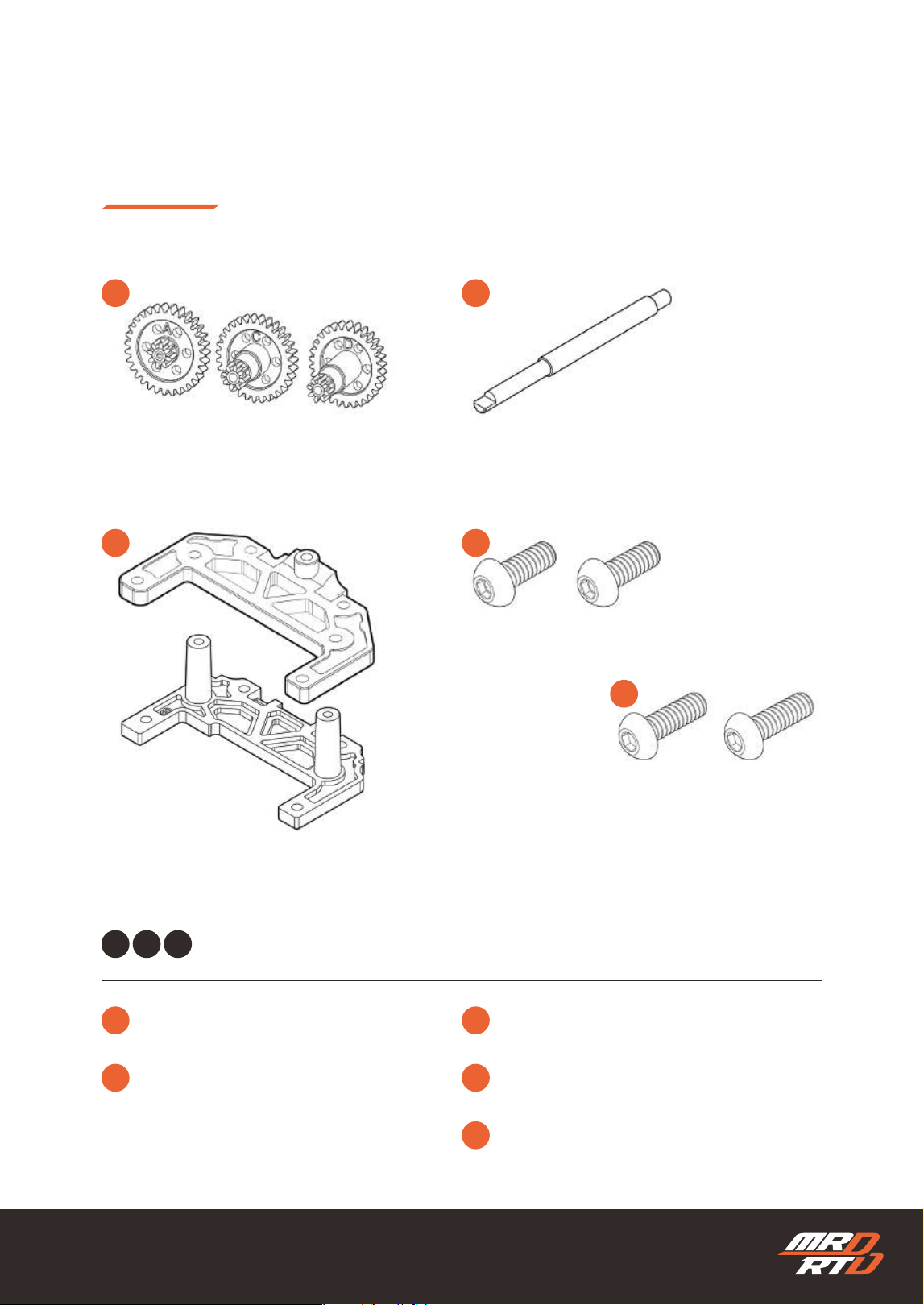
3
5
1
4
2 3
1 2
Wheelbase Plate B
ホイールベースプレート B
Button Hex Screw M2x5 mm
ボタン六角穴付きビス M2x5 mm
Button Hex Screw M2x5 mm
ボタン六角穴付きビス M2x5 mm
Spur Gear A / C / D
スパーギヤ A / C / D
Center Shaft L
センターシャフト L
Used to change the wheelbase.
ホイールベースを変更する際に使用します。
1 2
3 4
5
10
Additional Items Required
セットのほかに必要なもの
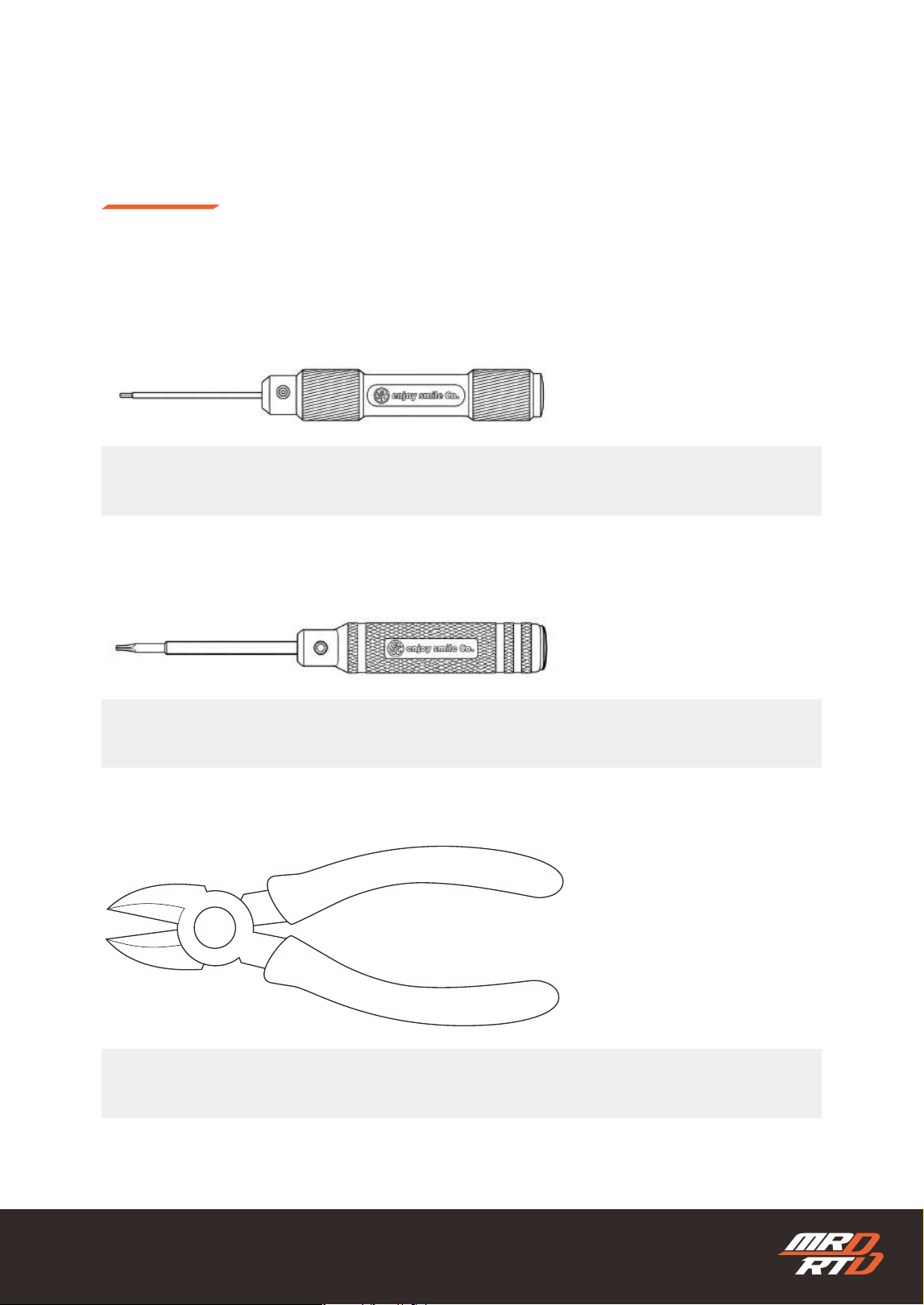
Required Tools
必要な工具
0.9mm hex wrench driver
0.9mm 六角レンチドライバー
Hex wrench driver (1.5mm)
六角レンチドライバー(1.5mm)
Wire Cutters
ニッパー
11
Additional Items Required
セットのほかに必要なもの
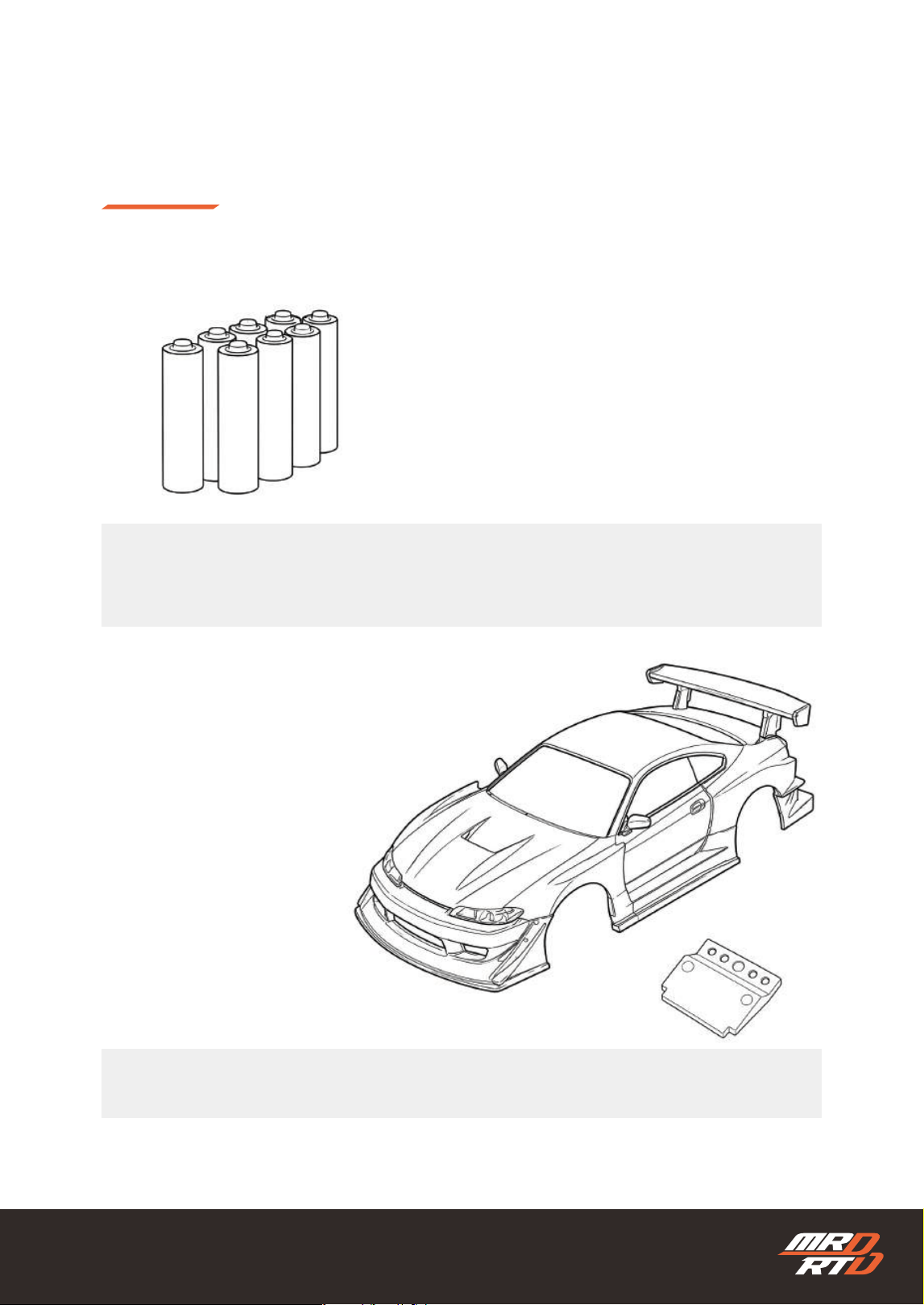
Commercially available 1/27–1/28 scale RC car body and body mount
市販の1/27~1/28スケールRCカー用ボディおよびボディマウント
For transmitter: 4 x AAA alkaline batteries
For vehicle: 4 x AAA alkaline batteries or 4 x AAA nickel-metal hydride (NiMH) batteries
送信機用:単4型アルカリ電池 4本
•車体用:単4型アルカリ乾電池 4本 または 単4型ニッケル水素バッテリー 4本
12
Additional Items Required
セットのほかに必要なもの
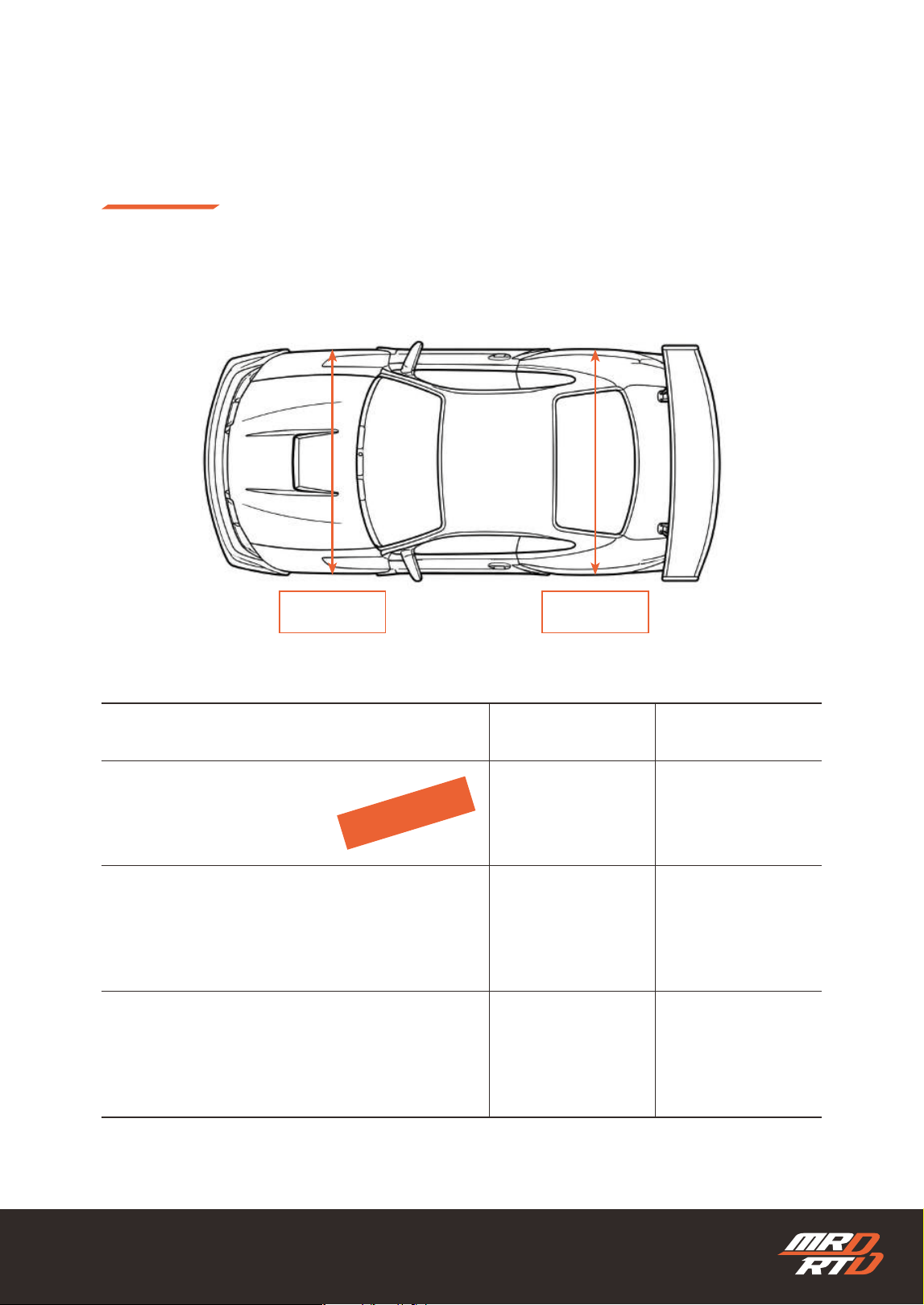
Compatible Body Width
使用可能なボディ幅
Front Width
フロント幅
Rear Width
リヤ幅
Body Size
ボディサイズ
Best Fit
No chassis adjustment required
Minimum Width
Wheel changes or additional wheels required.
When using a wide body
Additional wheels and optional parts are required.
最小幅
ホイールの変更または
別途ホイールを用意する必要があります。
幅の広いボディを使用する場合
別途ホイールの用意と
オプションパーツの組み込みが必要な場合があります。
ベストフィット
シャシー調整不要
Front Width
フロント幅
70mm
67mm
71~80mm
Rear Width
リヤ幅
72mm
67mm
73~80mm
Recommended
おススメ
13
Additional Items Required
セットのほかに必要なもの
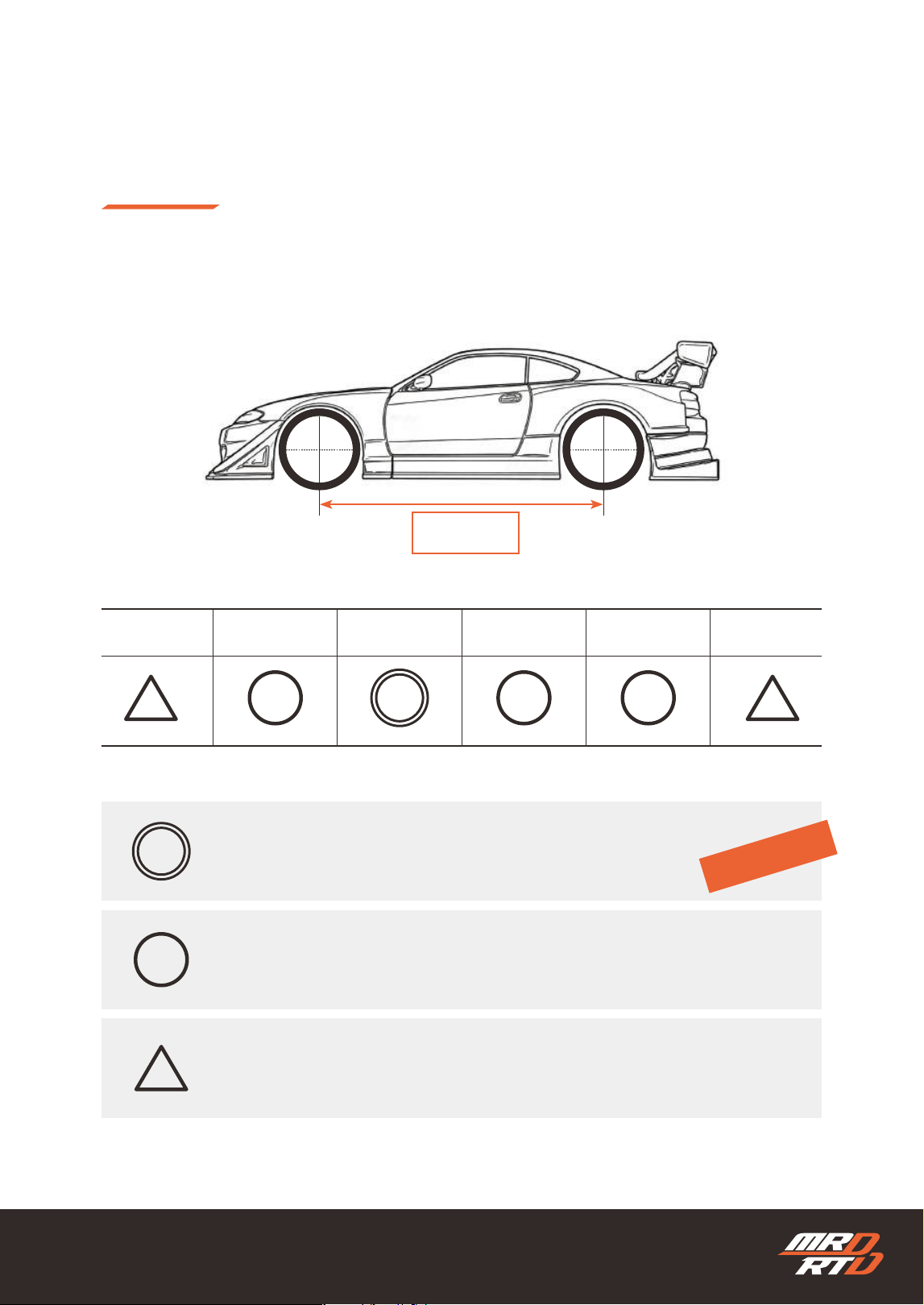
Compatible Wheel Base
使用可能なホイールベース
S
86mm
M
90mm
4L
106mm
3L
102mm
LL
98mm
L
94mm
No chassis reconguration required The body can be mounted as is.
Reconguration required using included parts
Reconguration required using optional parts
シャシーの組み換え不要そのままボディを搭載できます
セットに付属している部品を使用して、組み換えが必要です。
別売パーツを購入し、組み換えが必要です
Recommended
おすすめ
Wheel Base
ホイールベース
14
Additional Items Required
セットのほかに必要なもの
Even if the body size is listed in the table, it may not be compatible depending on the
body thickness and the shape or size of the wheel arches.
Depending on the shape of the body mount, you may need to make your own body
mount or use a separately sold body mount.
Instructions for mounting bodies that require reconguration are provided in the MRD Setup Guide. Please
scan the QR code below to view the guide.
表中に記載されたサイズのボディでも、ボディの肉厚やホイールアーチの形状・大きさによって
は搭載できない場合があります。
ボディマウントの形状によっては、ボディマウントを自作するか、別売のボディマウントを使用
する必要がある場合があります。
組み換えが必要なボディを搭載する方法は、「MRDセットアップガイド」で紹介しています。下記のQRコードより
ご覧ください。
https://products.enjoysmile.co.jp/mrd-rtd-setup-information/
MRD Setup Information
MRD セットアップインフォメーション
15
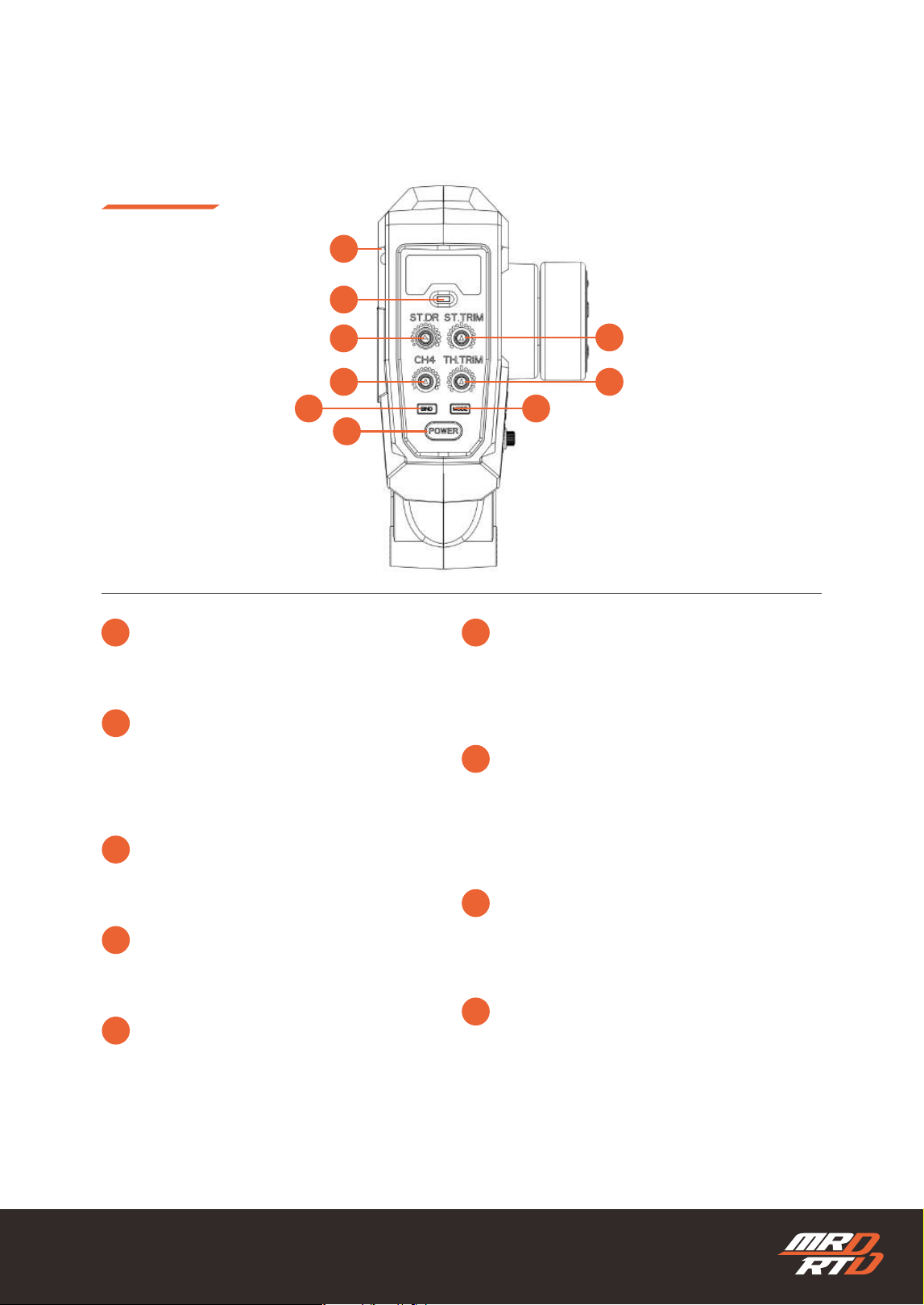
Transmitter Parts and Functions
送信機の説明
1 6
7
8
9
2
3
4
5
Power Switch
Power ON/OFF
電源スイッチ
電源のON/OFFを切り替えます。
CH4 Volume
Controls the separately sold lights on the
MRD RTD.
CH4 ボリューム
MRD RTDでは、別売ライトの点灯をコントロー
ルします。
Throttle Trim
Adjusts the throttle neutral position so the
model does not move when the throttle is at
neutral.
スロットルトリム
スロットルがニュートラルのときに車両が走り出
さないよう調整します。
LED Indicator
Indicates the transmitter status with LED
colors.
LEDインジケーター
送信機の状態をLEDの色で知らせます。
2.4GHz Module
Transmits the radio signal.
2.4GHz モジュール
電波を発射するモジュールです。
BIND Button
Enters bind mode to bind with the chassis. It
also has a hidden function.
バインドボタン
シャシーとバインドするためのバインドモードに
入ります。また、秘密の機能があります。
MODE Button
Used to change the drift mode.
モードボタン
ドリフトモードを変更するときに使用します。
Steering Dual Rate
Adjusts the steering angle.
ステアリングデュアルレート
ステアリングの切れ角を調整します。
Steering Trim
Adjusts the left/right neutral position of the
front wheels.
ステアリングトリム
フロントタイヤの左右方向のニュートラル位置を
調整します。
1
6
4
8
9
2 3
7
5
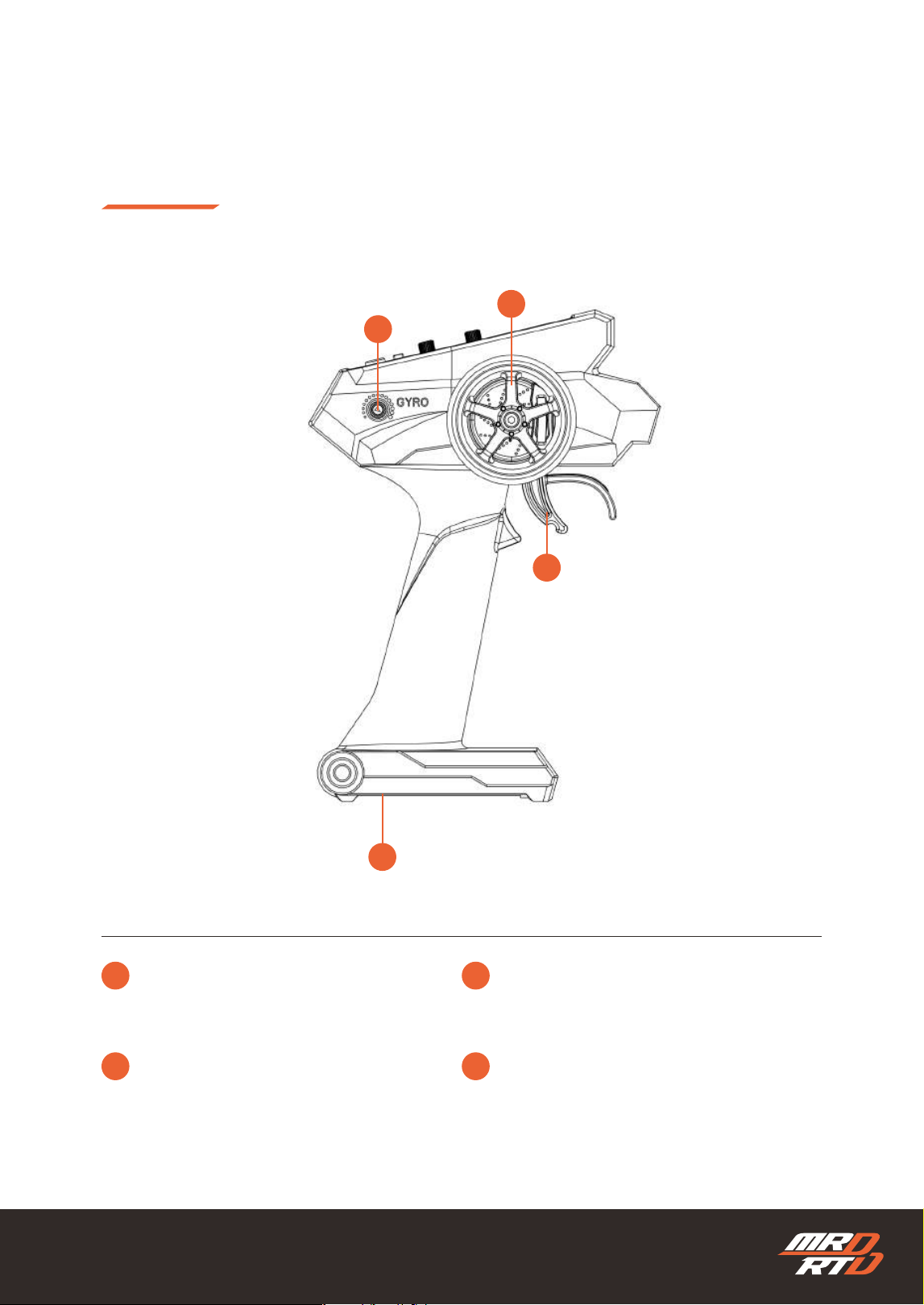
16
Transmitter Parts and Functions
送信機の説明
10
11
12
13
Steering Wheel
Controls left/right steering.
ステアリングホイール
ステアリングの左右操作をします。
Gyro Volume
Adjusts the gyro gain.
ジャイロボリューム
ジャイロの効き具合を調整します。
Throttle Trigger
Controls forward, reverse, and braking.
スロットルトリガー
前進、後進、ブレーキの操作を行います。
Battery Hatch
バッテリーハッチ
11
10
12
13
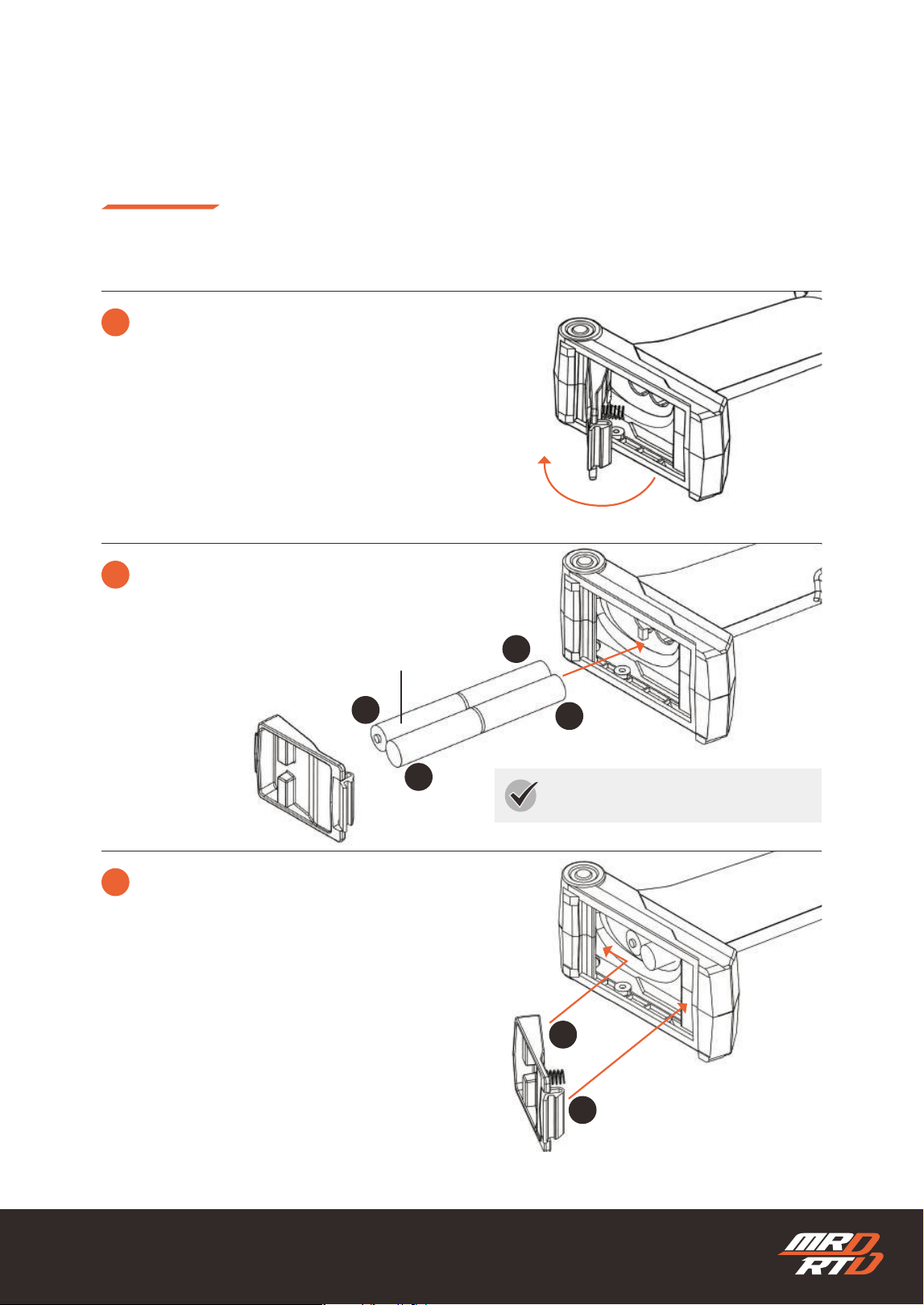
17
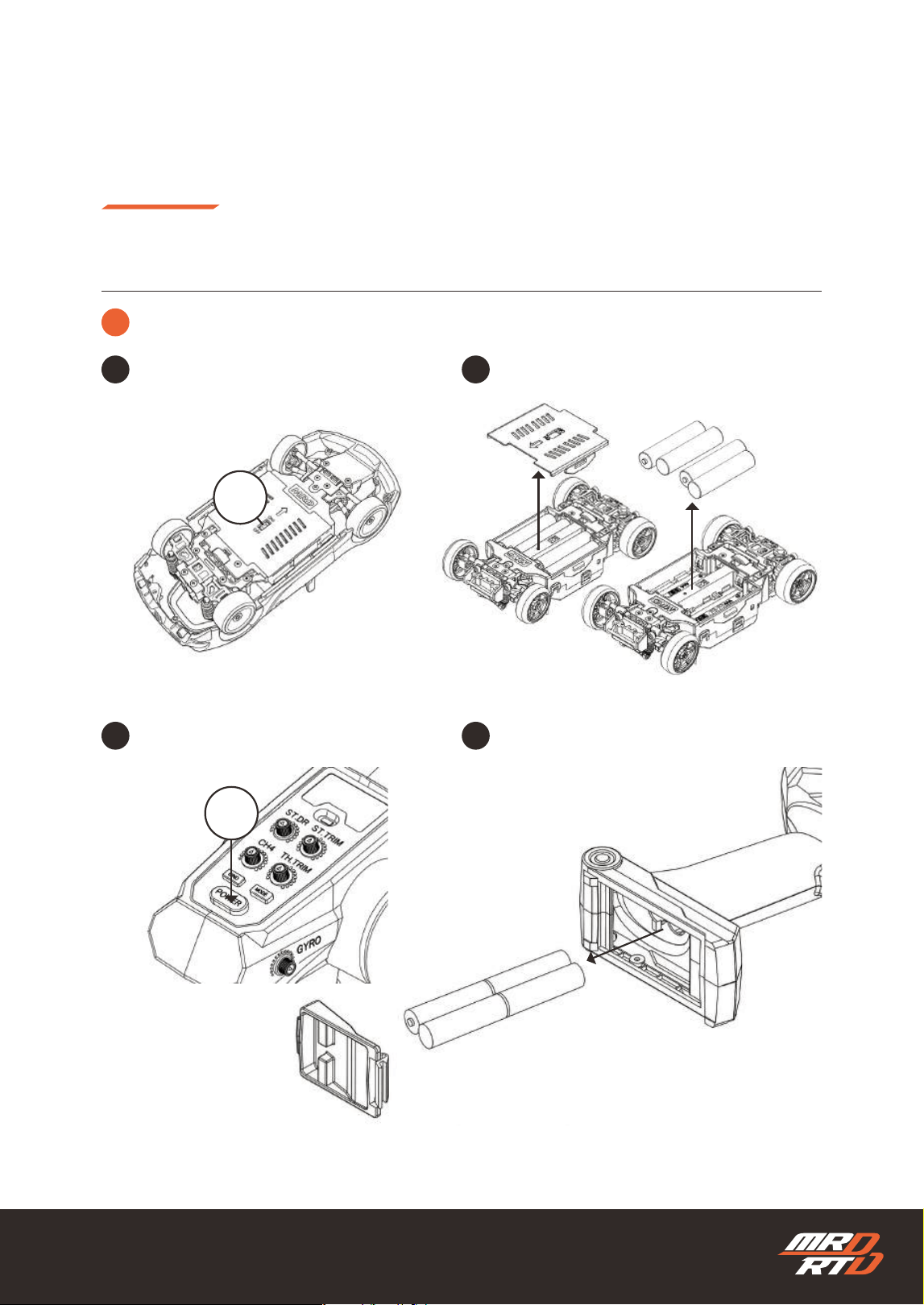
Preparing to Drive
走行の準備
Installing the Transmitter Batteries
送信機用電池の入れ方
1
2
+
-
-
+
3
Open and remove the battery hatch.
バッテリーハッチを開いて取り外します。
Install 4 AAA alkaline batteries as shown in the illustration.
単4アルカリ乾電池4本を図のように入れます。
AAA Alkaline Dry Batteries 4 pieces
単4アルカリ乾電池……4本
Pay attention to the battery direction.
電池の向きに注意。
Install the battery hatch.
バッテリーハッチを取り付けます。
1
2
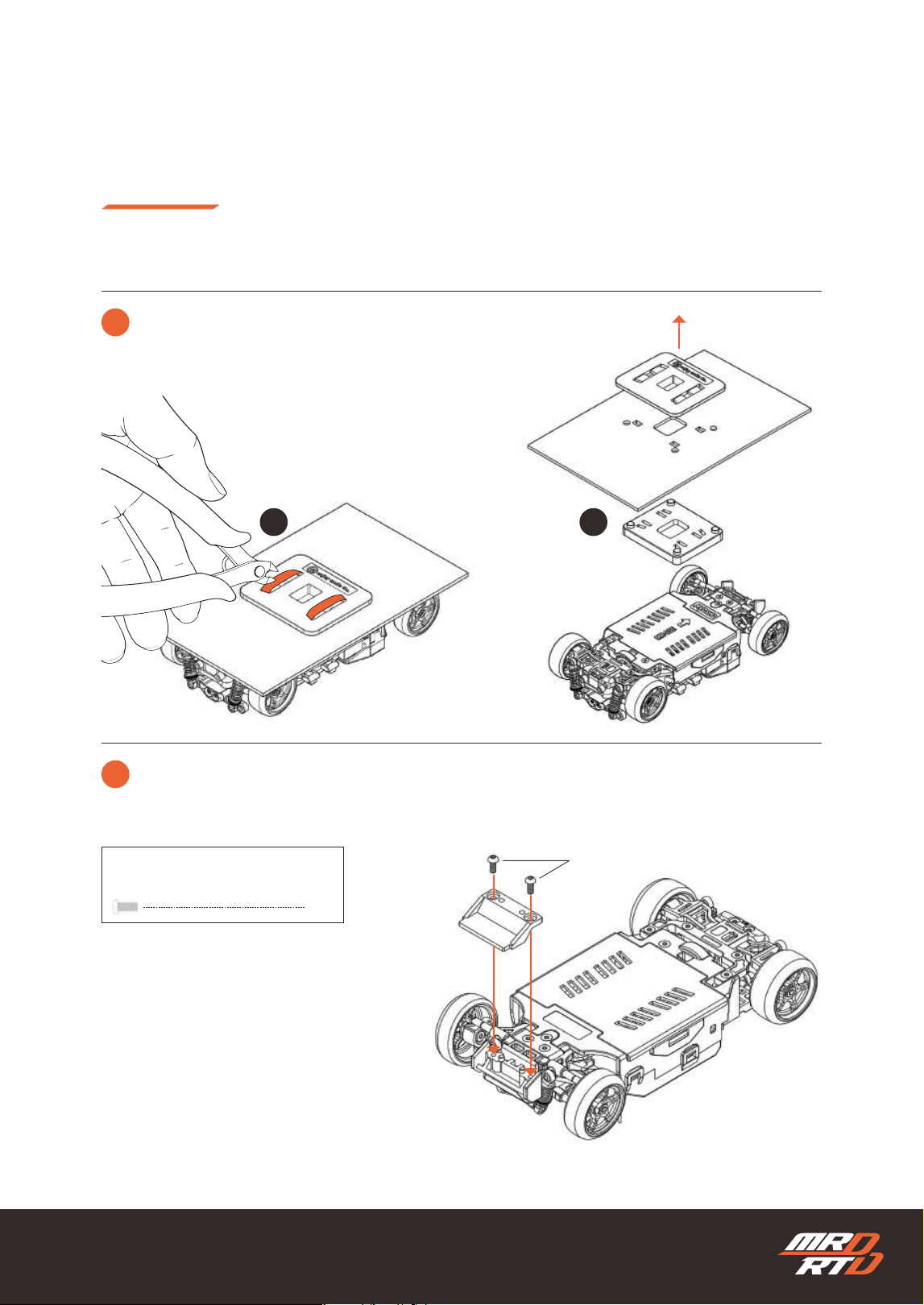
18
Preparing to Drive
走行の準備
Preparing the Chassis
車体(シャシー)の準備
1
2
Cut the strap with nippers and remove the chassis from the packaging.
ストラップをニッパーで切り、シャシーを梱包から取り外します。
If the front body mount is included with the body Install the front body mount onto the chassis.
フロントボディマウントがボディに付属している場合フロントボディマウントをシャシーに取り付けます。
Button Hex Screw M2x5mm
ボタン六角穴付きビス M2x5mm
M2x5mm
X2
1 2
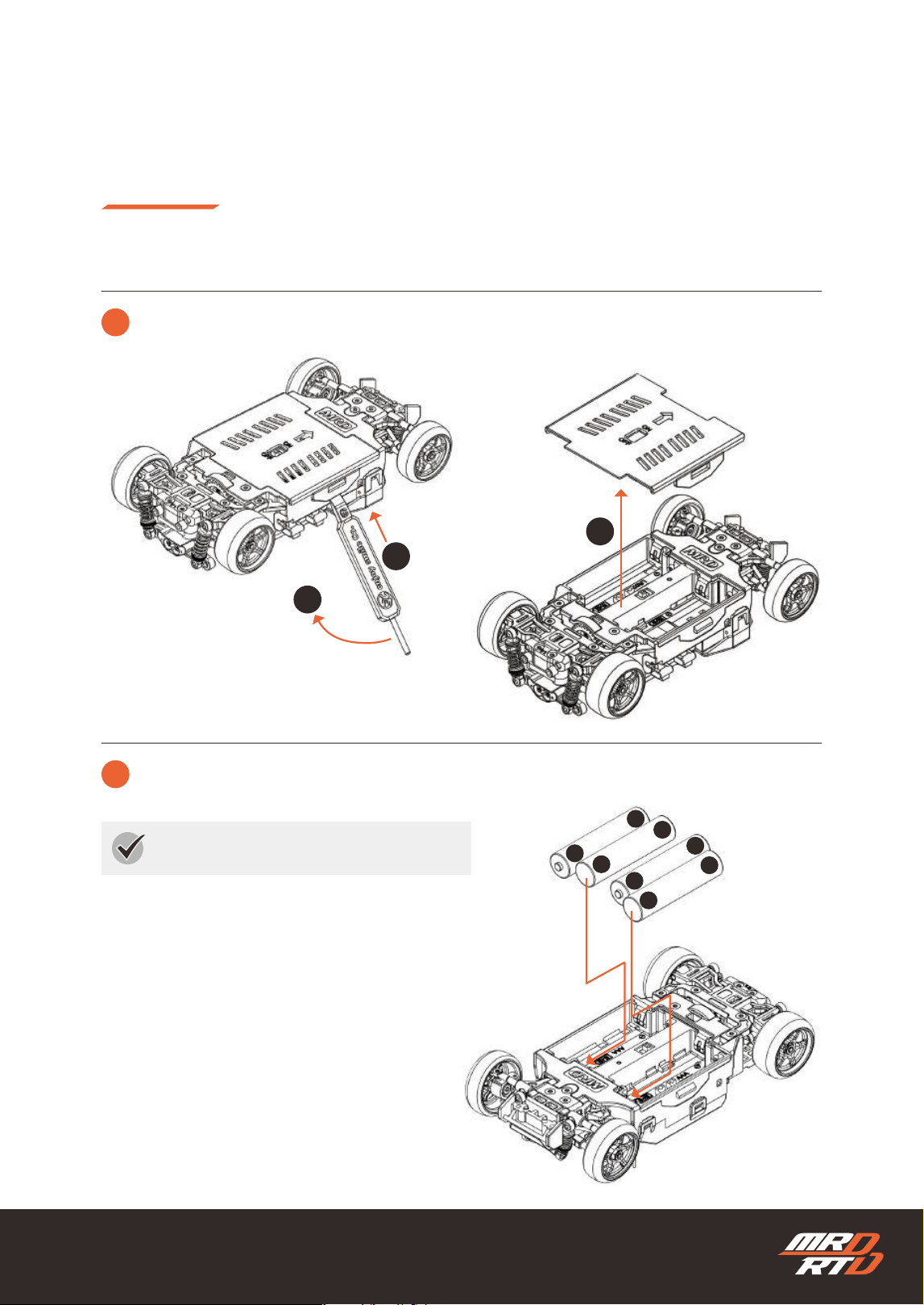
19
Preparing to Drive
走行の準備
Installing the Batteries
電池の入れ方
1
Remove the battery cover.
バッテリーカバーを取り外します。
1
2
3
Setting Stick
セッティングスティック
Battery Cover
バッテリーカバー
AAA Alkaline Battery
単4型アルカリ乾電池
2
Install the batteries in the chassis.
電池をシャシーにセットします。
Insert the battery from the negative side rst.
電池はマイナス側から先にセットします。
+
-
+
-
-
+
-
+
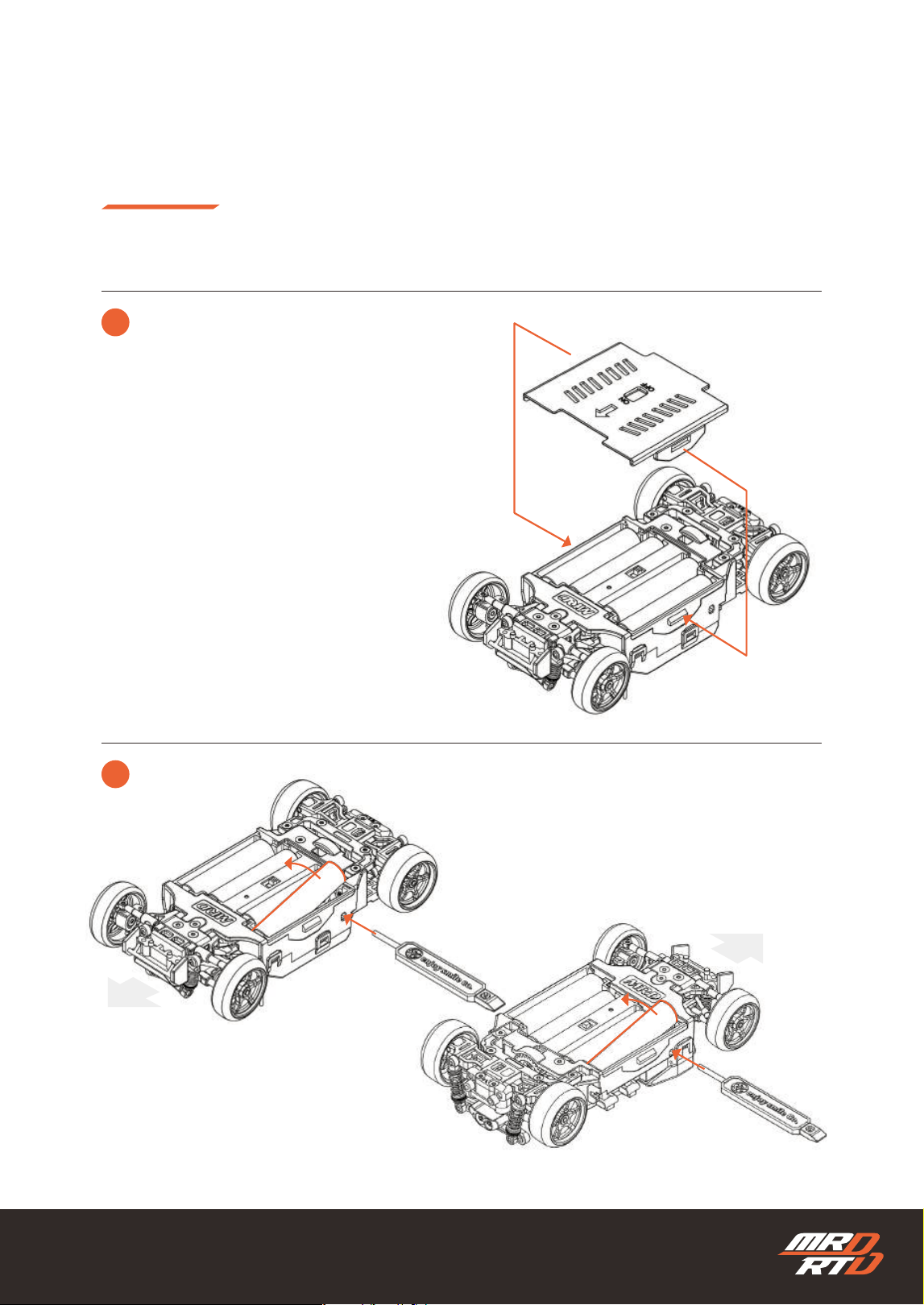
20
Setting Stick
セッティングスティック
Setting Stick
セッティングスティック
Installing the Batteries
電池の入れ方
3
Install the battery cover.
バッテリーカバーを取り付けます。
!
Removing the Batteries
電池の取り外し方
Preparing to Drive
走行の準備
21
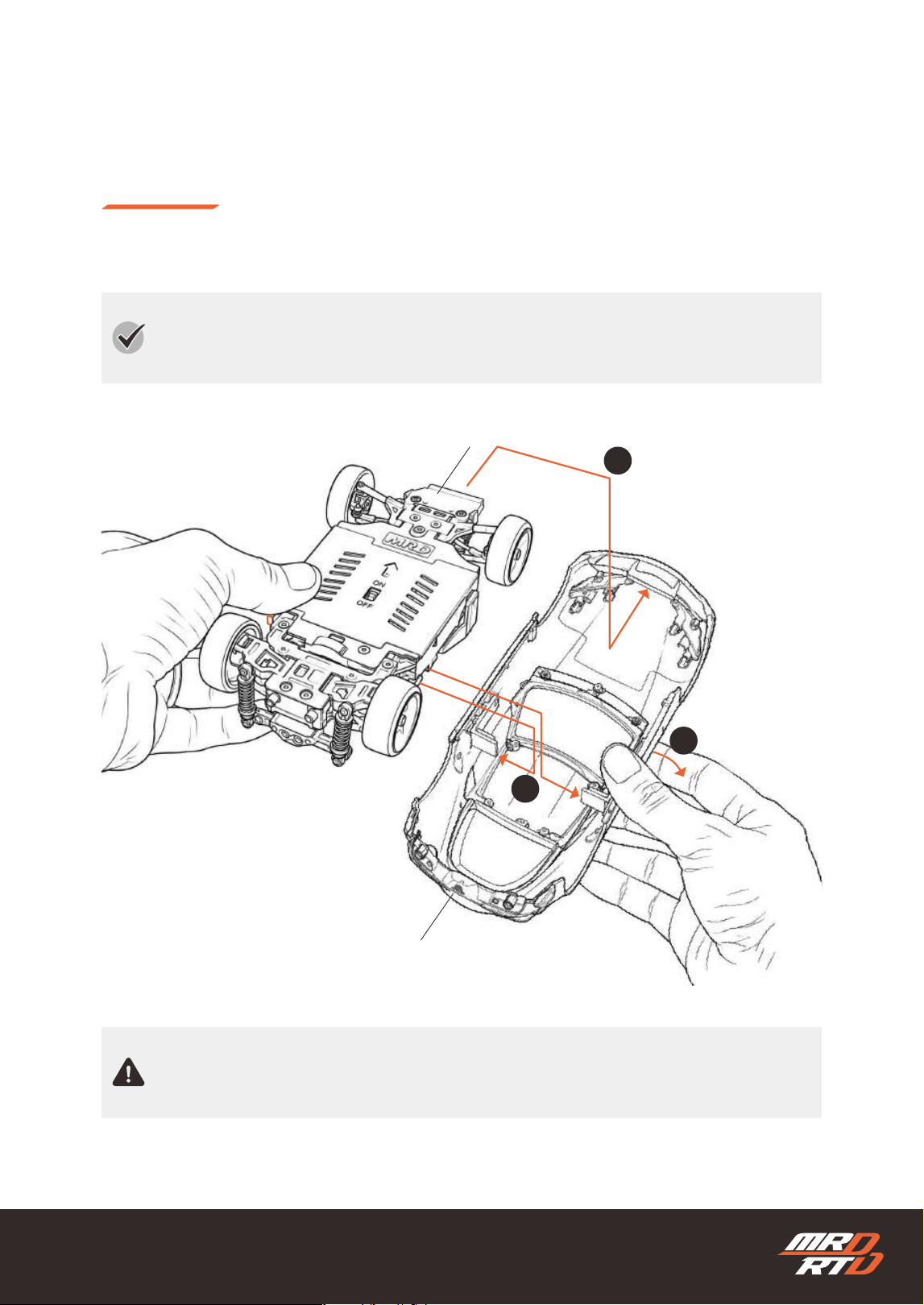
Install the body.
ボディを取り付けます。
Preparing to Drive
走行の準備
This is an example of installing a body that includes a dedicated body mount.
The installation method may vary depending on the body used.
ボディ専用のボディマウントが付属している場合の装着例です。
使用するボディによって、装着方法が異なる場合があります。
Driving without the body installed makes the chassis more likely to be damaged in a collision.
Always install the body before driving.
ボディを取り付けずに走行させると、何かにぶつかった際にシャシーが破損しやすくなります。走行さ
せるときは、必ずボディを取り付けてください。
Front Body Mount (Sold Separately)
フロントボディマウント(別売)
Body Shell (Sold Separately)
ボディ(別売)
1
2
3
22
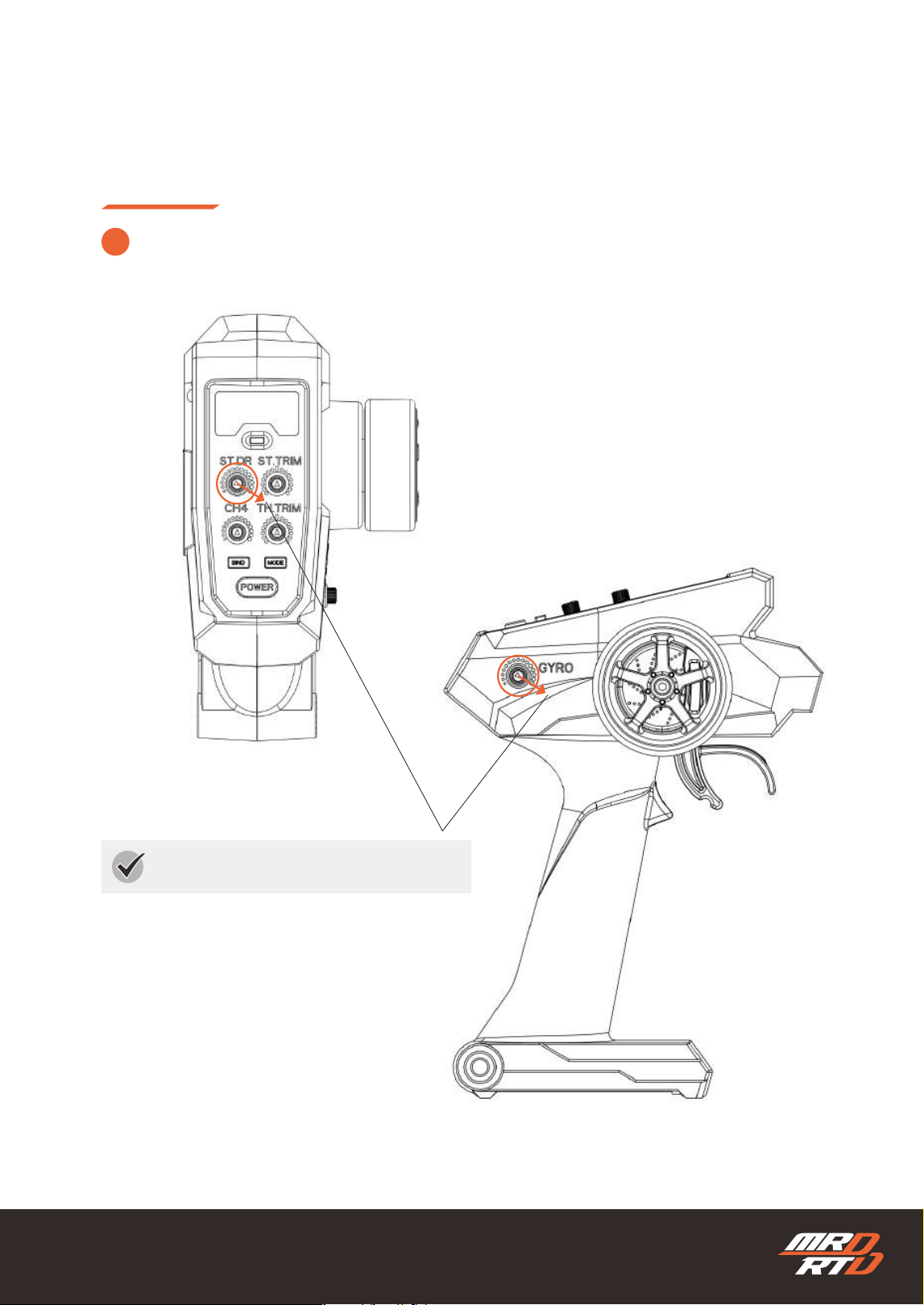
Pay attention to the position.
位置に注意してください。
Let’s Drive!
走行させよう
1
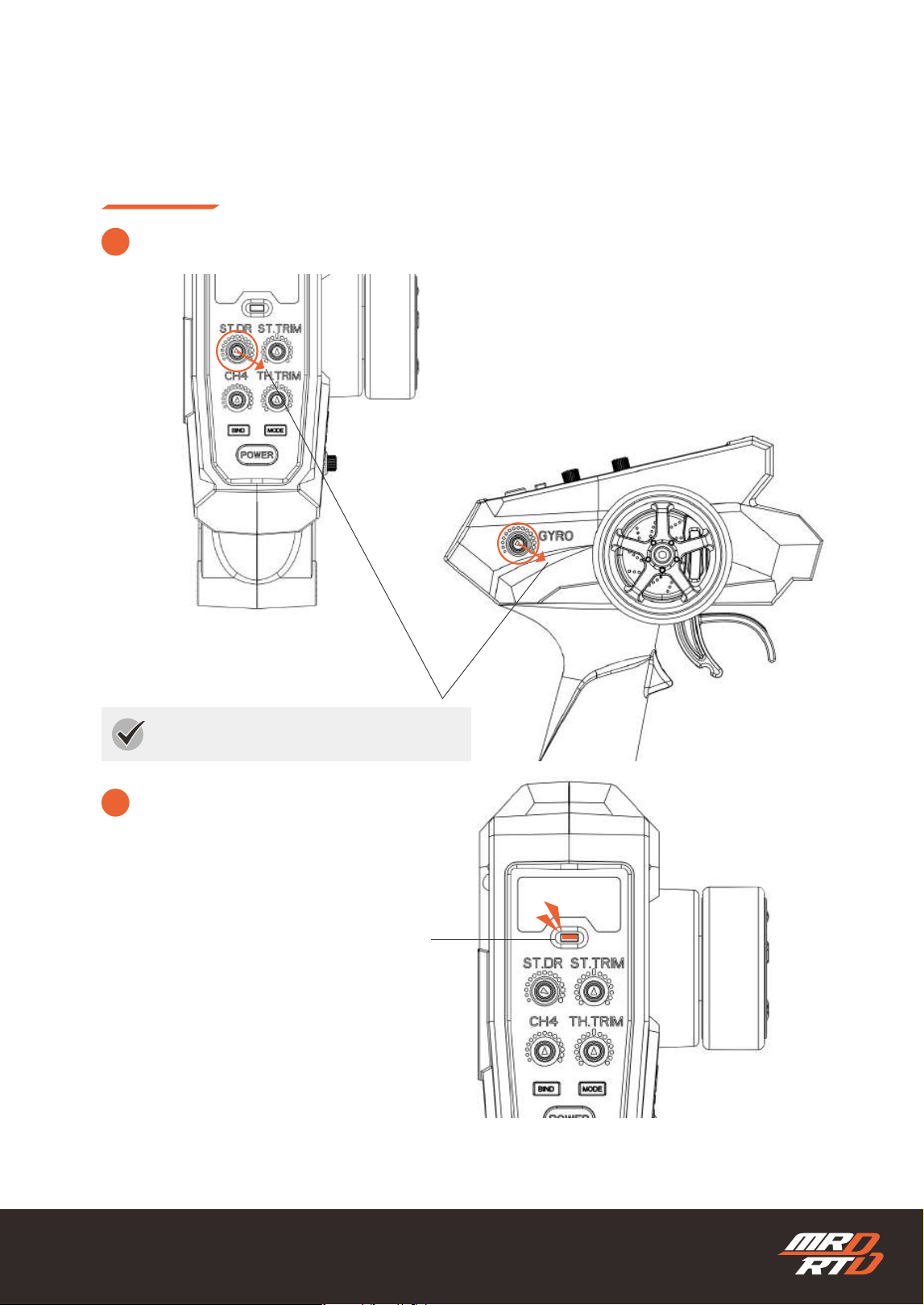
Check the position of each volume on the transmitter and set it to the correct position.
送信機の各ボリュームの位置を確認し、正しい位置にセットします。
23
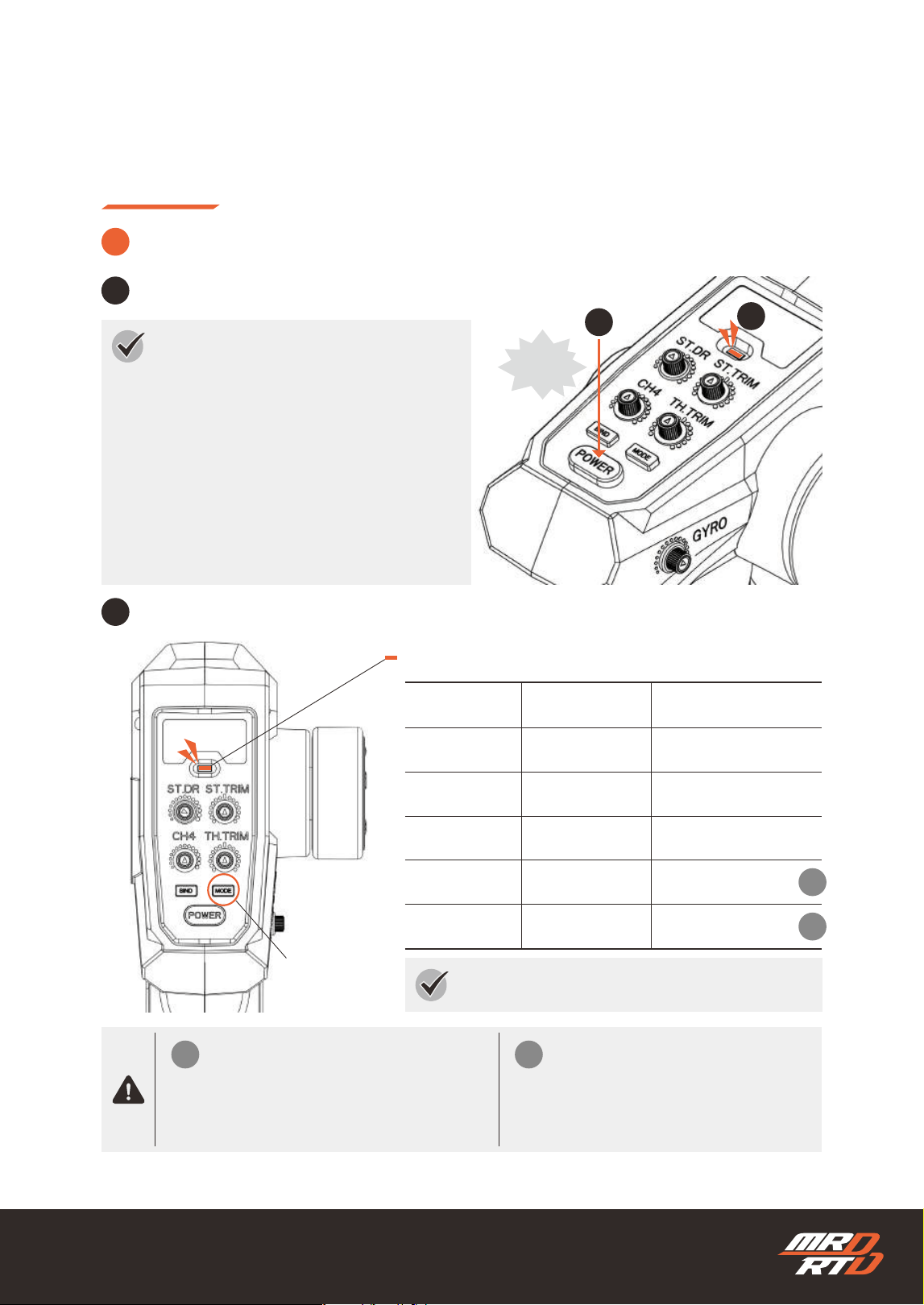
Let’s Drive!
走行させよう
Descriptions of each mode are provided on page XX.
各モードの説明はXXページにあります。
LED Indicator Colors and Light Patterns
LEDインジケーターの色と点灯の種類
Check that the LED indicator lights up.
LEDインジケーターが点灯することを確認します。
Mode Button
モードボタン
2
B
A
2
Turning the Power ON
スイッチの入れ方
1
2
ON!
If no operation is performed for 5 minutes,
the transmitter automatically enters sleep mode,
the radio signal stops,
and the LED indicator turns off.
To use it again, turn the power button OFF once,
then turn it ON again.
5分間何も操作しない状態が続くと、自動的にスリープ
モードになり、電波が止まり、LEDインジケーターが消
灯します。
再び使用する際は、電源ボタンを一度OFFにしてから、
もう一度ONにしてください。
Press the power button to turn on the transmitter.
電源ボタンを押して、送信機の電源を入れます。
Sleep Mode
スリープモード
1
Color
色
Light Patterns
点灯パターン
Green
グリーン
Orange
オレンジ
Red
レッド
Each Color
各色
Green
グリーン
Solid Light
点灯
Solid Light
点灯
Solid Light
点灯
Flashes 3 Times
3回点滅
Fast Flashing
速い点滅
Easy Mode
イージーモード
Mild Mode
マイルドモード
Responsive Mode
レスポンスモード
Low Battery Voltage
電池の電圧不足
Binding Mode
バインディングモード
Meaning
意味
Low Battery Voltage
電池の電圧不足
Binding Mode
バインディングモー
Stop using the product immediately and
replace the batteries with new ones.
ただちに使用を中止し、新しい電池に交換
してください。
This is explained on page XX.
XXページで説明しています。
A B
24
Let’s Drive!
走行させよう
3
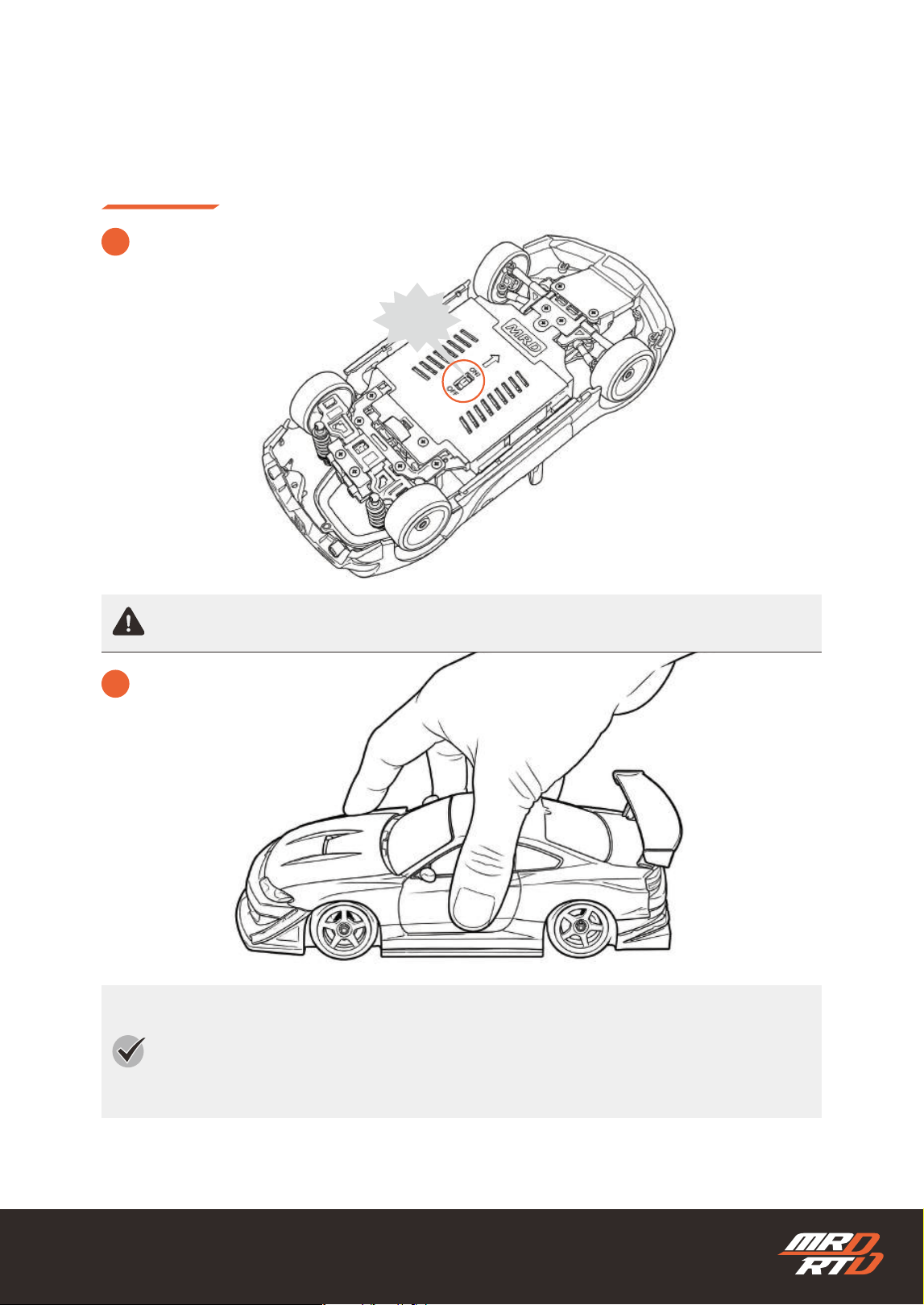
Turn on the chassis power.
車体の電源を入れます。
The tires may rotate when the power is turned on. Do not touch the tires.
電源を入れるとタイヤが回転することがあります。タイヤには触れないでください。
When the chassis detects that there is no movement or vibration, the gyro calibration starts
automatically. The vehicle can be operated once calibration is complete. Do not hold the chassis
in your hand, as calibration will not be completed and the vehicle will not operate.
車体が動きや振動のない状態を検知すると、ジャイロの初期設定を自動で開始します。初期設定が完了す
ると、操作できるようになります。車体を手に持ったままにすると初期設定が完了せず、動作しませんの
でご注意ください。
4
Place the car on a at surface.
車体を平らな路面に置きます。
ON!
25
Basic Controls
基本的な操縦のしかた
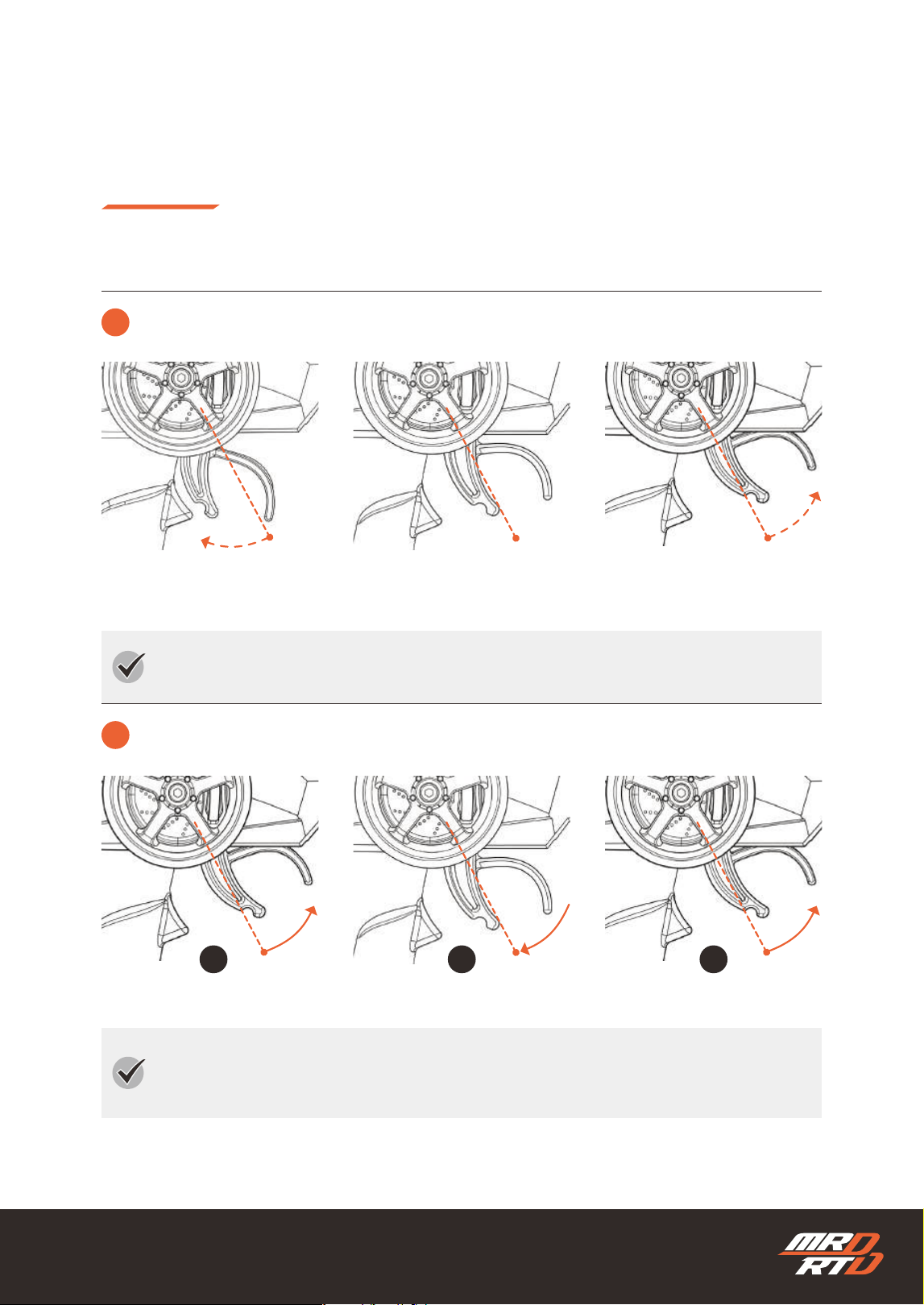
Check each operation with all tires lifted off the ground.
すべてのタイヤを浮かせた状態で、各動作を確認してください
How to Control Your Car
操縦のしかた
1
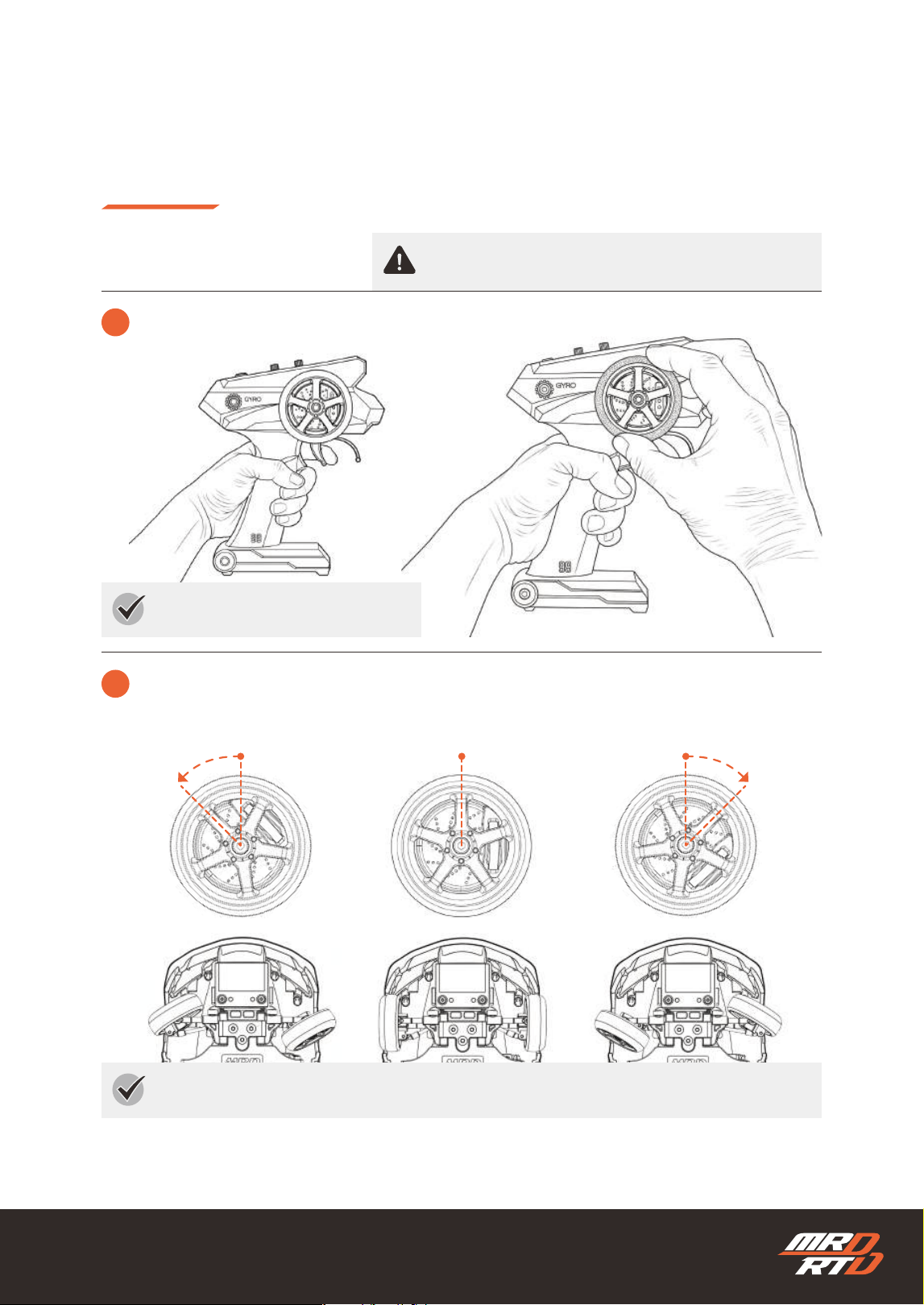
How to Hold the Transmitter
送信機の持ち方
The front wheels turn in proportion to how much you move the steering wheel.
ステアリングホイールを動かした分だけ、フロントタイヤの向きが変わります。
Hold the transmitter in your left hand.
送信機は左手で持ちます。
2
Steering Wheel
ステアリングホイール
Left
左
Neurtal
中立
Right
右
26
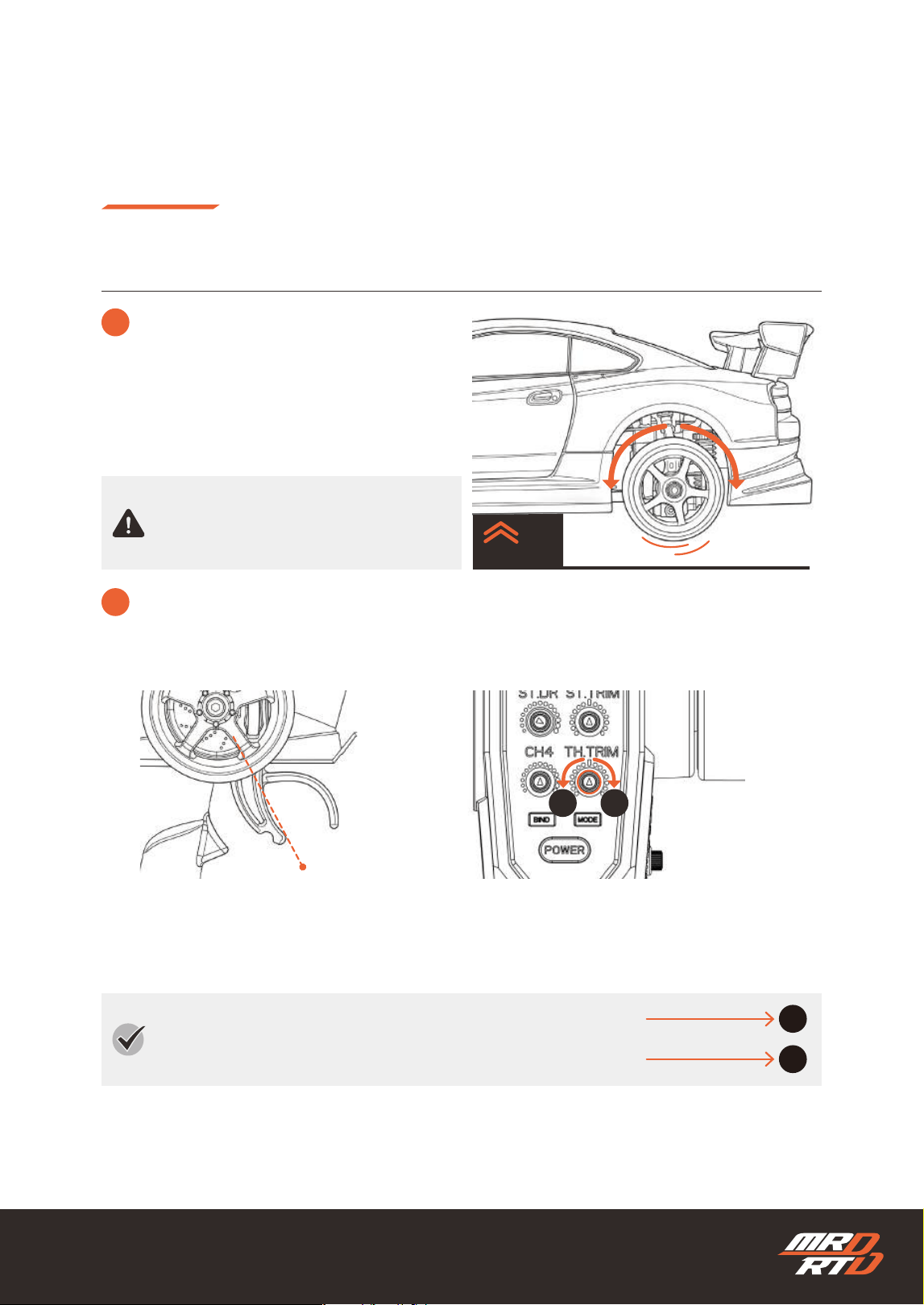
The more you operate the throttle trigger, the faster the car moves or the stronger the brake
becomes.
スロットルトリガーを操作した分だけ、スピードが出たり、ブレーキが強くなったりします。
To reverse, operate the brake once, return the throttle trigger to neutral, and then operate the
brake again.
後進させるには、一度ブレーキ操作を行い、スロットルトリガーをニュートラルに戻してから、もう一
度ブレーキ操作を行います。
Basic Controls
基本的な操縦のしかた
How to Control Your Car
操縦のしかた
3
Throttle Trigger
スロットルトリガー
!
Reverse
後進
Forward
前進
Brake
ブレーキ
Neutral:Stop
中立:停止
Neutral:Stop
中立:停止
Brake
ブレーキ
Reverse
後進
1 2 3
27
Basic Controls
基本的な操縦のしかた
How to Control Your Car
操縦のしかた
Check each operation with all tires lifted off
the ground.
すべてのタイヤを浮かせた状態で、各動作を確
認してください。
If the tires rotate forward or in reverse while the throttle trigger is in the neutral position, or if a “beep”
sound is heard from the motor, turn the throttle trim until the tires stop and the sound disappears.
スロットルトリガーがニュートラルのときに、タイヤが前進または後進方向に回転したり、モーターから「ピー」と
いう音が聞こえたりする場合は、タイヤが停止し、「ピー」という音が止まるまでスロットルトリムを回して調整し
ます。
!
If the Tires Rotate Automatically
タイヤが自動で回転してしまう場合
Neutral:Stop
中立:停止
Throttle Trigger
スロットルトリガー
Throttle Trim
スロットルトリム
AB
If the tires rotate in reverse, turn the throttle trim in direction A.
タイヤが後進方向に回転する場合は、スロットルトリムをAの方向へ回します。
If the tires rotate forward, turn the throttle trim in direction B.
タイヤが前進方向に回転する場合は、スロットルトリムをBの方向へ回します。
A
B
3
Throttle Trigger
スロットルトリガー
28
Basic Controls
基本的な操縦のしかた
How to Control Your Car
操縦のしかた
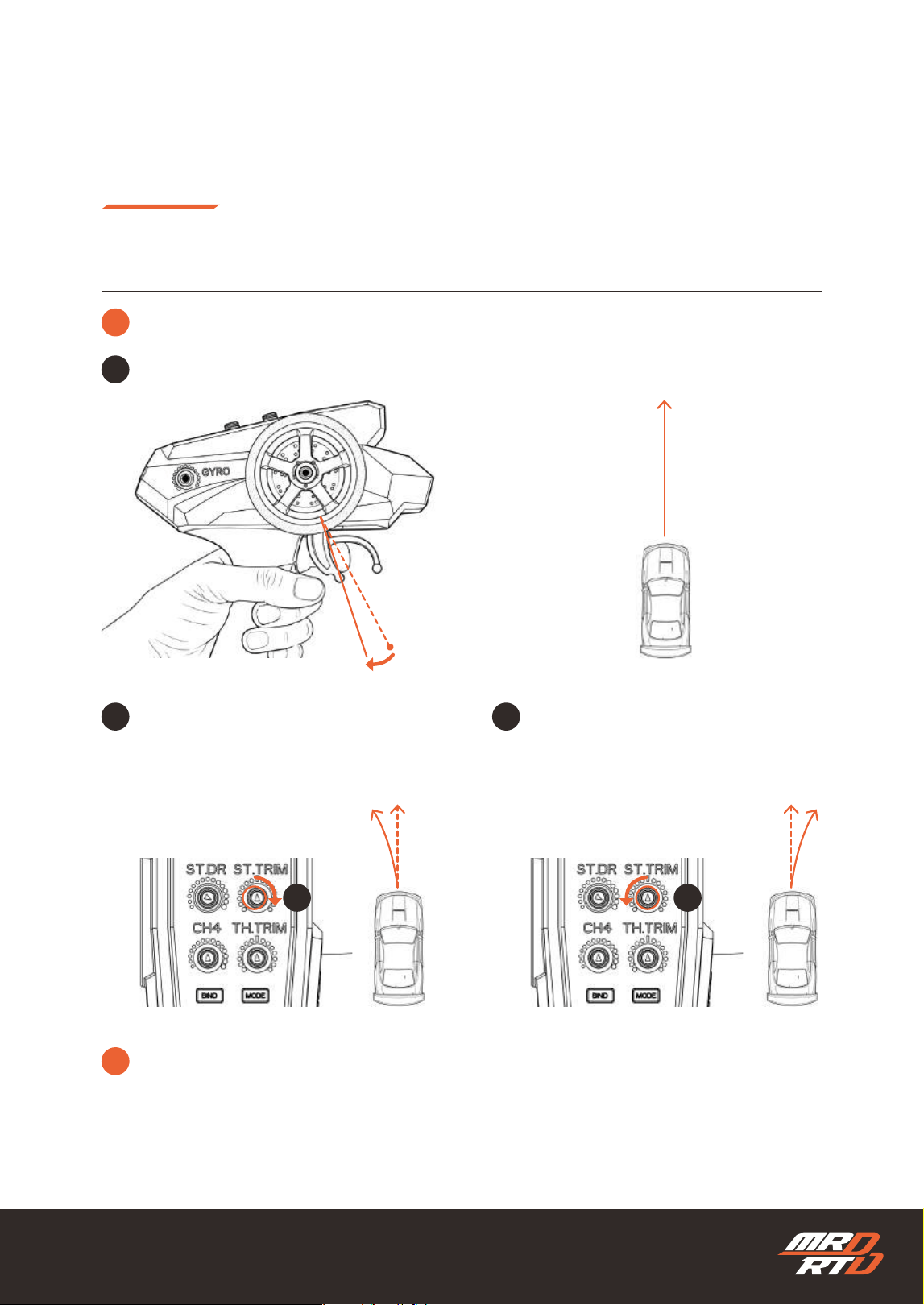
4
Adjust the Steering for Straight Driving
真っすぐ走るように調整しよう
Without touching the steering wheel, gently pull the throttle trigger to move the car forward slowly.
ステアリングホイールには触れず、スロットルトリガーを少しだけ握り、車をゆっくり前進させます。
Without touching the steering wheel, gently
pull the throttle trigger to move the car
forward slowly.
ステアリングホイールには触れず、スロットル
トリガーを少しだけ握り、車をゆっくり前進さ
せます。
If the car turns to the right, gradually turn
the steering trim in direction B.
車が右に曲がっていく場合は、ステアリングト
リムをBの方向へ少しずつ回します。
1
Neutral:Stop
中立:停止
2 3
Steering Trim
ステアリングトリム
Steering Trim
ステアリングトリム
A B
!
Due to road surface conditions and play in the vehicle’s parts, the car may not travel perfectly
straight and may gradually drift to the right or left. Adjust the steering trim as closely as possible.
路面の状態や車体部品の遊びなどにより、完全に直進しない場合があります。多少右や左に曲がることがあり
ますが、できるだけまっすぐ走るように調整してください。
29
Basic Controls
基本的な操縦のしかた
How to Control Your Car
操縦のしかた
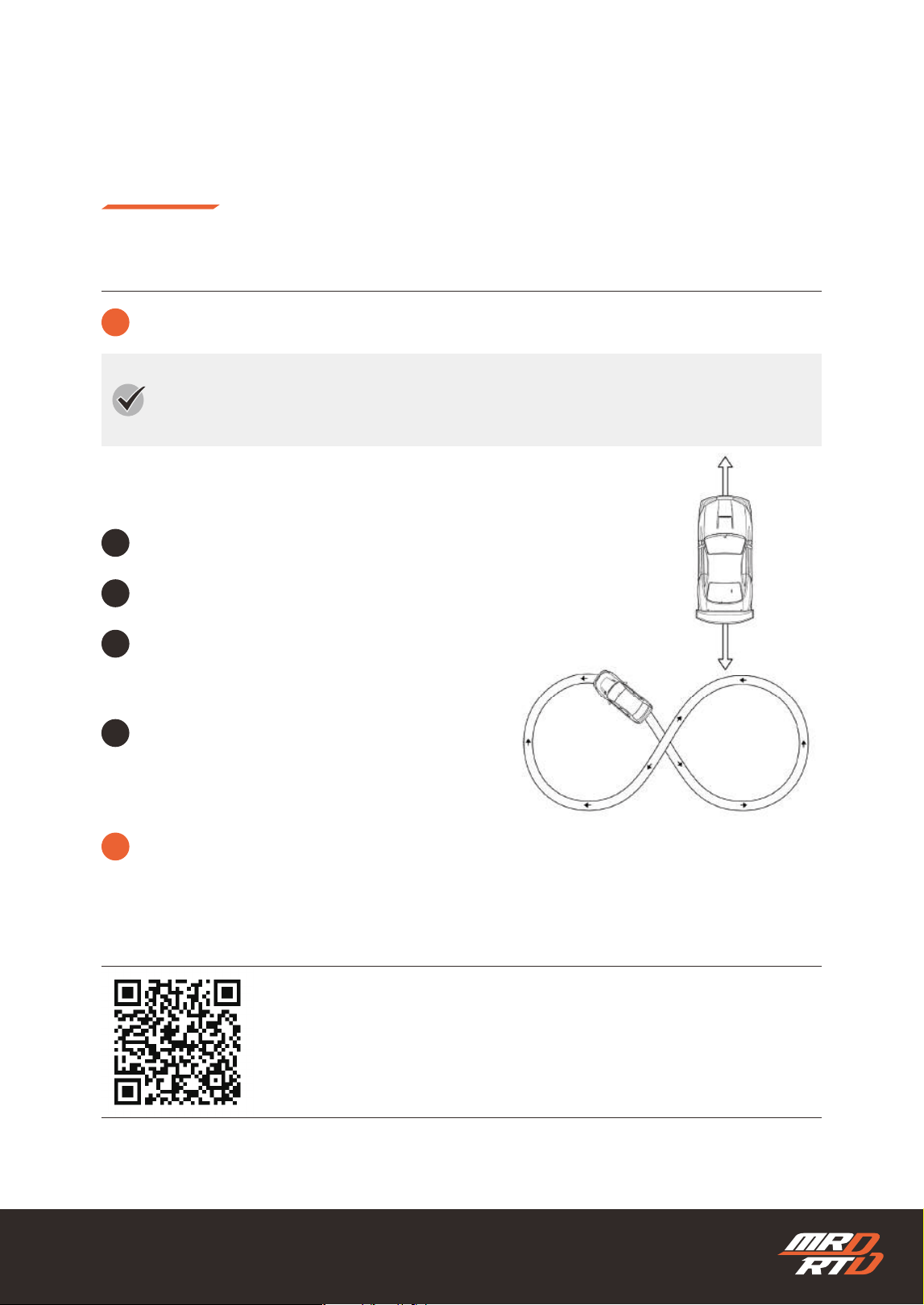
5
Let’s Start Driving!
いよいよ走らせてみよう
Start with Easy Mode and drive in a wide, open area free of obstacles. Before attempting to drift,
practice at a slow speed until you can perform the following basic driving maneuvers.
※ Easy Mode is explained on page XX
※ イージーモードはXXページで説明しています。
最初は「イージーモード」を使用して、広く障害物のない場所で走行させましょう。ドリフト走行は少し
我慢して、まずはゆっくりしたスピードで、以下の基本走行ができるまで練習しましょう。
Gently pull the throttle trigger and try moving the car forward slowly.
スロットルトリガーを少しだけ握り、車をゆっくりと前進させてみましょう。
Push the throttle trigger forward and try applying the brake.
スロットルトリガーを押して、ブレーキをかけてみましょう。
Return the throttle trigger to neutral once,
then push it forward again to try driving in reverse.
スロットルトリガーを一度中立に戻し、
もう一度押して後進させてみましょう。
Try driving in a gure-eight pattern at a slow speed.
Be sure to drive as slowly as possible.
ゆっくりしたスピードで8の字走行をしてみましょう。
とにかく、できるだけゆっくり走行してください。
1
2
3
4
!
The MRD RTD is equipped with a high-performance gyro. When you enter a corner at higher speed,
the gyro automatically attempts to return the steering toward neutral, resulting in a larger turning
radius. The key to driving a tight gure-eight pattern is to reduce your speed.
MRD RTDには高性能ジャイロが搭載されています。スピードを上げてコーナーを曲がろうとすると、ジャイ
ロがステアリングを自動的に中立へ戻そうとするため、旋回半径が大きくなります。小さな8の字を走行させ
るコツは、スピードを落とすことです。
You can watch a video showing how to practice on the page below.
練習方法は、下記のページから動画でご覧いただけます。
https://products.enjoysmile.co.jp/mrd-rtd-setup-information/
MRD Setup Information
MRD セットアップインフォメーション
30
Basic Controls
基本的な操縦のしかた
How to Control Your Car
操縦のしかた
6
After Driving
走行を終了するとき
Turn the chassis power switch OFF.
車体の電源スイッチをOFFにします。
Remove the batteries from the chassis.
シャシーから電池を取り外します。
Turn the transmitter power switch OFF.
送信機の電源スイッチをOFFにします。
Remove the batteries from the transmitter.
送信機から電池を取り出します。
1 2
3 4
OFF
OFF
31
1
2
3
Using the Functions
各種機能の使い方
How to Control Your Car
操縦のしかた
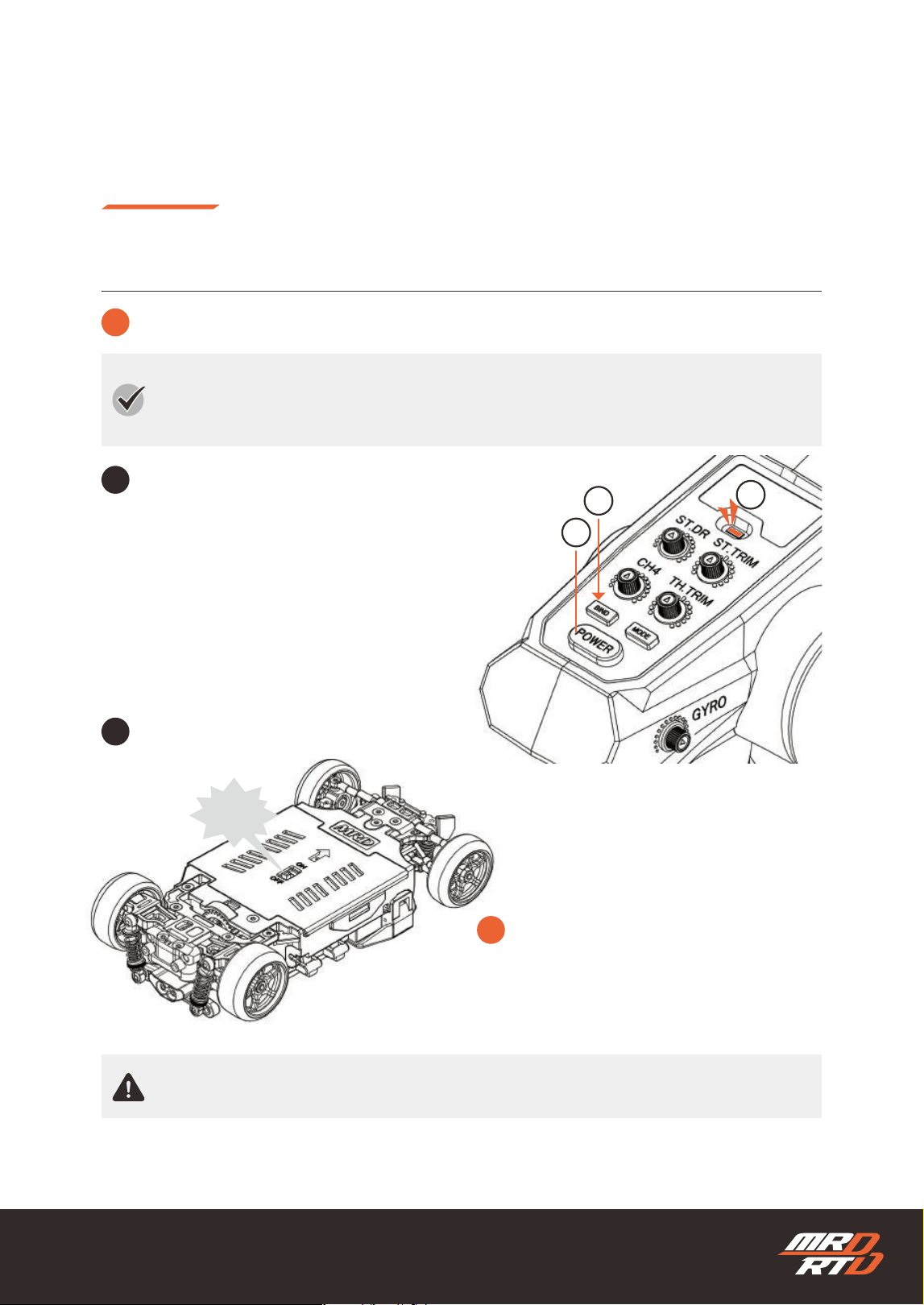
1
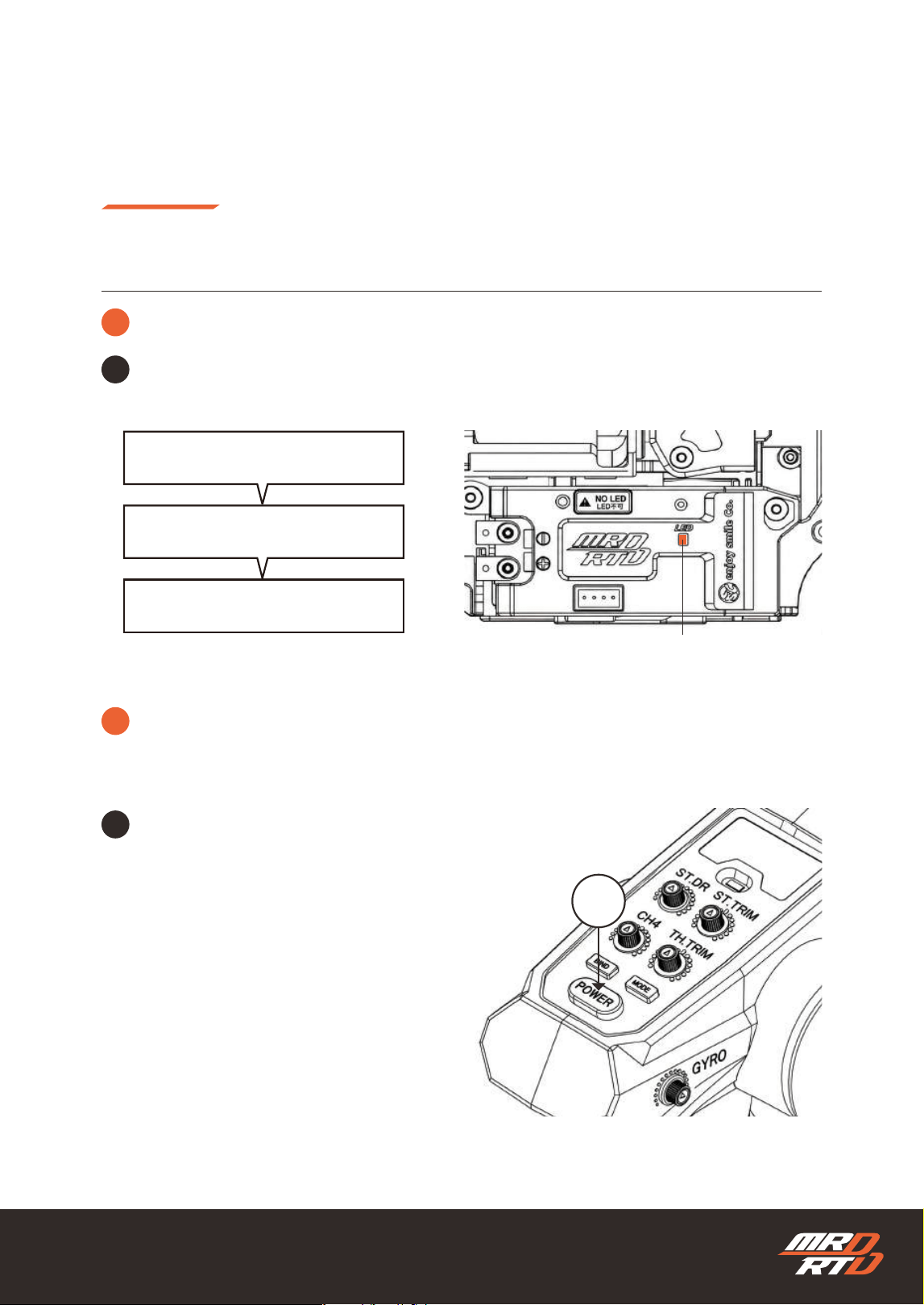
Binding
バインディング
Binding registers a transmitter to control the chassis. By binding the same transmitter to multiple
chassis, you can control several chassis with a single transmitter.
バインディングは、シャシーを操作する送信機を登録する機能です。同じ送信機を複数のシャシーに登録
することで、1つの送信機で複数のシャシーを操作できます。
While holding down the “BIND” button ①,
press the power button ② to turn the power ON.
①の「BIND」ボタンを押しながら、
②の電源ボタンを押して電源をONにします。
Check that the
③LED indicator ashes green.
③LEDインジケーターが緑色で点滅することを確認します。
1
Turn the chassis power ON.
車体の電源をONにします。
2
ON!
!
The chassis uses automatic binding. Do not
turn the chassis power ON while another
person is performing binding.
車体側はオートバインディング方式です。他の人
がバインディングを行っているときは、シャシー
の電源をONにしないでください。
The tires may rotate when the power is turned on. Do not touch the tires.
電源を入れるとタイヤが回転することがあります。タイヤには触れないでください。
32
Using the Functions
各種機能の使い方
How to Control Your Car
操縦のしかた
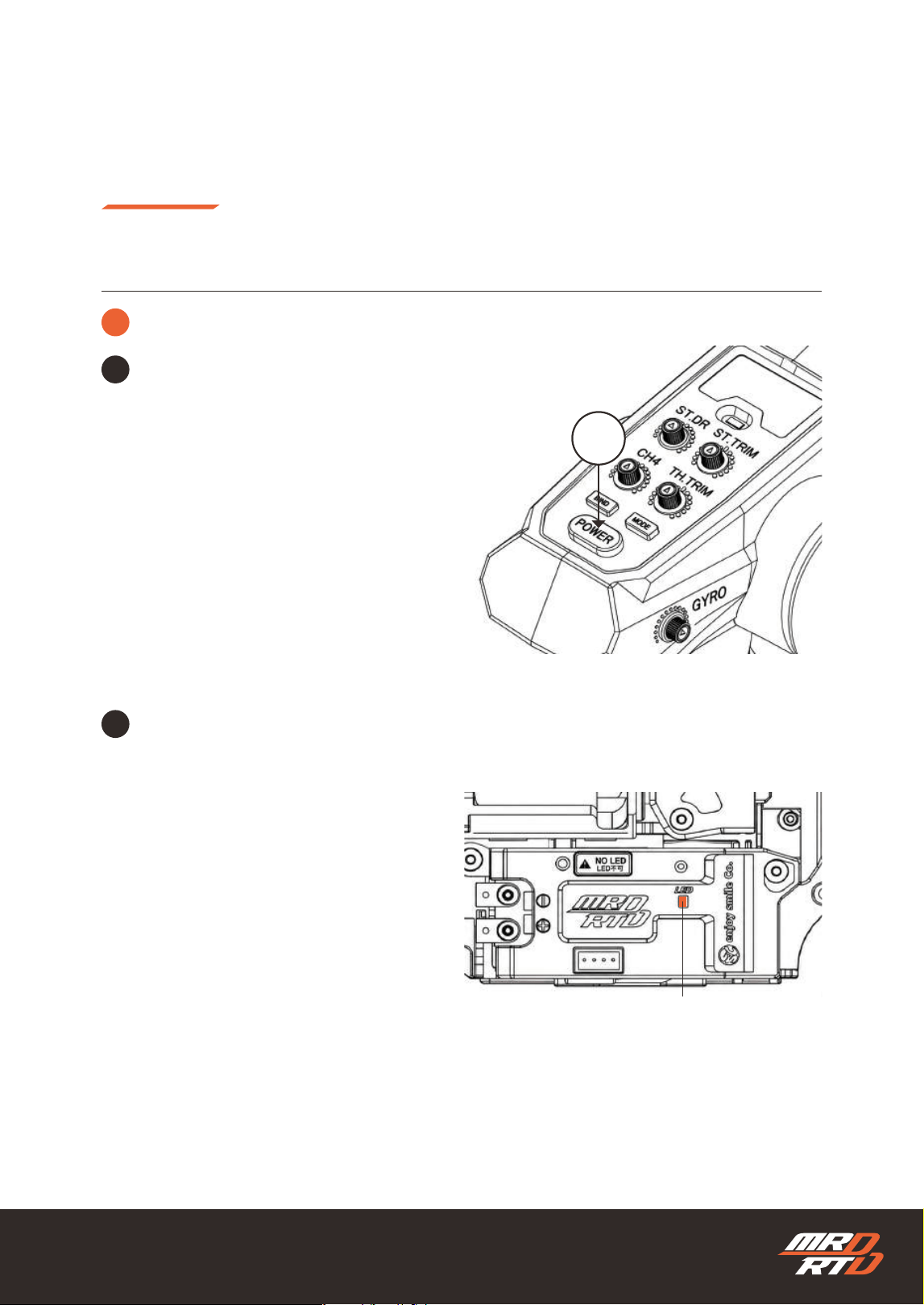
Check the LED indicator.
LEDインジケーターを確認します。
The LED indicator ashes red.
LEDインジケーターが赤色で点滅します。
The LED indicator lights up red.
LEDインジケーターが赤色に点灯します。
Binding Complete
バインド完了
3
!
If binding is not completed, turn the transmitter power OFF once, then turn it ON again while holding
down the “BIND” button.
バインドが完了しない場合は、送信機の電源を一度OFFにし、もう一度「BIND」ボタンを押しながら電源を
ONにしてください。
LED Indicator
LEDインジケーター
Turn the transmitter power OFF once.
一度、送信機の電源をOFFにします。
4
OFF
1
Binding
バインディング
33
Using the Functions
各種機能の使い方
How to Control Your Car
操縦のしかた
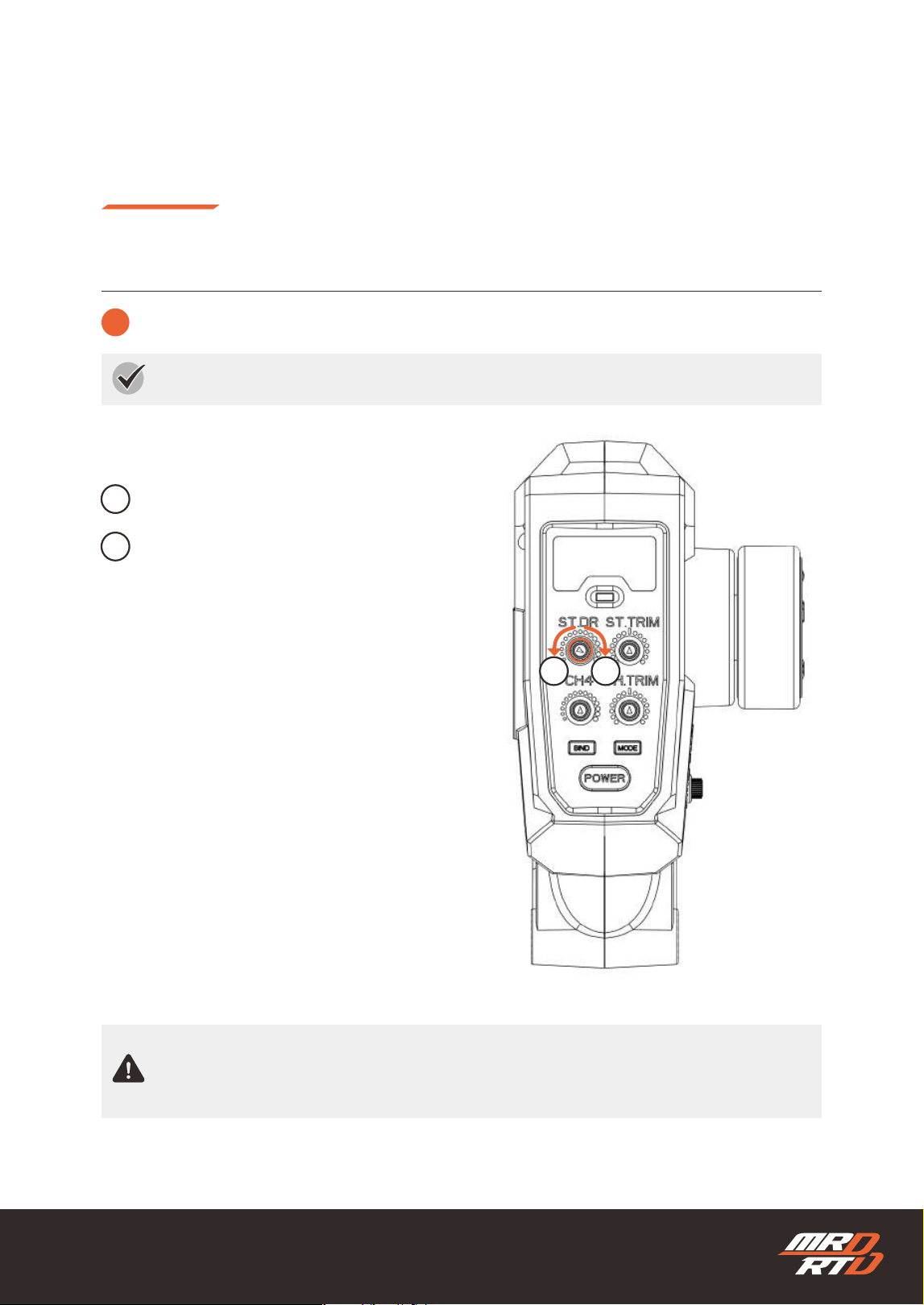
Turn the transmitter power ON again.
もう一度、送信機の電源をONにします。
5
LED Indicator
LEDインジケーター
When the LED indicator ashes blue rapidly and then changes to a solid red light, you can begin
operation.
LEDインジケーターが青色で高速点滅した後、赤色の点灯に変われば操作を開始できます。
6
ON
1
Binding
バインディング
34
Using the Functions
各種機能の使い方
How to Control Your Car
操縦のしかた
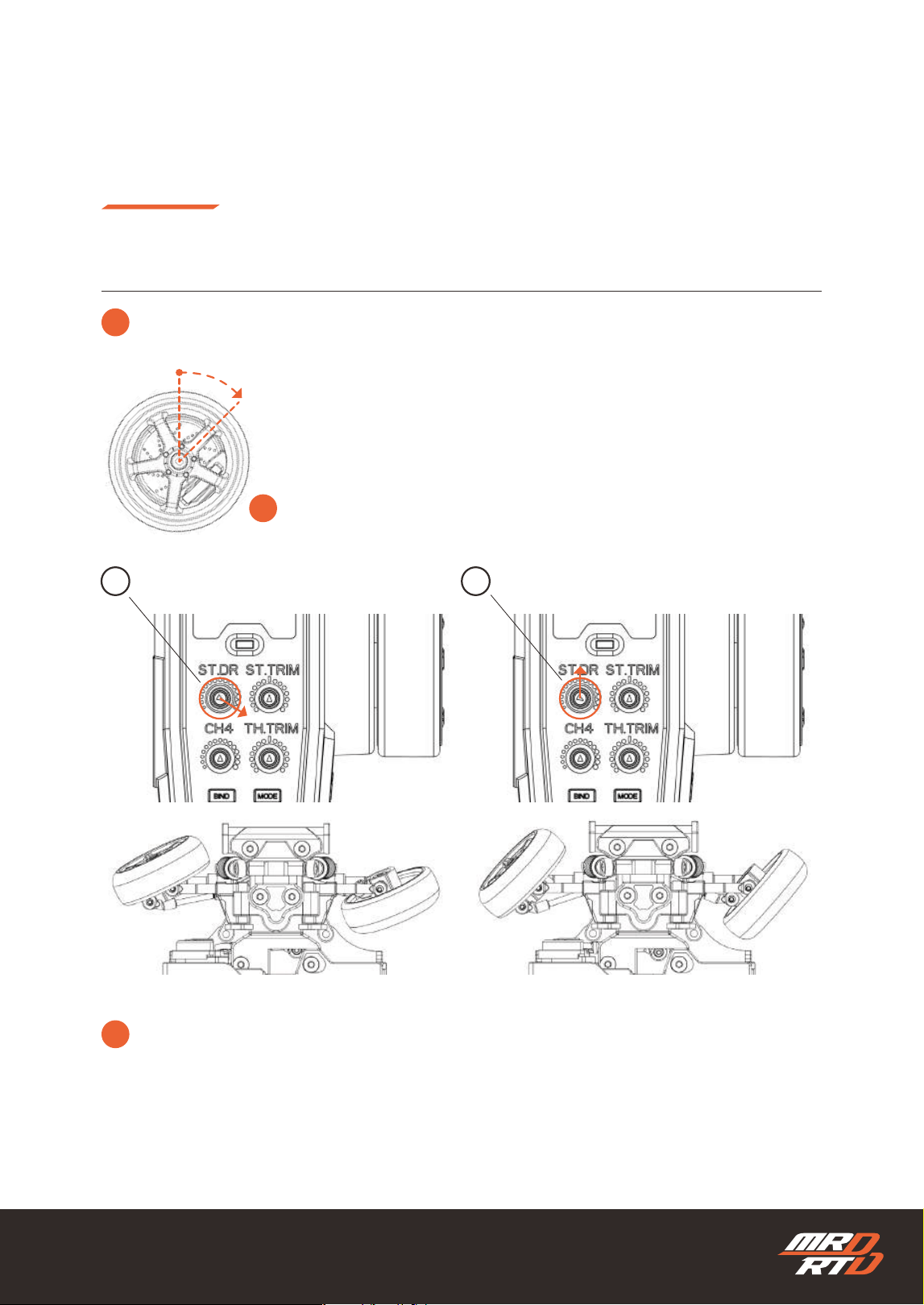
2
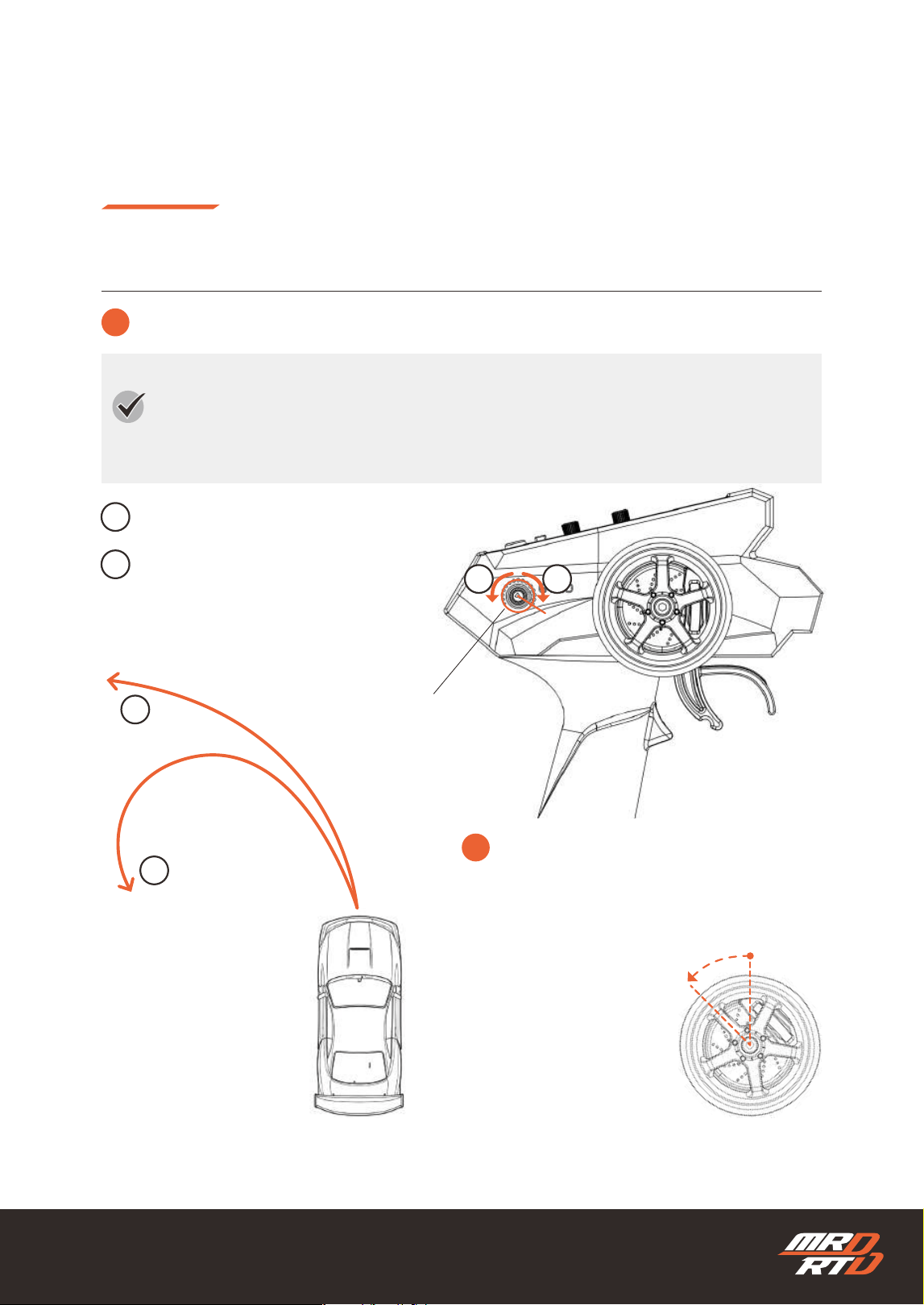
Adjusting the Steering Angle
タイヤの切れ角を調整する
The steering angle of the tires increases.
タイヤの切れ角が大きくなります。
The steering angle of the tires decreases.
タイヤの切れ角が少なくなります。
Steering Dual Rate
ステアリングデュアルレート
Adjust the steering angle of the tires to suit your preference.
ステアリング操作に対するタイヤの切れ角を、お好みに合わせて調整します。
If the dual rate is turned fully in direction ②, the steering angle becomes zero and the tires will not
move even when the steering wheel is operated. If the tires do not turn at all, check this setting.
デュアルレートを②の方向へ最大まで回すと、舵角がゼロになり、ステアリングを操作してもタイヤがま
ったく動かなくなります。タイヤがまったく切れない場合は、この設定を確認してください。
1
2
12
35
!
The dual rate changes not only the maximum steering angle of the tires, but also the response ratio
between steering wheel input and tire movement. Increasing the dual rate makes the car respond
more quickly, while decreasing it makes the car’s movement milder.
デュアルレートは、タイヤの最大切れ角だけでなく、ステアリング操作に対してタイヤの向きが変わる割合も
変化させます。そのため、デュアルレートを大きくすると車の動きはクイックになり、小さくするとマイルド
になります。
Using the Functions
各種機能の使い方
How to Control Your Car
操縦のしかた
2
Adjusting the Steering Angle
タイヤの切れ角を調整する
!
When the steering wheel is turned fully to the right
ステアリングホイールを右いっぱいまで操作したとき
Right
右
Maximum Steering Angle (Standard)
最大の切れ角(標準)
Medium Steering Angle
中間の切れ角
1 2
36
Using the Functions
各種機能の使い方
How to Control Your Car
操縦のしかた
3
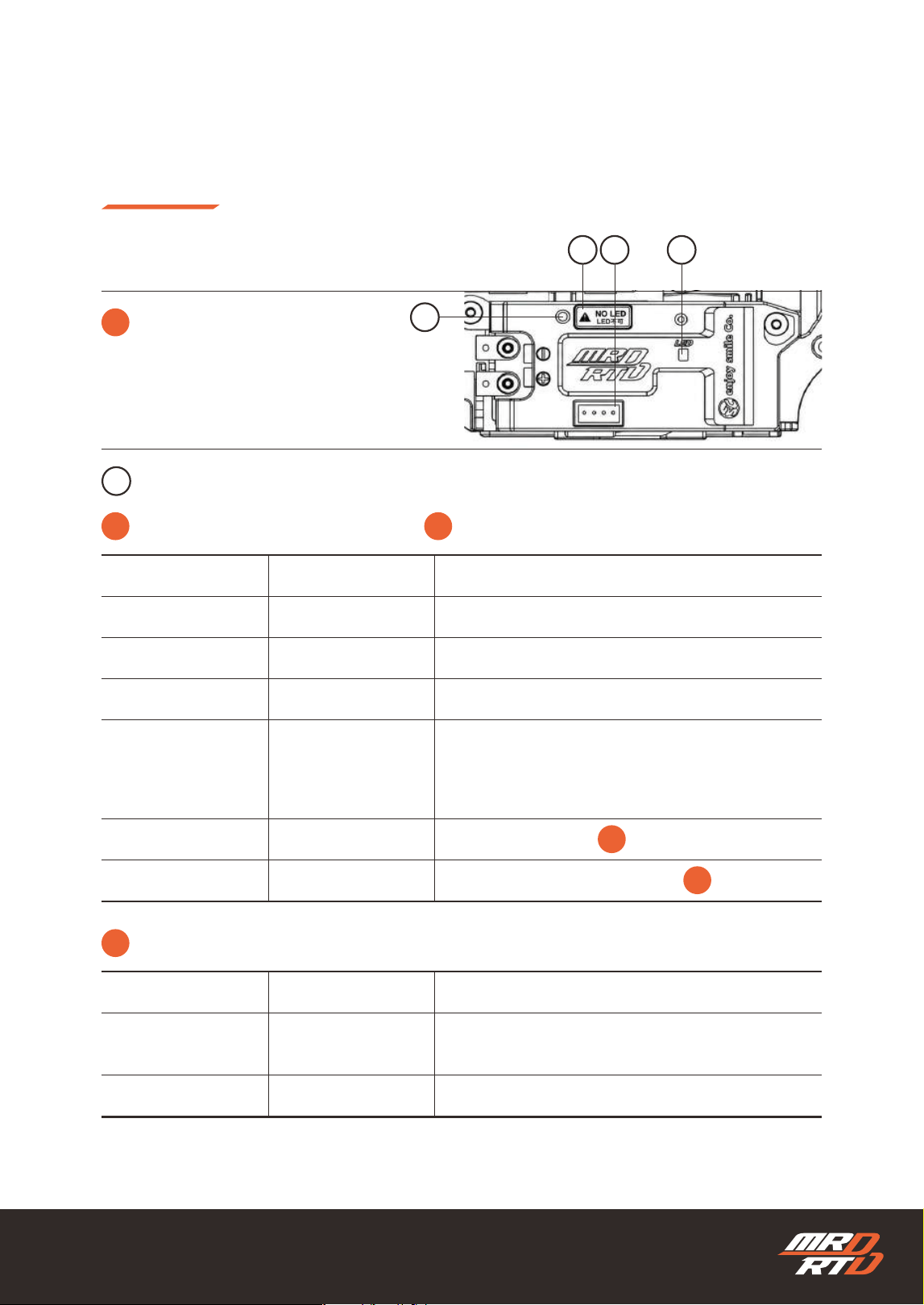
Adjusting the Gyro Gain
ジャイロの効きを調整する
Increasing the gyro gain makes the car less likely to spin, but it also makes cornering more
difcult and increases the turning radius. Decreasing the gyro gain makes it easier to change the
car’s direction, but also makes the car more likely to spin.
ジャイロの効きを強くすると、車はスピンしにくくなりますが、コーナーを曲がりにくくなり、旋回半径
が大きくなります。逆にジャイロの効きを弱くすると、車の向きは変えやすくなりますが、スピンしやす
くなります。
The gyro gain increases.
ジャイロの効きが強くなります。
The gyro gain decreases.
ジャイロの効きが弱くなります。
1
1
2
2
!
Start from position ①, then gradually turn the
volume toward direction ② to find a setting
that makes drifting easier.
最初は①の位置からスタートし、ボリュームを②の
方向へ少しずつ回して、ドリフトしやすいセッティ
ングを見つけます。
12
Left
左
Standard Setting
標準設定
37
This is explained in the MRD Setup Information.
MRDセットアップインフォメーションで説明しています。
Using the Functions
各種機能の使い方
How to Control Your Car
操縦のしかた
4
!
※
※
※
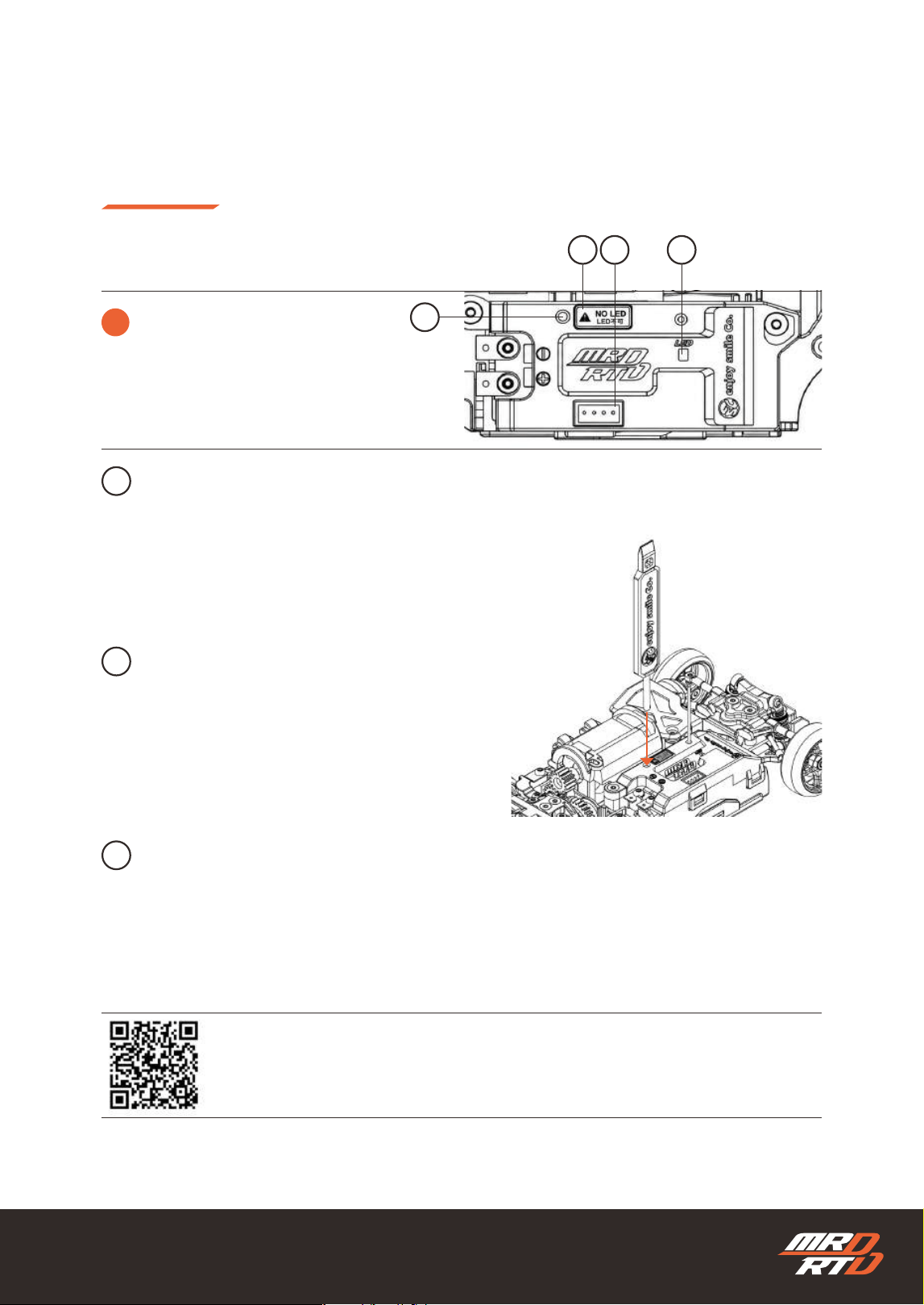
Control Unit Functions
制御ユニットの機能
Indicates the status of the control unit.
制御ユニットの状態を示します。
LED Indicator
LEDインジケーター
1
1
24
3
Color
色
Red
レッド
Red
レッド
Blue
ブルー
Purple
パープル
Blue
ブルー
Off
消灯
Solid Light
点灯
Fast Flashing
速い点滅
Fast Flashing
速い点滅
Solid Light
点灯
Slow Flashing
遅い点滅
Off
消灯
Normal Operation
正常動作中
Searching for the transmitter signal
送信機の電波を探しています
Initializing the gyro
ジャイロを初期化しています
Steering Setup Mode
ステアリング設定モード
Smartphone Communication Mode
スマートフォン通信モード
If the LED indicator is off even though the power switch
is ON, the gyro gain is set to the minimum.
電源スイッチがONになっているのにLEDインジケーターが
消灯している場合は、ジャイロの効きが最小になっていま
す。
Light Patterns
点灯パターン
Meaning
意味
!
You can observe the gyro in operation while the car is driving.
走行中はジャイロの動作を確認できます。
Color
色
Red
レッド
Blue
ブルー
Fast Flashing
速い点滅
Fast Flashing
速い点滅
Detecting counterclockwise rotation when viewed from
above
Detecting clockwise rotation when viewed from above.
車体を上から見て、時計回りの回転を検知しています。
車体を上から見て、反時計回りの回転を検知しています。
Light Patterns
点灯パターン
Meaning
意味
38
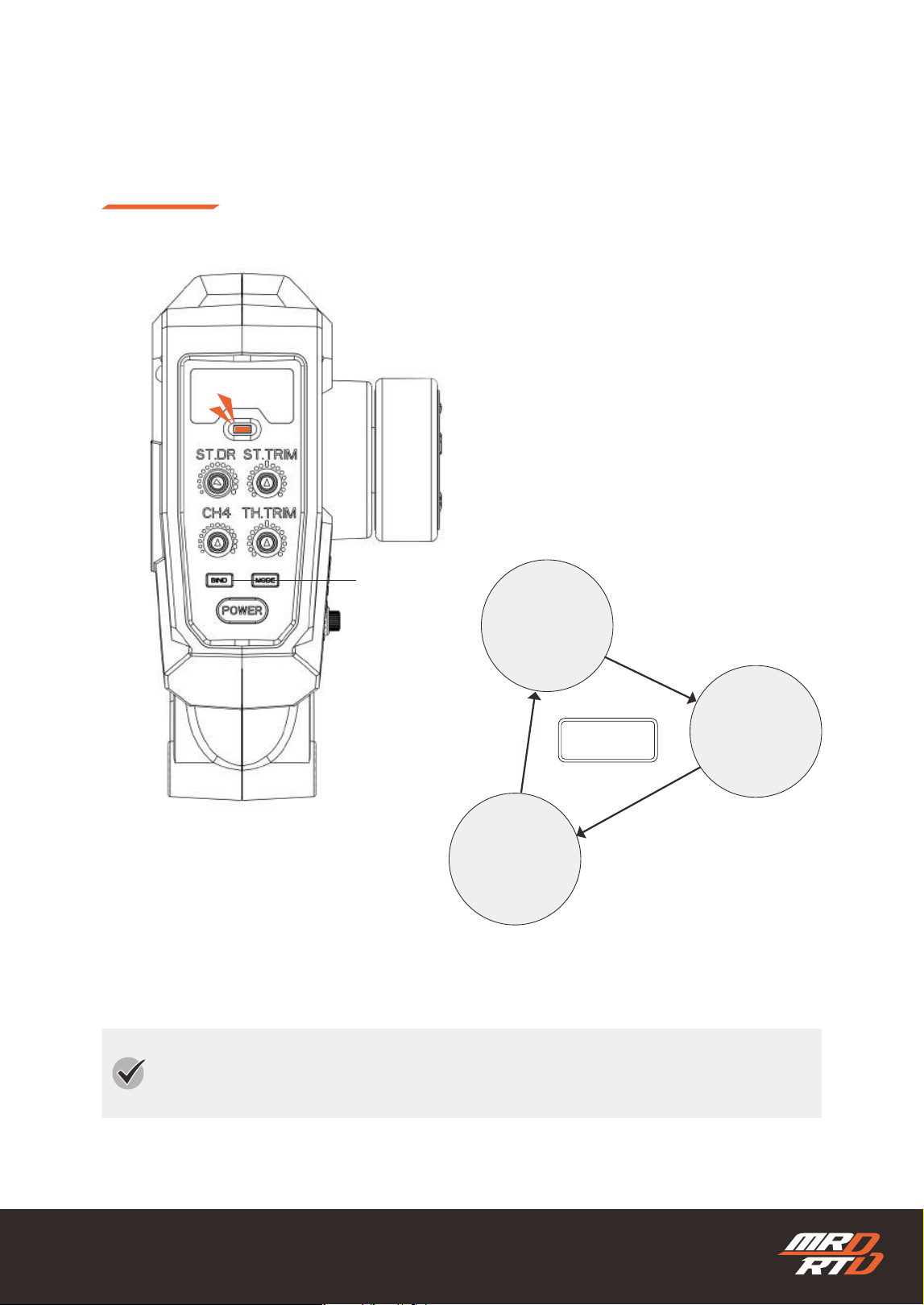
Connector for the LED light set planned for future release.
Commercially available light sets for 1/28 scale models can
also be used.
Use the setting stick to press the button and enter a mode
where detailed chassis settings can be changed.
This connector is reserved for future expansion. Connecting any device other than the specied equipment
may damage the circuit board. Do not remove the seal until the connector is required.
This is explained in the MRD Setup Information.
MRDセットアップインフォメーションで説明しています。
今後発売を予定しているLEDライトセットを接続するためのコネ
クターです。市販の1/28スケールモデル用ライトセットも使用で
きます。
セッティングスティックを使ってボタンを押すと、シャシーの細
かな設定を変更できるモードに入ります。
今後の機能拡張に使用するためのコネクターです。指定された機器以外を接続すると、基板が破損するおそれがあり
ます。使用するまではシールを剝がさないでください。
Using the Functions
各種機能の使い方
4
Control Unit Functions
制御ユニットの機能
LED Connector
LED用コネクター
Setting Button
セッティングボタン
Expansion Connector
拡張コネクター
Setting Stick
セッティングスティック
1
2
3
4
24
3
How to Control Your Car
操縦のしかた
https://products.enjoysmile.co.jp/mrd-rtd-setup-information/
MRD Setup Information
MRD セットアップインフォメーション
39
Driving Mode
走行モード
The transmitter is pre-programmed with three modes for enjoying drift driving. Practicing in the
order of Easy Mode, Mild Mode, and Responsive Mode will help you improve more quickly.
送信機には、ドリフト走行を楽しむための3つのモードが標準でプログラムされています。イージーモー
ド、マイルドモード、レスポンスモードの順に練習することで、より早い上達につながります。
Mode Button
モードボタン
Green
グリーン
Orange
オレンジ
Red
レッド
Easy Mode
イージーモード
Mild Mode
マイルドモード
Responsive Mode
レスポンスモード
PUSH
押す
40
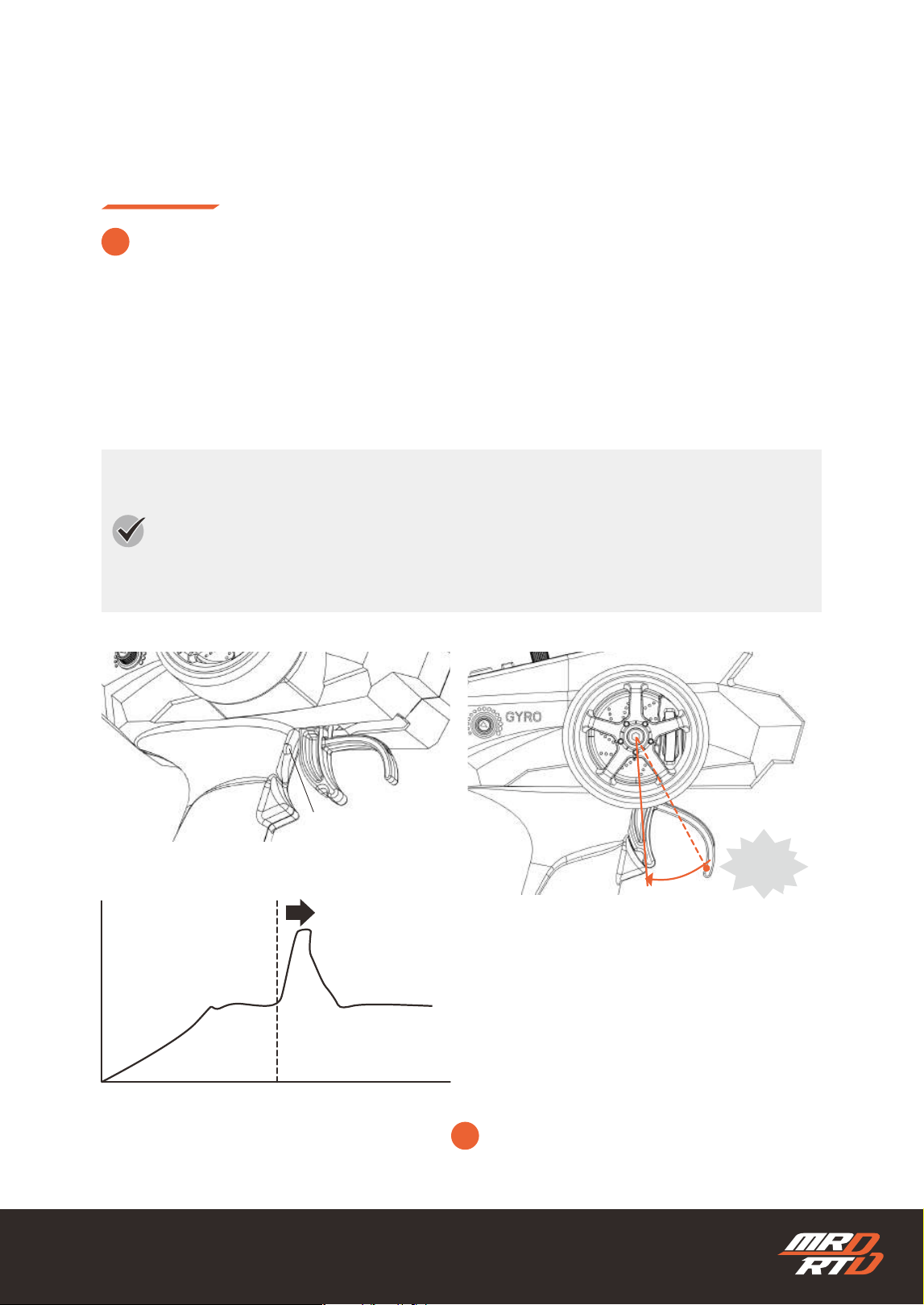
In Easy Mode, the motor output is set lower, making it difcult to initiate a drift even when the throttle trigger is
pulled fully. However, pulling the trigger all the way presses the Drift Assist button located behind it. This briey
increases the motor power, causing the rear tires to spin and initiate a drift. The power then automatically
returns to its normal level, helping prevent spins and maintain the drifting posture.
イージーモードではモーターの出力が低めに設定されているため、スロットルトリガーを大きく握ってもドリフトしにく
くなっています。ただし、トリガーを奥まで引き切ると、奥にあるドリフトアシストボタンが押され、一時的にパワーが
上がります。これによりリヤタイヤを空転させ、ドリフトのきっかけを作ります。その後、自動的にパワーが元に戻り、
スピンを防ぎながらドリフト姿勢を保ちます。
Driving Mode
走行モード
Recommended for rst-time drift drivers. The steering response is slower, and the motor power is set lower,
making the car move more gently and reducing the chance of spinning. Although this also makes it more
difcult to initiate a drift, the Drift Assist function automatically creates the initial drift, helping you develop
a feel for drifting. This mode is suitable for driving in wide, open spaces without markers, but is not suitable
for following targets or driving along a course.
初めてドリフトする方におすすめです。ステアリングの動きがゆっくりで、モーターのパワーも低めに設定されてい
るため、車の動きが穏やかになり、スピンしにくいモードです。その反面、ドリフトのきっかけを作りにくくなりま
すが、ドリフトアシスト機能が最初のきっかけを自動で作り出し、ドリフトの感覚をつかむことができます。目印の
ない広いスペースでの走行に適していますが、目標物やコースに沿って走行させる用途には適していません。
1
Easy Mode
イージーモード
!
Keep the button pressed with the throttle trigger.
スロットルトリガーでボタンを押し続けます。
Drift Assist Button
ドリフトアシストボタン
Power
パワー
Drift Start
ドリフトスタート
Time
時間
Drift Assist ON
ドリフトアシストON
ON!
41
Driving Mode
走行モード
This mode smooths the vehicle’s movement, even with rough steering input, making it easier to drift in a
clean arc. It is suitable for larger courses, but the transition from one direction to the other may feel slightly
slower on layouts with many small corners. The Overboost function also allows you to enjoy powerful
drifting.
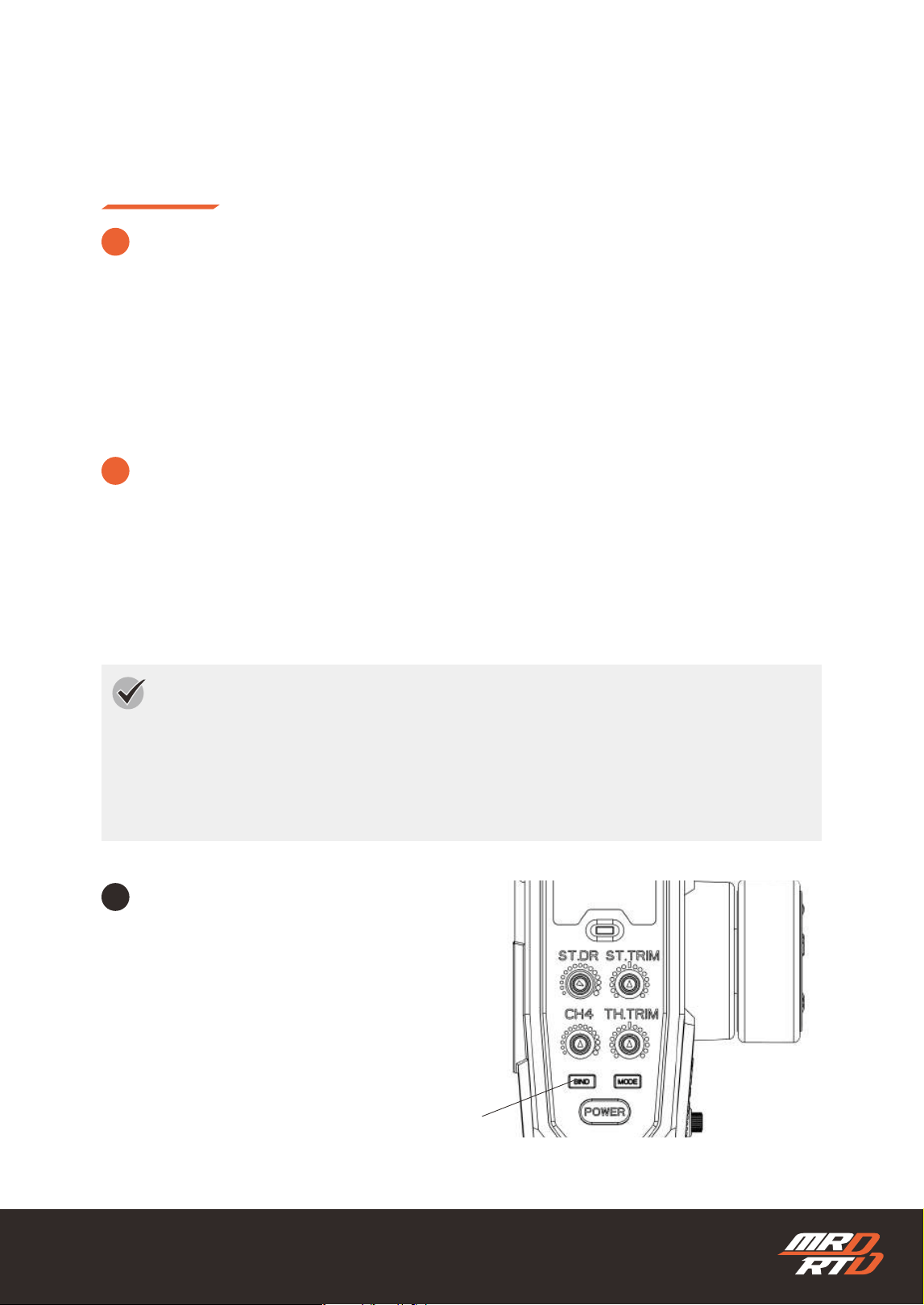
In Mild Mode or Responsive Mode, press the
“BIND” button. Each time the button is pressed, the
Overboost function switches between ON and OFF.
Please note that the LED indicator does not change
when the setting is switched.
The vehicle responds directly to steering input, making it easier to follow the intended driving line. This
mode is well suited for small corners, but larger corners may require smoother and more precise steering
input. By using the Overboost function, you can also enjoy more powerful driving.
ラフな操作に対しても車体の動きをマイルドに調整し、きれいな円弧を描くドリフトがしやすいモードです。大きな
コースに適していますが、小さなコーナーが続くレイアウトでは、切り返しが少し遅く感じる場合があります。オー
バーブースト機能を使うことで、パワフルなドリフトをお楽しみいただけます。
「マイルドモード」または「レスポンスモード」の状態
で、「BIND」ボタンを押します。ボタンを押すたびに、
オーバーブースト機能がONとOFFに切り替わります。設
定を切り替えてもLEDインジケーターの表示は変わりませ
んので、ご注意ください。
ステアリング操作に対して車体の向きが素直に変わるため、思いどおりのラインをトレースしやすく、小さなコーナ
ーに適しています。ただし、大きなコーナーでは、より丁寧で正確なステアリング操作が必要となる場合がありま
す。オーバーブースト機能を使うことで、パワフルな走行もお楽しみいただけます。
2
3
1
Mild Mode
マイルドモード
Responsive Mode
レスポンスモード
Turning the Overboost Function ON/OFF
オーバーブースト機能のON/OFF
Overboost Function
オーバーブースト機能
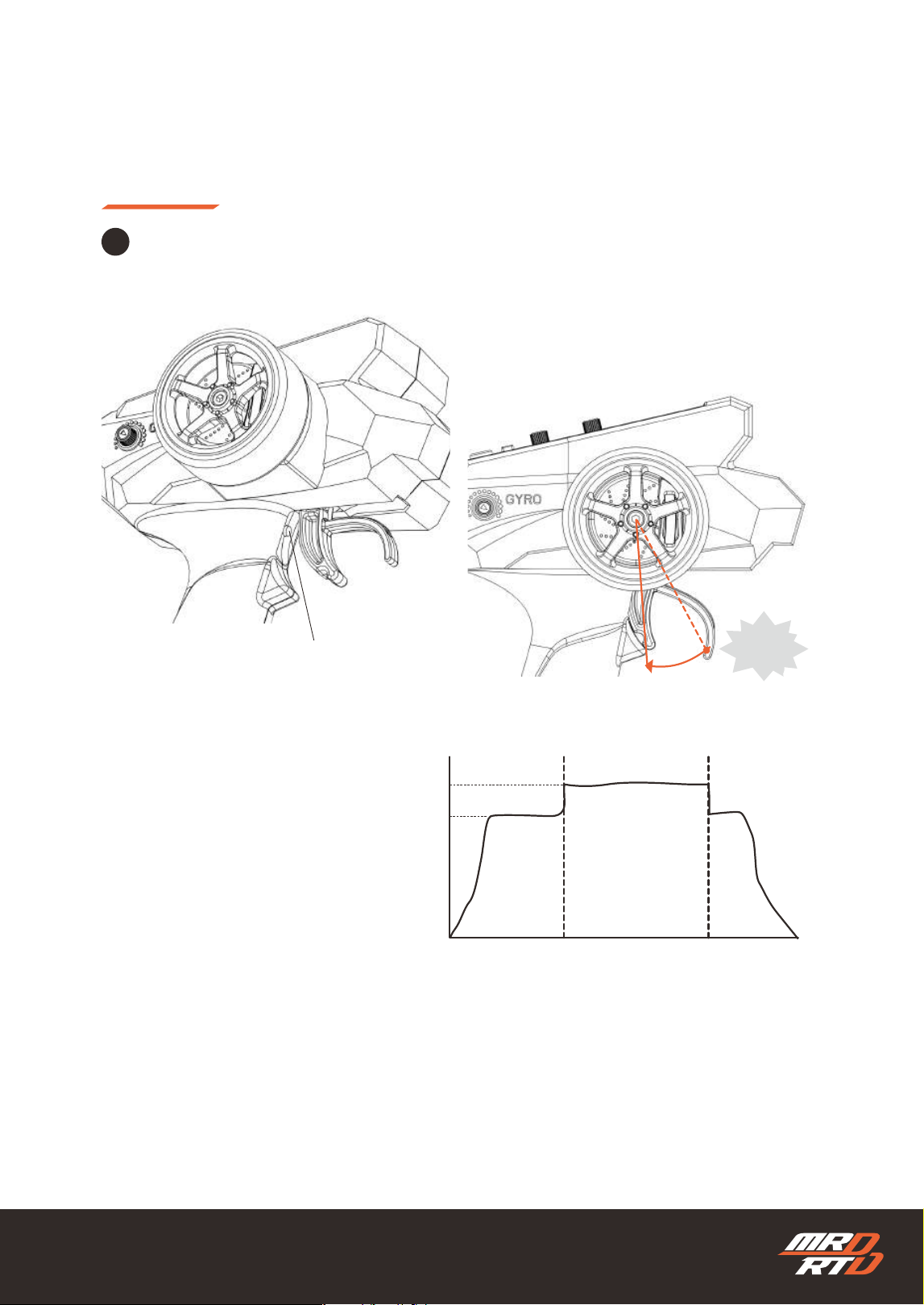
The Overboost function increases the motor output from 100% to 120%, enabling more powerful
drifting. However, it places a greater load on the motor and drivetrain. Continuous use may cause
the motor and batteries to overheat and may shorten the service life of the drivetrain.
オーバーブースト機能は、モーターの出力を100%から120%へ引き上げ、パワフルなドリフトを可能に
します。ただし、モーターや駆動系への負担が大きくなるため、連続して使用するとモーターや電池が発
熱したり、駆動系の寿命が短くなったりする場合があります。
BIND Button
バインドボタン
42
Driving Mode
走行モード
Pull the throttle trigger all the way to press the Overboost button and activate Overboost. Overboost
remains active while the button is held down.
スロットルトリガーを一番奥まで握り、オーバーブーストボタンを押し込むと、オーバーブーストが起動しま
す。オーバーブーストは、ボタンを押している間だけ作動します。
2
Overboost Button
オーバーブーストボタン
Power
パワー
120
100
Time
時間
Overboost ON
オーバーブースト ON
Overboost OFF
オーバーブースト OFF
ON!
43
Your First Drift Drive
初めてのドリフト走行
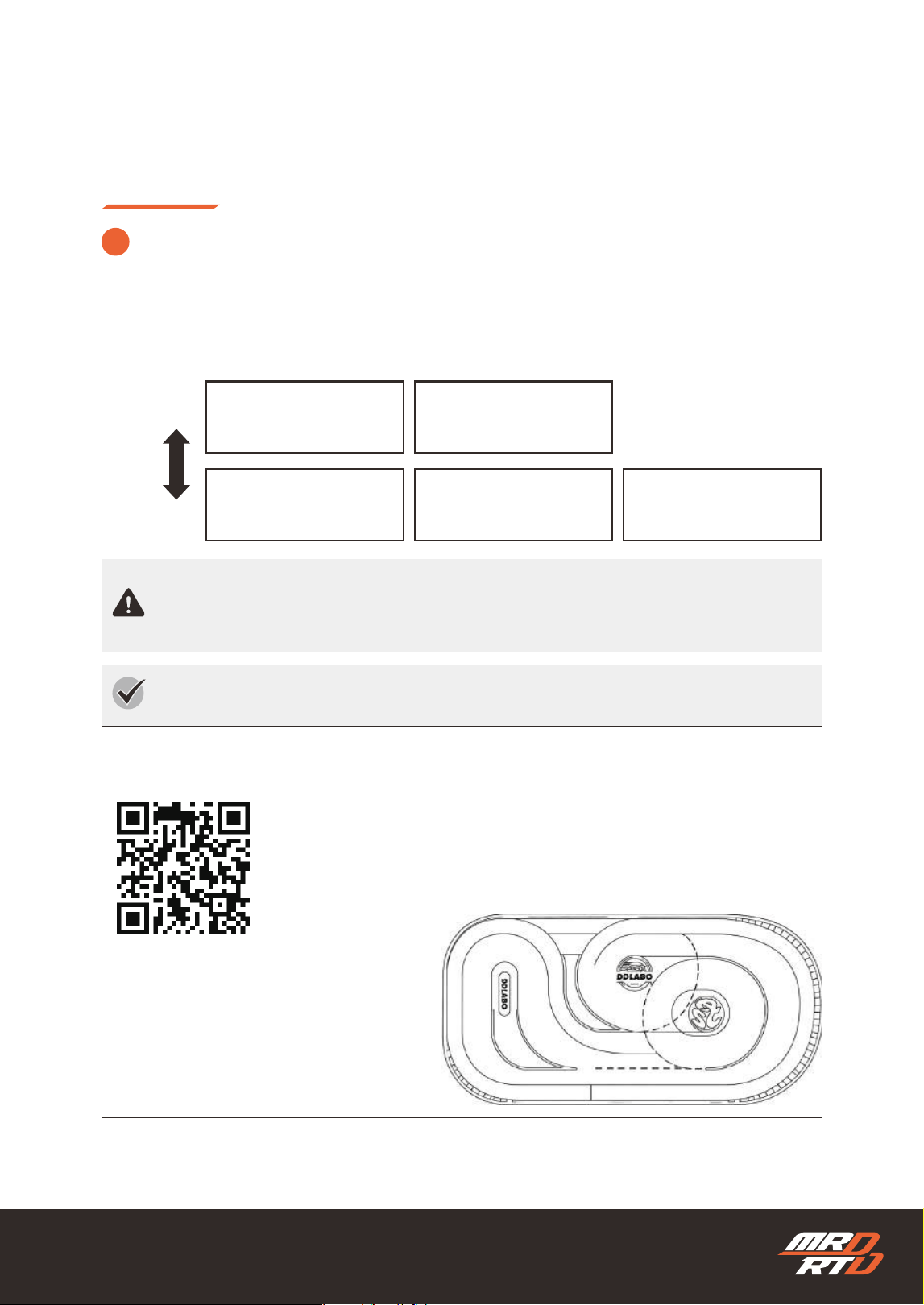
Drifting speed varies greatly depending on the driving surface. When trying drift driving for the rst time,
choose a surface that allows the car to drift at a slower speed.
走行させる路面によって、ドリフト走行のスピードは大きく変わります。初めてドリフト走行を楽しむ場合は、スピ
ードが遅くなる路面を選びましょう。
!
Suitable Surfaces for Drift Driving
ドリフト走行に適した路面
Fast
速い
Slow
遅い
Speed
スピード
180cm x 90cm
Wood Flooring
フローリング
Vinyl Floor Tile
Pタイル
DDLABO Drift Track
DDLABOドリフトトラック
Short-Pile Carpet
毛足が短いカーペット
PVC Sheet Flooring
PVCシート
Drift driving may scratch the floor surface. Do not drive in areas where scratches must be
avoided.
ドリフト走行により、路面に傷がつくことがあります。傷をつけてはいけない場所では走行させないでく
ださい
Recommended for Drift Driving
ドリフト走行におすすめ
Pre-set with the ideal level of grip for rst-time drift driving. Once you become
more experienced, applying a small amount of silicone allows you to enjoy slow,
realistic scale-speed drifting.
初めてドリフト走行を楽しむ方に最適なグリップにセッティング済みです。慣れてきた
ら、シリコンを少量塗布することで、実車感あふれるスローなスケールスピードでドリ
フトを楽しむこともできます。
No.2002 DDLABO Drift Track S size
DDLABO ドリフトトラック Sサイズ
44
Your First Drift Drive
初めてのドリフト走行
1
2
Check the position of each volume on the transmitter and set it to the correct position.
送信機の各ボリュームの位置を確認し、正しい位置にセットします。
Use Easy Mode.
イージーモードを使用します。
Pay attention to the position.
位置に注意してください。
LED Indicator
Lights up green
LEDインジケーター
グリーンに点灯
45
Your First Drift Drive
初めてのドリフト走行
Your First Donut Drift
初めての定常円旋回
Master the basic donut drift rst, as it is the foundation of drift driving.
ドリフト走行の基本となる定常円旋回を、最初にマスターしましょう。
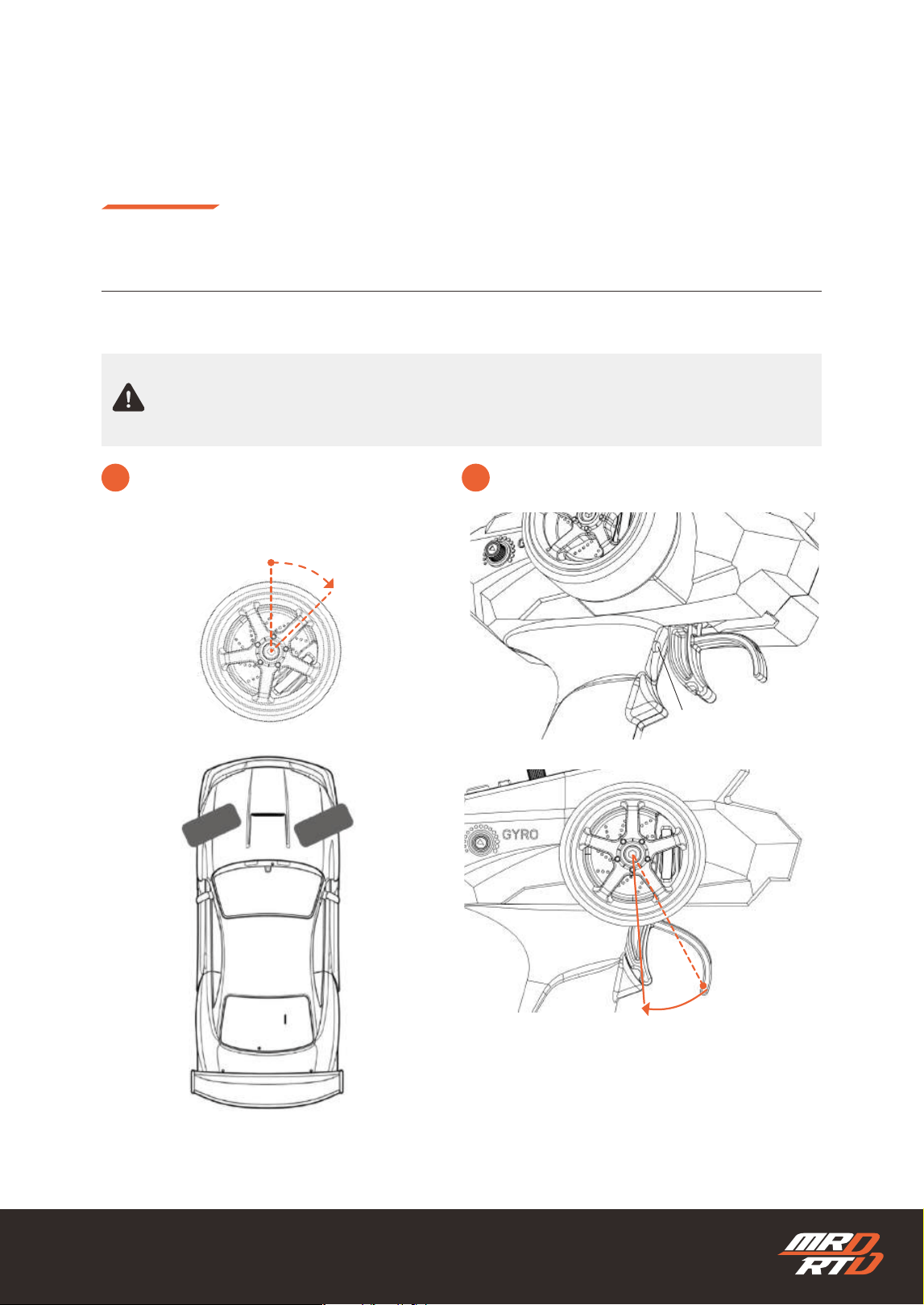
Quickly pull the throttle trigger all the way back until
it presses the Drift Assist button located behind the
trigger.
スロットルトリガーを一気に奥まで握り、トリガーの奥
にあるドリフトアシストボタンまで押し込みます。
Make sure the driving area is as large as possible and free of obstacles. For rst-time driving, use
an area approximately 2–3 m square.
周囲に障害物のない、できるだけ広い走行スペースを確保してください。初めて走行する場合は、2~3m
四方を目安としてください。
1 2
Turn the steering wheel fully to the right
and hold it in that position.
ステアリングホイールを右いっぱいまで切り、
そのままの位置を維持します。
Quickly pull the throttle trigger fully.
スロットルトリガーを一気に全開まで握ります。
Right
右
Drift Assist Button
ドリフトアシストボタン
46
Your First Drift Drive
初めてのドリフト走行
Your First Donut Drift
初めての定常円旋回
3
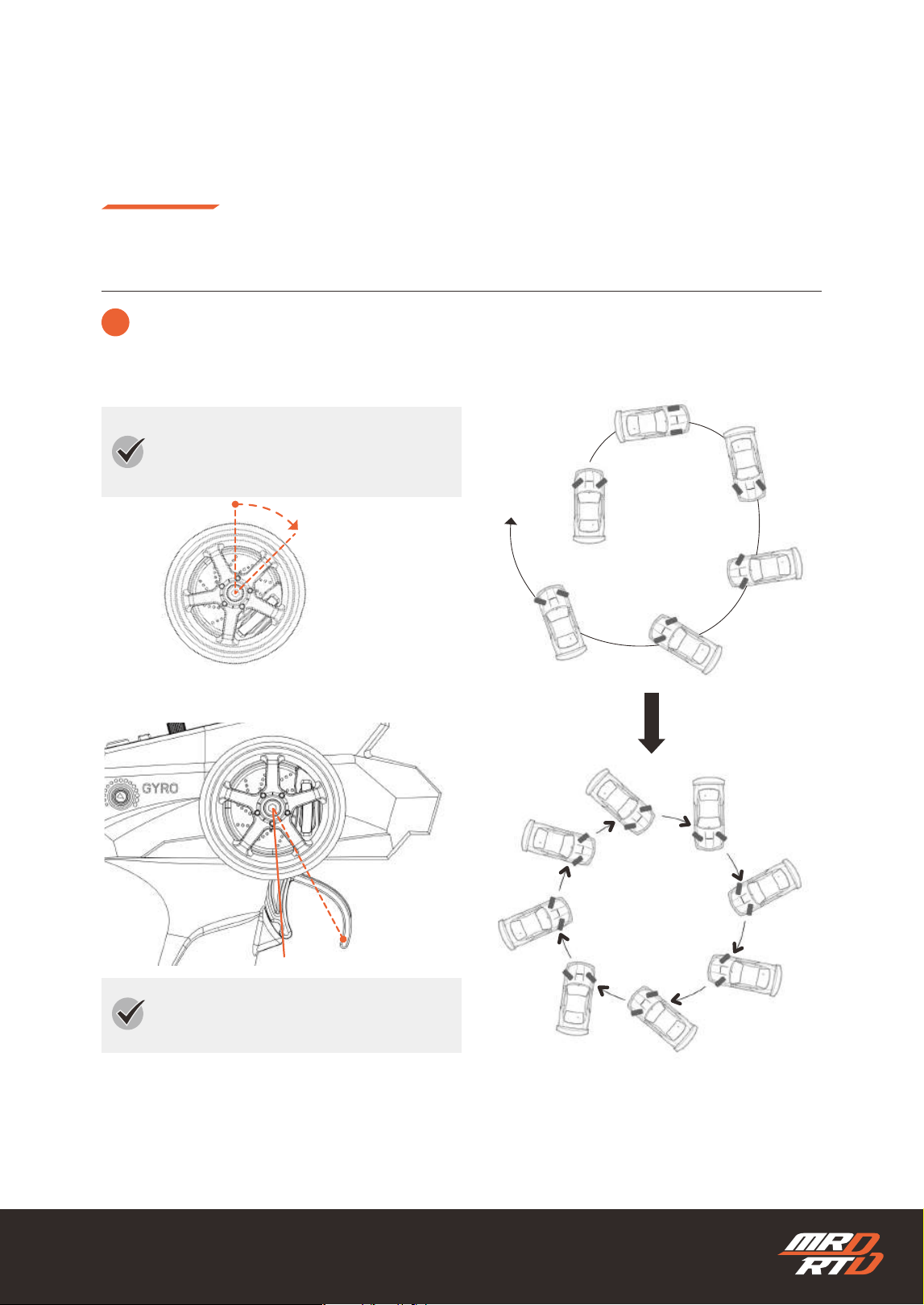
The car starts moving, the throttle is applied at full power, and the rear tires begin to spin. Although
the car appears about to spin out, the power is automatically reduced and counter-steering is
applied.
車がスタートすると、スロットルが全開となってリヤタイヤが空転し、車はスピンしそうになります。しか
し、自動的にパワーが下がり、カウンターステアリングが行われます。
Keep the steering wheel turned fully to the
right.
ステアリングホイールを右いっぱいまで切った
状態で維持します。
Keep the throttle trigger pulled fully.
スロットルトリガーをいっぱいまで引いた状態
で維持します。
Right
右
47
Your First Drift Drive
初めてのドリフト走行
Your First Donut Drift
初めての定常円旋回
4
1
2
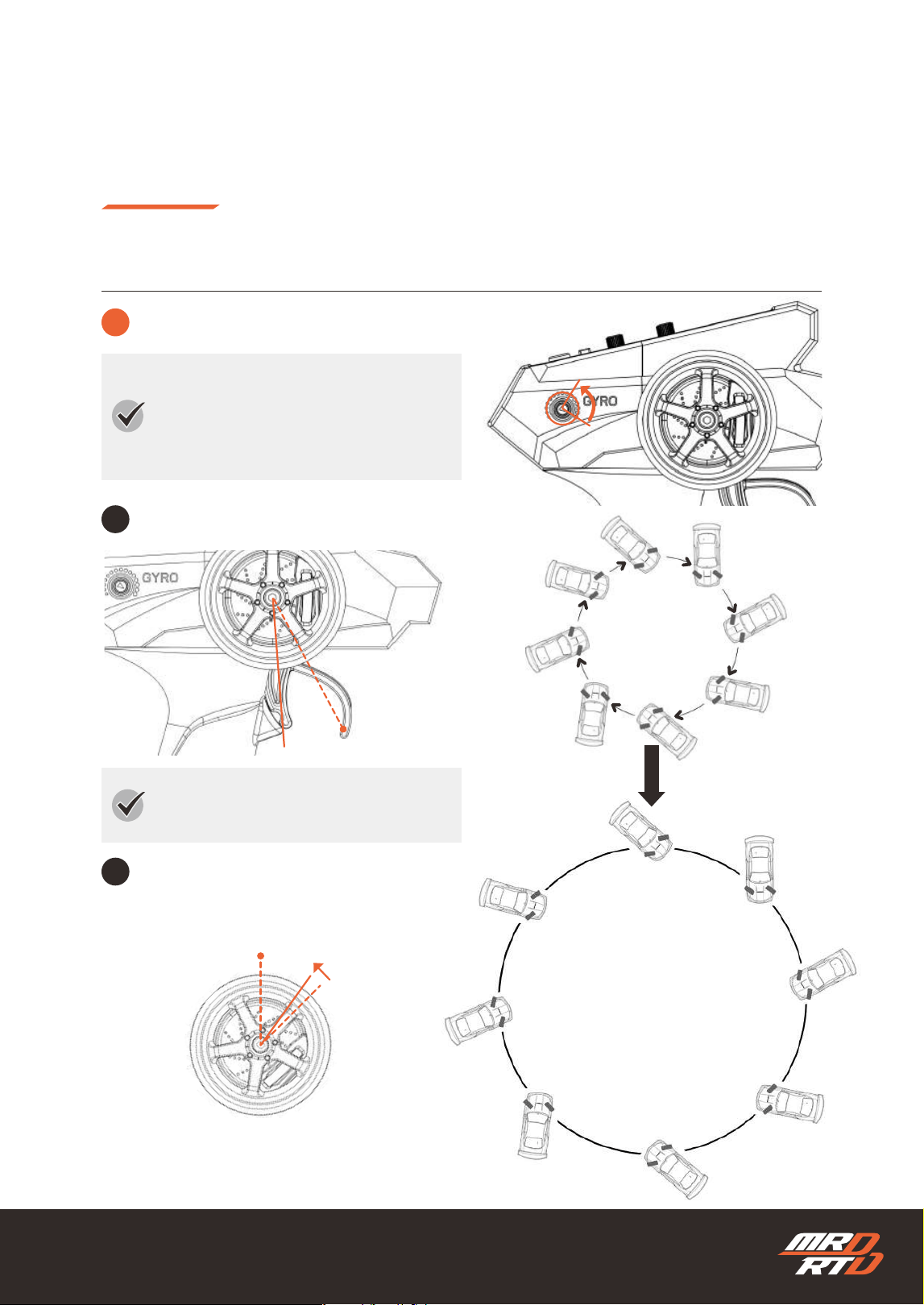
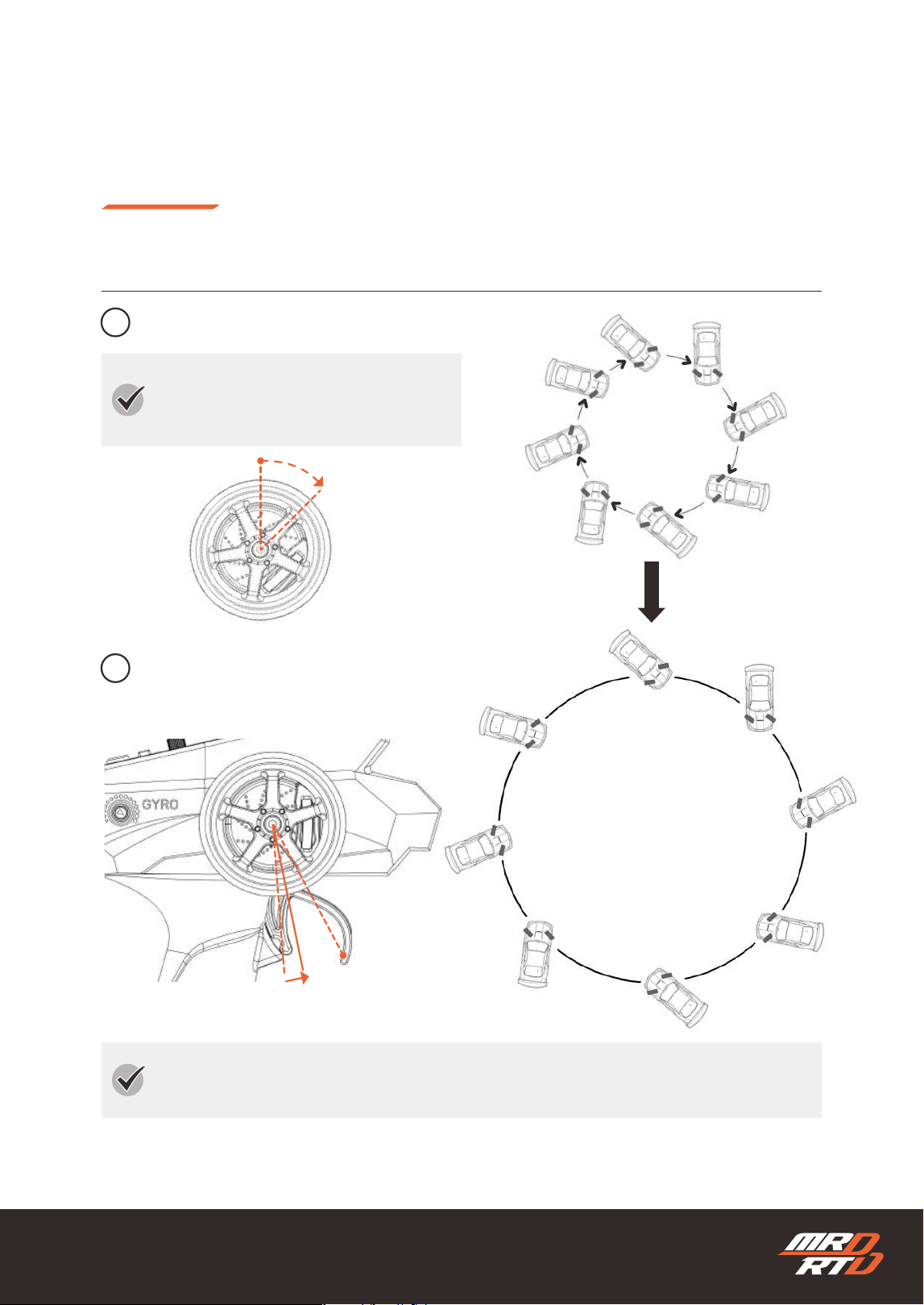
Changing the Radius of Your Donut Drift
定常円旋回の半径を変えてみよう
Increase the radius using steering input.
ステアリング操作で半径を大きくします。
Return the steering wheel approximately
1 mm toward the neutral position.
ステアリングホイールを中立側へ約1mmだけ戻します。
If the driving surface has high grip, the
donut drift radius may become too large.
In this case, reduce the gyro gain.
路面のグリップが高いと、定常円旋回の半径が
大きくなりすぎる場合があります。その場合
は、ジャイロの効きを弱くします。
Keep the throttle trigger pulled fully.
スロットルトリガーをいっぱいまで引いた状態
で維持します。
Right
右
1mm
Neutral
中立
48
Your First Drift Drive
初めてのドリフト走行
Your First Donut Drift
初めての定常円旋回
1
2
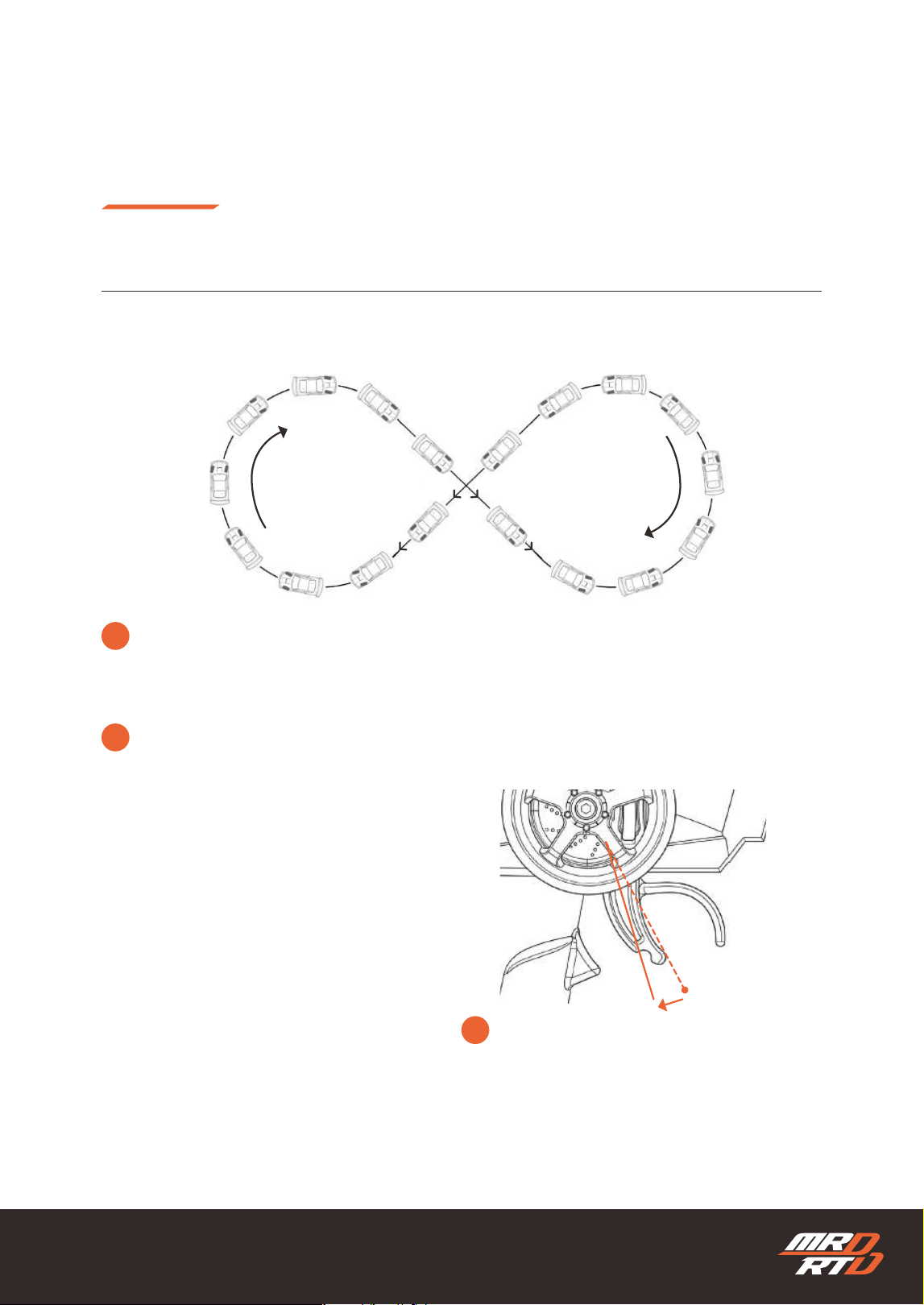
Increase the radius using throttle input.
スロットル操作で半径を大きくします。
Return the steering wheel approximately 2 mm
toward the neutral position.
ステアリングホイールを中立側へ約2mmだけ戻し
ます。
Keep the steering wheel turned fully to the
right.
ステアリングホイールを右いっぱいまで切った
状態で維持します。
If moving it back by 2 mm does not make much difference, gradually increase the amount to
about 3 mm or 4 mm.
2mm戻してもあまり変化がない場合は、3mm、4mmと少しずつ戻す量を増やしてみてください。
Right
右
2mm
Neutral
中立

49
Your First Drift Drive
初めてのドリフト走行
Your First Donut Drift
初めての定常円旋回
You did it!
If you can complete two or more laps in the same direction while maintaining a nearly constant radius,
you’ve cleared the rst step.
Don’t worry if your circle isn’t perfectly round at rst.
Next, try performing a donut drift in the opposite direction.
定常円旋回ができました!
同じ方向へ2周以上、ほぼ一定の大きさで回れたら最初のステップはクリアです。
最初はきれいな円にならなくても問題ありません。
次は反対方向の定常円旋回にも挑戦してみましょう。
!
!
The car spins out → Increase the gyro gain slightly.
The circle is too large → Decrease the gyro gain slightly.
スピンしてしまう → ジャイロの効きを少し強くします。
円が大きすぎる → ジャイロの効きを少し弱くします。
You can reduce the radius of the donut drift by performing the opposite steering and throttle inputs.
However, these adjustments are very sensitive. Practice until you can control the radius to the size you
want.
ステアリング操作とスロットル操作を反対に行うことで、定常円旋回の半径を小さくできます。ただし、操作
は非常に繊細です。思いどおりの大きさに調整できるまで練習しましょう。
50
Your First Drift Drive
初めてのドリフト走行
Try Figure-Eight Drift Driving
8の字ドリフト走行に挑戦しよう
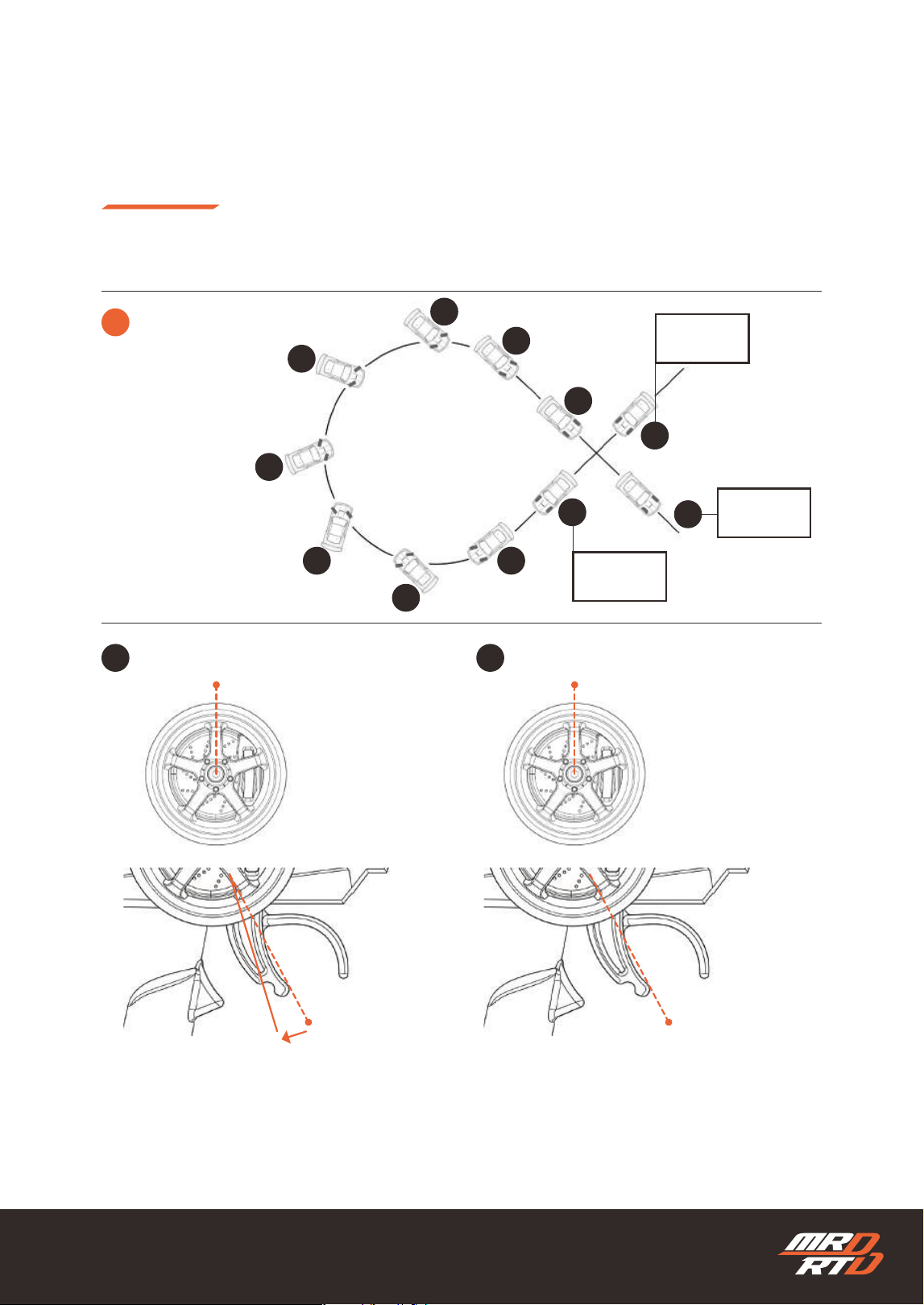
Master gure-eight drifting to develop the driving skills required for drift driving.
ドリフト走行に必要なドライビングスキルを身につけられる、8の字走行をマスターしましょう。
!
!
1
At rst, do not use any markers. Practice driving freely before moving on to more precise control.
最初は目印などを置かず、自由に走行できるようにしましょう。
Once you have set a very slow speed, keep the
throttle trigger in the same position and focus
on steering control.
非常にゆっくりしたスピードに決めたら、スロット
ルトリガーはその位置を保ち、ステアリング操作に
集中しましょう。
Drive in a gure-eight pattern at a very slow speed without drifting. Try to keep the throttle trigger in
a constant position.
非常にゆっくりしたスピードで、ドリフトさせずに8の字走行を行ってください。スロットルトリガーの位置
は一定に保つようにします。
Neutral:Stop
中立:停止
51
1
4
4
3
3
3
3
3
1
2
2
STOP
ストップ
STOP
ストップ
Your First Drift Drive
初めてのドリフト走行
Try Figure-Eight Drift Driving
8の字ドリフト走行に挑戦しよう
2
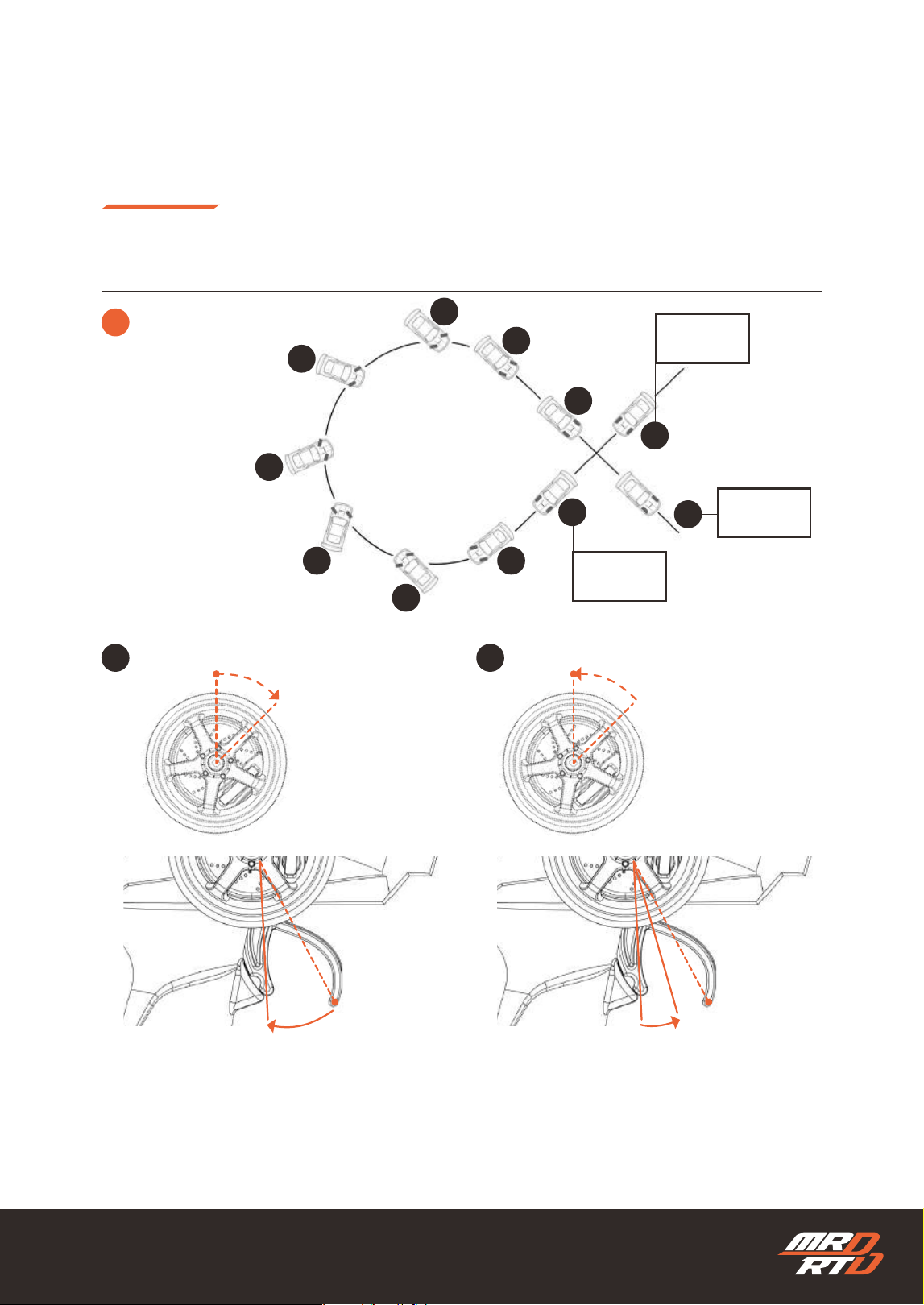
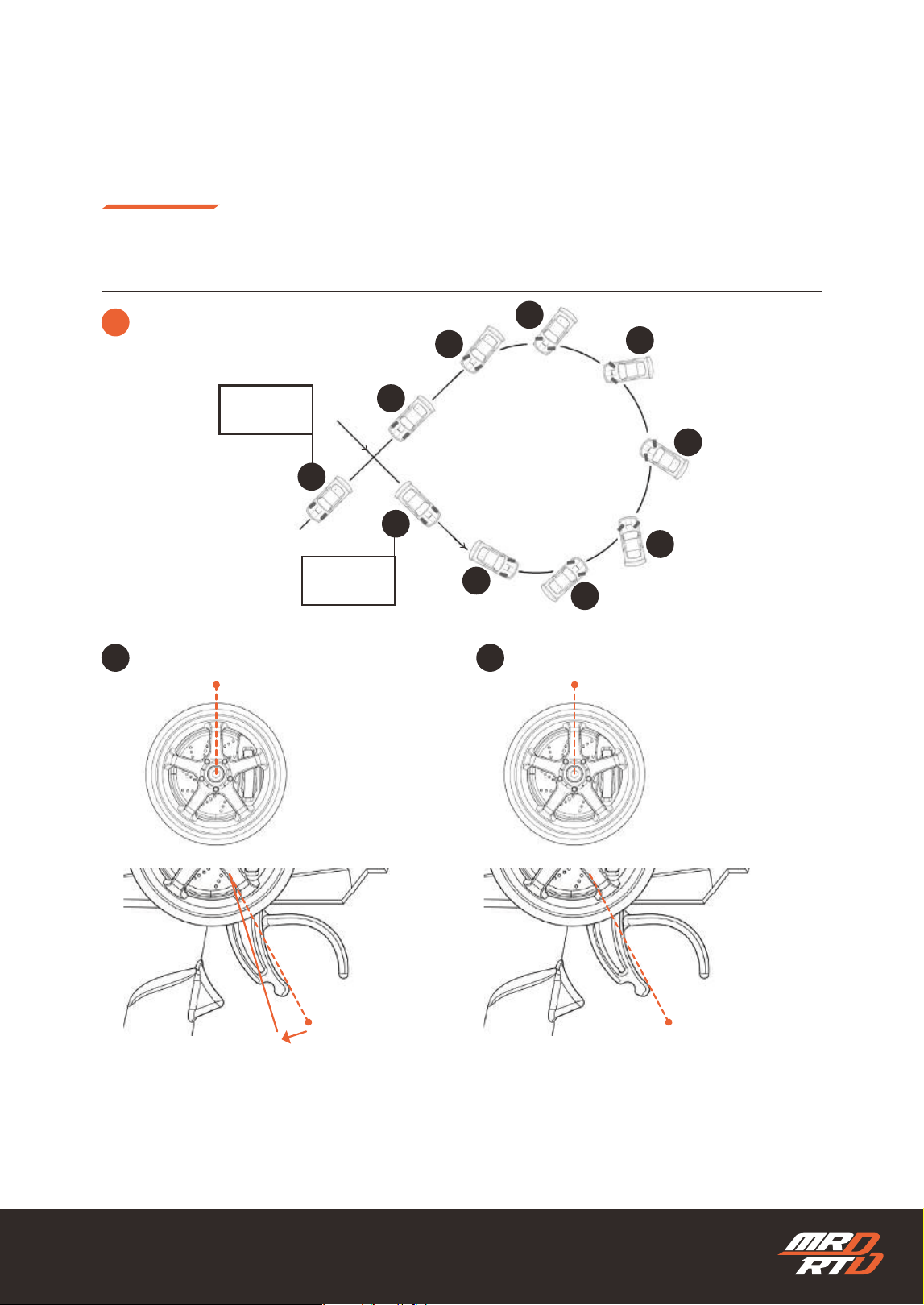
First Half of the Figure-Eight Drift
8の字ドリフト前半
Return the throttle trigger to the neutral position
to stop the car.
トリガーを中立位置に戻して停止します。
1 2
Move forward slowly.
ゆっくり前進します。
Neurtal
中立
Neurtal
中立
Neurtal
中立
STA RT
スタート
52
Right
右
Right
右
Slow
ゆっくり
1
4
4
3
3
3
3
3
1
2
2
STOP
ストップ
STOP
ストップ
Your First Drift Drive
初めてのドリフト走行
Try Figure-Eight Drift Driving
8の字ドリフト走行に挑戦しよう
Slowly return the steering wheel to neutral. At
the same time, gradually move the throttle
trigger to the slow-speed position.
ステアリングホイールをゆっくりと中立へ戻しま
す。同時に、スロットルトリガーをゆっくり走行す
る位置へ移動します。
Turn the steering wheel fully to the right and pull
the throttle trigger fully.
ステアリングホイールを右いっぱいまで切り、スロ
ットルトリガーをいっぱいまで引きます。
STA RT
スタート
Neurtal
中立
2
First Half of the Figure-Eight Drift
8の字ドリフト前半
3 4
53
1
2
2
3
3
3
3
3
4
4
Your First Drift Drive
初めてのドリフト走行
Try Figure-Eight Drift Driving
8の字ドリフト走行に挑戦しよう
3
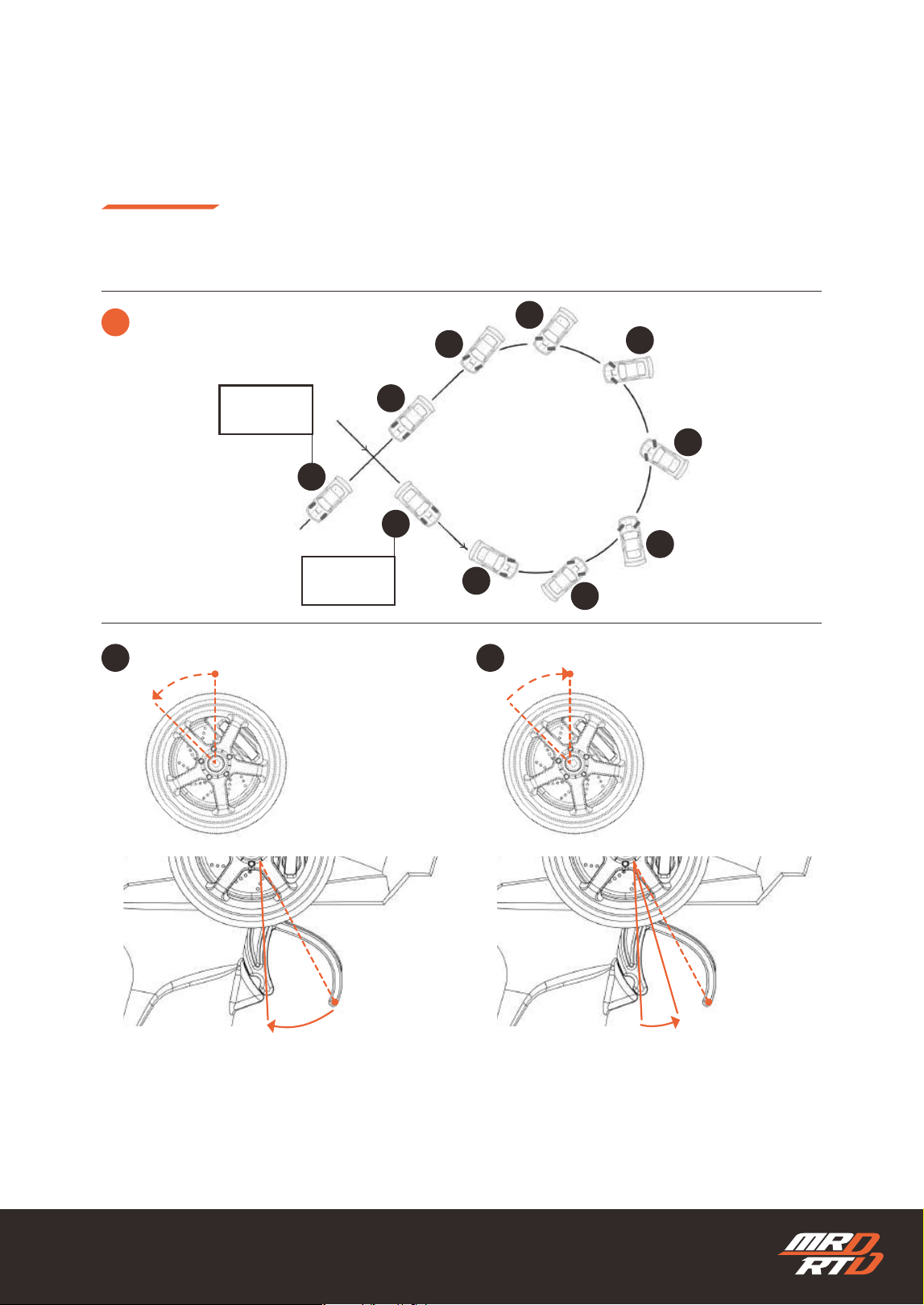
Second Half of the Figure-Eight Drift
8の字ドリフト後半
Return the throttle trigger to the neutral position
to stop the car.
トリガーを中立位置に戻して停止します。
1 2
Move forward slowly.
ゆっくり前進します。
Neurtal
中立
Neurtal
中立
Neurtal
中立
STA RT
スタート
STOP
ストップ
54
Left
左
Left
左
Slow
ゆっくり
Your First Drift Drive
初めてのドリフト走行
Try Figure-Eight Drift Driving
8の字ドリフト走行に挑戦しよう
Slowly return the steering wheel to neutral. At
the same time, gradually move the throttle
trigger to the slow-speed position.
ステアリングホイールをゆっくりと中立へ戻しま
す。同時に、スロットルトリガーをゆっくり走行す
る位置へ移動します。
Turn the steering wheel fully to the left and pull
the throttle trigger fully.
ステアリングホイールを左いっぱいまで切り、スロ
ットルトリガーをいっぱいまで引きます。
Neurtal
中立
3 4
1
2
2
3
3
3
3
3
4
4
3
Second Half of the Figure-Eight Drift
8の字ドリフト後半
STA RT
スタート
STOP
ストップ
55
Your First Drift Drive
初めてのドリフト走行
Try Figure-Eight Drift Driving
8の字ドリフト走行に挑戦しよう
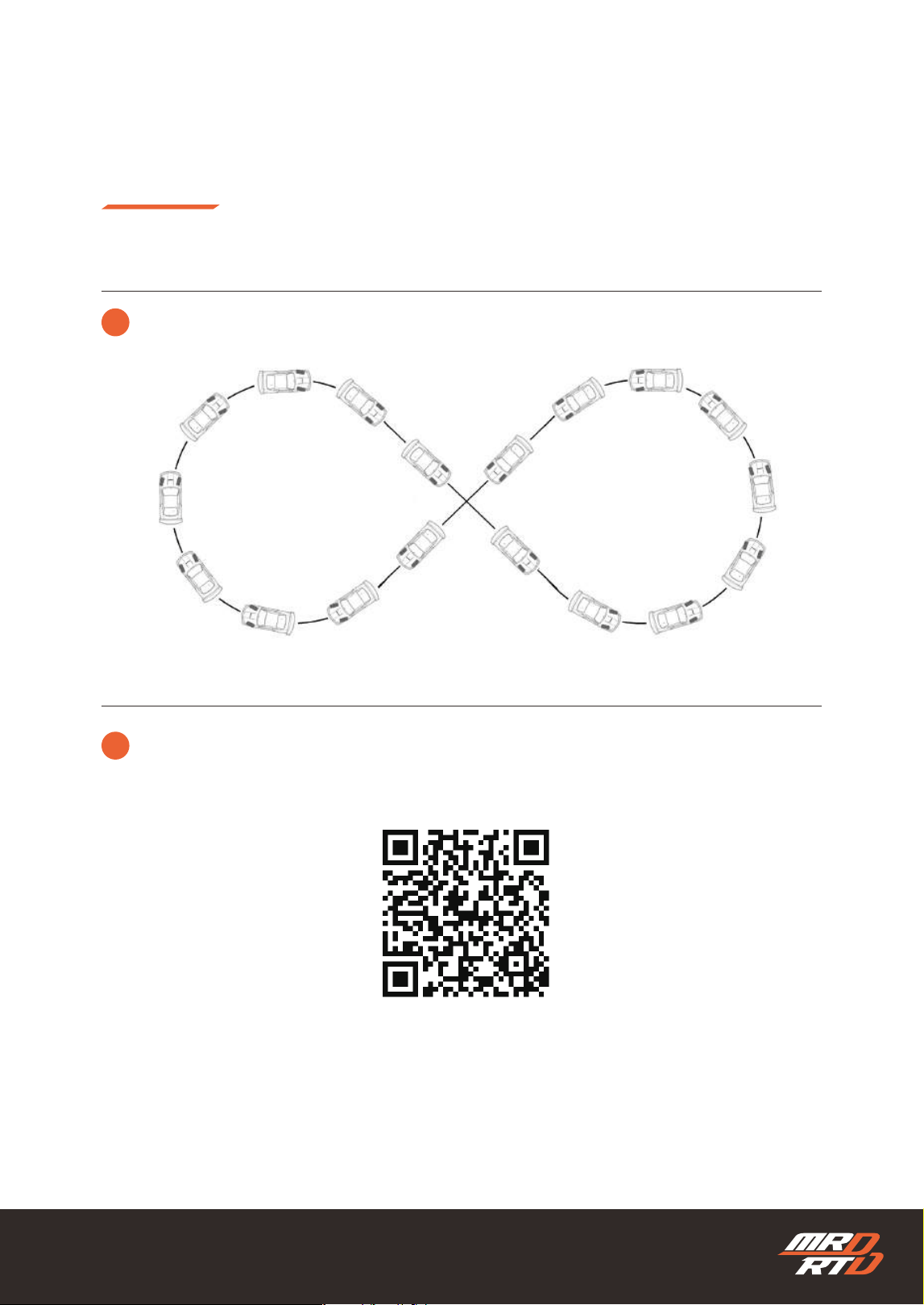
4
!
Reduce the time spent stopping between turns and complete a continuous gure-eight drift.
途中で停止する時間を少しずつ減らし、8の字ドリフト走行を完成させましょう。
The techniques for donut drifting and gure-eight drifting are explained in detail with videos on the
website below. Practice along with the videos and develop the skills to drift exactly as you intend.
定常円旋回と8の字走行のやり方は、下記のWebサイトで動画を使って詳しく説明しています。一緒に練習し
て、思いどおりのドリフトができるようになりましょう。
https://products.enjoysmile.co.jp/mrd-rtd-setup-information/
MRD Setup Information
MRD セットアップインフォメーション
56
Basic Adjustment
基本の調整
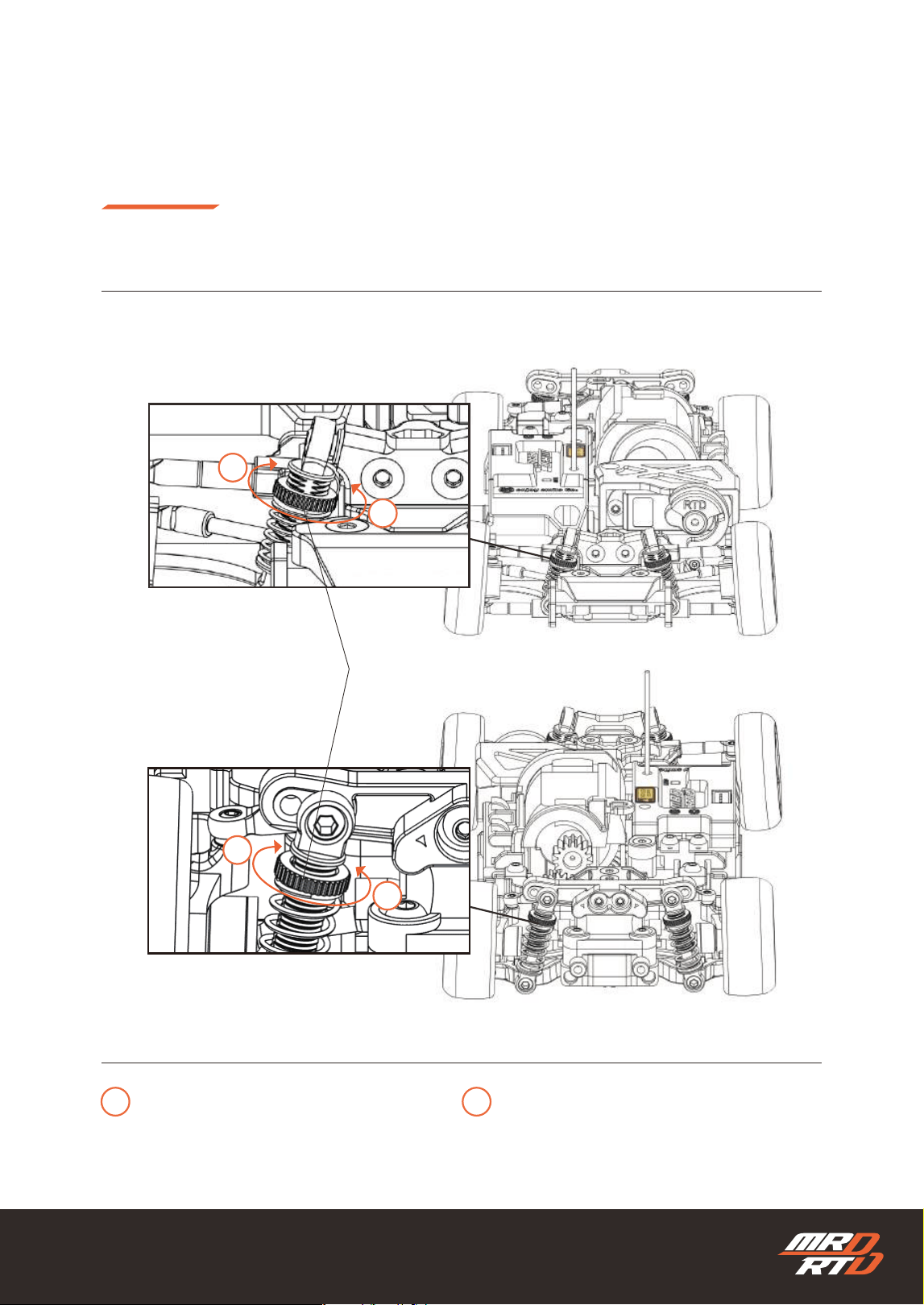
Ride Height Adjustment
車高の調整
Rotate the shock adjuster to adjust the ride height.
ショックアジャスターを回転させて車高を調整します。
Front
フロント
Rear
リヤ
1
1
2
2
The ride height increases
車高が高くなる
The ride height decreases
車高が低くなる
1
2
Shock Adjuster
ショックアジャスター
57
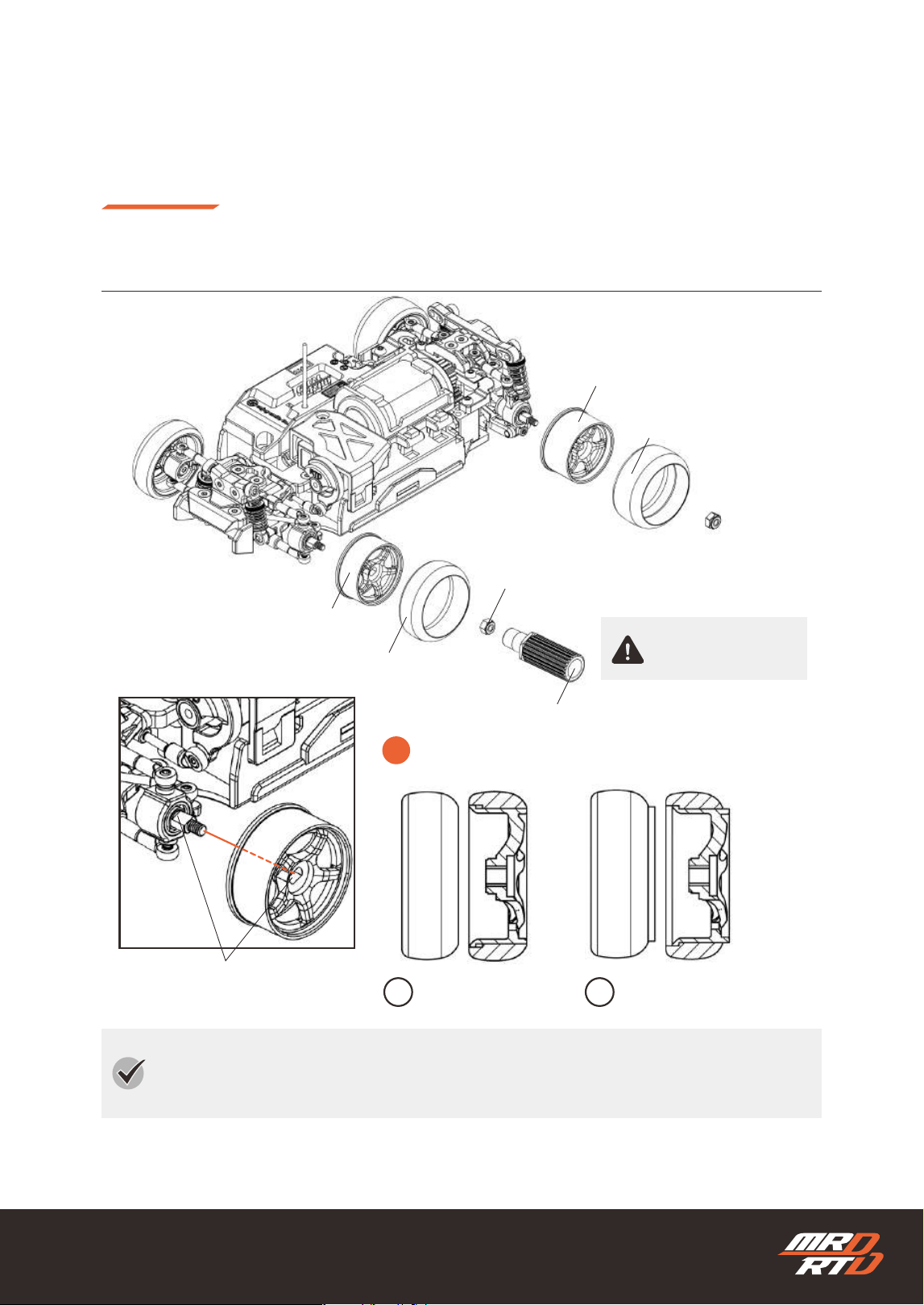
Wide Wheel offset 0mm
ワイドホイール オフセット0mm
Nylon Nut (4 mm Across Flats)
ナイロンナット(対辺4mm)
Align the at surfaces.
平らな部分を合わせます。
Wheel Wrench
ホイールレンチ
Narrow Wheel offset +1mm
ナローホイール オフセット+1mm
Narrow Drift Tire
ナロー ドリフトタイヤ
Wide Drift Tire
ワイド ドリフトタイヤ
Do Not Overtighten
締めすぎ注意
!
The tire mounting position can be changed.
タイヤの取り付け位置は変更できます。
1 2
Standard Position
標準位置
Offset the Tire 1 mm Inward
タイヤを内側へ1mmオフセット
Basic Adjustment
基本の調整
Replacing the Tires and Wheels
タイヤとホイールの交換
If the tire ts loosely on the wheel, apply masking tape or similar material to the wheel to adjust
the t, or place one drop of instant adhesive on the wheel before installing the tire.
タイヤがホイールに対して緩い場合は、マスキングテープなどをホイールに貼って調整するか、瞬間接着
剤を1滴ホイールに垂らしてからタイヤを装着してください。
58
Basic Adjustment
基本の調整
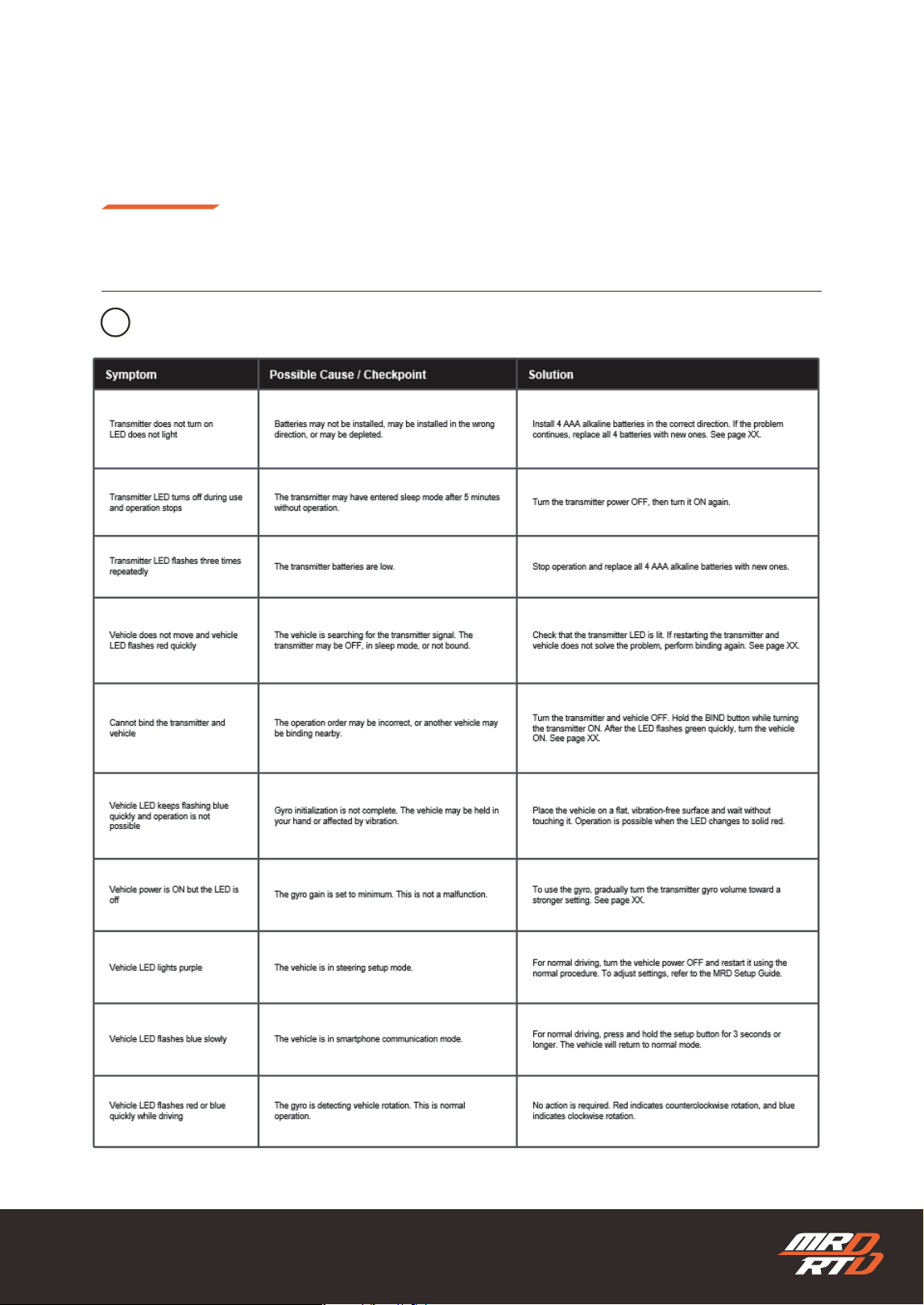
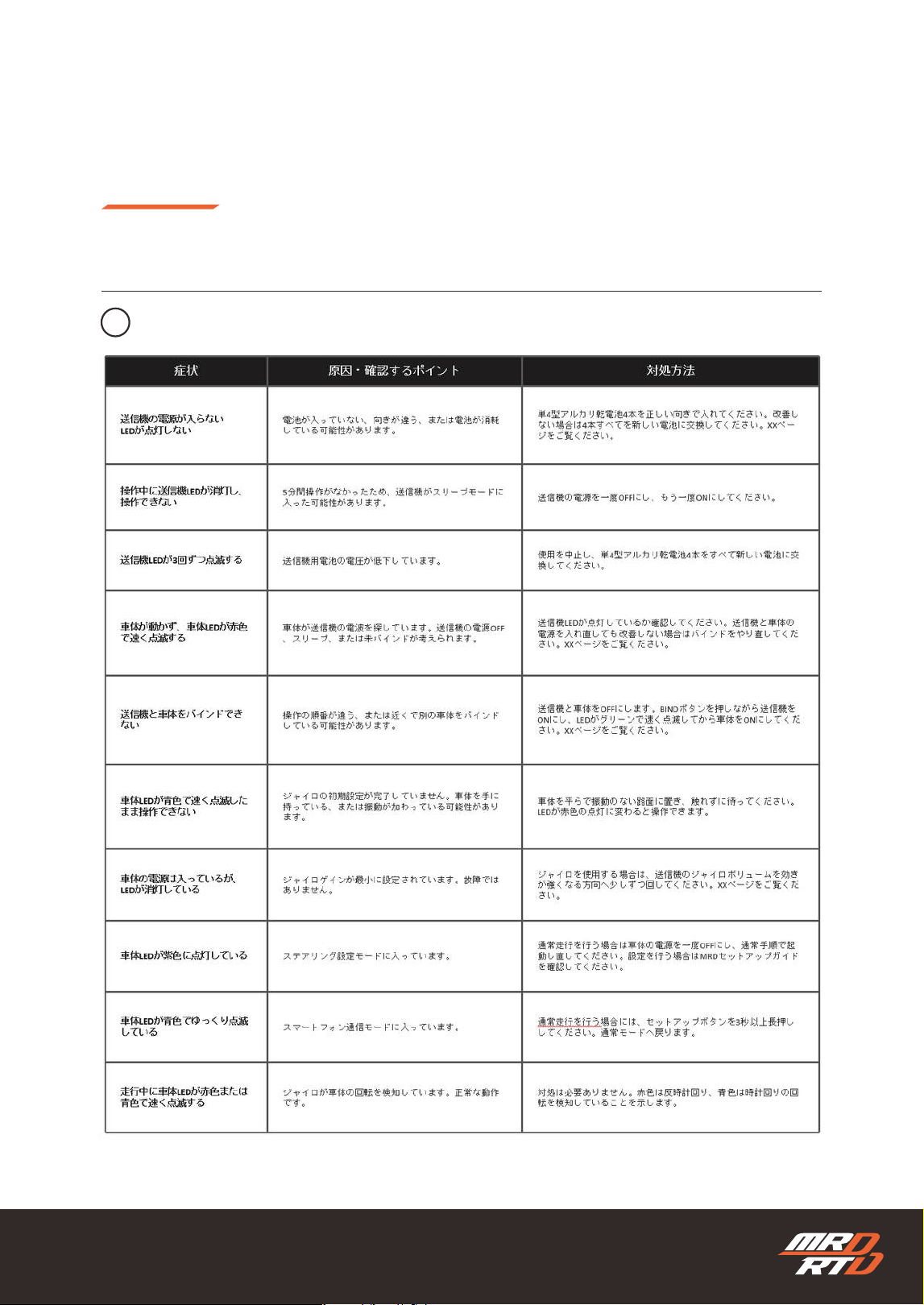
Troubleshooting
困ったときは
1
Power, LEDs & Binding
電源・LED・バインド
ing
59
Basic Adjustment
基本の調整
Troubleshooting
困ったときは
1
Power, LEDs & Binding
電源・LED・バインド
ing
60
Basic Adjustment
基本の調整
Troubleshooting
困ったときは
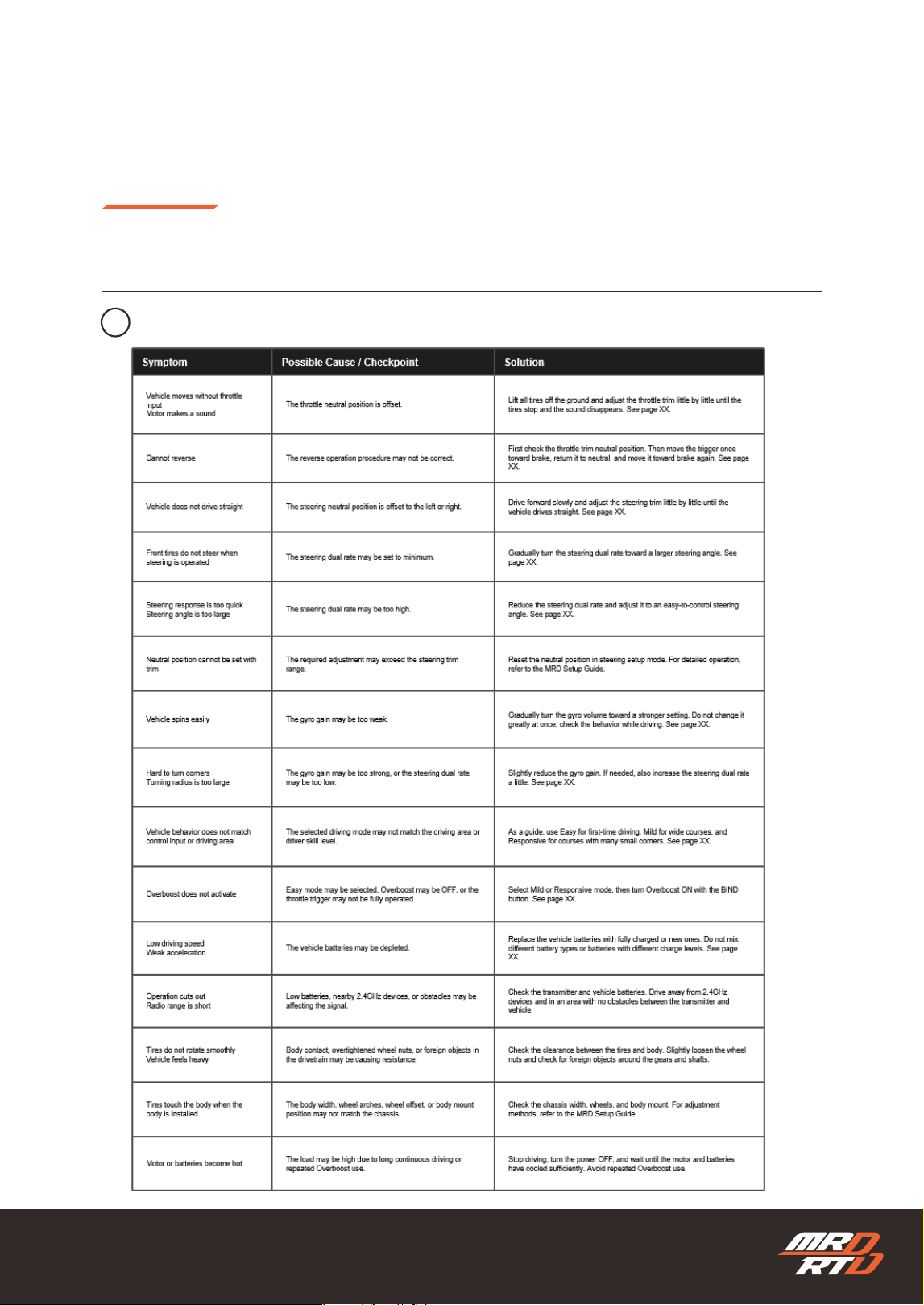
2
Driving, Operation & Adjustment
走行・操作・調整
ing
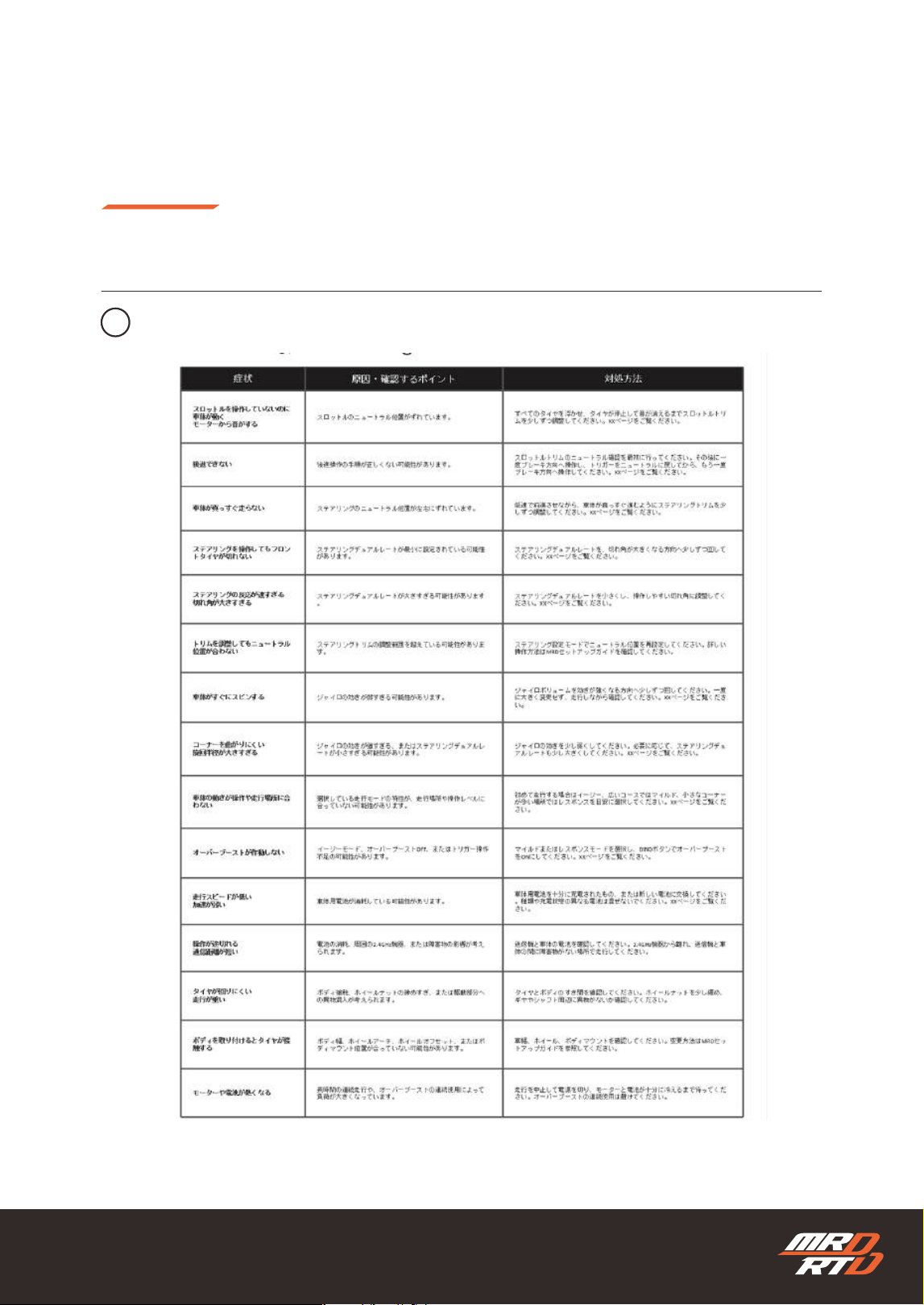
61
Basic Adjustment
基本の調整
Troubleshooting
困ったときは
2
Driving, Operation & Adjustment
走行・操作・調整
ing
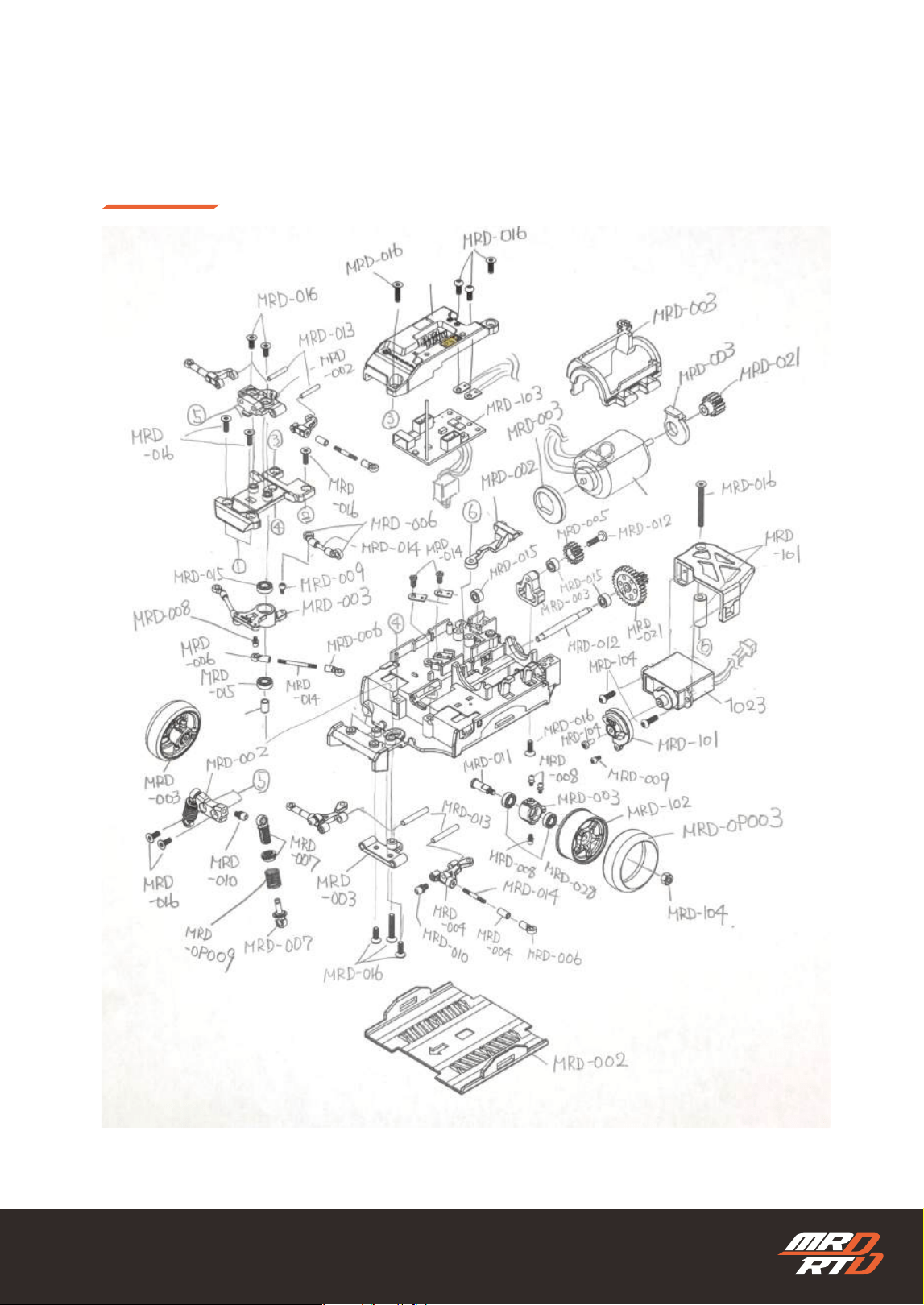
62
Exploded View
展開図
ing
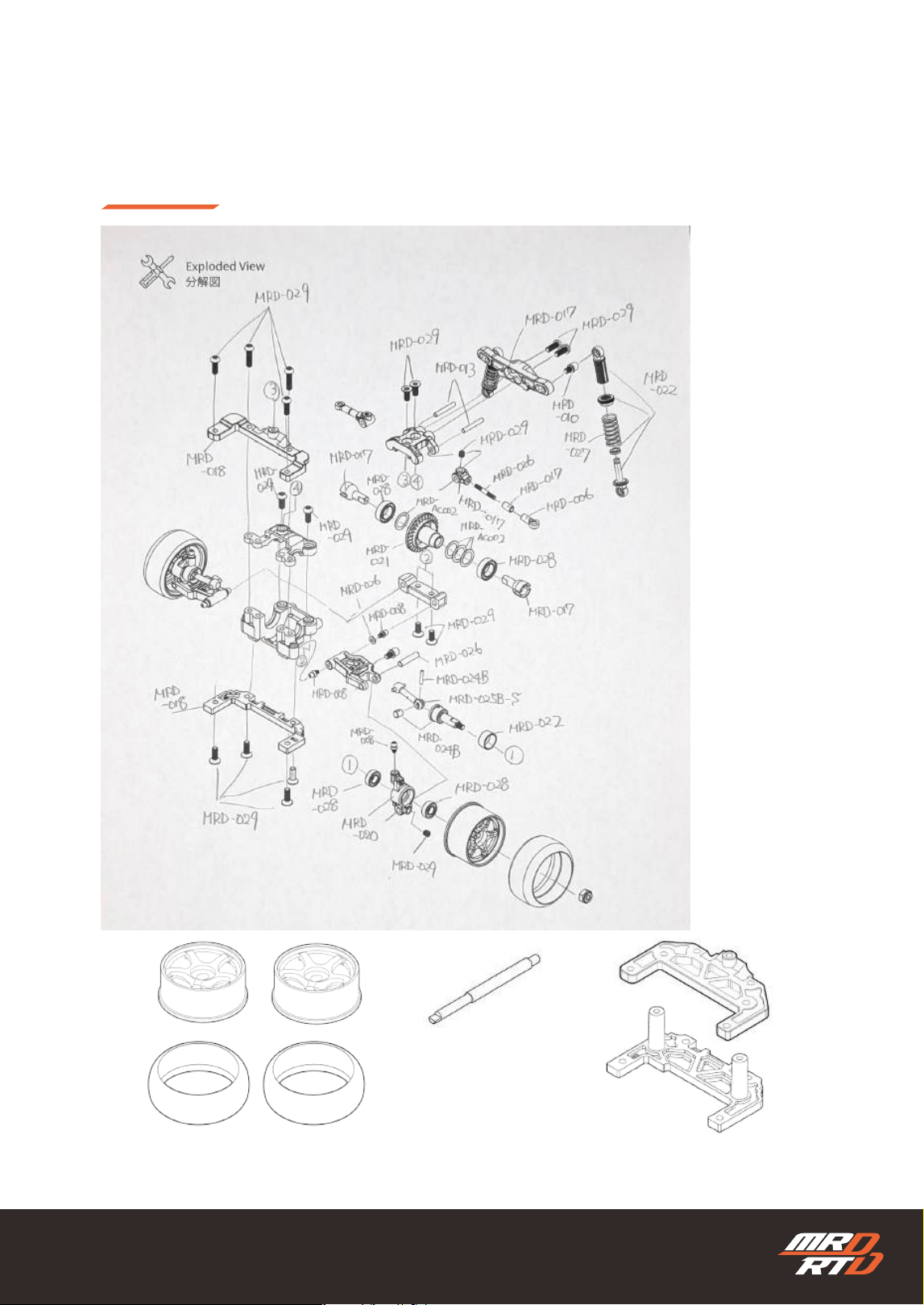
63
Exploded View
展開図
ing
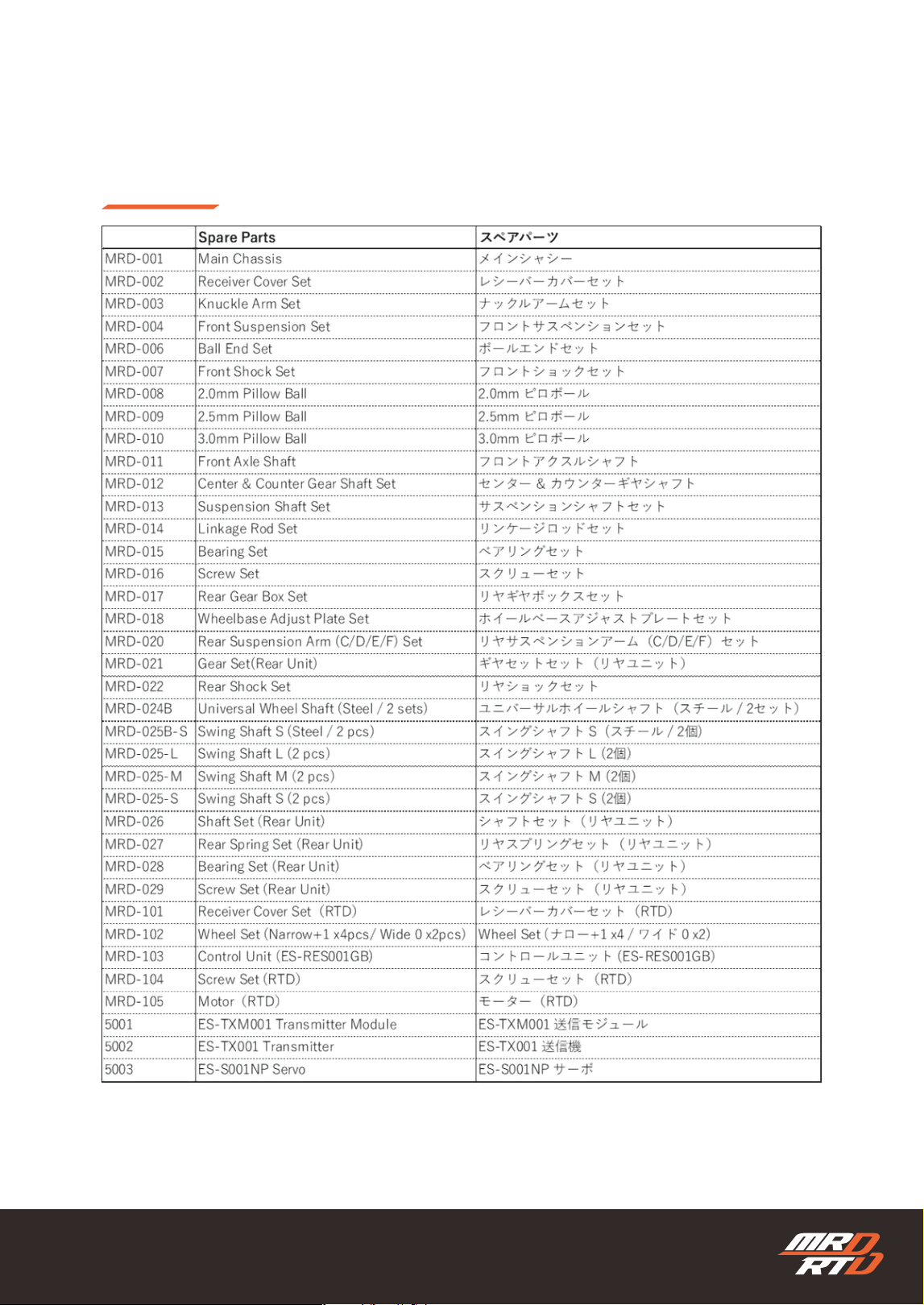
64
Parts List
パーツリスト
ing

65
Declaration of Conformity
after approved.

66
WEEE Information
To be lled in after the European
agent
has been selected
67
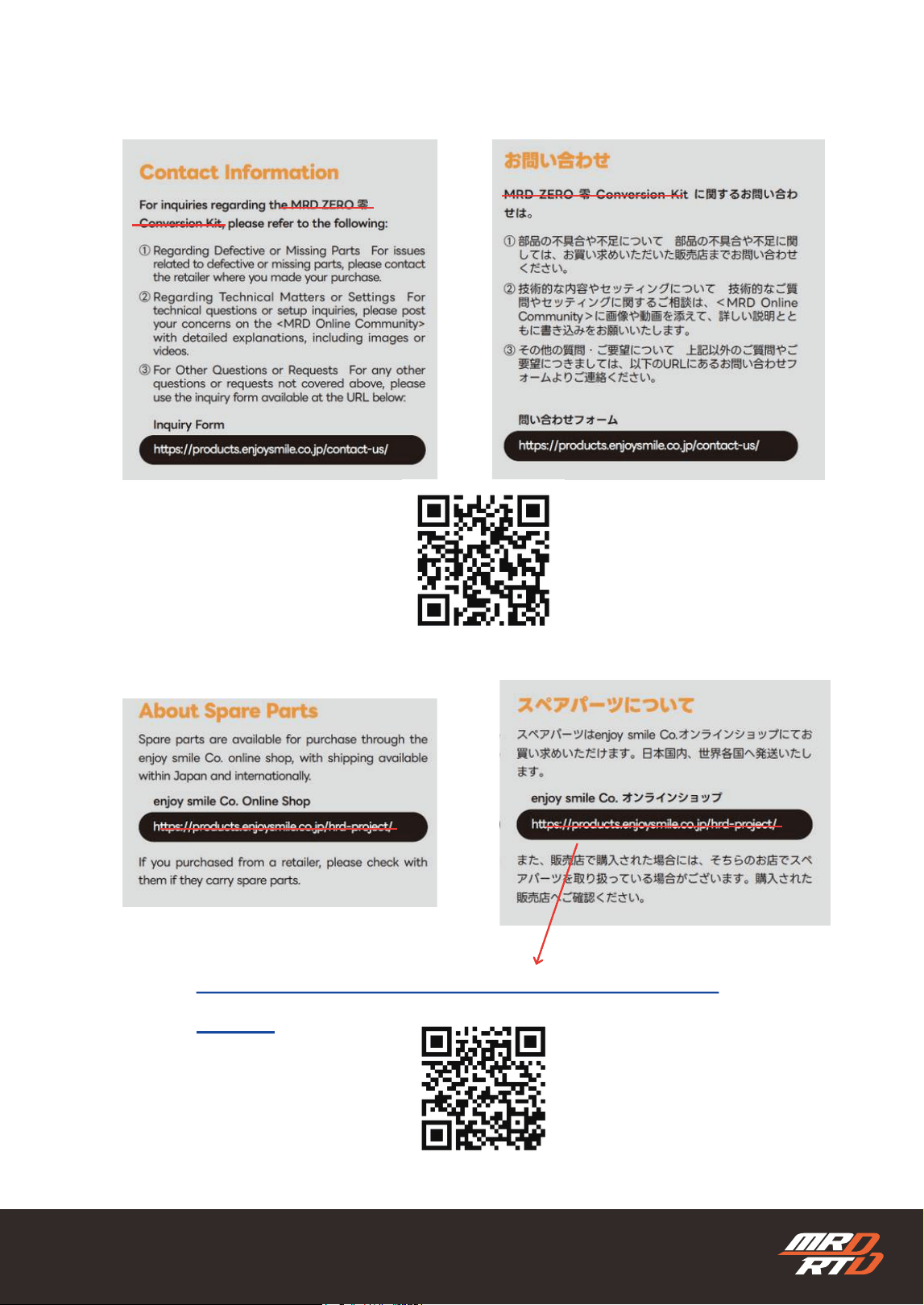
https://products.enjoysmile.co.jp/mrd-
parts/
MRD
RTD
MRD
RTD
68
Image_0088

CHASSIS
&
TRANSMITTER SET
This equipment has been tested and found to comply with the limits for a Class B digital
device, pursuant to part 15 of the FCC Rules. These limits are designed to provide reasonable
protection against harmful interference in a residential installation. This equipment
generates, uses and can radiate radio frequency energy and, if not installed and used in
accordance with the instructions, may cause harmful interference to radio communications.
However, there is no guarantee that interference will not occur in a particular installation. If
this equipment does cause harmful interference to radio or television reception, which can be
determined by turning the equipment off and on, the user is encouraged to try to correct the
interference by one or more of the following measures:
• Reorient or relocate the receiving antenna.
• Increase the separation between the equipment and receiver.
• Connect the equipment into an outlet on a circuit different from that to which the receiver
is connected.
• Consult the dealer or an experienced radio/TV technician for help.
Caution: Any changes or modifications to this device not explicitly approved by manufacturer
could void your authority to operate this equipment.
This device complies with part 15 of the FCC Rules. Operation is subject to the following two
conditions: (1) This device may not cause harmful interference, and (2) this device must
accept any interference received, including interference that may cause undesired operation.
The device has been evaluated to meet general RF exposure requirement.