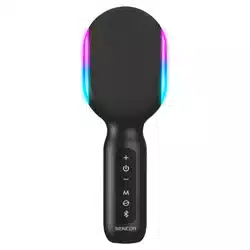
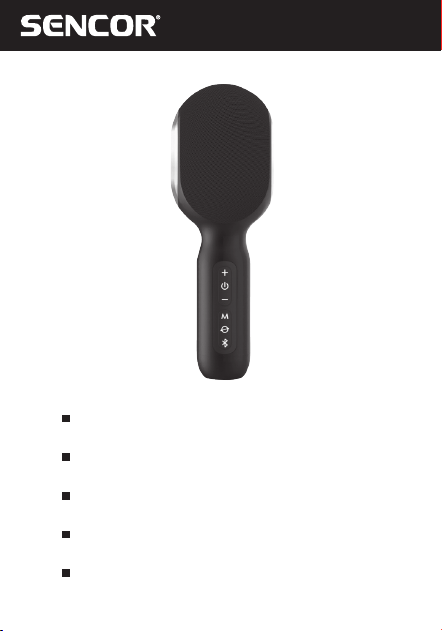
SSSK1000
EN User Manual Karaoke Party Microphone
withSpeaker
CZ
Uživatelská příručka Karaoke párty mikrofon
sreproduktorem
SK
Používateľská príručka Karaoke párty mikrofón
sreproduktorom
HU
Felhasználói kézikönyv Karaoke party mikrofon
hangszóróval
PL
Podręcznik użytkownika Mikrofon imprezowy
karaoke zgłośnikiem

EN
2 EN
Revision 08/2023Copyright © 2023, Fast ČR, a. s.
Safety Instructions
This product has been designed with the utmost safety in mind.
However, incorrect use may lead to electric shock or fire. This
is why users should observe the following instructions when
using this device.
This device uses asemiconductor unit and contains no user
serviceable parts. Do not disassemble this device, otherwise you
are exposed to the risk of electric shock. If any damage to this
product occurs, please have this product repaired by aqualified
service technician.
Power
Power supply of this unit must be match the serial plate data.
Heat Source
Keep this unit out of heat sources like stove or direct sunlight.
Cleaning
Prior to cleaning, please disconnect power first. For cleaning,
don’t use liquid detergents or caustic liquids - just clean the unit
with asoft cloth.
Heavy Objects
Do not place heavy objects on the unit, otherwise damage
might occur.
Connecting Other Devices
Before connecting other devices to this unit, please make sure
to disconnect power. Otherwise damage to the unit or personal
injury might occur.
Faults to Be Repaired
If any of the following problems occurs, please disconnect
power to the unit and contact aqualified service technician.
A. Power cord or plug is damaged.
EN
EN 3
Revision 08/2023Copyright © 2023, Fast ČR, a. s.
B. Liquids or other foreign objects have penetrated inside the
product.
C. If the unit does not work even if it’sbeing operated according
to the instructions, don’t press any buttons other than those
described in these instructions. Otherwise, damage to this
unit may occur along with amore demanding repair.
D. This unit has fallen on the ground from abig height.
E. Burns can be smelled from the product inside.
Maintenance
If you don’t have enough technical knowledge necessary to
maintain this unit, don’t attempt to repair it by yourself.
By removing the cover, you are exposed to arisk of electric
shock. If needed, please contact aqualified service technician.
Replacement of Parts
If you need to replace any part of this unit, ask your service
technician to make areplacement for equal spare part models.
If other spare part models are used for replacement, serious
damage, electric shock or shortening the unit’slifetime may
occur.
Safety Check
When done with the maintenance, ask your service technician
to perform an on-site safety check to make sure that the
unit’soperation is safe.
Note:
Before using this product, read these instructions carefully
and keep it well for future use.
EN
4 EN
Revision 08/2023Copyright © 2023, Fast ČR, a. s.
Included Contents
1x SSSK1000
1x USB-C charging cable
1x audio cable (audio jack 3.5 mm)
1x user manual
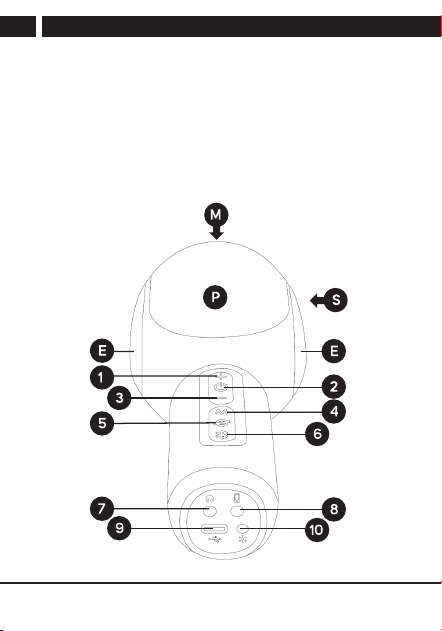
SSSK1000 Description
EN
EN 5
Revision 08/2023Copyright © 2023, Fast ČR, a. s.
1 Next track button (long press), volume down (short
press)
2 On/off button, change the active volume setting
(microphone/audio source), LED charging indicator (red
indication), LED device on indicator (white indication)
3 Previous track button (long press), volume down (short
press)
4 Microphone voice setting change button
5 Button to suppress/restore vocals in the music being
played, PLAY/PAUSE (press twice)
6 TWS button (long press) / pair and disconnect
Bluetooth (press twice)
7 Input for connecting headphones, audio jack 3.5 mm
8 Input for AUX-IN audio jack 3.5 mm
9 USB-C input for charging
10 Change button (short press) / turn on andoff the light
effect (long press)
M Sound sensor (microphone) – upper part of the device
E Light effects – left andright side of the device
P Passive radiator – front side of the device
S Speaker (MONO) – rear side of the device
EN
6 EN
Revision 08/2023Copyright © 2023, Fast ČR, a. s.
Putting into Operation
Before first use, be sure to read the safety instructions contained
in this user'smanual carefully.
Before using the SSS K1000 for the first time, charge the
integrated battery to the maximum level. Press and hold the
power button to turn on the SSS K1000. Turning on/off is
indicated by asound signal. To turn the BT speaker off, hold
down the power on button.
Pairing Devices via Bluetooth
Turn on the SSS K1000 and search for its Bluetooth name
“SSS K1000” in the device you want to pair and start the
pairing process. If you are requested to enter apairing code
while your device and the BT speaker are pairing, use the
code: “0000”. To disconnect the paired device, end the pairing
session on your mobile device or press the “TWS button” twice.
Note:
To ensure astable Bluetooth connection, make sure that
the distance between the BT speaker and your connected
device is kept within 10 meters.
TWS Feature
If you purchase other identical devices (“SSS K1000”), you can
pair both speakers together for optimum stereo sound. First,
make sure that your device is not connected to any SSS K1000.
Turn on both SSS K1000s by pressing and holding the "TWS
Button", wait until the device automatically connects. Successful
connection.
EN
EN 7
Revision 08/2023Copyright © 2023, Fast ČR, a. s.
Changing the volume level using the volume control buttons
will take effect automatically on both paired devices. Press and
hold the power button on one of the devices to turn off both
paired SSS K1000s.
Note:
In TWS mode, not all functions of the SSS K1000 are
available to each other. TWS mode can only be used in
Bluetooth mode.
Audio AUX IN
The SSSK1000 is equipped with a3.5 mm jack. Your device
can be connected to the SSS K1000 using the included audio
cable. Then connect your headphones to the SSSK1000.
Music will always be routed from your device via the AUX IN
port directly to the headphones. Music via AUX IN will not be
transferred to the SSS K1000 speaker.
Caution:
Before connecting your device and the SSS K1000,
please make sure that the output signal from your
device is set to minimum (minimum output volume).
This will prevent the BT speaker from damage. When
the audio cable is connected, the BT speaker does
not meet the water ingression protection class.
EN
8 EN
Revision 08/2023Copyright © 2023, Fast ČR, a. s.
Note:
Not all functions of the SSS K1000 are available in this
mode. The Bluetooth function is not active when the audio
jack is connected to the SSS K1000.
Headphone Input
Connect your headphones to the SSSK1000 for direct listening.
Connecting headphones will automatically turn off the speaker
and all audio will be directed to them.
Caution:
before putting the headphones in your ears, make
sure that the output volume is set to the minimum
level. This will prevent damage to your hearing.
PLAY/PAUSE
To call up the PLAY/PAUSE function, press the “PLAY/PAUSE”
button twice. Function is only available in the Bluetooth mode.
Make sure that an audio player is running on your smartphone.
Volume Control
First, use the “on/off, change active volume setting” button to
select which volume you want to control:
Microphone control – the selected microphone volume
control function controls only the input from the voice
sensor.

EN
EN 9
Revision 08/2023Copyright © 2023, Fast ČR, a. s.
Audio content control – the selected function controls the
volume of the audio source that plays the audio content. For
example, music played via Bluetooth.
Use the buttons on the SSSK1000 to control the volume (+/-).
During music playback, you can press and hold the “+” button
to jump to the next track playback. To select the previous track,
press and hold the “-” button.
Light Effects
The SSS K1000 is equipped with light effects. The light effect is
switched on/off by long pressing the “Light effects” button. To
change the light effect, briefly press the “Light effects” button on
the bottom of the device in the on state.
Charging the SSSK1000
Acharged battery provides power for several hours of operation
at normal volume levels. Ahigh volume will consume the
battery energy faster. To charge the SSS K1000, connect your
minimum 5 V, 2 Acharging adapter to the mains and then
to the SSS K1000. The battery status indicator will glow red
during charging until the battery is fully charged (In the on
state, the indicator will be affected by the white on LED – the
charging process will be indicated in pink). Alow battery level
will be indicated by an audible alert.
EN
10 EN
Revision 08/2023Copyright © 2023, Fast ČR, a. s.
Caution:
For charging, use only the original accessories
supplied with the appliance. To achieve the maximum
battery lifetime, it is best not to start charging until
the low battery audible alert is output. Charge
continuously until fully charged. When the battery
operating time becomes very short, the battery
lifetime has been used up; we recommend that you
have the battery replaced at your authorized centre.
Recommendation:
If the unit is not to be used for an extended period of time,
we recommend to fully charge the battery once every two
to three months. We recommend to store the unit with
athe battery charged to prevent irreparable damage to the
battery (loss of capacity).
EN
EN 11
Revision 08/2023Copyright © 2023, Fast ČR, a. s.
SSSK1000 Technical Specifications
Karaoke Party Microphone withSpeaker
Bluetooth wireless connection
LED lights
TWS function (True Wireless Stereo)
4 Voice Modes
Speech
Original sound
Karaoke
Professional
4 Light Modes
Dynamic
Dynamic breathing
RGB
Monochrome
Sound
Digital Sound Processor (DSP)
Maximum speaker output 10 W(Impedance: 3 Ω)
Frequency response: 130 Hz–20 kHz
1 wideband loudspeaker
Deep bass
Low distortion microphone diaphragm
Inputs
Bluetooth Audio 5.0
Audio Aux output for headphones or recording
EN
12 EN
Revision 08/2023Copyright © 2023, Fast ČR, a. s.
Others
Built-in rechargeable battery: 2,500 mAh Li-Ion
Playback time up to 10 hours (50% volume level)
USB-C charging
Accessories: USB-C charging cable, 3.5 mm Aux cable, user
manual
Dimensions: 204×75×72 mm
Weight: 340 g
Bluetooth Version 5.0
Maximum
Transmitter Power
100mW @ 2.4GHz–
2.4835GHz
Codec SBC
Profiles AVRCP,A2DP
EN
EN 13
Revision 08/2023Copyright © 2023, Fast ČR, a. s.
INSTRUCTIONS AND INFORMATION ON
THE DISPOSAL OF DISCARDED PACKAGING
MATERIALS
Take the packaging material to acollection yard for disposal.
DISPOSAL OF DISCARDED ELECTRICAL AND
ELECTRONIC EQUIPMENT
This symbol on the product, accessory or packaging
indicates that the product must not be treated as
normal household waste. Please dispose of this
product in acollection yard designated for the recycling
of electrical and electronic equipment. In some EU
countries or in some European countries, you can
return your products to your local retailer when you
buy an equivalent new product. By disposing of this
product properly, you are helping to protect valuable
natural resources and prevent the potential negative
environmental and human health impacts that could
result from improper waste disposal. Please contact your
local authority or the nearest waste collection yard for
further details. Improper disposal of this type of waste
may be subject to alegal fine.
For Companies in the European Union
If you need to dispose of electrical or electronic equipment, ask
your dealer or supplier for the necessary information.
Disposal in Countries Outside the European Union
If you wish to dispose of this product, please ask the Ministry
or your dealer for the necessary information on the correct
disposal method.
EN
14 EN
Revision 08/2023Copyright © 2023, Fast ČR, a. s.
The product meets the EU requirements.
FAST ČR, a.s. hereby declares that the radio equipment type
SSSK1000 conforms to the 2014/53/EUDirective.
For full
version of the EU declaration of conformity, please refer to www.
sencor.eu website.
Text, design and technical data are subject to change without
notice and we reserve the right to make changes.
The original version is in Czech.
Manufacturer’saddress: FAST ČR, a.s., USanitasu 1621,
Říčany CZ-251 01

EN
EN 15
Revision 08/2023Copyright © 2023, Fast ČR, a. s.
EN
Warranty conditions
Warranty card is not apart of the device packaging.
This product is warranted for the period of 24 months from the date of purchase to the end-user. Warranty
is limited to the following conditions. Warranty is referred only to the customer goods using for common
domestic use. The claim for service can be applied either at dealer’sshop where the product was bought, or
at below mentioned authorized service shops. The end-user is obligated to set up aclaim immediately when
the defects appeared but only till the end of warranty period. The end user is obligated to cooperate to certify
the claiming defects. Only completed and clean (according to hygienic standards) product will be accepted.
In case of eligible warranty claim the warranty period will be prolonged by the period from the date of claim
application till the date of taking over the product by end-user, or the date the end-user is obligated to take it
over. To obtain the service under this warranty, end-user is obligated to certify his claim with duly completed
following documents: receipt, certificate of warranty, certificate of installation.
This warranty is void especially if apply as follows:
Defects which were put on sale.
Wear-out or damage caused by common use.
The product was damaged by unprofessional or wrong installation, used in contrary to the applicable
instruction manual, used in contrary to legal enactment and common process of use or used for another
purpose which has been designed for.
The product was damaged by uncared-for or insufficient maintenance.
The product was damaged by dirt, accident of force majeure (natural disaster, fire, and flood).
Defects on functionality caused by low duality of signal, electromagnetic field interference etc.
The product was mechanically damaged (e.g. broken button, fall).
Damage caused by use of unsuitable media, fillings, expendable supplies (batteries) or by unsuitable
working conditions (e.g. high temperatures, high humidity, quakes).
Repair, modification or other failure action to the product by unauthorized person.
End-user did not prove enough his right to claim (time and place of purchase).
Data on presented documents differs from data on products.
Cases when the claiming product cannot be indentified according to the presented documents (e.g. the
serial number or the warranty seal has been damaged).
Manufacturer:
FAST ČR, a.s., U Sanitasu 1621, Říčany 251 01, Czech Republic
Visit www.sencor.com for detailed information about authorized service centers.
The original version of the instructions is in the Czech language, other language versions are made by the
appropriate translation.