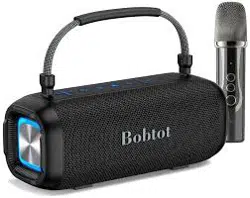
Model No: ET29
User Manual
Portable Speaker With Microphone
Safety Instructions
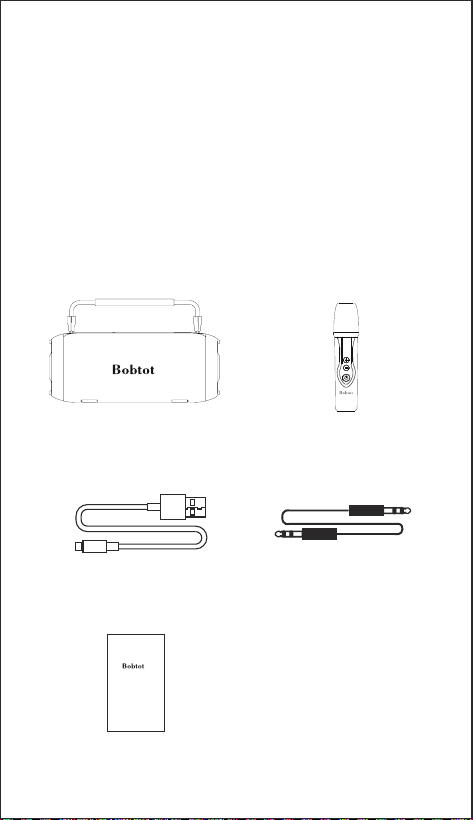
What's in the box
1. Avoid dropping.
2. Do not disassemble.
3. Avoid extreme temperatures.
4. Use original or certified cables.
5. Do not use any corrosive cleaner/oil to clean.
6. Do not use the device outdoors during thunderstorms.
7. Do not expose batteries to high heat as direct sun light,
fire and Etc.
Model No: ET200
Portable Wireless Speaker
User Manual
ET29 Portable Party Speaker Wireless Microphone
USB Type-C Charging Cable
3.5mm AUX Audio Cable
Quick Start Guide
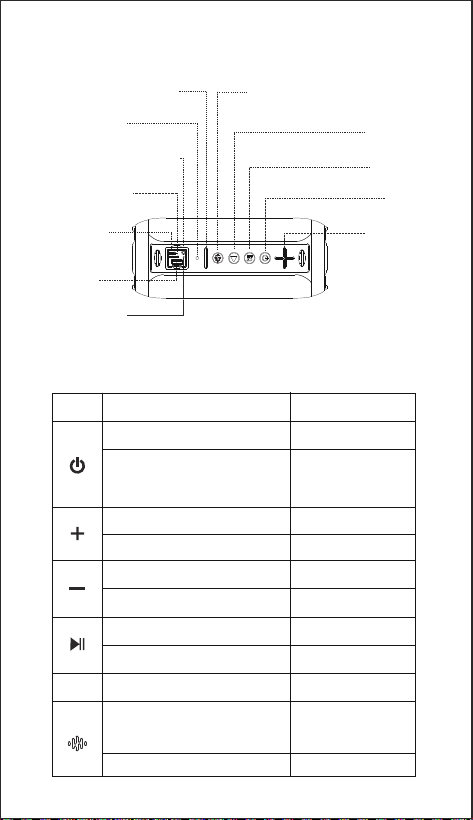
USB slot
RST (Reset slot)
Power indicator
Volume down/Previous track
Karaoke mode switch & Light on/off
Play/Pause
EQ mode
Power
Volume up
/ Next track
Type-C slot
(Charging only)
Memory card slot
AUX slot (3.5mm Audio jack)
Buttons Overview
Button Function
Function Operation
BT/AUX/USB/Memory
card switch mode
Increase the volume
Next track
Decrease the volume
Long press
Previous track
Play/Pause
Disconnect BT
Indoor /Outdoor mode
KTV mode( Medium ECHO )
Karaoke mode ( Much ECHO )
Vocal mode ( No ECHO )
Light on/off
Button
Power on/off
EQ
Short press
Short press
Long press
Long press
Long press
Double click
Short press
Short press
Short press
Short press
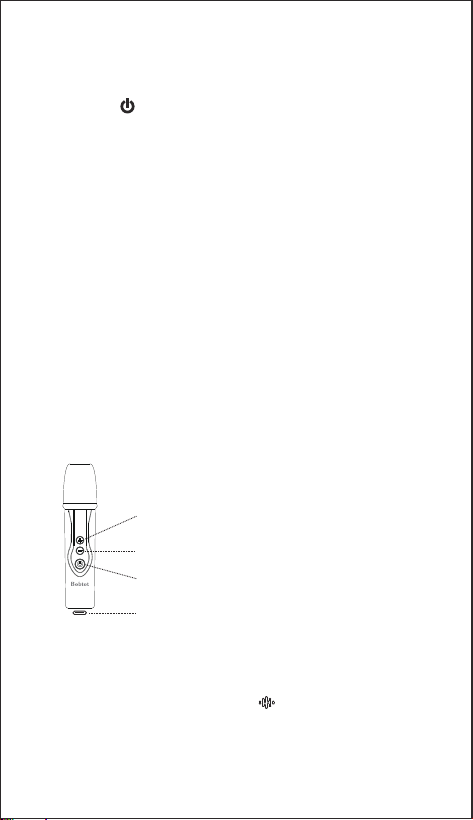
How to use the speaker
USB Type-c charging port (DC 5V)
Volume - : short press to decrease the microphone volume.
Volume + : short press to increase the microphone volume.
Power on/off : long press
Wireless Pairing
1. Short press until you hear prompt sound, which means that speaker
enters BT pairing mode.
2. Find " Bobtot ET29 " speaker on the BT list of your phone or tablet, and
click to connect.
3. It's successfully connected to your smart device if you hear prompt sound.
AUX/USB/Memory card mode
Plug 3.5mm audio cable & USB flash drive & memory card to the speaker and
your audio source device. It will automatically play and make sure other source
are disconnected.
Charging (USB Type-C)
1. When the battery is low, you will hear the prompt sound " low battery " ,
then please charge it.
2. Plug the USB cable to adapter (or computer's USB port) and Type-C insert
to the speaker to charge the speaker, the red indicator light will be on when
charging, the indicator light will be off when fully charged.
How to use the Microphone
NOTE:
When you use the Microphone, short press " " button on speaker to choose
the ECHO effect :
if you need much ECHO, pls choose Karaoke mode.
if you need medium ECHO, pls choose KTV mode.
if you don't need the ECHO, pls choose Vocal mode.
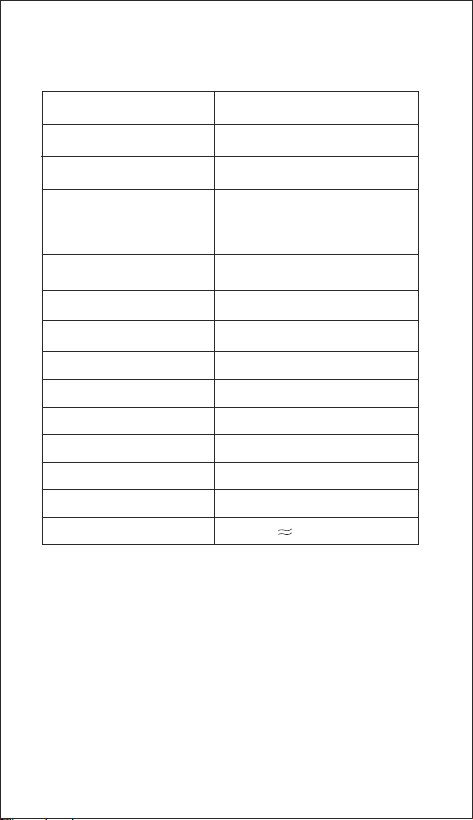
Specifications
BT version
5.3
Range 33ft/10m
Audio output 60W
Play time (varies by volume
level and content)
Up to 20 hours
Charging time 4 - 6 hours
Battery 7.4 V/ 4400 mAh
3.7 V/ 1200 mAh
Waterproof rating IPX7
Input
Driver (full range) 2 x 3"
Impedance 4Ω
Frequency response 60 Hz-18 KHz
Size 250x104x104mm/9.8x4.09 x4.09 in
Weight 1630g/3.59 lb
DC 5V
Reset Your Device
Microphone Battery
If the speaker does not work properly, you may reset it by inserting needle
to Reset hole for approximately 1 second until the speaker powers off, and
then powers on again.

FCC Statement
Any changes or modifications not expressly approved by the party
responsible for compliance could void the user s authority to operate
the equipment.
This device complies with Part 15 of the FCC Rules.
Operation is subject to the following two conditions:
(1) this device may not cause harmful interference, and
(2) this device must accept any interference received,including interference
that may cause undesired operation.
Note: This equipment has been tested and found to comply with the limits
for a Class B digital device, pursuant to Part 15 of the FCC Rules.
These limits are designed to provide reasonable protection against harmful
interference in a residential installation.
This equipment generates, uses, and can radiate radio frequency energy,
and if not installed and used in accordance with the instructions,
may cause harmful interference to radio communications. However,
there is no guarantee that interference will not occur in a particular installation.
If this equipment does cause harmful interference to radio or television
reception, which can be determined by turning the equipment off and on,
the user is encouraged to try to correct the interference by one or more of
the following measures:
– Reorient or relocate the receiving antenna.
– Increase the separation between the equipment and receiver.
– Connect the equipment into an outlet on a circuit different from that to
which the receiver is connected.
– Consult the dealer or an experienced radio/TV technician for help.
The device has been evaluated to meet general RF exposure requirement.
The device can be used in portable exposure condition without restriction.
©2024 Bobtot // Features and specifications are subject to change and or improvement without notice.
Made in China
18 Months Warranty
Life-time & Timely Technical Support
www.bobtot.net