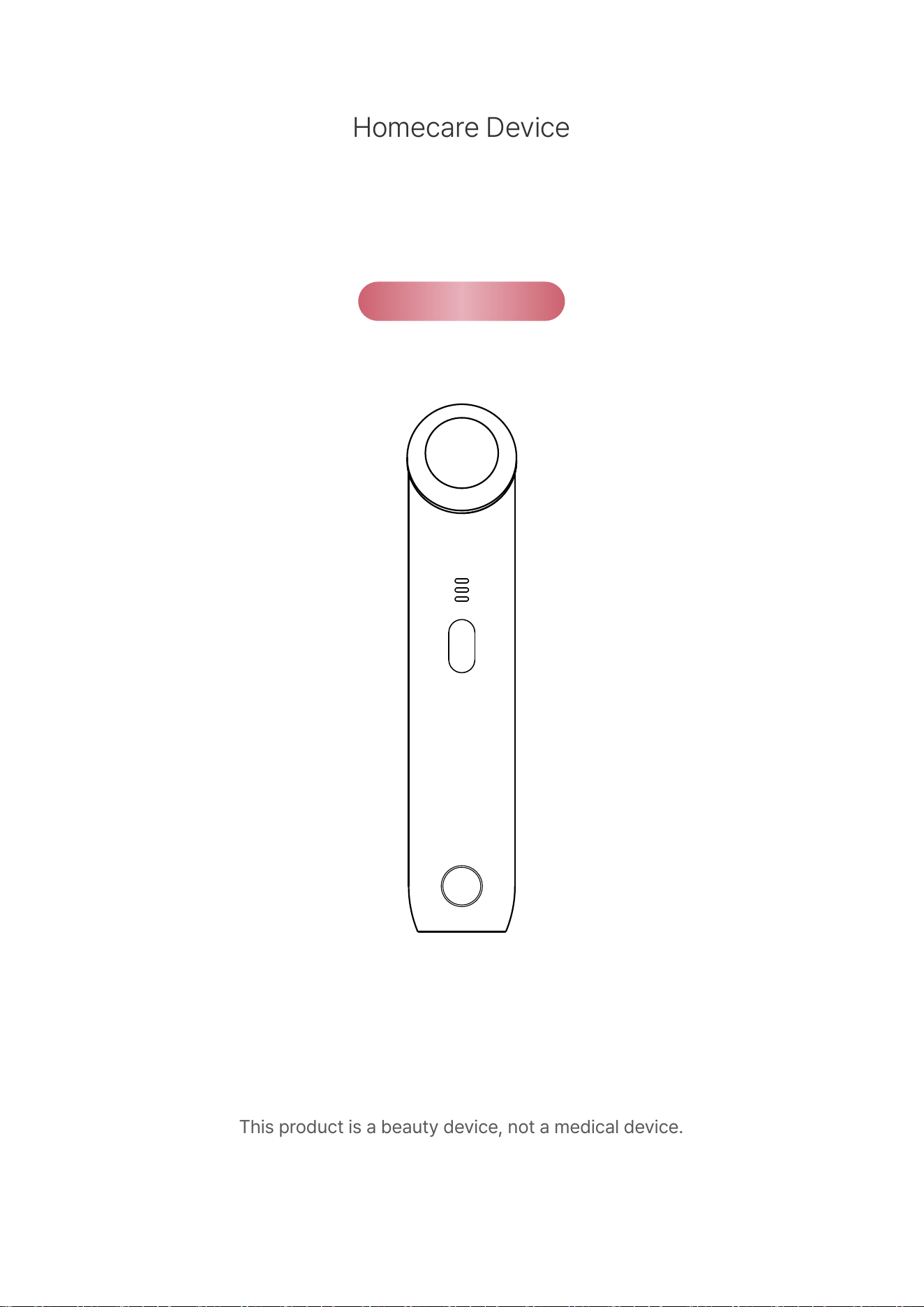
Homecare Device
사용설명서
Manual
*본 제품은 의료기기가 아닌 미용기기입니다.
This product is a beauty device, not a medical device.
2
목차
(주)제이엘유의 제품을 구매해 주셔서 감사합니다.
본 제품은 의료기기가 아닌 미용기기입니다.
사용감과 체감에는 개인차가 있으며, 이상 증상이 나타나면 즉시 사용을 중지하십시오.
제품의 외관 및 규격 등은 품질 개선을 위하여 사전에 통보 없이 변경될 수 있습니다.
0301. 주의사항
- 구성품 및 명칭
- 제품 사양 및 충전 안내 및 디바이스 관리 방법
04
05
02. 제품 소개
- 사용 방법 07
03. 사용 방법
1205. 영문 매뉴얼 ENGLISH MANUAL
- 보증 및 A/S
- 제품 보증서
10
11
04. 보증 및 A/S

1. 분리형 전원 공급 장치가 제공된 경우, 제품과 함께 제공된 전원 공급 장치만 사용하십시오.
2. 제품을 개조하거나 분리·수리하지 마십시오. 사용자 임의로 개조·분리·수리 시 기간 내 무상 A/S 서비스를
받을 수 없으니 반드시 지정 A/S 센터를 이용하십시오.
3. 제품을 물에 씻거나 담그지 말고, 젖은 손으로 조작하거나 젖은 상태에서 충전하지 마십시오.
4. 제품을 습기가 있는 곳(욕실·세탁실·사우나 등)에 보관하면 고장의 원인이 될 수 있으므로, 습기에 노출되지
않도록 보관하십시오.
5. 제품에 충격을 주거나 떨어뜨리지 않도록 주의하십시오.
6. 제품 사용 후 헤드(접촉부)를 알코올로 소독하십시오. 소독 시 거친 질감의 천을 사용하거나 표면을 강하게
닦으면 스크래치 등 손상이 발생할 수 있으므로 부드러운 천을 이용하십시오.
7. 본체는 알코올 소독 시 변색·오염 등이 발생할 수 있으므로 물티슈 또는 부드러운 천을 이용하십시오.
8. 이외 자세한 제품 관리·A/S 서비스는 제조사의 품질보증 규정을 따릅니다.
※ 주의사항 (필독)
※ 제품 관리
1. 본 제품은 의료기기가 아닌 미용기기입니다. 미용 관리 목적 외의 용도로 사용을 삼가십시오.
2. 제품 사용 전 보호 필름을 제거하고 사용하십시오.
3. 제품 사용 전 반드시 제품이 정상 작동하는지 확인한 뒤 사용하시기 바랍니다.
4. 어린이 손이 닿지 않는 곳에 보관하십시오.
5. 신체적·감각적 또는 정신적 능력이 저하된 사람(어린이 포함)이나 경험 및 지식이 부족한 사람이
사용하지 않도록 하고, 안전을 책임지는 사람으로부터 제품 사용에 관한 감독이나 지시를 받은 경우
주의하여 사용하십시오.
6. 임산부·수유 중인 자는 사용을 삼가십시오.
7. 목걸이·귀걸이 등 금속류 액세서리를 제거 후 사용하십시오.
8. 상처·감염·종기 등 피부 질환 부위는 사용을 삼가십시오.
9. 임플란트·신경 치료·교정 등 치과 치료와의 병행은 전문 의료인의 소견에 따르는 것을 권장합니다.
10. 모든 성형 시술과의 병행은 전문 의료인의 소견에 따르는 것을 권장합니다.
11. 심장 박동기 착용·장치 이식·중증 질환 이력·통원 치료 등 건강상 주의가 필요한 자는 사용을 삼가십시오.
12. 본 제품은 얼굴 전용 피부 관리 제품으로 얼굴 피부 외 다른 부위에 사용을 삼가십시오.
13. 수정체(눈), 눈 주변, 갑상선이 지나는 부위는 사용을 삼가십시오.
14. 관리 시 반드시 피부와 기기 사이가 뜨지 않도록 정확히 밀착해서 사용해 주십시오.
15. 한곳에 오래 멈추어 사용하면 피부가 자극을 받게 되므로 주의하여 사용하십시오.
16. 피부 민감도에 따라 적절한 강도를 설정하여 사용하십시오.
17. 권장사항을 지키지 않아서 발생하는 부작용에 대해서는 당사가 책임지지 않습니다.
01. 주의사항
03
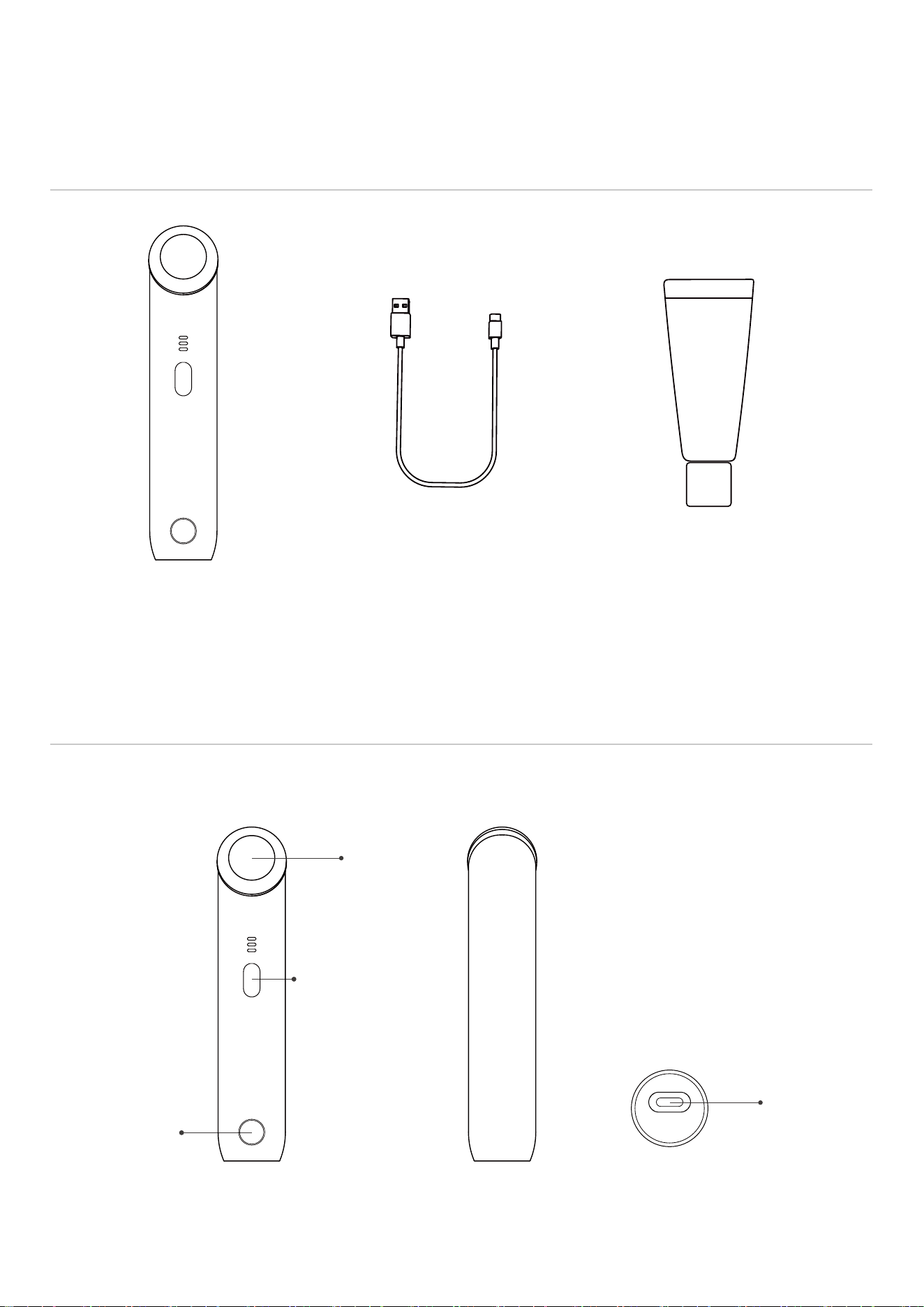
시작 버튼
[후면] [하단][정면]
전원 버튼
(ON/OFF, 강도)
04
02. 제품 소개
명칭
구성품
오바코 타임슬립
워터 맥스 크림 90g
(증정용 겔)
충전 케이블
C-TYPE
본체
헤드 (접촉부)
충전부 (C타입)
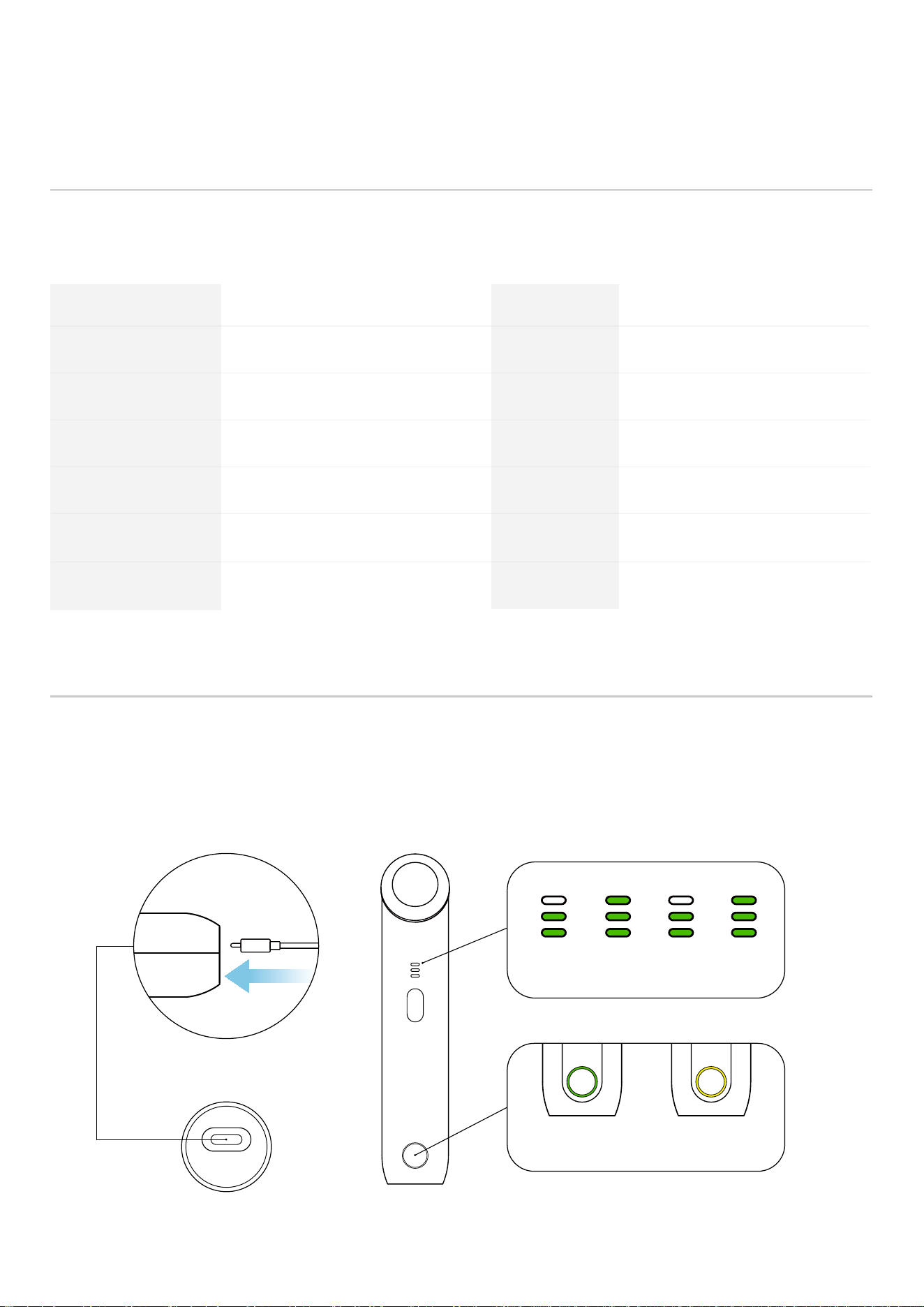
제품 사양
02. 제품 소개
05
C-TYPE 충전단자 연결
모델명 제품명
제품 사이즈 제품 무게
정격 전압 배터리
충전 케이블
사용 시간
충전 시간
제조년월
제조/판매원
JLMC500B
약 W36 x H174 x D50 mm
DC 5V 1A
C-TYPE
약 80분
별도 표기
피부 관리기
약 175g
800mAh
약 120분
(주)제이엘유
051-331-7185
고객센터
KC
R-R-JLU-JLMC500B
010-4505-7989
A/S 센터
[하단] [정면]
▶ ▶ ▶
충전 중(표시등이 깜박임)
충전 중완충 상태
*본 제품의 사양은 성능 향상이나 개선을 위하여 별도의 고지 없이 변경될 수 있습니다.
*본 제품의 사양은 측정 도구 및 위치 등 측정 방법에 따라 차이가 있을 수 있습니다.
충전 케이블을 제품 하단의 충전 포트에 연결할 때 커넥터 부분을 완전히 밀어 넣어야 합니다.
그렇지 않은 경우 충전이 원활하지 않을 수 있습니다. 제품에 전원이 들어오지 않으면
제품 하단 충전 포트의 연결 상태를 확인해 주십시오.
충전 안내
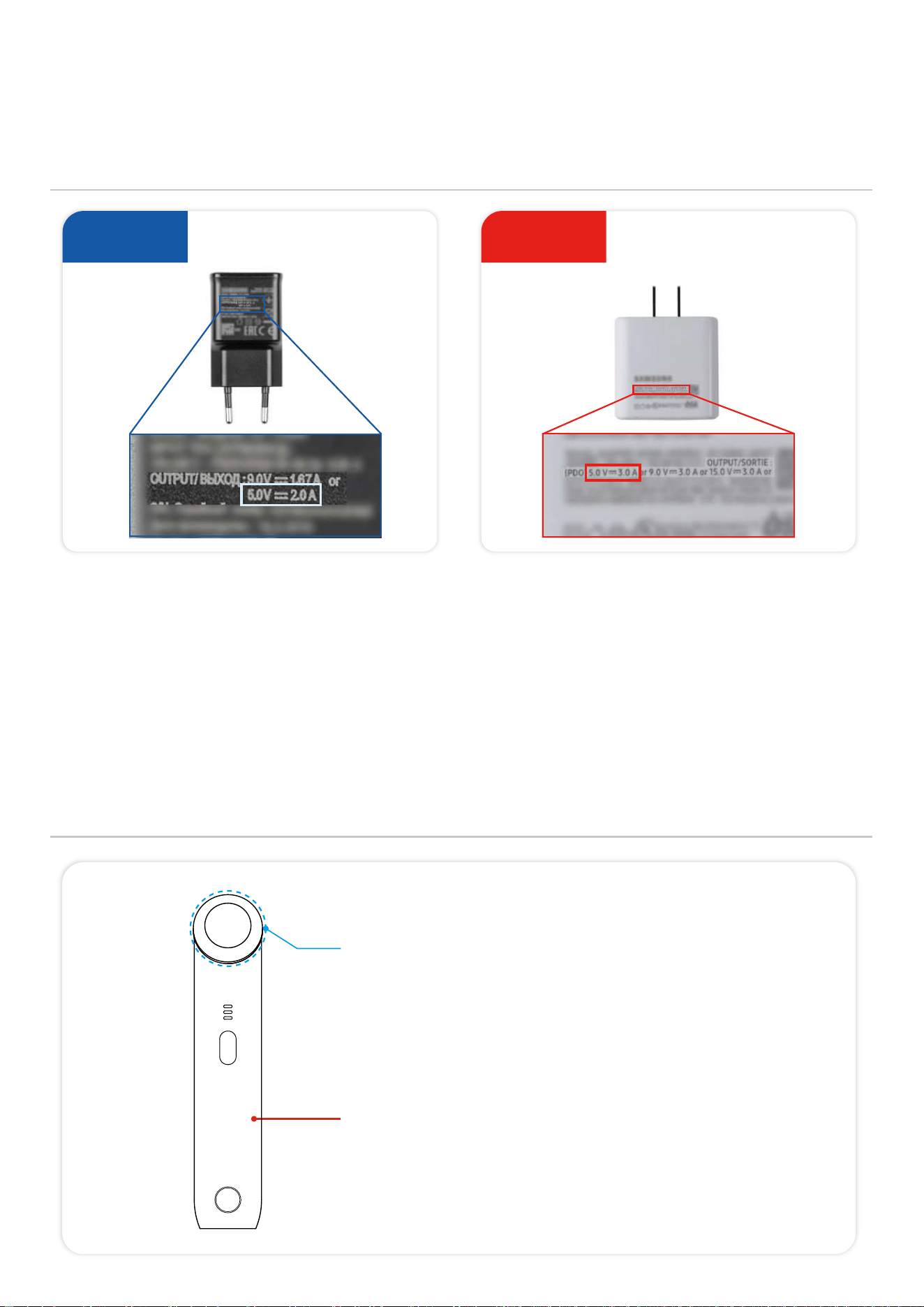
사용 불가
충전 안내
디바이스 관리 방법
02. 제품 소개
06
5V 1A / 5V 2A 충전기
비규격 충전기 (5V 3A)
사용 가능
알코올 소독 가능
소독 시 부드러운 천 이용
*거친 질감의 천을 사용하거나 표면을 강하게 닦으면 스크래치 등 손상이
발생할 수 있으며 사용 부주의로 인한 제품 손상은 교환·환불이 불가능합니다.
알코올 금지
디바이스 본체는 알코올 소독 시 변색·오염 등이 발생할 수 있으므로
물티슈 또는 부드러운 천을 이용해 관리해 주세요.
2. 반드시 동봉된 충전 케이블을 사용해 주십시오. (또는 C to A 케이블)
3. 보조배터리를 이용한 충전은 불가합니다.
4. 완충 후 전원을 켰다가 다시 충전을 하면, 상단 배터리가 3칸에서 2칸으로 표시될 수 있습니다.
5. 이는 배터리가 덜 충전된 것이 아니라, 배터리 3칸 구간이 전압의 최고점에만 해당하도록 설계되어 있어 조금만 사용해도 2칸으로 표시되기 때문입니다.
6. 실제 배터리는 완충 상태이므로 사용 시간에는 지장이 없습니다.
7. 완충 직전과 방전 직후 단계에서는 배터리 안정성을 위해 미세한 전류로 천천히 충전되도록 설계되어 있어, 충전 시간이 다소 길게 느껴질 수 있습니다.
8. 완충 후 충전기를 다시 연결했을 때 ‘CHARGING(충전 중)’ 표시가 나타나는 것도 정상 동작이므로 안심하고 사용해 주세요.
9. 충전 중 버튼 조작 등 디바이스 사용은 고장의 원인이 될 수 있습니다.
10. 충전 단자가 올바르게 맞춰지지 않았거나, 단자에 먼지·이물질이 쌓여 있는 경우 접촉 불량이 발생할 수 있으므로 주의해 주세요.
1. 반드시 정격 전압(5V 1A / 5V 2A) 어댑터를 사용해 주십시오. 노트북 충전기, 초고속 충전기 등 규격과 다른 어댑터 사용은 불가합니다.
규격과 다른 어댑터 사용 시 충전·사용 시간이 안내된 내용과 달라질 수 있으며, 이로 인한 고장·손실은 소비자 과실로 제조사에서 책임지지 않습니다.
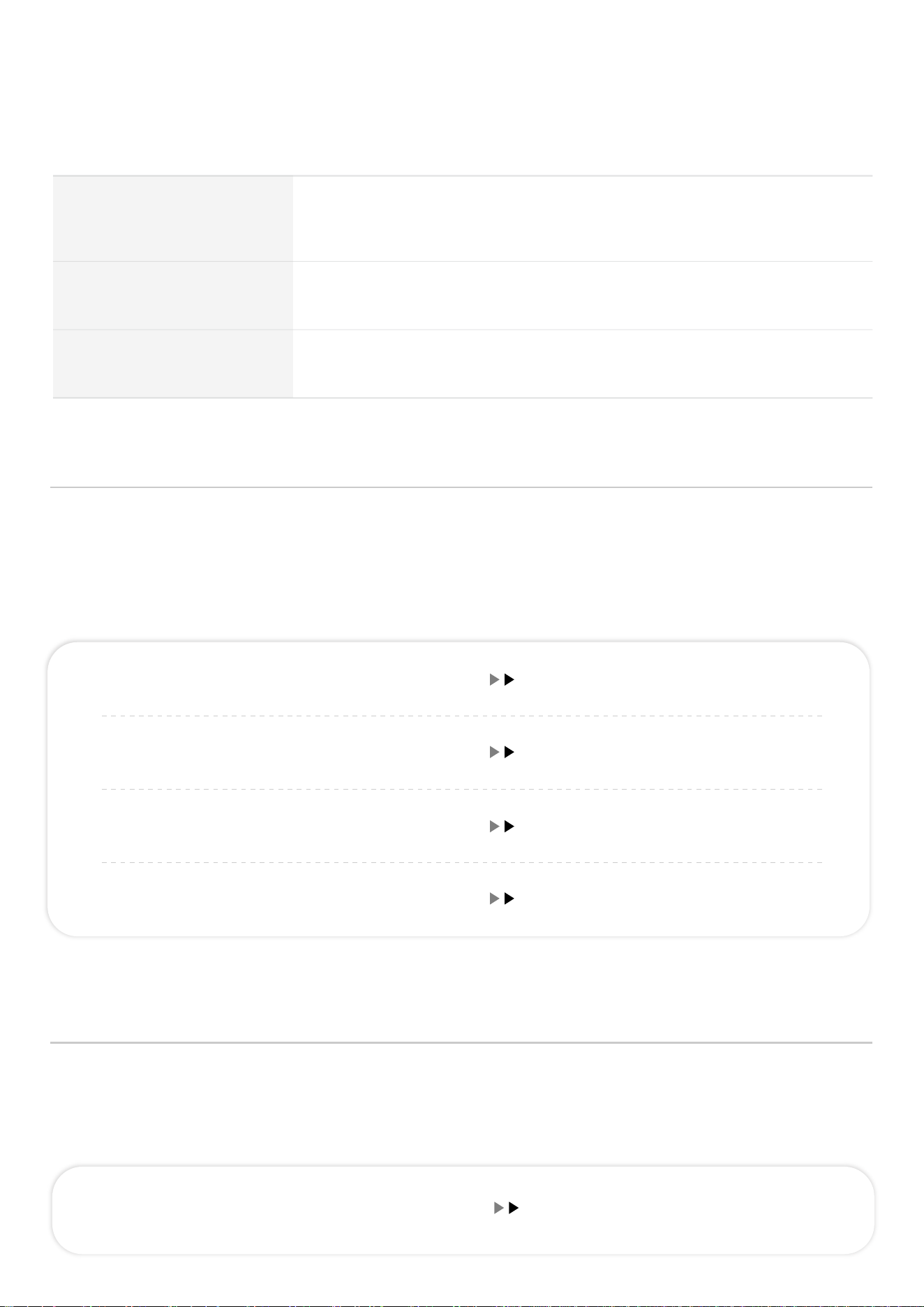
03. 사용방법
07
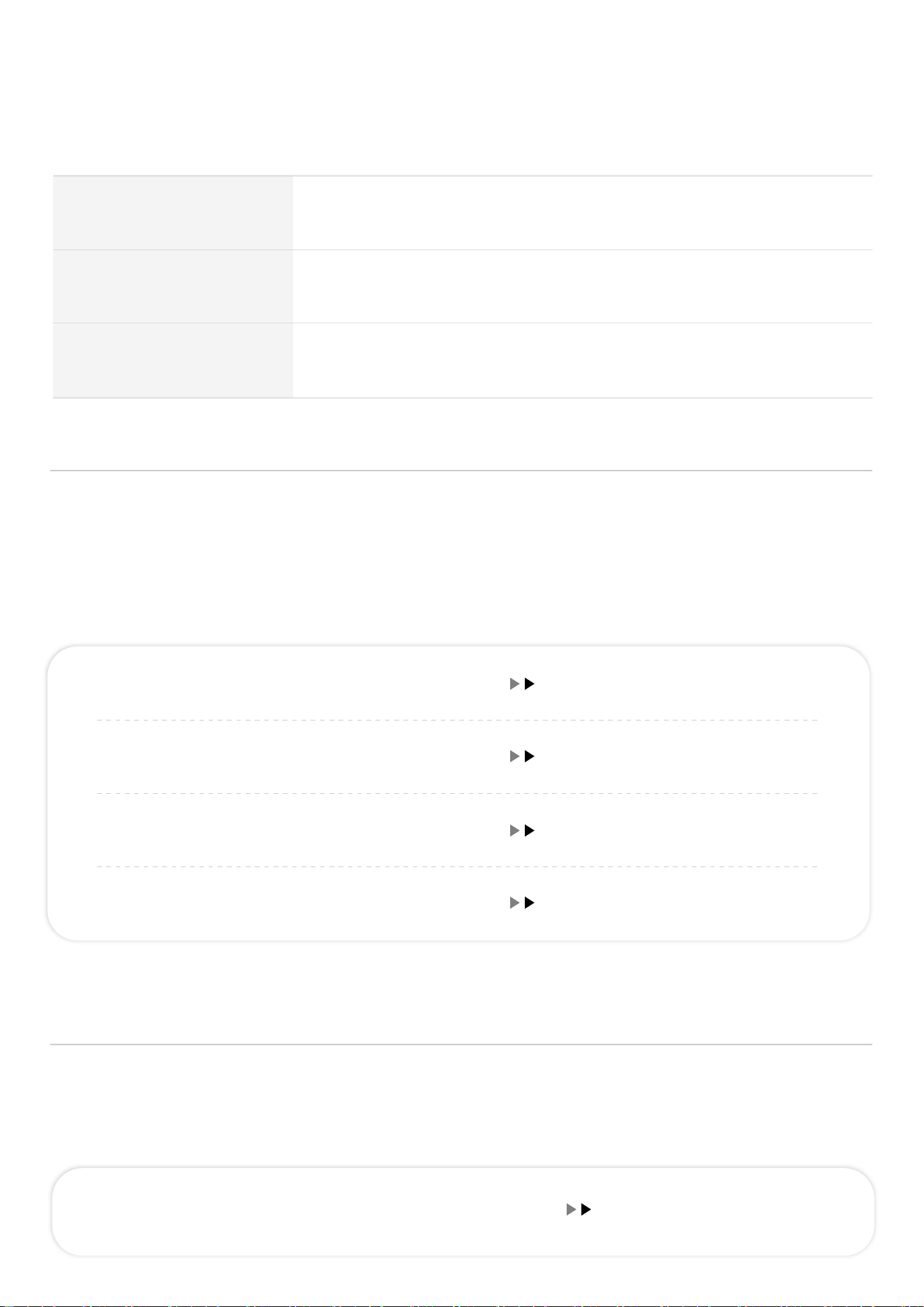
사용 주기
사용 금지 부위
수정체(눈), 눈 주변, 갑상선이 지나는 부위
모드
3/10MHz 듀얼모드 단일 기능
디바이스의 안정적인 사용을 위해 피부 인식 안전 기능이 적용되어 있습니다.
본 기능은 초음파 겔 사용 여부와 피부 접촉 상태를 감지하여, 초음파 겔이 도포되지 않았거나
피부 접촉이 이루어지지 않을 경우 안전을 위해 기기의 동작이 제한됩니다.
*해당 기능은 사용자 안전과 제품 보호를 위한 정상적인 안전 제어 기능이며, 제품의 이상이나 고장이 아닙니다.
피부 인식 기능 안내
디바이스의 오작동 및 과열을 방지하기 위해 움직임 감지 자이로센서 기능이 탑재되어 있습니다.
작동 중 움직임이 감지되지 않으면 안전을 위해 전원이 자동으로 꺼집니다.
이후 다시 사용하려면 전원 버튼을 눌러 디바이스를 재작동해 주세요.
자이로 센서 기능 안내
초음파 겔 O + 피부 접촉 O 동작 가능
초음파 겔 O + 피부 접촉 X 동작 제한
초음파 겔 X + 피부 접촉 O 동작 제한
초음파 겔 X + 피부 접촉 X 동작 제한
1분 이상 움직임 X 전원 OFF
매일 사용 가능, 하루 10~15분 권장
*개인의 피부 상태에 따라 사용 강도와 횟수는 조절하십시오.
08
03. 사용방법
주의사항
*방수·습기 및 초음파 겔·화장품 사용 시 주의
1. 본 제품은 방수가 되지 않으니 욕실, 세탁실, 사우나 등 습기가 많은 장소에서 보관하거나
사용하는 것은 피해 주세요.
2. 물기나 습기에 노출될 경우 제품 고장의 원인이 될 수 있습니다.
3. 초음파 겔이나 화장품을 디바이스에 직접 짜서 사용할 경우, 내용물이 제품의 틈 사이 또는
충전 연결부로 유입될 수 있으며, 제품 고장의 원인이 될 수 있습니다. 이로 인한 고장·손실은
소비자 과실로 제조사에서 책임지지 않습니다. 초음파 겔이나 화장품을 얼굴에 먼저 도포한 후
사용해 주세요.
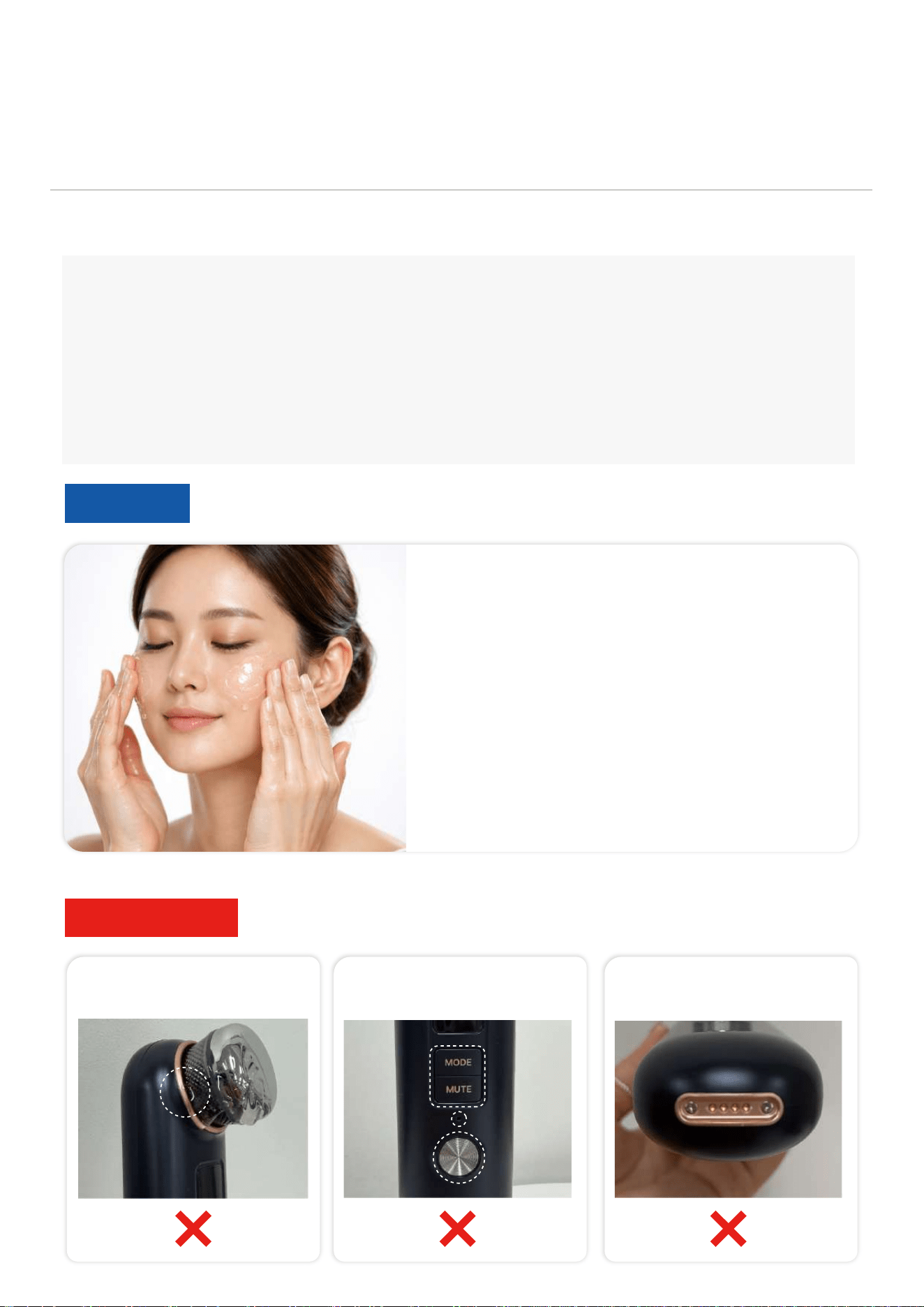
디바이스 사용 전
초음파 겔이나 화장품을
얼굴에 먼저 도포한 후 사용해 주세요.
* 화장품은 크림 형태가 아닌 묽은 액체 제형을 사용해 주세요.
* 마스크팩은 젤리 제형이 아닌 시트형 마스크팩을 사용해 주세요.
사용 가능
내용물 유입 주의
헤드 연결부 제품 틈 사이 충전 연결부
전원 ON
전원 버튼을 3초 이상 누르면 전원이 켜집니다.
전원 OFF
전원이 켜진 상태에서 전원 버튼을 3초 이상 누르면 화면과 함께 전원이 꺼집니다.
강도 설정
전원 버튼을 짧게 눌러 강도를 설정합니다. (1~3단계)
작동 시작
시작 버튼을 짧게 한 번 누르면 디바이스가 작동합니다.
(본 제품은 사용 시간 5분으로 설정되어 있으며, 5분이 경과하면 자동으로 작동이 종료됩니다.)
작동법
09
3
2
1
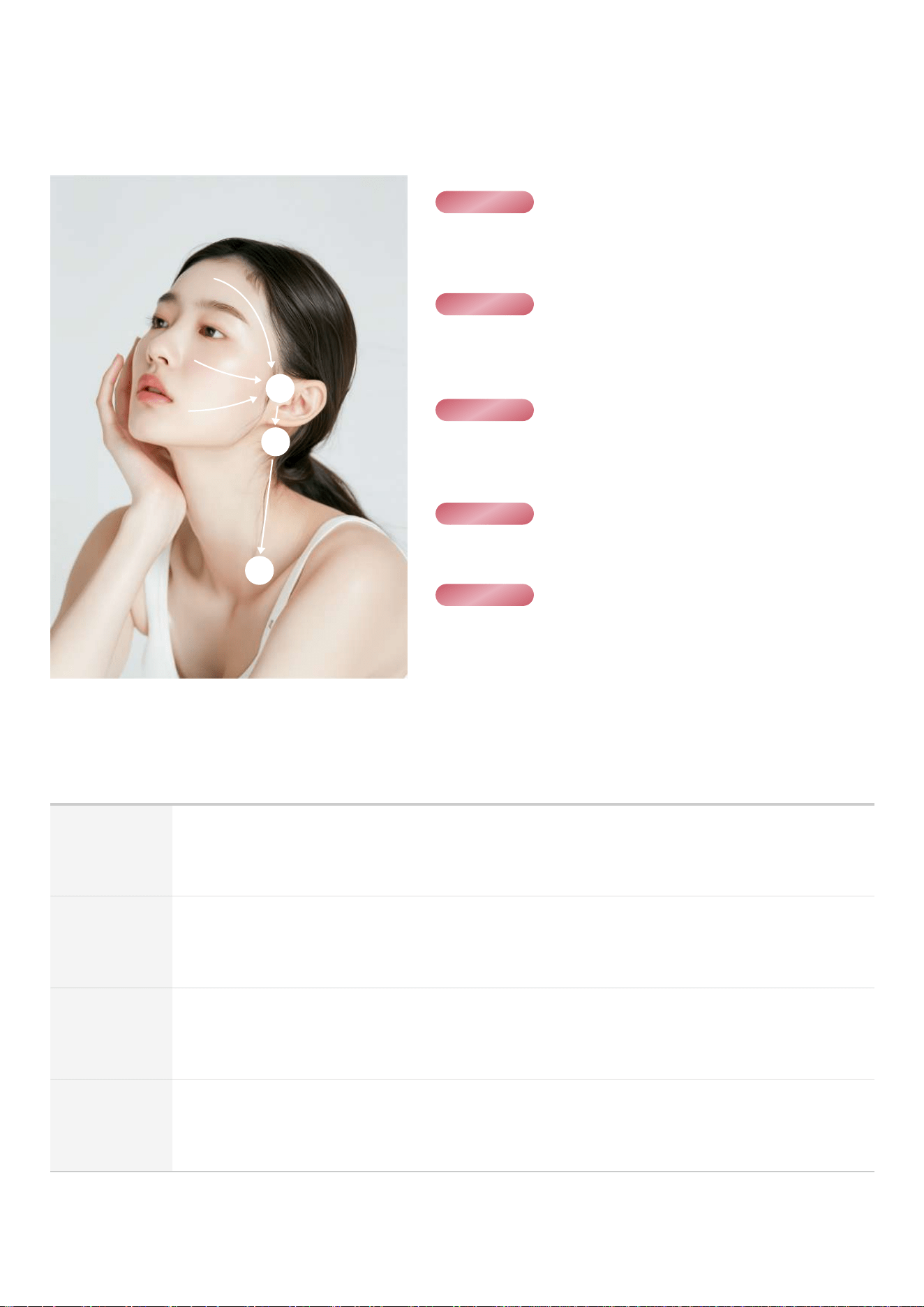
STEP 01
STEP 02
STEP 03
STEP 04
STEP 05
세안 후 물기를 제거하고 관리하려는 부위에 전용 겔을
충분히 도포해주세요.
강도를 선택한 뒤 사용을 시작해 주세요.
*2~3단계 권장
1번,2번,3번 주위를 각 30초씩 순서대로 러빙해주고
3번→2번→1번 방향으로 쓸어내리듯 핸들링해주세요.
턱 부위부터 볼→눈가→이마 순으로 얼굴 전체를 러빙해주세요.
얼굴 관리 후 얼굴 중앙→3번→2번→1번 방향으로 쓸어내듯
핸들링해주세요.
03. 사용방법 - Quick Guide

04. 보증 및 A/S
본 보증 규정은 당사가 정한 보증기간과 조건의 범위에 한하여 적용되며,
A/S서비스는 제품 구매처 또는 본사 A/S 센터로 문의하여 주십시오.
※ 보증기간
제조일로부터 1년 이내, 정품 등록 시 무상 유지보수
보증기간 중 장비 본체의 제조상 결함이 확인될 경우, 무상 A/S 서비스를 제공받을 수 있습니다.
※ 유상 A/S 대상
1) 보증 범위 외 제품
- 보증기간이 지난 제품
- 정상적인 사용에 따른 배터리 성능 저하 및 소모품 마모
2) 소모품 및 액세서리
- 소모품 (도자, 카트리지, 케이블, 어댑터, 핸드피스, 카트 등)
- 별도 제공 액세서리 (거치대, 크레들 등)
3) 소비자 과실 및 관리 미흡
- 낙하충격·개조·수리로 인한 제품 고장
- 비공식 소프트웨어·펌웨어 변경으로 인한 문제
- 천재지변(화재, 지진, 홍수 등)에 의한 파손
※ 예외 사항 (A/S 불가)
분실 또는 도난
※ A/S 배송비
택배로 진행되는 서비스의 배송비는 판매사와 소비자가 각각 부담합니다.
- 수리 전 발송 : 소비자 부담
- 수리 후 발송 : 판매사부담
※ A/S 센터
- 대표 번호 : 010-4505-7989
- 운영 시간 : 오전 9시 ~ 오후 6시 토/일/공휴일 휴무 (점심시간 오후 12시 ~ 1시)
- 주소 : 부산광역시 북구 효열로 111 부산지식산업센터 4층 411호 (주)제이엘유
※소비자 피해보상은 공정거래위원회 『소비자분쟁해결기준』을 따릅니다.
10
2
[정품 등록 방법]
자사몰 접속 (www.jlu.kr) → 정품 등록 페이지 → 로그인 → 제품 시리얼 넘버 입력
*제품 시리얼 넘버 : 본체 별도 표기
제품 보증서
(주)제이엘유의 제품을 구매해 주셔서 감사합니다.
본 제품은 본사에서 제조한 정품으로
엄격한 품질 관리 및 검사 과정을 통과한 후 출하된 제품입니다.
홈페이지를 통해 정품 등록을 완료하시면
보증기간 내 무상 서비스가 가능합니다.
A/S 센터 : 010-4505-7989
04. 보증 및 A/S
11
22
Thank you for purchasing a product from JLU Co., Ltd.
This product is a beauty device, not a medical device.
Please note that the user experience and perceived effects may vary
by individual. If any abnormal symptoms occur, discontinue use immediately.
Table of Contents
- Components & Name
- Product Specifications & Charging Information & Device Care Method
14
15
1301. Caution
02. Product Introduction
- Usage Method 17
03. Usage Method
- Warranty & A/S
- Product Warranty
20
21
04. Warranty & A/S

01. CAUTION
13
1. If a detachable power supply is provided, only use the device with the power supply provided with it.
2. Do not modify or disassemble·repair the product. If the user modifies·disassembles·repairs the product,
free A/S service cannot be provided within the warranty period, therefore be sure to use the designated
A/S center.
3. Do not touch with wet hands, do not wash or immerse the product in water. Be careful as it may cause
electric shock·malfunction.
4. Do not store the product in humid environments (bathrooms·laundry rooms·saunas etc), as this
may cause malfunction. Store it in a dry place, away from moisture.
5. Avoid dropping the product or subjecting it .
6. Disinfect the head(contact area) with alcohol after use. Use a soft cloth for disinfection, as rough cloths
or strong wiping can cause scratches or damage.
7. Use wet tissues or a soft cloth to clean the main body, as using alcohol may cause discoloration·
contamination.
8. For detailed product care·A/S services, follow the manufacturer's warranty regulations.
※ CAUTION
※ Product Care
1. This product is a beauty device, not a medical device. Please refrain from using it for any purpose
other than beauty care.
2. Remove the Protective film from the head before using the device.
3. Before using the product, please make sure it is functioning properly.
4. Please keep out of reach of children.
5. Not intended for use by individuals with reduced physical·sensory, or mental capabilities
(including children) or those lacking experience and knowledge, unless supervised or given
instructions on device use by a responsible person.
6. Avoid use on pregnant·breastfeeding women.
7. Remove metal accessories such as necklaces·earrings etc., before use.
8. Avoid use on areas with skin diseases such as wounds·infections·boils.
9. It is recommended to consult with a medical professional when using with dental treatments such as
implants·nerve treatments·orthodontics.
10. It is recommended to consult with a medical professional before undergoing any cosmetic procedures.
11. Avoid use on people who require health precautions, such as having pacemaker·device implants·
history of severe illness·outpatient treatment.
12. This product is a skin care device intended for use on the face only. Avoid using it on any area other
than the face.
13. Avoid use on pupils(eyes), around the eyes and where the thyroid gland passes.
14. During use, make sure the device is in full contact with the skin.
Do not leave any space between the device and the skin.
15. Use carefully, as prolonged use on one area may cause skin irritation.
16. Set the appropriate power based on the skin sensitivity.
17. We are not responsible for any side effects that may occur as a result of not following our
recommendations.
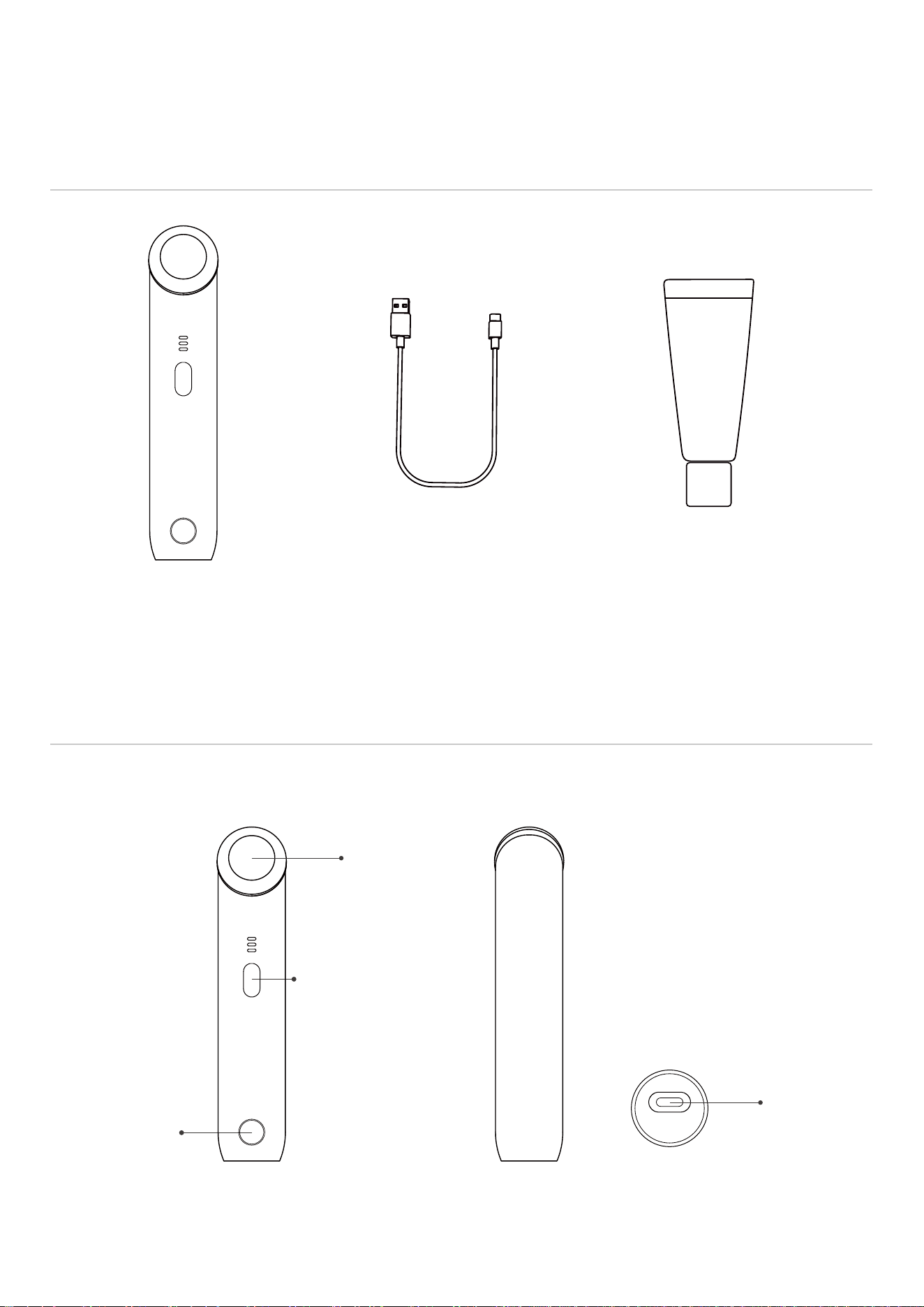
Start Button
[ Back ] [ Bottom ][ Front ]
Power Button
(ON/OFF, POWER)
14
Head (Contact area)
Charging Port
(C-TYPE)
02. Product Introduction
Product Components
Product Name
OVACO TIMESLIP
WATER MAX CREAM 90g
(Complimentary)
Charging Cable
C-TYPE
Main Body
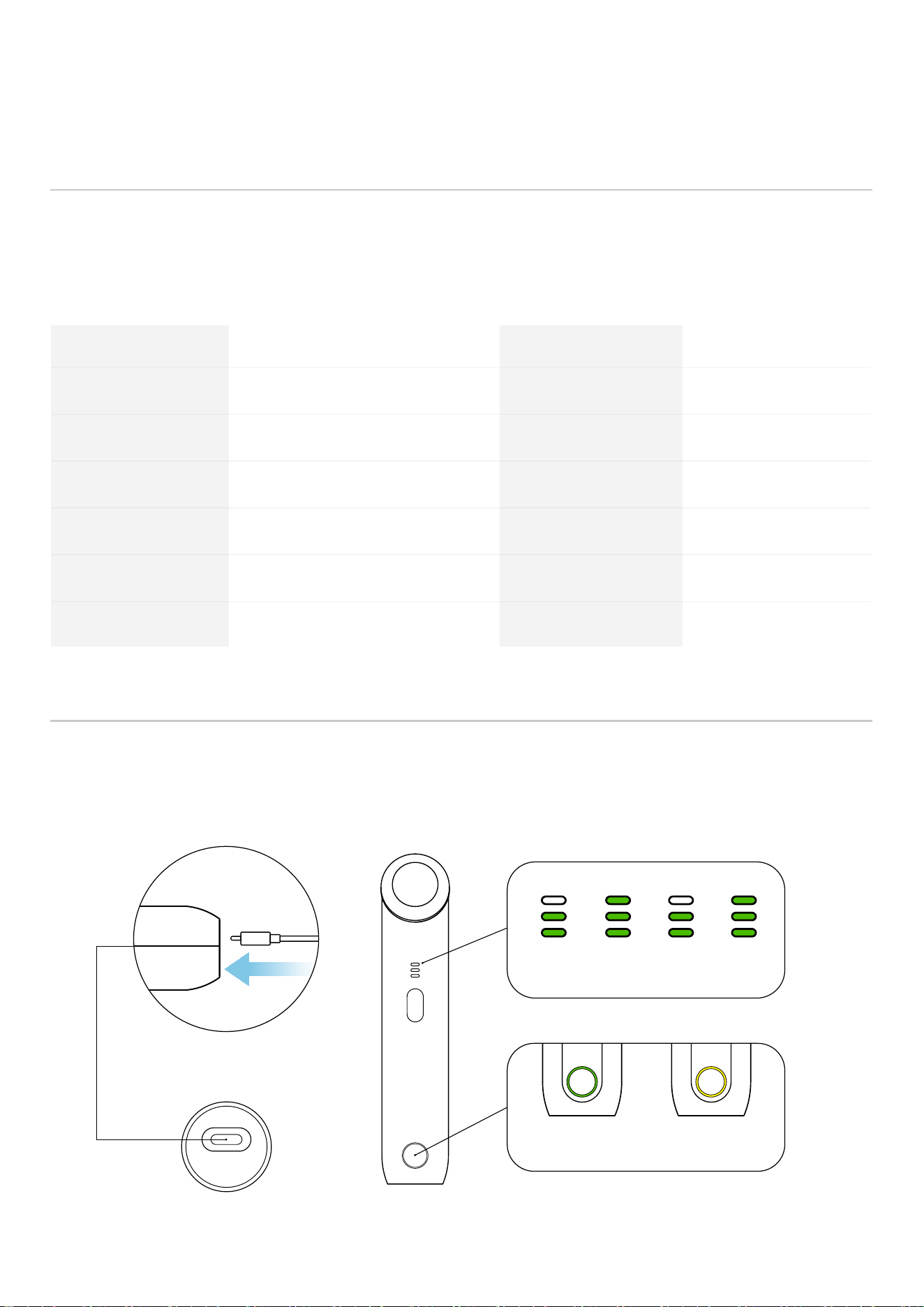
When connecting the charging cable to the charging port on the bottom of the device, push the
connector in completely. If not, charging may not proceed smoothly. If the device does not
power on, check the connection of the charging port on the bottom of the device.
Charging Information
Product Specifications
C-TYPE Charging
Cable Connection
Model Name
Product Size
Input
Charging Cable
Usage Time
Date of Manufacture
JLMC500B
About W36 x H174 x D50 mm
DC 5V 1A
C-TYPE
About 80 minutes
Separate Notation
Skin care device
About 175g
800mAh
About 120 minutes
JLU Co., Ltd.
+82 51-331-7185
Product Name
Product Weight
Battery
Charging Time
Manufacturer/Seller
Customer Center
FCC
2BHHE-JLMC500B
+82 10-4505-7989
A/S Center
[ Bottom ] [ Front ]
▶ ▶ ▶
Charging (indicator light blinking)
ChargingFully charged
15
02. Product Introduction
*This product's specifications may be subject to change without separate notice for performance
improvement.
*The specifications of this product may vary depending on the measurement method,
such as the measuring instruments and measurement locations.
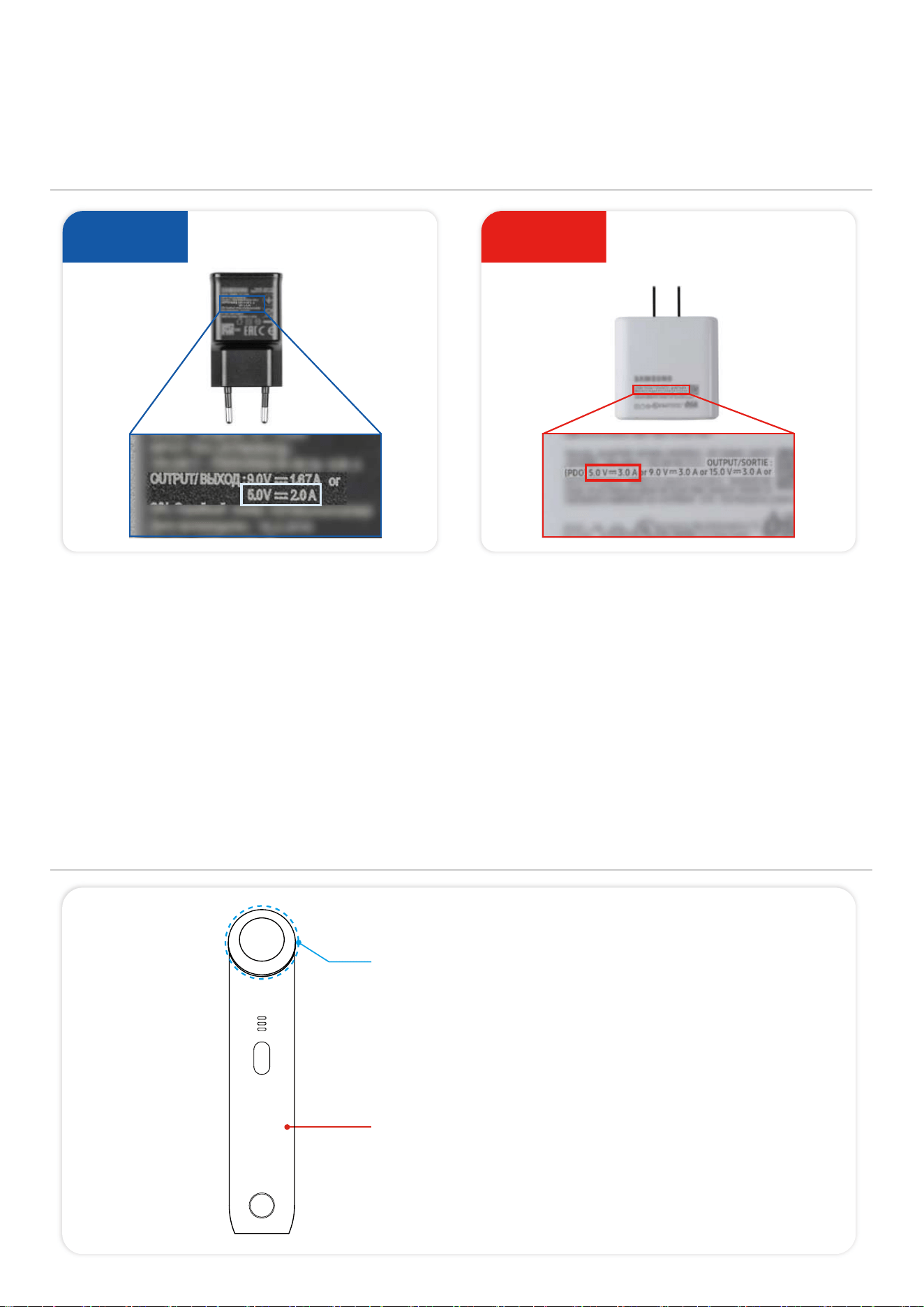
Not usable
Charging Information
Device Care Method
1. Please be sure to use an adapter with the rated voltage (5V 1A / 5V 2A). Adapters that do not meet the specifications such as laptop chargers or
ultra-fast chargers must not be used. If a non-compliant adapter is used, charging and usage time may differ from the stated information, and any
malfunction or damage resulting from this will be considered consumer negligence. The manufacturer will not be held responsible.
2. Please make sure to use the included charging cable. (or a C-to-A cable)
3. Charging using a power bank is not allowed.
4. Please make sure to use the included charging cable. (or a C-to-A cable)
5. After the device is fully charged, if you turn it on and then connect the charger again, the battery indicator at the top may change from 3 bars to 2 bars.
6. This does not mean the battery is insufficiently charged. The 3 bar level is designed to correspond only to the highest voltage range,
so even brief use may cause the indicator to display 2 bars.
7. The battery is still fully charged, and this does not affect the actual usage time.
8. Near full charge or right before complete discharge, the device is designed to charge slowly with a micro-current for battery safety. Because of this,
charging may feel slightly longer than expected.
9. Do not operate the device while charging (e.g., pressing buttons), as this may cause malfunction.
10. If the charging port is not properly aligned, or if dust or foreign substances accumulate on the connector, poor contact may occur. Please check carefully
before charging.
Charger 5V 1A / 5V 2A
Non-standard
charger (5V 3A)
Usable
16
02. Product Introduction
Alcohol Disinfection Allowed
(Use a soft cloth for disinfection)
*Using a rough cloth or wiping the surface too hard may cause scratches
or damage. Product damage due to user negligence is not eligible for
exchange or refund.
Alcohol Prohibited
Use wet tissues or a soft cloth to clean the device body,
as using alcohol may cause discoloration·contamination.
03. Usage Method
17
Usage Cycle
Can be used daily, recommended for 10~15 minutes a day
*Depending on your skin condition, adjust the intensity and frequency of use.
Prohibited
Areas of Use
Pupils(eyes), around the eyes
the area where the thyroid gland passes
Mode
3/10MHz Dual Mode Single Function
Skin Recognition Function Guide
To prevent malfunction and overheating, the device is equipped with a movement detector gyro sensor.
If no movement is detected during operation, the power will automatically turn off for safety.
To resume use, please press the power button to restart the device.
Gyro Sensor that Detects Movements
No movement for more than 1 minute Power OFF
To ensure stable use of the device, a skin recognition safety function is applied.
This function detects the use of ultrasound gel and the skin contact status, and if ultrasound gel is
not applied or skin contact is not achieved, the device operation is restricted for safety.
Ultrasound gel O + Skin contact O Operation available
Ultrasound gel O + Skin contact X Operation restricted
Ultrasound gel X + Skin contact O Operation restricted
Ultrasound gel X + Skin contact X Operation restricted
*This function is a normal safety control function for user safety and product protection, and does not indicate a
malfunction or defect.
18
03. Usage Method
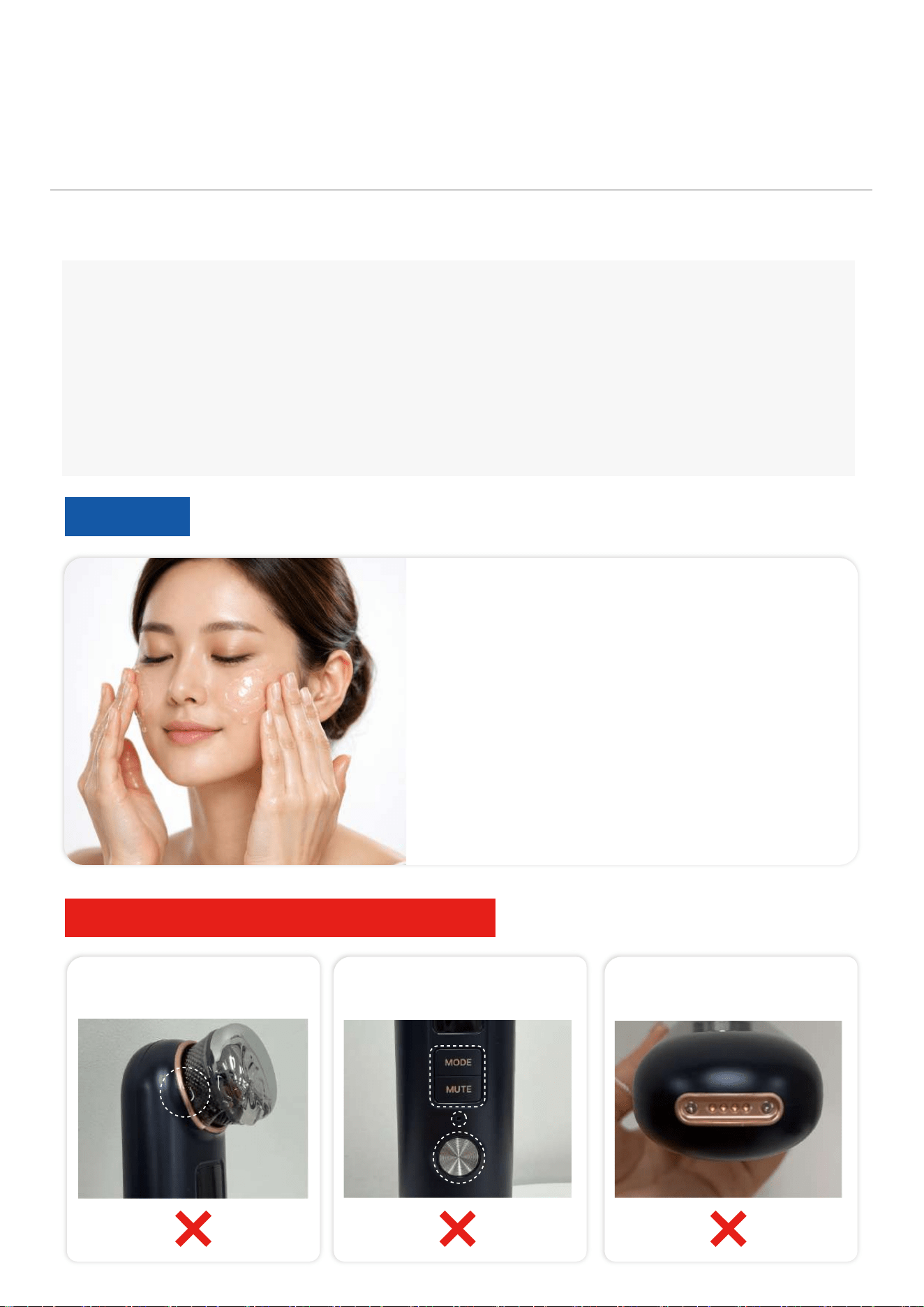
Before using the device,
apply ultrasound gel or skincare to your face.
* Use skincare with a light,
liquid texture rather than cream-type products.
* Use sheet masks instead of gel-type masks.
Usable
Prevent liquid from entering the device
Head connection area Gaps in the product Charging port
Caution
*Precautions for Water·Moisture, and the Use of Skincare
1. This product is not waterproof. Please avoid storing or using it in humid environments
such as bathrooms, laundry rooms, or saunas.
2. Exposure to water or moisture may cause product malfunction.
3. If ultrasound gel or skincare are applied directly onto the device, the contents may
seep into gaps in the product or into the charging port, which may cause malfunction.
Any damage·loss resulting from this will be considered consumer negligence, and the
manufacturer will not be responsible. Apply ultrasound gel or skincare to the face first
before using the device.
POWER ON
Press the power button for more than 3 seconds and the device will turn on.
POWER OFF
When it turns on, press the power button for more than 3 seconds to turn it off.
Power Settings
Set the power by briefly pressing the power button. (Level 1~3)
Operation Method
19
3
2
1
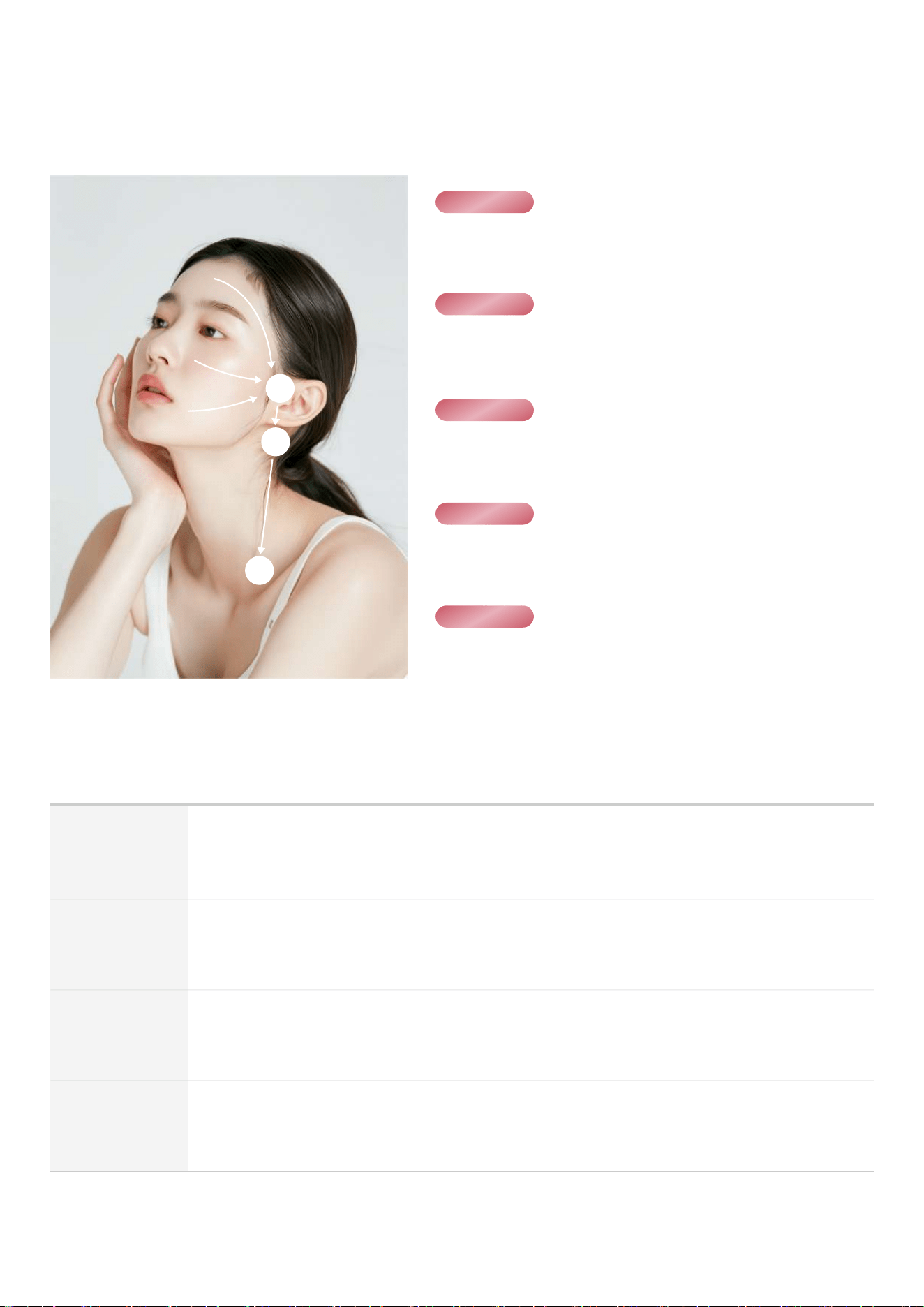
STEP 01
STEP 02
STEP 03
STEP 04
STEP 05
After cleansing, dry your face and apply a sufficient amount
of the gel to the area to be treated
.
Select the desired mode(frequency) and intensity level, then start.
*Level 3~5 recommended
Rub each area in order 1,2,3 for about 30 seconds each,
then gently handle the device in the direction of 3→2→1.
Rub the entire face starting from the chin area then cheeks→
eyes→forehead.
After facial treatment, gently handle the device from the center
of the face to 3→2→1.
03. Usage Method - Quick Guide
Start operation
Press the Start button briefly once to operate the device.
(This product is preset with a 5 minutes operating time, and operation will automatically stop after 5 minutes.)

This warranty policy applies only within the warranty period and conditions specified by our company.
For A/S service, please contact the place of purchase or our headquarters A/S center.
※ Warranty Period
Within 1 year from the date of production
if the product is registered as genuine and a manufacturing defect of the main device is confirmed during the free
maintenance warranty period, free A/S service will be provided.
※ Paid A/S
1) Products outside the warranty scope
-Products past the warranty period
-Battery performance degradation and wear of consumables due to normal use
2) Consumables and accessories
-Consumables (head, cartridge, cable, adapter, handpiece, cart, etc.)
-Separately provided accessories (stand, cradle, etc.)
3) Customer negligence or improper management
-Failures caused by dropping·impact·disassembly·modification·repair
-Issues due to unofficial software·firmware changes
-Damage caused by natural disasters (fire, earthquake, flood, etc.)
※ Exceptions (A/S is not available)
※ A/S Shipping Fee
For services conducted via courier, shipping costs are shared between the seller and the customer.
-Before repair : Customer bears the cost
-After repair : Seller bears the cost
Lost or stolen
※ A/S Center
-Contact Number: +82 10-4505-7989
-Operating Hours: 9:00 AM – 6:00 PM Closed on Sat/Sun/public holidays (Lunch break 12:00 PM – 1:00 PM)
-Address: JLU Co., Ltd. 411 office, Busan Knowledge Industry Center, 111, Hyoyeol-ro, Buk-gu, Busan, Republic of Korea
Consumer compensation for damages will follow the 『Consumer Dispute Resolution Standards』 set by the Korea Fair Trade Commission.
20
04. Product Warranty & A/S
2
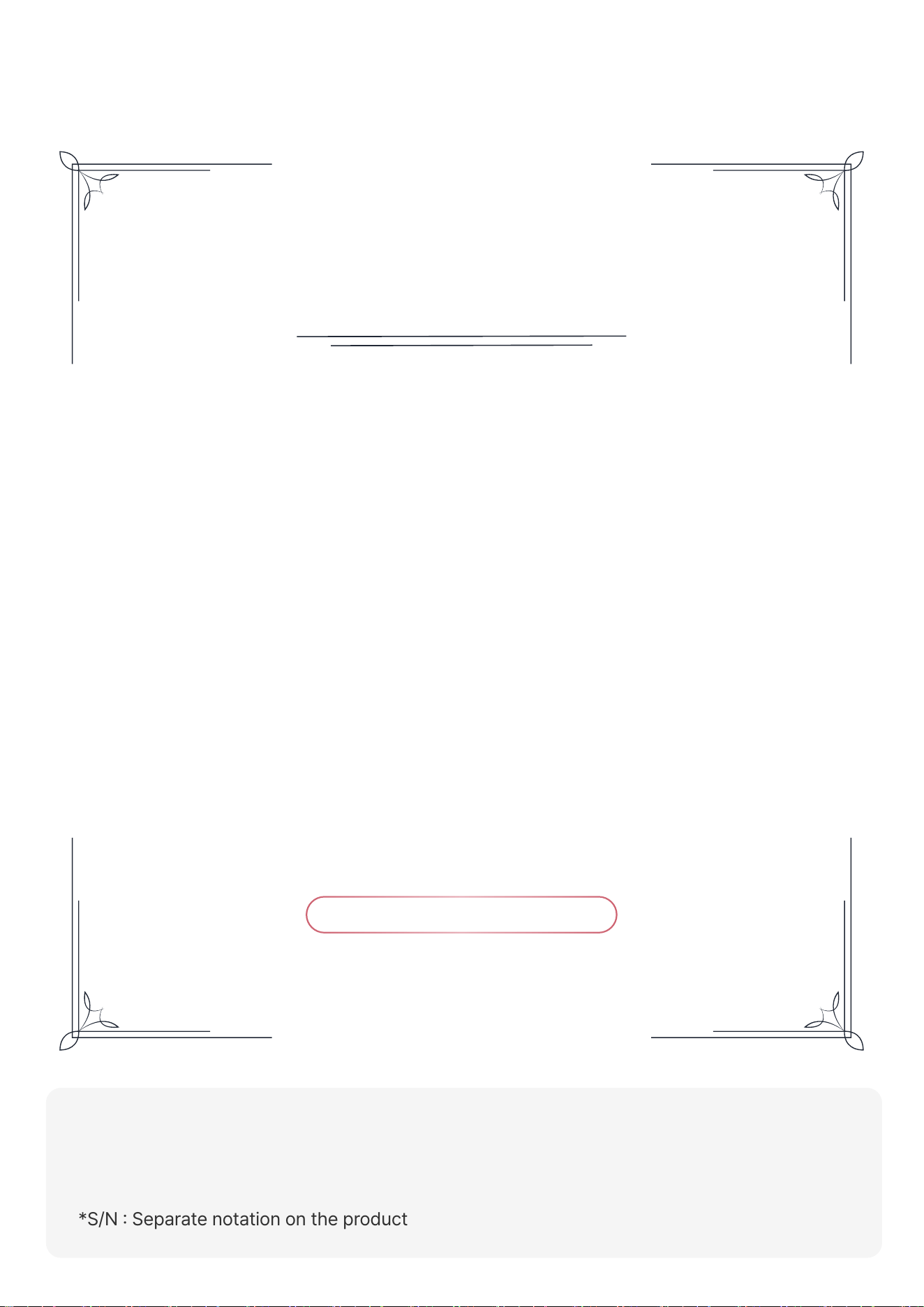
[How to Register the Product]
Visit the official website (www.jlu.kr) → Go to the Product Registration page
→ Log in → Enter your product serial number
*S/N : Separate notation on the product
Product Warranty
Thank you for purchasing JLU products.
This product is a genuine product manufactured
by the headquarters and shipped after passing strict quality
control and inspection processes.
Free service within the warranty period is available
if you complete the product registration through the homepage.
A/S Center : +82 10-4505-7989
04. Product Warranty & A/S
21
2
22
FCC Compliance Statement
This device complies with part 15 of the FCC rules. Operation is subject to the following two conditions:
(1) This device may not cause harmful interference, and (2) this device must accept any interference received,
including interference that may cause undesired operation.
FCC Caution
• Reorient or relocate the receiving antenna.
• Increase the separation between the equipment and receiver.
• Connect the equipment into an outlet on a circuit different from which the receiver is
connected.
• Consult the dealer or an experienced radio/TV technician for help.
Any changes or modifications not expressly approved by the party responsible for compliance could void the user's
authority to operate this equipment. This transmitter must not be co-located or operating in conjunction with any other
antenna or transmitter.
FCC Interference Statement
This equipment has been tested and found to comply with the limits for a Class B digital device, pursuant to part 15
of the FCC Rules. These limits are designed to provide reasonable protection against harmful interference in a residential
installation. This equipment generates,uses and can radiate radio frequency energy and, if not installed and used in
accordance with the instructions, may cause harmful interference to radio communications. However, there is no guarantee
that interference will not occur in a particular installation. If this equipment does cause harmful interference to radio or
television reception, which can be determined by turning the equipment off and on, the user is encouraged to correct the
interference by one of the following measures:
04. Product Warranty & A/S